#site-support
1 messages · Page 1 of 1 (latest)
 craggy skiff
 nimble hatch
Hello everone, I am currently in the Network Services 2 Room
Currently in the Enumerating SMTP
I am supposed to get the mail name by following the process of: search smtp_version > options > set rhosts 10.10.10.10 > run
It does work but it doesn't show the mail name or the MTA but when I tried the same process on my local VM Box it does show them
I know I can just copy and paste the answer but I want to understand what's gone wrong
Thanks in advance ❤️
 weary spindle
is 10.10.10.10 the correct IP?
nimble hatch
no of course just an example
it's 10.10.101.132 right now
trying to include a screenshot of what I mean but I think it's banned here
weary spindle
!docs verify
 sharp bisonBOT

 TryHackMe
Verify your TryHackMe Profile!
From TryHackMe with ❤!
weary spindle
Follow that link to verify your Discord with THM.

 tranquil glen
Does anyone know why the windows boxes I connect to today are really flaky. They keep restarting and saying unstable
 whole heart
I have made a bootable USB with this version of 'parrot os' but unable to see any 'live mode' option while booting it via usb.
Please help me with this!!!

 tribal burrow
whole heart
I have made a bootable USB with this version of 'parrot os' but unable to see an...
tribal burrow
whole heart
I have made a bootable USB with this version of 'parrot os' but unable to see an...
there is option, might in BIOS, to choose what to load from what drive
tribal burrow
whole heart
I have made a bootable USB with this version of 'parrot os' but unable to see an...
adn might the VM is better option
 cerulean bloom
why this happens?


not blocked
Sudo Security Bypass
no response
once i got into , but again got stucked
sharp bisonBOT
TryHackMe
Use our VPN troubleshooting script to diagnose common issues!

From TryHackMe with ❤!

 stoic pollen

 jolly helm
Hello
There is something wrong with Buffer Overflow Prep room
nc is refusing my connection
my openvpn is connected
flag{connection_verified}
jolly helm
yes, I also tried to terminate the machine and run another
tribal burrow
need to verify first
 naive dust
is this time bug ? I am in France.
 tribal burrow
what time zone you set in acc
naive dust
tribal burrow
what time zone you set in acc
where can i get this information ?
tribal burrow
usualy after midnight you can get new streak
sec
go in profile and go public profile
naive dust
good !
tribal burrow
what flag is
naive dust
i need to wait 1:00
tribal burrow
then is now i guess
tribal burrow
cool
 solid yarrow
in the content discovery room when Iaunch the machine it does not connect on port 80 .. it keeps complaining "Error response Error code: 405"
naive dust
My VPN is not connecting to the holo room where I last left off a day or 2 ago, because I was trying out a 2nd room, and just finish it.
Everything should be fine. I killall openvpn beforehand. The holo room's network status is running. thm-Troubleshoot. The access via vpn page is all green. Although when I input the cmd curl 10.10.10.10/whoami, there is no reply. I still got 5 days of access left in the holo room.
I can't keep getting this nonsense every time I come back to any room where I left off.


 celest wadi
naive dust
My VPN is not connecting to the holo room where I last left off a day or 2 ago, ...
celest wadi
naive dust
My VPN is not connecting to the holo room where I last left off a day or 2 ago, ...
are there any errors or warnings in the openvpn command output? (it should say initlization completed)
naive dust
no error. and it did said initialization sequence completed
I don't think it was because of foxyproxy using zap? I closed the firefox, before turn on zap, and then open firefox again.
celest wadi
no, browser settings/configs shouldn't bother with openvpn, try regenerating and downloading your vpn config again
naive dust
Oh I should had mentioned I did that earlier too. When the old ovpn failed. I went to the access page, regenerate a new one, deleted the old one, and use the new ovpn instead.
celest wadi
naive dust
Oh I should had mentioned I did that earlier too. When the old ovpn failed. I we...
wait, you're using the holo openvpn right?
naive dust
naturally
celest wadi
that's not the same as the regular one
the curl 10.10.10.10 check fails
you can only access the machines in the network,, try pinging them or accessing them in some way
naive dust
ping fail
celest wadi
there's a bunch of windows machines, try some other way
naive dust
what other way are there?
celest wadi
access the machines website?
naive dust
hey people
i am a new one
i wanna know, that like,
i am doing the presecurity
so these things won't work untill we practice it or execute ou knowledge somewhere, right?
so, we can't hack in real world by the machine on the thm website
we need some software, or at least some app where we can practice our codes
what do we use for it
i am on windows 10 and i am a beginner
plz help me out
u mean their attackbox, or web kali linux?
idk anything
i just know kali linux is an os
celest wadi
naive dust
u mean their attackbox, or web kali linux?
the actual machines in the network that are running a website
naive dust
nothing else
i mean that, if you wanna hack computer A, then you need to put your coding somewhere, idk it's name, you need to put the coding somewhere, you can't do it on thm attackbox of any path right
i am asking, that if I want to hack my phone, then i need some app or software on my pc or laptop in order to do it, what is that app where I can practice my skills.
app or something else
maybe that's called an attack box
 analog dagger
have machines been very laggy/not respony for anybody else today
weary spindle
They've been fine for me so far.
analog dagger
hmm... i've terminated them and relaunched on a few machines and its the same issue only on my vm
weary spindle
Your VM is laggy?
analog dagger
no like the machines i have connected to via my vm
my internet is fine on my pc but seems to be something wrong with the connection between my vm and the thm machines
ill just wait a day and see if its better just kind of annoying
like im typing into the ssh connection and it doesnt actually type my text for minutes or trying to connect to the webservers on the boxes it just hangs and finally connects after minutes
celest wadi
analog dagger
like im typing into the ssh connection and it doesnt actually type my text for m...
you might have multiple tun interfaces, check with ip a if there's more than one tun0
analog dagger
celest wadi
you might have multiple tun interfaces, check with `ip a` if there's more than o...
thats it thanks boss
 scenic torrentBOT
Gave +1 Rep to @celest wadi
jolly helm
jolly helm
Hello
There is something wrong with Buffer Overflow Prep room
nc is refusing my...
any solve for this ?
weary spindle
jolly helm
any solve for this ?
Where are you running nc?
 sharp crescent
it seems that i can not pay
i tried paying both with paypal and card
and nothing happens
even tho i have it loaded with money
jolly helm
weary spindle
Where are you running nc?
on my kali machine
also I tried from attacking box
celest wadi
sharp bisonBOT
TryHackMe
Contact us for support, teaching enquires and more!
From TryHackMe with ❤!
TryHackMe
That topic does not exist!
Use !docs to list all of the available topics.
From TryHackMe with ❤!

 junior halo
why attackbox lasts 40 minutes and not 1 hour as it should be?
 lusty steeple
The attackbox firefox has been running very slow since a few days
Please suggest what to do
sharp crescent
contacted it hope it gets solved
 lethal aurora
Can anyone help me with /etc/hosts here? I've added the needed stuff to the hosts file, but I'm getting this error. This worked completely fine before, I don't know what's causing this now

I've tried flushing the DNS on my Ubuntu, but it did nothing
I do have Mullvad installed, but it's not active at the moment

I was hitting the IP directly instead of annex.uploadvulns.thm
naive dust
Hello, I've had this problem with THM's attackbox, not using any VPN's on my end, and my internet connection is perfectly fine.
It becomes horrendously slow on occasion. To the point where it literally takes seconds (2-4 secs. It varies.) to even move when scrolling up, down, or even loading anything when clicked. Is there anything that can be done aside from resorting to the use of openvpn?
 mystic sphinx
i wanted to ask one thing, if someone would be so kind to tell me, the people who are mentors, do they work on weekend, or its unpolite to message support@tryhackme.com during weekend
It's rather not technical problem, so i dont want to bother you with it here, i just wanted to clarify, why when i was asked about additional information (my nickname and number of days of streak) nobody got, to me further. There is no issue, and sorry bothering here in tech help with this question.
celest wadi
wait, you guys don't get paid 
mystic sphinx
will do
 languid ocean
Hello, is there any way to unlink THM-Discord token from our Discord account? And if possible can somebody tell me how?
weary spindle
languid ocean
Hello, is there any way to unlink THM-Discord token from our Discord account? An...
You need a senior mod for that.
Not a senior, you want it removed from your current account.
Any mod will do.
languid ocean
Thanks for the information
Should i dm one or wait for one of them to see my request?
weary spindle
Wait until you see them.
 crystal marlin
languid ocean
Hello, is there any way to unlink THM-Discord token from our Discord account? An...
crystal marlin
languid ocean
Hello, is there any way to unlink THM-Discord token from our Discord account? An...
What's the reason for the unlink ?
celest wadi
that room went private so there was likely a bug with it,
crystal marlin
languid ocean
Hello, is there any way to unlink THM-Discord token from our Discord account? An...
Actually, just DM me about it once you read that.
celest wadi
nope, if you've joined you still have access, newer users don't
mystic sphinx
if its public i can also try it out if you want
celest wadi
the private room joining barrier is a joke tbh, just need a different link,
solid yarrow
in the content discovery room when Launch the machine it does not connect on port 80 .. it keeps complaining "Error response Error code: 405"
I also see docker running on it root@ip-10-10-225-124:~# docker ps
CONTAINER ID IMAGE COMMAND CREATED STATUS PORTS NAMES
6fa1c9fdeab9 mpepping/cyberchef "http-server -p 8000" 8 months ago Up 2 minutes 0.0.0.0:7777->8000/tcp mystifying_newton
not sure what needs to be checked
no when I login to the attack box i get a shell
I am trying to troubleshoot why the website is not coming up
yes it is up
and it gives me the ip which I can connect via vpn
yes
Take a look at the robots.txt file on the Acme IT Support website to see if they have anything they don't want to list - To do this open Firefox on the AttackBox, and enter the url: http://MACHINE_IP/robots.txt (this URL will update 2 minutes from when you start the machine in task 1)
this is what the room says to do
you know what ... you are right .... thanks
I now started it and it is working as it should be
mystic sphinx
public and it is weird that when i ran the default web attackbox according to instructions (the webserver and payload "server") when i tried to contact them from the actual challenge machine it was impossible, immediately denied, i will try to do it later with some other (non tryhackme) attackbox
 wintry tiger
Hello, I have a slight problem.
I am in the Basic Malware RE room and i cannot unzip the task files.
Archive: strings1.zip
skipping: strings1.exe_ unsupported compression method 99
any suggestions?
 bronze vale
wintry tiger
Hello, I have a slight problem.
I am in the Basic Malware RE room and i cannot ...
bronze vale
wintry tiger
Hello, I have a slight problem.
I am in the Basic Malware RE room and i cannot ...
Does the room specify an unzipping method, if not, can you try a different tool to unzip it?
Hm, could be a problem with the way they’re doing it, won’t know until they reply :p
If they need help they’ll come back ig
wintry tiger
Apologies, I had to run out, bit of an emergency.

this also does the same when using sudo.
 naive dust
I'm sure the holo room "access to machine" connection to VPN is broken. I been trying since yesterday to regain access to it, but nothing.
Might want to investigate the issue between the link holo room, and VPN. #site-support message
I start by
sudo killall openvpn
sudo systemctl start->enable->status openvpn
sudo openvpn ./openvpn Cell-holo.ovpn
sudo ./thm-troubleshoot (And this one give me issue too as it refuse to change the color.)
Click the holo room start button, and check the access via VPN page to see if the holo server status, connected are all tick, and given me the internal virtual IP. I still got 4 days of access left to the holo room too, and counting.
Is it common for room to just break suddenly?
naive dust
@gray loom How can I scan S-SRV01 if I cannot even access the machine.


The http://10.200.109.33/ website work though after timeout.
I tried that too, but didn't work
No.

That's the headache. Why the **** wouldnt the machine get connected!

The holo site still didnt give me the green accessed machine.
 smoky harbor
Anyone able to confirm if the Follina room is all squared away?
naive dust
naive dust
btw the "curl 10.10.10.10/whoami" cmd gave no response back. Its without the "s" to "curl".

Just this.
Is that so.
So, that one is broken since forever. the thm-troubleshoot can be ignored.
what else should I ignore?
smoky harbor
You can ignore our snarkiness when we tell you just friggin move on with the network.
naive dust
@smoky harbor Wait ur turn.
smoky harbor
WTF? Why? That's no fun. Thisn't isn't D&D.... no turn waiting.
nimble hatch
Hello again. I have an issue that I found no answer to at all
when I try brute forcing with Hydra to get ssh password, Hydra scans the password file (rockyou.txt) and keeps going even after passing the actually password.
I've trying with -f and -F and it doesn't work either.
the file contains more than 14 million passwords and it will take hours to finish on my pc, and note the actually password is at line 145 of the file
 whole helm
naive dust
<@595967113328459776> Wait ur turn.
whole helm
naive dust
<@595967113328459776> Wait ur turn.
haha
nimble hatch
hydra -t 16 -l administrator -P /usr/share/wordlists/rockyou.txt -vV -F 10.10.25.54 ssh
smoky harbor
lower case f isn't it? -f
nimble hatch
smoky harbor
lower case f isn't it? `-f`
I've tried both f and F
I don't know I can't wait until it finished the 14m passwords it will take more than 5 hours I think
it passes it like the others, doesn't stop
it's at 145 and I've let it go up to 600 before I stopped it

TryHackMe
TryHackMe is a free online platform for learning cyber security, using hands-on exercises and labs, all through your browser!
I gave u the exact line I used
sure


and another fun wall to stop me from learning today, I can't make the ssh connection with credentials >> administrator:alejandro
@gray loom in case u didn't notice I sent them
nimble hatch
tried it and restarted the whole page, didn't work either
i know that I should bother someone to help me but I have no idea what to do
 sleek jackal
nimble hatch
tried it and restarted the whole page, didn't work either
sleek jackal
nimble hatch
tried it and restarted the whole page, didn't work either
try terminating the current machine, disconnecting your VPN connection (just kill the process), log out of THM and clear your cache. After all this is done, go in reverse order to get back to the box (log in, connect VPN, start box, and give it ten minutes to completely boot). Then see if the same thing happens again.
If it continues, then I would say reach out to support.
nimble hatch
will try that, thanks alot
sleek jackal
also, if you are using a VM, then restart the VM. like, actually go into power menu and restart or shutdown the box. not just put it to sleep/standby
and hydra can be dumb sometimes, despite being a great tool. if you know the password, just grab that and like 100 other passwords and dump them into a text file to see if it does the same thing. if it does, it could just be hydra being dumb. make sure your kali instance is up to date.
sleek jackal
nimble hatch
I've tried both f and F
and according to the man page, -F is for usage with -M, which itself is used to point to a server list for parallel attacks. since you are using one, I don't see why you would need to use the -F argument
 lethal crag
I have bought the subscription, but the attackbox is so slow and laggy
Anyway to fix that?
sleek jackal
lethal crag
Anyway to fix that?
there is a set amount of resources that are allocated for each box. it isnt going to be as fast as if you were using a VM or running your attack directly from you host.
what you consider 'slow and laggy' is probably normal for the box considering that you are trying to utilize a website connected virtual machine
lethal crag
well, I can't use my machine either because of the UDP ban in my country
its frustrating
sleek jackal
how does a whole country have a udp ban?
lethal crag
trash country
sleek jackal
where are you? russia?
china mainland?
nvm i found you
kind of makes sense, but sucks they did that.
lethal crag
Using the THM troubleshooting Script:
sleek jackal
caused a lot of controversy
sleek jackal
lethal crag
well, I can't use my machine either because of the UDP ban in my country
anyways, if you can't use your machine, then how are you accessing the site?
lethal crag
sleek jackal
anyways, if you can't use your machine, then how are you accessing the site?
The site isn't blocked
its just the protocol
vpns that use UDP won't work here
only tcp would work
sleek jackal
lethal crag
vpns that use UDP won't work here
so then use a vpn that supports tcp
lethal crag
tryhackme don't have tcp
sleek jackal
that has nothing to do with a machine. that comes down to your software choices
lethal crag
HTB does
lethal crag
sleek jackal
that has nothing to do with a machine. that comes down to your software choices
I tryied to change the .ovpn configuration to TCP but it didn't work
sleek jackal
most people use openvpn, but there are others.
lethal crag
sleek jackal
most people use openvpn, but there are others.
I tried using openvpn but I can't because THM only supports tcp connections
UDP*
 naive tundra
Hello, I’m having trouble with my my VM accessing web pages on Throwback network. It’s pinging them fine, but it keeps timing out in my browser
nimble hatch
I found something interesting .. I created a txt containing random 100 passwords including the presumably right one "alejandro" and it actually didn't catch it as the valid password
 jovial mango
nimble hatch
I found something interesting .. I created a txt containing random 100 passwords...
jovial mango
nimble hatch
I found something interesting .. I created a txt containing random 100 passwords...
Which room?
nimble hatch
@sleek jackal 0 valid passwords found
TryHackMe
TryHackMe is a free online platform for learning cyber security, using hands-on exercises and labs, all through your browser!
my assumption here is the password is actually wrong as of the fact that I can't make an ssh connection using "admin
using "admin" "alejandro"
nimble hatch
nimble hatch
note that it's the right answer in the room
jovial mango
nimble hatch
my assumption here is the password is actually wrong as of the fact that I can't...
can you try administrator?
nimble hatch
sorry i meant administrator
sorry just forgot
user: administrator
pass: alejandro
that's what i wrote as u can see in the screens above
@jovial mango do you have something to help me?
jovial mango
nimble hatch
<@810555657488695371> do you have something to help me?
Screenshot?
sleek jackal
give me the exact syntax you are using @nimble hatch
and which task is it again?
7? I did this room and it worked for me when I did iirc
 livid juniper
Hello team,
We are facing some issues in connecting openvpn with holo network we have downloaded the holo openvpn config file and when we run it we get TLS error
 mystic sphinx
lethal crag
trash country
mystic sphinx
lethal crag
trash country
dont bring down the whole country, for decisions of government
mystic sphinx
lethal crag
I tried using openvpn but I can't because THM only supports tcp connections
lets rather find some solution to this
 stray cove
unfortunately, we cannot help you circumvent a country's VPN ban
mystic sphinx
stray cove
unfortunately, we cannot help you circumvent a country's VPN ban
ah, i didnt know that is tryhackme policy, i mean is it a policy?
weary spindle
Getting round country blocks isn't ethical.
stray cove
mystic sphinx
ah, i didnt know that is tryhackme policy, i mean is it a policy?
it's unfortunate, but trying that may result in a site ban
mystic sphinx
So helping would mean basically going directly against state actor that is writing law and can ban tryhackme in entire country?
mystic sphinx
stray cove
it's unfortunate, but trying that may result in a site ban
ok, i get you 100%.
stray cove
mystic sphinx
So helping would mean basically going directly against state actor that is writ...
I mean more that you can be banned from the site
mystic sphinx
ok, then i am not getting you at all
i was born in totalitarian state, and throught all the history of the cold war the people from countries that were not totalitarian were helping people who lived in totalitarian countries to circumvent the censoprhip and restrictions
Is the logic that "its the law there" and since we are ethical we have to follow law whatever it is?
mystic sphinx
stray cove
I mean more that you can be banned from the site
that is the least interesting aspect of this, i want to understand the logic of decision
if it is "we follow law of the country, whatever it is" i understand it
stray cove
Basically
naive dust
anyone get this while trying to connect to openvpn?
2022-07-24 08:03:11 DEPRECATED OPTION: --cipher set to 'AES-256-CBC' but missing in --data-ciphers (AES-256-GCM:AES-128-GCM:CHACHA20-POLY1305). OpenVPN ignores --cipher for cipher negotiations.
2022-07-24 08:03:11 Cannot find ovpn_dco netlink component: Object not found
2022-07-24 08:03:11 Note: Kernel support for ovpn-dco missing, disabling data channel offload.
2022-07-24 08:03:11 OpenVPN 2.6_git x86_64-pc-linux-gnu [SSL (OpenSSL)] [LZO] [LZ4] [EPOLL] [PKCS11] [MH/PKTINFO] [AEAD] [DCO] built on May 30 2022
2022-07-24 08:03:11 library versions: OpenSSL 3.0.3 3 May 2022, LZO 2.10
2022-07-24 08:03:11 OpenSSL: error:0480006C:PEM routines::no start line
2022-07-24 08:03:11 OpenSSL: error:0A080009:SSL routines::PEM lib
2022-07-24 08:03:11 Cannot load inline certificate file
2022-07-24 08:03:11 Exiting due to fatal error
Run it with sudo permissions
just type: sudo !!
or: sudo openvpn <OpenVPNfileDir>
Oh wait
i am using sudo
I got a simillar error and running with sudo perms fixed it
jovial mango
naive dust
i am using sudo
can you try changing the vpn server and then download the vpn file again?
naive dust
jovial mango
can you try changing the vpn server and then download the vpn file again?
tried already
naive dust
naive dust
anyone get this while trying to connect to openvpn?
```2022-07-24 08:03:11 WARNI...
re download the VPN file prob
🧠
jovial mango
naive dust
tried already
which server you have tried?
naive dust
IN , EU 1
tribal burrow
can you run: `openvpn --version | awk '{print $2}' | head -n 1' and show results
tribal burrow
check pinned messages on this room
naive dust
gotcha
naive dust
tribal burrow
check pinned messages on this room
still does not work 😦
dev tun
proto udp
sndbuf 0
rcvbuf 0
remote ||**********||
resolv-retry infinite
nobind
persist-key
persist-tun
remote-cert-tls server
auth SHA512
data-ciphers AES-256-CBC
comp-lzo
pull
key-direction 1
verb 3
reneg-sec 0
when i cat the file
still shows same error , and yes i saved it
lusty steeple
Hii
I need help
I tried sensitive data exposure task of owasptop10 room and the answer did not come up as the way described in walkthrough.
Exact info --
/Assets directory is not mentioned in source code of login page of web application
crystal marlin
lusty steeple
I tried sensitive data exposure task of owasptop10 room and the answer did not c...
It is, what page are you on ?
lusty steeple
Sensitive data exposure challenge
crystal marlin
lusty steeple
Sensitive data exposure challenge
No I mean, what page of the web app are you on ?
lusty steeple
/login
crystal marlin
lusty steeple
/login
Show me a screenshot of where you are looking pls
 crystal marlin
lusty steeple
crystal marlin
lusty steeple
A screenshot of the target machines web app, at the place you are searching for the mentioned directory
 crystal marlin
lusty steeple
crystal marlin
lusty steeple
Wait, you are actually really searching on crakstation.net for it?
I thought that was just a some kind of fancy placeholder 😄
Why you are searching on crackstation for it?
That's not the target machine
 dawn raft
Heya! i was looking to change my username but looks like there's no way ... any idea how i can do if i can? thanks
crystal marlin
dawn raft
Heya! i was looking to change my username but looks like there's no way ... any ...
@lusty steeple And just so you know, make sure you are not messing around with machines outside of the THM network.
It's not a big deal by just looking at the page source, but just so you aware that THM will only have you attack machines that are within their network.
lusty steeple
crystal marlin
<@999443496064798732> And just so you know, make sure you are not messing around...
Attackbox firefox has been running too slow lately
So I configured an openvpn on my pc and them used the link inside the task to go to crackstataion.net
Ohh , I had to go to the IP address of target machine.
Sorry I messed it all
 potent hawk
i have problem with openvpn connection
can anyone help me
openvpn take long time to connect after that the ping command output show there is a lot of packets loss
and machines dont work with me
all rooms not specific room ....not just the ping command all the machine not works
i installed the latest openvpn version and tried many configuration files
stray cove
really now?
stray cove
potent hawk
i installed the latest openvpn version and tried many configuration files
check the pinned messages first
sharp bisonBOT
TryHackMe
Verify your TryHackMe Profile!
From TryHackMe with ❤!
potent hawk
stray cove
check the pinned messages first
my openvpn version: 2.5.7
ok give me a minute please
i don't have the permission to send images
i think this screenshots will explain the problem


 crystal marlin
potent hawk
i think this screenshots will explain the problem
crystal marlin
potent hawk
i think this screenshots will explain the problem
Show a screenshot of your openvpn output when connecting to the THM VPN pls
potent hawk


it takes minutes like this some times done sometimes no and the target machines not works
crystal marlin
potent hawk
Ye, it's not even connecting you
Could you send me your .ovpn file via DM ?
potent hawk
crystal marlin
Ye, it's not even connecting you
sometimes connecting me but the machines still not works
potent hawk
crystal marlin
Could you send me your .ovpn file via DM ?
ok
crystal marlin
potent hawk
sometimes connecting me but the machines still not works
Well I can only go by your screenshots and there you are not connected
So you might want to check on your side for connection issues.
Maybe try changing the network settings of your VM, if that's a VM
potent hawk
crystal marlin
Could you send me your .ovpn file via DM ?
done
potent hawk
crystal marlin
Maybe try changing the network settings of your VM, if that's a VM
no not VM
crystal marlin
potent hawk
no not VM
Just checked, your .ovpn file works just fine
So some sort of issue on your side, e.g: #site-support message
potent hawk
so how can i fix it??
crystal marlin
potent hawk
so how can i fix it??
Did you read the link I posted?
So check on the things that are in that link, I can not tell you how to fix it when it's unclear what the reason for it is
potent hawk
could the problem be due to the .ovpn file use udp protocol??
if no i think the problem with ISP
 waxen sand
good morning yall, is this room working for anyone? stuck at the loading tasks... https://tryhackme.com/room/hackpark
looks like video stuff may be hanging the page.. figured i'd ask here before trying to hack it 😄
wintry tiger
Hello,
I have found using 7zip has solved the issue.
thank you 🙂
scenic torrentBOT
Gave +1 Rep to @smoky berry
mystic sphinx
waxen sand
good morning yall, is this room working for anyone? stuck at the loading tasks.....
let me check and open the room
waxen sand
i'm not even joined yet, so no need to join the room if you dont want to heh
mystic sphinx
video seems to work normally.
and whole page + room, what exactly is the issue, all the question and task loaded nicely for me
waxen sand
interesting.. i dont even have my adblock on, maybe pi-hole causing dns issues.. lemme check
ah yep, pi-hole blocking some dns requests
thanks @mystic sphinx
scenic torrentBOT
Gave +1 Rep to @mystic sphinx
mystic sphinx
waxen sand
ah yep, pi-hole blocking some dns requests
nice, how does the pi-hole work otherwise for you, its interesting concept
waxen sand
amazing, blocks 30% of my dns requests lol no ads pretty much on any device unless i whitelist
 turbid nest
I need to change my id as this one got some issue!!!!
I want to verify that id here!!!
So what I have to do?
And unlink this THM token
weary spindle
You need to ask a mod, nicely, to remove the current token.
turbid nest
weary spindle
You need to ask a mod, nicely, to remove the current token.
Ok thanks!!!
scenic torrentBOT
Gave +1 Rep to @weary spindle
turbid nest
Can I dm him?
turbid nest
weary spindle
James is in General, he might be able to help.
Ok
mystic sphinx
waxen sand
amazing, blocks 30% of my dns requests lol no ads pretty much on any device unle...
thank you for info, this is crazy 30% of dns requests connected to advertising
scenic torrentBOT
Gave +1 Rep to @waxen sand
turbid nest
@torn citrus can u plze remove this id THM token!!!
I got some issue with this id
That will be a great help
 torn citrus
turbid nest
That will be a great help
torn citrus
turbid nest
That will be a great help
I removed it
turbid nest
torn citrus
I removed it
Thanks!!
lusty steeple
Can anyone tell why the attackbox firefox is not running now
It works soo slow since a few days and doesn't connect mostly
Everything else works fine
Today's one hour ended.
Will share that tomorrow
 hollow yacht
hello, I've comleted the metasploit intro but the room still shos up as incomplete, even though all tasks inside are checkmarked. any ideas?
same thing with the burpsuite introduction room
are we meant to complete all modules for it to show up, and not just the one room?
ah i see. well not really a big deal anyway i guess, thanks
 uneven wind
hi, do i need 181 streak to get the 180 streak badge?
weary spindle
No, you should have it.
uneven wind
so i should have the 180 streak badge at 180 streak? because i just hit 180 streak and didn't get the badge
 north marsh
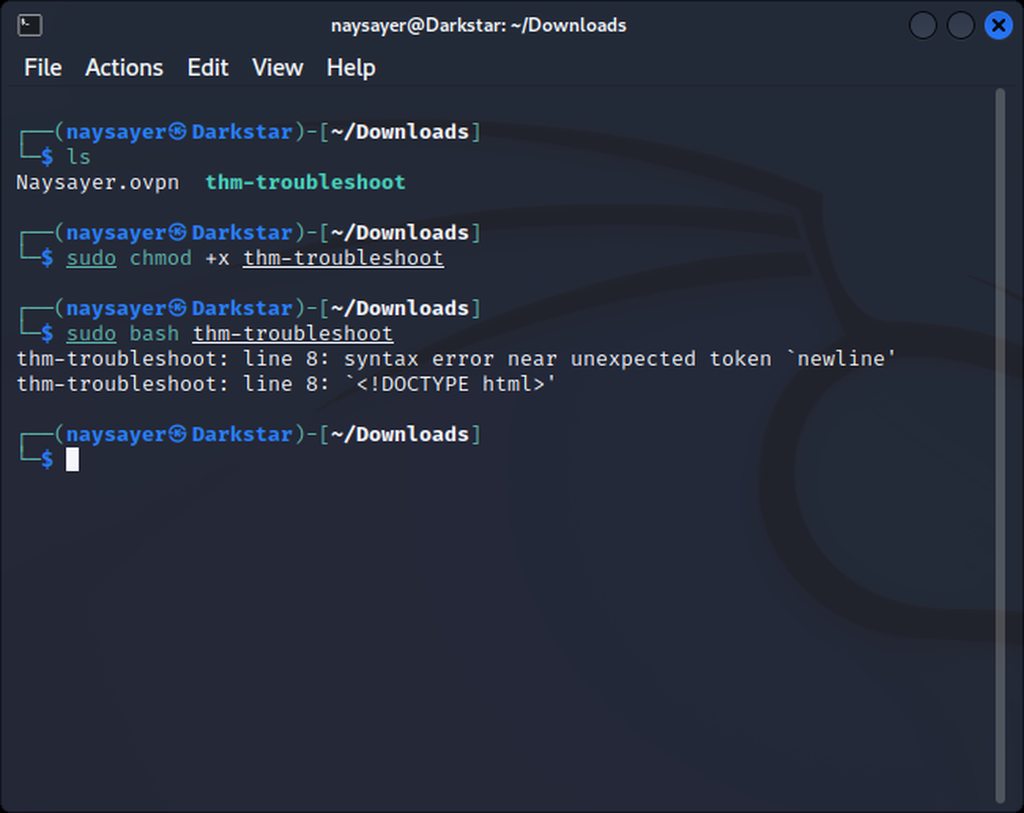
Am i doing something wrong here ?
Im trying to fix my VPN that keeps timing out on me
celest wadi
north marsh
https://imgur.com/ZaHzdXE.png
you've downloaded the html page instead of the actual script
north marsh
Hahaha thanks @celest wadi
 pearl hatch
north marsh
pearl hatch
north marsh
Allright ive managed to run the script here but im still having some issues with the VPN where i get timed out very oftens
Im US east and using VIP US WEST but that shouldn't be an issue
Like i cant access any of the Koth servers , if im running a scan or anything it will just freeze
and i can see in the VPN box that it doing some kind of restart for some reasons
Multiple process or connection , something like ive closed it but i will try running it again since its still happening
More then one connection running?
Will try that right now , thank you !
scenic torrentBOT
Gave +1 Rep to @gray loom
naive dust
hey guys, i got sended by a friend a discord promo link i didnt notice at first but then i saw that the link is wrong. everything was working well then i checked it on virustotal and found that its some ?phishing? site that just took me to normal discord promo.
what passwords should i change etc or its just a wrong virustotal malicious or something?
i need help because im scared that im gonna lose my money or accounts
naive dust
naive dust
hey guys, i got sended by a friend a discord promo link i didnt notice at first ...
the accept button etc was like every promo code else
 plush bay
naive dust
hey guys, i got sended by a friend a discord promo link i didnt notice at first ...
plush bay
naive dust
hey guys, i got sended by a friend a discord promo link i didnt notice at first ...
start by changing your discord password and enable 2fa.... after that change the password on any places you use the same password... shadow would recommend getting a password manager to use different passwords on all places you use passwords
naive dust
plush bay
start by changing your discord password and enable 2fa.... after that change the...
i do have 2fa and changed passwords on my discord accounts and already changed paypal and bank info but theres still some accounts that could be taken too
can i send you virustotal scan details and detection maybe you will know something about it @plush bay
on dm ofc
plush bay
naive dust
can i send you virustotal scan details and detection maybe you will know somethi...
sure but if you entered your password and username and then clicked to login or accept the thingy you leaked your credentials and the process is the same as what shadow said above
naive dust
plush bay
sure but if you entered your password and username and then clicked to login or ...
no, like it wasnt fake link it was some fake link that took me to real one even there was my real paypal when i tried to accept it and it was working like real promo
solid yarrow
Just completed Subdomain Enumeration but here is something I found wrong when I did do a fuzz I got the output
ffuf -w /usr/share/seclists/Discovery/DNS/namelist.txt -H "Host: FUZZ.acmeitsupport.thm" -u http://10.10.168.64 -fs 2395
    /'___\  /'___\           /'___\
   /\ \__/ /\ \__/  __  __  /\ \__/
   \ \ ,__\\ \ ,__\/\ \/\ \ \ \ ,__\
    \ \ \_/ \ \ \_/\ \ \_\ \ \ \ \_/
     \ \_\   \ \_\  \ \____/  \ \_\
      \/_/    \/_/   \/___/    \/_/

   v1.5.0 Kali Exclusive ❤️
:: Method : GET
:: URL : http://10.10.168.64
:: Wordlist : FUZZ: /usr/share/seclists/Discovery/DNS/namelist.txt
:: Header : Host: FUZZ.acmeitsupport.thm
:: Follow redirects : false
:: Calibratsecion : false
:: Timeout : 10
:: Threads : 40
:: Matcher : Response status: 200,204,301,302,307,401,403,405,500
:: Filter : Response size: 2395
api [Status: 200, Size: 31, Words: 4, Lines: 1, Duration: 87ms]
delta [Status: 200, Size: 51, Words: 7, Lines: 1, Duration: 87ms]
edubp [Status: 200, Size: 0, Words: 1, Lines: 1, Duration: 104ms]
But the answer accepted was delta and yellow in Virtual Hosts section
nimble hatch
jovial mango
Screenshot?
there


@jovial mango @sleek jackal @gray loom I think the whole problem now is the user password is not "alejandro" as it supposes to be
no I can't
I've tried million times and I've restarted everythink
everything*
I double checked when I edited the password file and left only "alejandro" and it didn't read it as valid
that was about 21h ago
10.10.188.146
holy crap
I had no idea
let me try now
what answeres?
ya I did ask about that too
I complained that I did the enumerating right and it was a success but it didn't show the name
ya I copied it.. but only after I've tried 50 different ways, including on a local vm box
just like I copied alejandro
i didn't want to but I was stuck there for hours and I searched everywhere
I just had no idea that the machine in every task varies
if I wanted to just pass the tasks and continue the whole course I wouldn't have bothered asking 4 ppl in here, u included to get a solution
sorry I went a lil defensive, I just didn't like the idea that I cheated on this
I redid everything and it all works, thank you so much for your help bro ❤️
thanks guys @jovial mango @sleek jackal
scenic torrentBOT
Gave +1 Rep to @jovial mango
sleek jackal
naive dust
What is a machine in hacking language
what do you mean 'hacking language'?
sleek jackal
scenic torrent
Gave +1 Rep to **<@810555657488695371>**
where is my rep?
naive dust
sleek jackal
what do you mean 'hacking language'?
I mean hacking world I guess
sleek jackal
naive dust
And what does deploy your machine mean?
if you are talking about this being somewhere on the THM site it means clicking the little button that says start machine. literally you are deploying the machine so it can be used.
naive dust
I mean what does "machine" mean here
Of course it doesn't mean to say your pc to go and heck somebody other's and it will start walking and go and beat another pc
nimble hatch
sleek jackal
where is my rep?
srry bro, I don't control it xd
sleek jackal
nimble hatch
srry bro, I don't control it xd
i know i was talking to the dumb bot
nimble hatch
@sleek jackal does it work with mentions?
jovial mango
nimble hatch
thanks guys <@810555657488695371> <@257394852361273354>
+rep @gray loom
scenic torrentBOT
Gave +1 Rep to @nimble hatch
 rapid mulch
hey, posting my problem here since it seems the right place:
succesfully connect via openvpn but when i access to deployable machines, i get random drop-outs every 5 mins and they last 3-4 min. ran the openvpn troubleshooter and got the following output:
[+] Stable internet connection [+] OpenVPN is installed [+] tun0 exists [+] tun0 IP is in the correct range [+] Only one instance of OpenVPN is running [+] Confirming connectivity [-] Something went wrong -- please ask for further assistance in the TryHackMe Discord server, subreddit, or forum
thx if someone know a fix
weary spindle
Can you verify your account, and then show us a screenshot of when it restarts please.
!docs verify
sharp bisonBOT
TryHackMe
Verify your TryHackMe Profile!
From TryHackMe with ❤!
rapid mulch
weary spindle
Can you verify your account, and then show us a screenshot of when it restarts p...
ok, done the verify, you want me to screenshot the terminal of the troubleshooter if i understand ?
rapid mulch
 weary spindle
Not that one, your main VPN script.
rapid mulch
weary spindle
Not that one, your main VPN script.
whole terminal when i execute it ? is it safe ?
weary spindle
rapid mulch
whole terminal when i execute it ? is it safe ?
Even just around the error, would be fine.
But just to double check, you only have one VPN running?
rapid mulch
oh, i think i poorly explained my problem sorry, there's nothing wrong with the vpn script, i lose connexion to the deployable machines even tho the vpn is working
weary spindle
Ah.
I see.
Try running this then
sudo ip link set dev tun0 mtu 1200
And if you lose connection try checking your script output, to see if it still says initialized
rapid mulch
weary spindle
And if you lose connection try checking your script output, to see if it still s...
yeah it's always initialized, what i did was opening 2 terminals:
-one with the openvpn script running, always said initialized
-a second one pinging the machine i deployed, that's how i noticed connection loss happened frequently and lasted around 3-4 min, on whatever machine i deployed
thx for help, will update if it fixed
update: lost it again 😭
got it back after 3 min
weary spindle
still say initialised?
rapid mulch
yeah didnt move
can ping google and all with no problem
just the deployed machine causes problem
weary spindle
Which machine are you doing?
rapid mulch
 rapid mulch
weary spindle
Which machine are you doing?
rapid mulch
weary spindle
Which machine are you doing?
file inclusion
rapid mulch
even after reboot ?
weary spindle
Sometimes when you close the machine down, a rare occastion the script still runs.
sudo killall OpenVPN
Then do
ip a s
 weary spindle

rapid mulch
damn thanks
weary spindle
You should be good to go.
rapid mulch
smart as fk humans
rapid mulch
fixed it
weary spindle
Wasn't sure, I knew you used to be around more some time ago.
Yeah, but more frequent the last few days, compared to months?
rapid mulch
weary spindle
`sudo ip link set dev tun0 mtu 1200`
should i set it back to 1500 now that it's prob fixed or it's irrelevant ?
weary spindle
rapid mulch
should i set it back to 1500 now that it's prob fixed or it's irrelevant ?
I don't think it would matter, unless you can't connect to ssh etc.
 river zenith
Hello ! So we have a problem in my company about THM subscription. SO here is the case:
We have requested a demo for today, we have been given 10 seats, we added the team members to the team. There was 1 person who had already active subscription for a half year from now on. We added him to the team, he got the 7 week demo and then we deleted him and changed his seat with another member. So the guy who had sub for a half year now doesnt have a premium access ;/
weary spindle
river zenith
Hello ! So we have a problem in my company about THM subscription. SO here is th...
This is more of a support issue, site stuff isn't dealt with on Discord, (Unless Jabba deals with it) You'll need to E-mail
sharp bisonBOT
TryHackMe
Contact us for support, teaching enquires and more!
From TryHackMe with ❤!
river zenith
oh okay, I will contact them via email, thank you!
lusty steeple
Keeps happening daily
Please help
Attachbox Firefox not working properly
 celest wadi
the attacbox doesn't have an internet connection if you're a free user
lusty steeple
It's occuring since 4-5 days
Earlier it worked fine
celest wadi
it can access thm machines and the sites on those machines but nothing on the "actual internet"
naive dust
okay, thank you @naive dust
scenic torrentBOT
Gave +1 Rep to @smoky berry
celest wadi
 wanton imp
how can I delete my credit card information from tryhckme?
wanton imp
how can I delete my credit card information from tryhckme?
email support for payment related stuff, we can't really help
sharp bisonBOT
TryHackMe
Contact us for support, teaching enquires and more!
From TryHackMe with ❤!
 deep spire
wanton imp
how can I delete my credit card information from tryhckme?
deep spire
wanton imp
how can I delete my credit card information from tryhckme?
You can check one of your previous sub confirmation emails, at the bottom of that email should be a link to the sub management page where you can update them. You may be able to remove them from there?
Or email
wanton imp
celest wadi
email support for payment related stuff, we can't really help
They will reply in 1-3days too much
I told them
I asked them
already
mystic sphinx
like 1-3 days seems too much?
 fringe flame
I am trying to figure out what I am doing wrong with OpenVPN, anyone have a moment to help with troubleshooting the process and see what I might be doing wrong? 🙂
So I am running wsl - Kali Linux. I have my ovpn config file for my region. Open up Kali, sudo openvpn myfile.ovpn and on the website - https://tryhackme.com/access - it lists me as connected with an internal virtual IP. However, when I try to ssh to a course, I.e. Beginner - OS Security v1 Task 3 - it just hangs each time.
TryHackMe
TryHackMe is a free online platform for learning cyber security, using hands-on exercises and labs, all through your browser!
I do see a tun0 and tun1 - I did just do a sudo killall openvpn right before this, also. Huh.
Yes, it is listing an active IP address as the target machine.
Oh, I did sudo ifconfig tun1 down
K, I'll try that.
Hrm, I killed openvpn, cleared tun1 and tun0, and then re-did my vpn, and the ssh is still hanging.

Correct.
Negative.
10.10.121.159
sammie@10.10.121.159
pw: dragon
Should the IP be pingable if I am on the network properly?
And under the /access site, for "Networks" should it list anything? As if so, it doesn't. OpenVPN Access continues to list I am on a server, the server is up, and I am connected, along with my internal vert IP Address.
I assumed it would not respond to ICMP requests, but.
Yeah, I'm trying something new instead of VirtualBox/VMWare or dualbooting, etc.
...which might be the issue in-of-itself.
Will do. So at least from my end, I am theoretically doing everything correctly.
I was like, "...I've done FileZilla for ssh just fine and used it for other things in the past over the years... am I just dumb?"
No no no, I meant in general.
ssh
ssh sammie@10.10.121.159
Alright; I will also look into other virtualized options that are more stable.
Can do.
@naive dust Thanks again. 🙂
scenic torrentBOT
Gave +1 Rep to @smoky berry
fringe flame
I've made quasi-progress: I can now ping 10.10.10.10 but I still am unable to ssh.
Fixed. We'll see if it persists.
I will do that right now.
I turned my Win 11 Firewall Inbound traffic from Block (Default) to Allow and I could ping 10.10.10.10 - I then turned it back on to Block (Default) and could still ping 10.10.10.10 shrugs
I don't know if that did it or if it was the thm-troubleshoot which may have taken a minute or two to actually work after it stated everything was good, but I don't know, I'll take it. =p
 broken bear
fringe flame
I turned my Win 11 Firewall Inbound traffic from Block (Default) to Allow and I ...
broken bear
fringe flame
I turned my Win 11 Firewall Inbound traffic from Block (Default) to Allow and I ...
Are you running the VPN on windows or on your VM? Windows firewall shouldn't even be able to see destination of the VM traffic.
fringe flame
Win 11, WSL2 Kali Linux, which all commands are then being ran from via commandline.
Correct
broken bear
Networking is funky, I wouldn't trust the OVPN to function properly in WSL or WSL2.
fringe flame
This is why I did not go into Programming or Networking a decade ago.
broken bear
I know others have had good results using it, but in my opinion, you are better off using vbox or vmware as your hypervisor.
fringe flame
Well, I was trying to "stay current with the times" and I tried WSL2 instead of the normal dual-boot or VMWare route. It is working.. for now. I will see if I run into more issues down the road.
broken bear
fringe flame
Well, I was trying to "stay current with the times" and I tried WSL2 instead of ...
dual boot is not the 'normal' route anymore - hardware has gotten so good, even mid-range or low-range consumer hardware can easily run a VM
and WSL is pretty janky - MS is bad at virtualization, vmware and vbox are the two most popular windows vm platforms for a reason
fringe flame
@broken bear Good to know; dual-boot used to be the go-to for speed/performance. Thank you for the info. 🙂 I will take this discussion to a different channel to not clog it up further.
scenic torrentBOT
Gave +1 Rep to @broken bear
uneven wind
uneven wind
hi, do i need 181 streak to get the 180 streak badge?
yep i do need 181 streak to get the 180 streak badge


 forest nymph
how to install kali linux all tools posible mod can any one tell plzz
 light vale
forest nymph
how to install kali linux all tools posible mod can any one tell plzz
light vale
forest nymph
how to install kali linux all tools posible mod can any one tell plzz
you can download the prebuild kali image from kali.org and mount it into vmware or virtualbox it contains all the tools needed...
mystic sphinx
forest nymph
how to install kali linux all tools posible mod can any one tell plzz
i am not a mod, but i agree with what @light vale says, you can get a image that already has 95% of tools ready, did the same thing and worked perfectly
you just have to run it as virtual machine and setup ovpn inside it
celest wadi
do you have dm's enabled for the server?
 signal ermine
Yes @celest wadi
celest wadi
what's the error you get then? or does the bot just not return anything
signal ermine
Bot doesn't return anything when I enter the correct discord id
When I enter incorrect token it shows error
celest wadi
just to recap, you're using !verify <token>
cuz the bot seems to be working
 zealous yoke
signal ermine
Bot doesn't return anything when I enter the correct discord id
zealous yoke
signal ermine
Bot doesn't return anything when I enter the correct discord id
Can you try it again please? I'm looking at the bot's console and trying to see if the error I can see is correlated
signal ermine
zealous yoke
Can you try it again please? I'm looking at the bot's console and trying to see ...
Did it
2 times now
signal ermine
Okay , I will try again tomorrow.
@zealous yoke is there any issue ith the Practice Tab in tryhackme. I am not able to see that tab . Only see Learn and Search
zealous yoke
Not as far as I'm aware no. You might be seeing an experimental page that we're trialling. Could you use something like imgur.com to upload a screenshot what you see please?
signal ermine
zealous yoke
Not as far as I'm aware no. You might be seeing an experimental page that we're ...
zealous yoke
signal ermine
Okay , I will try again tomorrow.
Could you also send me your discord token via DM please?
zealous yoke
signal ermine
https://imgur.com/a/38LACWS
Ah yes, that is a new design that we are trialling (: that is what you're supposed to see
What you're looking for is here
 weary spindle
Is that A/B testing? @zealous yoke ?
zealous yoke
Indeed
weary spindle
Interesting...
It looks good from that S/shot.
signal ermine
zealous yoke
What you're looking for is here
Yeah it just shows few rooms , can't see series like medium easy insane hard ...
zealous yoke
They've probably been removed all together then. You can send us feedback on https://tryhackme.com/feedback if you would like (: it'd be very useful
TryHackMe
TryHackMe is a free online platform for learning cyber security, using hands-on exercises and labs, all through your browser!
plush bay
how will that work with the old series that gives badges??? like overpass
zealous yoke
the rooms won't have been removed
signal ermine
zealous yoke
They've probably been removed all together then. You can send us feedback on htt...
Sure ☺️
zealous yoke
if you're around, can you try verifying again please? @signal ermine
signal ermine
zealous yoke
if you're around, can you try verifying again please? <@1001209055903227904>
Thanks man!!😌 Worked like a charm
scenic torrentBOT
Gave +1 Rep to @zealous yoke
plush bay
signal ermine
Thanks man!!😌 Worked like a charm
oh wow already level 7
 willow fox
I have an issue with openvpn and I used thm-troubleshoot
and it gives me this message "Something went wrong -- please ask for further assistance in the TryHackMe Discord server, subreddit, or forum "
no I used killall openvpn to avoid that
(not bound) and TLS key negotiation failed to occur within 60 seconds
despite it was working fine yesterday
 modern mauve
Hello,
I am unable to connect to the machine although I am connected to OpenVpn network
The machine inside room network services
ssh
Yeah, Is there anything else that I can connect with?
to THM machines
So I dont need to connect?
 craggy zephyr
I'm considering changing my subscription to annual. The best way to do this would be going in the 'cancel subscription' button, then waiting for my monthly subscription to end and then renew it?
I mean, pressing the 'cancel subscription' wouldn't make me instantly unsubscribed?
👍
 latent wolf
hello im working on networking and the right answer is marked as wrong lol can anyone help>
?
latent wolf
i quadruple checked multiple sources lol
i could be wrong though lol
is the question on networking --whois facebook.com and when was it first registered
03/29/1997
thank you lassi its ATD lol once again im humbled lol i appreciate it
signal ermine
plush bay
oh wow already level 7
😋 more to come .
Thank you 😌
scenic torrentBOT
Gave +1 Rep to @plush bay
 lost shoal
Question about the payment? Do they keep charging you even you unsubscribe? Because i stopped automatic payment on my paypal, but do they still charge you?
crystal marlin
lost shoal
Question about the payment? Do they keep charging you even you unsubscribe? Beca...
Not sure if it will be recognised if you stop automatic payment only on paypal, so probably best to cancel the sub on your tryhackme profile page
But mailing support about that question might be more reliable
sharp bisonBOT
TryHackMe
Contact us for support, teaching enquires and more!
From TryHackMe with ❤!
 wintry trellis
Hey guys, I'm in the follina msdt room and when I run the malicious doc, it does not spawn msdt.exe process. I just saw that apparently the room went private lask week because of a bug, but is it fixed ? Or anyone has an idea of why it doesn't work ?
celest wadi
wintry trellis
Hey guys, I'm in the follina msdt room and when I run the malicious doc, it does...
I did the room recently and it's somewhat buggy but it works
 pastel tinsel
@crystal marlin
wintry trellis
celest wadi
when you run the maldoc, you should get connections on your follin.py server
which i don't have
celest wadi
yeh, something's off there, try regenerating the payload and using -i tun0 with the python command
scenic torrentBOT
Gave +1 Rep to @celest wadi
 long quiver
Can I still access the subscriber only rooms after subscription is cancelled and the room is completed?
Or do I have to keep my subscription running to access them?
long quiver
I am sorry that sounds ambiguous to me. Could you clarify?
celest wadi
long quiver
I am sorry that sounds ambiguous to me. Could you clarify?
you lose access to subbed content if you don't have a sub, your progress and points remain intact tho
long quiver
celest wadi
you lose access to subbed content if you don't have a sub, your progress and poi...
I see, thanks Zeeshan
scenic torrentBOT
Gave +1 Rep to @celest wadi
 hexed sparrow
can anyone help
i wanna change my name on the certificate and i cant
welp
guess i will just photoshop it
celest wadi

 kindred sparrow
Has anyone tried installing kali on mac m1 using UTM?

Easy, Free installation of Kali Linux on Apple macOS M1/M2, M1/M2 PRO, and M1/M2 MAX. This hack takes no time! No need for Parallels or commercial virtualization software either. (If you're looking for the blank screen fix, check out the link I added below).
BLACK SCREEN? Possible solutions:
- You can go by the first option "Install", and it ...
i was following this video
i set up the vm but, after i choose graphical boot, all i see is a blank screen

 frail pike
Hey is anybody familiar with smbmap?
It shows some of the shares being READ ONLY when I could literally write to them.
naive dust
How do I run Burp with a sandbox

You've asked me before, but I couldn't find it with google
but I can't solve the problem with it
ok thank you, does every user has the problem on the attackbox
scenic torrentBOT
Gave +1 Rep to @gray loom
 ocean vapor
Any people are working on the Buffer Overflow Prep? I have problems connecting to the RDP . It's not stable. Sometimes it works, but after 2 min, session is closing. Trying to reconnect, without succes. Waiting for a few minutes, and it works again for some minutes.
plush bay
ocean vapor
Any people are working on the Buffer Overflow Prep? I have problems connecting t...
can you check the vpn:s device( tun0 ) mtu???
 plush bay
north marsh
A bit clueless on whats going on here
plush bay
north marsh
A bit clueless on whats going on here
what do you get if you run curl 10.10.10.10/whoami ??? if you get an ip it means you are connected.... if you still have problems even though you are connected checking the mtu of the tun device could help
north marsh
plush bay
what do you get if you run `curl 10.10.10.10/whoami` ??? if you get an ip it mea...
It doesnt seem like im getting any answer
ocean vapor
north marsh
It doesnt seem like im getting any answer
same here
weary spindle
north marsh
It doesnt seem like im getting any answer
Type ip a s
plush bay
also for the above it seems the vpn connected but then you pressed ctrl + c to stop it... you should just leave it running in a terminal window or tab after it hits: Initialization Sequence Completed
ocean vapor
plush bay
can you check the vpn:s device( tun0 ) mtu???
mtu 1500 for tun1
north marsh
plush bay
also for the above it seems the vpn connected but then you pressed `ctrl + c` to...
You are right but i couldn't connect to my room IP so thats why ive ran the trouble shoot
north marsh
weary spindle
Type `ip a s`
it seems when i type this my inet in tun0 is my vpn adress but i still cant connect to rooms ?
plush bay
north marsh
You are right but i couldn't connect to my room IP so thats why ive ran the trou...
some rooms don't have websites or respond to ping.... hence use nmap with the -Pn flag to scan them and see what ports are open
weary spindle
north marsh
it seems when i type this my inet in tun0 is my vpn adress but i still cant conn...
What Shadow typed.
plush bay
go go scrubz.... shadow gotta go for now
north marsh
It responded to pings on the attack box tho

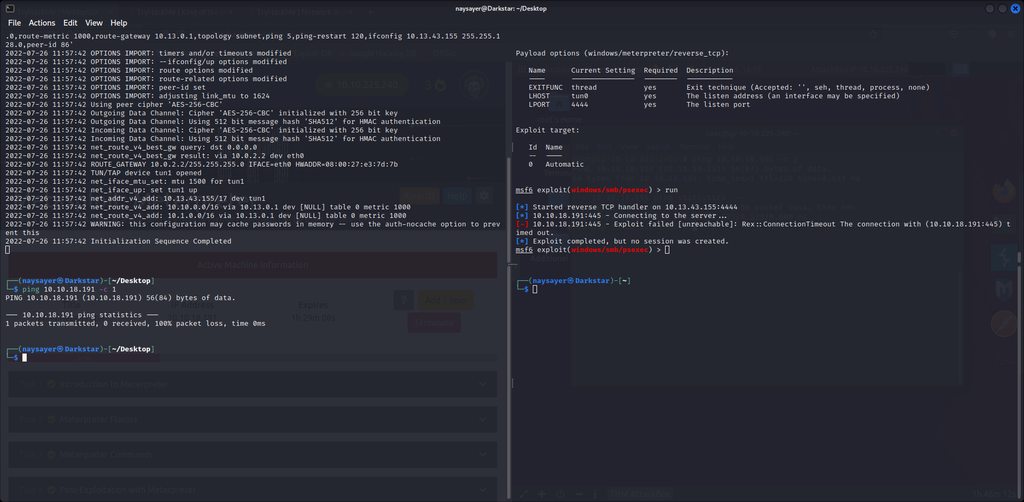 weary spindle
Can you show options?
north marsh
of metasploit ?
weary spindle
Yes
north marsh
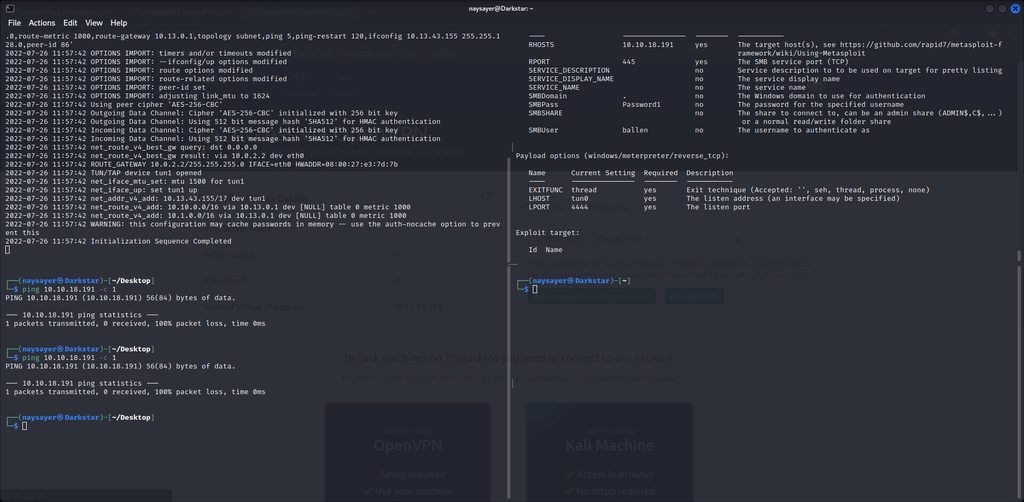 weary spindle
north marsh
https://imgur.com/xyqECY2.png
weary spindle
north marsh
https://imgur.com/xyqECY2.png
Can you do ip a s
And show me
OR
count the tun*
Or are you working in the Attackbox & VM?
north marsh
weary spindle
Or are you working in the Attackbox & VM?
Not sure what you mean , i never use the Attackbox i just started to test it was answering to ping
weary spindle
north marsh
Not sure what you mean , i never use the Attackbox i just started to test it was...
Ok
In the terminal on your vm, type ip a s and count the tun
weary spindle
Yes.
That could be your error.
You only need one tun.
I also knew you had more than 1 running as I can see it in your script.
north marsh
The weird thing is , even tho i did sudo killall openvpn
when i go to 10.10.10.10 still says im connected ?
Is that even possible ?
weary spindle
Do ip a s again to make sure.
north marsh
i still have tun0 which seems to be the VPN ip but i dont have it running atm
weary spindle
Do you have tun1 ?
north marsh
i do not
weary spindle
That should be you, good to go.
north marsh
But i dont have the vpn running in any terminal ? haha thats what confusing me
north marsh
Hahaha yeah ill just close and reset everything i guess😂
Thank you for you time @weary spindle
scenic torrentBOT
Gave +1 Rep to @weary spindle
weary spindle
north marsh
Thank you for you time <@958383130102870026>
No problem.
+rep for @plush bay for spending some of hers too.
scenic torrentBOT
Gave +1 Rep to @plush bay
 calm tulip
Hey I am doing the firewall room and unsure if there is a typo or I am being stupid


36 is not a multiple of 8 and that command would not work?

ive answered the question just curious if i have approached it wrong
weary spindle
Which task?
calm tulip
TryHackMe
TryHackMe is a free online platform for learning cyber security, using hands-on exercises and labs, all through your browser!
so you can ctrl +f
frail pike
Can someone tell why I can't completely terminate the vulnerable machine? It says the machines been terminated yet returns that there's already an active machine when I click 'start machine' lmao.
tried resetting cookies & manually sending a POST request to tryhackme.com. nothing works
yea I already check that. they are all out
celest wadi
frail pike
Can someone tell why I can't completely terminate the vulnerable machine? It say...
do ctrl + F5 or changing your browser, it can get stuck with the previous machines info
celest wadi
does this show up as empty?
https://tryhackme.com/api/vm/running
TryHackMe
TryHackMe is a free online platform for learning cyber security, using hands-on exercises and labs, all through your browser!
frail pike
nope still shows the instance that I was running
celest wadi
then you didn't terminate it properly
frail pike
I even tried sending a POST request to https://tryhackme.com/api/vm/terminate through curl
celest wadi
fetch('/api/vm/running')
  .then(r => r.json())
  .then(vms =>
    vms.forEach(vm =>
      fetch('/api/vm/terminate', {
        method: 'POST',
        body: JSON.stringify({ code: vm.roomId }),
        headers: {
          'csrf-token': csrfToken,
          'Content-Type': 'application/json'
        }
      })
    )
  )
run this in your browser it'll terminate everything
frail pike
doesnt seem to work. is '_csrf' the only csrfToken there?
weary spindle
Are you running it in the console?
frail pike
yes
celest wadi
frail pike
doesnt seem to work. is '_csrf' the only csrfToken there?
you have to be in the thm page tab, when you run it
celest wadi
yeh, sure
frail pike
nah it aint doing nothing. Thanks for trynna help out but man I will just let it die out. im pretty beat up today
bronze vale
frail pike
nah it aint doing nothing. Thanks for trynna help out but man I will just let it...
open https://tryhackme.com/jr/tutorial and paste it into that console
TryHackMe
TryHackMe is a free online platform for learning cyber security, using hands-on exercises and labs, all through your browser!
 safe anvil
hey guys when ever itry to connect to thm network i get this msg
 weary spindle
safe anvil
hey guys when ever itry to connect to thm network i get this msg
weary spindle
safe anvil
hey guys when ever itry to connect to thm network i get this msg
Use the pinned posts
weary spindle
safe anvil
hey guys when ever itry to connect to thm network i get this msg
fix is #2.
plush bay
weary spindle
+rep for <@228199546050707456> for spending some of hers too.
thank you again scrubz... need to go outside and take care of some things hence left in the middle of that
scenic torrentBOT
Gave +1 Rep to @weary spindle
weary spindle
plush bay
thank you again scrubz... need to go outside and take care of some things hence ...
It's ok Shadow. 🙂
crystal marlin
weary spindle
fix is #2.
Mh, I don't think that's the cipher issue
weary spindle
crystal marlin
Mh, I don't think that's the cipher issue
Possible UDP/Port/country block And/Or time issue?
Forgot ISP.
crystal marlin
weary spindle
Possible UDP/Port/country block And/Or time issue?
Ye, I think something like that, since it's saying "failed to occur within 60 sec" rather then "failed to apply push options"
weary spindle
crystal marlin
Ye, I think something like that, since it's saying "failed to occur within 60 se...
Ah, I seen the cypher and though if it's not cypher the TLS handshake failed so I guess something was blocking it after.
 subtle granite
Hey guys - need help getting certificates for learning paths. Can anyone pls tell me where to find them?
plush bay
subtle granite
Hey guys - need help getting certificates for learning paths. Can anyone pls tel...
when going from the learn tab to view a path you should see a box like this somewhere:

the download button in the top right is what you click when you have 100 progress to download the cert of completion
subtle granite
Gotcha. thank you, do you know if i can generate certificates for modules?
light vale
subtle granite
Gotcha. thank you, do you know if i can generate certificates for modules?
for individual modules? I don't think so, they are only available for learning paths from what i know...
plush bay
subtle granite
Gotcha. thank you, do you know if i can generate certificates for modules?
modules currently do not provide certs... though you can make links to the badges if you recived one of those
those links also point to a picture you can download and use
subtle granite
plush bay
modules currently do not provide certs... though you can make links to the badge...
How would I go about doing that?
plush bay
subtle granite
How would I go about doing that?
check your own public profile page... then click the green share room badge
subtle granite
gotcha thank you!!
 brave python
Hi. where should i go for Account support ?
sharp bisonBOT
TryHackMe
Contact us for support, teaching enquires and more!
From TryHackMe with ❤!
brave python
hmmm,I've tried to contact last Tuesday by email, but i got no response so far.
broken bear
It can sometimes take a few days for the support email queue to get to you
brave python
ok T_T . thanks alot
broken bear
Is for help with your discord or with the THM account?
brave python
THM account.
broken bear
Were you trying to link your discord to your THM?
brave python
no, the problem is that i can't access my account , and i was using my gmail from college. and they recently deleted my gmail account.
broken bear
yeah, that's defintely only resolvable through the support email
brave python
I will wait. Just sad to lose my streaks
 alpine inlet
where can i ask help for a virus?
um idk if its like a virus but let me send a pic
nvm i cant
send pic
sharp bisonBOT
TryHackMe
Verify your TryHackMe Profile!
From TryHackMe with ❤!
alpine inlet
can i send you a dm with the pic?
sharp bisonBOT
Rule 10: Do not post viruses or malicious files without explicit permission from the administrative staff. We understand that this is a discord for learning, however, there are plenty of places online to get malware for forensic examination and reverse engineering. This includes in the advanced channels.
bronze vale
alpine inlet
where can i ask help for a virus?
We do not help with viruses here.
 fierce night
my new honeypot works great on my linux system it blocks most attacks but one flaw i cant unblock ips ore IP subnets ... uhgg
flushing nftabes didt work reinstalling the firewall didt do anything
zealous yoke
fierce night
my new honeypot works great on my linux system it blocks most attacks but one f...
why would you be wanting to block attacks on a honeypot?
defeats the entire purpose of having a honeypot 😄
weary spindle
About as much use a chocolate teapot.
craggy skiff
Hey.... I'm really struggling with Sysmon Task3 ... it seems even on the provided VM there's no web access via the browser clients and Powershell rejects all the guidance commands
 celest wadi
thm machines generally don't have internet access, those instructions are for installing on your own machine or windows VM afaik
craggy skiff

It's specifically telling you to start their VM login and follow the guidance... seems strange?
celest wadi
just skip to run sysmon.exe, it's likely pre-installed
zealous yoke
Yup, those instructions will be for installing Sysmon on your own system. The provided VM/machine will already have Sysmon(:
craggy skiff
the problem is it's telling us to use the Github SwiftOnSecurity config but as far as I can tell there's no way to get the config on the box
celest wadi
you could easily transfer any files from your own vm by downloading them and serving with python's http server(just wget in powershell)
craggy skiff
I'll give it a shot
 next oasis
If anyone has the subscription, please can someone vote to reset the room "persistence AD". The domain is not responding
Current vote 3/5
weary spindle
next oasis
If anyone has the subscription, please can someone vote to reset the room "persi...
You'd be better stating your subnet.
weary spindle
next oasis
If anyone has the subscription, please can someone vote to reset the room "persi...
third octet of 10.200.xxx.101
next oasis
weary spindle
third octet of 10.200.xxx.101
Its 61 currently
next oasis
weary spindle
You'd be better stating your subnet.
Sorry I didn't know that octet was the diffrentiater
weary spindle
next oasis
Its 61 currently
No worries, yeah, the network rooms you might be on a different subnet from a different person, in this case I'm not on your subnet so I can't help.
next oasis
weary spindle
No worries, yeah, the network rooms you might be on a different subnet from a di...
Thanks for letting me know. I will just have to wait couple of hours to reset it myself and for others 
scenic torrentBOT
Gave +1 Rep to @weary spindle
 fallen lichen
hello, i'm currently working on Follina MSDT room and it seems that the exploit doesn't work if following steps from the Task 4.After uploading the doc and converting to docx when opening it returns an error mentioning that the file is corrupted and cannot be opened. I tried to spawn different machines but ...get the same results. Does anyone encountered these days issues with the machine? is it working for you?
 celest wadi
fallen lichen
hello, i'm currently working on Follina MSDT room and it seems that the exploit ...
celest wadi
fallen lichen
hello, i'm currently working on Follina MSDT room and it seems that the exploit ...
there is no need for converting anything, make sure you run the follina.py command with -i tun0, transfer the file with curl/wget, you should get connections back in your running follina.py command :)
fallen lichen
celest wadi
there is no need for converting anything, make sure you run the follina.py comma...
i run the follina.py using tun0 interface but when transfering the doc file on the machine i changed the extension to docx
celest wadi
there is no need for converting anything
fallen lichen
thank you ...i manage to make it work...just copied a wrong file
 fierce copper
hello i got a specific problem with evil-winrm when i try to connect to a host :

if anyone is familiar with this and can help i would really appreciate it , thank you.
 slate pilot
Is the VPN down ?
slate pilot
fierce copper
hello i got a specific problem with evil-winrm when i try to connect to a host :
What is this for @fierce copper
slate pilot
fierce copper
hello i got a specific problem with evil-winrm when i try to connect to a host :
???
fierce copper
slate pilot
???
hello i am doing the machine RazorBlack
vpn is up and running . i am pinging to box normally.
its an issue with the openssl versions
slate pilot
fierce copper
vpn is up and running . i am pinging to box normally.
Ohhhhhh.................. I see.
fierce copper
i found out that msfconsole also had some issues last weeks and were fixed, but today i encountered this while trying to connect with evil-winrm on the machine
slate pilot
So i need to use a different version of openvpn ?
I might have too many tun interfaces again............
fierce copper
so my problem is that i should be connected to the machine because i give the correct arguments to evil-winrm to run but i get the specific error :
Error: An error of type OpenSSL::Cipher::CipherError happened, message is unsupported
Error: Exiting with code 1
oh sorry
slate pilot
This is what the output was;
└──╼ $sudo openvpn Su8z3r0.ovpn
2022-07-28 00:07:49 DEPRECATED OPTION: --cipher set to 'AES-256-CBC' but missing in --data-ciphers (AES-256-GCM:AES-128-GCM). Future OpenVPN version will ignore --cipher for cipher negotiations. Add 'AES-256-CBC' to --data-ciphers or change --cipher 'AES-256-CBC' to --data-ciphers-fallback 'AES-256-CBC' to silence this warning.
2022-07-28 00:07:49 OpenVPN 2.5.1 x86_64-pc-linux-gnu [SSL (OpenSSL)] [LZO] [LZ4] [EPOLL] [PKCS11] [MH/PKTINFO] [AEAD] built on May 14 2021
2022-07-28 00:07:49 library versions: OpenSSL 1.1.1k 25 Mar 2021, LZO 2.10
2022-07-28 00:07:49 Outgoing Control Channel Authentication: Using 512 bit message hash 'SHA512' for HMAC authentication
2022-07-28 00:07:49 Incoming Control Channel Authentication: Using 512 bit message hash 'SHA512' for HMAC authentication
2022-07-28 00:07:49 TCP/UDP: Preserving recently used remote address: [AF_INET]54.76.30.11:1194
2022-07-28 00:07:49 Socket Buffers: R=[212992->1048576] S=[212992->1048576]
2022-07-28 00:07:49 UDP link local: (not bound)
2022-07-28 00:07:49 UDP link remote: [AF_INET]54.76.30.11:1194
2022-07-28 00:07:50 TLS: Initial packet from [AF_INET]54.76.30.11:1194, sid=35a05915 0d78ea85
2022-07-28 00:07:50 VERIFY OK: depth=1, CN=ChangeMe
2022-07-28 00:07:50 VERIFY KU OK
2022-07-28 00:07:50 Validating certificate extended key usage
2022-07-28 00:07:50 ++ Certificate has EKU (str) TLS Web Server Authentication, expects TLS Web Server Authentication
2022-07-28 00:07:50 VERIFY EKU OK
2022-07-28 00:07:50 VERIFY OK: depth=0, CN=server
And it hangs at this point.
Then repeats;
2022-07-28 00:08:49 TLS Error: TLS key negotiation failed to occur within 60 seconds (check your network connectivity)
2022-07-28 00:08:49 TLS Error: TLS handshake failed
2022-07-28 00:08:49 SIGUSR1[soft,tls-error] received, process restarting
2022-07-28 00:08:49 Restart pause, 5 second(s)
2022-07-28 00:08:54 Outgoing Control Channel Authentication: Using 512 bit message hash 'SHA512' for HMAC authentication
2022-07-28 00:08:54 Incoming Control Channel Authentication: Using 512 bit message hash 'SHA512' for HMAC authentication
2022-07-28 00:08:54 TCP/UDP: Preserving recently used remote address: [AF_INET]54.76.30.11:1194
2022-07-28 00:08:54 Socket Buffers: R=[212992->1048576] S=[212992->1048576]
2022-07-28 00:08:54 UDP link local: (not bound)
2022-07-28 00:08:54 UDP link remote: [AF_INET]54.76.30.11:1194
2022-07-28 00:08:55 TLS: Initial packet from [AF_INET]54.76.30.11:1194, sid=e6cb2ae7 86be5bea
2022-07-28 00:08:56 VERIFY OK: depth=1, CN=ChangeMe
2022-07-28 00:08:56 VERIFY KU OK
2022-07-28 00:08:56 Validating certificate extended key usage
2022-07-28 00:08:56 ++ Certificate has EKU (str) TLS Web Server Authentication, expects TLS Web Server Authentication
2022-07-28 00:08:56 VERIFY EKU OK
2022-07-28 00:08:56 VERIFY OK: depth=0, CN=server
I haven't encountered this issue before........
fierce copper
@slate pilot open the .ovpn file and replace ciphers aes line to -> data-ciphers AES-256-CBC
slate pilot
fierce copper
<@981891404856950805> open the .ovpn file and replace ciphers aes line to -> da...
Okay, Will do, Thanks.
scenic torrentBOT
Gave +1 Rep to @fierce copper
slate pilot
fierce copper
<@981891404856950805> open the .ovpn file and replace ciphers aes line to -> da...
It already states data-ciphers AES-256-CBC
Maybe i need a new config file.........
 jade star
slate pilot
And it hangs at this point.
jade star
slate pilot
And it hangs at this point.
I am seeing the same when I try to sudo openvpn myfile.ovpn . I even after doing a regenerate.
slate pilot
jade star
I am seeing the same when I try to sudo openvpn myfile.ovpn . I even after doin...
Same here.............
slate pilot
jade star
I am seeing the same when I try to sudo openvpn myfile.ovpn . I even after doin...
Something is broken.......
slate pilot
jade star
I am seeing the same when I try to sudo openvpn myfile.ovpn . I even after doin...
2022-07-28 00:11:51 TLS Error: incoming packet authentication failed from [AF_INET]54.76.30.11:1194
fierce copper
jade star
I am seeing the same when I try to sudo openvpn myfile.ovpn . I even after doin...
did you change the line -> cipher AES-256-CBC to data-ciphers AES-256-CBC ?
slate pilot
fierce copper
did you change the line -> cipher AES-256-CBC to data-ciphers AES-256-CBC ?
Okay, I will try this, Thanks.
fierce copper
slate pilot
Okay, I will try this, Thanks.
you already tried it xd
for the other guy maybe it works
jade star
Well, it changes the error.
slate pilot
jade star
Well, it changes the error.
Yes that's right, It does.
I think this version of openvpn is malfunctioning.............
slate pilot
jade star
Well, it changes the error.
Which version of openvpn are you running @jade star ?
jade star
Unrecognized option
slate pilot
2022-07-28 00:15:22 TLS Error: incoming packet authentication failed from [AF_INET]54.76.30.11:1194
It's something to do with openvpn
jade star
2.6
slate pilot
jade star
2.6
Mine is;
OpenVPN 2.5.1 x86_64-pc-linux-gnu [SSL (OpenSSL)] [LZO] [LZ4] [EPOLL] [PKCS11] [MH/PKTINFO] [AEAD] built on May 14 2021
I was aware there were some difficulties being faced using newer versions............
slate pilot
jade star
2.6
So............. Why is this not working ?
slate pilot
jade star
2.6
What is the error you are facing @jade star ?
jade star
Unrecognized option
I am running an apt update and apt upgrade to see if there is a new version of openvpn. I will test it again when that completes.
slate pilot
jade star
I am running an apt update and apt upgrade to see if there is a new version of o...
The newer versions are unstable. @jade star
jade star
Any chance that openvpn is woking on correcting it? If it matters, I am using a Kali box.
slate pilot
jade star
Any chance that openvpn is woking on correcting it? If it matters, I am using ...
i'm not sure.........
slate pilot
jade star
Any chance that openvpn is woking on correcting it? If it matters, I am using ...
Did you try a different server ?
slate pilot
jade star
Any chance that openvpn is woking on correcting it? If it matters, I am using ...
A different config file ?
I did.........
2022-07-28 13:34:50 Initialization Sequence Completed
@jade star switch to this version;
OpenVPN 2.5.1 x86_64-pc-linux-gnu [SSL (OpenSSL)] [LZO] [LZ4] [EPOLL] [PKCS11] [MH/PKTINFO] [AEAD] built on May 14 2021
It will work............
jade star
Do you mean that you selected a different location to connect to from the access page? I can give that a try.
That worked. I deleted my .ovpn file, went to the access page to select a different end point, regenerated the file, downloaded it, and chmoded it. 🙂 Thank you @slate pilot .
scenic torrentBOT
Gave +1 Rep to @slate pilot
slate pilot
scenic torrent
Gave +1 Rep to **<@981891404856950805>**
Thanks @scenic torrent
slate pilot
jade star
That worked. I deleted my .ovpn file, went to the access page to select a diffe...
@jade star sometimes the tun interfaces need to be removed.
@jade star You can use the following command;
sudo ip link delete tun0 (etc, etc, etc.)
bronze vale
slate pilot
<@728342714374160435> You can use the following command;
sudo ip link delete tun...
Wut
No
Just kill the OenVPN process
 viscid wraith
Not quite sure if this is proper channel, but seems best of those available. Looking for staff of TryHackMe as I have two credit card charges on my statement for tryhackme.com that I didn’t make as I have never heard of you. Is there someone I could start dialog with to investigate? If not I can just dispute the charges.
sharp bisonBOT
TryHackMe
Contact us for support, teaching enquires and more!
From TryHackMe with ❤!
 errant orchid
Hi! I need some assistance with my hacking streak counting - apparently, it was set to 0 even having answered questions yesterday and going back to it right now. (quoting @bronze vale since he's the MOD that answered more recently). Btw, my previous score was 25 - please, help me.
According to the API responses, I have "answer question" events on July 26 and July 27. Please, anyone?
 rugged agate
hi! why my account's county are always UK ? I change it multiple times....
 full zealot
this started happening last night. Still happening tonight
 full zealot
this started happening last night. Still happening tonight
full zealot
full zealot
this started happening last night. Still happening tonight
I've tried several different server locations and regenerated several times. no joy
 empty turret
Hi, can anyone help me? I have a Kali VM running in VMWare. Rather than log in as root every time I created a user account and have been copying my files across to that account. However I just tried to log in to the root account again to change some file permissions and when I log in as root I have no menu bar, nothing. The background appears as a zoomed out screen with the task bar at the bottom (up until now the root account has always had a sidebar) and when I click on the desktop to zoom in the taskbar and everything disappears, the only option is to go to “activities” in the top left which zooms it out again
 keen barn
This sounds like a graphical issue - have you tried restarting your VM? If that doesn't work, you may need to reinstall Kali.
empty turret
I’ve tried restarting the vm and the main machine. I might just put up with it and use the regular account
cerulean bloom
my netcat is not working properly , any solutions?
 keen barn
There could be a few reasons why netcat isn't working properly. Try running it with the '-v' flag to see if that provides more information on what might be going wrong. You can also try using a different port, or specifying a different interface to bind to.
cerulean bloom
same error
 jovial mango
cerulean bloom
same error
jovial mango
cerulean bloom
same error

Super User
Is anybody else not able to get nc -lp 8888 working on Mac OS X? Is there another way to get this to work?
weary spindle
empty turret
I’ve tried restarting the vm and the main machine. I might just put up with it a...
This isn't really the channel for this, #general is better for non THM issues.
 ornate linden
Hi - Unable to access the EU VIP servers. Tried to regenerate on both same issue. Current openvpn version:
OpenVPN 2.6_git x86_64-pc-linux-gnu [SSL (OpenSSL)] [LZO] [LZ4] [EPOLL] [PKCS11] [MH/PKTINFO] [AEAD] [DCO] built on May 30 2022
Any ideas appreciated.
celest wadi
ornate linden
Hi - Unable to access the EU VIP servers. Tried to regenerate on both same issue...
a fix is pinned in this channel, :)
ornate linden
celest wadi
a fix is pinned in this channel, \:)
Much appreciated 🙂
Worked like a dream
 last geode
hey hi, I am thinking to take eJPT after few days, which openvpn version should I have ?
 undone ore
hey guys .. i just installed Kali image on VB .. and i followed the steps of guesadditions to make it fullscreen, but it won't get to full screen. everytime i try to resize it, the screen goes black. any idea how to fix it ? i watched tons of youtube videos and did a lot of commands but still nothing is working.
 tall vale
Hey all, I am in the Attackdive Directory Room, it wants me to install Kerbrute, but it seems there are two different versions of Kerbrute available? I have been having issues with the Ropnop one
 urban spear
THM is not accepting my card for subscription 🤷🏾♂️
celest wadi
urban spear
THM is not accepting my card for subscription 🤷🏾♂️
email support for help
sharp bisonBOT
TryHackMe
Contact us for support, teaching enquires and more!
From TryHackMe with ❤!
urban spear
sharp bisonBOT
TryHackMe
Contact us for support, teaching enquires and more!
From TryHackMe with ❤!
naive dust
hi anyone,
there are a hecking tons of things available on THM, i don't know in which line to follow them https://tryhackme.com/hacktivities
there are modules, practice, recently added, networks!!!!
someone suggested me to learn the linux fundamentals first after downloading ubuntu on windows, and then learning presecurity,
well, the one who helped me into linux and ubuntu, i thank him
but please help me out in this one
ok
but i don't think it will make me a hacker
will it?
 naive dust
a coder is the one who makes programs and all
and a hacker is one who breaks it
that's what i guess
yea, it would be of course
but see this for example

why has it been provided...of couse for learning, and if we use all the resources available, it would make us better at it
but i am not able to understand, that should I do the rooms that are released everyday or should I just follow a path
i know, that i can't go in rooms until and unless i learn basics
ok
and what to do after paths?
okay
thank you very much @gray loom
scenic torrentBOT
Gave +1 Rep to @gray loom
 grim current
ok bro sorry 😄
 hardy charm
I made a request for my company to use tryhackme for business (tryhackme work), but I haven't received any response from tryhackme yet, is there any way to expedite this request?
 glad oyster
When did you ask?
north marsh
My question has nothing to do with THM but i really need to know to activate the history suggestion like pictured below : https://imgur.com/4QAQrhR.png
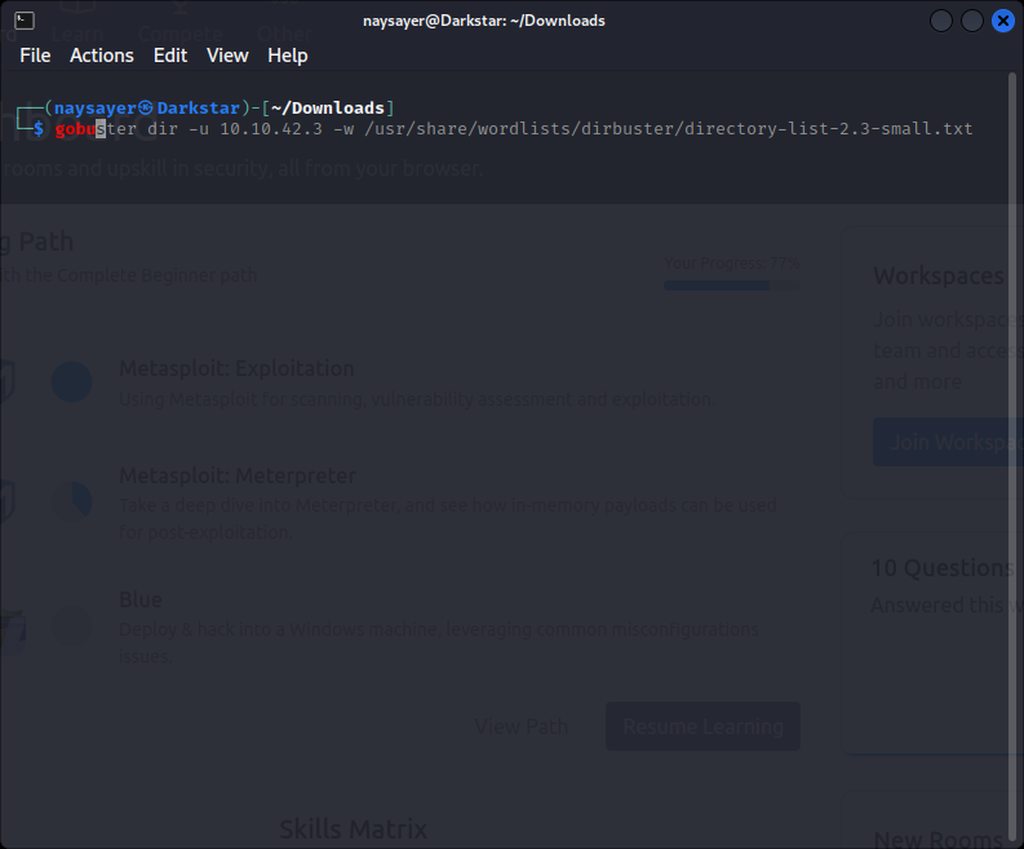
Should i switch to #infosec-general ? Or i can ask more about it here ?
 tawdry orbit
hardy charm
I made a request for my company to use tryhackme for business (tryhackme work), ...
tawdry orbit
hardy charm
I made a request for my company to use tryhackme for business (tryhackme work), ...
Did you navigate through this page? https://tryhackme.com/business

TryHackMe
Upskill your cyber security workforce with hands-on training and give your team access to offensive and defensive labs, with content for complete beginners to experts.
 shy cloak
anyone know how to bypass ssl pinning on bluestack emu?
 sly rampart
Hello, I am having an issue with the Wreath room. I use the correct ovpn file to connect to this specific network. And the network's status was shown as started. However the first outward facing machine is not reachable. The error given is: no route to host. I did check via netstat -rn and ip route list that the correct route to the room's network is set. However this doesn't work. I can reach the gateway of the VPN. But nothing further than that. A traceroute command also just showed one hop to the VPN's gateway - which is also the gateway to the outward facing target machine. I did check the IP address I try to connect to, it is the correct one. I even restarted my whole machine and tried again. Same issue. Has anyone faced this before?
 slate rover
hi, is this room working for someone? https://tryhackme.com/room/thefindcommand
 somber spindle
slate rover
hi, is this room working for someone? https://tryhackme.com/room/thefindcommand
somber spindle
slate rover
hi, is this room working for someone? https://tryhackme.com/room/thefindcommand
they made it private already
 inland knoll
I'm getting no response for nbtstat or domain info from enum4linux
I'm not sure what's going on. Others are having no issues.
I'm in the Attacktive Directory room
No reply for nbtstat and "can't find workgroup/domain". Trying a full restart.
celest wadi
inland knoll
I'm getting no response for nbtstat or domain info from `enum4linux`
I'm not su...
it's generally a good idea to try the same thing from the attackbox to check if it's something wrong on your end specifically
inland knoll
it likely is on my end but not sure what the issue is
sly rampart
inland knoll
I'm getting no response for nbtstat or domain info from `enum4linux`
I'm not su...
Had the same issue. But couldn't figure out why that is.
inland knoll
pcap says it's going out but nothing's coming back
firewall? everything else replies
this is a bit frustrating
works okay in attackbox
sly rampart
inland knoll
pcap says it's going out but nothing's coming back
maybe there is a routing issue? our own machines would communicate via the gateway from the VPN. I believe the attack boxes don't need that.
but if that is true, not much we can do
naive dust
I would like to unlink this account from my tryhackme id can anyone help?
weary spindle
You'll need to ask a mod, if you see one, you could ask in passing conversation, or I'm sure one will see it at some point.
 vocal barn
can someone help me with something in kali linux: whenever i try to run a root command it say "Could not open lock file /var/lib/dpkg/lock-frontend - open (13: Permission denied)
E: Unable to acquire the dpkg frontend lock (/var/lib/dpkg/lock-frontend), are you root?
"
jovial mango
vocal barn
can someone help me with something in kali linux: whenever i try to run a root ...
Run with sudo <command>
jovial mango
vocal barn
like sudo apt-get update right?
Yeah
 slim frigate
Hi, excuse to interrupt you.
On the THM website, which section is for buying Voucher code to gift others ?
I just could find the Subscription section
pastel tinsel
slim frigate
Hi, excuse to interrupt you.
On the THM website, which section is for buying Vou...
here 😄


 pastel tinsel
what do you see when you click it 😄