#🆘│community-support
1 messages · Page 420 of 1
 quasi cliff
 jade topaz
quasi cliff
Then your 2nd acc should be able to create
jade topaz
quasi cliff
Then your 2nd acc should be able to create
no still
quasi cliff
Did you save the settings
jade topaz
yup
 humble sequoiaBOT
Any role you assign as a blacklisted role won't be able to use commands or reactions.
Selecting a blacklisted role
Go to your Dashboard ➞ Server Configs. There you will find the option to select blacklisted roles.
Note: Don't forget to save.
 quasi cliff
You have blacklisted Unverified people to create tickets
jade topaz
quasi cliff
You have blacklisted Unverified people to create tickets
no
blacklost is emty
quasi cliff
Goto Dashboard -> Server Configs -> Blacklisted role
jade topaz
lolllllllllllllllllllllllllllllllllllllllllllllllllllllll
jade topaz
quasi cliff
Goto Dashboard -> Server Configs -> Blacklisted role
i blacklisted the role
jade topaz
quasi cliff
Goto Dashboard -> Server Configs -> Blacklisted role
thx for ur time
 iron nightBOT
Gave +1 Rep to @quasi cliff
jade topaz
how do i add emojis so it shows up on the panel like the discord ones i added to my server
quasi cliff
$idcommand
humble sequoiaBOT
How do I get the ID of Roles/Channels/Emojis?
Ticket Tool has a useful command that helps you get the ID of various things like channels, roles, emojis and your server.
Just use the command $id <#channel/@role/:emoji:>. Now copy everything, including the brackets <...>, to your dashboard (or wherever you want it)
If you want the server ID, just use $id.
Examples:
Server ID: $id ➝
509192800865353738
Roles: $id @Role ➝@humble sequoia
Channel: $id #channel ➝#🤖│bot-spam
User: $id @user ➝@copper owl
Emoji: $id➝

 quasi cliff
jade topaz
how do i add emojis so it shows up on the panel like the discord ones i added to...
quasi cliff
jade topaz
how do i add emojis so it shows up on the panel like the discord ones i added to...
 ->
-> 
jade topaz
@quasi cliffcan u help me i want the bot to display questions when creating ticket
how can i do it
humble sequoiaBOT
The Ticket Message is the first message sent by the bot in a new ticket. To customise it head over to your Dashboard ➞ Panel Configs ➞ Settings ➞ Ticket Options ➞ Edit Ticket Message
 quasi cliff
jade topaz
how can i do it
quasi cliff
jade topaz
how can i do it
You can simply edit the message which is sent when a new ticket is created. Follow the above steps ^
jade topaz
quasi cliff
You can simply edit the message which is sent when a new ticket is created. Foll...
ok thxx
and if i want to put commnd and give certain role
how can i do this
quasi cliff
command?
jade topaz
quasi cliff
command?
$giverole
quasi cliff
Ticket Tool can't give roles as of now
jade topaz
and he will be verified
quasi cliff
Not yet
jade topaz
quasi cliff
Ticket Tool can't give roles as of now
any other bot uk
quasi cliff
jade topaz
any other bot uk
I personally use Carl-Bot for that
jade topaz
quasi cliff
<:pepe_confetti:984105711367770132> -> `<:pepe_confetti:984105711367770132>`
when i id them do do i just copy and paste it in the panal
jade topaz
quasi cliff
*I personally use Carl-Bot for that*
can u explain me how to do it with carl
quasi cliff
jade topaz
when i id them do do i just copy and paste it in the panal
Yes, it should look like <:emojiname:emojiID>
quasi cliff
jade topaz
can u explain me how to do it with carl
Carl Bot support!
iron nightBOT
Gave +1 Rep to @quasi cliff
jade topaz
quasi cliff
Carl Bot support!
ok are u there
quasi cliff
I'm not really good with that, but there are others who can help you
jade topaz
k
quasi cliff
If you require any further information, let me know.
jade topaz
quasi cliff
If you require any further information, let me know.
i cant find the server
quasi cliff
I have no more information
jade topaz
ok thx
 jade trench
Hello! Can I make a ticket?
humble sequoiaBOT

You can check our documentation here;
You can also check #📂│information for the basic setup;
You can also watch this video tutorial.
Our documentation contains all the info you need about the bot to be able to setup and configure the bot however you like.
jade topaz
@quasi cliffhow do i not let anyone close the ticket
like only adim can close the ticket
@rustic gale
how come not all the emojis i add show in the ticket button setting
 rustic gale
jade topaz
<@924356699161231410>how do i not let anyone close the ticket
rustic gale
jade topaz
<@924356699161231410>how do i not let anyone close the ticket
Button Options -> Close Ticket Settings
jade topaz
jade topaz
how come not all the emojis i add show in the ticket button setting
u didnt save maybe
rustic gale
Make it Support Team only. That should help
 jade topaz
rustic gale
Make it Support Team only. That should help
jade topaz
rustic gale
Make it Support Team only. That should help
ok
jade topaz
rustic gale
Make it Support Team only. That should help
should i disable something or no
ok
@rustic galey it doesnt shw all questions
jade topaz
jade topaz
u didnt save maybe
it doesnt pop up still for some reason
but i see everything else i added
iron nightBOT
Gave +1 Rep to @dense breach
jade topaz
thank @rustic gale
iron nightBOT
Gave +1 Rep to @rustic gale
 humble sequoiaBOT
Ticket Tool Invite & Support
 gilded verge
Try this link
 wintry jetty
same problem
 gilded verge
wait, I just understood something ... but this is a problem on your side 😐
you and your server has 2FA, so you need go to Authy or Authenticator app because when adding a bot to the server you have to enter the code from the application
@wintry jetty have you seen my message yet? 
wintry jetty
gilded verge
<@868832984172724285> have you seen my message yet? <:this:894279341108772914>
my server doesn't have 2fa
 gilded verge
okay, so it seems you have
rustic gale
 candid coral
como puedo añadir los ticket a mi servidor esq no entendi mucho en la pagina?
candid coral
como puedo añadir los ticket a mi servidor esq no entendi mucho en la pagina?
#🎫│make-a-ticket español
For everyone who's been seeing the invalid two-factor code message, we've noticed the issue
jade topaz
how do i make a certain role have perms of the tickets
gilded verge
rustic gale
For everyone who's been seeing the invalid two-factor code message, we've notice...
Thanks for the information, I didn't know it was a global problem 😳 ❤️
iron nightBOT
Gave +1 Rep to @rustic gale
rustic gale
jade topaz
how do i make a certain role have perms of the tickets
In General Options, select Support Team Roles and Additional Roles
You can set up their permissions under Permission Options
jade topaz
i already did
wintry jetty
gilded verge
~~okay, so it seems you have~~
I 've 2fa enabled in my acc but not in my server and when I invite the bot no 2fa request came to me.. also tried inviting to a new server also giving me this error ..
gilded verge
wintry jetty
I 've 2fa enabled in my acc but not in my server and when I invite the bot no 2f...
@Outsider said:
For everyone who's been seeing the invalid two-factor code message, we've noticed the issue
 craggy geyser
It seems to be affecting both bots. We have alerted the dev
wintry jetty
gilded verge
`@Outsider` said:
> For everyone who's been seeing the invalid two-factor code m...
nice sry, didn't see the message
craggy geyser
It's a discord issue
 steel owl
craggy geyser
steel owl
craggy geyser
No one can add any bot (that we think i e) to their server at the moment. Not just ticket tool. @gilded verge, information if people come.
I'm going to sleep
humble sequoiaBOT
You can check our documentation here;
You can also check #📂│information for the basic setup;
You can also watch this video tutorial.
Our documentation contains all the info you need about the bot to be able to setup and configure the bot however you like.
gilded verge
craggy geyser
No one can add any bot (that we think i e) to their server at the moment. Not ju...
I was just surprised that I couldn't even add mine to another server, thank you buddy for info, good night ❤️
iron nightBOT
Gave +1 Rep to @craggy geyser
gilded verge
Adding bots is available again 😊
gilded verge
gilded verge
**Adding bots is available again** 😊
@wintry jetty, @broken gull
I have not asked before if you want an update, so I notify you now if you need it. Try again ^-^

 broken gull
Okay I will
wintry jetty
gilded verge
<@868832984172724285>, <@662652775045529610>
I have not asked before if you want...
yeah tried and worked ty vm
iron nightBOT
Gave +1 Rep to @gilded verge
wintry jetty
ty
broken gull
it works ty
 cold portal
maybe a silly question: How to create a panel but have multiple bottoms (support, colab, ticket) and split tickets into different category
 radiant root
cold portal
maybe a silly question: How to create a panel but have multiple bottoms (support...
radiant root
cold portal
maybe a silly question: How to create a panel but have multiple bottoms (support...
It's in General Options and the space called "Attached Panels (Multi Panels)"
jade topaz
can i change the name of the channel/ticket for each panel
radiant root
jade topaz
can i change the name of the channel/ticket for each panel
I think only with Premium but that may be wrong
jade topaz
thanks
 glossy night
what is the tickets Tool dashboard link?
 shrewd quartz
My tickets don't work it says invalid form body what dose that mean and what do I do
 keen falcon
Guys, It's only me or anyone else also facing it..
The Button to create ticket, gives information : **This interaction failed **
jade topaz
bot dead?
humble sequoiaBOT
For a more convenient use of multipanels, you can now combine panels on the dashboard. This will allow you to directly send the multipanel from the dashboard or via the $panel ID command.
Where can I find this?
You can find this setting on the Dashboard -> Panel Configs -> Settings -> General Options
Note: if you're attaching all the panels to a panel called English, don't include English in the attached panels box (If you do this, it will create duplicate)
This will put all buttons from all of your panels on one message. The message is the panel message from the panel you're combining these panels in.
You can also watch this video tutorial.
 gilded verge
humble sequoia
gilded verge
humble sequoia
@jade topaz check
humble sequoiaBOT
Multipanels are panels with multiple buttons attached to them.
How to create a Multipanel
Premium users can combine multiple panels into one multipanel.
First, find the IDs of each panel you wish to combine. You can find them in your Panel Configs in the Dashboard
Next, send the multipanel to a channel using $panel [id1] [id2] {id3} ....
e.g. $panel 1 2 4 17 35 to combine panels 1, 2, 4, 17 and 35.
Up to 25 panels may be combined.
You can also watch this video tutorial.

 desert summit
Hey Guys, the Panel won‘t send and even $debug dont work. And yes TicketTool has all needed perms. TT has Admin
 night urchin
Event Expired
night urchin
desert summit
Hey Guys, the Panel won‘t send and even $debug dont work. And yes TicketTool has...
Type This Command: @tickettool#4843 debug
Did it reply
desert summit
Gimme a second xD
night urchin
Or Check The Ticket tool whether its offline
night urchin
desert summit
Gimme a second xD
After You Type, Check The Command Prefix
desert summit
night urchin
Did it reply
Nop
night urchin
Did you use the wrong prefix
desert summit
night urchin
Did you use the wrong prefix
No its $
And TicketTool isn’t off on my server
desert summit
I might have a theory actually
desert summit
At this Server is tt-premium and i dont have premium. I‘m just Setting it up.
 forest goblet
desert summit
Hey Guys, the Panel won‘t send and even $debug dont work. And yes TicketTool has...
forest goblet
desert summit
Hey Guys, the Panel won‘t send and even $debug dont work. And yes TicketTool has...
Can I please have your server ID so I can check some things?
desert summit
forest goblet
Can I please have your server ID so I can check some things?
980129233336692747
Thank you :)
desert summit
night urchin
Please Join This: https://discord.gg/tickettool
?
jade topaz
how many embeds/tickets am i alowed if i dont have premium? @forest goblet
forest goblet
desert summit
980129233336692747
I could not find anything inherently wrong there. Does the dashboard give an error if you try to send the panel?
desert summit
forest goblet
I could not find anything inherently wrong there. Does the dashboard give an err...
There is TT Premium. Idk if this important

980129233336692747
Here the serverid Again
forest goblet
desert summit
There is TT Premium. Idk if this important
So you have Ticket Tool Premium in your server and not the primary bot?
desert summit
forest goblet
So you have Ticket Tool Premium in your server and not the primary bot?
Yes
forest goblet
desert summit
Yes
Your server does not have Premium, nor is the Premium bot activated there. Please invite the primary bot.
jade topaz
lol 🤦♂️
desert summit
forest goblet
Your server does not have Premium, nor is the Premium bot activated there. Pleas...
 desert summit
forest goblet
Your server does not have Premium, nor is the Premium bot activated there. Pleas...
desert summit
forest goblet
Your server does not have Premium, nor is the Premium bot activated there. Pleas...
Alr, i‘ll check
forest goblet
jade topaz
how many embeds/tickets am i alowed if i dont have premium? <@765994339565699083...
What do you mean by that? We do not limit the amount of tickets that can be in a server at once, Discord limits it to 500 channels per server though. By embeds, do you mean tags?
jade topaz
forest goblet
What do you mean by that? We do not limit the amount of tickets that can be in a...
i mean how many ticket things like in #🎫│make-a-ticket with the primary bot can i have is it limited to like 5 tickets or just unlimited
like how many ticket panels can i have with the primary bot?
forest goblet
jade topaz
i mean how many ticket things like in <#571706435449257997> with the primary bot...
Up to 25 panels can be combined in one embed for both Premium and free version. The amount of such embeds you can have is unlimited.
jade topaz
hi
can anyone send me ticket bot all cmds
gilded verge
jade topaz
hi
can anyone send me ticket bot all cmds
Hey, you can find all the commands in the pinned message on the channel #🤖│bot-spam
 valid compass
Hi
How can I fix this?
 jade topaz
gilded verge
Hey, you can find all the commands in the pinned message on the channel <#910978...
jade topaz
gilded verge
Hey, you can find all the commands in the pinned message on the channel <#910978...
thanks
iron nightBOT
Gave +1 Rep to @gilded verge
 slender minnow
valid compass
Hi
How can I fix this?
slender minnow
valid compass
Hi
How can I fix this?
Dashboard ---> button options ---> settings of create ticket button
Make sure that its not marked support only, and you don't have a blacklisted role.
 quasi cliff
 frail sand
Dashboard -> General Options -> Ticket Limit (Increase the limit, you've set it to 1)
Discord automatically removes deleted images/attachments after certain period of time so there's no option available as of now. (Premium has some extra capacity iirc)
 zinc wolf
is there a setting where the person who created the ticket gets the transcript automatically when the ticket is closed?
 echo lodge
Hi all! earlier on the site it was possible to enable the function allowing ONLY the administration and the one who created the ticket to be in the ticket. How to do it now?
 gilded verge
echo lodge
Hi all! earlier on the site it was possible to enable the function allowing ONLY...
gilded verge
echo lodge
Hi all! earlier on the site it was possible to enable the function allowing ONLY...
Hey, I hope this can help you ^-^ https://cdn.discordapp.com/attachments/979861967936290816/979874986946875412/Panel_Permissions.mp4
frail sand
quasi cliff
Dashboard -> General Options -> Ticket Limit (Increase the limit, you've set it ...
What if it’s not my server but I have a open ticket that I can’t see and want to close
echo lodge
gilded verge
Hey, I hope this can help you ^-^ https://cdn.discordapp.com/attachments/9798619...
thank you man
iron nightBOT
Gave +1 Rep to @gilded verge
 silk ember
Hi I have a question! How do I get ticket tool to @ the ticket creator in the ticket channel it creates?
humble sequoiaBOT
The Ticket Message is the first message sent by the bot in a new ticket. To customise it head over to your Dashboard ➞ Panel Configs ➞ Settings ➞ Ticket Options ➞ Edit Ticket Message
quasi cliff
silk ember
Hi I have a question! How do I get ticket tool to @ the ticket creator in the ti...
quasi cliff
frail sand
What if it’s not my server but I have a open ticket that I can’t see and want to...
The server Admin/Staff needs to close your ticket to reset the limit
silk ember
is there a way to change the message sent when you open a ticket? or is it always just "Ticket created" and then the channel of the ticket
 craggy geyser
$epmessage
humble sequoiaBOT
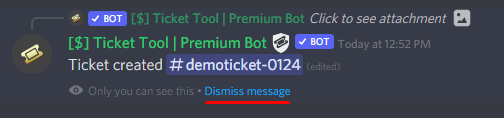
How can I edit/disable the ephemeral message?
These pop ups can only be seen by the user who triggered a certain action, like creating a ticket. They cannot be edited or disabled, as they are a discord requirement that is set by the developer of any bot. The ephemeral messages can be removed by pressing the little blue Dismiss message text, or by restarting your discord client.
 craggy geyser
Likely can be edited when the major update is released
silk ember
cool! thanks :)
craggy geyser
No eta on that yet. But the dev is almost ready for an alpha version (won't be public alpha)
jade topaz
حدا يتكلم عربي
silk ember
craggy geyser
No eta on that yet. But the dev is almost ready for an alpha version (won't be p...
sorry one more question! is there a way to add emotes to the ticket message at all?
slender minnow
@jade topaz avoid random pings please. If you need help, you can make a ticket or ask here ^^;
jade topaz
slender minnow
<@456226577798135808> avoid random pings please. If you need help, you can make ...
arabic
 severe cape
I have a question about billing
quasi cliff
severe cape
I have a question about billing
Ask out here or you can make a Billing Ticket in #🎫│make-a-ticket
rustic gale
silk ember
sorry one more question! is there a way to add emotes to the ticket message at a...
Depends on the emote, basically
severe cape
quasi cliff
Ask out here or you can make a Billing Ticket in <#571706435449257997>
Thanks I’ve just realised that
iron nightBOT
Gave +1 Rep to @quasi cliff
rustic gale
Default emoji you can include by simply copying the emoji itself and pasting it into the message
silk ember
rustic gale
Default emoji you can include by simply copying the emoji itself and pasting it ...
got it, but what about custom emotes
rustic gale
Give me a bit to run an experiment
quasi cliff
silk ember
got it, but what about custom emotes
Yes you can, if the emoji is in the server or mutual server with Ticket Tool
jade topaz
 dim scroll
<@456226577798135808>
dim scroll
<@456226577798135808>
yes?
quasi cliff
$idcommand
humble sequoiaBOT
How do I get the ID of Roles/Channels/Emojis?
Ticket Tool has a useful command that helps you get the ID of various things like channels, roles, emojis and your server.
Just use the command $id <#channel/@role/:emoji:>. Now copy everything, including the brackets <...>, to your dashboard (or wherever you want it)
If you want the server ID, just use $id.
Examples:
Server ID: $id ➝
509192800865353738
Roles: $id @Role ➝@humble sequoia
Channel: $id #channel ➝#🤖│bot-spam
User: $id @user ➝@copper owl
Emoji: $id
quasi cliff
quasi cliff
Yes you can, if the emoji is in the server or mutual server with Ticket Tool
For the Emoji ^
 sage roost
$id
rustic gale
$id 
silk ember
tysm
dim scroll
Community channels
 edgy tiger
how do i make it so people can send links in the tickets
gilded verge
edgy tiger
how do i make it so people can send links in the tickets
go to Dashboard->Panel Configs->Panel Settings->Expand Permission Options->Edit User Opened Permissions->check screenshot
you just need Embed Links

 devout current
How to apply for bot partner?
humble sequoiaBOT

Partnership Program
Our partnership program is currently closed.
We appreciate you being interested in partnering with Ticket Tool! Unfortunately the program for partnering is closed as of now. Currently, there are no plans to open applications again either.
» You can check #📣│server-news for our announcement whenever partnerships open up again!
 TicketTool.xyz - Ticketing without clutter
edgy tiger
TicketTool.xyz - Ticketing without clutter
edgy tiger
dyno keeps deleting the links after people send it in the ticket
quasi cliff
edgy tiger
dyno keeps deleting the links after people send it in the ticket
That's Dyno issue then and not Ticket Tool
edgy tiger
does ticket bot have to be higher than dyno
quasi cliff
edgy tiger
does ticket bot have to be higher than dyno
No, Manage Message (Dyno probably has it) will allow the bot to delete any message
 ionic halo
hello i need help
humble sequoiaBOT
We would love to help you, but if you don't tell us what you need help with we can't help you :(
ionic halo
humble sequoia
i created a ticket
i need help everytime in MY server i try to close a ticket it says missing permissions
gilded verge
so you created a ticket on #🎫│make-a-ticket, right?
gilded verge
so you need just wait for the Staff 🤷
ionic halo
okay
 copper pelican
where can i change the bot language
humble sequoiaBOT
Help Options
$help commands - Information on commands
$help setup - Information on bot setup
$help faq - Frequently asked questions
 gilded reef
$help faq
humble sequoiaBOT
====== FAQ ======
If a question interests you run the command to see the answer.
Q: What is the prefix and how do I change it?
A: $help prefix
Q: How do I let my support team see into a ticket?
A: $help support
Q: How do I make a ticket ping my support when it's created?
A: $help ping
Q: How do I set a transcript channel?
A: $help transcript
Q: How do I limit the number of tickets a user can create?
A: $help limit
Q: How do I set what category tickets are created in?
A: $help category
Q: How do I set what category tickets are moved to when closed?
A: $help closed
Q: How do I set a custom reaction?
A: $help reaction
Q: How do I set the permissions for the tickets?
A: $help perms
Q: How do I create a panel?
A: $help panel
Q: How do I get the panel in my discord?
A: $help send
Q: How do I add or remove users from a ticket?
A: $help add
Q: Ticket Tool isn't responding to my commands, How do I fix it?
A: $help offline
Q: How does the claim command work?
A: $help claim
gilded reef
$help support
humble sequoiaBOT
How to let support team see into a ticket
About support roles
A support role lets your support team see into tickets with out having to add them manually to each and every ticket.
You can add as many support roles as you like per panel.
NOTE that the way discord works all admins can see into tickets regardless of this.
How to set a support role
To set a Support role go to the Dashboard -> Panel Configs -> Settings -> General Options -> Support Team Roles.

NOTE that the support role will not be able to see into tickets that are already created..
gilded reef
$help prefix
humble sequoiaBOT
How to change Ticket tool's prefix
The default prefix for ticket tool is $ and @Ticket Tool#4843 however that can be changed on the Dashboard under Server Configs -> Command Prefix.
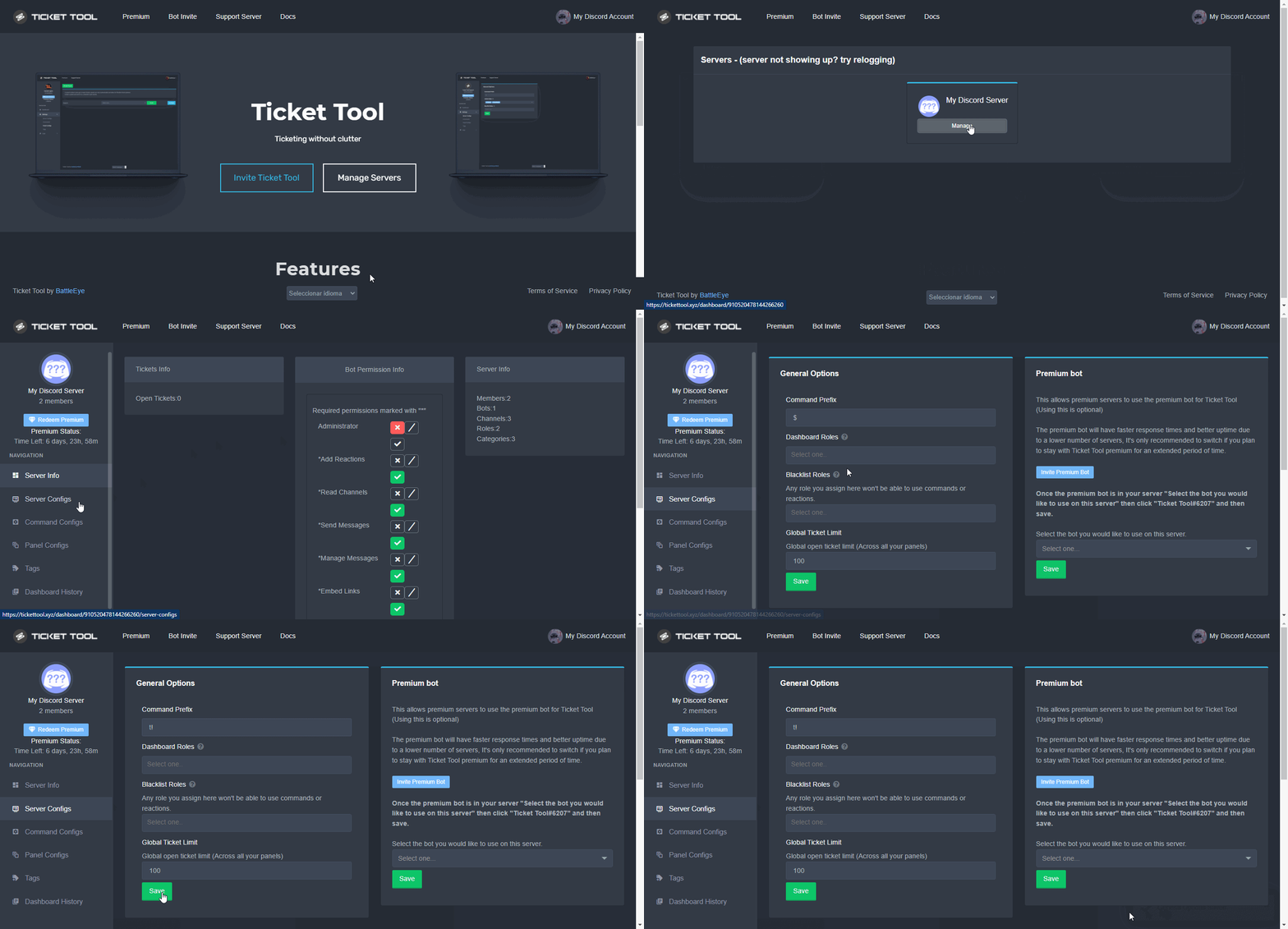
NOTE that @Ticket Tool#4843 will always work as a prefix even if there is a custom prefix.
 frozen river
$help
humble sequoiaBOT
Help Options
$help commands - Information on commands
$help setup - Information on bot setup
$help faq - Frequently asked questions
frozen river
$help commands
humble sequoiaBOT
() = optional
[] = required
*==================================
Ticket Commands
==================================*
_ _
`$add [User] (channel)`
Description: Adding additional users to a ticket
Aliases: none
`$remove [User] (channel)`
Description: Removing users from a ticket
Aliases: none
`$close`
Description: Closing tickets
Aliases: none
`$open`
Description: Opening closed tickets
Aliases: none
`$delete`
Description: Deleting tickets
Aliases: none
`$rename`
Description: Renaming tickets/channels
Aliases: none
`$transcript (send channel)`
Description: Creating transcripts
Aliases: none
`$new (user) (reason)`
Description: Creating tickets in a monitored channel (when command style is enabled)
Aliases: none
`$claim`
Description: Claiming tickets (when claim is enabled)
Aliases: "unclaim"
_ _
*==================================
General Commands
==================================*
_ _
`$help (Help Options)`
Description: Help Command
Aliases: none
`$debug`
Description: Debuging issues with running Ticket Tool
Aliases: none
`$id (@role/@user/#channel/emoji)`
Description: Converting roles, users, channels and emojis to ID
Aliases: "getid"
`$permlevel`
Description: Checking permission level with Ticket Tool
Aliases: "level"
`$ping`
Description: Checking response time with discord api
Aliases: none
`$vote (link | unlink | redeem) (user)`
Description: Earn premium by voting on top.gg or Discord.boats
Aliases: "votes"
gilded verge
@frozen river @gilded reef Please Use Commands On Channel #🤖│bot-spam 🙂
gilded reef
Sorry
 icy mirage
Bot down for anyone else?
 lunar blade
down for us, has been the last 40 ish minutes
 covert swallow
Hey I've been chatting with the support team about this, please open a ticket in #🎫│make-a-ticket
 unborn aspen
Hello, is it possible to restrict the ticket support team role deleting the ticket?
gilded verge
unborn aspen
Hello, is it possible to restrict the ticket support team role deleting the tick...
Hey, I just want to be sure. So you want only the support team to be able to delete the ticket, right?
unborn aspen
Oh wait I think I did not say it correctly. I don't want the support team role to delete the ticket channel
gilded verge
ou.. in that case, I haven't tried it 😳 I should know the answer within 10 minutes ^-^
gilded verge
unborn aspen
``Manage channels`` permission is turned off on the server panel settings
but this is off for bot or your support?
unborn aspen
for the support role perms
gilded verge
a okay
gilded verge
@unborn aspen, Okay, i have answer :>
Go to Dashboard->Panel Configs->Panel Settings->Expand Button Options->Delete Ticket Settings->Disabled Roles (put there your support team/moderators role or everyone if you want)
But you need too: go to Command Configs->command $delete Settings and too put there your mods role
Example on screenshot:


@wispy bolt, can you give an example please? screenshot or something 😳
unborn aspen
gilded verge
<@740993476870537237>, Okay, i have answer :>
Go to `Dashboard`->`Panel Configs...
Ooh thanks! If I put @everyone there, only the people with Administrator role can delete the channel, right?
iron nightBOT
Gave +1 Rep to @gilded verge
gilded verge
Yup, people with full perms (admin) will still be able to delete tickets - and owner hehe 😄
 wispy bolt
gilded verge
<@853231989838446622>, can you give an example please? screenshot or something �...
wispy bolt
gilded verge
<@853231989838446622>, can you give an example please? screenshot or something �...
ehm I didnt have a screenshot but I can explain...
so I opened a ticket on another server. I bought something there and the owner wrote a command into the ticket, whereupon the ticket tool sent a message into the ticket. In this message was the link where I could transfer the money
unborn aspen
gilded verge
Yup, people with full perms (admin) will still be able to delete tickets - and o...
okok ty❣️ I really appreciate your help!
gilded verge
ooooh, probably you mean Tags
humble sequoiaBOT
Tags
Tags are used to send a predefined response to your channels using a command. Tags will only respond if the command itself is used, it will not function if you put the tag into a sentence. The prefix is not included.
To create tags, go to: Dashboard > Tags > Create Tag. After creating and naming one, tap on the response button, and you can edit the response.
 wispy bolt
ahhh thank you so much... you safed my afternoon :D
gilded verge
I am very happy to be able to help you 😊
 vernal crest
can someone help me i a modded account but im trying to log in to rockstar game launcher but its not leting me
humble sequoiaBOT

⚠️ You're in the wrong place
We provide support for @pseudo glen discord bot and cannot help you with whatever issue you have.
- We don't know which Support Team you should contact to get this issue resolved, and unfortunately we won't be able to accurately tell you.
If you don't have any further questions regarding our bot Ticket Tool, please close this ticket
gilded verge
@vernal crest, wrong server buddy 😕
 muted haven
$help ping
humble sequoiaBOT
How to make Ticket Tool ping a role
To make ticket tool ping a role when a ticket is opened, go to the Dashboard -> Panel Configs -> Settings -> Ticket Options -> Ticket Message -> Message Text and do this:
{@Role name} This is case sensitive and the role must have @mentions enabled
 gilded verge
@muted haven, Please Use Commands On Channel #🤖│bot-spam 🙂
muted haven
gilded verge
<@747207045781913706>, **Please Use Commands On Channel <#910978476536905738>** ...
mb
 orchid plank
humble sequoia
orchid plank
humble sequoia
How? I did this, but it does not work and the robot inside the server does not work. Is there a solution?
The server does not appear when I click on Manage Servers and it shows me only servers that have a ticket
humble sequoiaBOT
Don't see your server in the dashboard?
You will possibly need to relog. Look below to see steps on how to relog.
How to relog in the Dashboard.
First, you will need to go to the dashboard. Once your there, click on your avatar on the top right. after you clicked it, you will see button that says Logout. You must click that. Once you have logged out, you can log back in.
Note:
You need one of these 3 things to access the dashboard.
1. Server Owner (Level: 6)
2. Server Administrator (Level: 4)
3. Dashboard Role (Level: 2)
:warning: You can check your level using $level on your Discord Server
User permission level with Ticket Tool
@User is permission level: 0 (User)
```» *If it shows that your permission is **0**, you don't have any of the above **3 things** to manage the dashboard.*
**See the GIF below on how to relog:** orchid plank
humble sequoia
orchid plank
humble sequoia
thank you so much now I can add a ticket in my server
iron nightBOT
Gave +1 Rep to @humble sequoia
 zenith galleon
how do you create a ticket so people can click on it?
orchid plank
humble sequoia
now I see my server 👀🙂
 grim ermine
hi there, just want to know that when setting up this tool, cannot send the pannel to a specific channel. It poped up that ticket tool doesn't have the permission. But when I checked $debug, it shows that all permissions were granted to the bot.
pls help to check

 quasi cliff
grim ermine
quasi cliff
grim ermine
Can u send Channel perms too
 outer juniper
 safe tundra
does ticket tool provide stats?
craggy geyser
safe tundra
does ticket tool provide stats?
Planned feature for the next update
 unkempt crane
humble sequoiaBOT
unkempt crane
humble sequoiaBOT
━━ moved to ticket ━━
 silver anvil
hey lads quick question
the tool sends my tickets to the upper most panel instead of the panel we created for it and where the create tickets channel is
any idea on how to fix that?
thanks in advance
gilded verge
silver anvil
the tool sends my tickets to the upper most panel instead of the panel we create...
Hey, sorry but I can't understand ... Can you describe what you would like to do? 😕
gilded verge
yes, please send screenshot if you can
silver anvil

they used to go where 340 is but for some reason they started appearing at the top this morning
humble sequoiaBOT
How to set the open category
To set a open category go to the Dashboard -> Panel Configs -> Settings -> Category Options -> Category Open

 green radish
how can I set it so user who opened ticket cant use $ commands
quasi cliff
green radish
how can I set it so user who opened ticket cant use $ commands
$commandconfigs
humble sequoiaBOT
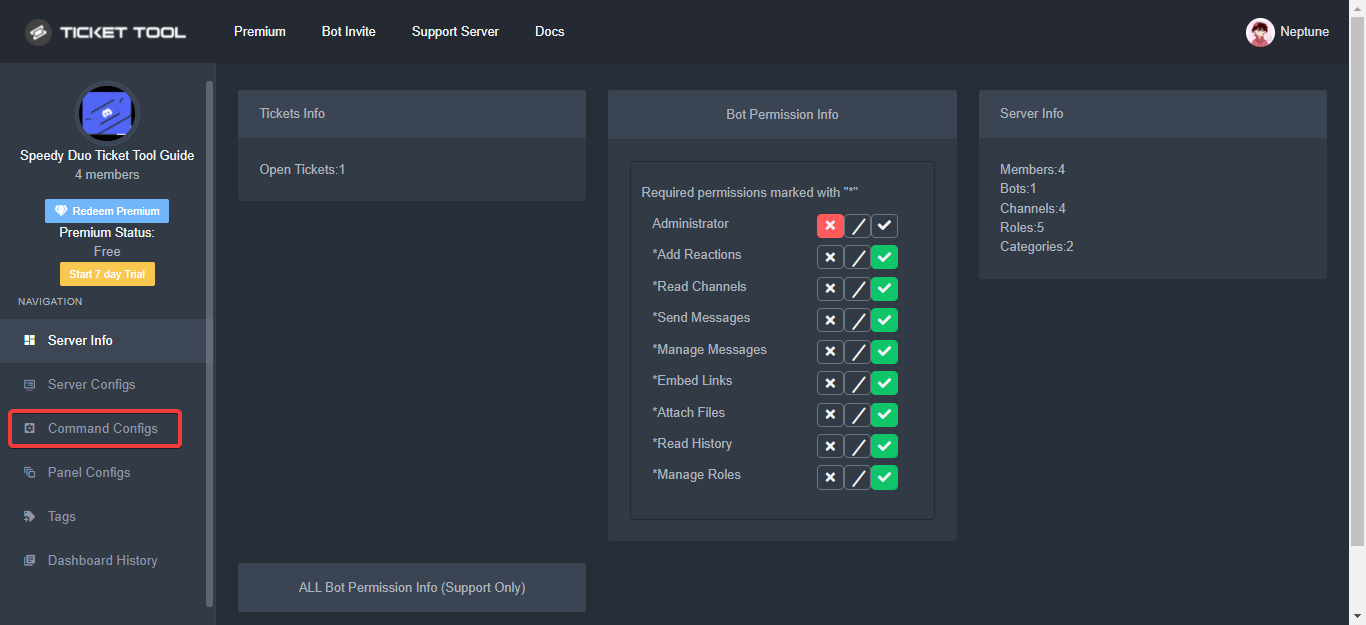
The Command Configs page on your dashboard is where you can enable, disable, and edit permissions for certain commands however you'd like!
Each command has the following things to edit:
Support Team Only: which would only allow users with a
Support Team Roleto use it
Disabled Channels: which would disable the command in the defined channel(s)
Allowed Roles: which would allow users with the roles defined here to use the command
Disabled Roles: which wouldn't allow users with the roles defined here to use the command
 keen falcon
Guys..
Do you guys have any idea what is wrong with this one..
This is my second time got an error The interaction failed like this 😢

 proven cypress
Hm Bot is down.
https://prnt.sc/gmpRyqY7-NEs
925153314969104454
 jade topaz
hi there i have some sync problems with the bot. says not in game... can SO help?
 fallow ingot
 We are aware of the premium bot being offline, please be patient as we investigate and implement a fix if necessary.
 strong crane
Hi so I have a issues when someone creates a ticket everybody can see it is there away to make it so only staff can see it
rustic gale
strong crane
Hi so I have a issues when someone creates a ticket everybody can see it is ther...
Permission Options -> Edit Everyone Roles Opened Permissions, set the Read Messages permission to
You should also set the Everyone Roles Closed Permission for Read Messages to , else they will be able to read the closed ticket too
strong crane
In the bot setting or?
rustic gale
Yes, in the bot's settings, though you will have to manually deny the permission on existing tickets because those changes aren't applied retroactively
If you ask me though, the best solution is to go in your server's role settings and make everyone's View Channels permission neutral or denied
 solid perch
Costs Ticket Tool?
rustic gale
Ticket Tool is free, but there is a paid premium subscription with more features and a more reliable bot
 peak minnow
does anyone here know hot to add multiple buttons to the ticket message?
humble sequoiaBOT
Multipanels are panels with multiple buttons attached to them.
How to create a Multipanel
Premium users can combine multiple panels into one multipanel.
First, find the IDs of each panel you wish to combine. You can find them in your Panel Configs in the Dashboard
Next, send the multipanel to a channel using $panel [id1] [id2] {id3} ....
e.g. $panel 1 2 4 17 35 to combine panels 1, 2, 4, 17 and 35.
Up to 25 panels may be combined.
You can also watch this video tutorial.
peak minnow
got it its premium
humble sequoiaBOT
For a more convenient use of multipanels, you can now combine panels on the dashboard. This will allow you to directly send the multipanel from the dashboard or via the $panel ID command.
Where can I find this?
You can find this setting on the Dashboard -> Panel Configs -> Settings -> General Options
Note: if you're attaching all the panels to a panel called English, don't include English in the attached panels box (If you do this, it will create duplicate)
This will put all buttons from all of your panels on one message. The message is the panel message from the panel you're combining these panels in.
You can also watch this video tutorial.
craggy geyser
peak minnow
got it its premium
Not anymore
craggy geyser
craggy geyser
peak minnow
made my day
Here is the announcement with a few premium features becoming free
 empty flame
Hey can someone maybe help me? Since recently, all roles can access the ticket and read who are open cases. But only supporters and leaders should be able to do this. Can someone maybe help me?
quasi cliff
rustic gale
Permission Options -> Edit Everyone Roles Opened Permissions, set the Read Messa...
Check this out ^
empty flame
ok thanks @quasi cliff . was this somehow changed automatically? Because I have had nothing adjusted there.
quasi cliff
empty flame
ok thanks <@924356699161231410> . was this somehow changed automatically? Becaus...
Nope, probably someone else in your server changed it
Or you changed perms of everyone role in settings and it messed up
empty flame
quasi cliff
Or you changed perms of everyone role in settings and it messed up
No one has the rights to this portal except me. Well no matter I changed it now and now it should work again thanks @quasi cliff
iron nightBOT
Gave +1 Rep to @quasi cliff
 gleaming sonnet
Is there a way to add another person to view the dashboard?
nv.
Server Configs - Dashboard Roles
 potent bolt
Hi
gleaming sonnet
How can I add a role to be able to view all tickets that are made?
 tawdry cape
potent bolt
I just added it to my server ticket tool how to make it work?
tawdry cape
potent bolt
I just added it to my server ticket tool how to make it work?
i have the same problem
humble sequoiaBOT
You can check our documentation here;
You can also check #📂│information for the basic setup;
You can also watch this video tutorial.
Our documentation contains all the info you need about the bot to be able to setup and configure the bot however you like.
gilded verge
humble sequoia
@potent bolt, @tawdry cape
tawdry cape
i already got help in ticket
gilded verge
a okay
humble sequoiaBOT
How to let support team see into a ticket
About support roles
A support role lets your support team see into tickets with out having to add them manually to each and every ticket.
You can add as many support roles as you like per panel.
NOTE that the way discord works all admins can see into tickets regardless of this.
How to set a support role
To set a Support role go to the Dashboard -> Panel Configs -> Settings -> General Options -> Support Team Roles.
NOTE that the support role will not be able to see into tickets that are already created..
gilded verge
humble sequoia
@gleaming sonnet,
 valid iris
Hey the faq answering function isnt working after creating a ticket bot
Any ideas? is it just me who is experiencing the issue?
forest goblet
valid iris
Hey the faq answering function isnt working after creating a ticket bot
By "faq answering function", do you mean Tags?
 wet venture
does anyone know why my ticket bot isnt premium
covert swallow
Did you invite the premium bot?
humble sequoiaBOT
The first thing you will need to do is invite the premium bot, an invite can be found here
Once the bot is in your server we will head to the dashboard and manage your server. When you are managing your server, you want to head into "Server Configs" then click the drop down menu under "Select the bot you would like to use on this server" then click "Ticket Tool#6207" and then save.
 covert swallow
In your server or here?
valid iris
forest goblet
By "faq answering function", do you mean Tags?
Thanks. I think i sorted it out
iron nightBOT
Gave +1 Rep to @forest goblet
 brave kraken
covert swallow
In your server or here?
brave kraken
covert swallow
In your server or here?
on my server ofc
humble sequoiaBOT
You can check our documentation here;
You can also check #📂│information for the basic setup;
You can also watch this video tutorial.
Our documentation contains all the info you need about the bot to be able to setup and configure the bot however you like.
covert swallow
humble sequoia
^ check this
brave kraken
ok
 still sparrow
Bot online?
 north vector
how do i set up the message to have a bunch of panels like this
 humble sequoiaBOT
Multipanels are panels with multiple buttons attached to them.
How to create a Multipanel
Premium users can combine multiple panels into one multipanel.
First, find the IDs of each panel you wish to combine. You can find them in your Panel Configs in the Dashboard
Next, send the multipanel to a channel using $panel [id1] [id2] {id3} ....
e.g. $panel 1 2 4 17 35 to combine panels 1, 2, 4, 17 and 35.
Up to 25 panels may be combined.
You can also watch this video tutorial.
fallow ingot
You can blacklist a role. It’s not possible to blacklist them for a certain amount of time without you adding/removing the blacklisted from form them.
humble sequoiaBOT
Any role you assign as a blacklisted role won't be able to use commands or reactions.
Selecting a blacklisted role
Go to your Dashboard ➞ Server Configs. There you will find the option to select blacklisted roles.
Note: Don't forget to save.
 fading beacon
How do you get multiple reactions or panels ig in one message or one embed? Like this
 humble sequoiaBOT
Multipanels are panels with multiple buttons attached to them.
How to create a Multipanel
Premium users can combine multiple panels into one multipanel.
First, find the IDs of each panel you wish to combine. You can find them in your Panel Configs in the Dashboard
Next, send the multipanel to a channel using $panel [id1] [id2] {id3} ....
e.g. $panel 1 2 4 17 35 to combine panels 1, 2, 4, 17 and 35.
Up to 25 panels may be combined.
You can also watch this video tutorial.
For a more convenient use of multipanels, you can now combine panels on the dashboard. This will allow you to directly send the multipanel from the dashboard or via the $panel ID command.
Where can I find this?
You can find this setting on the Dashboard -> Panel Configs -> Settings -> General Options
Note: if you're attaching all the panels to a panel called English, don't include English in the attached panels box (If you do this, it will create duplicate)
This will put all buttons from all of your panels on one message. The message is the panel message from the panel you're combining these panels in.
You can also watch this video tutorial.
quasi cliff
fading beacon
How do you get multiple reactions or panels ig in one message or one embed? Like...
fading beacon
quasi cliff
<:this:894279341108772914>
Thank you.
iron nightBOT
Gave +1 Rep to @quasi cliff
humble sequoiaBOT
We would love to help you, but if you don't tell us what you need help with we can't help you :(
Don't see your server in the dashboard?
You will possibly need to relog. Look below to see steps on how to relog.
How to relog in the Dashboard.
First, you will need to go to the dashboard. Once your there, click on your avatar on the top right. after you clicked it, you will see button that says Logout. You must click that. Once you have logged out, you can log back in.
Note:
You need one of these 3 things to access the dashboard.
1. Server Owner (Level: 6)
2. Server Administrator (Level: 4)
3. Dashboard Role (Level: 2)
:warning: You can check your level using $level on your Discord Server
User permission level with Ticket Tool
@User is permission level: 0 (User)
```» *If it shows that your permission is **0**, you don't have any of the above **3 things** to manage the dashboard.*


**See the GIF below on how to relog:**@jade topaz, chech all of message
and please don't spam on any servers because it's hard for me to read your messages 😕
i mean this:

okay, anyway glad to be able to fix the problem 😊
gilded verge
humble sequoia
wait, but did you checked all of message from bot?
and did it help you?
humble sequoiaBOT
User permission level with Ticket Tool
@covert furnace is permission level: 0 (User)
gilded verge
not there, use command $level on your server
im not sure what you mean 🤔
ah wait, sorry, yes 😄
Dashboard -> Server Configs ^-^
iron nightBOT
Gave +1 Rep to @gilded verge
gilded verge
you're welcome 😊
 frigid sedge
Hi is ticket tool offline?
 shut bolt
Hey there, we are looking onto the issue some of our users are facing with the bot, sorry for any inconveniences this may represent. Thanks for your patience
jade topaz
can somboddy help me i got this but people from ticket support cant see the tickets
 humble sequoiaBOT
How to let support team see into a ticket
About support roles
A support role lets your support team see into tickets with out having to add them manually to each and every ticket.
You can add as many support roles as you like per panel.
NOTE that the way discord works all admins can see into tickets regardless of this.
How to set a support role
To set a Support role go to the Dashboard -> Panel Configs -> Settings -> General Options -> Support Team Roles.
NOTE that the support role will not be able to see into tickets that are already created..
frigid sedge
shut bolt
Hey there, we are looking onto the issue some of our users are facing with the b...
Oh ok, are the issues similar to pic?
 shut bolt
Yes
frigid sedge
Ok I’ll just wait ty
 scenic plinth
Yes, refer to #premium-support for other information 🙂
 shadow furnace
scenic plinth
Yes, refer to <#811478944720355347> for other information 🙂
shadow furnace
scenic plinth
Yes, refer to <#811478944720355347> for other information 🙂
@humble sequoia
scenic plinth
Ok and?
shadow furnace
 scenic plinth
Yes, we're restarting it, if you didn't read anything but a message above.
shadow furnace
scenic plinth
Yes, we're restarting it, if you didn't read anything but a message above.
ok
scenic plinth
And before we get chaotic here...
For our premium subscribers, we are fully restating premium due to outages, before reporting it is offline, please checkout #premium-support for updates, or #📣│premium-news.
 frozen depot
scenic plinth
Yes, we're restarting it, if you didn't read anything but a message above.
frozen depot
scenic plinth
Yes, we're restarting it, if you didn't read anything but a message above.
haha, came here to see if this was being done. thank you so much!
iron nightBOT
Gave +1 Rep to @scenic plinth
 graceful magnet
humble sequoiaBOT
graceful magnet
humble sequoiaBOT
We would love to help you, but if you don't tell us what you need help with we can't help you :(
 lyric glen
Why is there no login to the game?:D.d
humble sequoiaBOT
⚠️ You're in the wrong place
We provide support for @pseudo glen discord bot and cannot help you with whatever issue you have.
- We don't know which Support Team you should contact to get this issue resolved, and unfortunately we won't be able to accurately tell you.
If you don't have any further questions regarding our bot Ticket Tool, please close this ticket
jade topaz
I need help joining otw
humble sequoiaBOT
⚠️ You're in the wrong place
We provide support for @pseudo glen discord bot and cannot help you with whatever issue you have.
- We don't know which Support Team you should contact to get this issue resolved, and unfortunately we won't be able to accurately tell you.
If you don't have any further questions regarding our bot Ticket Tool, please close this ticket
 twilit hedge
I need help
humble sequoiaBOT
We would love to help you, but if you don't tell us what you need help with we can't help you :(
twilit hedge
I cant send ticket
covert swallow
Where can you not send a ticket?
edgy tiger
how to make it @ a role
humble sequoiaBOT
Within all the messages the bot's sends (both embeds and text) you can mention either channels, roles, or even users, these mentions will only send a notification to the user if they are used within a text field, e.g: a role mentioned in an embed won't ping at all the users who have that role.
For mentioning a role you can use one out of three options:
{@Role Name} ➞ Which is Case Sensitive.
{RoleID} ➞ Replace RoleId with the Id of the role you are trying to ping.
<@&RoleID> ➞ Discord's native syntax to ping roles.
<#ChannelID> ➞ Mention a channel by its ID.
<@UserID> ➞ Mention a user by its ID.
 surreal flare
Hi
 mystic hound
jade topaz
mystic hound
jade topaz
 unborn kiln
Why ??
unborn kiln
Why ??
 floral knoll
Xd
jade topaz
Hlo I need help when I click on manage server it is not working not showing my server data
 vast mulch
bots oiffline
 robust spoke
jade topaz
Hlo I need help when I click on manage server it is not working not showing my s...
robust spoke
jade topaz
Hlo I need help when I click on manage server it is not working not showing my s...
me too
jade topaz
Issues He News Check
 paper talon
robust spoke
me too
paper talon
robust spoke
me too
me too
 summer falcon
Me too
 bold roost
hi my @pseudo glen is down 😦
 waxen tendon
yeah i think its with every one
 heady comet
Same, even our shard seems to have died
 frosty ledge
bold roost
frosty ledge
bold roost
thank
 fallen galleon
 nocturne wren
why am i get failed interaction error?
nocturne wren
why am i get failed interaction error?
 jaunty goblet
offlined !
 unreal verge
its offline lol
shut bolt
Ticket Tool is currently going through a emergency manteinance. The developer is working to solve both the issues with the bot and the dashboard, please be patient.
unreal verge
sleep sounds nice, nighty night strangers
jade topaz
Confirmed ❗
#📌│booster-perks if I boost 4 times with 2 accounts will I get one month premium?
Yes
unreal verge
u can boost 4 times with 1 acc?
shut bolt
jade topaz
<#927789598208311366> if I boost 4 times with 2 accounts will I get one month p...
2 15-day keys, yeah
jade topaz
Free bot appears to be down in some shards
nocturne wren
lol, just added today to the server and its offline xD
unreal verge
@jade topaz i need help
humble sequoiaBOT
We would love to help you, but if you don't tell us what you need help with we can't help you :(
unreal verge
help me sleep
shut bolt
?lock ?t c
 prime bridgeBOT
shut bolt
?lock ?t c
prime bridgeBOT
shut bolt
?lock ?t c
 Unsuccessful Operation!

 An error happened locking down the channel:
 Channel seems to be already locked/private.
jade topaz
Dont misuse this channel; makes it hard for staff
unreal verge
noooo
shut bolt
Oh lord lmao
jade topaz
Dont lock it :/
unreal verge
it didnt work
shut bolt
unreal verge
it didnt work
I'm aware of that
jade topaz
Is there a way to setup the dashboard if I'm staff in a server?
Since it isn't showing up for me
jade topaz
jade topaz
Since it isn't showing up for me
The bot is down, therefore servers that operate with the bot wont show on the dashboard
Oh
 azure vigil
When will it be on?
unreal verge
when its on
jade topaz
Iss the domain really selling for 1999$?
shut bolt
Ticket Tool is currently going through a emergency manteinance. The developer is working to solve both the issues with the bot and the dashboard, please be patient.
 solid stream
Ticket Tools is coming back online
 solid bolt
 gaunt inlet


 urban gust
السلام عليكم
 warm breach
hi, how can i fix this? i have a ticke transcript channel, but it transcripts on the same channel
 humble sequoiaBOT
How do I save transcript to a channel?
To save transcripts to a channel go to the Dashboard -> Panel Configs -> Settings -> Logging Options -> Transcript Channel
 gilded verge
humble sequoia
gilded verge
humble sequoia
Hey @warm breach, check
 hollow acorn
Help me in my ticketticket
gilded verge
just wait for Staff 😐
hollow acorn

warm breach
gilded verge
Hey <@404755621959958558>, check <:this:894279341108772914>
I did that, but its not working
gilded verge
warm breach
I did that, but its not working
hmmm, are you sure bot has required permissions?
and perms to transcript channel? (View Channel, Send Messages, Read Message History)
humble sequoiaBOT
ᅠ
@pseudo glen requires the following permissions:
Add Reactions
Read Channels
Send Messages
Manage Messages
Embed Links
Attach Files
Read History
Manage Roles
Manage Channels
To change the role permissions, you can go to your Discord Server ➞ Server Settings ➞ Roles ➞ @Ticket Tool
To change the channel permissions, you can go to your Channel Settings ➞ Permissions ➞ Ticket Tool
ᅠ
Note:
You can give Ticket Tool Administrative Permissions instead of all the permissions listed above, but it's entirely optional and NOT necessary.

 jagged flax
hello i want to ask can tiket bot when someone open ticket the bot will tag some spesific role? like admin or staff
humble sequoiaBOT
Within all the messages the bot's sends (both embeds and text) you can mention either channels, roles, or even users, these mentions will only send a notification to the user if they are used within a text field, e.g: a role mentioned in an embed won't ping at all the users who have that role.
For mentioning a role you can use one out of three options:
{@Role Name} ➞ Which is Case Sensitive.
{RoleID} ➞ Replace RoleId with the Id of the role you are trying to ping.
<@&RoleID> ➞ Discord's native syntax to ping roles.
<#ChannelID> ➞ Mention a channel by its ID.
<@UserID> ➞ Mention a user by its ID.
 jagged flax
for premium only ya?
gilded verge
nope
gilded verge
oh sorry, i take wrong server ^-^
 jagged flax
gilded verge
oh sorry, i take wrong server ^-^
jagged flax
gilded verge
oh sorry, i take wrong server ^-^
okee thank you!
iron nightBOT
Gave +1 Rep to @gilded verge
warm breach
gilded verge
hmmm, are you sure bot has required permissions?
and perms to transcript channe...
Yes, we have two ticket channels, idk if thats the problem
That the bot cant transcript different tickets in the same channel
gilded verge
You can have multiple open / closed channels but that's not the problem here
can you show us screenshot like this? 🤔
 warm breach
humble sequoia
warm breach
humble sequoia
I mean, like here, there is #1 and #2, both of them logs on the same channel
gilded verge
ookay but can you send this screenshot please? 😳
warm breach
Bruh, ignore, it just works now XD
gilded verge
oof 😄
warm breach
gilded verge
ookay but can you send this screenshot please? 😳
Thank yoy anyways
iron nightBOT
Gave +1 Rep to @gilded verge
 humble sequoiaBOT
For a more convenient use of multipanels, you can now combine panels on the dashboard. This will allow you to directly send the multipanel from the dashboard or via the $panel ID command.
Where can I find this?
You can find this setting on the Dashboard -> Panel Configs -> Settings -> General Options
Note: if you're attaching all the panels to a panel called English, don't include English in the attached panels box (If you do this, it will create duplicate)
This will put all buttons from all of your panels on one message. The message is the panel message from the panel you're combining these panels in.
You can also watch this video tutorial.
jade topaz

scenic plinth
 Before you ask, the bot went offline momentarily or is going to go offline for 30 seconds as intended by developer works a few minutes ago. So interaction failed or the bot being offline, here is your answer.
humble sequoiaBOT
Ticket Tool Invite & Support
 dusky nymph
how do you make it so when a ticket is created it pings a role
slender minnow
$mentions
humble sequoiaBOT
Within all the messages the bot's sends (both embeds and text) you can mention either channels, roles, or even users, these mentions will only send a notification to the user if they are used within a text field, e.g: a role mentioned in an embed won't ping at all the users who have that role.
For mentioning a role you can use one out of three options:
{@Role Name} ➞ Which is Case Sensitive.
{RoleID} ➞ Replace RoleId with the Id of the role you are trying to ping.
<@&RoleID> ➞ Discord's native syntax to ping roles.
<#ChannelID> ➞ Mention a channel by its ID.
<@UserID> ➞ Mention a user by its ID.
slender minnow
@dusky nymph
dusky nymph
ok
jade topaz
Is the bot dashboard still offline?
scenic plinth
Looking into it 
 iron nightBOT
Gave +1 Rep to @scenic plinth
jade topaz
😮 😂
scenic plinth
Oh... thats just you needing to select the correct bot
humble sequoiaBOT
How to disable the premium bot
To disable the premium bot you will have to go to the Dashboard ➞ Server Configs ➞ Premium bot ➞ And on the right-hand side select the primary free bot in the drop down menu.
Premium features will still work on the normal bot.
 jade topaz
oh, I'm dumb then 😂
 austere wyvern
Hey, why don't attachments in direct transcripts open anymore?
When I open one this error appears
 scenic plinth
Discord stopped storing images from deleted channels. Ticket Tool Premium is testing a feature to allow a certain number of images to be saved.
austere wyvern
Okay, thanks!
 arctic pagoda
scenic plinth
Discord stopped storing images from deleted channels. Ticket Tool Premium is tes...
arctic pagoda
scenic plinth
Discord stopped storing images from deleted channels. Ticket Tool Premium is tes...
In a server I'm in, Direct Transcripts show images even when we delete the channel. Is this strange or could be normal? (We don't have TT Premium)
 wild remnant
I have been having issues with the premium bot for 3 days now, constantly up and down, “this interaction failed”
This is unacceptable
scenic plinth
Discord is apparently having issues with the bot loading certain servers, which causes the premium version to go offline for a short period of time, you can try to reinvite the bot if it continues to happen.
fading beacon
How do I make it remove numbers when a ticket is opened?
 wild remnant
scenic plinth
Discord is apparently having issues with the bot loading certain servers, which ...
wild remnant
scenic plinth
Discord is apparently having issues with the bot loading certain servers, which ...
Will this mess up all my tickets?
Also why isn’t this downtime reported on the ticket tool tracker
scenic plinth
Because it hasn't been, as it is sudden occurrences, 99% of the time being Discord.
I apologize we haven't posted anything to meet your standard.
scenic plinth
fading beacon
How do I make it remove numbers when a ticket is opened?
It is a premium feature, so not much I can offer you here.
fading beacon
Whats the number for?
wild remnant
scenic plinth
Because it hasn't been, as it is sudden occurrences, 99% of the time being Disco...
So the premium bot not working basically constantly for the past 3 days has been Discord?
Why hasn't inviting it back done anything to fix my issue?
Its still showing the bot is offline.
scenic plinth
It was recommended.... it's not a guaranteed fix... and yes according to our Developer.
wild remnant
Imo offering a premium bot with "premium uptime" and having it be less than the free one, and blaming it all on Discord, not a good look.
I'll try switching back to the free bot but my tickets will be all messed up
scenic plinth
Alright, do as you seem fit.
⚠️ Ticket Tool Premium Appearing Offline for my server?
As a ongoing issue, some servers with Ticket Tool Premium Bot are offline or suddenly appear offline. We are aware, and we have attempted to restart those servers.
If this issue persists in your server, you can alternatively try to invite the standard bot and enable the standard version on your server configs. Premium configurations will still work on your server even with the standard version of the bot, assuming you have a premium subscription.
Edit: Yes... you don't need to kick the premium bot
 solemn cairn
yo
 spice trellis
Question for support. If tt Premium is offline, and we wish to invite the normal bot for now to mitigate until repaired, will the panels have to be redeployed or will functionality continue as normal.
scenic plinth
Panels will have to be sent again yes, they are two separate bots providing the panel.
spice trellis
But all other functionality should remain, correct. Until tt Premium can restore at least for the tickets that are open
scenic plinth
Correct
spice trellis
Got it. Thanks much Kenzy. Is there an eta on restoration or is it out of your guys hands for now
scenic plinth
As it is a Discord issue, atleast reported by the Developer, we have no idea when the bot will return to normal for the server that the issue persists on.
spice trellis
Understood. Appreciate it. Will wait it out for now until an update and try the temp fix. Thx
 silver marsh
Is there a way to ad points to staff members. Whenever a ticket is completed, they can do a command and it adds 1 point so the owner sees how much they do
 shell geode
How do I add some1 to the ticket?
silver marsh
$add <name>
shell geode
Wdym
 radiant moss
silver marsh
Is there a way to ad points to staff members. Whenever a ticket is completed, th...
radiant moss
silver marsh
Is there a way to ad points to staff members. Whenever a ticket is completed, th...
Not within ticket tool. You would have to do a custom bot or see if another bot has that feature
shell geode
If I do $add discord name + tag it ain’t doing anything
silver marsh
shell geode
If I do $add discord name + tag it ain’t doing anything
then their id
 shell geode
shell geode
shell geode
This did nothing…?
humble sequoiaBOT
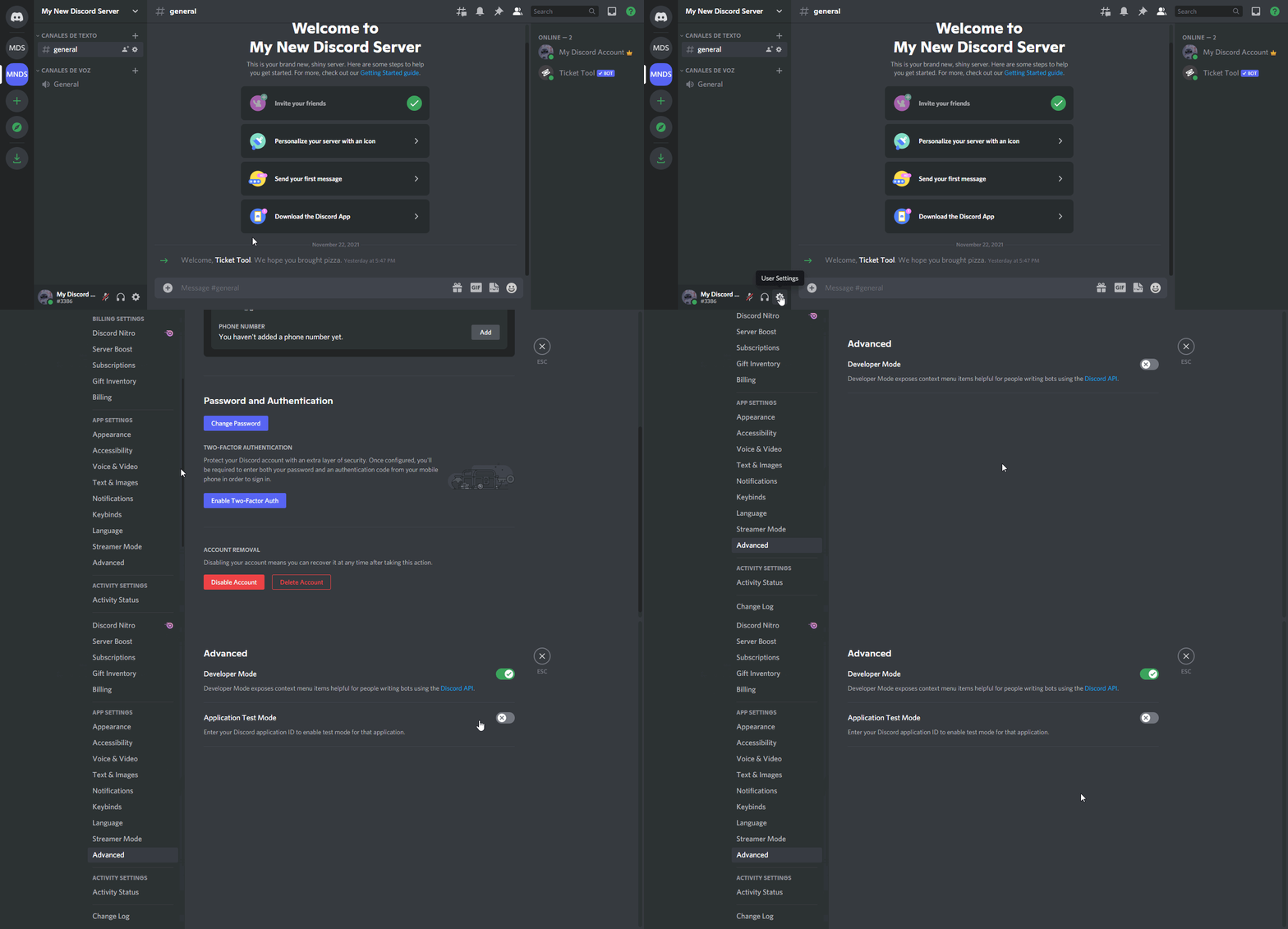
How to turn on developer mode
To enable developer mode do the following:
[:desktop: PC] go to Settings ➞ Advanced ➞ Developer mode
[:mobile_phone: Mobile] go to Settings ➞ Appearance ➞ Developer mode
Developer Mode allows you to get the ID of any channel, user, role, or server.
VIA the ID, you can use them with <> alongside their corresponding format to mention a channel/role/user...
They're mostly used to mention channels, users, or roles in Embeds
Formats
Channels: <#ID> ➝ #🤖│bot-spam
Users: <@ID> ➝ @humble sequoia
Roles: <@&ID> ➝ <@&642118166243311646>
 silver marsh
shell geode
I don’t know how to see ID
silver marsh
shell geode
I don’t know how to see ID
developer mode
gilded verge
humble sequoia
yup, like this
shell geode
Shi im on phone…
silver marsh
[📱 Mobile] go to Settings ➞ Appearance ➞ Developer mode
it literally says right there
smh
shell geode
Alr
proven cypress
sorry to ask, but is this intentional or a known problem that the premium bot has been offline for hours?
unreal verge
its on?
 lone warren
سلام رمز عبور رو هرچی میزنم میگه اشتباه کسی میتونه کمک کنه
humble sequoiaBOT
⚠️ أنت في المكان الخطأ
نحن نقدم دعمًا لـ@pseudo glen ديسكورد بوت ولا يمكننا مساعدتك في المشكلة التي تواجهها.
- يرجى التأكد من الاتصال بفريق الدعم المناسب.
إذا لم يكن لديك أي أسئلة أخرى بخصوص بوت تيكت توول ، يرجى إغلاق هذه التذكرة
proven cypress
unreal verge
its on?
no
strong crane
Okay I can’t figure out why all members can see tickets I looked through the permissions and still can’t find it out
fallow ingot
$kv
humble sequoiaBOT
How to hide tickets from everyone
Head over to your Dashboard ➞ Panel Configs ➞ Settings ➞ Permission Options ➞ Edit Everyone Roles Opened Permissions

NOTE that @everyone can type aswell if it has permissions to send messages
fallow ingot
Check this out ^ @strong crane
strong crane
thanks
fallow ingot
Np
unreal verge
Hello, how would I get the opening message text to ping a certain role, ive tried role id and name
scenic plinth
$help ping
humble sequoiaBOT
How to make Ticket Tool ping a role
To make ticket tool ping a role when a ticket is opened, go to the Dashboard -> Panel Configs -> Settings -> Ticket Options -> Ticket Message -> Message Text and do this:
{@Role name} This is case sensitive and the role must have @mentions enabled
scenic plinth
You can alternatively use the $id @role command and copy+paste its contents into the message
unreal verge
oh didnt realize i had to include {}
jade topaz
Hey is anybody else having interaction failed on tickets
scenic plinth
scenic plinth
⚠️ **Ticket Tool Premium Appearing Offline for my server?**
As a ongoing issue,...
l
 fresh temple
Are the premium users going to get compensated for these days of premium bot having issue?
fresh temple
Thank you ❤️ that's great
covert swallow
We don't know what your issue is to help you
 ember ether
How can I get the script?
covert swallow
Are you asking for the TicketTool source code?
 low adder
Is there an ETA for the premium outage? We rely heavily on it for most of the things we do in our server and it has crippled us for three days now
covert swallow
low adder
I cant see that channel - let me check my permissions again
Am I missing a role? I gave myself the premium outage role, but don't see one for the other
 upper flower
$pc @low adder
 pseudo glenBOT

Thank you
Thank you for purchasing Ticket Tool Premium @low adder. You have now been given the <@&535595160189403136> role!
Found 2 servers in total and 1 with premium and permission
low adder
TY!
shadow furnace
upper flower
$pc <@500853716690403329>
bot !!!!!!!!!!!! @humble sequoia
covert swallow
Dont ping staff
shadow furnace
covert swallow
Dont ping staff
Bot @humble sequoia
 old ermine
shadow furnace
Bot <@722196398635745312>
old ermine
shadow furnace
Bot <@722196398635745312>
 jade topaz
okay
 narrow raptor
Is anyone else having troubles with the ticket tool?
covert swallow
Yes, its restarting
narrow raptor
i see
 soft ravine
Yes when i try to close a ticket i get interaction failed.
 dull plaza
I get "Failed: Members didn't arrive in time."
 low kraken
Is it still down?
frigid sedge
wow its crazy been over a day
 celest ledge
I can't open a ticket in my server because ticket tool premium is down
 raw skiff
covert swallow
raw skiff
covert swallow
You can
 novel kraken
Premium bot is not opening tickets or closing tickets
 trim scaffold
novel kraken
Premium bot is not opening tickets or closing tickets
trim scaffold
novel kraken
Premium bot is not opening tickets or closing tickets
Yes
The premium bot is off...
novel kraken
Is there a eta of when it’s coming back on?
novel kraken
 weak spoke
premium bot is down
weak spoke
premium bot is down
I can see that I was asking of when it’s coming back online? As I rely on it for our members
rustic gale
It is fine to switch to the basic bot for the time being. All the premium features are still available in it (if you're a premium subscriber)
 vestal bay
anyway to delete every tickets on a server?
there's too many tickets on mine ... 😄
jade topaz
No, just speed run it.
rustic gale
Type the $delete command into them one by one
vestal bay
rustic gale
Type the `$delete` command into them one by one
it will automatically delete?
rustic gale
Yup. Straight to delete, no takebacks
vestal bay
ayy nice thanks 🙏
 flint aurora
@rustic gale how can I make a ticket
weak spoke
novel kraken
I can see that I was asking of when it’s coming back online? As I rely on it for...
no idea man im waiting for it to come back too. got a 36k community wanting to report dumb stuff
novel kraken
weak spoke
no idea man im waiting for it to come back too. got a 36k community wanting to r...
I went ahead and put a message in my helpdesk channel and redirected them to a new channel it’s the least I can do for mine
rustic gale
Please switch to the basic bot for the time being
novel kraken
rustic gale
Please switch to the basic bot for the time being
I can’t do that
rustic gale
Why not? You can make a ticket #🎫│make-a-ticket so we can give you detailed support
novel kraken
rustic gale
Why not? You can make a ticket <#571706435449257997> so we can give you detailed...
Because I’m not prepared to reconfigure every single channel and invite another bot into my server I’m sorry I don’t have the time to do that I’ll just wait
rustic gale
Please stick to the basic bot for now. When the premium bot seems to be more stable there will be an announcement i'm sure
jade topaz
pp
 simple cliff
Is there anyway to use the basic bot without having to fully configure everything?
jade topaz
Anyone know how to give members image perms in the tickets?
 dark field
jade topaz
Anyone know how to give members image perms in the tickets?
dark field
jade topaz
Anyone know how to give members image perms in the tickets?
should be working on dashboard and just set the permission at the first options
Dashboard -> Panel Configs -> "open your panel settings" -> Permission Options
 civic wagon
Unable to create a ticket from #📣│server-news
jade topaz
dark field
Dashboard -> Panel Configs -> "open your panel settings" -> Permission Options
Thanks
iron nightBOT
Gave +1 Rep to @dark field
dark field
civic wagon
Unable to create a ticket from <#509770538051305493>
Premium Bot is right now offline. They are trying to fix the problem
civic wagon
Oh alright, thanks!
jade topaz
Dardani is a pro
 hardy current
Is the bot having trouble opening/closing tickets?
 sudden pier
hardy current
Is the bot having trouble opening/closing tickets?
sudden pier
hardy current
Is the bot having trouble opening/closing tickets?
Premium bot is currently offline, they suggested switching back to the basic bot until it's fixed, also what dev said lol
 covert swallow
Do $pc in #🤖│bot-spam
jade topaz
covert swallow
Do `$pc` in <#910978476536905738>
didnt worked
wait premium back online? lmao i just resend all my panels
covert swallow
If the bots down stuff wont happen, try again
dark field
jade topaz
wait premium back online? lmao i just resend all my panels
Right now Premium back online
jade topaz
dark field
Right now Premium back online
ty
iron nightBOT
Gave +1 Rep to @dark field
 rough hawk
first time setting it up rather than using it.
is there a way to have multi-buttons ie for "Malicious Intent / Harassment / Scams / Other" in 1 message?
dark field
rough hawk
first time setting it up rather than using it.
is there a way to have multi-bu...
create 1 panel (like main) and create the other panels like "scams.. other.. etc" and then go to main panel and put in multi panels too
rough hawk
Coolies, I'll mess around with it on a temp server, and when im happy with it ill move it over :)
 clever plover
anyone know how to add an image to panel message, field message


There must be a way
rustic gale
Those are emotes
To add an emote to a message you paste its code
To find the code of an emote you use the $id command
$idcommand
humble sequoiaBOT
How do I get the ID of Roles/Channels/Emojis?
Ticket Tool has a useful command that helps you get the ID of various things like channels, roles, emojis and your server.
Just use the command $id <#channel/@role/:emoji:>. Now copy everything, including the brackets <...>, to your dashboard (or wherever you want it)
If you want the server ID, just use $id.
Examples:
Server ID: $id ➝
509192800865353738
Roles: $id @Role ➝@humble sequoia
Channel: $id #channel ➝#🤖│bot-spam
User: $id @user ➝@copper owl
Emoji: $id
dark field
rough hawk
Coolies, I'll mess around with it on a temp server, and when im happy with it i...
or just try on the main server but like on a hidden channel ^^
rough hawk
dark field
or just try on the main server but like on a hidden channel ^^
Mhm, or that lol
humble sequoiaBOT
Help Options
$help commands - Information on commands
$help setup - Information on bot setup
$help faq - Frequently asked questions
clever plover
$idbutton
quasi cliff
Please use #🤖│bot-spam
humble sequoiaBOT
Multipanels are panels with multiple buttons attached to them.
How to create a Multipanel
Premium users can combine multiple panels into one multipanel.
First, find the IDs of each panel you wish to combine. You can find them in your Panel Configs in the Dashboard
Next, send the multipanel to a channel using $panel [id1] [id2] {id3} ....
e.g. $panel 1 2 4 17 35 to combine panels 1, 2, 4, 17 and 35.
Up to 25 panels may be combined.
You can also watch this video tutorial.
For a more convenient use of multipanels, you can now combine panels on the dashboard. This will allow you to directly send the multipanel from the dashboard or via the $panel ID command.
Where can I find this?
You can find this setting on the Dashboard -> Panel Configs -> Settings -> General Options
Note: if you're attaching all the panels to a panel called English, don't include English in the attached panels box (If you do this, it will create duplicate)
This will put all buttons from all of your panels on one message. The message is the panel message from the panel you're combining these panels in.
You can also watch this video tutorial.
quasi cliff
clever plover
do you know how I add another button
iron nightBOT
Gave +1 Rep to @quasi cliff
quasi cliff
If you require any further information, let me know.
clever plover
I appreciate your help.
clever plover
quasi cliff
If you require any further information, let me know.
Is there a limit to how many panels you can have?
it's 25 buttons max per message right? But could I have like 200 panels
craggy geyser
Correct
clever plover
oh this is gonna get fun
is there a way which every user can see a ticket and be tagged individually? not just @ everyone tag
craggy geyser
$mentions
humble sequoiaBOT
Within all the messages the bot's sends (both embeds and text) you can mention either channels, roles, or even users, these mentions will only send a notification to the user if they are used within a text field, e.g: a role mentioned in an embed won't ping at all the users who have that role.
For mentioning a role you can use one out of three options:
{@Role Name} ➞ Which is Case Sensitive.
{RoleID} ➞ Replace RoleId with the Id of the role you are trying to ping.
<@&RoleID> ➞ Discord's native syntax to ping roles.
<#ChannelID> ➞ Mention a channel by its ID.
<@UserID> ➞ Mention a user by its ID.
craggy geyser
You can't individually tag everyone automatically, (only automatically selected person is the one who made the ticket or who runs a command) but you can preselect users
clever plover
could the person who created the ticket @ tag someone within the server
craggy geyser
If they have access to the ticket. If you want everyone to see the ticket it's possible
jade topaz
how would you send a transcript to their dms?
I see the automated dm, but where is the automated transcript?
when their ticket closes
humble sequoiaBOT
Solved in another channel.
clever plover
craggy geyser
If they have access to the ticket. If you want everyone to see the ticket it's p...
how is it possible?
craggy geyser
$kv
humble sequoiaBOT
How to hide tickets from everyone
Head over to your Dashboard ➞ Panel Configs ➞ Settings ➞ Permission Options ➞ Edit Everyone Roles Opened Permissions
NOTE that @everyone can type aswell if it has permissions to send messages
iron nightBOT
Gave +1 Rep to @craggy geyser
jade topaz
How to setup
 humble sequoiaBOT
Tags
Tags are used to send a predefined response to your channels using a command. Tags will only respond if the command itself is used, it will not function if you put the tag into a sentence. The prefix is not included.
To create tags, go to: Dashboard > Tags > Create Tag. After creating and naming one, tap on the response button, and you can edit the response.
rough hawk
jade topaz
How to setup
That seems like a login token for Discord.
jade topaz
 unkempt epoch
Hi
clever plover
So it’s confirmed I can make as many panels as I please?
fallow ingot
clever plover
So it’s confirmed I can make as many panels as I please?
Yes
Check user opened permissions
$help perms
humble sequoiaBOT
How to set the permissions for tickets
To set a change permissions go to the Dashboard -> Panel Configs -> Settings -> Permission Options

 latent lion
how do I do this
 humble sequoiaBOT
You can check our documentation here;
You can also check #📂│information for the basic setup;
You can also watch this video tutorial.
Our documentation contains all the info you need about the bot to be able to setup and configure the bot however you like.
fallow ingot
rough hawk
Setting things up is quite the challenge Haha.
I'm getting the hang of things :D
fallow ingot
rough hawk
Setting things up is quite the challenge Haha.
I'm getting the hang of things :...
Yeah but you’ll get used to it and know the features better soon. If you need help feel free to ask :)
rough hawk
one question, Can we edit the "welcome" thing? Or even the embed?

i might've scrolled past the options 🤭
Found it
Definitely scrolled past it so many times
rough hawk
q: is #📈│reviews just for giving staff 1-5 stars or just general feedback of staff & the bot?
 waxen fjord
anyone else having any issues with tickets not archiving after closing?
rough hawk
did you set a archive category?
 rough hawk
dark field
create 1 panel (like main) and create the other panels like "scams.. other.. etc...
rough hawk
dark field
create 1 panel (like main) and create the other panels like "scams.. other.. etc...
Do I need to include all the multipanels?
 silent sedge
Why is premium down again
 astral compass
Why ticket Tool is off?
 jovial otter
Ticket tool down
astral compass
😴
 frigid walrus
Eta of when it'll be back up?
jovial otter
Mate I need it fast, got a 1600 members server to manage
 royal jewel
is there a reason why it isn't letting people open tickets to give access to dashboard on certain servers, even when I have admin perms?
jade topaz
when active man
royal jewel
Ok I figured it out, even the server I own (which has premium) I can’t access db
So it’s not a perms thing it’s a Tickettool thing
 smoky warren
royal jewel
So it’s not a perms thing it’s a Tickettool thing
smoky warren
royal jewel
So it’s not a perms thing it’s a Tickettool thing
the whole thing is down mate, it went down last night as well
royal jewel
Sadge

 slim trout
jovial otter
Mate I need it fast, got a 1600 members server to manage
slim trout
jovial otter
Mate I need it fast, got a 1600 members server to manage
bruh you think thats a lot we have a 88k people in our server...
ticket tool is a must
 pulsar ermine
Is there a possibility to continue managing existing tickets?
I saw there is a replacement bot, but how can it manage the existing tickets?
wintry jetty
premium bot is off?
 pale pilot
pulsar ermine
Is there a possibility to continue managing existing tickets?
I saw there is a r...
pale pilot
pulsar ermine
Is there a possibility to continue managing existing tickets?
I saw there is a r...
Give the other bot a support team role and use commands. Unfortunately the other bot can't use buttons sent by the other bot
pulsar ermine
pale pilot
Give the other bot a support team role and use commands. Unfortunately the other...
Is there a command to resend the panel?
pale pilot
$panel ID and just replace ID with the number of the panel
pulsar ermine
Ticket Premium Bot back online? 🤔
pale pilot
Looks like it is
 pale pilot
Our dev is on it right now
pulsar ermine
pale pilot
Our dev is on it right now
❤️
jade topaz
yall, where my "Regular" role at 😭
fallow ingot
jade topaz
yall, where my "Regular" role at 😭
You need to reach a certain level to gain the role automatically
jade topaz
fallow ingot
You need to reach a certain level to gain the role automatically
I had it tho
rough hawk
Q: If the free premium trial runs out, do we lose the custom embeds (ie; when you make a ticket?)
jade topaz
rough hawk
Q: If the free premium trial runs out, do we lose the custom embeds (ie; when ...
When the trial runs out, any premium features will no longer work and you will recieve errors when attempting to use the premium bot. When it runs out, you can buy premium via subscription or move back to the free bot. You could do so by selecting [FREE BOT] in this UI found in SERVER CONFIGS!
 rough hawk
jade topaz
When the trial runs out, any premium features will no longer work and you will r...
rough hawk
jade topaz
When the trial runs out, any premium features will no longer work and you will r...
Aight, good to know :)
 hollow wagon
Guys
I dont know how to make a role I wish to check my tickets
Can anyone pls help?
humble sequoiaBOT
How to let support team see into a ticket
About support roles
A support role lets your support team see into tickets with out having to add them manually to each and every ticket.
You can add as many support roles as you like per panel.
NOTE that the way discord works all admins can see into tickets regardless of this.
How to set a support role
To set a Support role go to the Dashboard -> Panel Configs -> Settings -> General Options -> Support Team Roles.
NOTE that the support role will not be able to see into tickets that are already created..
jade topaz
I have a problem, the tick does not open for me

I have a problem, the tick does not open for me
 slender minnow
jade topaz
I have a problem, the tick does not open for me
slender minnow
jade topaz
I have a problem, the tick does not open for me
Hey, can you please check that your (or whoever had taken that screenshot) discord client is updated to the latest version?
jade topaz
Ok thx
slender minnow
If that doesn't solves the issue (if the client is updated) you can reply again to this message or open a ticket from #🎫│make-a-ticket if i am unavailable
you can also use this channel and wait for someone from the community to help you out
 tender wind
isn't <@roleid> the command to tag a role?
humble sequoiaBOT
Within all the messages the bot's sends (both embeds and text) you can mention either channels, roles, or even users, these mentions will only send a notification to the user if they are used within a text field, e.g: a role mentioned in an embed won't ping at all the users who have that role.
For mentioning a role you can use one out of three options:
{@Role Name} ➞ Which is Case Sensitive.
{RoleID} ➞ Replace RoleId with the Id of the role you are trying to ping.
<@&RoleID> ➞ Discord's native syntax to ping roles.
<#ChannelID> ➞ Mention a channel by its ID.
<@UserID> ➞ Mention a user by its ID.
slender minnow
other ways of mentioning ^
tender wind
slender minnow
it's <@&id>
fixed it. its actually {@role id/role name}
its been changed as mentioned by the panel on the dashboard
rustic gale
<@&id> works too. And it works on Discord itself, and in other bots as well.
Trivia: <@&your server's id> is the everyone role.
 shrewd totem
Right now any media files in our tickets are not saved in logs. Is there a way to get it so it does? Premium account? Ping me when you reply pls
rustic gale
shrewd totem
Right now any media files in our tickets are not saved in logs. Is there a way t...
Premium has some media storage (8 mb). Default doesn't have any storage
Recommended: reupload all media to a separate logging channel and copy the links into the ticket before transcripting
 coarse spruce
Can you remove a role from a ticket?
rustic gale
coarse spruce
Can you remove a role from a ticket?
Of course. Use the $remove command
coarse spruce
okay thanks
 median grove
Hey, how can i select where the Tickets gets created 😄
slender minnow
median grove
Hey, how can i select where the Tickets gets created 😄
if you are talking about categories, then refer the response below
$help category
humble sequoiaBOT
How to set the open category
To set a open category go to the Dashboard -> Panel Configs -> Settings -> Category Options -> Category Open
slender minnow
the same is with closed category, just the option you have to look for is right next to it
called Category Closed
iron nightBOT
Gave +1 Rep to @slender minnow
 gusty temple
Hello! I am unable to find this in the FAQs, wondered if someone could assist 🙂
I would like to limit the number of tickets total, either globally or by panel, rather than limiting the number each user can have. I would like to be able to set up the bot so that it will only allow 3 or 5 tickets total up at a time. Many thanks!
scenic plinth
General Options -> Ticket Limit (panel)
Server Configs -> Global Limit (global panel default)
gusty temple
scenic plinth
General Options -> Ticket Limit (panel)
Server Configs -> Global Limit (global p...
So although it doesn't clarify in the dashboard, the FAQs suggest that that feature is also user specific :/
 scenic plinth
It is user specific yes. I clearly misunderstood if that was what you were trying to get across, apologies.
gusty temple
scenic plinth
It is user specific yes. I clearly misunderstood if that was what you were tryin...
No worries! Any ideas on how to limit all tickets?
scenic plinth
Not currently a feature, atleast not automatically, to a sense.
gusty temple
scenic plinth
Not currently a feature, atleast not automatically, to a sense.
Sad times, but thank you anyway
iron nightBOT
Gave +1 Rep to @scenic plinth
 warm stirrup
How do I change the language of transcript
clever plover
@quasi cliff
Anyone know how I can make sections like this? I think they’re using a bot called helper?
 covert swallow
Its done through a bot by a different dev
Bots called Sapphire

A Discord Bot — Done Right | Custom slash commands, buttons & select menus, Auto Moderation, Social Notifications, Reaction Roles, Logging, Custom (ephemeral) messages, Scheduled messages, Automated / triggered messages and more
 cobalt hull
hello, I signed up 2 months ago and saff said a long time ago that I just had to wait to get Portuguese support as I enter.
gilded verge
cobalt hull
hello, I signed up 2 months ago and saff said a long time ago that I just had to...
Hey, can you explain your problem with the Ticket Tool bot?
cobalt hull
I made my application for staff and they said that I entered and waited 2 months and nothing
cobalt hull
gilded verge
Hey, can you explain your problem with the Ticket Tool bot?
Help?
gilded verge
This is not something I can help you with. I guess you just have to wait 😐
cobalt hull
gilded verge
This is not something I can help you with. I guess you just have to wait 😐
yes I've been waiting 2 months since they said that and so far nothing friend
gilded verge
wait, but how? you are new on this server 😐
I mean how did you apply if you are new to the server? 🤔
 hazy dirge
cobalt hull
I made my application for staff and they said that I entered and waited 2 months...
hazy dirge
cobalt hull
I made my application for staff and they said that I entered and waited 2 months...
Did you complete the phase 2?
Then that’s why you waited for 2 months
They said that there’s a phase 2 if you passed the application
I’m sorry, that’s all I can tell you.
 silk chasm
You can do it if you've passed the application, which you would have known further back. so if you haven't received anything it's very likely your application got denied.
 fathom bolt
Is there a way to copy and paste over entire panels to another server?
humble sequoiaBOT
Backup and Restore allows you to transfer your premium status, panels, tags, and all settings to a new server.
You can also use it to keep a backup of your settings incase you need to suddenly move servers. We suggest you keep this backup key somewhere safe, incase your server is deleted. You will want to copy the whole key.
First, go to your dashboard, then Server Configs and generate a new backup key by pressing the green button. Now, a key should be generated in the box above. You may need to refresh the page to see this.
Once you have your backup key, navigate to the same page on the new server. Copy the key on the second field.
Now you can choose what you want to copy. Finally, press the green “Restore Configs” button.

 fair hazel
How do I edit he ticket message?
humble sequoiaBOT
The panel message is where people react to make a ticket. To customize it head over to your Dashboard --> Panel Configs -> Settings -> Panel Options -> Edit Panel Message
 jade topaz
@fair hazel
fair hazel
jade topaz
<@861863648494747668> <:this:894279341108772914>
Im using telephone
rustic gale
fair hazel
Im using telephone
The site works on phone too.
 cinder zodiac
Was hoping to get an update on my order not sure if this is where i do so
rustic gale
Your order of what?
cinder zodiac
A grinder
 tropic laurel
hi i was just curious on how to change the ticket open names to like a username
so instead of like #ticket-001 it’d be like #flirt
rustic gale
cinder zodiac
A grinder
This is the wrong server for that, sorry
rustic gale
tropic laurel
hi i was just curious on how to change the ticket open names to like a username
That is a premium feature. It's in Ticket Options in your ticket's settings in the dashboard, but you will have to be a premium subscriber to use it
rustic gale
Ah. It's {author}
tropic laurel
okok thank you!
rustic gale
tropic laurel
okok thank you!
It might be {author.name} or {author.nickname} though
 last brook
it has perms such as manage channels & manage messages

this is what it keeps replying with. not specific at all
gilded verge
last brook
this is what it keeps replying with. not specific at all
okay, you know what? i make sure these perms can help you. try it 😄
https://cdn.discordapp.com/attachments/979861967936290816/979875252433731605/Ticket_Tool_Discord_role_perms.mp4
last brook
gilded verge
okay, you know what? i make sure these perms can help you. try it 😄
https://cdn...
I just found out wick bot had stripped the bot of permissions lol, thank you
iron nightBOT
Gave +1 Rep to @gilded verge
 ripe axle
hello, help me please
humble sequoiaBOT
We would love to help you, but if you don't tell us what you need help with we can't help you :(
ripe axle
Servers - (server not showing up? try relogging)
It looks like Ticket Tool isn't online or in any servers you have permission to access,Invite Ticket Toolor check it'sstatus
humble sequoiaBOT
Don't see your server in the dashboard?
You will possibly need to relog. Look below to see steps on how to relog.
How to relog in the Dashboard.
First, you will need to go to the dashboard. Once your there, click on your avatar on the top right. after you clicked it, you will see button that says Logout. You must click that. Once you have logged out, you can log back in.
Note:
You need one of these 3 things to access the dashboard.
1. Server Owner (Level: 6)
2. Server Administrator (Level: 4)
3. Dashboard Role (Level: 2)
:warning: You can check your level using $level on your Discord Server
User permission level with Ticket Tool
@User is permission level: 0 (User)
```» *If it shows that your permission is **0**, you don't have any of the above **3 things** to manage the dashboard.*


**See the GIF below on how to relog:**Try this
ripe axle
covert swallow
Try this
didn't help
covert swallow
Have you invited the bot to your server?
ripe axle
covert swallow
Have you invited the bot to your server?
yes
covert swallow
Go to your server and type $level and send a screenshot of the result
ripe axle
covert swallow
Go to your server and type `$level` and send a screenshot of the result
0
rustic gale
Level 0 means you don't have permissions to manage the bot in your server
ripe axle
@covert swallow how can i increase the level? @rustic gale
rustic gale
You will need to get in touch with the owner or an administrator
and tell them to do this...
humble sequoiaBOT
Any role you put there will have full access to the ticket tool dashboard. The server owner and users with admin permissions already have access to the dashboard.
Be careful of which roles to put here
 iron nightBOT
Gave +1 Rep to @rustic gale
 tiny osprey
How do i make a Transcript logs channel????
rustic gale
$help transcript
humble sequoiaBOT
How do I save transcript to a channel?
To save transcripts to a channel go to the Dashboard -> Panel Configs -> Settings -> Logging Options -> Transcript Channel
rustic gale
@tiny osprey There you go
tiny osprey
Thanks @rustic gale
iron nightBOT
Gave +1 Rep to @rustic gale
rough hawk
fallow ingot
Yeah but you’ll get used to it and know the features better soon. If you need he...
You're right!
I've managed to set things up faster and faster! TYTY ❤️
 swift sapphire
merhaba
şu 2 gündür size nasıl ulaşabilirim diye uğrasıyorm
kafayı yedim
freespin etkinliğinden bende kazandm ama kontrol ediyorum görüyorum hesabıma aktar a tıklıyorsunuz aktarmıyor
kullanıcı adım okancanaysan
 wanton thicket
@swift sapphire #💬│gen-chat-multilingual
 devout elm
So members in my server can see the support team ticket controls. But I can't find the perms I need to change that
jade topaz
I got termed and even the server got termed Can I get a backup of pannel?
I had the premium
on the server
humble sequoiaBOT
━━ moved to ticket ━━
 autumn granite
Thanks @rustic gale
iron nightBOT
Gave +1 Rep to @rustic gale
rustic gale
Make what channel?
 fickle token
How to use ticket bot ?
Like you create a ticket and fill the ticket
We have to close it or what ? Help
humble sequoiaBOT
You can check our documentation here;
You can also check #📂│information for the basic setup;
You can also watch this video tutorial.
Our documentation contains all the info you need about the bot to be able to setup and configure the bot however you like.
fallow ingot
rough hawk
You're right!
I've managed to set things up faster and faster! TYTY ❤️
No problem 😌
Have you created a panel and sent it?
swift sapphire
betmoney
fallow ingot
Whatever you want to call it
 night wharf
Help me
humble sequoiaBOT
We would love to help you, but if you don't tell us what you need help with we can't help you :(
devout elm
devout elm
So members in my server can see the support team ticket controls. But I can't fi...
Does anyone have an answer to this issue?
fallow ingot
devout elm
Does anyone have an answer to this issue?
Edit user closed permissions
$help perms
humble sequoiaBOT
How to set the permissions for tickets
To set a change permissions go to the Dashboard -> Panel Configs -> Settings -> Permission Options
fallow ingot
Go here ^
fallow ingot
Including read messages?
devout elm
Yeah!
fallow ingot
no problem
fallow ingot
devout elm
Yeah!
Open a ticket
devout elm
Okido
humble sequoiaBOT
━━ moved to ticket ━━
 meager ibex
ازاي اشغل بوت التكت
 tardy vale
Hello
 small smelt
tardy vale
Hello
small smelt
tardy vale
Hello
Hi
tardy vale
How can i mention role when i open a ticket
humble sequoiaBOT
Within all the messages the bot's sends (both embeds and text) you can mention either channels, roles, or even users, these mentions will only send a notification to the user if they are used within a text field, e.g: a role mentioned in an embed won't ping at all the users who have that role.
For mentioning a role you can use one out of three options:
{@Role Name} ➞ Which is Case Sensitive.
{RoleID} ➞ Replace RoleId with the Id of the role you are trying to ping.
<@&RoleID> ➞ Discord's native syntax to ping roles.
<#ChannelID> ➞ Mention a channel by its ID.
<@UserID> ➞ Mention a user by its ID.
gilded verge
Put mention in Message Text ^-^
tardy vale
Thx
small smelt
how to get unlimited ticket tool premium for free
scenic plinth
you dont
 shut raft
small smelt
how to get unlimited ticket tool premium for free
shut raft
small smelt
how to get unlimited ticket tool premium for free
dude here isn't google
small smelt
shut raft
dude here isn't google <:pepe_confetti:984105711367770132>
hah?
 bright coyote
i put {@/support} and the other versions as well, however its still not pinging the support role. is there a way to fix this
 covert swallow
Does the bot have permission to ping that role?
bright coyote
i believe so
covert swallow
Do me a favour and double check
 serene spade
Hi guys. I am new on OVR and today i tryied to "play and earn" but...
 humble sequoiaBOT
⚠️ You're in the wrong place
We provide support for @pseudo glen discord bot and cannot help you with whatever issue you have.
- We don't know which Support Team you should contact to get this issue resolved, and unfortunately we won't be able to accurately tell you.
If you don't have any further questions regarding our bot Ticket Tool, please close this ticket
bright coyote
covert swallow
Do me a favour and double check
its seems it was turned off recently as it used to work prior. ty for the help
iron nightBOT
Gave +1 Rep to @covert swallow
covert swallow
No problem!
humble sequoiaBOT
We would love to help you, but if you don't tell us what you need help with we can't help you :(
⚠️ You're in the wrong place
We provide support for @pseudo glen discord bot and cannot help you with whatever issue you have.
- We don't know which Support Team you should contact to get this issue resolved, and unfortunately we won't be able to accurately tell you.
If you don't have any further questions regarding our bot Ticket Tool, please close this ticket
quasi cliff
btw it doesn't for me
 next oxide
is ticket tool now working for anyone else right now still? I cant even create a ticket
covert swallow
 quasi cliff
 jovial mason
Warning: You don't have permissions to use this.
jovial mason
Warning: You don't have permissions to use this.
Did you add some roles to "Allowed roles" or Disabled roles
For the Create Button


 humble sequoiaBOT
Any role you assign as a blacklisted role won't be able to use commands or reactions.
Selecting a blacklisted role
Go to your Dashboard ➞ Server Configs. There you will find the option to select blacklisted roles.
Note: Don't forget to save.
quasi cliff
jovial mason
No
Check if you added some role to blacklist
jovial mason
quasi cliff
Check if you added some role to blacklist
It's Work Thank you
iron nightBOT
Gave +1 Rep to @quasi cliff
 heavy lintel
Can someone pls help? i have the 2 in 1 Park and auto greener but the key is outdated and idk where to go to get it replaced. :/