#🆘│community-support
1 messages · Page 418 of 1
 quasi cliff
yeah, either invite premium bot or continue using free bot with prem features
 worn folio
IT WORKEDDD
man @quasi cliff thanks bro, i was trying to make it for like 6 hours already
 iron nightBOT
Gave +1 Rep to @quasi cliff
quasi cliff
If you require any further information, let me know.
worn folio
is there anything I can do to compensate you? or they already paying you hahaha
quasi cliff
I'm a volunteer and love using this bot!
 fallow ingot
:)
 quasi cliff
Are you finding Global Limit?
 feral mauve
no
quasi cliff
Ohk, how can we help you then?
feral mauve
Where can I find him?
quasi cliff
Global Limit?
 keen sky
What does this mean?

 shut bolt
keen sky
What does this mean?
shut bolt
keen sky
What does this mean?
That's a way to whitelist bots for them to be able to use Ticket Tool commands, any other bot that isn't there wont be listened by our bot
keen sky
Alright.
 ionic widget
my server isn't showing up I've waited for like 20 mins still nothing
 tribal cedar
Relog the dashboard
ionic widget
i did
 humble sequoiaBOT
Don't see your server in the dashboard?
You will possibly need to relog. Look below to see steps on how to relog.
How to relog in the Dashboard.
First, you will need to go to the dashboard. Once your there, click on your avatar on the top right. after you clicked it, you will see button that says Logout. You must click that. Once you have logged out, you can log back in.
Note:
You need one of these 3 things to access the dashboard.
1. Server Owner (Level: 6)
2. Server Administrator (Level: 4)
3. Dashboard Role (Level: 2)
:warning: You can check your level using $level on your Discord Server
User permission level with Ticket Tool
@User is permission level: 0 (User)
```» *If it shows that your permission is **0**, you don't have any of the above **3 things** to manage the dashboard.*


**See the GIF below on how to relog:**
 fair drum
hey is there a way to reset the ticket count for the bot?
humble sequoiaBOT
━━ moved to ticket ━━
 odd bear
Can this bot give roles upon ticket creation? that would be dope
shut bolt
odd bear
Can this bot give roles upon ticket creation? that would be dope
Not right now, but it has been a highly requested feature, it may be part of the update our developer is working on!
odd bear
 spiral aurora
i don't see the claim button on open tickets. claim setting is set to support. and gave support the roles i have. any ideas?
shut bolt
spiral aurora
i don't see the claim button on open tickets. claim setting is set to support. a...
Once you have enabled claiming it will appear on new tickets, note that if you enabled the feature without having an active premium subscription it won't display since this is a feature exclusive for premium servers
spiral aurora
shut bolt
Once you have enabled claiming it will appear on new tickets, note that if you e...
yeah, i just got premium today. maybe try turning on/off claim lol?
shut bolt
spiral aurora
yeah, i just got premium today. maybe try turning on/off claim lol?
Did you enable the feature or just enabled the button?
spiral aurora
shut bolt
Did you enable the feature or just enabled the button?
where do you enable the feature? only the button is on i think
humble sequoiaBOT
Claiming allows you to change the ticket name, category and permissions. To use it you have to enable it first on your Dashboard > Panel Configs > Claiming Options.
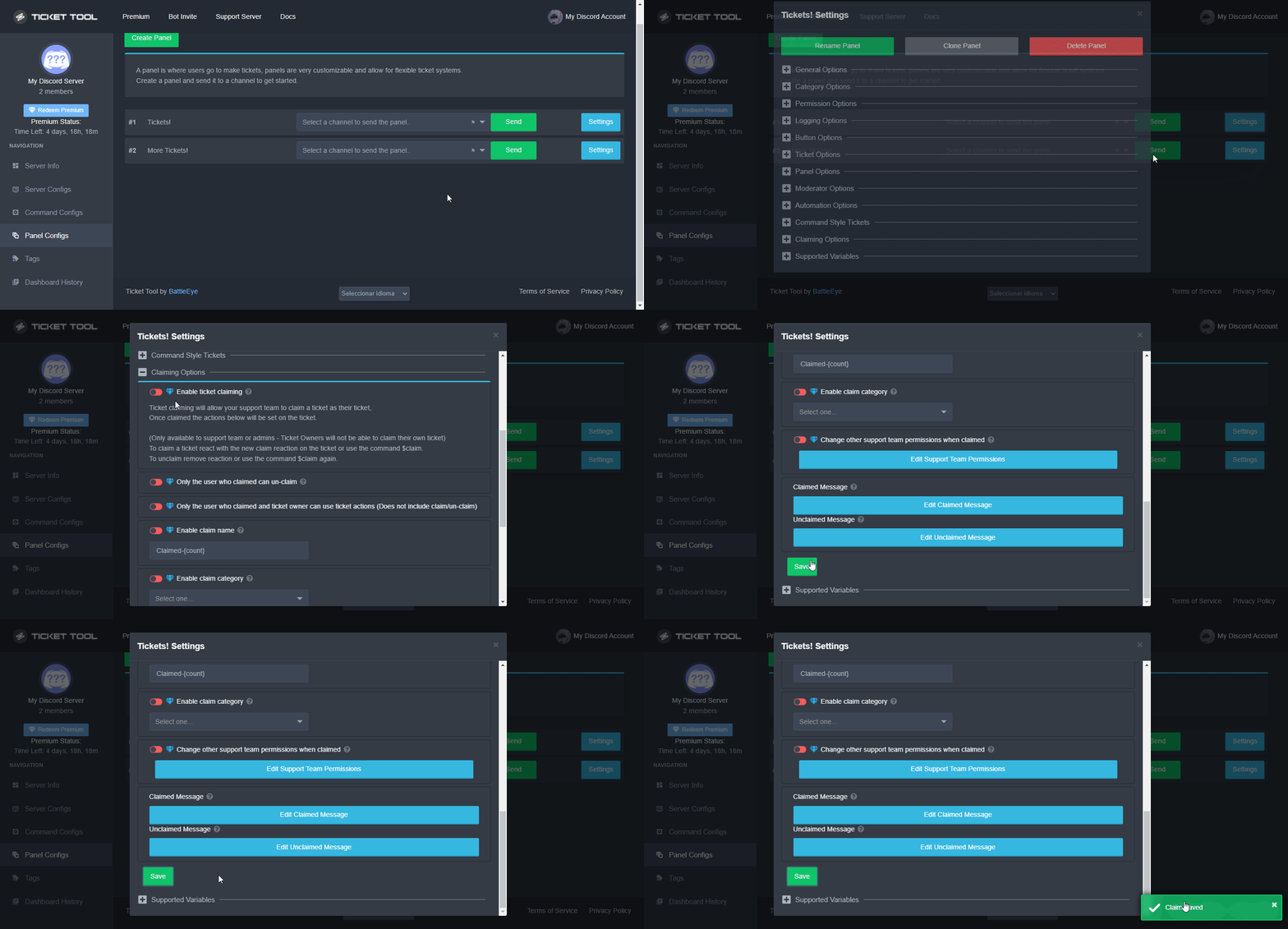
 Note: This is a premium feature
spiral aurora
Note: This is a premium feature
spiral aurora
thanks
shut bolt

 jade topaz
Hello How Do We Get This ?

also how do we change ticket names like when someone creates ticket its ticket#<number> i want different tickets with different names
 gilded verge
jade topaz
also how do we change ticket names like when someone creates ticket its ticket#<...
gilded verge
jade topaz
also how do we change ticket names like when someone creates ticket its ticket#<...
Hey, what exactly do you want to get? For example, maybe you mean the first message (where the ping is), maybe you mean embedded content ... Please describe as you can
and as for ticket renaming, this is a premium feature, anyway, this is the answer.:
Dashboard-Panel Configs->Panel Settings->Expand Ticket Options->Ticket Opened channel name-> use {author.name}
 humble sequoiaBOT
The panel message is where people react to make a ticket. To customize it head over to your Dashboard --> Panel Configs -> Settings -> Panel Options -> Edit Panel Message

 slender minnow
@jade topaz ^
jade topaz
thank you
jade topaz
slender minnow
<@456226577798135808> ^
im sorry, i cant find settings
 slender minnow
jade topaz
im sorry, i cant find settings
slender minnow
jade topaz
im sorry, i cant find settings
click on settings
depending on which panel's message you are trying to edit
jade topaz
slender minnow
click on settings
where?
slender minnow
jade topaz
where?
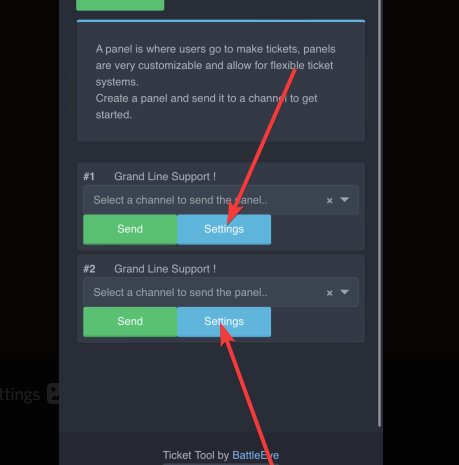
depending on the panel, click their respective panel settings
https://i.imgur.com/4I61bTe.png
 slender minnow
no worries
jade topaz
Anyone know why I am getting the 'This interaction Failed' error msg when I try open any tickets on my server?
 gilded verge
jade topaz
Anyone know why I am getting the 'This interaction Failed' error msg when I try ...
gilded verge
jade topaz
Anyone know why I am getting the 'This interaction Failed' error msg when I try ...
You have this problem on mobile or desktop?
jade topaz
gilded verge
You have this problem on mobile or desktop?
Both
gilded verge
oh wait, @pseudo glen is down...
jade topaz
Oh it is?
gilded verge
yup 🥺
gilded verge
Hope it gets fixed soon...
It is not known, you have to wait for information from the Staff on channel #📣│bot-news
just wait...
jade topaz
TY
 humble sequoiaBOT
Don't see your server in the dashboard?
You will possibly need to relog. Look below to see steps on how to relog.
How to relog in the Dashboard.
First, you will need to go to the dashboard. Once your there, click on your avatar on the top right. after you clicked it, you will see button that says Logout. You must click that. Once you have logged out, you can log back in.
Note:
You need one of these 3 things to access the dashboard.
1. Server Owner (Level: 6)
2. Server Administrator (Level: 4)
3. Dashboard Role (Level: 2)
:warning: You can check your level using $level on your Discord Server
User permission level with Ticket Tool
@User is permission level: 0 (User)
```» *If it shows that your permission is **0**, you don't have any of the above **3 things** to manage the dashboard.*
**See the GIF below on how to relog:** safe light
ive done all of these + have perms
gilded verge
so you checked all of  message?
safe light
yeah
 hexed obsidian
why does my ticket toll not work it is offline
 copper owl
keep an eye out on #📣│bot-news
Once management figures out what's going on, they'll probably send a message in there
safe light
thanks man
copper owl
safe light
thanks man
also your issue is most likely due to TT being offline
unless you're using the premium version which in that case, there's something else going on
 glacial tiger
copper owl
also your issue is most likely due to TT being offline
glacial tiger
copper owl
also your issue is most likely due to TT being offline
my Ticket toll is offline as well
copper owl
glacial tiger
my Ticket toll is offline as well
can't do anything about that unfortunately
hexed obsidian
now mine is online but tickets do not work
 oblique current
How do I suggest
copper owl
just gotta wait until the right people wake up 🤷♂️
gilded verge
oblique current
How do I suggest
#🤖│bot-spam and s!suggest
 pseudo pasture
Hey why is the bot offline in my server?
 muted sierra
the bot is offline
 crimson steppe
same here, i was trying to set it up
pseudo pasture
Ik
 grizzled rock
Btw im selling mm2 godly 😎😎
 ivory crystal
anyone know why my members can't create a ticket ? cause i give them perms
grizzled rock
The ticket is down
 charred pasture
Hi
charred pasture
crimson steppe
same here, i was trying to set it up
Same
charred pasture
ivory crystal
anyone know why my members can't create a ticket ? cause i give them perms
Bot is down!
 whole wing
I cant close and create ticket
charred pasture
whole wing
I cant close and create ticket
Bot is down
whole wing
he back soon?
charred pasture
whole wing
he back soon?
The bot might come back soon! <33
muted sierra
plz fix that
 hallow pelican
It's back
whole wing
Is working
muted sierra
yes?
quasi cliff
It should take some minutes to load for all the servers. We appreciate your patience!
jade topaz
how should we change the ticket name ?
humble sequoiaBOT
The ticket name is the default channel name of all tickets. To edit it, go to your Dashboard > Panel Configs > Settings > Ticket Options. There you can edit the channel name of opened and closed tickets. You can also use variables in there.

 Note: This is a premium feature
gilded verge
humble sequoia
Note: This is a premium feature
gilded verge
humble sequoia
@jade topaz
 dim relic
.
 rich veldt
Why does it say invalid form body when I click on a ticket button
gilded verge
rich veldt
Why does it say invalid form body when I click on a ticket button
you're on mobile or desktop?
rich veldt
Mobile I don't have a pc
humble sequoiaBOT
Update your discord App
Buttons are a relatively new addition to discord and don't work with some older versions of the app.
Please verify that you have the latest version of discord, by going to the app or play store.
Discord for the  App Store
Discord for the  Play Store
 gilded verge
run $debug on channel where you want send panel
 humble sequoiaBOT
ᅠ
@pseudo glen requires the following permissions:
Add Reactions
Read Channels
Send Messages
Manage Messages
Embed Links
Attach Files
Read History
Manage Roles
Manage Channels
To change the role permissions, you can go to your Discord Server ➞ Server Settings ➞ Roles ➞ @Ticket Tool
To change the channel permissions, you can go to your Channel Settings ➞ Permissions ➞ Ticket Tool
ᅠ
Note:
You can give Ticket Tool Administrative Permissions instead of all the permissions listed above, but it's entirely optional and NOT necessary.

 mighty beacon
 gilded verge
btw check
gilded verge
i recommend these perms, maybe this can help you: https://cdn.discordapp.com/attachments/979861967936290816/979875252433731605/Ticket_Tool_Discord_role_perms.mp4
gilded verge
mighty beacon
In the channel settings, for the Ticket Tool role add the permissions: View Channel, Send Messages, Read Message History and try again
mighty beacon
help pls very important for me
gilded verge
i trying my best 🥺
gilded verge
hmm, Could you please send the screenshot like below?
 mighty beacon
gilded verge
In the channel settings, for the Ticket Tool role add the permissions: `View Cha...
mighty beacon
gilded verge
In the channel settings, for the Ticket Tool role add the permissions: `View Cha...
im give this perms
ok


this?
gilded verge
yup, oh... so we can see problem ^-^
look, on your server is @pseudo glen but in dashboard you choose @humble sequoia so, just invite premium bot and problem can be solved :3
humble sequoiaBOT
The first thing you will need to do is invite the premium bot, an invite can be found here
Once the bot is in your server we will head to the dashboard and manage your server. When you are managing your server, you want to head into "Server Configs" then click the drop down menu under "Select the bot you would like to use on this server" then click "Ticket Tool#6207" and then save.
 mighty beacon
invite premium bot?
gilded verge
mighty beacon
there
 gilded verge
yes, but the point is that you changed to a premium bot and you did not invite him to the server and therefore you have no response from the bot
mighty beacon
aaa ok
gilded verge
😄
mighty beacon
thanks man
gilded verge
you're welcome 😊
 rugged cave
hi someone can tell me how I can create other buttons on the tiket menu ? 🙂
 shut oasis
My tickets
fallow ingot
rugged cave
hi someone can tell me how I can create other buttons on the tiket menu ? 🙂
you can do this with multi-panels, more information below:
humble sequoiaBOT
For a more convenient use of multipanels, you can now combine panels on the dashboard. This will allow you to directly send the multipanel from the dashboard or via the $panel ID command.
Where can I find this?
You can find this setting on the Dashboard -> Panel Configs -> Settings -> General Options
Note: if you're attaching all the panels to a panel called English, don't include English in the attached panels box (If you do this, it will create duplicate)
This will put all buttons from all of your panels on one message. The message is the panel message from the panel you're combining these panels in.
You can also watch this video tutorial.
 fallow ingot
shut oasis
My tickets
fallow ingot
shut oasis
My tickets
I’m confused, your tickets what?
rugged cave
thx 🙂
 copper gate
Does it not show your servers in the dasboard if you don't have administrator perms
humble sequoiaBOT
Don't see your server in the dashboard?
You will possibly need to relog. Look below to see steps on how to relog.
How to relog in the Dashboard.
First, you will need to go to the dashboard. Once your there, click on your avatar on the top right. after you clicked it, you will see button that says Logout. You must click that. Once you have logged out, you can log back in.
Note:
You need one of these 3 things to access the dashboard.
1. Server Owner (Level: 6)
2. Server Administrator (Level: 4)
3. Dashboard Role (Level: 2)
:warning: You can check your level using $level on your Discord Server
User permission level with Ticket Tool
@User is permission level: 0 (User)
```» *If it shows that your permission is **0**, you don't have any of the above **3 things** to manage the dashboard.*
**See the GIF below on how to relog:** scenic plinth
Try relogging if you have administrator 🙂
copper gate
OK thanks
humble sequoiaBOT

⚠️ You're in the wrong place
We provide support for @pseudo glen discord bot and cannot help you with whatever issue you have.
- We don't know which Support Team you should contact to get this issue resolved, and unfortunately we won't be able to accurately tell you.
If you don't have any further questions regarding our bot Ticket Tool, please close this ticket
⚠️ You're in the wrong place
We provide support for @pseudo glen discord bot and cannot help you with whatever issue you have.
- We don't know which Support Team you should contact to get this issue resolved, and unfortunately we won't be able to accurately tell you.
If you don't have any further questions regarding our bot Ticket Tool, please close this ticket
 cobalt totem
How do i configure the tickets so they open in a certain category?
quasi cliff
$help categories
humble sequoiaBOT
Help Options
$help commands - Information on commands
$help setup - Information on bot setup
$help faq - Frequently asked questions
quasi cliff
$help category
humble sequoiaBOT
How to set the open category
To set a open category go to the Dashboard -> Panel Configs -> Settings -> Category Options -> Category Open
 cobalt totem
thank uu
quasi cliff
If you require any further information, let me know.
cobalt totem
its not working
quasi cliff
Did you use a category which has 50 channels already
quasi cliff
did you save
cobalt totem
yes
quasi cliff
Is the bot showing any error on ticket creation?
cobalt totem
No
quasi cliff
🤔is the bot having perms in category to manage channels
cobalt totem
yes
quasi cliff
So the tickets are going to top channels right?
cobalt totem
Yea its going to uncatagorized
quasi cliff
Try adding another category along with the current one on dashboard
Like adding up 2 categories in total
quasi cliff

 drowsy basalt
how do you edit a ticket tool
like mine already has a message but I want to change it
$help commands
humble sequoiaBOT
() = optional
[] = required
*==================================
Ticket Commands
==================================*
_ _
`$add [User] (channel)`
Description: Adding additional users to a ticket
Aliases: none
`$remove [User] (channel)`
Description: Removing users from a ticket
Aliases: none
`$close`
Description: Closing tickets
Aliases: none
`$open`
Description: Opening closed tickets
Aliases: none
`$delete`
Description: Deleting tickets
Aliases: none
`$rename`
Description: Renaming tickets/channels
Aliases: none
`$transcript (send channel)`
Description: Creating transcripts
Aliases: none
`$new (user) (reason)`
Description: Creating tickets in a monitored channel (when command style is enabled)
Aliases: none
`$claim`
Description: Claiming tickets (when claim is enabled)
Aliases: "unclaim"
_ _
*==================================
General Commands
==================================*
_ _
`$help (Help Options)`
Description: Help Command
Aliases: none
`$debug`
Description: Debuging issues with running Ticket Tool
Aliases: none
`$id (@role/@user/#channel/emoji)`
Description: Converting roles, users, channels and emojis to ID
Aliases: "getid"
`$permlevel`
Description: Checking permission level with Ticket Tool
Aliases: "level"
`$ping`
Description: Checking response time with discord api
Aliases: none
`$vote (link | unlink | redeem) (user)`
Description: Earn premium by voting on top.gg or Discord.boats
Aliases: "votes"
shut bolt
drowsy basalt
like mine already has a message but I want to change it
You mean the panel message?
 humble sequoiaBOT
The Ticket Message is the first message sent by the bot in a new ticket. To customise it head over to your Dashboard ➞ Panel Configs ➞ Settings ➞ Ticket Options ➞ Edit Ticket Message
 shut bolt
Edit the ticket message following the steps above
 high oyster
Yes.
shut bolt
And you are good to go
iron nightBOT
Gave +1 Rep to @shut bolt
drowsy basalt
w mans
shut bolt
 silent plume
+rep @shut bolt 😄
iron nightBOT
Gave +1 Rep to @shut bolt
shut bolt

 compact harness
My server where I added the bot is still not showing up
humble sequoiaBOT
Don't see your server in the dashboard?
You will possibly need to relog. Look below to see steps on how to relog.
How to relog in the Dashboard.
First, you will need to go to the dashboard. Once your there, click on your avatar on the top right. after you clicked it, you will see button that says Logout. You must click that. Once you have logged out, you can log back in.
Note:
You need one of these 3 things to access the dashboard.
1. Server Owner (Level: 6)
2. Server Administrator (Level: 4)
3. Dashboard Role (Level: 2)
:warning: You can check your level using $level on your Discord Server
User permission level with Ticket Tool
@User is permission level: 0 (User)
```» *If it shows that your permission is **0**, you don't have any of the above **3 things** to manage the dashboard.*


**See the GIF below on how to relog:**@compact harness, please check
 wind falcon
Hey I am currently caged on lost island I’m wondering how to make a ticket
humble sequoiaBOT

You can check our documentation here;
You can also check #📂│information for the basic setup;
You can also watch this video tutorial.
Our documentation contains all the info you need about the bot to be able to setup and configure the bot however you like.
gilded verge
humble sequoia
Hey @wind falcon, check or go to #📂│information and choose Setup Guide
 valid blade
I created a transcript log channel and when I tried to have a ticket transcript into that channel it said this.
 gilded verge
valid blade
gilded verge
valid blade
Please make sure the bot has permission to this channel: View Channel, Send Messages, Read Message History
now it is working?
quasi cliff
gilded verge
Please make sure the bot has permission to this channel: `View Channel`, `Send M...
Embed perms too
gilded verge
No, not really, because embed is enabled in the role by default 😳
jade topaz
How do I view past closed and deleted tickets with ticket tool? Im little lost.
scenic plinth
If you have a transcript channel saved, you can get the transcript of the ticket. If it is deleted, you cannot review the ticket unless you saved the transcript. If it is closed, you can simply go to the channel.
 tall dew
Hello. I have in the dashboard only in the my 1 server, but ticket tool in my 2 servers.
 humble sequoiaBOT
Don't see your server in the dashboard?
You will possibly need to relog. Look below to see steps on how to relog.
How to relog in the Dashboard.
First, you will need to go to the dashboard. Once your there, click on your avatar on the top right. after you clicked it, you will see button that says Logout. You must click that. Once you have logged out, you can log back in.
Note:
You need one of these 3 things to access the dashboard.
1. Server Owner (Level: 6)
2. Server Administrator (Level: 4)
3. Dashboard Role (Level: 2)
:warning: You can check your level using $level on your Discord Server
User permission level with Ticket Tool
@User is permission level: 0 (User)
```» *If it shows that your permission is **0**, you don't have any of the above **3 things** to manage the dashboard.*


**See the GIF below on how to relog:**welcome 😊

 rigid thistle
s!unfollow
 obtuse krakenBOT
rigid thistle
s!unfollow
obtuse krakenBOT
rigid thistle
s!unfollow
<:error:865860636084142150> Command not found
There's no command called
unfollow.
humble sequoiaBOT
For a more convenient use of multipanels, you can now combine panels on the dashboard. This will allow you to directly send the multipanel from the dashboard or via the $panel ID command.
Where can I find this?
You can find this setting on the Dashboard -> Panel Configs -> Settings -> General Options
Note: if you're attaching all the panels to a panel called English, don't include English in the attached panels box (If you do this, it will create duplicate)
This will put all buttons from all of your panels on one message. The message is the panel message from the panel you're combining these panels in.
You can also watch this video tutorial.
gilded verge
humble sequoia
Hey @dawn monolith, so you want multipanels, check
 dawn monolith
thx
 lean meteor
hello, when i put role into support team roles, they can see the open ticket but when i close the ticket they cant see it. Any reason for this?
 gilded verge
lean meteor
hello, when i put role into support team roles, they can see the open ticket but...
gilded verge
lean meteor
hello, when i put role into support team roles, they can see the open ticket but...
Hey, check Permission Options in Panel Settings and choose Support Team Closed Permissions, this can help you:
 lean meteor
theres are the perms i have on, anything i should turn on or off?
 gilded verge
if you do not want your support to have access to them after the ticket is closed, change these 3 permissions to X (like in my screenshot)
dawn monolith
how i make mention in ticket massage ?
humble sequoiaBOT
Within all the messages the bot's sends (both embeds and text) you can mention either channels, roles, or even users, these mentions will only send a notification to the user if they are used within a text field, e.g: a role mentioned in an embed won't ping at all the users who have that role.
For mentioning a role you can use one out of three options:
{@Role Name} ➞ Which is Case Sensitive.
{RoleID} ➞ Replace RoleId with the Id of the role you are trying to ping.
<@&RoleID> ➞ Discord's native syntax to ping roles.
<#ChannelID> ➞ Mention a channel by its ID.
<@UserID> ➞ Mention a user by its ID.
gilded verge
humble sequoia
use variable in Message Text
dawn monolith
i want who open the ticket the bot mention it in massage ticket how ?
gilded verge
By default you have this (screenshot):
so in that case whoever opens the ticket will be mentioned 😊
Variable: {user}
 dawn monolith
thx
humble sequoiaBOT
 dire hornet
i want if some one open a ticket i want the ticket open under the ticket opening room i dont want the ticket been beginning of the server
gilded verge
you mean, you want tickets in category, right?
dire hornet
gilded verge
you mean, you want tickets in category, right?
yes
humble sequoiaBOT
How to set the open category
To set a open category go to the Dashboard -> Panel Configs -> Settings -> Category Options -> Category Open
dire hornet
thx
 fossil lynx
hello! ok so basically i want to make a certain role be able to add people into the ticket without giving the role channel perms. how can i do that?
quasi cliff
$commandconfigs
humble sequoiaBOT
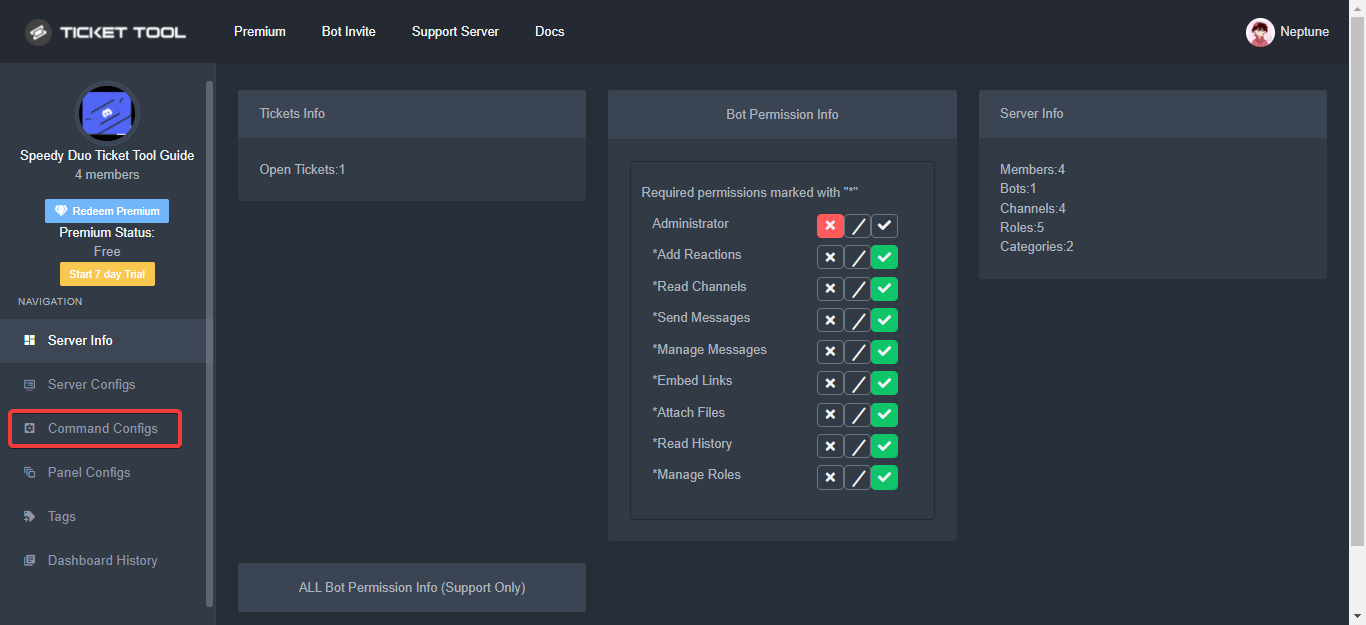
The Command Configs page on your dashboard is where you can enable, disable, and edit permissions for certain commands however you'd like!
Each command has the following things to edit:
Support Team Only: which would only allow users with a
Support Team Roleto use it
Disabled Channels: which would disable the command in the defined channel(s)
Allowed Roles: which would allow users with the roles defined here to use the command
Disabled Roles: which wouldn't allow users with the roles defined here to use the command
 quasi cliff
fossil lynx
hello! ok so basically i want to make a certain role be able to add people into ...
quasi cliff
fossil lynx
hello! ok so basically i want to make a certain role be able to add people into ...
Hey, simply enable "add" command for that particular role
fossil lynx
quasi cliff
Hey, simply enable "add" command for that particular role
sorry i don't understand.. is that on the dashboard under command configs?
quasi cliff
humble sequoia
Yup here ^
quasi cliff
If you require any further information, let me know.
fossil lynx
quasi cliff
If you require any further information, let me know.
wait can i do that for only one panel though? cause i have multiple but i only want them to be able to do it in one panel
quasi cliff
Do you have same Support Roles for different panels?
fossil lynx
no they're different
quasi cliff
So simply add those particular roles to Allowed roles
quasi cliff
No problem!
fossil lynx
quasi cliff
No problem!
so does the allowed channels affect the panels in that channel?
quasi cliff
what exactly do u mean?
Suppose you allowed #chat then users can write "$add @quasi cliff #ticket" in chat to get added to ticket iirc
fossil lynx
because i see that there are all the channels, even the ones without panels in them (ex: the general chat)
in the allowed channels selection
quasi cliff
that's so they can add people to a ticket from another chats
fossil lynx
i don't really know how to explain it😭
quasi cliff
quasi cliff
Suppose you allowed #chat then users can write "$add <@924356699161231410> #tick...
^
fossil lynx
okk, so if i put only one channel in that allowed channels section, then the panel in that channel only will allow the support roles to add someone in the ticket?
^ that might be confusing
quasi cliff
I suggest using roles
quasi cliff
fossil lynx
okk, so if i put only one channel in that allowed channels section, then the pan...
The allowed channel is not for channel with panel
fossil lynx
oh i see
quasi cliff
Like you can add #staff-chat to it so your staff can use the staff-chat to use the "add" command
fossil lynx
oh i kinda of get it now!
quasi cliff
"add" command works without being in ticket too like "$add @quasi cliff #ticket-1234"
fossil lynx
oh i get it!!!
quasi cliff
Perfect!
fossil lynx
thank you so much! i'll let you know if i have any more questions! thank you for your help!
quasi cliff
My pleasure
fossil lynx
quasi cliff
My pleasure
oh wait one more thing! is there anyway you can make the ticket message ping the staff?
humble sequoiaBOT
The Ticket Message is the first message sent by the bot in a new ticket. To customise it head over to your Dashboard ➞ Panel Configs ➞ Settings ➞ Ticket Options ➞ Edit Ticket Message
quasi cliff
$mentions
humble sequoiaBOT
Within all the messages the bot's sends (both embeds and text) you can mention either channels, roles, or even users, these mentions will only send a notification to the user if they are used within a text field, e.g: a role mentioned in an embed won't ping at all the users who have that role.
For mentioning a role you can use one out of three options:
{@Role Name} ➞ Which is Case Sensitive.
{RoleID} ➞ Replace RoleId with the Id of the role you are trying to ping.
<@&RoleID> ➞ Discord's native syntax to ping roles.
<#ChannelID> ➞ Mention a channel by its ID.
<@UserID> ➞ Mention a user by its ID.
quasi cliff
fossil lynx
oh wait one more thing! is there anyway you can make the ticket message ping the...
fossil lynx
okay thank you so much!!!
quasi cliff
You're welcome
 foggy lake
how do you make it so that closed tickets go to a specific category?
humble sequoiaBOT
How to set the open category
To set a open category go to the Dashboard -> Panel Configs -> Settings -> Category Options -> Category Open
gilded verge
close category is in the same place as open category 😊
foggy lake
gilded verge
close category is in the same place as open category 😊
okay thank you!!!
 thorn onyx
is there a way to make it so that the bot doesn't auto delete the command whenever i use $rename?
quasi cliff
No as far as I remember
humble sequoiaBOT
Don't see your server in the dashboard?
You will possibly need to relog. Look below to see steps on how to relog.
How to relog in the Dashboard.
First, you will need to go to the dashboard. Once your there, click on your avatar on the top right. after you clicked it, you will see button that says Logout. You must click that. Once you have logged out, you can log back in.
Note:
You need one of these 3 things to access the dashboard.
1. Server Owner (Level: 6)
2. Server Administrator (Level: 4)
3. Dashboard Role (Level: 2)
:warning: You can check your level using $level on your Discord Server
User permission level with Ticket Tool
@User is permission level: 0 (User)
```» *If it shows that your permission is **0**, you don't have any of the above **3 things** to manage the dashboard.*
**See the GIF below on how to relog:** frozen ocean
thx
 ebon shell
Is there a way to custom name my ticket tool? especially if i already have premium ?
humble sequoiaBOT

Ticket Tool avatar/status Customisation
@pseudo glen is like another discord user; you can't control its avatar icon or status, and we cannot change it for a specific server.
However, on your server, you can change the bot's nickname
 jade topaz
no puedo haver mi ticke
 torn scarab
Most of the time when a member opens a ticket in my server after a few mins they cannot see the chat history of the ticket, how can I fix that?
 edgy cosmos
why when I finish any game in Mt it count as lose
 sudden forge
Does anyone know how to make new tickets go to a dedicated channel. Whenever someone create a ticket their new ticket pops up at the top of my server
scenic plinth
$help category
humble sequoiaBOT
How to set the open category
To set a open category go to the Dashboard -> Panel Configs -> Settings -> Category Options -> Category Open
 rapid ingot
Anyone can't open tickets in my server. How do i fix this?
humble sequoiaBOT
Any role you assign as a blacklisted role won't be able to use commands or reactions.
Selecting a blacklisted role
Go to your Dashboard ➞ Server Configs. There you will find the option to select blacklisted roles.
Note: Don't forget to save.

 maiden schooner
Hola alguien habla español?
scenic plinth
maiden schooner
Hola alguien habla español?
La forma más fácil en la que puedo ofrecerte apoyo es hacer un ticket español en #🎫│make-a-ticket tanto como me gustaría ayudarte. 🙂
humble sequoiaBOT
━━ moved to ticket ━━
 shell wind
humble sequoiaBOT
shell wind
humble sequoiaBOT
Update your discord App
Buttons are a relatively new addition to discord and don't work with some older versions of the app.
Please verify that you have the latest version of discord, by going to the app or play store.
Discord for the App Store
Discord for the Play Store
scenic plinth
Spamming the button also does not help. \
shut bolt
Is the bot still on that server?
Can you please open a ticket so we can take a deeper look into this issue?
edgy cosmos
Can anyone please tell me why any game in my team count as a loss even I win
humble sequoiaBOT
⚠️ You're in the wrong place
We provide support for @pseudo glen discord bot and cannot help you with whatever issue you have.
- We don't know which Support Team you should contact to get this issue resolved, and unfortunately we won't be able to accurately tell you.
If you don't have any further questions regarding our bot Ticket Tool, please close this ticket
 civic kettle
Hi, I am able to turn off admin rights of ticket tool correct?
It will still function properly?
rapid ingot
Everyone sees the tickets. How can I fix this? I just want admins to see ticket rooms
scenic plinth
civic kettle
Hi, I am able to turn off admin rights of ticket tool correct?
As long as you give it the required permissions once you deny ADMINISTRATOR, yes. You can use the command $debug in your server to see the required permissions.
scenic plinth
rapid ingot
Everyone sees the tickets. How can I fix this? I just want admins to see ticket ...
Panel Configs -> Permissions Options -> Everyone Role Opened Permissions -> Read Messages (should be  ) -> click save
- Will only take affect for newly created tickets after saving
Thx a lot
iron nightBOT
Gave +1 Rep to @scenic plinth
thorn onyx
hii
is there a way to make it so when a ticket is opened, the bot automatically roles someone to something like, 'client'?
scenic plinth
no
thorn onyx
do yk any external bots to automate that or no?
scenic plinth
I cannot say
 viscid haven
How do you let people you've chosen (who aren't allowed to see all tickets) not show all tickets to them. So, for example, only the ticket handler is allowed to see and handle the tickets. How can you do that?
quasi cliff
$kv
humble sequoiaBOT
How to hide tickets from everyone
Head over to your Dashboard ➞ Panel Configs ➞ Settings ➞ Permission Options ➞ Edit Everyone Roles Opened Permissions

NOTE that @everyone can type aswell if it has permissions to send messages
quasi cliff
viscid haven
How do you let people you've chosen (who aren't allowed to see all tickets) not ...
You can set perms accordingly
viscid haven
quasi cliff
You can set perms accordingly <:this:894279341108772914>
thnx i am so looking
Yes look: I have everything turned off but everyone can still enter
 viscid haven
quasi cliff
You can set perms accordingly <:this:894279341108772914>
viscid haven
quasi cliff
You can set perms accordingly <:this:894279341108772914>
Can you help me with that?
Because unfortunately it doesn't work.
quasi cliff
Left..
 severe vale
Hy my members can't close a ticket on thier end. I can only close it on my end as the mod. What am I doing wrong?
quasi cliff
$buttons
humble sequoiaBOT

The new Discord Buttons allow for a much smoother and convenient experience. They reduce lag and work much better than emojis. With ticket tool you can edit all the buttons however you like! Buttons can show emojis, text and can have 4 different colors.
Where can I edit them?
Dashboard ➞ Panel Configs ➞ Settings ➞ Button Options ➞ Setting
 quasi cliff
severe vale
Hy my members can't close a ticket on thier end. I can only close it on my end a...
quasi cliff
severe vale
Hy my members can't close a ticket on thier end. I can only close it on my end a...
Hey, make sure that "Close Ticket" button doesn't have Support Team only enabled.
 brave pond
Where do I go to enter what roles can open a ticket?
shut bolt
Hey there, by default all roles can open a ticket, do you want to restrict it or are your users having issues with opening tickets?
brave pond
shut bolt
Hey there, by default all roles can open a ticket, do you want to restrict it or...
Only my support roles are able to open the tickets right now. I want to make it so that more roles can open them
shut bolt
brave pond
Only my support roles are able to open the tickets right now. I want to make it ...
Are the rest of users seeing an error?
brave pond
shut bolt
Are the rest of users seeing an error?
Yes
shut bolt
Can I have your server's ID?
brave pond
shut bolt
Can I have your server's ID?
Where do I find that?
humble sequoiaBOT
Server id - 509192800865353738
Server id - 509192800865353738
shut bolt
That will give you the ID, run it on your server and let me know
brave pond
987098303185448970
shut bolt
Appreciate it, I'll be back on a second
shut bolt
brave pond
987098303185448970
On which panel are you having the issue?
 brave pond
shut bolt
On which panel are you having the issue?
brave pond
shut bolt
On which panel are you having the issue?
All of them
shut bolt
 humble sequoiaBOT
Any role you assign as a blacklisted role won't be able to use commands or reactions.
Selecting a blacklisted role
Go to your Dashboard ➞ Server Configs. There you will find the option to select blacklisted roles.
Note: Don't forget to save.
shut bolt
You've blacklisted everyone from using the bot
brave pond
🤦♂️🤦♂️I’m an idiot
shut bolt
It's alright, happens a lot mate
brave pond
Thanks for your help
shut bolt
 umbral hare
What command is it remove and all roles
quasi cliff
Bot doesn't add/remove roles
quasi cliff
$remove RoleID
 solid lake
How do I set that when a person opens a ticket he gives him a role?
quasi cliff
solid lake
How do I set that when a person opens a ticket he gives him a role?
Bot can't add roles as of now
solid lake
ok thanks
quasi cliff
If you require any further information, let me know.
 thin gull
Hello i want to know why my bot doesn't register
gilded verge
thin gull
Hello i want to know why my bot doesn't register
Hey, im not sure what you mean. Can you show screenshot please?
thin gull
i just want to ask how i can make this bot work
humble sequoiaBOT
You can check our documentation here;
You can also check #📂│information for the basic setup;
You can also watch this video tutorial.
Our documentation contains all the info you need about the bot to be able to setup and configure the bot however you like.
thin gull
oh ok
thin gull
@gilded verge can you help me again? Idk what i have to do now
 humble sequoiaBOT
ᅠ
@pseudo glen requires the following permissions:
Add Reactions
Read Channels
Send Messages
Manage Messages
Embed Links
Attach Files
Read History
Manage Roles
Manage Channels
To change the role permissions, you can go to your Discord Server ➞ Server Settings ➞ Roles ➞ @Ticket Tool
To change the channel permissions, you can go to your Channel Settings ➞ Permissions ➞ Ticket Tool
ᅠ
Note:
You can give Ticket Tool Administrative Permissions instead of all the permissions listed above, but it's entirely optional and NOT necessary.
gilded verge
humble sequoia
@thin gull, Yup, please make sure that the bot has the required permissions as above, and that you have added permissions to the "#tickets" channel: View Channel, Send Messages, Read Message History
thin gull
gilded verge
<@944569903187369984>, Yup, please make sure that the bot has the required permi...
oh ok thanks !
iron nightBOT
Gave +1 Rep to @gilded verge
gilded verge
thin gull
oh ok thanks !
you're welcome ^-^ , but for future... i recommend these perms, then you can be sure that everything works as it should: https://cdn.discordapp.com/attachments/979861967936290816/979875252433731605/Ticket_Tool_Discord_role_perms.mp4
 burnt sable
hi, how can I make custom message efor when someone opens a ticket?
humble sequoiaBOT
The Ticket Message is the first message sent by the bot in a new ticket. To customise it head over to your Dashboard ➞ Panel Configs ➞ Settings ➞ Ticket Options ➞ Edit Ticket Message
shut bolt
Hey there, edit your ticket message as shown above and you are good to go
 carmine nebula
Olá, como eu faço para criar um ticket em meu server?
shut bolt
carmine nebula
Olá, como eu faço para criar um ticket em meu server?
$helppt setup
humble sequoiaBOT
Convidando o Ticket Tool
A primeira coisa que você precisa fazer é convidar o bot, o convite pode ser encontrado aqui.
Quando o bot estiver no seu servidor, iremos para o painel e criaremos o painel
Um painel é usado para definir as configurações de cada ticket e as pessoas reagem para criar um ticket.
_ _
_ _
Criando um painel
Para criar um painel, precisaremos ir até as configurações do painel no painel
Uma vez no painel, precisaremos clicar em Criar painel
Digite o nome do painel (preencha as configurações opcionais que você deseja)
Clique em Criar painel e você estará pronto para começar a configurar seu painel.
_ _
_ _
Enviando um painel
Depois de criar um painel no painel, você precisará enviá-lo para um canal usando enviar no painel
Selecione o canal em que você deseja criar seu painel e clique em enviar.
Para outras perguntas, consulte $helppt faq
 shut bolt

shut bolt
carmine nebula

 dark field
some specific members or a role?
spiral aurora
dark field
some specific members or a role?
like for ticket name. currently, I just have the ticket # but I'd like to add their username
like Ticket-{user_name}-{count}
dark field
ah okay
Ticket Options ->
Ticket Opened Channel name:
open-{ticket.user.name}-{count}
same goes for closed
closed-{ticket.user.name}-{count}
dark field
spiral aurora
like Ticket-{user_name}-{count}
try it
spiral aurora
dark field
try it
thank you!
iron nightBOT
Gave +1 Rep to @dark field
spiral aurora
@dark field I have multi panels attached together. Is there any way I can get each specific panel name on the ticket?
I tried {panel_name}, but that only takes the name from the main panel.
dark field
spiral aurora
<@744304513057292438> I have multi panels attached together. Is there any way I ...
try to give me an example, so maybe i can understand better and help
spiral aurora
dark field
try to give me an example, so maybe i can understand better and help
like I could have 3 topics - general, spam, dev
general is the main panel - I add spam and dev as multi panels
people open tickets in spam or dev and I don't know which ticket they open first besides reading the message
i then use {panel_name}, but since general is the main panel, all tickets opened in spam or dev still shows "general"
so, I'd like to see ticket-spam-01 or something like that
dark field
spiral aurora
like I could have 3 topics - general, spam, dev
general is the main panel - I ...
you go to "spam" panel and change this:
Button Option -> Create Ticket -> Button Text: Spam
- Then Save it
- Now you have the Spam button
- Then go to:
Ticket Options -> Ticket Message -> Edit Ticket Message (click on it)
Message Text:
Hey, this is the Spam Ticket
Embed Description:
"Please wait till someone answer your spam problem"
once you have done all these things, click on save and then send again your General panel in your Text Channel, after that it should everything work for spam
spiral aurora
dark field
you go to "spam" panel and change this:
Button Option -> Create Ticket -> Butto...
is there any way to do this with a multi panel? ticket-spam-01, ticket-general-01, ticket-dev-01
dark field
hmm, let me think 😄
open-{ticket.name}-{count}
put that into Ticket Options ->
Ticket Opened Channel name:
and tell me if it worked
spiral aurora
dark field
open-{ticket.name}-{count}
put that into Ticket Options ->
Ticket Opened Channe...
mhh mine just says ticket-ticket-ticketname-001
and i'm using ticket-{ticket.name}-{count}
dark field
spiral aurora
mhh mine just says ticket-ticket-ticketname-001
and i'm using ticket-{ticket.na...
you tried to open a "spam ticket" or "general ticket"?
spiral aurora
dark field
you tried to open a "spam ticket" or "general ticket"?
tried it on both
dark field
and both send like "ticket-ticket-ticketname-001"?
i thought u changed the first one with
open-{ticket.user.name}-{count}
and spam panel with
open-{ticket.name}-{count}
shut bolt
{ticket.user.name} is the name of the user who creates the ticket
{ticket.name} is the name of the ticket channel itself
If you want the name of the panel use {panel.name}
spiral aurora
dark field
and both send like "ticket-ticket-ticketname-001"?
i thought u changed the fir...
i'm trying to see which looks better. so testing multiple options
but yeah, ticket-{ticket.name}-{count} just returns "ticket-ticket-ticketname-001"
spiral aurora
shut bolt
`{ticket.user.name}` is the name of the user who creates the ticket
`{ticket.nam...
thanks. where can I change the ticket channel then? changing this should fix it then
iron nightBOT
Gave +1 Rep to @shut bolt
dark field
oh based on the channel.. lol i didnt know 😄
shut bolt
spiral aurora
thanks. where can I change the ticket channel then? changing this should fix it ...
What do you mean by changing the ticket channel?
dark field
Categroy Options -> Category open
shut bolt
dark field
oh based on the channel.. lol i didnt know 😄
It's alright, saw you were a bit confused so hoped in to help :)
dark field
shut bolt
It's alright, saw you were a bit confused so hoped in to help :)
thanks 😄
iron nightBOT
Gave +1 Rep to @shut bolt
shut bolt
here to help
spiral aurora
think i got it now. thanks guys!
dark field
spiral aurora
think i got it now. thanks guys!
nice, have fun! 😄
i gotta sleep now..
 unkempt crane
humble sequoiaBOT
unkempt crane
humble sequoiaBOT
For a more convenient use of multipanels, you can now combine panels on the dashboard. This will allow you to directly send the multipanel from the dashboard or via the $panel ID command.
Where can I find this?
You can find this setting on the Dashboard -> Panel Configs -> Settings -> General Options
Note: if you're attaching all the panels to a panel called English, don't include English in the attached panels box (If you do this, it will create duplicate)
This will put all buttons from all of your panels on one message. The message is the panel message from the panel you're combining these panels in.
You can also watch this video tutorial.
 jolly lichen
i bought premium but when i try to change the stuff on the pannel it wont work
humble sequoiaBOT
Solved in another channel.
 tame arrow
Hey how can i make it like
Delete channel thing should not be allowed for additional roles
quasi cliff
tame arrow
Hey how can i make it like
Delete channel thing should not be allowed for additi...
Using command or buttons?
tame arrow
Button
quasi cliff
$buttons
humble sequoiaBOT
The new Discord Buttons allow for a much smoother and convenient experience. They reduce lag and work much better than emojis. With ticket tool you can edit all the buttons however you like! Buttons can show emojis, text and can have 4 different colors.
Where can I edit them?
Dashboard ➞ Panel Configs ➞ Settings ➞ Button Options ➞ Setting
tame arrow
Does command exists for deleting the tickey channel?
quasi cliff
make the "delete" button as Support team only 
quasi cliff
tame arrow
Does command exists for deleting the tickey channel?
it does, if they have permissions to send message in it
tame arrow
Oh and what if i add manage channel as x
humble sequoiaBOT
The Command Configs page on your dashboard is where you can enable, disable, and edit permissions for certain commands however you'd like!
Each command has the following things to edit:
Support Team Only: which would only allow users with a
Support Team Roleto use it
Disabled Channels: which would disable the command in the defined channel(s)
Allowed Roles: which would allow users with the roles defined here to use the command
Disabled Roles: which wouldn't allow users with the roles defined here to use the command
tame arrow
Ok thanks
quasi cliff
You can allow/disable for particular roles
tame arrow
Thanks @quasi cliff
iron nightBOT
Gave +1 Rep to @quasi cliff
tame arrow
Kk
quasi cliff
If you require any further information, let me know.
tame arrow
Yes
If i do support team only for close thing so it will automatically disable close confirm right for the role?
@quasi cliff
quasi cliff
tame arrow
If i do support team only for close thing so it will automatically disable close...
Close Confirm is "Two Step Close"
tame arrow
Yes we have 2 step close settings enabled
 tame arrow
Or i can just do support team only for that confirm close too??
tame arrow
Okk thanks
 craggy geyser
quasi cliff
It will be automatic for that
craggy geyser
quasi cliff
It will be automatic for that
Not true. There is a separate button option for confirm close.
We use the close ask message on this server to ping the user and ask if they need more. So a support member clicks close, and the user clicks confirm close
quasi cliff
craggy geyser
Not true. There is a separate button option for confirm close.
We use the close ...
Oh, my bad. I thought the one who clicks "Close" can only click "Confirm Close".
 ebon python
Hey team, any help with moving where the tickets open? I currently have the panel setup in my ticket channel at the bottom of the server - however the tickets open at the top of the server... any help would be appreciated
quasi cliff
$help category
humble sequoiaBOT
How to set the open category
To set a open category go to the Dashboard -> Panel Configs -> Settings -> Category Options -> Category Open
quasi cliff
ebon python
Hey team, any help with moving where the tickets open? I currently have the pane...
ebon python
quasi cliff
<:this:894279341108772914>
legend bro thank you
iron nightBOT
Gave +1 Rep to @quasi cliff
humble sequoiaBOT
If Ticket Tool support requested this debug give them this link:
https://discordapp.com/channels/509192800865353738/662692902245498910/990913505697882153
Bot Permissions ឵ ឵឵ ឵ ឵឵ ឵ ឵឵ ឵ ឵឵
✅ - Read Channels
✅ - Send Messages
✅ - Embed Links
✅ - Attach Files
✅ - Manage Roles
✅ - Manage Channels
✅ - Manage Messages
✅ - Read History
Channel Permissions ឵ ឵឵ ឵ ឵឵ ឵ ឵឵ ឵ ឵឵
✅ - Read Channels
✅ - Send Messages
✅ - Embed Links
✅ - Attach Files
✅ - Manage Roles
✅ - Manage Channels
✅ - Manage Messages
✅ - Read History
Server Information ឵ ឵឵ ឵ ឵឵ ឵ ឵឵ ឵ ឵឵ ឵ ឵឵
Channel name:
🆘│community-support
Channel ID:
776680605517742090
Channel Count:
188/500
Server name:
Ticket Tool Support
Server ID:
509192800865353738
User Information ឵ ឵឵ ឵ ឵឵ ឵ ឵឵ ឵ ឵឵ ឵ ឵឵
User name:
Traz0xXシ#7680
User ID:
947524158886141982
Permission Level:
0 - User ()
Bot Information ឵ ឵឵ ឵ ឵឵ ឵ ឵឵ ឵ ឵឵ ឵ ឵឵
Prefix:
$
Premium Status:
Lifetime - ["subV2","time"]
Current shard:
1
API Latency:
82
quasi cliff
Traz0xXシ#7680, you can try out commands in #🤖│bot-spam
 ebon agate
 hybrid ice
Good morning, i dont know how to give administrator roles to the bot for send the ticket panel to my server
its like blocked
can anyone help me please
quasi cliff
hybrid ice
Good morning, i dont know how to give administrator roles to the bot for send th...
What do you mean by blocked?
hybrid ice
i cant touch the administrator permision
quasi cliff
It means you dont have perms
Also, bot needs the following perms to send Panel:
Add Reactions
Read Channels
Send Messages
Manage Messages
Embed Links
Attach Files
Read History
Manage Roles
Manage Channels
hybrid ice
the bot doesnt need the administrator permision?
hybrid ice
So what could be this error?
 quasi cliff
can you run $debug in that channel please
oh wait, give "Read message"/"View Channel" and "Send message" perms to bot first
quasi cliff
Channel permissions
hybrid ice
On Discord ot tickettool?
hybrid ice
quasi cliff
bot isn't having permissions in the "Support-ticket" channel
DONE!! thank you so much
iron nightBOT
Gave +1 Rep to @quasi cliff
hybrid ice
TYTYTY
quasi cliff
If you require any further information, let me know.
jade topaz
Çaca
 fiery rampart
perfix ?
humble sequoiaBOT
If Ticket Tool support requested this debug give them this link:
https://discordapp.com/channels/509192800865353738/662692902245498910/990959243563794463
Bot Permissions ឵ ឵឵ ឵ ឵឵ ឵ ឵឵ ឵ ឵឵
✅ - Read Channels
✅ - Send Messages
✅ - Embed Links
✅ - Attach Files
✅ - Manage Roles
✅ - Manage Channels
✅ - Manage Messages
✅ - Read History
Channel Permissions ឵ ឵឵ ឵ ឵឵ ឵ ឵឵ ឵ ឵឵
✅ - Read Channels
✅ - Send Messages
✅ - Embed Links
✅ - Attach Files
✅ - Manage Roles
✅ - Manage Channels
✅ - Manage Messages
✅ - Read History
Server Information ឵ ឵឵ ឵ ឵឵ ឵ ឵឵ ឵ ឵឵ ឵ ឵឵
Channel name:
🆘│community-support
Channel ID:
776680605517742090
Channel Count:
190/500
Server name:
Ticket Tool Support
Server ID:
509192800865353738
User Information ឵ ឵឵ ឵ ឵឵ ឵ ឵឵ ឵ ឵឵ ឵ ឵឵
User name:
corpy#0001
User ID:
738958834134941797
Permission Level:
0 - User ()
Bot Information ឵ ឵឵ ឵ ឵឵ ឵ ឵឵ ឵ ឵឵ ឵ ឵឵
Prefix:
$
Premium Status:
Lifetime - ["subV2","time"]
Current shard:
1
API Latency:
102
jade topaz
How can I make tickets category?
humble sequoiaBOT
How to set the open category
To set a open category go to the Dashboard -> Panel Configs -> Settings -> Category Options -> Category Open
jade topaz
And how can I show some people the tickets?
slender minnow
humble sequoia
If Ticket Tool support requested this debug give them this link:
<https://discor...
@cedar mason bot commands should be used in #🤖│bot-spam
humble sequoiaBOT
How to let support team see into a ticket
About support roles
A support role lets your support team see into tickets with out having to add them manually to each and every ticket.
You can add as many support roles as you like per panel.
NOTE that the way discord works all admins can see into tickets regardless of this.
How to set a support role
To set a Support role go to the Dashboard -> Panel Configs -> Settings -> General Options -> Support Team Roles.

NOTE that the support role will not be able to see into tickets that are already created..
jade topaz
Thanks
gilded verge
These two messages from the bot are the answers to your questions, you're welcome 😊
jade topaz
Thanks @slender minnow
iron nightBOT
Gave +1 Rep to @slender minnow
gilded verge
3-5 mins cooldown for using "thanks @user"
jade topaz
Ok
gilded verge
@cedar mason, go to #🤖│bot-spam please
jade topaz
Thanks @gilded verge
iron nightBOT
Gave +1 Rep to @gilded verge
 cedar mason
Give me rep
jolly lichen
is there a way to make it so the ticket is only visible to the person that opened it and the bots
 hearty skiff
How can I tag the support team when a ticket is opened?
jolly lichen
hearty skiff
How can I tag the support team when a ticket is opened?
go to the Dashboard -> Panel Configs -> Settings -> Ticket Options -> Ticket Message -> Message Text and do this {@Role name}
hearty skiff
jolly lichen
go to the Dashboard -> Panel Configs -> Settings -> Ticket Options -> Ticket Mes...
tysm <3
fallow ingot
jolly lichen
is there a way to make it so the ticket is only visible to the person that opene...
I’m confused, what do you mean? Like remove staff, administrators? Admins have access regardless of the permissions set in the Dashboard.
slender minnow
jolly lichen
is there a way to make it so the ticket is only visible to the person that opene...
helped in another channel
 foggy stream
Can I change the name of a ticket?
 quasi cliff
foggy stream
Can I change the name of a ticket?
quasi cliff
foggy stream
Can I change the name of a ticket?
Do you mean Panel name?
Click "Settings" --> Rename Panel
 iron nightBOT
Gave +1 Rep to @quasi cliff
quasi cliff
If you require any further information, let me know.
humble sequoiaBOT
━━ moved to ticket ━━
dark field
jade topaz
Is it possible to change the profile picture of the bot ?
No, only the Nickname.
You cant change Avatar or Name of Bot
jade topaz
is there a way to change the message when someone submits a ticket?
humble sequoiaBOT
The Ticket Message is the first message sent by the bot in a new ticket. To customise it head over to your Dashboard ➞ Panel Configs ➞ Settings ➞ Ticket Options ➞ Edit Ticket Message
jade topaz
Is the panel thing for the free or premium?
gilded verge
jade topaz
Is the panel thing for the free or premium?
free 😳
jade topaz
Oh I never knew that.
gilded verge
multipanels too are free 😊
jade topaz
gilded verge
multipanels too are free 😊
multipanels free?
gilded verge
jade topaz
multipanels free?
yup: #📣│bot-news message
jade topaz
yesssss.
finallyyy.
Hello, I just installed ticket tool into my server, but members cant open ticket, it says this: Warning: You don't have permissions to use this.
gilded verge
jade topaz
Hello, I just installed ticket tool into my server, but members cant open ticket...
Hey, please make sure you haven't added the role of a user who wants to open a ticket to the Blacklist Roles (Dashboard->Server Configs)
Also note that this could be due to the roles you have added to the Allowed Roles or the Disabled Roles (Dashboard->Panel Configs->Panel Settings)

 pastel fox
hello
how can i make the bot transcript in chhannel i choose it and the dashboard is so hard
jade topaz
gilded verge
Hey, please make sure you haven't added the role of a user who wants to open a t...
omg i feel so dumb, tysm and sorry 🙏
gilded verge
jade topaz
omg i feel so dumb, tysm and sorry 🙏
you're welcome 😊
humble sequoiaBOT
How do I save transcript to a channel?
To save transcripts to a channel go to the Dashboard -> Panel Configs -> Settings -> Logging Options -> Transcript Channel
 iron nightBOT
Gave +1 Rep to @gilded verge
gilded verge
you're welcome 😊
 vestal rivet
how do allow a role to handle tickets in my server?
gilded verge
vestal rivet
how do allow a role to handle tickets in my server?
you mean your moderators, right?
if so, check this:
humble sequoiaBOT
How to let support team see into a ticket
About support roles
A support role lets your support team see into tickets with out having to add them manually to each and every ticket.
You can add as many support roles as you like per panel.
NOTE that the way discord works all admins can see into tickets regardless of this.
How to set a support role
To set a Support role go to the Dashboard -> Panel Configs -> Settings -> General Options -> Support Team Roles.
NOTE that the support role will not be able to see into tickets that are already created..
vestal rivet
gilded verge
you mean your moderators, right?
if so, check this:
yes, thank you so much
iron nightBOT
Gave +1 Rep to @gilded verge
gilded verge
you're welcome 😊
jade topaz
How do I invite my Ticket Tool Premium bot to my server once I have activated my 7-day free trial?
humble sequoiaBOT
The first thing you will need to do is invite the premium bot, an invite can be found here
Once the bot is in your server we will head to the dashboard and manage your server. When you are managing your server, you want to head into "Server Configs" then click the drop down menu under "Select the bot you would like to use on this server" then click "Ticket Tool#6207" and then save.
gilded verge
check
jade topaz
Thanks @gilded verge
iron nightBOT
Gave +1 Rep to @gilded verge
gilded verge
you're welcome 😊
carmine nebula

 rain swallow
how do you make it ping a role
 opaque surge
Dashboard server not showing
humble sequoiaBOT
Don't see your server in the dashboard?
You will possibly need to relog. Look below to see steps on how to relog.
How to relog in the Dashboard.
First, you will need to go to the dashboard. Once your there, click on your avatar on the top right. after you clicked it, you will see button that says Logout. You must click that. Once you have logged out, you can log back in.
Note:
You need one of these 3 things to access the dashboard.
1. Server Owner (Level: 6)
2. Server Administrator (Level: 4)
3. Dashboard Role (Level: 2)
:warning: You can check your level using $level on your Discord Server
User permission level with Ticket Tool
@User is permission level: 0 (User)
```» *If it shows that your permission is **0**, you don't have any of the above **3 things** to manage the dashboard.*


**See the GIF below on how to relog:**
opaque surge
quasi cliff
<:this:894279341108772914>
Thanks
iron nightBOT
Gave +1 Rep to @quasi cliff
opaque surge

quasi cliff
If you require any further information, let me know.
 restive solar
Are the message text fields accepting of markup for bold etc?
 slate bloom
ur mom
 viral dagger
If we remove a person from a ticket, can he does another if we delete the other ?
quasi cliff
viral dagger
If we remove a person from a ticket, can he does another if we delete the other ...
can you explain more?
Like you removed and deleted the ticket?
They should be able to open new
 bitter kindle
hello guys so i have two panels one for support and one for collab request....my question is how can i rename the collab request tickets so that when ever someone creates tickets it opens channel collab-0001 ?
or is that premium feature
scenic plinth
premium feature.... you can use $rename {newname} but to understanding that is not the request you have made
bitter kindle
can this be done auto when members create ticket?
scenic plinth
yes... it requires premium... as stated
bitter kindle
Okay thanks
slender minnow
Hey, wdym by send links in tickets?
can you explain
can you head to your respective panel config and under permission enable embed links
that way their links will be embed
if that's what you are referring to
ebon python
Hey I’m getting interaction failed when trying to open a ticket. Any ideas?
gilded verge
ebon python
Hey I’m getting interaction failed when trying to open a ticket. Any ideas?
Hey, mobile or desktop?
If mobile:
humble sequoiaBOT
Update your discord App
Buttons are a relatively new addition to discord and don't work with some older versions of the app.
Please verify that you have the latest version of discord, by going to the app or play store.
Discord for the App Store
Discord for the Play Store
gilded verge
 cosmic hazel
<@334671104704774154>
cosmic hazel
<@334671104704774154>
I can't help you now, wait for someone else.
 wary thorn
Guys
This is what happens when I try to open a ticket in my server

What should I do to fix it?
humble sequoiaBOT
━━ moved to ticket ━━
 mint tundra
how can i add emoji to the embed message of ticket tool?
shut bolt
mint tundra
how can i add emoji to the embed message of ticket tool?
For a custom emoji, you'll need to use the ID command
$id 
humble sequoiaBOT
<:mike:914179028997505125>
shut bolt
This is the text you'll want to use in your embed
 mint tundra
how about if just a normal emoji
shut bolt
Copy and paste
shut bolt
iron nightBOT
Gave +1 Rep to @shut bolt
mint tundra
shut bolt
Ignore that
whyyy T___T
 shut bolt
mint tundra
whyyy T___T
shut bolt
mint tundra
whyyy T___T
Is the :red_dot: emoji from the same server you are sending the panel?
mint tundra
shut bolt
Is the :red_dot\: emoji from the same server you are sending the panel?
oh no. i thought its a default emoji XD
mint tundra
shut bolt
Is the :red_dot\: emoji from the same server you are sending the panel?
how about mentioning a channel?
shut bolt
mint tundra
oh no. i thought its a default emoji XD
Oh, that explains it, you'll need to use the ID comamnd
shut bolt
mint tundra
how about mentioning a channel?
$mentions
humble sequoiaBOT
Within all the messages the bot's sends (both embeds and text) you can mention either channels, roles, or even users, these mentions will only send a notification to the user if they are used within a text field, e.g: a role mentioned in an embed won't ping at all the users who have that role.
For mentioning a role you can use one out of three options:
{@Role Name} ➞ Which is Case Sensitive.
{RoleID} ➞ Replace RoleId with the Id of the role you are trying to ping.
<@&RoleID> ➞ Discord's native syntax to ping roles.
<#ChannelID> ➞ Mention a channel by its ID.
<@UserID> ➞ Mention a user by its ID.
shut bolt
The @ isn't needed for channels
mint tundra
shut bolt
Oh, that explains it, you'll need to use the ID comamnd
the custom emoji must be in the same server too for it to work, right?
shut bolt
mint tundra
the custom emoji must be in the same server too for it to work, right?
Yes, option 2 is that the bot is in the server the emoji is from and has external emojis permission
shut bolt
 steel cloud
<@518666147441278998> u able to help?
steel cloud
<@518666147441278998> u able to help?
What's up
steel cloud
i need help one how to make multiple ticket pannels for 1 singular message
humble sequoiaBOT
For a more convenient use of multipanels, you can now combine panels on the dashboard. This will allow you to directly send the multipanel from the dashboard or via the $panel ID command.
Where can I find this?
You can find this setting on the Dashboard -> Panel Configs -> Settings -> General Options
Note: if you're attaching all the panels to a panel called English, don't include English in the attached panels box (If you do this, it will create duplicate)
This will put all buttons from all of your panels on one message. The message is the panel message from the panel you're combining these panels in.
You can also watch this video tutorial.
shut bolt
Check this guide
If it isn't clear enough

Ticket Tool is the best Discord bot for tickets you'll find! Learn more about multipanels and how to improve your users' experience while asking for support.
Invite: https://tickettool.xyz/invite
Website: https://tickettool.xyz
Support Server: https://discord.gg/tickettool
00:00 Intro
00:11 What is a multipanel
00:32 How to do a multipanel
Ta...
steel cloud
alr
shut bolt
Check the video tutorial
steel cloud
btw i want the ticket to look like this, multiple pannels for 1 message
 shut bolt
Yes
steel cloud
humble sequoia
is this for premium?
shut bolt
No
steel cloud
cause i havent bought premium, so am i not able to do this?
 shut bolt
No
shut bolt
shut bolt
No
It's not premium
steel cloud
alr
shut bolt
You'll be able to customize the panel message, as well as the button color and text
The only thing you can't do with the free version is change the emoji
steel cloud
alr
 civic wagon
shut bolt
The only thing you can't do with the free version is change the emoji
civic wagon
shut bolt
The only thing you can't do with the free version is change the emoji
That can be bypassed pretty easily yk
 random sequoia
Trying to log in on the website with my discord keeps giving me you need to verify account to do that action. Account has been email and phone number verified since I joined discord 7 years ago pretty frustrating
shut bolt
civic wagon
That can be bypassed pretty easily yk
Not sure what you are talking about, but if it's a bug feel free to head over #🎫│make-a-ticket and I'll be glad to check it out with you
shut bolt
random sequoia
Trying to log in on the website with my discord keeps giving me you need to veri...
This is a Discord issue side, sadly we can't bypass Discord's limits of login and adding bots
civic wagon
shut bolt
Not sure what you are talking about, but if it's a bug feel free to head over <#...
Idk if thats considered a bug but there's a workaround for the global emoji usage without being premium. Should i still make a ticket?
random sequoia
Dang heard that I was trying to pull up a ticket that had been closed is there a way to pull up tickets if the server owner didn't make a copy of it
shut bolt
civic wagon
Idk if thats considered a bug but there's a workaround for the global emoji usag...
I would appreciate that, yeap
shut bolt
random sequoia
Dang heard that I was trying to pull up a ticket that had been closed is there a...
Sadly not F
random sequoia
Okay thank you thank you @umbral storm
iron nightBOT
Gave +1 Rep to @umbral storm
civic wagon
shut bolt
I would appreciate that, yeap
Alr
quasi cliff
shut bolt
I would appreciate that, yeap
Didn't you just say that "The only thing you can't do with the free version is change the emoji" 🤔
shut bolt
quasi cliff
Didn't you just say that "The only thing you can't do with the free version is c...
Yeah
He's telling me there's a way to skip it
I want to check which one is it
quasi cliff
but it's already free
 quasi cliff
oh wait u said "can't"
shut bolt
Affirmative
shut bolt
It's alright
quasi cliff
It's allowing us to actually select an emoji and also says "Reaction Saved" but doesn't really save
shut bolt
Yup
 plush reef
Hey, i want to know, that how can i give permission to a user to write & Message in all closed Tickets ?
@shut bolt
shut bolt
plush reef
Hey, i want to know, that how can i give permission to a user to write & Message...
$help perms
humble sequoiaBOT
How to set the permissions for tickets
To set a change permissions go to the Dashboard -> Panel Configs -> Settings -> Permission Options
 shut bolt
User Closed Permissions section
shut bolt
plush reef
<@518666147441278998>
Don't ping us please
plush reef
I've added a role & given permission but still the user with role isn't able to see closed Tickets
jade topaz
Is there any plans for adding bulk support to the $add command? It'd be really nice to have 👍
jade topaz
I'm not sure what library you're using but I know in discord.py you can use members: commands.Greedy[discord.User]
shut bolt
jade topaz
Is there any plans for adding bulk support to the `$add` command? It'd be really...
Not that I'm aware of rn
shut bolt
jade topaz
I'm not sure what library you're using but I know in `discord.py` you can use `m...
Discord.js
We received your suggestion 
iron nightBOT
Gave +1 Rep to @shut bolt
shut bolt
burnt sable
hi! how do I make ticket say a different message other than the def one when someone opens a ticket? (in other word how can I make a custom msg)
humble sequoiaBOT
The Ticket Message is the first message sent by the bot in a new ticket. To customise it head over to your Dashboard ➞ Panel Configs ➞ Settings ➞ Ticket Options ➞ Edit Ticket Message
shut bolt
humble sequoiaBOT
You can check our documentation here;
You can also check #📂│information for the basic setup;
You can also watch this video tutorial.
Our documentation contains all the info you need about the bot to be able to setup and configure the bot however you like.
tribal cedar
@wind compass read this above here
 mortal swallow
Good evening, before we could personalize the message when someone opened a ticket, now we can't?
shut bolt
humble sequoia
It's still possible
mortal swallow
but I looked in all categories, and the category options, I couldn't find the section to change the message when someone creates a ticket.
i need french support for better help please
 quick sundial
Hey, it may be the dumb question, but can you tell me if it's possible to send all the tickets in special category? I mean I don't want them to pop up above all channels
humble sequoiaBOT
How to set the open category
To set a open category go to the Dashboard -> Panel Configs -> Settings -> Category Options -> Category Open
gilded verge
humble sequoia
Hey, here
quick sundial
gilded verge
Hey, here
Oh, thanks ❤️ Much love
iron nightBOT
Gave +1 Rep to @gilded verge
gilded verge
you're welcome 😊
solid lake
Why TikTool is offline?
 tulip kite
Bot is off
 real cobalt
Hi what happend to the boot
 thin juniper
Bot offline for yall too?
 mighty epoch
yeah
 harsh bough
ليش بوت صار اوفلاين
Why Bot Offline?
 covert swallow
We are looking into any potential outages
 foggy wadi
i can't close tickies atm
covert swallow
Some shards are down currently, they are slowly recovering and we have alerted the development team
 vale mesa
 jade topaz
is it down for everyone
vale mesa
vale mesa
I need some help with this. My global limit is 100 but I cant create another Ticket
harsh bough
covert swallow
We are looking into any potential outages
ok
 dense maple
jade topaz
is it down for everyone
dense maple
jade topaz
is it down for everyone
yes
 thin hazel
jade topaz
is it down for everyone
thin hazel
jade topaz
is it down for everyone
Yeah I think so
covert swallow
jade topaz
is it down for everyone
Not everyone but about 100 clusters are down so a significant amount of people are impacted
jade topaz
it shall be back soon enough
is it cloudflare?
cloudflares having an outage with r2 tokens asw
covert swallow
Could be, I havent been informed of a cause yet
 sinful fractal
السلام عليكم
 regal goblet
vale mesa
regal goblet
vale mesa
this message is not referring to your global limit, it refers to the panel's limit, head over to the dashboard, then go to the panel you are trying to open, open General Options and edit the ticket limit amount
jade topaz
jade topaz
why my bot are offline ?
dedicated serbers are down not enough wam
sinful fractal
I need help انا احتاج الى مساعده
covert swallow
jade topaz
why my bot are offline ?
We are unsure at this time and we are looking into it
jade topaz
Here to report a minor outage, the free version of Ticket Took is infact offline.
jade topaz
Evident, premium went offline just now aswell.
shut bolt
Hey there!
Our developer is aware of the outage that's going on and is looking into it, a full restart is taking place to solve the issue, thanks for your patience and we apologize for any inconvenience this may cause
covert swallow
Restart
shut bolt
shut bolt
Hey there!
Our developer is aware of the outage that's going on and is looking ...
 warm stratus
i was wondering what was going on
 civic breach
@humble sequoia
jade topaz
shut bolt
Hey there!
Our developer is aware of the outage that's going on and is looking ...
Hey there! Have the new mods been picked yet?
shut bolt
jade topaz
Hey there! Have the new mods been picked yet?
Yup
jade topaz
Dang
 median knot
is premium off line?
jade topaz
When the bot gets back online. How do I reset the ticket number from 100 back to 0?
shut bolt
median knot
is premium off line?
Read the pins please
shut bolt
jade topaz
When the bot gets back online. How do I reset the ticket number from 100 back to...
Panel Configs, Settings, General Options, Ticket Count, set it to 0, save changes
jade topaz
shut bolt
Panel Configs, Settings, General Options, Ticket Count, set it to 0, save change...
Thank you
iron nightBOT
Gave +1 Rep to @shut bolt
shut bolt
jade topaz
Thank you
warm stratus
im assuming since premium is back on, normal will come back online soon?
shut bolt
warm stratus
im assuming since premium is back on, normal will come back online soon?
Hopefully, yes
The developer is looking into the issue
warm stratus
shut bolt
Hopefully, yes
alright thank you
iron nightBOT
Gave +1 Rep to @shut bolt
 viscid wolf
I just panic joined this discord and can't be bothered to read anything above this which would possibly totally answer all of my questions but
the bot is down
shut bolt
Keep an eye on #📣│bot-news
 verbal trench
btw, #📣│bot-news "preforming a restart" simple spelling-misstake
jade topaz
jade topaz
Here to report a minor outage, the free version of Ticket Took is infact offline...
if i buy it will it work lol
shut bolt
verbal trench
btw, <#571104498483986466> "preforming a restart" simple spelling-misstake
Not a big issue 
But thanks tho
jade topaz
jade topaz
if i buy it will it work lol
No idea, back online but unaware if it will work or not.
Back offline.
nice
ima buy it if u can with pp
jade topaz
jade topaz
No idea, back online but unaware if it will work or not.
u gotta coupon tho?
or anyone got a coupon code xd
Unfortunately not, you can activate your free 7 day trial though!
sadness

thatss weird
warm stratus
just be patient, the bot is down
jade topaz
Why bot down
shut bolt
jade topaz
Why bot down
Read #📣│bot-news or the pinned message
 warped ridge
Ticket bot dead
warped ridge
Damn that was dast
 jolly cairn
I can't access the dashboard
warm stratus
the bot is down momentarily, it should be back on soon
jade topaz
GIVE US OUR BOT BACK OR RIOT
covert swallow
It will come back soon, please be patient
jolly cairn
thats one thing I hate
jade topaz
It appears that the bots are online. Enjoy.
jolly cairn
when people say be patient
 proper rampart
PATIENCE IS FOER THE POOR BRING IT BACK
jolly cairn
lmao
covert swallow
The bot is already coming back online in most servers
covert swallow
Shards are coming back online, it takes time
jolly cairn
ok
humble sequoiaBOT
Don't see your server in the dashboard?
You will possibly need to relog. Look below to see steps on how to relog.
How to relog in the Dashboard.
First, you will need to go to the dashboard. Once your there, click on your avatar on the top right. after you clicked it, you will see button that says Logout. You must click that. Once you have logged out, you can log back in.
Note:
You need one of these 3 things to access the dashboard.
1. Server Owner (Level: 6)
2. Server Administrator (Level: 4)
3. Dashboard Role (Level: 2)
:warning: You can check your level using $level on your Discord Server
User permission level with Ticket Tool
@User is permission level: 0 (User)
```» *If it shows that your permission is **0**, you don't have any of the above **3 things** to manage the dashboard.*


**See the GIF below on how to relog:**Try this
jolly cairn
didnt work
jade topaz
Did already and didn’t work
Some clusters are still down, your dashboard may not be 100% functionable when your cluster is down.
 gentle minnow
The bot is still offline in my server :/
 sinful trench
covert swallow
It will bee baack soon
sinful trench
covert swallow
It will bee baack soon
Thank You
iron nightBOT
Gave +1 Rep to @covert swallow
jolly cairn
still not working
covert swallow
Just keep waiting, its a large bot stuff takes time
jade topaz
why is the bot offline for me
jolly cairn
its offline for everyone
covert swallow
jade topaz
why is the bot offline for me
jade topaz
bruh
solid lake
Is it possible to copy the settings of an already waxed ticket without creating a new one and changing it from scratch? Sorry for disturbing
jade topaz
I need help!!!!!!!
For my server when people make ticket every one in the server can see it
How do I fix that?!?!?!!??
shut bolt
jade topaz
For my server when people make ticket every one in the server can see it
$help perms
humble sequoiaBOT
How to set the permissions for tickets
To set a change permissions go to the Dashboard -> Panel Configs -> Settings -> Permission Options

 lunar viper
How do i make it so people need to certain role in order to open a ticket
shut bolt
lunar viper
How do i make it so people need to certain role in order to open a ticket
$buttons
humble sequoiaBOT
The new Discord Buttons allow for a much smoother and convenient experience. They reduce lag and work much better than emojis. With ticket tool you can edit all the buttons however you like! Buttons can show emojis, text and can have 4 different colors.
Where can I edit them?
Dashboard ➞ Panel Configs ➞ Settings ➞ Button Options ➞ Setting
shut bolt
In the Create Ticket button's settings Disable @everyone and Enable the roles you want that are able to use it
 barren minnow
i have this and members still cant post links? Members on default cant send links but want them to be able to in tickets
 gilded verge
barren minnow
i have this and members still cant post links? Members on default cant send link...
gilded verge
barren minnow
i have this and members still cant post links? Members on default cant send link...
Remember that after saving the settings, they work in new tickets.
barren minnow
gilded verge
Remember that after saving the settings, they work in new tickets.
yes a new ticket was made
gilded verge
How do you check it? Are you using "View As Role" or an alternative account?
barren minnow
gilded verge
How do you check it? Are you using "View As Role" or an alternative account?
alt ofc
gilded verge
i'm wondering but i can't think of anything, please wait for someone else 😕
solid lake
Hi, can i kindly know how to change the color of the green line?
 gilded verge
solid lake
Hi, can i kindly know how to change the color of the green line?
gilded verge
solid lake
Hi, can i kindly know how to change the color of the green line?
Hey, go to Dashbaord->Panel Configs-Panel Settings->Expand Ticket Options->Edit Ticket Message->Color
there, click on the text and then the color menu will open, so you can choose a color 😊

 untold pewter
does ticket tool have an auto responder type thing? (not tags)
 primal crow
Please tell me how to create ticket?
humble sequoiaBOT
You can check our documentation here;
You can also check #📂│information for the basic setup;
You can also watch this video tutorial.
Our documentation contains all the info you need about the bot to be able to setup and configure the bot however you like.

 slender minnow
primal crow
slender minnow
primal crow
Hey, if you can't see your server in that drop down then it means that you don't have access to any. You require either admin perm or manage server perm to invite the bot. Just to be sure, try entering the server name, if you can't see it then it means that you do not have permission to invite.
 ebon cedar
Hello I created a ticket but no one sees it except me..what can I do
scenic plinth
Well for one you are the person opening it, you can add support roles under the general options of your panel, and click save.
ebon cedar
scenic plinth
Well for one you are the person opening it, you can add support roles under the ...
I’ve added supporter role..I mean others in the discord can’t see the ticket to click on ..it’s an empty server from there side
 formal leaf
if i update the ticket panel message in the dashboard - i have to resend it to the channel, right? it doesnt "edit" live?
slender minnow
formal leaf
if i update the ticket panel message in the dashboard - i have to resend it to t...
correct, you will have to resend it
ebon cedar
Anyone know how I can make ticket bot visible to members of the discord?
slender minnow
ebon cedar
Anyone know how I can make ticket bot visible to members of the discord?
Depending on whether you want to make it visible to your server members, or to everyone you can edit the panel ticket permissions accordingly under the permissions category.
Just make sure that your support team and additional roles are added in the panel (under general category) after or before you edit the perms.
These changes will not be applicable for any old open/close ticket.
ebon cedar
Thanks ..I’ve done that and it works
Hello sorry to bother u..I noticed that after creating and close a ticket..it disappears from ticket/support channel..I have to send ticket in each time someone wants to create a ticket
A member can only view and create ticket if he/she is online when I sent the ticket ..it doesn’t stay permanently so that when one comes online He/she can create ticket
 hallow lark
How would we create a ticket for someone as moderators
We don’t want a panel we just want to create them on a case by case basis
Tried the $new command and it doesn’t even respond to me… and the dashboard has all the other commands but $new
 gentle oyster
just got this bot last night. Right now i am trying to figure out if and how to have the tickets opened and closed channel names be that of the person that created it. Is that possible?
ebon cedar
After creating and closing ticket by members ..it automatically disappears from the channel ..and to be able to view ticket.one has to be online when I’m sending in ticket ..what can I do to solve this

 dark field
did you test this issue on a default channel, which has no changed settings?
 proper mason
how do we do when a member creates a ticket that his ping directly a mod
ebon cedar
dark field
did you test this issue on a default channel, which has no changed settings?
Are u referring to me ?
dark field
ebon cedar
Are u referring to me ?
yes
ebon cedar
dark field
yes
Thank you so much..I unlocked all permissions and it’s visible now ..I will close one after the other
 grave crater
How do I change the name of a tickettool ticket?
dark field
ebon cedar
Thank you so much..I unlocked all permissions and it’s visible now ..I will clos...
nice! 😄
jade topaz
My old acc with ticketool got disabled, how do I transfer?
high oyster
grave crater
How do I change the name of a tickettool ticket?
$rename
humble sequoiaBOT
Warning: This channel isn't a ticket
high oyster
jade topaz
My old acc with ticketool got disabled, how do I transfer?
$transferacc
humble sequoiaBOT
How do I transfer my premium subscription from one account to another?
First, your subscription is not linked to your Discord account, but rather it is linked to the email that you purchased premium with.
However you will define which Discord account will be able to manage your subscription.
Go manage subscription and sign in using the email you purchased the premium with. Even if your account got disabled or deleted, you should still be able to sign in either way.
Next, head over to Account Details, and change the details there to match your new account details! Now, your subscription should be tied to your new account
See the GIF below the steps:
 high oyster
@jade topaz Refer to the above
jade topaz
Ty @high oyster
iron nightBOT
Gave +1 Rep to @high oyster
high oyster
No problem leave a #📈│reviews lul
jade topaz
im unable to close tickets with the command $close and add ect
but ppl are able to open tickets
high oyster
jade topaz
im unable to close tickets with the command $close and add ect
Check your bot prefix it might not be $
jade topaz
high oyster
Check your bot prefix it might not be $
It is we never changed it
high oyster
$perms
humble sequoiaBOT
ᅠ
@pseudo glen requires the following permissions:
Add Reactions
Read Channels
Send Messages
Manage Messages
Embed Links
Attach Files
Read History
Manage Roles
Manage Channels
To change the role permissions, you can go to your Discord Server ➞ Server Settings ➞ Roles ➞ @Ticket Tool
To change the channel permissions, you can go to your Channel Settings ➞ Permissions ➞ Ticket Tool
ᅠ
Note:
You can give Ticket Tool Administrative Permissions instead of all the permissions listed above, but it's entirely optional and NOT necessary.
high oyster
@jade topaz Read the above
jade topaz
Ya I have all that set
scenic plinth
The command was set to only your support team being able to use it...
jade topaz
I made a ticket in here to try to fix it
jade topaz
scenic plinth
The command was set to only your support team being able to use it...
Support can't even use it
No staff members can
scenic plinth
server name?
jade topaz
Mikaze studios
scenic plinth
So for one your prefix is .
jade topaz
How tf did it change
Bc I never did
It worked
-ty @scenic plinth
Ty @scenic plinth
iron nightBOT
Gave +1 Rep to @scenic plinth
scenic plinth
Last sunday would have been so
jade topaz
scenic plinth
Last sunday would have been so
Does it say who changed it
scenic plinth
no
well... then again my side is visually glitching... but last sunday sometime it looks like it was.
jade topaz
I wanna know who did it I can't find out who bc all my staff said they didn't
jade topaz
Is the bot down?
 fast girder
Trying to add a person to a ticket...getting a bit frustrated with it lol any advice? I'm doing $add [discord name] ? Is that correct?
gilded verge
fast girder
Trying to add a person to a ticket...getting a bit frustrated with it lol any ad...
Yup, you can: $add @mention or $add user-id
Example:
$add @gilded verge
$add 334671104704774154
but you have some error, doesn't add a person or something? 😳
fast girder
Yea it won't add anyone.. just says missing required options lol
Very frustrating lol
gilded verge
oh, you know.... this can help you 😊
https://cdn.discordapp.com/attachments/979861967936290816/979875252433731605/Ticket_Tool_Discord_role_perms.mp4
fast girder
That is very small xD can barely see it on my phone haha
gilded verge
I'm sorry, then change your permissions in your spare time. Unfortunately, I don't know of any other solution besides this. 🥺
fast girder
Thats fine no worries. I figured out how to zoom in by downloading it. I will let you know if it helps out. Thank you so much for your time.
gilded verge
oh wait! I think I can even simplify it 😳
In general, in my case it helped to add the Send Text-to-Speech Message permission in Ticket Tool role :>

@fast girder 😳 (sorry for ping)
fast girder
I'll try it!
fast girder
gilded verge
<@340465660683616267> 😳 (sorry for ping) <:this:894279341108772914>
Unfortunately it doesn't work still :( I've changed the role perms to what is shown above and still the same problem :(
So we can add a role but not a user
shut bolt
fast girder
Unfortunately it doesn't work still :( I've changed the role perms to what is sh...
Feel free to #🎫│make-a-ticket, I'll be glad to further check the issue
shut bolt
Hola
humble sequoiaBOT
Roles de Lista Negra
Cualquier rol que usted asigne a la Blacklist (Lista negra) no podrá usar los comandos o botones del bot.
Seleccionando roles de Lista Negra
Dirígase a su Panel de Control ➞ Server Configs. Allí encontrará la opción de seleccionar roles para restringir con la lista negra.
Nota: No olvide guardar cambios.
 olive bone
se necesita premium?
shut bolt
No
olive bone
pero a una persona no se puede?
shut bolt
No, solo por rol se puede
 latent burrow
Why invalid from body
shut bolt
latent burrow
Why invalid from body
Outdated mobile app, update your Discord
 wet bone
Hey, is the ticket tool bot working or not?
I'm kinda confused
Sorry if question kinda dumb
shut bolt
wet bone
Hey, is the ticket tool bot working or not?
I'm kinda confused
Sorry if question...
The bot is working alright, are you having issues with it?
wet bone
shut bolt
The bot is working alright, are you having issues with it?
Yes
I have it in my server
Some people are reporting it to me
Idk what is up with it
shut bolt
What's the server's ID?
wet bone
989621537571233882
shut bolt
Alright thanks, allow me a second
shut bolt
wet bone
Some people are reporting it to me
What's the issue they are reporting?
wet bone
shut bolt
What's the issue they are reporting?
So, whenever somebody tries to make a ticket it doesn't work and instead of making a ticket, it says, "System Failure: Panel "871614867505964058" not found."
latent burrow
latent burrow
Version 101.11 its ok?
?
shut bolt
latent burrow
Version 101.11 its ok?
No clue, update the app from your application provider or reinstall it
latent burrow
Ok
shut bolt
wet bone
So, whenever somebody tries to make a ticket it doesn't work and instead of maki...
Delete that panel and send a new one, that error means that the panel you are trying to use has been deleted
$help panel
humble sequoiaBOT
Creating a panel
To create a panel we are going to need to head over to the panel configs on the dashboard
Once at the dashboard we will need to click Create Panel
Enter a panel name (Fill in any optional settings you want)
Click Create Panel and your ready to get started with configuring your panel
An example of a creating a panel is shown below.
