#🆘│community-support
1 messages · Page 403 of 1
 iron nightBOT
 jade raft
I don't know if I have done something wrong. But I change support role of a ticket and now I can't create a ticket as it says "invalid form body" I don't know what that it.
Help please?
 humble sequoiaBOT
Update your discord App
Buttons are a relatively new addition to discord and don't work with some older versions of the app.
Please verify that you have the latest version of discord, by going to the app or play store.
Discord for the  App Store
Discord for the  Play Store
jade raft
humble sequoia
Thank you.
 fiery wind
Is there any way to export ticket tool information to something like… google sheets?
Or just get statistics in general on who is doing a lot of tickets etc
 slim dew
Hello! Ive followed all the steps to adding the bot, however, it still doesnt show my server on the dashboard. Ive tried relogging multiple times and it still wont work. how can i fix this?

 frigid idol
slim dew
Hello! Ive followed all the steps to adding the bot, however, it still doesnt sh...
frigid idol
slim dew
Hello! Ive followed all the steps to adding the bot, however, it still doesnt sh...
Have you tried logging out and back in again on the website?
slim dew
yes multiple times, even closing my browser and restarting over
 simple badge
oh this might be the channel for my question 🙂 Id just love an answer if sth like this is possible or not: so I had the genius idea of telling people "we will close this ticket now, if you want to reopen it because you need additional support, please react to this message with emoji XYZ and we will reopen it, otherwise it will be deleted in 24 hours" - turns out people cant react in closed tickets. Can I somehow configure this? 🤔
frigid idol
slim dew
yes multiple times, even closing my browser and restarting over
What does the status say when you click that link?
slim dew
frigid idol
What does the status say when you click that link?
all green no outage
i can try to kick it and reinvite i didnt think of that earlier XD
frigid idol
Let me know if that works for you
frigid idol
simple badge
oh this might be the channel for my question 🙂 Id just love an answer if sth li...
Have you set the button options for the reopen ticket?
simple badge
frigid idol
Have you set the button options for the reopen ticket?
I am in the bot dashboard right now but I am not sure I am following you 🤔
frigid idol
simple badge
I am in the bot dashboard right now but I am not sure I am following you 🤔
$buttons
humble sequoiaBOT

The new Discord Buttons allow for a much smoother and convenient experience. They reduce lag and work much better than emojis. With ticket tool you can edit all the buttons however you like! Buttons can show emojis, text and can have 4 different colors.
Where can I edit them?
Dashboard ➞ Panel Configs ➞ Settings ➞ Button Options ➞ Setting
 frigid idol
You need to add the discord role to make it possible. Let me know if that works for you ^^
simple badge
did I overthink this? any of our users should actually be able to reopen the ticket just by clicking the default button shouldnt they? as its not configured as "team only"
 fervent compass
Is there a way to get Premium Ticket Tool for free?
frigid idol
simple badge
did I overthink this? any of our users should actually be able to reopen the tic...
If you want every role on your discord to re-open a ticket, the roles should be added there
simple badge
frigid idol
If you want every role on your discord to re-open a ticket, the roles should be ...
theres no specific bot role for "ticket creator" right? so I just add the everyone role to the reopen button
 craggy geyser
frigid idol
No
craggy geyser
frigid idol
No
Technically yes. Voting
craggy geyser
simple badge
theres no specific bot role for "ticket creator" right? so I just add the everyo...
Is the issue that the creator doesn't see the ticket once closed? I don't think the button is the issue here but rather closed ticket perms
 vivid dune
craggy geyser
Is the issue that the creator doesn't see the ticket once closed? I don't think ...
vivid dune
craggy geyser
Is the issue that the creator doesn't see the ticket once closed? I don't think ...
hey
craggy geyser
Have some patience. Read the embed at the top, it can take 24-48 hours to get a reply, but typically it's less. We have multiple open tickets and I'm working my way through them
simple badge
craggy geyser
Is the issue that the creator doesn't see the ticket once closed? I don't think ...
I jsut want them to put an emoji to the last message I sent in the ticket if they want it reopened 🙂 but shouldnt it be this setting?

if I activate "add reactions" here, then I should get what I want, no?
craggy geyser
Should be able to yes. Might need to put read messages as a tick if that doesn't work
simple badge
trying now - I need a second discord account 😄
hard to find test bunnies all the time
craggy geyser
If you want to create a ticket here, you can send an invite there and I can help test. I bypass button restrictions but I won't bypass the perms so can see if I can react
simple badge
I wil try to force someone from our server to do it 😄 dont want to stress you too much 🙂
 robust sandalBOT
 unkempt needle
السلام عليكم
unkempt needle
السلام عليكم
 Swift
Swift
Peace be upon you
 Arabic (ar) → English (en)
robust sandalBOT
unkempt needle
احتاج الى مساعدة
Swift
Arabic (ar) → English (en)
robust sandalBOT
unkempt needle
احتاج الى مساعدة
Swift
I need help.
Arabic (ar) → English (en)
robust sandalBOT
unkempt needle
هل يمكنكم مساعدتي
Swift
Can you help me?
Arabic (ar) → English (en)
craggy geyser
$articket
humble sequoiaBOT

فريق الدعم الفني العربي
عميلنا العزيز ان كنت تبحث عن مساعدة يرجى فتح تكت خاص بفريق الدعم الفني العربي
اذهب الى#🎫│make-a-ticket
ثم قم بلضغط على الايموجي الاتي (🇯🇴)
 shell hatch
Hello
humble sequoiaBOT
Creating a panel
To create a panel we are going to need to head over to the panel configs on the dashboard
Once at the dashboard we will need to click Create Panel
Enter a panel name (Fill in any optional settings you want)
Click Create Panel and your ready to get started with configuring your panel
An example of a creating a panel is shown below.

 loud turtle
Here is the answer
 quick bone
loud turtle
Here is the answer
quick bone
loud turtle
Here is the answer
how'd you get it so fast?
loud turtle
quick bone
how'd you get it so fast?
I've been here very long. I know the bot
quick bone
damn
loud turtle
Just waiting on proficient
 formal slate
شباب
robust sandalBOT
formal slate
شباب
 JG101
JG101
Guys
Arabic (ar) → English (en)
ماذا تحتاج
English (en) → Arabic (ar)
loud turtle
formal slate
شباب
ماذا تحتاج
formal slate
كيف اجعل الادارة تاتيها @ عندما يقوم احد بفتح تكت
How I do the sttaf get
@ when someone open a ticket
loud turtle
formal slate
كيف اجعل الادارة تاتيها @ عندما يقوم احد بفتح تكت
Do {@mention}
robust sandalBOT
من {@mention}
Portuguese (Brazil) (pt) → Arabic (ar)
formal slate
And it will get to the staff?
loud turtle
formal slate
And it will get to the staff?
If you use that and you put the role name, then they will receive a ping
loud turtle
formal slate
Ok
The role name that you want to ping is to put there. Example: {@Moderator}
loud turtle
Yes
 stone crane
Hello
If I created a ticket, is there a way to see the chat history back after it’s closed?
loud turtle
stone crane
If I created a ticket, is there a way to see the chat history back after it’s cl...
Yes
$help transcript
humble sequoiaBOT
How do I save transcript to a channel?
To save transcripts to a channel go to the Dashboard -> Panel Configs -> Settings -> Logging Options -> Transcript Channel
 loud turtle
Transcript is the answer
stone crane
loud turtle
Transcript is the answer
Can I still read it if I am not that sever owner? I mean I created a ticket in someone server and I was closed by the project owner, but I want to see it again
loud turtle
stone crane
Can I still read it if I am not that sever owner? I mean I created a ticket in s...
Yes if the bot sended you the transcript
humble sequoiaBOT
Help Options
$help commands - Information on commands
$help setup - Information on bot setup
$help faq - Frequently asked questions
 frail mirage
$help ping
humble sequoiaBOT
How to make Ticket Tool ping a role
To make ticket tool ping a role when a ticket is opened, go to the Dashboard -> Panel Configs -> Settings -> Ticket Options -> Ticket Message -> Message Text and do this:
{@Role name} This is case sensitive and the role must have @mentions enabled

 teal citrus
how do i make ticket tool delete tickets inactive for 24 hours?
 hallow marlin
teal citrus
how do i make ticket tool delete tickets inactive for 24 hours?
hallow marlin
teal citrus
how do i make ticket tool delete tickets inactive for 24 hours?
thats not possible
frail mirage
$help autodelete
humble sequoiaBOT
Help Options
$help commands - Information on commands
$help setup - Information on bot setup
$help faq - Frequently asked questions
frail mirage
nvm XD
teal citrus
hallow marlin
thats not possible
how?
hallow marlin
teal citrus
how?
so this option does not exist
 wind tendon
Who wants to sell a premium ticket bot in exchange for a credit robot
hallow marlin
wind tendon
Who wants to sell a premium ticket bot in exchange for a credit robot
I think this is not the right place for that
wind tendon
hallow marlin
I think this is not the right place for that
I'm sorry
craggy geyser
teal citrus
how do i make ticket tool delete tickets inactive for 24 hours?
Automatic closing of tickets with limits such as 24 hours inactive is something the dev wishes to try and include in the next major update
teal citrus
craggy geyser
Automatic closing of tickets with limits such as 24 hours inactive is something ...
Okay.
 fierce estuary
Hi guys I'm new to the ticket bot I was testing it out in my server I noticed when I created a ticket the ticket thread would open up at the top of all my channels and categories is there a way I can make th ticket thread come underneath the channel that the ticket bot is in?
hallow marlin
fierce estuary
Hi guys I'm new to the ticket bot I was testing it out in my server I noticed wh...
try this

this should help
here you can select the category in which the tickets should be created.
Make sure that the bot has enough premissions for this.
fierce estuary
hallow marlin
here you can select the category in which the tickets should be created.
Make su...
Lovely thanks for that yeah I gave bot the right permissions, also is there a way for it to auto delete the tickets after or does it do that anyway? Sorry about all the questions
iron nightBOT
Gave +1 Rep to @hallow marlin
hallow marlin
fierce estuary
Lovely thanks for that yeah I gave bot the right permissions, also is there a wa...
Feel free to ask as many questions as you'd like.
I will try to help you as much as possible.
Ticket will not be deleted automatically.
You have the possibility to activate that the ticket will be deleted automatically when the member leaves the server.
panel settings - automation options - missing user check
But this is a premium feature
 verbal cipher
What does closing a ticket do?
hallow marlin
verbal cipher
What does closing a ticket do?
The ticket is closed and can be moved to a specific category.
and could be reopened depending on the settings.
verbal cipher
I sent a partner request to a server and I do not know whether to close the ticket or keep it open
hallow marlin
verbal cipher
I sent a partner request to a server and I do not know whether to close the tick...
And what exactly is your question about that?
verbal cipher
Would I close it or leave it open?
hallow marlin
verbal cipher
Would I close it or leave it open?
If you are still waiting for a response from a team member, then you should leave it open.
verbal cipher
Alright thanks!
hallow marlin
verbal cipher
Alright thanks!
you're welcome 🙂
 upbeat light
Hey i have a Problem. On somit members there comes the Massage invalid form body.
Whats the reason
 fallow ingot
tell them to update their discord app
upbeat light
Thx for fast help
 kind urchin
I need to add IP
hallow marlin
Can you describe your problem in more detail?
kind urchin
I can't find the ticket
hallow marlin
Where you can't find it?
 ember scroll
Hello, any reason why the bot all of a sudden start making the coins icon change to its name when using economy commmands

 copper owl
ember scroll
Hello, any reason why the bot all of a sudden start making the coins icon change...
copper owl
ember scroll
Hello, any reason why the bot all of a sudden start making the coins icon change...
we arent unbelievaboat support
I would assume it lost permissions to use the emote, or the emote got deleted, or something.
but you'd be better off asking the support server for unbelievaboat
 jade topaz
Guys do you know maybe how to sync permissions in every ticket, i added new support role recently but they cant see every ticket
frigid idol
jade topaz
Guys do you know maybe how to sync permissions in every ticket, i added new supp...
Not sure if syncing is an option.
$perms
humble sequoiaBOT
ᅠ
@pseudo glen requires the following permissions:
Add Reactions
Read Channels
Send Messages
Manage Messages
Embed Links
Attach Files
Read History
Manage Roles
Manage Channels
To change the role permissions, you can go to your Discord Server ➞ Server Settings ➞ Roles ➞ @Ticket Tool
To change the channel permissions, you can go to your Channel Settings ➞ Permissions ➞ Ticket Tool
ᅠ
Note:
You can give Ticket Tool Administrative Permissions instead of all the permissions listed above, but it's entirely optional and NOT necessary.
 frigid idol
I would suggest to set the permission firs for any new tickets.
jade topaz
It is done but its useless
frigid idol
I understand you have some kind of a backlog to go through, but is the permissions are set correctly, every new ticket should not be a problem anymore.
jade topaz
new tickets are fine, i want to fix old tickets tho 😦
frigid idol
Like I mentioned before, have not found that option to sync permissions to older tickets.
jade topaz
ok then ill think what to do
 muted charm
Hello so I had a ticket created yesterday and it work fine as always. I was able to read the messages and send messages into the ticket channel. However today I cannot locate this channel on mobile. I check the logs and it doesn’t seem to be closed nor deleted but I cannot see the ticket. I am owner of the server so I should be able to have access to all channels but for some reason I cannot see the ticket made yesterday. What should I do
 scenic plinth
muted charm
Hello so I had a ticket created yesterday and it work fine as always. I was able...
scenic plinth
muted charm
Hello so I had a ticket created yesterday and it work fine as always. I was able...
The only cases was, since you are the owner:
- Ticket was deleted, since you are the owner you would be able to see it closed with administrative permissions.
- Ticket was renamed or moved to a different category without your knowledge.

 hallow marlin
 flint rivet
Ticket close
flint rivet
Ticket close
Are you the server owner?
 sly cosmos
Hi
sly cosmos
hallow marlin
Are you the server owner?
Are you here?
hallow marlin
sly cosmos
Are you here?
You may not have permission to close the ticket.
sly cosmos
Why?
sly cosmos
hallow marlin
You may not have permission to close the ticket.
My role is at the very top
hallow marlin
sly cosmos
My role is at the very top
add the support role from you're server here in this option
 hallow marlin
of course 🙂
muted charm
scenic plinth
The only cases was, since you are the owner:
- Ticket was deleted, since you ar...
I checked log and it wasn’t closed nor deleted. No channels were rename/move either
hallow marlin
flint rivet
well in this picture the ticket is already closed
sly cosmos
But channel is available
hallow marlin
I don't understand exactly what you want.
Do you want the ticket to be deleted?
hallow marlin
you do this?
 hallow marlin
jade topaz
tysm <@855793296155607051> i fixed it
hallow marlin
jade topaz
tysm <@855793296155607051> i fixed it
you're welcome 🙂
 lilac bolt
Hi, for some reason when I try to send a panel to a channel, ticket tool ( with all the perms available ) shows missing permissions what could be missing?
hallow marlin
lilac bolt
Hi, for some reason when I try to send a panel to a channel, ticket tool ( with ...
Try giving the bot admin permissions once and try again.
lilac bolt
hallow marlin
Try giving the bot admin permissions once and try again.
I tried through dashboard, it didn't even change
hallow marlin
lilac bolt
I tried through dashboard, it didn't even change
Have you blocked the possibility to send messages in the category where the panel is sent?
fallow ingot
hallow marlin
Try giving the bot admin permissions once and try again.
Giving the bot admin, is completely not necessary.
@lilac bolt Do you have a category set for open tickets?
lilac bolt
fallow ingot
<@222044503500914688> Do you have a category set for open tickets?
yes
wait let me verify
fallow ingot
If so, check that the bot has access to the category.
lilac bolt
So for simple ticket tool perms ( such as creating new channels for the support requester ), which perms would need to be activated?
fallow ingot
Just make sure ticket tool can create channels and see the category set in the Dashboard.
jade topaz
$perms
humble sequoiaBOT
ᅠ
@pseudo glen requires the following permissions:
Add Reactions
Read Channels
Send Messages
Manage Messages
Embed Links
Attach Files
Read History
Manage Roles
Manage Channels
To change the role permissions, you can go to your Discord Server ➞ Server Settings ➞ Roles ➞ @Ticket Tool
To change the channel permissions, you can go to your Channel Settings ➞ Permissions ➞ Ticket Tool
ᅠ
Note:
You can give Ticket Tool Administrative Permissions instead of all the permissions listed above, but it's entirely optional and NOT necessary.
lilac bolt
so manage channels?
fallow ingot
lilac bolt
so manage channels?
Yes, and make sure it can view the category.
lilac bolt
Done
 brisk slate
I deposit 150.2 USDT but credit
My deposit address is 0xf52248A00645adD81A21e202dD6ce1c8468BFeD2
And transaction hash 0x4aaf0924983c460ecc25d49ac54b3180ed8b6cf3f4291ad90cc5109b175b475a
Kindly credited my balance.
Kind regards.
lilac bolt
Uh it's still lacking perms
hallow marlin
lilac bolt
Uh it's still lacking perms
Does the bot have permission to send messages in the category or channel in which the panel is to be sent?
lilac bolt
hallow marlin
Does the bot have permission to send messages in the category or channel in whic...
Yes
 fallow ingot
server ID?
lilac bolt
why is the server ID needed
fallow ingot
I just want to clarify something.
 strong rose
Guys how to enter the bot site and
fallow ingot
You can give me the server's name if you wish.
hallow marlin
strong rose
Guys how to enter the bot site and
 lilac bolt
@fallow ingot would any other perms possibly affect ticket tools, as in for other roles?
fallow ingot
lilac bolt
<@768144576946110475> would any other perms possibly affect ticket tools, as in ...
To further assist you, please make a ticket in #🎫│make-a-ticket as I am heading off sadly.
strong rose
ر
jade topaz
When i try to make a ticket it says invalid from body
humble sequoiaBOT
Update your discord App
Buttons are a relatively new addition to discord and don't work with some older versions of the app.
Please verify that you have the latest version of discord, by going to the app or play store.
Discord for the App Store
Discord for the Play Store
 shut bolt
Update your mobile app
jade topaz
Alr
 wanton path
ticket tool works perfectly fine for me but
when another member tries opening a ticket,
it keeps saying "invalid form body" for them?
🥺
 amber forum
Is there a Management team that speaks Arabic?
humble sequoiaBOT
Update your discord App
Buttons are a relatively new addition to discord and don't work with some older versions of the app.
Please verify that you have the latest version of discord, by going to the app or play store.
Discord for the App Store
Discord for the Play Store
hallow marlin
@wanton path check this
hallow marlin
amber forum
Is there a Management team that speaks Arabic?
you can create a Ticket #🎫│make-a-ticket
wanton path
okay i just told them to and it worked
hallow marlin
wanton path
okay i just told them to and it worked
perfect 🙂
amber forum
hallow marlin
you can create a Ticket <#571706435449257997>
Thank you
iron nightBOT
Gave +1 Rep to @hallow marlin
 drifting umbra
Hi! Is there a way I can set the ticket tool to expire after 24hrs or something? There are users who open tickets but won't close them. Not sure whether I need to create a ticket for this
amber forum
 unreal solar
عايز اعرف ازاي اضيف البوت لتشانل معينة
unreal solar
عايز اعرف ازاي اضيف البوت لتشانل معينة
ما في احد عربي هنا افتح تكت
jade topaz
how do i make a ticket ping me when created
amber forum
jade topaz
how do i make a ticket ping me when created
Thank you 😊
iron nightBOT
Gave +1 Rep to @blazing cairn
hallow marlin
drifting umbra
Hi! Is there a way I can set the ticket tool to expire after 24hrs or something?...
Thats not possible. Maybe soon in a big Update
drifting umbra
hallow marlin
Thats not possible. Maybe soon in a big Update
ahh I see, thank you!
iron nightBOT
Gave +1 Rep to @hallow marlin
jade topaz
yo who can help me set up the ticket bot in my server ?
humble sequoiaBOT

You can check our documentation here.
You can also check #573205317870157855 for the basic setup.
Our documentation contains all the info you need about the bot to be able to setup and configure the bot however you like.
quick bone
@jade topaz ^
jade topaz
im not tryna do it myself tho lol
quick bone
jade topaz
im not tryna do it myself tho lol
why? you'll get to know more about the bot
jade topaz
i dont really wanna learn more about it just need help putting the messages in the channels, only letting people see who open the ticket see the ticket and the mods
quick bone
yea that's all listed in the documentation
jade topaz
ye i know but rather pay someone like $5 - $10 to do it for me
quick bone
that's a waste of money seeing how quick the setup is
jade topaz
easy money tho
quick bone
but if you really want to go for it ig
jade topaz
or i provide you with some of the servers i have in my discord that im doing
copper owl
jade topaz
ye i know but rather pay someone like $5 - $10 to do it for me
For the record, setting it up takes less than 3 mins.
Otherwise, you'd have to find someone to hire to do this for you.
quick bone
yeah i personally don't see how hard it is, i did mine under 5 minutes
jade topaz
help me out real quick then
quick bone
sure
humble sequoiaBOT
You can check our documentation here.
You can also check #573205317870157855 for the basic setup.
Our documentation contains all the info you need about the bot to be able to setup and configure the bot however you like.
quick bone
documentation will list stuff in detail
jade topaz
i have it to were you can open n close the tickets just need to know how to have the people who open it n helpers see it
quick bone
gimme a sec
jade topaz
igh
humble sequoiaBOT
How to let support team see into a ticket
About support roles
A support role lets your support team see into tickets with out having to add them manually to each and every ticket.
You can add as many support roles as you like per panel.
NOTE that the way discord works all admins can see into tickets regardless of this.
How to set a support role
To set a Support role go to the Dashboard -> Panel Configs -> Settings -> General Options -> Support Team Roles.

NOTE that the support role will not be able to see into tickets that are already created..
quick bone
@jade topaz thats what youre looking for
 late vessel
does anyone know why the bots dashboard isnt appearing when its in my server
i tried logging out and back in, refreshing, the works
humble sequoiaBOT
Don't see your server in the dashboard?
You will possibly need to relog. Look below to see steps on how to relog.
How to relog in the Dashboard.
First, you will need to go to the dashboard. Once your there, click on your avatar on the top right. after you clicked it, you will see button that says Logout. You must click that. Once you have logged out, you can log back in.
Note:
You need one of these 3 things to access the dashboard.
1. Server Owner (Level: 6)
2. Server Administrator (Level: 4)
3. Dashboard Role (Level: 2)
:warning: You can check your level using $level on your Discord Server
User permission level with Ticket Tool
@User is permission level: 0 (User)
```» *If it shows that your permission is **0**, you don't have any of the above **3 things** to manage the dashboard.*


**See the GIF below on how to relog:** iron nightBOT
Gave +1 Rep to @quick bone
quick bone
np
quick bone
do you have ownership of the server?
jade topaz
quick bone
<@456226577798135808> thats what youre looking for
everyone in server can still see the ticket
late vessel
jade topaz
everyone in server can still see the ticket
edit the roles to not be able to see that ticket id assume
quick bone
jade topaz
everyone in server can still see the ticket
$help perms
humble sequoiaBOT
How to set the permissions for tickets
To set a change permissions go to the Dashboard -> Panel Configs -> Settings -> Permission Options
 quick bone
im off to bed now
copper owl
late vessel
$help commands
#🤖│bot-spam
late vessel
srry
late vessel
copper owl
<#910978476536905738>
i cant find how to make ur tickets got to a transcripts channel
it didnt work
rather i couldnt find it
copper owl
check the logging options of your panel settings
iron nightBOT
Gave +1 Rep to @copper owl
 calm cobalt
 thick heart
Is there a way to add roles outside of admin to view tickets?
 slender minnow
$help perms
copper owl
slender minnow
$help perms
i think you're looking for $help support
slender minnow
Yeah mb
copper owl
Deleted
slender minnow
$help support
humble sequoiaBOT
How to let support team see into a ticket
About support roles
A support role lets your support team see into tickets with out having to add them manually to each and every ticket.
You can add as many support roles as you like per panel.
NOTE that the way discord works all admins can see into tickets regardless of this.
How to set a support role
To set a Support role go to the Dashboard -> Panel Configs -> Settings -> General Options -> Support Team Roles.
NOTE that the support role will not be able to see into tickets that are already created..
slender minnow
humble sequoia
@thick heart ^
slender minnow
copper owl
Deleted
Thanks was gonna ask to do it :p
iron nightBOT
Gave +1 Rep to @copper owl
copper owl
slender minnow
Thanks was gonna ask to do it :p
I always think 5 steps ahead ;)
loud turtle
copper owl
I always think 5 steps ahead ;)
I think 3 steps
 short ledge
Quick question: can I create 2 support ticket tabs on my server that open up different channels in their own category?
loud turtle
short ledge
Quick question: can I create 2 support ticket tabs on my server that open up dif...
You mean panels?
craggy geyser
Yes
short ledge
Why is this popping up?
 humble sequoiaBOT
Update your discord App
Buttons are a relatively new addition to discord and don't work with some older versions of the app.
Please verify that you have the latest version of discord, by going to the app or play store.
Discord for the App Store
Discord for the Play Store
hallow marlin
@short ledge check this
short ledge
hallow marlin
<@884015943607525397> check this
Lmfao 🤣, thank you! Much needed update 🙃
iron nightBOT
Gave +1 Rep to @hallow marlin
hallow marlin
short ledge
Lmfao 🤣, thank you! Much needed update 🙃
You're Welcome! 🙂
jade raft
Hiya, how can I have that the support permission allow @ everyone and @ here ping? In tickets only.
quick bone
$help perms
humble sequoiaBOT
How to set the permissions for tickets
To set a change permissions go to the Dashboard -> Panel Configs -> Settings -> Permission Options
jade raft
quick bone
$help perms
There's no option for @ everyone
jade raft
jade raft
There's no option for @ everyone
 jade raft
frigid idol
I set that on my discord server side, not the tickettool bot
jade raft
frigid idol
I set that on my discord server side, not the tickettool bot
Oh alright. Let me do that then
 bold imp
How does one get the tickets in a private category like that ?
 humble sequoiaBOT
How to set the open category
To set a open category go to the Dashboard -> Panel Configs -> Settings -> Category Options -> Category Open
 quick bone
@bold imp ^
 rain fiber
https://cdn.discordapp.com/attachments/843168761028542514/967445687644086272/Screenshot_20220423-112324.jpg
according to this imgs will be lost after deleting the channel so then transcripts stop showing imgs after a while?
 bold imp
How can I make tickets or transcripts auto go to the logs channel
slender minnow
bold imp
How can I make tickets or transcripts auto go to the logs channel
that's a premium feature
bold imp
slender minnow
that's a premium feature
I should have premium in a hour or so¿ 🥴
slender minnow
bold imp
I should have premium in a hour or so¿ 🥴
when you do...
head over to your server dashboard ---> panel config ---> Logging Option ---> Enable auto save tickets (select when you want it to be saved) also make to select the transcript channel when setting this up
 broken cairn
I NEED HELPPPP
Anyone who have ticket tool in there server
How
DO I USE IT
Like hoe do i set it up for people to use
Cause i wanna use it for middle man and middle woman and ticket category and more
slender minnow
$help setup
humble sequoiaBOT
Setting up Ticket Tool
Visit the docs for setup info
General Setup
slender minnow
@broken cairn refer the docs ^
 pallid lichen
I feel like I remember being able to open a transcripted ticket previously but now I don’t see an option. Anyone know if this is possible and if so how?
slender minnow
pallid lichen
I feel like I remember being able to open a transcripted ticket previously but n...
you can open transcripted tickets by heading towards the channel that you selected as a transcript channel, or in the ticket (incase, no transcript channel was set)
side note, they are saved in a .html format so you can easily download and open anytime
quick bone
^ There are direct transcripts so you don't have to download a html file
pallid lichen
Sorry I meant like to reopen them so they would be active tickets again
quick bone
pallid lichen
Sorry I meant like to reopen them so they would be active tickets again
yes you are able to close a ticket but not delete which will only let support team see it with $close, you can reopen the ticket and let the person who originally opened it see it again by running $open
slender minnow
quick bone
^ There are direct transcripts so you don't have to download a html file
direct transcripts are opened on your browser, and are not downloaded
what i said was about downloaded tickets
slender minnow
pallid lichen
Sorry I meant like to reopen them so they would be active tickets again
do you mean open a closed ticket?
pallid lichen
slender minnow
do you mean open a closed ticket?
Yes. A ticket was closed, transcripted, and deleted. I thought I remembered being able to go to the transcript and make it an active ticket again if needed, but maybe I’m wrong as I don’t see that option now.
quick bone
pallid lichen
Yes. A ticket was closed, transcripted, and deleted. I thought I remembered bein...
you can't bring back deleted tickets, only closed ones
@slender minnow sorry for interfering btw
pallid lichen
Okay thanks
slender minnow
quick bone
<@776084862728667156> sorry for interfering btw
ah no worries c:
jade topaz
how do I create a panel with multiple buttons?
humble sequoiaBOT
For a more convenient use of multipanels, you can now combine panels on the dashboard. This will allow you to directly send the multipanel from the dashboard or via the $panel ID command.
Where can I find this?
You can find this setting on the Dashboard -> Panel Configs -> Settings -> General Options
Note: if you're attaching all the panels to a panel called English, don't include English in the attached panels box (If you do this, it will create duplicate)
This will put all buttons from all of your panels on one message. The message is the panel message from the panel you're combining these panels in.

 Note: This is a premium feature
shut bolt
Note: This is a premium feature
shut bolt


jade topaz
goat
 frank halo
hi! does anyone know if there's a way to add multiple people to a ticket at one time?
quick bone
$add
frank halo
and i can just put multiple ids?
quick bone
no you need to do it one by one
frank halo
that's why i ask asking if there's a way to add multiple people at once
as in. in one message
quick bone
you can't as far as i know
 rich echo
is there a way to close and delete all tickets with 1 command
 sleek yacht
can you limit the user to 1 ticket per day?
shut bolt
sleek yacht
can you limit the user to 1 ticket per day?
Not possible as of now
sleek yacht
oof
 abstract cargo
hi, is there a italian people? C'è qualcuno italiano 🇮🇹 ?
 sick cove
Hello !
Would it be possible to review a ticket after deleting it by mistake?
shut bolt
sick cove
Hello !
Would it be possible to review a ticket after deleting it by mistake?
Unless you have saved the transcript it won't be possible
sick cove
ok thanks
shut bolt
Sure
shut bolt
abstract cargo
hi, is there a italian people? C'è qualcuno italiano 🇮🇹 ?
/it We don't got italian support but we can use our translation bot to help you
robust sandalBOT
Non abbiamo supporto italiano ma possiamo usare il nostro bot di traduzione per aiutarti
English (en) → Italian (it)
abstract cargo
shut bolt
/it We don't got italian support but we can use our translation bot to help you
/en quindi apro un ticket?
robust sandalBOT
so I open a ticket?
Italian (it) → English (en)
shut bolt
abstract cargo
/en quindi apro un ticket?
/it You can open one if you wish! We'll be glad to assist you both here or in a ticket
robust sandalBOT
Puoi aprirne uno se lo desideri! Saremo lieti di assistervi sia qui che in un biglietto
English (en) → Italian (it)
 wraith vigil
Hello, is there any command to delete all closed tickets in a category?
wraith vigil
Thank you, is there any command to delete tickets that are already closed or do you have to manually touch
copper owl
$delete
jade topaz
Is there a way for the ticket tool to send more then 1 embeded message in a ticket created?
 hushed wolf
is it possible to change the message when creating a ticket
quick bone
jade topaz
Is there a way for the ticket tool to send more then 1 embeded message in a tick...
not that i know of
quick bone
hushed wolf
is it possible to change the message when creating a ticket
yes go into panel settings -> edit ticket message
hushed wolf
Thanks to
 dull harness
How can I make it so when tickets are created it goes into a category?

Instead of that?

 green vault
no matter how many times I relog none of my servers which i own are showing up
 copper owl
which message? the embed message?
copper owl
green vault
no matter how many times I relog none of my servers which i own are showing up
Make sure the bot's invited, and make sure you have the permissions necessary to see the dashboard
 candid wave
hey all, is it possible to have a ticket system setup that only alerts a certain role? i would like to make a request role on my server with it notifying all staff members, like our support ticket system does.
jade topaz
copper owl
which message? the embed message?
Just remove this completely
I removed all the content of it
But it still sends this
copper owl
jade topaz
run $debug and make sure every permission that has an ❌ is provided
jade topaz
Like just sends a close button
jade topaz
I dont want a message to send
I dont want ticket tool to send any message in a ticket created

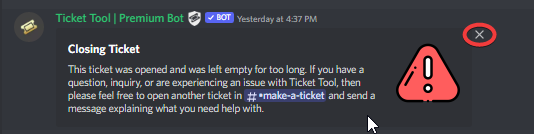 jade topaz
 copper owl
wait
that message is the ticket message?
there's no way to do that for every ticket no
you can remove the content from it like you did before, that's the closest you'll get
copper owl
well, if the bot doesnt work as intended, that would by why
candid wave
hey all, is it possible to have a ticket system setup that only alerts a certain role? i would like to make a request role on my server with it notifying all staff members, like our support ticket system does.
sry for the double post
hallow marlin
candid wave
hey all, is it possible to have a ticket system setup that only alerts a certain...
So you want that when someone opens a ticket a role get notified?
candid wave
yea , but just that one specifc role no other staff or administrators
so they dont get bombarded with tickets unwanted
hallow marlin
candid wave
yea , but just that one specifc role no other staff or administrators
{role.id}
Put the role id in the brackets and add that to the bot message that is sent when someone creates a ticket.
jade topaz
copper owl
well, if the bot doesnt work as intended, that would by why
yes i realised
so no way to remove the message?
candid wave
where is that message located?
jade topaz
in the ticket
copper owl
jade topaz
so no way to remove the message?
Removing the content is the best way
hallow marlin
candid wave
where is that message located?
panel settings - ticket option - ticket message

like this for example
 hallow marlin
candid wave
hallow marlin
candid wave
is angel the role to be pinged?
candid wave
yes
hallow marlin
candid wave
yes
use this variable {@role name}
candid wave
{@angel}
hallow marlin
candid wave
{@angel}
and put this in the message text
candid wave
and that will elimiate others from getting alerted for the ticket?
hallow marlin
candid wave
and that will elimiate others from getting alerted for the ticket?
If you want only people with the@Angelrole to be notified, then yes
candid wave
okay cool, dont want to keep testing it and bothering people lol
hallow marlin

candid wave
is it possible to call the tickets something else, like when they pop up instead of "ticket-082428" have it say "angel request-0001"
still trying to learn all these discord tools lol
hallow marlin
candid wave
is it possible to call the tickets something else, like when they pop up instead...
sure
panel settings - ticket options - ticket opened/closed channel name an then use angel-request-{count}
candid wave
So it’s still pinging these two , which do have administrative access . Anyway around that ?
 hallow marlin
candid wave
So it’s still pinging these two , which do have administrative access . Anyway a...
hallow marlin
candid wave
So it’s still pinging these two , which do have administrative access . Anyway a...
Only the users who have the role you mention in the message will be pinged.
set the {@Angel} in the message text
not embed text
 hallow marlin
candid wave
hallow marlin
candid wave
exactly!
An delete angel in the embed text
candid wave
got it working thanks!
hallow marlin
candid wave
got it working thanks!
you're welcome 🙂
jade topaz
I have a issue with a regular user getting a error that they don't have permissions to use this. How do I fix that? Myself as the Owner can but the regular user can't
hallow marlin
jade topaz
I have a issue with a regular user getting a error that they don't have permissi...
Did you blacklist the members or everyone role?
jade topaz
hallow marlin
Did you blacklist the members or everyone role?
I don't think so where would I check specifically?
hallow marlin
jade topaz
I don't think so where would I check specifically?
you can check it here
 jade topaz
Thanks I did and got it fixed
hallow marlin
jade topaz
Thanks I did and got it fixed
wonderful, you're welcome 🙂
jade topaz
Thank you again
candid wave
okay another odd question , the claim ticket button doesnt show up
i think i have all the settings right?
 hallow marlin
candid wave
i think i have all the settings right?
hallow marlin
candid wave
i think i have all the settings right?
resend the panel in the channel
oh no wait, my false
check this
humble sequoiaBOT
Claiming allows you to change the ticket name, category and permissions. To use it you have to enable it first on your Dashboard > Panel Configs > Claiming Options.
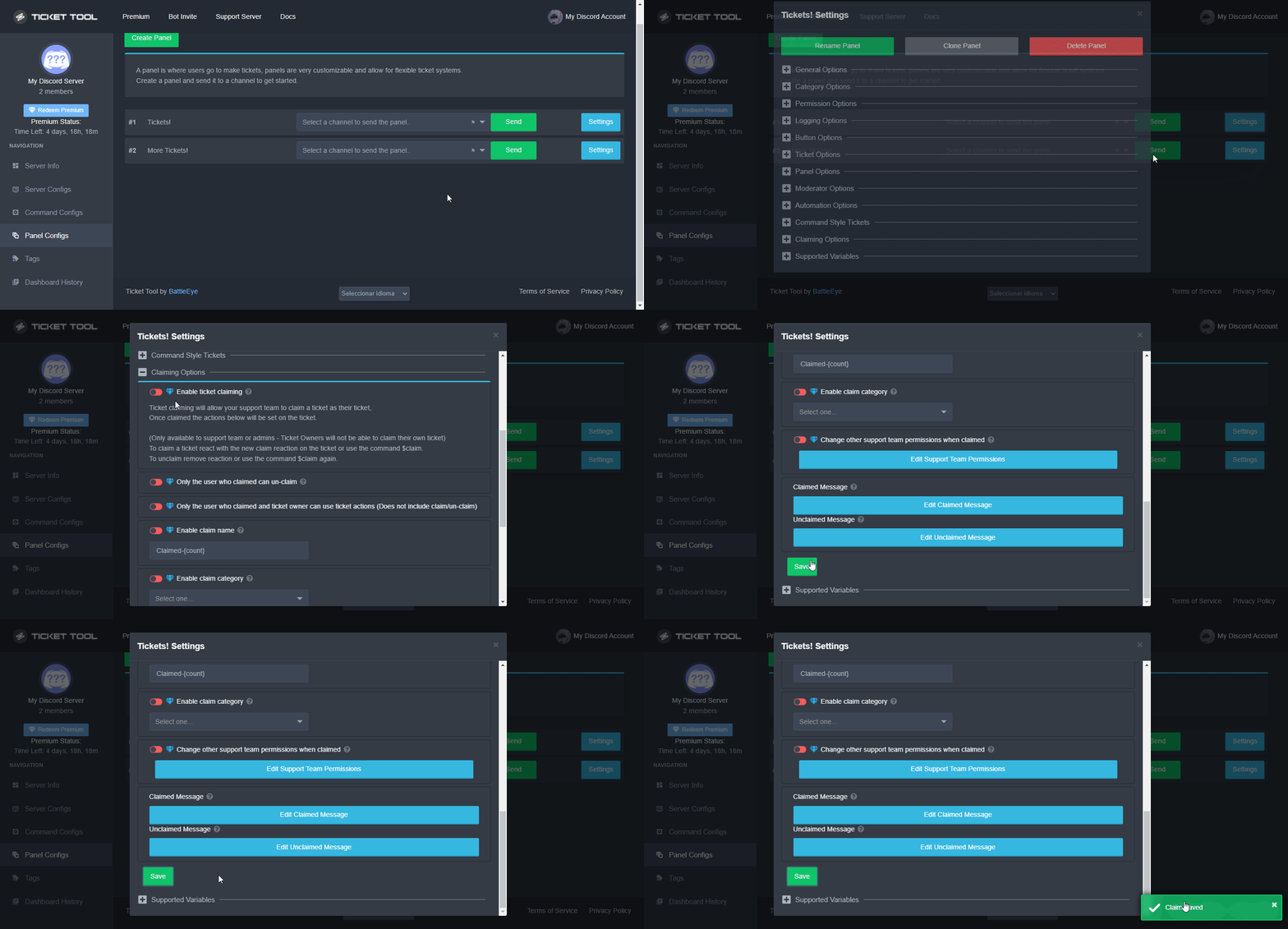
 Note: This is a premium feature
candid wave
Note: This is a premium feature
candid wave
Got it !
hallow marlin
Note that this is a premium feature.
Premium can be purchased here and/or currently tested for 7 days free.
https://tickettool.xyz/premium
candid wave
Yea I’m on the free trial lol I
hallow marlin
candid wave
Yea I’m on the free trial lol I
cool! Try out all the features, you will like it 🙂
 modest juniper
Hey fam! Category open is set to "tickets" category yet the tickets are still poping up outside of the category.


It's probably a user error. Anything I may be doing wrong here??
Additional question. Why is it showing the User ID instead of the "user tag" in the naming of the ticket?? Thanks. What should I be using instead of {user}?

 humble sequoiaBOT
{server.name} ➞ Name of the server
{server.id} ➞ ID of the Server

[#🆘│community-support](/guild/509192800865353738/channel/776680605517742090/) = <#channel> ➞ Channel link of the current channel
{channel.name} ➞ Name of the current channel
{channel.id} ➞ ID of the current channel

{author} = <@user> ➞ Mention of the user triggering this message
{author.name} ➞ Name of the user triggering this message
{author.id} ➞ ID of the user triggering this message
{author.nickname} ➞ Nickname of the user triggering this message
{author.icon} ➞ Direct Url of the profile picture of the user triggering this message
{author.tag} ➞ 4 digit tag (discriminator) of the user triggering this message
{author.full} ➞ username + 4 digit discriminator of the user triggering this message

{panel.count} ➞ The current count number of the panel (Tickets only)
{panel.name} ➞ The name of the panel (Tickets Only)
{panel.ticketLimit} ➞ The current limit of the panel (Ticket Only)

{ticket} = <#channel> ➞ Channel mention of the ticket
{ticket.id} ➞ Channel ID of the ticket

{ticket.user} = <@user> ➞ User mention of the ticket user
{ticket.user.name} ➞ Name of the ticket user
{ticket.user.id} ➞ User ID of the ticket user
{ticket.user.nickname} ➞ Nickname of the ticket user
{ticket.user.icon} ➞ Direct Url of the profile picture of the ticket user
{ticket.user.tag} ➞ Tag / Discriminator of the ticket user
{ticket.user.full} ➞ Username + Discirimator of the ticket user```
Roles can be either
{@role name} or {role ID}
_ _
_ _
Additional variables
{reason}
» works on $close <reason>, $delete <reason>, $new <reason>, $claim <reason>
» displays the reason, you can optionally give with some commands
Transcript Variables
{ticket_name}➞ Name of the ticket
{panel_name}➞ Name of the panel
{transcript_url}➞ File link of the transcript
Hide Link under blue text:
[Click me](https://tickettool.xyz)➞ Click me
Time Variable
Sends the current unix time in seconds. Optinally add or remove seconds
<t:{!time+43200}:R>➞ <t:1650801263:R>
<t:{!time+43200}:R>➞ <t:1650714863:R>
<t:{!time+43200}:R>➞ <t:1650758063:R>
» Remove ! before time
_ _
<t:1641006000>➞ <t:1641006000>
<t:1641006000:f>➞ <t:1641006000:f>
<t:1641006000:F>➞ <t:1641006000:F>
<t:1641006000:D>➞ <t:1641006000:D>
<t:1641006000:d>➞ <t:1641006000:d>
<t:1641006000:t>➞ <t:1641006000:t>
<t:1641006000:T>➞ <t:1641006000:T>
<t:1641006000:R>➞ <t:1641006000:R>
» You can use https://hammertime.djdavid98.art/ to create custom dates/times
jade topaz
^ @modest juniper check that out for the name issue
 coarse aurora
Hey! I have a question
Alright so, I found out how to ping roles in the ticket
but how do you get it to tag a specific channel?
How do I fix the prices tag so it actually tags the channel

i have it like this (because it’s the actual channel name)
But I’m not to sure

please ping me if anybody knows ^^
 real cairn
coarse aurora
i have it like this (because it’s the actual channel name)
But I’m not to sure
real cairn
coarse aurora
i have it like this (because it’s the actual channel name)
But I’m not to sure
Hello. @coarse aurora
Did you try using <#ChannelID> ?
coarse aurora
oh, no i havent
i will try that
real cairn
Alright, please let me know the result
coarse aurora
yup that worked! thank you so much
real cairn
Glad that it worked. Happy to help! 🙂
coarse aurora
have a good day/night ^
real cairn
Thank you. Same to you
slender minnow
modest juniper
Hey fam! Category open is set to "tickets" category yet the tickets are still po...
Heya, how many tickets are there in that category? If its more then 50, the tickets would be made outside the category.
that's a discord limit, so you can't do anything about it
also, what do you see for user tag? can i see some screenshot?
hallow marlin
 uneven hill
How can I ping a staff member when a user opens a ticket?
uneven hill
How can I ping a staff member when a user opens a ticket?
{role.id}
Put the role id in the brackets and add that to the bot message that is sent when someone creates a ticket.

panel settings - ticket option - ticket message
uneven hill
Where can I see the id ?
hallow marlin
$idcommand
humble sequoiaBOT
How do I get the ID of Roles/Channels/Emojis?
Ticket Tool has a useful command that helps you get the ID of various things like channels, roles, emojis and your server.
Just use the command $id <#channel/@role/:emoji:>. Now copy everything, including the brackets <...>, to your dashboard (or wherever you want it)
If you want the server ID, just use $id.
Examples:
Server ID: $id ➝
509192800865353738
Roles: $id @Role ➝@humble sequoia
Channel: $id #channel ➝#🤖│bot-spam
User: $id @user ➝@copper owl
Emoji: $id➝

 hallow marlin
check this
uneven hill
Ok thank you so much
hallow marlin
you're welcome 🙂
 surreal kite
My server is not poping up on the dashbord.
humble sequoiaBOT
Don't see your server in the dashboard?
You will possibly need to relog. Look below to see steps on how to relog.
How to relog in the Dashboard.
First, you will need to go to the dashboard. Once your there, click on your avatar on the top right. after you clicked it, you will see button that says Logout. You must click that. Once you have logged out, you can log back in.
Note:
You need one of these 3 things to access the dashboard.
1. Server Owner (Level: 6)
2. Server Administrator (Level: 4)
3. Dashboard Role (Level: 2)
:warning: You can check your level using $level on your Discord Server
User permission level with Ticket Tool
@User is permission level: 0 (User)
```» *If it shows that your permission is **0**, you don't have any of the above **3 things** to manage the dashboard.*


**See the GIF below on how to relog:**@surreal kite
iron nightBOT
Gave +1 Rep to @hallow marlin
quick bone
/en можно вопрос?
robust sandalBOT
can I ask a question?
Russian (ru) → English (en)
quick bone
/en как создать тикет на своём сервере
robust sandalBOT
how to create a ticket on your server
Russian (ru) → English (en)
quick bone
/ru Create a ticket in this server?
robust sandalBOT
Создать тикет на этом сервере?
English (en) → Russian (ru)
robust sandalBOT
how to create
Russian (ru) → English (en)
о, сры
English (en) → Russian (ru)
Прекрасно
English (en) → Russian (ru)
quick bone
/ru is that all you needed?
robust sandalBOT
это все, что вам нужно?
English (en) → Russian (ru)
quick bone
@jade topaz ^
robust sandalBOT
yes I do
Serbian (Cyrillic) (sr-Cyrl) → English (en)
quick bone
/ru what else do you need help with?
robust sandalBOT
С чем еще нужна помощь?
English (en) → Russian (ru)
create a ticket on your server https://discord.gg/hNN9CBKr
Russian (ru) → English (en)
quick bone
/ru you need to create a panel https://tickettool.xyz/dashboard/ then send it to the channel you want it in
robust sandalBOT
Необходимо создать панель, https://tickettool.xyz/dashboard/ затем отправить ее на нужный канал
English (en) → Russian (ru)


 hallow marlin
jade topaz
hallow marlin
jade topaz
check if the bot has enough permission in this category
 buoyant hawk
how do i assign a role to view tickets
shut bolt
buoyant hawk
how do i assign a role to view tickets
$help support
humble sequoiaBOT
How to let support team see into a ticket
About support roles
A support role lets your support team see into tickets with out having to add them manually to each and every ticket.
You can add as many support roles as you like per panel.
NOTE that the way discord works all admins can see into tickets regardless of this.
How to set a support role
To set a Support role go to the Dashboard -> Panel Configs -> Settings -> General Options -> Support Team Roles.
NOTE that the support role will not be able to see into tickets that are already created..
buoyant hawk
THANK YOU
shut bolt
Sure
 rotund coral
does anyone know if its possible to get back old tickets
rotund coral
oh?
quick bone
it'll cause a lot of channels to appear tho
rotund coral
how do i do that
quick bone
just use $close and dont delete it everytime you need to close a ticket
set a closed tickets category as well
then you can minimise that category
rotund coral
oo ok ty !
quick bone
np
 rigid hawk
hi guys
after I press ''Close'' for an open ticket. I am only given the ''Cancel'' option which doesn't close the actual ticket
how do i fix that?
abstract cargo
/it hi guys
after I press ''Close'' for an open ticket. I am only given the ''Cancel'' option which doesn't close the actual ticket
how do i fix that?
robust sandalBOT
Ciao ragazzi
dopo aver premuto ''Chiudi'' per un ticket aperto. Mi viene data solo l'opzione ''Annulla'' che non chiude il biglietto effettivo
come posso risolvere il problema?
English (en) → Italian (it)
abstract cargo
/en in teoria il ticket dovrebbe chiudersi, riesci a mandarmi una foto? @rigid hawk
robust sandalBOT
in theory the ticket should close, can you send me a photo? @rigid hawk
Italian (it) → English (en)
jade topaz
rigid hawk
after I press ''Close'' for an open ticket. I am only given the ''Cancel'' optio...
anyone can help with this? I have the same issue 😦
jade topaz
rigid hawk
after I press ''Close'' for an open ticket. I am only given the ''Cancel'' optio...
Make sure to check this
Panel Configs > Settings > Button options > You can check Confirm close, Delete Ticket, Transcript > when you click at anyone of them > You will see Enable Button > Enable it ( make it green )
Or
Go to Panel Configs > Settings > General Options > And disable Two Step Close
Done^
fallow ingot
jade topaz
Make sure to check this
`Panel Configs > Settings > Button options >` **You can...
Hi, this isn’t what the user wants to accomplish.
fallow ingot
rigid hawk
after I press ''Close'' for an open ticket. I am only given the ''Cancel'' optio...
Go to Panel Configs > Settings > General Options > And disable  Two Step Close
jade topaz
fallow ingot
Hi, this isn’t what the user wants to accomplish.
I thought he asked about this..my bad.
fallow ingot
its ok
rigid hawk
fallow ingot
Go to Panel Configs > Settings > General Options > And disable <:offswitch:83626...
thank yo so much! 🙂
iron nightBOT
Gave +1 Rep to @fallow ingot
fallow ingot
No worries, happy to help.
rigid hawk
fallow ingot
No worries, happy to help.
btw something last, wanted to place an image on the bottom -- https://flic.kr/p/2ngu8SZ

Explore chrisff9's photos on Flickr. chrisff9 has uploaded 2 photos to Flickr.
any idea why its not displayed?
keeps loading 😦
shut bolt
rigid hawk
btw something last, wanted to place an image on the bottom -- https://flic.kr/p/...
Is that the link you are using?
humble sequoiaBOT
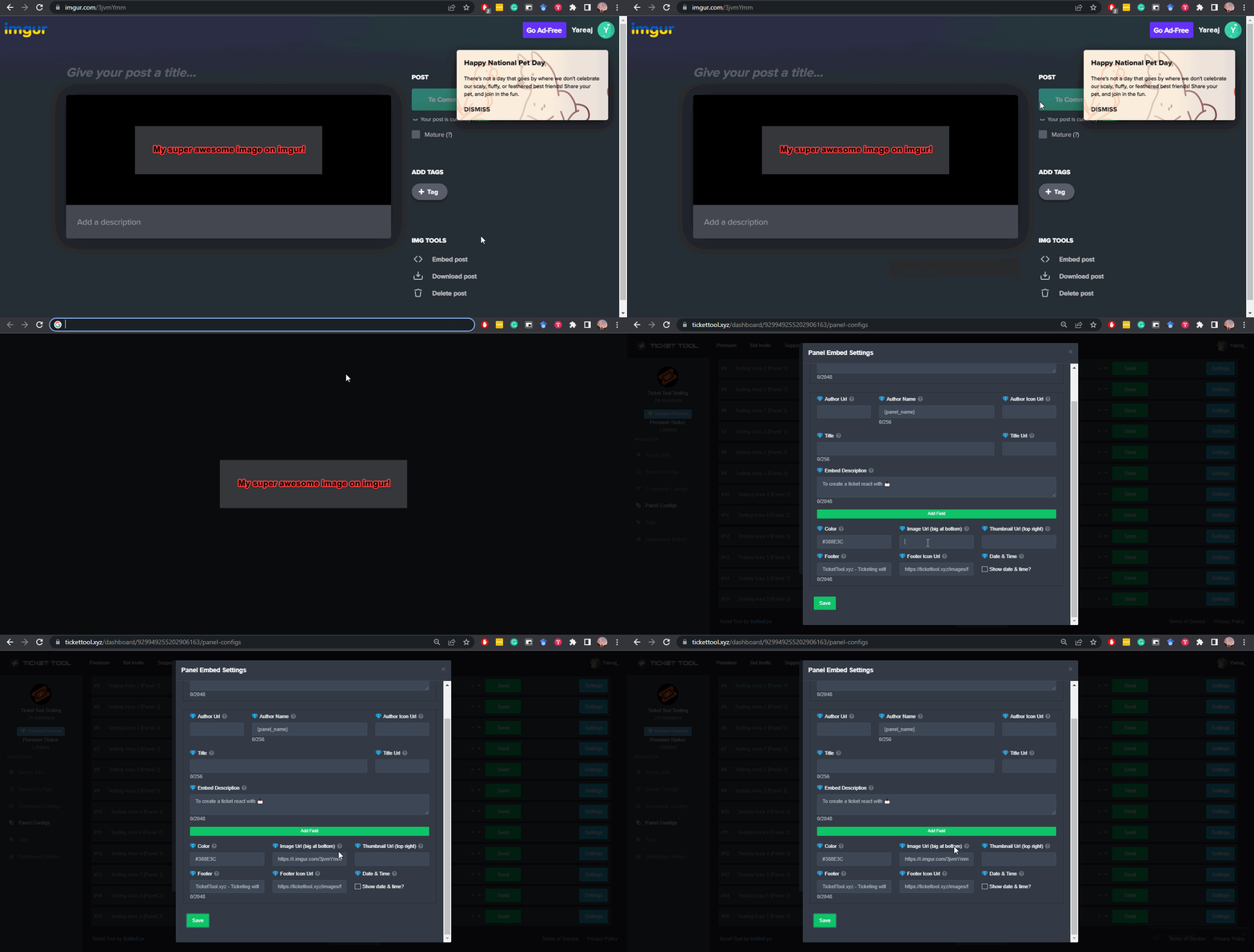
What are the direct URLs?
A direct access URL is an easy to read URL that users can enter to get to a specific item, document, page, category, or perspective, in which our bot TicketTool can read and get it displayed in your 'Panel Message' or your 'Ticket Message'.
Where can I get them?
The recommended way is to use 'Imgur', you can signup within a few minutes and then upload the image you want, and copy the URL of the uploaded image and paste it into one of the four boxes. There are alternatives to this, such as other image or video storing websites or using 'Open Original' of an image and paste it in (please be aware that if your image is deleted, Discord will automatically delete the link to it in a few days). Please note this requires 'Premium'. Imgur
 rigid hawk
shut bolt
<https://live.staticflickr.com/65535/52027421753_f0e8609554_h.jpg>
rigid hawk
shut bolt
<https://live.staticflickr.com/65535/52027421753_f0e8609554_h.jpg>
thank you so much, it worked 🙂
iron nightBOT
Gave +1 Rep to @shut bolt
shut bolt
rigid hawk
thank you so much, it worked 🙂
Sure!
jade topaz
Hello! today in axelar sea I created a ticket and I saw its number, but now it disappeared and I don't understand maybe its me who deleated it , and i ask how it is possible to restore my ticket, i have its number on picture i took earlier, thank you
fallow ingot
jade topaz
Hello! today in axelar sea I created a ticket and I saw its number, but now it d...
Unfortunately you cannot restore tickets if they have been deleted. Just like you can’t with a deleted discord channel. I recommend setting up logging so you can check for future reference.
jade topaz
fallow ingot
Unfortunately you cannot restore tickets if they have been deleted. Just like yo...
thank you, if i deleated i made it by mistake.. you think i can create a new one? in one of the answers to my demand for new ticket it was written that i already opened one , and now bot always tells the system is overloaded
iron nightBOT
Gave +1 Rep to @fallow ingot
fallow ingot
jade topaz
thank you, if i deleated i made it by mistake.. you think i can create a new one...
Huh?
What’s your primary language?
jade topaz
fallow ingot
Huh?
russian, the question is if I can create a new ticket if i deleated the first one? 🙂
fallow ingot
Yes
jade topaz
ok, just the system is overloaded now , i will try again
fallow ingot
You can make it so, they can open a ticket even if they’ve got one open. (Doesn’t count with another panel.)
What do you mean overloaded?
 pearl magnet
fallow ingot
What do you mean overloaded?
pearl magnet
fallow ingot
What do you mean overloaded?
probably a bit laggy and slow
jade topaz
the bot who creates tickets always asks to try later
pearl magnet
jade topaz
the bot who creates tickets always asks to try later
Is it slow or just asks you to try again later straight away?
fallow ingot
jade topaz
the bot who creates tickets always asks to try later
Screenshot?
jade topaz
straight away asks to try later
pearl magnet
Oh ok... yeah enter a screenshot in
pearl magnet
jade topaz
straight away asks to try later
is this when you want to create a ticket?
or just make another one?
 normal axle
Hello, I have a premium in the bot. Can I change the server that has premium?
jade topaz
normal axle
Hello, I have a premium in the bot. Can I change the server that has premium?
You can invite the premium bot to the second server.
normal axle
How?
pearl magnet
normal axle
Hello, I have a premium in the bot. Can I change the server that has premium?
Im pretty sure you can use the premium version as a second bot and remove the normal one using the dashboard or click on the bot in the discord and press add to server
jade topaz
pearl magnet
Oh ok... yeah enter a screenshot in
a bit like this all the time if you ask for the ticket
 pearl magnet
Never mind you cant press add to server
pearl magnet
jade topaz
a bit like this all the time if you ask for the ticket
Oh yeah...
jade topaz
pearl magnet
is this when you want to create a ticket?
in fact i made already one in the day but i think i closed it by mistake.. so now i try to create a new one
normal axle
pearl magnet
Im pretty sure you can use the premium version as a second bot and remove the no...
I cannot send an invitation to the bot on a second server
pearl magnet
normal axle
I cannot send an invitation to the bot on a second server
Yeah i know i though you could 😦
normal axle
Is there another way?
pearl magnet
jade topaz
in fact i made already one in the day but i think i closed it by mistake.. so no...
Yeah but it does say the server is creating too many tickets so clearly either your creating too many tickets or the server can only handle a certain amount of people using tickets at once
jade topaz
normal axle
How?
Dashboard > server you want > Server configs > then you will see right side of your screen > Invite premium bot it's a button ...
And change the option down below called
Select the bot you would like to use on this server. and choost the premium bot! ..
pearl magnet
normal axle
Is there another way?
There ---/\
pearl magnet
jade topaz
Dashboard > server you want > Server configs > then you will see right side of y...
Cheers. I didnt actually know that 😆
 mild cargo
How do i let the tickets have an opened channel and a closed one? I got the panel configured and all that but just need the correct category
jade topaz
jade topaz
Dashboard > server you want > Server configs > then you will see right side of y...
@normal axle
 pearl magnet
mild cargo
How do i let the tickets have an opened channel and a closed one? I got the pane...
pearl magnet
mild cargo
How do i let the tickets have an opened channel and a closed one? I got the pane...
Ill answer that in a sec hold on
mild cargo
pearl magnet
Ill answer that in a sec hold on
alr g
jade topaz
mild cargo
How do i let the tickets have an opened channel and a closed one? I got the pane...
You mean opened tickets in specific place?
Dashboard > panel configs > chose your panel Settings > Category options > then you can change the category for opened and closed tickets ^^
- You can make the opened tickets in specific category and the closed in separate category
pearl magnet
jade topaz
You mean opened tickets in specific place?
Dashboard > panel configs > chose y...
Yeah opening it in a channel
@jade topaz Are you part of the support team? or are you just a member?
jade topaz
pearl magnet
<@456226577798135808> Are you part of the support team? or are you just a member...
Member, but I'd like to help people ^.
pearl magnet
jade topaz
Member, but I'd like to help people ^.
Thats exactly what i like to do 🙂
mild cargo
jade topaz
You mean opened tickets in specific place?
Dashboard > panel configs > chose y...
Thanks so much
iron nightBOT
Gave +1 Rep to @south mauve
jade topaz
mild cargo
Thanks so much
Anytime ^~
pearl magnet
What does that +1 Rep thing mean?
mild cargo
pearl magnet
What does that +1 Rep thing mean?
i think 1 more step to getting support
pearl magnet
Oh ok... thats quite cool
jade topaz
pearl magnet
What does that +1 Rep thing mean?
It's mean when someone thanks you withba mention gave you a Reputation ^^
iron nightBOT
Gave +1 Rep to @pearl magnet
jade topaz
See ^
pearl magnet
Oh yeah you said thanks in chat so it registered as a thanks message oh
jade topaz
Let's talk in #💬│general-chat
mild cargo
mild cargo
thanks
thanks
jade topaz
@mild cargo you can't Thanks yourself.
mild cargo
jade topaz
<@964201256216318052> you can't `Thanks` yourself.
joe
pearl magnet
jade topaz
<@964201256216318052> you can't `Thanks` yourself.
Yeah i know
@jade topaz cheers
pearl magnet
Lol @mild cargo just got timedout for 10minutes for spam lol
Hello? i have an issue
My ticket tool bot aint making the tickets and its really weird because it was working just a second ago
@jade topaz thanks for sorting it out
iron nightBOT
Gave +1 Rep to @south mauve
 tired trail
Hello friends, I would be having a doubt. Is there a way to edit the permissions issue to close the ticket?
That is, if I can edit so that only certain roles can close the ticket
hallow marlin
tired trail
That is, if I can edit so that only certain roles can close the ticket
check:
Panel configs - panel settings - Button Options - close ticket - allowed/disabled Roles
There you can now block roles or give the authorization to close.
 past basin
i have a problem the support role cannot remove users its get the error Missing required option: [User/Role] (optional channel)
robust sandalBOT
who knows russian help
Russian (ru) → English (en)
tired trail
hallow marlin
check:
Panel configs - panel settings - Button Options - close ticket - allowed/...
Thanks bro!
iron nightBOT
Gave +1 Rep to @hallow marlin
hallow marlin
tired trail
Thanks bro!
you're welcome 🙂
jade topaz
past basin
i have a problem the support role cannot remove users its get the error Missing ...
Is the only issue with remove users? Or everything?
jade topaz
past basin
i have a problem the support role cannot remove users its get the error Missing ...
First:
Dashboard > Panel configs > Open your panel settings > General Options > Support Team Roles > Add the support role there so they can do anything with the ticket
Then:
Dashboard > Command configs > Go to Remove command > Settings > Enable the support team only
past basin
aight thanks
jade topaz
past basin
aight thanks
Anytime~
jade topaz
What's the problem? @bleak arrow
 steep fulcrum
 bleak arrow
tickettool in my discord
bleak arrow
tickettool in my discord
It is in connection with ur discord account x ticket tool? In login?
jade topaz
how to set up to be able to create a ticket
humble sequoiaBOT
You can check our documentation here.
You can also check #573205317870157855 for the basic setup.
Our documentation contains all the info you need about the bot to be able to setup and configure the bot however you like.
hallow marlin
@jade topaz check this 🙂
jade topaz
hallow marlin
<@456226577798135808> check this 🙂
problems
steep fulcrum
jade topaz
how to set up to be able to create a ticket
Firstly, adding the ticket tool bot with ( https://discord.com/oauth2/authorize?client_id=557628352828014614&scope=applications.commands+bot&permissions=2416045072 ) to ur server and set up the panel in ticket tool dashboard
jade topaz
steep fulcrum
Firstly, adding the ticket tool bot with ( https://discord.com/oauth2/authorize?...
I put it in the server
steep fulcrum
jade topaz
I put it in the server
Try to do %debug in a channel
And see if the problem is ticket tool's permissions
jade topaz
steep fulcrum
And see if the problem is ticket tool's permissions
I gave my permission
jade topaz
jade topaz
how to set up to be able to create a ticket
https://docs.tickettool.xyz/general/setup simply check the docs would be super helpful ..
For everything you want .
steep fulcrum
jade topaz
I gave my permission
Use $debug and send a screenshot with what appears
jade topaz
jade topaz
<https://docs.tickettool.xyz/general/setup> simply check the docs would be super...
I saw it
steep fulcrum
jade topaz
I saw it
Do you create the panel on ticket tool dashboard ( website ) and send it for a specific channel?
hallow marlin
steep fulcrum
Use **$debug** and send a screenshot with what appears
the default prefix is $ to make it work.
steep fulcrum
hallow marlin
the default prefix is $ to make it work.
Wait,my fault
jade topaz
steep fulcrum
Do you create the panel on ticket tool dashboard ( website ) and send it for a s...
@pale pilot
@hallow marlin problems
hallow marlin
jade topaz
<@855793296155607051> problems
What can I do for you?
jade topaz
hallow marlin
What can I do for you?
https://discordapp.com/channels/509192800865353738/662692902245498910/968118554018840587
this locked picture why I can't see this picture
hallow marlin
jade topaz
https://discordapp.com/channels/509192800865353738/662692902245498910/9681185540...
i have no access to this link
jade topaz
hallow marlin
i have no access to this link
this link image i can't see locally is
hallow marlin
jade topaz
this link image i can't see locally is
What exactly do you want to do? What is your problem?
jade topaz
hallow marlin
What exactly do you want to do? What is your problem?
which is why the picture is locked so I can see it
hallow marlin
jade topaz
which is why the picture is locked so I can see it
this is a link to a channel you don't have access to
you need the link from the image, not from a message
jade topaz
hallow marlin
this is a link to a channel you don't have access to
that connection is not on that disk
jade topaz
hallow marlin
you need the link from the image, not from a message
I definitely set up a link for the ticket tool
loud turtle
jade topaz
First:
`Dashboard > Panel configs > Open your panel settings > General Options >...
He means an $add error. Not a support team error
I would like everyone to know that before you ask your support question, read #799695838917820416 , it may have the answer to your pending question.
amber forum
Is there support in the Arabic language? from where
 solemn bloom
how do you setup the ticket in a channel?
loud turtle
@amber forum Go to #🎫│make-a-ticket There is an arabic option.
@solemn bloom Creating a panel
$help panel
humble sequoiaBOT
Creating a panel
To create a panel we are going to need to head over to the panel configs on the dashboard
Once at the dashboard we will need to click Create Panel
Enter a panel name (Fill in any optional settings you want)
Click Create Panel and your ready to get started with configuring your panel
An example of a creating a panel is shown below.
loud turtle
humble sequoia
For @solemn bloom
solemn bloom
ty
amber forum
loud turtle
<@960263088580489256> Go to <#571706435449257997> There is an arabic option.
<@7...
Thank
iron nightBOT
Gave +1 Rep to @loud turtle
jade topaz
hi
what would happen if i purchased premium and my account got disabled
would i be able to transfer it over to another account
 stone skiff
craggy geyser
jade topaz
would i be able to transfer it over to another account
stone skiff
craggy geyser
jade topaz
would i be able to transfer it over to another account
Yes. The subscription is tied to the email, so you can log in to your subscription still, and change the discord id associated with the account
copper owl
you have your ticket open. And pinging support for help isn't allowed either
So please refrain from doing that.
jade topaz
craggy geyser
Yes. The subscription is tied to the email, so you can log in to your subscripti...
ok great TY
iron nightBOT
Gave +1 Rep to @craggy geyser
 steady zenith
can you do auto save transcript without premium
copper owl
nope, it's a premium only thing
if something is premium on the dashboard, it most likely wouldn't be available for free
steady zenith
lmao bummer
jade topaz
Is there any way to like blacklist specific roles from being able to create tickets?
jade topaz
copper owl
that page has a section for blacklisted roles
Is it possible to black list roles from a certain ticket panel? I don't want the role to be blacklisted from all panels
copper owl
Edit create ticket button found in the the button options section
jade topaz
copper owl
Edit create ticket button found in the the button options section
Disabled roles is blacklisted roles right?
copper owl
yes.
iron nightBOT
Gave +1 Rep to @copper owl
copper owl
 dusky rampart
Can link discord me in here ?
dusky rampart
Can link discord me in here ?
what do you mean?
dusky rampart
Im Arab my speaking English its not good
copper owl
dusky rampart
Im Arab my speaking English its not good
speak arabic it's fine
ايش قصدك؟
dusky rampart
انت عربي ؟
dusky rampart
معليش ياخي احنا في الانقلش ذا زي ال***
 spice owl
Is there a way for my officer role in discord can read the support messages that other send. Currently when someone opens a ticket only people who can see it are admins.
dusky rampart
المهم كان قصدي انو يمديني انشر سيرفري توه جديد وكذا
copper owl
spice owl
Is there a way for my officer role in discord can read the support messages that...
Make your officer role a support role
Panel Configs -> Panel Settings -> General Options -> Support Team Roles
spice owl
Ty
dusky rampart
اوك
 hallow sable
thanks @copper owl
iron nightBOT
Gave +1 Rep to @copper owl
dusky rampart
اسمع بالله ذولي وش يقولون وربي ما فهمت الا ثانكس
copper owl
hallow sable
thanks <@548583124062175232>
please dont rep just for the hell of it 🙂
dusky rampart
ترا gave تنكتب كذاgive
احس نفسي مدرس انقليزي من بعد التصحيح ذا
thanks @copper owl
iron nightBOT
Gave +1 Rep to @copper owl
spice owl
So i found the settings area but cant see exactly where to add the role in order for them to see the tickets
copper owl
copper owl
Make your officer role a support role
Panel Configs -> Panel Settings -> Genera...
right here
those are the directions to get to the Support Team Role section
 frigid rose
Hello guys... how many tickets can people open with a free ticket bot? not with a premium, free bot...
scenic plinth
frigid rose
Hello guys... how many tickets can people open with a free ticket bot? not with ...
Depends your servers limit.
$help limit
humble sequoiaBOT
How to set a ticket limit
A ticket limit may be set per panel to prevent users from spamming tickets. By default this limit is set to 3. Once a user hits this limit the bot will notify the users that they reached the limit.
To set a ticket limit go to the Dashboard -> Panel Configs -> Settings -> General Options -> Ticket Limit
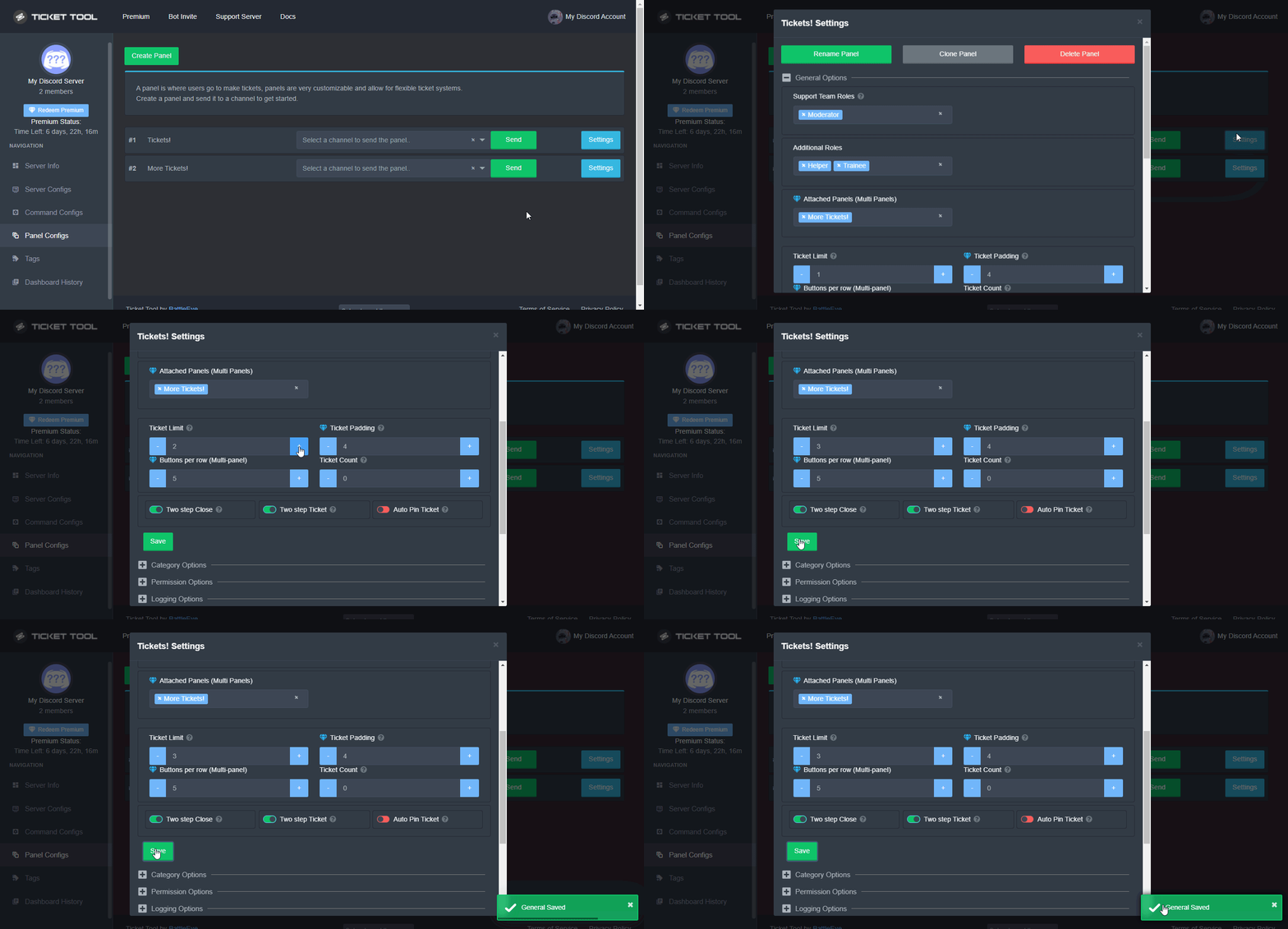
Unlike the regular Ticket Limit, the global limit will limit the amount of tickets a user can create at the same time for ALL Panels. When a ticket is closed again, the limit resets for that user.
To customize it head over to your Dashboard ➞ Server Configs ➞ Global Ticket Limit
Note:
This is not a limit for how many tickets a user can open at all times or how many tickets you can have open on the server in total. This is just a limit per user for open tickets.
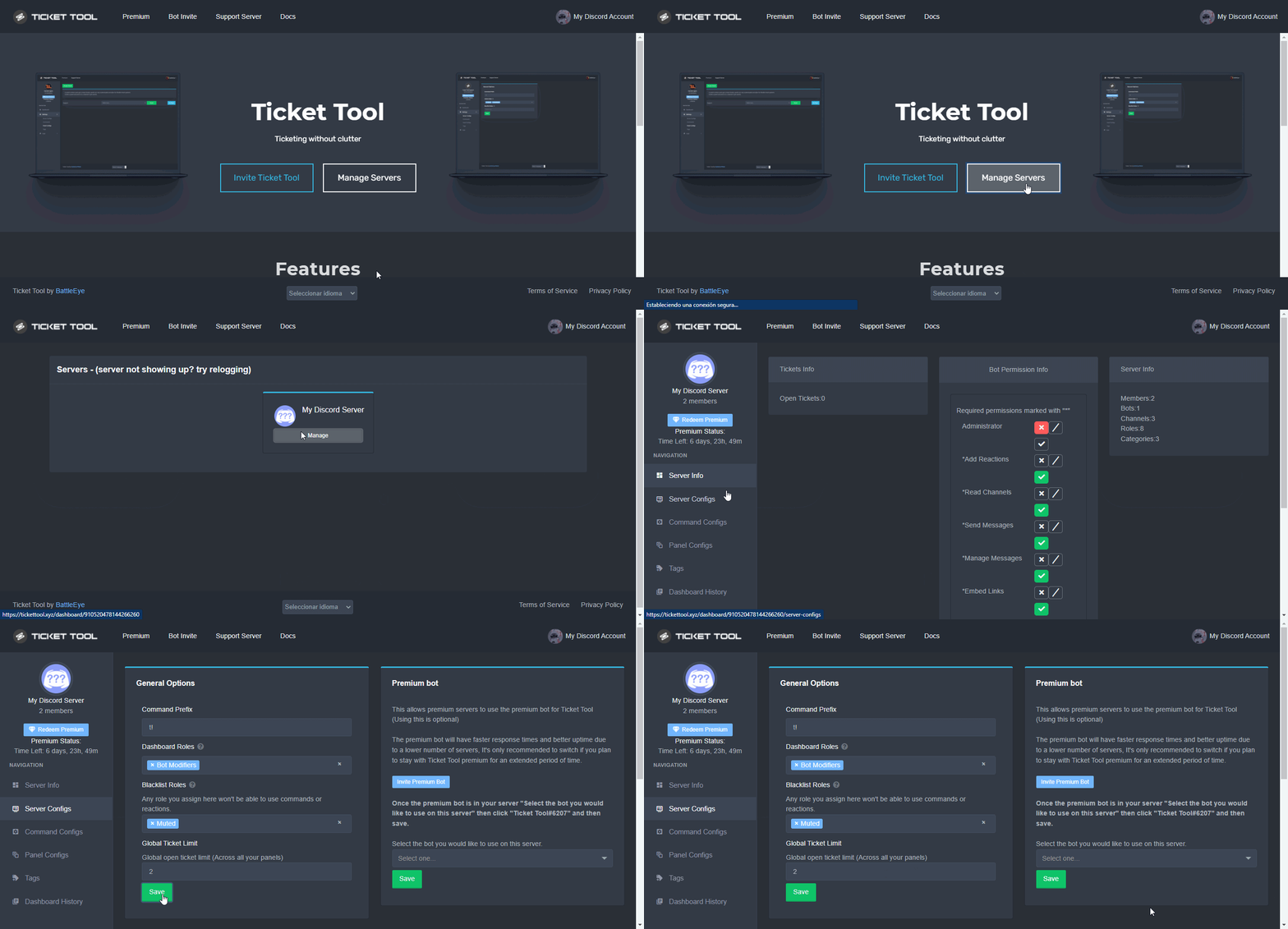
 drifting talon
question
can tickets be created as threads instead of channels? Would that be easier or not?
 nova wharf
drifting talon
can tickets be created as threads instead of channels? Would that be easier or n...
nova wharf
drifting talon
can tickets be created as threads instead of channels? Would that be easier or n...
I don't think so.
 nova pilot
How do I get Ticket Tool Premium! 🙂
 hollow bane
What permissions do you need to manage the bot?
 kind hawk
hollow bane
What permissions do you need to manage the bot?
kind hawk
hollow bane
What permissions do you need to manage the bot?
You can set them in the support roles section.
Panel Configs -> Panel Settings -> General Options -> Support Team Roles
humble sequoiaBOT
Ticket Tool Premium
Get premium at https://tickettool.xyz/premium
Manage your subscriptions at https://tickettool.xyz/subscriptions
Why Premium?
Premium lets you customize the bot just how you want it. It also helps keep the bot running.
kind hawk
@hollow bane click the link just above.
kind hawk
drifting talon
can tickets be created as threads instead of channels? Would that be easier or n...
Discord has a limit of about 500 channels (including threads) I don't think it would be different.
nova pilot
humble sequoia
Can i get it free?
kind hawk
nova pilot
Can i get it free?
There is a free version yes.
Premium gives you access to more features.
nova pilot
kind hawk
There is a free version yes.
Premium gives you access to more features.
okay thx ♥
iron nightBOT
Gave +1 Rep to @kind hawk
 lone summit
Hey, after I have invited the bot into my server what do I do next?
humble sequoiaBOT
You can check our documentation here.
You can also check #573205317870157855 for the basic setup.
Our documentation contains all the info you need about the bot to be able to setup and configure the bot however you like.
copper owl
lone summit
Hey, after I have invited the bot into my server what do I do next?
this should help ^^
lone summit
thanks
 balmy ocean
can anyone enlighten me on how to resend a panel into a channel ?
ah i just saw it -.-
i must be blind
fallow ingot
balmy ocean
can anyone enlighten me on how to resend a panel into a channel ?
Simply go to Panel Configs click the dropdown menu on a panel and select channel.
oops I sent to fast
Oh well 🙂
jade topaz
If our Discord got deleted is it possible to recover ticket logs from the old server?
fallow ingot
jade topaz
If our Discord got deleted is it possible to recover ticket logs from the old se...
Sadly no.
 obtuse forum
I keep having this issue where Mods & Team role are constantly able/then not able to view support tickets and/or change roles. Is this a server issue or the ticket tool bot issue?
steep fulcrum
obtuse forum
I keep having this issue where Mods & Team role are constantly able/then not abl...
See the place of ticket tool role ,must be above of support team's role
 polar crown
Hello , how to mention role in ticket message please ?
shut bolt
polar crown
Hello , how to mention role in ticket message please ?
$mentions
humble sequoiaBOT
Within all the messages the bot's sends (both embeds and text) you can mention either channels, roles, or even users, these mentions will only send a notification to the user if they are used within a text field, e.g: a role mentioned in an embed won't ping at all the users who have that role.
For mentioning a role you can use one out of three options:
{@Role Name} ➞ Which is Case Sensitive.
{RoleID} ➞ Replace RoleId with the Id of the role you are trying to ping.
<@&RoleID> ➞ Discord's native syntax to ping roles.
<#ChannelID> ➞ Mention a channel by its ID.
<@UserID> ➞ Mention a user by its ID.
shut bolt
$help ping
humble sequoiaBOT
How to make Ticket Tool ping a role
To make ticket tool ping a role when a ticket is opened, go to the Dashboard -> Panel Configs -> Settings -> Ticket Options -> Ticket Message -> Message Text and do this:
{@Role name} This is case sensitive and the role must have @mentions enabled
shut bolt
Those two thing should help you :)
polar crown
shut bolt
Those two thing should help you :)
Thanks 
iron nightBOT
Gave +1 Rep to @shut bolt
shut bolt
Sure 
jade topaz
How do you make two support ticket things in your own server like one for staff and one for admin???
 heavy latch
help pls
How can I do so that my team can see the tickets without having the Administrator permission?
@shut bolt

 prime bridgeBOT
 ! 𝙖𝙖𝙡𝙫𝙖𝙧𝙤𝙘𝙭𝙯#1282 has been warned!

 They were notified via dms.
shut bolt
heavy latch
How can I do so that my team can see the tickets without having the Administrato...
$help support
humble sequoiaBOT
How to let support team see into a ticket
About support roles
A support role lets your support team see into tickets with out having to add them manually to each and every ticket.
You can add as many support roles as you like per panel.
NOTE that the way discord works all admins can see into tickets regardless of this.
How to set a support role
To set a Support role go to the Dashboard -> Panel Configs -> Settings -> General Options -> Support Team Roles.
NOTE that the support role will not be able to see into tickets that are already created..
shut bolt
jade topaz
How do you make two support ticket things in your own server like one for staff ...
$help panel
humble sequoiaBOT
Creating a panel
To create a panel we are going to need to head over to the panel configs on the dashboard
Once at the dashboard we will need to click Create Panel
Enter a panel name (Fill in any optional settings you want)
Click Create Panel and your ready to get started with configuring your panel
An example of a creating a panel is shown below.
shut bolt
Create 2 separate panels, if that's what you are looking for
 silent swallow
Do you have any command to delete all tickets?
loud turtle
silent swallow
Do you have any command to delete all tickets?
Not at the moment
silent swallow
OK
 median barn
what do I have to do so that I can delete the ticket
loud turtle
median barn
what do I have to do so that I can delete the ticket
There's a delete button or type $delete
loud turtle
median barn
what do I have to do so that I can delete the ticket
About setup
$help setup
humble sequoiaBOT
Setting up Ticket Tool
Visit the docs for setup info
General Setup
median barn
 loud turtle
median barn
loud turtle
median barn
Yes
median barn
there is only close button
loud turtle
That's the regular panel ticket message whatever you call them
Claiming is a whole other thing
robust sandalBOT
median barn
irgendjemand deutsch der mir helfen kann?
 Yareaj_
anyone german can help me?
German (de) → English (en)
shut bolt
$deticket
humble sequoiaBOT

Deutsches Support-Team
Wenn du Hilfe vom Deutschen Support-Team erhalten möchtest gehe in #🎫│make-a-ticket und öffne durch einen Klick auf den :flag_de: Button ein Ticket.
shut bolt
/de I see you already have a ticket, please wait for our german team to assist you, or would you prefer us to help you with the translator?
robust sandalBOT
Ich sehe, dass Sie bereits ein Ticket haben, bitte warten Sie, bis unser deutsches Team Ihnen hilft, oder möchten Sie, dass wir Ihnen mit dem Übersetzer helfen?
English (en) → German (de)
median barn
ja
also kann mir irgendwer aus dem team kurz das einrichten bitte ich bin echt verzweifelt
robust sandalBOT
median barn
also kann mir irgendwer aus dem team kurz das einrichten bitte ich bin echt verz...
Yareaj_
so someone from the team can briefly set me up the please I'm really desperate
German (de) → English (en)
robust sandalBOT
median barn
ja
Yareaj_
and
Finnish (fi) → English (en)
shut bolt
/de We can't set the bot for you, we can help you with it. Take into account that to delete a ticket with a button you'll first need to close it by clicking the Close Button which then will bump the Delete button
robust sandalBOT
Wir können den Bot nicht für Sie einstellen, wir können Ihnen dabei helfen. Beachten Sie, dass Sie, um ein Ticket mit einer Schaltfläche zu löschen, es zuerst schließen müssen, indem Sie auf die Close Button klicken, wodurch dann die __Delete__Schaltfläche gestoßen wird
English (en) → German (de)
loud turtle
Sorry I was having lunch
median barn
wie kann ich den text ändern
robust sandalBOT
median barn
wie kann ich den text ändern
Yareaj_
how can I change the text
German (de) → English (en)
shut bolt
/de Which text exactly?
robust sandalBOT
Welcher Text genau?
English (en) → German (de)
shut bolt
loud turtle
Sorry I was having lunch
It's fine
 humble sequoiaBOT
Panel Message
Die Panel Message ist die Nachricht von Ticket Tool, unter der die Nutzer reagieren, um ein Ticket zu öffnen.
Um diese zu personalisieren gehe auf deinem Dashboard auf die "Panel Configs". Dort klickst du in den Panel Settings unter "Panel Options" auf "Edit Panel Message".
 median barn
oh i need premium?
shut bolt
/de Not really, you can still edit the Embed Description with a character limit for free
robust sandalBOT
Nicht wirklich, Sie können die Einbettungsbeschreibung mit einem Zeichenlimit immer noch kostenlos bearbeiten
English (en) → German (de)
 humble sequoiaBOT
Auswählen einer Blacklist-Rolle
Gehe in deinem Dashboard auf die "Panel Configs" aus - dort findest du die Einstellungen um Rollen auf die Blacklist zu setzen.
Nachdem du eine Rolle ausgewählt hast musst du die Änderung speichern.
 shut bolt
/de Check your blacklisted roles
robust sandalBOT
Überprüfen Sie Ihre Rollen auf der schwarzen Liste
English (en) → German (de)
loud turtle
About my suggestion, where is the option to it
shut bolt
loud turtle
About my suggestion, where is the option to it
https://docs.tickettool.xyz/dashboard/panel-configs/claiming-options#customizing-claiming
Change other support team permissions when claimed

How to set claiming!
loud turtle
shut bolt
https://docs.tickettool.xyz/dashboard/panel-configs/claiming-options#customizing...
thanks
iron nightBOT
Gave +1 Rep to @shut bolt
shut bolt
Sure
 crude owl
median barn
if a user wants to create a ticket this message comes, what can I do?
crude owl
median barn
if a user wants to create a ticket this message comes, what can I do?
im having the same problem as him.
 shut bolt
crude owl
im having the same problem as him.
shut bolt
crude owl
im having the same problem as him.
Check your blacklisted roles
robust sandalBOT
median barn
was soll ich hier auswählen
Yareaj_
what should I choose here
German (de) → English (en)
crude owl
shut bolt
Check your blacklisted roles
which is where? there shouldnt be any.
humble sequoiaBOT
Any role you assign as a blacklisted role won't be able to use commands or reactions.
Selecting a blacklisted role
Go to your Dashboard ➞ Server Configs. There you will find the option to select blacklisted roles.
Note: Don't forget to save.
 shut bolt
median barn
shut bolt
median barn
/de That's the field for your support team and additional roles, that's not the blacklisted roles field if that's what you are looking for
robust sandalBOT
Das ist das Feld für Ihr Support-Team und zusätzliche Rollen, das ist nicht das Feld für Rollen auf der schwarzen Liste, wenn Sie danach suchen
English (en) → German (de)
crude owl
@shut bolt hmmm that was the fix thank you. I wonder why it automatically blacklists the member role.
iron nightBOT
Gave +1 Rep to @shut bolt
shut bolt
crude owl
<@518666147441278998> hmmm that was the fix thank you. I wonder why it automatic...
Sure, note that it doesn't automatically blacklist any role, someone must have set it
crude owl
weird. Nobody touched the perms but me  thank you though for your help and enjoy the rest of your day
shut bolt
Sure, have a good one
 uneven escarp
Hi
crude owl
you as well
uneven escarp
-_-
loud turtle
Not here pls
uneven escarp

 runic estuary
Help!
When i crate a ticket in any server it tells ( invalid form body) how do i solve this problem?
 rustic lintel
This has already been posted 100 times can somebody please point me in the right direction but we tried to go back to look at a ticket and look at a screenshot but this is a message that we get “AccessDeniedAccess denied.Anonymous caller does not have storage.objects.get access to the Google Cloud Storage object.”
slender minnow
runic estuary
When i crate a ticket in any server it tells ( invalid form body) how do i solve...
Try updating your discord client.
slender minnow
rustic lintel
This has already been posted 100 times can somebody please point me in the right...
How is that related to tickettool?
 keen lion
please help

I clicked on send and it says failed to send panel, even though I have created the channel for ticket and did everything correct while I was following how to create ticket on youtube correctly
hallow marlin
keen lion
please help
Check if the bot has enough permissions to see this channel and send messages.
keen lion
hallow marlin
Check if the bot has enough permissions to see this channel and send messages.
one more thing i forgot to say, the help command does not work as well
keen lion
hallow marlin
Check if the bot has enough permissions to see this channel and send messages.
im going to check that again just to make sure
it has Administrator already
still dosent work
hallow marlin
You have the normal bot on the server, not the premium version?
keen lion
hallow marlin
You have the normal bot on the server, not the premium version?
ye
but
Im using trial premium bot now
hallow marlin
keen lion
Im using trial premium bot now
so you have the premium bot on the server now?
keen lion
hallow marlin
so you have the premium bot on the server now?
wait im inviting it hold up
hallow marlin
keen lion
wait im inviting it hold up
dont invite the bot, if you switch after the trial time back to basic version
keen lion
hallow marlin
dont invite the bot, if you switch after the trial time back to basic version
i did the create the ticket on basic version
hallow marlin
keen lion
i did the create the ticket on basic version
Can you use the $debug command?
keen lion
hallow marlin
Can you use the $debug command?
that dosent work
help command does not work as well
the bot has administrator though
hallow marlin
Click once in the channel where you want to send the panel and look on the right side if the bot is shown in the member list.
keen lion
hallow marlin
Click once in the channel where you want to send the panel and look on the right...
it is shown
@hallow marlin wait what
now it is there
bruh
i didnt do anything when u were helping me
i just checked if everything was on stable
hallow marlin
thats good
rustic lintel
slender minnow
How is that related to tickettool?
What do you mean how is it related? Like I said when I go back to look at old tickets that has been archived and then I go to look at a screenshot that was in that ticket that’s the message we get
runic estuary
slender minnow
Try updating your discord client.
Ok i will try
runic estuary
slender minnow
Try updating your discord client.
Thx so much it successfull
iron nightBOT
Gave +1 Rep to @slender minnow
mild cargo
hello
can i ask a question?
i want to add hey @wanton heron! A @helper will be with u shortly
how do i do this?
@hallow marlin
?
hallow marlin
mild cargo
i want to add hey <@841477508783538237>! A @helper will be with u shortly
Hey {user}! A {role.id} will be with you shortly
mild cargo
hallow marlin
Hey {user}! A {role.id} will be with you shortly
yh where can i add that feature
hallow marlin
mild cargo
yh where can i add that feature
Panel Configs - Settings - Ticket options - Ticket Message
iron nightBOT
Gave +1 Rep to @hallow marlin
jade topaz
this seems to be a new addition, Can anyone give an example or briefly explain why was this implemented? What was the main reason, as I struggle to implement it so far XD

Haven't found this in docs, either, maybe not added yet
slender minnow
rustic lintel
What do you mean how is it related? Like I said when I go back to look at old ti...
Not sure about that, you can ask in here or maybe open a ticket through #🎫│make-a-ticket so that a staff member can help you out
 cobalt blaze
How do I make tickets go under a specific category when opened ?
humble sequoiaBOT
━━ moved to ticket ━━
cobalt blaze
humble sequoia
━━ moved to ticket ━━
?
loud turtle
humble sequoia
━━ moved to ticket ━━
Why move it to a ticket
cobalt blaze
loud turtle
Why move it to a ticket
Can you help me ?
humble sequoiaBOT
How to set the open category
To set a open category go to the Dashboard -> Panel Configs -> Settings -> Category Options -> Category Open
craggy geyser
loud turtle
Why move it to a ticket
They had an open ticket for the same query
loud turtle
Got it
 robust sandalBOT
 azure agate
Если кто то умеет по русски говорить помогите
JG101
azure agate
Если кто то умеет по русски говорить помогите
JG101
If someone can speak Russian help
Russian (ru) → English (en)
robust sandalBOT
azure agate
Как сделать вот так
JG101
How to do it like this
Russian (ru) → English (en)
Что вы имеете в виду?
English (en) → Russian (ru)
loud turtle
@azure agate
loud turtle
azure agate
Как сделать вот так
Что вы имеете в виду?
azure agate
robust sandal
/translate
loud turtle
@azure agate Пожалуйста, объясните, в чем заключается ваша проблема, чтобы я мог помочь вам или кому-то еще.
 robust sandalBOT
azure agate
Что бы вот такая фигня в канале вылезла
JG101
robust sandalBOT
azure agate
Что бы вот такая фигня в канале вылезла
JG101
That such ||crap|| in the channel would come out.
Russian (ru) → English (en)
loud turtle
Вы можете отредактировать сообщение панели, чтобы оно изменило свое сообщение. Все остальные оптиомы предназначены для премиум-класса. Сообщение тикета также может быть изменено
 cyan chasm
Iam here!
loud turtle
cyan chasm
Iam here!
Please explain your query
robust sandalBOT
azure agate
А как само это сообщение появилось я незнаю?
JG101
And how did this message come about I don't know?
Russian (ru) → English (en)
robust sandalBOT
azure agate
Как сделать что бы оно само появилось
JG101
How to make it appear on its own
Russian (ru) → English (en)
cyan chasm
I left the server for 5 minutes ... but now it doesn't let me back because it tells me to wait for the server update for the building plus!
loud turtle
loud turtle
Вы можете отредактировать сообщение панели, чтобы оно изменило свое сообщение. В...
Об этом говорится здесь
loud turtle
cyan chasm
I left the server for 5 minutes ... but now it doesn't let me back because it te...
I can't help you with that. Is that anyrhing affliated with ticket tool?
$help panel
humble sequoiaBOT
Creating a panel
To create a panel we are going to need to head over to the panel configs on the dashboard
Once at the dashboard we will need to click Create Panel
Enter a panel name (Fill in any optional settings you want)
Click Create Panel and your ready to get started with configuring your panel
An example of a creating a panel is shown below.
cyan chasm
why does it tell me that the sever needs to be updated? the problem is not mine
kind hawk
cyan chasm
why does it tell me that the sever needs to be updated? the problem is not mine
Sorry but this discord server is for @humble sequoia support inclusively
humble sequoiaBOT

⚠️ You're in the wrong place
We provide support for @pseudo glen discord bot and cannot help you with whatever issue you have.
- We don't know which Support Team you should contact to get this issue resolved, and unfortunately we won't be able to accurately tell you.
If you don't have any further questions regarding our bot Ticket Tool, please close this ticket
kind hawk
Also for the free one. Sorry.
jade topaz
i have a question, How do you get the ticket bot to do custom reactions
hallow marlin
jade topaz
i have a question, How do you get the ticket bot to do custom reactions
do you mean multiple buttons?
jade topaz
@hallow marlin yeah
humble sequoiaBOT
For a more convenient use of multipanels, you can now combine panels on the dashboard. This will allow you to directly send the multipanel from the dashboard or via the $panel ID command.
Where can I find this?
You can find this setting on the Dashboard -> Panel Configs -> Settings -> General Options
Note: if you're attaching all the panels to a panel called English, don't include English in the attached panels box (If you do this, it will create duplicate)
This will put all buttons from all of your panels on one message. The message is the panel message from the panel you're combining these panels in.
Note: This is a premium feature
hallow marlin
its a premium feature
jade topaz
aight thanks
 acoustic pumice


 humble sequoiaBOT
We would love to help you, but if you don't tell us what you need help with we can't help you :(