#🆘│community-support
1 messages · Page 401 of 1
 copper owl
 jade topaz
How to make multiple buttons ticket ?
jade topaz
How to make multiple buttons ticket ?
You'll need premium
 humble sequoiaBOT
For a more convenient use of multipanels, you can now combine panels on the dashboard. This will allow you to directly send the multipanel from the dashboard or via the $panel ID command.
Where can I find this?
You can find this setting on the Dashboard -> Panel Configs -> Settings -> General Options
Note: if you're attaching all the panels to a panel called English, don't include English in the attached panels box (If you do this, it will create duplicate)
This will put all buttons from all of your panels on one message. The message is the panel message from the panel you're combining these panels in.

 Note: This is a premium feature
copper owl
Note: This is a premium feature
copper owl
This explains it ^
jade topaz
Okay
copper owl
jade topaz
I know
so why are you helping out in DMs?
copper owl
jade topaz
<@548583124062175232>
 kind forge
What to do 😭
 copper owl
Don't ping us for support please.
copper owl
jade topaz
Can I change embed's color ?
with premium yeah
kind forge
Nafez pls help me
jade topaz
Okay sorry 😐
humble sequoiaBOT
━━ moved to ticket ━━
jade topaz
copper owl
so why are you helping out in DMs?
No one dmed me
 azure hornet
wt is this Demo Role
 mellow grotto
What is the command for the bot?
jade topaz
azure hornet
wt is this `Demo Role`
Who is trying it for free
jade topaz
mellow grotto
What is the command for the bot?
$
mellow grotto
Thx
jade topaz
Np
 hearty quest
are there anyway to make that when i create a ticket it dont go to the top of the server?
humble sequoiaBOT
How to set the open category
To set a open category go to the Dashboard -> Panel Configs -> Settings -> Category Options -> Category Open

 urban kelp
humble sequoia
urban kelp
humble sequoia
@hearty quest  This should help.
 rough zephyr
staff only
 rain fiber
hi. I'm trying to get transcripts with links rather than txt. how do I do that?
jade topaz
rain fiber
hi. I'm trying to get transcripts with links rather than txt. how do I do that?
Just say $transcript at the end of ticket
And
I don't think it works
rain fiber
jade topaz
Just say $transcript at the end of ticket
I get a txt. in other server someone showed me they got a link instead
txt is internal storage, and the link works for anyone without having to download it
jade topaz
rain fiber
I get a txt. in other server someone showed me they got a link instead
Well just ask them how to do it lol
$transcript help
$transcript
rain fiber
they said it came like that by default
jade topaz
rain fiber
they said it came like that by default
Cooy their settings
Or i think u need to unlock free trial
Well
If u need help
Just dm me
And
I will set everything for you
In seconds
copper owl
rain fiber
txt is internal storage, and the link works for anyone without having to downloa...
it's the transcript
 copper owl
you click on the blue text that says Direct Transcript and you get a preview
copper owl
 weak flare
log out and back into the site
copper owl
check your ticket
jade topaz
copper owl
check your ticket
Bro it's good u have free trial, because the others, i need to pay 1 dollar and give them my credit card lol
copper owl
jade topaz
Bro it's good u have free trial, because the others, i need to pay 1 dollar and ...
what?
copper owl
that's not really a "free" trial
copper owl
jade topaz
Just dm me
also again, why are you asking people to DM you for help when you can do it here?
jade topaz
It's free consider me
jade topaz
copper owl
also again, why are you asking people to DM you for help when you can do it here...
I'm doing it because I don't think people can send invite links here for help
So i just tell them to DM me for help
copper owl
jade topaz
I'm doing it because I don't think people can send invite links here for help
you dont need an invite link to be able to support, but fair enough i guess?
jade topaz
But they might be new and need help with the tickets or setup
copper owl
jade topaz
But they might be new and need help with the tickets or setup
then explain it here..
if you help here and we see you helping, you get the proficient role
jade topaz
No but explaining won't help, i would rather do it for few mins than waiting and then it says error or something
copper owl
okay then..
jade topaz
I got a point right
You hate when u explain in words for like 1 hour and it tells them error or they don't get it
Rightv
?*
copper owl
jade topaz
You hate when u explain in words for like 1 hour and it tells them error or they...
that's literally what support is so no..
if you're interested in being support, just FYI, you are not allowed to do it for people at all.
so yeah.. just letting you know
jade topaz
Oh
 lament flower
hello guys
jade topaz
Hey
lament flower
how do i do the ticket
jade topaz
If you're chatting then go to #💬│general-chat , here is only for help
jade topaz
lament flower
how do i do the ticket
I can help
lament flower
jade topaz
I can help
how
lament flower
ok
 deep dune
Its not me llool
 void crystal
would it be possible for tickettool to add a role to someone who creates a ticket using the bot?
 hallow marlin
void crystal
would it be possible for tickettool to *add a role* to someone who creates a tic...
hallow marlin
void crystal
would it be possible for tickettool to *add a role* to someone who creates a tic...
ticket tool does not have this function to my knowledge
 subtle mauve
how to set it up so when someone opens a ticket, it pings a support role?
hallow marlin
subtle mauve
how to set it up so when someone opens a ticket, it pings a support role?
you had to put the role id which should be pinged in the brackets. {role ID}
i hope this helps @subtle mauve
 tidal bear
you have to add that in the ticket response as shown below

that is under panel config > ticket options
 frozen crane
who or how do i contact someone to pull me off the val list for the next season coming?
 sinful lichen
hey guys, sorry could someone help me with a small issue.
its to do with when someone makes a ticket everyone in the discord can see it, how do i change it so only the person making the ticket and admin only see the ticket and its contents?
tidal bear
You need to set it to where the @ everyone role don’t have read perms you can find that under permissions in your panel @sinful lichen
If I’m correct
sinful lichen
panel config, settings, then the "everyone role open/closed permissions?
tidal bear
Yes
sinful lichen
ok i think i got it then thankyou
tidal bear
Your welcome 🤗
 vestal star
does anyone know the command to open a ticket on my server
tidal bear
It will be the bots default prefix $open
vestal star
Thanks
tidal bear
Or create
jade topaz
Hello
tidal bear
If it doesn’t work then you have to enable commands on the bot
vestal star
How do I see the bot commands?.
tidal bear
vestal star
How do I see the bot commands?.
You can type $help or go to the bots docs
 sharp elbow
how do i change the bot's logs channel?
tidal bear
jade topaz
well dm please
Why?
sharp elbow
i cant find it on the dashboard
jade topaz
create ask you a question in dm
tidal bear
sharp elbow
i cant find it on the dashboard
It should be under the panel config, under logging options
jade topaz
create ask you a question in dm @tidal bear
tidal bear
Sorry my dms are closed
jade topaz
tidal bear
Sorry my dms are closed
Can you open it just to ask a question?
tidal bear
No sorry
jade topaz
hello
i need help
how come my emojis aint working https://cdn.discordapp.com/attachments/964705918149353554/964709267926040606/unknown.png
 jade topaz
hello
i need help
how come my emojis aint working https://cdn.discordapp.com/att...
jade topaz
jade topaz
hello
i need help
how come my emojis aint working https://cdn.discordapp.com/att...
Invite me to you're server and lemme see
jade topaz
 craggy crag
but the bot is in my server
craggy crag
but the bot is in my server
Re-login back in
in the dashboard
Log out and log in again
craggy crag
ok ty
 surreal sky
how do you make it so that the person that opened the ticket cannot close it and the support person can
jade topaz
surreal sky
how do you make it so that the person that opened the ticket cannot close it and...
I think you need premium or trial for 7 days for that
jade topaz
Np
 regal goblet
@surreal sky you only need to enable Support only for the close button, or whitelist/blacklist a role
hmm he left
@jade topaz
For the next time, it is possible without premium^^
jade topaz
I know
 pine sierra
كيف اطلع الاوامر البوت
regal goblet
jade topaz
I know
Why you told him that then...?
pine sierra
كيف اطلع اوامر بوت
jade topaz
it's easy with premium
pine sierra
$commands
pine sierra
regal goblet
Why you told him that then...?
how view cmds bot
regal goblet
jade topaz
it's easy with premium
uh oh you don't need premium for that, so its not easier nor harder to do
pine sierra
$help
humble sequoiaBOT
Help Options
$help commands - Information on commands
$help setup - Information on bot setup
$help faq - Frequently asked questions
jade topaz
regal goblet
uh oh you don't need premium for that, so its not easier nor harder to do
oh alright
regal goblet
pine sierra
<@!739661772914688041>
Which commands?
pine sierra
ticket tool
pine sierra
I want to see the orders, how?
regal goblet
jade topaz
$vote redeem command is disabled??
Try in #🤖│bot-spam
jade topaz
regal goblet
Try in <#910978476536905738>
lmfaoo thats where I am comin from
regal goblet
Let me ask, not sure what is wrong with it
jade topaz
okay
jade topaz
regal goblet
Let me ask, not sure what is wrong with it
hey, sorry I just realized dms were off
as it didn't say anoything on channel I thought command didnt work XD
jade topaz
Hello, could someone please tell me how can we create a panel like this? 🤔

 shut bolt
jade topaz
Hello, could someone please tell me how can we create a panel like this? 🤔
shut bolt
jade topaz
Hello, could someone please tell me how can we create a panel like this? 🤔
You mean the multiple buttons?
Or the message itself?
jade topaz
shut bolt
You mean the multiple buttons?
I can handle the message, just want to know how can we do those multiple buttons (:
humble sequoiaBOT
For a more convenient use of multipanels, you can now combine panels on the dashboard. This will allow you to directly send the multipanel from the dashboard or via the $panel ID command.
Where can I find this?
You can find this setting on the Dashboard -> Panel Configs -> Settings -> General Options
Note: if you're attaching all the panels to a panel called English, don't include English in the attached panels box (If you do this, it will create duplicate)
This will put all buttons from all of your panels on one message. The message is the panel message from the panel you're combining these panels in.
Note: This is a premium feature
jade topaz
got ya, thanks mate
shut bolt
$buttons
humble sequoiaBOT

The new Discord Buttons allow for a much smoother and convenient experience. They reduce lag and work much better than emojis. With ticket tool you can edit all the buttons however you like! Buttons can show emojis, text and can have 4 different colors.
Where can I edit them?
Dashboard ➞ Panel Configs ➞ Settings ➞ Button Options ➞ Setting
 shut bolt
jade topaz
got ya, thanks mate
shut bolt
jade topaz
got ya, thanks mate
Sure 
jade topaz
perfect, ty
shut bolt

jade topaz
Reply to me here if u need help
 honest canopy
Сюда можно писать по поводу вопросов?
jade topaz
في مشكلة بي بوت التكت مو قادر اضيف تكت ولا اقدر اكتب $help
honest canopy
Hello everyone, please tell me how to make the tickets themselves be deleted after 24 hours
jade topaz
honest canopy
Hello everyone, please tell me how to make the tickets themselves be deleted aft...
Check you're dms
jade topaz
jade topaz
Check you're dms
احا انت مو support
jade topaz
jade topaz
احا انت مو support
Nope but I know a lot about the bot
So i can help you with anything you wish for!
 jade topaz
في مشكلة بي بوت التكت مو قادر اضيف تكت ولا اقدر اكتب $help
jade topaz
jade topaz
في مشكلة بي بوت التكت مو قادر اضيف تكت ولا اقدر اكتب $help
Dm me the server invite and when i join, give me owner role and i will set it up for you!
regal goblet
jade topaz
Dm me the server invite and when i join, give me owner role and i will set it up...
@jade topaz as stated on this channel description, it is advisable not to provide perms for your servers, specially to users not officially affiliated with Ticket Tool, attempt to resolve it within this server or make a ticket to contact our staff
@jade topaz there is no need for asking for perms nor invites
jade topaz
regal goblet
<@456226577798135808> as stated on this channel description, it is advisable not...
Don't worry i already helped him
regal goblet
mhm...
 trail cedar
ابي لوحه قياده البوت
humble sequoiaBOT

 shell owl
https://i.imgur.com/VfA7Qvu.png
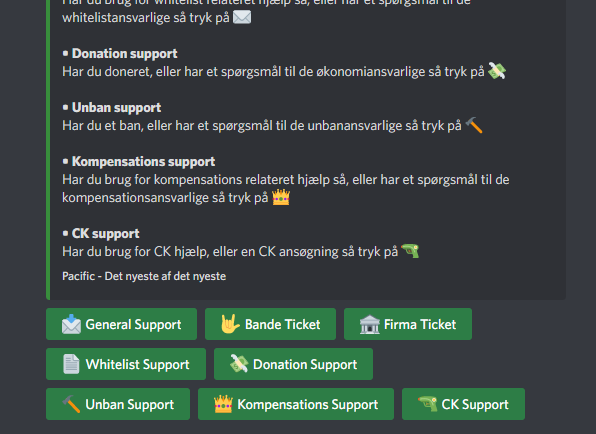
How do you make multiple buttons?
 humble sequoiaBOT
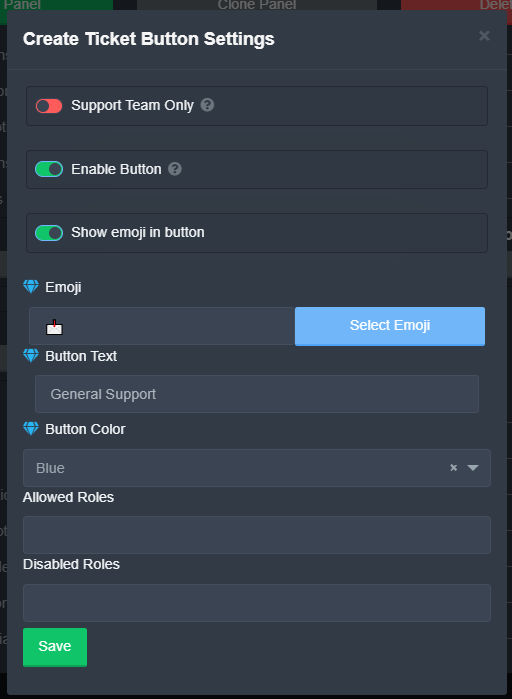
The new Discord Buttons allow for a much smoother and convenient experience. They reduce lag and work much better than emojis. With ticket tool you can edit all the buttons however you like! Buttons can show emojis, text and can have 4 different colors.
Where can I edit them?
Dashboard ➞ Panel Configs ➞ Settings ➞ Button Options ➞ Setting
shell owl
But how can I add multiple buttons on "one" message, that only shows how to edit them
humble sequoiaBOT
Help Options
$help commands - Information on commands
$help setup - Information on bot setup
$help faq - Frequently asked questions
jade topaz
shell owl
But how can I add multiple buttons on "one" message, that only shows how to edit...
Dashboard ➞ Panel Configs ➞ Settings ➞ Button Options ➞ Setting
shell owl
jade topaz
Dashboard ➞ Panel Configs ➞ Settings ➞ Button Options ➞ Setting
https://i.imgur.com/RqXb1e6.png thats only one
 jade topaz
shell owl
https://i.imgur.com/RqXb1e6.png thats only one
jade topaz
shell owl
https://i.imgur.com/RqXb1e6.png thats only one
I think you can do it many times
azure hornet
Do I need premium to put multiple buttons in 1 msg
jade topaz
azure hornet
Do I need premium to put multiple buttons in 1 msg
I don't think so
hallow marlin
azure hornet
Do I need premium to put multiple buttons in 1 msg
Multipannels function is only possible with premium.
azure hornet
okk
 delicate ermine
hi how i can set the channel of transcription ticket?
jade topaz
delicate ermine
hi how i can set the channel of transcription ticket?
$transcript help
delicate ermine
ok
jade topaz
idk
delicate ermine
he say Warning: This channel isn't a ticket, only premium users can create transcripts outside of tickets.
jade topaz
delicate ermine
he say Warning: This channel isn't a ticket, only premium users can create trans...
So you need premium for that.
jade topaz
hallow marlin
Multipannels function is only possible with premium.
how tho?
humble sequoiaBOT
━━ moved to ticket ━━
copper owl
check the ticket you opened.
jade topaz
how can we setup Multibuttons on single message
 vagrant jolt
i want to know if i could make a single ticket system with 5 buttons
so something like this
 humble sequoiaBOT
━━ moved to ticket ━━
copper owl
check the ticket you created.
jade topaz
@copper owl how does this m2t feature works
copper owl
jade topaz
<@548583124062175232> how does this m2t feature works
you do have a ticket.
Please ask your questions there. without pinging.
jade topaz
copper owl
you do have a ticket.
i closed
jade topaz
ohk
copper owl
the bot doesn't automatically respond like that
jade topaz
got
 wet veldt
I need help with ticket tool config
 wispy pike
If i use $help not work
wet veldt
$help
humble sequoiaBOT
Help Options
$help commands - Information on commands
$help setup - Information on bot setup
$help faq - Frequently asked questions
wet veldt
wdym
jade topaz
wispy pike
If i use $help not work
Try using it
wispy pike
Ok
 wispy pike
 wet veldt
?
wispy pike
It's not work
jade topaz
wet veldt
I cant make the tickets appear in a certain catogory
You can fix it by the dashboard control panel
jade topaz
wispy pike
It's not work
Try it here
wet veldt
doesent work
wet veldt
jade topaz
You can fix it by the dashboard control panel
where to find it
jade topaz
wet veldt
doesent work
Hm, i can help
wispy pike
$help
humble sequoiaBOT
Help Options
$help commands - Information on commands
$help setup - Information on bot setup
$help faq - Frequently asked questions
jade topaz
If you want
jade topaz
wispy pike
$help
So you see
wispy pike
It's work
jade topaz
It works
wet veldt
jade topaz
Hm, i can help
yes pls
wispy pike
In my server it's not work
jade topaz
wispy pike
It's work
I can it doesn't have administration perm on the role on you're server
wispy pike
I will cheak
jade topaz
wet veldt
yes pls
Alright, explain it here or in dms and i will send you ss or do it for you
wet veldt
dms
jade topaz
wispy pike
I will cheak
Check* and alright
jade topaz
wet veldt
dms
Alright
wispy pike
Ok
jade topaz
how can I add claim button here?
 wispy pike
jade topaz
Check* and alright
wispy pike
jade topaz
Check* and alright
ما يشتغل سويت كل شس
jade topaz
wispy pike
ما يشتغل سويت كل شس
I can show you if you need help with smt
wispy pike
jade topaz
I can show you if you need help with smt
Ok
humble sequoiaBOT
━━ moved to ticket ━━
craggy crag
how do u make a ticket with like 5 bottons
craggy crag
jade topaz
how can I add claim button here?
u need preium
hallow marlin
craggy crag
how do u make a ticket with like 5 bottons
With the Multipanel function.
craggy crag
hallow marlin
With the Multipanel function.
how do i do that
hallow marlin
craggy crag
how do i do that
You have to create a pannel for each button and then add it to the multi panel option in the general options.
craggy crag
hallow marlin
You have to create a pannel for each button and then add it to the multi panel o...
do i have to have premium?
hallow marlin
craggy crag
do i have to have premium?
you need premium for this, yes
craggy crag
hallow marlin
you need premium for this, yes
dang alr
urban kelp
Is @pseudo glen bot required to be in the server that has @humble sequoia?
jade topaz
urban kelp
Is <@557628352828014614> bot required to be in the server that has <@72219639863...
Optional
urban kelp
Alright
 dire cave
When people create ticket everyone can see that ticket, I want it to be only me and whoever created a ticket.
dire cave
$help faq
humble sequoiaBOT
====== FAQ ======
If a question interests you run the command to see the answer.
Q: What is the prefix and how do I change it?
A: $help prefix
Q: How do I let my support team see into a ticket?
A: $help support
Q: How do I make a ticket ping my support when it's created?
A: $help ping
Q: How do I set a transcript channel?
A: $help transcript
Q: How do I limit the number of tickets a user can create?
A: $help limit
Q: How do I set what category tickets are created in?
A: $help category
Q: How do I set what category tickets are moved to when closed?
A: $help closed
Q: How do I set a custom reaction?
A: $help reaction
Q: How do I set the permissions for the tickets?
A: $help perms
Q: How do I create a panel?
A: $help panel
Q: How do I get the panel in my discord?
A: $help send
Q: How do I add or remove users from a ticket?
A: $help add
Q: Ticket Tool isn't responding to my commands, How do I fix it?
A: $help offline
Q: How does the claim command work?
A: $help claim
jade topaz
$help category
humble sequoiaBOT
How to set the open category
To set a open category go to the Dashboard -> Panel Configs -> Settings -> Category Options -> Category Open
 nova scaffold
I can’t invite the bot
It like generally doesn’t work says success but don’t join
Tried on phone and PC
nova scaffold
Nobody
Dashboard is fine says I invited if
Oh ofcourse
Stupid dyno is down so no welcome messages
duhh
Thanks anyway lol
Thanks @copper owl
 iron nightBOT
Gave +1 Rep to @copper owl
copper owl
No problem
 soft ravine
How do i embed a channel hyperlink in a ticket panel?
I know its probably {channel.id} but cannot figure out the correct syntax for it to work
copper owl
you'd have to elaborate what you meant
copper owl
soft ravine
How do i embed a channel hyperlink in a ticket panel?
by this
soft ravine
copper owl
by this
So i want the ticket basically to say Please click on #my-channel to register and have it be a link that will take them to the registry channel.
copper owl
<#ID>
soft ravine
okay thanks
copper owl
use the discord native syntax
 copper owl
$help panel
humble sequoiaBOT
Creating a panel
To create a panel we are going to need to head over to the panel configs on the dashboard
Once at the dashboard we will need to click Create Panel
Enter a panel name (Fill in any optional settings you want)
Click Create Panel and your ready to get started with configuring your panel
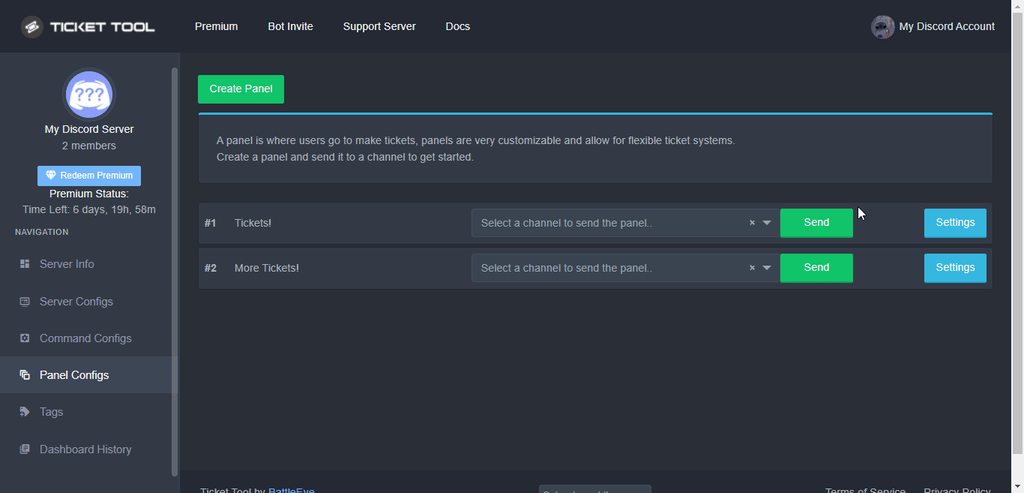
An example of a creating a panel is shown below.
 copper owl
 fallow vigil
Can any admin join my server and make tickets sport for me <:Pleading_AE:7731113...
fallow vigil
Can any admin join my server and make tickets sport for me <:Pleading_AE:7731113...
we dont do it for people
fallow vigil
Ok 
copper owl
humble sequoia
here's an explanation on how to create a panel which is used for opening tickets
once you create it, send it to a channel in your server
fallow vigil
Ok thanks
 normal star
السلام عليكم
عندي مشكلة مع البوت

ومو بس في ذا السيرفر حتى في السيرفرات الثانية
When I want to open a ticket, it appears to me like this, not only in this server, but in all servers. Why?
<@&642118166243311646>
@copper owl
 mystic pivot
I have the role of administrator and I want him to be unable to open the ticket after closing how?
copper owl
normal star
When I want to open a ticket, it appears to me like this, not only in this serve...
update your discord
copper owl
mystic pivot
I have the role of administrator and I want him to be unable to open the ticket ...
I dont understand what you mean
 jade topaz
Hey I try to make a support ticket system and when I open a ticket it doesn't open in the certian category or send any messages in the channel
 mighty flicker
$help
humble sequoiaBOT
Help Options
$help commands - Information on commands
$help setup - Information on bot setup
$help faq - Frequently asked questions
jade topaz
Doesn't help...
 median lily
I have question about ticket
When i open a ticket on my phone, it says "Unknown Intergration" And i can't open ticket, can you please fix this?
 scenic plinth
median lily
When i open a ticket on my phone, it says "Unknown Intergration" And i can't ope...
scenic plinth
median lily
When i open a ticket on my phone, it says "Unknown Intergration" And i can't ope...
Try updating your Discord Application. If you don't see an update, un install the app and reinstall it.
humble sequoiaBOT
Update your discord App
Buttons are a relatively new addition to discord and don't work with some older versions of the app.
Please verify that you have the latest version of discord, by going to the app or play store.
Discord for the  App Store
Discord for the  Play Store
humble sequoiaBOT
We would love to help you, but if you don't tell us what you need help with we can't help you :(
jade topaz
 vague linden
anyone support team.....؟
vague linden
anyone support team.....؟
I can, what do you need help with?
 azure hornet
how can I get Ticket Tool Proficient role and wt is this role
humble sequoiaBOT
For a more convenient use of multipanels, you can now combine panels on the dashboard. This will allow you to directly send the multipanel from the dashboard or via the $panel ID command.
Where can I find this?
You can find this setting on the Dashboard -> Panel Configs -> Settings -> General Options
Note: if you're attaching all the panels to a panel called English, don't include English in the attached panels box (If you do this, it will create duplicate)
This will put all buttons from all of your panels on one message. The message is the panel message from the panel you're combining these panels in.
Note: This is a premium feature
 slender minnow
@jade topaz refer above
slender minnow
azure hornet
how can I get `Ticket Tool Proficient` role and wt is this role
refer the channel description
azure hornet
okk
 shrewd badge
how can i add the support mention when someone open ticket
 fallow ingot
$help ping
humble sequoiaBOT
How to make Ticket Tool ping a role
To make ticket tool ping a role when a ticket is opened, go to the Dashboard -> Panel Configs -> Settings -> Ticket Options -> Ticket Message -> Message Text and do this:
{@Role name} This is case sensitive and the role must have @mentions enabled
 fallow ingot
@shrewd badge ^
 full carbon
Hi!
I added The Ticket Tool to my server for like 10 minutes ago, but i can't see my server in dashboard
humble sequoiaBOT
Don't see your server in the dashboard?
You will possibly need to relog. Look below to see steps on how to relog.
How to relog in the Dashboard.
First, you will need to go to the dashboard. Once your there, click on your avatar on the top right. after you clicked it, you will see button that says Logout. You must click that. Once you have logged out, you can log back in.
Note:
You need one of these 3 things to access the dashboard.
1. Server Owner (Level: 6)
2. Server Administrator (Level: 4)
3. Dashboard Role (Level: 2)
:warning: You can check your level using $level on your Discord Server
User permission level with Ticket Tool
@User is permission level: 0 (User)
```» *If it shows that your permission is **0**, you don't have any of the above **3 things** to manage the dashboard.*
**See the GIF below on how to relog:** slender minnow
@full carbon ^
iron nightBOT
Gave +1 Rep to @slender minnow
full carbon
oh, i guess relogging was refreshing the page.
shrewd badge
how can i change the name of the buttons
example if i want to change from {create ticket} to {new ticket}
slender minnow
Nope
slender minnow
shrewd badge
how can i change the name of the buttons
example if i want to change from {crea...
That's a premium feature
shrewd badge
shrewd badge
how can i change the name of the buttons
example if i want to change from {crea...
how can i do it? @slender minnow
slender minnow
Panel config ---> Button option ---> create ticket settings
 oak peak
#ticket tool no one replied
jade topaz
oak peak
#ticket tool no one replied
They have other tickets to handle
oak peak
Okay then
jade topaz
oak peak
Okay then
But i can help you if you want
oak peak
Oh thanks I will really appreciate
jade topaz
oak peak
Oh thanks I will really appreciate
What do you need help with?
oak peak
A lot of things
oak peak
Money traveling 🧳 houses famous with clothe motor
jade topaz
...
 atomic solstice
oak peak
I don’t understood this again. I’m tired
atomic solstice
oak peak
I don’t understood this again. I’m tired
Like it was explained in your ticket. You are in the wrong place. We are a support team for any issues related to the @pseudo glen. We don't offer travelling and housing help
oak peak
I know, I drop a text because I need some members to talk too maybe they will help me out of all this
How can I talk to member for help ?
jade topaz
oak peak
How can I talk to member for help ?
I can help you
But with the ticket bot ONLY
Not something else
 zealous escarp
I need help
jade topaz
zealous escarp
I need help
With?
zealous escarp
Does not let me log in to select my server on a ticket tool
jade topaz
zealous escarp
Does not let me log in to select my server on a ticket tool
Re-login into you're account on the dashboard
zealous escarp
I login
jade topaz
Do it again
zealous escarp
Ok thanks
jade topaz
zealous escarp
Ok thanks
Np, did it work?
zealous escarp
It does not work I can maybe invite you to serve and make me seaweed
 frigid idol
zealous escarp
It does not work I can maybe invite you to serve and make me seaweed
frigid idol
zealous escarp
It does not work I can maybe invite you to serve and make me seaweed
Have you tried https://tickettool.xyz/manage-servers ?
jade topaz
zealous escarp
It does not work I can maybe invite you to serve and make me seaweed
Alright dm me the invite
jade topaz
frigid idol
Have you tried https://tickettool.xyz/manage-servers ?
He did, it's maybe the perms with the bot or with he's role
slender minnow
jade topaz
He did, it's maybe the perms with the bot or with he's role
the user did not had admin perms to access the dashboard
jade topaz
slender minnow
~~the user did not had admin perms to access the dashboard~~
I know
I know this sounds stupid but could anyone talk me through how to get up ticket tool
jade topaz
jade topaz
I know this sounds stupid but could anyone talk me through how to get up ticket ...
I can
jade topaz
jade topaz
I can
Thanks
iron nightBOT
Gave +1 Rep to @vale comet
humble sequoiaBOT

You can check our documentation here.
You can also check #573205317870157855 for the basic setup.
Our documentation contains all the info you need about the bot to be able to setup and configure the bot however you like.
 loud turtle
slender minnow
~~the user did not had admin perms to access the dashboard~~
loud turtle
slender minnow
~~the user did not had admin perms to access the dashboard~~
Blacklist roles?
$help blacklist
humble sequoiaBOT
Help Options
$help commands - Information on commands
$help setup - Information on bot setup
$help faq - Frequently asked questions
Any role you assign as a blacklisted role won't be able to use commands or reactions.
Selecting a blacklisted role
Go to your Dashboard ➞ Server Configs. There you will find the option to select blacklisted roles.
Note: Don't forget to save.
 loud turtle
Sorry not sorry
jade topaz
slender minnow
It was for accessing the dashboard
then i think you don't have enough perms in the role to have access
loud turtle
That doesn't happen
Only the person who added the bot can access the dashboard
If this doesn't help. BLAME ME YEAH
I'm crying
slender minnow
loud turtle
Only the person who added the bot can access the dashboard
Uhmm... there are three levels of access you can have to dashboard
- Server owner
- Admin perm access
- Dashboard role access
So there are more then one person with provided access
loud turtle
This hurts my feelings for ticket tool. I'm never getting proficient
 velvet condor
How to create a ticket
 red nebula
 fiery gate
guys, anyone had "allocate base memory failed" error and got it fixed?
jade topaz
my 2 hacked cat was hacked but the support dont can help mee
copper owl
@jade topaz @fiery gate you're both in the wrong server.
jade topaz
whats the right server
copper owl
jade topaz
my 2 hacked cat was hacked but the support dont can help mee
If I remember correctly, youve been told this twice
copper owl
jade topaz
whats the right server
The only thing I can tell you is that this is the wrong server.
I have no idea which server you need to join to solve your issue
jade topaz
thats the problem
copper owl
jade topaz
thats the problem
the problem is that we can't redirect you?
jade topaz
on the biggames server support is noting say the name of a discord name or a browser forum idk
copper owl
jade topaz
on the biggames server support is noting say the name of a discord name or a bro...
unfortunately that isn't an issue we can fix.
So, to reiterate, you're not in the correct place to ask for this type of help.
copper owl
jade topaz
The problem is there is no right place
And you expect us to solve this?
Again, we're ticket tool support.
 copper owl
jade topaz
you are the support ( support )
copper owl
jade topaz
you are the support ( support )
Alright I won't go back and forth because it's evident we can't help you with this issue.
If you have any questions about Ticket Tool, then feel free to ask. Any questions regarding subjects NOT related to ticket tool should be kept out of this channel and the tickets you create using #🎫│make-a-ticket.
jade topaz
thanks
frigid idol
jade topaz
you are the support ( support )
I think it's best for you to understand that this discord is set up to provide support on the TicketTool bot itself, not something that happens on other servers
jade topaz
yes yes the problem is that there is no other support
frigid idol
jade topaz
yes yes the problem is that there is no other support
That is not important. If you have any issues on a discord server, try the discord owners of that specific discord.
jade topaz
Can I set a blacklist rolle only for one panel?
copper owl
jade topaz
Can I set a blacklist rolle only for one panel?
are you looking to stop users from creating a ticket in a specific panel instead of all of them?
jade topaz
copper owl
are you looking to stop users from creating a ticket in a specific panel instead...
ye like just for one panel not all
copper owl
$buttons
humble sequoiaBOT
The new Discord Buttons allow for a much smoother and convenient experience. They reduce lag and work much better than emojis. With ticket tool you can edit all the buttons however you like! Buttons can show emojis, text and can have 4 different colors.
Where can I edit them?
Dashboard ➞ Panel Configs ➞ Settings ➞ Button Options ➞ Setting
copper owl
Add the role you want to blacklist from creating tickets in the Disabled Roles in the Create Ticket settings
 past tiger
How can I add a Discord role to allow my admins to see active tickets? It says I need to add a support role. How do I add their role as support?
shut bolt
past tiger
How can I add a Discord role to allow my admins to see active tickets? It says I...
$help support
humble sequoiaBOT
How to let support team see into a ticket
About support roles
A support role lets your support team see into tickets with out having to add them manually to each and every ticket.
You can add as many support roles as you like per panel.
NOTE that the way discord works all admins can see into tickets regardless of this.
How to set a support role
To set a Support role go to the Dashboard -> Panel Configs -> Settings -> General Options -> Support Team Roles.

NOTE that the support role will not be able to see into tickets that are already created..
jade topaz
Hi, how is it possible that my tickets were deleted automatically on my server?
shut bolt
humble sequoia
Add them as shown and they will be able to see new tickets
jade topaz
And how can i undo this? Thank!
shut bolt
jade topaz
Hi, how is it possible that my tickets were deleted automatically on my server?
Right after being closed?
jade topaz
shut bolt
Right after being closed?
yes and often without...
shut bolt
Alright, when a ticket is deleted right after closed is due to a setting. Go to your Panel Configs tab, then open the panel's settings. And display the General Options menu. Once there mark as  the Two Step Ticket feature and save changes. That will stop tickets to be deleted after being closed. Tickets won't delete by themselves unless you set it that way so if there are tickets that are disappearing would be good to set the logs so you see who's issuing the deletion. Lastly, you can't recover deleted tickets
jade topaz
$help support
copper owl
jade topaz
$help support
use commands in #🤖│bot-spam unless you're helping someone. thanks.
jade topaz
shut bolt
Alright, when a ticket is deleted right after closed is due to a setting. Go to ...
So I should disable ''Two Step Ticket'' ?
shut bolt
jade topaz
So I should disable ''Two Step Ticket'' ?
You should enable it
jade topaz
it is now enable (green)
shut bolt
Then someone is deleting them 
jade topaz
I don't want ticket to be deleted automatically
jade topaz
shut bolt
Then someone is deleting them <:ThinkingChief_Ocaso:905897811592241254>
now, i've checked them. Ticket support closes the tickets
shut bolt
jade topaz
I don't want ticket to be deleted automatically
If you had enabled two step ticket then it's not the bot automatic deleting them, someone must have triggered deletion
shut bolt
jade topaz
now, i've checked them. Ticket support closes the tickets
Sorry, didn't get that clear, ticket support as in your support?
jade topaz
this is the option descritption ''This will cause tickets to be deleted instead of closed.'' this option should be disabled, right?
shut bolt
Enabled
shut bolt
jade topaz
why enabled?
Two Step Ticket means the ticket will have two states, closed and deleted, by disabling it the bot will delete it as soon as it's closed
shut bolt
jade topaz
I don't want tickets to get deleted
I'm aware of that
shut bolt
Sure
frigid idol
@jade topaz
jade topaz
ok
do you know how to activate tickets on a server?
like i have a server but idk how to put tickets
frigid idol
jade topaz
do you know how to activate tickets on a server?
like i have a server but idk ho...
- Is it possible for you to clarify if you followed the setup?
- Can you let us know at what exact part of the setup you are stuck?
jade topaz
i have the bot for the ticket but idk how activate the ticket
fallow ingot
$help panel
humble sequoiaBOT
Creating a panel
To create a panel we are going to need to head over to the panel configs on the dashboard
Once at the dashboard we will need to click Create Panel
Enter a panel name (Fill in any optional settings you want)
Click Create Panel and your ready to get started with configuring your panel
An example of a creating a panel is shown below.
jade topaz
oh thx
frigid idol
you beat me to it @fallow ingot 😅
fallow ingot
jade topaz
oh thx
anytime
 opal rapids
Alguém consegue tirar uma dúvida minha sobre construção de base ? Kkkkk
jade topaz
opal rapids
Alguém consegue tirar uma dúvida minha sobre construção de base ? Kkkkk
I can help you, what do you need?
opal rapids
jade topaz
I can help you, what do you need?
I'm new to the game and I tried to build my first base, but I closed the gate without having set the lock, I wanted to know if there is a way to remove the lock or if any ADM could go and remove it
jade topaz
opal rapids
I'm new to the game and I tried to build my first base, but I closed the gate wi...
??? This is an ticket tool support, not an game
frigid idol
opal rapids
I'm new to the game and I tried to build my first base, but I closed the gate wi...
I would advise you to google it
jade topaz
How to make multiple support-tickets option in one panel?
frigid idol
jade topaz
How to make multiple support-tickets option in one panel?
Do you mean multiple buttons for different types of support?
jade topaz
frigid idol
Do you mean multiple buttons for different types of support?
Yes.
I need help
jade topaz
jade topaz
I need help
With?
When someone opens a ticket and sends a link in it the dyno bot deletes it how do I prevent that
jade topaz
jade topaz
When someone opens a ticket and sends a link in it the dyno bot deletes it how d...
You need to change Dyno's dashboard on not to do that
Or just don't let dyno on the ticket
jade topaz
jade topaz
You need to change Dyno's dashboard on not to do that
But do i have to make dyno not do that with every individual ticket
jade topaz
jade topaz
Or just don't let dyno on the ticket
How
jade topaz
jade topaz
But do i have to make dyno not do that with every individual ticket
No not really
jade topaz
jade topaz
How
Don't add the bots role on the ticket or just don't let dyno be apart of the bot's role
But where do I not add the bot role
Can I please get help setting up the ticket thing?
jade topaz
jade topaz
But where do I not add the bot role
On dyno, it's easy, click on dyno, take the cursor on the bot's role on dyno's status and click the X
jade topaz
jade topaz
Can I please get help setting up the ticket thing?
Alright, dm me the invite and info and i could help you if you want
Wait I fixed it I just remove the administrator role from dyno
jade topaz
jade topaz
Wait I fixed it I just remove the administrator role from dyno
alright
fallow ingot
jade topaz
But do i have to make dyno not do that with every individual ticket
Side note: You can remove Dyno's admin perms, and give it the perms needed to function. Then, add perms to the category's that are private so Dyno can see them and send messages. No bot needs administrator to function.
jade topaz
fallow ingot
**Side note:** You can remove Dyno's admin perms, and give it the perms needed t...
Oh ok
humble sequoiaBOT
You can check our documentation here.
You can also check #573205317870157855 for the basic setup.
Our documentation contains all the info you need about the bot to be able to setup and configure the bot however you like.
fallow ingot
@jade topaz ^
jade topaz
humble sequoia
I already did that yet it sets itself to the defualt
fallow ingot
jade topaz
Alright, dm me the invite and info and i could help you if you want
Please stick to support here if possible.
jade topaz
Also when someone open a ticket it says support will be here soon How do I change that
jade topaz
fallow ingot
Please stick to support here if possible.
I will try
humble sequoiaBOT
The Ticket Message is the first message sent by the bot in a new ticket. To customise it head over to your Dashboard ➞ Panel Configs ➞ Settings ➞ Ticket Options ➞ Edit Ticket Message
 jade topaz
Also when someone open a ticket it says support will be here soon How do I chang...
jade topaz
jade topaz
Also when someone open a ticket it says support will be here soon How do I chang...
You need premium
fallow ingot
humble sequoia
@jade topaz ^
fallow ingot
jade topaz
You need premium
You don't you just have a limit of messages that can be in the embed.
fallow ingot
jade topaz
I already did that yet it sets itself to the defualt
What do you mean?
copper owl
jade topaz
I will try
you've been told multiple times to stick to support here as well. Please do not ask for permissions in other servers to "do it for them" and try to help them in this channel.
jade topaz
fallow ingot
What do you mean?
I set it to make all the tickets in the ticket category and send a message in that channel when you create it and everything and when you do that it doesn't set it to that
jade topaz
copper owl
you've been told multiple times to stick to support here as well. Please do not ...
I hate explaining, its easy to do it
copper owl
jade topaz
I hate explaining, its easy to do it
And are you interested in becoming support?
just curious
jade topaz
copper owl
And are you interested in becoming support?
Yeah
copper owl
jade topaz
Yeah
well for one, it's prohibited to do things for people as support.
for two, asking for permissions is also not something we allow.
if you're really interested in becoming support, I advise you to follow what we're asking of you. It's a good idea to do so if you're looking to become support.
jade topaz
I just want an job
copper owl
copper owl
if you're really interested in becoming support, I advise you to follow what we'...
frigid idol
jade topaz
Yes.
It could be me, but haven't found an answer yet.
jade topaz
copper owl
if you're really interested in becoming support, I advise you to follow what we'...
I am
fallow ingot
jade topaz
I set it to make all the tickets in the ticket category and send a message in th...
do you mean the tickets aren't going into the category you set on the Dashboard?
copper owl
frigid idol
It could be me, but haven't found an answer yet.
they opened a ticket, so dont worry about it
it's handled
frigid idol
copper owl
it's handled
awesome, is it possible to share it here? Since I couldn't find the answer as well?
jade topaz
fallow ingot
do you mean the tickets aren't going into the category you set on the Dashboard?
Yea and everyone can see the tickets and it doesnt send a message
copper owl
frigid idol
awesome, is it possible to share it here? Since I couldn't find the answer as we...
use $mp2 in #🤖│bot-spam
it's about mutli-panels
fallow ingot
jade topaz
Yea and everyone can see the tickets and it doesnt send a message
Okay, so make sure ticket tool has perms to see the category you've set.
jade topaz
fallow ingot
Okay, so make sure ticket tool has perms to see the category you've set.
It does
fallow ingot
$kv
humble sequoiaBOT
How to hide tickets from everyone
Head over to your Dashboard ➞ Panel Configs ➞ Settings ➞ Permission Options ➞ Edit Everyone Roles Opened Permissions

NOTE that @everyone can type aswell if it has permissions to send messages
fallow ingot
To stop everyone seeing tickets^
fallow ingot
jade topaz
It does
What's your servers ID?
 fallow ingot
It appears the bots also missing the VIEW_CHANNEL permission.
jade topaz
Oh okay
Is there a way I can change the ticket names? Instead of numbers
Also make it ping me and admins/mods when it gets created
fallow ingot
jade topaz
Is there a way I can change the ticket names? Instead of numbers
Yeah, but sadly only for premium subscribers.
jade topaz
Oh okay
fallow ingot
$help ping
humble sequoiaBOT
How to make Ticket Tool ping a role
To make ticket tool ping a role when a ticket is opened, go to the Dashboard -> Panel Configs -> Settings -> Ticket Options -> Ticket Message -> Message Text and do this:
{@Role name} This is case sensitive and the role must have @mentions enabled
fallow ingot
 hallow marlin
jade topaz
hallow marlin
jade topaz
the best option is, when you use the role-id
 hallow marlin
jade topaz
Alright thanks!
hallow marlin
jade topaz
Alright thanks!
you're welcome! 🙂
 unborn abyss
hi how can you allow members to send images in the ticket they opened
frigid idol
unborn abyss
hi how can you allow members to send images in the ticket they opened
They could use the windows snip tool and just ctrl+v it in the ticket. Otherwise it can be a discord permission that one is allowed to post images.
You can test this yourself when creating a ticket on your own discord.
slender minnow
More like wrong set up from the dashboard.
Panel congig ---> perm option ---> user ticket open settings thingy
hallow marlin
unborn abyss
hi how can you allow members to send images in the ticket they opened
try this

I hope this helps you
fallow ingot
hallow marlin
I hope this helps you
someone has already told them how to do this.
hallow marlin
fallow ingot
someone has already told them how to do this.
correct, but I tried to show it simply with a visualization. 🙂
unborn abyss
Thanks for the help from both @slender minnow @hallow marlin
iron nightBOT
Gave +1 Rep to @slender minnow
unborn abyss
thanks @hallow marlin
iron nightBOT
Gave +1 Rep to @hallow marlin
hallow marlin
unborn abyss
thanks <@855793296155607051>
with pleasure 
hallow marlin
 ocean oasis
Is there a way to set the ticket id at random?
ocean oasis
Is there a way to set the ticket id at random?
How do you mean that exactly?
ocean oasis
Now i have ticket-1, ticket-2, ticket-3 but i want that the numbers are random generated
the {count}
hallow marlin
ocean oasis
Now i have ticket-1, ticket-2, ticket-3 but i want that the numbers are random g...
panel settings - Ticket Options - Ticket opened channel name
but you need premium for this.. premium is worth it 🙂
ocean oasis
good to know, thanks!
copper owl
hallow marlin
panel settings - Ticket Options - Ticket opened channel name
having the numbers randomly generate is not an option though
@ocean oasis just in case you buy premium thinking it is ^^^
hallow marlin
copper owl
having the numbers randomly generate is not an option though
randomly not, im sry.. but without the numbers
I was too imprecise Im sorry @ocean oasis
ocean oasis
thats ok (:
hallow marlin
ocean oasis
thats ok (:
but a good option would be this one:
{ticket.user.name} -The username of the user who is assigned to the Ticket
like: ticket-Kurbey
 graceful quest
How to enable the claim in ticket
humble sequoiaBOT
Claiming allows you to change the ticket name, category and permissions. To use it you have to enable it first on your Dashboard > Panel Configs > Claiming Options.
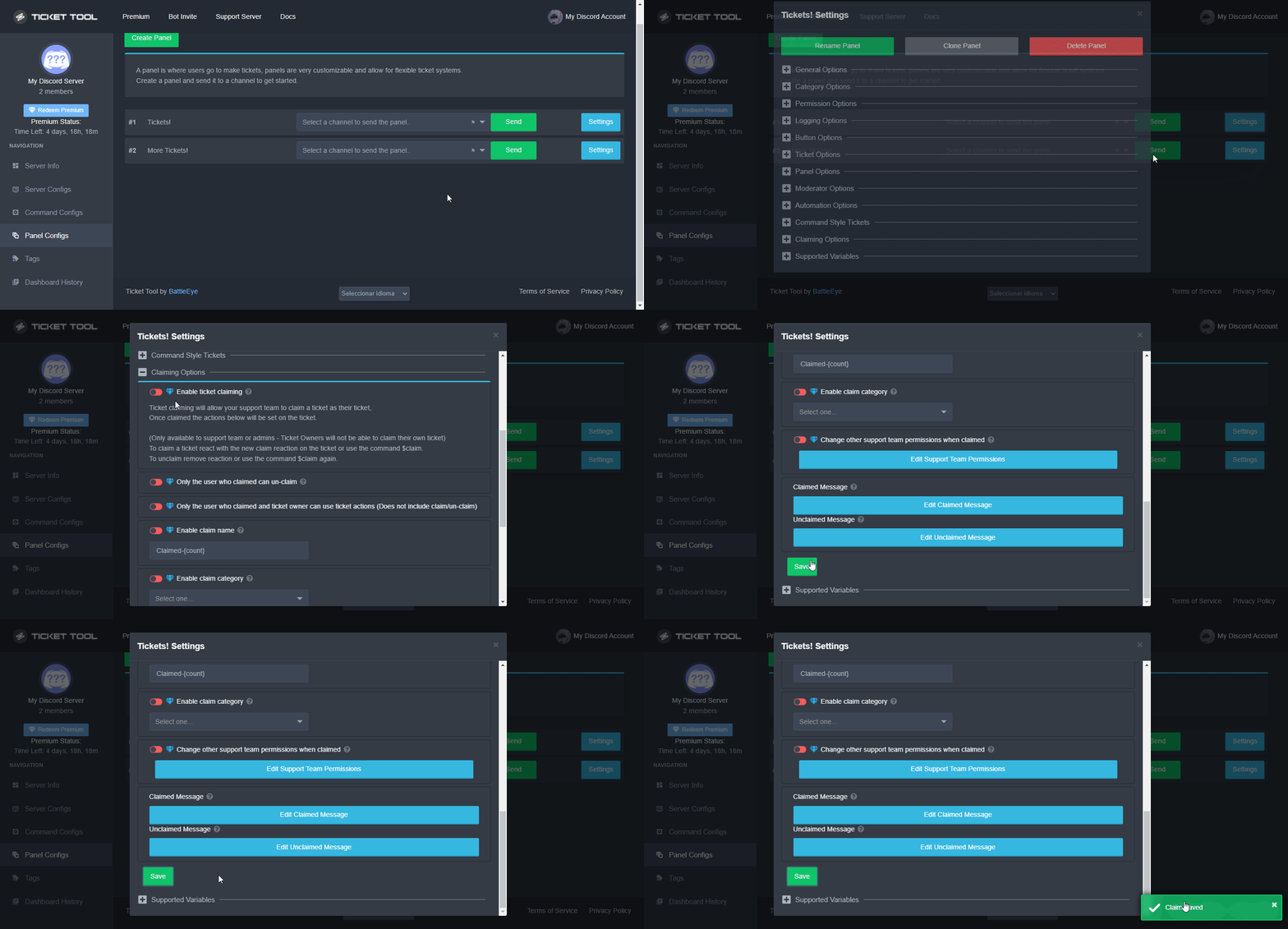
 Note: This is a premium feature
graceful quest
Note: This is a premium feature
graceful quest
I open trail and i doesn't working
jade topaz
Is claiming a premium feature??
hallow marlin
jade topaz
Is claiming a premium feature??
yes it is
jade topaz
hallow marlin
yes it is
Oh ok
 blissful halo
make a polish language
hallow marlin
blissful halo
make a polish language
there you can change the language if that is what you mean

 hallow marlin
blissful halo
but i have only 3 languages and there is no polish language
hallow marlin
blissful halo
but i have only 3 languages and there is no polish language
probably i have these options because i come from a different country
which browser do you use? @blissful halo
blissful halo
hallow marlin
which browser do you use? <@830857364650459176>
OperaGX
hallow marlin
blissful halo
OperaGX
i use chrome, maybe you have to test it with another browser
frigid idol
Chrome does give more options since it uses Google Translate
hallow marlin
frigid idol
Chrome does give more options since it uses Google Translate
I already thought so, thanks for the information
iron nightBOT
Gave +1 Rep to @frigid idol
 delicate egret
yoooo fam
anyone know how to select the channel that tickets are sent to for a specific panel?
so like, when the ticket is opened, how do i specify the channel i want the ticket sent to?
or like, do we just manage it via the web browser?
(ticket tool dash)?
frigid idol
delicate egret
or like, do we just manage it via the web browser?
Yes, that is set via the web browser.
Go to the settings of your panel ==> Category Options and select a category that is set up on your discord. When you open a ticket after that, it will only show up in that category instead of the top of the discord list

Did that work for you @delicate egret ?
delicate egret
thank you. i see it... any idea why the category selection is limited?
i made the bot an admin
also, i appreciate the timely reply
frigid idol
delicate egret
thank you. i see it... any idea why the category selection is limited?
If you haven't created any categories on your discord server, please do that first. After you done that, refresh the web browser so you are able to select a category from your discord server
delicate egret
i have a whole lot of categories lol
oh wait
oooooooh wait i see
so i create a category specifically for this?
then channels within that category for more info?
frigid idol
delicate egret
so i create a category specifically for this?
It's up to you if you create a special category, but you can not select channels. Category only
frigid idol
delicate egret
under that category?
You got it 😉
delicate egret
ahhhhh, so just make the category invisible to everyone besides support
and boom, we're good?
frigid idol
delicate egret
and boom, we're good?
Pretty much indeed 😄
frigid idol
delicate egret
happy holidays
Same to you and enjoy the bot ^^
copper owl
delicate egret
so each ticket opens as a 'thread'?
the person already left but they don't open as threads @frigid idol
their question was how to send a panel to a channel
nevermind the last part
frigid idol
copper owl
their question was how to send a panel to a channel
I know. That is the reason is was posted in quotes by the reporter. It creates temp channels
 broken fern
can anyone help me please :/
frigid idol
broken fern
can anyone help me please :/
What is your question?
broken fern
How can you create a ticket tool so that other people can open a ticket?
copper owl
frigid idol
I know. That is the reason is was posted in quotes by the reporter. It creates t...
Seeing as threads are a discord feature already, would be good to mention channels instead of threads.
Also its unclear whether the user who asked for help meant temp channels or threads
just to avoid confusion 👍
frigid idol
copper owl
Seeing as threads are a discord feature already, would be good to mention channe...
Agree with you there 😉
frigid idol
broken fern
How can you create a ticket tool so that other people can open a ticket?
Have you set up the bot on your discord?
humble sequoiaBOT
You can check our documentation here.
You can also check #573205317870157855 for the basic setup.
Our documentation contains all the info you need about the bot to be able to setup and configure the bot however you like.
frigid idol
@broken fern 👆
iron nightBOT
Gave +1 Rep to @frigid idol
frigid idol
$help faq
copper owl
frigid idol
$help faq
#🤖│bot-spam
broken fern
@frigid idol Thank you very much the Ticket tool is now on my Server and other users can create a Ticket thank you very much
iron nightBOT
Gave +1 Rep to @frigid idol
jade topaz
Do we have a command to send a channel to a diff category?
frigid idol
jade topaz
Do we have a command to send a channel to a diff category?
$help category
humble sequoiaBOT
How to set the open category
To set a open category go to the Dashboard -> Panel Configs -> Settings -> Category Options -> Category Open
frigid idol
jade topaz
like just moving it
Ah, I understand. That is not a feature I have found either 😅
jade topaz
RIP
frigid idol
however, I'm a new user as well, so maybe one of the mods can correct me if I'm mistaken
shut bolt
frigid idol
however, I'm a new user as well, so maybe one of the mods can correct me if I'm ...
As you mentioned, not possible
frigid idol
shut bolt
As you mentioned, not possible
Thanks for clearing that up ^^
iron nightBOT
Gave +1 Rep to @shut bolt
shut bolt
frigid idol
 spiral onyx
Помогите
spiral onyx
Помогите
$help setup
humble sequoiaBOT
Setting up Ticket Tool
Visit the docs for setup info
General Setup
spiral onyx
0_0
frigid idol
Click on the bottom of the page to set language to Russian
spiral onyx
Sorry im no speak eanglish
frigid idol
spiral onyx
Sorry im no speak eanglish
If you use Google Chrome ==> Right Click on the page and translate it to Russian
spiral onyx
Click ok
spiral onyx
frigid idol
If you use Google Chrome ==> Right Click on the page and translate it to Russian
Ok sps
 past basin
Yoo get the error Missing required option: [User/Role] (optional channel) even with administrator role
jade topaz
Hello guys i have issue in setting up permission on my ticket server anyone up for help?
frigid idol
past basin
Yoo get the error Missing required option: [User/Role] (optional channel) even w...
Where do you see this?
$help perms
humble sequoiaBOT
How to set the permissions for tickets
To set a change permissions go to the Dashboard -> Panel Configs -> Settings -> Permission Options
 frigid idol
Have you tried the manual I posted? 👆
jade topaz
I'll
frigid idol
Let me know when it works for you ^^
humble sequoiaBOT
━━ moved to ticket ━━
past basin
frigid idol
Where do you see this?
in our ticket. I can add myself as administrator but normal roles i can't add in the ticket and it gives me this error
frigid idol
past basin
in our ticket. I can add myself as administrator but normal roles i can't add in...
Is it possible to clarify how you are trying to add other roles?
past basin
$add user#1111 for example
2 days ago there were new roles added and changed could this be the problem?
frigid idol
past basin
2 days ago there were new roles added and changed could this be the problem?
That can be the issue indeed
past basin
so what could be the solution for it ?
frigid idol
past basin
so what could be the solution for it ?
You mean the roles on your discord server, right?
past basin
just the ticket thing
we want to keep the new roles
but i think cuz of that the ticket doesn't work
so i want to add the new roles into the ticket
but how?
slender minnow
past basin
so i want to add the new roles into the ticket
to give access to tickets?
loud turtle
past basin
Yoo get the error Missing required option: [User/Role] (optional channel) even w...
That's an $add error. You need to specify what user or role to add to the ticket
loud turtle
Did I help You?
loud turtle
past basin
created a new ticket by this embed
Well your welcome
past basin
thanks 🙂
loud turtle
I love helping
jade topaz
how do i add a role into the bot so my staff team can see tickets
jade topaz
jade topaz
how do i add a role into the bot so my staff team can see tickets
You need to do it when you are setting the tickets
jade topaz
jade topaz
You need to do it when you are setting the tickets
can i redo
and how
in the middle
jade topaz
jade topaz
in the middle
where
it will ask you to add the roles
when
when you are setting up the name of the ticket the thing

where tho
jade topaz
jade topaz
Go to panel configs
humble sequoiaBOT
jade topaz
how do i setup ticket logs
humble sequoiaBOT
You can check our documentation here.
You can also check #573205317870157855 for the basic setup.
Our documentation contains all the info you need about the bot to be able to setup and configure the bot however you like.
 vale junco
BRO WHY DID I GOT BANNED I DID NOTHING
 copper owl
vale junco
BRO WHY DID I GOT BANNED I DID NOTHING
copper owl
vale junco
BRO WHY DID I GOT BANNED I DID NOTHING
You most likely spammed a button, or did something to trigger the DDOS protection.
vale junco
Oh ye I did spam
copper owl
you'll have to wait an hour, give or take
copper owl
vale junco
Oh ye I did spam
Well there you go.
 deft remnant
how do i change the create ticket option
slender minnow
deft remnant
how do i change the create ticket option
the button?
deft remnant
ye
slender minnow
panel config ---> button option
 sonic sonnet
How buy prumiem ticket
frigid idol
sonic sonnet
How buy prumiem ticket
 runic glacier
Hi
slender minnow
runic glacier
Hi
you can grab your user id and add it ahead of $add
so it would be like $add 702111282777817128
runic glacier
Ohhh ok thxs
 bronze creek
Is there a way to check who deleted a ticket?
copper owl
bronze creek
Is there a way to check who deleted a ticket?
With ticket logs yes, but if you dont have those enabled, theres no real way of figuring this out without either ticket logs or a transcript
bronze creek
From where do you enable it
copper owl
Logging Options of your panel settings
Assign a logging channel and enable the logs you'd want to be sent in the channel
bronze creek
Thx
 hallow marlin
Did you possibly blacklist the everyone or member role?
 alpine apex
i dont think i did i may have how would one check
hallow marlin
alpine apex
i dont think i did i may have how would one check
Check the Server Configs
 hallow marlin
alpine apex
is it the
hallow marlin
alpine apex
is it the
yes this one
alpine apex
if i black list a role there are they able to use cmds within the ticket
unblacklist*
hallow marlin
alpine apex
if i black list a role there are they able to use cmds within the ticket
Have you blacklisted a role there?
hallow marlin
alpine apex
i had member there
you have to remove this
alpine apex
i see
runic glacier
Sorry to bother you again but do you know how to see the user id on android @slender minnow
slender minnow
by enabling the dev mode on
alpine apex
ah it seams to be fixed
alpine apex
hallow marlin
you have to remove this
thank you very much
runic glacier
slender minnow
by enabling the dev mode on
How
slender minnow
-
From your computer
1.1 Click on your User Settings (⚙ icon)
1.2 Click on Advanced and enable Developer Mode -
From your mobile
2.1 Swipe to the right (to open the bottom menu)
2.2 Click on the bottom right tab (your profile)
2.3 Click on Appearance, enable the Developer mode
Now, from your computer, all you have to do is right-click the objects, and copy its id.
If you're on mobile, you just need to long press, or click on objects to grab its ids.
here objects = the user/role/emoji
runic glacier
slender minnow
1. From your computer
1.1 Click on your User Settings (⚙ icon)
1.2 Click on Adva...

Here is what comes what's next?
slender minnow
runic glacier
mb its in behavior
 snow ruin
i cant see a new server in the ticket tool dashboard
runic glacier
Ok thxs
hallow marlin
snow ruin
i cant see a new server in the ticket tool dashboard
you have to log out once and log in again
snow ruin
hallow marlin
you have to log out once and log in again
i did
runic glacier
slender minnow
mb its in behavior
Tysm
hallow marlin
snow ruin
i did
have you logged out here?
 snow ruin
hallow marlin
have you logged out here?
snow ruin
hallow marlin
have you logged out here?
yes
hallow marlin
snow ruin
yes
Are you authorized to manage bot on the server?
hallow marlin
Are you the server owner?
snow ruin
no
hallow marlin
snow ruin
no
let the server owner add your role here, then it might work.

and do not forget to log in again
snow ruin
okay
hallow marlin
snow ruin
okay
it would be great if you let me know if it worked. 🙂
snow ruin
sure thing


 viral helm
thanx
hallow marlin
viral helm
thanx
you're welcome 🙂
humble sequoiaBOT
How to let support team see into a ticket
About support roles
A support role lets your support team see into tickets with out having to add them manually to each and every ticket.
You can add as many support roles as you like per panel.
NOTE that the way discord works all admins can see into tickets regardless of this.
How to set a support role
To set a Support role go to the Dashboard -> Panel Configs -> Settings -> General Options -> Support Team Roles.
NOTE that the support role will not be able to see into tickets that are already created..
 sturdy crescent
i just bought premium so how come i can't claim tickets
alpine apex
i have the bot on and i have no blacklists active

 humble sequoiaBOT
Solved in another channel.

 hallow marlin
 tepid lantern
why when open ticket name ticket 0000000000000{count}
tepid lantern
why when open ticket name ticket 0000000000000{count}
check the ticket padding in general options
tepid lantern
hallow marlin
check the ticket padding in general options
iam set in 20
hallow marlin
tepid lantern
https://cdn.discordapp.com/attachments/875602124250173500/965398459354079262/Scr...
and for this, you have to set the ticket limit to 1 or more
hallow marlin
tepid lantern
iam set in 20
set this to 4 or 5, that should be enough
tepid lantern
oh okay
hallow marlin
tepid lantern
oh okay
it would be great if you let me know if it worked. 🙂
tepid lantern
hallow marlin
it would be great if you let me know if it worked. 🙂
yep worked
thx bro
hallow marlin
tepid lantern
yep worked
nice, you're welcome ^^
sonic sonnet
arabic boy ❤❤
tepid lantern
sonic sonnet
arabic boy ❤❤
❤️
sonic sonnet
tepid lantern
❤️
are you arabic
sonic sonnet
احلى الاردن @tepid lantern
sonic sonnet
@hallow marlin its locked
hallow marlin
@magic ravine
the best thing to do is to open a ticket, a team member will certainly be able to give you more information.
 magic ravine
I opened a ticket already no response yet
hallow marlin
magic ravine
I opened a ticket already no response yet
then you have to wait, a team member will surely take care of your ticket soon. 🙂
magic ravine
No help yet?
 lone harbor
shut bolt
magic ravine
No help yet?
lone harbor
shut bolt
magic ravine
No help yet?

Your ticket was also claimed and answered, you must be patient due to the situation you are presenting
humble sequoiaBOT
 Faster Premium Bot
Automatic Transcripts
Full Customization
Custom Buttons
Direct Messages
Ticket Automation
Multipanels
Premium Support
You can purchase premium here:
Price
$6 - Monthly
$66 - Yearly
 Premium
shut bolt
Premium
shut bolt
For Magunn
loud turtle
humble sequoia
What I want
 chrome spire
shut bolt
_For Magunn_
chrome spire
shut bolt
_For Magunn_
Thanks Pablo
shut bolt
humble sequoiaBOT

Error 1015 - You are being rate limited
If you get the above error when trying to access our web page, don't be scared. This is just a security feature on our dashboard to mitigate possible attacks to the site. The only way to access the site is to wait for the temporary ban to be lifted automatically. It typically takes around 1 hour but can be quicker or longer.
shut bolt
humble sequoia
For smqp
loud turtle
shut bolt
_For smqp_
What do you mean?
loud turtle
shut bolt
Read <#509238831547940885>
Got it
 west dirge
shut bolt
_For smqp_
west dirge
shut bolt
_For smqp_
thanks
iron nightBOT
Gave +1 Rep to @shut bolt
shut bolt
west dirge
thanks
Sure
chrome spire
To purchase premium, do I need to make a ticket?
loud turtle
chrome spire
To purchase premium, do I need to make a ticket?
You don't have too
Just go to https://tickettool.xyz/premium
loud turtle
chrome spire
To purchase premium, do I need to make a ticket?
If billing issues, then you have to make a billing ticket
chrome spire
Cool, appreciate it mate
loud turtle
chrome spire
Cool, appreciate it mate<a:ayes:842230453175975947>
Welcome
 fresh orbit
Is it possible to make it so the person opening the ticket remains anonymous?
loud turtle
fresh orbit
Is it possible to make it so the person opening the ticket remains anonymous?
What do you mean by anonymous?
fresh orbit
So it won't show their name/tag/profile, so the person who is responding to their ticket doesn't know who it is?
loud turtle
fresh orbit
So it won't show their name/tag/profile, so the person who is responding to thei...
Ohhh
The person who responds will know who is the ticket opener
whether what the bot mentions or who is in the ticket
fresh orbit
Ohh, okay thank you!
loud turtle
fresh orbit
Ohh, okay thank you!
Happy to help
 analog igloo
how can i make ticket bot such that people can only create at certain timing
jade topaz
analog igloo
how can i make ticket bot such that people can only create at certain timing
Just change the access of the channel for those certain people to not see
and then change it back
 swift compass
how to i add the ticket system into my server?
 radiant seal
Can we do this?
 jade topaz
radiant seal
Can we do this?
jade topaz
radiant seal
Can we do this?
You can for the tickets
jade topaz
$help button
humble sequoiaBOT
Help Options
$help commands - Information on commands
$help setup - Information on bot setup
$help faq - Frequently asked questions
 ebon pewter
Who is french?
humble sequoiaBOT
For a more convenient use of multipanels, you can now combine panels on the dashboard. This will allow you to directly send the multipanel from the dashboard or via the $panel ID command.
Where can I find this?
You can find this setting on the Dashboard -> Panel Configs -> Settings -> General Options
Note: if you're attaching all the panels to a panel called English, don't include English in the attached panels box (If you do this, it will create duplicate)
This will put all buttons from all of your panels on one message. The message is the panel message from the panel you're combining these panels in.
Note: This is a premium feature
jade topaz
@radiant seal
iron nightBOT
Gave +1 Rep to @vale comet
jade topaz
Np
radiant seal
ebon pewter
Who is french?
Go to #🎫│make-a-ticket and select you language if its up there
 round saddle
السلام عليكم
loud turtle
من فضلك تحدث فقط في الدردشة العادية. ليس هنا
loud turtle
round saddle
السلام عليكم
#💬│general-chatهو ما تبحث عنه
 real helm
What creat ticket?
loud turtle
real helm
What creat ticket?
The whole purpose of @humble sequoia @pseudo glen of course
real helm
how do you create a ticket (what is the command)?
 sterile lotus
 sterile lotus
real helm
how do you create a ticket (what is the command)?
sterile lotus
real helm
how do you create a ticket (what is the command)?
On site
real helm
What is the site?
real helm
Thank you


 real helm
this is not the right group are you normal?
sterile lotus
What?
sterile lotus
real helm
Please talk French il don't speak English 😅😅😅
I'm from Russia Bro
How French
real helm
I'am french
sterile lotus
Я Раша
real helm
What the command for creat ticket?
real helm
I just want to know how to put the button
On my group
loud turtle
Can anybody vote on your $vote message and the votes will go to the person who wrote the $vote in the first place?
sterile lotus
$vote
humble sequoiaBOT
Votes
Current Votes: 0
Lifetime Votes: 0
Linked Votes: 0
Vote Links
Linking Info
Linked User: Not Linked
You can give your future votes to another user by linking with that user.
To link use $vote link (@user or userId)
To unlink use $vote unlink
Redeeming
Each vote is worth 12 hours of premium and can be redeemed once you have atleast 6 votes.
Your current votes are worth 0m
To redeem your current votes use $vote redeem
loud turtle
sterile lotus
On English hard
English
sterile lotus
Fuck(
sterile lotus
sterile lotus
So, how create ticket? Below screenshot
Help me please :)
loud turtle
sterile lotus
So, how create ticket? Below screenshot
DId you delete the panel
That's the main reason why
sterile lotus
How do I get this panel back?
loud turtle
sterile lotus
How do I get this panel back?
You don't
Create a new one
It's not that hard
sterile lotus
Aaaaa, thanks :)
loud turtle
sterile lotus
Aaaaa, thanks :)
Welcome
 hidden lake
Do I have to give the bot global permissions upon invite?
I want to give it permission to category, not global. Possible? 🙏
 modest juniper
What's up fam
How do I create a category that is only visible to those that open a ticket and disappears when that ticket is closed?
I've seen other servers do this, but can't put a finger on how that's done!
Thanks @short stump @radiant moss @mystic hound @safe prairie !!!
iron nightBOT
Gave +1 Rep to @short stump
modest juniper
Appreciate the help 🙂
 short stump
modest juniper
Thanks <@754690065044734013> <@513792641016659971> <@413723907619684352> <@45287...
short stump
modest juniper
Thanks <@754690065044734013> <@513792641016659971> <@413723907619684352> <@45287...
???
modest juniper
short stump
???
In regard to my question above. It was more a "thanks in advance" hahaha.
Do you know how to do this?
short stump
modest juniper
Do you know how to do this?
please read the #546557408902905896 and the pins in this channel!
short stump
modest juniper
I've seen other servers do this, but can't put a finger on how that's done!
you'd just have to have the open category for ticket's not be visible
then when a ticket is made they will see the category and ticket of course
modest juniper
short stump
you'd just have to have the open category for ticket's not be visible
What do you mean "open category"
short stump
modest juniper
What do you mean "open category"
$help category
humble sequoiaBOT
How to set the open category
To set a open category go to the Dashboard -> Panel Configs -> Settings -> Category Options -> Category Open
short stump
that's the open category
if you set a category there that isn't visible to everyone the ticket's will pop up there
 valid wave
السلام عليكم