#🆘│community-support
1 messages · Page 393 of 1
 tribal cedar
 sullen hound
hm
tribal cedar
Add the permission for ticket tool to view and send in the channel your trying to send the panel to
Take a screen shot of server configs screen

 tender tundra
That for admin in role support only

 trail hound
Can someone help me
tribal cedar
tender tundra
That for admin in role support only
What do you have under blacklisted roles
tender tundra
tribal cedar
What do you have under blacklisted roles
Admin only
tribal cedar
Remove it
tender tundra
Okay
tribal cedar
Blacklist means someone can't open a ticket
@sullen hound


View channel and send messages perms.
sullen hound
ok
tribal cedar
tender tundra
Okay
Now try to open a ticket
tribal cedar
trail hound
Can someone help me
Ask.
tribal cedar
trail hound
So i dont know how to answer a ticket
When you open a ticket a channel is creates for you.
You discuss what needs discussing in this ticket channel
 trail hound
Yes but when in the server i cant do anything to help someone
tribal cedar
Yes
trail hound
nothing pops up
tribal cedar
What does ticket tool do when you try and open a ticket?
trail hound
I get help by a staff member but i want to help someone im a staff member too
tribal cedar
I guess I'm not understanding your question
sullen hound
YESSSSSS NOW I HAVE TICKET IN MY SERVER
trail hound
okay....
tribal cedar
Awesome @sullen hound
sullen hound
thx bro@tribal cedar for help me
 iron nightBOT
Gave +1 Rep to @tribal cedar
tribal cedar
Anytime
tender tundra
Someone in ticket is helping me . We tryna fix it
tender tundra
trail hound
Yes but when in the server i cant do anything to help someone
You needs to be admin
 oak trout
Dashboard???
 humble sequoiaBOT

 shut bolt
Dashboard
tender tundra
tribal cedar
Now try to open a ticket
The ticket is open . Now I’m tryna uh text on member account lol . How I fix it .
tribal cedar
Man I'm sorry I'm not understanding you
tender tundra
I can’t text
 tender tundra
I try to find number , it not there . I only can see it on my main account not member

I’m tested both accounts. To be set that’s why
tribal cedar
Hey bud whats your primary language?
tender tundra
English
humble sequoiaBOT
━━ moved to ticket ━━
tender tundra
It set 🤗
tribal cedar
Thanks I was just going to suggest that. Looks like your perms might need some going through
shut bolt

tribal cedar
shut bolt
<a:catnod:893859503337005117>
Ty
iron nightBOT
Gave +1 Rep to @shut bolt
shut bolt
tribal cedar
Ty
Np mate, thanks to you for helping them meanwhile
iron nightBOT
Gave +1 Rep to @tribal cedar
tribal cedar
Gotcha
tender tundra
tribal cedar
Thanks I was just going to suggest that. Looks like your perms might need some g...
It all good 🤗 I did have hard time understanding and explained well .
tribal cedar
Cool
 jade topaz
Can bots use $add
 lament prawn
Can someone give me a step by step on how to open tickets to people this is very confusing for me
shut bolt
jade topaz
Can bots use `$add`
Yes, but Ticket Tool has a limit for bot commands, it is 30 commands per minute
shut bolt
lament prawn
Can someone give me a step by step on how to open tickets to people this is very...
Did you read what you got send in your ticket?
lament prawn
Yes I read it but I am still confused
humble sequoiaBOT
━━ moved to ticket ━━
 past bobcat
heyoo need help
when I try to close a ticket on my server, this is what I get

I can manually change the roles every time the channel opens and then I can close the chat, but everytime a new one opens, I need to do that manually again to be able to close the ticket.
could you help @shut bolt
shut bolt
past bobcat
could you help <@!518666147441278998>
I will do it with all the pleasure
Just please don't ping us
past bobcat
understood
shut bolt
Check rule 4 of #546557408902905896
shut bolt
past bobcat
I can manually change the roles every time the channel opens and then I can clos...
Hmmm I see
shut bolt
past bobcat
$sf
humble sequoiaBOT
FAQ: System Failure
- System Failure: @Ticket Tool Missing permission(s): PERMISSION(S)
+ Ticket Tool is missing permissions to work properly, check the mentioned permissions by the bot in the channel, in the category, and in the role. You can use $debug as a help tool.
- System Failure: Panel “XX” not found
+ The panel they are trying to interact with has been deleted.
- Failed: `Invalid Form Body components[X].components[X].emoji.id: Invalid emoji
+ The bot does not have longer access to the emoji (external server) or the emoji has been deleted
- Failed: `Invalid Form Body components[X].components[X]: this is a required field
+ There is a certain necessary field you left blank. You will have to input a valid argument (most likely text) in the required field for ticket tool to continue functioning normally.
- System Failure: allMessages.users.sort is not a function
- System Failure: Unknown Webhook
- System failure: Service unavailable?
- System Failure: Internal Server Error
+ The bot has run into an issue, please try again as these are cases that tend to fail only once, if the problem is persistent, contact our support team
- Warning: Ticket Tool Failed to connect to it's database, please wait or try again.
+ There might be an issue with Ticket Tool, most likely a database issue, you'll have to wait a few minutes before creating another ticket. This is in place to prevent certain bugs to happen with tickets
Check the first part of this tag
 solar lake
There is so many English and Spanish helpers, not many others
shut bolt
past bobcat
I appreciate you
Sure!
shut bolt
solar lake
There is so many English and Spanish helpers, not many others
We aren't that much spanish
Only 4
German we got 4 too
French we got 2
Arabic 2 also
solar lake
shut bolt
We aren't that much spanish
Yeah but my point is there isn’t many other languages that have many helpers
I can do all of them
shut bolt
solar lake
Yeah but my point is there isn’t many other languages that have many helpers
Well, german has the same as spanish
solar lake
Except Portuguese
solar lake
shut bolt
Well, german has the same as spanish
Yeah. I didn’t realize that
shut bolt
solar lake
Except Portuguese
And that's the language in which we only got one team member
solar lake
shut bolt
And that's the language in which we only got one team member
I’m not fluent but I can speak it
shut bolt
Ideally to apply you need to be fluent on it
shut bolt
Good luck with that mate
solar lake
shut bolt
Good luck with that mate
Yeah it’s hard
solar lake
Yeah
solar lake
shut bolt
Is it? I haven't tried to learn it
mas estou melhorando
 rose garnet
I think you should create new acc
shut bolt
 vernal drift
I AM BEING HACKED
vernal drift
I AM BEING HACKED
Enable the 2AF for your account
And change the password
iron nightBOT
Gave +1 Rep to @shut bolt
shut bolt
vernal drift
thank you so much <@!518666147441278998>
Sure
solar lake
Pablo helping everyone
shut bolt
solar lake
Pablo helping everyone
Trying my best
solar lake
shut bolt
Trying my best
Yeah it’s a good job though
shut bolt
solar lake
Yeah it’s a good job though
Thanks for that 
iron nightBOT
Gave +1 Rep to @solar lake
solar lake
shut bolt
Thanks for that <:smil:936485535403356221>
It’s true
shut bolt

 smoky peak
ممكن مساعده
 robust sandalBOT
smoky peak
ممكن مساعده
robust sandalBOT
smoky peak
ممكن مساعده
 SAD🤕🎭
SAD🤕🎭
can i help
 Arabic (ar) → English (en)
solar lake
smoky peak
ممكن مساعده
Arabic (ar) → English (en)
solar lake
smoky peak
ممكن مساعده
من الصعب جدًا شرح إعداد واحد ، فقد تحتاج إلى مشاهدة مقطع فيديو عليه حيث يمكنني مساعدتك. آسف.
shut bolt
Then what did he meant to say?
shut bolt
Interesting
shut bolt
Cool, what did he need help with?
solar lake
shut bolt
Cool, what did he need help with?
tiktok
shut bolt
Oh
solar lake
yeah so I just helped him with what I could
shut bolt
Great, thanks
shut bolt
That's nice
solar lake
shut bolt
That's nice
haha yeah, I just like being nice ig
we should go to #💬│general-chat if we are gonna talk lmao
shut bolt
Facts
 zealous flower
a support team can help me
humble sequoiaBOT
We would love to help you, but if you don't tell us what you need help with we can't help you :(
zealous flower
I have a problem the tickets are not going and when I made the serv leave the bot it leaves on its own
shut bolt
zealous flower
I have a problem the tickets are not going and when I made the serv leave the bo...
Hi! The bot doesn't leave on its own, check your Audit Logs, probably a security bot or a user is kicking it
zealous flower
shut bolt
Hi! The bot doesn't leave on its own, check your Audit Logs, probably a security...
ok
 clear prism
hi, ticket tool isn't logging everything, I set the logging channel to a channel named ticket logging tho..
solar lake
 idle crow
can any one help me?
idle crow
can any one help me?
I can, what do you need
clear prism
clear prism
hi, ticket tool isn't logging everything, I set the logging channel to a channel...
.
inactive support team ;-;
solar lake
clear prism
hi, ticket tool isn't logging everything, I set the logging channel to a channel...
What do you mean by that? Maybe I can help
clear prism
I mean I set the ticket logging and transcript saving chanel to one channel but when I open ticket it's not logging
 fleet linden
hi I need some help
idle crow
solar lake
I can, what do you need
yea
i have problem
i will send a photo

see these
i can't see any servers
what to do
can anyone guide me?
solar lake
Click the bottom button I think it says relog ot sign out
solar lake
Then after that sign back in
idle crow
ok
 solar lake
Do you own the server or have permissions in the server to add people?
 copper owl
you need administrator permissions, server owner, or a dashboard role to see any servers on our site
$invite
humble sequoiaBOT
Ticket Tool Invite & Support
copper owl
here's the invite link for the bot if you need it
idle crow
ok
idle crow
hello anybody?
copper owl
idle crow
hello anybody?
yeah?
copper owl
idle crow
how I get my Premium acc for minecraft
you're in ticket tool support
so we can't answer that question
 distant pasture
hello
how can i make the ticket tool mentions the support team when opening the ticket ....?
tribal cedar
$help ping
humble sequoiaBOT
How to make Ticket Tool ping a role
To make ticket tool ping a role when a ticket is opened, go to the Dashboard -> Panel Configs -> Settings -> Ticket Options -> Ticket Message -> Message Text and do this:
{@Role name} This is case sensitive and the role must have @mentions enabled
 tribal cedar
@distant pasture 
distant pasture
tribal cedar
<@944546983882928158> <:this:858678924062097408>
thx
iron nightBOT
Gave +1 Rep to @tribal cedar
tribal cedar
Anytime
distant pasture
tribal cedar
Anytime
i thought u will get more points lol
tribal cedar
Lol it's ok
 mellow current
 humble sequoiaBOT

Don't see your server in the dashboard?
You will possibly need to relog. Look below to see steps on how to relog.
How to relog in the Dashboard.
First, you will need to go to the dashboard. Once your there, click on your avatar on the top right. after you clicked it, you will see button that says Logout. You must click that. Once you have logged out, you can log back in.
Note:
You need one of these 3 things to access the dashboard.
1. Server Owner (Level: 6)
2. Server Administrator (Level: 4)
3. Dashboard Role (Level: 2)
:warning: You can check your level using $level on your Discord Server
User permission level with Ticket Tool
@User is permission level: 0 (User)
```» *If it shows that your permission is **0**, you don't have any of the above **3 things** to manage the dashboard.*


**See the picture below on how to relog:**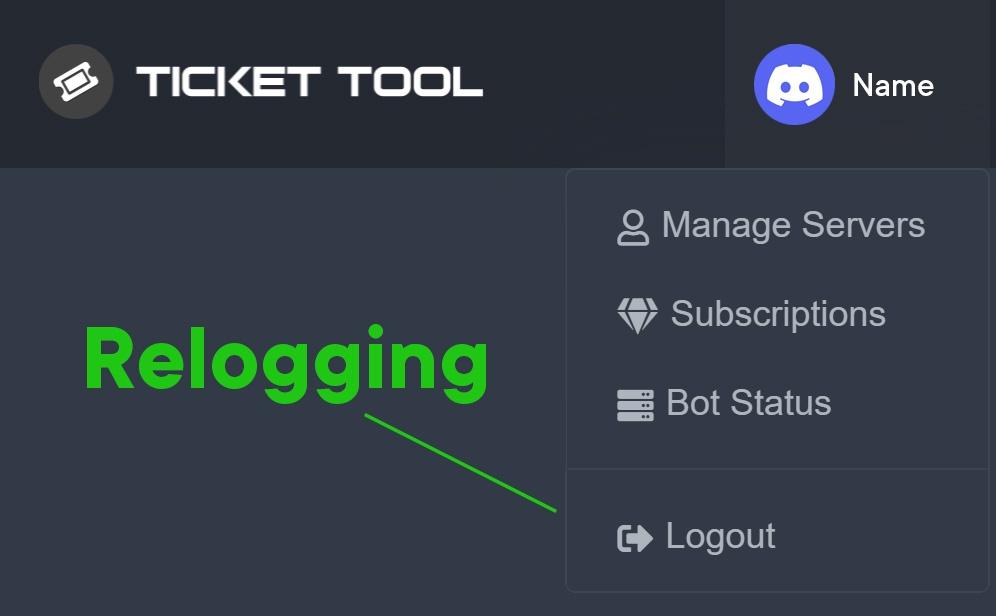 iron nightBOT
Gave +1 Rep to @humble sequoia
 bleak vapor
Hey, when users are open a ticket they cant see it they just see it as #ticket 0000

@severe path @copper owl @atomic solstice @radiant moss
 prime bridgeBOT
 Ohad#8470 has been warned!

 They were notified via dms.
copper owl
We aren't obliged to help you in this channel. you're also not allowed to ping us for support. if you want our help, please head over to #🎫│make-a-ticket
bleak vapor
Ok... thanks
tribal cedar
bleak vapor
Hey, when users are open a ticket they cant see it they just see it as #ticket 0...
You can go panel configs -> settings -> ticket options to edit the ticket name but I a premium feature to change names.
bleak vapor
tribal cedar
You can go panel configs -> settings -> ticket options to edit the ticket name b...
You didnt get my problem man
when normal users are opening a ticket they unable to view it
no link only words
bleak vapor
bleak vapor
see here? @tribal cedar
tribal cedar
Ok. Permission options for user opened permissions
 tribal cedar
Should be yes.
bleak vapor
well its like this
and not working
I tried to resetup the tool
and still doesnt work
tribal cedar
Hmm make a ticket man I would just be guessing at this point
bleak vapor
I make a ticket its great you are trying to help 🙂
tribal cedar
Well this happened yesterday too and I assumed it has to be the perms
bleak vapor
what do I need to change ?
tribal cedar
Stick with your ticket
bleak vapor
yesterday it worked great and today it doesnt
jade topaz
Hi i purchased premium, how can i invite on my server ?
tribal cedar
Read message history is the only one needed
bleak vapor
tribal cedar
Stick with your ticket
What ?
humble sequoiaBOT
The first thing you will need to do is invite the premium bot, an invite can be found here
Once the bot is in your server we will head to the dashboard and manage your server. When you are managing your server, you want to head into "Server Configs" then click the drop down menu under "Select the bot you would like to use on this server" then click "Ticket Tool#6207" and then save.
 bleak vapor
sorry for my bad english
tribal cedar
@bleak vapor you made a ticket?
bleak vapor
tribal cedar
<@386110084947902464> you made a ticket?
yes
tribal cedar
Wait for their reply
bleak vapor
Ok thanks
jade topaz
@tribal cedar yes i selected my server, now how can i invite the premium one ?
The yellow one
 tribal cedar
jade topaz
<@!297419611350106133> yes i selected my server, now how can i invite the premiu...
tribal cedar
jade topaz
<@!297419611350106133> yes i selected my server, now how can i invite the premiu...
Watch the video it shows you how to do it via the dashboard
And the invite link is in the text
jade topaz
tribal cedar
And the invite link is in the text

where i go to invite the premium one ?
oh ok i see
thanks for the help!
tribal cedar
Anytime
 severe path
bleak vapor
<@!252364399669542913> <@!548583124062175232> <@!601783394334015498> <@!51379264...
severe path
bleak vapor
<@!252364399669542913> <@!548583124062175232> <@!601783394334015498> <@!51379264...
what are rules?
 azure pecan
Hey How Do I Make Like Service Tos
tribal cedar
azure pecan
Hey How Do I Make Like Service Tos
Sorry?
azure pecan
tribal cedar
Sorry?
I wanna Make server Rules So it has like a Line Beside all Rules
I don't ticket can do that
tribal cedar
Do you mean the message with the button? The ticket message?
azure pecan
can u look in my server u can leave after I already made like the mm request support request and stuff
tribal cedar
Sorry I can't do that.
 autumn hill
hi there, it is possible to recover a closed & deleted ticket?
azure pecan
oh look u see how the rules in here setup
tribal cedar
autumn hill
hi there, it is possible to recover a closed & deleted ticket?
Unless you have transcripts setup no. Sorry.
azure pecan
I want it in that format
tribal cedar
azure pecan
does this bot like help make a format like that or will I need a different one
tribal cedar
That's just simple text editing
azure pecan
bruh not that Like U See How It has that Grey Line On The Left
I want to know how to get it like that if u know how
tribal cedar
I forgotten how that's what we used to use for replies before reply came out. Maybe someone else knows but that's not part of a bot.
azure pecan
oh
tribal cedar
You may find it by doing a Google search
 toxic dust
Is there any reason why certain members wouldn’t be able to make tickets.
tribal cedar
toxic dust
Is there any reason why certain members wouldn’t be able to make tickets.
Are they getting an error?
tribal cedar
On mobile client
 tribal cedar
Have then update their client
 slender minnow
tribal cedar
I forgotten how that's what we used to use for replies before reply came out. Ma...
slender minnow
tribal cedar
I forgotten how that's what we used to use for replies before reply came out. Ma...
thats standard discord markdown
toxic dust
Update discord?
slender minnow
> space and text
for the embed lines on the left
tribal cedar
slender minnow
`>` space and text
for the embed lines on the left
@azure pecan
tribal cedar
toxic dust
Update discord?
Yes sir.
humble sequoiaBOT
Update your discord App
Buttons are a relatively new addition to discord and don't work with some older versions of the app.
Please verify that you have the latest version of discord, by going to the app or play store.
Discord for the  App Store
Discord for the  Play Store
toxic dust
I’ll have her try that.
tribal cedar
Right on.
azure pecan
slender minnow
`>` space and text
for the embed lines on the left
how I do the embed line?
slender minnow
azure pecan
how I do the embed line?
just add a > ahead of the text
> sample text
 jaunty flame
Hey so, how do I set it so whenever someone does it command for the transcript it goes into a certain channel?
slender minnow
$help transcript
humble sequoiaBOT
How do I save transcript to a channel?
To save transcripts to a channel go to the Dashboard -> Panel Configs -> Settings -> Logging Options -> Transcript Channel
 slender minnow
@jaunty flame ^
iron nightBOT
Gave +1 Rep to @slender minnow
solar lake
@spark dawn
 spark dawn
А?
solar lake
spark dawn
А?
так с каким билетом тебе нужна помощь? добавить его на свой сервер или сделать на этом сервере
solar lake
spark dawn
На своём
сначала добавьте инструмент тикетов на свой сервер
spark dawn

Эм
Ну это канал по майнкрафту
И что делать если бот добавлен,а я тупой и тикет сделать не могу?
solar lake
нужно сделать тикет канал, нажимаешь управлять сервером и редактировать панели. Затем нажмите «Добавить панель» и настройте ее по своему усмотрению, выберите чат и отправьте его. Затем все должно быть настроено.
spark dawn
На компе надо?
solar lake
spark dawn
На компе надо?
не все, что вам нужно, это браузер, и вы можете получить доступ к панели инструментов
spark dawn
А
 glossy dragon
Hi, isn't it possible for the bot to close a ticket when someone doesn't send any messages for X minutes?
spark dawn
Спасибо,получилось
solar lake
glossy dragon
Hi, isn't it possible for the bot to close a ticket when someone doesn't send an...
That I don’t know
glossy dragon
I think it must be possible, not a bad feature I think
solar lake
spark dawn
Спасибо,получилось
да, без проблем, хорошего дня
solar lake
glossy dragon
I think it must be possible, not a bad feature I think
Yes sounds good
spark dawn
Спасибо
solar lake
spark dawn
Спасибо
😊
solar lake
bleak vapor
is someone here and can help me please?
I can try my best
bleak vapor
solar lake
I can try my best
When a user open a ticket in my server all users can see his tickets
how do I update the permission ?
solar lake
bleak vapor
When a user open a ticket in my server all users can see his tickets
That would be because the role they have been given allowed them to look at every chat
You need to change the roles permissions
bleak vapor
solar lake
You need to change the roles permissions
What do I need to change ?
solar lake
bleak vapor
What do I need to change ?
Permission in the role that allows them to see all chats
 undone blade
Why do ppl who make a ticket cant see it but support role can
solar lake
undone blade
Why do ppl who make a ticket cant see it but support role can
That isn’t how they work. The person who creates the ticket is the only non support member who can see it
undone blade
ITs not letting the msee it
its not letting them see it*
@solar lake
Can i inv u and you can see for yourself
bleak vapor
solar lake
Permission in the role that allows them to see all chats
I change it
and still didnt help
humble sequoiaBOT
━━ moved to ticket ━━
jade topaz
Hey, such as? Apart from necessitating boosts
copper owl
jade topaz
Hey, such as? Apart from necessitating boosts
Additional Roles (as well as additional permissions)
Rate limits for threads are different
a thread can't have a "closed state"
threads aren't as flexible as ticket channels.
 lyric moth
Hello, I have a question for you something is not working
How can I disable the "Delete" option for my support team to the tickets and only let me be able to do that?
humble sequoiaBOT
━━ moved to ticket ━━


 sacred plover
every time someone make a ticket the ticket box get removed from the channnel
lyric moth

fleet linden
Yo I need some help
I'm unable to use /invites in my opened tickets. How do I turn on application commands on opened tickets?
lyric moth

fleet linden
@eager cargo @radiant moss Any idea? 
rose garnet
lyric moth
<:Senior_Support_Team:926219353446293595>

Put your role in allowed one and support roles in disabled one
jade topaz
how to i can create like this in single panel ?
 humble sequoiaBOT
Help Options
$help commands - Information on commands
$help setup - Information on bot setup
$help faq - Frequently asked questions
fleet linden
rose garnet
not possible
how is this not possible?
rose garnet
jade topaz
how to i can create like this in single panel ?
Multi panels
rose garnet
jade topaz
ye
You will find it in general options
jade topaz
k
rose garnet
fleet linden
how is this not possible?
Go to opened ticket perms
you won't find application perms
jade topaz
rose garnet
You will find it in general options
End ??
rose garnet
jade topaz
End ??
Ye
rose garnet
rose garnet
Put your role in allowed one and support roles in disabled one
@lyric moth 

 safe prairie
Don't ping staff members! Someone will answer you asap. Otherwise, open a #🎫│make-a-ticket
 fallow ingot
@hybrid nova The answer to your question is yes, but its a premium feature.

 rose garnet
 rugged panther
um...
rugged panther
um...
Well
 edgy grail
can you transfer a premium key or is there anyway to cancel a premium subscription if ur discord account is terminated?
rose garnet
rose garnet
Well
I forgot what should I say lol
rugged panther
rose garnet
I forgot what should I say lol
i think i'm frick up
rose garnet
rugged panther
um...
It's just time
rugged panther
rose garnet
It's just time
how much
rose garnet
It happens to me sometimes in other sites
rugged panther
rose garnet
It happens to me sometimes in other sites
yeah me too
rugged panther
rose garnet
I'm waiting like hours
in an hour should be expired
from what did i hear
jade topaz
Is there a way for the ticket instead of the number it has the persons name
rugged panther
jade topaz
Is there a way for the ticket instead of the number it has the persons name
i dont think so
 jagged jasper
 rose garnet
@jagged jasper you mean this?
and for buttons color go to buttons option
and then create button
humble sequoiaBOT
━━ moved to ticket ━━
edgy grail
jade topaz
Is there a way for the ticket instead of the number it has the persons name
yea that is possible but u need premium
jade topaz
damn
How can i add it so that users can send pictures inside a ticket?
Im trying to add it so that members can send images inside a ticket but it isnt allowing me to do that
edgy grail
jade topaz
Im trying to add it so that members can send images inside a ticket but it isnt ...
thats to do with discord channel settings
jade topaz
edgy grail
thats to do with discord channel settings
I have set the channel settings so that members can send images it still isnt working
edgy grail
you need to go into permissions of the channel and make it so they can send links
jade topaz
if I change it for the catogry
edgy grail
upload files and send links
jade topaz
wont it do it for all the channels
edgy grail
if the channel settings are different it will overwrite the category
jade topaz
yea
my members cant send images inside their ticket for some reason
I kept send images and embed links to on
 narrow silo
I'm sort of new to this, I'm confused how to get tickets to go to a certain category once one is opened
 coarse tangle
Hey @here , we're trying to set up our Ticket Tool Bot,
-
Can We add Forms (Google , Tally) via the Ticket Tool Bot?
-
How do we remove Ticket Tool Branding ?
 rose garnet
coarse tangle
Hey @here , we're trying to set up our Ticket Tool Bot,
1. Can We add Forms (Go...
rose garnet
coarse tangle
Hey @here , we're trying to set up our Ticket Tool Bot,
1. Can We add Forms (Go...
What
Google forms
It's impossible
to do that too
narrow silo
How do you get tickets under categories once someone as opened a ticket
rose garnet
You mean opened ticket category?
narrow silo
I think so
coarse tangle
rose garnet
What
ok thanks ...
iron nightBOT
Gave +1 Rep to @rose garnet
narrow silo
I dont really know im new to this
rose garnet
Yep
rose garnet
narrow silo
Is it on the dashboard
select server and then panel configs and then settings
for panel that you want to change his settings
narrow silo
Thank you very much
rose garnet
Np
rose garnet
iron night
Gave +1 Rep to **<@583043009965457418>**
+1 Rep
narrow silo
How do i get transcripts sent to a specific chat then?
narrow silo
How do i get that
 narrow silo
That's on the dashboard isn't it?
rose garnet
Yep it's in dashboard
narrow silo
Thank you
rose garnet
Np
 atomic mountain
 humble sequoiaBOT
Any role you assign as a blacklisted role won't be able to use commands or reactions.
Selecting a blacklisted role
Go to your Dashboard ➞ Server Configs. There you will find the option to select blacklisted roles.
Note: Don't forget to save.
 shut bolt
Check your blacklisted roles
 crystal smelt
how to i set up ticket bot plz
humble sequoiaBOT

You can check our documentation here.
You can also check #573205317870157855 for the basic setup.
Our documentation contains all the info you need about the bot to be able to setup and configure the bot however you like.
 glass minnow

Theres no button to submit a report on mobile (desktop has it)
When I react with 📩 nothing happens
rose garnet
glass minnow
When I react with 📩 nothing happens
it happens to me too
shut bolt
Ticket Tool doesn't work any longer by reactions, only buttons
humble sequoiaBOT
Update your discord App
Buttons are a relatively new addition to discord and don't work with some older versions of the app.
Please verify that you have the latest version of discord, by going to the app or play store.
Discord for the App Store
Discord for the Play Store
shut bolt
Update your application if you don't see the button and it's visible for desktop users
shut bolt
 teal galleon
Guys i cant get the bots prefix
teal galleon
Guys i cant get the bots prefix
$help prefix
humble sequoiaBOT
How to change Ticket tool's prefix
The default prefix for ticket tool is $ and @Ticket Tool#4843 however that can be changed on the Dashboard under Server Configs -> Command Prefix.
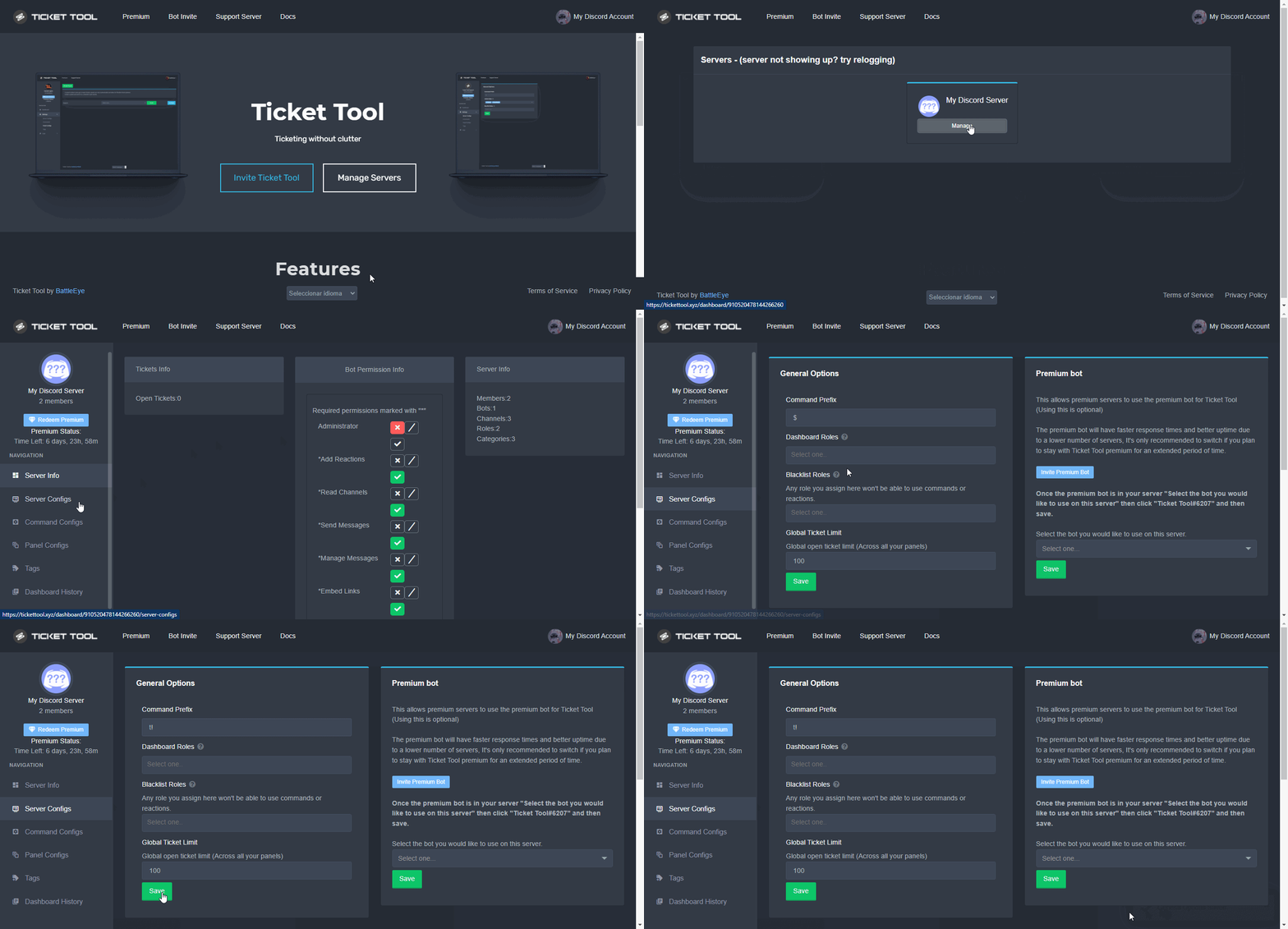
NOTE that @Ticket Tool#4843 will always work as a prefix even if there is a custom prefix.
glass minnow
Awesome, update did the trick, thank you @shut bolt very much.
shut bolt
glass minnow
Awesome, update did the trick, thank you <@!518666147441278998> very much.
Sure :)
jade topaz
how do i make the tickettool bot ping roles?
jade topaz
shut bolt
Sure :)
yo can u help me?
shut bolt
jade topaz
yo can u help me?
Yup
But next time
Don't answer to my messages for me to answer faster, just drop the question and someone will eventually help
jade topaz
ok
shut bolt
jade topaz
how do i make the tickettool bot ping roles?
$help ping
humble sequoiaBOT
How to make Ticket Tool ping a role
To make ticket tool ping a role when a ticket is opened, go to the Dashboard -> Panel Configs -> Settings -> Ticket Options -> Ticket Message -> Message Text and do this:
{@Role name} This is case sensitive and the role must have @mentions enabled
shut bolt
Sure
rose garnet
glass minnow
When I react with 📩 nothing happens
Well i just suggested to add reactions back when you turn off buttons
shut bolt
rose garnet
Well i just suggested to add reactions back when you turn off buttons
Why should we go back to reactions?
 regal goblet
Please don't ping support team members @elder ocean
shut bolt
 elder ocean
Is there an Arab admin?
elder ocean
Is there an Arab admin?
$articket
humble sequoiaBOT

فريق الدعم الفني العربي
عميلنا العزيز ان كنت تبحث عن مساعدة يرجى فتح تكت خاص بفريق الدعم الفني العربي
اذهب الى#🎫│make-a-ticket
ثم قم بلضغط على الايموجي الاتي (🇯🇴)
solar lake
Aw I wanted to help ☹️
jade topaz
someone help
how do i make a ticket go in a speicfic catergory
i want a Ticket to go #need-help in my server
and my ticket go to top every time someone opens it
jade topaz
jade topaz
how do i make a ticket go in a speicfic catergory
$help category
humble sequoiaBOT
How to set the open category
To set a open category go to the Dashboard -> Panel Configs -> Settings -> Category Options -> Category Open

 warm linden
humble sequoiaBOT
warm linden
humble sequoiaBOT
Solved in another channel.
 mystic crest
Hey everybody, I dont know why, but every ticket I close will be moved into closed-categor and directly deleted after. Is there a reason why?
 tame vale
Help me plz
 mystic crest
Hey everybody, I dont know why, but every ticket I close will be moved into clos...
mystic crest
mystic crest
Hey everybody, I dont know why, but every ticket I close will be moved into clos...
As soon as I push the close button, I will not get asked to confirm closing, it will get deleted immediately. Delete command and button is not activated. 🤔
 naive plume
guys when i try to close a ticket it says 'invalid from brody' how do i fix it?
humble sequoiaBOT
Update your discord App
Buttons are a relatively new addition to discord and don't work with some older versions of the app.
Please verify that you have the latest version of discord, by going to the app or play store.
Discord for the App Store
Discord for the Play Store
fallow ingot
mystic crest
As soon as I push the close button, I will not get asked to confirm closing, it ...
Make sure this is enabled.
 mystic crest
Yeah, got it right when u wrote 🤦🏻♂️
mystic crest
fallow ingot
Thank u!
But I discovered another thing, maybe a setting-option, too:
I have two panels with two separated ticket-categories. If I close a ticket in category A, it will get moved and renamed to closed-00x. If i close a Ticket in category B, it will just get moved but not renamed.
Can I avoid the Ticket in category A get renamed?
iron nightBOT
Gave +1 Rep to @fallow ingot
 wheat torrent
Hello
how can i mention a role in the ticket when someone open ticket ?
nvm ik xD
sorry for bothering
 upper wigeon
I need help
What to do if i cannot select the premium bot after adding it to my server
pls help
 humble sequoiaBOT
Help Options
$help commands - Information on commands
$help setup - Information on bot setup
$help faq - Frequently asked questions
The panel message is where people react to make a ticket. To customize it head over to your Dashboard --> Panel Configs -> Settings -> Panel Options -> Edit Panel Message
 severe path
@supple storm ^
iron nightBOT
Gave +1 Rep to @plain badger
severe path

severe path
what error?
upper wigeon
Let me show a screenshot
 supple storm
I need help again
How do i have it so when a ticket is Created A select number of people are added?
upper wigeon


 supple storm
How do i have it so when a ticket is Created A select number of people are added? @severe path
upper wigeon
supple storm
How do i have it so when a ticket is Created A select number of people are added...
You have to select the support team roles in the dashboard
supple storm
What do you mean?
im very new to this ticket i added it to my server Less then 20 minutes ago
@severe path How do i have it so when a ticket is Created A select number of people are added?
copper owl
supple storm
<@!252364399669542913> How do i have it so when a ticket is Created A select num...
Youve pinged him already.
#546557408902905896 you're not allowed to ping us for support.
supple storm
Sorry.
copper owl
#🎫│make-a-ticket if you want support help. You need to have patience.
severe path
upper wigeon

 upper wigeon
Owner of the server has premium
severe path
no
severe path
severe path
you can see it on this screenshot
mystic crest
Hey!
I have two panels with (of course) two separated ticket-categories. If I close a ticket in category A, it will get moved and renamed to closed-00x. If i close a Ticket in category B, it will just get moved but not renamed.
Can I avoid the Ticket in category A get renamed?
tribal cedar
If you go to ticket options you can choose the name the ticket has in closed state just copy the opened ticket name to closed ticket name
Sorry did that make sense?
Panel configs -> settings -> ticket options and edit the closed channel name to be exactly like open
 daring prism
anyone tell me how to make a temp channel when someone opens a new ticket?
fallow ingot
That's not possible with Ticket Tool.
copper owl
daring prism
oh they should make that feature
make what a feature? what do you mean by "temp channel"
daring prism
when you open a ticket it makes the ticket in a temporary channel just for that ticket so its categorised and when you close the ticket the channel goes away
copper owl
yeah those are just normal tickets
just create a panel and send it to a channel in your server
$help panel
humble sequoiaBOT
Creating a panel
To create a panel we are going to need to head over to the panel configs on the dashboard
Once at the dashboard we will need to click Create Panel
Enter a panel name (Fill in any optional settings you want)
Click Create Panel and your ready to get started with configuring your panel
An example of a creating a panel is shown below.
 copper owl
this is how you create a panel
daring prism
yep the ticket just gets made randomly at the top of the server
not under a channel
copper owl
Then assign a category in your Category Options of your panel settings
it'll get created under a specific category of your choice
daring prism
but i dont want that category to be shown on my server, only should come up if someone makes a ticket
copper owl
daring prism
but i dont want that category to be shown on my server, only should come up if s...
if you're an admin or an owner, you will see it regardless
you cant control whether it's there or not if you're an admin or the owner of the server
daring prism
just dont want public to see it
copper owl
if you want it to disappear once it has no channels, you will have to restrict the Manage Channel permissions in that category
copper owl
daring prism
just dont want public to see it
then restrict the @everyone access from seeing channels in the category permissions
daring prism
but can they see it if they open a ticket but
if i restrict it from normal view will they see it when they make a ticket
copper owl
yes they will if they're given access to the ticket, which by default they are
unless you've changed the permissions around in the dashboard, a member should be able to see their own ticket once created
iron nightBOT
Gave +1 Rep to @copper owl
copper owl
No problem
daring prism
it didnt work user couldnt see ticket in the category as the permission for them was restricted
so what can i do
@copper owl
copper owl
daring prism
Can you see my question?
I did see your question
copper owl
daring prism
it didnt work user couldnt see ticket in the category as the permission for them...
Send the ID of the server
I did say ID and not the invite
and they left
cool
fallow ingot
lol
 lament badge
can i change name on the ticket bot?
shut bolt
You can change it's nickname
lament badge
shut bolt
You can change it's nickname
I tried on the discord server settings, but it did't work, just the color changed!
shut bolt
That's the bot's role
Right Click on the bot
Click on manage nickname
Edit it and save
 native root
How do i create a ticket panel just like #🎫│make-a-ticket with multiple buttons, and can you have multiple settings within each button. such as report button that only staff can see but not support team?
humble sequoiaBOT
For a more convenient use of multipanels, you can now combine panels on the dashboard. This will allow you to directly send the multipanel from the dashboard or via the $panel ID command.
Where can I find this?
You can find this setting on the Dashboard -> Panel Configs -> Settings -> General Options
Note: if you're attaching all the panels to a panel called English, don't include English in the attached panels box (If you do this, it will create duplicate)
This will put all buttons from all of your panels on one message. The message is the panel message from the panel you're combining these panels in.

 Note: This is a premium feature
shut bolt
Note: This is a premium feature
shut bolt
And yes, each button would have it's own settings as it's linked to another panel
native root
is that premium bot only?
shut bolt
native root
is that premium bot only?
It is a premium feature, yes
native root
shut bolt
It is a premium feature, yes
Thank you so much for this
iron nightBOT
Gave +1 Rep to @shut bolt
shut bolt
Sure
 nimble forum
Is there a way for me to recover old tickets when the logs have been deleted?
shut bolt
nimble forum
Is there a way for me to recover old tickets when the logs have been deleted?
Nope
nimble forum
thanks
shut bolt
Sure
jade topaz
Guys when my members try to make a ticket it restricts them. Help please
humble sequoiaBOT
Any role you assign as a blacklisted role won't be able to use commands or reactions.
Selecting a blacklisted role
Go to your Dashboard ➞ Server Configs. There you will find the option to select blacklisted roles.
Note: Don't forget to save.
shut bolt
Check your blacklisted roles
jade topaz
alr
solar lake
jade topaz
Guys when my members try to make a ticket it restricts them. Help please
You need to give them access to see all chats, or blacklisted roles
Oh
jade topaz
So if they are black listed I get rid of them
shut bolt
jade topaz
So if they are black listed I get rid of them
Yeah
jade topaz
alr
shut bolt
Anyone with a blacklisted role won't be able to use the bot at all
iron nightBOT
Gave +1 Rep to @shut bolt
shut bolt
Sure
solar lake
@jade topaz your gonna want to relog
jade topaz
ok
solar lake
When your in the manage servers you need to click your pfp in the top right, click log out
After that log back in
Then it should be there
iron nightBOT
Gave +1 Rep to @solar lake
 twin edge
Hello, can you send a picture of the server?
this is
But I want it in the form gif
?
!!
solar lake
Nobody has it in gif form
twin edge
Who made the server?
solar lake
Good luck getting the gif
shut bolt
solar lake
Nobody has it in gif form
I do
I'll send it in a minute, let me look for it
twin edge
Thx
solar lake
Thanks @shut bolt
iron nightBOT
Gave +1 Rep to @shut bolt

 iron nightBOT
Gave +1 Rep to @shut bolt
shut bolt
solar lake
You can’t even save it
Yes you can
solar lake
shut bolt
Yes you can
Yeah Ik I said nvm
Pablo is there different language chats or only an English one?
shut bolt
solar lake
Pablo is there different language chats or only an English one?
Only english one
jade topaz
Hi why ticket tool make this "System Failure: Panel "940400822547821343" not found"
solar lake
jade topaz
Hi why ticket tool make this "System Failure: Panel "940400822547821343" not fou...
It failed to create your panel, the panel isn’t working
jade topaz
I have already deleted the ticket from the manage server but it does not work
shut bolt
jade topaz
I have already deleted the ticket from the manage server but it does not work
Delete the message which has the panel, not the panel itself
If you delete the panel itself it won't work
jade topaz
thks its working but now how change the "To create a ticket react with "
humble sequoiaBOT
The panel message is where people react to make a ticket. To customize it head over to your Dashboard --> Panel Configs -> Settings -> Panel Options -> Edit Panel Message
jade topaz
thks
shut bolt
Sure
 dense cloud
what does this section do?

 glacial schooner
I’m here to just get a little more info about making a ticket since I’m having problems rn. 😅🤦🏽♂️ I’m lost! Am I anywhere close?
tribal cedar
glacial schooner
I’m here to just get a little more info about making a ticket since I’m having p...
If you have problems with ticket tool your in the right place. Just ask away
tribal cedar
dense cloud
what does this section do?
Check panel configs -> settings -> claiming options premium is needed
dense cloud
ah okay, thanks
 acoustic grail
hi, i run a discord server with 7 other owners, 6 of us can close tickets but 1 cannot, it says "invalid form body" can anybody advise on a fix for this please?
glacial schooner
Thank you! I’m just trying to make a ticket so I can get to where I can watch my tv. I unplugged router and did a speed test and restarted the fire stick and everything and I still can’t get it to work.
tribal cedar
acoustic grail
hi, i run a discord server with 7 other owners, 6 of us can close tickets but 1 ...
Have them update their discord client
acoustic grail
tribal cedar
Have them update their discord client
then this should fix this issue?
tribal cedar
Yes
tribal cedar
glacial schooner
Thank you! I’m just trying to make a ticket so I can get to where I can watch my...
I think your in the wrong place.
acoustic grail
tribal cedar
Yes
thank you 😄
iron nightBOT
Gave +1 Rep to @tribal cedar
copper owl
I really ponder on why so many people who have reoccurring issues with something called "FireStick" end up here
acoustic grail
tribal cedar
I think your in the wrong place.
Hey Enigma, my friend, has a fully updated discord, is there anything else i can suggest for him to do?
tribal cedar
acoustic grail
Hey Enigma, my friend, has a fully updated discord, is there anything else i can...
Nope he should be good long as he updates
humble sequoiaBOT
Update your discord App
Buttons are a relatively new addition to discord and don't work with some older versions of the app.
Please verify that you have the latest version of discord, by going to the app or play store.
Discord for the App Store
Discord for the Play Store
tribal cedar
copper owl
I really ponder on why so many people who have reoccurring issues with something...
We've seen it all. 😜
jade topaz
Hello everyone, I've got a question. I wanna do, that new tickets will be below all channels, but I dunno, how can I do it. Does somebody know, how to do that?
cause rn all tickets are above all channels
tribal cedar
jade topaz
Hello everyone, I've got a question. I wanna do, that new tickets will be below ...
The only way to make them list at the bottom is to make a category and place it lower in the channels list
solar lake
tribal cedar
The only way to make them list at the bottom is to make a category and place it ...
Some severs just start at the bottom
tribal cedar
That's impossible. Channels created without a category by default appear on the top of the channel list
Those servers prolly have a category they are using..
solar lake
Maybe
tribal cedar
$help category
humble sequoiaBOT
How to set the open category
To set a open category go to the Dashboard -> Panel Configs -> Settings -> Category Options -> Category Open
solar lake
@vocal harbor
 vocal harbor
solar lake
vocal harbor
solar lake
What did you need help with
I can try to help
@vocal harbor is the bot in your discord server or not?
humble sequoiaBOT
You can check our documentation here.
You can also check #573205317870157855 for the basic setup.
Our documentation contains all the info you need about the bot to be able to setup and configure the bot however you like.
jade topaz
How do I make a bot I have problems when I come to work!!
humble sequoiaBOT

⚠️ You're in the wrong place
We provide support for @pseudo glen discord bot and cannot help you with whatever issue you have.
- Please make sure to contact the appropriate Support Team.
If you don't have any further questions regarding our bot Ticket Tool, please close this ticket
fallow ingot
@jade topaz ^
jade topaz
fallow ingot
<@456226577798135808> ^
My question is how do I make a bot with a bot?
solar lake
jade topaz
My question is how do I make a bot with a bot?
What
That isn’t a ticket bot question
 cursive frost
Why does this problem appear to some?
 humble sequoiaBOT
Update your discord App
Buttons are a relatively new addition to discord and don't work with some older versions of the app.
Please verify that you have the latest version of discord, by going to the app or play store.
Discord for the App Store
Discord for the Play Store
tribal cedar
 tiny finch
the bot site crashed
tiny finch
the bot site crashed
The site is loading fine for me
solar lake
tiny finch
<@518666147441278998> the bot site crashed
Don’t ping support team
The site is fine
@supple pumice
solar lake
Puedo ayudarte aquí, ¿en qué necesitas ayuda?
solar lake
Agregaste el panel a tu servidor?
solar lake
necesita configurar el panel. no solo aparece.
 supple pumice
como lo ago
solar lake
supple pumice
como lo ago
administre su servidor en el tablero y debería decir configuración del panel, haga clic en eso y luego personalice como desee. después de que haya terminado de personalizar, haga clic en enviar y se enviará.
 proven root
AJUDA ?
solar lake
proven root
AJUDA ?
con que?
proven root
MINHA CONTA FOI BANIDA SEM EU SIMPLISMENTE USA ND !
NO PIZZA PLACE
NOME DE USARIO : brasileirose
PFVR
solar lake
você mudou para português como o que
I’m so confused on what language you speak
@proven root what language do you speak
Qué idioma hablas?
proven root
PORTUGUES
solar lake
proven root
PORTUGUES
espere, estou falando com duas pessoas diferentes.
proven root
OK
solar lake
Com o que você precisa de ajuda
proven root
DESBANI MINHA CONTA, NO PIZZA PLACE ... PQ EU N FIZ ND E, N USEI NUNK TIPO DE HACK
ACHO Q GRAVARAM E SE ENGANARAM !
fallow ingot
$ptticket
humble sequoiaBOT

Equipe de Suporte │ Português
Caro usuário,
Se você está procurando por ajuda, abra um ticket para entrar em contato com a Equipe de Suporte em Português. Vá para o canal: #🎫│make-a-ticket e pressione o botão: :flag_br:
fallow ingot
@proven root ^
proven root
OK
solar lake
por que todas as maiúsculas
proven root
MANIA
shut bolt
Tienes un ticket esperando a tu respuesta
 still spear
No me deja por el servidor
still spear
shut bolt
Tienes un ticket esperando a tu respuesta
Como así?
shut bolt
still spear
Como así?
 mellow gyro
Hey how do I get the logs to save in a channel after closing the ticket
 umbral ravine
How do i do the support ticket?
solar lake
umbral ravine
How do i do the support ticket?
What do you mean
umbral ravine
solar lake
What do you mean
How do i make a support ticket?
solar lake
Do you want a panel to be made in your own server
Or do you need to create one within this server to access a support member
umbral ravine
I want a panel to be made in my server
umbral ravine
No
umbral ravine
Ok
solar lake
Then choose the server of which you want it in
umbral ravine
Okay
solar lake
Did it work?
If it did
Go to https://tickettool.xyz/manage-servers and manage your server, click add panel and customize how you want. When that is done you need to click send and it should be there
@umbral ravine any more questions?
umbral ravine
No im all set thank you
 urban escarp
DOES ANYONE SPEAK PORTUGUESE??
humble sequoiaBOT
Equipe de Suporte │ Português
Caro usuário,
Se você está procurando por ajuda, abra um ticket para entrar em contato com a Equipe de Suporte em Português. Vá para o canal: #🎫│make-a-ticket e pressione o botão: :flag_br:
 tired hornet
how do i stop the bot from deleting tickets when I click close?
copper owl
Turn on Two Step Ticket
you can find that under the General Options of your panel settings
tired hornet
copper owl
you can find that under the General Options of your panel settings
thank you!
urban escarp
tired hornet
thank you!
❤️
copper owl
I'm investigating the issue and will alert management if there's anything serious going on.
 unkempt hinge
 idle hollow
Is bot down?
copper owl
copper owl
I'm investigating the issue and will alert management if there's anything seriou...
@idle hollow there's the answer to that
idle hollow
thanks
copper owl
Management has been alerted and it'll be looked into. For now, just be patient as we look into it.
Thanks for your patience and apologies for any inconveniences that happen due to this.
 past basin
what are the additional roles for ?
And is there a way to leave the ticket as an administrator
copper owl
past basin
what are the additional roles for ?
Allows you to have specific permissions for specific roles. As the role entails, it's any additional Roles you don't want included in the support team roles.
copper owl
past basin
And is there a way to leave the ticket as an administrator
remove perms from the support team when the ticket is closed.
permission options - > Support Team Closed Permissions
People with administrator permissions can only see the ticket once it's closed
past basin
my bad i didn't add owner role in the support role
copper owl
I'm confused on what you're talking about.
What command? And if you have administrator, you don't need to put the owner role as a support team role
past basin
ye thats what i mean
the support role used the command $remove bloodsport#3077
but im still in the ticket
But i am the owner of the server so
copper owl
Yeah because administrator/owner bypass all restrictions
copper owl
past basin
But i am the owner of the server so
yeah
past basin
so there is no other way?
 still snow
past basin
alright i have to find another way around it then
still snow
past basin
alright i have to find another way around it then
Are you wanting to close a ticket in your server when it's not in use, because I feel like you just have to close tickets and then it will give you access to delete that ticket after. If that's what you were talking about, other wise I'm not sure and good luck figuring out how to make it work for you
 grim lagoon
I’m owner how I see other people number of invites
copper owl
still snow
Are you wanting to close a ticket in your server when it's not in use, because I...
they want to lose access to closed tickets or something along those lines
all in all, them being the owner means they'll see all channels
copper owl
grim lagoon
I’m owner how I see other people number of invites
wrong bot, wrong server
still snow
copper owl
all in all, them being the owner means they'll see all channels
I just thought I'd help out with my two cents lol
copper owl
still snow
I just thought I'd help out with my two cents lol
Gotcha, it's just what you said didnt really match their initial request above, so i thought i'd let you know
still snow
copper owl
Gotcha, it's just what you said didnt really match their initial request above, ...
Ok thanks for that
iron nightBOT
Gave +1 Rep to @copper owl
 potent atlas
Hey there! idk if its already answered, but if i have a premium subcsription and invited the Premium Bot, can I just kick the primary one? Would it still function as normal (or like before I kicked the Primary)
Thanks everyone.
copper owl
potent atlas
Hey there! idk if its already answered, but if i have a premium subcsription and...
you can
if the premium bot is working fine then just kick the primary, no need to keep it if you're gonna switch to the premium
potent atlas
Thanks @copper owl
iron nightBOT
Gave +1 Rep to @copper owl
potent atlas
Oof sorry for ping.
 raw coyote
Hello, please tell me, why can't I add a bot to the server?
 quiet pagoda
Maybe you're not the admin
raw coyote
On one server I can, and on the second which I need, I can not add the addition, and in the discord does not appear
Can I somehow add it not through the site?
 steel jolt
How do I make a ticket like this?
 raw coyote
Guys, in order to dock a bot on the server and configure it on the site, you need to be an administrator?
humble sequoiaBOT
Multipanels are a premium feature  that allow for a single panel with multiple buttons to open different tickets.
How to create a Multipanel
Premium users can combine multiple panels into one multipanel.
First, find the IDs of each panel you wish to combine. You can find them in your Panel Configs in the Dashboard
Next, send the multipanel to a channel using $panel [id1] [id2] {id3} ....
e.g. $panel 1 2 4 17 35 to combine panels 1, 2, 4, 17 and 35.
Up to 25 panels may be combined.
 slender minnow
humble sequoia
slender minnow
humble sequoia
@steel jolt
 atomic solstice
raw coyote
Guys, in order to dock a bot on the server and configure it on the site, you nee...
atomic solstice
raw coyote
Guys, in order to dock a bot on the server and configure it on the site, you nee...
You need to be the Owner, administrator or have a Dashboard role which was setup by the owner or administrator
humble sequoiaBOT
Any role you put there will have full access to the ticket tool dashboard. The server owner and users with admin permissions already have access to the dashboard.
Be careful of which roles to put here

 misty condor
When someone sends invite links in ticket
it gets deleted
its not getting deleted in normal channels
copper owl
misty condor
but only deleting in tickets
doesnt automatically mean it's ticket tool
copper owl
misty condor
moderation bots would delelte everywhere i guess
no it wouldnt if youve whitelisted links in channels
misty condor
ohh
misty condor
yeah thats what i was exploring 😂
copper owl
check your audit logs and see who's the one doing it. or check all your moderation bots
iron nightBOT
Gave +1 Rep to @copper owl
copper owl
No problem
misty condor
Heya Nafez
If you are still there, can you please tell some way like how to get ticket channels ignored by auto-moderation bots?
copper owl
i have no idea
that entirely depends on the bot your using
you could remove perms from the bots
if that's something you want to risk
As in, not allow them into the tickets. If they have administrator though, that's impossible without removing adminstrator
it would be best to figure out which bot it is, and then asking the support server for that bot
shut bolt
Facts, or check their docs
copper owl
shut bolt
Facts, or check their docs
thank you pablo for confirming what i said B)
shut bolt
I love docs
shut bolt
copper owl
thank you pablo for confirming what i said B)
You are welcome
copper owl
you're not getting the rep tho, so Cope B)
shut bolt
LMAO
copper owl
shut bolt
I love docs
uh huh.. that isnt obvious at all
misty condor
copper owl
As in, not allow them into the tickets. If they have administrator though, that'...
oh yeah, nice idea, thanks again :)
 bronze ermine
Need some knowledge 🙏🏼 i rented tohru for march but when i wanted to run it on the major drops like YS and prem. (Check for bot instance) showed up and cudnt open it at all. Any suggestions?
fallow ingot
bronze ermine
Need some knowledge 🙏🏼 i rented tohru for march but when i wanted to run it on...
Can you elaborate?
i dont understand
bronze ermine
 humble sequoiaBOT
⚠️ You're in the wrong place
We provide support for @pseudo glen discord bot and cannot help you with whatever issue you have.
- Please make sure to contact the appropriate Support Team.
If you don't have any further questions regarding our bot Ticket Tool, please close this ticket
slender minnow
@bronze ermine ^
bronze ermine
Ok my bad 😞
fallow ingot
hope you find the right support
bronze ermine
Thanks
 hearty saffron
Hi i got a ticket and idk if im gonna close the chat so it could be seen (im new to this so i needed a little help)
solar lake
What is the ticket for
 solar lake
Oh. Did you close it last time
 solar lake
Yes close it
solar lake
I think so
hearty saffron
Ill text the owner first
solar lake
Don’t do that
jade topaz
Hi
solar lake
hearty saffron
Why?
He is probably busy and can’t read those things
hearty saffron
Yea
 opaque spruce
???
solar lake
opaque spruce
???
???
opaque spruce
solar lake
???
Wut-?
solar lake
opaque spruce
Wut-?
?
opaque spruce
solar lake
?
okkkkkkkk-
 dense ridge
How do I make ticket tool an administrator
shut bolt
Go inside the server's settings, open the roles tab
Open the bot's role
And then mark as  the admin perm
dense ridge
Ty
shut bolt
Sure
 hybrid nova
shut bolt
hybrid nova
shut bolt