#🆘│community-support
1 messages · Page 389 of 1
 silk bluff
 shut bolt
Rare, it's some weird bug going on with Discord recently
 bitter flicker
shut bolt
Rare, it's some weird bug going on with Discord recently
bitter flicker
shut bolt
Rare, it's some weird bug going on with Discord recently
… all the werid stuff
 hot cloud
@shut bolt Hi can you help me 😄 ?
shut bolt
silk bluff
what setting should I adjust to ensure that a user receives the transcript in a ...
Logging options, dm transcript
shut bolt
hot cloud
<@!518666147441278998> Hi can you help me 😄 ?
Sure, what's up
 silk bluff
shut bolt
Logging options, dm transcript
silk bluff
shut bolt
Logging options, dm transcript
aha! tnxx
shut bolt
hot cloud
that everything written there will be like this
Wdym by like this? Closed and hidden for the user?
hot cloud
and it doesn't work automatically?
shut bolt
hot cloud
and it doesn't work automatically?
By default ticket tool makes the ticket hidden whenever it gets closed, isn't it working for you?
bitter flicker
Idk tho
hot cloud
shut bolt
By default ticket tool makes the ticket hidden whenever it gets closed, isn't it...
only helpers see the ticket and the player only but when he closes the ticket he will not see it but the helpers will see him all the time
shut bolt
hot cloud
only helpers see the ticket and the player only but when he closes the ticket he...
That's the default settings, how is it working for your server?
 soft tartan
Hi, is there a problem with the bot? because we can't create a ticket
hot cloud
yes it works
 tribal cedar
soft tartan
Hi, is there a problem with the bot? because we can't create a ticket
tribal cedar
soft tartan
Hi, is there a problem with the bot? because we can't create a ticket
Try using the $debug command. Your bot might be missing perms for the channel your sending your panel to
shut bolt
hot cloud
yes it works
Sorry mate, I'm not understanding what you are looking for
hot cloud
does not matter,
soft tartan
tribal cedar
Try using the $debug command. Your bot might be missing perms for the channel yo...
From this server
tribal cedar
That's odd. Maybe one of the staffers can open a ticket for you
shut bolt
hot cloud
does not matter,
Are you sure?
soft tartan
tribal cedar
That's odd. Maybe one of the staffers can open a ticket for you
The same problem facing me in other servers
hot cloud
shut bolt
Are you sure?
Yea?
shut bolt
hot cloud
Yea?
Okey, if you need any other help feel free to ask 
tribal cedar
soft tartan
The same problem facing me in other servers
Is your client up to date?
hot cloud
shut bolt
Okey, if you need any other help feel free to ask <:smil:936485535403356221>
Okay
soft tartan
tribal cedar
Is your client up to date?
I updated, and it works. Thanks for your time
 iron nightBOT
Gave +1 Rep to @tribal cedar
tribal cedar
soft tartan
I updated, and it works. Thanks for your time
No worries
 limber furnace
How do I set-up ticket bot
 humble sequoiaBOT

You can check our documentation here.
You can also check #573205317870157855 for the basic setup.
Our documentation contains all the info you need about the bot to be able to setup and configure the bot however you like.
 steady zenith
how can i make # info hyperlink to the channel info
 shut bolt
steady zenith
how can i make # info hyperlink to the channel info
shut bolt
steady zenith
how can i make # info hyperlink to the channel info
$mentions
humble sequoiaBOT
Mentions
Within all the messages the bot's sends (both embeds and text) you can mention either channels, roles, or even users, these mentions will only send a notification to the user if they are used within a text field, e.g: a role mentioned in an embed won't ping at all the users who have that role.
For mentioning a role you can use one out of three options:
{@Role Name} ➞ Which is Case Sensitive.
{RoleID} ➞ Replace RoleId with the Id of the role you are trying to ping.
<@&RoleID> ➞ Discord's native syntax to ping roles.
<#ChannelID> ➞ Mention a channel by its ID.
<@UserID> ➞ Mention a user by its ID.
shut bolt
Use the channel Syntax on your ticket message
steady zenith
thank you!
shut bolt
Sure
steady zenith
thank you @shut bolt
iron nightBOT
Gave +1 Rep to @shut bolt
 robust sandalBOT
 cobalt hinge
هل هناك من يتحدث العربيه 😔😔
cobalt hinge
هل هناك من يتحدث العربيه 😔😔
 real_70v
Is there anyone who speaks 😔😔 Arabic
 Arabic (ar) → English (en)
robust sandalBOT
cobalt hinge
😔😔 بوتكم ناجح وشكرا للمجهود
real_70v
Arabic (ar) → English (en)
robust sandalBOT
cobalt hinge
😔😔 بوتكم ناجح وشكرا للمجهود
real_70v
😔😔 Your bot is successful and thanks for the effort
Arabic (ar) → English (en)
humble sequoiaBOT

فريق الدعم الفني العربي
عميلنا العزيز ان كنت تبحث عن مساعدة يرجى فتح تكت خاص بفريق الدعم الفني العربي
اذهب الى#🎫│make-a-ticket
ثم قم بلضغط على الايموجي الاتي (🇯🇴)
cobalt hinge
shut bolt
$articket
ok thx 😔😔
iron nightBOT
Gave +1 Rep to @shut bolt
shut bolt
Sure
 lilac surge
 warped shore
anyone know if there is a way to have tickettool or discord message me when someone opens a ticket
 scenic plinth
No, there is not. The bot can ping you but doesn't DM you for opening.
warped shore
is the ping a notification or anything close
scenic plinth
Yes assuming you have push notifications you'll get it while your app is in a suspended state, but regardless it works identical to DMing, but comes from the same server.
 rugged sentinel
How do I put more than one button in the ticket, like #🎫│make-a-ticket ?
humble sequoiaBOT
For a more convenient use of multipanels, you can now combine panels on the dashboard. This will allow you to directly send the multipanel from the dashboard or via the $panel ID command.
Where can I find this?
You can find this setting on the Dashboard -> Panel Configs -> Settings -> General Options
Note: if you're attaching all the panels to a panel called English, don't include English in the attached panels box (If you do this, it will create duplicate)
This will put all buttons from all of your panels on one message. The message is the panel message from the panel you're combining these panels in.

 Note: This is a premium feature
rugged sentinel
Note: This is a premium feature
rugged sentinel
thx
 jade topaz
w
 ruby crystal
hey, I need some help!!
when I finish setuping the tickettool in my discord, after clicking the buttom open the ticket and enter into the private channel #001 ticket, the user could not send any screenshot
how to solve this problem??
 fallow ingot
Easy fix, simply head to the Dashboard > Your server > Panel Configs > Settings > User Open Permissions and enable  Attach Files
I would also enable Embed Links
@ruby crystal ^
 fallow ingot
anytime
 warm shard
when a ticket is closed, i have it set to move from one category to another, but its saying System Failure: Missing Permissions. im not sure what permissions im missing, any ideas?
fallow ingot
$perms
humble sequoiaBOT
ᅠ
@pseudo glen requires the following permissions:
Add Reactions
Read Channels
Send Messages
Manage Messages
Embed Links
Attach Files
Read History
Manage Roles
To change the role permissions, you can go to your Discord Server ➞ Server Settings ➞ Roles ➞ @Ticket Tool
To change the channel permissions, you can go to your Channel Settings ➞ Permissions ➞ Ticket Tool
ᅠ
Note:
You can give Ticket Tool Administrative Permissions instead of all the permissions listed above, but it's entirely optional and NOT necessary.
 fallow ingot
@warm shard Make sure you have all the perms above enabled.
warm shard
fallow ingot
<@!532362518929211412> Make sure you have all the perms above enabled.
too easy! thank you
iron nightBOT
Gave +1 Rep to @fallow ingot
fallow ingot
anytime
 dense creek
D
fallow ingot
dense creek
D
do you need help with anything?
 hollow ocean
How I do like this

 slender minnow
$help setup
humble sequoiaBOT
Setting up Ticket Tool
Visit the docs for setup info
General Setup
slender minnow
@hollow ocean refer above doc ^
hollow ocean
Ok
jade topaz
cobalt hinge
هل هناك من يتحدث العربيه 😔😔
انا
 vapid wadi
Hi i have problem
When i click create tickets it says 'Invalid Form Body'
How this fix?
jade topaz
how do i make so
when someone creates a ticket
it will rename it into
ticket-name
like
ticket-mcr
or
mcr-ticket
 astral pebble
Did you try Ticket-{author.nickname} ?
I also have a question, issue I didn't run into before:/
Some people on my server managed to create tickets, while one reported getting an error "Invalid form body", why is that could someone help?
vapid wadi
Ok
astral pebble
lol, just saw you posted the same
astral pebble
vapid wadi
Hi i have problem
When i click create tickets it says 'Invalid Form Body'
How t...
When did this start for you? Did anyone create tickets successfully prior to that?
vapid wadi
astral pebble
When did this start for you? Did anyone create tickets successfully prior to tha...
It statrs today yes i before normally create tickets

 somber copper
How to make tickets ?
How to do setup?
humble sequoiaBOT
You can check our documentation here.
You can also check #573205317870157855 for the basic setup.
Our documentation contains all the info you need about the bot to be able to setup and configure the bot however you like.
humble sequoiaBOT
FAQ: System Failure
- System Failure: @Ticket Tool Missing permission(s): PERMISSION(S)
+ Ticket Tool is missing permissions to work properly, check the mentioned permissions by the bot in the channel, in the category, and in the role. You can use $debug as a help tool.
- System Failure: Panel “XX” not found
+ The panel they are trying to interact with has been deleted.
- Failed: `Invalid Form Body components[X].components[X].emoji.id: Invalid emoji
+ The bot does not have longer access to the emoji (external server) or the emoji has been deleted
- Failed: `Invalid Form Body components[X].components[X]: this is a required field
+ There is a certain necessary field you left blank. You will have to input a valid argument (most likely text) in the required field for ticket tool to continue functioning normally.
- System Failure: allMessages.users.sort is not a function
- System Failure: Unknown Webhook
- System failure: Service unavailable?
- System Failure: Internal Server Error
+ The bot has run into an issue, please try again as these are cases that tend to fail only once, if the problem is persistent, contact our support team
- Warning: Ticket Tool Failed to connect to it's database, please wait or try again.
+ There might be an issue with Ticket Tool, most likely a database issue, you'll have to wait a few minutes before creating another ticket. This is in place to prevent certain bugs to happen with tickets
$help ping
humble sequoiaBOT
How to make Ticket Tool ping a role
To make ticket tool ping a role when a ticket is opened, go to the Dashboard -> Panel Configs -> Settings -> Ticket Options -> Ticket Message -> Message Text and do this:
{@Role name} This is case sensitive and the role must have @mentions enabled
 fallow ingot
@jade topaz ^
jade topaz
So I need to write {@supporter}? @fallow ingot
slender minnow
$help category
humble sequoiaBOT
How to set the open category
To set a open category go to the Dashboard -> Panel Configs -> Settings -> Category Options -> Category Open
 slender minnow
^
 feral folio
How do I allow new members to read the message istory of the ticket they opened?
jade topaz
slender minnow
^
How do i rename the ticket?
slender minnow
$help perms
humble sequoiaBOT
How to set the permissions for tickets
To set a change permissions go to the Dashboard -> Panel Configs -> Settings -> Permission Options
 slender minnow
@feral folio refer above
slender minnow
jade topaz
How do i rename the ticket?
Thats a premium feature iirc
feral folio
slender minnow
<@746097865377710141> refer above
refer aboce?
slender minnow
Above*
iron nightBOT
Gave +1 Rep to @slender minnow
 gray rock
Hi, Is there some issue with bot?
To some users in my server the ticket tool bot says "Invalid Form Body" and while to rest others it works fine
slender minnow
gray rock
To some users in my server the ticket tool bot says "Invalid Form Body" and whil...
Hi, can you ask them to update their discord clients.
gray rock
slender minnow
Hi, can you ask them to update their discord clients.
From like Playstore?
slender minnow
From their respective app store.
gray rock
Cool, Thanks a Lot @slender minnow
iron nightBOT
Gave +1 Rep to @slender minnow
 humble sequoiaBOT
Update your discord App
Buttons are a relatively new addition to discord and don't work with some older versions of the app.
Please verify that you have the latest version of discord, by going to the app or play store.
Discord for the  App Store
Discord for the  Play Store
fallow ingot
@jade topaz ^
fallow ingot
jade topaz
So I need to write {@supporter}? <@768144576946110475>
If that’s the role yes.
jade topaz
Is not my server but I help him
fallow ingot
jade topaz
Is not my server but I help him
?
jade topaz
It's a public server and as soon as I want to create a ticket it puts that, and I help them find what it is exactly.
fallow ingot
$help category
humble sequoiaBOT
How to set the open category
To set a open category go to the Dashboard -> Panel Configs -> Settings -> Category Options -> Category Open
fallow ingot
@cold wave ^
 cold wave
Oh thx
fallow ingot
anytime
fallow ingot
jade topaz
It's a public server and as soon as I want to create a ticket it puts that, and ...
I’m confused, what do you need help with exactly?
jade topaz
fallow ingot
I’m confused, what do you need help with exactly?
The problem is that as soon as we want to create a ticket it puts us "Invalid form Body" and we do not know what it represents.
fallow ingot
Oh okay.
Try updating your discord.
I see your on phone, that may be why. Refer to embed below.
humble sequoiaBOT
Update your discord App
Buttons are a relatively new addition to discord and don't work with some older versions of the app.
Please verify that you have the latest version of discord, by going to the app or play store.
Discord for the App Store
Discord for the Play Store
fallow ingot

fallow ingot
anytime
 weak flame
Como hago q el bot cree tickets
fallow ingot
$esticket
humble sequoiaBOT

Equipo de Soporte Español
Querido usuario, si está buscando ayuda, por favor abra un ticket para contactar al Equipo de Soporte Español. Diríjase a #🎫│make-a-ticket y presione el botón :flag_es:.
fallow ingot
@weak flame ^
weak flame
Dime
fallow ingot
humble sequoia
Si desea ayuda en su idioma, siga las instrucciones de la inserción que envié aquí @weak flame
weak flame
Hi?
fallow ingot
If you explain your problem in English I can help. If not, just go to #🎫│make-a-ticket and open a Spanish support ticket.
 candid monolith
Hey everyone, i wonder if you can help. When my users click create a ticket, under it it pops up saying "this interaction failed" in red. Yet with an admin account it works fine. Please could someone help? 🙂
humble sequoiaBOT
Update your discord App
Buttons are a relatively new addition to discord and don't work with some older versions of the app.
Please verify that you have the latest version of discord, by going to the app or play store.
Discord for the App Store
Discord for the Play Store
candid monolith
I will give it a go, thank you very much. Great help
fallow ingot
anytime
candid monolith
fallow ingot
anytime
absolute diamond, works perfectly now. Thanks again
iron nightBOT
Gave +1 Rep to @fallow ingot
 ripe birch
how can I make it so moderators in my server can delete tickets
 pseudo turtle
how to use blacklist on ticket tool? i mean where can i find the option tho?
humble sequoiaBOT
Any role you assign as a blacklisted role won't be able to use commands or reactions.
Selecting a blacklisted role
Go to your Dashboard ➞ Server Configs. There you will find the option to select blacklisted roles.
Note: Don't forget to save.
 fallow ingot
@pseudo turtle ^
fallow ingot
ripe birch
how can I make it so moderators in my server can delete tickets
If they’re role is added as support team, they will be able to do this.
If you give me a more clearer example, I can give you a clearer answer.
pseudo turtle
fallow ingot
<@!757235566218838148> ^
ayy thanks mate
iron nightBOT
Gave +1 Rep to @fallow ingot
fallow ingot
anytime

 lapis idol
pseudo turtle
what does this thingy means?
lapis idol
pseudo turtle
what does this thingy means?
the amount of tickets allowed to be open in your discord server
the channel limit for a discord server is 500
so anything lower than that should workout
pseudo turtle
lapis idol
the channel limit for a discord server is 500
ohh damn so the maximum limit of the panels that a person can open is just 500?
fallow ingot
You can change that.
lapis idol
pseudo turtle
ohh damn so the maximum limit of the panels that a person can open is just 500?
no, the maximum amount of channels a whole discord server can have is 500
pseudo turtle
lapis idol
no, the maximum amount of channels a whole discord server can have is 500
ohhh ight so the tickets can be made unlimited?
cuz im new to this thing so yuh
lapis idol
pseudo turtle
ohhh ight so the tickets can be made unlimited?
as long as you are deleting tickets when they are finished you shouldn’t have an issue with the discord channel limit
however, as stated above. Discord only allows 500 channels to be created and not any more
pseudo turtle
lapis idol
however, as stated above. Discord only allows 500 channels to be created and not...
ohhh ight i get it now thank youu for helping me out :D
iron nightBOT
Gave +1 Rep to @lapis idol
lapis idol
pseudo turtle
ohhh ight i get it now thank youu for helping me out :D
of course 🙂
pseudo turtle
fallow ingot
You can change that.
dw i got it now sorry for the ping i thought it would affect the amount of channels
fallow ingot
oh okay.
 dark trench
I've created a ticket and started a event and won will i get the prize
 mortal marsh
Hello does this support console ? The script
I have money waiting just need a little help creating a ticket and also needs to be console supported
I’m new to discord

 fossil gyro
Is there a way to get custom commands?
humble sequoiaBOT
Tags
Tags are used to send a predefined response to your channels using a command. Tags will only respond if the command itself is used, it will not function if you put the tag into a sentence. The prefix is not included.
To create tags, go to: Dashboard > Tags > Create Tag. After creating and naming one, tap on the response button, and you can edit the response.
 fallow ingot
@fossil gyro ^
fossil gyro
Can it manage channels?
fallow ingot
Unfortunately not.
fossil gyro
Well.
fallow ingot
 high oyster
Dashboard > Your Server > Panel Configs > Settings > Automation Options  Disable Send Direct Message When Tickets closed.
 rare trellis
My tv was reset to factory settings and I need the website address that downloads iptv plz
 stone jungle
Hello. I have a bot on the server, but for some reason I can't control it through the site. Writes that there are no active servers (on the site). Help please
 tropic flare
Hello, I'm having the same problem, I can't add the reaction embed to the channel, I think it's a bug.
stone jungle
tropic flare
Hello, I'm having the same problem, I can't add the reaction embed to the channe...
I thought so too, but it lasts 3 days
least
tropic flare
stone jungle
I thought so too, but it lasts 3 days
It happened to me today.
fallow ingot
stone jungle
Hello. I have a bot on the server, but for some reason I can't control it throug...
You can’t see your server on the dashboard after adding the bot?
stone jungle
fallow ingot
You can’t see your server on the dashboard after adding the bot?
No, I don't see the bot on the server through the site
humble sequoiaBOT

Don't see your server in the dashboard?
You will possibly need to relog. Look below to see steps on how to relog.
How to relog in the Dashboard.
First, you will need to go to the dashboard. Once your there, click on your avatar on the top right. after you clicked it, you will see button that says Logout. You must click that. Once you have logged out, you can log back in.
Note:
You need one of these 3 things to access the dashboard.
1. Server Owner (Level: 6)
2. Server Administrator (Level: 4)
3. Dashboard Role (Level: 2)
:warning: You can check your level using $level on your Discord Server
User permission level with Ticket Tool
@User is permission level: 0 (User)
```» *If it shows that your permission is **0**, you don't have any of the above **3 things** to manage the dashboard.*
**See the picture below on how to relog:**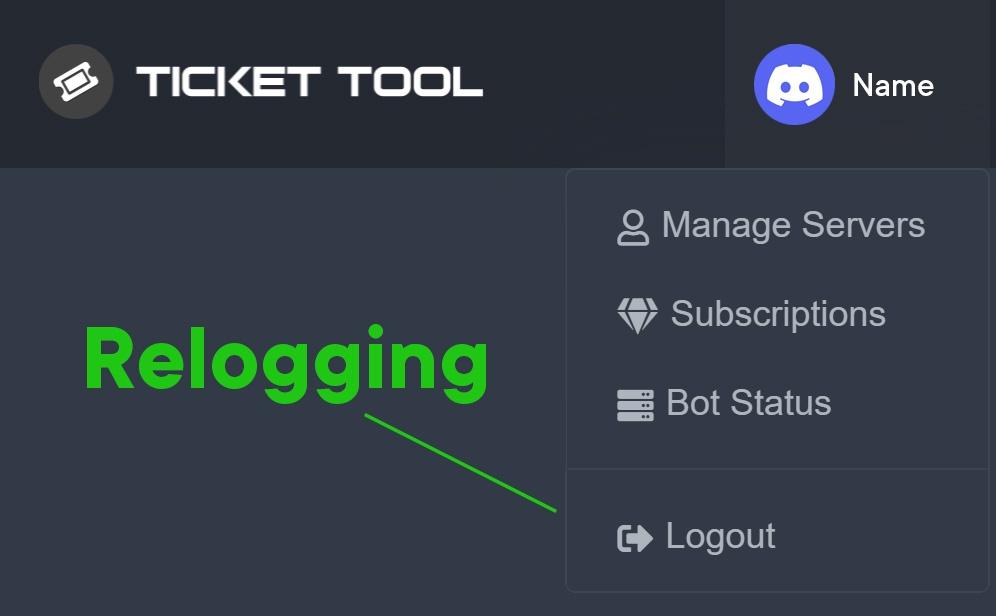 fallow ingot
@stone jungle ^
stone jungle
fallow ingot
<@!718464619907121293> ^
thanks i will try to use it
iron nightBOT
Gave +1 Rep to @fallow ingot
fallow ingot
ok anytime
stone jungle
fallow ingot
<@!718464619907121293> ^
thanks a lot
fallow ingot
yep np
fallow ingot
tropic flare
Hello, I'm having the same problem, I can't add the reaction embed to the channe...
Can you elaborate?
Try resending the panel.
tropic flare
fallow ingot
Can you elaborate?
Yes, I have already done that, but the error still persists.
 fallow ingot
tropic flare
Yes, I have already done that, but the error still persists.
fallow ingot
tropic flare
Yes, I have already done that, but the error still persists.
Does ticket tool have permissions?
$perms
humble sequoiaBOT
ᅠ
@pseudo glen requires the following permissions:
Add Reactions
Read Channels
Send Messages
Manage Messages
Embed Links
Attach Files
Read History
Manage Roles
To change the role permissions, you can go to your Discord Server ➞ Server Settings ➞ Roles ➞ @Ticket Tool
To change the channel permissions, you can go to your Channel Settings ➞ Permissions ➞ Ticket Tool
ᅠ
Note:
You can give Ticket Tool Administrative Permissions instead of all the permissions listed above, but it's entirely optional and NOT necessary.
fallow ingot
Ticket tool needs the above permissions^^
tropic flare
I gave admin permission only, is this an error?
fallow ingot
tropic flare
I gave admin permission only, is this an error?
Run $debug in the channel your trying to send the panel to.
tropic flare
Okay.
fallow ingot
And send a screenshot here.
jade topaz
So my question is, when a user creates a ticket, is it possible to make the ticket tool bot remove a role they have?
For example, if the role is "awaiting contact" and after they create the ticket the awaiting contract role gets automatically removed
and is their a command to move the ticket from one category to another?

@fallow ingot can u help with this please?
fallow ingot
That’s not possible.
fallow ingot
jade topaz
Dashboard > Your Server > Server Configs > General Options > Global Ticket limit set to at least 100
jade topaz
Did that and still get the same errors


clicked save as well
the server has alot of channels, like 100 channels already or more
fallow ingot
fallow ingot
Dashboard > Your Server > Server Configs > General Options > Global Ticket limit...
Follow this path.
 fallow ingot
jade topaz
fallow ingot
jade topaz
This has nothing to do with global ticket limit.
jade topaz
fallow ingot
Dashboard > Your Server > Server Configs > General Options > Global Ticket limit...
I dont see the option

oh server configs
ok
 obtuse ferry
i need help to set up my ticket support bot, any ideas how to do it in a channel?
jade topaz
got tickets workingnow
jade topaz
fallow ingot
This has nothing to do with global ticket limit.
How can I make the ticket channel name by the person who created the tickets name?
for ex if i make a ticket it gets renamed to Marcus
obtuse ferry
how do you set up the ticket tool?
obtuse ferry
jade topaz
How can I make the ticket channel name by the person who created the tickets nam...
yo do you know how to set up tickets?
fallow ingot
jade topaz
How can I make the ticket channel name by the person who created the tickets nam...
It’s a premium feature.
humble sequoiaBOT
You can check our documentation here.
You can also check #573205317870157855 for the basic setup.
Our documentation contains all the info you need about the bot to be able to setup and configure the bot however you like.
fallow ingot
@obtuse ferry ^
fallow ingot
jade topaz
got tickets workingnow
Good. Anything else?
jade topaz
Is their a command that lets me move a ticket to another channel?
fallow ingot
No.
jade topaz
I tried it by closing the ticket, it moves it to the next category but ofc when I reopen it it does back to the original
oh erm
humble sequoiaBOT
How to make Ticket Tool ping a role
To make ticket tool ping a role when a ticket is opened, go to the Dashboard -> Panel Configs -> Settings -> Ticket Options -> Ticket Message -> Message Text and do this:
{@Role name} This is case sensitive and the role must have @mentions enabled
fallow ingot
@jade topaz ^
fallow ingot
anytime
obtuse ferry
thanks
 sand token
So, looking for some advice possibly, we have a ticket on our discord that somehow bricked itself and locked everyone out when it was supposed to delete, even server owner can't see message history or delete the channel, ticket tool is in the channel but when you try and type it doesn't respond at all, it's been there for a while now and was looking for something we could try to get rid of it
fallow ingot
sand token
So, looking for some advice possibly, we have a ticket on our discord that someh...
Ok, so this is a Discord bug. You would have to contact Discord for them to remove the channel.
fallow ingot
Yep, no problem
fallow ingot
sand token
$thanks <@!768144576946110475>
it’s just thanks (me) :)
iron nightBOT
Gave +1 Rep to @sand token
jade topaz
how do you add people to tickets? like- add roles
 brisk sage
Anyone know if i set up a ticket panel and a bunch of people put in tickets under that panel if I then delete the panel will the tickets still exist or will they dissappear?
fallow ingot
jade topaz
how do you add people to tickets? like- add roles
You can’t add roles to people using Ticket tool. But you can add someone to a ticket using $add <user_ID> inside the ticket.
OPPS
jade topaz
oooh
fallow ingot
I typed wrong my apologies
jade topaz
its ok
i dont mean adding roles I mean like adding roles to ticket tool that allows those roles to view tickets
fallow ingot
brisk sage
Anyone know if i set up a ticket panel and a bunch of people put in tickets unde...
They will still exist.
You would have to delete them using the $delete command or manually.
fallow ingot
jade topaz
i dont mean adding roles I mean like adding roles to ticket tool that allows tho...
Like support?
jade topaz
yes
fallow ingot
$help support
humble sequoiaBOT
How to let support team see into a ticket
About support roles
A support role lets your support team see into tickets with out having to add them manually to each and every ticket.
You can add as many support roles as you like per panel.
NOTE that the way discord works all admins can see into tickets regardless of this.
How to set a support role
To set a Support role go to the Dashboard -> Panel Configs -> Settings -> General Options -> Support Team Roles.

NOTE that the support role will not be able to see into tickets that are already created..
fallow ingot
@jade topaz ^
fallow ingot
anytime
jade topaz
thanks @fallow ingot
iron nightBOT
Gave +1 Rep to @fallow ingot
jade topaz
^^
fallow ingot
:)

 pulsar echo
help
pulsar echo
$help
shut bolt
@pulsar echo @wanton night for commands use #🤖│bot-spam
humble sequoiaBOT
How to disable the premium bot
To disable the premium bot you will have to go to the Dashboard ➞ Server Configs ➞ Premium bot ➞ And on the right-hand side select the primary free bot in the drop down menu.
Premium features will still work on the normal bot.

 wanton night
shut bolt
<@!875365286105202728> <@!620443838070259718> for commands use <#910978476536905...
wanton night
shut bolt
<@!875365286105202728> <@!620443838070259718> for commands use <#910978476536905...
can u help me
ruby crystal
hey, Is there anybody who can give me help?

I open a ticket, but I don't want other to see except admin or mod, how to make it happen?
humble sequoiaBOT
━━ moved to ticket ━━
 rapid flax
How do create a ticket for my server because i am really stuck
 thorn island
I am trying to purchase premium, and i am trying to use paypal, but it keeps saying "Error 403 forbidden"
If anyone could help me out please.

 plush flicker
Hello there Ticket Tool Team.
My name is VIVID and would like to report that my premium subscription has only reflected on the dashboard once since I paid for it on the 6th of Feb 2022.
Whenever I click the ‘Redeem Premium’ button on the dashboard, I’m asked to input a Redeem code. Kindly advise on where I can get this redeem code?
plush flicker
thorn island
If anyone could help me out please.
-Try clearing your browser’s cache and try again.
-Also try using a different browser and see if it works.
-You can also try checking out via mobile
thorn island
plush flicker
-Try clearing your browser’s cache and try again.
-Also try using a different br...
I did think of that and tried that.
Tried on my Phone and PC.
Tried Using Firefox, DuckDuckGo, and Chrome.
They all do the same thing.
And cache was cleared.
 mystic hound
plush flicker
Hello there Ticket Tool Team.
My name is VIVID and would like to report that my...
mystic hound
plush flicker
Hello there Ticket Tool Team.
My name is VIVID and would like to report that my...
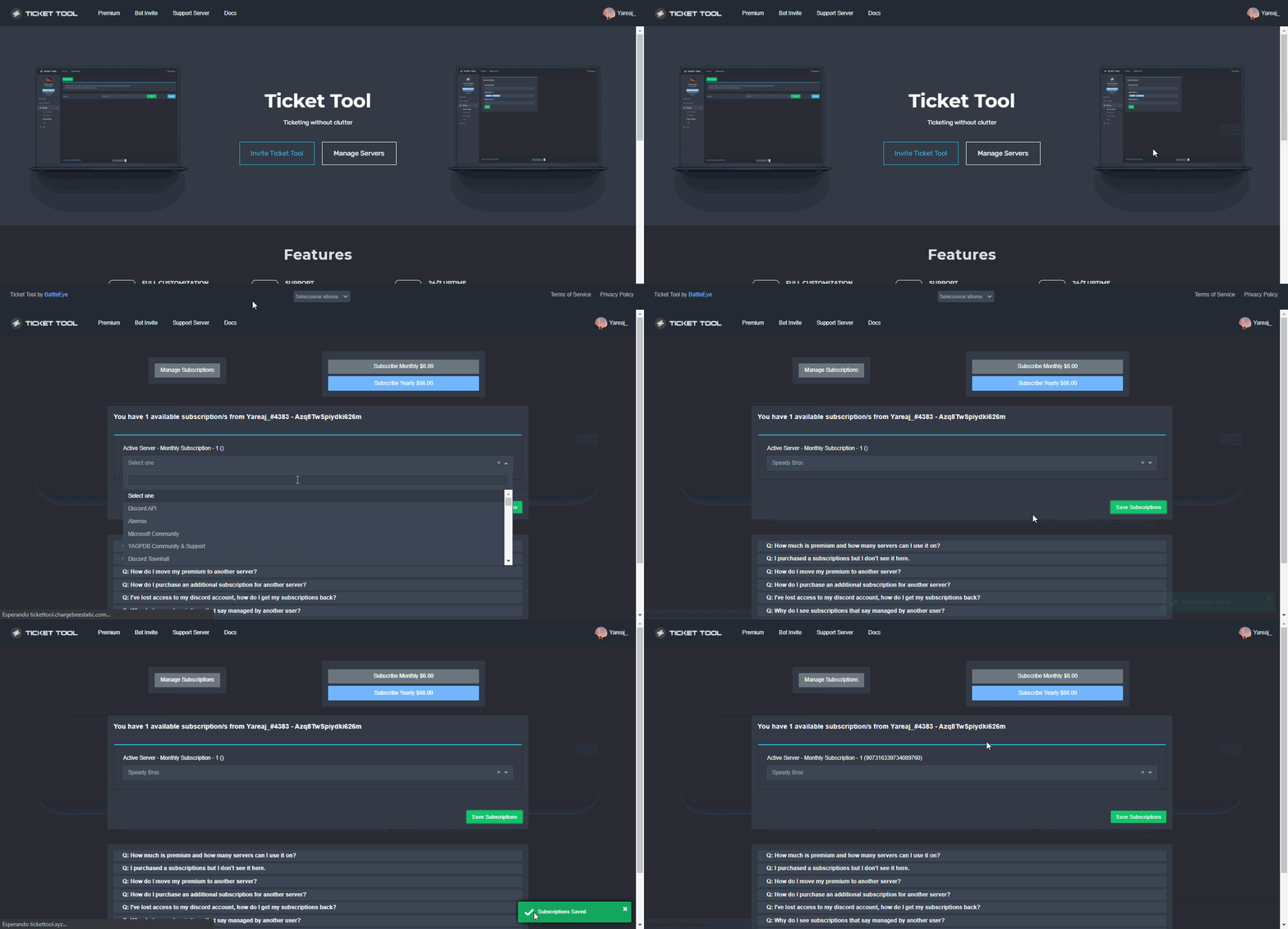
Make sure you've followed the below steps to apply premium to your server, once it's applied the dashboard will state "active - manage"
humble sequoiaBOT
Redeeming premium on your server is really simple. Just head over to your Subscriptions Page. There you can select a server of your choice, which will get premium. You can change the server at any point.
 mystic hound
thorn island
If anyone could help me out please.
mystic hound
thorn island
If anyone could help me out please.
I see your ticket, give me a moment to look into the issue
thorn island
mystic hound
I see your ticket, give me a moment to look into the issue
Thank you! 
iron nightBOT
Gave +1 Rep to @mystic hound
plush flicker
mystic hound
Make sure you've followed the below steps to apply premium to your server, once ...
Thanks for the quick response.
The server was already selected tp receive the premium subscription, lemme hit you up on the support ticket for more info
iron nightBOT
Gave +1 Rep to @mystic hound
humble sequoiaBOT
━━ moved to ticket ━━
 bright abyss
How do I make a multi panel
humble sequoiaBOT
Multipanels are a premium feature  that allow for a single panel with multiple buttons to open different tickets.
How to create a Multipanel
Premium users can combine multiple panels into one multipanel.
First, find the IDs of each panel you wish to combine. You can find them in your Panel Configs in the Dashboard
Next, send the multipanel to a channel using $panel [id1] [id2] {id3} ....
e.g. $panel 1 2 4 17 35 to combine panels 1, 2, 4, 17 and 35.
Up to 25 panels may be combined.
 fallow ingot
@bright abyss ^
bright abyss
Thanks tired doing one before and it ended up like this.
 fallow ingot
bright abyss
Thanks tired doing one before and it ended up like this.
fallow ingot
bright abyss
Thanks tired doing one before and it ended up like this.
Yeah you can change that.
Follow this path: Dashboard > Your server > Panel Configs > Settings > Button Options > Create ticket > Settings.
Then you can change the buttons name. @bright abyss
iron nightBOT
Gave +1 Rep to @fallow ingot
fallow ingot
anytime
 keen dagger
@fallow ingot
hello
how much money for the 2 months of premuim for the bot
the bot money
Ticket Tool Premium | 2 Months
 quiet venture
 jade topaz
How to close all tickets at once
Can u guys join my Minecraft pvp server or my meat server?
Also do transcript the code entirely, 4-//198(trance}
fallow ingot
jade topaz
How to close all tickets at once
That’s not possible, you would have to manually delete them or run $delete in each ticket for a quick deletion.
fallow ingot
quiet venture
Try updating your discord.
humble sequoiaBOT
Ticket Tool Premium
Get premium at https://tickettool.xyz/premium
Manage your subscriptions at https://tickettool.xyz/subscriptions
Why Premium?
Premium lets you customize the bot just how you want it. It also helps keep the bot running.
quiet venture
fallow ingot
Try updating your discord.
Okay Thanks
iron nightBOT
Gave +1 Rep to @fallow ingot
 tepid islandBOT

 16,866
fallow ingot
fallow ingot
humble sequoia
16,866
fallow ingot
fallow ingot
humble sequoia
@keen dagger
 rain parrot
hello
for the command [p]new what does the thing below it mean?
(when command style is enabled)
fallow ingot
rain parrot
for the command `[p]new` what does the thing below it mean?
Can you show me a screenshot of what you mean?
rain parrot
fallow ingot
Can you show me a screenshot of what you mean?
I figured it out but it was the (when command style is enabled) thing, found out needed to be done on the desk
dash*
rain parrot
fallow ingot
Can you show me a screenshot of what you mean?
thanks tho (:
iron nightBOT
Gave +1 Rep to @fallow ingot
fallow ingot
hmm okay
 winter carbon
hello, could someone help me if possible to try and get these indented sentences in the ticket panel I am creating?
 fallow ingot
winter carbon
hello, could someone help me if possible to try and get these indented sentences...
fallow ingot
winter carbon
hello, could someone help me if possible to try and get these indented sentences...
Everything’s the same, just add it.
I’m not sure what you mean, if you explain a little better maybe I’ll understand
winter carbon
fallow ingot
Everything’s the same, just add it.
I'm not sure how to - I want it to look like the screenshot above but I don't know how to add it in
fallow ingot
It would be the same so copy this > Any issues or queries will be addressed within your application ticket.
Into the dashboard
Then it will come out like this
Any issues or queries will be addressed within your application ticket.
winter carbon
amazing thank you so much! sorry for the dumb questions
 scenic zealot
Why if i open ticket or close
i get
The.
 humble sequoiaBOT
Update your discord App
Buttons are a relatively new addition to discord and don't work with some older versions of the app.
Please verify that you have the latest version of discord, by going to the app or play store.
Discord for the App Store
Discord for the Play Store
fallow ingot
@scenic zealot 
jade topaz
hi, im in admin in the server and we use ticket bot, but only owners can see the tickets which r opened, we tried to fix it to make it all staff can see but it doesn't work, what do we do ?
fallow ingot
$help support
humble sequoiaBOT
How to let support team see into a ticket
About support roles
A support role lets your support team see into tickets with out having to add them manually to each and every ticket.
You can add as many support roles as you like per panel.
NOTE that the way discord works all admins can see into tickets regardless of this.
How to set a support role
To set a Support role go to the Dashboard -> Panel Configs -> Settings -> General Options -> Support Team Roles.
NOTE that the support role will not be able to see into tickets that are already created..
fallow ingot
@jade topaz.
jade topaz
fallow ingot
<@456226577798135808>. <:this:336064002465595392>
thank u
iron nightBOT
Gave +1 Rep to @fallow ingot
fallow ingot
anytime
 runic creek
how to make the ticket doesnt delete after closing it?
 opaque panther
wondering if user can create more than 1 ticket at a time ?

 slow mesa
فيه عربي هنا
jade topaz
Hi guys the person in my server who opens the ticket doesn’t have access to it…..
 severe path
jade topaz
See this issue invalid from body
severe path
jade topaz
See this issue invalid from body
is your discord on your phone up to date? This often happens if you do not have the latest Discord version installed
severe path
jade topaz
Hi guys the person in my server who opens the ticket doesn’t have access to it…....
$help perms
humble sequoiaBOT
How to set the permissions for tickets
To set a change permissions go to the Dashboard -> Panel Configs -> Settings -> Permission Options
jade topaz
It doesn’t work if I give community members permission to see tickets everyone will see them @severe path
jade topaz
severe path
is your discord on your phone up to date? This often happens if you do not have ...
Ok wait let me try
jade topaz
severe path
is your discord on your phone up to date? This often happens if you do not have ...
THANKS SIR
iron nightBOT
Gave +1 Rep to @severe path
 vapid shoal
So I can’t make tickets at all, can’t use any of the controls, even in my own servers with the bot
Can’t close them, delete them, get transcripts..
I just get this
 severe path
is your discord on your phone up to date? This often happens if you do not have ...
severe path
severe path
is your discord on your phone up to date? This often happens if you do not have ...
@vapid shoal
jade topaz
Hello guys
anyone knows if we can make ticket number "0" again?

i mean can we restart it
 jade topaz
severe path
jade topaz
severe path
thank you so much!
iron nightBOT
Gave +1 Rep to @severe path
 quaint solar

 humble sequoiaBOT
Don't see your server in the dashboard?
You will possibly need to relog. Look below to see steps on how to relog.
How to relog in the Dashboard.
First, you will need to go to the dashboard. Once your there, click on your avatar on the top right. after you clicked it, you will see button that says Logout. You must click that. Once you have logged out, you can log back in.
Note:
You need one of these 3 things to access the dashboard.
1. Server Owner (Level: 6)
2. Server Administrator (Level: 4)
3. Dashboard Role (Level: 2)
:warning: You can check your level using $level on your Discord Server
User permission level with Ticket Tool
@User is permission level: 0 (User)
```» *If it shows that your permission is **0**, you don't have any of the above **3 things** to manage the dashboard.*


**See the picture below on how to relog:**@quaint solar
iron nightBOT
Gave +1 Rep to @fallow ingot
fallow ingot
anytime
 tranquil moat
come in
 alpine delta
humble sequoia
alpine delta
humble sequoia
This doesn’t really help ngl
fallow ingot
alpine delta
This doesn’t really help ngl
Is their something that you don’t understand?
maybe I can explain it better :)
 humble sequoiaBOT
ᅠ
@pseudo glen requires the following permissions:
Add Reactions
Read Channels
Send Messages
Manage Messages
Embed Links
Attach Files
Read History
Manage Roles
To change the role permissions, you can go to your Discord Server ➞ Server Settings ➞ Roles ➞ @Ticket Tool
To change the channel permissions, you can go to your Channel Settings ➞ Permissions ➞ Ticket Tool
ᅠ
Note:
You can give Ticket Tool Administrative Permissions instead of all the permissions listed above, but it's entirely optional and NOT necessary.
alpine delta
I see
fallow ingot
Make sure it also has access to the category
alpine delta
Thanks a lot :)
 teal apex
Can anyone send the perfix of the bot
shut bolt
teal apex
Can anyone send the perfix of the bot
By default its $
teal apex
Thx
shut bolt
Sure
 woven saddle
since removing premium bot and going back to free bot I can't close off any of my old open tickets
"Warning: This server isn't active, Please make sure this is the correct bot (premium vs free)"
shut bolt
woven saddle
"Warning: This server isn't active, Please make sure this is the correct bot (pr...
Did you selected the free bot back?
woven saddle
I selected the free bot on the dashboard yes
shut bolt
You'll need to use the commands instead of the buttons, make sure to resend your panels with the free bot as they can't communicate
The command thing will be only for the old ones
New tickets will work as regular
shut bolt
Sure
 late niche
Is it possible for someone to teach me how to make the bot sign or send a message when it opens?
humble sequoiaBOT
Help Options
$help commands - Information on commands
$help setup - Information on bot setup
$help faq - Frequently asked questions
You can check our documentation here.
You can also check #573205317870157855 for the basic setup.
Our documentation contains all the info you need about the bot to be able to setup and configure the bot however you like.
fallow ingot
@late niche ^
 undone laurel
bot will not join my server after going through invites and captcha :/
fallow ingot
Did you make sure you clicked the correct server?
Do you have any kind of security bot, that could or may have kicked Ticket Tool?
undone laurel
i checked the server twice, definitely had the right one. no other security bot, we do have a gatekeeper react system, but it's setup via zira
fallow ingot
anytime
humble sequoiaBOT
You can check our documentation here.
You can also check #573205317870157855 for the basic setup.
Our documentation contains all the info you need about the bot to be able to setup and configure the bot however you like.
shut bolt
Check this guide
iron nightBOT
Gave +1 Rep to @shut bolt
jade topaz
What is the best way to archive tickets for legal purposes?
 regal goblet
@lusty hollow Try updating your Discord App
humble sequoiaBOT
Update your discord App
Buttons are a relatively new addition to discord and don't work with some older versions of the app.
Please verify that you have the latest version of discord, by going to the app or play store.
Discord for the App Store
Discord for the Play Store
 lusty hollow
regal goblet
<@!787510870162014208> Try updating your Discord App
lusty hollow
regal goblet
<@!787510870162014208> Try updating your Discord App
Wait the second
 steady sand
can my staff still see a ticket after i claim it?
humble sequoiaBOT
━━ moved to ticket ━━
jade topaz
jade topaz
What is the best way to archive tickets for legal purposes?
Is there an automatic way to archive tickets into a Gdrive or S3 folder after they are closed? (html archive file)
 humble sequoiaBOT
━━ moved to ticket ━━
fallow ingot
jade topaz
Is there an automatic way to archive tickets into a Gdrive or S3 folder after th...
No.
jade topaz
@shut bolt I am active
shut bolt
jade topaz
<@518666147441278998> I am active
.-.
jade topaz
$panel
shut bolt
jade topaz
$panel
You must run the command on your server, not here
 forest zinc
Hi!
fallow ingot
Hello!
forest zinc
I was making my panel in ticket tool premium, but I realized that when I click on my create button, a personal message appears, could I deactivate that?
 weary grove
jade topaz
weary grove
jade topaz
pls web link
 fallow ingot
No sorry you can't disable that.
forest zinc
So, that message is going to be there, for every user that makes a ticket?
fallow ingot
Correct.
weary grove
...
forest zinc
thanks for the help!
fallow ingot
forest zinc
they should do that optional
you can suggest it, but I don't think they can do anything not sure tho.
fallow ingot
forest zinc
thanks for the help!
yep, anytime.
jade topaz
How do I use ticket command
 short stump
jade topaz
How do I use ticket command
short stump
jade topaz
How do I use ticket command
which command?
 short stump
jade topaz
short stump
jade topaz
so you're basically looking to setup ticket tool?
or just the multi pannel?
jade topaz
Wait
humble sequoiaBOT
You can check our documentation here.
You can also check #573205317870157855 for the basic setup.
Our documentation contains all the info you need about the bot to be able to setup and configure the bot however you like.
 desert summit
forest zinc
they should do that optional
desert summit
forest zinc
they should do that optional
Just the ticket-user See it, Not the whole channel. No worries 🤷♂️
jade topaz
fallow ingot
No sorry you can't disable that.
so are you a bot mod 🧍♀️
fallow ingot
jade topaz
so are you a bot mod 🧍♀️
no?
 acoustic sapphire
So anyone in my server can get to my ticket bot dashboard hut I didnt give then permissions to do so in the roles
How to fix
 humble sequoiaBOT

The new Discord Buttons allow for a much smoother and convenient experience. They reduce lag and work much better than emojis. With ticket tool you can edit all the buttons however you like! Buttons can show emojis, text and can have 4 different colors.
Where can I edit them?
Dashboard ➞ Panel Configs ➞ Settings ➞ Button Options ➞ Setting
 jade topaz
OH SHIT THANKS LOL
fallow ingot
acoustic sapphire
So anyone in my server can get to my ticket bot dashboard hut I didnt give then ...
Can you elaborate?
acoustic sapphire
Fixed it, didnt look good enough in the dashboard settings 🙂
fallow ingot

jade topaz

how do i remove the "create ticket here" and the xyz thing and just have the green button
i have premium too but idk if that matters
 primal nacelle
I’m trying to create a panel but it is not letting me adding to the channel
 lilac girder
jade topaz
how do i remove the "create ticket here" and the xyz thing and just have the gre...
lilac girder
jade topaz
how do i remove the "create ticket here" and the xyz thing and just have the gre...
hover on the message and you should see a cross beside the embed, just click the cross and it should disappear
lilac girder
primal nacelle
I’m trying to create a panel but it is not letting me adding to the channel
make sure the bot can view and send messages in that channel
lilac girder
np
primal nacelle
lilac girder
make sure the bot can view and send messages in that channel
Will check that
 fallow ingot
Ticket Tool doesn't have perms to view or send messages in the channel you are trying to send the panel to.
Ticket tool needs the following perms:
$perms
humble sequoiaBOT
ᅠ
@pseudo glen requires the following permissions:
Add Reactions
Read Channels
Send Messages
Manage Messages
Embed Links
Attach Files
Read History
Manage Roles
To change the role permissions, you can go to your Discord Server ➞ Server Settings ➞ Roles ➞ @Ticket Tool
To change the channel permissions, you can go to your Channel Settings ➞ Permissions ➞ Ticket Tool
ᅠ
Note:
You can give Ticket Tool Administrative Permissions instead of all the permissions listed above, but it's entirely optional and NOT necessary.
fallow ingot
@primal nacelle
primal nacelle
fallow ingot
<@!698587139658481735> <:this:894279341108772914>
I have that in the the website
Let me try discord settings
fallow ingot
You need it for the channel and category.
 brave torrent
Everyone time I try to close a ticket or open a ticket it says “interaction failed”
fallow ingot
brave torrent
Everyone time I try to close a ticket or open a ticket it says “interaction fail...
Are you on a mobile device?
brave torrent
Yeah
humble sequoiaBOT
Update your discord App
Buttons are a relatively new addition to discord and don't work with some older versions of the app.
Please verify that you have the latest version of discord, by going to the app or play store.
Discord for the App Store
Discord for the Play Store
fallow ingot
brave torrent
Thanks!!
fallow ingot
anytime
primal nacelle
fallow ingot
<@!698587139658481735> <:this:894279341108772914>
Fixed bud thanks
iron nightBOT
Gave +1 Rep to @fallow ingot
fallow ingot
primal nacelle
Fixed bud thanks
Brilliant! Anytime
primal nacelle
fallow ingot
Brilliant! Anytime
Another question
I cant get to send the tickets to the category
And I did it on the panel

 neat bobcat
Sorry
 copper owl
neat bobcat
copper owl
neat bobcat
Update your discord
neat bobcat
🥲
copper owl
if there is no update, delete and reinstall
neat bobcat
Memory isn't enough.
fallow ingot
primal nacelle
fallow ingot
Did you click save?
Yes I did
fallow ingot
primal nacelle
Yes I did
And ticket tool has access to the category?
humble sequoiaBOT
Ticket Tool Invite & Support
fallow ingot
@charred drift ^
 fallow ingot
Refresh your dashboard, and make sure the category you set is still there.
If not, add your new category and save. Then try opening a ticket again.
primal nacelle
fallow ingot
Refresh your dashboard, and make sure the category you set is still there.
I have done that
Not sure why the ticket can’t save the category
jade topaz
When I add the bot to a server, it does not give me the option to configure it, what can I do?
fallow ingot
jade topaz
When I add the bot to a server, it does not give me the option to configure it, ...
You must go for the dashboard to configure the bot.
fallow ingot
primal nacelle
I have done that
Run $debug in your server and tell me once you’ve done it.
jade topaz
fallow ingot
You must go for the dashboard to configure the bot.
The server does not appear in the dashboard
humble sequoiaBOT
Don't see your server in the dashboard?
You will possibly need to relog. Look below to see steps on how to relog.
How to relog in the Dashboard.
First, you will need to go to the dashboard. Once your there, click on your avatar on the top right. after you clicked it, you will see button that says Logout. You must click that. Once you have logged out, you can log back in.
Note:
You need one of these 3 things to access the dashboard.
1. Server Owner (Level: 6)
2. Server Administrator (Level: 4)
3. Dashboard Role (Level: 2)
:warning: You can check your level using $level on your Discord Server
User permission level with Ticket Tool
@User is permission level: 0 (User)
```» *If it shows that your permission is **0**, you don't have any of the above **3 things** to manage the dashboard.*


**See the picture below on how to relog:**@jade topaz
jade topaz
fallow ingot
<@456226577798135808> <:this:894279341108772914>
Thanks
iron nightBOT
Gave +1 Rep to @fallow ingot
fallow ingot
jade topaz
Thanks
anytime
jade topaz
Hello, is there an option that prevents members from closing the ticket
fallow ingot
jade topaz
Hello, is there an option that prevents members from closing the ticket
Yep indeed there is. Head to Dashboard > Panel Configs > Settings > Button Options > Close ticket and enable  Support Team only
jade topaz
fallow ingot
Yep indeed there is. Head to Dashboard > Panel Configs > Settings > Button Optio...
thx bro💙
iron nightBOT
Gave +1 Rep to @fallow ingot
fallow ingot
anytime
 grim stirrup
hi
 cunning flower
Hi - How do we add someone as a support to the tickets ?
I tried /support but it doesn't seem to work
fallow ingot
$help support
humble sequoiaBOT
How to let support team see into a ticket
About support roles
A support role lets your support team see into tickets with out having to add them manually to each and every ticket.
You can add as many support roles as you like per panel.
NOTE that the way discord works all admins can see into tickets regardless of this.
How to set a support role
To set a Support role go to the Dashboard -> Panel Configs -> Settings -> General Options -> Support Team Roles.
NOTE that the support role will not be able to see into tickets that are already created..
fallow ingot
@cunning flower
grim stirrup
how can i set in which category tickets appear
cunning flower
Oh
I got to ask the admin who added it to do it
I don't have access to the dashboard
Thanks
fallow ingot
anytime
cunning flower
@thanks aaronxyas
fallow ingot
$help category
humble sequoiaBOT
How to set the open category
To set a open category go to the Dashboard -> Panel Configs -> Settings -> Category Options -> Category Open
cunning flower
thanks @fallow ingot
iron nightBOT
Gave +1 Rep to @fallow ingot
grim stirrup
fallow ingot
$help category
ty
iron nightBOT
Gave +1 Rep to @fallow ingot
fallow ingot
grim stirrup
ty
anytime
 civic gazelle
iv added the ticket bot to my server but it isnt showing up in my dashbord
humble sequoiaBOT
━━ moved to ticket ━━
 cosmic wraith
I’m having an issue all it tells me is interaction failed
cosmic wraith
Let me rephrase it’s telling me that when I try to open a ticket
tribal cedar
Yes sir update your client
 surreal island
how do i setup when people make differnt kinda tickets it names it "general support ticket0001 or Billy Bobs Support Ticket0001"
 humble sequoiaBOT
The ticket name is the default channel name of all tickets. To edit it, go to your Dashboard > Panel Configs > Settings > Ticket Options. There you can edit the channel name of opened and closed tickets. You can also use variables in there.
 Note: This is a premium feature
shut bolt
Note: This is a premium feature
shut bolt
Edit the default name of each panel
surreal island
shut bolt
Edit the default name of each panel
you need premium for that dont you
shut bolt
surreal island
you need premium for that dont you
Indeed
 surreal island
ok just checking
shut bolt
Cool :)
 drowsy harbor
Hey guys I have a problem. I bought premium but I can't still open a more tickets like admin of the server. Thanks in forward.
 shut bolt
drowsy harbor
Hey guys I have a problem. I bought premium but I can't still open a more ticket...
shut bolt
drowsy harbor
Hey guys I have a problem. I bought premium but I can't still open a more ticket...
$help limit
humble sequoiaBOT
How to set a ticket limit
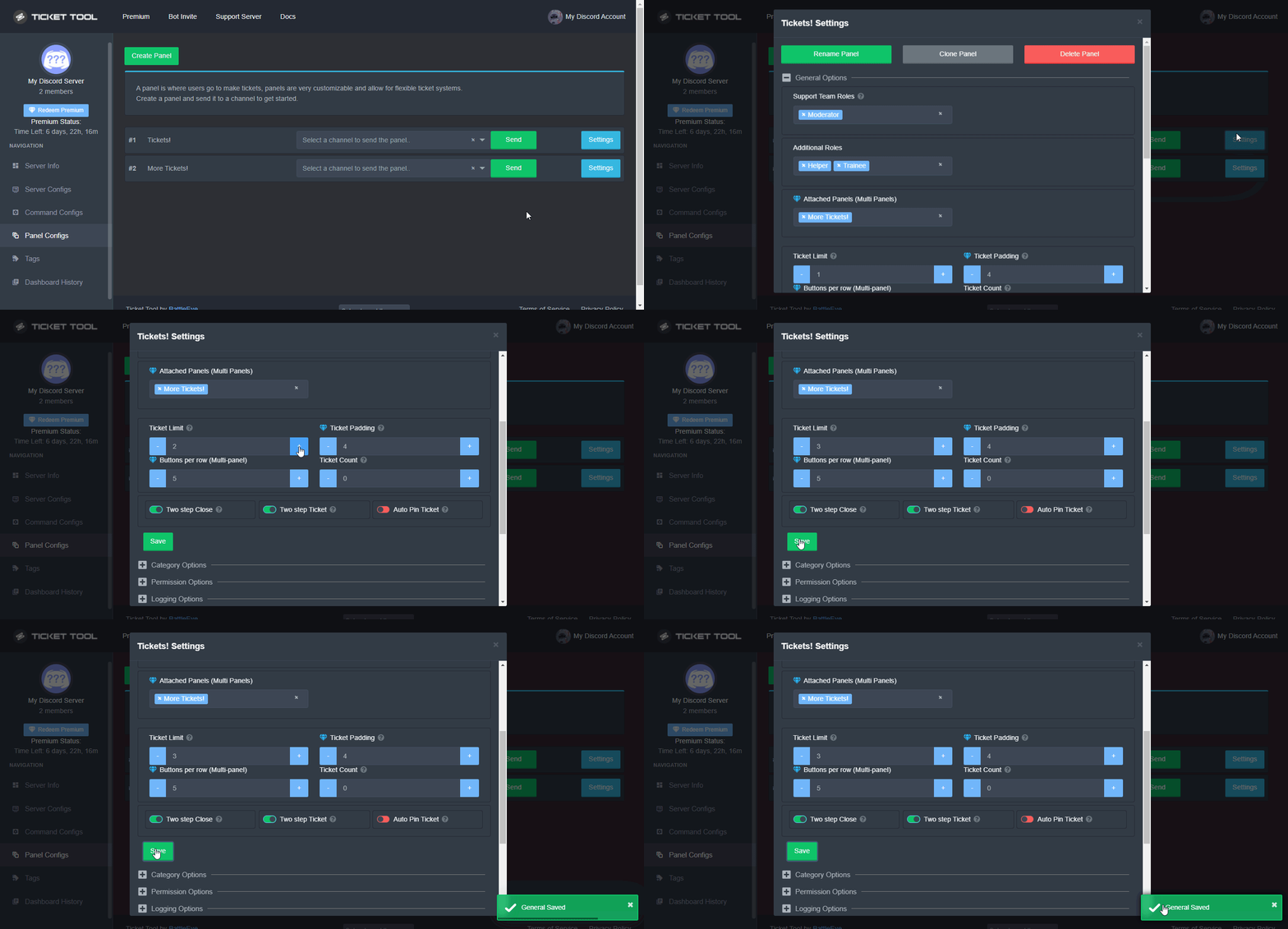
A ticket limit may be set per panel to prevent users from spamming tickets. By default this limit is set to 3. Once a user hits this limit the bot will notify the users that they reached the limit.
To set a ticket limit go to the Dashboard -> Panel Configs -> Settings -> General Options -> Ticket Limit
 shut bolt
Check your panel limit
drowsy harbor
shut bolt
Check your panel limit
Thanks mate for help. ❤️
iron nightBOT
Gave +1 Rep to @shut bolt
shut bolt
drowsy harbor
Thanks mate for help. ❤️
Sure
 deep jungle
Hello, i need help
its not letting me send my pannel
and i gave it admin?
$help debug
humble sequoiaBOT
Help Options
$help commands - Information on commands
$help setup - Information on bot setup
$help faq - Frequently asked questions
 fluid adder
Guys, help. what to do?

 undone rampart
how do i make this https://cdn.discordapp.com/attachments/946964772182720532/946965140203503626/unknown.png ?

 tidal bane
$help setup
humble sequoiaBOT
Setting up Ticket Tool
Visit the docs for setup info
General Setup
 brisk flume
Guys
fallow ingot
brisk flume
Guys
?
humble sequoiaBOT
Update your discord App
Buttons are a relatively new addition to discord and don't work with some older versions of the app.
Please verify that you have the latest version of discord, by going to the app or play store.
Discord for the App Store
Discord for the Play Store
fallow ingot
@fluid adder ^^
 raw topaz

Bro not ticket tool related
We have 2800 members but whenever I use @ everyone it only tag 236+
Do you guys have any idea? Hehe
humble sequoiaBOT

⚠️ You're in the wrong place
We provide support for @pseudo glen discord bot and cannot help you with whatever issue you have.
- Please make sure to contact the appropriate Support Team.
If you don't have any further questions regarding our bot Ticket Tool, please close this ticket
raw topaz
Did you encounter stuff like this beforeM
 steady mason
hello
I also added the bot on my discord server and it kicked me and when I re-entered it came out alone do you know why?
lapis idol
steady mason
hello
I also added the bot on my discord server and it kicked me and when I re-e...
what do you mean by this?
steady mason
lapis idol
what do you mean by this?
its ok I solved
 oak quest
Im dont can open any ticket
This is on another server

 lapis idol
oak quest
Im dont can open any ticket
This is on another server
lapis idol
oak quest
Im dont can open any ticket
This is on another server
please make sure your discord is updated!
oak quest
Ok
jade topaz
Missing required option: [User/Role] (optional channel) i get this message when trying to add a user in the ticket
fixed nvm
 ruby stratus
can i add a new button to an existing panel?
fallow ingot
ruby stratus
can i add a new button to an existing panel?
Not possible at this time (to the extent of my knowledge)
ruby stratus
ok
fallow ingot
You can suggest it
 onyx fiber
what perms do i need, to use the dashboard
shut bolt
onyx fiber
what perms do i need, to use the dashboard
You'll need to be the Server Owner, or to have Administrator permission, or to have a Dashboard role
onyx fiber
i should have admin but i dont see it in the dashboard
humble sequoiaBOT
Don't see your server in the dashboard?
You will possibly need to relog. Look below to see steps on how to relog.
How to relog in the Dashboard.
First, you will need to go to the dashboard. Once your there, click on your avatar on the top right. after you clicked it, you will see button that says Logout. You must click that. Once you have logged out, you can log back in.
Note:
You need one of these 3 things to access the dashboard.
1. Server Owner (Level: 6)
2. Server Administrator (Level: 4)
3. Dashboard Role (Level: 2)
:warning: You can check your level using $level on your Discord Server
User permission level with Ticket Tool
@User is permission level: 0 (User)
```» *If it shows that your permission is **0**, you don't have any of the above **3 things** to manage the dashboard.*


**See the picture below on how to relog:**can i set a specific category that the tickets will be created under
jade topaz
How can we claim tick tool premium?
lapis idol
jade topaz
How can we claim tick tool premium?
have you already purchased it?
onyx fiber
lapis idol
Yes!
i cant seem to find it
jade topaz
lapis idol
have you already purchased it?
Yea my friend need help to add the bot @jade topaz
humble sequoiaBOT
 humble sequoiaBOT
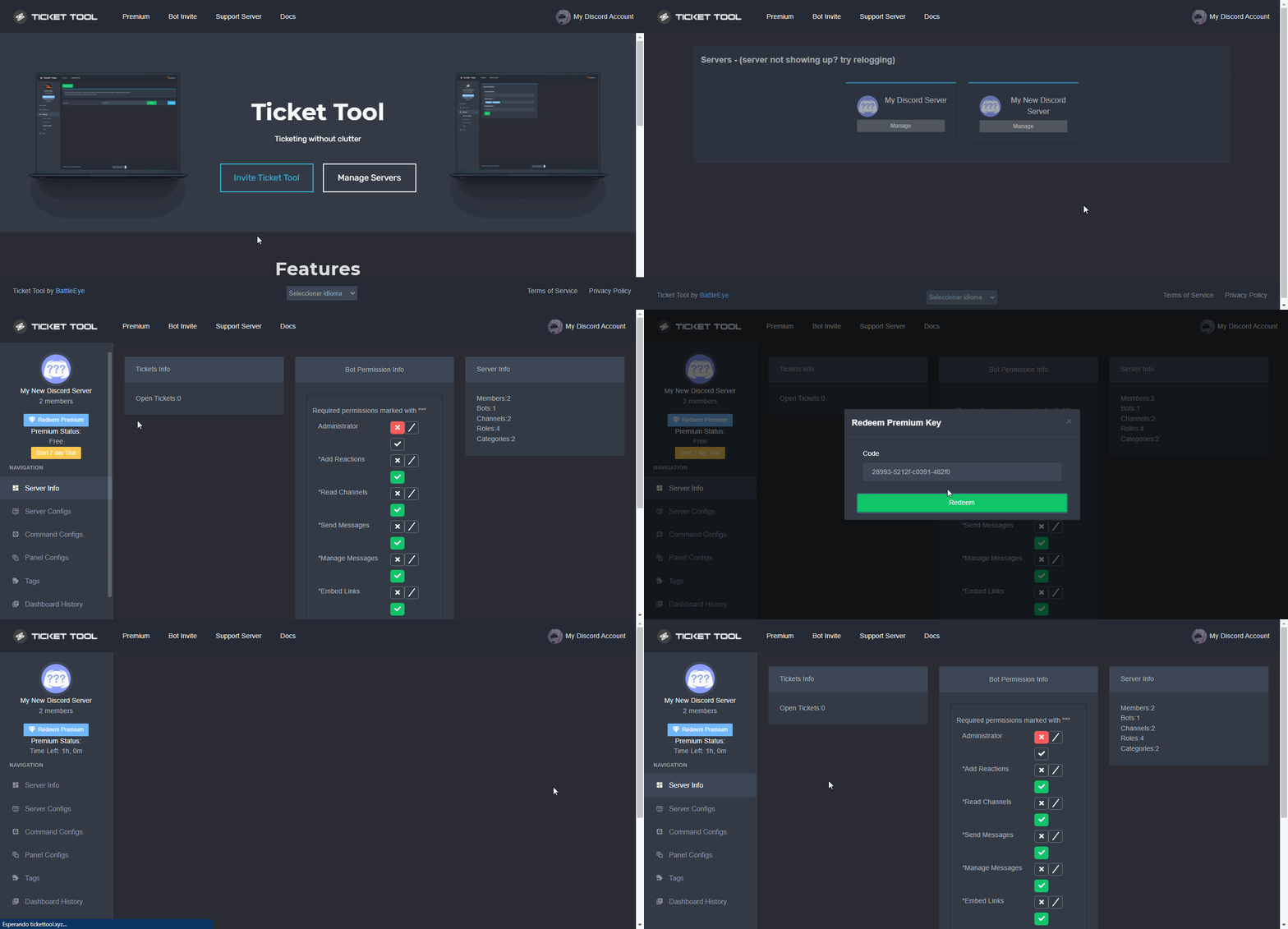
Redeeming premium on your server is really simple. Just head over to your Subscriptions Page. There you can select a server of your choice, which will get premium. You can change the server at any point.
How to redeem premium (Key)
To redeem your premium key, go to the dashboard, select your server, then click " Redeem Premium" under the server's icon and name.
 jovial mesa
Is there a way to gift someone else a monthly subscription?
fallow ingot
jovial mesa
Is there a way to gift someone else a monthly subscription?
not that i'm aware of, you can transfer them it tho.
 green saffron
is there a way to save all transcripts automatic so that if my server gets deleted i still have them or do you just have to save them manually
fallow ingot
green saffron
is there a way to save all transcripts automatic so that if my server gets delet...
You can enable it so that when you close/delete a ticket it will automatically save. It is a premium feature but that won't be a problem as it appears you have premium.
jade topaz
Hello, everytime is try to make a new ticket it tells me this interaction is failed does anybody know what i can do
fallow ingot
fallow ingot
You can enable it so that when you close/delete a ticket it will automatically s...
If you would like to enable that simply head to Dashboard > Panel Configs > Settings > Logging Options and enable Auto Save Transcript, make sure to pick if you would like to auto save it when it gets closed or deleted.
fallow ingot
jade topaz
Hello, everytime is try to make a new ticket it tells me this interaction is fai...
hiya there
are you on a mobile device?
fallow ingot
fallow ingot
If you would like to enable that simply head to Dashboard > Panel Configs > Sett...
@green saffron
jade topaz
fallow ingot
are you on a mobile device?
Yes
humble sequoiaBOT
Update your discord App
Buttons are a relatively new addition to discord and don't work with some older versions of the app.
Please verify that you have the latest version of discord, by going to the app or play store.
Discord for the App Store
Discord for the Play Store
fallow ingot
jade topaz
Thx

 twilit mortar
how do you make it so when you close the ticket, it automatically saves the transcript?
 dry sage
fallow ingot
You want to remove the footer?
dry sage
fallow ingot
You want to remove the footer?
Just edit
fallow ingot
twilit mortar
how do you make it so when you close the ticket, it automatically saves the tran...
This is a premium feature.
fallow ingot
dry sage
Just edit
This is also a premium feature.
fallow ingot
twilit mortar
thanks
anytime
fallow ingot
you can edit the main embed just not the footer.
dry sage
fallow ingot
you can edit the main embed just not the footer.
Ok thank uu
iron nightBOT
Gave +1 Rep to @fallow ingot
fallow ingot
anytime
 young basalt
so ive got two tickets set up in my server and i was wondering if there is any way of separating them so i know which a person has clicked on. like if i had them go to a different category?
fallow ingot
$help category
humble sequoiaBOT
How to set the open category
To set a open category go to the Dashboard -> Panel Configs -> Settings -> Category Options -> Category Open
young basalt
ah okay gracias
fallow ingot
anytime
 plucky monolith
hi does anyone know how i can get the ticket channel to open?
so when user clicks on create ticket. i'd like to have the ticket channel open below the support where this message is displayed

 candid iron
I can’t make a ticket in any of the servers
fallow ingot
plucky monolith
so when user clicks on create ticket. i'd like to have the ticket channel open b...
Does a channel (ticket) not open when someone clicks on the button?
plucky monolith
fallow ingot
Does a channel (ticket) not open when someone clicks on the button?
it does but it puts it at the top of the server channel directory listing. i want it below
candid iron
I can’t even make a ticket in no server I need help 🥺
fallow ingot
candid iron
I can’t make a ticket in any of the servers
Can you show me a screenshot of what it says when you attempt to open it?
$help category
humble sequoiaBOT
How to set the open category
To set a open category go to the Dashboard -> Panel Configs -> Settings -> Category Options -> Category Open
candid iron
Yh one sec
fallow ingot
humble sequoia
@plucky monolith
 fallow ingot
Okay, common issue
plucky monolith
fallow ingot
<:this:894279341108772914> <@!241618718164123648>
cool let me try that thanks
iron nightBOT
Gave +1 Rep to @fallow ingot
humble sequoiaBOT
Update your discord App
Buttons are a relatively new addition to discord and don't work with some older versions of the app.
Please verify that you have the latest version of discord, by going to the app or play store.
Discord for the App Store
Discord for the Play Store
fallow ingot
plucky monolith
cool let me try that thanks
anytime
candid iron
K
fallow ingot
You should be able to open tickets once you update it.
plucky monolith
fallow ingot
anytime
so i have this set

however it doesn't work
i'm still using the free version of the bot
fallow ingot
Does ticket tool have permissions to view the category you’ve set?
 humble sequoiaBOT
ᅠ
@pseudo glen requires the following permissions:
Add Reactions
Read Channels
Send Messages
Manage Messages
Embed Links
Attach Files
Read History
Manage Roles
To change the role permissions, you can go to your Discord Server ➞ Server Settings ➞ Roles ➞ @Ticket Tool
To change the channel permissions, you can go to your Channel Settings ➞ Permissions ➞ Ticket Tool
ᅠ
Note:
You can give Ticket Tool Administrative Permissions instead of all the permissions listed above, but it's entirely optional and NOT necessary.
fallow ingot
plucky monolith
cool that works
is there way to setup to delete on close ticket instead of having to click delete button again after ticket is closed?
like soon as someone closes the ticket, it just deletes
fallow ingot
You can disable two step close, witch means when you run $close it deletes.
fallow ingot
plucky monolith
is there way to setup to delete on close ticket instead of having to click delet...
Dashboard > Panel Configs > Settings > General Options and disable Two step close
plucky monolith
fallow ingot
Dashboard > Panel Configs > Settings > General Options and disable <:offswitch:8...


do i also need to disable two-step ticket ?
fallow ingot
Did you click save?
plucky monolith
i did
fallow ingot
ok bare with me one moment
@plucky monolith ok my apologies.
You can disable both of them.
fallow ingot
plucky monolith
The two step ticket removes the three end options, and automatically closes. And the two step close removes the Are you sure you want to close this ticket message.
$invite
humble sequoiaBOT
Ticket Tool Invite & Support
 vital matrix
fallow ingot
vital matrix
fallow ingot
You just asked for ticket tool invite…
but ok
Experiencing some miss communication
plucky monolith
fallow ingot
You can disable both of them.
awesome that worked. thanks
iron nightBOT
Gave +1 Rep to @fallow ingot
plucky monolith
have a great day!
 tepid magnet
Why I can't open ticket
 stuck tangle
Hay ayuda en español 
tribal cedar
I can not atm
fallow ingot
Just send a screenshot if possible:)
tepid magnet
When I click no thing do
tribal cedar
Update your discord client
fallow ingot
Are you on a mobile device?
tepid magnet
Plz come Share screen
 craggy brook
heya i need help
tepid magnet
fallow ingot
Are you on a mobile device?
Yes
humble sequoiaBOT
Update your discord App
Buttons are a relatively new addition to discord and don't work with some older versions of the app.
Please verify that you have the latest version of discord, by going to the app or play store.
Discord for the App Store
Discord for the Play Store
fallow ingot
@tepid magnet ^^
tribal cedar
craggy brook
heya i need help
Sup
tepid magnet
What should I do ?
humble sequoiaBOT
We would love to help you, but if you don't tell us what you need help with we can't help you :(
fallow ingot
@craggy brook ^
craggy brook
tribal cedar
Sup
hey problem i got is im inv it to a server but when i go to the dashboard it dont show the server?
tribal cedar
tepid magnet
What should I do ?
Update your discord client
humble sequoiaBOT
Don't see your server in the dashboard?
You will possibly need to relog. Look below to see steps on how to relog.
How to relog in the Dashboard.
First, you will need to go to the dashboard. Once your there, click on your avatar on the top right. after you clicked it, you will see button that says Logout. You must click that. Once you have logged out, you can log back in.
Note:
You need one of these 3 things to access the dashboard.
1. Server Owner (Level: 6)
2. Server Administrator (Level: 4)
3. Dashboard Role (Level: 2)
:warning: You can check your level using $level on your Discord Server
User permission level with Ticket Tool
@User is permission level: 0 (User)
```» *If it shows that your permission is **0**, you don't have any of the above **3 things** to manage the dashboard.*


**See the picture below on how to relog:**When I click with anthore acc I can !!
craggy brook
thanks @tribal cedar
iron nightBOT
Gave +1 Rep to @tribal cedar
tribal cedar
tepid magnet
When I click with anthore acc I can !!
On the same device?
tepid magnet
Can I send vid ?
tepid magnet
tribal cedar
On the same device?
Yes
No I try now but I can't
thanks @tribal cedar
iron nightBOT
Gave +1 Rep to @tribal cedar
tepid magnet

tribal cedar
Anytime.
 clever lotus
Can someone explain the concept of the "Ticket Limit" setting to me?
fallow ingot
clever lotus
Can someone explain the concept of the "Ticket Limit" setting to me?
Ticket limit is the amount of tickets a user can open at a certain time.
So if it’s set to 1
clever lotus
is there a way to set it to infinite?
fallow ingot
You could just set it to 10 or something, but I recommend you keep it at 1 so users don’t spam open tickets - completely your choice.
iron nightBOT
Gave +1 Rep to @fallow ingot
 fallow ingot
@viscid narwhal Can you provide a screenshot please?

 tender totem
Hi, is there a quick way to close a lot of tickets at the same time?
As we got around 300 or more open tickets.
I guess its still a no :/
 fallow ingot
 viscid narwhal
Are you on mobile?
fallow ingot
tender totem
Hi, is there a quick way to close a lot of tickets at the same time?
As we got ...
Unfortunately not.
viscid narwhal
fallow ingot
Are you on mobile?
Yes
humble sequoiaBOT
Update your discord App
Buttons are a relatively new addition to discord and don't work with some older versions of the app.
Please verify that you have the latest version of discord, by going to the app or play store.
Discord for the App Store
Discord for the Play Store
fallow ingot
@viscid narwhal ^
shut bolt
Reinstall the app then
humble sequoiaBOT
Don't see your server in the dashboard?
You will possibly need to relog. Look below to see steps on how to relog.
How to relog in the Dashboard.
First, you will need to go to the dashboard. Once your there, click on your avatar on the top right. after you clicked it, you will see button that says Logout. You must click that. Once you have logged out, you can log back in.
Note:
You need one of these 3 things to access the dashboard.
1. Server Owner (Level: 6)
2. Server Administrator (Level: 4)
3. Dashboard Role (Level: 2)
:warning: You can check your level using $level on your Discord Server
User permission level with Ticket Tool
@User is permission level: 0 (User)
```» *If it shows that your permission is **0**, you don't have any of the above **3 things** to manage the dashboard.*
**See the picture below on how to relog:** eager sundial
Question, how do I change who can answer tickets
I only see a option to add dashboard people and that doesn't give them permission to answer a help ticket
shut bolt
eager sundial
Question, how do I change who can answer tickets
$help support
humble sequoiaBOT
How to let support team see into a ticket
About support roles
A support role lets your support team see into tickets with out having to add them manually to each and every ticket.
You can add as many support roles as you like per panel.
NOTE that the way discord works all admins can see into tickets regardless of this.
How to set a support role
To set a Support role go to the Dashboard -> Panel Configs -> Settings -> General Options -> Support Team Roles.
NOTE that the support role will not be able to see into tickets that are already created..
eager sundial
shut bolt
$help support
Tysm
shut bolt
Sure
iron nightBOT
Gave +1 Rep to @shut bolt
shut bolt
eager sundial
Thanks <@518666147441278998>
Sure
 ruby pivot
does it say i am on phone?
 little helm
$help
humble sequoiaBOT
Help Options
$help commands - Information on commands
$help setup - Information on bot setup
$help faq - Frequently asked questions
shut bolt
little helm
$help
#🤖│bot-spam
 shut bolt
jade topaz
how to fix pls
shut bolt
jade topaz
how to fix pls
Add an overflow category, you have reached the category's limit of channels (50)
To add an overflow category: https://i.imgur.com/Z3TGbGu.gif
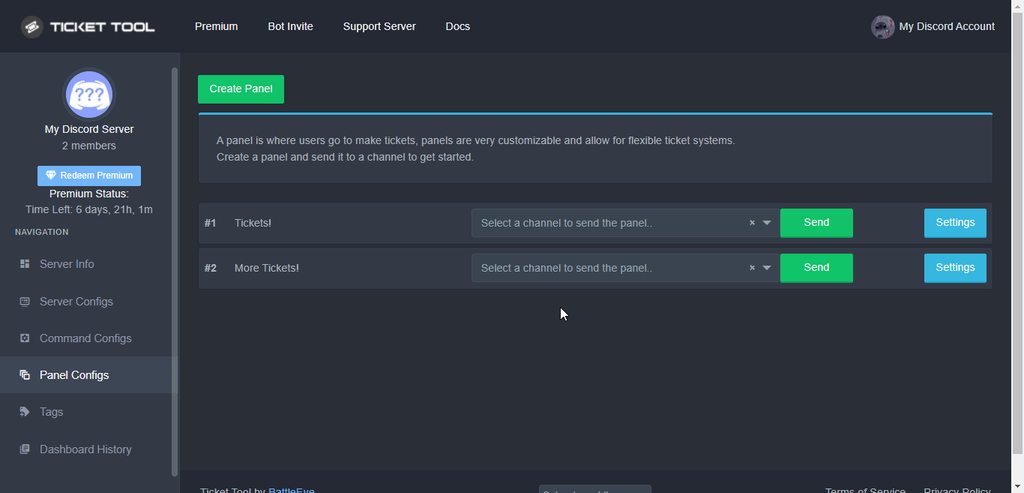 humble sequoiaBOT
You can check our documentation here.
You can also check #573205317870157855 for the basic setup.
Our documentation contains all the info you need about the bot to be able to setup and configure the bot however you like.
jade topaz
Is there a way to add people to a ticket, without going into dashboard?
shut bolt
jade topaz
Is there a way to add people to a ticket, without going into dashboard?
To add to a single ticket you can use the add command
$help add
humble sequoiaBOT
How to add or remove users on tickets
To add a user to a ticket use $add <user>
To remove a user from a ticket use $remove <user>
shut bolt
Sure
jade topaz
Thanks @shut bolt !
iron nightBOT
Gave +1 Rep to @shut bolt
jade topaz
shut bolt
Sure <:smil:936485535403356221>
Can i make it so that when someone opens a ticket they cant close the ticket
shut bolt
jade topaz
Can i make it so that when someone opens a ticket they cant close the ticket
No need on answering to one of my messages
You can just ask here and wait
jade topaz
ooh yeah i apologise
shut bolt
jade topaz
Can i make it so that when someone opens a ticket they cant close the ticket
Yeah, you can, make your Close button to be Support Team Only
https://i.imgur.com/GVpH46T.gif
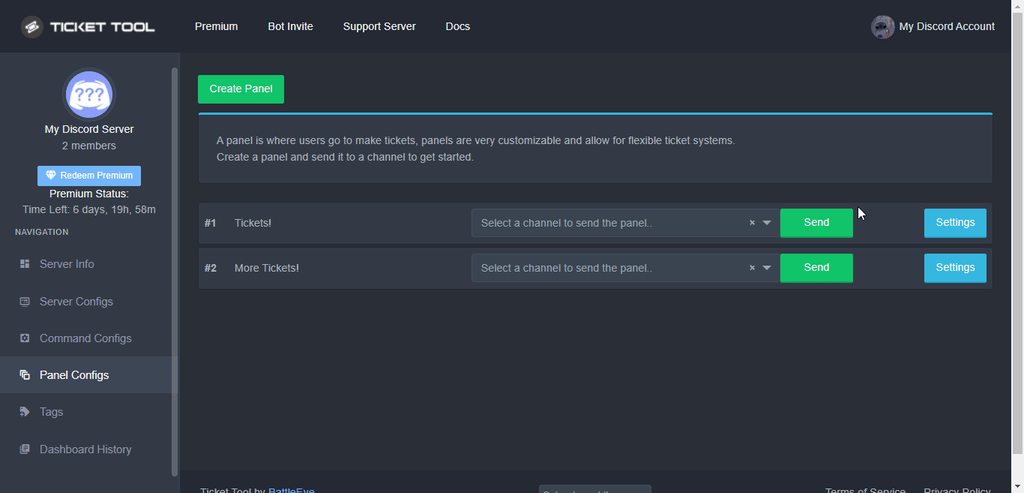 jade topaz
Thanks!
shut bolt
Sure
jade topaz
thanks @shut bolt
iron nightBOT
Gave +1 Rep to @shut bolt
shut bolt
If you want them not to be able to do it via command, you should do the same for the $close command
https://i.imgur.com/2GJOhno.gif
 shut bolt
jade topaz
thanks <@!518666147441278998>
shut bolt
jade topaz
thanks <@!518666147441278998>
Sure
 clear ginkgo
How to I change the color thingy?
shut bolt
clear ginkgo
How to I change the color thingy?
You mean the embed line color?
shut bolt
Which embed? The panel's one, or the ticket message's one?
clear ginkgo
The ticket one I think
humble sequoiaBOT
The Ticket Message is the first message sent by the bot in a new ticket. To customise it head over to your Dashboard ➞ Panel Configs ➞ Settings ➞ Ticket Options ➞ Edit Ticket Message
 shut bolt
And on the bottom part of that page you'll be able to edit the embed's color
https://i.imgur.com/YX53lR0.png
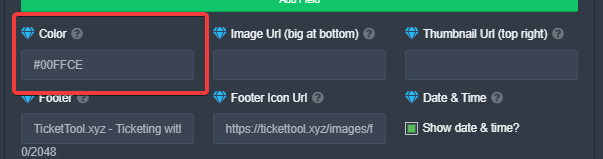 clear ginkgo
Ty
shut bolt
Sure
green saffron
fallow ingot
You can enable it so that when you close/delete a ticket it will automatically s...
yeah but my server seeems to get delete a lot, and i would love for a way to somehoe saves thoses
fallow ingot
green saffron
yeah but my server seeems to get delete a lot, and i would love for a way to som...
you can only save them in the ticket openers DM’s or a channel in your server.
 earnest wraith
I only understand simple English..
Even though mmr is 1200, it's always tier E. How can I fix it?
humble sequoiaBOT
⚠️ You're in the wrong place
We provide support for @pseudo glen discord bot and cannot help you with whatever issue you have.
- Please make sure to contact the appropriate Support Team.
If you don't have any further questions regarding our bot Ticket Tool, please close this ticket
 fair willow
how to add the premium bot???
humble sequoiaBOT
━━ moved to ticket ━━
copper owl
if you've opened a ticket, you don't have to ask in multiple channels
earnest wraith
oK! thx!
First of all, thank you for starting from getting the ticket. Is there any inquiry in Japanese?
copper owl
We don't have Japanese support, no
we can try helping using a translator, but it seems like your inquiry is not related to Ticket Tool
earnest wraith
Thank you.
So do you know where to ask this question?
earnest wraith
ok.thx
fair willow
Hi may i know how to bypass the rename problem (timeout) in ticket tool Premium bot
fair willow
then why the non premium bot can ...
fair willow
so if i want to bypass i need to do it manually?
copper owl
Yup
fair willow
ok then 😭
jade topaz
How to create new one?
 humble sequoiaBOT
For a more convenient use of multipanels, you can now combine panels on the dashboard. This will allow you to directly send the multipanel from the dashboard or via the $panel ID command.
Where can I find this?
You can find this setting on the Dashboard -> Panel Configs -> Settings -> General Options
Note: if you're attaching all the panels to a panel called English, don't include English in the attached panels box (If you do this, it will create duplicate)
This will put all buttons from all of your panels on one message. The message is the panel message from the panel you're combining these panels in.
Note: This is a premium feature
copper owl
@jade topaz create as many panels as you want buttons, then follow the steps above
jade topaz
Thxx
 twin plinth
Just a quick question: In the transcripts channel where the bot tags all the members in the ticket, if there tag is their Discord ID and I can't click on it, does that mean they left the discord?
copper owl
not entirely
depends, discord is just weird with that
sometimes it means they left, sometimes it fixes itself and you can press on it
it's even worse on mobile
jade topaz
What’s the problem 

 dusky torrent
how many channels ticket tool can create without premium? @copper owl
dusky torrent
copper owl
Dont ping us. thanks :)
Okay.
copper owl
im also not available to help out currently. sorry
slender minnow
dusky torrent
how many channels ticket tool can create without premium? <@!548583124062175232>
as long as you dont hit discord limits 500 should be the max including your other channels besides tickets
copper owl
dusky torrent
But that's hard to answer?
While im driving, yes
dusky torrent
slender minnow
as long as you dont hit discord limits 500 should be the max including your othe...
Oh that's doen't matter premium?
dusky torrent
slender minnow
nope
Thank u a lot.
iron nightBOT
Gave +1 Rep to @slender minnow
slender minnow
regardless of whether it is open tickets, closed tickets, staff channels or general channels
dusky torrent
copper owl
While im driving, yes
Sorry, But i don't understand, you can warn me but you can't help :/
Nvm. sorry if im waste your time.
slender minnow
dusky torrent
Sorry, But i don't understand, you can warn me but you can't help :/
They are just obeying the traffic rules, that is, not to use phone while driving. Also, pinging a support team member is against #546557408902905896 (would suggest going through it once again to avoid trouble in future).
copper owl
dusky torrent
Sorry, But i don't understand, you can warn me but you can't help :/
Correct, because I was on the road already.
Im not exactly sure what's confusing. A verbal warning takes a few seconds, while helping you could take a lot longer.
I also need to concentrate on the road while driving, so yeah.
 cinder owl


