
#🆘│community-support
1 messages · Page 373 of 1
 humble sequoiaBOT
 hard cape

hard cape
Why?
 summer goblet
I’m not sure
 jade topaz
It will work
summer goblet
Can you join my server and help me do it?
hard cape
I cant, sorry.
jade topaz
I can
summer goblet
Ok
jade topaz
Wht
 copper owl
Normal users can join eachothers servers and do it for them.
BUT if anyone abuses their perms and nukes your server, that is not our responsibility nor our concern
 hard cape
summer goblet
Ok
hard cape
summer goblet
Ok
Just tell me What is not working. Please
copper owl
it is recommended to keep it here. Now what happens from your actions, not something we can do anything about except if it's from a support member, which most likely wouldn't happen.
jade topaz
.
hard cape
What?
 austere relic
Can anyone help me? Why is this happening?
 hard cape
hey
You have reached limit of channels
@austere relic
So u probaly have a lot of opened tickets
You need to delete them by using command $delete
austere relic
Ok, thank you very much ❤️
hard cape
No problem!
 topaz wedge
Hello ,
I am trying to pay my premium subscription using my paypal balance but it always tries to use the card and the card is expired
I was wondering if I can try to pay from somewhere else ?
hard cape
Hey
 shut bolt
topaz wedge
Hello ,
I am trying to pay my premium subscription using my paypal balance but i...
shut bolt
topaz wedge
Hello ,
I am trying to pay my premium subscription using my paypal balance but i...
Heya, when trying to do a payment with paypal balance you should do it to the bot's email rather than the page, as our support is currently closed let me ask something for ya
hard cape
I'm not Billing team, so i cant help you with that. Sorry
topaz wedge
shut bolt
Heya, when trying to do a payment with paypal balance you should do it to the bo...
So just send the money to the bot and I will keep the bot active ?
If so what is the email .
hard cape
On 27th of December you will be abble to create a ticket in #🎫│make-a-ticket
shut bolt
topaz wedge
So just send the money to the bot and I will keep the bot active ?
If so what is...
When doing that you'll receive a key for the time you pay for, now, I must confirm something before redirecting you to the email as our support is closed, except for billing, that's why I'm confirming something
I'll be opening a ticket for ya, there you should read the ticket message and will have the instructions
topaz wedge
Alright thanks so much !
shut bolt
topaz wedge
Alright thanks so much !
Sure!
topaz wedge
thanks @shut bolt
 iron nightBOT
Gave 1 Rep to Yareaj_ (current: #2 - 264)

 rain mauve
hey try to restric the bot only to ticket channel some help with that ?
hard cape
Just give me permissions to picked channel
shut bolt
rain mauve
hey try to restric the bot only to ticket channel some help with that ?
You should remove the bot administrator permissions if it has them, after that remove the reading perm for the channels you don't want it to be seen
hard cape
@rain mauve
shut bolt
hard cape
<@851387006662606900>
There is no need to double ping them
hard cape
shut bolt
There is no need to double ping them
K
topaz wedge
Alright sent them just no access to pinging the team 🙂
copper owl
topaz wedge
Alright sent them just no access to pinging the team 🙂
the ticket already pinged them
so just be patient :D
 dry silo
ابي اسوي تكت كيف
topaz wedge
copper owl
so just be patient :D
Alright 🙂
 robust sandalBOT
dry silo
ابي اسوي تكت كيف
robust sandalBOT
dry silo
ابي اسوي تكت كيف
 NGM
NGM
Jak bych chtěl udělat t-tech?
 Arabic (ar) → Czech (cs)
hard cape
dry silo
ابي اسوي تكت كيف
Arabic (ar) → Czech (cs)
hard cape
dry silo
ابي اسوي تكت كيف
ماذا تعني؟
topaz wedge
He wants to open a ticket in his server and is asking how
robust sandalBOT
dry silo
انا اريد اسوي تكت بسيرفري
NGM
I want to make a T-plate in serfree.
Arabic (ar) → English (en)
hard cape
dry silo
انا اريد اسوي تكت بسيرفري
$help panel
humble sequoiaBOT
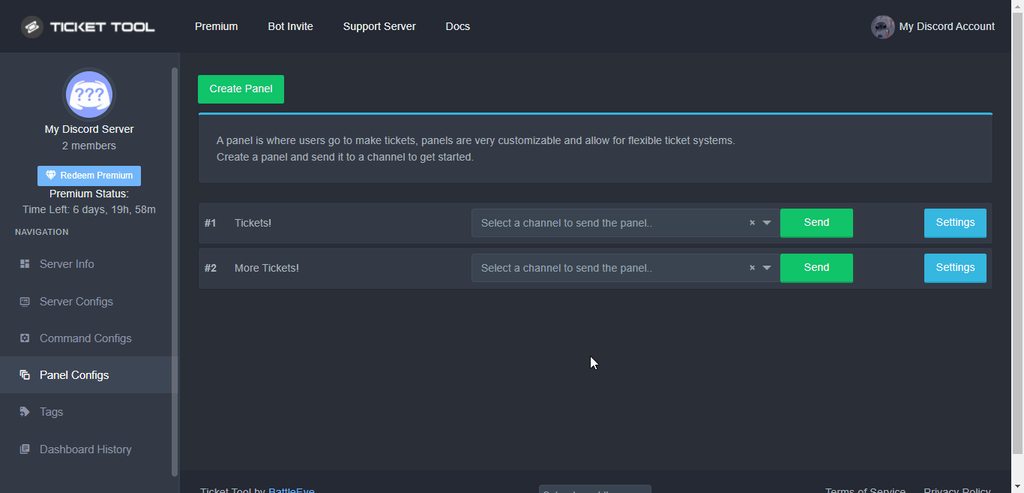
Creating a panel
To create a panel we are going to need to head over to the panel configs on the dashboard
Once at the dashboard we will need to click Create Panel
Enter a panel name (Fill in any optional settings you want)
Click Create Panel and your ready to get started with configuring your panel
An example of a creating a panel is shown below.
dry silo
hard cape
$help panel
Ok
robust sandalBOT
dry silo
ماهو الامر
NGM
O co jde?
Arabic (ar) → Czech (cs)
hard cape
dry silo
Ok
ثم اسمحوا لي أن أعرف إذا كان يعمل
 rocky bronze
@hard cape what do I do?
hard cape
You want to set up ticket tool?
rocky bronze
Yes.
hard cape
Did u invited him?
rocky bronze
Yes.
hard cape
$help panel
humble sequoiaBOT
Creating a panel
To create a panel we are going to need to head over to the panel configs on the dashboard
Once at the dashboard we will need to click Create Panel
Enter a panel name (Fill in any optional settings you want)
Click Create Panel and your ready to get started with configuring your panel
An example of a creating a panel is shown below.
hard cape
rocky bronze
I click dashboard?
hard cape
Yes, click on Dashboard and create a panel
hard cape
humble sequoia
There’s a tutorial
 tawny prism
I need help sor
tawny prism
 humble sequoiaBOT

⚠️ You're in the wrong place
We provide support for @pseudo glen discord bot and cannot help you with whatever issue you have.
- Please make sure to contact the appropriate Support Team.
If you don't have any further questions regarding our bot Ticket Tool, please close this ticket
tawny prism
My kin coin not showing full balance sir
hard cape
Thats not question about ticket tool
tawny prism
Please anyone help me
copper owl
no one can help you regarding that issue in this server
as mentioned by D<3
this is not the correct server to ask for such support
rocky bronze
hard cape
Thats not question about ticket tool
Okay what do I do on this screen?
 tawny prism
Support is not responsible
hard cape
rocky bronze
Okay what do I do on this screen?
Click the button in the top (left side)
rocky bronze
hard cape
Click the button in the top (left side)
Then what?
hard cape
Panel configs
rocky bronze
Okay.
 formal jay
help
hard cape
Hey!
formal jay
how do i set up for my sever
hard cape
$help panel
humble sequoiaBOT
Creating a panel
To create a panel we are going to need to head over to the panel configs on the dashboard
Once at the dashboard we will need to click Create Panel
Enter a panel name (Fill in any optional settings you want)
Click Create Panel and your ready to get started with configuring your panel
An example of a creating a panel is shown below.
formal jay
or well my friend's sever
humble sequoiaBOT
Any role you put there will have full access to the ticket tool dashboard. The server owner and users with admin permissions already have access to the dashboard.
Be careful of which roles to put here
 formal jay
ok
hard cape
humble sequoia
is how can your friend give you a db role
formal jay
k
hard cape
@rocky bronze , did u created a panel?
 hard cape
$perms
humble sequoiaBOT
ᅠ
@pseudo glen requires the following permissions:
Add Reactions
Read Channels
Send Messages
Manage Messages
Embed Links
Attach Files
Read History
Manage Roles
To change the role permissions, you can go to your Discord Server ➞ Server Settings ➞ Roles ➞ @Ticket Tool
To change the channel permissions, you can go to your Channel Settings ➞ Permissions ➞ Ticket Tool
ᅠ
Note:
You can give Ticket Tool Administrative Permissions instead of all the permissions listed above, but it's entirely optional and NOT necessary.
 hard cape
Ticket tool needs these permissions
rocky bronze
I did?
hard cape
No, u didnt.
 rocky bronze
Yeah when I try to give it perm it won’t let me click on anything?

It doesn’t let me change perms.
 hard cape
 rocky bronze
Then?
hard cape
Or just click on Edit channel And give permissions
rocky bronze
 hard cape
Hold the channel (the ticket channel), then click on “Edit channel”,
Then click on this


 rocky bronze
What do I do after giving perms?
hard cape
Try to create the ticket
iron nightBOT
Gave 1 Rep to D<3 (current: #21 - 35)
hard cape
No problem!
robust sandalBOT
 wet ferry
مايظهرلي البانل بلوحة تحكم
wet ferry
مايظهرلي البانل بلوحة تحكم
 ! 𝐇𝐲𝐃𝐫𝐀 , Ho
Nechápu banal na kontrolní desce.
Arabic (ar) → Czech (cs)
robust sandalBOT
wet ferry
مايظهرلي البانل بلوحة تحكم
! 𝐇𝐲𝐃𝐫𝐀 , Ho
I don't get the banal on a control board.
Arabic (ar) → English (en)
hard cape
wet ferry
مايظهرلي البانل بلوحة تحكم
Will u try say it in english Please?
wet ferry
I dont speak english : (
hard cape
Oop, with What u need help? U can Send a pic, then i can Use translator
dry silo
ابي افتح تكت كيف
wet ferry
hard cape
Oop, with What u need help? U can Send a pic, then i can Use translator
حليت المشكلة
robust sandalBOT
wet ferry
حليت المشكلة
! 𝐇𝐲𝐃𝐫𝐀 , Ho
Vyřešil jsem problém.
Arabic (ar) → Czech (cs)
hard cape
Nice
robust sandalBOT
dry silo
ابي افتح تكت كيف
NGM
Chci otevřít t-tech.
Arabic (ar) → Czech (cs)
hard cape
dry silo
ابي افتح تكت كيف
Send a pic
hard cape
@copper owl , What ابي افتح تكت كيف means?
dry silo
@copper owl
copper owl
he wants to know how to open a ticket
hard cape
Okk
dry silo
كيف اسوي تكت
hard cape
dry silo
ابي افتح تكت كيف
$help panel
humble sequoiaBOT
Creating a panel
To create a panel we are going to need to head over to the panel configs on the dashboard
Once at the dashboard we will need to click Create Panel
Enter a panel name (Fill in any optional settings you want)
Click Create Panel and your ready to get started with configuring your panel
An example of a creating a panel is shown below.
copper owl
dry silo
<@548583124062175232>
بلا منشن...
robust sandalBOT
copper owl
بلا منشن...
 Neptune
Žádné spuštění...
Arabic (ar) → Czech (cs)
dry silo
hard cape
$help panel
ماعرف انقليزي
robust sandalBOT
dry silo
ماعرف انقليزي
NGM
Neumím anglicky
Arabic (ar) → Czech (cs)
copper owl
ما فيني اساعدك حاليا.
dry silo
تمام
 robust sandalBOT
copper owl
ما فيني اساعدك حاليا.
Neptune
robust sandalBOT
copper owl
ما فيني اساعدك حاليا.
Neptune
Nemohu vám pomoci právě teď.
Arabic (ar) → Czech (cs)
robust sandalBOT
dry silo
تمام
NGM
Všichni
Persian (fa) → Czech (cs)
 wraith nimbus
Is there a way to ban keywords in tickets?
please @ me if you have an answer
wraith nimbus
hard cape
It’s not available rn! <@170280998586679297>
Ok, thanks for the quick response! ❤️
iron nightBOT
Gave 1 Rep to D<3 (current: #21 - 36)
hard cape
No problem!
 glass yoke
Please
copper owl
wraith nimbus
Is there a way to ban keywords in tickets?
please @ me if you have an answer
what are you looking for exactly?
like blacklisting words within tickets?
glass yoke
autumn Fox#0530
Send me link but hacked link
hard cape
copper owl
like blacklisting words within tickets?
Like it will black list a mean words or something like that I think
glass yoke
This is the second time
copper owl
hard cape
Like it will black list a mean words or something like that I think
yeah it possible with a 3rd party bot
copper owl
glass yoke
autumn Fox#0530
Send me link but hacked link
one moment
just give the moderation bot access to tickets
hard cape
So it’s not available with ticket tool?
copper owl
not available with ticket tool no, but it is possible still
hard cape
Cause I know he can use other bots
dry silo
hard cape
<@896162730564796468>
احتاج احد يخش سيرفري يسويلي تكت
robust sandalBOT
dry silo
احتاج احد يخش سيرفري يسويلي تكت
NGM
Potřebuji někoho, kdo by se dostal na server, aby mě přilepil.
Arabic (ar) → Czech (cs)
robust sandalBOT
copper owl
ما حدى ح يعملك يها صديقي
Neptune
Nikdo ti to neudělá, můj příteli
Arabic (ar) → Czech (cs)
robust sandalBOT
copper owl
فينا بس نسعدك
Neptune
Můžeme vám jen udělat radost.
Arabic (ar) → Czech (cs)
hard cape
@wraith nimbus , you can black list words, but not with ticket tool.
wraith nimbus
hard cape
<@170280998586679297> , you can black list words, but not with ticket tool.
oh!?
copper owl
Hunter
you can just give a moderation bot access to the tickets
so it automods any blacklisted words you blacklist
hard cape
I though u were asking if ticket tool can do that
copper owl
so it's technically possible, just not directly with ticket tool
dry silo
بتقدر تسعدني يصديقي @hard cape
wraith nimbus
copper owl
you can just give a moderation bot access to the tickets
Fantastic! Where might I do that? Through discord roles I assume.
robust sandalBOT
dry silo
بتقدر تسعدني يصديقي <@832329623596957797>
NGM
Můžeš mi udělat radost, můj příteli?
Arabic (ar) → Czech (cs)
copper owl
wraith nimbus
Fantastic! Where might I do that? Through discord roles I assume.
just make the bot's role a support role
it'll give the bot access to tickets
copper owl
dry silo
بتقدر تسعدني يصديقي <@832329623596957797>
ايش المشكلة صديقي؟
robust sandalBOT
copper owl
ايش المشكلة صديقي؟
Neptune
Co je s tebou, příteli?
Arabic (ar) → Czech (cs)
hard cape
@wraith nimbus There are a lot of bots what can black list words
wraith nimbus
hard cape
<@170280998586679297> There are a lot of bots what can black list words
I will give mee6 administrator and add the role in the panel options
hard cape
Most easily is MEE6 to set
wraith nimbus
yep! I got it set up 🙂
hard cape
wraith nimbus
I will give mee6 administrator and add the role in the panel options
I don’t recommend to put a lot of black listed words btw, just add most important
Because then it may not work properly. @wraith nimbus
wraith nimbus
hard cape
Because then it may not work properly. <@170280998586679297>
for sure!
copper owl
there's no need to double ping
tbh just dont ping after you answer, just answer their questions and leave it at that
if they dont answer back, then their issue is most likely resolved
wraith nimbus
Thanks for the assistance 
hard cape
Idk why I always have to ping 2 times
copper owl
wraith nimbus
Thanks for the assistance <a:salute:893843132809101323>
anytime
hard cape
$help panel
humble sequoiaBOT
Creating a panel
To create a panel we are going to need to head over to the panel configs on the dashboard
Once at the dashboard we will need to click Create Panel
Enter a panel name (Fill in any optional settings you want)
Click Create Panel and your ready to get started with configuring your panel
An example of a creating a panel is shown below.
hard cape
@uneven vector , there is how
 shut bolt
 ashen solstice
Hello, bot don't answer at $help and $debug
ashen solstice
Hello, bot don't answer at $help and $debug
Hey
Can you give us the server ID?
shut bolt
Great, please stand by a minute
ashen solstice
Okk
humble sequoiaBOT
How to disable the premium bot
To disable the premium bot you will have to go to the Dashboard ➞ Server Configs ➞ Premium bot ➞ And on the right-hand side select the primary free bot in the drop down menu.
Premium features will still work on the normal bot.
 shut bolt
Try this please
You have selected the wrong bot and the bot is apparently not in your server
 solid stream
$help panel
humble sequoiaBOT
Creating a panel
To create a panel we are going to need to head over to the panel configs on the dashboard
Once at the dashboard we will need to click Create Panel
Enter a panel name (Fill in any optional settings you want)
Click Create Panel and your ready to get started with configuring your panel
An example of a creating a panel is shown below.
 alpine jacinth
can someone help me
im not fluent at english
so i dont understood everything from help list
can someone help me
how can i put the "Create Ticket" button on a message?
solid stream
Look a the message above
alpine jacinth
thank you
solid stream
You don't put the words on the button, you send a message that has the button on it already.
solid stream
$help support
alpine jacinth
its who get access to create a ticket?
humble sequoiaBOT
How to let support team see into a ticket
About support roles
A support role lets your support team see into tickets with out having to add them manually to each and every ticket.
You can add as many support roles as you like per panel.
NOTE that the way discord works all admins can see into tickets regardless of this.
How to set a support role
To set a Support role go to the Dashboard -> Panel Configs -> Settings -> General Options -> Support Team Roles.

NOTE that the support role will not be able to see into tickets that are already created..
 green tulip
 alpine jacinth
everyone who is on the channel can create a ticket, right?
solid stream
Yes.
green tulip
what is this?
alpine jacinth
ok thx
solid stream
green tulip
Run $debug in the channel, likely ticket Tool has a permissions issue.
Not this one..
On your server, in the same channel as your panel.
 wind token
Anyone know if online transcripts delete after the bot is kicked?
copper owl
wind token
Anyone know if online transcripts delete after the bot is kicked?
nope
as long as the transcript message itself is saved
everything should be good
once a transcript message is deleted, the link will no longer work
wind token
ohhh
can i transcript ticket on other channel?
copper owl
you can define a transcript channel in the dashboard, or you can use $transcript #channel so you save it somewhere else
 potent cloak
How can I re-open a closed ticket?
copper owl
potent cloak
How can I re-open a closed ticket?
pressing the Open button or using $open
wind token
copper owl
you can define a transcript channel in the dashboard, or you can use `$transcrip...
oh,
I deleted the messages and I have no transcripts
copper owl
$help transcript
humble sequoiaBOT
How do I save transcript to a channel?
To save transcripts to a channel go to the Dashboard -> Panel Configs -> Settings -> Logging Options -> Transcript Channel
 copper owl
here's how you can set a new transcript message
potent cloak
Is it possible to open a deleted ticket?
wind token
yeah but i deleted ticket and message so too late ;((
copper owl
potent cloak
Is it possible to open a deleted ticket?
nope, youll have talk to discord to restore the discord channel
copper owl
wind token
yeah but i deleted ticket and message so too late ;((
you can talk to discord as I mentioned to Raff. Unfortunately once a message or channel is deleted, it's out of our control to help
 eternal summit
How i create that? (This print is from a another server)
 wind token
copper owl
you can talk to discord as I mentioned to Raff. Unfortunately once a message or ...
wind token
copper owl
you can talk to discord as I mentioned to Raff. Unfortunately once a message or ...
it's not that important, but thanks ❤️
copper owl
wind token
it's not that important, but thanks ❤️
Anytime
hard cape
$help panel
humble sequoiaBOT
Creating a panel
To create a panel we are going to need to head over to the panel configs on the dashboard
Once at the dashboard we will need to click Create Panel
Enter a panel name (Fill in any optional settings you want)
Click Create Panel and your ready to get started with configuring your panel
An example of a creating a panel is shown below.
hard cape
 orchid heron
Hello. Ticket bot is refusing to put a panel in the correct channel, and it won’t let me run the !debug command
hard cape
orchid heron
Hello. Ticket bot is refusing to put a panel in the correct channel, and it won’...
Hey
eternal summit
hard cape
<:this:894279341108772914>
thanks
iron nightBOT
Gave 1 Rep to D<3 (current: #21 - 38)
humble sequoiaBOT
How to disable the premium bot
To disable the premium bot you will have to go to the Dashboard ➞ Server Configs ➞ Premium bot ➞ And on the right-hand side select the primary free bot in the drop down menu.
Premium features will still work on the normal bot.
hard cape
You have selected the wrong bot and the bot is apparently not in your server
orchid heron
Ahhh. I’m dumb. I’ll test that. Thank you
hard cape
eternal summit
thanks
No problem!
eternal summit
🙂
orchid heron
Thanks @hard cape
iron nightBOT
Gave 1 Rep to D<3 (current: #21 - 39)
hard cape
orchid heron
Ahhh. I’m dumb. I’ll test that. Thank you
No problem!
wind token
copper owl
Anytime
i have question, after i remove channel (no transcript message) transcript will be?
copper owl
im sorry but i dont understand that question
what do you mean by
after i remove channel (no transcript message) transcript will be
wind token
after removing the ticket channel, the transcription will be?
now you understand?
copper owl
you said the same thing
if you delete a ticket, and dont save the transcript, the ticket is gone unless you talk to discord to restore the deleted ticket
once you close a ticket, there should be a transcript button you can press to save the transcript to a specific channel that you define yourself
wind token
yes, but if i delete a ticket and i save the transcript on other channel?
transcript will be?
copper owl
then the transcript is in the other channel
wind token
yes, and it will be every time?
copper owl
yes the transcript channel doesn't change unless changed by someone
wind token
yes but i mean
- i save transcript on other channel
- i remove ticket
- the transcription will still be?
copper owl
yes it will still be there..
thats what transcripts are
a copy of a ticket that has been deleted
it doesnt necessirally mean the ticket was deleted but you get the idea
wind token
it will be until i delete the message, yes?
copper owl
yup
wind token
so i can delete ticket, yes?
copper owl
yup..
hard cape
copper owl
yup
He is still asking for the Same thing lmao 😭
wind token
thanks for your help and sorry for the bad english
copper owl
no worries
wind token
I didn't know how to ask about it
hard cape
wind token
I didn't know how to ask about it
Ye, It’s fine! Have a great day/night!
wind token
thank you, have a great day/night!
hard cape
Bye!
 crimson eagle
copper owl
yup..
crimson eagle
copper owl
yup..
Neptune congrats on senior support
copper owl
thank ya!
crimson eagle
🙂 you deserve it
copper owl
we should probably talk in #💬│general-chat 👀
crimson eagle
Okay now I’m going. To general before I get yelled at
jade topaz
how do i put more tickets on my server? i have premium
 humble sequoiaBOT
For a more convenient use of multipanels, you can now combine panels on the dashboard. This will allow you to directly send the multipanel from the dashboard or via the $panel ID command.
Where can I find this?
You can find this setting on the Dashboard -> Panel Configs -> Settings -> General Options
Note: if you're attaching all the panels to a panel called English, don't include English in the attached panels box (If you do this, it will create duplicate)
This will put all buttons from all of your panels on one message. The message is the panel message from the panel you're combining these panels in.

 Note: This is a premium feature
shut bolt
Note: This is a premium feature
shut bolt
Check that
 urban solstice
commands aren’t working in my server
shut bolt
Hey, please give us the server ID
shut bolt
The server ID is fine
shut bolt
What's the server's name?
urban solstice
LuckyGuy17's Server (Gaming | Bots | Memes)
urban solstice
Sorry
It's actually a server my friend formerly owned
It's called "Discord Media Storage"
jade topaz
Why when i open tickets they go to another category? is it cause its full?
shut bolt
jade topaz
Why when i open tickets they go to another category? is it cause its full?
Yup, most probable reason
shut bolt
urban solstice
It is fine with me
Great
jade topaz
is there any way to get more space?
shut bolt
jade topaz
is there any way to get more space?
Deleting closed tickets, discord only allows 50 channels per category
urban solstice
Last Question: How long do Tickets last?
 upper flower
As long as u want, just keep the ticket/channel in your server.
urban solstice
Cool thanks
iron nightBOT
Gave 1 Rep to Yareaj_ (current: #2 - 265)
shut bolt
jade topaz
thanks <@!518666147441278998>
Sure
urban solstice
How do I make all Bot Perms on?
shut bolt
Depends, the role, channel or category?
 south laurel
merry xmas good peeps I have the premium ticket tool and can't figure out how to get the note posted on teh top of my channel for folks to click open ticket
shut bolt
south laurel
merry xmas good peeps I have the premium ticket tool and can't figure out how to...
Heya pal!
Do you have a panel created already?
south laurel
oh boy I am gonna have to be the dumb one - I do not know what a panel is
I FOUND IT
duh right under manage working on it Thank you
south laurel
shut bolt
Heya pal!
thank you
iron nightBOT
Gave 1 Rep to Yareaj_ (current: #2 - 266)
south laurel
well i got it but still same problem - I bought premium because it would not let me have more than ONE ticket open at one time - so I removed old one invited premium and now still only 1 ticket at a time :)(
oh duh i change in settings I bet that is all i had to do in non paid haha oh well supoprting is good right
shut bolt
south laurel
oh duh i change in settings I bet that is all i had to do in non paid haha oh we...
Uhhhh
I didn't get that last part sorry jajaja
south laurel
its ok i got her going I am sorry to be the dunce
jade topaz
What "option" do I have to select to make bot DM the people a transcript of ticket?
shut bolt
You mean the author of the ticket?
jade topaz
yeah, so if ticket is closed, a copy of the transcript goes to the person who opened the ticket
shut bolt
Sure, follow this process
https://i.imgur.com/jTRcyIb.gif
In the action, select close and Save changes
Take into account this is exclusive from our premium system
jade topaz
Hi, is it possible to add server emoji to the message that comes if you open a ticket
 shut bolt
Mike
upper flower
$id 
humble sequoiaBOT
<:mike:914179028997505125>
shut bolt
HELL YEAH
upper flower
U would copy that ID there and put it in ur message
jade topaz
thanks work @upper flower
shut bolt
https://docs.tickettool.xyz/general/setup @jade topaz
Instructions on setting up Ticket Tool in your server.
iron nightBOT
Gave 1 Rep to Yareaj_ (current: #2 - 267)
shut bolt
jade topaz
Thanks <@!518666147441278998>
Sure
 rich bridge
is it possible to add the reaction to an existing embed message?
shut bolt
rich bridge
is it possible to add the reaction to an existing embed message?
Nope
The bot will only add buttons to new messages sent by it
rich bridge
got it thanks!
shut bolt
Sure
rich bridge
are transcriptions still a thing? i dont happen to see the option before closing a ticket, it just deleted it right after closing?
 copper owl
that's because you have two step ticket disabled
go to general options in your panel settings and enable two step ticket
rich bridge
yup that fixed it, thanks!
copper owl
Anytime
shut bolt
$help send
humble sequoiaBOT
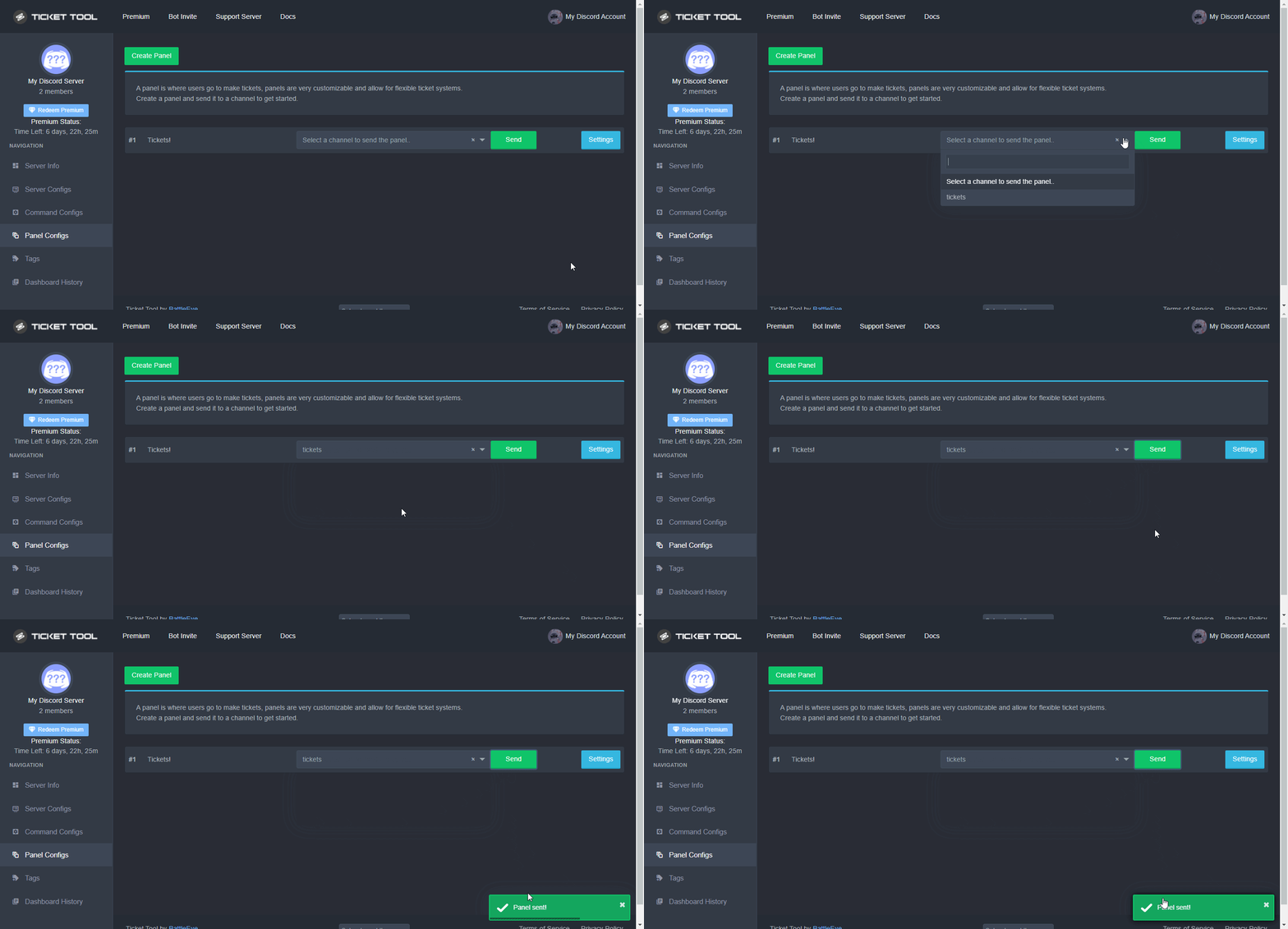
Sending a panel
Once you've created a panel on the dashboard you will need to send it to a channel using send on the dashboard
Select the channel you want your panel to be created in and click send.
For other questions checkout $help faq
An example of a sending a panel is shown below.
 shut bolt
jade topaz
How do i at the ticket to go to a certain channel
shut bolt
jade topaz
How do i at the ticket to go to a certain channel
If you mean to send the panel
Check that message
If you want to set a category
$help category
humble sequoiaBOT
How to set the open category
To set a open category go to the Dashboard -> Panel Configs -> Settings -> Category Options -> Category Open
 shut bolt
Check that
 sterile patrol
Hey guys. I just got call of duty war zone modern warfare. Xbox one. I’m trying to play offline and it keeps directing me to connect to Xbox live. Any idea what is going on here
shut bolt
Heya
humble sequoiaBOT
⚠️ You're in the wrong place
We provide support for @pseudo glen discord bot and cannot help you with whatever issue you have.
- Please make sure to contact the appropriate Support Team.
If you don't have any further questions regarding our bot Ticket Tool, please close this ticket
shut bolt
We can't do much about it sorry
sterile patrol
What do you mean?
shut bolt
humble sequoia
Check this please, you are in the wrong place
 weary copper
How to create a ticket concern?
south laurel
I have done SUCH a great job at being lame check out how I somehow managed to have TWO buttons and can't get it back to 1
 upper flower
open ur main panel and remove the attached panels @south laurel
 south laurel
upper flower
open ur main panel and remove the attached panels <@!333455081611722753>
south laurel
upper flower
open ur main panel and remove the attached panels <@!333455081611722753>
thank you so much i am sorry to be lame 😉
iron nightBOT
Gave 1 Rep to Developerツ (current: #10 - 155)
upper flower
ur good. congrats for getting that setup in the beginning! 🙂
south laurel
thanks - can I ask one more question
upper flower
ofc
south laurel
how do i allow my staff to assign a ticket to them?
upper flower
$claim
south laurel
I did not see any buttons when a ticket is made
humble sequoiaBOT
Claiming allows you to change the ticket name, category and permissions. To use it you have to enable it first on your Dashboard > Panel Configs > Claiming Options.
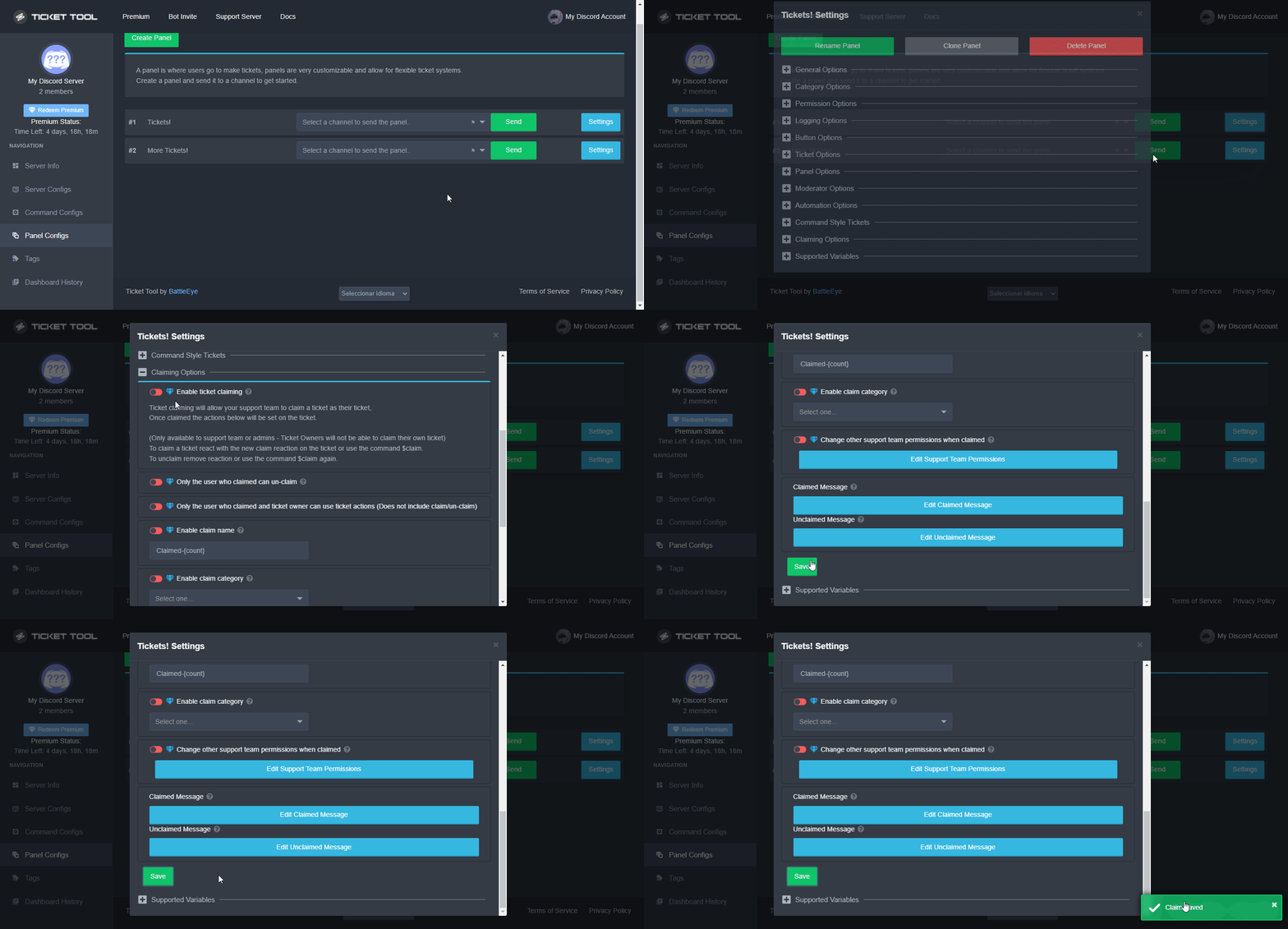
 Note: This is a premium feature
upper flower
Note: This is a premium feature
upper flower
^^
south laurel
upper flower
^^
thanks again
iron nightBOT
@south laurel :: You can't rep Developerツ#1234 for 58 minutes and 44 seconds. Try coming back later?
upper flower
*make sure to turn it on 😉
south laurel
any idea if i should be using MODMAIL ticket or TICKET Support for some reason I have two listed in my panel cofigs
shut bolt
Ticket Support 👀
Wait
So
You have two panels?
One name modmail and the other ticket support?
south laurel
THATS why i have 2 buttons isn't it omg i am dumb
shut bolt
It depends on the attached panels, but could be a reason
south laurel
upper flower
open ur main panel and remove the attached panels <@!333455081611722753>
I do not see a section like this
shut bolt
Let me help you get there
south laurel
shut bolt
Let me help you get there
thanks
iron nightBOT
Gave 1 Rep to Yareaj_ (current: #2 - 268)
shut bolt
Are you in panel configs?
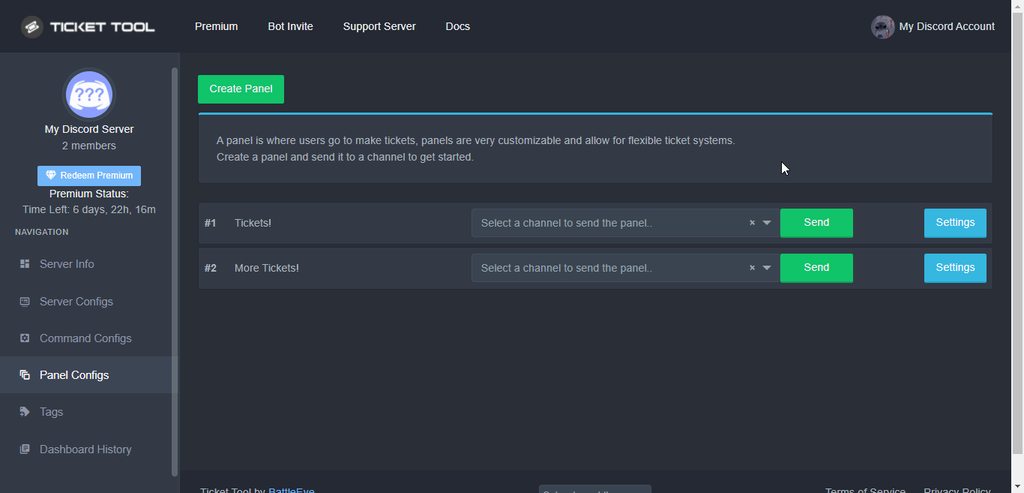
https://i.imgur.com/zWA19m0.gif
You should open the Settings for the panel
Then open the General Options menu
And you'll see the attached panels picker
 south laurel
ugg how do i fix it
south laurel
then i do not get what the panels does for me
shut bolt
A panel is basically a message from which your users can create a ticket
south laurel
 south laurel
fixed
shut bolt
Nice!
south laurel
thank you
shut bolt
Sure
 fast sable

shut bolt
B)
 icy sable
my server isnt popping up on the dashboard
shut bolt
icy sable
my server isnt popping up on the dashboard
Heya
humble sequoiaBOT
Don't see your server in the dashboard?
You will possibly need to relog. Look below to see steps on how to relog.
How to relog in the Dashboard.
First, you will need to go to the dashboard. Once your there, click on your avatar on the top right. after you clicked it, you will see button that says Logout. You must click that. Once you have logged out, you can log back in.
Note:
You need one of these 3 things to access the dashboard.
1. Server Owner (Level: 6)
2. Server Administrator (Level: 4)
3. Dashboard Role (Level: 2)
:warning: You can check your level using $level on your Discord Server
User permission level with Ticket Tool
@User is permission level: 0 (User)
```» *If it shows that your permission is **0**, you don't have any of the above **3 things** to manage the dashboard.*
**See the GIF below on how to relog:** shut bolt
Try that
icy sable
thanks man
shut bolt
icy sable
thanks man
Sure
 outer tide
How to set a specific role to be a support team? Can anyone help hehe
fast sable
You can make a new role and call it your support team, and give it perms to see open tickets. and also you can make it so they get pinged wnen a tocket is opened
You can edit the permissions of your open ticketd category so the support tesm role can see the channels and send messages
And for them to be pinged, you can edit the opened ticket message so it says Thanks for creating a ticket! {@<role id> should be with you shortly! or whstever you wsnt the message to say, bur you need the {@<role id>}
Then that should work
 gilded verge
Hi, Can I do so that Primary bot work for one panel and Premium bot for the other panel? This is important for my server because I would like to be able to set it up like that 😳
 ruby haven
how do i change the embed color
jade topaz
Hey how do i setup the ticket?
outer tide
jade topaz
Hey how do i setup the ticket?
Go to panel configs in the web site, and you can set it up.
jade topaz
Ohk
 mystic hound
gilded verge
Hi, Can I do so that Primary bot work for one panel and Premium bot for the othe...
mystic hound
gilded verge
Hi, Can I do so that Primary bot work for one panel and Premium bot for the othe...
No, only one bot can work at a time
gilded verge
mystic hound
No, only one bot can work at a time
Can such an option appear in the future? 
mystic hound
It's unlikely, i don't really see why you'd need 2 different bots at the same time
gilded verge
On my server, I made a role that users get in return for casting a minimum of 24 bot votes and it gives access to the channel with a Premium bot ticket, and for people who did not vote, I wanted only a Primary bot. My point is, they have access to a better bot in exchange for votes 
Well, it may be possible in the future... 
hard cape
Hey
hard cape
It never happened to me
jade topaz
hmm
hard cape
Or you can be logged with your alt
jade topaz
i not have
 magic flame
is there a way to have the transcript option come up and for the ticket to auto delete? No option to make a transcript comes up when i want the channel to auto delete (I don't see the point in the channel just closing, but still being accessible to read, with a transcript option? You don't need a trancript if the channel can still be viewed ...
humble sequoiaBOT
How do I save transcript to a channel?
To save transcripts to a channel go to the Dashboard -> Panel Configs -> Settings -> Logging Options -> Transcript Channel
mystic hound
gilded verge
On my server, I made a role that users get in return for casting a minimum of 24...
The thing is both bots don't do anything different,if you have premium, both bots can access premium features. you can instead maybe role lock your "premium" ticket panel and then offer those users expedited support or something similar
For a singular user, which bot they use doesn't really effect their experience
magic flame
no, I don't care if the transcript is auto. But the actual "transcript" button isn't coming up when the ticket is closed. I have the panel options set for the ticket to delete when closed, but when confirming, there is no transcript option coming up then, it just asks to confirm closing, then deletes. I'd like an option with the close to save transcript at that point, and then it can delete
gilded verge
okie, thanks @mystic hound 
iron nightBOT
Gave 1 Rep to Light (current: #3 - 243)
hard cape
magic flame
no, I don't care if the transcript is auto. But the actual "transcript" button i...
Try to send a pic please
So you don’t see this?
 magic flame


 humble sequoiaBOT
Help Options
$help commands - Information on commands
$help setup - Information on bot setup
$help faq - Frequently asked questions

 craggy geyser
That's not the issue
hard cape
Ugh
craggy geyser
The ticket controls only appear on a closed ticket. You can't bring them up on an open one
Without premium, the only way to save the transcript without two step ticket on would be via the $transcript command
 slate crane
im new to this can somone help me out?
magic flame
so basically leaving the tickets as "closed" - but still viewable- would function as a transcript it just clutters up a category 😖
craggy geyser
You can do $transcript #channel to save to a channel if you want
magic flame
is that just for premium though?
hard cape
No, u can use $trascript for free
But if u want to do transcript of a channel, that’s premium feature
magic flame
ah sorry I misread the message that it was a premium command.
jade topaz
Is it available to Apply for Support Team?
hard cape
jade topaz
Is it available to Apply for Support Team?
They’re closed rn.
hard cape
magic flame
ah sorry I misread the message that it was a premium command.
It’s fine
jade topaz
hard cape
They’re closed rn.
What would be the Maximum Age?
hard cape
jade topaz
What would be the Maximum Age?
Um idk
jade topaz
If the Apps were open?
hard cape
I think you need to be 13+
jade topaz
hard cape
I think you need to be 13+
You sure?
magic flame
so if someone wants a transcript they need to manually run that command before closing the ticket ?
hard cape
magic flame
so if someone *wants* a transcript they need to manually run that command before...
No, you can use $transcript before, after,…
At any time
magic flame
well i want the channels to auto delete so they can't do it then 😄 but I mean, instead of it coming up as an emoji option when closing liek the two-step close, they have to run it manually themselves?
hard cape
You can’t do auto-delete the ticket
humble sequoiaBOT

The new Discord Buttons allow for a much smoother and convenient experience. They reduce lag and work much better than emojis. With ticket tool you can edit all the buttons however you like! Buttons can show emojis, text and can have 4 different colors.
Where can I edit them?
Dashboard ➞ Panel Configs ➞ Settings ➞ Button Options ➞ Setting
 hard cape
There is how to find it
magic flame
 hard cape
Do you own the WCIF role btw?
magic flame
yes and I'm also the server owner
I don't think you're understanding what I'm asking/trying to do though
 enable button, you won’t see the transcript button too
magic flame
enable button, you won’t see the transcript button too
magic flame
I have the transcript button settings button enabled, not disabled though??
that's enabled or am i missing something?
 hard cape
Yes, u did right.
magic flame
hard cape
I do, but when you <:disabl:898109297970528306> enable button, you won’t see the...
I'm not sure what you mean about it being disabled
(might help to type out words instead of using emojis for them if this is what's making it confusing though)
mystic hound
magic flame
is there a way to have the transcript option come up and for the ticket to auto ...
No there isn't, you can use $transcript #channel before deleting your ticket. The ticket controls only pop up when a ticket is in its closed state
Using the command works just fine if you want to keep two step options disabled
hard cape
magic flame
I'm not sure what you mean about it being disabled
And if u will try to pick transcript channel, will it works?
magic flame
ok, so for someone to use that command, they need to do it themselves, before closing the ticket if they want the transcript?
magic flame
hard cape
And if u will try to pick transcript channel, will it works?
no this is why I'm here asking about it
 mystic hound
magic flame
ok, so for someone to use that command, they need to do it themselves, before cl...
mystic hound
magic flame
ok, so for someone to use that command, they need to do it themselves, before cl...
Just so i understand, you want the user to have their own transcript before the ticket is deleted?
Or do you want your support team to have access to it (ie. Send it to a transcript channel)
magic flame
for the user to have the transcript, or at least the choice to make one
(the users will have the support role)
mystic hound
Without premium, your best option is to advice them to use $transcript then download the transcript
hard cape
mystic hound
Or do you want your support team to have access to it (ie. Send it to a transcri...
Do she needs to pick $transcript channel to show the transcript button when is ticket closed?
mystic hound
hard cape
Do she needs to pick $transcript channel to show the transcript button when is t...
Yeah they do, but they're not closing a ticket, just deleting it. (Two step is disabled)
hard cape
mystic hound
Yeah they do, but they're not closing a ticket, just deleting it. (Two step is d...
Ok, Ty!
magic flame
ok so they need to manually do it if they want it first. Got it, thank you!
 lime osprey
i dont seee my server on the manage server list and ive given the bot administrator plus ive reloaded a ton of time and waited hours
hard cape
lime osprey
i dont seee my server on the manage server list and ive given the bot administra...
Hey!
humble sequoiaBOT
Don't see your server in the dashboard?
You will possibly need to relog. Look below to see steps on how to relog.
How to relog in the Dashboard.
First, you will need to go to the dashboard. Once your there, click on your avatar on the top right. after you clicked it, you will see button that says Logout. You must click that. Once you have logged out, you can log back in.
Note:
You need one of these 3 things to access the dashboard.
1. Server Owner (Level: 6)
2. Server Administrator (Level: 4)
3. Dashboard Role (Level: 2)
:warning: You can check your level using $level on your Discord Server
User permission level with Ticket Tool
@User is permission level: 0 (User)
```» *If it shows that your permission is **0**, you don't have any of the above **3 things** to manage the dashboard.*


**See the GIF below on how to relog:**
hard cape
No problem!
lime osprey
thanks @hard cape
iron nightBOT
Gave 1 Rep to D<3 (current: #21 - 41)
mystic hound
magic flame
ok so they need to manually do it if they want it first. Got it, thank you!
Pretty much, yeah. The other option is to have all your transcripts go to one channel (that's accessible only by your staff team) and have your users request a transcript of they need it
Or alternatively with premium there's an option where the bot will automatically dm the user their transcript
magic flame
mystic hound
Pretty much, yeah. The other option is to have all your transcripts go to one ch...
and that's here?
 mystic hound
$help transcript
humble sequoiaBOT
How do I save transcript to a channel?
To save transcripts to a channel go to the Dashboard -> Panel Configs -> Settings -> Logging Options -> Transcript Channel
mystic hound
Here
But this will require you to have a ticket close first. (Or have your staff use $transcript #channelname before deleting a ticket)
 strong echo
Help me please
magic flame
ah ok. I just dont see the point in having the ticket still viewable (closed) with a transcript because the whole channel itself is still there making the transcript redundant 😅 that's why i want it for deleted tickets so I'll just get people to do it mnually and if they forget, well too bad lol
strong echo
Help me
mystic hound
magic flame
ah ok. I just dont see the point in having the ticket still viewable (closed) wi...
Well once a ticket is closed, your team can save the transcript then delete it
Using the delete button that pops up alongside the transcript one
strong echo
@mystic hound please help me
mystic hound
There's a number of benefits to having a ticket closed before deleting, but that really depends on your usage of tickets
mystic hound
strong echo
<@413723907619684352> please help me
With?
strong echo
mystic hound
With?
What makes you call the bot in my server
magic flame
well thats the point, I don't want the extra work of deleting it manually. If the person making the ticket decides their question is answered and are finished, they can delete it, but yeah I'm not using tickets for call centre support kind of thing and people can manage their own questions (hence why all suers will have the support role to get access to the options)
mystic hound
strong echo
What makes you call the bot in my server
Not sure what you mean, we don't do anything with the bot in your server
strong echo
mystic hound
Not sure what you mean, we don't do anything with the bot in your server
How do I call the bot to my server?
mystic hound
magic flame
well thats the point, I don't want the extra work of deleting it manually. If th...
Well then using the command is your best non premium alternative. The only issue I can see with this is, due to the way transcripts are handled, if you save them within the ticket itself, they'll be inaccessible around 30 days after the channel is gone
strong echo
🤔
mystic hound
strong echo
How do I call the bot to my server?
$invite
humble sequoiaBOT
Ticket Tool Invite & Support
mystic hound
Second link
iron nightBOT
Gave 1 Rep to Light (current: #3 - 244)
mystic hound
mystic hound
Well then using the command is your best non premium alternative. The only issue...
So I'd recommend using $transcript #channel to send every transcript to a specific permanent channel then regulating accessibility as you see fit
magic flame
mystic hound
Well then using the command is your best non premium alternative. The only issue...
that's fine; it's what we currently have with another bot but it has fewer options so switching
mystic hound
Ah alright
strong echo
mystic hound
$invite
Not working of me bro
mystic hound
If an autodm feature is absolutely crucial to your functioning and you're unable to buy premium, you can always look into the voting for premium way
mystic hound
strong echo
Not working of me bro
What seems to be the problem?
strong echo
mystic hound
What seems to be the problem?
I don't know.
mystic hound
Well, why do you say it didn't work? Does it give an error?
strong echo
See @mystic hound
 mystic hound
humble sequoia
mystic hound
humble sequoia
Well you need the bot in the server to be able to use it. Click the second link in this message to invite it
strong echo
OK

Discord
The official Discord Guild for the Ticket Tool Discord Bot. | 31,199 members
mystic hound
The second one, https://tickettool.xyz/invite
Discord
Discord is the easiest way to communicate over voice, video, and text. Chat, hang out, and stay close with your friends and communities.
magic flame
mystic hound
If an autodm feature is absolutely crucial to your functioning and you're unable...
I'm fine with it being manual. I can't seem to get it to work though
I have achannel set here, but using the command in the ticket channels isn't making a transcript anywhere
 humble sequoiaBOT

 gentle monolith
Thank you sm
hard cape
No problem, if you want to help again, Go ahead!
magic flame
magic flame
I have achannel set here, but using the command in the ticket channels isn't mak...
ok update: It works for others with the support role but it doesn't work for me. I'm the server owner/admin and i gave myself the support role so I'm really confused 😅 Others can also use it in tickets I make, but I can't lol
magic flame
yep
craggy geyser
So even without the support role it should work for you, as admin/server owner bypass that. Does it give you an error or just do nothing?
magic flame
It just does nothing
Then i asked another user to try and staright away it came up when they did the command
craggy geyser
Have you tried again since?
magic flame
yes. I've just had a different user try and it's not working for them either (they have the support role) so it might not just be specifically me
ah ok, when it works it's when the t! prefix is used not $
craggy geyser
That would be it. You have the prefix changed
That's why I was checking if they did the identical command
magic flame
I didn't change anything with the prefix 🤔 though i had the bot a year + ago and reinvited it, had the bot one changed?
Anyway I thin kI'm sorted; thanks 😄
 hard cape
Hey
 hidden latch
Hey
hard cape
U can get premium by voting, So if u redeemed, a bot sent you a key to dms
hidden latch
I need play coomand this $
hard cape
Wdym?
hidden latch
Thanks
 full acorn
hard cape
U can get premium by voting, So if u redeemed, a bot sent you a key to dms
full acorn
hard cape
U can get premium by voting, So if u redeemed, a bot sent you a key to dms
thanks for help
iron nightBOT
Gave 1 Rep to D<3 (current: #21 - 42)
hard cape
No problem
 brazen igloo
@hard cape Premium is free bro
hard cape
For 7days 🙂
brazen igloo
@hard cape How i can get premium
hard cape
By voting - $vote, you can buy it on the website, win en event or you can start 7 days trial for free
brazen igloo
$vote
humble sequoiaBOT
Votes
Current Votes: 0
Lifetime Votes: 0
Linked Votes: 0
Vote Links
Linking Info
Linked User: Not Linked
You can give your future votes to another user by linking with that user.
To link use $vote link (@user or userId)
To unlink use $vote unlink
Redeeming
Each vote is worth 12 hours of premium and can be redeemed once you have atleast 6 votes.
Your current votes are worth 0m
To redeem your current votes use $vote redeem
hard cape
Hey! @unique isle Did you invited the bot?
 unique isle
hard cape
Hey! <@688364174807662593> Did you invited the bot?
unique isle
hard cape
Hey! <@688364174807662593> Did you invited the bot?
yes -_-
hard cape
brazen igloo
$vote
#🤖│bot-spam
hard cape
unique isle
yes -_-
$help panel
humble sequoiaBOT
Creating a panel
To create a panel we are going to need to head over to the panel configs on the dashboard
Once at the dashboard we will need to click Create Panel
Enter a panel name (Fill in any optional settings you want)
Click Create Panel and your ready to get started with configuring your panel
An example of a creating a panel is shown below.
brazen igloo
hard cape
<#910978476536905738>
Ok 6 vote = premium
hard cape
You can redeem after 6 votes, 1 vote = 12 hours of premium
unique isle
humble sequoia
is not this
brazen igloo
hard cape
You can redeem after 6 votes, 1 vote = 12 hours of premium
Ok where i can vote bot ??
unique isle
$help
humble sequoiaBOT
Help Options
$help commands - Information on commands
$help setup - Information on bot setup
$help faq - Frequently asked questions
hard cape
brazen igloo
Ok where i can vote bot ??
When you type $vote bot will send links
hard cape
unique isle
is not this
People can automatically create a ticket when you send a panel
unique isle
hard cape
People can automatically create a ticket when you send a panel
not in my server :/
hard cape
unique isle
not in my server :/
Did u sent a panel?
unique isle
yes
hard cape
Then be sure people can see the channel with tickets
full acorn
i voted!
 hard cape
full acorn
i voted!
hard cape
full acorn
i voted!
Nice
full acorn
but why its still 0 ,_,
hard cape
You need to click on blue links and be logged
full acorn
ok
 rain bronze
Please help me lol
humble sequoiaBOT
Don't see your server in the dashboard?
You will possibly need to relog. Look below to see steps on how to relog.
How to relog in the Dashboard.
First, you will need to go to the dashboard. Once your there, click on your avatar on the top right. after you clicked it, you will see button that says Logout. You must click that. Once you have logged out, you can log back in.
Note:
You need one of these 3 things to access the dashboard.
1. Server Owner (Level: 6)
2. Server Administrator (Level: 4)
3. Dashboard Role (Level: 2)
:warning: You can check your level using $level on your Discord Server
User permission level with Ticket Tool
@User is permission level: 0 (User)
```» *If it shows that your permission is **0**, you don't have any of the above **3 things** to manage the dashboard.*


**See the GIF below on how to relog:**
rain bronze
Thank you!
hard cape
No problem!
rain bronze
It worked!
hard cape
Nice!
 unique isle
why ?
unique isle
unique isle
why ?
for create ticket
 humble sequoiaBOT
The new Discord Buttons allow for a much smoother and convenient experience. They reduce lag and work much better than emojis. With ticket tool you can edit all the buttons however you like! Buttons can show emojis, text and can have 4 different colors.
Where can I edit them?
Dashboard ➞ Panel Configs ➞ Settings ➞ Button Options ➞ Setting
humble sequoiaBOT
Any role you assign as a blacklisted role won't be able to use commands or reactions.
Selecting a blacklisted role
Go to your Dashboard ➞ Server Configs. There you will find the option to select blacklisted roles.
Note: Don't forget to save.
 hard cape
hard cape
@unique isle
 jolly pier
سلام عليكم
robust sandalBOT
jolly pier
سلام عليكم
 r8bbr
r8bbr
Mír s tebou
Arabic (ar) → Czech (cs)
robust sandalBOT
jolly pier
سلام عليكم
r8bbr
Peace be upon you
Arabic (ar) → English (en)
jolly pier
Translate
 stone swallow
unique isle
why ?
stone swallow
unique isle
why ?
I am having this same issue
hard cape
حاول أن ترسل لي صورة للمشكلة
hard cape
stone swallow
I am having this same issue
I send what can be the problem
jolly pier
اريد ان امنشن الاداره في التكت
robust sandalBOT
jolly pier
اريد ان امنشن الاداره في التكت
r8bbr
Chci zahájit administrativu v tektonice.
Arabic (ar) → Czech (cs)
hard cape
$invite
humble sequoiaBOT
Ticket Tool Invite & Support
jolly pier
اريد ان امنشن الاداره في التكت
 unique widget
هلو
robust sandalBOT
jolly pier
اريد ان امنشن الاداره في التكت
r8bbr
Chci zahájit administrativu v tektonice.
Arabic (ar) → Czech (cs)
robust sandalBOT
unique widget
هلو
 مستر بيتو MR Bito
Broskve
Pashto (ps) → Czech (cs)
jolly pier
@hard cape
hard cape
$help panel
humble sequoiaBOT
Creating a panel
To create a panel we are going to need to head over to the panel configs on the dashboard
Once at the dashboard we will need to click Create Panel
Enter a panel name (Fill in any optional settings you want)
Click Create Panel and your ready to get started with configuring your panel
An example of a creating a panel is shown below.
jolly pier
عندما يتم فتح التكت اريد البوت يمنشن رتب معينه
robust sandalBOT
jolly pier
عندما يتم فتح التكت اريد البوت يمنشن رتب معينه
r8bbr
Když jsou tektonika otevřena, chci, aby bot spustil určité úrovně.
Arabic (ar) → Czech (cs)
unique widget
I want the site
humble sequoiaBOT
hard cape
hard cape
jolly pier
عندما يتم فتح التكت اريد البوت يمنشن رتب معينه
لا اعرف ماذا تقصد
stone swallow
Thank you for the help!
unique widget
hard cape
لا اعرف ماذا تقصد
I mean, when he opens his bot, he will sign it
hard cape
stone swallow
Thank you for the help!
No problem!
humble sequoiaBOT
لا ترى سيرفرك في لوحة التحكم؟
ربما ستحتاج إلى إعادة التسجيل. اقرأ الإرشادات التالية لمعرفة كيفية إعادة تسجيل الدخول
كيفية إعادة تسجيل دخول في لوحة التحكم.
اذهب الى لوحة التحكم. اضغط على صورة حسابك الموجودة في أعلى يمين الشاشة, ثم اضغط على زر Logout. عندما تسجل الخروج, يمكنك اعادة تسجيل الدخول مرة أخرى في الموقع.
ملحوظة :
تحتاج إلى أحد هذه الصلاحيات الثلاث للوصول إلى لوحة التحكم:
- مالك السيرفر
- مسؤول السيرفر
- رول لوحة التحكم
⚠️ يمكنك تأكد من صلاحياتك باستعمال الامر $level في سيرفرك.
User permission level with Ticket Tool
@User is permission level: 0 (User)```» اذا استجاب تكت تول أن مستوى صلاحياتك 0,  هذا يعني أن لا يمكنك الدخول على لوحة تحكم سيرفرك.

انظر الGIF التالية لخطوات إعادة تسجيل الدخولI mean, when he opens his bot, he will sign it Hua this says so @jolly pier
 vapid quarry
@wicked scroll oii entao eu tenho uma duvida
robust sandalBOT
vapid quarry
<@!261346621369876501> oii entao eu tenho uma duvida
 aninha bebeˢᵍ
@wicked scroll Ahoj, tak mám pochybnosti
Portuguese (Brazil) (pt) → Czech (cs)
unique widget
have a problem
 wicked scroll
vapid quarry
<@!261346621369876501> como faz pra adicionar o bot em mais sv
wicked scroll
vapid quarry
<@!261346621369876501> como faz pra adicionar o bot em mais sv
Você me pingou 2x, no entanto, aconselho que você leia as regras em #546557408902905896 (Não é permitido pingar membros da equipe de suporte)
No entanto, não tem mistério para adicionar o bot em outros servidores, basta você convidar o bot para o servidor
$invite
humble sequoiaBOT
Ticket Tool Invite & Support
wicked scroll
2° link :)
unique widget
have a problem
humble sequoiaBOT
We would love to help you, but if you don't tell us what you need help with we can't help you :(
unique widget
have a problem
hard cape
Hey
humble sequoiaBOT
⚠️ Please read the messages previously sent by our team ⚠️
hard cape
What problem? @unique widget
hard cape
humble sequoia
Which command is this?
unique widget
I just sent a picture
hard cape
Send it again Please.
unique widget
send you private
wicked scroll
Send here, please
unique widget
hard cape
Send it again Please.
I am originally Arabic, I use the translator
wicked scroll
unique widget
I am originally Arabic, I use the translator
You can speak in arabic using /en <message in arabic>
like
/en مرحبا
robust sandalBOT
Hello
Arabic (ar) → English (en)
jade topaz
/en
robust sandalBOT
Error while running `en`
message is a required argument that is missing.
jade topaz
/en hallo
unique widget
NO
robust sandalBOT
Hello
German (de) → English (en)
jade topaz
/nl hello
robust sandalBOT
Hallo
English (en) → Dutch (nl)
wicked scroll
unique widget
NO
? 
unique widget
I am now in a problem, someone can solve it
wicked scroll
/ar We would love to help you, but if you don't tell us what you need help with we can't help you
robust sandalBOT
نود مساعدتك، ولكن إذا كنت لا تقول لنا ما تحتاج إلى مساعدة مع أننا لا يمكن أن تساعدك
English (en) → Arabic (ar)
unique widget
لا يمنكم مساعدتي
robust sandalBOT
unique widget
لا يمنكم مساعدتي
مستر بيتو MR Bito
Nemůžete mi pomoci.
Arabic (ar) → Czech (cs)
hard cape
/ar We can! If u want to help, send a pic please.
robust sandalBOT
نحن نستطيع! إذا كنت ترغب في مساعدة، وإرسال الموافقة المسبقة عن علم من فضلك.
English (en) → Arabic (ar)
hard cape
@unique widget
unique widget
طيل
robust sandalBOT
unique widget
طيل
مستر بيتو MR Bito
Po celém
Arabic (ar) → Czech (cs)
 hard cape
$perms
humble sequoiaBOT
ᅠ
@pseudo glen requires the following permissions:
Add Reactions
Read Channels
Send Messages
Manage Messages
Embed Links
Attach Files
Read History
Manage Roles
To change the role permissions, you can go to your Discord Server ➞ Server Settings ➞ Roles ➞ @Ticket Tool
To change the channel permissions, you can go to your Channel Settings ➞ Permissions ➞ Ticket Tool
ᅠ
Note:
You can give Ticket Tool Administrative Permissions instead of all the permissions listed above, but it's entirely optional and NOT necessary.
unique widget
كيف اعملها
hard cape
/ar TicketTool potřebuje mít oprávnění posílat zprávy a vidět kanály
robust sandalBOT
TicketTool يحتاج إلى إذن لإرسال الرسائل ورؤية القنوات
Czech (cs) → Arabic (ar)
robust sandalBOT
unique widget
كيف اعملها
مستر بيتو MR Bito
Jak to mám udělat?
Arabic (ar) → Czech (cs)
robust sandalBOT
يجب عليك تعيين هذا في إعدادات الخادم، تماما مثل ذلك.
Czech (cs) → Arabic (ar)
unique widget
شكرا
robust sandalBOT
unique widget
شكرا
مستر بيتو MR Bito
Děkujeme
Arabic (ar) → Czech (cs)
unique widget
المشكلة انحلت
hard cape
/ar Není zač!
robust sandalBOT
لا توجد مشكلة!
Czech (cs) → Arabic (ar)
robust sandalBOT
unique widget
المشكلة انحلت
مستر بيتو MR Bito
Problém byl vyřešen.
Arabic (ar) → Czech (cs)
hard cape
/ar To potěší!
robust sandalBOT
إنه يرضي!
Czech (cs) → Arabic (ar)
unique widget
ايوه
robust sandalBOT
unique widget
ايوه
مستر بيتو MR Bito
Ano
Arabic (ar) → Czech (cs)
hard cape
/ar Měj krásný zbytek dne, ahoj!
robust sandalBOT
الحصول على بقية لطيفة من اليوم، مرحبا!
Czech (cs) → Arabic (ar)
hard cape
When you have broken website, try this @buoyant falcon :
humble sequoiaBOT
Don't see your server in the dashboard?
You will possibly need to relog. Look below to see steps on how to relog.
How to relog in the Dashboard.
First, you will need to go to the dashboard. Once your there, click on your avatar on the top right. after you clicked it, you will see button that says Logout. You must click that. Once you have logged out, you can log back in.
Note:
You need one of these 3 things to access the dashboard.
1. Server Owner (Level: 6)
2. Server Administrator (Level: 4)
3. Dashboard Role (Level: 2)
:warning: You can check your level using $level on your Discord Server
User permission level with Ticket Tool
@User is permission level: 0 (User)
```» *If it shows that your permission is **0**, you don't have any of the above **3 things** to manage the dashboard.*


**See the GIF below on how to relog:**
gilded verge
Hey, it's me again xDDD
I wonder if there is any way to create a referral so that everyone on my server can see how many votes are currently in my account and time remaining until the end of premium. Anyone know something?
hard cape
I know there is only one way to see how many premium is remaining
But I don’t recommend it!
When they have a dashboard role, they can manage your tickets.
Cause they will have access to see everything
gilded verge
oh no no, so I won't do it 
does anyone else have any idea?
copper owl
there's no way someone can check your votes
the only good way is just running $vote yourself
and having people check themselves
hard cape
gilded verge
oh no no, so I won't do it <a:KEKSLIDE:878072347104509972>
does anyone else hav...
I think there isn’t other way.
dry silo
ابي واحد يخش سيرفري ويسويلي تكت
gilded verge
well, that's okay 
thanks
robust sandalBOT
dry silo
ابي واحد يخش سيرفري ويسويلي تكت
NGM
Potřebuji někoho, kdo by se dostal na server a dal mi přilnavost.
Arabic (ar) → Czech (cs)
copper owl
dry silo
ابي واحد يخش سيرفري ويسويلي تكت
يا صديقي, سرلك يومين عم تٍال هيدي السؤال
ما في حدى يسولك يها
dry silo
copper owl
يا صديقي, سرلك يومين عم تٍال هيدي السؤال
مبعرف
hard cape
/ar Nedoporočuji dávat náhodným lidem příležitost nastavovat tickety.
robust sandalBOT
لا أوصي بإعطاء الأشخاص العشوائيين الفرصة لإعداد التذاكر.
Czech (cs) → Arabic (ar)
copper owl
اذا بتريد ما تسأل حدى يسويلك شي
copper owl
dry silo
مبعرف
من فسرلك
robust sandalBOT
copper owl
يا صديقي, سرلك يومين عم تٍال هيدي السؤال
Neptune
Můj příteli, budeš se muset zeptat na tuto otázku dva dny.
Arabic (ar) → Czech (cs)
copper owl
بس ما ح نسويلك
robust sandalBOT
copper owl
ما في حدى يسولك يها
Neptune
Nikdo se vás nebude ptát
Arabic (ar) → Czech (cs)
robust sandalBOT
dry silo
مبعرف
NGM
Nevím
Arabic (ar) → Czech (cs)
hard cape
Lmao
robust sandalBOT
copper owl
اذا بتريد ما تسأل حدى يسويلك شي
Neptune
Pokud chcete někoho požádat, aby pro vás něco udělal
Arabic (ar) → Czech (cs)
robust sandalBOT
copper owl
بس ما ح نسويلك
Neptune
Zastav nás, Nesweilk.
Persian (fa) → Czech (cs)
dry silo
احد يقدر يصورلي مقطع كيف اسوي تكت
robust sandalBOT
dry silo
احد يقدر يصورلي مقطع كيف اسوي تكت<a:ss_5:922132197849301062>
NGM
Může někdo vzít video pro mě, jak udělat tect
Arabic (ar) → Czech (cs)
humble sequoiaBOT
Creating a panel
To create a panel we are going to need to head over to the panel configs on the dashboard
Once at the dashboard we will need to click Create Panel
Enter a panel name (Fill in any optional settings you want)
Click Create Panel and your ready to get started with configuring your panel
An example of a creating a panel is shown below.
copper owl
تأكد الgif ^^
hard cape
humble sequoia
@buoyant falcon
hard cape
What the arabic guy wants?
copper owl
how to make a panel and send it
hard cape
Oh ok, you should make help tags in more language, primarily in arabic
copper owl
we do have tags in arabic
copper owl
humble sequoia
and almost every arab knows a bit of english, not to mention the GIF here
hard cape
But not help one like $help panel
copper owl
hard cape
But not **help one** like $help panel
well that isnt a tag but i see your point
hard cape
Ye, ikr, But people still dont know
copper owl
hard cape
Ye, ikr, But people still dont know
well in this case, this dude has asked people to do it for him a few times already
copper owl
what is what?
hard cape
The help commands
copper owl
the help commands are within the bot
the only person who can edit them is josiah, the dev
what you can do is a tag that is like a help command
$help <here>
hard cape
Oh ok, but I can use them in my server I know
copper owl
hard cape
Oh ok, but I can use them in my server I know
yes the $help commands are universal, you can use them anywhere
hard cape
Ty @copper owl
iron nightBOT
Gave 1 Rep to Neptune (current: #1 - 478)
copper owl
anytime
copper owl
يا صديقي
لأنو انمت بدك تسويها ع لوحة التعمك
اقراء المعلومات اذا بتريد
$help panel
humble sequoiaBOT
Creating a panel
To create a panel we are going to need to head over to the panel configs on the dashboard
Once at the dashboard we will need to click Create Panel
Enter a panel name (Fill in any optional settings you want)
Click Create Panel and your ready to get started with configuring your panel
An example of a creating a panel is shown below.
dry silo
كتبته بسيرفري لاكن البوت عيا يستجيب
copper owl
dry silo
كتبته بسيرفري لاكن البوت عيا يستجيب
سويت لوحة؟
jade topaz
So uh, I wanted to know how do I ping the support team on the ticket message?
copper owl
$help ping
humble sequoiaBOT
How to make Ticket Tool ping a role
To make ticket tool ping a role when a ticket is opened, go to the Dashboard -> Panel Configs -> Settings -> Ticket Options -> Ticket Message -> Message Text and do this:
{@Role name} This is case sensitive and the role must have @mentions enabled
 iron nightBOT
Gave 1 Rep to Neptune (current: #1 - 479)


 humble sequoiaBOT
Don't see your server in the dashboard?
You will possibly need to relog. Look below to see steps on how to relog.
How to relog in the Dashboard.
First, you will need to go to the dashboard. Once your there, click on your avatar on the top right. after you clicked it, you will see button that says Logout. You must click that. Once you have logged out, you can log back in.
Note:
You need one of these 3 things to access the dashboard.
1. Server Owner (Level: 6)
2. Server Administrator (Level: 4)
3. Dashboard Role (Level: 2)
:warning: You can check your level using $level on your Discord Server
User permission level with Ticket Tool
@User is permission level: 0 (User)
```» *If it shows that your permission is **0**, you don't have any of the above **3 things** to manage the dashboard.*


**See the GIF below on how to relog:** winged cairn
i have server administrator though
hard cape
Relog
winged cairn
nvm my friend selected all perms but administrator
hard cape
Try to relog from the website
winged cairn
my friend made a mistake
hard cape
Which?
winged cairn
on perms. its fine now
hard cape
Ok!
south laurel
thanks in advance
can someone tell me how to get the ticket tool helper YAGBD to give the reminder about thanking in a reply?
shut bolt
south laurel
can someone tell me how to get the ticket tool helper *YAGBD* to give the remind...
That's a custom command done here, so it's triggered by a regex of common words
jade topaz
@shut bolt u here?
shut bolt
Yeah
shut bolt
With what?
shut bolt
What action did you choose in the dashboard, closed and deleted or only closed?
jade topaz
closed and / or deleted
shut bolt
That's why it's double
jade topaz
oh
shut bolt
Cause you choose two actions
jade topaz
should be closed only?
shut bolt
Yup, it depends on when you want them to receive it
iron nightBOT
Gave 1 Rep to Yareaj_ (current: #2 - 269)
shut bolt
Sure
jade topaz
hello
how can i copy paste panels from 1 server to another?
without owner perms
oh ok , ill wait
 nova wharf
jade topaz
_without owner perms_
nova wharf
jade topaz
_without owner perms_
You need to have permissions to change setting in the TT dashboard. Do you have them?
jade topaz
yes
nova wharf
Alright, one second.
nova wharf
jade topaz
yes
You can clone a panel, but not copy and paste it to another server. You would have to remake it
jade topaz
oh ok
nova wharf
If I'm wrong, sorry, but I think I'm right
hard cape
nova wharf
If I'm wrong, sorry, but I think I'm right
Yes, you are right, this feature is not available.
nova wharf
Thanks
hard cape
Np, I’m not master too, but I’m sure with this.
jade topaz
pain , just setup tickettool fully [every single thing] on 1 server and now want to do it on another
nova wharf
thanks @hard cape
iron nightBOT
Gave 1 Rep to D<3 (current: #21 - 43)
hard cape
jade topaz
pain , just setup tickettool fully [every single thing] on 1 server and now want...
Then you need to do everything again.
But you can try to send a suggestion
shut bolt
jade topaz
_without owner perms_
Without the owner you can't create the backup key, so the only way is to do it all again
nova wharf
You're welcome
jade topaz
jade topaz
thanks <@!518666147441278998>
Pls send ne friend req sir
humble sequoiaBOT
ᅠ
@pseudo glen requires the following permissions:
Add Reactions
Read Channels
Send Messages
Manage Messages
Embed Links
Attach Files
Read History
Manage Roles
To change the role permissions, you can go to your Discord Server ➞ Server Settings ➞ Roles ➞ @Ticket Tool
To change the channel permissions, you can go to your Channel Settings ➞ Permissions ➞ Ticket Tool
ᅠ
Note:
You can give Ticket Tool Administrative Permissions instead of all the permissions listed above, but it's entirely optional and NOT necessary.
hard cape
@jade topaz
humble sequoiaBOT
ᅠ
@pseudo glen requires the following permissions:
Add Reactions
Read Channels
Send Messages
Manage Messages
Embed Links
Attach Files
Read History
Manage Roles
To change the role permissions, you can go to your Discord Server ➞ Server Settings ➞ Roles ➞ @Ticket Tool
To change the channel permissions, you can go to your Channel Settings ➞ Permissions ➞ Ticket Tool
ᅠ
Note:
You can give Ticket Tool Administrative Permissions instead of all the permissions listed above, but it's entirely optional and NOT necessary.
hard cape
jade topaz
Accept my friend request
This is not Support question, —> #💬│general-chat
jade topaz
K sorry
hard cape
jade topaz
WTF?
Set view channel permission for ticket tool in your server
jade topaz
hard cape
**Set view channel permission for ticket tool in your server**
IN DISCORD or DASHBOARD?
hard cape
Discord
jade topaz
hard cape
Discord
install... not working
hard cape
Be Sure you have added the permissions for right bot, cause u probaly selected prem bot on your server, thats why i think.
humble sequoiaBOT
How to disable the premium bot
To disable the premium bot you will have to go to the Dashboard ➞ Server Configs ➞ Premium bot ➞ And on the right-hand side select the primary free bot in the drop down menu.
Premium features will still work on the normal bot.
jade topaz
no sorry so hard settings
hard cape
xD
jade topaz
really
hard cape
Lemme explain it again
Do you see the last buttons?

Pick free one there

@jade topaz
Go to Server configs in the website
and set it
hard cape
Did it worked?
jade topaz
hard cape
Did it worked?
yes
hard cape
Nice
jade topaz
u best
hard cape
Im not, But thankss!
jade topaz
❤️
hard cape
No problem!
jade topaz
Hey guys I have a question, Can I share premium ticket tool with my servers ?
Or I have to purchase it for each server ?
jade topaz
Thank you. ❤️