#🆘│community-support
1 messages · Page 369 of 1
 iron nightBOT
Gave 1 Rep to Neptune (current: #1 - 433)

 small coyote
Hey ho
is it possible to add a button on the tag embed?
 copper owl
small coyote
Hey ho
is it possible to add a button on the tag embed?
copper owl
small coyote
Hey ho
is it possible to add a button on the tag embed?
no it isnt, not yet anyway
 rustic pollen
Neptune
 tribal cedar
rustic pollen
whys it not deleting anymore
tribal cedar
rustic pollen
whys it not deleting anymore
You have to click the dismiss message text
rustic pollen
but I didn't before
tribal cedar
It's been this way for months
rustic pollen
is it a premium feature to do it auto
tribal cedar
Anytime
rustic pollen
thanks @tribal cedar
iron nightBOT
Gave 1 Rep to Enigma (current: #14 - 83)
tribal cedar
Well we are nice people. :)
rustic pollen
very nice community
I know this is meant to be like a bot helping server but like
it's a community and stuff that can be there for u etc
tribal cedar
We are a community of helping people. Most of us do this daily to break up the monotony of life
 indigo heath
.
tribal cedar
 jade topaz
How to create a ticket
tribal cedar
rustic pollen
can I have help with something tho
jade topaz
How to create a ticket
tribal cedar
rustic pollen
can I have help with something tho
Ask away
jade topaz
How to setup ticket.?
 humble sequoiaBOT
How Do I setup Ticket Tool
You can check our documentation here, you can also check #573205317870157855 for the basic setup.
Our documentation contains all the info you need about the bot to be able to setup and configure the bot however you like.
jade topaz
Thank You @tribal cedar
iron nightBOT
Gave 1 Rep to Enigma (current: #14 - 84)
tribal cedar
rustic pollen
not about the bot
Oh not about the bot. Maybe best to not ask here though.
We have a community server thats pretty active that people may help you in
rustic pollen
yes please
it's about emojis
and everything how to set them up and all
also I believe there is a glitch in the roles if I can show someone a sa
ss
 kind dirge
how can ai do tickets an new server pls help me
humble sequoiaBOT
How Do I setup Ticket Tool
You can check our documentation here, you can also check #573205317870157855 for the basic setup.
Our documentation contains all the info you need about the bot to be able to setup and configure the bot however you like.
copper owl
@kind dirge ^
kind dirge
copper owl
<@!881119606620688445> ^
?
rustic pollen
humble sequoia
read that
 whole lantern
Yo
rustic pollen
hi
small coyote
copper owl
no it isnt, not yet anyway
thanks @copper owl
iron nightBOT
Gave 1 Rep to Neptune (current: #1 - 434)
small coyote
you now when it gets added?
copper owl
Nope, even if I did, i dont think it's something i can reveal
whole lantern
Yes
copper owl
all i can tell you is wait
copper owl
kind dirge
.
I already gave you the documentation that would answer your question
copper owl
humble sequoia
@kind dirge read this and look through the info
whole lantern
Hi
copper owl
yall can stop now
whole lantern
Hi
whole lantern
Hi
copper owl
@whole lantern thats about enough, i think you got the point across
whole lantern
I donno englis
rustic pollen
cool
copper owl
rustic pollen
and can I ask u
what's up?
rustic pollen
is there a vid on how to work emojis and stuff
whole lantern
I now neptune and twitch language
copper owl
rustic pollen
is there a vid on how to work emojis and stuff
from us? no there isnt that I know of
rustic pollen
do you have to like take pictures or ss a pic of the emoji you want and add it?


 copper owl
you can stop spamming
if you need to send emotes
open a demo ticket
and just send the emotes in there
whole lantern
🎉 🎉 🎉
rustic pollen
how do you download them it dosnt have the download link
copper owl
are you on phone or pc
rustic pollen
 whole lantern

rustic pollen
phone
copper owl
on my phone i have a share link button
which allows me to download so you gotta google for your phone
rustic pollen
alr thanks
copper owl
it doesnt talk alone
copper owl
it sends a message whenever someone says thanks without pinging someone
whole lantern
Ohhhhh
copper owl
it should also autodelete
whole lantern
Oh
rustic pollen
thanks @copper owl
iron nightBOT
Gave 1 Rep to Neptune (current: #1 - 435)
rustic pollen
like that
whole lantern
Thanks @copper owl
iron nightBOT
Gave 1 Rep to Neptune (current: #1 - 436)
whole lantern
Thanks @copper owl
iron nightBOT
@whole lantern :: You can't rep Neptune#6814 for 59 minutes and 55 seconds. Try coming back later?
rustic pollen
I'm not just showing
whole lantern
K
indigo heath
@shut bolt the best staff respect thanks for help when i have openn a ticket
iron nightBOT
Gave 1 Rep to Yareaj_ (current: #3 - 233)
 shut bolt
indigo heath
<@!518666147441278998> the best staff respect thanks for help when i have openn ...
shut bolt
indigo heath
<@!518666147441278998> the best staff respect thanks for help when i have openn ...

❤️
indigo heath
respect
whole lantern
Thanks @whole lantern
iron nightBOT
@whole lantern :: You can't give rep to yourself, silly.
whole lantern
Ok and sorruly i tried to see if it works
Who made ticket bot and who is the owner
Tanks
shut bolt
whole lantern
Who made ticket bot and who is the owner
BattleEye
whole lantern
Where is he
whole lantern
shut bolt
BattleEye
Is he offline
shut bolt
whole lantern
Is he offline
Yeah
whole lantern
Can i see his profile
shut bolt
This is him, for not pinging him
whole lantern
Ok
 bronze depot
Do anyone need any help?
 still swan
yep
bronze depot
with?
still swan
wieso geht diese Variable nicht:
{role919991491089297479} {user}, danke dass du eine Support Anfrage eingereicht hast!
Sei dir im klaren dass hier die Support bezogenen Regeln gelten! Bei wiederholter verletzung dieser wird die Support nutzung deaktiviert.
das {role919991491089297479} wird einfach geschrieben?
Hab auch schon {role_919991491089297479} und {role 919991491089297479} versucht
OH sry german
wait 1 sec
 robust sandalBOT
still swan
wieso geht diese Variable nicht:
{role919991491089297479} {user}, danke dass du...
robust sandalBOT
still swan
wieso geht diese Variable nicht:
{role919991491089297479} {user}, danke dass du...
 SinX
SinX
why does this variable not work:
{role919991491089297479} {user}, thank you for submitting a support request!
Be aware that the support-related rules apply here! In case of repeated violation of these, the support use will be deactivated.
the {role919991491089297479} is simply written?
Have also tried {role_919991491089297479} and {role 919991491089297479}
 German (de) → English (en)
bronze depot
German (de) → English (en)
bronze depot
{<role:919991491089297479>} {user}, thank you for submitting a support request!
Be aware that the support-related rules apply here! In case of repeated violation of these, the support use will be deactivated.
Try this
@still swan, sorry for ping btw
still swan
np
shut bolt
bronze depot
```why does this variable not work:
{<role:919991491089297479>} {user}, thank yo...
Wont work like that
Role pinging can be done by two ways
{RoleId} or {@Role Name}
bronze depot
either mention or yeah
still swan
shut bolt
`{RoleId}` or `{@Role Name}`
Where do i have to put the Id with this example?
shut bolt
still swan
Where do i have to put the Id with this example?
So for example to ping <@&642118166243311646> you can use {642118166243311646} or {@Demo Role}
iron nightBOT
Gave 1 Rep to Yareaj_ (current: #2 - 234)
shut bolt
Sure!
still swan
thx @bronze depot
iron nightBOT
Error: You're still on cooldown
bronze depot
yeah thanks @shut bolt for teaching me 😄
iron nightBOT
Gave 1 Rep to Yareaj_ (current: #2 - 235)
shut bolt
bronze depot
yeah thanks <@!518666147441278998> for teaching me 😄
No worries! We are here to help, thanks for helping our users 😃
iron nightBOT
Gave 1 Rep to BennyBeast (current: #48 - 3)
jade topaz
.:
still swan
Why does it say "React with 📩 to create" its not even working`?
bronze depot
image?
still swan

My friend has hell of an old phone
So the update with buttons isnt available
I was thinking he could react with it to use it as well but he cant?
Why is the basic panel message "React with 📩 to create" then
 median wigeon
Clicking on the button is also react with 📩
still swan
Yess but the button isnt there for my friend
and if he reacts normally it doesnt worl
bronze depot
can they see the channel?
still swan

If y wanna take a look at the channel i sent y an invite in private messahe
message
median wigeon
still swan
and if he reacts normally it doesnt worl
Try to resend the panel
and delete the old one
still swan
No worries Benny helped me
bronze depot
now what do you say? 🙂
still swan
thank you @bronze depot
iron nightBOT
@still swan :: You can't rep BennyBeast#1811 for 32 minutes and 23 seconds. Try coming back later?
shut bolt

 viscid pivot
RIP
 hollow swallow
 hallow kindle
Why is the bot offline in my server
hallow kindle
Why is the bot offline in my server
 median wigeon
Nothing just wait
 rancid granite
hallow kindle
rancid granite
hallow kindle
ohh okay
 radiant moss
At this time the bot may be appearing offline in your server. It is undergoing a full restart!
Please keep an eye on #📣│bot-news there is no ETA
 tender lantern
hi i add the ticket tool to my server but its alwys ofline?
hallow kindle
bot is down
tender lantern
ooh its normal?
hallow kindle
when did u add it
tender lantern
um 3 hours ago than it was working but its ofline there dooing an uptdate maby?
radiant moss
At this time the bot may be appearing offline in your server. It is undergoing a full restart!
Please keep an eye on #📣│bot-news there is no ETA
hallow kindle
yeah, the bot is restarting
tender lantern
ooh
hallow kindle
so i think its that
tender lantern
oke srry this new for me sorry 😒
 visual bluff
Thanks!
 plain surge
It shouldn't take long, no
jade topaz
bot offline
 proper jasper
same
visual bluff
jade topaz
bot offline
restarting
 visual bluff
maintenance, just need to wait
jade topaz
ok
shut bolt
viscid pivot

hollow swallow
I'm in the dashboard 🙂
tender lantern
Yup it's working again!!
jade topaz
Help please I’m in the ticket 29224
 dim canopy
How can i make tickets open in category i choosed?
shut bolt
rustic pollen
like I doubt alot of people ask but how are you like you alright
I'm pretty good man, thanks for asking, wbu?
iron nightBOT
Gave 1 Rep to Twitch Badluck31 (current: #72 - 1)
shut bolt
dim canopy
How can i make tickets open in category i choosed?
$help category
humble sequoiaBOT
How to set the open category
To set a open category go to the Dashboard -> Panel Configs -> Settings -> Category Options -> Category Open
 shut bolt
That's how
rustic pollen
ah I was doing well and I was just hopping servers asking how people are etc
and then in the turtle bot server
everyone's so goddam rude
so I'm just breaking every rule there to annoy the mods
dim canopy
How can i set channel for transpict
humble sequoiaBOT
How do I save transcript to a channel?
To save transcripts to a channel go to the Dashboard -> Panel Configs -> Settings -> Logging Options -> Transcript Channel
 shut bolt
rustic pollen
so I'm just breaking every rule there to annoy the mods
shut bolt
rustic pollen
so I'm just breaking every rule there to annoy the mods
Don't be like that my friend, don't let them to get you down :)
shut bolt
 solid stream
Cookie!
rustic pollen
I wish I could help people in this server but I barely understand anything
shut bolt
rustic pollen
I wish I could help people in this server but I barely understand anything <:Lig...
No problem pal, you get to learn every day
solid stream
rustic pollen
basically I made a warzome server and everyday I've been testing new features
and it's going pretty well just needs the people like now and I test it every day etc
oh also pablo
I advertised ur server
 shut bolt
solid stream
shut bolt
solid stream
Sir Battle, how are you doing
rustic pollen
no there is because this community is amazing
I love it and everyone here
some of the nicest people here
shut bolt
dim canopy
How can i make auto transpict @shut bolt
shut bolt
dim canopy
How can i make auto transpict <@518666147441278998>
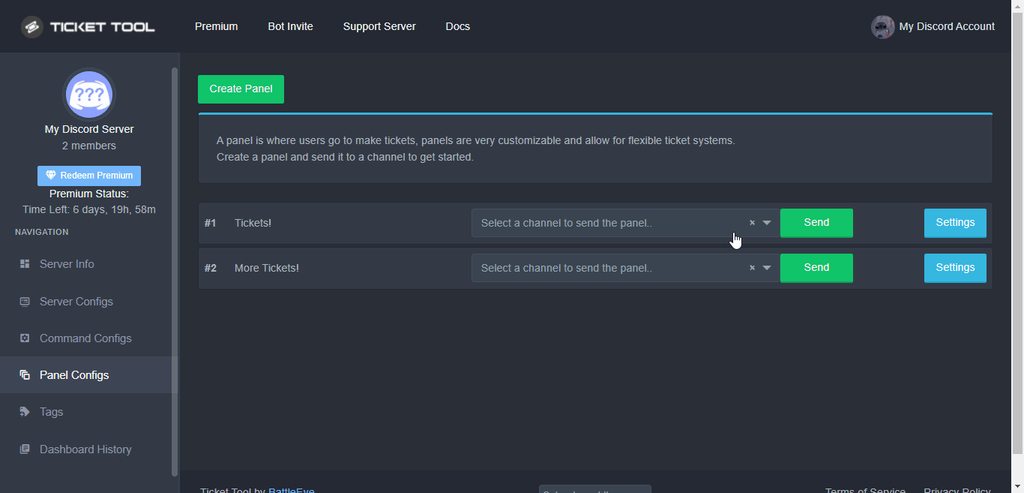
Sure, are you on the dashboard already?
dim canopy
shut bolt
Sure, are you on the dashboard already?
Yeah
 rustic pollen
Pablo my fav mod
shut bolt
💙
rustic pollen
honestly just thank you for all the help and everything this server is like the best server available
shut bolt
We really appreciate your words my friend, thanks
rustic pollen
if u steal other serves emojis is that illegal like or against the rules
 shut bolt
No problem!
rustic pollen
alright thanks alot @shut bolt
iron nightBOT
Gave 1 Rep to Yareaj_ (current: #2 - 237)
shut bolt
Sure bro
 wicked oasis
Can anybody help me, then pls DM me
rustic pollen
what is the issue
wicked oasis
i´m lost as hell hahaha
rustic pollen
what bit about sie
shut bolt
wicked oasis
i´m lost as hell hahaha
About the bot?
rustic pollen
or about setting up the bot
wicked oasis
shut bolt
About the bot?
yeah
shut bolt
Want to set it?
humble sequoiaBOT
How Do I setup Ticket Tool
You can check our documentation here, you can also check #573205317870157855 for the basic setup.
Our documentation contains all the info you need about the bot to be able to setup and configure the bot however you like.
shut bolt
Check this out, it's the setup guide
It'll help
And come back if you need help with it
rustic pollen
hey Pablo can I ask u something
shut bolt
rustic pollen
hey Pablo can I ask u something
Sure
rustic pollen
idk if it'll break the rules like
rustic pollen
If that's all good with you ofc
shut bolt
Oh
 wicked topaz
hi, is it possible to set permissions for each $tag
or is it just "admin role" if so can i set that per panel/ticket type?
could we make a way to do support perms for cuastom tags?
( Please @ me, in a ton of servers tysm )
shut bolt
wicked topaz
hi, is it possible to set permissions for each $tag
Currently it is not
Yet, it has been suggested to the Developer and time will get to tell if it gets implemented
wicked topaz
oh hm. so id have to mega trust people in order to allow them to do tags? i dont want my entire discord doing them just my staff
ah okay, thanks :)
rustic pollen
bro Pablo I can't tell if I like the server
wicked topaz
just wanted to say your docs are super helpful! i finally managed how to work multipanels and its sooooo clean now, tysm!!
shut bolt
wicked topaz
just wanted to say your docs are super helpful! i finally managed how to work mu...
We love to hear that ❤️ appreciate it a lot
wicked topaz
most docs are super hard for me to learn from due to my dyslexia, so thank you :)
rustic pollen
moddd
shut bolt
wicked topaz
most docs are super hard for me to learn from due to my dyslexia, so thank you :...
rustic pollen
pablo
 ebon mulch
Im trying to get the ticketool bot to put transprict in a channel and send a dm but i cant get in the area where the doc shows
shut bolt
ebon mulch
Im trying to get the ticketool bot to put transprict in a channel and send a dm ...
Hey there
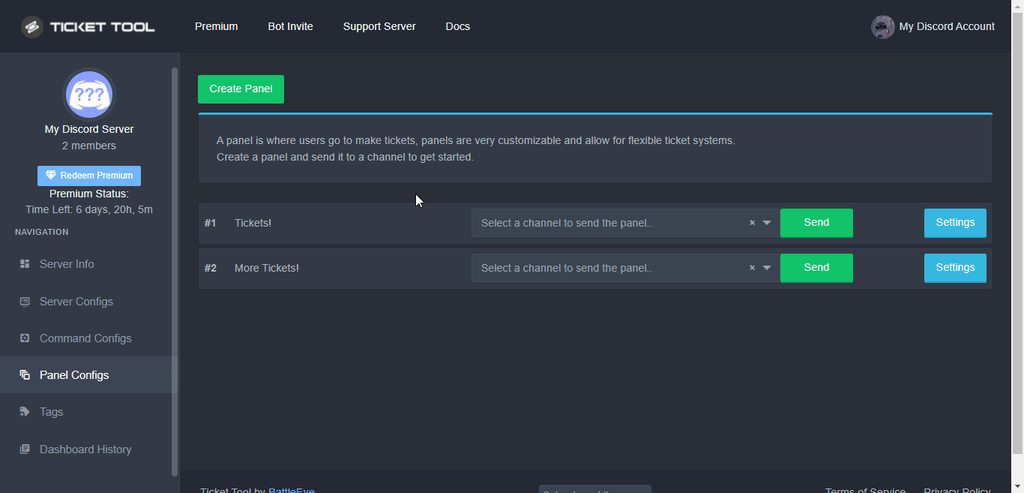
This is where you can edit that
ebon mulch
Thanks
rustic pollen
why on planet Mars is there a six hour slowmode for reviews like come on
make it shorter like 2 hours maybe
not 6 cmon
shut bolt
Not really needed, it's for reviews and that's a fair slowmode
rustic pollen
but if I wanna review u alot cuz u deserve it
rustic pollen
I love u sm thanks @shut bolt
iron nightBOT
Gave 1 Rep to Yareaj_ (current: #2 - 239)
shut bolt
❤️
 raven token
Hey there recently set up the free bot in our server. Is there a list view available via the dashboard to see open tickets? Or best way to get an aggregate view of outstanding tickets?
 scenic plinth
No, sorry.
 pliant quarry
.
hallow kindle
Morning
 forest schooner
My service not working
copper owl
forest schooner
My service not working
you opened a ticket already about this issue
humble sequoiaBOT

⚠️ You're in the wrong place
We provide support for @pseudo glen discord bot and cannot help you with whatever issue you have.
- Please make sure to contact the appropriate Support Team.
If you don't have any further questions regarding our bot Ticket Tool, please close this ticket
copper owl
you're not in the right place
forest schooner
I don't no how to use it I am new on this app
 dull crest
So I just got 700+ tickets in the past 7h. Manually closing them really is unsustainable 😤
Was there ever an option to automatically close the ticket after say 15minutes?
rustic pollen
dull crest
So I just got 700+ tickets in the past 7h. Manually closing them really is unsus...
for premium I believe yes
humble sequoiaBOT
Automation disabled
There's currently no ETA for when automation will be enabled again. The issue that's caused it to be disabled, us hitting rate limits, is tied to the increased load on Discord's servers. The situation's currently unpredictable, which makes it so we can't give you a fixed time.
 wicked scroll
dull crest
Was there ever an option to automatically close the ticket after say 15minutes?
wicked scroll
dull crest
Was there ever an option to automatically close the ticket after say 15minutes?
^
rustic pollen
omg hi
 mystic hound
dull crest
So I just got 700+ tickets in the past 7h. Manually closing them really is unsus...
mystic hound
dull crest
So I just got 700+ tickets in the past 7h. Manually closing them really is unsus...
I would suggest assigning more staff members to handle tickets, or perhaps temporarily hide the panel until you've got everything handled
rustic pollen
thanks you
 sterile coral
:))
 prime bridgeBOT
 Successful bans:
 1
 Unsuccessful bans:
 0
 Reason: scam
 Moderator: @mystic hound
rustic pollen
what happened
jade topaz
How do I work when the ticket opens the bot mentions my server staffs
humble sequoiaBOT
Solved in another channel.
 glossy rivet
Uh if I deleted a ticket channel would that mess anything up on ticket tools end?(other than no logging)
copper owl
glossy rivet
Uh if I deleted a ticket channel would that mess anything up on ticket tools end...
it shouldnt
it might cause a simple glitch where ticket tool still thinks the channel exists
you can fix that by resending the panel
i dont advise deleting channels manually unless absolutely necessary though
glossy rivet
copper owl
i dont advise deleting channels manually unless absolutely necessary though
Just making sure thanks
iron nightBOT
Gave 1 Rep to Neptune (current: #1 - 439)
 sullen maple
Hello. Can another bot use Ticket Tool to use commands? such as carl-bot.
rustic pollen
no
solid stream
Yes, but it's has a pretty strict rate limit
 waxen lake
how do you add a ticket blacklist role? so the user with that role cant open tickets
solid stream
sullen maple
Hello. Can another bot use Ticket Tool to use commands? such as carl-bot.
Yes a bot can use Ticket Tool commands, but only about 30 a minute, regardless of server.
solid stream
waxen lake
how do you add a ticket blacklist role? so the user with that role cant open tic...
Just under the option for setting the support team is the section for this.
Actually strike that, I was thinking about the wrong section..
$help prefix
humble sequoiaBOT
How to change Ticket tool's prefix
The default prefix for ticket tool is $ and @Ticket Tool#4843 however that can be changed on the Dashboard under Server Configs -> Command Prefix.
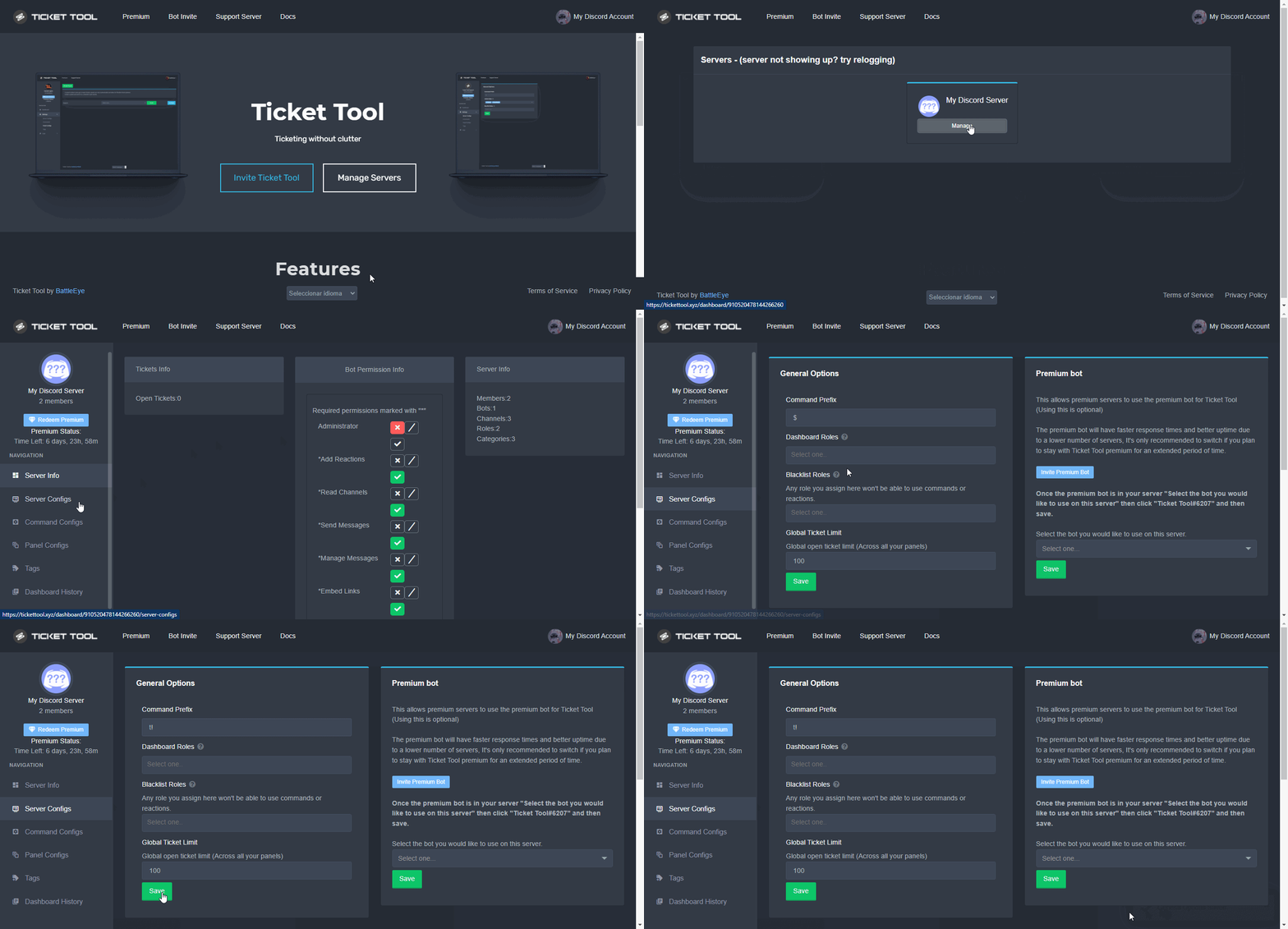
NOTE that @Ticket Tool#4843 will always work as a prefix even if there is a custom prefix.
waxen lake
Thanks.
 flat zenith
How can I make the bot in a channel
median wigeon
flat zenith
How can I make the bot in a channel
You mean to make a pannel in a channel with the bot?
Step 1: Invite the bot to the server
Step 2: Give him the right perms
Step 3: Make a panel at the dashboard and select a server channel.
Now the panel is in the channel.
jade topaz
how do i make the text in the ticket message bold
 polar kernel
I created a ticket on wrong gamer tag I got a message about a wrong answered questions I no longer have to chat to answer the correct one someone help says I have the ticket opened but nothing there
tribal cedar
polar kernel
I created a ticket on wrong gamer tag I got a message about a wrong answered que...
Are you sure your in the right discord? This is ticket tool support
jade topaz
shut bolt
```
**The text goes here**
```
how do i have it ping roles and people
humble sequoiaBOT
Mentions
Within all the messages the bot's sends (both embeds and text) you can mention either channels, roles, or even users, these mentions will only send a notification to the user if they are used within a text field, e.g: a role mentioned in an embed won't ping at all the users who have that role.
For mentioning a role you can use one out of three options:
{@Role Name} ➞ Which is Case Sensitive.
{RoleID} ➞ Replace RoleId with the Id of the role you are trying to ping.
<@&RoleID> ➞ Discord's native syntax to ping roles.
<#ChannelID> ➞ Mention a channel by its ID.
<@UserID> ➞ Mention a user by its ID.
shut bolt
There you go
jade topaz
thanks
shut bolt
Sure
shut bolt
Oops
rustic pollen
thanks @shut bolt
iron nightBOT
Gave 1 Rep to Yareaj_ (current: #2 - 240)
rustic pollen
<33
solid stream
Basic setup is simply creating a panel on the dashboard and sending it to a channel.
For simple usage you don't need anything beyond that.
$help setup
rustic pollen
not working or?
radiant moss
rustic pollen
not working or?
$help setup
humble sequoiaBOT
Setting up Ticket Tool
Visit the docs for setup info
General Setup
rustic pollen
it's not logging for me
shut bolt
rustic pollen
it's not logging for me
Which thing?
rustic pollen
as in the ticket it's not sending the log
shut bolt
Which log exactly?
rustic pollen
It's working now sorry I forgot to give it the bots role
shut bolt
No worries
rustic pollen
making a new server :))
shut bolt
B)
rustic pollen
 jade topaz
Failed: Invalid Form Body components[0].components[1].emoji.id: Invalid emoji
tf this mean
shut bolt
$sf
humble sequoiaBOT
FAQ: System Failure
- System Failure: @Ticket Tool Missing permission(s): PERMISSION(S)
+ Ticket Tool is missing permissions to work properly, check the mentioned permissions by the bot in the channel, in the category, and in the role. You can use $debug as a help tool.
- System Failure: Panel “XX” not found
+ The panel they are trying to interact with has been deleted.
- Failed: `Invalid Form Body components[X].components[X].emoji.id: Invalid emoji
+ The bot does not have longer access to the emoji (external server) or the emoji has been deleted
- Failed: `Invalid Form Body components[X].components[X]: this is a required field
+ There is a certain necessary field you left blank. You will have to input a valid argument (most likely text) in the required field for ticket tool to continue functioning normally.
- System Failure: allMessages.users.sort is not a function
- System Failure: Unknown Webhook
- System failure: Service unavailable?
- System Failure: Internal Server Error
+ The bot has run into an issue, please try again as these are cases that tend to fail only once, if the problem is persistent, contact our support team
- Warning: Ticket Tool Failed to connect to it's database, please wait or try again.
+ There might be an issue with Ticket Tool, most likely a database issue, you'll have to wait a few minutes before creating another ticket. This is in place to prevent certain bugs to happen with tickets
Check the third one
Probably the emoji you are trying to use got deleted
That's the most common reason
rustic pollen
?
radiant moss
Pablo was answering a different person
rustic pollen
sorry
radiant moss
No worries
rustic pollen
literally haven't slept
 winter olive
What is the problem?
 humble sequoiaBOT
Don't see your server in the dashboard?
You will possibly need to relog. Look below to see steps on how to relog.
How to relog in the Dashboard.
First, you will need to go to the dashboard. Once your there, click on your avatar on the top right. after you clicked it, you will see button that says Logout. You must click that. Once you have logged out, you can log back in.
Note:
You need one of these 3 things to access the dashboard.
1. Server Owner (Level: 6)
2. Server Administrator (Level: 4)
3. Dashboard Role (Level: 2)
:warning: You can check your level using $level on your Discord Server
User permission level with Ticket Tool
@User is permission level: 0 (User)
```» *If it shows that your permission is **0**, you don't have any of the above **3 things** to manage the dashboard.*
**See the GIF below on how to relog:** shut bolt
Try that
winter olive
Is anyone?
shut bolt
humble sequoia
@winter olive 
winter olive
shut bolt
<@!746686279470546955> <:this:894279341108772914>
Level

 iron nightBOT
Gave 1 Rep to Yareaj_ (current: #2 - 242)
shut bolt
Sure!
rustic pollen
Can I shout this server out
bronze depot
rustic pollen
Can I shout this server out
All can shout this server out. It is only a support server for their bot @pseudo glen :D
rustic pollen
Alr bet thanks
I need a permission
Is there any way
I can obtain a infinite link to the server
I don't have the invite players
Button
bronze depot
there is a link on the website
rustic pollen
Can you link me it please
bronze depot
see dm

 craggy geyser
The ping does nothing so there is no warning. But don't try something you think you will be told off for
craggy geyser
But pinging everyone (or trying to) is not the way to go
Especially when the #546557408902905896 say to not ping
rustic pollen
Eh I'd rather get a warning but at least the people know they are being helped out
 hard cape
rustic pollen
Gonna get a warning for this but
hard cape
rustic pollen
Gonna get a warning for this but
I dont want to be rude but is this really reason to ping everyone? XD
 trim blaze
Hi there,
as an admin I can open a ticket and it works. I only got feedback from the users who should actually be able to use the ticket. That the feedback "Warning: You don’t have permissions to use this." shows up.
What I have done wrong? Bot set incorrectly, or does it have to do with Discord server, category or channel rights?
hard cape
trim blaze
Hi there,
as an admin I can open a ticket and it works. I only got feedback from...
Hmm is this ur alt?
trim blaze
hard cape
Hmm is this ur alt?
sorry, what do you mean? 😅
hard cape
And owner need to set the permissions
 versed quartz
هلا
hard cape
trim blaze
sorry, what do you mean? 😅
I dont knew What u mean, sorry! I think u are talking: Im admin of ticket tool
versed quartz
@hard cape
hard cape
Ye?
trim blaze
hard cape
And owner need to set the permissions
oh yes, i am the owner ... i gave permissions to "members" at create ticket, claim ticket...
versed quartz
hi
hard cape
Hello
hard cape
trim blaze
oh yes, i am the owner ... i gave permissions to "members" at create ticket, cla...
Nice, So set the permissions in panel configs
versed quartz
i cant speak english
hard cape
versed quartz
i cant speak english
It’s fine
versed quartz
do you speak Arabic
trim blaze
hard cape
Nice, So set the permissions in panel configs
yes i did that, but only the "admins" can create a ticket ... the "standard members" can't and the warning message appears
bronze depot
trim blaze
yes i did that, but only the "admins" can create a ticket ... the "standard memb...
Can you send image please?
trim blaze
bronze depot
Can you send image please?
what you want to see?
bronze depot
i want an image of your problem so i can help you in the best way
trim blaze
trim blaze
Hi there,
as an admin I can open a ticket and it works. I only got feedback from...
@bronze depot i don't have image, i heard from the members that the warning message appears
bronze depot
ask for an image from them
I cannot help you unless i can see the problem for myself.
 bronze depot
what does it say above Warning: You don't have permission to use this. ?
@trim blaze
trim blaze
Click here to show attachment ... oh i should ask where the attachment is ...
trim blaze
me as an admin and server owner can do everything... every other one can't create a ticket.
and i don't know why @hard cape
bronze depot
What are the member's permission?
 bronze depot
discord role permission?
trim blaze
bronze depot
What are the member's permission?
View channcels
Invite other people
Send messages
Send messages in threads
Create public threads
Add attachments
Add reactions
Show message history
humble sequoiaBOT
Blacklist Roles
Any role you assign as a blacklisted role won't be able to use commands or reactions.
Selecting a blacklisted role
Go to your Dashboard -> Server Configs. There you will find the option to select blacklisted roles.
Note: Don't forget to save.
 craggy geyser
Check you have nothing here
craggy geyser
The correct answer is no
craggy geyser
That isn't a reason to ping everyone in this server though
rustic pollen
Yes but Its worth a warning
I didn't get one tho
I don't think
Can you give me one
craggy geyser
Because your ping didn't do anything
craggy geyser
You want a warning?
mystic hound
While I appreciate the shoutout, It was already explain to you that it's not proper, so you know not to do it again. Please refrain from bringing this topic up again
 empty panther
Uhh Can Anyone Tell me what it does mean : Warning limit of 500 servers
This is what it appears when im trying to make a Rocket
Ticket
 pale pilot
I'm assuming you're at the 500 channel limit. A server can only have 500 channels/categories. So you need to delete some
bronze depot
pale pilot
I'm assuming you're at the 500 **channel** limit. A server can only have 500 cha...
Just to confirm your theory, can you provide with image @empty panther ?
Also sorry for ping Mr. Simple
hard cape
trim blaze
yes i put members in allowed roles, and saved...
Did it works now?
 cerulean gulch
How to make a bot
humble sequoiaBOT
Help Options
$help commands - Information on commands
$help setup - Information on bot setup
$help faq - Frequently asked questions
 lofty veldt
سلام برای گذاشتن پشتیبانی تیکت برای سرور دیسکورد باید چیکار کنم
 sinful shell
السلام عليكم
 gaunt ridge
السلام عليكم
 kind scarab
$help commands
kind scarab
copper owl
<@!715123559092977675> <#910978476536905738>
thanks ❤️
iron nightBOT
Gave 1 Rep to Neptune (current: #1 - 444)
rustic pollen
thanks @shut bolt
iron nightBOT
Gave 1 Rep to Yareaj_ (current: #2 - 244)
copper owl
rustic pollen
thanks <@518666147441278998>
are you just giving rep for the sake of giving rep?
copper owl
rustic pollen
I have a crush on him
what?
rustic pollen
idk
copper owl
yeah just dont give people rep for no reason
and dont say things like that
would be appreciated 🙂
craggy geyser
Not a reason to give rep. Rep is for if people have helped. And even if he helped you, you have already given rep. So you can stop now. Same with multiple reviews
copper owl
craggy geyser
Not a reason to give rep. Rep is for if people have helped. And even if he helpe...
rustic pollen
ok
robust sandalBOT
jade topaz
hello
@scenic plinth Trying to translate to English but detected as English.
Please don't waste translations by trying to translate to the same language.
robust sandalBOT
jade topaz
merhaba yardım istiyom
 Vΐct𐍉ℝΐ𐍉us♛
hello I ask for help
Turkish (tr) → English (en)
 atomic pendant
Hello
scenic plinth
/tr Let's not ping people for support. Your best bet is to make a ticket so we can attempt to help you there.
robust sandalBOT
Destek için insanlara pinglememeyelim. En iyi şansın bir bilet yapmak böylece sana yardım etmeye çalışabiliriz.
English (en) → Turkish (tr)
jade topaz
merhaba benim sunucumda ticket tool var ama. ticket toolun sayfasına girdiğimde sunucum gözükmüyor
@atomic pendant
 grizzled drift
Hey there, is it somehow possible to set up a notification for the support team to get notified about new tickets?
 dusty schooner
grizzled drift
Hey there, is it somehow possible to set up a notification for the support team ...
dusty schooner
grizzled drift
Hey there, is it somehow possible to set up a notification for the support team ...
{@yourrole here} member will be with you shortly.
@grizzled drift
 grizzled drift
dusty schooner
<@!285380799765676053>
grizzled drift
dusty schooner
<@!285380799765676053>
Thanks! 🙂
iron nightBOT
Gave 1 Rep to Dark Project (current: #72 - 1)
jade topaz
jade topaz
merhaba benim sunucumda ticket tool var ama. ticket toolun sayfasına girdiğimde ...
.
@bronze comet
dusty schooner
jade topaz
.
Discord
Discord is the easiest way to communicate over voice, video, and text. Chat, hang out, and stay close with your friends and communities.
copper owl
jade topaz
<@!562688786467651585>
you've been told to stop pinging
jade topaz
SORRY
copper owl
if you want help from the TT support team, #🎫│make-a-ticket instead of pinging us in here
jade topaz
ı am türkişh ı dont l like very seak english
 unique junco
Neyle sorun yaşıyordunuz?
 frail goblet
Bonsoir, j'ai connecté ticket tool au serveur ou je suis administrateur, mais quand je vais dans manager serveur, cela me met pas le serveur demandé. Que dois-je faire?
dusty schooner
frail goblet
Bonsoir, j'ai connecté ticket tool au serveur ou je suis administrateur, mais qu...
Discord
Discord is the easiest way to communicate over voice, video, and text. Chat, hang out, and stay close with your friends and communities.
frail goblet
cela est déjà fait.
dusty schooner
frail goblet
cela est déjà fait.
log out and back in
frail goblet
je déconnecte aussi ticket tool du serveur ?
dusty schooner
frail goblet
je déconnecte aussi ticket tool du serveur ?
oui
humble sequoiaBOT
Vous ne voyez pas votre serveur dans le tableau de bord ?
Vous devrez peut-être vous reconnecter. Regardez ci-dessous les étapes à suivre pour vous reconnecter.
Tout d'abord, vous devez vous rendre sur le site. Une fois que vous y êtes, cliquez sur votre avatar en haut à droite. Après avoir cliqué, vous verrez un bouton qui dit Déconnexion. Vous devez cliquer là-dessus. Une fois que vous vous êtes déconnecté, vous pouvez vous reconnecter.
Remarque
Vous avez besoin de l'une de ces 3 choses pour accéder au tableau de bord.
1. Propriétaire du serveur (Niveau 6)
2. Administrateur du serveur (Niveau 4)
3. Rôle du tableau de bord (Niveau 2)
Vous pouvez vérifier votre niveau en utilisant $level sur votre serveur Discord.
Voir le GIF ci-dessous pour savoir comment se reconnecter:
jade topaz
Could someone help with the multi options for tickets i can't find it
copper owl
jade topaz
Could someone help with the multi options for tickets i can't find it
do you have premium?
 humble sequoiaBOT
For a more convenient use of multipanels, you can now combine panels on the dashboard. This will allow you to directly send the multipanel from the dashboard or via the $panel ID command.
Where can I find this?
You can find this setting on the Dashboard -> Panel Configs -> Settings -> General Options
Note: if you're attaching all the panels to a panel called English, don't include English in the attached panels box (If you do this, it will create duplicate)
This will put all buttons from all of your panels on one message. The message is the panel message from the panel you're combining these panels in.

 Note: This is a premium feature
copper owl
humble sequoia
Note: This is a premium feature
copper owl
humble sequoia
did you check the gif
jade topaz
Yeah
copper owl
did you save
jade topaz
I did that whe
copper owl
okay so just send the panel that has the attached panel
jade topaz
Then i went two button options
copper owl
and you get multiple panels per message
jade topaz
Once i turned it on where do i go?
copper owl
you send the panel
jade topaz
 humble sequoiaBOT
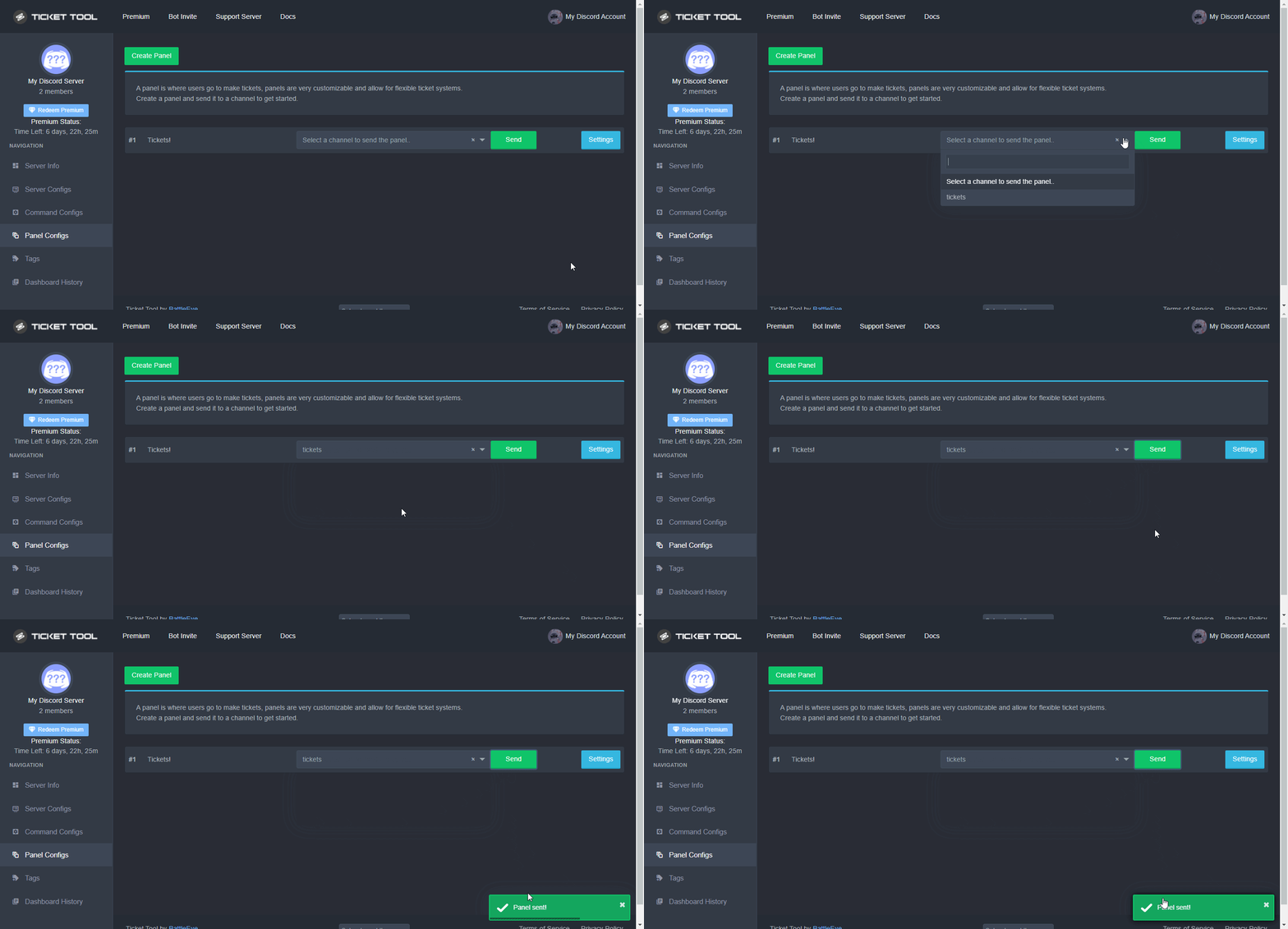
Sending a panel
Once you've created a panel on the dashboard you will need to send it to a channel using send on the dashboard
Select the channel you want your panel to be created in and click send.
For other questions checkout $help faq
An example of a sending a panel is shown below.
 copper owl
just send the panel thats all, youll get a panel message with more than one button
frail goblet
oh, thank you
copper owl
$buttons
humble sequoiaBOT

Buttons
The new Discord Buttons allow for a much smoother and convenient experience. They reduce lag and work much better than emojis. With ticket tool you can edit all the buttons however you like! Buttons can show emojis, text and can have 4 different colors.
Where can I edit them?
Dashboard -> Panel Configs -> <Settings> -> Button Options -> <Setting>
 copper owl
this is how you edit the button for the extra option
copper owl
What option do you see.
jade topaz
 copper owl
well there's a few things wrong with this screenshot
first off, you have create tickets as support only, meaning only people with a support role can open tickets
copper owl
humble sequoia
second off, check this gif to see how you edit the buttons.
just go the panel you want to edit the button, and follow the instructions, then edit it
hard cape
jade topaz
Click on  to change support team only
copper owl
we dont offer VC support sorry
copper owl
yes
after that, go to the panel configs page, go to the second panel you want to edit the button of, go to button options, create button settings and edit it there
 hard cape
 copper owl
so.. you see how you have multiple panels?
go to the one you want to edit the button of for multipanels
jade topaz
 copper owl
after that, go to the panel configs page, go to the second panel you want to edi...
copper owl
copper owl
after that, go to the panel configs page, go to the second panel you want to edi...
check this
and continue from there
 hard cape
jade topaz
https://cdn.discordapp.com/attachments/776680605517742090/920750002274451497/unk...
hard cape
jade topaz
https://cdn.discordapp.com/attachments/776680605517742090/920750002274451497/unk...
what u want to do?
 copper owl
create ticket settings..
jade topaz
Now what
copper owl
edit the button however you like
 hard cape
jade topaz
Now what
hard cape
jade topaz
Now what
 hard cape
jade topaz
hard cape
jade topaz
u need to do multi-pannels
copper owl
D i think they got that part down
copper owl
jade topaz
This is how i want it
okay so just do the same thing for each panel
jade topaz
jade topaz
copper owl
jade topaz
I don't see other pannels
did you attach the panels to one?
jade topaz
Do i need the preuim bot in my server?
hard cape
no
u just need to have premium
@jade topaz

but in the red "circle" the other pannel
jade topaz
Got it Thx
hard cape
np!
jade topaz
@copper owl thx
iron nightBOT
Gave 1 Rep to Neptune (current: #1 - 445)
copper owl
np
jade topaz
Failed to send panel, Run $debug in the channel to check for errors.
jade topaz
@hard cape thx
iron nightBOT
Gave 1 Rep to D<3 (current: #72 - 1)
jade topaz
$pc
copper owl
@jade topaz #🤖│bot-spam
hard cape
jade topaz
<@!832329623596957797> thx
np
 ornate quartz
do you need premium to use multiple buttons
dusty schooner
ornate quartz
do you need premium to use multiple buttons
yes
copper owl
ornate quartz
why is half of the things premium
most of the customization and automation options are premium
it costs money to run a bot
ornate quartz
fair
copper owl
thankfully
all the actual necessary shit like logging, transcripts, and unlimited panels are free
 vale sail
How do I install the ticket tool?
humble sequoiaBOT
How Do I setup Ticket Tool
You can check our documentation here, you can also check #573205317870157855 for the basic setup.
Our documentation contains all the info you need about the bot to be able to setup and configure the bot however you like.
copper owl
@vale sail ^
 jolly karma
is it possible to send a message when an user create a ticket?
humble sequoiaBOT
**Ticket Message**
The Ticket Message is the first message sent by the bot in a new ticket. To customise it head over to your Dashboard -> Panel Configs -> Settings -> Ticket Options -> Edit Ticket Message
 shut bolt
The bot sends a message you can edit
ornate quartz
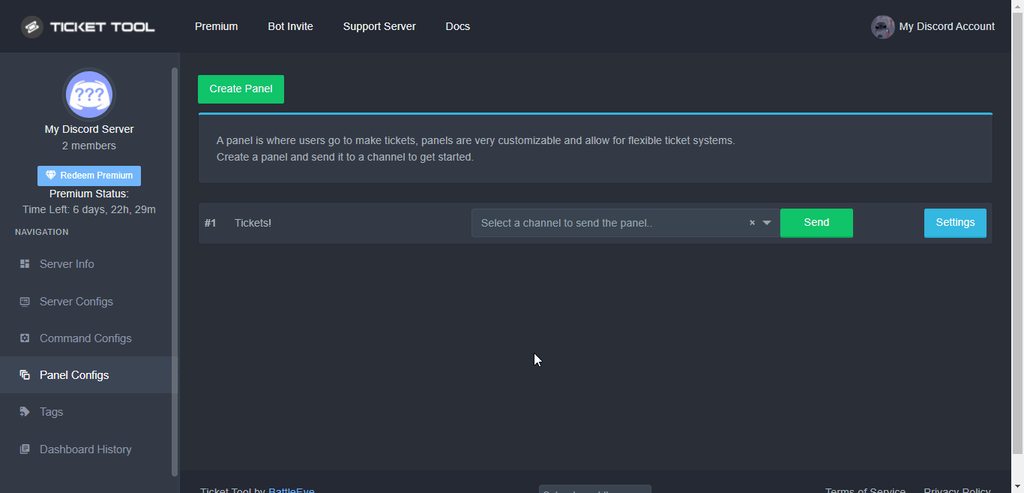
can you easily and quickly duplicate a panel you made?
 ornate quartz
awesome
 warm pier
Hi what can I do if I don’t see my server ? I invite Ticket tool in but I already don’t see the panel to configure it. I try reconnections but that don’t work. Please I need help!
shut bolt
Hey there
humble sequoiaBOT
Don't see your server in the dashboard?
You will possibly need to relog. Look below to see steps on how to relog.
How to relog in the Dashboard.
First, you will need to go to the dashboard. Once your there, click on your avatar on the top right. after you clicked it, you will see button that says Logout. You must click that. Once you have logged out, you can log back in.
Note:
You need one of these 3 things to access the dashboard.
1. Server Owner (Level: 6)
2. Server Administrator (Level: 4)
3. Dashboard Role (Level: 2)
:warning: You can check your level using $level on your Discord Server
User permission level with Ticket Tool
@User is permission level: 0 (User)
```» *If it shows that your permission is **0**, you don't have any of the above **3 things** to manage the dashboard.*


**See the GIF below on how to relog:**Try this
warm pier
Thank you I will try this
shut bolt
Sure
warm pier
Thank you very much it works!!
shut bolt
Glad I could help =)
 true adder
Hiya!
So im in the middle of setting up a community discord for a game and we already have a ton of memebers.
I would like to be able to have more than one option on the ticket pannel for different types of tickets e.g Bug Report, Donation, Player report etc

Similar to how this is
humble sequoiaBOT
━━ moved to ticket ━━
 fleet pebble
hello.
rustic pollen
hii
warm pier
I m the real cat here @fleet pebble
rustic pollen
I love this bot alot my number two
fleet pebble
warm pier
I m the real cat here <@863959619114500106>
=))) you fan beluga
 good
rustic pollen
good
rustic pollen
takes so long to make a server
fleet pebble
rustic pollen
takes so long to make a server
 good too
 jade topaz
does the vote thing glitch for others or is it just me?
in the sense, when I did $vote and voted on all 3 sites, it shows my vote count as only 2
shut bolt
Sometimes it glitches for a couple minutes
jade topaz
its been an hour 🙂
shut bolt
Could be a onetime bug
hard cape
jade topaz
in the sense, when I did $vote and voted on all 3 sites, it shows my vote count ...
U will earn 4 later!
jade topaz
hard cape
U will earn 4 later!
yay! thanks!
iron nightBOT
Gave 1 Rep to D<3 (current: #54 - 2)
hard cape
jade topaz
yay! thanks!
But u need to vote again 3x - it will gives u 4!
jade topaz
hard cape
But u need to vote again 3x - it will gives u 4!
okay noted
prime bridgeBOT
Successful bans: 1
Unsuccessful bans: 0
Reason: scam
Moderator: @mystic hound
 buoyant prawn
Есть кто из техподдержки тут ?
jade topaz
how do i download the alpha mod menu
humble sequoiaBOT
⚠️ You're in the wrong place
We provide support for @pseudo glen discord bot and cannot help you with whatever issue you have.
- Please make sure to contact the appropriate Support Team.
If you don't have any further questions regarding our bot Ticket Tool, please close this ticket
hard cape
buoyant prawn
Есть кто из техподдержки тут ?
Yes, But not in russian language
hard cape
Votes are things what can give u a free premium!
Just Use command $vote in #🤖│bot-spam to vote!
rustic pollen
For temp?
copper owl
delete channels from the category or assign another category
 copper owl
yeah you can delete channels in the category
that's the better solution so you dont run into the limits set by discord
you can also assign another category in the dashboard
 olive orbit
iv been waiting for 4 hours and it wont verify me
hard cape
Send a pic
 prisma spire
Hi I’ve been waiting for awhile for someone to get back and nothing
shut bolt
?
You joined today to the server, and as I can see, you don't have a ticket as of right now
dusty schooner
weird question how do you get a vote link
do i put $vote link >disord id< ?
 copper owl
user ID yeah
dusty schooner
copper owl
user ID yeah
thank you
iron nightBOT
Gave 1 Rep to Neptune (current: #1 - 446)
dusty schooner
You can't link to yourself.. sillypants. 🙂
now i have this lol
hard cape
dusty schooner
weird question how do you get a vote link
do i put $vote link >disord id< ?
Or u can Use @<user>
@hard cape
Like this
dusty schooner
hard cape
<@832329623596957797>
 dusty schooner
how do i get i vote link then?
hard cape
U can Use vote link for ur alt
So if u want to vote for you (from ur alt), type: $vote link @dusty schooner
Hmm whats funny?
dusty schooner
hard cape
Hmm whats funny?
i was just doing that 👍
hard cape
Ok
 tawdry edge
bonjour ticket toll ne trouve pas mon serveur sur le dashbord comment faire s'il vous plais ?
humble sequoiaBOT
Vous ne voyez pas votre serveur dans le tableau de bord ?
Vous devrez peut-être vous reconnecter. Regardez ci-dessous les étapes à suivre pour vous reconnecter.
Tout d'abord, vous devez vous rendre sur le site. Une fois que vous y êtes, cliquez sur votre avatar en haut à droite. Après avoir cliqué, vous verrez un bouton qui dit Déconnexion. Vous devez cliquer là-dessus. Une fois que vous vous êtes déconnecté, vous pouvez vous reconnecter.
Remarque
Vous avez besoin de l'une de ces 3 choses pour accéder au tableau de bord.
1. Propriétaire du serveur (Niveau 6)
2. Administrateur du serveur (Niveau 4)
3. Rôle du tableau de bord (Niveau 2)
Vous pouvez vérifier votre niveau en utilisant $level sur votre serveur Discord.
Voir le GIF ci-dessous pour savoir comment se reconnecter:
copper owl
tawdry edge
bonjour ticket toll ne trouve pas mon serveur sur le dashbord comment faire s'il...
Vous pouvez essayer ceci pour trouver votre serveur
humble sequoiaBOT
copper owl
humble sequoia
https://tickettool.xyz/manage-servers
Voici le lien
tawdry edge
Merci, vous êtes au top et super rapide !
copper owl
tawdry edge
Merci, vous êtes au top et super rapide !
Quand vous voulez, passez une bonne journée
tawdry edge
a vous aussi encore merci 🙂 tout est regler
copper owl
:)
 stoic eagle
Quick question about the ticketing system! Is it at all possible for the ticket to be opened via a thread?
stoic eagle
No problem. Appreciate the quick reply.
Is there any plan in the future to make that possible or is that something that isn't important atm?
shut bolt
stoic eagle
Is there any plan in the future to make that possible or is that something that ...
Currently our Dev is working on some upgrades to the bot, only time will tell if gets implemented 🤔
stoic eagle
Yeah, that's understandable. I'll be on the lookout then. 
shut bolt
 craggy geyser
My problem is that in other desktop servers my bot works with discord except server
hard cape
So is there any problem with ticket tool?
jade topaz
I accidentally deleted the ticket tool button. How do I add it again?
hard cape
You need to go to create ticket options!
craggy geyser
hard cape
So is there any problem with ticket tool?
Yeah
hard cape
jade topaz
I accidentally deleted the ticket tool button. How do I add it again?
Create ticket*
 craggy geyser
You can not come and fix it yourself
hard cape
Tell me which problem
median wigeon
jade topaz
I accidentally deleted the ticket tool button. How do I add it again?
Add this to the message 🛠️
craggy geyser
I tried for about a month but failed
hard cape
craggy geyser
I tried for about a month but failed
what was u trying?
craggy geyser
I make a ticket from the site, but it does not come in Discord
copper owl
median wigeon
Add this to the message 🛠️
that doesnt work anymore
the 🛠️ reaction doesnt update or do anything, it got disabled
median wigeon
copper owl
that doesnt work anymore
Please dont ping old support members
😂 but thanx
copper owl
Uh,, alright.. No problem lol
craggy geyser
What should I do now to fix my problem?
hard cape
I'm sorry but I still don't know with what u need to help with.
craggy geyser
The things I did to activate the ticket message in a server channel on the site that I should have done, but the message that should have appeared in the Discord channel did not appear.
hard cape
Did u give permissions to Ticket Tool?
craggy geyser
Yeah
hard cape
Or just try to send the pannel again
craggy geyser
I made a new channel, it did not open, I tried it several times, but it did not work
hard cape
Did u saved the message?
craggy geyser
There is no message at all. I also activated it on the site. The necessary work works in the rest of my discord servers.
jade topaz
Thank you @hard cape for the help. Much appreciated
iron nightBOT
Gave 1 Rep to D<3 (current: #46 - 4)
craggy geyser
You do not speak another language
jade topaz
What lenguaje do you speak
hard cape
I can speak English, Czech and Slovak
jade topaz
And i can speak spanish and english and euskera
hard cape
nice!
hard cape
craggy geyser
You do not speak another language
what is your nationality?
craggy geyser
You do not know my mother tongue, I am now communicating with you with the help of translation
jade topaz
craggy geyser
You do not know my mother tongue, I am now communicating with you with the help ...
What xd
hard cape
Ye, that's the bad thing, translater changes some things...
jade topaz
Google translate IS not good
hard cape
I agree
craggy geyser
If you could say first that I am afraid to say that everyone would make fun of me for my nationality, I would be ashamed of my nationality.
jade topaz
Use another one
hard cape
craggy geyser
If you could say first that I am afraid to say that everyone would make fun of m...
We won't! Try to speak in your language, I'll translate it by my self!
craggy geyser
My nationality is Iran and my language is Persian
jade topaz
hard cape
We won't! Try to speak in your language, I'll translate it by my self!
He/She don't understant
hard cape
Nice!
jade topaz
craggy geyser
My nationality is Iran and my language is Persian
Mmmmm i dont no
hard cape
jade topaz
He/She don't understant
Ye, but I don't know with what he/she wants help..
hard cape
craggy geyser
My nationality is Iran and my language is Persian
Do you speak arabic?
jade topaz
craggy geyser
My nationality is Iran and my language is Persian
Do you speak spanish or euskera
craggy geyser
I say a few words in my own language so you can see what my language looks like
hard cape
K, but say something with what u need help!
jade topaz
craggy geyser
I say a few words in my own language so you can see what my language looks like
IS your lenguage on #🎫│make-a-ticket
craggy geyser
سلام ببینید مشکل من این است که ربات توی بقیه سرور های دیسکورد من کار میکنه به قیر از یکی از آنها که سرور اصلیه منه
jade topaz
What IS your cuestion
jade topaz
craggy geyser
سلام ببینید مشکل من این است که ربات توی بقیه سرور های دیسکورد من کار میکنه به قی...
Mmmmmmmmm
Xd
hard cape
craggy geyser
سلام ببینید مشکل من این است که ربات توی بقیه سرور های دیسکورد من کار میکنه به قی...
سلام، اگر جواب نداد، احتمالاً اختیار ندارید!
Not me using translater-
jade topaz
Xf
craggy geyser
This gift text has another beautiful and well-written text that I, who grew up in this nation, do not find easy to write.
hard cape
Is there anything else with what can i help u with?
craggy geyser
hard cape
Not me using translater-
پس از کجا زبان منو میفهمی
jade topaz
Mu whith the translate
hard cape
craggy geyser
پس از کجا زبان منو میفهمی
من دارم از مترجم استفاده می کنم.
craggy geyser
It has full authority
jade topaz
من با مترجم هستم اما او نمی داند
hard cape
craggy geyser
It has full authority
و شما صاحب سرور هستید؟
craggy geyser
بله
jade topaz
احساس هویت می کنم
craggy geyser
باورم نمیشه شما بخاطر راحتی من از مترجم استفاده میکنید
jade topaz
اگر بخواهی می توانی اختلاف را به من بدهی و من خودم می توانم این کار را انجام دهم
craggy geyser
واقعا ممنونم از شما ها
hard cape
craggy geyser
بله
سپس باید به TicketTool قدرت بدهید.
craggy geyser
میتونید خودتون بیاید درستش کنید
hard cape
craggy geyser
باورم نمیشه شما بخاطر راحتی من از مترجم استفاده میکنید
من دوست دارم به مردم کمک کنم!
humble sequoiaBOT
Help Options
$help commands - Information on commands
$help setup - Information on bot setup
$help faq - Frequently asked questions
jade topaz
$help commands
humble sequoiaBOT
() = optional
[] = required
*==================================
Ticket Commands
==================================*
_ _
`$add [User] (channel)`
Description: Adding additional users to a ticket
Aliases: none
`$remove [User] (channel)`
Description: Removing users from a ticket
Aliases: none
`$close`
Description: Closing tickets
Aliases: none
`$open`
Description: Opening closed tickets
Aliases: none
`$delete`
Description: Deleting tickets
Aliases: none
`$rename`
Description: Renaming tickets/channels
Aliases: none
`$transcript (send channel)`
Description: Creating transcripts
Aliases: none
`$new (user) (reason)`
Description: Creating tickets in a monitored channel (when command style is enabled)
Aliases: none
`$claim`
Description: Claiming tickets (when claim is enabled)
Aliases: "unclaim"
_ _
*==================================
General Commands
==================================*
_ _
`$help (Help Options)`
Description: Help Command
Aliases: none
`$debug`
Description: Debuging issues with running Ticket Tool
Aliases: none
`$id (@role/@user/#channel/emoji)`
Description: Converting roles, users, channels and emojis to ID
Aliases: "getid"
`$permlevel`
Description: Checking permission level with Ticket Tool
Aliases: "level"
`$ping`
Description: Checking response time with discord api
Aliases: none
`$vote (link | unlink | redeem) (user)`
Description: Earn premium by voting on top.gg or Discord.boats
Aliases: "votes"
hard cape
craggy geyser
میتونید خودتون بیاید درستش کنید
نه نمی توانم، متاسفم!
craggy geyser
میگم اگر دوست دارید خودم به عنوان ساپورت فارسی کمکتون کنم ما در زمان مدرسه ۳ تا زبان یاد میگیریم
فارسی عربی و انگلیسی
hard cape
craggy geyser
میگم اگر دوست دارید خودم به عنوان ساپورت فارسی کمکتون کنم ما در زمان مدرسه ۳ تا ...
سه زبان هم یاد می گیرم.
craggy geyser
تو آدم باهوشی هستی واقعا
copper owl
jade topaz
$help commands
did you use this to help someone?
jade topaz
من 5 تا یاد می گیرم اما 2 تا از اونها برای من بد هستند
craggy geyser
چرا
hard cape
craggy geyser
تو آدم باهوشی هستی واقعا
با تشکر، اما اگر سوالی ندارید، می توانیم به گفتگوی خود پایان دهیم!
jade topaz
copper owl
did you use this to help someone?
I use to help to mama
copper owl
Ok, just making sure
hard cape
Me too , but he don't understand us.
craggy geyser
نه سوالی دیگر ندارم با تشکر از کمکتون
jade topaz
hard cape
Me too , but he don't understand us.
Xd
hard cape
craggy geyser
نه سوالی دیگر ندارم با تشکر از کمکتون
روز خوبی داشته باشید، استراحت خوبی داشته باشید.
jade topaz
craggy geyser
نه سوالی دیگر ندارم با تشکر از کمکتون
خداحافظ
craggy geyser
Thank you for your help
hard cape
No problem!
craggy geyser
Bye
hard cape
craggy geyser
Bye
Bye, have a nice day!
copper owl
you deserve that for the patience lmfao
iron nightBOT
Gave 1 Rep to D<3 (current: #44 - 5)
hard cape
copper owl
you deserve that for the patience lmfao
Thank u soo much!
 median wigeon
Can you see on the right side on the screen if the bot is in the channel?
hard cape
craggy geyser
I checked to see if I had given full access
If you want to edit panels, go to panel configs
craggy geyser
 hard cape
Go to Panel configs
craggy geyser
 hard cape
click on create panel
craggy geyser
 hard cape
What u want to do now?
craggy geyser
I did all this a few times, but there is no ticket in the Discord channel
craggy geyser
I chose the channel, I chose the channel, but it does not come
You mean, like, personal chat?
hard cape
You need to click on the green button "send"
craggy geyser
Thanks, it worked
hard cape
no problem!
iron nightBOT
Gave 1 Rep to D<3 (current: #39 - 6)
craggy geyser
@hard cape Thanks
iron nightBOT
@craggy geyser :: You can't rep D<3#8894 for 59 minutes and 46 seconds. Try coming back later?
 sterile yacht
Please help
 plain surge
Hello @sterile yacht
Please give the bot the required permissions in server settings.
Manage channels and Manage messages
jade topaz
Hi, I'm wondering how to change the message when someone opens a ticket. I don't see any options in the website, am I missing something?
rustic pollen
Guys is premium worth it
shut bolt
jade topaz
Hi, I'm wondering how to change the message when someone opens a ticket. I don't...
Hey pal
humble sequoiaBOT
**Ticket Message**
The Ticket Message is the first message sent by the bot in a new ticket. To customise it head over to your Dashboard -> Panel Configs -> Settings -> Ticket Options -> Edit Ticket Message
shut bolt
That's how :)
jade topaz
Perfect, thank you! :)
rustic pollen
Pablo
rustic pollen
shut bolt
That's how :)
Your design looks amazing
shut bolt
Thanks :)
shut bolt
jade topaz
Perfect, thank you! :)
Sure
rustic pollen
Wanted to ask
Will this bot have a feature where it like basically like a demo version
shut bolt
Wdym?
rustic pollen
Basically
Shows a demo. Of the ticket
But dosnt increase case nunbeesn
Numbers
shut bolt
rustic pollen
Shows a demo. Of the ticket
#🎫│make-a-ticket has a panel for demonstration
rustic pollen
I mean
The number at the too
Top increases
Make a demo available in your server
So you can test it
Without the numbers going up
shut bolt
Make a test panel and reset the count
rustic pollen
You can reset it???????