👑𝕄𝟙𝟡👑 has been silenced for 10m 

 Reason: Posting Discord Server Invites
#🆘│community-support
1 messages · Page 364 of 1
 prime bridgeBOT
 scarlet sequoia
please tell me how do I add a ticket to my server please write me by MD
 shut bolt
scarlet sequoia
please tell me how do I add a ticket to my server please write me by MD
shut bolt
scarlet sequoia
please tell me how do I add a ticket to my server please write me by MD
Hey
$invite
scarlet sequoia
:V
 humble sequoiaBOT
Ticket Tool Invite & Support
humble sequoiaBOT
How Do I setup Ticket Tool
You can check our documentation here, you can also check #573205317870157855 for the basic setup.
Our documentation contains all the info you need about the bot to be able to setup and configure the bot however you like.
scarlet sequoia
and then what does he do
que pongo
what do i put
I do not know what to do, please tell me how I add the ticket to my server or please, you can add it, I would appreciate it very much
shut bolt
scarlet sequoia
que pongo
En dónde?
scarlet sequoia
:v
scarlet sequoia
todo este tiempo
shut bolt
Lo sé
scarlet sequoia
hablabas español
scarlet sequoia
y yo como tarao
shut bolt
Vi tu perfil de hecho
shut bolt
Hombreeeee
scarlet sequoia
pero de española ingles
shut bolt
#🎫│make-a-ticket tenemos soporte en español
scarlet sequoia
: (
shut bolt
Haberme dicho antes bro
scarlet sequoia
pero podes
I do not know what to do, please tell me how I add the ticket to my server or please, you can add it, I would appreciate it very much
????
shut bolt
scarlet sequoia
I do not know what to do, please tell me how I add the ticket to my server or pl...
Tienes que invitar al bot
$invite
scarlet sequoia
podes ayudarme a añadir soporte
humble sequoiaBOT
Ticket Tool Invite & Support
shut bolt
Con el tercer link
scarlet sequoia
si ya esta invitado en mi server
hace cmo mil años lo tengo ahi
pero no c como usarlo
shut bolt
Ah okey okey
humble sequoiaBOT
 shut bolt
Entra acá
shut bolt
Sep
scarlet sequoia
y luego
shut bolt
Ve a Panel Configs
 shut bolt
Perdona, es que suelen tenerlo en inglés todos
shut bolt
Configuraciones de Panel
shut bolt
Dale en Crear Panel
shut bolt
scarlet sequoia
everyone
No
scarlet sequoia
que pongo ahi
shut bolt
Los roles que quieres que puedan ver todos tus tickets, los mods por ejemplo
shut bolt
Pues entonces puedes dejarlo sin ningún rol
scarlet sequoia
ok
una preunta
como pongo para que cuando le den a boton de ticket salgan preguntas para responder
??
me podes decir?
porfa ?
shut bolt
scarlet sequoia
como pongo para que cuando le den a boton de ticket salgan preguntas para respon...
Edita el mensaje del panel
humble sequoiaBOT
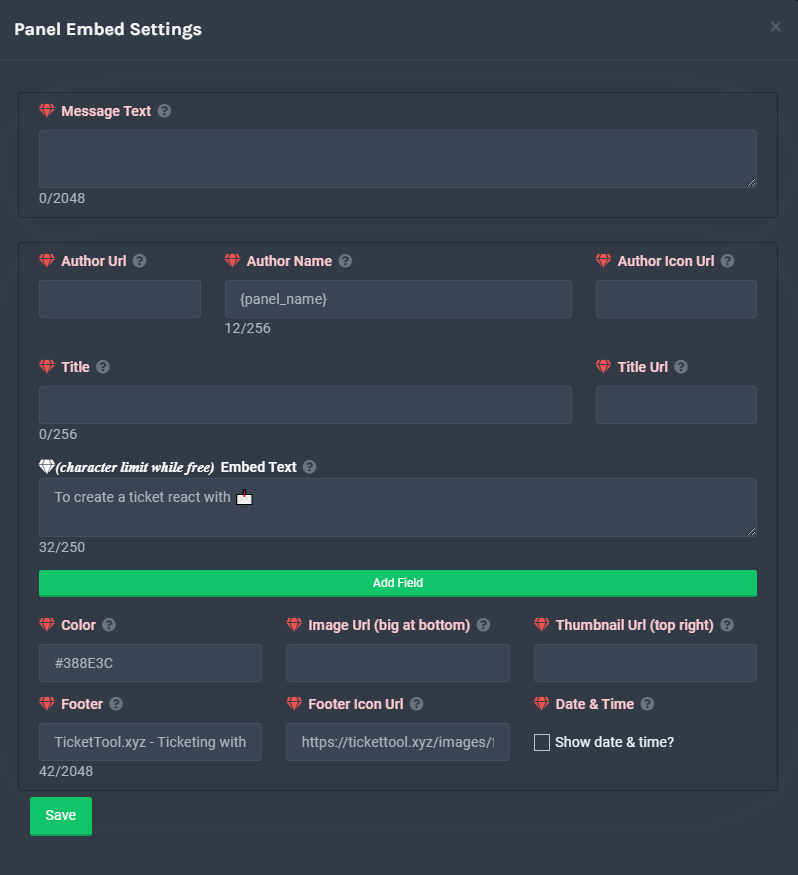
**Mensaje del Panel**
El mensaje del panel es dónde la gente da click para hacer un ticket. Para personalizarlo, dirígete a tu Panel de Control → Panel Configs → Settings → Panel Options → Edit Panel Message
 shut bolt
Puedes editar el campo que tiene el 
scarlet sequoia
:v
pero no c que poner
como lleno eso no entiendo
una pregunta me podes ayudar a hacerlo?
shut bolt
scarlet sequoia
una pregunta me podes ayudar a hacerlo?
No tengo permitido hacerlo, lo siento
scarlet sequoia
:C
shut bolt
scarlet sequoia
como lleno eso no entiendo
Sigue los pasos que dice y luego editas y pones las preguntas que quieres
scarlet sequoia
ya puse las preguntas
en eso que tiene el diamante blanco
pero
cuando le sale eso a una persona como hace para que responda
shut bolt
scarlet sequoia
cuando le sale eso a una persona como hace para que responda
Le aparecerá un mensaje del bot
Y el envía la respuesta allí
scarlet sequoia
🙂
y como hacepara que si responda correcto
??
le de automaticamente un rol
????
shut bolt
scarlet sequoia
le de automaticamente un rol
No se puede
 balmy glade
h
 jade topaz
Hello, I was wondering if premium ticket will ever have a Holiday sale coming up?
shut bolt
jade topaz
Hello, I was wondering if premium ticket will ever have a Holiday sale coming up...
No clue, it can be a surprise, meanwhile you can participate on the giveaways we have right now in #📣│server-news :)
jade topaz
ah I see.
 trail sphinx
hi
 eager cargo
Hello.
trail sphinx
plz i want rules for parter
eager cargo
Requirements aren't accessible to Members.
trail sphinx
with bot support server
 eager cargo
Applications are closed at the moment.
 iron nightBOT
Gave 1 Rep to Yareaj_ (current: #6 - 166)
shut bolt
Thx @eager cargo
iron nightBOT
Gave 1 Rep to Quo (current: #3 - 217)
shut bolt
trail sphinx
thx <@!518666147441278998>
Sure
 bleak python
anyone here adept with using the bot?
bleak python
yeah sorry to bother you but i checked the faq and couldnt figure out how to make the bot work
my goal is to have the bot create tickets when a button is clicked in the server but im not sure how to go about making that happen
shut bolt
bleak python
yeah sorry to bother you but i checked the faq and couldnt figure out how to mak...
No worries
shut bolt
bleak python
my goal is to have the bot create tickets when a button is clicked in the server...
Sure, let me help you
humble sequoiaBOT
How Do I setup Ticket Tool
You can check our documentation here, you can also check #573205317870157855 for the basic setup.
Our documentation contains all the info you need about the bot to be able to setup and configure the bot however you like.
shut bolt
Check out this, you'll find our setup guide
bleak python
sweet thanks!
shut bolt
And also #573205317870157855 contains the basic setup
bleak python
thanks @shut bolt
iron nightBOT
Gave 1 Rep to Yareaj_ (current: #5 - 168)
shut bolt
bleak python
thanks <@!518666147441278998>
Sure :)
bleak python
hey @shut bolt how would i go about adding more than one ticket option? i want to add more than just one create ticket button but i cant get it to work.
shut bolt
bleak python
hey <@!518666147441278998> how would i go about adding more than one ticket opti...
There is two ways to do that, option number 1, you create more than one panel and send them appart
Option 2, using the premium bot you create more than one panel and then bend them into one using the multipanel feature (Let me know if additional information on this is required)
bleak python
got it thank you
shut bolt
bleak python
got it thank you
Sure
 night bloom
Hey there, unsure if this is the correct spot or not but, does anyone know a good way to get the metrics of the tickets? We want to be able to see creation per user or ticket category (we have it grouped by region), closure per person are the two main things.
 copper owl
night bloom
Hey there, unsure if this is the correct spot or not but, does anyone know a goo...
copper owl
night bloom
Hey there, unsure if this is the correct spot or not but, does anyone know a goo...
logs
night bloom
copper owl
logs
So we have logs for each ticket, that we could manually go through to see, but is there a way to just see X number of tickets were made for this section this month ETC?
copper owl
Nope not as of now
also you don't have to manually search
just use the search future and use specific words like "Closed" "opened" or the panel name
it would filter the search
 unique spire
prime bridgeBOT
unique spire
prime bridgeBOT
Leoko has been silenced for 10m
Reason: Posting Discord Server Invites
Leoko#6583 | 854702840583815208
 jade topaz
can you help me ?
humble sequoiaBOT
Don't see your server in the dashboard?
You will possibly need to relog. Look below to see steps on how to relog.
How to relog the Dashboard.
First, you will need to go to the dashboard. Once your there, click on your avatar on the top right. after you clicked it, you will see button that says Logout. You must click that. Once you have logged out, you can log back in.
Note:
You need one of these 3 things to access the dashboard.
1. Server Owner (Level: 6)
2. Server Administrator (Level: 4)
3. Dashboard Role (Level: 2)
You can check your level using $level on your Discord Server
See the GIF below on how to relog:
 shut bolt
Please refrain from pinging
jade topaz
shut bolt
Please refrain from pinging
thx
iron nightBOT
Gave 1 Rep to Yareaj_ (current: #5 - 169)
shut bolt
Yup
 grand sleet
What does tag do?
copper owl
send a predefined response
humble sequoiaBOT
Tags
Tags are used to send a predefined response to your channels using a command. Tags will only respond if the command itself is used, it will not function if you put the tag into a sentence. The prefix is not included.
To create tags, go to: Dashboard > Tags > Create Tag. After creating and naming one, tap on the response button, and you can edit the response.
 grand sleet
Is it like the auto responder?
copper owl
@vale plaza I'm not sure if you noticed but there's a help category
you went straight for reviews and we won't be helping you there since it's a reviews channel
 vale plaza
hello can you help me
no one claiming my ticket (french)
but i can speak english if needed
when a member from my server try to create a ticket he get this message https://media.discordapp.net/attachments/911275004732243988/911277546266558554/IMG_0064.png?width=424&height=473

i dont know how to fix it
humble sequoiaBOT
Blacklist Roles
Any role you assign as a blacklisted role won't be able to use commands or reactions.
Selecting a blacklisted role
Go to your Dashboard -> Server Configs. There you will find the option to select blacklisted roles.
Note: Don't forget to save.
 copper owl
check this
vale plaza
in panel configs ?
copper owl
Nope, Server Configs
vale plaza
ohhhh i just noticed i blacklisted the roles that is supposed to create a ticket
thanks for the help
thanks @copper owl
iron nightBOT
Gave 1 Rep to Neptune (current: #1 - 351)
copper owl
Anytime
vale plaza
copper owl
Anytime
i need you again

look there is multiple person instead of the person who created the ticket
there should be only ''Drop'' in
with the staff member
nevermind
i fixed it
shut bolt
 distant holly
Hola
distant holly
Hola
Holap
 tawny halo
 😀
😀


 unreal elbow

distant holly
I know you speak English and I speak Spanish and I will speak XD like this
 compact garnet
i need join team support ticket tool how
shut bolt
compact garnet
i need join team support ticket tool how
Applications to the support team are currently closed
compact garnet
shut bolt
Applications to the support team are currently closed
What time open ?
shut bolt
compact garnet
What time open ?
#📣│server-news will have an announcement when opened
compact garnet
Okey thx
shut bolt
Sure
compact garnet
Thanks @shut bolt
iron nightBOT
Gave 1 Rep to Yareaj_ (current: #5 - 171)
shut bolt

compact garnet

 kindred shadow
Anyone know how I can tag a different channel in the 'message text' when creating a panel?
humble sequoiaBOT
How do I get the ID of Roles/Channels/Emojis?
Ticket Tool has a useful command that helps you get the ID of various things like channels, roles, emojis and your server.
Just use the command $id <#channel/@role/:emoji:>. Now copy everything, including the brackets <...>, to your dashboard (or wherever you want it)
If you want the server ID, just use $id.
 plain surge
copy paste the bot's response in the panel's message
kindred shadow
sweet thanks!
plain surge
no problem
 urban shard
I need help with sestup ticket took
urban shard
I have bot on my server but i dont no ho to put bot i room
 desert summit
So Go on website
humble sequoiaBOT
urban shard
And
desert summit
Then select youre Server
urban shard
Ok
desert summit
Then Go for Panelconfigs at the side
 desert summit
Go on „Create Panel“ and setup First the Name of panel>> the staffroles which has permissions for it and then Click create Panel
plain surge
$setup also exsists
humble sequoiaBOT
How Do I setup Ticket Tool
You can check our documentation here, you can also check #573205317870157855 for the basic setup.
Our documentation contains all the info you need about the bot to be able to setup and configure the bot however you like.
desert summit
Oh Yeah ig he read it But Doesnt Understand. Thanks!
plain surge
👍
urban shard
Thanks
 vestal owl
¿Puedo denunciar a alguien por publicidad DM?
eager cargo
Si
vestal owl
¿Cómo?
eager cargo
Enviar la prueba en mi DM's
vestal owl
¡Hice un ticekt hace 13 días y nadie ha respondido!
eager cargo
No hay entradas abiertas en la categoría de español.
vestal owl
¿A qué te refieres con la prueba?
eager cargo
¿Qué?
vestal owl
¿Qué quieres decir?
eager cargo
^
 verbal vessel
Como faz para pega a key do arceus
 wicked scroll
distant holly
Se você é do Brasil você é um capo
wicked scroll
distant holly
Se você é do Brasil você é um capo
Interessante.
humble sequoiaBOT
Você está no lugar errado
Nós oferecemos suporte para o bot de Discord @pseudo glen, então não podemos ajudá-lo com qualquer outro problema que você tenha.
Certifique-se de entrar em contato com a equipe de suporte apropriada para solucionar seu problema.
Se você não possui nenhuma dúvida sobre o nosso bot de tickets, por favor feche este ticket.
_ _
wicked scroll
@verbal vessel ^
 acoustic swift
humble sequoiaBOT
acoustic swift
humble sequoiaBOT
 charred wave
who can help me
with my issue on ticket tool i want it only to mention support team role and only the guy that open ticket will be in ticket and admins too?
anyone
 hard cape
$votes
humble sequoiaBOT
Votes
Current Votes: 6
Lifetime Votes: 6
Linked Votes: 0
Vote Links
Linking Info
Linked User: Not Linked
You can give your future votes to another user by linking with that user.
To link use $vote link (@user or userId)
To unlink use $vote unlink
Redeeming
Each vote is worth 12 hours of premium and can be redeemed once you have atleast 6 votes.
Your current votes are worth 3 days, 0h, 0m
To redeem your current votes use $vote redeem
charred wave
no one answering me
hard cape
Which leanguage?
 atomic barn
Be patient
charred wave
hard cape
Which leanguage?
english
atomic barn
Yep, someone will answer your ticket or the question here
 cosmic oak
charred wave
can you help me
cosmic oak
charred wave
can you help me
what is your problem?
plain surge
It makes a Demo ticket lol
hard cape
Really?!
plain surge
Yup
hard cape
xD
plain surge
Just remember to close it after you have viewed it
hard cape
Kk
 paper sundial
after i open a ticket, the ticket sends me a message inside the "open ticket" channel - how can i stop that ?
copper owl
paper sundial
after i open a ticket, the ticket sends me a message inside the "open ticket" ch...
which message are you talking about exactly?
paper sundial
 paper sundial
no chance to stop it from sending this ? 😦
copper owl
copper owl
you cant edit it, or disable it
Nope
unreal elbow
paper sundial
no chance to stop it from sending this ? 😦
nur du siehst die
und die geht nach ner zeit weg denke ich
paper sundial
Okay, ich halte das mal im auge -
unreal elbow
jop
paper sundial
Thx ^^
unreal elbow
paper sundial
Thx ^^
also wenn du die app neustartest ist das definitiv wieder weg
 woven pine
copper owl
woven pine
copper owl
@gritty flower there's a help category
no one will help you in reviews because it's a reviews channel
 gritty flower
copper owl
gritty flower
copper owl
if you want help from the support members, #🎫│make-a-ticket
you can't really ping us here
 grizzled bramble
I need help on setting up the bot
humble sequoiaBOT
How Do I setup Ticket Tool
You can check our documentation here, you can also check #573205317870157855 for the basic setup.
Our documentation contains all the info you need about the bot to be able to setup and configure the bot however you like.
plain surge
Please check out our documentation or #573205317870157855 @grizzled bramble
grizzled bramble
After giving the bot administers permission what do you do.
plain surge
You head to the Dashboard
humble sequoiaBOT
plain surge
And select your server
iron nightBOT
Gave 1 Rep to D̸̞̉҉̢̩͠o͛ͫ̚m͈̕͜҉̘̱̟☆̞͈͠҉ͪ̈́͘҉̷̥̐ (current: #24 - 20)
plain surge
No problem, after that just follow the setup guide on how to create a panel etc
 tribal pewter
what is transcript
plain surge
Transcripts save the latest 1000 messages inside a ticket @tribal pewter
tribal pewter
if we don't make support roles
only server owner and admins can manage the tickets right ?
 plain surge
Only the owner and admins and the person who opened the ticket can view and type in the ticket channel, yes
tribal pewter
okay thank you very much
plain surge
No problem
tribal pewter
thank @plain surge
iron nightBOT
Gave 1 Rep to D̸̞̉҉̢̩͠o͛ͫ̚m͈̕͜҉̘̱̟☆̞͈͠҉ͪ̈́͘҉̷̥̐ (current: #24 - 21)
tribal pewter
I am new to it so I don't know much anything about it
plain surge
No worries, we are here to help 👍
tribal pewter
black list roles can't create ticket or can't access the dashboard ?
I think the first one but I want to be sure
plain surge
Can't create tickets
Only the Owner, Admins and people with a Dashboard role can access the Dashboard
humble sequoiaBOT
Dashboard Roles
Any role you put there will have full access to the ticket tool dashboard. The server owner and users with admin permissions already have access to the dashboard.
Be careful of which roles to put here
 tribal pewter
thanks again
plain surge
No problem
tribal pewter
do we need to use commands if we are using the dashboard
I don't want to mess with commands, it looks so complicated
can I do everything and set everything with the dashboard ?
plain surge
Yes, you can set up everything from the Dashboard @tribal pewter
tribal pewter
thank @plain surge
iron nightBOT
@tribal pewter :: You can't rep D̸̞̉҉̢̩͠o͛ͫ̚m͈̕͜҉̘̱̟☆̞͈͠҉ͪ̈́͘҉̷̥̐#5201 for 26 minutes and 51 seconds. Try coming back later?
tribal pewter
thanks btw
humble sequoiaBOT
() = optional
[] = required
*==================================
Ticket Commands
==================================*
_ _
`$add [User] (channel)`
Description: Adding additional users to a ticket
Aliases: none
`$remove [User] (channel)`
Description: Removing users from a ticket
Aliases: none
`$close`
Description: Closing tickets
Aliases: none
`$open`
Description: Opening closed tickets
Aliases: none
`$delete`
Description: Deleting tickets
Aliases: none
`$rename`
Description: Renaming tickets/channels
Aliases: none
`$transcript (send channel)`
Description: Creating transcripts
Aliases: none
`$new (user) (reason)`
Description: Creating tickets in a monitored channel (when command style is enabled)
Aliases: none
`$claim`
Description: Claiming tickets (when claim is enabled)
Aliases: "unclaim"
_ _
*==================================
General Commands
==================================*
_ _
`$help (Help Options)`
Description: Help Command
Aliases: none
`$debug`
Description: Debuging issues with running Ticket Tool
Aliases: none
`$id (@role/@user/#channel/emoji)`
Description: Converting roles, users, channels and emojis to ID
Aliases: "getid"
`$permlevel`
Description: Checking permission level with Ticket Tool
Aliases: "level"
`$ping`
Description: Checking response time with discord api
Aliases: none
`$vote (link | unlink | redeem) (user)`
Description: Earn premium by voting on top.gg or Discord.boats
Aliases: "votes"
plain surge
@tribal pewter these are used after you already set up a panel as a faster way for the Support team to manage tickets
Instead of taping on the close button for example, they can just use $close
Which bypasses confirm close if you have it set up
tribal pewter
when I came to the docs it looked very complicated but after you showed me the commands it looks much easier right now
ty
plain surge
It can feel a bit overwhelming yh 😅
plain surge
Don't hesitate to ask if you have any questions
plain surge
tribal pewter
excellent bot
Thank you for choosing Ticket Tool
tribal pewter
plain surge
Thank you for choosing Ticket Tool
always 😎
 dawn warren
premium ticket I got the certificate premium ticket I got the certificate for 7 diasticket premium I got the certificate for 7 days
ticket already to the site there you will click on the prize function for 7 diasticket already to the site there you will click on the prize function for 7 days
unreal elbow
if u enable this, u can create tickets for users with $new @.user @tribal pewter
tribal pewter
unreal elbow
if u enable this, u can create tickets for users with $new @.user <@702215801561...
okay thanks
iron nightBOT
Gave 1 Rep to Onyx (current: #37 - 6)
tribal pewter
what is ticket claiming
unreal elbow
i don’t exactly know what it does
tribal pewter
okay
unreal elbow
never needed it tho
plain surge
$help claim
humble sequoiaBOT
How does the claim command work?
Ticket Tool claiming is a premium only command that allows your support team to claim tickets and have the ticket renamed, changed permissions or moved to another category
plain surge
Basically a way for the Support team to organize who is handling what ticket
Some people use it, to remove access from the ticket for the support team once it was claimed. That's given that the support team doesn't have admin perms
So only the ticket owner and the member who claimed (and the owner and admins) can view and type in the ticket
Others just use it to organize their tickets, so the Support team knows which tickets they need to handle and which are already being handled
tribal pewter
I won't make a support team, I will handle everything myself so I think that I don't need it
thank @plain surge
iron nightBOT
Gave 1 Rep to D̸̞̉҉̢̩͠o͛ͫ̚m͈̕͜҉̘̱̟☆̞͈͠҉ͪ̈́͘҉̷̥̐ (current: #24 - 22)
plain surge
No problem 👍
jade topaz
Category #▬ 🎫 ▬ Help Desk ▬ 🎫 ▬ is missing or blocking permissions VIEW_CHANNEL, SEND_MESSAGES for @humble sequoia - Skipping <--- can you please help me with this :/
plain surge
You need to give the bot View Channels and Send messages permissions in that category @jade topaz
jade topaz
Oh ok I fixed it thanks!
plain surge
No problem 👍
Sorry, I didn't quite get that. Can you please explain your question again? @dawn warren
dawn warren
prize 7 days I clicked on the site dashboard and picked up the paper and the dinghy I can pick up again @plain surge
plain surge
Do you mean the 7 days premium free trial? @dawn warren
If yes, that's a one time thing. After 7 days go by, you can't take another 7 days trial
dawn warren
 plain surge
Yes, after 6 days, you won't be able to use the Premium features
And you can't claim another 7 days free trial
It is a one time thing
plain surge
👍
dawn warren
plain surge
👍
thank you for seeing if it was worth explain
iron nightBOT
Gave 1 Rep to D̸̞̉҉̢̩͠o͛ͫ̚m͈̕͜҉̘̱̟☆̞͈͠҉ͪ̈́͘҉̷̥̐ (current: #24 - 23)
 elder forge
Hey!
I wanted to know how I can add multiple buttons on the ticket panel like one that says press for role support or another other one that says press for different languages?
humble sequoiaBOT
For a more convenient use of multipanels, you can now combine panels on the dashboard. This will allow you to directly send the multipanel from the dashboard or via the $panel ID command.
Where can I find this?
You can find this setting on the Dashboard -> Panel Configs -> Settings -> General Options
Note: if you're attaching all the panels to a panel called English, don't include English in the attached panels box (If you do this, it will create duplicate)
This will put all buttons from all of your panels on one message. The message is the panel message from the panel you're combining these panels in.
 copper owl
there ya go
elder forge
Thanks so much!
dawn warren
Ok
 humble sequoiaBOT

Buttons
The new Discord Buttons allow for a much smoother and convenient experience. They reduce lag and work much better than emojis. With ticket tool you can edit all the buttons however you like! Buttons can show emojis, text and can have 4 different colors.
Where can I edit them?
Dashboard -> Panel Configs -> <Settings> -> Button Options -> <Setting>
 dawn warren
I backed up the premium ticket settings for when the free trial is over I transfer to the public
tribal pewter
ummm I set ticket limit to 1
but what happens if users creating and closing tickets continually
and spamming it
so there will be no purpose of ticket limit
and the server will be full of ticket channels 😔
copper owl
tribal pewter
so there will be no purpose of ticket limit
just disable close for users
make it support only
iron nightBOT
Gave 1 Rep to Neptune (current: #1 - 353)
tribal pewter
Where we do that
copper owl
$buttons
humble sequoiaBOT
Buttons
The new Discord Buttons allow for a much smoother and convenient experience. They reduce lag and work much better than emojis. With ticket tool you can edit all the buttons however you like! Buttons can show emojis, text and can have 4 different colors.
Where can I edit them?
Dashboard -> Panel Configs -> <Settings> -> Button Options -> <Setting>
dawn warren
copper owl
$buttons
7-Day prize backup to not lose anything from tickeprize
 fallow bramble
I added the premium bot. How do I create panels via premium bot?
jade topaz
hello so the server im trying to view isnt showing up in the server manager and ive reloaded the page heaps and reinvitedthe bot heaps and given all perms to the ticket bot aswell.
humble sequoiaBOT
Don't see your server in the dashboard?
You will possibly need to relog. Look below to see steps on how to relog.
How to relog the Dashboard.
First, you will need to go to the dashboard. Once your there, click on your avatar on the top right. after you clicked it, you will see button that says Logout. You must click that. Once you have logged out, you can log back in.
Note:
You need one of these 3 things to access the dashboard.
1. Server Owner (Level: 6)
2. Server Administrator (Level: 4)
3. Dashboard Role (Level: 2)
You can check your level using $level on your Discord Server
See the GIF below on how to relog:
fallow bramble
I added the premium bot. How do I create panels via premium bot?
humble sequoiaBOT
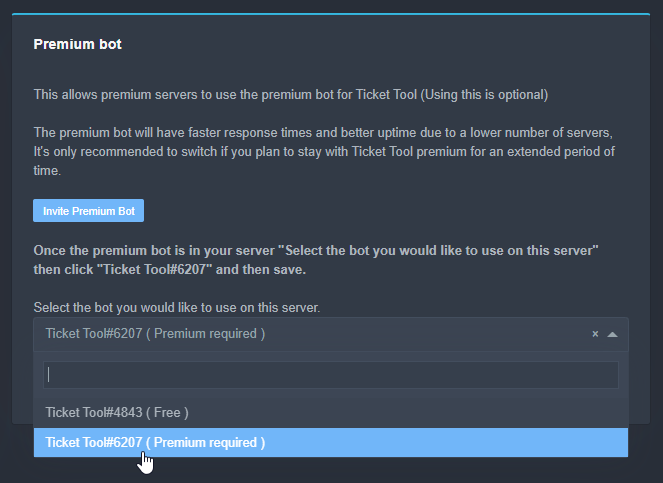
Inviting and Enabling Premium Bot
The first thing you will need to do is invite the premium bot, an invite can be found here
Once the bot is in your server we will head to the dashboard and manage your server. When you are managing your server, you want to head into "Server Configs" then click the drop down menu under "Select the bot you would like to use on this server" then click "Ticket Tool#6207" and then save.
 shut bolt
Select the premium bot as shown
After that, resend your panels
And delete the ones sent by the free bot
shut bolt
fallow bramble
I click if but nothing happens
Click where?
jade topaz
....
fallow bramble
This
 fallow bramble
Oh I thought I saw somethings saying that if you vote you would get premium. But thanks tho
shut bolt
You can do
fallow bramble
?
shut bolt
Check the $votes command in #🤖│bot-spam
fallow bramble
Ok
shut bolt
Read the message the bot will send
fallow bramble
How ever so often can I vote?
shut bolt
fallow bramble
How ever so often can I vote?
Each 12 hours per page
fallow bramble
Ok
 oblique sinew
hey someone here ?
dawn warren
Support you don't have to wait Vila is attended to very fast at the same time very good support award 10/10
oblique sinew
when i buy coins need to wait 24 hours to get ?
jade topaz
....
oblique sinew
?
jade topaz
i have no response

 restive swan
Hey guys, just wondering has anyone been able to setup ticket automation so that when a new user joins the server it will automatically raise a ticket on the users behalf?
humble sequoiaBOT
━━ moved to ticket ━━
 dark bramble
How do i make my ticket bot automatically transcript
humble sequoiaBOT
━━ moved to ticket ━━
fallow bramble
I redeemed my vote now what?
copper owl
did the bot DM you
fallow bramble
Yes
humble sequoiaBOT
How to redeem premium
To redeem your premium key, go to the dashboard, select your server, then click "Redeem Premium" under the server's icon and name.
 copper owl
redeem the premium using this method
fallow bramble
Ok
copper owl
seeing as it DM'd you a key
fallow bramble
Thanks
I redeemed it I selected the bot and when I send the panels it says "missing permissions"
copper owl
then give ticket tool all the necessary permissions in the server / channels
fallow bramble
Is it moderation?
copper owl
what do you mean?
fallow bramble
Never mind
What permissions do I need to ad? In the dashboard All the permissions wich are necessary are ticked
 bronze comet
uhh add send messages to the category for the bot I think
fallow bramble
It has send messages
bronze comet
Not too sure then, if you want to be safe, just give it administrator perms
fallow bramble
Ok...
copper owl
admin isnt necessary
fallow bramble
I thought so
copper owl
fallow bramble
What permissions do I need to ad? In the dashboard All the permissions wich are ...

you need to provide those in the channels too
even if theyre ticked in the dashboard
that doesnt necessarily mean it has those perms in the channels
bronze comet
Are they set in the category as well as the channel you are trying to send the panel to?
fallow bramble
Yes I think so
 lunar hearth
3131
fallow bramble
?
bronze comet
Try and resend the panel then, should work now if its setup correctly
 copper owl
fallow bramble
This is what happens: and I thought I gave it perms
copper owl
fallow bramble
This is what happens: and I thought I gave it perms
then it doesn't have those permissions in that channel
 hard cape
copper owl
hard cape
copper owl
What will happend if I won’t select the administrator?
copper owl
ill open a ticket for you
copper owl
hard cape
What will happend if I won’t select the administrator?
nothing
fallow bramble
Ok
hard cape
Kk
fallow bramble
I have a add so many problems today! I did $.claim and it says "Claim is it not enabled!" and it's active
fallow bramble
Ok
copper owl
@dapper sandal #🤖│bot-spam
fallow bramble
Thank you so much!
 safe eagle
ok
 dapper sandal


 edgy dagger
Hi
 mystic hound
👋
cosmic oak
mystic hound
👋

 heady nova
I got a question guys - Is it possible to rename opened ticket by itself like automatically?
humble sequoiaBOT
Ticket names
The ticket name is the default channel name of all tickets. To edit it, go to your Dashboard > Panel Configs > Settings > Ticket Options. There you can edit the channel name of opened and closed tickets. You can also use variables in there.

 Note: This is a premium feature
copper owl
Note: This is a premium feature
copper owl
if you have premium, you can set a predefined name here
 tulip pilot
How do I make so more people can manage the tickets
copper owl
tulip pilot
How do I make so more people can manage the tickets
you mean handle them?
tulip pilot
Yeah like how do I have more people other than me handle the tickets and help people who open them
copper owl
$help support
humble sequoiaBOT
How to let support team see into a ticket
About support roles
A support role lets your support team see into tickets with out having to add them manually to each and every ticket.
You can add as many support roles as you like per panel.
NOTE that the way discord works all admins can see into tickets regardless of this.
How to set a support role
To set a Support role go to the Dashboard -> Panel Configs -> Settings -> General Options -> Support Team Roles.

NOTE that the support role will not be able to see into tickets that are already created..
copper owl
Input a support role, like your mods or admins
copper owl
anytime
 robust sandalBOT
/in
 Spanish (es) → German (de)
tribal pewter
Spanish (es) → German (de)
tribal pewter
is it the total number of opened tickets or all ?

I mean it doesn't count closed tickets right ?
copper owl
No, it's the total tickets allowed to be opened per user across all panels
tribal pewter
thank @copper owl
iron nightBOT
Gave 1 Rep to Neptune (current: #1 - 358)
copper owl
anytime
tribal pewter
so an user can create maximum 30 ticket for all the time ?
copper owl
tribal pewter
so an user can create maximum 30 ticket for all the time ?
across all panels yes
humble sequoiaBOT
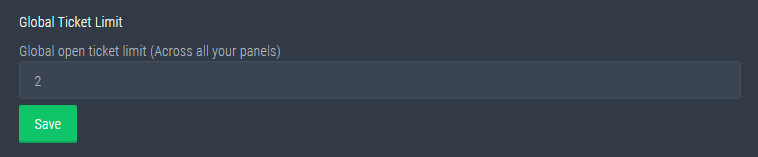
Global Ticket Limit
Unlike the regular Ticket Limit, the global limit will limit the amount of tickets a user can create at the same time for ALL Panels. When a ticket is closed again, the limit resets for that user.
To customize it head over to your Dashboard --> Server Configs --> Global Ticket Limit
Note:
This is not a limit for how many tickets a user can open at all times or how many tickets you can have open on the server in total. This is just a limit per user for open tickets.
 humble sequoiaBOT
Don't see your server in the dashboard?
You will possibly need to relog. Look below to see steps on how to relog.
How to relog the Dashboard.
First, you will need to go to the dashboard. Once your there, click on your avatar on the top right. after you clicked it, you will see button that says Logout. You must click that. Once you have logged out, you can log back in.
Note:
You need one of these 3 things to access the dashboard.
1. Server Owner (Level: 6)
2. Server Administrator (Level: 4)
3. Dashboard Role (Level: 2)
You can check your level using $level on your Discord Server
See the GIF below on how to relog:
 gaunt moth
Yes I logged out then in
 late thistle
So i have a question about the panels and new channels created.
By default are the new ticket channels only visable by those who made them or is that a setting i need to set up in the app
 rare sinew
Someone know how I can to set ticket tool in my server ? Because I can't open ticket
shut bolt
gaunt moth
Yes I logged out then in
Run $level and read the note of the embed the bot sent
humble sequoiaBOT
How Do I setup Ticket Tool
You can check our documentation here, you can also check #573205317870157855 for the basic setup.
Our documentation contains all the info you need about the bot to be able to setup and configure the bot however you like.
gaunt moth
ok
rare sinew
I am french if one personn speak fench here
shut bolt
humble sequoia
@rare sinew check this
 glass trench
my server arent showing up whatever i do!!!
 modest wharf
hi how can i change the word welcome to any thing else?
 glass trench
my server arent showing up whatever i do!!!
glass trench
modest wharf
hi how can i change the word welcome to any thing else?
I dont think that works, or its just for premium
modest wharf
glass trench
I dont think that works, or its just for premium
ok thank you
iron nightBOT
Gave 1 Rep to XDMaleye (current: #68 - 1)
glass trench
np
shut bolt
modest wharf
hi how can i change the word welcome to any thing else?
Hello there
You can do
humble sequoiaBOT
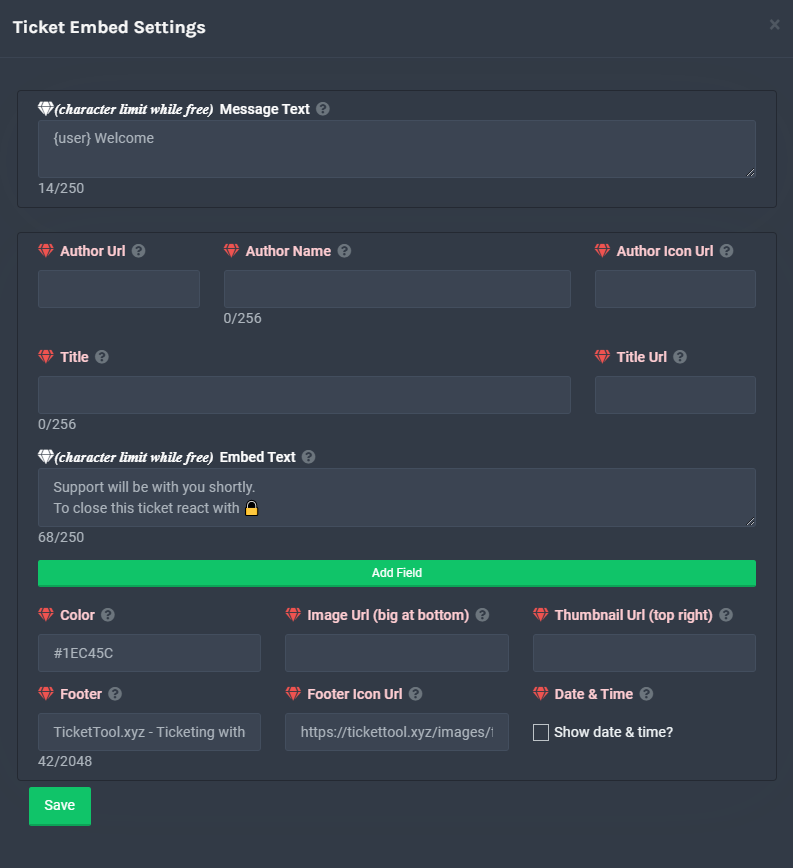
**Ticket Message**
The Ticket Message is the first message sent by the bot in a new ticket. To customise it head over to your Dashboard -> Panel Configs -> Settings -> Ticket Options -> Edit Ticket Message
 shut bolt
Edit the Message Text field
shut bolt
glass trench
I dont think that works, or its just for premium
It works, premium allows you to exceed the character limitation the free version has
shut bolt
glass trench
my server arent showing up whatever i do!!!
Try this
humble sequoiaBOT
Don't see your server in the dashboard?
You will possibly need to relog. Look below to see steps on how to relog.
How to relog the Dashboard.
First, you will need to go to the dashboard. Once your there, click on your avatar on the top right. after you clicked it, you will see button that says Logout. You must click that. Once you have logged out, you can log back in.
Note:
You need one of these 3 things to access the dashboard.
1. Server Owner (Level: 6)
2. Server Administrator (Level: 4)
3. Dashboard Role (Level: 2)
You can check your level using $level on your Discord Server
See the GIF below on how to relog:
shut bolt

iron nightBOT
Gave 1 Rep to Yareaj_ (current: #5 - 175)
shut bolt
Sure
 cedar hornet
Anyone know how to blacklist people from making tickets
bronze comet
make a role then set it on the config
cedar hornet
omg thanks am blind hahaha
bronze comet
server configs -> blacklist roles
modest wharf
shut bolt
Hello there
ok can i add an auto reply?
shut bolt
modest wharf
ok can i add an auto reply?
What do you mean by auto reply?
modest wharf
shut bolt
What do you mean by auto reply?
like when someone write any word the bot reply auto
humble sequoiaBOT
Tags
Tags are used to send a predefined response to your channels using a command. Tags will only respond if the command itself is used, it will not function if you put the tag into a sentence. The prefix is not included.
To create tags, go to: Dashboard > Tags > Create Tag. After creating and naming one, tap on the response button, and you can edit the response.
shut bolt
You can create a tag
To a specific word they bot will answer something
Yet, the bot doesn't offer an auto replier in all the sense of that term
modest wharf
like this when i wrote the word i receive an auto reply
shut bolt
shut bolt
To a specific word they bot will answer something
The only way to do that is if you create a tag for it
 cinder badge
How do you add people to tickets
bronze comet
Use $add id
cinder badge
Doesn’t work for some reason
shut bolt
$help add
humble sequoiaBOT
How to add or remove users on tickets
To add a user to a ticket use $add <user>
To remove a user from a ticket use $remove <user>
cinder badge
It doesn’t work idk why
bronze comet
If you are trying to add a role to a ticket, it should work with the same as the above, if it doesn't, then I'm not too sure whats wrong with it, could be a permission issue
cinder badge
bronze comet
If you are trying to add a role to a ticket, it should work with the same as the...
Not a role a person

Doesn’t work
bronze comet
Is the user in the server?
cinder badge
Yea
copper owl
check the prefix
cinder badge
What the prefix command?
cinder badge
There isn’t any prefix lemme add one real quick and try again
copper owl
if there is no prefix then you wont be able to use any commands
iron nightBOT
Gave 1 Rep to Neptune (current: #1 - 361)
 hard charm
guys what kind of permission is needed so I can access the dashboard? I was able to invite the bot but dont see the dashboard im only moderator in the discord and not full admin
shut bolt
hard charm
guys what kind of permission is needed so I can access the dashboard? I was able...
You need one out of three, Owner, Administrator permission, or having a dashboard role. With only Manage Server perm you can invite but not edit it's settings
humble sequoiaBOT
Dashboard Roles
Any role you put there will have full access to the ticket tool dashboard. The server owner and users with admin permissions already have access to the dashboard.
Be careful of which roles to put here
shut bolt
This is what Dashboard Roles are
hard charm
thank you 🙂
shut bolt
Sure
 flat wraith
Hey, guys. Is it possible to make auto-deletion of empty tickets?
humble sequoiaBOT
Automation disabled
There's currently no ETA for when automation will be enabled again. The issue that's caused it to be disabled, us hitting rate limits, is tied to the increased load on Discord's servers. The situation's currently unpredictable, which makes it so we can't give you a fixed time.
shut bolt
Not possible
flat wraith
Okay, thx
shut bolt
Anyways, you can make the tickets to automatically be deleted after getting closed
shut bolt
flat wraith
Okay, thx
Sure
flat wraith
shut bolt
Anyways, you can make the tickets to automatically be deleted after getting clos...
How I can do this?
humble sequoiaBOT
shut bolt
Go into the Dashbord
Open the Panel Configs
Click on the Settings of the panel
Then open the General Options menu
After that mark as the Two Step Ticket option, finally Save changes
flat wraith
but it is not working with opened empty tickets, yes?
shut bolt
humble sequoia
No, as told here there is no way to automatically delete tickets
shut bolt
flat wraith
ok, srry
No worries
shut bolt
flat wraith
thx
Sure
 ashen heath
Is there a way to configure Ticket Tool to automatically save a transcript every time a ticket is closed?
bronze comet
Yep
ashen heath
Typically our workflow is to $transcript first and then $close, but if it could be done automatically that would be nice
bronze comet
Bare with me one minute
 tribal cedar
Panel configs -> settings -> logging options
ashen heath
Ah my bad. You're right. It's a premium feature
tribal cedar
However it is a premium function
ashen heath
Ty
Is it possible to configure Ticket Tool to show the "Transcript" button while a ticket is open? From what I can tell it only shows up after a ticket has been closed.
With the permissions I can configure it so that only Support roles can interact with it, so I think it would be good if the button can be persistent
tribal cedar
I believe thats the only way it's set to act
 median fulcrum
D
tribal cedar
Meaning it won't show till the ticket is closed
ashen heath
tribal cedar
Meaning it won't show till the ticket is closed
Fair enough. Ty
iron nightBOT
Gave 1 Rep to Enigma (current: #14 - 80)
tribal cedar
Nps
 abstract swallow
how do i make ticket tool ping a role when it makes a ticket
shut bolt
$help ping
humble sequoiaBOT
How to make Ticket Tool ping a role
To make ticket tool ping a role when a ticket is opened, go to the Dashboard -> Panel Configs -> Settings -> Ticket Options -> Ticket Message -> Message Text and do this:
{@Role name} This is case sensitive and the role must have @mentions enabled
 shut bolt
@abstract swallow
abstract swallow
ty
shut bolt
Sure
 kindred nymph
how do I set my support team role
shut bolt
$help support
humble sequoiaBOT
How to let support team see into a ticket
About support roles
A support role lets your support team see into tickets with out having to add them manually to each and every ticket.
You can add as many support roles as you like per panel.
NOTE that the way discord works all admins can see into tickets regardless of this.
How to set a support role
To set a Support role go to the Dashboard -> Panel Configs -> Settings -> General Options -> Support Team Roles.
NOTE that the support role will not be able to see into tickets that are already created..
 upper tartan
@shut bolt como le hago para tener un canal aparte donde se puedan sacar tickets
shut bolt
No menciones a miembros del equipo de soporte
Si necesitas ayuda puedes preguntar acá y esperar una respuesta o abrir un ticket en #🎫│make-a-ticket
shut bolt
upper tartan
<@518666147441278998> como le hago para tener un canal aparte donde se puedan sa...
$helpes setup
humble sequoiaBOT
Invitando a Ticket Tool
Lo primero que debe hacer es invitar al bot, dando click aquí.
Una vez haya invitado al bot, diríjase al panel de control y cree un panel.
Un panel es usado para definir las configuraciones de un ticket (los usuarios que pueden ver el ticket, los permisos, los nombres, entre otros).
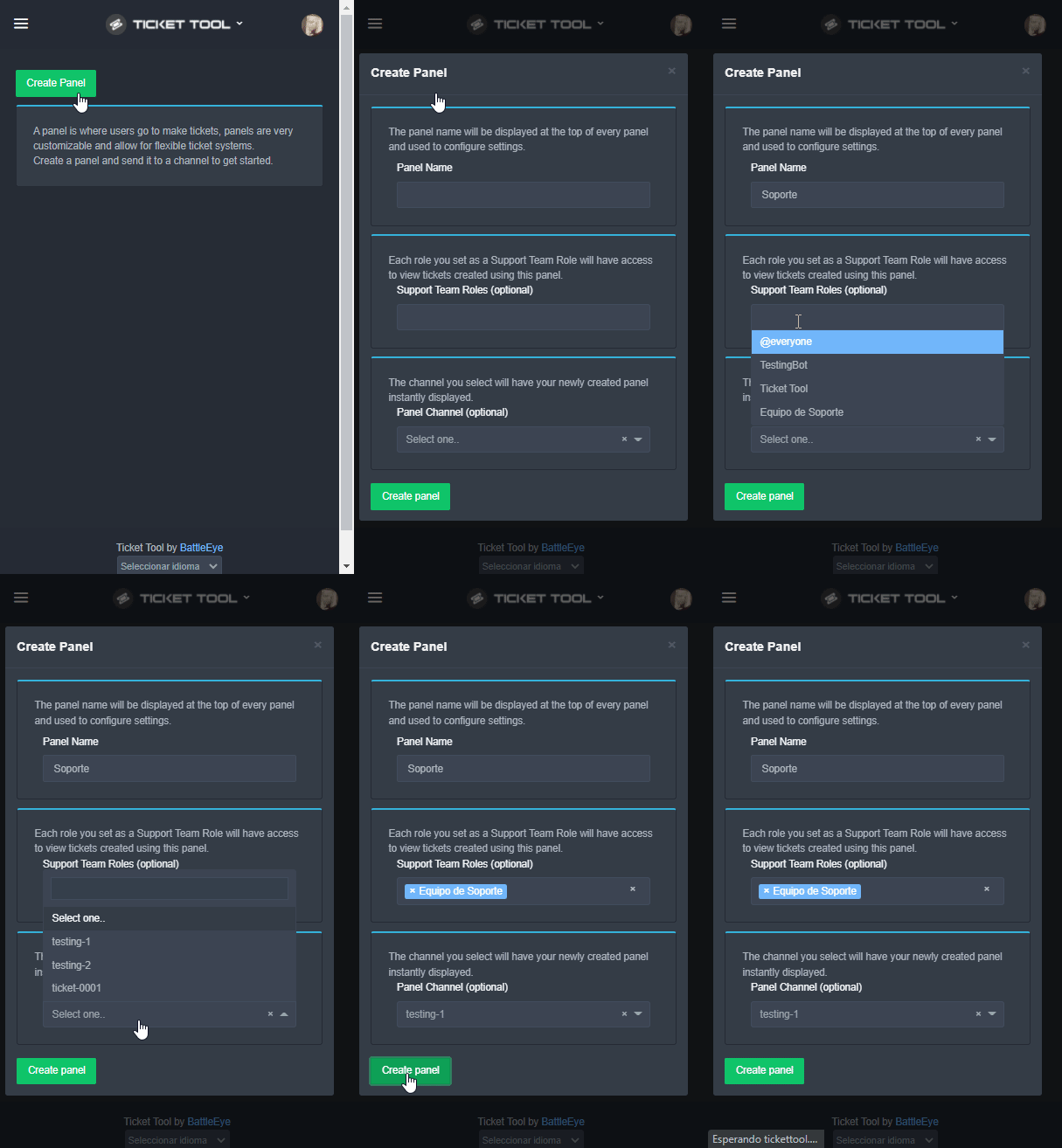
Creando un Panel
Para crear un panel, diríjase a la pestaña de Panel Configs o Configuraciones del Panel en el panel de control de su servidor.
Una vez esté allí, de click en Create Panel / Crear Panel.
Panel Name → Es el nombre que desea que tenga el panel, puede asignar el nombre de su preferencia.
Support Team Roles → Seleccione los roles que deseen que puedan ver los tickets que se creen desde este panel.
Panel Channel → Elija el canal al que quiera que el panel sea enviado al ser creado. (Este campo es opcional, puede reenviar el panel posteriormente si es necesario)
Finalmente de nuevamente click en Create Panel como ilustra el siguiente GIF
 worldly elbow
I'm facing this permission issue
 worldly elbow
 worldly elbow
I'm facing this permission issue
worldly elbow
worldly elbow
I'm facing this permission issue
I found it
 finite lagoon
Uh guys how do I start using the ticket bot?
humble sequoiaBOT
How Do I setup Ticket Tool
You can check our documentation here, you can also check #573205317870157855 for the basic setup.
Our documentation contains all the info you need about the bot to be able to setup and configure the bot however you like.
finite lagoon
 fickle geyser
hi
finite lagoon
Question if someone is in the ticket thingy do staff instantly help you or smth?
mystic hound
finite lagoon
Question if someone is in the ticket thingy do staff instantly help you or smth?
are you talking about the support team response time in this server?
if so, we try to get to tickets as quick as we can, however I can't always promise ''instant'' responses, we all do have lives outside of discord
finite lagoon
No I mean uh like example if someone does the thing do staff come help like when the bot says "Please wait support is on the way" idk if it says that exactly but if you know what I mean yea
mystic hound
well, you can edit the message the bot sends when the ticket is created. It can be set to ping staff for each ticket so they're notified
a staff member then sees the notification, clicks on the ticket and helps the user out
iron nightBOT
Gave 1 Rep to Light (current: #2 - 223)
 finite lagoon
mystic hound
well, you can edit the message the bot sends when the ticket is created. It can ...
finite lagoon
mystic hound
well, you can edit the message the bot sends when the ticket is created. It can ...
Wait sorry but uh is there a like a setting where I can change what the bot says when someone does a ticket?
humble sequoiaBOT
**Ticket Message**
The Ticket Message is the first message sent by the bot in a new ticket. To customise it head over to your Dashboard -> Panel Configs -> Settings -> Ticket Options -> Edit Ticket Message
iron nightBOT
Gave 1 Rep to Ticket Tool (current: #9 - 145)
finite lagoon
I just said thanks to a bot
unreal elbow
finite lagoon
I just said thanks to a bot
aren’t the first one loool
finite lagoon
XD
finite lagoon
sus
Also y'all have like any recommendations on what should I put in here

or not
eager cargo
It's what your members see when they create a ticket, maybe just explaining what the ticket they're going to open is about / reasons it should and shouldn't be opened
 unreal elbow
finite lagoon
Also y'all have like any recommendations on what should I put in here
unreal elbow
finite lagoon
Also y'all have like any recommendations on what should I put in here
maybe put a staff role with {@role} in the message text so staff will get pinged if someone opens a ticket
finite lagoon
unreal elbow
maybe put a staff role with {@role} in the message text so staff will get pinged...
when i tried that uhm it was just a text like "@ADMINISTRATOOR"
finite lagoon
How do I get their role id sorry I keep asking
finite lagoon
can we dm's?
unreal elbow
its ok here
finite lagoon
cause of the slowmode and so It's easier?
slowmode is fine but if you get what I mean
unreal elbow
Discord role IDs are used in things like bots. This is a guide that demonstrates how to find out the ID of a role in a Discord server.
check this out
unreal elbow
unreal elbow
then do {@roleid}
if u got it, copy only the numbers and do it like i showed u here
$commands
humble sequoiaBOT
Commands (tags) list for Support Team
Info
$commands - A list of all available tags for the Support Team
$setup - Link to setup page on docs
$docs - Link to docs
$relog - Relog the dashboard
$auto - Automation Disabled
$devmode - Show how to enable the devmode to your account
$variables - List usable variables
$variables2 - List of additional variables that can be used
$status - Directs to Status Page
$kv - How to hide tickets from everyone
$dbrole - Managing dashboard roles
$var - Explanation the View as Role feature will not help when testing Ticket Tool
$blacklist - Blacklisting roles in Server Configs
$backup - Explains how to use the Backup & Restore Feature
$ts - Troubleshooting
$idcommand - How to get the ID of some things
$tts - Inform a user that they are in a wrong server
$arabic - Explains how to open an Arabic ticket (in Arabic)
$about - Simple explanation about Ticket Tool
$avatar - Explanation why it is not possible to change the bot's avatar/status
$ct - Confirmation if a ticket has been resolved (Same as the Close Ask Message)
m2t - Notification a user problem has been taken into a ticket
$panelname - How to edit their panel message
$noresponse - 12 hours will be waited for a ticket to be closed if the user doesn't respond
$update - Link to the applications' store to update their Discord App when not seing buttons
$globallimit - Explanation of the Global Limit feature
$onlybuttons - Deprecation of reactions
$buttons - How to edit button options
$helpme - If a user asks for help without stating what they need help with
$solved - Problem solved on another channel
_ _
Premium
$redeem - How to redeem premium
$redeemkey - How to redeem the premium key
$premium - Premium information & management
$premiumold - Premium (fastspring) information & management
$prembot - Why do u have to disable premium bot
$premiumbot - How to invite & enable the premium bot
$transfer - To move premium to another server
$mp - Information about multi panels (old)
$mp2 - Information about multi panels (new)
$color - Explanation on inserting a HexCode & website to find them
$directurl - Explanation on Direct URLS & how to get them
$ticketname - Changing the default Ticket name
ticketmessage - How to edit their ticket message
$panelmessage - How to edit their panel message
$tsmessage - Editing the message that's sent along with a transcript
$claiming - Explains how to enable & configure claiming
$premiumperks - Shows all premium perks
_ _
Most Used
$setup - Link to setup page on docs
$relog - Relog the dashboard
$variables - List usable variables
$mp - Information about multi panels using the $panel command
$mp2 - Information about multi panels using the Attached Panels feature
$ticketname - Changing the default Ticket name
$ticketmessage - How to edit their ticket message
$panelmessage - How to edit their panel message
$ts - Troubleshooting
$tts - Wrong server
$dashboard - Link to the Dashboard
unreal elbow
$idcommand
humble sequoiaBOT
How do I get the ID of Roles/Channels/Emojis?
Ticket Tool has a useful command that helps you get the ID of various things like channels, roles, emojis and your server.
Just use the command $id <#channel/@role/:emoji:>. Now copy everything, including the brackets <...>, to your dashboard (or wherever you want it)
If you want the server ID, just use $id.
unreal elbow
oooh forgot that
finite lagoon
mm
unreal elbow
do $id @role , works too
modest wharf
when i do the reply the role dosn't mention?? why? @
 unreal elbow
humble sequoia
unreal elbow
humble sequoia
@modest wharf do $id @role
then copy the id and paste it into the message {roleid}
finite lagoon
I'm confused 😩
bronze comet
finite lagoon
I'm confused 😩
With?
finite lagoon
You guys are talking abt-
finite lagoon
Guys how do I get rid of this :-:
 modest wharf
unreal elbow
<@841084064462143538> do $id @role
then copy the id and paste it into the messa...
modest wharf
unreal elbow
<@841084064462143538> do $id @role
then copy the id and paste it into the messa...
thx
iron nightBOT
Gave 1 Rep to Onyx (current: #34 - 7)
bronze comet
finite lagoon
Guys how do I get rid of this :-:
$tts
humble sequoiaBOT
You're in the wrong place
We provide support for @pseudo glen discord bot and cannot help you with whatever issue you have.
Please make sure to contact the appropriate support team.
If you don't have any further questions regarding our bot Ticket Tool, please close this ticket
_ _
finite lagoon
Huh
bronze comet
This is TT community support not general discord support, sorry
 broken gyro
bronze comet
broken gyro
bronze comet
dont ping staff
humble sequoiaBOT
How Do I setup Ticket Tool
You can check our documentation here, you can also check #573205317870157855 for the basic setup.
Our documentation contains all the info you need about the bot to be able to setup and configure the bot however you like.
prime bridgeBOT
 Jolzee#8344 has been warned!
They were notified via dms.
 polar inlet
How to u reset the room count?
iron nightBOT
Gave 1 Rep to Neptune (current: #1 - 362)
copper owl
Anytime
hard charm
hello everyone, is there a possibility to see any statistics? like who processed how many tickets / how many tickets overall, open and closed ones etc?
copper owl
Not a thing as of now
You can check logs and transcripts
but there isn't a command to display such info
hard charm
okay thanks, might be something for further implementations for premium 😄 would be cool to see how many tickets each mod managed etc
copper owl
It has been suggested numerous times already
Only time will tell if it gets implemented
hard charm
👍
 frank geyser
Hey guys, i'm having an issue with removing the admin privileges of the bot from my server
i tried doing it through the dashboard, but there doesn't seem to be an option to do so
unreal elbow
frank geyser
i tried doing it through the dashboard, but there doesn't seem to be an option t...
this is just for u to see what perms it has xD
u have to change it in the role settings of the server
go to the role Ticket Tool, scroll down all the way and there u should find the „administrator“ perm
@frank geyser
bronze comet
@eager cargo
bronze comet
#📈│reviews too
eager cargo
Yep
 untold parcel
How to setup the bot
 tropic thunder
How to create a ticket on my server please
humble sequoiaBOT
How Do I setup Ticket Tool
You can check our documentation here, you can also check #573205317870157855 for the basic setup.
Our documentation contains all the info you need about the bot to be able to setup and configure the bot however you like.
copper owl
check ^^
untold parcel
Ok
 mossy jacinth
Does anyone know how to fix this bug? i can't make a ticket even though i already did what the bot says to get a ticket.
bronze comet
Does the bot have its required permissions?
bronze comet
bruh
cinder badge
How to fix this?
 bronze comet
Go to your server dashboard -> server configs and check if the global ticket limit is 0, If it is, increase it to the default, which is 100
iron nightBOT
Gave 1 Rep to Shadow's Stalker (current: #68 - 1)
 oblique bloom
How can I get the bot to ping a role when a ticket is open I did <@roleid> but it’s not pinging the role
iron nightBOT
Gave 1 Rep to Shadow's Stalker (current: #52 - 2)
finite lagoon
Any recommendations on uh support name like the text channels?
Im having sum hard.decesions
bronze comet
general-{count}
finite lagoon
How bout the uh like support bot channel where they click the emoji for tickets what do I name jy
bronze comet
tickets
 spare vessel
Hola
dawn warren
award7-day trial award when it's over.
mystic hound
In 7 days
dawn warren
mystic hound
In 7 days
awardoffice. I'll lose when it's overoffice
mystic hound
I don't think I understand you
What is your primary language? We can try using a translator
robust sandalBOT
the position I'm going to lose when i'm done with the @mystic hound
Portuguese (Brazil) (pt) → English (en)
robust sandalBOT
Eu vou fazer um bilhete de apoio português para você, eles vão ajudá-lo
English (en) → Portuguese (Brazil) (pt)
dawn warren
Ok
 gusty steppe
I am adding roles for panel . But when i make ticket it doesn't tag that role . Solution pls @gilded veldt@hybrid dagger
@copper owl@shut bolt
gusty steppe
gusty steppe
I am adding roles for panel . But when i make ticket it doesn't tag that role . ...
sol pls
Pls bro
 safe prairie
Ping pong 👀 🏓
gusty steppe
gusty steppe
I am adding roles for panel . But when i make ticket it doesn't tag that role . ...
@safe prairie Sir solution
shut bolt
$help ping
safe prairie
$help ping
humble sequoiaBOT
How to make Ticket Tool ping a role
To make ticket tool ping a role when a ticket is opened, go to the Dashboard -> Panel Configs -> Settings -> Ticket Options -> Ticket Message -> Message Text and do this:
{@Role name} This is case sensitive and the role must have @mentions enabled
safe prairie
Ups xD
 safe prairie
🙈
copper owl
gusty steppe
<@!548583124062175232><@!518666147441278998>
#🎫│make-a-ticket if you want help from the support members
either way it seems like your question is already answered
but refrain to ping us in here
shut bolt
copper owl
either way it seems like your question is already answered
After pinging the whole team
shut bolt
Yeah LMFAO
safe prairie
😂
shut bolt
@unique junco our saviour 
gusty steppe
i didnt mass mention after warning
shut bolt
gusty steppe
i didnt mass mention after warning
Yes you continued
gusty steppe
Why u kick me?
gusty steppe
shut bolt
Yes you continued
Where?
 severe path
Ping
shut bolt
You know we got your deleted messages right?
gusty steppe
After that i did'nt ping
gusty steppe
kk
 gusty steppe
copper owl
gusty steppe
copper owl
Only 3 pings bruh . And trizian was in chat
copper owl
copper owl
@shut bolt my square quality is worse than yours 😔
shut bolt
gusty steppe
Only 3 pings bruh . And trizian was in chat
3 pings?
You deleted the rest
 gusty steppe
Ya when i recieve warning i deleted the rest
shut bolt
And you pinged, again, Tizian
 copper owl
youre back with the answer to your inquiry, and we can move on
shut bolt
Yup
shut bolt
humble sequoia
This is the response to the question
gusty steppe
Brother . But how to open ticket embed etting?
gusty steppe
From where?
copper owl
humble sequoia
all explained here
gusty steppe
copper owl
all explained here
Here At place of @ support i will put role id?
copper owl
you can use {roleID} yes
gusty steppe
Thx sir
dawn warren
there is a conversation channel for Brazilians Can someone explain to me.
robust sandalBOT
dawn warren
there is a conversation channel for Brazilians Can someone explain to me.
 add
add
es gibt einen Gesprächskanal für Brasilianer Kann mir das jemand erklären.
English (en) → German (de)
unreal elbow
mhm wdym
if u want to speak to people who speak your language go to #🎫│make-a-ticket and pick the right one
 lapis gyro
مرحبآ
هل يوجد مساعدة عربية
welcome
Is there any Arabic help?
robust sandalBOT
lapis gyro
مرحبآ
**___هل يوجد مساعدة عربية___**
welcome
Is there any Arabic help?
 ! MX|BROKAI
Hello
_Is there Arab assistance
Arabic (ar) → English (en)
shut bolt
$arabic
humble sequoiaBOT
فريق الدعم الفني العربي
عميلنا العزيز ان كنت تبحث عن مساعدة يرجى فتح تكت خاص بفريق الدعم الفني العربي
اذهب الى#🎫│make-a-ticket
ثم قم بلضغط على الايموجي الاتي (🇯🇴)
shut bolt
👀
copper owl
humble sequoia
@shut bolt is there a spanish one 👀
shut bolt
copper owl
<@!518666147441278998> is there a spanish one 👀
Not yet
copper owl
shut bolt
Not *yet*
yet 👀
lapis gyro
Hello my friend, what is the matter that you gave me a while ago? @copper owl
I forgot the thing that changed the name of the rum
copper owl
$buttons
humble sequoiaBOT
Buttons
The new Discord Buttons allow for a much smoother and convenient experience. They reduce lag and work much better than emojis. With ticket tool you can edit all the buttons however you like! Buttons can show emojis, text and can have 4 different colors.
Where can I edit them?
Dashboard -> Panel Configs -> <Settings> -> Button Options -> <Setting>
copper owl
disable the create ticket button
heady nova
I mean
if i open a ticket, they're is coming a massage instant
The massage down bellow
 copper owl
you can't edit that unfortunately
heady nova
i want to deactivate the extra message
copper owl
you cant do that
shut bolt
heady nova
it sucks xD
Yeap, a bit, you can still click on the blue little message to dismiss the notification
Also it will disappear whenever you refresh your discord
heady nova
Ok
shut bolt
And you are the only one that can see it, so nothing to worry about
heady nova
Thanx for ur help
 stiff idol
thank you @shut bolt hit close ticket before i got to say that lol
iron nightBOT
Gave 1 Rep to Yareaj_ (current: #5 - 180)
shut bolt
stiff idol
thank you <@!518666147441278998> hit close ticket before i got to say that lol
You are welcome! Enjoy the bot :)
 spice mauve
Is it possible to open up a ticket that has been closed? Say like a week ago?
shut bolt
spice mauve
Is it possible to open up a ticket that has been closed? Say like a week ago?
If you have still the channel yup, click on the Open button or, use the $open command there
spice mauve
shut bolt
If you have still the channel yup, click on the Open button or, use the $open co...
Okay thank you!
iron nightBOT
Gave 1 Rep to Yareaj_ (current: #5 - 181)
shut bolt
spice mauve
Okay thank you!
Sure!
spice mauve
Another question, when buying premium do I have to kick the previous version of the bot for the premium to work?
shut bolt
Not necesarily
humble sequoiaBOT
Inviting and Enabling Premium Bot
The first thing you will need to do is invite the premium bot, an invite can be found here
Once the bot is in your server we will head to the dashboard and manage your server. When you are managing your server, you want to head into "Server Configs" then click the drop down menu under "Select the bot you would like to use on this server" then click "Ticket Tool#6207" and then save.
spice mauve
Alright I’ll try again ty
shut bolt
Sure, let me know
spice mauve
shut bolt
Sure, let me know
Also what do I do to resend panels?
shut bolt
$help send
humble sequoiaBOT
Sending a panel
Once you've created a panel on the dashboard you will need to send it to a channel using send on the dashboard
Select the channel you want your panel to be created in and click send.
For other questions checkout $help faq
An example of a sending a panel is shown below.
 spice mauve
shut bolt
And send them again
spice mauve
shut bolt
And send them again
It worked thank you!
iron nightBOT
@spice mauve :: You can't rep Yareaj_#4383 for 33 minutes and 31 seconds. Try coming back later?
shut bolt
Sure!
 knotty raptor
I have a question I invited ticket tool to my server but it wont show up when I try to access it in the website
humble sequoiaBOT
Don't see your server in the dashboard?
You will possibly need to relog. Look below to see steps on how to relog.
How to relog the Dashboard.
First, you will need to go to the dashboard. Once your there, click on your avatar on the top right. after you clicked it, you will see button that says Logout. You must click that. Once you have logged out, you can log back in.
Note:
You need one of these 3 things to access the dashboard.
1. Server Owner (Level: 6)
2. Server Administrator (Level: 4)
3. Dashboard Role (Level: 2)
You can check your level using $level on your Discord Server
See the GIF below on how to relog:
shut bolt
Try out this @knotty raptor
knotty raptor
shut bolt
Try out this <@!836283432009990154>
ohh i think its the permissions i have
shut bolt
Can be too, check them running $level on your server
knotty raptor
yeah im at level 0
shut bolt
Yup, that explains it
knotty raptor
i need to ask owner
shut bolt
Yup
knotty raptor
ahhh im a mod in the server but im level 0
shut bolt
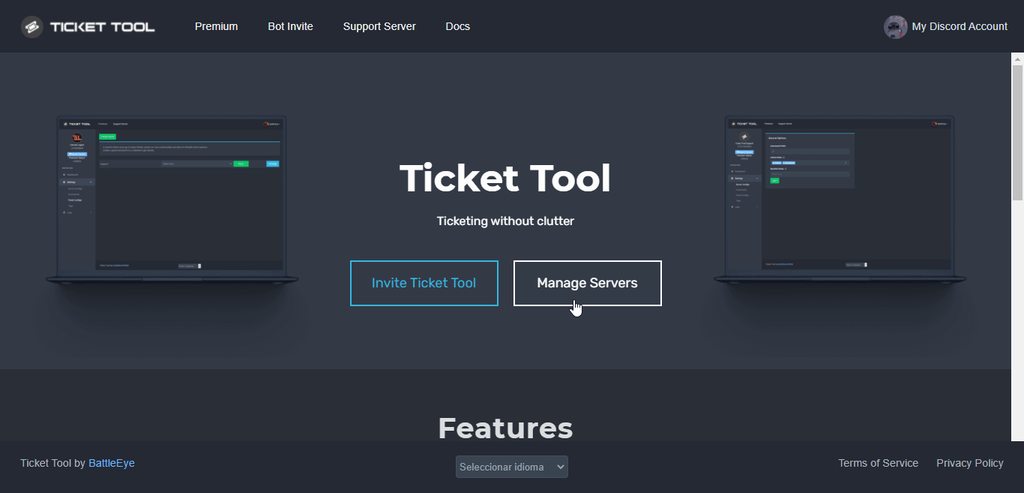
In that case
You could ask the server owner to add mod role as dashboard role
This is how to do it
 knotty raptor
ill send that to him
shut bolt
Sure, let me know if I can help further
humble sequoiaBOT
━━ moved to ticket ━━
 hushed ibex
Hey does anyone know how to make it so when a person opens a ticket its says their name instead of ticket-0005
shut bolt
hushed ibex
Hey does anyone know how to make it so when a person opens a ticket its says the...
Hello there!
shut bolt
hushed ibex
Hey does anyone know how to make it so when a person opens a ticket its says the...
Yup, you can do that, you should use the variable {ticket.user.name} to replace the ticket
And you should edit it by doing this
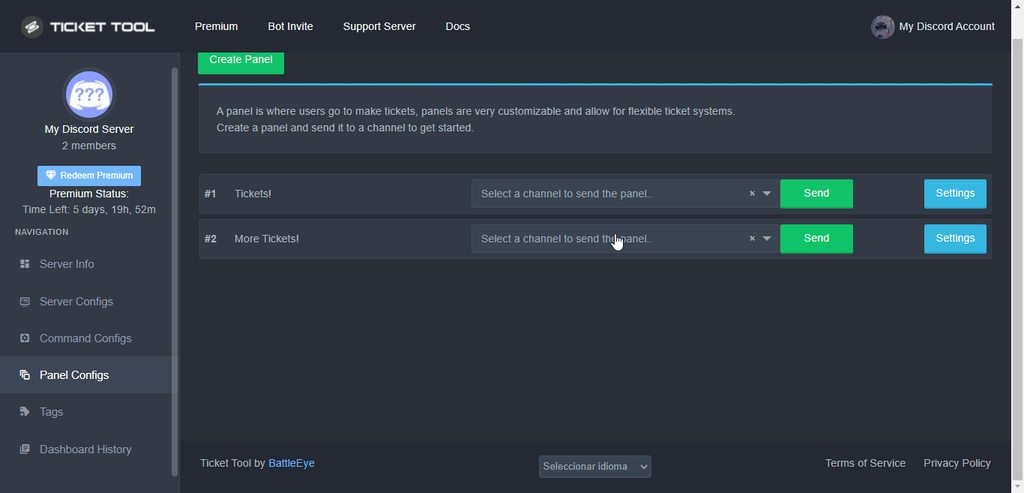
Remember this is a premium exclusive feature
hushed ibex
ok thanks
shut bolt
Sure
 fierce kettle
.
 maiden summit
I need help
atomic barn
what is it?
maiden summit
People in my server cant make tickets
atomic barn
wdym?
maiden summit
Just come in my server and see
atomic barn
sorry, no
i'm not an expert on these things, if you really want to create a ticket in #🎫│make-a-ticket and a support staff will help you :)
eager cargo
@maiden summit Are they getting an error
 latent drift


 humble sequoiaBOT
 warm sparrow
Hello, could someone help me with the following, when someone makes a ticket, I want the bot to ping the range of helpers within the ticket, how do I do it?
so I know, the range ID is needed, but I don't know the "command"
bronze comet
Use <@&roleid> in the "Message Text" of the panel. If you need help getting the role ID, use $id @role
warm sparrow
thx u!
copper owl
@bronze comet $help ping is a command you could use if you want to make it easier for you
jade topaz
How do i do so the ticket is renamed when made like if the ticket is support then it's named "support-ticket-{ticket id}"
shut bolt
jade topaz
How do i do so the ticket is renamed when made like if the ticket is support the...
Hey, you can replace ticket with {panel.name}-ticket-{count} in the Opened Name
jade topaz
shut bolt
https://i.imgur.com/ja6fhzr.gif
Thank you!
iron nightBOT
Gave 1 Rep to Yareaj_ (current: #5 - 184)
shut bolt
jade topaz
Thank you!
Sure
 neat vigil
Hello
shut bolt
Hi
copper owl
hello 👋
neat vigil
copper owl
hello 👋
Thank
iron nightBOT
Gave 1 Rep to Neptune (current: #1 - 363)
copper owl
youre