#🆘│community-support
1 messages · Page 363 of 1
 jade topaz
 plain surge
Yes, shards are coming back online right now
The bot may be online for some and offline for others
 solid stream
It's online for 75% of the servers
jade topaz
sheeesh
ty !
Unfortunately mine isn’t among the 75% I’ll just wait till it comes online ig

 shut bolt
jade topaz
Unfortunately mine isn’t among the 75% I’ll just wait till it comes online ig
shut bolt
jade topaz
Unfortunately mine isn’t among the 75% I’ll just wait till it comes online ig
Yeap, the restart isn't 100% done yet
solid stream
Due to a bug in the last restart, One of the servers required restarting again.
so I couple hundred thousand servers are down again..
100% online
solid stream
jade topaz
Unfortunately mine isn’t among the 75% I’ll just wait till it comes online ig
is your server online now?
shut bolt
solid stream
100% online
Thanks 
 iron nightBOT
Gave 1 Rep to BattleEye (current: #12 - 105)
jade topaz
solid stream
is your server online now?
Yeah it’s working now I’m just doing the setup thank youuuu
iron nightBOT
Gave 1 Rep to BattleEye (current: #12 - 106)
 real meadow
How can I put emoji on button?
shut bolt
$buttons
 humble sequoiaBOT

Buttons
The new Discord Buttons allow for a much smoother and convenient experience. They reduce lag and work much better than emojis. With ticket tool you can edit all the buttons however you like! Buttons can show emojis, text and can have 4 different colors.
Where can I edit them?
Dashboard -> Panel Configs -> <Settings> -> Button Options -> <Setting>
 shut bolt
Change the Emoji using the Select Emoji picker
real meadow
I couldn't find my server emoji
shut bolt
real meadow
I couldn't find my server emoji
Go into the * category
It will show all custom emojis
It will take a while to load as it's a big information chunk
 shut bolt
 runic pike
<@278649994477830145>
runic pike
<@278649994477830145>
/ar #546557408902905896 do not ping staff members
 robust sandalBOT
#546557408902905896 لا بينغ الموظفين
 English (en) → Arabic (ar)
 feral mulch
how do i make a ticket tool?
 meager bloom
 cosmic oak
feral mulch
how do i make a ticket tool?
cosmic oak
feral mulch
how do i make a ticket tool?
unless you have experience in coding you should stick to this bot or make a more simple discord bot first.
 olive lake
I guess I have to open a support ticket to get my premium role on this server or is there another method?
 copper owl
olive lake
I guess I have to open a support ticket to get my premium role on this server or...
copper owl
olive lake
I guess I have to open a support ticket to get my premium role on this server or...
use $pc
olive lake
$pc
humble sequoiaBOT

Thank you
Thank you for purchasing Ticket Tool Premium @olive lake. You have now been given the <@&535595160189403136> role!
Found 11 servers in total and 1 with premium and permission
olive lake
ty
copper owl
Anytime
plain surge
feral mulch
how do i make a ticket tool?
You can set up the bot through this guide
humble sequoiaBOT
plain surge
Or check #573205317870157855 for a more basic setup
 stark inlet
il ne peut pas créer le ticket alors qu’il affiche le salon.. comment faire ?
 plain surge
runic pike
ماهي المشكله
plain surge
runic pike
ماهي المشكله
البوت ينقصه هذه الصلاحيات
Manage Channels و Manage Messages
plain surge
stark inlet
il ne peut pas créer le ticket alors qu’il affiche le salon.. comment faire ?
Vous pouvez expliquer votre problème en plus, s'il vous plaît ?
runic pike
اها
stark inlet
Oh c’est bon désolé du dérangement mon problème est résolu ! c’est juste qu’un anti raid bloqué la création du rôle même si TicketTool avait un rôle au dessus
 plain surge
runic pike
اها
plain surge
runic pike
اها
اعطيه الصلاحيات و حاول مجدداً
runic pike
شـكرآ لك آخ ـي
plain surge
stark inlet
Oh c’est bon désolé du dérangement mon problème est résolu ! c’est juste qu’un a...
Oh, d'accord 👍
plain surge
runic pike
شـكرآ لك آخ ـي
العفو
stark inlet
Bonne soirée
plain surge
Bonne soirée à vous aussi
 queen marlin
Getting “this interaction failed” when one of the admins tries to close the tickets. He is using discord via the web. So am I but it works for me.
plain surge
Does your admin role have administration perm?
queen marlin
plain surge
Does your admin role have administration perm?
Yeah. The person trying to close is the one who created the server.
queen marlin
plain surge
<@146099525830967296> how did it go?
Waiting for them. lol
Same error they said
plain surge
Are they trying on an old ticket? Or one just made?
queen marlin
One just made. We just recently set up the bot an hour ago
 pale pilot
Web should be up to date. Maybe try a restart
queen marlin
I think it’s because they created the ticket themselves. So I just created one and they were able to close it. Thanks for the help. 🙂
Thanks @plain surge
iron nightBOT
Gave 1 Rep to D̸̞̉҉̢̩͠o͛ͫ̚m͈̕͜҉̘̱̟☆̞͈͠҉ͪ̈́͘҉̷̥̐ (current: #24 - 17)
pale pilot
Only claiming doesn't work on your own ticket. Maybe he clicked on that
plain surge
queen marlin
I think it’s because they created the ticket themselves. So I just created one a...
It can also sometimes be an issue of bad internet connection
cosmic oak
plain surge
It can also sometimes be an issue of bad internet connection
i was about to mention that as well 
plain surge
👍
queen marlin
Thanks. 🙂
plain surge
No problem
 forest sandal
 proud talon
 humble sequoiaBOT
-- moved to ticket --
 polar ember
Sou brasileiro porra
Alguém é brasileiro ?
.

Aki é assalto rapa
Eu quero um brasileiro no server
Agora porra


 vestal owl
Tf
 polar ember
@vestal owl
Sou brasileiro porra
@vestal owl pass the brazilians there fucking
the fuck i'm brazilian
 scenic plinth
...
 blazing summit
polar ember
the fuck i'm brazilian
blazing summit
polar ember
the fuck i'm brazilian
...
 robust sandalBOT
 dawn brook
<@!278649994477830145> اخوي
dawn brook
<@!278649994477830145> اخوي
 Night
Night
My brother
Arabic (ar) → English (en)
Night
How can I do the same thing
Arabic (ar) → English (en)
 shut otter
dawn brook
shut otter
dawn brook
يب
 desert summit
 unique wraith
Why is my bot keeps shutting down each others if we operates frequently? Anyone?
cosmic oak
unique wraith
Why is my bot keeps shutting down each others if we operates frequently? Anyone?
im guessing your running the normal version of ticket tool?
unique wraith
If I am running wick bot or ticket tool at the same time
do I need to add ticket tool into the white list?
plain surge
unique wraith
do I need to add ticket tool into the white list?
Yes, Wick bot a lot of times quarantines Ticket tool because of creating channels for tickets and changing permissions etc
 drowsy sinew
can some1 explain me why i add ticket tool and then i cant manage him on the server
plain surge
You mean you can't find your server on the Dashboard? @drowsy sinew
drowsy sinew
plain surge
You mean you can't find your server on the Dashboard? <@564571448551800862>
yessir
plain surge
Please try relogging @drowsy sinew
humble sequoiaBOT
Don't see your server in the dashboard?
You will possibly need to relog. Look below to see steps on how to relog.
How to relog the Dashboard.
First, you will need to go to the dashboard. Once your there, click on your avatar on the top right. after you clicked it, you will see button that says Logout. You must click that. Once you have logged out, you can log back in.
Note:
You need one of these 3 things to access the dashboard.
1. Server Owner (Level: 6)
2. Server Administrator (Level: 4)
3. Dashboard Role (Level: 2)
You can check your level using $level on your Discord Server
plain surge
For?
humble sequoiaBOT
jade topaz
Yo
plain surge
$help prefix
humble sequoiaBOT
How to change Ticket tool's prefix
The default prefix for ticket tool is $ and @Ticket Tool#4843 however that can be changed on the Dashboard under Server Configs -> Command Prefix.

NOTE that @Ticket Tool#4843 will always work as a prefix even if there is a custom prefix.
plain surge
@jade topaz
jade topaz
plain surge
<@456226577798135808>
Hi
jade topaz
Nothing just i want to Say hi
drowsy sinew
lol
 wind knot
I have a question, how to create auto-response within the ticket system @plain surge
humble sequoiaBOT
Tags
Tags are used to send a predefined response to your channels using a command. Tags will only respond if the command itself is used, it will not function if you put the tag into a sentence. The prefix is not included.
To create tags, go to: Dashboard > Tags > Create Tag. After creating and naming one, tap on the response button, and you can edit the response.
 plain surge
This ^
jade topaz
Good what about to you
jade topaz

plain surge

drowsy sinew
bruh
 empty lake
hello please help me use this bot
@radiant moss hello please help me use this bot
and i just joined
 unreal elbow
do not ping support
humble sequoiaBOT
unreal elbow
humble sequoia
<https://docs.tickettool.xyz>
@empty lake go through this guide
humble sequoiaBOT
empty lake
unreal elbow
<@884720032913977385> go through this guide
I need is the command syntax
empty lake
yes
unreal elbow
$ is the prefix
unreal elbow
$commands
humble sequoiaBOT
Commands (tags) list for Support Team
Info
$setup - Link to setup page on docs
$docs - Link to docs
$relog - Relog the dashboard
$auto - Automation Disabled
$devmode - Show how to enable the devmode to your account.
$variables - List usable variables
$status - Directs to Status Page
$suggest - Redirect members to Community Server for suggestions
$kv - How to turn on/off "Keep Visible"
$dbrole - Managing dashboard roles
$var - Explanation the View as Role feature will not help when testing Ticket Tool
$blacklist - Blacklisting roles in Server Configs
$backup - Explains how to use the Backup & Restore Feature
$ts - Troubleshooting
$idcommand - How to get the ID of some things
$arabic - Explains how to open an Arabic ticket (in Arabic)
$tts - Inform a user that they are in a wrong server
$about - Simple explanation about Ticket Tool
$avatar - Explanation why it is not possible to change the bot's avatar/status
_ _
Premium
$redeem - How to redeem premium.
$redeemkey - How to redeem the premium key
$premium - Premium information and management
$prembot - Why do you have to disable premium bot.
$premiumbot - How to invite and enable the premium bot.
$transfer - To move premium to another server.
$mp - Info about multi panels
$color - Explanation on inserting a HexCode and a website to find them
$directurl - Explanation on Direct URLS and how to get them
$ticketname - Changing the default Ticket name
$ticketmessage - How to edit their ticket message
$panelmessage - How to edit their panel message
$claiming - Explains how to enable and configure claiming
$premiumperks - Shows all premium perks
$direct - Direct Payment
$tag - How to create a tag
$pc - How to get premium role
_ _
Most Used
$setup - Link to setup page on docs
$relog - Relog the dashboard
$variables - List usable variables
$mp - Info about multi panels
$ticketname - Changing the default Ticket name
$ticketmessage - How to edit their ticket message
$panelmessage - How to edit their panel message
$ts - Troubleshooting
$tts - Inform a user that they are in a wrong server
unreal elbow
$help commands
humble sequoiaBOT
() = optional
[] = required
*==================================
Ticket Commands
==================================*
_ _
`$add [User] (channel)`
Description: Adding additional users to a ticket
Aliases: none
`$remove [User] (channel)`
Description: Removing users from a ticket
Aliases: none
`$close`
Description: Closing tickets
Aliases: none
`$open`
Description: Opening closed tickets
Aliases: none
`$delete`
Description: Deleting tickets
Aliases: none
`$rename`
Description: Renaming tickets/channels
Aliases: none
`$transcript (send channel)`
Description: Creating transcripts
Aliases: none
`$new (user) (reason)`
Description: Creating tickets in a monitored channel (when command style is enabled)
Aliases: none
`$claim`
Description: Claiming tickets (when claim is enabled)
Aliases: "unclaim"
_ _
*==================================
General Commands
==================================*
_ _
`$help (Help Options)`
Description: Help Command
Aliases: none
`$debug`
Description: Debuging issues with running Ticket Tool
Aliases: none
`$id (@role/@user/#channel/emoji)`
Description: Converting roles, users, channels and emojis to ID
Aliases: "getid"
`$permlevel`
Description: Checking permission level with Ticket Tool
Aliases: "level"
`$ping`
Description: Checking response time with discord api
Aliases: none
`$vote (link | unlink | redeem) (user)`
Description: Earn premium by voting on top.gg or Discord.boats
Aliases: "votes"
empty lake
unreal elbow
this are all ticket tool commands by standard
yes
the one I use is Primary not Premium
unreal elbow
ok
empty lake
unreal elbow
ok
please guide me what to do
unreal elbow
what do you want to do?
humble sequoiaBOT
unreal elbow
humble sequoia
https://docs.tickettool.xyz/en/general/setup
Follow this please @empty lake
empty lake
unreal elbow
what do you want to do?
create a ticket
unreal elbow
humble sequoia
https://docs.tickettool.xyz/en/general/setup
ok. click on this link and follow the step-by-step instructions
humble sequoiaBOT
 unreal elbow
humble sequoia
https://tickettool.xyz/manage-servers
unreal elbow
humble sequoia
https://tickettool.xyz/manage-servers
this is the link for the dashboard where you can manage the bot
wind knot
how to set the blury search
robust sandalBOT
wind knot
how to set the blury search
 lizhou
Festlegen der Suche nach Unschärfe
English (en) → German (de)
unreal elbow
wdym @wind knot
wind knot
what do you mean
unreal elbow
what do u mean with blurry search
im german and the translation doesn’t make any sense
lol
wind knot
how to set the fuzzy search for tag
humble sequoiaBOT
wind knot
unreal elbow
what do u mean with blurry search
im german and the translation doesn’t make any...
fuzzy search
the system cannot recognise the difference between charaters
 latent geyser
How do I set a Channel to an only ticket channel because when I’m opening a ticket a channel will be created but i want to make a channel to a ticket
copper owl
latent geyser
How do I set a Channel to an only ticket channel because when I’m opening a tick...
I'm not sure if I understand
latent geyser
I want to set an existing channel of mine to an Ticket channel
But everytime I open a ticket an ticket channel will be created
copper owl
You can't do thay
 potent scaffold
latent geyser
But everytime I open a ticket an ticket channel will be created
potent scaffold
latent geyser
But everytime I open a ticket an ticket channel will be created
Oh, you cant turn preexisting channels into tickets
copper owl
you can't set an already existing channel as a ticket
 regal hearth
can someone tell me why i cant create a ticket?

 agile eagle
Hey, I am having an issue with the ticket tool whereby a 'muted' role does not see the ticket they opened in the 'open ticket' category. https://i.gyazo.com/c1de4fa294cf58af707be53da30c146a.png

I have it set to read history and view history on the category
humble sequoiaBOT
-- moved to ticket --
 vale escarp
How to create ticket
humble sequoiaBOT
-- moved to ticket --
copper owl
for hafiz
 tribal cedar

jade topaz
Server management not loading after clicking on the server from the main menu? anyone has this issue?
all other server go into management menu without issues
plain surge
If you can't see your server on the Dashboard please try relogging
humble sequoiaBOT
Don't see your server in the dashboard?
You will possibly need to relog. Look below to see steps on how to relog.
How to relog the Dashboard.
First, you will need to go to the dashboard. Once your there, click on your avatar on the top right. after you clicked it, you will see button that says Logout. You must click that. Once you have logged out, you can log back in.
Note:
You need one of these 3 things to access the dashboard.
1. Server Owner (Level: 6)
2. Server Administrator (Level: 4)
3. Dashboard Role (Level: 2)
You can check your level using $level on your Discord Server
cosmic oak
@jade topaz is your connection to the dashboard alright and have you tried reloading it?
jade topaz
yeah i logout and back in and still same issue
plain surge
cosmic oak
<@456226577798135808> is your connection to the dashboard alright and have you t...
Reloading doesn't do anything. You need to relog
plain surge
jade topaz
yeah i logout and back in and still same issue
Try using another browser to check
jade topaz
negative
plain surge
Make sure the bot is invited on the server, then run $level and send me the response please
jade topaz
 humble sequoiaBOT
Don't see your server in the dashboard?
You will possibly need to relog. Look below to see steps on how to relog.
How to relog the Dashboard.
First, you will need to go to the dashboard. Once your there, click on your avatar on the top right. after you clicked it, you will see button that says Logout. You must click that. Once you have logged out, you can log back in.
Note:
You need one of these 3 things to access the dashboard.
1. Server Owner (Level: 6)
2. Server Administrator (Level: 4)
3. Dashboard Role (Level: 2)
You can check your level using $level on your Discord Server
plain surge
Please read the note
 pale arrow
Hi
jade topaz
alright thanks
plain surge
You need one of 3 permission levels to see the server's Dashboard
pale arrow
How could you change the bot's avatar?
humble sequoiaBOT

Ticket Tool avatar/status Customisation
@pseudo glen is like another discord user; you can't control its avatar icon or status, and we can't change it for one server, just as you cannot change your avatar for just one server.
However, on your server, you can change the bot's nickname
 plain surge
You can't change the bot's avatar
pale arrow
._.💔 And it can't be in premium.
cosmic oak
pale arrow
._.💔 And it can't be in premium.
its physically impossible
unless you make a custom bot just for you server.
cosmic oak
pale arrow
._.💔 And it can't be in premium.
with premium you have alot of other good features though 👍
pale arrow
Ok ._.💔
cosmic oak
sorry :(
 prime bridgeBOT
♕zUniqueSimxne♕ has been silenced for 10m 

 Reason: Posting Discord Server Invites
♕zUniqueSimxne♕#3974 | 365564595202686988
pale arrow
cosmic oak
sorry :(
): Forget it
cosmic oak
jade topaz
how do i make a role support
$help support
humble sequoiaBOT
How to let support team see into a ticket
About support roles
A support role lets your support team see into tickets with out having to add them manually to each and every ticket.
You can add as many support roles as you like per panel.
NOTE that the way discord works all admins can see into tickets regardless of this.
How to set a support role
To set a Support role go to the Dashboard -> Panel Configs -> Settings -> General Options -> Support Team Roles.

NOTE that the support role will not be able to see into tickets that are already created..
cosmic oak
read above^
cosmic oak
 tepid lantern
iam want ask
can do limit for tickets opening?
tepid lantern
iam want ask
can do limit for tickets opening?
do you want to limit how many tickets can be opened per person or for the whole server?
tepid lantern
cosmic oak
do you want to limit how many tickets can be opened per person or for the whole ...
nope
copper owl
cosmic oak
do you want to limit how many tickets can be opened per person or for the whole ...
you cant limit tickets for the whole server at once btw
cosmic oak
copper owl
_you cant limit tickets for the whole server at once btw_
yup i know, thats why im just wondering.
 twin jetty
Anyone know how to add people to tickets?
tepid lantern
twin jetty
Anyone know how to add people to tickets?
$add <id/mention>
I mean, if someone reaches the total number of tickets in a panel, the panel will be closed or tell user is not cloed or full
plain surge
$help limit
humble sequoiaBOT
How to set a ticket limit
A ticket limit may be set per panel to prevent users from spamming tickets. By default this limit is set to 3. Once a user hits this limit the bot will notify the users that they reached the limit.
To set a ticket limit go to the Dashboard -> Panel Configs -> Settings -> General Options -> Ticket Limit
 plain surge
@tepid lantern
cosmic oak
tepid lantern
I mean, if someone reaches the total number of tickets in a panel, the panel wil...
the embed above shows how you can limit the ticket panel for only individual users as you cant do it for the whole server.
 ocean smelt
hello i want to ask if it is possible to not allow people that can see all tickets to delete them
copper owl
$buttons
humble sequoiaBOT
Buttons
The new Discord Buttons allow for a much smoother and convenient experience. They reduce lag and work much better than emojis. With ticket tool you can edit all the buttons however you like! Buttons can show emojis, text and can have 4 different colors.
Where can I edit them?
Dashboard -> Panel Configs -> <Settings> -> Button Options -> <Setting>
copper owl
you can set @everyone as the disabled role, and then enable the roles you would like to be able to delete
ocean smelt
thanks a lot @copper owl
copper owl
anytime
plain surge
cosmic oak
the embed above shows how you can limit the ticket panel for only individual use...
You can set it for the whole server
It will be globally for all your panels tho
copper owl
plain surge
You can set it for the whole server
when they mean "limit the whole server", they refer to allowing 10 tickets only to be open at a time VIA all members for example
so technically, they cant set a global all server limit, only per user
so they can't have 10 tickets open a time, they can only have one user open 10 tickets at a time, if that make sense
plain surge
Ah you are talking panel specific
cosmic oak
plain surge
Ah you are talking panel specific
thats what he is talking about im pretty sure.
plain surge
Yh, gotcha 👍
cosmic oak
 👍
👍
cosmic oak
@copper owl sorry for the ping, this is a scam
there is also one in #📈│reviews
@shut bolt i apologise for the ping, but people may fall for this.
shut bolt
cosmic oak
<@!518666147441278998> i apologise for the ping, but people may fall for this.
Hello there
No problem
I appreciate it
 wispy apex
Hello, new tickets are showing up outside the category I've assigned for them. Any idea why?
cosmic oak
shut bolt
I appreciate it
there is also one in #📈│reviews 👍
cosmic oak
wispy apex
Hello, new tickets are showing up outside the category I've assigned for them. A...
did you check the channel assigned to the panel on the dashboard
wispy apex
I'm sorry, how do you mean?
cosmic oak
on the dashboard you have gone to the panel section right? where you create and send a panel.
wispy apex
Right
cosmic oak
then instead of clicking send, click settings on the panel you want to configure
cosmic oak
then go to the setting called category options
then you should have the option on a category for open and closed tickets.
wispy apex
Right, so I've assigned a category for both open and close, however new tickets still show up on root
I've also tried to remove the category for open tickets, then hit save, then re-added the category. No dice
cosmic oak
hmm, can you delete the panel and send it again with the correct settings for the category’s for me please
just to see if that works
wispy apex
Delete the whole panel? 
cosmic oak
sorry, i mean as in delete the panel message and send it again.
so dont actually delete the panel in the dashboard
 shut bolt
cosmic oak
there is also one in <#509775046848282677> 👍
shut bolt
cosmic oak
there is also one in <#509775046848282677> 👍
I can't delete it there, I'm waiting for a mod
cosmic oak
wispy apex
Crap
that is due to the bot not having enough permissions, obviously.
cosmic oak
shut bolt
I can't delete it there, I'm waiting for a mod
ah ok, no problem. :)
 ripe idol
how many ticket channels can exist
wispy apex
cosmic oak
that is due to the bot not having enough permissions, obviously.
Added ticket tool role to my support category
cosmic oak
ripe idol
how many ticket channels can exist
unlimited
ripe idol
i have heard 100 or 200
cosmic oak
wispy apex
Added ticket tool role to my support category
ok, now try send the panel again.
ripe idol
but unlimited is better
cosmic oak
ripe idol
i have heard 100 or 200
it should be unlimited panels, complying with discords limits obviously.
cosmic oak
ripe idol
thank you
no problem 👍
wispy apex
cosmic oak
ok, now try send the panel again.
Panel sent, however new tickets still show up on root
I'll double check the perms for the open ticket category
cosmic oak
wispy apex
I'll double check the perms for the open ticket category
i see. so you have definitely given @pseudo glen permission to view and create channels in your desired category?
cosmic oak
wispy apex
I'll double check the perms for the open ticket category
ok 👍
shut bolt
ripe idol
how many ticket channels can exist
You can have as many as you haven't reached 500 channel Discord limit
wispy apex
cosmic oak
i see. so you have definitely given <@!557628352828014614> permission to view an...
Still no dice. I've added the TT role and the bot itself to the category
wispy apex
It worked for about 70-80 tickets, then all of a sudden it started showing new tickets on root
shut bolt
Is the category of opened tickets full?
cosmic oak
shut bolt
May I help?
they are not getting any luck with the tickets going to the category.
cosmic oak
yes, that may be why
shut bolt
$help category
humble sequoiaBOT
How to set the open category
To set a open category go to the Dashboard -> Panel Configs -> Settings -> Category Options -> Category Open
 wispy apex
Oh what, I didn't know there was a limit
cosmic oak
depending on the tickets that are open.
wispy apex
Ohhh
shut bolt
The bot will continue to place them into the next one
shut bolt
wispy apex
Oh what, I didn't know there was a limit
Yeap, Discord limit's is to 50 channels per category
wispy apex
Thanks @shut bolt
iron nightBOT
Gave 1 Rep to Yareaj_ (current: #6 - 161)
shut bolt
Sure :)
wispy apex
Thanks to you too, @cosmic oak (sorry about the rep cooldown lol)
iron nightBOT
Error: You're still on cooldown
shut bolt
Thanks @cosmic oak
iron nightBOT
Gave 1 Rep to tsc8w (current: #68 - 1)
shut bolt

cosmic oak
shut bolt
Yeap, Discord limit's is to 50 channels per category
thanks for the help, completely forgot about the limit for a second! didnt even think of it 😃👍
iron nightBOT
Gave 1 Rep to Yareaj_ (current: #6 - 162)
shut bolt
cosmic oak
thanks for the help, completely forgot about the limit for a second! didnt even ...
No worries, we are here to help ^^
cosmic oak
wispy apex
Thanks to you too, <@!689925719391862879> (sorry about the rep cooldown lol)
no problem, im glad we resolved the issue in the end 
wispy apex
I guess that's a sign I need to work through my support tickets faster LOL
cosmic oak
wispy apex
I guess that's a sign I need to work through my support tickets faster LOL
haha 😂
shut bolt
wispy apex
I guess that's a sign I need to work through my support tickets faster LOL
Yeah jajaja
Also, as a suggestion
Don't let your closed tickets to accumulate
They can be a pain in the back when they get stacked
shut bolt
wispy apex
Thanks again
Sure bro :)
cosmic oak
wispy apex
Bet, I'll be sure to get rid of them
you could also always make another category for just closed tickets if that makes it easier for you. obviously, its whatever suits you.
shut bolt
cosmic oak
you could also always make another category for just closed tickets if that make...
Yes, that's a good idea too
That helps to target closed tickets
wispy apex
I have that already, but I guess that'll fill up above 50 once my open tickets are all sorted out
cosmic oak
I understand.
wispy apex
Probably best to delete old tickets
cosmic oak
Its what i would recommend.
shut bolt
So it can be a problem when they get stucked
wispy apex
I see
 lapis gazelle
in the premium bot is there a way to have a main panel but then when the ticket is created it posts a secondary panel. if so where is the option
shut bolt
lapis gazelle
in the premium bot is there a way to have a main panel but then when the ticket ...
What do you mean by a secondary panel? 
 signal crown
is there a way to make open tickets go to a certain channel/category or will they just always go to the top of the server 
shut bolt
signal crown
is there a way to make open tickets go to a certain channel/category or will the...
yesss
$help category
humble sequoiaBOT
How to set the open category
To set a open category go to the Dashboard -> Panel Configs -> Settings -> Category Options -> Category Open
shut bolt
This is how to do
 shut bolt
Sure :)
lapis gazelle
shut bolt
What do you mean by a secondary panel? <:ThinkingChief_Ocaso:905897811592241254>
in the image there are about 7or so options, so say that you create a ticket for classified intel. it would then post another panel so you can select what type of intel you would like to submit and create a ticket accordingly
 shut bolt
Oh okey
shut bolt
lapis gazelle
in the image there are about 7or so options, so say that you create a ticket for...
So far we don't offer that option, you can make multipanels but we don't have the feature to make the bot to ask a question
shut bolt
lapis gazelle
any plans?
Let me check, cause I feel this was commented by the Dev before but not 100% sure
lapis gazelle
shut bolt
Let me check, cause I feel this was commented by the Dev before but not 100% sur...
awesome! i think it would be a highly sought out feature!
also thanks for the role!
shut bolt
Sure :)
lapis gazelle
hm i wont ping you but you have my rep
shut bolt
lapis gazelle
hm i wont ping you but you have my rep
No worries jajaja :)
prime bridgeBOT
gta has been silenced for 10m
Reason: Posting Discord Server Invites
gta#6981 | 816043932609413193
signal crown
im back
so i did the thing
and the tickets dont go to the category, they go to the top of the server
shut bolt
signal crown
and the tickets dont go to the category, they go to the top of the server <:oohw...
Hey there
Sorry for the delay 😅
signal crown
oh i fixed it
shut bolt
Ohhhh
signal crown

signal crown
the bot wasnt able to see the category
shut bolt
Ohhhh makes sense
signal crown

shut bolt
Glad you could sort it out :)
signal crown

shut bolt
signal crown
ty for your help bestie 🙌
shut bolt
Sure :)
jade topaz
C
scenic plinth
D
 wintry notch
why can my people not add pics to tickets lol what did i mess up
 mystic hound
$help perms
humble sequoiaBOT
How to set the permissions for tickets
To set a change permissions go to the Dashboard -> Panel Configs -> Settings -> Permission Options
 mystic hound
Make sure user opened permissions has attach files enabled
wintry notch
thank you
 hollow chasm
How to fix this?

I have manage server perms in almost like 5 servers
only one: "The Kokoro" shows up
and cyber cafe isnt even a server on my server list
humble sequoiaBOT
Don't see your server in the dashboard?
You will possibly need to relog. Look below to see steps on how to relog.
How to relog the Dashboard.
First, you will need to go to the dashboard. Once your there, click on your avatar on the top right. after you clicked it, you will see button that says Logout. You must click that. Once you have logged out, you can log back in.
Note:
You need one of these 3 things to access the dashboard.
1. Server Owner (Level: 6)
2. Server Administrator (Level: 4)
3. Dashboard Role (Level: 2)
You can check your level using $level on your Discord Server
 craggy geyser
hollow chasm
I have manage server perms in almost like 5 servers
craggy geyser
hollow chasm
I have manage server perms in almost like 5 servers
See above. You need more than just manage server perms
craggy geyser
Refresh won't work. You need to relog. It should also fix the visual bug for that server
hollow chasm
alright, I'll try
 deft river
Hi I need help with using the bot
I wish to answer tickets anonymously. Is there any way to do that?
cosmic oak
deft river
I wish to answer tickets anonymously. Is there any way to do that?
as in what way? you mean every question they ask they would get a automated response?
deft river
No, I mean if someone creates a ticket, I reply to the ticket but they don't see my information
Like -- it just says "staff" or sth instead of my name
Ik it sounds weird but is there any way?
cosmic oak
ah, I understand. the only way you could do that is by creating certain commands for each answer/question.
then you do the command when they want the answer and the bot would respond
deft river
Hmmm
Thankyou, how do we create commands though?
I would make the carl bot echo instead ig 🤣
copper owl
deft river
Thankyou, how do we create commands though?
you cant
you can only use tags, which are predefined responses so technically you wont be able to use that to answer tickets anonymously either
copper owl
why are you pinging us in here
copper owl
okay, but youre not supposed to ping us in this channel
you want support from the actual team? #🎫│make-a-ticket
pale arrow
Hi How to use a premium version
humble sequoiaBOT
Ticket Tool Premium
Get premium at https://tickettool.xyz/premium
Manage your subscriptions at https://tickettool.xyz/subscriptions
Why Premium?
Premium lets you customize the bot just how you want it. It also helps keep the bot running.
 empty kayak
Can I please get a permanent invite link to provide to my moderators?
copper owl
empty kayak
Can I please get a permanent invite link to provide to my moderators?
for this server?
just use $invite in your server
$invite
humble sequoiaBOT
Ticket Tool Invite & Support
copper owl
First hyperlink
empty kayak
Ty
 sick cipher
Why is there no Turkish support?
copper owl
sick cipher
Why is there no Turkish support?
because there isn't a need for it as of now
there isn't much demand for it, i have personally seen 3 Turkish people in my few months of being here.
sick cipher
bot turkish servers are also actively used
sick cipher
copper owl
there isn't much demand for it, i have personally seen 3 Turkish people in my fe...
OK then
It would be nice if there was at least 1 person.
copper owl
sick cipher
bot turkish servers are also actively used
Yeah there's a lot of specific language oriented servers that use the bot, we just don't get enough users who only speak that one language to formulate a support team for that language specifically
sick cipher
Turkish among the languages spoken in the world
empty kayak
Would there ever be the ability to use a command such as $mute user, and then have it create a ticket whilst simultaneously muting them in every other channel?
copper owl
empty kayak
Would there ever be the ability to use a command such as $mute *user*, and then ...
Not really no
well
let me rephrase
most likely not
it's a ticket bot, not a moderation bot. I don't think the dev would incorporate a mute command
you can already create tickets using User IDs
Just enable command style tickets and then use $new ID, it would create the ticket as if the user opened it themselves
empty kayak
It would be very nice as this is the strategy we like to use in our server. It gives is the ability to directly discuss the rules with the user in a space only they can see.
It tends to result in less rules broken by the person and a more positive outcome.
copper owl
empty kayak
It would be very nice as this is the strategy we like to use in our server. It g...
You're the first to suggest such a thing, so it's unlikely it would get implemented seeing as it's a very specific feature that would only be applicable in such a situation as you presented
empty kayak
I've seen it used that way once before long ago
copper owl
Just use a moderation bot to mute, then use command style tickets
That's basically exactly the same, just an extra step
copper owl
alot of steps?
empty kayak
Have to copy user id, etc etc
copper owl
you'd have to the same with the command to suggested
empty kayak
It works, but having a 1 button command would be awesome
copper owl
empty kayak
It works, but having a 1 button command would be awesome
a button? that'd be highly improbable to work
empty kayak
Not a button, I mean command lol
copper owl
Ah, well either way
empty kayak
As said in the ticket, discord perms don't like tagging people that aren't in a channel, so that's an extra bunch of steps. Then there's the adding them to the ticket, applying the mute
copper owl
empty kayak
As said in the ticket, discord perms don't like tagging people that aren't in a ...
Command Style tickets. as I've mentioned.
empty kayak
If it were simple such as typing $mute @user
copper owl
that eliminates the need to add them
empty kayak
I see I see
sick cipher
I just did a little research, although it is a language spoken more than German and French, it is not used in places like this, I am talking about Turkish.
copper owl
sick cipher
I just did a little research, although it is a language spoken more than German ...
we don't base our teams according to languages spoken. that's a bit unrealistic. In that case we'd need a mandarin team seeing as that's the most spoken language according to people speaking it
once our managers feel like there is a need for a Turkish support team, it would happen
otherwise, there's no need for it now
empty kayak
Command for dashboard?
copper owl
empty kayak
Command for dashboard?
go on Google
there is no global command
but we do have a tag here
humble sequoiaBOT
copper owl
it wouldn't work in your server tho
empty kayak
I am trying to make it so $new @user reason renames the ticket automatically but it's not working
copper owl
Do you have premium?
empty kayak
N
copper owl
then you can't automatically rename it using the command
humble sequoiaBOT
Ticket names
The ticket name is the default channel name of all tickets. To edit it, go to your Dashboard > Panel Configs > Settings > Ticket Options. There you can edit the channel name of opened and closed tickets. You can also use variables in there.

 Note: This is a premium feature
copper owl
Note: This is a premium feature
copper owl
you'd be able to do it with premium using the {ticket.user.name} variable here
empty kayak
So like if I typed $new @empty kayak Ayxera
It would create a ticket and name it Ayxera?
copper owl
No
it would create the ticket as the users username without the need of you including Ayxera in the reason parameter
copper owl
empty kayak
So like if I typed $new <@579951854943862805> Ayxera
so technically it would, it's just redundant to add the username after the mention or the ID
copper owl
you still need premium for that feature tho, just an FYI
empty kayak
O wait its the other way around I think
Where it creates the ticket in my username not the @ person?
copper owl
No
{ticket.user.name} is the variable you would use
if i use $new @empty kayak, then it would open the ticket as if you opened it, meaning it will be named after you
empty kayak
Ticket-{username}
copper owl
copper owl
{ticket.user.name}
you need to include that whole thing, you can add whatever you want with it but to have the users username, you need to use it
empty kayak
As a command?
copper owl
what?
empty kayak
Like ${ticket.user.name}
copper owl
humble sequoia
you include it here
copper owl
that's a variable not a command
you use variables in the dashboard to autocomplete/autofill certain things
like {ticket.user.name} would return the username of the user who opened the ticket everytime
copper owl
humble sequoia
if you use it here, it would name the ticket channel as the users username automatically once they open a ticket
empty kayak
It worked!
humble sequoiaBOT
Thank you
Thank you for continuing to support Ticket Tool @empty kayak.
Found 4 servers in total and 1 with premium and permission
copper owl
there ya go
 shut stone
how do I invite people into a ticket iv made?
plain surge
$add [userID]
shut stone
❤️
plain surge
You can later use $remove [userID]
 burnt fog
humble sequoiaBOT
burnt fog
humble sequoiaBOT
You're in the wrong place
We provide support for @pseudo glen discord bot and cannot help you with whatever issue you have.
Please make sure to contact the appropriate support team.
If you don't have any further questions regarding our bot Ticket Tool, please close this ticket
_ _
 hybrid harness
how do i add the bot to a certian channel so people can fill out repoerts?
reports*?
humble sequoiaBOT
hybrid harness
hey i appreciate it bro!
shut bolt
Sure :)
hybrid harness
hey man one last question does it show how to find the tickets that have been filed?
shut bolt
hybrid harness
hey man one last question does it show how to find the tickets that have been fi...
What do you mean by filed? Like done tickets?
hybrid harness
yea like after one has been filled where can i find that at cause i cant seem to find it lol
shut bolt
You can check the amount of open tickets in the Dashboard
 shut bolt
hybrid harness
yea like after one has been filled where can i find that at cause i cant seem to...
shut bolt
hybrid harness
yea like after one has been filled where can i find that at cause i cant seem to...
Oh
You should save the transcripts
$help transcript
humble sequoiaBOT
How do I save transcript to a channel?
To save transcripts to a channel go to the Dashboard -> Panel Configs -> Settings -> Logging Options -> Transcript Channel

 polar inlet
Is this the place where u ask help regarding ticket tool bot? (My english isn't perfect 😅😅)
shut bolt
polar inlet
Is this the place where u ask help regarding ticket tool bot? (My english isn't ...
Yes! What's your first language?
polar inlet
Sorry I didn't get what u mean, but I can talk in english, put my english isn't that good
Btw I tried sending a message through the ticket tool bot
It said that permission denied
I rechecked and edited it
But it still did the same thing
shut bolt
polar inlet
It said that permission denied
Would you please send a screenshot of this?
polar inlet
Wait
shut bolt
Sure
polar inlet
 jade topaz
how do i change ticket tool's embed colour?
shut bolt
polar inlet
That means the bot doesn't have permissions to see or send messages to the channel
humble sequoiaBOT
How do I pick the 'Color' I put in a Colour Name, but it doesn't work?
The 'Color' for your Embed/Ticket message has to be in 'HEX' format.
Where do I get the 'HEX' of my color(s)? You can go to any 'HEX' color picker website, then you pick the color you want, and copy and paste the 'HEX' into the 'Color' box, and then you're done, here's a website if you want to go straight away: https://htmlcolorcodes.com/
 polar inlet
Wait plz
shut bolt
Sure
shut bolt
humble sequoia
@jade topaz 
iron nightBOT
Gave 1 Rep to Yareaj_ (current: #6 - 163)
shut bolt
jade topaz
thx
Sure
jade topaz
iron night
Gave `1` Rep to **Yareaj_** (current: `#6` - `163`)
what's this? LOL
shut bolt
jade topaz
what's this? LOL
Rep points

 shut bolt
polar inlet
Sorry, now it's urgent, I have to go, I will ask for help tomorrow
shut bolt
polar inlet
Sorry, now it's urgent, I have to go, I will ask for help tomorrow
No worries
 solemn radish
A while ago, the last sign opened with his number 2611, then someone else opened it, and it became #1. Is there a reason for it to go back to #1 and whistle?
I can't speak English. In a good way, so if you find a spelling mistake, excuse me😞
shut bolt
solemn radish
A while ago, the last sign opened with his number 2611, then someone else opened...
Hey there!
I'm currently reporting this problem to the managers
It has been reported on a couple of servers
We are looking on the problem so far
solemn radish
Ok
 noble acorn
How do you get more that 1 button under the panel?
shut bolt
noble acorn
How do you get more that 1 button under the panel?
Hello there
That's the premium feature named Multipanels, you can merge panels into one
humble sequoiaBOT
Multipanels are a premium feature  that allow for a single panel with multiple buttons to open different tickets.
How to create a Multipanel
Premium users can combine multiple panels into one multipanel.
First, find the IDs of each panel you wish to combine. You can find them in your Panel Configs in the Dashboard
Next, send the multipanel to a channel using $panel [id1] [id2] {id3} ....
e.g. $panel 1 2 4 17 35 to combine panels 1, 2, 4, 17 and 35.
Up to 25 panels may be combined.
 humble sequoiaBOT
For a more convenient use of multipanels, you can now combine panels on the dashboard. This will allow you to directly send the multipanel from the dashboard or via the $panel ID command.
Where can I find this?
You can find this setting on the Dashboard -> Panel Configs -> Settings -> General Options
This will put all buttons from all of your panels on one message. The message is the panel message from the panel you're combining these panels in.
 hybrid harness
where do you go to read what is said in the ticket? cant seem to find it....
shut bolt
hybrid harness
where do you go to read what is said in the ticket? cant seem to find it....
You mean the transcript?
hybrid harness
yea ive done a couple tests and it doesnt let me read what is said in the ticket
shut bolt
hybrid harness
yea ive done a couple tests and it doesnt let me read what is said in the ticket
You mean that you can't see the ticket itself? Or what exactly?
hybrid harness
like i would go and fill the ticket out as in like "testing" and i get the transcript but i cant see where it says testing
you get what i mean?
shut bolt
hybrid harness
you get what i mean?
I'm sorry, I don't
Would you mind sending a screenshot?
hybrid harness
is there another way i could show you? my computer is not letting me screenshot
if not thats fine i can try to explain it some more
shut bolt
hybrid harness
is there another way i could show you? my computer is not letting me screenshot
If you allow me I'll take this into a ticket so we can look for the problem further, you agree with that?
hybrid harness
sure
shut bolt
Great
solemn radish
ع😞
robust sandalBOT
solemn radish
ع😞
 ! Mohamed
On😞
Arabic (ar) → English (en)
shut bolt
Yup
jade topaz
hybrid harness
is there another way i could show you? my computer is not letting me screenshot
Windows Logo Key + Shift + S
jade topaz
how do i set a support team role?
shut bolt
jade topaz
how do i set a support team role?
$help support
humble sequoiaBOT
How to let support team see into a ticket
About support roles
A support role lets your support team see into tickets with out having to add them manually to each and every ticket.
You can add as many support roles as you like per panel.
NOTE that the way discord works all admins can see into tickets regardless of this.
How to set a support role
To set a Support role go to the Dashboard -> Panel Configs -> Settings -> General Options -> Support Team Roles.
NOTE that the support role will not be able to see into tickets that are already created..
jade topaz
tyyy
shut bolt
Sure
 dire hill
I don't know how to mention a Role in the Message Text, can someone help me?
copper owl
$help ping
humble sequoiaBOT
How to make Ticket Tool ping a role
To make ticket tool ping a role when a ticket is opened, go to the Dashboard -> Panel Configs -> Settings -> Ticket Options -> Ticket Message -> Message Text and do this:
{@Role name} This is case sensitive and the role must have @mentions enabled
 dire hill
Where do I enable mentions?
copper owl
you dont have to do that exactly
dire hill
Oh okay
copper owl
just make sure the bot has @everyone/here permission
dire hill
It worked, thanks
copper owl
anytime
jade topaz
how to ping staff when ticket is opened?
copper owl
$help ping
humble sequoiaBOT
How to make Ticket Tool ping a role
To make ticket tool ping a role when a ticket is opened, go to the Dashboard -> Panel Configs -> Settings -> Ticket Options -> Ticket Message -> Message Text and do this:
{@Role name} This is case sensitive and the role must have @mentions enabled
jade topaz
Can anyone help me
humble sequoiaBOT
We would love to help you but, if you don't tell us what you need help with we can't help you :(
jade topaz
Uhh I want to set up my ticket tool bot but I can't do it
humble sequoiaBOT
plain surge
@jade topaz check out this guide
tribal cedar
Others? Like other supporters?
 tawdry lynx
tribal cedar
Others? Like other supporters?
tawdry lynx
tribal cedar
Others? Like other supporters?
?
tribal cedar
What others would you like to see tickets? Normal users of staff of your server?
tawdry lynx
tribal cedar
What others would you like to see tickets? Normal users of staff of your server?
Normal
tribal cedar
Check panel configs -> options -> permission options
You would want to edit the everyone role there
 plain surge
$kv
humble sequoiaBOT
How to hide tickets from everyone
Head over to your Dashboard -> Panel Configs -> Settings --> General Options -> Edit Everyone Roles Opened Permissions

NOTE that @everyone can type aswell if it has permissions to send messages
plain surge
@tawdry lynx if you want everyone to see the ticket, click on that and make it look like this image
humble sequoiaBOT
How to let support team see into a ticket
About support roles
A support role lets your support team see into tickets with out having to add them manually to each and every ticket.
You can add as many support roles as you like per panel.
NOTE that the way discord works all admins can see into tickets regardless of this.
How to set a support role
To set a Support role go to the Dashboard -> Panel Configs -> Settings -> General Options -> Support Team Roles.
NOTE that the support role will not be able to see into tickets that are already created..
plain surge
$help perms
humble sequoiaBOT
How to set the permissions for tickets
To set a change permissions go to the Dashboard -> Panel Configs -> Settings -> Permission Options
plain surge
This ^
tawdry lynx
Let me test and I'll get back 2 u
plain surge
Sure 👍
plain surge
It will only work on new tickets created after the edit
tawdry lynx
I send a new 1
plain surge
Are the tickets under a specific category?
tawdry lynx
Yes
plain surge
Chexk the category permissions for the everyone role
tawdry lynx
The ticket not showing up to normal users. Only I can see it
tawdry lynx
plain surge
Make sure the role has view channels enabled


They see blank instead of the ticket
plain surge
tawdry lynx
This is the member role.
View the permissions for the everyone role
tribal cedar
Ty Dom
plain surge
Oh wait that's the panel channel, that's not a ticket @tawdry lynx
plain surge
They still can't view the channel?
tribal cedar
tawdry lynx
I changed @everyone role
Did you change it to view?
tawdry lynx
tribal cedar
Did you change it to view?
I did ler me check alt now
plain surge
tawdry lynx
They see blank instead of the ticket
Oh, they need the Read messages history permission
That would be it
tawdry lynx
Where that?
plain surge
tawdry lynx
Scroll down there
tawdry lynx
Omg finally works ty
humble sequoiaBOT
How to hide tickets from everyone
Head over to your Dashboard -> Panel Configs -> Settings --> General Options -> Edit Everyone Roles Opened Permissions
NOTE that @everyone can type aswell if it has permissions to send messages

 tawdry lynx
U2
jade topaz
do you know how to make the ticket
ticket-(users name)
humble sequoiaBOT
━━ moved to ticket ━━
 silver maple
okay so how do i change the ticket names when they're opened from numbered tickets to tickets that have the usernames of the people that opened them?
 pulsar breach
Umm, the dashboard won't show up the server I'm trying to edit no matter what, anyone know why
 dense violet
hey so it wont let me set up a ticket in my server. any suggestions. i already have a ticket open
humble sequoiaBOT
━━ moved to ticket ━━
scenic plinth
(For dorito & Rifty)
dense violet
ok
scenic plinth
silver maple
okay so how do i change the ticket names when they're opened from numbered ticke...
Keep in mind the below is only a premium option
You can view the available variables by checking the bottom of the panel configuration.
Once you have found the variable you wish to use, scroll up on your panel configs to "ticket options" and go to "ticket opened name". Enter in the variable(s) you wiah wish use, and click save.
Note: You may have to resend your panel if it does not work the next few created tickets.
scenic plinth
Don't you have a ticket open?
scenic plinth
Please
 dreamy idol
I'm going to guess its a big nono, is there a way I can trigger to open a ticket via webook command?

I remember a rule somewhere that stops a lot of code listening
scenic plinth
No, Ticket Tool.and other major bots don't respond to things like webhooks or other bots.
dreamy idol
thought so, ah well it was worth a shot
jade topaz
Can someone tell me why it says bot error
 unreal elbow
do what it tells you to do under bot error
jade topaz
Ok
jade topaz
unreal elbow
do what it tells you to do under bot error
Ight thx
iron nightBOT
Gave 1 Rep to Onyx (current: #42 - 5)
polar inlet
 polar inlet
polar inlet
polar inlet
I don't understand why it's not working
polar inlet
Is there anyone?
plain surge
Make sure the bot can view and send messages in that channel @polar inlet
polar inlet
plain surge
Make sure the bot can view and send messages in that channel <@77411545493510555...


 plain surge
Those are permissions for which role? @polar inlet
polar inlet
Ticket tool bot
plain surge
1 minute please
polar inlet
Wait I didn't read that message
Sure
I tried it in in other channel, it worked there
 plain surge
Ok, sorry for the delay.
polar inlet
It's ok
plain surge
The panel is sent, did it work?
plain surge
Oh you tried a different channel
polar inlet
Yep
plain surge
See what's the difference in permissions between these 2 channels for Ticket tool role
plain surge
Try running $panel 1 in the channel where you want the panel sent
polar inlet
Ok
And yeah that link u asked
https://discordapp.com/channels/509192800865353738/662692902245498910/910839355063562271
Isn't that what u wanted?

Maybe I try making another channel and deleting this one?
Will it work then?
plain surge
Ok you need to give the bot the Embed links and Attach files permissions
 polar inlet
polar inlet
polar inlet
Here
polar inlet
Create a ticket channel?
plain surge
Yes
polar inlet
plain surge
All your permissions are good now 👍
polar inlet
Ok thank u then
plain surge
No problem 👍
polar inlet
plain surge
No problem 👍
Is there a way to set a specific time after which the the room will be deleted if it stayed inactive?
And after closing the room also
plain surge
No you can't set the ticket to be deleted after a set time.
polar inlet
plain surge
No you can't set the ticket to be deleted after a set time.
After someone tap close button?
And if they forget to tap delete button?
plain surge
It can be deleted when you tab the close button immediately if you want, but not after a set amount of time
plain surge
No problem

 dawn warren
What is the command to open a ticket for a user who does not know how to open
copper owl
dawn warren
What is the command to open a ticket for a user who does not know how to open
you need to enable command style tickets
then you can just use $new <User ID>
it'll open a ticket as if the user opened it
 stable axle
plain surge
All your permissions are good now 👍
stable axle
plain surge
All your permissions are good now 👍
Wait
stable axle
plain surge
It can be deleted when you tab the close button immediately if you want, but not...
How did you speak witg me arabic ?
I was in the ticket
copper owl
stable axle
How did you speak witg me arabic ?
because they know how to speak Arabic and English
jade topaz
How to send panel with cmd
dawn warren
And Landa can't even speak English area has the Portuguese support team who know English and Portuguese
prime bridgeBOT
 Moderator: @mystic hound


 Messages Fetched:
 100
 Purge Request:
 2
 Messages Identified:
 2
 ** Messages Purged:**
 2
cosmic oak
dawn warren
And Landa can't even speak English area has the Portuguese support team who know...
ah
 lapis gyro
welcome
I have a problem with ticking
 cosmic oak
lapis gyro
**welcome**
**___I have a problem with ticking___**
cosmic oak
lapis gyro
**welcome**
**___I have a problem with ticking___**
have you tried doing $debug, i know its a silly question but sometimes you may have to ask these.
copper owl
cosmic oak
have you tried doing `$debug`, i know its a silly question but sometimes you may...
the screenshot says they tried it
copper owl
tribal cedar
Does tickettool have view read send perms?
it wouldnt return with such an error, it would say "ticket tool doesnt have __"
cosmic oak
copper owl
the screenshot says they tried it
sorry, my apologies only half the image showed up for me.
cosmic oak
lapis gyro
**welcome**
**___I have a problem with ticking___**
did it output anything when you did the command?
copper owl
there's a couple possibilities here
- they chose the wrong bot (free or premium bot)
- ticket tool is missing permissions (most likely other than read and view channel)
lapis gyro
@cosmic oak Yes, sorry for the delay. Yes, I used it in the ROM
cosmic oak
lapis gyro
<@689925719391862879> Yes, sorry for the delay. Yes, I used it in the ROM
no problem. did the bot output anything when you did the command?
lapis gyro
cosmic oak
did it output anything when you did the command?
No, nothing came out
cosmic oak
lapis gyro
**No, nothing came out**
okay. have you checked the bots permissions?
lapis gyro
Yes, I searched on YouTube and checked everything and I checked the bot settings
tribal cedar
copper owl
there's a couple possibilities here
1. they chose the wrong bot (free or premiu...
Its always the first one
What bot are you using
lapis gyro
@cosmic oak And nothing was wrong
cosmic oak
lapis gyro
<@689925719391862879> And nothing was wrong
okay, may i ask what bot your using?
Premium or Free?
lapis gyro
Complimentary
copper owl
@lapis gyro do you speak arabic brother?
copper owl
tribal cedar
Its always the first one
not always, just the majority of the time
lapis gyro
Yes, I am an Arab, but I am still tormented while I speak English
It's hard to speak English
نعم عربي
cosmic oak
@lapis gyro sorry, may i ask what bot you have in your server. is it the free or premium version?
of ticket tool.
copper owl
lapis gyro
نعم عربي
اهلا و سهلا اخوي, انت مشترك بالبريميوم؟
lapis gyro
@copper owl لا!
copper owl
lapis gyro
<@548583124062175232> لا!
ايا بوت عم تستخدم في سيرفرك؟
lapis gyro
تكت العادي
copper owl
$arprembot
humble sequoiaBOT
كيفية تعطيل بوت البريميوم
لتعطيل بوت البريميوم ، سيتعين عليك الانتقال إلى
Dashboard -> Server Configs -> Premium bot
ستظل ميزات البريميوم تعمل على البوت المجاني.
 copper owl
ممكن تشوف هيدي في لوحة التحكم ^^
jade topaz
Can I customize ticket bot's profile image??
lapis gyro
نعم شفتها @copper owl
jade topaz
If can't, it would be an good update
cosmic oak
jade topaz
Can I customize ticket bot's profile image??
sadly no, unfortunately you cannot, sorry.
jade topaz
OK
cosmic oak
jade topaz
If can't, it would be an good update
it sadly isnt possible due to the bot being in multiple of different servers
copper owl
jade topaz
It would be an good imporvement tho.
it's physically impossible to do so
lapis gyro
@copper owl لقد جاوبتك فوق 👆
copper owl
humble sequoia
شوف و اقراء
lapis gyro
@copper owl طيب يقلي اخر شيء مفتاح النسخ الاحتياطي
humble sequoiaBOT
━━ moved to ticket ━━
cosmic oak
copper owl
it's physically impossible to do so
yep.
lapis gyro
شكرا تم
cosmic oak
 tulip sail
كيف اقدر اخلي البوت يمنشن رتبة <@858112538763984946>
tulip sail
كيف اقدر اخلي البوت يمنشن رتبة <@858112538763984946>
لا يمكنك جعل الروبوت يقوم بترتيب عدد الرسائل التي أرسلتها إذا كان هذا هو ما تعنيه.
 deep harness
$help prefix
humble sequoiaBOT
How to change Ticket tool's prefix
The default prefix for ticket tool is $ and @Ticket Tool#4843 however that can be changed on the Dashboard under Server Configs -> Command Prefix.
NOTE that @Ticket Tool#4843 will always work as a prefix even if there is a custom prefix.
Is there anything else we can assist you with? If so, just say so and a Support Team representative will assist further.
Closing this Ticket
If you would like to close this ticket, then go to the top of the ticket, press the :lock: button and then confirm with new button that appears at the bottom of this chat.
If you have time, please feel free to make a review here, #📈│reviews.
Attention!
If there is no response from you, the ticket will be closed.
cosmic oak
humble sequoia
Is there anything else we can assist you with? If so, just say so and a Support ...
sorry this is a glitch, ignore this.
humble sequoiaBOT
Is there anything else we can assist you with? If so, just say so and a Support Team representative will assist further.
Closing this Ticket
If you would like to close this ticket, then go to the top of the ticket, press the :lock: button and then confirm with new button that appears at the bottom of this chat.
If you have time, please feel free to make a review here, #📈│reviews.
Attention!
If there is no response from you, the ticket will be closed.
cosmic oak
deep harness
i typed the cmd
this isnt a ticket. you cant press the 🔒
so why did you do it?
otherwise you will be warned for misuse of commands
as there is no need to do the command.
deep harness
cosmic oak
so why did you do it?
bcs i can
cosmic oak
its very pointless and can confuse members, so there is completely no point.
deep harness
$help prefix
humble sequoiaBOT
How to change Ticket tool's prefix
The default prefix for ticket tool is $ and @Ticket Tool#4843 however that can be changed on the Dashboard under Server Configs -> Command Prefix.
NOTE that @Ticket Tool#4843 will always work as a prefix even if there is a custom prefix.
cosmic oak
stop spamming unrelated commands for no reason
mystic hound
@deep harness, the $help commands will work in any server, please don't run them multiple times here unless you're trying to assist someone
deep harness
cosmic oak
stop spamming unrelated commands for no reason
i need to see the prefix cmd tho
mystic hound
$help prefix
humble sequoiaBOT
How to change Ticket tool's prefix
The default prefix for ticket tool is $ and @Ticket Tool#4843 however that can be changed on the Dashboard under Server Configs -> Command Prefix.
NOTE that @Ticket Tool#4843 will always work as a prefix even if there is a custom prefix.
cosmic oak
deep harness
i need to see the prefix cmd tho
ah, just make sure you dont keep on putting the command as you did use it twice.
deep harness
get a general text channel its simple
tulip sail
لا @cosmic oak
cosmic oak
tulip sail
لا <@689925719391862879>
ماذا تقصد بعد ذلك من فضلك وضح
tulip sail
Ok
cosmic oak
tulip sail
Ok
هل تتكلم اللغة الإنجليزية؟
tulip sail
 tulip sail
cosmic oak
هل تتكلم اللغة الإنجليزية؟
tulip sail
cosmic oak
هل تتكلم اللغة الإنجليزية؟
No
 solid trail
Tipsy hdp fracasado siempre haces lo mismo en el.l2 élite fuck mother estafador
cosmic oak
wow, sorry that this is unsupport related, but you have to thank @mystic hound (sorry for the ping) for the giveaways as they are massive!
iron nightBOT
Gave 1 Rep to Light (current: #2 - 221)
cosmic oak
also congrats on 1million servers!
mystic hound
cosmic oak
wow, sorry that this is unsupport related, but you have to thank <@!413723907619...
oh none of it is mine, BattleEye funded all the giveaways, im just doing the announcements
 pulsar quartz
ممكن احد يكولي شنو هو كود التكت؟
cosmic oak
mystic hound
oh none of it is mine, BattleEye funded all the giveaways, im just doing the ann...
ah ok, still great that you arranged it :)
pulsar quartz
Hello can you help me by giving me the code for ticket
cosmic oak
tulip sail
I don't have a subscription <@689925719391862879>
do you not have premium?
pulsar quartz
🥲
tulip sail
Yes @tsc8w#0001 @tsc8w#0001
pulsar quartz
Is this a ticket code?
tulip sail
No
pulsar quartz
🙃🥲
cosmic oak
pulsar quartz
Is this a ticket code?
do gain a premium code you will have to buy premium or maybe win it from a giveaway, so please dont beg
cosmic oak
tulip sail
Yes @tsc8w#0001 @tsc8w#0001
so what is the error?
 muted peak
do you have to be a premium subscriber to participate in the giveaways?
cosmic oak
muted peak
do you have to be a premium subscriber to participate in the giveaways?
nope.
tulip sail
Wait
muted peak
cosmic oak
nope.
where are the giveaways then?
pulsar quartz
cosmic oak
do gain a premium code you will have to buy premium or maybe win it from a givea...
Ok 🙃
cosmic oak
muted peak
where are the giveaways then?
in #📣│server-news, above the message.
pulsar quartz
thanks for helping me🥰
tulip sail
I did not buy the bot and I have a rank premium subscriber
cosmic oak
pulsar quartz
thanks for helping me🥰
no problem.
cosmic oak
tulip sail
I did not buy the bot and I have a rank premium subscriber
ah, i see.
cosmic oak
tulip sail
I did not buy the bot and I have a rank premium subscriber
@mystic hound i am not sure whether this is an error or not.
 half kernel
tulip sail
I did not buy the bot and I have a rank premium subscriber
half kernel
tulip sail
I did not buy the bot and I have a rank premium subscriber
You prob got access to a dashboard with premium
copper owl
cosmic oak
<@!413723907619684352> i am not sure whether this is an error or not.
first off please dont ping any of the support members in here
and second, it's all good
 viral hawk
tulip sail
I did not buy the bot and I have a rank premium subscriber
viral hawk
tulip sail
I did not buy the bot and I have a rank premium subscriber
U also get it if ur a member of a server and you have Ticket Tool Pannel Access
mystic hound
you only need to have dashboard access to a server that has a premium subscription
copper owl
half kernel
You prob got access to a dashboard with premium
it's most likely this ^^
cosmic oak
copper owl
first off please dont ping any of the support members in here
sorry, my apolagies, i just that it could be an error.
copper owl
cosmic oak
sorry, my apolagies, i just that it could be an error.
no worries, just letting you know for future reference
 pearl dragon
just redeemed premium on a server, sadly can't run $pc with that slowmode in #🤖│bot-spam (and why is there no general chat) -- epic thx
viral hawk
Question, If u get Ticket Tool Premium Does it mean i can Have it a number of servers Or just one server? And do i have to be the Owner Of the Server to have ticket tool premium in that server?
solid trail
L2elite
half kernel
pearl dragon
just redeemed premium on a server, sadly can't run $pc with that slowmode in <#9...
Ran it for you
cosmic oak
viral hawk
Question, If u get Ticket Tool Premium Does it mean i can Have it a number of se...
it only means you get the role sadly.
viral hawk
pearl dragon
just redeemed premium on a server, sadly can't run $pc with that slowmode in <#9...
F. Did u just ask for someone to give u panel access to a premium server :xdd:
copper owl
If you have questions about the $pc role, just check #🤖│bot-spam pins
Ive explained how you get the role there VIA the command
viral hawk
? its not about the command
half kernel
viral hawk
Question, If u get Ticket Tool Premium Does it mean i can Have it a number of se...
1 server per subscription
copper owl
viral hawk
? its not about the command
it was directed in general, not you specifically
viral hawk
copper owl
it was directed in general, not you specifically
o oki
viral hawk
half kernel
1 server per subscription
aw, so u would have to pay for it multiple times for diffrent servers?
half kernel
Correct
viral hawk
Dang, thats a lot of money 😂
half kernel
But after the first server i think it is $5 per server after
So 2 servers it would cost $11 i think
half kernel
pearl dragon
just redeemed premium on a server, sadly can't run $pc with that slowmode in <#9...
and the no gen chat is because this is a support server not a hangout etc, and as premium you do get one
mystic hound
@nova solar #📈│reviews message you only need premium for 2 giveaways
there's still nitro and premium to be won in #📣│server-news
half kernel
 nova solar
ok
nova solar
ok
nova solar
ok i saw
its no way that people with nitro or premium bot will vote for these giveaways
 atomic barn
hey congrats on 1 mil tt servers!
atomic barn
well deserved!
mystic hound
thank you!
fun fact, we're a week or two late on the announcement, so there's close to 1.1 mil now
cosmic oak
mystic hound
fun fact, we're a week or two late on the announcement, so there's close to 1.1 ...
wow, it just shows how quickly the bot really is growing.
atomic barn
^^
copper owl
onto 2 million 👀
cosmic oak
yup 


 obsidian night
how can i migrate im locked in this expedition crap
atomic barn
$tts
humble sequoiaBOT
You're in the wrong place
We provide support for @pseudo glen discord bot and cannot help you with whatever issue you have.
Please make sure to contact the appropriate support team.
If you don't have any further questions regarding our bot Ticket Tool, please close this ticket
_ _
dawn warren
My discord account has been created 24 days ago
cosmic oak
obsidian night
how can i migrate im locked in this expedition crap
in what context?
cosmic oak
dawn warren
My discord account has been created 24 days ago
im guessing that is for the giveaways?
obsidian night
account is locked ready to migrate cannot due to running expeditions during migration time
dawn warren
cosmic oak
im guessing that is for the giveaways?
in the ad says they said you have to have the discord account with period of day mine is from the beginning of PC discord is very old
cosmic oak
obsidian night
account is locked ready to migrate cannot due to running expeditions during migr...
is this to do with Ticket Tool?
humble sequoiaBOT
━━ moved to ticket ━━
copper owl
for RedBull
cosmic oak
copper owl
for RedBull
okay 👍
prime bridgeBOT
 Successful bans:
 1
 Unsuccessful bans:
 0
 Reason: ad
Moderator: @mystic hound
copper owl
😳
 echo night
how to make your own text here?
 shut bolt
echo night
how to make your own text here?
shut bolt
echo night
how to make your own text here?
Hey there
humble sequoiaBOT
**Panel Message**
The panel message is where people react to make a ticket. To customize it head over to your Dashboard --> Panel Configs -> Settings -> Panel Options -> Edit Panel Message
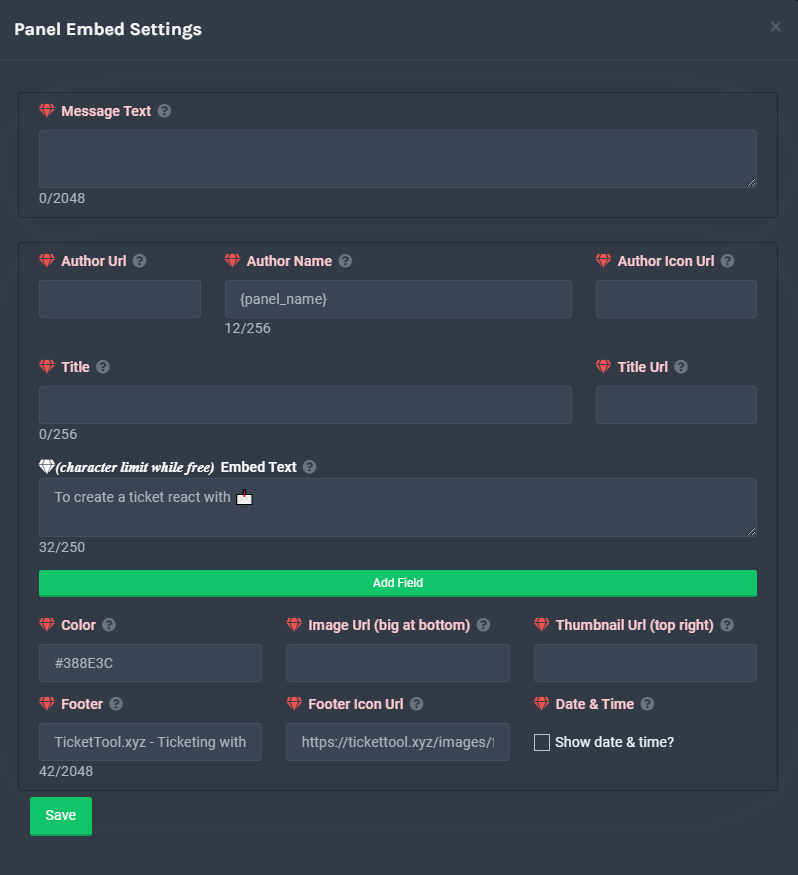 shut bolt
Check this :)
echo night
humble sequoia
I understand this is only for premium?
shut bolt
You can edit the Embed Text with a character limit while having the free version
echo night
understood thanks
shut bolt
echo night
understood thanks
Sure