#🆘│community-support
1 messages · Page 362 of 1
 craggy geyser
 humble sequoiaBOT
Blacklist Roles
Any role you assign as a blacklisted role won't be able to use commands or reactions.
Selecting a blacklisted role
Go to your Dashboard -> Server Configs. There you will find the option to select blacklisted roles.
Note: Don't forget to save.
 humble sequoiaBOT
Help Options
$help commands - Information on commands
$help setup - Information on bot setup
$help faq - Frequently asked questions
Ticket Tool Invite & Support
Setting up Ticket Tool
Visit the docs for setup info
General Setup
humble sequoiaBOT
Help Options
$help commands - Information on commands
$help setup - Information on bot setup
$help faq - Frequently asked questions
 fervent belfry
$help commands
humble sequoiaBOT
() = optional
[] = required
*==================================
Ticket Commands
==================================*
_ _
`$add [User] (channel)`
Description: Adding additional users to a ticket
Aliases: none
`$remove [User] (channel)`
Description: Removing users from a ticket
Aliases: none
`$close`
Description: Closing tickets
Aliases: none
`$open`
Description: Opening closed tickets
Aliases: none
`$delete`
Description: Deleting tickets
Aliases: none
`$rename`
Description: Renaming tickets/channels
Aliases: none
`$transcript (send channel)`
Description: Creating transcripts
Aliases: none
`$new (user) (reason)`
Description: Creating tickets in a monitored channel (when command style is enabled)
Aliases: none
`$claim`
Description: Claiming tickets (when claim is enabled)
Aliases: "unclaim"
_ _
*==================================
General Commands
==================================*
_ _
`$help (Help Options)`
Description: Help Command
Aliases: none
`$debug`
Description: Debuging issues with running Ticket Tool
Aliases: none
`$id (@role/@user/#channel/emoji)`
Description: Converting roles, users, channels and emojis to ID
Aliases: "getid"
`$permlevel`
Description: Checking permission level with Ticket Tool
Aliases: "level"
`$ping`
Description: Checking response time with discord api
Aliases: none
`$vote (link | unlink | redeem) (user)`
Description: Earn premium by voting on top.gg or Discord.boats
Aliases: "votes"
 copper owl
@fervent belfry you can use these commands in your own server
So please dont flood this channel for help commands
fervent belfry
can you please tell me one thing?
copper owl
Depends on what the question is, go ahead
 copper owl
$help ping
humble sequoiaBOT
How to make Ticket Tool ping a role
To make ticket tool ping a role when a ticket is opened, go to the Dashboard -> Panel Configs -> Settings -> Ticket Options -> Ticket Message -> Message Text and do this:
{@Role name} This is case sensitive and the role must have @mentions enabled
 copper owl
fervent belfry
<@!548583124062175232>
copper owl
fervent belfry
<@!548583124062175232>
there's no need to ping me, it's also against the rules so be careful with that
fervent belfry
Sorry
copper owl
humble sequoia
this is how ^^
fervent belfry
What if no Role iss added
copper owl
fervent belfry
What if no Role iss added
then it wont ping
fervent belfry
So how to add role and enable mentions ?
copper owl
humble sequoia
Follow this ^^
copper owl
humble sequoia
to ping roles, follow the instructions here
it's all explained there
you need to write {@Role Name} in the Message Text, and replace Role Name with the actual name of the role
 jade topaz
how to active the Premium?
humble sequoiaBOT
Redeeming premium
Redeeming premium on your server is really simple. Just head over to your Subscriptions Page. There you can select a server of your choice, which will get premium. You can change the server at any point.
 jade topaz
 humble sequoiaBOT
How to disable the premium bot
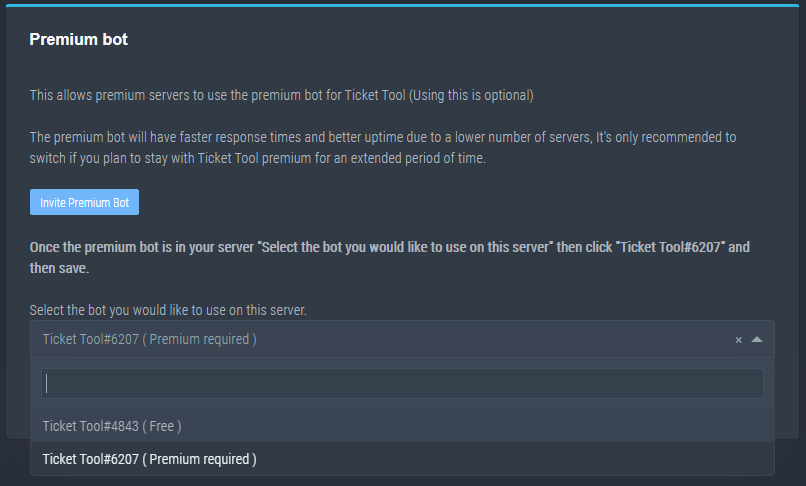
To disable the premium bot you will have to go to the Dashboard -> Server Configs -> Premium bot -> And on the right-hand side select the primary free bot in the drop down menu.
Premium features will still work on the normal bot.
TicketTool.xyz - Ticketing without clutter
 shut bolt
jade topaz
shut bolt
jade topaz
Try out 
jade topaz
اوك
 robust sandalBOT
jade topaz
اوك
robust sandalBOT
jade topaz
اوك
 Khaled ¹ᴷ
Okay
 Arabic (ar) → English (en)
jade topaz
Arabic (ar) → English (en)
jade topaz
Still the same problem
shut bolt
Please give me the Server ID
jade topaz
Check your dm
humble sequoiaBOT
Inviting and Enabling Premium Bot
The first thing you will need to do is invite the premium bot, an invite can be found here
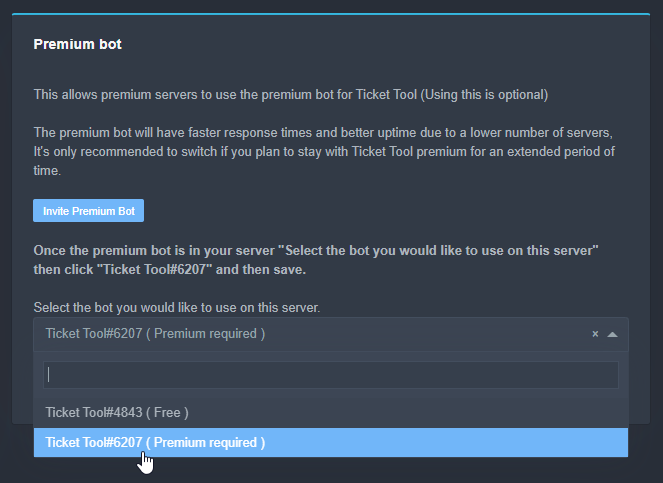
Once the bot is in your server we will head to the dashboard and manage your server. When you are managing your server, you want to head into "Server Configs" then click the drop down menu under "Select the bot you would like to use on this server" then click "Ticket Tool#6207" and then save.
 jade topaz
Ok I invite it
 mossy prairie
People keep saying I'm my server that they can't create a ticket because they need perm access. Why is this I can't seem to find the reason why?
shut bolt
mossy prairie
People keep saying I'm my server that they can't create a ticket because they ne...
Is the bot saying "you don't have permission to use this"?
mossy prairie
Ye
 safe ibex
Hello
shut bolt
Check your blacklisted roles, users with one of those roles won't be able to use any button nor comand
humble sequoiaBOT
Blacklist Roles
Any role you assign as a blacklisted role won't be able to use commands or reactions.
Selecting a blacklisted role
Go to your Dashboard -> Server Configs. There you will find the option to select blacklisted roles.
Note: Don't forget to save.
shut bolt
safe ibex
Hello
Hey
 celest silo
 prime bridgeBOT
 Allen 5#5233 has been warned!

 They were notified via dms.
 mystic hound
Probably should consider reading the rules first, but anyway, staff applications are currently closed. When we need more staff they'll be announced in #📣│server-news
 gloomy turret
Hello! How can I view the history of requests on my server?
 plain surge
Can you elaborate on that? @gloomy turret
gloomy turret
plain surge
Can you elaborate on that? <@514131070229151753>
I have your bot installed on my Discord server. And communication with me takes place through the ticket. About 5-7 days ago there was a ticket with very important information! But it was closed and removed. Can you find it in the archive?
 tiny minnow
Hello what advantage can boosters have? Thank you
 tribal cedar
gloomy turret
I have your bot installed on my Discord server. And communication with me takes ...
tribal cedar
gloomy turret
I have your bot installed on my Discord server. And communication with me takes ...
If you have premium and save the transcripts of your tickets to a logging channel then you can find it otherwise no.
tribal cedar
tiny minnow
Hello what advantage can boosters have? Thank you
Discord boosters? There isn't any here just the title
plain surge
gloomy turret
I have your bot installed on my Discord server. And communication with me takes ...
The bot does not save anything in your tickets on its servers
The only way to preserve the messages in a ticket is to use the transcript feature, or to just not delete the channel
For the future you should enable Two steo ticket so that it isn't deleted once you close it
gloomy turret
plain surge
The bot does not save anything in your tickets on its servers
Ok! Thank you!
 iron nightBOT
Gave 1 Rep to D̸̞̉҉̢̩͠o͛ͫ̚m͈̕͜҉̘̱̟☆̞͈͠҉ͪ̈́͘҉̷̥̐ (current: #30 - 9)
plain surge
Go to Dashboard > Panel configs > Settings > general options > Two step ticket 
And you can set a transcript channel for the transcript to be saved to here
$help transcript
humble sequoiaBOT
How do I save transcript to a channel?
To save transcripts to a channel go to the Dashboard -> Panel Configs -> Settings -> Logging Options -> Transcript Channel
 plain surge
You should also enable the Transcript button.
Go to Dashboard > Panel configs > Settings > button options > Transcript > Enable button
You can open a Demo ticket in #🎫│make-a-ticket to view all these buttons and features
@gloomy turret
 unique canopy
I just need how to make it say like:"if you need help,open this"and you can open a ticket(in my own server)
I invited it
humble sequoiaBOT
plain surge
After that check this
humble sequoiaBOT
**Panel Message**
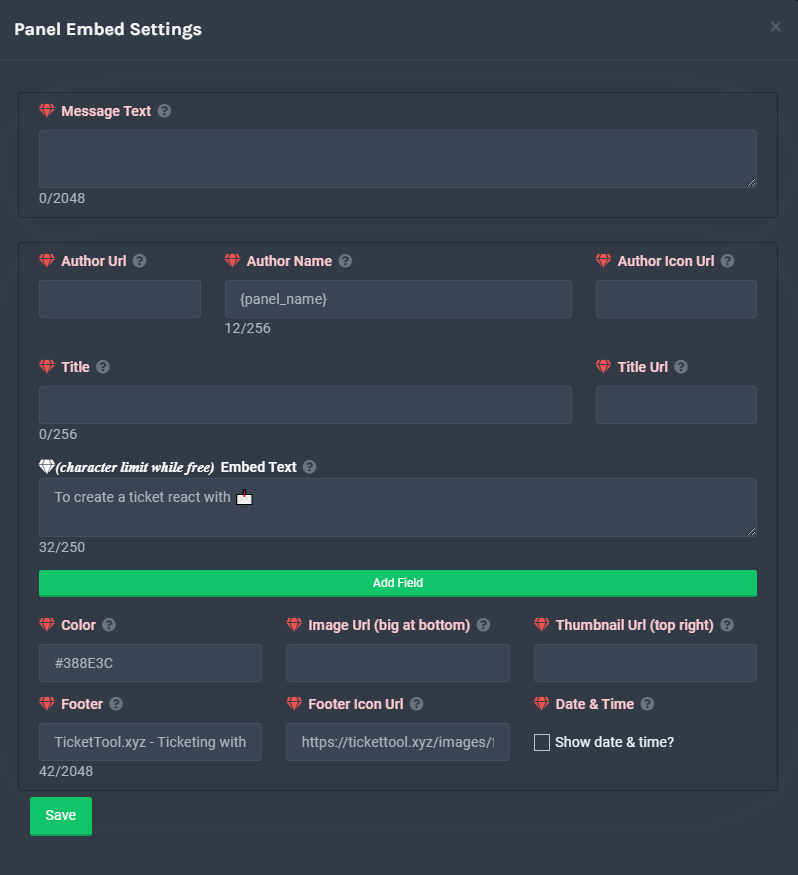
The panel message is where people react to make a ticket. To customize it head over to your Dashboard --> Panel Configs -> Settings -> Panel Options -> Edit Panel Message
 plain surge
Thanks @tribal cedar
iron nightBOT
Gave 1 Rep to Enigma (current: #14 - 79)
plain surge

tribal cedar
Np
 vestal owl
Bruh pourquoi personne ne répond à mon ticket de rapport c'est sérieux
shut bolt
vestal owl
Bruh pourquoi personne ne répond à mon ticket de rapport c'est sérieux
As we told you before, the report tickets are only available for 2 users which are truly busy
vestal owl
sa publicité dm en passant et j'ai été posté nsfw chose
unique canopy
plain surge
After that check this
On phone?
unique canopy
Long af
unique canopy
?
vestal owl
What is long af
jade topaz
@gloomy jacinth
how do i
make the bot ping a role when someone opens a ticket
@wicked scroll
vestal owl
@jade topaz please don't ping support
jade topaz
vestal owl
<@456226577798135808> please don't ping support
i need help
jade topaz
vestal owl
Don't ping
ok
jade topaz
vestal owl
On the message you just out @Support role
what mesgs
humble sequoiaBOT
Creating a panel
To create a panel we are going to need to head over to the panel configs on the dashboard
Once at the dashboard we will need to click Create Panel
Enter a panel name (Fill in any optional settings you want)
Click Create Panel and your ready to get started with configuring your panel
An example of a creating a panel is shown below.
 vestal owl
Look at that @jade topaz
jade topaz
vestal owl
Look at that <@456226577798135808>
but doesnt ping support
vestal owl
?
jade topaz
vestal owl
?
i want the bot to ping a role when a ticket is made
vestal owl
Have u created a panel @jade topaz
jade topaz
vestal owl
Have u created a panel <@456226577798135808>
ya'
 gloomy jacinth
jade topaz
<@!534109216865124383>
gloomy jacinth
jade topaz
<@!534109216865124383>
Open a ticket if you need help
don't ping support team
shut bolt
jade topaz
i want the bot to ping a role when a ticket is made
$help ping
humble sequoiaBOT
How to make Ticket Tool ping a role
To make ticket tool ping a role when a ticket is opened, go to the Dashboard -> Panel Configs -> Settings -> Ticket Options -> Ticket Message -> Message Text and do this:
{@Role name} This is case sensitive and the role must have @mentions enabled
shut bolt
@lethal magnet no worries bro :)
humble sequoiaBOT
Don't see your server in the dashboard?
You will possibly need to relog. Look below to see steps on how to relog.
How to relog the Dashboard.
First, you will need to go to the dashboard. Once your there, click on your avatar on the top right. after you clicked it, you will see button that says Logout. You must click that. Once you have logged out, you can log back in.
Note:
You need one of these 3 things to access the dashboard.
1. Server Owner (Level: 6)
2. Server Administrator (Level: 4)
3. Dashboard Role (Level: 2)
You can check your level using $level on your Discord Server
shut bolt
jade topaz
for the server I want
Check out this please
jade topaz
dope thank you!
shut bolt
Sure!
jade topaz
jade topaz
make the bot ping a role when someone opens a ticket
{@Support Role}
humble sequoiaBOT
() = optional
[] = required
*==================================
Ticket Commands
==================================*
_ _
`$add [User] (channel)`
Description: Adding additional users to a ticket
Aliases: none
`$remove [User] (channel)`
Description: Removing users from a ticket
Aliases: none
`$close`
Description: Closing tickets
Aliases: none
`$open`
Description: Opening closed tickets
Aliases: none
`$delete`
Description: Deleting tickets
Aliases: none
`$rename`
Description: Renaming tickets/channels
Aliases: none
`$transcript (send channel)`
Description: Creating transcripts
Aliases: none
`$new (user) (reason)`
Description: Creating tickets in a monitored channel (when command style is enabled)
Aliases: none
`$claim`
Description: Claiming tickets (when claim is enabled)
Aliases: "unclaim"
_ _
*==================================
General Commands
==================================*
_ _
`$help (Help Options)`
Description: Help Command
Aliases: none
`$debug`
Description: Debuging issues with running Ticket Tool
Aliases: none
`$id (@role/@user/#channel/emoji)`
Description: Converting roles, users, channels and emojis to ID
Aliases: "getid"
`$permlevel`
Description: Checking permission level with Ticket Tool
Aliases: "level"
`$ping`
Description: Checking response time with discord api
Aliases: none
`$vote (link | unlink | redeem) (user)`
Description: Earn premium by voting on top.gg or Discord.boats
Aliases: "votes"
jade topaz
What’s this ?

 potent scaffold
If you try refreshing it should show what servers you have on it. If not try to log and relog it
jade topaz
Alright
It’s the sane
Same .. can you come to my server and check it ? @potent scaffold
potent scaffold
Ehhh... Normally Id be down but im handling something for a server i mod right now so i can't. Sorry
humble sequoiaBOT
-- moved to ticket --
 unreal elbow
@jade topaz
press on the top right icon and log out
then log in again
it should show up now
 feral nexus
@fervent scarab i need help with the ticket bot
i have it all setup but for some reason my members cant see it even who they are allowed to read the history and view channel
unreal elbow
feral nexus
i have it all setup but for some reason my members cant see it even who they are...
but there is a ticket bot message yes?
 silk cave
How do I make a ticket
feral nexus
unreal elbow
but there is a ticket bot message yes?
da i set it up just now
da means yes in russian
humble sequoiaBOT
unreal elbow
humble sequoia
<https://docs.tickettool.xyz>
@silk cave
feral nexus
@unreal elbow how come people are not able to see the ticket
unreal elbow
the ticket panel itself or the ticket they opened?
feral nexus
if u want u can join my server and take a look for yourself
just click the link in my bio and wait 3 secs and it directly take u to my sevrer
panel itself
unreal elbow
mhm
feral nexus
@unreal elbow never mind i just resent the ticket the first time i did it it didnt show but the 2nd time did
no need thxs for your help tho
unreal elbow
ok xD
feral nexus
u know how to set up pings reaction role XD
feral nexus
ok can u just show me in my server
unreal elbow
feral nexus
ok can u just show me in my server
not rn
feral nexus
unreal elbow
not rn
ight
vestal owl
from what
 icy sleet
From five m server
humble sequoiaBOT
You're in the wrong place
We provide support for @pseudo glen discord bot and cannot help you with whatever issue you have.
Please make sure to contact the appropriate support team.
If you don't have any further questions regarding our bot Ticket Tool, please close this ticket
_ _
jade topaz
Can somebody show me how it actually does give the opened ticket the person's name? This isn't working
 copper owl
jade topaz
Can somebody show me how it actually does give the opened ticket the person's na...
copper owl
jade topaz
Can somebody show me how it actually does give the opened ticket the person's na...
{user} would ping the user in the channel name, causing a string of numbers to be sent instead of their username (string of numbers would be their ID)
you need to use something like {ticker.user.name} to have their username be in the channelname
jade topaz
thanks!:D
jade topaz

copper owl
 raven thorn
Can be a closed ticket channel can be saved or archived?
raven thorn
Can be a closed ticket channel can be saved or archived?
transcript channel
$help transcript
humble sequoiaBOT
How do I save transcript to a channel?
To save transcripts to a channel go to the Dashboard -> Panel Configs -> Settings -> Logging Options -> Transcript Channel
copper owl
click the transcript button once the ticket is closed, it saved the ticket in there, and youll be able to delete it
raven thorn
copper owl
click the transcript button once the ticket is closed, it saved the ticket in th...
Ohhh, thanks thanks
iron nightBOT
Gave 1 Rep to Neptune (current: #1 - 325)
copper owl
anytime
 cinder badge
$invite
humble sequoiaBOT
Ticket Tool Invite & Support
tribal cedar
jade topaz
How do I put emojis in the panel embed
Use the $Id command with the emoji after it
Then copy paste the code to your embedded
humble sequoiaBOT

 rich adder
hey, how do i enable command style tickets? the docs are not helpful because they don't tell me where i can enable the command
unreal elbow
$help commandstyle
humble sequoiaBOT
Help Options
$help commands - Information on commands
$help setup - Information on bot setup
$help faq - Frequently asked questions
shut bolt
rich adder
hey, how do i enable command style tickets? the docs are not helpful because the...
Hey there
Go into the Settings of the panel
And open the Command Style Tickets menu
Let me get a photo of it
And here you can enable the command
 rich adder
thank you! that was really helpful
shut bolt
Sure!
 jade topaz
 spice gust
When I login in ticket tool website its shwing error
spice gust
When I login in ticket tool website its shwing error
Are you sure that's the right website?
https://tickettool.xyz/
humble sequoiaBOT
Setting up Ticket Tool
Visit the docs for setup info
General Setup
 scenic plinth
spice gust
<@!518666147441278998>
scenic plinth
spice gust
<@!518666147441278998>
Don't ping random staff please. Use the link that was provided to you above. You tried the docs.
jade topaz
spice gust
this bot docs
Ticket Tool Docs
humble sequoiaBOT
spice gust
still same
 scenic plinth
humble sequoia
https://tickettool.xyz/manage-servers
scenic plinth
humble sequoia
https://tickettool.xyz/manage-servers
You keep trying to sign into the docs. Sign into this.
spice gust
k
spice gust
scenic plinth
You keep trying to sign into the docs. Sign into this.
i got signed
ty
thanks @scenic plinth
iron nightBOT
Gave 1 Rep to Livi ツ (current: #5 - 167)
shut bolt
spice gust
<@!518666147441278998>
As Kenzie said, no pinging staff please
spice gust
shut bolt
As Kenzie said, no pinging staff please
Sry next time iw will not 🙂
spice gust
yeah
jade topaz
@jade topaz use this channel for help.
Ticket Tool Docs
Dashboard > Panel Configs > Settings (of the desired panel) > Reaction Options
 marble lichen
How can i invite @humble sequoia
humble sequoiaBOT
Inviting and Enabling Premium Bot
The first thing you will need to do is invite the premium bot, an invite can be found here
Once the bot is in your server we will head to the dashboard and manage your server. When you are managing your server, you want to head into "Server Configs" then click the drop down menu under "Select the bot you would like to use on this server" then click "Ticket Tool#6207" and then save.
shut bolt
Use the link you find on the dashboard
marble lichen
How do i manage the premium ticket tool? I already have the normal stuff configurated , but i want to send messages w the premium bot
i already know, thx cm
jade topaz
$help
humble sequoiaBOT
Help Options
$help commands - Information on commands
$help setup - Information on bot setup
$help faq - Frequently asked questions
jade topaz
$help faq
humble sequoiaBOT
====== FAQ ======
If a question interests you run the command to see the answer.
Q: What is the prefix and how do I change it?
A: $help prefix
Q: How do I let my support team see into a ticket?
A: $help support
Q: How do I make a ticket ping my support when it's created?
A: $help ping
Q: How do I set a transcript channel?
A: $help transcript
Q: How do I limit the number of tickets a user can create?
A: $help limit
Q: How do I set what category tickets are created in?
A: $help category
Q: How do I set what category tickets are moved to when closed?
A: $help closed
Q: How do I set a custom reaction?
A: $help reaction
Q: How do I set the permissions for the tickets?
A: $help perms
Q: How do I create a panel?
A: $help panel
Q: How do I get the panel in my discord?
A: $help send
Q: How do I add or remove users from a ticket?
A: $help add
Q: A panel of mine won't update with the new settings, How do I fix it?
A: $help update
Q: Ticket Tool isn't responding to my commands, How do I fix it?
A: $help offline
Q: How does the claim command work?
A: $help claim
jade topaz
$help setup
humble sequoiaBOT
Setting up Ticket Tool
Visit the docs for setup info
General Setup
copper owl
@jade topaz you can use these commands in your own server
so please refrain from using them here because it's just flooding the chat
jade topaz
Sure my bad
vestal owl
what with
shut bolt
Yeah
 shut bolt
jade topaz
ticket tool does not auto delete the channel its creating
shut bolt
jade topaz
ticket tool does not auto delete the channel its creating
There are two ways
Option 1
You delete the ticket
Option 2
You mark it to automatically delete when closed
jade topaz
shut bolt
You mark it to automatically delete when closed
yes how to do it?
shut bolt
Go into the dashboard
humble sequoiaBOT
shut bolt
And then into Panel Configs
jade topaz
then?
shut bolt
Open the Settings of the panel
jade topaz
after that?
shut bolt
General Options
jade topaz
which option in that?
shut bolt
Sure!
 charred tartan
السلام عليكم
shut bolt
@cosmic path español si tenemos acá :)
 cosmic path
 digital lotus
Is there a way to embed urls in the ticket underneath text?
shut bolt
$esticketmessage
humble sequoiaBOT
**Mensaje del Ticket**
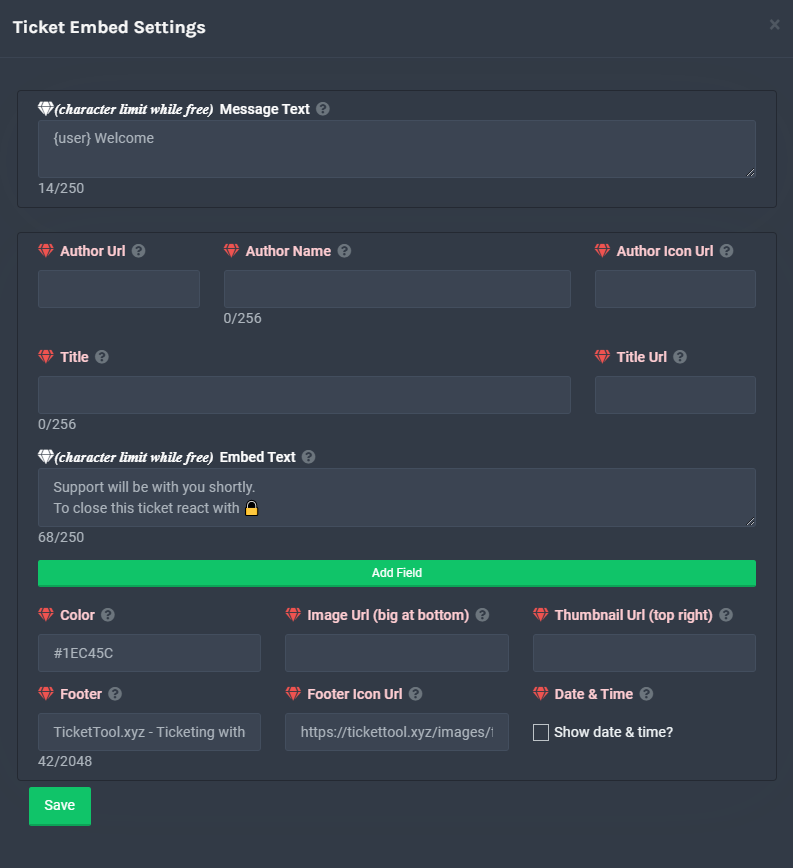
El mensaje del Ticket es el primer mensaje enviado por el bot en un ticket nuevo. Para personalizarlo, diríjase a su Panel de Control → Panel Configs → Settings → Ticket Options → Edit Ticket Message.
 digital lotus
shut bolt
Like the blue text?
digital lotus
shut bolt
Like the blue text?
Yes.
shut bolt
You can do that by including this on the embed text [Text you want to show](URL)
digital lotus
shut bolt
You can do that by including this on the embed text `[Text you want to show](URL...
So like [Panel de Control]https://tickettool.xyz/manage-servers
shut bolt
It would be Panel de Control
digital lotus
shut bolt
It would be [Panel de Control](https://tickettool.xyz/manage-servers)
Thank you.
iron nightBOT
Gave 1 Rep to Yareaj_ (current: #8 - 151)
shut bolt
Sure
 shut stirrup
 eager cargo
May I help you with something?
 jade hinge
can i make a two steps open ticket?
, like a confirm to open the ticket
mystic hound
It's a suggested feature, but not one that's currently available
jade hinge
what about create more than one button on the same panel
craggy geyser
jade hinge
what about create more than one button on the same panel
It's a premium feature
humble sequoiaBOT
Multipanels are a premium feature  that allow for a single panel with multiple buttons to open different tickets.
How to create a Multipanel
Premium users can combine multiple panels into one multipanel.
First, find the IDs of each panel you wish to combine. You can find them in your Panel Configs in the Dashboard
Next, send the multipanel to a channel using $panel [id1] [id2] {id3} ....
e.g. $panel 1 2 4 17 35 to combine panels 1, 2, 4, 17 and 35.
Up to 25 panels may be combined.

For a more convenient use of multipanels, you can now combine panels on the dashboard. This will allow you to directly send the multipanel from the dashboard or via the $panel ID command.
Where can I find this?
You can find this setting on the Dashboard -> Panel Configs -> Settings -> General Options
This will put all buttons from all of your panels on one message. The message is the panel message from the panel you're combining these panels in.
 craggy geyser
No worries. Anything else we can help with?
jade hinge
no thanks 🙂
jade topaz
Is there any Turkish support?
plain surge
We don't have Turkish support right now, no
But if you find it difficult to explain in English, you can write in Turkish and we use a translator to help you out with any problems you may be experiencing with the bot
jade topaz
So what do I do in this case?
plain surge
Open an English ticket in #🎫│make-a-ticket, and we will go over the problem you are having step by step
Or another language ticket that you may speak beside Turkish
jade topaz
Sorry, I can't explain in English. I can speak Turkish.
jade topaz
plain surge
Or another language ticket that you may speak beside Turkish
I can speak Turkish. I can not speak English.
plain surge
Alright, open an English ticket please @jade topaz
We will help you there
Go to #🎫│make-a-ticket and press on the button that says English
jade topaz
plain surge
Alright, open an English ticket please <@456226577798135808>
I guess you don't understand? I say I don't speak English.
humble sequoiaBOT
-- moved to ticket --
craggy geyser
$help claim
humble sequoiaBOT
How does the claim command work?
Ticket Tool claiming is a premium only command that allows your support team to claim tickets and have the ticket renamed, changed permissions or moved to another category
craggy geyser
On the dashboard there is a category in the panel config settings for claiming options
 supple flame
How do I put the tickets in a category?
craggy geyser
supple flame
How do I put the tickets in a category?
$help category
humble sequoiaBOT
How to set the open category
To set a open category go to the Dashboard -> Panel Configs -> Settings -> Category Options -> Category Open
 supple flame
craggy geyser
$help category
supple flame
craggy geyser
$help category
Ok ty
iron nightBOT
Gave 1 Rep to Swift (current: #4 - 202)
craggy geyser
Because you have premium
Claiming will stop working if you don't get it longer. And the premium role is semi automatic. It doesn't look at how you have premium
 novel helm
hey what's the command for setting up that it pings mods when a ticket is opened ?
humble sequoiaBOT
How to make Ticket Tool ping a role
To make ticket tool ping a role when a ticket is opened, go to the Dashboard -> Panel Configs -> Settings -> Ticket Options -> Ticket Message -> Message Text and do this:
{@Role name} This is case sensitive and the role must have @mentions enabled
plain surge
@novel helm
novel helm
plain surge
<@802980928506822686>
thanks for helping
iron nightBOT
Gave 1 Rep to D̸̞̉҉̢̩͠o͛ͫ̚m͈̕͜҉̘̱̟☆̞͈͠҉ͪ̈́͘҉̷̥̐ (current: #27 - 11)
novel helm

plain surge
No problem
 gentle pecan
i cant find my server in ''servers'' for the dashboard
humble sequoiaBOT
Don't see your server in the dashboard?
You will possibly need to relog. Look below to see steps on how to relog.
How to relog the Dashboard.
First, you will need to go to the dashboard. Once your there, click on your avatar on the top right. after you clicked it, you will see button that says Logout. You must click that. Once you have logged out, you can log back in.
Note:
You need one of these 3 things to access the dashboard.
1. Server Owner (Level: 6)
2. Server Administrator (Level: 4)
3. Dashboard Role (Level: 2)
You can check your level using $level on your Discord Server
shut bolt
Try this @gentle pecan
gentle pecan
thanks, it worked
shut bolt
Sure :)
 main jolt
Bonjour j'aurais besoin d'aide pour ce bot
 obsidian mantle
how do i stop users creating threads when ticket is closed?
 prime bridgeBOT
ansioso123 has been silenced for 10m 
Reason: Posting Discord Server Invites
ansioso123#5648 | 578625806348320780
copper owl
obsidian mantle
how do i stop users creating threads when ticket is closed?
remove the permissions from the roles. Thread perms arent a thing yet in our dashboard
obsidian mantle
copper owl
remove the permissions from the roles. Thread perms arent a thing yet in our das...
okay
plain surge
main jolt
Bonjour j'aurais besoin d'aide pour ce bot
Bonjour, vous pouvez ouvrire un billet dans #🎫│make-a-ticket
Pour le support Français
jade topaz
Servers - (server not showing up? try relogging)
It looks like Ticket Tool isn't online or in any servers you have permission to access,Invite Ticket Toolor check it'sstatus
why does this occur to me and what should I do
shut bolt
jade topaz
Servers - (server not showing up? try relogging)
It looks like Ticket Tool isn'...
Hey there
humble sequoiaBOT
Don't see your server in the dashboard?
You will possibly need to relog. Look below to see steps on how to relog.
How to relog the Dashboard.
First, you will need to go to the dashboard. Once your there, click on your avatar on the top right. after you clicked it, you will see button that says Logout. You must click that. Once you have logged out, you can log back in.
Note:
You need one of these 3 things to access the dashboard.
1. Server Owner (Level: 6)
2. Server Administrator (Level: 4)
3. Dashboard Role (Level: 2)
You can check your level using $level on your Discord Server
jade topaz
Thank you very much
shut bolt
jade topaz
Thank you very much
Sure
shut bolt
vestal owl
i thought he said why does this message show up
"why does this occur to me and what should I do" causes, explained in the notes, how to solve it, relog
vestal owl
oh
humble sequoiaBOT
How to set the open category
To set a open category go to the Dashboard -> Panel Configs -> Settings -> Category Options -> Category Open
supple flame
Oh nvm
shut bolt
Stonks
plain surge
$help category
humble sequoiaBOT
How to set the open category
To set a open category go to the Dashboard -> Panel Configs -> Settings -> Category Options -> Category Open
plain surge
SMH channels loading
humble sequoiaBOT
How to let support team see into a ticket
About support roles
A support role lets your support team see into tickets with out having to add them manually to each and every ticket.
You can add as many support roles as you like per panel.
NOTE that the way discord works all admins can see into tickets regardless of this.
How to set a support role
To set a Support role go to the Dashboard -> Panel Configs -> Settings -> General Options -> Support Team Roles.

NOTE that the support role will not be able to see into tickets that are already created..
shut bolt
GG
supple flame
Oh well i figured it out
shut bolt
Yeap
vestal owl
Hola
Estoy aburrido
quieres charlar con alguien?
@shut bolt ¿Los comandos de las herramientas de tickets funcionan en un idioma diferente como $ayuda ?
shut bolt
vestal owl
<@518666147441278998> ¿Los comandos de las herramientas de tickets funcionan en ...
Nop, de momento solo están para inglés
Algo me dice que estás usando traductor jajajaja
👀
shut bolt
vestal owl
no soy jaja
Algo me dice que sí 
shut bolt
Je ne parle pas de francais
vestal owl
De vuelta al español entonces jaja
shut bolt
Si jajaja, francés sé muy poco
vestal owl
principalmente sé francés
shut bolt
Que bien
shut bolt
F
 scenic spoke
una pregunta como hago para crear para que una persona pueda abrir ticket
shut bolt
scenic spoke
una pregunta como hago para crear para que una persona pueda abrir ticket
Holap
humble sequoiaBOT
scenic spoke
perdon por habrir ticket no sabia
shut bolt
No te preocupes
scenic spoke
que era ticket
 sand sundial
Can you increase the amount of tickets allowed per user? My server is set to 2. Hoping to have it set higher if possible
shut bolt
sand sundial
Can you increase the amount of tickets allowed per user? My server is set to 2. ...
Hey
humble sequoiaBOT
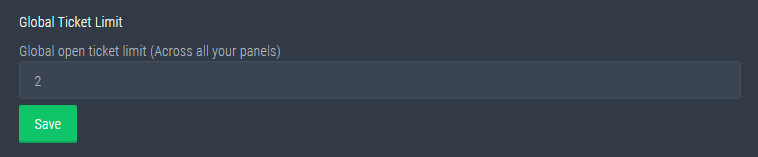
Global Ticket Limit
Unlike the regular Ticket Limit, the global limit will limit the amount of tickets a user can create at the same time for ALL Panels. When a ticket is closed again, the limit resets for that user.
Note:
This is not a limit for how many tickets a user can open at all times or how many tickets you can have open on the server in total. This is just a limit per user for open tickets.
 sand sundial
shut bolt
You can increase it globally
sand sundial
shut bolt
You can increase it globally
Mine is set to 500 on that setting. Is it because I still use the free bot and not the premium? I haven't been able to clear out all tickets yet
shut bolt
sand sundial
Mine is set to 500 on that setting. Is it because I still use the free bot and n...
Oh, you mean the channel limit?
500 is the top amount of channels Discord allows
Is not a limit from our end
It's a Discord setting
sand sundial
shut bolt
Oh, you mean the channel limit?
Yeah. Our regular channel the ticket opens under only allows the user to have 2 open tickets. I want to increase that
shut bolt
If you want to increase the amount of tickets per user
 ocean valley
does anyone know how to make the ticket bot create a ticket in a category?
humble sequoiaBOT
How to set the open category
To set a open category go to the Dashboard -> Panel Configs -> Settings -> Category Options -> Category Open
shut bolt
Assign a category in the Dashboard
ocean valley
thank you, im dumb
shut bolt
No worries, you are welcome
jade topaz
yo
shut bolt
Hey
jade topaz
how do I ping
shut bolt
Wait for a member
jade topaz
billing team?
shut bolt
They already received a ping
jade topaz
ohh
shut bolt
So no worries :)
jade topaz
Thanks
jade topaz
bet
shut bolt
jade topaz
ye
Send also the blockchain link in the ticket, that will make the process easier when a billing team member sees the ticket
shut bolt
Sure, thanks :)
 hot moat
Not able to click and no one is able to make ticket

 timid rivet
I bought 1600 tickets for the nitro tap lottery. I'm new what should I do now please help…
“ Servers - (server not showing up? try relogging)
It looks like Ticket Tool isn't online or in any servers you have permission to access,Invite Ticket Toolor check it'sstatus. “” 🤔
Help me pleasee
jade topaz
???
timid rivet
I am a nitrofauce.nity.fr user. I bought 1600 tickets for the lottery and what should I do now? I don't know what to do can you help me?
eager cargo
$tts
humble sequoiaBOT
You're in the wrong place
We provide support for @pseudo glen discord bot and cannot help you with whatever issue you have.
Please make sure to contact the appropriate support team.
If you don't have any further questions regarding our bot Ticket Tool, please close this ticket
_ _
 leaden dune
Hello
timid rivet
I bought 1600 tickets from nitrofaucet.nity.fr with satosihs, I don't know how to check
eager cargo
You're in the wrong place
timid rivet
The links brought me here☹️Do you know what should I do?
mystic hound
Which link?
mystic hound
We don't work with them so I'm not sure why it would bring you here
There's a discord logo on that site, clicking on it will take you to their server.
timid rivet
thank you so much 🙏
 harsh nova
Hello?
I have a question
The ticket bot isn’t working
I mean
How do I make it work in my server
timid rivet
which server ?
harsh nova
Nvm
humble sequoiaBOT
plain surge
harsh nova
How do I make it work in my server
Please check the docs on how to setup Ticket Tool
 daring flicker
is something wrong with ticket tool? we have premium subscription. things were running smooth ever since but today we got this

does anybody have an idea on why this error is being displayed?
plain surge
@daring flicker your subscription has ran out
humble sequoiaBOT
Inviting and Enabling Premium Bot
The first thing you will need to do is invite the premium bot, an invite can be found here
Once the bot is in your server we will head to the dashboard and manage your server. When you are managing your server, you want to head into "Server Configs" then click the drop down menu under "Select the bot you would like to use on this server" then click "Ticket Tool#6207" and then save.
jade topaz
Oop
plain surge
You can buy a new subscription or switch to the free bot
daring flicker
plain surge
<@756812996210327572> your subscription has ran out
ahhhh. i see. thanks for your support
iron nightBOT
Gave 1 Rep to D̸̞̉҉̢̩͠o͛ͫ̚m͈̕͜҉̘̱̟☆̞͈͠҉ͪ̈́͘҉̷̥̐ (current: #27 - 13)
plain surge
No problem
daring flicker
plain surge
No problem
all good now. Thanks for your help!
iron nightBOT
@daring flicker :: You can't rep D̸̞̉҉̢̩͠o͛ͫ̚m͈̕͜҉̘̱̟☆̞͈͠҉ͪ̈́͘҉̷̥̐#5201 for 51 minutes and 31 seconds. Try coming back later?
plain surge
Good to hear 👍
jade topaz
How do I setup tickets like #🎫│make-a-ticket
shut bolt
jade topaz
How do I setup tickets like <#571706435449257997>
Hey there
humble sequoiaBOT
humble sequoiaBOT
For a more convenient use of multipanels, you can now combine panels on the dashboard. This will allow you to directly send the multipanel from the dashboard or via the $panel ID command.
Where can I find this?
You can find this setting on the Dashboard -> Panel Configs -> Settings -> General Options
This will put all buttons from all of your panels on one message. The message is the panel message from the panel you're combining these panels in.
jade topaz
Ahhh okay.
shut bolt
humble sequoia
And this is how to do a multipanel, part of our premium subscription
jade topaz
Premium only?
shut bolt
Yeap
jade topaz
iron night
<@756812996210327572> **::** You can't rep **D̸̞̉҉̢̩͠o͛ͫ̚m͈̕͜҉̘̱̟☆̞͈͠҉ͪ̈́͘҉̷̥̐#52...
How do you get a bot to do this?
jade topaz
Oh okay
robust sandalBOT
 ! 𝐑𝐋 | ༺༽Ø🇲Ā🇷༼༻
Can I have a server control link?
Arabic (ar) → English (en)
humble sequoiaBOT
jade topaz
shut bolt
Check YAGPDB's documentation
They don’t help at all
copper owl
jade topaz
They don’t help at all
check their support server
jade topaz
They don’t help at all.
copper owl
it's a support server..?
just checked the support server and he gave you the solution
jade topaz
A long code
 dawn warren
@prime bridge
 unreal elbow
go to the channel ticket tool should send the panel into and set the perms for the bot to „send messages, read message history, view channel“ to true
@jade topaz
 hushed ibex
How do i make it so that when i open tickets they dont open in a different area
plain surge
hushed ibex
How do i make it so that when i open tickets they dont open in a different area
$help category
humble sequoiaBOT
How to set the open category
To set a open category go to the Dashboard -> Panel Configs -> Settings -> Category Options -> Category Open
plain surge
Select a category for new tickets to open under
 lofty cipher
plain surge
Select a category for new tickets to open under
lofty cipher
plain surge
Select a category for new tickets to open under
For the category closed, it's the category that closed tickets that haven't been permanently deleted show up in, right?
eager cargo
Yes
lofty cipher
Alrighty, and another question:
If one user creates 2 tickets, and another user creates 2 tickets immediately after... are they able to see each other's tickets? Or is it all anonymous and tied to specific users, the tickets that one specific user opened are only seen by them and the people who address the tickets until they are closed?
eager cargo
Its anonymous by default unless you changes something in the permission options for @.everyone on the dashboard
e,g allowing read message perm for @.everyone role
would give everyone access in the server to the ticket
lofty cipher
Gotcha, thanks!
eager cargo
yep
 astral fractal
Buenas cómo creo wite list
digital lotus
How to tag a specific user in ticket message? There is option to tag only the role with {@role}
 thick storm
Hello, I have problems with your bot
when the ticket opens there are no messages
what's on the regular is on the premium
humble sequoiaBOT
-- moved to ticket --
copper owl
digital lotus
How to tag a specific user in ticket message? There is option to tag only the ro...
use <@ID>
replace ID with the users ID
thick storm
So that's the thing that I edited it 10 times nothing has changed
digital lotus
copper owl
use `<@ID>`
Thanks.
iron nightBOT
Gave 1 Rep to Neptune (current: #1 - 330)
copper owl
Anytime
 wintry saddle
Bot dead? It's not responding when I click on emoji
copper owl
no it isnt dead
humble sequoiaBOT
Pong! Latency is 304ms. API Latency is 79ms [-]

 plain surge
Please don't ping Support
 uncut hedge
OK sorry
plain surge
And please send your server ID
 plain surge
Fix what?
 urban garnet
Do not let create a panel that interferes
plain surge
@uncut hedge please make sure that the bot has Send messages permission in that channel
uncut hedge
plain surge
<@607223178653335568> please make sure that the bot has `Send messages` permissi...
Bot having admin bro
plain surge
@uncut hedge which bot do you have invited on your server?
@urban garnet you are on the wrong website
urban garnet
urban garnet
How do i create a panel
How do i create a panel?
uncut hedge
plain surge
<@607223178653335568> which bot do you have invited on your server?
Ticket tool bot yeeh same website
plain surge
Send a screenshot with the bot in members tab please
urban garnet
plain surge
https://tickettool.xyz/manage-servers
It does not show my server there
humble sequoiaBOT
Don't see your server in the dashboard?
You will possibly need to relog. Look below to see steps on how to relog.
How to relog the Dashboard.
First, you will need to go to the dashboard. Once your there, click on your avatar on the top right. after you clicked it, you will see button that says Logout. You must click that. Once you have logged out, you can log back in.
Note:
You need one of these 3 things to access the dashboard.
1. Server Owner (Level: 6)
2. Server Administrator (Level: 4)
3. Dashboard Role (Level: 2)
You can check your level using $level on your Discord Server
plain surge
urban garnet
It does not show my server there
Try relogging
urban garnet
TNX
 humble sequoiaBOT
Inviting and Enabling Premium Bot
The first thing you will need to do is invite the premium bot, an invite can be found here
Once the bot is in your server we will head to the dashboard and manage your server. When you are managing your server, you want to head into "Server Configs" then click the drop down menu under "Select the bot you would like to use on this server" then click "Ticket Tool#6207" and then save.
uncut hedge
What msg deleted
plain surge
Make sure to select the free bot here
uncut hedge
Where to select bro
plain surge
Follow the instructions above, it tells you where
plain surge
Make sure the Free bot is the one selected, not the Premium
plain surge
No you don't have to.
Just send a screenshot of what you see on the Dashboard in that section please
Any updates? @uncut hedge
plain surge
No problem 👍
jade topaz
Hy
prime bridgeBOT
Successful bans: 1
 Unsuccessful bans:
 0
 Reason: scam
 Moderator: @mystic hound
jade topaz
لا اريد ان يري احد التكت وهو ليس اداري
 robust sandalBOT
jade topaz
لا اريد ان يري احد التكت وهو ليس اداري
robust sandalBOT
jade topaz
لا اريد ان يري احد التكت وهو ليس اداري
 ༄𝑷𝑨𝑩𝑳𝑶シ
I don't want anyone to see the tectonics, and it's not administrative.
Arabic (ar) → English (en)
humble sequoiaBOT
-- moved to ticket --
 dusky depot
hello, i can't seem to make it where only certain people can see an opened ticket. i don't use the everyone role because i have a verification role set up. how can i fix this issue? everyone with the verified role can see the ticket instead of those added to it/those who opened it/my staff team
copper owl
$help support
humble sequoiaBOT
How to let support team see into a ticket
About support roles
A support role lets your support team see into tickets with out having to add them manually to each and every ticket.
You can add as many support roles as you like per panel.
NOTE that the way discord works all admins can see into tickets regardless of this.
How to set a support role
To set a Support role go to the Dashboard -> Panel Configs -> Settings -> General Options -> Support Team Roles.
NOTE that the support role will not be able to see into tickets that are already created..
copper owl
make sure your member role isnt set as a support role
if there's nothing wrong here
$kv
humble sequoiaBOT
How to hide tickets from everyone
Head over to your Dashboard -> Panel Configs -> Settings --> General Options -> Edit Everyone Roles Opened Permissions

NOTE that @everyone can type aswell if it has permissions to send messages
copper owl
check this
dusky depot
copper owl
check this
okay, thank you so much!
all of my settings are correct, i'm not sure what i'm doing wrong ;-;
copper owl
ill open a ticket for you
humble sequoiaBOT
-- moved to ticket --
dusky depot
hii one more question! how do i set it up so it pings a role when a ticket is opened? i did it before but i can’t remember how and i’ve been changing roles up a bit :)
copper owl
$help ping
humble sequoiaBOT
How to make Ticket Tool ping a role
To make ticket tool ping a role when a ticket is opened, go to the Dashboard -> Panel Configs -> Settings -> Ticket Options -> Ticket Message -> Message Text and do this:
{@Role name} This is case sensitive and the role must have @mentions enabled
dusky depot
tysm again neptune! you’ve been so helpful today and i really appreciate you!
copper owl
Anytime
robust sandalBOT
 civic dew
كيف اصنع تكت
civic dew
كيف اصنع تكت
 𝐖𝐈𝐙𝐀𝐑𝐃 • 𝐙𝐄𝐙𝐎ᴿᴳ"C7 🇩🇪
How to make a tectonic
Arabic (ar) → English (en)
tribal cedar
$arabic
humble sequoiaBOT
فريق الدعم الفني العربي
عميلنا العزيز ان كنت تبحث عن مساعدة يرجى فتح تكت خاص بفريق الدعم الفني العربي
اذهب الى#🎫│make-a-ticket
ثم قم بلضغط على الايموجي الاتي (🇯🇴)
 sinful wind
Hey! How do I make it so once a ticket is closed it saves a transcript and deletes the ticket auto?
shut bolt
sinful wind
Hey! How do I make it so once a ticket is closed it saves a transcript and delet...
Hello there
sinful wind
Hey!
shut bolt
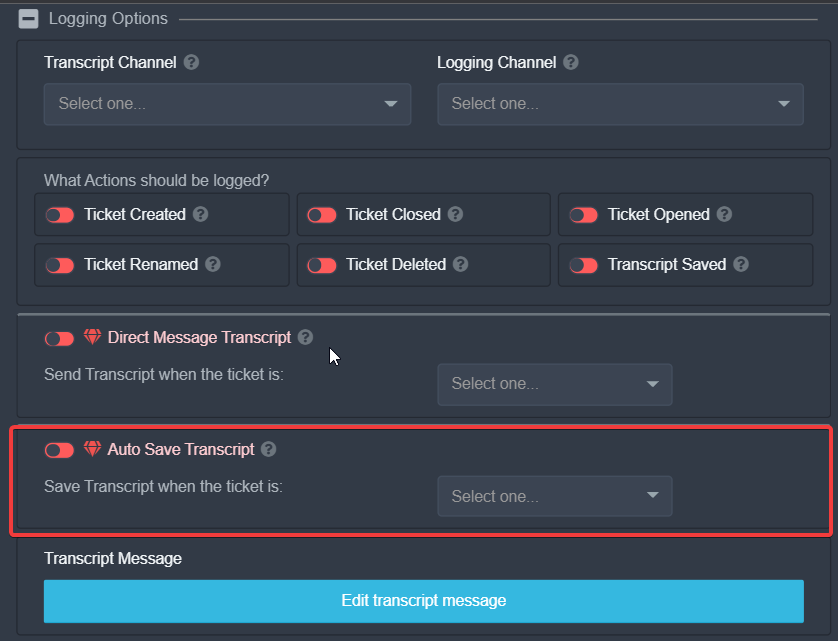
For making it save the transcript save automatically you should go into the Logging Options
 shut bolt
Yesssss, sorry, I was going to answer to that I was looking for the photoo
sinful wind
Oh sorry!
shut bolt
No worries :)
You should go into General Options and mark as  the Two Step Ticket this will make the tickets to get deleted when closed
 sinful wind
Alright thanks!
shut bolt
Sure! You are welcome :)
sinful wind
Thanks @shut bolt (Bot said to mention) (Sorry for ping)
iron nightBOT
Gave 1 Rep to Yareaj_ (current: #7 - 155)
 plucky monolith
hello everyone i'm trying to figure out how to prevent the bot from making a new channel for each ticket
like would it be possible to create a thread ? under the support channel
vestal owl
Como estas todos
 young flare
How can I do log for the bot ?
young flare
young flare
How can I do log for the bot ?
@eager cargo
vestal owl
Please don't ping staff @young flare
 atomic barn
$help category
humble sequoiaBOT
How to set the open category
To set a open category go to the Dashboard -> Panel Configs -> Settings -> Category Options -> Category Open
humble sequoiaBOT
Help Options
$help commands - Information on commands
$help setup - Information on bot setup
$help faq - Frequently asked questions
atomic barn
... nvm.
 fluid turret
Can i see how many Tickets a user claimed?
scenic plinth
The bot doesn't tell you directly, nor does it keep track.
 rocky flare
anyone know hwo to back up from one server to another
unreal elbow
$help backup
humble sequoiaBOT
Help Options
$help commands - Information on commands
$help setup - Information on bot setup
$help faq - Frequently asked questions
unreal elbow
$help setup
humble sequoiaBOT
Setting up Ticket Tool
Visit the docs for setup info
General Setup
unreal elbow
$help commands
humble sequoiaBOT
() = optional
[] = required
*==================================
Ticket Commands
==================================*
_ _
`$add [User] (channel)`
Description: Adding additional users to a ticket
Aliases: none
`$remove [User] (channel)`
Description: Removing users from a ticket
Aliases: none
`$close`
Description: Closing tickets
Aliases: none
`$open`
Description: Opening closed tickets
Aliases: none
`$delete`
Description: Deleting tickets
Aliases: none
`$rename`
Description: Renaming tickets/channels
Aliases: none
`$transcript (send channel)`
Description: Creating transcripts
Aliases: none
`$new (user) (reason)`
Description: Creating tickets in a monitored channel (when command style is enabled)
Aliases: none
`$claim`
Description: Claiming tickets (when claim is enabled)
Aliases: "unclaim"
_ _
*==================================
General Commands
==================================*
_ _
`$help (Help Options)`
Description: Help Command
Aliases: none
`$debug`
Description: Debuging issues with running Ticket Tool
Aliases: none
`$id (@role/@user/#channel/emoji)`
Description: Converting roles, users, channels and emojis to ID
Aliases: "getid"
`$permlevel`
Description: Checking permission level with Ticket Tool
Aliases: "level"
`$ping`
Description: Checking response time with discord api
Aliases: none
`$vote (link | unlink | redeem) (user)`
Description: Earn premium by voting on top.gg or Discord.boats
Aliases: "votes"
Backup and Restore allows you to transfer your premium status, panels, tags, and all settings to a new server.
You can also use it to keep a backup of your settings incase you need to suddenly move servers. We suggest you keep this backup key somewhere safe, incase your server is deleted. You will want to copy the whole key.
First, go to your dashboard, then Server Configs and generate a new backup key by pressing the green button. Now, a key should be generated in the box above. You may need to refresh the page to see this.
Once you have your backup key, navigate to the same page on the new server. Copy the key on the second field.
Now you can choose what you want to copy. Finally, press the green “Restore Configs” button.
 unreal elbow
humble sequoia
unreal elbow
humble sequoia
@rocky flare
 rocky flare
anyone?
humble sequoiaBOT
Setting up Ticket Tool
Visit the docs for setup info
General Setup
unreal elbow
rocky flare
the bot has all the permissions.
i know people do not like this solution, but as tickettool is a trustworthy bot, just give its role the „administrator“ permission in server settings.
prime bridgeBOT
IchBinCool has been silenced for 10m
Reason: Posting Discord Server Invites
IchBinCool#2692 | 906845661717209129
 forest otter
where can you find premium codes
jade topaz
Pls
copper owl
@jade topaz don't advertise your own server
copper owl
Okay, but don't advertise your server here
jade topaz
Know you server where I can do it
copper owl
Nope
copper owl
no
jade topaz
Why
copper owl
-
Im a support member not a moderator
-
there's no reason to ask for a mute
forest otter
copper owl
Nope
how do you get premium codes
copper owl
The only way to get a premium code is either a giveaway or voting
also don't ping support members in here, thank you
copper owl
we don't have giveaways active right now
mystic hound
You could also buy it
 robust sandalBOT
 torpid cloak
ليه مايستوي التكت
torpid cloak
ليه مايستوي التكت
 الفخامه الشمري 🇩🇪
Warum kochen Sie nicht die Tektonik?
Arabic (ar) → German (de)
robust sandalBOT
torpid cloak
ليه مايستوي التكت
الفخامه الشمري 🇩🇪
Why don't you cook the tectonics?
Arabic (ar) → English (en)
robust sandalBOT
torpid cloak
ليه مايستوي التكت
الفخامه الشمري 🇩🇪
Pourquoi ne cuisinez-vous pas la tectonique?
Arabic (ar) → French (fr)
unreal elbow

jade topaz
🤣
torpid cloak
robust sandal
لاتسب
jade topaz
Super traduction 🤣
unreal elbow
jade topaz
Super traduction 🤣
doesn’t make sense in german or english
robust sandalBOT
torpid cloak
لاتسب
الفخامه الشمري 🇩🇪
N’insultez pas
Arabic (ar) → French (fr)
unreal elbow
jade topaz
Super traduction 🤣
oui oui xD 
robust sandalBOT
unreal elbow
doesn’t make sense in german or english
 Onyx
Onyx
n’a pas de sens en allemand ou en anglais
English (en) → French (fr)
 vocal swan
Hi how I can do this ? In ticket tool
 humble sequoiaBOT
For a more convenient use of multipanels, you can now combine panels on the dashboard. This will allow you to directly send the multipanel from the dashboard or via the $panel ID command.
Where can I find this?
You can find this setting on the Dashboard -> Panel Configs -> Settings -> General Options
This will put all buttons from all of your panels on one message. The message is the panel message from the panel you're combining these panels in.
copper owl
you need premium for this
vocal swan
copper owl
you need premium for this
Ok thanks
iron nightBOT
Gave 1 Rep to Neptune (current: #1 - 332)
 torpid briar
Relouuu, alguém que entra no meu serve do DC? Pra mim ajuda pfvvvvvccvvvvvvv
prime bridgeBOT
kauanzin has been silenced for 10m
Reason: Posting Discord Server Invites
kauanzin#4543 | 887159833269272627
shut bolt
jade topaz
How do i make a ticket option?
Hello there
What do you mean by a ticket option?
plain surge
Check this documentation
humble sequoiaBOT
plain surge
Or #573205317870157855 for a more basic setup
shut bolt
Thanks Dom
shut bolt
plain surge
Check this documentation
Thx
iron nightBOT
Gave 1 Rep to D̸̞̉҉̢̩͠o͛ͫ̚m͈̕͜҉̘̱̟☆̞͈͠҉ͪ̈́͘҉̷̥̐ (current: #26 - 15)
 blazing yoke
Hi, how to add 4 categories in panel? I fogoted :Dd
charred tartan
blazing yoke
Hi, how to add 4 categories in panel? I fogoted :Dd
you nead premume
blazing yoke
charred tartan
you nead premume
I have premium.
 jovial burrow
!Unlink
humble sequoiaBOT
Multipanels are a premium feature that allow for a single panel with multiple buttons to open different tickets.
How to create a Multipanel
Premium users can combine multiple panels into one multipanel.
First, find the IDs of each panel you wish to combine. You can find them in your Panel Configs in the Dashboard
Next, send the multipanel to a channel using $panel [id1] [id2] {id3} ....
e.g. $panel 1 2 4 17 35 to combine panels 1, 2, 4, 17 and 35.
Up to 25 panels may be combined.
scenic plinth
^
blazing yoke
jovial burrow
!Unlink
Thanks!
 wispy summit
Hallo ich habe den bot nu auf mein server aber irgendwie gehen keine Befehle wie /Ticket oder so
robust sandalBOT
wispy summit
Hallo ich habe den bot nu auf mein server aber irgendwie gehen keine Befehle wie...
 WOB1BuftiCrafti
Hi I have the bot nu on my server but somehow no commands like /Ticket or so go
German (de) → English (en)
plain surge
/de please open a ticket for German support in the channel mentioned below
robust sandalBOT
Bitte öffnen Sie ein Ticket für den deutschen Support in dem unten genannten Kanal
English (en) → German (de)
plain surge
@wispy summit #🎫│make-a-ticket
wispy summit
/de
robust sandalBOT
Error while running `de`
message is a required argument that is missing.
humble sequoiaBOT
-- moved to ticket --
 median wigeon
 scenic igloo
I cant config the server, i have administator perms
scenic igloo
I cant config the server, i have administator perms
Hi cant you add the bot to the server or what is specific your problem?
 median wigeon
I think that is something discord related and normal for channels moving to a category, than that ends on the highest position in the category
young flare
How can I change a channel to a log for this bot?
What command should I use?
median wigeon
You can change the channel for the log on the dashboard
 shut summit
Hi, how can I make a channel mention via # in the ticket text?
median wigeon
young flare
How
Dashboard --> Panel Configs --> Settings --> Logging
young flare
median wigeon
Dashboard --> Panel Configs --> Settings --> Logging
Thanks
iron nightBOT
Gave 1 Rep to Rickerd (current: #23 - 24)
median wigeon
shut summit
Hi, how can I make a channel mention via # in the ticket text?
Hi,
For changing it, please go to ticket settings, change the text in it with {#channelname} and than save it. I think this is a premium feauture
plain surge
shut summit
Hi, how can I make a channel mention via # in the ticket text?
$help ping
humble sequoiaBOT
How to make Ticket Tool ping a role
To make ticket tool ping a role when a ticket is opened, go to the Dashboard -> Panel Configs -> Settings -> Ticket Options -> Ticket Message -> Message Text and do this:
{@Role name} This is case sensitive and the role must have @mentions enabled
humble sequoiaBOT
How do I get the ID of Roles/Channels/Emojis?
Ticket Tool has a useful command that helps you get the ID of various things like channels, roles, emojis and your server.
Just use the command $id <#channel/@role/:emoji:>. Now copy everything, including the brackets <...>, to your dashboard (or wherever you want it)
If you want the server ID, just use $id.
plain surge
use this to find the channel ID
shut summit
thx
plain surge
no problem
plain surge
 twin lichen
<@!278649994477830145>
twin lichen
<@!278649994477830145>
Please don't ping support, Rule 4 #546557408902905896
twin lichen
plain surge
Please don't ping support, Rule 4 <#546557408902905896>
sorry, anyways my tickets arent going in order, whats the fix
plain surge
wdym not in order? the count in the ticket name?
twin lichen
plain surge
wdym not in order? the count in the ticket name?
YE
 shut bolt
Thanks
shut bolt
 ripe palm
<@!518666147441278998> <@437728240388276224>
ripe palm
<@!518666147441278998> <@437728240388276224>
Thx 
iron nightBOT
Gave 1 Rep to Meeler (current: #68 - 1)
ripe palm
shut bolt
Thx <:PeepoLove_retrasados:778127594305355797>
It’s in multiple channels
shut bolt
ripe palm
It’s in multiple channels
I can't delete it in #📈│reviews we must wait for a mod
ripe palm
Ah alright, thanks for the quick deletion 
shut bolt
Thanks for the ping
twin lichen
plain surge
wdym not in order? the count in the ticket name?
so is there a fix to that
plain surge
Can you send a screenshot of what you are saying, how are ticket names not going in order?
@twin lichen
twin lichen
plain surge
Can you send a screenshot of what you are saying, how are ticket names not going...
 plain surge
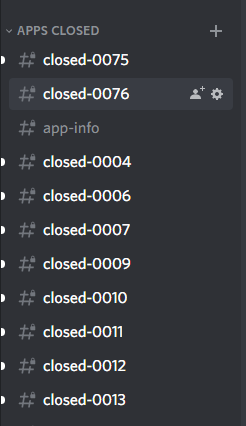
The ticket count got reset, just head to the Dashboard > Panel configs > Settings > general options
And change the count to the number you want. In your case to be back to the correct order the count will need to be 89 @twin lichen
 jade topaz
Hello, I cant seem to figure out how to get my tickets to generate in the Category I created for them. They automatically move to the top of my channel list.
The directions on the app dashboard says I it was optional, which I would like to do. But there wasn’t really an idea of how to get them to stay in the category.
how do i make other roles see the tickets?
 jagged prism
how do i make it ping certain roles when someone opens a ticket?
jade topaz
@jade topaz, when you are setting up your panel, there is an option to add what roles you want to see the tickets. Its like, panel settings or something
jade topaz
jade topaz
<@456226577798135808>, when you are setting up your panel, there is an option to...
oh ok i see it
thank you
thanks @jade topaz
iron nightBOT
Gave 1 Rep to PresidentSnow_ (current: #68 - 1)
jade topaz

scenic plinth
$help ping
humble sequoiaBOT
How to make Ticket Tool ping a role
To make ticket tool ping a role when a ticket is opened, go to the Dashboard -> Panel Configs -> Settings -> Ticket Options -> Ticket Message -> Message Text and do this:
{@Role name} This is case sensitive and the role must have @mentions enabled
scenic plinth
@jagged prism^
jagged prism
ty
jagged prism
scenic plinth
$help ping
uh

 acoustic swift
Can someone send me link of dashboard
 wintry notch
so an someone just give me a quick thing on how when a member opens a ticket on how to make it so the bot names the ticket the person who opened it, i got mostly everything else but when a ticket is opened it just get a number but id like it to have to persons name
 desert summit
wintry notch
so an someone just give me a quick thing on how when a member opens a ticket on ...
desert summit
wintry notch
so an someone just give me a quick thing on how when a member opens a ticket on ...
Here u can name it and i will send also the variables

$variables
humble sequoiaBOT
Supported Variables
{server.id} --> ID of the Server

[#🆘│community-support](/guild/509192800865353738/channel/776680605517742090/) = <#channel> --> Channel link of the current channel
{channel.name} --> Name of the current channel
{channel.id} --> ID of the current channel

{author} = <@user> --> Mention of the user triggering this message
{author.name} --> Name of the user triggering this message
{author.id} --> ID of the user triggering this message
{author.nickname} --> Nickname of the user triggering this message
{author.icon} --> Direct Url of the profile picture of the user triggering this message
{author.tag} --> 4 digit tag (discriminator) of the user triggering this message
{author.full} --> username + 4 digit discriminator of the user triggering this message

{panel.count} --> The current count number of the panel (Tickets only)
{panel.name} --> The name of the panel (Tickets Only)
{panel.ticketLimit} --> The current limit of the panel (Ticket Only)

{ticket} = <#channel> --> Channel mention of the ticket
{ticket.id} --> Channel ID of the ticket

{ticket.user} = <@user> --> User mention of the ticket user
{ticket.user.name} --> Name of the ticket user
{ticket.user.id} --> User ID of the ticket user
{ticket.user.nickname} --> Nickname of the ticket user
{ticket.user.icon} --> Direct Url of the profile picture of the ticket user
{ticket.user.tag} --> Tag / Discriminator of the ticket user
{ticket.user.full} --> Username + Discirimator of the ticket user```
Roles can be either
{@role name} or {role ID}Try {roleid}
humble sequoiaBOT
jagged prism
desert summit
Try {roleid}
okay ty
iron nightBOT
Gave 1 Rep to Ymaster2000 (current: #24 - 17)
desert summit
humble sequoia
https://tickettool.xyz/manage-servers
@acoustic swift
acoustic swift
desert summit
<@881253024457162822>
Yes
acoustic swift
desert summit
<@881253024457162822>
Oh thanks :)
scenic plinth
jagged prism
uh
Without the brackets {}
You can alternatively use <@&roleid>, just use the command $id @mentionrolehere to find the ID.
Sorry I didn't realize it was answered!
jagged prism
oh alr np
acoustic swift
$Links
jagged prism
how do we make it so that tickets are opened in a certain category?
like whenever i open a ticket, the ticket will appear in this category
mystic hound
$help category
humble sequoiaBOT
How to set the open category
To set a open category go to the Dashboard -> Panel Configs -> Settings -> Category Options -> Category Open
 wintry stratus
Can I set a closed ticket to be stored directly in a specific channel? 🙂
copper owl
wintry stratus
Can I set a closed ticket to be stored directly in a specific channel? 🙂
can you elaborate?
do you want the transcript to be stored, or the channel itself stored in a category?
wintry stratus
yes, a moment please. my english is not the best I´ll need a moment
copper owl
wintry stratus
yes, a moment please. my english is not the best I´ll need a moment
take as much time as you need
wintry stratus
copper owl
take as much time as you need
Can I set that tickets that are closed are logged directly in a specific channel without having to delete the ticket beforehand? (i hope u understand what i mean)
copper owl
wintry stratus
Can I set that tickets that are closed are logged directly in a specific channel...
you can
$help transcript
humble sequoiaBOT
How do I save transcript to a channel?
To save transcripts to a channel go to the Dashboard -> Panel Configs -> Settings -> Logging Options -> Transcript Channel
copper owl
so when you close a ticket, 3 buttons should pop up.
Transcript
Open
Delete
copper owl
humble sequoia
before you delete, press the transcript button and a log of the whole ticket would be saved in the channel you set in this box
wintry stratus
copper owl
before you delete, press the transcript button and a log of the whole ticket wou...
okay thank you very much. I can't bypass the step with the options (close, delete, log) can I?
iron nightBOT
Gave 1 Rep to Neptune (current: #1 - 335)
copper owl
wintry stratus
okay thank you very much. I can't bypass the step with the options (close, delet...
with premium you can, without you wont be able to.
You have to follow the steps,
Close -> transcript -> delete
wintry stratus
copper owl
with premium you can, without you wont be able to.
You have to follow the steps...
Thank you!
iron nightBOT
@wintry stratus :: You can't rep Neptune#6814 for 49 minutes and 33 seconds. Try coming back later?
 wispy apex
Hello. Is it possible to enable slowmode for the ticket channels? With that I mean automatically, not by going in and changing it after it's been made
copper owl
wispy apex
Hello. Is it possible to enable slowmode for the ticket channels? With that I me...
not yet
not sure if it's planned either
unreal elbow
wispy apex
Hello. Is it possible to enable slowmode for the ticket channels? With that I me...
maybe with using tickettool and a mod bot
wispy apex
Alright thank you
wispy apex
unreal elbow
maybe with using tickettool and a mod bot
Oh  Do you have any examples in mind?
unreal elbow
but idk what bots can automate slowmode
like mee6‘ !slowmode command
but automatic

@unreal elbow ^^
wispy apex
Alright cool, thanks @copper owl and @unreal elbow
iron nightBOT
Gave 1 Rep to Neptune (current: #1 - 336)
wispy apex
Oh lol
unreal elbow

wispy apex
Thanks @unreal elbow
iron nightBOT
Error: You're still on cooldown
unreal elbow
xD
wispy apex
Thanks @unreal elbow ?
iron nightBOT
@wispy apex :: You can't rep Onyx#4321 for 59 minutes and 30 seconds. Try coming back later?
wispy apex
Oh jeez
unreal elbow
iron night
<@349074137739689984> **::** You can't rep **Onyx#4321** for 59 minutes and 30 s...
u kidding me 
wispy apex
Thanks again @unreal elbow 
iron nightBOT
Gave 1 Rep to Onyx (current: #46 - 3)
 warped ibex
why doesnt my ticket tool bot respond to the commands i place in channels
unreal elbow
warped ibex
why doesnt my ticket tool bot respond to the commands i place in channels
does it have the right to view the channel and send messages?
warped ibex
yes


 warped ibex
it is telling me to $debug my channel
unreal elbow
try
warped ibex
i did it did nothing
unreal elbow
what command doesn’t work?
warped ibex
.$debug
unreal elbow
no i mean the original problem
warped ibex
when i try to send the panel to its channel it says there is an error run$debug to find what the error is
unreal elbow
tried giving the ticket tool role admin perm in server settings?
warped ibex
i gave it all perms
unreal elbow
mhm
can’t help u out then
already tried to send it into another channel? @warped ibex
unreal elbow
warped ibex
nope same thing i guess i will just use a different bot
try creating another panel
and sending that
just open a #🎫│make-a-ticket if that doesn’t work
seems to be a bigger problem
and as u pay for the premium version…
mystic hound
probably had the wrong bot selected, they left though
unreal elbow
yea
copper owl
Man. if they were only a few mins more patient
unreal elbow
yea…
unreal elbow
copper owl
Man. if they were only a few mins more patient
he actually was a premium subscriber

dawn warren
Olá como eu configuro os tickets para traduzir
robust sandalBOT
dawn warren
Olá como eu configuro os tickets para traduzir
 AITA MODS SPDM
Hello as I set up tickets to translate
Portuguese (Brazil) (pt) → English (en)
mystic hound
copper owl
Man. if they were only a few mins more patient
If only they made a ticket
copper owl
mystic hound
If only they made a ticket
Sometimes it feels like people only see this channel as a support channel
and completely forget to check #🎫│make-a-ticket LMAO
/pt do you need help with the setup for tickets?
robust sandalBOT
você precisa de ajuda com a configuração de ingressos?
English (en) → Portuguese (Brazil) (pt)
copper owl
@dawn warren
dawn warren
/en como eu configuro o ticket para traduzir as mensagens do ticket
/en como eu configuro o ticket para traduzir as mensagens do ticket
robust sandalBOT
as I configure the ticket to translate the ticket messages
Portuguese (Brazil) (pt) → English (en)
copper owl
ah
i gotchu
too bad there isn't a tag it seems
/pt you can contact the Portuguese support team in #🎫│make-a-ticket, I won't be able to help you efficiently as I dont speak the language
robust sandalBOT
você pode entrar em contato com a equipe de suporte português em #🎫│make-a-ticket, eu não vou ser capaz de ajudá-lo eficientemente como eu não falo o idioma
English (en) → Portuguese (Brazil) (pt)
 uneven egret
So I got globally banned for no reason should I make a ticket or no
mystic hound
You were told in a ticket already that we're not the right support team to contact
 meager bloom
How do I add #createaticket in my server
 woven portal
Hey guys, was just wondering if tickets close or are archived after 24 hours of inactivity?
humble sequoiaBOT
Automation disabled
There's currently no ETA for when automation will be enabled again. The issue that's caused it to be disabled, us hitting rate limits, is tied to the increased load on Discord's servers. The situation's currently unpredictable, which makes it so we can't give you a fixed time.
copper owl
not a thing anymore
woven portal
ok perfect, so i can keep them open for like a week with no issues?
copper owl
you can keep them open for years with no issue
as long as no one uses the close command or deletes it manually
woven portal
ok perfect, thank you so much :))
copper owl
tickets are basically like any other discord channel and will act like such except the ticket tool settings you enforce on them
np
 native trail
i sometimes get the error permissions requiered when i want to add people to ticket but sometimes it works
copper owl
native trail
i sometimes get the error permissions requiered when i want to add people to tic...
make sure the bot has all the necessary permissions in the category permissions
native trail
as is said sometimes it works and sometimes it doesnt
in tickets created w the same pannel and users with the same role
jade topaz

Is the bot okay rn 😭
None of my commands are working
Oop it worked after 5 minutes of running $delete LMAO nvm
 old kayak
oh
 radiant moss
Seems to be having some issues with higher latency. Hmm
jade topaz
Prob just normal latency, should fix itself if anything
just was taking like 5 minutes
Ye seems to have fixed itself, all good, Ty for help
plain surge
You don't need any scripting languages, just clicking on the transcript link will open it
 nova tide
plain surge
You don't need any scripting languages, just clicking on the transcript link wil...
nova tide
plain surge
You don't need any scripting languages, just clicking on the transcript link wil...
but i cant scroll through it unless its installed
why is that?
unreal elbow
just open the link "direct transcript"
it is below the file
 feral kelp
كيف أعمل عندما افتح تكت الرسالة الي تجي تمنشن رتبة الإدارة
robust sandalBOT
feral kelp
كيف أعمل عندما افتح تكت الرسالة الي تجي تمنشن رتبة الإدارة
 MZDZ
MZDZ
How can I do 4 when I open the message that comes to the rank of management
Arabic (ar) → English (en)
scenic plinth
$articketmessage
humble sequoiaBOT
رسالة التذكرة
رسالة التذكرة هي أول رسالة يرسلها البوت في تذكرة جديدة
لتعديلها اذهب الي
Dashboard -> Panel Configs -> Settings -> Ticket Options -> Edit Ticket Message
 nova tide
unreal elbow
just open the link "direct transcript"
it is below the file
nova tide
unreal elbow
just open the link "direct transcript"
it is below the file
oh it worked like that thanks
iron nightBOT
Gave 1 Rep to Onyx (current: #44 - 4)
nova tide
feral kelp
كيف أعمل عندما افتح تكت الرسالة الي تجي تمنشن رتبة الإدارة
روح موقع البوت انزل لكنترول بانل control panel
اختار التكت اللي عايز تعدله و روح على ticket embed settings
خلي البوت يمنشن الرول بالايدي في مكان الرسساله
<@& ايدي الرول>
humble sequoiaBOT
-- moved to ticket --
feral kelp
nova tide
روح موقع البوت انزل لكنترول بانل control panel
اختار التكت اللي عايز تعدله و روح...
شكرااا
 minor iris
ن
plain surge
من فضلك لا تمنشن الدعم. اذا كنت تريد مساعة فقط ارسل سؤالك @jade topaz
البوت الآن عم يرسترت من اجل تجديد بعض الاشياء
 daring terrace
كم بياخد وقت لو سمحت
 fervent grove
when will the bot start working?
plain surge
سوف يعود اونلاين خلال دقائق
 forest laurel
Bot down, right?
fervent grove
when will the bot start working?
daring terrace
يعني هو برسترت مع الموقع؟
plain surge
The bot @pseudo glen is currently having a scheduled restart, it will be back up shortly
 solid stream
under 40 minutes
solid stream
depending on the shard it could be any second
 tall tiger
;-; this is sad
 neon hound
in the middle, disagree, the ticket ticket tool fell for me as I came here, you will, right
jade topaz
solid stream
under 40 minutes
inschallah it’s 25min long
Is it back up yet? I just added it to my server only to find out you’re having maintenance lmao
plain surge
You can track the progress of the restart through the link in #📣│bot-news