 English (en) → French (fr)
#🆘│community-support
1 messages · Page 361 of 1
 robust sandalBOT
English (en) → French (fr)
robust sandalBOT
English (en) → French (fr)
 stark dagger
C'est quoi le jajajaja ?
 vestal owl
I love how hahhahah is jajajjajqja
 shut bolt
/fr It's a laugh but in spanish, I'm native spanish speaker so I use "jajaja" instead of "hahaha"
robust sandalBOT
C’est un rire mais en espagnol, je suis de langue maternelle espagnole donc j’utilise « jajaja » au lieu de « hahaha »
English (en) → French (fr)
robust sandalBOT
stark dagger
/en test
Trying to translate to English but detected as English.
Please don't waste translations by trying to translate to the same language.
vestal owl
/fr Hello
stark dagger
/en bonjour
stark dagger
/en tu connais Wejden ?
robust sandalBOT
do you know Wejden?
French (fr) → English (en)
shut bolt
No
stark dagger
Ah
/en en gros c'est une chanteuse elle à 16 ans, n'écoute jamais ces chansons elles sont pas si ouf et tu les a écouté quand même la tête 1 ans après
robust sandalBOT
basically it's a singer she at 16 years old, never listen to these songs they are not so phew and you still have the head 1 year later
French (fr) → English (en)
 unique junco
A
shut bolt
Ohhhhh okey okey
shut bolt
Non
stark dagger
Squeezie?
shut bolt
No :(
robust sandalBOT
it is the first youtuber of fr in subscriber
French (fr) → English (en)
stark dagger
/en vous gardez les ticket ouvert ?
robust sandalBOT
do you keep the tickets open?
French (fr) → English (en)
stark dagger
/en je parle trop, c'est ça ?
robust sandalBOT
I talk too much, right?
French (fr) → English (en)
shut bolt
/fr We close them after our users are all set u
robust sandalBOT
Nous les fermons une fois que nos utilisateurs sont tous prêts u
English (en) → French (fr)
robust sandalBOT
C’est bien, pas de soucis
English (en) → French (fr)
stark dagger
/en cool
robust sandalBOT
stark dagger
/en cool
Trying to translate to English but detected as English.
Please don't waste translations by trying to translate to the same language.
shut bolt
jajajaja
 keen locust
Any nods being slow or something?
shut bolt
keen locust
Any nods being slow or something?
Let me check
keen locust
Ok
shut bolt
Nothing seems off with the bots, a bit of ping but nothing that warning
shut bolt
Or a discord error
shut bolt
Rare 
 pine raptor
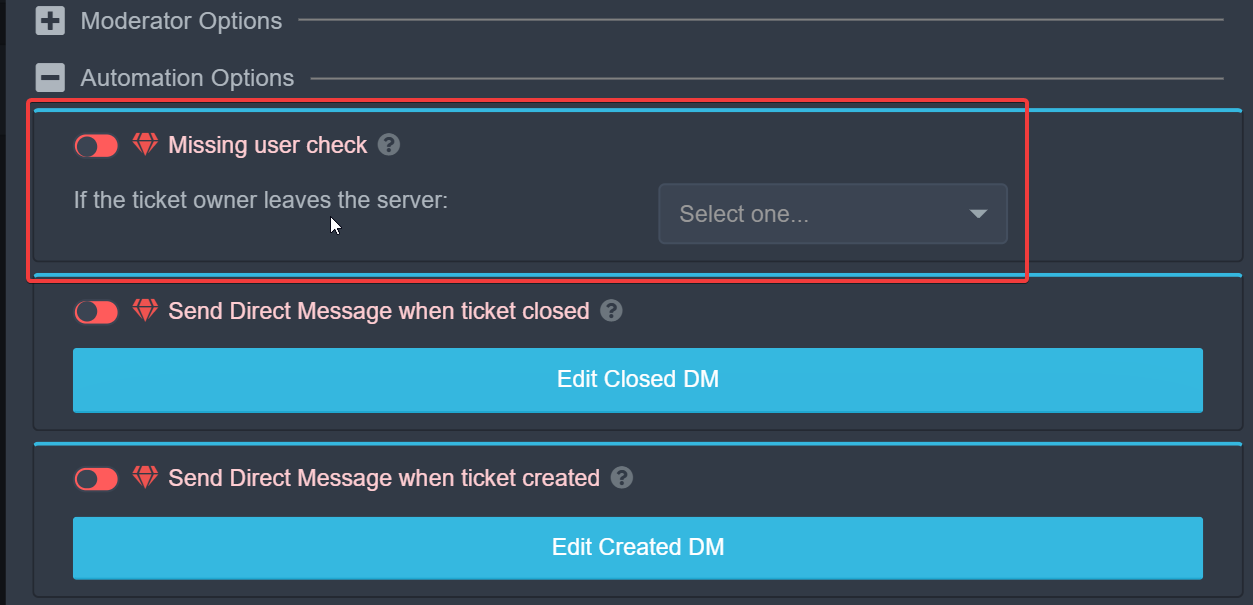
where is the place that you can turn on the thing that deletes the ticket after someone leaves?
shut bolt
pine raptor
where is the place that you can turn on the thing that deletes the ticket after ...
Hey there
pine raptor
shut bolt
Hey there
hi
 shut bolt
pine raptor
hi
shut bolt
pine raptor
hi
How are you?
pine raptor
shut bolt
How are you?
im fine
shut bolt
pine raptor
yeah i was searching for that
Sure, Panel Settings, Automation Options and then you can mark as  the Missing User Check or change it to Close
Remember to Save changes
shut bolt
pine raptor
im fine
Glad to hear that ^^
 oak solstice
 humble sequoiaBOT
-- moved to ticket --
 polar nimbus
how to make bot working on phone
 cursive garden
$help
humble sequoiaBOT
Help Options
$help commands - Information on commands
$help setup - Information on bot setup
$help faq - Frequently asked questions
cursive garden
$help commands
humble sequoiaBOT
() = optional
[] = required
*==================================
Ticket Commands
==================================*
_ _
`$add [User] (channel)`
Description: Adding additional users to a ticket
Aliases: none
`$remove [User] (channel)`
Description: Removing users from a ticket
Aliases: none
`$close`
Description: Closing tickets
Aliases: none
`$open`
Description: Opening closed tickets
Aliases: none
`$delete`
Description: Deleting tickets
Aliases: none
`$rename`
Description: Renaming tickets/channels
Aliases: none
`$transcript (send channel)`
Description: Creating transcripts
Aliases: none
`$new (user) (reason)`
Description: Creating tickets in a monitored channel (when command style is enabled)
Aliases: none
`$claim`
Description: Claiming tickets (when claim is enabled)
Aliases: "unclaim"
_ _
*==================================
General Commands
==================================*
_ _
`$help (Help Options)`
Description: Help Command
Aliases: none
`$debug`
Description: Debuging issues with running Ticket Tool
Aliases: none
`$id (@role/@user/#channel/emoji)`
Description: Converting roles, users, channels and emojis to ID
Aliases: "getid"
`$permlevel`
Description: Checking permission level with Ticket Tool
Aliases: "level"
`$ping`
Description: Checking response time with discord api
Aliases: none
`$vote (link | unlink | redeem) (user)`
Description: Earn premium by voting on top.gg or Discord.boats
Aliases: "votes"
stark dagger
/en ta mère la, arête tu saoule
robust sandalBOT
your mother la, ridge you drunk
French (fr) → English (en)
stark dagger
/en désolé horn mais voilà quoi
robust sandalBOT
sorry horn but that's what
French (fr) → English (en)
 atomic barn
um
 tranquil totem
انا عاوز حد من السابورت العربي
robust sandalBOT
tranquil totem
انا عاوز حد من السابورت العربي
 3Mad ‘ KinG ♪.
i want one of the arabic saport
Arabic (ar) → English (en)
 scenic plinth
$arabic
humble sequoiaBOT
فريق الدعم الفني العربي
عميلنا العزيز ان كنت تبحث عن مساعدة يرجى فتح تكت خاص بفريق الدعم الفني العربي
اذهب الى#🎫│make-a-ticket
ثم قم بلضغط على الايموجي الاتي (🇯🇴)
scenic plinth
@tranquil totem
tranquil totem
كيف يمكنني ان احصل علي البراميوم عن طريق التصويت للبوت
tranquil totem
humble sequoia
@scenic plinth مش بيردو في التيكيت
robust sandalBOT
tranquil totem
كيف يمكنني ان احصل علي البراميوم عن طريق التصويت للبوت
3Mad ‘ KinG ♪.
How can I get the premium by voting for the bot?
Arabic (ar) → English (en)
scenic plinth
/ar Use $vote in your server, or you can buy it. To redeem votes, use $vote redeem within your server and the bot should send you a message with a key. Ensure your direct messages are open for this.
 tribal cedar
/ar use $vote in your server and click the links
robust sandalBOT
استخدم '$vote' في الخادم الخاص بك، أو يمكنك شرائه. لاسترداد الأصوات، استخدم "استرداد $vote" داخل الخادم الخاص بك ويجب أن يرسل لك البوت رسالة مع مفتاح. تأكد من أن رسائلك المباشرة مفتوحة لهذا الغرض.
English (en) → Arabic (ar)
استخدام '$vote' في الخادم الخاص بك وانقر على الروابط
English (en) → Arabic (ar)
scenic plinth
Nice enigma lol
tribal cedar
Sorry lol
scenic plinth
Not its fine lol
tranquil totem
/en كم تصويت لاستطيع اخذ البوت
robust sandalBOT
How many votes can I take the bot?
Arabic (ar) → English (en)
tribal cedar
/ar translate the text the bot sends you on vote command. It tells it all right there
robust sandalBOT
ترجمة النص بوت يرسل لك على أمر التصويت. إنه يقول كل شيء هناك
English (en) → Arabic (ar)
tribal cedar
/ar you can use $vote in your own server
robust sandalBOT
يمكنك استخدام '$vote' في الخادم الخاص بك
English (en) → Arabic (ar)
tranquil totem
tribal cedar
/ar you can use `$vote` in your own server
/en تمام شكرا !
robust sandalBOT
Ok thanks
Arabic (ar) → English (en)
tribal cedar
Anytime
robust sandalBOT
ما هذا
English (en) → Arabic (ar)
Trying to translate to English but detected as English.
Please don't waste translations by trying to translate to the same language.
humble sequoiaBOT
فريق الدعم الفني العربي
عميلنا العزيز ان كنت تبحث عن مساعدة يرجى فتح تكت خاص بفريق الدعم الفني العربي
اذهب الى#🎫│make-a-ticket
ثم قم بلضغط على الايموجي الاتي (🇯🇴)
 timid fiber
$help
humble sequoiaBOT
Help Options
$help commands - Information on commands
$help setup - Information on bot setup
$help faq - Frequently asked questions
 copper owl
@timid fiber do you need help?
copper owl
timid fiber
I need a keyboard or control
i dont understand
do you need the link to the dashboard
timid fiber
Yes
humble sequoiaBOT
 timid fiber
Invite
copper owl
$invite
humble sequoiaBOT
Ticket Tool Invite & Support
timid fiber
 humble sequoiaBOT
Don't see your server in the dashboard?
You will possibly need to relog. Look below to see steps on how to relog.
How to relog the Dashboard.
First, you will need to go to the dashboard. Once your there, click on your avatar on the top right. after you clicked it, you will see button that says Logout. You must click that. Once you have logged out, you can log back in.
Note:
You need one of these 3 things to access the dashboard.
1. Server Owner (Level: 6)
2. Server Administrator (Level: 4)
3. Dashboard Role (Level: 2)
You can check your level using $level on your Discord Server
 abstract pollen
Cambio de BFC a gemas
0xCfcB6Dd4A8E74D4b81B54a2c127604923c4812d1
0x56ef72c9110970ab8f46038b4b260d2f1425b4f1afd2d6200edcf561d87de702
Cambié 11 BFC por 770 gemas y no me dieron las gemas, los 11 BFC ya fueron descontados de mi wallet y la factura en mi cuenta de Block Farm Club aparece en color morado y dice Pendiente
copper owl
$tts
humble sequoiaBOT
You're in the wrong place
We provide support for @pseudo glen discord bot and cannot help you with whatever issue you have.
Please make sure to contact the appropriate support team.
If you don't have any further questions regarding our bot Ticket Tool, please close this ticket
_ _
humble sequoiaBOT
Está en el lugar equivocado
Brindamos soporte para el bot de Discord @pseudo glen y no le podemos ayudar con el problema que presenta.
Por favor asegúrese de contactar al equipo de soporte adecuado.
_ _
Si no tiene alguna duda relacionada a nuestro bot, Ticket Tool, por favor cierre este ticket.
stark dagger
/en bonsoir bonsoir, vous allez bien ?
robust sandalBOT
good evening good evening, are you okay?
French (fr) → English (en)
humble sequoiaBOT
فريق الدعم الفني العربي
عميلنا العزيز ان كنت تبحث عن مساعدة يرجى فتح تكت خاص بفريق الدعم الفني العربي
اذهب الى#🎫│make-a-ticket
ثم قم بلضغط على الايموجي الاتي (🇯🇴)
 jade topaz
can i boost the server and get premium?
 eager cargo
No sorry
jade topaz
ummm
shut bolt
@analog gust hey there, you mean you received a message in the web of a ban?
 edgy laurel
I've already added the bot on my server but when I go to the manager server the server doesn't appear there
shut bolt
Hey there
humble sequoiaBOT
Don't see your server in the dashboard?
You will possibly need to relog. Look below to see steps on how to relog.
How to relog the Dashboard.
First, you will need to go to the dashboard. Once your there, click on your avatar on the top right. after you clicked it, you will see button that says Logout. You must click that. Once you have logged out, you can log back in.
Note:
You need one of these 3 things to access the dashboard.
1. Server Owner (Level: 6)
2. Server Administrator (Level: 4)
3. Dashboard Role (Level: 2)
You can check your level using $level on your Discord Server
shut bolt
Try out this
edgy laurel
shut bolt
Try out this
Thank you very much
 iron nightBOT
Gave 1 Rep to Yareaj_ (current: #10 - 138)
shut bolt
edgy laurel
Thank you very much
Sure
iron nightBOT
Edit this to change the output of the command!
Edit this to change the output of the command!
Edit this to change the output of the custom command 7!
jade topaz
Oops
shut bolt
Hey there @jade topaz
humble sequoiaBOT
shut bolt
Check out this guide
jade topaz
I did it
shut bolt
Any problems with it?
 crimson vine
 humble sequoiaBOT
You're in the wrong place
We provide support for @pseudo glen discord bot and cannot help you with whatever issue you have.
Please make sure to contact the appropriate support team.
If you don't have any further questions regarding our bot Ticket Tool, please close this ticket
_ _
jade topaz
How do I see who deleted a ticket?
 potent idol
How do I see how many tickets our staff have done
humble sequoiaBOT
User permission level with Ticket Tool
@potent idol is permission level: 0 (User)
 spare storm
Hello, an old ticket dated July 10 appeared in the list of open tickets, it is impossible for us to close it using command which does not work.
Is there a way to close it using command or do we have to manually delete the ticket? I would point out that the bot's message being old it uses a reaction to close unlike the current technique.
copper owl
spare storm
Hello, an old ticket dated July 10 appeared in the list of open tickets, it is i...
"appeared in the list of open tickets", was it there before? or did it just pop up ?
copper owl
what does the channel look like, is it glitched?
spare storm
command dont work and it has the look of old tickets with reactions to close (dont work)
copper owl
really weird
try using the old reaction?
i havent seen or heard a report for this issue before
spare storm
it doesnt work
the reaction work like a normal reaction and has no effect on the bot
copper owl
can you send a screenshot of this?
 copper owl
spare storm
(its in french because we are a french server)
copper owl
spare storm
(its in french because we are a french server)
no worries
that's definitely weird..
just delete the channel manually
spare storm
all the ticket are closed and transcripted, so its not an archive one reopened
copper owl
if this happens again, #🎫│make-a-ticket and we'll investigate further
spare storm
ok, its the first time ty ^^
copper owl
spare storm
ok, its the first time ty ^^
no problem
 zealous coyote
why wait 6 hours in #📈│reviews ?
copper owl
zealous coyote
why wait 6 hours in <#509775046848282677> ?
for #📈│reviews ? that's just how it is
jade topaz
jade topaz
How do I see who deleted a ticket?
If anyone could give me the answer on this, thanks.
 plain surge
@jade topaz Head to the Dashboard > Panel configs > settings > logging options

You will only be able to view who deletes a channel after this change, you can't view who deleted an old ticket before this change
Also make sure to select a logging channel
jade topaz
hi sir how do u do a create ticket language button? like The Report Button
copper owl
$buttons
humble sequoiaBOT

Buttons
The new Discord Buttons allow for a much smoother and convenient experience. They reduce lag and work much better than emojis. With ticket tool you can edit all the buttons however you like! Buttons can show emojis, text and can have 4 different colors.
Where can I edit them?
Dashboard -> Panel Configs -> <Settings> -> Button Options -> <Setting>
 copper owl
humble sequoia
copper owl
humble sequoia
you can edit the buttons there, anything marked with  is premium
 willow shadow
hi, is there a way to randomize the ticket names?
stark dagger
/en désolé les copains mais je vais quitter car j'ai fini, même si j'ai pas commencé 
robust sandalBOT
sorry buddies but I'm going to leave because I'm done, even if I didn't start
French (fr) → English (en)
 sinful cipher
 humble sequoiaBOT
Update your discord App
Buttons are a relatively new addition to discord and don't work with some older versions of the app.
Please verify that you have the latest version of discord, by going to the app or play store.
_ _
Discord for the App Store
_ _
Discord for the Play Store
copper owl
Update your client
potent idol
@copper owl how do I check who closed what ticket
copper owl
Please don't ping support members in here.
You can check who closed what ticket by having a logs channel
potent idol
Yes, I know but is there a faster way like a dashboard
stark dagger
Bye 👋
copper owl
Cya
stark dagger
/en attendais juste je fais une blague
robust sandalBOT
just waiting I'm making a joke
French (fr) → English (en)
stark dagger
/en Que-ce qui est jaune est qui attend ? Jonathan. Voilà c'est éclaté mais j'étais obliger 
robust sandalBOT
What is yellow is waiting? Jonathan. Here it is exploded but I was obliged
French (fr) → English (en)
stark dagger
/en ah mais la blague marche pas en anglais
robust sandalBOT
ah but the joke doesn't work in English
French (fr) → English (en)
stark dagger
Yellow + waiting = Jaune attend = Jonathan
 last bobcat
Hello, I invited the bot to my server, but when I open to your site and enter server management, my server does not appear. Please reply to me quickly
humble sequoiaBOT
Don't see your server in the dashboard?
You will possibly need to relog. Look below to see steps on how to relog.
How to relog the Dashboard.
First, you will need to go to the dashboard. Once your there, click on your avatar on the top right. after you clicked it, you will see button that says Logout. You must click that. Once you have logged out, you can log back in.
Note:
You need one of these 3 things to access the dashboard.
1. Server Owner (Level: 6)
2. Server Administrator (Level: 4)
3. Dashboard Role (Level: 2)
You can check your level using $level on your Discord Server
copper owl
@last bobcat ^^
last bobcat
@copper owl thx i will try
iron nightBOT
Gave 1 Rep to Neptune (current: #1 - 303)
last bobcat
@copper owl thanks its works
iron nightBOT
@last bobcat :: You can't rep Neptune#6814 for 56 minutes and 59 seconds. Try coming back later?
copper owl
👍
last bobcat
👍 👍
 rose violet
What is this
 copper owl
that is a server you have access to
rose violet
Where can I see the server?
copper owl
rose violet
What is this
On this page
rose violet
You mean my server
copper owl
no i mean you can see the servers that you have access to on that page
copper owl
luckily i am a part of arabic support lmfao
humble sequoiaBOT
-- moved to ticket --
last bobcat
@rose violet iam arabic 100%
rose violet
last bobcat
<@843173718950674482> iam arabic 100%
Ok
 halcyon rose
how to i get a ticket to ping certain members when opened
copper owl
halcyon rose
how to i get a ticket to ping certain members when opened
members or roles?
halcyon rose
roles
copper owl
$help ping
humble sequoiaBOT
How to make Ticket Tool ping a role
To make ticket tool ping a role when a ticket is opened, go to the Dashboard -> Panel Configs -> Settings -> Ticket Options -> Ticket Message -> Message Text and do this:
{@Role name} This is case sensitive and the role must have @mentions enabled
 copper owl
here ya go brother
halcyon rose
thank you
 humble sequoiaBOT
tribal cedar
humble sequoiaBOT
tribal cedar
That will help you to get and setup ticket tool
Unless you mean you need to make a ticket on whatever server those invites are for.
I think your just in the wrong place man
jade topaz
Thx
tribal cedar
Np
 agile yarrow
@sullen yarrow
 hasty pendant
Están teniendo un problema con los pagos?? Llego 3 días con un umbral de pago de 0.03 y gas limit en 130 wgei y aun no recibo mi pago
robust sandalBOT
hasty pendant
Están teniendo un problema con los pagos?? Llego 3 días con un umbral de pago de...
 Mata Morritas
Are you having a problem with payments? I arrive 3 days with a payment threshold of 0.03 and gas limit at 130 wgei and still do not receive my payment
Spanish (es) → English (en)
copper owl
$estts
humble sequoiaBOT
Está en el lugar equivocado
Brindamos soporte para el bot de Discord @pseudo glen y no le podemos ayudar con el problema que presenta.
Por favor asegúrese de contactar al equipo de soporte adecuado.
_ _
Si no tiene alguna duda relacionada a nuestro bot, Ticket Tool, por favor cierre este ticket.
 unreal elbow
$tts
humble sequoiaBOT
You're in the wrong place
We provide support for @pseudo glen discord bot and cannot help you with whatever issue you have.
Please make sure to contact the appropriate support team.
If you don't have any further questions regarding our bot Ticket Tool, please close this ticket
_ _
robust sandalBOT
humble sequoia
@unreal elbow Trying to translate to English but detected as English.
Please don't waste translations by trying to translate to the same language.
copper owl
@minor cipher, hola, ¿necesitas ayuda?
 minor cipher
Por necesitar la necesito no sé cómo poner el ticket en un canal del server
copper owl
minor cipher
Por necesitar la necesito no sé cómo poner el ticket en un canal del server
No soy parte del equipo de soporte en español, pero puedes abrir un ticket para contactar con ellos en #🎫│make-a-ticket
 waxen reef

 crude portal
Does ticket tool have a dashboard? I cant find one anywhere.
Never mind i found it in documentation.
 graceful nymph
When someone opens a ticket, how do I get the ticket to have their name?
Or is that not possible without it being done by an actual person?
humble sequoiaBOT
Ticket names
The ticket name is the default channel name of all tickets. To edit it, go to your Dashboard > Panel Configs > Settings > Ticket Options. There you can edit the channel name of opened and closed tickets. You can also use variables in there.

 Note: This is a premium feature
eager cargo
graceful nymph
Note: This is a premium feature
eager cargo
graceful nymph
Thank you!
eager cargo
Mhm
jade topaz
How i configurate the bot
eager cargo
 torn crescent
<@!252364399669542913> Please Help
torn crescent
<@!252364399669542913> Please Help
What do you need help with
eager cargo
jade topaz
How i configurate the bot
Do you mean setup?
humble sequoiaBOT
jade topaz
eager cargo
Do you mean setup?
Yes to apeare the tickets
 severe path
torn crescent
sorry for mention
severe path
torn crescent
sorry for mention
 humble sequoiaBOT
eager cargo
humble sequoiaBOT
eager cargo
What part don't you get?
jade topaz
 torn crescent
everything
eager cargo
jade topaz
You're trying to login to our documents, use the link below
humble sequoiaBOT
eager cargo
torn crescent
everything
you have to tell me which part
jade topaz
eager cargo
What part don't you get?
You can join my sv and help me?
torn crescent
eager cargo
you have to tell me which part
wdym?
eager cargo
jade topaz
You can join my sv and help me?
No sorry I can't do it for you
 torn crescent
i don't know how to send the msg like this one
 torn crescent
just tell me the comnand
eager cargo
torn crescent
i don't know how to send the msg like this one
$help panel
humble sequoiaBOT
Creating a panel
To create a panel we are going to need to head over to the panel configs on the dashboard
Once at the dashboard we will need to click Create Panel
Enter a panel name (Fill in any optional settings you want)
Click Create Panel and your ready to get started with configuring your panel
An example of a creating a panel is shown below.
 humble sequoiaBOT
torn crescent
humble sequoiaBOT
torn crescent
thx user @eager cargo
iron nightBOT
Gave 1 Rep to Quo (current: #3 - 214)
torn crescent
iron night
Gave `1` Rep to **Quo** (current: `#3` - `214`)
like us
top of the support
 shut bolt
jade topaz
<@437728240388276224> sry for ping
shut bolt
jade topaz
<@437728240388276224> sry for ping
Please do not ping staff members #546557408902905896
jade topaz
Ok
shut bolt
jade topaz
Help please
Let me check the messages I'll help you out
shut bolt
jade topaz
Help please
So, did you already send the panels?
 humble zodiac
How doni set up ticket bot
shut bolt
humble zodiac
How doni set up ticket bot
Hello there
humble sequoiaBOT
shut bolt
Check out this guide
shut bolt
Sure
humble sequoiaBOT
eager cargo
^^
 solid stream
rude?
shut bolt

 junior stream
bro how to drag all tickets to one category
shut bolt
junior stream
bro how to drag all tickets to one category
Hey there
You can't do by command that all currently open tickets are drag into a category, yet you can set a category for new tickets to be placed when opened
$help category
humble sequoiaBOT
How to set the open category
To set a open category go to the Dashboard -> Panel Configs -> Settings -> Category Options -> Category Open
 shut bolt
humble sequoia
shut bolt
humble sequoia
Here you can find the step by step to get there
junior stream
its only like this for me
 shut bolt
Now click on Settings, as told in the bot's message
junior stream
tq
 silver dragon
Is there still free trial for premium?
copper owl
silver dragon
Is there still free trial for premium?
There's always a free trial for servers.
The catch is, once you use the 7 day free trial, you can't use it again
It's a one-time-use, and once the 7 days end, you won't receive it again
silver dragon
Alr ty
copper owl
Anytime
humble sequoiaBOT
-- moved to ticket --
 wanton path
humble sequoia
-- moved to ticket --
wanton path
humble sequoia
-- moved to ticket --
how can i have ticket tool do that....?
"moved to ticket"
wanton path
Ok
Also I have a few things to suggest that may not be added.
Suggestion 1
Make it so we can open command style tickets from any channel with the ticket ID. For example:
$ticket (ticket ID) (user) - This way, we don't have to make tons of channels for each ticket just to open it for someone. It's a waste of channels and a waste of time.
Suggestion 2
Have the ticket automatically close and/or delete itself within a certain amount of time if the user of which the ticket was assigned to does not say anything within a set time on the dashboard. This way, we won't have to close it ourselves for the inactive user.
copper owl
wanton path
__Also I have a few things to suggest that may not be added.__
**Suggestion 1**...
Suggestion 1: Good suggestion if you have multiple panels
Suggestion 2
humble sequoiaBOT
Automation disabled
There's currently no ETA for when automation will be enabled again. The issue that's caused it to be disabled, us hitting rate limits, is tied to the increased load on Discord's servers. The situation's currently unpredictable, which makes it so we can't give you a fixed time.
 tiny burrow
I made a server, I am the owner, and it isnt showing up on the dashboard on the website. I have the owner role which gives me admin, even though I am server owner
humble sequoiaBOT
Don't see your server in the dashboard?
You will possibly need to relog. Look below to see steps on how to relog.
How to relog the Dashboard.
First, you will need to go to the dashboard. Once your there, click on your avatar on the top right. after you clicked it, you will see button that says Logout. You must click that. Once you have logged out, you can log back in.
Note:
You need one of these 3 things to access the dashboard.
1. Server Owner (Level: 6)
2. Server Administrator (Level: 4)
3. Dashboard Role (Level: 2)
You can check your level using $level on your Discord Server
copper owl
@tiny burrow ^
wanton path
humble sequoia
Even when automation was here, that was never an option
the option I suggested of course
copper owl
wanton path
Even when automation was here, that was never an option
It was for a small while if im not mistaken
tiny burrow
I thought by relog it meant reload
copper owl
tiny burrow
I thought by relog it meant reload
no, you need to relog
wanton path
Then which one was removed-
copper owl
wanton path
Then which one was removed-
the one you're asking for
the "auto close/delete for inactive users"
wanton path
That was there....
copper owl
wanton path
That was there....
yeah if im not mistaken
and even if it wasnt
it wont be until discord fixes rate limits and makes it possible
wanton path
Were we even able to set a time?
copper owl
wanton path
Were we even able to set a time?
Im not sure, this feature was a thing before i was even staff if im not mistaken
but it's not anymore
wanton path
Something like this: close the ticket if the user does not send a message within (the time you set)
or delete
copper owl
I understand your suggestion
and im trying to tell you that it wont be implemented because of reasons
wanton path
okk
copper owl
the biggest reason is rate limits
it's impossible to add that feature without the bot continuously getting rate limited and going offline
wanton path
what is a rate limit if i may ask 😓
tiny burrow
can I make a ticket panel with multiple buttons for different things?
copper owl
wanton path
what is a rate limit if i may ask 😓
it's limitation set by discord on bots. This is to keep bots from running continuous commands and which causes issues for discord itself
wanton path
.
copper owl
So, something like autoclose/autodelete after x amount of time will cause too much stress on the bot and will cause it to get rate limited by discord, causing the bot go to offline
copper owl
tiny burrow
can I make a ticket panel with multiple buttons for different things?
yup, you need premium for this
humble sequoiaBOT
For a more convenient use of multipanels, you can now combine panels on the dashboard. This will allow you to directly send the multipanel from the dashboard or via the $panel ID command.
Where can I find this?
You can find this setting on the Dashboard -> Panel Configs -> Settings -> General Options
This will put all buttons from all of your panels on one message. The message is the panel message from the panel you're combining these panels in.
 tiny burrow
dang
 normal bison
สวัสดีครับ
robust sandalBOT
normal bison
สวัสดีครับ
 kero
kero
Good evening.
Thai (th) → English (en)
copper owl
/th good evening, do you need help with anything?
robust sandalBOT
สวัสดีครับ คุณช่วยอะไรไหม?
English (en) → Thai (th)
 potent prairie
Hello, i am sort of, weeelll. Not smart. And was wondering if someone could help me setup the bot 😅
humble sequoiaBOT
potent prairie
copper owl
you can also check <#573205317870157855> for the basic setup
Alot of it is really confusing to me. But I will give it a go
copper owl
potent prairie
Alot of it is really confusing to me. But I will give it a go
we're here if there's anything you get stuck on
potent prairie
I get stuck at the panel area. Is a panel like an embedded message? And what does it mean by support role?
copper owl
Panel is something like #🎫│make-a-ticket
It's an embedded message with a button on it to create a ticket (by default)
A support role is the role the people who will handle the tickets have. Example: Mod, Admin, Helper, Trial Mod.
potent prairie
copper owl
Panel is something like <#571706435449257997>
It's an embedded message with a ...
Ahhh i see. Thanks. So this is what the panels look like im guessing
 iron nightBOT
Gave 1 Rep to Neptune (current: #1 - 312)
copper owl
potent prairie
Ahhh i see. Thanks. So this is what the panels look like im guessing
Incorrect
The panel would have a button
not a reaction
potent prairie
Oh
copper owl
Reactions dont work anymore
potent prairie
They work fine in that server
copper owl
potent prairie
They work fine in that server
I highly doubt that
it would give them an error
potent prairie
copper owl
it would give them an error
Oh
copper owl
or just wouldnt create a ticket anymore
potent prairie
Ok so a button creates a ticket right?
copper owl
correct
potent prairie
Brb im gonna go try and set this up
copper owl
good luck
potent prairie
I DID IT
I feel so smart
Does it create channels for the ticket? And is everyone able to see them, or just one person
Im tryna make it so everyone can view it (as its an editing server)
copper owl
potent prairie
I feel so smart
maybe because you are 👀
potent prairie
Gasp
copper owl
potent prairie
Does it create channels for the ticket? And is everyone able to see them, or jus...
yes it does, and by default, the user who opened the ticket and the support team will be able to see the tickets
if you want everyone to see the tickets, youll have to do the following
$kv
humble sequoiaBOT
How to hide tickets from everyone
Head over to your Dashboard -> Panel Configs -> Settings --> General Options -> Edit Everyone Roles Opened Permissions

NOTE that @everyone can type aswell if it has permissions to send messages
copper owl
Go here, and do the opposite of the title. Give people permissions to see the channels
potent prairie
Is it this in dashboard?
copper owl
correct
copper owl
humble sequoia
it explains how to get to the feature in the embed
Dashboard -> Panel Configs -> Settings --> General Options -> Edit Everyone Roles Opened Permissions
Nope
 errant hemlock
hey is there a way i can set it so the owner can have more than one ticket open at once?
copper owl
errant hemlock
hey is there a way i can set it so the owner can have more than one ticket open...
Nope. Ticket Limits are for everyone
errant hemlock
damn, i might find a diffrent bot that can
copper owl
Alright
potent prairie
Ok so i had trouble closing the ticket
errant hemlock
its a shame, i like every other feature
copper owl
you can always change the ticket limit
copper owl
$help limit
humble sequoiaBOT
How to set a ticket limit
A ticket limit may be set per panel to prevent users from spamming tickets. By default this limit is set to 3. Once a user hits this limit the bot will notify the users that they reached the limit.
To set a ticket limit go to the Dashboard -> Panel Configs -> Settings -> General Options -> Ticket Limit
 copper owl
the only issue with this
errant hemlock
ty :D
potent prairie
I put the 🔒 emoji. Nothing happened
copper owl
is that everyone will also be able to open the same amount of tickets
copper owl
potent prairie
I put the 🔒 emoji. Nothing happened
you need to press on the button, not send the emote in the ticket
errant hemlock
okay thanksyou for your help :D
copper owl
No problem
potent prairie
copper owl
you need to press on the button, not send the emote in the ticket
There is no button. I put my reaction under the embed message
errant hemlock
you can do $close right
copper owl
potent prairie
There is no button. I put my reaction under the embed message
how is there no button? Can you send an image of what you see
copper owl
errant hemlock
you can do $close right
Correct, but having the button there is always a good idea
 copper owl
$buttons
humble sequoiaBOT
Buttons
The new Discord Buttons allow for a much smoother and convenient experience. They reduce lag and work much better than emojis. With ticket tool you can edit all the buttons however you like! Buttons can show emojis, text and can have 4 different colors.
Where can I edit them?
Dashboard -> Panel Configs -> <Settings> -> Button Options -> <Setting>
copper owl
you may have disabled the button
Check your Close Ticket button and make sure it's enabled
potent prairie
What does a button look like

 sly mica
How do I set the bot make tickets in a separate category using the old message
shut bolt
sly mica
How do I set the bot make tickets in a separate category using the old message
You could change the category in the panel settings
$help category
humble sequoiaBOT
How to set the open category
To set a open category go to the Dashboard -> Panel Configs -> Settings -> Category Options -> Category Open
sly mica
So can I change the panel made by others?
shut bolt
sly mica
So can I change the panel made by others?
You can edit the panel message if you have access to the dashboard
humble sequoiaBOT
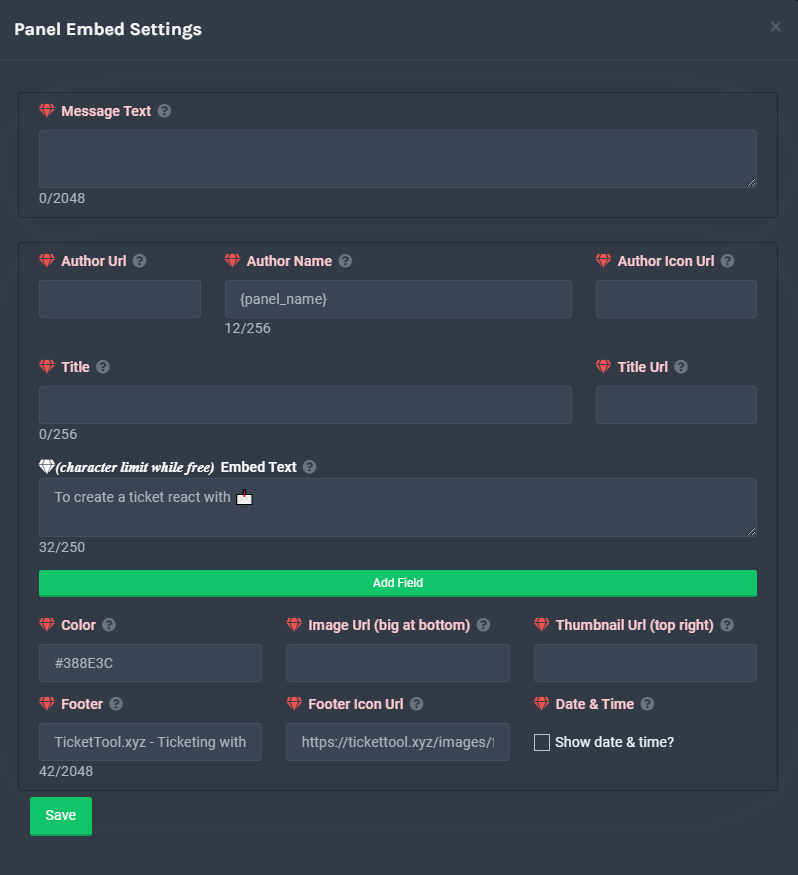
**Panel Message**
The panel message is where people react to make a ticket. To customize it head over to your Dashboard --> Panel Configs -> Settings -> Panel Options -> Edit Panel Message
 sly mica
Ty
shut bolt
Sure
humble sequoiaBOT
If Ticket Tool support requested this debug give them this link:
https://discordapp.com/channels/509192800865353738/662692902245498910/906949015223042109
Bot Permissions ឵ ឵឵ ឵ ឵឵ ឵ ឵឵ ឵ ឵឵
✅ - Read Channels
✅ - Send Messages
✅ - Embed Links
✅ - Attach Files
✅ - Add Reactions
✅ - Manage Roles
✅ - Manage Channels
✅ - Manage Messages
✅ - Read History
Channel Permissions ឵ ឵឵ ឵ ឵឵ ឵ ឵឵ ឵ ឵឵
✅ - Read Channels
✅ - Send Messages
✅ - Embed Links
✅ - Attach Files
✅ - Add Reactions
✅ - Manage Roles
✅ - Manage Channels
✅ - Manage Messages
✅ - Read History
Server Information ឵ ឵឵ ឵ ឵឵ ឵ ឵឵ ឵ ឵឵ ឵ ឵឵
Channel name:
community-support
Channel ID:
776680605517742090
Channel Count:
156/500
Server name:
Ticket Tool Support
Server ID:
509192800865353738
User Information ឵ ឵឵ ឵ ឵឵ ឵ ឵឵ ឵ ឵឵ ឵ ឵឵
User name:
entity#7460
User ID:
721646225631215647
Permission Level:
0 - User ()
Bot Information ឵ ឵឵ ឵ ឵឵ ឵ ឵឵ ឵ ឵឵ ឵ ឵឵
Prefix:
$
Premium Status:
Lifetime - ["subV2","time"]
Current shard:
1
API Latency:
76
humble sequoiaBOT
Update your discord App
Buttons are a relatively new addition to discord and don't work with some older versions of the app.
Please verify that you have the latest version of discord, by going to the app or play store.
_ _
Discord for the App Store
_ _
Discord for the Play Store
 unique swan
my kills are gone
shut bolt
unique swan
my kills are gone
Kills?
unique swan
yes
shut bolt
That doesn't seem to be Ticket Tool Related
 cinder badge
$help invite
humble sequoiaBOT
Help Options
$help commands - Information on commands
$help setup - Information on bot setup
$help faq - Frequently asked questions
cinder badge
Where can I get the invite
potent prairie
Yooo everything looks so dif now
shut bolt
cinder badge
Where can I get the invite
$invite
humble sequoiaBOT
Ticket Tool Invite & Support
shut bolt
Third link
shut bolt
potent prairie
Yooo everything looks so dif now
Yeap, they have updated a lot of stuff
vestal owl
does anyone know if they chose the new support team?
shut bolt
The applications?
vestal owl
ye
shut bolt
Yeap, they are closed, #📣│server-news
shut bolt
Keb, Jayson, Dom, and me
shut bolt
And Geo but he resigned recently
vestal owl
i applied
potent prairie
Does anyone know wicks prefix
shut bolt
vestal owl
i applied
I remember
shut bolt
potent prairie
Does anyone know wicks prefix
Default one is w!
 old ermine
How can I make it so the open message actually mentions the role, I have it to {@Support} and it does, but it doesn't mention the people with support role.
shut bolt
old ermine
How can I make it so the open message actually mentions the role, I have it to {...
Hello there
Please check the bot's permissions
And check it has the Mention Everyone and all roles
 vocal wharf
Is there a way to limit how often people can open a ticket?
humble sequoiaBOT
How to set a ticket limit
A ticket limit may be set per panel to prevent users from spamming tickets. By default this limit is set to 3. Once a user hits this limit the bot will notify the users that they reached the limit.
To set a ticket limit go to the Dashboard -> Panel Configs -> Settings -> General Options -> Ticket Limit
vocal wharf
Not how many can be opened by one person at a time. I'm asking about limiting it based on time
shut bolt
Not possible, only possible to limit per amount
vocal wharf
Ok thank you
shut bolt
vocal wharf
Ok thank you
@copper owl just showed me an option to do so
I would like them to explain it
As it wasn't my idea
👀
copper owl
oh?? 👀
unreal elbow
padding
copper owl
Technically you can abuse the blacklist roles @vocal wharf
robust sandalBOT
unreal elbow
padding
 Onyx
Onyx
Polsterung
English (en) → German (de)
 copper owl
vocal wharf
Not how many can be opened by one person at a time. I'm asking about limiting it...
copper owl
vocal wharf
Not how many can be opened by one person at a time. I'm asking about limiting it...
If you have a moderation bot that has a command to give a role for X amount of time, you can blacklist a role, then run the command to give a user who has opened a ticket the role for X amount of time.
copper owl
unreal elbow
what does ticket padding mean xD
the amount of 0's in the ticket count.
padding set to 3? 3 zeros. Ex: Ticket-000/Ticket-001
padding set to 5? 5 zeros. Ex: Ticket-00000/Ticket-00001
iron nightBOT
Gave 1 Rep to Neptune (current: #1 - 313)
vocal wharf
Thanks @copper owl
iron nightBOT
Gave 1 Rep to Neptune (current: #1 - 314)
copper owl
No problem x2
 scenic elbow
Hi can anyone help me with iptv ?
tribal cedar
$tts
humble sequoiaBOT
You're in the wrong place
We provide support for @pseudo glen discord bot and cannot help you with whatever issue you have.
Please make sure to contact the appropriate support team.
If you don't have any further questions regarding our bot Ticket Tool, please close this ticket
_ _
scenic elbow
Where do i find the support ?
vestal owl
for?
unreal elbow
we don’t know
scenic elbow
Iptv
unreal elbow
go on their website
scenic elbow
Ok i was told to download this
vestal owl
download a server...
unreal elbow
 ||
||  ||
||
 humble sequoiaBOT
For a more convenient use of multipanels, you can now combine panels on the dashboard. This will allow you to directly send the multipanel from the dashboard or via the $panel ID command.
Where can I find this?
You can find this setting on the Dashboard -> Panel Configs -> Settings -> General Options
This will put all buttons from all of your panels on one message. The message is the panel message from the panel you're combining these panels in.
copper owl
you need premium for it
jade topaz
how to invite premium bot?
jade topaz
copper owl
you need premium for it
how iam invite premium
copper owl
do you have a premium subscription?
humble sequoiaBOT
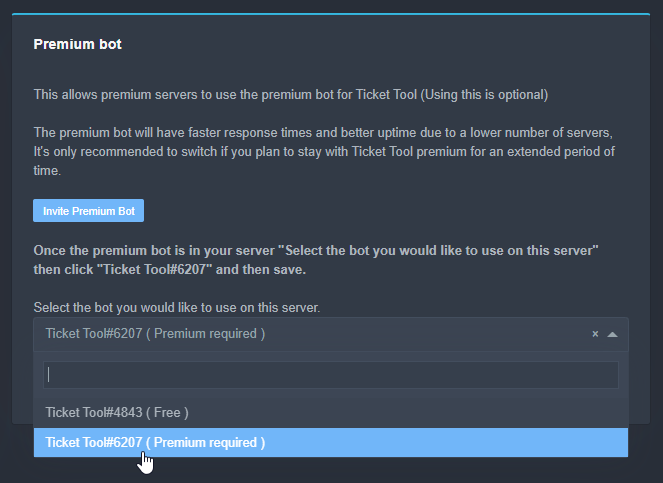
Inviting and Enabling Premium Bot
The first thing you will need to do is invite the premium bot, an invite can be found here
Once the bot is in your server we will head to the dashboard and manage your server. When you are managing your server, you want to head into "Server Configs" then click the drop down menu under "Select the bot you would like to use on this server" then click "Ticket Tool#6207" and then save.
 copper owl
@wicked scroll@shut bolt B)
 wicked scroll
B)
copper owl
Open a ticket and all you get is the backyardigan theme song with a youtube link B)
||thats a joke||
shut bolt
copper owl
Open a ticket and all you get is the backyardigan theme song with a youtube link...
JAJAJAJAJAJAJAJAJAJAJAAJA
Hello there
Please check out this
humble sequoiaBOT
Blacklist Roles
Any role you assign as a blacklisted role won't be able to use commands or reactions.
Selecting a blacklisted role
Go to your Dashboard -> Server Configs. There you will find the option to select blacklisted roles.
Note: Don't forget to save.
 shut bolt
It's possible user have a blacklisted role
iron nightBOT
Gave 1 Rep to Yareaj_ (current: #8 - 146)
shut bolt
Sure
robust sandalBOT
vestal owl
bonjour comment allez vous tous ?
 Snapz
Snapz
hello how are you all?
French (fr) → English (en)
vestal owl
je peux parler français et espagnol
tribal cedar
/fr do you have a question about ticket tool?
robust sandalBOT
Vous avez une question sur l’outil de billetterie ?
English (en) → French (fr)
vestal owl
si pablo yo hablo español
vestal owl
tribal cedar
/fr do you have a question about ticket tool?
I can speak english
tribal cedar
I wasn't asking you sorry
vestal owl
a quien estabas preguntando
copper owl
tribal cedar
I wasn't asking you sorry
wait who were you asking
that's the same person LMAO
tribal cedar
Oh I guess I was asking you lol
Why speak French if you can speak English I'll never understand
shut bolt
LMFAO
shut bolt
tribal cedar
Why speak French if you can speak English I'll never understand
I have a guess
He applied for those support team in last applications
Not 100% sure tho
shut bolt
vestal owl
si pablo yo hablo español
Súper! Pero eres nativamente de habla inglesa supongo?
 zealous lily
is it against the rules to ask for a coupon code for premium?
shut bolt
Well
vestal owl
sí, soy inglés nativo pablo, ¿qué te parece?
shut bolt
zealous lily
is it against the rules to ask for a coupon code for premium?
You wont be given any coupon even if you ask
zealous lily
how is there a way to find one
shut bolt
You can get premium using the $votes command
Use it in your own server
It will show you how yo obtain premium
zealous lily
i know i cant get premium i had one before
can*
but is there a way to find coupon codes
shut bolt
vestal owl
sí, soy inglés nativo pablo, ¿qué te parece?
Me parece bastante bien, qué tan difícil crees que es hablar español?
shut bolt
zealous lily
but is there a way to find coupon codes
Nope, besides voting there is no regular way to obtain coupons, the other way is for special holidays which coupons are announced in #📣│server-news
vestal owl
shut bolt
Me parece bastante bien, qué tan difícil crees que es hablar español?
Bueno, es sólo como un .1 por ciento difícil de hablar español en la PC porque no tienes las cosas que se retuercen por encima de las letras aparte de eso, es fácil.
shut bolt
vestal owl
Bueno, es sólo como un .1 por ciento difícil de hablar español en la PC porque n...
Interesante
vestal owl
Also why is no one answering my report ticket
shut bolt
Support Team has no access to those tickets
copper owl
only 2 people have access to those tickets, and both are usually busy lol
vestal owl
Oh
vestal owl
shut bolt
Interesante <:ThinkingChief_Ocaso:905897811592241254>
¡sí lo es!
vestal owl
Estoy aburrido
 warm breach
Ola wenas, cómo puedo crear el mensaje/canal para los tickets?
shut bolt
Holaaaa
shut bolt
warm breach
Ola wenas, cómo puedo crear el mensaje/canal para los tickets?
El canal es el que tú quieras
Para enviarlo debes haber creado un panel
$help panel
humble sequoiaBOT
Creating a panel
To create a panel we are going to need to head over to the panel configs on the dashboard
Once at the dashboard we will need to click Create Panel
Enter a panel name (Fill in any optional settings you want)
Click Create Panel and your ready to get started with configuring your panel
An example of a creating a panel is shown below.
humble sequoiaBOT
Sending a panel
Once you've created a panel on the dashboard you will need to send it to a channel using send on the dashboard
Select the channel you want your panel to be created in and click send.
For other questions checkout $help faq
An example of a sending a panel is shown below.

 shut bolt
Con gusto
warm breach
Ahora otra preguntita xd, ¿Hay una forma de que al crear un ticket se haga una mención automática?
shut bolt
warm breach
Ahora otra preguntita xd, ¿Hay una forma de que al crear un ticket se haga una m...
Sep
Haces esto
$help ping
humble sequoiaBOT
How to make Ticket Tool ping a role
To make ticket tool ping a role when a ticket is opened, go to the Dashboard -> Panel Configs -> Settings -> Ticket Options -> Ticket Message -> Message Text and do this:
{@Role name} This is case sensitive and the role must have @mentions enabled
warm breach
humble sequoia
Ö k pro
shut bolt
humble sequoia
Para mencionar un rol pon en el campo de Message Text {@Nombre del rol} (es sensible a mayúsculas y espacios) o usa {Id del rol}
shut bolt
warm breach
Y 2, ¿Cómo cambio el prefix xd?
$help prefix
humble sequoiaBOT
How to change Ticket tool's prefix
The default prefix for ticket tool is $ and @Ticket Tool#4843 however that can be changed on the Dashboard under Server Configs -> Command Prefix.

NOTE that @Ticket Tool#4843 will always work as a prefix even if there is a custom prefix.
shut bolt
Puedes cambiarlo desde el panel de control
warm breach
Ö
warm breach
Ya por último, ¿Hay forma de dejar algún tipo de log para que se registren los tickets y/o lo que se habló?
shut bolt
warm breach
Ya por último, ¿Hay forma de dejar algún tipo de log para que se registren los t...
Sip!
$help transcript
humble sequoiaBOT
How do I save transcript to a channel?
To save transcripts to a channel go to the Dashboard -> Panel Configs -> Settings -> Logging Options -> Transcript Channel
 shut bolt
Luego cuando cierres un ticket
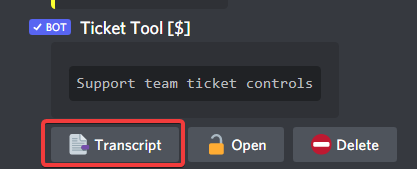
Da click en el botón de Transcript
Y eso enviará el archivo al canal que le hayas indicado
warm breach
Ö
shut bolt
Si quieres hacer esto de forma automática puedes adquirir nuestro bot premium
warm breach
K pro
shut bolt
Uy
humble sequoiaBOT
 Faster Premium Bot
Automatic Transcripts
Full Customization
Custom Buttons
Direct Messages
Ticket Automation
Multipanels
Premium Support
You can purchase premium here:
Price
$6 - Monthly
$66 - Yearly
 Premium
warm breach
Premium
warm breach
Ö
keen locust
Bot down?
humble sequoiaBOT
Pong! Latency is 145ms. API Latency is 82ms [-]
shut bolt
Working fine
shut bolt
keen locust
Bot down?
Doesn't respond?
 shut bolt
Server ID please
keen locust
898375444179595324
shut bolt
A sec please
keen locust
Not my server just trying to make a report about something
keen locust
Ice out rz
shut bolt
Okey, a sec
shut bolt
keen locust
Then IDK why they make a ticket chat with the panel
Lol, probably they recently kicked the bot
Click on the bot's profile
keen locust
Its not there
humble sequoiaBOT
Don't see your server in the dashboard?
You will possibly need to relog. Look below to see steps on how to relog.
How to relog the Dashboard.
First, you will need to go to the dashboard. Once your there, click on your avatar on the top right. after you clicked it, you will see button that says Logout. You must click that. Once you have logged out, you can log back in.
Note:
You need one of these 3 things to access the dashboard.
1. Server Owner (Level: 6)
2. Server Administrator (Level: 4)
3. Dashboard Role (Level: 2)
You can check your level using $level on your Discord Server
shut bolt
If you have Administrator permission, it should show you the server by doing this
jade topaz
@shut bolt Still not working, It's fine I'll just let the owner deal with it.
shut bolt
jade topaz
<@!518666147441278998> Still not working, It's fine I'll just let the owner deal...
Run $level in the server, send me a screenshot of the result please
 ionic hull
hi ! is there a way i can make a ticket by typing anything?
copper owl
The closest you have is command style tickets
ionic hull
copper owl
The closest you have is command style tickets
how do i set it up?
copper owl
Go to your dashboard, Command Style Tickets, and enable it.
I also suggest having ticket tool look at a specific channel instead of having it work anywhere
ionic hull
@copper owl sorry for the ping but i cannot find command style tickets in the dashboard ㅠㅠ
 brave cliff
where can we leave suggestions?
ionic hull
brave cliff
where can we leave suggestions?
#📈│reviews i think
copper owl
ionic hull
<#509775046848282677> i think
nope
unreal elbow
ionic hull
<@548583124062175232> sorry for the ping but i cannot find command style tickets...
 copper owl
it's called reviews, you can leave suggestions here or open a ticket if you have multiple
Thanks Onyx
brave cliff
ah thanks
unreal elbow

copper owl
@brave cliff any suggestions you currently have?
brave cliff
copper owl
<@853130514353356801> any suggestions you currently have?
I do
copper owl
if it's a good one and haven't been suggested before, i can forward it to the dev
brave cliff
maybe add menus?
brave cliff
copper owl
if it's a good one and haven't been suggested before, i can forward it to the de...
idrk if. it's suggested before
copper owl
Like the dropdown menus?
brave cliff
yea
copper owl
where you would select multiple options
copper owl
That's a good suggestion, i think I've suggested this myself LMFAO
brave cliff
is it already a feature?
copper owl
I'll definitely forward it again
brave cliff
oh lol
copper owl
brave cliff
is it already a feature?
Not as of currently no
brave cliff
tysm
copper owl
Anytime
brave cliff
hopefully they consider it
 odd dove
is there a way to change where new tickets are placed?
copper owl
$help category
humble sequoiaBOT
How to set the open category
To set a open category go to the Dashboard -> Panel Configs -> Settings -> Category Options -> Category Open
 haughty hearth
The site isn't open
 rigid dagger
Is there any way I can only allow users with specific roles to make tickets?
shut bolt
rigid dagger
Is there any way I can **only** allow users with specific roles to make tickets?
Yeap
You can go into the create ticket button permissions
And mark the roles you want to be able to create tickets
$buttons
humble sequoiaBOT
Buttons
The new Discord Buttons allow for a much smoother and convenient experience. They reduce lag and work much better than emojis. With ticket tool you can edit all the buttons however you like! Buttons can show emojis, text and can have 4 different colors.
Where can I edit them?
Dashboard -> Panel Configs -> <Settings> -> Button Options -> <Setting>
rigid dagger
Oo, tysm
shut bolt
Sure
 sterile flower
hey how do i make the tickets go into a specific category
sterile flower
unreal elbow
⏫
what do you do with category closed?
unreal elbow
if someone closes the ticket, it is getting moved to the „category closed“
iron nightBOT
@unreal elbow :: You can't give rep to yourself, silly.
sterile flower
ok
unreal elbow
sterile flower
ok
no problem
sterile flower
unreal elbow
if someone closes the ticket, it is getting moved to the „category closed“
is it possible to just remove it
permanantly
unreal elbow
if it gets closed?
sterile flower
yea
sterile flower
ok
unreal elbow
idk how rn
sterile flower
ok
unreal elbow
$help close
humble sequoiaBOT
Help Options
$help commands - Information on commands
$help setup - Information on bot setup
$help faq - Frequently asked questions
iron nightBOT
Gave 1 Rep to user (current: #68 - 1)
unreal elbow
no, to @unreal elbow xD
wanted to show it as a variable lol
but he exists xD
rigid dagger
The current warning message is "Warning: You don't have permissions to use this." Is there any way I can edit that ?
unreal elbow
send a pic of the error
copper owl
rigid dagger
The current warning message is "Warning: You don't have permissions to use this....
No, none of the empheral messages (the ones you dismiss) can be edited
iron nightBOT
Gave 1 Rep to Neptune (current: #1 - 315)
unreal elbow
rep @unreal elbow
sterile flower
if people start a ticket are people who arent on support team role able to view it
 potent scaffold
sterile flower
if people start a ticket are people who arent on support team role able to view ...
potent scaffold
sterile flower
if people start a ticket are people who arent on support team role able to view ...
Nope
sterile flower
thanks
potent scaffold
If you want them to, youd have to manually add them with the add comand or via channel perms
sterile flower
ok
iron nightBOT
@sterile flower :: You can't rep user#5986 for 48 minutes and 38 seconds. Try coming back later?
 wise raft
Hi, please could you show me how I can set up the suggestions feature in my server? Thanks!
humble sequoiaBOT
-- moved to ticket --
haughty hearth
copper owl
what do you mean?
Yes
copper owl
haughty hearth
Yes
What?
haughty hearth
One second
copper owl
oh you replied yes to sending a screenshot
haughty hearth
it gets stuck like that
 copper owl
most likely your internet connection
humble sequoiaBOT
copper owl
try this
copper owl
no problem
unreal elbow
$help variables
humble sequoiaBOT
Help Options
$help commands - Information on commands
$help setup - Information on bot setup
$help faq - Frequently asked questions
 mystic hound
$variables
humble sequoiaBOT
Supported Variables
{server.id} --> ID of the Server

[#🆘│community-support](/guild/509192800865353738/channel/776680605517742090/) = <#channel> --> Channel link of the current channel
{channel.name} --> Name of the current channel
{channel.id} --> ID of the current channel

{author} = <@user> --> Mention of the user triggering this message
{author.name} --> Name of the user triggering this message
{author.id} --> ID of the user triggering this message
{author.nickname} --> Nickname of the user triggering this message
{author.icon} --> Direct Url of the profile picture of the user triggering this message
{author.tag} --> 4 digit tag (discriminator) of the user triggering this message
{author.full} --> username + 4 digit discriminator of the user triggering this message

{panel.count} --> The current count number of the panel (Tickets only)
{panel.name} --> The name of the panel (Tickets Only)
{panel.ticketLimit} --> The current limit of the panel (Ticket Only)

{ticket} = <#channel> --> Channel mention of the ticket
{ticket.id} --> Channel ID of the ticket

{ticket.user} = <@user> --> User mention of the ticket user
{ticket.user.name} --> Name of the ticket user
{ticket.user.id} --> User ID of the ticket user
{ticket.user.nickname} --> Nickname of the ticket user
{ticket.user.icon} --> Direct Url of the profile picture of the ticket user
{ticket.user.tag} --> Tag / Discriminator of the ticket user
{ticket.user.full} --> Username + Discirimator of the ticket user```
Roles can be either
{@role name} or {role ID} iron nightBOT
Gave 1 Rep to Light (current: #2 - 217)
vestal owl
i have a question
vestal owl
obviously the general chat was misused so removed so would it ever come back and how was it misused
shut bolt
No plans on getting the general chat back, happened same as #📈│reviews people went to look support into the wrong channel
vestal owl
oh
copper owl
Also the existence of the community server
that was one of the main reasons this turned to support only with no public chats other than support and reviews
vestal owl
you could make a thing in the bot where if someone says like I need help or help in a certain channel theres a embed message
vestal owl
copper owl
Also the existence of the community server
is there
copper owl
$invite
humble sequoiaBOT
Ticket Tool Invite & Support
copper owl
2nd link
vestal owl
oh
shut bolt
Sure, go ahead
 kindred creek
if someone makes a ticket i want the bot ping middle-man
shut bolt
$help ping
humble sequoiaBOT
How to make Ticket Tool ping a role
To make ticket tool ping a role when a ticket is opened, go to the Dashboard -> Panel Configs -> Settings -> Ticket Options -> Ticket Message -> Message Text and do this:
{@Role name} This is case sensitive and the role must have @mentions enabled
shut bolt
Check out this
shut bolt
Sure
kindred creek
thanks @shut bolt
iron nightBOT
Gave 1 Rep to Yareaj_ (current: #8 - 149)
shut bolt
Appreciate it ^^
 brave grove
c
 ionic cliff
How do i make tickets appear in a certain category**
plain surge
You mean under a certain category?
ionic cliff
ye
 pseudo shoal
is there a way to limit the number of tickets allowed to be active/open at the same time?
ionic cliff
plain surge
You mean under a certain category?
@plain surge you got a clue?
plain surge
$help category
humble sequoiaBOT
How to set the open category
To set a open category go to the Dashboard -> Panel Configs -> Settings -> Category Options -> Category Open
plain surge
Follow these steps @ionic cliff
ionic cliff
Alright, Thanks.
plain surge
pseudo shoal
is there a way to limit the number of tickets allowed to be active/open at the s...
$help limit
humble sequoiaBOT
How to set a ticket limit
A ticket limit may be set per panel to prevent users from spamming tickets. By default this limit is set to 3. Once a user hits this limit the bot will notify the users that they reached the limit.
To set a ticket limit go to the Dashboard -> Panel Configs -> Settings -> General Options -> Ticket Limit
pseudo shoal
isnt that just how many one user can make though, not how many are active?
plain surge
Anything marked with a red diamond is a premium feature
plain surge
pseudo shoal
isnt that just how many one user can make though, not how many are active?
Oh you meant that, 1 minute
pseudo shoal
alright ty
plain surge
@pseudo shoal
You can find this in Server Configs

This will apply to all your panels tho
pseudo shoal
i see. thanks for letting me know
plain surge
No problem
 timid hemlock
Thanks @plain surge
iron nightBOT
Gave 1 Rep to D̸̞̉҉̢̩͠o͛ͫ̚m͈̕͜҉̘̱̟☆̞͈͠҉ͪ̈́͘҉̷̥̐ (current: #30 - 8)
timid hemlock
Thanks @plain surge
iron nightBOT
@timid hemlock :: You can't rep D̸̞̉҉̢̩͠o͛ͫ̚m͈̕͜҉̘̱̟☆̞͈͠҉ͪ̈́͘҉̷̥̐#5201 for 58 minutes and 34 seconds. Try coming back later?
timid hemlock
Oop 
 humble sequoiaBOT
فريق الدعم الفني العربي
عميلنا العزيز ان كنت تبحث عن مساعدة يرجى فتح تكت خاص بفريق الدعم الفني العربي
اذهب الى#🎫│make-a-ticket
ثم قم بلضغط على الايموجي الاتي (🇯🇴)
tribal cedar
 frank condor
What is this
frank condor
What is this
The bot doesn't have view or send perms in the channel your trying to send that panel to
timid hemlock
Thanks @craggy geyser
iron nightBOT
Gave 1 Rep to Swift (current: #4 - 201)
 dusky nebula
.
timid hemlock
Thanks @dusky nebula
iron nightBOT
Gave 1 Rep to ẁẵℓễễđ (current: #68 - 1)
timid hemlock
😂
 hidden vector
Thanks @hidden vector
iron nightBOT
@hidden vector :: You can't give rep to yourself, silly.
hidden vector
i tried
tribal cedar
Let's keep it support here guys
hidden vector
Thanks @brave grove
iron nightBOT
Gave 1 Rep to AZOR (current: #68 - 1)
 ripe palm
Thanks @hidden vector
iron nightBOT
Gave 1 Rep to NotSussyJoeBoy (current: #68 - 1)
shut bolt
lmao
 crude inlet
Oh my bad!
humble sequoiaBOT
How to make Ticket Tool ping a role
To make ticket tool ping a role when a ticket is opened, go to the Dashboard -> Panel Configs -> Settings -> Ticket Options -> Ticket Message -> Message Text and do this:
{@Role name} This is case sensitive and the role must have @mentions enabled
atomic barn
There u go :)
crude inlet
Oh thank you so much! <3
atomic barn
Yw
 hybrid basalt
i need help with the bot
humble sequoiaBOT
We would love to help you but, if you don't tell us what you need help with we can't help you :(
shut bolt
@hybrid basalt 
 late latch
Where can I get a ticket started for a withdrawal issue. It's been 10 days since my withdrawal from Rewards account and still nowhere to be found
humble sequoiaBOT
You're in the wrong place
We provide support for @pseudo glen discord bot and cannot help you with whatever issue you have.
Please make sure to contact the appropriate support team.
If you don't have any further questions regarding our bot Ticket Tool, please close this ticket
_ _
hybrid basalt
shut bolt
<@!799914410977394698> <:This_Ocaso:906033600602988564>
i fixed it
shut bolt
Glad to know
late latch
that's what i'm asking. i'm unsure who the appropriate support team is. i've been trying to navigate and find it, but i keep ending up in the wrong place
shut bolt
You should look for the webpage of the wallet you mentioned in the ticket and ask there, there is nothing we can do as we are not that team
late latch
okay, i will reach out
shut bolt
Sure
 boreal flame
I glad you’re Reimbursing but I was on the white list and really still want my opportunity to purchase. Preferably at least 1 guaranteed.
I have a total of 8 failed transactions, with proof, for a total of $185.53
humble sequoiaBOT
mystic hound
See the guide above for setup instruction and feel free to ask if you've got any questions. Oh, and don't ping staff #546557408902905896.
jade topaz

 craggy geyser
jade topaz
craggy geyser
jade topaz
As the error says, missing permissions. Run $debug to see what
If you are trying to close it and you have a close category, it needs them there too
jade topaz
Manage Channels & Manage Messages.
craggy geyser
Give the bot them and it should work
jade topaz
It feels as if the bots gotten a virus and only asking for more permissions each time.
Each time, it worked fine, and after a while it asked for more permissions.
(All today)
craggy geyser
It's always needed those. Manage channels is needed to create the ticket, move it, and delete it. And manage messages because it pins messages
mystic hound
if it had a virus it wouldn't be asking for permissions in an orderly fashion..
humble sequoiaBOT
If Ticket Tool support requested this debug give them this link:
https://discordapp.com/channels/509192800865353738/662692902245498910/907551980862455838
Bot Permissions ឵ ឵឵ ឵ ឵឵ ឵ ឵឵ ឵ ឵឵
✅ - Read Channels
✅ - Send Messages
✅ - Embed Links
✅ - Attach Files
✅ - Add Reactions
✅ - Manage Roles
✅ - Manage Channels
✅ - Manage Messages
✅ - Read History
Channel Permissions ឵ ឵឵ ឵ ឵឵ ឵ ឵឵ ឵ ឵឵
✅ - Read Channels
✅ - Send Messages
✅ - Embed Links
✅ - Attach Files
✅ - Add Reactions
✅ - Manage Roles
✅ - Manage Channels
✅ - Manage Messages
✅ - Read History
Server Information ឵ ឵឵ ឵ ឵឵ ឵ ឵឵ ឵ ឵឵ ឵ ឵឵
Channel name:
community-support
Channel ID:
776680605517742090
Channel Count:
157/500
Server name:
Ticket Tool Support
Server ID:
509192800865353738
User Information ឵ ឵឵ ឵ ឵឵ ឵ ឵឵ ឵ ឵឵ ឵ ឵឵
User name:
USAAmericaUSA#3356
User ID:
873994803879231568
Permission Level:
0 - User ()
Bot Information ឵ ឵឵ ឵ ឵឵ ឵ ឵឵ ឵ ឵឵ ឵ ឵឵
Prefix:
$
Premium Status:
Lifetime - ["subV2","time"]
Current shard:
1
API Latency:
76
jade topaz
After doing debug, it showed me I needed Manage Roles permission, but it seemed to be fine, til now.
I've given it the permission & it works now.
 worthy trellis

 humble sequoiaBOT
-- moved to ticket --
jade topaz
^ What cmd is that?
unreal elbow
$new (@wanton heron) (reason)
 opaque pulsar
How can i change the prefix?
jade topaz
opaque pulsar
How can i change the prefix?
$help prefix
humble sequoiaBOT
How to change Ticket tool's prefix
The default prefix for ticket tool is $ and @Ticket Tool#4843 however that can be changed on the Dashboard under Server Configs -> Command Prefix.
NOTE that @Ticket Tool#4843 will always work as a prefix even if there is a custom prefix.
iron nightBOT
Gave 1 Rep to Sk3leton (current: #15 - 71)
craggy geyser
unreal elbow
$new (<@841477508783538237>) (reason)
That isn't what makes that message. That's a tag. Was used in this situation as they also made a ticket and was answered in there
humble sequoiaBOT
Tags
Tags are used to send a predefined response to your channels using a command. Tags will only respond if the command itself is used, it will not function if you put the tag into a sentence. The prefix is not included.
To create tags, go to: Dashboard > Tags > Create Tag. After creating and naming one, tap on the response button, and you can edit the response.

 wanton hinge
Hello is it possible to change the message here?
 humble sequoiaBOT
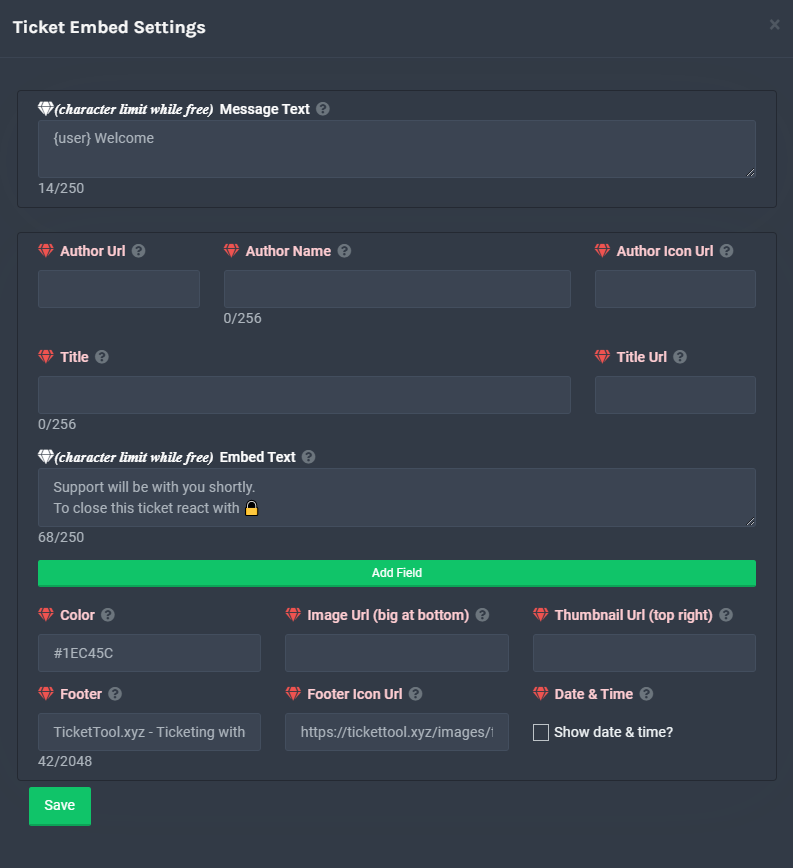
**Ticket Message**
The Ticket Message is the first message sent by the bot in a new ticket. To customise it head over to your Dashboard -> Panel Configs -> Settings -> Ticket Options -> Edit Ticket Message
 copper owl
@wanton hinge ^
wanton hinge
copper owl
<@777679193844219936> ^
Oh wow thank u
iron nightBOT
Gave 1 Rep to Neptune (current: #1 - 320)
copper owl
No problem
jade topaz
i need help with just getting started. i can’t figure it out with just the website 😅😅
humble sequoiaBOT
mystic hound
Hey, please have a look at the documentation. If you have any questions feel free to ask
jade topaz
i was confused and didn’t realize i didn’t to go to dashboard 💀
mystic hound
oh lmao, that explains it
potent prairie
Hello
I forgot what i did. But i only want a few roles to be able to see tickets (including the people who clicked it)
Anyone know what i do for that
?
 ruby dirge

