#🆘│community-support
1 messages · Page 359 of 1
 jade topaz
 copper owl
I havent tried that but I wouldnt suggest it just in case it breaks
jade topaz
 Ohk
Ohk
 humble sequoiaBOT
What are the direct URLs?
A direct access URL is an easy to read URL that users can enter to get to a specific item, document, page, category, or perspective, in which our bot TicketTool can read and get it displayed in your 'Panel Message' or your 'Ticket Message'.
Where can I get them?
The recommended way is to use 'Imgur', you can signup within a few minutes and then upload the image you want, and copy the URL of the uploaded image and paste it into one of the four boxes. There are alternatives to this, such as other image or video storing websites or using 'Open Original' of an image and paste it in (please be aware that if your image is deleted, Discord will automatically delete the link to it in a few days). Please note this requires 'Premium'. Imgur

 alpine anvil
bruh why can't I invite people
copper owl
alpine anvil
bruh why can't I invite people
Elaborate
invite people where? to this server?
alpine anvil
yes
humble sequoiaBOT
Ticket Tool Invite & Support
copper owl
first link is our invite
alpine anvil
ok ty
copper owl
no problem
 mighty helm
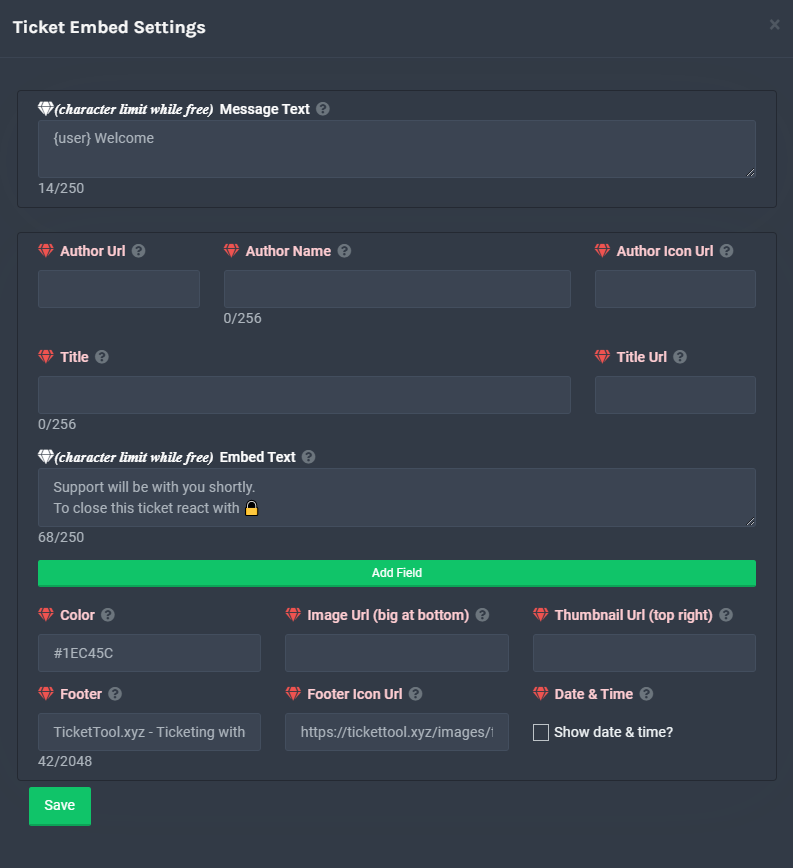
Hey sorry i am alittle lost, where can i find how to edit this msg
This is once someone opened a ticket, i want to edit the instructions on what people should send in the ticket.
 humble sequoiaBOT
**Ticket Message**
The Ticket Message is the first message sent by the bot in a new ticket. To customise it head over to your Dashboard -> Panel Configs -> Settings -> Ticket Options -> Edit Ticket Message
 copper owl
@mighty helm 
mighty helm
thank you
copper owl
anytime

 half kernel
-- Moved to ticket --

 vestal owl
was that sent by a moderator
 plain surge
Try sending hello again
 mystic hound
Oh wow lol
plain surge
That would be a tag set up by the mods on that server
humble sequoiaBOT
Tags
Tags are used to send a predefined response to your channels using a command. Tags will only respond if the command itself is used, it will not function if you put the tag into a sentence. The prefix is not included.
To create tags, go to: Dashboard > Tags > Create Tag. After creating and naming one, tap on the response button, and you can edit the response.
 jade topaz
 plain surge
Yh it's an auto response
jade topaz
Oh
mystic hound
Go to the tags section of your dashboard and see if there's anything with "hello" there
 silk atlas
Hello
I need some help
With the bot
I invited the bot the server I want to create tickets and then I went to the dashboard of the bot
But I saw only one server that i can manage
How can I fix it?
plain surge
If you can't see your server on the dashboard, then you probably need to relog
humble sequoiaBOT
Don't see your server in the dashboard?
You will possibly need to relog. Look below to see steps on how to relog.
How to relog the Dashboard.
First, you will need to go to the dashboard. Once your there, click on your avatar on the top right. after you clicked it, you will see button that says Logout. You must click that. Once you have logged out, you can log back in.
Note:
You need one of these 3 things to access the dashboard.
1. Server Owner (Level: 6)
2. Server Administrator (Level: 4)
3. Dashboard Role (Level: 2)
You can check your level using $level on your Discord Server
plain surge
Follow these steps ^
silk atlas
plain surge
If you can't see your server on the dashboard, then you probably need to relog
Oh I'll do it
 silk atlas
plain surge
Follow these steps ^
silk atlas
plain surge
Follow these steps ^
Thanks for your advice
 iron nightBOT
Gave 1 Rep to D̸̞̉҉̢̩͠o͛ͫ̚m͈̕͜҉̘̱̟☆̞͈͠҉ͪ̈́͘҉̷̥̐ (current: #44 - 3)
plain surge
No problem
silk atlas
jade topaz
<@847880925715234916>
Why ping?
plain surge
humble sequoia
If your server isn't showing up on the dashboard as well @jade topaz then please follow the steps mentioned in the replied message
jade topaz
silk atlas
Why ping?
I thought you were a help
silk atlas
jade topaz
I thought you were a help
I'm not a staff member
jade topaz
plain surge
If your server isn't showing up on the dashboard as well <@456226577798135808> t...
which message
 craggy geyser
jade topaz
I thought you were a help
craggy geyser
jade topaz
I thought you were a help
If they were, you would be breaking the #546557408902905896 by pinging staff
humble sequoiaBOT
Don't see your server in the dashboard?
You will possibly need to relog. Look below to see steps on how to relog.
How to relog the Dashboard.
First, you will need to go to the dashboard. Once your there, click on your avatar on the top right. after you clicked it, you will see button that says Logout. You must click that. Once you have logged out, you can log back in.
Note:
You need one of these 3 things to access the dashboard.
1. Server Owner (Level: 6)
2. Server Administrator (Level: 4)
3. Dashboard Role (Level: 2)
You can check your level using $level on your Discord Server
plain surge
@jade topaz This ^
jade topaz
I did not understand, excuse me
plain surge
You need to logout from the dashboard, and then login again
Just follow the steps mentioned above
jade topaz
I understood that I had to log out of my account from the dashboard and then try again
plain surge
You still can't view your server?
jade topaz
I found it thanks
plain surge
No problem
 dull flicker
Hi
half kernel
IF YOU ARE GETTING A SYSTEM ERROR, WE ARE AWARE
 tribal cedar
dull flicker
Hi
tribal cedar
dull flicker
Hi
Hi
 flat wraith
okay
 static dirge
people can open tickets but i cant close them 😦
 ember schooner
System failure: Service unavailable?
 south badger
What
 flat wraith
rip bot
 rigid pike
Is it back up?
 scenic plinth
 Partial Outage
The development team and management are aware of the Service Unavailable error anyone may get whilst closing tickets, using tags, etc. Commands may also may be unresponsive such as $rename however will still execute.
ember schooner
downtime?
scenic plinth
No expected ETA.
scenic plinth
scenic plinth
<:5236_warning_1:711416841666560040> Partial Outage
The development team and m...
Simplest terms: API went brrrrt
 covert shuttle
Look fixed guys, at least for me
scenic plinth
It's a random occuring issue, so no for sure say. Other Bots are reportedly having some issues too.
tribal cedar
Kenzi I miss when we were proficient together. :)
If they ever open apps for English speaking gents I'll apply for certain
Have a question though. Can partnered servers get the premium role?
Using $pc
 potent locust
Hi I was wondering. In a server with ticket tool bot in it. Who all has access to the dashboard? Is it only the server owner? Or only whoever invited it? Anyone with administrator privileges?
vestal owl
If you look at the bottom of role permissions it say Administrator if roles have that ticked they can
potent locust
Tysm
vestal owl
My pleasure
tribal cedar
potent locust
Hi I was wondering. In a server with ticket tool bot in it. Who all has access t...
Admins and server owner have access by default but you can also add access to the dashboard via a role
scenic plinth
tribal cedar
Kenzi I miss when we were proficient together. :)
Unfortunate. If you have premium yes.
 toxic condor
so does ticket tool have a time feature so when someone dosent type in it for x amount of time it gets deleted
vestal owl
No
toxic condor
;-;
jade topaz
anyone else having issues ?
static dirge
cant rename tickets
jade topaz
like very slow or isn’t working for me
static dirge
yes very slow @jade topaz
 cold ridge
i think its slow for everyone, i was just about to ask the same thing hhaa
jade topaz
rip
 wary flint
i'm having issues with closing tickets
jade topaz
closing , opening , command . Servers are prob being worked on
The bot is VERY slow
And VERY lagging
cold ridge
not even working at all for us!
 eager cargo
Multiple bots are slow atm, be patient please
 sacred perch

cold ridge
Thank you for letting us know :D
 unkempt barn
eager cargo
Multiple bots are slow atm, be patient please
unkempt barn
eager cargo
Multiple bots are slow atm, be patient please
Thank ya 
 radiant moss
 IF YOU ARE EXPERIENCING ISSUES WITH THE BOT PLEASE READ
Discord's API is having issues with RateLimits. There ETA is 2 Hours! Please Be Patient There Is Not Much We Can Do
 heavy moat
i was just coming up to ask this very questions. thanks for letting us know!
 wispy cave
radiant moss
<a:ALERT:788064455396818945> **IF YOU ARE EXPERIENCING ISSUES WITH THE BOT PLEA...
wispy cave
radiant moss
<a:ALERT:788064455396818945> **IF YOU ARE EXPERIENCING ISSUES WITH THE BOT PLEA...
Is that this?

 remote peak
Haha me too
radiant moss
wispy cave
Is that this?
Yup. Increase delays in pretty much everything
humble sequoiaBOT
Redeeming premium
Redeeming premium on your server is really simple. Just head over to your Subscriptions Page. There you can select a server of your choice, which will get premium. You can change the server at any point.
 radiant moss
You can go there if you subscribed with chargebee.
radiant moss
jade topaz
Old server got deleted so I have no access
How long ago did you subscribed?
 umbral mortar
Anyone else experiencing 9000+ ping?
radiant moss
IF YOU ARE EXPERIENCING ISSUES WITH THE BOT PLEASE READ
Discord's API is having issues with RateLimits. There ETA is 1.5 Hours! Please Be Patient There Is Not Much We Can Do
jade topaz

 crystal mica
Alright, the only issue for me is the close button or command won’t work
 proven lance
Tickets won’t close and it’s clogging up the tickets that are completed.
crystal mica
proven lance
Tickets won’t close and it’s clogging up the tickets that are completed.
^^^
radiant moss
jade topaz
Press On Manage Subscriptions and you can change the server
radiant moss
crystal mica
Alright, the only issue for me is the close button or command won’t work
Should be resolved in a bit
radiant moss
proven lance
Tickets won’t close and it’s clogging up the tickets that are completed.
Should be resolved in a bit
crystal mica
radiant moss
Should be resolved in a bit
Alright! Thank you and sorry if it’s overwhelming you!
iron nightBOT
Gave 1 Rep to Tinyy (current: #14 - 75)
radiant moss
crystal mica
Alright! Thank you and sorry if it’s overwhelming you!
Not at all no worries. Have a good rest of your night 🙂
crystal mica
radiant moss
Not at all no worries. Have a good rest of your night 🙂
You too!
proven lance
radiant moss
Should be resolved in a bit
Thank you we get a least 400 tickets a day and we rely on this.
iron nightBOT
Gave 1 Rep to Tinyy (current: #13 - 76)
radiant moss
proven lance
Thank you we get a least 400 tickets a day and we rely on this.
Sadly there is nothing we can do
 azure osprey
hello?
proven lance
azure osprey
hello?
Is it me your looking for…
proven lance
Not based didn’t get the reference
azure osprey
so i set up the ticket tool at my server and one member reported out they cannot create a ticket

 open gyro
radiant moss
Yup. Increase delays in pretty much everything
open gyro
radiant moss
Yup. Increase delays in pretty much everything
help please
Can somome help?
 sand sundial
Hi, do you guys have any advice on how to transition from the regular ticket tool to the premium version? We have lots of existing tickets and want to know if we can continue to use the same channels and such
open gyro
Why i use ticket command but ticket tools bot said this is not ticket channel?
radiant moss
sand sundial
Hi, do you guys have any advice on how to transition from the regular ticket too...
Everything will stay the same as you swap over.
radiant moss
open gyro
Why i use ticket command but ticket tools bot said this is not ticket channel?
Discord's API has been having issues. You may have to manually delete the channel
covert shuttle
open gyro
Why i use ticket command but ticket tools bot said this is not ticket channel?
when it happen owner of server need delete manually
sand sundial
radiant moss
Everything will stay the same as you swap over.
So we should remove the old ticket bot after the premium one is added? Nothing needs to be changed in the config online? Really don't want to break anything 😅
open gyro
radiant moss
Discord's API has been having issues. You may have to manually delete the channe...
How?
radiant moss
sand sundial
So we should remove the old ticket bot after the premium one is added? Nothing n...
Okay actually maybe not. As only the bot can. You will have to take care of all previous tickets manually or finish them then transition to the premium bot
radiant moss
open gyro
How?
Right click then press delete if you are are an admin
open gyro
radiant moss
Right click then press delete if you are are an admin
i am owner of the server
radiant moss
Right click on the ticket channel. And press on delete
open gyro
radiant moss
Right click on the ticket channel. And press on delete
can you tell how to open Ticket?
 charred pilot
How do I add roles
eager cargo
Ticket Tool can't add roles to users
if you're referring to setting a support role
$help support
humble sequoiaBOT
How to let support team see into a ticket
About support roles
A support role lets your support team see into tickets with out having to add them manually to each and every ticket.
You can add as many support roles as you like per panel.
NOTE that the way discord works all admins can see into tickets regardless of this.
How to set a support role
To set a Support role go to the Dashboard -> Panel Configs -> Settings -> General Options -> Support Team Roles.

NOTE that the support role will not be able to see into tickets that are already created..
 restive frost
Hey, I got a couple Trial staff that cannot see my tickets. What do I do?
I do not want to give the Administrator Permissions
mystic hound
$help support
humble sequoiaBOT
How to let support team see into a ticket
About support roles
A support role lets your support team see into tickets with out having to add them manually to each and every ticket.
You can add as many support roles as you like per panel.
NOTE that the way discord works all admins can see into tickets regardless of this.
How to set a support role
To set a Support role go to the Dashboard -> Panel Configs -> Settings -> General Options -> Support Team Roles.
NOTE that the support role will not be able to see into tickets that are already created..
restive frost
I did that, and they still cant view it
mystic hound
add their roles to this field, changes will only take effect for tickets opened after the changes, so for existing ones you'll have to manually add them using $add @ role
restive frost
How can i do it without manually adding them?
mystic hound
You cannot
any ticket that's opened after you made the change will add those roles automatically, for existing ones you'll unfortunately still have to use $add
 craggy geyser
 valid pollen
Oh, I think I found the answer!
valid pollen
Oh, I think I found the answer!
Yep. If you are struggling to do that there is a second method
humble sequoiaBOT
For a more convenient use of multipanels, you can now combine panels on the dashboard. This will allow you to directly send the multipanel from the dashboard or via the $panel ID command.
Where can I find this?
You can find this setting on the Dashboard -> Panel Configs -> Settings -> General Options
This will put all buttons from all of your panels on one message. The message is the panel message from the panel you're combining these panels in.
 iron nightBOT
Gave 1 Rep to Swift (current: #4 - 197)
craggy geyser
Snippets are called tags here (assuming I'm understanding correctly). And the message I sent about multipannels is an example
humble sequoiaBOT
Tags
Tags are used to send a predefined response to your channels using a command. Tags will only respond if the command itself is used, it will not function if you put the tag into a sentence. The prefix is not included.
To create tags, go to: Dashboard > Tags > Create Tag. After creating and naming one, tap on the response button, and you can edit the response.
 mental terrace
Hi
Can I have the user write the name of the ticket instead of the code when it is opened automatically?
 humble sequoiaBOT
Solved in another channel.
 long forge
humble sequoiaBOT
long forge
humble sequoiaBOT
Redeeming premium
Redeeming premium on your server is really simple. Just head over to your Subscriptions Page. There you can select a server of your choice, which will get premium. You can change the server at any point.
jade topaz
Is it possible that the bot creates the ticket in a specific category?
copper owl
$help category
humble sequoiaBOT
How to set the open category
To set a open category go to the Dashboard -> Panel Configs -> Settings -> Category Options -> Category Open
 copper owl
@jade topaz
jade topaz
Thanks man 
copper owl
anytime
 eager atlas
thinking about purchasing tickettool Does the ticket system give me mutiple ticket options? ie: player opens ticket and can select if they need help with ingame, discord, harassment, report a bug etc?
 crimson eagle
yes
crimson eagle
eager atlas
thinking about purchasing tickettool Does the ticket system give me mutiple ti...
you can have more then one pannel open and have all those pannels connect to one
If you need any help pls dm me
And I can assist you
Or go to #🎫│make-a-ticket and let the professionals help you
eager atlas
awesome thankyou. Its late at night here, so will log on in morning and get tickettool and see how we go. thankyou again!
valid pollen
craggy geyser
Snippets are called tags here (assuming I'm understanding correctly). And the me...
Thank you!
iron nightBOT
Gave 1 Rep to Swift (current: #4 - 198)
craggy geyser
valid pollen
Thank you!
No problem!
 prime bridgeBOT
 Successful bans:
 1
 Unsuccessful bans:
 0
 Reason: scam
 Moderator: @mystic hound
vestal owl
good
prime bridgeBOT
Successful bans: 1
Unsuccessful bans: 0
Reason: Scam Link
Moderator: @pale pilot
 fossil scroll
Hello, I am trying to create a ticket from my alt but it says I don't have permissions, what do I need to change in the dashboard? https://bukito.xyz/Uploads/usscigwatgj0.png
 humble sequoiaBOT
Blacklist Roles
Any role you assign as a blacklisted role won't be able to use commands or reactions.
Selecting a blacklisted role
Go to your Dashboard -> Server Configs. There you will find the option to select blacklisted roles.
Note: Don't forget to save.
 fossil scroll
It has no roles though
half kernel
Check to see if you have the everyone role on there
iron nightBOT
Gave 1 Rep to Jayson G | UBP (current: #27 - 10)
half kernel
Yep anytime
 wanton path
where can we make suggestions for ticket tool?
mystic hound
you can say it here and we'll add them to our private suggestions list
 teal ore
Can someone help me set up my sub on firestick pls
mystic hound
$tts
humble sequoiaBOT
You're in the wrong place
We provide support for @pseudo glen discord bot and cannot help you with whatever issue you have.
Please make sure to contact the appropriate support team.
If you don't have any further questions regarding our bot Ticket Tool, please close this ticket
_ _
jade topaz
Hi I had a Discord account and it was disabled, and it had a premium on my server. My question is can I transfer Premium to this new account?
@jade topaz
This is my old account
copper owl
jade topaz
Hi I had a Discord account and it was disabled, and it had a premium on my serve...
how long ago did you buy the premium?
jade topaz
Not to long it was a week before
humble sequoiaBOT
Ticket Tool Premium
Get premium at https://tickettool.xyz/premium
Manage your subscriptions at https://tickettool.xyz/subscriptions
Why Premium?
Premium lets you customize the bot just how you want it. It also helps keep the bot running.
copper owl
second link
Manage Subscriptions
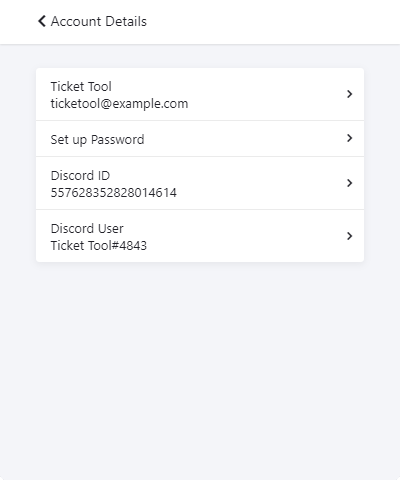
You'll be able to connect the other account by replacing the Discord ID with the new account
 rugged ice
 meager hornet
Yes
 slender ruin
Found Out 🙂
scenic plinth
For one, not at all wise for pinging the developer, youre not getting support any faster then any support team can give you.
On the other hand, use $debug to see the bots permissions. It should have everything listed there. If it doesn't, then give it.
Ghost pinging doesn't at all make it better just fyi.
slender ruin
scenic plinth
For one, not at all wise for pinging the developer, youre not getting support an...
👍
valid pollen
Is it possible to reply to a ticket anonymously?
scenic plinth
No
valid pollen
Thanks 😊
valid pollen
scenic plinth
No
Thank you
iron nightBOT
Gave 1 Rep to iKlxs (current: #5 - 165)
 shell gate
when will we be able to give users access to use application commands in tickets?
humble sequoiaBOT
-- moved to ticket --
jade topaz
Hello, how do I change the color of the bar in the Ticket Tool?
 vestal owl
Is anyone else having issues with there bot mines going on and offline?
radiant moss
vestal owl
Is anyone else having issues with there bot mines going on and offline?
Can you send a picture please
vestal owl
Of what
radiant moss
vestal owl
Of what
The bot going offline
radiant moss
vestal owl
This is my bot btw
Like your own personal bot?
radiant moss
We are not support for your own custom bots. I suggest going to your libraries support server and ask there.
radiant moss
I doubt you will get an answer here. Most people are here for TicketTool not there own bots
prime bridgeBOT
Successful kicks: 1
Unsuccessful kicks: 0
Reason: trolling
Moderator: @eager cargo
 potent scaffold
sighs Tinny your awesome. Don't forget that.

 lean hemlock
How do I have it notify managers and owners when someone opens a ticket
@scenic plinth @radiant moss
But like in a dif channel
radiant moss
lean hemlock
How do I have it notify managers and owners when someone opens a ticket
1st of all don't ping us. 2nd you can't really notify in a different channel. You can ping a role when a ticket is opened tho
lean hemlock
K
jade topaz
How do I make it ping a specific role whenever someone opens a ticket?
jade topaz
radiant moss
1st of all don't ping us. 2nd you can't really notify in a different channel. Yo...
You can ping a role when a ticket is opened tho
how?
radiant moss
$help ping
humble sequoiaBOT
How to make Ticket Tool ping a role
To make ticket tool ping a role when a ticket is opened, go to the Dashboard -> Panel Configs -> Settings -> Ticket Options -> Ticket Message -> Message Text and do this:
{@Role name} This is case sensitive and the role must have @mentions enabled

 novel nacelle
$help ping
humble sequoiaBOT
How to make Ticket Tool ping a role
To make ticket tool ping a role when a ticket is opened, go to the Dashboard -> Panel Configs -> Settings -> Ticket Options -> Ticket Message -> Message Text and do this:
{@Role name} This is case sensitive and the role must have @mentions enabled
 frank cairn
my server isnt showing up in ticket tool dashboard?
 forest goblet
frank cairn
my server isnt showing up in ticket tool dashboard?
forest goblet
frank cairn
my server isnt showing up in ticket tool dashboard?
Try the below please
humble sequoiaBOT
Don't see your server in the dashboard?
You will possibly need to relog. Look below to see steps on how to relog.
How to relog the Dashboard.
First, you will need to go to the dashboard. Once your there, click on your avatar on the top right. after you clicked it, you will see button that says Logout. You must click that. Once you have logged out, you can log back in.
Note:
You need one of these 3 things to access the dashboard.
1. Server Owner (Level: 6)
2. Server Administrator (Level: 4)
3. Dashboard Role (Level: 2)
You can check your level using $level on your Discord Server
iron nightBOT
Gave 1 Rep to 2x2Master (current: #17 - 56)
forest goblet
You're welcome
jade topaz
??
 copper owl
$arprembot
humble sequoiaBOT
كيفية تعطيل بوت البريميوم
لتعطيل بوت البريميوم ، سيتعين عليك الانتقال إلى
Dashboard -> Server Configs -> Premium bot
ستظل ميزات البريميوم تعمل على البوت المجاني.
 copper owl
صديقي اذا ما عندك اشتراك بريميوم، ما فيك تستعمل البوت البريميوم
jade topaz
@copper owlطيب الحين انا سويتت نفس الشي و سويت save وش اسوي
copper owl
jade topaz
<@!548583124062175232>طيب الحين انا سويتت نفس الشي و سويت save وش اسوي
اوكي، كلشي تمام يعني؟
alpine anvil
#📣│bot-news message is the bot public?
plain surge
alpine anvil
https://discord.com/channels/509192800865353738/571104498483986466/9034592916363...
That is a channel webhook.
It's the same as following #📣│server-news in your server for example
alpine anvil
any way we can put the webbook?
plain surge
You'll have to join that discord server and follow that channel.
Idk the server tho. You can use Google tho to try and find it
jade topaz
Hi
tribal cedar
jade topaz
Hi
Hi. Have tt questions?
 potent quest
hello is there a way to get premium for free after the 7 days
cuz obviously I'm too rich and have no money to buy it
tribal cedar
You can use the $vote command in your server and vote for tt
 nimble cipher
??
 finite dove
where is the general chat?
copper owl
there is none
 shut bolt
finite dove
where is the general chat?
shut bolt
finite dove
where is the general chat?
That chat no longer exists
copper owl
shut bolt
Yeap
copper owl
yeah and it's not a thing anymore
copper owl
that's what we're saying, it got discontinued
shut bolt
We have a community server, that's probably why we have no longer that chat here
copper owl
shut bolt
We have a community server, that's probably why we have no longer that chat here
that's exactly why
shut bolt
copper owl
that's exactly why
🤝
copper owl
with other minor reasons
 finite dove
shut bolt
That chat no longer exists
finite dove
shut bolt
That chat no longer exists
why not
shut bolt
shut bolt
We have a community server, that's probably why we have no longer that chat here
@finite dove this
finite dove
shut bolt
<@!866266588419457065> this
where is that community server
humble sequoiaBOT
Ticket Tool Invite & Support
shut bolt
Second Invite here too
copper owl
what's happening when you use it?
 ember granite
its see $add use channel why channel !
humble sequoiaBOT
How to add or remove users on tickets
To add a user to a ticket use $add <user>
To remove a user from a ticket use $remove <user>
copper owl
this is how you use the command
ember granite
 ember granite
oke but when i do $add user the user wil not enter the ticketr
copper owl
ember granite
oke but when i do $add user the user wil not enter the ticketr
what is happening when you do use it?
is it giving you an error? is it responding?
ember granite
no error no responding
copper owl
please send a screenshot of what's going on
 copper owl
you're using the command wrong
you need to either @ the person, or use their id
examples:
$add @copper owl
or
$add 548583124062175232
iron nightBOT
Gave 1 Rep to Neptune (current: #1 - 281)
copper owl
No problem
humble sequoiaBOT
How to change Ticket tool's prefix
The default prefix for ticket tool is $ and @Ticket Tool#4843 however that can be changed on the Dashboard under Server Configs -> Command Prefix.

NOTE that @Ticket Tool#4843 will always work as a prefix even if there is a custom prefix.
copper owl
this is how you change it
ember granite
thanks @copper owl
iron nightBOT
@ember granite :: You can't rep Neptune#6814 for 52 minutes and 14 seconds. Try coming back later?
potent scaffold
So real fast question. Is this for the premium bot as a whole or the persons account?
 shut bolt
The premium bot allows you to create transcripts in not ticket channels, that's depends on the bot rather not the user actually
Do I make myself clear? 😅
That sounded a bit bizarre apologies
potent scaffold
Yeah actually perfectly. And no need to apologize either.
crystal mica
Are you able to change what the bot says when you open a ticket?
humble sequoiaBOT
**Ticket Message**
The Ticket Message is the first message sent by the bot in a new ticket. To customise it head over to your Dashboard -> Panel Configs -> Settings -> Ticket Options -> Edit Ticket Message
copper owl
edit this ^^ @crystal mica
potent scaffold
shut bolt
😄
Thanks for the quick and fast response. This entire support team is. Fucking awesome
iron nightBOT
Gave 1 Rep to Pablo. (current: #11 - 112)
shut bolt
potent scaffold
Thanks for the quick and fast response. This entire support team is. Fucking awe...
Appreciate it, we try our best ^^
crystal mica
Thank you @copper owl @shut bolt (polar thx for attempting to help but you got beat lol)
iron nightBOT
Gave 1 Rep to Neptune (current: #1 - 282)
copper owl
crystal mica
Thank you <@548583124062175232> <@!518666147441278998> (polar thx for attempting...
me and him are in a speedy battle 👀
crystal mica
copper owl
me and him are in a speedy battle 👀
Haha.
shut bolt
copper owl
me and him are in a speedy battle 👀
SJAJASJSAJ Indeed
 zenith abyss
Sorry new to this and looking for quick support on a question. Seeing if anyone knows the answer here. When users are opening tickets in the create a ticket function I have it going into an opened ticket category. Unfortunately other users can read their tickets opened. How do i set it up so only the person that opened it and the person doing the support ticket?
humble sequoiaBOT
-- moved to ticket --
potent scaffold
So its not letting me set up to our open a ticket category and its saying it doesnt have to perms to talk somewhere when it should on premuim bot
shut bolt
potent scaffold
So its not letting me set up to our open a ticket category and its saying it doe...
Could you please send a screenshot of the error?
shut bolt
potent scaffold
My bad. I found it 😅
Oh, what was it?
potent scaffold
Honest answer is i hinestly dont know right now cause I turned all perms for the bot within that channel to green minus create a thread and it fixed it. So ill have to figure it out later
shut bolt
potent scaffold
Honest answer is i hinestly dont know right now cause I turned all perms for the...
Okey, any help you need let us know
potent scaffold
Will do. Sorry about that 😅
shut bolt
No worries :)
potent scaffold
So on the premuim bot, when transcripting a normal channel, is there a way to tell it to send the docs to a specific channel?
radiant moss
$help transcript
humble sequoiaBOT
How do I save transcript to a channel?
To save transcripts to a channel go to the Dashboard -> Panel Configs -> Settings -> Logging Options -> Transcript Channel
 potent scaffold
Thanks
jade topaz
So, if I didn’t create a channel for transcripts, could I go back and access them somehow?
shut bolt
jade topaz
So, if I didn’t create a channel for transcripts, could I go back and access the...
If the channel were the transcript was sent got deleted, there is no way to get the transcript
jade topaz
shut bolt
If the channel were the transcript was sent got deleted, there is no way to get ...
Welp. Okay. Thanks!
iron nightBOT
Gave 1 Rep to Pablo. (current: #11 - 114)
shut bolt
Sure
 tender saffron
Who to do this
 humble sequoiaBOT
Multipanels are a premium feature  that allow for a single panel with multiple buttons to open different tickets.
How to create a Multipanel
Premium users can combine multiple panels into one multipanel.
First, find the IDs of each panel you wish to combine. You can find them in your Panel Configs in the Dashboard
Next, send the multipanel to a channel using $panel [id1] [id2] {id3} ....
e.g. $panel 1 2 4 17 35 to combine panels 1, 2, 4, 17 and 35.
Up to 25 panels may be combined.

For a more convenient use of multipanels, you can now combine panels on the dashboard. This will allow you to directly send the multipanel from the dashboard or via the $panel ID command.
Where can I find this?
You can find this setting on the Dashboard -> Panel Configs -> Settings -> General Options
This will put all buttons from all of your panels on one message. The message is the panel message from the panel you're combining these panels in.
 humble sequoiaBOT
-- moved to ticket --
 trim wolf
$help category
humble sequoiaBOT
How to set the open category
To set a open category go to the Dashboard -> Panel Configs -> Settings -> Category Options -> Category Open
 elfin ledge
Can someone tell me if we will able to find who has closed a ticket?
humble sequoiaBOT
How do I save transcript to a channel?
To save transcripts to a channel go to the Dashboard -> Panel Configs -> Settings -> Logging Options -> Transcript Channel
copper owl
then define the channel as a logging channel ^
Then choose whatever you want to log and save
elfin ledge
Thank You
jade topaz
Hello,
how do we put the permission when the player creates his ticket he can access it? Because currently he does not see his own ticket and I have modified the permissions of the category
 civic wagon
I kicked the bot twice, re-logged in on the website twice, still not able to see the server in dashboard
mystic hound
civic wagon
I kicked the bot twice, re-logged in on the website twice, still not able to see...
can you run $debug in the server and send the link it provides please
humble sequoiaBOT
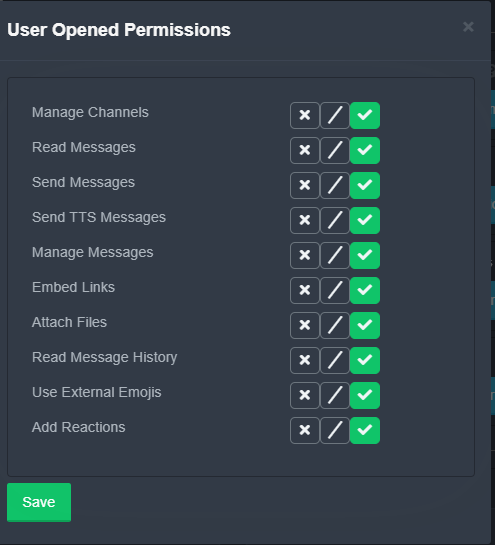
How to set the permissions for tickets
To set a change permissions go to the Dashboard -> Panel Configs -> Settings -> Permission Options
 mystic hound
@jade topaz make sure user opened permissions has read messages enabled (see above)
civic wagon
mystic hound
you don't have access to view the dashboard.
jade topaz
mystic hound
<@456226577798135808> make sure `user opened permissions` has `read messages` en...
 mystic hound
civic wagon
https://discordapp.com/channels/509192800865353738/662692902245498910/9043126969...
mystic hound
civic wagon
https://discordapp.com/channels/509192800865353738/662692902245498910/9043126969...
You need a dashboard role, administrator permission or server ownership to be able to view the dashboard
mystic hound
jade topaz
https://prnt.sc/1xxi1t4
and they still can't see the ticket?
jade topaz
No :/
mystic hound
okay, please open a ticket in either #🎫│make-a-ticket or #premium-tickets and send the server ID there, ill look at it
civic wagon
mystic hound
you don't have access to view the dashboard.
i mean, i do have all the perms in the server im mod in except the admin
do i need admin specifically?
oh wait, how do i get dashboard role?
humble sequoiaBOT
Dashboard Roles
Any role you put there will have full access to the ticket tool dashboard. The server owner and users with admin permissions already have access to the dashboard.
Be careful of which roles to put here
 copper owl
civic wagon
oh wait, how do i get dashboard role?
copper owl
civic wagon
oh wait, how do i get dashboard role?
you need an admin/owner to assign a dashboard role
civic wagon
yeah, could u let me know the command please
copper owl
there is no command
civic wagon
oh-
copper owl
humble sequoia
civic wagon
alright, ty!
copper owl
No problem
 muted isle
Thanks @copper owl answered my question
iron nightBOT
Gave 1 Rep to Neptune (current: #1 - 285)
copper owl
@kind citrus theres community support here
 kind citrus
Sorry
copper owl
and #🎫│make-a-ticket for the actual support team
kind citrus
I just saw
kind citrus
copper owl
and <#571706435449257997> for the actual support team
I can't react any emoji there
copper owl
send an image of what you see/what happens please
kind citrus
copper owl
send an image of what you see/what happens please
Wdym?
copper owl
you said you cant react to any emoji
im asking for an image of what you see in that channel/what happens when you do try to react
kind citrus
copper owl
im asking for an image of what you see in that channel/what happens when you do ...

There is no emoji to react
humble sequoiaBOT
Update your discord App
Buttons are a relatively new addition to discord and don't work with some older versions of the app.
Please verify that you have the latest version of discord, by going to the app or play store.
_ _
Discord for the App Store
_ _
Discord for the Play Store
 spice venture
Hello How do I log Transciptes?
copper owl
$help transcript
humble sequoiaBOT
How do I save transcript to a channel?
To save transcripts to a channel go to the Dashboard -> Panel Configs -> Settings -> Logging Options -> Transcript Channel
copper owl
@spice venture ^^
iron nightBOT
Gave 1 Rep to Neptune (current: #1 - 286)
copper owl
Anytime
 errant hemlock
probably me beeing stupid but enen with the help command i cant figgure out how to add someone to a ticket. Can someone heelp please?
tribal cedar
You can use $add userID
errant hemlock
how do i get the user id? Sorry im so stupid
tribal cedar
Right click their username and at the bottom I copy id
You must have developer mode on
tribal cedar
Not stupid to ask questions about what you don't know
errant hemlock
and does it do anything bad?
humble sequoiaBOT
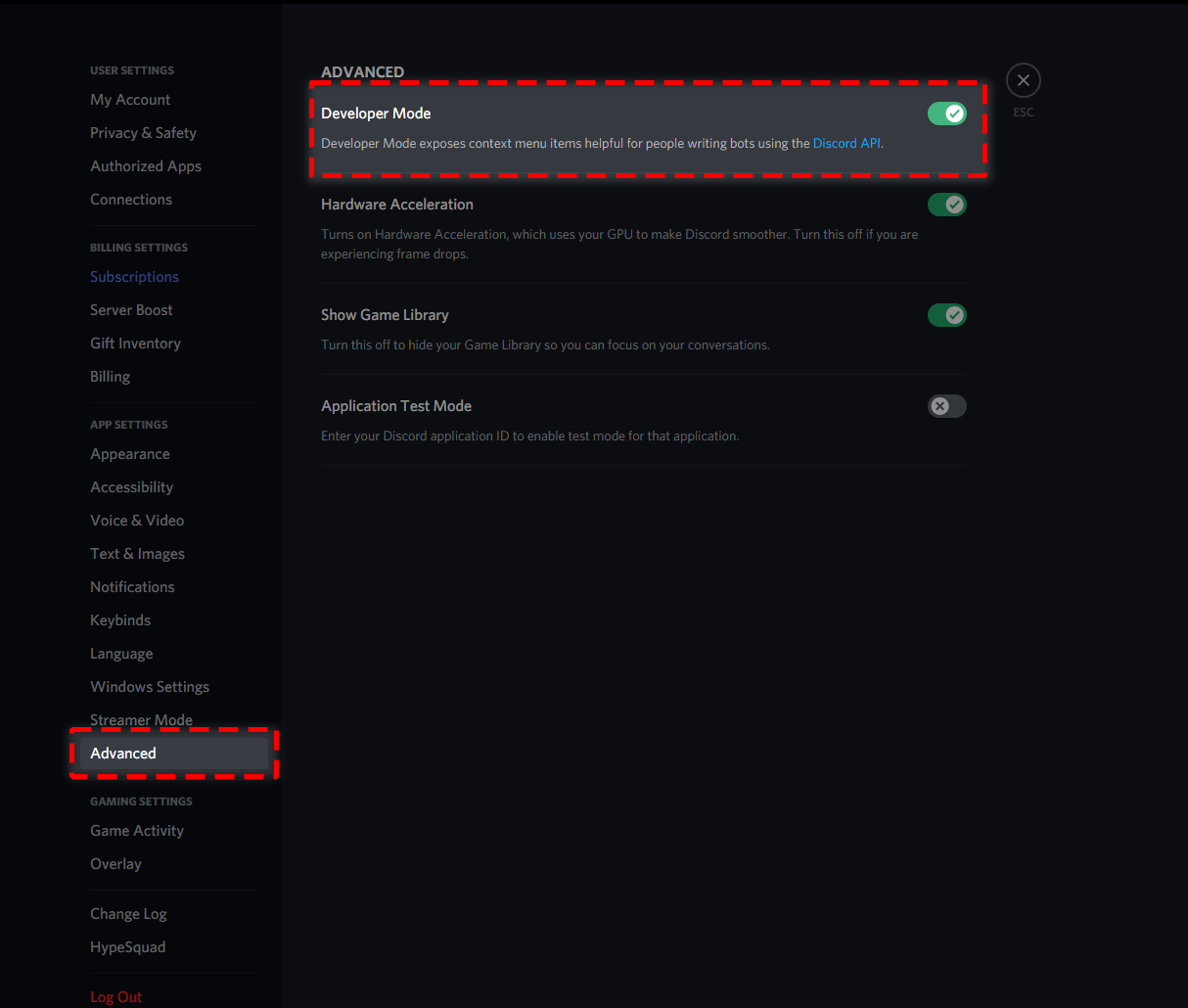
How to turn on developer mode
To enable developer mode do the following:
[PC] go to Settings -> Advanced -> Developer mode
[Mobile] go to Settings -> Appearance -> Developer mode
 errant hemlock
thankyou so much :)
tribal cedar
Anytime
errant hemlock
one finall question, cani add custon roles to be able to see the tickets all the time?
copper owl
$help support
humble sequoiaBOT
How to let support team see into a ticket
About support roles
A support role lets your support team see into tickets with out having to add them manually to each and every ticket.
You can add as many support roles as you like per panel.
NOTE that the way discord works all admins can see into tickets regardless of this.
How to set a support role
To set a Support role go to the Dashboard -> Panel Configs -> Settings -> General Options -> Support Team Roles.
NOTE that the support role will not be able to see into tickets that are already created..
copper owl
@errant hemlock ^^
errant hemlock
thankyou so much, you guys are awesome
copper owl
of course, anytime
jade topaz
Curious if it’s set to when you “use an item” and gain the role related, if it removed previously purchased roles? I wanna incorporate this feature for our color roles and in order to work properly it would need to remove the precious color role and provide the new one upon consumption
Also I’m curious why I don’t have the premium role. I definitely have it 👀
tribal cedar
jade topaz
Also I’m curious why I don’t have the premium role. I definitely have it 👀
type $pc
$pc
humble sequoiaBOT

Thank you
Thank you for purchasing Ticket Tool Premium @tribal cedar. You have now been given the <@&535595160189403136> role!
Found 5 servers in total and 1 with premium and permission
jade topaz
$pc
humble sequoiaBOT
Thank you
Thank you for purchasing Ticket Tool Premium @lime aurora. You have now been given the <@&535595160189403136> role!
Found 16 servers in total and 1 with premium and permission
tribal cedar
Now as for your question could you re explain it. Looking at it Im just confused
jade topaz
Okay, well you can put items in the shop and purchase them.
The idea is that you purchase an item, say “elixir of optimism”.
Then you subsequently use that item and it provides the role “optimistic” which happens to be orange.
That’s your color role.
Then you buy an “elixir of reliability” and this role is green.
When you use this role it sets you to green and removes the optimism color role from before
plain surge
$tts
humble sequoiaBOT
You're in the wrong place
We provide support for @pseudo glen discord bot and cannot help you with whatever issue you have.
Please make sure to contact the appropriate support team.
If you don't have any further questions regarding our bot Ticket Tool, please close this ticket
_ _
jade topaz
Oh I am indeed. I’m in 3 servers asking for help on programming them oops
I though I’d came back to unbelievaboat
plain surge
No worries
tribal cedar
jade topaz
I though I’d came back to unbelievaboat
Happens. Any TT questions though come straight here and we will help you out
jade topaz
No worries, the bot is perfectly coded for it’s purpose and very efficient. I’ve never had any issues with tickettool. Appreciate the organizational help 🙏🏼
 solid stream
jade topaz
No worries, the bot is perfectly coded for it’s purpose and very efficient. I’ve...
solid stream
jade topaz
No worries, the bot is perfectly coded for it’s purpose and very efficient. I’ve...
It's a fairly simple concept, just have a database track what roles it's given to the user
Then it would know what to remove
Or have it know what roles are for what and remove "item" roles if it doesn't apply.
jade topaz
solid stream
Or have it know what roles are for what and remove "item" roles if it doesn't ap...
Yeah that’s the goal but idk how to code that myself currently. The idea was exactly that. 30 roles that you can only have 1 or at a time. So you buy one and it removes all other 29 which will only successfully ping on the 1 you currently have. So you never have more than one color role
solid stream
It's very simple to program, I'm a little busy dealing with a new born or I would write you a basic script.
copper owl
Mini Battle :D
potent scaffold
solid stream
It's very simple to program, I'm a little busy dealing with a new born or I woul...
Congrats on the kid.
solid stream
jade topaz
Yeah that’s the goal but idk how to code that myself currently. The idea was exa...
Have an array of all your color $roles (ids), for simplicity I would use an object with each item/color mapped to the id
{
"blue" :"123...",
"fish" :"456..."
}
On button/reaction/command add appropriate role, then check if user had any of the other $roles and remove them.
For $role in $roles {
    If(member.roles.cache.has($role).remove()
}
Can I add/dm you?
Or I can just ask you here, how much would it cost to have you help with adding that to our current bot coding?
Not ticket tool. We host our own bot
solid stream
Language the bots written in?
solid stream
That's unfortunate, I don't really do that one lol
solid stream
I work with Javascript and could work on a python bot if needed.
I can write most languages and work on them, but I haven't done any C(anything) in forever
jade topaz
Ah gotcha. Well no worries, I’ll pass what you said and how to do it on to whomever I end up finding to code it, if a suitable bot doesn’t exist. It’s just the bot we host is a fully made bot we just downloaded the code for and maybe I could learn to code what I want done but I’m not sure how to edit the premade code without breaking it. I feel like that’s a bit more complicated than just making what I want separately
solid stream
You might be able to find someone here to help ya out. (possibly, but have no idea how active their C community is)
 shut bolt
 heavy gulch
is the bot working for you guys?
heavy gulch
is the bot working for you guys?
Yeap
shut bolt
heavy gulch
https://gyazo.com/b28e4272b1e6626f613cebcdb92e0163
Wait a couple of seconds and then try again, just had the same error yet the bot created the ticket a couple of seconds after
shut bolt
Lol, that's truly rare
jade topaz
humble sequoia
If there is French Support, English Support, & Report a User Panel, when a user clicks one of these buttons, will Support role be able to see what button the user clicked?
shut bolt
jade topaz
If there is French Support, English Support, & Report a User Panel, when a user ...
Each button is for a different panel, and has a different message, a category and a name, so we know which you opened, also we have logs of actions, the only panel we don't have access to is the Report panel
jade topaz
Report a User panel or a separate Report panel?
shut bolt
jade topaz
Report a User panel or a separate Report panel?
We don't have access to tickets created through this button

Wait, do you mean like as a general question to apply it to your server? Or how we have it here?
jade topaz
.
tribal cedar
This is ticket tool community support. Need help?
shut bolt
tribal cedar
This is ticket tool community support. Need help?
He opened a ticket
Yet, he closed it
Lol
🤷♂️
He got it solved by himself, just checked
tribal cedar
Awesome! You guys are always around I just try to be here in off hours. :)
vestal owl
Hey I brought Ticket tool premium how do I get the bot and role?
shut bolt
tribal cedar
Awesome! You guys are always around I just try to be here in off hours. :)
I'm not always here I promise jajaja
shut bolt
vestal owl
Hey I brought Ticket tool premium how do I get the bot and role?
Run $pc
tribal cedar
The bot is on the dashboard
vestal owl
Here?
shut bolt
vestal owl
Here?
Yeap
humble sequoiaBOT
Ticket Tool Premium
Get premium at https://tickettool.xyz/premium
Manage your subscriptions at https://tickettool.xyz/subscriptions
Why Premium?
Premium lets you customize the bot just how you want it. It also helps keep the bot running.
shut bolt
The role will be given by the command
vestal owl
K
shut bolt
To add the bot
vestal owl
$pc
humble sequoiaBOT
Premium Check
I was unable to detect a premium server for @vestal owl.
Found 17 servers in total and 0 with premium and permission
Inviting and Enabling Premium Bot
The first thing you will need to do is invite the premium bot, an invite can be found here
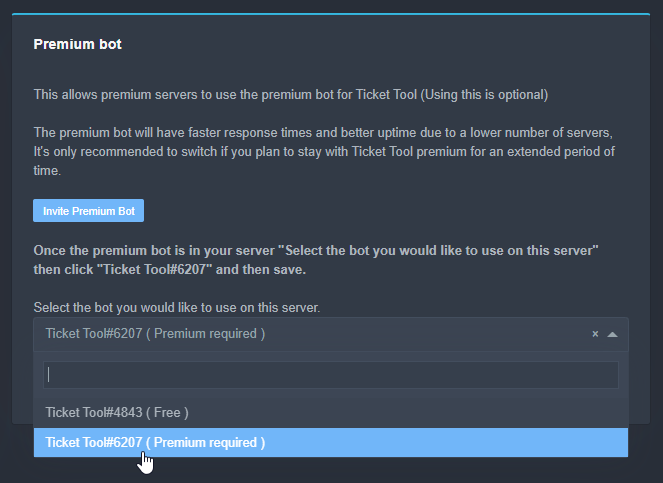
Once the bot is in your server we will head to the dashboard and manage your server. When you are managing your server, you want to head into "Server Configs" then click the drop down menu under "Select the bot you would like to use on this server" then click "Ticket Tool#6207" and then save.
 jade topaz
$pc
humble sequoiaBOT
Thank you
Thank you for purchasing Ticket Tool Premium @split sierra. You have now been given the <@&535595160189403136> role!
Found 87 servers in total and 1 with premium and permission
vestal owl
Wha
shut bolt
vestal owl
Wha
Rare
vestal owl
Oh
shut bolt
Oh yeah
shut bolt
Probably that
Assign the bot and then run the command, my bad, didn't remind you haven't assigned it yet
vestal owl
?
humble sequoiaBOT
Premium Check
I was unable to detect a premium server for @vestal owl.
Found 17 servers in total and 0 with premium and permission
vestal owl
...
vestal owl
Link?
vestal owl
Oh
shut bolt
Run the command, and let me know when done
 shut bolt
 gloomy bay
seems like the select bot dropdown has broken
gloomy bay
seems like the select bot dropdown has broken
If you don't have premium you can't choose the premium bot
shut bolt
Refresh the page
shut bolt
You choose the premium bot?
 shut bolt
Great
 shut bolt
That explains it 🤔
jade topaz
shut bolt
We don't have access to tickets created through this button
I don't know what you mean by
jade topaz
shut bolt
Each button is for a different panel, and has a different message, a category an...
"we dont have access to this Report panel"
shut bolt
jade topaz
I don't know what you mean by
Please rephrase your question, I think I didn't get it properly
jade topaz
Do you mean as in Ticket Tool Support, (you), or Support roles in any server?
shut bolt
jade topaz
Do you mean as in Ticket Tool Support, (you), or Support roles in any server?
We, as Support Team
jade topaz
Basically, who does not have access to the Report button.
shut bolt
Everyone could open a ticket
shut bolt
Yet, the support team doesn't have access to it
jade topaz
Moderators in this server?
vestal owl
It's just the support team only for answer support tickets
vestal owl
jade topaz
Moderators in this server?
Yes
jade topaz
Ok. And Moderators are higher than Support team, in this server, correct?
vestal owl
Yes
shut bolt
jade topaz
Moderators in this server?
Not even Mods
jade topaz
Ok, thanks.
shut bolt
jade topaz
Ok, thanks.
Sure
jade topaz
thanks @shut bolt
iron nightBOT
Gave 1 Rep to Pablo. (current: #10 - 116)
shut bolt
Sure bro
humble sequoiaBOT
shut bolt
Check out the setup guide
shut bolt
 obsidian geyser
i must create a role?
obsidian geyser
i must create a role?
It's optional, if you want to have a support team to look into the tickets, then you should
obsidian geyser
good after that, now I have an urgent matter
obsidian geyser
shut bolt
It's optional, if you want to have a support team to look into the tickets, then...
but name this role "zespół wsparcia"?
in polish
what permission i must give this role
this is why i ping u
shut bolt
obsidian geyser
but name this role "zespół wsparcia"?
~~in polish~~
You can name it as you wish
shut bolt
obsidian geyser
what permission i must give this role
It's not required to have any special perm in your server, rather, you must assign it as a support role as indicated in the guide
obsidian geyser
i didnt understand all of this
i write on ticket channel open and bot says "this channel isnt a ticket"
or something like thay
 fading comet
How does one change a pannel name
these things right here

Oh wait I found it
am dumb
 olive thorn
Hi there, is there currently an option on ticket tool to allow ONLY certain users on discord to raise UNLIMITED ticket? e.g. User A can raise only 3 ticket maximum but User B can raise unlimited ticket.
humble sequoiaBOT
-- moved to ticket --
potent scaffold
olive thorn
Hi there, is there currently an option on ticket tool to allow ONLY certain user...
Im now curious about this as well /gen
shut bolt
Not possible, the limit is either per panel or globally per user, there is no a feature to date that allows this to be done with a specific users and/or roles
potent scaffold
Ah gotcha. Thanks Pablo
shut bolt
Sure bro :)
 wanton thicket
hello
how do i make ticket tool ping my staff role?

when a new ticket is opened.
Thanks.
copper owl
$help ping
humble sequoiaBOT
How to make Ticket Tool ping a role
To make ticket tool ping a role when a ticket is opened, go to the Dashboard -> Panel Configs -> Settings -> Ticket Options -> Ticket Message -> Message Text and do this:
{@Role name} This is case sensitive and the role must have @mentions enabled
copper owl
@wanton thicket
 viscid laurel
hi guys i need a hand. I have created a panel 1, is it possible to have (for example) ticket 1 permanently linked to panel 1? Not that a new tiket opens every time.
copper owl
viscid laurel
hi guys i need a hand. I have created a panel 1, is it possible to have (for ex...
so you want one ticket to be opened constantly for one panel?
i dont understand what you're trying to acheive if im being honest
viscid laurel
copper owl
so you want one ticket to be opened constantly for one panel?
I explained myself wrong ... I would like to create only ticket 1 from panel 1 and not a new one every time ... is it possible?
copper owl
viscid laurel
I explained myself wrong ... I would like to create only ticket 1 from panel 1 a...
i still dont understand.. you want one ticket to be created from one panel and keep that ticket open?
viscid laurel
copper owl
i still dont understand.. you want one ticket to be created from one panel and k...
Yes
copper owl
i mean,, you can do that but i dont see the point
you can just make a new channel for the same purpose
discord has a limit of 500 channels per server and 50 channels per category
so just making a new panel everytime you need a new ticket would mess some things up
viscid laurel
so what should I do?
copper owl
what were you gonna use the ticket for?
viscid laurel
to open the booking to a group of up to 5 people
copper owl
viscid laurel
to open the booking to a group of up to 5 people
okay so
just make a panel in a private chat where you can access it
and open a ticket everytime you want to open a booking
copper owl
run $pc, but you need the premium to be redeemed and active in a server where you have access to the dashboard
 sturdy garden
$pc
humble sequoiaBOT
Thank you
Thank you for purchasing Ticket Tool Premium @sturdy garden. You have now been given the <@&535595160189403136> role!
Found 4 servers in total and 1 with premium and permission
sturdy garden

copper owl
 idle terrace
I forgot to submit the monthly report what to do pls help
idle terrace
I forgot to submit the monthly report what to do pls help
monthly report?
can you elaborate on this?
idle terrace
copper owl
monthly report?
Yes I forgt it
copper owl
elaborate please, what does a monthly report have to do with Ticket Tool?
 quick fiber
how do I solve the following error> Servers - (server not showing up? try relogging)
It looks like Ticket Tool isn't online or in any servers you have permission to access,Invite Ticket Toolor check it'sstatus
humble sequoiaBOT
Don't see your server in the dashboard?
You will possibly need to relog. Look below to see steps on how to relog.
How to relog the Dashboard.
First, you will need to go to the dashboard. Once your there, click on your avatar on the top right. after you clicked it, you will see button that says Logout. You must click that. Once you have logged out, you can log back in.
Note:
You need one of these 3 things to access the dashboard.
1. Server Owner (Level: 6)
2. Server Administrator (Level: 4)
3. Dashboard Role (Level: 2)
You can check your level using $level on your Discord Server
copper owl
try this
quick fiber
Ok
 reef wyvern
Hi guys. How to delete the ticket in discord using mobile phone. It says.like this
 scenic plinth
You're attempting to open a ticket. Unless a moderator closes your already opened ticket you can't create another, thats due to limits within the server.
reef wyvern
scenic plinth
You're attempting to open a ticket. Unless a moderator closes your already opene...
Errrr. Too bad. I was curious with that so i tried to click. Now that i need to submit. I can no longer open the ticket. Thank you for enlightening me.
iron nightBOT
Gave 1 Rep to Livi ツ (current: #5 - 166)
 bright thunder
how do I make it to where when I use the close command then it automatically saves it and delete it?
shut bolt
bright thunder
how do I make it to where when I use the close command then it automatically sav...
Hello there!
By saving it you mean to save the transcript?
If you mean that, then you should do two things mainly
First, go into the Settings of the Panel, then into General Options menu, and mark as  the Two step Ticket switch
That will make it to delete it automatically when closed
Now, for making the bot to save the transcript automatically, go into the Logging Options menu and mark the Auto Save Transcript swith as  , and select Deleted

And Save changes
Now, for the automatic saving of transcripts, you require to have a premium subscription active in that server
quick fiber
copper owl
try this
Thanks, It worked.
iron nightBOT
Gave 1 Rep to Neptune (current: #1 - 290)
shut bolt
@tepid bloom
You want to now how to create a ticket here? Or how to create your own tickets on your server?
 tepid bloom
shut bolt
You want to now how to create a ticket here? Or how to create your own tickets o...
tepid bloom
shut bolt
You want to now how to create a ticket here? Or how to create your own tickets o...
My own ticket on my server.
humble sequoiaBOT
shut bolt
Please check out this guide, is the setup documentation
tepid bloom
Okay, thank you
shut bolt
Sure
 mystic maple
humble sequoiaBOT
tribal cedar
mystic maple
humble sequoiaBOT
tribal cedar
Easy to follow instructions there @mystic maple
quick fiber
how do you do it? is there a way to put ex: support and denounce it?
 tribal cedar
You will need premium for this but heres how
humble sequoiaBOT
Multipanels are a premium feature that allow for a single panel with multiple buttons to open different tickets.
How to create a Multipanel
Premium users can combine multiple panels into one multipanel.
First, find the IDs of each panel you wish to combine. You can find them in your Panel Configs in the Dashboard
Next, send the multipanel to a channel using $panel [id1] [id2] {id3} ....
e.g. $panel 1 2 4 17 35 to combine panels 1, 2, 4, 17 and 35.
Up to 25 panels may be combined.
For a more convenient use of multipanels, you can now combine panels on the dashboard. This will allow you to directly send the multipanel from the dashboard or via the $panel ID command.
Where can I find this?
You can find this setting on the Dashboard -> Panel Configs -> Settings -> General Options
This will put all buttons from all of your panels on one message. The message is the panel message from the panel you're combining these panels in.
quick fiber
Ok
bright thunder
shut bolt
Now, for the automatic saving of transcripts, you require to have a premium subs...
thanks
iron nightBOT
Gave 1 Rep to Pablo. (current: #10 - 123)
jade topaz
$vote redeem
shut bolt
bright thunder
thanks
Sure :)
 rustic lintel
Is there anyway to stop the bot from restarting the Ticket count?
copper owl
it only does that during outages
it shouldnt do that normally
you can change the ticket count in General Options in your panel settings
rustic lintel
copper owl
it shouldnt do that normally
We was up to 40,000 tickets before It did it for the first time. Now it’s been like three or four times that it’s restarted. But thanks for the info
iron nightBOT
Gave 1 Rep to Neptune (current: #1 - 291)
jade topaz
How much panels are allowed in the free version of Ticket Tool?
Panel = Support buttons correct? (Ex: French Support, English Support, Report a Staff member buttons) Like you guys have for this server.
shut bolt
jade topaz
How much panels are allowed in the free version of Ticket Tool?
Unlimited
shut bolt
jade topaz
Panel = Support buttons correct? (Ex: French Support, English Support, Report a ...
You can have as many panels as you want, but merging them into one panel as #🎫│make-a-ticket is a premium feature
jade topaz
shut bolt
You can have as many panels as you want, but merging them into one panel as <#57...
Though “as many panels as you want” is a premium feature correct?
shut bolt
jade topaz
Though “as many panels as you want” is a premium feature correct?
Nope, you can have unlimited panels, let me get a photo

Unlimited panels
jade topaz
hey
i have a question
how would I make it so it shows how many open tickets their are
like a member counter
but for tickets
shut bolt
jade topaz
how would I make it so it shows how many open tickets their are
That's information available in your dashboard, there is no way or command to display this on the server as far as I know
jade topaz
damn
iron nightBOT
Gave 1 Rep to Pablo. (current: #10 - 124)
 wise karma
how in the world do i make a support team? is it me who's being stupid or?
shut bolt
jade topaz
Ok, thank you. <@!518666147441278998>
Sure bro
shut bolt
wise karma
how in the world do i make a support team? is it me who's being stupid or?
Hey there, no worries
Check this
$help support
humble sequoiaBOT
How to let support team see into a ticket
About support roles
A support role lets your support team see into tickets with out having to add them manually to each and every ticket.
You can add as many support roles as you like per panel.
NOTE that the way discord works all admins can see into tickets regardless of this.
How to set a support role
To set a Support role go to the Dashboard -> Panel Configs -> Settings -> General Options -> Support Team Roles.
NOTE that the support role will not be able to see into tickets that are already created..
shut bolt
Is just a role you assign in your dashboard
wise karma
it won't add them? 👀
shut bolt
You must create the roles, and assign them
shut bolt
Won't let you add the roles in the dashboard?
wise karma
nono it let me add the roles but it doesn't add said roles into the tickets 🤔
shut bolt
wise karma
nono it let me add the roles but it doesn't add said roles into the tickets 🤔
It should do with new tickets, old tickets won't be updated
wise karma
shut bolt
It should do with new tickets, old tickets won't be updated
still not happening.. can i jump into a vc with and show you?
shut bolt
wise karma
still not happening.. can i jump into a vc with and show you?
If there is no problem I would like to move into a ticket, I currently can't join VC, is it okey?
wise karma
shut bolt
If there is no problem I would like to move into a ticket, I currently can't joi...
The problem is i got people trying to open tickets which they can but none of my staff can get into the tickets meaning, i'm dealing with said tickets alone atm and i have done everything the support thingie said i needed to do for my staff the see the tickets but it still doesn't work 🤷♂️
shut bolt
wise karma
The problem is i got people trying to open tickets which they can but none of my...
You can add the roles using the $add command as a temporary solution to old tickets
wise karma
yes but what about the new tickets that's being opened?
jade topaz
wise karma
yes but what about the new tickets that's being opened?
Your sure you gave the Ticket Tool bot all of the permissions it asked for?
wise karma
Right, works now, not sure if the bot was down but that was weird, honestly 👐
wise karma
jade topaz
Your sure you gave the Ticket Tool bot all of the permissions it asked for?
I did 🙏
jade topaz
Really weird, indeed.
shut bolt
wise karma
Right, works now, not sure if the bot was down but that was weird, honestly 👐
Really rare
 rain sable
Is there a limit to the number of tickets created? (for the counter)
So does the counter resets after a specific amount of tickets created?
jade topaz
If tickets are closed, how would the $open command work to open a ticket? How do you know which ticket to open? Or is this only within the time the ticket is opened, & not yet deleted?
shut bolt
rain sable
So does the counter resets after a specific amount of tickets created?
You mean the count the ticket name has?
shut bolt
jade topaz
If tickets are closed, how would the $open command work to open a ticket? How do...
The $open command is for tickets that have been closed and not deleted, you can tell if the bot sent the Moderator message to the ticket
rain sable
shut bolt
You mean the count the ticket name has?
Yeah
shut bolt
rain sable
Yeah
It doesn't have a limit, yet in major outages it can get reseted, you can re adjust the count into the General Options menu inside the Panel Settings
jade topaz
rain sable
So does the counter resets after a specific amount of tickets created?
I also have a question to this. Say my open ticket limit is 100, what happens if someone opens ticket 101, is ticket 001 replaced or there will be 101 tickets disregarding the 100 tickets? Or unable to open ticket #101?
shut bolt
What do you mean your limit is 100? You mean the global limit?
jade topaz
Yes.
What happens if someone tries to create global ticket number 101.
Will they be stopped because the limit is 100?
Will the ticket go through and be ticket # 101?
Or will ticket # 1 be replaced by 101 b/c there is no more space for ticket 101 b/c of global limit, so a new one is created & overrides ticket # 1?
shut bolt
jade topaz
What happens if someone tries to create global ticket number 101.
Will they be s...
The global limit is not the total amount of tickets in your whole server, it's the total amount of tickets a user can open in all of your panels simultaneously. You can't limit a total amount of tickets
If a user hits the limit of tickets per panel, or globally the bot will tell them they have reached the limit
shut bolt
jade topaz
Ok. 100 is a lot Ty.
Sure bro
jade topaz
Thanks @shut bolt
iron nightBOT
Gave 1 Rep to Pablo. (current: #10 - 125)
shut bolt
^^
jade topaz
Hi, my Support Team Roles (optional) is not working, I have created a new role & the dashboard panel is unable to find it.
I have refreshed, but it still does not work.
jade topaz
Ok, I must have been in the wrong server. Nvm.
tribal cedar
Was gonna say a refresh always works for me
shut bolt
jade topaz
Ok, I must have been in the wrong server. **Nvm.**
Oh, makes Sense
shut bolt
tribal cedar
Was gonna say a refresh always works for me
Same here
Hi enigma 👋
Nice to see you
tribal cedar
That goes for all bots. Heyy
I'm around again I try during the day but you guys are quick so at night is my best bet. Thanks. ;)
shut bolt
tribal cedar
I'm around again I try during the day but you guys are quick so at night is my b...
I'm really glad to see you here again ^^
@frank garden hey there
Is the everyone role able to see your tickets?
Or maybe just a specific role
Or, you want to add a role 🤔
 frank garden
yes
no our admins can see them,, but we want to add the mods
i think i found it at panels
shut bolt
$help support
humble sequoiaBOT
How to let support team see into a ticket
About support roles
A support role lets your support team see into tickets with out having to add them manually to each and every ticket.
You can add as many support roles as you like per panel.
NOTE that the way discord works all admins can see into tickets regardless of this.
How to set a support role
To set a Support role go to the Dashboard -> Panel Configs -> Settings -> General Options -> Support Team Roles.
NOTE that the support role will not be able to see into tickets that are already created..
shut bolt
Check out this, it's how to add a role into your tickets
shut bolt
Nope, for the old ones you could use the $add command as a temporary solution
jade topaz
Hi I have created a ticket, but for the member creating the ticket, after switching channels & refreshing, the person who created the ticket is unable to see ticket history.
humble sequoiaBOT
How to set the permissions for tickets
To set a change permissions go to the Dashboard -> Panel Configs -> Settings -> Permission Options
jade topaz
The dont on default, I'm guessing, since it happened to me.
This solved the issue, thank you. thanks @shut bolt
iron nightBOT
@jade topaz :: You can't rep Pablo.#4383 for 12 minutes and 26 seconds. Try coming back later?
shut bolt
jade topaz
This solved the issue, thank you. thanks <@!518666147441278998>
You are welcome ^^
jade topaz
Hi where in the panel do I find premium buttons option?
tribal cedar
Panel configs -> settings -> button options
If thats what you mean by premium button options. If not elaborate?
jade topaz
Yes, however, how do I add more buttons?
tribal cedar
You mean how do you have more than one option per ticket channel?
Like they do here in #🎫│make-a-ticket ?
jade topaz
Yes.
tribal cedar
Ah 😉
humble sequoiaBOT
Multipanels are a premium feature that allow for a single panel with multiple buttons to open different tickets.
How to create a Multipanel
Premium users can combine multiple panels into one multipanel.
First, find the IDs of each panel you wish to combine. You can find them in your Panel Configs in the Dashboard
Next, send the multipanel to a channel using $panel [id1] [id2] {id3} ....
e.g. $panel 1 2 4 17 35 to combine panels 1, 2, 4, 17 and 35.
Up to 25 panels may be combined.
tribal cedar
Also they just updated the bot a little while ago with this feature
humble sequoiaBOT
For a more convenient use of multipanels, you can now combine panels on the dashboard. This will allow you to directly send the multipanel from the dashboard or via the $panel ID command.
Where can I find this?
You can find this setting on the Dashboard -> Panel Configs -> Settings -> General Options
This will put all buttons from all of your panels on one message. The message is the panel message from the panel you're combining these panels in.
tribal cedar
So you dont need to use a string of $panel # # # anymore
jade topaz
Ok, ty. thanks @tribal cedar
iron nightBOT
Gave 1 Rep to Enigma (current: #14 - 77)
tribal cedar
nps
shut bolt
Hey there
jade topaz
Hi, it seems my ping for a role did not work.
 shut bolt
Please send me a screenshot of the Dashboard in that configuration part
Want to check something
jade topaz
 humble sequoiaBOT
How to make Ticket Tool ping a role
To make ticket tool ping a role when a ticket is opened, go to the Dashboard -> Panel Configs -> Settings -> Ticket Options -> Ticket Message -> Message Text and do this:
{@Role name} This is case sensitive and the role must have @mentions enabled
shut bolt
You are missing the brackets {}
jade topaz
After creating a panel & it's name, is there a way to change the panel's name?
If not, can this feature be added?
shut bolt
jade topaz
After creating a panel & it's name, is there a way to change the panel's name?
Yes it is
Go into the Panel Settings
And then click on Rename Panel
jade topaz
Oh ok. Phew! Ty. thanks @shut bolt
iron nightBOT
Gave 1 Rep to Pablo. (current: #10 - 126)
shut bolt
jade topaz
Oh ok. Phew! Ty. thanks <@!518666147441278998>
Sure bro
jade topaz
iron night
<@456226577798135808> **::** You can't rep **Pablo.#4383** for 12 minutes and 26...
thanks @shut bolt
iron nightBOT
Gave 1 Rep to YAGPDB.xyz (current: #26 - 11)
shut bolt
jade topaz
thanks <@!518666147441278998>
Oh, you didn't have to, appreciate it ^^, thanks
iron nightBOT
Gave 1 Rep to USAAmericaUSA (current: #67 - 1)
 untold vapor
Does the speed hacks work on the ark hack client?
shut bolt
untold vapor
Does the speed hacks work on the ark hack client?
As said in the ticket
humble sequoiaBOT
You're in the wrong place
We provide support for @pseudo glen discord bot and cannot help you with whatever issue you have.
Please make sure to contact the appropriate support team.
If you don't have any further questions regarding our bot Ticket Tool, please close this ticket
_ _
 hexed brook
ok
jade topaz
potent scaffold
So Question. Would only one member of the servers staff run the command for the premium roll here or should it be more then one? If anyone? /gen
jade topaz
I'm attempting to copy & paste my #🎫│make-a-ticket info basically & paste it in Panel Message, however when I paste, only half of it gets pasted & I'm unable to add more glitch.
hey
@jade topaz Please post in here if you need help with Ticket Tool.
mystic hound
potent scaffold
So Question. Would only one member of the servers staff run the command for the ...
anyone can run the $pc command here if that's what you mean
mystic hound
jade topaz
I'm attempting to copy & paste my <#571706435449257997> info basically & paste i...
if you don't have premium, you may have hit your character limit
jade topaz
mystic hound
if you don't have premium, you may have hit your character limit
I have enabled my free trial.
mystic hound
jade topaz
I have enabled my free trial.
how many characters is your panel message, roughly?
jade topaz
It's enough to work, I've tried it on my other Server.
mystic hound
ah
jade topaz
Now, I'm just copying it over.
potent scaffold
mystic hound
anyone can run the $pc command here if that's what you mean
Yeah, I didn't know of there would be any issues or concerns with it whereas we have a full team and wanted to check about it. Thanks for the response @mystic hound your awesome
iron nightBOT
Gave 1 Rep to Light (current: #3 - 211)
mystic hound
jade topaz
Now, I'm just copying it over.
try relogging in the dashboard and then try again, also make sure you're resending the panel after making your changes so it can update
mystic hound
potent scaffold
Yeah, I didn't know of there would be any issues or concerns with it whereas we ...
ah, alright. Also just so you're aware, the $pc command only works in this server
jade topaz
I've tried that. Doesn't work.
potent scaffold
mystic hound
ah, alright. Also just so you're aware, the $pc command only works in this serve...
Thanks, Ill let the others know on it as well
iron nightBOT
@potent scaffold :: You can't rep Light#1591 for 58 minutes and 51 seconds. Try coming back later?
jade topaz
jade topaz
<@456226577798135808> Please post in here if you need help with **Ticket Tool**.
Yes, I need help with something.
Oh wait, it seems I haven't started my Free Trial. You need to re-activate your Free Trial for it to work. thanks @mystic hound
iron nightBOT
Gave 1 Rep to Light (current: #2 - 212)
mystic hound
ah, I see. Glad it works now
jade topaz
I need help.
potent scaffold
$pc
humble sequoiaBOT
Thank you
Thank you for purchasing Ticket Tool Premium @potent scaffold. You have now been given the <@&535595160189403136> role!
Found 5 servers in total and 1 with premium and permission
 cunning musk
$pc
humble sequoiaBOT
Thank you
Thank you for continuing to support Ticket Tool @cunning musk.
Found 3 servers in total and 1 with premium and permission
jade topaz
jade topaz
I need help.
Please describe your issue & a member of the support team will be happy to assist you.
jade topaz
jade topaz
Please describe your issue & a member of the support team will be happy to assis...
I don't know how to set the ticket up
jade topaz
jade topaz
I don't know how to set the ticket up
Run $help setup
I looked at all the steps, but couldnt understand
humble sequoiaBOT
-- moved to ticket --
 jade topaz
Also, it seems as if the ending of my Panel name was cut off, but shows up on the button. Part 1/2

Part 2/2
 copper owl
@jade topaz First off, the dev is aware of the word counter bug, no ETA on when it's going to get fixed. you can use a word counter site for the time being
Second off, your panel name has nothing got to go with your button text. Those are completely independent, you'll have to rename your panel and add the missing r
jade topaz
#deleted-channel
 twin island

 jade topaz
?
shut bolt
$arabic
humble sequoiaBOT
فريق الدعم الفني العربي
عميلنا العزيز ان كنت تبحث عن مساعدة يرجى فتح تكت خاص بفريق الدعم الفني العربي
اذهب الى#🎫│make-a-ticket
ثم قم بلضغط على الايموجي الاتي (🇯🇴)
 agile citrus
Is there a way to block some members and/or roles from creating tickets
craggy geyser
agile citrus
Is there a way to block some members and/or roles from creating tickets
Yes. Do you want to prevent them from interacting with the bot at all? Or just from specific panels
agile citrus
at all and sorry i already figured it out (server config > blacklisted roles)
 mighty flicker
$pc
humble sequoiaBOT
Premium Check
I was unable to detect a premium server for @mighty flicker.
Found 11 servers in total and 0 with premium and permission
 formal spire
the servere transcript
copper owl
did you not receive the transcript in your dms?
formal spire
i did just wondered if u got it
copper owl
we save transcripts in here yeah
formal spire
ah alr
 minor lagoon
Hey, is there a way when saving a transcript for a ticket to specify a different channel for that transcript to be sent to without changing the transcript channel completely?
copper owl
use $transcript #channel_name
it will send the transcript to that channel instead, even if you have another channel defined as your transcript channel
minor lagoon
Got it, thanks!
jade topaz
Hi. I used {@Role} to tag a role in my ticket message. It doesn't notify the role. Just is @roled.
 plain surge
You can retry using the role ID instead. Use <@&roleID> with the arrows included @jade topaz
jade topaz
For role ID, I need dev mode on?
plain surge
Yes
humble sequoiaBOT
How to turn on developer mode
To enable developer mode do the following:
[PC] go to Settings -> Advanced -> Developer mode
[Mobile] go to Settings -> Appearance -> Developer mode
jade topaz
Ok just turned it on.
humble sequoiaBOT
How do I get the ID of Roles/Channels/Emojis?
Ticket Tool has a useful command that helps you get the ID of various things like channels, roles, emojis and your server.
Just use the command $id <#channel/@role/:emoji:>. Now copy everything, including the brackets <...>, to your dashboard (or wherever you want it)
If you want the server ID, just use $id.
plain surge
Or you can go to server settings > roles > right click on the role
formal spire
how can i use underlines in embeded
 cyan urchin
Quick question.
Using command style ticket command, =new @ user
Is it possible to have ticket tool assign a role to the user we are opening a ticket for?
cyan urchin
okay thanks
formal spire
copper owl
__it should look like this__
ty
iron nightBOT
Gave 1 Rep to Neptune (current: #1 - 295)