#🆘│community-support
1 messages · Page 356 of 1
 rich axle
I created it, but the service is taking a long time...
 shut bolt
Yeah, it takes from 24 to 48 hours, apoplogies
 copper owl
Not only that
copper owl
but we only have one Portuguese staff member
so a little bit of patience is definitely appreciated
 broken cargo
Hey how can I get the stars?

 trim jolt
??????? no opened ticket
 broken cargo
Ok thank you @copper owl
 iron nightBOT
Gave 1 Rep to Neptune (current: #1 - 228)
copper owl
trim jolt
??????? no opened ticket
you're most likely spamming the button, i suggest pressing it once and waiting
trim jolt
me waiting 1 hours no opened
copper owl
because you have to press it again after 4seconds
there's most likely another error you're experiencing
trim jolt
hey support rarbic search
 safe prairie
trim jolt
hey support rarbic search
safe prairie
trim jolt
hey support rarbic search
Check #🎫│make-a-ticket
 humble sequoiaBOT
فريق الدعم الفني العربي
عميلنا العزيز ان كنت تبحث عن مساعدة يرجى فتح تكت خاص بفريق الدعم الفني العربي
اذهب الى#🎫│make-a-ticket
ثم قم بلضغط على الايموجي الاتي (🇯🇴)
 vestal owl
Hey hey
shut bolt
Hello there
shut bolt
hello there!
 unique junco
@shut bolt
shut bolt
How can we help?
copper owl
unique junco
Pls @everyone
you're lucky mods dont have those perms
unique junco
What do i do there
shut bolt
unique junco
What do i do there
Click on the button of the language you want to open the ticket
vestal owl
Im worried that a mod doesn't know how to open a ticket... and the bots called Ticket Tool
shut bolt
vestal owl
Im worried that a mod doesn't know how to open a ticket... and the bots called T...
LMAO
See his roles
He's got the proeficient
He is joking
unique junco
LMFAO
copper owl
yeah i agree with snapz
unique junco
Fuck off
copper owl
tragic should be demoted
unique junco
?ban
 prime bridgeBOT
unique junco
?ban
prime bridgeBOT
unique junco
?ban
 Wrong Use!

 Please provide the users.
 Ban Documentation
copper owl
unique junco
?ban
Do it, you'll get yelled at >:)
 leaden apex
vestal owl
copper owl
Do it, you'll get yelled at >:)
leaden apex
vestal owl
copper owl
Do it, you'll get yelled at >:)
Can u link the TOS for ticket tool
copper owl
Sure one moment
vestal owl
Ok
iron nightBOT
Gave 1 Rep to Neptune (current: #1 - 230)
 atomic barn
Oof
 shut bolt
Ghost ping
shut bolt
 jade topaz
How, would I make this actually @ the role.
jade topaz
How, would I make this actually @ the role.
$help pin
humble sequoiaBOT
Help Options
$help commands - Information on commands
$help setup - Information on bot setup
$help faq - Frequently asked questions
humble sequoiaBOT
How to make Ticket Tool ping a role
To make ticket tool ping a role when a ticket is opened, go to the Dashboard -> Panel Configs -> Settings -> Ticket Options -> Ticket Message -> Message Text and do this:
{@Role name} This is case sensitive and the role must have @mentions enabled
 shut bolt
Check this :)
iron nightBOT
Gave 1 Rep to Yareaj_ (current: #12 - 77)
shut bolt
jade topaz
thanks <@!518666147441278998>
Sure
 outer spindle
Hello!
shut bolt
Hello there
 eager cargo
Moderators are handpicked and support you apply for
outer spindle
Okay.
eager cargo
Applications for users who speak spanish, arabic, or french are open.
outer spindle
Okay, Where do you apply?
eager cargo
outer spindle
Okay.
 distant aspen
can anyone tell me why is the bot not working?
 eager cargo
Does it have the right permissions?
eager cargo
Did you change your prefix at all?
distant aspen
no
eager cargo
Does it have permission to see that channel
distant aspen
yes
eager cargo
What's your server ID?
distant aspen
759326127855501342
eager cargo
fantastic, one sec
 half kernel
Dont mean to interrupt you could try doing @humble sequoia help
@pseudo glen help
As it dont work
Great
Well dont listen to me rn then lol
eager cargo
half kernel
As it dont work
because that's not the bot selected for this server, the premium one is
half kernel
@humble sequoia help
humble sequoiaBOT
Help Options
$help commands - Information on commands
$help setup - Information on bot setup
$help faq - Frequently asked questions
eager cargo
distant aspen
759326127855501342
Mind if I open a ticket for you so I can assist ya further?
distant aspen
eager cargo
Mind if I open a ticket for you so I can assist ya further?
what do you mean?
eager cargo
 latent meteor
hey so question anyone
eager cargo
Sure
latent meteor
how do i make the bot say something after a ticket is opened
humble sequoiaBOT
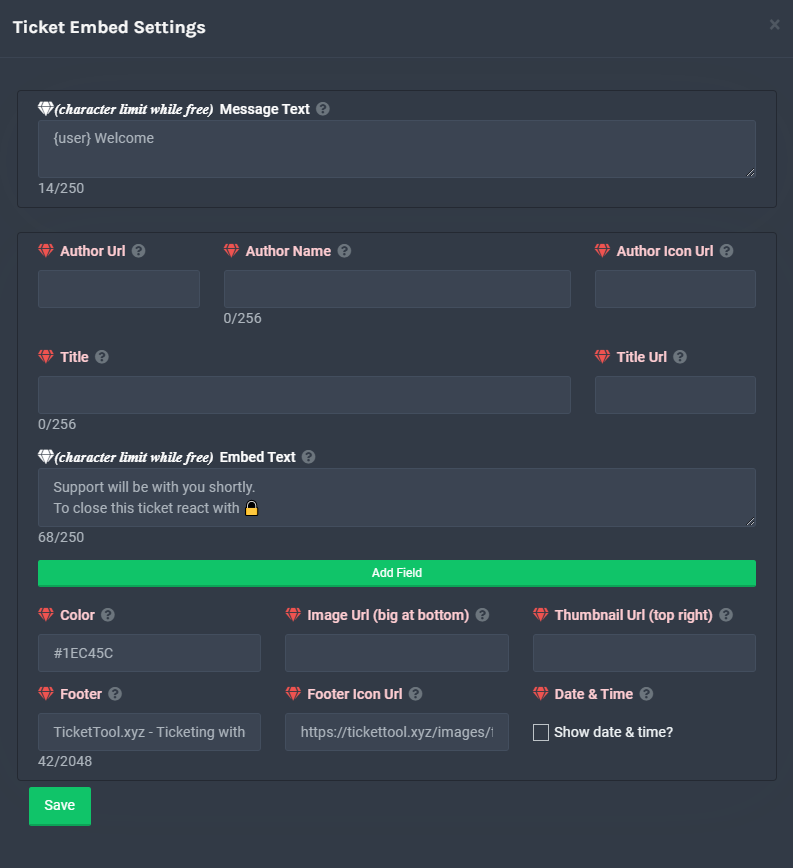
**Ticket Message**
The Ticket Message is the first message sent by the bot in a new ticket. To customise it head over to your Dashboard -> Panel Configs -> Settings -> Ticket Options -> Edit Ticket Message
 latent meteor
ah alright, thank you ❤️
eager cargo
humble sequoia
it'll auto send a ticket message by default, but you can customize it here
latent meteor
thanks @eager cargo
iron nightBOT
Gave 1 Rep to Quo (current: #2 - 205)
latent meteor
uh back again for 1 more question
is there a way to reset ticket numbers? like if i delete ticket 3 can i make the next one opened ticket 1 again
eager cargo
Go to the general options in your panel settings
Then set the ticket count to whatever you want
 modern condor
Y'a des français ?
copper owl
modern condor
Y'a des français ?
 dapper wasp
Hello!
Is the website and bot down?
Regards
atomic barn
I think the premium is down, cause its not appearing on the right side of the screen
 quick ermine
They are down.
dapper wasp
Ok, any updates?
atomic barn
When the time comes a post will be made in #📣│bot-news
 valid dove
Ok, thank you
copper owl
Heya! There seems to be an global issue with bots. A lot of bots just went offline and we're investigating the issue ASAP
We believe the issue is due to discord's side of things (not 100% certain, as it could also be a hosting issue), as a large amount of bots went offline. Please standby as we try to fix this the best we can
atomic barn

 tardy sable
xD
just tried to make ticket in here
and also didnt work then i thought okey thats more then just us
 storm pike
Thanks Neptune, appreciate the update.
 pale pilot
Hey everyone. Both of our bots are currently not working, as there is an issue with our server hoster. This also causes a lot of other popular bots to go offline. We'll update you with everything we know in #📣│bot-news
https://twitter.com/ovh_status/status/1448185498812485633?t=0P6Zm7mnnX0tymtl565EGQ&s=19
Oh well, looks like the maintenance wasn't going exactly as planned

Network and racks:: VIN/DC: We will do a maintenance on our routers on VIN DC to improve our routing.
Maintenance is planned for 13/Oct/21 9:00 AM to 10:30 AM ( UTC+2). No impact expected, device will be isolated before the change. https://t.co/n9NjpGICrU #ovh
 Twitter
·
pale pilot
Twitter
·
pale pilot
The Premium Bot shows the first signs of life. It's back online, but still inactive. Dashboard is also still down
The Dashboard is slowly recovering
pale pilot
Some shards are still too shy to fully comeback...
pale pilot
The bot should be working fine on all servers again. If it still doesn't work, open a ticket and let us know
@rancid granite does the bot not work on your server?
 rancid granite
pale pilot
<@!229897353400680449> does the bot not work on your server?
rancid granite
pale pilot
<@!229897353400680449> does the bot not work on your server?
It does not
pale pilot
@jade topaz does the bot work for you?
 halcyon herald
Ticket Tool is down for me as well
pale pilot
rancid granite
It does not
whats your server ID?
rancid granite
pale pilot
whats your server ID?
592786931062931457
pale pilot
Yeah, the shard is unfortunately completely offline and I can't even find it in our system
 kindred ridge
It’s down in one of my servers but not down in 2 others
 flint vigil
I have like 10 servers and it’s only down on one of them, and that’s the most important one hahahah
pale pilot
There are like 30 clusters or so that are completely offline and also don't show in our system. Our development team has to get on it, but unfortunately they are not available right now
kindred ridge
Where do I find my server id
pale pilot
Doesn't matter, I just wanted to check one
jade topaz
Bot down in my server showing offline
pale pilot
The bot is unfortunately still offline in some servers. We have notified the development team and hope to bring the bot back as soon as possible. Most shards are already completely up and running
 mystic hound
Unfortunately people don't seem to be reading, and we're being flooded with tickets. As a result we've closed tickets until the outage is resolved.
if you're here because your bot is offline, read #📣│bot-news
mystic hound
opened #🎫│make-a-ticket for a brief while for any non outage related questions
 solid stream
working on getting it back online
eta for full recovery 45 minutes
- I've located the cause of this outage and the last few we've had, I'm going to work on getting a fix out to prevent this in the next few days.
mystic hound
should be back now
shut bolt

 pale pawn
Hm
 sharp orbit
iron nightBOT
sharp orbit
iron nightBOT
@sharp orbit :: You can't give rep to yourself, silly.
unique junco
Thanks @shut bolt
iron nightBOT
Gave 1 Rep to Yareaj_ (current: #12 - 78)
unique junco
Poblo
 nimble cipher
@shut bolt
It said I’m missing one permission on my server
What’s that one permission am I missing?
humble sequoiaBOT
-- moved to ticket --
nimble cipher

 still dust
.
solid stream
nimble cipher
Try resending your panel
It's possible the panel that one was linked to no longer exists
I just released an update earlier today that made that error aprea.
Because before it allowed people to use invalid panels when it shouldn't have
shut bolt

 severe path
solid stream
Try resending your panel
severe path
solid stream
Try resending your panel
||#897886849899585556 👀||
shut bolt
severe path
||<#897886849899585556> 👀||
I was looking for the ticket LMAO
solid stream
nice
I saw it was moved to a ticket but didn't want to find it.. so I just figured I would post it here for staff and them.
shut bolt

 teal igloo
Can anyone help with Athena?
copper owl
teal igloo
Can anyone help with Athena?
Athena? are you sure this is Ticket Tool related?
 half kernel
@copper owl can you link the tos and privacy policy for me?
 kind hollow
What is this ?
 shut bolt
Hello there
The bot is lacking a permission in that channel
Please run that command and send us the link it will respond with
kind hollow
How do I do this??
shut bolt
Go into that channel and type $debug
shut bolt
Would you like if we take this into a ticket?
half kernel
He is asking if you want to finish this in a ticket
shut bolt
Send me the server ID please
kind hollow
ok..
kind hollow
shut bolt
Send me the server ID please
897516519012053022
copper owl
kind hollow
897516519012053022
سلام و عليكم, انت عربي؟
kind hollow
copper owl
سلام و عليكم, انت عربي؟
يب
copper owl
kind hollow
يب
صديقي البوت يحتاج الصلاحيات Manage Messages و Manage Roles
 kind hollow
copper owl
صديقي البوت يحتاج الصلاحيات `Manage Messages` و `Manage Roles`
kind hollow
copper owl
صديقي البوت يحتاج الصلاحيات `Manage Messages` و `Manage Roles`
نفس المشكل ..
copper owl
kind hollow
نفس المشكل ..
كيف نفس المشكلة؟
jade topaz
can I automatically set open tickets in nsfw?
 scenic plinth
No
 copper owl
the ping doesnt work
kind hollow
اتكلم عربي
copper owl
$arprembot
humble sequoiaBOT
كيفية تعطيل بوت البريميوم
لتعطيل بوت البريميوم ، سيتعين عليك الانتقال إلى
Dashboard -> Server Configs -> Premium bot
ستظل ميزات البريميوم تعمل على البوت المجاني.
 copper owl
@kind hollow ^^
 shut coral
hey there! is there a way I can make a ticket limit per user? I have a few annoying members that keep making tickets for no good reason
or a timeout limit?
prime bridgeBOT
+VEX+ has been silenced for 10m 
Reason: Posting NSFW Websites
+VEX+#4656 | 715135464327217202
severe path
shut coral
hey there! is there a way I can make a ticket limit per user? I have a few annoy...
 shut coral
severe path
shut coral
severe path
thank you!!
iron nightBOT
Gave 1 Rep to Schlafendes24 (current: #22 - 23)
severe path

 brave ore
Hi! If I already have a ticket transcript channel up but it’s mixed with 2 different types of tickets- is there a way to split those up without having to reopen and re-save all the tickets?
copper owl
Well
if the tickets are already deleted, there's no way for you to reopen them
as for moving one panel's transcripts from one channel to another, you wouldnt be able to do that
you can only define another transcript channel
brave ore
right!… oh well! Thanks though 🙂
prime bridgeBOT
+VEX+ has been silenced for 10m
Reason: Posting NSFW Websites
+VEX+#4656 | 715135464327217202
 lone spear
How can we make it so it opens up the support channel in a certain category?
severe path
$help category
severe path

jade topaz
I need help with the ticket tool. People can’t seem to click on the “create a ticket” emoji.
shut bolt
Please send us a screenshot
jade topaz
I can’t. Nothing appears to happen when clicking on it. It just won’t allow anyone to open or create a ticket.
shut bolt
jade topaz
I can’t. Nothing appears to happen when clicking on it. It just won’t allow anyo...
Would you like if we move this into a ticket?
jade topaz
It won’t be anything useful. All it shows is the create a ticket emoji. Is there any setting that fixes this?
And sure if you’d like
shut bolt
Sure, a second please
 hollow locust
hey guys, i have a little problem. namely where and how can I set that the marked message is no longer displayed?
 shut bolt
hollow locust
hey guys, i have a little problem. namely where and how can I set that the mark...
shut bolt
hollow locust
hey guys, i have a little problem. namely where and how can I set that the mark...
Hello there, you can click on the small blue text that says Discard this message, its a message only you will see and it will automatically dissapear if you refresh your Discord
hollow locust
Ah great thanks ❤
shut bolt
hollow locust
Ah great thanks ❤
Sure :)
jade topaz
I'm having another problem. the regular members in the server can view newly created tickets. is there a way to disable that?
jade topaz
ok thank you
scenic plinth
Np
 wide wharf
I accedently transfered my premiunm bot to another server how woould i change it back?
shut bolt
wide wharf
I accedently transfered my premiunm bot to another server how woould i change it...
Hello there
You mean you transfered the subscription into another server?
wide wharf
yes and im not the owner of that server
shut bolt
Go into the second link, and then choose the server you want the subscription to be at, then save changes
wide wharf
ok tysm
shut bolt
Sure
shut bolt
wide wharf
ok tysm
Please let me know if it works
wide wharf
it did
shut bolt

 wide marsh
Guys is there a way we can control maximum number of open tickets?
wide marsh
oh k
cause in a raid
people suddenly came around 87 tickets unless we hide the channel
so i thought of asking is there a entire server limit of open tickets so it can help us in-case of something
 tawdry chasm
hello.
unique junco
@tawdry chasm don’t use commands here
 wise oar
is there any way by which when I close a ticket, I get the an option like "transcript and delete", instead I have to do both separately?
humble sequoiaBOT
-- moved to ticket --
 graceful scarab
Hello, is there a way to let a role speak, talk, etc in a channel but not allow them to modify it in any way? I set my config to not allow my Helper Role to close tickets but my helper still has the ability to.
humble sequoiaBOT
How to set the permissions for tickets
To set a change permissions go to the Dashboard -> Panel Configs -> Settings -> Permission Options
 graceful scarab
Ah, thanks.
 the manage channel permission
graceful scarab
the manage channel permission
graceful scarab
kk
shut coral
severe path
hey about my earlier comment, how do i get to this page? I can't find it
shut bolt
shut coral
hey about my earlier comment, how do i get to this page? I can't find it
Hey there
humble sequoiaBOT
 shut bolt
Enter into your dashboard
Go into Panel Configs
Open the Settings of the panel
And open the General Options menu
There you shall find it
copper owl
 crystal warren
im so confused how to work this bot out, anyone help?
crystal warren
im so confused how to work this bot out, anyone help?
what did you do until now?
Did you create a panel?
crystal warren
i invited the bot thats all 😭
copper owl
Ok so
humble sequoiaBOT
crystal warren
im on that link
copper owl
select your server, go to panel configs, create a panel, then send the panel to a channel
crystal warren
name of panel?
copper owl
The name you want to call the panel
copper owl
it's up to you
yeah any, it's a name it wont change how the bot functions
the only thing it'll change is the panel message
this is the panel name

 copper owl
yup
crystal warren
how?
copper owl
some things are premium, others are not
crystal warren
oh okay
copper owl
everything you see that is marked with a  is a premium feature, everything
  is a free feature
humble sequoiaBOT
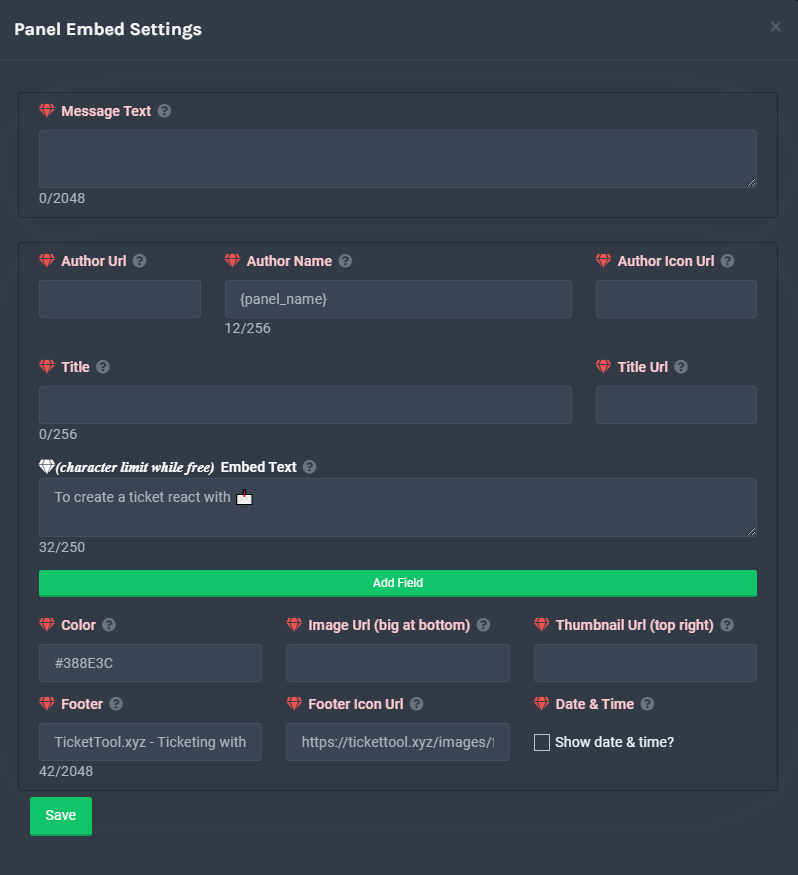
**Panel Message**
The panel message is where people react to make a ticket. To customize it head over to your Dashboard --> Panel Configs -> Settings -> Panel Options -> Edit Panel Message
 copper owl
which is the embed text
crystal warren
yes
copper owl
crystal warren
which is this
crystal warren
thats all i need
copper owl
yup, the other boxes are premium
copper owl
No problem
half kernel
crystal warren
nvm i might buy
Definitely worth it in my opinion
humble sequoiaBOT
 Faster Premium Bot
Automatic Transcripts
Full Customization
Custom Buttons
Direct Messages
Ticket Automation
Multipanels
Premium Support
You can purchase premium here:
Price
$6 - Monthly
$66 - Yearly
 Premium
copper owl
Premium
copper owl
this is what you're getting with premium
shut coral
shut bolt
There you shall find it
thank you. My issue is with members opening and closing too many tickets, was wondering if there is a way to disable them from making so many in a day
iron nightBOT
Gave 1 Rep to Yareaj_ (current: #12 - 79)
shut bolt
shut coral
thank you. My issue is with members opening and closing too many tickets, was wo...
You can limit how much tickets a single user can make per panel or in all panels, in the moment we don't have a feature to limit it in a certain period of time, apologies
shut coral
right, no problem
 gentle flicker
Hello, how can I redeem the premium role in Discord?
shut bolt
gentle flicker
Hello, how can I redeem the premium role in Discord?
Please run $debug in your server and send us the link the bot will answer with
And we'll check it
gentle flicker
shut bolt
Please run $debug in your server and send us the link the bot will answer with
where can I send it? Thanks!
iron nightBOT
Gave 1 Rep to Yareaj_ (current: #12 - 80)
shut bolt
gentle flicker
where can I send it? Thanks!
Here you can send it without problem :)
iron nightBOT
Thank you!
Thank you for purchasing Ticket Tool Premium @gentle flicker. You have now been given the <@&535595160189403136> role!
shut bolt
Thanks for being a premium user!
gentle flicker
shut bolt
Thanks for being a premium user!
Thank you!😆
iron nightBOT
@gentle flicker :: You can't rep Yareaj_#4383 for 57 minutes and 20 seconds. Try coming back later?
shut bolt
😊
severe path

humble sequoiaBOT

Thank you
Thank you for continuing to support Ticket Tool @solid stream.
Found 43 servers in total and 9 with premium and permission
solid stream
$pc @severe path
shut bolt
HELL YEAH
humble sequoiaBOT
Thank you
Thank you for continuing to support Ticket Tool @severe path.
Found 71 servers in total and 6 with premium and permission
shut bolt
THERE YOU GOOOOOO
solid stream
$pc @shut bolt
humble sequoiaBOT
Thank you
Thank you for continuing to support Ticket Tool @shut bolt.
Found 33 servers in total and 1 with premium and permission
severe path
humble sequoia

 tribal cedar
Sexy @solid stream
 sinful marsh
humble sequoiaBOT
sinful marsh
humble sequoiaBOT
Ticket Tool is a fantastic bot that deals with Tickets! With an easy to use bot that has a dashboard/website at https://tickettool.xyz/. Ticket tool is one of a kind with its customization and truly is a great bot which is why it has amassed over 200 million users!
The bot offers:
Ticketing without clutter!
Full Customization!
Easy to use and customize!
Amazing Support!
Ticket Transcripts
24/7 Uptime
Custom Tags
Ticket Tool is currently being used within 890,000+ servers, with a total of 219 million+ users, and has created over 74 million+ tickets.
Ticket Tool truly is an amazing bot that has such a big impact on this server!
:globe_with_meridians: https://tickettool.xyz/
 https://discord.gg/tUM9Xcv
:scroll: https://docs.tickettool.xyz/
~ Ticket Tool Team
·
 twin locust
anyone know how to make the bot tag a certain role when a ticket is created
jade topaz
twin locust
anyone know how to make the bot tag a certain role when a ticket is created
$help ping
humble sequoiaBOT
How to make Ticket Tool ping a role
To make ticket tool ping a role when a ticket is opened, go to the Dashboard -> Panel Configs -> Settings -> Ticket Options -> Ticket Message -> Message Text and do this:
{@Role name} This is case sensitive and the role must have @mentions enabled
 boreal hinge
Hello, If i want to cancel my premium, how can I do it?
humble sequoiaBOT
Ticket Tool Premium
Get premium at https://tickettool.xyz/premium
Manage your subscriptions at https://tickettool.xyz/subscriptions
Why Premium?
Premium lets you customize the bot just how you want it. It also helps keep the bot running.
 craggy geyser
Second link there
copper owl
$help support
humble sequoiaBOT
How to let support team see into a ticket
About support roles
A support role lets your support team see into tickets with out having to add them manually to each and every ticket.
You can add as many support roles as you like per panel.
NOTE that the way discord works all admins can see into tickets regardless of this.
How to set a support role
To set a Support role go to the Dashboard -> Panel Configs -> Settings -> General Options -> Support Team Roles.

NOTE that the support role will not be able to see into tickets that are already created..
copper owl
@jade topaz ^^
 civic rover
Where do I edit the description message
 humble sequoiaBOT
**Panel Message**
The panel message is where people react to make a ticket. To customize it head over to your Dashboard --> Panel Configs -> Settings -> Panel Options -> Edit Panel Message
 steady zenith
is there a way to make it so that the ticket automatically closes if the person that opened it leaves
craggy geyser
Yes. It's a premium feature
steady zenith
damn thats annoying
civic rover
Also if a person leaves and rejoins, will ticket tool update the channel overrides for that user to access the ticket
steady zenith
how about automatically closing a ticket after a certain amount of time
craggy geyser
steady zenith
how about automatically closing a ticket after a certain amount of time
That used to be a feature (also premium) but had to be disabled due to rate limits
civic rover
civic rover
Also if a person leaves and rejoins, will ticket tool update the channel overrid...
^^
craggy geyser
civic rover
Also if a person leaves and rejoins, will ticket tool update the channel overrid...
I don't actually know. Haven't tested it
civic rover
Oh alright
craggy geyser
I will find out
civic rover
Cool
craggy geyser
They don't get access back automatically
civic rover
I can't seem to find my panel I had created at the panel configs, is there a save option for that? Couldn't seem to notice it while I had created the panel
civic rover
craggy geyser
They don't get access back automatically
Alright
craggy geyser
Once created it is there. Its the individual settings that need saving. If it is no longer there it means someone deleted it

 civic rover
craggy geyser
Once created it is there. Its the individual settings that need saving. If it is...
civic rover
craggy geyser
Once created it is there. Its the individual settings that need saving. If it is...
I think I had it all saved, shouldn't the channel I had implemented it for appear at the ss above?
craggy geyser
It does seem so. It does say its a different panel so it should be there
civic rover
mhm, should I create a new pannel then?
The settings for my first panel I had saved all are working in the server but I can't update it since that panel doesn't show up in the dashboard anymore so yeah.
Is is supposed to work with no saved pannel?
civic rover
civic rover
The panel in this ss just has the default settings
civic rover
civic rover
The settings for my first panel I had saved all are working in the server but I ...
Oh nvm am dum 💀
 brave cliff
Is it possible to change back to reactions? I don't really like how the buttons look for me
copper owl
brave cliff
Is it possible to change back to reactions? I don't really like how the buttons ...
Nope, it will give users an error if you do change back to reactions
im not even sure if you have the ability to change it back to reactions, I dont think that exists anymore
yup, $oldpanel doesn't work anymore
brave cliff
oh ok
copper owl
Trust me, I know you might not like the look of buttons, but they're so much more efficient than reactions
 warm tartan
How the hell do you relog?
humble sequoiaBOT
Don't see your server in the dashboard?
You will possibly need to relog. Look below to see steps on how to relog.
How to relog the Dashboard.
First, you will need to go to the dashboard. Once your there, click on your avatar on the top right. after you clicked it, you will see button that says Logout. You must click that. Once you have logged out, you can log back in.
Note:
You need one of these 3 things to access the dashboard.
1. Server Owner (Level: 6)
2. Server Administrator (Level: 4)
3. Dashboard Role (Level: 2)
You can check your level using $level on your Discord Server
warm tartan
I did log out and log back in
copper owl
warm tartan
I did log out and log back in
I assume your server is still not showing up?
brave cliff
Is it possible to send messages after a user opens a ticket?(not the ticket message)
warm tartan
My server was
copper owl
brave cliff
Is it possible to send messages after a user opens a ticket?(not the ticket mess...
Automatically? no
warm tartan
Just one of the channels wasn't showing when trying to create a panel.
copper owl
not a feature as of now
brave cliff
damn
copper owl
warm tartan
Just one of the channels wasn't showing when trying to create a panel.
reload the page
warm tartan
I did
copper owl
So the issue is, one of the channels isnt showing up when you want to select a channel to send the panel to?
warm tartan
Yeah.
copper owl
does the channel have any messages or anything?
warm tartan
Mhm
copper owl
Is deleting and redoing the channel an option for you?
warm tartan
Noooo
I already made the embed with a webhook for a support message so I'm not doing it again
copper owl
I suggest you look at the list again then. All channels should be showing up. Make sure ticket tool has all the necessary permissions in the channel you're trying to send it to
copper owl
if it still doesnt show up, just use the following command:
$panel [ID]
ID being the number of the panel. IE: $panel 1
copper owl
yes in the channel you want the panel message to be in
warm tartan
Which id I use?
copper owl
copper owl
if it still doesnt show up, just use the following command:
`$panel [ID]`
ID be...
Explained here
warm tartan
I don't know how to get the ID
copper owl
ID being the number of the panel.
Just look at the website
your panels should be numbered, if you have only one panel, then it's by default 1
warm tartan
I have no panels
copper owl
You have no panels?
warm tartan
Yes
copper owl
then thats why your channel isnt popping up.
warm tartan
?
copper owl
make a panel
warm tartan
But I need to put in the channel then
copper owl
you cant put a panel in a channel if said panel doesnt exist
you first create a panel, then send it to a channel
not the other way around
warm tartan
 copper owl
just create it
warm tartan
I always do the channel when creating
copper owl
you'll be able to send it after it's created too
 fallow quarry
Anyone know how I can get the ticket bot to ping a role when a ticket is opened?
copper owl
$help ping
humble sequoiaBOT
How to make Ticket Tool ping a role
To make ticket tool ping a role when a ticket is opened, go to the Dashboard -> Panel Configs -> Settings -> Ticket Options -> Ticket Message -> Message Text and do this:
{@Role name} This is case sensitive and the role must have @mentions enabled
copper owl
@fallow quarry this is how
warm tartan
thanks
copper owl
warm tartan
thanks
Did it work?
warm tartan
yes
copper owl
Alright great
warm tartan
but your bot stupid for not displaying channel at first
copper owl
warm tartan
but your bot stupid for not displaying channel at first
It most likely did
warm tartan
I should switch to modmail or something
copper owl
warm tartan
I should switch to modmail or something
Man. I understand your frustration but the issue is fixed now
fallow quarry
They are here giving you their time, at least maintain civil decency
copper owl
If you want to switch, then it's your choice
warm tartan
fallow quarry
Wow rude
shut your mouth
copper owl
@fallow quarry ignore em
people are like this sometimes, just dont give them attention because that's what they usually crave
fallow quarry
Man seems like an oxygen theif anyway
copper owl
let's not be rude back, we're just stooping down to their level
copper owl
fallow quarry
Cheers for your help either way
of course, anytime
fallow quarry
Thanks @copper owl
iron nightBOT
Gave 1 Rep to Neptune (current: #1 - 239)
 copper owl
yo whats up?
 copper owl
does the role you're trying to mention have any capital letters?
copper owl
is it typed exactly like that? janet?
you need to include capital letters
so if the role is called Janet, it would be {@Janet}
copper owl

steady zenith
how many people did it take to code ticket tool
copper owl
steady zenith
how many people did it take to code ticket tool
one
Im not sure over the course of it's existence
steady zenith
so whys the team so big
copper owl
but as of currently, there's only one developer actively coding the bot
copper owl
steady zenith
so whys the team so big
because we have over 6 languages for support
steady zenith
ohh true
copper owl
you can check each support members role to see if they do support for another language
steady zenith
whos the developer
copper owl
for example , i actively do support for both arabic and english
steady zenith
and do you happen to know what language was used
copper owl
steady zenith
_whos the developer_
BattleEye
copper owl
steady zenith
and do you happen to know what language was used
Im not sure if this is information I can throw out there
steady zenith
|| spoiler it ||
|| its probably java or python ||
|| okay ill leave u alone big thanks ||
copper owl
im actually checking if it was said before
steady zenith
do you guys get points or something when someone @‘s you when they say thank you
copper owl
steady zenith
do you guys get points or something when someone @‘s you when they say thank you
it's a rep system VIA YAG
it's just a fun little thing
everytime someone pings you and says thanks, it gives you one rep
copper owl
or you can apply VIA a language application
copper owl
steady zenith
wow the lack of females is
yeah we only have one girl with us
iron nightBOT
Gave 1 Rep to Neptune (current: #1 - 240)
steady zenith
good day sir @copper owl
copper owl
good day to you too
steady zenith
also please let me know what language if you find out you can
copper owl
also
steady zenith
jinx
copper owl
steady zenith
also please let me know what language if you find out you can
javascript
steady zenith
THANk YOU
steady zenith
(((:
copper owl
alerted the mods
steady zenith
are you not a mod?
copper owl
I am not, i am a support member
craggy geyser
steady zenith
wow the lack of females is
I think that is likely down to a lack of females applying. Gender isn't asked for in applications so it isn't even a gender bias by the managers
steady zenith
right ofc i didnt even think that
craggy geyser
And our one female was handpicked.
We did use to have a female manager but she resigned a while ago
jade topaz
How to write something here?
 humble sequoiaBOT
**Panel Message**
The panel message is where people react to make a ticket. To customize it head over to your Dashboard --> Panel Configs -> Settings -> Panel Options -> Edit Panel Message
copper owl
everything marked with a is premium, everything marked with a is a free feature
copper owl
Embed Text is infact a free feature, so you can go ahead and edit it if you want
anytime!
jade topaz
copper owl
Embed Text is infact a free feature, so you can go ahead and edit it if you want
Of which command?
Or we need to go dashboard
copper owl
dashboard
almost everything you want to do VIA ticket tool is done through the dashboard
iron nightBOT
Gave 1 Rep to Neptune (current: #1 - 241)
copper owl
anytime
civic rover
Can it be explained on how category open and close works (not how to implement it)
I just want to have my tickets be opened in a set category by the bot
craggy geyser
$help category
humble sequoiaBOT
How to set the open category
To set a open category go to the Dashboard -> Panel Configs -> Settings -> Category Options -> Category Open
 craggy geyser
Okay that doesn't actually explain it
craggy geyser
civic rover
Can it be explained on how category open and close works (not how to implement i...
The category open will open your ticket in that category. Category closed will move the ticket to the category when you close it
civic rover
I can have 1 category set for both open and close right?
craggy geyser
Yes
iron nightBOT
Gave 1 Rep to Swift (current: #4 - 191)
civic rover
For the rep :)
craggy geyser
No worries!
unique junco
@shut bolt great support 11/10 ty
iron nightBOT
Gave 1 Rep to Yareaj_ (current: #12 - 81)
shut bolt
unique junco
<@!518666147441278998> great support 11/10 ty
Thanks
iron nightBOT
Gave 1 Rep to tragic (current: #48 - 2)
 grand sleet
Hello, I got a question. When someone creates a ticket. will there be embed?
shut bolt
grand sleet
Hello, I got a question. When someone creates a ticket. will there be embed?
Hello there
humble sequoiaBOT
**Ticket Message**
The Ticket Message is the first message sent by the bot in a new ticket. To customise it head over to your Dashboard -> Panel Configs -> Settings -> Ticket Options -> Edit Ticket Message
shut bolt
You can make an embed, indeed
grand sleet
shut bolt
You can make an embed, indeed
Is it premium to use embed?
shut bolt
grand sleet
Is it premium to use embed?
The embed comes by default with the free bot, you can edit the content with a character limitation in the free bot. For full customisation I recommend using the premium one
I said something wrong LMAO
Let me correct
Now
grand sleet
Thanks
shut bolt
Sure
 fallow ingot
The bots very slow, won’t respond to commands
shut bolt
We are currently presenting a small problem in the response of the bots
We are investigating
fallow ingot
I tried to open a ticket in this sever too and it says “Ticket tool is still thinking”
Server*
 winged helm
The website has a 504 error for me. Figured it was related to why I can't open tickets.
humble sequoiaBOT
Make sure to stay tuned to #📣│bot-news for status updates.
Ticket Tool Bot Outage
At this time we are experiencing technical difficulties with the bot. Please be patient with us as we discover the problem and push a fix.
copper owl
We're aware of the current issue with the website not loading! The development team has been notified and we're currently trying to fix it ASAP
We've also been notified of the ticket count being reset, some variables not working, and other issues like ticket tool sending the This channel is not a ticket error in the ticket when you try deleting/closing! We're working hard to fix it as soon as possible. Sorry for the inconvenience and we appreciate your patience
pale pilot
anyone still experiencing issues? Everything looks good here
 sacred perch
im having issues currently with premium bot reseting counters on tickets and failing to open/close them. Anyone else having the same issues
pale pilot
If you open a new ticket, does it still happen?
humble sequoiaBOT
-- moved to ticket --
copper owl
Guys, everything should be back to normal, if anyone is still facing persistent issues with newly created tickets, please #🎫│make-a-ticket so we can investigate further
grand sleet
shut bolt
The embed comes by default with the free bot, you can edit the content with a ch...
Sorry for pinging you. But I mean like this embed When someone creates a ticket the embed shows on ticket.
 shut bolt
humble sequoia
shut bolt
humble sequoia
Yeap, you can edit that as shown in here
grand sleet
Alright.
 rustic lintel
Since the ticket count has restarted is there anyway to go back to where it was?
shut bolt
Indeed
humble sequoiaBOT
shut bolt
Go into Panel Configs
Open the Settings of the panel
Then set the Ticket Count and finally save changes
rustic lintel
Thank you
shut bolt
Sure
unique junco
Ty @shut bolt
iron nightBOT
Gave 1 Rep to Yareaj_ (current: #12 - 82)
shut bolt
unique junco
Ty <@!518666147441278998>

unique junco
Thas scary
vestal owl


 weak dock
hi
 drowsy thorn
why wont my ticket tool work
unique junco
With?
drowsy thorn
im tryna get the fov slider but the steps are kinda confusing
shut bolt
drowsy thorn
im tryna get the fov slider but the steps are kinda confusing
Sorry, what do you mean by the fov slider?
drowsy thorn
isnt this where you can buy the fov slider and like unlock tools?
humble sequoiaBOT
You're in the wrong place
We provide support for @pseudo glen discord bot and cannot help you with whatever issue you have.
Please make sure to contact the appropriate support team.
If you don't have any further questions regarding our bot Ticket Tool, please close this ticket
_ _
drowsy thorn
okay my bad
unique junco
Ur fine
 minor cedar
tribal cedar
minor cedar
tribal cedar
@minor cedar hi what's up?
 restive frost
how do i make my ticket bot to where when someone opens a ticket it automatically names the ticket to the panel name
@shut bolt
shut bolt
restive frost
<@!518666147441278998>
Please refrain from pinging the Staff #546557408902905896
humble sequoiaBOT
Ticket names
The ticket name is the default channel name of all tickets. To edit it, go to your Dashboard > Panel Configs > Settings > Ticket Options. There you can edit the channel name of opened and closed tickets. You can also use variables in there.

 Note: This is a premium feature
iron nightBOT
Note: This is a premium feature
iron nightBOT
Gave 1 Rep to Yareaj_ (current: #12 - 83)
shut bolt
Sure
humble sequoiaBOT
-- moved to ticket --
 wet nova
Someone made me ticket support in a different server and none of the functions of being ticket tool show up
How do i change someones role
shut bolt
wet nova
Someone made me ticket support in a different server and none of the functions o...
Develop please
shut bolt
wet nova
How do i change someones role
With ticket tool that's not a feature, apologies
 rugged garnet
no
rugged garnet
smh
 robust sandalBOT
 haughty ore
مش انا ابعث
haughty ore
مش انا ابعث
 mohammadababnh
i'm not sending
 Arabic (ar) → English (en)
prime bridgeBOT
Arabic (ar) → English (en)
prime bridgeBOT
 Successful bans:
 1
 Unsuccessful bans:
 0
 Reason: scam links
 Moderator: @mystic hound
 tropic fossil
Hi guys I have a issue. I created a ticket but deleted the channel manually by accident and therefore is unable to create more than 1 ticket. How would I go about this?
tropic fossil
copper owl
Try resending the panel
This still appears
 copper owl
Can you make sure that you accidentally deleted your ticket and not some other one?
tropic fossil
I deleted the entire category with the channel inside
That might be the issue
I've tried re-inviting the bot to the server but the same issue arises
Is there a way to reset the bot because I can't seem to find it in the dashboard not the support docs
copper owl
tropic fossil
I deleted the entire category with the channel inside
That doesn't change anything actually
 cinder badge
Is it possible to add people to tickets?
copper owl
Deleting a category with channels inside it means the channels would go to the top of the server @tropic fossil
$help add
humble sequoiaBOT
How to add or remove users on tickets
To add a user to a ticket use $add <user>
To remove a user from a ticket use $remove <user>
copper owl
@cinder badge ^^
cinder badge
Thanks
copper owl
copper owl
Deleting a category with channels inside it means the channels would go to the t...
@tropic fossil Deleting a category with channels won't delete the channels with them
tropic fossil
copper owl
<@178178323124322304> Deleting a category with channels won't delete the channel...
Ahh I see the problem. It was all the way at the top. It was a silly mistake on my end 😅 Thank you for your help.
iron nightBOT
Gave 1 Rep to Neptune (current: #1 - 243)
tropic fossil
iron night
Gave `1` Rep to **Neptune** (current: `#1` - `243`)
Ooo this is a pretty cool feature
copper owl
tropic fossil
Ahh I see the problem. It was all the way at the top. It was a silly mistake on ...
Of course, anytime
copper owl
tropic fossil
Ooo this is a pretty cool feature
it's the rep system VIA YAG
not a ticket tool thing, it's a different bot
tropic fossil
copper owl
it's the rep system VIA YAG
Thanks again I'll go check it out
iron nightBOT
@tropic fossil :: You can't rep Neptune#6814 for 58 minutes and 13 seconds. Try coming back later?
tropic fossil
Just another quick question. Is there a way to separate the ticket limit for moderators and members of a server?
 desert summit
Ig not
copper owl
tropic fossil
Just another quick question. Is there a way to separate the ticket limit for mod...
Nope, ticket limit is across all members of your server
tropic fossil
Alright thank you
jade topaz
How do I edit my Support Team?
copper owl
$help support
humble sequoiaBOT
How to let support team see into a ticket
About support roles
A support role lets your support team see into tickets with out having to add them manually to each and every ticket.
You can add as many support roles as you like per panel.
NOTE that the way discord works all admins can see into tickets regardless of this.
How to set a support role
To set a Support role go to the Dashboard -> Panel Configs -> Settings -> General Options -> Support Team Roles.
NOTE that the support role will not be able to see into tickets that are already created..
copper owl
@jade topaz this is how you edit your support roles
jade topaz
Thanks!
 compact thorn
does the tickets limit per user apply to their currently opened or all tickets they'll open?
e.g. if i set it to 5, would that mean they can open 5 tickets, close one of them and open another, or would that mean they may open only 5 total?
copper owl
compact thorn
does the tickets limit per user apply to their currently opened or all tickets t...
5 total at once , if they close one, they can open another since the limit is 5
The limit refers to how many tickets a single person can open at the same time. If it's 1, I can open 1 ticket and won't be able to open another as long as my current ticket is still open. @compact thorn I hope this makes sense
compact thorn
oh, ty. i've been wondering about that for a while
copper owl
you're most welcome
 fallow aurora
Any idea why the create ticket button may not be showing for a discord mobile user? I can't find the settings for enable/disable reactions anymore on the android discord client.
humble sequoiaBOT
Update your discord App
Buttons are a relatively new addition to discord and don't work with some older versions of the app.
Please verify that you have the latest version of discord, by going to the app or play store.
_ _
Discord for the App Store
_ _
Discord for the Play Store
fallow aurora
Ah ok, sweet
 dense oyster
is there a way to view all closed .. or deleted tickets? or can i make it so that some roles can't delete the tickets?
shut bolt
dense oyster
is there a way to view all closed .. or deleted tickets? or can i make it so tha...
You can do a transcript channel in which you could save the transcripts of your tickets but there is no way to recover the ones deleted. For your second question, yes, you have two options or you make that button support team only or you blacklist given roles
$buttons
humble sequoiaBOT

Buttons
The new Discord Buttons allow for a much smoother and convenient experience. They reduce lag and work much better than emojis. With ticket tool you can edit all the buttons however you like! Buttons can show emojis, text and can have 4 different colors.
Where can I edit them?
Dashboard -> Panel Configs -> <Settings> -> Button Options -> <Setting>
 shut bolt
Go into the settings of the Delete Ticket Button
dense oyster
ooh thanks .. look at that load of options after you set it up .. wowzer thanks .. that sorted it!
shut bolt
dense oyster
ooh thanks .. look at that load of options after you set it up .. wowzer thanks ...
You are welcome 😊
jade topaz
Hello, for the deleted tickets is it stored somewhere or can i see their transcript even if i didn't save them ?
copper owl
jade topaz
Hello, for the deleted tickets is it stored somewhere or can i see their transcr...
Nope
if you didnt save the transcripts, there's no way to get the transcript
unless you want to contact discord to restore the deleted channel
jade topaz
copper owl
if you didnt save the transcripts, there's no way to get the transcript
okay, if i save them where shall i find them ?
 karmic elm
Thank you again 🙂 I appreciate all the assistance 🙂
jade topaz
I mean if i save the transcript, and then close the ticket.. Where should i find it later? Is there a place where they are being stored or smth?
Can someone answer please support team
shut bolt
karmic elm
Thank you again 🙂 I appreciate all the assistance 🙂
You are welcome
shut bolt
jade topaz
I mean if i save the transcript, and then close the ticket.. Where should i find...
$help transcript
humble sequoiaBOT
How do I save transcript to a channel?
To save transcripts to a channel go to the Dashboard -> Panel Configs -> Settings -> Logging Options -> Transcript Channel
 shut bolt
If you sent the transcripts to a transcript channel, there you should find them
jade topaz
shut bolt
If you sent the transcripts to a transcript channel, there you should find them
Ohh, can't it be like online ?
shut bolt
jade topaz
Ohh, can't it be like online ?
What do you mean by online?
jade topaz
Like a direct link for the transcript on tickettool.xyz
shut bolt
Indeed, but for accessing that link you must have the message sent in a transcript channel
 jagged prism
hi i have a question, how do we make it so that when someone opens a ticket, it pings a certain role
shut bolt
jagged prism
hi i have a question, how do we make it so that when someone opens a ticket, it...
Hey there
Please check this
$help ping
humble sequoiaBOT
How to make Ticket Tool ping a role
To make ticket tool ping a role when a ticket is opened, go to the Dashboard -> Panel Configs -> Settings -> Ticket Options -> Ticket Message -> Message Text and do this:
{@Role name} This is case sensitive and the role must have @mentions enabled
jagged prism
shut bolt
Hey there
okay thanks, last question how do we make it so that all ticket logs appear in 1 channel
iron nightBOT
Gave 1 Rep to Yareaj_ (current: #12 - 84)
shut bolt
jagged prism
okay thanks, last question how do we make it so that all ticket logs appear in ...
Sure
shut bolt
jagged prism
okay thanks, last question how do we make it so that all ticket logs appear in ...
By the logs you mean the transcripts or the logs itself?
jagged prism
shut bolt
By the logs you mean the transcripts or the logs itself?
both
shut bolt
$help transcript
humble sequoiaBOT
How do I save transcript to a channel?
To save transcripts to a channel go to the Dashboard -> Panel Configs -> Settings -> Logging Options -> Transcript Channel
shut bolt
Select the same channel in this two options
shut bolt
jagged prism
ye i did that, but it didnt show up in the logging channels
What didn't show up?
shut bolt
The logs and transcripts will only appear for the new tickets, the old ones won't be transfered
jagged prism
shut bolt
The logs and transcripts will only appear for the new tickets, the old ones won'...
ohhhhh ok tgx\
shut bolt
jagged prism
ohhhhh ok tgx\
Sure!
 rare lake
how can I fix this?

there are two tickets that had failed to load
I could rather delete them or close them
even manually
@shut bolt
 cunning oriole
Do I need premium to set up the tickets to be anonymous by their creators?
Having a hard time figuring it out.
rare lake
rare lake
there are two tickets that had failed to load
@eager cargo
rare lake
rare lake
there are two tickets that had failed to load
@wicked scroll
prime bridgeBOT
! AR | TALAL#1111 has been warned!
They were notified via dms.
rare lake
prime bridge
wtf !! , why am I being warned !
 radiant moss
That is a discord issue there is nothing we can do about it. Try to reload
radiant moss
rare lake
wtf !! , why am I being warned !
4.5 Do not ping and/or DM staff.
rare lake
radiant moss
That is a discord issue there is nothing we can do about it. Try to reload
it has been three months and still the tickets are not loading
radiant moss
Contact discord nothing we can do
rare lake
radiant moss
``4.5 Do not ping and/or DM staff.``
I did not ping anyone
I mentioned the support team cause there is no one answering
radiant moss
That is pinging
rare lake
K, thnx
jade topaz
what is command to save transcript
shut bolt
jade topaz
what is command to save transcript
$transcript #Channel you want to send it
 hollow cosmos
When I close a ticket, it automatically deletes but I didn't delete it.
 quick aspen
if I had a ticket deleted without transcript save, is there any way to get it or rip?
rustic lintel
is there any way to do a public counter of how many tickets have been submitted?
 muted scarab
hello

is that mean 4 months in the same server
or 4 bots premium
when someone come please mention me
mystic hound
@muted scarab it means 1 month for 4 servers, if you only want one server change the quantity to 1
@quick aspen unfortunately if a transcript isn't saved and a channel is deleted there's now ay to recover it
muted scarab
mystic hound
<@!594150667300634624> it means 1 month for 4 servers, if you only want one serv...
how
can you give me pic
mystic hound
muted scarab
just click the little thing where it says Qty 4 in this screenshot and it'll give you a dropdown list to change quantity
@hollow cosmos turn on two step ticket under general options of your panel configs if you want tickets to stay closed instead of auto-deleting
muted scarab
mystic hound
just click the little thing where it says `Qty 4` in this screenshot and it'll g...
can i buy 4 months to same server?
mystic hound
@rustic lintel unfortunately no, only way I can think of would be using a different bot to count the number of channels under a category, then set your tickets to go under that category
mystic hound
muted scarab
can i buy 4 months to same server?
our subscription system only offers a monthly or yearly plan. If you want to pre-pay for 4 months, make a billing ticket in #🎫│make-a-ticket. if you choose to subscribe monthly, it'll just auto-renew your premium at the end of each month as long as your payment method is active
muted scarab
mystic hound
our subscription system only offers a monthly or yearly plan. If you want to pre...
Thanks 
iron nightBOT
Gave 1 Rep to Light (current: #3 - 199)
hollow cosmos
mystic hound
<@!867141081879412746> turn on `two step ticket` under general options of your p...
Thanks!
thanks @mystic hound
iron nightBOT
Gave 1 Rep to Light (current: #3 - 200)
copper owl
@lament saddle we do. #🎫│make-a-ticket
 lament saddle
copper owl
<@401107052006735882> we do. <#571706435449257997>
lament saddle
copper owl
<@401107052006735882> we do. <#571706435449257997>
i have maid a ticket
copper owl
Then be patient
copper owl
what's the problem you're experiencing ?
lament saddle
i have invite tickets bot on my server but the dashbord tell me ticket bot is on any of my server
humble sequoiaBOT
Don't see your server in the dashboard?
You will possibly need to relog. Look below to see steps on how to relog.
How to relog the Dashboard.
First, you will need to go to the dashboard. Once your there, click on your avatar on the top right. after you clicked it, you will see button that says Logout. You must click that. Once you have logged out, you can log back in.
Note:
You need one of these 3 things to access the dashboard.
1. Server Owner (Level: 6)
2. Server Administrator (Level: 4)
3. Dashboard Role (Level: 2)
You can check your level using $level on your Discord Server
copper owl
try this
lament saddle
copper owl
try this
it good thanks u!!!❤️❤️
iron nightBOT
Gave 1 Rep to Neptune (current: #1 - 246)
copper owl
lament saddle
it good thanks u!!!❤️❤️
no problem!
 crude frost
Okay, I need help.
Is there a better way to transcript the tickets that the bot creates? Not to diss or slander the current method, but currently, Tupperbox proxy-ing doesn't really transfer well to the html transcripts.
copper owl
Nope, there's no better way as of now. If im not mistaken, there is a way to download the transcript? Not sure if that would still get affected by TB's proxying
crude frost
copper owl
Nope, there's no better way as of now. If im not mistaken, there is a way to dow...
When the transcript is downloaded and viewed, the Tuppers seem to pool as in the transcript doesn't register the individual tuppers properly
I was told in tupperbox support that that's apparently the fault of the ticket tool transcripter?
jade topaz
@copper owl Can you tell me how to set a pingable role in ticket?
copper owl
crude frost
When the transcript is downloaded and viewed, the Tuppers seem to *pool* as in t...
Well i dont have enough context to say who's at fault here, I suggest you open a ticket and send a couple transcript links that show this so we can look at it closer.
$help ping
humble sequoiaBOT
How to make Ticket Tool ping a role
To make ticket tool ping a role when a ticket is opened, go to the Dashboard -> Panel Configs -> Settings -> Ticket Options -> Ticket Message -> Message Text and do this:
{@Role name} This is case sensitive and the role must have @mentions enabled
crude frost
Gotcha, I have it
copper owl
@jade topaz ^
jade topaz
copper owl
<@456226577798135808> ^
Ok thanks
iron nightBOT
Gave 1 Rep to Neptune (current: #1 - 247)
crude frost
Where would you like it sent?
copper owl
#🎫│make-a-ticket, let's discuss this issue a bit more privately
crude frost
You got it hoss
copper owl
@silent yew you can get help in here or in #🎫│make-a-ticket
 silent yew
ok
 vale latch
Hi, is there any way to see how many tickets in total I have attended without having to manually count them?
copper owl
if you have a transcripts channel, search by ID
vale latch
Yes i have a transcript channel, but idk how to search by ID, could you explain me how please
copper owl
what device are you on
vale latch
copper owl
what device are you on
Right now on mobile
copper owl
Swipe to the left, search should be there
do
in:#transcript-channel ID
it will filter all messages sent in the transcript channel, and will only show transcript messages that contain your @ which would mean you've sent at least one message in them
vale latch
copper owl
it will filter all messages sent in the transcript channel, and will only show t...
Thanks brother, it worked
iron nightBOT
Gave 1 Rep to Neptune (current: #1 - 250)
copper owl
anytime
grand sleet
Hello, When I type in description on ticket bot. this glitched
 copper owl
Gotcha. Ill forward it to the dev
grand sleet
and it cut off the letters.
copper owl
grand sleet
and it cut off the letters.
because you most likely exceeded the limit of 250 characters
grand sleet
copper owl
because you most likely exceeded the limit of 250 characters
I mean in Grammarly it says 93 words thats what I put on that description. but its not letting me for some reason since its not 250 characters.
copper owl
grand sleet
I mean in Grammarly it says 93 words thats what I put on that description. but i...
93 words and 250 characters are very different
Words are made up of characters
meaning.
Cat is a word, but is made up of 3 characters.
If your embed description exceeds 250 characters, then it will cut off the excess and leave everything up until the 250 mark
quick aspen
mystic hound
<@!579464142184775680> unfortunately if a transcript isn't saved and a channel i...
roger thank you
iron nightBOT
Gave 1 Rep to Light (current: #3 - 202)
 marble frost
So when I upgrade to premium do I need to have both the regular ticket bot and the premium ticket bot in my discord? Or do I just need the premium?
copper owl
marble frost
So when I upgrade to premium do I need to have both the regular ticket bot and t...
you can have both, or the premium only
it really depends on you
marble frost
Okay. I didnt want to mess anything up if I kicked the old one lol
Thank you @copper owl
iron nightBOT
Gave 1 Rep to Neptune (current: #1 - 251)
copper owl
no problem
 steady echo
Hello all, I am unable to get ticket tool from posting the panels in the channels. I have searched for the same issue I am having "Failed to send pall, Run $debug in the channel to check for errors." I have tried to run the debug command in the channels using the prefix of $ and its not working. Nothing is happening at all.
- I did not change the prefix
- I did not change the settings of ticket tool
- It has full permissions as if it was human and the owner of the discord (I am the owner, we (it an I) have the same permissions).
- It is not in a private/locked channel.
*Edit: Im premium
Any help would be great. The only thing I haven't done was to kick and re-invite the ticket tool bot.
humble sequoiaBOT
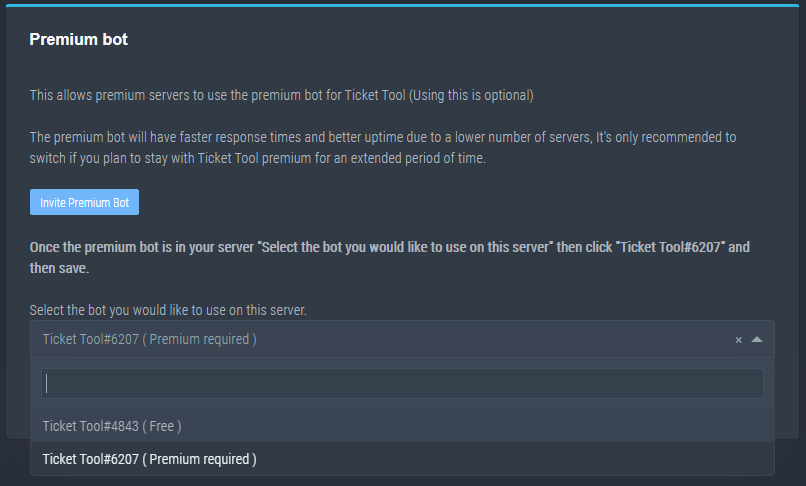
How to disable the premium bot
To disable the premium bot you will have to go to the Dashboard -> Server Configs -> Premium bot -> And on the right-hand side select the primary free bot in the drop down menu.
Premium features will still work on the normal bot.
TicketTool.xyz - Ticketing without clutter
copper owl
make sure you havent selected the premium bot
steady echo
I have, I am premium
 copper owl
weird.
humble sequoiaBOT
-- moved to ticket --
 dull imp
is there a way to configure or parameterize the length of transcript captured in $transcript? and if not how do I file an enhancement request?
it this a feature in the bot to move any message to a ticket?
 copper owl
dull imp
it this a feature in the bot to move any message to a ticket?
copper owl
dull imp
it this a feature in the bot to move any message to a ticket?
No, that's just a tag
dull imp
I am trying to solve the problem of capturing content on a channel for later moderation review
copper owl
I dont remember the exact amount of messages you can capture with the free vs premium bots, but I know for a fact that you cant ask for an enhancement to increase the amount of messages captured
dull imp
so I would like to be able to go $transcript 20 to capture the last 20 lines specifically
copper owl
dull imp
so I would like to be able to go $transcript 20 to capture the last 20 lines spe...
Ah.. yeah that isn't a thing yet
I can forward it to the dev, but that wouldnt be implemented anytime soon. Upwards to a month and more if im being honest
dull imp
copper owl
I dont remember the exact amount of messages you can capture with the free vs pr...
so has development stopped on Ticket Tool? I am a software engineer in my day job so I know about scheduling and priorities
copper owl
Uh, what?
dull imp
I was puzzled by the response of can't ask for new fetaures lol
copper owl
dull imp
I was puzzled by the response of can't ask for new fetaures lol
the way you phrased the new feature made it seem like you wanted the dev to increase the amount of messages captured for your server
dull imp
now it seems like I can ask but no guarantees on when or if the feature would be implemented
no I want to shorten it in many cases
cuz 500 or 1000 lines would be over kill as a incident reporting tool
copper owl
No, development is still happening on ticket tool. The thing is, it's only a single person handling ticket tool, coding wise. which is why it takes a while for features to get released
dull imp
and I assume it is not open source?
copper owl
It is not.
dull imp
cuz I would be happy to contribute a useful feature like that
it seems like if the software was designed decently then it would be easy to add a $transcript <n> command that captures up to the max limit with an optional argument of a number and modify the loop that collects the 500/1000 lines to stop at n
copper owl
I couldnt tell you whether it would or wouldnt be easy if im being honest. Only time will tell whether it gets implemented or not
dull imp
of course
copper owl
also, that command only works outside of tickets if you're using the premium bot if im not mistaken
dull imp
I would be happy to buy premium for this functionality
and nice if it could also to have a variant that auto creates a ticket with the person to track the moderation incident maybe call it $report
copper owl
Not sure what you mean by that, could you elaborate?
dull imp
so the idea is
{ reply in a thread or a channel }
$report <n> person made a racist remark
what it does
- open a ticket on the person you are replying to
- captures transcript of n lines and posts it to the trasnscripts channel and to the ticket with a form that looks like this
TicketBot: Hello Troll001You were reported for the violation
Reason: person made a racist remark
Transcript
PersonA: hi there
PersonC: wuz up
Troll001 PersonC is a bla bla bla
***Reported here ***
copper owl
Just use the command style ticket feature
dull imp
yeah that can be issues in a channel like this
dull imp
copper owl
Just use the command style ticket feature
$report 6 Neptune is a very kind and helpful person
copper owl
Just talked to a manager, and I apologize for this but
copper owl
dull imp
is there a way to configure or parameterize the length of transcript captured in...
this exists
limit on premium would be uhhh 1000? and 500 on free. not entirely sure about this
dull imp
no that is a great news.. nothing to apologize for
copper owl
dull imp
so the idea is
{ reply in a thread or a channel }
```$report <n> person made a...
for this, use $new
copper owl
dull imp
no that is a great news.. nothing to apologize for
great. my bad i personally never used $transcript in my life so LMAO
dull imp
will it pick up the info based on the line
but does $transcript let me specify a line count?
copper owl
yes
copper owl
$transcript <#channel> x
so basically something like
$transcript #bot-information 5 would send a transcript of the last 5 messages to #573205317870157855
dull imp
so what I would like is to be able to do it on a reply to a message and have it transcript from there
so like this
dull imp
copper owl
Just talked to a manager, and I apologize for this but
$transcript was apologizing when he didn't have to
and have it put the title on the transcript
copper owl
you need to input the number of messages and the channel
copper owl
dull imp
and have it put the title on the transcript
oh
hm
im not sure if that's an available variable...
dull imp
but I imagine it would start current and not on the line of interest
copper owl
you could possible use {reason} as the transcript title?
dull imp
you could pull it from the reply
as the reply links to the original message
and if nothing else generate a transcript, search for the original message
copper owl
copper owl
you could possible use `{reason}` as the transcript title?
that would go back to development which would take a while. I will test this out though
dull imp
thank you
copper owl
we do have a {reason} variable, so lets see if that would work
give me a moment as I test this out
dull imp
sounds good
I am just trying to figure out how to make moderating much less painful
as typically people cry @police
and we have to come in and investigate the crime scene
copper owl
Understandable tbh. anything to make the mods' jobs alot easier and less painful
i feel you
dull imp
and need to report the messages that are bad
so like in our interaction if I could do this
dull imp
copper owl
It is not.
$report told me no
Tix created report 442 on user Neptune
copper owl
So {reason} wouldnt work for this
dull imp
copper owl
this exists
$note 442 was very helpful here
Tix added note to report 442 on user Neptune
copper owl
try to be as descriptive as possible and all
 meager pulsar
شباب ابي مساعدة
dull imp
so proposal
$new
in a reply captures the user name automatically and hopefully it already outputs the ticket
$note <ticket> this person is mean
in a reply adds that $note to the transcript in the ticket and the transcript channel
Might be nice to have a wrapper command
$report <line count to capture> <comment>
to do $new + $transcript in one command
so the idea is to make some commands read the message of the reply and infer the channel and target user
One other detail. If the bot can strip the message out of the channel as an option that would be great
copper owl
Gotcha, would that be final before i screenshot and send it over?
dull imp
let me review convo and I'll edit if needed
copper owl
gotcha, feel free to ping me in the reply to the suggestion once you're done
copper owl
meager pulsar
شباب ابي مساعدة
كيف ممكن اساعدك؟
meager pulsar
copper owl
كيف ممكن اساعدك؟
انا كنت رح احط بوت تبع تذكرة بس مقدرت سجل في لوحة التحكم تبعه
dull imp
copper owl
gotcha, feel free to ping me in the reply to the suggestion once you're done
ping
copper owl
meager pulsar
انا كنت رح احط بوت تبع تذكرة بس مقدرت سجل في لوحة التحكم تبعه
كيف يعني؟
copper owl
dull imp
ping
Roger that. Sent
dull imp
copper owl
Roger that. Sent
$report 10 Neptune is awesome!
meager pulsar
copper owl
كيف يعني؟
مقدرت اسو بوت التذكرة في سيرفري
humble sequoiaBOT
copper owl
@meager pulsar فيه كل المعلومات ^^
dull imp
copper owl
Roger that. Sent
sorry, one other detail. If the bot can strip the reply message out of the channel as an option that would be great
copper owl
فيك كمان تتأكد #573205317870157855
copper owl
dull imp
sorry, one other detail. If the bot can strip the reply message out of the cha...
Copy. Sent that too
meager pulsar
copper owl
<@!859874663890944010> فيه كل المعلومات ^^
يب
 plain surge
If I have an idea for perhaps how to solve Narria's problem, can I send it here?
copper owl
plain surge
If I have an idea for perhaps how to solve Narria's problem, can I send it here?
go ahead
this is community support afterall
you guys can help eachother anytime!
plain surge
@dull imp Since as of now you can't have a bot rip the messages you want somewhere else, the mods can perhaps take a screenshot and then run a custom command which takes the image and send it in a mod logs channel for the incident to be reviewed
On the server I am in after an incident happened we use a notes feature to keep track of little infractions instead of using a warn command