#🆘│community-support
1 messages · Page 355 of 1
 midnight ridge
Yeah
 shut bolt
 humble sequoiaBOT
Inviting and Enabling Premium Bot
The first thing you will need to do is invite the premium bot, an invite can be found here
Once the bot is in your server we will head to the dashboard and manage your server. When you are managing your server, you want to head into "Server Configs" then click the drop down menu under "Select the bot you would like to use on this server" then click "Ticket Tool#6207" and then save.
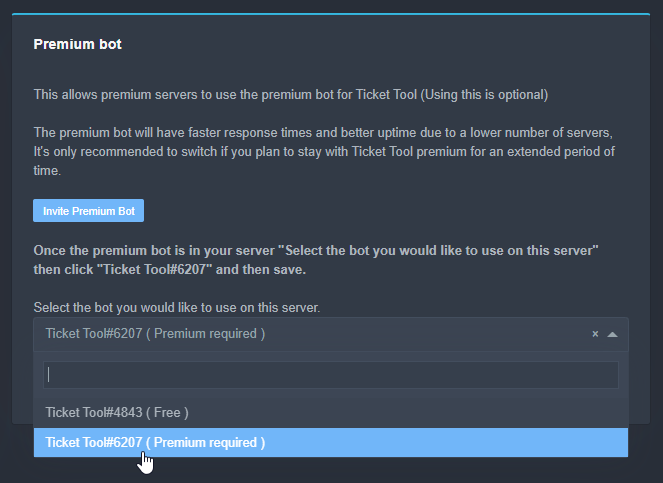
 subtle mauve
whys ticket system down?
 mystic hound
 wicked topaz
 copper owl
For any issues regarding Ticket Tool being offline, giving you errors, or just not working as intended:
Check #📣│bot-news ! We are working hard to fix this issue as soon as possible
midnight ridge
For some reason premium still works lol
wicked topaz
copper owl
redeem your premium
I assume I should wait until it's back online?
mystic hound
oo wait I have this GIF that I never got to use
humble sequoiaBOT
Make sure to stay tuned to #📣│bot-news for status updates.
Ticket Tool Bot Outage
At this time we are experiencing technical difficulties with the bot. Please be patient with us as we discover the problem and push a fix.

 solid stream
 mystic hound
We're back. Something about minions and necromancy...

 astral shell
Glad its back online! Are the ticket counter reset?
çause our tickets start at 0001 again 😦
 mystic hound
astral shell
çause our tickets start at 0001 again 😦
mystic hound
astral shell
çause our tickets start at 0001 again 😦
you can just change it manually
mystic hound
Yeah, under general options, you'll see a ticket count field

if you've gotten a cloudflare error it should go away in a few minutes to an hour
astral shell
Yep! Thanks for the help!
astral shell
mystic hound
Yeah, under general options, you'll see a ticket count field
Can we also change that if we dont have the premium bot?
mystic hound
anything without a diamond next to it is available for everyone, so yep
 jade topaz
What does buttons per row do for a multi panel? I have a multi panel right now, but was wondering what it does? Does it mean like I can fit up to 5 buttons on a single row for each panel of the multipanel?
copper owl
jade topaz
What does buttons per row do for a multi panel? I have a multi panel right now, ...
indeed
if you set it as 3, that means there will be 3 buttons per row
 uncut forge
arab
 scenic plinth
$arabic
humble sequoiaBOT
فريق الدعم الفني العربي
عميلنا العزيز ان كنت تبحث عن مساعدة يرجى فتح تكت خاص بفريق الدعم الفني العربي
اذهب الى#🎫│make-a-ticket
ثم قم بلضغط على الايموجي الاتي (🇯🇴)
 spring thistle
How can I change the word "Create ticket"
 copper owl
$buttons
humble sequoiaBOT

Buttons
The new Discord Buttons allow for a much smoother and convenient experience. They reduce lag and work much better than emojis. With ticket tool you can edit all the buttons however you like! Buttons can show emojis, text and can have 4 different colors.
Where can I edit them?
Dashboard -> Panel Configs -> <Settings> -> Button Options -> <Setting>
 spring thistle
Thanks @copper owl
 iron nightBOT
Gave 1 Rep to Neptune (current: #1 - 223)
jade topaz
copper owl
indeed
Does it depend on the size of the screen though? Like, the number I put is the actual maximum it can be, but the size of their screen is the max is can be as long as it’s below the maximum I set on the dashboard?
copper owl
That's actually a good question, it should show them the maximum their screen allows for
I'll test it on my phone right now actually
 jade topaz
 shut bolt
Yes, actually the 5 maximum is like the desktop standard, it will completely vary on the screen size tho
 prime bridgeBOT
 Moderator: @shadow axle

 Messages Fetched:
 100
 Purge Request:
 2
 Messages Identified:
 2
 ** Messages Purged:**
 2
 torpid sentinel
how do i have the ticket ping a role when its crated
shut bolt
torpid sentinel
how do i have the ticket ping a role when its crated
hello there
$help ping
humble sequoiaBOT
How to make Ticket Tool ping a role
To make ticket tool ping a role when a ticket is opened, go to the Dashboard -> Panel Configs -> Settings -> Ticket Options -> Ticket Message -> Message Text and do this:
{@Role name} This is case sensitive and the role must have @mentions enabled
 shut bolt
Check this
torpid sentinel
ok
 craggy geyser
It is a joke. Fnaki is the dev for Wick (of which modsystem is a version of)
 trim citrus
oh ok
 severe path
mystic hound
That's me forgetting our logs are public lol
severe path
mystic hound
That's me forgetting our logs are public lol
oh, they're public? 
copper owl
they are  LMFAO
LMFAO
copper owl
lmfao
severe path
shut bolt
Public
the public-join-leave-logs isnt public 
shut bolt
severe path
the public-join-leave-logs isnt public <:03C_axosmart:775080383930040325>
I know, but the other one is
 arctic trellis
Hello
Quick question on those

I get the various parts but the “edit moderator message” what is for?
shut bolt
The mod message is the embed the bot sends after closing a ticket, it has the buttons as Reopen, delete, and transcript
 fallow ingot
omg why are u and Neptune so fast 
shut bolt
fallow ingot
omg why are u and Neptune so fast <a:PandaReeRun:607657237992701974>
Thanks 😅, we try our best
iron nightBOT
Gave 1 Rep to aaronxyas (current: #16 - 59)
copper owl
fallow ingot
omg why are u and Neptune so fast <a:PandaReeRun:607657237992701974>
We're the speedy duo 🤝
shut bolt
Hell yeah
 half kernel
arctic trellis
I get the various parts but the “edit moderator message” what is for?
half kernel
arctic trellis
I get the various parts but the “edit moderator message” what is for?
Looks like this for reference
 shut bolt
🤝
jade topaz
What command do I use to move my ticket tool to a different place
shut bolt
jade topaz
What command do I use to move my ticket tool to a different place
Do you mean a different category in your server?
jade topaz
Like move it from welcome to store
arctic trellis
Ah ok thanks. That’s why I could not find them. We auto delete the tickets 😂
shut bolt
jade topaz
Like move it from welcome to store
You actually can't move it through categories with a command, the only way is setting an open and closed category, the other way will actually moving them manually, or do you mean the names of the tickets?
shut bolt
arctic trellis
Ah ok thanks. That’s why I could not find them. We auto delete the tickets 😂
Oh right, jajaja have a good one
arctic trellis
Btw when you reopen a ticket, does the transcript continue on the old one or generates a new one?
jade topaz
How do I get the ticket tool I've invited it but not sure what to do from there
shut bolt
arctic trellis
Btw when you reopen a ticket, does the transcript continue on the old one or gen...
When you close it if you have the automatic transcript, it will generate a new one
shut bolt
jade topaz
How do I get the ticket tool I've invited it but not sure what to do from there
Please check this
humble sequoiaBOT
jade topaz
Ok thank you
shut bolt
Sure
jade topaz
how do you get the dashboard
humble sequoiaBOT
 fallow ingot
@jade topaz ^
 tender moon
Why doesn't the server show me? There's another one, but it doesn't show up 
 humble sequoiaBOT
Don't see your server in the dashboard?
You will possibly need to relog. Look below to see steps on how to relog.
How to relog the Dashboard.
First, you will need to go to the dashboard. Once your there, click on your avatar on the top right. after you clicked it, you will see button that says Logout. You must click that. Once you have logged out, you can log back in.
Note:
You need one of these 3 things to access the dashboard.
1. Server Owner (Level: 6)
2. Server Administrator (Level: 4)
3. Dashboard Role (Level: 2)
You can check your level using $level on your Discord Server
 vestal owl
^^^^@tender moon
 vestal owl
Huh
tender moon
tender moon
How can I put the ticket somewhere in here, right?
@copper marsh 
Pls
I could never.
Anyone here?
@shut bolt
^^
shut bolt
tender moon
How can I put the ticket somewhere in here, right?
You mean how to include the ticket into a category? If that's what you mean, yeah
tender moon
Sorry
shut bolt
$help category
humble sequoiaBOT
How to set the open category
To set a open category go to the Dashboard -> Panel Configs -> Settings -> Category Options -> Category Open
 shut bolt
tender moon
Thx , Sorry to bother you.
shut bolt
tender moon
Thx , Sorry to bother you.
No worries
shut bolt
@jade topaz how can we help?
jade topaz
How’s the bot work
shut bolt
Please check out this
humble sequoiaBOT
iron nightBOT
Gave 1 Rep to Yareaj_ (current: #13 - 70)
shut bolt
Sure!
 sand sundial
does the premium ticket bot allow for unlimited characters in the ticket opening message?
half kernel
Yes it dose
sand sundial
thank you for the help! have a nice night
half kernel
You too!
shut bolt
sand sundial
does the premium ticket bot allow for unlimited characters in the ticket opening...
It has a higher limit than the free version, anyway it is still limited to Discord limits, 2048 characters in the Message Text
 dire sinew
ok so, I want to have a sertain rank be able to see the tickets and only people with that rank can see the ticket, how would I do that?
 eager cargo
$help support
humble sequoiaBOT
How to let support team see into a ticket
About support roles
A support role lets your support team see into tickets with out having to add them manually to each and every ticket.
You can add as many support roles as you like per panel.
NOTE that the way discord works all admins can see into tickets regardless of this.
How to set a support role
To set a Support role go to the Dashboard -> Panel Configs -> Settings -> General Options -> Support Team Roles.

NOTE that the support role will not be able to see into tickets that are already created..
jade topaz
Hello
Can some of the mod or admin’s come to my server and help me with the bot
Please
jade topaz
What’s the command to put the ticket in the chat
humble sequoiaBOT
shut bolt
You can use $panel ID
shut bolt
Sure
 gusty scaffold
Is there any in-built feature for ticket tool to delete a ticket if unresponsive for 10 minutes?
shut bolt
gusty scaffold
Is there any in-built feature for ticket tool to delete a ticket if unresponsive...
Automation is no longer available, apologies
shut bolt
Hello there
humble sequoiaBOT
Claiming Options
Claiming allows you to change the ticket name, category and permissions. To use it you have to enable it first on your Dashboard > Panel Configs > Claiming Options.

 Note: This is a premium feature
shut bolt
Note: This is a premium feature
shut bolt
Please check this out
jade topaz
#claim
fallow ingot
 graceful cape
HELLO
graceful cape
HELLO
hey, can we help?
 simple igloo
what do i have to do to let the tickets go in a cathegorie and not on the top of all channels?
severe path
$help category
humble sequoiaBOT
How to set the open category
To set a open category go to the Dashboard -> Panel Configs -> Settings -> Category Options -> Category Open
simple igloo
thx @severe path
iron nightBOT
Gave 1 Rep to Schlafendes24 (current: #23 - 22)
fallow ingot
so fast for me
jade topaz
/cliam
severe path

 drifting trailBOT
severe path
drifting trailBOT
severe path

 dry saddle

 rich bay
 copper owl
we turned it off lmao
 fast thistle
Is it possible to automatically close the ticket if the ticket has no message for 10 minutes?
humble sequoiaBOT
Automation disabled
There's currently no ETA for when automation will be enabled again. The issue that's caused it to be disabled, us hitting rate limits, is tied to the increased load on Discord's servers. The situation's currently unpredictable, which makes it so we can't give you a fixed time.
 indigo lichen
how I stop the bot saying that it made a ticket?
 unique junco
indigo lichen
how I stop the bot saying that it made a ticket?
unique junco
indigo lichen
how I stop the bot saying that it made a ticket?
Can you provide screenshots of what you mean by that
 unique junco
Nope, that message is only seen by the user that created a ticket anyway
Shouldn’t be a problem
indigo lichen
oh ok thank you
unique junco
👍
indigo lichen
does the message go away after a while?
because it someone opens a few tickets it might be annoying
 desert summit
Press diss miss
unique junco
They can just press “dismiss message”
indigo lichen
ok thanks
mystic hound
It also goes away when the user restarts discord
unique junco
mystic hound
It also goes away when the user restarts discord
^
 plain surge
The bot doesn't have admin perm on the server, so when a ticket is created the "Manage permissions" perm is left on neutral, and there isn't an option on the dashboard to enable it permentatly. So I can't use the add command
Is there a solution for this beside giving the bot admin perm?
unique junco
@plain surge can you run $debug in your server
plain surge
sure, 1mn
unique junco
And tell me once you’ve done that
plain surge
do you need a screenshot?
unique junco
Nope, sec
unique junco
plain surge
Is there a solution for this beside giving the bot admin perm?
You can add the permission you want to the category where ticket tool makes channels on
I think that’ll fix the issue
plain surge
the new channel created is out of sync from the category because of the member Ticket tool adds when creating the channel
so the perms don't get synced
unique junco
Ah that’s right
Try creating a ticket about this issue I’m sure they’ll be able to help
plain surge
Alright, thank you
humble sequoiaBOT
-- moved to ticket --
copper owl
@plain surge try giving ticket tool the TTS permission in your server settings
copper owl
unique junco
Go claim ticket
no because this way you learn too
plain surge
copper owl
<@!278649994477830145> try giving ticket tool the TTS permission in your server ...
alright 1mn
copper owl
copper owl
<@!278649994477830145> try giving ticket tool the TTS permission in your server ...
TTS is not needed for adding users, but this is a discord thing that we are yet to fix. For some reason, giving ticket tool the TTS permission fixes the issue
unique junco
 copper owl
alr
plain surge
Ok it can now add members, but in the channel settings it says the bot doesn't have the manage permissions allowed
copper owl
plain surge
Ok it can now add members, but in the channel settings it says the bot doesn't h...
then you need to give the bot those permissions in your server settings
plain surge
Manage permissions isn't a perm in server settings, but it works fine now. Dk how, when I enabled that perm in channel settings it allowed the bot to add members
 copper owl
plain surge
Manage permissions isn't a perm in server settings, but it works fine now. Dk ho...
copper owl
plain surge
Manage permissions isn't a perm in server settings, but it works fine now. Dk ho...
manage roles / manage channels should already give the bot those permissions
plain surge
It had them on before the TTS perm
Seems to work now tho, like you said TTS perm did something
copper owl
yeah it's weird.. Ill bring it up again once I get the chance to talk to a manager/the dev
plain surge
Perhaps adding it to the Dashboard section where it shows you what perms the bot has would encourage new users to enable it
 copper owl
plain surge
Perhaps adding it to the Dashboard section where it shows you what perms the bot...
copper owl
plain surge
Perhaps adding it to the Dashboard section where it shows you what perms the bot...
well here's the thing, we aren't sure why this is happening
it shouldnt be happening
so instead of adding it there, we'll look into fixing it
plain surge
Thanks for the help, and for looking into it 
copper owl
of course, anytime
plain surge
Can I ask for a nick change, as I plan on sticking around? So that I'm easier to be mentioned. Domx would be fine
copper owl
i cant actually change your nickname but ill have someone do that for ya
plain surge
Alright, thanks again
mystic hound
Sure
 rancid tangle
Hi
It might be a pretty silly question but how can I add role for ticket support?
mystic hound
$help add
humble sequoiaBOT
How to add or remove users on tickets
To add a user to a ticket use $add <user>
To remove a user from a ticket use $remove <user>
rancid tangle
No not this
humble sequoiaBOT
How to let support team see into a ticket
About support roles
A support role lets your support team see into tickets with out having to add them manually to each and every ticket.
You can add as many support roles as you like per panel.
NOTE that the way discord works all admins can see into tickets regardless of this.
How to set a support role
To set a Support role go to the Dashboard -> Panel Configs -> Settings -> General Options -> Support Team Roles.
NOTE that the support role will not be able to see into tickets that are already created..
rancid tangle
I made a new role in my server
Ok thanks :)
Fast service really appriciate
thanks 413723907619684352
 tawny tendon
how to automatically close a ticket when no messages are sent? tia
half kernel
Automation is currently not available
 nova scaffold
$vote
humble sequoiaBOT
Votes
Current Votes: 0
Lifetime Votes: 13
Linked Votes: 0
Vote Links
Linking Info
Linked User: Not Linked
You can give your future votes to another user by linking with that user.
To link use $vote link (@user or userId)
To unlink use $vote unlink
Redeeming
Each vote is worth 12 hours of premium and can be redeemed once you have atleast 6 votes.
Your current votes are worth 0m
To redeem your current votes use $vote redeem
tawny tendon
all of my panels are setup with tickettool#4843, i upgraded to premium. if i invite premium bot to my server, will i lose all my existing panel configs? is it a smooth transition to premium
tawny tendon
half kernel
Automation is currently not available
ty
iron nightBOT
Gave 1 Rep to Jayson G | UBP (current: #62 - 1)
copper owl
tawny tendon
all of my panels are setup with tickettool#4843, i upgraded to premium. if i inv...
Nope!
it's a really really smooth process
so what you do is
humble sequoiaBOT
Inviting and Enabling Premium Bot
The first thing you will need to do is invite the premium bot, an invite can be found here
Once the bot is in your server we will head to the dashboard and manage your server. When you are managing your server, you want to head into "Server Configs" then click the drop down menu under "Select the bot you would like to use on this server" then click "Ticket Tool#6207" and then save.
copper owl
then just resend your panels
tawny tendon
copy 🙂
copper owl
if im not mistaken, even if you kick ticket tool, you will still keep your panels
tawny tendon
i would never ❤️
copper owl
the only way you can lose your panels and everything, is getting the server deleted either by yourself, or discord
copper owl
tawny tendon
i would never ❤️

half kernel
copper owl
if im not mistaken, even if you kick ticket tool, you will still keep your panel...
Can confirm. I did it by accident once
copper owl
kicking and re-inviting ticket tool is actually a last resort fix for some issues
so, the more you know i guess haha
tawny tendon
Done! In less than two minutes, now I’ll be safe to kick the original ticket bot?
💔 on the best terms
copper owl
tawny tendon
Done! In less than two minutes, now I’ll be safe to kick the original ticket bot...
yes
if everything's working as intended
you can kick the free version of the bot
tawny tendon
As is, amazing tool and support here. Would there be any possibility of automated “close” in the future?
copper owl
tawny tendon
As is, amazing tool and support here. Would there be any possibility of automate...
can you elaborate on that?
because we used to have that
but
humble sequoiaBOT
Automation disabled
There's currently no ETA for when automation will be enabled again. The issue that's caused it to be disabled, us hitting rate limits, is tied to the increased load on Discord's servers. The situation's currently unpredictable, which makes it so we can't give you a fixed time.
solid stream
tawny tendon
As is, amazing tool and support here. Would there be any possibility of automate...
We had it for a little bit, but it was added in a crappy way..
and I've not been able to implement it better on a larger scale.
Ticket Tool creates over 200k tickets each day, so it's a rather large load to deal with lol
tawny tendon
copper owl
can you elaborate on that?
“ticket will close automatically without any messages with x minutes of opening” “ticket will close automatically after x minutes if no response is sent after the last staff message”
tawny tendon
solid stream
Ticket Tool creates over 200k tickets each day, so it's a rather large load to d...
I can imagine…
copper owl
humble sequoia

tawny tendon
I have a message like such in the ticket message and our staff manually closes dormant tickets to reduce clutter and prevent spam reports
tawny tendon
humble sequoia
Ahh would be a nice premium feature 😉
prime bridgeBOT
MALAK has been silenced for 10m 

 Reason: Posting NSFW Websites
MALAK#6995 | 710292584899018813
 slender minnow
The invite link to this server is broken
humble sequoiaBOT
Ticket Tool Invite & Support
slender minnow
The link to this server
shut bolt
This one?
shut bolt
Oh, okey
jade topaz
for some reason prem is in the server, but I can't seem to find where to do the custom reactions
shut bolt
For reactions you mean the custom emojis for the buttons right?
jade topaz
yes
shut bolt
$buttons
humble sequoiaBOT
Buttons
The new Discord Buttons allow for a much smoother and convenient experience. They reduce lag and work much better than emojis. With ticket tool you can edit all the buttons however you like! Buttons can show emojis, text and can have 4 different colors.
Where can I edit them?
Dashboard -> Panel Configs -> <Settings> -> Button Options -> <Setting>
jade topaz
thank you
shut bolt
Go into here and then click on Emoji, the last section will be a ➕ look for your emoji there
shut bolt
jade topaz
thank you
Sure
jade topaz
this is all I see @shut bolt
 scenic plinth
You don't have a panel created so you can't make the reactions.
 fickle wharf
hi
i've got problem with the bot
i tryed to open a ticket but the guy is no longer online
scenic plinth
fickle wharf
i tryed to open a ticket but the guy is no longer online
Can you send a screenshot of it being offline?
fickle wharf
what exacly the person that i was speaking to or?
scenic plinth
You said you had a problem with the bot being offline?
fickle wharf
no
fickle wharf
yessir
scenic plinth
That explains a bit better
half kernel
So like it said in the ticket opening message. Ticket responses can be long depending on the avaiblity on our staff
Omg i cant spell
scenic plinth
Continued in the ticket
half kernel
How did I pass my application if I cant even spell LMAO
scenic plinth
No clue
jade topaz
$vote
humble sequoiaBOT
Votes
Current Votes: 4
Lifetime Votes: 53
Linked Votes: 0
Vote Links
Linking Info
Linked User: Not Linked
You can give your future votes to another user by linking with that user.
To link use $vote link (@user or userId)
To unlink use $vote unlink
Redeeming
Each vote is worth 12 hours of premium and can be redeemed once you have atleast 6 votes.
Your current votes are worth 2 days, 0h, 0m
To redeem your current votes use $vote redeem
jade topaz
$vote redeem
shut bolt
jade topaz
$vote redeem
You can use these commands in your own server, please refrain of using them here
 echo ruin
$vote
humble sequoiaBOT
Votes
Current Votes: 0
Lifetime Votes: 0
Linked Votes: 0
Vote Links
Linking Info
Linked User: Not Linked
You can give your future votes to another user by linking with that user.
To link use $vote link (@user or userId)
To unlink use $vote unlink
Redeeming
Each vote is worth 12 hours of premium and can be redeemed once you have atleast 6 votes.
Your current votes are worth 0m
To redeem your current votes use $vote redeem
scenic plinth
Refrain from using vote commands here please. Use them in your server.
jade topaz
shut bolt
You can use these commands in your own server, please refrain of using them here
Sorry, but my premium was ending, i can't use ticket tool because he stand off, now he starting up.
shut bolt
No worries
 lean stratus
How can I set some pannel to one message?
 shut bolt
Hello there
shut bolt
lean stratus
How can I set some pannel to one message?
Oh wait, you mean doing more than one panel at once right?
lean stratus
shut bolt
Oh wait, you mean doing more than one panel at once right?
SURE
humble sequoiaBOT
Multipanels are a premium feature  that allow for a single panel with multiple buttons to open different tickets.
How to create a Multipanel
Premium users can combine multiple panels into one multipanel.
First, find the IDs of each panel you wish to combine. You can find them in your Panel Configs in the Dashboard
Next, send the multipanel to a channel using $panel [id1] [id2] {id3} ....
e.g. $panel 1 2 4 17 35 to combine panels 1, 2, 4, 17 and 35.
Up to 25 panels may be combined.
 shut bolt
Please check this :)
lean stratus
thanks 🙂
shut bolt
Sure
lean stratus
thanks @shut bolt
iron nightBOT
Gave 1 Rep to Yareaj_ (current: #13 - 71)
lean stratus
😐
 grave gull
One of my member is pressing 'create ticket'. But it doesn't do anything?
Does anyone know what the issue is?
 shut bolt
grave gull
Does anyone know what the issue is?
shut bolt
grave gull
Does anyone know what the issue is?
Please run $debug and send us the link
lean stratus
I'll test it
shut bolt
 fresh temple
hello
fresh temple
hello
Hello there
shut bolt
lean stratus
I'll test it
Remember that the multipanel is a premium feature
shut bolt
fresh temple
Need Help
How can we help?
shut bolt
Please check this
humble sequoiaBOT
lean stratus
shut bolt
Remember that the multipanel is a premium feature
😐
shut bolt
humble sequoia
It says it here in the response the bot sent you
fresh temple
Me Click For Arabic Support
shut bolt
$arabic
humble sequoiaBOT
فريق الدعم الفني العربي
عميلنا العزيز ان كنت تبحث عن مساعدة يرجى فتح تكت خاص بفريق الدعم الفني العربي
اذهب الى#🎫│make-a-ticket
ثم قم بلضغط على الايموجي الاتي (🇯🇴)
fresh temple
$arabic
humble sequoiaBOT
فريق الدعم الفني العربي
عميلنا العزيز ان كنت تبحث عن مساعدة يرجى فتح تكت خاص بفريق الدعم الفني العربي
اذهب الى#🎫│make-a-ticket
ثم قم بلضغط على الايموجي الاتي (🇯🇴)
shut bolt
/ar You must wait for a Arabic Supprot Member to help you in the ticket you already opened, please wait
 robust sandalBOT
يجب عليك انتظار عضو Supprot العربية لمساعدتك في التذكرة التي فتحتها بالفعل، يرجى الانتظار
 English (en) → Arabic (ar)
fresh temple
robust sandal
English (en) → Arabic (ar)
fresh temple
robust sandal
كم من الوقت
robust sandalBOT
fresh temple
كم من الوقت
 Seller12
How long?
Arabic (ar) → English (en)
fresh temple
yes
fresh temple
robust sandal
yes
shut bolt
/ar Read the message the bot sent in the ticket, our response time is bewteen 24 and 48 hours
robust sandalBOT
قراءة الرسالة بوت أرسلت في التذكرة، وقت استجابتنا هو bewteen 24 و 48 ساعة
English (en) → Arabic (ar)
shut bolt
/ar between*
robust sandalBOT
بين*
English (en) → Arabic (ar)
fresh temple
shut bolt
/ar Read the message the bot sent in the ticket, our response time is bewteen 24...
This Alot Time pablo
shut bolt
/ar There's nothing to do, please wait for a support member
robust sandalBOT
لا يوجد شيء للقيام به، يرجى الانتظار لعضو الدعم
English (en) → Arabic (ar)
fresh temple
can You Come Anydesk And Make This Ticket Pablo
shut bolt
/ar No, as I already said, please wait
robust sandalBOT
لا، كما قلت سابقا، رجاء انتظر
English (en) → Arabic (ar)
fresh temple
ok
 steel fiber
When i invite the bot and manage servers, it says:
Servers - (server not showing up? try relogging) It looks like Ticket Tool isn't online or in any servers you have permission to access,Invite Ticket Toolor check it'sstatus
shut bolt
steel fiber
When i invite the bot and manage servers, it says:
`Servers - (server not showi...
Hello there
Please try out this
jade topaz
what do i do if server isnt showing
humble sequoiaBOT
Don't see your server in the dashboard?
You will possibly need to relog. Look below to see steps on how to relog.
How to relog the Dashboard.
First, you will need to go to the dashboard. Once your there, click on your avatar on the top right. after you clicked it, you will see button that says Logout. You must click that. Once you have logged out, you can log back in.
Note:
You need one of these 3 things to access the dashboard.
1. Server Owner (Level: 6)
2. Server Administrator (Level: 4)
3. Dashboard Role (Level: 2)
You can check your level using $level on your Discord Server
jade topaz
Ok
shut bolt
humble sequoia
@steel fiber this also works for your case :)
steel fiber
shut bolt
<@!751563727161000017> this also works for your case :)
ok, thx
iron nightBOT
Gave 1 Rep to Yareaj_ (current: #13 - 72)
shut bolt
Sure
 toxic flume
Hey. I need some help
shut bolt
toxic flume
Hey. I need some help
How can we help?
toxic flume
Um when I click manager servers it only shows A couple of them is that normal?
shut bolt
Please check out this
toxic flume
I dont know if u can help with that
humble sequoiaBOT
Don't see your server in the dashboard?
You will possibly need to relog. Look below to see steps on how to relog.
How to relog the Dashboard.
First, you will need to go to the dashboard. Once your there, click on your avatar on the top right. after you clicked it, you will see button that says Logout. You must click that. Once you have logged out, you can log back in.
Note:
You need one of these 3 things to access the dashboard.
1. Server Owner (Level: 6)
2. Server Administrator (Level: 4)
3. Dashboard Role (Level: 2)
You can check your level using $level on your Discord Server
toxic flume
ok thanks
shut bolt
This should help you to see the server you are looking for
shut bolt
toxic flume
ok thanks
Sure
steel fiber
thanks @shut bolt
iron nightBOT
@steel fiber :: You can't rep Yareaj_#4383 for 57 minutes and 41 seconds. Try coming back later?
shut bolt
You are welcome ^^
steel fiber
tries to rep
shut bolt
Appreciate it 
steel fiber
@shut bolt , it seems the method did not work
shut bolt
steel fiber
<@!518666147441278998> , it seems the method did not work
Oh, please run $level in your server and send us the response
steel fiber
User permission level with Ticket Tool @steel fiber is permission level: 6 (Guild Owner)
copy/ paste
shut bolt
Hmmmmm rare
steel fiber
it really says: User permission level with Ticket Tool
@steel fiber is permission level: 6 (Guild Owner)
shut bolt
By any chance did you logged in the Dashboard with another Discord account?
steel fiber
no
steel fiber
still the same 😦
steel fiber
@shut bolt could it be a bug?
shut bolt
steel fiber
<@!518666147441278998> could it be a bug?
I'm not a 100% sure
@mystic hound any clues or what could cause this?
Already reloged more than once, loged with its account and has level 6 perms
mystic hound
@steel fiber could you try on a different device? if you don't have one available a different browser will suffice
iron nightBOT
Gave 1 Rep to Light (current: #3 - 196)
mystic hound
its should work on your original browser after a while, probably something to do with syncing, for now you can use it on the browser that worked
 native holly
Not working bot
humble sequoiaBOT
-- moved to ticket --
 swift blade
humble sequoiaBOT
swift blade
humble sequoiaBOT
Ticket Tool Invite & Support
native holly
$invite
humble sequoiaBOT
Ticket Tool Invite & Support
native holly
$ mammber
jade topaz
A question how is it to rename the ticket with the name of the one who claimed it?
 finite dove
How to set @pseudo glen to make a thread
copper owl
there is no features regarding threads as of currently
finite dove
Okay
 livid girder
$invite
unique junco
@livid girder please try these commands in your own server instead of this one
This is for support, not random bot commands
jade topaz
copper owl
{author.name}
thanks
iron nightBOT
Gave 1 Rep to Neptune (current: #1 - 224)
jade topaz
Do you know how to set a timer so that tickets are closed from time to time? It can?
shut bolt
jade topaz
Do you know how to set a timer so that tickets are closed from time to time? It ...
It's not longer available due to the bot reaching Discord limits, apologies
unique junco

shut bolt
jade topaz
Hi
shut bolt
Hello there
jade topaz
I need help with the ticket tool. When someone join the server. How do I get it so that when someone joins the server they can’t access any other channel except the ticket tool channel.
shut bolt
There are some options to do so, you should make the other channels hidden for everyone except the Ticket one, or you could make an auto role with another to be assigned to new users and deny access to the rest of channels excluding the ticket tool one, and then give them a verified role, or something like that
jade topaz
Ok. I will try it. Thank you.
shut bolt
Sure
jade topaz
Pablo. Do I have to manually turn off view channel for everyone instead of the ticket channel?
Like for every single channel that’s not ticket tool.
shut bolt
Well, I actually recommend you to implement the second option, create a role that has the View Channel perms by default deactivated and only give that perm in the Ticket channel, it's easier to do so
jade topaz
How do I implement that? Do I create a role for @ everyone?
shut bolt
Well, you could look for other bots that help with that, its something ticket tool doesn't do by itself, apologies
 sinful hamlet
Well, you could look for other bots that help with that, its something ticket tool doesn't do by itself, apologies
 coarse olive
was setting up ticket tool for the first time and deleted a channel without closing the associated ticket. how can i get that ticket closed/deleted now?
oh wait, nvm, looks like it closed itself somehow
jade topaz
I have another question. Before people create a ticket they have to click on the mail emoji. How do I get it so that people can’t interact with other people before getting approved by ticket tool
Like I closed off all channels except the mail emoji entry channel.
@shut bolt
shut bolt
What do you mean by "before getting approved by ticket tool "? Like before making a ticket?
jade topaz
It’s hard to describe through text it’s best to show you. But I will try my best.
So basically when you first join the server the only channels you see are the ticket tool channel to click on the emoji to create a ticket. People in that channel can talk to each other. How do I create it separately for each person that enters. That’s what I mean by that.
@shut bolt
shut bolt
Please don't ping staff members
jade topaz
Oh. Sorry
unique junco
@jade topaz stop pinging him after every message
shut bolt
jade topaz
It’s hard to describe through text it’s best to show you. But I will try my best...
ohhhhh, so in the channel the panel the bot sent, people can talk right?
jade topaz
Yes. And they can interact with other people. Because they get the same channel for the mail emoji.
As everyone else.
 jade topaz
So I go into channel settings. And make it X on send messages for @ everyone?? I tried that I believe.
shut bolt
jade topaz
So I go into channel settings. And make it X on send messages for @ everyone?? I...
Yeah, and if any role has the perm in  leave it in
jade topaz
Ok. I will try.
It’s already like that I believe. I will come back to you if the problem is still there. Thank you.
shut bolt
Sure
half kernel
$help ping
humble sequoiaBOT
How to make Ticket Tool ping a role
To make ticket tool ping a role when a ticket is opened, go to the Dashboard -> Panel Configs -> Settings -> Ticket Options -> Ticket Message -> Message Text and do this:
{@Role name} This is case sensitive and the role must have @mentions enabled
 surreal hedge
Thank you!
surreal hedge
thanks @half kernel
iron nightBOT
Gave 1 Rep to Jayson G | UBP (current: #47 - 2)
 delicate vault
Hi so we activated premium in one of our servers and now we want to transfer that premium into another can we do tat
humble sequoiaBOT
-- moved to ticket --
jade topaz
why does my ticket keep leaving my server after i create a damn ticket bro
copper owl
jade topaz
why does my ticket keep leaving my server after i create a damn ticket bro
A ticket is a channel, it simply cannot just leave a server
 digital quiver
Hi first of all thank you for creating such useful bot. I wanna ask is there a way I can see overall data of # of tik created and # of tik closed?
copper owl
digital quiver
Hi first of all thank you for creating such useful bot. I wanna ask is there a w...
you can create a logging channel and check like that
but as of currently, there is no feature to exactly know the amounts of tickets opened and closed.
digital quiver
I see. Thank you for prompt response.
jade topaz
copper owl
A ticket is a channel, it simply cannot just leave a server
bro i open a ticket the ticket just dissaperes and have to inivte it again
Like hello???
@copper owl
 atomic barn
Someone will answer you in time, pinging a support team is no no, rule 4.5
You must have done something in configuration to make it so tickets created dissapear
About the bot going away I'm not sure
jade topaz
atomic barn
Someone will answer you in time, pinging a support team is no no, rule 4.5
Sorry I didn’t know
atomic barn
jade topaz
Sorry I didn’t know
All good
 forest goblet
jade topaz
Like hello???
forest goblet
jade topaz
Like hello???
I would assume that another bot banned Ticket Tool because it created the ticket channel. Please check the settings of your bots.
 hollow light
How do I add more buttons to the Support Embed?
humble sequoiaBOT
For a more convenient use of multipanels, you can now combine panels on the dashboard. This will allow you to directly send the multipanel from the dashboard or via the $panel ID command.
Where can I find this?
You can find this setting on the Dashboard -> Panel Configs -> Settings -> General Options
This will put all buttons from all of your panels on one message. The message is the panel message from the panel you're combining these panels in.
 copper owl
this is one of 2 ways you can do it
 round swift
will a gif run if attached to an embed (thru Image URL)?
haven't tested before, sorry for newbie question
 rose flame
digital quiver
rose flame
digital quiver
is there ways to set auto close of tickets
copper owl
digital quiver
is there ways to set auto close of tickets
after X amount of time? No
 humble sequoiaBOT
Automation disabled
There's currently no ETA for when automation will be enabled again. The issue that's caused it to be disabled, us hitting rate limits, is tied to the increased load on Discord's servers. The situation's currently unpredictable, which makes it so we can't give you a fixed time.
 lament shuttle
Hey ugh how customize ticket tool panel message thingy?
humble sequoiaBOT
**Panel Message**
The panel message is where people react to make a ticket. To customize it head over to your Dashboard --> Panel Configs -> Settings -> Panel Options -> Edit Panel Message
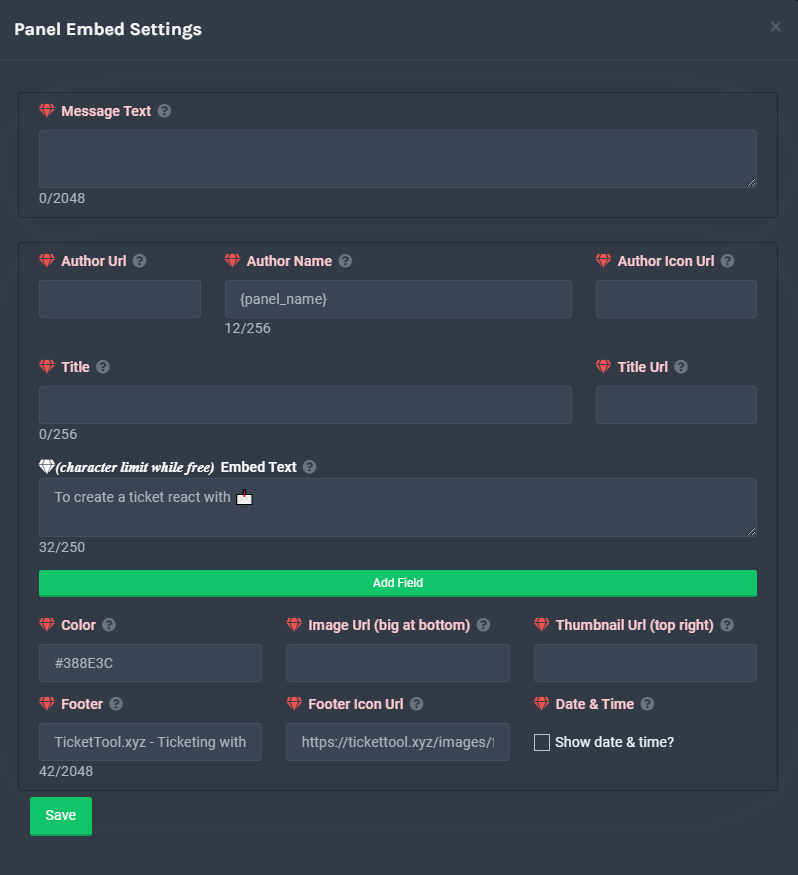 lament shuttle
Nice thanks
 mellow hamlet
Guys
Why ticket didn’t work with me
See it’s says > System Failure: @pseudo glen Missing permission VIEW_CHANNEL
mellow hamlet
copper owl
That's how you edit it
ولد
craggy geyser
mellow hamlet
See it’s says > **System Failure:** <@557628352828014614> Missing permission `VI...
It is telling you. It need the view channel permission
mellow hamlet
I saw the channel permission
craggy geyser
Check both the permission in the category and of the bot itself
mellow hamlet
And I edited the channel permissions
mellow hamlet
craggy geyser
Check both the permission in the category and of the bot itself
Yeah it’s allowed in very thing
Every*
craggy geyser
Run $debug in a channel where you are getting the error (if you are getting the error making a ticket, make a new channel where tickets are set to create and run it there). Then send the link here
mellow hamlet
craggy geyser
Run `$debug` in a channel where you are getting the error (if you are getting th...
Wait wait wait
Pls don’t scam
I’ll let you be administrator to fix it!
But pls don’t scam
Pls
mellow hamlet
I worked so hard in that server
craggy geyser
We don't fix your issues. We tell you how to fix it yourself
fallow ingot
^
craggy geyser
Just do $debug
craggy geyser
Yes
craggy geyser
If nothing happened then it is either a permission issue or the wrong bot enabled
humble sequoiaBOT
Inviting and Enabling Premium Bot
The first thing you will need to do is invite the premium bot, an invite can be found here
Once the bot is in your server we will head to the dashboard and manage your server. When you are managing your server, you want to head into "Server Configs" then click the drop down menu under "Select the bot you would like to use on this server" then click "Ticket Tool#6207" and then save.
craggy geyser
Double check on the dashboard that the bot in that drop down in the image is the one you are using
craggy geyser
Have you changed the prefix? If so use that with the debug instead
 visual hollow
Is there a way i can have two buttons on a single panel?
humble sequoiaBOT
Multipanels are a premium feature that allow for a single panel with multiple buttons to open different tickets.
How to create a Multipanel
Premium users can combine multiple panels into one multipanel.
First, find the IDs of each panel you wish to combine. You can find them in your Panel Configs in the Dashboard
Next, send the multipanel to a channel using $panel [id1] [id2] {id3} ....
e.g. $panel 1 2 4 17 35 to combine panels 1, 2, 4, 17 and 35.
Up to 25 panels may be combined.
 idle terrace
( avg.ev1lx , id 1129432509 , FFCEU256 i want red angelic cus i dont register cus i hadddd a lot of work i want it for video )
for special mission
shut bolt
$tts
humble sequoiaBOT
You're in the wrong place
We provide support for @pseudo glen discord bot and cannot help you with whatever issue you have.
Please make sure to contact the appropriate support team.
If you don't have any further questions regarding our bot Ticket Tool, please close this ticket
_ _
jade topaz
shut bolt
$tts
hi, I was here yesterday but I see that one person in another server created multiple buttons for one message, how can I do that?
shut bolt
Hello there
humble sequoiaBOT
Multipanels are a premium feature that allow for a single panel with multiple buttons to open different tickets.
How to create a Multipanel
Premium users can combine multiple panels into one multipanel.
First, find the IDs of each panel you wish to combine. You can find them in your Panel Configs in the Dashboard
Next, send the multipanel to a channel using $panel [id1] [id2] {id3} ....
e.g. $panel 1 2 4 17 35 to combine panels 1, 2, 4, 17 and 35.
Up to 25 panels may be combined.
For a more convenient use of multipanels, you can now combine panels on the dashboard. This will allow you to directly send the multipanel from the dashboard or via the $panel ID command.
Where can I find this?
You can find this setting on the Dashboard -> Panel Configs -> Settings -> General Options
This will put all buttons from all of your panels on one message. The message is the panel message from the panel you're combining these panels in.
shut bolt
jade topaz
hi, I was here yesterday but I see that one person in another server created mul...
Here you have both of the ways available for doing that
jade topaz
okay, thank you soooo much this saves me so much time
shut bolt
Sure :)
jade topaz
oh, so I create them like normal then head to the one I would like to multi, then I select it?
shut bolt
Yeap, you head to one of them, select the others in the attached panels, and then you send the panel of the one you selected
jade topaz
ok
shut bolt
Remember you must have premium to use this feature
jade topaz
yep, I do somehow I just clicked invite prem and got it
shut bolt
Great
jade topaz
not letting me post it
shut bolt
Any error being displayed?
shut bolt
The bot probably doesn't has permission to send messages in that channel, as you invited the premium bot make sure you selected it in Server Configs
humble sequoiaBOT
Inviting and Enabling Premium Bot
The first thing you will need to do is invite the premium bot, an invite can be found here
Once the bot is in your server we will head to the dashboard and manage your server. When you are managing your server, you want to head into "Server Configs" then click the drop down menu under "Select the bot you would like to use on this server" then click "Ticket Tool#6207" and then save.
jade topaz
did that
shut bolt
Then check the permissions of the bot in that channel, it's missing some
 shut bolt
Do you have premium in the server? Not the bot but the sub
shut bolt
jade topaz
btw, Is prem free?
Nope
humble sequoiaBOT
Ticket Tool Premium
Get premium at https://tickettool.xyz/premium
Manage your subscriptions at https://tickettool.xyz/subscriptions
Why Premium?
Premium lets you customize the bot just how you want it. It also helps keep the bot running.
jade topaz
oh, I have the bot, but not the sub
shut bolt
That's the reason, you can enable the free trial but after it's done the premium settings won't work longer
jade topaz
ok, so I have to use normal?
shut bolt
You have that option, but with the free version you can't do the multipanels
jade topaz
ahh, that sucks, ok
shut bolt
You could use the free trial and if you like it then buy the subscription
jade topaz
i'll find something out, but anyway ty
shut bolt
Sure
jade topaz
yo
so i just add ticket tool to my server
but it didnt pop out
on the ticket server
shut bolt
Hey there
humble sequoiaBOT
Don't see your server in the dashboard?
You will possibly need to relog. Look below to see steps on how to relog.
How to relog the Dashboard.
First, you will need to go to the dashboard. Once your there, click on your avatar on the top right. after you clicked it, you will see button that says Logout. You must click that. Once you have logged out, you can log back in.
Note:
You need one of these 3 things to access the dashboard.
1. Server Owner (Level: 6)
2. Server Administrator (Level: 4)
3. Dashboard Role (Level: 2)
You can check your level using $level on your Discord Server
shut bolt
Try this
arctic trellis
Hi, question: I see users can recieve the transcript automatically in a DM... but if the user has DMs off? there is any "workaround"?
jade topaz
arctic trellis
Hi, question: I see users can recieve the transcript automatically in a DM... bu...
no, if the users DMs are off, ticket tool will not Dm the user.
arctic trellis
brutal but fair answer 😄
 tender tiger
Good morning ! Is there a channel to know when the bot is online and offline ? 
scenic plinth
tender tiger
Good morning ! Is there a channel to know when the bot is online and offline ? <...
shut bolt
jade topaz
thx
Sure
jade topaz
Does Anyone Know How To Stop General Members From Closing Tickets?
shut bolt
$buttons
humble sequoiaBOT
Buttons
The new Discord Buttons allow for a much smoother and convenient experience. They reduce lag and work much better than emojis. With ticket tool you can edit all the buttons however you like! Buttons can show emojis, text and can have 4 different colors.
Where can I edit them?
Dashboard -> Panel Configs -> <Settings> -> Button Options -> <Setting>
shut bolt
jade topaz
Does Anyone Know How To Stop General Members From Closing Tickets?
Go into the settings of the close button and make it support team only
jade topaz
cheers
half kernel
$help claim
humble sequoiaBOT
How does the claim command work?
Ticket Tool claiming is a premium only command that allows your support team to claim tickets and have the ticket renamed, changed permissions or moved to another category
half kernel
@jade topaz
arctic trellis
Hey sorry, how to add custom emotes to the panel description?
React to partysa:877563909660377178 to open a listing request! give the same text and no emote
copper owl
arctic trellis
`React to partysa:877563909660377178 to open a listing request!` give the same t...
you need to add the <>
so
<partysa:877563909660377178>
arctic trellis
lovely, thanks
copper owl
the emote also has to be in the server you're trying to add it in, to make your life much easier
arctic trellis
copper owl
the emote also has to be in the server you're trying to add it in, to make your ...
mmm nope

emote is in the server
humble sequoiaBOT
<:TicketTool:557318988783419453>

copper owl
copper owl
$id <:TicketTool:557318988783419453>
use the emote after $id and copy exactly what it says
i think the thing you're missing is an extra : at the beginning after the <
arctic trellis
copper owl
i think the thing you're missing is an extra `:` at the beginning after the `<`
cool thanks yea a: was missing
iron nightBOT
Gave 1 Rep to Neptune (current: #1 - 225)
copper owl
no problem
arctic trellis
one alst thing
copper owl
whats up
arctic trellis
I want to ahve a specific user tagged, I tried both with {} and without on the message text
any specific format?
not a role, a user
copper owl
<@ID>
arctic trellis
id
copper owl
in the message text
arctic trellis
ok thanks again
copper owl
the ID being the person's ID
mystic hound
@jade topaz unfortunately no
jade topaz
mystic hound
<@456226577798135808> unfortunately no
ok
mellow hamlet
❤️
shut bolt
That is not the ID, so it won't actually ping
mellow hamlet
#ping
humble sequoiaBOT
Pong! Latency is 238ms. API Latency is 77ms [-]
Help Options
$help commands - Information on commands
$help setup - Information on bot setup
$help faq - Frequently asked questions
() = optional
[] = required
*==================================
Ticket Commands
==================================*
_ _
`$add [User] (channel)`
Description: Adding additional users to a ticket
Aliases: none
`$remove [User] (channel)`
Description: Removing users from a ticket
Aliases: none
`$close`
Description: Closing tickets
Aliases: none
`$open`
Description: Opening closed tickets
Aliases: none
`$delete`
Description: Deleting tickets
Aliases: none
`$rename`
Description: Renaming tickets/channels
Aliases: none
`$transcript (send channel)`
Description: Creating transcripts
Aliases: none
`$new (user) (reason)`
Description: Creating tickets in a monitored channel (when command style is enabled)
Aliases: none
`$claim`
Description: Claiming tickets (when claim is enabled)
Aliases: "unclaim"
_ _
*==================================
General Commands
==================================*
_ _
`$help (Help Options)`
Description: Help Command
Aliases: none
`$debug`
Description: Debuging issues with running Ticket Tool
Aliases: none
`$id (@role/@user/#channel/emoji)`
Description: Converting roles, users, channels and emojis to ID
Aliases: "getid"
`$permlevel`
Description: Checking permission level with Ticket Tool
Aliases: "level"
`$ping`
Description: Checking response time with discord api
Aliases: none
`$vote (link | unlink | redeem) (user)`
Description: Earn premium by voting on top.gg or Discord.boats
Aliases: "votes"
 uneven wyvern
نايس
shut bolt
You can use the commands in your own server, please refrain from using them here as this is for support, not commands
robust sandalBOT
uneven wyvern
نايس
 ♔ R⃯⃯T⃯⃯ ⃯ ! RAETx ❀ ☬
Nice
Arabic (ar) → English (en)
 robust sandalBOT
uneven wyvern
٥
robust sandalBOT
uneven wyvern
٥
@jade topaz Trying to translate to English but detected as English.
Please don't waste translations by trying to translate to the same language.
uneven wyvern
robust sandal
<@456226577798135808> Trying to translate to English but detected as English.
Pl...
This is number 5 but it is Arabic like this
凸^-^凸
robust sandalBOT
uneven wyvern
٠
Trying to translate to English but detected as English.
Please don't waste translations by trying to translate to the same language.
uneven wyvern
robust sandal
Trying to translate to English but detected as English.
Please don't waste trans...
This is 0
severe path

uneven wyvern
;-;
scenic plinth
@hardy arrow
Hola, intente ver los documentos enviados a continuación. Si ha recibido soporte, ignore este mensaje.
https://docs.tickettool.xyz/en/general/setup
(Message in review channel, reply)
@tidal pivot
Si necesitas soporte en español, haz un ticket en español, son mucho más rápidos.
(Message in review channel, reply)
robust sandalBOT
scenic plinth
<@620731581354475525>
Si necesitas soporte en español, haz un ticket en español...
 iKlxs
iKlxs
@tidal pivot
If you need support in Spanish, make a ticket in Spanish, they are much faster.
(Message in review channel, reply)
Spanish (es) → English (en)
 tidal pivot
si ya no necesito ayuda me tengo k salir del servidor?
robust sandalBOT
tidal pivot
si ya no necesito ayuda me tengo k salir del servidor?
 ╲⎝⧹ ͠⎝⎝ ¶ȺЂʘ ͠⎠⎠⧸⎠╱
if I no longer need help I have k leave the server?
Spanish (es) → English (en)
tidal pivot
gracias
scenic plinth
Think you meant de nada
robust sandalBOT
scenic plinth
Think you meant de nada
@jade topaz Trying to translate to English but detected as English.
Please don't waste translations by trying to translate to the same language.
 proven void
a little over here please
user seeing this message

oddly, it would seem like he should be able to click the button
humble sequoiaBOT
Help Options
$help commands - Information on commands
$help setup - Information on bot setup
$help faq - Frequently asked questions
humble sequoiaBOT
Setting up Ticket Tool
Visit the docs for setup info
General Setup
humble sequoiaBOT
() = optional
[] = required
*==================================
Ticket Commands
==================================*
_ _
`$add [User] (channel)`
Description: Adding additional users to a ticket
Aliases: none
`$remove [User] (channel)`
Description: Removing users from a ticket
Aliases: none
`$close`
Description: Closing tickets
Aliases: none
`$open`
Description: Opening closed tickets
Aliases: none
`$delete`
Description: Deleting tickets
Aliases: none
`$rename`
Description: Renaming tickets/channels
Aliases: none
`$transcript (send channel)`
Description: Creating transcripts
Aliases: none
`$new (user) (reason)`
Description: Creating tickets in a monitored channel (when command style is enabled)
Aliases: none
`$claim`
Description: Claiming tickets (when claim is enabled)
Aliases: "unclaim"
_ _
*==================================
General Commands
==================================*
_ _
`$help (Help Options)`
Description: Help Command
Aliases: none
`$debug`
Description: Debuging issues with running Ticket Tool
Aliases: none
`$id (@role/@user/#channel/emoji)`
Description: Converting roles, users, channels and emojis to ID
Aliases: "getid"
`$permlevel`
Description: Checking permission level with Ticket Tool
Aliases: "level"
`$ping`
Description: Checking response time with discord api
Aliases: none
`$vote (link | unlink | redeem) (user)`
Description: Earn premium by voting on top.gg or Discord.boats
Aliases: "votes"
proven void
Permissions... could be
in the channel with the panel?
well, I'm an admin but level (4) guild admin
I'm in the dashboard, panel config permissions
I'm sorry... perm level for what?
For some random person to be able to click the button?
read, send (if I understand your question correctly)
User Opened right?
This seems to be user specific honestly, I've got an alt and that account can create a ticket without any issue
half kernel
What im getting is the user cant open a ticket?
half kernel
Hmm
proven void
As well as myself in an alt with the same role
half kernel
Dose he have a blacklisted role you set in the dashboard?
proven void
negative.
humble sequoiaBOT
Blacklist Roles
Any role you assign as a blacklisted role won't be able to use commands or reactions.
Selecting a blacklisted role
Go to your Dashboard -> Server Configs. There you will find the option to select blacklisted roles.
Note: Don't forget to save.
 jade topaz
hello, I was wondering are there any ticket sales going on for the premium?
half kernel
Ok.
jade topaz
ah
humble sequoiaBOT
Help Options
$help commands - Information on commands
$help setup - Information on bot setup
$help faq - Frequently asked questions
half kernel
proven void
negative.
Is he on the most recent version of discord?
humble sequoiaBOT
Update your discord App
Buttons are a relatively new addition to discord and don't work with some older versions of the app.
Please verify that you have the latest version of discord, by going to the app or play store.
_ _
Discord for the App Store
_ _
Discord for the Play Store
proven void
That's what I asked as well ... he claims yes but I suspect he's going off script
half kernel
Yeah. That is the only thing i can think of. Tell him to uninstall discord then re install. Sometimes it can be that there app store isnt showing there is an update
Then let me know how that goses
proven void
hmm... Ok, I was wrong. My alt wasn't setup on the same role combo. My apologies.
So it's a role permission issue.
half kernel
I see
proven void
hmm...
half kernel
Here open up a ticket so you can send me a invite and i can see if i see something wrong. #🎫│make-a-ticket
proven void
half kernel
Here open up a ticket so you can send me a invite and i can see if i see somethi...
Thanks for your help @half kernel
iron nightBOT
Gave 1 Rep to Jayson G | UBP (current: #41 - 3)
half kernel
Any time
proven void
half kernel
Any time
I saw you popped into main chat. If you're not talking about TSLA or some other moving stock, you'll probably not get a response from other members. 😄
It's not that they are unfriendly.
 broken cargo
Ok I need help
shut bolt
How can we help
broken cargo
shut bolt
How can we help
I want to know how to make a panel
shut bolt
broken cargo
I want to know how to make a panel
Sure, check this
humble sequoiaBOT
broken cargo
Thank you for your help! @shut bolt
iron nightBOT
Gave 1 Rep to Yareaj_ (current: #12 - 74)
shut bolt
broken cargo
Thank you for your help! <@!518666147441278998>
You are welcome! 
 compact agate
well
 remote peak
Is there a way to log the ticket transcript in the channel the ticket is made in?
 ember orbit
remote peak
Is there a way to log the ticket transcript in the channel the ticket is made in...
ember orbit
remote peak
Is there a way to log the ticket transcript in the channel the ticket is made in...
أنا اعتقد ذلك
remote peak
English please
ember orbit
I think so
copper owl
remote peak
Is there a way to log the ticket transcript in the channel the ticket is made in...
can you elaborate?
remote peak
Sure! When I press the transcript button I want it to send a link in two places.
- The channel in which the ticket is (so ticket-10012)
- The logs channel
remote peak
Can this guy stop talking arabic?
copper owl
remote peak
Can this guy stop talking arabic?
what? talking arabic is allowed
there's no rule against that
remote peak
except i speak english lol
copper owl
remote peak
Sure! When I press the transcript button I want it to send a link in two places....
Not possible. It will only go to one place if you're using the button
remote peak
and that one place is only logs channel
cant be the channel which the ticket is opened
copper owl
Can I ask why you want it to send inside the ticket?
ember orbit
copper owl
Not possible. It will only go to one place if you're using the button
آسف يا نبتون أنا غاضب فقط لأنني لا أملك لغة إنجليزية جيدة أيضًا
remote peak
so the users will be able to get the logs
copper owl
it's kinda redundant to send it in the ticket aswell as the logs channel
copper owl
remote peak
so the users will be able to get the logs
Why not just use the DM transcript feature?
remote peak
premium
copper owl
also, at that point, the user wont be able to get the transcript
remote peak
The server admin doesnt wanna pay for it 😦
copper owl
because the ticket would be closed
you could use $transcript in the ticket before closing
remote peak
unless on close they have perms
copper owl
remote peak
unless on close they have perms
Fair point
copper owl
copper owl
you could use `$transcript` in the ticket before closing
this is the only thing you can do here
copper owl
You can use the {panel.name} in the ticket message
that's the most effective way essentially
copper owl
remote peak
It seems my close message isnt changing
Which close message exactly?
remote peak
on ticket close
copper owl
close ask?
remote peak
Let me throw open a ticket for this
compact agate
Stop
copper owl
dw they're gone
compact agate
Ok
compact agate
copper owl
dw they're gone
was that even real Arabic?
copper owl
compact agate
was that even real Arabic?
I suspect he was using a translator
it was arabic, it did translate to something I wont mention
compact agate
Why?
copper owl
compact agate
Why?
trolls ¯_(ツ)_/¯
copper owl
yeah, let's not talk about it lol
plain surge
If I press on save transcript, and later on some messages in the closed ticket channel get deleted, does that effect the previously saved transcript?
shut bolt
Nope
You should save another transcript
Cause the new messages aren't on the first transcript
plain surge
Not new messages, but deleted
So a message in the first transcript got deleted
Will the first transcript get affected?
shut bolt
plain surge
Will the first transcript get affected?
Nope, if you already save it the contents of it wont be affected by deleted messages after the save
shut bolt
plain surge
Is there a limit for how long a saved transcript is saved for?
The transcript will be saved as long as you keep the message where the bot sent it, if you delete it, 30 days after it has been delete it won't available as those files are directly hosted on Discord servers
plain surge
Thanks again
shut bolt
plain surge
Thanks again
You are welcome
jade topaz
Hello, so, when a person makes a ticket, it is sent to the top of the server and not to the admin chat. How do I fix that?
Sure
humble sequoiaBOT
How to set the open category
To set a open category go to the Dashboard -> Panel Configs -> Settings -> Category Options -> Category Open
half kernel
jade topaz
Hello, so, when a person makes a ticket, it is sent to the top of the server and...

sorry i didn't see lol
 scarlet goblet
 brazen current
What's the command to send someone a transcript to their dms?
copper owl
brazen current
What's the command to send someone a transcript to their dms?
I dont think that exists anymore. One moment I'll check for ya
Yeah I don't think that exists. To be able to send the transcript to DMs, you'll need premium
It's an option under Logging Options
brazen current
copper owl
Yeah I don't think that exists. To be able to send the transcript to DMs, you'll...
I have premium
But the thing is, what's the command for it?
I'm only shown the option to send a transcript to the person that made the ticket
copper owl
There is no command for it. It's something you do VIA buttons if im not mistaken
brazen current
Is it possible to send it to other people that are in the ticket as well
copper owl
brazen current
Is it possible to send it to other people that are in the ticket as well
Could you elaborate?
Who would you like the transcript to be sent to?
alongside the user who opened the ticket
brazen current
So, let's say, Person a made a ticket right?
copper owl
Mhm
brazen current
And the admin ends up adding person b using the $add
copper owl
alright
brazen current
When the ticket gets deleted, it only sends a transcript to Person A
Is it possible to send it to Person B as well?

The $transcript command can send the transcript to a channel, but would it be possible for Person B to get it in their dm's?
copper owl
that's not how the transcript command works, it would only work if you input the channel mention in the parameter
And if im not mistaken, the transcript DM feature would only send it to the transcript user
 wicked musk
How do you cancel your account?
copper owl
wicked musk
How do you cancel your account?
Can you elaborate?
Cancel what account exactly?
wicked musk
My subscription
humble sequoiaBOT
Ticket Tool Premium
Get premium at https://tickettool.xyz/premium
Manage your subscriptions at https://tickettool.xyz/subscriptions
Why Premium?
Premium lets you customize the bot just how you want it. It also helps keep the bot running.
copper owl
second link
you should be able to manage your subscriptions and cancel your sub either immediately, or on next month's purchase
wicked musk
Is ticket tool not working
half kernel
wicked musk
Is ticket tool not working
How is it not working?
wicked musk
I've put in the correct email address, but it saying it's not registered
half kernel
Ok, got to #🎫│make-a-ticket, and select billing ticket. Then the billing team can help you there
 atomic mortar
yo
how do i make ticket tool ping a specific role when someone makes a ticket
like ping the role in the ticket message
copper owl
$help ping
humble sequoiaBOT
How to make Ticket Tool ping a role
To make ticket tool ping a role when a ticket is opened, go to the Dashboard -> Panel Configs -> Settings -> Ticket Options -> Ticket Message -> Message Text and do this:
{@Role name} This is case sensitive and the role must have @mentions enabled
copper owl
@atomic mortar This might help you out
 steady zenith
how do i get ticket bot to mention a certain role when a ticket is created
copper owl
no problem
plain surge
copper owl
And if im not mistaken, the transcript DM feature would only send it to the tran...
Perhaps they can send the transcript normally to person a, then have person b claim the ticket and then send the transcript again?
copper owl
plain surge
Perhaps they can send the transcript normally to person a, then have person b cl...
that's not possible
once a user creates a ticket, that ticket is tied to them and only them
Changing the ticket owner is not a feature as of currently, and I'm not sure if it will be
plain surge
What does claim ticket command do then?
copper owl
Claiming is for staff, not members
humble sequoiaBOT
Claiming Options
Claiming allows you to change the ticket name, category and permissions. To use it you have to enable it first on your Dashboard > Panel Configs > Claiming Options.
Note: This is a premium feature
plain surge
Ah, this is considering the support team doesn't have permissions to manage channels etc
Alright, thanks
And sorry for the mention 😅
copper owl
No worries, I dont mind pings as long as they're not spammy and frequent
 spark tusk
What does this mean? Does this have to do with the dashboard setup?
 copper owl
spark tusk
What does this mean? Does this have to do with the dashboard setup?
copper owl
spark tusk
What does this mean? Does this have to do with the dashboard setup?
it means you either invited the premium bot without having a premium subscription, or you invited the premium bot and forgot to redeem your subscription
Did you buy a ticket tool premium subscription?
spark tusk
@copper owl I don't own the server nor manage their ticket system.
copper owl
Then whatever solution I give you won't help
Someone from their team will have to contact us
I would suggest DMing/Pinging a staff member and letting them know about this
solid stream
 west prawn
Heyo, we might've missed it in the settings/dashboard, but we're a server where nsfw can occur, and as such we would like the ticket channels to be nsfw so people don't get blocked from that. It looks like we couldn't specifically find a toggle for this, is there any way to accomplish this or do we have to edit the ticket channels after creation?
edit: i found an answer from 5 months ago that it isn't currently possible, so in that case just wondering if it's still the case
scenic plinth
No, Ticket Tool cannot toggle nsfw channel options for newly created channels through any configuration.
west prawn
Appreciate the quick response, is that feature at all considered or something that can possibly be requested?
scenic plinth
I don't believe so. Ticket Tool was configured to make it easier to contact moderators within a discord server, never was intended for nsfw modules.
west prawn
it's kinda hard to contact us when half the reports have some kind of nsfw pictures in them and need to be handled through dms or edit the channel (which our lower staff doesnt directly have access to), I'm not sure what you mean with nsfw modules we'd just like an option to auto-mark the channel nsfw, but if it's not doable that's a bummer but I understand there's other priorities, thanks!
half kernel
west prawn
it's kinda hard to contact us when half the reports have some kind of nsfw pictu...
My recommendation is to make a nsfw ticket and only have staff you know 18+ or can handle it see it
west prawn
half kernel
My recommendation is to make a nsfw ticket and only have staff you know 18+ or c...
All our staff are 18+, we're an 18+ geared server. My question is to add a feature to make ticket-channels automatically nsfw?
edit: thats not really a question, sorry 
half kernel
Yea sadly you cant
 leaden dune
Hello
copper owl
helo
leaden dune
how do you program the bot?
scenic plinth
Through a programmer.
leaden dune
it was ok but to put the bot @pseudo glen to work on the server
scenic plinth
$invite
humble sequoiaBOT
Ticket Tool Invite & Support
leaden dune
???
scenic plinth
You said to "put on the server"?
 sharp trout
Hi 🙂
scenic plinth
You would need to invite it, if you're trying to get help for your own bot I can't help you. Searcha YouTube video maybe..
scenic plinth
sharp trout
Hi 🙂
Hello 👋
sharp trout
scenic plinth
Hello 👋

leaden dune
nop how do i set the ticket to fonsionar
scenic plinth
I don't know what the term "nop how do i set the ticket to fonsionar" means
Elab plz
leaden dune
scenic plinth
I don't know what the term "nop how do i set the ticket to fonsionar" means
Yes
scenic plinth
Yes what? You know what that means?
scenic plinth
You replied yes when I said I didn't know what it meant, I need a better explanation of what you mean
leaden dune
how do i put the bot to give a ticket
leaden dune
scenic plinth
You replied yes when I said I didn't know what it meant, I need a better explana...
???
humble sequoiaBOT
Setting up Ticket Tool
Visit the docs for setup info
General Setup
scenic plinth
$help send
humble sequoiaBOT
Sending a panel
Once you've created a panel on the dashboard you will need to send it to a channel using send on the dashboard
Select the channel you want your panel to be created in and click send.
For other questions checkout $help faq
An example of a sending a panel is shown below.
 scenic plinth
$help panel
humble sequoiaBOT
Creating a panel
To create a panel we are going to need to head over to the panel configs on the dashboard
Once at the dashboard we will need to click Create Panel
Enter a panel name (Fill in any optional settings you want)
Click Create Panel and your ready to get started with configuring your panel
An example of a creating a panel is shown below.
 leaden dune
 desert summit
leaden dune
desert summit
leaden dune
Configs do painel
 valid crystal
احتاج مساعدة
leaden dune
 robust sandalBOT
valid crystal
احتاج مساعدة
robust sandalBOT
valid crystal
احتاج مساعدة
 Moktab OFF
I need help.
Arabic (ar) → English (en)
scenic plinth
/ar What do you need help with?
robust sandalBOT
ما الذي تحتاج إلى مساعدة به؟
English (en) → Arabic (ar)
valid crystal
كيف اضيف البوت لسيرفري ؟
robust sandalBOT
valid crystal
كيف اضيف البوت لسيرفري ؟
Moktab OFF
How do I add the bot to Serfrey?
Arabic (ar) → English (en)
valid crystal
/en كيف اضيف البوت لسيرفري ؟
robust sandalBOT
How do I add the bot to Serfrey?
Arabic (ar) → English (en)
scenic plinth
/ar You can add it by clicking the top text below
robust sandalBOT
يمكنك إضافتها بالنقر فوق النص العلوي أدناه
English (en) → Arabic (ar)
scenic plinth
$invite
humble sequoiaBOT
Ticket Tool Invite & Support
scenic plinth
/ar Sorry 3rd
robust sandalBOT
آسف الثالث
English (en) → Arabic (ar)
valid crystal
شكرا
robust sandalBOT
valid crystal
شكرا
Moktab OFF
Thank you
Arabic (ar) → English (en)
robust sandalBOT
scenic plinth
/ar Sorry 3rd
@valid crystal Trying to translate to English but detected as English.
Please don't waste translations by trying to translate to the same language.
steady zenith
woh
robust sandalBOT
steady zenith
woh
 fuaxk
fuaxk
from where
German (de) → English (en)
robust sandalBOT
robust sandal
<@881861155470073908> Trying to translate to English but detected as English.
Pl...
@valid crystal Trying to translate to English but detected as English.
Please don't waste translations by trying to translate to the same language.
steady zenith
اي ديوينه هست
robust sandalBOT
steady zenith
اي ديوينه هست
fuaxk
It's crazy.
Persian (fa) → English (en)
scenic plinth
Um, what.
steady zenith
noothing just playin
 wise heart
Hello, I have a problem
https://tickettool.xyz/manage-servers
I can't find my server that I put. Possible to help me?
humble sequoiaBOT
Don't see your server in the dashboard?
You will possibly need to relog. Look below to see steps on how to relog.
How to relog the Dashboard.
First, you will need to go to the dashboard. Once your there, click on your avatar on the top right. after you clicked it, you will see button that says Logout. You must click that. Once you have logged out, you can log back in.
Note:
You need one of these 3 things to access the dashboard.
1. Server Owner (Level: 6)
2. Server Administrator (Level: 4)
3. Dashboard Role (Level: 2)
You can check your level using $level on your Discord Server
copper owl
@wise heart try this
copper owl
did not find what
wise heart
My server that I put the bot
copper owl
humble sequoia
then relog
iron nightBOT
Gave 1 Rep to Neptune (current: #1 - 227)
copper owl
No problem
valid crystal
How do I change my name in pubg mobile ?
copper owl
$tts
humble sequoiaBOT
You're in the wrong place
We provide support for @pseudo glen discord bot and cannot help you with whatever issue you have.
Please make sure to contact the appropriate support team.
If you don't have any further questions regarding our bot Ticket Tool, please close this ticket
_ _
copper owl
Youtube and Google are your friend right now
scenic plinth
valid crystal
How do I change my name in pubg mobile ?

 rich axle
Guys, I already searched the internet, I tried to do it myself but I couldn't...
I wanted to make a ticket with multiple buttons, does anyone know how to do this?
like this #🎫│make-a-ticket
shut bolt
Hello there!
This feature is named multipanels, makes part of the premium bot and you can do it following this
humble sequoiaBOT
For a more convenient use of multipanels, you can now combine panels on the dashboard. This will allow you to directly send the multipanel from the dashboard or via the $panel ID command.
Where can I find this?
You can find this setting on the Dashboard -> Panel Configs -> Settings -> General Options
This will put all buttons from all of your panels on one message. The message is the panel message from the panel you're combining these panels in.
shut bolt
rich axle
Thank you my friend, I will try
shut bolt
Sure!