#🆘│community-support
1 messages · Page 354 of 1
 jade topaz
 rose flame
@jade topaz reload the site or wait. if didint work logout in site then login again
 fathom steppe
hello
 craggy geyser
How can we help?
craggy geyser
You can change the button options to support team only at the location of the following information. And in command configs you can also set the command to support team only
$buttons
 humble sequoiaBOT

Buttons
The new Discord Buttons allow for a much smoother and convenient experience. They reduce lag and work much better than emojis. With ticket tool you can edit all the buttons however you like! Buttons can show emojis, text and can have 4 different colors.
Where can I edit them?
Dashboard -> Panel Configs -> <Settings> -> Button Options -> <Setting>
 fathom steppe
thx @craggy geyser
 iron nightBOT
Gave 1 Rep to Swift (current: #4 - 180)
fathom steppe
how can i edit the massege apearing after opning a ticket?@craggy geyser
humble sequoiaBOT
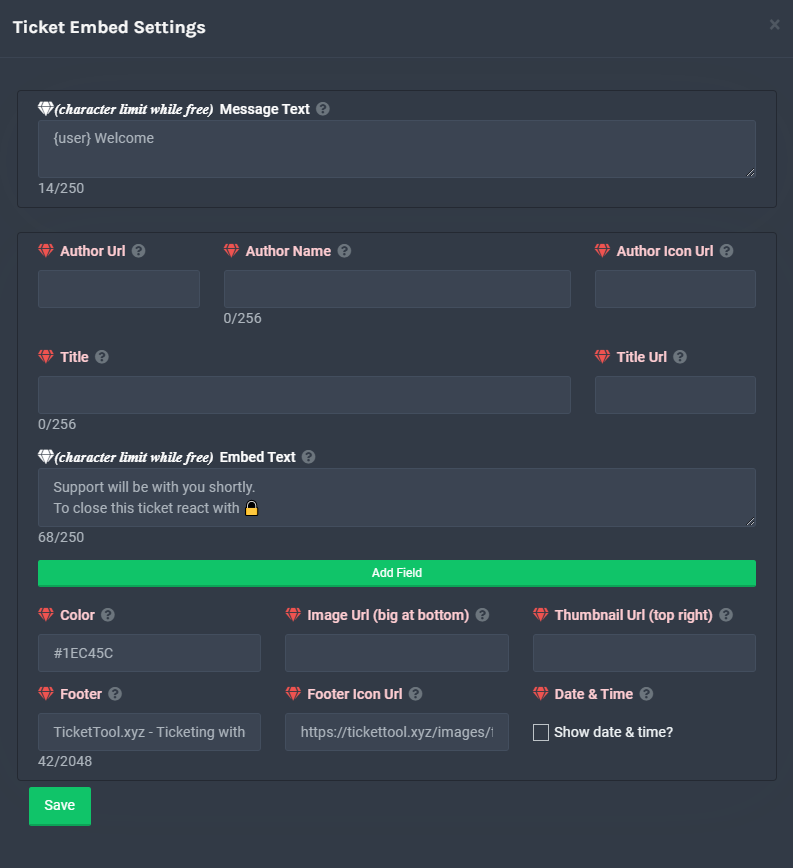
**Ticket Message**
The Ticket Message is the first message sent by the bot in a new ticket. To customise it head over to your Dashboard -> Panel Configs -> Settings -> Ticket Options -> Edit Ticket Message
 craggy geyser
fathom steppe
how can i edit the massege apearing after opning a ticket?<@!132147174212501504>
craggy geyser
fathom steppe
how can i edit the massege apearing after opning a ticket?<@!132147174212501504>
Please don't keep pinging me. It is against rules to ping support members. You will be helped without it (as shown by the fact that it was Ymaster who gave the solution for you)
fathom steppe
craggy geyser
Please don't keep pinging me. It is against rules to ping support members. You w...
ok iam sorry
 desert summit
fathom steppe
ok iam sorry
desert summit
fathom steppe
ok iam sorry
There ^^ you go
desert summit
humble sequoia
…
rose flame
im not support but mention me if you want i will awnser
 versed elm
Guys how do I make it so that whenever a new ticket is opened a certain role gets pinged?
versed elm
rose flame
im not support but mention me if you want i will awnser
You can answer this ig^
rose flame
which?
versed elm
versed elm
Guys how do I make it so that whenever a new ticket is opened a certain role get...
.
rose flame
be sure to put {}
versed elm
Kk
rose flame
did it work?
rose flame
lol
versed elm
Nvm found it
rose flame
wait
versed elm
Worked
rose flame
versed elm
Worked
ok your welcome
rose flame
versed elm
Thank you
you welcome
versed elm
Thank you @myuser
jade topaz
versed elm
Send the users id
He wants you to reply to his msg and say thank you simply 😂
versed elm
Confusion
rose flame
do Thanks @rose flame
iron nightBOT
@rose flame :: You can't give rep to yourself, silly.
jade topaz
rose flame
do Thanks <@!720957946917290006>
Thanks 😂
iron nightBOT
Gave 1 Rep to !๖ۣۜPαяѕα (current: #61 - 1)
versed elm
Thanks @rose flame
iron nightBOT
Gave 1 Rep to !๖ۣۜPαяѕα (current: #47 - 2)
 bright abyss
@radiant moss i need help
 bright abyss
howcan i knowthe prefix
 radiant moss
Do @pseudo glen debug
 severe path
bright abyss
<@!513792641016659971> i need help
severe path
bright abyss
<@!513792641016659971> i need help
HAHAHA
rose flame
😐
desert summit
bright abyss
howcan i knowthe prefix
$help Prefix
humble sequoiaBOT
How to change Ticket tool's prefix
The default prefix for ticket tool is $ and @Ticket Tool#4843 however that can be changed on the Dashboard under Server Configs -> Command Prefix.

NOTE that @Ticket Tool#4843 will always work as a prefix even if there is a custom prefix.
rose flame
bright abyss
howcan i knowthe prefix
@bright abyss prefix is $. You Can Change In Panel
bright abyss
ok
jade topaz
What permissions does the bot need?
desert summit
jade topaz
What permissions does the bot need?
You don’t have to give him administratorpermission but it makes it sometimes easier
 wheat torrent
hello
how to choose the catrogy for the ticket when someone open a ticket ?
$help category
humble sequoiaBOT
How to set the open category
To set a open category go to the Dashboard -> Panel Configs -> Settings -> Category Options -> Category Open

 wet ferry
$help
humble sequoiaBOT
Help Options
$help commands - Information on commands
$help setup - Information on bot setup
$help faq - Frequently asked questions
wet ferry
$help faq
humble sequoiaBOT
====== FAQ ======
If a question interests you run the command to see the answer.
Q: What is the prefix and how do I change it?
A: $help prefix
Q: How do I let my support team see into a ticket?
A: $help support
Q: How do I make a ticket ping my support when it's created?
A: $help ping
Q: How do I set a transcript channel?
A: $help transcript
Q: How do I limit the number of tickets a user can create?
A: $help limit
Q: How do I set what category tickets are created in?
A: $help category
Q: How do I set what category tickets are moved to when closed?
A: $help closed
Q: How do I set a custom reaction?
A: $help reaction
Q: How do I set the permissions for the tickets?
A: $help perms
Q: How do I create a panel?
A: $help panel
Q: How do I get the panel in my discord?
A: $help send
Q: How do I add or remove users from a ticket?
A: $help add
Q: A panel of mine won't update with the new settings, How do I fix it?
A: $help update
Q: Ticket Tool isn't responding to my commands, How do I fix it?
A: $help offline
Q: How does the claim command work?
A: $help claim
desert summit
wet ferry
$help
Hey how can we help you?
wet ferry
$help claim
humble sequoiaBOT
How does the claim command work?
Ticket Tool claiming is a premium only command that allows your support team to claim tickets and have the ticket renamed, changed permissions or moved to another category
 wet ferry
Ty
 unique junco

 half kernel
?
desert summit
unique junco
https://tt.bot
??
unique junco
ok blocked
severe path

jade topaz
why the pfp changed ?
 copper owl
halloween
jade topaz
Oh ok
jade topaz
copper owl
halloween
but the php of the bot is in pixels
jade topaz
Yes
copper owl
that's a discord bug, i see the pfps for both bots fine
 versed elm
Can I make it so that my ticket gives a role whenever it is opened?
 scenic plinth
versed elm
Can I make it so that my ticket gives a role whenever it is opened?
scenic plinth
versed elm
Can I make it so that my ticket gives a role whenever it is opened?
No sorry
versed elm
Ah ok
Any way to do it tho?
Like using mee6?
Also
My msg isn't fitting inside the embed
What do I do?
If you wish to continue with your application to ACЄ, follow the step process below.
1.) Post a screenshot of your MP and BR stats in the ticket channel that you opened
2.) Type @recruiter in the ticket that you opened after taking a ticket from #┏apply-to-ace . (This will alert our Recruitment team of your posts.)
3.) Answer following questions and copy and paste it in the ticket channel when you take your ticket
Ingame name:
How old are you:
How many clan war points do you get per week/how often do you play:
What region are you from:
Do you use mic in-game:
Do you speak any English:
Global or Garena
 shut bolt
versed elm
My msg isn't fitting inside the embed
shut bolt
versed elm
My msg isn't fitting inside the embed
Do you have the free bot?
versed elm
This is the msg
versed elm
shut bolt
Do you have the free bot?
Yeah
shut bolt
Wait a sec
shut bolt
versed elm
If you wish to continue with your application to ACЄ, follow the step process be...
Does any of the message appear?
Or it simply doesn't appear nothing
versed elm
shut bolt
Or it simply doesn't appear nothing
Half of it does
Anyways we got around it
Is there a way to have a command open a ticket?
shut bolt
versed elm
Is there a way to have a command open a ticket?
Enbale command style tickets, it works with $new
versed elm
What's the exact command?
shut bolt
$new
shut bolt
Check the Command Style Tickets menu in the Panel Configs > Settings
 mystic hound
@noble folio would you mind elaborating on your #📈│reviews, considering you've just joined the server and have never had a ticket here
 upper lion
How do I get the premium subscriber role
copper owl
$pc
humble sequoiaBOT

How to get premium role
Until the automatic premium check is fixed run the command $debug on your server and send us the link in a ticket.
copper owl
@upper lion this is how
 brazen heart
how do i make it ping a certian role when a ticket is opened
severe path
$help ping
humble sequoiaBOT
How to make Ticket Tool ping a role
To make ticket tool ping a role when a ticket is opened, go to the Dashboard -> Panel Configs -> Settings -> Ticket Options -> Ticket Message -> Message Text and do this:
{@Role name} This is case sensitive and the role must have @mentions enabled
 severe path
@zinc oracle 
 zinc oracle
@severe path
rose flame
ask me questions if you want i will awnser
jade topaz
pomoezcie
scenic plinth
Can't exactly help you if you don't tell us anything.
jade topaz
jade topaz
pomoezcie
Tutaj nie rozmawia się po polsku
 safe ibex
How do you mention your staff using the tickets so when a ticket is open your staff gets notified
scenic plinth
safe ibex
How do you mention your staff using the tickets so when a ticket is open your st...
$help ping
humble sequoiaBOT
How to make Ticket Tool ping a role
To make ticket tool ping a role when a ticket is opened, go to the Dashboard -> Panel Configs -> Settings -> Ticket Options -> Ticket Message -> Message Text and do this:
{@Role name} This is case sensitive and the role must have @mentions enabled
scenic plinth
Alternatively, you can use <@roledid>
Not sure how to find your role ID? Use $id @rolementionhere
safe ibex
Ty
scenic plinth
Np
safe ibex
Thanks @scenic plinth
iron nightBOT
Gave 1 Rep to Lixツ (current: #5 - 159)
jade topaz
rose flame
ask me questions if you want i will awnser
Help?

I’m super confused never had this happen
humble sequoiaBOT

Reactions Update
Since a while we don't support reactions anymore and switched to buttons.
To enable buttons you have to resend the panel message.
 copper owl
it's because it's a new change, we dont support reactions anymore
 distant socket
Hello, ive went on the website and logged into my discord and followed the steps.
I went onto the dashboard and nothing has happend and saying i dont have any servers with the bot in which i do. Im just confused?
humble sequoiaBOT
Don't see your server in the dashboard?
You will possibly need to relog. Look below to see steps on how to relog.
How to relog the Dashboard.
First, you will need to go to the dashboard. Once your there, click on your avatar on the top right. after you clicked it, you will see button that says Logout. You must click that. Once you have logged out, you can log back in.
Note:
You need one of these 3 things to access the dashboard.
1. Server Owner (Level: 6)
2. Server Administrator (Level: 4)
3. Dashboard Role (Level: 2)
You can check your level using $level on your Discord Server
copper owl
try this
distant socket
Ah yes, thank you
 vestal owl
Did my application get denied?
Actually i had 48 hours to reply and it hasn't been 48 hours so
shut bolt
vestal owl
Actually i had 48 hours to reply and it hasn't been 48 hours so
Did you send the application after respondig?
shut bolt
Then you must wait if you get accepted
vestal owl
Ik
shut bolt
What do you mean exactly? 
 jaunty glen
I want the server's server support technical supportable capable of association with what the anasty powers
shut bolt
I don't get what you want, sorry
jaunty glen
$invite
humble sequoiaBOT
Ticket Tool Invite & Support
 tiny wave
$help
humble sequoiaBOT
Help Options
$help commands - Information on commands
$help setup - Information on bot setup
$help faq - Frequently asked questions
tiny wave
$help comands
humble sequoiaBOT
Help Options
$help commands - Information on commands
$help setup - Information on bot setup
$help faq - Frequently asked questions
shut bolt
You can run this commands on your server, is there anything punctual I might help with?
 magic moon
Can somebody help me with something real quick
It's with something in the dashboard
My helpers like my other version of my moderators can I view my support tickets I've done many tests
Where do I go in the dashboard to fix it
To have a certain role to view the tickets
humble sequoiaBOT
How to let support team see into a ticket
About support roles
A support role lets your support team see into tickets with out having to add them manually to each and every ticket.
You can add as many support roles as you like per panel.
NOTE that the way discord works all admins can see into tickets regardless of this.
How to set a support role
To set a Support role go to the Dashboard -> Panel Configs -> Settings -> General Options -> Support Team Roles.

NOTE that the support role will not be able to see into tickets that are already created..
magic moon
O I'm dum
shut bolt
magic moon
To have a certain role to view the tickets
This is how you can enable a role to see them
shut bolt
magic moon
O I'm dum
No worries
magic moon
shut bolt
No worries
Thank you so much
iron nightBOT
Gave 1 Rep to Yareaj_ (current: #16 - 53)
shut bolt
magic moon
Thank you so much
Sure!
magic moon
@shut bolt it's not working?
I have two accounts open I reseted my other account twice and it does not let me view
Never mind I fixed it
shut bolt
magic moon
<@518666147441278998> it's not working?
Ou
shut bolt
magic moon
Never mind I fixed it
Interesting, what was it?
magic moon
It was a bug in the dashboard I didn't save it
 magic moon
Thank you
 leaden cloud
Does ticket bot have a feature to automatically delete tickets after a period of time?
humble sequoiaBOT
Automation disabled
There's currently no ETA for when automation will be enabled again. The issue that's caused it to be disabled, us hitting rate limits, is tied to the increased load on Discord's servers. The situation's currently unpredictable, which makes it so we can't give you a fixed time.
copper owl
as of currently, it does not
 errant trout
Oo
leaden cloud
My discord channel has a lot of people creating tickets, and it's overflowing, it's really annoying 500+ text channel
😂
copper owl
Then assign more mods or support members
or maybe have tickets be accessible at a certain role or level
 split epoch
fuck youuu
ASSSSSSSSSSSSSS
@tinny
@radiant moss
@radiant moss
@radiant moss
@radiant moss \
 prime bridgeBOT
!! Lexia !! has been silenced for 10m 

 Reason: Similiar-Messages Spam
!! Lexia !!#2704 | 847396544026116116
Timi has been silenced for 10m
Reason: Posting Discord Server Invites
Timi#9537 | 892960151689105418
mystic hound
how nice
prime bridgeBOT
 Successful bans:
 1
 Unsuccessful bans:
 0
 Reason: spam / ad
 Moderator: @mystic hound
severe path
$help prefix
humble sequoiaBOT
How to change Ticket tool's prefix
The default prefix for ticket tool is $ and @Ticket Tool#4843 however that can be changed on the Dashboard under Server Configs -> Command Prefix.
NOTE that @Ticket Tool#4843 will always work as a prefix even if there is a custom prefix.
severe path
Yes
copper owl
Basically yeah
you'll have to create a panel and send it to a channel
#573205317870157855 shows the basic setup, everything else, you can customize to your liking (if you have access to it)
Good idea
testing bots before fully adding them to a server is always a good move
 stiff hawk
On ticket_create -> add role to user, is that possible?
Use case: @role so I can broadcast a msg to all people who need support (for example to solve a general issue)
humble sequoiaBOT
-- moved to ticket --
vestal owl
did my application get denied
craggy geyser
I can't tell you (because I don't know. I have nothing to do with applications) but the people who do know won't tell you. It says on the application that you won't be contacted if you are denied. If you applied a while ago and heard nothing you probably were denied
mystic hound
 vestal owl
OH weeks thanks
vestal owl
mystic hound
thanks
iron nightBOT
Gave 1 Rep to Light (current: #3 - 189)
 humble sequoiaBOT
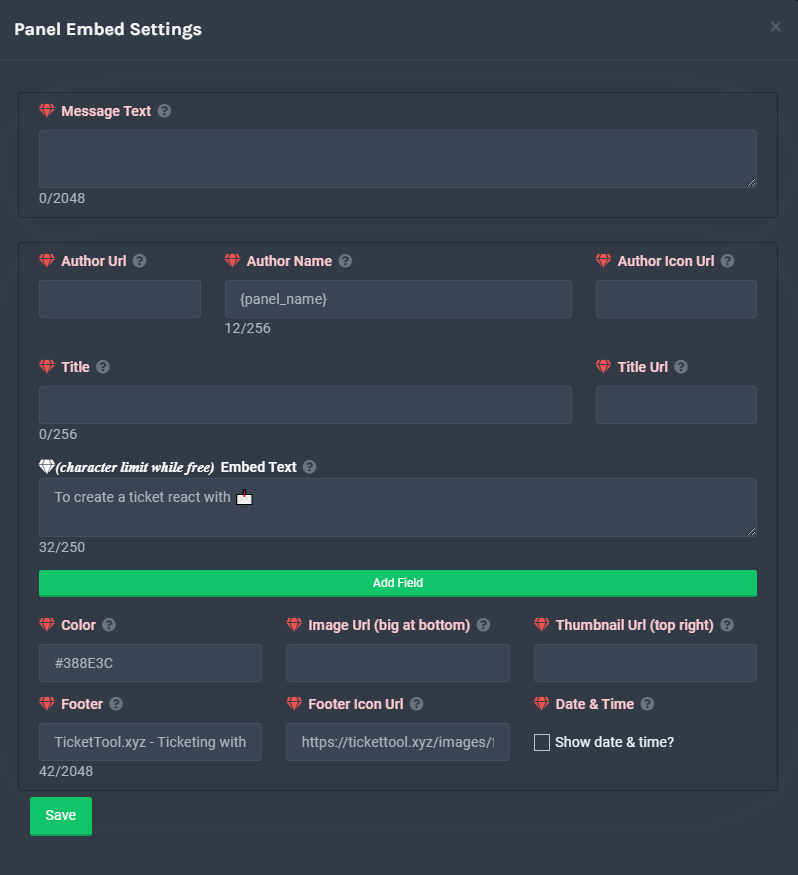
**Panel Message**
The panel message is where people react to make a ticket. To customize it head over to your Dashboard --> Panel Configs -> Settings -> Panel Options -> Edit Panel Message
 craggy geyser
 spring thistle
how i can change it
spring thistle
how i can change it
Follow this
spring thistle
thanks @craggy geyser
iron nightBOT
Gave 1 Rep to Swift (current: #4 - 182)
craggy geyser
No worries
 timid juniper
when someone opens up a ticket on my server, theyre not able to view the message history of the ticket, why might this be? I've triple checked perms
can't figure it out
also how do i get premium sub role?
desert summit
timid juniper
when someone opens up a ticket on my server, theyre not able to view the message...
$help perms
humble sequoiaBOT
How to set the permissions for tickets
To set a change permissions go to the Dashboard -> Panel Configs -> Settings -> Permission Options
 craggy geyser
$help perms
humble sequoiaBOT
How to set the permissions for tickets
To set a change permissions go to the Dashboard -> Panel Configs -> Settings -> Permission Options
craggy geyser
$pc
humble sequoiaBOT
How to get premium role
Until the automatic premium check is fixed run the command $debug on your server and send us the link in a ticket.
desert summit
or look at your category perms
desert summit
humble sequoia
x
 ember depot
I neet help
copper owl
how can we help
unique junco
Help me with my school work pls
shut bolt
unique junco
Help me with my school work pls
lol, what is it?
unique junco
I don’t know
shut bolt
half kernel
is there a way for the tags to respond only to people with a certain role?
You can make it Admin exclusive by checking  the
the Admin Only box in the tag Settings
half kernel
but they need the admin perm?
shut bolt
half kernel
but they need the admin perm?
Nop, a Dashboard Role
ember depot
XD
half kernel
shut bolt
Nop, a Dashboard Role
so any dashboard role can use it if i do the admin only?
iron nightBOT
Gave 1 Rep to Yareaj_ (current: #16 - 54)
shut bolt
You are welcome :)
half kernel
one more thing
If i add them to the dashboard role how much can they edit of pannels and what not?
shut bolt
They can edit everything from the Dashboard, except generating a backup key
half kernel
hmm, is there any other way to make tags to certain people and not add them to dashboard role?
shut bolt
half kernel
hmm, is there any other way to make tags to certain people and not add them to d...
As far as I know, no, but I will like to confirm,@copper owl is it there a way?
copper owl
what's up?
half kernel
If theres not is there a way to undo an action from someone. like if someone edited a pannel is there a quick undo?
shut bolt
half kernel
If theres not is there a way to undo an action from someone. like if someone edi...
Nope
copper owl
half kernel
hmm, is there any other way to make tags to certain people and not add them to d...
If you mean specifying a role to be able to use a tag, then no
you can only make it admin only for now
half kernel
copper owl
you can only make it admin only for now
and the admin only is the dashoard role right?
copper owl
There's no Allowed/Disabled Roles feature for tags just yet
copper owl
half kernel
and the admin only is the dashoard role right?
Im actually not too sure about this one. that's a good question
It's either Dashboard role and above, or administrative perms and above
half kernel
ok well let me go test it. I will be back
copper owl
Ill test it out too
shut bolt
half kernel
and the admin only is the dashoard role right?
I think they might be dashboard role and admin perm, as both have access to the dashboard
half kernel
ok for me it is anyone with dashboard perms
shut bolt
Yeap
half kernel
Thanks @copper owl
iron nightBOT
Gave 1 Rep to Neptune (current: #1 - 210)
copper owl
copper owl
There's no `Allowed/Disabled Roles` feature for tags just yet
this has been suggested
whether it gets implemented or not, Im not sure. No ETA either. We don't usually get an ETA on these types of things @half kernel
half kernel
Ok, well thanks anyways
copper owl
No problem
spring thistle
How can I make the bot save the ticket before it is deleted?
copper owl
You can go under your Logging Options. There's a premium feature to autosave a transcript once you delete a ticket
If you dont have premium, once you close a ticket you can press the Transcript button to save it too
spring thistle
Thanks @copper owl
iron nightBOT
Gave 1 Rep to Neptune (current: #1 - 211)
copper owl
No problem
 alpine anvil
is it possible to put a custom emoji on the button?
alpine anvil
like not a system emoji, but a discord made emoji
humble sequoiaBOT
Buttons
The new Discord Buttons allow for a much smoother and convenient experience. They reduce lag and work much better than emojis. With ticket tool you can edit all the buttons however you like! Buttons can show emojis, text and can have 4 different colors.
Where can I edit them?
Dashboard -> Panel Configs -> <Settings> -> Button Options -> <Setting>
shut bolt
In the Select Emoji you click on the + category, and it will show the custom emojis
iron nightBOT
Gave 1 Rep to Yareaj_ (current: #16 - 55)
shut bolt
Sure :)
mystic hound
it takes a bit sometimes
 shut bolt
alpine anvil
welp, cant really find the emoji i wanted
shut bolt
alpine anvil
welp, cant really find the emoji i wanted
Did you look for it by its name?
alpine anvil
yea
shut bolt
alpine anvil
yea
:( F
 winter shale
How do I set the claim message so that it shows the profile picture for the person that has claimed the ticket?
scenic plinth
winter shale
How do I set the claim message so that it shows the profile picture for the pers...
I'm not too sure this works with claim messages, but try using {ticket.user.icon}
winter shale
That seems to be pulling the icon for the user that opened the ticket rather than the one claiming it but it seems to be along the right line
{user_icon} did it, thanks for your help
thanks @scenic plinth
iron nightBOT
Gave 1 Rep to Lixツ (current: #5 - 160)
 nocturne mantle
Okey
shut bolt
unique junco
Good night bestfriends

 regal goblet
Hello, there isn't a way for the bot to give a role when someone opens a ticket right?😂 just asking in case I missed the option
shut bolt
Hello there!
shut bolt
regal goblet
Hello, there isn't a way for the bot to give a role when someone opens a ticket ...
Apologies, the bot doesn't count with such option
regal goblet
No problem, thanks for the quick response
shut bolt
Sure :)
regal goblet
Also, how can I get premium role? Don't remember if I previously had it, pretty sure I had
shut bolt
$pc
humble sequoiaBOT
How to get premium role
Until the automatic premium check is fixed run the command $debug on your server and send us the link in a ticket.
iron nightBOT
Thank you!
Thank you for purchasing Ticket Tool Premium @regal goblet. You have now been given the <@&535595160189403136> role!
 iron nightBOT
Gave 1 Rep to Yareaj_ (current: #16 - 56)
shut bolt
Sure :)
shut bolt
@sturdy pewter need any help?
 sturdy pewter
shut bolt
<@!687457243012006104> need any help?
sturdy pewter
shut bolt
<@!687457243012006104> need any help?
How do I skip Are you human?
shut bolt
sturdy pewter
How do I skip Are you human?
For adding the bot to a server?
sturdy pewter
shut bolt
For adding the bot to a server?
yas sir
shut bolt
sturdy pewter
yas sir
You must do the captcha obligatory to add the bot, its a Discord requirement
sturdy pewter
shut bolt
You must do the captcha obligatory to add the bot, its a Discord requirement
I didn't know him
shut bolt
sturdy pewter
I didn't know him
Yeap, it's mandatory completing captcha to add bots
sturdy pewter
shut bolt
Yeap, it's mandatory completing captcha to add bots
how do i do it
shut bolt
sturdy pewter
how do i do it
You click in the checkbox and select the images the popup tells you to
sturdy pewter
shut bolt
You click in the checkbox and select the images the popup tells you to
Fine, thank you sir
iron nightBOT
Gave 1 Rep to Yareaj_ (current: #15 - 57)
shut bolt
sturdy pewter
Fine, thank you sir
Sure
jade topaz
Are support team apps open?
 eager cargo
For french, spanish, and arabic speaking users
jade topaz
Alr, will they ever be open for english?
eager cargo
As pretty much everyone on our team speaks English, it's rare that they will ever open but it's possible I suppose, unlikely though
jade topaz
Alr, thanks.
eager cargo
Best bet is helping out here in this channel and eventually getting proficient and so on if you're wanting to just do the English support. Slim odds though
 dense orbit
how do i change the ticket settings to where only admins can view tickets?
shut bolt
dense orbit
how do i change the ticket settings to where only admins can view tickets?
Hey there
dense orbit
hello
shut bolt
Go into your Dashboard
Then go into Panel Configs
Then open the panel Settings
Expand the Permission Options menu
And finally Edit Everyone Role Opened Permissions, mark the Read Messages perm as 
Save changes
This for making private tickets
Now
$help support
humble sequoiaBOT
How to let support team see into a ticket
About support roles
A support role lets your support team see into tickets with out having to add them manually to each and every ticket.
You can add as many support roles as you like per panel.
NOTE that the way discord works all admins can see into tickets regardless of this.
How to set a support role
To set a Support role go to the Dashboard -> Panel Configs -> Settings -> General Options -> Support Team Roles.
NOTE that the support role will not be able to see into tickets that are already created..
shut bolt
For making the role to see those tickets
shut bolt
humble sequoia

dense orbit
Appreciate it
shut bolt
Sure
 oblique bloom
can i restrict certain roles from using the bot?
like reacting to things to open tickets
humble sequoiaBOT
Blacklist Roles
Any role you assign as a blacklisted role won't be able to use commands or reactions.
Selecting a blacklisted role
Go to your Dashboard -> Server Configs. There you will find the option to select blacklisted roles.
Note: Don't forget to save.

 tardy locust
hi how to ping roles in here?
 copper owl
$help ping
humble sequoiaBOT
How to make Ticket Tool ping a role
To make ticket tool ping a role when a ticket is opened, go to the Dashboard -> Panel Configs -> Settings -> Ticket Options -> Ticket Message -> Message Text and do this:
{@Role name} This is case sensitive and the role must have @mentions enabled
copper owl
Like so ^^
tardy locust
copper owl
Include capital letters too
yep, i figured it out. ty
iron nightBOT
Gave 1 Rep to Neptune (current: #1 - 213)
copper owl
anytime
mystic hound
@jade topaz #📈│reviews, you've never even had a ticket here, would you mind telling me what was ignored?
 lavish matrix
hey, is there something like a ticket leaderboard of some sort?
copper owl
to see how many tickets your support members have done individually?
No, but it might be a planned feature.
Might is the important thing here. We're not a 100% sure
lavish matrix
would be really useful, especially for big servers, we’re constantly trying to see which one of our staff members do tickets and don’t, and searched about 50 ids individually is the biggest pain in the ass.
copper owl
what server has 50 staff members? that's insane
lavish matrix
😂
copper owl
yeah i can definitely see why a leaderboard would be beneficial for you then
we'll just have to wait and see, this has been suggested many times before too
lavish matrix
50 was a bit too much, probably like 35
copper owl
lavish matrix
50 was a bit too much, probably like 35
well you could have deleting tickets be allowed for a specific role, like admin or head mod, and then have closing tickets be tied to moderator and above
this way, to delete tickets, it would be someone of a higher position and they'd see who handled it
it's a bit of a hassle, and a convoluted way of doing it
i personally wouldnt do that but yeah
lavish matrix
too much work, our higher ups are lazy 😂
lavish matrix
thanks anyways, should definitely consider adding it tho, maybe premium only? would encourage lots of users to buy premium as well.
copper owl
lavish matrix
thanks anyways, should definitely consider adding it tho, maybe premium only? wo...
Same answer applies. I have no idea if it's gonna be added, we'll just have to wait and see
Whether it might be premium or not is also beyond my knowledge as of currently
 primal geyser
Hello, I need help.
I bought two premium redeem codes at one mounth ago.
Then I have actived two code also but, today I saw all redeem codes are removed.
How to I get back the one redeem code?
I bought date is: 2021/9/2
humble sequoiaBOT
-- moved to ticket --
 arctic trellis
Hello, just a quick question: how do I add another person to manage the bot in the web dashboard from the server?
humble sequoiaBOT
Dashboard Roles
Any role you put there will have full access to the ticket tool dashboard. The server owner and users with admin permissions already have access to the dashboard.
Be careful of which roles to put here
 copper owl
You can also give them Administrative Permissions
arctic trellis
lovely 😄
arctic trellis
copper owl
You can also give them `Administrative Permissions`
not gonna happen 😄
copper owl
humble sequoia
But this is how you do it without giving them those perms
half kernel
I think you mean how not who
copper owl
I did
 molten plover
Hey guys can anyone help me figure out why this isnt working properly? Transcript failed to save to ticket-transcripts Transcript channel #ticket-transcripts missing permission
shut bolt
Hey there
shut bolt
molten plover
Hey guys can anyone help me figure out why this isnt working properly? Transcrip...
That means the bot is lacking a perm at the channel you mentioned, please check it has the required perms, send messages, files, read messages...
 fathom juniper
Is there issues where welcome messages are sending twice after a user created a ticket?
shut bolt
fathom juniper
Is there issues where welcome messages are sending twice after a user created a ...
Indeed
Discord is preseting problems right now
Welcome to Discord's home for real-time and historical data on system performance.
half kernel
leave it to discord to be messing up
iron nightBOT
Gave up trying to execute custom command #2 after 1 minute because there is already one or more instances of it being executed.
half kernel
?
 drowsy estuary
Lmo
 wild condor
Shitcord
 gloomy bay
Are the ticket counts linked?
shut bolt
Hey there
shut bolt
gloomy bay
Are the ticket counts linked?
What do you mean by linked?
gloomy bay
i was having a issue where if i changed this setting on one panel it would go to other

but it seems to of fixed it self
shut bolt
Nope! No worries, it's a count per panel
gloomy bay
it was happening when cloning a panel
look
i clone this panel

i change this on the cloned


and it changes both panels

 shut bolt
gloomy bay
it does not change the actual backend value
shut bolt
gloomy bay
it does not change the actual backend value
Thanks for letting us know
 uneven robin
Hello, How do I get the transcript into a separate channel?
shut bolt
uneven robin
Hello, How do I get the transcript into a separate channel?
Hi there!
$help transcript
humble sequoiaBOT
How do I save transcript to a channel?
To save transcripts to a channel go to the Dashboard -> Panel Configs -> Settings -> Logging Options -> Transcript Channel
 shut bolt
uneven robin
Thanks I will try now, Thank you!
shut bolt
uneven robin
Thanks I will try now, Thank you!
Sure! Let me know if you got any doubts
uneven robin
shut bolt
Sure! Let me know if you got any doubts
Yep it all worked, Thank you so much!
iron nightBOT
Gave 1 Rep to Yareaj_ (current: #15 - 60)
shut bolt
uneven robin
Yep it all worked, Thank you so much!
You are welcome!!
 winter scroll
Hi some one knows how to do this pls tell me md :)

 humble sequoiaBOT
Multipanels are a premium feature  that allow for a single panel with multiple buttons to open different tickets.
How to create a Multipanel
Premium users can combine multiple panels into one multipanel.
First, find the IDs of each panel you wish to combine. You can find them in your Panel Configs in the Dashboard
Next, send the multipanel to a channel using $panel [id1] [id2] {id3} ....
e.g. $panel 1 2 4 17 35 to combine panels 1, 2, 4, 17 and 35.
Up to 25 panels may be combined.

**Ticket Message**
The Ticket Message is the first message sent by the bot in a new ticket. To customise it head over to your Dashboard -> Panel Configs -> Settings -> Ticket Options -> Edit Ticket Message
versed elm
Can someone tell me how exactly do i make it so that i can use commands to open a ticket?
uneven robin
To open a ticket you do $open
uneven robin
versed elm
Can someone tell me how exactly do i make it so that i can use commands to open ...
Then to close it you do$close
versed elm
kk
 teal swan
hi how can i put a category so tickets can go there?
mystic hound
$help category
humble sequoiaBOT
How to set the open category
To set a open category go to the Dashboard -> Panel Configs -> Settings -> Category Options -> Category Open
teal swan
how can it will be only be seen when he created a ticket
arctic trellis
Hello all and good morning. I'm doing some tests and reading the documentation on this ticket tool and I think it's really nice.
However I've a question, as also I see the documentation (at least this one https://docs.tickettool.xyz/en/dashboard/panel-configs) looks like outdated as refer to reactions and now there are buttons.
Question is: how do you create a panel with multiple reaction button like the one you have in #🎫│make-a-ticket ? Thanks!
craggy geyser
arctic trellis
Hello all and good morning. I'm doing some tests and reading the documentation o...
The docs are outdated. We currently have people working on new updated docs.
Follow the below instructions to make a multipanel
humble sequoiaBOT
Multipanels are a premium feature that allow for a single panel with multiple buttons to open different tickets.
How to create a Multipanel
Premium users can combine multiple panels into one multipanel.
First, find the IDs of each panel you wish to combine. You can find them in your Panel Configs in the Dashboard
Next, send the multipanel to a channel using $panel [id1] [id2] {id3} ....
e.g. $panel 1 2 4 17 35 to combine panels 1, 2, 4, 17 and 35.
Up to 25 panels may be combined.
For a more convenient use of multipanels, you can now combine panels on the dashboard. This will allow you to directly send the multipanel from the dashboard or via the $panel ID command.
Where can I find this?
You can find this setting on the Dashboard -> Panel Configs -> Settings -> General Options
This will put all buttons from all of your panels on one message. The message is the panel message from the panel you're combining these panels in.
 arctic trellis
thanks @craggy geyser
iron nightBOT
Gave 1 Rep to Swift (current: #4 - 184)
arctic trellis
humble sequoia
I was settings panels up and things. On this you suggest to make a separate panel just to aggregate those? @craggy geyser
craggy geyser
Each button is a seperate panel
arctic trellis
I see using the $panel command it put only the description of the first one
craggy geyser
It will do. The description should be on the first panel, while the descriptions on the other panels don't matter
arctic trellis
so I need to add the descriptions of the others at the first one
craggy geyser
Yes. So for example, in #🎫│make-a-ticket, the panel for French ticket has all the descriptions
arctic trellis
cool, thanks will do now
Couple more questions: first is I enabled premium trial to do some testings, does the "non premium" bot enable everything of premium, right? using the premium bot is just a matter to have better performance?
And second one is, I've enable the panel but looks like the first panel title"generic support" is kinda little bigger? I know it's something small but I'm a pain in the... for this details 😄

I've only to use the extra fields without using the main one?
and what "inline" does? looks like does not change anything
craggy geyser
arctic trellis
Couple more questions: first is I enabled premium trial to do some testings, doe...
Correct. The free bot does all the premium features. Occasionally there might be a feature that is only on the premium bot if it is in beta testing but there currently isn't.
craggy geyser
arctic trellis
And second one is, I've enable the panel but looks like the first panel title"ge...
It does, I'm not sure why. I don't really know too much about formatting but someone else likely will be able to help
mystic hound
arctic trellis
is the ''generic support'' on a different field?
did you put it under title by chance?
arctic trellis
one sec
arctic trellis
mystic hound
is the ''generic support'' on a different field?

so I need to create a field also for generic?
mystic hound
Yeah, the initial title field is for the entire embed itself so it only makes sense it'd be bigger
arctic trellis
So I need to move all one step down
mystic hound
if you want all the headings to be the same size then yeah all of them would have to be under field title, meaning you'd need a separate field for generic support

 small root
Why admin @ not working
 craggy geyser
$help ping
humble sequoiaBOT
How to make Ticket Tool ping a role
To make ticket tool ping a role when a ticket is opened, go to the Dashboard -> Panel Configs -> Settings -> Ticket Options -> Ticket Message -> Message Text and do this:
{@Role name} This is case sensitive and the role must have @mentions enabled
mystic hound
arctic trellis
Btw what does Inline does? looks like it's doing nothing
sorry got a call, give me a sec
so essentially if you have multiple fields, inline makes them appear side by side https://cdn.discordapp.com/attachments/776680605517742090/871825949988093992/unknown.png
 arctic trellis
ahhh ok
gotcha
There is a way to add a user to a ticket?
let's say tehre is a dispute and we need to add someone else to see his view
thre is a way to add that extra user to the ticket?
humble sequoiaBOT
How to add or remove users on tickets
To add a user to a ticket use $add <user>
To remove a user from a ticket use $remove <user>
arctic trellis
ok thanks
jade topaz
Hi
arctic trellis
Hello, inception mode: is possible to have a pre-panel? like first select language and then the the ticket type. Or also the other way around
jade topaz
is it possible to like make the bot automatically delete messages that are not from a real user, it's annoying when the dyno auto answers or arcane level messages show up in the tickets
craggy geyser
arctic trellis
Hello, inception mode: is possible to have a pre-panel? like first select langua...
Not currently
craggy geyser
jade topaz
is it possible to like make the bot automatically delete messages that are not f...
It's not. But if you haven't given those bots administrator you can remove their perms to send messages in the ticket category
jade topaz
they both do have admin perms, is there a workaround or something to like avoid these messages in tickets?
craggy geyser
Might be worth asking in their support servers if they have a way to disable messages in certain places
jade topaz
they can but the problem is since the ticket channels are generated automatically you would have to add it manually
craggy geyser
Can you not apply it to the category?
arctic trellis
jade topaz
is it possible to like make the bot automatically delete messages that are not f...
I think you are able to whitelist/blacklist the channel the bot can operate on the dashboard
jade topaz
yeah but again, tickets are automatically generated
arctic trellis
so you can just whitelist the channel currently existing and the others will be ignored
arctic trellis
jade topaz
yeah but again, tickets are automatically generated
whitelist, not blacklist
aaand I forgot my question
craggy geyser
That's a good idea. Make it so it only sends in existing channels. And remember to update the list when you make more
arctic trellis
ah yea, what is the best practice to tag a mod/staff on ticket creation?
just add a tag in the welcome message?
craggy geyser
$help ping
humble sequoiaBOT
How to make Ticket Tool ping a role
To make ticket tool ping a role when a ticket is opened, go to the Dashboard -> Panel Configs -> Settings -> Ticket Options -> Ticket Message -> Message Text and do this:
{@Role name} This is case sensitive and the role must have @mentions enabled
 craggy geyser
Needs to be ticket message not embed (embeds don't ping)
craggy geyser
arctic trellis
-setrep <@132147174212501504> 10000
I wish that works
arctic trellis
craggy geyser
Needs to be ticket message not embed (embeds don't ping)
yap thanks
iron nightBOT
Gave 1 Rep to Swift (current: #4 - 185)
 south dew
Hé
humble sequoiaBOT
Ticket Tool Invite & Support
 dull zealot
thks
 hollow hound
so i want to know if its possible to utilize the tickettool to have a reaction that opens a direct message with a specific user
copper owl
$help category
humble sequoiaBOT
How to set the open category
To set a open category go to the Dashboard -> Panel Configs -> Settings -> Category Options -> Category Open
copper owl
@cinder badge ^^
copper owl
hollow hound
so i want to know if its possible to utilize the tickettool to have a reaction t...
No, that's not how the bot works, this is not possible
 cinder badge
copper owl
<@!507876474754301972> ^^
cinder badge
copper owl
<@!507876474754301972> ^^
Thanks!
iron nightBOT
Gave 1 Rep to Neptune (current: #1 - 216)
copper owl
No problem :D
hollow hound
copper owl
No, that's not how the bot works, this is not possible
thank you
iron nightBOT
Gave 1 Rep to Neptune (current: #1 - 217)
copper owl
Youre welcome
mystic hound
$help ping
humble sequoiaBOT
How to make Ticket Tool ping a role
To make ticket tool ping a role when a ticket is opened, go to the Dashboard -> Panel Configs -> Settings -> Ticket Options -> Ticket Message -> Message Text and do this:
{@Role name} This is case sensitive and the role must have @mentions enabled
 rich bay
hello
severe path
hi
shut bolt
Hello there
arctic trellis
HEllo, quick one: we just tested a ticket live and apparently it generated two transcripts?
 copper owl
arctic trellis
HEllo, quick one: we just tested a ticket live and apparently it generated two t...
copper owl
arctic trellis
HEllo, quick one: we just tested a ticket live and apparently it generated two t...
do you have premium?
jade topaz
arctic trellis
HEllo, quick one: we just tested a ticket live and apparently it generated two t...
Probably used transcript command once and it did automatically when closed, bcuz both the transcripts were at different time and have different number of total messages
copper owl
jade topaz
Probably used transcript command once and it did automatically when closed, bcuz...
or someone pressed the button twice, or maybe they have autosave transcripts as "closed and/or deleted"
arctic trellis
copper owl
do you have premium?
yes
arctic trellis
yes
jade topaz
copper owl
or someone pressed the button twice, or maybe they have autosave transcripts as ...
If they pressed it twice, then it won't send at different times with different number of messages 😂
arctic trellis
and on close and or delete
copper owl
jade topaz
If they pressed it twice, then it won't send at different times with different n...
if they pressed it during different times, it would
arctic trellis
so it will trigger on both?
copper owl
arctic trellis
so it will trigger on both?
yes
that setting will trigger autosave on both
arctic trellis
aha ok thank, will add only delete
copper owl
no problem
arctic trellis
another thing
My role is on the Support Team roles in the panel settings
but when someone claim a ticket, I can't see the ticket anymore
I've setup that when someone claims a ticket, others just loose ability to write, but rest is the same

any reason I loose sight of it?
 arctic trellis
ok let's try. Also if I set it up in one panel all the others follow I noticed?
jade topaz
If you clone a panel then it will use the same setup
arctic trellis
jade topaz
If you clone a panel then it will use the same setup
yup and worked, thanks !
iron nightBOT
Gave 1 Rep to rock (current: #62 - 1)
arctic trellis
What is the additional role for?
 shut bolt
arctic trellis
What is the additional role for?
shut bolt
arctic trellis
What is the additional role for?
For having to sets of different permissions inside tickets
arctic trellis
shut bolt
For having to sets of different permissions inside tickets
Ok thanks
iron nightBOT
Gave 1 Rep to Yareaj_ (current: #15 - 61)
shut bolt
arctic trellis
Ok thanks
Sure
 hearty scroll
Hello
vestal owl
Hello
hearty scroll
I need help
shut bolt
Hi there
vestal owl
What with?
shut bolt
How can we help?
 shut bolt
Sure
humble sequoiaBOT
**Ticket Message**
The Ticket Message is the first message sent by the bot in a new ticket. To customise it head over to your Dashboard -> Panel Configs -> Settings -> Ticket Options -> Edit Ticket Message
shut bolt
Please check this
hearty scroll
?
 shut bolt
Ticket Options
hearty scroll
Ok
jade topaz
Hi, has anyone come across this?
 shut bolt
jade topaz
Hi, has anyone come across this?
shut bolt
jade topaz
Hi, has anyone come across this?
You are missing the permission in the dashboard to use that button, or you have a blacklisted role
jade topaz
cant even send panels through the website rn for some reason and no commands are working
shut bolt
jade topaz
cant even send panels through the website rn for some reason and no commands are...
Please refresh the page, if it doesn't work, change the browser, if it doesn't work, tell me and we'll look further the problem
jade topaz
refreshing didnt do anything ill try new browser rn
jade topaz
 jade topaz
o
shut bolt
Would you like if we look this into a ticket?
jade topaz
sure
shut bolt
Right away
humble sequoiaBOT
-- moved to ticket --
jade topaz
Thank you ❤
shut bolt
jade topaz
Thank you ❤
Did it work?
jade topaz
Yeah one of the admin blacklisted everyone 🤦🏻♂️
Should go there first in future. Far too long of a day. Thank you @shut bolt
iron nightBOT
Gave 1 Rep to Yareaj_ (current: #15 - 62)
shut bolt
jade topaz
Should go there first in future. Far too long of a day. Thank you <@518666147441...
You are welcome!
shut bolt
jade topaz
Yeah one of the admin blacklisted everyone 🤦🏻♂️
Tends to happen, they do that thinking that in that way no one can access dashboard
jade topaz
Yeah, they think they are doing the right thing and left me puzzled for over an hour 🤪
shut bolt
Jajaja yeah, now you found it 😎
jade topaz
Will remember that for next time 👑❤
shut bolt
🤝
jade topaz

 echo adder
need help here  our ticket qty has reached the limit "Warning: Server at discords channel limit of 500", i change the global ticket limit to 5000, no luck with that. ques: 1 ) how can i change the limit? 2) if i can not change the limit, can i download and save the tickets content before deleting some?
 shut bolt
echo adder
need help here <:Salute:885742724626661436> our ticket qty has reached the limit...
shut bolt
echo adder
need help here <:Salute:885742724626661436> our ticket qty has reached the limit...
Hello there!
Oh
This isn't a ticket tool limit
Discord allows a maximum of 500 channels per server
shut bolt
echo adder
need help here <:Salute:885742724626661436> our ticket qty has reached the limit...
That's what the warning of the bot means
For question number 2, do you use Transcripts?
echo adder
shut bolt
Discord allows a maximum of 500 channels per server
if i go with premium plan, can i have more?
shut bolt
echo adder
if i go with premium plan, can i have more?
Nope, it's not related to ticket tool, Discord just doesn't permit more than 500 channels
echo adder
shut bolt
For question number 2, do you use Transcripts?
sorry for asking probably a stupid question, what does Transcripts mean here? bots?
shut bolt
echo adder
sorry for asking probably a stupid question, what does Transcripts mean here? b...
No worries
$help transcript
humble sequoiaBOT
How do I save transcript to a channel?
To save transcripts to a channel go to the Dashboard -> Panel Configs -> Settings -> Logging Options -> Transcript Channel
shut bolt
Ticket Tool has a system where you can save files with your ticket content, that's what we call a transcript
echo adder
shut bolt
Ticket Tool has a system where you can save files with your ticket content, that...
no, i didn't use it before. we only move the closed ticket to specific category, now they are all full
shut bolt
echo adder
no, i didn't use it before. we only move the closed ticket to specific category...
Ohhhhhhhhhhhhh
Okey okey
When you close a ticket
It shows you a three button panel right?
Open, Delete and Transcript
echo adder
 echo adder
i see!!!!!
it seems i need to do this one by one
do you have a way to do this in bulk?
shut bolt
humble sequoia
There is no way to do so, apologies, I recommend you the following, save one transcript, download that file, then delete that ticket, and create a transcript channel. After that, select the transcript channel as shown here and then click in each ticket the button and it will send the files to the channel you selected, and after you save the transcripts, you can delete the tickets
echo adder
transcripts is not equal to ticket right? means that if i create 1 transcript in a transcript channel, and i delete 1 ticket, then i have room for 1 new ticket right? the 1 transcript in the transcript channel won't be counted as 1 ticket, do i understand correctly?
shut bolt
Yeap, the transcript is just a file with the contents of your ticket, the ticket itself gets deleted, giving you space to another channel or ticket in this case
echo adder
awesome! thanks Pablo!!! @shut bolt this is very helpful, thank you very much for you time. let me try this way
iron nightBOT
Gave 1 Rep to Yareaj_ (current: #15 - 64)
shut bolt
echo adder
awesome! thanks Pablo!!! <@!518666147441278998> this is very helpful, thank you ...
You are more than welcome, I'll be right here in case you need further help with it, let me know
jade topaz
mystic hound
<@456226577798135808> <#509775046848282677>, you've never even had a ticket here...
lol
mystic hound
jade topaz
lol
Not too helpful
jade topaz
mystic hound
Not too helpful
i need help
vestal owl
What with
humble sequoiaBOT
Help Options
$help commands - Information on commands
$help setup - Information on bot setup
$help faq - Frequently asked questions
 fallow ingot
don’t ping support team please.
 cedar flax
So pls help me
fallow ingot
they come when they can.
copper owl
First off, don't ping support members in here. If you want help from TT support, go #🎫│make-a-ticket
Second off, what's your issue?
cedar flax
Come in ticket
copper owl
you can suggest it here or open a ticket and suggest things
Since I'm already here, go ahead!
arctic trellis
but: it's possible to implement a feature that if a ticket is not claimed AND no one writes for a customizabele amount of time the ticket gets automatically closed/deleted?
humble sequoiaBOT
Automation disabled
There's currently no ETA for when automation will be enabled again. The issue that's caused it to be disabled, us hitting rate limits, is tied to the increased load on Discord's servers. The situation's currently unpredictable, which makes it so we can't give you a fixed time.
arctic trellis
aha
copper owl
used to be a thing for a short period of time, but it got disabled due to the rate limits
copper owl
No problem
arctic trellis
thanks @copper owl
iron nightBOT
Gave 1 Rep to Neptune (current: #1 - 219)
arctic trellis
Just a confirmation, {author} -The users @ user is the user that created the ticket?
copper owl
No
it's the user who initiated the response.
example: I press the button to create a ticket, using author would refer back to me, as I am the one who pressed the button
arctic trellis
I would like that the claim system when a mod claim the ticket tags the user that created the ticket. Is this possible then?
humble sequoiaBOT
Supported Variables
{server.id} --> ID of the Server

[#🆘│community-support](/guild/509192800865353738/channel/776680605517742090/) = <#channel> --> Channel link of the current channel
{channel.name} --> Name of the current channel
{channel.id} --> ID of the current channel

{author} = <@user> --> Mention of the user triggering this message
{author.name} --> Name of the user triggering this message
{author.id} --> ID of the user triggering this message
{author.nickname} --> Nickname of the user triggering this message
{author.icon} --> Direct Url of the profile picture of the user triggering this message
{author.tag} --> 4 digit tag (discriminator) of the user triggering this message
{author.full} --> username + 4 digit discriminator of the user triggering this message

{panel.count} --> The current count number of the panel (Tickets only)
{panel.name} --> The name of the panel (Tickets Only)
{panel.ticketLimit} --> The current limit of the panel (Ticket Only)

{ticket} = <#channel> --> Channel mention of the ticket
{ticket.id} --> Channel ID of the ticket

{ticket.user} = <@user> --> User mention of the ticket user
{ticket.user.name} --> Name of the ticket user
{ticket.user.id} --> User ID of the ticket user
{ticket.user.nickname} --> Nickname of the ticket user
{ticket.user.icon} --> Direct Url of the profile picture of the ticket user
{ticket.user.tag} --> Tag / Discriminator of the ticket user
{ticket.user.full} --> Username + Discirimator of the ticket user```
Roles can be either
{@role name} or {role ID}look at the bottom section
arctic trellis
like to ping them that a mod has taken the ticket and to pay attention
copper owl
it's the variables referring to the ticket user
copper owl
arctic trellis
like to ping them that a mod has taken the ticket and to pay attention
then user {ticket.user} in the claim message
not embed, but message text
arctic trellis
cool perfect, but being a panel does the user get the ping?
copper owl
arctic trellis
cool perfect, but being a panel does the user get the ping?
What?
I'm sorry i didn't understand what you meant
arctic trellis
 ... i might....
copper owl
Pings in an embed, whether role ping or user ping, wouldn't actually ping them
so something like this wouldn't ping anyone @arctic trellis

the pings have to be in the message text
 copper owl
It would not
Since it's in the embed section
you have to put it in the message text section
copper owl
I agree but that's not something we can control
arctic trellis
like this
 copper owl
arctic trellis
like this
copper owl
arctic trellis
like this
Correct
arctic trellis
yea not pointing fingers 😄
copper owl
arctic trellis
yea not pointing fingers 😄
mhm! just letting ya know just in case
i know some people just think it might be something we can fix lmfao
copper owl
arctic trellis
buy discord and fix 😄
ayo bet
humble sequoiaBOT
How to make Ticket Tool ping a role
To make ticket tool ping a role when a ticket is opened, go to the Dashboard -> Panel Configs -> Settings -> Ticket Options -> Ticket Message -> Message Text and do this:
{@Role name} This is case sensitive and the role must have @mentions enabled
shut bolt
Sure!
 shut bolt
cinder badge
shut bolt
cinder badge
With that correction it should work
shut bolt
Sure!
 bitter river
server not showing up in the site, please help me
humble sequoiaBOT
Don't see your server in the dashboard?
You will possibly need to relog. Look below to see steps on how to relog.
How to relog the Dashboard.
First, you will need to go to the dashboard. Once your there, click on your avatar on the top right. after you clicked it, you will see button that says Logout. You must click that. Once you have logged out, you can log back in.
Note:
You need one of these 3 things to access the dashboard.
1. Server Owner (Level: 6)
2. Server Administrator (Level: 4)
3. Dashboard Role (Level: 2)
You can check your level using $level on your Discord Server
shut bolt
Please try this
bitter river
thank you! (didnt know what relogging means lol)
shut bolt
bitter river
thank you! (didnt know what relogging means lol)
Sure! :)
half kernel
What is the difference in the levels from server admin level 4 and dashboard role level 2
scenic plinth
half kernel
What is the difference in the levels from server admin level 4 and dashboard rol...
Really server administrator's all the people within your server that have administrative permissions, so they can automatically access the dashboard.
Dashboard Roles are configured through the dashboard, meaning you don't need excess permissions such as administrator to access the dashboard.
half kernel
Is ther any limitations between the two?
scenic plinth
To my knowledge no. I know that's a setting within our support, but thats not really something where you have different permissions for either.
craggy geyser
I think there is a difference in terms of configuration. I think you need at least level 4 to set a dashboard role
But I might be wrong
And only level 6 can generate and use a backup key
But in terms of panel setup there is no difference
scenic plinth
I've never had a limitation within setup and that, but yes there is a limit like swift mentioned.
half kernel
Thanks @scenic plinth
iron nightBOT
Gave 1 Rep to Lixツ (current: #5 - 161)
half kernel
Thanks @craggy geyser
iron nightBOT
Error: You're still on cooldown
half kernel
Boo
iron nightBOT
Gave 1 Rep to Swift (current: #4 - 187)
scenic plinth
He'll wonder the double ping but there you go.
 tame heart
is there any discussion about starting partnership?
craggy geyser
We currently have more partners than we want so at the moment partners are closed. If we open partnerships again we will announce in #📣│server-news
 sweet sedge
can the variables {user nickname} etc. be sent as a pm when the ticket is closed or are they only available in the ticket itself?
Iam premium member its a function in the settings for pm at closing
shut bolt
sweet sedge
can the variables {user nickname} etc. be sent as a pm when the ticket is closed...
You mean the nickname of who, the ticket author?
 languid dove
Is there a place to submit suggestions for the bot?
mystic hound
you can just say it here
sweet sedge
shut bolt
You mean the nickname of who, the ticket author?
Yes
shut bolt
sweet sedge
Yes
You can still use those variables when you close the ticket, e.g: in the close ticket name, into the transcript embed, into the controls after closing the ticket
sweet sedge
shut bolt
You can still use those variables when you close the ticket, e.g: in the close t...
also as pm to the user?
shut bolt
sweet sedge
also as pm to the user?
What do you mean by pm?
scenic plinth
shut bolt
What do you mean by pm?
He means direct message. It's common to say "PM"
shut bolt
scenic plinth
He means direct message. It's common to say "PM"
Noted, thanks
thanks @scenic plinth
iron nightBOT
Gave 1 Rep to Lixツ (current: #5 - 162)
shut bolt
sweet sedge
also as pm to the user?
Yeap, in the message sent by the bot you can still use the variables
iron nightBOT
Gave 1 Rep to Yareaj_ (current: #15 - 65)
shut bolt
sweet sedge
Thx
Sure
copper owl
can you elaborate?
Ohhh
opening one ticket
You can set a Ticket Limit in General Options
Panel Configs -> Settings -> General Options -> Ticket Limit
iron nightBOT
Gave 1 Rep to Neptune (current: #1 - 220)
copper owl
No problem
Do you have premium?
it's a premium feature
It would be under Logging Options, Called Direct Message Transcript
nope
not via the bot anyway
alpine anvil
is there a cooldown for opening tickets? a setting for it
severe path
no
copper owl
none of the cooldowns are edit-able
making them edit-able removes all purpose of the cooldowns
which is to decrease the rate of hitting our rate limits
alpine anvil
makes sense, but can't yall make it so u can only increase cooldown, and not decrease it?
I don't believe it would break the bot or stuff
copper owl
alpine anvil
makes sense, but can't yall make it so u can only increase cooldown, and not dec...
I'm not sure what the purpose of that would be?
alpine anvil
asking cuz yeah there are trolls who constantly spam opening tickets so
copper owl
Even for me, the current cooldowns are a tad bit annoying, getting the chance to increase them wouldnt be too nice
copper owl
alpine anvil
asking cuz yeah there are trolls who constantly spam opening tickets so
then just blacklist them?
or define a ticket limit
alpine anvil
already banned ;-;
copper owl
Im suggesting that for the future
alpine anvil
ok
copper owl
there's a lot better ways to stop trolls than implementing an increase cooldown feature
copper owl
Blacklist or ticket limit, I would suggest blacklist as it completely halts them from using Ticket Tool as a whole
alpine anvil
yeah that would be a good feature
been working alot lately on the bot for our server
copper owl
alpine anvil
yeah that would be a good feature
it already is a feature haha
 copper owl
Ah, apologies, i didnt understand what you meant then
alpine anvil
btw is that thing like when someone finishes with a ticket, there's a message, is that available only in here or?
copper owl
Which message exactly?
the one that pings you and asks you whether you need help with something else, or if you want to close the ticket, with the 2 buttons?
shut bolt
Sure, go ahead
shut bolt
Yeap, I actually answered to it
shut bolt
jade topaz
it said that ping support team
Where does it says that?
humble sequoiaBOT
-- moved to ticket --
 stiff moss
eager cargo
stiff moss
eager cargo
exponga su problema
jade topaz
Can I make a tag or something so that bot kinda locks the ticket
fallow ingot
jade topaz
Can I make a tag or something so that bot kinda locks the ticket
no, you can lock the ticket if you have Manage Channels permissions by disabling Send Messages but ticket tool won’t lock tickets, unless you close it.
jade topaz
fallow ingot
no, you can lock the ticket if you have Manage Channels permissions by disabling...
Ohk thanks
iron nightBOT
Gave 1 Rep to aaronxyas (current: #16 - 58)
fallow ingot
anytime
jade topaz
If a server has like 10 days premium, and then they used restore key to "Move/restore Premium", and that key has 5 days. So how long will the premium be?
 gray pollen
does anyone have this set up for suggestions? I have it for support atm and was looking for a suggestion bot and top gg description said that it can do suggestions too
copper owl
well
You can have a suggestions channel, and have a 2nd panel for suggestions
create a new category, call it "Suggestions"
same setup as support, unless you wanna mess around with that
if im being honest, there's a lot you can do here if you want it for suggestions
gray pollen
im checking to see if i can make a work around using the logging... main issue is that it doesnt show the message content unless i click the link and i want it to be "dumb" friendly since half the community arent familliar with discord (console based players)
copper owl
gray pollen
im checking to see if i can make a work around using the logging... main issue i...
can you elaborate a bit?
Because those transcripts are better off if they're seen by staff only
gray pollen
So what I want to happen is
User interact with bot >type what they want> submit (transcript/close)
and what they typed would be sent to a suggestion channel for people to vote on if they want that or not
gray pollen
so its not possible?
copper owl
with ticket tool, they can open a ticket, say their suggestion, and your support members can see the suggestion, discuss it, then whatever happens next
gray pollen
ahhh
copper owl
gray pollen
so its not possible?
without having the transcript be sent to a public channel? Nope
they'll have to click on the link to see the contents of the suggestion
gray pollen
i see thanks! i would have been scratching my head for hours trying to get one bot to do two things xD
copper owl
Ticket Tool can technically do suggestions, but not in the way you were thinking haha
no problem
 trail tundra
i need help i go he bot bu how can i as staff see the created tickets and review them by answering them andd stuff
pls help me
humble sequoiaBOT
-- moved to ticket --
jade topaz
 atomic barn
5 days?
atomic barn
5 days?
But shouldn't it be 15 
jade topaz
How do you set it up?
scenic plinth
Seeing as the question was never "officially" answered, yes, when you have a server that has x time of premium and load a backup key from another server with x time of premium, it adds on, meaning you would, or theoretically, have 15 days of premium on the server.
However when you load the backup, the server you loaded the backup from will no longer have premium.
 opaque goblet
Hey, can someone tell me where I can find the ticket at? it didnt' come in as a DM
 copper owl
the ticket would be a channel
tickets arent done through DM's, but rather a private channel in the server
opaque goblet
Okay thanks. I'll look for the channel
 safe barn
copper owl
the ticket would be a channel
safe barn
copper owl
the ticket would be a channel
The bot does strange things
 astral shell
safe barn
The bot does strange things
astral shell
safe barn
The bot does strange things
Here aswell!
copper owl
like what?
 swift venture
is the bot down?
jade topaz
Site ain't loading and the bot is slow
astral shell
OH when I wanted to close it it says it is not a ticket
swift venture
^^
astral shell
 astral shell
And It restarter the ticket numbers
copper owl
one moment, we're gonna look into it
swift venture
thats happening to me also
 safe barn
copper owl
Nope
safe barn
copper owl
Nope
It is name the ticket 1 ???
safe barn
astral shell
Ya like it
copper owl
copper owl
one moment, we're gonna look into it

safe barn
copper owl
<:this:887457632338714634>
K thx alot
iron nightBOT
Gave 1 Rep to Neptune (current: #1 - 221)
 shut bolt
 cinder scaffold
We are looking into this problem currently
astral shell
I was able to close ticket 3623 for us but the bot says that ticket-0001 is not a tickte
jade topaz
Anyone else having “this interaction failed” error
astral shell
Yep, They are looking into it
copper owl
The bot may be offline and may act weird in some servers.
We have notified the managers and the developer about this issue and it is being looked into. Just be patient and wait for the right people to look into the issue.
 solar oyster
Bot made a ticket months ago and we can't delete it even manually.
copper owl
solar oyster
Bot made a ticket months ago and we can't delete it even manually.
contact discord support, it's a discord bug
jade topaz
solar oyster
Bot made a ticket months ago and we can't delete it even manually.
Had this issue, and it said like failed to load or whatever
solar oyster
jade topaz
Had this issue, and it said like failed to load or whatever
yeah
jade topaz
I opended a ticket on the discord support website, took a month, and it got escalated 17 times, but the technical team deleted it for me
shut bolt
It's a Discord bug, nothing we can do
 wicked topaz
 humble sequoiaBOT
Redeeming premium
Redeeming premium on your server is really simple. Just head over to your Subscriptions Page. There you can select a server of your choice, which will get premium. You can change the server at any point.

 serene hedge
ticket tool offline?