#🆘│community-support
1 messages · Page 352 of 1
 stark needle
Thanks :)
 shut bolt
Go into the server dashboard
stark needle
ok im there
shut bolt
Then into the Panel Configs you are having problem with
stark needle
yes
shut bolt
Settings of the panel you want to edit
stark needle
yes
shut bolt
Button Options menu
shut bolt
The grey Settings button of Claim Ticket
Then mark Support Team Only as 
And finally click on Save
shut bolt
stark needle
I need to make allowed roles
Well, you could make it Support members only
shut bolt
Oh
stark needle
thank you for the help!
shut bolt
stark needle
and it didnt work :(
Do you have your tickets open to everyone maybe?
stark needle
I have support team roles set up
shut bolt
Okey okey, do you prefer if we take this onto a ticket and look for the problem at the server?
stark needle
yes
shut bolt
 humble sequoiaBOT
-- moved to ticket --
 quick kettle
@shut bolthow do u guys host ur bots
cuz i made my own bot i jus needa learn how to host lol
shut bolt
quick kettle
<@!518666147441278998>how do u guys host ur bots
I actually have no idea
quick kettle
sad
shut bolt
quick kettle
cuz i made my own bot i jus needa learn how to host lol
Did you do it with discord.js?
quick kettle
shut bolt
Did you do it with discord.js?
shut bolt
quick kettle
discord.py
Oh okey, you could join their support server and ask there for help
 raven quail
My server isn't showing up on the servers list on the tickettool dashboard
What should I do?
Ok
humble sequoiaBOT
Don't see your server in the dashboard?
You will possibly need to relog. Look below to see steps on how to relog.
How to relog the Dashboard.
First, you will need to go to the dashboard. Once your there, click on your avatar on the top right. after you clicked it, you will see button that says Logout. You must click that. Once you have logged out, you can log back in.
Note:
You need one of these 3 things to access the dashboard.
1. Server Owner (Level: 6)
2. Server Administrator (Level: 4)
3. Dashboard Role (Level: 2)
You can check your level using $level on your Discord Server
 eager cargo
You shall re-login
 jade topaz
Hello, I was wondering are there any sales going on for tickettool?
eager cargo
Nope, sorry.
jade topaz
ah I see.
jade topaz
I have a question, it it possible to have two roles that have access to a ticket but one of them to not be able to talk in that channel?
I want mods to also be able to view helper support tickets but only helpers to be able to talk in those ticket channels
shut bolt
jade topaz
I have a question, it it possible to have two roles that have access to a ticket...
Hmmm yes
You could have the Support Team Roles
And the Additional Roles
For the helpers you assign them to the Support Team and allow them to talk
And have the Mods to be in the additional role and select the perms of them to read but not to send messages
jade topaz
shut bolt
And have the Mods to be in the additional role and select the perms of them to r...
Got it, thanks, also one last question
 iron nightBOT
Gave 1 Rep to Yareaj_ (current: #21 - 27)
shut bolt
jade topaz
Got it, thanks, also one last question
Sure, tell me :)
jade topaz
What's the difference between opened and closed permissions?
shut bolt
jade topaz
What's the difference between opened and closed permissions?
The ticket can have two states, or it's still opened, or it has been closed, those two types of perms are one for the ticket while opened, and the other for when it's closed
jade topaz
So I should edit them both the same?
shut bolt
Hmmmm not necessary
For example
By default the closed permissions for the user don't allow them to see into the ticket
So, for example in your Opened Ticket you should let additional roles (mod in this case) to don't send messages, but when it's closed they could, it depends on what you want to do
jade topaz
By closed ticket you mean archived?
shut bolt
jade topaz
By closed ticket you mean archived?
Yeap
shut bolt
Sure
jade topaz
Thanks @shut bolt
iron nightBOT
@jade topaz :: You can't rep Yareaj_#4383 for 54 minutes and 29 seconds. Try coming back later?
 mellow fulcrum
 prime bridgeBOT
Gooooooooooooon has been silenced for 10m 

 Reason: Posting Discord Server Invites
Gooooooooooooon#2384 | 845650132536000512
 severe path

jade topaz
How can I give a people role and let that guy stop open ticket?
humble sequoiaBOT
-- moved to ticket --
 upbeat parcel
Please help - I have invited the bot, and it says it is in the server when i look at server members but it doesn't appear on the dashboard as a server 😦
humble sequoiaBOT
Don't see your server in the dashboard?
You will possibly need to relog. Look below to see steps on how to relog.
How to relog the Dashboard.
First, you will need to go to the dashboard. Once your there, click on your avatar on the top right. after you clicked it, you will see button that says Logout. You must click that. Once you have logged out, you can log back in.
Note:
You need one of these 3 things to access the dashboard.
1. Server Owner (Level: 6)
2. Server Administrator (Level: 4)
3. Dashboard Role (Level: 2)
You can check your level using $level on your Discord Server
upbeat parcel
done thx
severe path

 ashen idol
invite bot Premium?
humble sequoiaBOT
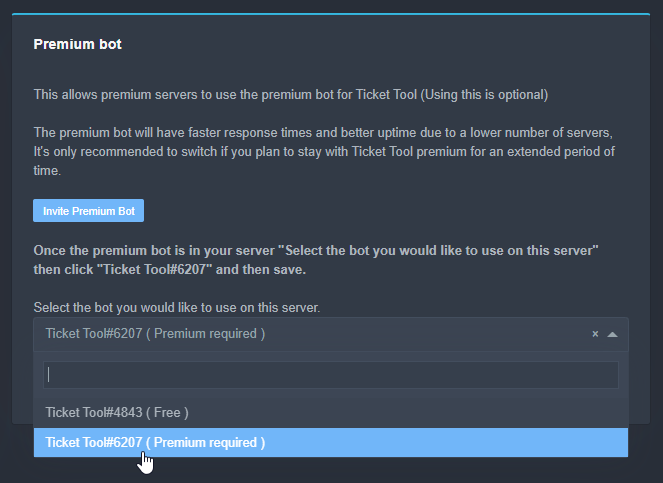
Inviting and Enabling Premium Bot
The first thing you will need to do is invite the premium bot, an invite can be found here
Once the bot is in your server we will head to the dashboard and manage your server. When you are managing your server, you want to head into "Server Configs" then click the drop down menu under "Select the bot you would like to use on this server" then click "Ticket Tool#6207" and then save.

 unique junco
Read the error
ashen idol
pls help @humble sequoia dont work on my server
 scenic plinth
humble sequoia
scenic plinth
humble sequoia
Do you actually have a premium subscription? If so did you follow the steps this said? @ashen idol
 gray torrent
How do you get multiple buttons on your pannel like this https://gyazo.com/d0e8bb2745e172e0df9aa718f69d1a26
 humble sequoiaBOT
Multipanels are a premium feature  that allow for a single panel with multiple buttons to open different tickets.
How to create a Multipanel
Premium users can combine multiple panels into one multipanel.
First, find the IDs of each panel you wish to combine. You can find them in your Panel Configs in the Dashboard
Next, send the multipanel to a channel using $panel [id1] [id2] {id3} ....
e.g. $panel 1 2 4 17 35 to combine panels 1, 2, 4, 17 and 35.
Up to 25 panels may be combined.

For a more convenient use of multipanels, you can now combine panels on the dashboard. This will allow you to directly send the multipanel from the dashboard or via the $panel ID command.
Where can I find this?
You can find this setting on the Dashboard -> Panel Configs -> Settings -> General Options
This will put all buttons from all of your panels on one message. The message is the panel message from the panel you're combining these panels in.

 brittle canopy
@gray torrent It's a premium feature , feel free to follow the instructions above if you have the premium version.
gray torrent
How do you give the multipanel an image?
gray torrent
humble sequoia
Like how for English you have the english flag that sort of thing
shut bolt
gray torrent
How do you give the multipanel an image?
Hey there
shut bolt
gray torrent
How do you give the multipanel an image?
Do you mean the emoji of the button?
shut bolt
gray torrent
Yes
When you go into the dashboard, panel configs
Settings, button options
Go to the creat button and there you can select the emoji
severe path
$buttons
humble sequoiaBOT

Buttons
The new Discord Buttons allow for a much smoother and convenient experience. They reduce lag and work much better than emojis. With ticket tool you can edit all the buttons however you like! Buttons can show emojis, text and can have 4 different colors.
Where can I edit them?
Dashboard -> Panel Configs -> <Settings> -> Button Options -> <Setting>
 brittle canopy
gray torrent
Don't worry about it I found it
brittle canopy
gray torrent
Don't worry about it I found it
Glad you did, feel free to shoot any questions you have.
shut bolt
severe path
$buttons
Lol, just discovered discovered this one
shut bolt
/en Kann mir jemand sagen wie ich es mache das leute auf meinem Server Tickets machen können ?
 robust sandalBOT
Error while running `en`
0, message='Attempt to decode JSON with unexpected mimetype: text/plain; charset=utf-8', url=URL('https://api.cognitive.microsofttranslator.com/detect?api-version=3.0')
humble sequoiaBOT
Setting up Ticket Tool
Visit the docs for setup info
General Setup
shut bolt
humble sequoia
https://docs.tickettool.xyz/en/general/setup
@jade topaz Wenn Sie Fragen haben, können Sie ein Ticket eröffnen unter #🎫│make-a-ticket
severe path
moin
shut bolt
Mr Translate died 
 severe path


 desert summit
$help support
humble sequoiaBOT
How to let support team see into a ticket
About support roles
A support role lets your support team see into tickets with out having to add them manually to each and every ticket.
You can add as many support roles as you like per panel.
NOTE that the way discord works all admins can see into tickets regardless of this.
How to set a support role
To set a Support role go to the Dashboard -> Panel Configs -> Settings -> General Options -> Support Team Roles.

NOTE that the support role will not be able to see into tickets that are already created..
desert summit
Falls das mit dem SetUp hakt 😅
humble sequoiaBOT
-- moved to ticket --
severe path
desert summit
$help support
Gibt da so ein Trick den ich gestern rausgefunden habe. Du kannst ein de hinter das help hängen und dann hast du es in Deutsch 
humble sequoiaBOT
So lässt du dein Supportteam in ein Ticket sehen
Über Supportrollen
Eine Supportrolle gibt deinem Team die Berechtigung in ein Ticket zu sehen, ohne sie manuell hinzu fügen zu müssen.
Du kannst pro Panel so viele Rollen hinzufügen wie du möchtest.
Bitte beachte, dass aus dem Grund wie die Berechtigungen auf Discord funktionieren, jeder Administrator zugang zu den Tickets hat.
Wie man eine Supportrolle einstellt
Um eine Supportrolle festzulegen, gehe zum Dashboard -> Panel Configs -> Settings -> General Options -> Support Team Roles.
Eine nachträglich eingestellte Supportrolle erhält keinen Zugang zu bereits bestehenden Tickets.
desert summit
Uff xd
 wraith relic
humble sequoiaBOT
wraith relic
humble sequoiaBOT
Setting up Ticket Tool
Visit the docs for setup info
General Setup
 native mountain
I bought premium but I can't find my key?
shut bolt
native mountain
I bought premium but I can't find my key?
Hello there!
shut bolt
native mountain
I bought premium but I can't find my key?
Did you buy it through the web at subscriptions?
native mountain
alright
shut bolt
You should see the option to assign your subscription to a server
shut bolt
native mountain
it just says saved and nothing happens
Go into here please https://tickettool.xyz/manage-servers

And check the server you assigned the premium
 native mountain
yep
humble sequoiaBOT
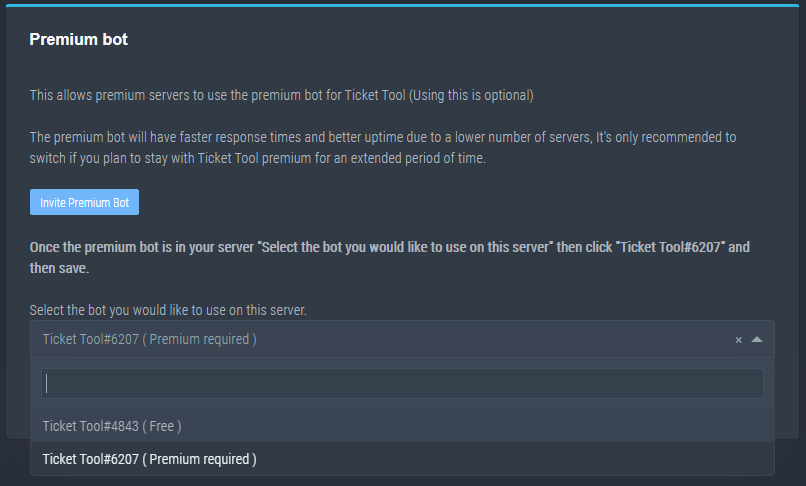
How to disable the premium bot
To disable the premium bot you will have to go to the Dashboard -> Server Configs -> Premium bot -> And on the right-hand side select the primary free bot in the drop down menu.
Premium features will still work on the normal bot.
TicketTool.xyz - Ticketing without clutter
native mountain

shut bolt
A sec please lol
native mountain
alright
humble sequoiaBOT
Inviting and Enabling Premium Bot
The first thing you will need to do is invite the premium bot, an invite can be found here
Once the bot is in your server we will head to the dashboard and manage your server. When you are managing your server, you want to head into "Server Configs" then click the drop down menu under "Select the bot you would like to use on this server" then click "Ticket Tool#6207" and then save.
native mountain

shut bolt
humble sequoia
When you invite the premium bot
You can kick the free one if you prefer
And that's all
 mystic hound
@loud island #📈│reviews message
this is your only message in the entire server, is the review from any other incident?
 wheat torrent
 humble sequoiaBOT
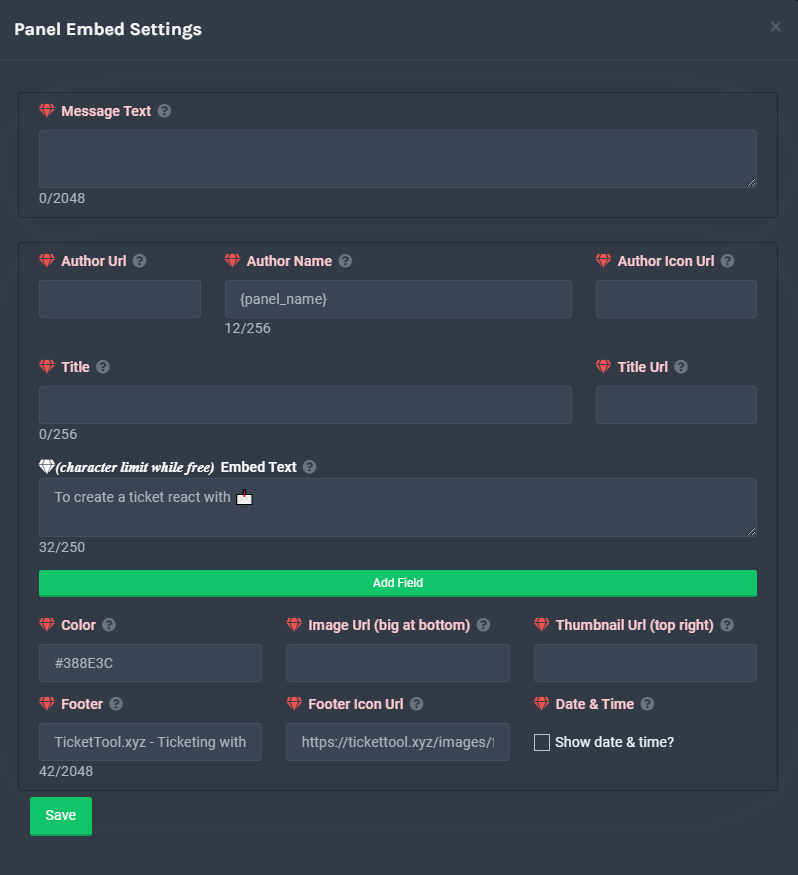
**Panel Message**
The panel message is where people react to make a ticket. To customize it head over to your Dashboard --> Panel Configs -> Settings -> Panel Options -> Edit Panel Message
 somber raptor
is there a way to change this msg?
 humble sequoiaBOT
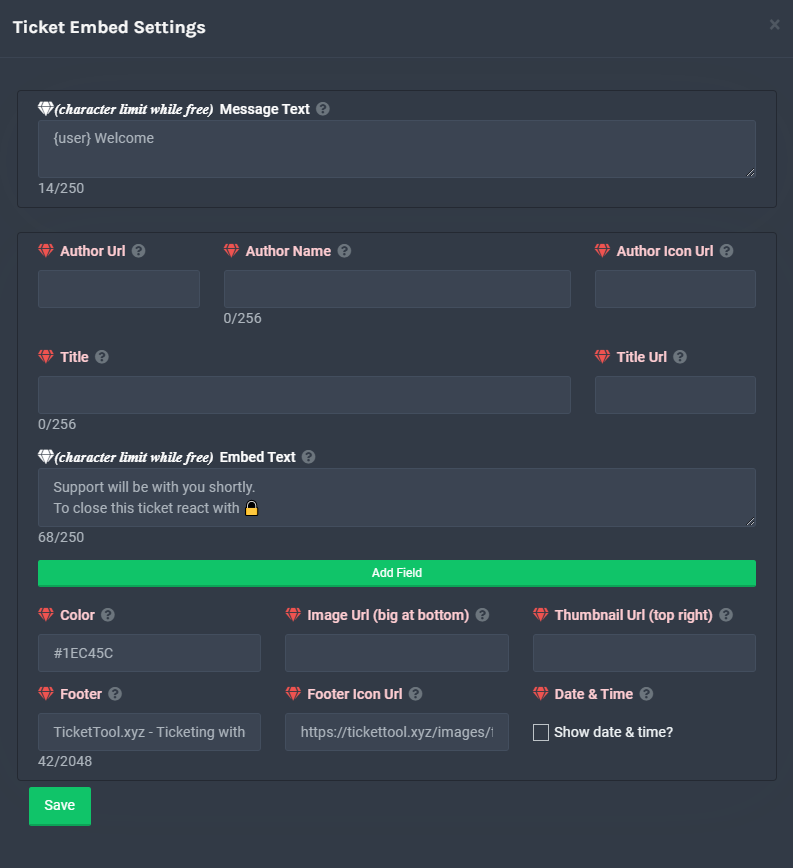
**Ticket Message**
The Ticket Message is the first message sent by the bot in a new ticket. To customise it head over to your Dashboard -> Panel Configs -> Settings -> Ticket Options -> Edit Ticket Message
 mystic hound
damn the lag on that
desert summit
Yeah xd
mystic hound
for a second I thought i got the command wrong lol
desert summit
Yeah me too ;>
 burnt lichen
desert summit
burnt lichen
burnt lichen
desert summit
burnt lichen
?
 jagged lotus
so i run the command $help but ticket tool aint responding with a single thing
ping me if u respond bc i got a lot of stuff going on
desert summit
jagged lotus
ping me if u respond bc i got a lot of stuff going on
Have a look in the leaderboard at the right side of Discord if TicketTool doesn’t show up. The bot hasn’t perms to see this channel
And doublecheck the perms of but
 high grail
How do I add more than 1 reaction for a panel? I can't seem to find that
humble sequoiaBOT
Multipanels are a premium feature that allow for a single panel with multiple buttons to open different tickets.
How to create a Multipanel
Premium users can combine multiple panels into one multipanel.
First, find the IDs of each panel you wish to combine. You can find them in your Panel Configs in the Dashboard
Next, send the multipanel to a channel using $panel [id1] [id2] {id3} ....
e.g. $panel 1 2 4 17 35 to combine panels 1, 2, 4, 17 and 35.
Up to 25 panels may be combined.
 atomic barn
I assume this is what you want
high grail
yes
high grail
yup i have premium
atomic barn
Ah lol there’s your answer XD
atomic barn
Yw :)
jagged lotus
desert summit
Have a look in the leaderboard at the right side of Discord if TicketTool doesn’...
i gave ticket tool all the essential perms (not admin) and it still not respond
(pls ping i might read in morning bc it is night here)
shut bolt
jagged lotus
(pls ping i might read in morning bc it is night here)
Hey there! Make sure that on the bot's Dashboard, Server Configs, you have the right bot selected, if for example you choose the free one that must be the one invited on your server and viceversa, that could be the problem
 vagrant roost
what do i do if members can't see the tickets they create?
shut bolt
vagrant roost
what do i do if members can't see the tickets they create?
Go into the Dashboard, Panel Configs, Permission Options, User Opened Permissions, check if they got Read Messages perm as 
vagrant roost
shut bolt
Go into the Dashboard, Panel Configs, Permission Options, User Opened Permission...
yes i have that in that way for still when a member open a ticket they cant see the ticket
shut bolt
vagrant roost
yes i have that in that way for still when a member open a ticket they cant see ...
Is it only one user who is presenting this problem?
vagrant roost
shut bolt
Is it only one user who is presenting this problem?
no, all users
they try to open tickets and can't see them
shut bolt
vagrant roost
they try to open tickets and can't see them
Is this problem with just one panel? Or more than one?
vagrant roost
shut bolt
Is this problem with just one panel? Or more than one?
just one
shut bolt
vagrant roost
just one
Okey, let's compare, check one panel that works okey, compare the User Opened Permissions with the one it doesn't work
And let's see what changes are present
vagrant roost
shut bolt
Okey, let's compare, check one panel that works okey, compare the User Opened Pe...
Ok
vagrant roost
shut bolt
Okey, let's compare, check one panel that works okey, compare the User Opened Pe...
i dont have any panel that works
shut bolt
vagrant roost
i dont have any panel that works
Ou
vagrant roost
shut bolt
Ou
i had one but just worked two tickets
shut bolt
May you double check User Opened Permissions please?
vagrant roost
now i put "see server has everyone role" and i cant even see the ticket
humble sequoiaBOT
Using the View as Role feature.
The View as Role discord feature will not work for testing ticket tool. Ticket Tool opens permissions with user permissions & not role permissions.
shut bolt
vagrant roost
<@!518666147441278998>
Sure, let me see
I see
Hmmmmm
Would you like us to take this into a ticket for further asistance?
vagrant roost
and then when i try to create a ticket i cant see it @shut bolt
vagrant roost
shut bolt
Would you like us to take this into a ticket for further asistance?
ye sure
shut bolt
vagrant roost
ye sure
You can open it from #🎫│make-a-ticket
jade topaz
How do make it so transcripts go into a specific area
shut bolt
jade topaz
How do make it so transcripts go into a specific area
Hello there!
$help transcript
humble sequoiaBOT
How do I save transcript to a channel?
To save transcripts to a channel go to the Dashboard -> Panel Configs -> Settings -> Logging Options -> Transcript Channel
 jade topaz
ty
shut bolt
Sure :)
 pure oar
Why don't we have a general chat? :/
shut bolt
pure oar
Why don't we have a general chat? :/
We have a server that used to be the Ticket Tool Lounge
pure oar
Oh is it still accessible?
shut bolt
pure oar
Oh is it still accessible?
Yeap, let me check for the invite
pure oar
shut bolt
Never Stitch <:As_rak_retrasados:785067404828868638>
Haha, thanks a lot man! Appreciate it 😁
iron nightBOT
Gave 1 Rep to Yareaj_ (current: #21 - 30)
shut bolt
pure oar
Haha, thanks a lot man! Appreciate it 😁
Sure :)
 oblique bloom
How can I get the bot to ping a certain role when a ticket is open?
shut bolt
oblique bloom
How can I get the bot to ping a certain role when a ticket is open?
Hello!
$help ping
humble sequoiaBOT
How to make Ticket Tool ping a role
To make ticket tool ping a role when a ticket is opened, go to the Dashboard -> Panel Configs -> Settings -> Ticket Options -> Ticket Message -> Message Text and do this:
{@Role name} This is case sensitive and the role must have @mentions enabled
 oblique bloom
Thank you!
shut bolt
oblique bloom
Thank you!
Sure 
jade topaz
Hi.I got a problem with my 2Fa and i don't know who can help me?
shut bolt
$tts
humble sequoiaBOT
You're in the wrong place
We provide support for @pseudo glen discord bot and cannot help you with whatever issue you have.
Please make sure to contact the appropriate support team.
If you don't have any further questions regarding our bot Ticket Tool, please close this ticket
_ _
 spring thistle
How can I make the transcript come to a specific room
 calm smelt
Hi I'm not sure I'm in the right place but I keep having this message appear when I try to close the ticket. I personally didn't add the bot to the server so I am unsure if its something on that side.
 shut bolt
spring thistle
How can I make the transcript come to a specific room
shut bolt
spring thistle
How can I make the transcript come to a specific room
Check this
$help transcript
humble sequoiaBOT
How do I save transcript to a channel?
To save transcripts to a channel go to the Dashboard -> Panel Configs -> Settings -> Logging Options -> Transcript Channel
spring thistle
shut bolt
Check this
thanks
iron nightBOT
Gave 1 Rep to Yareaj_ (current: #20 - 31)
shut bolt
Sure
shut bolt
calm smelt
Hi I'm not sure I'm in the right place but I keep having this message appear whe...
Check this
humble sequoiaBOT
How to disable the premium bot
To disable the premium bot you will have to go to the Dashboard -> Server Configs -> Premium bot -> And on the right-hand side select the primary free bot in the drop down menu.
Premium features will still work on the normal bot.
TicketTool.xyz - Ticketing without clutter
calm smelt
Thank you
shut bolt
calm smelt
Thank you
Sure
 tame tree
I need help getting the premium bot in my server
humble sequoiaBOT
Inviting and Enabling Premium Bot
The first thing you will need to do is invite the premium bot, an invite can be found here
Once the bot is in your server we will head to the dashboard and manage your server. When you are managing your server, you want to head into "Server Configs" then click the drop down menu under "Select the bot you would like to use on this server" then click "Ticket Tool#6207" and then save.
tame tree
Thanks
shut bolt
tame tree
Thanks
Sure
tame tree
What do these mean and where does it pop up in a ticket

 foggy tide
Anyone to help me? I submitted a ticket
 solid stream
Welcome to Ticket Tool's home for real-time and historical data on system performance.
Restart in progress
Premium bot is 100% online
Free bot is starting up.
 neat tree
ticket tool is off?
mystic hound
there's a message just above yours that says why
jade topaz
Hi
it says "interaction failed"
read up

Ok I will thank you
How long will that take?
a member is getting restless xD
 hot tinsel
jade topaz
How long will that take?
hot tinsel
jade topaz
How long will that take?
up
jade topaz
how long though
solid stream
1/4 the free bot is online'
solid stream
Pancake is online and Waffle is starting up now.
jade topaz
Just to confirm, we are waiting for a restart to access the Manage servers option?
solid stream
Correct
jade topaz
solid stream
Correct
TY brother
iron nightBOT
Gave 1 Rep to BattleEye (current: #11 - 88)
mystic hound
solid stream
Pancake is online and Waffle is starting up now.
we really need to name one cookie
mystic hound
idk about bread lol
shut bolt

solid stream
Server Developer has been renamed Cookie
jade topaz
prem down too i guess huh
 compact gate
yup guess so
solid stream
The premium bot is online
humble sequoiaBOT
Pong! Latency is 280ms. API Latency is 83ms [-]
solid stream
Not all premium servers are though.
humble sequoiaBOT
Inviting and Enabling Premium Bot
The first thing you will need to do is invite the premium bot, an invite can be found here
Once the bot is in your server we will head to the dashboard and manage your server. When you are managing your server, you want to head into "Server Configs" then click the drop down menu under "Select the bot you would like to use on this server" then click "Ticket Tool#6207" and then save.
jade topaz
thanks @solid stream
iron nightBOT
Gave 1 Rep to BattleEye (current: #11 - 89)
compact gate
thanks @solid stream
iron nightBOT
Gave 1 Rep to BattleEye (current: #11 - 90)
solid stream
severe path
 dense ice
Hello bot down ?
solid stream
We're doing a restart
Welcome to Ticket Tool's home for real-time and historical data on system performance.
dense ice
Ok nice, thank u for ure answer ! 😛
solid stream
Ticket Tool is 50% online
Server Pancake and Waffle are online
Server Lemon is starting up now.
severe path
solid stream
Ticket Tool is 50% online
jade topaz
I can't believe I was using the free bot for the past month and a half while paying for the prem boi 
solid stream
jade topaz
I can't believe I was using the free bot for the past month and a half while pay...
Both bots do the same thing, but the premium bot gets priority when it comes to fixing and getting it back online.
jade topaz
Yea I was wondering why I never saw the prem role on my bot hahaha
solid stream
lets get that fixed too
jade topaz

shut bolt

jade topaz
Why thank you sir 
solid stream
also Lemon, Pancake and Waffle are online so we're 75% online
shut bolt
jade topaz
 copper blade
hey, switched from free to premium bot, but getting this error on creating a ticket

any ideas what i messed up?
shut bolt
copper blade
hey, switched from free to premium bot, but getting this error on creating a tic...
The bot is missing the perm to see the channel
Check that it has the necessary perms
jade topaz
copper blade
hey, switched from free to premium bot, but getting this error on creating a tic...
make the bot role Admin
 heavy patrol
also get him to the top of the roles
copper blade
dont recall having to do that for the free bot
shut bolt
jade topaz
make the bot role Admin
Not necessarily, it just needs the view channel perm
copper blade
shut bolt
The bot is missing the perm to see the channel
its got view channel rights on the category and channel where the panel is
jade topaz
Sync your channels with category
shut bolt
copper blade
dont recall having to do that for the free bot
Run $debug and if you need any further asistance open a ticket at #🎫│make-a-ticket
copper blade
how do you run that?
jade topaz
Just type $debug in the specific channel
humble sequoiaBOT
-- moved to ticket --
dense ice
Bot on ! Thank u !
 random oriole
shard 558 not working, might someone restart or something?
shut bolt
random oriole
shard 558 not working, might someone restart or something?
Is on restart the bot
prime bridgeBOT
🌟ملازم رامي 🌟 has been silenced for 10m
Reason: Posting Discord Server Invites
🌟ملازم رامي 🌟#8276 | 795566252298862603
mystic hound
 shut bolt
random oriole
Source or smth?
shut bolt
random oriole
Source or smth?
Welcome to Ticket Tool's home for real-time and historical data on system performance.
shut bolt
mystic hound
https://status.tickettool.xyz/incidents/932p9cgpdg7q
Yeah, that
random oriole
thank you vm
shut bolt
Sure
jade topaz
How long will the reboot take
shut bolt
jade topaz
How long will the reboot take
It has just been reported as complete
shut bolt
jade topaz
How long will the reboot take
heavy patrol
bruh
after the reboot the emoji doesn't work ||I mean the bot doesn't make a channel||
jade topaz
Yep
mystic hound
does the bot respond to $debug?
heavy patrol
mystic hound
does the bot respond to $debug?
yup
solid stream
mystic hound
does the bot respond to $debug?
The old reaction panels have been disabled
Just one more step to completely removing them.
I've left the other reaction controls for now (close, open, delete etc..)
Please recreate your panel using the new buttons.
heavy patrol
k, thx for advice
 late pier
Hey sorry if this is a dumb question, I see that the old reactions stopped working so how exactly would I go about fixing that? I’m on mobile and kind of a discord noob so I apologize for the dumb questions in advance
 chilly needle
solid stream
The old reaction panels have been disabled
chilly needle
solid stream
The old reaction panels have been disabled
^
late pier
In short I just want to fix it so my tickets work again
eager cargo
Resend your panels for buttons to work
shut bolt
late pier
Hey sorry if this is a dumb question, I see that the old reactions stopped worki...
Resend the panels
late pier
Yeah I saw but where do I do that exactly
eager cargo
You can do it through the dashboard or with a command
shut bolt
late pier
Yeah I saw but where do I do that exactly
You have 2 options $panel command or through the dashboard
solid stream
For people with only one panel just do $panel 1
late pier
Can I open that on mobile, if you have link would be great and again thank you and sorry if I’m being a pain
humble sequoiaBOT
eager cargo
There's the dashboard link, if you're not already logged in with Discord, you can do that then select your server, click the three lines on the top left of your screen, select panel configs, and thats how you can manage all your panels. mobile directions
late pier
Thanks guys I appreciate you
compact gate
heya, so before the restart i had a panel with 3 buttons to open a ticket, i refreshed the panel and there's just one button left and i can't seem to find the multi-button thing, do you mind helping me out?
shut bolt
compact gate
heya, so before the restart i had a panel with 3 buttons to open a ticket, i ref...
Hey there
humble sequoiaBOT
Multipanels are a premium feature that allow for a single panel with multiple buttons to open different tickets.
How to create a Multipanel
Premium users can combine multiple panels into one multipanel.
First, find the IDs of each panel you wish to combine. You can find them in your Panel Configs in the Dashboard
Next, send the multipanel to a channel using $panel [id1] [id2] {id3} ....
e.g. $panel 1 2 4 17 35 to combine panels 1, 2, 4, 17 and 35.
Up to 25 panels may be combined.
For a more convenient use of multipanels, you can now combine panels on the dashboard. This will allow you to directly send the multipanel from the dashboard or via the $panel ID command.
Where can I find this?
You can find this setting on the Dashboard -> Panel Configs -> Settings -> General Options
This will put all buttons from all of your panels on one message. The message is the panel message from the panel you're combining these panels in.
compact gate
is that a new feature? :D
 small ibex
hi
small ibex
The bot is not working for me
 wind hull
not numbers
eager cargo
wind hull
how do i make the ticket names be the names of the users
Use the {ticket.user.name} variable with our automatic ticket naming feature
humble sequoiaBOT
Ticket names
The ticket name is the default channel name of all tickets. To edit it, go to your Dashboard > Panel Configs > Settings > Ticket Options. There you can edit the channel name of opened and closed tickets. You can also use variables in there.

 Note: This is a premium feature
iron nightBOT
Note: This is a premium feature
iron nightBOT
Gave 1 Rep to Quo (current: #2 - 190)
eager cargo
Yep, note that the feature is premium only.
wind hull
oh wait what
eager cargo
small ibex
The bot is not working for me
Is it offline?
wind hull
wow
eager cargo
wind hull
oh wait what
Yes, apologies.
small ibex
no
wind hull
well it was offline for a bit
eager cargo
small ibex
no
What is wrong with it then?
wind hull
i think
small ibex
It's online and it doesn't work
 chilly elk
Hi, bot offline or working with dev?
eager cargo
wind hull
well it was offline for a bit
That is because it was being restarted
small ibex
It does not work when I click on the reaction
eager cargo
Does it give you an error?
wind hull
okay
small ibex
There is no reaction
compact gate
small ibex
It does not work when I click on the reaction
you need to resend the panel in your dashboard, fixxed it for me
small ibex
It doesn't work at all
eager cargo
Reactions were completely removed from ticket creation
eager cargo
Like Risk said you need to resend the panel
chilly elk
compact gate
you need to resend the panel in your dashboard, fixxed it for me
doesn't work for me :/
eager cargo
The command for resending a panel would be $panel panelIDhere
If you've only got 1 panel, it would be $panel 1
eager cargo
chilly elk
doesn't work for me :/
Creating a ticket with buttons doesn't work?
small ibex
?
 eager cargo
What's your server ID?
small ibex
779821562287095808
eager cargo
Alright one moment
small ibex
eager cargo
Alright one moment
ok
eager cargo
small ibex
?
In panel 1 you don't have a color selected for your create ticket button. That's what's causing this message

You need to select one and save.
 tender sedge
Is the bot down on some servers?
eager cargo
Shouldn't be, it was restarted a bit ago. Is it offline?
tender sedge
Checked to see if it was just the premium being down but its still up, its just not creating new tickets, it says its online still.
eager cargo
Did you happen to be using reactions for ticket creation instead of buttons to create tickets before the restart?
prime bridgeBOT
🌟ملازم رامي 🌟 has been silenced for 10m
Reason: Posting Discord Server Invites
🌟ملازم رامي 🌟#8276 | 795566252298862603
tender sedge
Yes we are using reactions. would that be the issue?
eager cargo
Yep, you need to resend all your panels. Reactions have been completely removed from ticket creation in favor of buttons.
tender sedge
Understood thank you!
eager cargo
Yep
 wind wolf
Does that mean all emoji reactions do not work anymore?
eager cargo
Nope, only ticket creation emoji reactions. Ticket action reactions (delete close transcript etc) will still work for the time being but they will be removed soon.
iron nightBOT
Gave 1 Rep to Quo (current: #2 - 191)
eager cargo
Yep
 ionic lark
Anyone else's tickets stopped working suddenly?
eager cargo
Did you happen to use reactions for ticket creation?
 hoary flower
Should we all resend the Panel Message? Our panel works
eager cargo
If you've got butttons and everything is working fine in your panel then you shouldn't need to re-send it
eager cargo
Reactions have been completely removed from ticket creation in favor of buttons
You need to re-send your panel for it to update
 glad bloom
Hey, I don't see the "create panel" button in the Panel configs menu. What am I missing?

I am the owner of the discord
Ok, I resolved the problem
desert summit
glad bloom
Hey, I don't see the "create panel" button in the Panel configs menu. What am I ...
Refresh your page ig and if this not works log out and login again
glad bloom
It just doesnt show up in operagx browser
desert summit
Ok ^^
glad bloom
Works fine on edge
 woven raptor
Oof, really sad about reactions no longer being supported

This looks horrible on mobile
shut bolt
woven raptor
Oof, really sad about reactions no longer being supported
Yeah, but buttons are a great tool actually
shut bolt
woven raptor
https://cdn.discordapp.com/attachments/892126221629030450/892151304099610624/ima...
It definetely depends on how the person who set up the bot leaves it

Here you have an example of how can it get to look on phone
solid stream
Old panels will now fix themselves to have buttons.
jade topaz
anyone know how i can make a custom command to bring up a panel
like instead of $panel 1 i would i be able to change it to something $example
shut bolt
You could make a tag with the content of the panel, but the only way to make the buttons to appear is using the average command or the dashboard option
jade topaz
i dont need buttons, i just need a message to appear when i type $example
wdym make a tag tho
humble sequoiaBOT
Tags
Tags are used to send a predefined response to your channels using a command. Tags will only respond if the command itself is used, it will not function if you put the tag into a sentence. The prefix is not included.
To create tags, go to: Dashboard > Tags > Create Tag. After creating and naming one, tap on the response button, and you can edit the response.
 shut bolt
Sure
 drifting talon
solid stream
Old panels will now fix themselves to have buttons.
drifting talon
solid stream
Old panels will now fix themselves to have buttons.
Is that automatic? Or do we have do something on our end
solid stream
Just press the old reaction and it will update.
any old panel reaction
All ya need to do is react to get a button, the reactions can be cleared if you want.
drifting talon
sick
it just updated when I hit one!
Now how do I customize what the buttons say?
eager cargo
$buttons
humble sequoiaBOT
Buttons
The new Discord Buttons allow for a much smoother and convenient experience. They reduce lag and work much better than emojis. With ticket tool you can edit all the buttons however you like! Buttons can show emojis, text and can have 4 different colors.
Where can I edit them?
Dashboard -> Panel Configs -> <Settings> -> Button Options -> <Setting>
shut bolt

 lapis timber
I know the auto delete feature has been disabled but is there any sort of work around to auto delete inactive tickets?
 copper owl
use the $delete command
lapis timber
Yeah but that won't automate it, will it?
copper owl
well you said yourself there's no automation
there is no work around it since it's disabled
lapis timber
Yeah that's why I was asking if there was some way to do it
copper owl
well, not really
shut bolt
You could close them and make the two step ticket disabled
lapis timber
Yeah i did that, which helps a ton
But I'm trying to figure out some way to make it auto close/delete tickets that have been inactive x amount of time
😭
copper owl
lapis timber
But I'm trying to figure out some way to make it auto close/delete tickets that ...
that is a disabled feature
there is literally, as of currently, no way of doing it
 simple shard
When I buy premium, is it only for a specific server?
shut bolt
simple shard
When I buy premium, is it only for a specific server?
Yes, you buy subscriptions per server, the first one will cost $6 and the additional servers $5
simple shard
Okay
jagged lotus
shut bolt
Hey there! Make sure that on the bot's Dashboard, Server Configs, you have the r...
i have the free one, but it still not respond with $help
shut bolt
jagged lotus
i have the free one, but it still not respond with $help
Please run $debug
jagged lotus
ok
jagged lotus
shut bolt
Please run $debug
still no luck
shut bolt
Hmmmmm
jagged lotus
ill try giving it admin perms
shut bolt
Could you please check this
jagged lotus
and then try it out
humble sequoiaBOT
How to disable the premium bot
To disable the premium bot you will have to go to the Dashboard -> Server Configs -> Premium bot -> And on the right-hand side select the primary free bot in the drop down menu.
Premium features will still work on the normal bot.
TicketTool.xyz - Ticketing without clutter
jagged lotus
yes?
shut bolt
Just to confirm
jagged lotus
okey
shut bolt
jagged lotus
so do i invite the premium bot?
No no
shut bolt
humble sequoia
Check that the premium is not selected here
jagged lotus
shut bolt
Check that the premium is not selected here
oh wait i just found the problem
silly me
when i first got the bot, i changed the prefix
oof geez why didnt i see that before lol
shut bolt
Oh
 verbal sundial
lol
shut bolt
Well, at least you found it
jagged lotus
yes but thanks anyway
shut bolt
jagged lotus
yes but thanks anyway
Sure
verbal sundial
yeah I had the same problem lol I changed it and then came back after not knowing how to work it so giving up and needed help
shut bolt
verbal sundial
yeah I had the same problem lol I changed it and then came back after not knowin...
Lol
shut bolt
UFFF
verbal sundial
yeah we don't have any clean spoons for some reason
idk where all the spoons went but we don't have any clean ones
shut bolt
verbal sundial
idk where all the spoons went but we don't have any clean ones
Check in your room
unique junco
Get your damn spoon
verbal sundial
no there are no spoons in my room
shut bolt
unique junco
Get your damn spoon
You almost trolled me if it wasn't I recalled from somewhere your name
shut bolt
verbal sundial
no there are no spoons in my room
F
verbal sundial
there are none in the fucking silverware drawer
unique junco
Smh
shut bolt
verbal sundial
hold on
Ninja the detective
verbal sundial
there are no spoons in my sister's room
shut bolt
F
verbal sundial
I found a plastic spoon it is good enough
shut bolt
verbal sundial
I found a plastic spoon it is good enough
Stonks
 EWWWWW
verbal sundial
EWWWWW
verbal sundial
have u ever had it
jade topaz
im having an issue where when a user creates a ticket they can't see their own ticket but the support staff can
does anyone know any possible causes
shut bolt
jade topaz
im having an issue where when a user creates a ticket they can't see their own t...
Hello!
shut bolt
verbal sundial
uhhhh. . . <@518666147441278998> help

So go into your Dashboard https://tickettool.xyz/manage-servers
verbal sundial
I would have thought about it but I am eating ice cream so
shut bolt
shut bolt
So go into your Dashboard https://tickettool.xyz/manage-servers
Then enter into Panel Configs
Settings
Permission Options
And check the User Opened Permissions, they must be lacking the Read Messages perm
shut bolt
verbal sundial
I would have thought about it but I am eating ice cream so
No worries
 shut bolt
 feral cape
Hi there! What bot sent the panel you are using?
 shut bolt
verbal sundial
the react has been cut
shut bolt
verbal sundial
the react has been cut
Yeah, Battle did something to update the old panels
And that's what's causing the error
verbal sundial
so I'm right?
shut bolt
jade topaz
Ou, nothing wrong actually
verbal sundial
resend the panel then
shut bolt
verbal sundial
so I'm right?
Yes and no, indeed is for the reactions, but it can be solved, the thing is what bot sent the panel message
shut bolt
verbal sundial
resend the panel then
Yeap
feral cape
Ahh okay. I don’t use it anymore, but the owners of a server I’m in were wondering what was happening.
verbal sundial
see this is why your here to help people and teach me at the same time lol
shut bolt
jade topaz
Would you mind taking this into a ticket for further support?
jade topaz
i will do that
shut bolt
feral cape
Ahh okay. I don’t use it anymore, but the owners of a server I’m in were wonderi...
The bot received an update and caused it
verbal sundial
feral cape
Thanks!
shut bolt
feral cape
Thanks!
Sure
verbal sundial
ok I am done with my ice cream I can now very poorly help people
verbal sundial
bro it had been 4 days and no one has responded to the player report I have sent out lol
jade topaz
thank you @shut bolt
iron nightBOT
Gave 1 Rep to Yareaj_ (current: #19 - 35)
shut bolt
jade topaz
thank you <@!518666147441278998>
Sure :)
jade topaz
how to give rep
shut bolt
verbal sundial
bro it had been 4 days and no one has responded to the player report I have sent...
What report
Saying "thanks" gives out rep
verbal sundial
a player report
verbal sundial
yeha
jade topaz
thanks @shut bolt
iron nightBOT
@jade topaz :: You can't rep Yareaj_#4383 for 59 minutes and 27 seconds. Try coming back later?
verbal sundial
yeah
jade topaz
i already did it ok pog
verbal sundial
lol
shut bolt
verbal sundial
yeah
I don't remember what happened with it
shut bolt
jade topaz
thanks <@!518666147441278998>

verbal sundial
someone DM advertised
shut bolt
A sec please
feral cape
Can we thank members or just admins?
feral cape
Thanks @verbal sundial
iron nightBOT
Gave 1 Rep to ninja (current: #36 - 5)
 verbal sundial
LETS FUCKING GO BABY
hey that kinda looks like me ngl
I HAVE BEEN EXPOSED AS THE SECURITY GUARD IN THE BACKGROUND FUUUUUUCK
@feral cape do you like my status
feral cape
Hahaha yes
 neon breach
Hey guys, short question:
Users on my Server are not able to open a Ticket. Ticket Tool just sends a message (in the picture).
As far as I can tell, nothing has been changed in the settings or permissions. If u know the problem and a solution I'd be glad to hear from you
 shut bolt
neon breach
Hey guys, short question:
Users on my Server are not able to open a Ticket. Tick...
shut bolt
neon breach
Hey guys, short question:
Users on my Server are not able to open a Ticket. Tick...
Hello there!
Due to the most recent update the bot had today, you can see this at #📣│bot-news, we highly recommend you to send the panels again in order to fix this error
neon breach
Oh yeah, I just read the past conversation. Thanks
shut bolt
neon breach
Oh yeah, I just read the past conversation. Thanks
Sure!
drifting talon
Hi, me again. Our reactions changed to Buttons (FUCKING AWESOME) we have updated the buttons on the dashboard to rename them (they all said "create ticket" lol) its been about 20 minutes, will the change be on the fly or did we miss a step
shut bolt
drifting talon
Hi, me again. Our reactions changed to Buttons (FUCKING AWESOME) we have updated...
Hello there! I'm glad you love Buttons, they are great
You must resend the panel
drifting talon
👀
shut bolt
They won't update when you save changes
drifting talon
so any change we make to our panel, we must resend it?
to the discord?
also, how do we get a super cool colorful ticket like yours?
shut bolt
drifting talon
so any change we make to our panel, we must resend it?
Yes, any change made to the information of the panel, embed color, images, description, any thing, now, the settings of permissions, logging and all that stuff you must save them and they will be reflected on the new tickets
shut bolt
drifting talon
also, how do we get a super cool colorful ticket like yours?
Exactly what do you refer by colorful? The embed color maybe?
shut bolt
drifting talon
The tick that sends DMs to users
Could you please send me a screeshot of it?
drifting talon
shut bolt
Could you please send me a screeshot of it?
My I DM you?
solid stream
Could be talking about the premium bot
drifting talon
 shut bolt
THE GOLD
humble sequoiaBOT
Inviting and Enabling Premium Bot
The first thing you will need to do is invite the premium bot, an invite can be found here
Once the bot is in your server we will head to the dashboard and manage your server. When you are managing your server, you want to head into "Server Configs" then click the drop down menu under "Select the bot you would like to use on this server" then click "Ticket Tool#6207" and then save.
drifting talon
YES THE GOLD LOLOLOL
drifting talon
I AM NOW GOLD BOY
ok so if the Premium bot is in use, it the DM will be a golden ticket lik that screenshot 👀
jagged lotus
i dont think that there is one here, but is there a channel to insert suggestions for bot features?
shut bolt
drifting talon
ok so if the Premium bot is in use, it the DM will be a golden ticket lik that s...
Yes, you must select it and thats it
shut bolt
jagged lotus
i dont think that there is one here, but is there a channel to insert suggestion...
You can open a ticket and a staff member will take it to the corresponding channel
jagged lotus
oh okey thx
shut bolt
jagged lotus
oh okey thx
Sure
 tardy fable
Hey dumb question, but is there a way to add a description for the ticket?
tardy fable
Yeah like when they get a ticket
Idk how to explain it, it like appears and tells them something. Like if I wanted to say to put in their age or something to be verified into the server. I’m probably not making sense-
verbal sundial
yes
 true lintel
hmm, I can't seem to turn off ticket claiming even tho I have disabled it through the dashboard
verbal sundial
in the settings panel
tardy fable
verbal sundial
in the settings panel
I looked, idk where or how
eager cargo
tardy fable
Idk how to explain it, it like appears and tells them something. Like if I wante...
Ah
Look below
humble sequoiaBOT
**Ticket Message**
The Ticket Message is the first message sent by the bot in a new ticket. To customise it head over to your Dashboard -> Panel Configs -> Settings -> Ticket Options -> Edit Ticket Message
tardy fable
Thx
eager cargo
true lintel
hmm, I can't seem to turn off ticket claiming even tho I have disabled it throug...
Is the claim button still appearing?
true lintel
eager cargo
Is the claim button still appearing?
I'm not sure, haven't checked that but people still can do $claim
verbal sundial
uhhhh. . .
eager cargo
You'd need to disable it in your command configs
verbal sundial
idfk
true lintel
I'm pretty sure I disabled it in the dashboard wait let me check
eager cargo
Switch this to 
 humble sequoiaBOT
Claiming Options
Claiming allows you to change the ticket name, category and permissions. To use it you have to enable it first on your Dashboard > Panel Configs > Claiming Options.
 Note: This is a premium feature
eager cargo
Note: This is a premium feature
eager cargo
Then make sure you've got it disabled there ^
true lintel
hmm

oh lemme check
ah, i see. I didn't know there's a setting there
thanks @eager cargo
iron nightBOT
Gave 1 Rep to Quo (current: #1 - 193)
eager cargo
Yep
true lintel
damn 193 reps lol
eager cargo
Been here since April!
true lintel
sheesh
eager cargo
Well actually, first started helping in this channel in February, but yeah have a good one!
 true lintel
shut bolt
Back to first place
true lintel
shut bolt
Back to first place
🙏 
iron nightBOT
Gave 1 Rep to Yareaj_ (current: #19 - 36)
verbal sundial
tehe
shut bolt
🥺
shut bolt
verbal sundial
thanks <@518666147441278998>
Appreciate that, thanks
Thanks @verbal sundial
iron nightBOT
Gave 1 Rep to ninja (current: #31 - 6)
shut bolt
Rep x Rep
verbal sundial
yay
shut bolt
 placid robin
Hii
verbal sundial
yes
shut bolt
placid robin
TicketTool.xyz - Ticketing without clutter
Yeah, exactly what do you need help with?
 shut bolt
What's exactly the problem?
verbal sundial
i don't see a problem
verbal sundial
@placid robin you must specify what you need help with so we can help you
 nocturne mantle
Nice
 old coral
Hi
Can anyone plz help me?
How to change the bot prefix in my server?
@severe path
 old coral
Ohh ok thanks
glad bloom
Is there a way to turn off this ticket created notification
 desert summit
glad bloom
Is there a way to turn off this ticket created notification
desert summit
glad bloom
Is there a way to turn off this ticket created notification
Its just for you no one else can see it

 dull adder
Been getting this since yesterday. I can't see any changes to the Discord nor the bot's configuration. Any ideas where to start?
 humble sequoiaBOT
-- moved to ticket --
humble sequoiaBOT
-- moved to ticket --
 fallow ingot
 compact geode
hello I have a problem I receive a duplicate transcript of the ticket
compact geode
hello I have a problem I receive a duplicate transcript of the ticket
Is this a one time thing or happens often?
jade topaz
I'm also getting it now, a customer was mentioning to me he can't open a ticket
fallow ingot
jade topaz
I'm also getting it now, a customer was mentioning to me he can't open a ticket
Could you send a screen shot of what the bot says when he can’t open a ticket?
 fallow ingot
Does ticket tool have administrator?
mystic hound
Resend your panel to update to buttons, #📣│bot-news
fallow ingot
Ah ^^
jade topaz
 my friend showed me that, thought i'd pop in the server first to see if anyone else had this issue
Please resend your panels using the dashboard or the $panel command. I did this, but will use the dashboard instead.
severe path

jade topaz
Working, thanks @mystic hound
iron nightBOT
Gave 1 Rep to Light (current: #3 - 184)
compact geode
All time @fallow ingot
jade topaz
How to I make that the staff get pinged in the ticket?
severe path
$help ping
humble sequoiaBOT
How to make Ticket Tool ping a role
To make ticket tool ping a role when a ticket is opened, go to the Dashboard -> Panel Configs -> Settings -> Ticket Options -> Ticket Message -> Message Text and do this:
{@Role name} This is case sensitive and the role must have @mentions enabled
fallow ingot
@jade topaz ^
jade topaz
fallow ingot
<@456226577798135808> ^
Thank you!
iron nightBOT
Gave 1 Rep to aa1on (current: #15 - 57)
fallow ingot
ty @severe path
iron nightBOT
Gave 1 Rep to Schlafendes24 (current: #24 - 15)
severe path

 pine raptor
ticket tool is saying this after i try to open a ticket can someone help me and the owner fix this problem
 severe path
pine raptor
ticket tool is saying this after i try to open a ticket can someone help me and ...
severe path
pine raptor
ticket tool is saying this after i try to open a ticket can someone help me and ...
A role you have is most likely blacklisted here: https://schlafendes24.ban.rip/280GMrkd
 pine raptor
I don't have a blacklisted role added there tho?
severe path
and here?
humble sequoiaBOT
Blacklist Roles
Any role you assign as a blacklisted role won't be able to use commands or reactions.
Selecting a blacklisted role
Go to your Dashboard -> Server Configs. There you will find the option to select blacklisted roles.
Note: Don't forget to save.
 severe path

nocturne mantle
😂
prime bridgeBOT
ϟ The Tomi ϟ has been silenced for 10m
Reason: Posting Discord Server Invites
ϟ The Tomi ϟ#9011 | 880112463725621279
 molten grotto
I just want to ask if sending transcripts is a premium only feature? I have the channel for transcripts + logs set, but it only sends logs in the channel. Is this a glitch?
desert summit
Did you saved it?
molten grotto
Mhm
shut bolt
molten grotto
I just want to ask if sending transcripts is a premium only feature? I have the ...
Hi there
The feature of automatic sending the transcripts, indeed is premium
Anyways you can always click the Transcript button at the menu after a ticket gets closed to send it
molten grotto
OHH, okay okay. Yeah because my other server is premium and the transcripts worked fine so I was like"wut?" But thank you 
thanks @shut bolt
iron nightBOT
Gave 1 Rep to Yareaj_ (current: #19 - 37)
shut bolt
molten grotto
thanks <@!518666147441278998>
Sure :)
 indigo socket
Is there an option for per panel ticket limits - I don't mean the current "ticket limit per user per panel" but a ticket limit per panel - So there can only ever be 10 open tickets for that panel.
Let's say we want to get only 10 users to engage or do something, we can say first 10 to engage the process get to do it for example.
 craggy geyser
There isn't currently. It's been suggested before though so maybe in the future
indigo socket
The user case would be for competitions where there is a limit of contestants.
indigo socket
craggy geyser
There isn't currently. It's been suggested before though so maybe in the future
Thank you for the reply.
iron nightBOT
Gave 1 Rep to Swift (current: #4 - 173)
craggy geyser
No worries
shut bolt
 ashen oriole
you speak spanish ?
ashen oriole
you speak spanish ?
Yeah
ashen oriole
shut bolt
Yeah
yes
shut bolt
I do lol
ashen oriole
spanish ?
shut bolt
Didn't you opened a ticket last night?
ashen oriole
XD
shut bolt
XD
ashen oriole
nesecito aprender ingles xd
desert summit
@rotund halo you’re there for sooo long what are you doing 😂
ashen oriole
desert summit
<@732231962407862323> you’re there for sooo long what are you doing 😂
tu mama por si acaso
shut bolt
ashen oriole
tu mama por si acaso
No contestes a cosas que no entiendes por favor xd
@rotund halo need any help?
ashen oriole
shut bolt
No contestes a cosas que no entiendes por favor xd
XD
jade topaz
Help me please how can I change the ticket limit on the ticket toll website
ashen oriole
you speak spanish ?
eager cargo
jade topaz
Help me please how can I change the ticket limit on the ticket toll website
$help limit
humble sequoiaBOT
How to set a ticket limit
A ticket limit may be set per panel to prevent users from spamming tickets. By default this limit is set to 3. Once a user hits this limit the bot will notify the users that they reached the limit.
To set a ticket limit go to the Dashboard -> Panel Configs -> Settings -> General Options -> Ticket Limit
 iron nightBOT
Gave 1 Rep to Ticket Tool (current: #9 - 140)
jade topaz
How can I remove the seconds cool down

There is a cool down for when you create multiple tickets how can I remove it
shut bolt
jade topaz
There is a cool down for when you create multiple tickets how can I remove it
You can limit how many ticket a user can open per panel or globally
jade topaz
shut bolt
You can limit how many ticket a user can open per panel or globally
Yes but can I remove when thing were if you open multiple tickets at a time there is a 10 second cool down how can I remove the cool down
shut bolt
jade topaz
Yes but can I remove when thing were if you open multiple tickets at a time ther...
You can't, it is there for preventing the bot to hit rate limits
iron nightBOT
Gave 1 Rep to Yareaj_ (current: #19 - 38)
shut bolt
Sure :)
ashen oriole
 /
/ /
/ /
/ /
/
severe path

shut bolt

prime bridgeBOT
timillxxx has been silenced for 10m
Reason: Posting Discord Server Invites
timillxxx#0179 | 856100203287019530
shut bolt
I'm really glad the reactions made you achieve a great customer experience @marble snow
 marble snow
shut bolt
I'm really glad the reactions made you achieve a great customer experience <@!68...
marble snow
shut bolt
I'm really glad the reactions made you achieve a great customer experience <@!68...
They did! They were very useful and made the whole process go more smoothly /hj
shut bolt
marble snow
They did! They were very useful and made the whole process go more smoothly /hj
Hope to see you in more tickets! 
 atomic pollen
humble sequoiaBOT
atomic pollen
humble sequoiaBOT
Ticket Tool Invite & Support
brittle canopy
Kindly keep the topics in this channel relevant.
 fervent fable
kulu ziq
 kind steppe
How do I change the ticket logs to show up in different channel
shut bolt
kind steppe
How do I change the ticket logs to show up in different channel
Hello there!
$help transcript
humble sequoiaBOT
How do I save transcript to a channel?
To save transcripts to a channel go to the Dashboard -> Panel Configs -> Settings -> Logging Options -> Transcript Channel
 shut bolt
Here you can choose the channels of both, transcript and logging
shut bolt
kind steppe
Is there a command?
Nope
kind steppe
Or just the dashboard
shut bolt
kind steppe
Or just the dashboard
Indeed
kind steppe
Oh alright thanks mr.Pablo | Probie
shut bolt
kind steppe
Oh alright thanks mr.Pablo | Probie
You are welcome mr. shuja
 gleaming jacinth
how can ı fix?
 humble sequoiaBOT
Sending a panel
Once you've created a panel on the dashboard you will need to send it to a channel using send on the dashboard
Select the channel you want your panel to be created in and click send.
For other questions checkout $help faq
An example of a sending a panel is shown below.

-- moved to ticket --
jade topaz
How do have tickets go at the bottom of the server
shut bolt
jade topaz
How do have tickets go at the bottom of the server
It is not possible, by default channels that are not grouped in any category go to the top of the server, what you could do is creating a category, place that category at the bottom of the server, and assign the Ticket Category to be the one you just created
$help category
humble sequoiaBOT
How to set the open category
To set a open category go to the Dashboard -> Panel Configs -> Settings -> Category Options -> Category Open
 jade topaz
ok
 glossy sluice
Does the Ticket Tool bot ignore commands from other bots?
(And if so, is that configurable?)
shut bolt
glossy sluice
Does the Ticket Tool bot ignore commands from other bots?
Indeed
shut bolt
glossy sluice
(And if so, is that configurable?)
Nope, it is a setting we can't modify
glossy sluice
Bummer, thanks for the info!
shut bolt
glossy sluice
Bummer, thanks for the info!
Sure!
 plush pumice
Hello
shut bolt
Hi there
jade topaz
Hello, is there a way to mention an specific role when a ticket is created? in the message the bot sends
shut bolt
jade topaz
Hello, is there a way to mention an specific role when a ticket is created? in t...
Indeed!
Check out this
$help ping
humble sequoiaBOT
How to make Ticket Tool ping a role
To make ticket tool ping a role when a ticket is opened, go to the Dashboard -> Panel Configs -> Settings -> Ticket Options -> Ticket Message -> Message Text and do this:
{@Role name} This is case sensitive and the role must have @mentions enabled
jade topaz
shut bolt
Check out this
thank u!
iron nightBOT
Gave 1 Rep to Yareaj_ (current: #18 - 40)
shut bolt
jade topaz
thank u!
Sure!
verbal sundial
@shut bolt Bro can you let me at least attempt to help
shut bolt
verbal sundial
<@518666147441278998> Bro can you let me at least attempt to help
LMAO
I'm sorry 
I just go as fast as possible

shut bolt
Sometimes I get to be Lightning McQueen
verbal sundial
yo hold on let me find it
shut bolt
Sure
verbal sundial
nvm
shut bolt
F
verbal sundial
couldn't get it
shut bolt
verbal sundial
couldn't get it
Any clue of what the message said?

 fervent quest
hello. Is there a way to make the ticket bot close/delete new tickets if the user doesn't respond within x time?
shut bolt
fervent quest
hello. Is there a way to make the ticket bot close/delete new tickets if the us...
Hi there! For preventing the bot to hit rate limits, the automation was disabled, so there's no current way to do this
shut bolt
fervent quest
thanks for that
Sure!
fervent quest
how long does it take to get the premium role added?
shut bolt
$pc
humble sequoiaBOT

How to get premium role
Until the automatic premium check is fixed run the command $debug on your server and send us the link in a ticket.
verbal sundial
BRUUUUUUUU
fervent quest
thanks
shut bolt
fervent quest
how long does it take to get the premium role added?
Ready!
shut bolt
fervent quest
thanks
Sure
shut bolt
verbal sundial
BRUUUUUUUU
Kachoow
fervent quest
that was d quick
verbal sundial
NO FUCK YOU
shut bolt
verbal sundial
NO FUCK YOU
AJAJAJAJA
shut bolt
fervent quest
that was d quick
Thanks 
iron nightBOT
Gave 1 Rep to LeXo (current: #60 - 1)
 eager cargo
$help ping
humble sequoiaBOT
How to make Ticket Tool ping a role
To make ticket tool ping a role when a ticket is opened, go to the Dashboard -> Panel Configs -> Settings -> Ticket Options -> Ticket Message -> Message Text and do this:
{@Role name} This is case sensitive and the role must have @mentions enabled
iron nightBOT
Gave 1 Rep to Quo (current: #1 - 194)
eager cargo

mystic hound
 proud sage
the way you did it works fine, just that its <@&roleID> not <@!roleID>
shut bolt
proud sage
can i reset the ticket number to 0
Yeap
Go into your Dashboard
Panel Configs, then Settings, and then General Options
There you should see the Ticket Count
And set it down to 0
proud sage
ok
shut bolt
Then Save changes
proud sage
thanks @shut bolt
iron nightBOT
Gave 1 Rep to Yareaj_ (current: #18 - 41)
proud sage
thanks @mystic hound
iron nightBOT
Error: You're still on cooldown
shut bolt
proud sage
thanks <@!518666147441278998>
Sure :)
proud sage
🙂
verbal sundial
NO FUCK U
shut bolt
verbal sundial
HOW R U SUPPORT TEAM NOW
ASJSAJASJSJAS
verbal sundial
oh wait nvm
shut bolt
You went off for a second
And you came back
And here I am lol
I wasn't expecting it to happen today lol
desert summit
Pablo Congratulations for full support-team ^^
shut bolt
desert summit
Pablo Congratulations for full support-team ^^
Thank you!!
iron nightBOT
Error: You're still on cooldown
desert summit
^^
atomic barn
Congrats! 🥳
shut bolt
atomic barn
Congrats! 🥳
Thank you :)
iron nightBOT
Gave 1 Rep to neonbladez (current: #60 - 1)
jade topaz
How to set that all the tickets in one category?
copper owl
$help category
humble sequoiaBOT
How to set the open category
To set a open category go to the Dashboard -> Panel Configs -> Settings -> Category Options -> Category Open
copper owl
@jade topaz here you go  , just make sure ticket tool has all the necessary permissions in the category
jade topaz
thanks
copper owl
Np


 craggy geyser
You need to give the bot manage channels in the category you have set for open tickets
humble sequoiaBOT
-- moved to ticket --
copper owl
 scarlet summit
for this, opened arabic ticket
 subtle fable
how are people doing self assigning of roles??
craggy geyser
A variety of bots can do it. But ticket tool does not so we can't offer support for it here. I suggest yagpdb as a good one
 red narwhal

Our bot has broken for no reason, nothing was changed in the channel or on the server
humble sequoiaBOT

Reactions Update
Since a while we don't support reactions anymore and switched to buttons.
To enable buttons you have to resend the panel message.
 craggy geyser
red narwhal
Our bot has broken for no reason, nothing was changed in the channel or on the s...
craggy geyser
red narwhal
Our bot has broken for no reason, nothing was changed in the channel or on the s...
The recent update finally removed reactions totally. And the bot auto updates to buttons but as your panel is the free bot and you are using the premium, you have to resend it yourself
red narwhal
I see, let me give it a look and get back to you. Thanks for the quick reply
humble sequoiaBOT
You can't link to yourself.. sillypants. =)
 tall prism
$vote
humble sequoiaBOT
Votes
Current Votes: 0
Lifetime Votes: 0
Linked Votes: 0
Vote Links
Linking Info
Linked User: Not Linked
You can give your future votes to another user by linking with that user.
To link use $vote link (@user or userId)
To unlink use $vote unlink
Redeeming
Each vote is worth 12 hours of premium and can be redeemed once you have atleast 6 votes.
Your current votes are worth 0m
To redeem your current votes use $vote redeem
craggy geyser
Please use commands in your own server. They work there as well (assuming you have the bot working there)
humble sequoiaBOT
-- moved to ticket --
tall prism
craggy geyser
Please use commands in your own server. They work there as well (assuming you ha...
Ok thanks
iron nightBOT
Gave 1 Rep to Swift (current: #4 - 176)
tall prism
I voted and didnt count 😦
craggy geyser
Were you logged into the right account when you voted? Or have you linked to someone else?
shut bolt
What?
tall prism
craggy geyser
Were you logged into the right account when you voted? Or have you linked to som...
Yes i voted with this account
craggy geyser
And it still says no votes?