#🆘│community-support
1 messages · Page 351 of 1
 shut bolt
Dale, me avisas cualquier cosa
 dusky wind
Ok
 humble sequoiaBOT
-- moved to ticket --
 little widget
i need some help, i wanna copy all the tags i have in one server and put it to another, do i have to do everything manually or can i just transfer if that makes sense
nvm ^ doing it by hand
 gritty urchin
Can i have a ticket created without ppl reacting ]
like create a ticket as soon as someone joins the server
shut bolt
gritty urchin
like create a ticket as soon as someone joins the server
Not possible, would make the bot to hit the rate limits Discord's API has
gritty urchin
shut bolt
Not possible, would make the bot to hit the rate limits Discord's API has
understandable try for the reply have a nice day 🙂
shut bolt
gritty urchin
understandable try for the reply have a nice day 🙂
Have a nice day you too ^^
shut bolt
/ar You can create a ticket in Arab here #🎫│make-a-ticket
 robust sandalBOT
يمكنك إنشاء تذكرة باللغة العربية هنا #🎫│make-a-ticket
 English (en) → Arabic (ar)
shut bolt
robust sandal
English (en) → Arabic (ar)
shut bolt
robust sandal
@jade topaz
shut bolt
Hey there@verbal sundial! how are you?
 verbal sundial
good I am trying to apply for Spanish support but the person was just like what is your question
my question is how I can apply for Spanish support like bru
shut bolt
verbal sundial
good I am trying to apply for Spanish support but the person was just like what ...
I see, Darkedu didn't get you wanted to apply to the support team, also for me was kind of tricky what you were asking for, in spanish we don't call it "apoyo", we say either "equipo de staff" or "equipo de soporte"
shut bolt
verbal sundial
my question is how I can apply for Spanish support like bru
Sure! You can apply by clicking the button in #📣│server-news that's right above Light's message
verbal sundial
thx @shut bolt I didnit
 iron nightBOT
Gave 1 Rep to Yareaj_ (current: #24 - 13)
verbal sundial
did it
 static dirge
Is ticket tool down?
shut bolt
verbal sundial
thx <@518666147441278998> I didnit
Sure!
verbal sundial
@static dirge no it is not
humble sequoiaBOT
-- moved to ticket --
verbal sundial
it gets kinda lonely here when no one needs something
verbal sundial
@jade topaz what do you mean
shut bolt
 jade topaz
why did my ticket count get reset
jade topaz
why did my ticket count get reset
Hello there
jade topaz
sup
verbal sundial
he can help
jade topaz
it isnt an issue, but im still confused as to why it would reset
shut bolt
By any chance one of the members to your dashboard reset the count from the Panel Configs?
shut bolt
jade topaz
and a ticket was opened, with errors being "channel is not a ticket"
When did this happened?
jade topaz
like 10 minutes ago
jade topaz
all works fine now though, was just super weird
shut bolt
jade topaz
it isnt an issue, but im still confused as to why it would reset
Could you go please to your Dashboard History and see if one of the recent actions include General Saved?
shut bolt
jade topaz
all works fine now though, was just super weird
Lol, indeed it's weird
shut bolt

jade topaz
actually no
shut bolt

shut bolt
Quite strange
verbal sundial
wait does having your discord server in your status count as advertising
shut bolt
jade topaz
only me saving it, aka fixing it
I have no clue what it could be, I'm sorry :(
jade topaz
yeah all good
shut bolt
maybe the bot got bugged for a sec or something
jade topaz
probably
shut bolt
Was it the free or the premium bot you were having trouble with?
Just to write it down
jade topaz
premium
shut bolt
Okey thanks
jade topaz
i had a ticket open, count was reset and the channel wasn't registered as a ticket. thats all.
cya
shut bolt
jade topaz
cya
Bye
verbal sundial
sooooo
shut bolt
verbal sundial
sooooo
Sooo
verbal sundial
wat ya up to
shut bolt
verbal sundial
wat ya up to
Nothing big, gonna get some school stuff done
verbal sundial
nice
shut bolt
Wbu?
verbal sundial
nothing much just video chatting with my friend
shut bolt
verbal sundial
nothing much just video chatting with my friend
Nice 😎
verbal sundial
ik
shut bolt
verbal sundial
ik
Have a good night bro, I'm gonna do the pending stuff and be back if possible 
verbal sundial
@vale minnow you need to say thanks to rep then
iron nightBOT
Gave 1 Rep to DontTemptFate (current: #60 - 1)
verbal sundial
@shut bolt I am off the phone and the girl I was talking to we are dating now
shut bolt
verbal sundial
<@518666147441278998> I am off the phone and the girl I was talking to we are da...
OOOOOO

verbal sundial
lol
shut bolt
Congrats
shut bolt
verbal sundial
ik turned out she has liked me sense last year
Plotwist irl:
shut bolt
That's really nice 😎
verbal sundial
thx
I told my friend group and none of them believes me
so we are going to hug to prove to them we are
shut bolt
verbal sundial
so we are going to hug to prove to them we are
That's a pro gamer move 
verbal sundial
lol
I only see her at lunch so it kinda a bummer
I don't usually sit with her but I am probably going to start sitting with her
shut bolt
verbal sundial
I don't usually sit with her but I am probably going to start sitting with her
Awww, that's cute

 verbal sundial
lol
in the rules it says that getting members takes your own hard work
yes I have gotten all my 66 real people from hard work I run the server and have to run the Minecraft server for it
shut bolt
verbal sundial
yes I have gotten all my 66 real people from hard work I run the server and have...
Stonks
verbal sundial
yes sir
verbal sundial
@shut bolt what does it mean to be a probationary support
shut bolt
verbal sundial
<@518666147441278998> what does it mean to be a probationary support
It means that you are being in a training/learning phase to be a full support member
verbal sundial
ohhhhh ok
shut bolt

verbal sundial
thx @shut bolt
iron nightBOT
Gave 1 Rep to Yareaj_ (current: #23 - 15)
shut bolt
verbal sundial
thx <@518666147441278998>
Sure :)
verbal sundial
+rep
iron nightBOT
@verbal sundial :: No user provided - syntax is -giverep <user> where user can be either a mention or an ID.
verbal sundial
how do i check how much rep I have
shut bolt
There's a command for knowing it, the thing is that I don't have access to it lol
verbal sundial
+rep
iron nightBOT
@verbal sundial :: No user provided - syntax is -giverep <user> where user can be either a mention or an ID.
verbal sundial
+rep score
iron nightBOT
@verbal sundial :: No user provided - syntax is -giverep <user> where user can be either a mention or an ID.
verbal sundial
@shut bolt I am in the server it says just do +rep well tf
shut bolt
Well, it depends on the prefix of the bot, at least I don't have perms to see the rep so I can't do more :(
shut bolt

verbal sundial
THIS PIECE OF SH- I mean amazing bot
shut bolt
Jajajaja
verbal sundial
guess how many pings I got
they asked oh do your server have a cc for rep and is the rep command overriden
but you can't find out soooo. . . idk
shut bolt
verbal sundial
guess how many pings I got
lol
verbal sundial
they said
ah then that's probably why xd, the server probably overridden the built-in rep so it makes it grep instead
no I am serious guess how many
shut bolt
verbal sundial
no I am serious guess how many
17?
verbal sundial
nope higher
shut bolt
54?
verbal sundial
nope higher
shut bolt

verbal sundial
nope higher
shut bolt
164
verbal sundial
nope higher
shut bolt
432
verbal sundial
nope higher
shut bolt
No clue bro
verbal sundial
1889
shut bolt
WHAT
verbal sundial
lol
shut bolt
That's a lot
verbal sundial
I have a 162 in one server 160 in another
 sweet sedge
i there an way to insert a URL in a body tag oder fiel ?
shut bolt
sweet sedge
i there an way to insert a URL in a body tag oder fiel ?
Yes
You mean to include like a hyperlink right?
sweet sedge
yes
shut bolt
Yeap, you got to this:
[The text you want to show](The URL)
And that should do it
Just forgot to add
shut bolt
sweet sedge
i there an way to insert a URL in a body tag oder fiel ?
This will only work inside the embed description
 prime bridgeBOT
🆃🅷🅾🅼🅼🆈 has been silenced for 10m 

 Reason: Posting Walls Of Text
🆃🅷🅾🅼🅼🆈#7330 | 581326737284136960
shut bolt
Hey! @vale minnow are you there?
Okey nvm, I was just checking you could solve the problem and they just confirmed to me that yes :)
 frosty rock
Hello there, i have a problem
i want that the ticket go in a category which is just set up for the mod team, the settings are set correctly at the bot permission so the user/role which create a ticket should se the ticket channel after creating but i dont see it when i test it with the role preview.
Is this a problem with the role preview or could there be another problem?
shut bolt
frosty rock
Hello there, i have a problem
i want that the ticket go in a category which is...
Hello there!
humble sequoiaBOT
Using the View as Role feature.
The View as Role discord feature will not work for testing ticket tool. Ticket Tool opens permissions with user permissions & not role permissions.
shut bolt
Also, remember to set the perms of the panel for the support roles
frosty rock
simple so i have to get a test slave account 😄
shut bolt
frosty rock
simple so i have to get a test slave account 😄
Yeap, that helps
If you need any further assistance we'll be glad to help :)
frosty rock
thanks for the fast help ❤️
shut bolt
frosty rock
thanks for the fast help ❤️
Sure 
frosty rock
thanks @shut bolt
iron nightBOT
Gave 1 Rep to Yareaj_ (current: #22 - 16)
shut bolt

prime bridgeBOT
 Successful bans:
 1
 Unsuccessful bans:
 0
 Reason: scam
 Moderator: @mystic hound
jade topaz
anyway that we can restrict a role from ticket creation
humble sequoiaBOT
Blacklist Roles
Any role you assign as a blacklisted role won't be able to use commands or reactions.
Selecting a blacklisted role
Go to your Dashboard -> Server Configs. There you will find the option to select blacklisted roles.
Note: Don't forget to save.

 copper owl
@jade topaz ^^
 fierce bough
Is there any way to recover a deleted ticket, or once it’s gone is it gone for good?
copper owl
fierce bough
Is there any way to recover a deleted ticket, or once it’s gone is it gone for g...
if you didnt save the transcript, it's gone for good unless you contact discord support to get the deleted channel again
fierce bough
Awesome. Thanks for the super quick reply 🙂
copper owl
fierce bough
Awesome. Thanks for the super quick reply 🙂
of course, anytime
 severe lark
Hello.
 shrewd adder
fierce bough
Is there any way to recover a deleted ticket, or once it’s gone is it gone for g...
shrewd adder
fierce bough
Is there any way to recover a deleted ticket, or once it’s gone is it gone for g...
you should make a transcript channel
prime bridgeBOT
 Type: Messages that come after a certain message
Moderator: @shadow axle

 Messages Fetched:
 100
 Purge Request:
 100
 Messages Identified:
 14
 ** Messages Purged:**
 14
fierce bough
@shrewd adder thanks mate. I did that, makes it a lot easier 🙂
iron nightBOT
Gave 1 Rep to Chubbs (current: #60 - 1)
 slender minnow
i get this mssg whenever i press transcript button of multiple tickets within a short span of time

 desert summit
slender minnow
i get this mssg whenever i press transcript button of multiple tickets within a ...
desert summit
slender minnow
i get this mssg whenever i press transcript button of multiple tickets within a ...
Yes you have to update your Discord like the error message
desert summit
Oh sorry mb
slender minnow
as it will update itself when i reload the page
slender minnow
desert summit
Oh sorry mb
np 🙂
desert summit
Ig just an Bug on Dc Bug I’m not Shure
slender minnow
thats from tt i am pretty sure
bcz if it was from dc then i dont think it will be sent by the bot
desert summit
Yeah but it says at the and so on iOS maybe also on Web
slender minnow
well i also want to know what it meant by failing buttons XD
desert summit
Yes xD
slender minnow
desert summit
Yeah but it says at the and so on iOS maybe also on Web
if it was for web as well then it would have been reflected in that mssg as iOS and Web i think
desert summit
Yeah idk
 fallow ingot
slender minnow
if it was for web as well then it would have been reflected in that mssg as **iO...
fallow ingot
slender minnow
if it was for web as well then it would have been reflected in that mssg as **iO...
Open a ticket.
copper owl
$pc
humble sequoiaBOT

How to get premium role
Until the automatic premium check is fixed run the command $debug on your server and send us the link in a ticket.
copper owl
@frozen pilot ^^
 frozen pilot
copper owl
<@!544721183598313472> ^^
frozen pilot
copper owl
<@!544721183598313472> ^^
That command wont work
humble sequoiaBOT
-- moved to ticket --
 stark sedge
$help
humble sequoiaBOT
Help Options
$help commands - Information on commands
$help setup - Information on bot setup
$help faq - Frequently asked questions
stark sedge
$new
 severe path

dusky wind
Hola, una pregunta
dusky wind
Si
shut bolt
De pura casualidad tienes acceso al registro de auditoría?
Para ver si alguien no lo echó
dusky wind
Si tengo
dusky wind
No hay nada
shut bolt
Hmmm, y es posible que al bot se le haya quitado acceso a algún canal y aún así esté en el servidor?
dusky wind
Igual mente
shut bolt
dusky wind
Igual mente
Hey! Vi que abriste un ticket y lo cerraste, pasó algo con el bot en lo que necesites ayuda?
dusky wind
Me confundi, como nose ingles pense que era elije tu idioma
shut bolt
Ah okey no pasa nada :)
 turbid jolt
I am an Arab. I want to explain how to activate the log bot
shut bolt
turbid jolt
I am an Arab. I want to explain how to activate the log bot
You refer the log channel for the bot?
You can open a ticket in arab in #🎫│make-a-ticket
$help transcript
humble sequoiaBOT
How do I save transcript to a channel?
To save transcripts to a channel go to the Dashboard -> Panel Configs -> Settings -> Logging Options -> Transcript Channel
 turbid jolt
shut bolt
You can open a ticket in arab in <#571706435449257997>
turbid jolt
shut bolt
You can open a ticket in arab in <#571706435449257997>
opened a ticket, but no response, and I need this urgent help
shut bolt
turbid jolt
opened a ticket, but no response, and I need this urgent help
Okey, I'll try to help you out in english
shut bolt
turbid jolt
How many records are there in the bot?
By records what do you exactly mean?
turbid jolt
I mean how many are there log with bot ticket tool
shut bolt
/ar Sorry, I didn't get the question, you want to save the tickets on a separate channel right?
robust sandalBOT
آسف، لم أحصل على السؤال، كنت ترغب في حفظ التذاكر على قناة منفصلة أليس كذلك؟
English (en) → Arabic (ar)
robust sandalBOT
Yes, by doing that, that's what I want.
Arabic (ar) → English (en)
shut bolt
humble sequoia
/en Okey! Please follow the steps you see here, that will allow you to select a transcript channel
robust sandalBOT
shut bolt
/en Okey! Please follow the steps you see here, that will allow you to select a ...
Trying to translate to English but detected as English.
Please don't waste translations by trying to translate to the same language.
shut bolt
ups
/ar Okey! Please follow the steps you see here, that will allow you to select a transcript channel
robust sandalBOT
حسنا! يرجى اتباع الخطوات التي تراها هنا، التي سوف تسمح لك لتحديد قناة نسخة
English (en) → Arabic (ar)
shut bolt
$help transcript
humble sequoiaBOT
How do I save transcript to a channel?
To save transcripts to a channel go to the Dashboard -> Panel Configs -> Settings -> Logging Options -> Transcript Channel
turbid jolt
/en هل بلفعل فقط سوجد سجل واحد للبوت الخاص بكم
robust sandalBOT
Do you just find one record of your bot?
Arabic (ar) → English (en)
shut bolt
/ar You can only set one channel to the bot send automatically the ticket transcripts
robust sandalBOT
يمكنك تعيين قناة واحدة فقط إلى بوت إرسال تلقائيا نصوص التذاكر
English (en) → Arabic (ar)
turbid jolt
/en فقط يوجد سجل واحد و يلي هو سجل حفط التكت
robust sandalBOT
There's only one record, which is the ticker log.
Arabic (ar) → English (en)
turbid jolt
/en انا اريد كلتالي : - قناه إلى سجل اغلاق التكت و - سجل فتح التكت و - سجل نسخة التكت
robust sandalBOT
I want to eat: - Channel to the record of closing the tectonics and - record the opening of the tectonics and - record the copy of the tectonics
Arabic (ar) → English (en)
turbid jolt
/en اتمنى انك فهمتني
robust sandalBOT
I hope you understand me.
Arabic (ar) → English (en)
shut bolt
/ar Okey, I think I got it, you can select what actions the bot logs in the selected channel
robust sandalBOT
Okey ، وأعتقد أنني حصلت عليه ، يمكنك تحديد الإجراءات التي يسجل بوت في القناة المختارة
English (en) → Arabic (ar)
shut bolt
 turbid jolt
/en هل يمكنك اعطائي الرابط الخاص في لوحة التحكم
robust sandalBOT
Can you give me your link in the control panel?
Arabic (ar) → English (en)
shut bolt
jade topaz
yo i need the link to this server
/ar you mean the link to access the control panel?
robust sandalBOT
تقصد الرابط للوصول إلى لوحة التحكم؟
English (en) → Arabic (ar)
shut bolt
 brittle canopy
@turbid jolt صباح الخير, اقدر اساعدك ازاي؟
turbid jolt
brittle canopy
<@!627784688378839051> صباح الخير, اقدر اساعدك ازاي؟
صباح العسل
تقدر تيجي التكت ولا نتحدث هون
brittle canopy
طبعا هجيلك التيكت
humble sequoiaBOT
-- moved to ticket --
 hasty trench
How do I get my "Premium Subscriber" tag here on Discord?
 eager cargo
$pc
humble sequoiaBOT
How to get premium role
Until the automatic premium check is fixed run the command $debug on your server and send us the link in a ticket.
hasty trench
Is it possible to change the name of the commands to close ticket, reopen, among others?
shut bolt
hasty trench
Is it possible to change the name of the commands to close ticket, reopen, among...
Nope
hasty trench
And the image of BOT Premium, is it possible to change?
humble sequoiaBOT

Ticket Tool avatar/status Customisation
@pseudo glen is like another discord user; you can't control its avatar icon or status, and we can't change it for one server, just as you cannot change your avatar for just one server.
However, on your server, you can change the bot's nickname
 shut bolt
hasty trench
And the image of BOT Premium, is it possible to change?
shut bolt
hasty trench
And the image of BOT Premium, is it possible to change?
Not possible sorry
verbal sundial
how is no one on to help with my player report
 scenic plinth
Um, because we don't do support for games?
 jagged lotus
im using tags but can the tags be set so it only works in certain channels?
shut bolt
jagged lotus
im using tags but can the tags be set so it only works in certain channels?
Hmmmm, they should work on every channel as long as the bot has perms to send messages there
shut bolt
jagged lotus
thanks
Sure :)
verbal sundial
@scenic plinth no I meant discord member sorry I just said player
I do games a lot not usually report discord members lol
scenic plinth
verbal sundial
<@615207454443044904> no I meant discord member sorry I just said player
Its limited to I believe only developers and *maybe managers.
Therefore it will likely be a bit before you get a response from anyone.
iron nightBOT
Gave 1 Rep to Lixツ (current: #5 - 157)
 silk pasture
i am having trouble gettng into the dashboard with a server i join i have the manage server perm but it still wont let me access it
humble sequoiaBOT
-- moved to ticket --
 barren harbor
anyone here
eager cargo
not me
eager cargo
that's not possible unless you setup a tag that will ping you (this can only be triggered with a specific set of characters aka a word or symbol)
You can have the bot ping you when the member creates a ticket though
barren harbor
how to do that
humble sequoiaBOT
**Ticket Message**
The Ticket Message is the first message sent by the bot in a new ticket. To customise it head over to your Dashboard -> Panel Configs -> Settings -> Ticket Options -> Edit Ticket Message
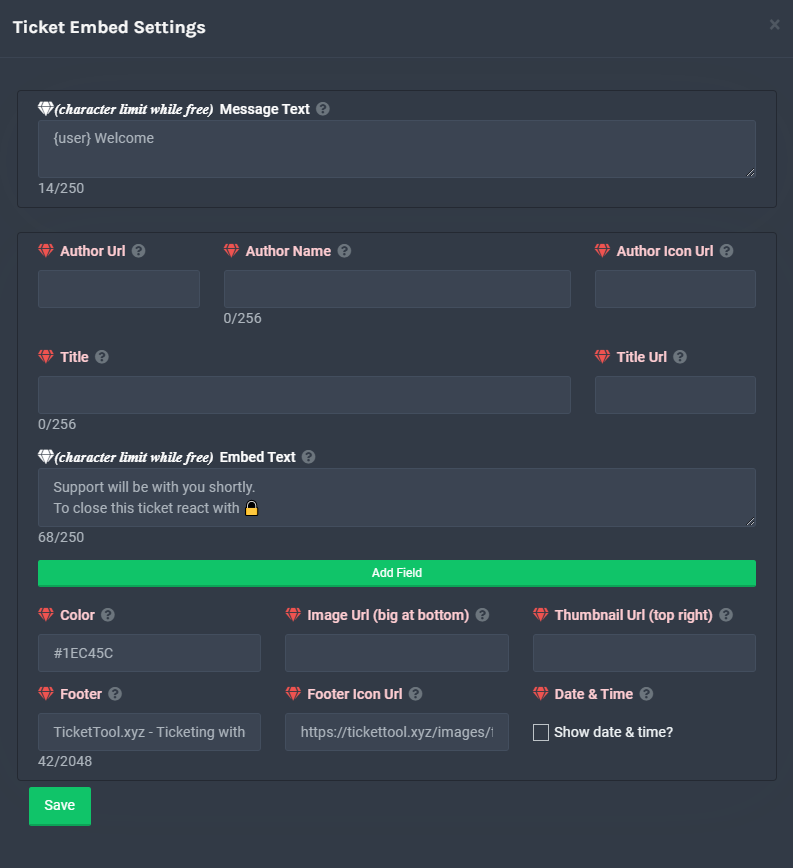 eager cargo
Either edit your ID <@ID> into the message text in your ticket message, or if you want it to ping a role
$help ping
humble sequoiaBOT
How to make Ticket Tool ping a role
To make ticket tool ping a role when a ticket is opened, go to the Dashboard -> Panel Configs -> Settings -> Ticket Options -> Ticket Message -> Message Text and do this:
{@Role name} This is case sensitive and the role must have @mentions enabled

 finite dove
I do not see the ticket tool status in my server
eager cargo
Can you elaborate?
barren harbor
eager cargo
Either edit your ID `<@ID>` into the message text in your ticket message, or if ...
@clear epoch will ping support role or the role named support
eager cargo
The role named support
eager cargo
you can replace it with whatever your support role name is
eager cargo
yep
finite dove
eager cargo
Can you elaborate?
On the @pseudo glen it doesn't show a status in my server but in other servers the bot does show the status
eager cargo
the like actual status discord feature?
like you're using right now
If so, it does that sometimes, as long as the bot is responding to commands and functioning, there's no issue
if you look at the premium bot right now, it doesn't have a status either.
 mystic hound
@jade topaz, in regards to your review:
Your last (and only) ticket was 6 days ago, and was handled by a totally different support member, in that ticket you were quite satisfied soo any particular reason for a negative review on a different member? I'd appreciate any feedback you may have
desert summit
Big F HAHAH
hasty trench
Is it possible to delete a ticket automatically when it is closed?
shut bolt
hasty trench
Is it possible to delete a ticket automatically when it is closed?
Yes it is! Go into the Panel Configs, then General Options and there mark as  the
the Two Step Ticket option and finally Save changes
hasty trench
shut bolt
Yes it is! Go into the Panel Configs, then General Options and there mark as <:o...
But the question is, can I delete a ticket directly without having to manually delete it? When closing a ticket, does it disappear for good?
 shut bolt
hasty trench
But the question is, can I delete a ticket directly without having to manually d...
shut bolt
hasty trench
But the question is, can I delete a ticket directly without having to manually d...
If you do what I told, when you close the ticket it will automatically get deleted
hasty trench
shut bolt
If you do what I told, when you close the ticket it will automatically get delet...
I got it here, thank you very much!
iron nightBOT
Gave 1 Rep to Yareaj_ (current: #22 - 18)
shut bolt
 fresh shell
the "to create a ticket" one
fresh shell
the "to create a ticket" one
Go into Panel Configs, then Button Options, Create Ticket, and select the text you want to appear in the box that's labeled Button Text
shut bolt
hasty trench
I got it here, thank you very much!
You are welcome :)
fresh shell
 hasty trench
shut bolt
You are welcome :)
hasty trench
shut bolt
You are welcome :)
And another question, is it possible to notify all Support that a ticket was opened in some way?
fresh shell
shut bolt
Do you have a panel already created?
i just did
shut bolt
hasty trench
And another question, is it possible to notify all Support that a ticket was ope...
Yes! You can ping them like this
$help ping
humble sequoiaBOT
How to make Ticket Tool ping a role
To make ticket tool ping a role when a ticket is opened, go to the Dashboard -> Panel Configs -> Settings -> Ticket Options -> Ticket Message -> Message Text and do this:
{@Role name} This is case sensitive and the role must have @mentions enabled
shut bolt
fresh shell
i just did
Click on the blue button that's named Settings, and follow the process I mentioned, take into account you must have premium to edit this option
fresh shell
shut bolt
Click on the blue button that's named `Settings`, and follow the process I menti...
thank you i did it
iron nightBOT
Gave 1 Rep to Yareaj_ (current: #22 - 19)
shut bolt
fresh shell
thank you i did it
You are welcome :)
fresh shell
how do i make it so it gives the person a role when they tap "create a ticket"
copper owl
fresh shell
how do i make it so it gives the person a role when they tap "create a ticket"
sorry, that's not possible
 atomic solstice
fresh shell
how do i make it so it gives the person a role when they tap "create a ticket"
atomic solstice
fresh shell
how do i make it so it gives the person a role when they tap "create a ticket"
not possible but has been suggested before so may come in the future
 unique junco
That’s currently not possible
severe path
 deft idol
I mean its showing an eror
deft idol
I mean its showing an eror
Could you send a screenshot of that?
 severe path
Are you still using the Premium Bot even though your Premium has expired?
deft idol
It says to run $ debug but even that comand is not working
No
I just got the bot today
 deft idol
severe path
Are you still using the Premium Bot even though your Premium has expired?
deft idol
severe path
Are you still using the Premium Bot even though your Premium has expired?
What can i do
I kick it and then invite it but it is not working
severe path
Could you show me what that looks like on your end?
 deft idol
severe path
Could you show me what that looks like on your end?
deft idol
severe path
Could you show me what that looks like on your end?
Here


Sir thnx it works now@severe path
severe path

deft idol
I did not use the free bot option thnx for the help
 wicked gorge
hey guys
brittle canopy
Hello.


 severe path
wicked gorge
<@414262796222595073> <:stroos_welcome:883465062226989108>
severe path
wicked gorge
<@414262796222595073> <:stroos_welcome:883465062226989108>
and pls dont ping staff
wicked gorge
thanks

 humble sequoiaBOT
Update your discord App
Buttons are a relatively new addition to discord and don't work with some older versions of the app.
Please verify that you have the latest version of discord, by going to the app or play store.
_ _
Discord for the App Store
_ _
Discord for the Play Store
copper owl
@hasty trench if you dont see the button, your discord is outdated
hasty trench
Why are people unable to see the ticket's open button?
copper owl
copper owl
<@!289036328136474624> if you dont see the button, your discord is outdated
explained here
copper owl
humble sequoia
and here
iron nightBOT
Gave 1 Rep to Neptune (current: #1 - 188)
copper owl
no problem
humble sequoiaBOT
Ticket Tool Invite & Support
copper owl
3rd link
copper owl
As i said, do not ping support members in this channel
you want support from the support team? #🎫│make-a-ticket
humble sequoiaBOT
copper owl
this is the setup for the bot, follow the instructions and the bot should be setup
 naive lance
Ok
naive lance
What
jade topaz
I if that russian so that I will translate your text in the translator ok?
naive lance
Ok
jade topaz
in general, I have a problem with bo
naive lance
But if you need help in the bot wait for support team
jade topaz
I added it to the server but in the menu where everyone is displayed in
naive lance
Idk like you
jade topaz
where all support
@naive lance if you want to teach you Russian
@eager cargo
help me ppjplk
slender minnow
jade topaz
I added it to the server but in the menu where everyone is displayed in
Try relogging if you cant see your server
slender minnow
jade topaz
I if that russian so that I will translate your text in the translator ok?
See #📣│server-news
 lofty cedar
Is there a way to restrict some people from a ticket
Like I only want admins to see that particular ticket and not mods
severe path
$help support
humble sequoiaBOT
How to let support team see into a ticket
About support roles
A support role lets your support team see into tickets with out having to add them manually to each and every ticket.
You can add as many support roles as you like per panel.
NOTE that the way discord works all admins can see into tickets regardless of this.
How to set a support role
To set a Support role go to the Dashboard -> Panel Configs -> Settings -> General Options -> Support Team Roles.

NOTE that the support role will not be able to see into tickets that are already created..
severe path
remove the mod role here @lofty cedar
scenic plinth
Stop pinging random people as well please. People are either working or in school, you will get support when someone reads chat to do so.
lofty cedar
severe path
remove the mod role here <@!552571245993000971>
But I want them to see all other tickets except for that one
severe path
Then you have to do $remove <role>
 spiral cipher
humble sequoiaBOT
spiral cipher
humble sequoiaBOT
Ticket Tool Invite & Support
 foggy gust
is it possible to set the language somewhere other than english?
 kind hawk
!role
darnit how do you tag a role again in tickettool ?
is it {864538218401628160}
or @864538218401628160
nv, found it
!selfhelp xD
humble sequoiaBOT
How to make Ticket Tool ping a role
To make ticket tool ping a role when a ticket is opened, go to the Dashboard -> Panel Configs -> Settings -> Ticket Options -> Ticket Message -> Message Text and do this:
{@Role name} This is case sensitive and the role must have @mentions enabled
mystic hound
just incase
 blissful cedar
شلون اعمل تسجيل خروج من البوت ؟
robust sandalBOT
blissful cedar
شلون اعمل تسجيل خروج من البوت ؟
 ᴸʸ➪𝗚𝗛𝗢🆂𝗧
How do I check out of the bot?
Arabic (ar) → English (en)
scenic plinth
/ar Assuming you mean logout... hit you profile picture on the dashboard and hit logout
robust sandalBOT
على افتراض أنك تعني الخروج... ضرب لك صورة الملف الشخصي على لوحة القيادة وضرب الخروج
English (en) → Arabic (ar)
blissful cedar
تمام شكرا
robust sandalBOT
blissful cedar
تمام شكرا
ᴸʸ➪𝗚𝗛𝗢🆂𝗧
ok thank you
Arabic (ar) → English (en)
 hasty sequoia
im trying to setup as soon as the ticket is open it go in to a catagory
shut bolt
hasty sequoia
im trying to setup as soon as the ticket is open it go in to a catagory
Hello there!
Try out this:
$help category
humble sequoiaBOT
How to set the open category
To set a open category go to the Dashboard -> Panel Configs -> Settings -> Category Options -> Category Open
 hasty sequoia
ok thank you
shut bolt
Remember to click on the Save button after selecting the category
hasty sequoia
im trying to setup next is on how to setup auto closing after the ticket is close
shut bolt
hasty sequoia
im trying to setup next is on how to setup auto closing after the ticket is clos...
Do you mean auto delete?
Like, when the ticket gets closed it deletes right?
shut bolt
hasty sequoia
yes
Sure, so follow this steps:
Go into the Dashboard of the server you want to edit
Go into the Panel Configs
Open the General Options menu
Mark as the Two Step Ticket
And click on the Save button
And that's it
iron nightBOT
Gave 1 Rep to Yareaj_ (current: #22 - 20)
shut bolt
hasty sequoia
thank you
Sure :)
jade topaz
how do i make it to where a ticket open it pings my support team?
eager cargo
$help ping
humble sequoiaBOT
How to make Ticket Tool ping a role
To make ticket tool ping a role when a ticket is opened, go to the Dashboard -> Panel Configs -> Settings -> Ticket Options -> Ticket Message -> Message Text and do this:
{@Role name} This is case sensitive and the role must have @mentions enabled
shut bolt
jade topaz
i can't find it
Let's do it by steps
First of all open the Dashboard of the server you want to edit
jade topaz
ok
shut bolt
Then go into Panel Configs
jade topaz
ok
shut bolt
And click in the Settings of the panel you want to edit
jade topaz
ok
shut bolt
Open the menu that says Ticket Options
jade topaz
ok
shut bolt
And click on the button labelled Edit Ticket Message
jade topaz
ok
shut bolt
humble sequoia
There you should see this box
jade topaz
ok i tried to do the @ but it didn't work
shut bolt
jade topaz
ok i tried to do the @ but it didn't work
Could you please send me a screenshot of what you inserted on the box, and one of the role you are trying to ping please?
 shut bolt
Okey, and what's the exact name of the role?
jade topaz
Support Team
shut bolt
Okey
jade topaz
yea it didn't work
shut bolt
You were missing the {} for the role mention, so replace the text you got on the box for this one
{user} Welcome Please Wait For The Support Team {@Support Team}
Sorry the delay, left the message on drafts but didn't send it lol
shut bolt
It should work with that text
 jade topaz
yep
shut bolt
Nice
jade topaz
thank you so much
shut bolt
A pleasure to help :)
jade topaz
thanks @shut bolt
iron nightBOT
Gave 1 Rep to Yareaj_ (current: #22 - 21)
shut bolt
Hello there
shut bolt
jade topaz
<@!518666147441278998>I apolgize for the ping
No worries
shut bolt
jade topaz
how can i see pass closed tickets
You must have a trasncript log channel
$help transcript
humble sequoiaBOT
How do I save transcript to a channel?
To save transcripts to a channel go to the Dashboard -> Panel Configs -> Settings -> Logging Options -> Transcript Channel
shut bolt
There you can log the tickets that have been closed in your server and also save their corresponding transcripts
iron nightBOT
@jade topaz :: You can't rep Yareaj_#4383 for 20 minutes and 21 seconds. Try coming back later?
jade topaz
another rep lol
shut bolt
jade topaz
ok thanks
Sure
jade topaz
nvm
shut bolt
jade topaz
another rep lol
Appreciate it 
jade topaz
ill do it later
shut bolt
jade topaz
ill do it later

If you got any more questions let me know, as far as I'm online i'll try to help you
jade topaz
ok thanks
 solid stream
shut bolt
solid stream
solid stream
shut bolt
solid stream
 obsidian monolith
tell me right now why I'am banned on tickettool page?
 solar briar
hi i cant login to ticket tool ????
obsidian monolith
I can login
BUT I'M BANNED
and I got this
PLEASE HELP ME
please 😭
pls help
jade topaz
@obsidian monolith you just leaked your ip
please read the message before you send it anywhere
obsidian monolith
I did
obsidian monolith
but read what?
jade topaz
just wait a few minutes or an hour and you should be able to access the dashboard
obsidian monolith
ok
jade topaz
obsidian monolith
but read what?
you just sent your own ip...
jade topaz
just be careful next time please
obsidian monolith
but nobody saw it .. so good
shut bolt
solar briar
hi i cant login to ticket tool ????
Were you able to login?
obsidian monolith
I got question
shut bolt
obsidian monolith
I got question
Go ahead
obsidian monolith
but what?
shut bolt
obsidian monolith
but what?
What?
solar briar
shut bolt
Were you able to login?
yea it's ok now
shut bolt
solar briar
yea it's ok now
Great
shut bolt
 lofty trout
Im have aproplem
lofty trout
Im have aproplem
Hi, how can we help you?
lofty trout
My tick bot does not open, or I can edit it, meaning it does not appear. I tried to recycle the page, but what is the solution?
@shut bolt
shut bolt
lofty trout
My tick bot does not open, or I can edit it, meaning it does not appear. I tried...
You mean you don't see the server in the dashboard?
lofty trout
Yrs
Yes *
Im trying to refreshing but it is not working
I dont know what is the proplem
humble sequoiaBOT
Don't see your server in the dashboard?
You will possibly need to relog. Look below to see steps on how to relog.
How to relog the Dashboard.
First, you will need to go to the dashboard. Once your there, click on your avatar on the top right. after you clicked it, you will see button that says Logout. You must click that. Once you have logged out, you can log back in.
Note:
You need one of these 3 things to access the dashboard.
1. Server Owner (Level: 6)
2. Server Administrator (Level: 4)
3. Dashboard Role (Level: 2)
You can check your level using $level on your Discord Server
shut bolt
Try this please
shut bolt
Run the command $level in your server
shut bolt
lofty trout
My level is 27
That's probably a XP level but not the dashboard
lofty trout
Ok
shut bolt
Run the command $debug and send me the link please
lofty trout
One min
shut bolt
Sure
shut bolt
lofty trout
Can u come to my server and im give u role
We are not allowed to do that, sorry
lofty trout
So how can fex the proplem
shut bolt
Did you ran the debug command yet?
shut bolt
lofty trout
No cuse its no showing up
Are you sure the bot is invited to the server?
 iron nightBOT
Gave 1 Rep to Yareaj_ (current: #21 - 24)
shut bolt
lofty trout
now its fux
Nice!
shut bolt
lofty trout
Thx so much <@!518666147441278998>
Glad to help
lofty trout
Thx
shut bolt
humble sequoiaBOT
Don't see your server in the dashboard?
You will possibly need to relog. Look below to see steps on how to relog.
How to relog the Dashboard.
First, you will need to go to the dashboard. Once your there, click on your avatar on the top right. after you clicked it, you will see button that says Logout. You must click that. Once you have logged out, you can log back in.
Note:
You need one of these 3 things to access the dashboard.
1. Server Owner (Level: 6)
2. Server Administrator (Level: 4)
3. Dashboard Role (Level: 2)
You can check your level using $level on your Discord Server
 slow umbra
thnx
 rigid yoke
السلام عليكم
 indigo socket
Hello folks - How do I invite the premium ticket tool bot to my server
I've got 2 other servers with the premium bot, just created a 3rd, already got the subscription but cannot find how to invite the premium one in
I found the invite link for it in this Discord - It's just not in the web console from what I could see - Thank you!
rigid yoke
How do I subscribe to the premium?
humble sequoiaBOT
Ticket Tool Premium
Get premium at https://tickettool.xyz/premium
Manage your subscriptions at https://tickettool.xyz/subscriptions
Why Premium?
Premium lets you customize the bot just how you want it. It also helps keep the bot running.
 oblique bloom
How can i have it ping a certain role when someone opens a ticket? Like if someone opens a ticket how can I have the ticket ping a certain role?
Nevermind i figured it out
 shadow comet
Hello I have a bug on the site when I want to choose the lounge where the ticket panels will be put, the problem is that its does not want to show all the lounges but when I click it puts a lounge and all the time the same and it's very annoying
brittle canopy
$help ping
humble sequoiaBOT
How to make Ticket Tool ping a role
To make ticket tool ping a role when a ticket is opened, go to the Dashboard -> Panel Configs -> Settings -> Ticket Options -> Ticket Message -> Message Text and do this:
{@Role name} This is case sensitive and the role must have @mentions enabled
brittle canopy
oblique bloom
Nevermind i figured it out
More info can be found here if you need further assistance ^
oblique bloom
ok thank you.
brittle canopy
shadow comet
Hello I have a bug on the site when I want to choose the lounge where the ticket...
Can you elaborate as I didn't catch what you really mean?
brittle canopy
turbid jolt
i need help
How we can help you?
turbid jolt
/en شوف خاصك
robust sandalBOT
Look at your own
Arabic (ar) → English (en)
humble sequoiaBOT
لا ترى سيرفرك في لوحة التحكم؟
ربما ستحتاج إلى إعادة التسجيل. انظر أدناه لمعرفة الخطوات الخاصة بكيفية إعادة التسجيل.
كيفية إعادة تسجيل لوحة التحكم.
ملحوظة :
تحتاج إلى أحد هذه الأشياء الثلاثة للوصول إلى لوحة التحكم.
- مالك السيرفر
- مسؤول السيرفر
- رول لوحة التحكم
 brittle canopy
turbid jolt
/en شوف خاصك
brittle canopy
turbid jolt
/en شوف خاصك
تابع الشرح ده*
shadow comet
your bug site when I want to choose the living room where the panel will be put
jade topaz
how to setup
turbid jolt
تمام
brittle canopy
jade topaz
how to setup
$help setup
humble sequoiaBOT
Setting up Ticket Tool
Visit the docs for setup info
General Setup
jade topaz
How to do $debug
brittle canopy
jade topaz
How to do $debug
Execute the command at the channel where you have a problem.
jade topaz
brittle canopy
$help setup
how
brittle canopy
humble sequoia
https://docs.tickettool.xyz/en/general/setup
@jade topaz Here, follow the instructions in this link.
brittle canopy
shadow comet
your bug site when I want to choose the living room where the panel will be put
Please open a ticket at #🎫│make-a-ticket with the language you speak so our support team can assist you.
brittle canopy
@jade topaz What exactly you want to do with the $debug command?
 brittle canopy
jade topaz
brittle canopy
jade topaz
Can you give us the debug link you get via $debug?
jade topaz
Can you speak spanish?
brittle canopy
Unfortunately not.
 ember token
is there a way to add multiple buttons?
brittle canopy
Please do not ping/ghost ping staff members.
However, feel free to follow these instructions to add multiple buttons to one panel.
humble sequoiaBOT
Multipanels are a premium feature  that allow for a single panel with multiple buttons to open different tickets.
How to create a Multipanel
Premium users can combine multiple panels into one multipanel.
First, find the IDs of each panel you wish to combine. You can find them in your Panel Configs in the Dashboard
Next, send the multipanel to a channel using $panel [id1] [id2] {id3} ....
e.g. $panel 1 2 4 17 35 to combine panels 1, 2, 4, 17 and 35.
Up to 25 panels may be combined.

For a more convenient use of multipanels, you can now combine panels on the dashboard. This will allow you to directly send the multipanel from the dashboard or via the $panel ID command.
Where can I find this?
You can find this setting on the Dashboard -> Panel Configs -> Settings -> General Options
This will put all buttons from all of your panels on one message. The message is the panel message from the panel you're combining these panels in.
 brittle canopy
Pinging and delete the message right after.
Anyway, check the instructions above.
ember token
Ok thanks
brittle canopy
You're more than welcome.
 trail harbor
Anyone know how to save Support Team roles on the panel config? It is not saving.
http://i.jasontucker.me/kroJyHMkep.mp4
severe path
trail harbor
Anyone know how to save Support Team roles on the panel config? It is not saving...
Fold and unfold the General Options and if it doesn't show up then it's because your screen is not wide enough to display the button
trail harbor
oh ffs
all the other save buttons showed XD
thanks
It kept going away when adding more than one role.
http://i.jasontucker.me/NvTGMSHrS2.mp4
Got it to save by stretching my browser throughout three screens XD
severe path
haha
severe path
trail harbor
It kept going away when adding more than one role.
http://i.jasontucker.me/NvTG...
 trail harbor
Ah, cool
humble sequoiaBOT
Ticket Tool Premium
Get premium at https://tickettool.xyz/premium
Manage your subscriptions at https://tickettool.xyz/subscriptions
Why Premium?
Premium lets you customize the bot just how you want it. It also helps keep the bot running.
 timid juniper
Anyone know how to make it so more folks can close tickets? right now only i can
shut bolt
timid juniper
Anyone know how to make it so more folks can close tickets? right now only i ca...
Hello there!
timid juniper
can you assign that to a role?
shut bolt
timid juniper
Anyone know how to make it so more folks can close tickets? right now only i ca...
Go into your Dashboard, then go into the Panel Configs, Button Options, and then click on the Close settings, send me an screenshot of that popup please
humble sequoiaBOT
Setting up Ticket Tool
Visit the docs for setup info
General Setup
timid juniper
shut bolt
Go into your Dashboard, then go into the Panel Configs, Button Options, and then...

 olive hill
shut bolt
Sure, try this
olive hill
shut bolt
Sure, try this
do you pls go my server ?
shut bolt
timid juniper
Hmmm are you the only one enabled to close tickets?
shut bolt
Please go into Command Configs and Settings of Close
shut bolt
timid juniper
maybe fill in "allowed roles"?
It could, but it isn't the reason why it isn't working
olive hill
my discord langauge its hungary
timid juniper
shut bolt
It could, but it isn't the reason why it isn't working

there looks like i could add a role
dope
shut bolt
timid juniper
In the panel have you selected any support role?
olive hill
anyone help me ? pls
shut bolt
olive hill
my discord langauge its hungary
You can translate the guide with the Google Translate extension :)
timid juniper
shut bolt
In the panel have you selected any support role?
no, i just want anyone with an admin role on my server to be able to close tickets
olive hill
shut bolt
You can translate the guide with the Google Translate extension :)
pls join my server and config the bot
pls help
shut bolt
timid juniper
no, i just want anyone with an admin role on my server to be able to close ticke...
Ok, then you must specify which are the roles you want them to be able to do that by selecting them as Support Roles in the General Options of the panel Settings
shut bolt
olive hill
pls join my server and config the bot
I cant' do that, you must do it by yourself
olive hill
shut bolt
I cant' do that, you must do it by yourself
i give you owner role
shut bolt
 quick kettle
thats y i close ticket
quick kettle
thats y i close ticket
Oh, no worries, do you want to me to reopen it?
quick kettle
alr so i cant view my server on list after i invited bot
and im tryna buy premium for my server
shut bolt
Try out this
humble sequoiaBOT
Don't see your server in the dashboard?
You will possibly need to relog. Look below to see steps on how to relog.
How to relog the Dashboard.
First, you will need to go to the dashboard. Once your there, click on your avatar on the top right. after you clicked it, you will see button that says Logout. You must click that. Once you have logged out, you can log back in.
Note:
You need one of these 3 things to access the dashboard.
1. Server Owner (Level: 6)
2. Server Administrator (Level: 4)
3. Dashboard Role (Level: 2)
You can check your level using $level on your Discord Server
quick kettle
wdym level 6
shut bolt
quick kettle
wdym level 6
Level 6 means you are the server owner
quick kettle
User permission level with Ticket Tool
@Jayy is permission level: 6 (Guild Owner)
see
shut bolt
quick kettle
alr i see ty ima buy prem now
Sure! :)
shut bolt
quick kettle
<@!518666147441278998>
It's not necessary to ping me, I constantly read this channel so no worries about it
quick kettle
Ticket Tool | Premium Bot like this
humble sequoiaBOT
Redeeming premium
Redeeming premium on your server is really simple. Just head over to your Subscriptions Page. There you can select a server of your choice, which will get premium. You can change the server at any point.
 shut bolt
Go into Server Configs
quick kettle
where is that again
shut bolt
Theres a blue button that says Invite Premium Bot
quick kettle
in manage servers?
shut bolt
quick kettle
where is that again
Go into https://tickettool.xyz/manage-servers and then select the one you want to edit
 humble sequoiaBOT
Redeeming premium
Redeeming premium on your server is really simple. Just head over to your Subscriptions Page. There you can select a server of your choice, which will get premium. You can change the server at any point.
 shut bolt
You enabled the free trial right?
quick kettle
shut bolt
You enabled the free trial right?
o ye oops
shut bolt
quick kettle
o ye oops
Did you do this?
quick kettle
where
shut bolt
humble sequoia
Lol, this thing over here
humble sequoiaBOT
Redeeming premium
Redeeming premium on your server is really simple. Just head over to your Subscriptions Page. There you can select a server of your choice, which will get premium. You can change the server at any point.
shut bolt
Ou, a sec please
shut bolt
quick kettle
but i did activate free trial earlier
Refresh your dashboard and you should see an Active-Manage message below the trial time
verbal sundial
@quick kettle probably in the settings
quick kettle
alr i found it i think
humble sequoiaBOT
Ticket names
The ticket name is the default channel name of all tickets. To edit it, go to your Dashboard > Panel Configs > Settings > Ticket Options. There you can edit the channel name of opened and closed tickets. You can also use variables in there.

 Note: This is a premium feature
shut bolt
verbal sundial
<@874732321310392351> probably in the settings
Note: This is a premium feature
shut bolt
verbal sundial
<@874732321310392351> probably in the settings
Indeed
shut bolt
quick kettle
alr i found it i think
Nice, you can do it with this
shut bolt
humble sequoia
⏫
quick kettle
shut bolt
Nice, you can do it with this
Failed to send panel, Run $debug in the channel to check for errors.
shut bolt
quick kettle
Failed to send panel, Run $debug in the channel to check for errors.
run that command in the channel you want to send the panel
verbal sundial
LETS GOOOO I WAS RIGHT
shut bolt
quick kettle
shut bolt
run that command in the channel you want to send the panel
i did nothin happens
humble sequoiaBOT
If Ticket Tool support requested this debug give them this link:
https://discordapp.com/channels/509192800865353738/662692902245498910/891410345640468570
Bot Permissions ឵ ឵឵ ឵ ឵឵ ឵ ឵឵ ឵ ឵឵
✅ - Read Channels
✅ - Send Messages
✅ - Embed Links
✅ - Attach Files
✅ - Add Reactions
✅ - Manage Roles
✅ - Manage Channels
✅ - Manage Messages
✅ - Read History
Channel Permissions ឵ ឵឵ ឵ ឵឵ ឵ ឵឵ ឵ ឵឵
✅ - Read Channels
✅ - Send Messages
✅ - Embed Links
✅ - Attach Files
✅ - Add Reactions
✅ - Manage Roles
✅ - Manage Channels
✅ - Manage Messages
✅ - Read History
Server Information ឵ ឵឵ ឵ ឵឵ ឵ ឵឵ ឵ ឵឵ ឵ ឵឵
Channel name:
community-support
Channel ID:
776680605517742090
Channel Count:
164/500
Server name:
Ticket Tool Support
Server ID:
509192800865353738
User Information ឵ ឵឵ ឵ ឵឵ ឵ ឵឵ ឵ ឵឵ ឵ ឵឵
User name:
ninja#1480
User ID:
638150353938022403
Permission Level:
0 - User ()
Bot Information ឵ ឵឵ ឵ ឵឵ ឵ ឵឵ ឵ ឵឵ ឵ ឵឵
Prefix:
$
Premium Status:
Lifetime - ["subV2","time"]
Current shard:
1
API Latency:
88
shut bolt
quick kettle
i did nothin happens
Does the bot has the perms to send messages?
verbal sundial
oh fuck
quick kettle
shut bolt
Does the bot has the perms to send messages?
yes
shut bolt
quick kettle
yes
And can it see the channel?
quick kettle
shut bolt
And can it see the channel?
yes
 dark pendant
في دعم فني عربي ؟؟
shut bolt
quick kettle
yes
Did you change the bot in Server Configs?
robust sandalBOT
dark pendant
في دعم فني عربي ؟؟
 A7 |Ahmad
Is there any Arab technical support?
Arabic (ar) → English (en)
eager cargo
$arabic
humble sequoiaBOT
فريق الدعم الفني العربي
عميلنا العزيز ان كنت تبحث عن مساعدة يرجى فتح تكت خاص بفريق الدعم الفني العربي
اذهب الى#🎫│make-a-ticket
ثم قم بلضغط على الايموجي الاتي (🇯🇴)
quick kettle
shut bolt
Did you change the bot in Server Configs?
wdym
dark pendant
thank you
shut bolt
eager cargo
$arabic
 was looking for it lol
verbal sundial
لا أعتقد ذلك
humble sequoiaBOT
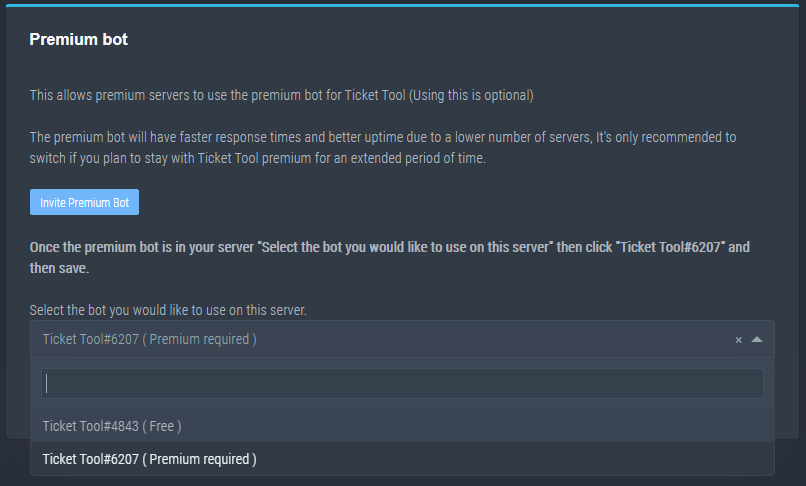
How to disable the premium bot
To disable the premium bot you will have to go to the Dashboard -> Server Configs -> Premium bot -> And on the right-hand side select the primary free bot in the drop down menu.
Premium features will still work on the normal bot.
TicketTool.xyz - Ticketing without clutter
shut bolt
quick kettle
wdym
If you selected the premium bot in your server or you are still with the free one
shut bolt
humble sequoia
This ⏫
shut bolt
$variables
humble sequoiaBOT
Supported Variables
{server.id} --> ID of the Server

[#🆘│community-support](/guild/509192800865353738/channel/776680605517742090/) = <#channel> --> Channel link of the current channel
{channel.name} --> Name of the current channel
{channel.id} --> ID of the current channel

{author} = <@user> --> Mention of the user triggering this message
{author.name} --> Name of the user triggering this message
{author.id} --> ID of the user triggering this message
{author.nickname} --> Nickname of the user triggering this message
{author.icon} --> Direct Url of the profile picture of the user triggering this message
{author.tag} --> 4 digit tag (discriminator) of the user triggering this message
{author.full} --> username + 4 digit discriminator of the user triggering this message

{panel.count} --> The current count number of the panel (Tickets only)
{panel.name} --> The name of the panel (Tickets Only)
{panel.ticketLimit} --> The current limit of the panel (Ticket Only)

{ticket} = <#channel> --> Channel mention of the ticket
{ticket.id} --> Channel ID of the ticket

{ticket.user} = <@user> --> User mention of the ticket user
{ticket.user.name} --> Name of the ticket user
{ticket.user.id} --> User ID of the ticket user
{ticket.user.nickname} --> Nickname of the ticket user
{ticket.user.icon} --> Direct Url of the profile picture of the ticket user
{ticket.user.tag} --> Tag / Discriminator of the ticket user
{ticket.user.full} --> Username + Discirimator of the ticket user```
Roles can be either
{@role name} or {role ID}You can use any of these
verbal sundial
shut bolt
Do you want it to be the username or the nickname?
verbal sundial
maybe
quick kettle
shut bolt
Do you want it to be the username or the nickname?
i want the ticket to be named ticket-person who opens user
shut bolt
quick kettle
i want the ticket to be named ticket-person who opens user
So use ticket-{ticket.user.name}
shut bolt
verbal sundial
maybe
Yeah
verbal sundial
yay
shut bolt
quick kettle
i want the ticket to be named ticket-person who opens user
Using this: ticket-{ticket.user.name}
Would make the ticket name look like this for example:
 shut bolt
quick kettle
why isnt it mentioning @middleman
shut bolt
quick kettle
why isnt it mentioning @middleman
In the ticket channel?
quick kettle
yes
shut bolt
Is it a user?
quick kettle
 humble sequoiaBOT
How to make Ticket Tool ping a role
To make ticket tool ping a role when a ticket is opened, go to the Dashboard -> Panel Configs -> Settings -> Ticket Options -> Ticket Message -> Message Text and do this:
{@Role name} This is case sensitive and the role must have @mentions enabled
shut bolt
humble sequoia
Try out doing this
quick kettle
still didnt ping
shut bolt
Does the role have a capital letter on its name?
quick kettle
shut bolt
Does the role have a capital letter on its name?
yes, i put {@Middleman}
shut bolt
quick kettle
yes, i put {@Middleman}
Send me a cap of the Message Text box and a cap of the role name
 stark needle
This might seem stupid, but does anyone know how to add multiple buttons like the create ticket under one panel?
 quick kettle
 shut bolt
stark needle
This might seem stupid, but does anyone know how to add multiple buttons like th...
shut bolt
stark needle
This might seem stupid, but does anyone know how to add multiple buttons like th...
No stupid question, try out this
humble sequoiaBOT
Multipanels are a premium feature that allow for a single panel with multiple buttons to open different tickets.
How to create a Multipanel
Premium users can combine multiple panels into one multipanel.
First, find the IDs of each panel you wish to combine. You can find them in your Panel Configs in the Dashboard
Next, send the multipanel to a channel using $panel [id1] [id2] {id3} ....
e.g. $panel 1 2 4 17 35 to combine panels 1, 2, 4, 17 and 35.
Up to 25 panels may be combined.
shut bolt
Or if you prefer
humble sequoiaBOT
For a more convenient use of multipanels, you can now combine panels on the dashboard. This will allow you to directly send the multipanel from the dashboard or via the $panel ID command.
Where can I find this?
You can find this setting on the Dashboard -> Panel Configs -> Settings -> General Options
This will put all buttons from all of your panels on one message. The message is the panel message from the panel you're combining these panels in.
shut bolt
Both require having the premium version
shut bolt
quick kettle
I meant from the dashboard
quick kettle
shut bolt
I meant from the dashboard
||@Middleman|| {user} Welcome
wtf
it bugged when i sent
in discord
shut bolt
stark needle
How much is premium?
6$ per month if bought the monthly option, or 66$ if you buy the anual one
shut bolt
quick kettle
||@Middleman|| {user} Welcome
Send me a screenshot of it, like, the editing in the dashboard
quick kettle
 shut bolt
quick kettle
shut bolt
quick kettle
Now please send me a cap of the role's name in the role options
And probably it's due to the ||
But just to confirm I want to see the role name
 craggy geyser
The last screenshot didn't have a capital letter on the ping so make sure it is saved and open a new ticket
quick kettle
made it work, ty
shut bolt
quick kettle
made it work, ty
Sure
shut bolt
Hi, what are you looking for?
 trail sphinx
can i show my credits
shut bolt
Your credits?
shut bolt
Do you mean the subscriptions you've got for the bot?
shut bolt
$arabic
humble sequoiaBOT
فريق الدعم الفني العربي
عميلنا العزيز ان كنت تبحث عن مساعدة يرجى فتح تكت خاص بفريق الدعم الفني العربي
اذهب الى#🎫│make-a-ticket
ثم قم بلضغط على الايموجي الاتي (🇯🇴)
 rancid lotus
how can i check premium is installed on server?
humble sequoiaBOT
تيكت توول Premium
احصل على البريموم من
https://tickettool.xyz/premium
ادارة اشتراكاتك من
https://tickettool.onfastspring.com/account
لماذا بريميوم؟
يتيح لك الإصدار Premium تخصيص البوت بالطريقة التي تريدها. كما أنه يساعد في الحفاظ على عمل البوت.
shut bolt
rancid lotus
how can i check premium is installed on server?
Run $debug, it will show you the subscription type you got
trail sphinx
ok
rancid lotus
where?
shut bolt
rancid lotus
where?
In any channel while the bot can read and send messages
stark needle
is there anyway i can transfer what ive done from one server to another so I dont have to redo all the panels?
humble sequoiaBOT
Backup and Restore allows you to transfer your premium status, panels, tags, and all settings to a new server.
You can also use it to keep a backup of your settings incase you need to suddenly move servers. We suggest you keep this backup key somewhere safe, incase your server is deleted. You will want to copy the whole key.
First, go to your dashboard, then Server Configs and generate a new backup key by pressing the green button. Now, a key should be generated in the box above. You may need to refresh the page to see this.
Once you have your backup key, navigate to the same page on the new server. Copy the key on the second field.
Now you can choose what you want to copy. Finally, press the green “Restore Configs” button.
 eager cargo
^
rancid lotus
shut bolt
In any channel while the bot can read and send messages
hmm nothing
nvm got it
shut bolt
rancid lotus
hmm nothing
Hmmm, let's try login into the --
shut bolt
rancid lotus
nvm got it
Nice, did it send you the embed?
shut bolt
rancid lotus
can i kick ticket tool premium bot?
If you are using the free one, yeap
shut bolt
rancid lotus
so i have to keep all of them on my server?
You can just keep the bot you are using
shut bolt
rancid lotus
but when i use the dashboard it's using the free
Go into Server Configs and select the premium one
rancid lotus
ah that was it ty
shut bolt
rancid lotus
ah that was it ty
Sure!
 kind marten
Hello
shut bolt
 arctic crane
How can I get to the ticket tool dashhbord?
arctic crane
How can I get to the ticket tool dashhbord?
Hello there!
kind marten
How can us ticket ?
shut bolt
arctic crane
How can I get to the ticket tool dashhbord?
Enter here https://tickettool.xyz/manage-servers
shut bolt
kind marten
To us ticket
To create a ticket?
kind marten
shut bolt
To create a ticket?
Yes
shut bolt
kind marten
Yes
Do you want to create a support ticket here or do you want to create tickets on your own server?
kind marten
shut bolt
Do you want to create a support ticket here or do you want to create tickets on ...
On my server
shut bolt
kind marten
On my server
Check this out
humble sequoiaBOT
kind marten
shut bolt
Check this out
Thx
iron nightBOT
Gave 1 Rep to Yareaj_ (current: #21 - 26)
shut bolt
kind marten
Thx
Sure :)
shut bolt
Any step that you don't get?
 arctic crane
How can I adjust this message in a channel
arctic crane
arctic crane
I want to do this on my server
humble sequoiaBOT
**Panel Message**
The panel message is where people react to make a ticket. To customize it head over to your Dashboard --> Panel Configs -> Settings -> Panel Options -> Edit Panel Message
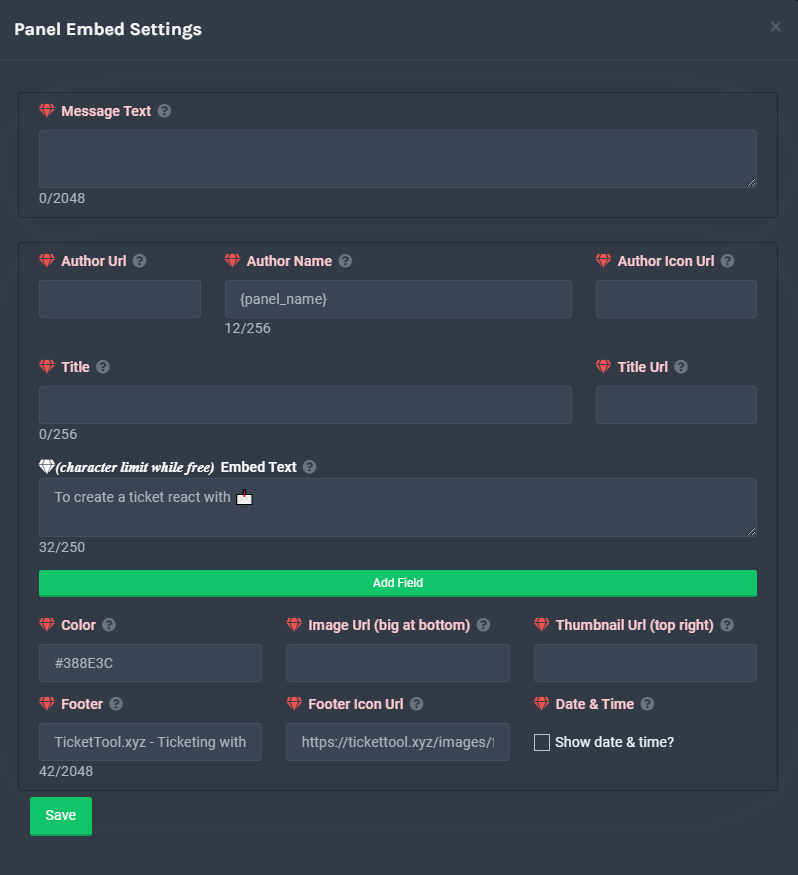 shut bolt
You can edit the panel message once you have the bot set up
 shut bolt
Panel Options
arctic crane
But there is no option for sending this message in a channel
shut bolt
Yes it is, if you head to Panel Configs you can select the channel to send the panel
 arctic crane
It's failed
shut bolt
Did the web responded with a red popup alert?
arctic crane
Yeah
shut bolt
Go into the channel you want the bot to send the panel and run $debug
arctic crane
Nothing happened
shut bolt
Does the bot have perms to read and send messges in that channel?
arctic crane
Yeah
shut bolt
Go back to the Dashboard, and go into the Server Configs window, please send me a screenshot of it
arctic crane
 shut bolt
In your server which of the two bots have you in, the Premium one or the free one?
arctic crane
Both
shut bolt
arctic crane
Would you please take the photo again but this time only to the Premium bot box that it's on your right?
 shut bolt
Yeap
So, does the Premium Bot has perms to send messages in the channel? Not the free one, but the one that has the gold ticket profile picture
arctic crane
Yeah he has owner and owner has everything allowed
Oh nice message send
On debug 4 min delay
arctic crane
And now?
shut bolt
arctic crane
And now?
Did the panel sent?
shut bolt
arctic crane
Thank you so much
I'm glad to help :)
If you got any other question you can ask here or open a ticket at #🎫│make-a-ticket
Have a godd one
stark needle
sorry quick question, people outside my support team are able to claim tickets and im not sure why