
#🆘│community-support
1 messages · Page 349 of 1
 humble sequoiaBOT
 copper owl
@crisp kestrel ^
 crisp kestrel
ok thx
 sinful yoke
Hi, is there a way to see an old transcript, we didn't had logging transcript turned on at that point and now just remember the ticket number, channel id and other things can still be accesed though, the ticket was fully deleted later.
 flint coyote
If it was fully deleted, then there's no way to retrieve it.
sinful yoke
Oh ok, thanks for the help
flint coyote
You're welcome
 unique niche
I cant manage the server but i did had it on a diffrent server

 sharp agate
oops hi, I didn't see this channel before I made a ticket
Is there a way to set up a panel that responds to emoji reactions instead of buttons?
unique niche
@pseudo glen i need help
humble sequoiaBOT
Don't see your server in the dashboard?
You will possibly need to relog. Look below to see steps on how to relog.
How to relog the Dashboard.
First, you will need to go to the dashboard. Once your there, click on your avatar on the top right. after you clicked it, you will see button that says Logout. You must click that. Once you have logged out, you can log back in.
Note:
You need one of these 3 things to access the dashboard.
1. Server Owner (Level: 6)
2. Server Administrator (Level: 4)
3. Dashboard Role (Level: 2)
You can check your level using $level on your Discord Server
 scenic plinth
sharp agate
oops hi, I didn't see this channel before I made a ticket
scenic plinth
sharp agate
oops hi, I didn't see this channel before I made a ticket
No, we stopped using them a while ago.
scenic plinth
unique niche
<@557628352828014614> i need help
The bot can't help you... although I did answer your question
sharp agate
scenic plinth
No, we stopped using them a while ago.
oh, that's too bad. Thanks!
 iron nightBOT
Gave 1 Rep to 𝐀𝐥𝐲𝐳𝐳 (current: #6 - 149)
 eternal wasp
Hey is there a way to make cmds like $close to be only used by admins and not people who create the tickets?
@copper marsh
@hybrid dagger
@copper owl
 atomic barn
Oi
Don’t ping support team.
If you are wanting a fast answer you could always make a ticket in #🎫│make-a-ticket
If not someone will answer you, the pings aren’t necessary
eternal wasp
eternal wasp
Hey is there a way to make cmds like $close to be only used by admins and not pe...
@copper marsh @copper owl @hybrid dagger please ans me im making one for a server rn
humble sequoiaBOT
How to set the permissions for tickets
To set a change permissions go to the Dashboard -> Panel Configs -> Settings -> Permission Options

 desert summit
So Go to Dashboard > Command Configs > [Click the command in which the settings should be changed] There you can setup, who is permit to open or staff yk?
@eternal wasp
atomic barn
Yea I suggested that lol, ignored me I guess
 jade topaz
@copper owl can you take my ticket?
 rare saffron
HOW DO I SET UP A PANEL? Sorry for caps
 prime bridgeBOT
 Successful kicks:
 1
 Unsuccessful kicks:
 0
 Reason: pinging staff multiple time before and after a member told him not to
 Moderator: @grand jacinth
copper owl
jade topaz
<@548583124062175232> can you take my ticket?
what?
jade topaz
copper owl
what?
Someone takes my ticket plss
desert summit
rare saffron
HOW DO I SET UP A PANEL? Sorry for caps
$help Panel
humble sequoiaBOT
Creating a panel
To create a panel we are going to need to head over to the panel configs on the dashboard
Once at the dashboard we will need to click Create Panel
Enter a panel name (Fill in any optional settings you want)
Click Create Panel and your ready to get started with configuring your panel
An example of a creating a panel is shown below.
 desert summit
rare saffron
HOW DO I SET UP A PANEL? Sorry for caps
desert summit
rare saffron
HOW DO I SET UP A PANEL? Sorry for caps
Or look in #573205317870157855 ^^
If you have any other questions just send it ^^
 cursive basin
Hello, can I rescue deleted ticket?
flint coyote
cursive basin
Hello, can I rescue deleted ticket?
No. If you have a transcript you can access the transcript.
jade topaz
how does multi-panel work?
atomic barn
$help multipanel
humble sequoiaBOT
Help Options
$help commands - Information on commands
$help setup - Information on bot setup
$help faq - Frequently asked questions
humble sequoiaBOT
Help Options
$help commands - Information on commands
$help setup - Information on bot setup
$help faq - Frequently asked questions
atomic barn
$help commands
humble sequoiaBOT
() = optional
[] = required
*==================================
Ticket Commands
==================================*
_ _
`$add [User] (channel)`
Description: Adding additional users to a ticket
Aliases: none
`$remove [User] (channel)`
Description: Removing users from a ticket
Aliases: none
`$close`
Description: Closing tickets
Aliases: none
`$open`
Description: Opening closed tickets
Aliases: none
`$delete`
Description: Deleting tickets
Aliases: none
`$rename`
Description: Renaming tickets/channels
Aliases: none
`$transcript (send channel)`
Description: Creating transcripts
Aliases: none
`$new (user) (reason)`
Description: Creating tickets in a monitored channel (when command style is enabled)
Aliases: none
`$claim`
Description: Claiming tickets (when claim is enabled)
Aliases: "unclaim"
_ _
*==================================
General Commands
==================================*
_ _
`$help (Help Options)`
Description: Help Command
Aliases: none
`$debug`
Description: Debuging issues with running Ticket Tool
Aliases: none
`$id (@role/@user/#channel/emoji)`
Description: Converting roles, users, channels and emojis to ID
Aliases: "getid"
`$permlevel`
Description: Checking permission level with Ticket Tool
Aliases: "level"
`$ping`
Description: Checking response time with discord api
Aliases: none
`$vote (link | unlink | redeem) (user)`
Description: Earn premium by voting on top.gg or Discord.boats
Aliases: "votes"
atomic barn
Erm..... regarding multipanels maybe wait for someone else lol.
jade topaz
np haha :)
humble sequoiaBOT
Multipanels are a premium feature  that allow for a single panel with multiple buttons to open different tickets.
How to create a Multipanel
Premium users can combine multiple panels into one multipanel.
First, find the IDs of each panel you wish to combine. You can find them in your Panel Configs in the Dashboard
Next, send the multipanel to a channel using $panel [id1] [id2] {id3} ....
e.g. $panel 1 2 4 17 35 to combine panels 1, 2, 4, 17 and 35.
Up to 25 panels may be combined.

For a more convenient use of multipanels, you can now combine panels on the dashboard. This will allow you to directly send the multipanel from the dashboard or via the $panel ID command.
Where can I find this?
You can find this setting on the Dashboard -> Panel Configs -> Settings -> General Options
This will put all buttons from all of your panels on one message. The message is the panel message from the panel you're combining these panels in.
 copper owl
@jade topaz both ways require premium ^^
iron nightBOT
Gave 1 Rep to Neptune (current: #4 - 154)
copper owl
Np
jade topaz
uhm, so when i add 4 panels it cuts off the save button so i can't save it

im going to try another browser, i'm using opera gx
fire fox is cutting it off a little bit but enough to save it

 oak swift
Hola, ticket 2834 con urgencia! gracias
jade topaz
 solid stream
To fix that bug close and reopen the option box
solid stream
To fix that bug close and reopen the option box
oh tyvm
 rigid pilot
How do you get the premium role
my co worker needs
it, i forgot how to get it
 rough moth
rigid pilot
How do you get the premium role
my co worker needs
it, i forgot how to get it
rough moth
rigid pilot
How do you get the premium role
my co worker needs
it, i forgot how to get it
#🎫│make-a-ticket and run $debug and give them the link
Make sure he runs debug in the server he’s in
desert summit
atomic barn
Erm..... regarding multipanels maybe wait for someone else lol.
Its $mp ^^
 spark halo
hi ?
desert summit
spark halo
hi ?
Hello ^^
atomic barn
desert summit
Its $mp ^^
Oh haha thx
 oak quiver
Is there Arabic support?
 glacial sorrel
Hello how to get you’re role into the support role so my staff can help the tickets idk how to do that
I can’t now create a ticket it says permissions missing
desert summit
glacial sorrel
Hello how to get you’re role into the support role so my staff can help the tick...
$help support
humble sequoiaBOT
How to let support team see into a ticket
About support roles
A support role lets your support team see into tickets with out having to add them manually to each and every ticket.
You can add as many support roles as you like per panel.
NOTE that the way discord works all admins can see into tickets regardless of this.
How to set a support role
To set a Support role go to the Dashboard -> Panel Configs -> Settings -> General Options -> Support Team Roles.
NOTE that the support role will not be able to see into tickets that are already created..
desert summit
glacial sorrel
I can’t now create a ticket it says permissions missing
Doublecheck that the bot has every needed permission
glacial sorrel
Ow the bot needed permission ow okey lemme check
Ey @desert summit Ty mate u helped me a lot
iron nightBOT
Gave 1 Rep to Ymaster2000 (current: #26 - 8)
desert summit
glacial sorrel
Ey <@516177549647282187> Ty mate u helped me a lot
Np ^^
glacial sorrel
💪🏼
desert summit
Any other questions? :)
glacial sorrel
Nope
 zealous vale
Hi
desert summit
zealous vale
Hi
Hello how can we help you ^^
 trail pelican
Hallo peeps
Is there a way to add an second Administrator to edit the Panel Messages etc?
$help admin
humble sequoiaBOT
Help Options
$help commands - Information on commands
$help setup - Information on bot setup
$help faq - Frequently asked questions
Dashboard Roles
Any role you put there will have full access to the ticket tool dashboard. The server owner and users with admin permissions already have access to the dashboard.
Be careful of which roles to put here
 scenic plinth
^
 boreal lotus
Hey Hey.. How can i chose the old button version for the multipanel? $panel 1 2 3 is adding those big buttons but i want the small ones
copper owl
I dont suggest it
we're moving onto buttons and reactions might cause problems for you
jade topaz
how can i make a ticket i watch the commands but it doesnt help me
copper owl
theyre also going to stop working at some point
copper owl
jade topaz
how can i make a ticket i watch the commands but it doesnt help me
you want to setup ticket tool?
jade topaz
i want to create one
humble sequoiaBOT
copper owl
look at the documentation
if you want to actually open a ticket in here, it's in #🎫│make-a-ticket
 cunning ether
i need help so i have got ticket tool working on 4 servers and ive added it to my 5th server but its not showing it on the dashboard to create panels ive relogged everything please help its annoying me
humble sequoiaBOT
Don't see your server in the dashboard?
You will possibly need to relog. Look below to see steps on how to relog.
How to relog the Dashboard.
First, you will need to go to the dashboard. Once your there, click on your avatar on the top right. after you clicked it, you will see button that says Logout. You must click that. Once you have logged out, you can log back in.
Note:
You need one of these 3 things to access the dashboard.
1. Server Owner (Level: 6)
2. Server Administrator (Level: 4)
3. Dashboard Role (Level: 2)
You can check your level using $level on your Discord Server
copper owl
look at the note ^^
also make sure you're relogging correctly. Refreshing the page isn't the same as reloggin, as some people may believe
cunning ether
i close web page
copper owl
that is not relogging
copper owl
yup, hence "relogging"
cunning ether
sorry about that
copper owl
cunning ether
thankyouuu
of course, my pleasure
copper owl
cunning ether
sorry about that
hey dw about it, that's why we're here!
jade topaz
Does anyone here know how to setup Gamble Bot?
copper owl
$tts
humble sequoiaBOT
You're in the wrong place
We provide support for @pseudo glen discord bot and cannot help you with whatever issue you have.
Please make sure to contact the appropriate support team.
If you don't have any further questions regarding our bot Ticket Tool, please close this ticket
_ _
jade topaz
@copper owl what?
copper owl
jade topaz
<@548583124062175232> what?
you're asking to setup gamble bot
this is not a general bot support server, we only do support for ticket tool
 feral lance
Hello, I am the admin of a server and after the creation of a panel, I set and saved the changes for the ¨Ticket count¨ option. Then I select a channel and send the panel to a channel where the users have permission only to view and click on the ticket emoji to create one. And everything works ok. But once I close the window of the dashboard or Discord, everything is as if the options were never set and never saved. Has the same thing happened to anyone? Is there an option that I am not seeing?
copper owl
you should probably save the options beforehand
there's a save button that is under each option
feral lance
Yes, I had clicked on each one
feral lance
The ¨Permission Options¨ and is the one that has no button to save
copper owl

it does have a save option
for each setting under the permission options
each one has its own save
feral lance
yes, that one I clicked on it. Sorry, I understood that the whole section.
humble sequoiaBOT
-- moved to ticket --
 blazing sparrow
what's that prefix for @humble sequoia? Because when I try using it it doesn't respond
copper owl
$help prefix
humble sequoiaBOT
How to change Ticket tool's prefix
The default prefix for ticket tool is $ and @Ticket Tool#4843 however that can be changed on the Dashboard under Server Configs -> Command Prefix.

NOTE that @Ticket Tool#4843 will always work as a prefix even if there is a custom prefix.
blazing sparrow
copper owl
if it doesnt respond, then it's a different issue
yeah it doesn't respond
at all
copper owl
did you buy the premium?
blazing sparrow
copper owl
did they give you a key?
nope
I just gave them staff and they invited it
copper owl
inviting it doesnt mean they bought it
unless someone bought the premium and redeemed it, it wont respond to anything you send
 tribal cedar
Ask away
glacial sorrel
Every one in my server can see and answer te ticket
glacial sorrel
tribal cedar
Ask away
^
The * and I have support team for it but even the non support team or (ticket team) everyone can see the tickets
So someone help me ??
tribal cedar
Yes. Edit the everyone permissions to not be able to see channel
glacial sorrel
Where
tribal cedar
Panel configs->settings->permission options
iron nightBOT
Gave 1 Rep to Enigma (current: #12 - 73)
tribal cedar
Np
prime bridgeBOT
LaPuerte has been silenced for 10m 

 Reason: Posting NSFW Websites
LaPuerte#1111 | 749249127514112054
 unkempt barn
Is there a way to have a .mp4 in an embedded message?
 marble sail
for some reason it won't let me change the emoji of the panel
 pale pilot
Do you have premium?
marble sail
yeah I just did the trial
pale pilot
You need to resend your panel
If it doesn't save, then please log out and log in and try again
marble sail
well it wont let me change it in the settings
prime bridgeBOT
Aquato LΞΦN has been silenced for 10m
Reason: Posting NSFW Websites
Aquato LΞΦN#2378 | 587162715458371586
prime bridgeBOT
Aquato LΞΦN#2378 has been muted temporarily for 11m
Aquato LΞΦN#2378 | 587162715458371586
 potent olive
hey im new here and was wondering if there was a way for mods to get notified via ping if theres a new ticket opened
or if there was a way to have tickets be put under a category instead of appear at the top of my channel list
humble sequoiaBOT
-- moved to ticket --
desert summit
potent olive
hey im new here and was wondering if there was a way for mods to get notified vi...
Hey Idk if you need it almostbut:
$help ping
humble sequoiaBOT
How to make Ticket Tool ping a role
To make ticket tool ping a role when a ticket is opened, go to the Dashboard -> Panel Configs -> Settings -> Ticket Options -> Ticket Message -> Message Text and do this:
{@Role name} This is case sensitive and the role must have @mentions enabled
 desert summit
$help category
humble sequoiaBOT
How to set the open category
To set a open category go to the Dashboard -> Panel Configs -> Settings -> Category Options -> Category Open

 severe path
@desert summit


 desert summit
Ja
desert summit
 lilac hound
Please help someone
lilac hound
Please help someone
Yes what do you need ^^
lilac hound
desert summit
Yes what do you need ^^
Umm... it says i dont have any servers in dashborad but in one of my servers i have perms but cant access it
desert summit
lilac hound
Umm... it says i dont have any servers in dashborad but in one of my servers i h...
$help relog
humble sequoiaBOT
Help Options
$help commands - Information on commands
$help setup - Information on bot setup
$help faq - Frequently asked questions
desert summit
Oh man Wait
So you have to log-out and Log-In again
Then it have to show up. If not wait 1-5 Minutes and try again and doublecheck that you have Administrator Permission on Your Server ^^
humble sequoiaBOT
Don't see your server in the dashboard?
You will possibly need to relog. Look below to see steps on how to relog.
How to relog the Dashboard.
First, you will need to go to the dashboard. Once your there, click on your avatar on the top right. after you clicked it, you will see button that says Logout. You must click that. Once you have logged out, you can log back in.
Note:
You need one of these 3 things to access the dashboard.
1. Server Owner (Level: 6)
2. Server Administrator (Level: 4)
3. Dashboard Role (Level: 2)
You can check your level using $level on your Discord Server
-- moved to ticket --
jade topaz
$help relog
humble sequoiaBOT
Help Options
$help commands - Information on commands
$help setup - Information on bot setup
$help faq - Frequently asked questions
potent olive
desert summit
$help category
thanks so much for that 😄
iron nightBOT
Gave 1 Rep to Ymaster2000 (current: #26 - 9)
 verbal otter
Hai! I have a question, I tried to make a ticket pannel and everything's alright it's just the buttons, is it possible to disable it and use reactions like the old one?
desert summit
verbal otter
Hai! I have a question, I tried to make a ticket pannel and everything's alright...
Yes now it’s buttons
jade topaz
@like18+
desert summit
jade topaz
@like18+
?
jade topaz
hello, want to invite tickettool
copper owl
$invite
humble sequoiaBOT
Ticket Tool Invite & Support
 surreal vigil
where i can see the variables?
scenic plinth
surreal vigil
where i can see the variables?
$variables
humble sequoiaBOT
Supported Variables
{server.id} --> ID of the Server

[#🆘│community-support](/guild/509192800865353738/channel/776680605517742090/) = <#channel> --> Channel link of the current channel
{channel.name} --> Name of the current channel
{channel.id} --> ID of the current channel

{author} = <@user> --> Mention of the user triggering this message
{author.name} --> Name of the user triggering this message
{author.id} --> ID of the user triggering this message
{author.nickname} --> Nickname of the user triggering this message
{author.icon} --> Direct Url of the profile picture of the user triggering this message
{author.tag} --> 4 digit tag (discriminator) of the user triggering this message
{author.full} --> username + 4 digit discriminator of the user triggering this message

{panel.count} --> The current count number of the panel (Tickets only)
{panel.name} --> The name of the panel (Tickets Only)
{panel.ticketLimit} --> The current limit of the panel (Ticket Only)

{ticket} = <#channel> --> Channel mention of the ticket
{ticket.id} --> Channel ID of the ticket

{ticket.user} = <@user> --> User mention of the ticket user
{ticket.user.name} --> Name of the ticket user
{ticket.user.id} --> User ID of the ticket user
{ticket.user.nickname} --> Nickname of the ticket user
{ticket.user.icon} --> Direct Url of the profile picture of the ticket user
{ticket.user.tag} --> Tag / Discriminator of the ticket user
{ticket.user.full} --> Username + Discirimator of the ticket user```
Roles can be either
{@role name} or {role ID}thnks
scenic plinth
That shows it, or at the bottom of each menu it shows the ones that are available to you.
surreal vigil
okok
jade topaz
$help
humble sequoiaBOT
Help Options
$help commands - Information on commands
$help setup - Information on bot setup
$help faq - Frequently asked questions
jade topaz
$help setup
humble sequoiaBOT
Setting up Ticket Tool
Visit the docs for setup info
General Setup
 river remnant
how do i make it so members cant close tickets?
 heady badge
Hello. After tickets are deleted the channel disappears from my screen (admin) but my support staff can still see the channel name and click on it to see an empty channel. Some of the empty channels still show pings on them. These channels are already deleted from server. Closing the app from background and restarting it doesn't resolve the issue. The only way I've found to get deleted ticket channels to properly disappear is to log out and log in to discord. Anyone know any other solutions?
copper owl
heady badge
Hello. After tickets are deleted the channel disappears from my screen (admin) b...
tell them to restart their discord
it's a visual bug
heady badge
ok, thanks
copper owl
CTRL + R
if theyre on PC
if all staff members can see the channel and you cant see the content
then it's a glitched channel and you need to contact discord
not a fault from the bot, it's just a discord bug
heady badge
copper owl
not a fault from the bot, it's just a discord bug
Oh ok, thank you
iron nightBOT
Gave 1 Rep to Neptune (current: #4 - 161)
 north panther
حد يتكلم عربي؟
 surreal badge
is there a way to cancel the free trial?
 mystic hound
Nope
surreal badge
so do i just wait until the time is up?
 eager cargo
Yep
eager cargo
If you're wanting to actually buy a subscription, you can do that while on the trial too
eager cargo
surreal badge
and they dont charge me after the time right-?
Nope
eager cargo

severe path

 manic quartz
I have a problem with the settings button Settings that if I change the emoji and the existing speech and click on save and send a new tick message, nothing changes, why?
severe path
Do you have premium?
manic quartz
No @severe path
severe path
That’s a premium feature ^^
manic quartz
If it was only present in Buraimi, why did it put it in the regular tick bot@severe path
I need this feature and also how can I add more than one button in a ticket @severe path
humble sequoiaBOT
Multipanels are a premium feature that allow for a single panel with multiple buttons to open different tickets.
How to create a Multipanel
Premium users can combine multiple panels into one multipanel.
First, find the IDs of each panel you wish to combine. You can find them in your Panel Configs in the Dashboard
Next, send the multipanel to a channel using $panel [id1] [id2] {id3} ....
e.g. $panel 1 2 4 17 35 to combine panels 1, 2, 4, 17 and 35.
Up to 25 panels may be combined.
desert summit
But you need Premium fpr this
manic quartz
Okk
I have a problem that if I click on save in the settings button, nothing changes in the name of the button @desert summit
desert summit
You have to send the panel again
manic quartz
I did that and it didn't work @desert summit
desert summit
What did you change?
desert summit
manic quartz
Changed the name and color to green and emoji <@516177549647282187>
This is a Premium-Feature you can´t change it with FreeBot, it shows up in Dasboard but you cant.
manic quartz
Ok
desert summit
Look here if this diamond stands before a change its Premium-Feature
And pls dont ping me in every message plssss
manic quartz
Ok soryy
jade topaz
Hello, whenever I $claim the ticket, it's getting renamed without keeping it's orginal name 😦
desert summit
jade topaz
Hello, whenever I $claim the ticket, it's getting renamed without keeping it's o...
Yes this is normal if you have Premium you can rename also the claimed tickets to normal ^^
jade topaz
thanks for the reply, I created a support ticket to go through my configuration (I am on premium bot)
desert summit
^^
jade topaz
btw. how to enable this?
 desert summit
jade topaz
btw. how to enable this?
desert summit
jade topaz
btw. how to enable this?
This is just a Dc feature nobody else can see this ^^
jade topaz
I know, but my bot is not doing that
desert summit
jade topaz
btw. how to enable this?
You can’t enable/ disable this ^^
desert summit
jade topaz
I know, but my bot is not doing that
Alr this is no Problem ig
 dry sun
When the ticket button is deleted how do i get it back onto the page? is there a command?
desert summit
dry sun
When the ticket button is deleted how do i get it back onto the page? is there a...
So how do you mean
Ig you have to resend the panel
dry sun
how do i do that though?
 dry sun
ahh ok that will resend the panel again?
desert summit
Yes
desert summit
Fixed?
iron nightBOT
Gave 1 Rep to Ymaster2000 (current: #24 - 10)
dry sun
i think so going to test.
desert summit
If not send a picture of Your error
desert summit
dry sun
i think so going to test.
…
 final stag
hello all, just have one question, how do i get the ticket bot to @ a certain role in the discord that a ticket has been made does anyone know?
desert summit
final stag
hello all, just have one question, how do i get the ticket bot to @ a certain ro...
$help ping
humble sequoiaBOT
How to make Ticket Tool ping a role
To make ticket tool ping a role when a ticket is opened, go to the Dashboard -> Panel Configs -> Settings -> Ticket Options -> Ticket Message -> Message Text and do this:
{@Role name} This is case sensitive and the role must have @mentions enabled
 desert summit
 pearl zealot
Which problem do you mean?
pearl zealot
The server is not showing up for me
desert summit
Yes you have to logout and login again
pearl zealot
ok i will try
desert summit
If this happen twice or more wait 1-3 Minutes and relog again. Also make shure you have Administartor, Owneror Dasboard Role Permission ^^ you can check your perms with $level on your server
desert summit
desert summit
If this happen twice or more wait 1-3 Minutes and `relog` again. Also make shur...
Worked?
 desert summit
Yes?
 desert summit
YOu have to select the panel and then click send
pearl zealot
 desert summit
TicketTool need every perms on Server and the channel
pearl zealot
desert summit
TicketTool need every perms on Server and the channel
I did not understand
desert summit
Check that the bot has every permission in the panelchannel
nobody click this pls
THIS IS SCAM!
nobody click this pls
THIS IS SCAM!
severe path
desert summit
Hö 2x?
severe path
mhh?
desert summit
Ich glaube es wurde 2x hintereinander geschrieben
severe path
Jop, kann die Nachrichten auch leider nur löschen. Habe aber einem Moderator Bescheid gegeben 
desert summit
copper owl
$help ping
humble sequoiaBOT
How to make Ticket Tool ping a role
To make ticket tool ping a role when a ticket is opened, go to the Dashboard -> Panel Configs -> Settings -> Ticket Options -> Ticket Message -> Message Text and do this:
{@Role name} This is case sensitive and the role must have @mentions enabled
jade topaz
oh ok
 silent sedge
copper owl
silent sedge
copper owl
is it giving you an error?
dry sun
desert summit
Yes
got all of my issues sorted today sir thank you and the team here. =]
iron nightBOT
Gave 1 Rep to Ymaster2000 (current: #23 - 11)
desert summit
dry sun
got all of my issues sorted today sir thank you and the team here. =]
Np ^^
humble sequoiaBOT
-- moved to ticket --
scenic plinth
(For khan)
jade topaz
 copper owl
without buying premium , you cant use the premium bot
jade topaz
sorry i dont speak english
copper owl
no worries
jade topaz
copper owl
without buying premium , you cant use the premium bot
euh i have buying prenium
copper owl
did you redeem it?
humble sequoiaBOT
Redeeming premium
Redeeming premium on your server is really simple. Just head over to your Subscriptions Page. There you can select a server of your choice, which will get premium. You can change the server at any point.
 jade topaz
copper owl
did you redeem it?
jade topaz
copper owl
did you redeem it?
yes
humble sequoiaBOT
Inviting and Enabling Premium Bot
The first thing you will need to do is invite the premium bot, an invite can be found here
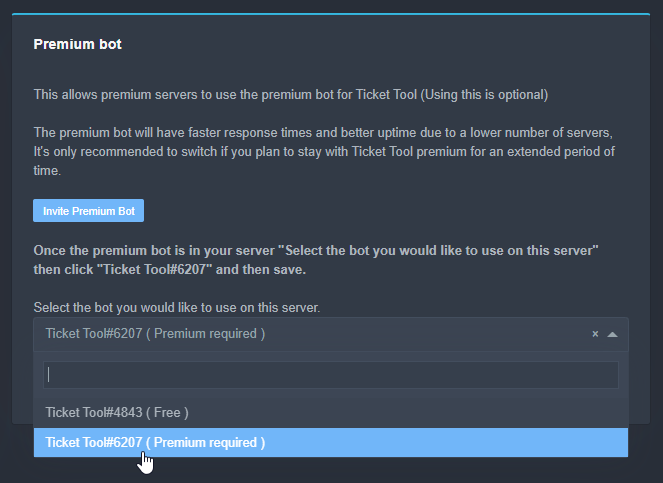
Once the bot is in your server we will head to the dashboard and manage your server. When you are managing your server, you want to head into "Server Configs" then click the drop down menu under "Select the bot you would like to use on this server" then click "Ticket Tool#6207" and then save.
 copper owl
then enable the premium bot and save
jade topaz
c'est ce que j'ai fais
copper owl
I dont speak french, if you need help in french, you can open a ticket for french support in #🎫│make-a-ticket
jade topaz
oki
jade topaz
humble sequoia
that's what I did
 topaz sierra
ça peut être un bug. vous devriez ouvrir un ticket pour le support français.
 robust sandalBOT
topaz sierra
ça peut être un bug. vous devriez ouvrir un ticket pour le support français.
robust sandalBOT
topaz sierra
ça peut être un bug. vous devriez ouvrir un ticket pour le support français.
 ✪ 𝙎𝙀𝙍𝙀𝙉 𝙁𝙀𝙇𝙇
it can be a bug. you should open a ticket for French support.
 French (fr) → English (en)
jade topaz
topaz sierra
ça peut être un bug. vous devriez ouvrir un ticket pour le support français.
French (fr) → English (en)
jade topaz
topaz sierra
ça peut être un bug. vous devriez ouvrir un ticket pour le support français.
oui c'est fais
topaz sierra
D'accord! bonne journée
humble sequoiaBOT
Blacklist Roles
Any role you assign as a blacklisted role won't be able to use commands or reactions.
Selecting a blacklisted role
Go to your Dashboard -> Server Configs. There you will find the option to select blacklisted roles.
Note: Don't forget to save.
 iron nightBOT
Gave 1 Rep to Neptune (current: #3 - 163)
jade topaz
(sorry for ping)
copper owl
no problem, idm
 fringe nymph
anyone advise on when someone from my support team in the server does the "$claim" command it says claiming isn't enabled - I'm trialling the premium version before purchasing to get used to it - and when that person claims it will only that support staff see it or anyone in the "support team" plus server admins?
humble sequoiaBOT
Claiming Options
Claiming allows you to change the ticket name, category and permissions. To use it you have to enable it first on your Dashboard > Panel Configs > Claiming Options.

 Note: This is a premium feature
copper owl
Note: This is a premium feature
copper owl
@fringe nymph this is how you enable it ^^
if you want your support staff and admins to see the tickets
$help support
humble sequoiaBOT
How to let support team see into a ticket
About support roles
A support role lets your support team see into tickets with out having to add them manually to each and every ticket.
You can add as many support roles as you like per panel.
NOTE that the way discord works all admins can see into tickets regardless of this.
How to set a support role
To set a Support role go to the Dashboard -> Panel Configs -> Settings -> General Options -> Support Team Roles.
NOTE that the support role will not be able to see into tickets that are already created..
fringe nymph
ahh i'd not done it in panel config! thank you!! only in command configs - thank you!!
thanks @copper owl (sorry ping just doing the rep thing as bot said 😅 )
iron nightBOT
Gave 1 Rep to Neptune (current: #2 - 165)
copper owl
no worries
 turbid pivot
I can't found the @pseudo glen rol, someone can help me? it can be eliminated?
Sorry for my english
copper owl
turbid pivot
I can't found the <@!557628352828014614> rol, someone can help me? it can be eli...
i dont really understand what you mean, do you want to invite the bot?
copper owl
the bot role doesnt exist?
turbid pivot
i can't understand what happend
turbid pivot
copper owl
the bot role doesnt exist?
Exactly
copper owl
check your server settings, roles, ticket tool
if it's not there, check if the bot is even in your server
turbid pivot
i actually check
turbid pivot
copper owl
if it's not there, check if the bot is even in your server
he is
 copper owl
then someone most probably deleted the role
turbid pivot
copper owl
then someone most probably deleted the role
how?
copper owl
like any other role
turbid pivot
i can't do it with bot's rols
copper owl
just go to server settings, roles, and delete it
turbid pivot
copper owl
just go to server settings, roles, and delete it
I can't
copper owl
turbid pivot
i can't do it with bot's rols
then you most likely dont have the Manage Roles permission
turbid pivot
i have admin permissions
i can delete rols, but no bot's rols
i test it in various servers
copper owl
if you have admin permissions, you should be able to delete roles. Unless the roles are above your admin role
either way, TT doesnt need a role for itself if im not mistaken
copper owl
If you have Manage Role permissions, then you can delete roles
turbid pivot
yes, i can, but no bot's rols
copper owl
i dont know what youre trying to say unfortunately
turbid pivot
sorry, my english isn't good
turbid pivot
Spanish
copper owl
we have spanish support in #🎫│make-a-ticket
since i cant really understand what your issue is, i suggest you open a ticket there and talk in your native language to ease the process
turbid pivot
Ok, thanks
 royal vapor
hi, how do i redeem premium?
 plush lantern
Main server got banned is there any way to transfer panels and premium to new server?
royal vapor
royal vapor
hi, how do i redeem premium?
nvm
humble sequoiaBOT
-- moved to ticket --
 sonic geode
copper owl
If you have `Manage Role` permissions, then you can delete roles
sonic geode
copper owl
If you have `Manage Role` permissions, then you can delete roles
You cannot delete roles that belong to the bot for example if i am owner of a server and have ticket tool bot, the role automatically made, cannot be deleted
There isn't a three dots thing on the top right for the bot's role

 eager cargo
the role will be removed if you remove the integration and or remove the bot from your server, then again if the integration is removed.. so is the bot
 cunning wing
I have a question about ticket tool premium: does it allow you to have a custom bot avatar
humble sequoiaBOT

Ticket Tool avatar/status Customisation
@pseudo glen is like another discord user; you can't control its avatar icon or status, and we can't change it for one server, just as you cannot change your avatar for just one server.
However, on your server, you can change the bot's nickname
 eager cargo
Nope, apologies.
cunning wing
I see, I wanted to check because I know Mee6 premium has something that allows you to do that
eager cargo
Yep, unfortunately we don't offer whitelabel versions at this time.
cunning wing
Fair enough, just wanted to check
Since tickets are something where branding may make sense
eager cargo
It's been suggested many times and it may or may not be a feature in the future.
robust sandalBOT
jade topaz
حد موجود يتكلم عربي ؟
 Denver Trust
Does anyone speak Arabic?
Arabic (ar) → English (en)
eager cargo
$arabic
humble sequoiaBOT
فريق الدعم الفني العربي
عميلنا العزيز ان كنت تبحث عن مساعدة يرجى فتح تكت خاص بفريق الدعم الفني العربي
اذهب الى#🎫│make-a-ticket
ثم قم بلضغط على الايموجي الاتي (🇯🇴)
jade topaz
eager cargo
$arabic
بحثت بس م في حد هناك موجود من الدعم الفني
robust sandalBOT
jade topaz
بحثت بس م في حد هناك موجود من الدعم الفني
Denver Trust
I searched but there is no one there from the technical support
Arabic (ar) → English (en)
eager cargo
/ar You have to be patient
robust sandalBOT
يجب أن تكون صبورا
English (en) → Arabic (ar)
jade topaz
okey
jade topaz
Does ticket tool have autoclose?
humble sequoiaBOT
Automation disabled
There's currently no ETA for when automation will be enabled again. The issue that's caused it to be disabled, us hitting rate limits, is tied to the increased load on Discord's servers. The situation's currently unpredictable, which makes it so we can't give you a fixed time.
 subtle mauve
any way to make a "react to this message in order to make a ticket" message?
i cant seem to find it
humble sequoiaBOT
**Panel Message**
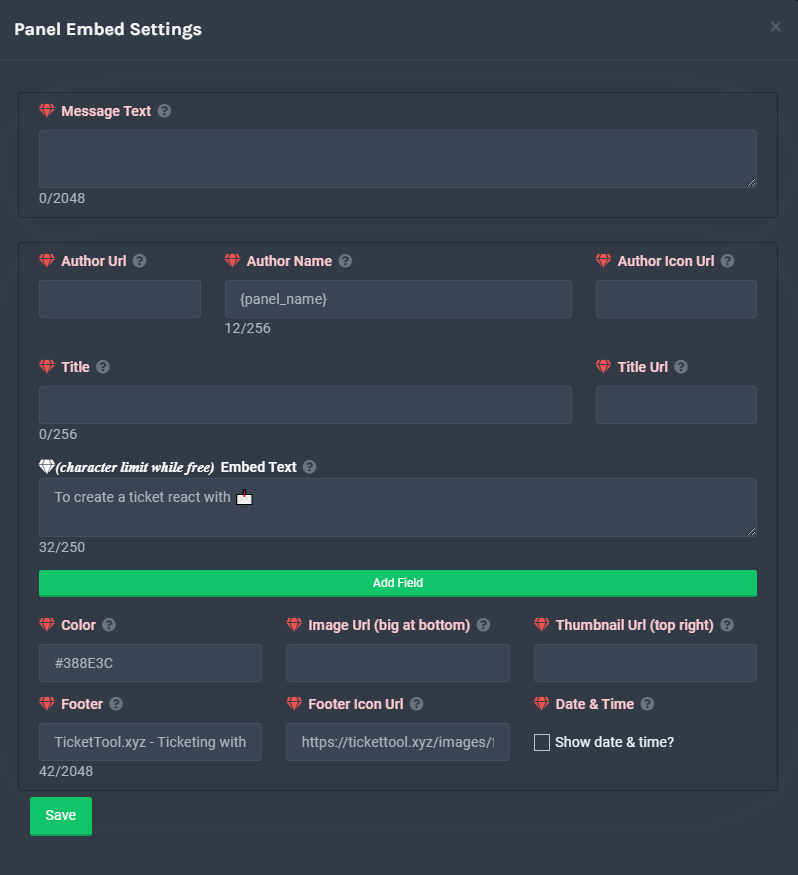
The panel message is where people react to make a ticket. To customize it head over to your Dashboard --> Panel Configs -> Settings -> Panel Options -> Edit Panel Message
 copper owl
there
 lyric arrow
i have a mod role but they cant view tickets?
 austere ether
Some of the people that are in my server does not see the create ticket button, what could be the issue?
humble sequoiaBOT
Update your discord App
Buttons are a relatively new addition to discord and don't work with some older versions of the app.
Please verify that you have the latest version of discord, by going to the app or play store.
_ _
Discord for the App Store
_ _
Discord for the Play Store
copper owl
austere ether
Some of the people that are in my server does not see the create ticket button, ...
for you ^^
$help support
humble sequoiaBOT
How to let support team see into a ticket
About support roles
A support role lets your support team see into tickets with out having to add them manually to each and every ticket.
You can add as many support roles as you like per panel.
NOTE that the way discord works all admins can see into tickets regardless of this.
How to set a support role
To set a Support role go to the Dashboard -> Panel Configs -> Settings -> General Options -> Support Team Roles.
NOTE that the support role will not be able to see into tickets that are already created..
copper owl
lyric arrow
i have a mod role but they cant view tickets?
for you ^^
copper owl
$help perms
humble sequoiaBOT
How to set the permissions for tickets
To set a change permissions go to the Dashboard -> Panel Configs -> Settings -> Permission Options
copper owl
then check the Support Opened permissions
and make sure support members can see the tickets
lyric arrow
ok
 jade elk
how do i make a support ticket
desert summit
jade elk
how do i make a support ticket
$help panel
humble sequoiaBOT
Creating a panel
To create a panel we are going to need to head over to the panel configs on the dashboard
Once at the dashboard we will need to click Create Panel
Enter a panel name (Fill in any optional settings you want)
Click Create Panel and your ready to get started with configuring your panel
An example of a creating a panel is shown below.
desert summit
Look in #573205317870157855
eager cargo
@past notch, regarding your message in reviews.. you can find the setup directions below
humble sequoiaBOT
eager cargo
Let me know if there's anything specific you don't understand
 past notch
Omg thank u I’ll try it
 light field
Can I be support team?
desert summit
light field
Can I be support team?
In your Panel? Or on this server
 empty compass
how do i setup ticket bot with buttons?
light field
empty compass
how do i setup ticket bot with buttons?
What do you mean buttons do you mean the dashboard?
desert summit
empty compass
how do i setup ticket bot with buttons?
Did you setup it with reactions ?
empty compass
light field
What do you mean buttons do you mean the dashboard?
nope
desert summit
empty compass
yes
Just resend it
empty compass
wdym
desert summit
Dashboard>> Panel-Configs >> Select your support-channel >> And send it again
desert summit
empty compass
wdym
.
 desert summit
Yes just send you panel again
light field
Wanna join my server?
desert summit
light field
Wanna join my server?
No ad ig
light field
desert summit
No ad ig
Yes or yes?
desert summit
Pls this is not a place for server ads
light field
Kk.
desert summit
light field
Kk.
Look at the rules is 5.1 and ask for staff is 4.3 just quick reminder
Also in DM its not allowed
light field
So?
prime bridgeBOT
Grizzly has been silenced for 10m
Reason: Posting Discord Server Invites
Grizzly#8065 | 815405259475386408
 lavish oxide
jade topaz
lavish oxide
jade topaz
Hello, I want to ask 2 questions about the panel embed descriptions, when I update the description it doesn't update in the tickets
desert summit
jade topaz
Hello, I want to ask 2 questions about the panel embed descriptions, when I upda...
You have to send the panel again ^^
jade topaz
And 2nd one is if I can edit the description while creating the ticket in the first place so it doesn't have the (edited) thing
jade topaz
desert summit
You have to send the panel again ^^
So if I make a new one will it have the new settings saved?
desert summit
jade topaz
And 2nd one is if I can edit the description while creating the ticket in the fi...
? Again pls
desert summit
jade topaz
So if I make a new one will it have the new settings saved?
You just have to go to Panel Config and the press send
But select channel before
iron nightBOT
Gave 1 Rep to Ymaster2000 (current: #23 - 12)
jade topaz
It got answered when I saw how the ticket appeared, don't worry about it
desert summit
Oki Doki ^^
 carmine patrol
Interaction failed when trying to claim or close. What is this?

 shy lodge
This ticket has been bugged for over a month, no way to close or remove it… even trying to delete the channel doesn’t work. Any thoughts or possible answers?

Appears like this in our admin view.

 tropic nest
.
flint coyote
shy lodge
This ticket has been bugged for over a month, no way to close or remove it… even...
I would guess that is a discord bug. If you can't delete the channel by normal means, then that isn't something that I would think would be because of the bot.
You have admin perms on the discord?
shy lodge
Yes I do, I run the discord and I cannot get rid of the ticket for the life of me.
flint coyote
You should get in touch with discord support. If you think it's because of the bot, you should open a support ticket here.
shy lodge
What would discord support do in this situation & where would I contact them?
 radiant moss
Discord will have to manually delete it from there side. There is zero things we can do to help assist in removed it.
https://support.discord.com/hc/en-us/requests/new
@shy lodge
shy lodge
Alright thank you.
 kindred nymph
how do I get access to premium channels
eager cargo
$pc
humble sequoiaBOT

How to get premium role
Until the automatic premium check is fixed run the command $debug on your server and send us the link in a ticket.
humble sequoiaBOT
Don't see your server in the dashboard?
You will possibly need to relog. Look below to see steps on how to relog.
How to relog the Dashboard.
First, you will need to go to the dashboard. Once your there, click on your avatar on the top right. after you clicked it, you will see button that says Logout. You must click that. Once you have logged out, you can log back in.
Note:
You need one of these 3 things to access the dashboard.
1. Server Owner (Level: 6)
2. Server Administrator (Level: 4)
3. Dashboard Role (Level: 2)
You can check your level using $level on your Discord Server
 arctic rapids
jade topaz
حد موجود يتكلم عربي ؟
arctic rapids
jade topaz
حد موجود يتكلم عربي ؟
اي🤣
 bitter mica
jade topaz
حد موجود يتكلم عربي ؟
bitter mica
jade topaz
حد موجود يتكلم عربي ؟
لاع
 tulip finch
hi how to make see ticket vikker can you help me with it
how to make see ticket vikker can you help me with it
desert summit
tulip finch
hi how to make see ticket vikker can you help me with it
$help support
humble sequoiaBOT
How to let support team see into a ticket
About support roles
A support role lets your support team see into tickets with out having to add them manually to each and every ticket.
You can add as many support roles as you like per panel.
NOTE that the way discord works all admins can see into tickets regardless of this.
How to set a support role
To set a Support role go to the Dashboard -> Panel Configs -> Settings -> General Options -> Support Team Roles.
NOTE that the support role will not be able to see into tickets that are already created..
 thorny copper
Hello, how can i clear tickets history?
flint coyote
What do you mean?
thorny copper
I want that when I create a ticket its number starts again with 0001
flint coyote
Oh no idea. lol
copper owl
thorny copper
I want that when I create a ticket its number starts again with 0001
General Options
there's a Ticket Count
you can put back to 0
severe path
@thorny copper
 iron nightBOT
Gave 1 Rep to Schlafendes24 (current: #24 - 11)
severe path

jade topaz
anyone know why my server dosent show up on server page?
flint coyote
Refresh the page
humble sequoiaBOT
-- moved to ticket --
jade topaz
flint coyote
Refresh the page
:l
flint coyote
Alrighty then
jade topaz
help
i have a lot of tickets i want to close ):
how do i do that at the same time
@eager cargo
eager cargo
You can't, apologies
light field
Hello can I reccomend a good discord moderation bot?
prime bridgeBOT
Grizzly has been silenced for 10m
Reason: Posting Discord Server Invites
Grizzly#8065 | 815405259475386408
desert summit
light field
Hello can I reccomend a good discord moderation bot?
Hey this is a Support-Ticket-Bot and for this you can use google or else
 stark needle
Is there a way to change the bot's pfp and name?
humble sequoiaBOT
Ticket Tool avatar/status Customisation
@pseudo glen is like another discord user; you can't control its avatar icon or status, and we can't change it for one server, just as you cannot change your avatar for just one server.
However, on your server, you can change the bot's nickname
copper owl
unfortunately not
 empty juniper
can someone help me
humble sequoiaBOT
 mystic hound
you can use this link
mystic hound
what happens when you try?
empty juniper
mystic hound
Try with a different browser maybe, or maybe close some of your open tabs
 high rapids
 atomic barn
No need to ping mangers or mods, they will reply when they get the chance to or anyone else in the community. If you need a quicker answer then you could always open a ticket in #🎫│make-a-ticket
pale pilot

Also, Ticket Tool tells you what's wrong in the screenshot
 hoary osprey
is there a way to get ticket tool to delete reactions on the panels?
to make this just 1 reaction

 craggy geyser
Not anymore as reactions are no longer supported. Resend the panel and you get buttons like #🎫│make-a-ticket
jade topaz
Do we need to add a different bot to our server for Premium...?
copper owl
jade topaz
Do we need to add a different bot to our server for Premium...?
no need, but you can
humble sequoiaBOT
Inviting and Enabling Premium Bot
The first thing you will need to do is invite the premium bot, an invite can be found here
Once the bot is in your server we will head to the dashboard and manage your server. When you are managing your server, you want to head into "Server Configs" then click the drop down menu under "Select the bot you would like to use on this server" then click "Ticket Tool#6207" and then save.
copper owl
invite and enable the premium bot, and save
jade topaz
What is the difference?
We have used TicketTool for a long time. We have it set up already. I just bought Premium. Do we get all the Premium features on the original TicketTool?
copper owl
jade topaz
We have used TicketTool for a long time. We have it set up already. I just bough...
the premium bot is more stable
jade topaz
Can all of our settings be transferred?
humble sequoiaBOT
Backup and Restore allows you to transfer your premium status, panels, tags, and all settings to a new server.
You can also use it to keep a backup of your settings incase you need to suddenly move servers. We suggest you keep this backup key somewhere safe, incase your server is deleted. You will want to copy the whole key.
First, go to your dashboard, then Server Configs and generate a new backup key by pressing the green button. Now, a key should be generated in the box above. You may need to refresh the page to see this.
Once you have your backup key, navigate to the same page on the new server. Copy the key on the second field.
Now you can choose what you want to copy. Finally, press the green “Restore Configs” button.
 copper owl
^^ @jade topaz
mystic hound
If you're just switching from normal bot to premium within the same server all settings are saved automatically
jade topaz
Okay thanks. That was my main question ^^
jade topaz
How do I make it so, when people create tickets, the ticket name isn't like: ticket-0001, ticket-0002 etc. How do I make all tickets go by number ticket-2000
desert summit
jade topaz
How do I make it so, when people create tickets, the ticket name isn't like: tic...
Go to Dashboard >> Panel Configs >> Settings >> General Settings >>
Set this to 2000 and then it will count up to 2000

If this is your question ^^
jade topaz
desert summit
If this is your question ^^
Will all tickets be named ticket-2000?
desert summit
No it will be count from 2000 up
jade topaz
Ohhh
desert summit
So the First will be 2001 the second 2002 and go on
iron nightBOT
Gave 1 Rep to Ymaster2000 (current: #23 - 13)
jade topaz
desert summit
Any other questions? :)
Nope
desert summit
Oki Doki
 trim grail
Hello! How can I make sure that only the creator of the ticket sees it, and not the entire server?
humble sequoiaBOT
-- moved to ticket --
 spring river
hello how do i edit the opening ticket message (the welcome message of a ticket)
humble sequoiaBOT
-- moved to ticket --
 brazen ruin
Anyone else’s bot been down on their server for days?
scenic plinth
brazen ruin
Anyone else’s bot been down on their server for days?
What? There hasn't been a reported outage except a few shards that were offline for around 30 minutes.
jade topaz
how to make more than 1 button
 humble sequoiaBOT
Multipanels are a premium feature that allow for a single panel with multiple buttons to open different tickets.
How to create a Multipanel
Premium users can combine multiple panels into one multipanel.
First, find the IDs of each panel you wish to combine. You can find them in your Panel Configs in the Dashboard
Next, send the multipanel to a channel using $panel [id1] [id2] {id3} ....
e.g. $panel 1 2 4 17 35 to combine panels 1, 2, 4, 17 and 35.
Up to 25 panels may be combined.
scenic plinth
Or
humble sequoiaBOT
For a more convenient use of multipanels, you can now combine panels on the dashboard. This will allow you to directly send the multipanel from the dashboard or via the $panel ID command.
Where can I find this?
You can find this setting on the Dashboard -> Panel Configs -> Settings -> General Options
This will put all buttons from all of your panels on one message. The message is the panel message from the panel you're combining these panels in.
jade topaz
@scenic plinthok thx , and how to make a custom embed
 iron nightBOT
Gave 1 Rep to 𝐀𝐥𝐲𝐳𝐳 (current: #5 - 151)
humble sequoiaBOT
**Panel Message**
The panel message is where people react to make a ticket. To customize it head over to your Dashboard --> Panel Configs -> Settings -> Panel Options -> Edit Panel Message
scenic plinth
Assume you mean that
brazen ruin
scenic plinth
What? There hasn't been a reported outage except a few shards that were offline ...
Mine must be going on strike, hasn’t responded all weekend. 🤣
scenic plinth
brazen ruin
Mine must be going on strike, hasn’t responded all weekend. 🤣
Whats your server ID?
 wet ferry
 scenic plinth
$help buttons
humble sequoiaBOT
Help Options
$help commands - Information on commands
$help setup - Information on bot setup
$help faq - Frequently asked questions
jade topaz

humble sequoiaBOT

Buttons
The new Discord Buttons allow for a much smoother and convenient experience. They reduce lag and work much better than emojis. With ticket tool you can edit all the buttons however you like! Buttons can show emojis, text and can have 4 different colors.
Where can I edit them?
Dashboard -> Panel Configs -> <Settings> -> Button Options -> <Setting>



 lavish citrus
مفيش عربي؟
 dark thunder
how can i change this message?
 desert summit
dark thunder
how can i change this message?
desert summit
dark thunder
how can i change this message?
You can’t but just you see this message so it’s from Discord
But nobody else see this ^^
dark thunder
desert summit
You can’t but just you see this message so it’s from Discord
i need translate this massage on my server for russian community
desert summit
dark thunder
i need translate this massage on my server for russian community
Yes so just the ticket-creator can see this message ^^
dark thunder
desert summit
Yes so just the ticket-creator can see this message ^^
i know that, but if a person is from Russia and i need to translate hem
desert summit
Ok ^^
humble sequoiaBOT
-- moved to ticket --
 bronze scroll
anyone elses tickets not showing in the assigned category ?
copper owl
bronze scroll
anyone elses tickets not showing in the assigned category ?
well not personally, but there's a couple solutions
$help category
humble sequoiaBOT
How to set the open category
To set a open category go to the Dashboard -> Panel Configs -> Settings -> Category Options -> Category Open
copper owl
make sure you actually have defined a category
if you already did, then make sure TT has all the permissions in the category to function normally
prime bridgeBOT
Moderator: @mystic hound


 Messages Fetched:
 100
 Purge Request:
 10
 Messages Identified:
 10
 ** Messages Purged:**
 10
wet ferry
افتح تكت خاصه ؟
robust sandalBOT
wet ferry
افتح تكت خاصه ؟
 ➤ ┊𝐇y𝙳rȺ
Open a private t-tech?
Arabic (ar) → English (en)
wet ferry
جالس تمسح رسايلك ها
mystic hound
/ar its okay, I understand now thank you
robust sandalBOT
بخير ، وأنا أفهم الآن شكرا لك
English (en) → Arabic (ar)
wet ferry
هل افتح تكت ؟؟
 raven turret
Hi, can I help with translating bot to polish
humble sequoiaBOT
**Ticket Message**
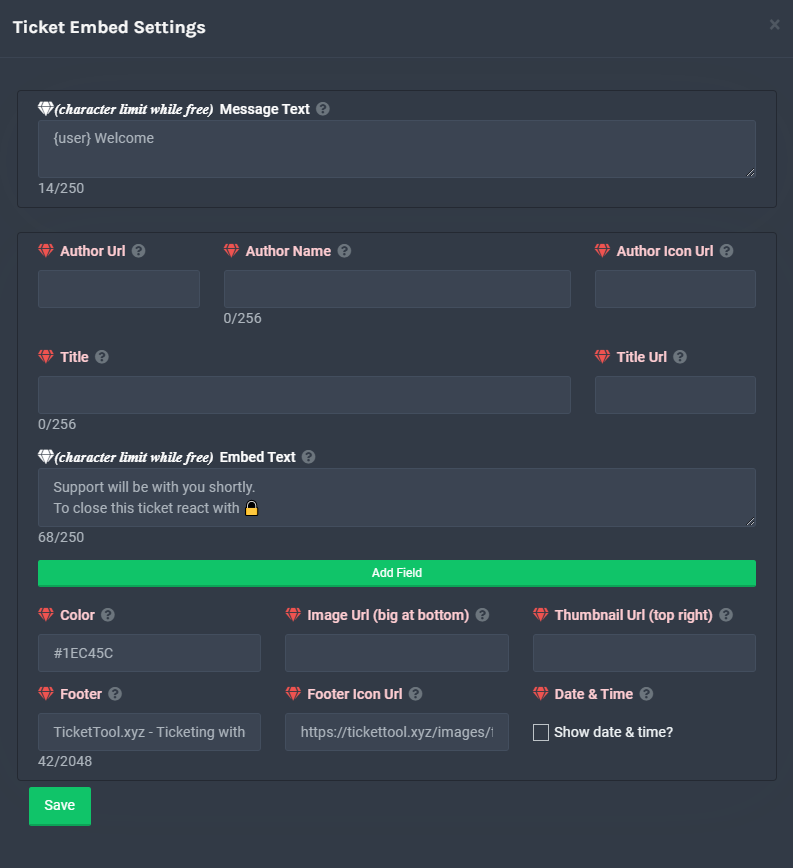
The Ticket Message is the first message sent by the bot in a new ticket. To customise it head over to your Dashboard -> Panel Configs -> Settings -> Ticket Options -> Edit Ticket Message
**Panel Message**
The panel message is where people react to make a ticket. To customize it head over to your Dashboard --> Panel Configs -> Settings -> Panel Options -> Edit Panel Message
scenic plinth
Just change whatever you want to polish text, it won't do it for you.
 wet drift
i got a big question
is there a way to make 1 support ticket but will multiple reaction that open different category
i saw that XD
nvm found it
light field
How do I add members to a ticket?
flint coyote
light field
How do I add members to a ticket?
Type $add @theuseryouwanttoadd
light field
Kk
flint coyote
Oops
 astral crescent
so im making a ticket for gpo support team and i dont know how to send it to the server
flint coyote
I'm not sure what you mean?
You have to be on the dashboard for that server. When you have created the panel how you like, then send the panel.
Select the channel then send the panel.
astral crescent
it says in oder to send the bot i have to have magage server rolse
role
so i dont know how to just send the ticket
and not the whole bot with it
flint coyote
I don't know what you mean about sending the bot and sending the ticket. Are you in the dashboard?
 pastel raft
guys, where did the panel in the tickets go?
pastel raft

 pastel raft
astral crescent
what dashbored
pastel raft
astral crescent
what dashbored
I mean the emoticons that you click on
astral crescent
i wasnt talking to you
pastel raft
everything is enabled in the settings, but there is no out ...
hurtful
well, I can't do anything while there are no these icons, I will tell you in advance in the settings everything is included .... they are simply not there ....
 slow needle
yo, someone knows how to make a ticket embed that has 2 reactions to create 2 separate tickets?
flint coyote
astral crescent
what dashbored
Look in #573205317870157855
How are you doing this without using the dashboard?
slow needle
like this
 slow needle
flint coyote
How are you doing this without using the dashboard?
slow needle
flint coyote
How are you doing this without using the dashboard?
lmao
flint coyote
I don't think we are talking about the same thing.
slow needle
flint coyote
I don't think we are talking about the same thing.
nono
i just said "lmao" becos found it funny
np
flint coyote
I understand. I'm just not sure what it is he's trying to do. lol
If he's creating a panel, it needs to be in the dashboard. I thought? lol
But, I feel like he's talking about something else. No idea. lol
slow needle
flint coyote
But, I feel like he's talking about something else. No idea. lol
hard to tell
flint coyote
LOL
mystic hound
Update discord
humble sequoiaBOT
Update your discord App
Buttons are a relatively new addition to discord and don't work with some older versions of the app.
Please verify that you have the latest version of discord, by going to the app or play store.
_ _
Discord for the App Store
_ _
Discord for the Play Store
 crude canopy
Hi there
I am an admin i have the highest role i can get apart from owner but when i go to edit the tool i cant manage the ticket tool???
how do i fixt it
flint coyote
crude canopy
I am an admin i have the highest role i can get apart from owner but when i go t...
Are you trying to get to the dashboard?
raven turret
scenic plinth
Just change whatever you want to polish text, it won't do it for you.
I'm want to help translate bot/panel to polish
 crystal jacinth
slow needle
yo, someone knows how to make a ticket embed that has 2 reactions to create 2 se...
crystal jacinth
slow needle
yo, someone knows how to make a ticket embed that has 2 reactions to create 2 se...
im also interested in this. Did you have any answer?
humble sequoiaBOT
Multipanels are a premium feature that allow for a single panel with multiple buttons to open different tickets.
How to create a Multipanel
Premium users can combine multiple panels into one multipanel.
First, find the IDs of each panel you wish to combine. You can find them in your Panel Configs in the Dashboard
Next, send the multipanel to a channel using $panel [id1] [id2] {id3} ....
e.g. $panel 1 2 4 17 35 to combine panels 1, 2, 4, 17 and 35.
Up to 25 panels may be combined.
For a more convenient use of multipanels, you can now combine panels on the dashboard. This will allow you to directly send the multipanel from the dashboard or via the $panel ID command.
Where can I find this?
You can find this setting on the Dashboard -> Panel Configs -> Settings -> General Options
This will put all buttons from all of your panels on one message. The message is the panel message from the panel you're combining these panels in.
crystal jacinth
desert summit
But you need premium for this
tyyy
desert summit
Np ^^
 cunning cedar
Hey there.
I'm trying to automatically open tickets with the help of our self-programmed bot but after I enabled "Command Style Tickets" and try to send !new {<@{userid}>} into the specified channel nothing happens. We are also not able to close tickets with !close with our self-programmed bot. We have made sure that the bot has the rights to open and close tickets and if we ourselves try to do !new @McPlayHD#8516 it works just fine.
So how can I enable the Tickettool.xyz bot to listen to Bot messages in order to create new tickets? I can't find a way of enabling this and could also not find anything in #799695838917820416.
copper owl
@cunning cedar That's because discord bots don't detect messages from other bots
Main reason it works fine with actual users is because you guys aren't flagged as bots by discord API
Unfortunately we can't do anything about it, and your self programmable bot won't work whatsoever regarding opening tickets
or anything related to the ticket bot
cunning cedar
ah... so you probably use something like if (!e.getMessageAuthor().isBotUser()) return; somewhere?
Could you maybe just add a setting for this "Command Style Tickets" option to also listen to bot commands? Because this would really help our workflow.
copper owl
Well i cant do anything about it
And im not sure if the dev would be interested in such a feature (if it's even possible)
cunning cedar
oh it should be possible. I know a few bots where you have such a setting. It's an uncommon thing because very few people develop their own bots and want them to interact with other bots because usually this can lead into a lot of problems but in this case it would really be a good feature. Is there a way to ask a Developer if they could add this feature?
copper owl
I can. forward it but again, not sure if the dev would even be interested, and if he is, it would take upwards of 2 months before it even gets implemented
cunning cedar
Alright... Well please forward it then. I really hope this gets implemented because it could potentially save us immense time.
copper owl
Well good luck with that
mystic hound
I can confirm with utmost certainty that ticket tool will not respond to other bots, not now, and not in the future
cunning cedar
And why is that? I mean you can keep it disabled by default for sure but why not add a setting? I know it's possible to listen to bot messages.
mystic hound
The developer has stated in the past that this can cause security concerns and possible rate limit issues (don't quote me on that it's been a while lol). It's also why you'll find that most prominent discord bots also ignore messages from other bots
cunning cedar
mystic hound
The developer has stated in the past that this can cause security concerns and p...
yea that's true and that's why it should be an option that should be hidden and only accessible to users who know what they are doing.
the security issue is that other bots can potentially either spam the command or recursively open new tickets for example. Like if the self-written bots always automatically writes "!new" into channels that just got created then it will recursively open new tickets.
Still... It would be really handy to create this option. In order to not get rate limited by Discords API you could also add an own rate-limit per server in how many tickets that can get created by bots for example. In my case it would probably be one ticket per minute at max. It's just sad to hear that I now have to create my own ticket tool bot instead of just adding a setting to an existing product that works perfectly fine and I like supporting by paying for the bot. Sometimes there are developers that really like working together with other projects and that's why most programs have APIs.
I mean... an even better option would be to create an API where you can use POST in order to create new tickets with an auth-key. Then I wouldn't even have to create a bot that has to listen for events but but could directly create tickets from outside Discord as soon as a user needs one.
mystic hound
Even if it's hidden and only accessible to people that know what they're doing, its still a risk. Most people making stuff with malicious intent do know what they're doing.
Regardless though we're definitely not looking to implement this feature, and if the dev team was to change its mind (unlikely), it still wouldn't be a priority and would take months to even go into consideration as we have multiple more important features we're working on at the moment
 tacit burrow
Hello, for creating a multipanel we have one master panel and sub panel ?
mystic hound
In a way, yes. the ''master panel'' as you call it would have all the text for the panel message
tacit burrow
mystic hound
In a way, yes. the ''master panel'' as you call it would have all the text for t...
and the sub pannel have different config ?
mystic hound
Yeah, each panel you attach retains its own settings. You can look at the guide below for more information
humble sequoiaBOT
Multipanels are a premium feature that allow for a single panel with multiple buttons to open different tickets.
How to create a Multipanel
Premium users can combine multiple panels into one multipanel.
First, find the IDs of each panel you wish to combine. You can find them in your Panel Configs in the Dashboard
Next, send the multipanel to a channel using $panel [id1] [id2] {id3} ....
e.g. $panel 1 2 4 17 35 to combine panels 1, 2, 4, 17 and 35.
Up to 25 panels may be combined.
For a more convenient use of multipanels, you can now combine panels on the dashboard. This will allow you to directly send the multipanel from the dashboard or via the $panel ID command.
Where can I find this?
You can find this setting on the Dashboard -> Panel Configs -> Settings -> General Options
This will put all buttons from all of your panels on one message. The message is the panel message from the panel you're combining these panels in.
tacit burrow
for exemple i have one sub pannel and it's automatically have a button to create ticket on the master channel ?
 gray gate
hi, can I set the bot by using commands in server
I'm not able to see the bot in dashboard
@severe path
tacit burrow
gray gate
I'm not able to see the bot in dashboard
your server isn't in the dashboard ?
scenic plinth
gray gate
pls help
Don't ping support members, most if not all are in school or at work. You will get a response when someone sees it. Follow below if you're having issues.
humble sequoiaBOT
Don't see your server in the dashboard?
You will possibly need to relog. Look below to see steps on how to relog.
How to relog the Dashboard.
First, you will need to go to the dashboard. Once your there, click on your avatar on the top right. after you clicked it, you will see button that says Logout. You must click that. Once you have logged out, you can log back in.
Note:
You need one of these 3 things to access the dashboard.
1. Server Owner (Level: 6)
2. Server Administrator (Level: 4)
3. Dashboard Role (Level: 2)
You can check your level using $level on your Discord Server
-- moved to ticket --
gray gate
tacit burrow
your server isn't in the dashboard ?
it's not my server, but I have every permission
gray gate
scenic plinth
Don't ping support members, most if not all are in school or at work. You will g...
but the response was tooo late
mystic hound
You waited two minutes before pinging someone soo not the best excuse, besides you can always #🎫│make-a-ticket. This channel is for members to help each other
scenic plinth
gray gate
but the response was tooo late
Again, people are at work, you just pinged me on message, wait for people to respond to you, instead of pinging because 2 minutes is "too late"
flint coyote
@cerulean geode What doesn't show?
desert summit
They have to update their Discord
desert summit
But maybe they don’t get the update just wait a little bit and check always
 cerulean geode
ok!
desert summit
flint coyote
That's not on the bot side. They need to updated discord
Sorry xd My bad
Guess nobody answers
flint coyote
No worries! lol
cerulean geode
@desert summit@desert summit it worked!
desert summit
Thx @flint coyote ^^ he helps you
iron nightBOT
Gave 1 Rep to Ivysixx (current: #38 - 3)
flint coyote
Thank you @desert summit 😁
iron nightBOT
Gave 1 Rep to Ymaster2000 (current: #23 - 14)
 river yoke
Anyone know why the bot isn't responding?
Like I can't even do $debug
Never mind it kept picking the premium bot instead of the free one.
 pure pecan
So i added @humble sequoia , can i kick @pseudo glen now or what?
copper owl
pure pecan
So i added <@!722196398635745312> , can i kick <@!557628352828014614> now or wha...
yeah you can, it's not needed
but if your premium runs out, youll have to re-invite it
pure pecan
Cool thnx @copper owl
 inner lynx
How do i make my ticket look like this?
 mystic hound
What does yours look like? the screenshot you've shown is of the basic panel you get when first setting up
jade topaz
Is there a way to disable threads in tickets?
copper owl
just disable em through your server permissions
or through the category where the tickets are created in (if you have one defined)
 warped helm
Is there a way for me to set up everything on mobile? Or does it have to be on and pc/laptop
eager cargo
It can be done on mobile
Just a bit more challenging persay, head to the dashboard as usual, invite the bot, configure your settings.
#573205317870157855 has the general setup process explained just to get tickets going in your server and the rest of the customization etc can be done a desktop
or if you choose to do it all on mobile, it's possible.
warped helm
Ok thank you!
eager cargo
yep
 mental creek
atomic barn
mental creek
atomic barn
dont think so
tacit burrow
hello how can use a role mention ? the variable is {role id} so i put {role and the "id"} or just the { "id"} ?
 atomic solstice
tacit burrow
hello how can use a role mention ? the variable is {role id} so i put {role and ...
atomic solstice
tacit burrow
hello how can use a role mention ? the variable is {role id} so i put {role and ...
to mention a role in the ticket message either use {@ROLENAME} where the name of the role has to be EXACTLY the same as in your server. OR you can use the <@&ROLEID> where if you sometimes rename you roles you don't have to go back to the Ticket Tool settings to change the role name again
tacit burrow
atomic solstice
to mention a role in the ticket message either use `{@ROLENAME}` where the name ...
so i just put <883416260040359937> for exemple ?
atomic solstice
tacit burrow
so i just put <883416260040359937> for exemple ?
no, you have to add the @& before the ID as well
so with your example it would look like this <@&883416260040359937>
the & designates the ID as a ROLE Id
tacit burrow
oh okay ty so much
atomic solstice
no problem
scenic plinth
Sorry, discord messed up.
atomic solstice
scenic plinth
Sorry, discord messed up.
np
 swift venture
Is there a way when someone presses a button can it give a role also?
atomic solstice
swift venture
Is there a way when someone presses a button can it give a role also?
no, this is not possible with Ticket Tool
swift venture
Ah alright
 karmic arch
How do I make it so tickets don’t auto delete when closed?
tacit burrow
karmic arch
How do I make it so tickets don’t auto delete when closed?
u can't auto deleted u must click on the button
karmic arch
Basically I want to archive tickets but when someone closes the ticket the bot automatically deletes it
flint coyote
You can change that in the dashboard on the panel settings.
karmic arch
Where exactly?
karmic arch
No
flint coyote
One thing you can do is turn on the two step close. This will make it so there is an extra step when closing the ticket.
karmic arch
Would this allow me to store it without having the person that created the ticket see it?
flint coyote
Look under general options. There is a two step close and a two step ticket option.
Two step ticket says this option will cause it to be deleted instead of closed.
flint coyote
You're welcome!
karmic arch
Thanks @flint coyote
iron nightBOT
Gave 1 Rep to Ivysixx (current: #37 - 4)
flint coyote
😁
jade topaz
hello everyone, i have a problem with using the bot. when my members open tickets and chat in the lounge opened by the ticket their messages are deleted instantly. Do you know where it can come from?
flint coyote
I have never heard of anything like that.
scenic plinth
jade topaz
**hello everyone, i have a problem with using the bot. when my members open tic...
Check your audits to see what user or bot is doing it.
jade topaz
scenic plinth
Check your audits to see what user or bot is doing it.
All users! 😞
And only when using tickets tools
scenic plinth
No, the user deleting the messages.
jade topaz
No one deletes the messages. They delete themselves alone
scenic plinth
Ok, so if there isn't anything in audits its something to do with discord. Its been reported with discord glitxhing but never with the bot itself.
Does it delete for the user who sent it as well?
jade topaz
Only for users, I keep all the conversation history
 jade topaz
scenic plinth
Ok, so if there isn't anything in audits its something to do with discord. Its b...
jade topaz
scenic plinth
Ok, so if there isn't anything in audits its something to do with discord. Its b...
Only for users, I keep all the conversation history
Im getting the same error as @ rollsmorr#0024
my ticket tool bot seems to be offline, can't manage it at all
 polar seal
Same^
jade topaz
Oh
 azure knoll
Same, ticket tool offline. Dashboard behaves like it never existed.
jade topaz
It might just be down then so they probs ahve no control over this
scenic plinth
Bot has an outage on some shards, be patient with us please.
jade topaz
Kk sorry < 3
azure knoll
Status page was showing all green, it's reassuring to know that you're aware of it. Happy bug hunting! :3
polar seal
its back up for me now
scenic plinth
⚠️ Bot is experiencing difficulties on some shards, meaning your bot will appear offline. You will not be able to manage your server if you not is offline, we are working to get the shards online
jade topaz
Could someone link the status page?
humble sequoiaBOT
jade topaz
Thanks
 spring wren
$multipanel
humble sequoiaBOT
Multipanels are a premium feature that allow for a single panel with multiple buttons to open different tickets.
How to create a Multipanel
Premium users can combine multiple panels into one multipanel.
First, find the IDs of each panel you wish to combine. You can find them in your Panel Configs in the Dashboard
Next, send the multipanel to a channel using $panel [id1] [id2] {id3} ....
e.g. $panel 1 2 4 17 35 to combine panels 1, 2, 4, 17 and 35.
Up to 25 panels may be combined.
Pong! Latency is 644ms. API Latency is 88ms [-]
 long geode
scenic plinth
scenic plinth
⚠️ __**Bot is experiencing difficulties on some shards, meaning your bot will a...
long geode
scenic plinth
scenic plinth
⚠️ __**Bot is experiencing difficulties on some shards, meaning your bot will a...
@long geode
mystic hound
Should be back up now
jade topaz
✅ Up for me
 reef vector
Link for dashboard
prime bridgeBOT
Moderator: @mystic hound
Messages Fetched: 100
Purge Request: 4
Messages Identified: 4
** Messages Purged:** 4
humble sequoiaBOT
reef vector
@flint coyote if i want to when the bot open do mention how?
flint coyote
On your dashboard, you can edit the ticket message to include a ping for a role.
You will need to do it like this for example: {@Admin}
It has to be exactly like the role.
mystic hound
if anyone's experiencing response delays, its due to an ongoing discord issue
 half kernel
bronze scroll
hi getting this error
half kernel
bronze scroll
hi getting this error
server could have ran out of premium time or they set it so you need a certain role to open one
Also the bot could have some down points/shards
flint coyote
It may also be the discord issues that are ongoing right now.
scenic plinth
@mystic hound
 sterile walrus
i set up the bot in my server but the ticket chats are being created in a different category
how do i fix this?
prime bridgeBOT
Moderator: @mystic hound
Messages Fetched: 100
Purge Request: 4
Messages Identified: 4
** Messages Purged:** 4
 copper heath
Anyone know why the website is down?
mystic hound
Shouldn't be, is it?
flint coyote
copper heath
Anyone know why the website is down?
It's not
jade topaz
it's possible to add a tumbnail on an embed message ?
 naive pecan
jade topaz
it's possible to add a tumbnail on an embed message ?
naive pecan
jade topaz
it's possible to add a tumbnail on an embed message ?
I don't think you can on the panel, but in the ticket, with the premium version you can
 versed tundra
Anyone know why when i try to log in it says wiki.js and error?
jade topaz
naive pecan
I don't think you can on the panel, but in the ticket, with the premium version ...
'cause i've see a server that have a tumbnail without premium(?)
 jade topaz
jade topaz
jade topaz
that's the premium bot??
 jade topaz
naive pecan
Ohh yeah u can
jade topaz
naive pecan
Ohh yeah u can
but it's only avaible for premium right?
naive pecan
jade topaz
but it's only avaible for premium right?
yup
jade topaz
naive pecan
yup
oh ok good, Thank you!
iron nightBOT
Gave 1 Rep to tphere (current: #58 - 1)
jade topaz
What do I add to ping the member who created a ticket?
flint coyote
jade topaz
What do I add to ping the member who created a ticket?
In the ticket message, include {@roleofchoice}
jade topaz
flint coyote
In the ticket message, include {@roleofchoice}
Not the support role I mean the person who presses create ticket
flint coyote
Oh I think it's {user}
 civic saddle
i want ticket tool premilam for free
flint coyote
civic saddle
i want ticket tool premilam for free
Me too but I pay for it lol
flint coyote
jade topaz
Not the support role I mean the person who presses create ticket
I just checked. {user} is correct
@civic saddle Read the rules. Do NOT dm me.
And if you want premium, pay for it like the rest of us.
humble sequoiaBOT
Votes
Current Votes: 15
Lifetime Votes: 15
Linked Votes: 2
Vote Links
Linking Info
Linked User: Not Linked
You can give your future votes to another user by linking with that user.
To link use $vote link (@user or userId)
To unlink use $vote unlink
Redeeming
Each vote is worth 12 hours of premium and can be redeemed once you have atleast 6 votes.
Your current votes are worth 7 days, 12h, 0m
To redeem your current votes use $vote redeem
flint coyote
eager cargo
*you can also vote for premium*
Oh yeah and that too. lol
Dude was spamming my dm's.
 wet hatch
Question, I have someone in my server that cannot see the reaction button. As far as I can tell they're the only one. Just wanted to see if anyone had any ideas. It looks like all the permissions are correct.
 verbal sundial
@wet hatch hmmm. . . make sure they can see message history
 lone mulch
What does demo mean for ticket?
verbal sundial
@lone mulch demo means you get to try it out there isn't a demo for the free bot. and there is a 7 day trial for the premium bot
 zinc venture
How do you create a panel on mobile?
verbal sundial
@zinc venture ok so i actually did this so you go to there server you want to add it on and then go to panel settings then add a panel
something like that lol
zinc venture
Ok
 plucky cape
Is there a way to send a ticket to a channel instead of a category?
half kernel
Sadly no
plucky cape
Oof
Do you know of any bots that can support creating an embed with a button that sends a new message to a specific channel?
half kernel
No i do not
plucky cape

verbal sundial
@plucky cape well it would be kinda messy everyone would see each others problems ya know
plucky cape
Well it’s more for LFG(looking for games) so someone can claim and help with a game and once completed they can verify help has been completed with a ✅
verbal sundial
well just make a channel that everyone can see and make it about that
eager cargo
wet hatch
Question, I have someone in my server that cannot see the reaction button. As fa...
Have them update their discord
eager cargo
lone mulch
What does demo mean for ticket?
If you’re referring to #🎫│make-a-ticket it just means like “test open” and will just show you what it looks like when you open a ticket. Staff will not respond to any questions in there though.
 amber hearth
How do i make it so that it pings support team when a ticket opens
copper owl
$help ping
humble sequoiaBOT
How to make Ticket Tool ping a role
To make ticket tool ping a role when a ticket is opened, go to the Dashboard -> Panel Configs -> Settings -> Ticket Options -> Ticket Message -> Message Text and do this:
{@Role name} This is case sensitive and the role must have @mentions enabled
copper owl

amber hearth
thanks
wet hatch
verbal sundial
<@684788314108330192> hmmm. . . make sure they can see message history
All the roles they have they should.
Let me check that their Discord is updated.
amber hearth
is there a suggest command
mystic hound
not at the moment, feel free to state your suggestion here
 royal hamlet
mystic hound
royal hamlet
mystic hound
$help add
humble sequoiaBOT
How to add or remove users on tickets
To add a user to a ticket use $add <user>
To remove a user from a ticket use $remove <user>
 candid dune
anyone else getting a issue that you can't post a ticket and saying to do $debug but that dont work
copper owl
candid dune
anyone else getting a issue that you can't post a ticket and saying to do $debug...
make sure you have the free bot selected if you didnt buy premium
candid dune
I have active premium
copper owl
candid dune
I have active premium
do you have the premium bot invited ?
candid dune
yes so I have the premim bot invite but on the manage my premium it shows my old server name not the new one
humble sequoiaBOT
Inviting and Enabling Premium Bot
The first thing you will need to do is invite the premium bot, an invite can be found here
Once the bot is in your server we will head to the dashboard and manage your server. When you are managing your server, you want to head into "Server Configs" then click the drop down menu under "Select the bot you would like to use on this server" then click "Ticket Tool#6207" and then save.
copper owl
make sure you have the premium bot selected and press save
wet ferry

 🎉 🔑 🌐
🎉 🔑 🌐 


 🔗 📱
🔗 📱 





 mystic hound
Yes, thank you for showing us that we have a good emoji collection
Anything you need help with?
severe path

 final ginkgo

jade topaz
Dick head team
 elfin raptor
i need help setting ticket tool up can someone help me
scenic plinth
jade topaz
Dick head team
I'm sorry?
scenic plinth
elfin raptor
i need help setting ticket tool up can someone help me
Visit the document below and you can see how to set the bot up with a basic setup.
humble sequoiaBOT
mystic hound
jade topaz
Dick head team
Mind telling me what we did to get such a glowing review?
 brazen sparrow
Hi
desert summit
brazen sparrow
Hi
Hey, how can we help you ? ^^
 dim inlet