#🆘│community-support
1 messages · Page 347 of 1
 jade topaz
 iron nightBOT
Gave 1 Rep to Neptune (current: #9 - 117)
 copper owl
no problem
jade topaz
Tags work in tickets only?
 eager cargo
No
jade topaz
Ohk and do they support any variables?
eager cargo
{server_name} -The server name
{@Role Name} -The role name you want to mention (role names are case sensitive.)
{empty} -Use this if you want to send nothing in a required field.
{channel_name} -The channel name this message is used in/from
{channel} -The channel this message is used in/from
{user_nickname} -The users nickname (if set)
{user_tag} -The users tag
{user_name} -The users username
{userfull} -The users username and usertag combined
{user} -The users @user
{user_icon} -The url for the users icon
(only ones they support)
jade topaz
eager cargo
{server_name} -The server name
{@Role Name} -The role name you want to mention (...
Ohk thank you
iron nightBOT
Gave 1 Rep to Quo (current: #1 - 171)
eager cargo
Yup
jade topaz
can we make lots of buttons with free ticket tool?

 severe path
jade topaz
can we make lots of buttons with free ticket tool?
severe path
jade topaz
can we make lots of buttons with free ticket tool?
no, thats a premium feature
 humble sequoiaBOT
Multipanels are a premium feature  that allow for a single panel with multiple buttons to open different tickets.
How to create a Multipanel
Premium users can combine multiple panels into one multipanel.
First, find the IDs of each panel you wish to combine. You can find them in your Panel Configs in the Dashboard
Next, send the multipanel to a channel using $panel [id1] [id2] {id3} ....
e.g. $panel 1 2 4 17 35 to combine panels 1, 2, 4, 17 and 35.
Up to 25 panels may be combined.

 severe path

 thick inlet
Damn, that was quick. lol
 prime bridgeBOT
 Successful bans:
 1
 Unsuccessful bans:
 0
 Reason: scam
 Moderator: @mystic hound
 thick inlet
copper owl
I watch over these channels now <:Eyes:680776464727277602>
thick inlet
copper owl
I watch over these channels now <:Eyes:680776464727277602>
hahaha 👑
thick inlet
copper owl
I watch over these channels now <:Eyes:680776464727277602>
How long have you been staff for?
copper owl
a bit longer than 2 months
thick inlet
copper owl
a bit longer than 2 months
Ah ok.
copper owl
im pretty new to the team compared to the others
prime bridgeBOT
इदę स्काकाć ज़ बाल्कोनु has been silenced for 10m 

 Reason: Posting Discord Server Invites
इदę स्काकाć ज़ बाल्कोनु#1313 | 853959941044043806
severe path
lul
thick inlet
lol
 atomic solstice
copper owl
_im pretty new to the team compared to the others_
atomic solstice
copper owl
_im pretty new to the team compared to the others_
you sure are
copper owl
atomic solstice
you sure are
smh what is this bullying 
atomic solstice

 copper idol
Hey cuties!
Is there a way where when I mute someone that it automatically makes a private channel with the person I just muted? So that they don't have access to any channel because of the muted role, but they can be in a private channel with staff to talk about what happened yk 
copper owl
copper idol
Is there a way where when I mute someone that it automatically makes a private c...
so you want ticket tool to automatically create a channel once you mute someone?
copper idol
If possible so yes
copper owl
not possible
just give muted role the ability to see the channel with the panel message
if they want, they can appeal their mute by opening a ticket
but automation like that is not a thing currently (and most probably wont happen)
humble sequoiaBOT
Automation disabled
There's currently no ETA for when automation will be enabled again. The issue that's caused it to be disabled, us hitting rate limits, is tied to the increased load on Discord's servers. The situation's currently unpredictable, which makes it so we can't give you a fixed time.
copper owl
^ explains a bit further on why
 pallid hill
Any way to get a transcript back if an admin deletes it?
pallid hill
Ah damn
pallid hill
So nothing kept internally on the bot?
copper owl
pallid hill
So nothing kept internally on the bot?
for the privacy of our users, we do not store anything regarding transcripts
 wild wind
.
 floral cargo
i was pressing the authorize button too fast as my networks was slow and when it loaded it sayed you are banned you temporarily
copper owl
floral cargo
i was pressing the authorize button too fast as my networks was slow and when it...
this is regarding ticket tool?
if so, wait an hour and try again
 half abyss
Can it only ping a certain person or a role too?
copper owl
half abyss
Can it only ping a certain person or a role too?
role and person
 tame heart
hey i wanna partner with this server ..where shd i click?
copper owl
tame heart
hey i wanna partner with this server ..where shd i click?
Partnerships are currently closed
So there isn't a place to click right now
tame heart

copper owl
once we announce that partnerships are opened in #📣│server-news, open an English ticket in #🎫│make-a-ticket
tame heart
k
copper owl
you can open a ticket in any language, but English would be easiest so the managers can communicate with you directly
tame heart
when it will open
copper owl
tame heart
when it will open
No idea, and even if I did, i wouldn't be able to share that info
tame heart
copper owl
_you can open a ticket in any language, but English would be easiest so the mana...
i know english and germany
copper owl
tame heart
i know english and germany
Great
half abyss
Thanks @copper owl
iron nightBOT
Gave 1 Rep to Neptune (current: #9 - 118)
copper owl
no problem
tame heart
thanks @copper owl
for helping i u helped me 2 times btw
iron nightBOT
Gave 1 Rep to Neptune (current: #9 - 119)
copper owl
you're welcome
 scenic plinth
Don't ping people.
humble sequoiaBOT
copper owl
@hollow vortex read ^
copper owl
I'm not getting into a call, no
copper owl
humble sequoia
https://docs.tickettool.xyz/en/general/setup
if you would read, you would know it isn't a command ^^
you have to go to your dashboard
 hollow vortex
THJIOS DONT MAKE SENSE BRO
copper owl
What doesn't make sense
go to your dashboard, panel configs, create a panel and send it to a channel
that's the simplest way of setting it up
 pastel nest
My server is not displayed on the site, although my role has administrator rights, and I reloaded the site page several times?
What to do?
copper owl
can you re-check your role permissions, recheck if the bot is in your server, and try relogging one more time?
pastel nest
Good
copper owl
pastel nest
Good
did it work?
pastel nest
Give me a second
hollow vortex
i went to a different ticketing thing
and it was way easier u guys need to fix your shit
pastel nest
It didn't work for me ...
pastel nest
copper owl
can you re-check your role permissions, recheck if the bot is in your server, an...
Oh yes it works, thanks
iron nightBOT
Gave 1 Rep to Neptune (current: #9 - 120)
copper owl
hollow vortex
i went to a different ticketing thing
We don't need to fix anything actually. If you actually took a look at what i said, and what i provided, you would've been done in under 5 mins
thank you for your suggestion though
copper owl
pastel nest
Oh yes it works, thanks
also no problem
 hazy abyss
Question, when a ticket is created, is their a way to have it also ping a certain role in that open ticket to alert them a ticket has been opened.
 tribal cedar
$help ping
humble sequoiaBOT
How to make Ticket Tool ping a role
To make ticket tool ping a role when a ticket is opened, go to the Dashboard -> Panel Configs -> Settings -> Ticket Options -> Ticket Message -> Message Text and do this:
{@Role name} This is case sensitive and the role must have @mentions enabled

 atomic barn
thats the command i was gonna do
tribal cedar
;)
atomic barn
and thats how you do it Mister
tribal cedar
Ez pz just remember its case sensitive
 teal spear
hi, how can i manage which roles have permission to view tickets? for example someone creates a ticket and i want a specific roles to be able to view them. how can i do that?
tribal cedar
Well there's an everyone permission set in panel configs -> settings -> permission options
hazy abyss
Thank you
tribal cedar
There is also a way to set a supporter role in panel configs -> settings-> general
Does that help @teal spear
teal spear
could i change this message without premium? if yes how?
 humble sequoiaBOT
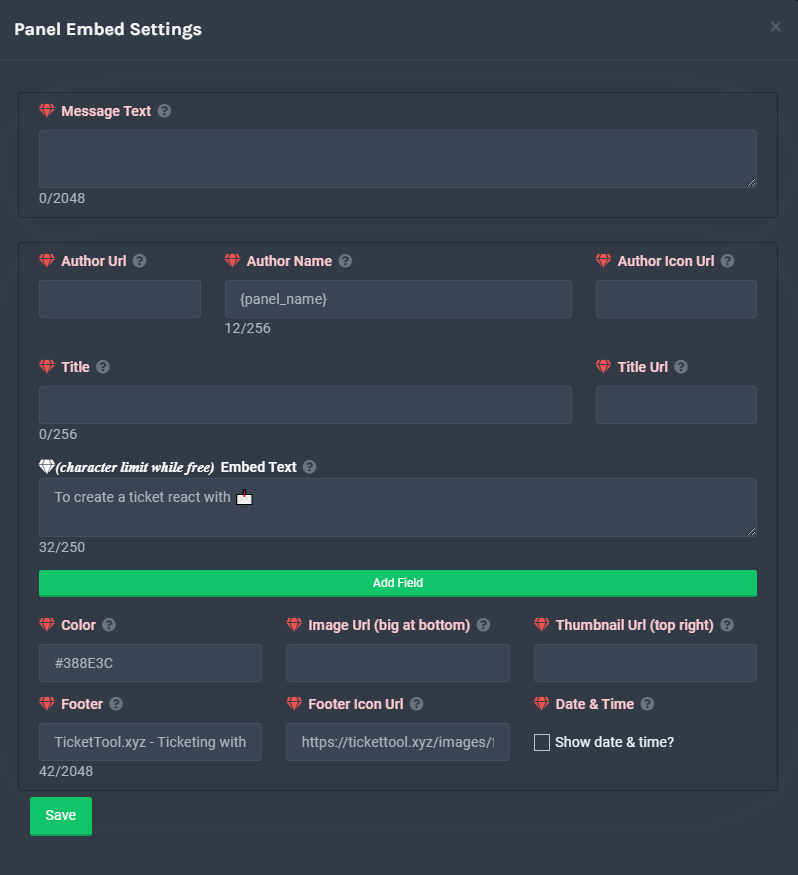
**Panel Message**
The panel message is where people react to make a ticket. To customize it head over to your Dashboard --> Panel Configs -> Settings -> Panel Options -> Edit Panel Message
 copper owl
you don't need premium for the embed text
you do need premium to customize the buttons and anything that's marked with a is a premium feature
teal spear
Okay
copper owl
anything marked as a  is a free feature you can edit / use
teal spear
how do i add multiple ticket options besides ' 📩 create ticket ' ? (yes i got the premium trial)
sorry if im being annoying with questions
copper owl
you're not being annoying, this is the purpose of the server, to ask as many questions as you need
humble sequoiaBOT
Multipanels are a premium feature that allow for a single panel with multiple buttons to open different tickets.
How to create a Multipanel
Premium users can combine multiple panels into one multipanel.
First, find the IDs of each panel you wish to combine. You can find them in your Panel Configs in the Dashboard
Next, send the multipanel to a channel using $panel [id1] [id2] {id3} ....
e.g. $panel 1 2 4 17 35 to combine panels 1, 2, 4, 17 and 35.
Up to 25 panels may be combined.
For a more convenient use of multipanels, you can now combine panels on the dashboard. This will allow you to directly send the multipanel from the dashboard or via the $panel ID command.
Where can I find this?
You can find this setting on the Dashboard -> Panel Configs -> Settings -> General Options
This will put all buttons from all of your panels on one message. The message is the panel message from the panel you're combining these panels in.
 teal spear
um.. i didnt really understand
teal spear
i tried to type in like, different options but it says like no results found

wut am i supposed to do exactly
ohh wait, they go into different categories??
copper owl
don't use the emotes
just try using the names
also you have to make the panel first before adding it there
copper owl
teal spear
i tried to type in like, different options but it says like no results found
you're not creating panels on that small box, you're adding already existing panels to it.
So make 2-3+ panels, and then add them to here
teal spear
by panel you mean, categories like that right-?
 teal spear
create panel??
teal spear
okay i managed to create multiple ticket things but how do I change the name of them??

nevermind i figured it out!
copper owl
Okay
teal spear
wait a sec, if my premium runs out does that means I'm gonna lose all this?! (obv i cant access the premium features anymore but..)
copper owl
yes, the bot itself will stop responding
you'll have to change to the free bot, which obviously doesn't have the features
teal spear
oh...
 oblique cedar
how to blacklist someone
humble sequoiaBOT
Blacklist Roles
Any role you assign as a blacklisted role won't be able to use commands or reactions.
Selecting a blacklisted role
Go to your Dashboard -> Server Configs. There you will find the option to select blacklisted roles.
Note: Don't forget to save.
 copper owl
No problem
oblique cedar
thanks @copper owl
iron nightBOT
Gave 1 Rep to Neptune (current: #9 - 122)
teal spear
copper owl
you'll have to change to the free bot, which obviously doesn't have the features
theres a premium bot?? I'm using the normal one..
humble sequoiaBOT
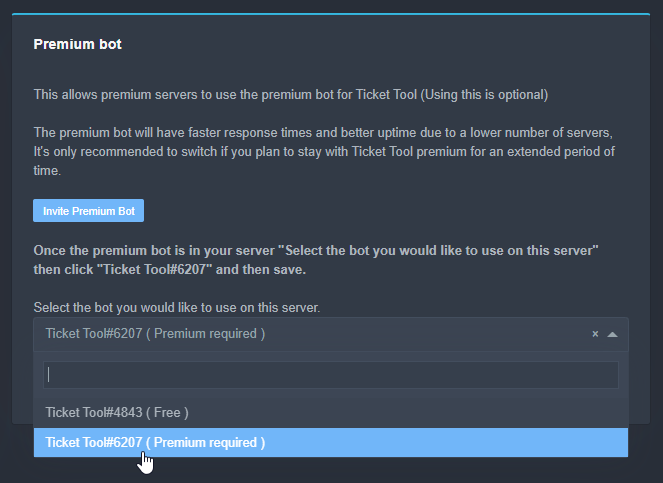
Inviting and Enabling Premium Bot
The first thing you will need to do is invite the premium bot, an invite can be found here
Once the bot is in your server we will head to the dashboard and manage your server. When you are managing your server, you want to head into "Server Configs" then click the drop down menu under "Select the bot you would like to use on this server" then click "Ticket Tool#6207" and then save.
 teal spear
wait a sec, if my premium runs out does that means I'm gonna lose all this?! (ob...
teal spear
teal spear
wait a sec, if my premium runs out does that means I'm gonna lose all this?! (ob...
will my normal ticket tool bot changes be undone too!?!?
copper owl
nope
nothing will be undone
it just won't implement your premium features
your premium features will stay the same, they just won't be on
teal spear
yea likee the premium stuff ive done like I made 3-4 ticket clicking options they will still work, i just cant like access and edit them?
copper owl
No, they won't work once you're premium runs out
copper owl
you'll have to switch back to the free bot (if you're using the premium one) and you'll have to resend the panels individually
copper owl
teal spear
they'll just like, stop working?
correct
copper owl
Ok, then you'll have to resend the panels again
teal spear
oh.
copper owl
and you won't be able to have a multipanel
teal spear
rip
 tawdry oracle
What would it take to get a custom branded ticket tool bot?
 desert summit
give no ig xD
 flint coyote
You mean like a custom profile pic for it? That's not possible.
humble sequoiaBOT

Ticket Tool avatar/status Customisation
@pseudo glen is like another discord user; you can't control its avatar icon or status, and we can't change it for one server, just as you cannot change your avatar for just one server.
However, on your server, you can change the bot's nickname

 modern saffron
How to set a channel to log channel? Where it will show who made ticket, who closed and deleted etc
copper owl
$help transcript
humble sequoiaBOT
How do I save transcript to a channel?
To save transcripts to a channel go to the Dashboard -> Panel Configs -> Settings -> Logging Options -> Transcript Channel
 copper owl
instead of transcript, do log
modern saffron
Okay ty
copper owl
humble sequoia
and enable whatever you want to log (the options will be under here)
modern saffron
thanks @copper owl
iron nightBOT
Gave 1 Rep to Neptune (current: #9 - 123)
copper owl
np
 slate orchid
$help premium
humble sequoiaBOT
Help Options
$help commands - Information on commands
$help setup - Information on bot setup
$help faq - Frequently asked questions
slate orchid
$help commands
humble sequoiaBOT
() = optional
[] = required
*==================================
Ticket Commands
==================================*
_ _
`$add [User] (channel)`
Description: Adding additional users to a ticket
Aliases: none
`$remove [User] (channel)`
Description: Removing users from a ticket
Aliases: none
`$close`
Description: Closing tickets
Aliases: none
`$open`
Description: Opening closed tickets
Aliases: none
`$delete`
Description: Deleting tickets
Aliases: none
`$rename`
Description: Renaming tickets/channels
Aliases: none
`$transcript (send channel)`
Description: Creating transcripts
Aliases: none
`$new (user) (reason)`
Description: Creating tickets in a monitored channel (when command style is enabled)
Aliases: none
`$claim`
Description: Claiming tickets (when claim is enabled)
Aliases: "unclaim"
_ _
*==================================
General Commands
==================================*
_ _
`$help (Help Options)`
Description: Help Command
Aliases: none
`$debug`
Description: Debuging issues with running Ticket Tool
Aliases: none
`$id (@role/@user/#channel/emoji)`
Description: Converting roles, users, channels and emojis to ID
Aliases: "getid"
`$permlevel`
Description: Checking permission level with Ticket Tool
Aliases: "level"
`$ping`
Description: Checking response time with discord api
Aliases: none
`$vote (link | unlink | redeem) (user)`
Description: Earn premium by voting on top.gg or Discord.boats
Aliases: "votes"
hazy abyss
I have another question, when a ticket is claimed by a user, is there a way for it to change the channel name to the person who claimed it automatically and then have it ping said person each time the ticket created responds?
copper owl
hazy abyss
I have another question, when a ticket is claimed by a user, is there a way for ...
for the first part, yes
for the second part, no
you can change the channel name
but you cannot automate pings everytime someone responds
slate orchid
Do you have any idea how to claim a redeemed premium key that is send from Ticket Tool on DM?
copper owl
slate orchid
Do you have any idea how to claim a redeemed premium key that is send from Ticke...
i dont seem to understand? you want to try to claim premium through @pseudo glen's DMs?
hazy abyss
copper owl
you can change the channel name
Mind sharing with me where I can do that change in the panel settings please.
copper owl
hazy abyss
Mind sharing with me where I can do that change in the panel settings please.
go to your claiming options
should be a part for changing the claimed channel name
add {author} to any part of it
hazy abyss
Let me have a look.
slate orchid
I got a premium key from votes with $vote redeem, how to claim it?
humble sequoiaBOT
How to redeem premium
To redeem your premium key, go to the dashboard, select your server, then click "Redeem Premium" under the server's icon and name.
 eager cargo
^
copper owl
hazy abyss
Let me have a look.
right here
 slate orchid
Thanks!
eager cargo
Yup
hazy abyss
copper owl
right here
So I can add author or do I have to change count to author?
copper owl
hazy abyss
So I can add author or do I have to change count to author?
you can just add it
no need to input it in place of count, unless you dont want the count
hazy abyss
Ok. Thank you.
copper owl
np
jade topaz
Aloha. Just a single question. How many transcript we Can make with the premium ?
copper owl
jade topaz
Aloha. Just a single question. How many transcript we Can make with the premium ...
as many as you want
there's no limit to the amount of transcripts you can make with either bot if im not mistaken
jade topaz
Too much illimited. Because i save all thé ticket for the roleplay.
copper owl
i dont seem to understand
jade topaz
Sorry I am french. Wait.
copper owl
jade topaz
Sorry I am french. Wait.
No worries, take your time
jade topaz
Ok no limite for the Transcript ticket
 copper owl
go ahead
jade topaz

I buy the premium (got the bills on thé mail) but why i have the redeem premium ? Reedem mean random?
copper owl
jade topaz
I buy the premium (got the bills on thé mail) but why i have the redeem premium ...
no, that button stays there no matter what
you can use it to be able to redeem keys you might get
jade topaz
Still so confused i can't lie
copper owl
dont worry about the button
it's normal for it to be there
even if you have premium
jade topaz
Ok thanks for the fast reply. Sorry to be worried.
copper owl
no worries
hazy abyss
copper owl
you can just add it
So when I add {author} after {count} it just shows up like this.

Should I just get rid of the count?
hazy abyss
Ok
 craggy geyser
Have you got anything seperating them either? Like another -
copper owl
craggy geyser
Have you got anything seperating them either? Like another -
^^ this too
make sure you separate the variables
hazy abyss
So {count}-{author.name}
copper owl
sure
hazy abyss
Let me see if that worked
craggy geyser
Just {author} by itself is the @ version, which is interpretated as as @copper owl (that's Neptune for example). The @/<> is removed from channel names so it would just be the user id
copper owl
hazy abyss
Ok so no {author.name}
no use this
if you want the name of the person who claimed
copper owl
try on a new ticket
 hazy abyss
Oh damn it 😂
craggy geyser
{author.name} or {author.nickname} will work
hazy abyss
Ok lol
hazy abyss
craggy geyser
{author.name} or {author.nickname} will work
That worked, thanks again!
iron nightBOT
Gave 1 Rep to Swift (current: #2 - 162)
craggy geyser
Thanks @copper owl as well (get some rep for it)
iron nightBOT
Gave 1 Rep to Neptune (current: #9 - 125)
hazy abyss
Thanks @copper owl as well
iron nightBOT
Gave 1 Rep to Neptune (current: #9 - 126)
craggy geyser
Wait, how did you give rep to both? I thought someone can only give rep once per hour
eager cargo
That's if its to the same person
craggy geyser
I've seen people try and do two different people and the second still gets the cooldown message
 pulsar thistle
ive been billed for ticket tool when i had asked a day earlyer to close my account
 thorny siren
hey guys is there a way to make it so mods on my discord server can view a ticket and type and respond to it but not close it/delete it
eager cargo
pulsar thistle
ive been billed for ticket tool when i had asked a day earlyer to close my accou...
Heyo, please open a billing ticket in #🎫│make-a-ticket.
 jolly ivy
Hi! members can ping every role and also can use threads on tickets even tho their perms are closed how can i remove that? (btw sorry if i dont understand the thing its 1AM here ^^)
i am on my alt account and it lets me ping every role possible
 eager cargo
thorny siren
hey guys is there a way to make it so mods on my discord server can view a ticke...
eager cargo
thorny siren
hey guys is there a way to make it so mods on my discord server can view a ticke...
Hiya, yes there is. Just put your support team role in the disabled role section of the close ticket button settings and the delete ticket button settings and save.
(It will override the support team only feature)
eager cargo
jolly ivy
Hi! members can ping every role and also can use threads on tickets even tho the...
Are those roles mentionable in role settings?
jolly ivy
eager cargo
Are those roles mentionable in role settings?
No they are not
Example:
 thorny siren
thanks quo ❤️
thorny siren
thanks @eager cargo
iron nightBOT
Gave 1 Rep to Quo (current: #1 - 173)
eager cargo
jolly ivy
Hi! members can ping every role and also can use threads on tickets even tho the...
Also Ticket Tool opens tickets with user permissions, not role permissions. The permissions below are the only ones you can edit with Ticket Tool.
 jolly ivy
eager cargo
Does the @.everyone role have permission to @ roles?
jolly ivy
eager cargo
Does the @.everyone role have permission to @ roles?
oh they do
i tought it was never on by default
i'll close and test it again
eager cargo
Alrighty
jolly ivy
it is all fixed thank you!
eager cargo
Yup
jolly ivy
thanks @eager cargo
iron nightBOT
Gave 1 Rep to Quo (current: #1 - 174)
eager cargo
/fr yes, we have a french support team. you can find them in #🎫│make-a-ticket
 robust sandalBOT
Oui, nous avons une équipe d’assistance français. vous pouvez les trouver dans #🎫│make-a-ticket
 English (en) → French (fr)
 hushed galleon
Thanks
eager cargo
Yup
 old temple
Sorry, I didn’t wanted to open a ticket!
Hope it’s okay :,)
eager cargo
It's alright, it will just end up being deleted.
Try not to open them for no reason though please
old temple
eager cargo
/fr yes, we have a french support team. you can find them in <#57170643544925799...
Okay, I apologize again.
I was just interested in what this meant- so I clicked it without reading the message first.
eager cargo
No worries
 lusty mulch
Hi uh i'm having some issues with the bot is this the right place to talk about them
thick inlet
lusty mulch
Hi uh i'm having some issues with the bot is this the right place to talk about ...
Yes, just tell us what the issue is, if we cant figure it out just create a #🎫│make-a-ticket and a support person will help you out!
lusty mulch
So I added the bot to my server and I can see a button underneath that says "make a ticket" on both my computer and phone but the other mod in the server can't, and when they react to the bot with the 📩 emoji, it isn't making the tickets. The button is working just fine for me but they aren't able to make tickets
We have the same permissions, I'm just the server owner, if that could be causing the problem
thick inlet
hmm, i'm not really sure what the issue could be there, try creating a ticket.
lusty mulch
thick inlet
hmm, i'm not really sure what the issue could be there, try creating a ticket.
...
Tysm!
thick inlet
lusty mulch
Tysm!
No worries!
 gritty trench
I create a ticket before seeing this channel. Did I have to close the ticket and show the problem here?
tribal cedar
They don't see a button?
old temple
No, it’s fine that you opened a ticket.
I hope the staff helped you though
thick inlet
gritty trench
I create a ticket before seeing this channel. Did I have to close the ticket and...
If your having issues with the ticket tool bot, just tell your problem here, if we can't find the issue, create a ticket!
lusty mulch
tribal cedar
They don't see a button?
Yeah, this is what i see, but they dont see the button underneath
 tribal cedar
Have them update their discord
gritty trench
thick inlet
If your having issues with the ticket tool bot, just tell your problem here, if ...
okay thank you. i'm gonna wait the other person finish
lusty mulch
tribal cedar
Have them update their discord
I'll let them know and see if that fixes it, thanks!
iron nightBOT
Gave 1 Rep to Enigma (current: #12 - 70)
tribal cedar
Np. It should
humble sequoiaBOT
Update your discord App
Buttons are a relatively new addition to discord and don't work with some older versions of the app.
Please verify that you have the latest version of discord, by going to the app or play store.
_ _
Discord for the App Store
_ _
Discord for the Play Store
thick inlet
humble sequoia
What command is this?
tribal cedar
$update
thick inlet
Is there a list of all the commands that I can see somewhere?
tribal cedar
Hmm I know we have a list im not sure of anything thats public
thick inlet
tribal cedar
Hmm I know we have a list im not sure of anything thats public
Ah ok. All good!
tribal cedar
$help
humble sequoiaBOT
Help Options
$help commands - Information on commands
$help setup - Information on bot setup
$help faq - Frequently asked questions
tribal cedar
$help commands
humble sequoiaBOT
() = optional
[] = required
*==================================
Ticket Commands
==================================*
_ _
`$add [User] (channel)`
Description: Adding additional users to a ticket
Aliases: none
`$remove [User] (channel)`
Description: Removing users from a ticket
Aliases: none
`$close`
Description: Closing tickets
Aliases: none
`$open`
Description: Opening closed tickets
Aliases: none
`$delete`
Description: Deleting tickets
Aliases: none
`$rename`
Description: Renaming tickets/channels
Aliases: none
`$transcript (send channel)`
Description: Creating transcripts
Aliases: none
`$new (user) (reason)`
Description: Creating tickets in a monitored channel (when command style is enabled)
Aliases: none
`$claim`
Description: Claiming tickets (when claim is enabled)
Aliases: "unclaim"
_ _
*==================================
General Commands
==================================*
_ _
`$help (Help Options)`
Description: Help Command
Aliases: none
`$debug`
Description: Debuging issues with running Ticket Tool
Aliases: none
`$id (@role/@user/#channel/emoji)`
Description: Converting roles, users, channels and emojis to ID
Aliases: "getid"
`$permlevel`
Description: Checking permission level with Ticket Tool
Aliases: "level"
`$ping`
Description: Checking response time with discord api
Aliases: none
`$vote (link | unlink | redeem) (user)`
Description: Earn premium by voting on top.gg or Discord.boats
Aliases: "votes"
tribal cedar
Not what I was looking for
 pearl maple
How do I get the bot to ping support members when they create a new ticket?
jade topaz
I might have covid
old temple
Not the time and server to talk about it but I hope you get better.
jade topaz
Is there a way I can add a custom button here?
 eager cargo
pearl maple
How do I get the bot to ping support members when they create a new ticket?
eager cargo
pearl maple
How do I get the bot to ping support members when they create a new ticket?
$help ping
humble sequoiaBOT
How to make Ticket Tool ping a role
To make ticket tool ping a role when a ticket is opened, go to the Dashboard -> Panel Configs -> Settings -> Ticket Options -> Ticket Message -> Message Text and do this:
{@Role name} This is case sensitive and the role must have @mentions enabled
eager cargo
jade topaz
Is there a way I can add a custom button here?
$buttons
humble sequoiaBOT

Buttons
The new Discord Buttons allow for a much smoother and convenient experience. They reduce lag and work much better than emojis. With ticket tool you can edit all the buttons however you like! Buttons can show emojis, text and can have 4 different colors.
Where can I edit them?
Dashboard -> Panel Configs -> <Settings> -> Button Options -> <Setting>
 jade topaz
eager cargo
$buttons
jade topaz
eager cargo
$buttons
How can I add a new one though?
 eager cargo
You can't add a new one, I assumed you were referring to adding a custom message / emoji to the button
jade topaz
Nah I wanted to add a custom button next to close
eager cargo
that's not possible, apologies.
pearl maple
Thanks.
jade topaz
eager cargo
that's not possible, apologies.
Np maybe that could be something u could do in the future
 tawdry trail
Is it possible when someone is creating a ticket that they can have the ability to submit it with a comment?
 royal thunder
احد عنده لوحة التحكم
 noble needle
.
jade topaz
is there a way to make it so only a certain amount of tickets can be opened at a time? im using the bot for commissions, but i had too many tickets opened at once
scenic plinth
$help limit
humble sequoiaBOT
How to set a ticket limit
A ticket limit may be set per panel to prevent users from spamming tickets. By default this limit is set to 3. Once a user hits this limit the bot will notify the users that they reached the limit.
To set a ticket limit go to the Dashboard -> Panel Configs -> Settings -> General Options -> Ticket Limit
 tawdry trail
jade topaz
is there a way to make it so only a certain amount of tickets can be opened at a...
tawdry trail
jade topaz
is there a way to make it so only a certain amount of tickets can be opened at a...
I believe you would need to go to tickettool.xyz > panel configs > settings > General Options >
 scenic plinth
tawdry trail
Is it possible when someone is creating a ticket that they can have the ability ...
scenic plinth
tawdry trail
Is it possible when someone is creating a ticket that they can have the ability ...
Commabf style tickets need to be enabled through the panel, go to the bottom of the panel settings to see the option.
tawdry trail
scenic plinth
Commabf style tickets need to be enabled through the panel, go to the bottom of ...
Thank you
iron nightBOT
Gave 1 Rep to 𝐯𝐨𝐱𝐨𝐯 (current: #5 - 146)
jade topaz
tawdry trail
I believe you would need to go to tickettool.xyz > panel configs > settings > Ge...
sadly no, ticket limit only limits one persons ability to make a certain amount of tickets, and ticket count is just going to be the number of the next ticket
eager cargo
There's no server wide limit / panel wide limit. All limits are per user
tawdry trail
scenic plinth
Commabf style tickets need to be enabled through the panel, go to the bottom of ...
Unfortunately it didn't work as planned. I may have said it wrong.
Let's say a user clicks on create ticket. Now before the ticket is submitted to support they can describe there issue and once completed the ticket can now be sent to support
eager cargo
eager cargo
There's no server wide limit / panel wide limit. All limits are per user
For the global limit feature, that's per user across all panels
 ocean iron
how come i cant make a second server for ticket tool
eager cargo
tawdry trail
Unfortunately it didn't work as planned. I may have said it wrong.
Let's say a ...
So like a two step open ticket feature? It's been suggested before and I actually really like the suggestion. You can't do it with "normal tickets" though. You can use command style tickets though like Kenzie said and have the user use the command $new reasonhere and if you put the {reason} variable in your ticket message for that panel, it will paste whatever the user typed after $new.
eager cargo
ocean iron
how come i cant make a second server for ticket tool
Can you elaborate?
tawdry trail
Ok that would work
eager cargo
Yeah, just a different way of opening tickets.
tawdry trail
@eager cargo Ticket tool is an open source code correct? If need be I can build it and share the code in github
eager cargo
Ticket Tool is not open source, no.
tawdry trail
Oh ok
ocean iron
@eager cargo so when i go into the website i press invite ticket tool and i do all the steps then I go in manage servers and its not there. There should be 2 servers but there is one
and the one is the one i dontr want to use anymore
humble sequoiaBOT
Don't see your server in the dashboard?
You will possibly need to relog. Look below to see steps on how to relog.
How to relog the Dashboard.
First, you will need to go to the dashboard. Once your there, click on your avatar on the top right. after you clicked it, you will see button that says Logout. You must click that. Once you have logged out, you can log back in.
Note:
You need one of these 3 things to access the dashboard.
1. Server Owner (Level: 6)
2. Server Administrator (Level: 4)
3. Dashboard Role (Level: 2)
You can check your level using $level on your Discord Server
eager cargo
Re-login to the dashboard
eager cargo
Indeed
eager cargo
Yup
ocean iron
thanks @eager cargo
iron nightBOT
Gave 1 Rep to Quo (current: #1 - 175)
tawdry trail
eager cargo
So like a two step open ticket feature? It's been suggested before and I actuall...
Thanks that help out alot
iron nightBOT
Gave 1 Rep to Quo (current: #1 - 176)
eager cargo
Yup
 faint kraken
I’m having an issue, I’m the server I’m trying to have support roles to only be able to close/delete tickets but when I blocklist the roles I don’t want them to close tickets the support role doesn’t work since they have those roles as well.
 atomic onyx
Is there a way to add a timer between tickets?
 void crystal
is there a way to add a role to someone who opens a ticket?
gritty trench
void crystal
is there a way to add a role to someone who opens a ticket?
Like automatically? If yes I don’t know sorry and if no like you add a normal role
void crystal
gritty trench
Like automatically? If yes I don’t know sorry and if no like you add a normal ro...
yeah, that's what i was hoping for
 gusty tendon
?
 scenic plinth
atomic onyx
Is there a way to add a timer between tickets?
scenic plinth
atomic onyx
Is there a way to add a timer between tickets?
No
scenic plinth
void crystal
yeah, that's what i was hoping for
Not possible
scenic plinth
gusty tendon
?
Update your discord
humble sequoiaBOT
Update your discord App
Buttons are a relatively new addition to discord and don't work with some older versions of the app.
Please verify that you have the latest version of discord, by going to the app or play store.
_ _
Discord for the App Store
_ _
Discord for the Play Store
humble sequoiaBOT
Ticket Tool Invite & Support
humble sequoiaBOT
Inviting and Enabling Premium Bot
The first thing you will need to do is invite the premium bot, an invite can be found here
Once the bot is in your server we will head to the dashboard and manage your server. When you are managing your server, you want to head into "Server Configs" then click the drop down menu under "Select the bot you would like to use on this server" then click "Ticket Tool#6207" and then save.
eager cargo
 snow phoenix
How i can invite ticket tool premium
snow phoenix
How i can invite ticket tool premium
^
 faint valve
 humble sequoiaBOT
-- moved to ticket --
desert summit
 somber cove
im create a panel but panel not send a ticket
somber cove
im create a panel but panel not send a ticket
Any Error Messages? In Dashboard or Discord?
desert summit
Second
desert summit
somber cove
what
Check your dms pls
somber cove
bro what is dms@desert summit
desert summit
Direct messages
severe path
haha
somber cove
That's it.
jade topaz
Hello, i have a problem, the personne who make a ticket, can't see the ticket after 24h someone can help me?
copper owl
check the User Opened permissions

Also, if they can't see the ticket once they open it, they won't see it after 24h (unless someones adds them to the ticket)
jade topaz
copper owl
Also, if they can't see the ticket once they open it, they won't see it after 24...
but after 24 hours, those who create a ticket, no longer see the ticket (they no longer have allowed)
it's possible to change that or no?
copper owl
jade topaz
but after 24 hours, those who create a ticket, no longer see the ticket (they no...
again, there's no way that after 24h they automatically somehow cant see the ticket.
Either someone's closing the ticket or deleting it
that's not a feature
jade topaz
so, it's normal ok
 lean gazelle
Hey guys
I have a question. Is it possible that the ticket tool creates a temporary role, assigns it to the User and then adds the role to the ticket?
lean gazelle
Hm any chance to raise this?
copper owl
Has been raised multiple times if im not mistaken
lean gazelle
We have a discord backed by a company and we use your premium bot
Unfortunately thanks to DC‘s bad setup people can see who opened tickets
And we need a way to prevent this 🙂
copper owl
lean gazelle
Unfortunately thanks to DC‘s bad setup people can see who opened tickets
that's because of how you set it up
im assuming everyone can see opened tickets?
copper owl
lean gazelle
Unfortunately thanks to DC‘s bad setup people can see who opened tickets
then can you elaborate on this
lean gazelle
With plugins like Better Discord you can actually see hidden channels (not their contents) and assigned perms
And the assigned perms leak who created the ticket
As the Person is added as an user to it
copper owl
Ah, betterdiscord
lean gazelle
We are a EU based DC that has to respect privacy laws and that includes that people are not exposed when opening tickets 🙂
lean gazelle
copper owl
Ah, betterdiscord
Yeah very annoying
copper owl
lean gazelle
We are a EU based DC that has to respect privacy laws and that includes that peo...
Well it isn't entirely your fault I guess
lean gazelle
Yeah that’s true but it’s us that have to prevent this
Or make users aware but then the ticket acceptance will be gone
Because people trust us that them opening a ticket is a private manner which they can choose to disclose
copper owl
lean gazelle
Yeah that’s true but it’s us that have to prevent this
I completely understand that and I agree with you to some extent. We have raised this suggestion before , but we never included the context behind it.
Seeing that you actually have an extremely valid reason (and not just a "Oh i want it to be a feature because thats what i want), Ill raise the feature again
but
copper owl
That doesn't guarantee it being implemented
copper owl
So, if it doesn't get implemented, then my apologies. Ill raise this suggestion one more time with the context
lean gazelle
Thank you very much again!
copper owl
you're welcome
copper owl
$help support
humble sequoiaBOT
How to let support team see into a ticket
About support roles
A support role lets your support team see into tickets with out having to add them manually to each and every ticket.
You can add as many support roles as you like per panel.
NOTE that the way discord works all admins can see into tickets regardless of this.
How to set a support role
To set a Support role go to the Dashboard -> Panel Configs -> Settings -> General Options -> Support Team Roles.

NOTE that the support role will not be able to see into tickets that are already created..
copper owl
@jade topaz ^^
jade topaz
tysm
copper owl
jade topaz
tysm
no problem
 woven hedge
i can only manage ticket tool on one of my servers, all the other ones i invited Ticket tool to dont show up
humble sequoiaBOT
Don't see your server in the dashboard?
You will possibly need to relog. Look below to see steps on how to relog.
How to relog the Dashboard.
First, you will need to go to the dashboard. Once your there, click on your avatar on the top right. after you clicked it, you will see button that says Logout. You must click that. Once you have logged out, you can log back in.
Note:
You need one of these 3 things to access the dashboard.
1. Server Owner (Level: 6)
2. Server Administrator (Level: 4)
3. Dashboard Role (Level: 2)
You can check your level using $level on your Discord Server
copper owl
try this
woven hedge
@copper owl thanks, it worked
copper owl
you're welcome
 candid elm
 humble sequoiaBOT
How do I pick the 'Color' I put in a Colour Name, but it doesn't work?
The 'Color' for your Embed/Ticket message has to be in 'HEX' format.
Where do I get the 'HEX' of my color(s)? You can go to any 'HEX' color picker website, then you pick the color you want, and copy and paste the 'HEX' into the 'Color' box, and then you're done, here's a website if you want to go straight away: https://htmlcolorcodes.com/

 warm wharf
Guys wanted some help, the ticket tool has an amazing reaction system to open a ticket (with emoji and message) I was wondering if anyone knows any bot that have the same type of reaction but the button works as a reaction role
copper owl
warm wharf
Guys wanted some help, the ticket tool has an amazing reaction system to open a ...
i know a button system for giving roles exists, but im not sure which bot that would be
ticket tool doesnt allow for it though, just for your information
warm wharf
ook, tank you
craggy geyser
@flint vapor you made a review about bad service, yet you had an answer given to you within one minute

 jade topaz

 tired arch
Alguém sabe como muda o prefix do ticket tool?
Does anyone know how to change the ticket tool prefix?
copper owl
$help prefix
humble sequoiaBOT
How to change Ticket tool's prefix
The default prefix for ticket tool is $ and @Ticket Tool#4843 however that can be changed on the Dashboard under Server Configs -> Command Prefix.

NOTE that @Ticket Tool#4843 will always work as a prefix even if there is a custom prefix.
copper owl
@tired arch ^
tired arch
Thank you
prime bridgeBOT
Successful bans: 1
Unsuccessful bans: 0
Reason: scam
Moderator: @mystic hound
jade topaz
$help
humble sequoiaBOT
Help Options
$help commands - Information on commands
$help setup - Information on bot setup
$help faq - Frequently asked questions
 eager cargo
You're trying to login to the docs, try the link below
humble sequoiaBOT
 desert summit
Nobody Click it pls
Its scam
@copper owl I’m so sorry for Ping but Look here sorry for ping
scenic plinth
desert summit
<@!548583124062175232> I’m so sorry for Ping but Look here sorry for ping
I've notifed moderators, thank you!
iron nightBOT
Gave 1 Rep to Ymaster2000 (current: #29 - 6)
desert summit
Sorry for ping
prime bridgeBOT
Successful bans: 1
Unsuccessful bans: 0
Reason: scam
Moderator: @mystic hound
scenic plinth
Usually people are smart enough not to, however there are some cases where it unfortunately happens. If something happens and I am online, you are welcome to ping me.
 charred lion
Is it possible to have the content of ticket transcripts automatically put into a spreadsheet, and possibly even the user ID of whoever opened the tick?
The content of the tickets is probably just gonna be like one line, max 45 characters
I understand that this isnt exactly support on how to use the bot etc 😅
any help would be appreciated if possible!
copper owl
charred lion
Is it possible to have the content of ticket transcripts automatically put into ...
not really possible
only way to access transcripts is through the URL
iron nightBOT
Gave 1 Rep to Neptune (current: #9 - 129)
copper owl
np
 latent osprey
ay bro whats going on with the ticket tool each time i invite it i cant even manage it cause its not there thats pretty weird
 humble sequoiaBOT
Don't see your server in the dashboard?
You will possibly need to relog. Look below to see steps on how to relog.
How to relog the Dashboard.
First, you will need to go to the dashboard. Once your there, click on your avatar on the top right. after you clicked it, you will see button that says Logout. You must click that. Once you have logged out, you can log back in.
Note:
You need one of these 3 things to access the dashboard.
1. Server Owner (Level: 6)
2. Server Administrator (Level: 4)
3. Dashboard Role (Level: 2)
You can check your level using $level on your Discord Server
scenic plinth
Try that
 wide wharf
how do i get the premium bot in my server after i buy the premium?
humble sequoiaBOT
Inviting and Enabling Premium Bot
The first thing you will need to do is invite the premium bot, an invite can be found here
Once the bot is in your server we will head to the dashboard and manage your server. When you are managing your server, you want to head into "Server Configs" then click the drop down menu under "Select the bot you would like to use on this server" then click "Ticket Tool#6207" and then save.
 rotund kite
@wide wharf
 indigo plover
latent osprey
scenic plinth
Try that
indigo plover
latent osprey
scenic plinth
Try that
W MANZ
wide wharf
how do i make different buttons (having a one where you can make a report and donate) with ticket tool premium?
humble sequoiaBOT
Multipanels are a premium feature that allow for a single panel with multiple buttons to open different tickets.
How to create a Multipanel
Premium users can combine multiple panels into one multipanel.
First, find the IDs of each panel you wish to combine. You can find them in your Panel Configs in the Dashboard
Next, send the multipanel to a channel using $panel [id1] [id2] {id3} ....
e.g. $panel 1 2 4 17 35 to combine panels 1, 2, 4, 17 and 35.
Up to 25 panels may be combined.
eager cargo
^
wide wharf
eager cargo
^
How would i get the panel id?
eager cargo
The number next to your panel name in panel configs
wide wharf
ok ty so much im kinda dumb
wide wharf
eager cargo
The number next to your panel name in panel configs
It's saying that its an invalid id
eager cargo
Can you show a screenshot?
wide wharf
eager cargo
Can you show a screenshot?
i figured it out sorry for bugging you: (
eager cargo
no worries
jade topaz
is there a feature where there can only be a certain amount of tickets open at a time? not how many one person can make, just how many in total?
 opaque heron
Is there a way I can auto send a message to someone who has just created a ticket??
humble sequoiaBOT
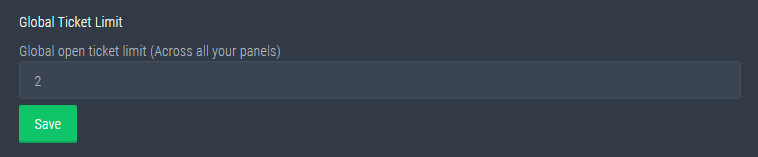
Global Ticket Limit
Unlike the regular Ticket Limit, the global limit will limit the amount of tickets a user can create at the same time for ALL Panels. When a ticket is closed again, the limit resets for that user.
Note:
This is not a limit for how many tickets a user can open at all times or how many tickets you can have open on the server in total. This is just a limit per user for open tickets.
 rotund kite
@jade topaz ^
humble sequoiaBOT
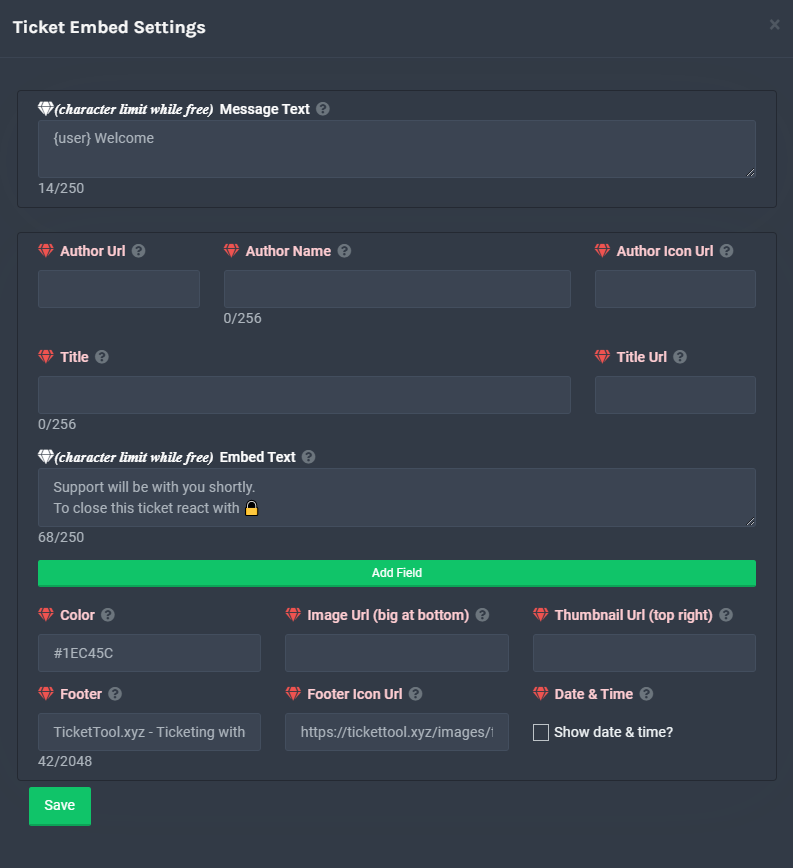
**Ticket Message**
The Ticket Message is the first message sent by the bot in a new ticket. To customise it head over to your Dashboard -> Panel Configs -> Settings -> Ticket Options -> Edit Ticket Message
 rotund kite
@opaque heron if you mean by a ticket message (whenever a ticket is opened, a message will be sent in the ticket), then ^^
iron nightBOT
Gave 1 Rep to Logix™ (current: #21 - 21)
iron nightBOT
Gave 1 Rep to Logix™ (current: #21 - 22)
jade topaz
i cant find global ticket 😭
 rotund kite
jade topaz
i cant find global ticket 😭
rotund kite
jade topaz
i cant find global ticket 😭
it should be in server configs
rotund kite
 wide plover
why i can't see the channel
wide plover
why i can't see the channel
$help perms
humble sequoiaBOT
How to set the permissions for tickets
To set a change permissions go to the Dashboard -> Panel Configs -> Settings -> Permission Options
 rotund kite
make sure user opened permissions has read messages and read message history enabled
@wide plover
If you don't own the server, you should ask the server owner to do it
 atomic barn
1st column 2nd button
atomic barn
rotund kite
make sure user opened permissions has read messages and read message history ena...
Then follow this
atomic barn
?
wide plover
where?/
atomic barn
In the image you posted, 1st column 2nd button
eager cargo
So the button just isn't appearing?
eager cargo
It's likely your discord isn't updated
Oh commands won't work
What's your server ID?
jade topaz
And the reaction button won't appear
humble sequoiaBOT
Update your discord App
Buttons are a relatively new addition to discord and don't work with some older versions of the app.
Please verify that you have the latest version of discord, by going to the app or play store.
_ _
Discord for the App Store
_ _
Discord for the Play Store
eager cargo
Update your discord app for that
jade topaz
One sec will send invite @eager cargo
rotund kite
wide plover
which one
user opened perms
wide plover
rotund kite
user opened perms
 rotund kite
Yea, it should be working fine now :)
 radiant helm
How do i make it so that a member can send pictures in the ticket? Do have to make it so they have picture perms in every chat because thats something you have to unlock in my server.

 severe path
wide plover
still same
severe path
wide plover
still same
The role view is only from Discord the rights, with bots the perms remain the same. You have to test this with a second account
severe path
radiant helm
How do i make it so that a member can send pictures in the ticket? Do have to ma...
$help perms
humble sequoiaBOT
How to set the permissions for tickets
To set a change permissions go to the Dashboard -> Panel Configs -> Settings -> Permission Options
rotund kite
wide plover
oh, if you're looking through roles, it will not work
wide plover
rotund kite
oh, if you're looking through roles, it will not work
it done thanks
iron nightBOT
Gave 1 Rep to Logix™ (current: #20 - 23)
humble sequoiaBOT
Using the View as Role feature.
The View as Role discord feature will not work for testing ticket tool. Ticket Tool opens permissions with user permissions & not role permissions.
 plush barn
 odd quiver
like my server don't come up on website
odd quiver
like my server don't come up on website
You have to be an administrator
odd quiver
plush barn
You have to be an administrator
I'm owner...
plush barn
odd quiver
I'm owner...
You have to have the "administrator" permission on your role.
 mystic hound
Server owner bypasses every permission
humble sequoiaBOT
Don't see your server in the dashboard?
You will possibly need to relog. Look below to see steps on how to relog.
How to relog the Dashboard.
First, you will need to go to the dashboard. Once your there, click on your avatar on the top right. after you clicked it, you will see button that says Logout. You must click that. Once you have logged out, you can log back in.
Note:
You need one of these 3 things to access the dashboard.
1. Server Owner (Level: 6)
2. Server Administrator (Level: 4)
3. Dashboard Role (Level: 2)
You can check your level using $level on your Discord Server
odd quiver
mystic hound
Server owner bypasses every permission
yea but the server i own it don't come up on the website
mystic hound
humble sequoia
Do this
 urban root
how do i set that a role cant open a ticket for a duration
humble sequoiaBOT
Blacklist Roles
Any role you assign as a blacklisted role won't be able to use commands or reactions.
Selecting a blacklisted role
Go to your Dashboard -> Server Configs. There you will find the option to select blacklisted roles.
Note: Don't forget to save.
mystic hound
you'll have to remove the blacklist role for them to use the bot again
 faint flicker
How do I make it so my bot pings @here when a ticket is open?
I did what it says but it doesn’t work
I use the normal bot
Ping me when you reply to this because I might be offline
 hoary flower
Is it normal that we cant invite the Bot?
severe path
faint flicker
How do I make it so my bot pings @here when a ticket is open?
Write @here in the ticket message:
humble sequoiaBOT
**Ticket Message**
The Ticket Message is the first message sent by the bot in a new ticket. To customise it head over to your Dashboard -> Panel Configs -> Settings -> Ticket Options -> Edit Ticket Message
severe path
Has the ticket tool role this perms?
 faint flicker
severe path
Has the ticket tool role this perms?
faint flicker
severe path
Has the ticket tool role this perms?
Yea it has every perm
severe path
Please send a screenshot of the ticket message, how it looks like in the channel and from the permissions
faint flicker
 severe path
faint flicker
severe path
faint flicker
you didn´t write @here in the ticket message 

 severe path
Did you write this in the panel message or ticket message? It looks like the panel message, where the normal message part is a premium feature
 faint flicker
Shit
 frigid schooner
hoary flower
Is it normal that we cant invite the Bot?
frigid schooner
hoary flower
Is it normal that we cant invite the Bot?
the role was created but the bot didnt joined the discord
severe path
faint flicker
Shit
You have to write the @here in the ticket message
faint flicker
Done
Let me test
Works, my CEO was typing so I take it it worked
Because he usually is inactive
Thank you for the assistance
severe path

faint flicker
Thanks @severe path
iron nightBOT
Gave 1 Rep to Schlafendes24 (current: #25 - 9)
 distant plover
I need to report a server using ticket tool for a purpose that breaks rules of a minecraft server
faint flicker
distant plover
I need to report a server using ticket tool for a purpose that breaks rules of a...
bruh
distant plover
can a mod dm me so we can help defeat people breaking rules?
mystic hound
I don't see why we would take action because someone is breaking a minecraft server's rules
 sour basin
how to invite the bot to the server after you bought premium and selected it
humble sequoiaBOT
-- moved to ticket --
distant plover
mystic hound
I don't see why we would take action because someone is breaking a minecraft ser...
because its misusing the bot because its asking for irl money for in game currency which is against both mojand eula and hypixels rules
 arctic pagoda
distant plover
because its misusing the bot because its asking for irl money for in game curren...
arctic pagoda
distant plover
because its misusing the bot because its asking for irl money for in game curren...
This server is only for Ticket Tool bot support, so if you want to repirt someone un a server using TT bot please open a ticket in that server, just not here because we can't help you in this server.
distant plover
arctic pagoda
This server is only for Ticket Tool bot support, so if you want to repirt someon...
well i want to report the server for misuing the bot
mystic hound
distant plover
because its misusing the bot because its asking for irl money for in game curren...
You're better off reporting the server (or its owners) to the minecraft communities in question. You could also consider a report to discord support if you have credible evidence. Its not something we'd generally blacklist for, on top of that if you're looking to make them stop for good, anything we can do from our end wouldn't be a permanent solution.
distant plover
ok
 broken ridge
How do u make it to where u can claim the ticket
humble sequoiaBOT
-- moved to ticket --
 crimson gate
 humble sequoiaBOT
-- moved to ticket --
 icy pumice
Is it possible to change an existing textchannel into a ticket? Said channel was made manually
icy pumice
👍
copper owl
@jade topaz, regarding your review, did you set it up? are there any problems? maybe something we can improve on?
because genuinely, it takes less than 5 mins to set the basic things up
prime bridgeBOT
Team crouton tv has been silenced for 10m
Reason: Posting Discord Server Invites
Team crouton tv#3056 | 838852701466525817
 wet hatch
For some reason, people in the tickets cannot see the message the bot sends. Which for my server is important as it guides them on how to fill out the ticket. I've not had this issue before now. All the role permissions are correct and should allow them to see the message but not even my admins can see it.
copper owl
wet hatch
For some reason, people in the tickets cannot see the message the bot sends. Whi...
can you elaborate?
do you mean that they cant see the panel message?
 frank whale
Is it possible for an owner (me) to put a cap on how many overall tickets a person can make, instead of just at a time? We've had one member open a total of 40 tickets for useless stuff and I want to prevent them from opening more.
copper owl
frank whale
Is it possible for an owner (me) to put a cap on how many overall tickets a pers...
well no, but I do have a great solution for you
You can have a mute role be blacklisted
so for example, you have 2 moderation bots that both have mute commands
one of them can have it's own mute role blacklisted
wet hatch
copper owl
can you elaborate?
Yes, sorry. They can see the panel to make the ticket but when they make a ticket and the bot sends the message in the ticket channel, they can't see the message the bot sends.
copper owl
therefore, once some annoying user comes by, you just mute them with the bot, and they wouldnt be able to create tickets
or better yet, just assign the role yourself to them
frank whale
That's really smart, thank you!
copper owl
frank whale
That's really smart, thank you!
no problem !
copper owl
wet hatch
Yes, sorry. They can see the panel to make the ticket but when they make a ticke...
so they cant see the channel?
that TT creates?
wet hatch
copper owl
so they cant see the channel?
They can see the channel but when the ticket is created, they can't see the message that the ticket bot is supposed to send.
wet hatch
Okay. 😊
humble sequoiaBOT
-- moved to ticket --
lean gazelle
hey @copper owl about my ask last time
will there be any form where i can get feedback on this?
or should i #🎫│make-a-ticket
lean gazelle
temporary role creation instead of adding users to a ticket
because of plugins like better discord exposing ticket creators
copper owl
you wont get any feedback on it at all, if im not mistaken
these things dont get shared
lean gazelle
i see, it would be good to know though as we have to look for another ticket solution if there are no intentions to implement this 🙂
lean gazelle
okay thank you for raising it though!
copper owl
np
humble sequoiaBOT
**Ticket Message**
The Ticket Message is the first message sent by the bot in a new ticket. To customise it head over to your Dashboard -> Panel Configs -> Settings -> Ticket Options -> Edit Ticket Message
copper owl
if that's what you mean then ^^
 hexed wyvern
copper owl
if that's what you mean then ^^
hexed wyvern
copper owl
if that's what you mean then ^^
tysm
copper owl
no problem
humble sequoiaBOT
-- moved to ticket --
copper owl
ليش, شو بدك؟
 chilly wigeon
Share the name of a contact person who deal with. AGENTS
 quaint pilot
اريد اعرفو
icy pumice
Not sure where to post suggestions but it would be nice perhaps if you could claim/assign a ticket for/to another user. Also I figured you can edit most messages of the bot, though I can't seem to find the option to change the message when you add someone to a ticket. That plus renaming the commands (adding alternative trigger commands) would be nice too.
 near tide
me don't know how to make
 flint maple
We got to 44 tickets on our server and now any additional tickets being added don't get added to the proper category, but, are orphaned (under no category). If I delete a few tickets it works normal again until we get past that number. Anyone seen this or know how to fix?
 turbid plaza
IS there a way to add multiple buttons on a ticket?
copper owl
flint maple
We got to 44 tickets on our server and now any additional tickets being added do...
this is because discord categories can hold 50 channels only
copper owl
turbid plaza
IS there a way to add multiple buttons on a ticket?
yes, you need premium
humble sequoiaBOT
Multipanels are a premium feature that allow for a single panel with multiple buttons to open different tickets.
How to create a Multipanel
Premium users can combine multiple panels into one multipanel.
First, find the IDs of each panel you wish to combine. You can find them in your Panel Configs in the Dashboard
Next, send the multipanel to a channel using $panel [id1] [id2] {id3} ....
e.g. $panel 1 2 4 17 35 to combine panels 1, 2, 4, 17 and 35.
Up to 25 panels may be combined.
For a more convenient use of multipanels, you can now combine panels on the dashboard. This will allow you to directly send the multipanel from the dashboard or via the $panel ID command.
Where can I find this?
You can find this setting on the Dashboard -> Panel Configs -> Settings -> General Options
This will put all buttons from all of your panels on one message. The message is the panel message from the panel you're combining these panels in.
copper owl
both work ^^
flint maple
copper owl
this is because discord categories can hold 50 channels only
thanks!
iron nightBOT
Gave 1 Rep to Neptune (current: #8 - 134)
copper owl
no problemo
flint maple
copper owl
no problemo
oof actually, I just created a new category and wired the panel to create the tickets there. But it's still happening.
copper owl
what's happening?
flint maple
orphaned tickets
scenic plinth
Are you talking about them going somewhere else instead of the category?
Nobody click that please
copper owl
🤝
desert summit
@scenic plinth here is scam
 radiant moss
Gone
desert summit

 narrow arch
$help
humble sequoiaBOT
Help Options
$help commands - Information on commands
$help setup - Information on bot setup
$help faq - Frequently asked questions
narrow arch
$help setup
humble sequoiaBOT
Setting up Ticket Tool
Visit the docs for setup info
General Setup
tribal cedar
Need any specific help @narrow arch?
narrow arch
yea like i cant make the bot @ my support team
and i already read the faq and all that things
tribal cedar
$help ping
humble sequoiaBOT
How to make Ticket Tool ping a role
To make ticket tool ping a role when a ticket is opened, go to the Dashboard -> Panel Configs -> Settings -> Ticket Options -> Ticket Message -> Message Text and do this:
{@Role name} This is case sensitive and the role must have @mentions enabled
atomic barn
Yep that's the command. Thx enigma
tribal cedar
Nps
@narrow arch Like it says make sure the role is mentionable and your {@Role Name} is case sensitive
atomic barn
I swear I don't remember any of the commands and when someone has a question where I can do the command I can't 😅
tribal cedar
Maybe they would take the suggestion to listing the trigger for the command in the footer. Not too sure
narrow arch
idk what to do i just cant ;-,
tribal cedar
Whats the role name?
narrow arch
never mind i figured out that the role has an image lol
turbid plaza
The person who owns server bot premium. for some reason the Bot color/Emoji will nto update fo rticket
 robust minnow
Hi ,
is there a way to get the transcript sent to the person who claimed the ticket , i am currently only seeing the option for the person who made the ticket?
flint coyote
It's a premium feature.
robust minnow
I have premium but i cant see it on configs
Direct Message Transcript is only sending it to the person who created the ticket tho
flint coyote
Ummmm one sec
Oh wait. You can have the transcript sent to the person that opened the ticket.
Is that what you mean?
robust minnow
Yeah but i would like to to be sent to the person who claimed/spoke aswell
Like if i make a ticket and you claim it we both get the transcript sent , at the moment its just me who would get it
If that makes sense?
flint coyote
Oh I understand. I don't think so.
robust minnow
{transcript_owner}{transcript_users} dont seem to work
flint coyote
I'm not 100% sure tbh
flint coyote
 spark herald
i need help on ticket
spark herald
i need help on ticket
What do you need help with?
robust minnow
flint coyote
I'm not 100% sure tbh
Thanks for the time anyway i'll see if i can figure something out
iron nightBOT
Gave 1 Rep to Ivysixx (current: #57 - 1)
spark herald
flint coyote
What do you need help with?
ticket tool
spark herald
flint coyote
What do you need help with?
ive made a ticket
humble sequoiaBOT
How do I save transcript to a channel?
To save transcripts to a channel go to the Dashboard -> Panel Configs -> Settings -> Logging Options -> Transcript Channel
flint coyote
$help
humble sequoiaBOT
Help Options
$help commands - Information on commands
$help setup - Information on bot setup
$help faq - Frequently asked questions
flint coyote
I'm not seeing an option on there anywhere to send the transcript to anyone but the ticket owner. Sorry.
robust minnow
@flint coyote Unless its {ticket.user.name} or something along those lines i might be able to edit and make a new line i just dont know the correct way to do it
In this section
 prime bridgeBOT
Enzed Wolf has been silenced for 10m
Reason: Posting Walls Of Text
Enzed Wolf#2461 | 197258829572997120
flint coyote
Oh that's just to edit the transcript message. It doesn't direct it to send the transcript through dm. There's only one option for that.
jade topaz
Wie kann ich Ticket insterlieren auf mein Server
 neon violet
 idle terrace
hi
i pass in the special mission 29 and i dont take the rewards : Name avg.ev1lx , id 1129432509 , FFCEU256
craggy geyser
$tts
humble sequoiaBOT
You're in the wrong place
We provide support for @pseudo glen discord bot and cannot help you with whatever issue you have.
Please make sure to contact the appropriate support team.
If you don't have any further questions regarding our bot Ticket Tool, please close this ticket
_ _
craggy geyser
idle terrace
i pass in the special mission 29 and i dont take the rewards : Name avg.ev1lx , ...
See the message above
idle terrace
craggy geyser
See the message above
hi i pass in the special mission 29 and i dont take the rewards : Name avg.ev1lx , id 1129432509 , FFCEU256 pls help me to take th rewards
humble sequoiaBOT
You're in the wrong place
We provide support for @pseudo glen discord bot and cannot help you with whatever issue you have.
Please make sure to contact the appropriate support team.
If you don't have any further questions regarding our bot Ticket Tool, please close this ticket
_ _
craggy geyser
idle terrace
hi i pass in the special mission 29 and i dont take the rewards : Name avg.ev1lx...
Read the message. Don't just ask the question again. We can't help
craggy geyser
@cold vessel, in regards to your message in #📈│reviews, are you saying there is an issue? Seeing as you have opened two tickets, and closed them both within the same minute of opening them, with no messages sent in them. The most recent one has been reopened with a support team member responding to you, a minute after you opened it
jade topaz
heyo i just have one small question. In the ticket embed settings i am allowed to create a custom message that will ping the support staff to be able to read and be aware that a ticket has been made. However if the staff role has an emoji in the server, will that affect the ping in the ticket embed?
craggy geyser
So it should still work. But if it doesn't, you can use the role id instead
$variables
humble sequoiaBOT
Supported Variables
{server.id} --> ID of the Server

[#🆘│community-support](/guild/509192800865353738/channel/776680605517742090/) = <#channel> --> Channel link of the current channel
{channel.name} --> Name of the current channel
{channel.id} --> ID of the current channel

{author} = <@user> --> Mention of the user triggering this message
{author.name} --> Name of the user triggering this message
{author.id} --> ID of the user triggering this message
{author.nickname} --> Nickname of the user triggering this message
{author.icon} --> Direct Url of the profile picture of the user triggering this message
{author.tag} --> 4 digit tag (discriminator) of the user triggering this message
{author.full} --> username + 4 digit discriminator of the user triggering this message

{panel.count} --> The current count number of the panel (Tickets only)
{panel.name} --> The name of the panel (Tickets Only)
{panel.ticketLimit} --> The current limit of the panel (Ticket Only)

{ticket} = <#channel> --> Channel mention of the ticket
{ticket.id} --> Channel ID of the ticket

{ticket.user} = <@user> --> User mention of the ticket user
{ticket.user.name} --> Name of the ticket user
{ticket.user.id} --> User ID of the ticket user
{ticket.user.nickname} --> Nickname of the ticket user
{ticket.user.icon} --> Direct Url of the profile picture of the ticket user
{ticket.user.tag} --> Tag / Discriminator of the ticket user
{ticket.user.full} --> Username + Discirimator of the ticket user```
Roles can be either
{@role name} or {role ID}The other thing to be aware of, is that pings don't actually ping in an embed. They need to be in the ticket message
(the text just above the embed)
 yes thats what i meant
craggy geyser
yes thats what i meant
craggy geyser
No worries. Just checking
jade topaz
 thank you for your time and patience
craggy geyser
So as you see from the bottom of the embed I sent, you can use the id and then any emojis should be taken care of
 okie
craggy geyser
okie
craggy geyser
What didn't work? The rep or the ping?
jade topaz
thank @craggy geyser
iron nightBOT
Gave 1 Rep to Swift (current: #2 - 163)
 bai bai take care
craggy geyser
bai bai take care
craggy geyser
Have a good day!
 proven hearth
Hello, currently looking for a bot that can detect some phrases, then delete the message and DM the user. Basically, got an issue with people posting stuff in the wrong channel and want to deal with it automatically and let the user know where they should post it. E.g., People asking support questions not via a ticket. Any suggestion welcome.
 dense fern
I need help
My discord server keeps getting raids by certain groups so I made it so you have to be verified via Ticket bot by server admins before they can chat or see anything but when the ticket is created they can't see it can you help me pls.
copper owl
$help perms
humble sequoiaBOT
How to set the permissions for tickets
To set a change permissions go to the Dashboard -> Panel Configs -> Settings -> Permission Options
copper owl
check your User Opened permissions
make sure they can see the channel and send messages
 shrewd forge
Could I set, when a Ticket is opend, that Ticket Toll mentions specific Roles?
*Ticket Tool
copper owl
$help ping
humble sequoiaBOT
How to make Ticket Tool ping a role
To make ticket tool ping a role when a ticket is opened, go to the Dashboard -> Panel Configs -> Settings -> Ticket Options -> Ticket Message -> Message Text and do this:
{@Role name} This is case sensitive and the role must have @mentions enabled
copper owl
^^ that's how
shrewd forge
Ty
copper owl
No problemo
 remote peak
Any new features coming soon?
copper owl
Well I cant disclose anything information, mainly because we aren't told these things LMAO, but it might be a tiny while because the Dev has been fixing bugs that resulted in recent Discord API updates, and other miniscule things
Hopefully new features will come asap, but unfortunately there is never an ETA on these things
dense fern
copper owl
make sure they can see the channel and send messages
how do I switch the ticket channel?
copper owl
dense fern
how do I switch the ticket channel?
what do you mean?
do you want the panel message to be somewhere else?
dense fern
Yes
copper owl
$help send
humble sequoiaBOT
Sending a panel
Once you've created a panel on the dashboard you will need to send it to a channel using send on the dashboard
Select the channel you want your panel to be created in and click send.
For other questions checkout $help faq
An example of a sending a panel is shown below.
 copper owl
just send it in another channel through the dashboard
dense fern
Ok thank you @copper owl I'm pretty new
humble sequoiaBOT
Help Options
$help commands - Information on commands
$help setup - Information on bot setup
$help faq - Frequently asked questions
 noble parrot
$help setup
humble sequoiaBOT
Setting up Ticket Tool
Visit the docs for setup info
General Setup
remote peak
copper owl
Well I cant disclose anything information, mainly because we aren't told these t...
Thanks :)
iron nightBOT
Gave 1 Rep to Neptune (current: #8 - 135)
copper owl
youre welcome
 twin nacelle
where is the option to make the ticket non-visible to people. It's not in general and permission 👀
 copper owl
twin nacelle
where is the option to make the ticket non-visible to people. It's not in genera...
copper owl
twin nacelle
where is the option to make the ticket non-visible to people. It's not in genera...
well who is "people"
do you mean other members?
twin nacelle
copper owl
do you mean other members?
yes
twin nacelle
copper owl
make sure `Read Messages` is disabled
so that means that they can't view the channel as well right?
copper owl
twin nacelle
so that means that they can't view the channel as well right?
indeed
twin nacelle
ok thanks a lot
copper owl
No problem
twin nacelle
thanks @copper owl
iron nightBOT
Gave 1 Rep to Neptune (current: #7 - 137)
 pale silo
hello wanted to ask when I get my ticket tool key
copper owl
pale silo
hello wanted to ask when I get my ticket tool key
you mean for premium?
if you bought premium, you can just redeem it
humble sequoiaBOT
Redeeming premium
Redeeming premium on your server is really simple. Just head over to your Subscriptions Page. There you can select a server of your choice, which will get premium. You can change the server at any point.

 livid tusk
How do i make it so when the ticet gets closed, a script of the ticet (all messages) is send to the user who created the ticet?
copper owl
That's a premium feature, it's located in Logging Options and you should be able to select to have the transcript send to the user via DMs
iron nightBOT
Gave 1 Rep to Neptune (current: #7 - 138)
copper owl
np
jade topaz
please privte؟
copper owl
I dont open my dms for anyone, sorry
jade topaz
اك
 vocal wharf
is there a way to make the bot ping someone with an @ when the ticket is opened
or a role
craggy geyser
vocal wharf
is there a way to make the bot ping someone with an @ when the ticket is opened
Yes. See below
$help ping
humble sequoiaBOT
How to make Ticket Tool ping a role
To make ticket tool ping a role when a ticket is opened, go to the Dashboard -> Panel Configs -> Settings -> Ticket Options -> Ticket Message -> Message Text and do this:
{@Role name} This is case sensitive and the role must have @mentions enabled
 half kernel
Is there a way to ping a certain channel other than the one the tag was used in?
humble sequoiaBOT
Solved in another channel.
jade topaz
 craggy geyser
jade topaz
craggy geyser
jade topaz
You haven't selected the premium bot
humble sequoiaBOT
Inviting and Enabling Premium Bot
The first thing you will need to do is invite the premium bot, an invite can be found here
Once the bot is in your server we will head to the dashboard and manage your server. When you are managing your server, you want to head into "Server Configs" then click the drop down menu under "Select the bot you would like to use on this server" then click "Ticket Tool#6207" and then save.
craggy geyser
Second half
 cedar parrot
copper owl
لا
cedar parrot
copper owl
لا
Didn’t know you speak Arabic
copper owl
well im a part of the arabic support team lmao
jade topaz
craggy geyser
You haven't selected the premium bot
no i have selectioned bot prenium
craggy geyser
jade topaz
no i have selectioned bot prenium
You have now. I looked at your dashboard settings and it wasn't selected. Should work now
jade topaz
oh ok
 violet flint
Hey guys! I was wondering if there is a way to check who claimed tickets, closed them, etc for ticket tool?
copper owl
violet flint
Hey guys! I was wondering if there is a way to check who claimed tickets, closed...
define a log channel
$help transcript
humble sequoiaBOT
How do I save transcript to a channel?
To save transcripts to a channel go to the Dashboard -> Panel Configs -> Settings -> Logging Options -> Transcript Channel
copper owl
instead of a transcript channel, do the logging
and make sure you enable everything you want it to log
violet flint
copper owl
define a log channel
ohhhhhhh
violet flint
copper owl
instead of a transcript channel, do the logging
Nice! Thank you so much
iron nightBOT
Gave 1 Rep to Neptune (current: #6 - 141)
copper owl
No problem
scenic plinth
?
 cedar parrot
copper owl
$help transcript
cedar parrot
copper owl
$help transcript
Do you need premium
copper owl
for what?
cedar parrot
Look at the chat
cedar parrot
humble sequoia
This
cedar parrot
copper owl
no
Ok
copper owl
desert summit
He said it’s ok if there is scam
nah you can ping, but we cant do anything in there we dont have perms LMAO
 forest goblet
Moderators have been alerted though
copper owl
nah thank you for reporting
 leaden sundial
 humble sequoiaBOT
Update your discord App
Buttons are a relatively new addition to discord and don't work with some older versions of the app.
Please verify that you have the latest version of discord, by going to the app or play store.
_ _
Discord for the App Store
_ _
Discord for the Play Store

 bright coyote
how do u make it so that a role is pinged when a ticket opens??
copper owl
$help ping
humble sequoiaBOT
How to make Ticket Tool ping a role
To make ticket tool ping a role when a ticket is opened, go to the Dashboard -> Panel Configs -> Settings -> Ticket Options -> Ticket Message -> Message Text and do this:
{@Role name} This is case sensitive and the role must have @mentions enabled
copper owl
 fierce viper
how do I make emojis show in the ticket panel( embed part)?
fierce viper
how do I make emojis show in the ticket panel( embed part)?
being handled in ticket
humble sequoiaBOT
-- moved to ticket --
 left solar
Wasnt that with the ID of the emoji ? XD
half kernel
Im subscribe to ticket tool premium why dont i have the premium subscriber role?
craggy geyser
$pc
humble sequoiaBOT

How to get premium role
Until the automatic premium check is fixed run the command $debug on your server and send us the link in a ticket.
craggy geyser
half kernel
Im subscribe to ticket tool premium why dont i have the premium subscriber role?
Follow this. There is no working system to automatically detect premium subscriptions
half kernel
Ok
 final rock

 humble sequoiaBOT
-- moved to ticket --
scenic plinth
Haha funny thing this date passed
jade topaz
real
atomic barn
Don't click the link. It's a scam.