#🆘│community-support
1 messages · Page 346 of 1
 humble sequoiaBOT
 copper owl
I'm always watching 👀 LMAO
 prime bridgeBOT
 Successful bans:
 1
 Unsuccessful bans:
 0
 Reason: scam
 Moderator: @mystic hound
 remote finch
I can't for the life of me find out where the "auto delete" option is with a ticket Panel. I have it set on one, but not the other. Can someone point me in the right direction?
 long viper
i added tickettool in one of my servers and its not showing up where you can manage the servers... I relogged alot

 mystic hound
remote finch
I can't for the life of me find out where the "auto delete" option is with a tic...
mystic hound
remote finch
I can't for the life of me find out where the "auto delete" option is with a tic...
If you mean the option to make tickets automatically delete when closed (without staying closed), you have to disable "two step ticket" under general options
humble sequoiaBOT
-- moved to ticket --
mystic hound
@jade topaz in regards to your review, mind telling me what issues you had with the bot and what you'd like to see changed?
remote finch
mystic hound
If you mean the option to make tickets automatically delete when closed (without...
Got it. Thank you!
 iron nightBOT
Gave 1 Rep to Light (current: #3 - 154)
 bold ravine
How do set up ticket tool my server? It doesnt have a help command in its status like other bots so thats why I'm here
 delicate vault
bro wot

we have a 25k server with op rewards rarely open tickets
i think the bot cant keep up
anyway we can fix it?
 dense mortar
Yeah.
 fallow ingot
You need to tell him how then. -_-
 daring scarab
Does the bot always use all the votes when redeeming? Or can i like redeem only half?
 upper light
@delicate vault we might have to buy premium
fallow ingot
daring scarab
Does the bot always use all the votes when redeeming? Or can i like redeem only ...
You need to have 6h or above you can’t redeem anything under that.
upper light
I might supply it for us
bold ravine
How do i set up ticket tool?
delicate vault
upper light
<@724067770802765824> we might have to buy premium
sucksssssssssssss
upper light
Let me see how much it is
daring scarab
fallow ingot
You need to have 6h or above you can’t redeem anything under that.
It says 51 days, but only want to devide my votes in two servers 
mystic hound
delicate vault
bro wot
if you're not on a premium subscription, the limit is 10 tickets a minute, that usually isn't a problem for most communities but if you're facing issues it might be a good idea to consider upgrading
mystic hound
daring scarab
Does the bot always use all the votes when redeeming? Or can i like redeem only ...
it does always use all votes
 flint coyote
delicate vault
sucksssssssssssss
flint coyote
delicate vault
sucksssssssssssss
It's not that expensive and very much worth it.
humble sequoiaBOT
bold ravine
HOW DO I SET UP THIS BOT
mystic hound
@bold ravine
daring scarab
mystic hound
it does always use all votes
Would like to suggest a way to specify how many votes we wanna use, to like devide it in other servers 
Btw thx
mystic hound
Pretty sure its been confirmed earlier that its this way for a reason, I don't remember exactly why though
daring scarab
Also can i invite the premium bot when i redeemed the votes? Or only users that bought premium can invite the bot?
delicate vault
mystic hound
if you're not on a premium subscription, the limit is 10 tickets a minute, that ...
alright thanks
iron nightBOT
Gave 1 Rep to Light (current: #3 - 155)
mystic hound
daring scarab
Also can i invite the premium bot when i redeemed the votes? Or only users that ...
any form of premium (vote, purchase, giveaway) has the same perks, so yes.
daring scarab
mystic hound
any form of premium (vote, purchase, giveaway) has the same perks, so yes.
Ic thx
iron nightBOT
Gave 1 Rep to Light (current: #3 - 156)
 glad zodiac
How do I make multiple buttons like in this server?
 humble sequoiaBOT
-- moved to ticket --
upper light
ive bought prem but cant find the code
daring scarab
glad zodiac
How do I make multiple buttons like in this server?
Create multiple panels then add them to the main panel message on general options
mystic hound
(the user was answered in a ticket)
 glad zodiac
daring scarab
Shit sorry <:ASpecodrool:595653995448500224>
glad zodiac
daring scarab
Shit sorry <:ASpecodrool:595653995448500224>
It's fine 🙂
 cerulean coyote
Hello, I need some help;
How to do make the ticket tool ping staff when a ticket is opened?
Anyone?
 desert summit
$help ping
humble sequoiaBOT
How to make Ticket Tool ping a role
To make ticket tool ping a role when a ticket is opened, go to the Dashboard -> Panel Configs -> Settings -> Ticket Options -> Ticket Message -> Message Text and do this:
{@Role name} This is case sensitive and the role must have @mentions enabled
 desert summit
cerulean coyote
Anyone?
desert summit
cerulean coyote
Anyone?
…
 desert summit
Did you look in the variables?
cerulean coyote
The variable said to type out {@rolename}
 scenic plinth
cerulean coyote
The variable said to type out {@rolename}
scenic plinth
cerulean coyote
The variable said to type out {@rolename}
It's case sensitive, so if its something like ◇ Staff Team you have to type it exactly like {@◇ Staff Team}
Another option is to use the role ID, which can be done like <@&roleidhere>
cerulean coyote
Ahh okay.
 bronze scroll
I need someones help
desert summit
bronze scroll
I need someones help
Yes
bronze scroll
The admin of my discord cannot create a ticket anymore, was working just fine for a while, and now it wont work
No error message comes up
Other team members can create them
desert summit
He has to had the newest Discordversion
bronze scroll
oh lol
desert summit
Maybe resend the panel
bronze scroll
okay let me ask him
 jade topaz
on my server an unknown user is creating the tiket creater message through the bot. im not sure how to find out who it is or how to stop it
 azure sail
Hey, does the bot do any preset messages at all? So I don’t have to type some things out?
mystic hound
jade topaz
on my server an unknown user is creating the tiket creater message through the b...
you probably have a member role set as a dashboard role, thereby giving them access. you can look at the web logs section of your dashboard to see who's doing it
mystic hound
azure sail
Hey, does the bot do any preset messages at all? So I don’t have to type some th...
the bot sends a preset message when a ticket is opened, this is customizable.
azure sail
mystic hound
the bot sends a preset message when a ticket is opened, this is customizable.
Yeah I have that set up I meant like commands we can use to post a message in a ticket
mystic hound
Yeah, those are called tags (see below)
humble sequoiaBOT
Tags
Tags are used to send a predefined response to your channels using a command. Tags will only respond if the command itself is used, it will not function if you put the tag into a sentence. The prefix is not included.
To create tags, go to: Dashboard > Tags > Create Tag. After creating and naming one, tap on the response button, and you can edit the response.

 urban root
how do i edit the ping role when the ticket will be open by a member
mystic hound
$help ping
humble sequoiaBOT
How to make Ticket Tool ping a role
To make ticket tool ping a role when a ticket is opened, go to the Dashboard -> Panel Configs -> Settings -> Ticket Options -> Ticket Message -> Message Text and do this:
{@Role name} This is case sensitive and the role must have @mentions enabled
 oblique jacinth
 humble sequoiaBOT
-- moved to ticket --
urban root
mystic hound
$help ping
when i click on panel configs it put me the dashboard
mystic hound
you then click on the settings button next to the panel you want to edit
mystic hound
humble sequoia
and then follow instructions given here to edit that field
urban root
 urban root
humble sequoia
urban root
humble sequoia
i did
desert summit
urban root
Press Save ig or is there any Problems :>
urban root
maybe now?
 urban root
to costum the ping when someone open a ticket mean to not to ping everyone but to ping admin/mod role
urban root
desert summit
You wanna Ping the staff role Right ?
yes
desert summit
So Check Your dms this Took a Little Bit Longer ^^
urban root
alr
 proven void
odd... I've been seeing this a bit more frequently
TT with command style ticket complaining after 1 ticket created.
 desert summit
proven void
TT with command style ticket complaining after 1 ticket created.
desert summit
proven void
TT with command style ticket complaining after 1 ticket created.
What about Your Ticket Limit?
proven void
set to 1 but I only issued 1 commnd.
Does it need more?
Yeah, just tested again, it's definitely acting off
I'm guessing it shouldn't matter but the panel it's hitting is also associated with a multi-panel parent
scenic plinth
Its for rate limits, you are only able to do certain actions in a certain time span.
proven void
but why would I get this after issuing the command once
said another way; I need to create a ticket for a member and get told I'm doing it too quickly after I do it.
 long geode
Hi, does some body knows why membrs on my discord cant react to the message?
scenic plinth
long geode
Hi, does some body knows why membrs on my discord cant react to the message?
Does it show a certain error?
long geode

 pure field
When I go into dashboard it won’t show up the server I want to add a panel
scenic plinth
proven void
said another way; I need to create a ticket for a member and get told I'm doing ...
To my knowledge these limits are 10 minutes in between maximum, with discords button update we had to change the amount of times requests can be done, as where things like reactions it was auto limited on discords end. Really the answer is in simple terms rate limits.
scenic plinth
pure field
When I go into dashboard it won’t show up the server I want to add a panel
Relog into your dashboard. (Log out and back in)
If that doesn't work, use $level and look to make sure you are not a user within your server
long geode
scenic plinth
To my knowledge these limits are 10 minutes in between maximum, with discords bu...
so a ticket per 10 minutes?
pure field
scenic plinth
Relog into your dashboard. (Log out and back in)
If that doesn't work, use `$le...
But what do I do if it tells me that I’m a user in the server?
scenic plinth
long geode
so a ticket per 10 minutes?
I don't know what the exact limit is, but for a user to do the said action yes, atleast with the module.
Like if I attempted to delete a ticket, it would limit me until the time was over, which is usually 10-15 seconds, but I've seen (atleast when the update was launched) commands such as $rename were 10.
scenic plinth
pure field
But what do I do if it tells me that I’m a user in the server?
Try to get a admin / owner to give you access, they can do it by following the instructions below:
humble sequoiaBOT
Dashboard Roles
Any role you put there will have full access to the ticket tool dashboard. The server owner and users with admin permissions already have access to the dashboard.
Be careful of which roles to put here
 azure sail
so when using tags is there a way to ping the user that opened the ticket? is there a variable for that?
long geode
scenic plinth
I don't know what the exact limit is, but for a user to do the said action yes, ...
so an user need to wait to open a ticket?
urban root
azure sail
so when using tags is there a way to ping the user that opened the ticket? is th...
@desert summit ^^
long geode
if I try in 3h perhaps it will go
scenic plinth
azure sail
so when using tags is there a way to ping the user that opened the ticket? is th...
No, as they can be used outside of tickets.
scenic plinth
urban root
<@!516177549647282187> ^^
Avoid pinging anyone without reason please
scenic plinth
long geode
so an user need to wait to open a ticket?
No, it limits your account, not every user.
scenic plinth
Make sure there are not blacklist roles, or the roles they have.
humble sequoiaBOT
Blacklist Roles
Any role you assign as a blacklisted role won't be able to use commands or reactions.
Selecting a blacklisted role
Go to your Dashboard -> Server Configs. There you will find the option to select blacklisted roles.
Note: Don't forget to save.
 long geode
look
proven void
scenic plinth
To my knowledge these limits are 10 minutes in between maximum, with discords bu...
Hmm... I'm not seeing any complaints from members that have opened tickets. It's just when I, as an admin, use the command style feature to open a ticket for a user that I saw it. And it isn't like I've been issuing tickets frequently before that. This one in particular was the first I've done for the day so that's why it struck me as odd
scenic plinth
It would be a repetitive thing, it shouldn't happen on the first attempt.
proven void
scenic plinth
It would be a repetitive thing, it *shouldn't* happen on the first attempt.
agreed.
long geode
scenic plinth
Make sure there are not blacklist roles, or the roles they have.
where is that category?
scenic plinth
long geode
where is that category?
Its in "server configs" on your dashboard
long geode
scenic plinth
Its in "server configs" on your dashboard
thanks it works 5 stars 😂
iron nightBOT
Gave 1 Rep to 𝐯𝐨𝐱𝐨𝐯 (current: #5 - 143)
proven void
scenic plinth
It would be a repetitive thing, it *shouldn't* happen on the first attempt.
Any thoughts on how I can troubleshoot?
scenic plinth
proven void
Any thoughts on how I can troubleshoot?
So I just tested this, (via buttons), ticket creation has a 7-8 second cooldown before you can use it again, assuming you haven't hit a limit, it would just not allow you to. Attempting to do it twice in certain duration of time will show you the cooldown, in this case I can't do commands because I don't have it enabled myself.
There is not a way to bypass / change it, however like I mentioned this limit is per user and not server wide. What I can recommend is that you allow users to use command style tickets, which would avoid the whole button problem if that is the case you're trying to avoid.
proven void
Sorry, I think maybe there's a small misunderstanding
The users themselves are using the buttons on the parent panel without issue
 static beacon
I dont see my Server in the Panel. What yould be the Issue?
scenic plinth
Oh, I didn't read your entire issue initially, my bad.
proven void
I was the one that experienced that message after not having issued a new ticket for... well, the bulk of the morning
proven void
scenic plinth
Oh, I didn't read your entire issue initially, my bad.
It's quite alright. I just wanted to be perfectly clear
It's me, not them. 😄
scenic plinth
How long did it tell you that the cooldown was for?
proven void
9s I think is what the image told me...
I can try again to check
yep Warning: You're doing that too quickly, try again in 9s
scenic plinth
And is it clicking two different buttons or is it commands?
proven void
this is strictly command style, where I need to issue the ticket for a user because they can't figure it out or just that I want to open a line of communication with them
I'm only issuing one command, <prefix>ticket user_id
ah, ok ok... I think I see where the issue is.
So as I mentioned, I have a top panel tied to 2 panel configs via multi-panel.
Both of the child panels had command style enabled. I'm assuming it was trying to create a ticket for both but since the alternate panel is lower in the panel list, it wasn't getting created
i.e. #1 vs. #4 in the list. The first one was always being created
I had asked previously how to generate a ticket for a different panel via command style invocations earlier but didn't get a reply
scenic plinth
Just attempted it for another server, it seems even though its only enabled for one I still got the 7 second limit, keeping in mind its via commands.
proven void
hmm. I disabled the command style for the last panel and the warning went away
scenic plinth
proven void
I had asked previously how to generate a ticket for a different panel via comman...
It would be better to have it two separate channels, as I currently don't think there is a way to have, like you mentioned, a way for two panels to monitor the same channel and create it for one panel.
proven void
I don't understand this reference to a separate channel. Do you mean a completely separate discord category channel?
or something else?
scenic plinth
A new discord channel for each panel you want to use command invocations for
proven void
Gotcha. In this case, each panel is configured to push its ticket into a separate channel.
at least I'm pretty sure this meets the criteria that you've described
yea, just double checked
one is for support the other is scripts
scenic plinth
Yes, in simple terms Panel 1 corresponds to #general-1 and Panel 2 corresponds to #general-2, each panel still having the same configuration as if you were using buttons.
proven void
it seems like the command is iterating through a loop for everything that's command style enabled.
scenic plinth
If you're talking about transcripts etc, that's known but it usually takes around maybe 2 minutes or just simply reuse the command. Assuming its just bot lag.
proven void
Nope just creation of ticket
tickets are closed infrequently so I've not seen an issue there.
proven void
scenic plinth
Yes, in simple terms `Panel 1` corresponds to `#general-1` and `Panel 2` corresp...
"...each panel still having the same configuration as if you were using buttons."
The same configuration?
scenic plinth
Settings, message, pings, transcript channels etc.
proven void
Should I cut a ticket for this? I don't want to clog up the community channel with my issue.
scenic plinth
There's been worse, but if you wish to you can do so.
proven void
oh I see... well, no, the only thing they share is the transcript channel. Everything else is independent.
proven void
scenic plinth
There's been worse, but if you wish to you can do so.
I see... yeah, I just didn't want to be monopolizing the channel. 😄
At this point, my problem was solved by disabling the command style option for that secondary panel. I only need to be able to open general support tickets for members. Everything else is user initiated
I would like to understand these other nuances but it's not a blocker for me
desert summit
proven void
I would like to understand these other nuances but it's not a blocker for me
Is it fine or do you need help?
proven void
desert summit
Is it fine or do you need help?
I think I'm good for now. If I see the issue again or need to figure out more on these multi-panel subtleties I'll come back.
proven void
scenic plinth
There's been worse, but if you wish to you can do so.
Thanks for your time
iron nightBOT
Gave 1 Rep to 𝐯𝐨𝐱𝐨𝐯 (current: #5 - 144)
desert summit
proven void
I think I'm good for now. If I see the issue again or need to figure out more on...
Ok ^^ BB
jade topaz
hey
is it possible to give certain users only acces to tickets made in a certain pannel?
humble sequoiaBOT
-- moved to ticket --
 thin fractal
copper owl
I'm always watching 👀 LMAO
thin fractal
copper owl
I'm always watching 👀 LMAO
😟
thin fractal
copper owl
I'm always watching 👀 LMAO
I am scared insert control masani screaming here control sounds stupid and is a crybaby
 wispy epoch
Huh
How do I make ticket tool @ the support member role when the ticket is made? Also in the bot Information part of the footage is corrupted @scenic plinth
Ur support team I went to the support member @ and u were at the top so
 craggy geyser
wispy epoch
Ur support team I went to the support member @ and u were at the top so
craggy geyser
wispy epoch
Ur support team I went to the support member @ and u were at the top so
Read #546557408902905896, specifically number 4. She might have been the top support team but pinging her is still against the rules
$help ping
humble sequoiaBOT
How to make Ticket Tool ping a role
To make ticket tool ping a role when a ticket is opened, go to the Dashboard -> Panel Configs -> Settings -> Ticket Options -> Ticket Message -> Message Text and do this:
{@Role name} This is case sensitive and the role must have @mentions enabled
jade topaz
Does any1 here use uber eats?
 unique anvil
This is a support chat for Ticket Tool only
 potent glade
Who is the owner of the bot?
jade topaz
Just asking.. sorry
unique anvil
potent glade
Who is the owner of the bot?
BattleEye
humble sequoiaBOT
Don't see your server in the dashboard?
You will possibly need to relog. Look below to see steps on how to relog.
How to relog the Dashboard.
First, you will need to go to the dashboard. Once your there, click on your avatar on the top right. after you clicked it, you will see button that says Logout. You must click that. Once you have logged out, you can log back in.
Note:
You need one of these 3 things to access the dashboard.
1. Server Owner (Level: 6)
2. Server Administrator (Level: 4)
3. Dashboard Role (Level: 2)
You can check your level using $level on your Discord Server
delicate vault
how do i get 2 different buttons in my server like 1 for support and 1 for reporting
i have tt premium
humble sequoiaBOT
Multipanels are a premium feature  that allow for a single panel with multiple buttons to open different tickets.
How to create a Multipanel
Premium users can combine multiple panels into one multipanel.
First, find the IDs of each panel you wish to combine. You can find them in your Panel Configs in the Dashboard
Next, send the multipanel to a channel using $panel [id1] [id2] {id3} ....
e.g. $panel 1 2 4 17 35 to combine panels 1, 2, 4, 17 and 35.
Up to 25 panels may be combined.

For a more convenient use of multipanels, you can now combine panels on the dashboard. This will allow you to directly send the multipanel from the dashboard or via the $panel ID command.
Where can I find this?
You can find this setting on the Dashboard -> Panel Configs -> Settings -> General Options
This will put all buttons from all of your panels on one message. The message is the panel message from the panel you're combining these panels in.
 copper owl
both ways work
delicate vault
thanks
copper owl
choose one you'd like to use
copper owl
It's the number associated with the panel
so panel #1
ID would be 1
meaning $panel 1
delicate vault
ohhh ok
got it
how do i make it so that once a user claims the channel name will be claimed-killeh-0001
desert summit
delicate vault
how do i make it so that once a user claims the channel name will be `claimed-ki...
Individual?
copper owl
delicate vault
how do i make it so that once a user claims the channel name will be `claimed-ki...
changed the ticket name when claimed
it's under the claiming options
add {author} in the name
wispy epoch
Why is the claiming only with the premium?
desert summit
wispy epoch
Why is the claiming only with the premium?
TicketTool take a lot of time ig and some Money from Premium replace the Time and work yk?
scenic plinth
(I'll let ymaster help you) Viewing your earlier message, I understand why you did it but please try to avoid it, some staff may want you punished for it.
 gloomy copper
so how can i make the ticket bot ping certain roles when a ticket is opened?
scenic plinth
$help ping
humble sequoiaBOT
How to make Ticket Tool ping a role
To make ticket tool ping a role when a ticket is opened, go to the Dashboard -> Panel Configs -> Settings -> Ticket Options -> Ticket Message -> Message Text and do this:
{@Role name} This is case sensitive and the role must have @mentions enabled
scenic plinth
Some people seem to have trouble with that, so if you do you can also use <@&roleidhere>
iron nightBOT
Gave 1 Rep to 𝐯𝐨𝐱𝐨𝐯 (current: #5 - 145)
desert summit
gloomy copper
so how can i make the ticket bot ping certain roles when a ticket is opened?
$help ping
humble sequoiaBOT
How to make Ticket Tool ping a role
To make ticket tool ping a role when a ticket is opened, go to the Dashboard -> Panel Configs -> Settings -> Ticket Options -> Ticket Message -> Message Text and do this:
{@Role name} This is case sensitive and the role must have @mentions enabled
desert summit
Sorry i send it but my mobile data are lagging and it send now sorry 😅
 icy pumice
Hey, apologies if this was asked before, but I’m just curious - once a panel is made and posted, if you edit the panel after will the changes be applied immediately or do you need to repost the panel?
desert summit
icy pumice
Hey, apologies if this was asked before, but I’m just curious - once a panel is ...
You have to resend it ^^ just choose the Channel and press „Send“ :)
icy pumice
For any change I make to the panel?
desert summit
I guess sirrr ^^
desert summit
icy pumice
For any change I make to the panel?
Is it a Problem ? :)
craggy geyser
It depends on the change
icy pumice
Well its a big server and I dont really like spamming them if I make changes to it
craggy geyser
If you are changing the ticket information then it will update for all new tickets. If the panel message or reaction are changed you need to resend it
Permission options update automatically too
desert summit
icy pumice
Well its a big server and I dont really like spamming them if I make changes to ...
Remove perm to See the Channel, make Your change and then enable the Perm ^^
icy pumice
What about button options, Swift?
desert summit
icy pumice
What about button options, Swift?
Resend buttons = reaction just in newer
Ig
craggy geyser
desert summit
Resend buttons = reaction just in newer
Depends on what options
If you change the display of a button on the panel you need to resend it. If it is permission options or and buttons within the ticket then it is fine
icy pumice
Alright I’m good then I guess. Thanks for your help 🙂
craggy geyser
No worries
wispy epoch
scenic plinth
Some people seem to have trouble with that, so if you do you can also use `<@&ro...
How did u get that like black box next to ur text I honestly forgot
scenic plinth
A ` on each side of your text
wispy epoch
Oh ok
delicate vault
bruh i dont think premium can keep up with our ticket opens
wispy epoch
delicate vault
bruh i dont think premium can keep up with our ticket opens
Make it so only a certain amount can b opened
copper owl
delicate vault
bruh i dont think premium can keep up with our ticket opens
that means you should probably add more support members
or close the channel which contains the panel message for a bit until you handle said tickets
 crystal needle
Can someone help? I’m a owner of the ticket but I want my friend to be able to see the tickets to so we can both talk in the tickets and etc but idk how to do that can someone help?
desert summit
crystal needle
Can someone help? I’m a owner of the ticket but I want my friend to be able to s...
Of Course ^^
crystal needle
TY
desert summit
You are the owner of the Server or just the ticketowner?
crystal needle
The owner of the server
desert summit
And Your friend has to See the Tickets?
crystal needle
Yeah bc she’s a staff
desert summit
$help support
humble sequoiaBOT
How to let support team see into a ticket
About support roles
A support role lets your support team see into tickets with out having to add them manually to each and every ticket.
You can add as many support roles as you like per panel.
NOTE that the way discord works all admins can see into tickets regardless of this.
How to set a support role
To set a Support role go to the Dashboard -> Panel Configs -> Settings -> General Options -> Support Team Roles.

NOTE that the support role will not be able to see into tickets that are already created..
crystal needle
Thx
desert summit
Look Here make a Role for your Friend (like Admin or Name(Name of Role isn t important))
Choose there the role ^^
desert summit
crystal needle
Thx
Allright? :)
delicate vault
copper owl
that means you should probably add more support members
no like the people are opening the tickets so fast that the bot is not responding and when it is it's making like 3 tickets with the same name
delicate vault
copper owl
or close the channel which contains the panel message for a bit until you handle...
we already do that lol
copper owl
delicate vault
no like the people are opening the tickets so fast that the bot is not respondin...
are they opening multiple?
like
same person opening multiple people
 viscid lantern
How i can access my ticket tool
humble sequoiaBOT
 copper owl
select your server ^^
viscid lantern
Failed to send: Access Denied (Ticket Tool doesn't have permission to view or send into this channel)
desert summit
Doublecheck Your Categorie Settings
viscid lantern
when i select my room and click send
copper owl
viscid lantern
Failed to send: Access Denied (Ticket Tool doesn't have permission to view or se...
check your channel settings
give ticket tool all the necessary permissions
in that channel
and then retry sending it
desert summit
Yes?
viscid lantern
i add a ticket tool role
and give it a premissions mange
and try send in website
say
Failed to send: Access Denied (Ticket Tool doesn't have permission to view or send into this channel)
copper owl
yeah
you didnt give it all the necessary permissions
make sure it can see the channel
and send messages in the channel
copper owl
no problem
delicate vault
copper owl
same person opening multiple people
no its a limit to 1 per person
 quick comet
hello is it possible to reset the ticket counter to zero please?
desert summit
quick comet
hello is it possible to reset the ticket counter to zero please?
Ig at „General Options“ Ticket Count set to 0
desert summit
quick comet
hello is it possible to reset the ticket counter to zero please?
Is this what you re searching for ?
quick comet
yes I tried but the ticket appears to be number 0
and when I reset "count" it goes back to the old ticket number
 snow phoenix
Why debug is not working
desert summit
quick comet
yes I tried but the ticket appears to be number 0
You have to resend it ig
scenic plinth
snow phoenix
Why debug is not working
Bot likely does not have permissions to send messages in the channel. Allow it to send messages and read messages in the channel you're using it in

 scenic plinth
Thats the name of the ticket
quick comet
how do i reset it please ?
scenic plinth
Go to where it says "ticket count" and hit the subtract symbol, or just change it to zero manually.
 scenic plinth
Bot likely does not have permissions to send messages in the channel. Allow it t...
scenic plinth
scenic plinth
Bot likely does not have permissions to send messages in the channel. Allow it t...
.
 quick comet
scenic plinth
Go to where it says "ticket count" and hit the subtract symbol, or just change i...
quick comet
scenic plinth
Go to where it says "ticket count" and hit the subtract symbol, or just change i...
where is it please?
scenic plinth
General options
scenic plinth
snow phoenix
Is that where you're trying to send it?
snow phoenix
Yep
scenic plinth
Whats your server ID?
desert summit
quick comet
where is it please?

 safe prairie
scenic plinth
Whats your server ID?
safe prairie
scenic plinth
Whats your server ID?

humble sequoiaBOT
-- moved to ticket --
desert summit
You get moved in a ticket
quick comet
Oh thank you very much 🙏
 old nymph
Afternoon cool people!
Does anyone know if it is possible to allow users who open a ticket to upload an image to the ticket (e.g. if the supporter asks for a screenshot) ?
humble sequoiaBOT
How to set the permissions for tickets
To set a change permissions go to the Dashboard -> Panel Configs -> Settings -> Permission Options
 craggy geyser
You can set the user perms to allow attach files
old nymph
Thanks, would that allow even existing tickets to upload images? Or only on new ones after I made that change?
desert summit
old nymph
Afternoon cool people!
Does anyone know if it is possible to allow users who ope...
Maybe if you set the tickets in a category and then change the perms for this Category
old nymph
Reason I ask is that I've tried that, (the rights) but I'm still getting notifications of them being unable to do so.
- I'll try the category idea though!
desert summit
old nymph
Thanks, would that allow even existing tickets to upload images? Or only on new ...
And this change is just for new ig
old nymph
ahhh thank you!
desert summit
old nymph
Reason I ask is that I've tried that, (the rights) but I'm still getting notific...
Second
mystic hound
humble sequoia
editing the category permissions usually doesn't work, you'd have to adjust the user opened permissions like stated here
old nymph
You all rock, cheers for the help!
jade topaz
.
desert summit
old nymph
You all rock, cheers for the help!
^^
jade topaz
hi, i don't know why, but when i invited ticket tool to my server and went to: server manager, it couldn't find my server
desert summit
Try to relog
desert summit
jade topaz
hi, i don't know why, but when i invited ticket tool to my server and went to: s...
So logout and Login again ^^
humble sequoiaBOT
Don't see your server in the dashboard?
You will possibly need to relog. Look below to see steps on how to relog.
How to relog the Dashboard.
First, you will need to go to the dashboard. Once your there, click on your avatar on the top right. after you clicked it, you will see button that says Logout. You must click that. Once you have logged out, you can log back in.
Note:
You need one of these 3 things to access the dashboard.
1. Server Owner (Level: 6)
2. Server Administrator (Level: 4)
3. Dashboard Role (Level: 2)
You can check your level using $level on your Discord Server
jade topaz
desert summit
Try to relog
already done
desert summit
Maybe you have relog again do 2x-3x
desert summit
jade topaz
already done
Or do you have the „Administrator“ Permission?
jade topaz
I have permission
jade topaz
Ok thank you
craggy geyser
jade topaz
I have permission
What do you get if you run $level in your sever
jade topaz
this:
User permission level with Ticket Tool
@jade topaz is permission level: 6 (Guild Owner)
craggy geyser
And you properly logged out not just refreshed?
jade topaz
I do not know
craggy geyser
If you refresh the page it won't work. You have to click on your profile picture in the top right and click log out
jade topaz
thanks, now it works
delicate vault
how do i allow support tema role to delete tickets
desert summit
$help Support
humble sequoiaBOT
How to let support team see into a ticket
About support roles
A support role lets your support team see into tickets with out having to add them manually to each and every ticket.
You can add as many support roles as you like per panel.
NOTE that the way discord works all admins can see into tickets regardless of this.
How to set a support role
To set a Support role go to the Dashboard -> Panel Configs -> Settings -> General Options -> Support Team Roles.
NOTE that the support role will not be able to see into tickets that are already created..
 desert summit
Nvm here:
delicate vault
?
desert summit
On delete ticket
 delicate vault
ok thanks
desert summit
Np
delicate vault
done!
desert summit
:)
delicate vault
how do i delete all tickets at once
scenic plinth
Not possible
delicate vault
rip
desert summit
delicate vault
rip
Can I help you ? By deleting?
delicate vault
nah it's fine
prime bridgeBOT
Successful bans: 1
Unsuccessful bans: 0
Reason: scam
Moderator: @mystic hound
desert summit
Safe That you choose his role in „Delete Ticket Reaction Settings“
copper owl
delicate vault
bruh i did the button settings but our staff still cant delete
can you elaborate?
does it give them an error?
scenic plinth
@jade topaz In #📈│reviews can't offer you support within that channel, what link are you talking about?
jade topaz
scenic plinth
<@456226577798135808> In <#509775046848282677> can't offer you support within th...
He helped me last time and I want him to tell me something that solved my problem
copper owl
jade topaz
He helped me last time and I want him to tell me something that solved my proble...
how can I help? which link are you referring to?
jade topaz
copper owl
how can I help? which link are you referring to?
Where do I click to make the bot please?
copper owl
if you mean your dashboard
humble sequoiaBOT
copper owl
^^
iron nightBOT
Gave 1 Rep to Neptune (current: #10 - 99)
copper owl
np
 proud knot
I have premium. And I I’m confused if how I can change the avatar and stuff?
humble sequoiaBOT

Ticket Tool avatar/status Customisation
@pseudo glen is like another discord user; you can't control its avatar icon or status, and we can't change it for one server, just as you cannot change your avatar for just one server.
However, on your server, you can change the bot's nickname
 copper owl
@proud knot ^^ you cannot
proud knot
Ah.
delicate vault
copper owl
can you elaborate?
so I fixed the settings that allows staff to see the tickets but as soon as I close the ticket it will vanish for them
copper owl
delicate vault
so I fixed the settings that allows staff to see the tickets but as soon as I cl...
check your "support closed" permissions
$help perms
humble sequoiaBOT
How to set the permissions for tickets
To set a change permissions go to the Dashboard -> Panel Configs -> Settings -> Permission Options
delicate vault
I did
copper owl
this is how you find the permissions ^^
 desert summit
Their are Allowed Roles and Disabled Roles ? Or am I wrong
copper owl
delicate vault
they have delete perms
i dont think you understood me
you said the channel disappears when you close right?
delicate vault
im a admin so i can still see
copper owl
copper owl
you said the channel disappears when you close right?
and this?
it disappears for them right?
delicate vault
but other staff cant once its closed
copper owl
humble sequoia
follow these instructions
go to "Support Closed"
and make sure they can read messages
delicate vault
kk
jade topaz
how do i close all tickets in my server
copper owl
jade topaz
how do i close all tickets in my server
use $delete
or manually delete
or click on the delete button
there is no way to delete all tickets at once
jade topaz
oh ok
 random rock
Hello.
To get multiple buttons like here, I need to have a Premium version, right?
I plan to add some language versions to my server's Ticket Tool, hence it's why I ask
 random rock
🆗
The other way
Is it available to make two different messages like this in two different channels in non-premium?
 copper owl
yeah
you can make multiple panels
and send each one to the appropriate channel you want it in
copper owl
not really
the premium feature is having multiple buttons under the same panel message
having multiple panels is still using the free features
not to mention without premium, you can't customize the buttons or change anything related to the buttons
 copper owl
Well
you're using the old panels
we don't support reactions anymore
so technically, it is normal that it's not removing because it's an old type of panel, but I don't recommend using reactions
you can update your panels to use buttons by sending the panel message to the channel again and deleting the one that uses reactions
random rock
It actually works
craggy geyser
Reactions make tickets currently, but they won't forever
icy pumice
In the docs channel the Button Options from the web dashboard are referred to as Reaction Options. Maybe rename those to Button Options aswell to avoid confusion?
Also what payment methods are accepted for premium? If for example bitcoins are allowed, would it also be possible to pay for 3 months? As I assume those payments are handled manually.
copper owl
bitcoin, visa, or paypal is allowed
also can you elaborate on the button options thing?
unique anvil
Ticket Tool Docs
Dashboard > Panel Configs > Settings (of the desired panel) > Reaction Options
copper owl
ah, ill let someone who has access to editing that know
icy pumice
Thanks, that didnt explain how those payments are handled and if custom timeframes are possible tho :p
copper owl
icy pumice
Thanks, that didnt explain how those payments are handled and if custom timefram...
not sure what you mean by "handled". You can open billing tickets in #🎫│make-a-ticket if you face any difficulties, and Im not too sure if custom timeframes are possible. They might be, but you will have to get in touch with the billing team for something like that (if it would be done)
lemme correct myself
they are possible, but not sure if we do them
icy pumice
Aha okay, thanks!
mystic hound
(we do allow you to prepay for 3 months via BTC)
 true cairn
Good evening, is it possible to reopen a ticket that has been closed and deleted from the ticket list on my discord?
copper owl
true cairn
Good evening, is it possible to reopen a ticket that has been closed and deleted...
closed? yes
deleted? no
you can reopen closed tickets, but not deleted ones
copper owl
unless you have Two Step Ticket turned off
copper owl
true cairn
Closed yes
then yes, you can reopen closed tickets
just press the "Open" button
true cairn
The channel was deleted, then the ticket too ?
copper owl
true cairn
The channel was deleted, then the ticket too ?
i dont seem to understand what you just asked
if the ticket and the channel are the same thing
 upper glen
hello, is it possible to find a deleted ticket?
copper owl
if the channel is deleted, it's like saying the ticket was deleted
copper owl
upper glen
hello, is it possible to find a deleted ticket?
nope, unless you have transcripts on and saved the ticket before deleting
upper glen
ah okay thank you
true cairn
copper owl
if the channel is deleted, it's like saying the ticket was deleted
Perfect, ty
iron nightBOT
Gave 1 Rep to Neptune (current: #10 - 101)
copper owl
np
 bleak rivet
Hey team, Do all admins for a server need to have premium or does it work for one purchase for that server?
 outer oyster
humble sequoiaBOT
outer oyster
humble sequoiaBOT
Help Options
$help commands - Information on commands
$help setup - Information on bot setup
$help faq - Frequently asked questions
If Ticket Tool support requested this debug give them this link:
https://discordapp.com/channels/509192800865353738/662692902245498910/880247679807000576
Bot Permissions ឵ ឵឵ ឵ ឵឵ ឵ ឵឵ ឵ ឵឵
✅ - Read Channels
✅ - Send Messages
✅ - Embed Links
✅ - Attach Files
✅ - Add Reactions
✅ - Manage Roles
✅ - Manage Channels
✅ - Manage Messages
✅ - Read History
Channel Permissions ឵ ឵឵ ឵ ឵឵ ឵ ឵឵ ឵ ឵឵
✅ - Read Channels
✅ - Send Messages
✅ - Embed Links
✅ - Attach Files
✅ - Add Reactions
✅ - Manage Roles
✅ - Manage Channels
✅ - Manage Messages
✅ - Read History
Server Information ឵ ឵឵ ឵ ឵឵ ឵ ឵឵ ឵ ឵឵ ឵ ឵឵
Channel name:
community-support
Channel ID:
776680605517742090
Channel Count:
159/500
Server name:
Ticket Tool Support
Server ID:
509192800865353738
User Information ឵ ឵឵ ឵ ឵឵ ឵ ឵឵ ឵ ឵឵ ឵ ឵឵
User name:
! Lagos.#3695
User ID:
642105265340022803
Permission Level:
0 - User ()
Bot Information ឵ ឵឵ ឵ ឵឵ ឵ ឵឵ ឵ ឵឵ ឵ ឵឵
Prefix:
$
Premium Status:
Lifetime - ["subV2","subV1","time"]
Current shard:
1
API Latency:
76
copper owl
bleak rivet
Hey team, Do all admins for a server need to have premium or does it work for on...
one purchase for the server is fine
just have one person buying the premium and it's all good
bleak rivet
copper owl
just have one person buying the premium and it's all good
Sweet will that allow anyone who has admin access to edit on the dashboard also? or just the purchaser?
copper owl
bleak rivet
Sweet will that allow anyone who has admin access to edit on the dashboard also?...
the owner, people with administrative perms, and the people with dashboard roles will be able to edit the dashboard
bleak rivet
copper owl
the owner, people with administrative perms, and the people with dashboard roles...
Awesome thankyou! [=
copper owl
no problemo!
 kind hawk
Hi, if i select the premium bot to be used on a server. (yes we plan to use this for a long time) will i have to redo all the panels i got?
also, where is my premium sub role? 😦
copper owl
kind hawk
Hi, if i select the premium bot to be used on a server. (yes we plan to use this...
no you will not
you will only have to resend the panels using the premium bot
$pc
humble sequoiaBOT

How to get premium role
Until the automatic premium check is fixed run the command $debug on your server and send us the link in a ticket.
copper owl
for the premium role ^
kind hawk
ok great, and is there statistics available? To see how many tickets did a specific person answered/claimed/closed ? 🙂
copper owl
i suggest opening a ticket for that though
copper owl
kind hawk
ok great, and is there statistics available? To see how many tickets did a speci...
you can log these things then use the search feature to filter the results by the user ID, but other than that, we dont have a statistics/leaderboard feature
iron nightBOT
Gave 1 Rep to Neptune (current: #10 - 102)
copper owl
np!
kind hawk
having a !stats user or !info user would be an amazing feature to have
i would be willing to pay more for it 🙂
copper owl
whether it gets implemented or not, we have 0 idea
kind hawk
its all good.
copper owl
and if it will get implemented, we dont know when exactly
copper owl
kind hawk
its all good.
gotcha !
 marsh wolf
I don't know if anyone else is having this issue but I've had a couple users in my server that say they can't view the "create ticket button". They're all android users and yes they have the "show emoji reactions on messages" turned on. One can't see the button at all only the ticket panel. One can see all the buttons but they all loaded at the bottom instead of below each panel.
humble sequoiaBOT
Update your discord App
Buttons are a relatively new addition to discord and don't work with some older versions of the app.
Please verify that you have the latest version of discord, by going to the app or play store.
_ _
Discord for the App Store
_ _
Discord for the Play Store
 eager cargo
Tell them to update their app
 tyty i'll try
 eager cargo
Yup
 sharp robin
jus wondering, for the transcript, is it possible to delete/filter them
humble sequoiaBOT
-- moved to ticket --
 night ledge
Can I ask
I have tried to add the ticket tool to my server but when I looked at the dashboard, it wasn't there
What do i do?
humble sequoiaBOT
Don't see your server in the dashboard?
You will possibly need to relog. Look below to see steps on how to relog.
How to relog the Dashboard.
First, you will need to go to the dashboard. Once your there, click on your avatar on the top right. after you clicked it, you will see button that says Logout. You must click that. Once you have logged out, you can log back in.
Note:
You need one of these 3 things to access the dashboard.
1. Server Owner (Level: 6)
2. Server Administrator (Level: 4)
3. Dashboard Role (Level: 2)
You can check your level using $level on your Discord Server
 ashen epoch
night ledge
What do i do?
ashen epoch
night ledge
What do i do?
not enought privilege, try $level and you will see your level, it required 2,4,6
ashen epoch
bot have join your discord? you must execute this command there you see the bot, if it is not in the living room where you execute the command, it is normal that it does not return anything
night ledge
i have added it again and i have authorized it but it is still not showing up on my dashboard
oh wiat
it's fixed. thanks
 deft arch
how do i do step two of the setup process im confused
long geode
hi, i would like to know how to make possible that in the message of a ticket there is also the tag mod
 thorn fractal
@atomic solstice
 atomic barn
Why did you ping a support team? rule 4.5
desert summit
long geode
hi, i would like to know how to make possible that in the message of a ticket th...
$help ping
humble sequoiaBOT
How to make Ticket Tool ping a role
To make ticket tool ping a role when a ticket is opened, go to the Dashboard -> Panel Configs -> Settings -> Ticket Options -> Ticket Message -> Message Text and do this:
{@Role name} This is case sensitive and the role must have @mentions enabled
desert summit
Maybe you have to write {roleid}
 icy gale
How do you add multiply reaction emojis on one ticket embed?
desert summit
icy gale
How do you add multiply reaction emojis on one ticket embed?
You need Premium
humble sequoiaBOT
Help Options
$help commands - Information on commands
$help setup - Information on bot setup
$help faq - Frequently asked questions
Multipanels are a premium feature that allow for a single panel with multiple buttons to open different tickets.
How to create a Multipanel
Premium users can combine multiple panels into one multipanel.
First, find the IDs of each panel you wish to combine. You can find them in your Panel Configs in the Dashboard
Next, send the multipanel to a channel using $panel [id1] [id2] {id3} ....
e.g. $panel 1 2 4 17 35 to combine panels 1, 2, 4, 17 and 35.
Up to 25 panels may be combined.
 arctic pagoda
icy gale
How do you add multiply reaction emojis on one ticket embed?
arctic pagoda
icy gale
How do you add multiply reaction emojis on one ticket embed?
^ Here you are.
desert summit
arctic pagoda
^ Here you are.
Which $ is this ? 😅
arctic pagoda
desert summit
Which $ is this ? 😅
$mp
desert summit
Thx ^^
arctic pagoda
desert summit
Thx ^^
Np
 obtuse summit
hey, is there way to reset tickets id's?
jade topaz
is there a command to change the prefix?
desert summit
obtuse summit
hey, is there way to reset tickets id's?
You mean the ticket Count?
desert summit
jade topaz
is there a command to change the prefix?
$help Prefix
humble sequoiaBOT
How to change Ticket tool's prefix
The default prefix for ticket tool is $ and @Ticket Tool#4843 however that can be changed on the Dashboard under Server Configs -> Command Prefix.

NOTE that @Ticket Tool#4843 will always work as a prefix even if there is a custom prefix.
obtuse summit
yes
jade topaz
ty
desert summit
obtuse summit
yes
Yes Go to General Options and set the Ticket Counter to 0 here a Picture
obtuse summit
thanks @desert summit
iron nightBOT
Gave 1 Rep to Ymaster2000 (current: #37 - 3)
desert summit
obtuse summit
thanks <@!516177549647282187>
Just a second ^^
There is TicketCount just set it to zero ^^
 obtuse summit
okayy tyy
desert summit
Np Problem ^^ Have a nice day :)
obtuse summit
u too :D
 somber sand
I need help,
How can I ensure that only a certain group of people can delete a ticket?
@desert summit
Sorry for ping
desert summit
Yess sir
somber sand
somber sand
I need help,
How can I ensure that only a certain group of people can delete a ...
Not the entire support team
I am already in the panel configs
desert summit
somber sand
Not the entire support team
Go To "Button Options" and then to "Delete Ticket" and there you can say in "Allowed Roles" or "Disabled Roles" who can or cant
somber sand
But should I mention each and every role that can't close a ticket?
Should I also disable support team only?
desert summit
You can say "everyone" or you can say just Support Team can with SupportTeam only
 agile quest
How do you make like he channel where you can get tickets and once gotten yiu can speak to a staff member?
desert summit
How do you mean
agile quest
Like umm
There was channel when I entered a server
And it said applying staff
And it said
React to this
Yeh
desert summit
Yes so what happened when you react to this
agile quest
I got into a room wait lemme show
somber sand
desert summit
You can say "everyone" or you can say just Support Team can with SupportTeam onl...
Wdym
desert summit
somber sand
Wdym
So you want that just a part like Admins f.e. Can delete tickets ?
desert summit
agile quest
I dont have pic
Pls dm me
agile quest
K
somber sand
desert summit
So you want that just a part like Admins f.e. Can delete tickets ?
Ya, the support team shouldn't be able to
desert summit
somber sand
Ya, the support team shouldn't be able to
Yes so write those Support Members who dont have to can this in "Disable Roles"
 desert summit
Yes it have to works ig
somber sand
Let's see
desert summit
and ig you have to add the @ everyone so nobody can delete yk
so just this CEO creator
desert summit
somber sand
Let's see
...
somber sand
It worked@desert summit
desert summit
Alright ^^ Have a nice day :)
somber sand
I used my friend and experimented
somber sand
desert summit
Alright ^^ Have a nice day :)
Thanks a ton sir
iron nightBOT
@somber sand :: You can't rep Ymaster2000#2516 for 37 minutes and 54 seconds. Try coming back later?
desert summit
Np
delicate vault
what does this do
 desert summit
delicate vault
what does this do
desert summit
delicate vault
what does this do
This are all Tickets from all your Panels
delicate vault
desert summit
This are *all* Tickets from all your Panels
i thought that was this
 desert summit
Oh sorry i Read wrong ig it’s how much tickets can be open my bad
delicate vault
desert summit
Oh sorry i Read wrong ig it’s how much tickets **can** be open my bad
but i set it to 40 before opening the ticket channel but it still execded the limit
 nova scaffold
Bot down?
prime bridgeBOT
Successful bans: 1
Unsuccessful bans: 0
Reason: DDoS attacks - get a life
Moderator: @mystic hound
jade topaz
It ended lol, scammer
jade topaz
jade topaz
It ended lol, scammer
did you clicked on the link?
No
good
mhm!
i got scared for a second lol
oh lol
prime bridgeBOT
Successful bans: 1
Unsuccessful bans: 0
Reason: scam
Moderator: @mystic hound
jade topaz
Can't understand via my phone..
Hello. I recievied the bill for the premium bot ticket tool premium. But how Can i activate the premium ? Have i to wait the free 7days ?
 bold laurel
Can someone help me? I Can't see my server in the dashboard
humble sequoiaBOT
Don't see your server in the dashboard?
You will possibly need to relog. Look below to see steps on how to relog.
How to relog the Dashboard.
First, you will need to go to the dashboard. Once your there, click on your avatar on the top right. after you clicked it, you will see button that says Logout. You must click that. Once you have logged out, you can log back in.
Note:
You need one of these 3 things to access the dashboard.
1. Server Owner (Level: 6)
2. Server Administrator (Level: 4)
3. Dashboard Role (Level: 2)
You can check your level using $level on your Discord Server
mystic hound
@bold laurel ^^
humble sequoiaBOT
Redeeming premium
Redeeming premium on your server is really simple. Just head over to your Subscriptions Page. There you can select a server of your choice, which will get premium. You can change the server at any point.
 mystic hound
@jade topaz ^^
bold laurel
mystic hound
<@!704173254998229132> ^^
Thx
iron nightBOT
Gave 1 Rep to Light (current: #3 - 157)
 azure widget
How do I get tickets to show up in the appropriate channels?
prime bridgeBOT
Successful bans: 1
Unsuccessful bans: 0
Reason: scam
Moderator: @mystic hound
desert summit
azure widget
How do I get tickets to show up in the appropriate channels?
How do you mean?
So that The Panel is in the Support-Channel or hdym?
 grizzled summit
How can I get certain tags from being able to be spammed by members in general chat channels?
azure widget
desert summit
How do you mean?
So my ticket panel is in one channel but the tickets are showing up in my welcome channel
desert summit
azure widget
So my ticket panel is in one channel but the tickets are showing up in my welcom...
But the tickets are channel by there self 😅 so in your welcome category?
azure widget
desert summit
But the tickets are channel by there self 😅 so in your welcome category?
Yes
craggy geyser
grizzled summit
How can I get certain tags from being able to be spammed by members in general c...
Unfortunately the only way currently is to set it as admin only. But then only people with administrator perms can use it. I think more options (like support team) have been suggested
grizzled summit
craggy geyser
Unfortunately the only way currently is to set it as admin only. But then only p...
I think it would be good to code the tags to enable them only in certain channels/categories as an optional feature
Future update idea
grizzled summit
craggy geyser
Unfortunately the only way currently is to set it as admin only. But then only p...
We applied a hotfix using Yag to censor the spam from the tags. Made the tags send a certain text string in the response and Yag picks up on that string as a banned word and deletes it.
copper owl
@grizzled summit i have an idea that could save you a bit
does TT have admin on your server?
feel free to ping me in a response, i think this could be a permanent fix for you
iron nightBOT
Gave 1 Rep to Light (current: #2 - 158)
jade topaz
And the key (sorry I am french) IS on the bills ?
mystic hound
There is no key, you just follow the process I showed above and the premium gets applied automatically. (I'll send the tag here again)
humble sequoiaBOT
Redeeming premium
Redeeming premium on your server is really simple. Just head over to your Subscriptions Page. There you can select a server of your choice, which will get premium. You can change the server at any point.
 terse stratus
I don't see the language "English" in choose language option
desert summit
terse stratus
I don't see the language "English" in choose language option
Englisch is the First Language you dont need to choose it
grizzled summit
copper owl
does TT have admin on your server?
Yes
grizzled summit
copper owl
does TT have admin on your server?
Thats the main issue, can't restrict its access to the channels. Doesn't it require admin tho?
copper owl
remove it's administrative perms
grizzled summit
I tried removing and i had errors
copper owl
TT does NOT require admin to work
grizzled summit
Hmm
copper owl
grizzled summit
I tried removing and i had errors
then give ticket tool the necessary permissions in all the categories it needs to work in
and remove the admin
this way, it shouldnt respond to tags from members or staff members in any channels except tickets
grizzled summit
Gotcha
grizzled summit
copper owl
this way, it shouldnt respond to tags from members or staff members in any chann...
I still recommend the feature update for optional category/channel restriction for tags
copper owl
craggy geyser
Unfortunately the only way currently is to set it as admin only. But then only p...
as swift mentioned, they have been suggested already
whether they get implemented or not, we have 0 clue unless the developer explicitly let's us know
 simple igloo
How can i do that it pings in the welcome message a role?
desert summit
$help ping
humble sequoiaBOT
How to make Ticket Tool ping a role
To make ticket tool ping a role when a ticket is opened, go to the Dashboard -> Panel Configs -> Settings -> Ticket Options -> Ticket Message -> Message Text and do this:
{@Role name} This is case sensitive and the role must have @mentions enabled
simple igloo
$help ping
humble sequoiaBOT
How to make Ticket Tool ping a role
To make ticket tool ping a role when a ticket is opened, go to the Dashboard -> Panel Configs -> Settings -> Ticket Options -> Ticket Message -> Message Text and do this:
{@Role name} This is case sensitive and the role must have @mentions enabled
simple igloo
even the {}?
desert summit
Maybe you have to do {roleid}
simple igloo
okay
desert summit
simple igloo
okay
Works?+
prime bridgeBOT
Successful bans: 1
Unsuccessful bans: 0
Reason: scam
Moderator: @mystic hound
 merry pendant
Does the bot support Arabic?
copper owl
merry pendant
Does the bot support Arabic?
you can change some messages to be arabic, but it cannot be fully translated to arabic
the commands will stay in english, for example
merry pendant
Give me example
merry pendant
Thank you, I wrote it by mistake
copper owl
no problem!
copper owl
what about the link on my profile?
copper owl
i dont understand your question.
It's a carrd. you can go search about it on google
icy pumice
Isn't it possible to vote for the bot through commands? Or do you have to manually vote by visiting each website every time?
scenic plinth
No, $vote gives you the sites to vote on.
icy pumice
 Thanks though
 humble sequoiaBOT
Update your discord App
Buttons are a relatively new addition to discord and don't work with some older versions of the app.
Please verify that you have the latest version of discord, by going to the app or play store.
_ _
Discord for the App Store
_ _
Discord for the Play Store
eager cargo
Update your discord app
eager cargo
Resend the panel and make sure you have buttons enabled
jade topaz
eager cargo
Resend the panel and make sure you have buttons enabled
How can I enable it
eager cargo
$buttons
humble sequoiaBOT

Buttons
The new Discord Buttons allow for a much smoother and convenient experience. They reduce lag and work much better than emojis. With ticket tool you can edit all the buttons however you like! Buttons can show emojis, text and can have 4 different colors.
Where can I edit them?
Dashboard -> Panel Configs -> <Settings> -> Button Options -> <Setting>
 eager cargo
“Enable Button” option in the create ticket settings in button options in your panel settings
jade topaz
eager cargo
“Enable Button” option in the create ticket settings in button options in your p...
It's already enabled
eager cargo
Did you try resending your panel?
jade topaz
Yes
eager cargo
Okay can you open a ticket so I can assist you further?
jade topaz
Ok
jade topaz
eager cargo
Okay can you open a ticket so I can assist you further?
Emm the problem is
I can't see the buttons
eager cargo
Oh right
jade topaz
So I can't open a ticket
eager cargo
Let me create one for you
jade topaz
Ok
eager cargo
One moment
humble sequoiaBOT
-- moved to ticket --
scenic plinth
Consulte su boleto para obtener más ayuda.
humble sequoiaBOT
-- moved to ticket --
 brave gale
como usa o $debug?
n funfa no meu
e da um erro quando vou colocar o ticket em um canal
pq eu coloquei o normal e o premium junto
atomic barn
Support team NSFW in Review
omg
@copper marsh I am so sorry for pinging but this is urgent
#📈│reviews as well
 prime bridgeBOT
basicbitch has been silenced for 10m 

 Reason: Posting Walls Of Text
basicbitch#6669 | 794800147217383474
prime bridgeBOT
Moderator: @pale pilot


 Messages Fetched:
 100
 Purge Request:
 15
 Messages Identified:
 15
 ** Messages Purged:**
 15
mystic hound
⚠️ Primary Bot Outage ⚠️
We are aware of the bot being unresponsive on multiple shards
 The Development Team has been alerted and will begin to monitor the issue. refer to #📣│bot-news to stay updated
You may use #🎫│make-a-ticket to reach our staff team if your issue is not related to the bot being offline/unresponsive
The premium bot is fully functional.
We currently have no estimate on when the primary bot will be back up, DM'ing staff about it will get you nowhere.
UPDATE : we believe this may be due to a discord side issue, please be patient as we continue to monitor
 solid stream
Fix is being implemented
mystic hound
oh its back btw
mystic hound
we definitely didn't get carried away celebrating
copper owl
mystic hound
~~we definitely didn't get carried away celebrating~~
and talking about steam LMAOO
desert summit
Yeah yeah Heyho
jade topaz
--hi--
jade topaz
copper owl
~~and talking about steam~~ LMAOO
How to write in This type of style?
 severe path
mystic hound
oh its back btw
severe path
mystic hound
oh its back btw
 desert summit
jade topaz
How to write in This type of style?
desert summit
jade topaz
How to write in This type of style?
~~ before and after the message
severe path
desert summit
~~ before and after the message

jade topaz
dance
severe path
desert summit
?
I wanted to say it 
desert summit
Ah ok xD
 wintry gate
Hello guys
Where i can modify this ticket message?
 mystic hound
you cannot
wintry gate
Ok, no problem, thanks for answer.
 fervent harness
What payment options are available for premium?
Is paypal or an equivalent option available?
jade topaz
How can I access my server, open a ticket for members, or set that up
copper owl
fervent harness
What payment options are available for premium?
paypal, visa, or bitcoin
fervent harness
paypal! fantastic!
jade topaz
wintry gate
> **Hello guys**
> Where i can modify this ticket message?
How to write in this style?
copper owl
jade topaz
How can I access my server, open a ticket for members, or set that up
you can access your server on your dashboard
you can open tickets through 2 ways:
- Enabling command style tickets, selecting a server for ticket tool to look at, and use the following command
$new <ID>- Tell them to go to the panel message and press the button to create a ticket
- You press the button on the panel message and use the following command
$add <ID>
craggy geyser
jade topaz
How to write in this style?
As can be seen where you replied > before the message
copper owl
to see a full instructions for the setup, click the following link
humble sequoiaBOT
jade topaz
craggy geyser
As can be seen where you replied `>` before the message
Ooo 👍🏻😀
Thanks @craggy geyser
iron nightBOT
Gave 1 Rep to Swift (current: #2 - 159)
craggy geyser
Needs a space after the >
 raven rivet
does the bot need administrator or is that optional
craggy geyser
Optional
jade topaz
hi thanks
craggy geyser
jade topaz
> hi thanks
You need a new > on a new line. Or 3 in a row to do the whole message
iron nightBOT
@jade topaz :: You can't rep Swift#9871 for 57 minutes and 46 seconds. Try coming back later?
jade topaz
😂
desert summit
For what is My Room?
desert summit
jade topaz
>hi
Need a space ig
safe prairie
Stop spamming.
jade topaz
To create a ticket react with 📩 I'd like to correct the comment that says, could you tell me how to correct it?
humble sequoiaBOT
**Panel Message**
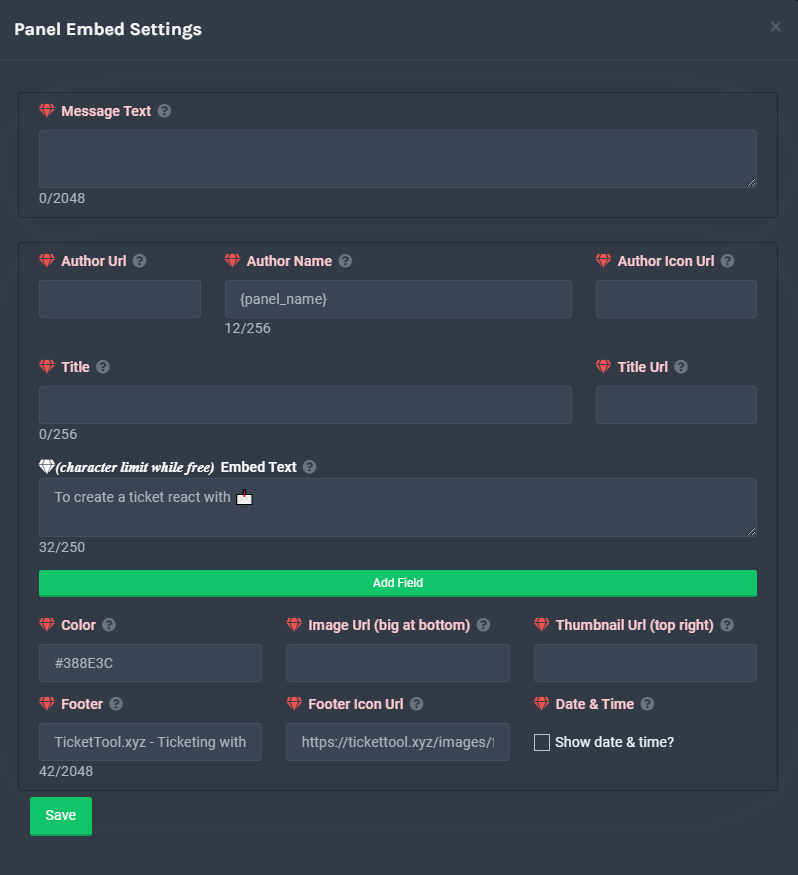
The panel message is where people react to make a ticket. To customize it head over to your Dashboard --> Panel Configs -> Settings -> Panel Options -> Edit Panel Message
 craggy geyser
jade topaz
**`To create a ticket react with 📩`** I'd like to correct the comment that says...
craggy geyser
jade topaz
**`To create a ticket react with 📩`** I'd like to correct the comment that says...
Here
jade topaz

 craggy geyser
You have to resend the panel after changing
 uncut wasp
bot down?
jade topaz
craggy geyser
You have to resend the panel after changing
Thank you. I'll go and test it.
iron nightBOT
Gave 1 Rep to Swift (current: #2 - 160)
desert summit
uncut wasp
bot down?
Was down today
craggy geyser
uncut wasp
bot down?
It was earlier but I hope it hasn't gone down again
humble sequoiaBOT
Pong! Latency is 292ms. API Latency is 82ms [-]
uncut wasp
alr
craggy geyser
Premium is fine
uncut wasp
thnks
jade topaz
Please turn on the reply function when you answer my question.
 slow oxide
probably a dumb question but if we move from the standard bot to the premium bot will the premium bot be able to handle all open tickets? or will those have to be closed/deleted manually
solid stream
slow oxide
probably a dumb question but if we move from the standard bot to the premium bot...
Hmm, with button this got a little more complicated, with reactions that was a yes.
with buttons.. no.
slow oxide
what about $ commands? will those work with both?
jade topaz
jade topaz
**`To create a ticket react with 📩`** I'd like to correct the comment that says...
It's settled. Thank you for your help @craggy geyser
iron nightBOT
@jade topaz :: You can't rep Swift#9871 for 50 minutes and 15 seconds. Try coming back later?
slow oxide
it seems so. i have a couple of stale tickets i can test with
craggy geyser
Correct. Commands will close tickets by the other bot
craggy geyser
slow oxide
probably a dumb question but if we move from the standard bot to the premium bot...
To add to this, any panel sent by the free bot won't make tickets wjth the premium bot. If you transfered to a multipanel you are fine but if you haven't done anything yet, you will need to send a new panel
slow oxide
good to know! we removed all our panels this morning when we started having issues so we shouldn't see issues there as we'll get new ones anyways
craggy geyser
It just comes down to buttons. One bot can't interact with buttons sent by the other bot
 small crystal
anyone still having this issue with premium bot?
 solid stream
small crystal
anyone still having this issue with premium bot?
solid stream
small crystal
anyone still having this issue with premium bot?
Does $debug show any problems?

 humble sequoiaBOT
Inviting and Enabling Premium Bot
The first thing you will need to do is invite the premium bot, an invite can be found here
Once the bot is in your server we will head to the dashboard and manage your server. When you are managing your server, you want to head into "Server Configs" then click the drop down menu under "Select the bot you would like to use on this server" then click "Ticket Tool#6207" and then save.
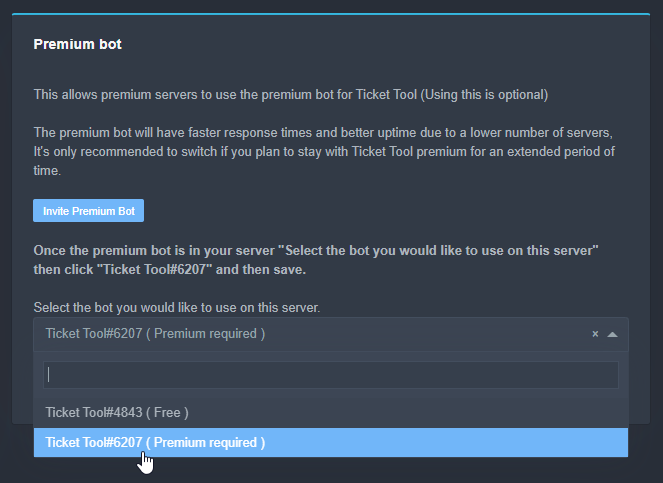 craggy geyser
Have you done the second step?
small crystal
ah sec
craggy geyser
If not, the premium bot thinks the free bot will handle it (and the dashboard is trying to send through the panel with a bot you have not got)
iron nightBOT
Gave 1 Rep to Swift (current: #2 - 161)
craggy geyser
No worries
mystic hound
won't thank i will ban tho
severe path
🤙
prime bridgeBOT
Successful bans: 1
Unsuccessful bans: 0
Reason: scam
Moderator: @mystic hound
 ancient iron
is the tickettool bot back
mystic hound
yep
slow oxide
IDK how to do the rep thing here but thanks Developer, Neptune, Swift, and Light for the help earlier. Not sure how our server got so jacked up, but quick help all around to get things resolved.
copper owl
No problem! always here to provide the help yall need 
 bitter turtle
How do i open up a ticket for someone, For example in my server everyone must create a ticket to apply for full access, i have people just sitting in the server not opening a ticket and was wondering if i can open a ticket for them and it will be there ticket
slow oxide
we use $new on our server. that way they're the ticket owner and get a transcript on close
if that's what you're trying to accomplish
jade topaz
slow oxide
we use `$new` on our server. that way they're the ticket owner and get a transcr...
Transcript is Premium only tho right?
mystic hound
both of the above suggestions work perfectly. (although id use $add instead of adding manually for the first method)
bitter turtle
slow oxide
we use `$new` on our server. that way they're the ticket owner and get a transcr...
i am trying to open it on their behalf.
slow oxide
that's what the new command does
copper owl
actually not entirely
yes the new command can open it on their behalf
but you need to use the person's ID
if you type $new with no ID, then it will open the ticket as if you clocked on the panel message
@bitter turtle you can open tickets on their behalf in 2 ways
the new command, explained above
Open a ticket yourself and use the $add <User ID> command
slow oxide
good point sorry for the misinformation
bitter turtle
copper owl
<@566355651207495680> you can open tickets on their behalf in 2 ways
the new co...
i tried that and the bot did nothing, is there a setting i need?
oh wait
let me try that
i was trying $new <user id>
copper owl
bitter turtle
i tried that and the bot did nothing, is there a setting i need?
make sure you have "Command Style Tickets" enabled
jade topaz
Hello, could anyone help i have been having this problem for about a month, when i try to open a ticket in a server it will show a blue box that does nothing when i click on it please help me.
 desert summit
jade topaz
Hello, could anyone help i have been having this problem for about a month, when...
desert summit
jade topaz
Hello, could anyone help i have been having this problem for about a month, when...
Maybe resend it?
Or is it here ?
desert summit
You have to have the newest Version of Discord
jade topaz
Oh why is my discord not needing to update then?
desert summit
I don’t know what about Your Discord 😅
desert summit
Did you doublecheck the updates ?
desert summit
Maybe reinstall Discord ?
humble sequoiaBOT
Update your discord App
Buttons are a relatively new addition to discord and don't work with some older versions of the app.
Please verify that you have the latest version of discord, by going to the app or play store.
_ _
Discord for the App Store
_ _
Discord for the Play Store
jade topaz
desert summit
Maybe reinstall Discord ?
It worked tysm <3
my top.gg vote still does not count
desert summit
jade topaz
It worked tysm <3
No problem ^^
desert summit
 twin iron
hey i need help, can do logs ticket on own channel
twin iron
hey i need help, can do logs ticket on own channel
$help category
humble sequoiaBOT
How to set the open category
To set a open category go to the Dashboard -> Panel Configs -> Settings -> Category Options -> Category Open
 twin iron
Where are that?
 desert summit
twin iron
Where are that?
desert summit
twin iron
Where are that?
Settings >> Category Options
twin iron
Okok
desert summit
:)
twin iron
sorry i don't look it
desert summit
No problem ^^
desert summit
What do you mean?
twin iron
E.g my channel name is ticket-logs and i want to bot send logs on that channel
e.g some open ticket or close
 twin iron
Goodnight
 neon kelp
 humble sequoiaBOT
-- moved to ticket --

 rough moth
 covert verge
Hi! Why is it doing this?
covert verge
Hi! Why is it doing this?
try logging out and logging back in
humble sequoiaBOT
Don't see your server in the dashboard?
You will possibly need to relog. Look below to see steps on how to relog.
How to relog the Dashboard.
First, you will need to go to the dashboard. Once your there, click on your avatar on the top right. after you clicked it, you will see button that says Logout. You must click that. Once you have logged out, you can log back in.
Note:
You need one of these 3 things to access the dashboard.
1. Server Owner (Level: 6)
2. Server Administrator (Level: 4)
3. Dashboard Role (Level: 2)
You can check your level using $level on your Discord Server
covert verge
rough moth
try logging out and logging back in
Okay !
 half abyss
Yo why won’t my ticket create ping anyone other than the person who opened it
rough moth
$help ping
humble sequoiaBOT
How to make Ticket Tool ping a role
To make ticket tool ping a role when a ticket is opened, go to the Dashboard -> Panel Configs -> Settings -> Ticket Options -> Ticket Message -> Message Text and do this:
{@Role name} This is case sensitive and the role must have @mentions enabled
rough moth
@half abyss check this out
iron nightBOT
Gave 1 Rep to UnknownUser (current: #9 - 116)
rough moth
np
 plush barn
He;p
eager cargo
plush barn
He;p
What's up?
 dire lion
@copper owl Hey sorry for the ping. So the issue last night must've been related because a few hours ago, I was able to post the bot in the channel
eager cargo
I'm pretty sure Neptune is asleep right now, anything I can help ya with?
(also please don't ping staff)
 weak portal
i need some help, when i try to manage the ticket bot in one of my servers it doesn't show up on the manage servers list
eager cargo
Have you tried re-logging into the dashboard?
humble sequoiaBOT
Don't see your server in the dashboard?
You will possibly need to relog. Look below to see steps on how to relog.
How to relog the Dashboard.
First, you will need to go to the dashboard. Once your there, click on your avatar on the top right. after you clicked it, you will see button that says Logout. You must click that. Once you have logged out, you can log back in.
Note:
You need one of these 3 things to access the dashboard.
1. Server Owner (Level: 6)
2. Server Administrator (Level: 4)
3. Dashboard Role (Level: 2)
You can check your level using $level on your Discord Server
weak portal
eager cargo
Have you tried re-logging into the dashboard?
yes i have
eager cargo
Can you run $level in your server and send a screenshot?
weak portal
what do you mean by that?
eager cargo
Type the $level command in your server and send a screenshot in this channel
weak portal
i just got it to work, i had to re invite the bot a couple times then re log
eager cargo
Alrighty
 vocal wharf
Hello I have a problem in my server that some people can see the Create ticket button but others can't. Is there something to help those that can't see the button see it
It's not a constant problem from my knowledge also
humble sequoiaBOT
Update your discord App
Buttons are a relatively new addition to discord and don't work with some older versions of the app.
Please verify that you have the latest version of discord, by going to the app or play store.
_ _
Discord for the App Store
_ _
Discord for the Play Store
severe path
@vocal wharf ^
vocal wharf
Thank you
 buoyant pulsar
does anyone know how to make a reactable ticket?
humble sequoiaBOT
-- moved to ticket --
jade topaz
If I did some changes in the panel message on dashboard, how to make it edit the original panel?
eager cargo
It doesn't auto update anymore, resend the panel to have it updated.
jade topaz
Ohk ty
eager cargo
Yup
 slender minnow
Where to suggest for the bot? The old suggestion was changed in the community server.
eager cargo
drop your suggestion and I'll pass it along for you
eager cargo
sounds good
 copper owl
@jade topaz are you sure the person who claimed them doesn't have their username as just "name"?
copper owl
hm, can you check your claiming options in your dashboard
like, can you check what the ticket should be renamed to
jade topaz
 humble sequoiaBOT
Supported Variables
{server.id} --> ID of the Server

[#🆘│community-support](/guild/509192800865353738/channel/776680605517742090/) = <#channel> --> Channel link of the current channel
{channel.name} --> Name of the current channel
{channel.id} --> ID of the current channel

{author} = <@user> --> Mention of the user triggering this message
{author.name} --> Name of the user triggering this message
{author.id} --> ID of the user triggering this message
{author.nickname} --> Nickname of the user triggering this message
{author.icon} --> Direct Url of the profile picture of the user triggering this message
{author.tag} --> 4 digit tag (discriminator) of the user triggering this message
{author.full} --> username + 4 digit discriminator of the user triggering this message

{panel.count} --> The current count number of the panel (Tickets only)
{panel.name} --> The name of the panel (Tickets Only)
{panel.ticketLimit} --> The current limit of the panel (Ticket Only)

{ticket} = <#channel> --> Channel mention of the ticket
{ticket.id} --> Channel ID of the ticket

{ticket.user} = <@user> --> User mention of the ticket user
{ticket.user.name} --> Name of the ticket user
{ticket.user.id} --> User ID of the ticket user
{ticket.user.nickname} --> Nickname of the ticket user
{ticket.user.icon} --> Direct Url of the profile picture of the ticket user
{ticket.user.tag} --> Tag / Discriminator of the ticket user
{ticket.user.full} --> Username + Discirimator of the ticket user```
Roles can be either
{@role name} or {role ID}try {author.name}
jade topaz
But it's default
copper owl
copper owl
try {author.name}
instead of {name}, but this and it should start putting the person's name instead of just {name}