#🆘│community-support
1 messages · Page 345 of 1
 jade topaz
 blazing zodiac
Ah okay thank you i was wondering im a mod for a 90k server and it wasnt closing thanks for the info
 iron nightBOT
Gave 1 Rep to Swift (current: #2 - 156)
jade topaz
:((((
 craggy geyser
You can't while it is down. We can give you an invite when it comes back up
jade topaz
Why is the bot offline?
jade topaz
craggy geyser
You can't while it is down. We can give you an invite when it comes back up
the bot is in my server but idk how to make a ticket tool on it
:('
craggy geyser
jade topaz
the bot is in my server but idk how to make a ticket tool on it
You can't while it is down
jade topaz
craggy geyser
You can't while it is down
oh ok
blazing zodiac
jade topaz
the bot is in my server but idk how to make a ticket tool on it
Use a youtube tutorial when it is up again
craggy geyser
#573205317870157855 is also instructions
jade topaz
blazing zodiac
Use a youtube tutorial when it is up again
i used but i didnt understand anything lol :,>
 flint coyote
🤦♀️ They responded. Why keep asking if it's down? LOL
 solar lance
When will the ticket bot back online?
flint coyote
As soon as they can get it back up
blazing zodiac
solar lance
When will the ticket bot back online?
When they can fix it
 mystic hound
Sigh
jade topaz
how do I get the premium role?
blazing zodiac
Hey light
jade topaz
I got premium
 scenic plinth
jade topaz
how do I get the premium role?
scenic plinth
jade topaz
how do I get the premium role?
$pc
 humble sequoiaBOT

How to get premium role
Until the automatic premium check is fixed run the command $debug on your server and send us the link in a ticket.
 flint coyote
😂
 feral sigil
hey
mystic hound
⚠️ Bot outage ⚠️
Ticket Tool primary bot is currently experiencing outages.
 The development team has located the issue and is working on a fix
refer to #📣│bot-news to stay updated
The channel will remain locked until the outage is resolved. You may use #🎫│make-a-ticket to reach our staff team if your issue is not related to the bot being offline
Premium bot should be functional now
 solid stream
I've located the cause and will have it online asap
Free bot starting up
eta 15 minutes unless we run into issues.
Long story short.. I pushed an update that broke everything and it took me a few minutes to locate and fix the issue.

 robust sandalBOT
solid stream
Long story short.. I pushed an update that broke everything and it took me a few...
robust sandalBOT
solid stream
Long story short.. I pushed an update that broke everything and it took me a few...
 BattleEye
Resumindo e concluindo.. Empurrei uma atualização que quebrou tudo e levei alguns minutos para localizar e resolver o problema.
 English (en) → Portuguese (Portugal) (pt-PT)
solid stream
English (en) → Portuguese (Portugal) (pt-PT)
solid stream
1/4 online
robust sandalBOT
solid stream
Long story short.. I pushed an update that broke everything and it took me a few...
BattleEye
Короче говоря.. Я выпустил обновление, которое сломало все, и мне потребовалось несколько минут, чтобы найти и исправить проблему.
English (en) → Russian (ru)
mystic hound
Done
 gaunt grove
by me is the bot ofline?
 modest orchid
Yep, bot's still down for me.
mystic hound
He said 3/4 online, meaning 1/4 is still down
 olive kiln
I can't create panels yet o assign channels
 fierce ginkgo
Prem Bot is showing 0 channels and categories for me. I'll just wait till everything is back online
Might need my role updated in here too lol
 still perch
Is the bot offline?
scenic plinth
Yes, scroll up.
scenic plinth
fierce ginkgo
Might need my role updated in here too lol
$pc
humble sequoiaBOT
How to get premium role
Until the automatic premium check is fixed run the command $debug on your server and send us the link in a ticket.
scenic plinth
Also we're looking into that issue, it could be that the bot is down however it could be with the bugged update.
 humble iris
Is the bot back? I see it online
scenic plinth
humble iris
Is the bot back? I see it online
For most servers yes, however there are still about 1/4 of the servers offline. Premium not included.
scenic plinth
olive kiln
I can't create panels yet o assign channels
Were looking into that, there are a few different factors it could be.
 wraith creek
ah at least it isnt just me
olive kiln
scenic plinth
Were looking into that, there are a few different factors it could be.
Thanks a lot, weel be pending
iron nightBOT
Gave 1 Rep to 𝐯𝐨𝐱𝐨𝐯 (current: #6 - 137)
 vagrant hollow
Somehow how I keep finding myself in the worst percentages lmao. I’m never the other 75% 🤣
mystic hound
1/4th our total capacity is still a substantial amount so don't be too disappointed lmao
solid stream
Fixed bug with dashboard not showing channels or categories
olive kiln
solid stream
Fixed bug with dashboard not showing channels or categories
Thanks guys
iron nightBOT
Gave 1 Rep to BattleEye (current: #11 - 80)
solid stream
Fix bug with pinned messages not being removed.
jade topaz
hello I have a problem with ticket tool it is on my server but I cannot access the dashboard of my server how do I do it?
thanks in advance
RabbiX
humble sequoiaBOT
Don't see your server in the dashboard?
You will possibly need to relog. Look below to see steps on how to relog.
How to relog the Dashboard.
First, you will need to go to the dashboard. Once your there, click on your avatar on the top right. after you clicked it, you will see button that says Logout. You must click that. Once you have logged out, you can log back in.
Note:
You need one of these 3 things to access the dashboard.
1. Server Owner (Level: 6)
2. Server Administrator (Level: 4)
3. Dashboard Role (Level: 2)
You can check your level using $level on your Discord Server
 arctic pagoda
Try relogging. ^
jade topaz
@arctic pagoda thank you for working
have a good day
iron nightBOT
Gave 1 Rep to markswrld (current: #35 - 4)
arctic pagoda
jade topaz
<@742367118628225034> thank you for working
have a good day
No problem. You too!
 dreamy sphinx
ok i have a problem. The Closed Tickets are not shown in my categorie where I want them to be. They stay in the open categorie
 tribal cedar
dreamy sphinx
ok i have a problem. The Closed Tickets are not shown in my categorie where I wa...
tribal cedar
dreamy sphinx
ok i have a problem. The Closed Tickets are not shown in my categorie where I wa...
Did you set the closed category?
dreamy sphinx
yes i did
but maybe i have to make a new panel
because the old one doesn´t work anymore since the problem
tribal cedar
Refresh the page and screen shot?
 limpid lark
Our Community got the same problem, everything is set up in the Dashboard, this issue just started to happen today. Never had this problem before.
tribal cedar
Hmm I haven't seen this happen myself
limpid lark
Yeah, i tried to re-assign the categories where the closed tickets get sent to, but no. They don't get moved. Very weird.
limpid lark
I was thinking about that.
tribal cedar
They don't reset?
dreamy sphinx
So i will try it to make a new pannel
 stiff gulch
Nope, tried it with another discord, same issue.
Everything else works perfectly fine, just doesn't move to the closed category.
limpid lark
We are using the Premium Bot. Just some additional info.
tribal cedar
Yea ticket this. In the least they can get your serverID and look
limpid lark
Alright. I will, thx!
tribal cedar
Nps sorry I couldn't be more help
limpid lark
No problem.
jade topaz
dreamy sphinx
ok i have a problem. The Closed Tickets are not shown in my categorie where I wa...
Having the same issue
tribal cedar
Battle will see it or another staffer
dreamy sphinx
Ok I set up a new pannel but it doesn´t work
So the closed tickets remains in the open category
 summer valve
tickets are not being moved to the appropriate channel when we close our tickets. Do we have to re create our panels to fix this?
summer valve
dreamy sphinx
So the closed tickets remains in the open category
im having this same issue
arctic pagoda
Open a ticket, they'll ask you for the server ID so they can look what is causing the problem.
summer valve
arctic pagoda
Open a ticket, they'll ask you for the server ID so they can look what is causin...
where do we do this
arctic pagoda
limpid lark
Yeah, sorry about that. Lol.
tribal cedar
Tyvm
dreamy sphinx
ok the category thing works again
arctic pagoda
Glad to hear that
solid stream
 fierce flower
how can i make a auto response when someone opens a ticket
humble sequoiaBOT
-- moved to ticket --
jade topaz
how do i make a role to acess all current and upcoming tickets
 safe prairie
$help support
humble sequoiaBOT
How to let support team see into a ticket
About support roles
A support role lets your support team see into tickets with out having to add them manually to each and every ticket.
You can add as many support roles as you like per panel.
NOTE that the way discord works all admins can see into tickets regardless of this.
How to set a support role
To set a Support role go to the Dashboard -> Panel Configs -> Settings -> General Options -> Support Team Roles.

NOTE that the support role will not be able to see into tickets that are already created..
safe prairie
@jade topaz
 leaden rose
Is it possible to disable this ticket created message?
 solid stream
leaden rose
Is it possible to disable this ticket created message?
solid stream
leaden rose
Is it possible to disable this ticket created message?
no, that's required by discord for buttons
but only the user who clicks it will see the message and it will clear when you restart discord. or press Dismiss
leaden rose
ok thank you
 short igloo
Maybe this is a dumb question... But I LOVE your animations that you included under bot information.
How did you do that?
 copper owl
short igloo
Maybe this is a dumb question... But I LOVE your animations that you included un...
copper owl
short igloo
Maybe this is a dumb question... But I LOVE your animations that you included un...
it's basically a gif, im not exactly sure how we did that as I wasnt the one to do so, but you need to create a gif and insert it in the appropriate place in your settings
short igloo
copper owl
it's basically a gif, im not exactly sure how we did that as I wasnt the one to ...
Thank you, Neptune! That's super helpful! 😄
iron nightBOT
Gave 1 Rep to Neptune (current: #10 - 87)
copper owl
you're most welcome
 pliant sinew
Quick question ... why would a user be able to click on the ticket button, but get the message "You don't have permissions to use this" when they actually do have permissions to do reactions? Is it a new one now that there are buttons?
solid stream
Blacklist would be the normal cause of this.
Did you set any blacklist roles on the dashboard?
Otherwise you will need to check your button permissions
pliant sinew
No, there is no blacklist. Button permissions?
solid stream
 flint coyote
I get people saying that sometimes when they don't understand how to do a ticket. Are you certain that they are trying to click the button and not trying to type in the channel?
I have my ticket channels set so that they cannot type in them and can only select to open a ticket.
solid stream
That actually makes alot of sense
especially if they need to update discord so they can see the buttons
pliant sinew
Still stymied. The buttons permissions appear okay, and the button appears, but the buttons still prompts the You Don't Have Permissions thing. Any other ideas?
solid stream
please get a screenshot of the error
wraith creek
How do I make closed tickets go to a separate group?
copper owl
$help category
humble sequoiaBOT
How to set the open category
To set a open category go to the Dashboard -> Panel Configs -> Settings -> Category Options -> Category Open
 wraith creek
copper owl
^^
wraith creek
copper owl
^^
An thanks 🙂
iron nightBOT
Gave 1 Rep to Neptune (current: #10 - 88)
copper owl
Np
solid stream
The bot doesn't modify the category’s
copper owl
not the categories but channels the bot creates
it wont modify the category
but make sure you give ticket tool all the necessary permissions in the category so it can function normally
wraith creek
So if I change perms so you can’t see them will that effect it?
copper owl
wraith creek
So if I change perms so you can’t see them will that effect it?
like, if you restrict the permissions for people to see the channels?
wraith creek
No for the category so if they have no open ticket they can’t see it
copper owl
yeah it should work
wraith creek
Okay 👍
copper owl
copper owl
but make sure you give ticket tool all the necessary permissions in the category...
the most important thing is this
can you elaborate?
what do you mean it's not working?
$invite
humble sequoiaBOT
Ticket Tool Invite & Support
humble sequoiaBOT
Don't see your server in the dashboard?
You will possibly need to relog. Look below to see steps on how to relog.
How to relog the Dashboard.
First, you will need to go to the dashboard. Once your there, click on your avatar on the top right. after you clicked it, you will see button that says Logout. You must click that. Once you have logged out, you can log back in.
Note:
You need one of these 3 things to access the dashboard.
1. Server Owner (Level: 6)
2. Server Administrator (Level: 4)
3. Dashboard Role (Level: 2)
You can check your level using $level on your Discord Server
copper owl
try these steps ^^
 rancid bear
solid stream
eta 15 minutes unless we run into issues.
rancid bear
solid stream
eta 15 minutes unless we run into issues.
It just came back on my server just now. I swear I saw it just pop in now and you said 5 hours and 45 minutes ago it'd be back in 15 minutes. Am I losing it and just missed it and its been back awhile?
solid stream
rancid bear
It just came back on my server just now. I swear I saw it just pop in now and yo...
The bots been online for the last few hours
It was back 15 minutes after
maybe 20 minutes
solid stream
It might have, bot flickers sometimes
rancid bear
Okie dokie. Thank you!
solid stream
perfect
Found a fix
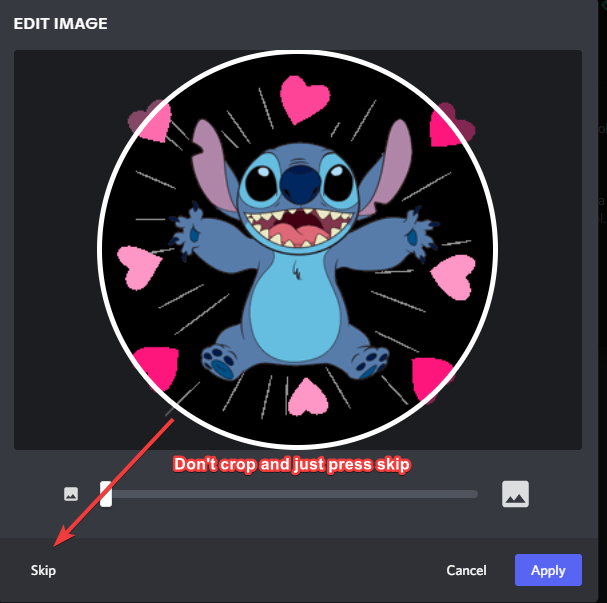
If you're trying to have a transparent image as your avatar this might help you.
(Fix for the transparent part of the image becoming white)
jade topaz
i have invited the bot onto my server and i have administrator perms but it doesnt pop up on the manage servers dashboard list why wont it pop up?
 atomic barn
log in and log out of the dashboard is something you can try
atomic barn
Yw :)
 proven void
can I issue tickets to different panel configs with command style tickets?
Or is it solely the first panel only?
 iron path
Is it possible to put a discord emoji in the Embed Description of the Panel Embed Settings? for example I'm trying to use this emoji
jade topaz

 torn talon
yes so it appears under
 lofty turret
iron path
Is it possible to put a discord emoji in the Embed Description of the Panel Embe...
lofty turret
iron path
Is it possible to put a discord emoji in the Embed Description of the Panel Embe...
windows button + period i believe
 rotund kite
torn talon
yes so it appears under
rotund kite
torn talon
yes so it appears under
$help category
humble sequoiaBOT
How to set the open category
To set a open category go to the Dashboard -> Panel Configs -> Settings -> Category Options -> Category Open
rotund kite
iron path
Is it possible to put a discord emoji in the Embed Description of the Panel Embe...
Yes, use the $id <emoji> command and copy and paste what the bot responds with, just the top bit, like this:
$id 
humble sequoiaBOT
<:TicketTool:557318988783419453>
rotund kite
You would copy 
iron path
Woah! Thank you! @rotund kite
iron nightBOT
Gave 1 Rep to Logik™ (current: #21 - 17)
rotund kite
np
 thin sorrel
where do i get my premium codes
 red igloo
Hi
 pale hawk
Hey, I need help setting up the bot, I'm confused because when ever I use the command $setup nothing happens. Can I get some help?
proven void
thin sorrel
where do i get my premium codes
use <prefix>vote redeem to get the code then take that back over to your dashboard and plug it into form via the 'redeem code' button.
assuming of course you have votes to do that. otherwise, you should have gotten something in an email after purchase
 molten radish
how do fix this

 unique anvil
Log out and back in
pale hawk
Lol
 dire vapor
How to i make a transcript channel so when i close a ticket the transcript automatically saves to that channel
atomic barn
It goes into a category, not a channel I think.
Somewhere under category options you can choose to send closed tickets to a category
dire vapor
atomic barn
It goes into a category, not a channel I think.
Somewhere under category options...
Like you know when you close a ticket you have the option to have the bot dm a transcript to you how do i make it so i close it fully but it sends a transcript
atomic barn
Oh uh
I only know the basics lol, recently finished building my panels to my server.
I'd wait for a support team member to answer your question as I'm not sure haha. Sorry!
dire vapor
atomic barn
Oh uh
No your good im not to good when it comes to ticket bots
dire vapor
Ok
lofty turret
dire vapor
How to i make a transcript channel so when i close a ticket the transcript autom...
You have to have premium to have TT automatically save your ticket’s transcripts. But basically, make a transcript channel, and in each panels settings will be “logging options,” and set that channel for transcripts/logs.
I hope that makes sense
ex.

 prime bridgeBOT
 Successful bans:
 1
 Unsuccessful bans:
 0
 Reason: scam
 Moderator: @mystic hound
 lunar sequoia
help i need a inv back to boss services because i accidentaly left pls help or the owner of it
atomic barn
eh?
jade topaz
Anyone know how I can give my discord mod access to the ticket tool settings on the dashboard?
torn talon
HEllo why can the member close the ticket ?
 severe path
torn talon
HEllo why can the member close the ticket ?
severe path
torn talon
HEllo why can the member close the ticket ?
Because it is activated by default. You have to set it to Support Team Only in the dashboard


 sharp hound
Hello,
Is it possible that ticket tool (premium) gives a role when a ticket is opend?
severe path

sharp hound
Thnx
 keen steeple
How to add custom questions? For example. I make a ticket once the ticket is open the user will get asked to react with a certain emoji for help, report, etc. and after that he or she will get ask questions
From the bot itself
severe path
keen steeple
How to add custom questions? For example. I make a ticket once the ticket is ope...
This function does not exist, you can only give the user a choice of what they want before creating the ticket:
humble sequoiaBOT
Multipanels are a premium feature  that allow for a single panel with multiple buttons to open different tickets.
How to create a Multipanel
Premium users can combine multiple panels into one multipanel.
First, find the IDs of each panel you wish to combine. You can find them in your Panel Configs in the Dashboard
Next, send the multipanel to a channel using $panel [id1] [id2] {id3} ....
e.g. $panel 1 2 4 17 35 to combine panels 1, 2, 4, 17 and 35.
Up to 25 panels may be combined.
 keen steeple
severe path
This function does not exist, you can only give the user a choice of what they w...
keen steeple
severe path
This function does not exist, you can only give the user a choice of what they w...
Its premium 😩
severe path
Yes 
keen steeple
How did a server that I am in which where I saw that feture uses it with the free version
severe path
 slate silo
i mean the bot isnt responding to any commands
slate silo
i mean the bot isnt responding to any commands
Have you activated the bot as well?
 keen steeple
How
severe path
keen steeple
How did a server that I am in which where I saw that feture uses it with the fre...
idk. Do you have a screenshot of it?
keen steeple
keen steeple
How did a server that I am in which where I saw that feture uses it with the fre...
Nvm lmao They custom coded a bot that asks the questions :/
severe path

keen steeple
Imma custom code my own them lmao thx for helping 😄
severe path

 radiant shoal
.
lol sorry, just had to check my user id
does the premium bot automatically take the settings from the free one? I see there is the config backup stuff hence why I am asking
severe path

radiant shoal

copper owl
please don't ping support members
if you want immediate support, go to #🎫│make-a-ticket
$invite
humble sequoiaBOT
Ticket Tool Invite & Support
copper owl
use the third link
humble sequoiaBOT
-- moved to ticket --
jade topaz
,vote redeem
proven void
mutlipanel logging, transcripts and other settings depend on the target panel and are not set on the springboard panel correct?
craggy geyser
Correct
Once the ticket is created, it is as if it was created from the ordinary panel, multipannels are purely a display thing for the original panel
solid stream
Banned..
lunar sequoia
guys i wanna buy something but i dont have boss services
because i accdentaly lost it and cant join again
jade topaz
guys, when creating a ticket, i got to a channel named ticket-0335, how do i proceed?, any information would be helpful
lofty turret
Can you elaborate?
jade topaz
am i able to make a panel that takes 2 reactions? ex: 🍕 opens a ticket for XXX +  opens a ticket for XXX
but the user is only able to choose between one or the other?
Please ping me if someone has an answer, thanks
humble sequoiaBOT
Multipanels are a premium feature that allow for a single panel with multiple buttons to open different tickets.
How to create a Multipanel
Premium users can combine multiple panels into one multipanel.
First, find the IDs of each panel you wish to combine. You can find them in your Panel Configs in the Dashboard
Next, send the multipanel to a channel using $panel [id1] [id2] {id3} ....
e.g. $panel 1 2 4 17 35 to combine panels 1, 2, 4, 17 and 35.
Up to 25 panels may be combined.
rotund kite
@jade topaz ^
jade topaz
Thanks @rotund kite
iron nightBOT
Gave 1 Rep to Logik™ (current: #21 - 18)
jade topaz
Alguien sabe en que plataforma se tiene que subir la imagen que se quiera poner en el formato del ticket?
Does anyone know on which platform the image that you want to put in the ticket format has to be uploaded?
 stoic hornet
is there any way to recover ticket trsanscript
craggy geyser
jade topaz
Does anyone know on which platform the image that you want to put in the ticket ...
Any. As long as the link is directly to an image not to the page (so ends .img for example)
 lean herald
How do I fix??
 unique anvil
Either delete some of the closed tickets or make a new category for them and change your closed tickets category to that
lean herald
Ok
 daring turtle
members are able to create threads in tickets. How to fix it?
humble sequoiaBOT
-- moved to ticket --
mystic hound
@sly garnet in regards to your review, you made a ticket, did not state your question and began breaking our rules ( spam pinging staff). All of that and you got a response within 5 minutes
And on top of that you're demanding our team to do your work for you
craggy geyser
@jade topaz, from your review, would I be correct that you can't see buttons in #🎫│make-a-ticket?
If so, try following this
humble sequoiaBOT
Update your discord App
Buttons are a relatively new addition to discord and don't work with some older versions of the app.
Please verify that you have the latest version of discord, by going to the app or play store.
_ _
Discord for the App Store
_ _
Discord for the Play Store
 subtle spade
How to mention staff in the ticket message?
severe path
$help ping
humble sequoiaBOT
How to make Ticket Tool ping a role
To make ticket tool ping a role when a ticket is opened, go to the Dashboard -> Panel Configs -> Settings -> Ticket Options -> Ticket Message -> Message Text and do this:
{@Role name} This is case sensitive and the role must have @mentions enabled
 humble sequoiaBOT
Help Options
$help commands - Information on commands
$help setup - Information on bot setup
$help faq - Frequently asked questions
Setting up Ticket Tool
Visit the docs for setup info
General Setup
stoic hornet
how to enable tickettool premium
humble sequoiaBOT
Ticket Tool Premium
Get premium at https://tickettool.xyz/premium
Manage your subscriptions at https://tickettool.xyz/subscriptions
Why Premium?
Premium lets you customize the bot just how you want it. It also helps keep the bot running.
arctic pagoda
stoic hornet
how to enable tickettool premium
^ Here you are
iron nightBOT
Gave 1 Rep to markswrld (current: #32 - 5)
arctic pagoda
You're welcome
stoic hornet
arctic pagoda
You're welcome
there's another problem, can u help me with it?
i enabled the free trial but idk how to enable it

 runic river
is this a general problem? had it multiple times in the last days
 humble sequoiaBOT
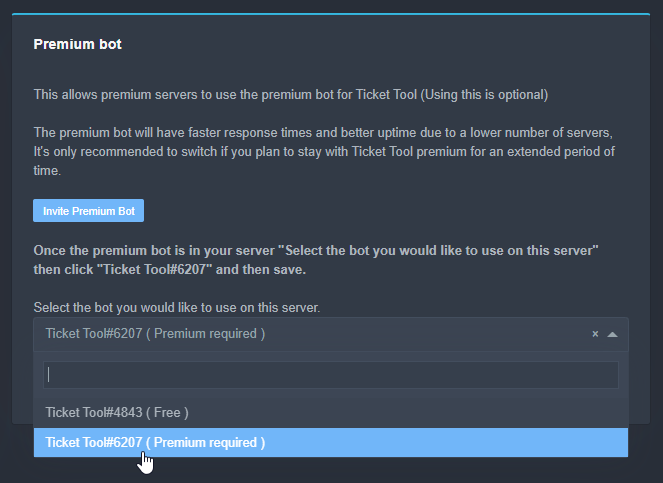
Inviting and Enabling Premium Bot
The first thing you will need to do is invite the premium bot, an invite can be found here
Once the bot is in your server we will head to the dashboard and manage your server. When you are managing your server, you want to head into "Server Configs" then click the drop down menu under "Select the bot you would like to use on this server" then click "Ticket Tool#6207" and then save.
 stoic hornet
thanks @arctic pagoda
iron nightBOT
Gave 1 Rep to markswrld (current: #29 - 6)
arctic pagoda
You're welcome.
arctic pagoda
runic river
is this a general problem? had it multiple times in the last days
Is your Discord app up to date?
runic river
yes
arctic pagoda
Are you an iOS user?
jade topaz
Is there a way to make it so that when they pull out a ticket the user can't ping the staff?
arctic pagoda
jade topaz
Is there a way to make it so that when they pull out a ticket the user can't pin...
No
 subtle spade
Is button with premium?


 exotic plume
How do I limit a user to open a ticket only once at a time? I have some issues about users accidentally pressing the reactions more than once and creating multiple tickets.
unique anvil
 maiden elk
Blue is Orange? wut.
maiden elk
Blue is Orange? wut.
thats most likely a theme applied to discord, they don't have orange buttons available
unique anvil
exotic plume
How do I limit a user to open a ticket only once at a time? I have some issues a...
panel config -> general options -> Ticket Limit
exotic plume
unique anvil
panel config -> general options -> Ticket Limit
Thanks!!
iron nightBOT
Gave 1 Rep to TheShadow (current: #29 - 6)
flint coyote
jade topaz
Is there a way to make it so that when they pull out a ticket the user can't pin...
Through your discord server, you can make the staff roles unpingable but it would be for the whole server.
jade topaz
@shadow axle yo
Also, I cant type in #📈│reviews so @atomic solstice Was great! He/she knew what they were talking about, and were super patient! Thank you! ❤️
iron nightBOT
@jade topaz :: You can't rep Satisfy#4339 for 54 minutes and 41 seconds. Try coming back later?
 eager cargo
There's a cooldown in #📈│reviews that's why & the message by @iron night is just saying you already gave Satisfy a reputation point earlier.
jade topaz
eager cargo
There's a cooldown in <#509775046848282677> that's why & the message by <@!20425...
oh-
 shadow axle
jade topaz
<@!716281078586802226> yo
shadow axle
jade topaz
<@!716281078586802226> yo
?
mystic hound
It's two seconds
 marsh pollen
oh yea

 humble sequoiaBOT
Claiming Options
Claiming allows you to change the ticket name, category and permissions. To use it you have to enable it first on your Dashboard > Panel Configs > Claiming Options.

 Note: This is a premium feature
eager cargo
Note: This is a premium feature
eager cargo
Enable it in your panel settings
 vapid pecan
@jade topaz
jade topaz
ok
eager cargo
Please don't ping random people and or support members, you can have your transcripts auto save when closed in logging options in your panel settings
It's a premium only feature by the way
vapid pecan
انقلع
robust sandalBOT
vapid pecan
انقلع
 ADHAM
ADHAM
To take off
Arabic (ar) → English (en)
eager cargo
Can you elaborate?
vapid pecan
ايه؟
robust sandalBOT
vapid pecan
ايه؟
ADHAM
What?
Arabic (ar) → English (en)
eager cargo
Can you explain more on what you mean*
 azure sail
how do i change the reaction on the panels thank you
never mind found it
wait i cant make a custom button?
like an emoji from my server
i needed to press the * my bad
lol
flint coyote
Awesome. lol
azure sail
my support team are saying once they close the ticket they cant see the delete option
the ticket disappears anyway for me to fix that
 flint crane
hello i have a question i have premium from the ticket bot but how do i change this color green to blue
 flint coyote
I don't think you can
rotund kite
$colo
humble sequoiaBOT
How do I pick the 'Color' I put in a Colour Name, but it doesn't work?
The 'Color' for your Embed/Ticket message has to be in 'HEX' format.
Where do I get the 'HEX' of my color(s)? You can go to any 'HEX' color picker website, then you pick the color you want, and copy and paste the 'HEX' into the 'Color' box, and then you're done, here's a website if you want to go straight away: https://htmlcolorcodes.com/
 rotund kite
@flint crane
flint crane
haaa thxxxx bro
rotund kite
np
 dusty panther

 terse olive
 foggy bobcat
anyone know how to make it so when you react to open a ticket the reaction gets deleted?
 rough moth
foggy bobcat
anyone know how to make it so when you react to open a ticket the reaction gets ...
rough moth
foggy bobcat
anyone know how to make it so when you react to open a ticket the reaction gets ...
Use buttons, so resend your panel
 lilac hound
@rough moth can u help
rough moth
lilac hound
<@!813459470168227851> can u help
What’s up, and also don’t ping
lilac hound
ok sry i need help it says give it permition to mannge channel but i did
and than i cant open a ticket in my server
rough moth
It needs manage channel permissions in the category the ticket opens
But if that sounds too complicated u can always give it admin perms, it solves everything
rough moth
Go to the bot role called ticket tool
Go to permissions, scroll all the way down and give it administrator
Lmk if that works
rough moth
Np
scenic plinth
@eternal pelican This isn't possible. You have to individually do it with every ticket.
atomic barn
4 messages in reviews again lol, honestly do ppl not read the top part of the channel?
jade topaz
Hey, i have a multipanel that im trying to use but when testing it says members dont have permission to use
scenic plinth
@dusty panther @jade topaz
Since both of you have the same issue, make sure you do not have the member role set as a blacklist role.
Alternatively, make sure that the create ticket button is not set to support team only
jade topaz
will try looking into that noq
where do i check black list
nvm found it, that was the problem
Hi, i have a new problem now... when tickets are created they show up publicly, how do i change this to private?
scenic plinth
jade topaz
Hi, i have a new problem now... when tickets are created they show up publicly, ...
Permission Options --> Everyone Open Permissions ---> Red x for read messages.
Nobody click the links to this please
atomic barn
Yikes, more nitro stuff in reviews
 thick steeple
Is there a way to see the total number of tickets made on a server?
eager cargo
if you go into your panel settings then head to general options you can look at your ticket count and that will be accurate if you haven’t reset it
If you just want the open ticket count just look in the sever info tab on the dashboard
 prisma ocean
Currently testing the bot and its working great except on my phone which I'm using another account to test with, I would use commands but I've got 4 different panels and commands only create one based upon the first panel. On my phone the embed appears but a button doesn't and adding a reaction doesn't work either.
humble sequoiaBOT
Update your discord App
Buttons are a relatively new addition to discord and don't work with some older versions of the app.
Please verify that you have the latest version of discord, by going to the app or play store.
_ _
Discord for the App Store
_ _
Discord for the Play Store
scenic plinth
Attempt that
 wheat epoch
Hello how do I change the prefix for the bot?
copper owl
wheat epoch
Hello how do I change the prefix for the bot?
go to your server configs
dashboard - > Server Configs, - > prefix
jade topaz
Do you know how to put the number of tickets that are open in that space?

next to the emoji
copper owl
jade topaz
Bot error in dashboard
can you send a picture of the error
 lime quartz
jade topaz
Do you know how to put the number of tickets that are open in that space?
lime quartz
jade topaz
Do you know how to put the number of tickets that are open in that space?
that is available on the dashboard, not sure if we can put that number on the panel
copper owl
{panel.count} shows how many tickets are opened using a specific panel
so thats one good way of keeping track of things
 zenith lantern
So I'm setting up 2 contact channels in my gaming community. We host weekend raiding events. Is it possible to create 1 for contact staff (Mods & Admins) and edit the message text to ping Mods & Admins
but have a second one with a different Message Text pinging my Event Helper roles?
humble sequoiaBOT
How to let support team see into a ticket
About support roles
A support role lets your support team see into tickets with out having to add them manually to each and every ticket.
You can add as many support roles as you like per panel.
NOTE that the way discord works all admins can see into tickets regardless of this.
How to set a support role
To set a Support role go to the Dashboard -> Panel Configs -> Settings -> General Options -> Support Team Roles.
NOTE that the support role will not be able to see into tickets that are already created..
zenith lantern
Right but the message text says the same between both panels
humble sequoiaBOT
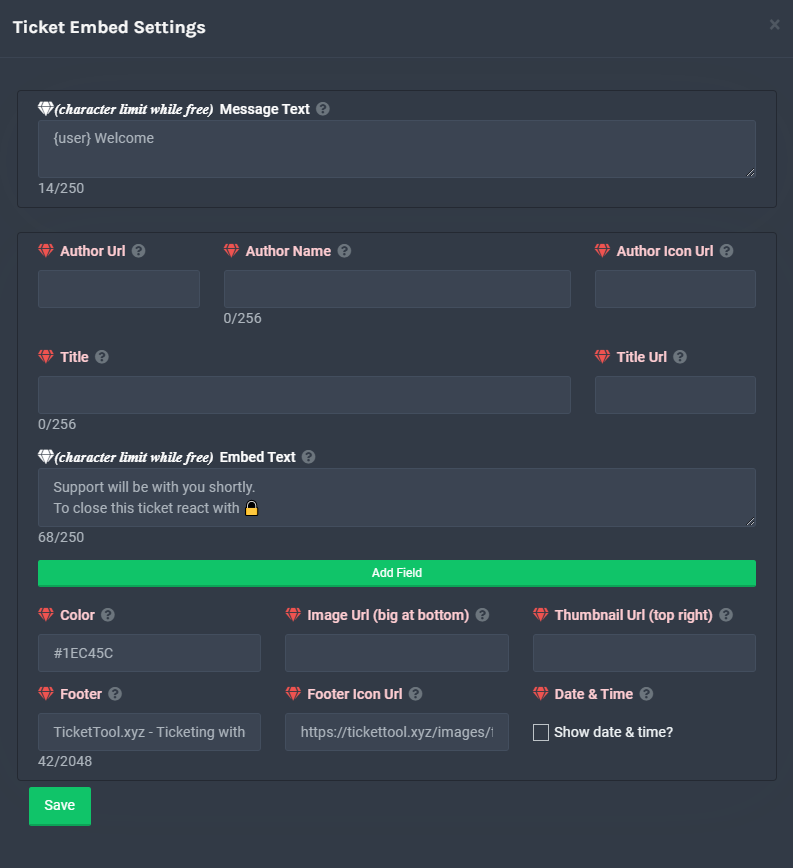
**Ticket Message**
The Ticket Message is the first message sent by the bot in a new ticket. To customise it head over to your Dashboard -> Panel Configs -> Settings -> Ticket Options -> Edit Ticket Message
 copper owl
zenith lantern
So I'm setting up 2 contact channels in my gaming community. We host weekend rai...
copper owl
zenith lantern
So I'm setting up 2 contact channels in my gaming community. We host weekend rai...
also may i ask what you mean by raiding events?
zenith lantern
Raiding, like... End game content in MMOs
copper owl
ah okay
zenith lantern
I tried editing each support panel in the ticket embed settings
and it's the same message, it spans both
copper owl
did you press save before leaving the settings?
copper owl
Hopefully it does
if not, I'll have to ask you to elaborate a tiny bit on what you want to do with the panels
zenith lantern
Okay it worked now!! Refreshing worked and I was able to edit the second panels welcome message !
Thank you so much
copper owl
Great, anything else i can assist with?
zenith lantern
Nope I got it now 😄
copper owl
alrighty
jade topaz
 eager cargo
Please don't ping staff
humble sequoiaBOT
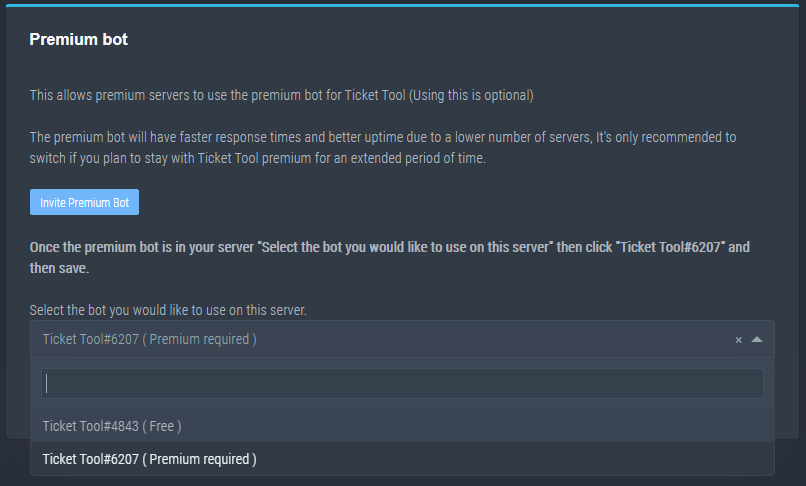
How to disable the premium bot
To disable the premium bot you will have to go to the Dashboard -> Server Configs -> Premium bot -> And on the right-hand side select the primary free bot in the drop down menu.
Premium features will still work on the normal bot.
TicketTool.xyz - Ticketing without clutter
 tranquil marsh
Ñ
 haughty musk
Hy
I need some help
So I want to make it so only three roles can see the tickets
How can I make it?
Now just two of the roles can see it
 desert summit
haughty musk
So I want to make it so only three roles can see the tickets
desert summit
haughty musk
So I want to make it so only three roles can see the tickets
How do you mean? So two/three Stuff Roles or how?
haughty musk
There are three staff roles
Some with more power some with less
And the least powerful one
The helper one
Can't see the tickets
scenic plinth
$help support
humble sequoiaBOT
How to let support team see into a ticket
About support roles
A support role lets your support team see into tickets with out having to add them manually to each and every ticket.
You can add as many support roles as you like per panel.
NOTE that the way discord works all admins can see into tickets regardless of this.
How to set a support role
To set a Support role go to the Dashboard -> Panel Configs -> Settings -> General Options -> Support Team Roles.
NOTE that the support role will not be able to see into tickets that are already created..
 crisp dome
How to setup the ticket to ping a role?
I know panel config -- settings -- ticket message / edit ticket message
but what variable do I use to ping a role -- I have tried {@role name} but it doesnt work
scenic plinth
Nobody click this please
scenic plinth
crisp dome
How to setup the ticket to ping a role?
I know panel config -- settings -- ticke...
$help ping
humble sequoiaBOT
How to make Ticket Tool ping a role
To make ticket tool ping a role when a ticket is opened, go to the Dashboard -> Panel Configs -> Settings -> Ticket Options -> Ticket Message -> Message Text and do this:
{@Role name} This is case sensitive and the role must have @mentions enabled
haughty musk
Thanks for the help
desert summit
 karmic hamlet
I need help
karmic hamlet
I need help
Hey explain ^^
karmic hamlet
I wanted to know how to put when a ticket is opened, put it like this [Kicked-0000]
desert summit
So you need premium for this ig and Look in Your dms
jade topaz
Can someone help me set it up so the tickets go to one channel and only mods can close them
 ancient bronze
Is there a way to make tickets close automatically if a member pings a role for example?
 light radish
question what does this mean?
 jade topaz
Hello i need help with the ticket bot on my server
humble sequoiaBOT
-- moved to ticket --
scenic plinth
jade topaz
Can someone help me set it up so the tickets go to one channel and only mods c...
Not possible to send them to a channel, but you can do a category. As for only mods can close, visit
Command settings ---> Close ---> Make this support team only
Button Options ---> Close Ticket ---> Make this support team only
Visit the documents for help, they are linked below.
humble sequoiaBOT
scenic plinth
ancient bronze
Is there a way to make tickets close automatically if a member pings a role for ...
Not to ping a role, but there is a premium option for allowing it to close automatically when users leave a server.
ancient bronze
Not what I need but thanks
 green radish
how do we set ticket tool up to ping support roles when someone openes a ticket
severe path
$help ping
humble sequoiaBOT
How to make Ticket Tool ping a role
To make ticket tool ping a role when a ticket is opened, go to the Dashboard -> Panel Configs -> Settings -> Ticket Options -> Ticket Message -> Message Text and do this:
{@Role name} This is case sensitive and the role must have @mentions enabled
jade topaz
Hello can anyone help me? I’m trying to create a ticket thing to add to my server but it keeps saying “Failed to send, tickettool doesn’t have permission to view or send in this channel” but I made sure the role was added, and I made sure the role on my channel was able to send messages in the channel?
copper owl
does ticket tool have those perms tho
Did you make sure ticket tool has the role, and that there's no other role overriding ticket tool's?
jade topaz
Yes, under my server when I clicked “add roles” I went to permissions and made sure the stuff was on green check mark
flint coyote
I don't know if it's recommended, but I always give ticket tool bot the admin perms.
copper owl
flint coyote
I don't know if it's recommended, but I always give ticket tool bot the admin pe...
i dont recommend giving any bot admin perms
jade topaz
I have it under admin.. it’s the only member under admin
copper owl
jade topaz
Yes, under my server when I clicked “add roles” I went to permissions and made s...
can you send an image of the permissions list and the permissions ticket tool has
jade topaz
Only other role overriding it is my role.
flint coyote
Lol I didn't think it was recommended. It's just been a quick way to fix some issues. lol
jade topaz
copper owl
can you send an image of the permissions list and the permissions ticket tool ha...
Here on in DM’s?
flint coyote
Why is it not recommended?
copper owl
jade topaz
Here on in DM’s?
Here
copper owl
flint coyote
Why is it not recommended?
Usually you never know what's might happen. Obviously i trust this bot and everything, but if someone or something doesn't require admin, don't give it those perms
jade topaz
 copper owl
TT functions perfectly without admin, so there's no real need to give it those perms, same with any other bot on discord
flint coyote
Thanks lol
copper owl
jade topaz
That's not what I asked for
flint coyote
I'll change them
copper owl
A screenshot of the permissions in the channel you want to send the panel to @jade topaz
jade topaz
copper owl
That's not what I asked for
I know I sent it by mistake I’m on my phone trying to do everything one second
copper owl
Check the permission in "prices"
copper owl
jade topaz
I know I sent it by mistake I’m on my phone trying to do everything one second
Ah, no worries, take your time
jade topaz
copper owl
Check the permission in "prices"
Nep can I hit you up when I go home? It’s hard on my phone
copper owl
you can open a ticket in #🎫│make-a-ticket when you're home, or you can ask again here
unfortunately i keep my dms closed for personal reasons so you wouldn't be able to hit me up
jade topaz
I meant here lol
copper owl
well it is against the rules to ping support members in here so i dont suggest it
jade topaz
🤦🏽 nvm misunderstanding lol but thank you I’ll make a ticket thanks for the help nep
is there a way to make it so i get pinged if one of my members creates a ticket?
copper owl
jade topaz
is there a way to make it so i get pinged if one of my members creates a ticket?
yeah! do you want it to ping specifically you?
or a role?
jade topaz
just one role
copper owl
$help ping
humble sequoiaBOT
How to make Ticket Tool ping a role
To make ticket tool ping a role when a ticket is opened, go to the Dashboard -> Panel Configs -> Settings -> Ticket Options -> Ticket Message -> Message Text and do this:
{@Role name} This is case sensitive and the role must have @mentions enabled
jade topaz
is it premium only?
jade topaz
oh alright ty
copper owl
You're welcome
jade topaz
thanks @copper owl
iron nightBOT
Gave 1 Rep to Neptune (current: #10 - 92)
jade topaz
copper owl
You're welcome
when i type in @(role) it won't correct to a ping
does it have to be in brackets?
copper owl
yes
 crimson gate
Hello can I know how to buy ticket tool premium for credits
copper owl
@jade topaz what's the role name?
jade topaz
@tickets
copper owl
crimson gate
Hello can I know how to buy ticket tool premium for credits
what do you mean by "credits"?
crimson gate
Pro bot credits
copper owl
jade topaz
@tickets
{@tickets}
if there's any capital letters, then you have to include them
jade topaz
yeah i did that but somehow my ticket team isn't getting notified
copper owl
crimson gate
Pro bot credits
no you cannot buy premium using those
crimson gate
copper owl
no you cannot buy premium using those
Only dollars?
copper owl
jade topaz
yeah i did that but somehow my ticket team isn't getting notified
can you make sure ticket tool has the "Mention @/everyone, @/here, and all roles" permission?
crimson gate
I have premium and i dont know how to use it
jade topaz
it has all permissions
copper owl
crimson gate
Only dollars?
Either paypal, bitcoin or visa
copper owl
jade topaz
it has all permissions
can you send a screenshot of what comes up with a ticket is created
jade topaz
 copper owl
you put the ping in the wrong place
jade topaz
oh...
copper owl
you have to put it in the messages text, not embed
crimson gate
I have premium and i dont know how to use it
jade topaz
oh i see
copper owl
pings in embeds don't notify the role
copper owl
crimson gate
I have premium and i dont know how to use it
what do you mean exactly?
crimson gate
copper owl
what do you mean exactly?
I have ticket tool premium idk what to do with it
copper owl
well i cant really help you there my friend, that's something you have to figure out
humble sequoiaBOT
 Faster Premium Bot
Automatic Transcripts
Full Customization
Custom Reactions
Direct Messages
Ticket Automation
Multipanels
Premium Support
You can purchase premium here:
Price
$6 - Monthly
$66 - Yearly
 Premium
copper owl
Premium
copper owl
those are the perks you unlocked with premium
play around with it and see what you want to do
copper owl
crimson gate
How to put ticket on my server
can you elaborate? you want a panel message so people can open tickets?
crimson gate
copper owl
can you elaborate? you want a panel message so people can open tickets?
Yes
copper owl
#573205317870157855 has all the basic information on doing so
just create a panel and send it to a channel
jade topaz
Any way that i can disable that this transcript is getting attached? So only the bottom embedded one is getting displayed? (Dont know if that is correct english xD)
Hope u know what i mean
 copper owl
@jade topaz you cannot unfortunately
that message can't be edited
it has to be the way it is
jade topaz
Ah sad... thx anyway ^^
copper owl
you're welcome!
mystic hound
jade topaz
Ah sad... thx anyway ^^
its because discord decided that's how those files should preview btw, so its nothing on our end
jade topaz
mystic hound
its because discord decided that's how those files should preview btw, so its no...
Ah i see... Thx for the explanation 🙂
iron nightBOT
Gave 1 Rep to Light (current: #3 - 152)
 bronze scroll
is the ticket bot broken
copper owl
nope! what's the issue?
bronze scroll
havent been able to open a ticket in my server all day
copper owl
What does it say when you try opening one?
 safe shoal
how can u open a ticket
copper owl
safe shoal
how can u open a ticket
can you elaborate?
do you want to setup ticket tool on your server?
safe shoal
yes
copper owl
#573205317870157855 has all the basic information to set it up
humble sequoiaBOT
copper owl
^ has a detailed process + explanation on all the settings you can enable
crimson gate
Hello, how I can mention to admin here?
 copper owl
$help ping
humble sequoiaBOT
How to make Ticket Tool ping a role
To make ticket tool ping a role when a ticket is opened, go to the Dashboard -> Panel Configs -> Settings -> Ticket Options -> Ticket Message -> Message Text and do this:
{@Role name} This is case sensitive and the role must have @mentions enabled
copper owl
if the role is called "admin"
{@admin}
copper owl
copper owl
if the role is called "admin"
{@admin}
you need to make sure to add any capital letters in here
crimson gate
I did that
copper owl
crimson gate
Hello, how I can mention to admin here?
no you didnt
crimson gate
Ok
copper owl
there's no @
crimson gate
Ok
copper owl
you only put " {admin} "
bronze scroll
it seems like one of my team members cant submit tickets for some reason
copper owl
bronze scroll
it seems like one of my team members cant submit tickets for some reason
what does it say when they try?
 copper owl
bronze scroll
nothing, its the button one
copper owl
bronze scroll
nothing, its the button one
okay, when they clicking it, what does it say? can you send a screenshot of what they see?
copper owl
crimson gate
in this area, you can change the name of the ticket. So instead of having it be named as "Ticket-{count}"
you can name it something like "تكت- {count"
jade topaz
Is there a way to let auto delete a ticket after a certain time? e.g. 3 hours?
copper owl
ticket tool will name the ticket whatever you want
humble sequoiaBOT
Automation disabled
There's currently no ETA for when automation will be enabled again. The issue that's caused it to be disabled, us hitting rate limits, is tied to the increased load on Discord's servers. The situation's currently unpredictable, which makes it so we can't give you a fixed time.
copper owl
jade topaz
Is there a way to let auto delete a ticket after a certain time? e.g. 3 hours?
^^
jade topaz
copper owl
^^
 thx
thx
iron nightBOT
Gave 1 Rep to Neptune (current: #10 - 93)
copper owl
you're welcome!
jade topaz
copper owl
you're welcome!
Guess once it will be up again there will be an announcement? xD
copper owl
jade topaz
Guess once it will be up again there will be an announcement? xD
if it does get enabled again, then there might be an announcement to the new changes with the bot. If im being honest, I have no idea if it would be announced or not
crimson gate
copper owl
in this area, you can change the name of the ticket. So instead of having it be ...
K Ty for helping
iron nightBOT
Gave 1 Rep to Neptune (current: #10 - 94)
jade topaz
copper owl
if it does get enabled again, then there might be an announcement to the new cha...
At least i hope so. It would be nice ^^
copper owl
Usually these announcements would have more than one feature, but I don't do those announcements so i cannot answer accurately haha
copper owl
jade topaz
At least i hope so. It would be nice ^^
Fingers crossed!
copper owl
go ahead ! Im here
jade topaz
somehow one of my @ticket roll users can't see a ticket, somehow a lower rank can see it.
idk if i messed up permissions for the rank but it's confusing me
copper owl
oh, that would be your permissions!
So before i say anything else, just a couple questions
Is your ticket role defined as a support role?
jade topaz
support role?
copper owl
$help support
humble sequoiaBOT
How to let support team see into a ticket
About support roles
A support role lets your support team see into tickets with out having to add them manually to each and every ticket.
You can add as many support roles as you like per panel.
NOTE that the way discord works all admins can see into tickets regardless of this.
How to set a support role
To set a Support role go to the Dashboard -> Panel Configs -> Settings -> General Options -> Support Team Roles.
NOTE that the support role will not be able to see into tickets that are already created..
copper owl
here ^^
these roles defined under "support role" would be the ones who handle the tickets
you can edit their permissions through the dashboard directly
all permissions must be edited through the dashboard. from experience, doing it manually through categories/channels may mess up a couple things
jade topaz
ohhh i see, somehow it was 2 random roles from my server that was selected for that option and not the "tickets"
copper owl
jade topaz
ohhh i see, somehow it was 2 random roles from my server that was selected for t...
oh, that might explain how the lower ranks could see the ticket?
remove both the roles and add your tickets role
should fix the problem
jade topaz
do i have to re-create the ticket in order for it to update? bc it still won't show up
copper owl
if you want to investigate the problem further, you can go to:
dashboard -> panel configs -> settings -> permission options
copper owl
jade topaz
do i have to re-create the ticket in order for it to update? bc it still won't s...
yes, unfortunately all new changes will only apply to tickets created after you save those changes
the new changes cannot be applied to already existing tickets
youll have to recreate the ticket for the changes to be applied
copper owl
youre most welcome!
jade topaz
thanks @copper owl
iron nightBOT
@jade topaz :: You can't rep Neptune#6814 for 4 minutes and 34 seconds. Try coming back later?
copper owl
haha dont worry about that
jade topaz

azure sail
Is there a way to get notifications from a ticket?
Like not when someone opens but when someone replies etc
copper owl
well
you could set your notifications as all messages
there's no good way of getting notifications (without using pings) when tickets open
unless you want to get notifications when any message is sent in the whole server, which kinda makes it redundant
azure sail
I don’t mean when someone opens a ticket, I’m saying when someone replies within a ticket
flint coyote
Will ticket tool replicate the category settings?
So if just that category was set to all notifications, it would do that in the ticket channel opened?
azure sail
Also my ticket seems to save the transcript upon claiming and closing lol
copper owl
flint coyote
Will ticket tool replicate the category settings?
this is something i havent tried out myself, but could be a solution
flint coyote
I'll test that out when I get some time.
copper owl
azure sail
Also my ticket seems to save the transcript upon claiming and closing lol
do you have premium?
desert summit
flint coyote
Will ticket tool replicate the category settings?
Have to ig
azure sail
copper owl
do you have premium?
Yes 🙂
copper owl
alright one moment
sending a screenshot would make it easier to explain
@azure sail

you might have this enabled to something
it shouldnt be saving once you claim though, that is definitely weird
copper owl
flint coyote
I'll test that out when I get some time.
same, it's an interesting theory for sure
flint coyote
Ah I don't have an option for notifications on a category. 😦
azure sail
copper owl
<@!802339665528750080>
https://gyazo.com/11c4fd9c515470412ddbf6c76eb3811d mine looks like this

Gyazo
copper owl
azure sail
https://gyazo.com/11c4fd9c515470412ddbf6c76eb3811d mine looks like this
that means the transcript will save if you close, delete, or do both
this would cause double saves btw!
if you close, itll save, then if you delete, itll save again if im not mistaken
azure sail
so im best off selecting deleted
copper owl
azure sail
so im best off selecting deleted
Pretty much, yeah
or closing
i dont suggest using and/or
just choose one of them
azure sail
awesome thanks and about the replies within a ticket is that a thing
copper owl
azure sail
Also my ticket seems to save the transcript upon claiming and closing lol
also do you have any images to prove that it's saving once you claim? cuz that's something that i didnt see yet
copper owl
azure sail
awesome thanks and about the replies within a ticket is that a thing
could you elaborate on the second part? what do you mean by "replies within a ticket"?
azure sail
most people that open a ticket dont"reply" with mention they just reply normally and most times i dont see it for a while
flint coyote
Theory busted. Can't set notifications on a category. Only way to do that is when a ticket is opened, you can set the notifications to that ticket channel to all
copper owl
azure sail
most people that open a ticket dont"reply" with mention they just reply normally...
ah, well you can try setting notifications on a specific category
copper owl
flint coyote
Theory busted. Can't set notifications on a category. Only way to do that is whe...
theory not busted yet!
you can set notifications on categories
if you're on a PC, i know how. Not entirely sure how to do that on mobile
flint coyote
I'm on pc. How do you do it?
azure sail
thanks @copper owl its not double saving now 🙂
iron nightBOT
Gave 1 Rep to Neptune (current: #10 - 95)
copper owl
azure sail
thanks <@!548583124062175232> its not double saving now 🙂
you're welcome!
copper owl
flint coyote
I'm on pc. How do you do it?

click on this part of the server
then click "Notification Settings"
scroll down a bit, and you can manage notifications for categories
copper owl
Ill be honest here, im not sure if this works for tickets, as I havent tested it out myself
but it can be a definite solution
like according to logic, it should work
flint coyote
Now I need to figure out why my open ticket category is not showing up. lol
copper owl
LOL
solid stream
The bot doesn't like ya
flint coyote
Lol
 glass estuary
Under Panel Configs > Settings > General Options what does the Additional Roles do or pertain to?

Apologies for the first scuffed screenshot 😂
copper owl
those roles would be roles that you can set different permissions for rather than "Support Opened" and "Support Closed" permissions
so for example
I want moderators to not have manage channel permissions , but i want a head moderator role to have that permission
I would add the moderator role to support and the head moderator role to additional roles
and i would customize the permissions depending on what I want each role to have
if you want all roles to be the same permissions (for example), then you wouldnt need to use additional roles
does that make sense in any way?
 glass estuary
Ah, fair enough. Thank you for the explanation!
copper owl
^^ is what im talking about
glass estuary
thanks @copper owl
copper owl
glass estuary
Ah, fair enough. Thank you for the explanation!
You're most welcome!
iron nightBOT
Gave 1 Rep to Neptune (current: #10 - 96)
glass estuary
Next question: My members can see the discord channel (#create-ticket) but cannot see the panel/button to 'create a ticket' in said channel. I have set allowed roles under Panel Configs > Settings > Button Options > Allowed Roles but still no bueno. What have I done wrong?
copper owl
absolutely nothing wrong!
humble sequoiaBOT
Update your discord App
Buttons are a relatively new addition to discord and don't work with some older versions of the app.
Please verify that you have the latest version of discord, by going to the app or play store.
_ _
Discord for the App Store
_ _
Discord for the Play Store
copper owl
^^
They might have an older version of discord
Just let your server members know that theyll have to update their discord if they cant see the button
glass estuary
Good grief 😂
copper owl
Also make sure your members have permission in the channel to read the message history in the channel (and to see the channel ofc haha)
glass estuary
Browser version update resolved the issue.
copper owl
glass estuary
Good grief 😂
yeah i had the same reaction dude. Unfortunately this is the best solution because buttons are a new addition
copper owl
humble sequoia
you can also always resend the panel and see if that works, but i suggest this first
glass estuary
thanks @copper owl you're an animal! 
iron nightBOT
@glass estuary :: You can't rep Neptune#6814 for 55 minutes and 31 seconds. Try coming back later?
copper owl
glass estuary
thanks <@!548583124062175232> you're an animal! <:TwitchUnity:447583918443593738...
haha thank you so much! Appreciate the kind words 
iron nightBOT
Gave 1 Rep to ! / n3td3v [WLM] (current: #57 - 1)
glass estuary
Holy mother of God, so far this seems to be a better alternative than the lumpy bot I was previously using for member support.
copper owl
glass estuary
Holy mother of God, so far this seems to be a better alternative than the lumpy ...
ay man, I know my opinion is reaaal biased here, but this bot is genuinely good
crimson gate
Bruh
 copper owl
crimson gate
Bruh
copper owl
crimson gate
Bruh
Try refreshing your browser. If that doesnt work, try using another internet browser (instead of google, try firefox for example). If you get charged for the premium but dont actually receive it, i suggest you open a billing ticket in #🎫│make-a-ticket to fix the issue.
glass estuary
copper owl
_ay man, I know my opinion is reaaal biased here, but this bot is genuinely good...
The fact that this bot allows you to 'blacklist' or disallow specific roles from creating support tickets makes it hella good in my book. Appreciate ya'll
copper owl
glass estuary
The fact that this bot allows you to 'blacklist' or disallow specific roles from...
Appreciate you for using the bot in the first place! I suggest taking a good 15 mins just to read through all the features just in case you missed a couple of useful ones 👀
glass estuary
copper owl
Appreciate you for using the bot in the first place! I suggest taking a good 15 ...
I've read the entire document prior to setting it up in our community and I'll be monitoring how efficient this one works before I commit to premium but so far I'm sold. Thank you again for your timely assistance.
iron nightBOT
@glass estuary :: You can't rep Neptune#6814 for 49 minutes and 33 seconds. Try coming back later?
copper owl
glass estuary
I've read the entire document prior to setting it up in our community and I'll b...
You're most welcome! We have a 7 day free trial for premium just in case you want to try it out before buying. I know a lot of people would like to try it beforehand, so you can always do that if you aren't 100% !
glass estuary
The only "trial" I need is the one that ensures it gets the job done right the first time. I'll pay premium if it delivers 🙂
copper owl
Great!
glass estuary
One last question that if I understood correctly from an answer to someone else's question above, but correct me if I am wrong: Does the bot not have an option to delete the ticket thread/channel when it is closed and move it to the logs rather than leaving the generated channel still present in discord?
Or do we have to manually delete the ticket after closing for it to delete the created ticket channel in discord?
copper owl
You can immediately delete the ticket using $delete or pressing the "Delete" Button
The inquiry above though was that the transcript was getting saved twice
They have premium, and one of the features is that it can autosave a transcript depending on what condition you set
they set the condition as "Closed and/or Deleted"
which meant that the transcript would save if they deleted, closed, or closed then deleted. which caused a double save
If you want to delete a ticket, you can manually do that, or you can use the $delete command, or you can close the ticket then click the delete button
I hope that answers your question?
glass estuary
More or less, thanks @copper owl
iron nightBOT
@glass estuary :: You can't rep Neptune#6814 for 41 minutes and 13 seconds. Try coming back later?
copper owl
man YAG is on you today LOL
 copper owl
LMAOO
 rigid void
..
copper owl
نعم، تفضل
copper owl
نعم؟
copper owl
اتأكد اذا البوت عندو كل الصلاحيات اللازمة في الكاتيجوريس
copper owl
$help category
humble sequoiaBOT
How to set the open category
To set a open category go to the Dashboard -> Panel Configs -> Settings -> Category Options -> Category Open
 tiny gulch
لأنه يسوي زحمة ومشاكل ويفتحها بشكل عشوائي
copper owl
^؟
tiny gulch
copper owl
^؟
يسبب زحمة للمصممين والاداريين
 copper owl
ليش ما بتحفظ التكتات المنغلقة؟
tiny gulch
دقيقه بدورها وأجرب واشوف
tiny gulch
copper owl
ليش ما بتحفظ التكتات المنغلقة؟
يب محفوضه وكل شي
لذالك ابغا اعرف من فين ازبطها
copper owl
يعني الآن، شو المشكلة بالتحديد؟
tiny gulch
من فين أحدد العدد اللي يقدر الشخص يفتح فيه تكت ؟
tiny gulch
copper owl
يعني الآن، شو المشكلة بالتحديد؟
خلاص انحلت هالمشكلة ماقصرت
copper owl
$help limit
humble sequoiaBOT
How to set a ticket limit
A ticket limit may be set per panel to prevent users from spamming tickets. By default this limit is set to 3. Once a user hits this limit the bot will notify the users that they reached the limit.
To set a ticket limit go to the Dashboard -> Panel Configs -> Settings -> General Options -> Ticket Limit
 copper owl
tiny gulch
من فين أحدد العدد اللي يقدر الشخص يفتح فيه تكت ؟
copper owl
tiny gulch
من فين أحدد العدد اللي يقدر الشخص يفتح فيه تكت ؟
^^
tiny gulch
ابغا اقفل ان العضو يق\ر يقفل او يفتح التكت من فين الخيار ؟
jade topaz
So I'm trying to get my ticket tool working in my server but it ain't showing up even after relogging
 craggy geyser
They seem to have left
tribal cedar
Ah ic
rigid void
..
jade topaz
Hello every1 with the help of neptune ive manage to add the ticket thing to my discord, however im testing it now and when my friend clicks "the letter" the ticket open up in the price section why is it?
copper owl
jade topaz
Hello every1 with the help of neptune ive manage to add the ticket thing to my d...
can you elaborate?
are you asking why the ticket opened up in a specific category?
copper owl
$help category
humble sequoiaBOT
How to set the open category
To set a open category go to the Dashboard -> Panel Configs -> Settings -> Category Options -> Category Open
tiny gulch
السلام عليكم
jade topaz
let me try that, i guess ill make both of them under text category?
tiny gulch
البرميم اقدر اغير فيه الصورة والاسم والستيت والبايو (أخصص البوت بنفسي زي البرميم برو) ؟
tiny gulch
tiny gulch
البرميم اقدر اغير فيه الصورة والاسم والستيت والبايو (أخصص البوت بنفسي زي البرميم...
@copper owl
$help Premium
humble sequoiaBOT
Help Options
$help commands - Information on commands
$help setup - Information on bot setup
$help faq - Frequently asked questions

Ticket Tool avatar/status Customisation
@pseudo glen is like another discord user; you can't control its avatar icon or status, and we can't change it for one server, just as you cannot change your avatar for just one server.
However, on your server, you can change the bot's nickname
 tiny gulch
humble sequoia
tiny gulch
humble sequoia
لم تزبط معنا
copper owl
tiny gulch
البرميم اقدر اغير فيه الصورة والاسم والستيت والبايو (أخصص البوت بنفسي زي البرميم...
^^
jade topaz
Can that be translated?
 tiny gulch
copper owl
^^
tiny gulch
copper owl
^^
غير النك
اغير الصورة والاسم وكذا
وكأنه بوت خاص فيني من الدفلوبر دسكورد
copper owl
@jade topaz the warning message cannot be translated, the close message can be but your need premium
copper owl
tiny gulch
اغير الصورة والاسم وكذا
لا، ما فيك تغير الصورة، بس الNickname للبوت
jade topaz
copper owl
<@456226577798135808> the warning message cannot be translated, the close messag...
I have the premium, neither can the message when you create a ticket be translated?
 copper owl
no those messages that you dismiss can't be edited or deleted
tiny gulch
copper owl
لا، ما فيك تغير الصورة، بس الNickname للبوت
تمام شكرا تعبتك معي
copper owl
tiny gulch
تمام شكرا تعبتك معي
ولا يهمك صديقي
jade topaz
hi, i keep having problems so yeah... .-.
copper owl
jade topaz
hi, i keep having problems so yeah... .-.
elaborate on said problems please
humble sequoiaBOT
Don't see your server in the dashboard?
You will possibly need to relog. Look below to see steps on how to relog.
How to relog the Dashboard.
First, you will need to go to the dashboard. Once your there, click on your avatar on the top right. after you clicked it, you will see button that says Logout. You must click that. Once you have logged out, you can log back in.
Note:
You need one of these 3 things to access the dashboard.
1. Server Owner (Level: 6)
2. Server Administrator (Level: 4)
3. Dashboard Role (Level: 2)
You can check your level using $level on your Discord Server
copper owl
try these steps ^^
 sturdy sleet
an hour
copper owl
@sturdy sleet
sturdy sleet
im a server admin
copper owl
then relog
sturdy sleet
relog?
 scenic field
hi
jade topaz
basically i added a ticket channel and i made it so that the open and closed options are set to the category that a specific role can see but it doesn't show up on my screen if i do "view role"
copper owl
humble sequoia
it's explained here
tribal cedar
jade topaz
basically i added a ticket channel and i made it so that the open and closed opt...
View role often gives misleading information with tt
humble sequoiaBOT
Using the View as Role feature.
The View as Role discord feature will not work for testing ticket tool. Ticket Tool opens permissions with user permissions & not role permissions.
sturdy sleet
alr
copper owl
humble sequoia
@jade topaz ^^
jade topaz
oh alright
sturdy sleet
thanks it worked
copper owl
no problem
scenic field
how to make bot mention
copper owl
$help ping
humble sequoiaBOT
How to make Ticket Tool ping a role
To make ticket tool ping a role when a ticket is opened, go to the Dashboard -> Panel Configs -> Settings -> Ticket Options -> Ticket Message -> Message Text and do this:
{@Role name} This is case sensitive and the role must have @mentions enabled
copper owl
this is how you make the bot mention a role
copper owl
فيك تبعت صورة
 humble sequoiaBOT
Pong! Latency is 234ms. API Latency is 78ms [-]
tiny gulch
من ذاك الوقت للحين
copper owl
$ping @tiny gulchجربها ب سيرفرك
copper owl
humble sequoia
@scenic field it's explained here
 copper owl
اه، تب ح اسأل الDevelopment Team
solid stream
Direct transcripts fixed.
tiny gulch
copper owl
اه، تب ح اسأل الDevelopment Team
صارت 7 دقايق
copper owl
اوكي
copper owl
tiny gulch
المهم له فترة كذا وهو معلق
جرب افتح تكت مرة ثانية
copper owl
نعم؟
tiny gulch
 scenic field
copper owl
نعم؟
scenic field
copper owl
نعم؟
يزلمة مش فاهم اشي ساعدني
copper owl
tiny gulch
ارجع ارسل اللوحة اذا هيك
scenic field
مش عارف
copper owl
scenic field
يزلمة مش فاهم اشي ساعدني
شو منك فاهم؟
 humble sequoiaBOT
رسالة التذكرة
رسالة التذكرة هي أول رسالة يرسلها البوت في تذكرة جديدة
لتعديلها اذهب الي
Dashboard -> Panel Configs -> Settings -> Ticket Options -> Edit Ticket Message
 copper owl
{@اسم المرتبه}
copper owl
copper owl
{@اسم المرتبه}
اكتب هذه هون ^^
scenic field
وكيف اروح للداشبورد
humble sequoiaBOT
 copper owl
^^

 copper owl


 copper owl
لوحة configs
scenic field
بعدها
 remote peak
Is there a two step ticket setting?
copper owl
yeah
remote peak
So you click the button and it asks are you sure you want to create a ticket
copper owl
general options in your panel settings
copper owl
remote peak
So you click the button and it asks are you sure you want to create a ticket
oh
remote peak
not for closing
copper owl
no there is not
remote peak
Can it be suggested 😛
copper owl
But I actually like that idea and will suggest it
copper owl
remote peak
Can it be suggested 😛
yeah ofc, not a bad idea at all actually :)
remote peak
❤️
humble sequoiaBOT
Inviting and Enabling Premium Bot
The first thing you will need to do is invite the premium bot, an invite can be found here
Once the bot is in your server we will head to the dashboard and manage your server. When you are managing your server, you want to head into "Server Configs" then click the drop down menu under "Select the bot you would like to use on this server" then click "Ticket Tool#6207" and then save.
copper owl
@jade topaz ^
Do you have a security bot?
make sure no bots have permissions to kick / ban, and check your audit logs to know exactly what's doing it
absolutely nothing that suggests something kicking it?
lmaoo alrighty
flint coyote
I doubt you are but I say that about myself all the time. 😂 I make silly mistakes alot.
rigid void
..
scenic plinth
Nobody click that please
flint coyote
Glad ya'll saw that
jade topaz
Did you guys add the conversation update yet?
scenic plinth
jade topaz
Did you guys add the conversation update yet?
No, threads aren't configurable with Ticket Tool.
jade topaz
Damn
 frosty quiver
hi so uh my ticket tool like manage the uh new server i invited it to wasnt popping up
bronze scroll
hi, for some reason a team member cannot react to create a ticket, they cant even type in the pre-exisiting tickets, what could have went wrong?
humble sequoiaBOT
Don't see your server in the dashboard?
You will possibly need to relog. Look below to see steps on how to relog.
How to relog the Dashboard.
First, you will need to go to the dashboard. Once your there, click on your avatar on the top right. after you clicked it, you will see button that says Logout. You must click that. Once you have logged out, you can log back in.
Note:
You need one of these 3 things to access the dashboard.
1. Server Owner (Level: 6)
2. Server Administrator (Level: 4)
3. Dashboard Role (Level: 2)
You can check your level using $level on your Discord Server
rotund kite
@frosty quiver ^
rotund kite
bronze scroll
hi, for some reason a team member cannot react to create a ticket, they cant eve...
If you're still using reactions, you'll have to re-send the panels, as we've moved onto buttons. Otherwise, if you're using buttons, and they don't work, tell your team member to update their Discord.
frosty quiver
rotund kite
<@!843421014193078283> ^
thanks
iron nightBOT
Gave 1 Rep to Logik™ (current: #21 - 19)
 coarse light
What perms does the ticket bot need ?
 muted olive
If i boost do i get premium
jade topaz
Does anyone know how to solve the error that when a user opens a ticket sometimes they have a bug because they do not add the entire staff team to the ticket
hey, 🤡
jade topaz
coarse light
What perms does the ticket bot need ?
all but admin
jade topaz
muted olive
If i boost do i get premium
i think so
jade topaz
jade topaz
Does anyone know how to solve the error that when a user opens a ticket sometime...
try to reset permissions for the @ everyone role and the bot and set them up again
prime bridgeBOT
Successful bans: 1
Unsuccessful bans: 0
Reason: scam
Moderator: @mystic hound
Successful bans: 1
Unsuccessful bans: 0
Reason: scam
Moderator: @mystic hound
severe path

jade topaz
lol
mystic hound
@muted olive ?
muted olive
Sorry wrong person
mystic hound
No
copper owl
no you don't
muted olive
Ok
copper owl
one way is paying through the website
muted olive
Okie dokie
mystic hound
Or voting
 turbid plaza
Does the free version have the ability to put ticket in a particular category?
copper owl
$help category
humble sequoiaBOT
How to set the open category
To set a open category go to the Dashboard -> Panel Configs -> Settings -> Category Options -> Category Open
copper owl
turbid plaza
Does the free version have the ability to put ticket in a particular category?
yup ^^
iron nightBOT
Gave 1 Rep to Neptune (current: #10 - 98)
copper owl
you're welcome
turbid plaza
Can you make it ping in the Message with Free version or is that only paid?
copper owl
$help ping
humble sequoiaBOT
How to make Ticket Tool ping a role
To make ticket tool ping a role when a ticket is opened, go to the Dashboard -> Panel Configs -> Settings -> Ticket Options -> Ticket Message -> Message Text and do this:
{@Role name} This is case sensitive and the role must have @mentions enabled
copper owl
turbid plaza
Can you make it ping in the Message with Free version or is that only paid?
^^
humble sequoiaBOT
Faster Premium Bot
Automatic Transcripts
Full Customization
Custom Reactions
Direct Messages
Ticket Automation
Multipanels
Premium Support
You can purchase premium here:
Price
$6 - Monthly
$66 - Yearly
Premium
copper owl
these are the things that you do not have access to if you are a free ticket tool user
turbid plaza
Thank you =)
copper owl
everything labeled as , you dont have access to. But if it's a white diamond, you can use it!
 jagged kraken
Hi
copper owl
heyo, how can I help?
jagged kraken
copper owl
heyo, how can I help?
Can I create a custom chat that shows the name of the person who deleted the ticket ?
humble sequoiaBOT
How do I save transcript to a channel?
To save transcripts to a channel go to the Dashboard -> Panel Configs -> Settings -> Logging Options -> Transcript Channel
 copper owl
make a new channel if you want
and select it as your logging channel, and enable the logs you want
jagged kraken
Ok , Thank you
 thin fractal
Why is this happening? I've been waiting for a while, and the thing is none of my servers are here, I've invited Ticket Tool to my server but for some reason, none of them will show up. I would really like help because I'm very confused.
 humble sequoiaBOT
Don't see your server in the dashboard?
You will possibly need to relog. Look below to see steps on how to relog.
How to relog the Dashboard.
First, you will need to go to the dashboard. Once your there, click on your avatar on the top right. after you clicked it, you will see button that says Logout. You must click that. Once you have logged out, you can log back in.
Note:
You need one of these 3 things to access the dashboard.
1. Server Owner (Level: 6)
2. Server Administrator (Level: 4)
3. Dashboard Role (Level: 2)
You can check your level using $level on your Discord Server
copper owl
@thin fractal ^^ follow these steps
thin fractal
not me, maybe wait for a response from any of the support teams? neptune is off right now, so it may take a while.
nevermind he's on xd
 vast robin
thin fractal
not me, maybe wait for a response from any of the support teams? neptune is off ...
vast robin
thin fractal
not me, maybe wait for a response from any of the support teams? neptune is off ...
you mean like open a support ticket?