#🆘│community-support
1 messages · Page 344 of 1
 carmine prawn
 outer spear
What is Webhook Options?
 spring tulip
The create ticket button was not showing for one of my users in the server but it was for everyone else. What could cause that to happen is it a known issue with a specific situation
 median wigeon
$vote
 humble sequoiaBOT
Votes
Current Votes: 0
Lifetime Votes: 0
Linked Votes: 18
Vote Links
Linking Info
Linked User: 644163814010519592
You can give your future votes to another user by linking with that user.
To link use $vote link (@user or userId)
To unlink use $vote unlink
Redeeming
Each vote is worth 12 hours of premium and can be redeemed once you have atleast 6 votes.
Your current votes are worth 0m
To redeem your current votes use $vote redeem
 fierce gale
$vote redeem
humble sequoiaBOT
You need atleast 6 votes to redeem
humble sequoiaBOT
Votes
Current Votes: 4
Lifetime Votes: 782
Linked Votes: 768
Vote Links
Linking Info
Linked User: 266540547726901250
You can give your future votes to another user by linking with that user.
To link use $vote link (@user or userId)
To unlink use $vote unlink
Redeeming
Each vote is worth 12 hours of premium and can be redeemed once you have atleast 6 votes.
Your current votes are worth 2 days, 0h, 0m
To redeem your current votes use $vote redeem
 mystic hound
spring tulip
The create ticket button was not showing for one of my users in the server but i...
mystic hound
spring tulip
The create ticket button was not showing for one of my users in the server but i...
The user needs to update discord
 tribal cedar
I find it semi funny that this is still happening
 craggy geyser
 clever jacinth
how can you disable auto delete?
clever jacinth
how can you disable auto delete?
Turn on two step ticket in general options
 wicked pebble
I want to ask how can I be a partner?
mystic hound
Partnership applications are currently closed, it'll be announced in #📣│server-news when they reopen
clever jacinth
thank you @craggy geyser
 iron nightBOT
Gave 1 Rep to Swift (current: #2 - 152)
craggy geyser
No worries
 crystal harness
Türk mod yok mu artık dünden beri yazıyorum hiç birisi cevap vermiyor madem cevap vermiyceksiniz ne diye mod oluyorsunuz
 robust sandalBOT
crystal harness
Türk mod yok mu artık dünden beri yazıyorum hiç birisi cevap vermiyor madem ceva...
robust sandalBOT
crystal harness
Türk mod yok mu artık dünden beri yazıyorum hiç birisi cevap vermiyor madem ceva...
 TmBankai
No More Turkish modeS I've been writing since yesterday if none of them are answering, why are you modeing up?
 Turkish (tr) → English (en)
Yanlış yerdesin.
@[$] Bilet Aracı | için destek sağlıyoruz Birincil Bot discord botu ve herhangi bir sorununuz varsa size yardımcı olamaz.
Lütfen ilgili destek ekibiyle iletişime geçtiğinize emin olun.
Bot Bilet Aracımız hakkında başka sorunuz yoksa, lütfen bu bileti kapatın
English (en) → Turkish (tr)
 bronze ether
thank you @upper flower
iron nightBOT
Gave 1 Rep to Developerツ (current: #5 - 139)
 scenic plinth
?
mystic hound
robust sandal
We don't have Turkish staff so I don't know who you've tried contacting
 exotic burrow
كيف اشتري نسخه مدفوعه بكرديت ؟
robust sandalBOT
exotic burrow
كيف اشتري نسخه مدفوعه بكرديت ؟
 ˚₊· ͟͟͞𝗢x | ! Mohammed
How do I buy a paid copy of Credit?
Arabic (ar) → English (en)
 arctic pagoda
/ar Do you mean Ticket Tool premium?
robust sandalBOT
هل تعني قسط أداة التذاكر؟
English (en) → Arabic (ar)
exotic burrow
arctic pagoda
/ar Do you mean Ticket Tool premium?
يب
robust sandalBOT
exotic burrow
يب
˚₊· ͟͟͞𝗢x | ! Mohammed
Yip
Arabic (ar) → English (en)
humble sequoiaBOT
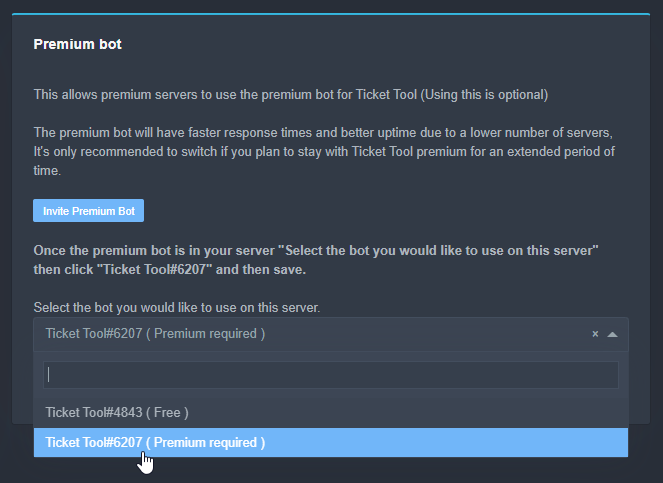
Inviting and Enabling Premium Bot
The first thing you will need to do is invite the premium bot, an invite can be found here
Once the bot is in your server we will head to the dashboard and manage your server. When you are managing your server, you want to head into "Server Configs" then click the drop down menu under "Select the bot you would like to use on this server" then click "Ticket Tool#6207" and then save.
 arctic pagoda
exotic burrow
يب
arctic pagoda
exotic burrow
يب
/ar This is how you can do it. ^
robust sandalBOT
هذه هي الطريقة التي يمكنك القيام بذلك. ^
English (en) → Arabic (ar)
exotic burrow
arctic pagoda
/ar This is how you can do it. ^
لا اعرف انقليزي قولي الكلام المكتوب لو سمحت
robust sandalBOT
exotic burrow
لا اعرف انقليزي قولي الكلام المكتوب لو سمحت
˚₊· ͟͟͞𝗢x | ! Mohammed
I don't know English say the written words please
Arabic (ar) → English (en)
arctic pagoda
/ar The first thing you will need to do is invite the premium bot, an invite can be found here
Once the bot is in your server we will head to the dashboard and manage your server. When you are managing your server, you want to head into "Server Configs" then click the drop down menu under "Select the bot you would like to use on this server" then click "Ticket Tool#6207" and then save.
robust sandalBOT
أول شيء سوف تحتاج إلى القيام به هو دعوة بوت قسط، ويمكن الاطلاع على دعوة هنا
بمجرد أن يكون البوت في الخادم الخاص بك ، سنتوجه إلى لوحة القيادة وإدارة الخادم الخاص بك. عندما كنت تدير الخادم الخاص بك، كنت ترغب في التوجه إلى "تكوينات الخادم" ثم انقر فوق القائمة المنسدلة تحت "حدد بوت كنت ترغب في استخدام على هذا الخادم" ثم انقر فوق "أداة تذكرة # 6207" ومن ثم حفظ.
English (en) → Arabic (ar)
arctic pagoda
/ar The link I'll send now is the invite to Ticket Tool premium.
robust sandalBOT
الرابط سأرسل الآن هو دعوة إلى قسط أداة التذاكر.
English (en) → Arabic (ar)
arctic pagoda
 lavish citrus
Is the bot down right now?
arctic pagoda
lavish citrus
Is the bot down right now?
Not that I know, why?
lavish citrus
cuz no command works right now
 copper owl
lavish citrus
Is the bot down right now?
copper owl
lavish citrus
Is the bot down right now?
some shards are down right now. We have already notified the team and it's getting looked into ASAP
 elfin fern
lavish citrus
Is the bot down right now?
elfin fern
lavish citrus
Is the bot down right now?
Some shards were having connection issues, the team is looking into it rn
lavish citrus
copper owl
some shards are down right now. We have already notified the team and it's getti...
Do the devs know this happens regularly?
copper owl
lavish citrus
Do the devs know this happens regularly?
it does not happen regularly
lavish citrus
As in... every couple of weeks for a few hours
elfin fern
lavish citrus
Do the devs know this happens regularly?
Haven't personally experienced it
 digital salmon
.
craggy geyser
lavish citrus
As in... every couple of weeks for a few hours
Could be the scheduled maintenance you are noticing. Gets put in #📣│bot-news
lavish citrus
Good to know... gonna keep an eye on that
 jade topaz
Hey- quick question- I got the monthly Premium option, does the subscription automatically charge my card every month or do I need to pay manually?
craggy geyser
jade topaz
Hey- quick question- I got the monthly Premium option, does the subscription aut...
Subscription is automatic
robust sandalBOT
 obsidian sphinx
في سبورت عربي
obsidian sphinx
في سبورت عربي
 Eduardo-
In Arabic sport
Arabic (ar) → English (en)
craggy geyser
$arabic
copper owl
obsidian sphinx
في سبورت عربي
$arabic
humble sequoiaBOT
فريق الدعم الفني العربي
عميلنا العزيز ان كنت تبحث عن مساعدة يرجى فتح تكت خاص بفريق الدعم الفني العربي
اذهب الى#🎫│make-a-ticket
ثم قم بلضغط على الايموجي الاتي (🇯🇴)
 clear linden
How do I add someone to a ticket
copper owl
use the following command
$add <User ID>
clear linden
thanks
copper owl
$help add
humble sequoiaBOT
How to add or remove users on tickets
To add a user to a ticket use $add <user>
To remove a user from a ticket use $remove <user>
copper owl
this should explain further ^
jade topaz
I need some help with ticket set-up 😭 I want react ticket system 🥲

 eager cargo
What issue are you having?
jade topaz
eager cargo
What issue are you having?
I am not able to set up properly
eager cargo
Specifically, what is your issue? Sending a panel? Customizing?
If you're just looking for the general setup guide
humble sequoiaBOT
eager cargo
⬆️
 craggy kite
is there a way to ping different roles when someone opens a ticket
eager cargo
$help ping
humble sequoiaBOT
How to make Ticket Tool ping a role
To make ticket tool ping a role when a ticket is opened, go to the Dashboard -> Panel Configs -> Settings -> Ticket Options -> Ticket Message -> Message Text and do this:
{@Role name} This is case sensitive and the role must have @mentions enabled
 craggy kite
thx @eager cargo
iron nightBOT
Gave 1 Rep to Quo (current: #1 - 169)
eager cargo
Yup
jade topaz
How to create reaction ticket?
humble sequoiaBOT
 round heron
hi i want help
eager cargo
State your issue
round heron
There is a ticket you don't want to wipe
eager cargo
Can you elaborate?
round heron
 eager cargo
Try refreshing your Discord / restarting it, if that doesn't work I'd reccomend you contact Discord support about it, it's not an issue with @pseudo glen, apologies.
scenic plinth
If the issue persists, please report the issue to discord with the link below.
jade topaz
Whenever i do any changes, the save button disappears 
jade topaz
...
mystic hound
@jade topaz was your issue resolved in a ticket? if not, collapsing and reopening the category will bring the button back
humble sequoiaBOT

Buttons
The new Discord Buttons allow for a much smoother and convenient experience. They reduce lag and work much better than emojis. With ticket tool you can edit all the buttons however you like! Buttons can show emojis, text and can have 4 different colors.
Where can I edit them?
Dashboard -> Panel Configs -> <Settings> -> Button Options -> <Setting>
 craggy geyser
(also change the command on the command settings page or they can use that)
iron nightBOT
Gave 1 Rep to Swift (current: #2 - 153)
craggy geyser
You can set a support team as well as "additional roles" who can have different permissions for open and closed tickets to each other
$help support
humble sequoiaBOT
How to let support team see into a ticket
About support roles
A support role lets your support team see into tickets with out having to add them manually to each and every ticket.
You can add as many support roles as you like per panel.
NOTE that the way discord works all admins can see into tickets regardless of this.
How to set a support role
To set a Support role go to the Dashboard -> Panel Configs -> Settings -> General Options -> Support Team Roles.

NOTE that the support role will not be able to see into tickets that are already created..
craggy geyser
$help perms
humble sequoiaBOT
How to set the permissions for tickets
To set a change permissions go to the Dashboard -> Panel Configs -> Settings -> Permission Options

 craggy geyser
 tawdry silo
i cant login
tawdry silo
i cant login
You are trying to log into the docs. You. Need the dashboard below
humble sequoiaBOT
 jade topaz
how do i make 2 tickets?
craggy geyser
jade topaz
how do i make 2 tickets?
What do you mean by two tickets? If you want to make a second ticket you just click the button again. If you are on about a second panel, you just create it the same as the first
humble sequoiaBOT
-- moved to ticket --
jade topaz
craggy geyser
What do you mean by two tickets? If you want to make a second ticket you just cl...
No like, the main thing you press on to create a ticket. I want to make 2 of them
arctic pagoda
jade topaz
No like, the main thing you press on to create a ticket. I want to make 2 of the...
Go to Dashboard -> Panel Configs -> Create panel
Like you did for the first panel.
 slate pebble
is it me or is the website a bit slow?
 nova ether
slate pebble
is it me or is the website a bit slow?
nova ether
slate pebble
is it me or is the website a bit slow?
Yeah me too
 solid stream
It seems to be running petty good at the moment.
 sullen bolt
uhm, i made a couple tickets and closed them, but the channel itself wont go away and it tells me that something went wrong when trying to load the messages in said channel, how do i fix this? pls help
copper owl
@sullen bolt try restarting discord and seeing if the channels are still there
sullen bolt
alr
copper owl
if they are, you'll have to contact discord to get them removed, it's a discord bug, not a bug from ticket tool
 pale pilot
@jade topaz Could you explain your rating in #📈│reviews? You literally just joined
jade topaz
pale pilot
<@456226577798135808> Could you explain your rating in <#509775046848282677>? Yo...
I've just had a bad experience with it that's all
pale pilot
With the bot?
jade topaz
Yes
pale pilot
Anything we can do better?
Or can we help you with anything? I'm sure there's something we can help you with
jade topaz
Make the bot have a good conversation, thank you
pale pilot
conversation? what?
jade topaz
Yeah, a good conversation
pale pilot
You mean it should automatically answer to questions?
jade topaz
Some questions yes
pale pilot
How is that supposed to work? Ticket Tool is no AI
jade topaz
Idk, you're the guy for that right?
jade topaz
I'm just tryna say it should hold a good conversation
pale pilot
That's impossible. I don't understand why you expect a discord bot to be like amazons alexa
jade topaz
Darn right it should buster!
pale pilot
You're funny
jade topaz
Thanks for taking my advice, I'm not trolling I'm being genuinely serious
pale pilot

jade topaz
👍
mystic hound
pale pilot
That's impossible. I don't understand why you expect a discord bot to be like am...
maybe we'll add that along with the cooking update..
pale pilot
Sounds great
jade topaz
mystic hound
maybe we'll add that along with the cooking update..
That would be a requirement
copper owl
what do you mean exactly?
only way is completely removing the message, if i remember correctly
the people who open a ticket will always be able to see who closed it, unless you remove the message itself
your welcome
copper owl
$help support
humble sequoiaBOT
How to let support team see into a ticket
About support roles
A support role lets your support team see into tickets with out having to add them manually to each and every ticket.
You can add as many support roles as you like per panel.
NOTE that the way discord works all admins can see into tickets regardless of this.
How to set a support role
To set a Support role go to the Dashboard -> Panel Configs -> Settings -> General Options -> Support Team Roles.
NOTE that the support role will not be able to see into tickets that are already created..
copper owl
@jade topaz ^^
I saw your message in #📈│reviews, this is how you do what you asked for
 surreal hedge
Am I able to transfer premium to another server?
humble sequoiaBOT
Backup and Restore allows you to transfer your premium status, panels, tags, and all settings to a new server.
You can also use it to keep a backup of your settings incase you need to suddenly move servers. We suggest you keep this backup key somewhere safe, incase your server is deleted. You will want to copy the whole key.
First, go to your dashboard, then Server Configs and generate a new backup key by pressing the green button. Now, a key should be generated in the box above. You may need to refresh the page to see this.
Once you have your backup key, navigate to the same page on the new server. Copy the key on the second field.
Now you can choose what you want to copy. Finally, press the green “Restore Configs” button.
 copper owl
@surreal hedge like so ^
humble sequoiaBOT

Premium Transfer
If you would like to move premium, panels, & tags to another server, please provide your old servers ID and your new servers ID or you can use our transfer feature yourself, learn more here
How do I find my server ID.
Open your Discord server, right-click on the server name, then select Copy ID or you can do $id in your server.
Server deleted? Can’t find the server ID?
If the server is deleted, please go into your search history and find the last time you were managing that server. At the end of the website, it should show a ID. That is your server ID.
I can't find either of them
Please notify a Support Team member that you can not find any of your Server IDs & they will assist you.
iron nightBOT
Gave 1 Rep to Neptune (current: #11 - 70)
surreal hedge
that's cool lol
jade topaz
 copper owl
you're welcome
humble sequoiaBOT
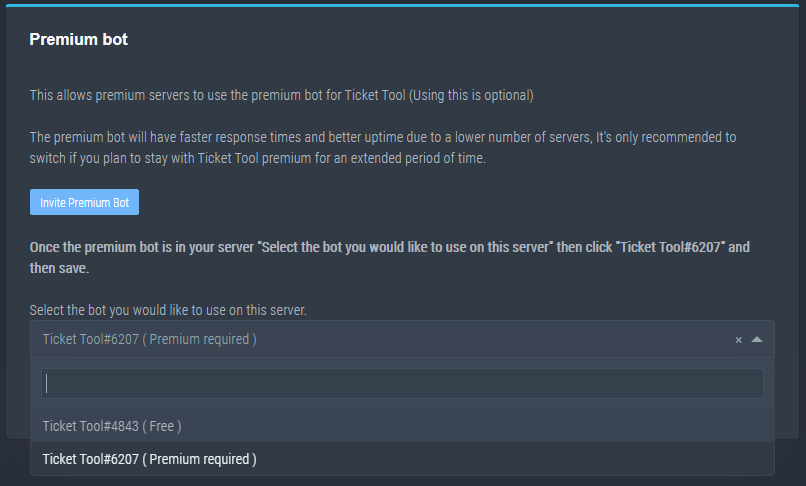
How to disable the premium bot
To disable the premium bot you will have to go to the Dashboard -> Server Configs -> Premium bot -> And on the right-hand side select the primary free bot in the drop down menu.
Premium features will still work on the normal bot.
TicketTool.xyz - Ticketing without clutter
copper owl
I think you might have selected the premium bot instead of the free one
choose the free bot and everything should work
jade topaz
how to ensure that a grade can access tickets please
@copper owl
I dont have option
copper owl
humble sequoia
everyone has this option
jade topaz
No
copper owl
that will allow you to set a specific role to see tickets
 jade topaz
Oh ok
copper owl
you clicked on server configs, you need to click on panel configs
 copper owl
humble sequoia
copper owl
humble sequoia
follow this ^^
 misty brook
does the ticket buttons sometimes not appear for some people on mobile?
copper owl
misty brook
does the ticket buttons sometimes not appear for some people on mobile?
yes, that's due to this
humble sequoiaBOT
Update your discord App
Buttons are a relatively new addition to discord and don't work with some older versions of the app.
Please verify that you have the latest version of discord, by going to the app or play store.
_ _
Discord for the App Store
_ _
Discord for the Play Store
misty brook
oof, thank you!
copper owl
you're welcome
misty brook
thanks @copper owl
iron nightBOT
Gave 1 Rep to Neptune (current: #11 - 71)
misty brook
😄
jade topaz
But I still have a problem, when I want to put the premium bot, it tells me that the bot is not good when I create a ticket, can you still help me please?
copper owl
jade topaz
But I still have a problem, when I want to put the premium bot, it tells me that...
did you buy premium? and redeem it?
jade topaz
No
copper owl
so you activated the free trial
humble sequoiaBOT
Inviting and Enabling Premium Bot
The first thing you will need to do is invite the premium bot, an invite can be found here
Once the bot is in your server we will head to the dashboard and manage your server. When you are managing your server, you want to head into "Server Configs" then click the drop down menu under "Select the bot you would like to use on this server" then click "Ticket Tool#6207" and then save.
jade topaz
Ye
copper owl
This is how you invite it
 iron nightBOT
Gave 1 Rep to Neptune (current: #11 - 72)
 soft notch
Can I get unbanned
copper owl
soft notch
Can I get unbanned
You opened a ticket for this and I already explained to you
we are not support for the game you're referring to
unless you mean ticket tool, we cannot help you in any way
soft notch
Ok
 willow lance
It wont allow me to change where the open tickets go. They keep getting opened to the top of the discord
When i want them under a specific category
copper owl
$help category
humble sequoiaBOT
How to set the open category
To set a open category go to the Dashboard -> Panel Configs -> Settings -> Category Options -> Category Open
 copper owl
This should help you ^
copper owl
does ticket tool have all the necessary permissions in the defined category
willow lance
He does
copper owl
can you please check
 copper owl
adding it to the permissions list doesnt mean it has all the permissions
willow lance
He can see, speak, and type
copper owl
make sure it has all these permissions (admin is not necessary)
 copper owl
willow lance
He can see, speak, and type
copper owl
willow lance
He can see, speak, and type
that isnt enough, there's other permissions that are needed
willow lance
The role he has has that permission
humble sequoiaBOT
-- moved to ticket --
 drowsy ferry
Hey, I like the ticket system but I have a problem with blocking pings everyone and here on tickets will anyone help?
@copper owl
copper owl
Please do not ping staff members in here
anyway
can you elaborate on that?
what do you want to do exactly?
drowsy ferry
Block ping tickets
copper owl
Just remove the ping
mute the category that the tickets are created in
or remove the role that gets pings from your roles
drowsy ferry
I set the category to block ping everyone and here and on
Users can ping
I got rid of the problem, but thanks bye anyway
 random sky
Hey how many ticket channels can you have at anytime?
mystic hound
the discord side limit is 500 channels per server, since each ticket is its own channel, the number of tickets your server can have depends on how many other channels it has
random sky
mystic hound
the discord side limit is 500 channels per server, since each ticket is its own ...
Okay thx light
iron nightBOT
Gave 1 Rep to Light (current: #3 - 148)
jade topaz
i have question I would like to join the french ticket tool support ? What can we do
mystic hound
You can apply here #📣│server-news message
( only French and Arabic applications currently)
 spark hound
$help setup
humble sequoiaBOT
Setting up Ticket Tool
Visit the docs for setup info
General Setup
spark hound
@rose pike
 rose pike
spark hound
<@862125798655655966>
rose pike
spark hound
<@862125798655655966>
thx
iron nightBOT
Gave 1 Rep to RheaDoesExist (current: #35 - 3)
rose pike
spark hound
<@862125798655655966>
can the bot mention the support team when one open the ticket?
scenic plinth
rose pike
can the bot mention the support team when one open the ticket?
$help ping
humble sequoiaBOT
How to make Ticket Tool ping a role
To make ticket tool ping a role when a ticket is opened, go to the Dashboard -> Panel Configs -> Settings -> Ticket Options -> Ticket Message -> Message Text and do this:
{@Role name} This is case sensitive and the role must have @mentions enabled
scenic plinth
Or alternatively use <@&roleid>
 ivory sundial
Why is tickettool not more putting emoji?
scenic plinth
$idcommand
humble sequoiaBOT
How do I get the ID of Roles/Channels/Emojis?
Ticket Tool has a useful command that helps you get the ID of various things like channels, roles, emojis and your server.
Just use the command $id <#channel/@role/:emoji:>. Now copy everything, including the brackets <...>, to your dashboard (or wherever you want it)
If you want the server ID, just use $id.
scenic plinth
Try that for emojis.
ivory sundial
ok
 viral epoch
Why doesn't this bot use the built-in command system with /
humble sequoiaBOT
-- moved to ticket --
 carmine osprey
hey my panel says bot error
also I cant use any commands
or functionality of the bot
 prime bridgeBOT
 Successful bans:
 1
 Unsuccessful bans:
 0
 Reason: scam
 Moderator: @mystic hound
solid stream
carmine osprey
hey my panel says bot error
Try running @pseudo glen debug
carmine osprey
I tried $debug already
mystic hound
carmine osprey
hey my panel says bot error
By panel, do you mean the dashboard? I've seen a lot of people getting those two confused
humble sequoiaBOT
**Ticket Message**
The Ticket Message is the first message sent by the bot in a new ticket. To customise it head over to your Dashboard -> Panel Configs -> Settings -> Ticket Options -> Edit Ticket Message
 mystic hound
And please don't ping the support team
carmine osprey
mystic hound
By panel, do you mean the dashboard? I've seen a lot of people getting those two...
yes
mystic hound
carmine osprey
yes
In that case you most likely have the premium bot selected without having premium
humble sequoiaBOT
How to disable the premium bot
To disable the premium bot you will have to go to the Dashboard -> Server Configs -> Premium bot -> And on the right-hand side select the primary free bot in the drop down menu.
Premium features will still work on the normal bot.
TicketTool.xyz - Ticketing without clutter
mystic hound
$help ping
humble sequoiaBOT
How to make Ticket Tool ping a role
To make ticket tool ping a role when a ticket is opened, go to the Dashboard -> Panel Configs -> Settings -> Ticket Options -> Ticket Message -> Message Text and do this:
{@Role name} This is case sensitive and the role must have @mentions enabled
 sly grotto
i added the bot to a server i am owner of but i cant see it on the dashboard, i tried reloading but it still isnt there
tribal cedar
sly grotto
i added the bot to a server i am owner of but i cant see it on the dashboard, i ...
Try completely logging out and then back in
humble sequoiaBOT
Don't see your server in the dashboard?
You will possibly need to relog. Look below to see steps on how to relog.
How to relog the Dashboard.
First, you will need to go to the dashboard. Once your there, click on your avatar on the top right. after you clicked it, you will see button that says Logout. You must click that. Once you have logged out, you can log back in.
Note:
You need one of these 3 things to access the dashboard.
1. Server Owner (Level: 6)
2. Server Administrator (Level: 4)
3. Dashboard Role (Level: 2)
You can check your level using $level on your Discord Server
tribal cedar
Show us screen shot please
The role name is support?
Replace support with that then
I believe its case sensitive too
Is it because of character limit? I'm about to drive sorry
 ivory spindle
use the id from the role <@&id>
 versed sinew
Welcome
jade topaz
Bruh
mystic hound
?
jade topaz
?
mystic hound
anything you need help with?
jade topaz
No thanks
mystic hound
Alright
jade topaz
Thanks @copper owl
iron nightBOT
Gave 1 Rep to Neptune (current: #11 - 77)
copper owl
you're welcome!
 toxic sail
Is there a way to auto-save transcripts to a channel??
jade topaz
Hello There, The $add command doesn't work with the default Permissions. But It works given that it has the Admin perms
 copper owl
toxic sail
Is there a way to auto-save transcripts to a channel??
copper owl
toxic sail
Is there a way to auto-save transcripts to a channel??
yeah, just go to the transcripts options in your panel settings, it's a premium feature though
toxic sail
Is it 1 payment or monthly?
copper owl
Monthly or yearly
$6 monthly and $66 yearly
there's no 1 full payment for lifetime of premium
copper owl
jade topaz
Hello There, The `$add` command doesn't work with the default Permissions. But I...
can you elaborate?
can the added person not see the channel?
toxic sail
I wonder if it works if I pay for it a month, then set it up and then unsubscribe again 🤔
Probably not right?
jade topaz
copper owl
can you elaborate?
You can see, the person isn't in the members list, so he can't see
@copper owl يولد كانك امريكي 😂
copper owl
jade topaz
<@548583124062175232> يولد كانك امريكي 😂
هههه لا صديقي، بس بعرف احكي انجليزي منيح ههههه
copper owl
jade topaz
You can see, the person isn't in the members list, so he can't see
are you use he isn't just "Show Offline"?
jade topaz
copper owl
هههه لا صديقي، بس بعرف احكي انجليزي منيح ههههه
مافي عربي غيرك
copper owl
toxic sail
I wonder if it works if I pay for it a month, then set it up and then unsubscrib...
no, that would be quite stupid of us to Implement like that
Once you stop your subscription, all the premium features stop working
copper owl
jade topaz
مافي عربي غيرك
نعم في، في ٢ غيري
jade topaz
Nice.Your teaching helped me a lot, thank you@copper owl
iron nightBOT
@jade topaz :: You can't rep Neptune#6814 for 6 minutes and 46 seconds. Try coming back later?
copper owl
jade topaz
Nice.Your teaching helped me a lot, thank you<@548583124062175232>
of course, you're most welcome!
jade topaz
copper owl
are you use he isn't just "Show Offline"?
No, I am sure , I added "J. Amir" using $add and "yo bro" initiated the ticket
toxic sail
copper owl
Once you stop your subscription, all the premium features stop working
Thought so
copper owl
jade topaz
No, I am sure , I added "J. Amir" using $add and "yo bro" initiated the ticket
check the permissions list and check J. Amir's permissions
make sure there's no preset permissions in your category (if your tickets are created within one)
 flint coyote
jade topaz
No, I am sure , I added "J. Amir" using $add and "yo bro" initiated the ticket
flint coyote
jade topaz
No, I am sure , I added "J. Amir" using $add and "yo bro" initiated the ticket
Also make sure you are including the @ to add them to the ticket. That was one of my mistakes when I first tried it. Easiest thing to do is tag them in another channel then copy that then in the ticket do $add then paste the rest.
copper owl
flint coyote
Also make sure you are including the @ to add them to the ticket. That was one o...
or just use the ID
Using the user ID is so much easier than the ping
flint coyote
I wasn't even aware of that. Thanks!
flint coyote
I think alot of people are still unaware how to get the id. I was probably six months in before I figured that out. But, I was a discord noob and I'm an old lady. lol
humble sequoiaBOT
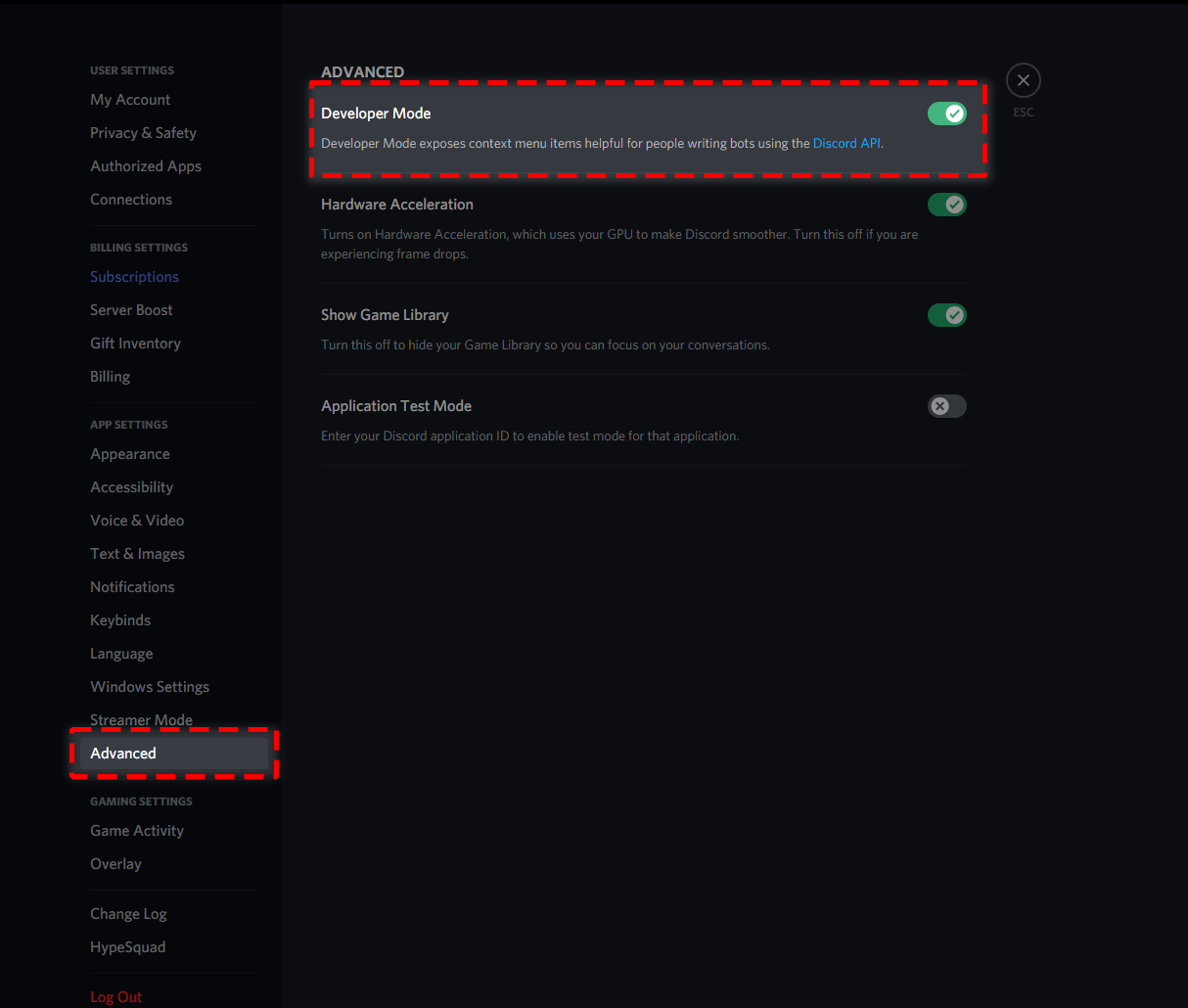
How to turn on developer mode
To enable developer mode do the following:
[PC] go to Settings -> Advanced -> Developer mode
[Mobile] go to Settings -> Appearance -> Developer mode
 copper owl
makes sense
flint coyote
I think it was one of you guys that showed me how. lol
copper owl
every major discord bot take IDs too
copper owl
flint coyote
I use them alot for other bots as well.
yeah same!
 lilac ridge
Is there a way to automatically ping a role in a specified channel when a ticket is created?
copper owl
$help ping
humble sequoiaBOT
How to make Ticket Tool ping a role
To make ticket tool ping a role when a ticket is opened, go to the Dashboard -> Panel Configs -> Settings -> Ticket Options -> Ticket Message -> Message Text and do this:
{@Role name} This is case sensitive and the role must have @mentions enabled
copper owl
you can only let it happen in tickets
lilac ridge
That's only in the ticket channels, right?
lilac ridge
Mkay n.n
copper owl
copper owl
you can't implement this in non-ticket channels
to fix this sentence
you can't implement it in non-ticket channels using ticket tool
You can probably find a way using another bot, but with ticket tool, you can only have it ping roles in tickets it creates
 wanton frost
Why does my ticket say does not have permission yet i made it so @everyone can do it
In the create ticket button
copper owl
check your blacklisted roles in server configs
wanton frost
Thx
wanton frost
Yes i had the whole server as a blacklisted role lmao
copper owl
oh LMAO, well glad I could help!
wanton frost
Ye thx a lot now people can report
 balmy whale
Ok, I have a slight concern
I invited ticket tool to a server a few hours ago, and the server isn't appearing when I'm trying to set it up.
humble sequoiaBOT
Don't see your server in the dashboard?
You will possibly need to relog. Look below to see steps on how to relog.
How to relog the Dashboard.
First, you will need to go to the dashboard. Once your there, click on your avatar on the top right. after you clicked it, you will see button that says Logout. You must click that. Once you have logged out, you can log back in.
Note:
You need one of these 3 things to access the dashboard.
1. Server Owner (Level: 6)
2. Server Administrator (Level: 4)
3. Dashboard Role (Level: 2)
You can check your level using $level on your Discord Server
copper owl
follow the steps above ^
balmy whale
Oooh
copper owl
also make sure you have one of 3 required things mentioned in the note
balmy whale
Thank you!!
copper owl
you're welcome!
 sudden vigil
Hey, hope I'm not interrupting a convo here - I'm not able to sign into Discord to login to the Ticket Tool website for setup, browser is Opera GX
It's given me invalid email / password, even though both are correct, and now it's giving me this:
 copper owl
Can you try using another browser?
sudden vigil
Will do rn
copper owl
or if you have the built in VPN on, try turning it off @sudden vigil
sudden vigil
That's not on
copper owl
alright, try another browser then!
mystic hound
You don't log into the wiki @sudden vigil, that part is for support staff only. To set up the bot, you log into the dashboard. (link below)
humble sequoiaBOT
sudden vigil
wut
copper owl
mystic hound
You don't log into the wiki <@!173813978475134977>, that part is for support sta...
they're trying it get into the setup link I think
 mystic hound
that's the guide, you do the setup itself on the dashboard
sudden vigil
Well then, thank you! My apologies
mystic hound
No worries, others have made the error before!
sudden vigil
thanks @mystic hound @copper owl
iron nightBOT
Gave 1 Rep to Light (current: #3 - 150)
sudden vigil
thanks @copper owl
iron nightBOT
Error: You're still on cooldown
sudden vigil
what
sudden vigil
Have a nice day yall :>
copper owl
likewise!
 slate ridge
Transcript failed to save to #transcripts Cannot read property 'toJSON' of undefined
copper owl
slate ridge
Transcript failed to save to #transcripts Cannot read property 'toJSON' of undef...
make sure there are no other bot messages that contain buttons
it's almost always due to another bot that uses buttons and it interferes with the saving process. Maybe dank memer, or a custom bot
slate ridge
so do i delete the msgs that contain buttons or smth?
jade topaz
WHJERE
WHERE THE FUCK IS IT

THERE IS NO FUCKING SETTINGS
WHERE
WHERE
I SAW U TYPING
Panel Confing
iron nightBOT
Gave 1 Rep to Neptune (current: #10 - 81)
copper owl
jade topaz
THERE IS NO FUCKING SETTINGS
first off, calm down
jade topaz
stfu i did it
copper owl
jade topaz
stfu i did it
😐
copper owl
very comedy of you, i laughed
jade topaz
you are a legend@copper owl
copper owl
thank you , you too!
jade topaz
where is support bot, i've looked everywhere
copper owl
jade topaz
where is support bot, i've looked everywhere
?
this is the support server for @pseudo glen
jade topaz
sorry I meant premium
copper owl
are you trying to add it?
jade topaz
I meant Premium bot
humble sequoiaBOT
Inviting and Enabling Premium Bot
The first thing you will need to do is invite the premium bot, an invite can be found here
Once the bot is in your server we will head to the dashboard and manage your server. When you are managing your server, you want to head into "Server Configs" then click the drop down menu under "Select the bot you would like to use on this server" then click "Ticket Tool#6207" and then save.
jade topaz
ok
copper owl
this is how you enable it
jade topaz
thanks @copper owl
iron nightBOT
Gave 1 Rep to Neptune (current: #10 - 82)
copper owl
Np
jade topaz
Does ticket tool do self roles?
copper owl
jade topaz
Does ticket tool do self roles?
like, give a member a role if they react to it?
jade topaz
Yeah
copper owl
no it does not
jade topaz
👍 alright
 cosmic valve
Pretty sure I know the answer already, but TT doesn't have any user-facing functionality through the dashboard/website does it? For instance, if someone is banned or whatever, they couldn't login through the website and initiate a ticket through there could they?
copper owl
cosmic valve
Pretty sure I know the answer already, but TT doesn't have any user-facing funct...
uh,,, they cant do that either way lol
no one can initiate a ticket through the website
the website isnt used for that, it's only to edit the bot's configurations on the servers they have the permissions to do so
cosmic valve
Yeah I figured as much just wanted to clarify in case there was something I may have overlooked as a server I own will likely expand very rapidly in the new year so I'm trying to get a new suite of bots setup and the existing community accustomed to everything.
Pity about that though, would be very handy.
Cheers for confirming.
copper owl
You're most welcome!
 torn stream
Hey
is there a waay to give a user a role when they open a ticket?
And remove it when they close?
 prime bough
From what Neptune said above, most likely not. Ticket Tool doesn't auto-role. But I have no clue. I can hardly figure the bot out myself.
torn stream
Oh okay, ty
copper owl
what aurora said is correct. It cannot give a user a defined role
 atomic shadow
Sorry, I have a bug ticket that can't be closed and we can't observe it, how can we close it from another channel? The ticket channel can't be deleted
jade topaz
help her@copper owl
copper owl
atomic shadow
Sorry, I have a bug ticket that can't be closed and we can't observe it, how can...
discord visual bug, restart discord. if it's still there, contact discord because it doesnt have anything to do with us
it's a discord bug. I suggest trying to restart discord first (CTRL +R)
atomic shadow
thank you!
 atomic barn
Letting support team know 3 ppl typed something in #📈│reviews that shouldn't belong there (Off Topic)
 thorny siren
how do i make it so when someone opens a ticket instead of the name of the ticket being ticket-0009 so its for example ticket-'Hetzer'
humble sequoiaBOT
Ticket names
The ticket name is the default channel name of all tickets. To edit it, go to your Dashboard > Panel Configs > Settings > Ticket Options. There you can edit the channel name of opened and closed tickets. You can also use variables in there.

 Note: This is a premium feature
copper owl
thorny siren
how do i make it so when someone opens a ticket instead of the name of the ticke...
Note: This is a premium feature
copper owl
thorny siren
how do i make it so when someone opens a ticket instead of the name of the ticke...
^^
 shy crane
is there a time limit for the ticket to stay open?, or and infinite
copper owl
shy crane
is there a time limit for the ticket to stay open?, or and infinite
no limit
shy crane
Thanks
iron nightBOT
Gave 1 Rep to Neptune (current: #10 - 83)
copper owl
no problem
thorny siren
the good bot told me to
jade topaz
You are online 24 hours / 24 hours hhhhh@copper owl
copper owl
@ivory scarab
humble sequoiaBOT
Inviting and Enabling Premium Bot
The first thing you will need to do is invite the premium bot, an invite can be found here
Once the bot is in your server we will head to the dashboard and manage your server. When you are managing your server, you want to head into "Server Configs" then click the drop down menu under "Select the bot you would like to use on this server" then click "Ticket Tool#6207" and then save.
copper owl
This is how you add the premium bot
copper owl
jade topaz
You are online 24 hours / 24 hours hhhhh<@548583124062175232>
ahahha
 radiant helm
wait how do i close a ticket if i removed to close ticket button
how do i close with a command
 rotund kite
radiant helm
how do i close with a command
rotund kite
radiant helm
how do i close with a command
$close
 humble sequoiaBOT
-- moved to ticket --
jade topaz
copper owl
are you use he isn't just "Show Offline"?
Thanks for sticking to this problem, The Ticket Tools doesn't have(in channel) this permission by default , But as I switch it on, Ticket tool can add members(to that specific channel, its not a permanent fix)
 iron nightBOT
Gave 1 Rep to Neptune (current: #10 - 84)
jade topaz
flint coyote
Also make sure you are including the @ to add them to the ticket. That was one o...
I used user id to add
jade topaz
This is the link to output for $debug
https://discordapp.com/channels/509192800865353738/662692902245498910/877444001102458890
 atomic barn
Admin permissions enabled?
mystic hound
@blissful imp you have the premium bot selected without actually having premium
and please refrain from pinging staff.
humble sequoiaBOT
How to disable the premium bot
To disable the premium bot you will have to go to the Dashboard -> Server Configs -> Premium bot -> And on the right-hand side select the primary free bot in the drop down menu.
Premium features will still work on the normal bot.
TicketTool.xyz - Ticketing without clutter
craggy geyser
 whole salmon
is there a single command which can delete all channels of a panel
whole salmon
is there a single command which can delete all channels of a panel
There is not
It would cause the bot to hit rate limits so can't be added either
whole salmon
ye already got answer sry for asking again
craggy geyser
No worries
 blissful imp
atomic barn
Admin permissions enabled?
blissful imp
atomic barn
Admin permissions enabled?
where?
 hot trellis
Morning all, i feel really silly asking this simple question which is all i need to know, what is the difference between a ticket and a transcript? Everything is setup and working great, however i have not touched on the transcript settings yet. Thanks.
mystic hound
A transcript is like a ''copy'' or log of all the messages in a ticket, so you can go back and review your deleted tickets whenever you want
atomic barn
blissful imp
where?
I'm not sure... hence the question mark. Managers you guys able to help this guy?
some error in the bottom right they got
hot trellis
ok great, many thanks.
mystic hound
atomic barn
I'm not sure... hence the question mark. Managers you guys able to help this guy...
I already answered him, he has the premium bot selected without having premium
atomic barn
oh kk
mystic hound
you can see where it says bot error in big letters at the top left
atomic barn
yep, just saw :)
 wicked carbon
I invited ticket tool to my server, but it isn't showing on my dashboard
what should i do???
humble sequoiaBOT
Don't see your server in the dashboard?
You will possibly need to relog. Look below to see steps on how to relog.
How to relog the Dashboard.
First, you will need to go to the dashboard. Once your there, click on your avatar on the top right. after you clicked it, you will see button that says Logout. You must click that. Once you have logged out, you can log back in.
Note:
You need one of these 3 things to access the dashboard.
1. Server Owner (Level: 6)
2. Server Administrator (Level: 4)
3. Dashboard Role (Level: 2)
You can check your level using $level on your Discord Server
wicked carbon
humble sequoia
thanks
iron nightBOT
Gave 1 Rep to Ticket Tool (current: #6 - 137)
thorny siren
Hey I'm on my phone can someone give me the invite link to this server so I can send it to someone
Nvm
I'm having trouble with letting people send pictures in tickets gow do I permit em
jade topaz
what is the API thing i just found out about?
 dull yacht
hi! how can i move the ticket made? i mean uhhhh
for example i made a ticket right, i want it to be under a specific channel. how can i move it?
humble sequoiaBOT
How to set the open category
To set a open category go to the Dashboard -> Panel Configs -> Settings -> Category Options -> Category Open
tribal cedar
thorny siren
I'm having trouble with letting people send pictures in tickets gow do I permit ...
Check the opened user permissions
 shy jetty
how do u make a ticket
tribal cedar
?
You need help from staff you're saying?
Or you need help setting up ticket tool?
slate ridge

how do you make something like this. i have premium
like what is the cmd to combine the tickets
arctic pagoda
slate ridge
how do you make something like this. i have premium
You have to find the IDs of each panel you wish to combine. You can find them in your Panel Configs in the Dashboard.
Next, send the multipanel to a channel using $panel [id1] [id2] {id3} ....
e.g. $panel 1 2 4 17 35 to combine panels 1, 2, 4, 17 and 35.
Up to 25 panels may be combined
humble sequoiaBOT
Multipanels are a premium feature  that allow for a single panel with multiple buttons to open different tickets.
How to create a Multipanel
Premium users can combine multiple panels into one multipanel.
First, find the IDs of each panel you wish to combine. You can find them in your Panel Configs in the Dashboard
Next, send the multipanel to a channel using $panel [id1] [id2] {id3} ....
e.g. $panel 1 2 4 17 35 to combine panels 1, 2, 4, 17 and 35.
Up to 25 panels may be combined.

 barren harbor
Can I make it do that a ticket is only visible to the supporter and the ticket creator??
humble sequoiaBOT
How to set the permissions for tickets
To set a change permissions go to the Dashboard -> Panel Configs -> Settings -> Permission Options
barren harbor
So only I and the other person read and send message in it??
craggy geyser
Yep. Make sure there is no one in the support roles either or they will see
Assuming you have admin
All people with admin perms automatically see it.
barren harbor
Ok
 hasty egret
is it possible to make the bot send a users ticket transcript via dm on auto when my mods close users tickets?
arctic pagoda
hasty egret
is it possible to make the bot send a users ticket transcript via dm on auto whe...
Yes, but it's a premium feature.
hasty egret
i have premium 🙂
arctic pagoda
Ok...
hasty egret
but idk exacly how it would work and how i make it to work
arctic pagoda
hasty egret
but idk exacly how it would work and how i make it to work
I think that you can activate it in Dashboard
hasty egret
bc i have this but it doesnt say anything about send a transcritp

 bronze cosmos
Como eu crio uma conta?
arctic pagoda
hasty egret
bc i have this but it doesnt say anything about send a transcritp
Go to Logging options and then you will activate the transcript auto send
robust sandalBOT
bronze cosmos
Como eu crio uma conta?
 victorgg
How do I create an account?
Portuguese (Brazil) (pt) → English (en)
arctic pagoda
/pt An account to login in Ticket Tool dashboard or is a thing non Ticket Tool related?
robust sandalBOT
Uma conta para fazer login no painel da Ticket Tool ou uma coisa não relacionada à Ferramenta de Ticket?
English (en) → Portuguese (Brazil) (pt)
bronze cosmos
arctic pagoda
/pt An account to login in Ticket Tool dashboard or is a thing non Ticket Tool r...
Não entendi.
robust sandalBOT
bronze cosmos
Não entendi.
victorgg
I don't get it.
Portuguese (Brazil) (pt) → English (en)
arctic pagoda
bronze cosmos
Não entendi.
/pt Do you have issues with Ticket Tool bot or dashboard? If not we cannot help you in this server.
robust sandalBOT
Você tem problemas com o bot ticket tool ou dashboard? Se não, não podemos ajudá-lo neste servidor.
English (en) → Portuguese (Brazil) (pt)
bronze cosmos
arctic pagoda
/pt Do you have issues with Ticket Tool bot or dashboard? If not we cannot help ...
dashboard
arctic pagoda
bronze cosmos
dashboard
/pt Ok, what type of problems you have with dashboard? You don't know how to log in?
robust sandalBOT
Ok, que tipo de problemas você tem com o painel? Você não sabe fazer login?
English (en) → Portuguese (Brazil) (pt)
bronze cosmos
Os dois, Não consigo configura e não consigo fazer o Login.
robust sandalBOT
bronze cosmos
Os dois, Não consigo configura e não consigo fazer o Login.
victorgg
Both, I can't set up and I can't log in.
Portuguese (Brazil) (pt) → English (en)
robust sandalBOT
bronze cosmos
Os dois, Não consigo configura e não consigo fazer o Login.
victorgg
Both, I can't set up and I can't log in.
Portuguese (Brazil) (pt) → English (en)
arctic pagoda
bronze cosmos
Os dois, Não consigo configura e não consigo fazer o Login.
/pt Did you do the login with your Discord account?
robust sandalBOT
Você fez o login com sua conta discord?
English (en) → Portuguese (Brazil) (pt)
bronze cosmos
arctic pagoda
/pt Did you do the login with your Discord account?
Está dando erro.
arctic pagoda
Oh...ok
robust sandalBOT
bronze cosmos
Está dando erro.
victorgg
It's making a mistake.
Portuguese (Brazil) (pt) → English (en)
bronze cosmos
 arctic pagoda
/pt Oh...you are trying to login in docs page probably. I'll send you the dashboard link so you see if it was wrong or right.
robust sandalBOT
Ah... você está tentando fazer login na página docs, provavelmente. Vou te enviar o link do painel para ver se estava errado ou certo.
English (en) → Portuguese (Brazil) (pt)
humble sequoiaBOT
bronze cosmos
ohh, good
arctic pagoda
bronze cosmos
ohh, good
/pt Do you still have problems with login?
robust sandalBOT
Você ainda tem problemas com login?
English (en) → Portuguese (Brazil) (pt)
bronze cosmos
Thanks
bronze cosmos
arctic pagoda
/pt Do you still have problems with login?
Não
arctic pagoda
bronze cosmos
Thanks
You're welcome
arctic pagoda
bronze cosmos
Não
Glad to hear that!
robust sandalBOT
bronze cosmos
Não
victorgg
No
Portuguese (Brazil) (pt) → English (en)
robust sandalBOT
arctic pagoda
Glad to hear that!
 markswrld
Fico feliz em ouvir isso!
English (en) → Portuguese (Brazil) (pt)
bronze cosmos
arctic pagoda
Glad to hear that!
:D
 cursive tapir
oo
humble sequoiaBOT
 dire pike
Hello
arctic pagoda
Hi
dire pike
Can anyone help me?
arctic pagoda
Yes, tell what's wrong.
arctic pagoda
Ok.
 hidden tundra
Uhm
 copper owl
hidden tundra
Uhm
copper owl
hidden tundra
Uhm
hey! this usually happens if there's a message within the ticket that contains buttons (usually a message from another bot, like dank memer, ect)
iron nightBOT
Gave 1 Rep to Fabio3323 (current: #35 - 3)
copper owl
make sure you delete any message that contains a button before saving
okay im not sure why it repped you, but there you go LMAO
hidden tundra
copper owl
hey! this usually happens if there's a message within the ticket that contains b...
Oh okay thx
iron nightBOT
Gave 1 Rep to Neptune (current: #10 - 85)
robust sandalBOT
jade topaz
الو؟
 ♕ 𝘼 𝘽 𝘿 𝙊 ♕シ
Hello?
Arabic (ar) → English (en)
robust sandalBOT
jade topaz
حد موجود؟
♕ 𝘼 𝘽 𝘿 𝙊 ♕シ
The limit?
Persian (fa) → English (en)
arctic pagoda
jade topaz
حد موجود؟
/ar Do you mean the ticket limit? So when a person opens a ticket they cannot open more than a specified number of them?
robust sandalBOT
هل تقصد الحد الأقصى للتذكرة؟ لذلك عندما يفتح الشخص تذكرة لا يمكنه فتح أكثر من عدد محدد منها؟
English (en) → Arabic (ar)
humble sequoiaBOT
-- moved to ticket --
 rancid elm
السلام عليكم
humble sequoiaBOT
-- moved to ticket --
jade topaz
rancid elm
السلام عليكم
وعليكم السلام
robust sandalBOT
jade topaz
وعليكم السلام
 AL_yacine9_9
Peace be upon you too
Arabic (ar) → English (en)
copper owl
ايا واحدة؟
 subtle spade
كيف اخلي الاشعارات مفعلة بكل روم جديد؟ او البوت يسوي بنق للستاف
 atomic barn
Managers/Support team 3 chats in review channel
robust sandalBOT
subtle spade
كيف اخلي الاشعارات مفعلة بكل روم جديد؟ او البوت يسوي بنق للستاف
 PWLR
PWLR
How do I put the notifications on every new Room?- how do I keep the notifications activated? Or the bot makes a neck for the staff
Arabic (ar) → English (en)
humble sequoiaBOT
-- moved to ticket --
jade topaz
what is the API thing i just found out about?
scenic plinth
Can you elaborate?
 ashen violet
How do I temporarily stop people from opening more tickets? I don't want reset the whole thing i just want to stop people from opening new tickets.
scenic plinth
ashen violet
How do I temporarily stop people from opening more tickets? I don't want reset t...
Your options would be to:
1 - Delete the panel from the channel
2 - Add a blacklist role temporarily
3 - Remove permissions for the role you do not want to create tickets to see the channel
ashen violet
Alright Thanks
mystic hound
Or disable the create ticket button/set it to support team only
 delicate vault
how do i close multiple tickets at one
tribal cedar
delicate vault
how do i close multiple tickets at one
You cant.
rose pike
how can I do the bot mention support role when anyone open a ticket?
humble sequoiaBOT
Pong! Latency is 288ms. API Latency is 86ms [-]
flint coyote
$help ping
humble sequoiaBOT
How to make Ticket Tool ping a role
To make ticket tool ping a role when a ticket is opened, go to the Dashboard -> Panel Configs -> Settings -> Ticket Options -> Ticket Message -> Message Text and do this:
{@Role name} This is case sensitive and the role must have @mentions enabled
flint coyote
@rose pike ^^^
 white fjord
ping
humble sequoiaBOT
Pong! Latency is 231ms. API Latency is 83ms [-]
white fjord
why are rest of the channels not been shown
flint coyote
What do you mean?
rose pike
it didn't work why?
 arctic pagoda
Please do not ping.
rose pike
arctic pagoda
Please do not ping.
sorry
arctic pagoda
rose pike
sorry
No problem.
arctic pagoda
rose pike
it didn't work why?
Did you use the correct name of the role?
rose pike
arctic pagoda
Did you use the correct name of the role?
yes
rose pike
arctic pagoda
And did you save your changes then?
yes
and I allowed the bot to mention roles
arctic pagoda
rose pike
yes
and I allowed the bot to mention roles
Ok, did you try with role ID?
rose pike
arctic pagoda
Ok, did you try with role ID?
no
arctic pagoda
rose pike
no
Ok, if you try with role ID it works?
rose pike
arctic pagoda
Ok, if you try with role ID it works?
how can I get the role id?
arctic pagoda
Do you have Developer Mode enabled in Discord?
 deep meteor
.
arctic pagoda
Ok, you need to activate it.
deep meteor
@rose pike يرجال ما عندك سالفة قاعد تستعمل قوقل عشان تترجم
arctic pagoda
Go to Discord in-app settings --> Behavior and you'll find the developer mode and you have only to enable that.
robust sandalBOT
deep meteor
<@!862125798655655966> يرجال ما عندك سالفة قاعد تستعمل قوقل عشان تترجم
 الرائع
Man you have nothing to say you are using Google to translate
Arabic (ar) → English (en)
deep meteor
robust sandal
انقلع
robust sandalBOT
deep meteor
انقلع
الرائع
To take off
Arabic (ar) → English (en)
deep meteor
rose pike
ليش؟
باينة
rose pike
when I close a ticket it stay like this why?

 unique anvil
that's a bug on discord's end, where the channels are deleted but the client didn't sync. reload your discord and they will disappear
craggy geyser
If they don't dissappear, you can contact discord support. But 90% of the times a reload works (ctrl+r)
rose pike
unique anvil
that's a bug on discord's end, where the channels are deleted but the client did...
ok
robust sandalBOT
 tacit rivet
Бада
tacit rivet
Бада
 Военкомат
Bada
Russian (ru) → English (en)
robust sandalBOT
tacit rivet
Вьалалал
Военкомат
Valalalal
Russian (ru) → English (en)
 severe path

tribal cedar

 humble sequoiaBOT
Don't see your server in the dashboard?
You will possibly need to relog. Look below to see steps on how to relog.
How to relog the Dashboard.
First, you will need to go to the dashboard. Once your there, click on your avatar on the top right. after you clicked it, you will see button that says Logout. You must click that. Once you have logged out, you can log back in.
Note:
You need one of these 3 things to access the dashboard.
1. Server Owner (Level: 6)
2. Server Administrator (Level: 4)
3. Dashboard Role (Level: 2)
You can check your level using $level on your Discord Server
severe path
@maiden gale ^
 maiden gale
thank you sir from 🇵🇭
 jade topaz
why when I invite the bot in my server when I want to go to the panel I do not see the server
humble sequoiaBOT
Don't see your server in the dashboard?
You will possibly need to relog. Look below to see steps on how to relog.
How to relog the Dashboard.
First, you will need to go to the dashboard. Once your there, click on your avatar on the top right. after you clicked it, you will see button that says Logout. You must click that. Once you have logged out, you can log back in.
Note:
You need one of these 3 things to access the dashboard.
1. Server Owner (Level: 6)
2. Server Administrator (Level: 4)
3. Dashboard Role (Level: 2)
You can check your level using $level on your Discord Server
severe path
@jade topaz ^
jade topaz
???
severe path
your server dont show up in the dashboard right?
jade topaz
severe path
<@456226577798135808> ^
TANKS
severe path

Jop. Kannst du hier einstellen

Eigentlich nicht, was kommt denn da?

Jo
Das wird per User eingestellt, so in der Rollenansicht sieht man den nicht
Korrekt

iron nightBOT
Gave 1 Rep to Schlafendes24 (current: #26 - 7)

 icy stone
I keep an open ticket that I cannot close or delete.
severe path
@copper owl
severe path
icy stone
I keep an open ticket that I cannot close or delete.
Is there an error message?
icy stone
no
severe path
 severe path
reload your Discord (CTRL + R)
scenic plinth
If the issue persists, please report the issue to discord with the link below.
arctic pagoda
 brave stratus
Did they remove the close command?
brave stratus
Did they remove the close command?
No, the close command works as usual.
 grim gulch
Hi I'm confused with the permissions for the bot
tribal cedar
How so?
The dashboard main page has the listed perms it needs and tells you if it had them or not
 tribal cedar
What are you showing me?
grim gulch
Look on the right
tribal cedar
That everyone can see tickets?
 tribal cedar
Yes click settings
Then permissions section
And edit the everyone role to not see the channel
grim gulch
 tribal cedar
 grim gulch
So do I click permission options?
tribal cedar
Yup
 grim gulch
wait which one?
tribal cedar
The open and closed perms for everyone role
grim gulch
Srry I'm tired its 12 am rn 🤣
grim gulch
So the 2 bottom ones?
tribal cedar
Then create a new ticket on your server you'll see now everyone can't see it
Yup
The opened and closed perms for everyone
grim gulch
 grim gulch
So the Read messages one needs to be red?
tribal cedar
Yes
grim gulch
 tribal cedar
This will work on new tickets though.
grim gulch
I've just closed a test one
tribal cedar
Ok. Open a new one
 tribal cedar
$help category
humble sequoiaBOT
How to set the open category
To set a open category go to the Dashboard -> Panel Configs -> Settings -> Category Options -> Category Open
grim gulch
How do I make it so it stays in the help catagory?
humble sequoiaBOT
How to set the open category
To set a open category go to the Dashboard -> Panel Configs -> Settings -> Category Options -> Category Open
tribal cedar
Read that
In category open just choose the help category
Again. Only new tickets will be affected
 tribal cedar
$help category
humble sequoiaBOT
How to set the open category
To set a open category go to the Dashboard -> Panel Configs -> Settings -> Category Options -> Category Open
tribal cedar
Please do as it says above
grim gulch
Found it
tribal cedar
Awesome
grim gulch
Srry I'm tired my eyes hurt
tribal cedar
Maybe tomorrow may be a better idea to tackle this. :p
grim gulch
No it's alr
tribal cedar
Kk
grim gulch
So do I type the ticket name ect in?
tribal cedar
You click the drop down menu and choose the category you wish the tickets to appear in
Which you had said was help
grim gulch
It just made a ticket and I didn't click???

 tribal cedar
Start typing it should auto complete it
 grim gulch
Yep it's working now
So if another member who wasn't part of staff made a ticket
would that person and the staff be able to see it
tribal cedar
Yes
grim gulch
Kk
tribal cedar
Any other questions?
grim gulch
Nope think that's all for now
tribal cedar
Awesome gl hf
grim gulch
❤️
 tribal cedar
 true cairn
Possible to delete this message ?
https://i.imgur.com/0A6Mazt.png
true cairn
Possible to delete this message ?
https://i.imgur.com/0A6Mazt.png
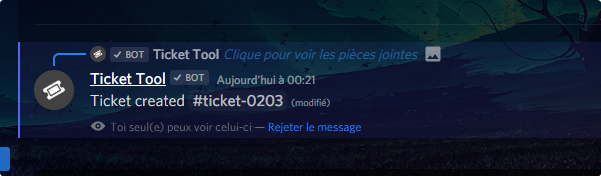
Like Mia said just dismiss it everytime. Closing client will also get rid of them but there is no way to disable that feature as of now
true cairn
I would like to avoid that all the members of my discord are obliged to delete this message manually each time they open a ticket...
Any solution ?
tribal cedar
None
Like I said its not an option you can turn off atm
They just need to click dismiss they don't need to delete it. It also gives them the location of the channel that's been created for them which can be super helpful
true cairn
This is the worst feature of the bot, really useless.
When a person opens a ticket it is @ in directly.
The worst thing is that you can't delete this message automatically or even disable it. It floods uselessly
 willow viper
Hey, is there any way for me to check how many tickets a moderator has closed within a certain time span?
tribal cedar
willow viper
Hey, is there any way for me to check how many tickets a moderator has closed wi...
There are no statistics like that without using maybe the native discord search feature if you log to a channel
tribal cedar
true cairn
This is the worst feature of the bot, really useless.
When a person opens a tic...
Some find the feature useful. I'm not certain when or if they intend on changing this
 merry basin
I go onto manage servers and mine isnt on there how tf do i get it on there anyone can help
willow viper
tribal cedar
There are no statistics like that without using maybe the native discord search ...
Weird that its not a thing, doing it via the search bar is very annoying
humble sequoiaBOT
Don't see your server in the dashboard?
You will possibly need to relog. Look below to see steps on how to relog.
How to relog the Dashboard.
First, you will need to go to the dashboard. Once your there, click on your avatar on the top right. after you clicked it, you will see button that says Logout. You must click that. Once you have logged out, you can log back in.
Note:
You need one of these 3 things to access the dashboard.
1. Server Owner (Level: 6)
2. Server Administrator (Level: 4)
3. Dashboard Role (Level: 2)
You can check your level using $level on your Discord Server
tribal cedar
willow viper
Weird that its not a thing, doing it via the search bar is very annoying
I know I've suggested stats like that in the past. Idk if they intend to implement it
 rocky flare
tribal cedar
I know I've suggested stats like that in the past. Idk if they intend to impleme...
rocky flare
tribal cedar
I know I've suggested stats like that in the past. Idk if they intend to impleme...
So it's not a thing yet?
tribal cedar
@merry basin that should work if not lmk
tribal cedar
rocky flare
So it's not a thing yet?
No
tribal cedar
Like I said I've suggested it in the past
When I talk to battle again ill mention it
willow viper
thanks!
tribal cedar
Anytime
rocky flare
Awesome, that would really be helpful for us.
tribal cedar
I agree
 torn talon
how do i get the ticket chat to appear under the actual open a ticket chat?
if that makes sense
 steep kettle
How do I search a users old tickets?
 rough moth
steep kettle
How do I search a users old tickets?
rough moth
steep kettle
How do I search a users old tickets?
do u have transcripts saved?
rough moth
torn talon
how do i get the ticket chat to appear under the actual open a ticket chat?
like a category?
humble sequoiaBOT
Warning: This channel isn't a ticket
rough moth
$help category
humble sequoiaBOT
How to set the open category
To set a open category go to the Dashboard -> Panel Configs -> Settings -> Category Options -> Category Open
random sky
Hey how do i make multiple channels for tickets Like for example i want to have 2 ticcket things open is that possible?
rough moth
random sky
Hey how do i make multiple channels for tickets Like for example i want to have ...
categories u mean?
could u further explain?
random sky
rough moth
categories u mean?
Can u have x2 tickets channel in 1 server?
rough moth
random sky
Can u have x2 tickets channel in 1 server?
can u open 2 tickets?
random sky
So for example i want to have x2 ticket channel in one server is that possible?
rough moth
random sky
So for example i want to have x2 ticket channel in one server is that possible?
wdym by x2 ticket channel
random sky
So you know how u make the ticket channel? can i make 2 of them or only 1
rough moth
random sky
So you know how u make the ticket channel? can i make 2 of them or only 1
for example, a ticket channel like #🎫│make-a-ticket, when u click a button, it creates a channel?
random sky
yes
rough moth
it depends on how the settings are set
u can have a user open multiple tickets for the same panel
random sky
okay
rotund kite
If you are trying to limit users from creating a set amount of tickets, there's two ways, first one, is limiting how much they can create in a specific panel. Second one, is a global limit, which is how many tickets a user can have open for all times.
1:
humble sequoiaBOT
How to set a ticket limit
A ticket limit may be set per panel to prevent users from spamming tickets. By default this limit is set to 3. Once a user hits this limit the bot will notify the users that they reached the limit.
To set a ticket limit go to the Dashboard -> Panel Configs -> Settings -> General Options -> Ticket Limit
 rotund kite
2:
humble sequoiaBOT
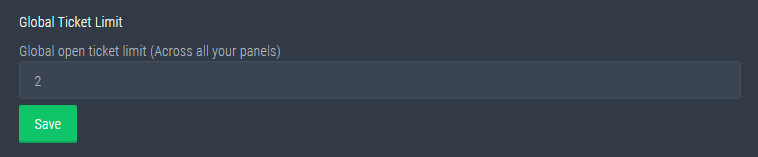
Global Ticket Limit
Unlike the regular Ticket Limit, the global limit will limit the amount of tickets a user can create at the same time for ALL Panels. When a ticket is closed again, the limit resets for that user.
Note:
This is not a limit for how many tickets a user can open at all times or how many tickets you can have open on the server in total. This is just a limit per user for open tickets.
 rotund kite
@random sky ^^
random sky
rotund kite
<@!179187033057525760> ^^
what i want to do is make x2 ticket channels so then for example another ticket channel for an difrent catogery
rotund kite
Okey, you'll need to create 2 seperate panels then.
And make sure you set it into a different category for each
humble sequoiaBOT
How to set the open category
To set a open category go to the Dashboard -> Panel Configs -> Settings -> Category Options -> Category Open
rotund kite
Which you can do here and will need to do for both of the panels.
rotund kite
Do you mean for a support team? Or for just adding members?
random sky
bit of both?
rotund kite
random sky
bit of both?
if you mean by having support team member adding members, then you have to setup the support team members like below:
$help support
humble sequoiaBOT
How to let support team see into a ticket
About support roles
A support role lets your support team see into tickets with out having to add them manually to each and every ticket.
You can add as many support roles as you like per panel.
NOTE that the way discord works all admins can see into tickets regardless of this.
How to set a support role
To set a Support role go to the Dashboard -> Panel Configs -> Settings -> General Options -> Support Team Roles.
NOTE that the support role will not be able to see into tickets that are already created..
rotund kite
and they can use the $add command
random sky
okay thx (:
rotund kite
$add <member/role> <ticket channel>
random sky
okay thx @rotund kite
iron nightBOT
Gave 1 Rep to ツ Hydro™ (current: #21 - 16)
rotund kite
np
 ripe cave
How do I get into the bot prime?
craggy geyser
ripe cave
How do I get into the bot prime?
Do you have premium? The premium bot won't work without it, but if you do have premium you can follow these steps
humble sequoiaBOT
Inviting and Enabling Premium Bot
The first thing you will need to do is invite the premium bot, an invite can be found here
Once the bot is in your server we will head to the dashboard and manage your server. When you are managing your server, you want to head into "Server Configs" then click the drop down menu under "Select the bot you would like to use on this server" then click "Ticket Tool#6207" and then save.
jade topaz
$help category
humble sequoiaBOT
How to set the open category
To set a open category go to the Dashboard -> Panel Configs -> Settings -> Category Options -> Category Open
jade topaz
Hi. How can i setup that the bot is pinging a ROLE when someone create a ticket? Like @ CEO
severe path

 woven raptor
Any way to create create the panel embeds using the old reactions rather than the new buttons?

Not sure I like that
Unless we can somehow edit the button text
tribal cedar
woven raptor
Unless we can somehow edit the button text
You can edit the button text
You mean the dismiss message stating the ticket was created?
woven raptor
tribal cedar
You can edit the button text
Where? I'm not seeing the option
tribal cedar
Panel configs -> settings -> button options
woven raptor
If I disable the buttons, will it go back to the old reactions?
tribal cedar
You can use the old method too with the $oldpanel cmd
tribal cedar
Nps
Hmm maybe oldpanel doesn't work anymore. Try it out though
It did work just didn't reset the emojis reaction #
Atm its not possible to remove that message
Anytime
 hallow spindle
Why cant i remove the bot from my server.
I didnt invite it to the server, and its not working, tryed to kick/ban it. To get a new one there, but dont seem to work?
And iedas?
craggy geyser
hallow spindle
Why cant i remove the bot from my server.
I didnt invite it to the server, and i...
If you have permission to kick members then you can kick the bot. Nothing can keep it there. But if you explain what isn't working with it, we can help fix it
craggy geyser
tribal cedar
It did work just didn't reset the emojis reaction #
The reactions haven't been removed for a while. Also reactions as a whole will stop being supported soon so there will be a time everyone will need to use buttons
tribal cedar
Ah. Good to know. Figured there would be an option.
As long as you guys consider making that dismiss message toggleable. Besides stats its gotta be the #1 requested feature rn
craggy geyser
As far as I know it can't be due to discord limitations. I remeber Josiah saying something about all buttons need to give an output in the channel when pressed. All other buttons do something in the channel they are in but this one doesn't so needed to have a message. So he did the best he could by making it one of the private messages that is dismissable (and auto removes when discord restarts)
tribal cedar
Ah gotcha. I'm sure you guys have seen people complaining about it ofc but I didn't know he has to have an output.
Makes sense ty for the explaination
craggy geyser
No worries. We are aware how heavily it is compaliend about. In fact I might see if we can get a tag explaining that we can't remoce the message
hallow spindle
craggy geyser
If you have permission to kick members then you can kick the bot. Nothing can ke...
Seems to fixed it, thanks 🙂
iron nightBOT
Gave 1 Rep to Swift (current: #2 - 155)
craggy geyser
That's good
tribal cedar
That would help a lot
 coarse wedge
 The bot seems to be down. Wait patiently please.
 cedar locust
put on ticket pls
jade topaz
doesn't le tme open
tribal cedar
Me either. Waiting to see if a staff member will see this before taking any other steps
 frail copper
bot offline ?
 neat flume
^ye
 scarlet siren
flint coyote
scarlet siren
flint coyote
Scroll up guys.
 viral solar
Yeah same I just came here to find out why
jade topaz
do the mods know?
flint coyote
If they don't, they will soon. lol
tribal cedar
I just let one know
 loud saddle
Is the bot down?
 snow crane
 frail copper

loud saddle
Ticket tool is unresponsive
frail copper
bruhh
loud saddle
Mods?
jade topaz
uh
craggy geyser
The devs know. It is restarting
 ashen dragon
Why i cant use the website
 craggy geyser
ashen dragon
Why i cant use the website
craggy geyser
ashen dragon
Why i cant use the website
Bot is down but coming back up
jade topaz
idk how to put a ticket tool in my server
frail copper
craggy geyser
Bot is down but coming back up
time ?
ashen dragon
craggy geyser
Bot is down but coming back up
Do you have information when you are going to turn on or fix the website?
craggy geyser
Soon. Its being started up currently
loud saddle
Okay good
craggy geyser
I assume the website is linked to the bot being down


 blazing zodiac
Is the ticket tool broken right now?
craggy geyser
jade topaz
I NEED HELP
The bot is down. Be patient
craggy geyser
blazing zodiac
Is the ticket tool broken right now?
Yes
jade topaz
craggy geyser
The bot is down. Be patient
I DONT EVEN KNOW HOW TO PUT A TICKET TOOL IN MY SERVER