#🆘│community-support
1 messages · Page 343 of 1
 tribal cedar
Its not suppose to in anything other then a ticket
 thick axle
i know
but for some reason we can just use the bot and rename channels that arent tickets
tribal cedar

 burnt hornet
something that works ticket in my server
tribal cedar
?
 sturdy warren
hey i was wondering. the ticket reaction part sometimes doesnt show to members, is there a reason why?
 humble sequoiaBOT
Update your discord App
Buttons are a relatively new addition to discord and don't work with some older versions of the app.
Please verify that you have the latest version of discord, by going to the app or play store.
_ _
Discord for the App Store
_ _
Discord for the Play Store
 remote mesa
how can i do this
 remote mesa
im talking about the 3 buttons
tribal cedar
Just change the icons in button options
remote mesa
here?
 tribal cedar
Yes sir
remote mesa
where exactly ?
tribal cedar
Thats depends on which you want to change
remote mesa
i want when somebody presses the button it opens a ticket for the emoji they chose
tribal cedar
Oh well is that showing the panel message or the ticket message
Because of how its blanked out idk if your asking about transcript close buttons or multipanels
remote mesa
like here #🎫│make-a-ticket
humble sequoiaBOT
Multipanels are a premium feature  that allow for a single panel with multiple buttons to open different tickets.
How to create a Multipanel
Premium users can combine multiple panels into one multipanel.
First, find the IDs of each panel you wish to combine. You can find them in your Panel Configs in the Dashboard
Next, send the multipanel to a channel using $panel [id1] [id2] {id3} ....
e.g. $panel 1 2 4 17 35 to combine panels 1, 2, 4, 17 and 35.
Up to 25 panels may be combined.

 craggy kite
is there a way to disable the help command from certain roles
cause i don't want people to be able to run those commands in the channels
 trail sphinx
ما اقدر افتح تيكيت في السيرفر الخاص بي
 robust sandalBOT
trail sphinx
ما اقدر افتح تيكيت في السيرفر الخاص بي
robust sandalBOT
trail sphinx
ما اقدر افتح تيكيت في السيرفر الخاص بي
 Yassen
I can't open my jacket in my server.
 Arabic (ar) → English (en)
 radiant helm
can i make it so if someone makes a ticket they cant close it? and only mods can?
 arctic pagoda
trail sphinx
ما اقدر افتح تيكيت في السيرفر الخاص بي
arctic pagoda
trail sphinx
ما اقدر افتح تيكيت في السيرفر الخاص بي
/ar If you can't open tickets in your server you may have to update your Discord app.
robust sandalBOT
إذا لم تتمكن من فتح التذاكر في الخادم الخاص بك، فقد تضطر إلى تحديث تطبيقك.
English (en) → Arabic (ar)
 eager cargo
radiant helm
can i make it so if someone makes a ticket they cant close it? and only mods can...
eager cargo
radiant helm
can i make it so if someone makes a ticket they cant close it? and only mods can...
Set the create ticket button to support team only in button options in your panel settings.
make sure your mods have a support team role
humble sequoiaBOT
How to let support team see into a ticket
About support roles
A support role lets your support team see into tickets with out having to add them manually to each and every ticket.
You can add as many support roles as you like per panel.
NOTE that the way discord works all admins can see into tickets regardless of this.
How to set a support role
To set a Support role go to the Dashboard -> Panel Configs -> Settings -> General Options -> Support Team Roles.

NOTE that the support role will not be able to see into tickets that are already created..
eager cargo
the feature is just called support team roles
radiant helm
okay
arctic pagoda
craggy kite
is there a way to disable the help command from certain roles
I don't think so, I'm sorry.
humble sequoiaBOT
-- moved to ticket --
radiant helm
also is there a way to make it so the ticket creator cant close their own ticket?
and a mod has to do it
eager cargo
make the close ticket button & command support team only
radiant helm
wait just found it
eager cargo
the button settings are found in button options in panel settings and the command is found in command configs
humble sequoiaBOT
How to make Ticket Tool ping a role
To make ticket tool ping a role when a ticket is opened, go to the Dashboard -> Panel Configs -> Settings -> Ticket Options -> Ticket Message -> Message Text and do this:
{@Role name} This is case sensitive and the role must have @mentions enabled
 radiant helm
okay
craggy kite
does the bot need admin perms?
arctic pagoda
craggy kite
does the bot need admin perms?
No, in the page that opens when you go to the dashboard and select the server you want to manage you will see perms that Ticket Tool requires marked with a *.
craggy kite
is there a way to change the color of the embed for the panel that the bot sends
 scenic plinth
craggy kite
is there a way to change the color of the embed for the panel that the bot sends
scenic plinth
craggy kite
is there a way to change the color of the embed for the panel that the bot sends
Yes but its a premium feature. You would go to Panel Configs ---> Panel Message ---> Hex Color
 prime bridgeBOT
 Successful bans:
 1
 Unsuccessful bans:
 0
 Reason: nitro scam
 Moderator: @mystic hound
 neat escarp
@eager cargo sir i need help please
prime bridgeBOT
_Vexximy ⁵⁰⁵ has been silenced for 10m 

 Reason: Posting Discord Server Invites
_Vexximy ⁵⁰⁵#6225 | 856125451368661022
 jaunty raven
hey guys, just need some help
for some reason whenever i open a ticket on an alt and then try and close it, i get this message. https://i.imgur.com/mV9HNRt.png
i'd appreciate any advice
arctic pagoda
jaunty raven
for some reason whenever i open a ticket on an alt and then try and close it, i ...
Can I ask if on the main account you're a member of a Support Team?
arctic pagoda
jaunty raven
I can close it on my main account
Ok, so probably the close command settings were set as "Support Team only", so you don't have permissions to close tickets on your alt account but on your main yes.
jaunty raven
okay I'll take a look at it and see if that's the problem, it most likely is though. thank you
arctic pagoda
jaunty raven
okay I'll take a look at it and see if that's the problem, it most likely is tho...
You're welcome!
jaunty raven
arctic pagoda
You're welcome!
under which would I go? https://i.imgur.com/5XlM37c.png
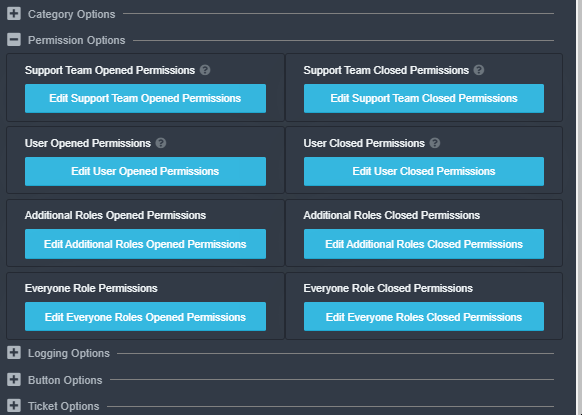
additional roles closed?
arctic pagoda
jaunty raven
under which would I go? https://i.imgur.com/5XlM37c.png
Dashboard -> Command Configs
jaunty raven
alright, gonna check if its fixed now
arctic pagoda
If it's not fixed already, go to Dashboard -> Panel Configs -> Button Options and then it should be fixed
 nimble bough
My in-game nickname in 3D chat is meridian BettyShy . IPv4: 192.168.3.2 I can't enter the game. You can help? My current mail address is: bettyshy22@gmail.com
Help me please.
 rotund kite
$tts
humble sequoiaBOT
You're in the wrong place
We provide support for @pseudo glen discord bot and cannot help you with whatever issue you have.
Please make sure to contact the appropriate support team.
If you don't have any further questions regarding our bot Ticket Tool, please close this ticket
_ _
jaunty raven
arctic pagoda
If it's not fixed already, go to Dashboard -> Panel Configs -> Button Options an...
this one worked perfectly. thank you. now how can i make it so that they can't delete the transcript if you don't mind helping me again?
 iron nightBOT
Gave 1 Rep to markswrld (current: #35 - 3)
jaunty raven
oh never mind, i think i found it
arctic pagoda
jaunty raven
oh never mind, i think i found it
Ok
prime bridgeBOT
sarah_emara has been silenced for 10m
Reason: Posting Discord Server Invites
sarah_emara#2694 | 861325699150905354
 jade topaz
Good afternoon.I can't log in .Help please
 coarse wedge
jade topaz
Good afternoon.I can't log in .Help please
coarse wedge
jade topaz
Good afternoon.I can't log in .Help please
What error do you get when logging in?
jade topaz
Sorry to disturb But I solved the problem with the entrance. Thank you for responding.
 primal parrot
$vote redeem
humble sequoiaBOT
You need atleast 6 votes to redeem
primal parrot
$vote
humble sequoiaBOT
Votes
Current Votes: 4
Lifetime Votes: 884
Linked Votes: 155
Vote Links
Linking Info
Linked User: 208663804970532866
You can give your future votes to another user by linking with that user.
To link use $vote link (@user or userId)
To unlink use $vote unlink
Redeeming
Each vote is worth 12 hours of premium and can be redeemed once you have atleast 6 votes.
Your current votes are worth 2 days, 0h, 0m
To redeem your current votes use $vote redeem
 devout veldt
Hey, Is there any way to copy my settings or stuff like that when I switch to premium bot? I mean my server is under construction and I will like to use the premium codes after the things are setup. So is there a system so that I can copy the settings from there?
 rough moth
devout veldt
Hey, Is there any way to copy my settings or stuff like that when I switch to pr...
rough moth
devout veldt
Hey, Is there any way to copy my settings or stuff like that when I switch to pr...
The settings will stay the same when switching bots
You’ll have more options though when using the premium bot
rough moth
Np
 craggy geyser
primal parrot
$vote
craggy geyser
primal parrot
$vote
Please don't use the vote commands in this sever. Use them in your own sever (or if you have to do it here for some reason, do it in a demo ticket). That way it keeps the support channels free for support
 dense tide
hello

The bot have all administrator permissions, but it is not respond
@craggy geyser
 pale pilot
Dont ping support team members
humble sequoiaBOT
Blacklist Roles
Any role you assign as a blacklisted role won't be able to use commands or reactions.
Selecting a blacklisted role
Go to your Dashboard -> Server Configs. There you will find the option to select blacklisted roles.
Note: Don't forget to save.

 solar briar
hey how do i make a channel a ticket
like make a different channel a ticket instead of making a ticket through the panels
 surreal hedge
Yeah how do you do something like that?
surreal hedge
rough moth
Setup something like <#571706435449257997> ?
Like tickets in one message
humble sequoiaBOT
Multipanels are a premium feature that allow for a single panel with multiple buttons to open different tickets.
How to create a Multipanel
Premium users can combine multiple panels into one multipanel.
First, find the IDs of each panel you wish to combine. You can find them in your Panel Configs in the Dashboard
Next, send the multipanel to a channel using $panel [id1] [id2] {id3} ....
e.g. $panel 1 2 4 17 35 to combine panels 1, 2, 4, 17 and 35.
Up to 25 panels may be combined.
 willow isle
$vote
humble sequoiaBOT
Votes
Current Votes: 0
Lifetime Votes: 0
Linked Votes: 0
Vote Links
Linking Info
Linked User: Not Linked
You can give your future votes to another user by linking with that user.
To link use $vote link (@user or userId)
To unlink use $vote unlink
Redeeming
Each vote is worth 12 hours of premium and can be redeemed once you have atleast 6 votes.
Your current votes are worth 0m
To redeem your current votes use $vote redeem
humble sequoiaBOT
Votes
Current Votes: 0
Lifetime Votes: 0
Linked Votes: 0
Vote Links
Linking Info
Linked User: Not Linked
You can give your future votes to another user by linking with that user.
To link use $vote link (@user or userId)
To unlink use $vote unlink
Redeeming
Each vote is worth 12 hours of premium and can be redeemed once you have atleast 6 votes.
Your current votes are worth 0m
To redeem your current votes use $vote redeem
surreal hedge
so &panel [messageID1] etc
willow isle
$vote
humble sequoiaBOT
Votes
Current Votes: 1
Lifetime Votes: 1
Linked Votes: 0
Vote Links
Linking Info
Linked User: Not Linked
You can give your future votes to another user by linking with that user.
To link use $vote link (@user or userId)
To unlink use $vote unlink
Redeeming
Each vote is worth 12 hours of premium and can be redeemed once you have atleast 6 votes.
Your current votes are worth 12h, 0m
To redeem your current votes use $vote redeem
willow isle
$vote redeem
humble sequoiaBOT
You need atleast 6 votes to redeem
 urban sail
is it possible to have the bot send a message in a chat saying somehthing like "{user} opened a ticket" or something like that. aside from what it automatically says to you privately
craggy geyser
Only within the ticket itself
urban sail
Ok thank you, also can I get the premium sub role? do i need to send you a picture or something?
craggy geyser
$pc
humble sequoiaBOT

How to get premium role
Until the automatic premium check is fixed run the command $debug on your server and send us the link in a ticket.
craggy geyser
urban sail
Ok thank you, also can I get the premium sub role? do i need to send you a pictu...
Just this
urban sail
sent
craggy geyser
I was about to give you the role but I can't type in billing tickets. Someone else beat me to it
jade topaz
$vote redeem
humble sequoiaBOT
You need atleast 6 votes to redeem
jade topaz
 ornate path
im unable to login, its saying incorrect password
ornate path
im unable to login, its saying incorrect password
That’s a problem from you as you didn’t enter your correct discord password
jade topaz
What do u add to the ticket embed settings to make it ping the support role?
eager cargo
$help ping
humble sequoiaBOT
How to make Ticket Tool ping a role
To make ticket tool ping a role when a ticket is opened, go to the Dashboard -> Panel Configs -> Settings -> Ticket Options -> Ticket Message -> Message Text and do this:
{@Role name} This is case sensitive and the role must have @mentions enabled
jade topaz
Thanks
eager cargo
yup
humble sequoiaBOT
If Ticket Tool support requested this debug give them this link:
https://discordapp.com/channels/509192800865353738/662692902245498910/874408144871243796
Bot Permissions ឵ ឵឵ ឵ ឵឵ ឵ ឵឵ ឵ ឵឵
✅ - Read Channels
✅ - Send Messages
✅ - Embed Links
✅ - Attach Files
✅ - Add Reactions
✅ - Manage Roles
✅ - Manage Channels
✅ - Manage Messages
✅ - Read History
Channel Permissions ឵ ឵឵ ឵ ឵឵ ឵ ឵឵ ឵ ឵឵
✅ - Read Channels
✅ - Send Messages
✅ - Embed Links
✅ - Attach Files
✅ - Add Reactions
✅ - Manage Roles
✅ - Manage Channels
✅ - Manage Messages
✅ - Read History
Server Information ឵ ឵឵ ឵ ឵឵ ឵ ឵឵ ឵ ឵឵ ឵ ឵឵
Channel name:
community-support
Channel ID:
776680605517742090
Channel Count:
173/500
Server name:
Ticket Tool Support
Server ID:
509192800865353738
User Information ឵ ឵឵ ឵ ឵឵ ឵ ឵឵ ឵ ឵឵ ឵ ឵឵
User name:
faygo#6666
User ID:
527166312095678475
Permission Level:
0 - User ()
Bot Information ឵ ឵឵ ឵ ឵឵ ឵ ឵឵ ឵ ឵឵ ឵ ឵឵
Prefix:
$
Premium Status:
Lifetime - ["subV2","subV1","time"]
Current shard:
1
API Latency:
80
eager cargo
Panel ID
surreal hedge
what ID?
eager cargo
The numbers next to your panels name
surreal hedge
I don't see it...
 eager cargo
Yup
 tender sphinx
 tribal cedar
/es is the bot in your server? If so relog. Click your discord avatar at top right then logout. Log back in and it should show up
robust sandalBOT
es el bot en su servidor? Si es así, vuelva a iniciar sesión. Haga clic en su avatar de discordia en la parte superior derecha y luego cierre la sesión. Vuelva a iniciar sesión y debería aparecer
English (en) → Spanish (es)
 robust hinge
.
humble sequoiaBOT
Don't see your server in the dashboard?
You will possibly need to relog. Look below to see steps on how to relog.
How to relog the Dashboard.
First, you will need to go to the dashboard. Once your there, click on your avatar on the top right. after you clicked it, you will see button that says Logout. You must click that. Once you have logged out, you can log back in.
Note:
You need one of these 3 things to access the dashboard.
1. Server Owner (Level: 6)
2. Server Administrator (Level: 4)
3. Dashboard Role (Level: 2)
You can check your level using $level on your Discord Server
jade topaz
How to make it so members can’t use commands like $help and all
rough moth
jade topaz
How to make it so members can’t use commands like $help and all
U can’t disable $help
humble sequoiaBOT
-- moved to ticket --
rough moth
😞
 vapid summit
does anyone know what these are called, or how to make these, because im thinking of starting to make a discord bot for my server but idk what these are or how to make them
 rough moth
vapid summit
does anyone know what these are called, or how to make these, because im thinkin...
rough moth
vapid summit
does anyone know what these are called, or how to make these, because im thinkin...
This server is for ticket tool support not coding support
$tts
humble sequoiaBOT
You're in the wrong place
We provide support for @pseudo glen discord bot and cannot help you with whatever issue you have.
Please make sure to contact the appropriate support team.
If you don't have any further questions regarding our bot Ticket Tool, please close this ticket
_ _
 jovial sable
Does anyone know how u can make like a channel and when u press the button it makes a ticket in the server
humble sequoiaBOT
-- moved to ticket --
 hot edge
I have the same question as Pog
humble sequoiaBOT
 last stag
Hi i have a premium bot i dont have premium bot what can i do?
 craggy geyser
last stag
Hi i have a premium bot i dont have premium bot what can i do?
craggy geyser
last stag
Hi i have a premium bot i dont have premium bot what can i do?
All premium features work on the free bot. You can invite the premium bot (link and instructions on will be below) but it isn't recommended unless you are planning on keeping premium as you then have to switch back again
humble sequoiaBOT
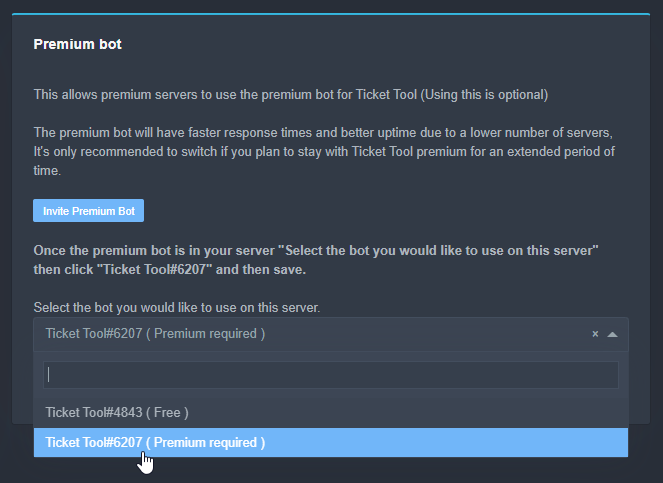
Inviting and Enabling Premium Bot
The first thing you will need to do is invite the premium bot, an invite can be found here
Once the bot is in your server we will head to the dashboard and manage your server. When you are managing your server, you want to head into "Server Configs" then click the drop down menu under "Select the bot you would like to use on this server" then click "Ticket Tool#6207" and then save.
 plush lantern
can you put a gif at the bottom of ticket panel?
 royal dragon
is there a setting that makes it so only support roles have permission ?
(not even the user)
 shut bolt
royal dragon
is there a setting that makes it so only support roles have permission ?
(not ev...
shut bolt
royal dragon
is there a setting that makes it so only support roles have permission ?
(not ev...
Yeap
You can change that setting going to the Panel Configs, perms section
 royal dragon
so disable read channel for user?
shut bolt
Yeap, the read messages should do it
Although the idea is that users have access to it but that's on to you to choose how to set it up

royal dragon
ok thank you
shut bolt
Sure 
shut bolt
plush lantern
can you put a gif at the bottom of ticket panel?
Well, it depends
If you have the premium bot, yes you can
Otherwise not
Go to the Panel Configs, then select the Edit Panel Message

Finally fill up this field with the URL of the GIF you want the bot to show in the panel

That should do it
craggy geyser
Make sure it is the url for the gif itself, and not for a page the gif is on
If in doubt, send the gif on discord somewhere it won't be deleted and copy the direct url from it
shut bolt
craggy geyser
Make sure it is the url for the gif itself, and not for a page the gif is on
True, important thing
 cloud heath
hi, for some reason when i try to add a user to a ticket it doesn't work
any idea how to fix it?
 open blade
We're getting tickets created properly but for some reason the reactions aren't being removed from the ticket post. We're nowhere near the rate limits listed on https://docs.tickettool.xyz/en/general/troubleshooting even for free tier, and the bot is running when these reactions are added

 mystic hound
We no longer support reactions @open blade, please resend your panels to switch to buttons
Moving forward, reactions will stop working altogether
open blade
ahh thanks
shut bolt
cloud heath
hi, for some reason when i try to add a user to a ticket it doesn't work
How are you trying to add it? 
 vast sentinel
team i need help with why the panel is not pushing to my server
i have given maximum roles and access to the ticket tool and the ticket tool role and it still will not push.
shut bolt
vast sentinel
team i need help with why the panel is not pushing to my server
Does the web show any error when clicking the "send panel" button?
vast sentinel
it does
tribal cedar
Are you using the premium bot when you don't have premium?
shut bolt
tribal cedar
Are you using the premium bot when you don't have premium?
Good point
tribal cedar
Ty
vast sentinel
nope i have premium subsription and premium bot
tribal cedar
View and send perms? Did you change your trigger by chance?
vast sentinel
idk
humble sequoiaBOT
If Ticket Tool support requested this debug give them this link:
https://discordapp.com/channels/509192800865353738/662692902245498910/874665792891940927
Bot Permissions ឵ ឵឵ ឵ ឵឵ ឵ ឵឵ ឵ ឵឵
✅ - Read Channels
✅ - Send Messages
✅ - Embed Links
✅ - Attach Files
✅ - Add Reactions
✅ - Manage Roles
✅ - Manage Channels
✅ - Manage Messages
✅ - Read History
Channel Permissions ឵ ឵឵ ឵ ឵឵ ឵ ឵឵ ឵ ឵឵
✅ - Read Channels
✅ - Send Messages
✅ - Embed Links
✅ - Attach Files
✅ - Add Reactions
✅ - Manage Roles
✅ - Manage Channels
✅ - Manage Messages
✅ - Read History
Server Information ឵ ឵឵ ឵ ឵឵ ឵ ឵឵ ឵ ឵឵ ឵ ឵឵
Channel name:
community-support
Channel ID:
776680605517742090
Channel Count:
190/500
Server name:
Ticket Tool Support
Server ID:
509192800865353738
User Information ឵ ឵឵ ឵ ឵឵ ឵ ឵឵ ឵ ឵឵ ឵ ឵឵
User name:
Enigma#0007
User ID:
297419611350106133
Permission Level:
0 - User ()
Bot Information ឵ ឵឵ ឵ ឵឵ ឵ ឵឵ ឵ ឵឵ ឵ ឵឵
Prefix:
$
Premium Status:
Lifetime - ["subV2","subV1","time"]
Current shard:
1
API Latency:
86
shut bolt
Should look something like this
vast sentinel
you the man!
 brittle root
Hello. It's beacuse I've seen servers that have multiple support categories where you can react on different reactions to create a ticket, fx one for developing, one for generel support etc. How do I do that
https://gyazo.com/e737a00a3853571d1f5ce9760fccb9b5
 shut bolt
brittle root
Hello. It's beacuse I've seen servers that have multiple support categories wher...
shut bolt
brittle root
Hello. It's beacuse I've seen servers that have multiple support categories wher...
Hi! For doing that you can use the $Panel command, you require the premium work in order to work
Ticket Tool Docs
Check in the last part, it talks about this command
 smoky sparrow
hey hey, does anyone of you recently experienced a massive ticket spam?
shut bolt
smoky sparrow
hey hey, does anyone of you recently experienced a massive ticket spam?
No, have you?
shut bolt
Could you send screenshot please?
smoky sparrow
i can't because i deleted them all. because my discord is experiencing massive lags because of that
shut bolt
smoky sparrow
i can't because i deleted them all. because my discord is experiencing massive l...
Bro that's weird .-.
Make sure in the panel config you have the ticket limit seted
 smoky sparrow
the debug response came through but the console gets an unknown error
smoky sparrow
he might have klicked a few times because the bot didn't respond. yes
shut bolt
Oh, maybe the bot lagged and caused that
humble sequoiaBOT
Pong! Latency is 592ms. API Latency is 88ms [-]
shut bolt
smoky sparrow
and i dont get why
No idea
 neat tree
i want to ticket numbers start from "X" number like 1000 or anything, how can i do it?
 gray trout
is the login by discord not working?
craggy geyser
neat tree
i want to ticket numbers start from "X" number like 1000 or anything, how can i ...
Change the count number in general options on the panel settings
craggy geyser
smoky sparrow
it is still lagging
Do $ping in your sever. Lag is what makes multiple the same but isn't normally more than 3 (and should be rare with buttons)
craggy geyser
gray trout
is the login by discord not working?
What error are you getting?
iron nightBOT
Gave 1 Rep to Swift (current: #4 - 140)
craggy geyser
You are likely logging into the docs. That is for support team only. You need to log in here
humble sequoiaBOT
 craggy geyser
No worries. It's a common mistake
smoky sparrow
craggy geyser
Do `$ping` in your sever. Lag is what makes multiple the same but isn't normally...
They had no buttons
And thanks
craggy geyser
Could be why. If it is reactions they will be slower and more laggy
royal dragon
sry for asking every time.. i’m bad at finding
is there a setting so a user can only have 1 ticket at a time?
shut bolt
royal dragon
sry for asking every time.. i’m bad at finding
is there a setting so a user can ...
No worries, go to the panel configs, open the settings of the panel you want to limit and set up the amount in the counter labeled Ticket limit
royal dragon
thx
shut bolt

royal dragon
thanks @shut bolt
iron nightBOT
Gave 1 Rep to Pablo. (current: #40 - 2)
brittle root
How do I do so this message dont show up when i create a ticket https://gyazo.com/b8a1df51322d17edf19668462432563e
 shut bolt
brittle root
How do I do so this message dont show up when i create a ticket https://gyazo.co...
shut bolt
brittle root
How do I do so this message dont show up when i create a ticket https://gyazo.co...
It will always show that message, you can erase clicking the little blue text at the bottom right corner, that deletes the message.
Anyway that message is only visible to you, so no much worries
craggy geyser
Message also vanishes when your discord restarts
shut bolt
craggy geyser
Message also vanishes when your discord restarts
Nice
jade topaz
is the bot turned off?
Because I can't make a new panel / ticket and nothing else with the bot.
humble sequoiaBOT
Pong! Latency is 248ms. API Latency is 85ms [-]
 manic escarp
@jade topaz fr
jade topaz
manic escarp
<@456226577798135808> fr
?
manic escarp
it’s not working
shut bolt
jade topaz
is the bot turned off?
Which one, the free or the premium one?
Both of them are currently online actually
 worldly tinsel
Hello it's possible to change the Avatar of the bot on our server ?
humble sequoiaBOT

Ticket Tool avatar/status Customisation
@pseudo glen is like another discord user; you can't control its avatar icon or status, and we can't change it for one server, just as you cannot change your avatar for just one server.
However, on your server, you can change the bot's nickname
 worldly tinsel
The nickname i know
I'am talking about the avatar picture
About the description of the bot..
jade topaz
hey is there a way to make it so there isnt a time limit on the tickets? im using the ticket tool for applications bc the actual application bot is weird
 flint coyote
worldly tinsel
Hello it's possible to change the Avatar of the bot on our server ?
flint coyote
worldly tinsel
Hello it's possible to change the Avatar of the bot on our server ?
It is not possible.
jade topaz
shut bolt
Which one, the free or the premium one?
free
shut bolt
worldly tinsel
I'am talking about the avatar picture
Not possible, it's the same user for all servers
shut bolt
jade topaz
free
I just try to use it and for me it's working properly, could you please give me more info about what isn't working?
mystic hound
jade topaz
hey is there a way to make it so there isnt a time limit on the tickets? im usin...
There's no time limit on tickets, and you can't place one anyway
jade topaz
shut bolt
I just try to use it and for me it's working properly, could you please give me ...
honestly it all doesn't work. You can't give the bot any role, I can't do anything in the panel, the bot's commands don't work.
shut bolt
jade topaz
honestly it all doesn't work. You can't give the bot any role, I can't do anythi...
Have you tried giving the bot Admin and doing @Ticket Tool#4843 debug?
jade topaz
shut bolt
Have you tried giving the bot Admin and doing `@Ticket Tool#4843 debug`?
will try
not working


 uncut rock
$help
humble sequoiaBOT
Help Options
$help commands - Information on commands
$help setup - Information on bot setup
$help faq - Frequently asked questions
humble sequoiaBOT
Help Options
$help commands - Information on commands
$help setup - Information on bot setup
$help faq - Frequently asked questions
uncut rock
$help faq
humble sequoiaBOT
====== FAQ ======
If a question interests you run the command to see the answer.
Q: What is the prefix and how do I change it?
A: $help prefix
Q: How do I let my support team see into a ticket?
A: $help support
Q: How do I make a ticket ping my support when it's created?
A: $help ping
Q: How do I set a transcript channel?
A: $help transcript
Q: How do I limit the number of tickets a user can create?
A: $help limit
Q: How do I set what category tickets are created in?
A: $help category
Q: How do I set what category tickets are moved to when closed?
A: $help closed
Q: How do I set a custom reaction?
A: $help reaction
Q: How do I set the permissions for the tickets?
A: $help perms
Q: How do I create a panel?
A: $help panel
Q: How do I get the panel in my discord?
A: $help send
Q: How do I add or remove users from a ticket?
A: $help add
Q: A panel of mine won't update with the new settings, How do I fix it?
A: $help update
Q: Ticket Tool isn't responding to my commands, How do I fix it?
A: $help offline
Q: How does the claim command work?
A: $help claim
uncut rock
$help offline
humble sequoiaBOT
How to fix Ticket Tool not responding
If ticket tool is not responding, please follow these troubleshooting steps:
Check Ticket Tool's permissions
Make sure that Ticket Tool can read and write in the channel you are attempting to run commands in. Run the command @Ticket Tool#4843 debug to see Ticket Tools list of permissions in that given channel.
Check Ticket Tool's prefix
Make sure you're using the correct prefix for Ticket Tool, Ticket Tools default prefix is $ Run the command @Ticket Tool#4843 debug to see Ticket Tools prefix for your server
Check if Ticket Tool is offline
If ticket tool is offline please contact Ticket Tool support with your server ID so we can fix it asap.
uncut rock
None of these worked
 mint junco
Hi can someone tell me how I can add a specific role to view tickets without having them have administrator
$help perms
humble sequoiaBOT
How to set the permissions for tickets
To set a change permissions go to the Dashboard -> Panel Configs -> Settings -> Permission Options

 solid stream
uncut rock
None of these worked
solid stream
uncut rock
None of these worked
Do you have the premium or free bot in your sever?
It's possible your premium expired and you had the premium bot.
uncut rock
Free
 tribal cedar
Panel configs -> settings -> general
 scenic field
Where the settings
tribal cedar
The blue button
scenic field
Ok
tribal cedar
Then general options
pale pilot
@pale grove you can ask for help here
 pale grove
I have tried everything to create a ticket panel in my discord but I keep getting this error ... what could it be?

@pale pilotI have tried in several channels but in all I get this error ... the bot has all the permissions even administrator
humble sequoiaBOT
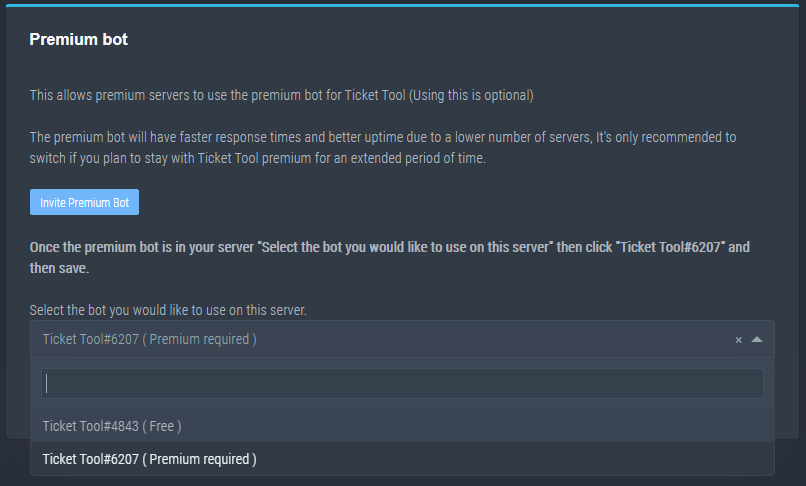
How to disable the premium bot
To disable the premium bot you will have to go to the Dashboard -> Server Configs -> Premium bot -> And on the right-hand side select the primary free bot in the drop down menu.
Premium features will still work on the normal bot.
TicketTool.xyz - Ticketing without clutter
pale pilot
Check this
pale grove
@pale pilotthis is incredible...I feel silly for not seeing this sooner...I am infinitely grateful....i love you ❤️
pale pilot
No worries 🙂
 vocal agate
pale pilot
No worries 🙂
vocal agate
pale pilot
No worries 🙂
please check tickets
pale pilot
don't ping
vocal agate
oh sorry
pale pilot
And you just created a ticket 2 minutes ago. Be patient. We have our own personal lifes too
vocal agate
oh i was just asking cos u was active sorry
pale pilot
Well, nobody devotes their entire life to this. Even when we are online, we sometimes do other things
pale pilot
via dm? Yes
vocal agate
ok
 vestal sigil
Is there a way to allow a role to always see claimed tickets without providing them the administrator permission?
jade topaz
Real quick is the bot down or just our server being mad?
humble sequoiaBOT
Pong! Latency is 270ms. API Latency is 79ms [-]
eager cargo
There was a ping spike a bit ago, should be all good now, what's up?
eager cargo
vestal sigil
Is there a way to allow a role to always see claimed tickets without providing t...
$help support
humble sequoiaBOT
How to let support team see into a ticket
About support roles
A support role lets your support team see into tickets with out having to add them manually to each and every ticket.
You can add as many support roles as you like per panel.
NOTE that the way discord works all admins can see into tickets regardless of this.
How to set a support role
To set a Support role go to the Dashboard -> Panel Configs -> Settings -> General Options -> Support Team Roles.
NOTE that the support role will not be able to see into tickets that are already created..
jade topaz
Creating tickets just ain’t working it’s decided to not create a ticket when click the react
eager cargo
Whats your server ID?
jade topaz
I have zero idea how to check that on my phone it’s currently 00:32am and just needed to create a ticket ahah
eager cargo
Run $id in your server and copy and paste those numbers into here
jade topaz
Even that command ain’t working in the server
I wonder if the owner has cocked up a permission somewhere
eager cargo
It's likely
eager cargo
jade topaz
Even that command ain’t working in the server
Good thing theres another way
Head to your user settings
Click appearance
Then enable Developer Mode
That's how it is on mobile I believe
jade topaz
Aye had that already
jade topaz
Ima guess it’s this
eager cargo
Then scroll down
jade topaz
750656326765379584
jade topaz
Yup
eager cargo
Alrighty
One moment
Ah, not a permission issue, it's just that you guys have the premium bot enabled without having premium
eager cargo
Should be all good now, make sure you have the regular bot in your server for it to work
eager cargo
jade topaz
I’ll have to let our owner know - cheers
Yup
jade topaz
I’ll speak to the owner on that one
eager cargo
Sounds good
Looks like your premium ran out, that's all
Can be purchased at the first link below
humble sequoiaBOT
Ticket Tool Premium
Get premium at https://tickettool.xyz/premium
Manage your subscriptions at https://tickettool.xyz/subscriptions
Why Premium?
Premium lets you customize the bot just how you want it. It also helps keep the bot running.
jade topaz
Yeah I don’t deal with that end of stuff, I leave it too our owner 😂
eager cargo
Haha sounds good
jade topaz
Anyway I’m off to bed, cheers for the quick help!
jade topaz
Thanks @eager cargo
iron nightBOT
Gave 1 Rep to Quo (current: #1 - 162)
 half kernel
Quick question, is there a way to give ticket tool 2 seperate prefixes?
eager cargo
No, apologies
iron nightBOT
Gave 1 Rep to Quo (current: #1 - 163)
eager cargo
Yup
 spark hound
$help setup
humble sequoiaBOT
Setting up Ticket Tool
Visit the docs for setup info
General Setup
spark hound
humble sequoia
https://docs.tickettool.xyz/en/general/setup
@stoic mango here
 tawny hare
@hybrid dagger @scenic plinth Necesito ayuda
scenic plinth
tawny hare
<@!332594810106150913> <@!615207454443044904> Necesito ayuda
Por favor, no haga ping al personal, explique su problema / pregunta o no podremos ayudarlo.
tawny hare
Lo siento
Hola! Tengo un servidor y me gustaria poder agregar tickets, me dirian como hacerlo?
scenic plinth
Su mejor opción es visitar los documentos sobre cómo configurar el bot, que tendrá un enlace a continuación sobre cómo hacerlo.
 thick socket
When you add a user using $add, what permissions does that user inherit? Is it the user opened permission or the additional role permission?
tawny hare
scenic plinth
Su mejor opción es visitar los documentos sobre cómo configurar el bot, que tend...
Gracias
scenic plinth
thick socket
When you add a user using $add, what permissions does that user inherit? Is it t...
Adding would inherit user open permissions. Assuming you're not adding a role.
thick socket
If I add a role, then what permissions would it inherit?
scenic plinth
Assuming you're adding a role, unless defined in the "additional roles" setting, you'd be giving the basic permissions, such as the "user open permissions", take for example when you close it, it also removes people with the role you added, because of your user closed permissions.
thick socket
scenic plinth
Assuming you're adding a role, unless defined in the "additional roles" setting,...
Okie, understood, thank you!
iron nightBOT
Gave 1 Rep to 𝑉𝑢𝑥𝑖𝑎♡ (current: #7 - 131)
 red knoll
Open these two settings will send the transcript atuo dm to the people?

 uncut prairie
$help
humble sequoiaBOT
Help Options
$help commands - Information on commands
$help setup - Information on bot setup
$help faq - Frequently asked questions
 ashen thunder
y is my server not poping up in my mange servers on ticket tool @eager cargo
 dreamy sphinx
Hi how can I resete the number count of my tickets so that it will start with 0001 again?
craggy geyser
red knoll
Open these two settings will send the transcript atuo dm to the people?
The first one does but the diamond means you need premium. The second means it saves automatically in your sever (still premium)
red knoll
Thxs!!
craggy geyser
ashen thunder
y is my server not poping up in my mange servers on ticket tool <@!4377282403882...
Don't ping support team. It's against the #546557408902905896. Follow this
humble sequoiaBOT
Don't see your server in the dashboard?
You will possibly need to relog. Look below to see steps on how to relog.
How to relog the Dashboard.
First, you will need to go to the dashboard. Once your there, click on your avatar on the top right. after you clicked it, you will see button that says Logout. You must click that. Once you have logged out, you can log back in.
Note:
You need one of these 3 things to access the dashboard.
1. Server Owner (Level: 6)
2. Server Administrator (Level: 4)
3. Dashboard Role (Level: 2)
You can check your level using $level on your Discord Server
ashen thunder
sorry
craggy geyser
dreamy sphinx
Hi how can I resete the number count of my tickets so that it will start with 00...
In the panel settings, go to general options and change the "count" back down. I can't remeber if count is the next or current ticket to if you need 1 or 0, but I think it has a ? button you can click on for explanation
ashen thunder
yea someone helped me on support team sorry about that tho
craggy geyser
No worries. At least it works
dreamy sphinx
craggy geyser
In the panel settings, go to general options and change the "count" back down. I...
Thank you mate 😄
iron nightBOT
Gave 1 Rep to Swift (current: #4 - 141)
 indigo jungle
 frank lance
Is there a way to make it so only 10 tickets can be open at a certain time for a panel.
Then if there’s already 10 you have to wait till one of the others has closed.
@forest goblet
 hybrid fern
Where is the "Category options" in the web?
humble sequoiaBOT
-- moved to ticket --
craggy geyser
hybrid fern
Where is the "Category options" in the web?
Panel settings > settings (on the panel you want) > second subheading down
hybrid fern
craggy geyser
Panel settings > settings (on the panel you want) > second subheading down
Oh thank you
iron nightBOT
Gave 1 Rep to Swift (current: #4 - 142)
craggy geyser
No worries
 carmine prawn
Is it possible retrieve closed tickets
craggy geyser
$help transcript
humble sequoiaBOT
How do I save transcript to a channel?
To save transcripts to a channel go to the Dashboard -> Panel Configs -> Settings -> Logging Options -> Transcript Channel
 craggy geyser
carmine prawn
Is it possible retrieve closed tickets
craggy geyser
carmine prawn
Is it possible retrieve closed tickets
Set this up so future transcripts save outside the ticket
Then you can use that. But once a ticket is deleted it is gone forever just like any other deleted channel
carmine prawn
@craggy geyser Thanks for ur help
iron nightBOT
Gave 1 Rep to Swift (current: #3 - 143)
jade topaz
Is it possible for the bot to close ticket's after a Set amount of time?
humble sequoiaBOT
Automation disabled
There's currently no ETA for when automation will be enabled again. The issue that's caused it to be disabled, us hitting rate limits, is tied to the increased load on Discord's servers. The situation's currently unpredictable, which makes it so we can't give you a fixed time.
scenic plinth
^
jade topaz
ah okay thank you @scenic plinth
iron nightBOT
Gave 1 Rep to 𝑉𝑢𝑥𝑖𝑎♡ (current: #7 - 132)
jade topaz
Why am I getting this message, someone please help.

I tried looking through wiki but could not find anything :(
craggy geyser
There is likely either a role blacklisted, or the button is set to support team only
jade topaz
craggy geyser
There is likely either a role blacklisted, or the button is set to support team ...
How to check for blacklisted roles ?
humble sequoiaBOT
Blacklist Roles
Any role you assign as a blacklisted role won't be able to use commands or reactions.
Selecting a blacklisted role
Go to your Dashboard -> Server Configs. There you will find the option to select blacklisted roles.
Note: Don't forget to save.
craggy geyser
jade topaz
How to check for blacklisted roles ?
Here
 craggy geyser
If you check the button options does it have any disabled roles or the support team only option selected?
jade topaz
craggy geyser
If you check the button options does it have any disabled roles or the support t...
Where to see button options
craggy geyser
$buttons
humble sequoiaBOT

Buttons
The new Discord Buttons allow for a much smoother and convenient experience. They reduce lag and work much better than emojis. With ticket tool you can edit all the buttons however you like! Buttons can show emojis, text and can have 4 different colors.
Where can I edit them?
Dashboard -> Panel Configs -> <Settings> -> Button Options -> <Setting>

 craggy geyser
And the top option there? The "Support team only" that you can see in the picture?
If that is green like the picture, that will be why
jade topaz
craggy geyser
And the top option there? The "Support team only" that you can see in the pictur...
Ohh the first one
craggy geyser
Yeah. That means that only people with a support role (from general options) can use the button
jade topaz
Thanks @craggy geyser
iron nightBOT
Gave 1 Rep to Swift (current: #2 - 144)
 real merlin
trying to setup and my test account keeps getting this message not sure where I have gone wrong
 pale pilot
You might need to update your discord client (and switch to dark mode ||joke :D||)
real merlin
aparently he can create tickets on another discord just not my test one. (and yeah he's weird ignore the light mode.. I've been trying to tell him he's wrong for ages)
pale pilot
But others can create tickets?
real merlin
I am able to fine but I'm owner he is the only other person on the DC at the moment
real merlin
done thanks @pale pilot
iron nightBOT
Gave 1 Rep to Simple (current: #8 - 129)
humble sequoiaBOT
-- moved to ticket --
jade topaz
how to stop a certain role making tickets
for example muted people
cuz sometimes they spam tickets
humble sequoiaBOT
Blacklist Roles
Any role you assign as a blacklisted role won't be able to use commands or reactions.
Selecting a blacklisted role
Go to your Dashboard -> Server Configs. There you will find the option to select blacklisted roles.
Note: Don't forget to save.
craggy geyser
@jade topaz see above
jade topaz
thanks @craggy geyser !
craggy geyser
Editing it doesn't get the bot registering the rep. But thanks anyway 😂
jade topaz
thanks @craggy geyser
iron nightBOT
Gave 1 Rep to Swift (current: #2 - 145)
jade topaz
there
craggy geyser
You're very welcome
jade topaz
What all does the "ticket automation" do? Wanted to understand before I buy premium.
We get a lot of people joining, starting tickets and then just leaving which gets fairly annoying. With premium, are we able to set the ticket duration for a certain amount of time before it closes itself out?
craggy geyser
jade topaz
We get a lot of people joining, starting tickets and then just leaving which get...
You used to be able to do it with time, but due to rate limits that was removed. What you can do however is automatically ose a ticket if the user leaves the sever (which happens here). Automation also includes automatically saving transcripts upon close/deletion of the ticket (your choice which) as well as automatically sending a dm of the transcript to the user
 gray mulch
help me please
 craggy geyser
There is likely either a role blacklisted, or the button is set to support team ...
craggy geyser
craggy geyser
There is likely either a role blacklisted, or the button is set to support team ...
@gray mulch, read from the message I have replied to. It was me helping someone with the same issue.
gray mulch
I do not find
 wary umbra
Why do my servers emojis don't get replaced in the message? https://gyazo.com/2cc105a66bfa3b08b2c2de5fb981182a

 remote peak
wary umbra
Why do my servers emojis don't get replaced in the message? https://gyazo.com/2c...
remote peak
wary umbra
Why do my servers emojis don't get replaced in the message? https://gyazo.com/2c...
Try use the id
If you use the backslash before the emoji you'll get the id for it
wary umbra
thanks!
 forest dirge
Brauche Hilfe am besten privat
robust sandalBOT
forest dirge
Brauche Hilfe am besten privat
 Nico.
Nico.
Need help best privately
German (de) → English (en)
scenic plinth
forest dirge
Brauche Hilfe am besten privat
/de Make a german support ticket please, one of the support members will be able to assist you there.
robust sandalBOT
Erstellen Sie bitte ein deutsches Support-Ticket, eines der Support-Mitglieder kann Ihnen dort behilflich sein.
English (en) → German (de)
trail sphinx
$help
humble sequoiaBOT
Help Options
$help commands - Information on commands
$help setup - Information on bot setup
$help faq - Frequently asked questions
trail sphinx
$help faq
humble sequoiaBOT
====== FAQ ======
If a question interests you run the command to see the answer.
Q: What is the prefix and how do I change it?
A: $help prefix
Q: How do I let my support team see into a ticket?
A: $help support
Q: How do I make a ticket ping my support when it's created?
A: $help ping
Q: How do I set a transcript channel?
A: $help transcript
Q: How do I limit the number of tickets a user can create?
A: $help limit
Q: How do I set what category tickets are created in?
A: $help category
Q: How do I set what category tickets are moved to when closed?
A: $help closed
Q: How do I set a custom reaction?
A: $help reaction
Q: How do I set the permissions for the tickets?
A: $help perms
Q: How do I create a panel?
A: $help panel
Q: How do I get the panel in my discord?
A: $help send
Q: How do I add or remove users from a ticket?
A: $help add
Q: A panel of mine won't update with the new settings, How do I fix it?
A: $help update
Q: Ticket Tool isn't responding to my commands, How do I fix it?
A: $help offline
Q: How does the claim command work?
A: $help claim
trail sphinx
$help setup
humble sequoiaBOT
Setting up Ticket Tool
Visit the docs for setup info
General Setup
surreal hedge
How do I add text when adding onto one panel? like I know how to do $panel [id1] [id2] {id3} and all but how do I add the info

 proven void
anyone else seeing a general slowness in TT's response times?
 sterile basin
Hey random question, when having ticket tool premium, do we need to keep the standard bot in our server? We've kept it in for months without actually knowing, some bots require it but we weren't sure about ticket tool
vocal agate
if i buy prenium on my friends server i have access to if they go on the dashbored would they see my card details?
craggy geyser
sterile basin
Hey random question, when having ticket tool premium, do we need to keep the sta...
As long as you have the settings to use premium then you don't need to keep the standard one
It won't work at all anyway. It is one or the other
(though I say this having both in my sever...)
sterile basin
Lovely stuff 😄
We've had it for months now but never thought about getting rid of the standard 
craggy geyser
proven void
anyone else seeing a general slowness in TT's response times?
I think one of our managers was noticing something about the website being slow if you mean this. If it is the bot, it is also possible
craggy geyser
sterile basin
We've had it for months now but never thought about getting rid of the standard ...
I've has premium for almost a year and still got the free bot. It happens
vocal agate
how do i enable via transcripts?
proven void
craggy geyser
I think one of our managers was noticing something about the website being slow ...
yeah, seeing random 'Transaction' errors when trying to close tickets. I'll keep an eye on it.
craggy geyser
proven void
yeah, seeing random 'Transaction' errors when trying to close tickets. I'll keep...
What do you want to enable with transcripts?
craggy geyser
vocal agate
how do i enable via transcripts?
Just noticed discord played up and replied to the wrong message. The above is to you
proven void
No worries
 near siren
Hey is there a feature for automatically making a new category for tickets once one category is full?
 sleek fulcrum
hey im having trouble figuring out why it says people dont have permission to create a ticket
 robust flame
hello, I need help in figuring out why the person who created the ticket doesnt have access to the created ticket channel
jade topaz
Hello, I have problems
 unique junco
pretty obvious considering you’re not saying what you need
 jaunty glen
#875142577534410792 please anyone 🥺talk with me
 cloud bloom
 digital gale
🇪🇦
 lean rivet
عربي
 hexed pumice
How can I restart ticket counter?

 pearl echo
My server isnt showing up in the dashboard. Any suggestions?
scenic plinth
 dense thicket
No podemos ayudarlo con esto, lo siento. Esto no parece estar relacionado con Ticket Tool.
scenic plinth
digital gale
🇪🇦
¿Necesitas ayuda?
scenic plinth
 torn stream
Why it doesn't ping?
torn stream
Why it doesn't ping?
Try to use the role ID, you can use the command $id {@role} to get its ID.
 rigid pilot
How do you change the footer icon
jade topaz
How do I ping roles in ticket message
humble sequoiaBOT
Setting up Ticket Tool
Visit the docs for setup info
General Setup
 sleek kiln
I am newer to Ticket tool. Got it set up in my server, however it's logging in the in-correct channel. I have the correct channel selected in the logging channel in the panel. When you open and close a ticket, they go to two different channels. Neither or correct. They are logging in the correct category.

 wispy saddle
shard 144 seems to be suuuper dead
won't make tickets at all
$help responds, but $new and reacting do nothing
with no change to the setup
 split folio
Is there a way to set a ticket to admins only?
craggy geyser
Don't set a support role (or set it as the admin role, but administrator permission means they see it without support as it is)
If you don't want people to make the ticket, you can set the create ticket button to support team only
split folio
craggy geyser
Don't set a support role (or set it as the admin role, but administrator permiss...
I want it so basically someone makes a ticket. Then, the mods and the admins see the ticket. Then if it is serious, and they want to speak with an Admin, the mods get removed
craggy geyser
Two ways of doing this. One requires premium if you have it
The way that doesn't is using the $remove command. You can use it to remove a role from the ticket
$help add
humble sequoiaBOT
How to add or remove users on tickets
To add a user to a ticket use $add <user>
To remove a user from a ticket use $remove <user>
craggy geyser
(I'm pretty sure it works for roles at least. I will double check really quickly)
split folio
craggy geyser
The way that doesn't is using the `$remove` command. You can use it to remove a ...
let me try this
craggy geyser
Yep. It works
 golden wyvern
Is this the support channel?
split folio
 craggy geyser
golden wyvern
Is this the support channel?
craggy geyser
golden wyvern
Is this the support channel?
If you want support with @pseudo glen yes (premium bot included)
split folio
split folio
@craggy geyser
see i tried removing mods manually
and i tried removing the role
craggy geyser
Do they have the administrator permission?
golden wyvern
Okay so I set up a new panel and everything but no reactions are getting sent to the support embed in my channel..... no one can react....
craggy geyser
golden wyvern
Okay so I set up a new panel and everything but no reactions are getting sent to...
Reactions are replaced with buttons. Are you sure no one can see it, or just some people can't? If it is some people, update discord for those who can't see it
craggy geyser
Try updating to the latest discord version. If you still can't see it then let me know. If you can get others to update
golden wyvern
Alrighty
split folio
craggy geyser
Do they have the administrator permission?
No but I figured it out. They had 2 roles that got them into the ticket. However, I don't know why the individual mod didn't get removed when i tried to remove him
craggy geyser
Yeah, I don't get that either
golden wyvern
It appears I have the latest update? I am on an android phone atm.... which might be it???? Tho it's a 1000 phone so I'm not sure why it wouldn't work....
split folio
craggy geyser
Yeah, I don't get that either
Well anyways thanks for your help
iron nightBOT
Gave 1 Rep to Swift (current: #2 - 146)
craggy geyser
golden wyvern
It appears I have the latest update? I am on an android phone atm.... which migh...
I'm on android, shouldn't be the issue. Create a ticket and send a sever invite and I will take a look see if it is there for me. If it isn't I will see if I can solve it for you
golden wyvern
Alrighty
craggy geyser
split folio
No but I figured it out. They had 2 roles that got them into the ticket. Howev...
Just did it myself on a mod and same issue. I think I know why. Removing users seems to not remoce their permissions given by roles, it just takes them out of they were added manually
 craggy geyser
Okay, it will be your end then. Buttons are there
humble sequoiaBOT
Update your discord App
Buttons are a relatively new addition to discord and don't work with some older versions of the app.
Please verify that you have the latest version of discord, by going to the app or play store.
_ _
Discord for the App Store
_ _
Discord for the Play Store
craggy geyser
Try following that link to see if it let's you update
 split folio
craggy geyser
Just did it myself on a mod and same issue. I think I know why. Removing users s...
split folio
craggy geyser
Just did it myself on a mod and same issue. I think I know why. Removing users s...
I am going to nod, and pretend to know what u just said.
craggy geyser
split folio
I am going to nod, and pretend to know what u just said.
Basically, you can't remove a user with the command unless you added them with the command. But roles can be removed
golden wyvern
The buttons are there now....
Interesting...
Discord should get better at pushing out updates... I feel neglected
split folio
craggy geyser
Basically, you can't remove a user with the command unless you added them with t...
oooooooooooooooo. thank u
iron nightBOT
@split folio :: You can't rep Swift#9871 for 49 minutes and 22 seconds. Try coming back later?
split folio
iron night
<@758105511362166786> **::** You can't rep **Swift#9871** for 49 minutes and 22 ...
-_-
 tiny ginkgo
uh yea so, i read the faq's and stuff since i couldnt find anything there, could someone tell me that if theres a way to see transcripted tickets on the dashboard?
craggy geyser
There isn't
iron nightBOT
Gave 1 Rep to Swift (current: #2 - 147)
craggy geyser
$help transcript
humble sequoiaBOT
How do I save transcript to a channel?
To save transcripts to a channel go to the Dashboard -> Panel Configs -> Settings -> Logging Options -> Transcript Channel
craggy geyser
Set that up and the transcripts won't be saved in the tickets in future
tiny ginkgo
k ty
craggy geyser
And resave the transcripts you have once that is set up and you can delete tickets. If the transcript message gets deleted the transcript will get deleted shortly after that
tiny ginkgo
craggy geyser
And resave the transcripts you have once that is set up and you can delete ticke...
so the tickets that are transcripted will show up on the portal and i save them from there?
carmine prawn
If I press delete ticket after its saved will the ticket be gone b
craggy geyser
Yep. It deletes the channel
tiny ginkgo
craggy geyser
They show up in a dedicated channel
k thanks
iron nightBOT
Gave 1 Rep to Swift (current: #2 - 148)
golden wyvern
What settings allows users to use the button? They get a warning and can't open any tickets.....
craggy geyser
What's the warning? You might have set a blacklist role or set the ticket to support team only
humble sequoiaBOT
Blacklist Roles
Any role you assign as a blacklisted role won't be able to use commands or reactions.
Selecting a blacklisted role
Go to your Dashboard -> Server Configs. There you will find the option to select blacklisted roles.
Note: Don't forget to save.
craggy geyser
$buttons
humble sequoiaBOT
Buttons
The new Discord Buttons allow for a much smoother and convenient experience. They reduce lag and work much better than emojis. With ticket tool you can edit all the buttons however you like! Buttons can show emojis, text and can have 4 different colors.
Where can I edit them?
Dashboard -> Panel Configs -> <Settings> -> Button Options -> <Setting>
rigid pilot
How do I get my premium role
humble sequoiaBOT
Ticket Tool Premium
Get premium at https://tickettool.xyz/premium
Manage your subscriptions at https://tickettool.xyz/subscriptions
Why Premium?
Premium lets you customize the bot just how you want it. It also helps keep the bot running.
craggy geyser
rigid pilot
How do I get my premium role
$pc
humble sequoiaBOT
How to get premium role
Until the automatic premium check is fixed run the command $debug on your server and send us the link in a ticket.
sleek kiln
I sent a message last night but maybe it’s confusing. In the attached picture, I have put red Xs next to the current ticket tool log channels. However, I’d like for it to log in the two channels I have green arrows next too.
I do have the correct channel listed under the logging tab in the panel. I also mentioned last night that it’s being logged in the correct category just the wrong channel. Any ideas?

 torn stream
scenic plinth
Try to use the role ID, you can use the command `$id {@role}` to get its ID.
torn stream
scenic plinth
Try to use the role ID, you can use the command `$id {@role}` to get its ID.
like <&roleid>?
scenic plinth
torn stream
like <&roleid>?
Yes but <@roleid>
scenic plinth
jade topaz
Why 👀
Likely missing access to something when closing, in this I can't tell by this screenshot as I don't know if you are trying to delete it or if your trying to use a transcript command. You can use $debug in your server to see the bots permissions.
jade topaz
scenic plinth
Likely missing access to something when closing, in this I can't tell by this sc...
I just closed the ticket
I think that he don’t have permission to changed the channel name
But I gave him manage channel permission
scenic plinth
sleek kiln
I sent a message last night but maybe it’s confusing. In the attached picture, I...
Is it logging in the channel that you don't want it to after you change it? Or is just not logging at all? You could be possibly just mistakenly not saving it and it is not changing it.
scenic plinth
jade topaz
I just closed the ticket
I think that he don’t have permission to changed the c...
It could be a few different factors, you can try to see if thats the issue by attempting to rename said ticket. If it does rename it is another issue.
sleek kiln
scenic plinth
Is it logging in the channel that you don't want it to after you change it? Or i...
Correct. I went back to the panel last night verified the correct channel was listed. Saved it, and re sent ticket tool to the appropriate channel.
It is logging in the right category just not the right channel
scenic plinth
Is it showing up in the panel configurations when you refresh the site?
jade topaz
scenic plinth
It could be a few different factors, you can try to see if thats the issue by at...
I didn’t understand 🌚
The bot can’t close the ticket, but he can delete it
scenic plinth
Use $debug and send me the link it sends
jade topaz
scenic plinth
It could be a few different factors, you can try to see if thats the issue by at...
u mean when i use $rename
Yes it works
scenic plinth
Try allowing the bot to manage roles, I think what is happening is it is trying to close the ticket and remove therole, but can't manage them.
jade topaz
scenic plinth
Try allowing the bot to manage roles, I think what is happening is it is trying ...
Ty
iron nightBOT
Gave 1 Rep to 𝑉𝑢𝑥𝑖𝑎♡ (current: #7 - 134)
 scenic plinth
Normally wouldn't happen, but there is a slight chance it could be because those tickets were open before the change, but I doubt it.
I would try to see if the bot has access to the channels, if it does make a ticket and we'll see if someone else has an idea.
sleek kiln
Perfect, thank you for your time. I will try that. Sorry it’s something so small
sleek kiln
scenic plinth
Normally wouldn't happen, but there is a slight chance it could be because those...
Well, this is embarrassing, but that fixed half the problem. Thank you. I'll dig into the closed ticket logging.
iron nightBOT
Gave 1 Rep to 𝑉𝑢𝑥𝑖𝑎♡ (current: #6 - 135)
 jade topaz
can anyone look at my ticket please? bit urgent 
 proud pine
 humble sequoiaBOT
-- moved to ticket --
humble sequoiaBOT
 Faster Premium Bot
Automatic Transcripts
Full Customization
Custom Reactions
Direct Messages
Ticket Automation
Multipanels
Premium Support
You can purchase premium here:
Price
$6 - Monthly
$66 - Yearly
 Premium
scenic plinth
Premium
scenic plinth
It also shows on the subscription page
 unborn shoal
Hi where the support Arabic
golden wyvern
craggy geyser
What's the warning? You might have set a blacklist role or set the ticket to sup...
I mean regular users can't click the button... the bot says they don't have permissions
 safe prairie
unborn shoal
Hi where the support Arabic
jade topaz
safe prairie
unborn shoal
Hi where the support Arabic
jade topaz
pls enter
prime bridgeBOT
UltraliskM has been silenced for 10m
Reason: Posting Discord Server Invites
UltraliskM#2010 | 789906330600603648
golden wyvern
So I got thr buttons to work... how do I make it so only the person who created the ticket is in the channel
Literally everyone can join rn
How do I make tickets private? That's a better way to ask that question
hexed pumice
How can I restart ticket counter? ( #0001 ...)
craggy geyser
golden wyvern
How do I make tickets private? That's a better way to ask that question
Change the everyone role permissions
$help permissions
humble sequoiaBOT
Help Options
$help commands - Information on commands
$help setup - Information on bot setup
$help faq - Frequently asked questions
humble sequoiaBOT
How to set the permissions for tickets
To set a change permissions go to the Dashboard -> Panel Configs -> Settings -> Permission Options
 severe path
 hexed pumice
thx
 chilly summit
So, if the premium expires, but I tried the free trial, do I need to repost the ticket message because of that?

 noble shale
Yo um i have a staff in my server he cant access tickets but thats bc the administrator perm is off, how do i give him access to tickets without giving him administrator
mystic hound
chilly summit
So, if the premium expires, but I tried the free trial, do I need to repost the ...
If you're using the premium bot but don't have premium then yes, you'll need to switch to the free one and resend the panel
$help support
humble sequoiaBOT
How to let support team see into a ticket
About support roles
A support role lets your support team see into tickets with out having to add them manually to each and every ticket.
You can add as many support roles as you like per panel.
NOTE that the way discord works all admins can see into tickets regardless of this.
How to set a support role
To set a Support role go to the Dashboard -> Panel Configs -> Settings -> General Options -> Support Team Roles.
NOTE that the support role will not be able to see into tickets that are already created..
mystic hound
@noble shale ^^
mystic hound
golden wyvern
Ywah after editing the everyone perms now no one can create a ticket
You're probably editing the wrong option, please #🎫│make-a-ticket and a team member will assist you. (I'd do it myself but I'm a bit occupied rn)
noble shale
good service thank you!
chilly summit
mystic hound
If you're using the premium bot but don't have premium then yes, you'll need to ...
So, even if I make it "Free" on the dashboard, I do still need to repost the bot with the freemium bot new ticket message?
 mystic hound
chilly summit
So, even if I make it "Free" on the dashboard, I do still need to repost the bot...
mystic hound
chilly summit
So, even if I make it "Free" on the dashboard, I do still need to repost the bot...
if you're changing bots then yes you need to resend the panel
chilly summit
Ah, dang. Thank you anyway.
 torpid aurora
jade topaz
torpid aurora
jade topaz
Svp un staff dispo urgent ?!
 upper bone

 true copper
Hy
 gray zinc
i have ticket tool in my server, but it says its not in any of my servers. i dont know what this is, maybe you can help?

wait nvm its working now (: sorry

 copper owl
 mighty wyvern
i cant reopen and delete tickets
mighty wyvern
i cant reopen and delete tickets

Check the tickets, and look at these buttons
you can save, reopen, or delete tickets using these buttons
mighty wyvern

 oak harness
question on "cancel on next renewal" am i paying for the next month and then it cancels or does it cancel that day
 bright hedge
hi
Why can't I use my server claim ticket? What is the function of cliam ticket? What it you do?
humble sequoiaBOT
-- moved to ticket --
 fervent imp
How i can metion role ?
rotund kite
$help ping
humble sequoiaBOT
How to make Ticket Tool ping a role
To make ticket tool ping a role when a ticket is opened, go to the Dashboard -> Panel Configs -> Settings -> Ticket Options -> Ticket Message -> Message Text and do this:
{@Role name} This is case sensitive and the role must have @mentions enabled
 native grove
$help Button
humble sequoiaBOT
Help Options
$help commands - Information on commands
$help setup - Information on bot setup
$help faq - Frequently asked questions
native grove
$help Button Options
humble sequoiaBOT
Help Options
$help commands - Information on commands
$help setup - Information on bot setup
$help faq - Frequently asked questions
native grove
$help faq
humble sequoiaBOT
====== FAQ ======
If a question interests you run the command to see the answer.
Q: What is the prefix and how do I change it?
A: $help prefix
Q: How do I let my support team see into a ticket?
A: $help support
Q: How do I make a ticket ping my support when it's created?
A: $help ping
Q: How do I set a transcript channel?
A: $help transcript
Q: How do I limit the number of tickets a user can create?
A: $help limit
Q: How do I set what category tickets are created in?
A: $help category
Q: How do I set what category tickets are moved to when closed?
A: $help closed
Q: How do I set a custom reaction?
A: $help reaction
Q: How do I set the permissions for the tickets?
A: $help perms
Q: How do I create a panel?
A: $help panel
Q: How do I get the panel in my discord?
A: $help send
Q: How do I add or remove users from a ticket?
A: $help add
Q: A panel of mine won't update with the new settings, How do I fix it?
A: $help update
Q: Ticket Tool isn't responding to my commands, How do I fix it?
A: $help offline
Q: How does the claim command work?
A: $help claim
native grove
$help commands
humble sequoiaBOT
() = optional
[] = required
*==================================
Ticket Commands
==================================*
_ _
`$add [User] (channel)`
Description: Adding additional users to a ticket
Aliases: none
`$remove [User] (channel)`
Description: Removing users from a ticket
Aliases: none
`$close`
Description: Closing tickets
Aliases: none
`$open`
Description: Opening closed tickets
Aliases: none
`$delete`
Description: Deleting tickets
Aliases: none
`$rename`
Description: Renaming tickets/channels
Aliases: none
`$transcript (send channel)`
Description: Creating transcripts
Aliases: none
`$new (user) (reason)`
Description: Creating tickets in a monitored channel (when command style is enabled)
Aliases: none
`$claim`
Description: Claiming tickets (when claim is enabled)
Aliases: "unclaim"
_ _
*==================================
General Commands
==================================*
_ _
`$help (Help Options)`
Description: Help Command
Aliases: none
`$debug`
Description: Debuging issues with running Ticket Tool
Aliases: none
`$id (@role/@user/#channel/emoji)`
Description: Converting roles, users, channels and emojis to ID
Aliases: "getid"
`$permlevel`
Description: Checking permission level with Ticket Tool
Aliases: "level"
`$ping`
Description: Checking response time with discord api
Aliases: none
`$vote (link | unlink | redeem) (user)`
Description: Earn premium by voting on top.gg or Discord.boats
Aliases: "votes"
 fresh gulch
@atomic solstice
 glass yoke
I added the bot to my server but it did not show up on manage servers!
 atomic solstice
fresh gulch
<@!601783394334015498>
atomic solstice
fresh gulch
<@!601783394334015498>
it doesn't matter what size you use, because Discord automatically resizes your images
atomic solstice
glass yoke
I added the bot to my server but it did not show up on manage servers!
log out and log back in to the dashboard
glass yoke
atomic solstice
log out and log back in to the dashboard
ok
glass yoke
atomic solstice
log out and log back in to the dashboard
Tysm worked!
 slim nexus
$invite
humble sequoiaBOT
Ticket Tool Invite & Support
 sly mural
How do you make it so the ticket name is ticket-user
What variable is it for name of the ticket opener
craggy geyser
sly mural
How do you make it so the ticket name is ticket-user
{ticket.user.nickname} probably
(I'm assuming you want the nickname. If not, change the last part)
iron nightBOT
Gave 1 Rep to Swift (current: #2 - 150)
 frail fox
mighty wyvern
frail fox
mighty wyvern
I have the same problem with a ticket. I can't get that away and the German support hasn't answered me in the last 48 hours, which is why I just ask here if anyone knows a solution.
jade topaz
How can I add images ?
 timber ether
is there anywhere to help setup premium tickets which have different reasons for opening a ticket in the same panel
like this
humble sequoiaBOT
Multipanels are a premium feature that allow for a single panel with multiple buttons to open different tickets.
How to create a Multipanel
Premium users can combine multiple panels into one multipanel.
First, find the IDs of each panel you wish to combine. You can find them in your Panel Configs in the Dashboard
Next, send the multipanel to a channel using $panel [id1] [id2] {id3} ....
e.g. $panel 1 2 4 17 35 to combine panels 1, 2, 4, 17 and 35.
Up to 25 panels may be combined.
rough moth
@timber ether ^^
rough moth
frail fox
I have the same problem with a ticket. I can't get that away and the German supp...
Just gotta be patient
rough moth
jade topaz
How can I add images ?
Do you have premium?
jade topaz
yes
mystic hound
mighty wyvern
Try deleting it manually, if that doesn't work ( ask the server owner to do it), you need to contact discord support
@frail fox the same goes for you as well ^^
jade topaz
How can I get my role ?
mystic hound
$pc
humble sequoiaBOT
How to get premium role
Until the automatic premium check is fixed run the command $debug on your server and send us the link in a ticket.
jade topaz
$pc
humble sequoiaBOT
How to get premium role
Until the automatic premium check is fixed run the command $debug on your server and send us the link in a ticket.
 mystic hound
You're trying to log into the docs, to use the dashboard log into the below link
humble sequoiaBOT
jade topaz
Thanks you><
mighty wyvern
mystic hound
Try deleting it manually, if that doesn't work ( ask the server owner to do it)...
I did, nothing
mystic hound
You'll need to contact discord support then
mighty wyvern
K
 young coral
Hey guys real quick - does anyone know how to switch your original bot system from free to Premium? I try to create a ticket on discord and it says interaction not possible - please ensure you are using the right bot
humble sequoiaBOT
Inviting and Enabling Premium Bot
The first thing you will need to do is invite the premium bot, an invite can be found here
Once the bot is in your server we will head to the dashboard and manage your server. When you are managing your server, you want to head into "Server Configs" then click the drop down menu under "Select the bot you would like to use on this server" then click "Ticket Tool#6207" and then save.
mystic hound
@young coral ^^
iron nightBOT
Gave 1 Rep to Light (current: #3 - 146)
 regal goblet
anyone knows why certain emojis don't show up for button emojis?
jade topaz
Hello
If i want the bot to ping me when someone open a ticket. I do like this?
{@jade topaz}
👀
flint coyote
$help ping
humble sequoiaBOT
How to make Ticket Tool ping a role
To make ticket tool ping a role when a ticket is opened, go to the Dashboard -> Panel Configs -> Settings -> Ticket Options -> Ticket Message -> Message Text and do this:
{@Role name} This is case sensitive and the role must have @mentions enabled
flint coyote
@jade topaz
jade topaz
flint coyote
<@456226577798135808>
I want the bot to mention a specific user
flint coyote
Did you try this?
Instead of putting {@role} put {@usernameyouwant}
Not sure if it will work, but if not, you can make a new discord role only for you or that user and do it that way.
 deft jackal
jade topaz
I want the bot to mention a specific user
deft jackal
jade topaz
I want the bot to mention a specific user
You can just <@User-ID>, for example: @deft jackal.
How to get User ID? Mention an user @deft jackal and then add a
\at the beginning of the mention (\@SoyZer0). And you would get something like this: @deft jackal

 median wigeon
@sharp rain
 muted gyro
hey ive had a peek around but i cant find anything regarding this
is there a way to have ticket tool set a channel topic automatically?
please @ or dm me if you know how or if its not possible
rough moth
muted gyro
hey ive had a peek around but i cant find anything regarding this
is there a wa...
like the description of the channel?
for example "You could gain the @humble sequoia Proficient role if the Managers constantly see you helping." in this channel
if so, no
iron nightBOT
Gave 1 Rep to UnknownUser (current: #9 - 115)
 somber ibex
Hello I have a problem
humble sequoiaBOT
-- moved to ticket --
 tawdry sable
hey so i need help setting up a ticket
 last bramble
tawdry sable
hey so i need help setting up a ticket
last bramble
tawdry sable
hey so i need help setting up a ticket
Go to the website and set up a panel
 lunar sequoia
guys i need a inv to boss servers cuz i accidentaly removed it and i cant join back
pls
i am thinking about buying damascus
unique junco
$tts
humble sequoiaBOT
You're in the wrong place
We provide support for @pseudo glen discord bot and cannot help you with whatever issue you have.
Please make sure to contact the appropriate support team.
If you don't have any further questions regarding our bot Ticket Tool, please close this ticket
_ _
 latent citrus
How do I make a chat for a ticket bot?
jade topaz
عراقي 😂😂@latent citrus
latent citrus
همزين
latent citrus
jade topaz
<@699511585504231494> والله مادري
خرب
jade topaz
اني اريد اخلي الواحد ما يمسح رسائله @latent citrus
latent citrus
jade topaz
اني اريد اخلي الواحد ما يمسح رسائله <@699511585504231494>
شني هاي
jade topaz
😂😂
latent citrus
شون الواحد ميمسح رسائله
jade topaz
😂😂
 safe sparrow
Is there a way where if u type for example “$new” ticket tool will open a ticket for u? Like instead of reaction panels u type
scenic plinth
safe sparrow
Is there a way where if u type for example “$new” ticket tool will open a ticket...
Enable command style tickets via the panel options, towards the bottom.
safe sparrow
Tysm <3
 jolly hill
I am from Iran 🇮🇷
true copper
هلاااا
robust sandalBOT
true copper
هلاااا
 UK SAM
Now
Arabic (ar) → English (en)
 errant mason
i was wondering if anyone knew how to set up multiple ticket types on one panel, similar to how this support server has it set up for different languages and reports and such
and also how to have them send to two different categories
humble sequoiaBOT
Multipanels are a premium feature that allow for a single panel with multiple buttons to open different tickets.
How to create a Multipanel
Premium users can combine multiple panels into one multipanel.
First, find the IDs of each panel you wish to combine. You can find them in your Panel Configs in the Dashboard
Next, send the multipanel to a channel using $panel [id1] [id2] {id3} ....
e.g. $panel 1 2 4 17 35 to combine panels 1, 2, 4, 17 and 35.
Up to 25 panels may be combined.
humble sequoiaBOT
How to set the open category
To set a open category go to the Dashboard -> Panel Configs -> Settings -> Category Options -> Category Open
 errant mason
i didnt see who replied so im not able to thank whoever helped 😦
copper owl
just have each panel created tickets in each one
errant mason
okay awesome thank you @copper owl !
iron nightBOT
Gave 1 Rep to Neptune (current: #12 - 64)
copper owl
Your most welcome!
errant mason
osnap i didnt realize this support doc was a thing, my life is changed xD
copper owl
haha
prime bridgeBOT
𝐦𝟕 has been silenced for 10m
Reason: Posting Discord Server Invites
𝐦𝟕#7777 | 854004159158419467
prime bridgeBOT
AtomX has been silenced for 10m
Reason: Posting NSFW Websites
AtomX#6969 | 847899054729854995
 stoic grove
me has problem
so i add ticket bot, and a person make 3 tickets i dont know why
then he closed them or something, and now i cant open them, cant delete them cant do anything with them
and i even tried kicking bot and reinviting it did not help
copper owl
stoic grove
so i add ticket bot, and a person make 3 tickets i dont know why
then he closed ...
can you manually delete the tickets?
stoic grove
no
copper owl
yes really
stoic grove
copper owl
youll have to contact discord to get those removed
how much time it take
copper owl
idk, youll have to talk to discord
copper owl
Np
stoic grove
thanks @copper owl
iron nightBOT
Gave 1 Rep to Neptune (current: #12 - 66)
 dark harbor
question, I have closed tickets inside my server that im unable to delete the channel. how am I supposed to remove them?
dark harbor
 jaunty pecan
como se saca ticket
jaunty pecan
como se saca ticket
I dont know what you are saying
jaunty pecan
i am speak spanish
dark harbor
I only speak english
jaunty pecan
pero habla español hijo de puta
scenic plinth
jaunty pecan
pero habla español hijo de puta
Quítalo con el lenguaje irrespetuoso
jaunty pecan
ok
jade topaz
can someone help me? my friend dont see the button for create ticket and i dont know what i need allow
 humble sequoiaBOT
Update your discord App
Buttons are a relatively new addition to discord and don't work with some older versions of the app.
Please verify that you have the latest version of discord, by going to the app or play store.
_ _
Discord for the App Store
_ _
Discord for the Play Store
scenic plinth
Try that
 abstract sleet
What is the invite for the ticket tool lounge
scenic plinth
$invite
humble sequoiaBOT
Ticket Tool Invite & Support
scenic plinth
2nd link, the server was changed. You can also visit #📣│server-news for a link to Social Network.
 west solstice
I currently have my permissions set up so that when a ticket is claimed it goes invisible to the Support Team role, an only visible to the Support Team member who claimed it
However, is it possible to have an additional Executive role which can see all tickets even after they're claimed?
copper owl
west solstice
I currently have my permissions set up so that when a ticket is claimed it goes ...
Add the executive role to "Additional Roles"
since it only affects support team roles, the additional roles should not be affected

excuse the low res screenshot, im not sure why it came out like that
scenic plinth
Must be on your side
copper owl
yeah its been like that for a while, idk why. Once you click on the screenshot, it goes back to a good quality
no idea why that happens but eh ¯_(ツ)_/¯
west solstice
copper owl
since it only affects support team roles, the additional roles should not be aff...
TY
iron nightBOT
Gave 1 Rep to Neptune (current: #12 - 67)
copper owl
your welcome!
 tall spire
@534980783929032724
robust sandalBOT
 versed lotus
ممكن تقولي الامر اللي ارجع بيه شكل التيكت القديمه ؟
versed lotus
ممكن تقولي الامر اللي ارجع بيه شكل التيكت القديمه ؟
 ✗ ┃𝗰𝗹𝗼𝘀𝗲𝙎𝙏𝘼𝙍𝙆'𝘅 👑
Could you tell me the thing that I'm going back to the old-fashioned T-list?
Arabic (ar) → English (en)
 quaint leaf
Hey!
I just invited the bot into my server and when I went to set it up it said i gad no servers with the bot in it.And I made sure I was logged in.
 humble sequoiaBOT
-- moved to ticket --
regal goblet
anyone knows why certain emojis don't show up for button emojis?
jade topaz
how to make the tickets goto an specified category?
@atomic solstice
@radiant moss
help?
hmm
atomic solstice
$help category
humble sequoiaBOT
How to set the open category
To set a open category go to the Dashboard -> Panel Configs -> Settings -> Category Options -> Category Open
atomic solstice
here @jade topaz ^^
 late notch

 craggy geyser
What do you mean by work across two severs? If you mean you open a ticket on one and it opens in another sever then no
unique junco
that could be cool actually
 hard garden
$help tags
humble sequoiaBOT
Help Options
$help commands - Information on commands
$help setup - Information on bot setup
$help faq - Frequently asked questions
Tags
Tags are used to send a predefined response to your channels using a command. Tags will only respond if the command itself is used, it will not function if you put the tag into a sentence. The prefix is not included.
To create tags, go to: Dashboard > Tags > Create Tag. After creating and naming one, tap on the response button, and you can edit the response.
 arctic pagoda
hard garden
$help tags
arctic pagoda
hard garden
$help tags
^
jade topaz
i wanna set it up in a dicord server but idk how it works does anyone know?
humble sequoiaBOT
 white karma
Hey what is the ticket tools prefix?
humble sequoiaBOT
How to change Ticket tool's prefix
The default prefix for ticket tool is $ and @Ticket Tool#4843 however that can be changed on the Dashboard under Server Configs -> Command Prefix.

NOTE that @Ticket Tool#4843 will always work as a prefix even if there is a custom prefix.
iron nightBOT
Gave 1 Rep to Ticket Tool (current: #6 - 136)
jade topaz
Why cant i post custom emojis in my embeded
i need help @tribal cedar
$id 787995197270523904
my stuff isnt working
$id :discordblueverified:
someone help
arctic pagoda
jade topaz
i need help <@!297419611350106133>
Please do not ping support team members.
 torpid igloo
$help commands
humble sequoiaBOT
() = optional
[] = required
*==================================
Ticket Commands
==================================*
_ _
`$add [User] (channel)`
Description: Adding additional users to a ticket
Aliases: none
`$remove [User] (channel)`
Description: Removing users from a ticket
Aliases: none
`$close`
Description: Closing tickets
Aliases: none
`$open`
Description: Opening closed tickets
Aliases: none
`$delete`
Description: Deleting tickets
Aliases: none
`$rename`
Description: Renaming tickets/channels
Aliases: none
`$transcript (send channel)`
Description: Creating transcripts
Aliases: none
`$new (user) (reason)`
Description: Creating tickets in a monitored channel (when command style is enabled)
Aliases: none
`$claim`
Description: Claiming tickets (when claim is enabled)
Aliases: "unclaim"
_ _
*==================================
General Commands
==================================*
_ _
`$help (Help Options)`
Description: Help Command
Aliases: none
`$debug`
Description: Debuging issues with running Ticket Tool
Aliases: none
`$id (@role/@user/#channel/emoji)`
Description: Converting roles, users, channels and emojis to ID
Aliases: "getid"
`$permlevel`
Description: Checking permission level with Ticket Tool
Aliases: "level"
`$ping`
Description: Checking response time with discord api
Aliases: none
`$vote (link | unlink | redeem) (user)`
Description: Earn premium by voting on top.gg or Discord.boats
Aliases: "votes"
jade topaz
nvm i got it
copper owl
no one click that, it's a scam link
prime bridgeBOT
Successful bans: 1
Unsuccessful bans: 0
Reason: scam
Moderator: @mystic hound
jade topaz
anyone else having trouble adding people on a ticket
carmine prawn
After closing tickets and saving to transcript, will the transcript for ticket be saved after deleting the ticket
 versed snow
hi i just want to know how and where i can select a channel that all the tickets are being logged?
copper owl
carmine prawn
After closing tickets and saving to transcript, will the transcript for ticket b...
yes they will be
carmine prawn
copper owl
yes they will be
So I gotta make a new category for those closed tickets
copper owl
carmine prawn
So I gotta make a new category for those closed tickets
no you dont have to
once you save a transcript, you can delete the tickets
just make sure you have a transcripts channel defined
$help transcript
humble sequoiaBOT
How do I save transcript to a channel?
To save transcripts to a channel go to the Dashboard -> Panel Configs -> Settings -> Logging Options -> Transcript Channel
carmine prawn
Rhx