 English (en) → Arabic (ar)
#🆘│community-support
1 messages · Page 341 of 1
 robust sandalBOT
English (en) → Arabic (ar)
robust sandalBOT
English (en) → Arabic (ar)
 tribal canyon
Why does this happen when someone is trying to open a ticket?

 wet drift
Nobody know why i got that problem ?
tribal canyon
wet drift
Nobody know why i got that problem ?
What?
wet drift
When a certain role in my discord create a ticket, they can see it
Cant*
They got a notif but cant see or interact with it
tribal canyon
Idk
 dry light
wet drift
They got a notif but cant see or interact with it
dry light
wet drift
They got a notif but cant see or interact with it
Have you checked to make sure that the permissions on your tickettool dashboard allow people to see the tickets they create?
wet drift
🤔 where can i see that
dry light
You'll go to the website https://tickettool.xyz/
and first check your Server Configs tab.
Make sure that there isn't anything listed under "Blacklisted Roles"
If that's clear, then go to Panel Configs and click on the panel you're having issues with.
 iron nightBOT
Gave 1 Rep to TheSquirrel (current: #53 - 1)
dry light
You'll need to Open the menu that says "Permissions Options" and check all the settings in there
wet drift
@dry light someone on my team fucked up and add 2 role in blackliste 😑
dry light
wet drift
<@296669917485465600> someone on my team fucked up and add 2 role in blackliste ...
Glad you got it solved!
wet drift
I was pissed this morning
 round raven
Was the bot breached?
 jade topaz
Hi ther is there a way to stop this ?
 round raven
@upper flower
 scenic plinth
round raven
Was the bot breached?
scenic plinth
round raven
Was the bot breached?
No? Why?
scenic plinth
jade topaz
Hi ther is there a way to stop this ?
No
scenic plinth
jade topaz
why is the bot offline?
Is it still offline?
round raven
Have you heard of the bot Ticket Tool#6207
jade topaz
scenic plinth
Is it still offline?
nope
 steep tendon
can i recive help pls in my ticket 2640?
 rough moth
Be patient
steep tendon
i have whait for 15 minutes ._.
rough moth
Maybe I can answer it for you
steep tendon
ok my question its is that my ohh i cant do this my inglish its not to well translate this: hola les queria pereguntar de como bueno porque la gente de mi server no puede tomar o recibir un ticket porque me dicen que no les aparece entonces me ayudan por favor
robust sandalBOT
steep tendon
ok my question its is that my ohh i cant do this my inglish its not to well tran...
 emanuel_lool
ok my question its is that my ohh i cant do this my inglish its not to well translate this: hello I wanted to chase them as good because the people on my server can't take or receive a ticket because they tell me it doesn't appear to them then please help me
Spanish (es) → English (en)
rough moth
It’s probably some sort of permission issue, but wait for someone to assist you in your ticket since you speak another language )
steep tendon
ok
scenic plinth
round raven
Have you heard of the bot `Ticket Tool#6207`
Nope, clueless sorry 😞
 frozen lark
How do I prevent this message from appearing every time a user creates a ticket?
 rough moth
frozen lark
How do I prevent this message from appearing every time a user creates a ticket?
rough moth
frozen lark
How do I prevent this message from appearing every time a user creates a ticket?
You can’t :|
frozen lark
rough moth
nope
And I can't get it to clean after a while or does it just clean?
frozen lark
rough moth
After u restart your client it does
I don't understand, when the ticket is deleted, is the message deleted?
frozen lark
I mean, is it manually deleted?
rough moth
frozen lark
I mean, is it manually deleted?
once again, when your client is restarted..
frozen lark
Like when it restarts ?, when the ticket is deleted?
rough moth
frozen lark
Like when it restarts ?, when the ticket is deleted?
no.. when discord is restarted

 eager cargo
Update your Discord App
 silk brook
ohh thx
 quaint warren
When I'm typing $help ticket tool is not responding any solution
 humble sequoiaBOT
-- moved to ticket --
 lament jackal
I need help
I registered for free fire creator on instagram but I did not receive any response
 craggy geyser
lament jackal
I registered for free fire creator on instagram but I did not receive any respon...
craggy geyser
lament jackal
I registered for free fire creator on instagram but I did not receive any respon...
$tts
humble sequoiaBOT
You're in the wrong place
We provide support for @pseudo glen discord bot and cannot help you with whatever issue you have.
Please make sure to contact the appropriate support team.
If you don't have any further questions regarding our bot Ticket Tool, please close this ticket
_ _
humble sequoiaBOT
**Ticket Message**
The Ticket Message is the first message sent by the bot in a new ticket. To customise it head over to your Dashboard -> Panel Configs -> Settings -> Ticket Options -> Edit Ticket Message
 craggy geyser
You mean this?
iron nightBOT
Gave 1 Rep to Swift (current: #7 - 127)
 peak ruin
What option do I have to activate so that when someone opens a ticket, the user who opened it sees the ticket? Because when someone opens it, they can't see it.
 copper owl
peak ruin
What option do I have to activate so that when someone opens a ticket, the user ...
copper owl
peak ruin
What option do I have to activate so that when someone opens a ticket, the user ...
you need to check your "User Opened" permissions!
Go to your dashboard, panel configs, settings, Permission options, user opened
make sure they can read messages, send messages, and read message history in the ticket, as that's the bare minimum for them to be able to communicate easily with you and/or your staff team
iron nightBOT
Gave 1 Rep to Neurotic Plague (current: #17 - 35)
copper owl
peak ruin
thanks <@!548583124062175232>
Np !
 tall dragon
Do you gents think its possible to make an rate this ticket response towards the end of a ticket?
Bit new, so apologies for the dumb ask
craggy geyser
That depends what you are after. If you want the results logged automatically and tracked, currently no, and not sure how feasible it is (though it has been requested in various ways a lot so the devs will have considered it). If you just want to be able to have a default rate this ticket message and you can take the response and put it in another channel yourself, this is possible with tags
humble sequoiaBOT
Tags
Tags are used to send a predefined response to your channels using a command. Tags will only respond if the command itself is used, it will not function if you put the tag into a sentence. The prefix is not included.
To create tags, go to: Dashboard > Tags > Create Tag. After creating and naming one, tap on the response button, and you can edit the response.
 tall dragon
The second one is perfect actually!
craggy geyser
The message about tags is an example of a tag on this sever
 south trellis
How to give my support team tickets access
craggy geyser
I just sent a quick message, and it puts all that
craggy geyser
south trellis
How to give my support team tickets access
$help support
humble sequoiaBOT
How to let support team see into a ticket
About support roles
A support role lets your support team see into tickets with out having to add them manually to each and every ticket.
You can add as many support roles as you like per panel.
NOTE that the way discord works all admins can see into tickets regardless of this.
How to set a support role
To set a Support role go to the Dashboard -> Panel Configs -> Settings -> General Options -> Support Team Roles.

NOTE that the support role will not be able to see into tickets that are already created..
tall dragon
craggy geyser
The message about tags is an example of a tag on this sever
Will give it a shot and let you know how it goes. Thank you Swift!
iron nightBOT
Gave 1 Rep to Swift (current: #6 - 128)
craggy geyser
tall dragon
Will give it a shot and let you know how it goes. Thank you Swift!
Good luck!
jade topaz
I want when I open the ticket the ticket mentions me
Like the person how opens the ticket
Will be mentioned
humble sequoiaBOT
-- moved to ticket --
 craggy kite
what's a a good custom message to set for the new ticket message
pls ping me if you respond
copper owl
craggy kite
what's a a good custom message to set for the new ticket message
it could be anything you want !
this is what I have for the servers I admin in
 craggy kite
Does {user} ping the person that created the ticket? or does it just send their username
copper owl
craggy kite
Does `{user}` ping the person that created the ticket? or does it just send thei...
pings them
jade topaz
#🎫│make-a-ticket To make multiple buttons i have to create also several individual tickets and combine them via the Multi Panel Option in one single Ticket right?
copper owl
jade topaz
<#571706435449257997> To make multiple buttons i have to create also several ind...
nope!
you create multiple panels
and then combine them
jade topaz
yeah i know, but i have premium ^^
craggy kite
without premium you can only have 1
copper owl
jade topaz
yeah i know, but i have premium ^^
great!
humble sequoiaBOT
Multipanels are a premium feature  that allow for a single panel with multiple buttons to open different tickets.
How to create a Multipanel
Premium users can combine multiple panels into one multipanel.
First, find the IDs of each panel you wish to combine. You can find them in your Panel Configs in the Dashboard
Next, send the multipanel to a channel using $panel [id1] [id2] {id3} ....
e.g. $panel 1 2 4 17 35 to combine panels 1, 2, 4, 17 and 35.
Up to 25 panels may be combined.
 jade topaz
just bought it today xD
copper owl
humble sequoia
this should help you further
craggy kite
jade topaz
just bought it today xD
nice
jade topaz
tyvm ❤️
copper owl
jade topaz
just bought it today xD
thank you for buying premium!
iron nightBOT
Gave 1 Rep to ---Swaggi--- LFM (current: #54 - 1)
 novel hull
how do i make the ticket ping roles
copper owl
novel hull
how do i make the ticket ping roles
$help ping
humble sequoiaBOT
How to make Ticket Tool ping a role
To make ticket tool ping a role when a ticket is opened, go to the Dashboard -> Panel Configs -> Settings -> Ticket Options -> Ticket Message -> Message Text and do this:
{@Role name} This is case sensitive and the role must have @mentions enabled
 copper owl
Follow this ^^
jade topaz
hey I have a problem how to edit the description of Panel Embedding Settings
changes have not been made
copper owl
jade topaz
hey I have a problem how to edit the description of Panel Embedding Settings
cha...
you need to resend the panel message in the channel for the changes to be made
it does not edit the already existing one, you need to resend the panel message
jade topaz
aaa I understand well
 elder haven
How do
 copper owl
$help ping
humble sequoiaBOT
How to make Ticket Tool ping a role
To make ticket tool ping a role when a ticket is opened, go to the Dashboard -> Panel Configs -> Settings -> Ticket Options -> Ticket Message -> Message Text and do this:
{@Role name} This is case sensitive and the role must have @mentions enabled
copper owl
elder haven
How do
like this ^^
elder haven
copper owl
like this ^^
Thanks
iron nightBOT
Gave 1 Rep to Neurotic Plague (current: #17 - 37)
copper owl
No problem
copper owl
 leaden cape
who op in d.py ?
leaden cape
who op in d.py ?
you opened a ticket for this, and ill tell you this again
if you need help with python coding, go to their official discord server.
copper owl
yes they have an official server
elder haven
@copper owl
 copper owl
elder haven
<@!548583124062175232>
copper owl
elder haven
<@!548583124062175232>
yeah, what about it?
elder haven
copper owl
yeah, what about it?
I want to send a message
Notice to those who own Anime Support
copper owl
elder haven
<@!548583124062175232>
it pinged the anime support role
if it didnt ping, make sure ticket tool has this permission on 
 elder haven
copper owl
it pinged the anime support role
if it didnt ping, make sure ticket tool has th...
elder haven
copper owl
it pinged the anime support role
if it didnt ping, make sure ticket tool has th...
Thanks
iron nightBOT
@elder haven :: You can't rep Neurotic Plague#0614 for 46 minutes and 48 seconds. Try coming back later?
craggy kite
What does probationary support team mean
copper owl
craggy kite
What does probationary support team mean
it means I am a trial. I am not a full support member, I have limited permissions and i might get promoted to full support team or demoted depending on how well/bad I do
craggy kite
copper owl
it means I am a trial. I am not a full support member, I have limited permission...
oh ok. well you should defo be a full support member
copper owl
craggy kite
oh ok. well you should defo be a full support member
thank you for the kind words, but that's for the team to decide! Hopefully I make it through :]
iron nightBOT
Gave 1 Rep to WashyCrab (current: #54 - 1)
 rain marsh
@copper owl (sorry for ping) but whoever decides support promotions should promote u
copper owl
rain marsh
<@!548583124062175232> (sorry for ping) but whoever decides support promotions s...
haha, i dont mind pings, and i appreciate the kind words, but please let's keep the channel for support :D <3
rain marsh
soz lol
copper owl
rain marsh
soz lol
no worries ❤️ !
 plucky osprey
my server isnt showing up on the manage servers list, and ive tried reloading the site multiple times, but i dont think thats the same as relogging.
copper owl
plucky osprey
my server isnt showing up on the manage servers list, and ive tried reloading th...
not the same as relogging
humble sequoiaBOT
Don't see your server in the dashboard?
You will possibly need to relog. Look below to see steps on how to relog.
How to relog the Dashboard.
First, you will need to go to the dashboard. Once your there, click on your avatar on the top right. after you clicked it, you will see button that says Logout. You must click that. Once you have logged out, you can log back in.
Note:
You need one of these 3 things to access the dashboard.
1. Server Owner (Level: 6)
2. Server Administrator (Level: 4)
3. Dashboard Role (Level: 2)
You can check your level using $level on your Discord Server
copper owl
follow these steps ^^
plucky osprey
kk thanks
 cunning jetty
/help
robust sandalBOT
 Mr. Translate
A Discord Translate bot, done well.
Translating
Support
● Support Server
● Bot Invite
● Docs
Prefix
/
Donate
Donations are greatly appreciated. Donate
jade topaz
hey
 quartz wolf
is there a way to make it so when people open a ticket instead of it saying ticket, it makes it the persons discord username??
 copper owl
quartz wolf
is there a way to make it so when people open a ticket instead of it saying tick...
copper owl
quartz wolf
is there a way to make it so when people open a ticket instead of it saying tick...
this requires permium. add {ticket.user.nickname} in "Ticket Opened channel name"
 jade topaz
help me please
jade topaz
jade topaz
Why have 2 buttons ?
?
copper owl
jade topaz
Why have 2 buttons ?
resend the panel
let me know if it still has 2 buttons
copper owl
can you try the following command
$panel 1
copper owl
rough moth
U might of added the panel to attached panels
most definitely
copper owl
copper owl
can you try the following command
``$panel 1``
or they might have accidentally used this command including both panels
 nimble mantle
Hi
jade topaz
hi
 jade topaz
Have premium, can i rename the bot ?
 half gorge
$help
humble sequoiaBOT
Help Options
$help commands - Information on commands
$help setup - Information on bot setup
$help faq - Frequently asked questions
half gorge
$help commandos
humble sequoiaBOT
Help Options
$help commands - Information on commands
$help setup - Information on bot setup
$help faq - Frequently asked questions
half gorge
$help commands
humble sequoiaBOT
() = optional
[] = required
*==================================
Ticket Commands
==================================*
_ _
`$add [User] (channel)`
Description: Adding additional users to a ticket
Aliases: none
`$remove [User] (channel)`
Description: Removing users from a ticket
Aliases: none
`$close`
Description: Closing tickets
Aliases: none
`$open`
Description: Opening closed tickets
Aliases: none
`$delete`
Description: Deleting tickets
Aliases: none
`$rename`
Description: Renaming tickets/channels
Aliases: none
`$transcript (send channel)`
Description: Creating transcripts
Aliases: none
`$new (user) (reason)`
Description: Creating tickets in a monitored channel (when command style is enabled)
Aliases: none
`$claim`
Description: Claiming tickets (when claim is enabled)
Aliases: "unclaim"
_ _
*==================================
General Commands
==================================*
_ _
`$help (Help Options)`
Description: Help Command
Aliases: none
`$debug`
Description: Debuging issues with running Ticket Tool
Aliases: none
`$id (@role/@user/#channel/emoji)`
Description: Converting roles, users, channels and emojis to ID
Aliases: "getid"
`$permlevel`
Description: Checking permission level with Ticket Tool
Aliases: "level"
`$ping`
Description: Checking response time with discord api
Aliases: none
`$vote (link | unlink | redeem) (user)`
Description: Earn premium by voting on top.gg or Discord.boats
Aliases: "votes"
rough moth
half gorge
$help commands
Not here please
rough moth
jade topaz
Have premium, can i rename the bot ?
Nope
humble sequoiaBOT
Update your discord App
Buttons are a relatively new addition to discord and don't work with some older versions of the app.
Please verify that you have the latest version of discord, by going to the app or play store.
_ _
Discord for the App Store
_ _
Discord for the Play Store
rough moth
@calm path ^
half gorge
Ok i need help of my Server
rough moth
Go on.
jade topaz
 half gorge
That’s a roleplay server and I need a ticket system because bugs or more
jade topaz
how can i solve that
rough moth
jade topaz
how can i solve that
Remove it from attached panels
And resend the panel
Pretty sure that’s ur issue
rough moth
half gorge
That’s a roleplay server and I need a ticket system because bugs or more
Ok?
Invite the bot
$invite
humble sequoiaBOT
Ticket Tool Invite & Support
half gorge
I have
rough moth
So what’s your issue/question?
jade topaz
rough moth
Pretty sure that’s ur issue
same issue
rough moth
jade topaz
same issue
??
rough moth
half gorge
It doesn’t go
Wdym?
half gorge
rough moth
Wdym?
What is Wdym I’m from Germany
rough moth
half gorge
What is Wdym I’m from Germany
Make a ticket then #🎫│make-a-ticket
rough moth
jade topaz
but its same issue
Did u remove it from attached panels in panel configs
jade topaz
yes
rough moth
Can u send me an ss
half gorge
I have made a ticket
 upper pollen
How do I redeem a Ticket Tool Premium code?
rough moth
half gorge
I have made a ticket
Please refer to your ticket then
rough moth
upper pollen
How do I redeem a Ticket Tool Premium code?
On the dashboard u click redeem premium
half gorge
What is refer I’m from Germany I don’t so good in English
upper pollen
rough moth
On the dashboard u click redeem premium
On what part exactly? I didn't see it
rough moth
Top left
upper pollen
Oh, nevermind. Thanks!
upper pollen
Thanks @rough moth!
iron nightBOT
Gave 1 Rep to DisguisedBaby (current: #9 - 111)
rough moth
Worked? @jade topaz ?
jade topaz
yes
rough moth
upper pollen
Thanks <@!813459470168227851>!
Anytime
jade topaz
Thanks @rough moth
iron nightBOT
Gave 1 Rep to DisguisedBaby (current: #9 - 112)
rough moth
Np
jade topaz
I don't know how to use the same message as staff here when taking a ticket, somebody knows?
half gorge
@rough moth
rough moth
jade topaz
I don't know how to use the same message as staff here when taking a ticket, som...
Wdym?
rough moth
half gorge
<@813459470168227851>
Yes?
rough moth
Ok 👌
jade topaz
rough moth
Wdym?
What is "wdym" lol
rough moth
jade topaz
What is "wdym" lol
What do you mean
half gorge
What do you mean
jade topaz
Hahaha
Hmm, when I opened a ticket here, the staff received me with a message
They used a special command
jade topaz
It is the conversation opening they use
rough moth
The ticket message?
jade topaz
Yep
rough moth
What about it?
jade topaz
lol
rough moth
jade topaz
lol
Please discuss within this channel not through my dms :|
I don’t answer questions regarding ticket tool in my dms
But you are talking about the claim message, when someone claims the ticket that message comes up
 calm path
rough moth
<@637354090216554497> ^
calm path
rough moth
<@637354090216554497> ^
Oh thanks i fixed
iron nightBOT
Gave 1 Rep to DisguisedBaby (current: #9 - 113)
rough moth
Np
 humble sequoiaBOT
Tags
Tags are used to send a predefined response to your channels using a command. Tags will only respond if the command itself is used, it will not function if you put the tag into a sentence. The prefix is not included.
To create tags, go to: Dashboard > Tags > Create Tag. After creating and naming one, tap on the response button, and you can edit the response.
rough moth
i think hes talking about when claiming
eager cargo
and the message in the image you can find under claiming options
rough moth
^^
jade topaz
how do i make it so it says ticket-name
rough moth
jade topaz
how do i make it so it says ticket-name
Name of?
jade topaz
the perason
rough moth
That creates the ticket?
jade topaz
yes
rough moth
U can do ticket-{author.name}
jade topaz
where do i do that at?
rough moth
Ticket options
jade topaz
 rough moth
jade topaz
rough moth
jade topaz
its a premium feature btw
upper pollen
Oh, excuse me
When I try to close a ticket, it appears this message. It only started to appear now.

 light crater
how do i go about activating my account my funds were sent
humble sequoiaBOT
-- moved to ticket --
eager cargo
upper pollen
When I try to close a ticket, it appears this message. It only started to appear...
What's your server ID?
upper pollen
eager cargo
What's your server ID?
336661694661132288
eager cargo
One moment
upper pollen
Okay, thank you!
eager cargo
Which panel are you having trouble with?
upper pollen
I believe it's the ticket close panel (?). I'm actually not sure.
upper pollen
Verificação, yes.
eager cargo
Alright
upper pollen
Verificação - Acesso ao Servidor
eager cargo
One moment
upper pollen
Okay, no problem
eager cargo
Can you go ahead and select whatever bot you're using in your server in server configs then press save
eager cargo
Substitution for what?
upper pollen
In this case, switch the current Ticket Tool BOT (the free one) to the other on the server? I already had the free version, and now I've selected the BOT as you said in the Server Configs.

But in the meantime, the regular BOT is still active on my server.
eager cargo
If you only have the regular bot on your server select the free bot.
If you've got the premium one on your server, keep it at the premium one
Is the issue fixed? ( try opening a new ticket and closing it )
upper pollen
But, the thing is, I want to substitute the regular BOT to the Premium one, that I unlocked today, to access the new features.
humble sequoiaBOT
Inviting and Enabling Premium Bot
The first thing you will need to do is invite the premium bot, an invite can be found here
Once the bot is in your server we will head to the dashboard and manage your server. When you are managing your server, you want to head into "Server Configs" then click the drop down menu under "Select the bot you would like to use on this server" then click "Ticket Tool#6207" and then save.
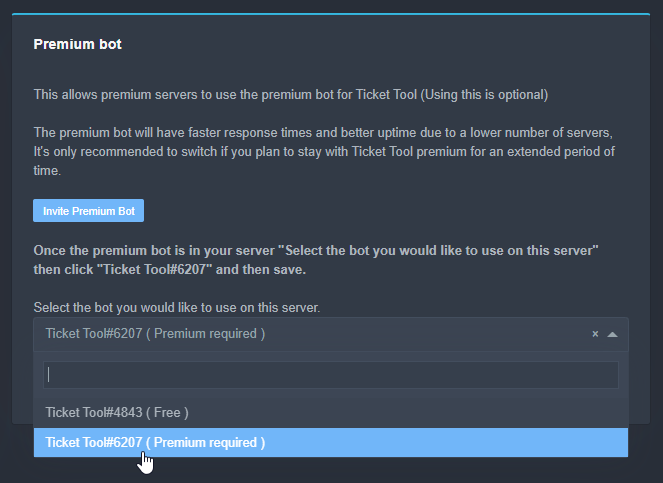 eager cargo
Follow the steps above
upper pollen
I already did that.. Just when you asked me too
What was supposed to happend? The Premium BOT would enter the server?
eager cargo
You need to invite it
Click the "Invite Premium Bot" button like the one shown in the screenshot
 lean herald
How do i find my premium key??
humble sequoiaBOT
Redeeming premium
Redeeming premium on your server is really simple. Just head over to your Subscriptions Page. There you can select a server of your choice, which will get premium. You can change the server at any point.
 eager cargo
^
upper pollen
eager cargo
Click the "Invite Premium Bot" button like the one shown in the screenshot
Oh, my bad, I just invited it to another server that time 🤦♂️
I'll quickly open a new ticket and test it out.
upper pollen
eager cargo
^
The error maintains.

 solid stream
upper pollen
The error maintains.
solid stream
upper pollen
The error maintains.
This is saying that your button configs are wrong
I'm guessing for the confirm close and cancel close buttons you removed the label/text and also have the emoji disabled.
lean herald
I brought premium but it says i still got free
solid stream
upper pollen
The error maintains.
if you wish do disable the button simple use the option to disable them, not remove the text.
eager cargo
lean herald
I brought premium but it says i still got free
Did you apply it to your server?
upper pollen
solid stream
if you wish do disable the button simple use the option to disable them, not rem...
And is there a way to remove the text and only leave the button?
I have tried it with both of them earlier and the error was the same.
solid stream
upper pollen
And is there a way to remove the text and only leave the button?
Well, then how would you know what it does?
You can try adding this _ _
upper pollen
solid stream
Well, then how would you know what it does?
I think that the emoji has it's own meaning, right?
It's only for a visual quality, but I don't mind
solid stream
upper pollen
I think that the emoji has it's own meaning, right?
You need to have either text or an emoji
or both
lean herald
solid stream
<@!629199956992851969> look at this image.
Got it thanks
iron nightBOT
Gave 1 Rep to BattleEye (current: #10 - 75)
 solid stream
upper pollen
solid stream
upper pollen
That button isn't the one having the issue
it's the close confirm and close cancel
upper pollen
solid stream
That button isn't the one having the issue
Oh, alright
But I didn't alter nothing from those ones 🤔
 upper pollen
solid stream
Must have
upper pollen
solid stream
Must have
Actually I didn't, but the option to show emoji was not activated on both of them. Think that should work now.
Still, thank you @solid stream and @eager cargo for your help and time! 😉
iron nightBOT
Gave 1 Rep to BattleEye (current: #10 - 76)
solid stream
upper pollen
Actually I didn't, but the option to show emoji was not activated on both of the...
The option to show emoji is disabled by default, but they had text by default.
upper pollen
solid stream
The option to show emoji is disabled by default, but they had text by default.
I don't remember altering that one, but it might have been one of my co-workers. Still, thank you again! ;)
iron nightBOT
@upper pollen :: You can't rep BattleEye#9668 for 58 minutes and 9 seconds. Try coming back later?
jade topaz
how can i get notification when someone creates ticket?
 mystic hound
$help ping
humble sequoiaBOT
How to make Ticket Tool ping a role
To make ticket tool ping a role when a ticket is opened, go to the Dashboard -> Panel Configs -> Settings -> Ticket Options -> Ticket Message -> Message Text and do this:
{@Role name} This is case sensitive and the role must have @mentions enabled
 ashen dragon
Is it possible to make a limit on the number of open requests at the same time? For example, configure that 1 participant can open only 3 requests at a time, and not more...
 green wraith
Hey how do I setup web hooks haha
humble sequoiaBOT
-- moved to ticket --
craggy geyser
(both the above)
 night oxide
/en саппорты ответь уже на тикет
robust sandalBOT
sappports otvet already on the ticket
Ukrainian (uk) → English (en)
humble sequoiaBOT
-- moved to ticket --
 willow salmon
If i purchased premium dose premium only work on one server?
 rotund kite
jade topaz
rotund kite
jade topaz
Hello,
The commands $add and $remove aren't working with the regular/default permission. But as I add the Administrator permission to the Ticket Tool Bot, These commands work.
 pale pilot
sounds like a permission issue to me. Run the $debug command in the ticket channel please, when the bot does not have admin permissions
 inland steppe
His view

My view

I have 2 users that I know of now that can't see the create button. Any ideas for me?
humble sequoiaBOT
Update your discord App
Buttons are a relatively new addition to discord and don't work with some older versions of the app.
Please verify that you have the latest version of discord, by going to the app or play store.
_ _
Discord for the App Store
_ _
Discord for the Play Store
craggy geyser
Here you go
inland steppe
That's what I been telling them...
Ok. I will keep at it.. I figured as much bc of the new bot setups.... Thx
jade topaz
pale pilot
sounds like a permission issue to me. Run the `$debug` command in the ticket cha...
 pale pilot
so without admin permissions these two commands don't work?
craggy geyser
$arabic
humble sequoiaBOT
فريق الدعم الفني العربي
عميلنا العزيز ان كنت تبحث عن مساعدة يرجى فتح تكت خاص بفريق الدعم الفني العربي
اذهب الى#🎫│make-a-ticket
ثم قم بلضغط على الايموجي الاتي (🇯🇴)
iron nightBOT
Gave 1 Rep to Swift (current: #6 - 129)
craggy geyser
No worries
 fathom steppe
hello @craggy geyser
how can i mention a role after opening a ticket
like : @fathom steppe welcome wait for @.support.
@copper owl
copper owl
$help ping
humble sequoiaBOT
How to make Ticket Tool ping a role
To make ticket tool ping a role when a ticket is opened, go to the Dashboard -> Panel Configs -> Settings -> Ticket Options -> Ticket Message -> Message Text and do this:
{@Role name} This is case sensitive and the role must have @mentions enabled
copper owl
@fathom steppeplease dont ping support team members
just ask your question and wait patiently
fathom steppe
copper owl
<@!692426313973366834>please dont ping support team members
ok sorry
copper owl
if you want immediate support, open a ticket in #🎫│make-a-ticket
copper owl
humble sequoia
this is how you ping a role
fathom steppe
copper owl
if you want immediate support, open a ticket in <#571706435449257997>
i opened alot so i didnt want do just spam tickets
anyway thank you
copper owl
fathom steppe
i opened alot so i didnt want do just spam tickets
it's no worries!
copper owl
fathom steppe
anyway thank you
your welcome
jade topaz
There should really be an invite link to the premium bot on the subscriptions FAQ.. 👀 where the hell do I get that invite? 
craggy geyser
Either from your dashboard, or here
humble sequoiaBOT
Inviting and Enabling Premium Bot
The first thing you will need to do is invite the premium bot, an invite can be found here
Once the bot is in your server we will head to the dashboard and manage your server. When you are managing your server, you want to head into "Server Configs" then click the drop down menu under "Select the bot you would like to use on this server" then click "Ticket Tool#6207" and then save.
craggy geyser
You can see in the picture there the invite link for the premium bot from dashboard, or just go straight from the link in the embed
craggy geyser
jade topaz
There should really be an invite link to the premium bot on the subscriptions FA...
(see above. Pinging just so you notice)
jade topaz
Thank you! 
craggy geyser
No worries
 radiant moss
lean herald
I brought this on the 2 of this month
radiant moss
lean herald
I brought this on the 2 of this month
Please open a billing ticket #🎫│make-a-ticket
pale pilot
@lean herald ^
 wraith vigil
Hi, I have purchased the premium plan but the bot is still not updated on my discord server, what should I do?
 craggy geyser
Two things. Firstly, if you were clicking on a button sent by the free bot it won't work. You need to resend the panel for tickets to create, and use commands on existing tickets
Secondly, make sure you have redeemed the premium
humble sequoiaBOT
Redeeming premium
Redeeming premium on your server is really simple. Just head over to your Subscriptions Page. There you can select a server of your choice, which will get premium. You can change the server at any point.
wraith vigil
 wraith vigil
wraith vigil
wraith vigil
I had the 7 day premium trial, it ended yesterday and the bot displayed this message
wraith vigil
wraith vigil
Today I just bought 1 month of premium and it doesn't work even though I already claimed the premium for that server.
craggy geyser
I can see that it is on the sever from the screenshot. Were you using the premium bot on the trial?
wraith vigil
craggy geyser
I can see that it is on the sever from the screenshot. Were you using the premiu...
Yes, I used the bot during the 7 days trial period, now the time was up and I decided to renew it.
jade topaz
So what does this „Inline“ feature? I simply havent figured it out so far… Cant see a difference… Or i use it wrong xD

 severe path
jade topaz
So what does this „Inline“ feature? I simply havent figured it out so far… Cant ...
severe path
jade topaz
So what does this „Inline“ feature? I simply havent figured it out so far… Cant ...
If you have two fields and have enabled Inline, then they are next to each other
 severe path
This is a Field
 jade topaz
But if these fields are to big they wont line up side by side right?
e.g. reached character cap
severe path
jade topaz
But if these fields are to big they wont line up side by side right?
The fields are always next to each other when Inline is enabled

oh i forgot a d 
jade topaz
severe path
The fields are always next to each other when `Inline` is enabled
somehow it doesnt work here…

 severe path
That is only one field. You need min two for that
copper owl
jade topaz
you need to use 2 minimum
 severe path
Are you on mobile or pc?
severe path
On mobile it doesnt work
jade topaz
Ahhhhh xD
severe path

jade topaz
Well then i have to test it ince im back from vacation haha xD
severe path

jade topaz
Thx for the enlightenment xD
copper owl
hi!
severe path
jade topaz
Thx for the enlightenment xD
No Problem 

 oak oriole
how do i edit the people who can see a ticket when its created?
copper owl
go to your panel configs, settings, button options, create ticket
 copper owl
oak oriole
how do i edit the people who can see a ticket when its created?
copper owl
oak oriole
how do i edit the people who can see a ticket when its created?
you mean normal members or support members?
oak oriole
copper owl
you mean normal members or support members?
support ex:mod/staff
copper owl
oak oriole
support ex:mod/staff
panel configs, settings, permissions options, support opened permissions

 copper owl
oak oriole
copper owl
oak oriole
yes, these permissions are ones you can edit
these will be applied to whoever has a support role
copper owl
$help support
humble sequoiaBOT
How to let support team see into a ticket
About support roles
A support role lets your support team see into tickets with out having to add them manually to each and every ticket.
You can add as many support roles as you like per panel.
NOTE that the way discord works all admins can see into tickets regardless of this.
How to set a support role
To set a Support role go to the Dashboard -> Panel Configs -> Settings -> General Options -> Support Team Roles.
NOTE that the support role will not be able to see into tickets that are already created..
copper owl
oak oriole
how do i add more support roles to the bot?
^^
oak oriole
alright thanks alot
copper owl
oak oriole
alright thanks alot
np
jade topaz
i wish the buttons can be more customizable concerning colors instead of just the fixed given colors hehe ^^
eager cargo
Those are the only colors discord provides for now, apologies
jade topaz
so in theory it wouldnt be a big deal to implement it but it wont work bc discord is not compatible so far?
eager cargo
I haven’t a clue if it’s easy to implement or not haha, maybe it’s automatic maybe it’s not. We’ll cross that bridge when we get to it haha
jade topaz
I hope it will be soon haha xD
fingers crossed
eager cargo
I do too!
severe path

jade topaz

In the future he will be even more superior!
These little messages that are popping up: Are they disappearing after a certain time?
 pale pilot
When you restart discord
jade topaz
ok. Thx ^^
One other question xD
Whats the hexcode for the blue and red color for the buttons? 😅
I want the left side of the emded to match the color of the buttons
severe path
jade topaz
One other question xD
Whats the hexcode for the blue and red color for the butto...
Red: #ed4245
Blue: #5865f2
 severe path

jade topaz
Anyone know why I can't change the emoji to open tickets? I change the emoji and click save, but it doesn't save
copper owl
jade topaz
Anyone know why I can't change the emoji to open tickets? I change the emoji and...
you need to have premium for that feature
 weary latch
Hello, I want to know how to put a picture if someone opened the ticket?
weary latch
severe path
<:Howdy:682502453765210118>

 weary latch
severe path
weary latch
severe path
Where?
 weary latch
severe path
weary latch
severe path
 arctic pagoda
weary latch
Where?
arctic pagoda
weary latch
Where?
It's in Ticket Options
weary latch
arctic pagoda
It's in Ticket Options
Thanks million
iron nightBOT
Gave 1 Rep to markswrld (current: #54 - 1)
arctic pagoda
weary latch
Thanks million
No problem
weary latch
How much is the monthly subscription for the premium bot?
weary latch
arctic pagoda
No problem
 fringe cargo
Can i remove this messages?https://cdn.discordapp.com/attachments/808752038607454239/871870220409663508/unknown.png

 tribal cedar
Click dismiss. If you mean from the bot displaying them no. It's either click dismiss or restarting client will remove them as well
tribal cedar
weary latch
How much is the monthly subscription for the premium bot?
6 mo 60 yr iirc
arctic pagoda
weary latch
How much is the monthly subscription for the premium bot?
It's $6 per month
weary latch
arctic pagoda
It's $6 per month
Thx
iron nightBOT
@weary latch :: You can't rep markswrld#7088 for 26 minutes and 7 seconds. Try coming back later?
arctic pagoda
weary latch
Thx
You're welcome
severe path
fringe cargo
Can i remove this messages?https://cdn.discordapp.com/attachments/80875203860745...
If you restart your Discord client or click "Dismiss Message" the message disappears
 cedar needle
What does currently happen if a users opens a thread in a bug ticket for some reason, are those still closable/deletable? (I haven't enabled that feature yet)
copper owl
cedar needle
What does currently happen if a users opens a thread in a bug ticket for some re...
yeah
you can archive and delete the threads
copper owl
what's the problem exactly?
do you not see the dashboard?
youve tried relogging, correct?
what permissions do you have on the 3rd server?
even admin?
without administrator perms, you cant manage the server (unless you have a dashboard role)
correct
humble sequoiaBOT
Don't see your server in the dashboard?
You will possibly need to relog. Look below to see steps on how to relog.
How to relog the Dashboard.
First, you will need to go to the dashboard. Once your there, click on your avatar on the top right. after you clicked it, you will see button that says Logout. You must click that. Once you have logged out, you can log back in.
Note:
You need one of these 3 things to access the dashboard.
1. Server Owner (Level: 6)
2. Server Administrator (Level: 4)
3. Dashboard Role (Level: 2)
You can check your level using $level on your Discord Server
copper owl
okay try this one last time
if it doesnt work
try changing the browser youre using
no worries
 magic seal
how can i disable this messages?
 severe path
magic seal
how can i disable this messages?
severe path
magic seal
how can i disable this messages?
You can’t. If you restart your Discord or click on "Dismiss Message", the message will disappear
magic seal
thanks.
 twilit mason
hey guys
i need help
i invited ticket tool to my server but it did not show up in manage server
what do i do?
scenic plinth
twilit mason
i invited ticket tool to my server but it did not show up in manage server
Relog into the dashboard
twilit mason
scenic plinth
Relog into the dashboard
how
scenic plinth
twilit mason
how
Sign out and back in
twilit mason
ok
 bitter raft
so i added ticket tool and i set it up and everything but all i want is so a certein person and a couple roles can see the new ticket
humble sequoiaBOT
-- moved to ticket --
twilit mason
scenic plinth
Sign out and back in
thanks for helping me!
iron nightBOT
Gave 1 Rep to 𝑉𝑢𝑥𝑖𝑎♡ (current: #6 - 129)
scenic plinth
Being taken care of, appreciate you.
scenic plinth
Fake
humble sequoiaBOT
Blacklist Roles
Any role you assign as a blacklisted role won't be able to use commands or reactions.
Selecting a blacklisted role
Go to your Dashboard -> Server Configs. There you will find the option to select blacklisted roles.
Note: Don't forget to save.

 jaunty dock
Tysm
craggy geyser
No worries
 silk crown
14AB59B44E821C82 I just bought nodern warships account and after I used the account I only played 5 games suddenly my account was blocked, I don't know if the seller used a cheat or not, so please open the account because I already bought it and haven't felt the enjoyment of the account, please please unblock that account I beg you.
copper owl
silk crown
14AB59B44E821C82 I just bought nodern warships account and after I used the acco...
$tts
humble sequoiaBOT
You're in the wrong place
We provide support for @pseudo glen discord bot and cannot help you with whatever issue you have.
Please make sure to contact the appropriate support team.
If you don't have any further questions regarding our bot Ticket Tool, please close this ticket
_ _
copper owl
Sorry bud, this server is for ticket tool support, which is a discord bot.
I suggest you contact the games support / customer service
jade topaz
It says failed to load vuln driver, when i press launch
craggy geyser
$tts
humble sequoiaBOT
You're in the wrong place
We provide support for @pseudo glen discord bot and cannot help you with whatever issue you have.
Please make sure to contact the appropriate support team.
If you don't have any further questions regarding our bot Ticket Tool, please close this ticket
_ _
humble sequoiaBOT
-- moved to ticket --
 swift venture
Is there a way to count how many tickets a support member has done?
copper owl
swift venture
Is there a way to count how many tickets a support member has done?
well not exaclty
exactly
swift venture
Yeah figured
copper owl
you can count how many tickets they were in through your transcripts channel tho
but that doesn't take into account if they actually handled it, or if they just sent one message
swift venture
Yeah I know of this
humble sequoiaBOT
How to let support team see into a ticket
About support roles
A support role lets your support team see into tickets with out having to add them manually to each and every ticket.
You can add as many support roles as you like per panel.
NOTE that the way discord works all admins can see into tickets regardless of this.
How to set a support role
To set a Support role go to the Dashboard -> Panel Configs -> Settings -> General Options -> Support Team Roles.
NOTE that the support role will not be able to see into tickets that are already created..
copper owl
Np
iron nightBOT
Gave 1 Rep to Neptune (current: #16 - 41)
copper owl
:]
 marsh garnet


 humble sequoiaBOT
-- moved to ticket --
copper owl
jade topaz
Yo how does this ticket thing work
#573205317870157855 has all the Basics
craggy geyser
copper owl
<#573205317870157855> has all the Basics
Being sorted in a ticket
copper owl
Ah, my B
 somber ibex
Hello I have a problem
copper owl
somber ibex
Hello I have a problem
please explain your problem so people can attempt to help you
somber ibex
I make a panel but my member doesn't see the panel
copper owl
Did you send the panel to the channel
somber ibex
I asked my members they say I didn't see panel
somber ibex
copper owl
Did you send the panel to the channel
Yes I can see and test it but my member doesn't see
copper owl
then fix the channel perms for the role
somber ibex
How
copper owl
they probably have an ❌ on "View Channel"
somber ibex
Can you tell me the way !?
copper owl
somber ibex
How
hover your mouse over the channel you sent the panel in. click the little gear thing.
Go to permissions, add the member role, and put a  on "view channel"
somber ibex
How active check green ?!
 somber ibex
copper owl
somber ibex
copper owl
It's open
somber ibex
copper owl
okay, can you tell your members to send an image of what they see
They do not see any message in that channel while I see the panel I sent
copper owl
somber ibex
They do not see any message in that channel while I see the panel I sent
Do they have the "Read Message History" permission?
somber ibex
copper owl
Do they have the "Read Message History" permission?
No
copper owl
that's required
somber ibex
It's off
copper owl
they need to have that
for them to see the panel
otherwise, the channel will just be blank for them
somber ibex
Yes it's blank page
copper owl
enable it and tell them to restart their discord and the panel should be there.
If they restart discord and they can't see the panel, then resend the panel to the channel
somber ibex
@copper owl thanks a lot
iron nightBOT
Gave 1 Rep to Neptune (current: #16 - 42)
somber ibex
@copper owl thanks a lot
iron nightBOT
@somber ibex :: You can't rep Neptune#6814 for 59 minutes and 41 seconds. Try coming back later?
copper owl
No problem
 jagged radish
Anyone know how to make more buttons when someone wants to open a ticket, rn mine has 1 but I need 4
humble sequoiaBOT
Multipanels are a premium feature that allow for a single panel with multiple buttons to open different tickets.
How to create a Multipanel
Premium users can combine multiple panels into one multipanel.
First, find the IDs of each panel you wish to combine. You can find them in your Panel Configs in the Dashboard
Next, send the multipanel to a channel using $panel [id1] [id2] {id3} ....
e.g. $panel 1 2 4 17 35 to combine panels 1, 2, 4, 17 and 35.
Up to 25 panels may be combined.
copper owl
it's a premium feature bud ^
jagged radish
i have premium
copper owl
humble sequoia
then follow these steps!
jagged radish
thanks
copper owl
no problem!
copper owl
humble sequoia
there's also another way of doing this, if you cant figure this way out
 livid canyon
Question can this bot do suggestion stuff too?
copper owl
livid canyon
Question can this bot do suggestion stuff too?
well what exactly do you mean?
livid canyon
For example
copper owl
you can make a panel specifically for suggestions yeah
but it doesnt have a command specifically for suggestions
livid canyon
somoene says a suggestion and it auto reacts
copper owl
livid canyon
somoene says a suggestion and it auto reacts
ah, well no
that's really hard to do with any bot
bots dont know what a suggestion is, they dont understand context (obviously)
so that would be hard to do
livid canyon
Ah
copper owl
copper owl
you can make a panel specifically for suggestions yeah
this could be doable tho
make a channel called #suggestions
add a panel in there that goes to a private category
livid canyon
Lemme try
livid canyon
Pannel channel suggestions?
copper owl
livid canyon
Pannel channel suggestions?
create a new channel called #suggestions and make a panel specifically for that channel
copper owl
livid canyon
what should I name it
"Suggestions!" should be a good title
explains what the panel is used for
livid canyon
Alright I mad eone
 exotic patio
quick question anyone can answer, can u make multiple tickets?
copper owl
exotic patio
quick question anyone can answer, can u make multiple tickets?
well yeah
you just need to up the ticket limit
 copper owl
livid canyon
copper owl
livid canyon
#573205317870157855 set it up like it's shown in the channel
copper owl
exotic patio
quick question anyone can answer, can u make multiple tickets?
ticket limit is in "General Options"
there's also a global ticket limit found in "Server Configs"
livid canyon
Well it says create a ticket at my suggestion channel
livid canyon
 copper owl
livid canyon
copper owl
livid canyon
yeah that's how it supposed to look like haha
livid canyon
Oh
copper owl
you can change that message in "Panel Options"
livid canyon
Can everyone see it tho? cuz I want people to vote it
copper owl
livid canyon
Can everyone see it tho? cuz I want people to vote it
oh, if that's what you want, then i dont suggest using ticket tool
livid canyon
Alrightt
copper owl
if you want members to suggest ideas to your staff team only, then it's better to use ticket tool
but i dont suggest using ticket tool for this as this isnt it's intended purpose
iron nightBOT
Gave 1 Rep to Neptune (current: #16 - 43)
copper owl
No problem! Sorry I couldn't give you what you needed exactly
copper owl
@mystic hound
pale pilot
Got it
copper owl
thanks, sorry light!
mystic hound
I swear simple responds faster when someone pings me rather than him
copper owl
mystic hound
I swear simple responds faster when someone pings me rather than him
time to start pinging you more then 👀
 silk chasm
hi so how do i recieve the 7 day trial i literally made a server 2 days ago, it was available on my last server but now i dont see the option
pale pilot
mystic hound
I swear simple responds faster when someone pings me rather than him
I just looked what new message there was in #📈│reviews
 halcyon haven
hey guys
copper owl
Hello!
halcyon haven
i just made a ticket and when i claim it and it says that i dont have permission
copper owl
halcyon haven
i just made a ticket and when i claim it and it says that i dont have permission
Ill assume you're a premium user, correct?
halcyon haven
no
copper owl
oh
halcyon haven
im new
copper owl
well
halcyon haven
?
copper owl
Claiming is a premium feature only
you need to pay for the premium subscription and set it up to be able to claim
copper owl
yeah, everything with is a premium feature
copper owl
halcyon haven
well goodbye to my robux giveawy
well
you dont need claiming to use the bot
it's not a necessary feature, just cool to have
copper owl
halcyon haven
well that iveawy needs a ticket
you're doing the giveaway inside a ticket?
i mean, it's nice that youre thinking outside the box
but this isnt the intended use of the bot ahha
halcyon haven
lol
well i lied
about giveaway
its a server
that gives things for inviting people
like paypal money
and i need a f*cking ticket
are u there??
 median geyser
@pale pilot
copper owl
median geyser
<@!336243658816749570>
dont ping managers for no reason
median geyser
as you can see above there a reason learn to read messages that are sent from @@halcyon haven
 unique anvil
This is community support. If they need help that badly, #🎫│make-a-ticket exists
copper owl
median geyser
as you can see above there a reason learn to read messages that are sent from @<...
if the person wants immediate support, go to #🎫│make-a-ticket
where a literal support team member will answer
humble sequoiaBOT
Don't see your server in the dashboard?
You will possibly need to relog. Look below to see steps on how to relog.
How to relog the Dashboard.
First, you will need to go to the dashboard. Once your there, click on your avatar on the top right. after you clicked it, you will see button that says Logout. You must click that. Once you have logged out, you can log back in.
Note:
You need one of these 3 things to access the dashboard.
1. Server Owner (Level: 6)
2. Server Administrator (Level: 4)
3. Dashboard Role (Level: 2)
You can check your level using $level on your Discord Server
iron nightBOT
Gave 1 Rep to Neptune (current: #16 - 44)
copper owl
you're welcome ! :]
rain marsh
I cant create a ticket
 humble sequoiaBOT
Update your discord App
Buttons are a relatively new addition to discord and don't work with some older versions of the app.
Please verify that you have the latest version of discord, by going to the app or play store.
_ _
Discord for the App Store
_ _
Discord for the Play Store
copper owl
humble sequoia
@rain marsh ^^
rain marsh
I was pinged?
copper owl
rain marsh
I was pinged?
yes.. you were pinged with a solution to your problem
rain marsh
Sorry it wasn't showing your response
copper owl
humble sequoia
here's the solution btw
copper owl
rain marsh
Sorry it wasn't showing your response
No worries
rain marsh
Immmm sooo stupid I've just got a new phone and forgot I would have to update discord lol
copper owl
rain marsh
Immmm sooo stupid I've just got a new phone and forgot I would have to update di...
ah, well that's most likely your problem haha
update it and everything should be working
iron nightBOT
Gave 1 Rep to Neptune (current: #16 - 45)
copper owl
No problem
 warm cedar
Bug report i cant login with iphone
jade topaz
hi im trying to sign into the Site but its saying im not authorized to login and idk why
humble sequoiaBOT

 chilly summit
Is it possible to automatically delete the ticket when the ticket is closed?
- Is it possible to set a reminder to the ticket owner?
rough moth
chilly summit
Is it possible to automatically delete the ticket when the ticket is closed?
Turn off two step ticket
rough moth
chilly summit
2. Is it possible to set a reminder to the ticket owner?
Wdym reminder?
Ticket tool has no reminder feature
chilly summit
Yeah, I was just asking. Ty.
rough moth
Np
 limber sail
Hey, How can I make a role ping In ticket Message Text?
copper owl
limber sail
Hey, How can I make a role ping In ticket Message Text?
$help ping
humble sequoiaBOT
How to make Ticket Tool ping a role
To make ticket tool ping a role when a ticket is opened, go to the Dashboard -> Panel Configs -> Settings -> Ticket Options -> Ticket Message -> Message Text and do this:
{@Role name} This is case sensitive and the role must have @mentions enabled
limber sail
ah Ty!
twilit mason
hey guys
i need hel[
i invited ticket tool to my server i clicked manager server and it does not show up my server what do i do?
arctic pagoda
twilit mason
i invited ticket tool to my server i clicked manager server and it does not show...
You can try relogging
twilit mason
arctic pagoda
You can try relogging
hey i was talking to support team not you
humble sequoiaBOT
Don't see your server in the dashboard?
You will possibly need to relog. Look below to see steps on how to relog.
How to relog the Dashboard.
First, you will need to go to the dashboard. Once your there, click on your avatar on the top right. after you clicked it, you will see button that says Logout. You must click that. Once you have logged out, you can log back in.
Note:
You need one of these 3 things to access the dashboard.
1. Server Owner (Level: 6)
2. Server Administrator (Level: 4)
3. Dashboard Role (Level: 2)
You can check your level using $level on your Discord Server
copper owl
twilit mason
hey i was talking to support team not you
this is community support....
you want actual support members, go #🎫│make-a-ticket
twilit mason
humble sequoia
ok thx
iron nightBOT
Gave 1 Rep to Ticket Tool (current: #5 - 132)
jade topaz
can i change the bot avatar ?
 upper flower
Nope
jade topaz
it's important
copper owl
jade topaz
can i change the bot avatar ?
nope
jade topaz
am premium
copper owl
even with premium
humble sequoiaBOT

Ticket Tool avatar/status Customisation
@pseudo glen is like another discord user; you can't control its avatar icon or status, and we can't change it for one server, just as you cannot change your avatar for just one server.
However, on your server, you can change the bot's nickname
 jade topaz
can i use webhook to change this ?
copper owl
No
the bot will always remain the same username and pfp
only thing that changes is the nickname, depending on what you put in
copper owl
you literally cannot.
copper owl
You cannot.
No matter what you do, you can't change anything
except for the nickname
twilit mason
e
limber sail
Hey, how Can I give perms to attach Images In a ticket category. I changed the perms for the category it doesn't work
rough moth
limber sail
Hey, how Can I give perms to attach Images In a ticket category. I changed the p...
Change the perms in panel settings
limber sail
alright
rough moth
Under permission options
limber sail
pog ty!
rough moth
Np
jade topaz
Is there any possible way for whenever someone opens a ticket have it ping certain roles such as “Mod” so that they get notified when someone needs help?
mystic hound
$help ping
humble sequoiaBOT
How to make Ticket Tool ping a role
To make ticket tool ping a role when a ticket is opened, go to the Dashboard -> Panel Configs -> Settings -> Ticket Options -> Ticket Message -> Message Text and do this:
{@Role name} This is case sensitive and the role must have @mentions enabled
 ocean spear
What happened to all the channels? Didnt yall have a little more than this?
eager cargo
Most were hidden as we moved to community server.
ocean spear
Ah ok
eager cargo
Although for now we’ve only got a support server
 remote badge
 remote badge
remote badge
remote badge
but how u do that tho
mystic hound
not sure what your question is here, if you're asking how to get the panel then follow the setup guide
humble sequoiaBOT
jade topaz
hey is anyone available to help me real quick
unique anvil
 humble sequoiaBOT
-- moved to ticket --
 shadow axle
copper owl
<@716281078586802226>
shadow axle
copper owl
<@716281078586802226>
that was at 3 am....
 midnight ember
Hey is there a way that the bot can rename the support channel as ""user"'s ticket"? Like with the name of the person who opened it?
jade topaz
Is there a command for me to close the ticket or do I have to scroll back up to the top and react every time? I have the free version
rough moth
jade topaz
Is there a command for me to close the ticket or do I have to scroll back up to ...
$close
rough moth
midnight ember
Hey is there a way that the bot can rename the support channel as ""user"'s tick...
do u have premium?
if so u can do {author.name}
jade topaz
rough moth
`$close`
Thx!
rough moth
np
 jade harbor
is there a way to auto-delete the bots msgs when creating a ticket?
pale pilot
The message will be removed once you restart discord or dismiss the message. It cannot be deleted by the bot
 sick trout
$help
humble sequoiaBOT
Help Options
$help commands - Information on commands
$help setup - Information on bot setup
$help faq - Frequently asked questions
jade harbor
$help commands
humble sequoiaBOT
() = optional
[] = required
*==================================
Ticket Commands
==================================*
_ _
`$add [User] (channel)`
Description: Adding additional users to a ticket
Aliases: none
`$remove [User] (channel)`
Description: Removing users from a ticket
Aliases: none
`$close`
Description: Closing tickets
Aliases: none
`$open`
Description: Opening closed tickets
Aliases: none
`$delete`
Description: Deleting tickets
Aliases: none
`$rename`
Description: Renaming tickets/channels
Aliases: none
`$transcript (send channel)`
Description: Creating transcripts
Aliases: none
`$new (user) (reason)`
Description: Creating tickets in a monitored channel (when command style is enabled)
Aliases: none
`$claim`
Description: Claiming tickets (when claim is enabled)
Aliases: "unclaim"
_ _
*==================================
General Commands
==================================*
_ _
`$help (Help Options)`
Description: Help Command
Aliases: none
`$debug`
Description: Debuging issues with running Ticket Tool
Aliases: none
`$id (@role/@user/#channel/emoji)`
Description: Converting roles, users, channels and emojis to ID
Aliases: "getid"
`$permlevel`
Description: Checking permission level with Ticket Tool
Aliases: "level"
`$ping`
Description: Checking response time with discord api
Aliases: none
`$vote (link | unlink | redeem) (user)`
Description: Earn premium by voting on top.gg or Discord.boats
Aliases: "votes"
sick trout
How do you get the keys for redeeming premium subscription ?
humble sequoiaBOT
Redeeming premium
Redeeming premium on your server is really simple. Just head over to your Subscriptions Page. There you can select a server of your choice, which will get premium. You can change the server at any point.
sick trout
Thanks BOT! hahahaa
scenic plinth
Thanks @humble sequoia
iron nightBOT
Gave 1 Rep to Ticket Tool (current: #5 - 133)
scenic plinth
There you go :)
 peak ruin

jade topaz
how do i make it so that there is more than one button to click on the pannel?
humble sequoiaBOT
Multipanels are a premium feature that allow for a single panel with multiple buttons to open different tickets.
How to create a Multipanel
Premium users can combine multiple panels into one multipanel.
First, find the IDs of each panel you wish to combine. You can find them in your Panel Configs in the Dashboard
Next, send the multipanel to a channel using $panel [id1] [id2] {id3} ....
e.g. $panel 1 2 4 17 35 to combine panels 1, 2, 4, 17 and 35.
Up to 25 panels may be combined.
copper owl
humble sequoia
Like this ^^
It is a premium feature though
iron nightBOT
Gave 1 Rep to Neptune (current: #16 - 46)
copper owl
humble sequoia
if this is too complicated, there's another way of doing this
copper owl
jade topaz
thanks <@!548583124062175232>
no problem !
jade topaz
what is the other way
humble sequoiaBOT
For a more convenient use of multipanels, you can now combine panels on the dashboard. This will allow you to directly send the multipanel from the dashboard or via the $panel ID command.
Where can I find this?
You can find this setting on the Dashboard -> Panel Configs -> Settings -> General Options
This will put all buttons from all of your panels on one message. The message is the panel message from the panel you're combining these panels in.
 jade topaz
ok
twilit mason
Ok
 old geode
Okay so I got ban from a group in discord an they had the ticket tool thing.. I never got to make a ticket thru theirs would it be the same making one thru here? I got banned on their group an game so they said make a ban appeal thru the ticket tool on discord.. but I can't get to their TicketTool because I'm blocked or whatever from theirs.. Ive been trying to do this for days..
copper owl
old geode
Okay so I got ban from a group in discord an they had the ticket tool thing.. I ...
This server can't help you appeal your ban on another server (that's not linked to this one). Even if they use ticket tool on their server
This server is for Ticket Tool support, so if you have any inquiries related to ticket tool (whether it's a suggestion or you don't know how to do a certain thing), this is where this server comes into play
old geode
Ohh okay okay damn man! Thank you I appreciate it!!
copper owl
no problem
 alpine dirge
heya I have a role that should allow me to inspect closed tickets as well. Most ppl with this role can see it no problem but very few including me cannot

I get this instead. Would you have any idea why?
scenic plinth
Thats not ticket tool it seems
arctic pagoda
alpine dirge
Sorry, but I think that this is Tickets website
alpine dirge
oh my apologies I must have got the wrong community
 south lake
So we get notifications every time the ticket will be deleted. Any way to turn it off?
tribal cedar
You mean 2 step tickets?
south lake
Yeah, I think so
tribal cedar
Thats in panel configs general options
It will auto delete the ticket on $close
Or do you mean the notice that it will be deleted in a few seconds?
south lake
I don't want it to delete straight away. That is why I enabled it. But it sends push notification
 tribal cedar
There is no way to turn that notification off besides to turn off push notifications.
copper owl
tribal cedar
There is no way to turn that notification off besides to turn off push notificat...
actually no, there is a way to disable this
set your notifications to "mentions only"
or mute the whole category where the tickets are made
you can keep push notifications on, should fix the problem without sacrificing push notifs
south lake
copper owl
or mute the whole category where the tickets are made
where they are made or archived?
tribal cedar
Thanks for that info
south lake
we need notifications for the created category
copper owl
south lake
where they are made or archived?
if you have a separate category where they're closed, then mute the close category
copper owl
south lake
we need notifications for the created category
Just have ticket tool ping a role, this way you won't need to continuously get push notifs for random shit haha
south lake
copper owl
Just have ticket tool ping a role, this way you won't need to continuously get p...
it does ping a role.
copper owl
Great, then have your notifications as "mentions only"
south lake
copper owl
if you have a separate category where they're closed, then mute the close catego...
thanks, we will try that.
iron nightBOT
Gave 1 Rep to Neptune (current: #16 - 47)
copper owl
south lake
I don't want it to delete straight away. That is why I enabled it. But it sends ...
it'll give you push notifs for when tickets are opened, but won't give you notifications for random things like this
south lake
copper owl
Great, then have your notifications as "mentions only"
I think that's how it is set up, but I will check. these aren't mine. I get push notifications only when discord is not being used on PC
copper owl
south lake
I think that's how it is set up, but I will check. these aren't mine. I get push...
Hm, weird
There's no other reason you'd be getting all these notifs, unless you have "All Messages" turned on for the specific category
south lake
copper owl
Hm, weird
There's no other reason you'd be getting all these notifs, unless you ...
none of those people would turn on "all messages" on purpose 🤣 I don't think anyone is crazy enough, but I might be wrong. Thank you, I will ask to mute the category.
iron nightBOT
@south lake :: You can't rep Neptune#6814 for 53 minutes and 18 seconds. Try coming back later?
copper owl
south lake
none of those people would turn on "all messages" on purpose 🤣 I don't think a...
yeah thought so haha, good luck
 hardy scroll
so I am trying to close a ticket, and ticket tool just says: Warning: this channel isn't a ticket
But it is-
copper owl
can you send a screenshot of that?
 copper owl
hardy scroll
copper owl
hardy scroll
hm that's really weird. Does the channel have this message? or something similar
 hardy scroll
Let me check.
copper owl
check the beginning of the channel
hardy scroll
copper owl
hm that's really weird. Does the channel have this message? or something similar
No, it doesn't.
but when it was created it did
it like deleted the panel at the start
copper owl
are you 100% sure it did?
hardy scroll
Yup.
copper owl
weird. Can you try any other commands? like $delete, or anything else?
hardy scroll
i tried close and delete. any other commands that would help delete it?
copper owl
hardy scroll
i tried close and delete. any other commands that would help delete it?
unfortunately no, i think youll have to delete it manually at this point. This is the first time I encounter someone having this problem so im not 100% positive on any solutions
it might even be a bug, but im also not sure if that's the case
might be discord being buggy too
hardy scroll
alright, got it.
copper owl
I suggest making a ticket in #🎫│make-a-ticket
if it is a bug, it would help the team fix it asap
 solar briar
Just question for every other ticket tool user, do u know if there's any way to just delete a ticket when a user doesn't say anything in the ticket for a certain amount of time. is this a feature yet?
copper owl
solar briar
Just question for every other ticket tool user, do u know if there's any way to ...
it used to be a thing, but unfortunately not anymore
due to discord being discord, if they do enable it, it will cause the bot to hit its rate limits alot quicker
resulting in the bot going offline and full reboot would be needed
solar briar
ah
copper owl
there are a couple automated features
copper owl
solar briar
Just question for every other ticket tool user, do u know if there's any way to ...
but they wont help with this
solar briar
ok thanks
copper owl
np
 sage verge
Is there a way to compress closed tickets or archive them so that they don't take up so much space?
copper owl
sage verge
Is there a way to compress closed tickets or archive them so that they don't tak...
you can delete tickets
sage verge
Other than deleting yea, to preserve the info.
copper owl
sage verge
Other than deleting yea, to preserve the info.
have a transcripts channel
mystic hound
copper owl
$automation
$auto
copper owl
$help transcript
humble sequoiaBOT
How do I save transcript to a channel?
To save transcripts to a channel go to the Dashboard -> Panel Configs -> Settings -> Logging Options -> Transcript Channel
 copper owl
you save a transcript by pressing the "Transcript" button once a ticket closes
copper owl
 agile shoal
$ticket
agile shoal
$ticket
if you want to create a ticket, #🎫│make-a-ticket
 wild kindle
I warmly welcome
I have added a bot to my server and cannot see it in the ticket tool panel
humble sequoiaBOT
Don't see your server in the dashboard?
You will possibly need to relog. Look below to see steps on how to relog.
How to relog the Dashboard.
First, you will need to go to the dashboard. Once your there, click on your avatar on the top right. after you clicked it, you will see button that says Logout. You must click that. Once you have logged out, you can log back in.
Note:
You need one of these 3 things to access the dashboard.
1. Server Owner (Level: 6)
2. Server Administrator (Level: 4)
3. Dashboard Role (Level: 2)
You can check your level using $level on your Discord Server
copper owl
if you meant you cant see it on the dashboard, follow these steps ^
wild kindle
It still doesn't work for me
copper owl
wild kindle
It still doesn't work for me
did you relog?
wild kindle
yes
copper owl
what permissions do you have in the server?
wild kindle
all but the administrator
copper owl
wild kindle
all but the administrator
well you need to be an admin to be able to see the server on the dashboard
wild kindle
okay thank you very much
copper owl
you need one of 3 things:
Be owner of the server
Have The Administrator Permission
Have a "dashboard role"|
 wheat tendon
i bought premium, how do i add it to my server?
copper owl
wild kindle
okay thank you very much
No problem!
copper owl
wheat tendon
i bought premium, how do i add it to my server?
you mean add the premium bot to the server?
wheat tendon
yes
humble sequoiaBOT
Inviting and Enabling Premium Bot
The first thing you will need to do is invite the premium bot, an invite can be found here
Once the bot is in your server we will head to the dashboard and manage your server. When you are managing your server, you want to head into "Server Configs" then click the drop down menu under "Select the bot you would like to use on this server" then click "Ticket Tool#6207" and then save.
copper owl
like this ^^
 copper owl
what isnt showing exactly?
copper owl
unreact and then react again
the problem is that the server is still using reactions, which are not supported anymore


 copper owl
No problem!
 green viper
Thanks @copper owl
iron nightBOT
Gave 1 Rep to Neptune (current: #16 - 48)
craggy geyser
green viper
Heres mine
If you are looking at the same panel and he sees a button and you don't then you need to update discord
jade topaz
how do you make it so when u close a ticket, it gets sent to lets say a spam-log?
copper owl
$help category
humble sequoiaBOT
How to set the open category
To set a open category go to the Dashboard -> Panel Configs -> Settings -> Category Options -> Category Open
