
#🆘│community-support
1 messages · Page 339 of 1
 humble sequoiaBOT
 rotund kite
@lethal void what's the issue
You can head to Server Configs > Blacklist Roles (blacklist like mute roles or whatever roles youwant.)
Yes
humble sequoiaBOT
**Panel Message**
The panel message is where people react to make a ticket. To customize it head over to your Dashboard --> Panel Configs -> Settings -> Panel Options -> Edit Panel Message
 rotund kite
Get a direct URL and you can place it whereever you want. In the URL sections
 lethal void
I am unable to setup the the ticket bot
humble sequoiaBOT
lethal void
Can U just tell me How to setup I'm a precise manner
 craggy geyser
Try #573205317870157855. It is the simple guide
lethal void
Ok
 pliant temple
hello
i had an issue
when someone creates a ticket the bot says u are not allowed to make ticket
how to enable everyone
anyone help pls,😅😅😅
craggy geyser
Make sure you haven't set the create button settings to support only, and make sure you have no blacklist roles
humble sequoiaBOT
Blacklist Roles
Any role you assign as a blacklisted role won't be able to use commands or reactions.
Selecting a blacklisted role
Go to your Dashboard -> Server Configs. There you will find the option to select blacklisted roles.
Note: Don't forget to save.
 pliant temple
oky thank u
 terse sentinel
Hi, Is there a way when rejecting a ticket to send the custom reason why it was rejected?
 lament anchor
when i try to add someone to a ticket using [prefix] add <@user> it doesnt add the person
it comes up with the message that i added them, but doesnt actually add them
 rough moth
$invite
humble sequoiaBOT
Ticket Tool Invite & Support
rough moth
terse sentinel
Hi, Is there a way when rejecting a ticket to send the custom reason why it was ...
wdym reject a ticket?
rough moth
lament anchor
it comes up with the message that i added them, but doesnt actually add them
make sure there is no space bewteen add and prefix
rough moth
 tough estuary
thats not ticket tool +
tough estuary
thats not ticket tool +
you want the premium one?
tough estuary
ya
lament anchor
aaa okay! ill try again
tough estuary
rough moth
you want the premium one?
yes
humble sequoiaBOT
Inviting and Enabling Premium Bot
The first thing you will need to do is invite the premium bot, an invite can be found here
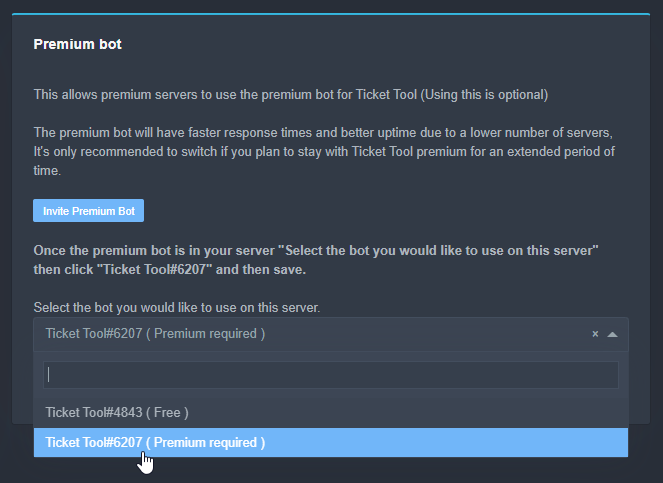
Once the bot is in your server we will head to the dashboard and manage your server. When you are managing your server, you want to head into "Server Configs" then click the drop down menu under "Select the bot you would like to use on this server" then click "Ticket Tool#6207" and then save.
 rough moth
^^
tough estuary
ay ty ^^
rough moth
np
lament anchor
okay i did [prefix]add <@user> and it had the same output, it sent the message, but no one was added
rough moth
lament anchor
okay i did `[prefix]add <@user>` and it had the same output, it sent the message...
try using the users id
and make sure u do it inside a ticket
lament anchor
rough moth
and make sure u do it inside a ticket
i do, and i do the id
okay i did it both ways
and it still doesnt add them
not even in advanced perms
terse sentinel
rough moth
wdym reject a ticket?
Sorry, wrong chat
 winged plinth
what is the prefix of the bot??
rough moth
winged plinth
what is the prefix of the bot??
its $, unless u changed it
rough moth
lament anchor
i do, and i do the id
is the command by chance turned off?
winged plinth
rough moth
its $, unless u changed it
Do you know the command to change?
rough moth
winged plinth
Do you know the command to change?
you can change it on dashboard
 topaz solar
winged plinth
Do you know the command to change?
topaz solar
winged plinth
Do you know the command to change?
u can change it on the dashboard
winged plinth
Thx
rough moth
np
lament anchor
rough moth
is the command by chance turned off?
i dont think so, bc it still sends the message "<user> added to <ticket>",,, i can check ofc
rough moth
lament anchor
i dont think so, bc it still sends the message "<user> added to <ticket>",,, i c...
so it responds?
well then it should be adding them if it says that


 rough moth
lament anchor
rough moth
lament anchor
are you able to ping them in the ticket
 rough moth
hmm weird
lament anchor
ik AHAH
rough moth
try making a new ticket, and adding them there
 scenic plinth
Make sure the bot has permissions to manage permissions within that channel.
lament anchor
scenic plinth
Make sure the bot has permissions to manage permissions within that channel.
is there a way to enable it for the bot as a whole?
scenic plinth
You can try to allow the bot permissions to manage roles through its role.
lament anchor
scenic plinth
You can try to allow the bot permissions to `manage roles` through its role.
it has that already ^^ is there another way?
 jade topaz
Hey! I want to ping a specific Person instead of a whole Role. How can i do this? 🙂
Or is this even possible?
 humble sequoiaBOT
How do I get the ID of Roles/Channels/Emojis?
Ticket Tool has a useful command that helps you get the ID of various things like channels, roles, emojis and your server.
Just use the command $id <#channel/@role/:emoji:>. Now copy everything, including the brackets <...>, to your dashboard (or wherever you want it)
If you want the server ID, just use $id.
craggy geyser
It should work with users
 clear kite
I connected panel to a category but all my tickets still appear at the top of my server?
 orchid tinsel
how do I make the bot ping a role once a ticket is created?
rough moth
$help ping
humble sequoiaBOT
How to make Ticket Tool ping a role
To make ticket tool ping a role when a ticket is opened, go to the Dashboard -> Panel Configs -> Settings -> Ticket Options -> Ticket Message -> Message Text and do this:
{@Role name} This is case sensitive and the role must have @mentions enabled
 rough moth
@orchid tinsel ^
 iron nightBOT
Gave 1 Rep to DisguisedBaby (current: #9 - 104)
rough moth
clear kite
I connected panel to a category but all my tickets still appear at the top of my...
Make sure they are connected to open category, and also only new tickets will be put in the category
rough moth
orchid tinsel
thanks <@!813459470168227851>
Np

 upper pelican
Hey guys how do I make it so only my support team can close tickets ? I know it sounds dumb to ask 🙂
clear kite
Under general options, and just add the roles you want to be able to access
I also set the same roles under the server configs > dashboard roles

 nocturne spruce
Hey, whast the difference between $close and $delete ?
 half cosmos
close so you can re-open later if needed. delete to delete forever.
wish i could get mine to work again lol
I've tried 3 different web browsers and logged out on each one multiple times. Still is refusing to do the clicky click
nocturne spruce
half cosmos
i mean change that in the server itself?
half cosmos
I just don't understand why it stopped working cuz it was fine before.
humble sequoiaBOT
Solved in another channel.
 copper owl
half cosmos
copper owl
half cosmos
you have to do it through the server role settings
 orchid hound
I want it to stop spamming mesages when i create ticket, how do I do it ?
rough moth
orchid hound
I want it to stop spamming mesages when i create ticket, how do I do it ?
Spamming?
It never spams messages
orchid hound
When you are the one configuring it, you see the message you are the only one able to see after anyone creates a ticket
its annoying
rough moth
orchid hound
When you are the one configuring it, you see the message you are the only one ab...
The hidden message u get when u create a ticket?
That’s not removable if so
orchid hound
Sad, but thank you
scenic plinth
 harsh crystal
Wate you prefix <@557628352828014614>
harsh crystal
Wate you prefix <@557628352828014614>
$
harsh crystal
Mrc
 golden shoal
Hey - hope all is well. How can I prevent my members from seeing the Claim button?
Noticed that when they create a ticket, they can see the Claim button. I just want them to see Close
 tribal cedar
You can use the panel configs -> settings -> button options and choose to not show the claim button

Make enable button red
golden shoal
ah shucks! that easy.. It's staring me right in the face, too
while I am here . disable delete ticket button, too
Thanks @tribal cedar
iron nightBOT
Gave 1 Rep to Enigma (current: #11 - 59)
tribal cedar
Anytime
tribal cedar
golden shoal
while I am here . disable delete ticket button, too
I plan to have $delete for higher up admins on major tickets and $close for support staff to ensure the admins see it
Can do a lot with tt
golden shoal
I see. Appreciate it. So far it's just me...so that will work once I bring in more admins
 versed dust
Hello. New here, just installed the bot on my server and have been testing. Only issue I have is how my mods and I can interact once the ticket has been opened, I assume it's all done through the ticket channel that the bot automatically creates? Once the ticket closes does the channel auto delete, or does it have to be done manually? Thank you in advance.
 fringe cairn
I can not open the list
I have a premium bot
 rough moth
versed dust
Hello. New here, just installed the bot on my server and have been testing. Only...
rough moth
versed dust
Hello. New here, just installed the bot on my server and have been testing. Only...
it has to be closed manually
rough moth
fringe cairn
I can not open the list
I have a premium bot
try reloading the site
 do this few time
 versed dust
rough moth
it has to be closed manually
versed dust
rough moth
it has to be closed manually
Ok, so as long as the person has the correct role that is matched up with the bot then they should be good to interact with the ticket opener?
fringe cairn
fringe cairn
I can not open the list
I have a premium bot
it's happend again 
golden shoal
Hey is there a way create a grid mutil-panel buttons; 3x3, 4x4, etc?
My OCD is kicking in.....

 pale pilot
You can set a number of how many buttons there should be in one row
 golden shoal
oooooooooooh! I saw that and didn't think to touch it.
golden shoal
Thanks @pale pilot
iron nightBOT
Gave 1 Rep to Simple (current: #7 - 115)
golden shoal
My OCD is now happy!

I am very specific and particular. My members hate me because I am always changing something in my server.
This and Dyno might be my last project for awhile, lol
Via mobile device its 2x2 ..
discord web-app it's 3x3
pale pilot
well, nothing we can do about that. There's only so much space on mobile
 high valley
is there a way to change what the logging message shows for ticket created? Would like to remove the name and just leave the ticket # and panel
 lapis garnet
ازاي اضيف في التكت بوت roulette
اريد افتفسار
To make ticket tool ping a role when a ticket is opened, go to the Dashboard -> Panel Configs -> Settings -> Ticket Options -> Ticket Message -> Message Text and do this:
{@Role name} This is case sensitive and the role must have @mentions enabled
high valley
not sure if that for me but im looking for the logging option, where it autosends who created a ticket, # and panel. Would only want the ticket log to show ticket # and panel
jade topaz
How I make a awaiting support channel.
lapis garnet
I want to add roulette to ticket
lapis garnet

lament anchor
is there a command that gives us a link to the ticket message so we dont have to scroll back up to close?
rough moth
lament anchor
is there a command that gives us a link to the ticket message so we dont have to...
You can pin the message automatically by setting it up in panel settings
 civic terrace
Hello how can I make partner?
lament anchor
rough moth
You can pin the message automatically by setting it up in panel settings
ohh okay yeah!
 stone pagoda
rough moth
stone pagoda
rough moth
$tts
humble sequoiaBOT
You're in the wrong place
We provide support for @pseudo glen discord bot and cannot help you with whatever issue you have.
Please make sure to contact the appropriate support team.
If you don't have any further questions regarding our bot Ticket Tool, please close this ticket
_ _
 short hull
upper pelican
short hull
upper pelican
Yea I’m not seeing under general options if I can prevent the customer to close ticket or do they have access to that always ?
 ivory knot
can change bot name?
 static dirge
is ticket system down
 radiant moss
static dirge
is ticket system down
radiant moss
static dirge
is ticket system down
Developers notified
static dirge
radiant moss
Developers notified

 rigid pilot
Ticket tool is offline

I cant even make a ticket to get support in this ticket tool server
 thick steeple
rigid pilot
Ticket tool is offline
thick steeple
rigid pilot
Ticket tool is offline
same
rigid pilot
@thick steeple its the same problem with the website
thick steeple

 alpine prawn
jade topaz
alpine prawn
jade topaz
^^ scroll up
rough moth
nope everyone
radiant moss
At this time it appears both bots and the dashboard are down. We are currently awaiting a response from the developers. Please be patient!
rough moth
Both Bots and Dashboard Outage
The developers were notified of the current bot and dashboard outage. Please be patient as said above.
jade topaz
Suggestion: Put support server invite in the bot's about me. It was harder to find the invite to the support server when the dashboard and bot is down
rough moth
i can forward this suggestion to the suggestion channel if you would like
jade topaz
Yes please do, thanks!
radiant moss
@pseudo glen
 naive pecan
radiant moss
<@!557628352828014614>
naive pecan
radiant moss
<@!557628352828014614>
hey! can you please post in #📣│bot-news so it will be forwarded to my server for my staff
radiant moss
naive pecan
hey! can you please post in <#571104498483986466> so it will be forwarded to my ...
I am afraid I cannot do that. I do not have permissions within that channel. Apologies.
naive pecan
radiant moss
I am afraid I cannot do that. I do not have permissions within that channel. Apo...
Ok, understood
if you can do it when you get the chance, please do, thanks!
thanks @radiant moss (there)
iron nightBOT
Gave 1 Rep to Tinyy (current: #15 - 44)
radiant moss
I am sure when one of the Devs get on they will post about it. Thanks 🙂
naive pecan
radiant moss
I am sure when one of the Devs get on they will post about it. Thanks 🙂
No worries :)
radiant moss
At this time it appears both bots and the dashboard are down. We are currently awaiting a response from the developers. Please be patient!
 gaunt sequoia
Turn on the bot the bot is floating
scenic plinth
Be patient.
 jovial yacht
since the bot is down in #🎫│make-a-ticket i was wondering if ticket tool can react to an already made message for ticketing?
if not sry for wasting time
scenic plinth
No it cannot
jovial yacht
alr thanks
scenic plinth
Yes its down Deci.
 grizzled summit
scenic plinth
Yes its down Deci.
grizzled summit
scenic plinth
Yes its down Deci.
Rip
radiant moss
Developers are notified and are working on a fix
grizzled summit
radiant moss
Developers are notified and are working on a fix
Ty ty
iron nightBOT
Gave 1 Rep to Tinyy (current: #15 - 45)
scenic plinth
For those of you chatting in #📈│reviews, yes its down, refrain from chatting there.
radiant moss
 vernal musk
البوت ليه اوف لاين
 robust sandalBOT
vernal musk
البوت ليه اوف لاين
robust sandalBOT
vernal musk
البوت ليه اوف لاين
 ! ˹ 𝑳𝑿𝑹 ˼
Why of line bot
 Arabic (ar) → English (en)
scenic plinth
Arabic (ar) → English (en)
scenic plinth
/ar Its having issues initially hosting likely. The developers are fixing it.
robust sandalBOT
لها وجود قضايا استضافة في البداية من المرجح. المطورين يقومون بإصلاحه.
English (en) → Arabic (ar)
vernal musk
متى يخلص
robust sandalBOT
vernal musk
متى يخلص
! ˹ 𝑳𝑿𝑹 ˼
When does it end?
Arabic (ar) → English (en)
scenic plinth
/ar No clue. You can checkout #📣│bot-news for more information.
robust sandalBOT
لا فكرة لدي يمكنك الخروج #📣│bot-news لمزيد من المعلومات.
English (en) → Arabic (ar)
 feral cloak
I know it was down because I could see it on my discord I run a listing bot listing company
vernal musk
شكرا يأخي♥️
robust sandalBOT
vernal musk
شكرا يأخي♥️
! ˹ 𝑳𝑿𝑹 ˼
Thank you brother♥️
Arabic (ar) → English (en)
jade topaz
thats a cool bot haha
feral cloak
todo bien
jade topaz
ticket tool is down in my servers?
 median turtle
Yep, mine too
radiant moss
Developers are working on a fix
feral cloak
they're working on a fix
 eager forge
Bot is down rn?
median turtle
TY 
scenic plinth
eager forge
Bot is down rn?
Please read the above, the developer are aware.
eager forge
Ohk
Mb
jade topaz

eager forge
Hope everything gets back normal soon
radiant moss

Ticket Tool is currently down in all servers. Developers are working on a fix!
 dusky steppe

 feral cloak
were you guys all the time you're great ticket system @radiant moss
scenic plinth
Let's not ping random support please, but thank you.
grizzled summit
Ya'll are so patient with the constant asking of the same question @staff . Keep up the good work ❤️
scenic plinth
median turtle
Have a good Day/Night devs <:cokeKlove:854813764284841994>
Good night to you as well
feral cloak
I will keep tabs on it
 restive summit
radiant moss
<:ttdnd:818757771079057439>
**Ticket Tool is currently down in all servers. Dev...
restive summit
radiant moss
<:ttdnd:818757771079057439>
**Ticket Tool is currently down in all servers. Dev...
thanks Tiny, hopefully it gets fixed quickly 😦
iron nightBOT
Gave 1 Rep to Tinyy (current: #15 - 46)
 silent kindle
why is my ticket bot offline?
scenic plinth
radiant moss
<:ttdnd:818757771079057439>
**Ticket Tool is currently down in all servers. Dev...
@silent kindle @jade topaz
rough moth
yes
jade topaz
oh
 floral prawn
Ticket Tool is currently down in all servers. Developers are working on a fix!
website is ded as well. -- Error 502 - Bad Gateway for me.
 haughty siren
Is it still down?
restive summit
yes
haughty siren
Damn
static dirge
f in the chat
radiant moss
Premium appears to be up
humble sequoiaBOT
Pong! Latency is 213ms. API Latency is 80ms [-]
 magic moon
Hopefully regular ticket is up soon
 thick path
yah
radiant moss
Dashboard is up as well
magic moon
Because I have an open ticket which somebody opened and it's not letting me close maybe because it's down
I even did $close
radiant moss
?
magic moon
It don't ping everybody
radiant moss
oh yes i see
radiant moss
Free bot is making its way back online most likely
thick path
ok thanks for getting it to work 🙂
radiant moss
That would be our amazing devs
thick path
yes it worked for me and mostly likey you to
magic moon
It's not working for me
thick path
magic moon
It's not working for me
rip give it a min to fully work
scenic plinth
It will probably take a few minutes to start up for all servers. Give it time.
high valley
is there a way to change what the logging message shows for ticket created? Would like to remove the name and just leave the ticket # and panel
scenic plinth
No sorry
restive summit
thanks fixed for me
feral cloak
I'm guessing it's all fixed now
feral cloak
who do I talk to you about inviting it to my platform to my bot list in company
 solid stream
feral cloak
I'm guessing it's all fixed now
solid stream
feral cloak
I'm guessing it's all fixed now
It's all fixed, the outage was related to my host having major connection problems.
feral cloak
oh
who do I talk to you about inviting it to my platform to my bot list in company
list it's fixed now 🙂
we'll use your platform all the time and we absolutely love to ticket system
rotund kite
grizzled summit
How do I get my premium role here?
~~Can you create a ticket, I'll assist you there. ~~#🎫│make-a-ticket
I have made a ticket for you, the instructions are in there.
 forest kayak
I know how to create a ticket but my main issue is that once you open it I don't want it to send a message, "Ticket created #ticket-0000"
 rotund kite
forest kayak
I know how to create a ticket but my main issue is that once you open it I don't...
rotund kite
forest kayak
I know how to create a ticket but my main issue is that once you open it I don't...
This is not possible to be disabled unfortunately. But it is a message that can be dismissed. From either tapping the dismiss message button or reloading the Discord app. Only you can see the message.
 spare surge
is any one able to help me fix my oracle launcher
craggy geyser
$tts
humble sequoiaBOT
You're in the wrong place
We provide support for @pseudo glen discord bot and cannot help you with whatever issue you have.
Please make sure to contact the appropriate support team.
If you don't have any further questions regarding our bot Ticket Tool, please close this ticket
_ _
 keen lotus

 mystic hound
Nope, its there to ensure discord rate limits are maintained
rotund kite
$help ping
humble sequoiaBOT
How to make Ticket Tool ping a role
To make ticket tool ping a role when a ticket is opened, go to the Dashboard -> Panel Configs -> Settings -> Ticket Options -> Ticket Message -> Message Text and do this:
{@Role name} This is case sensitive and the role must have @mentions enabled
rotund kite
@frail eagle
 frail eagle
Oki
 fading yarrow
I'm sorry this is most likely dumb af but how do I claim the premium role? I accidentally clicked off the welcome message which I'm sure it probably explained how..
craggy geyser
$pc
humble sequoiaBOT

How to get premium role
Until the automatic premium check is fixed run the command $debug on your server and send us the link in a ticket.
fading yarrow
craggy geyser
$pc
ty
iron nightBOT
Gave 1 Rep to Swift (current: #8 - 110)
 tacit canyon
Can support tickets (channels) be set to auto delete after its closed
craggy geyser
You can set them to skip closing, and the close button just deletes which is kind of the same thing. Turn off two step ticket in general settings
 gray dove
 humble sequoiaBOT
Don't see your server in the dashboard?
You will possibly need to relog. Look below to see steps on how to relog.
How to relog the Dashboard.
First, you will need to go to the dashboard. Once your there, click on your avatar on the top right. after you clicked it, you will see button that says Logout. You must click that. Once you have logged out, you can log back in.
Note:
You need one of these 3 things to access the dashboard.
1. Server Owner (Level: 6)
2. Server Administrator (Level: 4)
3. Dashboard Role (Level: 2)
You can check your level using $level on your Discord Server
pale pilot
@jade topaz #📈│reviews is not the place to show a screenshot of your warnings.
pale pilot
If I tell you it's not the place, then it isn't the proper place
And I will not have a discussion about that with you now. Suck it up or get further punishment
tacit canyon
Why is this coming up when either a support team member or customer clicks the close button? I can confirm and have checked perms set for the category and server wide
 pale pilot
Can you run the $debug command in that channel?
jade topaz
No u
 prime bridgeBOT
 Successful Mutes:
 1
 Unsuccessful Mutes:
 0
 Reason: unnecessary spam
 Moderator: @pale pilot
tacit canyon
pale pilot
Can you run the `$debug` command in that channel?
Oh I see could it be that it requires manage roles? I wouldn't have thought manage roles it really needed?
let me toggle it on do another test and re-debug should it happen again
pale pilot
it does need this permission in that step, yeah ^^
tacit canyon
aaaa that solved it thanks, Wonder if I can pick your brains on something else. I am really keen to set the bot to category permissions only not server wide assume its not possible with the way the bot works? I did give it a try but its not happy
pale pilot
It should work with most permissions. If you give the bot all the necessary permissions in the category where the tickets will go and in the channel that the panel is in, then it should be fine I think
I never tried it, so the bot might give out error messages again
craggy geyser
tacit canyon
aaaa that solved it thanks, Wonder if I can pick your brains on something else. ...
If this isn't solved, I had someone ask recently about this. Make sure you set a ticket open/close category and then as long as that category has perms you should be fine. Otherwise it tries to open tickets outside of any category and can only do that with sever wide perms
 opal plaza

 craggy geyser
opal plaza
<:W_Cat:858316834726084608>
craggy geyser
opal plaza
<:W_Cat:858316834726084608>
As the error says, go to sever configs, you have the premium bot selected in the dropdown but you don't have premium so you need to make it the free bot
tacit canyon
craggy geyser
If this isn't solved, I had someone ask recently about this. Make sure you set a...
Might have been me, I did make sure the open/close category is set however the support panel in our information channel (also the bot has perms over) still shows an permissions error if I turn off server wide manage messages, view channels etc
craggy geyser
Hmm. Maybe it does need to be sever wide then? I don't know too much about that, I am happy giving the bot admin on my severs so haven't needed to play around with perms
tacit canyon
Im probably just being very overly cautious with the bot server wide perms, Im using it in a few verified servers so being super carefully with what is opened up
ill stick with the server wide stuff for now tho, the benefit of the bot is worth it
maybe could be a development idea 😉
 earnest steeple
how to get rid of this little space between button and the username

just send the button, nothing else
 tropic wing
how do i make it so when i open a ticket it pings a certain role
pale pilot
It's the wick bot in a custom version
pale pilot
earnest steeple
just send the button, nothing else
There is always a message, you can't get rid of it
$help ping
humble sequoiaBOT
How to make Ticket Tool ping a role
To make ticket tool ping a role when a ticket is opened, go to the Dashboard -> Panel Configs -> Settings -> Ticket Options -> Ticket Message -> Message Text and do this:
{@Role name} This is case sensitive and the role must have @mentions enabled
pale pilot
@tropic wing
 fleet scaffold
Oh ok
tropic wing
ok
opal plaza
craggy geyser
As the error says, go to sever configs, you have the premium bot selected in the...
how to do free?

 analog iris
can i select more than 3 roles to view tickets?
rough moth
analog iris
can i select more than 3 roles to view tickets?
Yes
solid stream
analog iris
can i select more than 3 roles to view tickets?
Yes, if the save button disappears then collapse the drawer and reopen so it resizes it.
 formal mural
What is Webhook Options for, please?
Enable Webhooks (Contact Ticket Tool support team to enable webhooks) I can't find it anywhere
solid stream
formal mural
What is Webhook Options for, please?
Enable Webhooks (Contact Ticket Tool suppor...
It's a beta option that's being tested.
formal mural
So it's not working yet?
solid stream
It is working, but It's likely to change alot as we move forwards.
formal mural
Thanks, is there somewhere how to use it or not yet?
solid stream
Not yet, it's used like a standard webhook, the bot makes post requests to your url and you manage the data it sends you.
 novel maple
humble sequoiaBOT
novel maple
humble sequoiaBOT
Help Options
$help commands - Information on commands
$help setup - Information on bot setup
$help faq - Frequently asked questions
 jolly ingot
$help commands
humble sequoiaBOT
() = optional
[] = required
*==================================
Ticket Commands
==================================*
_ _
`$add [User] (channel)`
Description: Adding additional users to a ticket
Aliases: none
`$remove [User] (channel)`
Description: Removing users from a ticket
Aliases: none
`$close`
Description: Closing tickets
Aliases: none
`$open`
Description: Opening closed tickets
Aliases: none
`$delete`
Description: Deleting tickets
Aliases: none
`$rename`
Description: Renaming tickets/channels
Aliases: none
`$transcript (send channel)`
Description: Creating transcripts
Aliases: none
`$new (user) (reason)`
Description: Creating tickets in a monitored channel (when command style is enabled)
Aliases: none
`$claim`
Description: Claiming tickets (when claim is enabled)
Aliases: "unclaim"
_ _
*==================================
General Commands
==================================*
_ _
`$help (Help Options)`
Description: Help Command
Aliases: none
`$debug`
Description: Debuging issues with running Ticket Tool
Aliases: none
`$id (@role/@user/#channel/emoji)`
Description: Converting roles, users, channels and emojis to ID
Aliases: "getid"
`$permlevel`
Description: Checking permission level with Ticket Tool
Aliases: "level"
`$ping`
Description: Checking response time with discord api
Aliases: none
`$vote (link | unlink | redeem) (user)`
Description: Earn premium by voting on top.gg or Discord.boats
Aliases: "votes"
opal plaza
rough moth
Thanks 
iron nightBOT
Gave 1 Rep to DisguisedBaby (current: #9 - 105)
 weary plank
Hola, alguien sabe español? Necesito ayuda en algo
Quiero hacer un panel así con el bot, pero no puedo. Me indican como lo podría hacer por favor?
 weary plank
Quiero hacer un panel así con el bot, pero no puedo. Me indican como lo podría h...
weary plank
weary plank
Quiero hacer un panel así con el bot, pero no puedo. Me indican como lo podría h...
I will try to use the translator ...
Can you tell me how I can make the ticket tool do this?
tribal cedar
$help ping
humble sequoiaBOT
How to make Ticket Tool ping a role
To make ticket tool ping a role when a ticket is opened, go to the Dashboard -> Panel Configs -> Settings -> Ticket Options -> Ticket Message -> Message Text and do this:
{@Role name} This is case sensitive and the role must have @mentions enabled
tribal cedar
weary plank
I will try to use the translator ...
Can you tell me how I can make the ticket...
Premium is required. Do you have premium?
weary plank
No
weary plank
humble sequoia
Does this option also require premium membership?
mystic hound
Nope
restive summit
@here is there a way to disable reaction visibility. This is something that started happening with the new reaction emoji update on discord, previously if a person created a ticket, their reaction would be deleted thereafter, but now if they create a ticket, their reaction is saved. This is setup in a channel where reactions are not allowed. So the problem is now customers can right click on reactions and see who has made a ticket, which could be an a privacy concern for me. Ideally I'd want the bot to return the reaction to 1 (only the bot has responded).

as is, someoen can right click and basically see all the customers who have used the service
 raw dew
i just opened a ticket for this
rough moth
restive summit
@here is there a way to disable reaction visibility. This is something that star...
Resend the panel
And use buttons
restive summit
Is buttons a new feature? Never saw that
restive summit
is it in panel configs?
restive summit
I don't mind a list of

where would I go, i know how to resend but can I change options through here before I resend?
rough moth
U can change some of the buttons in button options
restive summit
Ah i'll play around with it then.

just by resending the ticket tool, this will fix the issue of having a list of customers who have used the service private? instead of numbered and public to whoever wants to view?
i'm trying to prevent this
 rough moth
restive summit
just by resending the ticket tool, this will fix the issue of having a list of c...
rough moth
restive summit
just by resending the ticket tool, this will fix the issue of having a list of c...
It’ll look like something in #🎫│make-a-ticket
restive summit
It's not a nefarious business, just I like having customers' privacy preserved
Ok I like that
I'll try this then
rough moth
👍
restive summit
how do I get a premium subscriber rank? I am one 😄
So in summary, I am just using an outdated version of the ticket tool since I haven't resent my ticket tool panel in months?
rough moth
restive summit
So in summary, I am just using an outdated version of the ticket tool since I ha...
Outdated reactions yes
rough moth
restive summit
how do I get a premium subscriber rank? I am one 😄
Run $debug and send the link it gives you in #🎫│make-a-ticket
rough moth
Np
restive summit
@raw dew hopefully this helps your situation too since you mentioned it was an issue for you as well
restive summit
I really like that we can change the button color too, excited to see if this green button works, I like green
raw dew
xD
restive summit
Blue is calming too
decisions, decisions
hmm another question, this is a premium only option?
and where do I send the link after debug?
rough moth
restive summit
and where do I send the link after debug?
For the role go to #🎫│make-a-ticket
Make sure to tell them u want the role
restive summit
Thanks @rough moth also do you know if buttons is premium only?
iron nightBOT
Gave 1 Rep to DisguisedBaby (current: #9 - 106)
rough moth
restive summit
Thanks <@!813459470168227851> also do you know if buttons is premium only?
anyone can use buttons
customizing them is premium only tho
restive summit
Nice, i'm not sure what parts are the customizable ones because I have it all unlocked, was just curious
ah I get it, the things with a diamond 🙂
restive summit
Ok @here
I integrated the buttons, but now having a major issue where mobile users can't see the button?
it's a green button
they're using an ipad, maybe not the most recent discord app edition? I'll let them know, I just checked on my iphone
i can see it there
i'll tell em update discord on their ipad, hopefully that fixes it
Yeah that fixed it 😛
Is there a way to disable ephemeral messages via the control panel?
 pale pilot
Nope, this message cannot be removed
restive summit
So this is a new feature? and not optional?
pale pilot
It only shows for you though and deletes after you restart your discord client (or when you click on "dismiss message")
restive summit
Ah ok
pale pilot
part of the button update
restive summit
Just trying to see from customer point of view the order process, because this will change their experience somewhat
no big deal
I like the button update, as I said before privacy issues of who was ordering and when via emoji reaction reading from other customers, could be a problem
pale pilot
Nothing should really change, as reactions just got replaced
pale pilot
ah okay
restive summit

Like i stated earlier, emojis would stack up and I guess it could be an invasion of privacy if I didn' tmanually keep clearing to 1 reaction (the bots)
this really lightens my load, thanks a bunch
thanks @pale pilot
iron nightBOT
Gave 1 Rep to Simple (current: #7 - 116)
pale pilot
restive summit
Like i stated earlier, emojis would stack up and I guess it could be an invasion...
yeah, with the button update, reactions are getting completely removed so the bot stopped removing the reactions ^^
pale pilot
Thanks 🙂
restive summit
Also I think for new custoemrs/new to discord or new to the server, it lightens the explanation of 'react to an emoji to create an order', because that can seem kinda unintuitive. I think this big great button with 'create a ticket' is very user-friendly
pale pilot
Yup. You can thank discord for that 😄
Our developer is also in love with them, they make his life much easier
restive summit
Thanks @upper flower
iron nightBOT
@restive summit :: You can't rep Developerツ#1234 for 59 minutes and 39 seconds. Try coming back later?
 pale basin
How do we get help?
I added the bot to my server and made a panel and everything but the message doesn’t have the reaction 📩
rough moth
pale basin
I added the bot to my server and made a panel and everything but the message doe...
Update your discord
craggy geyser
restive summit
thanks <@456226577798135808> 🙂
This is when I tell you that the developer is actually not Developer. But BattleEye/Josiah (same person)
restive summit
craggy geyser
This is when I tell you that the developer is actually not Developer. But Battle...
Ha, oh my bad!
craggy geyser
Developer does develop things, but for ticket tool they are more in charge of people, while Josiah is in charge of coding
 paper bison
m
 tranquil lotus
Just wondering if this bot will ever be open source?
pale pilot
Nope, never.
jade topaz
Anyone able to help can access the website to change the settings
radiant moss
Hey @wet carbon please do not send non review messages in #📈│reviews are you still having issues opening a ticket?
naive pecan
$help
humble sequoiaBOT
Help Options
$help commands - Information on commands
$help setup - Information on bot setup
$help faq - Frequently asked questions
 wet carbon
radiant moss
Hey <@!606454806156017677> please do not send non review messages in <#509775046...
wet carbon
radiant moss
Hey <@!606454806156017677> please do not send non review messages in <#509775046...
Oh oops, i thought i had support open LOL
but yeah on mobile i cant open tickets or open tickets but i can on my desktop
radiant moss
What does it say?
Go to the app store and make sure your discord app is up to date. Usually it needs an update and will send Interaction Failed
wet carbon
radiant moss
Go to the app store and make sure your discord app is up to date. Usually it nee...
aaaand that fixed it… thank you
iron nightBOT
Gave 1 Rep to Tinyy (current: #15 - 48)
 near timber
is the bot having troubles because every time i do $ help it doesn’t respond
@scenic plinth
scenic plinth
near timber
<@!615207454443044904>
Don't ping people for support, are you trying to use Premium?
 quick ridge
hi, not sure if this is the right channel, but I want to ask about the possibility of tagging someone in the new Confirm Close message.
This is on a free bot. Previously, the Confirm Close appears as an additional checkmark emoji below the opening ticket message within the Ticket channel. Now, the Confirm Close appears as a standalone message.
My question is, is there a way to write the name or tag the user who tapped the Close button on the Ticket message?
I'm looking to have the effect of:
- User A taps the [🔒Close] button
- Ticket Tool sends the message saying that
User A has requested closure of the ticket. Please confirm. - User B record that User A is the one who requested the closure of the ticket and then confirms the closure by tapping on the Close button on this standalone message.
rough moth
quick ridge
hi, not sure if this is the right channel, but I want to ask about the possibili...
Not possible for either bots and if it was to be added I’m sure it’ll only be a premium feature
Cause most ticket tool customization is premium only
jade topaz
Is there a way to prevent users with a certain role on a certain panel? Or does it just have to be for all the panels.
quick ridge
rough moth
Not possible for either bots and if it was to be added I’m sure it’ll only be a ...
I see. Noted. Thanks!
iron nightBOT
Gave 1 Rep to DisguisedBaby (current: #9 - 107)
 round swift
is it possible to rename the ticket tool bot and/or change its avatar? (premium user here)
humble sequoiaBOT

Ticket Tool avatar/status Customisation
@pseudo glen is like another discord user; you can't control its avatar icon or status, and we can't change it for one server, just as you cannot change your avatar for just one server.
However, on your server, you can change the bot's nickname
 scenic plinth
^
round swift
thank you! <3 @scenic plinth
scenic plinth
Np
jade topaz
$votes
humble sequoiaBOT
Votes
Current Votes: 0
Lifetime Votes: 0
Linked Votes: 0
Vote Links
Linking Info
Linked User: Not Linked
You can give your future votes to another user by linking with that user.
To link use $vote link (@user or userId)
To unlink use $vote unlink
Redeeming
Each vote is worth 12 hours of premium and can be redeemed once you have atleast 6 votes.
Your current votes are worth 0m
To redeem your current votes use $vote redeem
jade topaz
$vote redeem
humble sequoiaBOT
You need atleast 6 votes to redeem
craggy geyser
Please do this in your own sever. It doesn't need to be here
 viscid fern
How do I make my tickets go into a certain category? They keep appearing at the top of my server.
humble sequoiaBOT
How to set the open category
To set a open category go to the Dashboard -> Panel Configs -> Settings -> Category Options -> Category Open

 spark hound
viscid fern
How do I make my tickets go into a certain category? They keep appearing at the ...
spark hound
viscid fern
How do I make my tickets go into a certain category? They keep appearing at the ...
Here
 patent jacinth
After creating a lot of tickets, my other discord channels seem to move around, is there a fix to this?
@ me in your response, thank you
mystic hound
Ticket tool doesn't physically move your channels at all, you might get the feel that they're moving when new channels (tickets) are created, depending on where you've set them to be created. I'd recommend setting a ticket category (see below) and moving the category to the bottom of your server so it doesn't interfere with anything
$help category
humble sequoiaBOT
How to set the open category
To set a open category go to the Dashboard -> Panel Configs -> Settings -> Category Options -> Category Open
mystic hound
@patent jacinth
patent jacinth
Thanks for the reply, i've got them set up into a certain category however when there's a lot of tickets, it seems to move other channels around (in a separate category), maybe it's a Discord issue.
mystic hound
is it possible that you have more than 50 tickets at a time? because 50 is the discord specific category limit, after which tickets will default to the top of the server unless a secondary category is set
patent jacinth
Unfortunately not, it's actually not any tickets moving - it's normal premade channels 😄
Not to worry, thanks for the help!
mystic hound
Ah, in that case I doubt its a Ticket Tool issue, might even be someone accidentally moving them around
craggy geyser
@patent jacinth this sounds like a discord issue. My sever has had similar, not with ticket creation but when moving a normal channel from mobile other channels get randomly moved. This might be your issue?
golden shoal
I have claim ticket enabled, but when a ticket is started, the claim button is not showing
craggy geyser
Do you have premium?
golden shoal
Yes
craggy geyser
Try doing $claim (or change the prefix if you have done) to see if that works
golden shoal
stand by
Weird
I removed the toggle saved. Re-enabled > saved. The claim buttons are back now
craggy geyser
Perfect. It does go wierd sometimes
golden shoal
the command worked as well
Thanks @craggy geyser I had a ticket sitting in the queue since 2am.
iron nightBOT
Gave 1 Rep to Swift (current: #8 - 111)
golden shoal
ok now the user submitting the ticket and view the claim button. but, i thought i had it set for only admin
craggy geyser
They can see it but can't use it
golden shoal
yes
 golden shoal
can't claim your own ticket - something like that
 proud jewel
proud jewel
proud jewel
@golden shoal
craggy geyser
golden shoal
can't claim your own ticket - something like that
That is true. But also, if you added someone else to the ticket, they would be able to see the button but still can't use it if it is admin only
 craggy geyser
$arabic
humble sequoiaBOT
فريق الدعم الفني العربي
عميلنا العزيز ان كنت تبحث عن مساعدة يرجى فتح تكت خاص بفريق الدعم الفني العربي
اذهب الى#🎫│make-a-ticket
ثم قم بلضغط على الايموجي الاتي (🇯🇴)
robust sandalBOT
proud jewel
كيف كذا؟
 ! 『𝐀𝐋𝐒𝐇𝐀𝐌𝐀𝐑𝐈🇸🇦』
How is that?
Arabic (ar) → English (en)
craggy geyser
/ar buttons replaced reactions. Resend the panel
robust sandalBOT
أزرار استبدال ردود الفعل. إعادة إرسال اللوحة
English (en) → Arabic (ar)
proud jewel
robust sandal
?
craggy geyser
/ar and please don't ping random members for help
robust sandalBOT
ورجاء لا بينغ أعضاء عشوائي للحصول على مساعدة
English (en) → Arabic (ar)
proud jewel
robust sandal
K
golden shoal
proud jewel
<@451076353932918784> ؟
Thank you. But, it's kind of hard to follow your screen shot.
iron nightBOT
Gave 1 Rep to ! 『𝐀𝐋𝐒𝐇𝐀𝐌𝐀𝐑𝐈🇸🇦』 (current: #53 - 1)
golden shoal
craggy geyser
That is true. But also, if you added someone else to the ticket, they would be a...
Ok. I'll keep messing with it. I had it set not to show idk what happened.
craggy geyser
Oh, I didn't know buttons could be hidden to some people and not others? That's a cool feature if it exists
golden shoal
That's what I thought I initially did. Lol. I was high last time... Let me go wake and bake.....
 grand abyss
why cant none of mymembers view there ticket
 upper turtle
Whenever I try open a ticket and click the reaction role it just comes up with Invalid Form Body
I'm pressing the Create Ticket button but nothing is happening
spark hound
upper turtle
Whenever I try open a ticket and click the reaction role it just comes up with I...
Update your discord
upper turtle
It worked, thanks
 strong moon
Hello guys, I have a simple problem, Marco, add me with a wrong account. I have another account, I mean
rough moth
$tts
humble sequoiaBOT
You're in the wrong place
We provide support for @pseudo glen discord bot and cannot help you with whatever issue you have.
Please make sure to contact the appropriate support team.
If you don't have any further questions regarding our bot Ticket Tool, please close this ticket
_ _
 spring tulip
Is it possible to disable the transcript people get sent so they don't get sent a transcript
tribal cedar
Yes in logging options under panel configs just make the direct message transcript to off or red
So panel configs -> settings -> logging and make direct message transcript to off
You can also make the $transcript command support only in command configs
spring tulip
Is there a dashboard for this bot or is it just through commands, I'd just go figure it out but I'm on a 128kbps internet connection so loading up a page would be 10 minutes lol, funny and dumb
tribal cedar
http://tickettool.xyz just login on top right with discord and click manage servers

You will need owner or admin access on the server or have had one of those levels add your role to dashboard perms
spring tulip
System Failure: @Ticket Tool Missing permission VIEW_CHANNEL
Not sure what I have to click and where to click it to fix that
I fixed my issue.
craggy geyser
It means you need to give ticket tool the view channel permission in the category you are making tickets
Never mind
iron nightBOT
Gave 1 Rep to Swift (current: #8 - 112)
craggy geyser
Np
spring tulip
Are transcripts off by default?
tribal cedar
spring tulip
Are transcripts off by default?
Well its a premium feature and I would suspect so
spring tulip
Ok thats good, would rather not have transcripts all together for my usage
Is there a way to send an automatic customized message upon creating a ticket
Like any of these two messages or both
 humble sequoiaBOT
**Ticket Message**
The Ticket Message is the first message sent by the bot in a new ticket. To customise it head over to your Dashboard -> Panel Configs -> Settings -> Ticket Options -> Edit Ticket Message

 safe prairie
@spring tulip
 golden locust
Any idea why someone wouldn't be able to see the "Create Ticket" button?
I have several people like that, and it's not role related.
humble sequoiaBOT
Ticket Tool Premium
Get premium at https://tickettool.xyz/premium
Manage your subscriptions at https://tickettool.xyz/subscriptions
Why Premium?
Premium lets you customize the bot just how you want it. It also helps keep the bot running.
 sage verge
Mobile users cant see the button to create a ticket, is there a way around this?
mystic hound
sage verge
Mobile users cant see the button to create a ticket, is there a way around this?
update discord
 arctic pagoda
Hi, sorry to bother you, but in my server I have TT and I wanted to know if CDT is Central Daylight Time or a Spanish time zone so I can announce the times when TT is down for scheduled maintenance and because my server is Italian and I'll have to convert time in CEST time zone.
robust sandalBOT
mystic hound
update discord
 Light
Light
hōʻano hou i ka paio
 English (en) → Hawaiian (haw)
 foggy sedge
Is there a way to automatically close a ticket if there is no response by the person who made it after a certain amount of time?
jade topaz
How can me add reaction in the ticket
 analog osprey
Is there a limit to how many Ticket Bots you can have? I just added one to one of my servers and its not showing up on my dashboard, I have kicked it and retried but nothing.
 torn temple
Umm anyone who can help me 😅
tribal cedar
analog osprey
Is there a limit to how many Ticket Bots you can have? I just added one to one o...
Logoff the website completely and log back ok
humble sequoiaBOT
Don't see your server in the dashboard?
You will possibly need to relog. Look below to see steps on how to relog.
How to relog the Dashboard.
First, you will need to go to the dashboard. Once your there, click on your avatar on the top right. after you clicked it, you will see button that says Logout. You must click that. Once you have logged out, you can log back in.
Note:
You need one of these 3 things to access the dashboard.
1. Server Owner (Level: 6)
2. Server Administrator (Level: 4)
3. Dashboard Role (Level: 2)
You can check your level using $level on your Discord Server
tribal cedar
torn temple
Umm anyone who can help me 😅
With?
tribal cedar
foggy sedge
Is there a way to automatically close a ticket if there is no response by the pe...
Not yet but I know its been suggested
iron nightBOT
Gave 1 Rep to Enigma (current: #11 - 60)
tribal cedar
Anytime
craggy geyser
tribal cedar
Not yet but I know its been suggested
It used to be a feature but was removed due to rate limits
humble sequoiaBOT
Automation disabled
There's currently no ETA for when automation will be enabled again. The issue that's caused it to be disabled, us hitting rate limits, is tied to the increased load on Discord's servers. The situation's currently unpredictable, which makes it so we can't give you a fixed time.
tribal cedar
AH
craggy geyser
$auto if interested
tribal cedar
Makes sense i suppose
torn temple
@tribal cedar umm i got response to my ticket thank for asking tho
iron nightBOT
Gave 1 Rep to Enigma (current: #11 - 61)
tribal cedar
Anytime
tribal cedar
craggy geyser
`$auto` if interested
Oh ty I got you thats the helpfile for it. I understand 4 hrs later but I do eventually. Understand
 hoary quiver
Hey guys, is it possible to delete channel after CLOSING the ticket? Without the channel being preserved? Like, I close ticket and automatically channel delete. I didn't find it anywhere. Can you please advise me? Thank you. ❤️
radiant moss
hoary quiver
Hey guys, is it possible to delete channel after CLOSING the ticket? Without the...
Hey, go to your panel settings --> General Options --> Turn off Two Step Ticket
 grand sleet
is suggestion still available?
 proud dew
Hey, my panel isn't showing the green button, I remember before I had to do something like $panel [ID] but it's not showing up. Am I messing something up?
 undone robin
proud dew
Hey, my panel isn't showing the green button, I remember before I had to do some...
undone robin
proud dew
Hey, my panel isn't showing the green button, I remember before I had to do some...
Try doing $debug please
proud dew
undone robin
Try doing $debug please
I actually just got frustrated, and cloned another panel that works to get around it lol.
 frail dragon
How To Make Ticket?
humble sequoiaBOT
pale pilot
The button for creating a ticket isn't showing up? Check your button options on the dashboard. Maybe you disabled it. Otherwise the only reason could be that your discord client is out of date and you need to update
 carmine badge
how to add attack file permissions on dashboard for everyone
in there ticket
@pale pilot
sorry for disturbing
know I see the option
 drifting wedge
What does the web hook thing do?
humble sequoiaBOT
فريق الدعم الفني العربي
عميلنا العزيز ان كنت تبحث عن مساعدة يرجى فتح تكت خاص بفريق الدعم الفني العربي
اذهب الى#🎫│make-a-ticket
ثم قم بلضغط على الايموجي الاتي (🇯🇴)
 indigo cobalt
Ok tank you
 rain marlin
may i know how to change the ticket number ??
safe prairie
You can set the current ticket number in the panel settings
 rain marlin
safe prairie
You can set the current ticket number in the panel settings
rain marlin
safe prairie
You can set the current ticket number in the panel settings
Thanks man 
safe prairie
You're welcome
 vale laurel
Is there a way to check who closed or deleted a ticket?
craggy geyser
Only if you have logs on
vale laurel
craggy geyser
Only if you have logs on
How can i check? Please
craggy geyser
If you set a logging channel and set up logging closed and deleted tickets the embed says who did the actions
 rigid nest
Hi there. I can’t create a ticket here. I just invited the bot to@my server, created the panel, but using the envelope doesn’t trigger the ticket. What am I doing wrong?
tribal cedar
Why can't you create a ticket here. Do you get errors?
rigid nest
I can’t react in the #🎫│make-a-ticket channel
tribal cedar
Doesn't give you an error in red?
rigid nest
No. It doesn’t give me the option to react. When I long press the message it doesn’t give me the option.
tribal cedar
Can you try updating your client? Recently buttons were released and it might be the issue for here and your own server. 1 problem at a time is always the best play
rigid nest
Forget it. I’ll try to figure it out. I’m not necessarily concerned with trying to make a ticket here. I just want to get the ticket bot to work on my own server. I’ll figure it out.
tribal cedar
Like I said said the issue may be the same for both places.
Without an error or more info to go on I can only guess.
Are you using the premium bot when you don't have premium?
vale laurel
rigid nest
Forget it. I’ll try to figure it out. I’m not necessarily concerned with trying ...
You need to update your app ☺️
At least that was my fix for my members! ☺️
vale laurel
craggy geyser
If you set a logging channel and set up logging closed and deleted tickets the e...
Ty 🌸
iron nightBOT
Gave 1 Rep to Swift (current: #8 - 113)
tribal cedar
He will figure it out i suppose. Smh
 void moss
void moss
void moss
@tribal cedar no
 candid pagoda
tribal cedar
candid pagoda
tribal cedar
#573205317870157855 follow the steps mate
 real wasp
I got the premium version of ticket tool it’s working for everyone else but every time I try to react it says interaction failed even on this server it gives me the same error
 mystic hound
Update discord
real wasp
Please excuse me being a idiot ... thank you very much
 wraith vigil
You know why this error is due, I try to put this command on my server and it does not work for me
Failed to send panel, Run $debug in the channel to check for errors.
 fast mesa
humble sequoiaBOT
fast mesa
humble sequoiaBOT
-- moved to ticket --
 charred jackal
How do you view the other persons ticket if you are the support person
scenic plinth
charred jackal
How do you view the other persons ticket if you are the support person
You click the channel?
scenic plinth
wraith vigil
You know why this error is due, I try to put this command on my server and it do...
Means it does not have the proper permissions, use $debug to see what permissions it needs.
charred jackal
No I mean like say in my Dizzy channel you opened a ticket and asked a question
How would I view that question
scenic plinth
I don't understand what you mean, you need to have access to the ticket and have permissions to read the message history.
wraith vigil
Where should I put the command? in no channel it works for me
charred jackal
So @scenic plinth say on my discord server you opened a ticket yeah?
scenic plinth
wraith vigil
Where should I put the command? in no channel it works for me
This means the bot does not have permissions to send messages, allow it to do so.
scenic plinth
charred jackal
So <@!615207454443044904> say on my discord server you opened a ticket yeah?
Ok?
charred jackal
and you asked me a question on that ticket ok?
How would I (support team) answer back to them?
wraith vigil
I created a channel without restrictions and it doesn't even work like that and I gave it administrator permissions too 😦
tribal cedar
wraith vigil
I created a channel without restrictions and it doesn't even work like that and ...
Do you have the premium bot selected in server configs?
scenic plinth
charred jackal
How would I (support team) answer back to them?
I still have no idea what you're implying.
scenic plinth
wraith vigil
I created a channel without restrictions and it doesn't even work like that and ...
What is your servers ID?
charred jackal
Ok so how would I view that ticket and give you an answer to the question?
scenic plinth
Click the channel, respond to my message?
charred jackal
Can I give you a link to my dizzy so I can try it out cos I am still rlly confused
Lemme take a screenshot
How would I respond to the question as a support member?
 wraith vigil
@tribal cedar thanks, I had not realized this option
iron nightBOT
Gave 1 Rep to Enigma (current: #11 - 62)
tribal cedar
charred jackal
How would I respond to the question as a support member?
Just reply right there in the channel
wraith vigil
👍
scenic plinth
?
tribal cedar
Kinda jumped on your support requests there
scenic plinth
Oh, not necessarily
charred jackal
Can one of you try it out in my channel? You can leave straight away tho
tribal cedar
You can have one of your members talk to you through the ticket or have them make one and talk to them through the channel thats created when they react. I don't join discords necessarily because of rules as much as I'm in enough already lol
charred jackal
They arent online you can leave staright away
tribal cedar
Don't think in allowed to
charred jackal
oh ok
tribal cedar
But really all your missing is that the channel that the tt bot creates would be the way you speak with the person who needs help in the ticket
You could make a demo ticket here and maybe see more or whatcha missing
wraith vigil
A question, how do I make multiple reactions in the ticket panel?
charred jackal
tribal cedar
But really all your missing is that the channel that the tt bot creates would be...
I dont think I have one
I have this?
 tribal cedar
A member who needs help in your discord would click on create ticket
After they do that ticket tool would open a new channel for the user so you could speak to them
charred jackal
Ok lemme do that
tribal cedar
wraith vigil
A question, how do I make multiple reactions in the ticket panel?
Sorry missed the question. Premium is required for that
 tribal cedar
Now if you were a member
The person who created the ticket would by clicking yes
Like you just did. They would see it as well as you
charred jackal
Am I able to try it with you quickly and then you could leave? Please
wraith vigil
I have the 7-day premium trial version
tribal cedar
And any role that you assign in the general options in panel configs
humble sequoiaBOT
Multipanels are a premium feature  that allow for a single panel with multiple buttons to open different tickets.
How to create a Multipanel
Premium users can combine multiple panels into one multipanel.
First, find the IDs of each panel you wish to combine. You can find them in your Panel Configs in the Dashboard
Next, send the multipanel to a channel using $panel [id1] [id2] {id3} ....
e.g. $panel 1 2 4 17 35 to combine panels 1, 2, 4, 17 and 35.
Up to 25 panels may be combined.
 tribal cedar
@wraith vigil 
wraith vigil
I will try, I did not understand very well
tribal cedar
Well in panel configs there is a number to the left of the settings button

See?
To put all those panels in one I would do $panel 1 2 3 4
The message that shows in your ticket tool message where they click reactions would use the first # as a panel message
Above example being 1
So whatever is in panel configs -> settings -> panel message is what would show in the channel where users click buttons to make tickets
Confusing but give it a try
jade topaz
hi can anyone here help me?
tribal cedar
Whats up
jade topaz
for starters im trying to make my tickets go into a certain channel/catergory when there made because they always go to the top
tribal cedar
$help category
humble sequoiaBOT
How to set the open category
To set a open category go to the Dashboard -> Panel Configs -> Settings -> Category Options -> Category Open
tribal cedar
Thats a simple and easy explaination of it for you.
 tribal cedar
Did you make the category manually?
jade topaz
what do u mean by that
jade topaz
it was working earlier but now its not because i been messing with stuff
but i want my tickets to go in a certain catergory
wraith vigil
thanks @tribal cedar
iron nightBOT
@wraith vigil :: You can't rep Enigma#0007 for 32 minutes and 35 seconds. Try coming back later?
tribal cedar
jade topaz
but i want my tickets to go in a certain catergory
Try refreshing the page and seeing if the setting is just not sticking sorry rl came up have to handle something quick.
Or clicking the x and making there be nothing in opened and closed categories and resetting them then opening a new ticket as it won't affect old tickets only new ones
 buoyant aurora
#833216639981322250 message how u get access to that ?
Id like free steam games 😋
jade topaz
tribal cedar
Try refreshing the page and seeing if the setting is just not sticking sorry rl ...
i fixed it now im having issues with my message it sends in dms after closing the ticket
it is sending the member transcripts
buoyant aurora
So @jade topaz could you help me ?
jade topaz
buoyant aurora
So <@456226577798135808> could you help me ?
with
tribal cedar
jade topaz
it is sending the member transcripts
You don't want it to send a transcript?
buoyant aurora
(╯°□°)╯︵ ┻━┻
tribal cedar
buoyant aurora
About the steam games
buoyant aurora
Oh ok
jade topaz
i want it to send a transcript in my logs but not in the members dm
tribal cedar
Ok that would be in panel configs -> settings -> logging options
tribal cedar
buoyant aurora
Or gotta do sort of payment
Make a ticket please as it doesn't have to do with tt support I can't help you here. Thanks
iron nightBOT
Gave 1 Rep to Pablito🍇 (current: #53 - 1)
buoyant aurora
Alr boss
tribal cedar
tribal cedar
Ok that would be in panel configs -> settings -> logging options
Got that @jade topaz?
tribal cedar
 buoyant aurora
I wanna rep enigma
craggy geyser
buoyant aurora
I wanna rep enigma
You did
buoyant aurora
Oh oki
craggy geyser
Oh, they reped you. My bad
buoyant aurora
While ur here @craggy geyser might aswell look at ma ticket 😋
craggy geyser
Just say thanks with a ping to them, or in a reply to their message
tribal cedar
tribal cedar
@jade topaz would be the send direct message one just make it off
buoyant aurora
thanks @tribal cedar
iron nightBOT
Gave 1 Rep to Enigma (current: #11 - 63)
jade topaz
i just want it to tell the member i closed there ticket n not to send them a transcript
craggy geyser
And I saw it. I'm about to answer it
tribal cedar
Nps
buoyant aurora
Cool thx
jade topaz
tribal cedar
<@456226577798135808> would be the send direct message one just make it off
it is off

 tribal cedar
Click the x next to closed then save please
jade topaz
tribal cedar
Click the x next to closed then save please
i did that its still sending him the transcript
tribal cedar
It will only affect new tickets as well
Sorry trying to help just rl going on around me rn
jade topaz
but every tickett that is opened is a new ticket
also no worries
@pale pilot can u close my ticket so i can make another i need help
 versed badger
After premium purshase, where I will get my premium reedem code?
jade topaz
did u use an email or somthing to sign up check there not sure
@tribal cedar r u still there?
tribal cedar
I believe you click manage on top left
humble sequoiaBOT
Help Options
$help commands - Information on commands
$help setup - Information on bot setup
$help faq - Frequently asked questions
How to redeem premium
To redeem your premium key, go to the dashboard, select your server, then click "Redeem Premium" under the server's icon and name.
 versed badger
ty ❤️
tribal cedar
Np ❤
 jovial topaz
Greetings, I'm trying to figure out a little modification on the ticket tool when claiming a ticket. I want to figure out how to make it so whenever a member of Support team claims a ticket, it says their name and then the ticket number afterwards.
So for example, if I weren't the author of a ticket but was a support team member and had claimed the ticket, it'd look like this:
Legend_ticket-64728
I got premium on ticket tool^
tribal cedar
I'm sorry I'm not the best with the variables. I can instruct you where to put them and where to find the variables as for making it... I'm lacking
{ticket.user}_ticket-{ticket.id}
@jovial topaz try this out
The variables are at the bottom of the panel configs -> settings where it says supported variables and you would use that string of text above in panel configs -> settings -> ticket options
I hope this helped.
tribal cedar
Does the rest work?
So just ticket.id is wrong?
{ticket.user.name}_ticket-{panel.count}
Try that @jovial topaz ? Like I said I'm not the best at this
 magic dew
Can I have help setting up my ticket bot? I am struggling and need to have it done.
tribal cedar
magic dew
Can I have help setting up my ticket bot? I am struggling and need to have it do...
What part are you having trouble with? We don't necessarily help set it up as answer any specific questions you have during setup
magic dew
I know you can't set it up for me, I am struggling with actually setting the bot up no part, just it all.
tribal cedar
Did you follow the setup steps?
humble sequoiaBOT
magic dew
Can't get past the 4th step I did them now I have checked.
The others I mean by them 🤣
 pastel spade
Hi, please tell me, will I be able to use the premium version on several servers at once, or will I be able to transfer the premium version from one server to another?
tribal cedar
So your having trouble with the panel config itself?
magic dew
Yeah.
tribal cedar
Ok. This is what I did word to God lol
I went through every single option and next to every option is a ? Mark
magic dew
Did that
tribal cedar
Well I can't take you step by step that would take hours this way
magic dew
For me it was
Cross
Tick the rest of the way
magic dew
Could you just set it up for me?
tribal cedar
I can not. Sorry
magic dew
If it's that hard.
tribal cedar
Its not hard. As long as your willing to spend the time
Like what do you want to do
I'll help you a bit.
After you send the panel though it should function
Then its just configuring it the way you want it to work
magic dew
I want to make an Admin Abuse Report Ticket, Hacker / Exploiter report ticket and an Exploit / Cheat Report ticket.
tribal cedar
Ok that would require 3 panels
All made in the way you made the first
Unfortunately my phones running low on battery too. :(
 rough moth
 sage dune
who to fix that
sage dune
who to fix that
Give ticket tool correct permissions
View channel and send messages specifically
golden shoal
Just to triple check ... there's no way to to "hide" the claim ticket button from clients? I only want myself, and support staff to see it and use it. When I disable the button, both client, myself and support staff can't see the button unless it's enabled. appears that it's enabled and displays globally. however, the client cannot claim a ticket because of permission rights.
Am I over thinking this or it's working by design? Any advisement would be greatly appreciated.
rough moth
golden shoal
Just to triple check ... there's no way to to "hide" the `claim` ticket button f...
You can’t take away the button from a certain users vision
golden shoal
rough moth
You can’t take away the button from a certain users vision
So the button is there for both user-clients and support staff. the user-client, can click the button but it will trigger a permissions prompt.
rough moth
golden shoal
So the button is there for both user-clients and support staff. the user-client...
It’s really there for support, discord doesn’t allow certain users to see certain reactions or buttons in this case
It’s a discord limitation
But if a regular user uses the button, it’ll tell them they don’t have permissions to use it
iron nightBOT
Gave 1 Rep to DisguisedBaby (current: #9 - 108)
rough moth
Np
jovial topaz
tribal cedar
Try that <@493496616431648798> ? Like I said I'm not the best at this
It worked with {author.nickname}, thank you though.
iron nightBOT
Gave 1 Rep to Enigma (current: #11 - 64)
tribal cedar
Awesome man glad you were able to get it
Weird cuz author doesn't seem like it would mean the person who claimed the ticket
pastel spade
Hi, I want to buy a premium subscription, but first I want to find out if it is possible to customize the bot? That is, change his name, photo, description, activity? This function is available in the mee6 bot
 rough moth
pastel spade
Hi, I want to buy a premium subscription, but first I want to find out if it is ...
rough moth
pastel spade
Hi, I want to buy a premium subscription, but first I want to find out if it is ...
It is not
pastel spade
rough moth
It is not
Okay, thank you
iron nightBOT
Gave 1 Rep to DisguisedBaby (current: #9 - 109)

 hard zinc
I tried
humble sequoiaBOT
Don't see your server in the dashboard?
You will possibly need to relog. Look below to see steps on how to relog.
How to relog the Dashboard.
First, you will need to go to the dashboard. Once your there, click on your avatar on the top right. after you clicked it, you will see button that says Logout. You must click that. Once you have logged out, you can log back in.
Note:
You need one of these 3 things to access the dashboard.
1. Server Owner (Level: 6)
2. Server Administrator (Level: 4)
3. Dashboard Role (Level: 2)
You can check your level using $level on your Discord Server
scenic plinth
Make sure you have one of those
wraith vigil
my users are not allowed to see the reactions to see tickets, help me pls
scenic plinth
wraith vigil
my users are not allowed to see the reactions to see tickets, help me pls
Have them update discord
hard zinc
i have it
wraith vigil
thanks @scenic plinth
iron nightBOT
Gave 1 Rep to 𝑉𝑢𝑥𝑖𝑎♡ (current: #6 - 126)
 scenic plinth
This is fake?
wraith vigil
No
scenic plinth
Sorry it was another user.
For you its the blue text, where it says "eliminar este mensaje"
wraith vigil
This message is seen by my users when creating a titeck, is there any way to stop this message from being sent by the bot?
tribal cedar
No
To get rid of if you would click on the blue text like kenzie said however they do go away also when I client is restarted
Idk if they plan to add a feature to disable that.
Its meant to be informative to help the user find where their ticket has been created
scenic plinth
To my knowledge its not going to be disabled.
 high breach
humble sequoiaBOT
high breach
humble sequoiaBOT
-- moved to ticket --
wraith vigil
wraith vigil
Excuse so much question, where can I edit this message?
 novel mountain
السلام عليكم
robust sandalBOT
novel mountain
السلام عليكم
 𝐬𝐢𝐫
𝐬𝐢𝐫
Peace be upon you
Arabic (ar) → English (en)
 unique anvil
wraith vigil
Excuse so much question, where can I edit this message?
unique anvil
wraith vigil
Excuse so much question, where can I edit this message?
You can’t
 young knoll
how do i set the bot up
humble sequoiaBOT
spark hound
young knoll
how do i set the bot up
Here
 cobalt moss
How do I change the reaction from the given button to a normal discord reaction?

Such as this
pale pilot
We are moving away from reactions. Moving forward, we only offer buttons, as they work much better and faster than reactions.
You have to resend your panel if that's a present screenshot
humble sequoiaBOT
Ticket Tool avatar/status Customisation
@pseudo glen is like another discord user; you can't control its avatar icon or status, and we can't change it for one server, just as you cannot change your avatar for just one server.
However, on your server, you can change the bot's nickname
pale pilot
About me? No. That's also global
 coarse shale
do you guys sell source code 300$ ?
pale pilot
lmao no
 strange ridge
Its possible to change these messages?
 craggy geyser
No. These are default but are only visible to the person who made/tried to make the ticket
craggy geyser
Yes. But you should also read #546557408902905896 and not dm support
humble sequoiaBOT
Multipanels are a premium feature that allow for a single panel with multiple buttons to open different tickets.
How to create a Multipanel
Premium users can combine multiple panels into one multipanel.
First, find the IDs of each panel you wish to combine. You can find them in your Panel Configs in the Dashboard
Next, send the multipanel to a channel using $panel [id1] [id2] {id3} ....
e.g. $panel 1 2 4 17 35 to combine panels 1, 2, 4, 17 and 35.
Up to 25 panels may be combined.
For a more convenient use of multipanels, you can now combine panels on the dashboard. This will allow you to directly send the multipanel from the dashboard or via the $panel ID command.
Where can I find this?
You can find this setting on the Dashboard -> Panel Configs -> Settings -> General Options
This will put all buttons from all of your panels on one message. The message is the panel message from the panel you're combining these panels in.

 lament frigate
Is there a way to prevent a large amount of people from making tickets at the same time? Such as, raids?
 lean tendon
help please
 craggy geyser
Have you run debug in the channel like it says?
craggy geyser
lament frigate
Is there a way to prevent a large amount of people from making tickets at the sa...
Not really. You can prevent someone from making a lot of tickets, but not lots of people. Ylu can set up a verified role and put the majority of your sever to need that role to access, including where your panels are, however that could be more than you are wanting to do and doesn't work if you want to use tickets for verification
lament frigate
craggy geyser
Not really. You can prevent someone from making a lot of tickets, but not lots o...
Yeeeah, unfortunately it is for verification. But thank you, I appreciate the feedback regardless.
iron nightBOT
Gave 1 Rep to Swift (current: #8 - 115)
spark hound
lean tendon
how i do this
Just type $debug in a channel in your server
lean tendon

 willow isle
Have you changed the prefix?
spark hound
lean tendon
Yeah, have you changed ticket tool's prefix in your server?
lean tendon
yes xd i good now ty

 prisma nimbus
can i know why this happening
 spark hound
prisma nimbus
can i know why this happening
spark hound
prisma nimbus
can i know why this happening
Is your discord updated?
prisma nimbus
how i can update?
craggy geyser
From your app store
 lyric swan
How does this automatically rest to 0 or 1?
 craggy geyser
It doesn't anymore. Reactions are no longer supported as we moved to buttons. They work kind of for now but some point in the near future they likely won't work. Resend the panel to get buttons
lyric swan
I see thanks!
 whole flare
I want to make your ticket open with an order -new
craggy geyser
If you don't delete the embed from the bot containing the link, I think they stay forever
 wild bough
Thank u my friend
willow isle
Is it possible to set a cooldown to create new tickets for one person?
As far as I can see, its 10~ seconds by default, can it be increased?
 craggy geyser
The time is imposed by rate limits. Discord won't let it be any faster. In terms of making it slower, there is no time limit you can set, only number of tickets limit
willow isle
craggy geyser
The time is imposed by rate limits. Discord won't let it be any faster. In terms...
I want to set more, will it ever be possible?
craggy geyser
No idea. I will pass on the suggestion to the devs though
 toxic bison
How do I change which roles are automatically able to see the tickets? Can I assign more than one role as a support role?
 exotic burrow
control panel link @craggy geyser
craggy geyser
jade topaz
i have subscription but can't invite bot to my discord
Are you after the invite link for the premium bot?
craggy geyser
exotic burrow
control panel link <@!132147174212501504>
Don't ping the support team. It's against the #546557408902905896