#🆘│community-support
1 messages · Page 322 of 1
 scenic plinth
 eager cargo
Same
 craggy geyser
Yes please!
 humble sequoiaBOT
f0c80-57f6f-2fd98-47d36
Premium key
Key: f0c80-57f6f-2fd98-47d36
Duration: -30d, 0h, 0m, 0s
 radiant moss
thank you
craggy geyser
Keeping that!
Might drop it in TT Lounge. With a disclaimer it is -30 days. See if anyone claims it there
Nah. If they fall for it I will feel bad
 solid stream
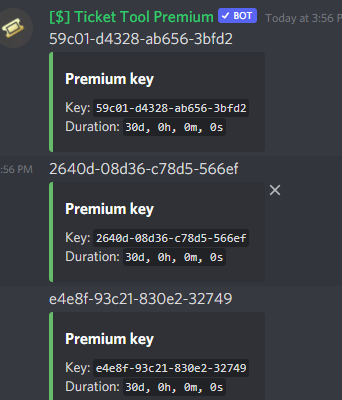
 jade topaz
hahhahahahahahah
 mystic hound
for people that need a little tip, if you type out the entire text, you get a month of premium each.
although im pretty sure one of those is claimed so yeah..goood luck 😂
humble sequoiaBOT
How to redeem premium
To redeem your premium key, go to the dashboard, select your server, then click "Redeem Premium" under the server's icon and name.

 upper flower
No
mystic hound
upper flower
No
did you break again
upper flower
I’ll break u
eager cargo
😳
craggy geyser
mystic hound
did you break again
Seems to be working as normal
 mystic hound
you don't
 spice kettle
damn
spice kettle
https://gyazo.com/71dd6819dc0f754bd02172a41f2e4af9 Is it possible to make it do different reactions to different panels?

I don't know if I'm doing it properly
(clearly not)
humble sequoiaBOT
Multipanels are a premium feature  that allow for a single panel with multiple reactions to open different tickets.
How to create a Multipanel
Premium users can combine multiple panels into one multipanel.
First of all you will need to assign a different Create Ticket Reaction for each Panel. Run $help reaction to learn how to do it.
Next, find the IDs of each panel you wish to combine. You can find them in your Panel Configs in the Dashboard
Next, send the multipanel to a channel using $panel [id1] [id2] {id3} ....
e.g. $panel 1 2 4 17 35 to combine panels 1, 2, 4, 17 and 35.
Up to 20 panels may be combined.
 spice kettle
ty ❤️
 timid fiber
Control panel
craggy geyser
As in a link to it?
 small sierra
how do I mention my support role when ticket is opened
what is the command for {} for the ticket messsage when it is oppned
i want it to @clear epoch
craggy geyser
$help ping
humble sequoiaBOT
How to make Ticket Tool ping a role
To make ticket tool ping a role when a ticket is opened, go to the Dashboard -> Panel Configs -> Settings -> Ticket Options -> Ticket Message -> Message Text and do this:
{@Role name} This is case sensitive and the role must have @mentions enabled
 jade topaz
Hey is there way that when a person opens a ticket it gets sent to certain category
 rocky sandal
Anyone know anything about my channels constantly being moved around?
jade topaz
rocky sandal
Anyone know anything about my channels constantly being moved around?
Is it due to the bot?
If not u can just reorder
rocky sandal
Yeah I’m asking if it’s a known bug that ticket tool reorders all of the channels.
radiant moss
rocky sandal
Yeah I’m asking if it’s a known bug that ticket tool reorders all of the channel...
Ticket Tool will not move non ticket channels
rocky sandal
Haven’t heard of this before then? Hmm. I’m trying to figure out which bot it is.
scenic plinth
Ticket Tool is only prompt to move channels upon commanded to do so. (Ex. Closing or Claiming), if they are moving around someone is likely messing with your channels and part of the time can cause channels to move around randomly. It's a bug with discord really.
craggy geyser
Yeah. As kenzie said, sometimes with discord moving one channel causes others to reorder (seems to happen more if someone moves a channel on mobile). Nothing to do with the bot itself
humble sequoiaBOT
فريق الدعم الفني العربي
عميلنا العزيز ان كنت تبحث عن مساعدة يرجى فتح تكت خاص بفريق الدعم الفني العربي
اذهب الى#🎫│make-a-ticket
ثم قم بلضغط على الايموجي الاتي (🇯🇴)
 tawny sleet
I go and no one aswer me
humble sequoiaBOT
-- moved to ticket --
 pseudo bay
Sorry is there a way to add someone to an open ticket?
jade topaz
hello
eager cargo
pseudo bay
Sorry is there a way to add someone to an open ticket?
$add ID
pseudo bay
Thank you, @eager cargo
 iron nightBOT
Gave 1 Rep to Quo (current: #4 - 104)
eager cargo
My pleasure
eager cargo
jade topaz
hello
Hello
pseudo bay
eager cargo
*$add ID*
Sorry I just tried that but it didn't work =/
eager cargo
Can you show me a screenshot?
 eager cargo
What is the prefix for ticket tool in your server?
pseudo bay
Oh! Haha I forgot I changed it, so it said it added the person to the ticket but they are not able to see it?
scenic plinth
Make sure the bot can manage those channel permissions.
pseudo bay
It can, it says this
https://gyazo.com/d2bd3aafd5dfdda925c3950f4a7fba14

But then the person isn't actually able to see the ticket
humble sequoiaBOT
-- moved to ticket --
jade topaz
eager cargo
Hello
how delete preson from ticket
eager cargo
$remove ID
pseudo bay
The bot has full permissions in pretty much all the channels, it adds someone to the ticket but that person isn't able to see the ticket, am I missing something?
 dull hamlet
hi so if anyones here to help
i relogged about twice and still my server wont appear :<
 weary vessel
how do i change the ticket description
 rough moth
 flat scaffold
Idk How to change the message when u open the ticket
flat scaffold
Idk How to change the message when u open the ticket
Go to moderator options and edit opened message
rough moth
weary vessel
how do i change the ticket description
Go to panel options and edit the message
rough moth
dull hamlet
i relogged about twice and still my server wont appear :<
Did u log out and in?
weary vessel
ALR
dull hamlet
mhm
weary vessel
rough moth
Go to panel options and edit the message
how do i make it send a message when the open the ticket
rough moth
pseudo bay
The bot has full permissions in pretty much all the channels, it adds someone to...
Is the user who opened the ticket have permission to see it
rough moth
weary vessel
how do i make it send a message when the open the ticket
I just said
weary vessel
rough moth
I just said
inside of the ticket
rough moth
Wdym?
humble sequoiaBOT
**Ticket Message**
The Ticket Message is the first message sent by the bot in a new ticket. To customise it head over to your Dashboard -> Panel Configs -> Settings -> Ticket Options -> Edit Ticket Message
 eager cargo
^
eager cargo
$commands
humble sequoiaBOT
Commands (tags) list for Support Team
Info
$setup - Link to setup page on docs
$docs - Link to docs
$relog - Relog the dashboard
$auto - Automation Disabled
$devmode - Show how to enable the devmode to your account.
$variables - List usable variables
$status - Directs to Status Page
$suggest - Redirect members to Community Server for suggestions
$kv - How to turn on/off "Keep Visible"
$dbrole - Managing dashboard roles
$var - Explanation the View as Role feature will not help when testing Ticket Tool
$blacklist - Blacklisting roles in Server Configs
$backup - Explains how to use the Backup & Restore Feature
$ts - Troubleshooting
$idcommand - How to get the ID of some things
$arabic - Explains how to open an Arabic ticket (in Arabic)
$tts - Inform a user that they are in a wrong server
$about - Simple explanation about Ticket Tool
$avatar - Explanation why it is not possible to change the bot's avatar/status
_ _
Premium
$redeem - How to redeem premium.
$redeemkey - How to redeem the premium key
$premium - Premium information and management
$prembot - Why do you have to disable premium bot.
$premiumbot - How to invite and enable the premium bot.
$transfer - To move premium to another server.
$mp - Info about multi panels
$color - Explanation on inserting a HexCode and a website to find them
$directurl - Explanation on Direct URLS and how to get them
$ticketname - Changing the default Ticket name
$ticketmessage - How to edit their ticket message
$panelmessage - How to edit their panel message
$claiming - Explains how to enable and configure claiming
$premiumperks - Shows all premium perks
$direct - Direct Payment
$tag - How to create a tag
$pc - How to get premium role
_ _
Most Used
$setup - Link to setup page on docs
$relog - Relog the dashboard
$variables - List usable variables
$mp - Info about multi panels
$ticketname - Changing the default Ticket name
$ticketmessage - How to edit their ticket message
$panelmessage - How to edit their panel message
$ts - Troubleshooting
$tts - Inform a user that they are in a wrong server
rough moth
Wow, this will help a lot
weary vessel
eager cargo
^
i mean like #851253805240942632
humble sequoiaBOT
Ticket names
The ticket name is the default channel name of all tickets. To edit it, go to your Dashboard > Panel Configs > Settings > Ticket Options. There you can edit the channel name of opened and closed tickets. You can also use variables in there.

 Note: This is a premium feature
eager cargo
Note: This is a premium feature
eager cargo
^
iron nightBOT
Gave 1 Rep to Quo (current: #4 - 105)
eager cargo
weary vessel
thanks <@!437728240388276224>
My pleasure
weary vessel
umm
do i have to create the panel and then use panel message or when i use panel message it adds the ticket

 weary vessel
it didnt show anything when i used the command also
humble sequoiaBOT
**Ticket Message**
The Ticket Message is the first message sent by the bot in a new ticket. To customise it head over to your Dashboard -> Panel Configs -> Settings -> Ticket Options -> Edit Ticket Message
humble sequoiaBOT
**Panel Message**
The panel message is where people react to make a ticket. To customize it head over to your Dashboard --> Panel Configs -> Settings -> Panel Options -> Edit Panel Message
 eager cargo
Thats for the second one.
humble sequoiaBOT
 weary vessel
wait why is it all premium
 rich bay
سلام عليكم
humble sequoiaBOT
فريق الدعم الفني العربي
عميلنا العزيز ان كنت تبحث عن مساعدة يرجى فتح تكت خاص بفريق الدعم الفني العربي
اذهب الى#🎫│make-a-ticket
ثم قم بلضغط على الايموجي الاتي (🇯🇴)
rough moth
flat scaffold
<@!813459470168227851> what do i change
What do u need help with?
Oh they left
iron nightBOT
Gave 1 Rep to JustSomeone (current: #25 - 6)
rough moth
Np
Wdym?
What part?
Like the panels, prefix?
I don’t think u can just reset it all at once
Yeah
Kind of
If you wanna get rid of the panels, go to dashboard and delete them
But I’m still unsure what your trying to reset
 copper burrow
I did $debug and reacted to the panel with 🛠️ but the reaction for the panel still won't pop up. Do I just have to delete it and completely redo it? 
copper burrow
Its on the dashboard under general options
copper burrow
Yeah
weary vessel
lol
 tropic briar
Thank you @rough moth
iron nightBOT
Gave 1 Rep to JustSomeone (current: #22 - 7)
tropic briar
Thank you @copper burrow
iron nightBOT
Error: You're still on cooldown
tropic briar
It worked
rough moth
 upper pelican
<@813459470168227851>
upper pelican
<@813459470168227851>
Don’t ping, but go to dashboard -> panel config -> edit panel->general options and add the roles there
upper pelican
rough moth
Don’t ping, but go to dashboard -> panel config -> edit panel->general options a...
How do you go to dashboard?
humble sequoiaBOT
rough moth
Go to that website
upper pelican
K
 verbal otter
Can I ask why my ticket bot doesn't work? Every time I test it by reacting to the message it doesn't delete the reaction or create a text channel
rough moth
It’ll explain everything
rough moth
verbal otter
Can I ask why my ticket bot doesn't work? Every time I test it by reacting to th...
Does it have the correct permissions
upper pelican
rough moth
Does it have the correct permissions
It won’t let me sign in, when I press on it, it doesn’t go to keyboard
verbal otter
rough moth
Does it have the correct permissions
Yep
rough moth
upper pelican
It won’t let me sign in, when I press on it, it doesn’t go to keyboard
That seems like an error on your side
Try reloading the site or something
rough moth
verbal otter
Yep
Are you sure, double check
upper pelican
rough moth
That seems like an error on your side
I did, what do I do?
rough moth
Well if the keyboard ain’t showing up, idk
scenic plinth
What seems to be the issue Matthew?
verbal otter
rough moth
Are you sure, double check
Can I send an ss or something?
rough moth
That’s not the sites problem
rough moth
verbal otter
Can I send an ss or something?
Sure
scenic plinth
verbal otter
Can I send an ss or something?
Run $debug and send me the link
upper pelican
scenic plinth
What seems to be the issue Matthew?
When I try to login my keyboard won’t show up, and I have to log in to get a panel
verbal otter
scenic plinth
Run `$debug` and send me the link
Link to?
rough moth
Sometimes it might be easier to give the bot administrator permissions
rough moth
verbal otter
Link to?
When u run the command it gives a link
scenic plinth
^
upper pelican
rough moth
Sometimes it might be easier to give the bot administrator permissions
Me?
rough moth
upper pelican
Me?
No the other person
scenic plinth
upper pelican
When I try to login my keyboard won’t show up, and I have to log in to get a pan...
You mean Keyboard on mobile?
upper pelican
K
upper pelican
scenic plinth
You mean Keyboard on mobile?
On ipad, yes.
scenic plinth
K check your settings on your IPad, I can guarantee you it is not a problem with the site.
upper pelican
No it’s good, I can do it anywhere else
scenic plinth
Ok
rough moth
The fights starting soon 👀
upper pelican
scenic plinth
Ok
So is there anyway that I could fix it?
rough moth
upper pelican
So is there anyway that I could fix it?
Probably some keyboard problem from your side, try looking it up and finding out
upper pelican
K
upper pelican
K
scenic plinth
On the main page of the dashboard it does not allow you to type. It will bring up your keyboard wherever you need to type.
upper pelican
Ignore the link
verbal otter
rough moth
When u run the command it gives a link
I'm confused about this one cause usually you just like send the message to what text channel you want it right?
upper pelican
Nvm
rough moth
Yes u can
humble sequoiaBOT
iron nightBOT
Gave 1 Rep to JustSomeone (current: #21 - 8)
 verbal otter
Refresh the web or something
upper pelican
That’s what I did..
scenic plinth
Relog into the dashboard, refreshing does not work.
humble sequoiaBOT
Don't see your server in the dashboard?
You will possibly need to relog. Look below to see steps on how to relog.
How to relog the Dashboard.
First, you will need to go to the dashboard. Once your there, click on your avatar on the top right. after you clicked it, you will see button that says Logout. You must click that. Once you have logged out, you can log back in.
Note:
You need one of these 3 things to access the dashboard.
1. Server Owner (Level: 6)
2. Server Administrator (Level: 4)
3. Dashboard Role (Level: 2)
You can check your level using $level on your Discord Server
upper pelican
Wdym dashboard role?
scenic plinth
It would be in the server configuration, the owner(s) would have to set that.
humble sequoiaBOT
Dashboard Roles
Any role you put there will have full access to the ticket tool dashboard. The server owner and users with admin permissions already have access to the dashboard.
Be careful of which roles to put here
 upper pelican
It did it again
I’m not the owner but I have all the edits since I’m highest rank
Is that why?
eager cargo
Can you run the $level command in your server and send a screenshot?
upper pelican
what do I say?
 torn talon
hello! i made a @.support role,, how do i add it ?
humble sequoiaBOT
User permission level with Ticket Tool
@upper pelican is permission level: 0 (User)
eager cargo
torn talon
hello! i made a @.support role,, how do i add it ?
$help support
humble sequoiaBOT
How to let support team see into a ticket
About support roles
A support role lets your support team see into tickets with out having to add them manually to each and every ticket.
You can add as many support roles as you like per panel.
NOTE that the way discord works all admins can see into tickets regardless of this.
How to set a support role
To set a Support role go to the Dashboard -> Panel Configs -> Settings -> General Options -> Support Team Roles.

NOTE that the support role will not be able to see into tickets that are already created..
 torn talon
humble sequoia
torn talon
humble sequoia
thank youu
eager cargo
upper pelican
You need to ask the owner to give you a dashboard role or Admin
eager cargo
torn talon
thank youu
My pleasure
upper pelican
eager cargo
You need to ask the owner to give you a dashboard role or Admin
How do they do that
humble sequoiaBOT
Dashboard Roles
Any role you put there will have full access to the ticket tool dashboard. The server owner and users with admin permissions already have access to the dashboard.
Be careful of which roles to put here
eager cargo
^
iron nightBOT
Gave 1 Rep to Quo (current: #3 - 106)
torn talon
thanks @eager cargo
iron nightBOT
Gave 1 Rep to Quo (current: #3 - 107)
eager cargo
My pleasure to both of you
 tulip grotto
algun staff que me atienda porfavor..
scenic plinth
@pliant parcel @tulip grotto Por favor, haga sus preguntas, no puedo ayudarle sin saber el problema.
tulip grotto
@scenic plinth te mande msg al privado!..
scenic plinth
Aceptar, por favor responda cuando esté disponible
 pliant parcel
scenic plinth
<@439826654399954946> <@616671774909792307> Por favor, haga sus preguntas, no pu...
pliant parcel
scenic plinth
<@439826654399954946> <@616671774909792307> Por favor, haga sus preguntas, no pu...
Hace un rato abrí ticket en la opción de Español

( ese es mi problema )
El que puse en el ticket de Español
scenic plinth
pliant parcel
Hace un rato abrí ticket en la opción de Español
Ok, espere a que respondan, no están garantizados para responder de inmediato y no puedo ayudarlo en su boleto.
pliant parcel
scenic plinth
Ok, espere a que respondan, no están garantizados para responder de inmediato y ...
Está bien , si normal espero , pero no me puedes ayudar ya que hay en la imagen está mi problema
jade topaz
Hey?
eager cargo
Hello
 round crater
.
 marble spruce
so i had my friend use the command $vote link @marble spruce , but it appears as if only 1 of the votes were sent to me, as the others were still kept for himself. How do i fix this?
 harsh cradle
Can i know the perks of taking premium ticket tool 
humble sequoiaBOT
Ticket Tool Premium
Get premium at https://tickettool.xyz/premium
Manage your subscriptions at https://tickettool.xyz/subscriptions
Why Premium?
Premium lets you customize the bot just how you want it. It also helps keep the bot running.
 Faster Premium Bot
Automatic Transcripts
Full Customization
Custom Reactions
Direct Messages
Ticket Automation
Multipanels
Premium Support
You can purchase premium here:
Price
$6 - Monthly
$66 - Yearly
 Premium
craggy geyser
harsh cradle
Can i know the perks of taking premium ticket tool <:fh_wtf:847989106281807932>
Premium
craggy geyser
harsh cradle
Can i know the perks of taking premium ticket tool <:fh_wtf:847989106281807932>
Here you go
 iron nightBOT
Gave 1 Rep to Swiftgale (current: #8 - 56)
 humble sequoiaBOT
Inviting and Enabling Premium Bot
The first thing you will need to do is invite the premium bot, an invite can be found here
Once the bot is in your server we will head to the dashboard and manage your server. When you are managing your server, you want to head into "Server Configs" then click the drop down menu under "Select the bot you would like to use on this server" then click "Ticket Tool#6207" and then save.
craggy geyser
harsh cradle
and how do i set it up
The majority of premium features work on the normal bot so you can just start making edits on the dashboard, but for buttons and/or the better speeds for the bot, follow the above. You can then kick the normal bot
harsh cradle
craggy geyser
The majority of premium features work on the normal bot so you can just start ma...

thanks @craggy geyser
iron nightBOT
@harsh cradle :: You can't rep Swiftgale#4167 for 56 minutes and 23 seconds. Try coming back later?
harsh cradle

 keen atlas
ينفع سوال
 twilit raptor
@planentant

 shadow axle
?
 frank estuary
Can People with Administration Perms use $claim when a ticket is created? Or is it support team only?
 pale pilot
Admins overwrite all permissions
frank estuary
Thought so. Ty!
 silent sedge
also can i get premium role o.o
frank estuary
thanks @pale pilot
iron nightBOT
Gave 1 Rep to Simple (current: #6 - 82)
silent sedge
$invite premium
humble sequoiaBOT
Ticket Tool Invite & Support
humble sequoiaBOT
Inviting and Enabling Premium Bot
The first thing you will need to do is invite the premium bot, an invite can be found here
Once the bot is in your server we will head to the dashboard and manage your server. When you are managing your server, you want to head into "Server Configs" then click the drop down menu under "Select the bot you would like to use on this server" then click "Ticket Tool#6207" and then save.
mystic hound
There ya go
silent sedge
ty!
is the manage role perm necessaray?
and ince i add the premium bot can i kick the normal one
also will my data that i set on trial premium version be copied over to actual premium version?
mystic hound
silent sedge
is the manage role perm necessaray?
Yeah I'd recommend it's given.
mystic hound
silent sedge
also will my data that i set on trial premium version be copied over to actual p...
Yep, and yeah you can kick the primary bot
silent sedge
i wanna add the bot to a server which has the emotes im using for the ticket stuff
custom emotes
but its not letting me add it there
 fallow ingot
Do you have premium? @silent sedge
craggy geyser
fallow ingot
Do you have premium? <@557094217890005024>
The have the trial currently. They said so above
mystic hound
silent sedge
but its not letting me add it there
If you aren't able to add the bot to a server you probably lack the permissions
silent sedge
fallow ingot
Do you have premium? <@557094217890005024>
yep
full premium now
on 2 servers
silent sedge
mystic hound
If you aren't able to add the bot to a server you probably lack the permissions
yepp fixed thank u
iron nightBOT
Gave 1 Rep to Light (current: #5 - 93)
verbal otter
Can anyone tell me what ticket limit reached mean?
I think this is the reason why my ticket bot doesn't work
craggy geyser
verbal otter
Can anyone tell me what ticket limit reached mean?
The number of tickets an individual can open from that panel
At one time that is
verbal otter
So does that mean I won't be able to use ticket tool anymore?
craggy geyser
Once tickets are closed you can open more
And it is only that one type. So for example in #🎫│make-a-ticket if there was a ticket limit of 1 on each type, you could make one of each. And when the ticket was closed you could make a new one there
verbal otter
craggy geyser
Once tickets are closed you can open more
The thing is it won't open any ticket channels or whatsoever
verbal otter
craggy geyser
And it is only that one type. So for example in <#571706435449257997> if there w...
Whenever I try to react to the bot's message the reaction just stays there, it doesn't delete the reaction or make a ticket
craggy geyser
verbal otter
The thing is it won't open any ticket channels or whatsoever
Does it have the right permissions
verbal otter
craggy geyser
Does it have the right permissions
The ticket bot role?
verbal otter
craggy geyser
Does it have the right permissions
If so Imma screenshot the role
craggy geyser
But also permissions in the ticket category
verbal otter
craggy geyser
But also permissions in the ticket category
Where do I change the permissions, on the roles and category?
silent sedge
does the emote server need premium bought as well?
jade topaz
jade topaz
how delete someone from ticket ?
verbal otter
craggy geyser
Run `$debug` in the channel and it tells you both
It doesn't reply or anything
I checked the prefix and it says it's also $
fallow ingot
jade topaz
how delete someone from ticket ?
Click the ⛔emoji.
jade topaz
fallow ingot
Click the ⛔emoji.
nope
i want delete someone from ticket
not delete ticket
verbal otter
craggy geyser
Run `$debug` in the channel and it tells you both
The debug command doesn't work for me
The bot doesn't seem to respond or anything
 atomic solstice
verbal otter
The debug command doesn't work for me
atomic solstice
verbal otter
The debug command doesn't work for me
can you tell me the name of the server or the server ID?
verbal otter
atomic solstice
can you tell me the name of the server or the server ID?
Do I send it here or dm?
atomic solstice
here, just the name
verbal otter
atomic solstice
here, just the name
I copied the ID
atomic solstice
then ID
atomic solstice
Your prefix is + so try to type +debug in your server
verbal otter
atomic solstice
Your prefix is `+` so try to type +debug in your server
Ye I did but it still doesn't work
craggy geyser
Does ticket tool have permission to view that channel?
atomic solstice
yeah check if there isn't an override for that channel where ticket tool cannot see it
verbal otter
Where do i check the text channel or category?

 verbal otter
Ye usually it does
verbal otter
atomic solstice
or does the bot just not do anything?
For now yes
It doesn't do anything rn
Ever since last night it doesn't work or respond
atomic solstice
The reason is because you have the free bot selected
in the dashboard
so the Premium bot cannot respond
also in the channel settings you have the permium bot not the free bot
which means you have to add the free bot to those channel settings and then it should respond
basically any ticket or channel which you don't see the bot in and it should be in add the free bot there
atomic solstice
verbal otter
so did you also add the free bot for this channel as well?
cause in the screenshot only the Premium one is there
verbal otter
Mhmmm
I tried it on a diff channel and the command works now
Lemme test the reaction thing
verbal otter
atomic solstice
so did you also add the free bot for this channel as well?
Oh it works now, Idk why this didn't work last night, I got so worried
Thx for the help though
Thanks @atomic solstice
iron nightBOT
Gave 1 Rep to Satisfy (current: #3 - 107)
atomic solstice
no problem
verbal otter
atomic solstice
no problem
Can I ask is it ok to keep two of the bots?
I thought I could get premium perks by inviting the premium one that's why I have both
I don't have premium rn though
atomic solstice
You can have both bots, but if you don§t have premium activated for a server you still won't have premium features even if you have the premium bot
verbal otter
atomic solstice
You can have both bots, but if you don§t have premium activated for a server you...
Ye I just found out about it, so it would be fine if I'd keep both?
atomic solstice
yeah, you can keep both, they won't interfere with each other
you just won't be able to use the premium one untill you purchase premium
verbal otter
atomic solstice
yeah, you can keep both, they won't interfere with each other
What if I remove the normal one and keep the premium bot even without the perks
Will it still work?
 hidden linden
I have a problem with my premium version of ticket tool it seems to be broken for me
I'm first of all getting this on my screen

i had both the free version, and the premium version. I removed free ttool, but since then, the new panels and messages aren't working
panel works fine for creating the ticket

but the rest of the panel is broken

leaves me with just one option

when i click all the buttons, the buttons just delete and it just sits there
 atomic solstice
hidden linden
I'm first of all getting this on my screen
atomic solstice
hidden linden
I'm first of all getting this on my screen
this is just a visual bug which can be fixed by Loging out and logging back in to the dashboard (It happens when a server has been renamed)
atomic solstice
hidden linden
when i click all the buttons, the buttons just delete and it just sits there
can you check if Ticket Tool premium has all the permissions required?
also try to type -> @pseudo glen debug
in that channel
 white anvil
Heyy
jade topaz
Hello, what do you need help with?
 jade topaz
It just shows the data of the ticket, and the time it was closed and created.
I'm not sure where you will see the time and date tho.
white anvil
I got it, thx !
atomic solstice
white anvil
Where will I see this time and date?
it's at the bottom of the embed
jade topaz
@atomic solstice How can I turn rep on? (Sorry for pinging you.)
atomic solstice
jade topaz
<@!601783394334015498> How can I turn rep on? (Sorry for pinging you.)
Ticket Tool doesn't have a reputation system
you would have to use another bot for that
jade topaz
atomic solstice
Ticket Tool doesn't have a reputation system
Ik that. But I'm saying like example: I say thanks Satisfy or ping you it will give you rep.
iron nightBOT
Gave 1 Rep to Satisfy (current: #3 - 109)
jade topaz
See?
jade topaz
I know, how can I set mines up?
I plan on helping more people in ticket tool support.
atomic solstice
jade topaz
I know, how can I set mines up?
you mean in this server?
or in your server?
If in this server then you don't have to do anything since it is automatic
if someone types thanks @user it will do it
but if you want it for your server
go to the dashboard, your server, on the left Fun
and under that is reputation
jade topaz
atomic solstice
you mean in this server?
Yes, this server. How can I set it up so if someone says thanks koop it gives me rep.
iron nightBOT
@jade topaz :: You can't rep Satisfy#4339 for 56 minutes and 48 seconds. Try coming back later?
jade topaz
Oh. Alright.
craggy geyser
Anyone on the server can gain rep
 bronze scroll
hi, my bot doesnt seem to be working when I react to the emoji
I just upgraded to premium and invited the premium bot
jade topaz
Suggestion:
That if command like for example {user_name} also have a command like {Description}
So you can choose to add the subject in the DM when closing a ticket.
So the reason for creating the ticket, that you send it to the creator of the ticket when closing
humble sequoiaBOT
Suggestions for Ticket Tool
Suggestions for the bot have been moved to our Ticket Tool Community Server.
See Suggestions in #824021828704010315
Make a Suggestion
Use ^suggest <suggestion> in #825359982534721546
atomic solstice
bronze scroll
I just upgraded to premium and invited the premium bot
can you please tell me the name of the server or the Server ID?
jade topaz
^suggest Suggestion:
That if command like for example {user_name} also have a command like {Description}
So you can choose to add the subject in the DM when closing a ticket.
So the reason for creating the ticket, that you send it to the creator of the ticket when closing
eager cargo
You have to do that command in the to be community server
jade topaz
eager cargo
You have to do that command in the to be community server
A oke
jade topaz
boas nao consigo entrar no server diz que preciso de entrar no discord porem eu ja estou no discord´
 robust sandalBOT
jade topaz
boas nao consigo entrar no server diz que preciso de entrar no discord porem eu ...
robust sandalBOT
jade topaz
boas nao consigo entrar no server diz que preciso de entrar no discord porem eu ...
 Alternativo
good i can not enter the server says i need to enter the discord but i'm already in discord ́
 Portuguese (Brazil) (pt) → English (en)
scenic plinth
Portuguese (Brazil) (pt) → English (en)
scenic plinth
/pt Can I ask what you mean?
robust sandalBOT
Posso perguntar o que quer dizer?
English (en) → Portuguese (Brazil) (pt)
atomic solstice
/pt Try to log out and log back in to the dashboard, that should reload the server list and update it all
robust sandalBOT
Tente sair e fazer login de volta no painel, que deve recarregar a lista do servidor e atualizá-la
English (en) → Portuguese (Brazil) (pt)
atomic solstice
@jade topaz ^^
jade topaz
already tried it i even reinstaled fivem
eager cargo
$tts
humble sequoiaBOT
You're in the wrong place
We provide support for @pseudo glen discord bot and cannot help you with whatever issue you have.
Please make sure to contact the appropriate support team.
If you don't have any further questions regarding our bot Ticket Tool, please close this ticket
_ _
jade topaz
ja esta obg
jade topaz
how to make sure that only selected olives can open tickets?
craggy geyser
The people who you don't want to open tickets, do you want them to be able to do anything else with the bot? If you don't want them to interact with the bot at all you can add the role to the blacklist
humble sequoiaBOT
Blacklist Roles
Any role you assign as a blacklisted role won't be able to use commands or reactions.
Selecting a blacklisted role
Go to your Dashboard -> Server Configs. There you will find the option to select blacklisted roles.
Note: Don't forget to save.
 jade topaz
craggy geyser
The people who you don't want to open tickets, do you want them to be able to do...
jade topaz
craggy geyser
The people who you don't want to open tickets, do you want them to be able to do...
.
craggy geyser
If you only want the support team to be able to use the reactions, enable the "support team only" option in the reaction options
$help reaction
humble sequoiaBOT
How to change reactions
To set a custom reaction Dashboard -> Panel Configs -> Settings -> Reaction Options -> <Reaction to change> -> Reaction

NOTE you need premium to do this.
craggy geyser
The top option in the picture
jade topaz
thanks @craggy geyser
iron nightBOT
Gave 1 Rep to Swiftgale (current: #8 - 59)
craggy geyser
No worries
 proven void
I know I can ping a user in the message text of a newly opened ticket using {user}. Can I also ping a specific user in that field as well? I'm guessing that since all I see in the supported variables seem to be opening user id or roles, I'm guessing no.
scenic plinth
You can try using <@userid> but I don't know if that will work, that hasn't been something I have seen used.
 cursive copper
humble sequoiaBOT
cursive copper
humble sequoiaBOT
-- moved to ticket --
marble spruce
marble spruce
so i had my friend use the command $vote link <@!692547231873499227> , but it ap...
Can someone pls help me with this?
 violet yarrow
Hi is your website down?
rough moth
marble spruce
so i had my friend use the command $vote link <@!692547231873499227> , but it ap...
Only the votes that are made after the linking are sent to u
jade topaz
hi i redeemed premium for the first time and idk what to do now, do i need to get a second bot in my server for the commands like $claim to work? /g
rough moth
jade topaz
hi i redeemed premium for the first time and idk what to do now, do i need to ge...
No but u need to set up the command
On the dashboard
If it isn’t already
And u can’t claim a ticket u made btw
jade topaz
how do I set up the command on the dash board please? /g
fallow ingot
jade topaz
how do I set up the command on the dash board please? /g
Tags? Or tickets?
jade topaz
i have tickets set up already i just wanna know how to make the $claim thing work please /lh
rough moth
craggy geyser
Claiming is a premium feature
They do
humble sequoiaBOT
Claiming Options
Claiming allows you to change the ticket name, category and permissions. To use it you have to enable it first on your Dashboard > Panel Configs > Claiming Options.
 Note: This is a premium feature
rough moth
Note: This is a premium feature
rough moth
@jade topaz ^
jade topaz
ahh thank you 
 blissful sparrow
how do i make it so a role can see all the tickets
eager cargo
$help support
humble sequoiaBOT
How to let support team see into a ticket
About support roles
A support role lets your support team see into tickets with out having to add them manually to each and every ticket.
You can add as many support roles as you like per panel.
NOTE that the way discord works all admins can see into tickets regardless of this.
How to set a support role
To set a Support role go to the Dashboard -> Panel Configs -> Settings -> General Options -> Support Team Roles.
NOTE that the support role will not be able to see into tickets that are already created..
blissful sparrow
thank you
eager cargo
My pleasure
 raw flax
how can i let a certain role see closed tickets
eager cargo
$help support
humble sequoiaBOT
How to let support team see into a ticket
About support roles
A support role lets your support team see into tickets with out having to add them manually to each and every ticket.
You can add as many support roles as you like per panel.
NOTE that the way discord works all admins can see into tickets regardless of this.
How to set a support role
To set a Support role go to the Dashboard -> Panel Configs -> Settings -> General Options -> Support Team Roles.
NOTE that the support role will not be able to see into tickets that are already created..
raw flax
eager cargo
$help support
theyre are on this but cant see closed tickets that have 2 step
how do i get my premium role on here as well
 tribal cedar
$pc
humble sequoiaBOT

How to get premium role
Until the automatic premium check is fixed run the command $debug on your server and send us the link in a ticket.
eager cargo
Check the support team closed permissions @raw flax
marble spruce
rough moth
Only the votes that are made after the linking are sent to u
I understand that, however I voted AFTER I linked the account.
scenic plinth
Can you check that the votes didn't register later on? If not #🎫│make-a-ticket as we can't help you further.
 magic abyss
Hello how do I make it so random people cannot edit ticket tool's dashboard? I tried going on a alt and I saw that I could edit the dashboard of my own server. The alt does not have administratior

 covert flame
:T I kinda need help setting up the bot in my server I want people to be able to make a ticket but I don't want people to be able to access other people's tickets
tribal cedar
magic abyss
Hello how do I make it so random people cannot edit ticket tool's dashboard? I ...
What do you have listed under dashboard roles in server configs?
tribal cedar
covert flame
:T I kinda need help setting up the bot in my server I want people to be able to...
You may want to check out keep visible and make sure its red so others can't see tickets panel configs -> settings -> general
Beyond that for setting up the bot
humble sequoiaBOT
scenic plinth
$kv
humble sequoiaBOT
**How to turn off Keep Visible**
**About Keep Visible**
"Keep Visible" will disable any permission changes to the @everyone role, allowing everyone to see into tickets.
**How to disable/enable it**
Head over to your Dashboard -> Panel Configs -> Settings --> General Options -> Keep Visible

NOTE that @everyone can type aswell if it has permissions to send messages
 prime bridgeBOT
ApeBoy03 has been silenced for 10m 

 Reason: Posting Walls Of Text
ApeBoy03#9937 | 836758828271665163
jade topaz
is it possible to look @ a closed tickets text
scenic plinth
jade topaz
is it possible to look @ a closed tickets text
If a ticket was closed, yes. The ticket should still exist.
If the ticket was deleted you will have to look at the transcript. If no transcript is saved you cannot view the ticket.
jade topaz
where would i go to look @ this
scenic plinth
You can see if you have a transcript channels saved. If you do the transcript should save in the channel. If not then no transcript was saved and the ticket cannot be viewed.
$help transcript
humble sequoiaBOT
How do I save transcript to a channel?
To save transcripts to a channel go to the Dashboard -> Panel Configs -> Settings -> Logging Options -> Transcript Channel
 jade topaz
unfortunate asf
covert flame
tribal cedar
You may want to check out keep visible and make sure its red so others can't see...
This?
 scenic plinth
covert flame
This?
scenic plinth
covert flame
This?
Yes, that is on so you will want to turn it off in order for others not to see the ticket.
covert flame
I want ppl to be able to create the ticket but I don't want them to see other people's tickets- I'm sorry if I'm confusing
scenic plinth
Yes turn that off. (Keep Visible) With it off they can still see the ticket they own.
covert flame
scenic plinth
Yes turn that off. (Keep Visible) With it off they can still see the ticket they...
Tysm
scenic plinth
No problem
magic abyss
tribal cedar
What do you have listed under dashboard roles in server configs?
nothing
tribal cedar
magic abyss
nothing
Then no role should be able to access your dashboard
Only owner and admins
 visual glade
Hola
queria aser una pregunta
como ago para que ningun otro usuario vea el ticket que abrio otro y solo lo vea el que lo abrio
robust sandalBOT
visual glade
como ago para que ningun otro usuario vea el ticket que abrio otro y solo lo vea...
 Trolero_MC
as ago so that no other user sees the ticket that opened another and only the one who opened it sees it
Spanish (es) → English (en)
tribal cedar
$kv
humble sequoiaBOT
**How to turn off Keep Visible**
**About Keep Visible**
"Keep Visible" will disable any permission changes to the @everyone role, allowing everyone to see into tickets.
**How to disable/enable it**
Head over to your Dashboard -> Panel Configs -> Settings --> General Options -> Keep Visible
NOTE that @everyone can type aswell if it has permissions to send messages
tribal cedar
/es making that red will prevent anyone but staff and ticket owners from seeing the ticket
robust sandalBOT
hacer que el rojo evitará que cualquier persona, pero el personal y los propietarios de boletos de ver el boleto
English (en) → Spanish (es)
tribal cedar
Anytime @visual glade
 weak cosmos
hello if i'm in a server and i filed for a ticket and then it says ticket limit reached 1/1
what do i do?
eager cargo
$help limit
humble sequoiaBOT
How to set a ticket limit
A ticket limit may be set per panel to prevent users from spamming tickets. By default this limit is set to 3. Once a user hits this limit the bot will notify the users that they reached the limit.
To set a ticket limit go to the Dashboard -> Panel Configs -> Settings -> General Options -> Ticket Limit
 eager cargo
You’d have to up the ticket limit ^^
spice kettle
So, when it comes to the channel not being an actual recreated channel, IE a ticket, I can $transcript outside of it. Is this possible to make it only happen in ticket channels?
For example: I ran $transcript here and it'll log everything even though this isn't a "ticket."
scenic plinth
To my knowledge no.
 sweet crater
anyone know how to setup a blacklist if its possible with the ticket bot?
humble sequoiaBOT
Help Options
$help commands - Information on commands
$help setup - Information on bot setup
$help faq - Frequently asked questions
Blacklist Roles
Any role you assign as a blacklisted role won't be able to use commands or reactions.
Selecting a blacklisted role
Go to your Dashboard -> Server Configs. There you will find the option to select blacklisted roles.
Note: Don't forget to save.
scenic plinth
@sweet crater ^
sweet crater
ty!
scenic plinth
No problem
sweet crater
scenic plinth
<@715290458120519752> ^
do you know how to make it like this?
 scenic plinth
That looks like it is a tag.
sweet crater
how do i make a tag?
humble sequoiaBOT
Tags
Tags are used to send a predefined response to your channels using a command. Tags will only respond if the command itself is used, it will not function if you put the tag into a sentence. The prefix is not included.
To create tags, go to: Dashboard > Tags > Create Tag. After creating and naming one, tap on the response button, and you can edit the response.
 sweet crater
scenic plinth
That looks like it is a tag.
sweet crater
scenic plinth
That looks like it is a tag.
so i’m trying to make the tag but, every time i try to make the command, it reloads and disappears and doesn’t work, does it usually do that? (if that makes any sense)
wait
i think i did it wrong i’m dumb my bad
 red sable
I am trying to click onto my server which has the bot in it but it doesn't load on the Manage Servers I have tried reloading multiple times.
fallow ingot
red sable
I am trying to click onto my server which has the bot in it but it doesn't load ...
Log out and log back in.
fallow ingot
let me know if it works.
red sable
worked
fallow ingot
good 😌
jade topaz
Hello, is it possible for a single panel to have multiple reactions that open tickets in different categories?

like this?
humble sequoiaBOT
Multipanels are a premium feature that allow for a single panel with multiple reactions to open different tickets.
How to create a Multipanel
Premium users can combine multiple panels into one multipanel.
First of all you will need to assign a different Create Ticket Reaction for each Panel. Run $help reaction to learn how to do it.
Next, find the IDs of each panel you wish to combine. You can find them in your Panel Configs in the Dashboard
Next, send the multipanel to a channel using $panel [id1] [id2] {id3} ....
e.g. $panel 1 2 4 17 35 to combine panels 1, 2, 4, 17 and 35.
Up to 20 panels may be combined.
craggy geyser
jade topaz
like this?
It's premium only. But instructions above
 sturdy imp
ticket tool is not working in my server
it used to work when some react it makes channel but from yesterday its not working
craggy geyser
Has anything changed since then?
sturdy imp
no
craggy geyser
Run $debug in the channel with the panel
sturdy imp
ok
craggy geyser
Your issue is that the bot doesn't have manage channels permission, which means it can't create a new channel for a ticket
craggy geyser
No worries
 chrome fossil
Hi I’m having a problem with my ticket
 autumn solstice
chrome fossil
Hi I’m having a problem with my ticket
autumn solstice
chrome fossil
Hi I’m having a problem with my ticket
Just explain the issue and we'll all try to help you out 🙂
chrome fossil
So I bought a $10 bundle and I went to create a ticket and they said that support will be with me shortly but it’s been a half hour and nothing has happened
autumn solstice
chrome fossil
So I bought a $10 bundle and I went to create a ticket and they said that suppor...
Not sure if you're talking about ticket tool premium? Since that costs 6$
autumn solstice
well we can't help you here since its not related to the ticket tool. You should contact the guy/owner from that third party website. This is only for ticket tool support.
 charred pollen
How do I claim a ticket?
autumn solstice
charred pollen
How do I claim a ticket?
I think you need premium for that
charred pollen
No for my server-
But okay-
autumn solstice
charred pollen
No for my server-
But okay-
To claim a ticket in your server, you need the premium ticket tool version
claiming tickets is a premium feature
autumn solstice
humble sequoia
see ^
jade topaz
Is it possible to use those fancy buttons instead of reactions already?
pale pilot
with the premium bot you can test the new buttons on panel messages with the command $newpanel
 tiny minnow
Hello is there a command to prevent a user from opening a ticket?
humble sequoiaBOT
Blacklist Roles
Any role you assign as a blacklisted role won't be able to use commands or reactions.
Selecting a blacklisted role
Go to your Dashboard -> Server Configs. There you will find the option to select blacklisted roles.
Note: Don't forget to save.
 shut vessel
Hello, I am wondering if there is an option to only allow certain roles to create a ticket? (like a whitelist for a panel)
jade topaz
pale pilot
with the premium bot you can test the new buttons on panel messages with the com...
 jade topaz
Anybody who can tell me how I f'd up? 😦
 south zinc
$vote
humble sequoiaBOT
Votes
Current Votes: 0
Lifetime Votes: 146
Linked Votes: 25
Vote Links
Linking Info
Linked User: Not Linked
You can give your future votes to another user by linking with that user.
To link use $vote link (@user or userId)
To unlink use $vote unlink
Redeeming
Each vote is worth 12 hours of premium and can be redeemed once you have atleast 6 votes.
Your current votes are worth 0m
To redeem your current votes use $vote redeem
atomic solstice
jade topaz
Anybody who can tell me how I f'd up? 😦
It's a beta feature, means it doesn't still work for all servers
jade topaz
OH yeah that makes sense, lol. I thought I f'd up somehow
Does that mean I should stop trying and go back to reactions for now?
atomic solstice
it's still strange, because Discord doesn't release at once for everyone, it looks like they release it one by one for servers 😄
shut vessel
Is there an option to make whitelist roles for a panel?
atomic solstice
jade topaz
Does that mean I should stop trying and go back to reactions for now?
you can still try in test channels if you want, but there is no guarantee that it will work for now
 sleek wasp
my server isnt popping up on the dashboard
fallow ingot
sleek wasp
my server isnt popping up on the dashboard
Log out and log back in.
humble sequoiaBOT
Don't see your server in the dashboard?
You will possibly need to relog. Look below to see steps on how to relog.
How to relog the Dashboard.
First, you will need to go to the dashboard. Once your there, click on your avatar on the top right. after you clicked it, you will see button that says Logout. You must click that. Once you have logged out, you can log back in.
Note:
You need one of these 3 things to access the dashboard.
1. Server Owner (Level: 6)
2. Server Administrator (Level: 4)
3. Dashboard Role (Level: 2)
You can check your level using $level on your Discord Server
sleek wasp
fallow ingot
Log out and log back in.
thanks
iron nightBOT
Gave 1 Rep to aaron8 (current: #12 - 37)
shut vessel
Is there an option to whitelist roles on the panel so only certain roles and create a ticket?
proven void
scenic plinth
You can try using <@userid> but I don't know if that will work, that hasn't been...
Can confirm, this worked.
thanks @scenic plinth
iron nightBOT
Gave 1 Rep to ♡вroĸenѕмιle♡ (current: #7 - 74)
 cursive wagon
türk varmı
humble sequoiaBOT
-- moved to ticket --
Blacklist Roles
Any role you assign as a blacklisted role won't be able to use commands or reactions.
Selecting a blacklisted role
Go to your Dashboard -> Server Configs. There you will find the option to select blacklisted roles.
Note: Don't forget to save.
fallow ingot
@shut vessel ^^
 sturdy quartz
is it worth getting @humble sequoia
fallow ingot
yes,
sturdy quartz
ok
fallow ingot
Do you want to see it’s features?
sturdy quartz
Yea
humble sequoiaBOT
Ticket Tool Premium
Get premium at https://tickettool.xyz/premium
Manage your subscriptions at https://tickettool.xyz/subscriptions
Why Premium?
Premium lets you customize the bot just how you want it. It also helps keep the bot running.
fallow ingot
I swear
humble sequoiaBOT
Faster Premium Bot
Automatic Transcripts
Full Customization
Custom Reactions
Direct Messages
Ticket Automation
Multipanels
Premium Support
You can purchase premium here:
Price
$6 - Monthly
$66 - Yearly
Premium
mystic hound
there
sturdy quartz
:o
fallow ingot
Thanks!
sturdy quartz
I may get
fallow ingot
I would.
 soft bloom
How do I set up a ticket area?
sturdy quartz
 long temple
i have a glitch
long temple
i have a glitch
of?
atomic solstice
long temple
i have a glitch
Hi, what sort of glitch? Could you provide a screenshot?
 iron nexus
Hey! I have a question, I have the ticket tool bot and it's working perfectly besides I want to add a role who can also see the newly made tickets. But I can't really figure out how to do that, can somebody help me?
Oops, got it!
 velvet hearth
Hey I got a question
I got ticket tool in my Server
And when I made the permuim trial work
It stopped working
Can I ask for solution?
atomic solstice
can you tell me the server name?
atomic solstice
ok, can I ask did you invite the premium bot to your server or not?
atomic solstice
then that is the problem, because you selected the premium bot in the dashboard which made it so the free bot ignores messages
go to the dashboard > server configs
and under the premium bot in the dropdown select the free bot again
it will still have the premium features

 iron nightBOT
Gave 1 Rep to Satisfy (current: #3 - 111)
atomic solstice
no problem
 leaden pike
i need help
atomic solstice
leaden pike
i need help
hi, what do you need help with?
leaden pike
when someone creates a ticket, only me (owner) and the person who created the ticket can see. How can i make another role to see the ticket too?
atomic solstice
$help support
humble sequoiaBOT
How to let support team see into a ticket
About support roles
A support role lets your support team see into tickets with out having to add them manually to each and every ticket.
You can add as many support roles as you like per panel.
NOTE that the way discord works all admins can see into tickets regardless of this.
How to set a support role
To set a Support role go to the Dashboard -> Panel Configs -> Settings -> General Options -> Support Team Roles.
NOTE that the support role will not be able to see into tickets that are already created..
atomic solstice
here is how ^^
atomic solstice
no problem
leaden pike
u saved my life lol
atomic solstice

pale pilot
He's a lifesaver lol
leaden pike
agree
atomic solstice
😄
 strange patio
do premium tickettool subscriptions auto renew? All the sudden I am unable to save transcripts and noticed subscription no longer there from what I can see
atomic solstice
They auto renew unless you cancelled the subscription
strange patio
strange
is there anyway you can check my account?
if there is an active subscription?
rough moth
strange patio
is there anyway you can check my account?
The managers can
fallow ingot
so can support team.
atomic solstice
strange patio
if there is an active subscription?
you can also check it yourself from the substriptions page
fallow ingot
Reload?
strange patio
but no history
humble sequoiaBOT
Ticket Tool Premium
Get premium at https://tickettool.xyz/premium
Manage your subscriptions at https://tickettool.xyz/subscriptions
Why Premium?
Premium lets you customize the bot just how you want it. It also helps keep the bot running.
rough moth
fallow ingot
so can support team.
They can?
fallow ingot
yup.
rough moth
Hmm I thought only managers were able to access that info
atomic solstice
fallow ingot
yup.
Only Managers can, we can only see if the server has permium, not if you purchased it
fallow ingot
that’s what I meant
rough moth
atomic solstice
Only Managers can, we can only see if the server has permium, not if you purchas...
Yeah I thought so
fallow ingot
strange patio
628258959492644947
I meant this @rough moth 
rough moth
What about that?
fallow ingot
like check the server.
atomic solstice
strange patio
but no history
From what I see, you have premium on that server
which bot do you use, the free one or the premium one?
strange patio
ok then should I then create a ticket to discuss this further?
we have been saving transcripts for a long while until recently it stopped
atomic solstice
the only thing which I see is that you don't have a bot selected in the dashboard
basically if you use the free one or the premium one
if you only use one but have them both invited then just check if they have the same permissions
@strange patio try to do this and tell me if that fixed it, if not then you can open a ticket
atomic solstice
no, it has been there, its just a field where you can choose which one you want to use, so when you invite them both they don't interfere with each other as they both have the same prefix
strange patio
also, does the premium bot really need manage roles?
atomic solstice
Well, manage roles lets it see all roles and show the roles in the dashboard
strange patio
i guess it probably does
atomic solstice
if you don't have that then I think it only sees the roles which it has
not sure though, you'd have to experiment a little
 thorny drum
the dashbord it's not showing the server i relogging but it's not showing the server
atomic solstice
I guess
humble sequoiaBOT
Don't see your server in the dashboard?
You will possibly need to relog. Look below to see steps on how to relog.
How to relog the Dashboard.
First, you will need to go to the dashboard. Once your there, click on your avatar on the top right. after you clicked it, you will see button that says Logout. You must click that. Once you have logged out, you can log back in.
Note:
You need one of these 3 things to access the dashboard.
1. Server Owner (Level: 6)
2. Server Administrator (Level: 4)
3. Dashboard Role (Level: 2)
You can check your level using $level on your Discord Server
thorny drum
4
atomic solstice
thorny drum
4
your level is 4 then you should check if you are logged in with the correct discord account in the dashboard
thorny drum
atomic solstice
your level is 4 then you should check if you are logged in with the correct disc...
i'm logged
atomic solstice
then try to log out and log back in to the dashboard
if it still doesn't show up, then try using a different browser
thorny drum
atomic solstice
then try to log out and log back in to the dashboard
k
this what i see if i logged
 atomic solstice
thorny drum
this what i see if i logged
atomic solstice
thorny drum
this what i see if i logged
that's not the dashboard
that's the wiki
the dashboard is here -> https://tickettool.xyz
jade topaz
Hello. I have a fairly specific question, and I hope this isn't too confusing. Our server has multiple levels of staff, which have different levels of seniority and ability to solve users issues. Is there any way to have different levels of Support Staff in Ticket Tool? For instance:
- Level 1 mod claims a ticket.
- User has an appeal that is above their Staff Level
- Level 2 mod is able to step in and assist Level 1 mod on ticket.
Basically, we want the entry level staff to be able to claim tickets so that 2 entry level staff aren't working on the same ticket, but we want the Senior Mods to be able to take over whenever they need to. The Senior Mods are not granted the Administrator permission on our server.
atomic solstice
jade topaz
Hello. I have a fairly specific question, and I hope this isn't too confusing. O...
you can make both roles be able to claim, you can also make it so when a ticket is claimed other support team members cannot type if you want, and then just let the higher lever claim it over them, or just claim without changing the send permission and have the higher staff just write there
jade topaz
hello i have a question how can i make it so that when someone opens a ticket the support team is pinged?
atomic solstice
$help ping
humble sequoiaBOT
How to make Ticket Tool ping a role
To make ticket tool ping a role when a ticket is opened, go to the Dashboard -> Panel Configs -> Settings -> Ticket Options -> Ticket Message -> Message Text and do this:
{@Role name} This is case sensitive and the role must have @mentions enabled
atomic solstice
@jade topaz here ^^
jade topaz
is that in the settings?
 weary geyser
Hey guys, what does $claim do exactly? My support team tried it and nothing happened
scenic plinth
weary geyser
Hey guys, what does $claim do exactly? My support team tried it and nothing happ...
Make sure that is enabled on the panel within the dashboard. (Below embed explains that process)
Claiming will allow one user to "claim" the ticket, basically meaning you can make it so once it is claimed nobody else defined as "support" can type or see the ticket. (Administrators are not affected)
humble sequoiaBOT
Claiming Options
Claiming allows you to change the ticket name, category and permissions. To use it you have to enable it first on your Dashboard > Panel Configs > Claiming Options.
Note: This is a premium feature
 tired saffron
when i try to send a panel message it says this :
Failed to send: Access Denied (Ticket Tool doesn't have permission to view or send into this channel)
scenic plinth
Yes, so please allow ticket tool to send / read messages in that channel.
tired saffron
scenic plinth
Yes, so please allow ticket tool to send / read messages in that channel.
how ?
scenic plinth
You have to do it through the channel settings.
tired saffron
scenic plinth
You have to do it through the channel settings.
is there are tutorial link ?
OH
i understand
i disabled messages in the channel
can i disable it after ticket message been sent ?
scenic plinth
Yes
tired saffron
thanks
scenic plinth
No problem
weary geyser
scenic plinth
Make sure that is enabled on the panel within the dashboard. (Below embed explai...
Thank you!
iron nightBOT
Gave 1 Rep to ♡вroĸenѕмιle♡ (current: #7 - 75)
scenic plinth
No problem!
jade topaz
hey, so im trying to use custom emojis in my panels and in some of the panels it's working and in others it's not, I've tried putting them written as emojiname:IDnumbers and emojiname:IDnumbers and neither is working?


this is the thing for the one that worked
 craggy geyser
$idcommand
humble sequoiaBOT
How do I get the ID of Roles/Channels/Emojis?
Ticket Tool has a useful command that helps you get the ID of various things like channels, roles, emojis and your server.
Just use the command $id <#channel/@role/:emoji:>. Now copy everything, including the brackets <...>, to your dashboard (or wherever you want it)
If you want the server ID, just use $id.
soft bloom
I can't get ticket tool to work. Everything I make a panel, I'm the only one it'll work for. It won't work for anybody else. Is there a way to fix this?
jade topaz
craggy geyser
Or is it the same for the one that doesn't work?
i might just be being stupid rn one second XD ty for ur help imma just play with it some more
 cosmic sedge
Hola
jade topaz
ah ty @craggy geyser i was just being dumb ✌️
iron nightBOT
Gave 1 Rep to Swiftgale (current: #8 - 60)
 dim bison
Does Slash Commands work with this bot?
 hexed mauve
is there a way to set-up notifications so admins are notified that a ticket was created
dim bison
hexed mauve
is there a way to set-up notifications so admins are notified that a ticket was ...
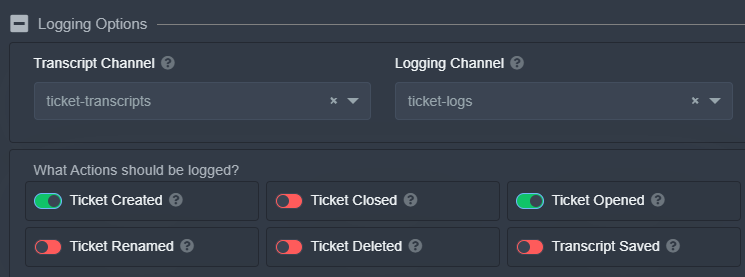
I didn't want to tag people with every created ticket. Instead I'm only logging when a ticket is created and when a ticket is opened. Then the admins can just get the notifications from that channel. https://i.imgur.com/TIhR7Ko.png
 craggy geyser
hexed mauve
is there a way to set-up notifications so admins are notified that a ticket was ...
craggy geyser
hexed mauve
is there a way to set-up notifications so admins are notified that a ticket was ...
You can make it ping on opening
$help ping
humble sequoiaBOT
How to make Ticket Tool ping a role
To make ticket tool ping a role when a ticket is opened, go to the Dashboard -> Panel Configs -> Settings -> Ticket Options -> Ticket Message -> Message Text and do this:
{@Role name} This is case sensitive and the role must have @mentions enabled
craggy geyser
dim bison
Does Slash Commands work with this bot?
I don't know of ticket tool having any. But there is very few commands, most of which are optional as you can use reactions (or buttons when implemented) instead
 open wraith
Hello, I might be doing something wrong but when I try with a test account I can't make a ticket, I press the button and nothing happens. If I use my normal admin/owner account tho it works fine. Yes it has all the perms and when I try $ debug it says all it fine. Thanks for any help.
tribal cedar
Did you by chance add everyone to blacklist role?
jade topaz
why when I invite the bot to my server it automatically exits ?
tribal cedar
That maybe because of another bot you are using or any other number of reasons I suppose.
I would #🎫│make-a-ticket maybe there's a reason that I don't know.
open wraith
tribal cedar
Did you by chance add everyone to blacklist role?
Well im smort..... This was exactly it. Thank you.
iron nightBOT
Gave 1 Rep to Enigma (current: #13 - 34)
tribal cedar
No worries its happened before and anytime
jade topaz
tribal cedar
That maybe because of another bot you are using or any other number of reasons I...
oh yes, maybe that's because of the bot Shine, thanks
iron nightBOT
Gave 1 Rep to Enigma (current: #13 - 35)
tribal cedar
Anytime. :)
 split iron
ا
 feral vessel
ه
robust sandalBOT
feral vessel
ه
 MrLord
h
Arabic (ar) → English (en)
robust sandalBOT
split iron
ا
 ابـو صـَقـر
alif
Arabic (ar) → English (en)
 burnt sable
so whenever i added ticket tool to my server, i went to the dashboard, and that server didnt show up  (btw im only admin)
burnt sable
burnt sable
so whenever i added ticket tool to my server, i went to the dashboard, and that ...
nvm, i found out why, it was cus i had to resign into the ticket tool website 
jade topaz
$help
humble sequoiaBOT
Help Options
$help commands - Information on commands
$help setup - Information on bot setup
$help faq - Frequently asked questions
jade topaz
$help commands****
humble sequoiaBOT
Help Options
$help commands - Information on commands
$help setup - Information on bot setup
$help faq - Frequently asked questions
jade topaz
$help commands
humble sequoiaBOT
() = optional
[] = required
*==================================
Ticket Commands
==================================*
_ _
`$add [User] (channel)`
Description: Adding additional users to a ticket
Aliases: none
`$remove [User] (channel)`
Description: Removing users from a ticket
Aliases: none
`$close`
Description: Closing tickets
Aliases: none
`$open`
Description: Opening closed tickets
Aliases: none
`$delete`
Description: Deleting tickets
Aliases: none
`$rename`
Description: Renaming tickets/channels
Aliases: none
`$transcript (send channel)`
Description: Creating transcripts
Aliases: none
`$new (user) (reason)`
Description: Creating tickets in a monitored channel (when command style is enabled)
Aliases: none
`$claim`
Description: Claiming tickets (when claim is enabled)
Aliases: "unclaim"
_ _
*==================================
General Commands
==================================*
_ _
`$help (Help Options)`
Description: Help Command
Aliases: none
`$debug`
Description: Debuging issues with running Ticket Tool
Aliases: none
`$id (@role/@user/#channel/emoji)`
Description: Converting roles, users, channels and emojis to ID
Aliases: "getid"
`$permlevel`
Description: Checking permission level with Ticket Tool
Aliases: "level"
`$ping`
Description: Checking response time with discord api
Aliases: none
`$vote (link | unlink | redeem) (user)`
Description: Earn premium by voting on top.gg or Discord.boats
Aliases: "votes"
marble spruce
https://i.imgur.com/omEzuXI.png does enabling this make tickets delete when using $close or do I need to disable this to allow it to delete when using $close?

 silent crown
Bom dia entao e o seguinte eu tinha doado 50 euros ou comprado vip ja nao me lembro bem como é a 1 ano e tal atras apos pouco tempo deixei de jogar e agr volto a reentrar no servidor e deparo me que nao tenho nem os kms nem o dinheiro que o vip dá
 weary musk
hello
I want to install the bot can you help me
robust sandalBOT
silent crown
Bom dia entao e o seguinte eu tinha doado 50 euros ou comprado vip ja nao me lem...
 eu27
eu27
Good morning then and the next I had donated 50 euros or bought vip already do not remember how well it is 1 year and such after a little time I stopped playing and agr re-enter the server and I come into it that I have neither the kms nor the money that the vip gives
Portuguese (Brazil) (pt) → English (en)
 upper pelican
hey yall question? how do people send messages using the ticket tool bot?
atomic solstice
/pt Hi, you are in the wrong place @silent crown. We are a support team for the Ticket Tool bot.
robust sandalBOT
Oi, você está no lugar errado @silent crown. Somos uma equipe de suporte para o bot Ticket Tool.
English (en) → Portuguese (Brazil) (pt)
humble sequoiaBOT
atomic solstice
@weary musk here ^^
atomic solstice
upper pelican
hey yall question? how do people send messages using the ticket tool bot?
you can use the Tags, to make custom embeds which get send when someone types a selected word in the chat
upper pelican
hm can i share a ss of what i mean or?
atomic solstice
sure
atomic solstice
yes this can be done with tags
If you want people to also open tickets by clicking a reaction under that message then use a Panel
humble sequoiaBOT
**Panel Message**
The panel message is where people react to make a ticket. To customize it head over to your Dashboard --> Panel Configs -> Settings -> Panel Options -> Edit Panel Message
upper pelican
so its a mix ?
atomic solstice
^^ this is where you can configure the panel message from where the people can open tickets from
you can see an example in #🎫│make-a-ticket
if you want it without the reactions then use the tags
upper pelican
i just want it to see my message with them tapping/clicking on the ticket emoji on the bottom
humble sequoiaBOT
Creating a panel
To create a panel we are going to need to head over to the panel configs on the dashboard
Once at the dashboard we will need to click Create Panel
Enter a panel name (Fill in any optional settings you want)
Click Create Panel and your ready to get started with configuring your panel
An example of a creating a panel is shown below.
 upper pelican
ah i see its prenium
humble sequoiaBOT
upper pelican
premium*
atomic solstice
upper pelican
ah i see its prenium
not all of it, only some parts
atomic solstice
humble sequoia
https://docs.tickettool.xyz/en/general/setup
If you follow this guide it will show you the general setup
hen you can configure the message with this
humble sequoiaBOT
**Panel Message**
The panel message is where people react to make a ticket. To customize it head over to your Dashboard --> Panel Configs -> Settings -> Panel Options -> Edit Panel Message
upper pelican
sorry reading maybe i misread is there a way to add the picture into the message?
atomic solstice
yes, but that is a premium feature
upper pelican
i just activated the 7 day hehe
jade topaz
i dont see my server on the manage servers page
humble sequoiaBOT
Don't see your server in the dashboard?
You will possibly need to relog. Look below to see steps on how to relog.
How to relog the Dashboard.
First, you will need to go to the dashboard. Once your there, click on your avatar on the top right. after you clicked it, you will see button that says Logout. You must click that. Once you have logged out, you can log back in.
Note:
You need one of these 3 things to access the dashboard.
1. Server Owner (Level: 6)
2. Server Administrator (Level: 4)
3. Dashboard Role (Level: 2)
You can check your level using $level on your Discord Server
atomic solstice
@jade topaz here ^^
atomic solstice
can you try to type $debug in that channel and send here the link which gets send by the bot?
 cold acorn
k
jade topaz
atomic solstice
<@456226577798135808> here ^^
ah cheers i didnt know what it meant by relogging
atomic solstice
no problem
jade topaz
maybe you should change it to "logging out and in again"
cold acorn
oh sorry i got it i forgot to give "add reaction" permission sorry for disturbing
jade topaz
not you specifically but yknow
atomic solstice
cold acorn
oh sorry i got it i forgot to give "add reaction" permission sorry for disturbin...
no problem
atomic solstice
jade topaz
not you specifically but yknow
yeah, could be but it's a low priority change, which means that if we ever do it then it will be after the bot bugs and improvements are finished
 atomic solstice
Do you have any closed tickets?
atomic solstice
before the deletion were there any tickets made?
jade topaz
I don't believe so
atomic solstice
hmm, because if there were some (they could've been also renamed) and you deleted them manually then it will always say 5 Open tickets because the bot wasn't the one who deleted them
jade topaz
Oh god thats gonna bug me 
humble sequoiaBOT
Ticket Tool Invite & Support
 spiral zephyr
does anyone know how to disable people without support role from closing the ticket
atomic solstice
spiral zephyr
does anyone know how to disable people without support role from closing the tic...
you can just make the Command and reaction Support Team only
$help reaction
humble sequoiaBOT
How to change reactions
To set a custom reaction Dashboard -> Panel Configs -> Settings -> Reaction Options -> <Reaction to change> -> Reaction
NOTE you need premium to do this.
atomic solstice
when you go to the Closing Ticket Reaction then just enable the ^^ Support Team Only
you can do the same for the close command
upper pelican
is there a way to reset ticket counts or no?
atomic solstice
upper pelican
is there a way to reset ticket counts or no?
yes
in the panel settings under general options
you can there see the Ticket Count
if you change it to 0 then the new ticket will start with 1
upper pelican
woo ty
iron nightBOT
Gave 1 Rep to Satisfy (current: #3 - 113)
atomic solstice
no problem
jade topaz
Forgive my ignorance, but how can I put the new reactions?
https://i.imgur.com/X3dUx5E.png
 tribal cedar
You need premium. It's setup with $newpanel same way as panel is used
jade topaz
Thank you very much for your help!
tribal cedar
Nps
 zenith panther
How to can use emoji ?
 tribal cedar
Sorry? How do you set the emoji?
zenith panther
tribal cedar
Sorry? How do you set the emoji?
yub
jade topaz
jade topaz
Forgive my ignorance, but how can I put the new reactions?
https://i.imgur.com/X...
The only thing, I have 10 reactions in panel and when I put the $newpanel I only get the first 5 emojis and no more are put.
tribal cedar
zenith panther
yub
Its in panel configs -> settings -> reaction options click open ticket
tribal cedar
jade topaz
The only thing, I have 10 reactions in panel and when I put the $newpanel I only...
It is in beta stages but I had more then 5 when I used it but prolly different now. Either way beta. :(
zenith panther
شكلك فهمتني غلط كيف احط ذا الايموجي فوق ؟

 errant cliff
hey im having a problem with logging in it says Oops, something went wrong...
You are not authorized to login.
tribal cedar
$id 📩
craggy geyser
errant cliff
hey im having a problem with logging in it says Oops, something went wrong...
Yo...
You are probably trying to log into the docs
You need the dashboard
https://tickettool.xyz/dashboard
zenith panther
tribal cedar
$id 📩
لم افهم
jade topaz
tribal cedar
It is in beta stages but I had more then 5 when I used it but prolly different n...
Yeah, I've already seen that it's in Beta, so I'll have to wait.
Again, thanks for the help 🙂
iron nightBOT
Gave 1 Rep to Enigma (current: #13 - 36)
tribal cedar
zenith panther
لم افهم
Max do $id 📩 and input what it gives you into your ticket message
craggy geyser
$idcommand
humble sequoiaBOT
How do I get the ID of Roles/Channels/Emojis?
Ticket Tool has a useful command that helps you get the ID of various things like channels, roles, emojis and your server.
Just use the command $id <#channel/@role/:emoji:>. Now copy everything, including the brackets <...>, to your dashboard (or wherever you want it)
If you want the server ID, just use $id.
craggy geyser
No problem
tribal cedar
jade topaz
Yeah, I've already seen that it's in Beta, so I'll have to wait.
Again, thanks f...
Anytime. Awesome new features tho
jade topaz
I agree with you hahahaha
mystic hound
its going to get a lot better in the coming days 👀
 potent stream
thanks @tribal cedar @craggy geyser
iron nightBOT
Gave 1 Rep to Enigma (current: #12 - 37)
tribal cedar
Anytime brotha
jade topaz
how do I do when someone opens a ticket, the bot marks my server's support team?
scenic plinth
jade topaz
how do I do when someone opens a ticket, the bot marks my server's support team?
I assume you mean ping, follow the steps below:
$help ping
humble sequoiaBOT
How to make Ticket Tool ping a role
To make ticket tool ping a role when a ticket is opened, go to the Dashboard -> Panel Configs -> Settings -> Ticket Options -> Ticket Message -> Message Text and do this:
{@Role name} This is case sensitive and the role must have @mentions enabled
jade topaz
scenic plinth
I assume you mean ping, follow the steps below:
oooh yes, thanks
iron nightBOT
Gave 1 Rep to ♡вroĸenѕмιle♡ (current: #7 - 76)
scenic plinth
No problem, have a great day!
jade topaz
equally
jade topaz
mystic hound
its going to get a lot better in the coming days 👀
Hype hahahaha
 fiery bison
How do i claim a ticket from a member if that make sense?
tribal cedar
The discord bot would need to be premium
If thats the case you need to enable it in the dashboard
humble sequoiaBOT
Claiming Options
Claiming allows you to change the ticket name, category and permissions. To use it you have to enable it first on your Dashboard > Panel Configs > Claiming Options.
Note: This is a premium feature
fiery bison
It can only be a premium bot?
craggy geyser
It's a premium feature to claim
jade topaz
@jade topaz انا شب الله يعطيك العافية هههههههه
 jade topaz
<@456226577798135808> انا شب الله يعطيك العافية هههههههه
jade topaz
jade topaz
<@456226577798135808> انا شب الله يعطيك العافية هههههههه
😂 😂 🤦♀️ .
scenic plinth
 thin ice
Tried the new buttons when making a ticket on this discord
thin ice
Tried the new buttons when making a ticket on this discord
Try using the panel above it please and let them know in the ticket. Buttons are still in beta with Discord and Ticket Tool so therefore that will happen here and there.
pale pilot
BattleEye already made a newer version that works much better, but isn't published yet. The current buttons are wanky and buggy
tribal cedar
Boosting the server gets you no sort of discount but buckets of 
jade topaz
:( ok
 elder bear
Help
how can I do this?

#573205317870157855 I read it and it didn't help me, I only got the bot's permissions
elder bear
Yes
rough moth
elder bear
Yes
Go to your panel, ticket options, and edit ticket message
elder bear
I only got the bot's permissions
elder bear
No
humble sequoiaBOT
elder bear
@rough moth
 rough moth
?
elder bear
this is what appears to me
 storm knoll
oh hello
I have a Ticket tool in my server
I assigned the role to Admin and Moderator at the same time
the admin can see the tickets but the moderator doesn't
so, I then changed to moderator only
and they still can't see the tickets
can any one help me, please
P.S: I'm using the free version
atomic solstice
$help support
humble sequoiaBOT
How to let support team see into a ticket
About support roles
A support role lets your support team see into tickets with out having to add them manually to each and every ticket.
You can add as many support roles as you like per panel.
NOTE that the way discord works all admins can see into tickets regardless of this.
How to set a support role
To set a Support role go to the Dashboard -> Panel Configs -> Settings -> General Options -> Support Team Roles.
NOTE that the support role will not be able to see into tickets that are already created..
atomic solstice
if you add both roles here then they will see any newly created tickets ^^
if you do any changes they won't be applied to already opened tickets, only to newly created ones
 long osprey
the channel i wanna put the panel in doesnt pop up
i gave it all the perms and stuff
atomic solstice
long osprey
the channel i wanna put the panel in doesnt pop up
can you type @Ticket Tool debug in that channel?
atomic solstice
did you ping the bot or the role?
also if nothing happened could you please tell me the server name or server ID?


 atomic solstice
so when you type $panel 1 in that channel does it get sent?