#🆘│community-support
1 messages · Page 321 of 1
 long night
 iron nightBOT
Gave 1 Rep to JustSomeone (current: #29 - 4)
 ionic ermine
Hey, I wanted to ask how do I do something like that with a bit of 7 things to do like here in the picture? and yes i have Premium

 humble sequoiaBOT
Multipanels are a premium feature  that allow for a single panel with multiple reactions to open different tickets.
How to create a Multipanel
Premium users can combine multiple panels into one multipanel.
First of all you will need to assign a different Create Ticket Reaction for each Panel. Run $help reaction to learn how to do it.
Next, find the IDs of each panel you wish to combine. You can find them in your Panel Configs in the Dashboard
Next, send the multipanel to a channel using $panel [id1] [id2] {id3} ....
e.g. $panel 1 2 4 17 35 to combine panels 1, 2, 4, 17 and 35.
Up to 20 panels may be combined.
 ionic ermine
humble sequoia
ionic ermine
humble sequoia
It is not possible please help

 rough moth
ionic ermine
It is not possible please help
rough moth
ionic ermine
It is not possible please help
Do you have two panels?
ionic ermine
yes
ionic ermine
no
 solid stream
If you want multiple panels on the same message you need to have different reactions
ionic ermine
thanks
solid stream
Atleast until I add the new discord buttons that don't really use reactions.
ionic ermine
thanks @rough moth
iron nightBOT
Gave 1 Rep to JustSomeone (current: #28 - 5)
rough moth
solid stream
Atleast until I add the new discord buttons that don't really use reactions.
Discord buttons are out no?
solid stream
They're out, but development with them is still very new so alot of the modules don't support it yet.
rough moth
Makes sense
solid stream
And I have a huge rewrite to do before then to get them added.
rough moth
Ahh ok thanks
 mystic hound
@craggy geyser see?
 craggy geyser
Quite similar
 misty bluff
my fren
I have problem my fren
I am doing this ticket thingy right and no work my fren
 fallow ingot
so your saying the ticket does not open?
have you set any blacklisted roles?
@misty bluff
misty bluff
no
misty bluff
fallow ingot
so your saying the ticket does not open?
yes
fallow ingot
misty bluff
yes
Does ticket tool respond to commands?
misty bluff
fallow ingot
Does ticket tool respond to commands?
what dat mean
fallow ingot
Run $debug in your server.
misty bluff
fallow ingot
Run `$debug` in your server.
oops
somebody kicked the bot
ill re add it
fallow ingot
Okay.
 hazy raven
Hey! Super quickly! Does a premium sub have to be server owner?
solid stream
hazy raven
Hey! Super quickly! Does a premium sub have to be server owner?
no, it can be anyone on the server
 strange tinsel
someone in my server keeps trying to make a ticket, but this happens ? i can’t figure out why ehshshdg

 tribal cedar
In general settings of your panel the ticket limit is set to 0
 eager cargo
$help limit
humble sequoiaBOT
How to set a ticket limit
A ticket limit may be set per panel to prevent users from spamming tickets. By default this limit is set to 3. Once a user hits this limit the bot will notify the users that they reached the limit.
To set a ticket limit go to the Dashboard -> Panel Configs -> Settings -> General Options -> Ticket Limit
 eager cargo
Up the limit to at least 1
eager cargo
My pleasure
 verbal dove
hi guys we got the premium and wanted to know how many discord servers we can setup with 1 subscription
tribal cedar
1
Each subscription is per server. Idk if there package deals would have to #🎫│make-a-ticket for billing support
iron nightBOT
Gave 1 Rep to Enigma (current: #10 - 33)
tribal cedar
Anytime
verbal dove
and do you know if its mossible to make like a special ticket limit to a specific person ?
humble sequoiaBOT
How to set a ticket limit
A ticket limit may be set per panel to prevent users from spamming tickets. By default this limit is set to 3. Once a user hits this limit the bot will notify the users that they reached the limit.
To set a ticket limit go to the Dashboard -> Panel Configs -> Settings -> General Options -> Ticket Limit
tribal cedar
You could exclude the bot (blacklist) from responding to a role but that would be a all or none scenario
verbal dove
yeah we already have set up the limit to 1 but sometimes i need to open like 3 or 4 tickets simultaneity but can cause of the limit
verbal dove
yeah ill try
tribal cedar
Thats in command style tickets
verbal dove
thanks @tribal cedar again
iron nightBOT
@verbal dove :: You can't rep Enigma#0007 for 55 minutes and 27 seconds. Try coming back later?
tribal cedar
Np. :)
eager cargo
Stating your issue gets ya help faster :)
 bold goblet
I need help with understanding ticket tool like I got the setting it up and stuff its just whenever I use it what is suppose to happen I have already made a ticket management role and I thought they'd get a dm or something notifying someone used the ticket but nothing is happening and people are interrupt tickets when one is in progress.
Hello? ;-;
eager cargo
Hi. Are you referring to DM'ing the ticket owner upon ticke;t creation?
Or just regular setup?
bold goblet
No. I have no idea when a ticket is used, I thought the ticket management role was suppose to get dm'd ;-;
 scenic plinth
Most of those are a premium feature such as "DMing" or "interrupting tickets".
You can notify people by pinging a role however.
eager cargo
bold goblet
No. I have no idea when a ticket is used, I thought the ticket management role w...
No, that's not possible apologies.
Like Kenzie said their role can be pinged upon ticket creation
$help ping
humble sequoiaBOT
How to make Ticket Tool ping a role
To make ticket tool ping a role when a ticket is opened, go to the Dashboard -> Panel Configs -> Settings -> Ticket Options -> Ticket Message -> Message Text and do this:
{@Role name} This is case sensitive and the role must have @mentions enabled
 bold goblet
that premium I dont have that ;-;
eager cargo
That's not premium
eager cargo
Okie
scenic plinth
Pinging a role does not require premium. The ways to fix "interrupting tickets" is etc.
eager cargo
humble sequoia
^
Follow these steps
To make ticket tool ping a role when a ticket is opened, go to the Dashboard -> Panel Configs -> Settings -> Ticket Options -> Ticket Message -> Message Text and do this:
{@Role name} This is case sensitive and the role must have @mentions enabled
bold goblet
message text?
bold goblet
Ight.
 edgy arch
The ticket doesn't ping even when you put the role
The role is mentioned, but it doesn't actually ping members who have the role
 scenic plinth
edgy arch
The role is mentioned, but it doesn't actually ping members who have the role
scenic plinth
edgy arch
The role is mentioned, but it doesn't actually ping members who have the role
Make sure that Ticket Tool has permissions to ping [@ mention] all roles / @ everyone. You can see if it has this permission by running $debug in your server.
scenic plinth
 ancient mason
i bought the premium but still shows as the normal one
ancient mason
i bought the premium but still shows as the normal one
Make sure you invited premium and enabled it for the server you would like it for. Directions are below:
humble sequoiaBOT
Inviting and Enabling Premium Bot
The first thing you will need to do is invite the premium bot, an invite can be found here
Once the bot is in your server we will head to the dashboard and manage your server. When you are managing your server, you want to head into "Server Configs" then click the drop down menu under "Select the bot you would like to use on this server" then click "Ticket Tool#6207" and then save.
edgy arch
Thank you, fixed.
scenic plinth
No probs, have a great day!
ancient mason
help
when i send the ticket panel, theres no reaction button
helpppppppp
@scenic plinth 
scenic plinth
ancient mason
<@!615207454443044904> <:why:845849187991945248>
Avoid pinging people for support please, use $debug in the server and provide me the link.
ancient mason
sorry, i think i figured it out tho
 proven void
argh... I was hoping I could block a user from sending me DM's and still allow them to open tickets.
That doesn't seem to be the case.
 candid loom
1
 fierce pier
how to add "additional reaction"
humble sequoiaBOT
Multipanels are a premium feature that allow for a single panel with multiple reactions to open different tickets.
How to create a Multipanel
Premium users can combine multiple panels into one multipanel.
First of all you will need to assign a different Create Ticket Reaction for each Panel. Run $help reaction to learn how to do it.
Next, find the IDs of each panel you wish to combine. You can find them in your Panel Configs in the Dashboard
Next, send the multipanel to a channel using $panel [id1] [id2] {id3} ....
e.g. $panel 1 2 4 17 35 to combine panels 1, 2, 4, 17 and 35.
Up to 20 panels may be combined.
scenic plinth
fierce pier
how to add "additional reaction"
The above is the closest I can give you for adding an "additional reaction"
scenic plinth
 manic sail
I need help to recover my account that is not bind
manic sail
I need help to recover my account that is not bind
$tts
humble sequoiaBOT
You're in the wrong place
We provide support for @pseudo glen discord bot and cannot help you with whatever issue you have.
Please make sure to contact the appropriate support team.
If you don't have any further questions regarding our bot Ticket Tool, please close this ticket
_ _
fierce pier
$help reaction
humble sequoiaBOT
How to change reactions
To set a custom reaction Dashboard -> Panel Configs -> Settings -> Reaction Options -> <Reaction to change> -> Reaction

NOTE you need premium to do this.
 obsidian ravine
I need help
 atomic solstice
obsidian ravine
I need help
atomic solstice
obsidian ravine
I need help
What do you need help with?
obsidian ravine
in collect robux free
nobody is answering
Are you ignoring me now bot
wowowowowowowowowowow
atomic solstice
obsidian ravine
wowowowowowowowowowow
Well you are in the wrong place, we are a support team for the @pseudo glen bot not anything related to robux
atomic solstice
no
obsidian ravine
...
.....
weird-
well tell me what i should do in ticket tool support thingy
atomic solstice
If you have any questions about the bot, the setup of the bot, then ask and we will help.
obsidian ravine
you are very sassy
atomic solstice
if you don't have any questions related to Ticket tool and just want to chat then you can use our TicketTool Lounge server
which has all our chats
obsidian ravine
ok dokay
atomic solstice
 ornate palm
Hi, I've made a panel, and I'd like to "disable" the panel for a bit, so we can have a break. Is there a way I can keep the panel there, but when you react, it removes the reaction and nothing happens?
solid stream
ornate palm
Hi, I've made a panel, and I'd like to "disable" the panel for a bit, so we can ...
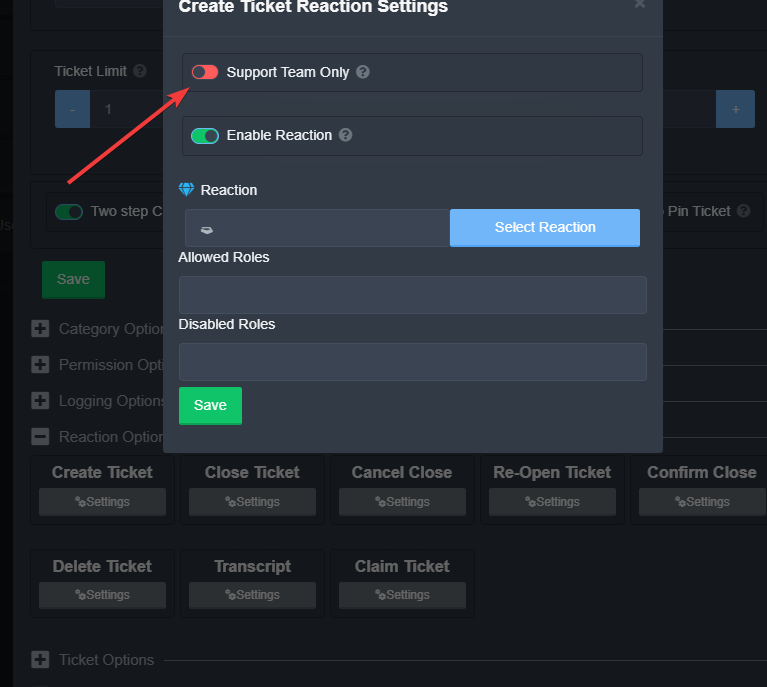
It's not a very quick way, but this will do it.
ornate palm
What would happen if I did "enable reaction" and made it red?
solid stream
otherwise just hide the channel.
ornate palm
Would that also work?
solid stream
ornate palm
Would that also work?
That would do it too
ornate palm
Ok.
ornate palm
solid stream
That would do it too
Where is that option?
solid stream
Panel Configs -> Settings -> Reaction Options -> Create Ticket
ornate palm
With disabling "ebale reaction", the reaction stays. Is that normal?
solid stream
It will stay on the panel like normal
iron nightBOT
Gave 1 Rep to BattleEye (current: #12 - 32)
ornate palm
Me again, just wondering when I do [prefix] close, it takes like 7 seconds to appear with the second menu.
solid stream
The bots being a little laggy today
iron nightBOT
@ornate palm :: You can't rep BattleEye#9668 for 46 minutes and 28 seconds. Try coming back later?
 graceful carbon
@mystic hound | Managerhey can u help me how to setup ticket tool for modmail
@craggy geyser
 jade topaz
graceful carbon
<@!132147174212501504>
jade topaz
graceful carbon
<@!132147174212501504>
Don't ping any one
mystic hound
$help setup
humble sequoiaBOT
Setting up Ticket Tool
Visit the docs for setup info
General Setup
mystic hound
also don't ping staff please. @graceful carbon ^
graceful carbon
so sorry
jade topaz
how I can set room for saved Transcript
mystic hound
$help transcript
humble sequoiaBOT
How do I save transcript to a channel?
To save transcripts to a channel go to the Dashboard -> Panel Configs -> Settings -> Logging Options -> Transcript Channel
 iron nightBOT
Gave 1 Rep to Light (current: #5 - 88)
humble sequoiaBOT
New command not monitoring this channel
To see what channel is monitored visit the Dashboard -> Panel Configs -> Settings -> Command Style Tickets -> Channel to monitor for command $new
tribal cedar
Whats up?
fallow ingot
Idk...
 native solstice
thanks @mystic hound
iron nightBOT
Gave 1 Rep to Light (current: #5 - 89)
proven void
Is there a way for me to allow for users in a ticket that are blocked by me individually via DMs or otherwise?
 long mason
@hybrid dagger español?
jade topaz
Hola. Si necesita asistencia en español, puedo ayudarlo.
long mason
jade topaz
Hola. Si necesita asistencia en español, puedo ayudarlo.
a perdon
long mason
jade topaz
Hola. Si necesita asistencia en español, puedo ayudarlo.
si es que no me deja iniciar sesion con discord en la pagina
fallow ingot
long mason
<@!332594810106150913> español?
Don't ping the support team. Use #🎫│make-a-ticket
 robust sandalBOT
Trying to translate to Spanish but detected as Spanish.
Please don't waste translations by trying to translate to the same language.
jade topaz
Bien. Asegúrese de tener habilitadas las ventanas emergentes. Además, intente iniciar sesión en una pestaña de incógnito.
@long mason^^
long mason
jade topaz
Bien. Asegúrese de tener habilitadas las ventanas emergentes. Además, intente in...
uh lo intentare gracias
jade topaz
¡No hay problema!
long mason
jade topaz
¡No hay problema!
muchas gracias me funciono 👍
 prime gorge
I have an issue. according to the tutorial, there should be a "settings" tab under navigation, but I don't see one.
 jade topaz
long mason
muchas gracias me funciono 👍
jade topaz
long mason
muchas gracias me funciono 👍
¡No hay problema! ¡Espero que disfrutes de Ticket Tool! ¡Es un bot maravilloso!
jade topaz
prime gorge
I have an issue. according to the tutorial, there should be a "settings" tab und...
Okay.
Go to pannel configs.
long mason
jade topaz
¡No hay problema! ¡Espero que disfrutes de Ticket Tool! ¡Es un bot maravilloso!
gracias 👍
prime gorge
oh, i found it, sorry
jade topaz
Then go to the pannel you configured, and click the settings icon.
prime gorge
thanks :)
jade topaz
All good!
No problem! @prime gorge
Hello, is there a way to either, give a role to whoever makes a ticket
OR
have automod not work in a certain category? I want people to be able to send links in tickets.
Hello.
Alright. So, you are attempting to allow people to send links in tickets?
jade topaz
jade topaz
Alright. So, you are attempting to allow people to send links in tickets?
Yes.
Alright. Well.
Here's the thing.
You can do it in a couple of ways.
First.
Go to the pannel tab.
Then, go to the pannel that you setup for that server.
Click the ⚙️ and go under permissions.
The user opened permissoins click it and check the embeded links. This allows them to send links that lead somewhere else on the web.
fallow ingot
Everyone can send links, Unless you have a bot that won't let them.
jade topaz
fallow ingot
Everyone can send links, Unless you have a bot that won't let them.
Assuming that they set that setting already. That they can't.
jade topaz
jade topaz
The ``user opened permissoins`` click it and check the embeded links. This allow...
The thing is, the automod system, (dyno) doesnt allow links, and there isnt a way to blacklist an automod by category
Let me look at dyno's settings.
fallow ingot
Told you
jade topaz
omg let me do this 👀
fallow ingot
jade topaz
The thing is, the automod system, (dyno) doesnt allow links, and there isnt a wa...
You would have to ask them to send you it in dms. Or disbale dynos automod.
 wheat torrent
how can i invite the bot ?
jade topaz
So if you go to dyno's moduals.
You can disabled the punishment for links sent under a certin category
fallow ingot
wheat torrent
how can i invite the bot ?

Discord
Discord is the easiest way to communicate over voice, video, and text. Chat, hang out, and stay close with your friends and communities.
atomic solstice
jade topaz
The thing is, the automod system, (dyno) doesnt allow links, and there isnt a wa...
if Dyno has admin then there is nothing you can do, but if Dyno doesn't have admin then when a ticket is openned it won't see it, which means it cannot remove links
humble sequoiaBOT
Multipanels are a premium feature that allow for a single panel with multiple reactions to open different tickets.
How to create a Multipanel
Premium users can combine multiple panels into one multipanel.
First of all you will need to assign a different Create Ticket Reaction for each Panel. Run $help reaction to learn how to do it.
Next, find the IDs of each panel you wish to combine. You can find them in your Panel Configs in the Dashboard
Next, send the multipanel to a channel using $panel [id1] [id2] {id3} ....
e.g. $panel 1 2 4 17 35 to combine panels 1, 2, 4, 17 and 35.
Up to 20 panels may be combined.
 safe prairie
@white vine
atomic solstice
make sure each panel has a different reaction to create a ticket
 subtle stump

 white vine
and i set different reactions
subtle stump
how can i set reactions
white vine
$help reaction
humble sequoiaBOT
How to change reactions
To set a custom reaction Dashboard -> Panel Configs -> Settings -> Reaction Options -> <Reaction to change> -> Reaction
NOTE you need premium to do this.
atomic solstice
subtle stump
how can i set reactions
make sure the bot has permission to Add Reactions in the channel settings
atomic solstice
white vine
and i set different reactions
did you do $panel 1 2 3 ...
white vine
atomic solstice
did you do `$panel 1 2 3 ...`
i do $panel 1 2
atomic solstice
etc. based on the panels you want to use?
subtle stump
atomic solstice
etc. based on the panels you want to use?
okay
white vine
 atomic solstice
white vine
i do `$panel 1 2`
atomic solstice
white vine
i do `$panel 1 2`
can you send s screenshot of what appeared after the command was used?
 atomic solstice
can you tell me the name of the server?
atomic solstice
no need
white vine
ok
 subtle stump
it doesnt have a reaction
 white vine
subtle stump
it doesnt have a reaction
white vine
subtle stump
it doesnt have a reaction
just simply give admin access
i cannot help, but the reaction control is premium only
and i member
atomic solstice
subtle stump
it doesnt have a reaction
can you tell me the server name?
subtle stump
atomic solstice
can you tell me the server name?
SythcomRP
atomic solstice
subtle stump
SythcomRP
ok did you check the permission of the channel that you are sending the panel in?
subtle stump
atomic solstice
ok did you check the permission of the channel that you are sending the panel in...
yeah
atomic solstice
can you please type $debug in that channel and send the link which appears here?
robust sandalBOT
Trying to translate to English but detected as English.
Please don't waste translations by trying to translate to the same language.
subtle stump
/ german can you please type $debug in that channel and send the link which appears here?
robust sandalBOT
Können Sie bitte $debug in diesem Kanal eingeben und den Link senden, der hier erscheint?
 English (en) → German (de)
atomic solstice
English (en) → German (de)
atomic solstice
nicht hier, im Kanal innerhalb Ihres Servers. Wo Sie versuchen, das Panel in
subtle stump
atomic solstice
nicht hier, im Kanal innerhalb Ihres Servers. Wo Sie versuchen, das Panel in
ah okay
atomic solstice
Ist etwas passiert? Wenn ja, könnten Sie bitte hier den Link senden, der gesendet wurde?
subtle stump
atomic solstice
subtle stump
https://discordapp.com/channels/509192800865353738/662692902245498910/8504236575...
Ok, soweit ich sehen kann, hat der Bot ausreichende Berechtigungen. Ich denke, das ist nur ein Discord-Fehler und die einzige Möglichkeit, die ich kenne, ist, dem Bot Administratorrechte zu geben und den Befehl erneut zu versuchen. Wenn es funktioniert, ist es in Ordnung, aber wenn der Bot immer noch keine Reaktion hinzufügt, kann es sein, dass ein anderer Bot von Ihrem Server die Reaktion entfernt.
subtle stump
atomic solstice
Ok, soweit ich sehen kann, hat der Bot ausreichende Berechtigungen. Ich denke, d...
kk
 inner ravine
I WANT SOME 1 PERSONE TO ACTIVE TICKET TOOL IN MY SERVER
inner ravine
inner ravine
I WANT SOME 1 PERSONE TO ACTIVE TICKET TOOL IN MY SERVER
@atomic solstice
fallow ingot
Please do not ping support team.
safe prairie
@inner ravine Please don't random ping our support team. You can setup ticket tool following this guide:
$help setup
humble sequoiaBOT
Setting up Ticket Tool
Visit the docs for setup info
General Setup
inner ravine
NO ALEARDY INVITE I WANT CONFING IN A CHANNEL
fallow ingot
Calm down,
inner ravine
WHAT
safe prairie
Stop writing caps
fallow ingot
Please.
inner ravine
safe prairie
Stop writing caps
PC BRO
humble sequoiaBOT
Creating a panel
To create a panel we are going to need to head over to the panel configs on the dashboard
Once at the dashboard we will need to click Create Panel
Enter a panel name (Fill in any optional settings you want)
Click Create Panel and your ready to get started with configuring your panel
An example of a creating a panel is shown below.
 fallow ingot
Follow the guide above.
 shadow axle
@inner ravine can you calm down and not use caps?
 frozen kraken
I want to invite bot
humble sequoiaBOT
Ticket Tool Invite & Support
fallow ingot
@frozen kraken ^
frozen kraken
fallow ingot
<@!648232134288343060> ^
Thx
inner ravine
ok sm1 help me to config ticket tool in my server
shadow axle
$help setup
humble sequoiaBOT
Setting up Ticket Tool
Visit the docs for setup info
General Setup
fallow ingot
frozen kraken
Thx
np.
 fallow ingot
jade topaz
is the ticket tool website down?.
fallow ingot
jade topaz
is the ticket tool website down?.
No,
jade topaz
I got a gateway error when trying to get into my panel
jade topaz
fallow ingot
No,
really?
jade topaz
thank you very much @fallow ingot
fallow ingot
jade topaz
thank you very much <@!768144576946110475>
No worries i think it's just a website. Not the official one.
Hi, Vexy what's wrong?
 jade raft
Hi
Is the ticket tool website not working? 🤔
jade topaz
jade raft
Hi
Is the ticket tool website not working? 🤔
It didn't work for me either but use that link above
jade raft
fallow ingot
https://tickettool.xyz/manage-servers
Thank you so much.
iron nightBOT
Gave 1 Rep to aaron8 (current: #11 - 33)
jade raft


fallow ingot
jade raft
Thank you so much.
anytime
 arctic talon
When members react to the ticket nothing happens but when the staff team does it works fine, how do I gix this?
Fix*
solid stream
Double check your didn't set a blacklist role
fallow ingot
arctic talon
When members react to the ticket nothing happens but when the staff team does it...
Like battleeye said make sure you don't have any blacklisted roles,
humble sequoiaBOT
Help Options
$help commands - Information on commands
$help setup - Information on bot setup
$help faq - Frequently asked questions
Blacklist Roles
Any role you assign as a blacklisted role won't be able to use commands or reactions.
Selecting a blacklisted role
Go to your Dashboard -> Server Configs. There you will find the option to select blacklisted roles.
Note: Don't forget to save.
 solid stream

Looks like they might have set everyone, if it's the correct server.
(50/50 chance) lol
jade topaz
How do I add a role so someone can see tickets
craggy geyser
$help support
humble sequoiaBOT
How to let support team see into a ticket
About support roles
A support role lets your support team see into tickets with out having to add them manually to each and every ticket.
You can add as many support roles as you like per panel.
NOTE that the way discord works all admins can see into tickets regardless of this.
How to set a support role
To set a Support role go to the Dashboard -> Panel Configs -> Settings -> General Options -> Support Team Roles.

NOTE that the support role will not be able to see into tickets that are already created..
craggy geyser
jade topaz
How do I add a role so someone can see tickets
Follow this
ornate palm
Hi, is there a way I can make the bot ping here when a ticket is opened?
humble sequoiaBOT
How to make Ticket Tool ping a role
To make ticket tool ping a role when a ticket is opened, go to the Dashboard -> Panel Configs -> Settings -> Ticket Options -> Ticket Message -> Message Text and do this:
{@Role name} This is case sensitive and the role must have @mentions enabled
fallow ingot
@ornate palm follow the instructions above. ^^^
ornate palm
Yeah, but is there a way to make it ping here, not just a role?
fallow ingot
Like ping @here
fallow ingot
To be honest, ether way it pings the same as long as they have the role.
 fallow ingot
In the embed?
ornate palm

That's on the dashboard.
It isn't pining here, it's just appearing but no ping or yellow background at all.
fallow ingot
{@here} try this
 fallow ingot
Is it in the embed?
ornate palm
 fallow ingot
Okay so it won’t ping inside the embed. It would have to be in message text so do @here in the message text. For it to ping people.
ornate palm
Is that the only way?
fallow ingot
Unfortunately yes. It’s discord it’s self. Not just our bot. You could always have it in both message text & the embed.
ornate palm
Okie!
fallow ingot
Have a great weekend!
iron nightBOT
Gave 1 Rep to aaron8 (current: #11 - 34)
fallow ingot
anytime
fallow ingot
Like I said it won’t ping inside the embed, only the message you can have it in both but for it to ping it needs to be in message text.
ornate palm
Okie!
fallow ingot
np 😉
ornate palm
Ty
 cerulean pawn
I have my ticket tool set up fully in my discord, but need to add two map logs to it. How do I do that without resetting the whole bot?
 radiant moss
cerulean pawn
I have my ticket tool set up fully in my discord, but need to add two map logs t...
radiant moss
cerulean pawn
I have my ticket tool set up fully in my discord, but need to add two map logs t...
What do you mean by map logs?
fallow ingot
That was my question.
cerulean pawn
These
 radiant moss
That would be a separate bot. And not Ticket Tool
cerulean pawn
The bot set these channels up when I originally set it up, it left off one of our maps and then we just added Gen 2 to our cluster last night
radiant moss
Check you DMS
ornate palm

I

Is the save transcript meant to appear like this?
I did transcript channel, and it appeared like that
fallow ingot
Click the collapse thingy, does it make it shorter. And your answer is #📣│bot-news message
@ornate palm
ornate palm
So it's useless?
fallow ingot
Yes not the embed, but the bit above yes.
If you read this: #📣│bot-news message it explains it.
ornate palm
Ok. All I'll worry about is the "Direct Transcript@
Does the direct transcript say what was said etc
fallow ingot
Yeah, same here
ornate palm
Mk ty.
fallow ingot
ornate palm
Does the direct transcript say what was said etc
Yes.
ornate palm
thanks @fallow ingot
iron nightBOT
@ornate palm :: You can't rep aaron8#1234 for 34 minutes and 24 seconds. Try coming back later?
 fallow ingot
 steady hemlock
when I open ticket this happens
steady hemlock
when I open ticket this happens
Does ticket tool have the correct permissions?
humble sequoiaBOT
-- moved to ticket --
steady hemlock
fallow ingot
Does ticket tool have the correct permissions?
yes it does
fallow ingot
steady hemlock
yes it does
Do you have any blacklisted roles set?
steady hemlock
no
fallow ingot
Does ticket tool respond to commands?
steady hemlock
yes
fallow ingot
Okay run $debug in your server and send me a screenshot please.
Did you try resending the panel?
 fossil flame
how do i get it to where they make a ticket
humble sequoiaBOT
 raw oracle
how do i get an MR in the game. i have an extreme racist
humble sequoiaBOT
You're in the wrong place
We provide support for @pseudo glen discord bot and cannot help you with whatever issue you have.
Please make sure to contact the appropriate support team.
If you don't have any further questions regarding our bot Ticket Tool, please close this ticket
_ _
fallow ingot
@raw oracle ^^
 fallow swan
Hey, does anyone know if its possible to close tickets in a specific amount of time such as $close 24h
solid stream
fallow swan
Hey, does anyone know if its possible to close tickets in a specific amount of t...
Not yet, but I would like to get that added at sometime
fallow swan
Ah damn that sucks, even if its for premium members only i would really like to see this be a feature
 woeful sapphire
when a ticket is created, Ticket Tool does not have permission to view the created channel. How do I fix dis?
woeful sapphire
im talking about the channel Ticket Tool creates, e.g. ticket-0006
ticket tool doesnt send the automated message, im guessing because it doesnt have access to view the channel
 eager cargo
Yup
Required permissions are below:
✅ - Read Channels
✅ - Send Messages
✅ - Embed Links
✅ - Attach Files
✅ - Add Reactions
✅ - Manage Roles
✅ - Manage Channels
✅ - Manage Messages
✅ - Read History
jade topaz
I was wondering whether you guys were planning to add buttons anytime soon
Released 9 days ago, will really make everything look 1000x better
eager cargo
It's reserved to premium only atm
jade topaz
Has it been released for premium?
eager cargo
Yes
jade topaz
Thanks!
eager cargo
My pleasure
jade topaz
thanks @eager cargo
iron nightBOT
Gave 1 Rep to Quo (current: #4 - 103)
jade topaz
theres your rep 😄
eager cargo

 half forge
does anyone know how to limit channels that ticket tool commands can be used in?
 upper flower
Dont give the bot access to the channels u dont want the bot in
 harsh basin
when someone opens a ticket in support category they are not able to send images and files even though category perms have been allowed for everyone, any way the bot can allow sending of images when it creates a channel
eager cargo
$help perms
humble sequoiaBOT
How to set the permissions for tickets
To set a change permissions go to the Dashboard -> Panel Configs -> Settings -> Permission Options
 eager cargo
the bot auto-overrides category permissions
 slender minnow
?
 slender minnow
go to settings -> under panel option click Edit Panel Message-> enter the message you want to show
and ofc dont forget to click save
humble sequoiaBOT
**Panel Message**
The panel message is where people react to make a ticket. To customize it head over to your Dashboard --> Panel Configs -> Settings -> Panel Options -> Edit Panel Message
 mystic hound
 vestal hawk
that looks like the ticket message not the panel message
in which case you'll need to edit your ticket message under ticket options
shadow axle
$invite
humble sequoiaBOT
Ticket Tool Invite & Support
jade topaz
I don't know how to enter the bot to my server
shadow axle
Discord
Discord is the easiest way to communicate over voice, video, and text. Chat, hang out, and stay close with your friends and communities.
invite the bot
jade topaz
I want one to enter
shadow axle
dude just invite the bot from here https://tickettool.xyz/invite
Discord
Discord is the easiest way to communicate over voice, video, and text. Chat, hang out, and stay close with your friends and communities.
jade topaz
 shadow axle
you have to link your discord account with an email
jade topaz
I just tried what happens
Sorry if the translation is wrong, but I use Google translation Because I am Arab
shadow axle
create an arabic ticket from #🎫│make-a-ticket
humble sequoiaBOT
-- moved to ticket --
 solid stream
same dashboard
fallow ingot
 harsh cradle
<@!765994339565699083>
harsh cradle
<@!765994339565699083>
Refrain from pinging support team, if you read the rules you would understand that. Premium and free ticket tool share the same dashboard everything can be managed on the same website.
harsh cradle
solid stream
same dashboard
my friend added the bot to the server so can i see
harsh cradle
fallow ingot
Refrain from pinging support team, if you read the rules you would understand th...
sry 
fallow ingot
it’s ok.
solid stream
harsh cradle
my friend added the bot to the server so can i see
You can see the dashboard if you have either the dashboard role or admin in the server.
fallow ingot
Log out and log back in.
harsh cradle
fallow ingot
Log out and log back in.
okay
fallow ingot
If that doesn’t work ping me.
harsh cradle
kay
fallow ingot
Did it work?
 iron nightBOT
Gave 1 Rep to aaron8 (current: #11 - 35)
fallow ingot
anytime
Wdym?
I don’t understand what’s your trying to explain, tickets can only be opened once through each panel. Unless you changed the default setting.
fallow ingot
You can make the bot just log transcripts.
 loud zephyr
Are buttons available for the bot yet?
fallow ingot
loud zephyr
Are buttons available for the bot yet?
Yes. But only for premium users.
$help transcript
humble sequoiaBOT
How do I save transcript to a channel?
To save transcripts to a channel go to the Dashboard -> Panel Configs -> Settings -> Logging Options -> Transcript Channel
 coral merlin
hello my 2nd game of thevic cup console did not count top 5 2 kills I have the screens thank you for responding quickly
fallow ingot
humble sequoia
@jade topaz follow the instructions here.
fallow ingot
And it still says that?
humble sequoiaBOT
You're in the wrong place
We provide support for @pseudo glen discord bot and cannot help you with whatever issue you have.
Please make sure to contact the appropriate support team.
If you don't have any further questions regarding our bot Ticket Tool, please close this ticket
_ _
jade topaz
so
fallow ingot
@quaint hazel @coral merlin ^^^
jade topaz
what do i do
fallow ingot
Does ticket tool have the correct permissions?
jade topaz
what perms, it has able to message and read messages
iron nightBOT
Gave 1 Rep to aaron8 (current: #11 - 36)
fallow ingot
anytime
 tribal portal
How do I set it up??
mystic hound
its been answered, please be patient in the future, we've all got lives :)
 sand gazelle
Good afternoon, how is free to do as soon as a ticket opens the bot sends an automatic message?
humble sequoiaBOT
**Ticket Message**
The Ticket Message is the first message sent by the bot in a new ticket. To customise it head over to your Dashboard -> Panel Configs -> Settings -> Ticket Options -> Edit Ticket Message
 mystic hound
there you go @sand gazelle ^^ the message itself is free but everything with a red diamond next to it is premium only
sand gazelle
ok tanks
 raw flax
how do i get a subscription role on here
jade topaz
Hi
mystic hound
$pc
humble sequoiaBOT

How to get premium role
Until the automatic premium check is fixed run the command $debug on your server and send us the link in a ticket.
raw flax
how do i run that on my server
mystic hound
just type it.
raw flax
thank you
 orchid bramble
is there a way to change bots avatar and customize status?
 blissful vine
Hi! When I open a ticket everyone opens at the top of the Discord, not under any category, why?
orchid bramble
blissful vine
Hi! When I open a ticket everyone opens at the top of the Discord, not under any...
u need to set the category inside the panel options
blissful vine
Do you know where?
I have set the server for opening them, but not where the tickets should be placed.
 blissful vine
Thank you!
orchid bramble
you're welcome!
shadow axle
$help setup
humble sequoiaBOT
Setting up Ticket Tool
Visit the docs for setup info
General Setup
shadow axle
no
jade topaz
Oh
humble sequoiaBOT

Ticket Tool avatar/status Customisation
@pseudo glen is like another discord user; you can't control its avatar icon or status, and we can't change it for one server, just as you cannot change your avatar for just one server.
However, on your server, you can change the bot's nickname
 mystic hound
@orchid bramble ^^
orchid bramble
@mystic hound thx
you know an eta for the buttons?
iron nightBOT
Gave 1 Rep to Light (current: #5 - 90)
mystic hound
orchid bramble
<@!413723907619684352> thx
you know an eta for the buttons?
They're available currently for premium users only
orchid bramble
i'am premium, is there a tutorial? 😄
mystic hound
the command is $newpanel [id]
orchid bramble
will this hold all my settings from the panel and just renew it with buttons or what?
mystic hound
yep all panel settings will be saved just that the reaction gets replaced with a button
orchid bramble
thx for fast reply
 slate ravine
How do I setup the ticket tool for it to be like this
 orchid bramble
another question now xD @mystic hound
atm no buttons inside the ticket?
mystic hound
orchid bramble
another question now xD <@!413723907619684352>
atm no buttons inside the ticket...
not currently, very soon though
slate ravine
slate ravine
How do I setup the ticket tool for it to be like this
Plz someone help
mystic hound
$help setup
humble sequoiaBOT
Setting up Ticket Tool
Visit the docs for setup info
General Setup
mystic hound
that's instructions for basic setup ^^
slate ravine
Thx
mystic hound
to change the text of the panel, you can do it under panel options in your panel configs. the rest of the things in that screenshot are premium only features (premium bot, panel embed color and custom reaction)
shadow axle
$pc
humble sequoiaBOT
How to get premium role
Until the automatic premium check is fixed run the command $debug on your server and send us the link in a ticket.
 brittle ruin
Hello, How to change bot prefix?
shadow axle
$help prefix
humble sequoiaBOT
How to change Ticket tool's prefix
The default prefix for ticket tool is $ and @Ticket Tool#4843 however that can be changed on the Dashboard under Server Configs -> Command Prefix.

NOTE that @Ticket Tool#4843 will always work as a prefix even if there is a custom prefix.
humble sequoiaBOT
Help Options
$help commands - Information on commands
$help setup - Information on bot setup
$help faq - Frequently asked questions
 terse quiver
Can somone pls tell me how to make ticket tool to sent that message that lets ppl open tickets can somone pls help I new to this bots and server stuff
 robust sandalBOT
jade topaz
سلام عليكم
robust sandalBOT
jade topaz
سلام عليكم
 !ER AS AHMED
Peace be upon you
Arabic (ar) → English (en)
robust sandalBOT
jade topaz
ليش اللبوت ما بيسوى تكن
!ER AS AHMED
Why the stick is not settled
Arabic (ar) → English (en)
robust sandalBOT
jade topaz
تكت
!ER AS AHMED
Tack
Arabic (ar) → English (en)
scenic plinth
/ar Make sure Ticket Tool has permissions to manage channels and manage messages. You can do that by running $debug in the server.
robust sandalBOT
تأكد من أن أداة التذاكر لديها أذونات لإدارة القنوات وإدارة الرسائل. يمكنك القيام بذلك عن طريق تشغيل "$debug" في الخادم.
English (en) → Arabic (ar)
scenic plinth
terse quiver
Can somone pls tell me how to make ticket tool to sent that message that lets pp...
Visit #573205317870157855 or visit the docs below:
humble sequoiaBOT
 timid hemlock
what are some premium features
humble sequoiaBOT
Ticket Tool Premium
Get premium at https://tickettool.xyz/premium
Manage your subscriptions at https://tickettool.xyz/subscriptions
Why Premium?
Premium lets you customize the bot just how you want it. It also helps keep the bot running.
 Faster Premium Bot
Automatic Transcripts
Full Customization
Custom Reactions
Direct Messages
Ticket Automation
Multipanels
Premium Support
You can purchase premium here:
Price
$6 - Monthly
$66 - Yearly
 Premium
fallow ingot
humble sequoia
Premium
fallow ingot
humble sequoia
@timid hemlock ^^
fallow ingot
humble sequoia
Ignore this, I don’t know who posted it.
 solemn talon
I have invited the ticket tool to my server multiple times and its still not letting me manage my server it just keeps saying invite
humble sequoiaBOT
Don't see your server in the dashboard?
You will possibly need to relog. Look below to see steps on how to relog.
How to relog the Dashboard.
First, you will need to go to the dashboard. Once your there, click on your avatar on the top right. after you clicked it, you will see button that says Logout. You must click that. Once you have logged out, you can log back in.
Note:
You need one of these 3 things to access the dashboard.
1. Server Owner (Level: 6)
2. Server Administrator (Level: 4)
3. Dashboard Role (Level: 2)
You can check your level using $level on your Discord Server
craggy geyser
Try this
humble sequoiaBOT
-- moved to ticket --
humble sequoiaBOT
User permission level with Ticket Tool
@winged wasp is permission level: 0 (User)
robust sandalBOT
 ღ𝓗𝓐𝓟𝓟𝓨ღ
Adhkar
Persian (fa) → English (en)
scenic plinth
 sick haven
What's the tickettool link
sick haven
What's the tickettool link
Above is the two links that you will need for setup / tutorials. If you are asking about another link, please lmk.
 humble sequoiaBOT
**Ticket Message**
The Ticket Message is the first message sent by the bot in a new ticket. To customise it head over to your Dashboard -> Panel Configs -> Settings -> Ticket Options -> Edit Ticket Message
scenic plinth
@jade topaz The above will answer your question
 old shard
When you save a transcript where does it save to or how do you access it at a later date if needed?
eager cargo
$help transcript
humble sequoiaBOT
How do I save transcript to a channel?
To save transcripts to a channel go to the Dashboard -> Panel Configs -> Settings -> Logging Options -> Transcript Channel
eager cargo
Gotta set a transcript channel up
 royal moth
Hi! I setup my ticket bot and everything work super good! except.. when a player open a ticket... the support team can see it.. but not the player who created it... the ticket is automaticly created in "private" how can i do so the player can see his own ticket?
scenic plinth
royal moth
Hi! I setup my ticket bot and everything work super good! except.. when a player...
From the sounds of it the user open permissions are incorrect, follow the instructions below but except for going to "Support Team Open" go to "User Open". Open tickets will not be affected by the change, so therefore you would have to use the command $add {userid}
$help support
humble sequoiaBOT
How to let support team see into a ticket
About support roles
A support role lets your support team see into tickets with out having to add them manually to each and every ticket.
You can add as many support roles as you like per panel.
NOTE that the way discord works all admins can see into tickets regardless of this.
How to set a support role
To set a Support role go to the Dashboard -> Panel Configs -> Settings -> General Options -> Support Team Roles.
NOTE that the support role will not be able to see into tickets that are already created..
humble sequoiaBOT
How to set the permissions for tickets
To set a change permissions go to the Dashboard -> Panel Configs -> Settings -> Permission Options
scenic plinth
Follow that instead... that one isn't listed for some reason
 tame flax
$help rôle
humble sequoiaBOT
Help Options
$help commands - Information on commands
$help setup - Information on bot setup
$help faq - Frequently asked questions
tame flax
$help faq
humble sequoiaBOT
====== FAQ ======
If a question interests you run the command to see the answer.
Q: What is the prefix and how do I change it?
A: $help prefix
Q: How do I let my support team see into a ticket?
A: $help support
Q: How do I make a ticket ping my support when it's created?
A: $help ping
Q: How do I set a transcript channel?
A: $help transcript
Q: How do I limit the number of tickets a user can create?
A: $help limit
Q: How do I set what category tickets are created in?
A: $help category
Q: How do I set what category tickets are moved to when closed?
A: $help closed
Q: How do I set a custom reaction?
A: $help reaction
Q: How do I set the permissions for the tickets?
A: $help perms
Q: How do I create a panel?
A: $help panel
Q: How do I get the panel in my discord?
A: $help send
Q: How do I add or remove users from a ticket?
A: $help add
Q: A panel of mine won't update with the new settings, How do I fix it?
A: $help update
Q: Ticket Tool isn't responding to my commands, How do I fix it?
A: $help offline
Q: How does the claim command work?
A: $help claim
 fierce jetty
Heya! is there a way to disable the ticket creation for a while? when someone tries to open a ticket, the bot would send them a dm saying the ticket is disabled currently.
scenic plinth
fierce jetty
Heya! is there a way to disable the ticket creation for a while? when someone tr...
No sorry. The only way you can "disable" tickets (the easiest way) to do this would just to be to remove the reaction and add it later or blacklist the member role and unblacklist it later.
 nimble fern
ik how to make a channel with this bot... but idk how to make the bot ping the role when tickets opened
atomic solstice
$help ping
humble sequoiaBOT
How to make Ticket Tool ping a role
To make ticket tool ping a role when a ticket is opened, go to the Dashboard -> Panel Configs -> Settings -> Ticket Options -> Ticket Message -> Message Text and do this:
{@Role name} This is case sensitive and the role must have @mentions enabled
nimble fern
Ty!!!
atomic solstice
We can't help you if you don't ask what you need help with
 prime wing
How to let the bot send the click on reaction message
My english is bad actually
So I did not understand
atomic solstice
what is your main language?
prime wing
Arabic
atomic solstice
/ar you can try typing in arabic and we will let this bot translate it, it may be better for you
robust sandalBOT
يمكنك محاولة الكتابة باللغة العربية، وسوف ندع هذا بوت ترجمته، قد يكون من الأفضل بالنسبة لك
English (en) → Arabic (ar)
jade topaz
@prime wingافتح تكت عربي صديقي.
#🎫│make-a-ticket
humble sequoiaBOT
-- moved to ticket --
fierce jetty
scenic plinth
No sorry. The only way you can "disable" tickets (the easiest way) to do this wo...
alright kenzie, thanks! :D
iron nightBOT
Gave 1 Rep to ♡вroĸenѕмιle♡ (current: #7 - 73)
 dark moth
N
 sudden nexus
the tickets are full in the category and the bot is doiyng the tickets without category , how to select a second category ?
atomic solstice
sudden nexus
the tickets are full in the category and the bot is doiyng the tickets without c...
its done in the same place as before
$help category
humble sequoiaBOT
How to set the open category
To set a open category go to the Dashboard -> Panel Configs -> Settings -> Category Options -> Category Open
 atomic solstice
you can set multiple categories
iron nightBOT
Gave 1 Rep to Satisfy (current: #3 - 105)
atomic solstice
no problem
jade topaz
Have yall added the new buttons discord added about a week ago?
fallow ingot
jade topaz
Have yall added the new buttons discord added about a week ago?
Yes, however they are in testing stage, and are only available for premium members until testing is over.
 ivory spindle
how to use buttons
craggy geyser
If you have premium, use $newpanel instead of $panel
But be aware they are particularly glitchey for android users
 frank snow
what do i do if i make a ticket and nobody replies and all it says it “limit reached 1/1”
tribal cedar
Wait until someone replies would be my guess
If the owner has set a ticket limit there nothing a person can do.
fierce jetty
Is there a way to set infinite uses per user? the least is 0 and max is 99
 pale pilot
The limit is for how many tickets one user can open at a time. When they close a ticket, the counter decreases by one. It's very unlikely that you want one member to open 200 tickets
iron nightBOT
Gave 1 Rep to Simple (current: #6 - 80)
 silent sedge
hello
 glacial robin
silent sedge
glacial robin
silent sedge
how do i put this emote in the ticket tool dm description
jade topaz
fallow ingot
Yes, however they are in testing stage, and are only available for premium membe...
i have premuim how would i add them i go to the reaction area and i dont see it
silent sedge
how do i make this emote appear

in the embed msg
also how to get a ticket to auto delete after a set amount of time if left unasnwered
jade topaz
Hello i have a quastion, Can you make sure that with the tag that you can make yourself as commands, you can set it to which channels they respond. because if you set a command it can be used on all channels while I only want to set it for tickets tickets
is the special/new buttons feature in the Reaction Options spot?
the new ones discord added like a week ago
pale pilot
Only for premium users right now for testing
jade topaz
pale pilot
Only for premium users right now for testing
I have premium but i can't do it
pale pilot
You have to use the $newpanel command
silent sedge
@pale pilot can u help me
atomic solstice
silent sedge
<@!336243658816749570> can u help me
we can't help you if you don't ask what you need help with, also pinging support members is agains the #546557408902905896
 atomic solstice
silent sedge
atomic solstice
silent sedge
The emote is the Author Icon part in the ticket embed
humble sequoiaBOT
**Ticket Message**
The Ticket Message is the first message sent by the bot in a new ticket. To customise it head over to your Dashboard -> Panel Configs -> Settings -> Ticket Options -> Edit Ticket Message
atomic solstice
Author Icon Url ^^
atomic solstice
silent sedge
next for the autoclosing, this was possible before but had to be removed due to Discord API limits
humble sequoiaBOT
Automation disabled
There's currently no ETA for when automation will be enabled again. The issue that's caused it to be disabled, us hitting rate limits, is tied to the increased load on Discord's servers. The situation's currently unpredictable, which makes it so we can't give you a fixed time.
atomic solstice
the only automation you can setup is auto close/delete when the user leaves your server
jade topaz
how to enter the dashboard?
atomic solstice

 silent halo
How do I ping a specific role from a reaction button?
shadow axle
$help ping
humble sequoiaBOT
How to make Ticket Tool ping a role
To make ticket tool ping a role when a ticket is opened, go to the Dashboard -> Panel Configs -> Settings -> Ticket Options -> Ticket Message -> Message Text and do this:
{@Role name} This is case sensitive and the role must have @mentions enabled
jade topaz
atomic solstice
https://tickettool.xyz
ok and what's next?
silent sedge
atomic solstice
next for the autoclosing, this was possible before but had to be removed due to ...
thank u so so much for both things ❤️
iron nightBOT
Gave 1 Rep to Satisfy (current: #3 - 106)
atomic solstice
after you get there, just log in with your Discord account
should be top right of the screen
after you log in you can find your servers by clicking the Manage Servers button
silent sedge
i was curious about the auto delete cause a server had it in the ticket tool thing
jade topaz
i want to enter Anime-world dashboard but i can't
 silent sedge
prolly old msg
atomic solstice
silent sedge
i was curious about the auto delete cause a server had it in the ticket tool thi...
yeah it existed at the begining of 2020
jade topaz
should i kick the bot?
fallow ingot
jade topaz
i have premuim how would i add them i go to the reaction area and i dont see it
Sorry for the late response, you can add them by using the $panel command.
atomic solstice
jade topaz
i want to enter Anime-world dashboard but i can't
just log out and log back in
then the server list will reload
jade topaz
what i have to do when i authorize bot?
atomic solstice
Are you the owner of that server?
jade topaz
moderator with permissions to do it
atomic solstice
Then if you type $level in that server
fallow ingot
Do you have a dashboard role?
atomic solstice
The level command tells you which permissions you have
to enter the dashboard you need the dashboard role
humble sequoiaBOT
Dashboard Roles
Any role you put there will have full access to the ticket tool dashboard. The server owner and users with admin permissions already have access to the dashboard.
Be careful of which roles to put here
 fallow ingot
Run `$level` in your sever and tell us what it says.
fallow ingot
fallow ingot
Run `$level` in your sever and tell us what it says.
^^
atomic solstice
which has to be added by the Owner or someone who has access to the dashboard already
jade topaz
i am level 0
fallow ingot
Including someone with administrator
jade topaz
and what does it mean?
atomic solstice
that you don§t have access
fallow ingot
You won’t be able to see the dashboard
atomic solstice
ask the owner to add your role to the dashboard roles
fallow ingot
You have to get a dashboard role.
atomic solstice
humble sequoia
just tell the owner to do this ^^ @jade topaz
jade topaz
okay, i will do sth with owner
fallow ingot
Alright.
jade topaz
thanks for help
jade topaz
fallow ingot
Sorry for the late response, you can add them by using the `$panel` command.
i did i put my panel on and it didnt add the reaction. am i suppose to do anything else? i did $panel then did $panel 9 <- thats the ID of the panel
atomic solstice
Can you check if the bot has permission to add reactions
in the channel that you are trying to send the panel into?
fallow ingot
^
jade topaz
yes it does
atomic solstice
Can you please send here the name of the server or server ID?
jade topaz
828250787183329290
atomic solstice
so when you type $panel 9 nothing happens?
also which bot are you using? the Free bot or the Premium bot?
also does the reaction not appear only for that panel? or for all of the panels?
 tough sluice
How do I integrate buttons into my panels? I am a premium user.
atomic solstice
tough sluice
How do I integrate buttons into my panels? I am a premium user.
you can use the $newpanel command
Works exactly like the panel command where you type $newpanel ID (ID => is the ID of the panel which is visible in the dashboard)
tough sluice
Ah I see, thanks! 🙂
atomic solstice
no problem
tough sluice
One last question, are buttons just supported for the panel message or do they work for the actual reactions inside of the ticket as well?
atomic solstice
tough sluice
One last question, are buttons just supported for the panel message or do they w...
I think they are only for the Panel message for now, since they have been just released a week ago and are currently in Beta and being tested
tough sluice
No worries, thanks!
jade topaz
atomic solstice
also which bot are you using? the Free bot or the Premium bot?
premium and yes all the panels dont do it and when doing $panel 9 it shows up the panel with the same reaction tho
pale pilot
you have to put $newpanel instead of just $panel
atomic solstice
jade topaz
premium and yes all the panels dont do it and when doing $panel 9 it shows up th...
all your panels have the same reaction
jade topaz
yes

i wanna customize it like this to if possible i dont really know how it all works
 shrewd isle
Is it possible to let users have multiple tickets?
jade topaz
shrewd isle
Is it possible to let users have multiple tickets?
go to general options, ticket limit, set to whatever u would like
 brazen kiln
Hi, I was wondering why this error is happening on my ticket and it's giving an error when saving the ticket
 pale pilot
that means the bot doesn't have permissions to view channels in the category and you have to give it to the bot
 potent thistle
Hello all,I just want to find out how do i download films from plex to my iphone to watch anytime please
shadow axle
$tts
humble sequoiaBOT
You're in the wrong place
We provide support for @pseudo glen discord bot and cannot help you with whatever issue you have.
Please make sure to contact the appropriate support team.
If you don't have any further questions regarding our bot Ticket Tool, please close this ticket
_ _
 terse jackal
why cant i see my server on ticket tool manage servers, but the bot is in the server?
humble sequoiaBOT
Don't see your server in the dashboard?
You will possibly need to relog. Look below to see steps on how to relog.
How to relog the Dashboard.
First, you will need to go to the dashboard. Once your there, click on your avatar on the top right. after you clicked it, you will see button that says Logout. You must click that. Once you have logged out, you can log back in.
Note:
You need one of these 3 things to access the dashboard.
1. Server Owner (Level: 6)
2. Server Administrator (Level: 4)
3. Dashboard Role (Level: 2)
You can check your level using $level on your Discord Server
mystic hound
@terse jackal
terse jackal
thanks @mystic hound

 uncut geyser
O>O
silent sedge
how do i change them in the message too
pale pilot
$idcommand
humble sequoiaBOT
How do I get the ID of Roles/Channels/Emojis?
Ticket Tool has a useful command that helps you get the ID of various things like channels, roles, emojis and your server.
Just use the command $id <#channel/@role/:emoji:>. Now copy everything, including the brackets <...>, to your dashboard (or wherever you want it)
If you want the server ID, just use $id.
pale pilot
You can use the ID command to find the ID of these emojis and then copy paste that into the message
 jaunty current
preciso de ajuda para instalar
silent sedge
which message?
im talking about where it says react with etc etc to save , close , re open
how to edit that
craggy geyser
 hollow sable
I want to cancel my membership
hollow sable
I want to cancel my membership
Best bet is to open a billing ticket in #🎫│make-a-ticket
 radiant moss
silent sedge
radiant moss
silent sedge
Add a > to the end of the 78
 slender terrace
How do I unban someone from tickets?
humble sequoiaBOT
Blacklist Roles
Any role you assign as a blacklisted role won't be able to use commands or reactions.
Selecting a blacklisted role
Go to your Dashboard -> Server Configs. There you will find the option to select blacklisted roles.
Note: Don't forget to save.
slender terrace
Ty! ❤️
radiant moss
Whats up
silent sedge
i have the trial rn and i really like it
so if i get premium
does the stuff i did get copied over
or how does it work
radiant moss
Everything will stay the same if you buy mean
radiant moss
If you would like to that is an option
humble sequoiaBOT
Inviting and Enabling Premium Bot
The first thing you will need to do is invite the premium bot, an invite can be found here
Once the bot is in your server we will head to the dashboard and manage your server. When you are managing your server, you want to head into "Server Configs" then click the drop down menu under "Select the bot you would like to use on this server" then click "Ticket Tool#6207" and then save.
radiant moss
You can get the premium whenever. But when and if you do the trial will still continue
silent sedge
ok can u link it pls i cant find it on dashboard
humble sequoiaBOT
Ticket Tool Premium
Get premium at https://tickettool.xyz/premium
Manage your subscriptions at https://tickettool.xyz/subscriptions
Why Premium?
Premium lets you customize the bot just how you want it. It also helps keep the bot running.
radiant moss
First link
silent sedge
ty ❤️
radiant moss
Np!
jade topaz
im so confused i tryed everything to get those new buttons to pop up
been looking for so long just putting every command lmao
eager cargo
Buttons are premium only right now
eager cargo
Can you run $debug in your server real quick?
jade topaz
yessir
 cinder breach
how do you mention a role in the SUPPORT text, when they create it.
eager cargo
$help ping
humble sequoiaBOT
How to make Ticket Tool ping a role
To make ticket tool ping a role when a ticket is opened, go to the Dashboard -> Panel Configs -> Settings -> Ticket Options -> Ticket Message -> Message Text and do this:
{@Role name} This is case sensitive and the role must have @mentions enabled
cinder breach
thank you
eager cargo
My pleasure
eager cargo
jade topaz
i did it
I see you have premium!
iron nightBOT
Thank you!
Thank you for purchasing Ticket Tool Premium @sick olive. You have now been given the <@&535595160189403136> role!
eager cargo
I pinged you in the premium chat.
 tribal onyx
heyy
May I have some guidance on how to set a transcript channel up? what command must I do?
humble sequoiaBOT
How do I save transcript to a channel?
To save transcripts to a channel go to the Dashboard -> Panel Configs -> Settings -> Logging Options -> Transcript Channel
tribal onyx
craggy geyser
$help transcript
omg i love you
craggy geyser
No worries!
fallow ingot

 wanton path
Hi I actually did have one more question but it isn't worth making a ticket for.
craggy geyser
Ask away
wanton path
If i wanted to, how do I take the bot offline or ignore reactions to make tickets?
craggy geyser
Simplist way would be to not have them with admin perms, and just remove them from the channel temporarily
iron nightBOT
Gave 1 Rep to Swiftgale (current: #8 - 55)
craggy geyser
Glad to help
wanton path
iron night
Gave `1` Rep to **Swiftgale** (current: `#8` - `55`)
What was that..nvm
fallow ingot
It’s a reputation
 spice kettle
Is the site down?
solid stream
Seems to be, looking into it
spice kettle
Thanks 👍
spice kettle
solid stream
Seems to be, looking into it
It's up now ❤️
solid stream
sure about that?

 solid stream
restarting it all it seems
scenic plinth
Site doesn't seem to give an error when going to it
jade topaz
solid stream
sure about that?
its down for me
spice kettle
How do I get the Premium Subscriber role?
jade topaz
y!pc
mystic hound
$pc
humble sequoiaBOT
How to get premium role
Until the automatic premium check is fixed run the command $debug on your server and send us the link in a ticket.
jade topaz
oh i cant use the command
mystic hound
jade topaz
oh i cant use the command
y!pc doesn't tell them how to get the role, its only for giving it
jade topaz
mystic hound
`y!pc` doesn't tell them how to get the role, its only for giving it
oh yah my bad
solid stream
first 1/4 is online
 pseudo bay
Hello, I just had a question in regards to the logging/transcript aspect, is it not possible to use this in a private channel so only certain roles are able to see? Every time I try it doesn't work so not sure if I'm doing something wrong or not.
scenic plinth
pseudo bay
Hello, I just had a question in regards to the logging/transcript aspect, is it ...
Transcript channels will work as long as ticket tool can see / send messages in the channel you wish to send it in. You can use $debug in the channel to see the bots permissions.
 weak shadow
Hello, after inviting the bot to my server when I enter the control panel, I still get to invite my server, and on my server I already have it activated, it does not let me use the control panel because it asks me to invite another time, what happens?
scenic plinth
You need to relog into the dashboard. Please also notice the bot was just restarted so that can be an issue.
weak shadow
Ok, it's solved, thanks
scenic plinth
No problem, have a great day!
pseudo bay
I have one more question, at first when you would "react" the reaction would be there and then disappear but for some reason now there is a lot of reactions for creating the ticket, is there anyway to prevent the reactions from sticking?
scenic plinth
Does ticket tool have permissions to manage messages? For the bot to manage reactions it needs permissions to manage messages.
 ancient elk
my ticket tool just went offline randomly can anyone help?
eager cargo
The primary bot is being restarted. Please be patient.
solid stream
pseudo bay
I have one more question, at first when you would "react" the reaction would be ...
Soon I will be releasing the new discord buttons, this will prevent any of the sticking issues..
that issue is related to a ratelimit.
mystic hound
mystic hound
eager cargo
**The primary bot is being restarted. Please be patient.**
lmfao how long did you have that on copy paste for
eager cargo
:)
scenic plinth
mystic hound
lmfao how long did you have that on copy paste for
Tbh I did the same thing
 fresh glen
Hi there ! My team is currently having a problem making it to where only the person who created the ticket and the people designated as support can see it. Everytime we have someone make a ticket the whole server can see it and it really lessons the privacy we’re trying to keep with the tickets
eager cargo
$kv
humble sequoiaBOT
**How to turn off Keep Visible**
**About Keep Visible**
"Keep Visible" will disable any permission changes to the @everyone role, allowing everyone to see into tickets.
**How to disable/enable it**
Head over to your Dashboard -> Panel Configs -> Settings --> General Options -> Keep Visible

NOTE that @everyone can type aswell if it has permissions to send messages
solid stream
mystic hound
lmfao how long did you have that on copy paste for
I have a bot command for that.. watch
@upper flower
Little slow today
scenic plinth
Devs fault
upper flower
Yes
pseudo bay
Thank you for your help, @solid stream @scenic plinth
iron nightBOT
Gave 1 Rep to BattleEye (current: #12 - 34)
mystic hound
oh wow this thing responds?
scenic plinth
pseudo bay
Thank you for your help, <@!279639060996292609> <@!615207454443044904>
No problem have a great day!
mystic hound
solid stream
I have a bot command for that.. watch
I've seen a tag somewhere
solid stream
I was going to use @upper flower has a bot..
upper flower
Ban!
solid stream
but it sucks
upper flower
Wow f*** u too
mystic hound
it has a defect where it defaults to ''ban'' or ''lol''
 eager cargo
mystic hound
it has a defect where it defaults to ''ban'' or ''lol''
eager cargo
mystic hound
it has a defect where it defaults to ''ban'' or ''lol''
Can confirm
mystic hound
see?
scenic plinth
Wait what, it does that for gifs...
pale pilot
solid stream
I was going to use <@!771750914616852490> has a bot..
can't recommend, he does whatever he wants
mystic hound
scenic plinth
Wait what, it does that for gifs...
the link possibly contains thank you
upper flower
?ban
 prime bridgeBOT
upper flower
?ban
prime bridgeBOT
upper flower
?ban


 scenic plinth
Oh well lol
prime bridgeBOT
upper flower
?q
pale pilot
point proven
solid stream
We gucci
mystic hound
see?
solid stream
bot's back online
mystic hound
!!
upper flower
Ban
mystic hound
and not a single ticket about it this time, progress
craggy geyser
And not much here either
mystic hound
craggy geyser
And not much here either
probably because half the staff team was in chat
upper flower
@solid stream can I get a restart
solid stream
@upper flower restart
mystic hound
battle can you take this thing offline for a while?
upper flower
Restarting
craggy geyser
mystic hound
probably because half the staff team was in chat
Yeah but we didn't need to tell many people about it
eager cargo
Get it offline!
mystic hound
@upper flower premium links please
craggy geyser
upper flower
Hello. I am your personal assistant. Piss off
Bots back to normal
humble sequoiaBOT
6b03a-16e03-9ffc3-e78f4
Premium key
Key: 6b03a-16e03-9ffc3-e78f4
Duration: 1m, 0s
96de0-989d5-66150-be6ba
Premium key
Key: 96de0-989d5-66150-be6ba
Duration: 1m, 0s
mystic hound
no i mean
humble sequoiaBOT
6330a-e81e7-b1ead-c5872
Premium key
Key: 6330a-e81e7-b1ead-c5872
Duration: 1m, 0s
aad3e-b9a74-d5135-790c2
Premium key
Key: aad3e-b9a74-d5135-790c2
Duration: 1m, 0s
eager cargo
LOL
humble sequoiaBOT
732ba-1b923-b9740-336b4
Premium key
Key: 732ba-1b923-b9740-336b4
Duration: -1m, 0s
2ccf7-9ef88-5282a-af445
Premium key
Key: 2ccf7-9ef88-5282a-af445
Duration: -30d, 0h, 0m, 0s
eager cargo
1 minute keys yayyyy
humble sequoiaBOT
dc42a-f41db-5fc34-35f88
Premium key
Key: dc42a-f41db-5fc34-35f88
Duration: 10d, 0h, 0m, 0s
upper flower
😂
humble sequoiaBOT
f3b71-1c132-82f0d-f34f8
Premium key
Key: f3b71-1c132-82f0d-f34f8
Duration: 10d, 0h, 0m, 0s
mystic hound
im keeping one of these