#🆘│community-support
1 messages · Page 315 of 1
 finite shuttle
 solid stream
Its being looked into.
finite shuttle
i figured it was systemwide thx
 limber osprey
Hi can some one help me ?
finite shuttle
its working again thx papi @solid stream
 iron nightBOT
Gave 1 Rep to BattleEye (current: #14 - 24)
limber osprey
When I want login my account to the bot to setup ticket tool why they say that ?

 acoustic rune
why is the bot offline?
 tender flower
Hi, the bot is offilne in my server but not in my friend's server. How can I do ?
 jade topaz
Hey does anyone know how to set the bot up? It's my first time using it.
tender flower
You can use the dashboard
limber osprey
I Can't login to the dashboard why ?
 verbal parrot
limber osprey
I Can't login to the dashboard why ?
verbal parrot
limber osprey
I Can't login to the dashboard why ?
Bot's down I guess
tender flower
But it works on my friends server
verbal parrot
Just wait for a bit
 upper flower
tender flower
upper flower
tender flower
Thanks
 forest goblet
@limber osprey You are trying to log in to the docs. Please go to https://tickettool.xyz.
solid stream
Fixed
limber osprey
forest goblet
<@584645306163920946> You are trying to log in to the docs. Please go to https:/...
Thanks
iron nightBOT
Gave 1 Rep to 2x2Master (current: #7 - 48)
jade topaz
When someone opens a ticket is it possible to make ticket tool @ a certain role
solid stream
$help ping
 humble sequoiaBOT
How to make Ticket Tool ping a role
To make ticket tool ping a role when a ticket is opened, go to the Dashboard -> Panel Configs -> Settings -> Ticket Options -> Ticket Message -> Message Text and do this:
{@Role name} This is case sensitive and the role must have @mentions enabled
 jade topaz
solid stream
$help ping
jade topaz
solid stream
$help ping
thanks
iron nightBOT
Gave 1 Rep to BattleEye (current: #14 - 25)
 rotund adder
.
 slow crescent
@eager cargo Great help
 devout musk
I have a question about the speed of the bot
 eager cargo
Shoot!
devout musk
currently I am waiting for 20-30 seconds for the ticket to close, and probably 3 months ago everything was done in a few moments
devout musk
it makes my work a bit more difficult
eager cargo
devout musk
currently I am waiting for 20-30 seconds for the ticket to close, and probably 3...
Server ID?
eager cargo
 sleek jay
Ticket limit reached. 0/0
Message <@!557628352828014614>
sleek jay
Ticket limit reached. 0/0
Message <@!557628352828014614>
Not a bug, just means that the limit for said panel is 0. So you can't open tickets for that panel.
humble sequoiaBOT
How to set a ticket limit
A ticket limit may be set per panel to prevent users from spamming tickets. By default this limit is set to 3. Once a user hits this limit the bot will notify the users that they reached the limit.
To set a ticket limit go to the Dashboard -> Panel Configs -> Settings -> General Options -> Ticket Limit
 eager cargo
Here is fine
eager cargo
One moment please.
devout musk
as u wish
eager cargo
Well only reason it should be taking some time to close is because you've got auto-save transcript & auto DM transcript on some of your panels. This just means Ticket Tool has to take some extra steps to " finish " closing the ticket. ( Ticket close message won't send until transcript message is sent )
devout musk
with auto-save it's take 2-3sec so auto dm is a reason
Okey thx! I'm going to check it out and I'll tell you if the dm auto turned off improved the situation
eager cargo
My pleasure, it could also just be the standard latency spikes in every bot.
 versed ferry
When I want to log in in my panel that’s say me that
 eager cargo
You're trying to login to the documents. Try the site below. ( Dashboard )
humble sequoiaBOT

 blazing gyro
En el torneo de wild rift no se conecto el jugador y me dieron de perdedor es una lastima que al jugador que no se conecto le dieron la visctoria
 rain patio
How to make tickets in DM?
eager cargo
You can't. Apoloies.
 robust sandalBOT
blazing gyro
En el torneo de wild rift no se conecto el jugador y me dieron de perdedor es un...
robust sandalBOT
blazing gyro
En el torneo de wild rift no se conecto el jugador y me dieron de perdedor es un...
 OMAR ""MI CREDO""
In the wild rift tournament the player was not touched and I was given a loser is a pity that the player who did not connect was given the visctoria
 Spanish (es) → English (en)
humble sequoiaBOT
Spanish (es) → English (en)
humble sequoiaBOT
You're in the wrong place
We provide support for @pseudo glen discord bot and cannot help you with whatever issue you have.
Please make sure to contact the appropriate support team.
This Ticket is being deleted in 5 minutes.
_ _
eager cargo
@blazing gyro ^
eager cargo
I don't remember the name, apologies.
blazing gyro
Help my
rain patio
😞
blazing gyro
En el torneo de wild rift el que era mi enemigo no se conecto y me dieron como partida perdida
Es un ascoo que la gente sea injusta
Por favor que me den el premio que me corresponde


No se conecto en el juego y me dieron perdido
robust sandalBOT
blazing gyro
No se conecto en el juego y me dieron perdido
OMAR ""MI CREDO""
I didn't connect in the game and I got lost
Spanish (es) → English (en)
 craggy geyser
$tts
humble sequoiaBOT
You're in the wrong place
We provide support for @pseudo glen discord bot and cannot help you with whatever issue you have.
Please make sure to contact the appropriate support team.
This Ticket is being deleted in 5 minutes.
_ _
humble sequoiaBOT
Multipanels are a premium feature  that allow for a single panel with multiple reactions to open different tickets.
How to create a Multipanel
Premium users can combine multiple panels into one multipanel.
First of all you will need to assign a different Create Ticket Reaction for each Panel. Run $help reaction to learn how to do it.
Next, find the IDs of each panel you wish to combine. You can find them in your Panel Configs in the Dashboard
Next, send the multipanel to a channel using $panel [id1] [id2] {id3} ....
e.g. $panel 1 2 4 17 35 to combine panels 1, 2, 4, 17 and 35.
Up to 20 panels may be combined.
 eager cargo
^
iron nightBOT
Gave 1 Rep to Quo (current: #2 - 82)
eager cargo
Np
 humble sequoiaBOT
Help Options
$help commands - Information on commands
$help setup - Information on bot setup
$help faq - Frequently asked questions
 dull flicker
$help setup
humble sequoiaBOT
Setting up Ticket Tool
Visit the docs for setup info
General Setup
dull flicker
How to add more reactions
 spiral void
how do i make it so tickets are named after the discord name so instead of ticket-0111 ticket-kareem
dull flicker
Ok?
eager cargo
It's in Automation Options
eager cargo
spiral void
how do i make it so tickets are named after the discord name so instead of ticke...
Moved to ticket
devout musk
eager cargo
It's in `Automation Options`
hmm...everythink in Automation Option is disable
in all 6 panels
eager cargo
If you want Ticket Tool to DM people when a ticket is opened / closed that's where you go.
eager cargo
$panel
humble sequoiaBOT
Send panel
How to send a panel?
To send a panel use the command $panel <id>
How do I find the ID?
The ID is located on the dashboard just before your panels name.
How to combine panels? (premium only)
Add multiple ID's $panel <id1> <id2> <id..>
The first ID will have its message and reaction sent while the others will have only reactions sent.
You can combine up to 20 panels (Reactions will be slowly added)
@dull flicker ^
dull flicker
Thanks @eager cargo
iron nightBOT
Gave 1 Rep to Quo (current: #2 - 83)
eager cargo
My pleasure

 dull flicker
Okk Ty
eager cargo
My pleasure
dull flicker
So it is 1 and 2
eager cargo
Yuppers
 reef vector
its not showing my server in the dashboard
humble sequoiaBOT
Don't see your server in the dashboard?
You will possibly need to relog. Look below to see steps on how to relog.
How to relog the Dashboard.
First, you will need to go to the dashboard. Once your there, click on your avatar on the top right. after you clicked it, you will see button that says Logout. You must click that. Once you have logged out, you can log back in.
Note:
You need one of these 3 things to access the dashboard.
1. Server Owner (Level: 6)
2. Server Administrator (Level: 4)
3. Dashboard Role (Level: 2)
You can check your level using $level on your Discord Server
 scenic plinth
@reef vector Try this please^ :)
scenic plinth
dull flicker
$panel 1 2
Correct, as long as that is the correct panel ID like Quo showed you.
reef vector
scenic plinth
<@730756798403051581> Try this please^ :)
thanks mate 😄
iron nightBOT
Gave 1 Rep to zlyzzツ | Amber Network (current: #6 - 55)
scenic plinth
reef vector
thanks mate 😄
Your welcome, have a nice day! :)
dull flicker
scenic plinth
Correct, as long as that is the correct panel ID like Quo showed you.
I did use it but it don’t work
I have still two channels
scenic plinth
dull flicker
I did use it but it don’t work
It won't delete the channels. It would just add the reactions of seperate panels.
The panels you are adding to the multipanel need to have different panel reactions.
 civic void
I have an issue. Ticket tool premium isn't opening Tickets on any of the panels on my server. I've checked perms and dashboard all of it is correct. I've even resent the panel and it isn't working either
civic void
civic void
I have an issue. Ticket tool premium isn't opening Tickets on any of the panels ...
Never mind! I figured it out!
 lean yacht
Hello, how to make your own command, for example, I wrote ** ZhB ** And the bot spits me a message which I did
humble sequoiaBOT
Tags
Tags are used to send a predefined response to your channels using a command. Tags will only respond if the command itself is used, it will not function if you put the tag into a sentence. The prefix is not included.
To create tags, go to: Dashboard > Tags > Create Tag. After creating and naming one, tap on the response button, and you can edit the response.
 lean yacht
If it's not how then how did they do it
 dull flicker
scenic plinth
It won't delete the channels. It would just add the reactions of seperate panels...
dull flicker
scenic plinth
It won't delete the channels. It would just add the reactions of seperate panels...
Yes I know but I don’t add the reactions
I only have one with 🇳🇱
And one with this 🇬🇧
Hmm where do I have to send $panel 1. 2
 pale pilot
@empty bane please don't ask for help in #📈│reviews
Commands do not appear when I type help in my server priorities. Any solution?
Try checking the permissions of the bot
jade topaz
i bought premium and when i go to Redeem Premium on my server it says Code - But i never got a code in my email or anything
humble sequoiaBOT
Ticket Tool Premium
Get premium at https://tickettool.xyz/premium
Manage your subscriptions at https://tickettool.xyz/subscriptions
Why Premium?
Premium lets you customize the bot just how you want it. It also helps keep the bot running.
eager cargo
Click the second link then follow the steps below
humble sequoiaBOT
Redeeming premium
Redeeming premium on your server is really simple. Just head over to your Subscriptions Page. There you can select a server of your choice, which will get premium. You can change the server at any point.
 jade topaz
thank u, i have 1 last question. Where do i go to put the premium bot in my server?
humble sequoiaBOT
Inviting and Enabling Premium Bot
The first thing you will need to do is invite the premium bot, an invite can be found here
Once the bot is in your server we will head to the dashboard and manage your server. When you are managing your server, you want to head into "Server Configs" then click the drop down menu under "Select the bot you would like to use on this server" then click "Ticket Tool#6207" and then save.
eager cargo
There ya go
jade topaz
thank u
eager cargo
My pleasure
dull flicker
Hi
I still have a question
I have do multiple panel
But you don’t have two reactions
Did I do $panel 1 2 in the wrong channel
 safe prairie
You have to chose different reactions in the panel options.
dull flicker
I have two panels with different reactions
🇳🇱 and 🇬🇧
Did I it wrong
Or?
Is it a another website where I have to do multiple panel
craggy geyser
You do it in the channel you want the pannel. What happens when you do $panel 1 2?


 rough moth
Is there a way to get bonus votes?
dull flicker
Nothing happened
 solid stream
dull flicker
Nothing happened
solid stream
dull flicker
Nothing happened
Multi panel requires premium and each panel to have their own reaction
 delicate lily
how do I stop users from using the $ .help command
 pearl shuttle
how do you make the emotes from other servers show up in the custom part? it only shows one server but i want to get an emote from a different one, is it even possible?
 delicate lily
how do I stop users from using the $ .help command?
pale pilot
you can only change the prefix. Other than that, the help command cannot be blocked.
You would have to block them entirely from the bot, but then they can also not create tickets
humble sequoiaBOT
Blacklist Roles
Any role you assign as a blacklisted role won't be able to use commands or reactions.
Selecting a blacklisted role
Go to your Dashboard -> Server Configs. There you will find the option to select blacklisted roles.
Note: Don't forget to save.
 craggy geyser
pearl shuttle
how do you make the emotes from other servers show up in the custom part? it onl...
craggy geyser
pearl shuttle
how do you make the emotes from other servers show up in the custom part? it onl...
Check out this:
$idcommand
humble sequoiaBOT
How do I get the ID of Roles/Channels/Emojis?
Ticket Tool has a useful command that helps you get the ID of various things like channels, roles, emojis and your server.
Just use the command $id <#channel/@role/:emoji:>. Now copy everything, including the brackets <...>, to your dashboard (or wherever you want it)
If you want the server ID, just use $id.
craggy geyser
dull flicker
But how to do multiple panel
Your command is right. Run $debug in the channel
Also, have you swapped from the normal bot to the premium bot, and kicked the normal bot? If so have you changed to the normal bot on the dashboard?
pearl shuttle
craggy geyser
Check out this:
how would I add that as a reaction then, am I missing something completely obvious here
 craggy geyser
Oh, my bad. That is for including it in embeds and stuff. As for that, I don't think you can. If ticket tool is in that server their might be a way, otherwise you need to add the emoji to your server to make it work
 short willow
Suggestions channel?
pearl shuttle
craggy geyser
Oh, my bad. That is for including it in embeds and stuff. As for that, I don't t...
alrighty, thanks
iron nightBOT
Gave 1 Rep to Swiftgale (current: #9 - 31)
humble sequoiaBOT
Suggestions for Ticket Tool
Suggestions for the bot have been moved to our Ticket Tool Community Server.
See Suggestions in #824021828704010315
Make a Suggestion
Use ^suggest <suggestion> in #825359982534721546
craggy geyser
Here you go @short willow
short willow
no permissions to type in that channel
nvm.. i see
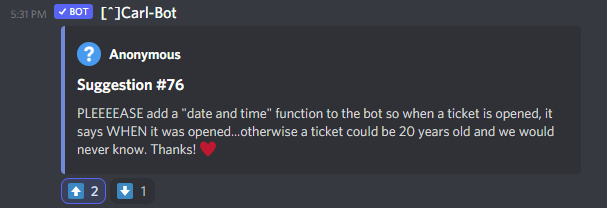
https://i.imgur.com/Ka4EpS7.png - 😄 If you agree... hit it up!
 craggy geyser
It's already a feature. But it is premium only
craggy geyser
short willow
https://i.imgur.com/Ka4EpS7.png - 😄 If you agree... hit it up!
It's a premium feature, at the bottom of ticket message
 short willow
It's such a basic thing, to me it seems like it should be standard.
So be it, thx.
Thanks @craggy geyser
iron nightBOT
Gave 1 Rep to Swiftgale (current: #9 - 32)
 shrewd mauve
How do I add more roles?
I have it all setup (I didn't do it)
But I want to add more roles and the guy who did it for me left the server like 3 months ago
craggy geyser
As in roles that can see a ticket?
jade topaz
/inv
craggy geyser
shrewd mauve
How do I add more roles?
$help support
humble sequoiaBOT
How to let support team see into a ticket
About support roles
A support role lets your support team see into tickets with out having to add them manually to each and every ticket.
You can add as many support roles as you like per panel.
NOTE that the way discord works all admins can see into tickets regardless of this.
How to set a support role
To set a Support role go to the Dashboard -> Panel Configs -> Settings -> General Options -> Support Team Roles.

NOTE that the support role will not be able to see into tickets that are already created..
iron nightBOT
Gave 1 Rep to Swiftgale (current: #9 - 33)
 safe prairie
$help support
humble sequoiaBOT
How to let support team see into a ticket
About support roles
A support role lets your support team see into tickets with out having to add them manually to each and every ticket.
You can add as many support roles as you like per panel.
NOTE that the way discord works all admins can see into tickets regardless of this.
How to set a support role
To set a Support role go to the Dashboard -> Panel Configs -> Settings -> General Options -> Support Team Roles.
NOTE that the support role will not be able to see into tickets that are already created..
 ruby coyote
how do i do ticket logging i need help
eager cargo
 proven wolf
How i can make a partner with Ticket Tool
proven wolf
How i can make a partner with Ticket Tool
Please don't ping support team.
Partnership applications are currently closed. Apologies.
eager cargo
ruby coyote
how do i do ticket logging i need help
Go ahead and go into your panel configs, select your panel and its settings, then head over to Logging Options and check which actions you want to be logged!
 fair sky
hello, I have setup the bot but when I want to open a ticket with a reaction or the $new command it does not work
nothing happens
I don t know what to do
 tawdry chasm
I dont see Support Roles, only Dashboard and Blacklist Roles @safe prairie
tawdry chasm
fair sky
I don t know what to do
Theres no new channel ?
shrewd mauve
Why would I not be able to see the server?
Not showing me

Tried refreshing
And yes I am admin.
With both accounts (this and the one that's there)
also how do I change the message it gives>
the message below

like it says support will be with you shortly
can we change that?
eager cargo
tawdry chasm
I dont see Support Roles, only Dashboard and Blacklist Roles <@45287299543898522...
Go to Panel Configs then go to your panel settings and then click the General Options drop down menu. You'll see it there.
eager cargo
shrewd mauve
Not showing me
Log out and log back in.
eager cargo
shrewd mauve
the message below
Read the embed below.
humble sequoiaBOT
**Ticket Message**
The Ticket Message is the first message sent by the bot in a new ticket. To customise it head over to your Dashboard -> Panel Configs -> Settings -> Ticket Options -> Edit Ticket Message
 iron nightBOT
Gave 1 Rep to Quo (current: #2 - 85)
eager cargo
My pleasure
 inner lance
how can i make tickets go into the ticket channel
eager cargo
$help send
humble sequoiaBOT
Sending a panel
Once you've created a panel on the dashboard you will need to send it to a channel using send on the dashboard
Select the channel you want your panel to be created in and click send.
For other questions checkout $help faq
An example of a sending a panel is shown below.
 shrewd mauve
Can we have something like command for ticket instead of react?
Does the bot feature that?
eager cargo
Yes.
They are called command-style tickets. Once you have enabled them enabled you can do the $new command and it will make a new ticket for the channel you have set to be monitored.
inner lance
My rename command is not working.
 brave flicker
Hello here, do we are variable to show how much ticket is opened ? Like {open_tickets} (old one)
 tribal cedar
inner lance
My rename command is not working.
tribal cedar
inner lance
My rename command is not working.
Run $debug and make certain the jot has correct privileges
tribal cedar
brave flicker
Hello here, do we are variable to show how much ticket is opened ? Like {open_t...
You talking about a count?
$variables
humble sequoiaBOT
Note: Remove The $ From The Variables
Supported Variables
{$server_name} -The server name
{$@Role Name} -The role name you want to mention (role names are case sensitive.)
{$empty} -Use this if you want to send nothing in a required field.
{$channel_name} -The channel name this message is used in/from
{$channel} -The channel this message is used in/from
{$user_nickname} -The users nickname (if set)
{$user_tag} -The users tag
{$user_name} -The users username
{$userfull} -The users username and usertag combined
{$user} -The users @user
{$user_icon} -The url for the users icon
{$ticket_limit} -The current ticket limit
{$panel_name} -The panels name
{$ticket_name} -The tickets name
{$ticket_category} -The category tickets are created in (if set)
{$count}The current count for tickets
{$ticket_channel} -The #channel for the ticket you created
{$ticket_user} -The @user who is assigned to the Ticket
{$ticket_user_nickname} -The nickname of the user who is assigned to the Ticket (if set)
{$ticket_user_tag} -The tag of the user who is assigned to the Ticket
{$ticket_user_name} -The username of the user who is assigned to the Ticket
Note: Remove The $ From The Variables
brave flicker
Yes, but for opened ticket, not all of them
 tribal cedar
Lemme look i don't remember it specifically
brave flicker
Maybe 1/2 years ago
tribal cedar
{Count} tried this? May be the total number
eager cargo
There's no variable to display the amount of open tickets. Apologies. You can head to the dashboard and see your servers total amount of open tickets though.
{count} doesn't work in panel embeds, but it works in ticket messages & ticket embeds though such as:

 inner lance
tribal cedar
Run $debug and make certain the jot has correct privileges
inner lance
tribal cedar
Run $debug and make certain the jot has correct privileges
Oh ok!
 humble sequoiaBOT
If the bot is not working properly, try the following steps:
-
Run the $debug command in your server, to check the permissions of the bot. Send the link you get to us.
-
Check if you have any Blacklisted Roles in your Server Configs. Any roles listed there will not be able to use the bot / create tickets.
-
While you're in your Server Configs , make sure that you don't have the premium bot enabled, without actually having premium or the bot on the server.
These are the most common issues. If your problem still exists, you can go to our Troubleshooting Page for more fixes.
dull flicker
If Ticket Tool support requested this debug give them this link:
https://discordapp.com/channels/509192800865353738/662692902245498910/843748919187603467
Yay it works
tawdry chasm
What is a Panel for?
 atomic solstice
tawdry chasm
What is a Panel for?
atomic solstice
tawdry chasm
What is a Panel for?
A panel is what you see in #🎫│make-a-ticket it is used to create tickets by members clicking on a reaction
tawdry chasm
Thank you :)
 fathom musk
Hello, since a few hours my closed tickets aren't automatically moved to my closed tickets section. Also i can't move them automatically.
humble sequoiaBOT
-- moved to ticket --
pale pilot
@jade topaz Regarding #📈│reviews What was wrong in your ticket? I don't see anything wrong there.
jade topaz
pale pilot
<@456226577798135808> Regarding <#509775046848282677> What was wrong in your ti...
Nothing. It was all good
pale pilot
Thanks!
 flat current
is there a way to make the tickets be created in a special category?
safe prairie
$help category
humble sequoiaBOT
How to set the open category
To set a open category go to the Dashboard -> Panel Configs -> Settings -> Category Options -> Category Open
 safe prairie
@flat current ⬆️
flat current
thx
safe prairie
no problem^^
 austere plaza
Yay its a chat channel
 pine copper
Hey ! Is that possible to unable the permission for users to close tickets ?
safe prairie
pine copper
Hey ! Is that possible to unable the permission for users to close tickets ?
Hey, yes, you can enable close-reactions only for the supportteam. You have to enable this:
 pine copper
thanks ^^ where can I find it ?
safe prairie
You find this setting in the panel configs in the Reaction Options.
 pine copper
thanks @safe prairie (this is how it is supposed to work isn't it ?)
iron nightBOT
Gave 1 Rep to Tizian (current: #28 - 3)
safe prairie
Yes, if you enable this feature only that member you have choosen in the general options as Support Role can close tickets.
upper flower
No one took shit 😂. We never had a Turkish support team
jade topaz
the bot does not respond to the command and when it tries to create a ticket, the reaction remains and the ticket is not created and the bot has administrator rights
humble sequoiaBOT
How to disable the premium bot
To disable the premium bot you will have to go to the Dashboard -> Server Configs -> Premium bot -> And on the right-hand side disable the "Use Premium Bot" setting.
Premium features will still work on the normal bot.

TicketTool.xyz - Ticketing without clutter
pale pilot
Try this
 raven tartan

 frigid epoch
Hello! Is there any way to reset the ticket counter?
atomic solstice
yes there is
frigid epoch
Please tell me how to do this...
atomic solstice
dashboard > manage servers > choose a server > panel configs (on the left) > pick the panel > general options > Ticket Count

if you set it to 0 then the new ticket will open with 1
frigid epoch
Ah, thank you!
atomic solstice
no problem
tribal cedar
I don't think they re-opened staff apps but #🎫│make-a-ticket would be a good start
 woeful junco
i know this may sound stupid, but how do you have it where the ticket deletes itself once it has been closed
woeful junco
ok thanks :)
woeful junco
haha thanks, i was sat there for ages trying to figure it out <3
 honest mist
I can't login to my account
I have two accounts.. but I am not logging in my main account..
How can I retrieve my account ?
rough moth
Do I need to keep both premium and the regular bot in my discord
scenic plinth
rough moth
Do I need to keep both premium and the regular bot in my discord
No, they are two different bots. For premium to function you only need the premium bot. However you might have to resend panels as it's two different bots.
rough moth
scenic plinth
No, they are two different bots. For premium to function you only need the premi...
I redeemed my premium and it didn’t update my premium time I have left
solid stream
Did you redeem a vote?
rough moth
solid stream
Did you redeem a vote?
Yes I redeemed votes
solid stream
If you did it should have sent you a key that you use.
rough moth
What do I do with the key?
solid stream
 rough moth
How’d u find my server so fast
solid stream

rough moth
Also a feature where you can redeem a certain amount of votes for premium would be cool
craggy geyser
rough moth
Also a feature where you can redeem a certain amount of votes for premium would ...
Exists
Each vote is 12 hours of premium, can redeem with 6 votes or more
craggy geyser
Oh. Why?
solid stream
while having 35 votes.
rough moth
craggy geyser
Oh. Why?
Other servers
craggy geyser
Ahh. Makes sense
 shadow axle
yes
solid stream
$vote
humble sequoiaBOT
Votes
Current Votes: 29
Lifetime Votes: 100035
Linked Votes: 1337
Vote Links
Linking Info
Linked User: Not Linked
You can give your future votes to another user by linking with that user.
To link use $vote link (@user or userId)
To unlink use $vote unlink
Redeeming
Each vote is worth 12 hours of premium and can be redeemed once you have atleast 6 votes.
Your current votes are worth 14 days, 12h, 0m
To redeem your current votes use $vote redeem
iron nightBOT
Gave 1 Rep to BattleEye (current: #12 - 26)
 surreal breach
I want to buy a battle pass bug I already generated my ticket and I don't know where to make the payment or I did it wrong
humble sequoiaBOT
You're in the wrong place
We provide support for @pseudo glen discord bot and cannot help you with whatever issue you have.
Please make sure to contact the appropriate support team.
If you don't have any further questions regarding our bot Ticket Tool, please close this ticket
_ _
shadow axle
smh
solid stream
I will do a /tts
shadow axle
oh no
solid stream
I didn't create that tag
 fossil stag
Hello,
the bot cannot move channels on my server, for the closed tickets, is this a know issue?
scenic plinth
Does the bot have permissions to manage channels in that server / category?
fossil stag
yes
scenic plinth
Run $debug
scenic plinth
Odd, is the category saved in the options?
frigid epoch
Hello again. Does the bot have a timer for channel inactivity?
fossil stag
as I said, it has worked a few hours ago
and the category is set
scenic plinth
frigid epoch
Hello again. Does the bot have a timer for channel inactivity?
No, that would be ticket automation.
humble sequoiaBOT
Automation disabled
There's currently no ETA for when automation will be enabled again. The issue that's caused it to be disabled, us hitting rate limits, is tied to the increased load on Discord's servers. The situation's currently unpredictable, which makes it so we can't give you a fixed time.
frigid epoch
scenic plinth
No, that would be ticket automation.
Understood, thank you
iron nightBOT
Gave 1 Rep to zlyzzツ | Amber Network (current: #6 - 56)
scenic plinth
fossil stag
as I said, it has worked a few hours ago
and the category is set
Is the category at 50 channels?
scenic plinth
frigid epoch
Understood, thank you
Your welcome, have a nice day! :)
fossil stag
let me check
okay... this can be the reason
there are more then 50 closed tickets >.<
scenic plinth
It would be the reason, discord has a limit of 50 channels per category, therefore until one is deleted that is closed ticket tool and you and or your moderators cannot put more channels into that category.
iron nightBOT
Gave 1 Rep to zlyzzツ | Amber Network (current: #6 - 57)
 cerulean path
One Italian for help?
scenic plinth
fossil stag
thanks <@!615207454443044904>
Your welcome, have a nice day! :)
cerulean path
cerulean path
One Italian for help?
?????
scenic plinth
cerulean path
One Italian for help?
State your issue please
scenic plinth
$invite
humble sequoiaBOT
Ticket Tool Invite & Support
scenic plinth
3rd link
cerulean path
how do you do the thing that you click the emoji and it gives you the support chat?@scenic plinth
scenic plinth
$help setup
humble sequoiaBOT
Setting up Ticket Tool
Visit the docs for setup info
General Setup
scenic plinth
Setup the bot, you can then send a panel to a certain channel. You first have to setup a panel to do so.
When your panel is created, you will have the option to select a dropdown, there you will see a list of channels, select the channel you want to send it to, and click "send" once you have selected that channel.
humble sequoiaBOT
scenic plinth
You have to do this through the dashboard, it can be found in Panel Configs --> Create Panel, should be a green button
 vague quartz
@fleet lantern how do i make the bot ping a role when a member needs help
 fleet lantern
$help support
humble sequoiaBOT
How to let support team see into a ticket
About support roles
A support role lets your support team see into tickets with out having to add them manually to each and every ticket.
You can add as many support roles as you like per panel.
NOTE that the way discord works all admins can see into tickets regardless of this.
How to set a support role
To set a Support role go to the Dashboard -> Panel Configs -> Settings -> General Options -> Support Team Roles.
NOTE that the support role will not be able to see into tickets that are already created..
fleet lantern
But please don't ping staff @vague quartz
 tough oxide
$help support
humble sequoiaBOT
How to let support team see into a ticket
About support roles
A support role lets your support team see into tickets with out having to add them manually to each and every ticket.
You can add as many support roles as you like per panel.
NOTE that the way discord works all admins can see into tickets regardless of this.
How to set a support role
To set a Support role go to the Dashboard -> Panel Configs -> Settings -> General Options -> Support Team Roles.
NOTE that the support role will not be able to see into tickets that are already created..
rough moth
solid stream
and 10 votes later
Is this a possibility btw?
vague quartz
its not pinging the role @fleet lantern
vague quartz
fleet lantern
But please don't ping staff <@843337747213451275>
oh sorry
jade topaz
How can I make it so that it pings my staff members when a ticket is open?
scenic plinth
$help ping
humble sequoiaBOT
How to make Ticket Tool ping a role
To make ticket tool ping a role when a ticket is opened, go to the Dashboard -> Panel Configs -> Settings -> Ticket Options -> Ticket Message -> Message Text and do this:
{@Role name} This is case sensitive and the role must have @mentions enabled
scenic plinth
@jade topaz @vague quartz Try that^
jade topaz
What thing is that in?
scenic plinth
That's under "Ticket Message"
jade topaz
Ok thanks
scenic plinth
jade topaz
Ok thanks
Your welcome, have a nice day!
 ornate comet
Why’s the general locked?
rough moth
ornate comet
Why’s the general locked?
They have a community server up and running instead
ornate comet
Oh alright
scenic plinth
rough moth
How do u setup ticket automation?
There are certain options in each category within the panel settings that "automation" works, such as "missing user"
 rigid hazel
Hey, im currently trying to access the dashboard for my server and its not showing. ive refreshed and closed it and opened it
scenic plinth
rigid hazel
Hey, im currently trying to access the dashboard for my server and its not showi...
Don't refresh, please relogin to the dashboard.
humble sequoiaBOT
Don't see your server in the dashboard?
You will possibly need to relog. Look below to see steps on how to relog.
How to relog the Dashboard.
First, you will need to go to the dashboard. Once your there, click on your avatar on the top right. after you clicked it, you will see button that says Logout. You must click that. Once you have logged out, you can log back in.
Note:
You need one of these 3 things to access the dashboard.
1. Server Owner (Level: 6)
2. Server Administrator (Level: 4)
3. Dashboard Role (Level: 2)
You can check your level using $level on your Discord Server
rigid hazel
Ok thanks
scenic plinth
rigid hazel
Ok thanks
No probs, have a nice day! :)
scenic plinth
You own the server correct?
rigid hazel
No. Im a Paid Developer in the server.
Usually it works without me having ownership this is the only time it has not
scenic plinth
Run $level in the server, you need a Dashboard Role or Server Administrative Powers.
rigid hazel
Ok
honest mist
I have made a ticket, what should I do now?
scenic plinth
honest mist
I have made a ticket, what should I do now?
Support will eventually get to you. It's best to describe your issue now, and provide your server ID just in case.
honest mist
scenic plinth
Support will eventually get to you. It's best to describe your issue now, and pr...
Server is 85
ID is 4626930
Please help me ..
As soon as I am logging in, it is opening the second id
scenic plinth
$devmode
humble sequoiaBOT
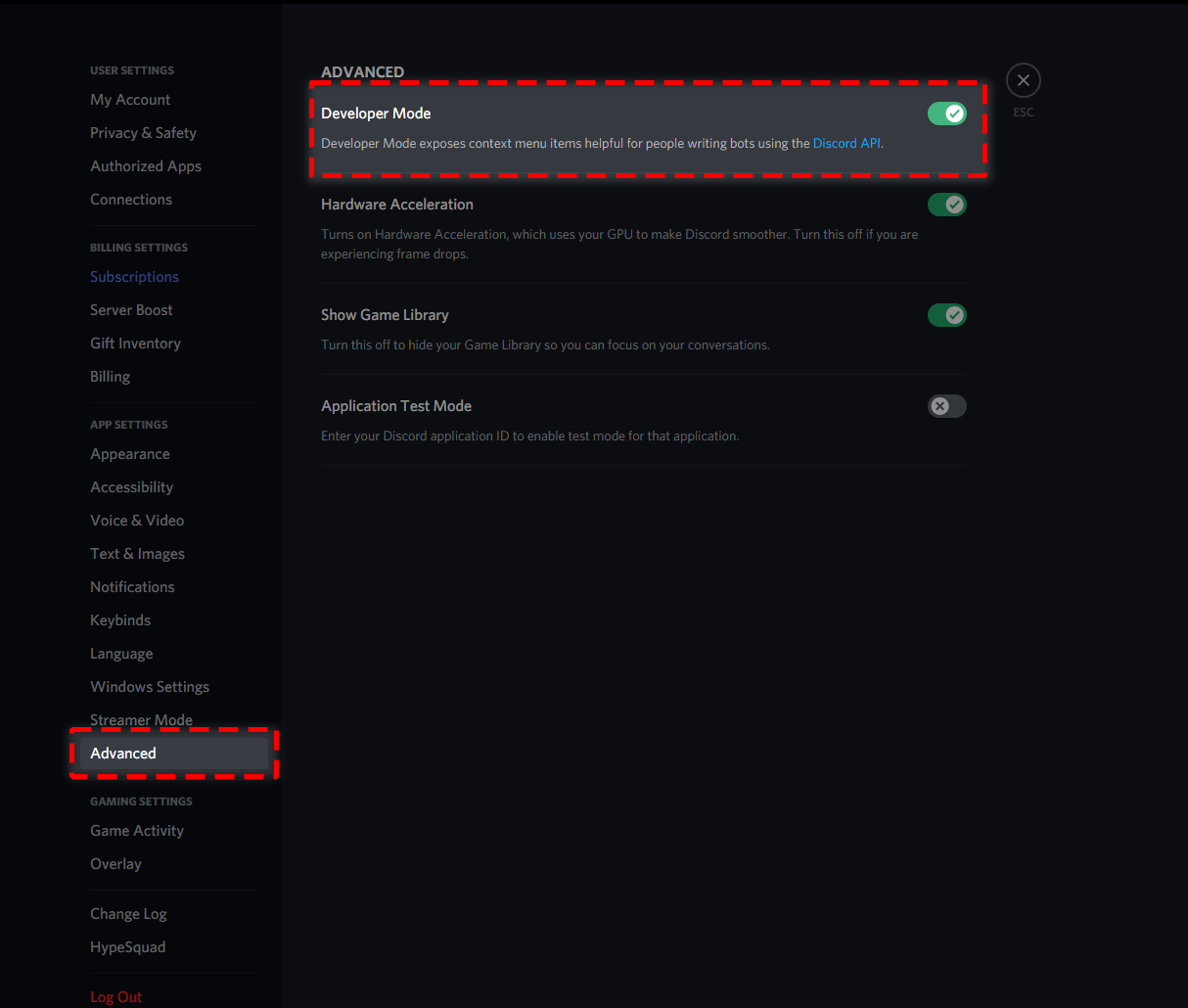
How to turn on developer mode
To enable developer mode do the following:
[PC] go to Settings -> Advanced -> Developer mode
[Mobile] go to Settings -> Appearance -> Developer mode
 scenic plinth
You have to get the ID through that
Once you enable it, right click on PC on hold down on the server icon for mobile, should be the last option.
Provide them that
honest mist
honest mist
Server is 85
ID is 4626930
Can you please tell me that, when will it open ?
And when will I retrieve it ?
pale pilot
@honest mist you need either a dashboard role or admin permissions
honest mist
pale pilot
<@814872051138822204> you need either a dashboard role or admin permissions
And how to get this roll?
pale pilot
You need to ask a server admin to give you one of these
humble sequoiaBOT
Dashboard Roles
Any role you put there will have full access to the ticket tool dashboard. The server owner and users with admin permissions already have access to the dashboard.
Be careful of which roles to put here
 honest mist
Hey..
I have full access now
What should next now
Please tell me
@pale pilot please tell me
How shall I retrieve my account
honest mist
My account is not log in
pale pilot
I cannot tell you how you can log in to your old account
scenic plinth
$help setup
humble sequoiaBOT
Setting up Ticket Tool
Visit the docs for setup info
General Setup
scenic plinth
Visit that and set it up please
 abstract wigeon
 wild sequoia
Tell me now
wild sequoia
Tell me now
For next time, please be more nice and not as demanding as you were. We are doing this voluntarily.
scenic plinth
No sorry
iron nightBOT
Gave 1 Rep to zlyzzツ | Amber Network (current: #6 - 58)
scenic plinth
No problem, you have a nice day! :)
 fluid hawk
🙂
wild sequoia
abstract wigeon
For next time, please be more nice and not as demanding as you were. We are doin...
Tag me now
Now means now
abstract wigeon
That kind of attitude is not welcome here in community support. As I already said we are doing this voluntarily.
 dark anvil
when I do $transcript it saves it in the ticket I want it to save in my transcript-logging channel is there a way to make it do that?
anyone please?
scenic plinth
dark anvil
when I do `$transcript` it saves it in the ticket I want it to save in my transc...
Have you saved a transcript channel for the panel?
scenic plinth
wild sequoia
Tag me now
Now means now
I understand that, but please understand you aren't going to get support any faster than anyone else. Please don't be so demanding. Thanks :)
Well he left...
dark anvil
scenic plinth
Have you saved a transcript channel for the panel?
I didn't understand what you mean but I have a transcript channel setup when I click the save transcript reaction it comes in that channel.
scenic plinth
No problem, when you want to save trasncripts, more than likely it's through the panel settings.
You can see this by opening the panel settings and going to "logging options", select a channel from the dropdown and hit "save" (Found at the bottom left of the dropdown, just scroll down a bit)
If it is saved, ticket tool likely does not have permissions to see the channel / send messages in it.
dark anvil
okay.
scenic plinth
$help transcript
humble sequoiaBOT
How do I save transcript to a channel?
To save transcripts to a channel go to the Dashboard -> Panel Configs -> Settings -> Logging Options -> Transcript Channel
 scenic plinth
That explains it a little better
scenic plinth
Ok, can you make sure that ticket tool has permissions to send messages in the channel you put there?
(You can test this by doing @Ticket Tool#6207 debug)
dark anvil
okay
scenic plinth
Make sure in the channel however, if it doesn't respond fix the channel permissions.

 dark anvil
see it says in the ticket not in the channel
dark anvil
dark anvil
see it says in the ticket not in the channel
this only happens when I run the $transcript command I think
when I do it by reaction it works normally
scenic plinth
Transcript I believe just sends you the transcript, like a send and respond command.
dark anvil
hmm
so I can't use the command to save it in the logging channel?
I have to do it by reaction?
scenic plinth
You would have to do it by the reaction, I just tested it myself and it defines it in the ticket, not the channel.
scenic plinth
humble sequoia
I don't know what the developers have for the future, but you can visit this to suggest it for the bot!
iron nightBOT
Gave 1 Rep to zlyzzツ | Amber Network (current: #6 - 59)
scenic plinth
No probs, have a nice day! :)
 bleak cove
How would I change the response when you make a ticket?
 humble sequoiaBOT
**Ticket Message**
The Ticket Message is the first message sent by the bot in a new ticket. To customise it head over to your Dashboard -> Panel Configs -> Settings -> Ticket Options -> Edit Ticket Message
scenic plinth
@bleak cove^
iron nightBOT
Gave 1 Rep to zlyzzツ | Amber Network (current: #6 - 60)
scenic plinth
Your welcome, have a nice day! :)
bleak cove
You too
 chrome bolt
Wont let me change the "bot permissions info" on the dashboard, i want to make the bot an admin but its not doing anything when i click
scenic plinth
Try to do it through the role permissions in discord.
chrome bolt
scenic plinth
Try to do it through the role permissions in discord.
Didn’t work
 stuck briar
Hello. I have a user in one of my servers who is unable to see the ticket panels. No one else in the server has reported this issue. Their server permissions are the same as everyone else. Anyone have any ideas what could be going on in regards to this? We have been using ticket tool for a long time now and have never run into this. I tried troubleshooting it myself but am stumped.
austere plaza
TT is the best asf
 distant basin
 royal thunder
تت
 umbral aspen
How do I add a role that can always see the ticket without making that role an admin?
 mystic hound
$help support
humble sequoiaBOT
How to let support team see into a ticket
About support roles
A support role lets your support team see into tickets with out having to add them manually to each and every ticket.
You can add as many support roles as you like per panel.
NOTE that the way discord works all admins can see into tickets regardless of this.
How to set a support role
To set a Support role go to the Dashboard -> Panel Configs -> Settings -> General Options -> Support Team Roles.
NOTE that the support role will not be able to see into tickets that are already created..
mystic hound
stuck briar
Hello. I have a user in one of my servers who is unable to see the ticket panels...
Do they see the reaction and not see the panel?
umbral aspen
I tried adding a role to see the category but the new channels don't keep the permissions of the category
scenic plinth
umbral aspen
I tried adding a role to see the category but the new channels don't keep the pe...
Follow what light has sent please. You can also edit the "user opened permissions" / "support opened permissions" to have this setting.
Ticket Tool overrides Category settings.
jade topaz
can someone please tell me what permissions are required to manage the bot?
humble sequoiaBOT
Don't see your server in the dashboard?
You will possibly need to relog. Look below to see steps on how to relog.
How to relog the Dashboard.
First, you will need to go to the dashboard. Once your there, click on your avatar on the top right. after you clicked it, you will see button that says Logout. You must click that. Once you have logged out, you can log back in.
Note:
You need one of these 3 things to access the dashboard.
1. Server Owner (Level: 6)
2. Server Administrator (Level: 4)
3. Dashboard Role (Level: 2)
You can check your level using $level on your Discord Server
 lilac girder
I guess server admin?
craggy geyser
As it says at the bottom there, owner, admin or a special role that has been added to the server configs on the dashboard
 faint lion
Is the discord issue still there?
craggy geyser
The reaction one? I think so
faint lion
craggy geyser
The reaction one? I think so
Thats annoying, I've been waiting since a week but Discord hasn't fixed it, thanks for the info.
iron nightBOT
Gave 1 Rep to Swiftgale (current: #9 - 35)
jade topaz
Hello Hi there! I have the following error when a user of my discord creates a ticket automatically it is created and everyone else sees, I think it is a BOT error since if I later modify the permissions of the ticket and put it in private it will
 craggy geyser
$kv
humble sequoiaBOT
**How to turn off Keep Visible**
**About Keep Visible**
"Keep Visible" will disable any permission changes to the @everyone role, allowing everyone to see into tickets.
**How to disable/enable it**
Head over to your Dashboard -> Panel Configs -> Settings --> General Options -> Keep Visible

NOTE that @everyone can type aswell if it has permissions to send messages
craggy geyser
jade topaz
Hello Hi there! I have the following error when a user of my discord creates a t...
Try this ^
craggy geyser
No problem
jade topaz
Im retard sorry xdd,I was worried about this all day, And looking for info and everything. And it was that shit xd
 short oar
Is it possible to increase the amount of messages that's saved in the transcript? Currently it's around 200 I think. If yes, how?
mystic hound
short oar
Is it possible to increase the amount of messages that's saved in the transcript...
Buying premium increases the limit
jade topaz
Exact buy premium is the best
short oar
Oh alright thanks XD
short oar
mystic hound
Buying premium increases the limit
Thanks @mystic hound
iron nightBOT
Gave 1 Rep to Light (current: #3 - 71)


 fast flint
What should I do?
 humble sequoiaBOT
mystic hound
humble sequoiaBOT
mystic hound
This link ^
 karmic hamlet
Hey
I need help with the ticket tool
How can I add someone to a ticket, I think I have to allow it but I don't know in which part of the ticket tools it is
 dusk moat
Hello, how do I make you have to react to 📌 to be able to claim a person to answer the tickets?
 autumn solstice
karmic hamlet
How can I add someone to a ticket, I think I have to allow it but I don't know i...
autumn solstice
karmic hamlet
How can I add someone to a ticket, I think I have to allow it but I don't know i...
$help support
humble sequoiaBOT
How to let support team see into a ticket
About support roles
A support role lets your support team see into tickets with out having to add them manually to each and every ticket.
You can add as many support roles as you like per panel.
NOTE that the way discord works all admins can see into tickets regardless of this.
How to set a support role
To set a Support role go to the Dashboard -> Panel Configs -> Settings -> General Options -> Support Team Roles.
NOTE that the support role will not be able to see into tickets that are already created..
 thin copper
What programming language is @pseudo glen made from?
upper flower
discord.js
jade topaz
Hey, does $delete actually $close the ticket too?
 sand smelt
Prefix for premium
upper flower
$
sand smelt
upper flower
$
I redeemed 3 days premium on my server, the premium bot is there but its not responding to anything
upper flower
give perms
upper flower
enable it in server configs
sand smelt
oh ok
 plucky tundra
To create a ticket, is reacting the only option? Like I was wondering if there is a option of creating tickets using like !ticket or by any command
tribal cedar
plucky tundra
To create a ticket, is reacting the only option? Like I was wondering if there i...
You can use the $new command
tribal cedar
In the panel settings check out command style tickets

 tribal cedar
Anytime
tribal cedar
Of?
plucky tundra
of where i can check about creating ticket option
tribal cedar
Click settings in panel configs
jade topaz
how do i create a panel 😕😕🥺🥺🥺🥺🥺😝😝☺️☺️😈😈😈😈😈🥶🥶
plucky tundra
tribal cedar
Click settings in panel configs
after that?
tribal cedar
Click command style tickets
tribal cedar
Np
 nocturne flax
Hi!
I am trying to transfer my premium membership
I went to server configs and toggled move/restore premium on
but i don't know how to get the key
to redeem on my new server
anyone know?
 cold shale
hello
atomic solstice
$help ping
humble sequoiaBOT
How to make Ticket Tool ping a role
To make ticket tool ping a role when a ticket is opened, go to the Dashboard -> Panel Configs -> Settings -> Ticket Options -> Ticket Message -> Message Text and do this:
{@Role name} This is case sensitive and the role must have @mentions enabled
atomic solstice
also please don't ping staff team
jade topaz
 ebon pagoda
<@456226577798135808>
ebon pagoda
<@456226577798135808>
???
ebon pagoda
jade topaz
???
sorry
cold shale
hii
 tranquil mauve
Ticket Tool is not responding in our server.
jade topaz
Hello. The bot doesn't respond on my server anymore.
tranquil mauve
jade topaz
Hello. The bot doesn't respond on my server anymore.
Do you have premium too?
jade topaz
I don't 
humble sequoiaBOT
Pong! Latency is 539ms. API Latency is 82ms [-]
atomic solstice
tranquil mauve
Idk then it just isn;t doing anything at all but says it's online.
can you please type @ticket tool debug in your server?
tranquil mauve
Ofc
atomic solstice
or rather can you send the server ID here?
atomic solstice
tranquil mauve
debug didn;t do anything
here is your problem

basically you blacklisted every user and yourself from using the bot
tranquil mauve
Ah, must have been the server manager doing it, I'll see if I can get them to start it back up again
atomic solstice
jade topaz
Hello. The bot doesn't respond on my server anymore.
can you please send the server ID here?
jade topaz
Mh I haven't changed anything. I'll ask my mods if they messed up the permissions 
atomic solstice
well I can easlily check if someting is messed up
I just need to know what didn't work
tranquil mauve
Appreciate the help! We have it all working again
jade topaz
Okk it's because I changed the "bot" role I give to my bots. I removed the "admin" perms so ticket tool couldn't work properly
Sorry for bothering you
atomic solstice
tranquil mauve
Appreciate the help! We have it all working again
no problem
atomic solstice
jade topaz
Sorry for bothering you <:SCpolitecry:767627883400790026>
no problem
 strange folio
Hello what is the prefix of the bot please ????
craggy geyser
$
jade topaz
is their a way to change the Ticket’s prefix?
 radiant moss
Why are you pinging me?
 vestal dome
The bot don't make tickets
radiant moss
Can you run $debug and make sure it has all needed permissions
vestal dome
Ok
jade topaz
jade topaz
is their a way to change the Ticket’s prefix?
someone?
vestal dome
@jade topaz
radiant moss
Stop pinging support team
vestal dome
vestal dome
<@456226577798135808>
انا عاوز اتكلم عربي
vestal dome
radiant moss
Stop pinging support team
Iam want member speak arapic
Who speak arapic
jade topaz
vestal dome
Who speak arapic
Arabic*?
vestal dome
jade topaz
Arabic*?
Yes
jade topaz
how old are you may i ask?
vestal dome
What
jade topaz
how old Are you?
radiant moss
radiant moss
vestal dome
Iam want member speak arapic
Use Arabic support ticket
vestal dome
Ok
mystic hound
$help prefix
humble sequoiaBOT
How to change Ticket tool's prefix
The default prefix for ticket tool is $ and @Ticket Tool#4843 however that can be changed on the Dashboard under Server Configs -> Command Prefix.

NOTE that @Ticket Tool#4843 will always work as a prefix even if there is a custom prefix.
mystic hound
@jade topaz ^
jade topaz
thank you!
vestal dome
@radiant moss
radiant moss
Please stop pinging me. I have already told you
jade topaz
vestal dome
<@513792641016659971>
i think you’ve should start listening to what they’re saying, and their is no need to Ping randomly…
radiant moss
You have already opened a ticket please be patient
vestal dome
radiant moss
You have already opened a ticket please be patient
Iam click the Reaction he didn't create a ticket please help

How
radiant moss
Run $debug in your server and see if it’s missing any permissions
jade topaz
@vestal dome maby check if the bot have administrator permirssions?
vestal dome
 jade topaz
<@804408500440662056> maby check if the bot have administrator permirssions?
jade topaz
jade topaz
<@804408500440662056> maby check if the bot have administrator permirssions?
@vestal dome
vestal dome
 radiant moss
What’s the server called?
vestal dome
Diamond Host is the name of server
radiant moss
Alright hold on
vestal dome
radiant moss
What’s the server called?
Diamond Ticket is the panel name
 humble sequoiaBOT
How to disable the premium bot
To disable the premium bot you will have to go to the Dashboard -> Server Configs -> Premium bot -> And on the right-hand side disable the "Use Premium Bot" setting.
Premium features will still work on the normal bot.
TicketTool.xyz - Ticketing without clutter
radiant moss
Follow these steps
iron nightBOT
Gave 1 Rep to Tinyy (current: #11 - 29)
 opaque ridge
Hi is there anyone that could answer me a question please 🙂
jade topaz
opaque ridge
Hi is there anyone that could answer me a question please 🙂
the other Are busy i think, but i can help you!!
opaque ridge
@jade topaz that would be great, so we are having a issue, where tickets cannot be reoped by admins if they where closed by accident or too early.
jade topaz
oh? Are you sure? i think the Admin role needs administrator permirssions, and the command is $reopen (ticket ID) i think, let me know if thats wrong or right.
jade topaz
@opaque ridge can you invite me to the server? So i can see the issue?
jade topaz
opaque ridge
Like this ?
$reopen (ticket096) ?
no, the ticket ID
opaque ridge
Not ticket number?
jade topaz
nope i dont think so.
@opaque ridge btw i’m really sorry, but i need to go now, so i hope you’re issue will be solved out by some other experienced support people!
opaque ridge
Tried what you said didn't work, can it be typed in any channel ?
tribal cedar
Reopen is used with 2 step ticket
Where when you take first close step before delete step it can be reopened
ticketed closed and deleted cut be reopened
tribal cedar
Its closed and deleted?
opaque ridge
Yeah
opaque ridge
Damn ok well wasted hours lmao 🤣
Be nice if it could be brought back from deleted 😪
Is there away to stop the person deleting it without admin permission? So like if they close it it will still be visible to admins till we delete?
tribal cedar
That may be done by altering the support role and additional role perms
But I've never tried it to be sure
opaque ridge
@tribal cedar ok will have a play around thanks 😊
iron nightBOT
Gave 1 Rep to Enigma (current: #17 - 11)
tribal cedar
Anytime but I do believe its feasibly possible
thin copper
upper flower
discord.js
Thanks
 worldly fiber
i can't get a ticket to open at all, even with new panels. i have no idea what ive done or how to fix it halp
humble sequoiaBOT
If the bot is not working properly, try the following steps:
-
Run the $debug command in your server, to check the permissions of the bot. Send the link you get to us.
-
Check if you have any Blacklisted Roles in your Server Configs. Any roles listed there will not be able to use the bot / create tickets.
-
While you're in your Server Configs , make sure that you don't have the premium bot enabled, without actually having premium or the bot on the server.
These are the most common issues. If your problem still exists, you can go to our Troubleshooting Page for more fixes.
worldly fiber
tried that command as well. Nothing
abstract wigeon
worldly fiber
i can't get a ticket to open at all, even with new panels. i have no idea what i...
Go through the list above and check if any of the issues match your problem.
Oh, try running $debug in your server
worldly fiber
did the de bug command, no reaction. Only thing on that list might be to do with the premium bot as we just switched, but i went through the steps to add, just not exactly sure how to check if its the regular bot or premium bot
humble sequoiaBOT
Inviting and Enabling Premium Bot
The first thing you will need to do is invite the premium bot, an invite can be found here
Once the bot is in your server we will head to the dashboard and manage your server. When you are managing your server, you want to head into "Server Configs" then click the drop down menu under "Select the bot you would like to use on this server" then click "Ticket Tool#6207" and then save.
abstract wigeon
Follow the instructions shown above and then run $debug, if the answer message is from Ticket Tool Premium it’s set to that bot.
stuck briar
mystic hound
Do they see the reaction and not see the panel?
they do not see the react buttons either. It is quite odd. This is the screenshot they sent me of what they see. We currently have multiple panels in that channel and tried re-pushing them to see if that would fix it but it did not. But it just appears to be the one user, no one else has had any issues see the panels.

Since he is the only one suffering from this problem currently, I figured it extremely likely to be something on his end, but I have no idea what it could be.
mystic hound
Might be that the user has link preview disabled in user settings
stuck briar
ah, okay. We will check on that and see if that could be the problem. Will let you know if I can confirm that
 undone meteor
Where can I change the amount of Tickets a user can create?
stuck briar
undone meteor
Where can I change the amount of Tickets a user can create?
Under Panel Configs, enter the settings for the panel you would like to adjust. Expand General Options and you can adjust the ticket limit per person there.
 undone meteor
stuck briar
Under Panel Configs, enter the settings for the panel you would like to adjust. ...
undone meteor
stuck briar
Under Panel Configs, enter the settings for the panel you would like to adjust. ...
Thanks 🙂
iron nightBOT
Gave 1 Rep to 👑QueenKB🐝 (current: #42 - 1)
jade topaz
Is there a way to add a ticket creation trigger reaction to an already existing channel? Like without using a tickettool panel?
eager cargo
jade topaz
Is there a way to add a ticket creation trigger reaction to an already existing ...
Yes
jade topaz
How?
tribal cedar
$new?
eager cargo
You can use command - style - tickets
tribal cedar
Ah
jade topaz
eager cargo
You can use command - style - tickets
Where?
eager cargo
Once you enabled them, you can do the $new command and it will create a ticket in the category you have monitored
tribal cedar
Panel configs -> settings -> command style tickets
eager cargo
^
eager cargo
eager cargo
Once you enabled them, you can do the `$new` command and it will create a ticket...
You can also do $new (USER ID) or (USER @)
jade topaz
is there a way to do that?
jade topaz
jade topaz
React to this message to open a ticket
^
tribal cedar

jade topaz
Ok, thanks anyways
 safe osprey
Does someone know how to use multipanel?
As far as im concerned its should work using $panel (number of the panels)
But its not working 
 tribal cedar
Do you have premium?
 amber token
I purchased Premium, it says my account was activated on my email. The Dashboard for Ticket Tool is still showing my premium status as free, so I can't increase the 250 character limit on my tickets. Is there a timer it usually takes to convert from free to premium?
scenic plinth
Did you get a key when you got premium?
 sacred tartan
Русская техподдержка есть?
robust sandalBOT
sacred tartan
Русская техподдержка есть?
 Dok
Dok
Is there Any Russian Technical Support?
Russian (ru) → English (en)
scenic plinth
/ru If it is an issue with ticket tool, please state the issue, otherwise we cannot help you.
robust sandalBOT
Если это проблема с билетом инструмент, пожалуйста, утете вопрос, в противном случае мы не можем помочь вам.
English (en) → Russian (ru)
jade topaz
Hi, I'm sorry if I'm a little slow. But I made a category and privated it, aside from the main channel I use for users to see the "make tickets." But when they open a ticket everyone can see it. How do I fix this?
shadow axle
$kv
humble sequoiaBOT
**How to turn off Keep Visible**
**About Keep Visible**
"Keep Visible" will disable any permission changes to the @everyone role, allowing everyone to see into tickets.
**How to disable/enable it**
Head over to your Dashboard -> Panel Configs -> Settings --> General Options -> Keep Visible
NOTE that @everyone can type aswell if it has permissions to send messages
eager cargo
Yes, red.
eager cargo
Whats your server ID?
jade topaz
650029366272851989
eager cargo
One moment please.
jade topaz
Okay
 eager cargo
My pleasure!
jade topaz
Hey, does $delete mean the ticket would close too right?
eager cargo
Once you run the $delete command the channel will be deleted
jade topaz
Yep cool
 prime dawn
Halo
austere plaza
Is talking about discord bots like ticket tool allowed or not
austere plaza
Ohh ok
 violet yarrow
Morning I use unbeliaveaboat bot which I don't want to have admin access. The bot has full access to all channels ticket tool uses. But when I create a ticket unbeliaveaboat can't see inside the ticket even though it has full access including where the ticket is placed. Is there a way to resolve this?
safe prairie
$tts
humble sequoiaBOT
You're in the wrong place
We provide support for @pseudo glen discord bot and cannot help you with whatever issue you have.
Please make sure to contact the appropriate support team.
If you don't have any further questions regarding our bot Ticket Tool, please close this ticket
_ _
humble sequoiaBOT
-- moved to ticket --
 sick flower
How do make it like
Ticket tool only makes channels in a particular category and not at the top of the server
shadow axle
$help category
humble sequoiaBOT
How to set the open category
To set a open category go to the Dashboard -> Panel Configs -> Settings -> Category Options -> Category Open
 timber peak
I want to make role support ticket and give it to people the ticket, but I don't want to give this role Administrator
shadow axle
timber peak
I want to make role support ticket and give it to people the ticket, but I don't...
$help support
humble sequoiaBOT
How to let support team see into a ticket
About support roles
A support role lets your support team see into tickets with out having to add them manually to each and every ticket.
You can add as many support roles as you like per panel.
NOTE that the way discord works all admins can see into tickets regardless of this.
How to set a support role
To set a Support role go to the Dashboard -> Panel Configs -> Settings -> General Options -> Support Team Roles.
NOTE that the support role will not be able to see into tickets that are already created..
humble sequoiaBOT
Help Options
$help commands - Information on commands
$help setup - Information on bot setup
$help faq - Frequently asked questions
jade topaz
$help faq
humble sequoiaBOT
====== FAQ ======
If a question interests you run the command to see the answer.
Q: What is the prefix and how do I change it?
A: $help prefix
Q: How do I let my support team see into a ticket?
A: $help support
Q: How do I make a ticket ping my support when it's created?
A: $help ping
Q: How do I set a transcript channel?
A: $help transcript
Q: How do I limit the number of tickets a user can create?
A: $help limit
Q: How do I set what category tickets are created in?
A: $help category
Q: How do I set what category tickets are moved to when closed?
A: $help closed
Q: How do I set a custom reaction?
A: $help reaction
Q: How do I set the permissions for the tickets?
A: $help perms
Q: How do I create a panel?
A: $help panel
Q: How do I get the panel in my discord?
A: $help send
Q: How do I add or remove users from a ticket?
A: $help add
Q: A panel of mine won't update with the new settings, How do I fix it?
A: $help update
Q: Ticket Tool isn't responding to my commands, How do I fix it?
A: $help offline
Q: How does the claim command work?
A: $help claim
 analog prism
في هنا سبورت عربي ؟
tribal cedar
@jade topaz your role must be added on the dashboard to be able to use/see the server
I don't know the help message with pictures sorry
robust sandalBOT
analog prism
في هنا سبورت عربي ؟
 Mo7A
Mo7A
Is there an Arabic sport here?
Arabic (ar) → English (en)
analog prism
ok
analog prism
okk
tribal cedar
:)
humble sequoiaBOT
Don't see your server in the dashboard?
You will possibly need to relog. Look below to see steps on how to relog.
How to relog the Dashboard.
First, you will need to go to the dashboard. Once your there, click on your avatar on the top right. after you clicked it, you will see button that says Logout. You must click that. Once you have logged out, you can log back in.
Note:
You need one of these 3 things to access the dashboard.
1. Server Owner (Level: 6)
2. Server Administrator (Level: 4)
3. Dashboard Role (Level: 2)
You can check your level using $level on your Discord Server
shadow axle
like what enigma said^
 jade dove
I wrote a bot that types $close - it has the right permissions, but cannot close a ticket
craggy geyser
jade topaz
i dont see my server and ive relogged alot
Also, to add to that, make sure you are relogging and not refreshing. They are different
craggy geyser
jade dove
I wrote a bot that types $close - it has the right permissions, but cannot close...
Ticket tool ignores other bots (as do all major bots)
jade topaz
craggy geyser
Also, to add to that, make sure you are relogging and not refreshing. They are d...
i loged out than logged back in
 humble sequoiaBOT
Setting up Ticket Tool
Visit the docs for setup info
General Setup
jade dove
craggy geyser
Ticket tool ignores other bots (as do all major bots)
any way to override this?

 craggy geyser
jade dove
any way to override this?
craggy geyser
jade dove
any way to override this?
No
jade dove
so its literally impossible for my bot to close a ticket? 😦
craggy geyser
Yes. If major bots could respond to other bots it can lead to infinite loops and issues so it is a security feature. You need a person to type the command instead
jade dove
I guess I could change my "close" command to be $close and both bots will respond, right?
craggy geyser
That should work yeah
 craggy geyser
$help ping
humble sequoiaBOT
How to make Ticket Tool ping a role
To make ticket tool ping a role when a ticket is opened, go to the Dashboard -> Panel Configs -> Settings -> Ticket Options -> Ticket Message -> Message Text and do this:
{@Role name} This is case sensitive and the role must have @mentions enabled
craggy geyser
 storm grail
hi how can i mention a role here
storm grail
hi how can i mention a role here
Follow ^
 frozen ridge
Is there a way to 'Forward' tickets (Move them to a different category with a command)
craggy geyser
Not really. You can do that by claiming tickets (premium feature) but that will move it to a dedicated category. You can't pick and choose which one. You could suggest the feature if you want
humble sequoiaBOT
Suggestions for Ticket Tool
Suggestions for the bot have been moved to our Ticket Tool Community Server.
See Suggestions in #824021828704010315
Make a Suggestion
Use ^suggest <suggestion> in #825359982534721546
iron nightBOT
Gave 1 Rep to Swiftgale (current: #8 - 36)
mystic hound
frozen ridge
I have premium, I just don't have the role.
You can get the role by sending us your debug link in a ticket
 timid kernel
hey, I can’t get to my dashboard. I click manage servers and it brings me to the invite page.
I want to make a reaction ticket but I can’t
never find
never mind
 ocean monolith
does anyone know how to claim a ticket
humble sequoiaBOT
Claiming Options
Claiming allows you to change the ticket name, category and permissions. To use it you have to enable it first on your Dashboard > Panel Configs > Claiming Options.

 Note: This is a premium feature
atomic solstice
Note: This is a premium feature
atomic solstice
to claim a ticket you siplt click on the 📌 reaction
or type $claim in the ticket
ocean monolith
atomic solstice
or type `$claim` in the ticket
that doesnt work
oh is it a premium feature @atomic solstice ???/
upper flower
Yes.
humble sequoiaBOT
 Faster Premium Bot
Automatic Transcripts
Full Customization
Custom Reactions
Direct Messages
Ticket Automation
Multipanels
Premium Support
You can purchase premium here:
Price
$6 - Monthly
$66 - Yearly
 Premium
ocean monolith
Premium
ocean monolith
thanks
upper flower

 gusty field
I was also sitting quietly on warzone and I wake up that I logged out on the discord account and when I try to log in it tells me that my discontent count has been deactivated and I didn't do anything it tells me on gmail
humble sequoiaBOT
You're in the wrong place
We provide support for @pseudo glen discord bot and cannot help you with whatever issue you have.
Please make sure to contact the appropriate support team.
If you don't have any further questions regarding our bot Ticket Tool, please close this ticket
_ _
 north vector
Hello, where can I give a suggestion for the bot?
humble sequoiaBOT
Suggestions for Ticket Tool
Suggestions for the bot have been moved to our Ticket Tool Community Server.
See Suggestions in #824021828704010315
Make a Suggestion
Use ^suggest <suggestion> in #825359982534721546
safe prairie
@north vector 
iron nightBOT
Gave 1 Rep to Tizian (current: #28 - 4)
north vector
Yay.
safe prairie
No Problem :)
 lofty ginkgo
$add @member isn't working for me
I'm doing the command within a ticket channel as instructed
scenic plinth
Is the command enabled?
tribal cedar
Also try $add userID
 wicked barn
How can I change the prefix of the bot?
safe prairie
$help prefi
humble sequoiaBOT
Help Options
$help commands - Information on commands
$help setup - Information on bot setup
$help faq - Frequently asked questions
safe prairie
$help prefix
humble sequoiaBOT
How to change Ticket tool's prefix
The default prefix for ticket tool is $ and @Ticket Tool#4843 however that can be changed on the Dashboard under Server Configs -> Command Prefix.
NOTE that @Ticket Tool#4843 will always work as a prefix even if there is a custom prefix.
safe prairie
@wicked barn
wicked barn
safe prairie
<@!831313358401306684> <:up:758644922126565397>
Thanks man
iron nightBOT
Gave 1 Rep to Tizian (current: #27 - 5)
safe prairie
no problem, thanks for the rep 😄
safe prairie
Ask your Question @lyric agate
jade topaz

 lyric agate
When I enter a server bot, I fry, and everything comes in, but my server has what appears, so my list of servers includes a bot.
@safe prairie
jade topaz
jade topaz
Hello i have a bot which removes 2 tickets I can no longer close, how to close them?
safe prairie
lyric agate
When I enter a server bot, I fry, and everything comes in, but my server has wha...
Please wait a moment, another support team member will help you soon


 plush lantern
if I have premium tickettool for one server can I add it to another?
or do I gotta purchase it again
jade topaz
i dont have
 indigo wharf
I cant add a user to a ticket. Can someone help me?
tribal cedar
Use $add userID
tribal cedar
plush lantern
or do I gotta purchase it again
Purchase again but I think they do multiple server packages. Could be wrong tho
pale pilot
@lyric agate can you try and rephrase that question?
lyric agate
When I enter a server bot, I fry, and everything comes in, but my server has what appears, so my list of servers includes a bot.
@pale pilot
humble sequoiaBOT
Don't see your server in the dashboard?
You will possibly need to relog. Look below to see steps on how to relog.
How to relog the Dashboard.
First, you will need to go to the dashboard. Once your there, click on your avatar on the top right. after you clicked it, you will see button that says Logout. You must click that. Once you have logged out, you can log back in.
Note:
You need one of these 3 things to access the dashboard.
1. Server Owner (Level: 6)
2. Server Administrator (Level: 4)
3. Dashboard Role (Level: 2)
You can check your level using $level on your Discord Server
iron nightBOT
Gave 1 Rep to Simple (current: #4 - 64)
lyric agate
thanks @safe prairie
iron nightBOT
Error: You're still on cooldown
pale pilot
thx @safe prairie
iron nightBOT
Gave 1 Rep to Tizian (current: #24 - 6)
lyric agate
❤️
safe prairie
Thank you and no problem
jade topaz
How can I add multiple tickets to one panel?
 tropic star
can someone remind me the command to send a multi ticket embed to a channel
tropic star
jade topaz
How can I add multiple tickets to one panel?
oh were asking the same thing haha, i've got it on my server but its been ages forgot the command line/process
oh, its:
[your server prefix]panel 1 2 3 (1 2 3 being examples of which ticket you want to include
tribal cedar
jade topaz
How can I add multiple tickets to one panel?
Premium and using the $panel cmd
humble sequoiaBOT
Multipanels are a premium feature that allow for a single panel with multiple reactions to open different tickets.
How to create a Multipanel
Premium users can combine multiple panels into one multipanel.
First of all you will need to assign a different Create Ticket Reaction for each Panel. Run $help reaction to learn how to do it.
Next, find the IDs of each panel you wish to combine. You can find them in your Panel Configs in the Dashboard
Next, send the multipanel to a channel using $panel [id1] [id2] {id3} ....
e.g. $panel 1 2 4 17 35 to combine panels 1, 2, 4, 17 and 35.
Up to 20 panels may be combined.
tribal cedar
tropic star
can someone remind me the command to send a multi ticket embed to a channel
tropic star
the bottom half of that example, is that a feature we can use too or is it an image that's been uploaded and URL added to bottom of ticket?
this bit
 tribal cedar
Its been added and is an img
jade topaz
I have a question regarding ticket tool. Is the bot open source?
tribal cedar
I.. dont know. Sorry
 abstract frigate
Is there a way to make my own message the place where they can open a ticket?
eager cargo
abstract frigate
Is there a way to make my own message the place where they can open a ticket?
Are you referring to changing the panel message?
abstract frigate
Uh I think
Like React to this message to open a ticket
and then if they react to my message they can open a ticket
eager cargo
You can't add ticket reactions to existing messages. You can edit the message that is sent by the bot though.
humble sequoiaBOT
**Panel Message**
The panel message is where people react to make a ticket. To customize it head over to your Dashboard --> Panel Configs -> Settings -> Panel Options -> Edit Panel Message
 iron nightBOT
Gave 1 Rep to Quo (current: #2 - 88)
eager cargo
My pleasure
 plush rapids
hi could i get some help
eager cargo
plush rapids
hi could i get some help
Watcha need?
sand smelt
How long are premium redeem codes valid, once it has been redeemed ($vote redeem)
eager cargo
They don't have an expiration date
austere plaza
I got a free premium ticket tool version in here
Is this like fake the
Invite premium bot
 eager cargo
Nope, thats real. If you select the premium bot when you don't actually have premium, the bot will simply not work until you change it back to the free version or buy premium.
austere plaza
Ohhh u need to buy it first i thought just cuz i got it means it works ll
 shrewd totem
INSERTING LINKS into tickets. I want members to be able to past a link into a ticket. rn it wont let them. any ideas how i can do that? ping me when you reply.
members dont have the perm in other channels. the bot has perms and i even gave the category perms to post a link but in the newly generated ticket channels, members can not post a link
in the panel configs, i do have user opened perms set for embed and attach as well.
humble sequoiaBOT
-- moved to ticket --
 steel quest
How to change prefix
safe prairie
$help prefix
humble sequoiaBOT
How to change Ticket tool's prefix
The default prefix for ticket tool is $ and @Ticket Tool#4843 however that can be changed on the Dashboard under Server Configs -> Command Prefix.
NOTE that @Ticket Tool#4843 will always work as a prefix even if there is a custom prefix.
safe prairie
@steel quest
steel quest
Ok
jade topaz
safe prairie
<@797087986130223104>
can you check my ticket
iron nightBOT
Gave 1 Rep to Tizian (current: #21 - 7)
 worthy walrus
how do i assign a channel for the logs of ticket tool ?
humble sequoiaBOT
Setting up Ticket Tool
Visit the docs for setup info
General Setup
worthy walrus
thanks @steel quest
iron nightBOT
Gave 1 Rep to aaaief 🇹🇷 (current: #42 - 1)
humble sequoiaBOT
How do I save transcript to a channel?
To save transcripts to a channel go to the Dashboard -> Panel Configs -> Settings -> Logging Options -> Transcript Channel
steel quest
Np
abstract wigeon
worthy walrus
how do i assign a channel for the logs of ticket tool ?
Follow the instructions show above ^^
 spiral blade
Why when I log in to setup, it shows you are no authorized?