 English (en) → Russian (ru)
#🆘│community-support
1 messages · Page 312 of 1
 robust sandalBOT
English (en) → Russian (ru)
robust sandalBOT
English (en) → Russian (ru)
 abstract wigeon

We make have a set of discord bots that we think you would love!
 jade topaz
/en Спасибо😋
robust sandalBOT
Thank you😋
Russian (ru) → English (en)
abstract wigeon
/ru My pleasure, hope it works out for you. Have a nice day!
robust sandalBOT
Мое удовольствие, надеюсь, что это работает для вас. Хорошего дня!
English (en) → Russian (ru)
jade topaz
/en И вам также
robust sandalBOT
And you also
Russian (ru) → English (en)
abstract wigeon
Swedish Community Support is a thing now. 🇸🇪
 fallow ingot
abstract wigeon
Swedish Community Support is a thing now. 🇸🇪
fallow ingot
abstract wigeon
Swedish Community Support is a thing now. 🇸🇪
Nice not meet a lot of swedish ppl.
abstract wigeon
How can we assist you?
 timid fiber
AR
abstract wigeon
/ar How can we assist you?
robust sandalBOT
كيف يمكننا مساعدتك؟
English (en) → Arabic (ar)
abstract wigeon
/ar That’s okay. We have a bot that can translate from Arabic to English.
robust sandalBOT
هذا تمام. لدينا بوت يمكن ترجمته من العربية إلى الإنجليزية.
English (en) → Arabic (ar)
abstract wigeon
@jade topaz Could you help out?
timid fiber
Yes arabic
 radiant moss
abstract wigeon
<@456226577798135808> Could you help out?
radiant moss
abstract wigeon
<@456226577798135808> Could you help out?
For the future please do not ping support team they will get to them eventually as they get pinged in the tickets
radiant moss
timid fiber
I opened a joke but they won't reply me
Please be patient
abstract wigeon
/ar You can create a ticket in #🎫│make-a-ticket where you can speak to Support Team Members who speak Arabic.
robust sandalBOT
يمكنك إنشاء تذكرة في #🎫│make-a-ticket حيث يمكنك التحدث إلى أعضاء فريق الدعم الذين يتحدثون العربية.
English (en) → Arabic (ar)
timid fiber
I opened a joke but they won't reply me
radiant moss
They have made a ticket already
abstract wigeon
Ohh
 humble sequoiaBOT
-- moved to ticket --
radiant moss
timid fiber
I opened a joke but they won't reply me
Like I said be patient. There are limit arabic support staff
robust sandalBOT
radiant moss
Like I said be patient. There are limit arabic support staff
 Tinyy
Tinyy
كما قلت كن صبورا هناك حد لموظفي الدعم العربي
English (en) → Arabic (ar)
timid fiber
Okay, thank you.
humble sequoiaBOT
-- moved to ticket --
jade topaz
@abstract wigeon^
abstract wigeon
Ik. I sent the message above
abstract wigeon
humble sequoia
-- moved to ticket --
^
jade topaz
oh ok
 idle condor
Holy
humble sequoiaBOT
Don't Just Say "Hello" in Chat.
 steel ice
سلام
robust sandalBOT
steel ice
سلام
 bobo Waker ⁷⁰
So long
Arabic (ar) → English (en)
steel ice
How do I work Tikt Versfrey?
humble sequoiaBOT
فريق الدعم الفني العربي
عميلنا العزيز ان كنت تبحث عن مساعدة يرجى فتح تكت خاص بفريق الدعم الفني العربي
اذهب الى#🎫│make-a-ticket
ثم قم بلضغط على الايموجي الاتي (🇯🇴)
humble sequoiaBOT
Don't Just Say "Hello" in Chat.
robust sandalBOT
 Sydne✯y
So long
Arabic (ar) → English (en)
 humble iris
Anyone can help me when the transcript comes up to put it in a diff channel
 delicate vault
Hi the bot wont log the transcript of tickets.
delicate vault
humble iris
Anyone can help me when the transcript comes up to put it in a diff channel
Go to the dashboard on the ticket tool website, edit the panel you made for the ticket tool, go to settings, click logging options, and it should be there
humble sequoiaBOT
How do I save transcript to a channel?
To save transcripts to a channel go to the Dashboard -> Panel Configs -> Settings -> Logging Options -> Transcript Channel
 delicate vault
Hi the bot wont log the transcript of tickets.
delicate vault
delicate vault
Hi the bot wont log the transcript of tickets.
i figured it out :))
humble iris
Is there a way I can not have a option for it
@delicate vault
Like not to save one
delicate vault
yeah just straight up delete it
just ignore the reaction
dont click it
just press the delete one and it wont log
jade topaz
I just want to be able to change my nickname, someone change my name to “silly adeola” and i want it to be “cool girl !”
humble sequoiaBOT
Ticket Tool is a fantastic bot that deals with Tickets! With an easy to use a bot that has a dashboard/website at https://tickettool.xyz/. Ticket tool is one of kind with its customization and truly is a great bot which is why it has amassed over 9 million users!
The bot offers:
 Ticketing without clutter!
Full Customization!
Easy to use and customize!
Amazing Support!
Ticket Transcripts
24/7 Uptime
Custom Tags
Ticket Tool is currently being used within 600,000+ servers, with a total of 35 million+ users, and has created over 48 million+ tickets.
Ticket Tool truly is an amazing bot that has such a big impact on this server!
:globe_with_meridians: https://tickettool.xyz/
 https://discord.gg/tUM9Xcv
:scroll: https://docs.tickettool.xyz/
:computer: https://tickettool.xyz/community
~ Ticket Tool Team
·
robust sandalBOT
@shadow axle Trying to translate to English but detected as English.
Please don't waste translations by trying to translate to the same language.
fallow ingot
Do you actually have a issue/question?
robust sandalBOT
Что у тебя за проблема?
English (en) → Russian (ru)
idea for the server to make crosses zeros
Russian (ru) → English (en)
for beastty land
Russian (ru) → English (en)
К сожалению, я не знаю, о чем вы говорите, не могли бы вы объяснить немного больше?
English (en) → Russian (ru)
fallow ingot
@jade topaz ^
robust sandalBOT
Если вам нужно что-нибудь, пожалуйста, @fallow ingot и, надеюсь, я могу помочь, я не знаю, что ваша проблема на данный момент, поэтому я не могу вам помочь. Вопрос, который вы утверждали, что имеет отношение к билет инструмент не на мой взгляд. Продолжайте использовать билетный инструмент 
English (en) → Russian (ru)
 drifting thorn
hello ? 😛
humble sequoiaBOT
Don't Just Say "Hello" in Chat.
 faint lion
Can someone help, whenever I send my panel to a channel, it doesn't add in the reaction.
I have the premium bot and it has all the permissions it needs.
 atomic solstice
faint lion
I have the premium bot and it has all the permissions it needs.
atomic solstice
faint lion
I have the premium bot and it has all the permissions it needs.
so the bot has the add reaction permission? If yes is it a Discord Default emoji or a custom one? If a custom one is it in your server?
faint lion
atomic solstice
so the bot has the add reaction permission? If yes is it a Discord Default emoji...
It's a custom one, yes it is in my server.
atomic solstice
ok so the bot has Add reactions, and the reaction is uploaded in the same server as you are trying to use it in
faint lion
Checked logs, theres no bot messing with the reactions
atomic solstice
if the bot role has Add reactions please make sure the channel doesn't have an override which would deny the Add reactions permission
so if you have for example the @ everyone to Add reactions  then make sure the bot role in that channel has
faint lion
atomic solstice
if the bot role has Add reactions please make sure the channel doesn't have an o...
No overrides, I gave the ticket tool premium role all perms it needs in the channel, once that didn't work, I even gave ticket tool itself perms.
atomic solstice
can you please type $debug in that channel and send here the link which the bot sends?
faint lion
Alright one second
humble sequoiaBOT
If Ticket Tool support requested this debug give them this link:
https://discordapp.com/channels/509192800865353738/662692902245498910/840905681271914497
Bot Permissions ឵ ឵឵ ឵ ឵឵ ឵ ឵឵ ឵ ឵឵
✅ - Read Channels
✅ - Send Messages
✅ - Embed Links
✅ - Attach Files
✅ - Add Reactions
✅ - Manage Roles
✅ - Manage Channels
✅ - Manage Messages
✅ - Read History
Channel Permissions ឵ ឵឵ ឵ ឵឵ ឵ ឵឵ ឵ ឵឵
✅ - Read Channels
✅ - Send Messages
✅ - Embed Links
✅ - Attach Files
✅ - Add Reactions
✅ - Manage Roles
✅ - Manage Channels
✅ - Manage Messages
✅ - Read History
Server Information ឵ ឵឵ ឵ ឵឵ ឵ ឵឵ ឵ ឵឵ ឵ ឵឵
Channel name:
community-support
Channel ID:
776680605517742090
Channel Count:
141/500
Server name:
Ticket Tool Support
Server ID:
509192800865353738
User Information ឵ ឵឵ ឵ ឵឵ ឵ ឵឵ ឵ ឵឵ ឵ ឵឵
User name:
Abbu#2870
User ID:
831132827864662066
Permission Level:
0 - User ()
Bot Information ឵ ឵឵ ឵ ឵឵ ឵ ឵឵ ឵ ឵឵ ឵ ឵឵
Prefix:
$
Premium Status:
Lifetime - ["subV2","subV1","time"]
Current shard:
1
API Latency:
77
atomic solstice
thanks
faint lion
No problem
atomic solstice
So if the bot has the permissions and the custom emojis are uploaded in the same server then there can be only 2 causes:
1st another bot is removing the reactions (checking audit log won't help because reactions added/removed aren't logged in the audit log)
2nd Discord bug happened which removes the reactions
faint lion
atomic solstice
So if the bot has the permissions and the custom emojis are uploaded in the same...
The first cause isn't what happened, I have the bot log their actions in a channel. So far nothing has come that has removed ticket tool's reaction
So I suppose its the 2nd one.
fallow ingot
There is a problem with reactions at the moment. More information can be found on the reply above^
atomic solstice
Most bots don't log Removing reactions, this is because most bots ignore reactions whatsoever
atomic solstice
so yeah if you know that you don't have a bot in the server which purposelly checks and removes reactions then its the 2nd cause
fallow ingot
No worries hopefully discord fixes the issue as soon as possible.
faint lion
Just restarted discord, it doesn't seem like it works so it's an issue from Discord's side.
 empty swift
hello, I set up the ticket on my server
 vocal iron
How do i set up
empty swift
1 in 4 people never see the ticket channel when they click on the envelope
I don't know how to solve this problem
humble sequoiaBOT
atomic solstice
humble sequoia
https://docs.tickettool.xyz/en/general/setup
@vocal iron please follow this setup guide ^^
fallow ingot
empty swift
I don't know how to solve this problem
There is a current issue. We are trying to resolve it, It also may be linked to this:
Symptom: reaction(s) vanish/get removed for no reason.
Issue: Discord is bugged.. Not a lot we can do but resend the panel
Fix: resend the $panel, sometimes reloading discord works.
empty swift
ok thanks
 pale pilot
@fallow ingot please do not speak on behalf of the ticket tool team. You're not a part of us.
We are not trying to resolve it, since it's not an issue on our side. We are infact waiting for discord to resolve it.
Still, thank you for helping out here :)
 iron nightBOT
Gave 1 Rep to aaron J (current: #10 - 22)
timid fiber
Hey, I died yesterday, opened a silence, but it won't be answered
 mystic hound
$tts
humble sequoiaBOT
You're in the wrong place
We provide support for @pseudo glen discord bot and cannot help you with whatever issue you have.
Please make sure to contact the appropriate support team.
This Ticket is being deleted in 5 minutes.
_ _
pale pilot
Rip
jade topaz
can we have custom names for channel created by ticket tool?
humble sequoiaBOT
Ticket names
The ticket name is the default channel name of all tickets. To edit it, go to your Dashboard > Panel Configs > Settings > Ticket Options. There you can edit the channel name of opened and closed tickets. You can also use variables in there.

 Note: This is a premium feature
 eager cargo
Of course you can
eager cargo
Yes it is premium.
jade topaz
hmm thanks
abstract wigeon
timid fiber
Hey, I died yesterday, opened a silence, but it won't be answered
I think what he’s trying to say is that he opened a ticket yesterday but no one has responded.
 shadow axle
to see how tickets work
it's a ticket you can create to see how tickets generally work
try creating one
 merry rivet
Hey how do I get the premium bot?
humble sequoiaBOT
Inviting and Enabling Premium Bot
The first thing you will need to do is invite the premium bot, an invite can be found here
Once the bot is in your server we will head to the dashboard and manage your server. When you are managing your server, you want to head into "Server Configs" then click the drop down menu under "Select the bot you would like to use on this server" then click "Ticket Tool#6207" and then save.
abstract wigeon
merry rivet
Hey how do I get the premium bot?
Follow the instructions shown above ^^
merry rivet
oh Mk thanks! 🙂
abstract wigeon
My pleasure
 scenic plinth
 agile turtle
<@&540295656720302081>
agile turtle
<@&540295656720302081>
Don't ping Support Team please, do you need help with something?
agile turtle
Yes i need help with something , Sorry for mention
scenic plinth
What do you need help with?
agile turtle
How i can make like this
more 1 ticket in 1 message

in 1 panel
i have premuim
@scenic plinth ..
humble sequoiaBOT
Multipanels are a premium feature  that allow for a single panel with multiple reactions to open different tickets.
How to create a Multipanel
Premium users can combine multiple panels into one multipanel.
First of all you will need to assign a different Create Ticket Reaction for each Panel. Run $help reaction to learn how to do it.
Next, find the IDs of each panel you wish to combine. You can find them in your Panel Configs in the Dashboard
Next, send the multipanel to a channel using $panel [id1] [id2] {id3} ....
e.g. $panel 1 2 4 17 35 to combine panels 1, 2, 4, 17 and 35.
Up to 20 panels may be combined.
 scenic plinth
Follow that please
agile turtle
Ok i will try .
 brittle canopy
$vote
humble sequoiaBOT
Votes
Current Votes: 2
Lifetime Votes: 51
Linked Votes: 51
Vote Links
Linking Info
Linked User: 414262796222595073
You can give your future votes to another user by linking with that user.
To link use $vote link (@user or userId)
To unlink use $vote unlink
Redeeming
Each vote is worth 12 hours of premium and can be redeemed once you have atleast 6 votes.
Your current votes are worth 1 day, 0h, 0m
To redeem your current votes use $vote redeem
 peak osprey
$help
humble sequoiaBOT
Help Options
$help commands - Information on commands
$help setup - Information on bot setup
$help faq - Frequently asked questions
peak osprey
$help commands
humble sequoiaBOT
() = optional
[] = required
*==================================
Ticket Commands
==================================*
_ _
`$add [User] (channel)`
Description: Adding additional users to a ticket
Aliases: none
`$remove [User] (channel)`
Description: Removing users from a ticket
Aliases: none
`$close`
Description: Closing tickets
Aliases: none
`$open`
Description: Opening closed tickets
Aliases: none
`$delete`
Description: Deleting tickets
Aliases: none
`$rename`
Description: Renaming tickets/channels
Aliases: none
`$transcript (send channel)`
Description: Creating transcripts
Aliases: none
`$new (user) (reason)`
Description: Creating tickets in a monitored channel (when command style is enabled)
Aliases: none
`$claim`
Description: Claiming tickets (when claim is enabled)
Aliases: "unclaim"
_ _
*==================================
General Commands
==================================*
_ _
`$help (Help Options)`
Description: Help Command
Aliases: none
`$debug`
Description: Debuging issues with running Ticket Tool
Aliases: none
`$id (@role/@user/#channel/emoji)`
Description: Converting roles, users, channels and emojis to ID
Aliases: "getid"
`$permlevel`
Description: Checking permission level with Ticket Tool
Aliases: "level"
`$ping`
Description: Checking response time with discord api
Aliases: none
`$vote (link | unlink | redeem) (user)`
Description: Earn premium by voting on top.gg or Discord.boats
Aliases: "votes"
brittle canopy
$vote
humble sequoiaBOT
Votes
Current Votes: 6
Lifetime Votes: 55
Linked Votes: 55
Vote Links
Linking Info
Linked User: 414262796222595073
You can give your future votes to another user by linking with that user.
To link use $vote link (@user or userId)
To unlink use $vote unlink
Redeeming
Each vote is worth 12 hours of premium and can be redeemed once you have atleast 6 votes.
Your current votes are worth 3 days, 0h, 0m
To redeem your current votes use $vote redeem
brittle canopy
$vote redeem
humble sequoiaBOT
Redeeming premium
Redeeming premium on your server is really simple. Just head over to your Subscriptions Page. There you can select a server of your choice, which will get premium. You can change the server at any point.
 fallow ingot
@brittle canopy If your looking to redeem your premium ^^
jade topaz
What permissions do you need in order to access the dashboard for the server?
Because I have Manage Server role but can't find the server
fallow ingot
jade topaz
What permissions do you need in order to access the dashboard for the server?
level 1: Dashboard role. level 2: Administrator level 3: Server-Owner you can check your rank by running $level in the server.
 steel moth
Is the ticket system still down?
scenic plinth
steel moth
Is the ticket system still down?
No it shouldn't be, is there an issue?
steel moth
Yes when I create the ticket and put it in a channel and press 📩 it doesn’t create a ticket @scenic plinth
scenic plinth
Run $debug to ensure it has proper permissions.
steel moth
scenic plinth
Run `$debug` to ensure it has proper permissions.
Nothing it’s like the bot is dead for me
scenic plinth
Can you make sure the bot can send message?
steel moth
scenic plinth
Can you make sure the bot can send message?
Yes it’s got all perms and still nothing
scenic plinth
#🎫│make-a-ticket and provide your server ID to them please. Sorry I couldn't assist you further.
steel moth
scenic plinth
<#571706435449257997> and provide your server ID to them please. Sorry I couldn'...
Thanks anyway bro
steel moth
@scenic plinth I can’t even make a ticket here?
scenic plinth
steel moth
<@!615207454443044904> I can’t even make a ticket here?
Odd, one moment.
steel moth
I could make a french one but not UK
scenic plinth
Let them know, I don't necessarily have a fix for that.
steel moth
How can I let them know?
 cunning iris
Hello I am just saying I am very sorry for how I acted and I am just wondering if there is any possible way to get unmuted I promise I won’t say anything bad at all and I am very sorry for my behavior can you please unmute me? 🥺🙁😞
scenic plinth
cunning iris
Hello I am just saying I am very sorry for how I acted and I am just wondering i...
Your looking at the wrong server for that...
cunning iris
Who do u ask
scenic plinth
cunning iris
Who do u ask
Try talking to the server that muted you.
cunning iris
Idk where that is
Should I go to the help center
How do I know what server muted me I mean.... I got muted on sky block soo...?
humble sequoiaBOT
You're in the wrong place
We provide support for @pseudo glen discord bot and cannot help you with whatever issue you have.
Please make sure to contact the appropriate support team.
This Ticket is being deleted in 5 minutes.
_ _
 willow orbit
so I have the premium bot in my server and the normal one too.
can I just kick the normal bot and the premium should work straight away just fine?
scenic plinth
willow orbit
so I have the premium bot in my server and the normal one too.
can I just kick ...
As long as you have premium activated for that server, yes you can kick the regular one. You will likely have to resend the panels since it is two seperate bots.
 craggy geyser
You don't need to resend panels
Premium bot is generally faster as it has less traffic
scenic plinth
$premiumperk
craggy geyser
If you have premium, you might as well use the premium bot
humble sequoiaBOT
Pong! Latency is 177ms. API Latency is 88ms [-]
willow orbit
lol rip
scenic plinth
I don't know who that gave a rep to so I can't rep him if I wanted to.. but your welcome.
craggy geyser
Well we could both rep each other... But then someone gets two
craggy geyser
willow orbit
so I have the premium bot in my server and the normal one too.
can I just kick ...
Also, just to clarify, kicking the normal bot won't make the premium one work. You need to toggle between them on the dashboard
humble sequoiaBOT
Inviting and Enabling Premium Bot
The first thing you will need to do is invite the premium bot, an invite can be found here
Once the bot is in your server we will head to the dashboard and manage your server. When you are managing your server, you want to head into "Server Configs" then click the drop down menu under "Select the bot you would like to use on this server" then click "Ticket Tool#6207" and then save.
craggy geyser
Second half of that
willow orbit
yeah it works fine now
craggy geyser
Perfect!
willow orbit
we usually have hundreds of tickets a day being opened and my heart dropped when it didnt work for a bit
👍 thanks
craggy geyser
Any further questions feel free to come back and ask. But unless it is in 8 hours or so, it won't be me answering as I'm about to sleep
 cinder oak
Hello how do i get the ticket react back?
 humble sequoiaBOT
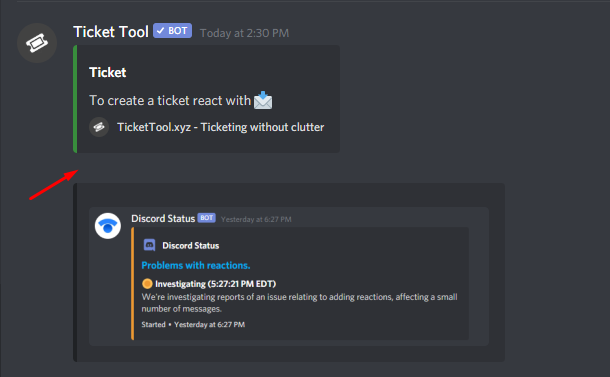
Reaction disappeared
This problem is not directly related to Ticket Tool.
That's a known Discord bug. Unfortunately, all you can do is be patient while they are trying to fix the issue.
_ _
_ _
Temporary Solution
You can resend the panel by going to your dashboard or using the command $panel ID
 jade topaz
$vote link 382558709081047041
humble sequoiaBOT
Linked to user: 382558709081047041
jade topaz
Hé
jade topaz
uh anyone knows
robust sandalBOT
jade topaz
Hé
 Lokman69
hey
Dutch (nl) → English (en)
jade topaz
how to add a certain role so that they can see the tickets?
scenic plinth
$help support
humble sequoiaBOT
How to let support team see into a ticket
About support roles
A support role lets your support team see into tickets with out having to add them manually to each and every ticket.
You can add as many support roles as you like per panel.
NOTE that the way discord works all admins can see into tickets regardless of this.
How to set a support role
To set a Support role go to the Dashboard -> Panel Configs -> Settings -> General Options -> Support Team Roles.

NOTE that the support role will not be able to see into tickets that are already created..
jade topaz
humble sequoia
ty
jade topaz
scenic plinth
$help support
which one?
 scenic plinth
Panel Configs
jade topaz
scenic plinth
Panel Configs
ty
 subtle fable
How do the Reaction Settings Allowed/Disabled Roles work? Does QAllowed Roles take precedence over Disabled (so in example...if someone has both xTHCv Recruit Staff AND THC Commander can they use Delete Reaction or no???

 clear lava
brauche hilfe
craggy geyser
subtle fable
How do the Reaction Settings Allowed/Disabled Roles work? Does QAllowed Roles t...
Yes. Allowed roles overrides disabled roles and support team only (if an allowed role isn't in the support team)
robust sandalBOT
clear lava
brauche hilfe
 Gamerdj
need help
German (de) → English (en)
craggy geyser
/de Please describe what you need help with
robust sandalBOT
Bitte beschreiben Sie, was Sie Hilfe benötigen
English (en) → German (de)
craggy geyser
@clear lava ^
subtle fable
@craggy geyser thank you
jade topaz
having members in the server who canse see the ticket "channels" but cant click or read them, how do i fix this so they cant see them?
shadow axle
$help ping
humble sequoiaBOT
How to make Ticket Tool ping a role
To make ticket tool ping a role when a ticket is opened, go to the Dashboard -> Panel Configs -> Settings -> Ticket Options -> Ticket Message -> Message Text and do this:
{@Role name} This is case sensitive and the role must have @mentions enabled
 shadow axle
@wintry mesa ^
jade topaz
hello i need help
shadow axle
... with?
 wintry mesa
Thanks @shadow axle
jade topaz
shadow axle
... with?
how i can delete this reaction when the ticket close

@shadow axle
shadow axle
idk, wait for someone who knows
jade topaz
ok
 fossil vigil
How do I make tickets go under a certain category? Please ping me when you have the answer.
shadow axle
fossil vigil
How do I make tickets go under a certain category? Please ping me when you have ...
$help category
humble sequoiaBOT
How to set the open category
To set a open category go to the Dashboard -> Panel Configs -> Settings -> Category Options -> Category Open
 fossil vigil
Thanks!
jade topaz
shadow axle
idk, wait for someone who knows
where is it
shadow axle
jade topaz
where is it
idk and stop pinging me
create a ticket in #🎫│make-a-ticket
and someone will respond
fossil vigil
shadow axle
$help category
Isn't that a text channel? Not a category? Sorry for ping btw
like the gif is a text channel
shadow axle
fossil vigil
Isn't that a text channel? Not a category? Sorry for ping btw
when you select a category, your ticket channels will go under that category
 shadow axle

 tawdry trail
hi! i'm currently using Ticket Tool for my server and I was wondering if there was a way to make sure that only the person who made the ticket and the ticket support team could access the ticket. right now the admin role can also access it
i made a role for the ticket support team and that role has access to tickets
atomic solstice
if a role has Administrator permission then they will still see tickets
because the Administrator permission overrides all permission settings on Discord
tawdry trail
i see. thanks so much!
humble sequoiaBOT
Don't Just Say "Hello" in Chat.
craggy geyser
Please specify a problem. It is much easier to get help if we know how to help
jade topaz
craggy geyser
Please specify a problem. It is much easier to get help if we know how to help
how i can delete this recation when ticket close
 craggy geyser
You want to make it so that no one can use emojis to delete the ticket?
jade topaz
craggy geyser
You want to make it so that no one can use emojis to delete the ticket?
yes
craggy geyser
 jade topaz
pc
craggy geyser
jade topaz
yes
Turn of the enable reaction shown above. Its in delete ticket reaction settings
It's the same location. And looks basically the same. I'm on mobile so can't show a pc version
iron nightBOT
Gave 1 Rep to Swiftgale (current: #13 - 20)
craggy geyser
No worries
 nocturne osprey
 upper flower
😂
 hexed crypt
Hello, can i get some help pls? I have used the bot so many times but... This time when i want to make panel, it doesnt even shows me the panel thingy i enter in "Ticket Tool Docs" and that's it, how to make a panel now?
humble sequoiaBOT
Creating a panel
To create a panel we are going to need to head over to the panel configs on the dashboard
Once at the dashboard we will need to click Create Panel
Enter a panel name (Fill in any optional settings you want)
Click Create Panel and your ready to get started with configuring your panel
An example of a creating a panel is shown below.
 abstract wigeon
hexed crypt
Hello, can i get some help pls? I have used the bot so many times but... This ti...
abstract wigeon
hexed crypt
Hello, can i get some help pls? I have used the bot so many times but... This ti...
Follow the instructions shown above ^^
 timber smelt
Help
abstract wigeon
How can I assist you?
timber smelt
I’m trying to set ticket all up but he must have a buy won’t work it say it set up but it’s not
Can you help?
Hello?
abstract wigeon
Okay, so which part of the setup do you have a problem with?
timber smelt
@abstract wigeon
abstract wigeon
timber smelt
<@!546305697130872833>
You need to describe your problem. You can send screenshots if you want.
atomic solstice
answered in ticket
abstract wigeon
Thank you!
humble sequoiaBOT
-- moved to ticket --
cinder oak
How to fix?

 lilac girder
@cinder oak
cinder oak
What is $panel
humble sequoiaBOT
-- moved to ticket --
 hoary notch

Hello. I can't delete this channel. I clicked it 2 times and it happened.
@mystic hound
@forest goblet @hybrid dagger @gloomy jacinth
shadow axle
jesus fuck stop pinging the whole team
 prime bridgeBOT
 Successful kicks:
 1
 Unsuccessful kicks:
 0
 Reason: excessively pinging support team
 Moderator: @mystic hound
 forest goblet
Uh oh
 manic parrot
Hey so I'm sure I remember their being a Escalate command, is that still in?
 coarse wedge
manic parrot
Hey so I'm sure I remember their being a Escalate command, is that still in?
coarse wedge
manic parrot
Hey so I'm sure I remember their being a Escalate command, is that still in?
What command do you mean?
jade topaz
sup guys can any of you help me when i look at the permlevel of my mods in my server
it says 0
but i cant find i way to level them up
 umbral zenith
opa alguem pode me ajudar?
 void oyster
Hi, my ticket tool bot isn't moving the closed tickets to the closed channel, is it a bug?
humble sequoiaBOT
Dashboard Roles
Any role you put there will have full access to the ticket tool dashboard. The server owner and users with admin permissions already have access to the dashboard.
Be careful of which roles to put here
 abstract wigeon
jade topaz
sup guys can any of you help me when i look at the permlevel of my mods in my s...
abstract wigeon
jade topaz
sup guys can any of you help me when i look at the permlevel of my mods in my s...
Go to the dashboard and add there roles there.
hexed crypt
abstract wigeon
Follow the instructions shown above ^^
it doesnt even show me the server :/
humble sequoiaBOT
How to let support team see into a ticket
About support roles
A support role lets your support team see into tickets with out having to add them manually to each and every ticket.
You can add as many support roles as you like per panel.
NOTE that the way discord works all admins can see into tickets regardless of this.
How to set a support role
To set a Support role go to the Dashboard -> Panel Configs -> Settings -> General Options -> Support Team Roles.
NOTE that the support role will not be able to see into tickets that are already created..
abstract wigeon
And this is for individual panels ^^
humble sequoiaBOT
Don't see your server in the dashboard?
You will possibly need to relog. Look below to see steps on how to relog.
How to relog the Dashboard.
First, you will need to go to the dashboard. Once your there, click on your avatar on the top right. after you clicked it, you will see button that says Logout. You must click that. Once you have logged out, you can log back in.
Note:
You need one of these 3 things to access the dashboard.
1. Server Owner (Level: 6)
2. Server Administrator (Level: 4)
3. Dashboard Role (Level: 2)
You can check your level using $level on your Discord Server
abstract wigeon
hexed crypt
it doesnt even show me the server :/
Follow the instructions show above ^^
But don’t just refresh the page, log out and back in.
hexed crypt
ok, i will try thx
abstract wigeon
void oyster
Hi, my ticket tool bot isn't moving the closed tickets to the closed channel, is...
Make sure that is has all the required permissions, and check that you saved your settings correctly.
abstract wigeon
hexed crypt
ok, i will try thx
My pleasure
hexed crypt
abstract wigeon
My pleasure
ohh it worked, you good man daniel, frkin ty
iron nightBOT
Gave 1 Rep to Daniel Harrison (current: #11 - 24)
jade topaz
thanks @abstract wigeon
iron nightBOT
Gave 1 Rep to Daniel Harrison (current: #10 - 25)
void oyster
abstract wigeon
Make sure that is has all the required permissions, and check that you saved you...
It used to move the closed tickets, im the only one that has access to tickettool config, bot has admin rights and i havent touched anything on the config since the day that i installed it and it was working just fine
abstract wigeon
hexed crypt
ohh it worked, you good man daniel, frkin ty
My pleasure, glad I could help you out. Just let me know if you need help with anything else. And have a nice day/night!
abstract wigeon
jade topaz
thanks <@!546305697130872833>
Anytime. Glad I could help you out too. Have a nice day/night!!
humble sequoiaBOT
If the bot is not working properly, try the following steps:
-
Run the $debug command in your server, to check the permissions of the bot. Send the link you get to us.
-
Check if you have any Blacklisted Roles in your Server Configs. Any roles listed there will not be able to use the bot / create tickets.
-
While you're in your Server Configs , make sure that you don't have the premium bot enabled, without actually having premium or the bot on the server.
These are the most common issues. If your problem still exists, you can go to our Troubleshooting Page for more fixes.
abstract wigeon
void oyster
It used to move the closed tickets, im the only one that has access to tickettoo...
Go through this list and check if any of them is your issue.
Also, could you check how many tickets you have in your closed tickets category.
void oyster
Oh is there a limit on discord?
abstract wigeon
Yes. A server can have 500 total channels and tickets combined.
Each category can have 50 channels inside before it overflows.
void oyster
We do have lots of tickets closed, so i should just delete them and try
abstract wigeon
Yes. You can always save the transcripts of the tickets.
humble sequoiaBOT
How do I save transcript to a channel?
To save transcripts to a channel go to the Dashboard -> Panel Configs -> Settings -> Logging Options -> Transcript Channel
void oyster
Ye we do that, let me try
abstract wigeon
Let me know if that works.
iron nightBOT
Gave 1 Rep to Daniel Harrison (current: #10 - 26)
abstract wigeon
My pleasure, glad I could help you out. Have a nice one!
void oyster
You too!
jade topaz
i need help setting up ticket tool, everytime i try to put him in a specific channel he never pops up
abstract wigeon
Have you followed the setup guide?
humble sequoiaBOT
jade topaz
lemme try😢
abstract wigeon
Okay, let me know what you find out.
jade topaz
its not working
 humble sequoiaBOT
 jade topaz
where?
abstract wigeon
^^
jade topaz
oh
abstract wigeon
humble sequoia
https://docs.tickettool.xyz/en/general/setup
And follow the setup instructions show here ^^
jade topaz
you too!
 upper berry
Where do I get the code
 abstract wigeon
Buy buying Premium
humble sequoiaBOT
Ticket Tool Premium
Get premium at https://tickettool.xyz/premium
Manage your subscriptions at https://tickettool.xyz/subscriptions
Why Premium?
Premium lets you customize the bot just how you want it. It also helps keep the bot running.
upper berry
abstract wigeon
Buy buying Premium
 abstract wigeon
You can also win a giveaway or use the $vote command in any server with Ticket Tool in it.
upper berry
Thx
abstract wigeon
Each vote is worth 12 hours of premium and can be redeemed once you have at least 6 votes.
abstract wigeon
upper berry
Thx
My pleasure. Have a nice one!!
 rough onyx
Hmm how can i make the bot mention role when the ticket opened?
humble sequoiaBOT
How to make Ticket Tool ping a role
To make ticket tool ping a role when a ticket is opened, go to the Dashboard -> Panel Configs -> Settings -> Ticket Options -> Ticket Message -> Message Text and do this:
{@Role name} This is case sensitive and the role must have @mentions enabled
abstract wigeon
rough onyx
Hmm how can i make the bot mention role when the ticket opened?
Follow the instructions shown above 👆
rough onyx
Thx
abstract wigeon
rough onyx
Thx
Anytime, have a nice day!
jade topaz
why can i not see my server?
humble sequoiaBOT
Don't see your server in the dashboard?
You will possibly need to relog. Look below to see steps on how to relog.
How to relog the Dashboard.
First, you will need to go to the dashboard. Once your there, click on your avatar on the top right. after you clicked it, you will see button that says Logout. You must click that. Once you have logged out, you can log back in.
Note:
You need one of these 3 things to access the dashboard.
1. Server Owner (Level: 6)
2. Server Administrator (Level: 4)
3. Dashboard Role (Level: 2)
You can check your level using $level on your Discord Server
abstract wigeon
jade topaz
why can i not see my server?
Follow the instructions shown above 👆
And make sure that you log out and back in again. Don’t just refresh the page.
jade topaz
o thanks
abstract wigeon
Of course, have a good one!
 late glen
Why the premium bot is so laggy ?
humble sequoiaBOT
Pong! Latency is 1048ms. API Latency is 78ms [-]
abstract wigeon
Oh, damn.
Give it couple of minutes. There must be a high demand on Ticket Tool Premium.
humble sequoiaBOT
Pong! Latency is 232ms. API Latency is 81ms [-]
abstract wigeon
It’s back to normal now.
humble sequoiaBOT
Pong! Latency is 259ms. API Latency is 79ms [-]
 solid stream
Get back in line @humble sequoia
 glad vault
is there a way to have the transcripts save into a Google Excel Sheet automatically?
solid stream
Work properly..
solid stream
glad vault
is there a way to have the transcripts save into a Google Excel Sheet automatica...
Not currently, no.
abstract wigeon
glad vault
is there a way to have the transcripts save into a Google Excel Sheet automatica...
Not at the given time. But you can send a suggestion in the community server.
humble sequoiaBOT
Ticket Tool Invite & Support
glad vault
what bot could i use to do that?
abstract wigeon
A custom coded one.
 covert heart
Me enseñó a nunca rendirme a comer bien a ayudar alas personas y padres ser amable gracias goku
robust sandalBOT
covert heart
Me enseñó a nunca rendirme a comer bien a ayudar alas personas y padres ser amab...
 ⚠yarempato elegante 🧐⚠
He taught me never to give up to eat well to help people and parents be kind thank you goku
Spanish (es) → English (en)
covert heart
:)
humble sequoiaBOT
You're in the wrong place
We provide support for @pseudo glen discord bot and cannot help you with whatever issue you have.
Please make sure to contact the appropriate support team.
This Ticket is being deleted in 5 minutes.
_ _
 shrewd totem
How can i keep folks with the muted role from opening tickets? please ping me when you reply.
is it blacklist role? that looks like it just prevents from using commands, what about reaction emoji's to open a ticket?
humble sequoiaBOT
Blacklist Roles
Any role you assign as a blacklisted role won't be able to use commands or reactions.
Selecting a blacklisted role
Go to your Dashboard -> Server Configs. There you will find the option to select blacklisted roles.
Note: Don't forget to save.
 abstract wigeon
shrewd totem
How can i keep folks with the muted role from opening tickets? please ping me wh...
abstract wigeon
shrewd totem
How can i keep folks with the muted role from opening tickets? please ping me wh...
Follow the instructions shown above 👆
shrewd totem
TY got it
abstract wigeon
Glad I could help you out. Have a nice day/night!
 compact silo
The reaction just disappeared, maybe someone deleted it. But, What could I do? (sorry if my english is bad)
 abstract wigeon
Please read the announcement in #📣│bot-news
#📣│bot-news message
You will find all the necessary information there
shrewd totem
um now ticket tool not responding at all 😦
compact silo
Okey thanks you
humble sequoiaBOT
If the bot is not working properly, try the following steps:
-
Run the $debug command in your server, to check the permissions of the bot. Send the link you get to us.
-
Check if you have any Blacklisted Roles in your Server Configs. Any roles listed there will not be able to use the bot / create tickets.
-
While you're in your Server Configs , make sure that you don't have the premium bot enabled, without actually having premium or the bot on the server.
These are the most common issues. If your problem still exists, you can go to our Troubleshooting Page for more fixes.
Pong! Latency is 259ms. API Latency is 85ms [-]
abstract wigeon
shrewd totem
um now ticket tool not responding at all 😦
Go through the list above ^^
shrewd totem
ok ty
abstract wigeon
Anytime
shrewd totem
(i had inadvertently done #3 on the list above)
abstract wigeon
It happens sometimes, glad it worked out. Have a nice one!
 fickle night
can someone help me? I need words to put in the blacklist
humble sequoiaBOT
You're in the wrong place
We provide support for @pseudo glen discord bot and cannot help you with whatever issue you have.
Please make sure to contact the appropriate support team.
This Ticket is being deleted in 5 minutes.
_ _
 smoky jungle
Greetings, I added the bot to my server, it has the highest authority, but it does not appear in my servers section on the web panel. How can we solve this situation?
humble sequoiaBOT
Don't see your server in the dashboard?
You will possibly need to relog. Look below to see steps on how to relog.
How to relog the Dashboard.
First, you will need to go to the dashboard. Once your there, click on your avatar on the top right. after you clicked it, you will see button that says Logout. You must click that. Once you have logged out, you can log back in.
Note:
You need one of these 3 things to access the dashboard.
1. Server Owner (Level: 6)
2. Server Administrator (Level: 4)
3. Dashboard Role (Level: 2)
You can check your level using $level on your Discord Server
abstract wigeon
smoky jungle
Greetings, I added the bot to my server, it has the highest authority, but it do...
Follow the instructions show above ^^
Don't just refresh the page, log out and back in.
That should fix your issue.
smoky jungle
abstract wigeon
That should fix your issue.
okay, thank you very much
iron nightBOT
Gave 1 Rep to Daniel Harrison (current: #9 - 27)
 limpid fossil
Hello, i'm pretty new with this bot actually, is there any way, when someone creates a ticket the bot automatically asks like 3 questions?
craggy geyser
Kind of. You can set a ticket message to have the questions in it (basically replace the text at the beginning with questions)
humble sequoiaBOT
**Ticket Message**
The Ticket Message is the first message sent by the bot in a new ticket. To customize it head over to your Dashboard -> Panel Configs -> Settings -> Ticket Options -> Edit Ticket Message
 craggy geyser
limpid fossil
Hello, i'm pretty new with this bot actually, is there any way, when someone cre...
craggy geyser
limpid fossil
Hello, i'm pretty new with this bot actually, is there any way, when someone cre...
Follow this ^
limpid fossil
ehm 😐
 limpid fossil
Ait np
craggy geyser
Works for me from my favourites. The link seems dodgy
craggy geyser
limpid fossil
Ait np
Click on back to home, and then from your profile pic in the top right you can select manage servers
iron nightBOT
Gave 1 Rep to Swiftgale (current: #12 - 23)
limpid fossil
;)
craggy geyser
limpid fossil
thanks <@!132147174212501504>
Np!
 daring sky
How do I make it so there’s multiple reactions on 1 message
humble sequoiaBOT
Multipanels are a premium feature that allow for a single panel with multiple reactions to open different tickets.
How to create a Multipanel
Premium users can combine multiple panels into one multipanel.
First of all you will need to assign a different Create Ticket Reaction for each Panel. Run $help reaction to learn how to do it.
Next, find the IDs of each panel you wish to combine. You can find them in your Panel Configs in the Dashboard
Next, send the multipanel to a channel using $panel [id1] [id2] {id3} ....
e.g. $panel 1 2 4 17 35 to combine panels 1, 2, 4, 17 and 35.
Up to 20 panels may be combined.
daring sky
I got premium
radiant moss
Make sure each panel has a different reaction
radiant moss
Go under panel configs on the dashboard
And to the left of the name there is a number
 brave lantern
When i added premium ticket tool to my discord, i click the thing to open ticket, nothing happends
humble sequoiaBOT
Inviting and Enabling Premium Bot
The first thing you will need to do is invite the premium bot, an invite can be found here
Once the bot is in your server we will head to the dashboard and manage your server. When you are managing your server, you want to head into "Server Configs" then click the drop down menu under "Select the bot you would like to use on this server" then click "Ticket Tool#6207" and then save.
craggy geyser
brave lantern
When i added premium ticket tool to my discord, i click the thing to open ticket...
Make sure you follow the bottom half of that to enable the bot
iron nightBOT
Gave 1 Rep to Swiftgale (current: #12 - 24)
daring sky
$help setup
humble sequoiaBOT
Setting up Ticket Tool
Visit the docs for setup info
General Setup
daring sky
radiant moss
And to the left of the name there is a number
The #1 #2 ect?
craggy geyser
daring sky
The #1 #2 ect?
Yes
scenic plinth
Yes, the first panel [Ex. 2] will display the multipanel message.
humble sequoiaBOT
radiant moss
daring sky
Once I have the id what commands do I need to do
daring sky
scenic plinth
Yes, the first panel [Ex. 2] will display the multipanel message.
Wdum about that
scenic plinth
Your panel message. The message that will display in the embed for ticket creation.
daring sky
scenic plinth
Your panel message. The message that will display in the embed for ticket creati...
So the command is [ex.8] is report a scammer?
So like
[ex.8] report a scammer
Is that a command
scenic plinth
What I was saying is like
[Ex.8] Report a scammer
[Ex.10] React for support
If I did $panel 8 10, Report a Scammer would show on the "panel message"
If I did $panel 10 8, React for Support would show on the "panel message"
 coarse rain
Shits fucking slow af takes 10 seconds to create a ticket
daring sky
scenic plinth
What I was saying is like
[Ex.8] Report a scammer
[Ex.10] React for support
I...
[ex.8] report a scammer
[ex.9] report self promoter
[ex.10] donate
[ex.11] reward collect
[ex.12] partnering
[ex.13] other
Like that?
scenic plinth
daring sky
[ex.8] report a scammer
[ex.9] report self promoter
[ex.10] donate
[ex.11] rewa...
No sorry, you would just do $panel 8 9 10 11 12 13 if you want to send the panel(s) and combine them.
daring sky
How do I make the panel be like click on 1️⃣ to report a scammer
Then add the reactions
scenic plinth
You have to change the reactions.

 scenic plinth
Yes, that is due to all the panels reactions being the same. All users can only add one of each reaction to a separate message.
You will have to go to the panel settings and go to Reaction Settings ---> Create a Ticket ---> Select Reaction and select the reaction you would like for each individual panel!
Once changed and changed, you can resend the command $panel 8 9 10 11 12 13 to get the mutli panel function!
daring sky
scenic plinth
Yes, that is due to all the panels reactions being the same. All users can only ...
Is this looking good?
 scenic plinth
daring sky
Is this looking good?
scenic plinth
daring sky
Is this looking good?
Prefect! Now if you want to change the "To create a ticket" part, you will have to change panel 8s panel message. This is usually easier to know what each reaction is.
daring sky
scenic plinth
Prefect! Now if you want to change the "To create a ticket" part, you will have ...
Ok
I’ll do it
$help setup
humble sequoiaBOT
Setting up Ticket Tool
Visit the docs for setup info
General Setup
daring sky
scenic plinth
Prefect! Now if you want to change the "To create a ticket" part, you will have ...
Though I used some other server emojis is that a problem?
scenic plinth
It won't work likely, you can try but I don't guarantee it will send a message with those emojis.
brave lantern
Also, can i somehow use my own emoji?
i want to use 🇦 as reaction to ticket but i cannot find it there
humble sequoiaBOT
How to change reactions
To set a custom reaction Dashboard -> Panel Configs -> Settings -> Reaction Options -> <Reaction to change> -> Reaction

NOTE you need premium to do this.
 spice crow
hola?
scenic plinth
hola!
spice crow
Cómo pido rango en omega? xd
robust sandalBOT
spice crow
Cómo pido rango en omega? xd
 Cazzuu
How do I order rank in omega? Xd
Spanish (es) → English (en)
spice crow
discord xd
scenic plinth
$tts
humble sequoiaBOT
You're in the wrong place
We provide support for @pseudo glen discord bot and cannot help you with whatever issue you have.
Please make sure to contact the appropriate support team.
This Ticket is being deleted in 5 minutes.
_ _
scenic plinth
humble sequoia
Proporcionamos soporte para @Ticket Tool#4843 de discordia de usuario y no podemos ayudarle con cualquier problema que tenga.
Por favor, asegúrese de ponerse en contacto con el equipo de soporte adecuado.
 leaden pebble
How do I apply for supervision
scenic plinth
leaden pebble
How do I apply for supervision
Applications are closed for Support
leaden pebble
Okay, but where is the channel
scenic plinth
It doesn't exist?
leaden pebble
Then how do I apply for supervision
scenic plinth
You can't...
scenic plinth
They just are, I can't neccessarily help you with closed applications. I understand you want to "work" here, but you will have to wait for a while.
leaden pebble
Okay but I will waiting
scenic plinth
You do that
leaden pebble
Please don't take a longer time
scenic plinth
I can't control applications, you will have to wait for there to be an open spot.
leaden pebble
Okay but to what I continue the waiting ?
scenic plinth
You will be waiting a while, when I say a while I mean it could be a month.
leaden pebble
Okay take your time 
mystic hound
I would recommend being active and helping people here if you want a better chance
agile turtle
hello
eager cargo
Hiya
agile turtle
eager cargo
Hiya
i have problems with ticket bot
removing the reaction 📩
every 4-3 hours
humble sequoiaBOT
Reaction disappeared
This problem is not directly related to Ticket Tool.
That's a known Discord bug. Unfortunately, all you can do is be patient while they are trying to fix the issue.
_ _
_ _
Temporary Solution
You can resend the panel by going to your dashboard or using the command $panel ID
eager cargo
^
 spice mauve
How do you make it to where ticket tool auto closes the ticket after a certain amount of time?
humble sequoiaBOT
Automation disabled
There's currently no ETA for when automation will be enabled again. The issue that's caused it to be disabled, us hitting rate limits, is tied to the increased load on Discord's servers. The situation's currently unpredictable, which makes it so we can't give you a fixed time.
eager cargo
Automation is disabled since Ticket Tool hits rate limits, no ETA to when it will be available again. Apologies.
spice mauve
Np ty
eager cargo
My pleasure
abstract wigeon
Welcome back @eager cargo
 frozen shell
Hlo
Pls someone help me
@eager cargo @eager cargo
Pls help
@radiant moss
Help
 last magnet
سلام عليكم
 frail delta
Hello, where can I specify that tickets are no longer automatically deleted after they are closed? 🙂
robust sandalBOT
frail delta
Hello, where can I specify that tickets are no longer automatically deleted afte...
 Patrick/Ice
مرحبا، أين يمكنني تحديد أن التذاكر لم تعد تحذف تلقائيا بعد إغلاقها؟ 🙂
English (en) → Arabic (ar)
last magnet
هل يمكنك مساعدتي؟؟ @frail delta @frail delta
frail delta
last magnet
هل يمكنك مساعدتي؟؟ <@391147406055440384> <@391147406055440384>
sry, i´m not the support, i´m speak only german and english ^^
prime bridgeBOT
chunhat has been silenced for 10m 

 Reason: Posting Discord Server Invites
chunhat#6146 | 475822802436358156
robust sandalBOT
last magnet
هل يمكنك مساعدتي؟؟ <@391147406055440384> <@391147406055440384>
 𝐓𝐇𝐄 𝐊𝐈𝐍𝐆𝐒
Can you help me?? @frail delta @frail delta
Arabic (ar) → English (en)
craggy geyser
last magnet
هل يمكنك مساعدتي؟؟ <@391147406055440384> <@391147406055440384>
/ar what do you need help with?
robust sandalBOT
ما الذي تحتاج إلى مساعدة به؟
English (en) → Arabic (ar)
mystic hound
frail delta
Hello, where can I specify that tickets are no longer automatically deleted afte...
You can disable "two step ticket" in general options
 nimble forum
it seems that i am unable to create a ticket , is there another way for me to reach out to staff?
mystic hound
You're trying to create a ticket here and it didn't work?
nimble forum
nope, (English)
mystic hound
Interesting
humble sequoiaBOT
-- moved to ticket --
nimble forum
👍 thank you
frail delta
mystic hound
You can disable "two step ticket" in general options
thank you 🙂
iron nightBOT
Gave 1 Rep to Light (current: #3 - 61)
faint lion
Is there a way to add more than 1 reaction on a panel?
atomic solstice
faint lion
Is there a way to add more than 1 reaction on a panel?
you can add multiple reactions to one panel message like in #🎫│make-a-ticket
humble sequoiaBOT
Multipanels are a premium feature that allow for a single panel with multiple reactions to open different tickets.
How to create a Multipanel
Premium users can combine multiple panels into one multipanel.
First of all you will need to assign a different Create Ticket Reaction for each Panel. Run $help reaction to learn how to do it.
Next, find the IDs of each panel you wish to combine. You can find them in your Panel Configs in the Dashboard
Next, send the multipanel to a channel using $panel [id1] [id2] {id3} ....
e.g. $panel 1 2 4 17 35 to combine panels 1, 2, 4, 17 and 35.
Up to 20 panels may be combined.
faint lion
atomic solstice
you can add multiple reactions to one panel message like in <#571706435449257997...
Ah tysm I was searching this from many days
atomic solstice
no problem
faint lion
Uh so I'm trying to send 2 panels combined to a channel but it only shows me the panel of the first one?
atomic solstice
Do you have premium in that server?
faint lion
atomic solstice
Do you have premium in that server?
Yep
I've only put permissions for the premium bot
atomic solstice
make sure all the panels have different reactions for creating a ticket
faint lion
They all have different reactions
But it just sends me the first panel which I put in the ID for.
atomic solstice
so when you do for example $panel 1 2 3 4 only 1 gets sent?
faint lion
atomic solstice
so when you do for example `$panel 1 2 3 4` only 1 gets sent?
Yep
the first one but it isnt combined
faint lion
 atomic solstice
does the bot have permission to add reactions in that channel?
faint lion
Yeah
faint lion
atomic solstice
does the bot have permission to add reactions in that channel?
It's the discord issue which isn't sending reactions
faint lion
True
atomic solstice
the reactions that you want to use are the custom ones or discord default ones?
faint lion
atomic solstice
the reactions that you want to use are the custom ones or discord default ones?
Custom ones
and those ones are in my discord server.
atomic solstice
ok
 bleak pewter
Hello
atomic solstice
faint lion
and those ones are in my discord server.
then how many emojis do you have in your server? Like less than the 50 limit or more because of nitro?
bleak pewter
When you leave a macro to emojis, the emoji goes away, what can be done?
faint lion
atomic solstice
then how many emojis do you have in your server? Like less than the 50 limit or ...
We have more because of nitro boosts.
atomic solstice
ok, can you check if the nitro status isn't ending soon and if some will if it will drop in the nitro level or not?
because if you have an emoji and then it goes below the level it will be locked and even the bot cannot use it
if the emojis are in the first 50 then it is the discord bug because of them doing updates
in this case try reloading Discord and send the panels again
bleak pewter
 humble sequoiaBOT
Reaction disappeared
This problem is not directly related to Ticket Tool.
That's a known Discord bug. Unfortunately, all you can do is be patient while they are trying to fix the issue.
_ _
_ _
Temporary Solution
You can resend the panel by going to your dashboard or using the command $panel ID
atomic solstice
They announced a few minutes ago that they sommewhat fixed it so it shouldn't bee happening again
faint lion
atomic solstice
because if you have an emoji and then it goes below the level it will be locked ...
The nitro status isn't ending soon, just checked
atomic solstice
atomic solstice
They announced a few minutes ago that they `sommewhat fixed it` so it shouldn't ...
if it still does then their somewhat is too little
atomic solstice
faint lion
The nitro status isn't ending soon, just checked
they I would still say it may be the bug
faint lion
atomic solstice
they I would still say it may be the bug
Ah alright.
atomic solstice
try to reload discord and send it again
bleak pewter
Still going on
 atomic solstice
bleak pewter
Still going on
atomic solstice
bleak pewter
Still going on
does the bot have permission to add reactions in that channel?
atomic solstice
faint lion
Ah alright.
one more thing it could be is that in the reaction settings the create reaction has been disabled
bleak pewter
atomic solstice
does the bot have permission to add reactions in that channel?
Admin authority available
bleak pewter
atomic solstice
does the bot have permission to add reactions in that channel?
Yes there is
atomic solstice
bleak pewter
Yes there is
could you please send here the server name or Server ID?
bleak pewter
830156739092807711
faint lion
atomic solstice
one more thing it could be is that in the reaction settings the create reaction ...
It's enabled, I have checked
atomic solstice
ok looks like the bug still might be a thing then
 jovial hollow
no reaction
 mystic hound
try resending the panel
jovial hollow
okay
bleak pewter
How can I change the panel description
humble sequoiaBOT
**Panel Message**
The panel message is where people react to make a ticket. To customize it head over to your Dashboard --> Panel Configs -> Settings -> Panel Options -> Edit Panel Message
 mystic hound
@bleak pewter ^
bleak pewter
Thanks
mystic hound
bleak pewter
Thanks
did you fix your issue with the bot not sending the reaction?
bleak pewter
mystic hound
did you fix your issue with the bot not sending the reaction?
No
When people leave a macro to the reaction, the emoji is gone.
mystic hound
can you try resending again using $panel 1


 mystic hound
the reaction seems to be there now
bleak pewter
It seems, but it goes to macro pressure ..
Other people are constantly clicking on the reaction, and that's why the reaction goes up and down.
mystic hound
If the reaction disappears, just resend again to bring it back, its a discord related issue.
bleak pewter
And it goes
Understand
How can I turn off sending private messages, a message says ticket limit 1
 mystic hound
That's called a ticket limit, you have it set so a user can only make 1 at a time
you can change it by following the steps below
humble sequoiaBOT
How to set a ticket limit
A ticket limit may be set per panel to prevent users from spamming tickets. By default this limit is set to 3. Once a user hits this limit the bot will notify the users that they reached the limit.
To set a ticket limit go to the Dashboard -> Panel Configs -> Settings -> General Options -> Ticket Limit
 bleak pewter
I don't want private to send messages
compact silo
Hello, de reaction still not appear, what can i do? (sorry if my english is bad)
 mystic hound
Resend the panel
compact silo
Okey thanks you
bleak pewter
I don't want private to send messages , "Ticket Limit"
compact silo
mystic hound
Resend the panel
Wait, how, in the dashboard or with a command?
mystic hound
compact silo
Wait, how, in the dashboard or with a command?
both methods work
mystic hound
bleak pewter
I don't want private to send messages , "Ticket Limit"
raise the limit to a high number, set it to 99 if you want
compact silo
What command?
mystic hound
$panel [id]
compact silo
thanks you
bleak pewter
In another discord, the number is the same but it does not send a message.
On this server, I can only open 1 ticket message as a limit, but there is no message from the private, there is no notification about how they are set, and the reaction is not lost.

Is there a written ticket system? I don't want emojis.
craggy geyser
bleak pewter
Is there a written ticket system? I don't want emojis.
You can use commands if enabled on the dashboard as shown here
 bleak pewter
I want users not to send another message, can they delete when they send?
 rose verge
Can anyone help me?
I added bot
And created channel for ticket
But idk how to set he
shadow axle
$help setup
humble sequoiaBOT
Setting up Ticket Tool
Visit the docs for setup info
General Setup
 humble sequoiaBOT
Reaction disappeared
This problem is not directly related to Ticket Tool.
That's a known Discord bug. Unfortunately, all you can do is be patient while they are trying to fix the issue.
_ _
_ _
Temporary Solution
You can resend the panel by going to your dashboard or using the command $panel ID
 viscid sun
How do ping a role when you open a ticket
shadow axle
$help ping
humble sequoiaBOT
How to make Ticket Tool ping a role
To make ticket tool ping a role when a ticket is opened, go to the Dashboard -> Panel Configs -> Settings -> Ticket Options -> Ticket Message -> Message Text and do this:
{@Role name} This is case sensitive and the role must have @mentions enabled
 mystic hound
If it's the same panel then yeah

 daring sky
jade topaz
daring sky
jade topaz
What’s the role name?
jade topaz
nvm its fixed
daring sky
Is the role name G?
jade topaz
i just changed the name..
nah it was guard, it doesnt finish the sentence in discord
{@Guard}
daring sky
Yes that’s it
jade topaz
Yeah but it didnt work

This is what i get in discord when someone opens a ticket
But yeah i just changed a question and now its fixed suddenly
craggy geyser
There is a character limit for discord messages. There is a chance you went over it
If you changed a question so the message was shorter that will be why it works now
humble sequoiaBOT
-- moved to ticket --
 pastel zodiac
How can I ping the support-team in the ticket message?
(This question refers to my server, not to this)
atomic solstice
$help ping
humble sequoiaBOT
How to make Ticket Tool ping a role
To make ticket tool ping a role when a ticket is opened, go to the Dashboard -> Panel Configs -> Settings -> Ticket Options -> Ticket Message -> Message Text and do this:
{@Role name} This is case sensitive and the role must have @mentions enabled
atomic solstice
pastel zodiac
How can I ping the support-team in the ticket message?
(This question refers to ...
here is how ^^
pastel zodiac
atomic solstice
here is how ^^
ok thank you
iron nightBOT
Gave 1 Rep to Satisfy (current: #5 - 53)
craggy geyser
atomic solstice
$help ping
You just beat me to type that
atomic solstice

craggy geyser
You sent it while I had just the g left to write
atomic solstice
I type fast I guess
craggy geyser
You probably also saw the message first. I was typing on the community server when it was sent
atomic solstice
I was typing in a ticket
so we both might have seen it at the same time

well its not a war
pastel zodiac
I tried that out, but the ping did not work
The role got mentioned, but the support team did not receive a ping
scenic plinth
Make sure ticket tool has permissions to ping roles, alternatively you can make the role mentionable by @.everyone
pastel zodiac
Ticket tool has the permissions
atomic solstice
its best to just enable the mention @ everyone, @ here and all roles for the bot role
atomic solstice
pastel zodiac
Ticket tool has the permissions
did they say that they didn't get a ping, or are you using an alt to test this?
or you have the role which gets mentioned?
pastel zodiac
My second account has the role which gets mentioned
atomic solstice
so when someone opened a ticket the second account didn't get a ping then?
pastel zodiac
yes
craggy geyser
Does the message have the ping in a colour? Or just as text?
pastel zodiac
craggy geyser
Does the message have the ping in a colour? Or just as text?
the role is in colour
atomic solstice
can you please take a screenshot of the message and send it here
 atomic solstice
can you please type $debug in that channel and send here the link which the bot sends?
pastel zodiac
atomic solstice
hmm, that is interesting
pastel zodiac
Oh I think I solved the Problem, the second account had the wrong role
I am sorry I had not seen it
atomic solstice
no problem
pastel zodiac
thank's for helping
atomic solstice
 long mica
is it possible to see old ticket transcripts?
jade topaz
im making a ticket panel, is there any way a staff role can be pinged when a ticket has been opened?
atomic solstice
$help ping
humble sequoiaBOT
How to make Ticket Tool ping a role
To make ticket tool ping a role when a ticket is opened, go to the Dashboard -> Panel Configs -> Settings -> Ticket Options -> Ticket Message -> Message Text and do this:
{@Role name} This is case sensitive and the role must have @mentions enabled
atomic solstice
jade topaz
im making a ticket panel, is there any way a staff role can be pinged when a tic...
yes like this ^^
jade topaz
thank you!
 tame wind
The ticket bot dont make ticket chanel when i react
humble sequoiaBOT
If the bot is not working properly, try the following steps:
-
Run the $debug command in your server, to check the permissions of the bot. Send the link you get to us.
-
Check if you have any Blacklisted Roles in your Server Configs. Any roles listed there will not be able to use the bot / create tickets.
-
While you're in your Server Configs , make sure that you don't have the premium bot enabled, without actually having premium or the bot on the server.
These are the most common issues. If your problem still exists, you can go to our Troubleshooting Page for more fixes.
 wispy nest
I’m trying to open a ticket to check if everything works in my server but what’s the ID to open?, it’s all default settings
I’m not very savvy when it comes to bots
mystic hound
You would simply react to the panel and a ticket will be made
wispy nest
Yes but what is the panel like I said not very bot informed
mystic hound
$help panel
humble sequoiaBOT
Creating a panel
To create a panel we are going to need to head over to the panel configs on the dashboard
Once at the dashboard we will need to click Create Panel
Enter a panel name (Fill in any optional settings you want)
Click Create Panel and your ready to get started with configuring your panel
An example of a creating a panel is shown below.
mystic hound
You can also find basic instructions on setting up the bot in #573205317870157855
wispy nest
Thank you
 drifting dawn
Im looking to cancel my premium subscription on a server I do not manage anymore.
And I can not see where to do so on the website, i was charged for this month even though when I looked last week it said I had no recurring payments set up…?
humble sequoiaBOT
Ticket Tool Premium
Get premium at https://tickettool.xyz/premium
Manage your subscriptions at https://tickettool.xyz/subscriptions
Why Premium?
Premium lets you customize the bot just how you want it. It also helps keep the bot running.
atomic solstice
you should be able to do it from the second link ^^
drifting dawn
Says I do not have an account
atomic solstice
How did you purchase the premium first?
drifting dawn
On the email I am typing into the website lil
Lol*


I know which server the premium is linked to, but as before I do not have access to it as a server manager any longer
Is there any way yall would just be able to cancel the premium on your end?
atomic solstice
@drifting dawn I opened a ticket for you you can discuss it with the billing team
 near nova
I'm trying to get the bot to ping a specific role once a ticket is opened. But there is no ping response, and I don't tag them in the embeded area


 lusty walrus
send a screenshot of what it does
near nova

I've tried it with other members aswel
It doesn't edmit a response to anyone with the roles
role*
lusty walrus
i think it's something to do with the perms the bot has
 safe prairie
$help ping
humble sequoiaBOT
How to make Ticket Tool ping a role
To make ticket tool ping a role when a ticket is opened, go to the Dashboard -> Panel Configs -> Settings -> Ticket Options -> Ticket Message -> Message Text and do this:
{@Role name} This is case sensitive and the role must have @mentions enabled
lusty walrus
"This is case sensitive and the role must have @mentions enabled" there it is
safe prairie
Maybe thats fix your problem
lusty walrus
the role needs @mentions enabled
iron nightBOT
Gave 1 Rep to etan (current: #30 - 2)
 tardy grove
Hello, who is the list for {user}
safe prairie
Do you mean the available variables?
tardy grove
yes
lusty walrus
whoever runs the command or reacts to the message will be {user}
safe prairie
tardy grove
yes
For example you find it under a Tag
 lusty walrus
so if i create a ticket, i will be {user}. if a staff member closes the ticket, they will be {user}
tardy grove
okay
pale pilot
correct
drifting dawn
atomic solstice
<@!476797452272271381> I opened a ticket for you you can discuss it with the bil...
Appreciate you
tardy grove
{ticket_user_name} is the name of the creater from the ticket?
mystic hound
$variables
humble sequoiaBOT
Note: Remove The $ From The Variables
Supported Variables
{$server_name} -The server name
{$@Role Name} -The role name you want to mention (role names are case sensitive.)
{$empty} -Use this if you want to send nothing in a required field.
{$channel_name} -The channel name this message is used in/from
{$channel} -The channel this message is used in/from
{$user_nickname} -The users nickname (if set)
{$user_tag} -The users tag
{$user_name} -The users username
{$userfull} -The users username and usertag combined
{$user} -The users @user
{$user_icon} -The url for the users icon
{$ticket_limit} -The current ticket limit
{$panel_name} -The panels name
{$ticket_name} -The tickets name
{$ticket_category} -The category tickets are created in (if set)
{$count}The current count for tickets
{$ticket_channel} -The #channel for the ticket you created
{$ticket_user} -The @user who is assigned to the Ticket
{$ticket_user_nickname} -The nickname of the user who is assigned to the Ticket (if set)
{$ticket_user_tag} -The tag of the user who is assigned to the Ticket
{$ticket_user_name} -The username of the user who is assigned to the Ticket
Note: Remove The $ From The Variables
 stable arch
Hello
upper flower
Bye
mystic hound
$panel
humble sequoiaBOT
Send panel
How to send a panel?
To send a panel use the command $panel <id>
How do I find the ID?
The ID is located on the dashboard just before your panels name.
How to combine panels? (premium only)
Add multiple ID's $panel <id1> <id2> <id..>
The first ID will have its message and reaction sent while the others will have only reactions sent.
You can combine up to 20 panels (Reactions will be slowly added)
 humble sequoiaBOT
Multipanels are a premium feature that allow for a single panel with multiple reactions to open different tickets.
How to create a Multipanel
Premium users can combine multiple panels into one multipanel.
First of all you will need to assign a different Create Ticket Reaction for each Panel. Run $help reaction to learn how to do it.
Next, find the IDs of each panel you wish to combine. You can find them in your Panel Configs in the Dashboard
Next, send the multipanel to a channel using $panel [id1] [id2] {id3} ....
e.g. $panel 1 2 4 17 35 to combine panels 1, 2, 4, 17 and 35.
Up to 20 panels may be combined.
 vale abyss
Its not opening a ticket when i react. Whats wrong here?

 rough moth
I can’t find my panel ID
rough moth
atomic solstice
panel Id is on the left of each panel in the dashboard
I don’t see it
I’m on mobile
 atomic solstice
yes that
rough moth
craggy geyser
It's the #1, #2 etc
Oh, I was making this much more complicated for myself thanks
iron nightBOT
Gave 1 Rep to Swiftgale (current: #11 - 25)
rough moth
When I voted using the third link it didn’t give me a vote point
atomic solstice
$help support
humble sequoiaBOT
How to let support team see into a ticket
About support roles
A support role lets your support team see into tickets with out having to add them manually to each and every ticket.
You can add as many support roles as you like per panel.
NOTE that the way discord works all admins can see into tickets regardless of this.
How to set a support role
To set a Support role go to the Dashboard -> Panel Configs -> Settings -> General Options -> Support Team Roles.
NOTE that the support role will not be able to see into tickets that are already created..
atomic solstice
 fluid hawk
how do i add a role to get access to the tickets
fluid hawk
how do i add a role to get access to the tickets
here ^^
iron nightBOT
Gave 1 Rep to Satisfy (current: #5 - 54)
fluid hawk

atomic solstice
no problem
atomic solstice
any changes you do will only be applied to new tickets if the ticket has been opened before the changes then you would have to manually add the person you want
but if you or someone open a new ticket then they should see
 keen crescent
i need help i bought ah month key
humble sequoiaBOT
How to redeem premium
To redeem your premium key, go to the dashboard, select your server, then click "Redeem Premium" under the server's icon and name.
 rough moth
Does the third vote link work
scenic plinth
rough moth
Does the third vote link work
It should, just is slightly different than the others.
rough moth
It didn’t work for me
scenic plinth
keen crescent
i need help i bought ah month key
What's the issue?
rough moth
I voted and it didn’t give me the vote point
last magnet
هل في عربي يفيدني في شيء
scenic plinth
rough moth
It didn’t work for me
It can take a second to appear on the votes.
keen crescent
i dont know how get they code
robust sandalBOT
last magnet
هل في عربي يفيدني في شيء
𝐓𝐇𝐄 𝐊𝐈𝐍𝐆𝐒
is there any Arab that benefits me in anything
Arabic (ar) → English (en)
rough moth
scenic plinth
It can take a second to appear on the votes.
The other ones worked but this one never did, I did this an hour ago or so
scenic plinth
/ar What do you need help with?
robust sandalBOT
ما الذي تحتاج إلى مساعدة به؟
English (en) → Arabic (ar)
mystic hound
keen crescent
i dont know how get they code
follow instructions below to apply premium
humble sequoiaBOT
Redeeming premium
Redeeming premium on your server is really simple. Just head over to your Subscriptions Page. There you can select a server of your choice, which will get premium. You can change the server at any point.
last magnet
ان في سيرفري الادمن يقدر يفتح التكت لاكن لما الاعضاء يفتحون تكت يجي لهم كذا
 robust sandalBOT
last magnet
ان في سيرفري الادمن يقدر يفتح التكت لاكن لما الاعضاء يفتحون تكت يجي لهم كذا
𝐓𝐇𝐄 𝐊𝐈𝐍𝐆𝐒
robust sandalBOT
last magnet
ان في سيرفري الادمن يقدر يفتح التكت لاكن لما الاعضاء يفتحون تكت يجي لهم كذا
𝐓𝐇𝐄 𝐊𝐈𝐍𝐆𝐒
there is server the admin can open the tectonics but when the members open a car they get like this
Arabic (ar) → English (en)
rough moth
The other vote links worked but this one never did, I did this an hour ago or so
scenic plinth
/ar Try to resend the panel please, I had the issue the other day and resending it seemed to work.
robust sandalBOT
في محاولة لإعادة إرسال الفريق من فضلك ، كان لي هذه المسألة في اليوم الآخر وإعادة إرسالها يبدو أن العمل.
English (en) → Arabic (ar)
last magnet
انا أعدت إرسالها ولم يزبط
scenic plinth
rough moth
The other vote links worked but this one never did, I did this an hour ago or so
Odd, that can be something with the site itself. If someone has a fix for it they can let you know, however I don't have a fix for that. Sorry.
robust sandalBOT
last magnet
انا أعدت إرسالها ولم يزبط
𝐓𝐇𝐄 𝐊𝐈𝐍𝐆𝐒
I sent it back, and it didn't work.
Arabic (ar) → English (en)
scenic plinth
/ar Can you make sure there is no roles blacklisted?
robust sandalBOT
هل يمكنك التأكد من عدم وجود أدوار مدرجة على القائمة السوداء؟
English (en) → Arabic (ar)
robust sandalBOT
last magnet
نعم
𝐓𝐇𝐄 𝐊𝐈𝐍𝐆𝐒
Yes
Arabic (ar) → English (en)
robust sandalBOT
last magnet
هل ارسلك سيرفري و تشوف ايش المشكله
𝐓𝐇𝐄 𝐊𝐈𝐍𝐆𝐒
Did Serfre send you and see what the problem is?
Arabic (ar) → English (en)
last magnet
و حتى يوم البوت يرسل الكلام حق التكت بعد ساعه الكلام ينحذف محد يقدر يشوف الكلام غير رئيس السيرفر بس ليه
scenic plinth
/ar Any role you assign as a blacklisted role won't be able to use commands or reactions. Make sure this is not the case for the reaction settings or server settings.
robust sandalBOT
لن يتمكن أي دور تقوم بتعيينه كدور مدرج في القائمة السوداء من استخدام الأوامر أو ردود الفعل. تأكد من أن هذه ليست الحالة بالنسبة لإعدادات رد الفعل أو إعدادات الخادم.
English (en) → Arabic (ar)
robust sandalBOT
last magnet
و حتى يوم البوت يرسل الكلام حق التكت بعد ساعه الكلام ينحذف محد يقدر يشوف الكلام ...
𝐓𝐇𝐄 𝐊𝐈𝐍𝐆𝐒
Even the day the bot sends the talk of the tectonics after an hour the talk is deleted no one can see the talk but the server boss but why
Arabic (ar) → English (en)
scenic plinth
/ar Does the ticket open when you click the reaction?
last magnet
؟؟
robust sandalBOT
هل تفتح التذكرة عند النقر على رد الفعل؟
English (en) → Arabic (ar)
robust sandalBOT
last magnet
؟؟
@scenic plinth Trying to translate to English but detected as English.
Please don't waste translations by trying to translate to the same language.
last magnet
انا رئيس السيرفر تفتح لي بس اما الادمن و الأعضاء م تفتح لنا ينقر عليه يأتي هاكذا
 robust sandalBOT
last magnet
انا رئيس السيرفر تفتح لي بس اما الادمن و الأعضاء م تفتح لنا ينقر عليه يأتي هاكذا
𝐓𝐇𝐄 𝐊𝐈𝐍𝐆𝐒
robust sandalBOT
last magnet
انا رئيس السيرفر تفتح لي بس اما الادمن و الأعضاء م تفتح لنا ينقر عليه يأتي هاكذا
𝐓𝐇𝐄 𝐊𝐈𝐍𝐆𝐒
I am the head of the server you open for me but the admin and the members do not open for us to click on it come like this
Arabic (ar) → English (en)
last magnet
!
scenic plinth
/ar And you are sure there are no roles blacklisted for the "create ticket" reaction in your panel settings?
robust sandalBOT
وكنت متأكدا من عدم وجود أدوار القائمة السوداء لرد فعل "إنشاء تذكرة" في إعدادات لوحة الخاص بك؟
English (en) → Arabic (ar)
last magnet
هل تشرحلي كييف اشوف البلاك لست
robust sandalBOT
last magnet
هل تشرحلي كييف اشوف البلاك لست
𝐓𝐇𝐄 𝐊𝐈𝐍𝐆𝐒
Will you explain to me how to see the black last
Arabic (ar) → English (en)
scenic plinth
/ar Go to the dashboard, click the "server configs" option, and go to "blacklist roles", there could be a role there preventing your members to use commands / open tickets.
Another thing you can do is open the panel settings and go to "reaction options" and "create ticket" and make sure the option does not have any blacklisted roles and it is not set to "Support Team Only", whcih you will see at the top of that menu.
robust sandalBOT
انتقل إلى لوحة القيادة، انقر فوق الخيار "تكوينات الخادم"، والذهاب إلى "أدوار القائمة السوداء"، يمكن أن يكون هناك دور هناك منع أعضاء لاستخدام الأوامر / تذاكر مفتوحة.
شيء آخر يمكنك القيام به هو فتح إعدادات لوحة والذهاب إلى "خيارات رد الفعل" و "إنشاء تذكرة" وتأكد من أن الخيار ليس لديه أي أدوار القائمة السوداء وأنه لم يتم تعيين إلى "فريق الدعم فقط"، والتي سترى في الجزء العلوي من تلك القائمة.
English (en) → Arabic (ar)
humble sequoiaBOT
Reaction disappeared
This problem is not directly related to Ticket Tool.
That's a known Discord bug. Unfortunately, all you can do is be patient while they are trying to fix the issue.
_ _
_ _
Temporary Solution
You can resend the panel by going to your dashboard or using the command $panel ID
jade topaz
/en hi
robust sandalBOT
jade topaz
/en hi
Trying to translate to English but detected as English.
Please don't waste translations by trying to translate to the same language.
jade topaz
/it hi
robust sandalBOT
ciao
English (en) → Italian (it)
agile turtle
humble sequoia
So there are no fixes?
atomic solstice
so far resending the panel does the job
we unfortuatelly cannot do anything about this
last magnet
اروح لأي وحده؟؟
 atomic solstice
since we can only manage the data which discord sends us
robust sandalBOT
last magnet
اروح لأي وحده؟؟
𝐓𝐇𝐄 𝐊𝐈𝐍𝐆𝐒
Go to any one?
Arabic (ar) → English (en)
scenic plinth
/ar Second one
last magnet
@scenic plinth
robust sandalBOT
الثانية
English (en) → Arabic (ar)
last magnet
حسننا
robust sandalBOT
last magnet
حسننا
𝐓𝐇𝐄 𝐊𝐈𝐍𝐆𝐒
we improved
Arabic (ar) → English (en)
 jade topaz
/en ciao
robust sandalBOT
last magnet
أتاني هاكذا <@615207454443044904>
𝐓𝐇𝐄 𝐊𝐈𝐍𝐆𝐒
I came here like this@scenic plinth
Arabic (ar) → English (en)
Hello
Italian (it) → English (en)
jade topaz
/en ciao
robust sandalBOT
Hello
Italian (it) → English (en)
last magnet
؟؟
scenic plinth
/ar Ok, if there is nothing there, go back to "panel configs" (4th option) and manage the panel.
Go down to "reaction options" and go to "create ticket" and hit "settings". Show me what is shows you.
robust sandalBOT
طيب ، إذا لم يكن هناك شيء هناك ، والعودة إلى "لوحة التكوينات" (الخيار 4) وإدارة الفريق.
انتقل إلى "خيارات رد الفعل" والذهاب إلى "إنشاء تذكرة" وضرب "الإعدادات". أرني ما الذي يظهر لك.
English (en) → Arabic (ar)
jade topaz
/en NOOOOOOOOOO
robust sandalBOT
jade topaz
/en NOOOOOOOOOO
Trying to translate to English but detected as English.
Please don't waste translations by trying to translate to the same language.
mystic hound
@jade topaz stop messing around with the bot
scenic plinth
robust sandal
/it Do you need help with something with Ticket Tool Ultra?
robust sandalBOT
Hai bisogno di aiuto con qualcosa con Ticket Tool Ultra?
English (en) → Italian (it)
robust sandalBOT
scenic plinth
/it Do you need help with something with Ticket Tool Ultra?
 zlyzzツ
/ هل تحتاج إلى مساعدة في شيء مع أداة تذكرة الترا؟
English (en) → Arabic (ar)
scenic plinth
/ar Sorry that was meant for the other person
robust sandalBOT
آسف كان من المفترض أن للشخص الآخر
English (en) → Arabic (ar)
last magnet
هل تقصد انا
robust sandalBOT
last magnet
هل تقصد انا
𝐓𝐇𝐄 𝐊𝐈𝐍𝐆𝐒
Do you mean me?
Arabic (ar) → English (en)
scenic plinth
robust sandal
/ar No sorry, he was messing with the bot in itialian.
robust sandalBOT
لا آسف، كان يعبث مع البوت في itialian.
English (en) → Arabic (ar)
last magnet
م حدث لا مشكلتي
robust sandalBOT
last magnet
م حدث لا مشكلتي
𝐓𝐇𝐄 𝐊𝐈𝐍𝐆𝐒
It didn't happen.
Arabic (ar) → English (en)
scenic plinth
/ar What do you mean?
robust sandalBOT
ماذا تعني؟
English (en) → Arabic (ar)
 scenic plinth
/ar Manage the panel, not create one. Should be under "settings"
robust sandalBOT
إدارة لوحة ، وليس إنشاء واحد. يجب أن يكون تحت "إعدادات"
English (en) → Arabic (ar)
last magnet
حسننا
robust sandalBOT
last magnet
حسننا
𝐓𝐇𝐄 𝐊𝐈𝐍𝐆𝐒
we improved
Arabic (ar) → English (en)
scenic plinth
/ar So are you still having problems?
robust sandalBOT
إذا هل تواجه مشاكل؟
English (en) → Arabic (ar)
 robust sandalBOT
last magnet
اي خيار
𝐓𝐇𝐄 𝐊𝐈𝐍𝐆𝐒
robust sandalBOT
last magnet
اي خيار
𝐓𝐇𝐄 𝐊𝐈𝐍𝐆𝐒
Any choice.
Arabic (ar) → English (en)
scenic plinth
/ar 4th option, Panel Configs.
robust sandalBOT
الخيار الرابع، تكوينات اللوحة.
English (en) → Arabic (ar)
last magnet
 scenic plinth
/ar Yes, now click the blue button "settings"
robust sandalBOT
نعم، انقر الآن على الزر الأزرق "إعدادات"
English (en) → Arabic (ar)
 robust sandalBOT
last magnet
ماذا أفعل
𝐓𝐇𝐄 𝐊𝐈𝐍𝐆𝐒
robust sandalBOT
last magnet
ماذا أفعل
𝐓𝐇𝐄 𝐊𝐈𝐍𝐆𝐒
What do i do
Arabic (ar) → English (en)
scenic plinth
Click the "reaction settings" bar
 robust sandalBOT
scenic plinth
Click the "reaction settings" bar
zlyzzツ
robust sandalBOT
scenic plinth
Click the "reaction settings" bar
zlyzzツ
انقر على شريط "إعدادات التفاعل"
English (en) → Arabic (ar)
 scenic plinth
/ar Ok, now click the first gray button where it says "settings"
robust sandalBOT
طيب ، والآن انقر فوق الزر الرمادي الأول حيث تقول "إعدادات"
English (en) → Arabic (ar)
robust sandalBOT
last magnet
ماذا أفعل الان
𝐓𝐇𝐄 𝐊𝐈𝐍𝐆𝐒
What do I do now?
Arabic (ar) → English (en)
last magnet
 robust sandalBOT
 lone nymph
سلام عليكم
lone nymph
سلام عليكم
 مــــستر لوفـــــ
Peace be upon you
Arabic (ar) → English (en)
robust sandalBOT
lone nymph
عندي مشكلة
مــــستر لوفـــــ
I have a problem.
Arabic (ar) → English (en)
scenic plinth
robust sandal
/ar Whats the problem?
robust sandalBOT
ما المشكلة؟
English (en) → Arabic (ar)
scenic plinth
last magnet
/ar Do you know how to get a server ID?
robust sandalBOT
هل تعرف كيفية الحصول على معرف خادم؟
English (en) → Arabic (ar)
last magnet
نعم
robust sandalBOT
last magnet
نعم
𝐓𝐇𝐄 𝐊𝐈𝐍𝐆𝐒
Yes
Arabic (ar) → English (en)
lone nymph
لا أستطيع تسجيل دخول إلى حسابي
scenic plinth
robust sandal
/ar Ok, can you please get your server ID and provide that in #841696865175339068, I am going to see if i can get a Support Member to help you.
robust sandalBOT
طيب ، يمكنك الرجاء الحصول على معرف الخادم الخاص بك وتوفير ذلك في #841696865175339068 ، وانا ذاهب لمعرفة ما اذا كان يمكنني الحصول على دعم عضو لمساعدتك.
English (en) → Arabic (ar)
robust sandalBOT
lone nymph
لا أستطيع تسجيل دخول إلى حسابي
مــــستر لوفـــــ
I can't sign in to my account.
Arabic (ar) → English (en)
scenic plinth
robust sandal
/ar Sign into your dashboard account for the bot?
robust sandalBOT
تسجيل الدخول إلى حساب لوحة القيادة الخاصة بك لبوت؟
English (en) → Arabic (ar)

 robust sandalBOT
lone nymph
لا أنظر
مــــستر لوفـــــ
robust sandalBOT
lone nymph
لا أنظر
مــــستر لوفـــــ
I don't look.
Arabic (ar) → English (en)
humble sequoiaBOT