#🆘│community-support
1 messages · Page 308 of 1
 warm jetty
ugh this is HORRIBLE, JUST HORRIBLE
it won’t even load
ddoS?
is it doodooowusass
 glacial lynx
The problem is you cannot search transcript info
 forest goblet
warm jetty
ddoS?
forest goblet
warm jetty
ddoS?
It means that random data is spammed to the server so it crashes.
warm jetty
oh ok
 desert crescent
That most help ( search at logs )
 desert crescent
glacial lynx
The problem is you cannot search transcript info
desert crescent
glacial lynx
The problem is you cannot search transcript info
after search in do not put anyting simple write or remove xx: before user nickname

 abstract wigeon
Please be patient until this is sorted out.
warm jetty
how long
abstract wigeon
It's back up and running.
 fossil spoke
oh it worked now thanks
 eager cargo
IF TICKETTOOL.XYZ IS NOT LOADING FOR YOU, PLEASE REFRESH THE PAGE.
warm jetty
WHERE DO I SET IT YP
UGH, it just shows me about perms
can I invite someone here to my server for help
the Bots already in my server
 trail pike
the website is not working for me'
abstract wigeon
Everyone with the Admininstrator and Manage Server perms can invite the bot.
trail pike
abstract wigeon
Everyone with the Admininstrator and Manage Server perms can invite the bot.
ik
see
abstract wigeon
Refresh the page
trail pike
wait
eager cargo
IF TICKETTOOL.XYZ IS NOT LOADING FOR YOU, PLEASE REFRESH THE PAGE.
 humble sequoiaBOT
abstract wigeon
warm jetty
WHERE DO I SET IT YP
humble sequoiaBOT
abstract wigeon
warm jetty
WHERE DO I SET IT YP
Follow the instructions shown above ^^
 abstract wigeon
Wait couple of minutes
 forest goblet
That website looks like it's straight out of 1995...
abstract wigeon
Lmao
 warm jetty
HELP
trail pike
warm jetty
HELP
?
warm jetty
PLEASE, what kind of help is this??
abstract wigeon
How can we assist you?
abstract wigeon
What is the problem?
warm jetty
oh my god, I’ll repeat it
forest goblet
warm jetty
RHIS IS WHERE IT LEAD ME TO
Ugh, looks like your phone's screen is causing a weird formatting. Click the 3 lines at the top left.
trail pike
warm jetty
I clicked on the supposed dashboard
click on this
glacial lynx
desert crescent
after search in do not put anyting simple write or remove xx: before user nickna...
Yeah but I can't search transcripts of tickets which I was in.
trail pike

 forest goblet
glacial lynx
Can't search this part specifically
forest goblet
glacial lynx
Can't search this part specifically
Search for their ID.
warm jetty
forest goblet
Ugh, looks like your phone's screen is causing a weird formatting. Click the 3 l...
what 3 lines
glacial lynx
I don't need to know who opened a ticket, I need to know who was in the ticket
glacial lynx
forest goblet
Search for their ID.
Alrigth I'll try
forest goblet
warm jetty
what 3 lines
 glacial lynx
forest goblet
Search for their ID.
glacial lynx
forest goblet
Search for their ID.
That worked thank you very much
 iron nightBOT
Gave 1 Rep to 2x2Master (current: #3 - 43)
warm jetty
forest goblet
now what do I do with the 3 lines
trail pike
panel config
warm jetty
it doesn’t show how to setup tickets there
forest goblet
warm jetty
now what do I do with the 3 lines
Select panel configs and "Settings" next to the panel you want to edit.
humble sequoiaBOT
abstract wigeon
warm jetty
it doesn’t show how to setup tickets there
Follow the instructions here. It shows you how to setup the whole bot
 warped hull
Transcripts broken at the moment?
humble sequoiaBOT
-- moved to ticket --
desert crescent
warm jetty
it doesn’t show how to setup tickets there
 jade topaz
i am beyond tired of people making tickets and then closing them because they are so stupid they just click random shit. can i disable users ability to close ticket?
eager cargo
$help reaction
humble sequoiaBOT
How to change reactions
To set a custom reaction Dashboard -> Panel Configs -> Settings -> Reaction Options -> <Reaction to change> -> Reaction

NOTE you need premium to do this.
eager cargo
Yup, just go to reaction options in the panel settings and disable the reaction
abstract wigeon
jade topaz
i want to stop people from closing once its open
Make the reaction Support Team Only
iron nightBOT
Gave 1 Rep to Daniel Harrison (current: #12 - 14)
abstract wigeon
jade topaz
thanks <@!546305697130872833>
My pleasure!
 errant bridge
abstract wigeon
errant bridge
abstract wigeon
Hi
 gentle musk
Hey,
Is the website going to be fixed anytime soon?
or is there anything i need to do on my side?
jade topaz
Hi
gentle musk
 jade topaz
what are features for ticket tool premuim
abstract wigeon
 desert crescent
site proxed from cloudflare ? if yes - problem at site display at cloudflare server side. Need try clear site cache at browser.
jade topaz
Ik
 silk lichen
Guys someone i need help
 median wigeon
Whats the problem
abstract wigeon
Yes?
silk lichen
So
in ticket tole in my server someone is spamming tickets and constently closing them straight away can u ban someone from tickets?
abstract wigeon
Yes.
silk lichen
How
abstract wigeon
You can make a role and blacklist the role
humble sequoiaBOT
Blacklist Roles
Any role you assign as a blacklisted role won't be able to use commands or reactions.
Selecting a blacklisted role
Go to your Dashboard -> Server Configs. There you will find the option to select blacklisted roles.
Note: Don't forget to save.
 abstract wigeon
Follow the instructions shown above ^^
silk lichen
Thanks
abstract wigeon
My pleasure
 lapis lake
humble sequoiaBOT
lapis lake
humble sequoiaBOT
Redeeming premium
Redeeming premium on your server is really simple. Just head over to your Subscriptions Page. There you can select a server of your choice, which will get premium. You can change the server at any point.

 pale pilot
Just in case ^^
 brittle sundial
Quick question as I haven't found a definitive answer so far....
When a user makes a ticket, is that ticket private to the user and "admin" staff? Or are other users able to see the ticket submission and read the contents of the ticket?
eager cargo
brittle sundial
Quick question as I haven't found a definitive answer so far....
When a user mak...
If you have Keep Visible on, everyone will be able to see the ticket. If not it'll just be users with Administrator permissions & Support Roles.
brittle sundial
Perfect! Thank you so much 🙂
eager cargo
My pleasure
@vestal venture sorry for closing the ticket on you, didn't know you had another question. I do not know of any auto down loaders, sorry.
 vestal venture
eager cargo
vestal venture
eager cargo
I do not know of any, apologies.
eager cargo
Thank you for reaching out, have a good one.
jade topaz
Hello so uhm I tried reloading a million times and I still can:t see the server I invited TicketTool to. Any suggestions on why this was happening? (It shown a server I was having trouble finding weeks ago and now it’s showing me that server)
humble sequoiaBOT
Don't see your server in the dashboard?
You will possibly need to relog. Look below to see steps on how to relog.
How to relog the Dashboard.
First, you will need to go to the dashboard. Once your there, click on your avatar on the top right. after you clicked it, you will see button that says Logout. You must click that. Once you have logged out, you can log back in.
Note:
You need one of these 3 things to access the dashboard.
1. Server Owner (Level: 6)
2. Server Administrator (Level: 4)
3. Dashboard Role (Level: 2)
You can check your level using $level on your Discord Server
eager cargo
^
jade topaz
Thanks
eager cargo
My pleasure
jade topaz
Ticket tools is not in my server but on the website it says “manage”
 atomic lily
Ticket Tool premium is only good for 1 server per purchase correct?
 scenic plinth
jade topaz
Ticket tools is not in my server but on the website it says “manage”
scenic plinth
jade topaz
Ticket tools is not in my server but on the website it says “manage”
Relog into the dashboard as the embed above showed, or try mentioning the bot using it's user ID like this:
@pseudo glen
jade topaz
Does anyone have a list of the things like {user}
 radiant moss
$variables
humble sequoiaBOT
Note: Remove The $ From The Variables
Supported Variables
{$server_name} -The server name
{$@Role Name} -The role name you want to mention (role names are case sensitive.)
{$empty} -Use this if you want to send nothing in a required field.
{$channel_name} -The channel name this message is used in/from
{$channel} -The channel this message is used in/from
{$user_nickname} -The users nickname (if set)
{$user_tag} -The users tag
{$user_name} -The users username
{$userfull} -The users username and usertag combined
{$user} -The users @user
{$user_icon} -The url for the users icon
{$ticket_limit} -The current ticket limit
{$panel_name} -The panels name
{$ticket_name} -The tickets name
{$ticket_category} -The category tickets are created in (if set)
{$count}The current count for tickets
{$ticket_channel} -The #channel for the ticket you created
{$ticket_user} -The @user who is assigned to the Ticket
{$ticket_user_nickname} -The nickname of the user who is assigned to the Ticket (if set)
{$ticket_user_tag} -The tag of the user who is assigned to the Ticket
{$ticket_user_name} -The username of the user who is assigned to the Ticket
Note: Remove The $ From The Variables
radiant moss
@jade topaz This?
 tribal cedar
Doh i was looking! Lol
iron nightBOT
Gave 1 Rep to Tinyy (current: #6 - 27)
radiant moss
np!
tribal cedar
:(
jade topaz
well you did it twice so
tribal cedar
I tried! Where's my .5 rep? Lol
jade topaz
thanks @radiant moss
iron nightBOT
@jade topaz :: You can't rep Tinyy#3205 for 59 minutes and 32 seconds. Try coming back later?
tribal cedar
Jk ofc
jade topaz
o oop
tribal cedar
:p
 tidal condor
Is it possible to see a list of transcripts made ??
brittle sundial
How do you set up one panel to allow submission of different kinds of tickets?
Like the one in #🎫│make-a-ticket
humble sequoiaBOT
Multipanels are a premium feature  that allow for a single panel with multiple reactions to open different tickets.
How to create a Multipanel
Premium users can combine multiple panels into one multipanel.
First of all you will need to assign a different Create Ticket Reaction for each Panel. Run $help reaction to learn how to do it.
Next, find the IDs of each panel you wish to combine. You can find them in your Panel Configs in the Dashboard
Next, send the multipanel to a channel using $panel [id1] [id2] {id3} ....
e.g. $panel 1 2 4 17 35 to combine panels 1, 2, 4, 17 and 35.
Up to 20 panels may be combined.
 eager cargo
^
brittle sundial
ahhh got cha
Thank you 🙂
eager cargo
My pleasure
 fallen cave
I need help
Aren’t tickets supposed to take you to a private channel? Why can other people see it if I Intend it to only show to the support team and the person who created the ticket?
 mystic hound
$kv
humble sequoiaBOT
**How to turn off Keep Visible**
**About Keep Visible**
"Keep Visible" will disable any permission changes to the @everyone role, allowing everyone to see into tickets.
**How to disable/enable it**
Head over to your Dashboard -> Panel Configs -> Settings --> General Options -> Keep Visible

NOTE that @everyone can type aswell if it has permissions to send messages
mystic hound
Make sure this is turned off @fallen cave
fallen cave
Okay I’ll try thank you 
fallen cave
mystic hound
Make sure this is turned off <@595050497765933184>
Do I enable it??
 mystic hound
If you want to prevent everyone from seeing tickets, you have to disable it
fallen cave
I want only the support team and the person who made it see it
mystic hound
Then keep visible has to be disabled
fallen cave
Isn’t it disabled already? I haven’t pressed it at all and it’s been red but people can still see it
They can still see the ticket channels
mystic hound
Oh hmm.. Check if @ everyone or a member role has the administrator permission
Also check if they're added as a "additional role" or "support team role" in the ticket panel
 mystic hound
Yeah
I see "students" is an additional role. Is that a role that most or all your members have?
fallen cave
Most
mystic hound
If you don't want them seeing into tickets, remove it.
fallen cave
Ooh okay
Okay it’s removed
I’ll test the ticket thing now, I’ll let you know what happens
mystic hound
Alright, changes only effect new tickets so existing ones before the change will still have everyone seeing into it
fallen cave
mystic hound
Alright, changes only effect new tickets so existing ones before the change will...
Okay i did it! Thank you a lot for helping me :)
iron nightBOT
Gave 1 Rep to Light (current: #3 - 43)
 lone lotus
türk varmı
 nocturne gyro
abstract wigeon
nocturne gyro
abstract wigeon
How can we assist you?
 merry edge
$help
humble sequoiaBOT
Help Options
$help commands - Information on commands
$help setup - Information on bot setup
$help faq - Frequently asked questions
merry edge
$help commands
humble sequoiaBOT
() = optional
[] = required
*==================================
Ticket Commands
==================================*
_ _
`$add [User] (channel)`
Description: Adding additional users to a ticket
Aliases: none
`$remove [User] (channel)`
Description: Removing users from a ticket
Aliases: none
`$close`
Description: Closing tickets
Aliases: none
`$open`
Description: Opening closed tickets
Aliases: none
`$delete`
Description: Deleting tickets
Aliases: none
`$rename`
Description: Renaming tickets/channels
Aliases: none
`$transcript (send channel)`
Description: Creating transcripts
Aliases: none
`$new (user) (reason)`
Description: Creating tickets in a monitored channel (when command style is enabled)
Aliases: none
`$claim`
Description: Claiming tickets (when claim is enabled)
Aliases: "unclaim"
_ _
*==================================
General Commands
==================================*
_ _
`$help (Help Options)`
Description: Help Command
Aliases: none
`$debug`
Description: Debuging issues with running Ticket Tool
Aliases: none
`$id (@role/@user/#channel/emoji)`
Description: Converting roles, users, channels and emojis to ID
Aliases: "getid"
`$permlevel`
Description: Checking permission level with Ticket Tool
Aliases: "level"
`$ping`
Description: Checking response time with discord api
Aliases: none
`$vote (link | unlink | redeem) (user)`
Description: Earn premium by voting on top.gg or Discord.boats
Aliases: "votes"
merry edge
Sometimes I run $close and it doesn’t do anything
sometimes it does but for the most part it never closes my tickets ::
 craggy geyser
Have you swapped between the normal and premium bot at any point?
If so, check that whichever bot you currently have marked to use is in the ticket
@merry edge ^
merry edge
No I haven’t how come?
merry edge
craggy geyser
If so, check that whichever bot you currently have marked to use is in the ticke...
What if we haven’t swapped between them
 cedar dew
yo
craggy geyser
If you had swapped at some point, the bot that was enabled when you opened the ticket is the only one in the ticket (at least that happened on my server) so if you have the other bot enabled now it isn't in the ticket so can't do commands
Make sure that the bot has the manage channels permission in the category that the closed tickets are meant to go into
glacial lynx
Hello, am I able to set up multiple ticket reactions? What I wanna do is make number reactions that correlate to each support type.
humble sequoiaBOT
Multipanels are a premium feature that allow for a single panel with multiple reactions to open different tickets.
How to create a Multipanel
Premium users can combine multiple panels into one multipanel.
First of all you will need to assign a different Create Ticket Reaction for each Panel. Run $help reaction to learn how to do it.
Next, find the IDs of each panel you wish to combine. You can find them in your Panel Configs in the Dashboard
Next, send the multipanel to a channel using $panel [id1] [id2] {id3} ....
e.g. $panel 1 2 4 17 35 to combine panels 1, 2, 4, 17 and 35.
Up to 20 panels may be combined.
 atomic solstice
glacial lynx
Hello, am I able to set up multiple ticket reactions? What I wanna do is make nu...
atomic solstice
glacial lynx
Hello, am I able to set up multiple ticket reactions? What I wanna do is make nu...
Multipanels exist, they are a premium feature. Read the embed above for more info
craggy geyser
(I was just doing that..)
atomic solstice

glacial lynx
atomic solstice
Multipanels exist, they are a premium feature. Read the embed above for more inf...
So without premium there's no way to do that right?
craggy geyser
One thing the embed isn't clear about, is that the text given is for the first pannel in the multipannel command
craggy geyser
glacial lynx
So without premium there's no way to do that right?
Correct. Has to be seperate pannels
iron nightBOT
Gave 1 Rep to Swiftgale (current: #15 - 9)
glacial lynx
thanks @atomic solstice
iron nightBOT
Error: You're still on cooldown
iron nightBOT
@glacial lynx :: You can't rep Satisfy#4339 for 59 minutes and 48 seconds. Try coming back later?
atomic solstice
craggy geyser
One thing the embed isn't clear about, is that the text given is for the first p...
That is true
atomic solstice
no problem
craggy geyser
Thanks @atomic solstice
iron nightBOT
Gave 1 Rep to Satisfy (current: #8 - 22)
craggy geyser
(there we go, still gets rep)
atomic solstice
😅
atomic solstice
$help ping
humble sequoiaBOT
How to make Ticket Tool ping a role
To make ticket tool ping a role when a ticket is opened, go to the Dashboard -> Panel Configs -> Settings -> Ticket Options -> Ticket Message -> Message Text and do this:
{@Role name} This is case sensitive and the role must have @mentions enabled
 atomic solstice
 thick vale
Is there a way to tag the mods when a ticket get opened?
thick vale
Is there a way to tag the mods when a ticket get opened?
Yes, you can ping them with this ^^
thick vale
atomic solstice
Yes, you can ping them with this ^^
Thx you :)))
iron nightBOT
Gave 1 Rep to Satisfy (current: #7 - 23)
thick vale
iron night
Gave `1` Rep to **Satisfy** (current: `#7` - `23`)
lol whats that?
atomic solstice
 runic nacelle
they just get deleted in 5 seconds
runic nacelle
they just get deleted in 5 seconds
That can be configured in the General Options of the Panel settings
its the Two step ticket part
if you enable that then the tickets just close and you can delete them manually
iron nightBOT
Gave 1 Rep to Satisfy (current: #7 - 24)
atomic solstice
no problem
atomic solstice
thick vale
lol whats that?
Its a reputation system managed by @iron night
thick vale
atomic solstice
Yes, you can ping them with this ^^
nvm didnt work
when you tag someone in embed he dont get the ping
Ohhhh wait I got it
But a last Question. Why does my log channel doesnt work?
atomic solstice
thick vale
But a last Question. Why does my log channel doesnt work?
There can be a few reasons, first one that the log channel wasn't setup in the dashboard, second one that the bot doesn't have perms to see the channel and send messages there and the third one is that the different log permissions have been disabled
thick vale
atomic solstice
There can be a few reasons, first one that the log channel wasn't setup in the d...
Nope. Everything is on. I guess...

 atomic solstice
click save again and try to open a ticket
Also you are only logging the reopening of already closed tickets
@thick vale enable the Ticket Created option if you want it to log when someone clicks the reaction and it creates the channel
thick vale
atomic solstice
<@!523449144061460481> enable the `Ticket Created` option if you want it to log ...
Ohhhhhh okey
Maybe as a suggestion rename it to: Ticket Re-Opened
humble sequoiaBOT
Suggestions for Ticket Tool
Suggestions for the bot have been moved to our Ticket Tool Community Server.
See Suggestions in #824021828704010315
Make a Suggestion
Use ^suggest <suggestion> in #825359982534721546
atomic solstice
@thick vale you can suggest it if you want ^^
thick vale
atomic solstice
<@!523449144061460481> you can suggest it if you want ^^
Is "claiming" only for prmium masters?
jade topaz
How do i add a role to the support team in the dashboard?
humble sequoiaBOT
Claiming Options
Claiming allows you to change the ticket name, category and permissions. To use it you have to enable it first on your Dashboard > Panel Configs > Claiming Options.

 Note: This is a premium feature
humble sequoiaBOT
Note: This is a premium feature
humble sequoiaBOT
How to let support team see into a ticket
About support roles
A support role lets your support team see into tickets with out having to add them manually to each and every ticket.
You can add as many support roles as you like per panel.
NOTE that the way discord works all admins can see into tickets regardless of this.
How to set a support role
To set a Support role go to the Dashboard -> Panel Configs -> Settings -> General Options -> Support Team Roles.

NOTE that the support role will not be able to see into tickets that are already created..
atomic solstice
jade topaz
How do i add a role to the support team in the dashboard?
Here ^^
thick vale
atomic solstice
<@!523449144061460481> ^^ yes claiming is premium
saaaad
glacial lynx
Is there a way to change ticket name? Like it goes as ticket-0000 as default. Can I switch it to some other name?
humble sequoiaBOT
Ticket names
The ticket name is the default channel name of all tickets. To edit it, go to your Dashboard > Panel Configs > Settings > Ticket Options. There you can edit the channel name of opened and closed tickets. You can also use variables in there.
 Note: This is a premium feature
atomic solstice
glacial lynx
Is there a way to change ticket name? Like it goes as ticket-0000 as default. Ca...
Note: This is a premium feature
atomic solstice
glacial lynx
Is there a way to change ticket name? Like it goes as ticket-0000 as default. Ca...
Here ^^
humble sequoiaBOT
Ticket Tool Premium
Get premium at https://tickettool.xyz/premium
Manage your subscriptions at https://tickettool.xyz/subscriptions
Why Premium?
Premium lets you customize the bot just how you want it. It also helps keep the bot running.
abstract wigeon
 sly topaz
How I can get ticket tool premium?
sly topaz
How I can get ticket tool premium?
Go to the link shown above ^^
Here are the perks:
humble sequoiaBOT
 Faster Premium Bot
Automatic Transcripts
Full Customization
Custom Reactions
Direct Messages
Ticket Automation
Multipanels
Premium Support
You can purchase premium here:
Price
$6 - Monthly
$66 - Yearly
 Premium
sly topaz
Premium
sly topaz
Okay thanks for help
abstract wigeon
My pleasure
sly topaz
thanks @abstract wigeon
iron nightBOT
Gave 1 Rep to Daniel Harrison (current: #11 - 15)
desert crescent
Who is have problems with spamming at tickets by new users ( use some set with captcha bots - time at server )
then allow only after xx time at server users( by add them some extra role ) to use use reactions at support channel.
so this most prevent new users from spam tickets.
sorry for my eng )
atomic solstice
@desert crescent there is a limit of 1 ticked per 30 seconds per user and you can also setup a ticket limit for each panel so people can have only 1 ticket open per panel at a time. and cannot open another one from the same panel until the previous one is closed/deleted
jade topaz
i can't manage on the bot dashboard on my discord server
atomic solstice
jade topaz
i can't manage on the bot dashboard on my discord server
try to log out and log back in to the dashboard
jade topaz
atomic solstice
try to log out and log back in to the dashboard
okay
desert crescent
atomic solstice
<@!715420342809526302> there is a limit of 1 ticked per 30 seconds per user and ...
i know , i was say about if available close - open or it there some issue like this)

Some who was ask about this so i answer another way how possible do it. at my servers almost no problems with spam )
jade topaz
Now it work, thx
 sterile vessel
Hey can anyone help me in german ?
 runic birch
Good evening, I have a problem with the bot, I can no longer create tickets
desert crescent
runic birch
Good evening, I have a problem with the bot, I can no longer create tickets
check settings at panel , check if all channels exist.
jade topaz
........
 brave tree
How do I set up this bot?
humble sequoiaBOT
atomic solstice
humble sequoia
https://docs.tickettool.xyz/en/general/setup
@brave tree follow this ^^
iron nightBOT
Gave 1 Rep to Satisfy (current: #7 - 25)
atomic solstice
brave tree
I’m kinda new to this bot so may I ask, what does this bot do?
humble sequoiaBOT
Ticket Tool is a fantastic bot that deals with Tickets! With an easy to use a bot that has a dashboard/website at https://tickettool.xyz/. Ticket tool is one of kind with its customization and truly is a great bot which is why it has amassed over 9 million users!
The bot offers:
Ticketing without clutter!
Full Customization!
Easy to use and customize!
Amazing Support!
Ticket Transcripts
24/7 Uptime
Custom Tags
Ticket Tool is currently being used within 600,000+ servers, with a total of 35 million+ users, and has created over 48 million+ tickets.
Ticket Tool truly is an amazing bot that has such a big impact on this server!
:globe_with_meridians: https://tickettool.xyz/
 https://discord.gg/tUM9Xcv
:scroll: https://docs.tickettool.xyz/
:computer: https://tickettool.xyz/community
~ Ticket Tool Team
·
atomic solstice
it is used for Ticket Management
if you want to setup a 1 on 1 help or use them for reporting while being hidden from the rest of the people
desert crescent
desert crescent
to @brave tree
 woeful cipher
Is there a way to have all of the tickets created go into a single category?
atomic solstice
$help category
humble sequoiaBOT
How to set the open category
To set a open category go to the Dashboard -> Panel Configs -> Settings -> Category Options -> Category Open
 atomic solstice
woeful cipher
Is there a way to have all of the tickets created go into a single category?
atomic solstice
woeful cipher
Is there a way to have all of the tickets created go into a single category?
yes you can do it this way ^^
woeful cipher
Perfect, many thanks
I was looking in the wrong places earlier. It works perfectly 🙂
thanks @atomic solstice
iron nightBOT
Gave 1 Rep to Satisfy (current: #6 - 27)
atomic solstice
woeful cipher
thanks <@!601783394334015498>
no problem
jade topaz
hey
is there an option to add custom emoji to a pannel message?
abstract wigeon
Yes
humble sequoiaBOT
**Panel Message**
The panel message is where people react to make a ticket. To customize it head over to your Dashboard --> Panel Configs -> Settings -> Panel Options -> Edit Panel Message

 to be stated in the pannel text
humble sequoiaBOT
to be stated in the pannel text
humble sequoiaBOT
**Ticket Message**
The Ticket Message is the first message sent by the bot in a new ticket. To customize it head over to your Dashboard -> Panel Configs -> Settings -> Ticket Options -> Edit Ticket Message

 humble sequoiaBOT
:primal:
:primal:
jade topaz
i dont have nitro lol
jade topaz
it worked
abstract wigeon
Perfect!
jade topaz
still not adding it into the pannel tho
abstract wigeon
Now take the code the message responded with and add that code into the message
It’s going to be something like: :primal:
abstract wigeon
Yes, I was trying to send that, but it wasn’t showing up
jade topaz
ahh fair enough
been messign with this for like 25 mins lmao
abstract wigeon
Oh, just swing by us next time you need help. We are always glad to help out
 left plaza
how do you have multiple reactions for different types of tickets like #🎫│make-a-ticket in this server
abstract wigeon
$multipanel
left plaza
thanks
abstract wigeon
$multipanels
humble sequoiaBOT
Multipanels are a premium feature that allow for a single panel with multiple reactions to open different tickets.
How to create a Multipanel
Premium users can combine multiple panels into one multipanel.
First of all you will need to assign a different Create Ticket Reaction for each Panel. Run $help reaction to learn how to do it.
Next, find the IDs of each panel you wish to combine. You can find them in your Panel Configs in the Dashboard
Next, send the multipanel to a channel using $panel [id1] [id2] {id3} ....
e.g. $panel 1 2 4 17 35 to combine panels 1, 2, 4, 17 and 35.
Up to 20 panels may be combined.
atomic solstice
abstract wigeon
$multipanels
$mp 😉
left plaza
also do I need normal bot in server if I have premium, because the standard one is the only one responding and working despite the premium bot having perms.
abstract wigeon
What can I help you with?
 abstract wigeon
You need premium for that
abstract wigeon
left plaza
also do I need normal bot in server if I have premium, because the standard one ...
No, you can remove the normal bot.
humble sequoiaBOT
Inviting and Enabling Premium Bot
The first thing you will need to do is invite the premium bot, an invite can be found here
Once the bot is in your server we will head to the dashboard and manage your server. When you are managing your server, you want to head into "Server Configs" then click the drop down menu under "Select the bot you would like to use on this server" then click "Ticket Tool#6207" and then save.
abstract wigeon
Follow the instructions shown above ^^
humble sequoiaBOT
Ticket names
The ticket name is the default channel name of all tickets. To edit it, go to your Dashboard > Panel Configs > Settings > Ticket Options. There you can edit the channel name of opened and closed tickets. You can also use variables in there.
Note: This is a premium feature
 wicked scroll
$variables
humble sequoiaBOT
Note: Remove The $ From The Variables
Supported Variables
{$server_name} -The server name
{$@Role Name} -The role name you want to mention (role names are case sensitive.)
{$empty} -Use this if you want to send nothing in a required field.
{$channel_name} -The channel name this message is used in/from
{$channel} -The channel this message is used in/from
{$user_nickname} -The users nickname (if set)
{$user_tag} -The users tag
{$user_name} -The users username
{$userfull} -The users username and usertag combined
{$user} -The users @user
{$user_icon} -The url for the users icon
{$ticket_limit} -The current ticket limit
{$panel_name} -The panels name
{$ticket_name} -The tickets name
{$ticket_category} -The category tickets are created in (if set)
{$count}The current count for tickets
{$ticket_channel} -The #channel for the ticket you created
{$ticket_user} -The @user who is assigned to the Ticket
{$ticket_user_nickname} -The nickname of the user who is assigned to the Ticket (if set)
{$ticket_user_tag} -The tag of the user who is assigned to the Ticket
{$ticket_user_name} -The username of the user who is assigned to the Ticket
Note: Remove The $ From The Variables
wicked scroll
@jade topaz ^
abstract wigeon
Ty again
left plaza
abstract wigeon
No, you can remove the normal bot.
but when I remove the bot, it then doesn't work
abstract wigeon
Did you follow the instructions?
humble sequoiaBOT
Inviting and Enabling Premium Bot
The first thing you will need to do is invite the premium bot, an invite can be found here
Once the bot is in your server we will head to the dashboard and manage your server. When you are managing your server, you want to head into "Server Configs" then click the drop down menu under "Select the bot you would like to use on this server" then click "Ticket Tool#6207" and then save.
jade topaz
Greetings, want to make, if someone opens a ticket, that the Support ranks get a DM. How can i do it ?
abstract wigeon
Not possible.
abstract wigeon
No problem, sad I couldn't help you out
 ashen garnet
is there a a hotlink to show how to change the payment method for subscriptions
humble sequoiaBOT
-- moved to ticket --
 quaint wasp
I lost my stuff to a wipe
ashen garnet
Is there a way to purge all closed ticket channels. ?
abstract wigeon
Nope.
ashen garnet
rip
forest goblet
ashen garnet
Is there a way to purge all closed ticket channels. ?
No, but you can just paste $delete everywhere
ashen garnet

 hasty thicket
Hello can i ask? IS it possible to create one embed with more then 1 reaction a send ticket to diferent categories?
humble sequoiaBOT
Multipanels are a premium feature that allow for a single panel with multiple reactions to open different tickets.
How to create a Multipanel
Premium users can combine multiple panels into one multipanel.
First of all you will need to assign a different Create Ticket Reaction for each Panel. Run $help reaction to learn how to do it.
Next, find the IDs of each panel you wish to combine. You can find them in your Panel Configs in the Dashboard
Next, send the multipanel to a channel using $panel [id1] [id2] {id3} ....
e.g. $panel 1 2 4 17 35 to combine panels 1, 2, 4, 17 and 35.
Up to 20 panels may be combined.
abstract wigeon
Follow the instructions shown above ^^
You need to assign different reactions for every panel.
quaint wasp
How do you get your stuff back from a wipe
humble sequoiaBOT
How to change reactions
To set a custom reaction Dashboard -> Panel Configs -> Settings -> Reaction Options -> <Reaction to change> -> Reaction
NOTE you need premium to do this.
Backup and Restore allows you to transfer your premium status, panels, tags, and all settings to a new server.
You can also use it to keep a backup of your settings incase you need to suddenly move servers. We suggest you keep this backup key somewhere safe, incase your server is deleted. You will want to copy the whole key.
First, go to your dashboard, then Server Configs and generate a new backup key by pressing the green button. Now, a key should be generated in the box above. You may need to refresh the page to see this.
Once you have your backup key, navigate to the same page on the new server. Copy the key on the second field.
Now you can choose what you want to copy. Finally, press the green “Restore Configs” button.
 abstract wigeon
^^
eager cargo
humble sequoia
@quaint wasp
If you had a backup / restore key generated already, you can restore your configs if you paste that key into your new servers Server Configs in the dashboard
quaint wasp
I didn’t
eager cargo
Do you have your old server ID?
quaint wasp
No
eager cargo
Then unfortunately, you cannot restore the configs. Sorry.
 prime ferry
How do I make a ticket so people in my server could click on it and get a support ticket?
humble sequoiaBOT
abstract wigeon
prime ferry
How do I make a ticket so people in my server could click on it and get a suppor...
Follow the instructions shown above ^^
 cunning ember
for some reason i cant see the emojis whenever someone puts an emoji

same thing with my chromebook
 cunning ember
OH WAIT NEVERMIND I FOUND THE ISSUE
i accidently put dont show reactions on messages
abstract wigeon
Oh
 tired zenith
hello! we’re looking at using Ticket Tool as a way to age-verify members in our server ~ some concerns were raised by members regarding the bot cache and saving anything sent in tickets - as for verification we ask that they send a selfie with their ID, and we ask them to delete their images after.
So my question is, when the bot creates the ticket, are any images/content saved any where on the bot side of things? Even when they have been deleted?
 upper flower
tired zenith
hello! we’re looking at using Ticket Tool as a way to age-verify members in our ...
upper flower
tired zenith
hello! we’re looking at using Ticket Tool as a way to age-verify members in our ...
If you have transcripts = image is still in ticket = it will save the image into the transcript
If transcripts are turned off = image in ticket = bot does not save image
Transcripts turned off = image not in ticket anymore = bot does not save image
But the bot does not save anything internally. The transcripts just generate a link and stuff, but the bot doesn’t save it
tired zenith
perfect - thank you so much!!
do i have consent to share a screenshot of your reply in the sever?
@upper flower
upper flower
Go right ahead. This channel is public 🙂
tired zenith
Thanks again!!
upper flower
👍
jade topaz
Hello
I have no idea how to set this up to my server
I tried reading the article thing but it made no sense
jade topaz
Oh wait, it wasn’t that #573205317870157855 I read... lemme read that actually that might help
jade topaz
alr thanks
eager cargo
Anytime
eager cargo
You too
 river coyote
How do you make it so it pings a certain role when you open a ticket?
eager cargo
Quite easy! Read the embed below & you'll find out! 😄
humble sequoiaBOT
How to make Ticket Tool ping a role
To make ticket tool ping a role when a ticket is opened, go to the Dashboard -> Panel Configs -> Settings -> Ticket Options -> Ticket Message -> Message Text and do this:
{@Role name} This is case sensitive and the role must have @mentions enabled
river coyote
Thank you
eager cargo
My absolute pleasure!
 quiet cradle
How can i make a ticket
humble sequoiaBOT
 cunning crow
can i attach ticket reaction by setting a message id ?
like i want to attach that reaction in an embed message that i created through a webhook
atomic solstice
cunning crow
like i want to attach that reaction in an embed message that i created through a...
Nope, that cannot be done
cunning crow
oh alright thank you
atomic solstice
the bot creates an embed which you can edit
cunning crow
atomic solstice
the bot creates an embed which you can edit
can i attach images in that embed ?
humble sequoiaBOT
**Panel Message**
The panel message is where people react to make a ticket. To customize it head over to your Dashboard --> Panel Configs -> Settings -> Panel Options -> Edit Panel Message
atomic solstice
yeah but its a premium feature
atomic solstice
no problem
 tame depot
atomic solstice
no problem
tame depot
atomic solstice
no problem
can you help me
atomic solstice
tame depot
can you help me
What do you need help with?
tame depot
atomic solstice
What do you need help with?
my ticket tool is not working
atomic solstice
ok, which part is not working
tame depot
atomic solstice
ok, which part is not working
se here
i have add the ticket tool bot but i can not find it here
 jade topaz
Can I inquire here?
humble sequoiaBOT
Don't see your server in the dashboard?
You will possibly need to relog. Look below to see steps on how to relog.
How to relog the Dashboard.
First, you will need to go to the dashboard. Once your there, click on your avatar on the top right. after you clicked it, you will see button that says Logout. You must click that. Once you have logged out, you can log back in.
Note:
You need one of these 3 things to access the dashboard.
1. Server Owner (Level: 6)
2. Server Administrator (Level: 4)
3. Dashboard Role (Level: 2)
You can check your level using $level on your Discord Server
atomic solstice
@tame depot check this ^^
atomic solstice
jade topaz
Can I inquire here?
yes you can
tame depot
atomic solstice
<@!611999010995044354> check this ^^
ok
jade topaz
I asked for a ticket tool yesterday evening, but it came to me by e-mail, but when I went to the ticket tool, it didn't say that it was gourmet.
tame depot
atomic solstice
<@!611999010995044354> check this ^^
its working know thx
iron nightBOT
Gave 1 Rep to Satisfy (current: #6 - 28)
atomic solstice
no problem
jade topaz
Premier feature doesn't even work
atomic solstice
jade topaz
Premier feature doesn't even work
so did you pay for Premium, invite the premium bot and enable it?
jade topaz
How to activate? I made an invitation and made a purchase
humble sequoiaBOT
Inviting and Enabling Premium Bot
The first thing you will need to do is invite the premium bot, an invite can be found here
Once the bot is in your server we will head to the dashboard and manage your server. When you are managing your server, you want to head into "Server Configs" then click the drop down menu under "Select the bot you would like to use on this server" then click "Ticket Tool#6207" and then save.
atomic solstice
humble sequoia
@jade topaz here ^^ You have to go to the dashboard and to the Server Configs there you can select the premium bot
jade topaz
Thank you very much!
humble sequoiaBOT
Redeeming premium
Redeeming premium on your server is really simple. Just head over to your Subscriptions Page. There you can select a server of your choice, which will get premium. You can change the server at any point.
atomic solstice
Also make sure to check if you redeemed the premium ^^ @jade topaz
jade topaz
Thank you!
atomic solstice
No problem
jade topaz
Whenever I create a ticket in my own server, I don't get added to my own ticket, while my Support team does get added. How do I fix this?
atomic solstice
jade topaz
Whenever I create a ticket in my own server, I don't get added to my own ticket,...
please check the permission options in the dashboard and make sure the User Opened Permission has the View Messages on 
$help perms
humble sequoiaBOT
How to set the permissions for tickets
To set a change permissions go to the Dashboard -> Panel Configs -> Settings -> Permission Options
 jade topaz
like this?
 atomic solstice
yes
jade topaz
because I already have it like that and it doesn't work
atomic solstice
so when you click the reaction it opens a ticket which you cannot see but the support team can?
jade topaz
Yes
atomic solstice
are you using the View server as role function?
jade topaz
Yes
atomic solstice
that's the problem then
humble sequoiaBOT
Using the View as Role feature.
The View as Role discord feature will not work for testing ticket tool. Ticket Tool opens permissions with user permissions & not role permissions.
jade topaz
oo
atomic solstice
jade topaz
oo
it works, if the staff team can see it it means that the tickets open normally and users will be able to open tickets
if you turn off the view server as role you will also see your tickets
jade topaz
Okay i'll try with an alt acc or something, thanks :)
atomic solstice
no problem
 low yew
How do I set the whole team or a certain role to be marked when a ticket is opened
humble sequoiaBOT
How to make Ticket Tool ping a role
To make ticket tool ping a role when a ticket is opened, go to the Dashboard -> Panel Configs -> Settings -> Ticket Options -> Ticket Message -> Message Text and do this:
{@Role name} This is case sensitive and the role must have @mentions enabled
craggy geyser
$help support
humble sequoiaBOT
How to let support team see into a ticket
About support roles
A support role lets your support team see into tickets with out having to add them manually to each and every ticket.
You can add as many support roles as you like per panel.
NOTE that the way discord works all admins can see into tickets regardless of this.
How to set a support role
To set a Support role go to the Dashboard -> Panel Configs -> Settings -> General Options -> Support Team Roles.
NOTE that the support role will not be able to see into tickets that are already created..
craggy geyser
One of those two should do what I think you are asking
low yew
craggy geyser
By marked do you mean pinged?
Yes
low yew
craggy geyser
One of those two should do what I think you are asking
I have set the team role as the team support role but it won't be pinged
atomic solstice
 robust ingot
Is there arabic support
robust ingot
Is there arabic support
yes
robust ingot
Where
atomic solstice
you can open an arabic ticket from #🎫│make-a-ticket
robust ingot
Ok
 boreal lotus
Hey Hey.. for some reason my ticket is getting instant deleted after closing it
atomic solstice
boreal lotus
Hey Hey.. for some reason my ticket is getting instant deleted after closing it
Go to the panel configs, pick the panel you want, General options and enable Two Step Ticket
 upbeat rampart
how do i make it so when creating a ticket the bot pings the support team role
atomic solstice
robust ingot
Your arabic supporter isn't available
be patient, everyone has lifes outside of discord as well. we cannot be available 24/7
$help ping
humble sequoiaBOT
How to make Ticket Tool ping a role
To make ticket tool ping a role when a ticket is opened, go to the Dashboard -> Panel Configs -> Settings -> Ticket Options -> Ticket Message -> Message Text and do this:
{@Role name} This is case sensitive and the role must have @mentions enabled
atomic solstice
humble sequoia
here @upbeat rampart ^^
robust ingot
Ok
upbeat rampart
thank you!
jade topaz
Is there any way to check previous tickets of a user?
atomic solstice
jade topaz
Is there any way to check previous tickets of a user?
you can do that if you have a logging channel setup and a transcript channel
with the logs you can see how many tickets a user opened
and with the transcripts you can read the last 1000 messages in the ticket before it was deleted
jade topaz
Status bot?
mystic hound
@jade topaz
mystic hound
👍
jade topaz
I've been researching and looking for this for a while but I couldn't find this anywhere 😦

I would appreciate if someone can help me further 🙂
scenic plinth
$help multipanel
humble sequoiaBOT
Help Options
$help commands - Information on commands
$help setup - Information on bot setup
$help faq - Frequently asked questions
scenic plinth
Hm
humble sequoiaBOT
Multipanels are a premium feature that allow for a single panel with multiple reactions to open different tickets.
How to create a Multipanel
Premium users can combine multiple panels into one multipanel.
First of all you will need to assign a different Create Ticket Reaction for each Panel. Run $help reaction to learn how to do it.
Next, find the IDs of each panel you wish to combine. You can find them in your Panel Configs in the Dashboard
Next, send the multipanel to a channel using $panel [id1] [id2] {id3} ....
e.g. $panel 1 2 4 17 35 to combine panels 1, 2, 4, 17 and 35.
Up to 20 panels may be combined.
 atomic salmon
jade topaz
atomic salmon
jade topaz
$help reaction
humble sequoiaBOT
How to change reactions
To set a custom reaction Dashboard -> Panel Configs -> Settings -> Reaction Options -> <Reaction to change> -> Reaction
NOTE you need premium to do this.
jade topaz
Site is down?
 devout lark
 upbeat ice
Hey guys i just wanna ask if i can have a statistic about the from the tickets tool bot, like how mush ticket i got per day who closing the tickets and some like this?
tribal cedar
As of yet that is not a feature
upbeat ice
tribal cedar
As of yet that is not a feature
so for now i can not get any of those data?
tribal cedar
Correct
upbeat ice
tribal cedar
Correct
thank you @tribal cedar for informing me 😄
iron nightBOT
Gave 1 Rep to Enigma (current: #15 - 10)
tribal cedar
Anytime. I do know the ideas been kicked around but im dealing with rl so I haven't been keeping up on my prof duties as much as I would like
 craggy geyser
Just the number, not the hash
 drifting ravine
Hello any support people can help me?
craggy geyser
What is the issue?
drifting ravine
Ticket tool is in my server, but not showing up on the website so i can't manage it
I have relogged etc.
craggy geyser
Have you logged out and in, or just refreshed the page?
If so, are you the server owner/have the administrator permissions?
drifting ravine
craggy geyser
Have you logged out and in, or just refreshed the page?
Yes, I have. I am not the server owner, but I do have admin permissions
drifting ravine
upper flower
Do $level in your server
there is a verification on my server, will this mess with it or other bots?
upper flower
No?
 modern torrent
upper flower
Or even better $debug
modern torrent
upper flower
Or even better $debug
How do I set up the bot to just say open ticket ina. Specific channel
 pallid night
Hi guys.. I am looking for a bot that can create sales listing on my server.. Is there anything created with this purpose from the same creators of ticket tool?
eager cargo
modern torrent
How do I set up the bot to just say open ticket ina. Specific channel
First ya gotta make your panel, once you've done that you can customize the message & do all sorts of cool things
humble sequoiaBOT
Creating a panel
To create a panel we are going to need to head over to the panel configs on the dashboard
Once at the dashboard we will need to click Create Panel
Enter a panel name (Fill in any optional settings you want)
Click Create Panel and your ready to get started with configuring your panel
An example of a creating a panel is shown below.

**Panel Message**
The panel message is where people react to make a ticket. To customize it head over to your Dashboard --> Panel Configs -> Settings -> Panel Options -> Edit Panel Message
eager cargo
Go ahead and read over those and you'll be all set 👀
 marble spruce
Is there a way to make the bot create a ticket when someone does $new or $create
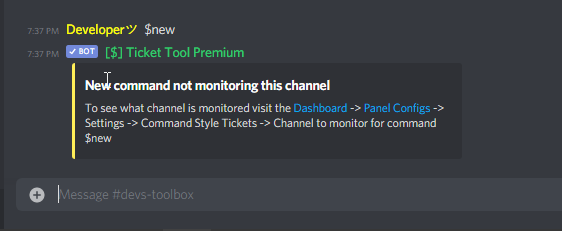 marble spruce
Does the $create work or is that not a command?
upper flower
Nope, $create isnt available, Only $new
humble sequoiaBOT
If Ticket Tool support requested this debug give them this link:
https://discordapp.com/channels/509192800865353738/662692902245498910/836402257867571220
Bot Permissions ឵ ឵឵ ឵ ឵឵ ឵ ឵឵ ឵ ឵឵
✅ - Read Channels
✅ - Send Messages
✅ - Embed Links
✅ - Attach Files
✅ - Add Reactions
✅ - Manage Roles
✅ - Manage Channels
✅ - Manage Messages
✅ - Read History
Channel Permissions ឵ ឵឵ ឵ ឵឵ ឵ ឵឵ ឵ ឵឵
✅ - Read Channels
✅ - Send Messages
✅ - Embed Links
✅ - Attach Files
✅ - Add Reactions
✅ - Manage Roles
✅ - Manage Channels
✅ - Manage Messages
✅ - Read History
Server Information ឵ ឵឵ ឵ ឵឵ ឵ ឵឵ ឵ ឵឵ ឵ ឵឵
Channel name:
community-support
Channel ID:
776680605517742090
Channel Count:
132/500
Server name:
Ticket Tool Support
Server ID:
509192800865353738
User Information ឵ ឵឵ ឵ ឵឵ ឵ ឵឵ ឵ ឵឵ ឵ ឵឵
User name:
🐍𝔹𝔼ℕ𝕁𝔸🐍#7777
User ID:
737418293304098988
Permission Level:
0 - User ()
Bot Information ឵ ឵឵ ឵ ឵឵ ឵ ឵឵ ឵ ឵឵ ឵ ឵឵
Prefix:
$
Premium Status:
Lifetime - ["subV2","subV1","time"]
Current shard:
1
API Latency:
81
humble sequoiaBOT
Ticket Tool Premium
Get premium at https://tickettool.xyz/premium
Manage your subscriptions at https://tickettool.xyz/subscriptions
Why Premium?
Premium lets you customize the bot just how you want it. It also helps keep the bot running.
 brittle canopy
$vote
humble sequoiaBOT
Votes
Current Votes: 4
Lifetime Votes: 40
Linked Votes: 40
Vote Links
Linking Info
Linked User: 414262796222595073
You can give your future votes to another user by linking with that user.
To link use $vote link (@user or userId)
To unlink use $vote unlink
Redeeming
Each vote is worth 12 hours of premium and can be redeemed once you have atleast 6 votes.
Your current votes are worth 2 days, 0h, 0m
To redeem your current votes use $vote redeem
brittle canopy
$vote redeem
humble sequoiaBOT
You need atleast 6 votes to redeem
brittle canopy
$vote redeem
marble spruce
$vote link @marble spruce
humble sequoiaBOT
You can't link to yourself.. sillypants. =)
marble spruce
oof how does that work?
scenic plinth
If you link it to someone, everytime you use $vote, the vote goes to their vote count, where they then can redeem premium perks and the such.
scenic plinth
No probs :)
Have a great rest of your day!
humble sequoiaBOT
Votes
Current Votes: 0
Lifetime Votes: 0
Linked Votes: 0
Vote Links
Linking Info
Linked User: Not Linked
You can give your future votes to another user by linking with that user.
To link use $vote link (@user or userId)
To unlink use $vote unlink
Redeeming
Each vote is worth 12 hours of premium and can be redeemed once you have atleast 6 votes.
Your current votes are worth 0m
To redeem your current votes use $vote redeem
marble spruce
So i have the trial premium, what should i use to show a image at the bottom left?
I tried lightshot, but it only made it blank(hope thats not advertising)
Also how do i link premium with my discord account?
humble sequoiaBOT
Help Options
$help commands - Information on commands
$help setup - Information on bot setup
$help faq - Frequently asked questions
Setting up Ticket Tool
Visit the docs for setup info
General Setup
What are the direct URLs?
A direct access URL is an easy to read URL that users can enter to get to a specific item, document, page, category, or perspective, in which our bot TicketTool can read and get it displayed in your 'Panel Message' or your 'Ticket Message'.
Where can I get them?
The recommended way is to use 'Imgur', you can signup within a few minutes and then upload the image you want, and copy the URL of the uploaded image and paste it into one of the four boxes. There are alternatives to this, such as other image or video storing websites or using 'Open Original' of an image and paste it in (please be aware that if your image is deleted, Discord will automatically delete the link to it in a few days). Please note this requires 'Premium'. Imgur
 atomic solstice
humble sequoia
atomic solstice
humble sequoia
@marble spruce here is the best way to add the images to embeds
marble spruce
thank you
atomic solstice
no problem
marble spruce
how can i make the bot do something like this: #🎫│make-a-ticket message
humble sequoiaBOT
Multipanels are a premium feature that allow for a single panel with multiple reactions to open different tickets.
How to create a Multipanel
Premium users can combine multiple panels into one multipanel.
First of all you will need to assign a different Create Ticket Reaction for each Panel. Run $help reaction to learn how to do it.
Next, find the IDs of each panel you wish to combine. You can find them in your Panel Configs in the Dashboard
Next, send the multipanel to a channel using $panel [id1] [id2] {id3} ....
e.g. $panel 1 2 4 17 35 to combine panels 1, 2, 4, 17 and 35.
Up to 20 panels may be combined.
atomic solstice
here is how you can do it @marble spruce ^^
marble spruce
Thanks again ❤️
atomic solstice
no problem
marble spruce
Can someone give me the announcements ping role? for some reason, its not allowing me to click on the reaction role,(i click it, but it immediately takes it back)
atomic solstice
marble spruce
Can someone give me the announcements ping role? for some reason, its not allowi...
try now again
marble spruce
nope :/
atomic solstice
marble spruce
nope :/
will be fixed soon
marble spruce
ok
 versed lake
How do you make a panel for ticket tool
atomic solstice
$help panel
humble sequoiaBOT
Creating a panel
To create a panel we are going to need to head over to the panel configs on the dashboard
Once at the dashboard we will need to click Create Panel
Enter a panel name (Fill in any optional settings you want)
Click Create Panel and your ready to get started with configuring your panel
An example of a creating a panel is shown below.
atomic solstice
versed lake
How do you make a panel for ticket tool
like this ^^
versed lake
How do I get there
humble sequoiaBOT
 versed lake
Can U only make the ticket it if your the owner of the server?
abstract wigeon
Thank you for helping the community members! @atomic solstice
iron nightBOT
Gave 1 Rep to Satisfy (current: #5 - 32)
versed lake
?
atomic solstice
versed lake
Can U only make the ticket it if your the owner of the server?
in terms of creating the panels, they can only be made from the Dashboard so only the owner, people with administrator or the role which is added to the dashboard roles can make them. But in terms of tickets from the server everyone can make tickets by clicking on the emoji under the panel which you send
versed lake
Ok I got the owner role right from my mate and I'm adding the bot to the server. But when I go to manage servers it isn't coming up
How do I add roles to the dashboard
humble sequoiaBOT
Don't see your server in the dashboard?
You will possibly need to relog. Look below to see steps on how to relog.
How to relog the Dashboard.
First, you will need to go to the dashboard. Once your there, click on your avatar on the top right. after you clicked it, you will see button that says Logout. You must click that. Once you have logged out, you can log back in.
Note:
You need one of these 3 things to access the dashboard.
1. Server Owner (Level: 6)
2. Server Administrator (Level: 4)
3. Dashboard Role (Level: 2)
You can check your level using $level on your Discord Server
abstract wigeon
Follow the instructions shown above ^^
atomic solstice
versed lake
Ok I got the owner role right from my mate and I'm adding the bot to the server....
the Owner role has to have Administrator or it has to be added to the Dashboard roles
versed lake
Ok
abstract wigeon
You can check what level you have by running $level in your server.
You need to have one of the following levels: 6, 4 or 2.
versed lake
How do you change your levels?
atomic solstice
well the owner of the server has to either give the Owner role to the dashboard roles or give the role Administrator
that how the levels change
versed lake
Ok thanks guys
atomic solstice
np
boreal lotus
Hey Hey! How can i make multiple reactions like in "make a ticket" channel?
humble sequoiaBOT
Multipanels are a premium feature that allow for a single panel with multiple reactions to open different tickets.
How to create a Multipanel
Premium users can combine multiple panels into one multipanel.
First of all you will need to assign a different Create Ticket Reaction for each Panel. Run $help reaction to learn how to do it.
Next, find the IDs of each panel you wish to combine. You can find them in your Panel Configs in the Dashboard
Next, send the multipanel to a channel using $panel [id1] [id2] {id3} ....
e.g. $panel 1 2 4 17 35 to combine panels 1, 2, 4, 17 and 35.
Up to 20 panels may be combined.
atomic solstice
@boreal lotus here ^^
boreal lotus
thanks c:
 subtle fable
Can the originator of a ticket see it once it is closed? We're looking at having Support Staff close a ticket and then continue the conversdation between themselves (without the originator) and then if needed re=open ticket to continue the conversation with the originator. But I can't see how this stops the originator viewing the ticket once closed, or seeing the Support Staff's conversation once re-opened (? 😦 ?)
atomic solstice
$help perms
humble sequoiaBOT
How to set the permissions for tickets
To set a change permissions go to the Dashboard -> Panel Configs -> Settings -> Permission Options
atomic solstice
subtle fable
Can the originator of a ticket see it once it is closed? We're looking at havi...
here is how ^^
you just add the Read messages permission for the Support Team Closed permissions
subtle fable
ah ok. oh yeah ok. Thanks I'll play in there for a bit 🙂
craggy geyser
But I think if it is reopened, the support staff convo will be seen
subtle fable
ummm....should this say something like permissions will be set on every OTHER role when Support Staff close a ticket?

when support staff close a ticket I DON'T want the originator to be able to see it, and ideally IF reopened the originator can't see the Supports Staffs discussion while it was closed (but I don't see that as possible at all)
atomic solstice
subtle fable
ummm....should this say something like permissions will be set on every OTHER ro...
no, these are for support only
for the member
you have to go to User closed permissions
subtle fable
ah yes
atomic solstice
subtle fable
when support staff close a ticket I DON'T want the originator to be able to see ...
this will not be possible since you cannot hide a part of chat on discord
craggy geyser
All you can do is delete the support messages before opening it
subtle fable
understood. Thanks all very helpful
 umbral coveBOT
miha.si😎😜🐱🏍😃 has been silenced for 10m 

 Reason: Posting Discord Server Invites
miha.si😎😜🐱🏍😃#2577 | 789160962987917362
quiet cradle
$help perms
humble sequoiaBOT
How to set the permissions for tickets
To set a change permissions go to the Dashboard -> Panel Configs -> Settings -> Permission Options
 forest goblet
 vagrant wagon
how do i edit my original multipanel message
vagrant wagon
how do i edit my original multipanel message
Edit it on the dashboard and then react with 🛠️ .
 marble spruce
$help reaction
humble sequoiaBOT
How to change reactions
To set a custom reaction Dashboard -> Panel Configs -> Settings -> Reaction Options -> <Reaction to change> -> Reaction
NOTE you need premium to do this.
subtle fable
but that just changes the actual reaction icon....not the description in the panel yeah. I couldn't find where to edit the panel itself
humble sequoiaBOT
**Panel Message**
The panel message is where people react to make a ticket. To customize it head over to your Dashboard --> Panel Configs -> Settings -> Panel Options -> Edit Panel Message
mystic hound
Does that help?
subtle fable
yeah but on the reactions area you can edit the reaction icon for clise, reopen, delete etc..but not their panel descriptions.
that i could find 😩
 worn pollen
How to totally turn off ticket limit?
humble sequoiaBOT
How to set a ticket limit
A ticket limit may be set per panel to prevent users from spamming tickets. By default this limit is set to 3. Once a user hits this limit the bot will notify the users that they reached the limit.
To set a ticket limit go to the Dashboard -> Panel Configs -> Settings -> General Options -> Ticket Limit
 iron nightBOT
Gave 1 Rep to Light (current: #3 - 44)
jade topaz
How can I make the tickets appear in a category that I put in my server, I mean that they only appear in that category
scenic plinth
jade topaz
How can I make the tickets appear in a category that I put in my server, I mean ...
$help category
humble sequoiaBOT
How to set the open category
To set a open category go to the Dashboard -> Panel Configs -> Settings -> Category Options -> Category Open
jade topaz
scenic plinth
$help category
Thanks
iron nightBOT
Gave 1 Rep to zlyzzツ (current: #6 - 30)
scenic plinth
Your welcome, have a wonderful day :)
 mortal geyser
hello, i open a french ticket but no-one come so i translate my request in english. I need to wait a french or because i translate it someone else can come ?
scenic plinth
mortal geyser
hello, i open a french ticket but no-one come so i translate my request in engli...
French support usually is a little longer due to limits in another language. English users just started school and most people are starting work, they will respond eventually.
La prise en charge du français est généralement un peu plus longue en raison des limites d'une autre langue. Les utilisateurs anglais viennent de commencer l'école et la plupart des gens commencent à travailler, ils finiront par y répondre.
mortal geyser
I can speak twice np
Thanks my ticket can help all french support so if it can be read is better :p
Thanks @scenic plinth
iron nightBOT
Gave 1 Rep to zlyzzツ (current: #6 - 31)
mortal geyser
sorry for the ping
scenic plinth
Your welcome, have a wonderful day :)
 hot tinsel
I have a premium key and have been using it with an existing discord, but I'd like to move my ticket tool (and premium key) to another discord. Is this possible?
Second question, is it possible to export/import my ticket tool panel/configs to the new server without manually remaking them?
😄
humble sequoiaBOT
Backup and Restore allows you to transfer your premium status, panels, tags, and all settings to a new server.
You can also use it to keep a backup of your settings incase you need to suddenly move servers. We suggest you keep this backup key somewhere safe, incase your server is deleted. You will want to copy the whole key.
First, go to your dashboard, then Server Configs and generate a new backup key by pressing the green button. Now, a key should be generated in the box above. You may need to refresh the page to see this.
Once you have your backup key, navigate to the same page on the new server. Copy the key on the second field.
Now you can choose what you want to copy. Finally, press the green “Restore Configs” button.
scenic plinth
$transfer
humble sequoiaBOT

Premium Transfer
If you would like to move premium, panels, & tags to another server, please provide your old servers ID and your new servers ID or you can use our transfer feature yourself, learn more here
How do I find my server ID.
Open your Discord server, right-click on the server name, then select Copy ID or you can do $id in your server.
Server deleted? Can’t find the server ID?
If the server is deleted, please go into your search history and find the last time you were managing that server. At the end of the website, it should show a ID. That is your server ID.
I can't find either of them
Please notify a Support Team member that you can not find any of your Server IDs & they will assist you.
scenic plinth
@hot tinsel^ There you go :)
iron nightBOT
Gave 1 Rep to zlyzzツ (current: #5 - 32)
scenic plinth
Your welcome, have a wonderful day :)
Support members will be with you as soon as possible, keep in mind most people in the US just started school or work.
I'm sure they will be able to help you either way.
scenic plinth
$invite
humble sequoiaBOT
Ticket Tool Invite & Support
scenic plinth
@tawny sleet^ Bottom link
 tawny sleet
No not the primeime
atomic solstice
that link is for the free bot
 carmine pumice
Hello, wondering it I can make a ticket close after say 24 hours of inactivity?
or maybe do a thing where it asks if the person wants to close the ticket automatically?
humble sequoiaBOT
Automation disabled
There's currently no ETA for when automation will be enabled again. The issue that's caused it to be disabled, us hitting rate limits, is tied to the increased load on Discord's servers. The situation's currently unpredictable, which makes it so we can't give you a fixed time.
 fringe python
помогите
 old shard
How do I make it to where certain staff are able to see tickets? It seems only those with admin perms or admin role in the discord are able to do so.
scenic plinth
$help support
humble sequoiaBOT
How to let support team see into a ticket
About support roles
A support role lets your support team see into tickets with out having to add them manually to each and every ticket.
You can add as many support roles as you like per panel.
NOTE that the way discord works all admins can see into tickets regardless of this.
How to set a support role
To set a Support role go to the Dashboard -> Panel Configs -> Settings -> General Options -> Support Team Roles.
NOTE that the support role will not be able to see into tickets that are already created..
scenic plinth
@old shard ^ There you go :)
old shard
scenic plinth
<@597105045921857590> ^ There you go :)
Thank you so much!!
iron nightBOT
Gave 1 Rep to zlyzzツ (current: #5 - 33)
scenic plinth
Your welcome, have a wonderful day :)
old shard
scenic plinth
Your welcome, have a wonderful day :)
I love the ticket BOT as it keeps things private for players. Thanks to the dev for creating it and all those who keep it running! You have a good day too 🤗
iron nightBOT
@old shard :: You can't rep zlyzzツ#3643 for 58 minutes and 28 seconds. Try coming back later?
jade topaz
How can I, when people open a ticket, what the text of the ticket tool appears, how can that text be changed to another?
 languid slate
you have to go on the dashboard
humble sequoiaBOT
**Ticket Message**
The Ticket Message is the first message sent by the bot in a new ticket. To customize it head over to your Dashboard -> Panel Configs -> Settings -> Ticket Options -> Edit Ticket Message
scenic plinth
There you go :)
jade topaz
thanks
 agile shoal
How to create a ticket?
scenic plinth
agile shoal
How to create a ticket?
#🎫│make-a-ticket, if not here follow the embed to create one in your own server.
 desert scroll
agile shoal
How to create a ticket?
scenic plinth
desert scroll
agile shoal
How to create a ticket?
scenic plinth
$help setup
humble sequoiaBOT
Setting up Ticket Tool
Visit the docs for setup info
General Setup
agile shoal
Thx
jade topaz
Where do you give suggestions?
humble sequoiaBOT
Suggestions for Ticket Tool
Suggestions for the bot have been moved to our Ticket Tool Community Server.
See Suggestions in #824021828704010315
Make a Suggestion
Use ^suggest <suggestion> in #825359982534721546
craggy geyser
jade topaz
Where do you give suggestions?
Here ^
 pseudo seal
i got ticket tool to my server today and it works for owner admin and mod but not for the members what can the problem be?
craggy geyser
pseudo seal
i got ticket tool to my server today and it works for owner admin and mod but no...
As in when the admin and mods react it opens a ticket but does nothing for other people? If so it is the reaction setttings
scenic plinth
pseudo seal
i got ticket tool to my server today and it works for owner admin and mod but no...
Make sure you don't have roles blacklisted for reactions, this can prevent the members from creating tickets. You can also try editing the "user opened permissions" and set it to read & send messages. This seems to be a common mistak, however a simple fix.
pseudo seal
ok thx
craggy geyser
Make sure that is not ticked
 jade topaz
craggy geyser
Here ^
jade topaz
craggy geyser
Here ^
it says ^suggest in #deleted-channel
craggy geyser
It doesn't say deleted channel for me. Are you in the community server?
jade topaz
nop
craggy geyser
That might be why. It is a channel in there
scenic plinth
Join the community server, if you need to get guided feel free to ping me in general chat there and I can help you.
 humble sequoiaBOT
**Panel Message**
The panel message is where people react to make a ticket. To customize it head over to your Dashboard --> Panel Configs -> Settings -> Panel Options -> Edit Panel Message
scenic plinth
If you want to change the message where it says {user} Welcome, follow the below embed.
humble sequoiaBOT
**Ticket Message**
The Ticket Message is the first message sent by the bot in a new ticket. To customize it head over to your Dashboard -> Panel Configs -> Settings -> Ticket Options -> Edit Ticket Message
 vital lion
السلام عليكم ورحمة الله وبركاته
 robust sandalBOT
vital lion
السلام عليكم ورحمة الله وبركاته
robust sandalBOT
vital lion
السلام عليكم ورحمة الله وبركاته
 亗 |〖𝐀𝐁𝐎 𝐅𝐀𝐇𝐀𝐃🇴🇲〗
Peace be upon you and God's mercy and blessings
 Arabic (ar) → English (en)
scenic plinth
Arabic (ar) → English (en)
scenic plinth
...
 tall nest
humble sequoiaBOT
tall nest
humble sequoiaBOT
Don't see your server in the dashboard?
You will possibly need to relog. Look below to see steps on how to relog.
How to relog the Dashboard.
First, you will need to go to the dashboard. Once your there, click on your avatar on the top right. after you clicked it, you will see button that says Logout. You must click that. Once you have logged out, you can log back in.
Note:
You need one of these 3 things to access the dashboard.
1. Server Owner (Level: 6)
2. Server Administrator (Level: 4)
3. Dashboard Role (Level: 2)
You can check your level using $level on your Discord Server
scenic plinth
There you go :)
scenic plinth
:)
 bold imp
scenic plinth
If you want to change the message where it says `{user} Welcome`, follow the bel...
bold imp
scenic plinth
If you want to change the message where it says `{user} Welcome`, follow the bel...
How 2 do with role?
k thx ping
scenic plinth
$help ping
humble sequoiaBOT
How to make Ticket Tool ping a role
To make ticket tool ping a role when a ticket is opened, go to the Dashboard -> Panel Configs -> Settings -> Ticket Options -> Ticket Message -> Message Text and do this:
{@Role name} This is case sensitive and the role must have @mentions enabled
marble spruce
is there a way to get rid of the panel name on the reaction panel thingy?
 pale pilot
If you have premium, yes. You can replace it with the {empty} variable
@marble spruce
marble spruce
ok thank you, also how do i get the premium role if i have the premium bot?
scenic plinth
$pc
humble sequoiaBOT

How to get premium role
Until the automatic premium check is fixed run the command $debug on your server and send us the link in a ticket.
scenic plinth
@marble spruce
 merry quest
Heyho. I got the problem that the perms for @ everyone don't get set
 scenic plinth
If you want everyone to see the ticket, configure the "keep visible" you see in your screen.
You can try resending the panel as usually when you make changes to the panel you need to resend it to the channel.
iron nightBOT
Gave 1 Rep to zlyzzツ (current: #5 - 34)
 runic hull
Hey, the bot randomly started putting tickets in the wrong category. Instead of putting them in the category saved, they are putting them at the top of my server.
scenic plinth
runic hull
Hey, the bot randomly started putting tickets in the wrong category. Instead of ...
You have likely hit 50 channels in the category, it is a discord limitation and nobody can do anything about it. Sorry.
runic hull
I didnt even know that existed, Thanks for the info.
scenic plinth
No problem, have a nice rest of your day!
runic hull
you too
drifting ravine
what does auto pin ticket do?
wicked scroll
drifting ravine
what does auto pin ticket do?
pin the first message when the ticket is opened
Example:

 frozen ridge
How can I stop ticket tool from auto closing tickets when the user leaves the server?
eager cargo
dashboard > manage servers > select server > panel configs > panel settings > automation options > then switch auto close to off
frozen ridge
thanks :)
eager cargo
My pleasure
 tribal maple
 graceful stream
Bot suddenly ignoring commands for anyone else? 🤔
graceful stream
Bot suddenly ignoring commands for anyone else? 🤔
yeah happening to me too
tribal maple
oh alr understood
graceful stream
Gotcha, ty ❤️
upper flower
graceful stream
Premium bot
premium bot u said?
graceful stream
Yep yep
upper flower
Okay thanks
upper flower
Does it show online?
graceful stream
Yes
tribal maple
yes
graceful stream
Ignores commands though
 tidal bear
uhm the bot isnt responding to commands and reactions
upper flower
Yup, we are restarting
tidal bear
ah i didnt know lol
upper flower
@graceful stream create english ticket pls
 solid stream
The bot seems to be doing everything it should.
best guess is that discord is having issues.
humble sequoiaBOT
Pong! Latency is 230ms. API Latency is 81ms [-]
upper flower
?ping
umbral coveBOT
Wick Status:
<:online:660789937205149740> Shard [0]:
 Latency:
 41ms
 Uptime:
 12d
 Resources:
 RAM:
RAM: 201 MB
 CPU:
CPU: 8.50%
 Size:
Size:
 Servers:
 59
 Members:
 521.6K
<:online:660789937205149740> Shard [1]:
 Latency:
 20ms
Uptime: 12d
Resources:
RAM: 197 MB
CPU: 3.15%
Size:
Servers: 42
Members: 487.9K
<:online:660789937205149740> Shard [2]:
Latency: 26ms
Uptime: 12d
Resources:
RAM: 94 MB
CPU: 2.17%
Size:
Servers: 46
Members: 195.9K
solid stream
Since I don't see anything wrong in the logs.
scenic plinth
The bot doesn't seem to be having issues in the 43 servers I share with it.
 mint birch
is there limit panels? for free?
graceful stream
@tribal maple Are you on premium?
scenic plinth
mint birch
is there limit panels? for free?
There shouldn't be no, do you have an issue?
tribal maple
graceful stream
<@!262077793528053761> Are you on premium?
yes
humble sequoiaBOT
Pong! Latency is 263ms. API Latency is 80ms [-]
upper flower
ofc it works here..
graceful stream
tribal maple
yes
Are you on the trial? I'm wondering if it's a key validation issue
 worthy spruce
Hi, the ticket tool bot isn't responding to commands nor reactions in my server
scenic plinth
worthy spruce
Hi, the ticket tool bot isn't responding to commands nor reactions in my server
graceful stream
Poor stitch 😂
worthy spruce
Oh
upper flower
graceful stream
Are you on the trial? I'm wondering if it's a key validation issue
I like ur thoughts. time to look into
graceful stream
❤️
scenic plinth
upper flower
ofc it works here..
There's a possibility it might be like that for premium or some shards, none of my servers have a issue.
scenic plinth
worthy spruce
Hi, the ticket tool bot isn't responding to commands nor reactions in my server
Are you on premium or normal?
worthy spruce
Premium
scenic plinth
Premium issue, as I thought. Rip. Well dev is looking into it.
 humble iris
So I am about to add this bot to my group a few things
So ppl just got to open a ticket then it auto makes a channel for them and your mods and admins ?
Like how do I set this up
scenic plinth
humble iris
So I am about to add this bot to my group a few things
So ppl just got to open ...
$help setup
humble sequoiaBOT
Setting up Ticket Tool
Visit the docs for setup info
General Setup
scenic plinth
Its the same, the command is just setup with premium.
It's the same thing as well, just premium offers more.
tribal maple
graceful stream
Are you on the trial? I'm wondering if it's a key validation issue
No I paid for it
graceful stream
tribal maple
No I paid for it
What shard is it on? You can click the bot's profile and it'll tell you
tribal maple
graceful stream
What shard is it on? You can click the bot's profile and it'll tell you
Shard 8
graceful stream
@upper flower Both on shard 8
upper flower
mucho interesante
scenic plinth
humble iris
Does the bot need administrator role
No, usually preferred. When you invite the bot, it should have the permissions listed when you selected the server.
humble iris
Ya I am up to the making panel I did it but says this
It needs to be able to view and send info in that channel
scenic plinth
humble iris
It needs to be able to view and send info in that channel
Simple channel issue, on the channel, allow it's role to "read and send messages" as well as "add reactions", then see what happens from there.
humble iris
I think I got it
I got it
How do I set it up tho
When the channel is created it goes next to the ticket tool one
@scenic plinth
Or anyone know
scenic plinth
Can you show me what you mean by "it goes next to the ticket tool one"
 scenic plinth
Ok, are you on PC or mobile.
scenic plinth
It's what you prefer easiest
humble iris
Phone
scenic plinth
Ok, do you know how to edit channel permissions?
scenic plinth
Ok, when you edit channel permissions, go to the "permissions" tab, go to "add role", and go add ticket tools role, and allow the permssions;
- Read Messages
- Send Messages
- Add Reactions
And save the permissions by hitting the blue button in the bottom right of your screen.
humble iris
I did that
For the role of it
It makes a channel on the top tho
I want it next time the open ticket
@scenic plinth
scenic plinth
Are you creating a channel? It shouldn't make a channel, you are simply editing permissions to allow the bot to send it.
humble iris
The bot makes it own channel I want it placed tho under open a ticket
Like ticket 001 under that
scenic plinth
You will have to move the channel, it doesn't send in a open ticket.
Oh wait, are you talking about where to place the open tickets?
scenic plinth
I thought you were talking about the channel permissions, apologies.
If you want it to go to a category, follow the embed below.
humble iris
No worries, sry I was not clear enough.
scenic plinth
$help category
humble sequoiaBOT
How to set the open category
To set a open category go to the Dashboard -> Panel Configs -> Settings -> Category Options -> Category Open
scenic plinth
You will have to resend the panel as I believe it won't use those settings until resent, but it should open tickets in the category you define.

 scenic plinth
It by default creates the channel (ticket) under the channel(s) in the category, there isn't necessarily a way to create it in the middle of the category without moving it yourself.
humble iris
How do I move the ticket 0002 so that will be under open a ticket
Not under announcements all the way on the top
scenic plinth
You said you are on mobile right?
humble iris
Yes, that is correct.
scenic plinth
humble iris
Yes, that is correct.
Ok, to move a channel, you will need to go to your server settings. (Hit the three dots by your server name if you don't know where this is)
Select "channels"
Select the three lines at the top right of your screen, and select "text channel"
Here, you will see lines show on the side of each channel name, click and drag on the lines, you should see it is moving. Place it under the channel you desire.
humble iris
No I do not think you understand what I am saying haha
When the bot makes the channel for support I want that
But it is auto so idk how to move it under the ticket bot to open
@scenic plinth
Do you want me to test it on yours ? @scenic plinth the one in the group
 tame tree
How do I fix this for my premium key

 lilac girder
tame tree
How do I fix this for my premium key
lilac girder
tame tree
How do I fix this for my premium key
have you check if the key is valid or not
tame tree
How do I do that?
lilac girder
from that it seems that the key is invalid/ used?
 safe osprey
U cant fix what is not an error
humble sequoiaBOT
Redeeming premium
Redeeming premium on your server is really simple. Just head over to your Subscriptions Page. There you can select a server of your choice, which will get premium. You can change the server at any point.
wicked scroll
@tame tree ^
tame tree
I did it says the same thing
humble sequoiaBOT
-- moved to ticket --
 weary nebula
How do I get my coins that I have not received
wicked scroll
$tts
humble sequoiaBOT
You're in the wrong place
We provide support for @pseudo glen discord bot and cannot help you with whatever issue you have.
Please make sure to contact the appropriate support team.
This Ticket is being deleted in 5 minutes.
_ _
wicked scroll
weary nebula
How do I get my coins that I have not received
Here is @pseudo glen Support
 bleak viper
eta on when reactions will be working again?
eager cargo
Unfortunately not, the Development Team is looking into it and trying to see whats going on at the moment. Please be patient.
 quartz idol
Hi. How do I create a support team that is tagged when a ticket is created?
humble sequoiaBOT
-- moved to ticket --
subtle fable
Reaction Settings.....we can change the icon for them (eg deletion in example below)..but not the description/reaction name in the panel. Or can we..?

and when changed ity seems the icon on bottom changes but not the one inside the panel (?)
atomic solstice
subtle fable
Reaction Settings.....we can change the icon for them (eg deletion in example be...
you change the reactions from the reaction options and the embed message in the moderator options
jade topaz
Is there still a free trial for premium?
subtle fable
thanks @atomic solstice
iron nightBOT
Gave 1 Rep to Satisfy (current: #6 - 33)
subtle fable
yes we are on it atm
jade topaz
The free trial?
subtle fable
yeah. 4 days left on it though I've already purchased a subscription
jade topaz
Can you link me how to get it? I can't seem to find it.
subtle fable
ah...wasn't me that signed up for the tyrial 😦
jade topaz
I found it, thanks tho!

 umbral coveBOT
kiu has been silenced for 10m
Reason: Posting Discord Server Invites
kiu#0064 | 782196219974778880
 void pumice
lol
humble sequoiaBOT
**Panel Message**
The panel message is where people react to make a ticket. To customize it head over to your Dashboard --> Panel Configs -> Settings -> Panel Options -> Edit Panel Message
atomic solstice
humble sequoia
here ^^ @void pumice
 snow bison
can somebody like tell me how to make sure that the transcript also saves the messages when the ticket is saved
 candid maple
Hola alguien habla español?
snow bison
candid maple
Hola alguien habla español?
i dont know spanish
candid maple
snow bison
i dont know spanish
spanish?
candid maple
snow bison
i prefer english
me no 😦
snow bison
snow bison
can somebody like tell me how to make sure that the transcript also saves the me...
@atomic solstice can u help?
candid maple
I don't speak so much English, can you speak Spanish?
snow bison
candid maple
I don't speak so much English, can you speak Spanish?
i dont know spanish
candid maple
snow bison
i dont know spanish
Well I English yes
snow bison
candid maple
Well I English yes
can we talk later i need to solve my doubt
candid maple
How old are you and what is your name? XD
candid maple
snow bison
can we talk later i need to solve my doubt
Yes, yes, calm down
 fierce thistle
why it says like this for me https://cdn.discordapp.com/attachments/785653985771257866/836863472309501952/unknown.png

 atomic solstice
snow bison
<@!601783394334015498> can u help?
atomic solstice
snow bison
<@!601783394334015498> can u help?
Please don't ping Support and transcript saves the last 500 messages in the ticket
abstract wigeon
candid maple
How old are you and what is your name? XD
This is not a community server. This server is only intended for support on the bot. If you would like to hang out with other Ticket Tool users, join the community server.
humble sequoiaBOT
Ticket Tool Invite & Support
abstract wigeon
Link ^^
abstract wigeon
fierce thistle
why it says like this for me https://cdn.discordapp.com/attachments/785653985771...
You are trying to login to the help page, which is only intended for support team. You need to login to the main website, link can be found here: https://tt.bot