#🆘│community-support
1 messages · Page 306 of 1
 grave fiber
 scenic plinth
grave fiber
Sorry, where can I use this bot commands to check my votes?
scenic plinth
grave fiber
Sorry, where can I use this bot commands to check my votes?
Votes were moved to the community server. You can find it in #827209540671111210.
Or, in your server you can use $vote to check all your votes.
 abstract wigeon
Welcome to Ticket Tool!
 kindred frost
how many tickets can be created ?
abstract wigeon
As I know there isn't really a limit.
The only limit I know is this:

One user can only create up to 99 tickets.
 pale pilot
at the same time
The ticket limit is 499 at the same time, because discord only allows 500 channels to be in a server
 frozen tide
IM FROM LIBYA
 spring field
I would like to use this service heavily. Any support available to spitball ideas to see if this application would fit the scenario?
 knotty condor
I Ned help
abstract wigeon
knotty condor
I Ned help
How can I help you?
knotty condor
German?
abstract wigeon
I can translate
 robust sandalBOT
knotty condor
Ich habe einen ticket gemacht könen air da schreiben
robust sandalBOT
knotty condor
Ich habe einen ticket gemacht könen air da schreiben
 ANIME GOTT猿
I have made a ticket can write air there
 German (de) → English (en)
abstract wigeon
German (de) → English (en)
abstract wigeon
Yea you can write a custom message if you want.
robust sandalBOT
abstract wigeon
Yea you can write a custom message if you want.
 Daniel Harrison
Ja, Sie können eine benutzerdefinierte Nachricht schreiben, wenn Sie möchten.
English (en) → German (de)
knotty condor
Wie geht das ?
robust sandalBOT
knotty condor
Wie geht das ?
Trying to translate to German but detected as German.
Please don't waste translations by trying to translate to the same language.
robust sandalBOT
knotty condor
Wie geht das ?
ANIME GOTT猿
How does that work?
German (de) → English (en)
 humble sequoiaBOT
**Ticket Message**
The Ticket Message is the first message sent by the bot in a new ticket. To customize it head over to your Dashboard -> Panel Configs -> Settings -> Ticket Options -> Edit Ticket Message
 abstract wigeon
^^
knotty condor
Ich habe halt einen ticket gemacht da würde ich mit ihnen chaten
robust sandalBOT
knotty condor
Ich habe halt einen ticket gemacht da würde ich mit ihnen chaten
ANIME GOTT猿
I just made a ticket because I would chat with them
German (de) → English (en)
knotty condor
Könten sie das machen ?
robust sandalBOT
knotty condor
Könten sie das machen ?
ANIME GOTT猿
Can they do that?
German (de) → English (en)
knotty condor
Ja oder nein
robust sandalBOT
knotty condor
Ja oder nein
ANIME GOTT猿
Yes or no
German (de) → English (en)
 jade topaz
need help
 inner aurora
with?
jade topaz
inner aurora
with?
i added this bot to my server but doesnt works
tried 3-4 tutorial but nothing
inner aurora
@jade topaz as per our #546557408902905896 please do not DM people without asking. Have you looked at our setup guide?
humble sequoiaBOT
jade topaz
inner aurora
<@456226577798135808> as per our <#546557408902905896> please do not DM people w...
sorry, yes i did
you cant join my server and do it no?
inner aurora
No, but you're welcome to ask some questions here, or open a support ticket in #🎫│make-a-ticket
 atomic solstice
you have touse the emoji ID
atomic solstice
you also have to use the <>
 regal dragon
like this?
atomic solstice
:ghostsupply:
 iron nightBOT
Gave 1 Rep to Satisfy (current: #13 - 10)
atomic solstice
like this but also another : in front of the ghostsuply

 humble sequoiaBOT
<:blobthumbsup:494901804476137482>
:blobthumbsup:
regal dragon
yep i did that and it show :(emoji name): only
 solid stream
Make sure TIcket Tool has access to that reaction
It needs to be in the server with it.
(same as any normal user)
But since you're using it as a reaction I would think it does.

and to confirm, you're using this?
regal dragon
okay when i use < :833217517555023912>
it shows error
did i copy the ID correctly?
this is how i got the ID

i clicked the "Copy ID"
solid stream
to get the id you will either need to use \Emoji or $id Emoji
regal dragon
ah i see
regal dragon
noted thanks a lot
solid stream
now, it looks like the ID is indeed the same as the image url ones (I didn't know that)
but that doesn't seem to be what you used.
\shrug
regal dragon
got it
btw when i set up multipanels
why wont the second panel's embed text show up?
i only see the first embed text
jade topaz
how do i opeb my ticket?
open*
how do i open my ticket when somsone ask to talk with me ?
humble sequoiaBOT
jade topaz
thanks 🙂
 mystic hound
regal dragon
why wont the second panel's embed text show up?
mystic hound
regal dragon
why wont the second panel's embed text show up?
it shows the embed text of whichever panel you send first using $panel id id id so you'd have to enter all the text you want in the first panel
regal dragon
got it
 tight oar
mystic hound
tight oar
mystic hound
Hello, it appears you've already made a ticket, you can continue in there
 trim kelp
hi
I'm sorry, I added the robot to my server, but when the letter is clicked, the ticket does not open. What should I do?****
 inland hemlock
How do I make all my staff view a ticket without have adminsitrator perms?
pale pilot
@trim kelp don't ask for help in #📈│reviews
humble sequoiaBOT
If the bot is not working properly, try the following steps:
-
Run the $debug command in your server, to check the permissions of the bot. Send the link you get to us.
-
Check if you have any Blacklisted Roles in your Server Configs. Any roles listed there will not be able to use the bot / create tickets.
-
While you're in your Server Configs , make sure that you don't have the premium bot enabled, without actually having premium or the bot on the server.
These are the most common issues. If your problem still exists, you can go to our Troubleshooting Page for more fixes.
pale pilot
Try these steps please
 compact frigate
Как сделать что бы когда кто то создал тикет то упоминулась создателю сервера
robust sandalBOT
compact frigate
Как сделать что бы когда кто то создал тикет то упоминулась создателю сервера
 Линкес
How to do what would when someone created a ticket that was mentioned to the creator of the server
Russian (ru) → English (en)
 timber jacinth
Hello, I have a bug on your site, the problem is that I created a server and added the bot, and on your site I did not find the server for me to modify it, and what is the solution
 glass drum
Just log out of the site and go back in
timber jacinth
glass drum
Just log out of the site and go back in
Ok i will try
timber jacinth
glass drum
Just log out of the site and go back in
The move has succeeded , Thank you
iron nightBOT
Gave 1 Rep to Chandis. (current: #34 - 1)
timber jacinth
How do I put these things up to give a nice look
 abstract wigeon
timber jacinth
How do I put these things up to give a nice look
abstract wigeon
timber jacinth
How do I put these things up to give a nice look
What do you mean?
timber jacinth
abstract wigeon
What do you mean?
In which I mean a circle
ArabShield Community And Help Team
How inferior like her
abstract wigeon
Log out and back in again
jade topaz
When I Login Make Me Error
timber jacinth
timber jacinth
In which I mean a circle
Do you can help me @abstract wigeon
abstract wigeon
timber jacinth
How inferior like her
Do you mean move it to the right or?
jade topaz
abstract wigeon
Log out and back in again
Ok Thx Solved <33
iron nightBOT
Gave 1 Rep to Daniel Harrison (current: #16 - 6)
abstract wigeon
jade topaz
Ok Thx Solved <33
No problem at all.
timber jacinth
abstract wigeon
Do you mean move it to the right or?
🤦🏻♂️
abstract wigeon
You can type it in Arabic if you want and I can translate it.
timber jacinth
I need someone who speaks Arabic for me to help me
timber jacinth
abstract wigeon
You can type it in Arabic if you want and I can translate it.
Okay
كيف اكتب نفس الي موجود هنا فوق الي فيه دائره ArabShiled Community  و __Help Team __ اريد ان اكتب نفس مكانها

@abstract wigeon
robust sandalBOT
timber jacinth
كيف اكتب نفس الي موجود هنا فوق الي فيه دائره __ArabShiled Community <:AS_red:742...
 آبـوُ وُصْـمَــخٌ
How can I write the same thing that is here above the one in the community ArabShiled department :AS_red: and __Help team :AS_red: __ I want to write the same place
Arabic (ar) → English (en)
abstract wigeon
Oh, so you want to add your own text to where ArabShiled Community text is?
timber jacinth
abstract wigeon
Oh, so you want to add your own text to where `ArabShiled Community` text is?
Yes
abstract wigeon
Ohhh, now I get you.
humble sequoiaBOT
**Panel Message**
The panel message is where people react to make a ticket. To customize it head over to your Dashboard --> Panel Configs -> Settings -> Panel Options -> Edit Panel Message
 abstract wigeon
Follow the instructions show above.
timber jacinth
abstract wigeon
Ohhh, now I get you.
This is the best news in my life
abstract wigeon
You can edit the Avatar name and the fotter
timber jacinth
abstract wigeon
Follow the instructions show above.
Okay
 timber jacinth
Okay
abstract wigeon
Did it work out for you?
 sage steeple
How can i open a logs for the bot ?
 uneven pebble
i keep getting this message for transcripts on my bot? Transcript Failed to save
pale pilot
That means that the bot doesn't have permissions to the transcript channel
pale pilot
sage steeple
How can i open a logs for the bot ?
if you enabled logging in your panel configs you should see them in your logging channel
uneven pebble
gotcha pretty much give that channel the permissions so it can post to it
fixed thank you!
 molten ibex
How to set roles that who can see a ticket or remove roles that a certain role can't see tickets
abstract wigeon
You can set a support team role.
molten ibex
Support team role has Trial mods ... I wanna remove trial mods from tickets
abstract wigeon
I'll get the instructions for you, 2 secs.
molten ibex
Sure
abstract wigeon
$help support team roles
humble sequoiaBOT
How to let support team see into a ticket
About support roles
A support role lets your support team see into tickets with out having to add them manually to each and every ticket.
You can add as many support roles as you like per panel.
NOTE that the way discord works all admins can see into tickets regardless of this.
How to set a support role
To set a Support role go to the Dashboard -> Panel Configs -> Settings -> General Options -> Support Team Roles.

NOTE that the support role will not be able to see into tickets that are already created..
molten ibex
Aight I'll check them out
abstract wigeon
Follow the instructions show above ^^
abstract wigeon
molten ibex
Aight I'll check them out
Perfect, let me know if I can assist you with anything else.
molten ibex
abstract wigeon
Perfect, let me know if I can assist you with anything else.
Got it thanks for your help
iron nightBOT
Gave 1 Rep to Daniel Harrison (current: #15 - 7)
abstract wigeon
No problem at all, glad I could help you out.
 barren crown
abstract wigeon
barren crown
abstract wigeon
Huh?
uneven pebble
when a user opens a ticket how do i make it to were they have to fill out information vrs it just shows it in the header then they open a ticket and nothing happens but they opened a ticket?
atomic solstice
uneven pebble
when a user opens a ticket how do i make it to were they have to fill out inform...
I don't really think I understood this correctly but you want the user to instead of openning a ticket fill out premade questions?
uneven pebble
pretty much
atomic solstice
the most you can do is just write the Questions in the Embed Message
and people just answer them in the ticket
uneven pebble
yup i have noticed that. It would be a nice feature to have. Most people when they need help do not read directions they are just seeking help. So yeah it would be a nice thing to have. Maybe only do it for prime payers
atomic solstice
well the feature you are suggesting is basically what application bots do. Plus if people don't read the important information even this way
but if you want you can suggest it
humble sequoiaBOT
Suggestions for Ticket Tool
Suggestions for the bot have been moved to our Ticket Tool Community Server.
See Suggestions in #824021828704010315
Make a Suggestion
Use ^suggest <suggestion> in #825359982534721546
mystic hound
you could use a tag to send your questions but that does require manual input
uneven pebble
im listening
i run a cluster server and we have over 100 people on it and when they request help we are trying to keep it organized. We can with this bot ticket. I have 4 questions i want them to answer.
mystic hound
You could simply write the 4 questions in your ticket message itself, so that it shows up when they make a ticket
uneven pebble
i have its a fail after 2 hours i got 4 tickets with nothing in them
mystic hound
or you can make a tag, a tag is essentially a predefined response that can be triggered by a support member, so you could make a tag which contains the 4 questions, and whenever a ticket is opened a support member can send the tag
uneven pebble
 mystic hound
uneven pebble
i have its a fail after 2 hours i got 4 tickets with nothing in them
mystic hound
uneven pebble
i have its a fail after 2 hours i got 4 tickets with nothing in them
People not reading isn't going to stop regardless of how many measures you've got in place tbh, best bet is just to ping the user and ask them to answer the questions.
atomic solstice
yes this will happen even with the feature you suggested
people on Discord don't read
its just a fact
mystic hound
We have a whole channel with setup info, and then another channel that says asking for setup info in a ticket will just get you redirected to #573205317870157855 and yet we get at least 3-5 a day asking ''how do I set up the bot''
people just don't read most the time
uneven pebble
what if it was to be a forced requirement? IE user push the ticket creation button then it populates a Question they fill it it in does so until all Forced required questions are answered>
mystic hound
humble sequoia
That's not a feature we have at the moment, you could suggest it by following this embed
until then your best case scenario is to just have manual intervention to prompt the user to complete all questions (either via a tag or just a support member asking them to do so)
 upbeat vine
how do i set up the ticket tool bot
atomic solstice
upbeat vine
how do i set up the ticket tool bot
please read #573205317870157855
upbeat vine
thx
humble sequoiaBOT
atomic solstice
this also ^^
 past imp
the embed is not being edited after opting to close the ticket and the confirmation reactions are being added without that does it lack any perms or problem from bot side

 zinc swallow
Hey does anyone know why this is happening?
https://i.imgur.com/obV1SsQ.png
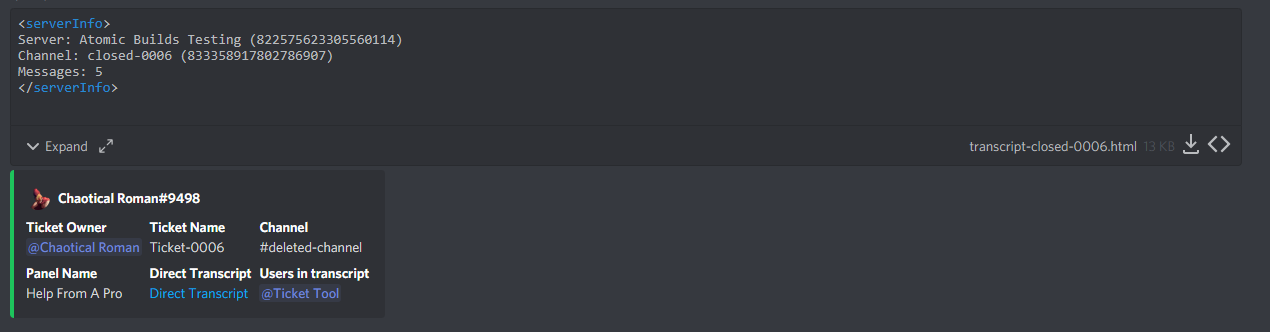

I feel like its a discord thing but idk
atomic solstice
This is normal
 eager cargo
That's Discord displaying your transcripts in HTML
atomic solstice
It was added by discord in an update
eager cargo
It's nothing we can control, sorry
atomic solstice
new displaying of files
zinc swallow
Ah looks kinda wack and unreadable tho ;-;
it used to just be a download to the html
Ill have to look into this
Is there a way to disable it?
on my side at least
past imp
past imp
the embed is not being edited after opting to close the ticket and the confirmat...
does anyone know why this happens
atomic solstice
zinc swallow
on my side at least
no, discord didn't provide a way to disable this
zinc swallow
Sad, ;-; i dont suppose BD has a solution either seeing as discord kinda booted them ;-; Welp well see what microsoft brings us after we get bought
 spiral wing
How can I archive closed tickets ?
scenic plinth
past imp
the embed is not being edited after opting to close the ticket and the confirmat...
The embed in which you showed does not edit when it is being closed, rather sends other embed messages such as who closed it or a save transcript option.
scenic plinth
spiral wing
How can I archive closed tickets ?
Are you talking about transcripts?
past imp
scenic plinth
The embed in which you showed does not edit when it is being closed, rather send...
but i guess it shd say react ❎ to cancel your action and ✅ to close the ticket
spiral wing
scenic plinth
Are you talking about transcripts?
yeah
past imp
past imp
but i guess it shd say react ❎ to cancel your action and ✅ to close the ticket
other things u said is working correctly
scenic plinth
spiral wing
yeah
$help transcript
humble sequoiaBOT
How do I save transcript to a channel?
To save transcripts to a channel go to the Dashboard -> Panel Configs -> Settings -> Logging Options -> Transcript Channel
 scenic plinth
past imp
but i guess it shd say react ❎ to cancel your action and ✅ to close the ticket
scenic plinth
past imp
but i guess it shd say react ❎ to cancel your action and ✅ to close the ticket
You can try editing the ticket message within the panel, but from what I have seen that isn't something the bot says by default.
If it has it's an old default message.
humble sequoiaBOT
**Ticket Message**
The Ticket Message is the first message sent by the bot in a new ticket. To customize it head over to your Dashboard -> Panel Configs -> Settings -> Ticket Options -> Edit Ticket Message
past imp
scenic plinth
You can try editing the ticket message within the panel, but from what I have se...
oh
ty
thanks @scenic plinth
iron nightBOT
Gave 1 Rep to ᴍᴀʏ s. | ᴀᴍʙᴇʀ ɴᴇᴛᴡᴏʀᴋ (current: #5 - 28)
past imp
:)
scenic plinth
Glad I could help :)
 elfin jungle
help
atomic solstice
elfin jungle
help
what do you need help with?
elfin jungle
can reset the bot ?
abstract wigeon
Yes
elfin jungle
abstract wigeon
Kick the bot and then re-add it
u sure ?
abstract wigeon
elfin jungle
u sure ?
Yeah, I can't find any other ways to reset the bot.
 meager osprey
i've been trying all day long to open the setup panel but i can't login, can someone help?
 abstract wigeon
The login is for staff only.
humble sequoiaBOT
abstract wigeon
Follow the instructions here ^^
meager osprey
no i mean this?
 abstract wigeon
You aren't supposed to login there. Login on this website: https://tt.bot

 craggy geyser
That login is for staff managing the docs page. Not for the bot itself
 robust meteor
Hi i have a problem. i can't open Ticket on my serv ...
 abstract wigeon
You need to edit the ticket limit.
robust meteor
I don't want make more :/
abstract wigeon
$help ticket limit
humble sequoiaBOT
How to set a ticket limit
A ticket limit may be set per panel to prevent users from spamming tickets. By default this limit is set to 3. Once a user hits this limit the bot will notify the users that they reached the limit.
To set a ticket limit go to the Dashboard -> Panel Configs -> Settings -> General Options -> Ticket Limit
 abstract wigeon
Follow the instructions above ^^
robust meteor
Just i don't see the first ticket i can't delet
abstract wigeon
What do you mean?
robust meteor
i use Ticket tool in too many serv and i have the problem only on this serv
abstract wigeon
I'm not getting what the problem is.
robust meteor
I cannot create a ticket because according to the bot I already have an open ticket except that this ticket in question I do not see it
craggy geyser
Is it your server?
abstract wigeon
Oh, I see
robust meteor
And i use this bot in too many serv and 0 problem
abstract wigeon
Have you looked through all the channels and categories?
robust meteor
ofc
abstract wigeon
That's strange.
robust meteor
For this i'm here :p
craggy geyser
It might be that the channel was deleted manually and not through ticket tool
I don't know if ticket tool would register that as closed or not
robust meteor
yeah
abstract wigeon
Maybe try to kick the bot and re-add it. But save a config backup before doing that.
robust meteor
i will try this
abstract wigeon
Follow the instructions shown there.
Don't forget to back your config up before kicking the bot, will save you a lot of time.
 abstract wigeon
That is really strange. @pale pilot
pale pilot
That's just a visual bug and shouldn't affect anything
robust meteor
xD
That affect xD
How delet this ticket if i can't see ?
even with the command I can't do anything
humble sequoiaBOT
How to fix Ticket Tool not responding
If ticket tool is not responding, please follow these troubleshooting steps:
Check Ticket Tool's permissions
Make sure that Ticket Tool can read and write in the channel you are attempting to run commands in. Run the command @Ticket Tool#4843 debug to see Ticket Tools list of permissions in that given channel.
Check Ticket Tool's prefix
Make sure you're using the correct prefix for Ticket Tool, Ticket Tools default prefix is $ Run the command @Ticket Tool#4843 debug to see Ticket Tools prefix for your server
Check if Ticket Tool is offline
If ticket tool is offline please contact Ticket Tool support with your server ID so we can fix it asap.
meager osprey
is there a way i can change perms so that only admins can close tickets?
abstract wigeon
$help support team
meager osprey
i know about that but like is there a way to uhh decline the people who open the ticket to close it? if that makes sense
humble sequoiaBOT
How to change reactions
To set a custom reaction Dashboard -> Panel Configs -> Settings -> Reaction Options -> <Reaction to change> -> Reaction

NOTE you need premium to do this.
abstract wigeon
Make it support team only.
meager osprey
alr
abstract wigeon
Let me know if there is anything else I can help you with.
meager osprey
nope that's all tysm
abstract wigeon
No problem at all.
 vital orchid
how can i make it so multiple roles can see tickets?
abstract wigeon
$help support team
humble sequoiaBOT
How to let support team see into a ticket
About support roles
A support role lets your support team see into tickets with out having to add them manually to each and every ticket.
You can add as many support roles as you like per panel.
NOTE that the way discord works all admins can see into tickets regardless of this.
How to set a support role
To set a Support role go to the Dashboard -> Panel Configs -> Settings -> General Options -> Support Team Roles.
NOTE that the support role will not be able to see into tickets that are already created..
abstract wigeon
Add role in that section ^^
vital orchid
so i need to make a panel?
abstract wigeon
Yes
vital orchid
damn
can i just apply it to my "help" channel where the reaction message is?
what does it change?
craggy geyser
Don't you need a panel to make a ticket anyway?
abstract wigeon
^
 tawny stirrup
How can I make a message something like this
 humble sequoiaBOT
**Ticket Message**
The Ticket Message is the first message sent by the bot in a new ticket. To customize it head over to your Dashboard -> Panel Configs -> Settings -> Ticket Options -> Edit Ticket Message
eager cargo
^^
eager cargo
My pleasure
craggy geyser
Since when was Quo called Aqua?
eager cargo
It's the nickname william gave me lol
craggy geyser
Fair enough. Any reason? (though this isn't support so should be moved elsewhere. To the community server!)
inner aurora
Because I thought it was fun
craggy geyser
He needs it on the community server too
jade topaz
With the ticket tool panel how do I make more than 1 reaction
humble sequoiaBOT
Multipanels are a premium feature  that allow for a single panel with multiple reactions to open different tickets.
How to create a Multipanel
Premium users can combine multiple panels into one multipanel.
First of all you will need to assign a different Create Ticket Reaction for each Panel. Run $help reaction to learn how to do it.
Next, find the IDs of each panel you wish to combine. You can find them in your Panel Configs in the Dashboard
Next, send the multipanel to a channel using $panel [id1] [id2] {id3} ....
e.g. $panel 1 2 4 17 35 to combine panels 1, 2, 4, 17 and 35.
Up to 20 panels may be combined.
 iron nightBOT
Gave 1 Rep to Swiftgale (current: #20 - 4)
craggy geyser
Np. Glad I can help
tawny stirrup
humble sequoia
The panel settings doesn't let me to choose the correct channel
Q~Q
abstract wigeon
Reload the page
abstract wigeon
No problem at all, let me know if there is anything else I can assist you with.
tawny stirrup
Alright
jade topaz
can you use the username of one claiming the ticket in here?
 eager cargo
$variables
humble sequoiaBOT
Note: Remove The $ From The Variables
Supported Variables
{$server_name} -The server name
{$@Role Name} -The role name you want to mention (role names are case sensitive.)
{$empty} -Use this if you want to send nothing in a required field.
{$channel_name} -The channel name this message is used in/from
{$channel} -The channel this message is used in/from
{$user_nickname} -The users nickname (if set)
{$user_tag} -The users tag
{$user_name} -The users username
{$userfull} -The users username and usertag combined
{$user} -The users @user
{$user_icon} -The url for the users icon
{$ticket_limit} -The current ticket limit
{$panel_name} -The panels name
{$ticket_name} -The tickets name
{$ticket_category} -The category tickets are created in (if set)
{$count}The current count for tickets
{$ticket_channel} -The #channel for the ticket you created
{$ticket_user} -The @user who is assigned to the Ticket
{$ticket_user_nickname} -The nickname of the user who is assigned to the Ticket (if set)
{$ticket_user_tag} -The tag of the user who is assigned to the Ticket
{$ticket_user_name} -The username of the user who is assigned to the Ticket
Note: Remove The $ From The Variables
jade topaz
yeah but I really can't say which one is the claimee
or even if it's there
because it seems it's not there
 wicked scroll
{user_name}
eager cargo
^
jade topaz
ok thanks!
eager cargo
our pleasure
jade topaz
thanks @eager cargo
iron nightBOT
Gave 1 Rep to Quo (current: #1 - 58)
jade topaz
thanks @wicked scroll
iron nightBOT
Error: You're still on cooldown
eager cargo
thanks @wicked scroll
iron nightBOT
Gave 1 Rep to otaviocng (current: #8 - 17)
jade topaz
yeah, thank you for quick response. It could be more descriptive, you know there are a lot of "users" involved.
craggy geyser
I think all users for variables are just the person who opened the ticket
I think all users for variables are just the person who opened the ticket
 valid rose
hello guys how can I choose under what categoty the ticket appears under?
abstract wigeon
$help Category Options
humble sequoiaBOT
How to set the open category
To set a open category go to the Dashboard -> Panel Configs -> Settings -> Category Options -> Category Open
 abstract wigeon
valid rose
hello guys how can I choose under what categoty the ticket appears under?
abstract wigeon
valid rose
hello guys how can I choose under what categoty the ticket appears under?
Follow the instructions above ^^
 round storm
Help me
abstract wigeon
round storm
Help me
What do you need help with?
round storm
Do you speak spanish?
abstract wigeon
I'll translate.
abstract wigeon
Just send it in Spanish and I'll translate it
valid rose
round storm
😭
^
robust sandalBOT
abstract wigeon
Just send it in Spanish and I'll translate it
Daniel Harrison
Sólo envíalo en español y lo traduciré
English (en) → Spanish (es)
abstract wigeon
Me entiendes?
round storm
A si si
Mira mi duda es
Haber mi duda es
Al abrir un ticket en mi server
Como hacer para que pinguee a los staffs ?
Osea yo abro ticket y solo meciona al ususario pero no menciona a los staffs
@abstract wigeon
abstract wigeon
Ohhh, okay.
wicked scroll
round storm
Osea yo abro ticket y solo meciona al ususario pero no menciona a los staffs
$help ping
humble sequoiaBOT
How to make Ticket Tool ping a role
To make ticket tool ping a role when a ticket is opened, go to the Dashboard -> Panel Configs -> Settings -> Ticket Options -> Ticket Message -> Message Text and do this:
{@Role name} This is case sensitive and the role must have @mentions enabled
 abstract wigeon
¿Quieres que mencione un rol específico o @here?
round storm
abstract wigeon
¿Quieres que mencione un rol específico o `@here`?
Staff
Rol especifico
abstract wigeon
Obtenga el nombre de la función y colóquelo en {}
Recuerde que los roles distinguen entre mayúsculas y minúsculas
valid rose
$help transcript
humble sequoiaBOT
How do I save transcript to a channel?
To save transcripts to a channel go to the Dashboard -> Panel Configs -> Settings -> Logging Options -> Transcript Channel
round storm
abstract wigeon
Obtenga el nombre de la función y colóquelo en {}
Esque no me aparece estoy en celular
AAAA CREO QUE YA entendi
<@&800394575218737182>
robust sandalBOT
round storm
Esque no me aparece estoy en celular
 Vi|Axelgamer|Vi
I'm just not on my cell phone.
Spanish (es) → English (en)
robust sandalBOT
round storm
AAAA CREO QUE YA entendi
Vi|Axelgamer|Vi
AAAA I THINK I already understood
Spanish (es) → English (en)
abstract wigeon
Did it work out for you?
jade topaz
Hello
robust sandalBOT
abstract wigeon
Did it work out for you?
Daniel Harrison
¿Funcionó para ti?
English (en) → Spanish (es)
jade topaz
I need help
abstract wigeon
How can I help you?
jade topaz
How can I list all tickets when they open in category
abstract wigeon
$help category options
humble sequoiaBOT
How to set the open category
To set a open category go to the Dashboard -> Panel Configs -> Settings -> Category Options -> Category Open
abstract wigeon
Follow the instructions show above ^^
jade topaz
ok thank you
abstract wigeon
No problem at all. Glad I could help.
craggy geyser
Gratz on proficiencent Daniel!
abstract wigeon
Thank you!
round storm
Lo logreeeee 💪
robust sandalBOT
round storm
Lo logreeeee 💪
Vi|Axelgamer|Vi
I got it 💪
Spanish (es) → English (en)
abstract wigeon
Glad to hear that.
 noble mica
guys is there a way to blacklist someone from making a ticket
robust sandalBOT
abstract wigeon
Glad to hear that.
Daniel Harrison
Me alegra oír eso.
English (en) → Spanish (es)
noble mica
like with a role or something
abstract wigeon
noble mica
guys is there a way to blacklist someone from making a ticket
You can create a role and blacklist the role.
abstract wigeon
Let me find the instructions
iron nightBOT
Gave 1 Rep to Daniel Harrison (current: #15 - 8)
 fluid terrace
الدعم العربي وين
 fresh moss
hi
The ticket bot exists on my server, but when I open a ticket room, that room is created under another channel, how can I fix it?
abstract wigeon
noble mica
kk ty
I can’t find an article so I’ll tell you the instructions.
noble mica
ok
abstract wigeon
Go to Panel Configs then Reaction Options and then go into Creat Ticket and add the banned role to Disabled Roles
robust sandalBOT
fluid terrace
الدعم العربي وين
 AYOUB
AYOUB
Where is the Arab support
Arabic (ar) → English (en)
abstract wigeon
Go to #🎫│make-a-ticket and react on 🇯🇴
robust sandalBOT
abstract wigeon
Go to <#571706435449257997> and react on 🇯🇴
abstract wigeon
@fluid terrace
abstract wigeon
abstract wigeon
Go to **Panel Configs** then **Reaction Options** and then go into **Creat Ticke...
@noble mica
abstract wigeon
Yes
abstract wigeon
$help category
humble sequoiaBOT
How to set the open category
To set a open category go to the Dashboard -> Panel Configs -> Settings -> Category Options -> Category Open
abstract wigeon
fresh moss
hi
The ticket bot exists on my server, but when I open a ticket room, that room ...
Follow the instructions shown above ^^
 abstract wigeon
Click on setting for that panel
noble mica
yeah I think i found it
fresh moss
abstract wigeon
Follow the instructions shown above ^^
thx
iron nightBOT
Gave 1 Rep to Daniel Harrison (current: #14 - 9)
abstract wigeon
fresh moss
thx
No problem at all. Glad I could help you out
noble mica
abstract wigeon
Go to **Panel Configs** then **Reaction Options** and then go into **Creat Ticke...
thanks
iron nightBOT
@noble mica :: You can't rep Daniel Harrison#5328 for 41 minutes. Try coming back later?
noble mica
o
abstract wigeon
noble mica
thanks
My pleasure.
scenic plinth
State what you would like help with.
jade topaz
how I can change the message of the bot when ticket open
humble sequoiaBOT
**Ticket Message**
The Ticket Message is the first message sent by the bot in a new ticket. To customize it head over to your Dashboard -> Panel Configs -> Settings -> Ticket Options -> Edit Ticket Message
abstract wigeon
jade topaz
how I can change the message of the bot when ticket open
Follow the instructions shown above ^^
jade topaz
ok thanks
abstract wigeon
My pleasure
kindred frost
a question can you put pictures?
 umbral coveBOT
Yariel5512#2735 has been muted temporarily for 11m 
Yariel5512#2735 | 713468998934855690
kindred frost
a question can you put pictures?
wicked scroll
pictures in what?
 steep perch
My server isnt showing up in manage servers
humble sequoiaBOT
Don't see your server in the dashboard?
You will possibly need to relog. Look below to see steps on how to relog.
How to relog the Dashboard.
First, you will need to go to the dashboard. Once your there, click on your avatar on the top right. after you clicked it, you will see button that says Logout. You must click that. Once you have logged out, you can log back in.
Note:
You need one of these 3 things to access the dashboard.
- Server Owner
- Server Administrator
- Dashboard Role
jade topaz
how i can write in the multipanel?
humble sequoiaBOT
Multipanels are a premium feature that allow for a single panel with multiple reactions to open different tickets.
How to create a Multipanel
Premium users can combine multiple panels into one multipanel.
First of all you will need to assign a different Create Ticket Reaction for each Panel. Run $help reaction to learn how to do it.
Next, find the IDs of each panel you wish to combine. You can find them in your Panel Configs in the Dashboard
Next, send the multipanel to a channel using $panel [id1] [id2] {id3} ....
e.g. $panel 1 2 4 17 35 to combine panels 1, 2, 4, 17 and 35.
Up to 20 panels may be combined.
**Panel Message**
The panel message is where people react to make a ticket. To customize it head over to your Dashboard --> Panel Configs -> Settings -> Panel Options -> Edit Panel Message
wicked scroll
@jade topaz And you will always edit the message from the first panel
Example: $panel 1 2 3, then you will change the message of panel 1
jade topaz
wicked scroll
<@456226577798135808> And you will always edit the message from the first panel
...
Hey
I have ticket tool in my server
and its acting weird
i set all perms and who all can access it but its visible to all server why is that?
wicked scroll
$kv
humble sequoiaBOT
**How to turn off Keep Visible**
**About Keep Visible**
"Keep Visible" will disable any permission changes to the @everyone role, allowing everyone to see into tickets.
**How to disable/enable it**
Head over to your Dashboard -> Panel Configs -> Settings --> General Options -> Keep Visible

NOTE that @everyone can type aswell if it has permissions to send messages

 dire lion
Bro I need a help the ticket tool bot is not working I don't know why but when I react in the ticket he is not creating the ticket message channel
@wicked scroll
jade topaz
@inner aurora @mystic hound pls see sir
inner aurora
What?
Are you asking us to kick you @jade topaz ?
?warn @jade topaz pinging staff
umbral coveBOT
 GeXs丨FûTûReYT#9102 has been warned!

 They were notified via dms.
abstract wigeon
kindred frost
a question can you put pictures?
Yes. You can.
humble sequoiaBOT
**Ticket Message**
The Ticket Message is the first message sent by the bot in a new ticket. To customize it head over to your Dashboard -> Panel Configs -> Settings -> Ticket Options -> Edit Ticket Message
**Panel Message**
The panel message is where people react to make a ticket. To customize it head over to your Dashboard --> Panel Configs -> Settings -> Panel Options -> Edit Panel Message
abstract wigeon
Add the url of the image in Image URL.
abstract wigeon
What do you mean?
humble sequoiaBOT
How to change reactions
To set a custom reaction Dashboard -> Panel Configs -> Settings -> Reaction Options -> <Reaction to change> -> Reaction
NOTE you need premium to do this.
abstract wigeon
Okay.
jade topaz
Wtf
jade topaz
inner aurora
Are you asking us to kick you <@456226577798135808> ?
See above
inner aurora
Yeah please stop pinging me with that
atomic solstice
 glacial kindle
Still not working
glacial kindle
Still not working
Check if the members don't have any roles from the Blacklist field in the dashboard in Server Options. If they have one of the roles from there then they cannot use reactions or commands
jade topaz
K
glacial kindle
I havent blacklisted any roles
jade topaz
atomic solstice
Check if the members don't have any roles from the Blacklist field in the dashbo...
Sir check ticket oncr
abstract wigeon
glacial kindle
I havent blacklisted any roles
Check the additional roles section.
inner aurora
@glacial kindle make a ticket in #🎫│make-a-ticket please. One of our support team menders will be able to help you out
glacial kindle
No add roles have been set
glacial kindle
inner aurora
<@752943728007839744> make a ticket in <#571706435449257997> please. One of our ...
Ok
 warped marten
I need a role to have access to tickets but i dont want it to have administrator perms.
craggy geyser
warped marten
I need a role to have access to tickets but i dont want it to have administrator...
$help support
humble sequoiaBOT
How to let support team see into a ticket
About support roles
A support role lets your support team see into tickets with out having to add them manually to each and every ticket.
You can add as many support roles as you like per panel.
NOTE that the way discord works all admins can see into tickets regardless of this.
How to set a support role
To set a Support role go to the Dashboard -> Panel Configs -> Settings -> General Options -> Support Team Roles.
NOTE that the support role will not be able to see into tickets that are already created..
jade topaz
Is there a way to auto delete closed ticket after a day or two?
 forest goblet
jade topaz
Is there a way to auto delete closed ticket after a day or two?
forest goblet
jade topaz
Is there a way to auto delete closed ticket after a day or two?
Unfortunately not, but it has been suggested multiple times. Please read:
humble sequoiaBOT
Automation disabled
There's currently no ETA for when automation will be enabled again. The issue that's caused it to be disabled, us hitting rate limits, is tied to the increased load on Discord's servers. The situation's currently unpredictable, which makes it so we can't give you a fixed time.
craggy geyser
That explains why I was sure I had seen a way in the past, but knew the answer was currently no
jade topaz
that's pitty :(, the $claim and this are my two reasons to have a premium 🙂
craggy geyser
Autocustomised ticket names is another good reason. Its so much easier than remembering which ticket number is which person
jade topaz
dunno I just rename the ticket manually based on the bug described as it's not user-centric
craggy geyser
Fair. I do that for some panels but other panels are user specific
 proud arrow
Hello!!
I have a problem creating a ticket in my community.
I can't create a ticket this is how it looks when I try to submit
 craggy geyser
Does the bot have manage channels permission in the category you want tickets to appear?
proud arrow
craggy geyser
Does the bot have manage channels permission in the category you want tickets to...
Yeah
 craggy geyser
Not sure then. The bot might be down on your server?
proud arrow
No, its up
 hardy zenith
How do you ping a role in text message?
craggy geyser
hardy zenith
How do you ping a role in text message?
$help ping
humble sequoiaBOT
How to make Ticket Tool ping a role
To make ticket tool ping a role when a ticket is opened, go to the Dashboard -> Panel Configs -> Settings -> Ticket Options -> Ticket Message -> Message Text and do this:
{@Role name} This is case sensitive and the role must have @mentions enabled
iron nightBOT
Gave 1 Rep to Swiftgale (current: #19 - 5)
 frigid heron
i invited the ticket tool to my server, but it doesnt show up in the members list... and i cannot use commands neither..
craggy geyser
Check it has view channel permissions. Only members who can view a channel show up in the members list for that channel
 hallow brook
frigid heron
i invited the ticket tool to my server, but it doesnt show up in the members lis...
hallow brook
frigid heron
i invited the ticket tool to my server, but it doesnt show up in the members lis...
same
craggy geyser
hallow brook
same
See my message above
hallow brook
oke
frigid heron
craggy geyser
Check it has view channel permissions. Only members who can view a channel show ...
fixed it, thanks!
iron nightBOT
Gave 1 Rep to Swiftgale (current: #18 - 6)
hallow brook
still dosent work 😃
craggy geyser
Try inviting it again maybe? If it still doesn't work it will be a permission issue, either on the role or the channel
hallow brook
oh
 valid geode
When I am adding a panel to a channel with the command $panel 1 2 3 4 5 6 7 #6 doesn't work when clicked on, all the others do. When I just do $panel 6 #6 does open a ticket. Anyone know what could be wrong here?
 uncut pulsar
$help panel
humble sequoiaBOT
Creating a panel
To create a panel we are going to need to head over to the panel configs on the dashboard
Once at the dashboard we will need to click Create Panel
Enter a panel name (Fill in any optional settings you want)
Click Create Panel and your ready to get started with configuring your panel
An example of a creating a panel is shown below.
 uncut pulsar
@valid geode ^
uncut pulsar
Try deleting it and remake it if not kick the bot and invite again
valid geode
Roger.
Eh, I think I found my own mistake while remaking it. I selected an emoji that did work, but didn't activate the ticket.
:tools: < doesn't work
:hammer_and_wrench: < doens't work either
Switched it to :toolbox: < Does work
Does that make sense?
 mossy crystal
How can we do that when a ticket is created form a certain panel it pings a role??
valid geode
Oh, funnily enough, that's a question I have as well.
atomic solstice
$help ping
humble sequoiaBOT
How to make Ticket Tool ping a role
To make ticket tool ping a role when a ticket is opened, go to the Dashboard -> Panel Configs -> Settings -> Ticket Options -> Ticket Message -> Message Text and do this:
{@Role name} This is case sensitive and the role must have @mentions enabled
atomic solstice
here @mossy crystal & @valid geode ^^
mossy crystal
Okay i will try
valid geode
Thank you!
jade topaz
Help! In the site i invite the bot but in the dashboard it says that i have to invite
craggy geyser
Log out and back in again to the dashboard
craggy geyser
Can you see the bot in the server? If not try invite them again in case it didn't work
jade topaz
craggy geyser
Can you see the bot in the server? If not try invite them again in case it didn'...
yes the bot is online but in the dashboard it says i need to invite it
craggy geyser
That is strange. Normally relogging into the dashboard fixes that
craggy geyser
What happens if you click invite?
craggy geyser
Have you tried kicking the bot and inviting it again?
craggy geyser
Not sure what else to suggest then. A member of the support team might have more ideas
jade topaz
craggy geyser
Not sure what else to suggest then. A member of the support team might have more...
thx for your support
iron nightBOT
Gave 1 Rep to Swiftgale (current: #16 - 7)
jade topaz
i'm gonna open a ticket
craggy geyser
Hopefully you get it sorted
abstract wigeon
jade topaz
i'm gonna open a ticket
Does the bot have the required permission in the server?
jade topaz
I have a question- where do I add which roles will be part of the support team in the ticket tool website
wicked scroll
$help support
humble sequoiaBOT
How to let support team see into a ticket
About support roles
A support role lets your support team see into tickets with out having to add them manually to each and every ticket.
You can add as many support roles as you like per panel.
NOTE that the way discord works all admins can see into tickets regardless of this.
How to set a support role
To set a Support role go to the Dashboard -> Panel Configs -> Settings -> General Options -> Support Team Roles.
NOTE that the support role will not be able to see into tickets that are already created..
craggy geyser
abstract wigeon
Does the bot have the required permission in the server?
I would assume so as it is the dashboard saying it isn't invited. But could be an issue on that end. I think they moved to a ticket though
abstract wigeon
craggy geyser
I would assume so as it is the dashboard saying it isn't invited. But could be a...
Yeah, or maybe they just need to reset there cache.
wicked scroll
craggy geyser
I would assume so as it is the dashboard saying it isn't invited. But could be a...
Yes, he created a ticket, but in those cases, you can use the $relog
He had invited the bot to his server, but on the dashboard showed to invite again
 chrome ivy
الو
 next summit
how to make that open ticket in my server
craggy geyser
wicked scroll
Yes, he created a ticket, but in those cases, you can use the `$relog`
I told them to relog and they said they had. I guess their version of relog might have been different to actually relogging
humble sequoiaBOT
wicked scroll
next summit
how to make that open ticket in my server
check the link above ^
next summit
ok
mystic hound
craggy geyser
I told them to relog and they said they had. I guess their version of relog migh...
a lot of people refresh the site when asked to relog
craggy geyser
Ahh. Good to know to clarify the difference with peopel
mystic hound
?
mystic hound
The link will show you information about setting up the bot, to access your dashboard use https://tickettool.xyz/manage-servers
next summit
i opened it
he is now on my server
how i should let him make like #🎫│make-a-ticket
helooooo
plz @mystic hound
mystic hound
take a look at #573205317870157855 it has instructions on how to set up the bot
iron nightBOT
Gave 1 Rep to Light (current: #4 - 40)
 fickle night
how do i create a ticket
humble sequoiaBOT
abstract wigeon
fickle night
how do i create a ticket
Follow the instructions shown above ^^
fickle night
abstract wigeon
Follow the instructions shown above ^^
i dont find that cmds in the website
 abstract wigeon
Go to the Dashboard
Then to the server, then look on the left side and you will find the navigation
fickle night
 fickle night
abstract wigeon
Then to the server, then look on the left side and you will find the navigation
fickle night
abstract wigeon
Then to the server, then look on the left side and you will find the navigation
 abstract wigeon
Click on Panel Configs
fickle night
abstract wigeon
Click on **Panel Configs**
 jade topaz
Whats the command ?
abstract wigeon
fickle night
You already have a panel. You can choose to send it to a channel from the dashboard or by running this command in the channel you want the panel to be posted. $panel 1
abstract wigeon
jade topaz
Whats the command ?
For what?
fickle night
abstract wigeon
You already have a panel. You can choose to send it to a channel from the dashbo...
i dont understand
jade topaz
abstract wigeon
For what?
Just to create the system or activate the bot
humble sequoiaBOT
abstract wigeon
jade topaz
Just to create the system or activate the bot
Follow the instructions shown above ^^
abstract wigeon
fickle night
i dont understand

This here is a panel.
They look like this on Discord:

Panel Configs is where most customisation of the bot on your server is done.
jade topaz
@abstract wigeon I cant do it.. could u do this for me pls???
abstract wigeon
jade topaz
<@!546305697130872833> I cant do it.. could u do this for me pls???
Have the instructions open in another tab and follow them step by step.
jade topaz
I did it but when i say $open its not working
abstract wigeon
Oh, you want to active command based tickets?
jade topaz
Its not working
 abstract wigeon
Ticket Tool Docs
Dashboard > Panel Configs > Settings (of the desired panel) > Command Style Tickets
Follow the instructions shown above ^^
jade topaz
ITS not WORKING😩
abstract wigeon
DM me the invite
abstract wigeon
fickle night
hey can u also help me doing the set up
Sure
 bitter oar
Hello, I'm setting up a panel with the Premium free trial. I've seen some servers that have multiple reactions for diferent tickets in the same panel, and I even remember seeing this options for multiple languages in the docs, but I can't find it now. Where is it?
humble sequoiaBOT
Multipanels are a premium feature that allow for a single panel with multiple reactions to open different tickets.
How to create a Multipanel
Premium users can combine multiple panels into one multipanel.
First of all you will need to assign a different Create Ticket Reaction for each Panel. Run $help reaction to learn how to do it.
Next, find the IDs of each panel you wish to combine. You can find them in your Panel Configs in the Dashboard
Next, send the multipanel to a channel using $panel [id1] [id2] {id3} ....
e.g. $panel 1 2 4 17 35 to combine panels 1, 2, 4, 17 and 35.
Up to 20 panels may be combined.
atomic solstice
@bitter oar here is how you setup multipanels ^^
bitter oar
@atomic solstice thank you!
iron nightBOT
Gave 1 Rep to Satisfy (current: #11 - 12)
atomic solstice
np
robust sandalBOT
 last magnet
سلام عليكم
last magnet
سلام عليكم
 𝕏_𝔹_𝟝_
Peace be upon you
Arabic (ar) → English (en)
robust sandalBOT
last magnet
في حد عربي هنا
𝕏_𝔹_𝟝_
there is an arab here
Arabic (ar) → English (en)
robust sandalBOT
last magnet
الوو
𝕏_𝔹_𝟝_
Alo
Arabic (ar) → English (en)
abstract wigeon
Can we assist you in any way?
robust sandalBOT
abstract wigeon
Can we assist you in any way?
Daniel Harrison
هل يمكننا مساعدتك بأي شكل من الأشكال؟
English (en) → Arabic (ar)
abstract wigeon
@last magnet
last magnet
نعم
robust sandalBOT
last magnet
نعم
𝕏_𝔹_𝟝_
Yes
Arabic (ar) → English (en)
abstract wigeon
How can we assist you?
robust sandalBOT
abstract wigeon
How can we assist you?
Daniel Harrison
كيف يمكننا مساعدتك؟
English (en) → Arabic (ar)
last magnet
حين صديقي يفتح تكت التكت م ينفتح
robust sandalBOT
last magnet
حين صديقي يفتح تكت التكت م ينفتح
𝕏_𝔹_𝟝_
When my friend opens the tectonics, it does not open
Arabic (ar) → English (en)
abstract wigeon
Try to delete the ticket message and resend it. Also check that the bot has the required permissions in the server.
robust sandalBOT
abstract wigeon
Try to delete the ticket message and resend it. Also check that the bot has the ...
Daniel Harrison
حاول حذف رسالة التذكرة وإعادة إرسالها. تحقق أيضا من أن البوت لديه الأذونات المطلوبة في الخادم.
English (en) → Arabic (ar)
last magnet
تحققت م زبط
robust sandalBOT
last magnet
تحققت م زبط
𝕏_𝔹_𝟝_
i checked it
Arabic (ar) → English (en)
abstract wigeon
Did you try to delete the ticket message and resend it?
robust sandalBOT
abstract wigeon
Did you try to delete the ticket message and resend it?
Daniel Harrison
هل حاولت حذف رسالة التذكرة وإعادة إرسالها؟
English (en) → Arabic (ar)
robust sandalBOT
last magnet
نعم
𝕏_𝔹_𝟝_
Yes
Arabic (ar) → English (en)
last magnet
هل ارسلك سيرفري تتحقق
abstract wigeon
Okay, give me couple of minutes. I’ll try and see if there is anything else you can do, otherwise you will have to open a ticket.
robust sandalBOT
abstract wigeon
Okay, give me couple of minutes. I’ll try and see if there is anything else you ...
Daniel Harrison
حسنا، أعطني بضع دقائق. سأحاول معرفة ما إذا كان هناك أي شيء آخر يمكنك القيام به، وإلا سيكون لديك لفتح تذكرة.
English (en) → Arabic (ar)
robust sandalBOT
last magnet
هل ارسلك سيرفري تتحقق
𝕏_𝔹_𝟝_
Did Serfrey send you to check?
Arabic (ar) → English (en)
last magnet
اك @abstract wigeon
robust sandalBOT
last magnet
اك <@546305697130872833>
𝕏_𝔹_𝟝_
Ak @abstract wigeon
Arabic (ar) → English (en)
abstract wigeon
Please ensure you don’t have roles blacklisted from using the bot that shouldn’t be.
robust sandalBOT
abstract wigeon
Please ensure you don’t have roles blacklisted from using the bot that shouldn’t...
Daniel Harrison
يرجى التأكد من أنك لم يكن لديك أدوار القائمة السوداء من استخدام بوت التي لا ينبغي أن يكون.
English (en) → Arabic (ar)
solid stream
Send me their server id and I'll take a quick look at the settings.
last magnet
لم أفهم ارسلك سيرفري تزبطه
robust sandalBOT
last magnet
لم أفهم ارسلك سيرفري تزبطه
Trying to translate to Arabic but detected as Arabic.
Please don't waste translations by trying to translate to the same language.
last magnet
؟؟
solid stream
هل يمكنك أن ترسل لي اسم الخادم أو المعرف الخاص بك؟
last magnet
Me
solid stream
yes
abstract wigeon
Yes
last magnet
اسمي ام ماذا
robust sandalBOT
last magnet
اسمي ام ماذا
𝕏_𝔹_𝟝_
My name is Um What.
Arabic (ar) → English (en)
last magnet
ام سيرفر
solid stream
"〘𝐆 𝐋𝐈𝐅𝐄 𝐒𝐀𝐑𝐕𝐄𝐑〢VRP〙"?
abstract wigeon
No no, send the server ID number.
robust sandalBOT
abstract wigeon
No no, send the server ID number.
Daniel Harrison
لا، أرسل رقم معرف الخادم.
English (en) → Arabic (ar)
last magnet
نعم@solid stream
robust sandalBOT
last magnet
نعم<@279639060996292609>
𝕏_𝔹_𝟝_
Yes@solid stream
Arabic (ar) → English (en)
last magnet
هل سوفا تعدله لي أم ماذا
robust sandalBOT
last magnet
هل سوفا تعدله لي أم ماذا
𝕏_𝔹_𝟝_
Are you going to adjust it for me or what?
Arabic (ar) → English (en)
last magnet
؟
solid stream
@jade topaz
last magnet
م هي المشكله@solid stream
robust sandalBOT
last magnet
م هي المشكله<@279639060996292609>
𝕏_𝔹_𝟝_
What's the problem@solid stream
Arabic (ar) → English (en)
solid stream
I don't see anything wrong
robust sandalBOT
solid stream
I don't see anything wrong
 BattleEye
أنا لا أرى أي شيء خاطئ
English (en) → Arabic (ar)
last magnet
سوفا ارسلك سيرفري و افتح تكت و شوف
robust sandalBOT
last magnet
سوفا ارسلك سيرفري و افتح تكت و شوف
𝕏_𝔹_𝟝_
I will send you Server and open the hatch and see
Arabic (ar) → English (en)
last magnet
طيب ام لا
robust sandalBOT
last magnet
طيب ام لا
𝕏_𝔹_𝟝_
ok or not
Arabic (ar) → English (en)
last magnet
@solid stream
jade topaz
@last magnet هلا يا قلبي اتفضل
last magnet
حبيبي عندي مشكله
jade topaz
ايش هي المشكلة
jade topaz
كيف يعني ما يضهر
last magnet
اك
humble sequoiaBOT
-- moved to ticket --
last magnet
وين تكت@jade topaz
solid stream
jade topaz
<@!279639060996292609> 👍
Thank you 🙂
iron nightBOT
Gave 1 Rep to Sk3leton (current: #7 - 21)
jade topaz
np
last magnet
الوو
robust sandalBOT
last magnet
الوو
𝕏_𝔹_𝟝_
Alo
Arabic (ar) → English (en)
last magnet
انا لما احد يفتح تكت كل الي ف سيرفر يشوفونه ابغى إلى يشوفه بس الادمن
robust sandalBOT
last magnet
انا لما احد يفتح تكت كل الي ف سيرفر يشوفونه ابغى إلى يشوفه بس الادمن
𝕏_𝔹_𝟝_
When someone opens a car everyone in a server sees him I want to see him but the admin
Arabic (ar) → English (en)
last magnet
@solid stream
 eager summit
i kinda need help
idk if its for everybody the same
but the ticket and all that stuff is good
last magnet
الووو
robust sandalBOT
last magnet
الووو
𝕏_𝔹_𝟝_
Hello
Arabic (ar) → English (en)
last magnet
@eager summit
eager summit
but if you press the button of the ticket the ticket logo thing is going up
@frail stream
send server link
I m lazy
 frail stream
how do you make it ping a role in the ticket embed settings
last magnet
شبابا ردو
robust sandalBOT
last magnet
شبابا ردو
𝕏_𝔹_𝟝_
Shababa Rado
Urdu (ur) → English (en)
abstract wigeon
$help ping roles
humble sequoiaBOT
How to make Ticket Tool ping a role
To make ticket tool ping a role when a ticket is opened, go to the Dashboard -> Panel Configs -> Settings -> Ticket Options -> Ticket Message -> Message Text and do this:
{@Role name} This is case sensitive and the role must have @mentions enabled
abstract wigeon
frail stream
how do you make it ping a role in the ticket embed settings
Follow the instructions shown above ^^
robust sandalBOT
last magnet
تكفى رد
𝕏_𝔹_𝟝_
enough reply
Arabic (ar) → English (en)
robust sandalBOT
last magnet
الوو<@546305697130872833>
𝕏_𝔹_𝟝_
Allo@abstract wigeon
Arabic (ar) → English (en)
abstract wigeon
What do you mean?
robust sandalBOT
abstract wigeon
What do you mean?
Daniel Harrison
ماذا تعني؟
English (en) → Arabic (ar)
last magnet
مساعده
robust sandalBOT
last magnet
مساعده
𝕏_𝔹_𝟝_
Help
Arabic (ar) → English (en)
abstract wigeon
What can I help you with?
robust sandalBOT
abstract wigeon
What can I help you with?
Daniel Harrison
ما الذي يمكنني مساعدتك به؟
English (en) → Arabic (ar)
last magnet
بوت تكت لما احد يفتح تكت كل الي ف سيرفر يشوفون تكت ابغى إلى يشوف تكت الادمن فقط
robust sandalBOT
last magnet
بوت تكت لما احد يفتح تكت كل الي ف سيرفر يشوفون تكت ابغى إلى يشوف تكت الادمن فقط
𝕏_𝔹_𝟝_
a button when someone opens the car everyone in the server sees a car I want to see the admin's car only
Arabic (ar) → English (en)
abstract wigeon
Oh, okay.
robust sandalBOT
abstract wigeon
Oh, okay.
Daniel Harrison
أوه، حسنا.
English (en) → Arabic (ar)
last magnet
كيف@abstract wigeon
robust sandalBOT
last magnet
كيف<@546305697130872833>
𝕏_𝔹_𝟝_
How@abstract wigeon
Arabic (ar) → English (en)
robust sandalBOT
last magnet
الوووووو
𝕏_𝔹_𝟝_
oh
Arabic (ar) → English (en)
robust sandalBOT
last magnet
<@546305697130872833>؟؟
Trying to translate to English but detected as English.
Please don't waste translations by trying to translate to the same language.
robust sandalBOT
robust sandal
Trying to translate to English but detected as English.
Please don't waste trans...
 Mr. Translate
في محاولة لترجمة إلى اللغة الإنجليزية ولكن الكشف عن اللغة الإنجليزية.
من فضلك لا تضيع الترجمات من خلال محاولة الترجمة إلى نفس اللغة.
English (en) → Arabic (ar)
abstract wigeon
Ticket Tool Docs
Dashboard > Panel Configs > Settings (of the desired panel) > General Options
Read the section called Keep Visible, it explains how you can turn it off.
robust sandalBOT
abstract wigeon
Read the section called **Keep Visible**, it explains how you can turn it off.
Daniel Harrison
قراءة القسم يسمى ** الحفاظ على مرئية **، وهو ما يفسر كيف يمكنك إيقاف تشغيله.
English (en) → Arabic (ar)
last magnet
اطفي خيار ايفري ون
robust sandalBOT
last magnet
اطفي خيار ايفري ون
𝕏_𝔹_𝟝_
Turn off the Avery One option.
Arabic (ar) → English (en)
abstract wigeon
Yes, turn off the everyone option and only admins and support team members will be able to see the ticket.
robust sandalBOT
abstract wigeon
Yes, turn off the everyone option and only admins and support team members will ...
Daniel Harrison
نعم، قم بإيقاف تشغيل خيار الجميع ولن يتمكن من رؤية التذكرة سوى المسؤولين وأعضاء فريق الدعم.
English (en) → Arabic (ar)
last magnet
ممكن تصولي الخيار
robust sandalBOT
last magnet
ممكن تصولي الخيار
𝕏_𝔹_𝟝_
- You can make the choice.
Arabic (ar) → English (en)
abstract wigeon
Yes. I’ll send the instructions here. Give me a sec
robust sandalBOT
abstract wigeon
Yes. I’ll send the instructions here. Give me a sec
Daniel Harrison
نعم. سأرسل التعليمات هنا أعطني ثانية
English (en) → Arabic (ar)
abstract wigeon
When enabled, the changes to the @everyone role on tickets are disabled.
This allows everyone on the server to have the same permissions as the person who opened it, letting them read messages and send messages inside the channel.
robust sandalBOT
abstract wigeon
When enabled, the changes to the @everyone role on tickets are disabled.
This al...
Daniel Harrison
عند التمكين، يتم تعطيل التغييرات على دور @everyone على التذاكر.
يسمح هذا لكل شخص على الخادم بالحصول على نفس الأذونات التي يتمتع بها الشخص الذي قام بفتحه، مما يسمح لهم بقراءة الرسائل وإرسال الرسائل داخل القناة.
English (en) → Arabic (ar)
abstract wigeon
Oop, shit. I hope I didn’t ping anyone.
robust sandalBOT
abstract wigeon
Oop, shit. I hope I didn’t ping anyone.
Daniel Harrison
أوب، القرف. آمل أنني لم أكن بينغ أي شخص.
English (en) → Arabic (ar)
last magnet
اطفي الخيار من دسكورد ام اعدادات البوت
robust sandalBOT
last magnet
اطفي الخيار من دسكورد ام اعدادات البوت
𝕏_𝔹_𝟝_
turn off the cucumber from the descord or the bot settings
Arabic (ar) → English (en)
abstract wigeon
Bot setting in the dashboard.
robust sandalBOT
abstract wigeon
Bot setting in the dashboard.
Daniel Harrison
وضع بوت في لوحة القيادة.
English (en) → Arabic (ar)
abstract wigeon
@jade topaz Can you assist him?
jade topaz
whats wrong with it?
abstract wigeon
I think he wants to turn off the Keep Visible function
jade topaz
yep thats right
abstract wigeon
jade topaz
whats wrong with it?
The message got translated into cucumbers.
abstract wigeon
robust sandal
This one ☝️
jade topaz
The translation is correct
But he wrote in a different dialect
@abstract wigeon and can you try this command for me please
$arcommands
last magnet
خلاص شكرا
robust sandalBOT
last magnet
خلاص شكرا
𝕏_𝔹_𝟝_
ok thank you
Arabic (ar) → English (en)
abstract wigeon
jade topaz
The translation is correct
But he wrote in a different dialect
Oh. Okay.
$arcommands
humble sequoiaBOT
Arabic Commands (tags) list for Support Team
$arpremiumbot - How to invite and enable the premium bot.
$arprembot - Why do you have to disable premium bot.
$articketmessage - How to edit their ticket message
$arpanelmessage - How to edit their panel message
$artransfer - To move premium to another server.
$arrelog - Relog the dashboard
$arredeem - How to redeem premium.
$arpremium - Premium information and management
$arbotoutage - Sending a "bot outage" message, directed to #bot-status
$arnoresponse - A notice giving a user 12 hours to respond in a ticket
$arblacklist - Blacklisting roles in Server Configs
$articketname - Changing the default Ticket name
jade topaz
ok nice
abstract wigeon
Omg
jade topaz
i think you can use all the commands
that will help you
and you can ping me anytime you need me
iron nightBOT
Gave 1 Rep to Sk3leton (current: #7 - 22)
craggy geyser
jade topaz
i think you can use all the commands
I think anyone can use any of the commands pretty much. It is just a case of knowing them. I am assuming that those are the same as the default versions just displayed in arabic?
Just with a couple missing for example $mp
wicked scroll
craggy geyser
I think anyone can use any of the commands pretty much. It is just a case of kno...
The most common doubts, have translations for these tags
Example
humble sequoiaBOT
Don't see your server in the dashboard?
You will possibly need to relog. Look below to see steps on how to relog.
How to relog the Dashboard.
First, you will need to go to the dashboard. Once your there, click on your avatar on the top right. after you clicked it, you will see button that says Logout. You must click that. Once you have logged out, you can log back in.
Note:
You need one of these 3 things to access the dashboard.
- Server Owner
- Server Administrator
- Dashboard Role
لا ترى سيرفرك في لوحة التحكم؟
ربما ستحتاج إلى إعادة التسجيل. انظر أدناه لمعرفة الخطوات الخاصة بكيفية إعادة التسجيل.
كيفية إعادة تسجيل لوحة التحكم.
ملحوظة :
تحتاج إلى أحد هذه الأشياء الثلاثة للوصول إلى لوحة التحكم.
- مالك السيرفر
- مسؤول السيرفر
- رول لوحة التحكم

Não vê seu servidor no painel?
Você possivelmente precisará relogar. Veja abaixo as etapas sobre como relogar.
Como relogar o painel.
Primeiro, você precisa ir para o painel. Quando estiver lá, clique no seu avatar no canto superior direito. depois de clicar nele, você verá o botão Logout. Você deve clicar nisso. Depois de fazer logout, você pode fazer login novamente.
Observação:
Você precisa de uma dessas três coisas para acessar o painel.
- Proprietário do servidor
- Administrador do servidor
- Função do painel
 dim bison
Is it possible to automatically delete tickets after they are closed instead of having to delete them ourselves?
abstract wigeon
Nope. That function is disabled for now. No ETA on when it will be back.
jade topaz
dim bison
Is it possible to automatically delete tickets after they are closed instead of ...
you want that when you close a ticket the ticket get deleted?
not closed?
dim bison
I would like for the ticket to be automatically deleted if its been inactive for some time if thats possible, but from the previous response it seemed like thats not possible atm
jade topaz
abstract wigeon
Nope. That function is disabled for now. No ETA on when it will be back.
yep
 waxen dragon
can u make a role see tickets but without giving them much perms? like a helper role
eager cargo
$help support
humble sequoiaBOT
How to let support team see into a ticket
About support roles
A support role lets your support team see into tickets with out having to add them manually to each and every ticket.
You can add as many support roles as you like per panel.
NOTE that the way discord works all admins can see into tickets regardless of this.
How to set a support role
To set a Support role go to the Dashboard -> Panel Configs -> Settings -> General Options -> Support Team Roles.
NOTE that the support role will not be able to see into tickets that are already created..
eager cargo
My pleasure
jade topaz
$premiuminvite
humble sequoiaBOT
Ticket Tool Premium
Get premium at https://tickettool.xyz/premium
Manage your subscriptions at https://tickettool.xyz/subscriptions
Why Premium?
Premium lets you customize the bot just how you want it. It also helps keep the bot running.
 keen topaz
Hi - just started using Ticket Tool. Is there any way for transcripts to be automatically saved and logged in a channel?
humble sequoiaBOT
 Faster Premium Bot
Automatic Transcripts
Full Customization
Custom Reactions
Direct Messages
Ticket Automation
Multipanels
Premium Support
You can purchase premium here:
Price
$6 - Monthly
$66 - Yearly
 Premium
jade topaz
Premium
jade topaz
Account Problem need help
📩
 barren flame
So I have a stupid question LOL
 broken bronze
im really confused
scenic plinth
 leaden cloud
How to upgrade to Premium subscriber role
leaden cloud
How to upgrade to Premium subscriber role
Run $debug in your server and create a ticket in #🎫│make-a-ticket and provide them the link.
 willow remnant
 brisk jasper
Hey. So i have a problem with roles rather than the bot. So i want my moderator role to be able to give certain roles to member. The role is at its set rank on the list and it says it can edit, add roles to members. But my mod says its not working. Any advice??
Ping me
 abstract wigeon
brisk jasper
Hey. So i have a problem with roles rather than the bot. So i want my moderator ...
abstract wigeon
brisk jasper
Hey. So i have a problem with roles rather than the bot. So i want my moderator ...
 untold blaze
how do i make it so ticket tool pings roles when a ticket has been opened
forest goblet
untold blaze
how do i make it so ticket tool pings roles when a ticket has been opened
$help ping
humble sequoiaBOT
How to make Ticket Tool ping a role
To make ticket tool ping a role when a ticket is opened, go to the Dashboard -> Panel Configs -> Settings -> Ticket Options -> Ticket Message -> Message Text and do this:
{@Role name} This is case sensitive and the role must have @mentions enabled
 steel garden
Hello
craggy geyser
Do you need help?
What's the issue?
Not at the moment as I am currently out with limited access. If you explain the issue I can help that way
steel garden
I DON'T SPEAK ENGLISH 
humble sequoiaBOT
-- moved to ticket --
jade topaz
help
jade topaz
ok
 scarlet timber
How can i add role to list of roles, that can watch and answer tickets


 jade topaz
I can't set a ticket,
$ settings
steel garden
@scarlet timber
jade topaz
scarlet timber
How can i add role to list of roles, that can watch and answer tickets
I do not know either
I can't set a ticket,
$ settings
help
pls
forest goblet
scarlet timber
How can i add role to list of roles, that can watch and answer tickets
$help support
humble sequoiaBOT
How to let support team see into a ticket
About support roles
A support role lets your support team see into tickets with out having to add them manually to each and every ticket.
You can add as many support roles as you like per panel.
NOTE that the way discord works all admins can see into tickets regardless of this.
How to set a support role
To set a Support role go to the Dashboard -> Panel Configs -> Settings -> General Options -> Support Team Roles.
NOTE that the support role will not be able to see into tickets that are already created..
forest goblet
jade topaz
I can't set a ticket,
$ settings
Please have a look at #573205317870157855 on how to set it up.
 soft sun
help bot does not search for my server @forest goblet
humble sequoiaBOT
Don't see your server in the dashboard?
You will possibly need to relog. Look below to see steps on how to relog.
How to relog the Dashboard.
First, you will need to go to the dashboard. Once your there, click on your avatar on the top right. after you clicked it, you will see button that says Logout. You must click that. Once you have logged out, you can log back in.
Note:
You need one of these 3 things to access the dashboard.
- Server Owner
- Server Administrator
- Dashboard Role
forest goblet
@jade topaz ⤴️
soft sun
thx
jade topaz
How to make ticket logs in one channel?
is it even allowed to ping mods? @atomic solstice hello;> I habe a question
atomic solstice
jade topaz
is it even allowed to ping mods? <@601783394334015498> hello;> I habe a question
it is not allowed, read the #546557408902905896
but since you already pinged
$help transcript
humble sequoiaBOT
How do I save transcript to a channel?
To save transcripts to a channel go to the Dashboard -> Panel Configs -> Settings -> Logging Options -> Transcript Channel
atomic solstice
here you can set the transcript and logging channel
jade topaz
Sorry for the ping btw
atomic solstice
the transcript contains all the messages in the ticket
jade topaz
transcript is the 🗒️ emoji when closing a ticket right?
atomic solstice
yes
jade topaz
atomic solstice
the transcript contains all the messages in the ticket
:0 it does?
atomic solstice
well
jade topaz
turned off ping so
atomic solstice
the last 1000 messages
jade topaz
nice
Is that per ticket? Because I made this two things
Message (ticket 1) : For verify
Message (ticket) 2 : membership
jade topaz
here's what I mean about it
 atomic solstice
yes
jade topaz
per 1 of them right?
atomic solstice
yes
atomic solstice
you can still post both of them in the same channel if you want
jade topaz
nice, ty again
atomic solstice
np
jade topaz
just found a bug
 atomic solstice
This is a known bug
 crystal igloo
Hey, someone know on which point i find the configuration that not everyone see opened tickets?
atomic solstice
$kv
humble sequoiaBOT
**How to turn off Keep Visible**
**About Keep Visible**
"Keep Visible" will disable any permission changes to the @everyone role, allowing everyone to see into tickets.
**How to disable/enable it**
Head over to your Dashboard -> Panel Configs -> Settings --> General Options -> Keep Visible
NOTE that @everyone can type aswell if it has permissions to send messages
atomic solstice
here @crystal igloo ^^
jade topaz
can I rename a panel?
atomic solstice
yes
jade topaz
how
craggy geyser
 crystal igloo
Ah thanks @atomic solstice , but "Keep Visible" is red/disabled
craggy geyser
Click settings and you see that. The green one is rename
craggy geyser
crystal igloo
Ah thanks <@!601783394334015498> , but "Keep Visible" is red/disabled
Does the channel permissions show the everyone role has view perms?
atomic solstice
crystal igloo
Ah thanks <@!601783394334015498> , but "Keep Visible" is red/disabled
then check if you didn't add a role you didn't want to the support roles or to the aditional roles
crystal igloo
Only Game Design is allowed to see the opened tickets...
 atomic solstice
can you please screenshot the settings of the Ticket itself?
like the @ everyone settings
crystal igloo
@ everyone isnt be able to se the channel but the server group "registered"...
atomic solstice
ok but in the ticket itself what does the @ everyone have?
does it have the view channels as ❌
crystal igloo
atomic solstice
does it have the view channels as ❌
correct
atomic solstice
ok so can you check if the members who can see don't have a role with administrator?
crystal igloo
hm, okay... the tickets are the same like "private channels" right ?
atomic solstice
yeah
humble sequoiaBOT
Help Options
$help commands - Information on commands
$help setup - Information on bot setup
$help faq - Frequently asked questions
steel garden
$help commands
humble sequoiaBOT
() = optional
[] = required
*==================================
Ticket Commands
==================================*
_ _
`$add [User] (channel)`
Description: Adding additional users to a ticket
Aliases: none
`$remove [User] (channel)`
Description: Removing users from a ticket
Aliases: none
`$close`
Description: Closing tickets
Aliases: none
`$open`
Description: Opening closed tickets
Aliases: none
`$delete`
Description: Deleting tickets
Aliases: none
`$rename`
Description: Renaming tickets/channels
Aliases: none
`$transcript (send channel)`
Description: Creating transcripts
Aliases: none
`$new (user) (reason)`
Description: Creating tickets in a monitored channel (when command style is enabled)
Aliases: none
`$claim`
Description: Claiming tickets (when claim is enabled)
Aliases: "unclaim"
_ _
*==================================
General Commands
==================================*
_ _
`$help (Help Options)`
Description: Help Command
Aliases: none
`$debug`
Description: Debuging issues with running Ticket Tool
Aliases: none
`$id (@role/@user/#channel/emoji)`
Description: Converting roles, users, channels and emojis to ID
Aliases: "getid"
`$permlevel`
Description: Checking permission level with Ticket Tool
Aliases: "level"
`$ping`
Description: Checking response time with discord api
Aliases: none
`$vote (link | unlink | redeem) (user)`
Description: Earn premium by voting on top.gg or Discord.boats
Aliases: "votes"
Pong! Latency is 917ms. API Latency is 76ms [-]
steel garden
$help setup
humble sequoiaBOT
Setting up Ticket Tool
Visit the docs for setup info
General Setup
 merry talon
.
 vapid sonnet
what exactly is this ?

 devout musk
I had this too when i dont have $ to pay for next month
atomic solstice
vapid sonnet
what exactly is this ?
That's just how you can manage your premium
brisk jasper
abstract wigeon
Follow the guide: https://support.discord.com/hc/en-us/articles/214836687-Role-M...
Thanks but its still not working. I followed the guide line, have its hierarchy set above the roles fir the moderator but the tab saying "manage user" isnt poping up for them
iron nightBOT
Gave 1 Rep to Daniel Harrison (current: #14 - 10)
steel garden
شباب اريد اصير فحص تكت ارد على الكل
robust sandalBOT
steel garden
شباب اريد اصير فحص تكت ارد على الكل
 ! Hi سابو
Guys I want to have a test to answer all
Arabic (ar) → English (en)
wicked scroll
steel garden
شباب اريد اصير فحص تكت ارد على الكل
are you referring to applications for support team?
steel garden
wicked scroll
are you referring to applications for support team?
Yes
wicked scroll
There are currently no open applications, but always check #📣│server-news
vapid sonnet
atomic solstice
That's just how you can manage your premium
ah thx
iron nightBOT
Gave 1 Rep to Satisfy (current: #11 - 13)
 raw aurora
i still did not get my account
 wise raft
Hi, when users click the envelope reaction to open a ticket it doesn't open a private message for them. What could be the potential issues here please?
Thanks 🙂
craggy geyser
wise raft
Hi, when users click the envelope reaction to open a ticket it doesn't open a pr...
It is not meant to do a private message. It does it in a channel. If you mean that everyone can see the channel then the solution is:
$kv
humble sequoiaBOT
**How to turn off Keep Visible**
**About Keep Visible**
"Keep Visible" will disable any permission changes to the @everyone role, allowing everyone to see into tickets.
**How to disable/enable it**
Head over to your Dashboard -> Panel Configs -> Settings --> General Options -> Keep Visible
NOTE that @everyone can type aswell if it has permissions to send messages
craggy geyser
 north pike
how do i setup the bot
north pike
how do i setup the bot
Follow this guide:
humble sequoiaBOT
wise raft
craggy geyser
It is not meant to do a private message. It does it in a channel. If you mean th...
Ah i see... I only want the person who has raised it and the designated mods to be able to see it. Someone reacted to the emoji and neither of us can see the ticket
Any ideas please? Thanks!
craggy geyser
$help support
humble sequoiaBOT
How to let support team see into a ticket
About support roles
A support role lets your support team see into tickets with out having to add them manually to each and every ticket.
You can add as many support roles as you like per panel.
NOTE that the way discord works all admins can see into tickets regardless of this.
How to set a support role
To set a Support role go to the Dashboard -> Panel Configs -> Settings -> General Options -> Support Team Roles.
NOTE that the support role will not be able to see into tickets that are already created..
craggy geyser
This will help