#🆘│community-support
1 messages · Page 304 of 1
 jade topaz
 eager cargo
Hello
 upper flower
lol
 hexed coral
Hello there. I'm having an issue where the created tickets don't go to the category I have selected. Instead, they go to the root, not in any category. I checked my category settings and they're unchanged. We noticed this happening today, pretty sure it was working fine yesterday. Is anyone else having a similar problem, or know a cause/fix?
eager cargo
 winter monolith
ok it's happening again. how is it possible that a user is able to delete a ticket when initiating the close command?

i dind't even click on that Delte Ticket icon
eager cargo
It's not possible for someone to delete the ticket while using the close comamnd. Do you have other moderators / adminstrators deleting your tickets? I reccomend you setup ticket logging if you haven't already. This will show who fixes creates, closed, and deletes tickets.

 scenic surge
Help? For some reason all of a sudden transcripts wont save. it was working fine yesterday, no settings were changed, and now it's saying "Transcript failed to save"
eager cargo
Please run $debug in your server then send me the link it gives you please.
 full trail
is there a way for the ticket to be locked down and the person wont be able to see or talk into the channel instead of being deleted?
scenic surge
eager cargo
full trail
is there a way for the ticket to be locked down and the person wont be able to s...
Yuppers, run the " $close " command or react with the 🔒 emoji when the on the message you are prompted with when the ticket is opened.
full trail
eager cargo
Yuppers, run the " $close " command or react with the 🔒 emoji when the on the m...
but that deletes the channel
scenic surge
it shouldnt
eager cargo
full trail
but that deletes the channel
It shouldn't, it should just close it so only support roles can access it.

 scenic surge
you dont click the check marks
you only click the lock reaction to keep it from closing the channel
eager cargo
No..
eager cargo
full trail
You've got two step close enabled, turn that off and you'll be all set.
full trail
hmm ok, it was on by default
eager cargo
scenic surge
https://discordapp.com/channels/509192800865353738/662692902245498910/8306366615...
Okay, permissions look all set, do you have auto transcript saving enabled?
Or did you try to run the " $transcript " command?
 scenic surge
eager cargo
Or did you try to run the " $transcript " command?
scenic surge
eager cargo
Or did you try to run the " $transcript " command?
we run the transcript reaction
full trail
 eager cargo
scenic surge
we run the transcript reaction
eager cargo
scenic surge
we run the transcript reaction
Alrighty, open a new ticket and try
full trail
was that for them or me
eager cargo
Hm?
scenic surge
eager cargo
Alrighty, open a new ticket and try
its still saying its failing
eager cargo
scenic surge
its still saying its failing
Okay, try running the " $transcript " command please.
eager cargo
full trail
was that for them or me
Here's what it should look like.
 full trail
oh ok
scenic surge
eager cargo
Okay, try running the " $transcript " command please.
ok so typing it works. but the reaction doesnt
 iron nightBOT
Gave 1 Rep to MamaKitKat (current: #29 - 1)
eager cargo
full trail
ok, it worked, thx, sry for intruding on ur conv
No worries, my pleasure.
full trail
thanks @eager cargo
iron nightBOT
Error: You're still on cooldown
full trail
welp, later
eager cargo
scenic surge
ok so typing it works. but the reaction doesnt
There was recently an outage, people were having trouble with reactions. Giving the bot " adminstrative " permissions was fixing it.
scenic surge
ah ok, thank you 🙂
eager cargo
my pleasure
eager cargo
What kind of help do you need?
 woven zenith
i set the prefix but when someone does the command nothing happen
 eager cargo
make sure you've saved, works fine for me.
 eager cargo
Alrighty
 eager cargo
put a space between new and help

 eager cargo
Can you try mentioning the bot and saying " debug " so it'd look like this. @Ticket Tool#4843 debug
woven zenith
ok
eager cargo
Copy and paste the text in the code block
 eager cargo
Okay, permissions are set. Not sure why your prefix of " new " isn't working.
Might I suggest opening a ticket in #🎫│make-a-ticket so the TT support team can further assist you.
woven zenith
0k\
 little forge
Dashboard Link to config?????
eager cargo
 little forge
Thx
eager cargo
my pleasure
 brazen musk
help my ticket tool does not work there is not the button called Manage
 humble sequoiaBOT
Don't see your server in the dashboard?
You will possibly need to relog. Look below to see steps on how to relog.
How to relog the Dashboard.
First, you will need to go to the dashboard. Once your there, click on your avatar on the top right. after you clicked it, you will see button that says Logout. You must click that. Once you have logged out, you can log back in.
Note:
You need one of these 3 things to access the dashboard.
- Server Owner
- Server Administrator
- Dashboard Role
 junior patio
HOW TO EDIT EMBED A WELCOME MESSAGE WHEN U OPEN A TICKET
humble sequoiaBOT
**Ticket Message**
The Ticket Message is the first message sent by the bot in a new ticket. To customize it head over to your Dashboard -> Panel Configs -> Settings -> Ticket Options -> Edit Ticket Message
 eager cargo
There ya go! 
junior patio
Okay thanks!
eager cargo
My pleasure
 cloud epoch
eager cargo
cloud epoch
eager cargo
$add < ID >
 terse bramble
Opened a ticket just now as a test, and the bot did not recognise the category it is supposed to put the ticket channels in, and created it as an un-categorised channel
What is the command to assign the category again? Hopefully that will fix it
 wooden mauve
Can anyone tell me the command to start the ticket tool bot?
 unborn pecan
wooden mauve
Can anyone tell me the command to start the ticket tool bot?
unborn pecan
wooden mauve
Can anyone tell me the command to start the ticket tool bot?
These is the prefix $ | هذا هوه البريفكس للبوت $
 split arch
If I change my server icon will that affect the bot and what I’ve already set up
 torn spade
When i put the bot's open and close category with admin
it will create the tickets there
but without admin it doesnt
i go to the category give it access thro members and still doesnt work
how do i fix it
torn spade
@jade topaz
 quasi pasture
is it a problem when 2 Ticket Tool bots are on one Server? if its Premium & Normal one?
 spring wren
do you need the premium bot to make an embed like in #🎫│make-a-ticket?
 leaden cloud
quasi pasture
is it a problem when 2 Ticket Tool bots are on one Server? if its Premium & Norm...
leaden cloud
quasi pasture
is it a problem when 2 Ticket Tool bots are on one Server? if its Premium & Norm...
kick normal , only keep permium bot is ok
 tawny sleet
السلام عليكم ورحمة الله وبركاته
 eager grove
hmm, anyone else getting rate limited on the website?
 tribal cedar
spring wren
do you need the premium bot to make an embed like in <#571706435449257997>?
tribal cedar
spring wren
do you need the premium bot to make an embed like in <#571706435449257997>?
Yes
Alternately you can make multiple channels each for a panel or send multiple panels to the same channel
jade topaz
Ummm... wht do I do with the code like umm I won a giveaway I dun even know abt tht guy just gave me a code and says congratulations TwT
humble sequoiaBOT
How to redeem premium
To redeem your premium key, go to the dashboard, select your server, then click "Redeem Premium" under the server's icon and name.

 mystic hound
@jade topaz ^^
 graceful folio
So my ticket tool bot is creating channels again, but outside of the designated category. It does have necessary permissions, but via a group role. Is it necessary to give the self-created Ticket Tool role permissions as well?
jade topaz
mystic hound
<@456226577798135808> ^^
Eeeeeee thankies!!!
mystic hound
graceful folio
So my ticket tool bot is creating channels again, but outside of the designated ...
The bot needs permissions within the specific category, not just in server settings. The bot should be sending a message that says what permissions needs to be granted. (The perms can be granted to any role the bot has)
If you want a quick fix, give it administrator or you can do what I've said above. If you're not able to figure out feel free to #🎫│make-a-ticket
graceful folio
The ticket tool bot has permissions in the designated category, where I set the "open" and "close" properties in the dashboard
ok, the plot thickens; the channel gets created at top level in the server, but when i close the ticket it gets moved to the correct category
leaden cloud
How can I suggest the feature 🤔
 drifting bone
how can I remove the permission to a bot administrator to see the tickets?
humble sequoiaBOT
Make a Suggestion
Suggestions for the bot have been moved to our Ticket Tool Community Server.
Join here: https://discord.gg/qKSEuVtJCc
upper flower
@leaden cloud
leaden cloud
tks Dev
mystic hound
drifting bone
how can I remove the permission to a bot administrator to see the tickets?
A bot administrator? if you're referring to our staff we can't see tickets in your server unless added to them. If you're talking about roles within your server, anyone with the administrator permission can see any channel, if you want to restrict perms within tickets from people that don't have administrator see below
humble sequoiaBOT
How to set the permissions for tickets
To set a change permissions go to the Dashboard -> Panel Configs -> Settings -> Permission Options
 jade topaz
How can I make the bot ping the user who made the ticket after staff replies?
mystic hound
$help ping
humble sequoiaBOT
How to make Ticket Tool ping a role
To make ticket tool ping a role when a ticket is opened, go to the Dashboard -> Panel Configs -> Settings -> Ticket Options -> Ticket Message -> Message Text and do this:
{@Role name} This is case sensitive and the role must have @mentions enabled
 jade topaz
humble sequoia
jade topaz
humble sequoia
As I understand, that only sends the message after the ticket was created?
jade topaz
jade topaz
How can I make the bot ping the user who made the ticket after staff replies?
I need this
mystic hound
oh my mistake I didn't read that right, there's no way to make the bot ping after each message
you could use tags but I think the ticket_owner variable is disabled.
 pale pilot
it's not disabled, it's just not implemented
jade topaz
welp
mystic hound
ah
jade topaz
sad
Is there a way to allow players to send pictures in their ticket without manually adjusting perms each time?
humble sequoiaBOT
-- moved to ticket --
 olive phoenix
i had a question, how can i set people to support team?
pale pilot
$help support
humble sequoiaBOT
How to let support team see into a ticket
About support roles
A support role lets your support team see into tickets with out having to add them manually to each and every ticket.
You can add as many support roles as you like per panel.
NOTE that the way discord works all admins can see into tickets regardless of this.
How to set a support role
To set a Support role go to the Dashboard -> Panel Configs -> Settings -> General Options -> Support Team Roles.

NOTE that the support role will not be able to see into tickets that are already created..
split arch
Why does the ticket bot need a admin role now when it didn’t need it before yesterday
jade topaz
im getting a gateway timeout on the dashboard
split arch
Also how come general chat is read only for me
 fresh cargo
Can anyone else confirm the site is currently down?
jade topaz
yes
graceful folio
it is for me too
fresh cargo
Making sure it wasn't my internet or something on my side. Thanks.
thanks @jade topaz 🙂
iron nightBOT
Gave 1 Rep to Minecrafter69420 (current: #29 - 1)
jade topaz
lol
fresh cargo
Gotta give credit ya know.
graceful folio
thanks @iron night
iron nightBOT
Gave 1 Rep to YAGPDB.xyz (current: #29 - 1)
iron nightBOT
Gave 1 Rep to YAGPDB.xyz (current: #23 - 2)
fresh cargo
🤷♂️ I came here hoping someone was aware.
graceful folio
it's very recent
fresh cargo
I assume whoever monitors the site already got a notification about it.
Yeah, it worked like 5 minutes ago.
jade topaz
prob
 halcyon coral
 fresh cargo
Sadly right as I began deving.
Honestly, I added TicketTool to my server, and then the site stopped responding. Soooo, sorry guys. I broke the site for all of us.
fresh cargo
Oh I know hahaha, just joking due to the sheer coincidence
jade topaz
i think its coming back
 fickle vessel
Happened when I login-ed via discord and after waiting for a long time, this appears

I can't get into the dashboard
jade topaz
nvm
fresh cargo
Yeah, there is some hosting error.
fickle vessel
Ok
fresh cargo
Started roughly 5 mins ago.
 radiant moss
We are aware of these issue. Please hold on
fickle vessel
Did they announceit?
radiant moss
no
jade topaz
no
fickle vessel
Let me try again
jade topaz
its very slow
pale pilot
give it time
fickle vessel
Stuck on loading again lol. Ig I'll have to wait

 radiant moss
Refresh your page
jade topaz
same error
fickle vessel
Well I'm just stuck trying to login lol
 fickle vessel
It's slow again
jade topaz
now its good
fickle vessel
Lollll
fresh cargo
If I need help, do I ask here or in the community server?
I'll just ask in the community server first.
mystic hound
Here.
mystic hound
fresh cargo
I'll just ask in the community server first.
Community server is for chats, games and other fun stuff
fresh cargo
mystic hound
Community server is for chats, games and other fun stuff
Nevermind, they made that really clear immediately hahaha
Is it possible to make TicketTool respond to bots performing the commands?
My testing so far has shown it's not, but I'm wondering if there is maybe a setting I have misconfigured.
upper flower
Ticket Tool does not and will not respond to other bots.
 glossy falcon
Hello, how do I make it so that only one role can close the ticket?
fresh cargo
upper flower
Ticket Tool does not and will not respond to other bots.
Appreciate it. Unfortunate news for me, but I understand why. Thanks.
iron nightBOT
Gave 1 Rep to Developerツ (current: #9 - 14)
glossy falcon
glossy falcon
Hello, how do I make it so that only one role can close the ticket?
??
 serene ice
Why am i getting "TEMP BANNED " from accessing ticket tool website
 scenic plinth
glossy falcon
Hello, how do I make it so that only one role can close the ticket?
scenic plinth
glossy falcon
Hello, how do I make it so that only one role can close the ticket?
Manage the reaction permissions for the panel. You can select what roles you would like to close the ticket, however you may have to resend the panel for it to function correctly.
 glossy falcon
thanks
scenic plinth
serene ice
Why am i getting "TEMP BANNED " from accessing ticket tool website
This is something I can't answer. If you believe an action was wrong please contact support about being "Temp Banned" from Ticket Tools website in #🎫│make-a-ticket
Edit: I wasn't aware of the attack on the site so users are temp banned for an hour from it. Please refer to messages below.
glossy falcon
thanks @scenic plinth
iron nightBOT
Gave 1 Rep to ᴍᴀʏ s. | ᴀᴍʙᴇʀ ɴᴇᴛᴡᴏʀᴋ (current: #5 - 24)
scenic plinth
Glad I could help!
 opal moon
okay
so how do i actually create the panel
when i try log in it says error
somebodyyy
radiant moss
The Temp Ban is only for one hour as the website suffered a DDOS attack. After an hour or so you will be able to access it again
opal moon
no, last week it didn't work either
scenic plinth
⚠️ If you are temp banned from the site or cannot log in, please note that the site is currently inaccessible. Please wait for the stated timestamps.
scenic plinth
opal moon
no, last week it didn't work either
I can't help you until I can ensure it's not due to the temp ban on the site.
radiant moss
opal moon
when i try log in it says error
What is the error?
opal moon
how do i actually create panel
jade topaz
btw it shows your ip
opal moon
yeah delete that quick
 copper cliff
jade topaz
btw it shows your ip
copper cliff
jade topaz
btw it shows your ip
idc
opal moon
you should
jade topaz
copper cliff
idc
who deleted it
copper cliff
jade topaz
who deleted it
idk
pale pilot
I did
copper cliff
pale pilot
I did
but why i got banned
jade topaz
no one would randomly ddos him but still
copper cliff
pale pilot
The site is currently under attack
but why im banned
jade topaz
who manages the firewall @pale pilot?
copper cliff
pale pilot
Please wait an hour
ah ok
pale pilot
Cloudflare? Or what do you mean?
jade topaz
ratelimiting shouldnt be required to mitigate ddos attacks
i mean who manages the cf firewall
pale pilot
Not the expert in that field
pale pilot
I guess
copper cliff
pale pilot
Cloudflare? Or what do you mean?
the bot site
 pale pilot
yeah I know

 median wigeon
Thats the docs page
median wigeon
Tickettool.xyz
scenic plinth
opal moon
how do I get to setup page
$help setup
humble sequoiaBOT
Setting up Ticket Tool
Visit the docs for setup info
General Setup
scenic plinth
Dashboard is on there
 drifting blaze
have a question how i can make that after the ticket is closed the admins that dealt with it to have the transcript saved
eager cargo
$help transcript
humble sequoiaBOT
How do I save transcript to a channel?
To save transcripts to a channel go to the Dashboard -> Panel Configs -> Settings -> Logging Options -> Transcript Channel
 eager cargo
If you've got premium, I suggest setting up auto-save transcripts.
First, ya need to set a logging channel though.
Once you have your transcript logging channels setup, you can react with the " 📑 " or say " $transcript " in the ticket.

 gusty dagger
Is there anyway to make the ticket mention by Role ID? We have premium and I tried to make it use role ID but it did not work. Is this supported?
 gusty dagger
So it doesn't use the {@ID}
eager cargo
You just have to put the " & " sign infront of the ID.
gusty dagger
let me try that thanks
eager cargo
My pleasure
 eager cargo
The " & " goes after the " @ ".
 marble spruce
when i try to do the channel that i want them to look at, it doesnt work, if the channel name was punishment-appeals, how would i make it direct to that?
eager cargo
You want to send a panel to a channel?
marble spruce
no like for the message(for the user when the ticket is created) i want it to say:
{user} Welcome
Please fill out your ban appeal by using the [punishment-appeal](Dont know how to do that) format in the meantime.
eager cargo
Ah, you want to mention a channel like #🎫│make-a-ticket?
marble spruce
mhm
eager cargo
Go ahead and grab the channel ID, then do
<#ID> and you'll be all set!
marble spruce
ah ok, ill try that ty!
eager cargo
My pleasure
gusty dagger
I'm seeing a lot of the <> options. Just a suggestion, but it might be useful to put those options in the "Supported Variables" sections on the panel options
not sure if any dev would see it, but specifically those would be useful to have
eager cargo
" <> " options are standard with Discord.
marble spruce
eager cargo
Go ahead and grab the channel ID, then do
<#ID> and you'll be all set!
Please fill out your ban appeal by using the {#830865799707099147} format in the meantime. Didnt work 😦
eager cargo
You don't put " { } " you put " < > ".
marble spruce
oh lol im stupid...
eager cargo
[#830865799707099147](/guild/509192800865353738/channel/830865799707099147/)
marble spruce
thx
eager cargo
my pleasure
eager cargo
$help category
humble sequoiaBOT
How to set the open category
To set a open category go to the Dashboard -> Panel Configs -> Settings -> Category Options -> Category Open


 eager cargo
Run " $debug " in your server please. Then send me the link it gives you.
 eager cargo
Okay, there was recently an outage. Please refer to #📣│bot-news for more information on this problem.
 torn totem
Thanks @eager cargo
iron nightBOT
Gave 1 Rep to Quo (current: #1 - 42)
eager cargo
my pleasure
 gritty gulch
How do I change the message of my vetting ticket?
eager cargo
Vetting?
gritty gulch
Yeah, my friend says he uses the bot to make vetting tickets
And asked me to figure out how to change it
eager cargo
If your looking to just change the ticket message...
humble sequoiaBOT
**Ticket Message**
The Ticket Message is the first message sent by the bot in a new ticket. To customize it head over to your Dashboard -> Panel Configs -> Settings -> Ticket Options -> Edit Ticket Message
gritty gulch
Yes
eager cargo
There ya go!
gritty gulch
Thanks!
eager cargo
my pleasure
split arch
How do you get on dashboard
eager cargo
 stuck walrus
how do i remove illegal guns and coke as a police officer??
scenic plinth
stuck walrus
how do i remove illegal guns and coke as a police officer??
$tts
humble sequoiaBOT
You're in the wrong place
We provide support for @humble sequoia discord bot and cannot help you with whatever issue you have.
Please make sure to contact the appropriate support team.
This Ticket is being deleted in 5 minutes.
_ _
 brave barn
Good day, out of ignorance of English, I accidentally transferred the guild administrator to another, is it possible to return it?
 hollow salmon
hi, i have a problem. All members of my dc can see in any ticket, but i have set up the bot correct
 scenic plinth
hollow salmon
hi, i have a problem. All members of my dc can see in any ticket, but i have set...
scenic plinth
hollow salmon
hi, i have a problem. All members of my dc can see in any ticket, but i have set...
$kv
humble sequoiaBOT
**How to turn off Keep Visible**
**About Keep Visible**
"Keep Visible" will disable any permission changes to the @everyone role, allowing everyone to see into tickets.
**How to disable/enable it**
Head over to your Dashboard -> Panel Configs -> Settings --> General Options -> Keep Visible

NOTE that @everyone can type aswell if it has permissions to send messages
 normal meteor
hello, why i dont see my server when i was to manage server
humble sequoiaBOT
Don't see your server in the dashboard?
You will possibly need to relog. Look below to see steps on how to relog.
How to relog the Dashboard.
First, you will need to go to the dashboard. Once your there, click on your avatar on the top right. after you clicked it, you will see button that says Logout. You must click that. Once you have logged out, you can log back in.
Note:
You need one of these 3 things to access the dashboard.
- Server Owner
- Server Administrator
- Dashboard Role
eager cargo
There ya go!
 plain basin
Hello I'm recently getting this error when closing a ticket.
Failed to set category #Tickets Missing permissions on the category
["VIEW_CHANNEL"]
eager cargo
Give ticket tool the view channels permission
plain basin
Thank you
eager cargo
my pleasure
eager cargo
 lethal quartz
how to make so that the ticket that it makes is private not public
eager cargo
$kv
humble sequoiaBOT
**How to turn off Keep Visible**
**About Keep Visible**
"Keep Visible" will disable any permission changes to the @everyone role, allowing everyone to see into tickets.
**How to disable/enable it**
Head over to your Dashboard -> Panel Configs -> Settings --> General Options -> Keep Visible
NOTE that @everyone can type aswell if it has permissions to send messages
iron nightBOT
Gave 1 Rep to Quo (current: #1 - 43)
eager cargo
my pleasure
 formal gale
Is there a way to give someone a role when they have an active ticket and remove the role when the ticket is closed?
eager cargo
No sorry
 real garden
when i create a second category for my second 'batch' of tickets, and i try to use any commands, it says 'Channel is not a ticket' is there anyway to make multiple categories ticket categories?
 cold egret
How do I create a support ticket in my own server?
real garden
real garden
when i create a second category for my second 'batch' of tickets, and i try to u...
or would i have to move an opened ticket to the category to make it a ticket channel.
if i have to do that is there anyway to make it so people can open multiple tickets at once?
humble sequoiaBOT
User permission level with Ticket Tool
@next umbra is permission level: 0 (User)
 red raft
Hello, how do I like allow certain role members to accept the ticket?
 somber wing
eager cargo
somber wing
eager cargo
Don't ping staff please. If your new to ticket tool & looking to set it up, I can direct you to #573205317870157855.
jade topaz
it keeps asking me to log in with discord to access the dashboard and i already did
scenic plinth
Please don't spam
scenic plinth
jade topaz
it keeps asking me to log in with discord to access the dashboard and i already ...
When you leave the site it will likely sign you out unless you have it still open in another window or tab. If it does not let you sign in,
1 - You can try relogging into discord. It can be something where it is messing up with the desktop version and you need to relog.
-
Try inviting the bot to a server if you haven't, I have learned it sometimes does not let you log into the dashboard without the bot being in a server.
-
#🎫│make-a-ticket and ask for further help, if you cannot log in I can't exactly assist you with that.
scenic plinth
red raft
Hello, how do I like allow certain role members to accept the ticket?
If you are talking about claiming options, visit the "command configs" in the dashboard and scroll down to "claim" and hit settings, you will be able to deny and allow certain roles to do this.
Note: Claiming is a premium feature
jade topaz
or would i have to move an opened ticket to the category to make it a ticket channel.
if i have to do that is there anyway to make it so people can open multiple tickets at once?
eager cargo
Mhm, just make different panels & they will be all set! If your talking about individual tickets just up the ticket limit and you'll be all set.
jade topaz
When I am trying to tell the bot the problem, it doesn't respond
 eager cargo
Don't ghost ping support members please, also are you wondering how to change the panel message?
 eager cargo
Soo, changing the panel message?
jade topaz
where?
eager cargo
You want to change this message?
 jade topaz
yes
humble sequoiaBOT
**Panel Message**
The panel message is where people react to make a ticket. To customize it head over to your Dashboard --> Panel Configs -> Settings -> Panel Options -> Edit Panel Message
 eager cargo
There ya go
jade topaz
and where come this message?
eager cargo
Hm?
jade topaz
message text?
eager cargo
humble sequoia
Right here
Dashboard --> Panel Configs -> Settings -> Panel Options -> Edit Panel Message
 eager cargo
Top left and create panel
jade topaz
 eager cargo
Yup


 jade topaz
dome
jade topaz
thx
eager cargo
my pleasure
jade topaz
thanks @eager cargo
iron nightBOT
Gave 1 Rep to Quo (current: #1 - 44)
eager cargo
jade topaz

 faint turret
Anyone know where I can find the create panel button bc when I go to panel confings I get a tutorial of how to do it
Nvm
jade topaz
how do I change the ticket name to their username instead of numbers
pale pilot
@jade topaz ask here
jade topaz
i need help for tool , i have crash out first login
pale pilot
You cant log in?
jade topaz
injecting crash
jade topaz
i can log in tool after log in on game
radiant moss
Ticket Tool is not a game
scenic plinth
jade topaz
Is there a way to upload transcripts to my website?
I don't believe you can send transcripts directly to a site, you can try downloading them from the channel and then uploading them to the site and test that out.
scenic plinth
Not a current option
 copper gorge
Heyo 😄 i have a very weird problem, my tickets are suddenly created outside of the category i assigned to them, noone changed anything i even tried to delete the category and reselect it but im puzzled on how that happens. (closing puts them in the correct one) Any idea what could be causing this? 😄
tribal cedar
Check out #📣│bot-news
 tribal cedar
Not a problem at all
scenic plinth
Not a current option with the bot.
iron nightBOT
Gave 1 Rep to ᴍᴀʏ s. | ᴀᴍʙᴇʀ ɴᴇᴛᴡᴏʀᴋ (current: #5 - 25)
 nocturne osprey
Thanks @nocturne osprey
iron nightBOT
@nocturne osprey :: You can't give rep to yourself, silly.
nocturne osprey
Why not tho
jade topaz
so I'm trying to make a ban appeal for a server but I don't know where and what to do
scenic plinth
jade topaz
so I'm trying to make a ban appeal for a server but I don't know where and what ...
$tts
humble sequoiaBOT
You're in the wrong place
We provide support for @humble sequoia discord bot and cannot help you with whatever issue you have.
Please make sure to contact the appropriate support team.
This Ticket is being deleted in 5 minutes.
_ _
 gaunt topaz
Where can I get the invite to the premium bot
I have it but I forgot how to invite it
humble sequoiaBOT
Inviting and Enabling Premium Bot
The first thing you will need to do is invite the premium bot, an invite can be found here
Once the bot is in your server we will head to the dashboard and manage your server. When you are managing your server, you want to head into "Server Configs" then click the drop down menu under "Select the bot you would like to use on this server" then click "Ticket Tool#6207" and then save.
mystic hound
@gaunt topaz
jade topaz
How do I make a ticket on my server
 red granite
a question. On my server I want it to appear on the right, for example to the right of this server it says owner, superior moderator etc ... and on my server it only puts disconnected and connected, how can I add that function?
 atomic solstice
red granite
a question. On my server I want it to appear on the right, for example to the ri...
atomic solstice
red granite
a question. On my server I want it to appear on the right, for example to the ri...
that is done in the Server Settings > Roles >Make Role Visible Differently from others
red granite
What?
 candid mango
So I made a panel for the ticket tool and sent to discord its there but when someone clicks on the button to get a ticket it does not pop up a ticket
candid mango
@solid stream thank you I will try this
iron nightBOT
Gave 1 Rep to BattleEye (current: #11 - 9)
candid mango
@solid stream debug didn't do anything in that channel
 solid stream
$help offline
humble sequoiaBOT
How to fix Ticket Tool not responding
If ticket tool is not responding, please follow these troubleshooting steps:
Check Ticket Tool's permissions
Make sure that Ticket Tool can read and write in the channel you are attempting to run commands in. Run the command @Ticket Tool#4843 debug to see Ticket Tools list of permissions in that given channel.
Check Ticket Tool's prefix
Make sure you're using the correct prefix for Ticket Tool, Ticket Tools default prefix is $ Run the command @Ticket Tool#4843 debug to see Ticket Tools prefix for your server
Check if Ticket Tool is offline
If ticket tool is offline please contact Ticket Tool support with your server ID so we can fix it asap.
marble spruce
Is there a way to make the bot create a ticket by doing $create?
 misty sundial
Hi
solid stream
misty sundial
Hi

 prime nest
Hi everyone I cant get the subject to work
any recommendations?
I type $new subject and it only opens say Ticket-0030 and the subject is nowhere to be found
solid stream
prime nest
I type $new subject and it only opens say Ticket-0030 and the subject is nowhere...
You need to add the variable {reason} into your embeds where you want it to show.
prime nest
solid stream
You need to add the variable {reason} into your embeds where you want it to show...
gotchu where do I go to add to the variables?
 prime nest
awesome thank you
 scarlet furnace
/confess
 bleak oak
Hi everyone - I have Premium Ticket Tool on my server. Today, when a ticket is closed, it's not moving to the closed category. Any ideas?
eager cargo
 rotund kite
@soft bay
humble sequoiaBOT
How to redeem premium
To redeem your premium key, go to the dashboard, select your server, then click "Redeem Premium" under the server's icon and name.
rotund kite
^^
eager cargo
what kinda help
jade topaz

I need to block this
If anyone click here " adv " role
I need to only him see ticket and write in
eager cargo
jade topaz
I need to only him see ticket and write in
Hm?
eager cargo
spring wren
how do i create a multi panel ticket like in <#571706435449257997>
Multi panels
humble sequoiaBOT
Multipanels are a premium feature  that allow for a single panel with multiple reactions to open different tickets.
How to create a Multipanel
Premium users can combine multiple panels into one multipanel.
First of all you will need to assign a different Create Ticket Reaction for each Panel. Run $help reaction to learn how to do it.
Next, find the IDs of each panel you wish to combine. You can find them in your Panel Configs in the Dashboard
Next, send the multipanel to a channel using $panel [id1] [id2] {id3} ....
e.g. $panel 1 2 4 17 35 to combine panels 1, 2, 4, 17 and 35.
Up to 20 panels may be combined.
 eager cargo
my pleasure
 cobalt oak
does anyone know how to make the bot ping a certain role when a ticket is opened?
eager cargo
$help ping
humble sequoiaBOT
How to make Ticket Tool ping a role
To make ticket tool ping a role when a ticket is opened, go to the Dashboard -> Panel Configs -> Settings -> Ticket Options -> Ticket Message -> Message Text and do this:
{@Role name} This is case sensitive and the role must have @mentions enabled
cobalt oak
eager cargo
$help ping
thanks
iron nightBOT
Gave 1 Rep to Quo (current: #1 - 45)
eager cargo
my pleasure
 quasi crystal
$help ping
humble sequoiaBOT
How to make Ticket Tool ping a role
To make ticket tool ping a role when a ticket is opened, go to the Dashboard -> Panel Configs -> Settings -> Ticket Options -> Ticket Message -> Message Text and do this:
{@Role name} This is case sensitive and the role must have @mentions enabled
quasi crystal
solid stream
<#571706435449257997>
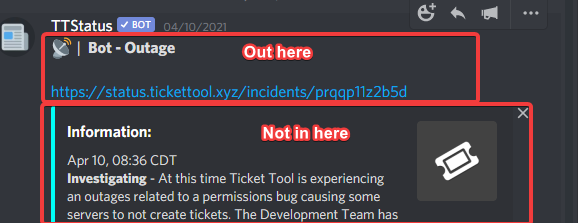
The ping doesn't work i don't know why
solid stream
make sure it's not inside an embed.
Pings only "ping" if you do them from the Message Text area
quasi crystal
solid stream
make sure it's not inside an embed.
So it needs to be in the end of the sentence?
 quasi crystal
For example:
{user} please wait for our {@support}
Instead of
{user} please wait for our {@support} to assist you.
Like this?
I-
 tame rain
Hi, my Ticket Tool isn't creating Tickets when people react to the messages.
jade topaz
how do i make the message ping a role?
solid stream
$help ping
humble sequoiaBOT
How to make Ticket Tool ping a role
To make ticket tool ping a role when a ticket is opened, go to the Dashboard -> Panel Configs -> Settings -> Ticket Options -> Ticket Message -> Message Text and do this:
{@Role name} This is case sensitive and the role must have @mentions enabled

 devout socket
help
jade topaz
$help ping
humble sequoiaBOT
How to make Ticket Tool ping a role
To make ticket tool ping a role when a ticket is opened, go to the Dashboard -> Panel Configs -> Settings -> Ticket Options -> Ticket Message -> Message Text and do this:
{@Role name} This is case sensitive and the role must have @mentions enabled
humble sequoiaBOT
Ticket Tool Premium
Get premium at https://tickettool.xyz/premium
Manage your subscriptions at https://tickettool.xyz/subscriptions
Why Premium?
Premium lets you customize the bot just how you want it. It also helps keep the bot running.
humble sequoiaBOT
Ticket Tool Invite & Support
humble sequoiaBOT
Help Options
$help commands - Information on commands
$help setup - Information on bot setup
$help faq - Frequently asked questions
jade topaz
$help setup
humble sequoiaBOT
Setting up Ticket Tool
Visit the docs for setup info
General Setup
humble sequoiaBOT
Ticket Tool Invite & Support
 placid quiver
How do i make a ticket for a support channel and a apply ticket
humble sequoiaBOT
 wicked scroll
@placid quiver ^
humble sequoiaBOT
Inviting and Enabling Premium Bot
The first thing you will need to do is invite the premium bot, an invite can be found here
Once the bot is in your server we will head to the dashboard and manage your server. When you are managing your server, you want to head into "Server Configs" then click the drop down menu under "Select the bot you would like to use on this server" then click "Ticket Tool#6207" and then save.
eager cargo
@jade topaz ^
Please note that if you enable the premium bot without having premium, your bot will not respond.
 solid vector
im having trouble making my panel a multipanel.
eager cargo
What kind of trouble are you having?
solid stream
$panel
humble sequoiaBOT
Send panel
How to send a panel?
To send a panel use the command $panel <id>
How do I find the ID?
The ID is located on the dashboard just before your panels name.
How to combine panels? (premium only)
Add multiple ID's $panel <id1> <id2> <id..>
The first ID will have its message and reaction sent while the others will have only reactions sent.
You can combine up to 20 panels (Reactions will be slowly added)
(It's premium only)
solid vector
Yes, the server has premium. is the id just the number in the list, like panel #1, #2 etc
solid vector
ok
does the bot need certain permissions to send the multipanel or do i send the panel then do the command
eager cargo
Needs all the permissions below to function correctly.
✅ - Read Channels
✅ - Send Messages
✅ - Embed Links
✅ - Attach Files
✅ - Add Reactions
✅ - Manage Roles
✅ - Manage Channels
✅ - Manage Messages
✅ - Read History
solid vector
ok, thank you.
eager cargo
my pleasure
 rapid hedge
how do I ping a whole role?
eager cargo
$help ping
humble sequoiaBOT
How to make Ticket Tool ping a role
To make ticket tool ping a role when a ticket is opened, go to the Dashboard -> Panel Configs -> Settings -> Ticket Options -> Ticket Message -> Message Text and do this:
{@Role name} This is case sensitive and the role must have @mentions enabled
rapid hedge
Thanks :D
eager cargo
my pleasure
 pulsar mica
We couldn't set up the bot, how are we going to set it up?@solid stream
eager cargo
Please don't ping staff, if you need help setting it up refer to #573205317870157855
$help setup
humble sequoiaBOT
Setting up Ticket Tool
Visit the docs for setup info
General Setup
mystic hound
out of all the people to ping....
spring wren
hi we have ticket tool premium, but the bot only reacts with an emoji on the normal ticket tool bot. Does this matter? does it still give the premium bot features or only the standard bot features

 arctic jolt
When i press the open ticket reaction there is no channel opened, how do i fix this
mystic hound
spring wren
hi we have ticket tool premium, but the bot only reacts with an emoji on the nor...
standard bot still gives every premium feature, you probably have the premium bot disabled
humble sequoiaBOT
Inviting and Enabling Premium Bot
The first thing you will need to do is invite the premium bot, an invite can be found here
Once the bot is in your server we will head to the dashboard and manage your server. When you are managing your server, you want to head into "Server Configs" then click the drop down menu under "Select the bot you would like to use on this server" then click "Ticket Tool#6207" and then save.
mystic hound
arctic jolt
When i press the open ticket reaction there is no channel opened, how do i fix t...
bot probably does not have permissions (check with $debug) or you have a role that is blacklisted
mystic hound
ah alright
spring wren
mystic hound
standard bot still gives every premium feature, you probably have the premium bo...
ty ty
iron nightBOT
Gave 1 Rep to Light (current: #4 - 30)
 timber smelt
need help
 karmic quiver
Heya, I'd like to make closed tickets visible for the user who created the ticket, but without allowing them to react (reopen/close/transcript) it. Is this possible?
atomic solstice
Yes
 broken dune
Use the User Closed Permissions option under Permission Options
atomic solstice
karmic quiver
Heya, I'd like to make closed tickets visible for the user who created the ticke...
you can make the reopen, delete and transcript as a support only reactions, this way the user cannot click them
broken dune
Hey guys. I have an issue with closing reopened tickets. Iooks like the user who reopened it cannot close it back. Any suggestions?
 karmic quiver
broken dune
Use the User Closed Permissions option under Permission Options
karmic quiver
broken dune
Use the User Closed Permissions option under Permission Options
What should I set there? If I disable adding reactions, they can still use the existing reactions
karmic quiver
atomic solstice
you can make the reopen, delete and transcript as a support only reactions, this...
How can I do that?
broken dune
 broken dune
without add reactions
atomic solstice
karmic quiver
How can I do that?
go to the Reaction Options in the panel and there should be Make reaction Support only
atomic solstice
broken dune
without add reactions
well yes they cannot add new reactions, but they can still click & use the reactions added by the bot
broken dune
Ah I see, did not think about that.
broken dune
broken dune
Hey guys. I have an issue with closing reopened tickets. Iooks like the user who...
Any idea on this?
It seems that if I wait a bit, it fixes itself
I assume that's somewhat normal?
atomic solstice
it might be because once you reopen the ticket the reactions automatically remove themselves, and if you click them immediatelly it may cause it to mess up a bit
its better to wait till it resets and then close the ticket
or better said not reset
but just wait a moment for the bot to catch up
broken dune
Yup, makes sense. Thank you!
atomic solstice
np
karmic quiver
atomic solstice
go to the Reaction Options in the panel and there should be Make reaction Suppor...
ah yes thank you!
iron nightBOT
Gave 1 Rep to Satisfy (current: #24 - 2)
atomic solstice
karmic quiver
ah yes thank you!
np
 olive vapor
how do i close a ticket? its not closing with the reaction nor is it closing with $close
karmic quiver
does any error message occur? Maybe you didn't set the permissions for the bot role correctly
jade topaz
The tick bot came out of my server suddenly
scenic plinth
olive vapor
how do i close a ticket? its not closing with the reaction nor is it closing wit...
You close the ticket using the reaction at the start of the ticket or with $close.
To remove the channel, use $delete. If this does not work, ensure the bot has permissions.
scenic plinth
jade topaz
The tick bot came out of my server suddenly
Can you check Audit logs? Make sure the bot didn't get banned / kicked by a security bot such as Wick.
jade topaz
No he was not kicked out or from a security robot@scenic plinth
scenic plinth
Was the bots roles updated?
scenic plinth
إذا كنت بحاجة إلى دعم ، يمكنك أن تسأل هنا ، أو يمكنك الذهاب مباشرة إلى دعم اللغة العربية في
jade topaz
انت عربي؟ @scenic plinth
 keen viper
hey guys, i have a question how can in do the tickets private?
atomic solstice
keen viper
hey guys, i have a question how can in do the tickets private?
What happens when you open a ticket, Can everyone in the server see it?
keen viper
exactly
atomic solstice
keen viper
exactly
Go to the dashboard > manage servers > your server > panel options > Pick the ticket type > General Options > Disable the Make tickets Visible permission
That should fix it
but it will only work for new tickets, so the ones which are already opened will stay visible to everyone
keen viper
yes it works, thank u very much 
atomic solstice
np
atomic solstice
What do you mean by adjust the bot?
 autumn acorn
I mean adjusting settings in my server
atomic solstice
well are there any problems with them?
if yes then the most I can do is tell you what to do
autumn acorn
atomic solstice
if yes then the most I can do is tell you what to do
Well tell me
atomic solstice
well you first have to say what is wrong
jade topaz
with "$ new" can a discord bot type that in to activate it?
atomic solstice
autumn acorn
Well tell me
what you expect should happen and what is happening
jade topaz
it failed to open it, but we can

it can see into the ticket someone else made, it has perms
atomic solstice
jade topaz
with "$ new" can a discord bot type that in to activate it?
No Ticket Tool ignores other bots. Like most other bots do as well. So the answer is: No it cannot
jade topaz
no way around it?
atomic solstice
nope, only Discord users can create tickets
jade topaz
F***, okay thanks anyway
atomic solstice
autumn acorn
Well tell me
Have you setup the bot and it's not working? Or did you not do any form of setup to the bot yet?
 tough sluice
For the "tags" section of ticket tool, is there a way to make it so that it just contains the text stated, rather than it being the exact text, if that makes sense?
so i can make one tag that is "how do i apply" and if someone says "how do i apply for staff" the tag will still work, rather than it only working if they only say "how do i apply"
atomic solstice
or Yagpdb
pale pilot
The tags from TT are supposed to be triggered intentionally and not randomly
tough sluice
ya ive done it with dyno just didnt know if i could do it with tt or not
will that ever become an option or no?
maybe u can make it so you can chose between "exact" and "contains"
pale pilot
I don't know
humble sequoiaBOT
Make a Suggestion
Suggestions for the bot have been moved to our Ticket Tool Community Server.
Join here: https://discord.gg/qKSEuVtJCc
pale pilot
You can suggest this feature though
tough sluice
thx 🙂
jade topaz
How can I remove pings from ticket tool when a ticket is opened?
eager cargo
Just delete the " {user} " or whatever ping variables you have in the ticket message
 cursive pollen
Does any know how long It takes for a ticket to be answered?
eager cargo
When the support team is available
cursive pollen
On average
eager cargo
Pshh, I don't know.
eager cargo
my pleasure
 grizzled glade
Is Ticket tool still offering partnership?
mystic hound
Not at the moment. #📣│server-news
 hearty pecan
I don't understand anything to the bot HELP
grizzled glade
mystic hound
Not at the moment. <#509770538051305493>
Thanks you 🙂
iron nightBOT
Gave 1 Rep to Light (current: #4 - 32)
eager cargo
hearty pecan
I don't understand anything to the bot HELP
You don't know how to set it up?
hearty pecan
eager cargo
You don't know how to set it up?
No idea
eager cargo
 hasty forge
I disabled the creator to lock its own ticket
So only mods can close the ticket
But if creator reacts to the lock emoji
Mods can not close the ticket via react
It's not premium btw
Two step ticket enabled
any help?
humble sequoiaBOT
-- moved to ticket --
scenic plinth
Can the creator close the ticket?
hasty forge
scenic plinth
Can the creator close the ticket?
not immediately but after some time they can
scenic plinth
I was going to say it's a bug if I know what they are talking about, it's a weird glitch where if the support also has the role it still doesn't allow it.
humble sequoiaBOT
Don't see your server in the dashboard?
You will possibly need to relog. Look below to see steps on how to relog.
How to relog the Dashboard.
First, you will need to go to the dashboard. Once your there, click on your avatar on the top right. after you clicked it, you will see button that says Logout. You must click that. Once you have logged out, you can log back in.
Note:
You need one of these 3 things to access the dashboard.
- Server Owner
- Server Administrator
- Dashboard Role
eager cargo
Try re-logging into the dashboard
You need one of these 3 things to access the dashboard.
- Server Owner
- Server Administrator
- Dashboard Role
Can you please run " @Ticket Tool#4843 level " in the server?
Then send a screenshot please
Copy and paste this into the server and send it. Once you have done so, please send a screenshot
@Ticket Tool#4843 level
Okay, can you try re-logging into the dashboard one more time?

Press logout then log back in
Your trying to login to the docs
Go there to access the dashboard
my pleasure
 remote peak
Is there a way to disable deleting tickets?
eager cargo
dasboard > manage servers > desired server > manage > command configs > delete > switch off
 remote peak
and that will stop from the reaction as well?
eager cargo
for the reaction...
dashboard > manage servers > desired server > manage > panel configs > desired panel settings > reaction options > delete > switch " enable reaction " to off.
 remote peak
ty
eager cargo
my pleasure
please keep in mind that members w/ support roles or members with administrator permissions will still be able to delete tickets by use the " $delete " command. You can disable it for support team in your command configs by going to the " delete " command and pressing " settings " then switching off the " support team only " option
 remote peak
How can I stop it appearing here
 eager cargo
it's already gone
remote peak
ahh found it
eager cargo
yeah, if you switched off the reaction, it won't appear
 jade topaz
is there a way to get an automatic log in a specific channel after a channel got closed, which shows a link to the transcript?
mystic hound
$help category
humble sequoiaBOT
How to set the open category
To set a open category go to the Dashboard -> Panel Configs -> Settings -> Category Options -> Category Open
 compact fable
One of my staff has deleted the ticket message and when I resent it, the ticket emote didnt show up to create a ticket

 zealous ether
hey how can I log the ticket?
eager cargo
compact fable
One of my staff has deleted the ticket message and when I resent it, the ticket ...
Run $debug for me in your server then send me the link it gives you please.
eager cargo
zealous ether
hey how can I log the ticket?
dashboard > manage server > desired server > manage > panel configs > desired panel settings > logging options > donezo

 oblique cargo
Hey guys! I just purchased a premium membership but it didn't activate it. It is asking for a code and I don't see the code in my email. Any advice would be greatly appreciated
zealous ether
eager cargo
Thanks!
iron nightBOT
Gave 1 Rep to Quo (current: #1 - 46)
eager cargo
my pleasure
eager cargo
oblique cargo
Hey guys! I just purchased a premium membership but it didn't activate it. It is...
check your spam folder maybe, if it doesn't show up there, I suggest opening a support ticket in #🎫│make-a-ticket so the billing team can further assist you
( sorry I don't know any other solutions for this type of issue )
oblique cargo
I just received an email saying I can use it immediately. Thats why i'm confused
But I'll check it out, ty
 scenic plinth
 rotund peak
why the bot still leaving
rotund peak
why the bot still leaving
Is there a security bot or moderator kicking it? (Refer to your server Audit Logs)
rotund peak
scenic plinth
Is there a security bot or moderator kicking it? (Refer to your server Audit Log...
yes i have a security in my server
scenic plinth
rotund peak
yes i have a security in my server
Is the bot kicking it? If so the security bot you have added is likely kicking it for a "bot addition" filter and it would automatically kick the bot. You would have to disable it (depending on the bot) to add the bot.
rotund peak
scenic plinth
Is the bot kicking it? If so the security bot you have added is likely kicking i...
i turn off the security bot and the problem was solved thank you
iron nightBOT
Gave 1 Rep to ᴍᴀʏ s. | ᴀᴍʙᴇʀ ɴᴇᴛᴡᴏʀᴋ (current: #5 - 26)
 ebon patio
hey if start 7 day Trial and when its over do i have to pay?
eager cargo
If you want to continue your premium yes
 distant ether
Dear managers, why am I not free ??????????? Please😩
mystic hound
oblique cargo
Hey guys! I just purchased a premium membership but it didn't activate it. It is...
Were you able to resolve this? If not check below, our new system does not use premium keys
humble sequoiaBOT
Redeeming premium (New)
Redeeming premium on your server is really simple. Just head over to your Subscriptions Page. There you can select a server of your choice, which will get premium. You can change the server at any point.
 junior patio
😔
 soft folio
junior patio
😔
soft folio
junior patio
😔
whi
 soft basin
I cant log to it it say invalid email or password but i dod correctly can u help
 mental pawn
Please how do I make a ticket
atomic solstice
mental pawn
Please how do I make a ticket
you can make a ticket by clicking the emoji correspondyng to the type of a ticket you want in #🎫│make-a-ticket
 shell slate
hey is this just me or when i added the bot to the server.when i go to the dashboard and the server doesn't pop up
humble sequoiaBOT
Don't see your server in the dashboard?
You will possibly need to relog. Look below to see steps on how to relog.
How to relog the Dashboard.
First, you will need to go to the dashboard. Once your there, click on your avatar on the top right. after you clicked it, you will see button that says Logout. You must click that. Once you have logged out, you can log back in.
Note:
You need one of these 3 things to access the dashboard.
- Server Owner
- Server Administrator
- Dashboard Role
 stuck brook
When i was reading how to make the ticket it said to go to the panel confligs but I can’t find it
jade topaz
How do I transfer the ticket tool bot to one of my channels on the server
atomic solstice
that would be with the channel permissions
jade topaz
Ok
atomic solstice
give the bot Read messages permission in the channel you want
atomic solstice
well in the channel you want
just click the channel settings and there permissions
jade topaz
OK thank you
scenic plinth
distant ether
Dear managers, why am I not free ??????????? Please😩
$tts
humble sequoiaBOT
You're in the wrong place
We provide support for @humble sequoia discord bot and cannot help you with whatever issue you have.
Please make sure to contact the appropriate support team.
This Ticket is being deleted in 5 minutes.
_ _
 unique totem
how do i edit the message that the bot sends when a ticket is open
humble sequoiaBOT
**Ticket Message**
The Ticket Message is the first message sent by the bot in a new ticket. To customize it head over to your Dashboard -> Panel Configs -> Settings -> Ticket Options -> Edit Ticket Message
scenic plinth
$help category
humble sequoiaBOT
How to set the open category
To set a open category go to the Dashboard -> Panel Configs -> Settings -> Category Options -> Category Open
unique totem
thanks
 vivid jackal
The bot says Ticket Limit reached 1/1 what does that mean
atomic solstice
It means that you can only open ! ticket at a time
it prevents the spam of tickets
vivid jackal
how can i close the ticket ?
atomic solstice
which means every person can have 1 ticket open untill the first one gets closed/deleted
either by clicking 🔒 and then ✅
reactions in the first embed in the ticket
or by typing $close
vivid jackal
atomic solstice
reactions in the first embed in the ticket
theres no ticket in the chat
 deft bison
If I have premium setup, can I kick the regular bot with no issues?
atomic solstice
deft bison
If I have premium setup, can I kick the regular bot with no issues?
yes
atomic solstice
vivid jackal
theres no ticket in the chat
are you the owner of the server?
deft bison
thanks @atomic solstice
iron nightBOT
Gave 1 Rep to Satisfy (current: #19 - 3)
jade topaz
I’ve been looking for so long and can’t find it, how do you make the ticket have a description or whatever it’s called like change what it says where “react with the () below to open a ticket” how can I make it so I can put what the ticket is about there?
I can wait till you’re not busy anymore 🖤
humble sequoiaBOT
**Ticket Message**
The Ticket Message is the first message sent by the bot in a new ticket. To customize it head over to your Dashboard -> Panel Configs -> Settings -> Ticket Options -> Edit Ticket Message
**Panel Message**
The panel message is where people react to make a ticket. To customize it head over to your Dashboard --> Panel Configs -> Settings -> Panel Options -> Edit Panel Message
jade topaz
:0 so you’re telling me it was that easy 
atomic solstice
humble sequoia
this one is inside the ticket once it's open
atomic solstice
humble sequoia
this one is before the ticket is open and the one from where people open tickets
atomic solstice
jade topaz
:0 so you’re telling me it was that easy <a:T_sadcatcry:740344344149622804>
yes I am 😉
jade topaz
Ok thank you @atomic solstice
iron nightBOT
Gave 1 Rep to Satisfy (current: #18 - 4)
jade topaz
I appreciate you for helping me in my dumb moments 🥲
atomic solstice
np, anyone has moments like that
tribal cedar
Your birthday is May what Satisfy?
tribal cedar
Ah
atomic solstice
one day after discord
 dense shell
How do I give someone to manage tickets without giving them admin?
atomic solstice
$help support
humble sequoiaBOT
How to let support team see into a ticket
About support roles
A support role lets your support team see into tickets with out having to add them manually to each and every ticket.
You can add as many support roles as you like per panel.
NOTE that the way discord works all admins can see into tickets regardless of this.
How to set a support role
To set a Support role go to the Dashboard -> Panel Configs -> Settings -> General Options -> Support Team Roles.
NOTE that the support role will not be able to see into tickets that are already created..
atomic solstice
here @dense shell ^^
iron nightBOT
Gave 1 Rep to Satisfy (current: #16 - 5)
atomic solstice
np
 bold imp
How to get the ticket channels when you click the reaction into this category instead of the top one
 atomic solstice
$help category
humble sequoiaBOT
How to set the open category
To set a open category go to the Dashboard -> Panel Configs -> Settings -> Category Options -> Category Open
atomic solstice
here @bold imp ^^
bold imp
hot thx
atomic solstice
np
bold imp
Why bot not work now/reactions don’t work?
And as soon as I sent that it started working mb 😐
atomic solstice
np
jade topaz
Hi
 modest geyser
Whats prefix ticket tool
modest geyser
Not working
atomic solstice
modest geyser
Not working
check the dashboard to see if it was changed from $ to something else
atomic solstice
jade topaz
Anyone know why when I open a ticket it automatically close
Does it close immediately or you just don't see it?
jade topaz
Open and close instant
atomic solstice
jade topaz
Open and close instant
do all of them close or do you have one already opened?
jade topaz
The ones that were opened before the problem are still active but currently when trying to open one it opens fine but closes instantly
atomic solstice
that is because of the ticket limit
I suppose your Dm's are closed
if it were opened then Ticket Tool would Dm you saying that you hit the ticket limit
The limit is customisable and it prevents a user from spam opening tickets
jade topaz
I have only 6 tickets open actually
atomic solstice
yes the default number is 1 ticket per user
jade topaz
yes but i don't have an open ticket

it's by categories
1 channel for 1 categories / problems
and i have no opened ticket
atomic solstice
How many channels does your server have?
or that would actually not help since the tickets wouldn't even open if you hit the channel limit
jade topaz
I find solution


 jade topaz
Thank for ur help @atomic solstice have good day !
iron nightBOT
Gave 1 Rep to Satisfy (current: #15 - 6)
atomic solstice
np
solid stream
 abstract sphinx
<a:online:821216495005597696><a:offline:821216494868103179><a:idle:8212164948804...
abstract sphinx
<a:online:821216495005597696><a:offline:821216494868103179><a:idle:8212164948804...
We stole em first 🙂 || Feel free||
atomic solstice
^^


 dusk elm
Nasfy just fail a other bot delete a Chanel 🙄
 noble breach
Hey is Tickettool down?
atomic solstice
it shouldn't be, why?
noble breach
Because I cant open Tickets in my Discord Server
atomic solstice
well first question: Is Ticket tool status Online in your server?
noble breach
Yes
noble breach
Hm
I have 416 Tickets open on my server maybe does tickettool have a limit?
The tickets cannot be closed because we need continuous contact with the People in tickets
scenic plinth
How many channels does your server have currently?
atomic solstice
yes I assume 500
atomic solstice
noble breach
The tickets cannot be closed because we need continuous contact with the People ...
looks like you hit the Discord 500 channel limit
there is nothing we here can help you with concerning that
since its a Discord given limit
the only thing you can do is close and delete some of them at this point
noble breach
Hm Ok Thank you I will try to find a solution
 outer zinc
Ticket will not open after reaction mark. Channels are not full, just added premium.
atomic solstice
outer zinc
Ticket will not open after reaction mark. Channels are not full, just added prem...
what exactly is happening when you press the reaction?
outer zinc
Nothing, the reaction goes from 1 to 2.
atomic solstice
make sure the bot has permission to manage channels
outer zinc
It has full administrator of the discord.
Unless it's through the panel.
By chance do I need both the premium bot and normal bot? Someone had kicked the basic one.
atomic solstice
no you don't need both, you just have to set up in the dashboard which one should be used
Amazing, I forgot to change that. Thank you.
atomic solstice
np
 faint zinc
how do i make the bot ping the staff to tell them a ticket has been opened?
atomic solstice
$help ping
humble sequoiaBOT
How to make Ticket Tool ping a role
To make ticket tool ping a role when a ticket is opened, go to the Dashboard -> Panel Configs -> Settings -> Ticket Options -> Ticket Message -> Message Text and do this:
{@Role name} This is case sensitive and the role must have @mentions enabled
atomic solstice
@faint zinc here ^^
faint zinc
i see
 sharp gull
how do i make ticket tool do the reaction thing so it makes a private channel
eager cargo
 mild trout
Why do we need our billing address while buying premuim? Ping me
eager cargo
mild trout
Why do we need our billing address while buying premuim? Ping me
That's standard with all online purchases, just about at least. Since it's a legal purchase I believe it needs a billing address.
remote peak
Once i've voted how do I get the vote rewards
scenic plinth
remote peak
Once i've voted how do I get the vote rewards
I should give you the information you need using $vote
To claim your rewards, use $vote redeem and follow it's instructions.
remote peak
$vote
humble sequoiaBOT
Votes
Current Votes: 0
Lifetime Votes: 0
Linked Votes: 0
Vote Links
Linking Info
Linked User: Not Linked
You can give your future votes to another user by linking with that user.
To link use $vote link (@user or userId)
To unlink use $vote unlink
Redeeming
Each vote is worth 12 hours of premium and can be redeemed once you have atleast 6 votes.
Your current votes are worth 0m
To redeem your current votes use $vote redeem
eager cargo
Refer to the community server to vote.
remote peak
How do I link myself? I've voted once already but its not showing?
eager cargo
That isn't a command.
 final raptor
How to get the premuim role then?
scenic plinth
remote peak
How do I link myself? I've voted once already but its not showing?
Linking isn't necessary. It will take a minute to register it, I had the same thing happen to me.
eager cargo
final raptor
How to get the premuim role then?
You can open a support ticket in #🎫│make-a-ticket and the wonderful TT support team can assist you. They'll verify your premium subscription and you'll gain the role.
remote peak
Ahh okay
 green forge
so i kicked ticket tool and tried reinviting and now it wont work/join back is there a fix?
eager cargo
Can you run " $debug " in your server for me then send me the link it gives you please?
green forge
no like the bot isnt in my server at all and i didnt get a link when i tried
eager cargo
Make sure you didn't ban the bot, copy and paste the link below to invite the bot to your server.

Discord
Discord is the easiest way to communicate over voice, video, and text. Chat, hang out, and stay close with your friends and communities.
green forge
tried it, didnt work in audit logs it says it joined but doesnt pop up
eager cargo
Do you have a moderation bot kicking the bot? E.g @umbral cove
green forge
no i manually kicked it
scenic plinth
Better yet, can you manage the bot through the panel for the server?
green forge
no doesnt let me do anything through the panel either
eager cargo
Do you own the server / have administrator perms in it?
green forge
yes
eager cargo
Can you @ the bot or does it not show up?
green forge
doesnt show up
eager cargo
Might be in a channel where @ everyone view permission is denied / " Member " role view permission is denied. Do you have any private channels like that? E.g a verification channel where view permission is denied
scenic plinth
You could also search "Ticket Tool" in the members search in the server.
green forge
no its a public channel, i can only @ its old role, the bot itself isnt even in the server
i can invite one of you to the discord if that'd be easier or idk if thats not allowed
eager cargo
So does the server show up when you try inviting the bot? Like in the drop down menu
 jade topaz
Hi can someone tell me what’s the bot command and how do I assign a message to a channel
eager cargo
jade topaz
Hi can someone tell me what’s the bot command and how do I assign a message to a...
green forge
yes and when i select the server and invite it, it doesnt show up
eager cargo
green forge
yes and when i select the server and invite it, it doesnt show up
Okay, and it shows this screen after?
 green forge
yes
scenic plinth
Can you try searching "Ticket Tool" in the servers overview?
green forge
doesnt pop up either
eager cargo
Odd issue your having... Sorry I couldn't find a solution to the issue your having. Might I suggest opening a support ticket in #🎫│make-a-ticket so the wonderful TT support team can further assist you.
Maybe Vxie has a fix? Idk
scenic plinth
I might, @green forge invite me to the server. You have my permissions.
(Issue solved via DM)
jade topaz
eager cargo
<#573205317870157855>
Thanks
iron nightBOT
Gave 1 Rep to Quo (current: #1 - 47)
eager cargo
my pleasure
jade topaz
Hey im having an issue where only my management team cna open tickets but no one else can
the ticket tool has no blacklist roles
all debug checkmarks are green
jade topaz
it worked nvm thanks
 uneven pagoda
whats the number of tickets you can have open without prem?
eager cargo
Discords channel limit is 500
If you want to limit the amount of tickets a user can create per panel...
$help limit
humble sequoiaBOT
How to set a ticket limit
A ticket limit may be set per panel to prevent users from spamming tickets. By default this limit is set to 3. Once a user hits this limit the bot will notify the users that they reached the limit.
To set a ticket limit go to the Dashboard -> Panel Configs -> Settings -> General Options -> Ticket Limit
 uneven pagoda
so theres no pay wall to get more tickets
scenic plinth
uneven pagoda
so theres no pay wall to get more tickets
No, you can't bypass discord limitations.
Discord limits 500 channels like quo said and 50 channels per category.
The limit will restrict how many channels (tickets) the bot will create for one ticket.
uneven pagoda
ty i didnt mean that i meant like the ticket limit on the bot like on yunite thanks for your help tho
 spiral nexus
 iron nightBOT
Edit this to change the output of the command!
Edit this to change the output of the command!
humble sequoiaBOT
Setting up Ticket Tool
Visit the docs for setup info
General Setup
placid quiver
can someone join my server to help meplz?
jade topaz
is there a way to do this? I have premium
 humble sequoiaBOT
Multipanels are a premium feature that allow for a single panel with multiple reactions to open different tickets.
How to create a Multipanel
Premium users can combine multiple panels into one multipanel.
First of all you will need to assign a different Create Ticket Reaction for each Panel. Run $help reaction to learn how to do it.
Next, find the IDs of each panel you wish to combine. You can find them in your Panel Configs in the Dashboard
Next, send the multipanel to a channel using $panel [id1] [id2] {id3} ....
e.g. $panel 1 2 4 17 35 to combine panels 1, 2, 4, 17 and 35.
Up to 20 panels may be combined.
 forest goblet
@jade topaz ⬆️
iron nightBOT
Gave 1 Rep to 2x2Master (current: #2 - 39)
 slender minnow
thanks @forest goblet
iron nightBOT
Gave 1 Rep to 2x2Master (current: #2 - 40)
forest goblet
No problem
 bleak frigate
hi could someone help me?
 tranquil carbon
I can not create a ticket in the ticket vehicle.
bleak frigate
im trying to set up the ticket transcripts to go into a specific channel but its not working
bleak frigate
bleak frigate
im trying to set up the ticket transcripts to go into a specific channel but its...
also i need help on pinging someone in the message that shows when you open a ticket
tranquil carbon
HELP!
eager cargo
bleak frigate
also i need help on pinging someone in the message that shows when you open a ti...
( solved via ticket )
eager cargo
tranquil carbon
HELP!
Watcha need help with?
tranquil carbon
eager cargo
Watcha need help with?
I cannot create a ticket, so I cannot
tranquil carbon
I have set up the chase but I cannot create a support ticket for my friends' help
eager cargo
Are the tickets not opening when you react to the panel message?
tranquil carbon
No, I do not know how to create a ticket, I need help
eager cargo
Alrighty, go ahead and look over #573205317870157855. It will teach you how to create tickets.
tranquil carbon
but I can't, nothing is understood
very complicated
i do but it doesn't work
how will you find a solution
eager cargo
Have you invited the bot to your server?
tranquil carbon
yes
abstract sphinx
solid stream
<:1_Stopped:814210084250320926><:1_Pending:814209997604257863><:1_inQueue:814209...
hehe, yoink
eager cargo
tranquil carbon
yes
Okay, go to the dashboard and click " Manage Servers " once you have done so, select the server you would like to manage ticket tool in.