#🆘│community-support
1 messages · Page 281 of 1
 inner aurora
 robust seal
Ok thank you
I don’t get any of this it’s so confusing
I asked the question to the rep and He’s not responding
 radiant moss
it will take some time they have alot of ticket
robust seal
it doesn’t make any sense I don’t get it I need someone to walk me through it please
robust seal
Thank you for your help I have got the hang of it now
inner aurora
:D:D:D:D
 fringe sundial
HELP
radiant moss
You are sure the bot is in your server?
 rotund kite
Are you in the correct account?
fringe sundial
radiant moss
You are sure the bot is in your server?
Yes I am
fringe sundial
rotund kite
Are you in the correct account?
Yep
rotund kite
Did you invite the bot into your server or was it someone else?
fringe sundial
It was me
rotund kite
Nvm
 solid stream
I'll take a look, sec
rotund kite
There’s an error in the dashboard.
solid stream
Server name or ID?
rotund kite
Josiah will fix it.
fringe sundial
Fixed
solid stream
What seemed to be the issue? As I haven't changed anything yet.
solid stream
They said fixed, so I guess it's working?
radiant moss
I guess not sure
 mossy oxide
My log thing still won’t work
rotund kite
Wait there was apps in August?!
radiant moss
mossy oxide
My log thing still won’t work
Like when you close the ticket the transcript won’t send to the channel?
Ya I think so
rotund kite
I saw in pinned messages.
mossy oxide
radiant moss
Like when you close the ticket the transcript won’t send to the channel?
It says I haven’t chose one
rotund kite
In #general
It says I haven’t chose one
@mossy oxide choose a channel for it to log in
mossy oxide
I did
rotund kite
Did you try $debug
radiant moss
And it won’t save?
mossy oxide
Here
radiant moss
Possibly can’t send messages in that channel
rotund kite
Send a picture.
mossy oxide
 queen trout
can we stop the automatic subscription we want?
rotund kite
Did you save?
can we stop the automatic subscription we want?
@queen trout Don’t think so.
I don’t think it’s a subscription, you just purchase it for a key.
radiant moss
Try to check when ticket is closed so it has a reason to log the ticket
rotund kite
@queen trout , go to #🎫│make-a-ticket for more details, the support team can help you
queen trout
ok thanks
radiant moss
Yea they might be able to like freeze the key so time doesn’t keep running no clue
rotund kite
Freezing keys would be a cool thing freezing premium.
radiant moss
Ik they can switch the server premium is on
queen trout
Can't we just buy for 1 month?
rotund kite
I never purchased premium, so...
 humble sequoiaBOT
Ticket Tool Premium
Get premium at https://tickettool.xyz/premium
Manage your subscriptions at https://tickettool.onfastspring.com/account
Why Premium?
Premium lets you customize the bot just how you want it. It also helps keep the bot running.
rotund kite
Yup it’s a subscription
It renews automatically i think, monthly or yearly depending on the plan you are using
queen trout
and how do you cut it?
I don't want it for life ^^
radiant moss
Should be able to cancel it
rotund kite
Well there was one offer for lifetime but it cost $180 but is unavailable now.
queen trout
I don't want it for life ^^
rotund kite
Make a ticket, I think they can make it one time purchase for one month.
robust seal
Can I have help in my server please?
I need someone to help me make my new server
Tell me when some one can help thank you
 wise bluff
Any idea how i can setup an automatic message for support formating (within the ticket) upon every ticket being opened?
 lusty latch
 pale pilot
robust seal
I need someone to help me make my new server
pale pilot
robust seal
I need someone to help me make my new server
We don't do that. We assist you, but we don't do it for you
robust seal
Ok thank you
robust seal
pale pilot
We don't do that. We assist you, but we don't do it for you
Thank you
 sick parrot
Is there an option to disable $help ?
i am having conflicts with other bots
*without changing prefix
inner aurora
@upper flower where's the sticky message?
radiant moss
It’s gone I think
 tired adder
Panel is showing 3 open tickets. How do i close them? I just deleted the open ticket channel??? 😦
radiant moss
tired adder
Panel is showing 3 open tickets. How do i close them? I just deleted the open ti...
are they fully closed
tired adder
im guessing not but dont know how to close them??
radiant moss
are they still showing in discord
tired adder
nope in discord ive deleted the ticket channels. Thats how I thought you closed them?
radiant moss
weird might take a bit on the dashboard to register them closed possibly
 jade topaz
So
radiant moss
To change the panel part go onto the dashboard
jade topaz
Ok
jade topaz
I just want to change where it says «to create a ticket react with »
radiant moss
You should be able to change it let me double check on my non premium server
jade topaz
I try i
radiant moss
So you can only change the embed text. Which is a 250 character limit
radiant moss
np
 neon halo
Hi how can I create different Ticket Reactions? like in #🎫│make-a-ticket ?
radiant moss
$help reactions
humble sequoiaBOT
Help Options
$help commands - Information on commands
$help setup - Information on bot setup
$help faq - Frequently asked questions
radiant moss
@neon halo Reactions are a premium only feature but they are listed under reaction options for create a ticket.
neon halo
Yeah I am Premium, I find the location to change a reaction but not a option to add different reactions to a ticket.
radiant moss
Click on reaction options when you click settings on the panel
go to reaction options
then press create ticket and you should see an envelope that you can change
neon halo
But there is not a option to add multiple
 sweet valve
a person without permissions in discord entered the bot control panel and created a panel to say bad thing about the server, how do i do not to happen again?
radiant moss
@sweet valve They mostlikely have admin
humble sequoiaBOT
Multipanels are a premium feature  that allow for a single panel with multiple reactions to open different tickets.
How to create a Multipanel
Premium users can combine multiple panels into one multipanel.
First of all you will need to assign a different Create Ticket Reaction for each Panel. Run $help reaction to learn how to do it.
Next, find the IDs of each panel you wish to combine. You can find them in your Panel Configs in the Dashboard
Next, send the multipanel to a channel using $panel [id1] [id2] {id3} ....
e.g. $panel 1 2 4 17 35 to combine panels 1, 2, 4, 17 and 35.
Up to 10 panels may be combined.
 radiant moss
@neon halo ^
neon halo
Thanks
sweet valve
radiant moss
<@!282900222680629250> They mostlikely have admin
they dont
radiant moss
well either someone got onto your account or somehow someone has admin. You need admin in order to adjust server settings
 azure ore
If hello I have a problem with the bot
radiant moss
Explain your problem @azure ore
humble sequoiaBOT
Don't see your server in the dashboard?
You will possibly need to relog. Look below to see steps on how to relog.
How to relog the Dashboard.
First, you will need to go to the dashboard. Once your there, click on your avatar on the top right. after you clicked it, you will see button that says Logout. You must click that. Once you have logged out, you can log back in.
azure ore
Do you speak Spanish?
radiant moss
no sorry
azure ore
I don't know much English
radiant moss
there is spanish support in #🎫│make-a-ticket
azure ore
Thank you take care
radiant moss
you too
azure ore
Thank you
 keen tendon
im wondering how i can make some ticket thing so people can one one of 2 different type of tickets
jade topaz
I would like the bot to send a transcript to the users dms automatically when the ticket is closed
keen tendon
jade topaz
I would like the bot to send a transcript to the users dms automatically when th...
premium feature
jade topaz
Fair Enough
radiant moss
$mp @keen tendon
humble sequoiaBOT
Multipanels are a premium feature that allow for a single panel with multiple reactions to open different tickets.
How to create a Multipanel
Premium users can combine multiple panels into one multipanel.
First of all you will need to assign a different Create Ticket Reaction for each Panel. Run $help reaction to learn how to do it.
Next, find the IDs of each panel you wish to combine. You can find them in your Panel Configs in the Dashboard
Next, send the multipanel to a channel using $panel [id1] [id2] {id3} ....
e.g. $panel 1 2 4 17 35 to combine panels 1, 2, 4, 17 and 35.
Up to 10 panels may be combined.
radiant moss
^
keen tendon
oh
keen tendon
radiant moss
^
when i do that what message will show
jade topaz
is it possible to changethe reaction emoji
 summer tinsel
$help reaction
humble sequoiaBOT
How to change reactions
To set a custom reaction Dashboard -> Panel Configs -> Settings -> Reaction Options -> <Reaction to change> -> Reaction

NOTE you need premium to do this.
summer tinsel
@jade topaz ^
jade topaz
thx
 jaunty talon
مرحبا
radiant moss
keen tendon
when i do that what message will show
They should combine
tired adder
Still cannot find a way to delete these tickets
 grand glen
 small phoenix
the bot in my setver wont create the chat
 brisk bloom
Hey yall im new to this bot -- can someone explain a little bit of it to me
radiant moss
#573205317870157855 Do you know what this bot does? @brisk bloom
 eternal night
How do I get the moderation kind of ticket tool
rotund kite
You cannot, this is only for the support server of Ticket Tool.
@eternal night
Use some other bot for moderation, it is unavaliable yet.
eternal night
O ok
radiant moss
You mean server settings like or people go can access tickets
robust seal
Does any one know where I can get some one to help me build my server because this is Confusing asf
 rugged kayak
How do you make the tickets go in a certain category?
rotund kite
Press on edit panel
rugged kayak
idk how
humble sequoiaBOT
Help Options
$help commands - Information on commands
$help setup - Information on bot setup
$help faq - Frequently asked questions
rugged kayak
Mobile?
rotund kite
Yes, it’s a website where you can configure the bot.
rugged kayak
yea does it work on mobile
rotund kite
Yes
rugged kayak
ok what’s website
rotund kite
Tickettool.xyz
rugged kayak
Now what
rugged kayak
Now what
rugged kayak
What panel
rotund kite
Go to panel configure
 rigid shard
IS THERE PROBLEM IN SEND PANEL ??
rotund kite
$help category
humble sequoiaBOT
How to set the open category
To set a open category go to the Dashboard -> Panel Configs -> Settings -> Category Options -> Category Open
 rotund kite
Well here @rugged kayak
rugged kayak
I don’t see it
rotund kite
IS THERE PROBLEM IN SEND PANEL ??
@rigid shard go and run $debug and fix the perms.
@rugged kayak go to dashboard
rigid shard
@rotund kite
rugged kayak
I did
rigid shard
why ??
rotund kite
Did you do debug
rigid shard
from where
rugged kayak
help
rotund kite
$help category
humble sequoiaBOT
How to set the open category
To set a open category go to the Dashboard -> Panel Configs -> Settings -> Category Options -> Category Open
rugged kayak
but it isn’t there
rotund kite
Did you invite the bot in the server?
rigid shard
nothing happend
humble sequoiaBOT
How to set the permissions for tickets
To set a change permissions go to the Dashboard -> Panel Configs -> Settings -> Permission Options
 rotund kite
Wait
rigid shard
rotund kite
Go and give the perms to the ticket tool bot
I cannot see that just send a picture
I am just a member not part of support
rigid shard
rigid shard
tnx bro
rotund kite
Does it work now?
 next ingot
I have a problem the @everyone can see and react but the ticket does not open what to do?
humble sequoiaBOT
How to let support team see into a ticket
About support roles
A support role lets your support team see into tickets with out having to add them manually to each and every ticket.
You can add as many support roles as you like per panel.
NOTE that the way discord works all admins can see into tickets regardless of this.
How to set a support role
To set a Support role go to the Dashboard -> Panel Configs -> Settings -> General Options -> Support Team Roles.

NOTE that the support role will not be able to see into tickets that are already created..
rotund kite
$help support
humble sequoiaBOT
How to let support team see into a ticket
About support roles
A support role lets your support team see into tickets with out having to add them manually to each and every ticket.
You can add as many support roles as you like per panel.
NOTE that the way discord works all admins can see into tickets regardless of this.
How to set a support role
To set a Support role go to the Dashboard -> Panel Configs -> Settings -> General Options -> Support Team Roles.
NOTE that the support role will not be able to see into tickets that are already created..
How to let support team see into a ticket
About support roles
A support role lets your support team see into tickets with out having to add them manually to each and every ticket.
You can add as many support roles as you like per panel.
NOTE that the way discord works all admins can see into tickets regardless of this.
How to set a support role
To set a Support role go to the Dashboard -> Panel Configs -> Settings -> General Options -> Support Team Roles.
NOTE that the support role will not be able to see into tickets that are already created..
rotund kite
$help support
humble sequoiaBOT
How to let support team see into a ticket
About support roles
A support role lets your support team see into tickets with out having to add them manually to each and every ticket.
You can add as many support roles as you like per panel.
NOTE that the way discord works all admins can see into tickets regardless of this.
How to set a support role
To set a Support role go to the Dashboard -> Panel Configs -> Settings -> General Options -> Support Team Roles.
NOTE that the support role will not be able to see into tickets that are already created..
rigid shard
rotund kite
Does it work now?
yup
rotund kite
Hmm that person just left the server
And my device is being laggy again.
Some people are so impatient.
radiant moss
Yep
 stray turret
rotund kite
stray turret
rotund kite
Do $debug in your server
If you are using free version don’t go to use premium or it won’t work.
Send a picture of your debug here @stray turret
 oblique cedar
hey !
I would like to know if it is possible to put the date automatically on the name of the ticket?
https://gyazo.com/ea032cd1b474222755de59e1c90b861c
 rotund kite
hey !
I would like to know if it is possible to put the date automatically on the name of the ticket?
https://gyazo.com/ea032cd1b474222755de59e1c90b861c
@oblique cedar try {date}
$help variables
humble sequoiaBOT
Help Options
$help commands - Information on commands
$help setup - Information on bot setup
$help faq - Frequently asked questions
rotund kite
$variables
humble sequoiaBOT
Note: Remove The $ From The Variables
Supported Variables
{$server_name} -The server name
{$@Role Name} -The role name you want to mention (role names are case sensitive.)
{$empty} -Use this if you want to send nothing in a required field.
{$channel_name} -The channel name this message is used in/from
{$channel} -The channel this message is used in/from
{$user_nickname} -The users nickname (if set)
{$user_tag} -The users tag
{$user_name} -The users username
{$userfull} -The users username and usertag combined
{$user} -The users @user
{$user_icon} -The url for the users icon
{$ticket_limit} -The current ticket limit
{$panel_name} -The panels name
{$ticket_name} -The tickets name
{$ticket_category} -The category tickets are created in (if set)
{$count}The current count for tickets
{$ticket_channel} -The #channel for the ticket you created
{$ticket_user} -The @user who is assigned to the Ticket
{$ticket_user_nickname} -The nickname of the user who is assigned to the Ticket (if set)
{$ticket_user_tag} -The tag of the user who is assigned to the Ticket
{$ticket_user_name} -The username of the user who is assigned to the Ticket
Note: Remove The $ From The Variables
oblique cedar
I tried...
rotund kite
Umm, don’t think there is one for date.
You can use other variables listed above.
@stray turret #🎫│make-a-ticket, if you have the perms and not using premium f you are free.
rotund kite
Take a picture, or go to supported variables if you want to add any and not forget.
Ask.
oblique cedar
is it possible to make a ticket close automatically after a week?
oblique cedar
hoo nice thanks you !
stray turret
Wait I need premium
rotund kite
But there are bots I think that can delete channels over an amount of time.
oblique cedar
i see
rotund kite
@stray turret if you are using premium and you are on free then it will not work.
stray turret
Oof welp i@don’t have premium
rotund kite
@oblique cedar i am not certain of any bot having that feature, but I think there is one with it.
@stray turret you don’t need premium to use the bot.
Use the free version @stray turret
stray turret
How do I do that
rotund kite
Wait
oblique cedar
I'm not going to use another bot for this
thanks for the help and have a nice day !
stray turret
Ok
rotund kite
Wait let me log on
stray turret
Ok
rotund kite
Go to server configs
And then find the bots section
Change the plan from premium into free
Then invite the free bot
It should say premium bot somewhere and then change it into free bot
But make sure to go to server configs first
Ping me if you need help I am going off for now.
humble sequoiaBOT
How to disable the premium bot
To disable the premium bot you will have to go to the Dashboard -> Server Configs -> Premium bot -> And on the right-hand side disable the "Use Premium Bot" setting.
Premium features will still work on the normal bot.

TicketTool.xyz - Ticketing without clutter
radiant moss
Dont ping more thann once please is the issue that you cant send the panel? @stray turret
Those are premium only features
that is why you cannot change them. Everything with a is premium only
no problem
radiant moss
Free is limited to 10 tickets a minute
stray turret
Hmm 10
radiant moss
there is no maximum for ticket tool i think but discord has a limit of channels
that is per minute
stray turret
So if my server becomes big I need to buy premium
radiant moss
so every minute another 10 can be created
radiant moss
if needed it would be suggested as premium is unlimited
which part?
the part where you create the ticket or the inside?
stray turret
Inside like
I wanted it to say
Hellos welcome user a @vague topaz will be here shortly
You know what I mean
stray turret
Ok
radiant moss
If you are wanting it to @ you would use the message text which is ticket options when you open settings
You are limited to 250 character for the message text and the embed text
stray turret
Where do I find it
humble sequoiaBOT
 radiant moss
stray turret
radiant moss
stray turret
Oh you need premium
radiant moss
shouldnt need it for the ones inside
stray turret
I@don’t know how
stray turret
What do I type to @ a role
radiant moss
{@Role Name}
the only way for the role to actually get a ping is if you put it in the inside
stray turret
@radiant moss how do I save it
radiant moss
press save
stray turret
I did
radiant moss
you dont have to send the message again it will auto update
should be able to go ahead and create a ticket and it should be there
stray turret
stray turret
So confusing
radiant moss
like give ticket tool admin on its role
 hard heron
Is there a way to auto-close tickets after a time period?
rotund kite
Nope
radiant moss
Not atm the only automation ticket closing feature is when a user leave the server but that is premium only
would you a cool feature like $close 2h
rotund kite
Though it has been suggested for a long time, many times.
radiant moss
im sure it is something they plan on doing i hope
rotund kite
Mm, same I want it to auto close inactive tickets.
rotund kite
I checked like 2 days ago for every feature, didn’t found an auto delete function.
Hmm 10
@stray turret each catergory can hold 50 channels/tickets a whole server can hold 500
Channels
 bitter escarp
Is it possible for the free version to have certain server emojis in the panel description? Or is it for premium only? If so how?
bitter escarp
Yeah, I've trade that but it didn't work. That's why.
jade topaz
@radiant moss Do we need premium to do it?
humble sequoiaBOT
Multipanels are a premium feature that allow for a single panel with multiple reactions to open different tickets.
How to create a Multipanel
Premium users can combine multiple panels into one multipanel.
First of all you will need to assign a different Create Ticket Reaction for each Panel. Run $help reaction to learn how to do it.
Next, find the IDs of each panel you wish to combine. You can find them in your Panel Configs in the Dashboard
Next, send the multipanel to a channel using $panel [id1] [id2] {id3} ....
e.g. $panel 1 2 4 17 35 to combine panels 1, 2, 4, 17 and 35.
Up to 10 panels may be combined.
radiant moss
Yes @jade topaz
Multipanels are a premium feature that allow for a single panel with multiple reactions to open different tickets.
rotund kite
You can get premium for unbelivaboat or upvoting if you are someone who doesn’t like paying @jade topaz
radiant moss
That my twice a day thing, upvote my bot, another bot, then ticket tool
on top.gg and discord.boats
jade topaz
rotund kite
You can get premium for unbelivaboat or upvoting if you are someone who doesn’t ...
Oh
rotund kite
Upvoting is the fastest way to get premium, or you can use the 7 day free trial.
jade topaz
How many times do I have to Upvote?
rotund kite
1 vote = 12 hours worth of premium
jade topaz
I voted, now what?
jade topaz
 analog dust
Hey, is there any way to check how many tickets someone has done with a command?
radiant moss
There is a way to see on the dashboard on current open tickets but not for individual user i dont think
@analog dust
humble sequoiaBOT
analog dust
o
inner aurora
radiant moss
There is a way to see on the dashboard on current open tickets but not for indiv...
@analog dust the open ticket count is bugged and may not be accurate
radiant moss
Ahh okay had a feeling because someone earlier was saying that they has just closed there ticket but it was still showing thanks!
inner aurora
np
jade topaz
is there a way to make it so then it would automatically close a ticket at a certain time? so then i dont have to manually close all tickets after a person finishes their question
tired adder
Still struggling with this.... Dont now how to close them after deleting the ticket open channel
 somber nexus
$transfer
humble sequoiaBOT

Premium Transfer
To move premium to another server we will need either your premium key or Order id.
How do I find my premium key?
The premium key was emailed to you from mailer@fastspring.com when you signed up for the subscription.
Premium key format: xxxxx-xxxxx-xxxxx-xxxxx
How do I find my Order Id?
Your order id is located in an email from mailer@fastspring.com
Order ID format: TICKETTOOLxxxxxx-xxxx-xxxxx
I can't find either of them
If you can't find either the key or order id we will need the server ID it's currently on,
This requires more verification and will take longer than simply using the key or id.
radiant moss
jade topaz
is there a way to make it so then it would automatically close a ticket at a cer...
Not available
radiant moss
tired adder
Still struggling with this.... Dont now how to close them after deleting the tic...
Currently is not accurate I think there are issue with it
tired adder
So how SHOULD you close tickets the correct way?
radiant moss
you press the lock or you can use $close
 halcyon mica
Y tickets are visibling to everyone
radiant moss
halcyon mica
Y tickets are visibling to everyone
Check your permissions
halcyon mica
Category is private
halcyon mica
radiant moss
Check your permissions
Im admin
radiant moss
does everyone have the admin role?
halcyon mica
radiant moss
does everyone have the admin role?
No
I have cheecked every single ticket
radiant moss
Go into the settings in general options
and make sure @ everyone is not listed as support team roles
on the dashboard
humble sequoiaBOT
halcyon mica
I dint added support roles
 upper flower
What is the servers name?
halcyon mica
upper flower
What is the servers name?
Dm
upper flower
I don't do DMs, just want the name
halcyon mica
upper flower
I don't do DMs, just want the name
Relics ❯ Anarchy
radiant moss
Hello Sticky Message
upper flower
For what panel? @halcyon mica
halcyon mica
16-22
5th one
@upper flower can we talk in #783345533946691635
@radiant moss Its solved
radiant moss
nice
jade topaz
How do you make it so then when you press on lock reaction, it would delete the ticket instead of asking again to delete it
 lucid gulch
Uncheck two-step close in your panel general settings
 mortal mountain
how do it so only support team can close the ticket?
jade topaz
I did that @lucid gulch but it still asks the last question to delete it
mortal mountain
and it automatically pings support team
lucid gulch
@jade topaz it should work; pls cross check the panel is definitely saved in that state.
jade topaz
K
jade topaz
It says I crossed 2 step close but I have 2 step ticket on still
Oh nvm I just had to uncheck that one and then it works now
radiant moss
mortal mountain
and it automatically pings support team
{@RoleName}
mortal mountain
thanks
tired adder
can ticket tool ask a set of questions when a ticket is opened?
like Name/Email/Issue etc
radiant moss
@tired adder Yes! You can customize the inside with a limit of 250 character I think
$help panel
humble sequoiaBOT
Creating a panel
To create a panel we are going to need to head over to the panel configs on the dashboard
Once at the dashboard we will need to click Create Panel
Enter a panel name (Fill in any optional settings you want)
Click Create Panel and your ready to get started with configuring your panel
An example of a creating a panel is shown below.
 somber nexus
Is anyone else having issues with the ticket tool dashboard? Certain images are not showing and UI for the panel cannot be opened for me
solid stream
somber nexus
Is anyone else having issues with the ticket tool dashboard? Certain images are ...
fixed
somber nexus
Thank you!
 vernal chasm
somber nexus
Is anyone else having issues with the ticket tool dashboard? Certain images are ...
vernal chasm
somber nexus
Is anyone else having issues with the ticket tool dashboard? Certain images are ...
I am also experiencing this plus the website is duplicated and stacked on each other
 steel matrix
Why does the bot go offline randomly?
somber nexus
My issues are resolved
jade topaz
hi, how to use $new command for any panel?
inner aurora
$new
humble sequoiaBOT
New command not monitoring this channel
To see what channel is monitored visit the Dashboard -> Panel Configs -> Settings -> Command Style Tickets -> Channel to monitor for command $new
jade topaz
inner aurora
$new
i want to use it for my 2nd panel, but it always creates for 1st panel
inner aurora
You have to have a separate channel for that
jade topaz
i have 2 panel and 2 channel, so what do i do?
do you mean another channel for "command style tickets"?
do you mean another channel for "command style tickets"?
oh, got it. Thanks.
 dull ice
Any staff available to discuss a user?
radiant moss
jade topaz
I am experencing some issues with my tickettool
Please elaborate
radiant moss
dull ice
Any staff available to discuss a user?
I suggest creating a ticket #🎫│make-a-ticket
 humble cloud
So out of curiosity is there something you guys have that prevents idiots on clicking on the reaction to open a ticket just because, Some idiots on my server that join just opens a ticket, doesn't do anything in it and it pings our staff to tell us a ticket was opened. Wondering if anyone had these issues and if so, how do you handle it.
humble cloud
That might be tricky since they get the main role that allows them to do stuff haha
radiant moss
Make a role specifically for them. And give it to people who do stuff like that and they have to behave to get it removed
humble cloud
Thank u I got it, using Dyno to remove the blacklisted role after a cetain time
 worthy coral
Is it possible to have a certain role be able to bypass the ticket limit?
inner aurora
no
worthy coral
Thanks!
 glass otter
 jade topaz
oops lol
tired adder
What is the correct way to close a ticket. I thought you just delete the ticket channel but now im left with three tickets i cant see and appear as open?
 wild ferry
$delete - deletes it
$close - closes with options to delete, reopen or save transcript
Or use the lock emote which will also close it
 candid spire
@tired adder^^^^
tired adder
thanks
 naive nova
How add role ticket chanel
radiant moss
Mhmm not sure what you are trying to do
inner aurora
$help support
humble sequoiaBOT
How to let support team see into a ticket
About support roles
A support role lets your support team see into tickets with out having to add them manually to each and every ticket.
You can add as many support roles as you like per panel.
NOTE that the way discord works all admins can see into tickets regardless of this.
How to set a support role
To set a Support role go to the Dashboard -> Panel Configs -> Settings -> General Options -> Support Team Roles.
NOTE that the support role will not be able to see into tickets that are already created..
inner aurora
Or you can use $add @role for a one time thing @naive nova
 split thistle
I have seen several servers that have multiple panels in one message. How do I do that?
humble sequoiaBOT
Multipanels are a premium feature that allow for a single panel with multiple reactions to open different tickets.
How to create a Multipanel
Premium users can combine multiple panels into one multipanel.
First of all you will need to assign a different Create Ticket Reaction for each Panel. Run $help reaction to learn how to do it.
Next, find the IDs of each panel you wish to combine. You can find them in your Panel Configs in the Dashboard
Next, send the multipanel to a channel using $panel [id1] [id2] {id3} ....
e.g. $panel 1 2 4 17 35 to combine panels 1, 2, 4, 17 and 35.
Up to 10 panels may be combined.
naive nova
@inner aurora Channel is not a ticket
inner aurora
Then do normal role management
naive nova
how ?
jade topaz
i cant manage the bot from the google help me
radiant moss
jade topaz
i cant manage the bot from the google help me
Does the server not show on the dashboard?
humble sequoiaBOT
Don't see your server in the dashboard?
You will possibly need to relog. Look below to see steps on how to relog.
How to relog the Dashboard.
First, you will need to go to the dashboard. Once your there, click on your avatar on the top right. after you clicked it, you will see button that says Logout. You must click that. Once you have logged out, you can log back in.
candid spire
Im not a staff member but if u need help with the bot, invite me to ur discord and i will try help u with ticket tool 😊
 plucky kiln
I make a panel with no other panels, and then send it to the channel and it says run debug. It give me a link where do I put this link
And why won't it send
jade topaz
can somebody please join my server and help me set up the ticket tool stuff
and have it linked with bloxlink
I just need help with my bots 💀
@fleet lantern
 shadow pike
 jade topaz
how can i make it were people who create the ticket cant closed the ticket
 remote bough
help me :(
rotund kite
help me :(
@remote bough
how can i make it were people who create the ticket cant closed the ticket
@jade topaz don’t think there’s a way to do that, try edit the reaction perms.
How do I add a custom text like this?
@shadow pike
$help panel
humble sequoiaBOT
Creating a panel
To create a panel we are going to need to head over to the panel configs on the dashboard
Once at the dashboard we will need to click Create Panel
Enter a panel name (Fill in any optional settings you want)
Click Create Panel and your ready to get started with configuring your panel
An example of a creating a panel is shown below.
rotund kite
can somebody please join my server and help me set up the ticket tool stuff
@jade topaz
I make a panel with no other panels, and then send it to the channel and it says run debug. It give me a link where do I put this link
@plucky kiln check the tickettool perms, then run $debug
 prime mulch
How do I add custom server emotes as a reaction for ticket opening
Is it restricted to only regular emojis or can I set them as something of my own
candid spire
U can choose in dashboard custom emotes bro @prime mulch
In reaction
Panel settings
And them reactions
And u choose the new reactions
jade topaz
Is it possible to have tickettool close a ticket automatically after a timeout?
humble sequoiaBOT
Automation disabled
There's currently no ETA for when automation will be enabled again. The issue that's caused it to be disabled, us hitting rate limits, is tied to the increased load on Discord's servers. The situation's currently unpredictable, which makes it so we can't give you a fixed time.
jade topaz
As a temp solution.
Would it be possible for my own bot to watch the channel and close it or does ticket tool only accept commands from humans?
pale pilot
Ticket tool, like most bots, ignores other bots
jade topaz
Bugger. No worries. I’ll just wait it out then. Thanks again.
Is there any chance of a being notified when it is enabled again?
 craggy geode
i have ticket tool premium & for some reason even though it has perms to view the channel, has admin & everything
when I try to run $help, or $debug it doesn't respond at all
plucky kiln
@candid spire ty
candid spire
prime mulch
i dont see it
In settings in Open Ticket bro
prime mulch
ty
jade topaz
I enabled "Enable Reaction" and have a custom reaction selected and the bot for some reason will not add that reaction themselves at all. I tried disabling it and relabeling it and refreshing the page.
rotund kite
I enabled “Enable Reaction” and have a custom reaction selected and the bot for some reason will not add that reaction themselves at all. I tried disabling it and relabeling it and refreshing the page.
@fair badger you need premium
jade topaz
i want let this bot ticket go to category how can i do it
who can help
i mean the bot make a channel i want the channel go to catehory
jade topaz
if I use premium, can I just kick the old bot?
inner aurora
Sure just make sure premium bot has access to your transcript/log channels
and give it your support team role so it can see into current tickets
inner aurora
mhm
jade topaz
Ok thank you
jade topaz
jade topaz
who can help
@inner aurora
inner aurora
Huh
jade topaz
Quick question
Anyone know how to put the snow thing behind a logo? Like could someone help me?
candid spire
no
jade topaz
hey. anyone knows how to change the name of the channel in which the ticket is created
so it doesn't say: ticket-0123
but it says something else
radiant moss
jade topaz
hey. anyone knows how to change the name of the channel in which the ticket is c...
It is in the ticket options on the dashboard but a premium only feature.
humble sequoiaBOT
radiant moss
radiant moss
Np
candid spire
@jade topaz u have 7 days free premium
And u can get free premium too voting the bot
Doing $vote in #655832608835502080
 devout musk
I have question about premium. Information about ending premium is on the TicketTool webpage
is there a way for the information about the end of premium (1-2 days earlier) to come as private message from the bot?
And if i pay for bot with paypal it will automatically charge for the bot every month? Do I have to pay monthly myself?
(ping me if u answer i have go to sleep. Cya)
radiant moss
@devout musk it will bill you monthly and no I don’t think you will get a message from the bot maybe like a email not sure
 weary geyser
¿Como le pongo foto a mi ticket?
 robust sandalBOT
How do I take a picture of my ticket?
 Spanish (es) → English (en)
wild ferry
Spanish (es) → English (en)
wild ferry
/es Put a picture on the ticket or take a picture?
robust sandalBOT
¿Poner una foto en el boleto o tomar una foto?
English (en) → Spanish (es)
 flint patrol
I have a question, if I turn on the keep visible permission in the dashboard will everyone be able to see everyones ticket?
rotund kite
Yes
flint patrol
dang, i just cant figure it out, when a member makes a ticket only the support team can see it, not the person who made it, does anybody know what might be wrong?
inner aurora
$help perms
humble sequoiaBOT
How to set the permissions for tickets
To set a change permissions go to the Dashboard -> Panel Configs -> Settings -> Permission Options
inner aurora
What do those look like?
@flint patrol check the permission settings of that panel on the ticket tool dashboard
rotund kite
$help roles
humble sequoiaBOT
Help Options
$help commands - Information on commands
$help setup - Information on bot setup
$help faq - Frequently asked questions
rotund kite
$help support
humble sequoiaBOT
How to let support team see into a ticket
About support roles
A support role lets your support team see into tickets with out having to add them manually to each and every ticket.
You can add as many support roles as you like per panel.
NOTE that the way discord works all admins can see into tickets regardless of this.
How to set a support role
To set a Support role go to the Dashboard -> Panel Configs -> Settings -> General Options -> Support Team Roles.
NOTE that the support role will not be able to see into tickets that are already created..
rotund kite
@flint patrol ^^ if you only want your support team to see and the user itself
flint patrol
Ok! I’ll try it
 thin yarrow
hello I have a problem that when I put the prefix of the bot it does not react being that it has permissions to write even I gave it administrator and nothing
radiant moss
 forest laurel
Hi, the emoji dissapeared
forest laurel
Hi, the emoji dissapeared
Hello, please make sure the bot has permissions to add emojis.
radiant moss
thin yarrow
hello I have a problem that when I put the prefix of the bot it does not react b...
Please make sure you have the free bot check off and not the premium
humble sequoiaBOT
How to disable the premium bot
To disable the premium bot you will have to go to the Dashboard -> Server Configs -> Premium bot -> And on the right-hand side disable the "Use Premium Bot" setting.
Premium features will still work on the normal bot.
TicketTool.xyz - Ticketing without clutter
thin yarrow
em I have the free version and even so it does not activate when writing its prefix
radiant moss
so you are trying to change the prefix but it will mo register as you chnaged it?
thin yarrow
nope that when I put the prefix the bot does not activate
radiant moss
sorry if i sound repetitive but what do you mean by not activate
thin yarrow
that when putting the prefix $ help the bot does not send any message since it has the permissions to write
radiant moss
oh okay i see so it will not react to your messages
if you dont mind can you take a picture of your server config menu
thin yarrow
with taste but bot range setting?
radiant moss
on the dashboard
thin yarrow
those settings?
uf friend sorry but I forgot to change the prefix I'm sorry the inconvenience left me: /
 random bolt
$TICKONS
weary geyser
robust sandal
/en Poner Una foto
robust sandalBOT
Putting A Picture
Spanish (es) → English (en)
 dull cloud
is there a way to get the person who created the ticket to rename the channel?
dull cloud
ah ic
 oak marsh
Is there a full customization option regarding the bot image / name?
 bright quest
Hello, I have a problem... and i don't have any regions to react.
does anyone have a tip?
 pale pilot
@bright quest make sure the bot has permissions to add emojis
bright quest
he has 🙂
pale pilot
Did you assign a different reaction emoji to this panel?
 stiff bramble
oak marsh
Is there a full customization option regarding the bot image / name?
stiff bramble
oak marsh
Is there a full customization option regarding the bot image / name?
You can assign a nickname on the server but you can’t change the actual name or icon.
 hushed lake
forest laurel
hushed lake
forest laurel
Hello I just saw your issue please check if the bot has "Add Reactions" permission enabled in that channel and try again
bright quest
pale pilot
Did you assign a different reaction emoji to this panel?
Yes
but only to start a ticket
pale pilot
bright quest
Yes
but only to start a ticket
some emojis like 1️⃣, doesn't work for some reason
bright quest
stiff bramble
You can assign a nickname on the server but you can’t change the actual name or ...
okay, i only changed the reaction for creating a ticket.
but still does not work ... he post it briefly but disappears directly
bright quest
pale pilot
some emojis like 1️⃣, doesn't work for some reason
okay, the emoji where I'm using also has a different server. I test again.
Thx you
bright quest
is there a trick how I can do it again, or do it from scratch?
bright quest
okay, I found the error....
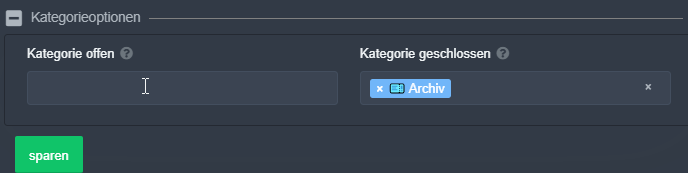
You can't enter Chanels there, if you do that, there are no reactions.
https://i.imgur.com/VgdqPOf.png
 faint minnow
Eu não consigo fazer ticket no painel!
 wraith wasp
$help support
humble sequoiaBOT
How to let support team see into a ticket
About support roles
A support role lets your support team see into tickets with out having to add them manually to each and every ticket.
You can add as many support roles as you like per panel.
NOTE that the way discord works all admins can see into tickets regardless of this.
How to set a support role
To set a Support role go to the Dashboard -> Panel Configs -> Settings -> General Options -> Support Team Roles.
NOTE that the support role will not be able to see into tickets that are already created..
 neon rock
Help
https://discordapp.com/channels/509192800865353738/662692902245498910/784478185827729409 i was told to give this link
HELP
jade topaz
how do i make the ticket tool write a message into a channel with a selectable reaction
sorry for the translator
im frim german
 cloud gulch
Tried searching to get an answer to this, but is there any way to set an automatic response in an already opened ticket if the help-asker posts during a set period of time? Like, if someone posts between 11pm-8am, a message can be sent letting them know that someone will be with them after 8?
tired adder
So these tickets have been closed by pressing the padlock key. What happens to them now?
rotund kite
Mmm
@tired adder you use the reaction lock and confirm with green ticket to close.
They will close and you have to delete the ticket
and omg the sticky is back
check perms
tired adder
so once i close them I can just delete the ticket now?
rotund kite
yes
@jade topaz run $debug
permissions
Try that first
And also make sure you're using free bot
If you are not on the premium version
tired adder
So why when i delete them does the web portal still say 4 open tickets?
rotund kite
If you haven't, use free version
rotund kite
tired adder
So why when i delete them does the web portal still say 4 open tickets?
Refresh it.
inner aurora
tired adder
So why when i delete them does the web portal still say 4 open tickets?
This is a bug. You can ignore the ticket count on the web
 thick grotto
Hello, I would like to know how I do so that in the message of the ticket I mention the role like this:
 limber egret
You need to go to the ticket settings then edit ticket message and then make it mention the role you want.
 potent meadow
How do I tag a role
limber egret
Well then
I think you need to put the id of the role :/
 lapis copper
Hey! Is there anyway to make the ticket tool create tickets under a category?
limber egret
Idk
lapis copper
Is it possible?
rotund kite
lapis copper
Hey! Is there anyway to make the ticket tool create tickets under a category?
yes
humble sequoiaBOT
Help Options
$help commands - Information on commands
$help setup - Information on bot setup
$help faq - Frequently asked questions
rotund kite
$help category
humble sequoiaBOT
How to set the open category
To set a open category go to the Dashboard -> Panel Configs -> Settings -> Category Options -> Category Open
rotund kite
@lapis copper ^^
lapis copper
:0 Tysm!
humble sequoiaBOT
Help Options
$help commands - Information on commands
$help setup - Information on bot setup
$help faq - Frequently asked questions
rotund kite
@little onyx , can you move that to #655832608835502080
 little onyx
U did it in here
rotund kite
I was showing them the category
You can use tags to help people.
But commands can go to #655832608835502080
little onyx
Can someone help me set it up
rotund kite
@little onyx #573205317870157855 should help you, anything else ping me here.
Or you can always go to and #🎫│make-a-ticket
lapis copper
Does the bot do arabic?
jade topaz
thanks
 reef panther
$new Server Assistance
humble sequoiaBOT
New command not monitoring this channel
To see what channel is monitored visit the Dashboard -> Panel Configs -> Settings -> Command Style Tickets -> Channel to monitor for command $new
reef panther
.-.
radiant moss
lapis copper
Does the bot do arabic?
The bot is only english
lapis copper
Oh... ty
radiant moss
np
jade topaz
Yo, does anyone know how to make Ticket tool ping the support role when opening a new ticket?
Please @ me in replying
humble sequoiaBOT
How to let support team see into a ticket
About support roles
A support role lets your support team see into tickets with out having to add them manually to each and every ticket.
You can add as many support roles as you like per panel.
NOTE that the way discord works all admins can see into tickets regardless of this.
How to set a support role
To set a Support role go to the Dashboard -> Panel Configs -> Settings -> General Options -> Support Team Roles.
NOTE that the support role will not be able to see into tickets that are already created..
rotund kite
There above there^^
That should help, if you still need help ping me or #🎫│make-a-ticket
jade topaz
Ah yeah it's done but doesn't ping
jade topaz
kk
jade topaz
humble sequoiaBOT
How to let support team see into a ticket
About support roles
A support role lets your support team see into tickets with out having to add them manually to each and every ticket.
You can add as many support roles as you like per panel.
NOTE that the way discord works all admins can see into tickets regardless of this.
How to set a support role
To set a Support role go to the Dashboard -> Panel Configs -> Settings -> General Options -> Support Team Roles.
NOTE that the support role will not be able to see into tickets that are already created..
humble sequoiaBOT
How to make Ticket Tool ping a role
To make ticket tool ping a role when a ticket is opened, go to the Dashboard -> Panel Configs -> Settings -> Ticket Options -> Ticket Message -> Message Text and do this:
{@Role name} This is case sensitive and the role must have @mentions enabled
 rotund kite
This?
rotund kite
And make another ticket
brisk bloom
Hi im a little new to this! One of my server members recommended me this to keep members from messaging staff for no reason. Can someone break it down for me?
pale pilot
Check #573205317870157855 for the start @brisk bloom
 round citrus
 cunning pond
candid spire
cunning pond
candid spire
@cunning pond
What happend bro
If the bot dont create the ticket when u click the emoji prob was bcs he is down or restarting bro
limber egret
?
humble sequoiaBOT
Don't see your server in the dashboard?
You will possibly need to relog. Look below to see steps on how to relog.
How to relog the Dashboard.
First, you will need to go to the dashboard. Once your there, click on your avatar on the top right. after you clicked it, you will see button that says Logout. You must click that. Once you have logged out, you can log back in.
jade topaz
glass otter
https://dontasktoask.com/
I need a 100% English person to check my translations
jade topaz
Guys can someone help me?
I added the bot to my server, but I cannot manage it from the site. It still asks to invite the bot. Do I have to wait a bit or?
 digital bloom
I invited the bot to my server but i cant manage it on the website. It just says invite but not manage
 lyric abyss
digital bloom
I invited the bot to my server but i cant manage it on the website. It just says...
lyric abyss
digital bloom
I invited the bot to my server but i cant manage it on the website. It just says...
same problem
digital bloom
hm ok
 drifting trailBOT
Channel Locked
🔒 Channel is locked while an outage. Please see #689208572806299799
drifting trailBOT
Channel Unlocked
🔓 Outage is over
 keen fjord
But is it? Cant get to manage option. Not a good first impression
upper flower
Everything is restarting
jade topaz
احد
- يساعدني
 thorny narwhal
How do I open peoples tickets
 spiral agate
Hey guys im trying to have it so I can add a role so that they can access the tickets to, How do i give that role permissions to do so
 river mason
hello, the bot does not join my server when I invite it
humble sequoiaBOT
Don't see your server in the dashboard?
You will possibly need to relog. Look below to see steps on how to relog.
How to relog the Dashboard.
First, you will need to go to the dashboard. Once your there, click on your avatar on the top right. after you clicked it, you will see button that says Logout. You must click that. Once you have logged out, you can log back in.
limber egret
@thorny narwhal React to 📩 to open a ticket
 tight gust
Is there a way to ping the support team role when a ticket is created?
limber egret
@spiral agate Any admin can Access the channels.
spiral agate
How do i set someone as admin
limber egret
Yes,make the message ping using the role ID
tight gust
If you set the role as a support team role in the panel settings that role will be able to see the channels
limber egret
@spiral agate Go to the role permissions and give the "Administrator" permission.
limber egret
tight gust
If you set the role as a support team role in the panel settings that role will ...
Any admin can Access the channels.
tight gust
Yes but he's asking to have a role that can access the tickets
limber egret
😐
 prisma nest
Hey, I just got ticket tool premium and I’m looking to recreate something like this, but I’m so confused, what do I need to do?
limber egret
🤷♂️
humble sequoiaBOT
Multipanels are a premium feature that allow for a single panel with multiple reactions to open different tickets.
How to create a Multipanel
Premium users can combine multiple panels into one multipanel.
First of all you will need to assign a different Create Ticket Reaction for each Panel. Run $help reaction to learn how to do it.
Next, find the IDs of each panel you wish to combine. You can find them in your Panel Configs in the Dashboard
Next, send the multipanel to a channel using $panel [id1] [id2] {id3} ....
e.g. $panel 1 2 4 17 35 to combine panels 1, 2, 4, 17 and 35.
Up to 10 panels may be combined.
radiant moss
@prisma nest
radiant moss
 distant quartz
where can I add premium ticket tool to my server?
distant quartz
where can I add premium ticket tool to my server?
Head to the dashboard under serverconfig. And there should be an option to invite the premium bot. Then under that change the section where it says free to premium and you should be all set
jade topaz
in my server after clicking the reaction the ticket tool bot tells me to wait for support, what support?
 atomic crystal
hey
radiant moss
hey
atomic crystal
is it possible to ping a specific role when a ticket is opened?
radiant moss
$help pings
atomic crystal
can't find how to do it on dashboard
humble sequoiaBOT
Help Options
$help commands - Information on commands
$help setup - Information on bot setup
$help faq - Frequently asked questions
humble sequoiaBOT
Note: Remove The $ From The Variables
Supported Variables
{$server_name} -The server name
{$@Role Name} -The role name you want to mention (role names are case sensitive.)
{$empty} -Use this if you want to send nothing in a required field.
{$channel_name} -The channel name this message is used in/from
{$channel} -The channel this message is used in/from
{$user_nickname} -The users nickname (if set)
{$user_tag} -The users tag
{$user_name} -The users username
{$userfull} -The users username and usertag combined
{$user} -The users @user
{$user_icon} -The url for the users icon
{$ticket_limit} -The current ticket limit
{$panel_name} -The panels name
{$ticket_name} -The tickets name
{$ticket_category} -The category tickets are created in (if set)
{$count}The current count for tickets
{$ticket_channel} -The #channel for the ticket you created
{$ticket_user} -The @user who is assigned to the Ticket
{$ticket_user_nickname} -The nickname of the user who is assigned to the Ticket (if set)
{$ticket_user_tag} -The tag of the user who is assigned to the Ticket
{$ticket_user_name} -The username of the user who is assigned to the Ticket
Note: Remove The $ From The Variables
radiant moss
There is a list above
atomic crystal
wait so how do i use that to set it up?
jade topaz
@radiant moss since no one wants to help can u help me
radiant moss
jade topaz
<@!513792641016659971> since no one wants to help can u help me
What exactly do you need help with?
jade topaz
There was no issues with anything now the bot won't send any meesages to the pannels
radiant moss
atomic crystal
wait so how do i use that to set it up?
So i assume you are wanting to @ a role i think .{@Role Name} Put that in the ticket
radiant moss
jade topaz
There was no issues with anything now the bot won't send any meesages to the pan...
So the bot will not respond to any commands and wont send the panel?
jade topaz
i did
atomic crystal
@radiant moss I want to setup to @ the support role every time a new ticket is opened
radiant moss
jade topaz
i did
Sorry if I sound repetitive but can you go into a little more detail on what you are trying to do
what the heck
ugh
@atomic crystal Go to you settings on the panel. Go into ticket options. Then got to edit it. Then on the top text box you can add {@Role Name} and replace "Role Name" with the role you are trying to @ and it is case sensitive i think
jade topaz
Okay
So here
I’ve set everything
Up
And I went to send it to the panel I wanted it to go to
And it says there was an error
But I went to the debug but there wasn’t a proble
radiant moss
ohh okay so you are trying to send the panel but you cannot
radiant moss
and the debug had all green check marks?
jade topaz
Yep
radiant moss
you have the correct channel selected right?
radiant moss
hmm
that is weird
can you go onto the dashboard and go to server config and see what bot you have selected please
atomic crystal
Ty man
radiant moss
Np!
radiant moss
wdym?
radiant moss
what its say?
radiant moss
would you mind inviting me to your server and i can try and fix it?
jade topaz
100%
radiant moss
you can send me an invite in dms
jade topaz
Hello, I've used premium ticket before but I just thought of something about premium ticket. I was wondering if premium ticket have a feature that will allow members to select a certain topic after opening a ticket? ex: ban appeal, bug/glitch report, and player report?
radiant moss
jade topaz
Hello, I've used premium ticket before but I just thought of something about pre...
You can have them say it or you can make separate tickets for each topic. Separate tickets it probably you best option to keep it all organized.
jade topaz
ah I see, what do you mean by separated tickets, like have it on each different category?
radiant moss
 alpine folio
its limiting a user with only one ticket
alpine folio
its limiting a user with only one ticket
Go over into the dashboard and go to setting and go into general options. And you can increasae the Ticket limit
radiant moss
jade topaz
ah I see, what do you mean by separated tickets, like have it on each different ...
You create multiple panels. So you can have one for ban apeals, bugs, and player reports.
jade topaz
ah I see, ty
radiant moss
Np!
alpine folio
thank you
radiant moss
Np
 vague viper
Hello. I’m a bit stuck on setting it up, within the ticket embed settings. How do I mention a role in the message text? Like the command to mention a role.
radiant moss
@vague viper Go into the settings. Go to ticket options. Then press edit message. Then when you have all the options the top one should say Message Text. use {@Role Name} and replace Role Name with your role name of choice
vague viper
Okay thank you!
 obtuse lark
Does anyone know why it's asking for me to $debug
I do the command and nothing happends
prisma nest
umm my ticket tool isn’t working can someone help
I tried commands and it isn’t doing anything, I have ticket tool premium
prisma nest
@violet granite @thin marlin
 violet granite



prisma nest
MY TICKET TOOL PREMIUM ISNT WORKING LMAO
 obsidian wharf
Mind if you explain further about your problem, @prisma nest?
prisma nest
nothing is working, that’s it.
all the commands aren’t working
the normal bot is working however, the premium version is not.
obsidian wharf
Ok, try the command in your server and provide an screenshot
prisma nest
which command would you like me to try, it has to be a premium one cause the normal one is working and it’s in my server
$mp maybe?
obsidian wharf
$help then $help setup.
humble sequoiaBOT
Help Options
$help commands - Information on commands
$help setup - Information on bot setup
$help faq - Frequently asked questions
prisma nest
should I try $mp?
obsidian wharf
No, try the commands I have listed
prisma nest
Ok
obsidian wharf
$help and $help setup.
humble sequoiaBOT
Help Options
$help commands - Information on commands
$help setup - Information on bot setup
$help faq - Frequently asked questions
obsidian wharf
$help setup
humble sequoiaBOT
Inviting Ticket Tool
The first thing you will need to do is invite the bot, an invite can be found here.
Once the bot is in your server we will head to the dashboard and create panel
A panel is used to configure each tickets settings and is were people react to make a ticket.
An example of a panel sent to a channel is shown below.

Creating a panel
To create a panel we are going to need to head over to the panel configs on the dashboard
Once at the dashboard we will need to click Create Panel
Enter a panel name (Fill in any optional settings you want)
Click Create Panel and your ready to get started with configuring your panel
An example of a creating a panel is shown below.
Sending a panel
Once you've created a panel on the dashboard you will need to send it to a channel using send on the dashboard
Select the channel you want your panel to be created in and click send.
For other questions checkout $help faq
An example of a sending a panel is shown below.
 humble sequoiaBOT
Help Options
$help commands - Information on commands
$help setup - Information on bot setup
$help faq - Frequently asked questions
obsidian wharf
OK..
prisma nest
So?
obsidian wharf
Mind if I take a look in your server, it means I need the server invite, DM's.
prisma nest
No problem
 cold cloud
can servers with large number of members get free ticket tool premium? like a partnership or something
summer tinsel
cold cloud
can servers with large number of members get free ticket tool premium? like a pa...
no
 hollow inlet
How to get ticket tool moderation bot??
 hexed creek
UH- i closed a ticket and the channel wont delete o-o'''
summer tinsel
hollow inlet
How to get ticket tool moderation bot??
You can't. @analog thistle is a private bot.
hollow inlet
summer tinsel
You can't. <@776668449303691285> is a private bot.
okay, Thank You
 errant pewter
Hey, is there a way to make it so that a certain role is only able to make a ticket one every say, 24 hours? Whereas other roles won't have a limit on how many they can make in a timeframe?
upper flower
prisma nest
@XX_XtremePro_XX, wow, just wow.
What happened?
prisma nest
He screwed me over, nvm tho.
upper flower
Okayyy
humble sequoiaBOT
If Ticket Tool support requested this debug give them this link:
https://discordapp.com/channels/509192800865353738/662692902245498910/785133544673509416
Bot Permissions ឵ ឵឵ ឵ ឵឵ ឵ ឵឵ ឵ ឵឵
✅ - Read Channels
✅ - Send Messages
✅ - Embed Links
✅ - Attach Files
✅ - Add Reactions
✅ - Manage Roles
✅ - Manage Channels
✅ - Manage Messages
✅ - Read History
Channel Permissions ឵ ឵឵ ឵ ឵឵ ឵ ឵឵ ឵ ឵឵
✅ - Read Channels
✅ - Send Messages
✅ - Embed Links
✅ - Attach Files
✅ - Add Reactions
✅ - Manage Roles
✅ - Manage Channels
✅ - Manage Messages
✅ - Read History
Server Information ឵ ឵឵ ឵ ឵឵ ឵ ឵឵ ឵ ឵឵ ឵ ឵឵
Channel name:
community-support
Channel ID:
776680605517742090
Channel Count:
147/500
Server name:
Ticket Tool Support
Server ID:
509192800865353738
User Information ឵ ឵឵ ឵ ឵឵ ឵ ឵឵ ឵ ឵឵ ឵ ឵឵
User name:
rich#0001
User ID:
395601832824668173
Permission Level:
0 - User
Bot Information ឵ ឵឵ ឵ ឵឵ ឵ ឵឵ ឵ ឵឵ ឵ ឵឵
Prefix:
$
Premium Status:
Lifetime
Current shard:
1
API Latency:
77
 earnest hare
either
humble sequoiaBOT
If the bot is not working properly, try the following steps:
-
Run the $debug command in your server, to check the permissions of the bot. Send the link you get to us.
-
Check if you have any Blacklisted Roles in your Server Configs. Any roles listed there will not be able to use the bot / create tickets.
-
While you're in your Server Configs , make sure that you don't have the premium bot enabled, without actually having premium or the bot on the server.
These are the most common issues. If your problem still exists, you can go to our Troubleshooting Page for more fixes.
 opaque tusk
$helpsetup
radiant moss
opaque tusk
$helpsetup
 tawny ledge
How do I change who can help someone who requested help
radiant moss
tawny ledge
How do I change who can help someone who requested help
Anyone can create a ticket unless you blacklist roles or make it support team only
Oh wait I think you are asking how to add people to a ticket
If so go into general settings then add there role as a support team
radiant moss
Settings
Then into General Options
Then you can add and remove support team roles
tawny ledge
Ok. I got it thanks
 midnight plover
@woeful ether that should be the embed text that appers when the ticket is opened
 woeful ether
Yes, I found out a while ago, I was wrong, thanks @midnight plover
 outer parcel


 glass otter
Have the bot the right permissions to write in the channel ?
humble sequoiaBOT
If the bot is not working properly, try the following steps:
-
Run the $debug command in your server, to check the permissions of the bot. Send the link you get to us.
-
Check if you have any Blacklisted Roles in your Server Configs. Any roles listed there will not be able to use the bot / create tickets.
-
While you're in your Server Configs , make sure that you don't have the premium bot enabled, without actually having premium or the bot on the server.
These are the most common issues. If your problem still exists, you can go to our Troubleshooting Page for more fixes.
 sonic wasp
i need help
is it posible
to setup that when somone opens a ticket it pings a online staff meber or just the role itself?
radiant moss
$variables
humble sequoiaBOT
Note: Remove The $ From The Variables
Supported Variables
{$server_name} -The server name
{$@Role Name} -The role name you want to mention (role names are case sensitive.)
{$empty} -Use this if you want to send nothing in a required field.
{$channel_name} -The channel name this message is used in/from
{$channel} -The channel this message is used in/from
{$user_nickname} -The users nickname (if set)
{$user_tag} -The users tag
{$user_name} -The users username
{$userfull} -The users username and usertag combined
{$user} -The users @user
{$user_icon} -The url for the users icon
{$ticket_limit} -The current ticket limit
{$panel_name} -The panels name
{$ticket_name} -The tickets name
{$ticket_category} -The category tickets are created in (if set)
{$count}The current count for tickets
{$ticket_channel} -The #channel for the ticket you created
{$ticket_user} -The @user who is assigned to the Ticket
{$ticket_user_nickname} -The nickname of the user who is assigned to the Ticket (if set)
{$ticket_user_tag} -The tag of the user who is assigned to the Ticket
{$ticket_user_name} -The username of the user who is assigned to the Ticket
Note: Remove The $ From The Variables
radiant moss
@sonic wasp You can use {@Role Name} and replace Role Name with your role name
sonic wasp
perfect would that be under the icket Embed Settings
radiant moss
Put it in the first text box @sonic wasp
sonic wasp
all done thanks
jade topaz
anyone here?
How do i make it to where a ticket channel disappears instead of staying there?
@violet granite
radiant moss
jade topaz
How do i make it to where a ticket channel disappears instead of staying there?
Please dont ping staff members. And is it fully closed the ticket?
pale pilot
Why the heck is everyone pinging @violet granite ?
radiant moss
Da heck
 rose ruin
Hi, I have a question. When a person opens a ticket, how can I make it so that it pings a certain role?
solid stream
$help ping
humble sequoiaBOT
How to make Ticket Tool ping a role
To make ticket tool ping a role when a ticket is opened, go to the Dashboard -> Panel Configs -> Settings -> Ticket Options -> Ticket Message -> Message Text and do this:
{@Role name} This is case sensitive and the role must have @mentions enabled
solid stream
@rose ruin
rose ruin
Oh, thank you!
violet granite
inner aurora

 round stirrup
earnest hare
round stirrup
earnest hare
Anyone knows why we get this error?
radiant moss
@round stirrup make sure it can type in that channel
radiant moss
Np
jade topaz
Seit ihr Englisch
 noble tide
Bot is down
humble sequoiaBOT
If Ticket Tool support requested this debug give them this link:
https://discordapp.com/channels/509192800865353738/662692902245498910/785495028592148480
Bot Permissions ឵ ឵឵ ឵ ឵឵ ឵ ឵឵ ឵ ឵឵
✅ - Read Channels
✅ - Send Messages
✅ - Embed Links
✅ - Attach Files
✅ - Add Reactions
✅ - Manage Roles
✅ - Manage Channels
✅ - Manage Messages
✅ - Read History
Channel Permissions ឵ ឵឵ ឵ ឵឵ ឵ ឵឵ ឵ ឵឵
✅ - Read Channels
✅ - Send Messages
✅ - Embed Links
✅ - Attach Files
✅ - Add Reactions
✅ - Manage Roles
✅ - Manage Channels
✅ - Manage Messages
✅ - Read History
Server Information ឵ ឵឵ ឵ ឵឵ ឵ ឵឵ ឵ ឵឵ ឵ ឵឵
Channel name:
community-support
Channel ID:
776680605517742090
Channel Count:
150/500
Server name:
Ticket Tool Support
Server ID:
509192800865353738
User Information ឵ ឵឵ ឵ ឵឵ ឵ ឵឵ ឵ ឵឵ ឵ ឵឵
User name:
William_CTO#5415
User ID:
198237774258765824
Permission Level:
8 - Ticket Tool Support Team Admin
Bot Information ឵ ឵឵ ឵ ឵឵ ឵ ឵឵ ឵ ឵឵ ឵ ឵឵
Prefix:
$
Premium Status:
Lifetime
Current shard:
1
API Latency:
77
inner aurora
noble tide
Bot is down
It’s up
 digital lotus
How do I add custom emojis in reactions?
inner aurora
$help reaction
humble sequoiaBOT
How to change reactions
To set a custom reaction Dashboard -> Panel Configs -> Settings -> Reaction Options -> <Reaction to change> -> Reaction
NOTE you need premium to do this.
inner aurora
Go to the last item in the selection and type in the name of the custom emoji
digital lotus
Thank you.
 smoky notch
what i should do if theres a error sending the panel even if I $debug?
jade topaz
i used the 7day premium trial and didn't get the premium bot?
radiant moss
@jade topaz you have to invite it
jade topaz
@radiant moss ye uhm 1 morr question
idk if your able to answer it
how do i send transcripts to dms
like this
radiant moss
you have to enable it one sec
radiant moss
Under Automation Options
jade topaz
Bet
radiant moss
it is premium send direct message when ticket closed
 zinc hinge
Здравствуйте, у меня вопрос, если я пробную версию запушу и настрою, у меня настройки останутся когда слетит пробная версия? Или покупать новон надо будет!
radiant moss
@zinc hinge #655832608835502080
 rich moon
Hey so i got the bot but it has no reaction and people need to look for the envelope to do it how do i do it so its pre-set
upper flower
do $debug in the channel @rich moon
upper flower
so now resend panel
rich moon
but its still not loading
jade topaz
Can anyone help me with multipanel set up please?
rich moon
Ok
humble sequoiaBOT
Multipanels are a premium feature that allow for a single panel with multiple reactions to open different tickets.
How to create a Multipanel
Premium users can combine multiple panels into one multipanel.
First of all you will need to assign a different Create Ticket Reaction for each Panel. Run $help reaction to learn how to do it.
Next, find the IDs of each panel you wish to combine. You can find them in your Panel Configs in the Dashboard
Next, send the multipanel to a channel using $panel [id1] [id2] {id3} ....
e.g. $panel 1 2 4 17 35 to combine panels 1, 2, 4, 17 and 35.
Up to 10 panels may be combined.
upper flower
@jade topaz
 brazen saddle
is bot down?
 primal path
Hey, I'd like to have the option to purchase TicketTool Premium for life and I'm wondering if that's possible. I know lots of other premium bots have that option, i just haven't seen it on your website.
inner aurora
brazen saddle
is bot down?
no, are you having trouble ?
brazen saddle
It's offline on my server
inner aurora
primal path
Hey, I'd like to have the option to purchase TicketTool Premium for life and I'm...
We don't have lifetime premium, however you can buy yearly
inner aurora
brazen saddle
It's offline on my server
$help offline
humble sequoiaBOT
How to fix Ticket Tool not responding
If ticket tool is not responding, please follow these troubleshooting steps:
Check Ticket Tool's permissions
Make sure that Ticket Tool can read and write in the channel you are attempting to run commands in. Run the command @Ticket Tool#4843 debug to see Ticket Tools list of permissions in that given channel.
Check Ticket Tool's prefix
Make sure you're using the correct prefix for Ticket Tool, Ticket Tools default prefix is $ Run the command @Ticket Tool#4843 debug to see Ticket Tools prefix for your server
Check if Ticket Tool is offline
If ticket tool is offline please contact Ticket Tool support with your server ID so we can fix it asap.