#🆘│community-support
1 messages · Page 272 of 1
 vital solstice
 scenic forum
i have no idea what youre trying to tell me
vital solstice
Okay, I'll understand. If someone opened a ticket and it's finished, there's a problem and I want to close it, I have to say... /close But I want to change this word to another word.
 lavish marlin
Why cant I set up ticket tool in my server?
 scenic forum
vital solstice
Okay, I'll understand. If someone opened a ticket and it's finished, there's a p...
scenic forum
vital solstice
Okay, I'll understand. If someone opened a ticket and it's finished, there's a p...
thats not possible
scenic forum
lavish marlin
Why cant I set up ticket tool in my server?
If the bot isn't responding when doing /debug
Its lacking these 3 permissions inside the channel it has been used in view channel, send message and embed links
vital solstice
lavish marlin
Why cant I set up ticket tool in my server?
Look above
vital solstice
scenic forum
thats not possible
Okay, thank you for solving the problems.
 iron nightBOT
Gave +1 Rep to @scenic forum (current: #8 - 888)
lavish marlin
scenic forum
If the bot isn't responding when doing ``/debug``
Its lacking these 3 permission...
ty
iron nightBOT
Gave +1 Rep to @scenic forum (current: #8 - 889)
 dire epoch
How can I make a ticket at support ?
 harsh forge
vital solstice
Okay, thank you for solving the problems.
harsh forge
vital solstice
Okay, thank you for solving the problems.
yo
you a staff?
could you help me with this 500 limit
scenic forum
harsh forge
could you help me with this 500 limit
I already told you the staff needs to delete some channels
Your refusal to listen doesnt help
scenic forum
dire epoch
How can I make a ticket at support ?
For what do you need support?
harsh forge
scenic forum
I already told you the staff needs to delete some channels
Your refusal to liste...
this has nothing to do with refusal.. I didn't see the dms
scenic forum
harsh forge
this has nothing to do with refusal.. I didn't see the dms
Then my bad
The answer is 2 messages below your original question (not in dms)
harsh forge
aight but be more specific is it going to fix itsself?
scenic forum
harsh forge
aight but be more specific is it going to fix itsself?
What did i write?
harsh forge
can have different meanings
dire epoch
scenic forum
For what do you need support?
A wrong daily mail
About the %
And hours
Everything is wrong
scenic forum
harsh forge
can have different meanings
Please tell me what i wrote
scenic forum
dire epoch
A wrong daily mail
⚠️ You're in the wrong place ⚠️
We provide support for the Discord Bot Ticket Tool and cannot help you with whatever issue you have.
- We don't know which Support Team you should contact to get this issue resolved, and unfortunately we won't be able to accurately tell you.
mb im kinda confused
scenic forum
harsh forge
mb im kinda confused
 harsh forge
scenic forum
harsh forge
scenic forum
aight didn't see it , chill out tho😭
harsh forge
scenic forum
Not trying to come across as rude or impatient but could you let me know how long it typically takes for them to remove it?
scenic forum
harsh forge
Not trying to come across as rude or impatient but could you let me know how lon...
Thats quite literally impossible to answer
harsh forge
scenic forum
Thats quite literally impossible to answer
got it so its case by case?
scenic forum
harsh forge
got it so its case by case?
Each server is merely using our bot
We dont know who uses it, how many staff, how fast they work, if they work
They are not associated to us in any way or form
harsh forge
alright I guess imma just hit that create ticket button
till I don't want to no more
scenic forum
harsh forge
alright I guess imma just hit that create ticket button
alternatively you can check if you can message a staff
harsh forge
scenic forum
alternatively you can check if you can message a staff
how do I even find them?
scenic forum
harsh forge
how do I even find them?
We cannot offer support with other servers.
 olive crescent
Hah! I didn't fall for it!

 floral egret
when i opened the feet pics channel i did not recieve feet pics, is there any way to get them?
floral egret
must be a glitch cause it opened a "developer" donation channel
scenic forum
floral egret
must be a glitch cause it opened a "developer" donation channel
Someones gonna sponsor the feet pics
 lapis matrix
@scenic plinth
 scenic plinth
@lapis matrix
lapis matrix
I Wanted to message you so i pinged

 fast reef
 tranquil onyx
Need help
tranquil onyx
Need help
then get some
scenic forum
tranquil onyx
How do u get unbanned from a game
⚠️ You're in the wrong place ⚠️
We provide support for the Discord Bot Ticket Tool and cannot help you with whatever issue you have.
- We don't know which Support Team you should contact to get this issue resolved, and unfortunately we won't be able to accurately tell you.
 obsidian void
even after doing what the page said the bot keeps making tickets outside of the channel its assigned
please help
 covert swallow
Make sure the bot has the correct permissions in that category
obsidian void
it works with all the other tickets except for one option
with one of the panels it works perfectly fine with with the other two when you try open a ticket it doesnt go in the catagory
covert swallow
Sounds like a misconfiguration of the panel settings then
obsidian void
could u please help me figure it out, im very confused
obsidian void
theres only one panel in the server and 1462368907602952330 is the id
covert swallow
I see 4 panels in your configs, do you know which one you're trying to use
covert swallow
I still see 4 panels on my end
 obsidian void
shud be the first 1
theres only one with things in the dropdwon panel
thats the way i tell, im sorry for the inconvenience
covert swallow
It looks like your drop downs are set up lead to 2 panels that do not have a category set up
 covert swallow
Panels 2 3 and 4 all have no category set up
obsidian void
do i make new panels n set the catagory up?
covert swallow
No need, you can just change the settings on the other 3 panels
 indigo fossil
Hey how do i make it ping my staff whe n ticket opens?
scenic forum
indigo fossil
Hey how do i make it ping my staff whe n ticket opens?
How to automatically ping my support team on a ticket?
1. Open your Panel Configs tab in your server's dashboard
2. Select the panel you want to ping your support team on
3. Open the Ticket options menu
4. Click on Edit Ticket Message
5. In the Message Content use one of the role mention syntax ({@Role Name}/{Role ID})
6. Save changes
Note: For this to work properly, Ticket Tool requires the Mention Everyone permission. Or the role must have the Allow anyone to @mention this role setting enabled 
indigo fossil
scenic forum
### [How to automatically ping my support team on a ticket?](<https://docs.ticke...
So if i place {@Role Name} after welcome it will ping?
scenic forum
indigo fossil
So if i place {@Role Name} after welcome it will ping?
yes
 simple dagger
Hola
Ocupo ayuda
hi I need help. The dashboard isn't showing my DC server and it won't let me create my ticket panel.
 humble sequoiaBOT
Don't see your server in the dashboard?
Try using the Sync Servers button on your top center of the Dashboard page
If this doesn't work
You should relog from the dashboard, you can do this by clicking here to log out immediately, and then log back in
Note:
You need one of these 3 things to access the dashboard.
1. Server Owner (Level: 6)
2. Server Administrator (Level: 4)
3. Dashboard Role (Level: 2)
:warning: You can check your level using the </permissionlevel:1029797400174399542> command on your Discord Server
If the bot's response is:
- @User is permission level: 0 (User)
You don't have any of the 3 levels required to access the server's dashboard

No ves tu servidor en el Dashboard (Panel de Control)?
Intenta utilizar el botón Sync Servers en la parte superior central del Panel de Control, es pobile que tuvieses que reiniciar tu sesión. Abajo encuentras los pasos para ello.
Si esto no funciona
Deberías reiniciar tu sesión, lo puedes hacer dando click aquí para cerrar sesión inmediatamente e iniciar sesión de nuevo.
Nota:
Debes tener al menos una de las siguientes cosas para acceder al panel de control.
1. Dueño del Servidor (Nivel: 6)
2. Administrador del Servidor (Nivel: 4)
3. Rol de panel de control (Level: 2)
Puedes verificar tu nivel usando el comando /permissionlevel en tu servidor de Discord
Si la respuesta del bot es:
- @User is permission level: 0 (User)
No tiene ninguna de las 3 cosas mencionadas previamente para acceder al panel de control.
 foggy sparrow
simple dagger
hi I need help. The dashboard isn't showing my DC server and it won't let me cre...
foggy sparrow
simple dagger
hi I need help. The dashboard isn't showing my DC server and it won't let me cre...
Hola que más!! Sigue los pasos que estan arriba
simple dagger
Okey gracias
simple dagger
Que hago si no me deja escribir ahí ??

 distant zealot
Is there any way to retrieve old data for ticket tool
 brittle kettle
How do I fix this?

 spiral skiff
Please help me i was baned falsely for cheating but i play on ps4 and its impossable to have cheats
 willow jasper
humble sequoiaBOT
willow jasper
humble sequoiaBOT

⚠️ You're in the wrong place
We provide support for Ticket Tool Discord bot and cannot help you with whatever issue you have.
- We don't know which Support Team you should contact to get this issue resolved, and unfortunately we won't be able to accurately tell you.
If you don't have any further questions regarding our bot Ticket Tool, please close this ticket
brittle kettle
brittle kettle
How do I fix this?
How about my issue with the bot?
foggy sparrow
brittle kettle
How about my issue with the bot?
I think the solution is pretty much self explanatory: Give the bot the manage roles permission
Also do this:
humble sequoiaBOT
When first invited to your server, Ticket Tool should have the permissions shown below in order to ensure an appropriate functioning:
When customizing permissions for the different ticket participants, you must make sure Ticket Tool has the permissions you want it to grant to others, you can learn more about this here.
Missing Permissions
This error is a direct outcome of the bot missing permissions as depicted above. When troubleshooting this error we suggest you go through these steps:
- Use the </debug:1029783024264564765> command to check if the bot is lacking core role or channel permissions.
- Compare the category/channel's overrides and contrast them with the bot's roles to identify any permission denial that is breaking the functioning
- If you can't still figure it out, let our <@&540295656720302081> know so they can guide you through
Additional Resources
- If you are a server administrator and would like to understand more how to set up your server's permissions, we suggest checking the Discord Support Knowledge Base
- If you are a bot developer and are interested in the internal permission hierarchy we suggest you this part of the Discord Developer Docs
Important Note
- Giving Administrator permissions is NOT required and we do NOT encourage you to do unless you are trying to troubleshoot your permissions setup.
 brittle kettle
That’s what I needed, is the how
How do I give it the Manage Roles? I’ve tried and I can’t find the button for it
 foggy sparrow
Head to your Dashboard
Select your server
Go to the Panel Configs Tab
Under General Ticket Options, click on Permission Options
brittle kettle
foggy sparrow
Head to your Dashboard
Select your server
Go to the Panel Configs Tab
Under Gene...
All i get is this

 latent dawn
brittle kettle
All i get is this
latent dawn
brittle kettle
All i get is this
Hey!
Go to your Discord Server -> Server Settings -> Roles
There, select the Ticket Tool role or create another role You can call it "Tickets Bot", for example. Then, go to the permissions of the role and enableMANAGE ROLES
brittle kettle
latent dawn
Hey!
> **Go to your Discord Server** -> **Server Settings** -> **Roles**
> There...
That did it! Thanks
iron nightBOT
Gave +1 Rep to @latent dawn (current: #87 - 17)
 tepid badger
My ticket no is 0799
My Vprop trader chart in mt5 server not working properly
foggy sparrow
Seems crazy what I'm bout to say
humble sequoiaBOT
⚠️ You're in the wrong place
We provide support for Ticket Tool Discord bot and cannot help you with whatever issue you have.
- We don't know which Support Team you should contact to get this issue resolved, and unfortunately we won't be able to accurately tell you.
If you don't have any further questions regarding our bot Ticket Tool, please close this ticket
 latent mesa
how can i ping the support staff here?
 humble sequoiaBOT
Within all the messages the bot sends (both embeds and text) you can mention either channels, roles, or even users, these mentions will only send a notification to the user if they are used within a text field, e.g: a role mentioned in an embed won't ping at all the users who have that role.
For mentioning a role you can use one out of three options:
{@Role Name} ➞ Which is Case Sensitive.
{RoleID} ➞ Replace RoleId with the Id of the role you are trying to ping.
<@&RoleID> ➞ Discord's native syntax to ping roles.
<#ChannelID> ➞ Mention a channel by its ID.
<@UserID> ➞ Mention a user by its ID.
foggy sparrow
Hey Sidd please read above!!
latent mesa
foggy sparrow
Hey Sidd please read above!!
ty
iron nightBOT
Gave +1 Rep to @foggy sparrow (current: #108 - 11)
latent mesa
@foggy sparrow can you also tell me how can i automatically let the bot save transcripts in the specific channel
foggy sparrow
latent mesa
<@1399084314175471616> can you also tell me how can i automatically let the bot ...
Unfortunately that is a premium feature
latent mesa
foggy sparrow
Unfortunately that is a premium feature
but it used to be free feature ig?
foggy sparrow
Autotranscript is premium, pressing the transcript is not
latent mesa
ah alright
 foggy sparrow
Hey there!
«You don't have permissions to use this»
👉 Server Configs -> Blacklist Roles
Any roles there will be unable to interact with the bot in any way, including creating tickets.
👉 Panel Configs -> Buttons -> Create Ticket -> Support team only
If this is enabled , only your staff will be able to use the button.
👉 Panel Configs -> Buttons -> Create Ticket -> Disabled Roles
Any roles there will be unable to use the button.
 restive crypt
foggy sparrow
Hey there!
«You don't have permissions to use this»
👉 Server Configs -> Blackli...
restive crypt
foggy sparrow
Hey there!
«You don't have permissions to use this»
👉 Server Configs -> Blackli...
thanks @foggy sparrow
iron nightBOT
Gave +1 Rep to @foggy sparrow (current: #101 - 12)
 hallow basalt
hi does anyone know why this keeps happening when i’m trying to save transcript & how to fix it? nothing is logging either


 wheat pumice
Good evening, where can I configure the ability to grant permission to “rename” a ticket via the command, in the “additional role”?
 restive condor
wheat pumice
Good evening, where can I configure the ability to grant permission to “rename” ...
restive condor
wheat pumice
Good evening, where can I configure the ability to grant permission to “rename” ...
Hey there! Dashboard > Command Settings > Rename
restive condor
hallow basalt
hi does anyone know why this keeps happening when i’m trying to save transcript ...
Hi there! Is your server limited by Discord, by any chance?
hallow basalt
restive condor
Hi there! Is your server limited by Discord, by any chance?
hi! i managed to figure it out eventually, thank goodness! however i ran into a whole other issue regarding transcripts.
i have auto log & normal logging equipped as shown below but it still somehow isn’t auto logging?
it autologged once & then something changed and it just stopped, do you know how to resolve this or have any advice you could give? 

 iron nightBOT
Gave +1 Rep to @restive condor (current: #1 - 3022)
restive condor
hallow basalt
hi! i managed to figure it out eventually, thank goodness! however i ran into a ...
Are you testing this with brand new tickets created through that same panel?
hallow basalt
restive condor
Are you testing this with brand new tickets created through that same panel?
yes i’m testing it with new tickets and i have 3 panels i have in dropdown ticket, none of them worked
restive condor
hallow basalt
yes i’m testing it with new tickets and i have 3 panels i have in dropdown ticke...
Did you enable the automatic transcripts for all 3 panels?
hallow basalt
restive condor
Did you enable the automatic transcripts for all 3 panels?
yes i diddd idk why it’s not working 
restive condor
hallow basalt
yes i diddd idk why it’s not working <a:StitchStressed:1394891900326121563>
So when you delete a ticket it simply just deletes, correct?
hallow basalt
restive condor
So when you delete a ticket it simply just deletes, correct?
yes
restive condor
hallow basalt
yes
Could you try resending your panel pleas
hallow basalt
restive condor
Could you try resending your panel pleas
i have done, countless times sigh
no change
restive condor
hallow basalt
i have done, countless times *sigh*
Hmmm. Apologies about that, could you #🎫│make-a-ticket including your server ID so we can take a closer look please
hallow basalt
restive condor
Hmmm. Apologies about that, could you <#571706435449257997> including your serve...
have done :)
humble sequoiaBOT
━━ User's inquiry has been moved to a ticket ━━
covert swallow
@stray surge in response to youe message in the bug report (#1488959067581055016 message)
Do you have command style tickets enabled for that panel?
 past moon
Hi can someone assist me, I am an admin on a server but it wont show up in the dashboard to setup
humble sequoiaBOT
Don't see your server in the dashboard?
Try using the Sync Servers button on your top center of the Dashboard page
If this doesn't work
You should relog from the dashboard, you can do this by clicking here to log out immediately, and then log back in
Note:
You need one of these 3 things to access the dashboard.
1. Server Owner (Level: 6)
2. Server Administrator (Level: 4)
3. Dashboard Role (Level: 2)
:warning: You can check your level using the </permissionlevel:1029797400174399542> command on your Discord Server
If the bot's response is:
- @User is permission level: 0 (User)
You don't have any of the 3 levels required to access the server's dashboard
 stray surge
covert swallow
<@642416218967375882> in response to youe message in the bug report (https://ca...
stray surge
covert swallow
<@642416218967375882> in response to youe message in the bug report (https://ca...
yes
the command works, it just doesn't output anything
 stark pumice
hello i need help with transferring my account from android to ios🥹 they said i need to create a ticket, but i'm not sure how. it led me to this channel
humble sequoiaBOT
⚠️ You're in the wrong place
We provide support for Ticket Tool Discord bot and cannot help you with whatever issue you have.
- We don't know which Support Team you should contact to get this issue resolved, and unfortunately we won't be able to accurately tell you.
If you don't have any further questions regarding our bot Ticket Tool, please close this ticket
 hasty osprey
Can only server owners invite premium or smt? Ticket tool is in my server I tried switching to gold it didnt, the bot wont activate and it says I dont have permission
 humble sequoiaBOT
The first thing you will need to do is invite the premium bot, an invite can be found here
Once the bot is in your server we will head to the dashboard and manage your server. When you are managing your server, you want to head into "Server Configs" then click the drop down menu under "Select the bot you would like to use on this server" then click "Ticket Tool#6207" and then save.
 scenic forum
@hasty osprey check above
 surreal socket
How to enable bot?

I keep getting a timeout when clicking the button.
Removing Ticket Tool from the server and reinviting it still doesn’t fix the issue.
scenic forum
surreal socket
How to enable bot?
check the message above your question
surreal socket
When I click the Manage button, it shows: “You don't have access to this server.”
 scenic forum
surreal socket
When I click the **Manage** button, it shows: “You don't have access to this ser...
scenic forum
surreal socket
When I click the **Manage** button, it shows: “You don't have access to this ser...
Did you invite the premium bot?
surreal socket
I'm not sure. I just invited the bot using the official link.
scenic forum
humble sequoia
@surreal socket click the blue here in the message and invite the gold bot
surreal socket
I can't find the "blue here" .

 languid oriole
Hello can I help with this thing because i wanna report someone but it says that channel is full idk what to delete here

 dire canyon
Hi there, i have a ticket tool bot in my server and i want to configure it so that when a ticket is made it also @ me as support to attend to the ticket
 silent cypress
help with missing grassland on nomstead
humble sequoiaBOT
⚠️ You're in the wrong place
We provide support for Ticket Tool Discord bot and cannot help you with whatever issue you have.
- We don't know which Support Team you should contact to get this issue resolved, and unfortunately we won't be able to accurately tell you.
If you don't have any further questions regarding our bot Ticket Tool, please close this ticket
 lunar solar
@silent cypress ⬇️
 echo swan
How can I configure the system to allow me to choose whether to save tickets that are about to be closed, and to display a record information window after saving? Thanks
Sorry have anyone can answer my correction and I'm setting the discord server, thank you very much.
echo swan
dire canyon
Hi there, i have a ticket tool bot in my server and i want to configure it so th...
How to automatically ping my support team on a ticket?
- Open your Panel Configs tab in your server's dashboard
- Select the panel you want to ping your support team on
- Open the Ticket options menu
- Click on Edit Ticket Message
- In the Message Content use one of the role mention syntax ({@Role Name} / {Role ID})
- Save changes
Note: For this to work properly, Ticket Tool requires the Mention Everyone permission. Or the role must have the Allow anyone to @mention this role setting enabled
圖片
There
@dire canyon I had asked your question and I'm resolved this problem.
I hope this answer can help you resolve your problem
scenic forum
echo swan
There
Next time please disable the ping on the reply feature
echo swan
Ok, I'm sorry happy
scenic forum
All good
echo swan
echo swan
How can I configure the system to allow me to choose whether to save tickets tha...
Happy I have one more question want to ask you.
scenic forum
If nobody helped you after my game is over ill assist you
echo swan
Ok, thank you.
scenic forum
echo swan
How can I configure the system to allow me to choose whether to save tickets tha...
Panel config -> General -> Two step ticket
If you enable it youll receive moderator controls with which you can transcript/reopen or delete the ticket
 noble bone
i need helpp
how do i work out the claim ticket system?? i have the claim ticket system working but it does not show in the message "claim" when someone creates a ticket and the /claim button says 'claiming is not enabled" how do i work this
humble sequoiaBOT
Claiming allows you to change the ticket name, category and permissions. To use it you have to enable it first on your Dashboard > Panel Configs > Claiming

 Note: This is a premium feature
scenic forum
Note: This is a premium feature
scenic forum
@noble bone read above
noble bone
yeah where do i find that
scenic forum
noble bone
yeah where do i find that
Everything you need to know is inside it
 scenic forum
noble bone
it wont let me press anything or edit
scenic forum
noble bone
it wont let me press anything or edit
 scenic forum
Correct
humble sequoiaBOT
You can purchase Ticket Tool Premium here! Buying it on our website allows you to have full control over your subscription:
 Cancel your subscription at any time
Change your billing interval (yearly/monthly)
Change your payment method
Add or remove server slots to your subscription
 Transfer the subscription between servers
Note: This level of control is only available when purchasing the subscription from our website.
You can manage your current subscriptions here, any billing questions or concerns, feel free to create a Billing Ticket via #🎫│make-a-ticket
 noble bone
i got free trail
scenic forum
Then you can use it for 7 days
scenic forum
noble bone
guess what its not working
Click  at the top left
 half bear
Hello
 tranquil cairn
when i put an img url it doesnt come up in the preview hekp
 maiden pasture
Hi! Could you please tell me how to make the completed ticket form appear in the text channel?
humble sequoiaBOT
A Discord Form lets the user answer individual questions in a pop-up Form, which then displays the answers in the ticket message. This can save time if you already know what you want to ask the user.
Setup Forms
Forms can be enabled under Panel Settings > Form Options > Edit Forms Options. In the new pop-up window, you can now enable and edit your own Form.
Form Options
You can add up to 5 questions in the Discord form. This is a Discord limitation. Each question can have a placeholder in the input field, a minimum and maximum input, multi-line, and also the option to have the answer required.
Options
Question Title ➞ Your Question goes here
Question Placeholder ➞ The placeholder text in the input field
Required ➞ If enabled, the user has to answer this question, to submit the form
Multi-Line Input ➞ Allows the user to input multiple lines
Minimum and Maximum Input ➞ Set a minimum and maximum input value for the user
Displaying the Answer
To display the answers from the user, you need to enable Auto display form results on the ticket message as an additional embed
If you don't want a second embed, go into your Panel Configs > Ticket Options > Edit Ticket Message. You use the variable {create.form.x} and replace x with the number of your question. For example, the response to Question 5 can be displayed with {create.form.5}.
 scenic forum
maiden pasture
Hi! Could you please tell me how to make the completed ticket form appear in the...
scenic forum
maiden pasture
Hi! Could you please tell me how to make the completed ticket form appear in the...
Read above
The displaying part
maiden pasture
scenic forum
Read above
The displaying part
I've read everything there. I want to make a system where a person answers all the questions in a form, and the entire form goes to a separate text channel where people can open a thread. I've managed to do this through a transcript, but I've encountered an issue with the HTML link that keeps getting attached. Is there a different way to implement this?
scenic forum
maiden pasture
I've read everything there. I want to make a system where a person answers all t...
The form can only be sent to the actual opened ticket
What issue did you encounter with the HTML?
maiden pasture
scenic forum
The form can only be sent to the actual opened ticket
What issue did you encount...
Disabling the "Disable attaching an html copy to the transcripts message." option still sends the link
scenic forum
maiden pasture
Disabling the "Disable attaching an html copy to the transcripts message." optio...
Can you show a screenshot of that setting
maiden pasture
Eneble*
maiden pasture
scenic forum
Can you show a screenshot of that setting
yes
 scenic forum
maiden pasture
yes
scenic forum
maiden pasture
yes
Can you show how the transcript looks like visually on the transcript channel?
maiden pasture
scenic forum
Can you show how the transcript looks like visually on the transcript channel?

 scenic forum
maiden pasture
yes
scenic forum
maiden pasture
yes
Is it enabled across your panels?
maiden pasture
scenic forum
Is it enabled across your panels?
No, this is the only panel with this feature. Other panels do not require a transcript. If you remove the "Direct Link" button and the attached file, everything will work as it should.
scenic forum
maiden pasture
No, this is the only panel with this feature. Other panels do not require a tran...
Its not possible to remove the direct link button however the HTML shouldnt be there
Did you setup the google drive storing?
maiden pasture
scenic forum
Its not possible to remove the direct link button however the HTML shouldnt be t...
No, I haven't configured it. Won't it work without a disk?
scenic forum
maiden pasture
No, I haven't configured it. Won't it work without a disk?
These 2 options are google drive options
 maiden pasture
scenic forum
Its not possible to remove the direct link button however the HTML shouldnt be t...
maiden pasture
scenic forum
Its not possible to remove the direct link button however the HTML shouldnt be t...
Is there any way to set up such a system without a button?
scenic forum
maiden pasture
Is there any way to set up such a system without a button?
nope
Feel free to open a #premium-tickets however i dont believe it can be done
iron nightBOT
Gave +1 Rep to @scenic forum (current: #8 - 890)
 light swift
uhh i need help
im unable to configure the ticket tool in my server
even after i invited and gave my server bot roles to it
scenic forum
light swift
even after i invited and gave my server bot roles to it
Don't see your server in the dashboard?
Try using the Sync Servers button on your top center of the Dashboard
If this doesn't work
You should relog from the dashboard, you can do this by clicking here to log out immediately, and then log back in page
You need one of these 3 things to access the dashboard.
Note:
- Server Owner
(Level: 6) - Server Administrator
(Level: 4) - Dashboard Role
(Level: 2)
⚠️ You can check your level using the </permissionlevel:1029797400174399542> command on your Discord Server
You don't have access to the dashboard if the bot's response is:
- @User is permission level: 0 (User)
thanks
iron nightBOT
Gave +1 Rep to @scenic forum (current: #8 - 891)
 swift kraken
Hello support please I can't find my ticket
scenic forum
swift kraken
Hello support please I can't find my ticket
⚠️ You're in the wrong place ⚠️
We provide support for the Discord Bot Ticket Tool and cannot help you with whatever issue you have.
- We don't know which Support Team you should contact to get this issue resolved, and unfortunately we won't be able to accurately tell you.
Alright thanks
 stiff nova
How to setup escalate ?
 ancient ore
Hello, I took the 7-day free trial but it's not activated on the server. What should I do?
humble sequoiaBOT
━━ User's inquiry has been moved to a ticket ━━
 proper anvil
what do I do if a server still doesn't appear on my dashboard, ticket tool is added to the discord, and I've synced/reloaded several times
scenic forum
proper anvil
what do I do if a server still doesn't appear on my dashboard, ticket tool is ad...
Don't see your server in the dashboard?
Try using the Sync Servers button on your top center of the Dashboard
If this doesn't work
You should relog from the dashboard, you can do this by clicking here to log out immediately, and then log back in page
You need one of these 3 things to access the dashboard.
Note:
- Server Owner
(Level: 6) - Server Administrator
(Level: 4) - Dashboard Role
(Level: 2)
⚠️ You can check your level using the </permissionlevel:1029797400174399542> command on your Discord Server
You don't have access to the dashboard if the bot's response is:
- @User is permission level: 0 (User)
thanks it worked I had to relog
iron nightBOT
Gave +1 Rep to @scenic forum (current: #8 - 892)
 barren goblet
I want to put an image in the ticket message like this how?
 scenic forum
barren goblet
I want to put an image in the ticket message like this how?
scenic forum
barren goblet
I want to put an image in the ticket message like this how?
You can insert image links into the media fields however you cannot reproduce the looks of that one you showed
barren goblet
scenic forum
You can insert image links into the media fields however you cannot reproduce th...
This is just an example I have an image I want to add
humble sequoiaBOT
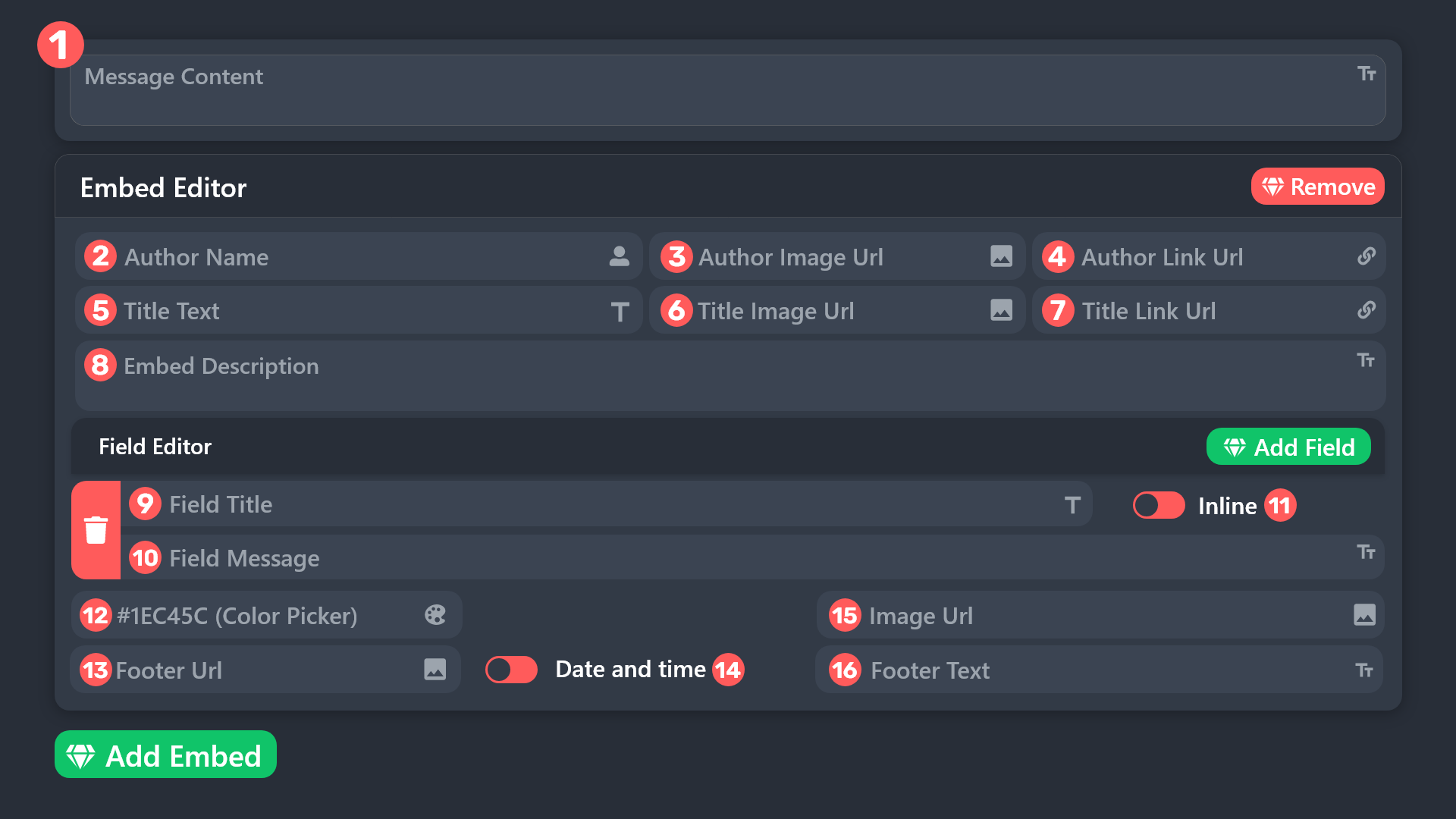 barren goblet
But how
barren goblet
scenic forum
For the big image
Why cant I add it?
 scenic forum
barren goblet
Why cant I add it?
scenic forum
barren goblet
Why cant I add it?
You need premium to edit the darkened fields
barren goblet
scenic forum
You need premium to edit the darkened fields
So can I add images to the ticket message without a premium subscription?
scenic forum
barren goblet
So can I add images to the ticket message without a premium subscription?
no
barren goblet
scenic forum
no
Last question how do I edit the message and make it like this?

مافيه سبورت عربي؟
humble sequoiaBOT
The Drop-down menu or Select Menu replaces the buttons on your panel message and uses a drop-down menu with all of your panels. To set this up, go to your Panel Configs and select your main Panel.
<:Numbericons1:1018864164032225340> Enable Select Style
First you enable Select Style. Then you add an item in the Dropdown Editor. Now you can start editing your dropdown!
<:Numbericons2:1018864168041971712> Dropdown Editor
Each line in the dropdown editor represents a line in the drop down menu on discord. You can add more "Items", by clicking on 

First you select a panel. That's the panel this option will open a ticket for.  DONT select the same panel twice. Each option should have a different Panel
After that, you can put a Display. This is the title of this option and will appear in the drop down menu. The *Description can be set right after that, which will be below the title in grey.
Additionally you can select an emoji, that will be shown in front of each option. You can either manually input the ID of an emoji or select it in the selector.
Common Issues ⚠️
- Panel doesn't send? Make sure you have a valid emoji selected
- Option doesn't show up? Check if two options have the same panel in the DropDown Editor

$dropdown
scenic forum
check above for dropdown
barren goblet
scenic forum
check above for dropdown
Like this?
 scenic forum
barren goblet
Like this?
scenic forum
barren goblet
Like this?
yes
 scenic forum
barren goblet
The method doesn’t work <@186523978729259009>
scenic forum
barren goblet
The method doesn’t work <@186523978729259009>
Show me a screenshot of your dropdown page on the dashboard
barren goblet
scenic forum
Show me a screenshot of your dropdown page on the dashboard
This?

One minute
scenic forum
barren goblet
This?
 barren goblet
scenic forum
barren goblet
scenic forum
Thx
iron nightBOT
Gave +1 Rep to @scenic forum (current: #8 - 893)
ancient ore
Hello, I took the 7-day free trial but it's not activated on the server. What should I do?
humble sequoiaBOT
━━ User's inquiry has been moved to a ticket ━━
 pseudo ravine
Please stay patient in your ticket
 compact ice
-
how do i add a ticket description to the panel
-
how to i add buttons
 boreal temple
I wanna add this to my server but what's the command for it :/

@covert swallow and @limber portal
Are yall gonna help or twiddling your thumbs
Nvm figure it out
L support team fr
 dusk cape
It don’t recognise the right server
 humble sequoiaBOT
Don't see your server in the dashboard?
Try using the Sync Servers button on your top center of the Dashboard page
If this doesn't work
You should relog from the dashboard, you can do this by clicking here to log out immediately, and then log back in
Note:
You need one of these 3 things to access the dashboard.
1. Server Owner (Level: 6)
2. Server Administrator (Level: 4)
3. Dashboard Role (Level: 2)
:warning: You can check your level using the </permissionlevel:1029797400174399542> command on your Discord Server
If the bot's response is:
- @User is permission level: 0 (User)
You don't have any of the 3 levels required to access the server's dashboard
 silent lava
@dusk cape read above
 forest tangle
It won't let me create a ticket, it says "error" help!
humble sequoiaBOT
When first invited to your server, Ticket Tool should have the permissions shown below in order to ensure an appropriate functioning:
When customizing permissions for the different ticket participants, you must make sure Ticket Tool has the permissions you want it to grant to others, you can learn more about this here.
Missing Permissions
This error is a direct outcome of the bot missing permissions as depicted above. When troubleshooting this error we suggest you go through these steps:
- Use the </debug:1029783024264564765> command to check if the bot is lacking core role or channel permissions.
- Compare the category/channel's overrides and contrast them with the bot's roles to identify any permission denial that is breaking the functioning
- If you can't still figure it out, let our <@&540295656720302081> know so they can guide you through
Additional Resources
- If you are a server administrator and would like to understand more how to set up your server's permissions, we suggest checking the Discord Support Knowledge Base
- If you are a bot developer and are interested in the internal permission hierarchy we suggest you this part of the Discord Developer Docs
Important Note
- Giving Administrator permissions is NOT required and we do NOT encourage you to do unless you are trying to troubleshoot your permissions setup.
@forest tangle read above
 blazing bluff
hey guys,
why i cant edit anything else than ''Embed description''? Premium is activated, but still cant use any of those
 foggy sparrow
I believe this is a good reason to ask in #🎫│make-a-ticket
scenic forum
boreal temple
L support team fr
Not only did you fail to abide by the rules to not ping staff. Your patience level is also severely limited.
boreal temple
scenic forum
Not only did you fail to abide by the rules to not ping staff. Your patience lev...
Mr tuff guy here
Low key did i fucking ask u
blazing bluff
Also how to fix this problem with custom uploaded emojis? Its uploaded to my server + i have Nitro, but still gives me texts in created panel instead of emojis
 foggy sparrow
This error indicates you have selected an invalid emoji, i.e. an emoji the bot isn't capable of using, in a button field
Which Emoji?
This depends upon which action the error is appearing, the most common cases are the Create Ticket button or one of your Dropdown emojis. You can visit your Button's List to find all available buttons and find the conflicting one by yourself.
Why doesn't the bot accept it as valid?
You selected an emoji that doesn't exist anymore, i.e. that has been deleted
You wrote text there, instead of an emoji (or in addition to an emoji)
You entered a code for a custom emoji from a server that the bot is not a member of
You entered a custom emoji code incorrectly
You're on iPhone and entered an emoji using the phone's emoji pad (use the emoji selector in the website instead)
blazing bluff
I picked emoji from uploaded ones to my server where is ticket tool panel im just working on, i put there emoji, but it transfered on text and im on PC
 raw whale
hello im jody breeze i really need some help
scenic forum
blazing bluff
I picked emoji from uploaded ones to my server where is ticket tool panel im jus...
use $id EMOTEHERE to get the correct copy paste for it
raw whale
i cant get into any severs it says join this discord i been join the discord for two weeks now it says verify my phone number but its not letting me
scenic forum
raw whale
i cant get into any severs it says join this discord i been join the discord for...
⚠️ You're in the wrong place ⚠️
We provide support for the Discord Bot Ticket Tool and cannot help you with whatever issue you have.
- We don't know which Support Team you should contact to get this issue resolved, and unfortunately we won't be able to accurately tell you.
 grizzled prawn
I keep getting an error message saying something like I’m not allowed to make a ticket something about 45 channels and 50 servers?
scenic forum
blazing bluff
I picked emoji from uploaded ones to my server where is ticket tool panel im jus...
Get out of my dms
Support on server only
blazing bluff
Sorry mate
So as i said, would you mind describing me your advice little bit better? Not sure if i understood right
 modest bison
hii is it possible if we have prem in a serv to transfer it to another serv?
scenic forum
grizzled prawn
I keep getting an error message saying something like I’m not allowed to make a ...
are you staff?
scenic forum
blazing bluff
Sorry mate
So as i said, would you mind describing me your advice little bit be...
its a command
if you use
$id 
It will tell you the correct copy paste to use the emote
scenic forum
modest bison
hii is it possible if we have prem in a serv to transfer it to another serv?
If you subscribed via the website use
https://tickettool.xyz/billing

Ticket Tool - Ticketing without clutter - The #1 Discord support bot
 vestal turret
I’m trying to make a forum channel. But any new forum that is made I want a bot to automatically ping like people who have that ping. Like say you have a forum channel, and you make a new one, and you type in something because it needs a category for that forum, and when you enter it—a bot responds with a ping? Is there any way to do that like step by step or something? Like any variables I need or anything? Like should I make an autoresponder or something? Please help! >_<
scenic forum
vestal turret
I’m trying to make a forum channel. But any new forum that is made I want a bot ...
Ticket tool cannot create forum channels
vestal turret
Well I know that- but I mean I would like if when a forum is made by a member or something for it to respond to it
scenic forum
vestal turret
Well I know that- but I mean I would like if when a forum is made by a member or...
Not really possible with ticket tool
vestal turret
oh okay! Thanks anyways- bye!
blazing bluff
thanks boss, its working
 fallen flame
Is there anyway to convert a channel into a ticket? One of my staff messed up and made a regular channel instead of a ticket
scenic forum
fallen flame
Is there anyway to convert a channel into a ticket? One of my staff messed up an...
not possible
 alpine vale
is there any way i can view every ticket I have ever made with ticket tool?
like only tickets that are associated with ticket tool
scenic forum
alpine vale
is there any way i can view every ticket I have ever made with ticket tool?
not possible
alpine vale
scenic forum
not possible
ahh alr there was a ticket purge
the server owner did and I had acc info in the ticket and I did not save them
so no way I can get the ticket transcript back?
scenic forum
alpine vale
so no way I can get the ticket transcript back?
No
The there is a nice warning on the purge command that no logs or transcripts will be made
alpine vale
scenic forum
No
The there is a nice warning on the purge command that no logs or transcripts ...
ahh ok
 plucky flax
i put {create.form.x} in my ticket message and the form wont pop up when the ticket gets created
scenic forum
plucky flax
i put {create.form.x} in my ticket message and the form wont pop up when the tic...
- That's the false variable
- That's only to display the answer of the form if correct variable is used
Read below
humble sequoiaBOT
A Discord Form lets the user answer individual questions in a pop-up Form, which then displays the answers in the ticket message. This can save time if you already know what you want to ask the user.
Setup Forms
Forms can be enabled under Panel Settings > Form Options > Edit Forms Options. In the new pop-up window, you can now enable and edit your own Form.
Form Options
You can add up to 5 questions in the Discord form. This is a Discord limitation. Each question can have a placeholder in the input field, a minimum and maximum input, multi-line, and also the option to have the answer required.
Options
Question Title ➞ Your Question goes here
Question Placeholder ➞ The placeholder text in the input field
Required ➞ If enabled, the user has to answer this question, to submit the form
Multi-Line Input ➞ Allows the user to input multiple lines
Minimum and Maximum Input ➞ Set a minimum and maximum input value for the user
Displaying the Answer
To display the answers from the user, you need to enable Auto display form results on the ticket message as an additional embed
If you don't want a second embed, go into your Panel Configs > Ticket Options > Edit Ticket Message. You use the variable {create.form.x} and replace x with the number of your question. For example, the response to Question 5 can be displayed with {create.form.5}.
iron nightBOT
Gave +1 Rep to @scenic forum (current: #8 - 894)
 broken pelican
they didn't tell me how long the ban was broken for: Warn:Client triggered anti Exploit
humble sequoiaBOT
⚠️ You're in the wrong place
We provide support for Ticket Tool Discord bot and cannot help you with whatever issue you have.
- We don't know which Support Team you should contact to get this issue resolved, and unfortunately we won't be able to accurately tell you.
If you don't have any further questions regarding our bot Ticket Tool, please close this ticket
 civic heron
Hello is there anyway I could fix this?
 scenic forum
civic heron
Hello is there anyway I could fix this?
scenic forum
civic heron
Hello is there anyway I could fix this?
Staff need to delete some channels
 abstract apex
Is there anyone else having this problems with their dashboard ?

Periodically it will tell me I don’t have access to my own server, however other servers I have still work
humble sequoiaBOT
Don't see your server in the dashboard?
Try using the Sync Servers button on your top center of the Dashboard page
If this doesn't work
You should relog from the dashboard, you can do this by clicking here to log out immediately, and then log back in
Note:
You need one of these 3 things to access the dashboard.
1. Server Owner (Level: 6)
2. Server Administrator (Level: 4)
3. Dashboard Role (Level: 2)
:warning: You can check your level using the </permissionlevel:1029797400174399542> command on your Discord Server
If the bot's response is:
- @User is permission level: 0 (User)
You don't have any of the 3 levels required to access the server's dashboard
grizzled prawn
scenic forum
are you staff?
No
 final fiber
Issues KYC and payout request
 humble sequoiaBOT
⚠️ You're in the wrong place
We provide support for Ticket Tool Discord bot and cannot help you with whatever issue you have.
- We don't know which Support Team you should contact to get this issue resolved, and unfortunately we won't be able to accurately tell you.
If you don't have any further questions regarding our bot Ticket Tool, please close this ticket
humble sequoiaBOT
Hello, we would love to help you, but if you don't tell us what you need help with we can't help you :(
 steel compass
I mistakenly disabled My ticket from sending files and pictures and I forgot how to enable
Can you help me out
?
restive condor
steel compass
I mistakenly disabled My ticket from sending files and pictures and I forgot how...
Hey there! Dashboard > Panel Configs > Permissions > Ticket Owner Permissions- Edit Opened >  Attach Files
 restive condor
steel compass
restive condor
steel compass
Oh, you're a regular user
You will need to reach out to that server's staff
There's nothing you can do
restive condor
steel compass
That's my alt acc
Ah, alrighty. Could you test this with a brand new ticket please
 steel compass
restive condor
Ah, alrighty. Could you test this with a brand new ticket please
steel compass
restive condor
Ah, alrighty. Could you test this with a brand new ticket please
How can I I get a brand new tho
restive condor
steel compass
How can I I get a brand new tho
Close that ticket and open a new one
steel compass
How can I close ticket pls
restive condor
steel compass
Simply close this ticket like any other ticket. With the close button or the close command
 charred sun
hello this is jody breeze i need help with joina discord im already in but its telling me to join discord until then i cant join no servers
humble sequoiaBOT
⚠️ You're in the wrong place
We provide support for Ticket Tool Discord bot and cannot help you with whatever issue you have.
- We don't know which Support Team you should contact to get this issue resolved, and unfortunately we won't be able to accurately tell you.
If you don't have any further questions regarding our bot Ticket Tool, please close this ticket
steel compass

I deleted the ticket panel on my channel
And I want get New pannel but it's not working out
What should I do
Are you here
 frozen oracle
How do i add a support role to my tickets, i want to when a ticket is made a role is added, like support. How do i do this, because iv followed some tutorials but they dont seem to work, only roles with administrator get added
charred sun
Hello
scenic forum
steel compass
use /debug inside that ticket channel
scenic forum
frozen oracle
How do i add a support role to my tickets, i want to when a ticket is made a rol...
Panel config -> General -> Support team -> Add role
frozen oracle
scenic forum
Panel config -> General -> Support team -> Add role
iv done this, but they still dont get added to the tickets
 scenic forum
frozen oracle
iv done this, but they still dont get added to the tickets
scenic forum
frozen oracle
iv done this, but they still dont get added to the tickets
You need to test on new tickets
frozen oracle
new tickets get only bots and administrator roles
 scenic forum
frozen oracle
new tickets get only bots and administrator roles
scenic forum
frozen oracle
new tickets get only bots and administrator roles
And thats the same panel you edited?
frozen oracle
like the same server?
scenic forum
frozen oracle
like the same server?
How many panels does your server have
frozen oracle
only one
scenic forum
frozen oracle
only one
Can you show that
frozen oracle
oh sorry, i had 2 and when i added to that one it finally worked, sorry for the trouble!
thanks for the help
Thanks @scenic forum
iron nightBOT
Gave +1 Rep to @scenic forum (current: #8 - 895)
 jagged shuttle
This might just be a thing with my server setting but how do i make it so that the tickets always show up in channel list rather than having to add them
scenic forum
jagged shuttle
This might just be a thing with my server setting but how do i make it so that t...
Follow the category
or toggle show all channels
charred sun
Can somebody help me please
humble sequoiaBOT
@charred sun, we would love to help you, but if you don't tell us what you need help with we can't help you :(
charred sun
I need help getting into servers it says connection failed
scenic forum
charred sun
I need help getting into servers it says connection failed
⚠️ You're in the wrong place ⚠️
We provide support for the Discord Bot Ticket Tool and cannot help you with whatever issue you have.
- We don't know which Support Team you should contact to get this issue resolved, and unfortunately we won't be able to accurately tell you.
Sorry may I know how to set up when I click the "transcript" it will create the message and send the details to my choose Channel?

 uncut oxide
I need help im having trouble setting it up in a server
covert swallow
Heres a setup guide
 stark runeBOT
1. Invite Ticket Tool to your server
First you will want to invite the bot to your server. Once the bot is in your server, you can manage your server in the dashboard.

2. Create a Panel
To create a panel we are going to need to head over to the panel configs on the dashboard.
Once at the dashboard we will need to click Create Panel.
Enter a panel name (Fill in any optional settings you want).
Click Create Panel and your ready to get started with configuring your panel.
An example of a creating a panel is shown below.

3. Send the Panel to a Channel
Once you've created a panel on the dashboard you will need to send it to a channel using send on the dashboard.
Select the channel you want your panel to be created in and click send.
For other questions checkout $help faq.
An example of a sending a panel is shown below.
Having a Problem Sending the Panel?
Do $debug in a channel with Ticket Tool and make sure it has all the necessary Discord permissions.
 covert swallow
echo swan
Sorry may I know how to set up when I click the "transcript" it will create the ...
covert swallow
echo swan
Sorry may I know how to set up when I click the "transcript" it will create the ...
Dashboard > panel configs > transcripts > Transcript channel box
 rocky marsh
When I try to do /setup it says applications doesnt respond
humble sequoiaBOT
When first invited to your server, Ticket Tool should have the permissions shown below in order to ensure an appropriate functioning:
When customizing permissions for the different ticket participants, you must make sure Ticket Tool has the permissions you want it to grant to others, you can learn more about this here.
Missing Permissions
This error is a direct outcome of the bot missing permissions as depicted above. When troubleshooting this error we suggest you go through these steps:
- Use the </debug:1029783024264564765> command to check if the bot is lacking core role or channel permissions.
- Compare the category/channel's overrides and contrast them with the bot's roles to identify any permission denial that is breaking the functioning
- If you can't still figure it out, let our <@&540295656720302081> know so they can guide you through
Additional Resources
- If you are a server administrator and would like to understand more how to set up your server's permissions, we suggest checking the Discord Support Knowledge Base
- If you are a bot developer and are interested in the internal permission hierarchy we suggest you this part of the Discord Developer Docs
Important Note
- Giving Administrator permissions is NOT required and we do NOT encourage you to do unless you are trying to troubleshoot your permissions setup.
@rocky marsh
rocky marsh
Ah thanks
echo swan
covert swallow
Dashboard > panel configs > transcripts > Transcript channel box
Thanks Bro
iron nightBOT
Gave +1 Rep to @covert swallow (current: #15 - 529)
 peak schooner
How can I see how many tickets each moderator has closed? I checked the panel but couldn't find it, does such a thing exist?
 crude holly
peak schooner
How can I see how many tickets each moderator has closed? I checked the panel bu...
crude holly
peak schooner
How can I see how many tickets each moderator has closed? I checked the panel bu...
logs
scenic forum
 woven solar
How do I make tickets?
woven solar
How do I make tickets?
Try being patient and not pinging everything and anything you can find
 hollow patrol
Hi so when the ticket is created the message of the “ticket created” or sum how do I change it
humble sequoiaBOT
The Ticket Message is the first message sent by the bot on a new ticket. To customize it head over to your Dashboard ➞ Panel Configs ➞ Ticket ➞ Edit Ticket Message
 scenic forum
@hollow patrol check above
 fickle cliff
How can I have a purge command that saves all transcripts? Because I have 250 important tickets per week and I'm tired of having to run $close on every ticket each time just for it to delete and save the transcript.
woven solar
 scenic forum
fickle cliff
How can I have a purge command that saves all transcripts? Because I have 250 im...
scenic forum
fickle cliff
How can I have a purge command that saves all transcripts? Because I have 250 im...
You cannot
You can try setting up automation for your purpose tho
humble sequoiaBOT
With Ticket Tool's automation, you'll be able to customize your ticket system workflow! Using the Automation Editor you can:
- Chose out of 6 different triggers
- Set a Message Watcher to wait for a message for a given time, or to wait for the absence of them
- Add delays on the execution of actions after the trigger or watcher finds a message!
Automation Command
Automations can be stopped, by running the /automation stop command inside the ticket you want it to stop in. Restart it with /automation start You'll also be able to view the current status of the automations with /automation.
__Important Notes__
- Automation is on ALPHA TESTING PHASE, things might work unexpectedly or not at all.
- Any automation will run for a maximum of 7 days or until the ticket is closed, afterward, it will stop checking
+ You can have 5 automations per panel

$auto
scenic forum
@fickle cliff read above
hollow patrol
scenic forum
<@1395109398350659704> check above
Ye but it only makes me edit the main panel not the created panel
scenic forum
hollow patrol
Ye but it only makes me edit the main panel not the created panel
it only works on new tickets not existing ones
 scenic forum
fickle cliff
it's in sec?
scenic forum
fickle cliff
it's in sec?
yes
 soft juniper
Hi
Can I add a role for image perms when someone makes a ticket through the bot automatically ?
restive condor
soft juniper
Can I add a role for image perms when someone makes a ticket through the bot aut...
Hey there! Dashboard > Panel Configs > Permissions > Ticket Owner Permissions- Edit Opened > Attach Files
soft juniper
Thanks
 slender totem
 spice vale
do the .txt files save in transcripts
restive condor
spice vale
do the .txt files save in transcripts
Hey there! It should, yes
 hard vigil
Hello everyone
Had a quick question: how can I add a second button/ticket option to my ticket panel? If I add a second ticket option, can I also customize the text for that ticket information once created?
It looks like there is only one available button to customize

Ah I see it is a multipanel 
 rancid wyvern
Hi, I need help. I have a server and I don't know how to make a support bot. Can someone help me? Like a bot that helps people by opening a ticket
foggy sparrow
rancid wyvern
Hi, I need help. I have a server and I don't know how to make a support bot. Can...
Dora... you can hire this bot
stark runeBOT
1. Invite Ticket Tool to your server
First you will want to invite the bot to your server. Once the bot is in your server, you can manage your server in the dashboard.
2. Create a Panel
To create a panel we are going to need to head over to the panel configs on the dashboard.
Once at the dashboard we will need to click Create Panel.
Enter a panel name (Fill in any optional settings you want).
Click Create Panel and your ready to get started with configuring your panel.
An example of a creating a panel is shown below.
3. Send the Panel to a Channel
Once you've created a panel on the dashboard you will need to send it to a channel using send on the dashboard.
Select the channel you want your panel to be created in and click send.
For other questions checkout $help faq.
An example of a sending a panel is shown below.
Having a Problem Sending the Panel?
Do $debug in a channel with Ticket Tool and make sure it has all the necessary Discord permissions.
 worldly helm
rancid wyvern
Hi, I need help. I have a server and I don't know how to make a support bot. Can...
worldly helm
rancid wyvern
Hi, I need help. I have a server and I don't know how to make a support bot. Can...
Here‘s a guide for you^
 earnest bison
hello is there a way when someone clicks on a button on my panel say like support how can i make ticket tool rename that ticket to support
humble sequoiaBOT
The ticket name is the default channel name of all tickets. To edit it, go to your Dashboard > Panel Configs > Ticket. There you can edit the channel name of opened and closed tickets. You can also use variables in there.

 Note: This is a premium feature
scenic forum
Note: This is a premium feature
scenic forum
@earnest bison check above
earnest bison
scenic forum
<@1182014515802546180> check above
oh its premium..
earnest bison
scenic forum
<@1182014515802546180> check above
can i get a free code?
scenic forum
earnest bison
can i get a free code?
There is a 7 day trial that you can redeem
However once thats over all premium features will disable again
earnest bison
scenic forum
There is a 7 day trial that you can redeem
However once thats over all premium f...
i used it.....
 runic skiff
Hi today gmt have a traning ?
humble sequoiaBOT
⚠️ You're in the wrong place
We provide support for Ticket Tool Discord bot and cannot help you with whatever issue you have.
- We don't know which Support Team you should contact to get this issue resolved, and unfortunately we won't be able to accurately tell you.
If you don't have any further questions regarding our bot Ticket Tool, please close this ticket
 worthy fjord
in my tickettool dashboard, my server says it doesnt have ticket tool, even though it does, idk what to do
scenic forum
worthy fjord
in my tickettool dashboard, my server says it doesnt have ticket tool, even thou...
Show a screenshot

 scenic forum
worthy fjord
scenic forum
worthy fjord
Don't see your server in the dashboard?
Try using the Sync Servers button on your top center of the Dashboard
If this doesn't work
You should relog from the dashboard, you can do this by clicking here to log out immediately, and then log back in page
You need one of these 3 things to access the dashboard.
Note:
- Server Owner
(Level: 6) - Server Administrator
(Level: 4) - Dashboard Role
(Level: 2)
⚠️ You can check your level using the </permissionlevel:1029797400174399542> command on your Discord Server
You don't have access to the dashboard if the bot's response is:
- @User is permission level: 0 (User)
reloggingnworked tysm
 dreamy wyvern

 alpine needle

 vague urchin
Hey im new her and can someone pls help because im trying to do a another ticket because my old one deleted himself.
 foggy sparrow
vague urchin
Hey im new her and can someone pls help because im trying to do a another ticket...
foggy sparrow
vague urchin
Hey im new her and can someone pls help because im trying to do a another ticket...
Are you staff?
vague urchin
@foggy sparrow no
foggy sparrow
Sadly we cannot help you, since it's the staff settings
 grand lantern
Hello, is there a way to see all of my previous ticket? I want to see my old ticket that I created but can't find them. I'm not owner of the server. Thank you!
 unkempt moat
/setup
 versed ocean
يعيال
 tender cipher
Hey can someone send me the ticket bot website link?
 silent marsh
hi Guys i Invitet the Ticket Tool App but when i wanna go to my Dashboard he doesnt find my Server. the Ticket Tool app has Admin right like my own account but he will not sync whit my discord and the Dashboard can somebody help ?
scenic forum
grand lantern
Hello, is there a way to see all of my previous ticket? I want to see my old tic...
nope
scenic forum
tender cipher
Hey can someone send me the ticket bot website link?
Ticket Tool - Ticketing without clutter - The #1 Discord support bot
scenic forum
silent marsh
hi Guys i Invitet the Ticket Tool App but when i wanna go to my Dashboard he doe...
Don't see your server in the dashboard?
Try using the Sync Servers button on your top center of the Dashboard
If this doesn't work
You should relog from the dashboard, you can do this by clicking here to log out immediately, and then log back in page
You need one of these 3 things to access the dashboard.
Note:
- Server Owner
(Level: 6) - Server Administrator
(Level: 4) - Dashboard Role
(Level: 2)
⚠️ You can check your level using the </permissionlevel:1029797400174399542> command on your Discord Server
You don't have access to the dashboard if the bot's response is:
- @User is permission level: 0 (User)
thanks
iron nightBOT
Gave +1 Rep to @scenic forum (current: #8 - 896)
silent marsh
ok i have Persmissionlevel 6 but i can still not log in in the Dashboard -.-"
scenic forum
silent marsh
ok i have Persmissionlevel 6 but i can still not log in in the Dashboard -.-"
Log out and in
silent marsh
i done it already multiply times
scenic forum
silent marsh
i done it already multiply times
Show me a screenshot of you being logged out
silent marsh
 scenic forum
silent marsh
scenic forum
silent marsh
Login and please show me another screenshot of that
also use /debug on your server please
silent marsh

 scenic forum
silent marsh
scenic forum
silent marsh
And youre logged in as the correct account?
silent marsh
yes
scenic forum
You dont have a second account?
silent marsh
nope
scenic forum
Please #🎫│make-a-ticket
scenic forum
silent marsh
where do i find my server ID <@186523978729259009>
use $id on your server and copy the response
silent marsh
ok ty
 white trellis
humble sequoiaBOT
white trellis
humble sequoiaBOT
━━ User's inquiry has been moved to a ticket ━━
 fair violet
Bot is down?
scenic forum
fair violet
Bot is down?
no
fair violet
scenic forum
no
its offline and no commands are working..
scenic forum
fair violet
its offline and no commands are working..
use /debug
fair violet


 urban geyser
idk how
 urban geyser
idk how i give manage roles permision
scenic forum
fair violet
missing the permission with the X
 fair violet
OH
humble sequoiaBOT
When first invited to your server, Ticket Tool should have the permissions shown below in order to ensure an appropriate functioning:
When customizing permissions for the different ticket participants, you must make sure Ticket Tool has the permissions you want it to grant to others, you can learn more about this here.
Missing Permissions
This error is a direct outcome of the bot missing permissions as depicted above. When troubleshooting this error we suggest you go through these steps:
- Use the </debug:1029783024264564765> command to check if the bot is lacking core role or channel permissions.
- Compare the category/channel's overrides and contrast them with the bot's roles to identify any permission denial that is breaking the functioning
- If you can't still figure it out, let our <@&540295656720302081> know so they can guide you through
Additional Resources
- If you are a server administrator and would like to understand more how to set up your server's permissions, we suggest checking the Discord Support Knowledge Base
- If you are a bot developer and are interested in the internal permission hierarchy we suggest you this part of the Discord Developer Docs
Important Note
- Giving Administrator permissions is NOT required and we do NOT encourage you to do unless you are trying to troubleshoot your permissions setup.
@urban geyser check above
needs that in the ticket category
scenic forum
urban geyser
yoo oyo yo i dont understand
Discord
One of the great things about creating communities on Discord is our permission system! In this Help Center article, you'll learn more about permissions, how to create and customize permissions bas...
urban geyser
@scenic forum it dosent work
stark runeBOT
1. Invite Ticket Tool to your server
First you will want to invite the bot to your server. Once the bot is in your server, you can manage your server in the dashboard.
2. Create a Panel
To create a panel we are going to need to head over to the panel configs on the dashboard.
Once at the dashboard we will need to click Create Panel.
Enter a panel name (Fill in any optional settings you want).
Click Create Panel and your ready to get started with configuring your panel.
An example of a creating a panel is shown below.
3. Send the Panel to a Channel
Once you've created a panel on the dashboard you will need to send it to a channel using send on the dashboard.
Select the channel you want your panel to be created in and click send.
For other questions checkout $help faq.
An example of a sending a panel is shown below.
Having a Problem Sending the Panel?
Do $debug in a channel with Ticket Tool and make sure it has all the necessary Discord permissions.
 polar juniper
is there an way to automatically transcript an ticket once i close it?
so i dont have to press the transcript button first
 thorn halo
polar juniper
is there an way to automatically transcript an ticket once i close it?
thorn halo
polar juniper
is there an way to automatically transcript an ticket once i close it?
hey there, this is a premium feature
polar juniper
ok, thanks
 onyx canopy
yo how do i setup the ticket tool bot?
restive condor
onyx canopy
yo how do i setup the ticket tool bot?
Hi there, here’s a setup guide for you
stark runeBOT
1. Invite Ticket Tool to your server
First you will want to invite the bot to your server. Once the bot is in your server, you can manage your server in the dashboard.
2. Create a Panel
To create a panel we are going to need to head over to the panel configs on the dashboard.
Once at the dashboard we will need to click Create Panel.
Enter a panel name (Fill in any optional settings you want).
Click Create Panel and your ready to get started with configuring your panel.
An example of a creating a panel is shown below.
3. Send the Panel to a Channel
Once you've created a panel on the dashboard you will need to send it to a channel using send on the dashboard.
Select the channel you want your panel to be created in and click send.
For other questions checkout $help faq.
An example of a sending a panel is shown below.
Having a Problem Sending the Panel?
Do $debug in a channel with Ticket Tool and make sure it has all the necessary Discord permissions.
onyx canopy
restive condor
Hi there, here’s a setup guide for you
kk thx
iron nightBOT
Gave +1 Rep to @restive condor (current: #1 - 3030)
 severe trellis
Hi
grand lantern
scenic forum
nope
Thank you!
iron nightBOT
Gave +1 Rep to @scenic forum (current: #8 - 898)
 fair furnace
Are tickets supposed to provide a transcript of what was discussed in a ticket after the ticket itself has been closed?
silent lava
fair furnace
Are tickets supposed to provide a transcript of what was discussed in a ticket a...
Dashboard > panel configs > transcripts > Transcript channel
 rustic flicker
Hi Umm what is this server for??
 rustic flicker
Hi Umm what is this server for??
rustic flicker
rustic flicker
Hi Umm what is this server for??
I just joined but Idk really What is for
scenic forum
rustic flicker
Hi Umm what is this server for??
Ticket tool support
scenic forum
 bleak acorn
If the bot isn't responding when doing /debug
Its lacking these 3 permissions inside the channel it has been used in View Channel, Send Message and Embed Links
rustic flicker
scenic forum
Ticket tool support
I didn't get it like what is a ticket tool support?
bleak acorn
scenic forum
If the bot isn't responding when doing ``/debug``
Its lacking these 3 permission...
channel was locked. im an idiot. thanks for the help
iron nightBOT
Gave +1 Rep to @scenic forum (current: #8 - 899)
scenic forum
rustic flicker
I didn't get it like what is a ticket tool support?
If you have to ask youre wrong here
Ticket tool is a discord bot
 floral marlin
eyo mates, does anybody know how to make this kind of panels please ?
 humble sequoiaBOT
The Drop-down menu or Select Menu replaces the buttons on your panel message and uses a drop-down menu with all of your panels. To set this up, go to your Panel Configs and select your main Panel.
<:Numbericons1:1018864164032225340> Enable Select Style
First you enable Select Style. Then you add an item in the Dropdown Editor. Now you can start editing your dropdown!
<:Numbericons2:1018864168041971712> Dropdown Editor
Each line in the dropdown editor represents a line in the drop down menu on discord. You can add more "Items", by clicking on
First you select a panel. That's the panel this option will open a ticket for. DONT select the same panel twice. Each option should have a different Panel
After that, you can put a Display. This is the title of this option and will appear in the drop down menu. The *Description can be set right after that, which will be below the title in grey.
Additionally you can select an emoji, that will be shown in front of each option. You can either manually input the ID of an emoji or select it in the selector.
Common Issues ⚠️
- Panel doesn't send? Make sure you have a valid emoji selected
- Option doesn't show up? Check if two options have the same panel in the DropDown Editor
$dropdown
scenic forum
@floral marlin read above
 weary plaza
I was trying to refresh my tickets for my server and this appears
 scenic forum
weary plaza
I was trying to refresh my tickets for my server and this appears
scenic forum
weary plaza
I was trying to refresh my tickets for my server and this appears
And what is the issue?
weary plaza
I’m trying to refresh this to get to another server cause it didn’t load so I hit refresh and it said oops I did this too quick, 3 minutes later it said that still
scenic forum
log out and log back in
scenic forum
 nocturne zenith
How do I make it so when someone opens a ticket it pings a certain role
nocturne zenith
How do I make it so when someone opens a ticket it pings a certain role
How to automatically ping my support team on a ticket?
1. Open your Panel Configs tab in your server's dashboard
2. Select the panel you want to ping your support team on
3. Open the Ticket options menu
4. Click on Edit Ticket Message
5. In the Message Content use one of the role mention syntax ({@Role Name}/{Role ID})
6. Save changes
Note: For this to work properly, Ticket Tool requires the Mention Everyone permission. Or the role must have the Allow anyone to @mention this role setting enabled
 fiery blaze
My ticket tool for a server won’t show in my dashboard, and when I magically entered its panel it displayed this
 humble sequoiaBOT
How to disable the premium bot
To disable the premium bot you will need to use the </botswitcher:1073837726702506004> command to select the White - Primary bot and be able to access your server's Dashboard
Note: Premium features will still work on the normal bot.
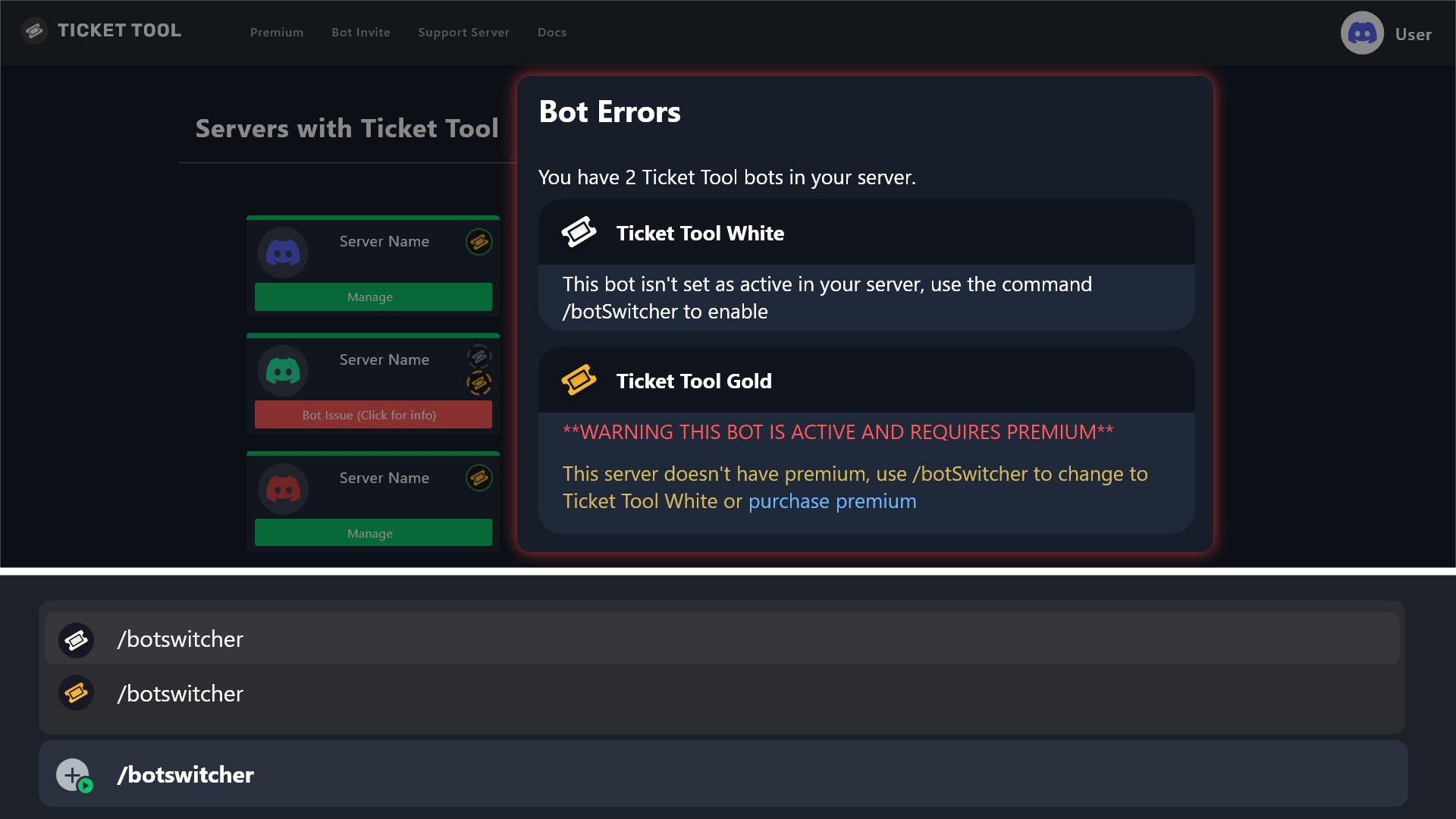
 slender minnow
@fiery blaze 
fiery blaze
slender minnow
<@1394491392180617306> <:This:718281783296131073>
I already tried that seeing if it was that issue
humble sequoiaBOT
⚠️ You're in the wrong place
We provide support for Ticket Tool Discord bot and cannot help you with whatever issue you have.
- We don't know which Support Team you should contact to get this issue resolved, and unfortunately we won't be able to accurately tell you.
If you don't have any further questions regarding our bot Ticket Tool, please close this ticket
slender minnow
@tight rock ^
slender minnow
fiery blaze
I already tried that seeing if it was that issue
That error says that you are using the premium bot without a premium subscription.
 tight rock
Bruh 🤣
slender minnow
You will have to switch back to the primary bot.
tight rock
And where i Can find it
fiery blaze
slender minnow
You will have to switch back to the primary bot.
I’m on the primary, hold on
slender minnow
tight rock
And where i Can find it
we can't help you sorry
fiery blaze
 slender minnow
fiery blaze
I’m on the primary, hold on
slender minnow
fiery blaze
I’m on the primary, hold on
let me check from my side
tight rock
Ok
fiery blaze
slender minnow
Try reinviting the bot
Okay
fiery blaze
slender minnow
Kick the bot and invite again
Still doesn’t show in Servers to manage
slender minnow
Check your permissions
humble sequoiaBOT
Don't see your server in the dashboard?
Try using the Sync Servers button on your top center of the Dashboard page
If this doesn't work
You should relog from the dashboard, you can do this by clicking here to log out immediately, and then log back in
Note:
You need one of these 3 things to access the dashboard.
1. Server Owner (Level: 6)
2. Server Administrator (Level: 4)
3. Dashboard Role (Level: 2)
:warning: You can check your level using the </permissionlevel:1029797400174399542> command on your Discord Server
If the bot's response is:
- @User is permission level: 0 (User)
You don't have any of the 3 levels required to access the server's dashboard
fiery blaze
slender minnow
Check your permissions
I think permissions are fine, I re-roled it and it’s still not displaying dashboard
I can send the role hierarchy
slender minnow
Is the bot in your server?
fiery blaze
slender minnow
Is the bot in your server?
Yes
slender minnow
Use /permissionlevel and send a screenshot.
fiery blaze
Okay
slender minnow
In your server ^
 slender minnow
Try clicking the sync button in the server selection page, if that doesn't helps, you will have to relog into the dashboard (log out and then log in again).
fiery blaze
Okay
FINALLY, IT WAS THE RELOGIN THAT WORKED, THANK YOU SO MUCH
It still has Bot Error but if it works, it works
slender minnow
fiery blaze
It still has Bot Error but if it works, it works
Can you open a ticket so that I can have a look.
 inland trout
Hi, I am trying to figure out how to combine multiple panels into one (multipaneling) but I cant seem to do it, could someone help me out?
Im not finding the instructions on the website very clear, idk where the selection box is or anything
Would appreciate anyone who could help with this 🙏
fiery blaze
slender minnow
Can you open a ticket so that I can have a look.
Okay
inland trout
nvm figured it all out 🫡
 visual bloom
is there an easy way to set up basic ticket system for noobs HAHA
silent lava
$help
humble sequoiaBOT
silent lava
$help
First you will want to invite the bot to your server. Once the bot is in your server, you can manage your server in the dashboard.
To create a panel we are going to need to head over to the Panel Configs Tab on the Dashboard.
Once at the dashboard we will need to click Create Panel.
Enter a panel name (Fill in any optional settings you want).
Click Create Panel and you are ready to get started with configuring your panel.
An example of a creating a panel is shown below.
Once the panel has been created, use the blue Send button and select the channel you want the panel to be sent to.
The Panel wasn't send
Use the </debug:1029783024264564765> command to diagnose possible permission issues with the bot.
silent lava
@visual bloom read up
visual bloom
ty
humble sequoiaBOT
Don't see your server in the dashboard?
Try using the Sync Servers button on your top center of the Dashboard page
If this doesn't work
You should relog from the dashboard, you can do this by clicking here to log out immediately, and then log back in
Note:
You need one of these 3 things to access the dashboard.
1. Server Owner (Level: 6)
2. Server Administrator (Level: 4)
3. Dashboard Role (Level: 2)
:warning: You can check your level using the </permissionlevel:1029797400174399542> command on your Discord Server
If the bot's response is:
- @User is permission level: 0 (User)
You don't have any of the 3 levels required to access the server's dashboard
 onyx notch
silent lava
<@860859010369847296> read up
onyx notch
silent lava
<@860859010369847296> read up
.
silent lava
humble sequoia
@onyx notch
onyx notch
Oky
 whole plover
How do I get assistance with something
humble sequoiaBOT
Hello, we would love to help you, but if you don't tell us what you need help with we can't help you :(
earnest bison
why wont my server sync
 jaunty olive
inland trout
nvm figured it all out 🫡
jaunty olive
inland trout
nvm figured it all out 🫡
Great.
jaunty olive
earnest bison
why wont my server sync
Elaborate.
jaunty olive
 hardy saddle
how to configure support roles
hardy saddle
how to configure support roles
Whem you make a panel, go to "permissions" and configure support roles from there.
jaunty olive
 mild badge
help me
mild badge
help me
Just ask your question in chat.
 hoary pier
How to create menu button
earnest bison
jaunty olive
Elaborate.
nvm
charred sun
Need assistance please my five m keeps kicking me out it says time out servers

it also says connection failed
humble sequoiaBOT
⚠️ You're in the wrong place
We provide support for Ticket Tool Discord bot and cannot help you with whatever issue you have.
- We don't know which Support Team you should contact to get this issue resolved, and unfortunately we won't be able to accurately tell you.
If you don't have any further questions regarding our bot Ticket Tool, please close this ticket
worldly helm
@charred sun ^^
 dense fiber
 jaunty olive
hoary pier
How to create menu button
jaunty olive
hoary pier
How to create menu button
Explain. A Panel for tickets? or...
 coral idol
Ticket bot is in my server but I can’t see on dashboard 🤷♂️😿
Pls help
humble sequoiaBOT
Don't see your server in the dashboard?
Try using the Sync Servers button on your top center of the Dashboard page
If this doesn't work
You should relog from the dashboard, you can do this by clicking here to log out immediately, and then log back in
Note:
You need one of these 3 things to access the dashboard.
1. Server Owner (Level: 6)
2. Server Administrator (Level: 4)
3. Dashboard Role (Level: 2)
:warning: You can check your level using the </permissionlevel:1029797400174399542> command on your Discord Server
If the bot's response is:
- @User is permission level: 0 (User)
You don't have any of the 3 levels required to access the server's dashboard
jaunty olive
coral idol
Ticket bot is in my server but I can’t see on dashboard 🤷♂️😿
Pls help
Is it your server?
scenic forum
@coral idol read above
jaunty olive
humble sequoia
@coral idol
jaunty olive
scenic forum
<@1205638035723788343> read above
Yeah.
scenic forum
jaunty olive
Yeah.
Please don't ping me
jaunty olive
scenic forum
Please don't ping me
It's a reply. Also #💬│general-chat
 timid fox
i need a dev pls
me and my friend are haveing problems with the game
<@&1041059309561323560>
humble sequoiaBOT
⚠️ You're in the wrong place
We provide support for Ticket Tool Discord bot and cannot help you with whatever issue you have.
- We don't know which Support Team you should contact to get this issue resolved, and unfortunately we won't be able to accurately tell you.
If you don't have any further questions regarding our bot Ticket Tool, please close this ticket
 proper ivy
hi
Hello ı believe I was banned by mistake. My usarneme is :egemenyrdmci I would like my case to be reviewed Thank you.
 humble sequoiaBOT
⚠️ You're in the wrong place
We provide support for Ticket Tool Discord bot and cannot help you with whatever issue you have.
- We don't know which Support Team you should contact to get this issue resolved, and unfortunately we won't be able to accurately tell you.
If you don't have any further questions regarding our bot Ticket Tool, please close this ticket
scenic forum
@proper ivy check above
humble sequoiaBOT
Don't see your server in the dashboard?
Try using the Sync Servers button on your top center of the Dashboard page
If this doesn't work
You should relog from the dashboard, you can do this by clicking here to log out immediately, and then log back in
Note:
You need one of these 3 things to access the dashboard.
1. Server Owner (Level: 6)
2. Server Administrator (Level: 4)
3. Dashboard Role (Level: 2)
:warning: You can check your level using the </permissionlevel:1029797400174399542> command on your Discord Server
If the bot's response is:
- @User is permission level: 0 (User)
You don't have any of the 3 levels required to access the server's dashboard
silent lava
humble sequoia
@fervent dirge
 fervent dirge
Whaat
 covert thorn
olá estou com minha conta sendo invadida e fazendo alterações nela alguém pude ajudar ?
restive condor
covert thorn
olá estou com minha conta sendo invadida e fazendo alterações nela alguém pude a...
Olá, qual é o problema exatamente?
covert thorn
Estou com invasão de conta
Estão acessando toda hora mudando nome mechendo em equipamentos
Gastei mais de 2 mil na acc
Quero pode alterar senha e login
Estão mudando o nome dizendo que está a venda a conta
humble sequoiaBOT
Você está no lugar errado
Fornecemos suporte para Ticket Tool Discord bot e não podemos ajudá-lo com qualquer problema que você tenha.
- Não sabemos qual equipe de suporte você deve entrar em contato para resolver esse problema e, infelizmente, não poderemos informar com precisão.
Se você não tiver mais dúvidas sobre nossa ferramenta de ticket de bot, feche este ticket
 static hare
I accidentally joined support role, can you remove it?
jaunty olive
static hare
I accidentally joined support role, can you remove it?
Support option doesnt do anything.
You do not get a role for it either.
 subtle garnet
i need help
i have the ticket bot in my server but when members verify they can’t send pictures

idk how to fix it
 uneven depot
subtle garnet
i have the ticket bot in my server but when members verify they can’t send pictu...
uneven depot
subtle garnet
i have the ticket bot in my server but when members verify they can’t send pictu...
Thats a permission error that has nothing to do with ticket tool
restive condor
subtle garnet
i have the ticket bot in my server but when members verify they can’t send pictu...
Hey there! Dashboard > Panel Configs > Permissions > Ticket Owner Permissions- Edit Opened > Attach Files
subtle garnet
like the ticket dashboard
restive condor
Yep
subtle garnet
?
wait where
lemme send a screenshot
hold on
WAIT OMG I GOT IT
LITERALLY TYSM
i was trying everything fr
tysmmmm
jaunty olive
How do you get warned for "dming staff"..
scenic forum
jaunty olive
How do you get warned for "dming staff"..
By dming staff
pseudo ravine
Please refer to rule 4 in #📂│information
subtle garnet
restive condor
Hey there! Dashboard > Panel Configs > Permissions > Ticket Owner Permissions- E...
heyy can you help me again
i’m trying to make it do @ staff it’s not working tho

 subtle garnet
i’m trying to make it do @ staff it’s not working tho
subtle garnet
subtle garnet
i’m trying to make it do @ staff it’s not working tho
keeps saying this
 azure fractal
silent lava
azure fractal
azure fractal
silent lava
azure fractal
If the bot isn't responding when doing /debug
Its lacking these 3 permissions inside the channel it been used in view channel, send message and embed links
azure fractal
silent lava
If the bot isn't responding when doing ``/debug``
Its lacking these 3 permission...
Thanks
silent lava
subtle garnet
In the Message Content use one of the role mention syntax ({@Role Name} / {Role ID})
6. Save changes
U can’t use the both format
 silent lava
U did this {@roleid } which is wrong
silent lava
subtle garnet
Yeah now save and send
subtle garnet
okayyy
 spiral birch
Can someone help me I’m trying to setup my dashboard for tickets but it keeps saying command errors and I’ve gone on the dashboard and it’s saying the bots fine. Anybody else having issues?
silent lava
spiral birch
Can someone help me I’m trying to setup my dashboard for tickets but it keeps sa...
What errors exactly it’s showing for ya
spiral birch
silent lava
What errors exactly it’s showing for ya
 silent lava
spiral birch
silent lava
spiral birch
If the bot isn't responding when doing /debug
Its lacking these 3 permissions inside the channel it been used in view channel, send message and embed links
humble sequoiaBOT
When first invited to your server, Ticket Tool should have the permissions shown below in order to ensure an appropriate functioning:
When customizing permissions for the different ticket participants, you must make sure Ticket Tool has the permissions you want it to grant to others, you can learn more about this here.
Missing Permissions
This error is a direct outcome of the bot missing permissions as depicted above. When troubleshooting this error we suggest you go through these steps:
- Use the </debug:1029783024264564765> command to check if the bot is lacking core role or channel permissions.
- Compare the category/channel's overrides and contrast them with the bot's roles to identify any permission denial that is breaking the functioning
- If you can't still figure it out, let our <@&540295656720302081> know so they can guide you through
Additional Resources
- If you are a server administrator and would like to understand more how to set up your server's permissions, we suggest checking the Discord Support Knowledge Base
- If you are a bot developer and are interested in the internal permission hierarchy we suggest you this part of the Discord Developer Docs
Important Note
- Giving Administrator permissions is NOT required and we do NOT encourage you to do unless you are trying to troubleshoot your permissions setup.
it worked tysmmm
silent lava
Nws
silent lava
humble sequoia
@spiral birch read Above
spiral birch
Yeah it has those permissions and it’s not allowing me to use any other commands
After I was able to make the two, it doesn’t make sense
silent lava
spiral birch
Yeah it has those permissions and it’s not allowing me to use any other commands
Wait hollon so the bot is having all this perms and still doesn’t wanan setup?
spiral birch
Yes, can’t do debug, nothing else now entirely
silent lava
spiral birch
Yes, can’t do debug, nothing else now entirely
Ticket Tool is missing the SEND MESSAGE permission for that channel
spiral birch
It does have permissions
 silent lava
spiral birch
It does have permissions
silent lava
spiral birch
It does have permissions
Did u make sure it have all these perms

Cuz that’s the only way
Jt recheck on em again
humble sequoiaBOT
━━ User's inquiry has been moved to a ticket ━━
spiral birch
silent lava
Jt recheck on em again
Yeah not working still
scenic forum
spiral birch
Yeah not working still
Lacking all permissions with the X inside the channel /debug has been used in
 spiral birch
It has all those permissions lol
scenic forum
spiral birch
It has all those permissions lol
It infact does not
Show me a screenshot of it having those CHANNEL permissions
spiral birch

 scenic forum
spiral birch
scenic forum
spiral birch
Discords channel permissions not the dashboards
spiral birch
scenic forum
Discords channel permissions not the dashboards
I’ve already sent this as well back in the beginning

 scenic forum
spiral birch
I’ve already sent this as well back in the beginning
scenic forum
spiral birch
I’ve already sent this as well back in the beginning
These are NOT channel permissions
These are ROLE permissions
Enable these permissions in the tickets CHANNEL permissions
 spiral birch
scenic forum
Enable these permissions in the tickets **CHANNEL** permissions
spiral birch
scenic forum
Enable these permissions in the tickets **CHANNEL** permissions
In which I did, I don’t see anything else for me to change
scenic forum
spiral birch
In which I did, I don’t see anything else for me to change

Channel permissions look like this
Click on the channel -> Edit -> permissions
NOT SERVER SETTINGS and the role
spiral birch
Okay
 scenic forum
spiral birch
Okay
scenic forum
spiral birch
Okay
Now give it all of these please
 spiral birch
Okay it’s done
scenic forum
spiral birch
Okay it’s done
Use /debug inside that channel again please
spiral birch
Okay
 silent lava
subtle garnet
silent lava
subtle garnet
Check panel configs > buttons > create ticket
And allow to open a ticket
 silent lava
subtle garnet
silent lava
subtle garnet
Yes now turn off the support team only
silent lava
Nws
subtle garnet
omg now i have another question
silent lava
Go on
subtle garnet

how to get all these people out of the ticket
and only keep the person who opened it in it and staff
silent lava
subtle garnet
and only keep the person who opened it in it and staff
Same as that photo add the allowed roles to get access to the ticket
silent lava
subtle garnet
like i only have like @ social which is a all members roles
Do u have a role for staff ?
subtle garnet
thank you smmm
 glossy axle
Alguém Br pra me ajuda
humble sequoiaBOT
Olá, adoraríamos ajudá-lo, mas se você não nos disser no que precisa de ajuda, não poderemos ajudá-lo :(
 gilded kelp


 humble sequoiaBOT
━━ User's inquiry has been moved to a ticket ━━
 frail wedge
How can I have a close reason?
 versed sage
is it down
foggy sparrow
No, it is not down, why do you ask?
 winter quartz
I subscribed
humble sequoiaBOT
⚠️ You're in the wrong place
We provide support for Ticket Tool Discord bot and cannot help you with whatever issue you have.
- We don't know which Support Team you should contact to get this issue resolved, and unfortunately we won't be able to accurately tell you.
If you don't have any further questions regarding our bot Ticket Tool, please close this ticket
pseudo ravine
@winter quartz ^
humble sequoiaBOT
A Discord Form lets the user answer individual questions in a pop-up Form, which then displays the answers in the ticket message. This can save time if you already know what you want to ask the user.
Setup Forms
Forms can be enabled under Panel Settings > Form Options > Edit Forms Options. In the new pop-up window, you can now enable and edit your own Form.
Form Options
You can add up to 5 questions in the Discord form. This is a Discord limitation. Each question can have a placeholder in the input field, a minimum and maximum input, multi-line, and also the option to have the answer required.
Options
Question Title ➞ Your Question goes here
Question Placeholder ➞ The placeholder text in the input field
Required ➞ If enabled, the user has to answer this question, to submit the form
Multi-Line Input ➞ Allows the user to input multiple lines
Minimum and Maximum Input ➞ Set a minimum and maximum input value for the user
Displaying the Answer
To display the answers from the user, you need to enable Auto display form results on the ticket message as an additional embed
If you don't want a second embed, go into your Panel Configs > Ticket Options > Edit Ticket Message. You use the variable {create.form.x} and replace x with the number of your question. For example, the response to Question 5 can be displayed with {create.form.5}.
scenic forum
@ocean brook read above
iron nightBOT
Gave +1 Rep to @scenic forum (current: #8 - 901)
 ocean brook
How can I ping staff role whenever someone creates a ticket?
Please help
@scenic forum
ocean brook
No mods?
 harsh geyser
Hi how do you make a Ticket?
ocean brook
set up on dashboard
harsh geyser
K
visual bloom
how do we set up ticket system on our server
restive condor
visual bloom
how do we set up ticket system on our server
Hi there, see below please
stark runeBOT
1. Invite Ticket Tool to your server
First you will want to invite the bot to your server. Once the bot is in your server, you can manage your server in the dashboard.
2. Create a Panel
To create a panel we are going to need to head over to the panel configs on the dashboard.
Once at the dashboard we will need to click Create Panel.
Enter a panel name (Fill in any optional settings you want).
Click Create Panel and your ready to get started with configuring your panel.
An example of a creating a panel is shown below.
3. Send the Panel to a Channel
Once you've created a panel on the dashboard you will need to send it to a channel using send on the dashboard.
Select the channel you want your panel to be created in and click send.
For other questions checkout $help faq.
An example of a sending a panel is shown below.
Having a Problem Sending the Panel?
Do $debug in a channel with Ticket Tool and make sure it has all the necessary Discord permissions.
silent lava
 alpine fjord
hello, is there an option to close all tickets that are open
alpine fjord
hello, is there an option to close all tickets that are open
By doing by itself yeah it’s auto The auto delete is a premium feature
alpine fjord
silent lava
By doing by itself yeah it’s auto The auto delete is a premium feature
oh so theres no way to delete all ticket automatic without premium?
 lament lark
how to edit my panels preview message
restive condor
lament lark
how to edit my panels preview message
Hi there, see below
humble sequoiaBOT
The panel message is where people react to make a ticket. To customize it head over to your Dashboard --> Panel Configs -> Panel -> Edit Panel Message
 lament lark
i cant edit it.
 restive condor
lament lark
i cant edit it.
restive condor
lament lark
i cant edit it.
You removed the embed, add it back please
Click on "Add Embed"
lament lark
thankyou so much
 silent spruce
how do i make my ticket have a different text and more options to pick from?
humble sequoiaBOT
For more convenient use of multipanels, you can now combine panels on the dashboard. This will allow you to directly send the multipanel from the dashboard or via the $panel ID command.
Where can I find this?
You can find this setting on the Dashboard -> Panel Configs -> Panel -> Attached Panels
Note: if you're attaching all the panels to a panel called English, don't include English in the attached panel's box (If you do this, it will create a duplicate)
This will put all buttons from all of your panels on one message. The message is the panel message from the panel you're combining these panels in.
 silent lava
@silent spruce Check above
silent spruce
It’s not letting me change anything
scenic forum
silent spruce
It’s not letting me change anything
Can you show what you mean
silent spruce
I can only change the Welcome to our… but not the other things and someone else did it for me but I would like to change it
 scenic forum
silent spruce
I can only change the Welcome to our… but not the other things and someone else ...
scenic forum
silent spruce
I can only change the Welcome to our… but not the other things and someone else ...
The dark fields need premium to edit
 storm pebble
Hi

What is this @upper flower
I can't create ticket
@worldly helm
@pseudo ravine
@lament prairie
worldly helm
Please do not ping staff or the team lead.
storm pebble
worldly helm
Please do not ping staff or the team lead.
Okay
I just wanna fix this problem so
I ping
worldly helm
Pinging will not get you help any faster.
 grizzled summit
Continuing to violate our rules will result in escalating action being taken. Please review them in #📂│information .
 wispy atlas
I need help
humble sequoiaBOT
@wispy atlas, we would love to help you, but if you don't tell us what you need help with we can't help you :(
 neat condor
Hello, I have a questions about perms for TicketTool. Are admin perms required for the bot to be able to use the $add [user] command? It has Manage Roles perms globally, as well as manually added for the category, but it keeps saying "Missing Permissions" when we try to add a user to the ticket.
humble sequoiaBOT
When first invited to your server, Ticket Tool should have the permissions shown below in order to ensure an appropriate functioning:
When customizing permissions for the different ticket participants, you must make sure Ticket Tool has the permissions you want it to grant to others, you can learn more about this here.
Missing Permissions
This error is a direct outcome of the bot missing permissions as depicted above. When troubleshooting this error we suggest you go through these steps:
- Use the </debug:1029783024264564765> command to check if the bot is lacking core role or channel permissions.
- Compare the category/channel's overrides and contrast them with the bot's roles to identify any permission denial that is breaking the functioning
- If you can't still figure it out, let our <@&540295656720302081> know so they can guide you through
Additional Resources
- If you are a server administrator and would like to understand more how to set up your server's permissions, we suggest checking the Discord Support Knowledge Base
- If you are a bot developer and are interested in the internal permission hierarchy we suggest you this part of the Discord Developer Docs
Important Note
- Giving Administrator permissions is NOT required and we do NOT encourage you to do unless you are trying to troubleshoot your permissions setup.
@neat condor
neat condor
I ran the debug, and it has all of the perms it needs, but it still is not working 🤔
For some reason, when a ticket is opened the Manage Roles perm is disabled, but only for the ticket. I've tried adding a user with $add [user] [ticket] from a different channel where TicketTool still has perms, and it doesn't work there, either. We are still able to use the $add [role] command, though...
scenic forum
neat condor
I ran the debug, and it has all of the perms it needs, but it still is not worki...
use /debug INSIDE a ticket please
neat condor
It shows the same result. All permissions have
scenic forum
neat condor
It shows the same result. All permissions have <:check_green:836268328640184380>
Can you show the command returning that error
neat condor
This is the command and error.
I duplicated the exact same perms on global, category, and channel levels in another server to test. The command worked in the test server.
 scenic forum
neat condor
This is the command and error.
I duplicated the exact same perms on global, cate...
scenic forum
neat condor
This is the command and error.
I duplicated the exact same perms on global, cate...
Just to rule out permissions
Can you give the bot administrator and run the command again?
Remove it afterwards again
neat condor
It does work with admin perms. Tried again after removing admin perms, and got the same error again. I have checked the perms again and they look correct and match the debug
scenic forum
neat condor
It does work with admin perms. Tried again after removing admin perms, and got t...
Could you enable this in the role and channel perms and try again?
 neat condor
Same error
scenic forum
Then please #🎫│make-a-ticket to receive a staff members help
neat condor
Thank you!
wispy atlas
Hola
humble sequoiaBOT
━━ User's inquiry has been moved to a ticket ━━
 pallid widget
Yo
humble sequoiaBOT
@pallid widget, we would love to help you, but if you don't tell us what you need help with we can't help you :(
pallid widget
Yo
scenic forum
pallid widget
Yo
Keep this channel for support.
 narrow salmon
guys i need help
 tawny sedge
yo how do i make a moderator be able to see a ticket that has been made?
covert swallow
tawny sedge
yo how do i make a moderator be able to see a ticket that has been made?
Youll need to add your mod role a Support Team Role
(Panel Configs > General)
covert swallow
narrow salmon
when i do delete ticket the player or person he cant see the msg
Sorry could you rephrase your issue? I'm not quite sure what you mean
narrow salmon
when i click delete the ticket after open it
the player he cant see the msg
this ticket will deleted after a few sec
covert swallow
Are you trying to make it so the close button doesnt automatically delete the ticket?
narrow salmon
no how u cant understand me
can u join my server or i will do screen share
to see it
?
humble sequoiaBOT
━━ User's inquiry has been moved to a ticket ━━
 steep iris
any idea how I can make it so when people create management tickets, it lets management see it
we've tried everything
covert swallow
steep iris
any idea how I can make it so when people create management tickets, it lets man...
Youll need to add your management role a Support Team Role
(Panel Configs > General)
steep iris
It is
 rough sierra
Hey,
I've tried to get multiple channels/tasks for ticket tool so members can choose the one that fits the best to their problem. But I don't really have an idea on which panel I have to find it
covert swallow
steep iris
It is
If you want to send your server ID and which panel is causing the issue I can take a look
steep iris
covert swallow
If you want to send your server ID and which panel is causing the issue I can ta...
1442478311312724061
steep iris
covert swallow
If you want to send your server ID and which panel is causing the issue I can ta...
What do you mean which panel?
tawny sedge
why does it say my ticket tool did not respond
covert swallow
Each different type of ticket is from a different panel
scenic forum
tawny sedge
why does it say my ticket tool did not respond
If the bot isn't responding when doing /debug
Its lacking these 3 permissions inside the channel it has been used in View Channel, Send Message and Embed Links.
tawny sedge
scenic forum
If the bot isn't responding when doing ``/debug``
Its lacking these 3 permission...
ty
iron nightBOT
Gave +1 Rep to @scenic forum (current: #8 - 902)
tawny sedge
it just says this application did not respnd again
scenic forum
tawny sedge
it just says this application did not respnd again
Have you attempted reading what i wrote?
tawny sedge
yes i did /debug but it says the same thing
steep iris
covert swallow
Each different type of ticket is from a different panel
Management Panel
scenic forum
tawny sedge
yes i did /debug but it says the same thing
Then tell me
What did i write
tawny sedge
If the bot isn't responding when doing /debug
scenic forum
tawny sedge
If the bot isn't responding when doing /debug
what about the rest?
tawny sedge
dont understand it
 prime zephyr
Is there a ghost ping option on the bot?
scenic forum
tawny sedge
dont understand it
There is even a video on it.
covert swallow
steep iris
Management Panel
You set the permissions for the support team to not be able to view the ticket
To fix this go to the panel configs page on the dashboard, select your management panel from the dropdown on the top of the screen, click permissions, Support opened, and then change "View channel" from ❌ to ✅
scenic forum
prime zephyr
Is there a ghost ping option on the bot?
Not that im aware of
covert swallow
prime zephyr
Is there a ghost ping option on the bot?
No
tawny sedge
@scenic forum ty its working
iron nightBOT
Gave +1 Rep to @scenic forum (current: #8 - 903)
rough sierra
rough sierra
Hey,
I've tried to get multiple channels/tasks for ticket tool so members can ch...
Not to rush or something, but has this been missed?
steep iris
covert swallow
You set the permissions for the support team to not be able to view the ticket
...
Thank you sorted.
iron nightBOT
Gave +1 Rep to @covert swallow (current: #15 - 530)
humble sequoiaBOT
For more convenient use of multipanels, you can now combine panels on the dashboard. This will allow you to directly send the multipanel from the dashboard or via the $panel ID command.
Where can I find this?
You can find this setting on the Dashboard -> Panel Configs -> Panel -> Attached Panels
Note: if you're attaching all the panels to a panel called English, don't include English in the attached panel's box (If you do this, it will create a duplicate)
This will put all buttons from all of your panels on one message. The message is the panel message from the panel you're combining these panels in.
The Drop-down menu or Select Menu replaces the buttons on your panel message and uses a drop-down menu with all of your panels. To set this up, go to your Panel Configs and select your main Panel.
<:Numbericons1:1018864164032225340> Enable Select Style
First you enable Select Style. Then you add an item in the Dropdown Editor. Now you can start editing your dropdown!
<:Numbericons2:1018864168041971712> Dropdown Editor
Each line in the dropdown editor represents a line in the drop down menu on discord. You can add more "Items", by clicking on
First you select a panel. That's the panel this option will open a ticket for. DONT select the same panel twice. Each option should have a different Panel
After that, you can put a Display. This is the title of this option and will appear in the drop down menu. The *Description can be set right after that, which will be below the title in grey.
Additionally you can select an emoji, that will be shown in front of each option. You can either manually input the ID of an emoji or select it in the selector.
Common Issues ⚠️
- Panel doesn't send? Make sure you have a valid emoji selected
- Option doesn't show up? Check if two options have the same panel in the DropDown Editor
$dropdown
scenic forum
@rough sierra above you can see the 2 optins you can use for having multiple ticket types
For the later part of your message i dont really understand what you were tryign to say with that
 radiant glen
humble sequoia
radiant glen
humble sequoia
is this how you achieve the multiple buttons
not a dropdown, the multiple buttons to open a sorted ticket
scenic forum
radiant glen
is this how you achieve the multiple buttons
Multiple ticket creation buttons, yes
rough sierra
Ah thanks, I'll take a look.
To make my message more clear;
I've tried to say that I have the regular ticket system now, with one button. What I would like to add, is a ticket system with different buttons to get them more sorted per topic, under specific categories.
Hopefully this is a bit more clear
scenic forum
rough sierra
Ah thanks, I'll take a look.
To make my message more clear;
I've tried to say...
Both options above are how you can achieve that
One is using multiple buttons (the method you mention here) and the second is using discords dropdown feature
radiant glen
i did this and it keeps coming out like this

 scenic forum
radiant glen
i did this and it keeps coming out like this
scenic forum
radiant glen
i did this and it keeps coming out like this
Because you have dropdown enabled
Panel config -> dropdown style -> Enable select style 
iron nightBOT
Gave +1 Rep to @scenic forum (current: #8 - 904)
radiant glen
last question for the buttons they all lead to different things, but all say "open for ticket" instead of the name of the category theyre supposed to be in. Do I have to manually go into each panel and change the button?
 heady forge
my server wont appear in the dashboard even though i have the bot invited

 radiant glen
maybe check if the bot has roles
scenic forum
radiant glen
last question for the buttons they all lead to different things, but all say "op...
Manually change each create ticket button, yes
scenic forum
heady forge
my server wont appear in the dashboard even though i have the bot invited
Don't see your server in the dashboard?
Try using the Sync Servers button on your top center of the Dashboard
If this doesn't work
You should relog from the dashboard, you can do this by clicking here to log out immediately, and then log back in page
You need one of these 3 things to access the dashboard.
Note:
- Server Owner
(Level: 6) - Server Administrator
(Level: 4) - Dashboard Role
(Level: 2)
⚠️ You can check your level using the </permissionlevel:1029797400174399542> command on your Discord Server
You don't have access to the dashboard if the bot's response is:
- @User is permission level: 0 (User)
thank you! logging out worked, much appreciated
iron nightBOT
Gave +1 Rep to @scenic forum (current: #8 - 905)
rough sierra
scenic forum
Both options above are how you can achieve that
One is using multiple buttons (t...
Thanks @scenic forum
iron nightBOT
Gave +1 Rep to @scenic forum (current: #8 - 906)
 icy vigil
Hi
Hi Ticket Tool Support Team,
I’m the owner of a Discord server and I’m currently using Ticket Tool for managing tickets. I have a question/issue regarding Roles and AutoMod:
I want a system where:
When a user opens a ticket, they automatically get a Role (e.g., Ticket-User).
When the ticket is closed or deleted, this Role is automatically removed from the user.
Currently, I have Ticket Tool set up and tickets are opening as channels inside a category.
I also have Discord AutoMod set to block links, but I want the users who open tickets to be able to send links inside their ticket channels without being blocked.
So what I need:
Step-by-step instructions on how to configure Ticket Tool so that the user gets the Role automatically on ticket creation and loses it on ticket close/delete.
Confirmation that this feature works with the current version of Ticket Tool in 2026, and any requirements (like Premium or certain ticket styles).
Thank you very much for your help!
 primal pumice
Hey guys, I have a question. I started trading yesterday but I cannot see money on my account. It is my first time so how many days I have to trade then I can see my payout
scenic forum
primal pumice
Hey guys, I have a question. I started trading yesterday but I cannot see money...
⚠️ You're in the wrong place ⚠️
We provide support for the Discord Bot Ticket Tool and cannot help you with whatever issue you have.
- We don't know which Support Team you should contact to get this issue resolved, and unfortunately we won't be able to accurately tell you.
Panel config -> Ticket -> Image below
You'd want to add the role you want in the boxes i marked

Regarding Automod im afraid we cannot help you as its outside of Ticket Tool
icy vigil
scenic forum
Panel config -> Ticket -> Image below
You'd want to add the role you want in the...
So is this will work ?
scenic forum
You should be able to whitelist specific categories/channels tho
 jovial wasp
how do i add bot
scenic forum
icy vigil
So is this will work ?
If you have premium. Yes
icy vigil
scenic forum
If you have premium. Yes
I don't have premium
scenic forum
jovial wasp
how do i add bot
Click on @pseudo glen and press Add App
scenic forum
icy vigil
I don't have premium
Then the role assigning part wont work as thats a premium feature
icy vigil
scenic forum
Then the role assigning part wont work as thats a premium feature
Is there any ways to solve it ?
scenic forum
icy vigil
Is there any ways to solve it ?
Purchasing a premium subscription
icy vigil
scenic forum
Purchasing a premium subscription
The problem is I don't Wana pay rn
For premium
scenic forum
icy vigil
The problem is I don't Wana pay rn
You can use a one time 7 day trial on your server
However once the 7 days are over all premium features will cease to function
icy vigil
No I want to solve it to be with me without limited time
scenic forum
icy vigil
No I want to solve it to be with me without limited time
Then im afraid we cannot help you
icy vigil
scenic forum
Then im afraid we cannot help you
Oh hmm okay wait what is the premium cost 🤔
humble sequoiaBOT
You can purchase Ticket Tool Premium here! Buying it on our website allows you to have full control over your subscription:
Cancel your subscription at any time
Change your billing interval (yearly/monthly)
Change your payment method
Add or remove server slots to your subscription
Transfer the subscription between servers
Note: This level of control is only available when purchasing the subscription from our website.
You can manage your current subscriptions here, any billing questions or concerns, feel free to create a Billing Ticket via #🎫│make-a-ticket
scenic forum
Price is in the image
humble sequoiaBOT
 Faster Premium Bot
Automatic Transcripts
Full Customization
Direct Messages
Ticket Automation
Thread Style Ticketing
Premium Support
Scheduled Panel Availability
Integrations
Claiming
Advanced Ticket Statistics
You can purchase premium here:
Price
$7.99 - Monthly
$66 - Yearly
icy vigil
What is the code ?????
jovial wasp
how do i make it like do a ticket and send it to to owner
scenic forum
icy vigil
What is the code ?????
Primarily for premiums purchased via crypto
Nothing free.
stark runeBOT
1. Invite Ticket Tool to your server
First you will want to invite the bot to your server. Once the bot is in your server, you can manage your server in the dashboard.
2. Create a Panel
To create a panel we are going to need to head over to the panel configs on the dashboard.
Once at the dashboard we will need to click Create Panel.
Enter a panel name (Fill in any optional settings you want).
Click Create Panel and your ready to get started with configuring your panel.
An example of a creating a panel is shown below.
3. Send the Panel to a Channel
Once you've created a panel on the dashboard you will need to send it to a channel using send on the dashboard.
Select the channel you want your panel to be created in and click send.
For other questions checkout $help faq.
An example of a sending a panel is shown below.
Having a Problem Sending the Panel?
Do $debug in a channel with Ticket Tool and make sure it has all the necessary Discord permissions.
scenic forum
@jovial wasp look above
icy vigil
scenic forum
Nothing free.
Okay so can I try the free premium
scenic forum
icy vigil
Okay so can I try the free premium
one time 7 days and afterwards all premium features will get disabled
icy vigil
scenic forum
one time 7 days and afterwards all premium features will get disabled
What if someone tried to click on get the 7 days free ?
primal pumice
Happy can you answer
scenic forum
icy vigil
What if someone tried to click on get the 7 days free ?
Then they redeemed it
icy vigil
scenic forum
Then they redeemed it
What is that mean ?
scenic forum
primal pumice
Happy can you answer
I already answered your
scenic forum
icy vigil
What is that mean ?
That they used the trial
primal pumice
I just want to know how many days I can see money on my payout coz its my first time to trade and I don’t know how to use ur ticket
scenic forum
primal pumice
I just want to know how many days I can see money on my payout coz its my first ...

Read what i wrote
icy vigil
scenic forum
That they used the trial
Is there any free way ?
scenic forum
icy vigil
Is there any free way ?
There is a ONE TIME free 7 day trial
afterwards all premium features will be disabled
scenic forum
icy vigil
But I opened a ticket so can I close it ?
Im not a staff so i cant answer that
primal pumice
Just tell me how many days u can answer too
icy vigil
scenic forum
Im not a staff so i cant answer that
Okay
scenic forum
primal pumice
Just tell me how many days u can answer too
⚠️ You're in the wrong place ⚠️
We provide support for the Discord Bot Ticket Tool and cannot help you with whatever issue you have.
- We don't know which Support Team you should contact to get this issue resolved, and unfortunately we won't be able to accurately tell you.
I will wait until the staff answer me
scenic forum
icy vigil
I will wait until the staff answer me
just be aware that their answer wont be any different from mine
 dire bobcat
السلام عليكم البوت قاعد يعطي رتبه ل اي شخص يفتح التكت
jovial wasp
how do i make it so ppl who make a ticket can type in it
primal pumice
Can you send ticket to me
humble sequoiaBOT

فريق الدعم الفني العربي
عميلنا العزيز ان كنت تبحث عن مساعدة يرجى فتح تكت خاص بفريق الدعم الفني العربي
اذهب الى#🎫│make-a-ticket
ثم قم بلضغط على الايموجي الاتي (🇯🇴)
restive condor
dire bobcat
السلام عليكم البوت قاعد يعطي رتبه ل اي شخص يفتح التكت
^
restive condor
jovial wasp
how do i make it so ppl who make a ticket can type in it
Hey there! That's how it should be by default. Is that not the case?
restive condor
primal pumice
Can you send ticket to me
Hi there, what exactly do you mean?
 gilded trench
restive condor
Hey there! That's how it should be by default. Is that not the case?
gilded trench
restive condor
Hey there! That's how it should be by default. Is that not the case?
Anyone who opens a ticket will automatically receive an administrative Rool.