#🆘│community-support
1 messages · Page 253 of 1
 round furnace
 lilac junco
round furnace
What
lilac junco
round furnace
What
The bot invite link is linked to that embed.
 lapis bluff
Eu não to conseguindo colocar o bot na minha comunidade
 still lavaBOT
lapis bluff
Eu não to conseguindo colocar o bot na minha comunidade
still lavaBOT
lapis bluff
Eu não to conseguindo colocar o bot na minha comunidade
From Portuguese (PT) To English (EN)
I can't get the bot into my community
 Translation requested by Mrburger from Flag-Reaction Feature.
lapis bluff
Translation requested by Mrburger from Flag-Reaction Feature.
lapis bluff
Oque
 humble sequoiaBOT
Equipa de Apoio Portuguesa
Se você está procurando ajuda, abra um ticket para entrar em contato com a equipe de suporte em português. Vá para #🎫│make-a-ticket e pressione o botão :flag_br:.
lilac junco
@lapis bluff
 tardy stream
hey so im using the ticket tool dashboard and im trying to delete a panel and it shows "Major Config Mismatch" or if anyone knows how to just reset/clear everything
 scenic forum
tardy stream
hey so im using the ticket tool dashboard and im trying to delete a panel and it...
scenic forum
tardy stream
hey so im using the ticket tool dashboard and im trying to delete a panel and it...
You cannot delete a panel if you only have 1
tardy stream
scenic forum
You cannot delete a panel if you only have 1
ohh then what about like resetting that panel? like resetting all changes
scenic forum
tardy stream
ohh then what about like resetting that panel? like resetting all changes
Create a new panel and delete the old panel
tardy stream
ohh okayy tyy
 granite hawk
Ticket ToolVERIFIED APP
APP
— 19:44วันอังคารที่ 6 มกราคม 2569 19:44
System Failure, Please Report to the server owner:
Invalid Form Body
components[0].components[0].options[0].emoji.id[BUTTON_COMPONENT_INVALID_EMOJI]: Invalid emoji
components[0].components[0].options[1].emoji.id[BUTTON_COMPONENT_INVALID_EMOJI]: Invalid emoji
components[0].components[0].options[2].emoji.id[BUTTON_COMPONENT_INVALID_EMOJI]: Invalid emoji
components[0].components[0].options[3].emoji.id[BUTTON_COMPONENT_INVALID_EMOJI]: Invalid emoji
i keep getting these in my friends server when i create a ticket
 harsh epoch
granite hawk
i keep getting these in my friends server when i create a ticket
harsh epoch
granite hawk
i keep getting these in my friends server when i create a ticket
Hey!
Do you have access to edit that servers configs?
granite hawk
hmm lemme check
when i open the "dashboard" in the bots bio yeah i click it and i have uh
panel configs
is that it or what (sorry im not tryna be rude)
harsh epoch
Panel configs yea, could you try referring to the embed below
humble sequoiaBOT
This error indicates you have selected an invalid emoji, i.e. an emoji the bot isn't capable of using, in a button field
Which Emoji?
This depends upon which action the error is appearing, the most common cases are the Create Ticket button or one of your Dropdown emojis. You can visit your Button's List to find all available buttons and find the conflicting one by yourself.
Why doesn't the bot accept it as valid?
- You selected an emoji that doesn't exist anymore, i.e. that has been deleted
- You wrote text there, instead of an emoji (or in addition to an emoji)
- You entered a code for a custom emoji from a server that the bot is not a member of
- You entered a custom emoji code incorrectly
- You're on iPhone and entered an emoji using the phone's emoji pad (use the emoji selector in the website instead)
 granite hawk
no no! i forgot to mention the other problem is the member who opened the ticket gets kicked out of the server after 20-30 mins
granite hawk
harsh epoch
Panel configs yea, could you try referring to the embed below
u there ?
harsh epoch
granite hawk
no no! i forgot to mention the other problem is the member who opened the ticket...
That wouldn't be related to something Ticket Tool is doing, you could check the audit log in your server to see who or what is kicking them
granite hawk
got it
 brave pike
MY SERVER IS NOT SHOWING IN MANAGE SERVER
humble sequoiaBOT
Don't see your server in the dashboard?
Try using the Sync Servers button on your top center of the Dashboard page
If this doesn't work
You should relog from the dashboard, you can do this by clicking here to log out immediately, and then log back in
Note:
You need one of these 3 things to access the dashboard.
1. Server Owner (Level: 6)
2. Server Administrator (Level: 4)
3. Dashboard Role (Level: 2)
:warning: You can check your level using the </permissionlevel:1029797400174399542> command on your Discord Server
If the bot's response is:
- @User is permission level: 0 (User)
You don't have any of the 3 levels required to access the server's dashboard
 lilac junco
@brave pike refer to the embed above.
 red leaf
Is there any way we can make ticket auto delete after x hours of inactivity
humble sequoiaBOT
With Ticket Tool's automation, you'll be able to customize your ticket system workflow! Using the Automation Editor you can:
- Chose out of 6 different triggers
- Set a Message Watcher to wait for a message for a given time, or to wait for the absence of them
- Add delays on the execution of actions after the trigger or watcher finds a message!
Automation Command
Automations can be stopped, by running the /automation stop command inside the ticket you want it to stop in. Restart it with /automation start You'll also be able to view the current status of the automations with /automation.
__Important Notes__
- Automation is on ALPHA TESTING PHASE, things might work unexpectedly or not at all.
- Any automation will run for a maximum of 7 days or until the ticket is closed, afterward, it will stop checking
+ You can have 5 automations per panel

$auto
lilac junco
@red leaf refer to the embed above.
red leaf
lilac junco
<@1119203397908840501> refer to the embed above.
this automation is only for premium users ?
lilac junco
red leaf
this automation is only for premium users ?
Correct.
scenic forum
Already reported
 cyan hornet
Is it possible in mode with the prenium to make sure that when someone takes over a ticket, it moves the ticket to a support category?
(ex: Nyon has taken over the order, it moves it to Nyon’s ticket category.)
scenic forum
cyan hornet
Is it possible in mode with the prenium to make sure that when someone takes ove...
You can have a claim category however you can't have it staff specific
cyan hornet
scenic forum
You can have a claim category however you can't have it staff specific
okay i seee tysm ❤️
 hot grail
is it possible to make tickets pop up under a specific category? like as if i made a category for tickets, can all tickets that are created go under that category?
 scarlet monolith
I don't know what to do can anyone help me
harsh epoch
hot grail
is it possible to make tickets pop up under a specific category? like as if i ma...
Hey there!
It is
Panel configs -> Category -> Category Opened
harsh epoch
scarlet monolith
I don't know what to do can anyone help me
Could you elaborate on what you need help with?
hot grail
harsh epoch
Hey there!
It is
Panel configs -> Category -> Category Opened
thanks!
 iron nightBOT
Gave +1 Rep to @harsh epoch (current: #30 - 178)
scarlet monolith
With this site I don't know what to do
harsh epoch
scarlet monolith
With this site I don't know what to do
if you're talking about Ticket Tool, then you can tell us what you're planing to do and we can help from there
humble sequoiaBOT

⚠️ You're in the wrong place
We provide support for Ticket Tool Discord bot and cannot help you with whatever issue you have.
- We don't know which Support Team you should contact to get this issue resolved, and unfortunately we won't be able to accurately tell you.
If you don't have any further questions regarding our bot Ticket Tool, please close this ticket
scarlet monolith
Then what's this ticket for
harsh epoch
scarlet monolith
Then what's this ticket for
This server is for help regarding Ticket Tool, we can't help with issues outside of this server.
Also, please avoid DMing me or sending me a friend request
scarlet monolith
harsh epoch
This server is for help regarding Ticket Tool, we can't help with issues outside...
Y
 pseudo ravine
We only provide support for the Ticket Tool Discord bot. We aren't affiliated with the site you came from
 remote sundial
How do I set it so that if a staff member claims a ticket a specific role still has access to a ticket?
humble sequoiaBOT
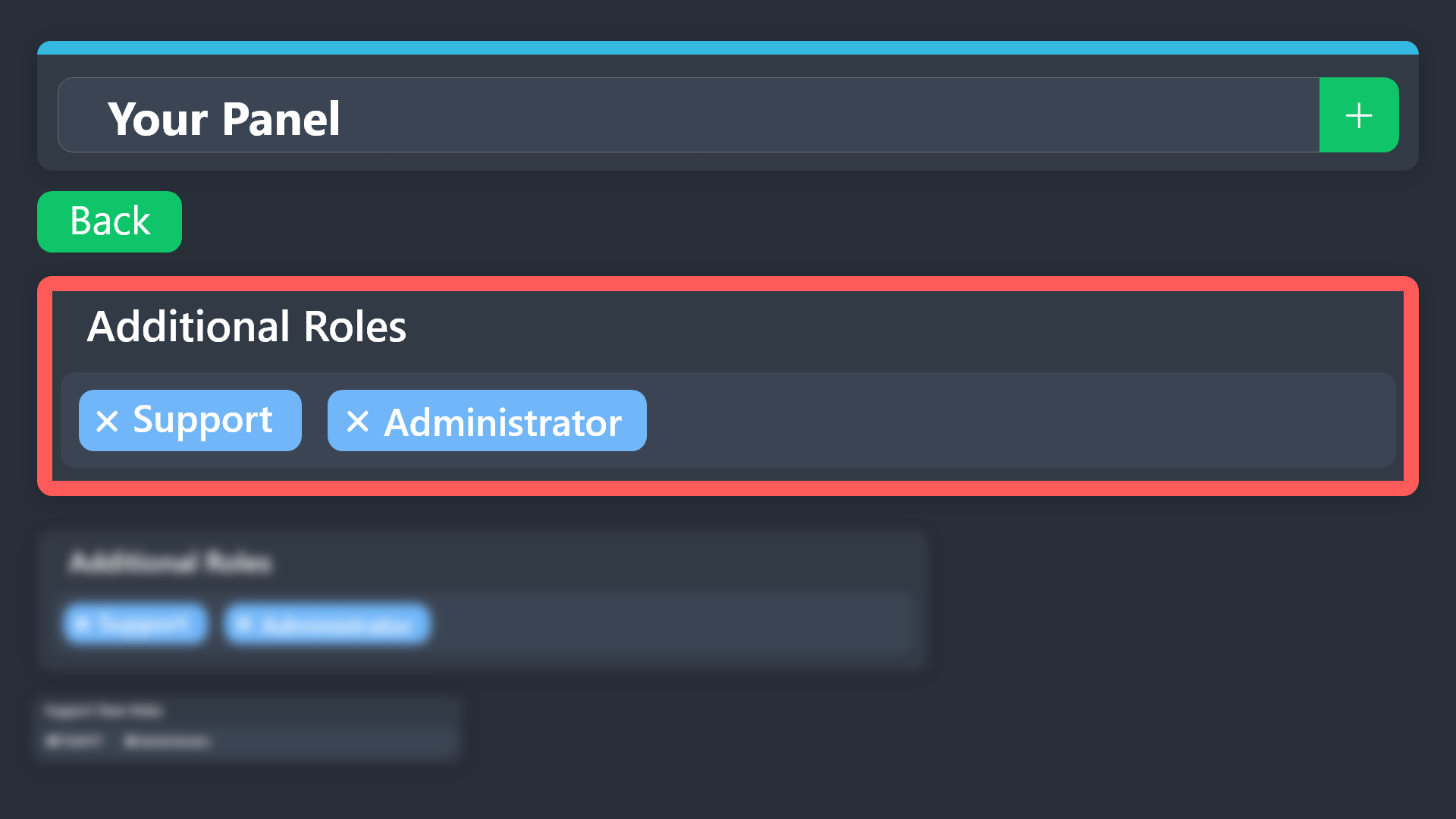
Additional Roles are roles that are independent of Support Roles. You can assign unique permissions for roles defined as additional roles in tickets.
To choose your additional roles head to your Panel Configs ➞ General Settings ➞ Additional Roles
To assign permissions for additional roles, go to Dashboard ➞ Panel Configs ➞ Permission Options ➞ Additional Opened/Closed Permissions.
Note: Additional Roles do NOT get affected by the Change other support team permissions when claimed feature under Claiming Options, meaning they don't gain/lose any permissions set in that feature once a ticket is claimed.
$addroles
scenic forum
remote sundial
How do I set it so that if a staff member claims a ticket a specific role still ...
Refer to the embed above
remote sundial
Thank you, that is what I've done but let me give it another go!
thanks @scenic forum
iron nightBOT
Gave +1 Rep to @scenic forum (current: #12 - 652)
 muted ore
Hello. I’m just wondering how to set up a template in my tickets
 scenic forum
 late ridge
How do I solve this?
late ridge
How do I solve this?
Are you staff on the server?
scenic forum
muted ore
Hello. I’m just wondering how to set up a template in my tickets
"template"?
late ridge
Iam owner
scenic forum
late ridge
Iam owner
Check your audit logs
Another bot is probably deleting the channel
late ridge
Bot can do it
scenic forum
What?
late ridge
scenic forum
Check your audit logs
Another bot is probably deleting the channel
What do you mean by that?
scenic forum
late ridge
What do you mean by that?
Show me a screenshot of your audit logs please
Preferably after you tried creating a ticket
late ridge
1 minute ple
muted ore
scenic forum
"template"?
So when someone clicks support ticket it automatically populates a message for setting up a faction for example
scenic forum
muted ore
So when someone clicks support ticket it automatically populates a message for s...
You could setup forms. That's a popup with up to 5 questions they have to answer before the ticket goes through?
scenic forum
late ridge
The problem with this bot
The problem is most likely not with ticket tool.
muted ore
scenic forum
You could setup forms. That's a popup with up to 5 questions they have to answer...
Yes exactly! How do I go about doing that?
humble sequoiaBOT
A Discord Form lets the user answer individual questions in a pop-up Form, which then displays the answers in the ticket message. This can save time if you already know what you want to ask the user.
Setup Forms
Forms can be enabled under Panel Settings > Form Options > Edit Forms Options. In the new pop-up window, you can now enable and edit your own Form.
Form Options
You can add up to 5 questions in the Discord form. This is a Discord limitation. Each question can have a placeholder in the input field, a minimum and maximum input, multi-line, and also the option to have the answer required.
Options
Question Title ➞ Your Question goes here
Question Placeholder ➞ The placeholder text in the input field
Required ➞ If enabled, the user has to answer this question, to submit the form
Multi-Line Input ➞ Allows the user to input multiple lines
Minimum and Maximum Input ➞ Set a minimum and maximum input value for the user
Displaying the Answer
To display the answers from the user, you need to enable Auto display form results on the ticket message as an additional embed
If you don't want a second embed, go into your Panel Configs > Ticket Options > Edit Ticket Message. You use the variable {create.form.x} and replace x with the number of your question. For example, the response to Question 5 can be displayed with {create.form.5}.
 scenic forum
muted ore
Yes exactly! How do I go about doing that?
scenic forum
muted ore
Yes exactly! How do I go about doing that?
Refer to the embed above
 scenic forum
late ridge
scenic forum
late ridge
As previously stated please show a screenshot of your audit logs
 late ridge
Okay, but the two bots are important and I don't want to delete either of them. What should I do then?
scenic forum
late ridge
Okay, but the two bots are important and I don't want to delete either of them. ...
Go to their support server
late ridge
Can you help me with what to tell them?
 limber ledge
Which channel and category is for granting permission to anyone to open a ticket?
scenic forum
late ridge
Simply explain the issue to them and show the screenshot
scenic forum
limber ledge
Which channel and category is for granting permission to anyone to open a ticket...
Could you explain?
late ridge
Okay
limber ledge
scenic forum
Could you explain?
In which section are permissions granted?
 scenic forum
limber ledge
In which section are permissions granted?
scenic forum
limber ledge
In which section are permissions granted?
Are you staff on the server?
limber ledge
scenic forum
Are you staff on the server?
Yes, I'm programming it so that anyone can open that ticket, but I can't figure out how to do it. But that account doesn't have admin privileges.
late ridge
limber ledge
In which section are permissions granted?
Go to the dashboard, then to the buttons, then to the "Create Ticket" button, and cancel all the ranks in it.
scenic forum
limber ledge
Yes, I'm programming it so that anyone can open that ticket, but I can't figure ...
Hey there!
«You don't have permissions to use this»
👉 Server Configs -> Blacklist Roles
Any roles there will be unable to interact with the bot in any way, including creating tickets.👉 Panel Configs -> Buttons -> Create Ticket -> Support team only
If this is enabled, only your staff will be able to use the button.
👉 Panel Configs -> Buttons -> Create Ticket -> Disabled Roles
Any roles there will be unable to use the button.
scenic forum
late ridge
Go to the dashboard, then to the buttons, then to the "Create Ticket" button, an...
Please do not interfere
late ridge
Aha okay iam so sorry
 shrewd crest
I cant seem to get my ticket channel working. It says it lacks permissions but I checked everything
harsh epoch
shrewd crest
I cant seem to get my ticket channel working. It says it lacks permissions but I...
Hey!
Could you try running /debug in that channel please?
shrewd crest
Im new to these bots sorry
 harsh epoch
shrewd crest
Im new to these bots sorry
harsh epoch
shrewd crest
Im new to these bots sorry
It's missing the permissions marked with an x
you'll need to allow it those permissions in the channel and the role
shrewd crest
Ok I’ll keep trying thanks
harsh epoch
shrewd crest
Ok I’ll keep trying thanks
No worries!
good luck
 torpid loom
I cant close a ticket and I'm the owner of the server
 humble sequoiaBOT
This error indicates you have selected an invalid emoji, i.e. an emoji the bot isn't capable of using, in a button field
Which Emoji?
This depends upon which action the error is appearing, the most common cases are the Create Ticket button or one of your Dropdown emojis. You can visit your Button's List to find all available buttons and find the conflicting one by yourself.
Why doesn't the bot accept it as valid?
- You selected an emoji that doesn't exist anymore, i.e. that has been deleted
- You wrote text there, instead of an emoji (or in addition to an emoji)
- You entered a code for a custom emoji from a server that the bot is not a member of
- You entered a custom emoji code incorrectly
- You're on iPhone and entered an emoji using the phone's emoji pad (use the emoji selector in the website instead)
harsh epoch
torpid loom
I cant close a ticket and I'm the owner of the server
Hey there!
Please refer to the embed above
 warm badge
 shrewd crest
Got it working 🥳
Only problem is its in my Welcome channel not the support channel .
Can I move it? 😖
harsh epoch
shrewd crest
Got it working 🥳
Only problem is its in my Welcome channel not the support chan...
the "Create ticket" button you mean?
shrewd crest
Yeah
harsh epoch
you can re-send the panel to whatever channel you want as long as the bot has access to it.
Panel -> Send
 shrewd crest
😖 should I delete the one from welcome?
harsh epoch
If you want it to only appear in your support channel, then yes
 rigid garden
I wanted to try this bot, but they gave me a product key. I used it now, but it says I used it on January 1, 2025, even though I haven't used it at all! What should I do?
scenic forum
rigid garden
I wanted to try this bot, but they gave me a product key. I used it now, but it ...
Could you show where it states the date?
 molten creek
why I cant see my server?
 unique tulip
I'd like to remove any tickets and associated information such as records of my discord account and what servers it is in from this service. Who can I talk to about this? The privacy policy on the website simply says "contact us" but there is no contact information posted on the website at all.
Might I have to DM BattleEye about this?
harsh epoch
molten creek
why I cant see my server?
Hi there! Do you have the administrator permission or an allowed dashboard role in that server?
pseudo ravine
unique tulip
I'd like to remove any tickets and associated information such as records of my ...
Hey there! Are you referring to transcripts?
unique tulip
that and the info given by OAuth with online viewing of the transcripts, such as a list of what servers I'm in
pseudo ravine
We don't store any transcripts ourselves. They're all stored on Discords servers
unique tulip
That's understandable. Can the team do anything about the OAuth info?
pseudo ravine
Yep, I'll make a ticket for you
unique tulip
Thank you 💜 @pseudo ravine
 astral tapir
I want to make a command that automaticly change the ticket name to something I chose like lets says the prefix is $ so I type in the ticket $q and it change the ticket name to question
how do I do it?
 echo basin
Is there a way to look at a closed ticket/re-open it?
scenic forum
astral tapir
I want to make a command that automaticly change the ticket name to something I ...
$rename NEW NAME
scenic forum
echo basin
Is there a way to look at a closed ticket/re-open it?
If two step ticket is enabled yes
Otherwise the ticket is deleted once closed
astral tapir
scenic forum
``$rename NEW NAME``
yeah but like make it quick command like make it only 1 letter
scenic forum
astral tapir
yeah but like make it quick command like make it only 1 letter
not possible
astral tapir
scenic forum
not possible
okay thanks
iron nightBOT
Gave +1 Rep to @scenic forum (current: #12 - 654)
echo basin
scenic forum
If two step ticket is enabled yes
Otherwise the ticket is deleted once closed
is there a way for me to check that on a server I am just a member of? I want to see if its possible before asking the admin
scenic forum
echo basin
is there a way for me to check that on a server I am just a member of? I want to...
If youre a member, no
echo basin
dang, thank you for helping! ❤️
 novel wraith
Every time I try to send my panel it says this and idk how to fix pls help!

 humble sequoiaBOT
This error indicates you have selected an invalid emoji, i.e. an emoji the bot isn't capable of using, in a button field
Which Emoji?
This depends upon which action the error is appearing, the most common cases are the Create Ticket button or one of your Dropdown emojis. You can visit your Button's List to find all available buttons and find the conflicting one by yourself.
Why doesn't the bot accept it as valid?
- You selected an emoji that doesn't exist anymore, i.e. that has been deleted
- You wrote text there, instead of an emoji (or in addition to an emoji)
- You entered a code for a custom emoji from a server that the bot is not a member of
- You entered a custom emoji code incorrectly
- You're on iPhone and entered an emoji using the phone's emoji pad (use the emoji selector in the website instead)
scenic forum
@novel wraith refer to the embed above
scenic forum
 rotund sentinel
Can you use /debug in the same channel as in the video
rotund sentinel
Dang
Should of told me earlier I deleted the whole server and restarted
I will use this in the future tho
 cursive vale
How do I use the ticket bot
rotund sentinel
scenic forum
Can you use /debug in the same channel as in the video
For work
 stark runeBOT
1. Invite Ticket Tool to your server
First you will want to invite the bot to your server. Once the bot is in your server, you can manage your server in the dashboard.

2. Create a Panel
To create a panel we are going to need to head over to the panel configs on the dashboard.
Once at the dashboard we will need to click Create Panel.
Enter a panel name (Fill in any optional settings you want).
Click Create Panel and your ready to get started with configuring your panel.
An example of a creating a panel is shown below.

3. Send the Panel to a Channel
Once you've created a panel on the dashboard you will need to send it to a channel using send on the dashboard.
Select the channel you want your panel to be created in and click send.
For other questions checkout $help faq.
An example of a sending a panel is shown below.
Having a Problem Sending the Panel?
Do $debug in a channel with Ticket Tool and make sure it has all the necessary Discord permissions.
 scenic forum
@cursive vale refer to the embed above
scenic forum
@rotund sentinel type /debug on your new server
 scenic forum
rotund sentinel
Let me see
scenic forum
rotund sentinel
Let me see
You need to enable ATLEAST the "send message" permission inside the channel for the bot to respond
 old grail
anyone have a fix to channels being created by ticket tool not auto syncing with the category its under?
 lilac junco
 ruby stone
i want to delete chile, how?
ruby stone
i want to delete chile, how?
Go to your dashboard, select the Chile panel and delete it.
ruby stone
lilac junco
Go to your dashboard, select the Chile panel and delete it.
i do that but It’s still there
lilac junco
ruby stone
i do that but It’s still there
You will have to either resend or update your panel.
ruby stone
i do that
lilac junco
old grail
anyone have a fix to channels being created by ticket tool not auto syncing with...
Are there more than 45 tickets under the category you set before?
 sage lantern
Hello, this may sound like a stupid question, is there a way to send transcripts to the player which opened a ticket? 😅
lilac junco
sage lantern
Hello, this may sound like a stupid question, is there a way to send transcripts...
Hey there! Indeed you can do that, you can use the command /transcript to do it.
sage lantern
lilac junco
Hey there! Indeed you can do that, you can use the command ``/transcript`` to do...
is there a way to automatically send it by clicking the Transcript button or Close button, or is it just a manual command?
lilac junco
sage lantern
is there a way to automatically send it by clicking the Transcript button or Clo...
It is a manual command, however you require premium to auto send a transcript to a user.
sage lantern
awesome, thanks for the rapid response!
lilac junco
sage lantern
awesome, thanks for the rapid response!
Anytime!
 terse stag
how do i tell when my ticket is ready
 digital lagoon
Is tickets down?
 scenic forum
terse stag
how do i tell when my ticket is ready
scenic forum
terse stag
how do i tell when my ticket is ready
What do you mean with "ready"?
scenic forum
digital lagoon
Is tickets down?
no
terse stag
will it work
scenic forum
terse stag
will it work
Are you staff on the server?
terse stag
no
scenic forum
Then theres nothing we can help you with im afraid
terse stag
who can help me then
scenic forum
Staff on their server or being patient in your ticket on their server
terse stag
whos server
scenic forum
terse stag
The server you opened this ticket in
terse stag
oh right thanks
 fast wasp
Can someone pls send stk support server
humble sequoiaBOT
@fast wasp
⚠️ You're in the wrong place
We provide support for Ticket Tool Discord bot and cannot help you with whatever issue you have.
- We don't know which Support Team you should contact to get this issue resolved, and unfortunately we won't be able to accurately tell you.
If you don't have any further questions regarding our bot Ticket Tool, please close this ticket
 languid echo
Manage dashboard not show me server
scenic forum
languid echo
Manage dashboard not show me server
Can you use /debug on your server?
scenic forum
languid echo
i add bot to server
Did you press the Sync Servers button on the dashboard?
languid echo
doesn't appear
scenic forum
If you log out and in again?
iron nightBOT
Gave +1 Rep to @scenic forum (current: #12 - 656)
scenic forum
This isnt the right place for that
 eager pawn
my bad 😌
 serene sigil
If using thread mode, will the ticket disappear immediately after being closed, instead of being moved to another category like in traditional channel mode?
scenic forum
serene sigil
If using thread mode, will the ticket disappear immediately after being closed, ...
Threads cannot move to another category
They are strictly glued to the thread parent channel as far as i know
 silent thorn
I need help
humble sequoiaBOT
@silent thorn, we would love to help you, but if you don't tell us what you need help with we can't help you :(
silent thorn
I want to be a staff in the group
lilac junco
silent thorn
I want to be a staff in the group
What group?
silent thorn
Ur group
lilac junco
silent thorn
Ur group
Ticket tool?
silent thorn
Yeah
lilac junco
silent thorn
Yeah
You will have to wait for support team applications to open, then you apply. It is announced in #📣│server-news
iron nightBOT
Gave +1 Rep to @lilac junco (current: #44 - 90)
 simple yarrow
can sumone help me git unban
humble sequoiaBOT
⚠️ You're in the wrong place
We provide support for Ticket Tool Discord bot and cannot help you with whatever issue you have.
- We don't know which Support Team you should contact to get this issue resolved, and unfortunately we won't be able to accurately tell you.
If you don't have any further questions regarding our bot Ticket Tool, please close this ticket
 tame mango
Is there a way to have a ticket that gets claimed auto add the name of the member who claimed the ticket?
 minor quartz
I think its glitched because it won't let me setup at all and it says "this interaction failed"
scenic forum
tame mango
Is there a way to have a ticket that gets claimed auto add the name of the membe...
If you add it into the claimname yes
minor quartz
heres the message i get
 scenic forum
minor quartz
heres the message i get
scenic forum
minor quartz
heres the message i get
Can you use /debug in the report user channel
 scenic forum
minor quartz
scenic forum
minor quartz
It's missing the send message permission in the channel
minor quartz
how do i do that?
scenic forum
minor quartz
how do i do that?
Channel settings aka Channel permissions
minor quartz
oh wait
yeah
okay yeah thannks it workeddd
but i dont want anyone but the mod/admins to be able to talk
scenic forum
Then you'll need to adjust the channel permissions that way
serene sigil
When there are a lot of people, is it easy for bot to break or crash?
If a lot of users are opening tickets and while using thread mode, does that cause issues?For example, could threads break or stop working?
And once the ticket count hits 1,000, does it stop creating new tickets automatically?
scenic forum
serene sigil
When there are a lot of people, is it easy for bot to break or crash?
If a lot o...
What's the error they receive?
tame mango
scenic forum
If you add it into the claimname yes
How should that be written out?
 unreal stratus
hello,
scenic forum
tame mango
How should that be written out?
unreal stratus
who should i write to so they can unblock me from the game?
humble sequoiaBOT
@unreal stratus
⚠️ You're in the wrong place
We provide support for Ticket Tool Discord bot and cannot help you with whatever issue you have.
- We don't know which Support Team you should contact to get this issue resolved, and unfortunately we won't be able to accurately tell you.
If you don't have any further questions regarding our bot Ticket Tool, please close this ticket
serene sigil
How to check premium Role.I've paid.
lilac junco
serene sigil
How to check premium Role.I've paid.
Done.
serene sigil
Thanks.
scenic forum
Already reported
 fathom wave
@humble sequoia
unreal stratus
where i can get ticket ?
humble sequoiaBOT
@unreal stratus
⚠️ You're in the wrong place
We provide support for Ticket Tool Discord bot and cannot help you with whatever issue you have.
- We don't know which Support Team you should contact to get this issue resolved, and unfortunately we won't be able to accurately tell you.
If you don't have any further questions regarding our bot Ticket Tool, please close this ticket
 radiant orchid
I can't create a panel but I bought premium 5 min ago
lilac junco
radiant orchid
I can't create a panel but I bought premium 5 min ago
Did you try to create a panel through the dashboard?
radiant orchid
lilac junco
Did you try to create a panel through the dashboard?
Yh but I can't send it in my dc it gives me an error instantly
lilac junco
radiant orchid
Yh but I can't send it in my dc it gives me an error instantly
What does the error say?
radiant orchid
lilac junco
What does the error say?
This bot Doesn't react or smth like that
lilac junco
radiant orchid
This bot Doesn't react or smth like that
Screenshot the error message and send it here.
radiant orchid
lilac junco
Screenshot the error message and send it here.
I'm German so hope u understand it haha

@lilac junco
scenic forum
radiant orchid
Habs mit Mrburger abgeklärt
Ich übernehme da ich auch Deutsch kann
Kannst du den befehl /debug in dem kanal nutzen?
radiant orchid
scenic forum
Habs mit Mrburger abgeklärt
Ich übernehme da ich auch Deutsch kann
Kannst du den...
Warte schaue Kurt
radiant orchid
scenic forum
Habs mit Mrburger abgeklärt
Ich übernehme da ich auch Deutsch kann
Kannst du den...
Ne geht auch nd
scenic forum
radiant orchid
Ne geht auch nd
Dem bot fehlen die "View Channel" rechte in dem kanal
radiant orchid
scenic forum
Dem bot fehlen die "View Channel" rechte in dem kanal
Omg warte maybe ich kann's fixen melde mich sofort
 twilit ermine
Any reason I'm getting this as the Owner of the server?

Also have my role(s) set for Bypass in the Dashboard
scenic forum
twilit ermine
Any reason I'm getting this as the Owner of the server?
Its a ratelimit
Youre renaming the channel too often
twilit ermine
scenic forum
Its a ratelimit
Youre renaming the channel too often
Ok, I had only tried twice. The ticket-owner (person who opened the ticket) closed the ticket. I had reopened it, then went to rename the ticket and the bot did not rename the ticket, so tried once more and I got that message.
Is that normal? Never got that before
radiant orchid
scenic forum
Its a ratelimit
Youre renaming the channel too often
Okay haben ein Problem war zu schnell im kaufen haben bereits einen bot wie kann man das denn kündigen?
scenic forum
radiant orchid
Okay haben ein Problem war zu schnell im kaufen haben bereits einen bot wie kann...
#🎫│make-a-ticket und dann ein "Billing" ticket da du es ja warscheinlich auch refunden willst
scenic forum
twilit ermine
Ok, I had only tried twice. The ticket-owner (person who opened the ticket) clos...
You can only rename a ticket twice then it gets ratelimited
twilit ermine
Ok, thanks
 sterile thorn
bot can take away someone's range?bot can take away someone's rang?
i have premium and cant use it

 lilac jungle
I am unable to see my server in dashboard
radiant orchid
scenic forum
<#571706435449257997> und dann ein "Billing" ticket da du es ja warscheinlich au...
Hab eins gemacht
scenic forum
sterile thorn
bot can take away someone's range?bot can take away someone's rang?
Bot can give or remove a role from the ticket owner yes
Press the  icon at the top left on your dashboard
scenic forum
lilac jungle
I am unable to see my server in dashboard
Have you pressed sync servers and tried logging out and in?
sterile thorn
ty
lilac jungle
scenic forum
Have you pressed sync servers and tried logging out and in?
Let me try logging in and logging out.
lilac jungle
scenic forum
Have you pressed sync servers and tried logging out and in?
Thanks a lot!
Have a great wonderfull day!
iron nightBOT
Gave +1 Rep to @scenic forum (current: #12 - 658)
 ancient garnet
Hi, so Im using ticket tool for a middleman service and was wondering which settings I need for a ticket to open in a private category. So basically a member cant see the category unless a ticket is activly open for him
 plain pier
im new to the ticket system and cant figure out why the server im in doesnt get synched with the ticket tool. any help?
humble sequoiaBOT
1. Open your Panel Configs tab in the server's dashboard
2. Select the panel you want to grant access to
3. Open the Category options menu
4. Select the categories of your preference
5. Save changes
 scenic forum
ancient garnet
Hi, so Im using ticket tool for a middleman service and was wondering which sett...
scenic forum
ancient garnet
Hi, so Im using ticket tool for a middleman service and was wondering which sett...
Refer to the embed above
humble sequoiaBOT
Don't see your server in the dashboard?
Try using the Sync Servers button on your top center of the Dashboard page
If this doesn't work
You should relog from the dashboard, you can do this by clicking here to log out immediately, and then log back in
Note:
You need one of these 3 things to access the dashboard.
1. Server Owner (Level: 6)
2. Server Administrator (Level: 4)
3. Dashboard Role (Level: 2)
:warning: You can check your level using the </permissionlevel:1029797400174399542> command on your Discord Server
If the bot's response is:
- @User is permission level: 0 (User)
You don't have any of the 3 levels required to access the server's dashboard
lilac junco
@plain pier Refer to the embed above
ancient garnet
scenic forum
Refer to the embed above
even if its a private category and members have no access?
scenic forum
ancient garnet
even if its a private category and members have no access?
The ticket channel will give them access.
ancient garnet
scenic forum
The ticket channel will give them access.
alr ty man
iron nightBOT
Gave +1 Rep to @scenic forum (current: #12 - 659)
plain pier
user is permission level: 0 (User)
how do i fix that
lilac junco
plain pier
user is permission level: 0 (User)
how do i fix that
You'll need the server owner to put your server role as a dashboard role. Refer to the embed I sent.
 shadow sonnet
Administration, please check ticket 76013
humble sequoiaBOT
━━ User's inquiry has been moved to a ticket ━━
ancient garnet
@scenic forum sorry to bother again but I have selected the category to be in "Middleman Tickets" but for some reason on opening it goes to the top of the server

 lilac junco
ancient garnet
<@186523978729259009> sorry to bother again but I have selected the category to ...
lilac junco
ancient garnet
<@186523978729259009> sorry to bother again but I have selected the category to ...
Hey there! Don't ping for support :D
Can you make sure to update your panel after setting the category?
ancient garnet
lilac junco
Hey there! Don't ping for support :D
Can you make sure to update your panel aft...
yes lemme try that sorry
lilac junco
ancient garnet
yes lemme try that sorry
All good! Let me know if it works 😄
ancient garnet
lilac junco
All good! Let me know if it works 😄
ye I forgot to give the bot permissions to the category 😭
lilac junco
ancient garnet
ye I forgot to give the bot permissions to the category 😭
Alright! Glad you could fix it :)
ancient garnet
How do I make it so ticket owners cant close the ticket? Under permissions I disabled manage channel and manage permissions
lilac junco
ancient garnet
How do I make it so ticket owners cant close the ticket? Under permissions I dis...
Panel Configs > Buttons > Close Ticket > Support Team Only 
ancient garnet
lilac junco
``Panel Configs > Buttons > Close Ticket > Support Team Only`` <:Switch_enabled:...
tysm ♥️
does the ticket tool bot have a tag feature? so like a command that pastes a message/instruction?
lilac junco
ancient garnet
does the ticket tool bot have a tag feature? so like a command that pastes a mes...
Hey there! Indeed you can do that.
Go to the dashboard and go to custom commands, and configure it to your likings.
It is not a tag, you'll have to run it manually so the message pops up.
lilac junco
ancient garnet
and the message pops right up?
You get to choose the prefix for your command. Let's say I made the command and I called it ! instructions and then I edit the message and write the instructions.
When I run it in a ticket it will send the instructions I set.
ancient garnet
lilac junco
You get to choose the prefix for your command. Let's say I made the command and ...
oh alr Ill try do it ill lyk if I hit some rocks alr
it worked lets go
ty sir
ty @lilac junco
iron nightBOT
Gave +1 Rep to @lilac junco (current: #44 - 93)
ancient garnet
it told me to ping sorry
lilac junco
ancient garnet
it told me to ping sorry
All good! Appreciate the rep! 
 ancient garnet
 jolly birch
your server has too many channels you have to delete some
 eternal raptor
jolly birch
How do you do that
eternal raptor
jolly birch
How do you do that
If you're just a member in that server you'll have to ask/notify staff of said server to delete some tickets as they reached the 500 channels limit
 peak jay
can anyone help me ive invited the bot but the site sais there is no bot online while ive given it every perm plus re loaded the site
 restive condor
peak jay
can anyone help me ive invited the bot but the site sais there is no bot online ...
restive condor
peak jay
can anyone help me ive invited the bot but the site sais there is no bot online ...
Hi there, please try the steps below
humble sequoiaBOT
Don't see your server in the dashboard?
Try using the Sync Servers button on your top center of the Dashboard page
If this doesn't work
You should relog from the dashboard, you can do this by clicking here to log out immediately, and then log back in
Note:
You need one of these 3 things to access the dashboard.
1. Server Owner (Level: 6)
2. Server Administrator (Level: 4)
3. Dashboard Role (Level: 2)
:warning: You can check your level using the </permissionlevel:1029797400174399542> command on your Discord Server
If the bot's response is:
- @User is permission level: 0 (User)
You don't have any of the 3 levels required to access the server's dashboard
restive condor
Could you try the /debug command in that same channel please
restive condor
peak jay
no response again
The bot seems to be missing the VIEW CHANNEL permission for that channel
You have level 0 permissions though. You will need either administrator permissions or a dashboard role to access the dashboard
peak jay
i am administrator tho
restive condor
Please ensure you have actual administrator permissions enabled in your role settings and not just a role named admin
This one

 lone dagger
Guys, I fixed all the settings in the Ticket Tool, but when someone tries to open a ticket, the ticket doesn't appear to be opened.
How can I solve this?
 gilded verge
It would be good if you can get a screenshot of bot's response, without it we can't know how to help
lone dagger
gilded verge
It would be good if you can get a screenshot of bot's response, without it we ca...
The problem is that the ticket isn't showing up.
There is an empty chat for members.
gilded verge
wait, so you mean you can see what's inside this new created ticket but they don't, yes?
lone dagger
Correct
gilded verge
oh i see, this will be easy to update,
please go to Panel Configs -> (on the list make sure you chose the correct panel you want to make changes for) -> Permissions -> Edit opened Ticket Owner Permissions -> set Read Message History to ✅ and save changes
then the user can open a new ticket and they can see the content inside
ah one more thing, it won't be updated for existing tickets so you'll need to do it manually
 smoky knot
Hey how Can I do it whenever someone wants to Open a ticket that they have to fill a Form of some questions first? Need help asap
gilded verge
Hey, it's in Panel Configs
 lone dagger
The members' chat looks like this.
 gilded verge
yep, that's exactly the permission i mentioned before, so once you fix it, they should see everything
lone dagger
Okay, thank you very much.
smoky knot
Im trying to do /setup but the bot says this
 scenic forum
smoky knot
Im trying to do /setup but the bot says this
scenic forum
smoky knot
Im trying to do /setup but the bot says this
Can you do /debug in the same channel
 scenic forum
smoky knot
I tried
scenic forum
smoky knot
I tried
Ticket tool is missing the "send message" permission inside that channel
 tame hare

my server isnt showing up here
ive synced it several times, the bot is in the server and has full perms
gilded verge
on your server use /permissionlevel command, what response you got?
 strong drift
Haiii, I was recently requested to do some work on a server but non of the commands for the bot aren't working when I use them, is there anything I could be missing that is preventing me from using the bot?
harsh epoch
strong drift
Haiii, I was recently requested to do some work on a server but non of the comma...
Hi there!
could you check the bot has the following permissions please:
View ChannelSend MessagesEmbed Links
strong drift
The bot does have those permissions enabled.
harsh epoch
strong drift
The bot does have those permissions enabled.
Hm. Could you check in the channel you're in as well as the bots role if you didn't already?
strong drift
harsh epoch
Hm. Could you check in the channel you're in as well as the bots role if you did...
The bot is not in the channel access logs, nor is the bots role
harsh epoch
strong drift
The bot is not in the channel access logs, nor is the bots role
If the bot can't see the channel, then it won't be able to work.
Make sure you've got the permissions listed above allowed on the channel too
strong drift
harsh epoch
If the bot can't see the channel, then it won't be able to work.
Make sure you'...
It worked, thank you for the help 🙂
iron nightBOT
Gave +1 Rep to @harsh epoch (current: #30 - 179)
harsh epoch
No worries :)
Glad it worked
 pearl spoke
everytime i use the /setup command it says The application did not respond
does anyone know how to fix this
harsh epoch
pearl spoke
does anyone know how to fix this
Hi there!
could you check the bot has the following permissions on both the role and the channel you're in please:
View ChannelSend MessagesEmbed Links
pearl spoke
harsh epoch
Hi there!
could you check the bot has the following permissions on both the rol...
yes they are all on
harsh epoch
pearl spoke
yes they are all on
Does using /debug provide any response?
pearl spoke
harsh epoch
Does using `/debug` provide any response?
nope it keeps give me The application did not respond
harsh epoch
pearl spoke
nope it keeps give me The application did not respond
Most likely it'll still be missing a permission. Could you show me that you have definitely set the permissions?
pearl spoke
harsh epoch
Most likely it'll still be missing a permission. Could you show me that you have...
harsh epoch
pearl spoke
Alright, the role is fine, so it'll be a channel permission that's missing. Could you do the same but this time with your channel permissions
pearl spoke
harsh epoch
Alright, the role is fine, so it'll be a channel permission that's missing. Coul...
i figure out why i have where everyone cant send messgaes on all my channels
harsh epoch
pearl spoke
i figure out why i have where everyone cant send messgaes on all my channels
Make sure ticket tool has the correct permissions in the channel and it should work correctly then
pearl spoke
harsh epoch
Make sure ticket tool has the correct permissions in the channel and it should w...
alright
 rapid spire
ticket tool is deleting the ticket messages
but i still can see the messages, the other users not
gilded verge
gilded verge
oh i see, this will be easy to update,
please go to Panel Configs -> (on the li...
@rapid spire, if I understand correctly, refer to 
rapid spire
gilded verge
<@590117720692097024>, if I understand correctly, refer to <:this:89427934110877...
ty 
iron nightBOT
Gave +1 Rep to @gilded verge (current: #13 - 567)
 novel raven
I've not access to a server that I'm paying premium for, is there still anyway to cancel it?
restive condor
novel raven
I've not access to a server that I'm paying premium for, is there still anyway t...
Hey Tux! How exactly are you subscribed? I can't seem to find any subscriptions linked to your account
novel raven
restive condor
Hey Tux! How exactly are you subscribed? I can't seem to find any subscriptions ...
I pay monthly for a premium subscription (started a few days ago) but I am no longer apart of that server.
restive condor
novel raven
I pay monthly for a premium subscription (started a few days ago) but I am no lo...
Did you subscribe directly from our website?
novel raven
restive condor
Did you subscribe directly from our website?
Yes.
I can tell you the server ID?
restive condor
novel raven
Yes.
Alrighty, then please head over to your Dashboard Profile > Subscriptions (or https://tickettool.xyz/billing directly), and you should be able to manage & cancel the subscription from there
restive condor
novel raven
I can tell you the server ID?
All good, I found it. I seemed to have copied the message ID instead of your user ID - my apologies 🙏
novel raven
restive condor
Alrighty, then please head over to your ``Dashboard Profile`` > ``Subscriptions`...
Aah, didn't see a billing page on the site, thanks.
iron nightBOT
Gave +1 Rep to @restive condor (current: #1 - 2883)
novel raven
All good, cancelled now 😄
restive condor
Perfect, have a great day!
novel raven
Wait, anyway of transferring the sub to another server instead?
restive condor
Yep, you can use the transfer button  above the current server image, from the manage window
novel raven
restive condor
Yep, you can use the transfer button <:servertransfer:1410822062011846736> above...
Perfect, subscription resumed & it has been transferred - thanks again.
iron nightBOT
Gave +1 Rep to @restive condor (current: #1 - 2884)
novel raven
Is there different bots depending whether you have a premium subscription or not?
@pseudo glen
@humble sequoia
shrewd crest
Sorry wrong discord 😵💫
 static crane
my card keeps declining even though it has enough what do i do
 sharp island
Does ticket bot accept commands for creating tickets from our own bots like its accepting from sapphire bot??
scenic forum
static crane
my card keeps declining even though it has enough what do i do
Is this related to @pseudo glen premium?
humble sequoiaBOT
Integrating an External Bot x Ticket Tool <:TicketToolGold:1073948897673748490>
Integrating Ticket Tool with an external bot allows you to customize your server's Ticket System further!
- The external bot must output the
$newor$ticketcommands with the user's ID to start a ticket. Preferably in a private channel.
Eg.
$new 12345678901234567890
-
Your ticket panel must be Command Style enabled
-
You must whitelist that bot's ID in your Dashboard ➞ Server Configs ➞ Bot section.
Otherwise Ticket Tool will not react to the command and a ticket will not be created.
- If you'd like to include a reason in the command usage, feel free to do so after the user ID.
Eg.
$new 12345678901234567890 Your reason goes here
This reason can then be shown anywhere in the Ticket Message with the{create.reason}variable
**  Note:** If you have changed Ticket Tool's default prefix (
$) please ensure to amend the prefix for the $new or $ticket commands.
Eg. If your prefix is
-, then what you're looking for the bot to use is-newor-ticket

$botintegration
scenic forum
sharp island
Does ticket bot accept commands for creating tickets from our own bots like its ...
Refer to step 3 above
lone dagger
@gilded verge The problem persisted even after I messed with the cknfu.
restive condor
novel raven
Is there different bots depending whether you have a premium subscription or not...
Hi, the premium bot is for premium users only. It is faster, has less rate limits, and is usually back up quicker during outages as it's in less servers. Nonetheless, premium features can be used through both bots
restive condor
lone dagger
<@334671104704774154> The problem persisted even after I messed with the cknfu.
Hi, #🎫│make-a-ticket so we can take a closer look please
 gusty nexus
im trying to make a tickeyt in a server but it keeps sayiing this
 static crane
scenic forum
Is this related to <@557628352828014614> premium?
static crane
scenic forum
Is this related to <@557628352828014614> premium?
ye
 jade topaz
how do I make those custom panels with a lot of buttons?? the tutorial is sooooo confusing for me :(
I fr need help with this fastt
novel raven
gusty nexus
im trying to make a tickeyt in a server but it keeps sayiing this
That usually means you have hit the Discord maximum channel limit of 500 channels per server.
 vapid spear
Hi, I'm trying to use a webhook to create a new command style ticket. I've whitelisted the bot user ID (Discohook) and the webhook ID in the Ticket Tool dashboard (Server Configs > Bot). I've also added the bot's role to the panel's Support Team Roles. The channel is also monitored. However, Ticket Tool states that the bot does not have permission to use the $new command. Any suggestions on how to fix this?
 scenic forum
vapid spear
Hi, I'm trying to use a webhook to create a new command style ticket. I've white...
scenic forum
vapid spear
Hi, I'm trying to use a webhook to create a new command style ticket. I've white...
Command config -> new/ticket ->
Is the support team only enabled or disabled?
vapid spear
scenic forum
Command config -> new/ticket ->
Is the support team only enabled or disabled?
Thanks, working now 👍
iron nightBOT
Gave +1 Rep to @scenic forum (current: #12 - 661)
 mild sinew
How do I let non-administrator roles see tickets that have already been claimed?
 tribal cedar
You can let them into the support roles
mild sinew
tribal cedar
You can let them into the support roles
Do I have to change the Support Team roles on every panel or is there a way to do it in all the panels at once?
tribal cedar
Sorry each panel will have to be editted
mild sinew
tribal cedar
Sorry each panel will have to be editted
To clarify, I have our "Staff Team" role listed already as a Support Team role, but I only need the role "Administrator" to have access to see the claimed tickets, no one under that role.
tribal cedar
They should be able to see the tickets claimed or not if they are on support roles
mild sinew
tribal cedar
They should be able to see the tickets claimed or not if they are on support rol...
That's weird, the Support Team roles are unable to see claimed tickets
lilac junco
mild sinew
That's weird, the Support Team roles are unable to see claimed tickets
Hello! Can you go to Panel configs > Claiming > Change other support team permissions when claimed , see if it is enabled , if it is has permissions to view channel of anything, you can fix the permissions or turn the setting off.
scenic forum
Panel config -> permissions -> ticket owner permissions -> edit opened -> send message -> on
 warm gyro
i had it turned on when i made the ticket 😞

wai thsould i just make a ticket for this?
scenic forum
warm gyro
i had it turned on when i made the ticket 😞
If you have multiple panels. Are you editing the correct panel?
warm gyro
yes
scenic forum
And the change was done before the ticket got opened?
warm gyro
yes yes
i followed a tut on youtube that has helped with my past two servers idk why it isnt working now 😞
scenic forum
Visually it looks okay if it is the correct panel
scenic forum
warm gyro
i followed a tut on youtube that has helped with my past two servers idk why it ...
They are a normal member without any support team role or additional role, just to confirm?
warm gyro
my friend has the Heartstriker role, its a staff role in my server
scenic forum
Is the role marked as support team role?
warm gyro
i belive so? how do i check if it is or not
scenic forum
warm gyro
i belive so? how do i check if it is or not
Panel config -> general -> support team role
scenic forum
Also can you delete the image? Simple because it states your friends user
warm gyro
oh see see
scenic forum
tribal cedar
This is ticket tool support discord. They have nothing to do with a game.
 oblique sigil
Why is it when I put /setup it says this application does not respond?
scenic forum
oblique sigil
Why is it when I put /setup it says this application does not respond?
Can you use /debug in the same channel
oblique sigil
No
scenic forum
oblique sigil
No
Bot is missing the "view channel" permission inside the channel
 vale notch
What can I do then?
tribal cedar
vale notch
What can I do then?
Theres nothing you can do here. You need to find the discord server you need.
oblique sigil
scenic forum
Bot is missing the "view channel" permission inside the channel
It still says it
vale notch
Ok thanks
oblique sigil
oblique sigil
It still says it
Nvm I did it
strong drift
Haiii, IT manager back again :3 I was curious if there was a way to incorporate a UI to select the kind of ticket you are wanting?
Like server help, report members, etc...
tribal cedar
strong drift
Haiii, IT manager back again :3 I was curious if there was a way to incorporate ...
You can make multiple panels and link them all to one main panel for display purposes. Is that what you are asking?
strong drift
tribal cedar
You can make multiple panels and link them all to one main panel for display pur...
I believe so, yes. How would I do that?
tribal cedar
Well you would make multiple panels and on the panel you want to have the panel message for you would add the other panels to it through panel configs -> panel
Does that make sense?
@strong drift^^
strong drift
tribal cedar
Does that make sense?
Yes it does, thank you for the help :3
iron nightBOT
Gave +1 Rep to @tribal cedar (current: #32 - 155)
tribal cedar
strong drift
Yes it does, thank you for the help :3
Anytime ❤️
mild sinew
lilac junco
Hello! Can you go to ``Panel configs > Claiming > Change other support team perm...
Alright, now is there a way to make our support team (Under Administrator) to be denied the permission to see claimed tickets, but the role of Administrator to see and type in claimed tickets without having to give the Administrator tick?
humble sequoiaBOT
Additional Roles are roles that are independent of Support Roles. You can assign unique permissions for roles defined as additional roles in tickets.
To choose your additional roles head to your Panel Configs ➞ General Settings ➞ Additional Roles
To assign permissions for additional roles, go to Dashboard ➞ Panel Configs ➞ Permission Options ➞ Additional Opened/Closed Permissions.
Note: Additional Roles do NOT get affected by the Change other support team permissions when claimed feature under Claiming Options, meaning they don't gain/lose any permissions set in that feature once a ticket is claimed.
$addroles
scenic forum
mild sinew
Alright, now is there a way to make our support team (Under Administrator) to be...
Refer to the embed above
static crane
just accept crypto already, would make everyones life so much easier + ur self more sales
scenic forum
static crane
just accept crypto already, would make everyones life so much easier + ur self m...
We do accept Bitcoin and LiteCoin :)
mild sinew
Is there a way to get rid of the /rename cooldown?
scenic forum
mild sinew
Is there a way to get rid of the /rename cooldown?
Nope
Discord themself limited it
mild sinew
Oh 😭
 viral walrus
I'm getting an error saying that resource packs cannot be downloaded. Contact the administrator. What should I do now?
???
humble sequoiaBOT
@viral walrus
⚠️ You're in the wrong place
We provide support for Ticket Tool Discord bot and cannot help you with whatever issue you have.
- We don't know which Support Team you should contact to get this issue resolved, and unfortunately we won't be able to accurately tell you.
If you don't have any further questions regarding our bot Ticket Tool, please close this ticket
 normal granite
Hello, I’m looking for support.
I was banned from the game for using hacks, and I admit it was my mistake.
I would like to know if there is any possibility to appeal the ban.
Thank you for your time.
 feral ledge
hellooo, when i create a new ticket, the boot notifies to all mis contacts in the server but i dont want it 🙁 someone knows how to disable the bot notifications on the panel dashboard?
humble sequoiaBOT
@normal granite
⚠️ You're in the wrong place
We provide support for Ticket Tool Discord bot and cannot help you with whatever issue you have.
- We don't know which Support Team you should contact to get this issue resolved, and unfortunately we won't be able to accurately tell you.
If you don't have any further questions regarding our bot Ticket Tool, please close this ticket
 worldly helm
feral ledge
hellooo, when i create a new ticket, the boot notifies to all mis contacts in th...
worldly helm
feral ledge
hellooo, when i create a new ticket, the boot notifies to all mis contacts in th...
Can you please elaborate?
 ripe quail
worldly helm
Can you please elaborate?
ripe quail
worldly helm
Can you please elaborate?
can you assist me?
humble sequoiaBOT
@ripe quail, we would love to help you, but if you don't tell us what you need help with we can't help you :(
ripe quail
how can i make some certain roles to see certain tickets in dropdown style?
@worldly helm
sorry bout that
didnt know 😭
worldly helm
Dashboard > Panel Configs > Buttons > Create Ticket.
There you can set which roles can and can‘t open a ticket.
worldly helm
ripe quail
didnt know 😭
Our rules can be found in #📂│information
ripe quail
okay! i will come back to update u.
do i enable support team?
also, i have 3 dropdowns in 1 panel, Each one i can enable certain roles to see right?
ripe quail
worldly helm
Our rules can be found in <#509239005481664524>
I tried to set each role an assigned dropdown thing but it just doesnt pop up.
worldly helm
What do you mean it doesn‘t pop up? Please send a screenshot of that.
ripe quail
I’m using my alt account to see if that role can see an open ticket. i will show u
My alt account has a role thats in here and it cant access the ticket/the channel wont pop up for it and the “@mi” is my alt account.


Any idea how to make a role see an opened ticket?
worldly helm
Please stop pinging me.
ripe quail
shoot i forgot the reply pings sorry
worldly helm
Does your alt see the tickets though?
ripe quail
worldly helm
Does your alt see the tickets though?
Nope, thats the problem
Should I turn on support team?

BRUH
lilac junco
ripe quail
BRUH
Hello! What issue are you facing?
humble sequoiaBOT
━━ Eqkaii #tristanpromotion's inquiry has been moved to a ticket ━━
 harsh wharf
why it not pinging my mods to check ticket
 lilac junco
harsh wharf
why it not pinging my mods to check ticket
lilac junco
harsh wharf
why it not pinging my mods to check ticket
1. Open your Panel Configs tab in your server's dashboard
2. Select the panel you want to ping your support team on
3. Open the Ticket options menu
4. Click on Edit Ticket Message
5. In the Message Content use one of the role mention syntax ({@Role Name}/{Role ID})
6. Save changes
Note: For this to work properly, Ticket Tool requires the Mention Everyone permission. Or the role must have the Allow anyone to @mention this role setting enabled
harsh wharf
lilac junco
> **1.** Open your **Panel Configs tab** in your server's dashboard
> **2.** Sel...
 lilac junco
harsh wharf
lilac junco
harsh wharf
Read the note of the message, at the very bottom.
harsh wharf
unknown;-;
harsh wharf
lilac junco
Read the note of the message, at the very bottom.
like this
 lilac junco
harsh wharf
like this
lilac junco
harsh wharf
like this
Yes.
harsh wharf
lilac junco
Yes.
thank u so much broo
iron nightBOT
Gave +1 Rep to @lilac junco (current: #43 - 94)
 tired rivet
Hello
When I type /setup in my server app says "application didn't answer" what can I do? @lilac junco
lilac junco
tired rivet
When I type /setup in my server app says "application didn't answer" what can I ...
Make sure the bot has the following permissions in the channel you're using the command in.
Bot Permissions ឵ ឵឵ ឵ ឵឵ ឵ ឵឵ ឵ ឵឵
- Read Channels
- Send Messages
- Embed Links
- Attach Files
- Manage Roles
- Manage Channels
- Manage Messages
- Read History
Channel Permissions ឵ ឵឵ ឵ ឵឵ ឵ ឵឵ ឵ ឵឵
- Read Channels
- Send Messages
- Embed Links
- Attach Files
- Manage Roles
- Manage Channels
- Manage Messages
- Read History
tired rivet
Let me look
Hey ty for trying to help me I go roles and ticket tool role and I open adminastor permission and I saved and it worked (idk if you understand)ty
Thanks @lilac junco
iron nightBOT
Gave +1 Rep to @lilac junco (current: #42 - 95)
tired rivet
Thanks @lilac junco
 main sparrow
Who will help, I want to create my panel with questions, but the tour does not find the panel and that's it
scenic forum
main sparrow
Who will help, I want to create my panel with questions, but the tour does not f...
What do you mean with "the tour does not find the panel"?
main sparrow
scenic forum
What do you mean with "the tour does not find the panel"?
I have it in Russian, but I'll show you where
Where it is written Select the panel (required), that is, I click and write the panel is not found
 scenic forum
main sparrow
Where it is written Select the panel (required), that is, I click and write the ...
scenic forum
main sparrow
Where it is written Select the panel (required), that is, I click and write the ...
Each selection needs its own panel
If you want to have 5 dropdown options you need to have atleast 5 panels total
 humble sequoiaBOT
A Discord Form lets the user answer individual questions in a pop-up Form, which then displays the answers in the ticket message. This can save time if you already know what you want to ask the user.
Setup Forms
Forms can be enabled under Panel Settings > Form Options > Edit Forms Options. In the new pop-up window, you can now enable and edit your own Form.
Form Options
You can add up to 5 questions in the Discord form. This is a Discord limitation. Each question can have a placeholder in the input field, a minimum and maximum input, multi-line, and also the option to have the answer required.
Options
Question Title ➞ Your Question goes here
Question Placeholder ➞ The placeholder text in the input field
Required ➞ If enabled, the user has to answer this question, to submit the form
Multi-Line Input ➞ Allows the user to input multiple lines
Minimum and Maximum Input ➞ Set a minimum and maximum input value for the user
Displaying the Answer
To display the answers from the user, you need to enable Auto display form results on the ticket message as an additional embed
If you don't want a second embed, go into your Panel Configs > Ticket Options > Edit Ticket Message. You use the variable {create.form.x} and replace x with the number of your question. For example, the response to Question 5 can be displayed with {create.form.5}.
scenic forum
@humble sequoia look at the message above
That are the questions before a ticket opens
main sparrow
scenic forum
<@722196398635745312> look at the message above
That are the questions before a ...
I don't understand, should I add it to the server?
scenic forum
main sparrow
I don't understand, should I add it to the server?
Oh my bad i tried to ping you not the bot
scenic forum
humble sequoia
@main sparrow this message is for the questions
main sparrow
scenic forum
<@503458217645309952> this message is for the questions
I want So that these panels appear here, and create questions for them

 scenic forum
main sparrow
I want So that these panels appear here, and create questions for them
scenic forum
main sparrow
I want So that these panels appear here, and create questions for them
Each dropdown options needs its own panel and you'd need to enable and setup the forms for each panel individually
main sparrow
scenic forum
Each dropdown options needs its own panel and you'd need to enable and setup the...
Show me how?
Video ls me
scenic forum
Im afraid i cannot do videos
What part do you need help with
main sparrow
scenic forum
Im afraid i cannot do videos
What part do you need help with
And the screenshots?
scenic forum
Which part is confusing you?
main sparrow
scenic forum
Which part is confusing you?
Can I clan the panel? And if I create 5 panels, will they be in 1 all and with questions? That is, a forum?
scenic forum
main sparrow
Can I clan the panel? And if I create 5 panels, will they be in 1 all and with q...
You can clone the panel yes
You'd need to setup the questions for each panel
main sparrow
scenic forum
You can clone the panel yes
You'd need to setup the questions for each panel
You can clan 1 time just a panel.
But, then you will have to create new ones, clan it and create more?
lilac junco
main sparrow
You can clan 1 time just a panel.
But, then you will have to create new ones, c...
Hello! I've sorted it out with happy and I'll be taking over.
You can clone a panel multiple times. You don't have to repeatedly create more.
main sparrow
lilac junco
Hello! I've sorted it out with happy and I'll be taking over.
You can clone a p...
I tried it, it is not created only 1 time
lilac junco
main sparrow
I tried it, it is not created only 1 time
Save changes first, then clone it again.
lilac junco
main sparrow
5 min
Take your time 😄
lilac junco
main sparrow
Is it possible to remove it?
Remove what?
main sparrow
lilac junco
main sparrow
The logging message everytime a ticket is created?
main sparrow
lilac junco
The logging message everytime a ticket is created?
Yes, and when it is closed and deleted. Or at least to succeed later.. Or is it visible only to the one who created it?
lilac junco
main sparrow
Yes, and when it is closed and deleted. Or at least to succeed later.. Or is it ...
Panel configs > Logging
Disable  all the settings in there.
 tired sierra
Alguém pode me ajudar
main sparrow
lilac junco
``Panel configs > Logging``
Disable <:Switch_disabled:1041734620770750474> all t...
Okay now... I'll look for it
tired sierra
Eu estou tentando pedir reembolso
humble sequoiaBOT
Equipa de Apoio Portuguesa
Se você está procurando ajuda, abra um ticket para entrar em contato com a equipe de suporte em português. Vá para #🎫│make-a-ticket e pressione o botão :flag_br:.
lilac junco
humble sequoia
@tired sierra
tired sierra
Oi
main sparrow
lilac junco
``Panel configs > Logging``
Disable <:Switch_disabled:1041734620770750474> all t...
Tnx, bro!!
You helped me a lot, I spent 2 days on it
Thank you
Thank @lilac junco
iron nightBOT
Gave +1 Rep to @lilac junco (current: #41 - 97)
lilac junco
main sparrow
You helped me a lot, I spent 2 days on it
All good! Happy is also part of the process 😄
 lime trail
Hello, can't enable the white ticket tool on my server anymore, and when I try to manage the server it tells me I am not able to do that (i am admin).
Server id: 1440740251814596833
Any help pls ?
muted ore
hello, is there a way to have a sort of form pop up when someone chooses to open a support ticket?
lilac junco
lime trail
Hello, can't enable the white ticket tool on my server anymore, and when I try t...
Please #🎫│make-a-ticket !
humble sequoiaBOT
A Discord Form lets the user answer individual questions in a pop-up Form, which then displays the answers in the ticket message. This can save time if you already know what you want to ask the user.
Setup Forms
Forms can be enabled under Panel Settings > Form Options > Edit Forms Options. In the new pop-up window, you can now enable and edit your own Form.
Form Options
You can add up to 5 questions in the Discord form. This is a Discord limitation. Each question can have a placeholder in the input field, a minimum and maximum input, multi-line, and also the option to have the answer required.
Options
Question Title ➞ Your Question goes here
Question Placeholder ➞ The placeholder text in the input field
Required ➞ If enabled, the user has to answer this question, to submit the form
Multi-Line Input ➞ Allows the user to input multiple lines
Minimum and Maximum Input ➞ Set a minimum and maximum input value for the user
Displaying the Answer
To display the answers from the user, you need to enable Auto display form results on the ticket message as an additional embed
If you don't want a second embed, go into your Panel Configs > Ticket Options > Edit Ticket Message. You use the variable {create.form.x} and replace x with the number of your question. For example, the response to Question 5 can be displayed with {create.form.5}.
lilac junco
@muted ore refer to the embed above.
muted ore
thank you 😁
 keen topaz
Hello, how can I set it to close the ticket when a member leaves the server?
humble sequoiaBOT
With Ticket Tool's automation, you'll be able to customize your ticket system workflow! Using the Automation Editor you can:
- Chose out of 6 different triggers
- Set a Message Watcher to wait for a message for a given time, or to wait for the absence of them
- Add delays on the execution of actions after the trigger or watcher finds a message!
Automation Command
Automations can be stopped, by running the /automation stop command inside the ticket you want it to stop in. Restart it with /automation start You'll also be able to view the current status of the automations with /automation.
__Important Notes__
- Automation is on ALPHA TESTING PHASE, things might work unexpectedly or not at all.
- Any automation will run for a maximum of 7 days or until the ticket is closed, afterward, it will stop checking
+ You can have 5 automations per panel
$auto
lilac junco
@keen topaz Refer to the embed above.
keen topaz
lilac junco
<@1133776299274555454> Refer to the embed above.
Do I need premium?
lilac junco
keen topaz
Do I need premium?
Yes.
keen topaz
lilac junco
Yes.
ok, thanks
iron nightBOT
Gave +1 Rep to @lilac junco (current: #41 - 98)
 brisk oar
my server isn't appearing on the dashboard. I've tried syncing it multiple times but it just isn't showing
humble sequoiaBOT
Don't see your server in the dashboard?
Try using the Sync Servers button on your top center of the Dashboard page
If this doesn't work
You should relog from the dashboard, you can do this by clicking here to log out immediately, and then log back in
Note:
You need one of these 3 things to access the dashboard.
1. Server Owner (Level: 6)
2. Server Administrator (Level: 4)
3. Dashboard Role (Level: 2)
:warning: You can check your level using the </permissionlevel:1029797400174399542> command on your Discord Server
If the bot's response is:
- @User is permission level: 0 (User)
You don't have any of the 3 levels required to access the server's dashboard
lilac junco
@brisk oar Refer to the embed above.
brisk oar
lilac junco
<@1363272350170218548> Refer to the embed above.
ok thanks
iron nightBOT
Gave +1 Rep to @lilac junco (current: #41 - 100)
brisk oar
is there an option to have ticket tool ping the support team role when someone opens a ticket?
tribal cedar
Yes
You need to make a normal text message appear before your embed message in ticket message
Does that make sense @brisk oar
brisk oar
tribal cedar
You need to make a normal text message appear before your embed message in ticke...
what category is that in?
tribal cedar
 brisk oar
tribal cedar
brisk oar
tribal cedar
ok thanks
iron nightBOT
Gave +1 Rep to @tribal cedar (current: #32 - 156)
tribal cedar
Anytime
humble sequoiaBOT
</add:1029783024306507887> - Gives an additional user or role access to the current ticket channel. They are given the same permissions as the User Opened Permissions.
</remove:1029783024306507888> - Removes a user's or role's access to the ticket channel if they had access to the ticket when it was created, or if they had been added with the </add:1029783024306507887> command.
</open:1029783024306507893> - Re-opens a ticket channel that is in the Closed state.
</close:1029783024306507892> - Closes a ticket channel that is in the Opened state.
</rename:1029783024264564757> - Changes the ticket name, or resets its name if no new name given.
</claim:1029783024306507889> 💎 - If Ticket Claiming is enabled, this command allows a support team member to claim or unclaim the ticket.
</closerequest:1029783024306507891> - Sends the Close Ask Message to the ticket channel.
</transcript:1029783024264564758> - Generates a transcript of the ticket, or channel if 💎 Premium, with the given settings.
</new:1029783024264564762> - Create a new Command Style Ticket
</premium:1029783024306507894> - Checks the Premium status of the server you ran the command on.
</debug:1029783024264564765> - Provides you troubleshooting information about your server and the channel you ran the command.
</permissionlevel:1029783024264564760> - Your level permissions within the server, allows you to know if you are able to access a dashboard.
</ping:1029783024306507895> - Provides the current latency between your server, the bot, and the Discord API. This might be used while troubleshooting.
</help:1029783024264564756> - The command you used to get here!
</id:1029783024264564764> - Returns the ID of the given channel/role/emoji, providing no input will return the server's ID.
</invite:1029783024264564763> - Invite for the bot and the Support Server.
normal granite
Hello, sorry to bother.
I opened a ticket earlier and was told it was only support for the Ticket Tool bot.
My question is about a possible ban appeal for the game.
Could you please tell me if there is any channel, form, or staff member I should contact regarding this?
Thank you.
tribal cedar
normal granite
Hello, sorry to bother.
I opened a ticket earlier and was told it was only suppo...
Hello. This is a discord for the support of ticket tool discord bot. Not a game.
brisk oar
tribal cedar
Anytime
wait one more thing, it's not letting me edit the "message opened" thing, is it a premium feature?
scenic forum
brisk oar
wait one more thing, it's not letting me edit the "message opened" thing, is it ...
Panel config -> Ticket -> Edit ticket message
 silver hatch
في مساعدين عرب هنا؟
tribal cedar
silver hatch
في مساعدين عرب هنا؟
يمكنك تقديم طلب دعم لذلك، أو يمكنني مساعدتك عبر الترجمة.
brisk oar
scenic forum
Panel config -> Ticket -> Edit ticket message
is there a variable I can use to automatically ping my support team?
humble sequoiaBOT
Within all the messages the bot sends (both embeds and text) you can mention either channels, roles, or even users, these mentions will only send a notification to the user if they are used within a text field, e.g: a role mentioned in an embed won't ping at all the users who have that role.
For mentioning a role you can use one out of three options:
{@Role Name} ➞ Which is Case Sensitive.
{RoleID} ➞ Replace RoleId with the Id of the role you are trying to ping.
<@&RoleID> ➞ Discord's native syntax to ping roles.
<#ChannelID> ➞ Mention a channel by its ID.
<@UserID> ➞ Mention a user by its ID.
scenic forum
brisk oar
is there a variable I can use to automatically ping my support team?
Refer to the embed above
brisk oar
scenic forum
Refer to the embed above
ok
 analog pendant
كيف حاطين العرب الاردن ?
tribal cedar
analog pendant
كيف حاطين العرب الاردن ?
للتواصل، يرجى استخدام #💬│gen-chat-multilingual
silver hatch
عندي ناس فتحو تيكت ولكن فجاه صار التيكت يصير فوق مايطلع لي تحت مثل الباقي ابغى تكون تطلع لي مع الباقي فجاه صارت كذا

 analog pendant
silver hatch
عندي ناس فتحو تيكت ولكن فجاه صار التيكت يصير فوق مايطلع لي تحت مثل الباقي ابغى ت...
analog pendant
silver hatch
عندي ناس فتحو تيكت ولكن فجاه صار التيكت يصير فوق مايطلع لي تحت مثل الباقي ابغى ت...
هذا مو غطه من البوت آو مشكلة لا تعدل او تعدلي اماكن الرومات او في اعدادات البوت
اتوقع *?
silver hatch
analog pendant
هذا مو غطه من البوت آو مشكلة لا تعدل او تعدلي اماكن الرومات او في اعدادات البوت
ماعدلت شي ب الرومات او الاعدادت فجاه صار كذا
tribal cedar
silver hatch
عندي ناس فتحو تيكت ولكن فجاه صار التيكت يصير فوق مايطلع لي تحت مثل الباقي ابغى ت...
عذرًا، عليك إنشاء تذكرة دعم. أعتقد أنك تسأل عن فئة معينة، أو ربما تكون الفئة مكتظة بـ 50 قناة؟ على أي حال، أنشئ تذكرة دعم على الرقم #🎫│make-a-ticket وانقر على "الدعم العربي".
analog pendant
سوال طيب انا يوم ادخل على اعدادات البوت ابي احطه اللغه العربية ما اقله وين القاها
 sturdy obsidian
Anyone know how to add options to select to claim a ticket
humble sequoiaBOT
━━ User's inquiry has been moved to a ticket ━━
 amber karma
Comprei o vip mais não chegou
 whole helm
I have a problem when I put the bot on the server I can't put the dashboard to press to open the threads for tickets
 candid orchid
كيف احصل pannel id ؟ @tribal cedar
 wise sandal
hi
I have spent 49 Robux in the map.
My Roblox username is cv3q2. I was banned from Volleyball Legends, and I kindly ask you to review my ban. I am an active player and have spent 49 Robux supporting the map because I truly enjoy it and love being part of the community.
I understand the rules and respect them, and I never intended to break them. I believe my ban might have been a misunderstanding. I also understand that the ban cannot be lifted without your intervention, so I would be extremely grateful if you could reconsider and lift it so I can continue playing and contributing to the game.
Thank you very much for your time and understanding. Your help means a lot, and I hope to hear from you soon.
Best regards,
cv3q2
humble sequoiaBOT
@wise sandal
⚠️ You're in the wrong place
We provide support for Ticket Tool Discord bot and cannot help you with whatever issue you have.
- We don't know which Support Team you should contact to get this issue resolved, and unfortunately we won't be able to accurately tell you.
If you don't have any further questions regarding our bot Ticket Tool, please close this ticket
wise sandal
I need an admin to contact so they can lift my ban.
pseudo ravine
You're in the wrong place
wise sandal
Or any responsible person, I want to get in Ban Appeal
scenic forum
wise sandal
Or any responsible person, I want to get in Ban Appeal
We wouldn't know as you're in the wrong place
 chrome pulsar
hey! i’m kinda having an issue with my server dashboard the bot is already in my server and i’ve even made a panel with it, but for some reason my server just doesn’t show up in the dashboard under “my servers.” i’m pretty sure i have the right perms/admin too. i added some screenshots below lmk if i’m checking the wrong spot or if i missed something. tysm!

 scenic forum
chrome pulsar
hey! i’m kinda having an issue with my server dashboard the bot is already in my...
scenic forum
chrome pulsar
hey! i’m kinda having an issue with my server dashboard the bot is already in my...
Can you use /debug on your server?
chrome pulsar
scenic forum
Can you use /debug on your server?
heres what i gott, do you want the link??
 scenic forum
chrome pulsar
heres what i gott, do you want the link??
scenic forum
chrome pulsar
heres what i gott, do you want the link??
Your permissions are fine
Try logging out and in and sync servers after that
peak jay
ive fixed the ticket but i want that only a few roles can view the ticket thats been made how do i do that
chrome pulsar
scenic forum
Your permissions are fine
Try logging out and in and sync servers after that
it workedd! tysm for your help
wise sandal
ok
scenic forum
peak jay
ive fixed the ticket but i want that only a few roles can view the ticket thats ...
Panel config -> general -> support team role
Any role in there will see any ticket by default
peak jay
alr
 humble sequoiaBOT
@wise sandal
⚠️ You're in the wrong place
We provide support for Ticket Tool Discord bot and cannot help you with whatever issue you have.
- We don't know which Support Team you should contact to get this issue resolved, and unfortunately we won't be able to accurately tell you.
If you don't have any further questions regarding our bot Ticket Tool, please close this ticket
pseudo ravine
You're still in the wrong place
 coarse mist
hey so im having a issue where the bot is just not giving the members perms to send files / embeds in the tickets, how can i fix this?
 brazen verge
Hey.
My Ticket Tool Don't working pleas help me everone

 wooden hamlet
If ur suspended account never restore na?
 gilded verge
coarse mist
hey so im having a issue where the bot is just not giving the members perms to s...
gilded verge
coarse mist
hey so im having a issue where the bot is just not giving the members perms to s...
Hi, check Panel Configs -> Permissions -> Edit opened Ticket Owner Permissions -> find Attach Files and make sure it's set to ✅
if on, then bot is missing permission to manage roles or this role is above the bot's
gilded verge
brazen verge
Hey.
My Ticket Tool Don't working pleas help me everone
Hi, first you need to provide the description of the issue
coarse mist
gilded verge
Hi, check Panel Configs -> Permissions -> Edit opened Ticket Owner Permissions -...
how long should i wait to make a ticket and try?
gilded verge
 iron kiln
what’s wrong with tickets
iron kiln
what’s wrong with tickets
run /debug on your server, if this wont work either, bot is missing permissions to send messages
iron kiln
thenks
gilded verge
coarse mist
how long should i wait to make a ticket and try?
you can immediately because all changes work in new tickets
 fathom carbon
hi, can you add two drop down styles to one panel or is that not a thing?
 distant oak
Helpp
restive condor
fathom carbon
hi, can you add two drop down styles to one panel or is that not a thing?
Hey there! As in, 2 dropdown options inside the menu?
fathom carbon
restive condor
Hey there! As in, 2 dropdown options inside the menu?
yes!!
restive condor
distant oak
Helpp
Hi, how can I help?
distant oak
Fala português?
restive condor
fathom carbon
yes!!
Yep, it's possible. Each dropdown option needs to be its own panel (that way you each option can have its own customisation while still being attached to the other panels)
humble sequoiaBOT
The Drop-down menu or Select Menu replaces the buttons on your panel message and uses a drop-down menu with all of your panels. To set this up, go to your Panel Configs and select your main Panel.
<:Numbericons1:1018864164032225340> Enable Select Style
First you enable Select Style. Then you add an item in the Dropdown Editor. Now you can start editing your dropdown!
<:Numbericons2:1018864168041971712> Dropdown Editor
Each line in the dropdown editor represents a line in the drop down menu on discord. You can add more "Items", by clicking on 

First you select a panel. That's the panel this option will open a ticket for.  DONT select the same panel twice. Each option should have a different Panel
After that, you can put a Display. This is the title of this option and will appear in the drop down menu. The *Description can be set right after that, which will be below the title in grey.
Additionally you can select an emoji, that will be shown in front of each option. You can either manually input the ID of an emoji or select it in the selector.
Common Issues ⚠️
- Panel doesn't send? Make sure you have a valid emoji selected
- Option doesn't show up? Check if two options have the same panel in the DropDown Editor

$dropdown
gilded verge
 silent wigeon
where did my server go
silent wigeon
where did my server go
run /permissionlevel on your server, if you see 0, then you can't access the dashboard
restive condor
distant oak
Fala português?
Sim, como posso ajudá-lo?
distant oak
restive condor
Sim, como posso ajudá-lo?
A minha conta foi banida injustamente.
humble sequoiaBOT
Você está no lugar errado
Fornecemos suporte para Ticket Tool Discord bot e não podemos ajudá-lo com qualquer problema que você tenha.
- Não sabemos qual equipe de suporte você deve entrar em contato para resolver esse problema e, infelizmente, não poderemos informar com precisão.
Se você não tiver mais dúvidas sobre nossa ferramenta de ticket de bot, feche este ticket
silent wigeon
gilded verge
run /permissionlevel on your server, if you see 0, then you can't access the das...
im the owner
gilded verge
could you run /debug then?
coarse mist
gilded verge
you can immediately because all changes work in new tickets
well i did it and they still arent getting permissions
its higher + with administrator
gilded verge
if im not wrong then it's something is with permissions there but since i can't think, please wait for Staff assistance here or you can open a ticket on #🎫│make-a-ticket and ask for help there
coarse mist
would debug help me at all? or is that just for the situation hes having
gilded verge
sometimes it does, worth to try
coarse mist
😭
 gilded verge
actually...
please do something for me, create new panel, set the permissions in it, then send this new panel to the channel and ask someone to check it because also sometimes panels can be messed up a bit
coarse mist
gilded verge
please do something for me, create new panel, set the permissions in it, then se...
alright from what i can see i still dont see perms but ill get someone who isn't a staff member to try again (i already did that before)
gilded verge
since you didn't asked for my advice, i'd like to mention that it's nice to get alt account for such tests so you don't have to rely on others ^-^
fathom carbon
restive condor
Yep, it's possible. Each dropdown option needs to be its own panel (that way you...
i got it! thank you so much!!
iron nightBOT
Gave +1 Rep to @restive condor (current: #1 - 2885)
gilded verge
coarse mist
yea rip no perms on it to send files / embeds
i'd like to ask you for two screenshots from Panel Configs -> Permissions -> Edit opened:
1, Ticket Owner Permissions
2. Everyone Role Permissions
coarse mist

 gilded verge
if you added some role into General -> Support Team Roles / Additional Roles, does your test user have a role that is there?
coarse mist
it didnt have any roles

 tired smelt
gente
coarse mist
is there maybe a cache that i need to clear?
gilded verge
im trying to think of anything but im afraid i've an issue um... definitely i'd like to recommend asking the Staff as mentioned before
apologies for wasting your time
tired smelt
só que
 rapid marsh
To entendo na igre
tired smelt
o server não aparecia no site
rapid marsh
Bota em português
coarse mist
gilded verge
im trying to think of anything but im afraid i've an issue um... definitely i'd ...
no your perfectly fine you were just trying to help and i appreciate it ^^
is there anything like a clearable cache?
gilded verge
thank you,
unfortunately missing memory, but when you open a ticket, feel free to ask about it too
 buoyant obsidian
Hello, I don't see my server in the dashboard? How can I fix this?
scenic forum
buoyant obsidian
Hello, I don't see my server in the dashboard? How can I fix this?
Hi
Can you use /debug on your server?
buoyant obsidian
 humble sequoiaBOT
━━ User's inquiry has been moved to a ticket ━━
buoyant obsidian
Should I try anything?
 fathom dock
I can't get ticket tool to even debug, it just says The application did not respond. I'm not sure how to proceed bc I can see the server on the dashboard and everything
buoyant obsidian
buoyant obsidian
Should I try anything?
Logging out/Logging in did the trick
humble sequoiaBOT
⚠️ You're in the wrong place
We provide support for Ticket Tool Discord bot and cannot help you with whatever issue you have.
- We don't know which Support Team you should contact to get this issue resolved, and unfortunately we won't be able to accurately tell you.
If you don't have any further questions regarding our bot Ticket Tool, please close this ticket
scenic forum
fathom dock
I can't get ticket tool to even debug, it just says The application did not resp...
Can you try again?
fathom dock
same issue
scenic forum
fathom dock
same issue
The bot is missing the view channel and send message permission inside that channel.
fathom dock
can I manually add those permissions? I dont know how it missed getting those when I invited it
Can I just kick the bot and do a fresh invite?
silver hatch
اذا احد عندي فتح تيكت الاعضاء يقدرون يشوفونها و يقدرون يتحكمون فيها زي مثلا يسكرونها او يحذفونها بدون ما يكتبون وش الحل ؟
scenic forum
fathom dock
can I manually add those permissions? I dont know how it missed getting those wh...
You probably have it denied in the channel so members can't see it
 pearl knoll
I cannot access the ticket bots dashboard in the server I added it to, won't pop up even after syncing.
scenic forum
pearl knoll
I cannot access the ticket bots dashboard in the server I added it to, won't pop...
Can you use /debug on your server?
This isn't the channel for that
pearl knoll
scenic forum
Can you use /debug on your server?
I have fixed it, thank you though.
iron nightBOT
Gave +1 Rep to @scenic forum (current: #12 - 665)
 keen veldt
Ticket tool won't let me close the ticket
where as I am admin... keeps telling me manage roles
silver hatch
السلام عليكم
لما احد يدخل السيرفر مايمديهم يفتحون تيكت ليه؟

 normal depot
How can make tickets say what category the person makes the ticket in like 50m 150m
humble sequoiaBOT
━━ hyo's inquiry has been moved to a ticket ━━
harsh wharf
How to make auto transcript?
scenic forum
keen veldt
where as I am admin... keeps telling me manage roles
The bot needs that permission not you
scenic forum
normal depot
How can make tickets say what category the person makes the ticket in like 50m 1...
Either having different categories or ticket messages depending on the ticket
scenic forum
harsh wharf
How to make auto transcript?
Panel config -> transcript ->Auto Save Transcript
Note this is a premium feature
 weary venture
hola
 solid pebble
excuse me, will someone here be able to help?
humble sequoiaBOT
@solid pebble, we would love to help you, but if you don't tell us what you need help with we can't help you :(
 pastel bough
How do I set up forms?
wooden hamlet
Help me pleaseee i have a ask
 wise canopy
I did panel and it said the application did not respond
humble sequoiaBOT
A Discord Form lets the user answer individual questions in a pop-up Form, which then displays the answers in the ticket message. This can save time if you already know what you want to ask the user.
Setup Forms
Forms can be enabled under Panel Settings > Form Options > Edit Forms Options. In the new pop-up window, you can now enable and edit your own Form.
Form Options
You can add up to 5 questions in the Discord form. This is a Discord limitation. Each question can have a placeholder in the input field, a minimum and maximum input, multi-line, and also the option to have the answer required.
Options
Question Title ➞ Your Question goes here
Question Placeholder ➞ The placeholder text in the input field
Required ➞ If enabled, the user has to answer this question, to submit the form
Multi-Line Input ➞ Allows the user to input multiple lines
Minimum and Maximum Input ➞ Set a minimum and maximum input value for the user
Displaying the Answer
To display the answers from the user, you need to enable Auto display form results on the ticket message as an additional embed
If you don't want a second embed, go into your Panel Configs > Ticket Options > Edit Ticket Message. You use the variable {create.form.x} and replace x with the number of your question. For example, the response to Question 5 can be displayed with {create.form.5}.
lilac junco
@pastel bough Refer to the embed above.
lilac junco
wise canopy
I did panel and it said the application did not respond
Make sure the bot has the following permissions in the channel you're using the command in.
Bot Permissions ឵ ឵឵ ឵ ឵឵ ឵ ឵឵ ឵ ឵឵
- Read Channels
- Send Messages
- Embed Links
- Attach Files
- Manage Roles
- Manage Channels
- Manage Messages
- Read History
Channel Permissions ឵ ឵឵ ឵ ឵឵ ឵ ឵឵ ឵ ឵឵
- Read Channels
- Send Messages
- Embed Links
- Attach Files
- Manage Roles
- Manage Channels
- Manage Messages
- Read History
wooden hamlet
Hi
pastel bough
lilac junco
<@1307347094385721404> Refer to the embed above.
Thank you sm
iron nightBOT
Gave +1 Rep to @lilac junco (current: #41 - 101)
 barren dirge
 fiery island
can anyone help me add ticket tool to one of my channels in my dc server i tried but cant add it idk why
@solid stream can u help me bro ?
ok then dm me
k
humble sequoiaBOT
Within all the messages the bot sends (both embeds and text) you can mention either channels, roles, or even users, these mentions will only send a notification to the user if they are used within a text field, e.g: a role mentioned in an embed won't ping at all the users who have that role.
For mentioning a role you can use one out of three options:
{@Role Name} ➞ Which is Case Sensitive.
{RoleID} ➞ Replace RoleId with the Id of the role you are trying to ping.
<@&RoleID> ➞ Discord's native syntax to ping roles.
<#ChannelID> ➞ Mention a channel by its ID.
<@UserID> ➞ Mention a user by its ID.
scenic forum
fiery island
<@279639060996292609> can u help me bro ?
- Dont ping staff
fiery island
ok sry
scenic forum
Second we do not recommend letting others join and do it
We do not guarantee any safety
I simply stated we do not guarantee safety if any users receive permission to help
jade topaz
Hey, I have a question: why can't I see my server in the bot panel? Only some old, deleted ones show up. After refreshing, I get an error. I have the bot on the server, and it has permissions, too, idk.
 hollow salmon
How do I add 2 buttons (individual ticket systems) to 1 message?
humble sequoiaBOT
For more convenient use of multipanels, you can now combine panels on the dashboard. This will allow you to directly send the multipanel from the dashboard or via the $panel ID command.
Where can I find this?
You can find this setting on the Dashboard -> Panel Configs -> Panel -> Attached Panels
Note: if you're attaching all the panels to a panel called English, don't include English in the attached panel's box (If you do this, it will create a duplicate)
This will put all buttons from all of your panels on one message. The message is the panel message from the panel you're combining these panels in.
 scenic forum
@hollow salmon refer to the embed above
serene sigil
How many transcripts can be stored on a premium bot server?
scenic forum
serene sigil
How many transcripts can be stored on a premium bot server?
Endless
Ticket tool does not store any transcripts
The transcript message itself is the transcript
So aslong as the Transcript message isnt deleted its stored forever and and endless amount
serene sigil
For example, is it 1,000 transcripts for regular users?
 scenic forum
serene sigil
For example, is it 1,000 transcripts for regular users?
scenic forum
serene sigil
For example, is it 1,000 transcripts for regular users?
Thats how many messages a SINGLE transcript can hold for non premium
The transcripts amount is unlimited
serene sigil
“How can I disable this kind of prompt? I don’t want users to see it.
Or is there a way to make these messages visible only to administrators?”
 lilac junco
serene sigil
“How can I disable this kind of prompt? I don’t want users to see it.
Or is ther...
lilac junco
serene sigil
“How can I disable this kind of prompt? I don’t want users to see it.
Or is ther...
To disable it go to
Panel Configs > General > Two Step ticket
lilac junco
serene sigil
“How can I disable this kind of prompt? I don’t want users to see it.
Or is ther...
However once ticket is closed it will be automatically deleted if you disable the support team ticket controls.
serene sigil
How can I make my original panel (the one from before upgrading to premium) work properly on the Gold version of the bot?


 scenic forum
serene sigil
How can I make my original panel (the one from before upgrading to premium) work...
scenic forum
serene sigil
How can I make my original panel (the one from before upgrading to premium) work...
Youd need to resend the panel over ticket tool gold
 scenic forum
serene sigil
scenic forum
serene sigil
Can you use /debug inside the channel you wanted to send it into
@serene sigil
The bot is missing the View Channel permission inside that channel
serene sigil
The one below is the original free bot.
 scenic forum
serene sigil
The one below is the original free bot.
scenic forum
serene sigil
The one below is the original free bot.
Ticket tool GOLD is missing the View Channel permission inside that channel
serene sigil
scenic forum
Ticket tool **GOLD** is missing the ``View Channel`` permission inside that chan...
I'll try again
Why is it that when I try to invite the Gold bot directly into a new server, the bot that joins is the White bot instead?

 humble sequoiaBOT
The first thing you will need to do is invite the premium bot, an invite can be found here
Once the bot is in your server we will head to the dashboard and manage your server. When you are managing your server, you want to head into "Server Configs" then click the drop down menu under "Select the bot you would like to use on this server" then click "Ticket Tool#6207" and then save.
 scenic forum
@serene sigil use the blue here above to invite the premiumbot
serene sigil
I want to directly invite the Gold bot into the server, purchase the membership, and then configure it on the Gold bot.
serene sigil
scenic forum
<@1406240658364043297> use the blue ``here`` above to invite the premiumbot
I‘ll try.
scenic forum
serene sigil
I want to directly invite the Gold bot into the server, purchase the membership,...
Not sure if that works
You may need to
Invite white -> Buy premium -> Invite gold -> Setup
 trim agate
I keep going to the dashboard to configure the bot but it keeps saying the bot isn't in the server when it is in the server
 slate jewel
@lunar solar @covert swallow My server isn't showing in my ticket tool dashboard
 wooden quiver
Watin there Dey do for here
 woeful drum
So is anyone else experiencing issues with ticket tool not allowing people to open tickets nor allowing us to claim or close?
serene sigil
scenic forum
Threads cannot move to another category
They are strictly glued to the thread pa...
In thread mode, when a ticket is closed, ticket-0001 becomes closed-0001, and then the closed-0001 thread disappears. How can I change this so that moderators can still view closed threads?
Right now,the closed-0001 thread disappears completely, and I can’t reopen, view, or delete it.
 worldly helm
serene sigil
In thread mode, when a ticket is closed, ticket-0001 becomes closed-0001, and th...
worldly helm
serene sigil
In thread mode, when a ticket is closed, ticket-0001 becomes closed-0001, and th...
Hello! 👋
Can I please get the server ID of that server?
serene sigil
worldly helm
Hello! 👋
Can I please get the server ID of that server?
1443933008943124602
Please help.
worldly helm
Which panel has the issue?
 worthy delta
worldly helm
Which panel has the issue?
worthy delta
worldly helm
Which panel has the issue?
?
worldly helm
Please don’t ping me. What do you need help with?
worthy delta
I’m very sorry but Can you speak Arabic ?
worldly helm
I‘m sorry, I don‘t speak arabic. Can you briefly explain what you need help with?
worthy delta
I went do this but I don’t know can you help me plz
 humble sequoiaBOT
لإستخدام سلس للوحات المتعددة، يمكنك دمج اللوحات على لوحة التحكم. سيتيح لك هذا بإرسال اللوحات المتعددة من لوحة التحكم أو عبر أمر panel ID$.
**أين يمكنني العثور على هذا؟**
يمكنك العثور على هذا الإعداد في لوحة التحكم Dashboard -> Panel Configs -> Panel -> Attached Panels
ملاحظة: إذا كنت تقوم بدمج جميع اللوحات بلوحة تسمى الدعم، فلا تقم بتضمين **الدعم **في مربع اللوحة المرفقة (إذا قمت بذلك، فسيؤدي ذلك إلى إنشاء نسخة مكررة)
سيؤدي هذا إلى وضع جميع الأزرار من جميع لوحاتك في رسالة واحدة. الرسالة هي رسالة اللوحة من اللوحة التي تقوم بدمج هذه اللوحات فيها.
worldly helm
^^
worthy delta
Okay thx youu
worthy delta
?
 lilac junco
worthy delta
?
lilac junco
worthy delta
?
Just do $panel 1 2
 lilac junco
worthy delta
lilac junco
worthy delta
You'll have to edit your button to your likings.
worthy delta
How ?
 urban python
Alguém sabe colocar boot de tickert
 dreamy tinsel

 dire saddle
I have synchronized ticket tool with Sapphire and i selected categories too but the tickets keep opening in no category 🥲
 dire saddle
Solved thanks
humble sequoiaBOT
━━ User's inquiry has been moved to a ticket ━━
 urban mulch
One message removed from a suspended account.
 cloud osprey
Always
 humble sequoiaBOT
When first invited to your server, Ticket Tool should have the permissions shown below in order to ensure an appropriate functioning:
When customizing permissions for the different ticket participants, you must make sure Ticket Tool has the permissions you want it to grant to others, you can learn more about this here.
Missing Permissions
This error is a direct outcome of the bot missing permissions as depicted above. When troubleshooting this error we suggest you go through these steps:
- Use the </debug:1029783024264564765> command to check if the bot is lacking core role or channel permissions.
- Compare the category/channel's overrides and contrast them with the bot's roles to identify any permission denial that is breaking the functioning
- If you can't still figure it out, let our <@&540295656720302081> know so they can guide you through
Additional Resources
- If you are a server administrator and would like to understand more how to set up your server's permissions, we suggest checking the Discord Support Knowledge Base
- If you are a bot developer and are interested in the internal permission hierarchy we suggest you this part of the Discord Developer Docs
Important Note
- Giving Administrator permissions is NOT required and we do NOT encourage you to do unless you are trying to troubleshoot your permissions setup.

 latent dawn
cloud osprey
Always
latent dawn
cloud osprey
Always
Refer to the embed above
jade topaz
Change my phone number
humble sequoiaBOT
@jade topaz
⚠️ You're in the wrong place
We provide support for Ticket Tool Discord bot and cannot help you with whatever issue you have.
- We don't know which Support Team you should contact to get this issue resolved, and unfortunately we won't be able to accurately tell you.
If you don't have any further questions regarding our bot Ticket Tool, please close this ticket
cloud osprey
latent dawn
Refer to the embed above <:this:894279341108772914>
still doesnt work
 dusty lodge
how do you make it ping a specific role
 frosty kelp
how can i change the message used when you open a ticket
latent dawn
cloud osprey
still doesnt work
Can you use /debug command please?
humble sequoiaBOT
Within all the messages the bot sends (both embeds and text) you can mention either channels, roles, or even users, these mentions will only send a notification to the user if they are used within a text field, e.g: a role mentioned in an embed won't ping at all the users who have that role.
For mentioning a role you can use one out of three options:
{@Role Name} ➞ Which is Case Sensitive.
{RoleID} ➞ Replace RoleId with the Id of the role you are trying to ping.
<@&RoleID> ➞ Discord's native syntax to ping roles.
<#ChannelID> ➞ Mention a channel by its ID.
<@UserID> ➞ Mention a user by its ID.
latent dawn
dusty lodge
how do you make it ping a specific role
Refer to the embed above
 raven echo
Has anyone else had ticket tool randomly quit working? We used it for our server to do a ticket system amongst admins and it’s always been the best. Now when we get new members they don’t have an option to do a new ticket, or anything. The server is wide open and I don’t like it
humble sequoiaBOT
━━ User's inquiry has been moved to a ticket ━━
 tribal laurel
Hello, I have been trying to make it to where a user can create a ticket and attach files to it.
I double-checked with the doc and went to permissions (however i didn't see User permissions) so I assumed it was Ticket owner. I did also try with everyone.
And ensured global permissions are turned on.
Would anyone have any help they could offer for this?
I'm trying to use the bot to act as bug report tool for members.
scenic forum
tribal laurel
Hello, I have been trying to make it to where a user can create a ticket and att...
Could you show a screenshot of
Panel config -> permissions -> ticket owner permissions -> edit opened
 eager orchid
how can i see my closed tickets if im not the owner?
scenic forum
eager orchid
how can i see my closed tickets if im not the owner?
By default only support staff see it
Normal members do not
eager orchid
scenic forum
By default only support staff see it
Normal members do not
im asking cause usually when tickets close it gives me transcript or sum like that
tribal laurel
scenic forum
Could you show a screenshot of
Panel config -> permissions -> ticket owner permi...
 scenic forum
eager orchid
im asking cause usually when tickets close it gives me transcript or sum like th...
scenic forum
eager orchid
im asking cause usually when tickets close it gives me transcript or sum like th...
That's a premium feature and the server themself decide it
scenic forum
tribal laurel
- Did you test with new tickets?
- Are you editing the right panel?
tribal laurel
scenic forum
1. Did you test with new tickets?
2. Are you editing the right panel?
- I just re-attempted and still not seeing anywhere on the ticket form to attach a file. I could always re-send the ticket tool if we think that might help? I also checked Everyone Role Permissions. Should View Channel be ❌ ?
- I only created one panel called "Support", which I just double-checked. So I am on the correct one.
restive condor
tribal laurel
1. I just re-attempted and still not seeing anywhere on the ticket form to attac...
Hi there, sorry for the wait. Are you ok to be moved to a ticket so I can assist you more easily?
tribal laurel
restive condor
Hi there, sorry for the wait. Are you ok to be moved to a ticket so I can assist...
I am fine with that 🙂 tysm
humble sequoiaBOT
━━ User's inquiry has been moved to a ticket ━━
 faint magnet
CAN i Join my user is nisouu163 in Roblox
I try to Join the gang like I take 1h juste I cant how
humble sequoiaBOT
⚠️ You're in the wrong place
We provide support for Ticket Tool Discord bot and cannot help you with whatever issue you have.
- We don't know which Support Team you should contact to get this issue resolved, and unfortunately we won't be able to accurately tell you.
If you don't have any further questions regarding our bot Ticket Tool, please close this ticket
faint magnet
I try to Join the Mkz gang Roblox juste Idk how
humble sequoiaBOT
⚠️ Please read the messages previously sent by our team ⚠️
 unkempt trout
If I got banned from a discord server and closed the dm, how can I re open the dm.
Simplified: how do I re open a discord dm
humble sequoiaBOT
⚠️ You're in the wrong place
We provide support for Ticket Tool Discord bot and cannot help you with whatever issue you have.
- We don't know which Support Team you should contact to get this issue resolved, and unfortunately we won't be able to accurately tell you.
If you don't have any further questions regarding our bot Ticket Tool, please close this ticket
 pine steeple
Hi
 atomic lodge
hello how do i add the ticket bot in a pacific channel
 hallow rover
Ticket not view for support team
humble sequoiaBOT
━━ User's inquiry has been moved to a ticket ━━
 red turtle
My ticket tool is some invalid form body whenever I try to add it to my server
scenic forum
red turtle
My ticket tool is some invalid form body whenever I try to add it to my server
Can you show the full error
serene sigil
worldly helm
Which panel has the issue?
I'v solved that.
red turtle
scenic forum
Can you show the full error
Dw, I'm not using ticket tool rn
 unreal plover
Hihi does anyone know how to fix this?
 lilac junco
unreal plover
Hihi does anyone know how to fix this?
lilac junco
unreal plover
Hihi does anyone know how to fix this?
Server config -> Global limit -> Increase number
Panel config -> Limits -> Increase number as needed on the top 2 options
unreal plover
lilac junco
``Server config -> Global limit -> Increase number``
Panel config -> Limits -> ...
Okay I just did both and it still says the same thing💔
lilac junco
unreal plover
Okay I just did both and it still says the same thing💔
Update your panel, then try opening a ticket again.
 steel summit
I set up a new server yesterday and for some reason it wont pop up on the ticket tool dashboard? it behaves like it doesnt exist. it doesnt even show up in "servers without ticket tool" and ive clicked sync and refreshed and left it a whole 24 hours?
humble sequoiaBOT
Don't see your server in the dashboard?
Try using the Sync Servers button on your top center of the Dashboard page
If this doesn't work
You should relog from the dashboard, you can do this by clicking here to log out immediately, and then log back in
Note:
You need one of these 3 things to access the dashboard.
1. Server Owner (Level: 6)
2. Server Administrator (Level: 4)
3. Dashboard Role (Level: 2)
:warning: You can check your level using the </permissionlevel:1029797400174399542> command on your Discord Server
If the bot's response is:
- @User is permission level: 0 (User)
You don't have any of the 3 levels required to access the server's dashboard
steel summit
 lilac junco
@steel summit Refer to the embed above.
steel summit
doesnt do anything ive tried multiple time
i own the server
i will try logging out and back in
ive tried everything else in the embed already
lilac junco
steel summit
ive tried everything else in the embed already
Could you make a ticket at #premium-tickets so you can resolve the issue?
 gritty arch
Guys how can i See all the Tickets from my server like when people open a ticket at my server i cant see and i cant do anything
steel summit
lilac junco
Could you make a ticket at <#796568540311715870> so you can resolve the issue?
it worked when i relogged, thanks
iron nightBOT
Gave +1 Rep to @lilac junco (current: #41 - 102)
lilac junco
gritty arch
Guys how can i See all the Tickets from my server like when people open a ticket...
Are you the server owner?
gritty arch
Yes
lilac junco
gritty arch
Yes
Then you should be able to see opened tickets by default.
gritty arch
But i dont see
lilac junco
gritty arch
But i dont see
Are you sure there's an opened ticket in the server?
gritty arch
Yes
lilac junco
gritty arch
Yes
Weird, please #🎫│make-a-ticket
 dim drift
For the Message Panel, how does it work? I can't seem to edit the message content. I have practically investigated every button but still no luck.
Does it require premium or something?
I just click on it and nothing happens.
lilac junco
dim drift
I just click on it and nothing happens.
Click on the arrow on the embed editor 1.
 blissful vector
I bought the effects and background pack for 399rb but I only received the effects and not the background. Please help me 😭

 humble sequoiaBOT
@blissful vector
⚠️ You're in the wrong place
We provide support for Ticket Tool Discord bot and cannot help you with whatever issue you have.
- We don't know which Support Team you should contact to get this issue resolved, and unfortunately we won't be able to accurately tell you.
If you don't have any further questions regarding our bot Ticket Tool, please close this ticket
blissful vector
I bought the effects and background pack for 399rb but I only received the effects and not the background. Please help me 😭
humble sequoiaBOT
me
⚠️ Please read the messages previously sent by our team ⚠️


 solid robin
solid robin
solid robin
its another server
humble sequoiaBOT
Don't see your server in the dashboard?
Try using the Sync Servers button on your top center of the Dashboard page
If this doesn't work
You should relog from the dashboard, you can do this by clicking here to log out immediately, and then log back in
Note:
You need one of these 3 things to access the dashboard.
1. Server Owner (Level: 6)
2. Server Administrator (Level: 4)
3. Dashboard Role (Level: 2)
:warning: You can check your level using the </permissionlevel:1029797400174399542> command on your Discord Server
If the bot's response is:
- @User is permission level: 0 (User)
You don't have any of the 3 levels required to access the server's dashboard
lilac junco
@solid robin Refer to the embed above.
solid robin
lilac junco
<@1078342789781266543> Refer to the embed above.
thx for help
iron nightBOT
Gave +1 Rep to @lilac junco (current: #41 - 103)
 hallow void
How to set up like this
 humble sequoiaBOT
A Discord Form lets the user answer individual questions in a pop-up Form, which then displays the answers in the ticket message. This can save time if you already know what you want to ask the user.
Setup Forms
Forms can be enabled under Panel Settings > Form Options > Edit Forms Options. In the new pop-up window, you can now enable and edit your own Form.
Form Options
You can add up to 5 questions in the Discord form. This is a Discord limitation. Each question can have a placeholder in the input field, a minimum and maximum input, multi-line, and also the option to have the answer required.
Options
Question Title ➞ Your Question goes here
Question Placeholder ➞ The placeholder text in the input field
Required ➞ If enabled, the user has to answer this question, to submit the form
Multi-Line Input ➞ Allows the user to input multiple lines
Minimum and Maximum Input ➞ Set a minimum and maximum input value for the user
Displaying the Answer
To display the answers from the user, you need to enable Auto display form results on the ticket message as an additional embed
If you don't want a second embed, go into your Panel Configs > Ticket Options > Edit Ticket Message. You use the variable {create.form.x} and replace x with the number of your question. For example, the response to Question 5 can be displayed with {create.form.5}.
lilac junco
@hallow void refer to the embed above
hallow void
lilac junco
<@1414644350322999418> refer to the embed above
Please give me any video/youtube video
lilac junco
hallow void
Please give me any video/youtube video
Just read the embed step by step, you should understand it.
hallow void
humble sequoia
Bro I can't understand with embed
 slim pelican
How do I set up
humble sequoiaBOT
First you will want to invite the bot to your server. Once the bot is in your server, you can manage your server in the dashboard.
To create a panel we are going to need to head over to the Panel Configs Tab on the Dashboard.
Once at the dashboard we will need to click Create Panel.
Enter a panel name (Fill in any optional settings you want).
Click Create Panel and you are ready to get started with configuring your panel.
An example of a creating a panel is shown below.
Once the panel has been created, use the blue Send button and select the channel you want the panel to be sent to.
The Panel wasn't send
Use the </debug:1029783024264564765> command to diagnose possible permission issues with the bot.
lilac junco
@slim pelican Refer to the embed above
slim pelican
I don’t get it
lilac junco
slim pelican
I don’t get it
Follow the steps given above.
lilac junco
humble sequoia
This
hallow void
humble sequoia
Bro can't I set-up please help me with any video
Any staff/helper available!!!
lilac junco
hallow void
Any staff/helper available!!!
Go to Panel Configs > Forms
 lament sparrow
how do i view old tickets with the refrence number
 near crane
how to show the claim button
novel raven
near crane
how to show the claim button
Head to the tickettool dashboard, select your server, head to Panel Configs and under advanced settings, click on the "claiming" button.
 sage forge
why doesn't the tool ticket write to me when the ticket is closed
 charred matrix
ticket is not getting auto pinned even though I have selected the "auto pin" option. Which setting could be preventing it? I have checked the bot permission and it has pin messages option along with manage channel
 austere dragon
Can I view the last time I created a ticket in a server?
humble sequoiaBOT
━━ User's inquiry has been moved to a ticket ━━
restive condor
sage forge
why doesn't the tool ticket write to me when the ticket is closed
Hey there! Ticket Tool will only DM you once a ticket is closed if it has been configured by that server's staff
restive condor
charred matrix
ticket is not getting auto pinned even though I have selected the "auto pin" opt...
Hey there! Discord recently separated that permission and made it its own permission. The pin feature is temporarily disabled while our developer accounts for that. It will back as soon as possible 🙏
charred matrix
restive condor
Hey there! Discord recently separated that permission and made it its own permis...
No wonder it worked 15-20 days ago but I started facing issue recently, thanks for informing
iron nightBOT
Gave +1 Rep to @restive condor (current: #1 - 2888)
 scarlet lake
a user cant create a new ticket, how to fix?

 jaunty moss
Hello i am pretty new in the ticket tool community can someone explain how to do this?
I want to make a button that says ''Middleman'' And a button that says ''Support''
 novel iris
Can someone help when I try to set up a ticket on my server that I’m making it’s coming up with “the application did not respond” annoy me know what’s wrong?
 crystal gorge
I was on the dashboard and somehow made the members can’t close tickets I want them to be able to close tickets but not confirm how do I fix it?
crystal gorge
novel iris
Can someone help when I try to set up a ticket on my server that I’m making it’s...
Bot could have gone down or you don’t have perms
novel iris
Yes I just asked chat gpt I forgot to give the bot administrator
crystal gorge
novel iris
Yes I just asked chat gpt I forgot to give the bot administrator
Glad you fixed the issue
novel iris
crystal gorge
Glad you fixed the issue
Thanks🙏
 fleet haven
 boreal tangle
Can someone help me make ticket tool ping a mod while the member makes the ticket
humble sequoiaBOT
━━ Mr_fire's inquiry has been moved to a ticket ━━
dim drift
lilac junco
Click on the arrow on the embed editor 1.
I'm actually dumb 😭
Thanks for helping.
 alpine fjord
help how to design the message inside the ticket
crystal gorge
boreal tangle
Can someone help me make ticket tool ping a mod while the member makes the ticke...
Put <@&ROLE_ID> in the ticket message
It will ping whatever role ID is put there
humble sequoiaBOT
The Ticket Message is the first message sent by the bot on a new ticket. To customize it head over to your Dashboard ➞ Panel Configs ➞ Ticket ➞ Edit Ticket Message
 lilac junco
@alpine fjord Refer to the embed above.
 pulsar kernel
Why won’t it let a ticket staff add a member to the ticket
 tranquil pebble
Hi, sorry for the English, Google Translate... Anyway. I'm having trouble deleting a ticket; it's not deleting the created channel. How can I work around this problem?
 icy vigil
Hello guys may I know how id someone create a ticket where the ticket been created?
humble sequoiaBOT
━━ User's inquiry has been moved to a ticket ━━
 verbal anvil
When i add ticket tool to a new server it doesnt show up the dash board and its not even there
humble sequoiaBOT
Don't see your server in the dashboard?
Try using the Sync Servers button on your top center of the Dashboard page
If this doesn't work
You should relog from the dashboard, you can do this by clicking here to log out immediately, and then log back in
Note:
You need one of these 3 things to access the dashboard.
1. Server Owner (Level: 6)
2. Server Administrator (Level: 4)
3. Dashboard Role (Level: 2)
:warning: You can check your level using the </permissionlevel:1029797400174399542> command on your Discord Server
If the bot's response is:
- @User is permission level: 0 (User)
You don't have any of the 3 levels required to access the server's dashboard
lilac junco
@verbal anvil Refer to the embed above.
 timid oriole
Can I make the tickets goes as threads not chats?
humble sequoiaBOT
Thread Style Tickets allow for the grouping of tickets into threads under a parent channel, as opposed to channels that are grouped under categories.
You can enable this feature by heading to your server's Dashboard➞ Panel Configs ➞ Thread Style Tickets and selecting a channel under which Ticket Tool will create threads.
For this feature to work properly, Ticket Tool will need these additional permissions,
Create Private Threads,Send Messages in Threads, andManage Threads.
Support Team roles will not be able to see newly created tickets by default, to make this the standard behavior, enable the
Auto add team to threadoption in the dashboard. This will ping your support team roles so the ticket shows up in their channel list.
:warning: Note: Claiming, granular permission settings and the ability to use the
/addand/removecommands are incompatible with Thread Style Tickets.
-# Please note that this is a premium  feature.
lilac junco
@timid oriole Refer to the embed above.
 tired badge
Is there a way to make my tickets auto delete and auto transcript after being closed?
 stuck furnace
How to make the bot to ping me everytime someone opens a ticket
lilac junco
tired badge
Is there a way to make my tickets auto delete and auto transcript after being cl...
Hey there! Auto delete can be enabled by going to Panel Configs > General > Two Step Close
However auto transcript requires premium.
lilac junco
stuck furnace
How to make the bot to ping me everytime someone opens a ticket
1. Open your Panel Configs tab in your server's dashboard
2. Select the panel you want to ping your support team on
3. Open the Ticket options menu
4. Click on Edit Ticket Message
5. In the Message Content use one of the role mention syntax ({@Role Name}/{Role ID})
6. Save changes
Note: For this to work properly, Ticket Tool requires the Mention Everyone permission. Or the role must have the Allow anyone to @mention this role setting enabled
tired badge
lilac junco
Hey there! Auto delete can be enabled by going to ``Panel Configs > General > Tw...
Ok we do have premium, where can I find transcript?
lilac junco
tired badge
Ok we do have premium, where can I find transcript?
Panel Configs > Transcripts > Auto Save Transcript
You have been the premium role also :D
tired badge
lilac junco
``Panel Configs > Transcripts > Auto Save Transcript`` <:Switch_enabled:10417346...
Thank you so much.
iron nightBOT
Gave +1 Rep to @lilac junco (current: #41 - 105)
tired badge
So I have all the stuff enabled, ticket claiming, auto transcript, two step closing disabled
But when I updated the panned and try testing it out it doesn’t work, why is this?
lilac junco
tired badge
So I have all the stuff enabled, ticket claiming, auto transcript, two step clos...
Could you try resend the panel?
tired badge
lilac junco
Could you try resend the panel?
Yeah
tired badge
lilac junco
Could you try resend the panel?
Still nothing.
Once we got the premium bot we kicked the old one, could that be a factor?
lilac junco
tired badge
Still nothing.
Does premium features in your dashboard appear as a blue diamond?
lilac junco
tired badge
Once we got the premium bot we kicked the old one, could that be a factor?
It shouldn't affect anything as you've already switched bots.
lilac junco
tired badge
Yes
Are you configuring the settings to the panel you're opening your test ticket in?
tired badge
Wait I know what I need to do
tired badge
lilac junco
Are you configuring the settings to the panel you're opening your test ticket in...
Thanks for the help
iron nightBOT
Gave +1 Rep to @lilac junco (current: #41 - 106)