#🆘│community-support
1 messages · Page 246 of 1
 scenic forum
 formal glacier
scenic forum
Ticket tool is missing the ``Send Message`` permission inside that channel
formal glacier
scenic forum
Ticket tool is missing the ``Send Message`` permission inside that channel
That seemed to fix it, thank you
 iron nightBOT
Gave +1 Rep to @scenic forum (current: #13 - 541)
 tall radish
 scenic forum
tall radish
scenic forum
tall radish
Are you staff on the server?
tall radish
scenic forum
Are you staff on the server?
yes
 turbid tree
;
scenic forum
tall radish
yes
Panel config -> permissions -> depending on if its for ticket owner or support staff click edit -> View message history ✅
tall radish
I'm Brazilian, so I'm using Google Translate, okay?
tall radish
scenic forum
Panel config -> permissions -> depending on if its for ticket owner or support s...
Everything is already set in category and even in channel
scenic forum
tall radish
Everything is already set in category and even in channel
That does not matter.
The bot uses its own permissions that have been setup
tall radish
This photo I sent is what appears to my members; for us staff, the ticket message appears normally, it just doesn't appear for members.
tall radish
scenic forum
The bot uses its own permissions that have been setup
Can you help me?
scenic forum
Panel config -> permissions -> Ticket owner permission -> Edit opened -> View message history ✅
tall radish
scenic forum
Panel config -> permissions -> Ticket owner permission -> Edit opened -> View me...
Just this or something else as well?
scenic forum
That should be enough
tall radish
ok, I'll check!
tall radish
scenic forum
That should be enough
Wow, thank you so much! I was looking on ChatGPT and couldn't find it. You really helped me a lot
iron nightBOT
Gave +1 Rep to @scenic forum (current: #13 - 542)
 eternal axle
What do I do if the other person in the ticket is offline and doesn’t respond.
 lilac junco
eternal axle
What do I do if the other person in the ticket is offline and doesn’t respond.
lilac junco
eternal axle
What do I do if the other person in the ticket is offline and doesn’t respond.
You just wait. Nothing else you can do.
eternal axle
lilac junco
You just wait. Nothing else you can do.
Okay thank you for the help.
iron nightBOT
Gave +1 Rep to @lilac junco (current: #68 - 28)
lilac junco
eternal axle
Okay thank you for the help.

 storm ridge
how to make that?

 humble sequoiaBOT
The Drop-down menu or Select Menu replaces the buttons on your panel message and uses a drop-down menu with all of your panels. To set this up, go to your Panel Configs and select your main Panel.
<:Numbericons1:1018864164032225340> Enable Select Style
First you enable Select Style. Then you add an item in the Dropdown Editor. Now you can start editing your dropdown!
<:Numbericons2:1018864168041971712> Dropdown Editor
Each line in the dropdown editor represents a line in the drop down menu on discord. You can add more "Items", by clicking on 

First you select a panel. That's the panel this option will open a ticket for.  DONT select the same panel twice. Each option should have a different Panel
After that, you can put a Display. This is the title of this option and will appear in the drop down menu. The *Description can be set right after that, which will be below the title in grey.
Additionally you can select an emoji, that will be shown in front of each option. You can either manually input the ID of an emoji or select it in the selector.
Common Issues ⚠️
- Panel doesn't send? Make sure you have a valid emoji selected
- Option doesn't show up? Check if two options have the same panel in the DropDown Editor

$dropdown
scenic forum
@storm ridge refer to the embed above
storm ridge
scenic forum
<@1299313057872351333> refer to the embed above
and when like i opened payment/ creator code it should open on Payment issue category
im premium sub how to get gold ticket toll
scenic forum
storm ridge
and when like i opened payment/ creator code it should open on Payment issue cat...
Panel config -> Category -> Select where the ticket gets opened in
humble sequoiaBOT
The first thing you will need to do is invite the premium bot, an invite can be found here
Once the bot is in your server we will head to the dashboard and manage your server. When you are managing your server, you want to head into "Server Configs" then click the drop down menu under "Select the bot you would like to use on this server" then click "Ticket Tool#6207" and then save.

 scenic forum
You put the emoji into the emoji slot in the dropdown editor
storm ridge
@scenic forum how to make a command like .claim to claim ticket .close to close ticket and like for example !nwar to ping me and change name of ticket to nwar instand
scenic forum
Please stop pinging for support
Ask what youd like to know and wait for until someone has time to answer your inquiry
storm ridge
alright my bad!
scenic forum
storm ridge
<@186523978729259009> how to make a command like .claim to claim ticket .close t...
For .claim and .close you`d need to change the bots prefix from $ to .
Dashboard -> Server config -> Prefix
for !nwar
Dashboard -> Custom command
iron nightBOT
Gave +1 Rep to @scenic forum (current: #13 - 543)
storm ridge
good?

could you help g?
also when i send it only send one panel i want it to be like list


i want that list^^^^
scenic forum
humble sequoia
@storm ridge refer to this embed as previously mentioned
scenic forum
storm ridge
good?
If you edit your ping into the "Edit Message" field it should work. yes
storm ridge
scenic forum
<@1299313057872351333> refer to this embed as previously mentioned
what is dropdown editor?
scenic forum
storm ridge
what is dropdown editor?
The menu in which you create your dropdown in
storm ridge
scenic forum
The menu in which you create your dropdown in
where to find this thing?
scenic forum
humble sequoia
Please read this
storm ridge
scenic forum
Please read this
cant find it here
 scenic forum
storm ridge
cant find it here
scenic forum
storm ridge
cant find it here
 storm ridge
ty
storm ridge
scenic forum
done
 storm ridge
scenic forum
storm ridge
scenic forum
after i did everything i click on send button?
scenic forum
yes
storm ridge
scenic forum
yes
 scenic forum
Then you have not added more dropdown items
storm ridge
scenic forum
Then you have not added more dropdown items
it needs to be in one panel?
scenic forum
humble sequoia
Refer to step 2
 orchid creek
Hi
humble sequoiaBOT
@orchid creek, we would love to help you, but if you don't tell us what you need help with we can't help you :(
orchid creek
I got mute by a fairy without any reason. Will I get justice here ?
If I won't get justice then i don't want to waste my time
humble sequoiaBOT
@orchid creek

⚠️ You're in the wrong place
We provide support for Ticket Tool Discord bot and cannot help you with whatever issue you have.
- We don't know which Support Team you should contact to get this issue resolved, and unfortunately we won't be able to accurately tell you.
If you don't have any further questions regarding our bot Ticket Tool, please close this ticket
orchid creek
Okay
 edgy nymph
ola
does anyone know how to fix this? it says to change the ~deleted~ to a category. but it always showed up as support . still same issue when someone makes a ticket they cant send messages.

 storm ridge
scenic forum
Refer to step 2
storm ridge
scenic forum
Refer to step 2
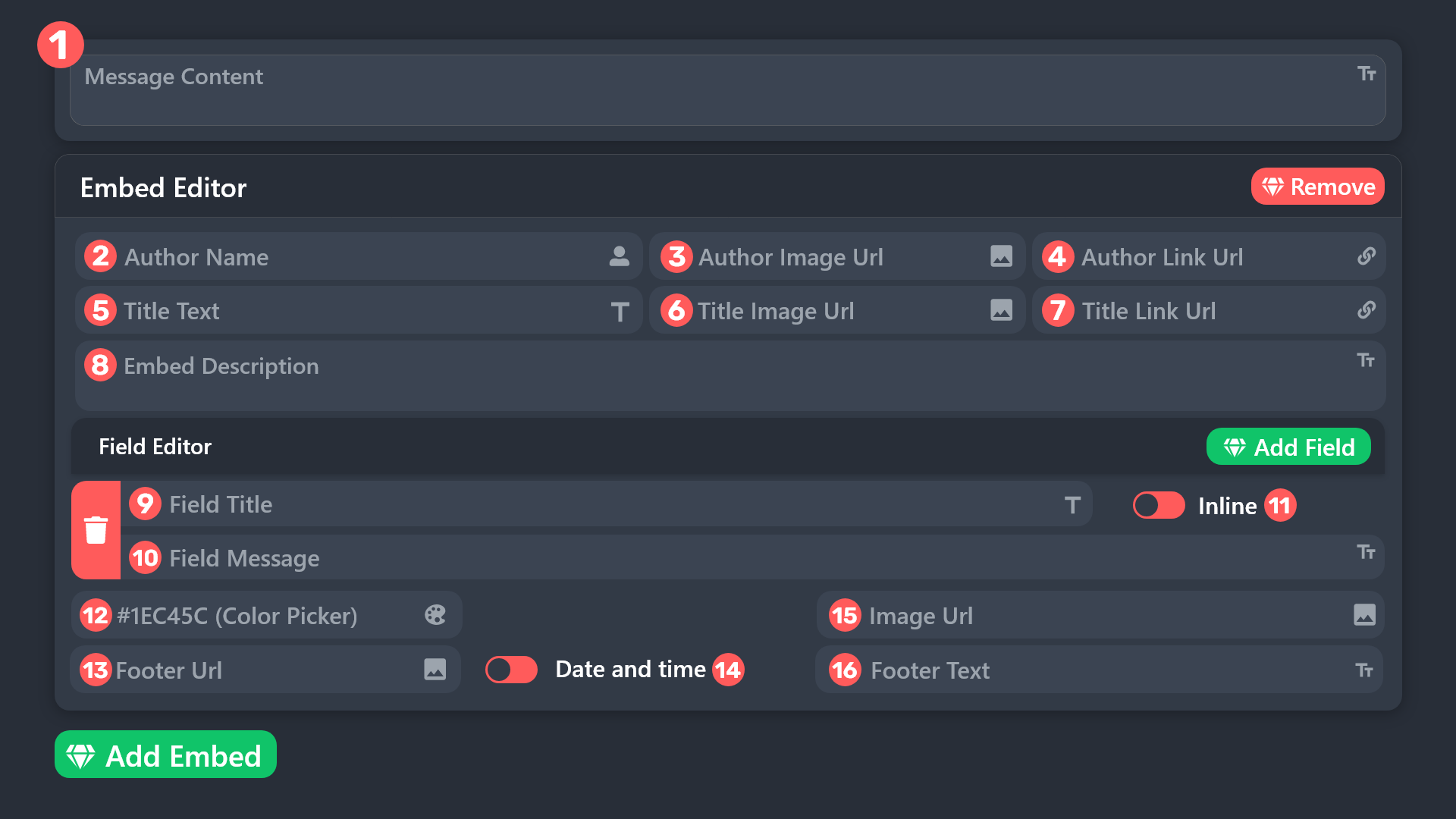
how to change ticket tool embed color
scenic forum
edgy nymph
does anyone know how to fix this? it says to change the ~deleted~ to a category....
Ticket tool is missing the "Manage Channels" permission inside the category
storm ridge
storm ridge
how to change ticket tool embed color
^
humble sequoiaBOT
 scenic forum
@storm ridge refer to the embed above
Panel config -> Panel -> Edit panel message field 12
 tired escarp
Does anyone know how to see the transcript from past tickets that have been closed? normally i get a dm from the ticket bot, but last time it didnt
scenic forum
tired escarp
Does anyone know how to see the transcript from past tickets that have been clos...
You could ask their staff if they have a transcript of the ticket
Each server can decide themself if they want the ticket owner to receive a copy of it
 scenic forum
 mortal solar
Is there an option to report a problem, or is it just me? 😅
mortal solar
Is there an option to report a problem, or is it just me? 😅
Is claiming enable on your server?
mortal solar
scenic forum
Is claiming enable on your server?
Yes, normally.
scenic forum
mortal solar
Yes, normally.
Just to be sure
Can you show in the dashboard that claiming is toggled on?
mortal solar
scenic forum
Just to be sure
Can you show in the dashboard that claiming is toggled on?
Oh yes, it's premium...
I thought it was free, sorry.
storm ridge
scenic forum
Just to be sure
Can you show in the dashboard that claiming is toggled on?
how to make something like this?

 dusty crypt
if i want a role to only be able to just view tickets (no permission to chat in them like support team roles can), how would i go about doing this? if possible at all? tysm in advance for anyone able to help 🙏
the goal is to let trainee staff VIEW tickets, but not be able to write in them
 harsh epoch
storm ridge
how to make something like this?
harsh epoch
storm ridge
how to make something like this?
Hey there!
Please refer to the embed below
humble sequoiaBOT
A Discord Form lets the user answer individual questions in a pop-up Form, which then displays the answers in the ticket message. This can save time if you already know what you want to ask the user.
Setup Forms
Forms can be enabled under Panel Settings > Form Options > Edit Forms Options. In the new pop-up window, you can now enable and edit your own Form.
Form Options
You can add up to 5 questions in the Discord form. This is a Discord limitation. Each question can have a placeholder in the input field, a minimum and maximum input, multi-line, and also the option to have the answer required.
Options
Question Title ➞ Your Question goes here
Question Placeholder ➞ The placeholder text in the input field
Required ➞ If enabled, the user has to answer this question, to submit the form
Multi-Line Input ➞ Allows the user to input multiple lines
Minimum and Maximum Input ➞ Set a minimum and maximum input value for the user
Displaying the Answer
To display the answers from the user, you need to enable Auto display form results on the ticket message as an additional embed
If you don't want a second embed, go into your Panel Configs > Ticket Options > Edit Ticket Message. You use the variable {create.form.x} and replace x with the number of your question. For example, the response to Question 5 can be displayed with {create.form.5}.
 harsh epoch
dusty crypt
if i want a role to only be able to just view tickets (no permission to chat in ...
harsh epoch
dusty crypt
if i want a role to only be able to just view tickets (no permission to chat in ...
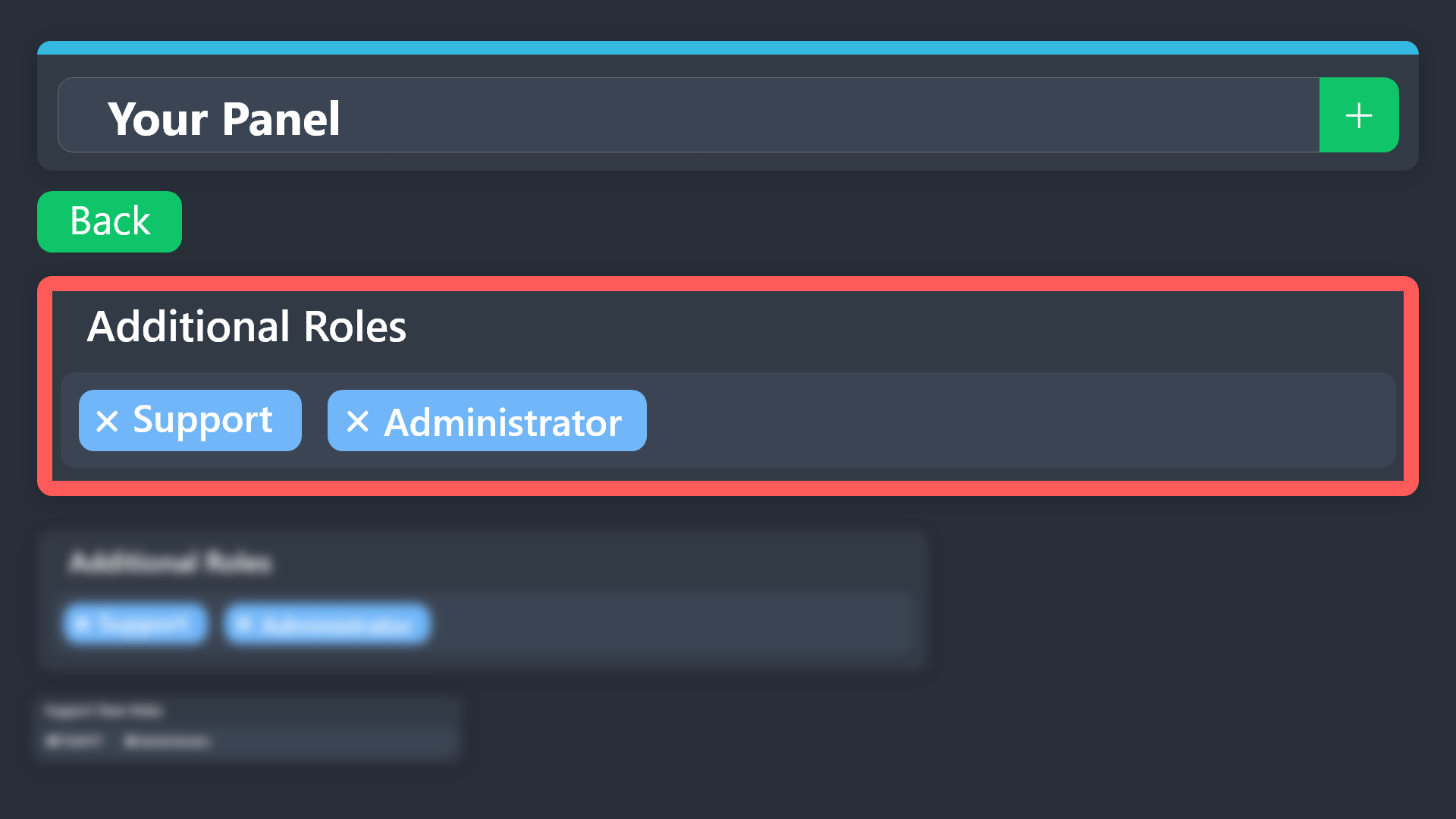
You could try using additional roles and removing their Send Messages permission under Permissions.
Refer to the embed below for more info
humble sequoiaBOT
Additional Roles are roles that are independent of Support Roles. You can assign unique permissions for roles defined as additional roles in tickets.
To choose your additional roles head to your Panel Configs ➞ General Settings ➞ Additional Roles
To assign permissions for additional roles, go to Dashboard ➞ Panel Configs ➞ Permission Options ➞ Additional Opened/Closed Permissions.
Note: Additional Roles do NOT get affected by the Change other support team permissions when claimed feature under Claiming Options, meaning they don't gain/lose any permissions set in that feature once a ticket is claimed.
$addroles
iron nightBOT
Gave +1 Rep to @harsh epoch (current: #31 - 160)
dusty crypt
didnt know that was a thing lol
 honest jacinth
what should I do if ticket tool application is not responding to any commands?
harsh epoch
honest jacinth
what should I do if ticket tool application is not responding to any commands?
Can you check that ticket tool has the following permissions in the channel you're trying use it in
View ChannelSend MessagesEmbed Links
iron nightBOT
Gave +1 Rep to @harsh epoch (current: #31 - 161)
harsh epoch
honest jacinth
thanks <@1124651666650693774> ❤️
No worries! Glad it's working
 simple canopy
من العرب من يحتاج المساعده فقط يقل لي وساساعده
scenic forum
simple canopy
من العرب من يحتاج المساعده فقط يقل لي وساساعده
If someone needs support, they will ask it here. While we appreciate you trying to help out, there’s no need to continually say something like this
 frail kernel
Як створити тікет
 still lavaBOT
frail kernel
Як створити тікет
still lavaBOT
frail kernel
Як створити тікет
From Ukrainian (UK) To Catalan (CA)
Crear un pal
From Ukrainian (UK) To Spanish (ES)
Crear un palo
 Translation requested by DeafPsycholombian from Flag-Reaction Feature.
 foggy sparrow
What do you mean a stick?
foggy sparrow
frail kernel
Як створити тікет
Привіт, чим ми можемо допомогти?
foggy sparrow
frail kernel
Новий
Це квиток для Discord-бота TicketTool?
frail kernel
Як в його зайти
still lavaBOT
frail kernel
Як в його зайти
From Ukrainian (UK) To Catalan (CA)
Com entrar
From Ukrainian (UK) To Spanish (ES)
Cómo entrar
Translation requested by DeafPsycholombian from Flag-Reaction Feature.
still lavaBOT
frail kernel
Як створити тікет
From Ukrainian (UK) To Catalan (CA)
Crear un pal
From Ukrainian (UK) To Spanish (ES)
Crear un palo
Translation requested by DeafPsycholombian from Flag-Reaction Feature.
foggy sparrow
Вибачте, але я не знаю, що ви маєте на увазі.
 dark hatch
Hi, How do i find the Server ID of the Scum Server Im Playing on?
humble sequoiaBOT
@dark hatch
⚠️ You're in the wrong place
We provide support for Ticket Tool Discord bot and cannot help you with whatever issue you have.
- We don't know which Support Team you should contact to get this issue resolved, and unfortunately we won't be able to accurately tell you.
If you don't have any further questions regarding our bot Ticket Tool, please close this ticket
 quaint marsh
$help
humble sequoiaBOT
quaint marsh
$help
First you will want to invite the bot to your server. Once the bot is in your server, you can manage your server in the dashboard.

To create a panel we are going to need to head over to the Panel Configs Tab on the Dashboard.
Once at the dashboard we will need to click Create Panel.
Enter a panel name (Fill in any optional settings you want).
Click Create Panel and you are ready to get started with configuring your panel.
An example of a creating a panel is shown below.

Once the panel has been created, use the blue Send button and select the channel you want the panel to be sent to.
The Panel wasn't send
Use the </debug:1029783024264564765> command to diagnose possible permission issues with the bot.

 deft stone
My /setup says it doesn't respond
scenic forum
deft stone
My /setup says it doesn't respond
Can you use /debug
deft stone
Nope
 scenic forum
Via discords channel permissions
deft stone
So with discord?
scenic forum
yes
deft stone
Where on settings?
scenic forum
Channel settings
deft stone
On the server or just discord
scenic forum
Isnt that the same thing?
deft stone
Alr thanks for the support
scenic forum
 rose adder
why does it show unexpected error
rose adder
why does it show unexpected error
Can you show the error
and dont ping for support
rose adder
 scenic forum
rose adder
scenic forum
rose adder
Youre in the wrong server.
rose adder
wdym
scenic forum
We are ticket tool not tickety
rose adder
oh mb
deft stone
Yo happy
How to you use server tags
I don't wanna ping so I hope you get this message
humble sequoiaBOT
⚠️ You're in the wrong place
We provide support for Ticket Tool Discord bot and cannot help you with whatever issue you have.
- We don't know which Support Team you should contact to get this issue resolved, and unfortunately we won't be able to accurately tell you.
If you don't have any further questions regarding our bot Ticket Tool, please close this ticket
 old hornet
i need help chat
 spiral finch
Novo chat
humble sequoiaBOT
@old hornet, we would love to help you, but if you don't tell us what you need help with we can't help you :(
old hornet
humble sequoia
i dont know how to make tickets
foggy sparrow
Tickets of whaat?
 tribal cedar
Yea it was so long ago I didnt even think to respond @foggy sparrow
tribal cedar
foggy sparrow
MB... Drunk
Ive learned to avoid online drinking
 cedar sonnet
is there anyone in here that knows why my manage button wont work for my server when I click manage it does nothing for some reason.
 vast robin
i'm trying to make this but idk how?
 vast robin
i'm trying to make this but idk how?
vast robin
vast robin
i'm trying to make this but idk how?
@covert swallow
tribal cedar
vast robin
i'm trying to make this but idk how?
Thats a drop down feature on the webpanel
vast robin
tribal cedar
Thats a drop down feature on the webpanel
idk how to to any type tbh
tribal cedar
vast robin
idk how to to any type tbh
Are you trying to setup the bot?
vast robin
tribal cedar
Are you trying to setup the bot?
yes
i'm new to making servers
i just started making server today so this what it looks like

 slender dew
With premium, how do you make ticket tool send 2 messages separately and not just another embed?
humble sequoiaBOT
━━ Bear's inquiry has been moved to a ticket ━━
cedar sonnet
tribal cedar
Are you trying to setup the bot?
can you help me with why my manage button wont work?
can anyone help me?
its being so weid
@covert swallow can you help me?
also I want to know how to do drop down menu
cedar sonnet
humble sequoia
━━ *Bear's inquiry has been moved to a ticket* ━━
can you please move me to ticket
humble sequoiaBOT
━━ oli's inquiry has been moved to a ticket ━━
tribal cedar
Sorry had to get up
 pseudo ravine
cedar sonnet
can you please move me to ticket
pseudo ravine
cedar sonnet
can you please move me to ticket
You can make a ticket in #🎫│make-a-ticket or be patient and wait for a response in here
iron nightBOT
Gave +1 Rep to @pseudo ravine (current: #2 - 1608)
harsh epoch
cedar sonnet
can you help me with why my manage button wont work?
What do you mean by wont work?
As for dropdowns refer to the embed below
humble sequoiaBOT
The Drop-down menu or Select Menu replaces the buttons on your panel message and uses a drop-down menu with all of your panels. To set this up, go to your Panel Configs and select your main Panel.
<:Numbericons1:1018864164032225340> Enable Select Style
First you enable Select Style. Then you add an item in the Dropdown Editor. Now you can start editing your dropdown!
<:Numbericons2:1018864168041971712> Dropdown Editor
Each line in the dropdown editor represents a line in the drop down menu on discord. You can add more "Items", by clicking on
First you select a panel. That's the panel this option will open a ticket for. DONT select the same panel twice. Each option should have a different Panel
After that, you can put a Display. This is the title of this option and will appear in the drop down menu. The *Description can be set right after that, which will be below the title in grey.
Additionally you can select an emoji, that will be shown in front of each option. You can either manually input the ID of an emoji or select it in the selector.
Common Issues ⚠️
- Panel doesn't send? Make sure you have a valid emoji selected
- Option doesn't show up? Check if two options have the same panel in the DropDown Editor
$dropdown
harsh epoch
 spark lagoon
<@204255221017214977> can you help support my server
spark lagoon
<@204255221017214977> can you help support my server
Can you elaborate on what you need help with?
 humble sequoiaBOT
━━ SillyVRC's inquiry has been moved to a ticket ━━
━━ AscentBaldwin's inquiry has been moved to a ticket ━━
 ornate lion
why wont it make the create ticket thing pop up even though i press set up?
lilac junco
ornate lion
why wont it make the create ticket thing pop up even though i press set up?
Does it send you any errors?
ornate lion
application did not respond
lilac junco
ornate lion
application did not respond
Refer to the embed below please.
humble sequoiaBOT
When first invited to your server, Ticket Tool should have the permissions shown below in order to ensure an appropriate functioning:
When customizing permissions for the different ticket participants, you must make sure Ticket Tool has the permissions you want it to grant to others, you can learn more about this here.
Missing Permissions
This error is a direct outcome of the bot missing permissions as depicted above. When troubleshooting this error we suggest you go through these steps:
- Use the </debug:1029783024264564765> command to check if the bot is lacking core role or channel permissions.
- Compare the category/channel's overrides and contrast them with the bot's roles to identify any permission denial that is breaking the functioning
- If you can't still figure it out, let our <@&540295656720302081> know so they can guide you through
Additional Resources
- If you are a server administrator and would like to understand more how to set up your server's permissions, we suggest checking the Discord Support Knowledge Base
- If you are a bot developer and are interested in the internal permission hierarchy we suggest you this part of the Discord Developer Docs
Important Note
- Giving Administrator permissions is NOT required and we do NOT encourage you to do unless you are trying to troubleshoot your permissions setup.
 ornate lion
lilac junco
Refer to the embed below please.
ornate lion
lilac junco
Refer to the embed below please.
ty
iron nightBOT
Gave +1 Rep to @lilac junco (current: #65 - 29)
lilac junco
ornate lion
ty
Glad I could help!
 jade topaz
can someone help me i dont understand
 lilac junco
jade topaz
can someone help me i dont understand
lilac junco
jade topaz
can someone help me i dont understand
Refer to the embed below.
humble sequoiaBOT
When first invited to your server, Ticket Tool should have the permissions shown below in order to ensure an appropriate functioning:
When customizing permissions for the different ticket participants, you must make sure Ticket Tool has the permissions you want it to grant to others, you can learn more about this here.
Missing Permissions
This error is a direct outcome of the bot missing permissions as depicted above. When troubleshooting this error we suggest you go through these steps:
- Use the </debug:1029783024264564765> command to check if the bot is lacking core role or channel permissions.
- Compare the category/channel's overrides and contrast them with the bot's roles to identify any permission denial that is breaking the functioning
- If you can't still figure it out, let our <@&540295656720302081> know so they can guide you through
Additional Resources
- If you are a server administrator and would like to understand more how to set up your server's permissions, we suggest checking the Discord Support Knowledge Base
- If you are a bot developer and are interested in the internal permission hierarchy we suggest you this part of the Discord Developer Docs
Important Note
- Giving Administrator permissions is NOT required and we do NOT encourage you to do unless you are trying to troubleshoot your permissions setup.
 magic talon
Can someone help I’m trying to add this to a friends server I have full permissions and it will not pop up on my dashboards
lilac junco
magic talon
Can someone help I’m trying to add this to a friends server I have full permissi...
Hey there! Click on Sync Servers

 spice willow
Help
 magic talon
I have and it still will not pop up
humble sequoiaBOT
@spice willow
⚠️ You're in the wrong place
We provide support for Ticket Tool Discord bot and cannot help you with whatever issue you have.
- We don't know which Support Team you should contact to get this issue resolved, and unfortunately we won't be able to accurately tell you.
If you don't have any further questions regarding our bot Ticket Tool, please close this ticket
lilac junco
magic talon
I have and it still will not pop up
Is ticket tool in your friend's server?
spice willow
humble sequoia
<@1410253187507556426>
4QFIIL
magic talon
I followed the YouTube video and got to the dashboard and that is where I cannot move on from
lilac junco
magic talon
I followed the YouTube video and got to the dashboard and that is where I cannot...
Is your dashboard currently opened?
magic talon
No I at the main menu where it is asking me which server I would like
lilac junco
magic talon
No I at the main menu where it is asking me which server I would like
Right, do you see your server?
magic talon
No I do not
lilac junco
Can you try refreshing the page?
magic talon
Same thing. And refreshed and it still isn’t popped up
lilac junco
magic talon
Same thing. And refreshed and it still isn’t popped up
Try re-inviting ticket tool to your server.
magic talon
I have it on one of my other servers can that be a problem?
lilac junco
magic talon
I have it on one of my other servers can that be a problem?
No, you can have it on every server you own, there's no limit.
lilac junco
lilac junco
Try re-inviting ticket tool to your server.
Try this and see if it works.
lilac junco
magic talon
I deleted and resent and still nothing
Are you sure you have administrator permissions in the server?
magic talon
Let me double check
lilac junco
magic talon
Let me double check
Can you run /permissionlevel in your server?
 lilac junco
magic talon
The very bottom needs to be clicked on correct
lilac junco
magic talon
The very bottom needs to be clicked on correct
Your role must have administrator permissions.
magic talon
Ok I’ll tell him to turn that on then thank you if I need anything else I’ll jump back here thank you
lilac junco
magic talon
Ok I’ll tell him to turn that on then thank you if I need anything else I’ll jum...
Okay!
 woeful vault
Has anyone else bought the founders pack? (Mine is not working)
humble sequoiaBOT
@woeful vault
⚠️ You're in the wrong place
We provide support for Ticket Tool Discord bot and cannot help you with whatever issue you have.
- We don't know which Support Team you should contact to get this issue resolved, and unfortunately we won't be able to accurately tell you.
If you don't have any further questions regarding our bot Ticket Tool, please close this ticket
 winged coyote
Có ai biết cách để cài bot vào server sau khi invite thành công không? xin vui lòng cho tôi file hướng dẫn để cài đặt, tôi không thể add bot vào server của mình! Cảm ơn cả nhà!
 pastel ravine
how do i get ticket tool to not send two ticket transcripts of the same ticket in the transcript channel? i only want it to send one per ticket
 narrow bone
it keep saying application not responding everytime i want to set up the bot
i tried removing the bot and readding it and it does not help ..
humble sequoiaBOT
When first invited to your server, Ticket Tool should have the permissions shown below in order to ensure an appropriate functioning:
When customizing permissions for the different ticket participants, you must make sure Ticket Tool has the permissions you want it to grant to others, you can learn more about this here.
Missing Permissions
This error is a direct outcome of the bot missing permissions as depicted above. When troubleshooting this error we suggest you go through these steps:
- Use the </debug:1029783024264564765> command to check if the bot is lacking core role or channel permissions.
- Compare the category/channel's overrides and contrast them with the bot's roles to identify any permission denial that is breaking the functioning
- If you can't still figure it out, let our <@&540295656720302081> know so they can guide you through
Additional Resources
- If you are a server administrator and would like to understand more how to set up your server's permissions, we suggest checking the Discord Support Knowledge Base
- If you are a bot developer and are interested in the internal permission hierarchy we suggest you this part of the Discord Developer Docs
Important Note
- Giving Administrator permissions is NOT required and we do NOT encourage you to do unless you are trying to troubleshoot your permissions setup.
@narrow bone refer to the embed above.
narrow bone
I appreciate you tons!
lilac junco
narrow bone
I appreciate you tons!
Glad I could help!
 pulsar lodge
how to make trial mod see a ticket after it’s been claimed by someone else?
lilac junco
pulsar lodge
how to make trial mod see a ticket after it’s been claimed by someone else?
You'll need to set a support team role, so when a ticket is opened, anyone who has the support team role can see tickets.
Panel Configs > General > Support Team Roles
pulsar lodge
lilac junco
``Panel Configs > General > Support Team Roles``
i have a staff role that every staff have it and i put it in there already
but they still can’t see it?
lilac junco
pulsar lodge
but they still can’t see it?
Hmmm, how many panels do you have?
pulsar lodge
lilac junco
Hmmm, how many panels do you have?
two panels one for discord stuff and one for game stuff and this never happened with the other server i’m in so im confused on it
lilac junco
pulsar lodge
two panels one for discord stuff and one for game stuff and this never happened ...
Make sure for both of the panels you've set the support team roles.
pulsar lodge
they are separate one for staff and one for testers
lilac junco
Do tickets go into a category that they can't access?
pulsar lodge
they have access to each of their own categories
lilac junco
pulsar lodge
they have access to each of their own categories
Double check the support team roles and the category permissions.
If it still doesn't work, please #🎫│make-a-ticket as I'm unsure of the issue.
 oak pike
Does anyone know where to get custom clothing made?
pulsar lodge
lilac junco
Double check the support team roles and the category permissions.
If it still d...
okok and thanks for trying to help
iron nightBOT
Gave +1 Rep to @lilac junco (current: #64 - 30)
humble sequoiaBOT
@oak pike
⚠️ You're in the wrong place
We provide support for Ticket Tool Discord bot and cannot help you with whatever issue you have.
- We don't know which Support Team you should contact to get this issue resolved, and unfortunately we won't be able to accurately tell you.
If you don't have any further questions regarding our bot Ticket Tool, please close this ticket
lilac junco
pulsar lodge
okok and thanks for trying to help
oak pike
Hello, I would like to create a new custom order for employee uniforms. How should I proceed?
lilac junco
oak pike
Hello, I would like to create a new custom order for employee uniforms. How shou...
You're in the wrong place for that. Please stop asking about it.
oak pike
okay im sorry about it
 orchid dew
why was my account put behind 2 factor authentication?
 humble sequoiaBOT
@orchid dew
⚠️ You're in the wrong place
We provide support for Ticket Tool Discord bot and cannot help you with whatever issue you have.
- We don't know which Support Team you should contact to get this issue resolved, and unfortunately we won't be able to accurately tell you.
If you don't have any further questions regarding our bot Ticket Tool, please close this ticket
orchid dew
bro
 austere forge
If you are smart enough, you will see that there is an email address for the support you are looking for on your screenshot, we are not "bitskins"
orchid dew
you're right
 untold wasp
can i put {panel.name} in the channel name so it automaticly changes to the panel poepel creat
scenic forum
untold wasp
can i put {panel.name} in the channel name so it automaticly changes to the pan...
Yes
 vapid pulsar
I just wanted to manage my server but every time i click on manage on the website nothing happens neither on phone nor on pc
austere forge
Try with different browser or clear cache
vapid pulsar
austere forge
Try with different browser or clear cache
worked in a different browser thanks
iron nightBOT
Gave +1 Rep to @austere forge (current: #4 - 1217)

 scenic forum
 limpid crest
The servers staff needs to delete some channels as the server is at 500 channels.
scenic forum
limpid crest
I’m brought the cali shootout
We cannot help you. You'd need to reach out to their staff
limpid crest
And I want to redeem it
 restive condor
 delicate cypress
¡Hola, buenas! Podrías usar el comando /debug en ese mismo canal por favor
 restive condor
delicate cypress
restive condor
delicate cypress
Al bot le falta el permiso de ENVIAR MENSAJES para ese canal
delicate cypress
ah
 snow horizon
Anyone know how to make it so players cant close tickets?
restive condor
snow horizon
Anyone know how to make it so players cant close tickets?
Hey there! 👋
Dashboard > Panel Configs > Buttons > Close Ticket Button
- Please enable
 Support Team Only
 sick imp
Does anyone know how to do the make selection for your tickets
delicate cypress
Como agrego las diferentes opciones en ticket tool? Osea con lo de panel y cuando un usuario quiera crear un ticket le aparezcan este tipo de opciones por la cual creo ticket: Reportar usuario
verificacion
soporte
 merry hinge
Hi, is there a way to make a multiple panel with a dropdown instead of buttons?
harsh epoch
sick imp
Does anyone know how to do the make selection for your tickets
Hey there!
Are you looking to include multiple "Create ticket" buttons or a dropdown selection?
harsh epoch
merry hinge
Hi, is there a way to make a multiple panel with a dropdown instead of buttons?
Hey! Please refer to the embed below
humble sequoiaBOT
The Drop-down menu or Select Menu replaces the buttons on your panel message and uses a drop-down menu with all of your panels. To set this up, go to your Panel Configs and select your main Panel.
<:Numbericons1:1018864164032225340> Enable Select Style
First you enable Select Style. Then you add an item in the Dropdown Editor. Now you can start editing your dropdown!
<:Numbericons2:1018864168041971712> Dropdown Editor
Each line in the dropdown editor represents a line in the drop down menu on discord. You can add more "Items", by clicking on
First you select a panel. That's the panel this option will open a ticket for. DONT select the same panel twice. Each option should have a different Panel
After that, you can put a Display. This is the title of this option and will appear in the drop down menu. The *Description can be set right after that, which will be below the title in grey.
Additionally you can select an emoji, that will be shown in front of each option. You can either manually input the ID of an emoji or select it in the selector.
Common Issues ⚠️
- Panel doesn't send? Make sure you have a valid emoji selected
- Option doesn't show up? Check if two options have the same panel in the DropDown Editor
$dropdown
merry hinge
harsh epoch
Hey! Please refer to the embed below
Thanks
iron nightBOT
Gave +1 Rep to @harsh epoch (current: #31 - 162)
 minor cloud
I need help on teaching someone on how to use the ticket thing
harsh epoch
minor cloud
I need help on teaching someone on how to use the ticket thing
Hey! Which part are you stuck on?
minor cloud
On the part where its in my server but i cant see the tickets
harsh epoch
minor cloud
On the part where its in my server but i cant see the tickets
Do you have either one of your roles listed here, or Administrator?
 harsh epoch
Hm, there's no errors at all when you press "Create Ticket" and to double check, you definitely have at least one of those roles?
minor cloud
When i press create ticket it creates a channel but it does not show the admin nor the owner
 long echo
that's weird. There shouldn't be a channel that the admin/owner can't see. Is it up above all the channels in the uncategorized zone?
harsh epoch
minor cloud
When i press create ticket it creates a channel but it does not show the admin n...
So you can see the channel?
minor cloud
Yea it says ticket #000 and a number
harsh epoch
minor cloud
Yea it says ticket #000 and a number
I might be a bit confused, but what issue is it you're facing if you can see the channel?
minor cloud
The admin cant see the messege
long echo
guessing the issue is that the actual admin can't see it, they're just helping set up.
harsh epoch
minor cloud
The admin cant see the messege
Could you show me what your dashboard looks like when you go to General on that panel?
harsh epoch
minor cloud
Oh nvm it shows it now it does show the options to help
No worries!
Glad it's working
 eager vapor
How can I have one panel with ticket options (drop down menu)
humble sequoiaBOT
The Drop-down menu or Select Menu replaces the buttons on your panel message and uses a drop-down menu with all of your panels. To set this up, go to your Panel Configs and select your main Panel.
<:Numbericons1:1018864164032225340> Enable Select Style
First you enable Select Style. Then you add an item in the Dropdown Editor. Now you can start editing your dropdown!
<:Numbericons2:1018864168041971712> Dropdown Editor
Each line in the dropdown editor represents a line in the drop down menu on discord. You can add more "Items", by clicking on
First you select a panel. That's the panel this option will open a ticket for. DONT select the same panel twice. Each option should have a different Panel
After that, you can put a Display. This is the title of this option and will appear in the drop down menu. The *Description can be set right after that, which will be below the title in grey.
Additionally you can select an emoji, that will be shown in front of each option. You can either manually input the ID of an emoji or select it in the selector.
Common Issues ⚠️
- Panel doesn't send? Make sure you have a valid emoji selected
- Option doesn't show up? Check if two options have the same panel in the DropDown Editor
$dropdown
lilac junco
Hey @eager vapor refer to the embed above!
eager vapor
lilac junco
Hey <@1242569513740796018> refer to the embed above!
Thx
iron nightBOT
Gave +1 Rep to @lilac junco (current: #64 - 31)
lilac junco
eager vapor
Thx
My pleasure!
eager vapor
lilac junco
My pleasure! <:PabloTiphat:983791053842837624>
Which one would be my main panel?
lilac junco
eager vapor
Which one would be my main panel?
Do you mean the one that appears first in the menu?
eager vapor
lilac junco
Do you mean the one that appears first in the menu?
it says on the embed to set it up I need to head over to my main panel,which one would that be? I have 5 panels
Wait nvm I figured it lol
lilac junco
eager vapor
Wait nvm I figured it lol
Alright! Good luck 
eager vapor
👍
 bleak kettle
I cannot edit messages outside of embed like
I uses to
scenic forum
bleak kettle
I cannot edit messages outside of embed like
I uses to
The greyed out fields require premium to edit of thats what you mean
bleak kettle
Since when?
Its always been free
So now I cant get people pinged when tickets are opened?🫠
scenic forum
bleak kettle
Since when?
Since a long time ago
scenic forum
bleak kettle
So now I cant get people pinged when tickets are opened?🫠
Youre probably looking at the Panel message but you need to look at the Ticket message
Panel config -> Ticket -> Edit ticket message
bleak kettle
That's where i am
scenic forum
Can you show a screenshot
bleak kettle
Trying edit message. They say they can't get pinges
scenic forum
Could you show a screenshot
bleak kettle
 eager vapor
Can someone show me what this looks like in a server?
 harsh epoch
eager vapor
Can someone show me what this looks like in a server?
harsh epoch
eager vapor
Can someone show me what this looks like in a server?
Hey, give me a second, i've got an example somewhere
scenic forum
bleak kettle
Youre at the panel message not ticket message.
harsh epoch
eager vapor
Can someone show me what this looks like in a server?
Really limited customisation in my example, but that's the general look
 bleak kettle
Ohhh WHEEW is that where it will ping?
scenic forum
bleak kettle
Ohhh WHEEW is that where it will ping?
That will be the message when a ticket gets opened
eager vapor
harsh epoch
Really limited customisation in my example, but that's the general look
So display is the main text that says panel one in ur ss,select a panel is what the make a selection button is showing, and what about description and emoji?
bleak kettle
Thank you!
harsh epoch
eager vapor
So display is the main text that says panel one in ur ss,select a panel is what ...
The emoji section will appear just to the side of your description and panel name. The description itself is room for a short sentence about that panels use for example

 uncut tide
Anyone could help me please?
 harsh epoch
uncut tide
Anyone could help me please?
harsh epoch
uncut tide
Anyone could help me please?
Hey there!
Could you make sure that Ticket tool has the following permissions in that channel.
View ChannelSend MessagesEmbed Links
uncut tide
harsh epoch
Hey there!
Could you make sure that Ticket tool has the following permissions i...
.
harsh epoch
uncut tide
I gived Ticket Tool Admin perm
Could you use /debug in that channel please?
uncut tide
 harsh epoch
The bot is missing send messages within that channel
scenic forum
10 minutes ago it was missing the permission
You have just granted it.
uncut tide
??? I never changed anything...
harsh epoch
uncut tide
??? I never changed anything...
Someone must have changed it, regardless of that, is it working for you now?
harsh epoch
eager vapor
How can I @ mention a role in a ticket message?
Hey! You can can use the {Role ID} variable for that, replace "Role ID" with the actual ID of the one you want to ping.
Note: Editing the message content for panel messages is a premium feature
eager vapor
harsh epoch
Hey! You can can use the `{Role ID}` variable for that, replace "Role ID" with t...
Like this?

I tired without the @ as well it didn’t work
harsh epoch
eager vapor
Like this?
What's happening at the moment when you send that without the @?
eager vapor
harsh epoch
What's happening at the moment when you send that without the `@`?

It’s showing like this with and without the @
harsh epoch
eager vapor
That's a ticket message.
You won't see that on the panel itself
eager vapor
harsh epoch
That's a ticket message.
You won't see that on the panel itself
So on the panel it’ll have mentioned the role I want it to?
harsh epoch
eager vapor
So on the panel it’ll have mentioned the role I want it to?
Not on the panel.
The screenshot is for a ticket message, which you'll only see inside the ticket.
To edit the panel message: Panel -> Messages -> Edit Panel Message
 harsh epoch
uncut tide
How do I fix this?
harsh epoch
uncut tide
How do I fix this?
Claiming is a premium only feature unfortunately
 harsh epoch
uncut tide
Then how to ping people after this massage?
harsh epoch
uncut tide
Then how to ping people after this massage?
Like your support team?
uncut tide
Yeah
humble sequoiaBOT
1. Open your Panel Configs tab in your server's dashboard
2. Select the panel you want to ping your support team on
3. Open the Ticket options menu
4. Click on Edit Ticket Message
5. In the Message Content use one of the role mention syntax ({@Role Name}/{Role ID})
6. Save changes
Note: For this to work properly, Ticket Tool requires the Mention Everyone permission. Or the role must have the Allow anyone to @mention this role setting enabled 
 harsh epoch
uncut tide
Yeah
harsh epoch
uncut tide
Yeah

uncut tide
Alright thanks
eager vapor
harsh epoch
Not on the panel.
The screenshot is for a ticket message, which you'll only see...
Okay,well how I can @ mention a role in this?
uncut tide
thanks @harsh epoch
iron nightBOT
Gave +1 Rep to @harsh epoch (current: #31 - 163)
harsh epoch
humble sequoia
@eager vapor Please refer to this embed
eager vapor
harsh epoch
<@1242569513740796018> Please refer to this embed
Do I have to use both mention syntax or just one?
harsh epoch
eager vapor
Do I have to use both mention syntax or just one?
You would need to use {Role ID} and replace it with your role ID. For example, if you role ID where 1234, you would use just {1234}
eager vapor
harsh epoch
You would need to use `{Role ID}` and replace it with your role ID. For example,...
I tested it and it didn’t @ mention the role
harsh epoch
eager vapor
I tested it and it didn’t @ mention the role
Did you test it inside a ticket or just look at the preview?
eager vapor
harsh epoch
Did you test it inside a ticket or just look at the preview?
I opened a ticket in my server
harsh epoch
eager vapor
I opened a ticket in my server
Can you show me a screenshot of what was sent?
eager vapor
harsh epoch
Can you show me a screenshot of what was sent?
nvm it’s working now,sorry abt that
harsh epoch
eager vapor
nvm it’s working now,sorry abt that
No worries!
 marble ore
When I invited the bot into my server when I used /setup it shows me this

And when I go on to the website when I have my server invited already it doesnt show on here

The server
So I cant manage my server
harsh epoch
marble ore
So I cant manage my server
Then that'll mean that you don't have permission to manage it. As the message said, only people with dashboard access and the Administrator permission can use that command, same goes for the dashboard
marble ore
harsh epoch
Then that'll mean that you don't have permission to manage it. As the message sa...
Ahhhh
So I need admin perm
Since its not really my server
ty
harsh epoch
No worries!
marble ore
Have a good night/ day / evening sir
harsh epoch
marble ore
Have a good night/ day / evening sir
You too!
 final mulch
thank @harsh epoch
iron nightBOT
Gave +1 Rep to @harsh epoch (current: #31 - 164)
 regal bison
Guys i just joined how did i get premium support?
humble sequoiaBOT
━━ User's inquiry has been moved to a ticket ━━
 tawdry sedge
I have a question how do I setup and add it to my server
Like I have it in my server but I how to I add it to like channels
 placid girder
Everything is configured through the dashboard:
https://tickettool.xyz
When you've configured what we call the "panel", you send the message to a desired channel.

Ticket Tool - Ticketing without clutter - The #1 Discord support bot
tawdry sedge
Wait wdym what is a panel
placid girder
The panel is the message sent by Ticket Tool which the user interacts with. It's where they click a button to create a ticket, for example.
In the #🎫│make-a-ticket channel, that message is the panel.
 drowsy anchor
my tickets are appearing like this randomly, even tho it should be like this and it used to be but it randomly stopped i didnt change anything either

 scenic forum
drowsy anchor
my tickets are appearing like this randomly, even tho it should be like this and...
scenic forum
drowsy anchor
my tickets are appearing like this randomly, even tho it should be like this and...
Did your servers premium expire?
drowsy anchor
oh yeah it did lmao

 scenic forum
Is claiming enabled and was used on that ticket?
 crystal flame
scenic forum
Is claiming enabled and was used on that ticket?
crystal flame
scenic forum
Is claiming enabled and was used on that ticket?
yes
scenic forum
crystal flame
yes
Could you show a screenshot of the ticket being claimed and the transcript afterwards
crystal flame
scenic forum
Could you show a screenshot of the ticket being claimed and the transcript after...

oh
lemme do a rec
crystal flame
scenic forum
Could you show a screenshot of the ticket being claimed and the transcript after...
i just realize
our testing session fumbled
lol some of these werent claimed
disregard the question
but regardless the command input werecorrecttt?
does ts mean if a ticket goes unclaimed but handled, thatd be the output
scenic forum
yes
crystal flame
scenic forum
yes
what an awkward output
scenic forum
Not really
crystal flame
why
scenic forum
Variable empty means it uses the raw variable
unless something else has been specified
scenic forum
You can use ?fallback= to specify a text on empty variable
{time.claimed.age?fb=INSERT HERE WHAT YOU WANT IF EMPTY}
That should be correct
iron nightBOT
Gave +1 Rep to @scenic forum (current: #13 - 546)
scenic forum
Sure thing
eager vapor
How can I make it so that when tickets are closed they are automatically transcripted into a specific channel?
scenic forum
eager vapor
How can I make it so that when tickets are closed they are automatically transcr...
Panel config -> Transcript -> Auto Save Transcript
Note this is a premium feature
eager vapor
scenic forum
Panel config -> Transcript -> Auto Save Transcript
Note this is a premium featur...
oh,and if I want to transcript them manually?
scenic forum
eager vapor
oh,and if I want to transcript them manually?
Then you only need to select a transcript channel at the top of it
crystal flame
oh whats the ticket claimer variable - to be used for transcript
scenic forum
crystal flame
oh whats the ticket claimer variable - to be used for transcript
{claim.user}?
crystal flame
scenic forum
{claim.user}?
thanks @scenic forum
iron nightBOT
Gave +1 Rep to @scenic forum (current: #13 - 547)
crystal flame
if i may ask tho, why did u guys make the transcript be sent to ticket owners
like is there a grand reason for it
scenic forum
crystal flame
if i may ask tho, why did u guys make the transcript be sent to ticket owners
What do you mean?
You can decide yourself if you want them to be sent to the ticket owner or not
crystal flame
scenic forum
You can decide yourself if you want them to be sent to the ticket owner or not
hmm fair its opt. just got curious lol
i suppose its bec in our case, these tickets r to be kept confidential since its ab report and stuffs
scenic forum
Because transparency is a very important thing for businesses and such. Even for reports having the transparency is good. The user making the report has seen everything inside the ticket. It's not like it would be news to them. They are simply receiving a receipt of what they have talked about
scenic forum
crystal flame
ok ok
There would be no difference if they Screenshoted the entire ticket before closing it either and you wouldn't even know that
crystal flame
scenic forum
There would be no difference if they Screenshoted the entire ticket before closi...
fair argument
 hard anvil
guys do you know why this is happening
 scenic forum
hard anvil
guys do you know why this is happening
scenic forum
hard anvil
guys do you know why this is happening
Can you try using /debug
 scenic forum
hard anvil
scenic forum
hard anvil
Ticket tool is missing the send message permission inside the channel
scenic forum
crystal flame
fair argument
Also last reply here sorry
When you use ticket tool as business with billing and stuff to keep track. You're legally required in alot of countries to give the user the full receipt of it as "consumer protection" law
crystal flame
scenic forum
Also last reply here *sorry*
When you use ticket tool as business with billing a...
we r using ticket tool in a gaming community for reporting players that has exploited, did a violation etc but i do agree with ya so we'll now be sending these transcripts to their dms
scenic forum
crystal flame
we r using ticket tool in a gaming community for reporting players that has expl...
Just make sure to select Dm on closed not on deleted in your case
crystal flame
thanks again @scenic forum very insightful of ya
iron nightBOT
Gave +1 Rep to @scenic forum (current: #13 - 548)
scenic forum
 vocal sun
yo when i try to create a ticket it says i dont have permissions its on my alt how do i make it have the perms to use the ticket
 scenic forum
vocal sun
yo when i try to create a ticket it says i dont have permissions its on my alt...
scenic forum
vocal sun
yo when i try to create a ticket it says i dont have permissions its on my alt...
Are you staff on the server?
vocal sun
scenic forum
Are you staff on the server?
yeah its my server
 fading steppe
Cómo uso correctamente el comando /invite?
vocal sun
im trynna set it up rn
scenic forum
vocal sun
yeah its my server
Hey there!
«You don't have permissions to use this»
👉 Server Configs -> Blacklist Roles
Any roles there will be unable to interact with the bot in any way, including creating tickets.👉 Panel Configs -> Buttons -> Create Ticket -> Support team only
If this is enabled👉 Panel Configs -> Buttons -> Create Ticket -> Disabled Roles
Any roles there will be unable to use the button.
iron nightBOT
Gave +1 Rep to @scenic forum (current: #13 - 549)
 lilac pewter
Hey I just got banned for no reason when waiting for travelling merchant, can anybody help me?
humble sequoiaBOT
⚠️ You're in the wrong place
We provide support for Ticket Tool Discord bot and cannot help you with whatever issue you have.
- We don't know which Support Team you should contact to get this issue resolved, and unfortunately we won't be able to accurately tell you.
If you don't have any further questions regarding our bot Ticket Tool, please close this ticket
sick imp
How do you do thr select option panel thing 😿 i got help earlier but I dont know how to enable it
tribal cedar
sick imp
How do you do thr select option panel thing 😿 i got help earlier but I dont kno...
Whats that?
tribal cedar
What do you want to do?
sick imp
Do u know how to do it
tribal cedar
Sorry I dont get what you are talking about. That picture is of an error isnt it?
Just say what you want to do
sick imp
Idk the select option thing
tribal cedar
Theres a couple things that couple be considered an option thing on this bot. You have ticket questions and drop down menus and...
sick imp
Yeah that
The drop down menus thing that let you select an option on why you're opening that ticket
tribal cedar
Ok you want to go to panel configs -> drop down menus
sick imp
Sorry I genuinely just dont knoe how to explain it 😿
sick imp
You lost me 😿
tribal cedar
Heres something that might help you. Every option on tickettool.xyz has a question mark next to it with helpful infoi
tribal cedar
Thats ok I get into things that get me lost too
sick imp
How do I find panel configs 😓
 fervent zephyr
I can’t use the setup command
 tribal cedar
fervent zephyr
I can’t use the setup command
tribal cedar
fervent zephyr
I can’t use the setup command
Im not too sure about the setup command cuz Ive never used it but I dont get it why do ppl use that when there is a perfectly good web panel at http://tickettool.xyz
Ticket Tool - Ticketing without clutter - The #1 Discord support bot
@fervent zephyr want to try the web panel?
jade topaz
It won't let me use the setup command
 harsh epoch
jade topaz
It won't let me use the setup command
harsh epoch
jade topaz
It won't let me use the setup command
Hey there!
Could you make sure that Ticket tool has the following permissions in that channel.
View ChannelSend MessagesEmbed Links
pastel ravine
how do i get ticket tool to not send two ticket transcripts of the same ticket in the transcript channel? i only want it to send one per ticket
harsh epoch
pastel ravine
how do i get ticket tool to not send two ticket transcripts of the same ticket i...
do you have an example you could show me?
 pulsar eagle
I can't setup the bot it keep saying it's doing it but doesn't load anyone know why? It could be because I don't own the server
 wintry gull
my server isnt loading bro
pastel ravine
harsh epoch
do you have an example you could show me?
 harsh epoch
pastel ravine
harsh epoch
pastel ravine
Hm, do you happen to have auto transcripts enabled?
pastel ravine
harsh epoch
Hm, do you happen to have auto transcripts enabled?
oh yes i do
harsh epoch
pastel ravine
oh yes i do
Could be that and then someone else pressing the transcript button / using /transcript seperately
 random coral
Hi, what happened to the bot?
lilac junco
pulsar eagle
I can't setup the bot it keep saying it's doing it but doesn't load anyone know ...
Can you show me the error you're getting.
lilac junco
wintry gull
my server isnt loading bro
Make sure you have administrator perms in the server.
If so, go to the main dashboard page and press the sync servers button
 pulsar eagle
It's the same as the other guys
lilac junco
random coral
Hi, what happened to the bot?
The bot is currently running normally. There's nothing wrong as of now.
lilac junco
pulsar eagle
It's the same as the other guys
The application did not respond ?
pulsar eagle
Yeah
lilac junco
pulsar eagle
Yeah
Refer to the embed below.
humble sequoiaBOT
When first invited to your server, Ticket Tool should have the permissions shown below in order to ensure an appropriate functioning:
When customizing permissions for the different ticket participants, you must make sure Ticket Tool has the permissions you want it to grant to others, you can learn more about this here.
Missing Permissions
This error is a direct outcome of the bot missing permissions as depicted above. When troubleshooting this error we suggest you go through these steps:
- Use the </debug:1029783024264564765> command to check if the bot is lacking core role or channel permissions.
- Compare the category/channel's overrides and contrast them with the bot's roles to identify any permission denial that is breaking the functioning
- If you can't still figure it out, let our <@&540295656720302081> know so they can guide you through
Additional Resources
- If you are a server administrator and would like to understand more how to set up your server's permissions, we suggest checking the Discord Support Knowledge Base
- If you are a bot developer and are interested in the internal permission hierarchy we suggest you this part of the Discord Developer Docs
Important Note
- Giving Administrator permissions is NOT required and we do NOT encourage you to do unless you are trying to troubleshoot your permissions setup.
How normal? Bot simply stopped responding and out of nowhere started deleting channels on my server
pulsar eagle
Same thing bro
lilac junco
random coral
How normal? Bot simply stopped responding and out of nowhere started deleting ch...
Are you sure it's the ticket tool bot?
lilac junco
pulsar eagle
Same thing bro
Hmm, please #🎫│make-a-ticket and support team will get back to you.
random coral
lilac junco
Are you sure it's the ticket tool bot?
Yes
lilac junco
random coral
Yes
Alright does it show any errors when running commands?
random coral
jade topaz
It won't let me use the setup command
I had this message there and it simply stopped working and soon after channels began to simply disappear, then I removed it from the server and the channels stopped disappearing
jade topaz
random coral
I had this message there and it simply stopped working and soon after channels b...
I fixed the command the bot didn't have permissions to post in the selected channel and couldn't post an embed
lilac junco
random coral
I had this message there and it simply stopped working and soon after channels b...
Which channels started disappearing, was it closed tickets channels?
random coral
lilac junco
Which channels started disappearing, was it closed tickets channels?
Information channels, chats and voice
lilac junco
random coral
Information channels, chats and voice
Alright. Please #🎫│make-a-ticket as I've never heard of that issue. Apologies as I'm unable to help you further.
random coral
Ok
pastel ravine
harsh epoch
Could be that and then someone else pressing the transcript button / using `/tra...
it's not that, even when i dont press transcript button it does that
lilac junco
pastel ravine
it's not that, even when i dont press transcript button it does that
Do you have premium by any chance?
Ok my bad you do, stupid question.
@pastel ravine
Panel Configs > Transcript > Auto Save Transcript 
pastel ravine
lilac junco
<@1054935840071110757>
``Panel Configs > Transcript > Auto Save Transcript`` <...
but what if i do want auto save on
we never press transcript button thats why i wanted auto enabled
lilac junco
pastel ravine
but what if i do want auto save on
Then tickets will automatically be transcripted.
pastel ravine
it's js annoying to press
pastel ravine
lilac junco
Then tickets will automatically be transcripted.
ok yes I know that
but the whole issue is that I don't want there to be 2 transcripts sent per ticket
lilac junco
Uh
pastel ravine
but I don't also want the auto transcripts to be disabled
lilac junco
Let me check
lilac junco
pastel ravine
but I don't also want the auto transcripts to be disabled
I enabled auto transcript and it sends it only once. As Lewis said, maybe your staff are pressing the transcript button at the same time.
pastel ravine
lilac junco
I enabled auto transcript and it sends it only once. As Lewis said, maybe your s...
I don't believe my staff are pressing the transcript button as I've had this issue for ever since I bought premium and enabled the auto transcripts
I also tested this out previously (did not press transcript button) and there were 2 transcripts
I can show a video or something if it's needed
lilac junco
pastel ravine
I can show a video or something if it's needed
Alright so
Go to Panel Configs > Transcript > Auto Save Transcript
What does it say under Save Transcript When the ticket is
pastel ravine
lilac junco
Go to ``Panel Configs > Transcript > Auto Save Transcript``
What does it say un...
I put "closed and/or deleted", is that why?
lilac junco
pastel ravine
I put "closed and/or deleted", is that why?
Indeed. So basically when the ticket is closed a transcript will be sent to the transcript channel you set. But when it's deleted another transcript will be sent making that a double transcript.
pastel ravine
lilac junco
Indeed. So basically when the ticket is closed a transcript will be sent to the ...
oh alright, should i just put "deleted" then?
or closed
lilac junco
pastel ravine
oh alright, should i just put "deleted" then?
You can choose what you'd like.
pastel ravine
Alright thanks
lilac junco
pastel ravine
Alright thanks
Glad I could help!
pastel ravine
lilac junco
Glad I could help! <:PabloTiphat:983791053842837624>
also one more thing, for the message in closed dm I put the variable "{close.reason}" but when deleting the ticket by doing the slash cmd, it doesn't show the ticket delete reason. I was wondering if there's a variable for both close and delete ticket reasoning
lilac junco
pastel ravine
also one more thing, for the message in closed dm I put the variable "{close.rea...
Unfortunately I don't really know much about variables. It'd be great if you made a ticket to get a fast answer. Apologies!
pastel ravine
lilac junco
Unfortunately I don't really know much about variables. It'd be great if you mad...
sorry i thought you were a staff 😅
thanks for the help though, i appreciate it
lilac junco
pastel ravine
sorry i thought you were a staff 😅
🤣 lol
lilac junco
pastel ravine
thanks for the help though, i appreciate it
My pleasure!
 forest lily

 limber harness
Hello, I’m trying to edit the template for a ticket for staff applications but every command I use just says “the application did not respond”
I just want to change what the template says when people open a ticket
scenic forum
limber harness
Hello, I’m trying to edit the template for a ticket for staff applications but e...
Can you use /debug in the same channel the error appears in?
humble sequoiaBOT
@forest lily
⚠️ You're in the wrong place
We provide support for Ticket Tool Discord bot and cannot help you with whatever issue you have.
- We don't know which Support Team you should contact to get this issue resolved, and unfortunately we won't be able to accurately tell you.
If you don't have any further questions regarding our bot Ticket Tool, please close this ticket
 marsh spoke
How do i send my video proff for complete the appel
humble sequoiaBOT
@marsh spoke
⚠️ You're in the wrong place
We provide support for Ticket Tool Discord bot and cannot help you with whatever issue you have.
- We don't know which Support Team you should contact to get this issue resolved, and unfortunately we won't be able to accurately tell you.
If you don't have any further questions regarding our bot Ticket Tool, please close this ticket
 buoyant bison
I don’t know how to set this up and I want this for my server so please help.
 lilac junco
buoyant bison
I don’t know how to set this up and I want this for my server so please help.
lilac junco
buoyant bison
I don’t know how to set this up and I want this for my server so please help.
Hey there! Refer to the embed below.
humble sequoiaBOT
First you will want to invite the bot to your server. Once the bot is in your server, you can manage your server in the dashboard.
To create a panel we are going to need to head over to the Panel Configs Tab on the Dashboard.
Once at the dashboard we will need to click Create Panel.
Enter a panel name (Fill in any optional settings you want).
Click Create Panel and you are ready to get started with configuring your panel.
An example of a creating a panel is shown below.
Once the panel has been created, use the blue Send button and select the channel you want the panel to be sent to.
The Panel wasn't send
Use the </debug:1029783024264564765> command to diagnose possible permission issues with the bot.
 wet hazel
I’ve got got “invalid form body” error but can’t find it anywhere
humble sequoiaBOT
━━ User's inquiry has been moved to a ticket ━━
 modern flax
It wont let me create a ticket
lilac junco
modern flax
It wont let me create a ticket
Does it send you any errors when you create one?
 humble sequoiaBOT
@modern flax
⚠️ You're in the wrong place
We provide support for Ticket Tool Discord bot and cannot help you with whatever issue you have.
- We don't know which Support Team you should contact to get this issue resolved, and unfortunately we won't be able to accurately tell you.
If you don't have any further questions regarding our bot Ticket Tool, please close this ticket


 latent dawn
 urban scroll
There is no role that one should choose.
urban scroll
There is no role that one should choose.
Just create another role that matches with it
 lyric moss
latent dawn
Just create another role that matches with it <:3v_smile:1187282191630204958>
lyric moss
latent dawn
Just create another role that matches with it <:3v_smile:1187282191630204958>
how do i change tickets name to user name
and not the ticket count
humble sequoiaBOT
User's issue has been solved in another channel.
austere forge
urban scroll
There is no role that one should choose.
The best thing to do is to go to the Dashboard, it's easier
latent dawn
lyric moss
how do i change tickets name to user name
and not the ticket count
Please, do not ping me for support.
 analog nest
זה לא נותן לי להכנס לדבר שלי כאילו זה מראה כאילו לא הכנסתי את זה לשרת באפליקציה של זה אבל הכנסתי
It shows in the TikTok app as if I didn't put the bot on the server, but it is there.
urban scroll
The only problem is that the moderators' rolfs are closed, that is, they show a lock, and those that do not show a lock, if I open them somehow, will they not interfere with the server? If not, how can I open them?
@austere forge
humble sequoiaBOT
1. Open your Panel Configs tab in your server's dashboard
2. Select the panel you want to grant access to
3. Open the General options menu
4. Select your Support Team Roles
5. Save changes
 austere forge
urban scroll
The only problem is that the moderators' rolfs are closed, that is, they show a ...
austere forge
urban scroll
The only problem is that the moderators' rolfs are closed, that is, they show a ...
Please follow these steps above
 nocturne turtle
How do I make it so my moderators can see the tickets? They cannot see any tickets I make without me manually adding them
austere forge
nocturne turtle
How do I make it so my moderators can see the tickets? They cannot see any ticke...
Refer to the embed previously sent above
nocturne turtle
humble sequoia
i did this one, and still didn't work
 bronze coral
can someone help me with my ticket b
 void pike
how to i @ roles when people open tickets
humble sequoiaBOT
1. Open your Panel Configs tab in your server's dashboard
2. Select the panel you want to ping your support team on
3. Open the Ticket options menu
4. Click on Edit Ticket Message
5. In the Message Content use one of the role mention syntax ({@Role Name}/{Role ID})
6. Save changes
Note: For this to work properly, Ticket Tool requires the Mention Everyone permission. Or the role must have the Allow anyone to @mention this role setting enabled
nocturne turtle
nocturne turtle
i did this one, and still didn't work
@austere forge
tribal cedar
Whats the question?
 clever dragon
Como faz pra subir dc contra uma pessoa ?
 arctic elk
I need help
nocturne turtle
nocturne turtle
How do I make it so my moderators can see the tickets? They cannot see any ticke...
@tribal cedar this was my question sorry for pinging
humble sequoiaBOT
@arctic elk, we would love to help you, but if you don't tell us what you need help with we can't help you :(
lilac junco
nocturne turtle
<@297419611350106133> this was my question sorry for pinging
Panel Configs > General > Support Team Roles
nocturne turtle
yeah i tried that and made a new ticket and they still can’t see them
lilac junco
nocturne turtle
yeah i tried that and made a new ticket and they still can’t see them
How many panels have you created?
nocturne turtle
wait, how do i create a panel
lilac junco
nocturne turtle
wait, how do i create a panel
Did you even setup ticket tool yet?
nocturne turtle
it was already setup before, but needed to add another couple roles to it
lilac junco
nocturne turtle
it was already setup before, but needed to add another couple roles to it
Alright so. Are you sure you've given support team members the support team role you chose?
nocturne turtle
Yes i did that
lilac junco
nocturne turtle
Yes i did that
Do you have ticket tool dashboard opened?
nocturne turtle
not atm but i can
lilac junco
Open it.
humble sequoiaBOT
Ticket Tool - Ticketing without clutter - The #1 Discord support bot
still lavaBOT
clever dragon
Como faz pra subir dc contra uma pessoa ?
From Portuguese (PT) To Spanish (ES)
¿Cómo haces para subir de contra una persona?
Translation requested by DeafPsycholombian from Flag-Reaction Feature.
 timid forum
civilians in my server cant open tickets.

this is a screenshot from somebody who tried but couldnt idk how to fix it
please reply with ping on once you do so
lilac junco
timid forum
civilians in my server cant open tickets.
Hey there!
«You don't have permissions to use this»
👉 Server Configs -> Blacklist Roles
Any roles there will be unable to interact with the bot in any way, including creating tickets.👉 Panel Configs -> Buttons -> Create Ticket -> Support team only
If this is enabled👉 Panel Configs -> Buttons -> Create Ticket -> Disabled Roles
Any roles there will be unable to use the button.
It's either one of these 3. I suggest you check each one.
 nocturne bay
how do you ping your staff members when a new ticket is made?
lilac junco
nocturne bay
how do you ping your staff members when a new ticket is made?
1. Open your Panel Configs tab in your server's dashboard
2. Select the panel you want to ping your support team on
3. Open the Ticket options menu
4. Click on Edit Ticket Message
5. In the Message Content use one of the role mention syntax ({@Role Name}/{Role ID})
6. Save changes
Note: For this to work properly, Ticket Tool requires the Mention Everyone permission. Or the role must have the Allow anyone to @mention this role setting enabled
nocturne bay
lilac junco
> **1.** Open your **Panel Configs tab** in your server's dashboard
> **2.** Sel...
ok thanks
iron nightBOT
Gave +1 Rep to @lilac junco (current: #58 - 33)
nocturne turtle
lilac junco
Open it.
i now have it opened
lilac junco
nocturne turtle
i now have it opened
Alright go to Panel Configs
nocturne turtle
i am there
lilac junco
nocturne turtle
i am there
Click on General.
nocturne turtle
alright clicked general
lilac junco
Support team roles has the roles you set right?
nocturne turtle
correct
lilac junco
lilac junco
Hey there!
**__«You don't have permissions to use this»__**
> 👉 **Server Conf...
Alright, so @nocturne turtle
I want you to follow this message. Except ignore the 2nd step. Just check the first one and the last one.
nocturne turtle
The first one has zero blacklisted roles, and the third has zero roles in disabled roles
but theres no allowed roles either
lilac junco
nocturne turtle
but theres no allowed roles either
Alright please #🎫│make-a-ticket to resolve your issue.
 gray roost
I wanted to edit my ticket tool message pls help me to do that
@lilac junco
Pls can you help md
lilac junco
gray roost
I wanted to edit my ticket tool message pls help me to do that
Panel Configs > Messages > Edit Ticket Message
gray roost
@lilac junco pls come to vc
lilac junco
gray roost
<@1086519848999329903> pls come to vc
Please stop pinging me for support. Also no I am unable to join VC at this very moment.
 upper oyster
Why cant a user send links in the ticket ? I gave all the permissions but still links are auto deleting
@lilac junco
 clever ivy
is there a way through i can give someone perms to access my server ticket tool dashboard through its dashboard?
i mean without changing roles perms.
humble sequoiaBOT
Any role you put there will have full access to the ticket tool dashboard. The server owner and users with admin permissions already have access to the dashboard.
Be careful of which roles to put here

 worldly helm
clever ivy
is there a way through i can give someone perms to access my server ticket tool ...
worldly helm
clever ivy
is there a way through i can give someone perms to access my server ticket tool ...
Hey! Yes. Please see above
iron nightBOT
Gave +1 Rep to @worldly helm (current: #5 - 1037)
worldly helm
lilac junco
upper oyster
Why cant a user send links in the ticket ? I gave all the permissions but still ...
That may be because of a Security bot you have in your server.
 violet lark
Hey, can anyone explain to me how i can remove acces from opening ticket for a specific role?
anyone alive?
lilac junco
violet lark
Hey, can anyone explain to me how i can remove acces from opening ticket for a s...
Panel configs > Buttons > Create Ticket Button > Disabled roles
simple canopy
I need help
humble sequoiaBOT
@simple canopy, we would love to help you, but if you don't tell us what you need help with we can't help you :(
simple canopy
How do I add the ticket to Silver and activate it?
lilac junco
What?
violet lark
lilac junco
``Panel configs > Buttons > Create Ticket Button > Disabled roles``
Yo it worked, thank u so much!
iron nightBOT
Gave +1 Rep to @lilac junco (current: #58 - 34)
lilac junco
violet lark
Yo it worked, thank u so much!
Glad I could help!
 untold ermine
Hey, I am banned and I can’t see the duration on my device.
Can you please tell me if my ban is temporary or permanent and for how long?
Just need the duration information.
humble sequoiaBOT
@untold ermine
⚠️ You're in the wrong place
We provide support for Ticket Tool Discord bot and cannot help you with whatever issue you have.
- We don't know which Support Team you should contact to get this issue resolved, and unfortunately we won't be able to accurately tell you.
If you don't have any further questions regarding our bot Ticket Tool, please close this ticket
 lunar violet
Hey! I'm looking to purchase ticket tool, however, i need an option to see how many tickets my staff members have answered or closed on the month since we pay our staff based on the amount of tickets they've solved.
Are there any options for this on this bot?
humble sequoiaBOT
━━ User's inquiry has been moved to a ticket ━━
 manic niche
How do I add a ticket message?
lilac junco
manic niche
How do I add a ticket message?
Panel Configs > Messages > Edit Ticket Message
manic niche
lilac junco
``Panel Configs > Messages > Edit Ticket Message``
From the control panel?
lilac junco
manic niche
From the control panel?
Yes the dashboard. I'll send you the link below.
humble sequoiaBOT
Ticket Tool - Ticketing without clutter - The #1 Discord support bot
manic niche
lilac junco
``Panel Configs > Messages > Edit Ticket Message``
Now, how do I put the message in a specific room?
lilac junco
manic niche
Now, how do I put the message in a specific room?
What do you mean by a specific room?
 lilac junco
manic niche
lilac junco
manic niche
So basically you can do that when you create a panel, you can choose where the bot sends the Create Ticket message.
 sage axle
Hi how do I open a ticket
 lucid notch
Saya sudah daftar
 frail token
السلام عليكم،
أحد أعضاء فريقنا اضطر للانسحاب لظرف طارئ،
ونود تحديث بيانات الفريق مع الاستمرار في المشاركة.
شكرًا لكم.
 vague dawn
why cant staff see the tickets category ive added them on the web site and give them perm


 warm wasp
I need help pls can someone tell me why my tickettool isn't showing on the website when its in the server with manage server?
scenic forum
vague dawn
why cant staff see the tickets category ive added them on the web site and give ...
Did you edit the correct panel?
scenic forum
warm wasp
I need help pls can someone tell me why my tickettool isn't showing on the websi...
Can you use /debug?
warm wasp
sorry what do you mean?
scenic forum
warm wasp
sorry what do you mean?
use the /debug command on your server
vague dawn
scenic forum
Did you edit the correct panel?
Update ?
warm wasp
its added in my server and it still doesnt show
 vague dawn
Update ?
vague dawn
vague dawn
Update ?
I didn't understand
scenic forum
warm wasp
its added in my server and it still doesnt show
You need administrator
scenic forum
warm wasp
i get administrator from the owner?
Yes they need to give your role admin
 scenic forum
warm wasp
its still not showing idk why
scenic forum
warm wasp
its still not showing idk why
The role most likely doesnt have admin
warm wasp
ok
its still not showing even when im the highest role it makes no sense
@scenic forum
 covert swallow
The role position does not matter. The bot checks permissions based on role permissions, namely the role having the administrator permission, the role name itself does not matter.
 steel basalt
My account is showing as invalid. I was reported for using a program I don't recognize, and because of that I was unfairly punished, and now my account no longer exists. I had even added cash to the game.
humble sequoiaBOT
⚠️ You're in the wrong place
We provide support for Ticket Tool Discord bot and cannot help you with whatever issue you have.
- We don't know which Support Team you should contact to get this issue resolved, and unfortunately we won't be able to accurately tell you.
If you don't have any further questions regarding our bot Ticket Tool, please close this ticket
 stoic wren
Please
humble sequoiaBOT
⚠️ Please read the messages previously sent by our team ⚠️
covert swallow
You're in the wrong place, we can not help you.
stoic wren
So who can help me?
covert swallow
We don't know
 wind sable
 humble sequoiaBOT
━━ User's inquiry has been moved to a ticket ━━
 zinc bridge
How do I accept tickets
harsh epoch
zinc bridge
How do I accept tickets
Can you elaborate more on what you mean?
Do you mean allowing the creation of them or claiming them?
zinc bridge
So basically my server has tickets that a mod made and it just says close no other option and I wanna know how to let ppl in my server
harsh epoch
zinc bridge
So basically my server has tickets that a mod made and it just says close no oth...
What is you're actually looking to do though? Allow your users to be able to create a ticket?
 indigo python
Bro I need help asap my all my commands are not working and keep saying “this application will not respond” 😭😭
It’s been like this for like 4-5 days
harsh epoch
indigo python
Bro I need help asap my all my commands are not working and keep saying “this ap...
Hey there!
Could you check that Ticket Tool has the following permissions inside the channel you're running commands in.
View Channel
Send Messages
Embed Links
zinc bridge
I alr know how to do thoses so I think it maybe how to claim them bc it never lets me
harsh epoch
zinc bridge
I alr know how to do thoses so I think it maybe how to claim them bc it never le...
Do you have a valid premium subscription for that server?
zinc bridge
Yea
indigo python
harsh epoch
Hey there!
Could you check that Ticket Tool has the following permissions insid...
I’ll have a look I did do it in a new category
harsh epoch
zinc bridge
Yea
Hm, for that panel, could you go to "Claiming" and check that "Enable ticket claiming" is enabled
zinc bridge
Alr
indigo python
harsh epoch
Hey there!
Could you check that Ticket Tool has the following permissions insid...
Fixed it I just had to turn private channel off thanks lmao
iron nightBOT
Gave +1 Rep to @harsh epoch (current: #31 - 165)
harsh epoch
indigo python
Fixed it I just had to turn private channel off thanks lmao
No worries!
jade topaz
How do I add the dropdown item to the panel it says no results found
 lilac junco
jade topaz
How do I add the dropdown item to the panel it says no results found
lilac junco
jade topaz
How do I add the dropdown item to the panel it says no results found
You can run $panel {Panel ID} in the channel you want the drop-down to be sent. That's easier.
Make sure to use the prefix you set.
lilac junco
jade topaz
How do I add the dropdown item to the panel it says no results found
You may also press select panels on the left side of your screen.
Under Dropdown Items
jade topaz
How can I find the panel ID
lilac junco
jade topaz
How can I find the panel ID
It is the Number before the Panel's name. For example Support Ticket's ID is 1

 prisma yew
.
prisma yew
I have a problem with my dashboard; I can't access my server to control it.


@lilac junco
lilac junco
Press ''Sync servers''
 prisma yew
lilac junco
Press ''Sync servers''
prisma yew
lilac junco
Press ''Sync servers''
Yes
prisma yew
lilac junco
Press ''Sync servers''
I did this
lilac junco
Do you see your server?
prisma yew
lilac junco
Do you see your server?
No am administratiewe
lilac junco
What's your main language?
prisma yew
lilac junco
What's your main language?
I am not the server owner, I am a Streeter admin.
lilac junco
prisma yew
I am not the server owner, I am a Streeter admin.
Your role must have Administrative permissions. Can you check if it has that.
prisma yew
prisma yew
I am not the server owner, I am a Streeter admin.
Arabic
I have administrative powers
lilac junco
$articket
humble sequoiaBOT

فريق الدعم الفني العربي
عميلنا العزيز ان كنت تبحث عن مساعدة يرجى فتح تكت خاص بفريق الدعم الفني العربي
اذهب الى#🎫│make-a-ticket
ثم قم بلضغط على الايموجي الاتي (🇯🇴)
lilac junco
@prisma yew make an Arabic ticket you'll receive help from support staff.
prisma yew
lilac junco
<@1362076952890179584> make an Arabic ticket you'll receive help from support st...
No
prisma yew
lilac junco
<@1362076952890179584> make an Arabic ticket you'll receive help from support st...
No one has responded.@lilac junco
lilac junco
prisma yew
No one has responded.<@1086519848999329903>
Please stop pinging me. Be patient someone will respond.
 fringe sparrow
prisma yew
I have a problem with my dashboard; I can't access my server to control it.
fringe sparrow
prisma yew
I have a problem with my dashboard; I can't access my server to control it.
i have the same problem as him
scenic forum
fringe sparrow
i have the same problem as him
Can you use /debug on your server?
fringe sparrow
scenic forum
Can you use /debug on your server?
nope
scenic forum
fringe sparrow
nope
The bot is missing all permissions with an X inside the channel

However you should still be able to access the dashboard
fringe sparrow
yeah, i was checking rn the dashboard to see the problem..
scenic forum
The problem is in your discord channel permissions.
fringe sparrow
scenic forum
The problem is in your discord channel permissions.
how can i fix this? to change channel permissions?.
 short hound
Hi firstly, i need really help
The account I used to manage the Discord server has been closed.
All permissions on the Discord server belonged to that account.
Is there any way to log into the Ticket Tool dashboard and transfer the permissions to a different account?
scenic forum
fringe sparrow
how can i fix this? to change channel permissions?.
Edit channel -> permissions -> Give ticket tool the missing permissions
fringe sparrow
scenic forum
Edit channel -> permissions -> Give ticket tool the missing permissions
ok thank you very much!
iron nightBOT
Gave +1 Rep to @scenic forum (current: #13 - 551)
short hound
really important for me, im crying right now 🥺
scenic forum
short hound
Hi firstly, i need really help
The account I used to manage the Discord server ...
I assume the account that got closed held ownership of the server?
short hound
Yes, I am, but my account was closed. I can't access that account; all the server permissions belonged to that account.
I can prove it if you want, if it will help.
scenic forum
How many members does the server have?
scenic forum
short hound
365 member
In that case you can message discord to transfer the ownership of the server
We are unable to grant or deny permissions for any user
short hound
if u want i can send server link
prisma yew
 scenic forum
In that case you can message discord to transfer the ownership of the server
We ...
scenic forum
scenic forum
In that case you can message discord to transfer the ownership of the server
We ...
@short hound please read this message
short hound
scenic forum
In that case you can message discord to transfer the ownership of the server
We ...
Discord is taking too long to address this. What do you suggest I do?
scenic forum
You wait
scenic forum
prisma yew
Did you select ticket tool gold as your primary bot?
short hound
I can log into my banned account, meaning I know the account details, but the account is banned.
Is there no way for me to manage the Ticket Tool Dashboard?
scenic forum
short hound
I can log into my banned account, meaning I know the account details, but the ac...
You can try logging into ticket tools dashboard with it but youd still need to transfer the ownership for future sake
humble sequoiaBOT
The first thing you will need to do is invite the premium bot, an invite can be found here
Once the bot is in your server we will head to the dashboard and manage your server. When you are managing your server, you want to head into "Server Configs" then click the drop down menu under "Select the bot you would like to use on this server" then click "Ticket Tool#6207" and then save.
scenic forum
@prisma yew invite the premium bot above
prisma yew
scenic forum
<@1362076952890179584> invite the premium bot above
What do I do
scenic forum
prisma yew
What do I do
You invite the premiumbot
prisma yew
 scenic forum
humble sequoia
scenic forum
humble sequoia
Click the blue HERE in that message
prisma yew
scenic forum
Click the blue **HERE** in that message
This is what appears in the link.
scenic forum
prisma yew
This is what appears in the link.
 prisma yew
scenic forum
prisma yew
scenic forum
I added the bot, now what do I do?
scenic forum
prisma yew
I added the bot, now what do I do?
try using /debug over ticket tool gold
prisma yew
scenic forum
try using /debug over ticket tool gold
Thank you, the problem has been solved.
iron nightBOT
Gave +1 Rep to @scenic forum (current: #13 - 552)
scenic forum
 smoky harbor
it been happening for a few days now
austere forge
Could you please #🎫│make-a-ticket
smoky harbor
my bad, sorry
lilac junco
 halcyon magnet
I need help
halcyon magnet
I need help
Explain your issue I'll see if I can help.
lilac junco
halcyon magnet
I need to send a check but I don’t understand who to send it to
A check? What do you mean by check?
halcyon magnet
Well, I paid in the metro group and I need to send a check
humble sequoiaBOT
@halcyon magnet
⚠️ You're in the wrong place
We provide support for Ticket Tool Discord bot and cannot help you with whatever issue you have.
- We don't know which Support Team you should contact to get this issue resolved, and unfortunately we won't be able to accurately tell you.
If you don't have any further questions regarding our bot Ticket Tool, please close this ticket
lilac junco
halcyon magnet
I don’t understand what it is
You're in the wrong server
halcyon magnet
😭
 mint rain

 lilac junco
mint rain
<:mike:914179028997505125>
lilac junco
mint rain
<:mike:914179028997505125>
Hey there!
Could you check that Ticket Tool has the following permissions inside the channel you're running commands in.
View Channel
Send Messages
Embed Links
 chrome osprey
Does anyone knows why the tickets doesn't wanna close?
Everything else is working perfectly, but no matter what I do will the tickets not close.
I have to delete the channel manual which isn't the best solution
 lucid hawk
Preciso fazer uma denuncia no8
lilac junco
chrome osprey
Everything else is working perfectly, but no matter what I do will the tickets n...
Does the close button work?
chrome osprey
lilac junco
Does the close button work?
Nop, that's it
lilac junco
chrome osprey
Nop, that's it
Panel Configs > Buttons > Close Ticket > Disabled roles
1st. Check if there's any disabled roles. If there are, the disabled roles won't be able to close ticket.
2nd. Check if Support Team Only is enabled.
If it is only your support team will be able to close tickets.
 maiden night
Hey, how can i set up a ticket to be opened automatically when someone joins my Discord?
scenic forum
maiden night
Hey, how can i set up a ticket to be opened automatically when someone joins my ...
Hey
Thats not possible
Tickets need to be opened via a command or a button
 distant yarrow
hey why when i send the panel its just coming an message with command without the embed?

 scenic forum
distant yarrow
hey why when i send the panel its just coming an message with command without th...
scenic forum
distant yarrow
hey why when i send the panel its just coming an message with command without th...
What happens when you resend the panel?
humble sequoiaBOT
━━ Leader Only.'s inquiry has been moved to a ticket ━━
 ivory finch
Hello, I created a ticket and haven't received a response, and I've already paid.
scenic forum
ivory finch
Hello, I created a ticket and haven't received a response, and I've already paid...
Hello
If its regarding ticket tool premium please be patient in your ticket
If its not related to ticket tool youre in the wrong server
 plain wedge
is there a way for an admin to manually open a ticket with a user without having to wait for the user to open the ticket themself
humble sequoiaBOT
Command Style Tickets allow you to open tickets VIA the $new or $ticket commands. This feature also allows you to open tickets for people, by using the aforementioned commands with the user's ping or ID.
You can enable this feature by heading over to your server's Dashboard➞ Panel Configs ➞ Command Style Tickets.
This section of the panel settings also contains the following features
- Bypass channel list and watch all of them → when you enable this option, Ticket Tool will create a ticket whenever someone uses the
$newor the$ticketcommand in a channel it can access.
- Channel to monitor for command $new and $ticket → This is the opposite of the previous option, you can select in which channels Ticket Tool should look for the
$newor$ticketcommand instead of looking at the whole server.
- Delete command after creating ticket → If enabled, Ticket Tool will delete the command (whether it's
$newor$ticket) a few seconds after you run it.
 scenic forum
@plain wedge refer to the embed above
Alternatively you can just add a user to an existing ticket via /add
plain wedge
thank you!
jade topaz
can someone help me, I just made my ticket setup and everything is set up but when I open a ticket they don't go under the channel like its supposed to, instead they go up the channels
humble sequoiaBOT
1. Open your Panel Configs tab in the server's dashboard
2. Select the panel you want to grant access to
3. Open the Category options menu
4. Select the categories of your preference
5. Save changes
 scenic forum
@jade topaz refer to the embed above
Have you set the category?
jade topaz
scenic forum
<@456226577798135808> refer to the embed above
Have you set the category?
lemme give u an example
they go up here

and they're supposed to be under this channel
 scenic forum
Can you show that you selected the category?
 scenic forum
jade topaz
scenic forum
jade topaz
If you open a ticket does ticket tool state any error?
jade topaz
nop
scenic forum
jade topaz
nop
Does ticket tool have the
Manage channels
View channel
Send message
Permission inside the category?
jade topaz
scenic forum
Does ticket tool have the
Manage channels
View channel
Send message
Permission ...
yep
scenic forum
jade topaz
yep
Im not sure then
Please #🎫│make-a-ticket to receive a staff members help
jade topaz
scenic forum
Im not sure then
Please <#571706435449257997> to receive a staff members help
tysm
scenic forum
Done
 tepid estuary
preesh
 whole lion
French was here for help me ??
humble sequoiaBOT

L'équipe du support Français
Cher client,
Si vous avez besoin d'assistance, veuillez contacter le support Français en ouvrant un ticket.
Allez dans le canal #🎫│make-a-ticket et appuyez sur le bouton contenant l'emoji 🇫🇷
foggy sparrow
@whole lion ^^
whole lion
foggy sparrow
<@1064684947429916702> ^^
French ??
foggy sparrow
humble sequoia
Yes, read this, it will tell you how to get french support
whole lion
It not fast i nide help now
humble sequoiaBOT
━━ Pusch_ttv_'s inquiry has been moved to a ticket ━━
 dark ocean
Eu aperteu no botão de envio para o bot funcionar ja fiz de tudo mas nao funciona la diz que o bot nao tem permissão de visualizar e mandar mensagens nesse canal ja fiz de tudo
humble sequoiaBOT
━━ User's inquiry has been moved to a ticket ━━
 formal sentinel
preciso de ajuda, como faço para editar a mensagem do painel??
chrome osprey
Hello!
I have a problem with my tickets that doesn't wanna close.
I added the DropDown Style, so i could have the all in one message, but after that can't tickets close anymore
And I have no idea what reason is
scenic forum
What happens when you try to close the ticket?
chrome osprey
First it asks if im sure, and then when im pressing "close" again it save the Transcript in our logs and send it the persons DM - but then nothing happens after

it never closes the ticket.
scenic forum
chrome osprey
First it asks if im sure, and then when im pressing "close" again it save the Tr...
Can you use /debug inside that ticket
chrome osprey
 scenic forum
chrome osprey
scenic forum
chrome osprey
Can you check the dashboard
Server config -> Storage mode
Is that setting enabled or disabled?
chrome osprey
Disabled.

 swift pendant
Hi, recently when my staff has made a ticket the embed never comes up, and we couldn’t close the ticket. How do I fix this

 scenic forum
chrome osprey
Disabled.
scenic forum
chrome osprey
Disabled.
hmm and when you press "close" again in the confirmation window nothing happens either?
humble sequoiaBOT
This error indicates you have selected an invalid emoji, i.e. an emoji the bot isn't capable of using, in a button field
Which Emoji?
This depends upon which action the error is appearing, the most common cases are the Create Ticket button or one of your Dropdown emojis. You can visit your Button's List to find all available buttons and find the conflicting one by yourself.
Why doesn't the bot accept it as valid?
- You selected an emoji that doesn't exist anymore, i.e. that has been deleted
- You wrote text there, instead of an emoji (or in addition to an emoji)
- You entered a code for a custom emoji from a server that the bot is not a member of
- You entered a custom emoji code incorrectly
- You're on iPhone and entered an emoji using the phone's emoji pad (use the emoji selector in the website instead)
 scenic forum
@swift pendant refer to the embed above
I think one or multiple of your buttons are badly configured
chrome osprey
scenic forum
hmm and when you press "close" again in the confirmation window nothing happens ...
It sends this message
"Ticket got closed by (Username)"
 scenic forum
chrome osprey
It sends this message
"Ticket got closed by (Username)"
scenic forum
chrome osprey
It sends this message
"Ticket got closed by (Username)"
Hmm im not sure
Please make a #premium-tickets to receive a staff members help
chrome osprey
scenic forum
Hmm im not sure
Please make a <#796568540311715870> to receive a staff members h...
I'll do that. Thanks for the help!
iron nightBOT
Gave +1 Rep to @scenic forum (current: #13 - 553)
swift pendant
scenic forum
<@1381291733832171580> refer to the embed above
I think one or multiple of your ...
tyyy
 pliant stone
Hello can somebody help me with the Ticket Tool bot
humble sequoiaBOT
Hello, we would love to help you, but if you don't tell us what you need help with we can't help you :(
pliant stone
I dont know How create a ticket toll on my Server i doing it on my phone
 formal lintel
Hey I got a question when I’m closing a ticket it shows that it saving the transcript when it’s closing and I just want the ticket to close and don’t show the transcript in the ticket how would I go about disabling that function ?
 stark runeBOT
1. Invite Ticket Tool to your server
First you will want to invite the bot to your server. Once the bot is in your server, you can manage your server in the dashboard.
2. Create a Panel
To create a panel we are going to need to head over to the panel configs on the dashboard.
Once at the dashboard we will need to click Create Panel.
Enter a panel name (Fill in any optional settings you want).
Click Create Panel and your ready to get started with configuring your panel.
An example of a creating a panel is shown below.
3. Send the Panel to a Channel
Once you've created a panel on the dashboard you will need to send it to a channel using send on the dashboard.
Select the channel you want your panel to be created in and click send.
For other questions checkout $help faq.
An example of a sending a panel is shown below.
Having a Problem Sending the Panel?
Do $debug in a channel with Ticket Tool and make sure it has all the necessary Discord permissions.
scenic forum
@pliant stone refer to the embed above
scenic forum
formal lintel
Hey I got a question when I’m closing a ticket it shows that it saving the trans...
You cannot remove the transcript save message
formal lintel
scenic forum
You cannot remove the transcript save message
Thought so
pliant stone
scenic forum
You cannot remove the transcript save message
Are you german
scenic forum
pliant stone
Are you german
yes
pliant stone
Can we dm
scenic forum
All support must happen within the server
pliant stone
Wie meinst du
scenic forum
Man darf nur innerhalb des servers supporten
Support via DM's beziehungsweiße auserhalb des servers ist nicht erlaubt
stark runeBOT
1. Lade Ticket Tool auf deinen Server ein
Im ersten Schritt laden wir den Bot auf deinen Server ein. Sobald du dies gemacht hast und der Bot auf deinem Server ist, kannst du über das Dashboard deinen Server verwalten.
2. Erstelle ein Panel
Um ein Panel zu erstellen gehen wir im Dashboard zu den Panel Configs.
Dort angekommen, klicken wir auf Create Panel.
Tippe nun einen Namen für das neue Panel ein (du kannst gerne noch weitere optionale Einstellungen vornehmen).
Nachdem du auf Create Panel geklickt hast, kann es mit der Konfiguration des Panels im nächsten Schritt weitergehen.
Ein Beispiel, um ein Panel zu erstellen, ist in der Abbildung unterhalb dieses Textes zu sehen.
3. Sende das Panel in einen Kanal
Nachdem du nun ein Panel über das Dashboard erstellt hast, müssen wir dieses noch über den send Knopf im Dashboard in einen Kanal schicken.
Wähle den Kanal aus, welchen du für dieses Panel verwenden möchtest und klicke anschließend auf send.
Um weitere Hilfe zu erhalten, verwende den Befehl $help faq.
Ein Beispiel um ein Panel in einen Kanal zu senden, findest du in der Abbildung unter diesem Text.
Hast du Probleme das Panel in einen Kanal zu schicken?
Um zu überprüfen ob alle notwendigen Berechtigungen vergeben sind, verwende den Befehl $debug.
Dies musst du in einem Kanal machen, in welchem der Ticket Tool Bot ist.
pliant stone
Weil ich verstehe das nicht mache das am Handy deswegen
scenic forum
@pliant stone die nachricht über mir fasst es ganz gut zusammen
pliant stone
Ja okay ich gebe mein bestes
scenic forum
pliant stone
Wenn ich Hilfe Brauch schreib ich nochmal hier rein aber danke sehr für die schnelle Antwort
stark runeBOT
1. Invite Ticket Tool to your server
First you will want to invite the bot to your server. Once the bot is in your server, you can manage your server in the dashboard.
2. Create a Panel
To create a panel we are going to need to head over to the panel configs on the dashboard.
Once at the dashboard we will need to click Create Panel.
Enter a panel name (Fill in any optional settings you want).
Click Create Panel and your ready to get started with configuring your panel.
An example of a creating a panel is shown below.
3. Send the Panel to a Channel
Once you've created a panel on the dashboard you will need to send it to a channel using send on the dashboard.
Select the channel you want your panel to be created in and click send.
For other questions checkout $help faq.
An example of a sending a panel is shown below.
Having a Problem Sending the Panel?
Do $debug in a channel with Ticket Tool and make sure it has all the necessary Discord permissions.
scenic forum
@jaunty atlas refer to the embed above
scenic forum
No
if you have any questions feel free to ask
 jaunty atlas
I am French + I don't know what to do
stark runeBOT
1) **Inviter Ticket Tool sur votre serveur**.
Premièrement, vous devez inviter le bot dans votre serveur. Si le bot est déjà dans votre serveur, vous pouvez le personnaliser dans votre Dashboard.
**2) Créer un panneau**
Pour créer un panneau, merci de vous rendre dans Dashboard > Panel Configs > Create Panel.
Entrez un nom pour votre panneau (Personnalisez tous les paramètres optionnels comme vous les souhaitez).
Un exemple pour créer un panneau est illustré ci-dessous
3) **Envoyer le panneau dans un salon**
Si vous avez créé un panneau dans le Dashboard, vous pouvez l'envoyer par le bouton Send.
Sélectionnez le salon où vous voulez que votre panneau apparaisse.
Si vous avez d'autres questions, utilisez la commande /help > faq > option 1.
Un exemple pour envoyer un panneau est illustré ci-dessous.
Avez-vous un problème pour envoyer le panneau ?
Faite la commande /debug dans un canal avec Ticket Tool et assurez-vous qu'il a toutes les autorisations de Discord nécessaires.
scenic forum
@jaunty atlas refer to the embed above
alternatively you can make a ticket
humble sequoiaBOT
L'équipe du support Français
Cher client,
Si vous avez besoin d'assistance, veuillez contacter le support Français en ouvrant un ticket.
Allez dans le canal #🎫│make-a-ticket et appuyez sur le bouton contenant l'emoji 🇫🇷
jaunty atlas
scenic forum
<@952603968603815936> refer to the embed above
alternatively you can make a tick...
Yes .. so bad
scenic forum
Es geht auch am handy
pliant stone
Nein hab es jetzt versucht kriege Nix hin
scenic forum
Woran genau scheitert es?
pliant stone
Also ich lade den bot auf Server danach gehe auf die Website und dann steht da er ist auf keinen Server von mir
scenic forum
Kannst du auf deinem server den befehl /debug nutzen?
scenic forum
pliant stone
Nein kann ich nicht
- Der bot hat keine
Nachricht sendenrechte im dem kanal - Du brauchst entweder Administrator oder eine Dashboard rolle um das Dashboard zu nutzen
humble sequoiaBOT
Any role you put there will have full access to the ticket tool dashboard. The server owner and users with admin permissions already have access to the dashboard.
Be careful of which roles to put here
scenic forum
Bitte ping mich nicht und du hast immernoch keine rechte
scenic forum
DU hast keine rechte
Der bot hat jetzt welche
pliant stone
Wie soll ich das dann jetzt machen
scenic forum
Dir muss jemand Administrator geben
scenic forum
Du hast kein Administrator.
pliant stone
Doch hab ich
scenic forum
pliant stone
Doch hab ich
Zeig mir in den rollen rechten das deine rolle Administrator hat
 scenic forum
pliant stone
scenic forum
pliant stone
Nur weil deine rolle admin heißt hat sie nicht automatisch admin
pliant stone
Doch hä
Hat der streamer bei den ich admin bin alles eingestellt ich kann dort alles machen
scenic forum
pliant stone
Doch hä
Der name einer rolle gibt nicht die rechte
pliant stone
Wie meinst du mit Name
scenic forum
Zeig mir in den rollen berechtigungen das deine rolle Administrator hat
 scenic forum
Das ist der NAME deiner rolle
Server einstellungen -> Rollen -> Auf admin klicken -> Rechte -> Ganz unten ob Adminitrator aktiv ist
formal lintel
scenic forum
Server einstellungen -> Rollen -> Auf admin klicken -> Rechte -> Ganz unten ob A...
Thank you for your help !!
iron nightBOT
Gave +1 Rep to @scenic forum (current: #13 - 554)
pliant stone
Also kann ich es nur machen wenn das ganz unten an ist oder wie
scenic forum
pliant stone
Also kann ich es nur machen wenn das ganz unten an ist oder wie
Wenn du Administrator oder eine Dashboard rolle hast
 unkempt bane
Hello, I have a question I can't seem to find an answer for. How long does a ticket stay open for once created? Will it stay open until closed? Or is there a set amount of time before it closes itself automatically?
scenic forum
unkempt bane
Hello, I have a question I can't seem to find an answer for. How long does a tic...
Hi
By default the ticket stays open until closed, no timer whatsoever
unkempt bane
Oh good, good. I was wanting to implement it for onboarding into a server I'm building but it would need to stay open more or less forever.
Thank you for the help 🥹
 hexed gale

 lyric star
Hi everyone, so... my ticketing bot seems to be working, but it doesn't appear as an option to select it on the server where I want it to run. I've already invited the bot to the server and accepted the permissions, but the server doesn't appear on its website. What should I do?
lilac junco
lyric star
Hi everyone, so... my ticketing bot seems to be working, but it doesn't appear a...
Press Sync Servers on the main dashboard page.
 pliant stone
Wie füge ich das Ticket dann hinzu
lyric star
lilac junco
Press ``Sync Servers`` on the main dashboard page.
I already clicked and it still doesn't appear
humble sequoiaBOT

Deutsches Support-Team
Wenn du Hilfe vom Deutschen Support-Team erhalten möchtest gehe in #🎫│make-a-ticket und öffne durch einen Klick auf den :flag_de: Button ein Ticket.