#🆘│community-support
1 messages · Page 234 of 1

 humble sequoiaBOT
1. Open your Panel Configs tab in the server's dashboard
2. Select the panel you want to grant access to
3. Open the Category options menu
4. Select the categories of your preference
5. Save changes

 scenic forum
 mild elk
and again it gets to the top omg
mild elk
and again it gets to the top omg
Refer to the embed above
 ionic halo
how do i edit these? it's completely bugged, i cant like add an image or anything!
 mild elk
scenic forum
Refer to the embed above
mild elk
scenic forum
Refer to the embed above
ty ty
 iron nightBOT
Gave +1 Rep to @scenic forum (current: #21 - 368)
scenic forum
ionic halo
how do i edit these? it's completely bugged, i cant like add an image or anythin...
These fields require premium to edit
mild elk
scenic forum
These fields require premium to edit
one last question
how do i make it so it can be unlimitet tickets for ever
scenic forum
mild elk
how do i make it so it can be unlimitet tickets for ever
Can you explain?
scenic forum
mild elk
so its not a limit on how many tickets can open
Panel config -> limits -> Open tickets each user -> increase number
mild elk
it cant be more then 500?
scenic forum
mild elk
it cant be more then 500?
A discord server cannot have more than 500 channels so it is impossible to reach that limit
mild elk
scenic forum
A discord server cannot have more than 500 channels so it is impossible to reach...
oh it is like the same time?
scenic forum
mild elk
oh it is like the same time?
Yes
mild elk
oh i meant like forever
scenic forum
mild elk
oh i meant like forever
Ticket tool already provided an endless amount of tickets you can have
mild elk
same again
 scenic forum
mild elk
same again
scenic forum
mild elk
same again
You will need to change the ticket message again.
mild elk
mild elk
same again
i forgot srr
humble sequoiaBOT
The Ticket Message is the first message sent by the bot on a new ticket. To customize it head over to your Dashboard ➞ Panel Configs ➞ Ticket ➞ Edit Ticket Message

 scenic forum
That's the panel message again
You'll need to enter the ticket message editor
scenic forum
humble sequoia
Please refer to this
 scenic forum
Click on embed editor - 1
mild elk
 scenic forum
Simply change it to your needs
iron nightBOT
Gave +1 Rep to @scenic forum (current: #21 - 369)
 cinder token
so the statistics kinda died on my server and are just kinda broken
 gilded verge
Hey, could you check what happened?
Retry doesn't lead to anything but the user name and avatar appears, however, i was stuck until i went manually to /manage-servers because the button in menu didn't want to work. I believe it's temporary but asking just in case

 tulip knoll
gilded verge
Hey, could you check what happened?
Retry doesn't lead to anything but the user ...
tulip knoll
gilded verge
Hey, could you check what happened?
Retry doesn't lead to anything but the user ...
That error means that the Ticket Tool dashboard tried to load data from its servers, but the connection took too long (over 60 seconds) and was automatically aborted.
Did you try to use another browser or clear cache after the issue passes, to prevent cached error pages?
gilded verge
I've disabled cache
im sure we can skip this since it works after few refreshes but still was confusing for a moment
 subtle briar
Hi guys, just joined the server and experiencing major issues with the ticket tool bot today. I can't access the dashboard at all, says no permission. Can't enable premium version of the bot, says embed link permission required when it has access
 harsh epoch
cinder token
so the statistics kinda died on my server and are just kinda broken
harsh epoch
cinder token
so the statistics kinda died on my server and are just kinda broken
Could you elaborate on what you mean by "kinda died"?
harsh epoch
subtle briar
Hi guys, just joined the server and experiencing major issues with the ticket to...
Hey! Could you run /debug in your server?
For the dashboard, you'll need either the Administrator or an allowed role? Do you happen to know if you have those in that server?
subtle briar
harsh epoch
Hey! Could you run `/debug` in your server?
For the dashboard, you'll need eit...
I can't even run /debug, it says bot is not active
I tried /botswitcher and it says it requires embed links permission but it already has that
Can't access the dashboard with the account who has ownership of the server
Attempting to enable the bot via the icon on the dashboard times out after 60 seconds
cinder token
harsh epoch
Could you elaborate on what you mean by "kinda died"?
its been showing pretty much random numbers that dont even make sense
harsh epoch
subtle briar
Attempting to enable the bot via the icon on the dashboard times out after 60 se...
Do you have the correct bot in your server?
harsh epoch
cinder token
its been showing pretty much random numbers that dont even make sense
Could you show me a screenshot of what you mean?
subtle briar
harsh epoch
Do you have the correct bot in your server?
It's the same bot we've had for ages, was working perfectly fine until today when I think our premium expired. Since then, haven't been able to do anything. I managed to purchase premium again and still unable to access anything
cinder token
as an example here on that day there where more tickets created
 harsh epoch
subtle briar
It's the same bot we've had for ages, was working perfectly fine until today whe...
harsh epoch
subtle briar
It's the same bot we've had for ages, was working perfectly fine until today whe...
Hmm, if premium definitely went through it should go back to working as usual i'm pretty sure
harsh epoch
cinder token
as an example here on that day there where more tickets created
Do you have any panel specific filters enabled? Try using the yellow "Reset" button and seeing if it updates
cinder token
nope doesnt change anything
harsh epoch
cinder token
nope doesnt change anything
Im not too sure then, sorry
cinder token
no prob
gilded verge
subtle briar
It's the same bot we've had for ages, was working perfectly fine until today whe...
if i may interrupt, you mentioned that you managed to purchase premium again but are you sure the payment worked? im asking because the bot do not recognize any server that is premium where you are on this account
subtle briar
gilded verge
if i may interrupt, you mentioned that you managed to purchase premium again but...
Yeah premiun is active on the correct account which has ownership of the server
Which isn't this account 😄
Shows it under the subscriptions part
gilded verge
sure, i was just confused for a moment because your role disappeared, anyway, let's go back for a moment 🤔
i believe you said that you can't use botswitcher command? please show the response from bot after you use it
subtle briar
gilded verge
sure, i was just confused for a moment because your role disappeared, anyway, le...
I did notice my role disappeared, not sure why that happened on this account but I also don't know why I had it in the first place.

Permission is already active for the bot
At least per the role permissions which are assigned to it, I can't access the ticket tool dashboard at all so I not sure if I have to do anything in there
gilded verge
generally you get the yellow role when you have access to premium server like manage guild, administrator, or your role is added as dashboard role
mmm i see, okay let's try something here, can you grant the administrator permission for bot for a moment and then use botswitcher again? that way will be easier to resolve it
subtle briar
gilded verge
generally you get the yellow role when you have access to premium server like ma...
It actually worked when having the administrator. I tried then removing administrator and just giving it embed link permission. Error occurs again. It's as if the bot is not recognizing it has the relevant permissions, specific to "Embed Link" as far as I am aware
gilded verge
because either the bot doesn't have the permission in the role, or it's disabled in channel settings
oh, does that mean the botswitcher worked after you granted admin and you can use the commands like debug?
subtle briar
gilded verge
oh, does that mean the botswitcher worked after you granted admin and you can us...
Yeah it's working now, just going to roll with it like that 😄
Appreciate it
gilded verge
gilded verge
because either the bot doesn't have the permission in the role, or it's disabled...
glad i could assist, but please check this part, i believe one of these was a problem in your case
 hallow holly
Please how do I create a panel with multiple choices?
 humble sequoiaBOT
The Drop-down menu or Select Menu replaces the buttons on your panel message and uses a drop-down menu with all of your panels. To set this up, go to your Panel Configs and select your main Panel.
<:Numbericons1:1018864164032225340> Enable Select Style
First you enable Select Style. Then you add an item in the Dropdown Editor. Now you can start editing your dropdown!
<:Numbericons2:1018864168041971712> Dropdown Editor
Each line in the dropdown editor represents a line in the drop down menu on discord. You can add more "Items", by clicking on 

First you select a panel. That's the panel this option will open a ticket for.  DONT select the same panel twice. Each option should have a different Panel
After that, you can put a Display. This is the title of this option and will appear in the drop down menu. The *Description can be set right after that, which will be below the title in grey.
Additionally you can select an emoji, that will be shown in front of each option. You can either manually input the ID of an emoji or select it in the selector.
Common Issues ⚠️
- Panel doesn't send? Make sure you have a valid emoji selected
- Option doesn't show up? Check if two options have the same panel in the DropDown Editor

$dropdown
harsh epoch
@hallow holly Refer to the embed above 
hallow holly
thank you!!
hallow holly
humble sequoia
is a ticket labeled a category when opened? or how do i set up it like this?
harsh epoch
hallow holly
is a ticket labeled a category when opened? or how do i set up it like this?
Changing the ticket name when opened is premium, however you could do something where you add {panel.name} to your ticket message to show what panel it was opened under? (Panel -> Messages -> Edit Ticket Messages)
hallow holly
harsh epoch
Changing the ticket name when opened is premium, however you could do something ...
How much is premium?
Also, how do I allow attaching files in the tickets? The category allows it, but users are not able to send anything
humble sequoiaBOT
 Faster Premium Bot
Automatic Transcripts
Full Customization
Direct Messages
Ticket Automation
Thread Style Ticketing
Premium Support
Scheduled Panel Availability
Integrations
Claiming
Advanced Ticket Statistics
You can purchase premium here:
Price
$7.99 - Monthly
$66 - Yearly
harsh epoch
hallow holly
Also, how do I allow attaching files in the tickets? The category allows it, but...
Panel -> Permissions -> Ticket owner permissions - Edit opened -> Attach files ✅
As for the price of the premium subscription refer to the embed above
hallow holly
thank you very much)
harsh epoch
Of course!
 gray canyon
they do follow the category ;;
 timber star
how do i make a command that closes tickets that has been inactive for 3 days
humble sequoiaBOT
With Ticket Tool's automation, you'll be able to customize your ticket system workflow! Using the Automation Editor you can:
- Chose out of 6 different triggers
- Set a Message Watcher to wait for a message for a given time, or to wait for the absence of them
- Add delays on the execution of actions after the trigger or watcher finds a message!
Automation Command
Automations can be stopped, by running the /automation stop command inside the ticket you want it to stop in. Restart it with /automation start You'll also be able to view the current status of the automations with /automation.
__Important Notes__
- Automation is on ALPHA TESTING PHASE, things might work unexpectedly or not at all.
- Any automation will run for a maximum of 7 days or until the ticket is closed, afterward, it will stop checking
+ You can have 5 automations per panel

$auto
 scenic forum
@timber star refer to the embed above
You could set up an automation that does it (it will automatically run on tickets without having to need commands)
scenic forum
timber star
can you press the  at the top left on your srever and check if premium shows up?
iron nightBOT
Gave +1 Rep to @scenic forum (current: #20 - 370)
timber star
scenic forum
can you press the <:sync:1265738463534387301> at the top left on your srever and...
problem
i cant make the automation run on all tickets
only 1 ticket :(
scenic forum
timber star
only 1 ticket :(
You mean one ticket type?
 glass portal
Hey i was wondering if the /escalate command would move tickets to another category, because it doesnt seem to be working for me
I have it set up like this but when running the /escalate command it stays in the same category
 harsh epoch
glass portal
Hey i was wondering if the /escalate command would move tickets to another categ...
harsh epoch
glass portal
Hey i was wondering if the /escalate command would move tickets to another categ...
Hey! It should do, as long as the category you're moving them too isn't full. How many tickets are currently there?
glass portal
0
harsh epoch
Could you check that the category for the panel is set correctly Panel -> Categories
glass portal
This?
 harsh epoch
Yes, although it looks like you're trying to move the ticket to the same panel you're moving it from.
That's probably why they won't change categories
 harsh epoch
and a category is set on the one you're moving to?
glass portal
yes
and the bot has access to it
lemme try resetting its permissions
worked
weird, ty
thanks @harsh epoch
iron nightBOT
Gave +1 Rep to @harsh epoch (current: #40 - 104)
 red zinc
Guys
 violet pasture
Hola
 twin umbra
is it possible to make the bot create a thread once someone joins ( private thread )
scenic forum
twin umbra
is it possible to make the bot create a thread once someone joins ( private thre...
The bot can only create channels/threads upon clicking a "Create Ticket" button
twin umbra
alright
 jovial prawn
violet pasture
Hola
jovial prawn
violet pasture
Hola
Hola
twin umbra
scenic forum
The bot can only create channels/threads upon clicking a "Create Ticket" button
can i open a ticket? there was a option if a bot sends message that a ticket would open, is this also poissible for threads
red zinc
Create ticket
 wild latch
Hola buen día alguien de soporte podría ayudarme por favor
jovial prawn
wild latch
Hola buen día alguien de soporte podría ayudarme por favor
Que te pasa, igual te puedo ayudar
wild latch
Lo que pasa es que hice una compra el día de ayer y hasta el momento no me ha llegado la cuenta
wild latch
jovial prawn
Ticket tool premium?
Y eso en que sección la encuentro
jovial prawn
wild latch
Y eso en que sección la encuentro
Lo que pregunto, es que has comprado
wild latch
Pues compré un Nord VPN
Hice el pago correctamente ya me lo descontaron me llegó un mensaje de confirmación de la orden pero no me ha llegado la cuenta
jovial prawn
Y, que tiene que ver eso con Ticket Tool
Mandale un correo electrónico a Nord VPN y explicales la situación. Aqui no creo que nadie te puede ayudar.
 unkempt junco
fecharam um ticket no meu server como vejo o usuario que fechou
 ember fox
Hello. I have ticket bot in my server. When somebody opens a ticket, the ticket becomes accessible to all roles in discord. Can somebody help me to change it to only myself and one other role can access opened tickets?
 elder plover
Me banearon permanentemente ?me sale código 600 en ink
harsh epoch
ember fox
Hello. I have ticket bot in my server. When somebody opens a ticket, the ticke...
Hey there!
Could you check the following please
- Check that the everyone role isn't listed as a support team role (Panel -> General -> Support Team Roles)
- Check that the everyone role doesn't have permissions to view tickets (Panel -> Permissions -> Everyone Role Permissions -> View Channel ❌)
elder plover
I got permanently banned? I got code 600 in ink.
humble sequoiaBOT
@elder plover

⚠️ You're in the wrong place
We provide support for Ticket Tool Discord bot and cannot help you with whatever issue you have.
- We don't know which Support Team you should contact to get this issue resolved, and unfortunately we won't be able to accurately tell you.
If you don't have any further questions regarding our bot Ticket Tool, please close this ticket
elder plover
humble sequoia
<@926261401398427718>
So I won't be able to play Squid Game again?
harsh epoch
elder plover
So I won't be able to play Squid Game again?
You're in the wrong place. We can only help with issues related to Ticket Tool.
elder plover
Uu ok thanks
ember fox
harsh epoch
Hey there!
Could you check the following please
1. Check that the everyone rol...
What panel, sorry? 😅
harsh epoch
ember fox
What panel, sorry? 😅
On the dashboard, you'll need to check them for the panel currently having the issues
ember fox
Found it. I was scrolling discord settings for so long lmfao. Thank you for helping me solve! Cheers to you
Thanks @peak trail
iron nightBOT
Gave +1 Rep to @peak trail (current: #426 - 1)
ember fox
Ooh what is that? Haha
 olive ember
jovial prawn
El que exactamente?
olive ember
jovial prawn
El que exactamente?
Are you the admin?
violet pasture
Hello guys
harsh epoch
ember fox
Ooh what is that? Haha
It's just yag's reputatation system, it'll trigger when someone says thank you and mentions a user or some variation of that
iron nightBOT
Gave +1 Rep to @ember fox (current: #426 - 1)
ember fox
That is lovely
harsh epoch
olive ember
Are you the admin?
If you wanted to contact staff directly you'd be better to #🎫│make-a-ticket
Is there anything we could try to help with here?
olive ember
Oh, thanks.
 rancid dust
Hey does anyone know why this is happening to support team? They have mod perms

Don't have access to ticket support tools, and cannot talk in closed tickets
scenic forum
rancid dust
Hey does anyone know why this is happening to support team? They have mod perms
Panel config -> permissions -> support team permissions -> edit closed -> view channel ✅
rancid dust
scenic forum
Panel config -> permissions -> support team permissions -> edit closed -> view c...
I think thats enabled already but let me check
scenic forum
rancid dust
I think thats enabled already but let me check
Is the mod role marked as support team role?
rancid dust
scenic forum
Is the mod role marked as support team role?
Ah the mod role was in both support and additional role, chance that was causing the issue?
scenic forum
rancid dust
Ah the mod role was in both support and additional role, chance that was causing...
That could be possible I'm not sure as I never attempted to put the same role in both
rancid dust
uh update, issue still there
 scenic forum
rancid dust
uh update, issue still there
scenic forum
rancid dust
uh update, issue still there
Can you run /debug inside the closed ticket?
And did you edit the correct panel?
rancid dust
scenic forum
And did you edit the correct panel?
Edited the correct one, um is debug information still useful? I have admin, and support team has moderator , debug might be showing my information instead
scenic forum
rancid dust
Edited the correct one, um is debug information still useful? I have admin, and ...
I just wanted to confirm the bots permissions with the debug, they seem good
rancid dust
scenic forum
I just wanted to confirm the bots permissions with the debug, they seem good
 scenic forum
I know I can check used debugs
So the mod role is marked as support team role and you're certain you edited the correct ticket/panel?
rancid dust
scenic forum
I know I can check used debugs
So the mod role is marked as support team role an...
100% right ticket, and yes mods is a support role
scenic forum
scenic forum
Panel config -> permissions -> support team permissions -> edit closed -> view c...
Can you show me a screenshot of this setting. Preferably with the panel name visible at the top
rancid dust
scenic forum
Can you show me a screenshot of this setting. Preferably with the panel name vis...
 scenic forum
rancid dust
scenic forum
rancid dust
I'm not sure sadly if the ticket is also the player report one
Please #🎫│make-a-ticket to receive a staff members help
Would appreciate if you inform me about the solution for learning purposes
rancid dust
Will do
 fallow kindle
how do i make multiple ticket options in one panel
scenic forum
fallow kindle
how do i make multiple ticket options in one panel
Using multiple buttons or a dropdown?
fallow kindle
scenic forum
Using multiple buttons or a dropdown?
drop down
humble sequoiaBOT
The Drop-down menu or Select Menu replaces the buttons on your panel message and uses a drop-down menu with all of your panels. To set this up, go to your Panel Configs and select your main Panel.
<:Numbericons1:1018864164032225340> Enable Select Style
First you enable Select Style. Then you add an item in the Dropdown Editor. Now you can start editing your dropdown!
<:Numbericons2:1018864168041971712> Dropdown Editor
Each line in the dropdown editor represents a line in the drop down menu on discord. You can add more "Items", by clicking on
First you select a panel. That's the panel this option will open a ticket for. DONT select the same panel twice. Each option should have a different Panel
After that, you can put a Display. This is the title of this option and will appear in the drop down menu. The *Description can be set right after that, which will be below the title in grey.
Additionally you can select an emoji, that will be shown in front of each option. You can either manually input the ID of an emoji or select it in the selector.
Common Issues ⚠️
- Panel doesn't send? Make sure you have a valid emoji selected
- Option doesn't show up? Check if two options have the same panel in the DropDown Editor
$dropdown
scenic forum
@fallow kindle refer to the embed above
iron nightBOT
Gave +1 Rep to @scenic forum (current: #20 - 371)
 jade pivot
When trying to open a ticket?
 fallow kindle
Why does it say the bot is offline.. I’ve kicked it and rewarded it, tried to sync my server and it’s just not working

It’s been doing this for the past 10+ minutes and it won’t ever load
Nevermind fixed it, I had it as gold for some reason
 rustic vigil
 humble sequoiaBOT
@rustic vigil
⚠️ You're in the wrong place
We provide support for Ticket Tool Discord bot and cannot help you with whatever issue you have.
- We don't know which Support Team you should contact to get this issue resolved, and unfortunately we won't be able to accurately tell you.
If you don't have any further questions regarding our bot Ticket Tool, please close this ticket
harsh epoch
jade pivot
When trying to open a ticket?
Hey! Do any of your tickets use the forms feature?
 narrow plaza
How to make ticke tool send a message after creating a ticket and then replying to it.
 harsh epoch
narrow plaza
How to make ticke tool send a message after creating a ticket and then replying ...
harsh epoch
narrow plaza
How to make ticke tool send a message after creating a ticket and then replying ...
Hey there! You can edit the ticket message by going to Panel -> Messages -> Edit Ticket Message
narrow plaza
harsh epoch
Hey there! You can edit the ticket message by going to Panel -> Messages -> Edit...
No like, After creating the ticket I want the bot to send a message in the ticket and when someone replies to it i want the bot to reply back.
harsh epoch
narrow plaza
No like, After creating the ticket I want the bot to send a message in the ticke...
It cant automatically reply to messages in the way youre describing
rancid dust
scenic forum
I'm not sure sadly if the ticket is also the player report one
Please <#57170643...
Update: No idea what the problem was, it just solved itself(?)
Only notable change was that I removed one of the ping
jade pivot
harsh epoch
Hey! Do any of your tickets use the forms feature?
They do
harsh epoch
jade pivot
They do
Could you check those forms have a title and no missing question fields, and then retest in new tickets
jade pivot
harsh epoch
Could you check those forms have a title and no missing question fields, and the...
I'm on mobile rn and not home, will do it when home and update you
harsh epoch
jade pivot
I'm on mobile rn and not home, will do it when home and update you
Sounds good!
 jagged depot
humble sequoiaBOT
jagged depot
humble sequoiaBOT
@jagged depot
⚠️ You're in the wrong place
We provide support for Ticket Tool Discord bot and cannot help you with whatever issue you have.
- We don't know which Support Team you should contact to get this issue resolved, and unfortunately we won't be able to accurately tell you.
If you don't have any further questions regarding our bot Ticket Tool, please close this ticket
 lucid cradle
Hey how do i find old tickets,
im looking for some old information that was in a ticket.
scenic forum
lucid cradle
Hey how do i find old tickets,
im looking for some old information that was in a...
You'd need to look through your transcripts of the ticket, if no transcript was made the ticket and everything inside is permanently lost
 tawny ocean
J’ai besoin d’aide comment je règle le bot pour qu’il crée des ticket dans mon serveur (Mobile)
 supple lark
scenic forum
You'd need to look through your transcripts of the ticket, if no transcript was ...
supple lark
scenic forum
You'd need to look through your transcripts of the ticket, if no transcript was ...
What does this mean?
 scenic forum
supple lark
What does this mean?
scenic forum
supple lark
What does this mean?
Panel config -> Forms -> Forms title
This field cannot be empty
supple lark
scenic forum
Panel config -> Forms -> Forms title
This field cannot be empty
Oh thank you.
iron nightBOT
Gave +1 Rep to @scenic forum (current: #20 - 372)
 waxen bramble
lucid cradle
Hey how do i find old tickets,
im looking for some old information that was in a...
waxen bramble
lucid cradle
Hey how do i find old tickets,
im looking for some old information that was in a...
If you don’t delete tickets then you can look through the closed tickets channels or the transcripts. If you deleted the ticket and the transcript, then it’s gone
hallow holly
I changed the message preview, yet it didn't change. Why?

 waxen bramble
hallow holly
I changed the message preview, yet it didn't change. Why?
waxen bramble
hallow holly
I changed the message preview, yet it didn't change. Why?
Maybe wait a minute for bot to refresh and update?
 dull mulch
When I click send to server it keeps popping this up

 halcyon stag
dull mulch
When I click send to server it keeps popping this up
halcyon stag
dull mulch
When I click send to server it keeps popping this up
The ticket bot doesn't have permission to view the channel or write in it.
hallow holly
waxen bramble
Maybe wait a minute for bot to refresh and update?
it's been 7 hours
i resent the panel
nothing changed
dull mulch
halcyon stag
The ticket bot doesn't have permission to view the channel or write in it.
I’ve gave it Owner roll
halcyon stag
hallow holly
nothing changed
Make sure to use use the correct pannel :)
halcyon stag
dull mulch
I’ve gave it Owner roll
Try refreshing the website, if it didn't work open a ticket :)
waxen bramble
hallow holly
it's been 7 hours
Are you creating the correct ticket?
 jade topaz
who can help?

 fair spruce
C
scenic forum
jade topaz
who can help?
Can you use /debug in tha channel?
jade topaz
sec
jade topaz
scenic forum
Can you use ``/debug`` in tha channel?
yes but when i do it still dont work
scenic forum
jade topaz
yes but when i do it still dont work
The bot is missing these permissions inside the channel
 scenic forum
hallow holly
it's been 7 hours
scenic forum
hallow holly
it's been 7 hours
Are you certain you edited the correct panel?
jade topaz
scenic forum
The bot is missing these permissions inside the channel
ok let me se
jade topaz
scenic forum
Are you certain you edited the correct panel?
where can i fix it?
scenic forum
jade topaz
where can i fix it?
That message was not towards you
 calm pond
anyone else having an issue where you can barely typ[e on message panel editor on discord?

i cant type here either
 scenic forum
calm pond
anyone else having an issue where you can barely typ[e on message panel editor o...
scenic forum
calm pond
anyone else having an issue where you can barely typ[e on message panel editor o...
These fields require Ticket Tool premium to edit
calm pond
scenic forum
These fields require Ticket Tool premium to edit
oh damn that sucks
theres no where for me to write something lengthy?
for free
and how did this person get multiple drop downs while im only limited to 1
 humble sequoiaBOT
The Drop-down menu or Select Menu replaces the buttons on your panel message and uses a drop-down menu with all of your panels. To set this up, go to your Panel Configs and select your main Panel.
<:Numbericons1:1018864164032225340> Enable Select Style
First you enable Select Style. Then you add an item in the Dropdown Editor. Now you can start editing your dropdown!
<:Numbericons2:1018864168041971712> Dropdown Editor
Each line in the dropdown editor represents a line in the drop down menu on discord. You can add more "Items", by clicking on
First you select a panel. That's the panel this option will open a ticket for. DONT select the same panel twice. Each option should have a different Panel
After that, you can put a Display. This is the title of this option and will appear in the drop down menu. The *Description can be set right after that, which will be below the title in grey.
Additionally you can select an emoji, that will be shown in front of each option. You can either manually input the ID of an emoji or select it in the selector.
Common Issues ⚠️
- Panel doesn't send? Make sure you have a valid emoji selected
- Option doesn't show up? Check if two options have the same panel in the DropDown Editor
$dropdown
scenic forum
@calm pond refer to the embed above
scenic forum
calm pond
theres no where for me to write something lengthy?
Im afraid free ticket tool has a character limit
calm pond
scenic forum
<@655545192111407139> refer to the embed above
yes im looking at this but
doesnt this limit me to only one drop down..? for 1 panel
 scenic forum
calm pond
doesnt this limit me to only one drop down..? for 1 panel
scenic forum
calm pond
doesnt this limit me to only one drop down..? for 1 panel
Each dropdown option needs its own panel
timber star
scenic forum
You mean one ticket type?
what
no like the command /automation i want it to do it on every ticket
so i dont gotta do it manually
each one
scenic forum
timber star
no like the command /automation i want it to do it on every ticket
The automation is by default starting automatically if enabled on the ticket
scenic forum
You have to set the automation for every panel you have
hallow holly
waxen bramble
Are you creating the correct ticket?
a single panel, correct tickets
scenic forum
hallow holly
a single panel, correct tickets
Could you show your panels?
waxen bramble
hallow holly
a single panel, correct tickets
I’ll hand it over to happy since he has more experience than me….
 fathom knot
Hello!! Does any1 know if its possible to add gifs instead of images to the ticket embed?
humble sequoiaBOT
━━ newlove's inquiry has been moved to a ticket ━━
 wind vigil
How can I block a person's access so that they can't create tickets?
harsh epoch
wind vigil
How can I block a person's access so that they can't create tickets?
Hey!
You can do this by adding a "Blacklist role"
You can block them from using all panels and commands by going to Server configs -> Blacklist roles
 past spoke
وين العرب
 long herald
How can i ban a hacker on Roblox by a ticket
humble sequoiaBOT
@long herald
⚠️ You're in the wrong place
We provide support for Ticket Tool Discord bot and cannot help you with whatever issue you have.
- We don't know which Support Team you should contact to get this issue resolved, and unfortunately we won't be able to accurately tell you.
If you don't have any further questions regarding our bot Ticket Tool, please close this ticket
scenic forum
long herald
But I've seen ppl ban hackers of Roblox just by a ticket
You'll need to find the games discord if they have one and see if they have a ticket system
We cannot assist you nor do we know where you'd need to go to solve your issue
iron nightBOT
Gave +1 Rep to @scenic forum (current: #20 - 373)
 drifting carbon
Minor issue im encountering, might be my own stupidity here, but setting a category open/ category closed doesnt actually seem to work? i have a open/created category and a closed category, but its still sending all tickets open or closed to the top of the server outside of any category
harsh epoch
drifting carbon
Minor issue im encountering, might be my own stupidity here, but setting a categ...
can you check that Ticket Tool has permission to view and manage channels in both your open and closed category?
drifting carbon
harsh epoch
can you check that Ticket Tool has permission to view and manage channels in bot...
It has admin via the ticket tool role
harsh epoch
drifting carbon
It has admin via the ticket tool role
could you dobule check that the categories are correctly set on the dashboard and that the bot definitely has those permissions?
 thin holly
how to change required role to create ticket
drifting carbon
harsh epoch
could you dobule check that the categories are correctly set on the dashboard an...
Definitely

 harsh epoch
drifting carbon
Definitely
harsh epoch
drifting carbon
Definitely
Do you have any channels inside these categories at the moment? If so, how many?
drifting carbon
harsh epoch
Do you have any channels inside these categories at the moment? If so, how many?
Zero, brand new categories
harsh epoch
drifting carbon
Zero, brand new categories
Try testing inside new tickets if you haven't already and see if any errors appear
drifting carbon
harsh epoch
Try testing inside new tickets if you haven't already and see if any errors appe...
wym new tickets?
Open a new one? ive tried 5 different times if thats what you mean
harsh epoch
drifting carbon
Open a new one? ive tried 5 different times if thats what you mean
Yes, did you get any errors appear when you were creating them?
drifting carbon
Nope, none at all
harsh epoch
drifting carbon
Nope, none at all
I'm not entirely sure then, you'd be better to #🎫│make-a-ticket and wait for a staff members help there
 celest vault
Hello guys. I have a problem - when i open dashboard site, there's only dark-blue theme: bo words, buttons - nothing. How i can solve this problem? I reloaded my laptop but nothing happend. Also i tried to use VPN but also nothing. (Sorry if my English bad, I'm too lazy to open translater on telephone)
 topaz belfry
I have a problem.
I connected Ticket Tool with Sapphire in the following way: Sapphire is responsible for collecting tickets, while Ticket Tool is responsible for creating them.
I have located the problem, but I don't know how to solve it. Ticket Tool always sees only one type of ticket, regardless of which one you select.
jade topaz
Whenever I create a ticket it doesn't get created into the category I selected in the dashboard.
humble sequoiaBOT
━━ The Unnamed Goose's inquiry has been moved to a ticket ━━
 crystal pendant
humble sequoiaBOT
crystal pendant
humble sequoiaBOT
@crystal pendant
⚠️ You're in the wrong place
We provide support for Ticket Tool Discord bot and cannot help you with whatever issue you have.
- We don't know which Support Team you should contact to get this issue resolved, and unfortunately we won't be able to accurately tell you.
If you don't have any further questions regarding our bot Ticket Tool, please close this ticket
 restive condor
topaz belfry
I have a problem.
I connected Ticket Tool with Sapphire in the following way: Sa...
restive condor
topaz belfry
I have a problem.
I connected Ticket Tool with Sapphire in the following way: Sa...
#premium-tickets please
 nova jetty
Hello, so i have ticket tool in my server. But when someone opens a ticket it is fine. But what happens is i can't transscript it. It says it failed. What do i do to fix that?
scenic forum
nova jetty
Hello, so i have ticket tool in my server. But when someone opens a ticket it is...
Hey!
Can you run /debug inside the transcript channel?
 scenic forum
nova jetty
It says this
scenic forum
nova jetty
It says this
The bot is missing these permissions inside the channel
Primarily Send Message to be able to post transcripts

 stark runeBOT
1. Invite Ticket Tool to your server
First you will want to invite the bot to your server. Once the bot is in your server, you can manage your server in the dashboard.

2. Create a Panel
To create a panel we are going to need to head over to the panel configs on the dashboard.
Once at the dashboard we will need to click Create Panel.
Enter a panel name (Fill in any optional settings you want).
Click Create Panel and your ready to get started with configuring your panel.
An example of a creating a panel is shown below.

3. Send the Panel to a Channel
Once you've created a panel on the dashboard you will need to send it to a channel using send on the dashboard.
Select the channel you want your panel to be created in and click send.
For other questions checkout $help faq.
An example of a sending a panel is shown below.
Having a Problem Sending the Panel?
Do $debug in a channel with Ticket Tool and make sure it has all the necessary Discord permissions.
 scenic forum
@smoky fossil refer to the embed above
 smoky fossil
plss
 foggy sparrow
smoky fossil
plss
foggy sparrow
smoky fossil
plss
I believe Happy told you to go read above
humble sequoiaBOT
Hello, we would love to help you, but if you don't tell us what you need help with we can't help you :(
foggy sparrow
I see now what is wrong, do you mind doing /debug inside said server? It is more likely that you didn't add permissions on the server, the bot needs permissions
Mind doing /debug in the server where you are creating the panel?
And send a screenshot
 jolly python
help
 harsh epoch
jolly python
help
harsh epoch
jolly python
help
Hey!
Could you run /debug in that channel and send me the result?
 harsh epoch
jolly python
harsh epoch
jolly python
In that case its probably missing permissions.
Make sure the bots got View Channel, Send Messages and Embed Links inside that channel
foggy sparrow
Just type /debug
jolly python
harsh epoch
In that case its probably missing permissions.
Make sure the bots got `View Ch...
thanks it worked but is says donation ticket i just want it to say support
iron nightBOT
Gave +1 Rep to @harsh epoch (current: #40 - 105)
foggy sparrow
Ok, so that means you didn't give permissions to the bot
harsh epoch
jolly python
thanks it worked but is says donation ticket i just want it to say support
Did you send the right panel into that channel? By default, it will use the same as what the panel is named on the dashboard
humble sequoiaBOT
When first invited to your server, Ticket Tool should have the permissions shown below in order to ensure an appropriate functioning:
When customizing permissions for the different ticket participants, you must make sure Ticket Tool has the permissions you want it to grant to others, you can learn more about this here.
Missing Permissions
This error is a direct outcome of the bot missing permissions as depicted above. When troubleshooting this error we suggest you go through these steps:
- Use the </debug:1029783024264564765> command to check if the bot is lacking core role or channel permissions.
- Compare the category/channel's overrides and contrast them with the bot's roles to identify any permission denial that is breaking the functioning
- If you can't still figure it out, let our <@&540295656720302081> know so they can guide you through
Additional Resources
- If you are a server administrator and would like to understand more how to set up your server's permissions, we suggest checking the Discord Support Knowledge Base
- If you are a bot developer and are interested in the internal permission hierarchy we suggest you this part of the Discord Developer Docs
Important Note
- Giving Administrator permissions is NOT required and we do NOT encourage you to do unless you are trying to troubleshoot your permissions setup.
 foggy sparrow
Go to panels then permissions and read above
jolly python
harsh epoch
Did you send the right panel into that channel? By default, it will use the same...
how do i change the name to support instead of donation
harsh epoch
jolly python
how do i change the name to support instead of donation
If youre talking about renaming a channel you can do so by using the "Rename" button on the panel config
 buoyant karma
my payment just declined for premium bot, how long do i have until to pay, my next payment is this Saturday 😭
scenic forum
buoyant karma
my payment just declined for premium bot, how long do i have until to pay, my ne...
Please open a billing ticket at #🎫│make-a-ticket
stark runeBOT
1. Invite Ticket Tool to your server
First you will want to invite the bot to your server. Once the bot is in your server, you can manage your server in the dashboard.
2. Create a Panel
To create a panel we are going to need to head over to the panel configs on the dashboard.
Once at the dashboard we will need to click Create Panel.
Enter a panel name (Fill in any optional settings you want).
Click Create Panel and your ready to get started with configuring your panel.
An example of a creating a panel is shown below.
3. Send the Panel to a Channel
Once you've created a panel on the dashboard you will need to send it to a channel using send on the dashboard.
Select the channel you want your panel to be created in and click send.
For other questions checkout $help faq.
An example of a sending a panel is shown below.
Having a Problem Sending the Panel?
Do $debug in a channel with Ticket Tool and make sure it has all the necessary Discord permissions.
 dawn lake
stark rune
dawn lake
stark rune
@foggy sparrow
 keen flax
 scenic forum
 near mango
Hey
near mango
Hey
Hey!
On the dashboard select your panel and press Set Count to 0
 iron nightBOT
Gave +1 Rep to @scenic forum (current: #20 - 375)
 placid tartan

its saying that bot doesn't have perms but it still sends the error message in the given channel
 humble sequoiaBOT
This error indicates you have selected an invalid emoji, i.e. an emoji the bot isn't capable of using, in a button field
Which Emoji?
This depends upon which action the error is appearing, the most common cases are the Create Ticket button or one of your Dropdown emojis. You can visit your Button's List to find all available buttons and find the conflicting one by yourself.
Why doesn't the bot accept it as valid?
- You selected an emoji that doesn't exist anymore, i.e. that has been deleted
- You wrote text there, instead of an emoji (or in addition to an emoji)
- You entered a code for a custom emoji from a server that the bot is not a member of
- You entered a custom emoji code incorrectly
- You're on iPhone and entered an emoji using the phone's emoji pad (use the emoji selector in the website instead)
 scenic forum
@placid tartan refer to the embed above
placid tartan
and there is only one button which is create ticket with one emoji
 scenic forum
placid tartan
and there is only one button which is create ticket with one emoji
scenic forum
placid tartan
and there is only one button which is create ticket with one emoji
The button emoji can only have an emoji, no text
placid tartan
scenic forum
The button emoji can only have an emoji, no text
hmm it works thanks
iron nightBOT
Gave +1 Rep to @scenic forum (current: #20 - 376)
scenic forum
placid tartan
hmm it works thanks
To add text Refer to the Button Text field
placid tartan
got it
 placid plank
where to create ticket if i want to purchase through crypto?
scenic forum
placid plank
where to create ticket if i want to purchase through crypto?
Please open a billing ticket at #🎫│make-a-ticket
 short forge
anyone know why i cant add a image url to the ticket tool embed editor
harsh epoch
short forge
anyone know why i cant add a image url to the ticket tool embed editor
Hey! Fields like image urls require premium to edit
short forge
ohhhhhhhh thank you
 molten ingot
Hi guyss
 winged escarp
How do I create a strike system and a ticket system on a server?
winged escarp
?
stark runeBOT
1. Invite Ticket Tool to your server
First you will want to invite the bot to your server. Once the bot is in your server, you can manage your server in the dashboard.
2. Create a Panel
To create a panel we are going to need to head over to the panel configs on the dashboard.
Once at the dashboard we will need to click Create Panel.
Enter a panel name (Fill in any optional settings you want).
Click Create Panel and your ready to get started with configuring your panel.
An example of a creating a panel is shown below.
3. Send the Panel to a Channel
Once you've created a panel on the dashboard you will need to send it to a channel using send on the dashboard.
Select the channel you want your panel to be created in and click send.
For other questions checkout $help faq.
An example of a sending a panel is shown below.
Having a Problem Sending the Panel?
Do $debug in a channel with Ticket Tool and make sure it has all the necessary Discord permissions.
scenic forum
@winged escarp refer to the embed above for a ticket system
Strike system isn't something ticket tool can help you with
humble sequoiaBOT
Claiming allows you to change the ticket name, category and permissions. To use it you have to enable it first on your Dashboard > Panel Configs > Claiming

 Note: This is a premium feature
scenic forum
Note: This is a premium feature
scenic forum
@molten ingot refer to the embed above to enable ticket claiming
molten ingot
so never give me ticket?
scenic forum
molten ingot
so never give me ticket?
Can you explain the issue?
molten ingot
may explain is how to get claim ticket? And I'm not give me gun in street life ops gang
humble sequoiaBOT
@molten ingot
⚠️ You're in the wrong place
We provide support for Ticket Tool Discord bot and cannot help you with whatever issue you have.
- We don't know which Support Team you should contact to get this issue resolved, and unfortunately we won't be able to accurately tell you.
If you don't have any further questions regarding our bot Ticket Tool, please close this ticket
winged escarp
scenic forum
<@1425798034096259142> refer to the embed above to enable ticket claiming
What are panels for?
How do they work?
molten ingot
Idkk
scenic forum
winged escarp
What are panels for?
Each panel is it's own ticket configuration
molten ingot
It's done?
scenic forum
molten ingot
It's done?
You're on the wrong server. We cannot assist you
scenic forum
molten ingot
Please help me
We don't know which Support Team you should contact to get this issue resolved, and unfortunately we won't be able to accurately tell you.
winged escarp
scenic forum
You're on the wrong server. We cannot assist you
Can you explain further? I don't quite get it, so different ticket panels is like "ticket for mute" And "ticket for suspension" Is it like that
scenic forum
winged escarp
Can you explain further? I don't quite get it, so different ticket panels is lik...
Correct. Each panel is it's own ticket type in your case that would be 2 panels aka 2 seperate ticket types
winged escarp
So would the members get a choosing to which panel they need help with if ever I add those types of panels?
I'm new to moderating so I'm sorry for having many questions
scenic forum
winged escarp
So would the members get a choosing to which panel they need help with if ever I...
That totally depends on how you set it up. You can refer to #🎫│make-a-ticket to see an example with multiple tickets
winged escarp
Is the panels the languages?
scenic forum
winged escarp
Is the panels the languages?
No. Each panel is a ticket type
This server simply offers support for different languages so they have panels made into different languages to be able to help a broader mass of users
What you call it, how it looks like is entirely up to your own setup
molten ingot
Hey it's done?
harsh epoch
molten ingot
Hey it's done?
Youre still in the wrong place.
scenic forum
molten ingot
Hey it's done?
We don't know which Support Team you should contact to get this issue resolved, and unfortunately we won't be able to accurately tell you.
winged escarp
I think he's referring to a ticket he made, which there is a claim feature there and that's only for the mods to click I think idk, that guy is so lost
scenic forum
winged escarp
I think he's referring to a ticket he made, which there is a claim feature there...
We cannot assist with tickets matters outside of this server hence we are unable to assist them
 queen sandal
@humble sequoia I am also unable
scenic forum
queen sandal
<@722196398635745312> I am also unable
Can you elaborate?
molten ingot
Hey waiting me tomorrow in claim?
scenic forum
molten ingot
Hey waiting me tomorrow in claim?
We cannot assist you. You're on the wrong server.
molten ingot
nahh I don't not claim ticket?
scenic forum
molten ingot
nahh I don't not claim ticket?
We cannot assist you. You're on the wrong server.
molten ingot
ahh pero di ako makaka claim nang ticket kinabukasan?
humble sequoiaBOT
Claiming allows you to change the ticket name, category and permissions. To use it you have to enable it first on your Dashboard > Panel Configs > Claiming
Note: This is a premium feature
celest vault
Hello guys, i have a problem - when i opens dashboard site there's only dark-blue screen. Somebody know how to solve this problem?

 tribal cedar
celest vault
Hello guys, i have a problem - when i opens dashboard site there's only dark-blu...
tribal cedar
celest vault
Hello guys, i have a problem - when i opens dashboard site there's only dark-blu...
I would guess just to delete cookies? Im not too sure
foggy sparrow
molten ingot
ahh pero di ako makaka claim nang ticket kinabukasan?
Ikaw ay nasa maling server, sila lamang ang humahawak ng lahat tungkol sa ticket bot. [ You are on the wrong server, they only handle everything regarding ticket bot.]
celest vault
tribal cedar
I would guess just to delete cookies? Im not too sure
It doesn't helped, but thx
iron nightBOT
Gave +1 Rep to @tribal cedar (current: #32 - 139)
tribal cedar
try a different browser?
celest vault
tribal cedar
try a different browser?
i tried edge but dont help
tribal cedar
Im not really good with browsers
When something goes wrong its usually clear website data and cookies
celest vault
i asked copilot about this but nothing help
tribal cedar
Well if you cant figure it out cuz I think we are alone you could always #🎫│make-a-ticket
 lunar solar
Whats not working specifically?
 prisma sphinx
lunar solar
Whats not working specifically?
prisma sphinx
lunar solar
Whats not working specifically?
I am using ( /setup)
But it is showing " The Application did not response"
lunar solar
prisma sphinx
I am using ( /setup)
But it is showing " The Application did not response"
Do /debug for me
You will get the same error
 lunar solar
Yeah that’s all good 2 secs
lunar solar
prisma sphinx
Ticket tool is missing:
- Send Messages ✅
- Manage Channels ✅
To your tickets channel please update these permissions

 potent cove
The bot has been added to the server, but I can't access the bot settings.
 lunar solar
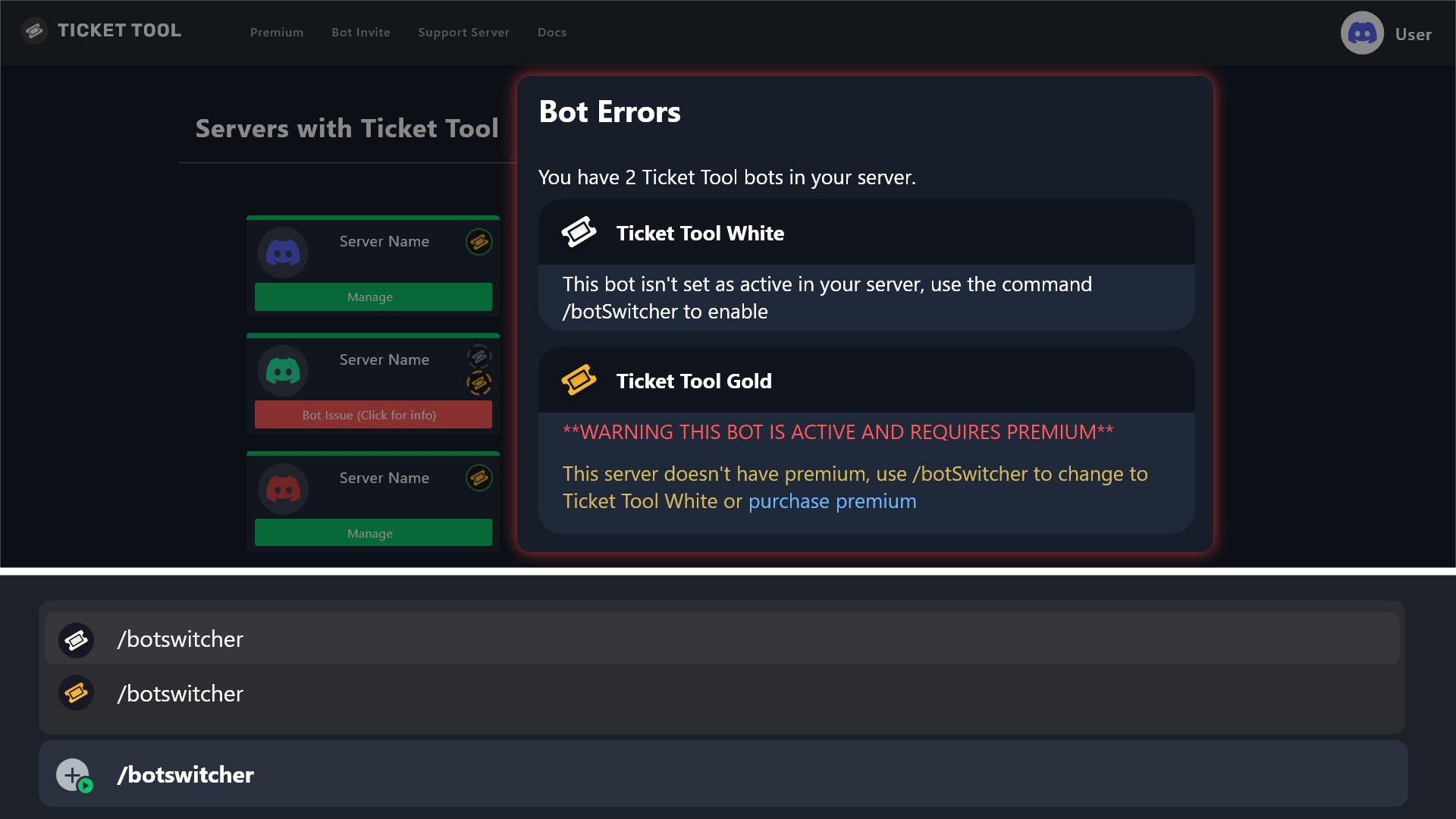
You need to activate the White bot, see details below:
humble sequoiaBOT
How to disable the premium bot
To disable the premium bot you will need to use the </botswitcher:1073837726702506004> command to select the White - Primary bot and be able to access your server's Dashboard
Note: Premium features will still work on the normal bot.
 prisma sphinx
@lunar solar Hey how can i get premium bot
potent cove
lunar solar
You need to activate the White bot, see details below:
The problem has not been resolved.
 lunar solar
potent cove
The problem has not been resolved.
lunar solar
potent cove
The problem has not been resolved.
Do /debug
You will get the same error
 lunar solar
Have you given Ticket Tool white permissions to the channel you are running the commands in?
potent cove
lunar solar
Have you given Ticket Tool white permissions to the channel you are running the ...
Oh I forgot, thanks a lot.
iron nightBOT
Gave +1 Rep to @lunar solar (current: #15 - 461)
 mortal hatch
how could i link a channel in the Ticket Message, ive tried {#channel-name}, {1398961629772906597} and {#1398961629772906597} all these combinations (later two being channel id numbers)
mortal hatch
with those sorta brackets instead of the ones i used previously? ty
tribal cedar
Np
mortal hatch
tribal cedar
Which is a role? &?
nop just wanna link a clickable channel link like this #💬│general-chat
thank you @tribal cedar
iron nightBOT
Gave +1 Rep to @tribal cedar (current: #32 - 140)
tribal cedar
Nps
humble sequoiaBOT
⚠️ You're in the wrong place
We provide support for Ticket Tool Discord bot and cannot help you with whatever issue you have.
- We don't know which Support Team you should contact to get this issue resolved, and unfortunately we won't be able to accurately tell you.
If you don't have any further questions regarding our bot Ticket Tool, please close this ticket
 pale ibex
its say The application did not respond
 quartz elk
Hey, I have a problem here. When I tried to log in to the website, it said that my account needed to be verified (it's been ready for 2-3 years). What should I do now?

 austere forge
pale ibex
its say The application did not respond
austere forge
pale ibex
its say The application did not respond
Make sure that the bot has : VIEW CHANNEL SEND MESSAGE and READ MESSAGE HISTORY  permission in the channel where you try the command
austere forge
quartz elk
Hey, I have a problem here. When I tried to log in to the website, it said that ...
Please ensure your Discord account is verified (both email & phone number) - If there issue persists, you will need to contact Discord support unfortunately https://dis.gd/request
pale ibex
austere forge
Make sure that the bot has : `VIEW CHANNEL` `SEND MESSAGE` and `READ MESSAGE HIS...
where i go

@austere forge
austere forge
Channel settings from your server Discord
 glass tundra
how can i remove this question

that i dont need to close it too on a close request question
 covert swallow
Turn off 2 step close
 drifting tide
Hello, I want to know prices of ticket tool premium
austere forge
drifting tide
Hello, I want to know prices of ticket tool premium
Refer to the embed below please
humble sequoiaBOT
You can purchase Ticket Tool Premium here! Buying it on our website allows you to have full control over your subscription:
 Cancel your subscription at any time
Change your billing interval (yearly/monthly)
Change your payment method
Add or remove server slots to your subscription
 Transfer the subscription between servers
Note: This level of control is only available when purchasing the subscription from our website.
You can manage your current subscriptions here, any billing questions or concerns, feel free to create a Billing Ticket via #🎫│make-a-ticket
 drifting tide
austere forge
Refer to the embed below please
drifting tide
austere forge
Refer to the embed below please
Thanks a lot
iron nightBOT
Gave +1 Rep to @austere forge (current: #4 - 1175)
 rocky anchor
Como entrar no jogo
humble sequoiaBOT
Você está no lugar errado
Fornecemos suporte para Ticket Tool Discord bot e não podemos ajudá-lo com qualquer problema que você tenha.
- Não sabemos qual equipe de suporte você deve entrar em contato para resolver esse problema e, infelizmente, não poderemos informar com precisão.
Se você não tiver mais dúvidas sobre nossa ferramenta de ticket de bot, feche este ticket
 burnt acorn
scenic forum
burnt acorn
scenic forum
 unkempt vector
Hello , i would like to make a ticket please
unkempt vector
Hello , i would like to make a ticket please
Hey!
Is it an inquiry related to the Discord Bot Ticket tool?
unkempt vector
No for assetto corsa
scenic forum
unkempt vector
No for assetto corsa
Im afraid youre on the wrong server then. This server is only for the discord bot ticket tool, we are unable to help you with your matter
scenic forum
Dont worry about it 
jade topaz
tickettool is down
harsh epoch
jade topaz
tickettool is down
It shouldn't be. What error are you getting?
 harsh epoch
jade topaz
harsh epoch
jade topaz
To solve the first error can you check your "Ranked" category and make sure that Ticket Tool has the "Send Messages" permission.
We'll sort the second one afterwards
jade topaz
harsh epoch
To solve the first error can you check your "Ranked" category and make sure that...
oh ok
 ocean stump
yo when i try to find the server that has ticket tool in it on the app i cant find it, just keeps saying this

any help?
and i know ive added the bot into the server
harsh epoch
ocean stump
and i know ive added the bot into the server
Hey!
Even if you can add the bot, you need the Administrator permission or an allowed dashboard role.
Could you run /permissionlevel in your server?
ocean stump
lol im asking the owner of the server
wait does it have to be the server owner that adds it?
harsh epoch
ocean stump
wait does it have to be the server owner that adds it?
Anyone with the Manage Server permission can add the bot. But you'll need the Administrator permission inside one of your roles to access to the dashboard itself
ocean stump
harsh epoch
Anyone with the `Manage Server` permission can *add* the bot. But you'll need th...
tried it and said the application didnt respond
harsh epoch
ocean stump
tried it and said the application didnt respond
Make sure the bots got the permissions view channel, send messages and embed links in that channel and retry
ocean stump
it worked
harsh epoch
 finite raft
im always getting the same error of limit
finite raft
im always getting the same error of limit
Are you staff in the server with the issue?
harsh epoch
ocean stump
it worked
Perfect! What was the result from permissionlevel?
 harsh epoch
ocean stump
this
harsh epoch
ocean stump
this
Could you try using the Sync Servers button on the dashboard and seeing if your server appears after using that
ocean stump
there it is
ocean stump
harsh epoch
Could you try using the <:sync:1265738463534387301>`Sync Servers` button on the ...
it worked
harsh epoch
ocean stump
it worked
Glad it worked!
finite raft
harsh epoch
Are you staff in the server with the issue?
no i don’t think so
can some one help me
i createt a new account to make a ticket but its not working
harsh epoch
If you're not staff inside that server then there's nothing we can do to help. I'd recommend to try reaching out to that servers staff by another means to let them know of the issue
finite raft
staff means worker for the server?
harsh epoch
finite raft
staff means worker for the server?
Yes
 silver pewter
I have a question. We are trying to set up ticket claiming so that when a ticket is claimed only a certain role can see the ticket in question, in this case, head staff and above. How would I go about setting it up so that only a certain role can see a ticket once it has been claimed?
humble sequoiaBOT
━━ User's inquiry has been moved to a ticket ━━
 exotic bison
@upper flower
foggy sparrow
Please do not tag people unnecessarily, specially not staff (Is forbidden)
 sick scroll
Opa
 lost hearth
I have a question. Our server has a lot of people whom have received the September 20th emails from Discord support. Regarding this breach we were curious if any mention or security updates were adjusted for Ticket Tool considering the transcripts that can be saved. Some server members are quite concerned about their information potentially being leaked. We have done what we can do to address these concerns but would like any additional information that could be helpful. Thank you
humble sequoiaBOT
━━ User's inquiry has been moved to a ticket ━━
 jovial crow
How do I start a ticket panel and put it in a channel
 queen pelican
set-currency 💰
foggy sparrow
jovial crow
How do I start a ticket panel and put it in a channel
$panel
 strong saffron
queen pelican
strong saffron
queen pelican
Ticket tool halloween
 distant pecan
Does anyone know how to set up ticket tool?
stark runeBOT
1. Invite Ticket Tool to your server
First you will want to invite the bot to your server. Once the bot is in your server, you can manage your server in the dashboard.
2. Create a Panel
To create a panel we are going to need to head over to the panel configs on the dashboard.
Once at the dashboard we will need to click Create Panel.
Enter a panel name (Fill in any optional settings you want).
Click Create Panel and your ready to get started with configuring your panel.
An example of a creating a panel is shown below.
3. Send the Panel to a Channel
Once you've created a panel on the dashboard you will need to send it to a channel using send on the dashboard.
Select the channel you want your panel to be created in and click send.
For other questions checkout $help faq.
An example of a sending a panel is shown below.
Having a Problem Sending the Panel?
Do $debug in a channel with Ticket Tool and make sure it has all the necessary Discord permissions.
scenic forum
@distant pecan refer to the embed above
distant pecan
Thanks
scenic forum
 eternal goblet
is it possible to download all ticket tool transcripts into one file?
eternal goblet
is it possible to download all ticket tool transcripts into one file?
Im afraid thats not possible
All transcripts are only stored locally on your server via the transcript message itself
eternal goblet
scenic forum
Im afraid thats not possible
All transcripts are only stored locally on your ser...
so theres no way to download them all at once
scenic forum
eternal goblet
so theres no way to download them all at once
Correct
iron nightBOT
Gave +1 Rep to @scenic forum (current: #20 - 378)
scenic forum
 near swift
How can i report bug rod ?
near swift
How can i report bug rod ?
is the bug related to the discord bot ticket tool?
 left crane
HELLO GOOD MORNING, I AM TRYING TO ENTER THE COMMANDS TO REMODEL MY DISCORD BUT THEY DON'T WORK, CAN SOMEONE HELP ME?
scenic forum
left crane
HELLO GOOD MORNING, I AM TRYING TO ENTER THE COMMANDS TO REMODEL MY DISCORD BUT ...
Hello
Can you elaborate?
left crane
scenic forum
Hello
Can you elaborate?
IF I TRY TO USE THE SETUP COMMAND, IT SAYS THAT THE APPLICATION IS NOT RESPONDING, SAME WITH THE OTHER COMMANDS
scenic forum
left crane
IF I TRY TO USE THE SETUP COMMAND, IT SAYS THAT THE APPLICATION IS NOT RESPONDIN...
Can you use /debug aswell as please stop using caps
left crane
soryyy
thin holly
is there any way we can keep the message of rename command
like it gets delete after renaming, i dont want to delete
left crane
scenic forum
Can you use ``/debug`` aswell as please stop using caps
A banner pops up on me
thin holly
deejay
thin holly
thin holly
is there any way we can keep the message of rename command
you know?
scenic forum
left crane
A banner pops up on me
Could you show?
scenic forum
thin holly
is there any way we can keep the message of rename command
I dont think thats possible im afraid.
That is not ticket tool
Please use the /debug command over the ticket tool bot
left crane
scenic forum
Please use the ``/debug`` command over the ticket tool bot
I still get the same message, error
 scenic forum
left crane
I still get the same message, error
scenic forum
left crane
I still get the same message, error
ticket tool is missing all permissions within the channel.

 copper totem
does anyone know how to use this? I need to put a custom emoji right there


I am lowkey slow
harsh epoch
Hey!
If you were using a custom emoji you'd need to format it like that.
So for example if the name was "emoji" and the id "123456789" you'd use:
:emoji: followed by the id
copper totem
ty bro
copper totem
harsh epoch
Hey!
If you were using a custom emoji you'd need to format it like that.
So f...
oh btw how do I get the ID
of the emoji
harsh epoch
copper totem
oh btw how do I get the ID
You can use /id following by the emoji you want to use
copper totem
harsh epoch
You can use `/id` following by the emoji you want to use
works ty bro
iron nightBOT
Gave +1 Rep to @harsh epoch (current: #40 - 106)
 serene pumice
Hello idk if I saw a post a while ago there was a post that the bot was shouting down
austere forge
the bot is fully online
 static hill
Can we customize ticket tool white's pfp? if so how?
austere forge
Its possible, but you need premium subscription
static hill
Can we use trials?
austere forge
sure, In the premium tab on the Dashboard of your server you can activate the trial 7 day
static hill
Okay! how do we customize it?
austere forge
You can see the tab "Customize bot" on your Dashboard
Above the "Command config' tab
austere forge
no problem! 
gray canyon
my moderator rarely ever sees tickets made. they have to accept it onto their channel list, but they follow the category and have the admin role. can anyone try to point me in the direction of the problem?
 mighty thistle
gray canyon
my moderator rarely ever sees tickets made. they have to accept it onto their ch...
mighty thistle
gray canyon
my moderator rarely ever sees tickets made. they have to accept it onto their ch...
You can always hit show all channels, which should help. The “admin” role is administrator access to the server?
gray canyon
mighty thistle
You can always hit show all channels, which should help. The “admin” role is adm...
yes!
mighty thistle
Okay
I'm trying to remember how favoriting channels works.
This shouldn't be an issue if they have administrator access, I think. Does the channel category have 45 or more channels?
 mystic locust
gray canyon
mighty thistle
This shouldn't be an issue if they have administrator access, I think. Does the ...
mystic locust
gray canyon
mighty thistle
This shouldn't be an issue if they have administrator access, I think. Does the ...
it does not
 cunning lance
Can anyone help me?
harsh epoch
cunning lance
Can anyone help me?
What is it you need help with?
cunning lance
harsh epoch
What is it you need help with?
I'm starting a server, I wanted to know where to create a ticket channel and how
stark runeBOT
1. Invite Ticket Tool to your server
First you will want to invite the bot to your server. Once the bot is in your server, you can manage your server in the dashboard.
2. Create a Panel
To create a panel we are going to need to head over to the panel configs on the dashboard.
Once at the dashboard we will need to click Create Panel.
Enter a panel name (Fill in any optional settings you want).
Click Create Panel and your ready to get started with configuring your panel.
An example of a creating a panel is shown below.
3. Send the Panel to a Channel
Once you've created a panel on the dashboard you will need to send it to a channel using send on the dashboard.
Select the channel you want your panel to be created in and click send.
For other questions checkout $help faq.
An example of a sending a panel is shown below.
Having a Problem Sending the Panel?
Do $debug in a channel with Ticket Tool and make sure it has all the necessary Discord permissions.
harsh epoch
@cunning lance refer to the embed above for information about how to set up Ticket Tool
cunning lance
harsh epoch
<@1349445548628906015> refer to the embed above for information about how to set...
Thank you very much
iron nightBOT
Gave +1 Rep to @harsh epoch (current: #40 - 107)

 humble sequoiaBOT
@hardy sequoia
Você está no lugar errado
Fornecemos suporte para Ticket Tool Discord bot e não podemos ajudá-lo com qualquer problema que você tenha.
- Não sabemos qual equipe de suporte você deve entrar em contato para resolver esse problema e, infelizmente, não poderemos informar com precisão.
Se você não tiver mais dúvidas sobre nossa ferramenta de ticket de bot, feche este ticket
 hardy sequoia
Só queria saber mesmo
scenic forum
 versed carbon
How can I give my mate access
versed carbon
How can I give my mate access
Hey!
If you have access to the servers dashboard you can click on the Premium at the top left to start a premium subscription for their server
versed carbon
scenic forum
Hey!
If you have access to the servers dashboard you can click on the ``Premium`...
I did
But my Mod can not access like edit anything
scenic forum
versed carbon
But my Mod can not access like edit anything
Can you tell them to click the refresh icon?
The Premium window would need to show Active for them to be able to change premium settings

 split root
My iboplayer is not working
humble sequoiaBOT
@split root
⚠️ You're in the wrong place
We provide support for Ticket Tool Discord bot and cannot help you with whatever issue you have.
- We don't know which Support Team you should contact to get this issue resolved, and unfortunately we won't be able to accurately tell you.
If you don't have any further questions regarding our bot Ticket Tool, please close this ticket
 polar dawn
humble sequoia
<@804797703921205278>
polar dawn
humble sequoia
<@804797703921205278>
@scenic forum is this something I can set up in my server? Or is this custom to this server
split root
@humble sequoia my iboplayer is not working tried password but still no good
harsh epoch
split root
<@722196398635745312> my iboplayer is not working tried password but still no g...
You're in the wrong server, we can't help
scenic forum
polar dawn
<@186523978729259009> is this something I can set up in my server? Or is this cu...
You can do it on your server aswell. Thats simply a custom command!
polar dawn
scenic forum
You can do it on your server aswell. Thats simply a custom command!
So someone has done a command, it hasnt done it because of a trigger word?
scenic forum
polar dawn
So someone has done a command, it hasnt done it because of a trigger word?
I used the command $tts which triggers that specific response
polar dawn
scenic forum
I used the command ``$tts`` which triggers that specific response
Ah I thought it saw the word and did it by itself aha
that wouldve been quite cool
scenic forum
polar dawn
Ah I thought it saw the word and did it by itself aha
That would also be possible using Regex triggers
polar dawn
scenic forum
That would also be possible using ``Regex`` triggers
Seems interesting, I have never heard of it
scenic forum
polar dawn
Seems interesting, I have never heard of it
If you put the trigger on Regex help
it will response to any messages containing help in their message regardless where in the message it has been said
You can also do alot of conditions for it but regex can become quite easily very complicated due to its nature
polar dawn
scenic forum
You can also do alot of conditions for it but regex can become quite easily very...
Thanks for the help! Now its all about making the command look nice like that
iron nightBOT
Gave +1 Rep to @scenic forum (current: #20 - 379)
scenic forum
polar dawn
Thanks for the help! Now its all about making the command look nice like that
If youre on phone you can copy paste the embed and receive its raw format so you know how they made it look like that specifically
polar dawn
scenic forum
If youre on phone you can copy paste the embed and receive its raw format so you...
Tried that and it won’t copy and paste aha
scenic forum
polar dawn
Tried that and it won’t copy and paste aha
``We provide support for Ticket Tool Discord bot and cannot help you with whatever issue you have.
- We don't know which Support Team you should contact to get this issue resolved, and unfortunately we won't be able to accurately tell you.
If you don't have any further questions regarding our bot Ticket Tool, please close this ticket ``
The diff inside the block followed by a new line on - results in the text appearing red a + would result in it becoming green
mighty thistle
gray canyon
it does not
I'm sorry I missed this! I would have you #🎫│make-a-ticket, as the support team can help you debug further. 😄
gray canyon
mighty thistle
I'm sorry I missed this! I would have you <#571706435449257997>, as the support ...
no worries at all, tysm!! i asked them if they have show all channels enabled but havent gotten an answer yet. i'll make a ticket if they have it enabled!!
 gloomy dome
Is there a guide for moving from premium to free? Our server owner left and I am trying to sort things out.
 dim fiber
Any bots that I can add , where people will join to my server ?? Cuz I really do wanna make new friends
scenic forum
gloomy dome
Is there a guide for moving from premium to free? Our server owner left and I am...
Most importantly would be swapping from the premiumbot to white
Alot of the configs automatically revert to the free setting once premium expires
 cunning pasture
what perms i need to use the ticket bot and create panels
scenic forum
cunning pasture
what perms i need to use the ticket bot and create panels
To setup panels you'd need administrator or a dashboard role by an administrator
humble sequoiaBOT
Any role you put there will have full access to the ticket tool dashboard. The server owner and users with admin permissions already have access to the dashboard.
Be careful of which roles to put here

 agile tusk
Help
humble sequoiaBOT
@agile tusk, we would love to help you, but if you don't tell us what you need help with we can't help you :(
agile tusk
How to make multi panel
humble sequoiaBOT
For more convenient use of multipanels, you can now combine panels on the dashboard. This will allow you to directly send the multipanel from the dashboard or via the $panel ID command.
Where can I find this?
You can find this setting on the Dashboard -> Panel Configs -> Panel -> Attached Panels
Note: if you're attaching all the panels to a panel called English, don't include English in the attached panel's box (If you do this, it will create a duplicate)
This will put all buttons from all of your panels on one message. The message is the panel message from the panel you're combining these panels in.
 scenic forum
@agile tusk refer to the embed above
scenic forum
agile tusk
I would like to make embed also
Please dont ping me
All panels are by default in an embed format
 cold urchin
Anyone able to help me? Why are my tickets going to random categories when I press delete?
They aren't deleting.
scenic forum
cold urchin
Anyone able to help me? Why are my tickets going to random categories when I pre...
You're most likely having storage mode enabled
Server config -> storage mode enable 
 weary plaza
Not letting me use any commands
 scenic forum
weary plaza
Not letting me use any commands
scenic forum
weary plaza
Not letting me use any commands
Can you use /debug on your server
weary plaza
I’ll try
cold urchin
scenic forum
You're most likely having storage mode enabled
Server config -> storage mode ena...
Thnx
 sand ether
scenic forum
You're most likely having storage mode enabled
Server config -> storage mode ena...
sand ether
scenic forum
You're most likely having storage mode enabled
Server config -> storage mode ena...
I was about to help him. Guess you beat me to it.
weary plaza
 scenic forum
weary plaza
scenic forum
weary plaza
The bot is missing the send message permission inside the channel
weary plaza
Oh ok!
 scenic forum
 ashen grove
Don’t can’t setup ticket can’t you help me
ashen grove
Don’t can’t setup ticket can’t you help me
Can you use /debug on your server
ashen grove
See
 scenic forum
ashen grove
See
scenic forum
ashen grove
See
The bot is missing the send message and attach files permission in that channel
ashen grove
Can’t you DM me
scenic forum
ashen grove
Can’t you DM me
I cannot
All support must be done within the server
ashen grove
Now I how maker that
scenic forum
ashen grove
Now I how maker that
You enter the channel settings -> permissions -> select ticket tool -> grant the 2 specified permissions
ashen grove
I don’t know English very more
scenic forum
ashen grove
I don’t know English very more
Like this enable send message and attach files
ashen grove
We’re I go
 scenic forum
ashen grove
We’re I go
scenic forum
scenic forum
ashen grove
We’re I go
Hold down on the specific channel -> edit channel -> permissions -> add member -> ticket tool -> send message and attach files ✅
cold urchin
scenic forum
You're most likely having storage mode enabled
Server config -> storage mode ena...
What if I want to keep it on but dont want to see the tickets go to other categories.
Anything I can do about that?
 nova wadi
Como hago que notifique un rol cuando abro ticket
cold urchin
Anyone able to help?
 dusky sand
i made a gang/family application where can i see if it got accepted ?
scenic forum
cold urchin
What if I want to keep it on but dont want to see the tickets go to other categ...
Then you'd need to select the same category in storage mode categories as your tickets
humble sequoiaBOT
@dusky sand
⚠️ You're in the wrong place
We provide support for Ticket Tool Discord bot and cannot help you with whatever issue you have.
- We don't know which Support Team you should contact to get this issue resolved, and unfortunately we won't be able to accurately tell you.
If you don't have any further questions regarding our bot Ticket Tool, please close this ticket
 shrewd magnet
How much rep do I need to get access to premium support?
shrewd magnet
cold urchin
Anyone able to help?
Yo what’s your query
cold urchin
shrewd magnet
Yo what’s your query
Yk how when you enable storage mode and the tickets overflow across other categories. How can I keep it on but at the same time not have these tickets end up in random categories when I delete them?
shrewd magnet
cold urchin
Yk how when you enable storage mode and the tickets overflow across other catego...
Hmm, when you mean random categories you mean that it ends up in categories that aren’t in their supposed place? This could mean one of two things, one, your allocated category has too much channels that discord cannot allow more than that, or do you mean seperate tickets end up in seperate categories?
cold urchin
shrewd magnet
Hmm, when you mean `random categories` you mean that it ends up in categories th...
Well sort of. I have storage mode on but I don't want tickets to yk overflow into other categories and I cant just keep making new categories so that the tickets can store themselves in them. Any other storage method?
shrewd magnet
cold urchin
Well sort of. I have storage mode on but I don't want tickets to yk overflow int...
Just before I make my final decision, sorry for asking too much questions, but does these unallocated ticket channels go to an uncategorised place, or somewhere else?
cold urchin
shrewd magnet
Just before I make my final decision, sorry for asking too much questions, but d...
They go into other categories like my general category
shrewd magnet
Ok
cold urchin
Does ticket tool have another storage system so that i dont gotta make like 100s of storage categories for all the ticket.s
Because now that I delete them they end up in categories which I dont want them to be in.
shrewd magnet
You need to properly configure the storage categories
cold urchin
shrewd magnet
You need to properly configure the storage categories
Ik what your trying to say. But what im trying to say is I already got like 10 storage categories and I already used em all up so is there another storage solution? Because I started to delete the recent tickets and they ended up in some of my other categories
shrewd magnet
- Go to the ticket tool bot dashboard
- Find server configs
- Find the “Server Storage Options” section
- Check “Storage Categories
- Set up a Dedicated Storage Category
shrewd magnet
cold urchin
Ik what your trying to say. But what im trying to say is I already got like 10 s...
That means you got 500 tickets?!
cold urchin
shrewd magnet
1. **Go to the ticket tool bot dashboard**
2. **Find server configs**
3. **Find...
I dont think you get what im saying. Ive already done that. I have like 5 selected categories dedicated.
shrewd magnet
Damn that’s big!
cold urchin
shrewd magnet
That means you got 500 tickets?!
Yes. Im just wondering if there's any other way I can deal with it.
shrewd magnet
What do you want from the benefit?
Like what do you want to fix?
So you mean that tickets go into categories for example IMPORTANT and GENERAL
cold urchin
shrewd magnet
So you mean that tickets go into categories for example IMPORTANT and GENERAL
Yes
I delete them after dealing with them and then they end up there because the storage categories I assigned are full.
shrewd magnet
You should clean up tickets that aren’t being dealt with
Or that was there for too long. To get a better idea, may I join your server?
cold urchin
shrewd magnet
You should clean up tickets that aren’t being dealt with
Anything else though?
shrewd magnet
And get access to tickets
cold urchin
shrewd magnet
Or that was there for too long. To get a better idea, may I join your server?
This is my alt account so I won't be able to invite you. My main is currently down so im just working with my friends using their acc for now.
shrewd magnet
cold urchin
This is my alt account so I won't be able to invite you. My main is currently do...
Ok
That’s the only way I can think as of now
cold urchin
Thnx for trying lol
shrewd magnet
Np
shrewd magnet
cold urchin
Thnx for trying lol
Can you ping me and say ty that way I could get rep
iron nightBOT
Gave +1 Rep to @cold urchin (current: #426 - 1)
shrewd magnet
Oops
cold urchin
@shrewd magnet ty
iron nightBOT
Gave +1 Rep to @shrewd magnet (current: #166 - 4)
shrewd magnet
Np
 lunar reef
Is it possible to add more buttons in a panel?
waxen bramble
lunar reef
Is it possible to add more buttons in a panel?
Yes.
lunar reef
waxen bramble
Yes.
How
waxen bramble
lunar reef
How
Dashboard -> Panel -> Attached Panel
lunar reef
waxen bramble
Dashboard -> `Panel` -> `Attached Panel`
Ty
iron nightBOT
Gave +1 Rep to @waxen bramble (current: #135 - 6)
 glossy salmon
@iron night Bassicaly, i got preauim free trial, and i enable 2 settings on it 1. when u close ticket it auto transcript 2. automatically close ticket when person leaves server. When it ran out, number 1 and 2 should have kept on going as i saw other servers doing this too. Finally, number 1 dosent work even tho it should and number 2 i want to disable but i cant. I wanted to keep it but when person leaves, it dosent auto transcript. Help me
 slender minnow
glossy salmon
<@204255221017214977> Bassicaly, i got preauim free trial, and i enable 2 sett...
slender minnow
glossy salmon
<@204255221017214977> Bassicaly, i got preauim free trial, and i enable 2 sett...
Can you please open a ticket so that I can take a closer look at the issue?
glossy salmon
slender minnow
Can you please open a ticket so that I can take a closer look at the issue?
ok
slender minnow
You can open one from #🎫│make-a-ticket
foggy sparrow
Curious question for dev, how do you keep the bot alive 24/7?
scenic forum
foggy sparrow
Curious question for dev, how do you keep the bot alive 24/7?
Discord bots use hosting services to be able to have a 24/7 update
foggy sparrow
Is there a free versh?
scenic forum
foggy sparrow
Is there a free versh?
Early hosting could be done on your own pc but eventually you'd need a running server to host It due to the workload and capacity
Even if youd host it yourself you'd pay the equipment and 24/7 uptime in electricity bill
 vast walrus
If I have an open ticket and the ticket is erased, how do I erase it?
scenic forum
vast walrus
If I have an open ticket and the ticket is erased, how do I erase it?
Could you elaborate what you mean with erased?
scenic forum
shrewd magnet
How much rep do I need to get access to premium support?
You should be able to see #premium-support and #premium-tickets given your premium role
vast walrus
scenic forum
Could you elaborate what you mean with erased?
I have a server. I opened a ticket and tried the ticket. It worked fine. I opened a ticket and did a close. When I opened another one, it told me that I had a ticket. I did it.
scenic forum
vast walrus
I have a server. I opened a ticket and tried the ticket. It worked fine. I open...
So youd either need to delete your open ticket or increase the amount of tickets you can have open per user
foggy sparrow
scenic forum
Even if youd host it yourself you'd pay the equipment and 24/7 uptime in electri...
I guess self hosting is difficult and using fly.io free tier is not going to cut it, since the server is 14k+ people
vast walrus
scenic forum
So youd either need to delete your open ticket or increase the amount of tickets...
I don't understand؟
im owner server
scenic forum
vast walrus
I don't understand؟
What is your native language?
vast walrus
scenic forum
What is your native language?
arab
scenic forum
foggy sparrow
I guess self hosting is difficult and using fly.io free tier is not going to cut...
With that size your only option would be paying a hosting provider
$articket
humble sequoiaBOT

فريق الدعم الفني العربي
عميلنا العزيز ان كنت تبحث عن مساعدة يرجى فتح تكت خاص بفريق الدعم الفني العربي
اذهب الى#🎫│make-a-ticket
ثم قم بلضغط على الايموجي الاتي (🇯🇴)
scenic forum
@vast walrus ^
They may be able to assist you better
 gentle hare
anybody - why game is not logging in
humble sequoiaBOT
@gentle hare
⚠️ You're in the wrong place
We provide support for Ticket Tool Discord bot and cannot help you with whatever issue you have.
- We don't know which Support Team you should contact to get this issue resolved, and unfortunately we won't be able to accurately tell you.
If you don't have any further questions regarding our bot Ticket Tool, please close this ticket
gentle hare
no moderators or so called admins responding
foggy sparrow
scenic forum
With that size your only option would be paying a hosting provider
Lmg, it will cost tens or hundreds of dollars per month
scenic forum
foggy sparrow
Lmg, it will cost tens or hundreds of dollars per month
Im afraid that is outside of my knowledge
 hot radish
Hello,
I'm having an issue with purchasing a Premium subscription on your website. The prices for both the annual and monthly Premium plans are not displayed. Furthermore, when I proceed to the payment stage, an error occurs.
I have attached screenshots below that illustrate the problem.
Could you please advise me on how I can pay for and obtain the Premium version after my 7-day trial? Thank you for your assistance.

 scenic forum
hot radish
Hello,
I'm having an issue with purchasing a Premium subscription on your websit...
scenic forum
hot radish
Hello,
I'm having an issue with purchasing a Premium subscription on your websit...
Hey!
Please open a billing ticket at #🎫│make-a-ticket
 simple shard
how do i make a multi panel?
humble sequoiaBOT
For more convenient use of multipanels, you can now combine panels on the dashboard. This will allow you to directly send the multipanel from the dashboard or via the $panel ID command.
Where can I find this?
You can find this setting on the Dashboard -> Panel Configs -> Panel -> Attached Panels
Note: if you're attaching all the panels to a panel called English, don't include English in the attached panel's box (If you do this, it will create a duplicate)
This will put all buttons from all of your panels on one message. The message is the panel message from the panel you're combining these panels in.
scenic forum
@simple shard refer to the embed above
simple shard
scenic forum
<@1354475114208694373> refer to the embed above
wheres attached panels?
 scenic forum
simple shard
wheres attached panels?
scenic forum
simple shard
wheres attached panels?
You can find this setting on the Dashboard -> Panel Configs -> Panel -> Attached Panels
hot radish
scenic forum
Hey!
Please open a billing ticket at <#571706435449257997>
Thank you
iron nightBOT
Gave +1 Rep to @scenic forum (current: #19 - 381)
simple shard
i cant find it
scenic forum
simple shard
i cant find it
look for the option Panel
simple shard
ohh okay thank u sm
sand ether
.
 grizzled parcel
Nice to meet you. I was just banned, but I don't know why. I'd like it lifted if possible.
humble sequoiaBOT
@grizzled parcel
⚠️ You're in the wrong place
We provide support for Ticket Tool Discord bot and cannot help you with whatever issue you have.
- We don't know which Support Team you should contact to get this issue resolved, and unfortunately we won't be able to accurately tell you.
If you don't have any further questions regarding our bot Ticket Tool, please close this ticket
 crisp lark
is the bot down
 worldly helm
crisp lark
is the bot down
worldly helm
crisp lark
is the bot down
Hey 
No, what makes you think that?
crisp lark
worldly helm
Hey <a:pikawave:1043708117915013191>
No, what makes you think that?
hey!! im trying to set up ticket bot but it keeps saying "this appication did not respond", i've tried a few times over the last 30 minutes
worldly helm
crisp lark
hey!! im trying to set up ticket bot but it keeps saying "this appication did no...
Please try using the /debug command in that channel.
 crude frigate
How i can make like this
 crisp lark
 worldly helm
crisp lark
worldly helm
crisp lark
The bot is missing the View Channel permission for the channel named mod-bots
 crisp lark
still not working
humble sequoiaBOT
For more convenient use of multipanels, you can now combine panels on the dashboard. This will allow you to directly send the multipanel from the dashboard or via the $panel ID command.
Where can I find this?
You can find this setting on the Dashboard -> Panel Configs -> Panel -> Attached Panels
Note: if you're attaching all the panels to a panel called English, don't include English in the attached panel's box (If you do this, it will create a duplicate)
This will put all buttons from all of your panels on one message. The message is the panel message from the panel you're combining these panels in.
worldly helm
crude frigate
How i can make like this
Heya! 👋
Please refer to this
crude frigate
worldly helm
Heya! 👋
Please refer to this <:this:894279341108772914>
What ?
worldly helm
humble sequoia
Refer to this guide^
 brittle nebula
Hello there, i have a little issue. I created a category where @ everyone has permissions to see. When a new user is joining he can click on a panel, no issues. However when his channel is getting created he is losing the read history. I checked the server settings on discord and I also checked the everyone opened permissions
 crisp lark
worldly helm
Refer to this guide^
crisp lark
worldly helm
Refer to this guide^
thanks for your help i feel stupid now sorry for wasting time 😭
iron nightBOT
Gave +1 Rep to @worldly helm (current: #6 - 998)
worldly helm
brittle nebula
Hello there, i have a little issue. I created a category where @ everyone has pe...
Hey 👋
Please #🎫│make-a-ticket
brittle nebula
worldly helm
Hey 👋
Please <#571706435449257997>
i fixed it
apologize for wasting time
worldly helm
No worries 😄
 leaden escarp
Hi, i'm not able to edit the "Opened Message" text

 neon latch
Does anyone know how I can change the green color of the embed?
 scenic forum
leaden escarp
Hi, i'm not able to edit the "Opened Message" text
scenic forum
leaden escarp
Hi, i'm not able to edit the "Opened Message" text
Hey
The darker ones messages require premium to edit
 ancient spire
Can someone help
I’m tryna add ticket tool to my friends server
But on the dashboard/manage server thing
I can’t see her server at alll even after I invited it
scenic forum
ancient spire
I can’t see her server at alll even after I invited it
Can you use /debug on that server?
scenic forum
ancient spire
Do I do that?
Yes on the servers dashboard you cant access
ancient spire
huh, where do I use the debug? Which channel
scenic forum
ancient spire
huh, where do I use the debug? Which channel
Any on there is fine
scenic forum
ancient spire
“The application did not respond”
The bot is missing the send message permission in that channel
ancient spire
How do I give it that
scenic forum
ancient spire
But on the dashboard/manage server thing
You'd need administrator or a dashboard role set by one to access the dashboard
scenic forum
ancient spire
How do I give it that
Via the discord channel permissions
ancient spire
Okay so it if I did it, clicked debug, it sent a long message
Do I click clear cache?
scenic forum
ancient spire
Okay so it if I did it, clicked debug, it sent a long message
Do I click clear c...
No I just wanted to check your permissionlevel with it
You'd need administrator or a dashboard role set by one to access the dashboard
humble sequoiaBOT
Any role you put there will have full access to the ticket tool dashboard. The server owner and users with admin permissions already have access to the dashboard.
Be careful of which roles to put here
scenic forum
ancient spire
I need to like make a dashboard role?
Or have a role with administrator on your user on the server
scenic forum
ancient spire
The administor thing on permissions for me
You should be able to access the dashboard now
scenic forum
ancient spire
I WISH U THE BEST DAY EVER
U too
ancient spire
uhh I have one question
I was testing it with my friend
We made a ticket and somehow another member typed on it?
scenic forum
ancient spire
I was testing it with my friend
We made a ticket and somehow another member type...
Did the other member have a support team role?
ancient spire
Nop
scenic forum
ancient spire
Nop
Can you check these settings
Panel config -> permissions -> everyone role permission -> edit opened and closed -> view channel ❎
ancient spire
Both X
scenic forum
ancient spire
Both X
Can you run /debug inside the ticket?
ancient spire
Ye but also I noticed something
For some reason I can @ other roles in the channel
scenic forum
ancient spire
For some reason I can @ other roles in the channel
If you have administrator you have by default every permission
ancient spire
I see..
I did it again and
I @‘d the GIRL who messaged
she didn’t talk
did it work?
scenic forum
ancient spire
did it work?
Do you see any other member online in the ticket member list?
ancient spire
Let me see
scenic forum
 charred forum
/add ---> user : @'d girl
charred forum
/add ---> user : @'d girl
Refer to community channel rule 1 in this channels pins please
ancient spire
scenic forum
Do you see any other member online in the ticket member list?
Yes but our online friend is @‘d and for some reason hasn’t spoken I don’t think she can see it
scenic forum
ancient spire
Yes but our online friend is @‘d and for some reason hasn’t spoken I don’t think...
If they are visible in the member list they can see the channel
 ancient grove
i want to copy the settings from one server to other can i?
humble sequoiaBOT
The Backup and Restore feature allows you to transfer your panels, tags, and all settings to a new server, even if the server the settings were created has been deleted! You will want to copy the whole key.
First, go to your server's Dashboard ➞ then Server Configs ➞ under Config Backup & Restore (Server Owner Only) click on Old version can be found here and generate a new backup key by pressing the green button. Now, a key should be generated in the box above. You may need to refresh the page to see this.
Once you have your backup key, navigate to the same page on the new server. Copy the key on the Restore from backup key field.
Now you can choose what you want to copy. Finally, press the green Restore Configs button.
IMPORTANT NOTE
- We suggest you keep this backup key somewhere safe, in case your server is deleted so you are able to recover your panel's settings.
- This feature is only usable by the server's owner
$backup
scenic forum
ancient grove
i want to copy the settings from one server to other can i?
Refer to the embed above
Note it's only available for server owners
ancient grove
scenic forum
Refer to the embed above
Note it's only available for server owners
the panels will also transfer?
scenic forum
ancient grove
the panels will also transfer?
Yes
 zenith fiber
what code?
scenic forum
zenith fiber
what code?
Can you elaborate?
zenith fiber
scenic forum
Can you elaborate?
Well, where did that new code come from if the Discord server is still closed?
 plucky fern
Hi, my account was suspended for “inorganic engagement (MONARCH)”.
I have already sent an email to support@clipster.gg with proof showing that my views came from Instagram’s official Boost feature.
Please check my appeal or guide me on the next step.
Username: [MotiveAF]
scenic forum
zenith fiber
Well, where did that new code come from if the Discord server is still closed?
I'm sorry I don't know what code you're referring to
humble sequoiaBOT
@plucky fern
⚠️ You're in the wrong place
We provide support for Ticket Tool Discord bot and cannot help you with whatever issue you have.
- We don't know which Support Team you should contact to get this issue resolved, and unfortunately we won't be able to accurately tell you.
If you don't have any further questions regarding our bot Ticket Tool, please close this ticket
 stuck marsh
how do i do this?
 humble sequoiaBOT
A Discord Form lets the user answer individual questions in a pop-up Form, which then displays the answers in the ticket message. This can save time if you already know what you want to ask the user.
Setup Forms
Forms can be enabled under Panel Settings > Form Options > Edit Forms Options. In the new pop-up window, you can now enable and edit your own Form.
Form Options
You can add up to 5 questions in the Discord form. This is a Discord limitation. Each question can have a placeholder in the input field, a minimum and maximum input, multi-line, and also the option to have the answer required.
Options
Question Title ➞ Your Question goes here
Question Placeholder ➞ The placeholder text in the input field
Required ➞ If enabled, the user has to answer this question, to submit the form
Multi-Line Input ➞ Allows the user to input multiple lines
Minimum and Maximum Input ➞ Set a minimum and maximum input value for the user
Displaying the Answer
To display the answers from the user, you need to enable Auto display form results on the ticket message as an additional embed
If you don't want a second embed, go into your Panel Configs > Ticket Options > Edit Ticket Message. You use the variable {create.form.x} and replace x with the number of your question. For example, the response to Question 5 can be displayed with {create.form.5}.
 scenic forum
stuck marsh
how do i do this?
scenic forum
stuck marsh
how do i do this?
Refer to the embed above
stuck marsh
DO I HAVE TO PAY?
scenic forum
stuck marsh
DO I HAVE TO PAY?
No it's a free feature
 scenic forum
stuck marsh
?
scenic forum
stuck marsh
?
You're at the wrong window
Panel config -> Forms
 gaunt condor
How do i get this to show in the ticket once its filled out
 harsh epoch
gaunt condor
How do i get this to show in the ticket once its filled out
harsh epoch
gaunt condor
How do i get this to show in the ticket once its filled out
Hey there!
Make sure to enable "Auto Display form responses in ticket message" under dashboard -> forms
Alternatively you can use the variable {create.form.x} to display a specific answer in your ticket message
gaunt condor
Thank you @harsh epoch
queen sandal
@scenic forum @queen sandal
scenic forum
queen sandal
<@186523978729259009> <@1423315373423329363>
Please do not ping me for support
Please state your inquiry and someone will assist you when they have time
queen sandal
@harsh epoch
scenic forum
queen sandal
<@1124651666650693774>
Please don't ping members for support
Please state what you need help with and someone will assist you when they are available
 eager trellis
Can an agent DM me please? I have a question about a Picture I made
scenic forum
eager trellis
Can an agent DM me please? I have a question about a Picture I made
All support must happen within the server.
Can you elaborate what this is about?
eager trellis
I made an image on AI but apparently it goes against guidelines
scenic forum
eager trellis
I made an image on AI but apparently it goes against guidelines
This server is just for support with the ticket tool bot itself.
You're on the wrong server I'm afraid
eager trellis
Can you point me in the right direction please?
scenic forum
eager trellis
Can you point me in the right direction please?
Im afraid we don't know which Support Team you need to contact to get your issue resolved.
eager trellis
Can I show image here? it's not adult themed or anything
humble sequoiaBOT
@eager trellis
⚠️ You're in the wrong place
We provide support for Ticket Tool Discord bot and cannot help you with whatever issue you have.
- We don't know which Support Team you should contact to get this issue resolved, and unfortunately we won't be able to accurately tell you.
If you don't have any further questions regarding our bot Ticket Tool, please close this ticket
eager trellis
So your telling me that a Support Group, with all these channels for Support can't help at all? So what Do you help with then
scenic forum
eager trellis
So your telling me that a Support Group, with all these channels for Support can...
We offer support for the ticket tool bot which provides the ticket system itself.
eager trellis
I simply need an opinion on whether an image i made goes against community guidelines
 pseudo ravine
You've been told that we cannot help you. We only provide support for the Ticket Tool Discord bot. We're not affiliated with any AI you're referring to
eager trellis
its not the AI I used! its the Image! the result, not the ai itself
 wheat briar
hello, is it any ways possible to have a transcript even tho you havent saved it?
harsh epoch
wheat briar
hello, is it any ways possible to have a transcript even tho you havent saved it...
Hey!
Unless you were either DMed it from the bot, or it was saved by the servers support team, then no
wheat briar
harsh epoch
Hey!
Unless you were either DMed it from the bot, or it was saved by the server...
Thank you very much!
iron nightBOT
Gave +1 Rep to @harsh epoch (current: #40 - 108)
sand ether
 sharp lintel
Help
sharp lintel
Help
Hey, how can I help?
 calm wadi
Hi.... What the solution to this problem?،،
l Gave the bot all permissions
 scenic forum
calm wadi
Hi.... What the solution to this problem?،،
l Gave the bot all permissions
scenic forum
calm wadi
Hi.... What the solution to this problem?،،
l Gave the bot all permissions
Hey
Can you run /debug inside that channel?
 steel saddle
 scenic forum
steel saddle
scenic forum
steel saddle
Thats a ratelimit, try again once the timer has run out
 humble sequoiaBOT
@steel saddle
⚠️ You're in the wrong place
We provide support for Ticket Tool Discord bot and cannot help you with whatever issue you have.
- We don't know which Support Team you should contact to get this issue resolved, and unfortunately we won't be able to accurately tell you.
If you don't have any further questions regarding our bot Ticket Tool, please close this ticket
 quaint geode
yo how to make it so the closed tickets saves in a specific category itself
steel saddle
ok
humble sequoiaBOT
1. Open your Panel Configs tab in the server's dashboard
2. Select the panel you want to grant access to
3. Open the Category options menu
4. Select the categories of your preference
5. Save changes
scenic forum
@quaint geode refer to the embed above
quaint geode
scenic forum
<@1160268060758900787> refer to the embed above
Oh it works, thanks!!
I want to ask another question that how to make it so the ticket opens with a font in its name
iron nightBOT
Gave +1 Rep to @scenic forum (current: #19 - 383)
humble sequoiaBOT
The ticket name is the default channel name of all tickets. To edit it, go to your Dashboard > Panel Configs > Ticket. There you can edit the channel name of opened and closed tickets. You can also use variables in there.

 Note: This is a premium feature
scenic forum
Note: This is a premium feature
scenic forum
@quaint geode refer to the embed above
Note: This is a premium feature
quaint geode
scenic forum
<@1160268060758900787> refer to the embed above
Note: This is a premium feature
I'm broke
...
 past scroll
Can someone help me my tickettool isnt responding
scenic forum
past scroll
Can someone help me my tickettool isnt responding
Can you use /debug on your server?
 scenic forum
past scroll
scenic forum
past scroll
The bot is missing the Send Message permission inside the channel
past scroll
now what i do?
 scenic forum
past scroll
now what i do?
scenic forum
past scroll
now what i do?
Now the bot will respond to your commands
iron nightBOT
Gave +1 Rep to @scenic forum (current: #19 - 384)
 earnest anchor
figured it out.
okay so i bought premium but i bought in a server where i am not the owner basically i bought it for my friend
how to give him access to the dashboard?
or am i only the person who can access the dashboard since i bought premium
scenic forum
earnest anchor
okay so i bought premium but i bought in a server where i am not the owner basic...
Everyone with admin or a dashboard role can access the servers dashboard
humble sequoiaBOT
Any role you put there will have full access to the ticket tool dashboard. The server owner and users with admin permissions already have access to the dashboard.
Be careful of which roles to put here
earnest anchor
scenic forum
Everyone with admin or a dashboard role can access the servers dashboard
thank you kind sir 
iron nightBOT
Gave +1 Rep to @scenic forum (current: #19 - 386)
 icy knot
how do i fix this 😭
 icy knot
how do i fix this 😭
icy knot
icy knot
how do i fix this 😭
 scenic forum
icy knot
how do i fix this 😭
scenic forum
icy knot
how do i fix this 😭
Make sure ticket tool has
View Channels and manage Channels in the #Ticket Cagetory
scenic forum
 sharp lion
<@1124651666650693774> pls panel
sharp lion
<@1124651666650693774> pls panel
Please dont ping members for support
State what you need help with and someone will assist you once they have time.
sharp lion
oh
icy knot
scenic forum
Make sure ticket tool has
``View Channels`` and ``manage Channels`` in the ``#Ti...
oh cheers mate'
earnest anchor
do they have a role for premium subscribers
scenic forum
earnest anchor
do they have a role for premium subscribers
There a premium subscriber role yes
earnest anchor
scenic forum
There a premium subscriber role yes
how to achieve?
scenic forum
earnest anchor
how to achieve?
You need to have dashboard access to a server with premium as far as i know
earnest anchor
scenic forum
You need to have dashboard access to a server with premium as far as i know
yeah i have
scenic forum
earnest anchor
yeah i have
Can you type /debug on your server?
 scenic forum
earnest anchor
scenic forum
earnest anchor
Follow the bots response
earnest anchor
okay
earnest anchor
scenic forum
Follow the bots response
 scenic forum
earnest anchor
scenic forum
earnest anchor
Can you try typing /debug again?
scenic forum
earnest anchor
it showed me a long list of stuff
Can you check if you can access the dashboard?
scenic forum
earnest anchor
yeah i have access
You have the role now
earnest anchor
alright thanks
 faint hearth
.
scenic forum
Can you press this icon on your dashboard?
 scenic forum
 unreal yacht
nevermind again
unreal yacht
nevermind again
Can you elaborate?
scenic forum
Can you show your server having Premium active?
scenic forum
unreal yacht
it just send me to here
Can you show what you mean?
 compact verge
how do i add ticket tool into my server and like ping me for reminders and make tickets
unreal yacht
 scenic forum
compact verge
how do i add ticket tool into my server and like ping me for reminders and make ...
scenic forum
compact verge
how do i add ticket tool into my server and like ping me for reminders and make ...
click on @pseudo glen and press add app and select your server
Ticket tool doesnt offer a reminder feature
To edit the Message Content on the panel yes
compact verge
scenic forum
click on <@557628352828014614> and press ``add app`` and select your server
Tick...
how to invite it to a serv
scenic forum
compact verge
how to invite it to a serv
Please read my message
scenic forum
unreal yacht
We cannot assist you
Youd need to reach out to a staff member on that server and get them to delete some channels
unreal yacht
they alr did
compact verge
scenic forum
Please read my message
how do i get it to make tickets
stark runeBOT
1. Invite Ticket Tool to your server
First you will want to invite the bot to your server. Once the bot is in your server, you can manage your server in the dashboard.
2. Create a Panel
To create a panel we are going to need to head over to the panel configs on the dashboard.
Once at the dashboard we will need to click Create Panel.
Enter a panel name (Fill in any optional settings you want).
Click Create Panel and your ready to get started with configuring your panel.
An example of a creating a panel is shown below.
3. Send the Panel to a Channel
Once you've created a panel on the dashboard you will need to send it to a channel using send on the dashboard.
Select the channel you want your panel to be created in and click send.
For other questions checkout $help faq.
An example of a sending a panel is shown below.
Having a Problem Sending the Panel?
Do $debug in a channel with Ticket Tool and make sure it has all the necessary Discord permissions.
scenic forum
@compact verge refer to the embed above
unreal yacht
hello
scenic forum
unreal yacht
hello
We cannot assist you
Youd need to reach out to a staff member on that server and get them to delete some channels
unreal yacht
ok i will try
compact verge
scenic forum
<@1218566742440411331> refer to the embed above
ok i did that and i want to do like if i close it i want to be able to say ,close and it'll close
scenic forum
compact verge
ok i did that and i want to do like if i close it i want to be able to say ,clos...
Youd need to change the bots prefix to , in that case
Check the Server Config on the dashboard for that matter