#🆘│community-support
1 messages · Page 232 of 1

 harsh epoch
 rough quiver
So I’m trying to have the same pannel because I want more than one selection
rough quiver
So I’m trying to have the same pannel because I want more than one selection
You can only use one panel, one time. You'll have to use another for the second option
rough quiver
It’s not letting me choose the same pannel
So then…
Dm me priv there’s a timer in here
harsh epoch
Support has to stay in this channel
rough quiver
Oh
harsh epoch
rough quiver
So then…
You'll have to create another panel and then select that one for your dropdown item
 harsh epoch
There won't be. Once you create a panel, it'll show in the selection for you to add it to your dropdown
 halcyon ridge
hi guys we just added the ticket bot to our server and i’m not sure how to make it so mods are added to the submitted ticket
 hushed perch
Why is this happening? I have admin perms and the bot has admin perms.
 harsh epoch
$help
 humble sequoiaBOT
harsh epoch
$help
humble sequoiaBOT
harsh epoch
$help
1. Open your Panel Configs tab in your server's dashboard
2. Select the panel you want to grant access to
3. Open the General options menu
4. Select your Support Team Roles
5. Save changes
 harsh epoch
@halcyon ridge Refer to the embed above
harsh epoch
hushed perch
Why is this happening? I have admin perms and the bot has admin perms.
Can you run /permissionlevel in your server please?
hushed perch
harsh epoch
Can you run `/permissionlevel` in your server please?
It's fixed! Thank you so much!
 iron nightBOT
Gave +1 Rep to @harsh epoch (current: #44 - 82)
hushed perch
❤️
halcyon ridge
harsh epoch
<@591501232720576512> Refer to the embed above
thank you!!
iron nightBOT
Gave +1 Rep to @harsh epoch (current: #44 - 83)
 tidal prawn
Oii

 mighty thistle
That's multipanel mode! It seems they used another app to send the embed and image above. But then they made their panel message just buttons.
humble sequoiaBOT
For more convenient use of multipanels, you can now combine panels on the dashboard. This will allow you to directly send the multipanel from the dashboard or via the $panel ID command.
Where can I find this?
You can find this setting on the Dashboard -> Panel Configs -> Panel -> Attached Panels
Note: if you're attaching all the panels to a panel called English, don't include English in the attached panel's box (If you do this, it will create a duplicate)
This will put all buttons from all of your panels on one message. The message is the panel message from the panel you're combining these panels in.

 light halo
mighty thistle
That's multipanel mode! It seems they used another app to send the embed and ima...
light halo
mighty thistle
That's multipanel mode! It seems they used another app to send the embed and ima...
I’m still confused could you do a video tutorial how to do ital
hushed perch
Why is this happening? When I send the ticket panel out, it sends that message.
 humble sequoiaBOT
This error indicates you have selected an invalid emoji, i.e. an emoji the bot isn't capable of using, in a button field
Which Emoji?
This depends upon which action the error is appearing, the most common cases are the Create Ticket button or one of your Dropdown emojis. You can visit your Button's List to find all available buttons and find the conflicting one by yourself.
Why doesn't the bot accept it as valid?
- You selected an emoji that doesn't exist anymore, i.e. that has been deleted
- You wrote text there, instead of an emoji (or in addition to an emoji)
- You entered a code for a custom emoji from a server that the bot is not a member of
- You entered a custom emoji code incorrectly
- You're on iPhone and entered an emoji using the phone's emoji pad (use the emoji selector in the website instead)
 harsh epoch
@hushed perch Check the fixes in the embed above
hushed perch
Thank you
 stray bone
how to fix?
 stray bone
how to fix?
stray bone
stray bone
how to fix?
 mighty thistle
light halo
I’m still confused could you do a video tutorial how to do ital
mighty thistle
light halo
I’m still confused could you do a video tutorial how to do ital
I cannot. I would have you #🎫│make-a-ticket for more in-depth support!
hushed perch
harsh epoch
<@814281601461649449> Check the fixes in the embed above
All the emojis are normal discord ones. It still doesn't work.
harsh epoch
hushed perch
All the emojis are normal discord ones. It still doesn't work.
Did you use the emoji picker on the dashboard?
hushed perch
harsh epoch
Did you use the emoji picker on the dashboard?
Yes
harsh epoch
hushed perch
Yes
Can you show me the dashboard page with the create ticket button?
hushed perch
harsh epoch
Can you show me the dashboard page with the create ticket button?
This?
 harsh epoch
hushed perch
This?
harsh epoch
hushed perch
This?
Yep! Can you try removing the emoji and toggling Button emoji to off just to check it's definetly that one causing it
hushed perch
harsh epoch
Yep! Can you try removing the emoji and toggling Button emoji to off just to che...
done
harsh epoch
did it send correctly that time?
hushed perch
let me check
hushed perch
harsh epoch
did it send correctly that time?
still doesn't work
harsh epoch
hushed perch
still doesn't work
Do you have any linked panels? Such as dropdowns
hushed perch
harsh epoch
Do you have any linked panels? Such as dropdowns
ohhhh I do
it workedd!!!!
hushed perch
harsh epoch
Do you have any linked panels? Such as dropdowns
thank you so much
iron nightBOT
Gave +1 Rep to @harsh epoch (current: #44 - 84)
harsh epoch
hushed perch
thank you so much
no worries
 jade topaz
does somebody know why i cant redeem the 7 days free premuim
 umbral flax
Does anyone know why, despite having the enabled, the claim button doesn't appear on the tickets?
 jade topaz

 umbral flax
Premium only option?
Gotchya thanks, just recently changed from the discontinued ticket bot so I'm new to this
jade topaz
so i cant use the 7 day free trial
i claimed it
but it still dont work i refresh site i did everthing
 violet yoke
yo '
 scenic forum
jade topaz
but it still dont work i refresh site i did everthing
scenic forum
jade topaz
but it still dont work i refresh site i did everthing
You still having the issue?
jade topaz
scenic forum
You still having the issue?
yea
scenic forum
jade topaz
yea
Is it the first time you tried to redeem the trial?
jade topaz
scenic forum
Is it the first time you tried to redeem the trial?
i really dont know
i dont think so
scenic forum
jade topaz
i dont think so
The trial for 7 days can only be tested once on a server
Can you use /debug on your server?
jade topaz
what now
 scenic forum
jade topaz
what now
scenic forum
jade topaz
what now
Seems like you had already used the premium trial in the past meaning your server isn't eligible for a second premium trial
jade topaz
ahh
 untold ledge
Hi, how do I contact someone who can resolve the ban issue?
 grizzled lynx
how do i verify in the other server
 prisma folio
Is there a way to make the bot automatically send an image as well when someone opens a ticket?
humble sequoiaBOT
@untold ledge @grizzled lynx

⚠️ You're in the wrong place
We provide support for Ticket Tool Discord bot and cannot help you with whatever issue you have.
- We don't know which Support Team you should contact to get this issue resolved, and unfortunately we won't be able to accurately tell you.
If you don't have any further questions regarding our bot Ticket Tool, please close this ticket
 onyx solar
How to change "buy spawners" to "tickets"?
 harsh epoch
onyx solar
How to change "buy spawners" to "tickets"?
harsh epoch
onyx solar
How to change "buy spawners" to "tickets"?
Hi!
To change the message go to dashboard -> Messages -> Edit panel message -> Embed editor
If you wanted to change the name of the option itself, dashboard -> Dropdown Style and rename the item there
Transcripts aren't stored here, so unless you were DMed a transcript or that server generated a transcript then no
Best case is the server saved a transcript when the ticket was closed, so it could be worth reaching out to that support team
but there isn't a command to check for them
If the server didn't save the transcript, then the contents of that ticket is lost
onyx solar
harsh epoch
Hi!
To change the message go to dashboard -> Messages -> Edit panel message -> ...


 rigid hinge
Does Ticket Tool have an option to increase ticket creation cooldown?
As in, if I only want members to be able to create a specific ticket up to once per day for example?
harsh epoch
rigid hinge
Does Ticket Tool have an option to increase ticket creation cooldown?
As in, if...
Unfortunately not
rigid hinge
harsh epoch
Unfortunately not
Thanks! Do you have any ideas on how to have a similar alternative?
iron nightBOT
Gave +1 Rep to @harsh epoch (current: #44 - 85)
 hollow helm
you have to own server for it to work?
harsh epoch
rigid hinge
Thanks! Do you have any ideas on how to have a similar alternative?
Not for a cooldown as such, but you can change the amount of tickets a user can have open at once if that helps what you're trying to do?
rigid hinge
hollow helm
you have to own server for it to work?
No, server administrators can manage panels
hollow helm
because the server wont show up
rigid hinge
harsh epoch
Not for a cooldown as such, but you can change the amount of tickets a user can ...
Unfortunately that alone won't be enough 😔
harsh epoch
rigid hinge
Unfortunately that alone won't be enough 😔
in that case I can't think of anything that could work, it would be a nice feature though
hollow helm
hollow helm
because the server wont show up
anyone know why
rigid hinge
hollow helm
because the server wont show up
Try reloading the page?
hollow helm
under the "servers with ticket tool"
hollow helm
rigid hinge
Try reloading the page?
this has been done 1000 times
 tribal cedar
tried deleting cookies?
hollow helm
nope
humble sequoiaBOT
Don't see your server in the dashboard?
Try using the Sync Servers button on your top center of the Dashboard page
If this doesn't work
You should relog from the dashboard, you can do this by clicking here to log out immediately, and then log back in
Note:
You need one of these 3 things to access the dashboard.
1. Server Owner (Level: 6)
2. Server Administrator (Level: 4)
3. Dashboard Role (Level: 2)
:warning: You can check your level using the </permissionlevel:1029797400174399542> command on your Discord Server
If the bot's response is:
- @User is permission level: 0 (User)
You don't have any of the 3 levels required to access the server's dashboard

 austere forge
@hollow helm Refer to the embed above please
hollow helm
the thing is i was able to do with another bot is it owner who need to do something or
cause it say lvl 0
harsh epoch
If it's responding with level 0, then you don't have any permissions within that server. You'd need either the Administator permission, or an allowed dashbaord role in order to access the dashboard.
hollow helm
cause i have admin so you mean i need something more
harsh epoch
hollow helm
cause i have admin so you mean i need something more
Can you show me that your discord role has the permission allowed?
 austere radish
Hello! I need your help. I want to verify my Discord server through voice chat. Can you tell me how to do this? I searched online for help but couldn't find complete instructions. Please advise...
humble sequoiaBOT
⚠️ You're in the wrong place
We provide support for Ticket Tool Discord bot and cannot help you with whatever issue you have.
- We don't know which Support Team you should contact to get this issue resolved, and unfortunately we won't be able to accurately tell you.
If you don't have any further questions regarding our bot Ticket Tool, please close this ticket
 outer stirrup
Hi, I wanted to know how I can add support to my server.
tribal cedar
Support like a ticket tool bot?
Go to the website http://tickettool.xyz and click bot invite at the top of the page
@outer stirrup^^
outer stirrup
Thanks
tribal cedar
Np
 tender field
tribal cedar
Ads? No
tender field
tribal cedar
Ads? No
Even about 100 dollars ? I mean around it
tribal cedar
No ads at all and I dont know the price of premium or w.e. its called today
 elfin trail
I dont understand why my members can not create a ticket
 covert swallow
Are they getting an error?
 sharp epoch
Please I need to link my wallet
 copper loom
 final schooner
I'm struggling with this. I followed a tutorial from what I thought was to the tee, but I click the ticket button and it only gives the message ID in the designated channel to be sent to.
scenic forum
final schooner
I'm struggling with this. I followed a tutorial from what I thought was to the t...
Can you show what you mean with the message ID?
final schooner
scenic forum
Can you show what you mean with the message ID?
also, thanks for using the reply
 iron nightBOT
Gave +1 Rep to @scenic forum (current: #22 - 344)
 eager epoch
anyone free to help?
eager epoch
well
 eager epoch
i couldnt find it thereto be honest
humble sequoiaBOT
Hello, we would love to help you, but if you don't tell us what you need help with we can't help you :(
Hello, we would love to help you, but if you don't tell us what you need help with we can't help you :(
 eager epoch
basically i alr have a ticket system but its the simplest it can be
and id like to make it ask for 3 diff categories of tickets
but i forgot how as discord has changed quite alot
humble sequoiaBOT
For more convenient use of multipanels, you can now combine panels on the dashboard. This will allow you to directly send the multipanel from the dashboard or via the $panel ID command.
Where can I find this?
You can find this setting on the Dashboard -> Panel Configs -> Panel -> Attached Panels
Note: if you're attaching all the panels to a panel called English, don't include English in the attached panel's box (If you do this, it will create a duplicate)
This will put all buttons from all of your panels on one message. The message is the panel message from the panel you're combining these panels in.
eager epoch
i see
 shut bolt
eager epoch
i see
shut bolt
eager epoch
i see
Let me know if it's clear or if you need additional information on it
eager epoch
shut bolt
Let me know if it's clear or if you need additional information on it
lemme check now
so when i click this it will open a small ui asking which category of help is required?

or just different emojis doing that
shut bolt
eager epoch
so when i click this it will open a small ui asking which category of help is re...
Ah I see. Not really, what you can do is something similar to #🎫│make-a-ticket, each button for a category
eager epoch
and then in the same category it will rename the ticket to the name
whatever it is>?
basically, i want 3 categories, Premum, Errors, Account Slots
premium*

and its currently like this
shut bolt
eager epoch
basically, i want 3 categories, Premum, Errors, Account Slots
You would need to create a panel for each button you want to have. Then each panel would have it's independent settings, name, category, all the pack
eager epoch
and how would i do such?
 gusty flare
Good evening, do you have any idea why it's not ping/pinging ?
 shut bolt
eager epoch
and how would i do such?
shut bolt
eager epoch
and how would i do such?
Head into your server's dashboard and create a panel for each, check the message below that depicts how to link them step by step
humble sequoiaBOT
For more convenient use of multipanels, you can now combine panels on the dashboard. This will allow you to directly send the multipanel from the dashboard or via the $panel ID command.
Where can I find this?
You can find this setting on the Dashboard -> Panel Configs -> Panel -> Attached Panels
Note: if you're attaching all the panels to a panel called English, don't include English in the attached panel's box (If you do this, it will create a duplicate)
This will put all buttons from all of your panels on one message. The message is the panel message from the panel you're combining these panels in.
shut bolt
gusty flare
Good evening, do you have any idea why it's not ping/pinging ?
Do you have the role? Does the bot have the Mention Everyone and All Roles permissions?
gusty flare
shut bolt
Do you have the role? Does the bot have the `Mention Everyone and All Roles` per...
omg thanks u !!
I have the role but it was the bot that didn't have the required permission!
iron nightBOT
Gave +1 Rep to @shut bolt (current: #3 - 1534)
shut bolt
gusty flare
omg thanks u !!
I have the role but it was the bot that didn't have the required...
No problem 
scenic forum
final schooner
also, thanks for using the *reply*
Since I didn't see anyone answering yet
Is command style enabled for your ticket?
humble sequoiaBOT
Integrating an External Bot x Ticket Tool <:TicketToolGold:1073948897673748490>
Integrating Ticket Tool with an external bot allows you to customize your server's Ticket System further!
- The external bot must output the
$newor$ticketcommands with the user's ID to start a ticket. Preferably in a private channel.
Eg.
$new 12345678901234567890
-
Your ticket panel must be Command Style enabled
-
You must whitelist that bot's ID in your Dashboard ➞ Server Configs ➞ Bot section.
Otherwise Ticket Tool will not react to the command and a ticket will not be created.
- If you'd like to include a reason in the command usage, feel free to do so after the user ID.
Eg.
$new 12345678901234567890 Your reason goes here
This reason can then be shown anywhere in the Ticket Message with the{create.reason}variable
**  Note:** If you have changed Ticket Tool's default prefix (
$) please ensure to amend the prefix for the $new or $ticket commands.
Eg. If your prefix is
-, then what you're looking for the bot to use is-newor-ticket

$botintegration
scenic forum
@final schooner refer to embed above
final schooner
scenic forum
<@455071469010026496> refer to embed above
Thanks. I'll take a look and update you when I'm back at my desk.
iron nightBOT
Gave +1 Rep to @scenic forum (current: #22 - 345)
 short dove
humble sequoiaBOT
short dove
humble sequoiaBOT
@short dove
⚠️ You're in the wrong place
We provide support for Ticket Tool Discord bot and cannot help you with whatever issue you have.
- We don't know which Support Team you should contact to get this issue resolved, and unfortunately we won't be able to accurately tell you.
If you don't have any further questions regarding our bot Ticket Tool, please close this ticket
 cosmic stratus
when someone tries to make a ticket it says no permission to cretae a ticket
 silent compass
our tickets stop being moved to the closed catagory in discord and they just sit there, is there any troubleshooting/documentation i can find for this?
(All the pannels have it set up to the closed catagory, closed catagory has less than the limit of channels, about 20, it has all perms for the closed catagory) thanks in advance♡
 pseudo patio
hello everybody, i just have question. i search since 2 hours how to desactivate the notification message send by the ticket tool in the channel with pannel bottom. Do you know where is the option to desactivate notification ? thx a lot
scenic forum
cosmic stratus
when someone tries to make a ticket it says no permission to cretae a ticket
Hey there!
«You don't have permissions to use this»
👉 Server Configs -> Blacklist Roles
Any roles there will be unable to interact with the bot in any way, including creating tickets.👉 Panel Configs -> Buttons -> Create Ticket -> Support team only
If this is enabled, only your staff will be able to use the button.
👉 Panel Configs -> Buttons -> Create Ticket -> Disabled Roles
Any roles there will be unable to use the button.
scenic forum
pseudo patio
hello everybody, i just have question. i search since 2 hours how to desactivate...
Hey
Could you show which notification you mean?
scenic forum
silent compass
our tickets stop being moved to the closed catagory in discord and they just sit...
Do you currently have tickets within the closed category?
If yes can you run /debug in one of them
 scenic forum
pseudo patio
scenic forum
pseudo patio
These notifications are ephemeral. Meaning only the user using the button can see them. Nobody else
They can not be disabled
pseudo patio
okey thx
 marsh sphinx
I don't have access
 harsh epoch
marsh sphinx
I don't have access
harsh epoch
marsh sphinx
I don't have access
Do you have the Administrator permission in that server?
marsh sphinx
harsh epoch
Do you have the `Administrator` permission in that server?
Yes and im the owner rn
harsh epoch
marsh sphinx
Yes and im the owner rn
Try using the 
Sync Servers button on the home page, if that doesn't work try relogging
marsh sphinx
harsh epoch
Try using the <:sync:1265738463534387301> `Sync Servers` button on the home page...
Ok
stilll dont workl
silent compass
scenic forum
Do you currently have tickets within the closed category?
If yes can you run ``/...
Mmh no i cant even remember the last time one of them went into the closed catagory, so theres none there, i just havemt got around to asking about it before now aha
This is what i got from the debug and the link
https://discordapp.com/channels/509192800865353738/662692902245498910/1422345038553288796
 scenic forum
silent compass
Mmh no i cant even remember the last time one of them went into the closed catag...
scenic forum
silent compass
Mmh no i cant even remember the last time one of them went into the closed catag...
And can you confirm that the closed category is selected on the dashboard?
humble sequoiaBOT
1. Open your Panel Configs tab in the server's dashboard
2. Select the panel you want to grant access to
3. Open the Category options menu
4. Select the categories of your preference
5. Save changes
 harsh epoch
marsh sphinx
stilll dont workl
harsh epoch
marsh sphinx
stilll dont workl
Can you run /permissionlevel in that server?
silent compass
scenic forum
And can you confirm that the closed category is selected on the dashboard?
Yeah its all selected! Its a panel so i jist added it to all of them
harsh epoch
silent compass
Yeah its all selected! Its a panel so i jist added it to all of them
Can you send a screenshot of what your categories page looks like?
silent compass
harsh epoch
Can you send a screenshot of what your categories page looks like?
Sure! Like in my server?
harsh epoch
silent compass
Sure! Like in my server?
On your dashboard.
Dashboard -> Categories
silent compass
harsh epoch
On your dashboard.
Dashboard -> Categories


Ive also tried to make new panels seperate from the ones i already have but it does the same thing
harsh epoch
silent compass
Ive also tried to make new panels seperate from the ones i already have but it d...
And the debug from earlier was run inside your closed tickets category?
silent compass
harsh epoch
And the debug from earlier was run inside your closed tickets category?
Mhm! I just ran it on a ticket i manually moved there though, its from the panel with tickettool, but i manually moved it into the closed catagory
harsh epoch
silent compass
Mhm! I just ran it on a ticket i manually moved there though, its from the panel...
hmm, try with a new ticket, but other than that i'm not entirely sure why they aren't moving
silent compass
harsh epoch
hmm, try with a new ticket, but other than that i'm not entirely sure why they a...
Ive tried a few times with new tickets TT fair enough, same here lol. Thanks for the help anyways
iron nightBOT
Gave +1 Rep to @harsh epoch (current: #44 - 86)
silent compass
Do you know of any other bots at has this feature for free by chance? Or even paid lol
harsh epoch
silent compass
Do you know of any other bots at has this feature for free by chance? Or even pa...
I wouldn't know, sorry
You could always #🎫│make-a-ticket and someone could take a closer look into it
silent compass
harsh epoch
I wouldn't know, sorry
You could always <#571706435449257997> and someone could ...
Ooh ok thanks! Ill do that
iron nightBOT
Gave +1 Rep to @harsh epoch (current: #44 - 88)
harsh epoch
Are you staff inside that server?
Could you head to your dashboard, and go to the panel with the issue, then Buttons -> Create Ticket Button, and check that "Support team only" is off
 quiet iris
How can I add multiple buttons to my panel?
humble sequoiaBOT
For more convenient use of multipanels, you can now combine panels on the dashboard. This will allow you to directly send the multipanel from the dashboard or via the $panel ID command.
Where can I find this?
You can find this setting on the Dashboard -> Panel Configs -> Panel -> Attached Panels
Note: if you're attaching all the panels to a panel called English, don't include English in the attached panel's box (If you do this, it will create a duplicate)
This will put all buttons from all of your panels on one message. The message is the panel message from the panel you're combining these panels in.
harsh epoch
@quiet iris Refer to the embed above 
 runic totem
Hello! Why is it that every time someone sends a link to the ticket, the ticket is being deleted? Are links not supported?
harsh epoch
runic totem
Hello! Why is it that every time someone sends a link to the ticket, the ticket ...
Do you have an example you could show me?

 harsh epoch
That's probably related to a moderation bot of some sort blocking links, check your audit log for any actions like it and check that bots settings to make sure it allows links in your ticket category
 rugged nexus
Hello! So i have a little question, how do i make it so the bot pings the role i set up to ping?
harsh epoch
$help
humble sequoiaBOT
harsh epoch
$help
1. Open your Panel Configs tab in your server's dashboard
2. Select the panel you want to ping your support team on
3. Open the Ticket options menu
4. Click on Edit Ticket Message
5. In the Message Content use one of the role mention syntax ({@Role Name}/{Role ID})
6. Save changes
Note: For this to work properly, Ticket Tool requires the Mention Everyone permission. Or the role must have the Allow anyone to @mention this role setting enabled
 harsh epoch
@rugged nexus Refer to the embed above
rugged nexus
Like i want to make the bot ping the role i created for it to ping but it pings me, what do I do?
I don't understand English that well, so im using a translator.
harsh epoch
rugged nexus
Like i want to make the bot ping the role i created for it to ping but it pings ...
Use the /id command with the role you want to ping and copy and paste the role ID into the message content field
For example, if the role id was 1234567, you would type {1234567}
rugged nexus
Ohhh, thanks for the help!
runic totem
harsh epoch
That's probably related to a moderation bot of some sort blocking links, check y...
do you mean another bot installed? We don't have one
harsh epoch
runic totem
do you mean another bot installed? We don't have one
Is this happening only when a link is sent, or is it happening with regular messages too?
runic totem
harsh epoch
Is this happening only when a link is sent, or is it happening with regular mess...
with regular msgs too
 runic totem
runic totem
runic totem
this one's a DM because his ticket is being deleted
harsh epoch
runic totem
this one's a DM because his ticket is being deleted
The only other thing I can think of is that the ticket owner doesn't have permission to read the message history.
Could you open your dashboard and go to Permission - Ticket owner permissions -> Edit opened, and check that Read message history in on?
Other than that I'm not sure and you'd be best off to #🎫│make-a-ticket
runic totem
harsh epoch
The only other thing I can think of is that the ticket owner doesn't have permis...
Okay, I'll file a ticket. Thanks for your help!
iron nightBOT
Gave +1 Rep to @harsh epoch (current: #42 - 89)
 tranquil mulch
Is there any way to add a confirmation before people create a ticket this way they don't accidently open tickets?
 somber parrot
I need some help
And idc how to explain the problem
its about something for a dinosaur discord server
where i was banned bc i was accused of something
humble sequoiaBOT
⚠️ You're in the wrong place
We provide support for Ticket Tool Discord bot and cannot help you with whatever issue you have.
- We don't know which Support Team you should contact to get this issue resolved, and unfortunately we won't be able to accurately tell you.
If you don't have any further questions regarding our bot Ticket Tool, please close this ticket
somber parrot
Well i think the bot is also tweaking too
it wont let me interact with any of the things it sent.
 amber knoll
I need help in the /setup it keeps showing that the application is not responding
scenic forum
amber knoll
I need help in the /setup it keeps showing that the application is not respondin...
Can you use /debug in the same channel it's not responding in
scenic forum
somber parrot
it wont let me interact with any of the things it sent.
Can you elaborate?
scenic forum
somber parrot
It was for dynasty realism
Are you staff on the server?
scenic forum
What was sent?
scenic forum
amber knoll
No
Ticket tool is missing the send message permission inside the channel
 scenic forum
somber parrot
scenic forum
somber parrot
You cant press direct link?
somber parrot
nope
scenic forum
Could you show a screen recording?
Alternatively you can just press the blue html file at the top to download and view your ticket
It's essentially the same as the direct link
amber knoll
scenic forum
Ticket tool is missing the ``send message`` permission inside the channel
Thanks ☺️
iron nightBOT
Gave +1 Rep to @scenic forum (current: #22 - 346)
somber parrot
wait nvm i got it
 hollow robin
Lol
 bronze rivet
my aacount show invalid when i am try to login , account not breached whats the problem and how it solve …….???
mighty thistle
bronze rivet
my aacount show invalid when i am try to login , account not breached whats the ...
Which account?
bronze rivet
$5000 funded account
humble sequoiaBOT
@bronze rivet
⚠️ You're in the wrong place
We provide support for Ticket Tool Discord bot and cannot help you with whatever issue you have.
- We don't know which Support Team you should contact to get this issue resolved, and unfortunately we won't be able to accurately tell you.
If you don't have any further questions regarding our bot Ticket Tool, please close this ticket
bronze rivet

 peak marten
Is there a way for me to make a custom command that renames the ticket with what i want it to get renamed?
 silent sedge
Hello
How do I migrate tt premium from one server to another. Its not even been 3 weeks . I have a year sub
 calm tapir
does ticket tool's transcript save images/videos sent within the ticket?
humble sequoiaBOT
𝐎𝐝𝐢𝐢𝐳𝐳's issue has been solved in another channel.
austere forge
silent sedge
Hello
How do I migrate tt premium from one server to another. Its not even been ...
Via your subscription page - click on manage and then on the arrow that appears on it, you can change the server from there
 austere forge
calm tapir
does ticket tool's transcript save images/videos sent within the ticket?
austere forge
calm tapir
does ticket tool's transcript save images/videos sent within the ticket?
This applies only to premium users, images are stored up to 8MB
 proud obsidian
@austere forge there was premium trial i activated nothing premium works
scenic forum
proud obsidian
<@225349654974431232> there was premium trial i activated nothing premium works
Did you press the refresh icon on the dashboard?
 proud obsidian
scenic forum
Did you press the refresh icon on the dashboard?
proud obsidian
scenic forum
Did you press the refresh icon on the dashboard?
Lemme try
proud obsidian
scenic forum
Did you press the refresh icon on the dashboard?
Ohhh thx
iron nightBOT
Gave +1 Rep to @scenic forum (current: #22 - 347)
 nova fjord
He
 ornate peak
I can't use the tool on a server pls help me
harsh epoch
ornate peak
I can't use the tool on a server pls help me
Can you elaborate on the issue you're having?
harsh epoch
ornate peak
I got a ticket from the server a got a new channel
It's supposed to create a new channel when someone creates a ticket. Is the issue surrounding the bot not creating the channel?
ornate peak
I can't do anything with the bot
 twin falcon
Players on my server say that they don’t have permission to use the ticket too but they can use the channel. Any help?
ornate peak
Me too
harsh epoch
ornate peak
I can't do anything with the bot
Are they getting any error?
ornate peak
I don't even know
twin falcon
I think he’s having the same issue I am. It’s saying they don’t have permission to use the bot
harsh epoch
twin falcon
Players on my server say that they don’t have permission to use the ticket too b...
Can you go to dashboard -> buttons -> Create ticket button and check that support team only is off
ornate peak
I use the ticket on a different server
harsh epoch
ornate peak
I can't do anything with the bot
Could you run /debug in your server and send me the result?
twin falcon
harsh epoch
Can you go to dashboard -> buttons -> Create ticket button and check that suppor...
How do I get to the dashboard?
humble sequoiaBOT

Ticket Tool - Ticketing without clutter - The #1 Discord support bot
ornate peak
I got a very big message and it didn't do anything
I was selling my pets in a grow a garden server
harsh epoch
ornate peak
I was selling my pets in a grow a garden server
are you staff in that server?
harsh epoch
ornate peak
Nope
Then it would be best for you to try and contact the staff of that server by some other means. There's nothing more you can do other than try to alert them of the issue
twin falcon
@harsh epoch could you walk me through getting to the dashboard?
harsh epoch
humble sequoia
https://tickettool.xyz/manage-servers
@twin falcon
Use the link there and find your server in the list that'll appear once you've logged in
 pseudo ravine
There's nothing we the Ticket Tool Team can do about this unfortunately
ornate peak
NO
pseudo ravine
Sorry about that, but we can't do anything regarding this
iron nightBOT
Gave +1 Rep to @pseudo ravine (current: #2 - 1541)
pseudo ravine
You're welcome, glad we could help!
 fathom harbor
Can anyone help me set it up like in this screenshot?
 harsh epoch
fathom harbor
Can anyone help me set it up like in this screenshot?
harsh epoch
fathom harbor
Can anyone help me set it up like in this screenshot?
That's not with this bot, but you could do something similar by doing the following:
Changing the embed
Dashboard -> Messages -> Edit Panel Message
The free version does have some character limits though
Multiple buttons
You could use the multi-panels feature to combine up to 25 panels into one. See the embed below
humble sequoiaBOT
For more convenient use of multipanels, you can now combine panels on the dashboard. This will allow you to directly send the multipanel from the dashboard or via the $panel ID command.
Where can I find this?
You can find this setting on the Dashboard -> Panel Configs -> Panel -> Attached Panels
Note: if you're attaching all the panels to a panel called English, don't include English in the attached panel's box (If you do this, it will create a duplicate)
This will put all buttons from all of your panels on one message. The message is the panel message from the panel you're combining these panels in.
 lament zephyr
Hi, is dashboard down? I can't access
 scenic forum
lament zephyr
Hi, is dashboard down? I can't access
scenic forum
lament zephyr
Hi, is dashboard down? I can't access
Can you try with another browser and/or incognito mode and see if that error persists?
lament zephyr
scenic forum
Can you try with another browser and/or incognito mode and see if that error per...
tried incognito, same problem. I'm using a fork of firefox (librewolf)
I'm gonna refer the configuration to other person then
lament zephyr
 lunar solar
Can you try --> https://tickettool.xyz/dashboard/1247162994157289563/configs#pc-...
lunar solar
Can you try --> https://tickettool.xyz/dashboard/1247162994157289563/configs#pc-...

 copper depot
How do I use the ticket tool alongside discohook to make a bot reply to the people in a ticket?
lunar solar
lament zephyr
and this is chrome? if not try chrome please
harsh epoch
copper depot
How do I use the ticket tool alongside discohook to make a bot reply to the peop...
You can't use discohook to run tickettol commands.
To link something external to the bot you'll need to use the ID, which webhooks don't have
You'd need to use an actual bot rather than webhooks
copper depot
Odd
I swear this person has the tickettool where their messages from their are running through the bot. Ill get a screenshot
They have the questions like this one in discohook and using the ticket tool to make the tickets. But I'm unsure as to how they got it to actually reply to users using discohook. I might have to go join their support server next
 harsh epoch
copper depot
They have the questions like this one in discohook and using the ticket tool to ...
harsh epoch
copper depot
They have the questions like this one in discohook and using the ticket tool to ...
Are you sure it's not a custom bot?
copper depot
The only two bots in there are a security bot and ticket tool
I even seen the questions on discohook so I know their the ones being sent to the server
harsh epoch
As far as i know discohook can't be configured to work with ticket tool, so they're probably being sent manually
copper depot
I'm unsure cause it doesn't seem to be but it might.
scenic forum
copper depot
The only two bots in there are a security bot and ticket tool
Hey!
What you'd need to do to make it work is access ticket tools dashboard
Server config -> Input Discohook Utils ID into the bot field
Panel Config -> Command style -> Enable Command Style ticket creation & Delete command after creating ticket and select the channel in which Discohooks webhook will be placed in
For Discohook
You create your message and add either a Dropdown or a button -> Edit Flow -> Send message -> Select backup
Your backup just needs to be if you use the default ticket tool prefix
$new {member.id}
If you want to use multiple buttons/dropdowns so you can use {create.reason}
 copper depot
Oh, alrighty. Thank you for the help it's greatly appreciated
 sterile wadi
Heya - new to using this bot. Is there a way to create multiple support options and the buttons lead to different questions?
$help
humble sequoiaBOT
sterile wadi
$help
Identifiy the number of your question and select it using the menu at the end of the message
 - How do I create a panel?
 - How do I send a panel?
 - How can I grant my team access to tickets?
 - How do I add/remove users from a ticket?
 - How to automatically ping my support team on a ticket?
 - How do I set what category tickets are created in?
 - How does claiming work?
 - What is the prefix and how do I change it?
 - How do I limit the number of tickets a user can create?
 - How do I set a transcript channel?
 - How do I set permissions for tickets?
 coarse rune
hi im the owner of a server and it wont let me access the servers dashboard
covert swallow
Did you by chance invite the premium bot and kick the free bot without using the botswitcher command
proud obsidian
I want only support team to can close the ticket them only not the ticket owner how do I do that
covert swallow
Mark the close button as support team only
Panel configs | buttons | close
proud obsidian
covert swallow
Mark the close button as support team only
Panel configs | buttons | close
Lemme try
proud obsidian
covert swallow
Mark the close button as support team only
Panel configs | buttons | close
Thx
iron nightBOT
Gave +1 Rep to @covert swallow (current: #16 - 432)
 digital pulsar
Anyone know if I can clone all my panels etc to another server? Or does it need done manually?
humble sequoiaBOT
━━ User's inquiry has been moved to a ticket ━━
 covert wharf
Can someone help me?
My bot accept the Adopt me Trade request and he add the pet but everytime he decline after
And I want the pet but he decline
scenic forum
covert wharf
My bot accept the Adopt me Trade request and he add the pet but everytime he dec...
We cannot help you with ticket matters outside of this server
covert wharf
Oh man
 thorn condor
im the manager of a server with 500k people. we are currently using ticket tool and for some reason while on the dashboard it told me i dont have suficient permissions to use it. Then i checked and it says at the top right that its not active. However when i click it to re enable it this shows

@worldly helm
sorry for the ping this is js rather urgent
 worldly helm
thorn condor
im the manager of a server with 500k people. we are currently using ticket tool ...
worldly helm
thorn condor
im the manager of a server with 500k people. we are currently using ticket tool ...
Please #🎫│make-a-ticket
Someone from our support team will assist you there.
 rugged kindle
Someone help, I have invited the bot to my server and I can’t configure it, as in the server isn’t showing up in the dashboard
 unkempt harness
can someone here explain how to set up this bot?
final schooner
humble sequoia
idk what or where command style is. I'm not seeing it in the doc, either.
final schooner
scenic forum
Since I didn't see anyone answering yet
Is ``command style`` enabled for your ti...
replied to the wrong thing
harsh epoch
rugged kindle
Someone help, I have invited the bot to my server and I can’t configure it, as i...
Do you have the Administrator permission on any of your roles?
$help
humble sequoiaBOT
harsh epoch
$help
First you will want to invite the bot to your server. Once the bot is in your server, you can manage your server in the dashboard.

To create a panel we are going to need to head over to the Panel Configs Tab on the Dashboard.
Once at the dashboard we will need to click Create Panel.
Enter a panel name (Fill in any optional settings you want).
Click Create Panel and you are ready to get started with configuring your panel.
An example of a creating a panel is shown below.

Once the panel has been created, use the blue Send button and select the channel you want the panel to be sent to.
The Panel wasn't send
Use the </debug:1029783024264564765> command to diagnose possible permission issues with the bot.
 harsh epoch
@unkempt harness Refer to the embed above
unkempt harness
ty
harsh epoch
final schooner
idk what or where `command style` is. I'm not seeing it in the doc, either.
Dashboard -> Command Style
 final schooner
harsh epoch
Dashboard -> Command Style
final schooner
harsh epoch
Dashboard -> Command Style
it's enabled and has a set channel.
my issue is I just get the ticket bot ID in that [private] channel. it doesn't seem to actually create a ticket.
harsh epoch
final schooner
my issue is I just get the ticket bot ID in that [private] channel. it doesn't s...
Can you show me the message that's being sent to try to open a ticket?
 somber ore
hii what does this mean when I try to save transcripts, and what (if anything) do I have to change in the dashboard to fix it?

 harsh epoch
final schooner
harsh epoch
final schooner
Is sapphires bot ID listed under Server Configs -> Bot
final schooner
harsh epoch
Is sapphires bot ID listed under Server Configs -> Bot
yes
covert swallow
Whats your server ID?
final schooner
mine?
covert swallow
Yes
harsh epoch
somber ore
hii what does this mean when I try to save transcripts, and what (if anything) d...
Could you run /debug inside your transcript channel?
somber ore
harsh epoch
Could you run `/debug` inside your transcript channel?
yep!
harsh epoch
somber ore
yep!
Could you send me the result from running that?
final schooner
covert swallow
Yes
561977959754235920
somber ore
harsh epoch
Could you send me the result from running that?
I found the issue due to that commandd, I forgot to let it send embeds ! thank you for the help, it's working now ❤️
iron nightBOT
Gave +1 Rep to @harsh epoch (current: #42 - 90)
covert swallow
The only bot in your configs is 1420847075607838884 (@quaint blaze), which is not Sapphire, so Ticket Tool wont be checking Sapphire's messages
harsh epoch
somber ore
I found the issue due to that commandd, I forgot to let it send embeds ! thank y...
No worries!
Glad it's working
final schooner
covert swallow
The only bot in your configs is 1420847075607838884 (<@1420847075607838884>), wh...
that's what was given as the code. if you may, please reply/tag me so I don't get confused or miss anything [pls]
covert swallow
final schooner
that's what was given as the code. if you may, please reply/tag me so I don't ge...
678344927997853742 is Sapphire's user ID, you'll need to add it to the bot field on your dashboard
Ticket Tool - Ticketing without clutter - The #1 Discord support bot
final schooner
covert swallow
678344927997853742 is Sapphire's user ID, you'll need to add it to the bot field...
okay, done. thank you
iron nightBOT
Gave +1 Rep to @covert swallow (current: #16 - 434)
covert swallow
final schooner
okay, done. thank you
Try again to see if you can create a ticket using Sapphire
final schooner
covert swallow
Try again to see if you can create a ticket using Sapphire
same response
covert swallow
Are you in the life-alert channel?
final schooner
covert swallow
Are you in the life-alert channel?
yes
final schooner
covert swallow
Are you in the life-alert channel?
let me rephrase. I can "create the ticket," but the screenshot given was in the private channel where the ticket is supposed to be delivered.
covert swallow
final schooner
let me rephrase. I can "create the ticket," but the screenshot given was in the ...
What do you mean "delivered"?
Is Ticket Tool able to see that channel?
final schooner
covert swallow
What do you mean "delivered"?
this is what I get when creating the ticket. the other is the secondary channel that's supposed to be for mod/admins to see the ticket.
 final schooner
covert swallow
Is Ticket Tool able to see that channel?
final schooner
covert swallow
Is Ticket Tool able to see that channel?
it has admin privileges
covert swallow
Just to make sure the process is correct
User click the create button -> Sapphire sends a message in "life-alert" -> Ticket Tool sees the message in "life-alert" -> Ticket Tool creates the ticket as a new channel within the "Oh Shit" category
final schooner
I got it working. thanks for your help!
 harsh estuary
кто может помочь узнать как сделать такие же "категории" с выбором панельки и подачей тикета

 harsh estuary
кто может помочь узнать как сделать такие же "категории" с выбором панельки и по...
harsh estuary
harsh estuary
кто может помочь узнать как сделать такие же "категории" с выбором панельки и по...
RU
who can help me find out how to make the same "categories" with a panel selection and a ticket submission

 harsh estuary
who can help me find out how to make the same "categories" with a panel selectio...
harsh estuary
harsh estuary
who can help me find out how to make the same "categories" with a panel selectio...
EN @pseudo ravine @oak fern
humble sequoiaBOT
The Drop-down menu or Select Menu replaces the buttons on your panel message and uses a drop-down menu with all of your panels. To set this up, go to your Panel Configs and select your main Panel.
<:Numbericons1:1018864164032225340> Enable Select Style
First you enable Select Style. Then you add an item in the Dropdown Editor. Now you can start editing your dropdown!
<:Numbericons2:1018864168041971712> Dropdown Editor
Each line in the dropdown editor represents a line in the drop down menu on discord. You can add more "Items", by clicking on 

First you select a panel. That's the panel this option will open a ticket for.  DONT select the same panel twice. Each option should have a different Panel
After that, you can put a Display. This is the title of this option and will appear in the drop down menu. The *Description can be set right after that, which will be below the title in grey.
Additionally you can select an emoji, that will be shown in front of each option. You can either manually input the ID of an emoji or select it in the selector.
Common Issues ⚠️
- Panel doesn't send? Make sure you have a valid emoji selected
- Option doesn't show up? Check if two options have the same panel in the DropDown Editor

$dropdown
 midnight holly
.
 uncut bay
is there a way to see ticket i made that are closed
 jolly rock
!ticket
 unborn mesa
uncut bay
is there a way to see ticket i made that are closed
unborn mesa
uncut bay
is there a way to see ticket i made that are closed
ticket transcripts.
 naive juniper
Is there a way to find a lost transcript? The transcript button was used but it didn't show up in logs.
 tidal geyser
How can I make it so that a ticket channel doesn't exist until a user is granted a role? (in this instance, the mute role for mute disputes)
scenic forum
naive juniper
Is there a way to find a lost transcript? The transcript button was used but it ...
Transcripts are only saved locally on the server or the ticket owners dms.
If the transcript save didn't go through it's permanently gone
scenic forum
tidal geyser
How can I make it so that a ticket channel doesn't exist until a user is granted...
Channel permissions
@ everyone view channel ❎
@ muted view channel ✅
naive juniper
scenic forum
Transcripts are only saved locally on the server or the ticket owners dms.
If th...
I thought so, thanks
iron nightBOT
Gave +1 Rep to @scenic forum (current: #22 - 348)
tidal geyser
scenic forum
Channel permissions
@ everyone view channel ❎
@ muted view channel ✅
I thought about that, but wouldn't that make it so that anyone muted could see any tickets?
scenic forum
tidal geyser
I thought about that, but wouldn't that make it so that anyone muted could see a...
If any other tickets are inside the channel yes
But you could make a #muted channel which only has the ticket for muted people
Or disallow them from opening any ticket besides the muted ticket. That's also possible
tidal geyser
scenic forum
If any other tickets are inside the channel yes
But you could make a #muted chan...
I see what you're saying. But a channel has to exist? In a server I'm in, there isn't any channel under the muted disputes category but I believe once someone is muted then a channel pops up. I could also do it this way though
How could I disallow them from opening other tickets?
scenic forum
tidal geyser
I see what you're saying. But a channel has to exist? In a server I'm in, there ...
There has to be a channel users have to see if you want them to be able to create tickets
tidal geyser
scenic forum
There has to be a channel users have to see if you want them to be able to creat...
Okay, gotcha. Thank you!
iron nightBOT
Gave +1 Rep to @scenic forum (current: #22 - 349)
scenic forum
tidal geyser
How could I disallow them from opening other tickets?
Panel config -> Buttons -> Create ticket -> disabled roles -> add muted
tidal geyser
scenic forum
Panel config -> Buttons -> Create ticket -> disabled roles -> add muted
Thank you so much! I'm gonna go test it out but I'll come back if I have more questions 💛
scenic forum
tidal geyser
Thank you so much! I'm gonna go test it out but I'll come back if I have more qu...
I'm awake for a bit so feel free to just ask away
 tribal bone
how do i customize this?

i customized the message but it didnt change at all so i'm confused.
scenic forum
tribal bone
i customized the message but it didnt change at all so i'm confused.
Could you show which part you changed?
 jade pebble
when i go onto the ticket tool website, the server i want to edit wont show up, ive tried everything.
 summer burrow
for discohook, how do i add a backup for the custom thread ticket
scenic forum
jade pebble
when i go onto the ticket tool website, the server i want to edit wont show up, ...
Could you run /debug on your server?
scenic forum
summer burrow
for discohook, how do i add a backup for the custom thread ticket
Please reach out to Discohooks support server as we can only assist you with the Ticket Tool discord bot
jade pebble
scenic forum
Could you run ``/debug`` on your server?
i did that, still wont show up
scenic forum
jade pebble
i did that, still wont show up
Did the bot respond?
jade pebble
scenic forum
Did the bot respond?
yes
scenic forum
jade pebble
yes
Does this link work for you?
https://tickettool.xyz/dashboard/1422616617182822423/configs#pc-menu/pc-ticket
Ticket Tool - Ticketing without clutter - The #1 Discord support bot
jade pebble
scenic forum
Does this link work for you?
https://tickettool.xyz/dashboard/142261661718282242...
yes omg thank you
iron nightBOT
Gave +1 Rep to @scenic forum (current: #22 - 350)
 signal vine
How much #🤖│bot-spam @tepid island cash i need to buy premium
scenic forum
signal vine
How much <#910978476536905738> <@356950275044671499> cash i need to buy premium
 signal vine
Oo thanks
 candid vigil
Hello everyone - I have a problem because ticketool doesn't move closed tickets to the CLOSED TICKETS category after closing it. What could be wrong? It was working perfectly for a few months before, but two days ago it stopped working.
austere forge
candid vigil
Hello everyone - I have a problem because ticketool doesn't move closed tickets ...
Does the set category have more than 50 channels?
candid vigil
Noo, its lest than 10
 errant quartz
i need to open a position right now and i can't log in to my account cause it's temporarily suspended what i will do
humble sequoiaBOT
@errant quartz
⚠️ You're in the wrong place
We provide support for Ticket Tool Discord bot and cannot help you with whatever issue you have.
- We don't know which Support Team you should contact to get this issue resolved, and unfortunately we won't be able to accurately tell you.
If you don't have any further questions regarding our bot Ticket Tool, please close this ticket
 steel wedge
Hello, how do I make it so people can send images inside of tickets?
 buoyant kindle
steel wedge
Hello, how do I make it so people can send images inside of tickets?
buoyant kindle
steel wedge
Hello, how do I make it so people can send images inside of tickets?
hey, please read below.
humble sequoiaBOT
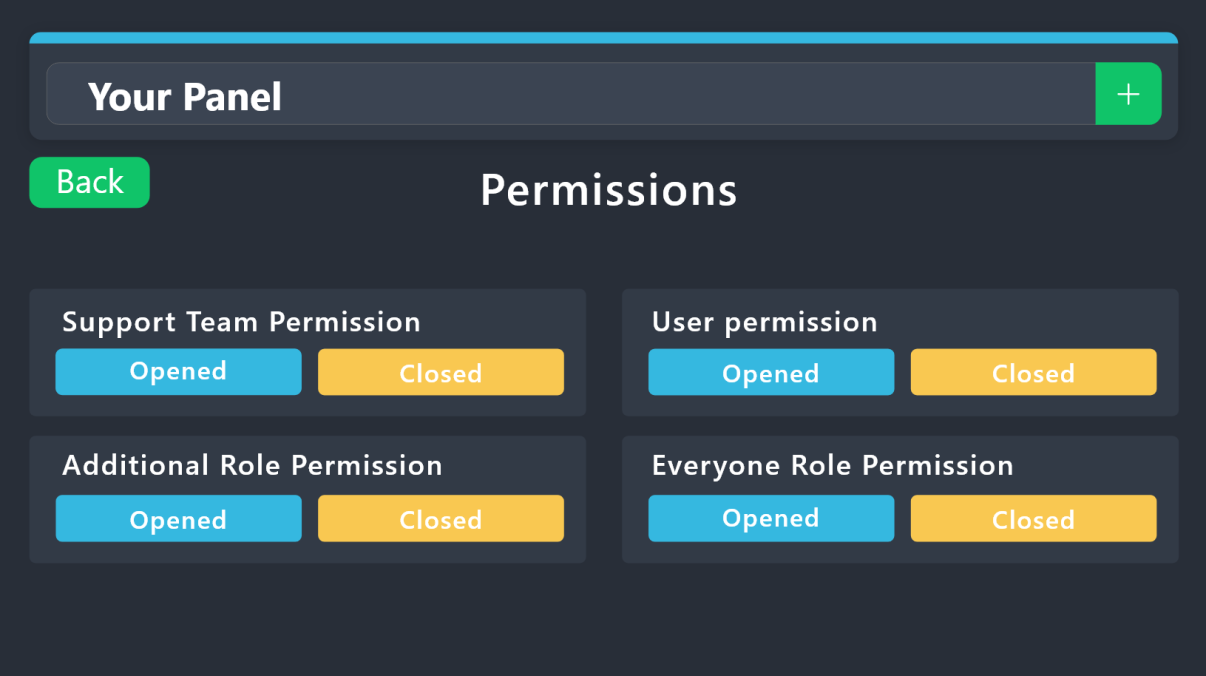
1. Open your Panel Configs tab in your server's dashboard
2. Select the panel you want to grant access to
3. Open the Permissions options menu
4. Find what role you'd like to edit permissions for
5. Choose if you'd like to edit opened or closed permissions for that role
6. Edit the permissions by tickingor unticking
each permission
7. Save changes
 steel wedge
buoyant kindle
hey, please read below.
steel wedge
buoyant kindle
hey, please read below.
Thanks!
iron nightBOT
Gave +1 Rep to @buoyant kindle (current: #247 - 2)
uncut bay
unborn mesa
ticket transcripts.
can i check em even if its not my server
austere forge
uncut bay
can i check em even if its not my server
If you have not received a transcript of your ticket in DM from our bot, then no, the only way is to request the transcript from the server staff
candid vigil
austere forge
Does the set category have more than 50 channels?
Noo, lest than 10
austere forge
candid vigil
Noo, lest than 10
Could you please #🎫│make-a-ticket
 uncut aurora
hi i need help?
humble sequoiaBOT
Hello, we would love to help you, but if you don't tell us what you need help with we can't help you :(
uncut bay
austere forge
If you have not received a transcript of your ticket in DM from our bot, then no...
how can i get it from your bot
scenic forum
uncut bay
how can i get it from your bot
If you have not received a transcript of your ticket in DM from our bot, then no, the only way is to request the transcript from the server staff
uncut bay
scenic forum
If you have not received a transcript of your ticket in DM from our bot, then no...
but how i get it form your bot
scenic forum
uncut bay
but how i get it form your bot
A server can setup the transcript to be sent into the ticket owners dms aswell, if you havent received any youd need to contact staff as they didnt have that option enabled
uncut bay
scenic forum
A server can setup the transcript to be sent into the ticket owners dms aswell, ...
ok
 mellow bramble
How can I add the ticket tool to a server?
humble sequoiaBOT
Ticket Tool Invite & Support
scenic forum
 ebon goblet
is there a way to delete all tickets in my server
ebon goblet
is there a way to delete all tickets in my server
The server owner can use /purge
Note that no logging or transcripts will be made
ebon goblet
scenic forum
The server owner can use ``/purge``
Note that no logging or transcripts will be ...
yooo thx dude, ur the goat
iron nightBOT
Gave +1 Rep to @scenic forum (current: #22 - 352)
uncut aurora
I have your bot "ticket tool" on my server, and because of some reasons, i have to ticket rooms without message about closing massages.
I want to know how to close that tickets?
uncut aurora
tribal cedar
Does $close work?
No
uncut aurora
tribal cedar
You can always delete manually
I know but we have limit with 1 opened ticket, and i dont know if i delete that chanel, can that guy open new ticket again?
tribal cedar
Delete the channels through native discord means?
Yes I believe he will be able to.
Ive never tried that myself but Im sure he can
uncut aurora
Okey thanks a lot, i will try then
tribal cedar
uncut aurora
Okey thanks a lot, i will try then
Lmk if you run into problems
uncut aurora
deal
coarse rune
hi im the owner of a server and it wont let me access the servers dashboard
humble sequoiaBOT
@rocky prism
⚠️ You're in the wrong place
We provide support for Ticket Tool Discord bot and cannot help you with whatever issue you have.
- We don't know which Support Team you should contact to get this issue resolved, and unfortunately we won't be able to accurately tell you.
If you don't have any further questions regarding our bot Ticket Tool, please close this ticket
 north lantern
Hi
harsh epoch
coarse rune
hi im the owner of a server and it wont let me access the servers dashboard
Hey!
Are you the actual server owner or do you just have the role?
coarse rune
harsh epoch
Hey!
Are you the actual server owner or do you just have the role?
The actual server owner
harsh epoch
coarse rune
The actual server owner
It looks like ticket tool white is missing from your server, you can invite it using the link below
humble sequoiaBOT
Ticket Tool Invite & Support
coarse rune
harsh epoch
It looks like ticket tool white is missing from your server, you can invite it u...
Nope it’s here
 harsh epoch
coarse rune
Nope it’s here
harsh epoch
coarse rune
Nope it’s here
Did you try to switch to the premium bot and kick the free one at some point in the past?
coarse rune
harsh epoch
Did you try to switch to the premium bot and kick the free one at some point in ...
Yes
harsh epoch
coarse rune
Yes
Can you try using /botswitcher and selecting ticket tool white
coarse rune
harsh epoch
Can you try using `/botswitcher` and selecting ticket tool white
Already tried that
harsh epoch
coarse rune
Already tried that
did you get any response from that?
 harsh epoch
coarse rune
harsh epoch
coarse rune
Could you try accessing the dashboard again now? You might have to use the sync button
 rocky prism
anyway help me please
humble sequoiaBOT
⚠️ You're in the wrong place
We provide support for Ticket Tool Discord bot and cannot help you with whatever issue you have.
- We don't know which Support Team you should contact to get this issue resolved, and unfortunately we won't be able to accurately tell you.
If you don't have any further questions regarding our bot Ticket Tool, please close this ticket
 plucky gull
How to make two shapes at the same time on 1 panel?
 past bear
A few days ago I changed my COC account to Gmail. But now I can't change it, it shows new device. Can anyone help me how to change my COC Gmail account instantly? If you help me, I will gladly give him $100.
humble sequoiaBOT
@past bear
⚠️ You're in the wrong place
We provide support for Ticket Tool Discord bot and cannot help you with whatever issue you have.
- We don't know which Support Team you should contact to get this issue resolved, and unfortunately we won't be able to accurately tell you.
If you don't have any further questions regarding our bot Ticket Tool, please close this ticket
scenic forum
plucky gull
How to make two shapes at the same time on 1 panel?
Do you mean a ticket with multiple buttons?
plucky gull
yea
 sleek coral
Is there a way to do more than 5 questions in a Form? When you hit Add Question - nothing happens after 5?
 scenic forum
sleek coral
Is there a way to do more than 5 questions in a Form? When you hit Add Question...
scenic forum
sleek coral
Is there a way to do more than 5 questions in a Form? When you hit Add Question...
5 Questions is the limit of what discord is capable of
sleek coral
scenic forum
5 Questions is the limit of what discord is capable of
ahhh gotcha. Someone always out there smarter than me ❤️
humble sequoiaBOT
For more convenient use of multipanels, you can now combine panels on the dashboard. This will allow you to directly send the multipanel from the dashboard or via the $panel ID command.
Where can I find this?
You can find this setting on the Dashboard -> Panel Configs -> Panel -> Attached Panels
Note: if you're attaching all the panels to a panel called English, don't include English in the attached panel's box (If you do this, it will create a duplicate)
This will put all buttons from all of your panels on one message. The message is the panel message from the panel you're combining these panels in.
scenic forum
@plucky gull refer to the embed above
iron nightBOT
Gave +1 Rep to @scenic forum (current: #22 - 353)
 turbid vessel
rocky prism
turbid vessel
rocky prism
helpp me please
humble sequoiaBOT
@rocky prism, we would love to help you, but if you don't tell us what you need help with we can't help you :(
rocky prism
humble sequoia
how to unbanned please
harsh epoch
rocky prism
how to unbanned please
You're still in the wrong place. We can only provide support for Ticket Tool
rocky prism
harsh epoch
You're still in the wrong place. We can only provide support for Ticket Tool
Can you teach me how to do it? Please I beg you
pseudo ravine
rocky prism
Can you teach me how to do it? Please I beg you
You’ve been told multiple times you’re in the wrong place. We don’t know where you need to go
 cinder void
I need help
harsh epoch
cinder void
I need help
What with?
rocky prism
I mean where should I be
pseudo ravine
rocky prism
I mean where should I be
Please refer to my previous message
cinder void
harsh epoch
What with?
So i accidentally made a ticket for the applications that just got released on the announcements what do i do it was a accident
harsh epoch
cinder void
So i accidentally made a ticket for the applications that just got released on t...
Say so there and it'll get dealt with
cinder void
harsh epoch
Say so there and it'll get dealt with
Then do I submit it?
cinder void
harsh epoch
Say so there and it'll get dealt with
Never mind it got deleted thank you
iron nightBOT
Gave +1 Rep to @harsh epoch (current: #42 - 91)
rocky prism
pseudo ravine
Please refer to my previous message
tell me where message your mean
pseudo ravine
pseudo ravine
You’ve been told multiple times you’re in the wrong place. We don’t know where y...
You’ve been told multiple times
scenic forum
rocky prism
Youre still on the wrong server.
Refrain from adding me
@rocky prism Dont dm me
As youve been told numerous times
- We don't know which Support Team you should contact to get this issue resolved, and unfortunately we won't be able to accurately tell you.
 upbeat acorn
How do I add it to my discord suver
scenic forum
upbeat acorn
How do I add it to my discord suver
click on @pseudo glen and press Add app then select your server
upbeat acorn
I did that now how do I make it of were people can make a ticket
 stark runeBOT
1. Invite Ticket Tool to your server
First you will want to invite the bot to your server. Once the bot is in your server, you can manage your server in the dashboard.
2. Create a Panel
To create a panel we are going to need to head over to the panel configs on the dashboard.
Once at the dashboard we will need to click Create Panel.
Enter a panel name (Fill in any optional settings you want).
Click Create Panel and your ready to get started with configuring your panel.
An example of a creating a panel is shown below.
3. Send the Panel to a Channel
Once you've created a panel on the dashboard you will need to send it to a channel using send on the dashboard.
Select the channel you want your panel to be created in and click send.
For other questions checkout $help faq.
An example of a sending a panel is shown below.
Having a Problem Sending the Panel?
Do $debug in a channel with Ticket Tool and make sure it has all the necessary Discord permissions.
scenic forum
upbeat acorn
I did that now how do I make it of were people can make a ticket
Refer to the embed above
 pearl dove
?
 tight void
Ello 🙂 So - I've been paying for ticket tool premium for a little while now, but stopped using it a bit ago. I just invited it into a server I manage but it's not showing premium on the dashboard. There are no other servers linked to my account currently that I've invited it in, how do I transfer my 1 server premium payment that went through on sept 20th to the server I would like?
rocky prism
@rocky prism
mighty thistle
tight void
Ello 🙂 So - I've been paying for ticket tool premium for a little while now, bu...
I checked, and it seems you're not currently paying for Premium.
I didn't mean to send the message early. LOL
mighty thistle
If you were, you can transfer it in the dashboard!
If you think it's incorrectly reporting, I would #🎫│make-a-ticket.
You can open a Billing Ticket.
tight void
It did make me link my account again which was strange, but will do 😄
humble sequoiaBOT
@buoyant nacelle
⚠️ You're in the wrong place
We provide support for Ticket Tool Discord bot and cannot help you with whatever issue you have.
- We don't know which Support Team you should contact to get this issue resolved, and unfortunately we won't be able to accurately tell you.
If you don't have any further questions regarding our bot Ticket Tool, please close this ticket
 buoyant nacelle
Sorry
 dull sail
Sv 20214

 humble sequoiaBOT
@dull sail
⚠️ You're in the wrong place
We provide support for Ticket Tool Discord bot and cannot help you with whatever issue you have.
- We don't know which Support Team you should contact to get this issue resolved, and unfortunately we won't be able to accurately tell you.
If you don't have any further questions regarding our bot Ticket Tool, please close this ticket
 real nimbus
trying to move my premium to a different server, I attempted this but it just moved over the free bot. any help is welcome
 pliant grotto
Hey how do I make a ticket but have the ticket name automatically include the user who created the tickets name
So for example something like
xanari-ticket
humble sequoiaBOT
Jack spade's issue has been solved in another channel.
The ticket name is the default channel name of all tickets. To edit it, go to your Dashboard > Panel Configs > Ticket. There you can edit the channel name of opened and closed tickets. You can also use variables in there.

 Note: This is a premium feature
scenic forum
Note: This is a premium feature
scenic forum
@pliant grotto refer to the emberd above
{ticket.user.name} is the variable to show the users name
pliant grotto
scenic forum
<@1049501233787981905> refer to the emberd above
``{ticket.user.name}`` is the v...
Thank you!
iron nightBOT
Gave +1 Rep to @scenic forum (current: #22 - 354)
pliant grotto
scenic forum
<@1049501233787981905> refer to the emberd above
``{ticket.user.name}`` is the v...
lol just checking, there's no way to do it without premium, correct? 😂
scenic forum
pliant grotto
lol just checking, there's no way to do it without premium, correct? 😂
Thats correct, not automatically
pliant grotto
scenic forum
Thats correct, not automatically
i guess i can just manually rename them, thanks again 😉
iron nightBOT
Gave +1 Rep to @scenic forum (current: #22 - 355)
 stark runeBOT
1. Invite Ticket Tool to your server
First you will want to invite the bot to your server. Once the bot is in your server, you can manage your server in the dashboard.
2. Create a Panel
To create a panel we are going to need to head over to the panel configs on the dashboard.
Once at the dashboard we will need to click Create Panel.
Enter a panel name (Fill in any optional settings you want).
Click Create Panel and your ready to get started with configuring your panel.
An example of a creating a panel is shown below.
3. Send the Panel to a Channel
Once you've created a panel on the dashboard you will need to send it to a channel using send on the dashboard.
Select the channel you want your panel to be created in and click send.
For other questions checkout $help faq.
An example of a sending a panel is shown below.
Having a Problem Sending the Panel?
Do $debug in a channel with Ticket Tool and make sure it has all the necessary Discord permissions.
scenic forum
@acoustic void refer to the embed above
 acoustic void
@scenic forum can you join my server and help me
scenic forum
acoustic void
<@186523978729259009> can you join my server and help me
All help must be dont within the server, feel free to ask questions if youre unsure or stuck on something
 scenic forum
stark rune
scenic forum
stark rune
@acoustic void refer to this message for a basic ticket setup
 naive jay
I just made my own server and want to make a ticket system
How do I do it?
stark runeBOT
1. Invite Ticket Tool to your server
First you will want to invite the bot to your server. Once the bot is in your server, you can manage your server in the dashboard.
2. Create a Panel
To create a panel we are going to need to head over to the panel configs on the dashboard.
Once at the dashboard we will need to click Create Panel.
Enter a panel name (Fill in any optional settings you want).
Click Create Panel and your ready to get started with configuring your panel.
An example of a creating a panel is shown below.
3. Send the Panel to a Channel
Once you've created a panel on the dashboard you will need to send it to a channel using send on the dashboard.
Select the channel you want your panel to be created in and click send.
For other questions checkout $help faq.
An example of a sending a panel is shown below.
Having a Problem Sending the Panel?
Do $debug in a channel with Ticket Tool and make sure it has all the necessary Discord permissions.
scenic forum
@naive jay refer to the embed above
naive jay
scenic forum
<@1291752509370535968> refer to the embed above
Ok thnx
I made one
 old prawn
trying to automatically delete tickets after closing them but its just not working. Ticket was closed 5 minutes ago, but just never auto deleted.

 scenic forum
old prawn
trying to automatically delete tickets after closing them but its just not worki...
scenic forum
old prawn
trying to automatically delete tickets after closing them but its just not worki...
Is the ticket from the same panel as your automation?
old prawn
i set the automations in all tickets, and the one multipanel they are connected to
scenic forum
old prawn
i set the automations in all tickets, and the one multipanel they are connected ...
hmm im unsure then as it looks correct
Can you make a #premium-tickets to receive a staff members help
WOuld appreciate if you inform me of the solution for learning purposes
 scenic forum
old prawn
not sure why it didnt the first time i tested it
scenic forum
old prawn
not sure why it didnt the first time i tested it
Was the ticket maybe created before the automation?
old prawn
no i created a new ticket after
scenic forum
Hmm odd
Well aslong as it works
 wet juniper
Hello everyone
Do I need to be the owner of the server in order to see the dashboard, because I am a moderator on a server and I added the bot there but I can't seem to get to look into it's dashboard
the server is not listed
 wary cave
wet juniper
Do I need to be the owner of the server in order to see the dashboard, because I...
wary cave
wet juniper
Do I need to be the owner of the server in order to see the dashboard, because I...
Aloha 🙂
To access the dashboard, an admin of your server must add your role as a "dashboard role" under the server configs tab
Thats all 👍
wet juniper
configs tab should be in the dashboard of the ticketing tool server right?
wary cave
wet juniper
configs tab should be in the dashboard of the ticketing tool server right?
exactly 🙂 the admin needs to go to this page and select the Server: https://tickettool.xyz/dashboard
Ticket Tool - Ticketing without clutter - The #1 Discord support bot
wet juniper
got it thanks!
 umbral pulsar
how do you change perms on a ticket? So for example i had a member create a ticket and it opens up a ticket but staff can't see inside the ticket
harsh epoch
umbral pulsar
how do you change perms on a ticket? So for example i had a member create a tick...
Hey!
You can change permissions at panel -> Permission -> Support Team permissions
Make sure your support teams got the permissions to see the channel and read message history enabled
umbral pulsar
harsh epoch
Hey!
You can change permissions at panel -> Permission -> Support Team permissio...
is that for "support opened" option or closed?
harsh epoch
umbral pulsar
is that for "support opened" option or closed?
Support opened is the permissions for when the ticket is still active, so for them to see the ticket to respond to users youd need to change those
harsh epoch
umbral pulsar
i clicked on "edit opened" so im guessing its worked
Once on that page you'll be edit the permissions for the support team
 clear crow
Hey guys! I have a question!
I'm trying to set up a ticket for team applications for my server. But unsure how to get the ticket to send the application. Any help is appreciated!
 tawdry lichen
I m part of one server and i m not able to create a ticket can somebopdy help?
harsh epoch
clear crow
Hey guys! I have a question!
I'm trying to set up a ticket for team applicatio...
Can you explain who theyre set out? Are you using forms or anything?
harsh epoch
tawdry lichen
I m part of one server and i m not able to create a ticket can somebopdy help?
If youre not staff on that server then theres nothing we can do to help. You'd be best off to try and contact that servers team by another means
tawdry lichen
ok
 shut vine
(╯°□°)╯︵ ┻━┻
clear crow
harsh epoch
Can you explain who theyre set out? Are you using forms or anything?
it's a specific channel for it. I want the paragraph i have typed up to show up with some type of command.
someone set it up in another server i'm own. but i don't talk to that person anymore
 turbid sparrow
Yo
harsh epoch
clear crow
someone set it up in another server i'm own. but i don't talk to that person any...
Do you have a screenshot or anything of that setup? I dont fully understand what you mean with you wanting it to show a command
clear crow
harsh epoch
Do you have a screenshot or anything of that setup? I dont fully understand what...
when someone opens a ticket in my other server. they can put .application and it pulls up the application
harsh epoch
clear crow
when someone opens a ticket in my other server. they can put .application and it...
Sounds like a mix of ticket tool and another bot then
You could use the forms feature from ticket tool, although you'd be limited to 5 questions
onyx solar
Where i can repair this only in partnership ticket

 ebon loom
can you buy premium with crypto's?
worldly helm
ebon loom
can you buy premium with crypto's?
Hello 👋
Yes you can! Please make a billing ticket at #🎫│make-a-ticket 
ebon loom
worldly helm
Hello 👋
Yes you can! Please make a billing ticket at <#571706435449257997> <:Bi...
okay
thanks @worldly helm
iron nightBOT
Gave +1 Rep to @worldly helm (current: #6 - 991)
worldly helm
You're welcome
onyx solar
onyx solar
Where i can repair this only in partnership ticket
Hoe to repair this
austere forge
This is not related to Ticket Tool but rather to your server automod. We are unable to provide further assistance with that
 humble shell
I have 1 ticket how can I open
 sweet vortex
Hi does anyone know if its possible for a server member (non-admin) to invite other users to their ticket?
I want to use it for a temporary text chat for an esports tournament online
 sand ether
sweet vortex
Hi does anyone know if its possible for a server member (non-admin) to invite ot...
sand ether
sweet vortex
Hi does anyone know if its possible for a server member (non-admin) to invite ot...
You could but its kinda up to how the main dude that setup the bot. There's a setting they gotta enable if im not wrong for invites
humble sequoiaBOT
━━ Summer's inquiry has been moved to a ticket ━━
umbral pulsar
does anyone know how to add custom emojis to your panel buttons?
austere forge
umbral pulsar
does anyone know how to add custom emojis to your panel buttons?
Use the first format <:emojiname:emojiID> - The easiest way to get this would be by using $id (emoji)
$id 
humble sequoiaBOT
austere forge
$id <:3v_smile:1187282191630204958>
<:3v_smile:1187282191630204958>
austere forge
and copy paste the reply on your button emoji field
umbral pulsar
yeha i wanted to add a custom emoji onto the "button text"
austere forge
Only text can be entered in this field, custom emojis go in the button emoji field
austere forge
sure it works the same way 👍
umbral pulsar
ok cheers
 lucid bridge
Hi, how do I buy a premium subscription?
humble sequoiaBOT
You can purchase Ticket Tool Premium here! Buying it on our website allows you to have full control over your subscription:
 Cancel your subscription at any time
Change your billing interval (yearly/monthly)
Change your payment method
Add or remove server slots to your subscription
 Transfer the subscription between servers
Note: This level of control is only available when purchasing the subscription from our website.
You can manage your current subscriptions here, any billing questions or concerns, feel free to create a Billing Ticket via #🎫│make-a-ticket
 jade topaz
Hey
i need help i made a form type ticket in my server but why cantr i see the answers to their questions inside their ticket?
@pseudo ravine
harsh epoch
jade topaz
i need help i made a form type ticket in my server but why cantr i see the answe...
Hey!
Make sure you've got "Auto display form results" on
 jade topaz
harsh epoch
Hey!
Make sure you've got "Auto display form results" on <:onswitch:83626840430...
jade topaz
harsh epoch
Hey!
Make sure you've got "Auto display form results" on <:onswitch:83626840430...
Helped a lot thank you
iron nightBOT
Gave +1 Rep to @harsh epoch (current: #42 - 92)
scenic forum
wet juniper
do I need to give elevation roles to the ticketing bot, like admin?
Ticket tool does not need admin.
The permissions the bot needs are in the image below


 hallow flint
Halo
scenic forum
wet juniper
The bot is missing view channel on the tickets category
wet juniper
scenic forum
The bot is missing ``view channel`` on the tickets category
weird it has that
scenic forum
wet juniper
weird it has that
Can you use /debug on your server?
scenic forum
wet juniper
think so
Can you show me that ticket tool has View channel and manage channels in the tickets category?
proud obsidian
Can I like skip close ticket part and instantly deletes it? Is there option for that?
harsh epoch
proud obsidian
Can I like skip close ticket part and instantly deletes it? Is there option for ...
Panel -> General -> Two Step Ticket 
That'll skip the message asking you whether you wsnt to delete or save a transcript
scenic forum
wet juniper
Ans this issue still persists even with the permissions you showed?
scenic forum
wet juniper
but I get that message
I assume Tickets are also not created INSIDE the category, correct?
scenic forum
wet juniper
nope they are outside
The bot seemingly has all permissions so I'm not exactly sure what the issue is
Feel free to #🎫│make-a-ticket to receive a staff members help on the matter
worldly helm
@ashen notch Please wait for a reply in your open ticket.
 crimson badger
how do i make the thing where people click a button and it makes a ticket?
sand ether
crimson badger
how do i make the thing where people click a button and it makes a ticket?
K here's what u wanna do
 dawn lake
/panel
 pale arrow
Guys how do i put ticket tool in my server
pale arrow
tribal cedar
<@1383262186822172858> go to website and click get bot on top
What website
dawn lake
https::
tribal cedar
dawn lake
tribal cedar
Https://tickettool.xyz
h
pale arrow
Thanks
tribal cedar
Nps
pale arrow
Thanks@enigma
sand ether
crimson badger
how do i make the thing where people click a button and it makes a ticket?
-
Go to your dashboard on tickettool
-
Go to the server you want to add the panel to and press manage in your tickettool dashboard.
-
On the left you'll see a new panel pop up with options, click on the option that says "panel config." You'll see a green plus button press it to make a new panel.
-
You will get your setting options and customization option underneath once you have created ur panel.
-
Once you think your ready, press the blue send button and chose the Channel you wanna send it to and then enjoy!
sand ether
pale arrow
Guys how do i put ticket tool in my server
You could also just press on the tickettool bot user on this server then press add app which will directly take you to it.
tribal cedar
Good point
stark runeBOT
1. Invite Ticket Tool to your server
First you will want to invite the bot to your server. Once the bot is in your server, you can manage your server in the dashboard.
2. Create a Panel
To create a panel we are going to need to head over to the panel configs on the dashboard.
Once at the dashboard we will need to click Create Panel.
Enter a panel name (Fill in any optional settings you want).
Click Create Panel and your ready to get started with configuring your panel.
An example of a creating a panel is shown below.
3. Send the Panel to a Channel
Once you've created a panel on the dashboard you will need to send it to a channel using send on the dashboard.
Select the channel you want your panel to be created in and click send.
For other questions checkout $help faq.
An example of a sending a panel is shown below.
Having a Problem Sending the Panel?
Do $debug in a channel with Ticket Tool and make sure it has all the necessary Discord permissions.
crimson badger
ok
 cold bear
When buying I put the wrong email
mighty thistle
You can contact the Billing Team to change it, I believe.
Yeah, you can open a Billing Ticket, @cold bear!
 uncut aurora
Hi i have situation that i cant close one ticket, on button "close", what can be, and do u have possible solutions to fix it?
scenic forum
uncut aurora
Hi i have situation that i cant close one ticket, on button "close", what can be...
Hey!
Does the bot say any sort of error?
uncut aurora
scenic forum
Hey!
Does the bot say any sort of error?
Nah, when i click close button, nothing happend,and ticket is still opened
Ticket owner said me that he cant saw that room, and cant close it still
scenic forum
uncut aurora
Nah, when i click close button, nothing happend,and ticket is still opened
Can you use /debug inside that room?
uncut aurora
scenic forum
Can you use ``/debug`` inside that room?
.
scenic forum
uncut aurora
.
Bot is missing View Channel permission inside that channel
sand ether
uncut aurora
Hi i have situation that i cant close one ticket, on button "close", what can be...
It could be because you may not have the permission to close it if you are not the main owner who set up the bot. However if your saying it doesn't have the view channel perm channel you could just give it admin and it could fix your issue.
scenic forum
sand ether
It could be because you may not have the permission to close it if you are not t...
Ticket tool does not require admin to run
sand ether
scenic forum
Ticket tool does not require admin to run
Ik but if it fixes his issue then that would help. I ain't like tech support either so even if I wanted to I would not be able to see what's wrong 100%
 indigo gazelle
sweet vortex
sand ether
You could but its kinda up to how the main dude that setup the bot. There's a se...
indigo gazelle
sweet vortex
sand ether
You could but its kinda up to how the main dude that setup the bot. There's a se...
Thanks!
iron nightBOT
Gave +1 Rep to @sand ether (current: #424 - 1)
sweet vortex
humble sequoia
━━ *Summer's inquiry has been moved to a ticket* ━━
Where can I find this ticket?
scenic forum
sweet vortex
Where can I find this ticket?
There should be a ticket channel if it's still open
Otherwise just ask what you need help with again
 waxen bramble
I just started using ticket tool and i got some questions.
Firstly, can TT (ticket tool) ping/mention a role when someone creates a ticket? If yes, please tell me how, or just DM me the solution [solved]
Secondly, how do you make the "Estimated time of answer" thingy shown here ( #🎫│make-a-ticket message )
@scenic forum
scenic forum
waxen bramble
I just started using ticket tool and i got some questions.
~~Firstly, can TT (t...
Feel free to ask away
waxen bramble
waxen bramble
I just started using ticket tool and i got some questions.
~~Firstly, can TT (t...
[First Question] My server uses normal tickets and not threads.
humble sequoiaBOT
1. Open your Panel Configs tab in your server's dashboard
2. Select the panel you want to ping your support team on
3. Open the Ticket options menu
4. Click on Edit Ticket Message
5. In the Message Content use one of the role mention syntax ({@Role Name}/{Role ID})
6. Save changes
Note: For this to work properly, Ticket Tool requires the Mention Everyone permission. Or the role must have the Allow anyone to @mention this role setting enabled
 dull wharf
My panel accidentally has 2 extra buttons where do i remove them? I've been trying to see where for the past 30 minutes
 humble sequoiaBOT
For more convenient use of multipanels, you can now combine panels on the dashboard. This will allow you to directly send the multipanel from the dashboard or via the $panel ID command.
Where can I find this?
You can find this setting on the Dashboard -> Panel Configs -> Panel -> Attached Panels
Note: if you're attaching all the panels to a panel called English, don't include English in the attached panel's box (If you do this, it will create a duplicate)
This will put all buttons from all of your panels on one message. The message is the panel message from the panel you're combining these panels in.
scenic forum
dull wharf
My panel accidentally has 2 extra buttons where do i remove them? I've been tryi...
Refer to the embed above
Remove them from the panels they shouldn't be in
dull wharf
scenic forum
Refer to the embed above
Remove them from the panels they shouldn't be in
ohh okay thank you!
iron nightBOT
Gave +1 Rep to @scenic forum (current: #22 - 356)
 analog shard
I am getting this error when i am creating any ticket how can i fix it

@scenic forum
@scenic forum ?
sand ether
analog shard
I am getting this error when i am creating any ticket how can i fix it
Well as you can see budda your server has 500 channels (tickets open) you gotta clear those to make new ones.
jade topaz
مرحبا اخواني لدي مشكل بسيط هل من ادمن عربي ؟
 fathom elbow
Claim Ticket No nn

 wet juniper
Hello, in regards of adding roles to the messages when a ticket is created I tried to do this and it's not working

ow shoot forgot to close the code hahaha xD
 gilded niche
.
scenic forum
fathom elbow
Claim Ticket No nn
Claiming has to be enabled first
Panel config -> claiming -> enable ticket claiming
mellow bramble
How do you make all the ticket types in one message???
 charred kraken
Opa boa. Como que faz tem um cara na porta do HP que tá fazendo VDM e logo em seguida vem e mata, depois fica chingando como que faz com esse maluco ?

 scenic forum
mellow bramble
How do you make all the ticket types in one message???
scenic forum
mellow bramble
How do you make all the ticket types in one message???
Would you like them as multipanel (multiple buttons) or dropdown?
humble sequoiaBOT
@charred kraken
Você está no lugar errado
Fornecemos suporte para Ticket Tool Discord bot e não podemos ajudá-lo com qualquer problema que você tenha.
- Não sabemos qual equipe de suporte você deve entrar em contato para resolver esse problema e, infelizmente, não poderemos informar com precisão.
Se você não tiver mais dúvidas sobre nossa ferramenta de ticket de bot, feche este ticket
mellow bramble
scenic forum
Would you like them as multipanel (multiple buttons) or dropdown?
Multi panel
humble sequoiaBOT
For more convenient use of multipanels, you can now combine panels on the dashboard. This will allow you to directly send the multipanel from the dashboard or via the $panel ID command.
Where can I find this?
You can find this setting on the Dashboard -> Panel Configs -> Panel -> Attached Panels
Note: if you're attaching all the panels to a panel called English, don't include English in the attached panel's box (If you do this, it will create a duplicate)
This will put all buttons from all of your panels on one message. The message is the panel message from the panel you're combining these panels in.
scenic forum
mellow bramble
Multi panel
Refer to the embed above
mellow bramble
Tysm
 rose cloud
Hello I need help to setup so that a singled ticket tool message has a Dropdown menu where u can select which ticket u want to create
@scenic forum help me vro ;-;
Sry for ping
Nvm I think I gotta make ticket
mellow bramble
humble sequoia
I did the dashboard but now in the group I don't know hoe to gather them all even though I did the dashboard
 slim hare
Can i create multiple panels on one server that assign in different directions, i.e., by category? Can someone explain this to me?
harsh epoch
slim hare
Can i create multiple panels on one server that assign in different directions, ...
Hey!
Where you looking for the panel to have multiple buttons or a dropdown selection?
slim hare
For example one panel for support team and one pannel for FIA Race control stuff. So would be two to three panels
humble sequoiaBOT
For more convenient use of multipanels, you can now combine panels on the dashboard. This will allow you to directly send the multipanel from the dashboard or via the $panel ID command.
Where can I find this?
You can find this setting on the Dashboard -> Panel Configs -> Panel -> Attached Panels
Note: if you're attaching all the panels to a panel called English, don't include English in the attached panel's box (If you do this, it will create a duplicate)
This will put all buttons from all of your panels on one message. The message is the panel message from the panel you're combining these panels in.
harsh epoch
slim hare
For example one panel for support team and one pannel for FIA Race control stuff...
Refer to the embed above
slim hare
Thx
 soft pecan
Hey there,
How can I add another person to my instance of Ticket Tool?
harsh epoch
soft pecan
Hey there,
How can I add another person to my instance of Ticket Tool?
You can give other people permission to view the dashboard by them either having the Administrator permission, or by setting up a dashboard role
humble sequoiaBOT
Any role you put there will have full access to the ticket tool dashboard. The server owner and users with admin permissions already have access to the dashboard.
Be careful of which roles to put here
 soft pecan
Thanks for this response.
Can I transfer ownership to another person?
harsh epoch
soft pecan
Thanks for this response.
Can I transfer ownership to another person?
As long as you set it up correctly where the other person can access it, it should work fine
harsh epoch
soft pecan
How can I update the email that billing info is sent to for my instance?
I believe you'd have to make a billing ticket to change that -> #🎫│make-a-ticket
 flint oar
Hello, for some reason the tickets are not being moved to the assigned closed category, they become closed but stay in the same category. I have specified a closed ticket category in Category -> Category Closed. Any clue why?
harsh epoch
flint oar
Hello, for some reason the tickets are not being moved to the assigned closed ca...
Can you run /debug in that category?
flint oar
harsh epoch
Can you run `/debug` in that category?
Yes, do you want me to send you the debug link?
harsh epoch
flint oar
Yes, do you want me to send you the debug link?
Could you send me a screenshot of it
 flint oar
harsh epoch
hm, can you confirm that it is correctly selected on dashboard?
flint oar
harsh epoch
hm, can you confirm that it is correctly selected on dashboard?
Yeah, the category exists as well. I tried deselecting and reselecting as well but no change.
 harsh epoch
flint oar
Yeah, the category exists as well. I tried deselecting and reselecting as well b...
harsh epoch
flint oar
Yeah, the category exists as well. I tried deselecting and reselecting as well b...
Only other thing i could think of is that the bot doesn't have a permission in the category, could you check it has "View channels" inside your closed category
flint oar
harsh epoch
Only other thing i could think of is that the bot doesn't have a permission in t...
That was it! Thanks a lot. Strange that it lets me select a category it can't access 😅
iron nightBOT
Gave +1 Rep to @harsh epoch (current: #42 - 93)
harsh epoch
flint oar
That was it! Thanks a lot. Strange that it lets me select a category it can't ac...
No worries!
 marble glen
بدي مساعدة
كيف اخلي البوت يمنشن الستاف لما افتح تكت
how i can make the bot mentoin the staff when someone open ticket?
humble sequoiaBOT
1. Open your Panel Configs tab in your server's dashboard
2. Select the panel you want to ping your support team on
3. Open the Ticket options menu
4. Click on Edit Ticket Message
5. In the Message Content use one of the role mention syntax ({@Role Name}/{Role ID})
6. Save changes
Note: For this to work properly, Ticket Tool requires the Mention Everyone permission. Or the role must have the Allow anyone to @mention this role setting enabled
harsh epoch
@marble glen Refer to the embed above
humble sequoiaBOT
━━ VE's inquiry has been moved to a ticket ━━
 tropic elm
Which permission do members need to use the create ticket button?
tribal cedar
Whichever role you set the permissions to
tropic elm
I set it to everyone
But removed the permission to write in that channel
Or do anything else
tropic elm
I thought this was a community help channel sorry
tribal cedar
It is. Sorry if my writting is offensive or anything Im not trying to be that way at all
@tropic elm^^
tropic elm
All good no offence taken
tribal cedar
❤️
tropic elm
I was just confused why the button showed up for me but not regular members
scenic forum
tropic elm
I was just confused why the button showed up for me but not regular members
Buttons cannot be hidden, every member that has access to the channel or the message will automatically see the buttons
Do you maybe have a screenshot of it?
tribal cedar
@scenic forum
 scenic forum
tribal cedar
<@186523978729259009>
scenic forum
tribal cedar
<@186523978729259009>
Thank you
iron nightBOT
Gave +1 Rep to @tribal cedar (current: #32 - 137)
tribal cedar
Np
scenic forum
tropic elm
I was just confused why the button showed up for me but not regular members
Can you run /debug inside that channel
tribal cedar
Moment
 violet jolt
Hello, how do I make such tickets?
 humble sequoiaBOT
The Drop-down menu or Select Menu replaces the buttons on your panel message and uses a drop-down menu with all of your panels. To set this up, go to your Panel Configs and select your main Panel.
<:Numbericons1:1018864164032225340> Enable Select Style
First you enable Select Style. Then you add an item in the Dropdown Editor. Now you can start editing your dropdown!
<:Numbericons2:1018864168041971712> Dropdown Editor
Each line in the dropdown editor represents a line in the drop down menu on discord. You can add more "Items", by clicking on
First you select a panel. That's the panel this option will open a ticket for. DONT select the same panel twice. Each option should have a different Panel
After that, you can put a Display. This is the title of this option and will appear in the drop down menu. The *Description can be set right after that, which will be below the title in grey.
Additionally you can select an emoji, that will be shown in front of each option. You can either manually input the ID of an emoji or select it in the selector.
Common Issues ⚠️
- Panel doesn't send? Make sure you have a valid emoji selected
- Option doesn't show up? Check if two options have the same panel in the DropDown Editor
$dropdown
The Drop-down menu or Select Menu replaces the buttons on your panel message and uses a drop-down menu with all of your panels. To set this up, go to your Panel Configs and select your main Panel.
<:Numbericons1:1018864164032225340> Enable Select Style
First you enable Select Style. Then you add an item in the Dropdown Editor. Now you can start editing your dropdown!
<:Numbericons2:1018864168041971712> Dropdown Editor
Each line in the dropdown editor represents a line in the drop down menu on discord. You can add more "Items", by clicking on
First you select a panel. That's the panel this option will open a ticket for. DONT select the same panel twice. Each option should have a different Panel
After that, you can put a Display. This is the title of this option and will appear in the drop down menu. The *Description can be set right after that, which will be below the title in grey.
Additionally you can select an emoji, that will be shown in front of each option. You can either manually input the ID of an emoji or select it in the selector.
Common Issues ⚠️
- Panel doesn't send? Make sure you have a valid emoji selected
- Option doesn't show up? Check if two options have the same panel in the DropDown Editor
$dropdown
scenic forum
@violet jolt refer to the embed above
violet jolt
okey thx
tribal cedar
@scenic forum application failed to reply
scenic forum
tribal cedar
<@186523978729259009> application failed to reply
Bot is missing these permission inside the channel
 tropic elm
I added these perms for the bot, but users can still not see the button. Is there something I am missing in the dashboard maybe?
scenic forum
@tribal cedar
Hey there!
«You don't have permissions to use this»
👉 Server Configs -> Blacklist Roles
Any roles there will be unable to interact with the bot in any way, including creating tickets.👉 Panel Configs -> Buttons -> Create Ticket -> Support team only
If this is enabled👉 Panel Configs -> Buttons -> Create Ticket -> Disabled Roles
Any roles there will be unable to use the button.
scenic forum
tropic elm
I added these perms for the bot, but users can still not see the button. Is ther...
Can you provide a screenshot of a missing button
Buttons cannot be hidden to users due to how discord works
tropic elm
 scenic forum
tropic elm
scenic forum
tropic elm
Theres either no message in that channel or youre missing read history permissions
 scenic forum
tropic elm
scenic forum
tropic elm
Can you reload your discord with Control + R and see if the message pops up
tropic elm
I do see the button, would that change anything for others?
but regular members cannot
scenic forum
tropic elm
I do see the button, would that change anything for others?
the entire message is missing not just the button which indicates some sort of permission or discord error
If you resend the panel into that channel does it become visible for your other account?
scenic forum
tropic elm
the button shows up but still no permissions ..
"You don't have permissions to use this"?
tropic elm
that's the message
scenic forum
scenic forum
<@297419611350106133>
Hey there!
**__«You don't have permissions to use this»_...
@tropic elm refer to this
 waxen spade
yo what this🥀
 humble sequoiaBOT
⚠️ You're in the wrong place
We provide support for Ticket Tool Discord bot and cannot help you with whatever issue you have.
- We don't know which Support Team you should contact to get this issue resolved, and unfortunately we won't be able to accurately tell you.
If you don't have any further questions regarding our bot Ticket Tool, please close this ticket
 silk surge
@stark rune
stark runeBOT
silk surge
<@818750612204290089>
<:emote:1362933269762543708> Available commands
Use
/help <command>to get more information
help
info
list
ping
guildmembercount
searchdocumentation
report
warns
setup
frsetup
desetup
essetup
silk surge
/help
silk surge
Ok , how to fix that in my server I am trying to run a command but when I run it it says that the application did not respond!
tribal cedar
Can you run /debug in the ticket channel please and let me know when you do
scenic forum
silk surge
I send the command and it said again the application did not respond
Ticket tool is missing these permissions inside the channel
 silk surge
How do I turn them on
scenic forum
silk surge
How do I turn them on
You grant them via the discord channel permissions
silk surge
What do you mean
scenic forum
silk surge
What do you mean
Are you on PC or Phone?
 final aspen
How do I add an extra button in Botta?
scenic forum
silk surge
But now on mobile
hold down on the channel -> Edit Channel -> Channel Permissions -> Add role -> Ticket Tool -> All specified permissions inside the screenshot ✅
scenic forum
final aspen
How do I add an extra button in Botta?
Can you elaborate
silk surge
Ok I will try
final aspen
They click the button to open a ticket, but how can I add an extra button there and customize it?
humble sequoiaBOT
For more convenient use of multipanels, you can now combine panels on the dashboard. This will allow you to directly send the multipanel from the dashboard or via the $panel ID command.
Where can I find this?
You can find this setting on the Dashboard -> Panel Configs -> Panel -> Attached Panels
Note: if you're attaching all the panels to a panel called English, don't include English in the attached panel's box (If you do this, it will create a duplicate)
This will put all buttons from all of your panels on one message. The message is the panel message from the panel you're combining these panels in.
scenic forum
@final aspen refer to the embed above
final aspen
How do I add a button?
scenic forum
final aspen
How do I add a button?
Each additional button is an extra panel you attached aka multipanel
silk surge
scenic forum
Ticket tool is missing these permissions inside the channel
You write there read channels, do you mean view channel
scenic forum
silk surge
You write there read channels, do you mean view channel
That permission is already granted but yes
silk surge
But I have turned it on and it still says the application did not respond!
scenic forum
silk surge
But I have turned it on and it still says the application did not respond!
Can you run /debug again
final aspen
Can't I make this shape?
 humble sequoiaBOT
The Drop-down menu or Select Menu replaces the buttons on your panel message and uses a drop-down menu with all of your panels. To set this up, go to your Panel Configs and select your main Panel.
<:Numbericons1:1018864164032225340> Enable Select Style
First you enable Select Style. Then you add an item in the Dropdown Editor. Now you can start editing your dropdown!
<:Numbericons2:1018864168041971712> Dropdown Editor
Each line in the dropdown editor represents a line in the drop down menu on discord. You can add more "Items", by clicking on
First you select a panel. That's the panel this option will open a ticket for. DONT select the same panel twice. Each option should have a different Panel
After that, you can put a Display. This is the title of this option and will appear in the drop down menu. The *Description can be set right after that, which will be below the title in grey.
Additionally you can select an emoji, that will be shown in front of each option. You can either manually input the ID of an emoji or select it in the selector.
Common Issues ⚠️
- Panel doesn't send? Make sure you have a valid emoji selected
- Option doesn't show up? Check if two options have the same panel in the DropDown Editor
$dropdown
harsh epoch
@final aspen refer to the embed above
scenic forum
silk surge
It doesn’t work
its still missing all permissions with the ❎
 tropic elm
Thanks for the help @tribal cedar and @scenic forum It’s working now
iron nightBOT
Gave +1 Rep to @scenic forum (current: #22 - 357)
Gave +1 Rep to @tribal cedar (current: #32 - 138)
 red orchid
Hi, can you please tell me how to disable automatic deletion of tickets after they are closed?
 harsh epoch
red orchid
harsh epoch
red orchid
Hey there!
Make sure "Two step ticket" is disabled.
Dashboard -> General -> Two step ticket
red orchid
harsh epoch
Hey there!
Make sure "Two step ticket" is disabled.
Dashboard -> General -> T...
Thanks a lot!!
iron nightBOT
Gave +1 Rep to @harsh epoch (current: #42 - 94)
 short shadow
Hii! How can I get the support ticket bot to ping the support team right away without me having to change it in the ticket?
harsh epoch
$help
humble sequoiaBOT
harsh epoch
$help
1. Open your Panel Configs tab in your server's dashboard
2. Select the panel you want to ping your support team on
3. Open the Ticket options menu
4. Click on Edit Ticket Message
5. In the Message Content use one of the role mention syntax ({@Role Name}/{Role ID})
6. Save changes
Note: For this to work properly, Ticket Tool requires the Mention Everyone permission. Or the role must have the Allow anyone to @mention this role setting enabled
harsh epoch
@short shadow Refer to the embed above
short shadow
harsh epoch
<@944803187272081479> Refer to the embed above
OH alright! Thanks so muchh!! :)
iron nightBOT
Gave +1 Rep to @harsh epoch (current: #41 - 95)
ebon loom
How do the custom commands work, like, can you add an autoresponder to it?
 restive condor
ebon loom
How do the custom commands work, like, can you add an autoresponder to it?
restive condor
ebon loom
How do the custom commands work, like, can you add an autoresponder to it?
Hey there! Custom commands are preset messages you can send by sending a command.
This can be triggered manually or through ticket automations ( )
)
humble sequoiaBOT
Custom Commands are used to send a predefined response to your channels. Commands will only respond if the command itself is used, it will not function if you put the tag into a sentence.
To create commands, go to: Dashboard > Custom Commands > New. After creating and naming one, you can edit the command trigger and behaviors. Tap on the edit message button to edit the response of the command.
 ebon loom
restive condor
Hey there! Custom commands are preset messages you can send by sending a command...
ebon loom
restive condor
Hey there! Custom commands are preset messages you can send by sending a command...
is it also possible to add buttons to the commands, that lead to links if you know what i mean?
restive condor
ebon loom
is it also possible to add buttons to the commands, that lead to links if you kn...
That's currently not possible unfortunately
ebon loom
restive condor
That's currently not possible unfortunately
Ahh, okay, Thanks @restive condor
iron nightBOT
Gave +1 Rep to @restive condor (current: #1 - 2767)
restive condor
No problem!
ebon loom
restive condor
No problem! <:PabloTiphat:983791053842837624>
What about, if u ping the user in the command (e.g. $help @ebon loom )
It will ping the user in the message sent by the bot?
restive condor
ebon loom
What about, if u ping the user in the command (e.g. $help <@955839153424179201>...
You can use command arguments for that. Once you have created your command, you can add an argument (using the green "Add" button), copy that and put it into your custom command message
So if you ping the user in the command, and the command response message is "Hey {argument.1}....etc ", the variable will be replaced with the user mention
ebon loom
restive condor
So if you ping the user in the command, and the command response message is "``H...
ill try it out
thanks @restive condor
iron nightBOT
Gave +1 Rep to @restive condor (current: #1 - 2768)
 stiff furnace
is the ticket tool down?
 restive condor
stiff furnace
is the ticket tool down?
restive condor
stiff furnace
is the ticket tool down?
Hey there! No, that seems to be a wifi issue. Could you re-try again please?
ebon loom
restive condor
So if you ping the user in the command, and the command response message is "``H...
is there a reason i cant edit the embed? Also, why is there a text limit?
restive condor
ebon loom
is there a reason i cant edit the embed? Also, why is there a text limit?
There are some limitations on the free plan. Full customisation of embed messages is a premium feature
ebon loom
restive condor
There are some limitations on the free plan. Full customisation of embed message...
thanks @restive condor
iron nightBOT
Gave +1 Rep to @restive condor (current: #1 - 2769)
 novel path
Help
harsh epoch
novel path
Help
How can we help?
 tall topaz
Failed:
Invalid Form Body components[0].components[0].options[0].emoji.name[BUTTON_COMPONENT_INVALID_EMOJI]: Invalid emoji components[0].components[0].options[1].emoji.name[BUTTON_COMPONENT_INVALID_EMOJI]: Invalid emoji components[0].components[0].options[2].emoji.name[BUTTON_COMPONENT_INVALID_EMOJI]: Invalid emoji
What does this mean
humble sequoiaBOT
This error indicates you have selected an invalid emoji, i.e. an emoji the bot isn't capable of using, in a button field
Which Emoji?
This depends upon which action the error is appearing, the most common cases are the Create Ticket button or one of your Dropdown emojis. You can visit your Button's List to find all available buttons and find the conflicting one by yourself.
Why doesn't the bot accept it as valid?
- You selected an emoji that doesn't exist anymore, i.e. that has been deleted
- You wrote text there, instead of an emoji (or in addition to an emoji)
- You entered a code for a custom emoji from a server that the bot is not a member of
- You entered a custom emoji code incorrectly
- You're on iPhone and entered an emoji using the phone's emoji pad (use the emoji selector in the website instead)
harsh epoch
@tall topaz Refer to the embed above
tall topaz
Thanks
 jolly inlet
Hello I need help. I am trying to access my account in the new app but can’t remember my password
humble sequoiaBOT
@jolly inlet
⚠️ You're in the wrong place
We provide support for Ticket Tool Discord bot and cannot help you with whatever issue you have.
- We don't know which Support Team you should contact to get this issue resolved, and unfortunately we won't be able to accurately tell you.
If you don't have any further questions regarding our bot Ticket Tool, please close this ticket
 humble sequoiaBOT
Integrating an External Bot x Ticket Tool <:TicketToolGold:1073948897673748490>
Integrating Ticket Tool with an external bot allows you to customize your server's Ticket System further!
- The external bot must output the
$newor$ticketcommands with the user's ID to start a ticket. Preferably in a private channel.
Eg.
$new 12345678901234567890
-
Your ticket panel must be Command Style enabled
-
You must whitelist that bot's ID in your Dashboard ➞ Server Configs ➞ Bot section.
Otherwise Ticket Tool will not react to the command and a ticket will not be created.
- If you'd like to include a reason in the command usage, feel free to do so after the user ID.
Eg.
$new 12345678901234567890 Your reason goes here
This reason can then be shown anywhere in the Ticket Message with the{create.reason}variable
** Note:** If you have changed Ticket Tool's default prefix ($) please ensure to amend the prefix for the $new or $ticket commands.
Eg. If your prefix is
-, then what you're looking for the bot to use is-newor-ticket
$botintegration
scenic forum
@smoky solar refer to the embed above
 smoky solar
Alr thanks!
smoky solar
scenic forum
<@1135997880176480276> refer to the embed above
Like you use a webhook from discohook and use that?
scenic forum
smoky solar
Like you use a webhook from discohook and use that?
Yes
For more info on how to do it using Discohook you may want to visit their support server
smoky solar
Ok
 flat crystal
When i open a ticket.. i get this box error please help me
 scenic forum
flat crystal
When i open a ticket.. i get this box error please help me
scenic forum
flat crystal
When i open a ticket.. i get this box error please help me
You would need to reach out to their servers staff and inform them about the error as the server has reached max channal capacity
flat crystal
How to solve this error
scenic forum
flat crystal
How to solve this error
You contact their servers staff and inform them about the error.
They need to delete some channels
flat crystal
I have only 3 channels
scenic forum
flat crystal
I have only 3 channels
The server has 500 channels, they are not visible to you
flat crystal
See i have limited channels.. but i get this error.. please help me to solved this error
 scenic forum
flat crystal
When i open a ticket.. i get this box error please help me
scenic forum
flat crystal
When i open a ticket.. i get this box error please help me
You need to contact the staff of the server the screenshot is from
We cannot assist you as their servers staff have to clear some channels
flat crystal
Where can I contact the server staff?
scenic forum
flat crystal
Where can I contact the server staff?
Your best chance would be to look at their members list for a staff role besides that theres nothing we can assist you with im afraid
 humble sequoiaBOT
This error indicates you have selected an invalid emoji, i.e. an emoji the bot isn't capable of using, in a button field
Which Emoji?
This depends upon which action the error is appearing, the most common cases are the Create Ticket button or one of your Dropdown emojis. You can visit your Button's List to find all available buttons and find the conflicting one by yourself.
Why doesn't the bot accept it as valid?
- You selected an emoji that doesn't exist anymore, i.e. that has been deleted
- You wrote text there, instead of an emoji (or in addition to an emoji)
- You entered a code for a custom emoji from a server that the bot is not a member of
- You entered a custom emoji code incorrectly
- You're on iPhone and entered an emoji using the phone's emoji pad (use the emoji selector in the website instead)
scenic forum
@gaunt plover refer to the embed above
 gaunt plover
scenic forum
<@1326964371749863526> refer to the embed above
gaunt plover
scenic forum
<@1326964371749863526> refer to the embed above
I expected that, thank you
iron nightBOT
Gave +1 Rep to @scenic forum (current: #22 - 359)
 bleak pine
how do i allow it to make a new channel
mighty thistle
bleak pine
how do i allow it to make a new channel
What do you mean?
bleak pine
to set it up i just added it testing opening a ticket and it gave a error
 weak niche
Hola no puedo recibir mi pedido
bleak pine
mighty thistle
What do you mean?
says the application is not responding
harsh epoch
bleak pine
says the application is not responding
Make sure ticket tool has the following permissions in your server and retry:
 bleak pine
never mind i figured it out thanks i was missing things set up in the dashboard
 gritty path
Pasos para unirme
mighty thistle
gritty path
Pasos para unirme
¿Unirse a qué?
 tardy pelican
When will I get my staff application results back?
mighty thistle
With the applications closing in 5 days, I imagine the maximum duration afterward would be 1 week.
 hybrid glen
how do i make a ticket thing in my server where people are required to fill out sections before it goes through? qwq like this type
 humble sequoiaBOT
A Discord Form lets the user answer individual questions in a pop-up Form, which then displays the answers in the ticket message. This can save time if you already know what you want to ask the user.
Setup Forms
Forms can be enabled under Panel Settings > Form Options > Edit Forms Options. In the new pop-up window, you can now enable and edit your own Form.
Form Options
You can add up to 5 questions in the Discord form. This is a Discord limitation. Each question can have a placeholder in the input field, a minimum and maximum input, multi-line, and also the option to have the answer required.
Options
Question Title ➞ Your Question goes here
Question Placeholder ➞ The placeholder text in the input field
Required ➞ If enabled, the user has to answer this question, to submit the form
Multi-Line Input ➞ Allows the user to input multiple lines
Minimum and Maximum Input ➞ Set a minimum and maximum input value for the user
Displaying the Answer
To display the answers from the user, you need to enable Auto display form results on the ticket message as an additional embed
If you don't want a second embed, go into your Panel Configs > Ticket Options > Edit Ticket Message. You use the variable {create.form.x} and replace x with the number of your question. For example, the response to Question 5 can be displayed with {create.form.5}.
 scenic forum
@hybrid glen refer to the embed above
hybrid glen
thank you !
 rancid topaz
Hey uhm when i try to execute the automation comand it just dosent respond
scenic forum
rancid topaz
Hey uhm when i try to execute the automation comand it just dosent respond
Can you use /debug in the same channel
scenic forum
rancid topaz
Yes
Could you show which automation you tried to stop or resume?
rancid topaz
scenic forum
Could you show which automation you tried to stop or resume?
I tried to start the automation
Not stop/resume
scenic forum
rancid topaz
I tried to start the automation
The automations are started by their trigger you have set in the dashboard
The command can only stop or resume the automation you have set
rancid topaz
scenic forum
The automations are started by their trigger you have set in the dashboard
The c...
Oh
Could you share a tutorial please?
humble sequoiaBOT
With Ticket Tool's automation, you'll be able to customize your ticket system workflow! Using the Automation Editor you can:
- Chose out of 6 different triggers
- Set a Message Watcher to wait for a message for a given time, or to wait for the absence of them
- Add delays on the execution of actions after the trigger or watcher finds a message!
Automation Command
Automations can be stopped, by running the /automation stop command inside the ticket you want it to stop in. Restart it with /automation start You'll also be able to view the current status of the automations with /automation.
__Important Notes__
- Automation is on ALPHA TESTING PHASE, things might work unexpectedly or not at all.
- Any automation will run for a maximum of 7 days or until the ticket is closed, afterward, it will stop checking
+ You can have 5 automations per panel

$auto
scenic forum
@rancid topaz refer to the embed above
Note this is a premium feature
 scenic forum
 steady ether
Uhm
steady ether
Uhm
Can you use /debug on your server?
steady ether
scenic forum
Can you use ``/debug`` on your server?
Just clarifying it's not mine IAM the owner not main tho
I think the gold bot broken
scenic forum
steady ether
I found a bug
Thats not a bug, you can only use one bot at a time which needs to be selected via /botswitcher
scenic forum
steady ether
Uhm
Does this link work for you?
https://tickettool.xyz/dashboard/1422997169459298488/configs#pc-menu
Ticket Tool - Ticketing without clutter - The #1 Discord support bot
steady ether
I think I fixed
I did /bots switcher
Cause I did /debug
It said the bot isn't working
waxen bramble
if i customised tt with premium but then premium ends, will it stay customised?
scenic forum
waxen bramble
if i customised tt with premium but then premium ends, will it stay customised?
Please open a ticket at #premium-tickets
The feature is fairly new so only staff members will be able to assist you