#🆘│community-support
1 messages · Page 231 of 1
 obsidian wasp
 iron nightBOT
Gave +1 Rep to @tribal cedar (current: #32 - 134)
 tribal cedar
obsidian wasp
thanks <@297419611350106133>
tribal cedar
obsidian wasp
thanks <@297419611350106133>
Np. lmk if you need more help
obsidian wasp
tribal cedar
Np. lmk if you need more help
I have these four, not user opened permissions, all of them except everyone have read message history.

Should everyone also have it ? I avoided that one. Thanks.
tribal cedar
ticket owners perms
 short shadow
Hii!! How would I do the transcript thing?
iron nightBOT
Gave +1 Rep to @tribal cedar (current: #32 - 135)
Gave +1 Rep to @prime lake (current: #423 - 1)
tribal cedar
short shadow
Hii!! How would I do the transcript thing?
Sorry?
short shadow
short shadow
Hii!! How would I do the transcript thing?
As in sending the transcript to the user.
 harsh epoch
short shadow
Hii!! How would I do the transcript thing?
harsh epoch
short shadow
Hii!! How would I do the transcript thing?
Hey! Refer to the embed below
$help
 humble sequoiaBOT
harsh epoch
$help
humble sequoiaBOT
harsh epoch
$help
1. Open your Panel Configs tab in your server's dashboard
2. Select the panel you want to grant access to
3. Open the Transcript options menu
4. Using the Transcript Channel selector, pick the channel you want your transcripts to be sent to
5. Save changes
 tribal cedar
ty
iron nightBOT
Gave +1 Rep to @tribal cedar (current: #32 - 136)
Gave +1 Rep to @harsh epoch (current: #48 - 66)
 plucky gull
How to do the same?
 humble sequoiaBOT
A Discord Form lets the user answer individual questions in a pop-up Form, which then displays the answers in the ticket message. This can save time if you already know what you want to ask the user.
Setup Forms
Forms can be enabled under Panel Settings > Form Options > Edit Forms Options. In the new pop-up window, you can now enable and edit your own Form.
Form Options
You can add up to 5 questions in the Discord form. This is a Discord limitation. Each question can have a placeholder in the input field, a minimum and maximum input, multi-line, and also the option to have the answer required.
Options
Question Title ➞ Your Question goes here
Question Placeholder ➞ The placeholder text in the input field
Required ➞ If enabled, the user has to answer this question, to submit the form
Multi-Line Input ➞ Allows the user to input multiple lines
Minimum and Maximum Input ➞ Set a minimum and maximum input value for the user
Displaying the Answer
To display the answers from the user, you need to enable Auto display form results on the ticket message as an additional embed
If you don't want a second embed, go into your Panel Configs > Ticket Options > Edit Ticket Message. You use the variable {create.form.x} and replace x with the number of your question. For example, the response to Question 5 can be displayed with {create.form.5}.
 harsh epoch
@plucky gull 
iron nightBOT
Gave +1 Rep to @harsh epoch (current: #47 - 67)
 woeful otter
wich permissions do ticket tool needs?
tribal cedar
$help
humble sequoiaBOT
tribal cedar
$help
First you will want to invite the bot to your server. Once the bot is in your server, you can manage your server in the dashboard.

To create a panel we are going to need to head over to the Panel Configs Tab on the Dashboard.
Once at the dashboard we will need to click Create Panel.
Enter a panel name (Fill in any optional settings you want).
Click Create Panel and you are ready to get started with configuring your panel.
An example of a creating a panel is shown below.

Once the panel has been created, use the blue Send button and select the channel you want the panel to be sent to.
The Panel wasn't send
Use the </debug:1029783024264564765> command to diagnose possible permission issues with the bot.
 tribal cedar
To be honest I cant lie idk. Its a trustworthy bot I would give it max without admin
 jade topaz
woeful otter
wich permissions do ticket tool needs?
jade topaz
woeful otter
wich permissions do ticket tool needs?
Give him admin, then it works perfectly
tribal cedar
Well what Im trying to illustrate is that it doesnt need admin per se
 mighty thistle
Yes! Administrator is not required for Ticket Tool.
tribal cedar
^^
 muted fulcrum
$help
 rugged tundra
F
 vestal fjord
bug?

 remote flume
Is there a way I can add the same category for opening the ticket as with the other options?
 mighty thistle
remote flume
Is there a way I can add the same category for opening the ticket as with the ot...
mighty thistle
remote flume
Is there a way I can add the same category for opening the ticket as with the ot...
You just mean the Discord channel category that the tickets go to?
mighty thistle
vestal fjord
bug?
I would #🎫│make-a-ticket!
remote flume
mighty thistle
You just mean the Discord channel category that the tickets go to?
Yes 
mighty thistle
That's simply controlled in Panel Configs > Category for each ticket!
@remote flume

 dawn cedar
Is the bot down?
I’m unable to setup a panel in a channel
Ah ha! I see what happened, it didn’t have perms to chat there lol!
 hushed stone
I was hit my sl without reaching my price level there is no any reason to hit my sl something is wrong


 hasty igloo
hi, i have it set in my server to where people can’t send images or video and stuff like that, is there anyway to allow people to send images and video when people create tickets?
humble sequoiaBOT
@hushed stone

⚠️ You're in the wrong place
We provide support for Ticket Tool Discord bot and cannot help you with whatever issue you have.
- We don't know which Support Team you should contact to get this issue resolved, and unfortunately we won't be able to accurately tell you.
If you don't have any further questions regarding our bot Ticket Tool, please close this ticket
 scenic forum
hasty igloo
hi, i have it set in my server to where people can’t send images or video and st...
scenic forum
hasty igloo
hi, i have it set in my server to where people can’t send images or video and st...
Panel config -> permissions -> ticket owner permissions -> edit opened -> attach files & embed links ✅
remote flume
mighty thistle
<@895008670805540874>


This category is fine, but in the part of putting several ticket options but that at the end they open in the same category, is it not possible?
mighty thistle
What are you asking?
Are you asking if the same panel can go into pultiple slots?
hasty igloo
scenic forum
Panel config -> permissions -> ticket owner permissions -> edit opened -> attach...
thanks a lot
iron nightBOT
Gave +1 Rep to @scenic forum (current: #23 - 332)
remote flume
mighty thistle
Are you asking if the same panel can go into pultiple slots?
That's right
mighty thistle
remote flume
That's right
As detailed in your screenshot, one panel may be placed in one dropdown slot!
remote flume
mighty thistle
As detailed in your screenshot, one panel may be placed in one dropdown slot!
So can I put several options in the same slot?
So that those options can be opened in the same category
 hardy creek
mighty thistle
remote flume
So that those options can be opened in the same category
hardy creek
mighty thistle
remote flume
So that those options can be opened in the same category
Your definition of "category" here seems to be "panel". No, it is not possible to have separate dropdown options leading to the same panel. Just like how you can't have separate options to the same ticket with buttons in multipanel mode!
 stark runeBOT
1. Invite Ticket Tool to your server
First you will want to invite the bot to your server. Once the bot is in your server, you can manage your server in the dashboard.
2. Create a Panel
To create a panel we are going to need to head over to the panel configs on the dashboard.
Once at the dashboard we will need to click Create Panel.
Enter a panel name (Fill in any optional settings you want).
Click Create Panel and your ready to get started with configuring your panel.
An example of a creating a panel is shown below.
3. Send the Panel to a Channel
Once you've created a panel on the dashboard you will need to send it to a channel using send on the dashboard.
Select the channel you want your panel to be created in and click send.
For other questions checkout $help faq.
An example of a sending a panel is shown below.
Having a Problem Sending the Panel?
Do $debug in a channel with Ticket Tool and make sure it has all the necessary Discord permissions.
remote flume
mighty thistle
Your definition of "category" here seems to be "panel". No, it is not possible t...
Oh, I see, I understand now
Tysm for your help 
mighty thistle
You're very welcome!!
 next smelt
Hello guys i need help
Hello, how are you? I bought a product from someone and he was sent a product key code, but the ticket was cancelled and the product is gone. Where can I see the old ticket? A private message should have reached him stating that the ticket was cancelled, but no message has reached him. What is the solution?
scenic forum
next smelt
Hello, how are you? I bought a product from someone and he was sent a product ke...
Hey
I'm afraid we cannot assist you with ticket matters outside of this server
next smelt
OK THX
 signal jungle
is ticket bot down rn
 tardy sail
Ticket bot won’t work
 nocturne rune
when it will be solve
 lunar solar
signal jungle
is ticket bot down rn
lunar solar
signal jungle
is ticket bot down rn
Not that I can see what error are you getting?
lunar solar
tardy sail
Ticket bot won’t work
Not that I can see what error are you getting?
lunar solar
nocturne rune
when it will be solve
Not that I can see what error are you getting?

 signal jungle
jus doesnt work says what they put
lunar solar
nocturne rune
Can you do /debug please

 sturdy dagger
Hi, why is my bot offline?
 nocturne rune
me too
lunar solar
We are investigating the issue currently
sturdy dagger
Well, I'm waiting for a fix because I need to answer and close tickets.
humble sequoiaBOT
⚠️ Please read the messages previously sent by our team ⚠️
sturdy dagger
lunar solar
# We are investigating the issue currently
How long to wait?
 worthy coral
sturdy dagger
How long to wait?
worthy coral
sturdy dagger
How long to wait?
It's been like 5 minutes since their post. Give them a bit to look into it and fix it haha
sturdy dagger
Okay, I wait 😄
 gilded dragon
lunar solar
# We are investigating the issue currently
gilded dragon
lunar solar
# We are investigating the issue currently
It just started working for me. Thank you!
iron nightBOT
Gave +1 Rep to @lunar solar (current: #15 - 453)
lunar solar
They should all be back online / coming back online
nocturne rune
lunar solar
# They should all be back online / coming back online
nah not yet
for me
scenic forum
nocturne rune
nah not yet
Just to confirm, the bot worked before and now stopped responding/working?
If yes could you provide your servers ID
nocturne rune
scenic forum
Just to confirm, the bot worked before and now stopped responding/working?
If ye...
ye i tried to close a ticket and it didnt work, then open and didnt work, then i saw he wasnt online in my server (1334374177624559698) server ID
lunar solar
nocturne rune
ye i tried to close a ticket and it didnt work, then open and didnt work, then i...
Still offline?
scenic forum
nocturne rune
ye i tried to close a ticket and it didnt work, then open and didnt work, then i...
The dev just announced them being offline
didn't see staffs message please ignore this
nocturne rune
lunar solar
Still offline?
oh its just back
nocturne rune
scenic forum
The dev just announced them being offline
*didn't see staffs message please igno...
thx guys for the support ❤️
iron nightBOT
Gave +1 Rep to @scenic forum (current: #23 - 333)
 dense violet
I'm unable to search tickets transcript on discord based on their name. e.g. image below
This ticket is closed but when I search for m148693, despite the fact that transcript is on channel, I can't find it on server searchbar

Premium access is required btw on my account. we've purchased lifetime premium.
 crimson notch
i’m trying to get onto snakethugs friend list and it won’t let me create a ticket. it says i have 0
 full sable
MT5 is not working Please help me or refund my money
humble sequoiaBOT
@full sable @crimson notch
⚠️ You're in the wrong place
We provide support for Ticket Tool Discord bot and cannot help you with whatever issue you have.
- We don't know which Support Team you should contact to get this issue resolved, and unfortunately we won't be able to accurately tell you.
If you don't have any further questions regarding our bot Ticket Tool, please close this ticket
scenic forum
dense violet
I'm unable to search tickets transcript on discord based on their name. e.g. ima...
Can you try searching based on their ID?
scenic forum
dense violet
Premium access is required btw on my account. we've purchased lifetime premium.
Regarding this please make a billing ticket at #🎫│make-a-ticket
lunar solar
dense violet
Premium access is required btw on my account. we've purchased lifetime premium.
Is this for the server MC Partners?
 tough solar
how to make when someone opens a ticket a certain role get mentioned?
 shy crater
Hi everyone, I wanna know how can we limit the tickets being made in a certain channel category or can we have a cooldown after making a ticket ?
humble sequoiaBOT
Within all the messages the bot sends (both embeds and text) you can mention either channels, roles, or even users, these mentions will only send a notification to the user if they are used within a text field, e.g: a role mentioned in an embed won't ping at all the users who have that role.
For mentioning a role you can use one out of three options:
{@Role Name} ➞ Which is Case Sensitive.
{RoleID} ➞ Replace RoleId with the Id of the role you are trying to ping.
<@&RoleID> ➞ Discord's native syntax to ping roles.
<#ChannelID> ➞ Mention a channel by its ID.
<@UserID> ➞ Mention a user by its ID.
scenic forum
@tough solar refer to the embed above
scenic forum
shy crater
Hi everyone, I wanna know how can we limit the tickets being made in a certain c...
You can limit the amount of tickets you can have per user/per panel or globally (Cooldown doesnt exist)
Panel Specific
Panel config -> Limits -> Open tickets all users -> Set number to total tickets you can have open for this panel
Globally for all tickets
Server Config -> Global open ticket limit -> Set number to maximum ticket you can have open across all panels
tough solar
scenic forum
<@1216808497065234582> refer to the embed above
from where do i make mention {@Role Name}
 scenic forum
tough solar
from where do i make mention {@Role Name}
scenic forum
tough solar
from where do i make mention {@Role Name}
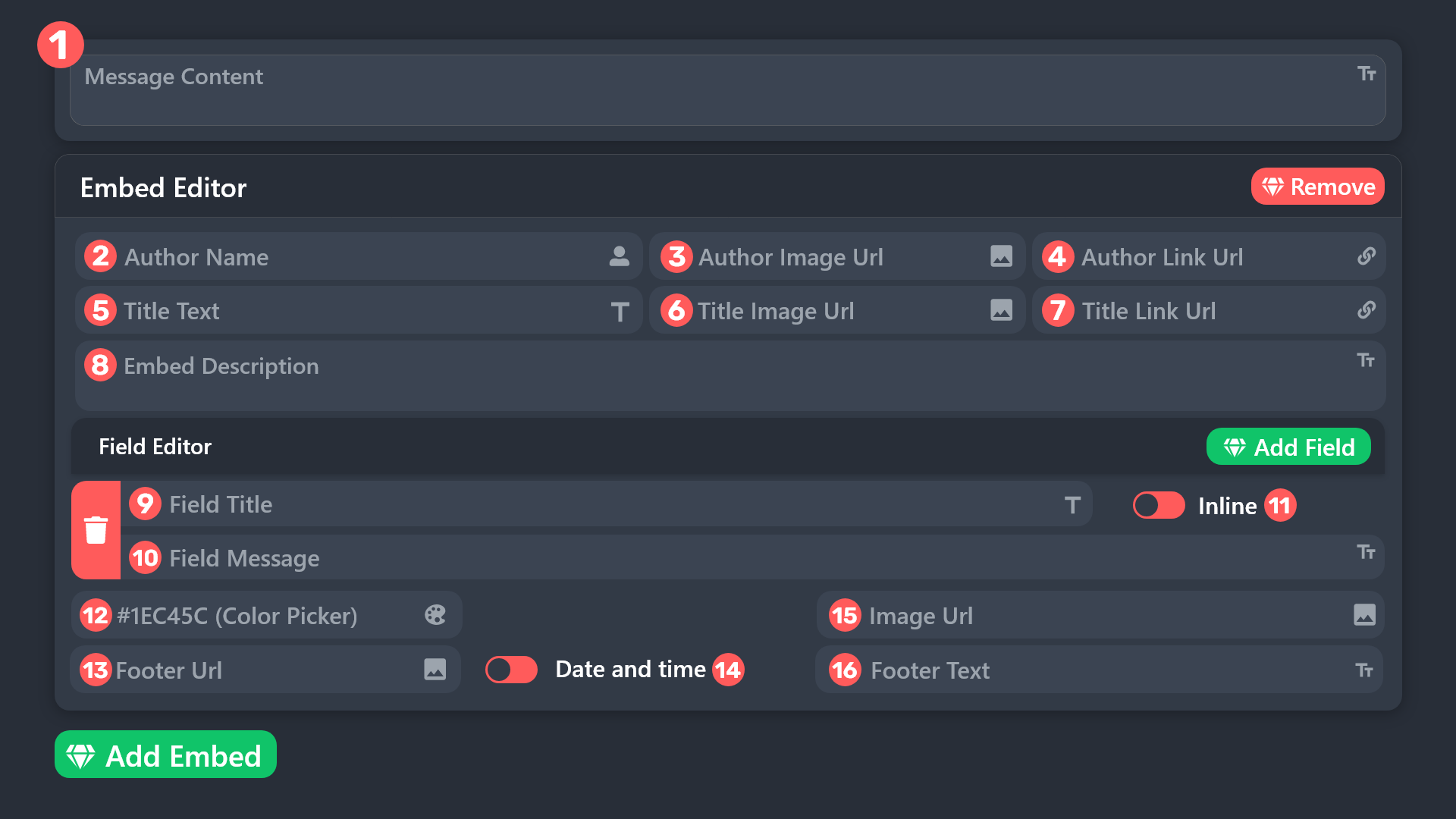
Panel config -> Ticket -> Edit Ticket Message -> Put into content field if you want it to ping
tough solar
scenic forum
<@1216808497065234582> refer to the embed above
like this
 humble sequoiaBOT
 scenic forum
tough solar
like this
scenic forum
tough solar
like this
It has to be put into field 1 (refer to embed above) for the ping to actually ping users with the role
tough solar
scenic forum
It has to be put into field 1 (refer to embed above) for the ping to actually pi...
i cant edit this why?
 scenic forum
tough solar
i cant edit this why?
scenic forum
tough solar
i cant edit this why?
You're trying to edit the panel message not the ticket message
humble sequoiaBOT
The Ticket Message is the first message sent by the bot on a new ticket. To customize it head over to your Dashboard ➞ Panel Configs ➞ Ticket ➞ Edit Ticket Message
 scenic forum
Refer to the embed above
tough solar
scenic forum
Refer to the embed above
still confused
 scenic forum
tough solar
still confused
scenic forum
tough solar
still confused
Put the role you want to ping into the Message Content field
tough solar
scenic forum
Put the role you want to ping into the ``Message Content`` field
i cant write in it
do i need perumium?
scenic forum
tough solar
i cant write in it
do i need perumium?
Youre still trying to edit the panel message
Please follow this path
Panel Configs ➞ Ticket ➞ Edit Ticket Message
 fervent rivet
Hi so I was trying to add a third panel to my server but I keep getting a error saying bot took too long to respond every time I send the /setup command is anyone else receiving this error? if so how should I fix it?
 marble perch
Good morning I am needing help with my tickets. When a user creates a ticket, I automatically assigns a role. I'm not sure how to fix this.
scenic forum
fervent rivet
Hi so I was trying to add a third panel to my server but I keep getting a error ...
Hey
Could you show me the error?
scenic forum
marble perch
Good morning I am needing help with my tickets. When a user creates a ticket, I ...
You want the bot to stop assigning the role?
marble perch
Yes I want my Ticket staff to be able to access it but I don't want it auto assinging roles. It did in fact assign the Ticket staff role to which ever user opened the ticket. @scenic forum
fervent rivet
scenic forum
Hey
Could you show me the error?
 scenic forum
marble perch
Yes I want my Ticket staff to be able to access it but I don't want it auto assi...
scenic forum
marble perch
Yes I want my Ticket staff to be able to access it but I don't want it auto assi...
To give your staff access to tickets
Panel Config -> General -> Support Team roles -> Add all roles you want to have access to tickets
To stop ticket tool giving roles
Panel config -> Ticket -> Remove roles in the field of the screenshot below
 scenic forum
fervent rivet
scenic forum
fervent rivet
Can you run /debug on your server?
fervent rivet
scenic forum
Can you run ``/debug`` on your server?
I got the same error running that command
marble perch
scenic forum
To give your staff access to tickets
Panel Config -> General -> Support Team rol...
Okay but will this remove it from the Ticket Staff also?
 scenic forum
fervent rivet
I got the same error running that command
scenic forum
fervent rivet
I got the same error running that command
Ticket tool is missing these permissions inside the channel
 scenic forum
marble perch
Okay but will this remove it from the Ticket Staff also?
scenic forum
marble perch
Okay but will this remove it from the Ticket Staff also?
These roles will ONLY be assigned/removed from the Ticket owner (The user opening the ticket)
marble perch
scenic forum
These roles will **ONLY** be assigned/removed from the Ticket owner (The user op...
Okay thank you!
iron nightBOT
Gave +1 Rep to @scenic forum (current: #23 - 334)
fervent rivet
scenic forum
Ticket tool is missing these permissions inside the channel
wait but then how did it set up the first 2 panels?
scenic forum
fervent rivet
wait but then how did it set up the first 2 panels?
You either ran the command in a different channel or the permissions of the bot and/or channel have been changed since then
fervent rivet
scenic forum
You either ran the command in a different channel or the permissions of the bot ...
I see what happened now I think I accedentally removed administrative
Thanks
 odd dirge
Hello, I have Ticket Tool Premium and since yesterday none of the bot buttons work.
odd dirge
odd dirge
Hello, I have Ticket Tool Premium and since yesterday none of the bot buttons wo...
the commands neither
scenic forum
odd dirge
Hello, I have Ticket Tool Premium and since yesterday none of the bot buttons wo...
Can you use /debug on your server?
 robust lake
Guys how can i fix this Noting is working
 scenic forum
robust lake
Guys how can i fix this Noting is working
scenic forum
robust lake
Guys how can i fix this Noting is working
Ticket tool is missing Send Message permission inside that channel
robust lake
scenic forum
Ticket tool is missing ``Send Message`` permission inside that channel
Oh LOL ty
iron nightBOT
Gave +1 Rep to @scenic forum (current: #23 - 335)
 dapper lily
I made a solo server, to experiment with the ticketing tool and did so fine. So then my other server with over 1.5k ppl in it, I've added the ticket tool to it but the server does not come up on the dashboard?
Does the free edition only allow 1 server?
scenic forum
dapper lily
I made a solo server, to experiment with the ticketing tool and did so fine. So ...
You need either Administrator or a dashboard role set by an Administrator to have access to the dashboard
humble sequoiaBOT
Any role you put there will have full access to the ticket tool dashboard. The server owner and users with admin permissions already have access to the dashboard.
Be careful of which roles to put here
 dapper lily
I have Administator in the server?
scenic forum
dapper lily
I have Administator in the server?
Can you type /debug on that server?
dapper lily
scenic forum
Can you type ``/debug`` on that server?
Yes
scenic forum
dapper lily
Yes
You dont have the Administrator permission on that server
scenic forum
dapper lily
You mean like Admin rank?
The permission Administrator inside the role permissions
dapper lily
I do, I've added several other bots just fine
scenic forum
dapper lily
I do, I've added several other bots just fine
Could you please show me your role having the Administrator permission?
Addings bots to server requires Manage Server
dapper lily
scenic forum
Could you please show me your role having the ``Administrator`` permission?
I did it, just had to relog for the dashboard.
One question though, if I've set up the bot on another server, can I sync it other automatically to another?
humble sequoiaBOT
The Backup and Restore feature allows you to transfer your panels, tags, and all settings to a new server, even if the server the settings were created has been deleted! You will want to copy the whole key.
First, go to your server's Dashboard ➞ then Server Configs ➞ under Config Backup & Restore (Server Owner Only) click on Old version can be found here and generate a new backup key by pressing the green button. Now, a key should be generated in the box above. You may need to refresh the page to see this.
Once you have your backup key, navigate to the same page on the new server. Copy the key on the Restore from backup key field.
Now you can choose what you want to copy. Finally, press the green Restore Configs button.
IMPORTANT NOTE
- We suggest you keep this backup key somewhere safe, in case your server is deleted so you are able to recover your panel's settings.
- This feature is only usable by the server's owner
$backup
scenic forum
dapper lily
One question though, if I've set up the bot on another server, can I sync it oth...
refer to the embed above, this is the closest to syncing servers that is possible
 quartz lava
Question about limits... Is there any way to limit a user from making tickets in a day or a week? Say we have an obsessive ticket creator and we want to limit them to how many tickets they can create in a week.
harsh epoch
quartz lava
Question about limits... Is there any way to limit a user from making tickets in...
Cooldowns aren't possible however you can limit how many tickets someone has open at once
Panel
Panel config -> Limits -> Open tickets all users
Globally
Server Config -> Global open ticket limit
harsh epoch
harsh epoch
Cooldowns aren't possible however you can limit how many tickets someone has ope...
Another thing you could do is make a blacklist role and temporarily give that person that role.
You can set the blacklist roles under server configs -> blacklist roles
 sweet cave
Why does the ticket not allow my admins to see it but it does allow mods
Very strange
harsh epoch
sweet cave
Why does the ticket not allow my admins to see it but it does allow mods
Can you check that theyre listed as a support team role please?
sweet cave
harsh epoch
Can you check that theyre listed as a support team role please?
Yeah I found that after I wrote it, they wasn't so I'm guessing it should show now. Thanks 🙂
iron nightBOT
Gave +1 Rep to @harsh epoch (current: #47 - 68)
harsh epoch
sweet cave
Yeah I found that after I wrote it, they wasn't so I'm guessing it should show n...
They'll be able to see new tickets now theyre listed
 jovial hare
Hello, this may be a dumb question but the ticket bot only works in 1 channel how do I change that ?
scenic forum
jovial hare
Hello, this may be a dumb question but the ticket bot only works in 1 channel ho...
Can you run /debug inside the channel the bot doesnt work in
jovial hare
scenic forum
Can you run ``/debug`` inside the channel the bot doesnt work in
It said than the application did not respond
scenic forum
jovial hare
It said than the application did not respond
The bot is missing the Send Message permission inside that channel
jovial hare
scenic forum
The bot is missing the ``Send Message`` permission inside that channel
Oh shoot my dumbass forgot to add perm to the bot
Thx !
 crude acorn
I am leaving a company whose Discord server I have managed. What steps do I need to take to transfer control of TT to another person?
 covert swallow
Assuming you have no subscriptions, you just need to ensure that they have the Adminsitrator permission in the Discord server, or a dashboard role
 cosmic night
license key order jk king ds4
fervent rivet
question is there a way to open tickets anonymously?
harsh epoch
fervent rivet
question is there a way to open tickets anonymously?
Not fully anonymously as you'll still be seen in the channel permissions and at the top of a channel showing who has access. As well as in logs, transcripts and the member list
Although, by default, ticket tool doesn't automatically mention the ticket opener but that's about as close as you'll get
 zealous yoke
can someone tell me why when i delete a ticket it creates a new one called closed
covert swallow
fervent rivet
question is there a way to open tickets anonymously?
If you want a really hacky solution you could make a custom command in a different bot, the user inputs why they want the ticket opened into that command, and then that second bot triggers the $new command, and appends the reason onto the command so its outputted as $new {reason} and then a ticket can be opened by that bot, but there isnt any way for the initial user to see what is said.
covert swallow
zealous yoke
can someone tell me why when i delete a ticket it creates a new one called close...
A new ticket most likely is not created, the ticket was most likely just renamed to closed because you have 2 step ticket enabled
zealous yoke
covert swallow
A new ticket most likely is not created, the ticket was most likely just renamed...
no, it deletes the ticket channel, then creates a new one called closed
then i have to delete it manually
covert swallow
Whats your server name or ID?
zealous yoke
zealous yoke
covert swallow
Whats your server name or ID?
1376692515700473878
covert swallow
Tḥār ʾAllāḥ︱ثَار اللّٰ correct?
zealous yoke
covert swallow
Tḥār ʾAllāḥ︱ثَار اللّٰ correct?
yes
covert swallow
Could you check your server's audit logs to ensure Ticket Tool is opening the ticket?
zealous yoke
covert swallow
Could you check your server's audit logs to ensure Ticket Tool is opening the ti...
oh i did now, it’s another bot thank you
iron nightBOT
Gave +1 Rep to @covert swallow (current: #16 - 430)
 dapper thunder
I mights just be dumb but I’ve tried this for 20 times on 3 different internets and 2 different devices for it to just not work
 covert swallow
Make sure the bot has the ability to send and read messages in the channel
 midnight cove
yo how do i make so the ticket tool sends the conversation in theire dms
 worldly helm
midnight cove
yo how do i make so the ticket tool sends the conversation in theire dms
worldly helm
midnight cove
yo how do i make so the ticket tool sends the conversation in theire dms
Hello! 👋
Making the bot automatically send the transcript into the ticket owners DMs is a premium only feature.
You can manually use /transcript user though to send the transcript to the specified user.
midnight cove
worldly helm
Hello! 👋
Making the bot automatically send the transcript into the ticket owne...
thx
iron nightBOT
Gave +1 Rep to @worldly helm (current: #6 - 988)
worldly helm
You're very welcome!
midnight cove
worldly helm
You're very welcome! <:PabloTiphat:983791053842837624>
hey also smth i got the tickets V2 bot but it sends and transcript to the channel where u creat a ticket for everyone to see how do i make it so it dosent send the transcript for everyone to see
ur prob dont know how to fix this isse
harsh epoch
You'd be better off asking in their support server for issues with that bot
midnight cove
harsh epoch
You'd be better off asking in their support server for issues with that bot
alr
 dry maple
hey guys, so i set up a category for where tickets get stored in, it reached 50 channels capacity, can i somehow add extra categories that will store the 2nd, 3rd and so on batch of 50 tickets?
 bold quartz
harsh epoch
dry maple
hey guys, so i set up a category for where tickets get stored in, it reached 50 ...
bold quartz
harsh epoch
dry maple
hey guys, so i set up a category for where tickets get stored in, it reached 50 ...
You can select overflow categories by choosing more than one category when selecting where your tickets should be opened
dry maple
harsh epoch
You can select overflow categories by choosing more than one category when selec...
yep figured it out, thank you!
iron nightBOT
Gave +1 Rep to @harsh epoch (current: #47 - 69)
dry maple
is there a way to temporarily disable the ticket bot from accepting tickets
 inner moth
WHY DOES TICKET TOOL KEEP SAYING: "The application did not respond" TO EVERY COMMAND?!?!
hasty igloo
hi, i have a bot which mutes people when they send server links, but I have it set in my tickets where they can send links, expect the bot that I have doesn’t let people send server links, is there anyway to make the bot ignore the links in specific channels, i’m not sure if you guys also help with that
mighty thistle
dry maple
is there a way to temporarily disable the ticket bot from accepting tickets
Scheduling!
mighty thistle
inner moth
WHY DOES TICKET TOOL KEEP SAYING: "The application did not respond" TO EVERY COM...
Can Ticket Tool see the channel and send messages?
harsh epoch
hasty igloo
hi, i have a bot which mutes people when they send server links, but I have it s...
Check if there's an "Ignore category" or an "ignore channel" option in your moderation bot. Other than that, you're probably best off asking their support
inner moth
mighty thistle
Can Ticket Tool see the channel and send messages?
I GAVE IT EVERY SINGLE AUTHORIZATION
I think
hasty igloo
harsh epoch
Check if there's an "Ignore category" or an "ignore channel" option in your mode...
i see, i’ll try that; thanks
iron nightBOT
Gave +1 Rep to @harsh epoch (current: #47 - 70)

 soft wedge
what does this mean?, anytime me, or my members make a ticket this pops up and deletes their ticket.
 humble sequoiaBOT
This error indicates you have selected an invalid emoji, i.e. an emoji the bot isn't capable of using, in a button field
Which Emoji?
This depends upon which action the error is appearing, the most common cases are the Create Ticket button or one of your Dropdown emojis. You can visit your Button's List to find all available buttons and find the conflicting one by yourself.
Why doesn't the bot accept it as valid?
- You selected an emoji that doesn't exist anymore, i.e. that has been deleted
- You wrote text there, instead of an emoji (or in addition to an emoji)
- You entered a code for a custom emoji from a server that the bot is not a member of
- You entered a custom emoji code incorrectly
- You're on iPhone and entered an emoji using the phone's emoji pad (use the emoji selector in the website instead)
 harsh epoch
@soft wedge Refer to the embed above
 frail tree
everyone can see the ticket
i want only staff to see it
@oak fern @covert swallow @shut bolt
harsh epoch
frail tree
i want only staff to see it
Can you check these two things:
1.
check that the everyone role isn't listed as a support team role.
2.
Check permissions -> Everyone Role Permissions -> Edit Opened -> "View Channel ❌"
(If it's happening for closed tickets, follow the same process but check "Edit Closed")
frail tree
harsh epoch
Can you check these two things:
**1.**
check that the everyone role isn't liste...
how do i do 2?

this is 1
harsh epoch
frail tree
how do i do 2?
On the dashboard, press "Permissions" (Img 1) -> Everyone Role Permissions (Img 2), and then check that the View Channel permission is disabled (Img 3)


 iron nightBOT
Gave +1 Rep to @harsh epoch (current: #47 - 71)
frail tree
how do i do that rep ting in my server i need it
harsh epoch
It's done through a bot called YAGPDP, if you want more information on it, you can either read their docs or ask in their server. But as it's not a ticket tool related thing we can't help in this channel
 harsh epoch
frail tree
<@1124651666650693774>
harsh epoch
frail tree
<@1124651666650693774>
Please avoid pinging me for support.
On the panel with the issue, check that regular users have permission to use the button.
Go to: Buttons -> Create ticket - Edit Button -> "
Support Team Only"
frail tree
harsh epoch
Please avoid pinging me for support.
On the panel with the issue, check that re...
Sorry
 opal elm
@covert swallow
Does any1 know how to make it that whenever the ticket opens it pings the ticket role
humble sequoiaBOT
Within all the messages the bot sends (both embeds and text) you can mention either channels, roles, or even users, these mentions will only send a notification to the user if they are used within a text field, e.g: a role mentioned in an embed won't ping at all the users who have that role.
For mentioning a role you can use one out of three options:
{@Role Name} ➞ Which is Case Sensitive.
{RoleID} ➞ Replace RoleId with the Id of the role you are trying to ping.
<@&RoleID> ➞ Discord's native syntax to ping roles.
<#ChannelID> ➞ Mention a channel by its ID.
<@UserID> ➞ Mention a user by its ID.
scenic forum
@opal elm refer to the embed above
opal elm
kk
opal elm
scenic forum
<@1138947348601507840> refer to the embed above
ion understand
where do i place all of this?
humble sequoiaBOT
The Ticket Message is the first message sent by the bot on a new ticket. To customize it head over to your Dashboard ➞ Panel Configs ➞ Ticket ➞ Edit Ticket Message
scenic forum
opal elm
where do i place all of this?
Refer to the embed above
 upper sonnet
whats the permission level needed for the escalate command?
harsh epoch
upper sonnet
whats the permission level needed for the escalate command?
by default it's set so that your support team can use it
 calm kayak
Meredian
humble sequoiaBOT
@calm kayak
Você está no lugar errado
Fornecemos suporte para Ticket Tool Discord bot e não podemos ajudá-lo com qualquer problema que você tenha.
- Não sabemos qual equipe de suporte você deve entrar em contato para resolver esse problema e, infelizmente, não poderemos informar com precisão.
Se você não tiver mais dúvidas sobre nossa ferramenta de ticket de bot, feche este ticket
calm kayak
Grato,abraços
 vestal crane
legit no commands work
 harsh epoch
vestal crane
legit no commands work
harsh epoch
vestal crane
legit no commands work
Hey! Can you make sure ticket tool has the View Channels, Send messages and Embed Links permissions in that channel?
 open cloud
So im a admin for a discord server and have a admin role with administarator on but i cant do anything like set it up The owner doesnt know much about discord hense why im setting it up is there a way to fix this?
 long yarrow
Help
mighty thistle
open cloud
So im a admin for a discord server and have a admin role with administarator on ...
What exactly can you not do?
open cloud
mighty thistle
What exactly can you not do?
Access dashboard
humble sequoiaBOT
@long yarrow, we would love to help you, but if you don't tell us what you need help with we can't help you :(
mighty thistle
open cloud
Access dashboard
When you attempt to access a server through the dashboard, the server is not present?
open cloud
mighty thistle
When you attempt to access a server through the dashboard, the server is not pre...
yes
mighty thistle
I would start by refreshing your server list, just in case!
open cloud
Does smth need to be in dashboard by the owner so i can see it?
Like they need to set it up
mighty thistle
Well no, but is Ticket Tool in your server?
stark runeBOT
1. Invite Ticket Tool to your server
First you will want to invite the bot to your server. Once the bot is in your server, you can manage your server in the dashboard.
2. Create a Panel
To create a panel we are going to need to head over to the panel configs on the dashboard.
Once at the dashboard we will need to click Create Panel.
Enter a panel name (Fill in any optional settings you want).
Click Create Panel and your ready to get started with configuring your panel.
An example of a creating a panel is shown below.
3. Send the Panel to a Channel
Once you've created a panel on the dashboard you will need to send it to a channel using send on the dashboard.
Select the channel you want your panel to be created in and click send.
For other questions checkout $help faq.
An example of a sending a panel is shown below.
Having a Problem Sending the Panel?
Do $debug in a channel with Ticket Tool and make sure it has all the necessary Discord permissions.
 south wadi
Is ticket tool down right now?
mighty thistle
No, it shouldn't be.
open cloud
mighty thistle
Well no, but is Ticket Tool in your server?
Yes
I have an admin role with adminitrative perms
Wait...
Iv relised...
south wadi
mighty thistle
No, it shouldn't be.
Hmm weird im constantly getting application didn't respond and so is my buddy
mighty thistle
Your permissions for that channel may be off. I would #🎫│make-a-ticket so the support team can diagnose it for you!
iron nightBOT
Gave +1 Rep to @mighty thistle (current: #52 - 60)
south wadi
There we go
mighty thistle

open cloud
@mighty thistle Whys the channel staying after I deleted a ticket
mighty thistle
Remember not to mention staff! #📂│information
open cloud
mighty thistle
Remember not to mention staff! <#509239005481664524>
My bad
mighty thistle
open cloud
<@364410223663906826> Whys the channel staying after I deleted a ticket
Does Ticket Tool have the ability to delete channels? I believe that's the only reason.
open cloud
mighty thistle
Does Ticket Tool have the ability to delete channels? I believe that's the only ...
Ah probs not should i just make a bot role with admin perms ?
mighty thistle
You do not have to give Ticket Tool admin.
open cloud
That didnt work..
mighty thistle
I do not recall the list of permissions that Ticket Tool must have, off the top of my head.
 leaden temple
Is there a way to view the ticket transcript just by the 15 digit ID? Example: 000000000000000
open cloud
FIXED IT!! I had storage on
Now it shows replying to my set up msg is there a way to remove that
leaden temple
leaden temple
Is there a way to view the ticket transcript just by the 15 digit ID? Example: 0...
Let me know if this can be answered here or inside of #🎫│make-a-ticket
 elder yew
Hey I want to see my old tickets from ticket tool, but as I can see it's only showing past 7 days of ticket without premium. But I just turned on a free premium trial but I'm still unable to see my past tickets... can someone help
Ok I refreshed and it worked but I can't see old tickets still. I wasn't using claiming feature on tickets
How can I see my old tickets 🫠

 remote cypress
Hey guys, I don't know or I'm in a right place but lets see 😀
I have 2 issues.
- I can't withdraw sol from Sanji app, it shows that wallet doesn't exist on the blockchain
- I can't join discord server, because discord can't verify my phone number
Please help, or give me some links where to find help 🙄👍
scenic forum
remote cypress
Hey guys, I don't know or I'm in a right place but lets see 😀
I have 2 issues....
Hey
We only provide support to the ticket tool discord bot and can't help you with your issue neither.
For your second inquiry you need to write a ticket to discord themself
scenic forum
elder yew
Not sure what exactly the limits on the statistic are
Please #🎫│make-a-ticket to receive a staff members help
scenic forum
leaden temple
Is there a way to view the ticket transcript just by the 15 digit ID? Example: 0...
Are you talking about the user ID?
 severe flicker
Hi, this is the Mmonster website group?
scenic forum
severe flicker
Hi, this is the Mmonster website group?
Hi
No, this is the support server for the discord bot Ticket Tool
severe flicker
Ok, sorry
 amber gust
scenic forum
Just to confirm, the bot worked before and now stopped responding/working?
If ye...
amber gust
scenic forum
Just to confirm, the bot worked before and now stopped responding/working?
If ye...
The bot stopped working this is the server ID "799581681957732383"
scenic forum
amber gust
The bot stopped working this is the server ID "799581681957732383"
Can you use /debug on your server
 crude plover
The people Which create a ticket cant see them
harsh epoch
crude plover
The people Which create a ticket cant see them
Could you check that the ticket owner is being given permission to view the channel
Dashboard -> Permission -> Ticket Owner permissions -> Edit Opened -> View Channel ✅
harsh epoch
Glad its fixed
leaden temple
scenic forum
Are you talking about the user ID?
This server I am, they have your bot, and they give past orders with "ticket ID". Just not tryna get scammed by them
Example of what they show.
 humble sequoiaBOT
First you will want to invite the bot to your server. Once the bot is in your server, you can manage your server in the dashboard.
To create a panel we are going to need to head over to the Panel Configs Tab on the Dashboard.
Once at the dashboard we will need to click Create Panel.
Enter a panel name (Fill in any optional settings you want).
Click Create Panel and you are ready to get started with configuring your panel.
An example of a creating a panel is shown below.
Once the panel has been created, use the blue Send button and select the channel you want the panel to be sent to.
The Panel wasn't send
Use the </debug:1029783024264564765> command to diagnose possible permission issues with the bot.
harsh epoch
@leaden epoch Refer to the embed above
 leaden epoch
I don't have select server
harsh epoch
leaden epoch
I don't have select server
If you can't add the bot to your server, you're missing the permission Manage Server
You'll need that to add the bot
scenic forum
leaden temple
This server I am, they have your bot, and they give past orders with "ticket ID"...
We cannot assist you with ticket matters outside of this server.
 hardy sequoia
leaden epoch
hardy sequoia
leaden epoch
What bot
harsh epoch
leaden epoch
What bot
This one. Ticket tool
If you can't add it to your server, then most likely you're missing the permission to add bots
 gray isle
im having an issue the bot says "You Don't have permission to use this" tho the role has has permission
 harsh epoch
gray isle
im having an issue the bot says "You Don't have permission to use this" tho the ...
harsh epoch
gray isle
im having an issue the bot says "You Don't have permission to use this" tho the ...
Hey! Are you staff in the server with the issue?
harsh epoch
gray isle
yes
If you want to enable everyone to create a ticket using that button you'll need to go to the panel with the issue -> Buttons -> Edit Create ticket button and turn "Support team only" off.
If it's already off, make sure your allowed roles, and disabled roles are configured correctly
iron nightBOT
Gave +1 Rep to @harsh epoch (current: #46 - 72)
 tacit umbra
guys how ca i add this details to my own server
 humble sequoiaBOT
A Discord Form lets the user answer individual questions in a pop-up Form, which then displays the answers in the ticket message. This can save time if you already know what you want to ask the user.
Setup Forms
Forms can be enabled under Panel Settings > Form Options > Edit Forms Options. In the new pop-up window, you can now enable and edit your own Form.
Form Options
You can add up to 5 questions in the Discord form. This is a Discord limitation. Each question can have a placeholder in the input field, a minimum and maximum input, multi-line, and also the option to have the answer required.
Options
Question Title ➞ Your Question goes here
Question Placeholder ➞ The placeholder text in the input field
Required ➞ If enabled, the user has to answer this question, to submit the form
Multi-Line Input ➞ Allows the user to input multiple lines
Minimum and Maximum Input ➞ Set a minimum and maximum input value for the user
Displaying the Answer
To display the answers from the user, you need to enable Auto display form results on the ticket message as an additional embed
If you don't want a second embed, go into your Panel Configs > Ticket Options > Edit Ticket Message. You use the variable {create.form.x} and replace x with the number of your question. For example, the response to Question 5 can be displayed with {create.form.5}.
harsh epoch
@tacit umbra
tacit umbra
ty
amber gust
scenic forum
Can you use ``/debug`` on your server
It was working fine, 12 days ago it got bugged

I had the premium version what should i do now?
amber gust
?
scenic forum
amber gust
I had the premium version what should i do now?
Is ticket tool Premium still active?
amber gust
scenic forum
Is ticket tool Premium still active?
How to check this?
scenic forum
amber gust
How to check this?
Access your servers dashboard and check what the premium field is saying
Either active or free
amber gust
scenic forum
Access your servers dashboard and check what the ``premium`` field is saying
Eit...
Can you send me a link if possible? it was auto paying the whole time i had it for 2 years...
scenic forum
amber gust
Can you send me a link if possible? it was auto paying the whole time i had it f...
Was it being auto paid by you or another member?
Refer to the link below
humble sequoiaBOT

Ticket Tool - Ticketing without clutter - The #1 Discord support bot
 mild yoke
Hello does someone know why i cant add tickettool to my discord being server owner?

@upper flower
@harsh epoch
scenic forum
mild yoke
Hello does someone know why i cant add tickettool to my discord being server own...
Please refrain from pinging members for help
Did you invite the bot to your server?
mild yoke
scenic forum
Please refrain from pinging members for help
i need help but cant open ticket on the discord
scenic forum
mild yoke
i need help but cant open ticket on the discord
Nontheless you shouldnt ping anyone and remain patient
mild yoke
scenic forum
Did you invite the bot to your server?
yea and i invite it but it dont appear in it
scenic forum
mild yoke
yea and i invite it but it dont appear in it
Can you run /debug on your server?
mild yoke
 mild yoke
scenic forum
Can you try using the ``/botswitcher`` command and select ticket tool white
mild yoke
scenic forum
Can you try using the ``/botswitcher`` command and select ticket tool white
Thanks bro you fixed it
iron nightBOT
Gave +1 Rep to @scenic forum (current: #23 - 337)
mild yoke
why that happend btw never happend to me
scenic forum
mild yoke
why that happend btw never happend to me
Was this the first time Ticket Tool was on the server?
mild yoke
scenic forum
Was this the first time Ticket Tool was on the server?
nope its was long ago
scenic forum
mild yoke
nope its was long ago
Back then you had premium and/or a premium trial and activated ticket tool gold (The premiumbot)
Since you invited the white bot Ticket tool doesnt recognize being on your server as the selected bot aka Ticket Tool gold wasnt on it
mild yoke
when i chosed /botswitcher its shows that were ticket tool gold
scenic forum
Because it was selected the last time you used ticket tool
 upper patrol
Good Afternoon Peeps. Who do I have to talk to about my invite for ConcreteRP
humble sequoiaBOT
@upper patrol
⚠️ You're in the wrong place
We provide support for Ticket Tool Discord bot and cannot help you with whatever issue you have.
- We don't know which Support Team you should contact to get this issue resolved, and unfortunately we won't be able to accurately tell you.
If you don't have any further questions regarding our bot Ticket Tool, please close this ticket
 sand panther
G-create
jade topaz
Hiya,
Really weird issue were all commands I run are going (see pic). Have kicked and re-invited three times.
I can access the dashboard but it doesnt recognise the server im in. Am I being truely thick?

I feel like its a similar issue to the one above but /botswitcher command is running into the same issue
scenic forum
jade topaz
Hiya,
Really weird issue were all commands I run are going (see pic). Have kick...
Can you use /debug on your server?
 uhhhhh gonna pretend that didnt fix it first try
iron nightBOT
uhhhhh gonna pretend that didnt fix it first try
iron nightBOT
Gave +1 Rep to @scenic forum (current: #23 - 338)
jade topaz
There you go 😄
 hidden bane
scenic forum
Can you use ``/debug`` on your server?
hidden bane
scenic forum
Can you use ``/debug`` on your server?
what happens if I use /debug and it still does the same thing?
 scenic forum
hidden bane
what happens if I use /debug and it still does the same thing?
scenic forum
hidden bane
what happens if I use /debug and it still does the same thing?
Then im able to tell you whats wrong in many cases
THe bot is missing these permissions inside the channel
 hidden bane
scenic forum
Then im able to tell you whats wrong in many cases
THe bot is missing these perm...
hidden bane
scenic forum
Then im able to tell you whats wrong in many cases
THe bot is missing these perm...
thanks
iron nightBOT
Gave +1 Rep to @scenic forum (current: #23 - 339)
 young valley
I can't send the ticket in the room that I want. Every time I try to send it, it says error.
harsh epoch
young valley
I can't send the ticket in the room that I want. Every time I try to send it, it...
Hey!
What was the error you were getting?
humble sequoiaBOT
User's issue has been solved in another channel.
 scenic forum
 signal tendon
Hey guys
signal tendon
Hey guys
This is the support channel
Please use #💬│general-chat if you want to chat
signal tendon
Omg I keep forgetting so that’s why no one is replying
 bitter mason
harsh epoch
bitter mason
harsh epoch
you can use #🎫│make-a-ticket
signal tendon
Hey guys how y’all day today
scenic forum
signal tendon
Hey guys how y’all day today
This is still the support channel
Please use #💬│general-chat if you want to chat
humble sequoiaBOT
⚠️ You're in the wrong place
We provide support for Ticket Tool Discord bot and cannot help you with whatever issue you have.
- We don't know which Support Team you should contact to get this issue resolved, and unfortunately we won't be able to accurately tell you.
If you don't have any further questions regarding our bot Ticket Tool, please close this ticket
 oblique crest
Is the bot bugging?
scenic forum
oblique crest
Is the bot bugging?
Issue with the premium bot is currently being investigated
oblique crest
Can't use commands, claim or close tickets in a server I'm an admin in.
oblique crest
scenic forum
Issue with the premium bot is currently being investigated
Ah, okay.
 restive condor
oblique crest
Ah, okay.
restive condor
oblique crest
Ah, okay.
There shouldn't be any issues at the moment. Can i get your server id please?
oblique crest
restive condor
There shouldn't be any issues at the moment. Can i get your server id please?
944407542249951234
restive condor
oblique crest
944407542249951234
Can you re-try now please
oblique crest
restive condor
Can you re-try now please
Things up and running now, what was the issue?
restive condor
oblique crest
Things up and running now, what was the issue?
Just a little hiccup with your server's shard for a few seconds
 stiff perch
Is the bot not ringing?
 scenic plinth
No, it is not a cellular device.
 vital kiln
Hi guys, I wanted to know if there is any way to configure the bot to automatically mark a position in a channel.
@covert swallow
scenic forum
vital kiln
<@129308185629687809>
Please do not ping the staff team and be patient
Someone will assist you once they have time alternatively you can #🎫│make-a-ticket to receive a staff members help
harsh epoch
vital kiln
Hi guys, I wanted to know if there is any way to configure the bot to automatica...
it depends what you mean by wanting to mark a position. If you're just looking to save a place you can pin that message, or use ticket tools custom commands to send a message with a link of the target message you wanted to save?
But if you wanted something more custom or more functionality it would probably be better looking into another bot created for that purpose
 wheat hornet

 rancid dust
Anyone know why this isn't pinging? In ticket message its {@ rolename} and {role id} And its only for these 2 specific type of tickets

Bot has admin and should have the right perms, nothing on debugging
rancid dust
lunar solar
You need to close the role id with >
the thing is in the dashboard its set up like {roleid}
 lunar solar
rancid dust
the thing is in the dashboard its set up like {roleid}
lunar solar
rancid dust
the thing is in the dashboard its set up like {roleid}
yeah but how does it look in an actual ticket not in preview?
rancid dust
lunar solar
yeah but how does it look in an actual ticket not in preview?
looked like this

 rancid dust
rancid dust
rancid dust
The id is for the {@mods} role i'm pretty sure, but I also tried putting the ID as {roleid} in the ticket nessage and it only worked once before looking like the image again and not pinging people
lunar solar
rancid dust
The id is for the {@mods} role i'm pretty sure, but I also tried putting the ID ...
Please #🎫│make-a-ticket and we can continue there
jade topaz
Hello, I just have a question. I’ve searched the web to see if I could find an answer but I could not. Here’s the question: How do I turn off the option for others to close tickets if they aren’t part of my staff team?
worldly helm
jade topaz
Hello, I just have a question. I’ve searched the web to see if I could find an a...
Hello!
Please #🎫│make-a-ticket, we will assist you there
 grizzled harbor
I added the bot to my server, however when I use any command it just says the application isn't responding. What should I do?
 scenic forum
grizzled harbor
I added the bot to my server, however when I use any command it just says the ap...
scenic forum
grizzled harbor
I added the bot to my server, however when I use any command it just says the ap...
The bot is missing the following permissions inside the channel
 grizzled harbor
scenic forum
The bot is missing the following permissions inside the channel
grizzled harbor
scenic forum
The bot is missing the following permissions inside the channel
Okay thank you so much!
 mint glen
How do i make more tickets on the dropdown menu in a panel? i can only make 1 ticket in a dropdown panel and then send it, but i want it all together

Like this
humble sequoiaBOT
The Drop-down menu or Select Menu replaces the buttons on your panel message and uses a drop-down menu with all of your panels. To set this up, go to your Panel Configs and select your main Panel.
<:Numbericons1:1018864164032225340> Enable Select Style
First you enable Select Style. Then you add an item in the Dropdown Editor. Now you can start editing your dropdown!
<:Numbericons2:1018864168041971712> Dropdown Editor
Each line in the dropdown editor represents a line in the drop down menu on discord. You can add more "Items", by clicking on 

First you select a panel. That's the panel this option will open a ticket for.  DONT select the same panel twice. Each option should have a different Panel
After that, you can put a Display. This is the title of this option and will appear in the drop down menu. The *Description can be set right after that, which will be below the title in grey.
Additionally you can select an emoji, that will be shown in front of each option. You can either manually input the ID of an emoji or select it in the selector.
Common Issues ⚠️
- Panel doesn't send? Make sure you have a valid emoji selected
- Option doesn't show up? Check if two options have the same panel in the DropDown Editor

$dropdown
mint glen
It ask me to select a different panel for each drop down, so it doesnt send them all in one panel when i press send
lunar solar
mint glen
It ask me to select a different panel for each drop down, so it doesnt send them...
Say you want 5 dropdown options, you need 5 different panels therefore you need to make the remaining 4.
Once you’ve done that navigate back to the first panel and edit the dropdown menu to include those 4 panels.
mint glen
lunar solar
Say you want 5 dropdown options, you need 5 different panels therefore you need ...
Where do i edit the dropdown menu?
lunar solar
mint glen
Where do i edit the dropdown menu?
Dashboard —> Panel Configs —> Select panel 1 in the dropdown —> Dropdown Style —> Edit to your liking
 opal ivy
Hi, is it possible to have the ticket auto rename to the moderators name once they claim it?
lunar solar
opal ivy
Hi, is it possible to have the ticket auto rename to the moderators name once th...
Yes,
Panel Configs --> Claiming -->  Enable claim name --> {author.name} or {author.nickname} whichever you prefer
opal ivy
thank you!!
 shell gulch
Hey, is it possible that when i close the ticket and give a reason, that reason will be sent to the user (Via dms) who created the ticket
lunar solar
shell gulch
Hey, is it possible that when i close the ticket and give a reason, that reason ...
Yes,
Dashboard --> Panel Configs --> Automation --> Send Direct Message when ticket closed --> Edit Closed DM --> Add {close.reason} to either the message content section or description of the embed.
 Please note this is a premium feature
shell gulch
lunar solar
Yes,
Dashboard --> Panel Configs --> Automation --> <:Switch_enabled:1041734627...
Alright thanks
iron nightBOT
Gave +1 Rep to @lunar solar (current: #15 - 456)
 gusty cape
Hey guys,
After someone makes a ticket in my server, they have to type in a reason for the ticket and their player-id, where do i find what they wrote in the ticket creation menu
 waxen creek
How can I make it so that it automatically pings a role when a ticket is created?
humble sequoiaBOT
━━ BADER_OP's inquiry has been moved to a ticket ━━
 stuck drift
Help me is not let me combine I have Full Frangmet x80 and mental bag x50 Frangmet? How to combine it??
 humble sequoiaBOT
@stuck drift
⚠️ You're in the wrong place
We provide support for Ticket Tool Discord bot and cannot help you with whatever issue you have.
- We don't know which Support Team you should contact to get this issue resolved, and unfortunately we won't be able to accurately tell you.
If you don't have any further questions regarding our bot Ticket Tool, please close this ticket
mint glen
lunar solar
Dashboard —> Panel Configs —> Select panel 1 in the dropdown —> Dropdown Style —...
Yes i already did bro, but when i need to send the tickets it sends them 1 each because its different in the dropdown menu
scenic forum
mint glen
Yes i already did bro, but when i need to send the tickets it sends them 1 each ...
Can you show a screenshot of your dropdown menu
mint glen
scenic forum
Can you show a screenshot of your dropdown menu
I fixed it, i was supposed to set them all together in another category
gusty cape
Hey guys,
After someone makes a ticket in my server, they have to type in some information to make helping them faster, where do i find what they wrote in the ticket creation menu
worldly helm
gusty cape
Hey guys,
After someone makes a ticket in my server, they have to type in some ...
Hello 
If you're talking about the pop up form you can either enable Auto display form results on the Ticket Message as an additional embed. on your dashboard -> Panel Configs -> Forms
Or you can use {create.form.x} in your ticket message. Replace the x with the number of the answer you want to get.
 brave idol
How do I add it to my server
humble sequoiaBOT
Ticket Tool Invite & Support
lunar solar
brave idol
How do I add it to my server
^
 humble sequoiaBOT
@shrewd quartz
⚠️ You're in the wrong place
We provide support for Ticket Tool Discord bot and cannot help you with whatever issue you have.
- We don't know which Support Team you should contact to get this issue resolved, and unfortunately we won't be able to accurately tell you.
If you don't have any further questions regarding our bot Ticket Tool, please close this ticket
jade topaz
Hey how i alwayys get the white ticket when i add the gold one
humble sequoiaBOT
The first thing you will need to do is invite the premium bot, an invite can be found here
Once the bot is in your server we will head to the dashboard and manage your server. When you are managing your server, you want to head into "Server Configs" then click the drop down menu under "Select the bot you would like to use on this server" then click "Ticket Tool#6207" and then save.
 scenic forum
@jade topaz refer to the embed above to invite Ticket tool gold
jade topaz
scenic forum
<@456226577798135808> refer to the embed above to invite Ticket tool gold
Does it need money sir
scenic forum
jade topaz
Does it need money sir
To use ticket tool gold your server needs an active premium subscription
jade topaz
scenic forum
To use ticket tool gold your server needs an active premium subscription
oh sorry
Gift me
scenic forum
jade topaz
Gift me
If you want to have ticket tool Premium youd need to purchase it
humble sequoiaBOT
You can purchase Ticket Tool Premium here! Buying it on our website allows you to have full control over your subscription:
 Cancel your subscription at any time
Change your billing interval (yearly/monthly)
Change your payment method
Add or remove server slots to your subscription
 Transfer the subscription between servers
Note: This level of control is only available when purchasing the subscription from our website.
You can manage your current subscriptions here, any billing questions or concerns, feel free to create a Billing Ticket via #🎫│make-a-ticket

 wild sand
guys how do i set where do tickets spawn im pretty sure there used to be a place to set where tickets can spawn
harsh epoch
$help
humble sequoiaBOT
harsh epoch
$help
1. Open your Panel Configs tab in the server's dashboard
2. Select the panel you want to grant access to
3. Open the Category options menu
4. Select the categories of your preference
5. Save changes
 harsh epoch
@wild sand Refer to the embed above
iron nightBOT
Gave +1 Rep to @harsh epoch (current: #46 - 73)
 pine umbra
Is there a way to make it so that when you escalate a ticket it pings the support team for the panel you escalated the ticket to? So if I escalate a general support ticket to appeal it pings the appeal team.
 frigid edge
harsh epoch
pine umbra
Is there a way to make it so that when you escalate a ticket it pings the suppor...
frigid edge
harsh epoch
pine umbra
Is there a way to make it so that when you escalate a ticket it pings the suppor...
Menu -> Escalate ->  Send ticket message
pine umbra
harsh epoch
Menu -> Escalate -> <:onswitch:836268404309753876> Send ticket message
Ok thanks
iron nightBOT
Gave +1 Rep to @harsh epoch (current: #45 - 74)
robust lake
Guys how can i fix this hè can chat in here
 harsh epoch
robust lake
Guys how can i fix this hè can chat in here
harsh epoch
robust lake
Guys how can i fix this hè can chat in here
Open the channel permissions and make sure that Ticket Tool has the Embed Links permission in that channel
robust lake
WDYM whit Embed Links
harsh epoch
robust lake
WDYM whit Embed Links
 robust lake
harsh epoch
robust lake
harsh epoch
Ty
iron nightBOT
Gave +1 Rep to @harsh epoch (current: #45 - 75)
 midnight hornet
guys can anyone help me how to put ticket tool into my dc server?
stark runeBOT
1. Invite Ticket Tool to your server
First you will want to invite the bot to your server. Once the bot is in your server, you can manage your server in the dashboard.
2. Create a Panel
To create a panel we are going to need to head over to the panel configs on the dashboard.
Once at the dashboard we will need to click Create Panel.
Enter a panel name (Fill in any optional settings you want).
Click Create Panel and your ready to get started with configuring your panel.
An example of a creating a panel is shown below.
3. Send the Panel to a Channel
Once you've created a panel on the dashboard you will need to send it to a channel using send on the dashboard.
Select the channel you want your panel to be created in and click send.
For other questions checkout $help faq.
An example of a sending a panel is shown below.
Having a Problem Sending the Panel?
Do $debug in a channel with Ticket Tool and make sure it has all the necessary Discord permissions.
scenic forum
@midnight hornet refer to the embed above
midnight hornet
ok
midnight cove
hey uhm my ticket description is to long is there like a way to bypass it or smth
i mean how to make a long follow up msg
scenic forum
midnight cove
hey uhm my ticket description is to long is there like a way to bypass it or smt...
Ticket tool Premium bypasses the character limitation up to discords maximum
midnight cove
scenic forum
Ticket tool Premium bypasses the character limitation up to discords maximum
dang
 winged pebble
||hello||
 gleaming notch
Hello, so I just got the bot onto a server where I have all the permissions
Now the problem is that on the webssite that server wont show
Can anyone help with that
scenic forum
gleaming notch
Hello, so I just got the bot onto a server where I have all the permissions
Now ...
Hey
Can you type /debug on your server
gleaming notch
Do you need the link that it sent?
scenic forum
gleaming notch
Do you need the link that it sent?
Nope!
It seems like you're not having the Administrator permission
gleaming notch
oh I see
I will contact the owner on that, thank you! ^^
scenic forum
gleaming notch
oh I see
I will contact the owner on that, thank you! ^^
Alternatively they can use a dashboard role if they don't want to give out admin. Refer to embed below
humble sequoiaBOT
Any role you put there will have full access to the ticket tool dashboard. The server owner and users with admin permissions already have access to the dashboard.
Be careful of which roles to put here
gleaming notch
alright thank you :)
scenic forum
 umbral cedar
@scenic forum how do i create a ticket system
scenic forum
umbral cedar
<@186523978729259009> how do i create a ticket system
Please do not ping for support but refer to embed below
stark runeBOT
1. Invite Ticket Tool to your server
First you will want to invite the bot to your server. Once the bot is in your server, you can manage your server in the dashboard.
2. Create a Panel
To create a panel we are going to need to head over to the panel configs on the dashboard.
Once at the dashboard we will need to click Create Panel.
Enter a panel name (Fill in any optional settings you want).
Click Create Panel and your ready to get started with configuring your panel.
An example of a creating a panel is shown below.
3. Send the Panel to a Channel
Once you've created a panel on the dashboard you will need to send it to a channel using send on the dashboard.
Select the channel you want your panel to be created in and click send.
For other questions checkout $help faq.
An example of a sending a panel is shown below.
Having a Problem Sending the Panel?
Do $debug in a channel with Ticket Tool and make sure it has all the necessary Discord permissions.
 devout pelican
I would like to add an automatic text about something to the ticket when someone opens a ticket.
harsh epoch
devout pelican
I would like to add an automatic text about something to the ticket when someone...
Hey! You can edit the message sent when someone opens a ticket by going to Panel -> Messages -> Edit ticket message
devout pelican
harsh epoch
Hey! You can edit the message sent when someone opens a ticket by going to Panel...
No
harsh epoch
devout pelican
No
hm?
harsh epoch
devout pelican
The text I want to put is a little long
you could try using the message content rather than the embed? To bypass the limits for emebds, you'd need a premium subscription though
Nevermind, the limit is on both.
harsh epoch
If it exceeds 250 characters then there's no way to directly add it to the ticket message. You could use a custom command maybe?or if you've got another bot configure it to send when a channel in that category is created
 fringe jetty
Hi my member can't not open the ticket
 arctic rock
yo, how do I make a different ticket message whenever someone opens a ticket that's depending on which category of ticket he opened?
devout pelican
harsh epoch
If it exceeds 250 characters then there's no way to directly add it to the ticke...
Like wqhat bot
covert swallow
arctic rock
yo, how do I make a different ticket message whenever someone opens a ticket tha...
Each panel has a different ticket message you can edit
harsh epoch
devout pelican
Like wqhat bot
My go to for most custom commands would be yagpdp because of the amount you can get done with it, that would allow you make an embed and customize pretty much however you wanted, but if you wanted something a bit easier you could use something like sapphire or dyno, although that wouldn't send automatically as such
you'd have to trigger it yourself with those
harsh epoch
fringe jetty
Hi my member can't not open the ticket
are they getting any errors when trying to open one?
harsh epoch
fringe jetty
It's saying that the ticket is not a channel
Are you able to show me an example at all?
fringe jetty
 harsh epoch
fringe jetty
harsh epoch
fringe jetty
At the moment you're using /add which is meant to add another user to an already existing ticket.
If you wanted to create tickets through the use of commands, you'll first have to enable Command style tickets by going to your dashboard -> Command style -> Set "Enable Command Style ticket creation" to on
You'll then be able to use the /create to make a new ticket
fringe jetty
Ok
harsh epoch
Buttons -> Close ticket -> Support team only
iron nightBOT
Gave +1 Rep to @harsh epoch (current: #44 - 76)
 gloomy scaffold
is there a way for it to just log the form info in a specific channel instead of opening a ticket?
mighty thistle
The creation of a ticket will always create a ticket channel/thread. Even with forms mode, you're still ultimately creating a ticket.
gloomy scaffold
alr, thanks mate
 jovial belfry
im trying to add a panel an setup the bot in a server im working on. it keeps saying it fails to respond. could someone help me?
scenic forum
jovial belfry
im trying to add a panel an setup the bot in a server im working on. it keeps sa...
Can you run /debug in the channel it fails to respond in
jovial belfry
scenic forum
Can you run ``/debug`` in the channel it fails to respond in
uh yeah can do, 2 secs
"This application failed to respond"
scenic forum
jovial belfry
"This application failed to respond"
The bot is missing the Send Message permission inside the channel
 potent narwhal
hy
 rigid hinge
Hi, I'm using Ticket Tool in a mid-sized server to allow multiple (5+) people to join a ticket. I, however, need to remove them from the ticket.
Instead of manually removing each of them, since I am unable to see members on the sidebar if they are offline (server exceeds 1k members), is it possible to remove batches of people from a ticket at once?
For example is there a command that functions as: /remove (all users with a specific role)?
 hallow talon
Uhh my ticket tool is having a problem

It has permissions to send messages, and veiw channel??
harsh epoch
rigid hinge
Hi, I'm using Ticket Tool in a mid-sized server to allow multiple (5+) people to...
I believe /remove role:[RoleID] would work
rigid hinge
harsh epoch
I believe `/remove role:[RoleID]` would work
I know that /remove roles exist, doesn't that just remove roles from the ticket, and not the users themselves?
scenic forum
hallow talon
Uhh my ticket tool is having a problem
Can you use /debug inside the channel you want the panel in?
rigid hinge
In my case, the ticket only has added users, but not any added roles 😔
harsh epoch
rigid hinge
I know that /remove roles exist, doesn't that just remove roles from the ticket,...
im not entirely sure tbh, i know it exists but have never personally used it to remove batches of people
hallow talon
scenic forum
Can you use ``/debug`` inside the channel you want the panel in?
Whats that do?
I can use /debug
idk what it does tho
scenic forum
hallow talon
Whats that do?
Which panel ID are you trying to send into your server?
It just gives me some more info
hallow talon
how do i get the panel id
scenic forum
hallow talon
how do i get the panel id
the number infront is the panel ID
 hallow talon
 scenic forum
hallow talon
scenic forum
hallow talon
Can you try typing $panel 2 inside the channel you tried to send it into
hallow talon
 humble sequoiaBOT
This error indicates you have selected an invalid emoji, i.e. an emoji the bot isn't capable of using, in a button field
Which Emoji?
This depends upon which action the error is appearing, the most common cases are the Create Ticket button or one of your Dropdown emojis. You can visit your Button's List to find all available buttons and find the conflicting one by yourself.
Why doesn't the bot accept it as valid?
- You selected an emoji that doesn't exist anymore, i.e. that has been deleted
- You wrote text there, instead of an emoji (or in addition to an emoji)
- You entered a code for a custom emoji from a server that the bot is not a member of
- You entered a custom emoji code incorrectly
- You're on iPhone and entered an emoji using the phone's emoji pad (use the emoji selector in the website instead)
scenic forum
@hallow talon refer to the embed above
hallow talon
k bet
lowkey its still not working
can u join my server and help? Ill give u permissions
Ill vouch u if u help
scenic forum
hallow talon
lowkey its still not working
Can you show me the "Create Ticket" button
scenic forum
hallow talon
can u join my server and help? Ill give u permissions
All support must be done within the server, joining to help is forbidden
hallow talon


 scenic forum
hallow talon
scenic forum
hallow talon
Show a screenshot of this menu
Panel config -> Buttons -> Create ticket
hallow talon

 scenic forum
hallow talon
scenic forum
hallow talon
Your button emoji is empty while being enabled
hallow talon
Does it need an emoji
scenic forum
hallow talon
Does it need an emoji
If its enabled yes otherwise -> Button emoji
 shut sorrel
hi, just got premium after customizing the embed it just says in the server interaction failed
hallow talon
scenic forum
If its enabled yes otherwise -> Button emoji <:offswitch:836268364238290954>
Still doesn’t work, lemme delete all the tickets and make new ones
scenic forum
shut sorrel
hi, just got premium after customizing the embed it just says in the server inte...
Can you run /debug inside the channel you get the error in?
scenic forum
hallow talon
Still doesn’t work, lemme delete all the tickets and make new ones
Alternatively you can make a #premium-tickets to receive a staff members help
shut sorrel
scenic forum
Can you run ``/debug`` inside the channel you get the error in?
this is what it says "The application did not respond"
scenic forum
shut sorrel
this is what it says "The application did not respond"
Please grant the bot manage roles and manage channels on its role
Aswell as the missing permissions in the channel tab within it's channel
 shut sorrel
scenic forum
Please grant the bot ``manage roles`` and ``manage channels`` on its role
Aswel...
shut sorrel
scenic forum
Please grant the bot ``manage roles`` and ``manage channels`` on its role
Aswel...
think its fixed thank you
 summer burrow
so if i get premium does it come with a customizable separate bot/app like how other premium bots now offer?
restive condor
summer burrow
so if i get premium does it come with a customizable separate bot/app like how o...
Hey there! Not yet unfortunately
humble sequoiaBOT
Ticket Tool Custom Avatar
As of now, you are not able to change Ticket Tool's profile picture, nonetheless, our Development Team is working on the release of white labels, this is your own custom bot!
For the time being, you can change the bot's nickname by right-clicking the bot in the user list on your server and clicking Change Nickname

$avatar
frail tree
help
 worldly helm
frail tree
help
worldly helm
frail tree
help
Hello there 👋
You may have accidentally denied permission to use the Create Ticket button.
Look in the following places in your server's dashboard
Server Configs > Blacklist Roles
Any roles there will be unable to interact with the bot in any way, including creating tickets.
If this is enabled
Any roles there will be unable to use the button.
 quaint narwhal
How do i summit a ticket?
 solar fern
How do I create a panel in a server I dont own?
 shrewd quartz
Where are my tickets?,🧐
restive condor
quaint narwhal
How do i summit a ticket?
Hi there! What exactly do you mean?
restive condor
shrewd quartz
Where are my tickets?,🧐
Hey there! What exactly do you mean?
quaint narwhal
I got scammed and i want help
restive condor
solar fern
How do I create a panel in a server I dont own?
Hey there! You must have administrator permissions to access the server's Dashboard
restive condor
quaint narwhal
I got scammed and i want help
You're in the wrong server unfortunately
quaint narwhal
Oh ok
shrewd quartz
restive condor
You're in the wrong server unfortunately
I don't have an unband ticket and it's still banned and I'm making a new one.

solar fern
restive condor
Hey there! You must have administrator permissions to access the server's Dashbo...
Is there a way for the owner of the server to give me administrator permissions?
restive condor
shrewd quartz
I don't have an unband ticket and it's still banned and I'm making a new one.
You're in the wrong server
restive condor
solar fern
Is there a way for the owner of the server to give me administrator permissions?
Yes
They can enable that permission in your role settings
solar fern
restive condor
They can enable that permission in your role settings
Where do I find that? so I can pass the message to the owner.
restive condor
solar fern
Where do I find that? so I can pass the message to the owner.
Server Settings > Roles > Your role > Permissions > Scroll all the way down; and enable Administrator
solar fern
restive condor
Server Settings > Roles > Your role > Permissions > Scroll all the way down; and...
Thank you
iron nightBOT
Gave +1 Rep to @restive condor (current: #1 - 2762)
 worn jetty
How do i make a ticket for ppl
restive condor
worn jetty
How do i make a ticket for ppl
Hey there! Are you trying to set up Ticket Tool in your server?
worn jetty
Yes
restive condor
Here's a setup guide for you
stark runeBOT
1. Invite Ticket Tool to your server
First you will want to invite the bot to your server. Once the bot is in your server, you can manage your server in the dashboard.
2. Create a Panel
To create a panel we are going to need to head over to the panel configs on the dashboard.
Once at the dashboard we will need to click Create Panel.
Enter a panel name (Fill in any optional settings you want).
Click Create Panel and your ready to get started with configuring your panel.
An example of a creating a panel is shown below.
3. Send the Panel to a Channel
Once you've created a panel on the dashboard you will need to send it to a channel using send on the dashboard.
Select the channel you want your panel to be created in and click send.
For other questions checkout $help faq.
An example of a sending a panel is shown below.
Having a Problem Sending the Panel?
Do $debug in a channel with Ticket Tool and make sure it has all the necessary Discord permissions.
restive condor
Please let me know if you have any questions 🙏
 elder fulcrum
Hello I withdraw 500 rupees it shows success but not received in my bank account
humble sequoiaBOT
⚠️ You're in the wrong place
We provide support for Ticket Tool Discord bot and cannot help you with whatever issue you have.
- We don't know which Support Team you should contact to get this issue resolved, and unfortunately we won't be able to accurately tell you.
If you don't have any further questions regarding our bot Ticket Tool, please close this ticket
jade topaz
restive condor
Please let me know if you have any questions 🙏
But I don't have perm
 coarse chasm
I can't sign in
scenic forum
jade topaz
But I don't have perm
What is it about?
scenic forum
coarse chasm
I can't sign in
On the ticket tool website?
scenic forum
 sacred karma
a question
sacred karma
a question
Ask away. Don't ask to ask
jade topaz
scenic forum
What is it about?
My friend helped me so nvm
sacred karma
Why would they ban me if I have nothing?
humble sequoiaBOT
@sacred karma
⚠️ You're in the wrong place
We provide support for Ticket Tool Discord bot and cannot help you with whatever issue you have.
- We don't know which Support Team you should contact to get this issue resolved, and unfortunately we won't be able to accurately tell you.
If you don't have any further questions regarding our bot Ticket Tool, please close this ticket
 supple rose
Hello, it seems that people are unable to open tickets in my server. I tested it myself, and it just stays like this and does not open any ticket.

I am not sure if important but for reference, we have premium ticket tool bot in my server.
 crimson oak
supple rose
I am not sure if important but for reference, we have premium ticket tool bot in...
crimson oak
supple rose
I am not sure if important but for reference, we have premium ticket tool bot in...
If you just launched premium, wait some minutes.
supple rose
crimson oak
If you just launched premium, wait some minutes.
Sorry, what do you mean? We have had premium for over a year now.
scenic forum
supple rose
Hello, it seems that people are unable to open tickets in my server. I tested it...
Can you run /debug inside that channel?
 ornate dawn
My control panel isn't loading, and the bot creates tickets without any text indicating what's configured. It had no ticket management feature.
It's just an empty channel.
Are there any issues now?
 scenic forum
crimson oak
If you just launched premium, wait some minutes.
scenic forum
crimson oak
If you just launched premium, wait some minutes.
Please refrain from giving false information. Once premium is activated it's effective and working immediately
scenic forum
ornate dawn
My control panel isn't loading, and the bot creates tickets without any text ind...
Can you run /debug on your server?
ornate dawn
scenic forum
Can you run ``/debug`` on your server?
I'll try now
scenic forum
Having no dashboard issues on my end
supple rose
scenic forum
Can you run ``/debug`` inside that channel?
It says application did not respond. Let me know if I should try anything else next.
Also I just noticed that we have been using the regular ticket tool bot despite having premium. I am not sure if it matters. 😓
ornate dawn
scenic forum
Can you run ``/debug`` on your server?
 scenic forum
supple rose
It says application did not respond. Let me know if I should try anything else n...
scenic forum
supple rose
It says application did not respond. Let me know if I should try anything else n...
The bot is missing the view channel permission inside the channel you used debug in
ornate dawn
Thanks, it helped, it just didn't work right away.
scenic forum
supple rose
It says application did not respond. Let me know if I should try anything else n...
It's fully up to you if you swap the bots tho keep in mind ticket tool gold is a bit faster and more reliable than white
Essentially they both have the same functions
supple rose
scenic forum
The bot is missing the ``view channel`` permission inside the channel you used d...
It says I'm supposed to give you a link. Do I share it publicly here?
supple rose
scenic forum
It's fully up to you if you swap the bots tho keep in mind ticket tool gold is a...
I have added the gold into my server. Do I have to change anything else on my end to make our server use the gold instead of the white? For instance, if I have to repost the panel using the gold. Sorry for all the questions!
scenic forum
supple rose
It says I'm supposed to give you a link. Do I share it publicly here?
I can see it without the link don't worry!
scenic forum
supple rose
I have added the gold into my server. Do I have to change anything else on my en...
You change the bot to gold via /botswitcher and resend your panels afterwards since panels over ticket tool white will become unresponsive
You can kick white afterwards if you bought premium over the dashboard , no configs or anything will be lost as they share the same configs entirely
supple rose
scenic forum
You can kick white afterwards if you bought premium over the dashboard , no conf...
This is very helpful and reassuring, thank you!
As for not being able to open a ticket in my server, do I need to do anything else on my end or should I just wait on your response for this? Not to rush, I just want to make sure I am giving you all the information that is needed.
iron nightBOT
Gave +1 Rep to @scenic forum (current: #23 - 341)
scenic forum
supple rose
This is very helpful and reassuring, thank you!
As for not being able to open a...
Does the bot still get stuck at the creating ticket part?
supple rose
Yes, I just tried opening one and it's still stuck.
 scenic forum
supple rose
Yes, I just tried opening one and it's still stuck.
scenic forum
supple rose
Yes, I just tried opening one and it's still stuck.
I have enabled the premium role for you please make a #premium-tickets to receive a staff members help as I haven't seen this issue before
supple rose
scenic forum
I have enabled the premium role for you please make a <#796568540311715870> to r...
I will, I appreciate your help so far.
scenic forum
 clear locust
so i invited the ticket tool bot to my server
and isnt showing up on the dashboard, ive tried to kick it and invite it again multiple times still not working
harsh epoch
clear locust
and isnt showing up on the dashboard, ive tried to kick it and invite it again ...
Hey! Can you run /permissiomlevel in your server?
 harsh epoch
clear locust
harsh epoch
clear locust
does the bot have access to that channel?
clear locust
oh no 1 sec let me role it
crimson oak
scenic forum
Please refrain from giving false information. Once premium is activated it's eff...
Bro
clear locust
harsh epoch
does the bot have access to that channel?
 harsh epoch
Can you try using the 
Sync Servers button on the dashboard?
 harsh epoch
clear locust
harsh epoch
clear locust
Back to this a second, can you make sure you're running the command for yourself, rather than the bot
 harsh epoch
Hmm, could you try logging out and back into the panel?
iron nightBOT
Gave +1 Rep to @harsh epoch (current: #44 - 77)
harsh epoch
No worries!
 ornate cosmos
how do u use /debug?
scenic forum
ornate cosmos
how do u use /debug?
By typing /debug on your server
harsh epoch
ornate cosmos
bcs it dont work
Make sure the bots got the following permissions: View channel Send messages Embed links then try to run the command
harsh epoch
If the bot can't read your commands, you'll need to change the permissions for that channel.
Open the channel settings and navigate to "Permissions"
Press the + icon next to "Roles/Members", and find the bots role.
Then, find the permissions mentioned above and enable them
ornate cosmos
and where is the channel setting?
harsh epoch
ornate cosmos
and where is the channel setting?
Are you on PC or mobile?
ornate cosmos
pc
harsh epoch
You can follow this video, that'll show you how to add the permissions
ornate cosmos
can u send an invite to the ticket tool helper server or link?
wait no it isnt a server lol
harsh epoch
You'll have to follow the instructions in your own server
ornate cosmos
my own server?
harsh epoch
ornate cosmos
my own server?
Yes. In the server you're having issues in
ornate cosmos
blushcrunch ban appel server?
harsh epoch
ornate cosmos
blushcrunch ban appel server?
If it's an issue with a server you're not staff in, then you'll have to find another way to contact them to let them know about the issue.
ornate cosmos
can i dm u a photo which shows what happens maybe that will help?
harsh epoch
ornate cosmos
can i dm u a photo which shows what happens maybe that will help?
Please keep support to this channel
 harsh epoch
As you're not staff in that server, we won't be able to help any further
ornate cosmos
oh alr
 wet kettle
pls help
 strange flower
Hello - I'm setting up thread-style tickets for the Discord server I run and I have a question or two - it says to the top of the ticket to mention someone to add them to the private thread - does this work? I know the add remove commands do not

 fiery hull
I think there's a bug where a lot of people can't open their tickets
scenic forum
strange flower
Hello - I'm setting up thread-style tickets for the Discord server I run and I h...
That's how private threads work in discord
People need to be pinged to be "invited" to it
strange flower
scenic forum
That's how private threads work in discord
People need to be pinged to be "invit...
ok thank you - i appreciate the help
iron nightBOT
Gave +1 Rep to @scenic forum (current: #23 - 342)
 jade topaz

fiery hull
supple rose
Yes, I just tried opening one and it's still stuck.
It's the same question as me
Did you solve it?
supple rose
fiery hull
It's the same question as me
Yes: Discords API is currently experiencing some issues. There's nothing the support team here can do unfortunately. For now we can only wait.
fiery hull
oh...
fiery hull
supple rose
Yes: Discords API is currently experiencing some issues. There's nothing the sup...
Thank you for your answer
iron nightBOT
Gave +1 Rep to @supple rose (current: #423 - 1)
 wind vigil
How can I create a similar panel when creating a ticket?
 humble sequoiaBOT
A Discord Form lets the user answer individual questions in a pop-up Form, which then displays the answers in the ticket message. This can save time if you already know what you want to ask the user.
Setup Forms
Forms can be enabled under Panel Settings > Form Options > Edit Forms Options. In the new pop-up window, you can now enable and edit your own Form.
Form Options
You can add up to 5 questions in the Discord form. This is a Discord limitation. Each question can have a placeholder in the input field, a minimum and maximum input, multi-line, and also the option to have the answer required.
Options
Question Title ➞ Your Question goes here
Question Placeholder ➞ The placeholder text in the input field
Required ➞ If enabled, the user has to answer this question, to submit the form
Multi-Line Input ➞ Allows the user to input multiple lines
Minimum and Maximum Input ➞ Set a minimum and maximum input value for the user
Displaying the Answer
To display the answers from the user, you need to enable Auto display form results on the ticket message as an additional embed
If you don't want a second embed, go into your Panel Configs > Ticket Options > Edit Ticket Message. You use the variable {create.form.x} and replace x with the number of your question. For example, the response to Question 5 can be displayed with {create.form.5}.
harsh epoch
@wind vigil Refer to the embed above
 harsh epoch
wind vigil
How can I set a cooldown for creating tickets?
harsh epoch
wind vigil
How can I set a cooldown for creating tickets?
You can't create cooldowns, but you can limit how many tickets someone has open at once
wind vigil
harsh epoch
You can't create cooldowns, but you can limit how many tickets someone has open ...
is there no way this is possible?
harsh epoch
wind vigil
is there no way this is possible?
No, you can't create cooldowns
supple rose
fiery hull
Thank you for your answer
It's working for me now! Check yours. ☺️
fiery hull
supple rose
It's working for me now! Check yours. ☺️
I don't work😭
Did you try to make it work separately?
supple rose
fiery hull
Did you try to make it work separately?
I just tried opening a ticket again and it works.
 severe smelt
Help
 pseudo ravine
severe smelt
Help
pseudo ravine
severe smelt
Help
You were just told you're in the wrong place
severe smelt
where can I find help?
pseudo ravine
We don't know, as previously told
 tribal pivot
out of no where tickettool made a bunch of tickets not pining staff or showing members
harsh epoch
tribal pivot
out of no where tickettool made a bunch of tickets not pining staff or showing m...
Are these brand new channels, or where they created as someone closed a previous ticket?
tribal pivot
harsh epoch
Are these brand new channels, or where they created as someone closed a previous...
brand new
severe smelt
There is 3 foundations in the mesh
harsh epoch
tribal pivot
brand new
Do you know if someone could have pressed the create ticket button a bunch of times earlier this evening? Discord had some issues earlier which caused tickets to get stuck creating, so it could be related to that?
tribal pivot
harsh epoch
Do you know if someone could have pressed the create ticket button a bunch of ti...
leme foward this to a server
but we dont know because its not even pinging or popping up as a ticket when we do $close
harsh epoch
tribal pivot
but we dont know because its not even pinging or popping up as a ticket when we ...
Can you open the audit log of your server and check that it's definitely ticket tool creating those channels?
tribal pivot
harsh epoch
Can you open the audit log of your server and check that it's definitely ticket ...
yep i can send a video correct
harsh epoch
tribal pivot
yep i can send a video correct
You can upload screenshots or recordings here yes
harsh epoch
As they're all created in the same couple minutes, i reckon it would have something to do with the issues earlier. If you can't delete them using /delete, you can delete them manually
 fossil harness
Hi guys
tribal pivot
harsh epoch
As they're all created in the same couple minutes, i reckon it would have someth...
Ok
 keen verge
Yoo guys i want to make a chanel that people make tickets in it
fossil harness
Can someone help me with it ? There are many tickets that looks similar, there's no msg from ticket tool and not showing any filled button there to claim or close the ticket it's happening from 2-3 hours and only in my server
 harsh epoch
keen verge
Yoo guys i want to make a chanel that people make tickets in it
harsh epoch
keen verge
Yoo guys i want to make a chanel that people make tickets in it
Hey! Refer to the embed below for information about how to make a panel
$help
humble sequoiaBOT
harsh epoch
$help
First you will want to invite the bot to your server. Once the bot is in your server, you can manage your server in the dashboard.
To create a panel we are going to need to head over to the Panel Configs Tab on the Dashboard.
Once at the dashboard we will need to click Create Panel.
Enter a panel name (Fill in any optional settings you want).
Click Create Panel and you are ready to get started with configuring your panel.
An example of a creating a panel is shown below.
Once the panel has been created, use the blue Send button and select the channel you want the panel to be sent to.
The Panel wasn't send
Use the </debug:1029783024264564765> command to diagnose possible permission issues with the bot.
keen verge
harsh epoch
Hey! Refer to the embed below for information about how to make a panel
Thanks
iron nightBOT
Gave +1 Rep to @harsh epoch (current: #44 - 78)
harsh epoch
fossil harness
Can someone help me with it ? There are many tickets that looks similar, there's...
This is most likely related to an issue on Discords side earlier today. You can manually delete those channels if Ticket Tool isn't recognising them
fossil harness
harsh epoch
This is most likely related to an issue on Discords side earlier today. You can ...


But how can I solve this issue we can't proceed the client's requests due to this
And also the tt shows 200-300ping in my server is that the problem?
harsh epoch
fossil harness
But how can I solve this issue we can't proceed the client's requests due to thi...
For new tickets it should all be working as normal again for most servers. It might be slower for some servers though
I believe it's recovering though
tribal pivot
@harsh epoch i ran it and it siad its not a ticket sorry for the ping btw
harsh epoch
tribal pivot
<@1124651666650693774> i ran it and it siad its not a ticket sorry for the ping...
In that case you'll have to delete them manually
fossil harness
harsh epoch
I believe it's recovering though
Can you tell me estimated time?
fossil harness
tribal pivot
<@1124651666650693774> i ran it and it siad its not a ticket sorry for the ping...
Facing same issues as me?
harsh epoch
fossil harness
Can you tell me estimated time?
I wouldn't know, sorry
fossil harness
harsh epoch
I wouldn't know, sorry
Ni worries don't apologize
Thanks
Bich for you 🤙🏻
Vouch*
Thanks @harsh epoch
iron nightBOT
Gave +1 Rep to @harsh epoch (current: #44 - 79)
 nova citrus
It just stays like that2

 bright tartan
Anyone else’s ticket tool refusing to respond to commands?
 scenic forum
bright tartan
Anyone else’s ticket tool refusing to respond to commands?
scenic forum
bright tartan
Anyone else’s ticket tool refusing to respond to commands?
Can you do /debug in there
scenic forum
nova citrus
It just stays like that2
Please #🎫│make-a-ticket
bright tartan
scenic forum
Can you do ``/debug`` in there
Doesn’t respond to that either
scenic forum
bright tartan
Doesn’t respond to that either
Ticket tool is missing all permissions inside that channel.
 bright tartan
Aahh thank you!
 manic bone
I have three roles: Trainee, Mod, and Head Mod.
I want to know if it’s possible that when a Trainee claims a ticket, the Head Mod role is automatically added as a helper or collaborator.
scenic forum
manic bone
I have three roles: Trainee, Mod, and Head Mod.
I want to know if it’s possible ...
I don't think that's possible but for confirmation please open a #premium-tickets to receive a staff members insight on the matter
fiery hull
nova citrus
It just stays like that2
That's the same for me
 worthy dawn
harsh epoch
worthy dawn
harsh epoch
 white lion
i cant acess the dashboard
white lion
i cant acess the dashboard
Hey!
Can you not access a specific server, or the dashboard as a whole?
white lion
harsh epoch
Hey!
Can you not access a specific server, or the dashboard as a whole?
Well, it only appears some servers that ticket tool isnt in, and no server that it is in
harsh epoch
white lion
Well, it only appears some servers that ticket tool isnt in, and no server that ...
Do you have the Administrator permission inside the server you're trying to access?
white lion
harsh epoch
Do you have the `Administrator` permission inside the server you're trying to ac...
Hmmmm, lemme check
 plush barn
how do i make ticket bigger in ticket tool panel
white lion
harsh epoch
Do you have the `Administrator` permission inside the server you're trying to ac...
my bad, i was offline
Still doesnt work
plush barn
how do i make ticket bigger in ticket tool panel
white lion
plush barn
how do i make ticket bigger in ticket tool panel
Wdym
harsh epoch
white lion
Still doesnt work
Did you have the permission?
white lion
harsh epoch
Did you have the permission?
I dont have the admin permission, but the bot does
 gilded epoch
My bot doesn't work, it keeps loading Why ?
harsh epoch
white lion
I dont have the admin permission, but the bot does
You'll need either the permission yourself, or an allowed role in order to access the dashboard. See the embed below:
humble sequoiaBOT
Any role you put there will have full access to the ticket tool dashboard. The server owner and users with admin permissions already have access to the dashboard.
Be careful of which roles to put here
gilded epoch
My bot doesn't work, it keeps loading why ?
harsh epoch
gilded epoch
My bot doesn't work, it keeps loading why ?
There have been some issues on discords end today, so it's been slower than usual. Unfortunatly we can't do anything to fix it besides wait.
I think things are slowly recovering, but i haven't been able to check for a little
harsh epoch
 sharp lion
Salut Lewis tu te souviens de moi ?
sharp lion
Salut Lewis tu te souviens de moi ?
C'est le cas ! Puis-je vous aider ?
plush barn
how do i make ticket bigger in ticket tool panel
sharp lion
Non tkt
harsh epoch
plush barn
how do i make ticket bigger in ticket tool panel
What do you mean?
 still trellis
humble sequoiaBOT
still trellis
humble sequoiaBOT
@still trellis
⚠️ You're in the wrong place
We provide support for Ticket Tool Discord bot and cannot help you with whatever issue you have.
- We don't know which Support Team you should contact to get this issue resolved, and unfortunately we won't be able to accurately tell you.
If you don't have any further questions regarding our bot Ticket Tool, please close this ticket

 harsh epoch
fiery hull
The ticket was opened late, but doesn't it work
harsh epoch
fiery hull
The ticket was opened late, but doesn't it work
Hey!
These were created as a result of the issues earlier. If you cant delete them using Ticket Tool, then you (or someone with permission) will have to manually delete them


 ornate cloak
@mighty thistle Thank you for handling out ticket. I understand that you declined our report. But they just changed their discord to “Grow a Garden Support” now to continue scamming people. I don’t know if this makes the scam more obvious or not.
It’s no longer an issue on our side since they changed away from cloning us, but they still use tickettool in their operation.
 slender minnow
ornate cloak
It’s no longer an issue on our side since they changed away from cloning us, but...
slender minnow
ornate cloak
It’s no longer an issue on our side since they changed away from cloning us, but...
Hello 
Please report such servers to Discord's T&S team first. We may not be of much help as the users can just create a new server.
 meager sinew
 onyx solar
Anyone know how i xan do this?

 crisp plinth
 humble sequoiaBOT
⚠️ You're in the wrong place
We provide support for Ticket Tool Discord bot and cannot help you with whatever issue you have.
- We don't know which Support Team you should contact to get this issue resolved, and unfortunately we won't be able to accurately tell you.
If you don't have any further questions regarding our bot Ticket Tool, please close this ticket
restive condor
onyx solar
Anyone know how i xan do this?
Hey there! See below please
humble sequoiaBOT
The Drop-down menu or Select Menu replaces the buttons on your panel message and uses a drop-down menu with all of your panels. To set this up, go to your Panel Configs and select your main Panel.
<:Numbericons1:1018864164032225340> Enable Select Style
First you enable Select Style. Then you add an item in the Dropdown Editor. Now you can start editing your dropdown!
<:Numbericons2:1018864168041971712> Dropdown Editor
Each line in the dropdown editor represents a line in the drop down menu on discord. You can add more "Items", by clicking on
First you select a panel. That's the panel this option will open a ticket for. DONT select the same panel twice. Each option should have a different Panel
After that, you can put a Display. This is the title of this option and will appear in the drop down menu. The *Description can be set right after that, which will be below the title in grey.
Additionally you can select an emoji, that will be shown in front of each option. You can either manually input the ID of an emoji or select it in the selector.
Common Issues ⚠️
- Panel doesn't send? Make sure you have a valid emoji selected
- Option doesn't show up? Check if two options have the same panel in the DropDown Editor
$dropdown
 oblique isle
Is it possible to only allow a certain role to open a ticket/click the ticket button?
 red jungle
how can i add a reason while creating a ticket ?
restive condor
oblique isle
Is it possible to only allow a certain role to open a ticket/click the ticket bu...
Hey there! Yes, Dashboard > Panel Configs > Buttons > Create Ticket Button > Disable the everyone role & set allowed roles
restive condor
red jungle
how can i add a reason while creating a ticket ?
Hey there! You can enable forms in your server for users to include a reason
humble sequoiaBOT
A Discord Form lets the user answer individual questions in a pop-up Form, which then displays the answers in the ticket message. This can save time if you already know what you want to ask the user.
Setup Forms
Forms can be enabled under Panel Settings > Form Options > Edit Forms Options. In the new pop-up window, you can now enable and edit your own Form.
Form Options
You can add up to 5 questions in the Discord form. This is a Discord limitation. Each question can have a placeholder in the input field, a minimum and maximum input, multi-line, and also the option to have the answer required.
Options
Question Title ➞ Your Question goes here
Question Placeholder ➞ The placeholder text in the input field
Required ➞ If enabled, the user has to answer this question, to submit the form
Multi-Line Input ➞ Allows the user to input multiple lines
Minimum and Maximum Input ➞ Set a minimum and maximum input value for the user
Displaying the Answer
To display the answers from the user, you need to enable Auto display form results on the ticket message as an additional embed
If you don't want a second embed, go into your Panel Configs > Ticket Options > Edit Ticket Message. You use the variable {create.form.x} and replace x with the number of your question. For example, the response to Question 5 can be displayed with {create.form.5}.
red jungle
humble sequoia
The issue is my server doesn't showup as linked with it
red jungle
restive condor
Hey there! You can enable forms in your server for users to include a reason
 humble sequoiaBOT
Don't see your server in the dashboard?
Try using the Sync Servers button on your top center of the Dashboard page
If this doesn't work
You should relog from the dashboard, you can do this by clicking here to log out immediately, and then log back in
Note:
You need one of these 3 things to access the dashboard.
1. Server Owner (Level: 6)
2. Server Administrator (Level: 4)
3. Dashboard Role (Level: 2)
:warning: You can check your level using the </permissionlevel:1029797400174399542> command on your Discord Server
If the bot's response is:
- @User is permission level: 0 (User)
You don't have any of the 3 levels required to access the server's dashboard
 red jungle
 leaden slate
<@1246324551655358475> <@795710289425334303>
leaden slate
<@1246324551655358475> <@795710289425334303>
??
scenic forum
leaden slate
I need support
Stop pinging people for support, be patient once you asked what you need help with or #🎫│make-a-ticket
 autumn oak
Hello i have question ticket tool are down ?
scenic forum
autumn oak
Hello i have question ticket tool are down ?
no
autumn oak
scenic forum
no
Strange because i can't create ticket in orther server.
scenic forum
autumn oak
Strange because i can't create ticket in orther server.
Can you elaborate?
what error do you receive
onyx solar
How to do ping staff? In tickets
humble sequoiaBOT
Within all the messages the bot sends (both embeds and text) you can mention either channels, roles, or even users, these mentions will only send a notification to the user if they are used within a text field, e.g: a role mentioned in an embed won't ping at all the users who have that role.
For mentioning a role you can use one out of three options:
{@Role Name} ➞ Which is Case Sensitive.
{RoleID} ➞ Replace RoleId with the Id of the role you are trying to ping.
<@&RoleID> ➞ Discord's native syntax to ping roles.
<#ChannelID> ➞ Mention a channel by its ID.
<@UserID> ➞ Mention a user by its ID.
scenic forum
@onyx solar refer to the embed above
onyx solar
scenic forum
<@999735208238657676> refer to the embed above
When someone create it automaticly ping staff
scenic forum
onyx solar
When someone create it automaticly ping staff
Refer to the embed above and simply put the ping inside the ticket message content field (1)
humble sequoiaBOT
onyx solar
Smth like this
 scenic forum
onyx solar
Smth like this
scenic forum
onyx solar
Smth like this
Read my prior 2 messages please
onyx solar
onyx solar
I think i find it
I need to write {@role}?
harsh epoch
onyx solar
I need to write {@role}?
you'll need to type {RoleID}, replace RoleID with the correct ID for your role
 willow needle
I team i am unable to log in to any.run can any one help on this
humble sequoiaBOT
@willow needle
⚠️ You're in the wrong place
We provide support for Ticket Tool Discord bot and cannot help you with whatever issue you have.
- We don't know which Support Team you should contact to get this issue resolved, and unfortunately we won't be able to accurately tell you.
If you don't have any further questions regarding our bot Ticket Tool, please close this ticket
willow needle
i am getting error can help me onthis pls
 harsh epoch
willow needle
i am getting error can help me onthis pls
harsh epoch
willow needle
i am getting error can help me onthis pls
You're in the wrong place, we can only help with issues related to Ticket Tool.
onyx solar
why this not ping role

 fast wagon
I asked a question why your bot isn't working
scenic forum
fast wagon
I asked a question why your bot isn't working
Can you elaborate
fast wagon
I asked a question last night on why the ticket bot isn't working, It will not allow me to set it up and nobody has gotten back to me
 scenic forum
fast wagon
I asked a question last night on why the ticket bot isn't working, It will not a...
scenic forum
fast wagon
I asked a question last night on why the ticket bot isn't working, It will not a...
Your message has most likely gotten lost as this is just the community support
Can you use /debug in your server
fast wagon
 scenic forum
fast wagon
scenic forum
fast wagon
Ticket fool is missing the send message permission inside the channel.
signal tendon
Hello?
pseudo ravine
signal tendon
Hello?
You were just told you're in the wrong place
pseudo ravine
It mentions if you need support with Ticket Tool

 shut plume
Hi I tried making a custom button for support ticket. But now the old one is there. I only need the 💌 to stay. I looked under buttons in dashboard and didn't see the old on that is still displayed📩
(I don't want people using📩 cause it's not going to the right category/channel)
 harsh epoch
shut plume
Hi I tried making a custom button for support ticket. But now the old one is the...
harsh epoch
shut plume
Hi I tried making a custom button for support ticket. But now the old one is the...
Hey!
On the dashboard with the 📩 emoji. Try going to dashboard -> buttons -> Create Ticket Button - Show button
shut plume
harsh epoch
Hey!
On the dashboard with the 📩 emoji. Try going to dashboard -> buttons -> C...
I dont see that emoji there anymore is the issue. But it's still there on my server. I hit the send button again to send the panel, hoping it would update..but didn't
shut plume
harsh epoch
Hey!
On the dashboard with the 📩 emoji. Try going to dashboard -> buttons -> C...
Like this?
 harsh epoch
shut plume
Like this?
harsh epoch
shut plume
Like this?
Do you only have the one panel?
shut plume
harsh epoch
Do you only have the one panel?
Yes. I deleted the old and resent it
I think so..
harsh epoch
And its still showing the two buttons?
shut plume
harsh epoch
And its still showing the two buttons?
How it looks after turning off show this button


It got rid of the custom button
I tried minimizing it to 1 button

 harsh epoch
shut plume
I tried minimizing it to 1 button
harsh epoch
shut plume
I tried minimizing it to 1 button
Now its only one, you can add the custom emoji back by going to buttons -> edit create ticket button
shut plume
harsh epoch
Now its only one, you can add the custom emoji back by going to buttons -> edit ...
Still the same result. .
I'll just add a note for people not to use the other. Even if i remove the custom button now, the default still goes to the top of server instead of the category i had it set to
harsh epoch
shut plume
I'll just add a note for people not to use the other. Even if i remove the custo...
Hm. The only other thing I could suggest is making sure categories are set correctly for all panels, but other than that id suggest to #🎫│make-a-ticket
 limpid inlet
how do i report that sombody scammed me
humble sequoiaBOT
⚠️ You're in the wrong place
We provide support for Ticket Tool Discord bot and cannot help you with whatever issue you have.
- We don't know which Support Team you should contact to get this issue resolved, and unfortunately we won't be able to accurately tell you.
If you don't have any further questions regarding our bot Ticket Tool, please close this ticket
 sharp cloak
@harsh epoch im tryna set up my ticket button and i want my button to show up like this which i click it

 harsh lark
why is the ticket down for me?
sharp cloak
How do i do it
harsh epoch
sharp cloak
<@1124651666650693774> im tryna set up my ticket button and i want my button to ...
Avoid pinging me for support.
Refer to the embed below
humble sequoiaBOT
A Discord Form lets the user answer individual questions in a pop-up Form, which then displays the answers in the ticket message. This can save time if you already know what you want to ask the user.
Setup Forms
Forms can be enabled under Panel Settings > Form Options > Edit Forms Options. In the new pop-up window, you can now enable and edit your own Form.
Form Options
You can add up to 5 questions in the Discord form. This is a Discord limitation. Each question can have a placeholder in the input field, a minimum and maximum input, multi-line, and also the option to have the answer required.
Options
Question Title ➞ Your Question goes here
Question Placeholder ➞ The placeholder text in the input field
Required ➞ If enabled, the user has to answer this question, to submit the form
Multi-Line Input ➞ Allows the user to input multiple lines
Minimum and Maximum Input ➞ Set a minimum and maximum input value for the user
Displaying the Answer
To display the answers from the user, you need to enable Auto display form results on the ticket message as an additional embed
If you don't want a second embed, go into your Panel Configs > Ticket Options > Edit Ticket Message. You use the variable {create.form.x} and replace x with the number of your question. For example, the response to Question 5 can be displayed with {create.form.5}.
sharp cloak
Alr ty
 indigo osprey
Okay i need help, every time I try to use a command it says this
 harsh epoch
indigo osprey
Okay i need help, every time I try to use a command it says this
harsh epoch
indigo osprey
Okay i need help, every time I try to use a command it says this
Can you check to make sure that ticket tool has the following permissions: View channel Send messages Embed Links
From there you should be able to re-run the command
indigo osprey
harsh epoch
Can you check to make sure that ticket tool has the following permissions: `View...
Okayyy tysm I’ll try
indigo osprey
harsh epoch
Can you check to make sure that ticket tool has the following permissions: `View...
It worked!!! Tysm!!!
harsh epoch
indigo osprey
It worked!!! Tysm!!!
No worries!
 deep horizon
how can i make my ticket panel like this?

 humble sequoiaBOT
The Drop-down menu or Select Menu replaces the buttons on your panel message and uses a drop-down menu with all of your panels. To set this up, go to your Panel Configs and select your main Panel.
<:Numbericons1:1018864164032225340> Enable Select Style
First you enable Select Style. Then you add an item in the Dropdown Editor. Now you can start editing your dropdown!
<:Numbericons2:1018864168041971712> Dropdown Editor
Each line in the dropdown editor represents a line in the drop down menu on discord. You can add more "Items", by clicking on
First you select a panel. That's the panel this option will open a ticket for. DONT select the same panel twice. Each option should have a different Panel
After that, you can put a Display. This is the title of this option and will appear in the drop down menu. The *Description can be set right after that, which will be below the title in grey.
Additionally you can select an emoji, that will be shown in front of each option. You can either manually input the ID of an emoji or select it in the selector.
Common Issues ⚠️
- Panel doesn't send? Make sure you have a valid emoji selected
- Option doesn't show up? Check if two options have the same panel in the DropDown Editor
$dropdown
harsh epoch
@deep horizon Refer to the embed above
deep horizon
harsh epoch
<@1393884225241092167> Refer to the embed above <:this:894279341108772914>
tysm!
 crisp remnant
 humble sequoiaBOT
⚠️ You're in the wrong place
We provide support for Ticket Tool Discord bot and cannot help you with whatever issue you have.
- We don't know which Support Team you should contact to get this issue resolved, and unfortunately we won't be able to accurately tell you.
If you don't have any further questions regarding our bot Ticket Tool, please close this ticket
indigo osprey
Okay another question, how can I make my ticket just like this, just a button
 indigo osprey
crisp remnant
indigo osprey
crisp remnant
AYUDAA ESO QUE
 austere forge
indigo osprey
Okay another question, how can I make my ticket just like this, just a button
austere forge
indigo osprey
Okay another question, how can I make my ticket just like this, just a button
You need a premium subscription to remove the embed
indigo osprey
austere forge
You need a premium subscription to remove the embed
oh
 quaint vessel
hola alguien me puede ayudar estoy perdido con el funcionamiento del servidor 😢
crisp remnant
Alguien me ayuda a que en desbaben
Le doy rpg si le ayuda a desbanear lo que pasa es que en mi cuenta que en banearon tenía 9-!-9!://
Anacondas
 fossil sable
Hi, I have a problem with the network OG mainnet. I sent gas from Binance but it is going a token that doesn't allow me to pay the gas to get the rewards I have. Do you know how to solve the problem?
 young bear
Oi
fossil sable
it is always saying that I don't have enough gas to pay the fees, But I sent 5 $, I guess there is a issue with a token that it is call AOGI and this is not the real 0G to pay gas... and if you send gas from stargate go to the same token and not the real 0G. Do you know how to solve it?

 woeful spindle
Hello
 woeful spindle
I can't change this message here, why?
 harsh epoch
 tawny cargo
How does this work? 🤔
tawny cargo
How does this work? 🤔
Hey! Refer to the embed below
humble sequoiaBOT
For more convenient use of multipanels, you can now combine panels on the dashboard. This will allow you to directly send the multipanel from the dashboard or via the $panel ID command.
Where can I find this?
You can find this setting on the Dashboard -> Panel Configs -> Panel -> Attached Panels
Note: if you're attaching all the panels to a panel called English, don't include English in the attached panel's box (If you do this, it will create a duplicate)
This will put all buttons from all of your panels on one message. The message is the panel message from the panel you're combining these panels in.
 tawny cargo
harsh epoch
Hey! Refer to the embed below
tawny cargo
harsh epoch
Hey! Refer to the embed below
Wdym?
harsh epoch
woeful spindle
I can't change this message here, why?
Editing the message content for ticket panels requires a premium subscription
harsh epoch
humble sequoia
@tawny cargo
tawny cargo
harsh epoch
<@1413279453953392643> <:this:894279341108772914>
It's confusing man
||Super hard||
idk how
woeful spindle
harsh epoch
Editing the message content for ticket panels requires a premium subscription
You mean I can't change the Panel message?
harsh epoch
tawny cargo
It's confusing man
On the dashboard follow this process:
You can find this setting on the Dashboard -> Panel Configs -> Panel -> Attached Panels
Once you're there, add the panels you want to show
harsh epoch
woeful spindle
You mean I can't change the Panel message?
You can't edit the message content for that
tawny cargo
harsh epoch
On the dashboard follow this process:
You can find this setting on the Dashboard...
Nothing is named attached panels
woeful spindle
harsh epoch
You can't edit the message content for that
Ok , thank you
iron nightBOT
Gave +1 Rep to @harsh epoch (current: #44 - 80)
tawny cargo
But thanks @harsh epoch
iron nightBOT
Gave +1 Rep to @harsh epoch (current: #44 - 81)
harsh epoch
tawny cargo
Nothing is named attached panels
You'll need to press on the "panels" option
tawny cargo
Thanks @harsh epoch
 rough quiver
How do I make this select your ticket

 humble sequoiaBOT
The Drop-down menu or Select Menu replaces the buttons on your panel message and uses a drop-down menu with all of your panels. To set this up, go to your Panel Configs and select your main Panel.
<:Numbericons1:1018864164032225340> Enable Select Style
First you enable Select Style. Then you add an item in the Dropdown Editor. Now you can start editing your dropdown!
<:Numbericons2:1018864168041971712> Dropdown Editor
Each line in the dropdown editor represents a line in the drop down menu on discord. You can add more "Items", by clicking on
First you select a panel. That's the panel this option will open a ticket for. DONT select the same panel twice. Each option should have a different Panel
After that, you can put a Display. This is the title of this option and will appear in the drop down menu. The *Description can be set right after that, which will be below the title in grey.
Additionally you can select an emoji, that will be shown in front of each option. You can either manually input the ID of an emoji or select it in the selector.
Common Issues ⚠️
- Panel doesn't send? Make sure you have a valid emoji selected
- Option doesn't show up? Check if two options have the same panel in the DropDown Editor
$dropdown
harsh epoch
@rough quiver Refer to the embed above
rough quiver
Ok