#🆘│community-support
1 messages · Page 198 of 1
 austere forge
 scenic sparrow
Hola alguno sabe como activar el bot? Es que nose que le paso que esta apagado
 humble sequoiaBOT

Equipo de Soporte Español
Querido usuario, si está buscando ayuda, por favor abra un ticket para contactar al Equipo de Soporte Español. Diríjase a #🎫│make-a-ticket y presione el botón :flag_es:.
 rare walrus
Hii guys! Hmmm I have a question 🙂
So someone opened a ticket but it didn’t ping/add staff automatically to the ticket😭
I had to individually add everyone to the ticket
And also, how do I send everybody a transcript?
humble sequoiaBOT
1. Open your Panel Configs tab in your server's dashboard
2. Select the panel you want to grant access to
3. Open the General options menu
4. Select your Support Team Roles
5. Save changes
 austere forge
rare walrus
So someone opened a ticket but it didn’t ping/add staff automatically to the tic...
austere forge
rare walrus
So someone opened a ticket but it didn’t ping/add staff automatically to the tic...
Refer to the embed above please, make a sure to do it with all your panels
 dull totem
Hey guys! I need help 😣
Everytime I a do command, it says "The application did not respond" & idk how to fix it (I'm new to dealing with bots, bare with me)
austere forge
dull totem
Hey guys! I need help 😣
Everytime I a do command, it says "The application did ...
Could you run the /debug command please in the channel where you try the commands
dull totem
I tried, it said the same thing
austere forge
Ticket Tool is missing the VIEW CHANNEL permission for that channel
Right click on the channel name (hold down instead, if on mobile) > Edit Channel > Permissions > Ticket Tool > 
VIEW CHANNEL
dull totem
Ahhh it worked, thank you!
rare walrus
austere forge
Refer to the embed above please, make a sure to do it with all your panels
Thank you!
 iron nightBOT
Gave +1 Rep to @austere forge (current: #4 - 1015)
austere forge
No problem both, Thank you for choosing Ticket tool 
 steady olive
I'm struggling to add permissions to view tickets. Im trying to setup a moderator role, but the only tickets the permissions seem to be effecting are the trader tickets. I've added permissions to every panel I need, but they arent working
Anybody know what i may be doing wrong, or if its a bug?
 nimble kindle
I’m struggling to send a ticket tool in a channel and I can’t make only admins of server see ticket and everyone can someone help me with this problem
austere forge
Please #🎫│make-a-ticket
 bitter zenith
Hi I’m trying to set the bot up and can’t figure out who people can click something to make the ticket
 lunar edge
How do I add more buttons for different things?
lunar edge
bitter zenith
Hi I’m trying to set the bot up and can’t figure out who people can click someth...
There's a button.
bitter zenith
lunar edge
There's a button.
I can’t figure out how to set it up tho
lunar edge
bitter zenith
I can’t figure out how to set it up tho
It is very easy. If you would like me to set it up for you, I can.
austere forge
bitter zenith
Hi I’m trying to set the bot up and can’t figure out who people can click someth...
Refer to the embed below, this is a quick easy guide to setup Ticket tool on your server ⬇️
 stark runeBOT
1. Invite Ticket Tool to your server
First you will want to invite the bot to your server. Once the bot is in your server, you can manage your server in the dashboard.

2. Create a Panel
To create a panel we are going to need to head over to the panel configs on the dashboard.
Once at the dashboard we will need to click Create Panel.
Enter a panel name (Fill in any optional settings you want).
Click Create Panel and your ready to get started with configuring your panel.
An example of a creating a panel is shown below.

3. Send the Panel to a Channel
Once you've created a panel on the dashboard you will need to send it to a channel using send on the dashboard.
Select the channel you want your panel to be created in and click send.
For other questions checkout $help faq.
An example of a sending a panel is shown below.
Having a Problem Sending the Panel?
Do $debug in a channel with Ticket Tool and make sure it has all the necessary Discord permissions.
 austere forge
lunar edge
How do I add more buttons for different things?
austere forge
lunar edge
How do I add more buttons for different things?
Refer to the embed below please ⬇️ If you don't figure it out please #🎫│make-a-ticket
humble sequoiaBOT
For more convenient use of multipanels, you can now combine panels on the dashboard. This will allow you to directly send the multipanel from the dashboard or via the $panel ID command.
Where can I find this?
You can find this setting on the Dashboard -> Panel Configs -> Panel -> Attached Panels
Note: if you're attaching all the panels to a panel called English, don't include English in the attached panel's box (If you do this, it will create a duplicate)
This will put all buttons from all of your panels on one message. The message is the panel message from the panel you're combining these panels in.

 royal raptor
I buyed full access in it's text them for it but Noone is during nun about it
humble sequoiaBOT

⚠️ You're in the wrong place
We provide support for Ticket Tool Discord bot and cannot help you with whatever issue you have.
- We don't know which Support Team you should contact to get this issue resolved, and unfortunately we won't be able to accurately tell you.
If you don't have any further questions regarding our bot Ticket Tool, please close this ticket
 wary spear
why doesn’t my message send when someone creates a ticket?
i need to to ping certain roles
 lunar edge
austere forge
Refer to the embed below please ⬇️ If you don't figure it out please <#571706435...
lunar edge
austere forge
Refer to the embed below please ⬇️ If you don't figure it out please <#571706435...
Omg tysm! I didn't even know there was a website!
austere forge
No problem! Thank you for choosing Ticket tool
austere forge
wary spear
why doesn’t my message send when someone creates a ticket?
i need to to ping ce...
Please #🎫│make-a-ticket
 dry swift
Hi! So I've been trying to add a ticket to a server (not a server i own) but it doesn't let me see the server in the dashboard? i tried reloging again and uninviting and inviting, and supposedly i have all the admin permissions. does anyone know how to solve this?
austere forge
dry swift
Hi! So I've been trying to add a ticket to a server (not a server i own) but it ...
Please refer to the embed below ⬇️
humble sequoiaBOT
Don't see your server in the dashboard?
Try using the Sync Servers button on your top center of the Dashboard page
If this doesn't work
You should relog from the dashboard, you can do this by clicking here to log out immediately, and then log back in
Note:
You need one of these 3 things to access the dashboard.
1. Server Owner (Level: 6)
2. Server Administrator (Level: 4)
3. Dashboard Role (Level: 2)
:warning: You can check your level using the </permissionlevel:1029797400174399542> command on your Discord Server
If the bot's response is:
- @User is permission level: 0 (User)
You don't have any of the 3 levels required to access the server's dashboard

 fast bluff
@humble sequoia
 wanton arrow
Hello I need help
humble sequoiaBOT
⚠️ You're in the wrong place
We provide support for Ticket Tool Discord bot and cannot help you with whatever issue you have.
- We don't know which Support Team you should contact to get this issue resolved, and unfortunately we won't be able to accurately tell you.
If you don't have any further questions regarding our bot Ticket Tool, please close this ticket
wanton arrow
@humble sequoia
 vast perch
i am having an issue with transcipts not auto saving in a new server im setting up, i have all the same settings as my other servers that have transcripts auto saving succesfully.. is there soemthing i am missing?
humble sequoiaBOT
━━ User's inquiry has been moved to a ticket ━━
 brave mist
hey, so in my dashboard, I have set certain roles to be able to see and be pinged upon a ticket being opened, however the role doesn't actually get notified when a ticket is opened, is there any way to make it so it pings? I've tried removing and adding the ping role, but it doesn't notify after editing
brave mist
sorry, problem solved
 young ermine
Hi
 quartz spade
Hey, is it possible to change the color on the left of every ticket tool messages ?
austere forge
You need a premium subscription to change them
quartz spade
austere forge
You need a premium subscription to change them
Ok thanks
iron nightBOT
Gave +1 Rep to @austere forge (current: #4 - 1017)
 coarse rune
How would I do this?


 round spruce
🤔 Is there a way for attachments sent in tickets to not get deleted after a while? I understand they pull the discordapp link to each image, but this link is only valid for a couple of days before external websites can't pull it anymore?
austere forge
Unfortunately, on our side, there's nothing we can do, that's a limitation from Discord itself. The links to attachments expire after some time
austere forge
coarse rune
How would I do this?
This is similar to the FORMS option and the variable {create.form.x} please refer to the embed below for this, if you don't figure out, please #🎫│make-a-ticket
humble sequoiaBOT
A Discord Form lets the user answer individual questions in a pop-up Form, which then displays the answers in the ticket message. This can save time if you already know what you want to ask the user.
Setup Forms
Forms can be enabled under Panel Settings > Form Options > Edit Forms Options. In the new pop-up window, you can now enable and edit your own Form.
Form Options
You can add up to 5 questions in the Discord form. This is a Discord limitation. Each question can have a placeholder in the input field, a minimum and maximum input, multi-line, and also the option to have the answer required.
Options
Question Title ➞ Your Question goes here
Question Placeholder ➞ The placeholder text in the input field
Required ➞ If enabled, the user has to answer this question, to submit the form
Multi-Line Input ➞ Allows the user to input multiple lines
Minimum and Maximum Input ➞ Set a minimum and maximum input value for the user
Displaying the Answer
To display the answers from the user, you need to enable Auto display form results on the ticket message as an additional embed
If you don't want a second embed, go into your Panel Configs > Ticket Options > Edit Ticket Message. You use the variable {create.form.x} and replace x with the number of your question. For example, the response to Question 5 can be displayed with {create.form.5}.
 coarse rune
austere forge
This is similar to the `FORMS` option and the variable `{create.form.x}` please ...
coarse rune
austere forge
This is similar to the `FORMS` option and the variable `{create.form.x}` please ...
Ok
round spruce
austere forge
Unfortunately, on our side, there's nothing we can do, that's a limitation from ...
Any recommended workaround for this?
coarse rune
austere forge
This is similar to the `FORMS` option and the variable `{create.form.x}` please ...
When I press a number it seems to auto remove it
Am trying to do "1"
austere forge
round spruce
Any recommended workaround for this?
the best would be to use images hosted on hosting websites like imgur, because as the link cdn discord expires by itself you can not change
austere forge
coarse rune
When I press a number it seems to auto remove it
Please #🎫│make-a-ticket
coarse rune
austere forge
Please <#571706435449257997>
Ok
round spruce
Thank you
 nimble canopy
Please tutor on how to make multiple category tickets on Mobile! I'm so confused with text only answer! Thank youu
So they look like this

And how to remove transcripts send channels, it's sent to 2 different channels
austere forge
nimble canopy
Please tutor on how to make multiple category tickets on Mobile! I'm so confused...
Refer to the embed below please ⬇️
humble sequoiaBOT
The Drop-down menu or Select Menu replaces the buttons on your panel message and uses a drop-down menu with all of your panels. To set this up, go to your Panel Configs and select your main Panel.
<:Numbericons1:1018864164032225340> Enable Select Style
First you enable Select Style. Then you add an item in the Dropdown Editor. Now you can start editing your dropdown!
<:Numbericons2:1018864168041971712> Dropdown Editor
Each line in the dropdown editor represents a line in the drop down menu on discord. You can add more "Items", by clicking on 

First you select a panel. That's the panel this option will open a ticket for.  DONT select the same panel twice. Each option should have a different Panel
After that, you can put a Display. This is the title of this option and will appear in the drop down menu. The *Description can be set right after that, which will be below the title in grey.
Additionally you can select an emoji, that will be shown in front of each option. You can either manually input the ID of an emoji or select it in the selector.
Common Issues ⚠️
- Panel doesn't send? Make sure you have a valid emoji selected
- Option doesn't show up? Check if two options have the same panel in the DropDown Editor

$dropdown
nimble canopy
humble sequoia
May i ask what is the meaning of 'Panel' that is written 'Ticket Support' ?
austere forge
This is a simple panel name for the example, where it says "Ticket Support" you need insert your own panel.
Each ticket option corresponds to a panel, so if you want several you'll need to create other panels first
 jade topaz
What should I name my ticket panel
 void remnant
I am having a problem , When i try to close the ticket i have here it says interaction failed , even when i try to make a new ticket it says the same thing
 restive condor
jade topaz
What should I name my ticket panel
restive condor
jade topaz
What should I name my ticket panel
Hi there, whatever you'd like
restive condor
void remnant
I am having a problem , When i try to close the ticket i have here it says inter...
Hi there, please ensure the bot is still in the server
jade topaz
restive condor
Hi there, whatever you'd like
I mean just some recommendations
 odd thicket
jade topaz
I mean just some recommendations
odd thicket
jade topaz
I mean just some recommendations
What kind of server is it?
jade topaz
odd thicket
What kind of server is it?
Well mostly it doesn't matter what the theme is, but mostly just a name for my members to understand, yk
odd thicket
Support Spot?
jade topaz
odd thicket
Support Spot?
Actually makes sense, thank you 🤝
iron nightBOT
Gave +1 Rep to @odd thicket (current: #386 - 1)
odd thicket
Not a problem
jade topaz
odd thicket
Not a problem
What's a gavr 1+ rep?
odd thicket
Not a clue 😂
jade topaz
Oh ok
 worldly helm
@odd thicket @jade topaz
Hii!
This server uses a reputition system for fun. If you appreciated someones help you can go to #📈│reviews and rate them with the rep system :D
jade topaz
worldly helm
<@336162003922190336> <@456226577798135808>
Hii!
This server uses a reputition ...
OH cool
 restive condor
 fickle barn
Hi there, can I get your server name or ID?
fickle barn
restive condor
Hi there, can I get your server name or ID?
Yes id server 830048154815823892
coarse rune
How can I fix this?
restive condor
fickle barn
Yes id server 830048154815823892
Give it a refresh, the server shouldn't show up in the first place if you don't have access to it
If you still don't have access, then you indeed lack permissions, you'll need administrator permissions enabled in your role settings or a Dashboard role
fickle barn
I have access but I can't access anything.
 pallid heron
How do I make it so certain roles can see tickets without giving them administrator permissions, I forgot how
humble sequoiaBOT
1. Open your Panel Configs tab in your server's dashboard
2. Select the panel you want to grant access to
3. Open the General options menu
4. Select your Support Team Roles
5. Save changes
worldly helm
pallid heron
How do I make it so certain roles can see tickets without giving them administra...
Hey!
Please follow the guide ^
restive condor
fickle barn
I have access but I can't access anything.
You don't have access. Please ask for administrator permissions or a Dashboard role
pallid heron
Alright thanks
fickle barn
restive condor
You don't have access. Please ask for administrator permissions or a Dashboard r...

 restive condor
coarse rune
How can I fix this?
restive condor
coarse rune
How can I fix this?
Hey there! It seems like you have disabled the confirm close button and then re-named the cancel close button to "Close", you're esentially just cancelling.
To solve it:
Dashboard > Panel Configs > Buttons > Confirm Close Button > Show This Button, make sure the button text says "Confirm" or "Close"
Then, Dashboard > Panel Configs > Buttons > Cancel Close Button > Rename the button back to "Cancel"
restive condor
fickle barn
Can you try the /debug command on your server please
 coarse rune
restive condor
Hey there! It seems like you have disabled the confirm close button and then re-...
coarse rune
restive condor
Hey there! It seems like you have disabled the confirm close button and then re-...
It's already like this
 restive condor
coarse rune
It's already like this
restive condor
coarse rune
It's already like this
Perfect, then all you have to do is enable the confirm close button
restive condor
fickle barn
Please kick the premium bot and re-invite it
humble sequoiaBOT
The first thing you will need to do is invite the premium bot, an invite can be found here
Once the bot is in your server we will head to the dashboard and manage your server. When you are managing your server, you want to head into "Server Configs" then click the drop down menu under "Select the bot you would like to use on this server" then click "Ticket Tool#6207" and then save.
 coarse rune
restive condor
Perfect, then all you have to do is enable the confirm close button
coarse rune
restive condor
Perfect, then all you have to do is enable the confirm close button
That worked thanks
iron nightBOT
Gave +1 Rep to @restive condor (current: #1 - 2360)
 lilac frost
yo it says i need permissions even though I have admin and invited it
restive condor
lilac frost
yo it says i need permissions even though I have admin and invited it
Hey there! Could you screenshot where exactly it says that?
 fading current
How can I give a member in specific the permission to change embeds/panels on the ticket tool website without giving this member admin permissions within the discord itself?
 upper tangle
I am a premium subscriber but I dont have the roles for it
 pseudo ravine
fading current
How can I give a member in specific the permission to change embeds/panels on th...
pseudo ravine
fading current
How can I give a member in specific the permission to change embeds/panels on th...
Hey there! Please refer to the embed below!
humble sequoiaBOT
Any role you put there will have full access to the ticket tool dashboard. The server owner and users with admin permissions already have access to the dashboard.
Be careful of which roles to put here

 gentle crow
help pls

 glacial crater
is there any form to get free premium?
pseudo ravine
upper tangle
I am a premium subscriber but I dont have the roles for it
There you go! Thanks for supporting Ticket Tool!
iron nightBOT
Gave +1 Rep to @upper tangle (current: #386 - 1)
glacial crater
like 7 days or smth
upper tangle
pseudo ravine
There you go! Thanks for supporting Ticket Tool!
THanks
iron nightBOT
Gave +1 Rep to @pseudo ravine (current: #3 - 1314)
pseudo ravine
gentle crow
help pls
Hey there! Like the embed mentions, the server is at the maximum limit of channels. You'll need to be patient until the staff of that server delete some tickets
pseudo ravine
glacial crater
is there any form to get free premium?
Hey there! You can use the 7 day free trial
glacial crater
but how to active it
gentle crow
pseudo ravine
Hey there! Like the embed mentions, the server is at the maximum limit of channe...
oh,ty
pseudo ravine
glacial crater
but how to active it
Please head to the Dashboard > Premium > 7-Day Free Trial > Activate
pseudo ravine
Please click on the Sync button thats above your servers name and icon
iron nightBOT
Gave +1 Rep to @pseudo ravine (current: #3 - 1315)
pseudo ravine
You're welcome, glad I could help! Thanks for choosing Ticket Tool!
glacial crater
is there any way to do valorations?
pseudo ravine
Do what exactly?
pseudo ravine
Unfortunately not
pseudo ravine
I don't know of any ticket bot that has this feature, but you could do what we do and have a #📈│reviews channel
pseudo ravine
Unfortunately not. Besides just you not answering the tickets until you're available
 gaunt trench
hiii, im new with ticket tool support when and i was wondering why i was getting this notification when i would click on the drop down menu i have made?
 pseudo ravine
Hey there! Please refer to the embed below!
humble sequoiaBOT
This error indicates you have selected an invalid emoji, i.e. an emoji the bot isn't capable of using, in a button field
Which Emoji?
This depends upon which action the error is appearing, the most common cases are the Create Ticket button or one of your Dropdown emojis. You can visit your Button's List to find all available buttons and find the conflicting one by yourself.
Why doesn't the bot accept it as valid?
- You selected an emoji that doesn't exist anymore, i.e. that has been deleted
- You wrote text there, instead of an emoji (or in addition to an emoji)
- You entered a code for a custom emoji from a server that the bot is not a member of
- You entered a custom emoji code incorrectly
- You're on iPhone and entered an emoji using the phone's emoji pad (use the emoji selector in the website instead)
 gaunt trench
thank you!
pseudo ravine
You're welcome, glad I could help! Thanks for choosing Ticket Tool!
 paper mango
hello how long does it take for ticket tool prem to activate in my server
pseudo ravine
Hey there! Once you activate your server, it's instant
Are you referring to inviting the premium bot?
paper mango
i already have the bot
pseudo ravine
What's the server ID?
paper mango
pseudo ravine
What's the server ID?
1154878818641793054
pseudo ravine
It's activated on your server
pseudo ravine
You're welcome, glad I could help! Thanks for supporting Ticket Tool!
paper mango
pseudo ravine
You're welcome, glad I could help! Thanks for supporting Ticket Tool!
no problem thanks
iron nightBOT
Gave +1 Rep to @pseudo ravine (current: #3 - 1316)
 lunar crypt
?rank
rare walrus
Hello! It says my transcript channel is missing permissions, how do I fix this?
austere forge
Please run the /debug command in your channel transcript
 austere forge
Ticket Tool is missing the VIEW CHANNEL permission for that channel
 verbal pilot
Testing the ticket tool for my server on an alt account and this happens. Any help?
 austere forge
Dashboard > Panel configs > Buttons > Create Ticket - Disabled the SUPPORT TEAM ONLY  on all your panels
verbal pilot
austere forge
Dashboard > Panel configs > Buttons > Create Ticket - Disabled the `SUPPORT TEAM...
Trying that now.
verbal pilot
austere forge
Dashboard > Panel configs > Buttons > Create Ticket - Disabled the `SUPPORT TEAM...
That worked. Thank you so much
iron nightBOT
Gave +1 Rep to @austere forge (current: #4 - 1018)
rare walrus
austere forge
Ticket Tool is missing the `VIEW CHANNEL` permission for that channel
Thank you!
iron nightBOT
Gave +1 Rep to @austere forge (current: #4 - 1019)
 dusky fossil
Is there any way to "change permissions on specific tickets".. What I mean is is there any command that allows us to disallow permissions to close/delete/add in a single ticket even from the staff team
 dusty elm
hello i was just wondering how to setup the tickets for my server
austere forge
dusky fossil
Is there any way to "change permissions on specific tickets".. What I mean is is...
it's not something that's possible, you can suggest in on #1019685143046279208 if you want
austere forge
dusty elm
hello i was just wondering how to setup the tickets for my server
Refer to the embed below please ⬇️
stark runeBOT
1. Invite Ticket Tool to your server
First you will want to invite the bot to your server. Once the bot is in your server, you can manage your server in the dashboard.
2. Create a Panel
To create a panel we are going to need to head over to the panel configs on the dashboard.
Once at the dashboard we will need to click Create Panel.
Enter a panel name (Fill in any optional settings you want).
Click Create Panel and your ready to get started with configuring your panel.
An example of a creating a panel is shown below.
3. Send the Panel to a Channel
Once you've created a panel on the dashboard you will need to send it to a channel using send on the dashboard.
Select the channel you want your panel to be created in and click send.
For other questions checkout $help faq.
An example of a sending a panel is shown below.
Having a Problem Sending the Panel?
Do $debug in a channel with Ticket Tool and make sure it has all the necessary Discord permissions.
dusky fossil
austere forge
it's not something that's possible, you can suggest in on <#1019685143046279208>...
Thanks
iron nightBOT
Gave +1 Rep to @austere forge (current: #4 - 1020)
dusty elm
thanks what is the Category Created/Opened Section
restive condor
dusty elm
thanks what is the Category Created/Opened Section
Hi there, that's where you can select in which categories tickets should be created in
dusty elm
thanks
 cold quail
Hey guys, there's any channel with tips and tricks of ticket tool bot?
humble sequoiaBOT
━━ User's inquiry has been moved to a ticket ━━
 smoky crescent
any way to make transcriptions automatic?
 shy surge
Hey! I have the tickettool gold bot and I'm trying to get it to automatically add our support teams to a thread mode ticket.
Currently when I open a test ticket it only adds me to the thread and not anyone else in our private support team roles. Does anyone have any info on this?
For clarity, I had the "auto add team to thread" checked with the proper teams selected and also the bot @'s the roles in the newly created tickets
 warm vortex
Pow adm me deu ban de 5 dias sem motivos sendo q eu tava trabalhando no carro forte e apareceu na minha tela servidor desconectado sem motivos 5 dias por nd
 void barn
hey guys how can i make another bot close the ticket
for example my bot send "-close" and the ticket close
void barn
void barn
hey guys how can i make another bot close the ticket
for example my bot send "-c...
can i do this or its impossible
warm vortex
 restive condor
smoky crescent
any way to make transcriptions automatic?
restive condor
smoky crescent
any way to make transcriptions automatic?
Hey there! Automatic transcripts are a premium feature 
humble sequoiaBOT
⚠️ You're in the wrong place
We provide support for Ticket Tool Discord bot and cannot help you with whatever issue you have.
- We don't know which Support Team you should contact to get this issue resolved, and unfortunately we won't be able to accurately tell you.
If you don't have any further questions regarding our bot Ticket Tool, please close this ticket
 harsh acorn
warm vortex
harsh acorn
warm vortex
We can't solve this situation, you need to talk to the actual support
restive condor
shy surge
For clarity, I had the "auto add team to thread" checked with the proper teams s...
Hey there! Please make sure the bot has the MENTION EVERYONE & ALL ROLES permission enabled in its role settings
restive condor
warm vortex
Pow adm me deu ban de 5 dias sem motivos sendo q eu tava trabalhando no carro fo...
Você está no servidor errado, não podemos ajudar
humble sequoiaBOT
Você está no lugar errado
Fornecemos suporte para Ticket Tool Discord bot e não podemos ajudá-lo com qualquer problema que você tenha.
- Não sabemos qual equipe de suporte você deve entrar em contato para resolver esse problema e, infelizmente, não poderemos informar com precisão.
Se você não tiver mais dúvidas sobre nossa ferramenta de ticket de bot, feche este ticket
harsh acorn
How do you make it per language?
void barn
guys how can i make ticket tool close the ticket when another bot send "-close"
restive condor
void barn
hey guys how can i make another bot close the ticket
for example my bot send "-c...
Hi there, simply whitelist that bot's ID as a bot Ticket Tool can react to from your Dashboard > Server Configs > ``Bot`
 void barn
tysm
restive condor
harsh acorn
How do you make it per language?
Hey there! Simply add the lamguage shortcode in front of the tag. Eg. French, add fr -> $frtts...etc
A list of all tags is pinned in #🤖│bot-spam
Just note we have specific language support teams available at #🎫│make-a-ticket 😄
 chrome night
how can i track whos the most active in tickets?
restive condor
chrome night
how can i track whos the most active in tickets?
Hey there! You can use our Statistics feature on the Dashboard.
You can see leaderboard and a chart of how many tickets each staff members has claimed and you can filter by time
chrome night
restive condor
Hey there! You can use our **Statistics** feature on the Dashboard.
You can see...
my staff dont really claim tickets and all usually contribute and take over, is there another way to do this
restive condor
chrome night
my staff dont really claim tickets and all usually contribute and take over, is ...
The only other way would be to use Discord's search feature in your transcript channel. Search for each staffs ID and filter by time.
You will see how many tickets a staff member has participated in the given period of time
https://i.imgur.com/zHkDsMf.gif
 iron nightBOT
Gave +1 Rep to @restive condor (current: #1 - 2363)
restive condor
No problem! 

 restive condor
chrome night
how do i enable claiming?
restive condor
chrome night
how do i enable claiming?
Dashboard > Panel Configs > Claiming > Enable the switch at the top
humble sequoiaBOT
Claiming allows you to change the ticket name, category and permissions. To use it you have to enable it first on your Dashboard > Panel Configs > Claiming

 Note: This is a premium feature
shy surge
restive condor
Hey there! Please make sure the bot has the ``MENTION EVERYONE & ALL ROLES`` per...
Note: This is a premium feature
shy surge
restive condor
Hey there! Please make sure the bot has the ``MENTION EVERYONE & ALL ROLES`` per...
Thanks that worked! Is there a way to change the naming function for tickets? We have multiple buttons for ticket categories on a multipanel and for example there is a Ticket-0001 for Mice and Keyboard categories
iron nightBOT
Gave +1 Rep to @restive condor (current: #1 - 2364)
restive condor
shy surge
Thanks that worked! Is there a way to change the naming function for tickets? We...
Of course, see below
humble sequoiaBOT
The ticket name is the default channel name of all tickets. To edit it, go to your Dashboard > Panel Configs > Ticket. There you can edit the channel name of opened and closed tickets. You can also use variables in there.

 Note: This is a premium feature
 slow fjord
uh guys


why it doesn't work? i enabled select style + watched a yt tutorial on how to setup the bot
humble sequoiaBOT
━━ User's inquiry has been moved to a ticket ━━
 winged sail
Como hago para que ciertos roles accedan a los canales de tickets
 buoyant cloud
Hi I need help with a payment where can I make a ticket?
humble sequoiaBOT
━━ User's inquiry has been moved to a ticket ━━
restive condor
winged sail
Como hago para que ciertos roles accedan a los canales de tickets
¡Hola, buenas tardes! 👋
Panel de Control > Panel Configs > General > Support Roles
 plain trail
Opa alguém pode me ajudar?
humble sequoiaBOT
Equipa de Apoio Portuguesa
Se você está procurando ajuda, abra um ticket para entrar em contato com a equipe de suporte em português. Vá para #🎫│make-a-ticket e pressione o botão :flag_br:.
 viscid burrow
 austere forge
It seems that this bot is not a Ticket tool, so we won't be able to help you sorry.
glacial crater
hello
if i just do the 7 days free
If I have used the 7 free days and the premium functions run out, will they continue, that is, they continue but I cannot touch them?
odd thicket
You just won’t be able to use them anymore without paying for premium
austere forge
if you have made changes to your embeds during your 7-day trial, they will not be changed and will remain as they are. You will not be able to change these options, as you will need a premium subscription
iron nightBOT
Gave +1 Rep to @austere forge (current: #4 - 1022)
austere forge
No problem! Thank you for supporting Ticket tool
 whole marsh
Hello, I have already bought Synergia and done it on Lock and it doesn't give me the points.
humble sequoiaBOT
⚠️ You're in the wrong place
We provide support for Ticket Tool Discord bot and cannot help you with whatever issue you have.
- We don't know which Support Team you should contact to get this issue resolved, and unfortunately we won't be able to accurately tell you.
If you don't have any further questions regarding our bot Ticket Tool, please close this ticket
 old ember
Hi all, i have a problem
 austere forge
old ember
Hi all, i have a problem
austere forge
old ember
Hi all, i have a problem
May I ask what country you're from?
old ember
austere forge
May I ask what country you're from?
Russia
austere forge
Unfortunately, our payment provider doesn't support payments from Russia - May you try using a VPN ?
rare walrus
Hi, how do I set up a claim system?
austere forge
You need a premium subscription for this
humble sequoiaBOT
Claiming allows you to change the ticket name, category and permissions. To use it you have to enable it first on your Dashboard > Panel Configs > Claiming
Note: This is a premium feature
 forest lantern
 austere forge
Not need to ping for help, refer to the embed below please ⬇️
humble sequoiaBOT
For more convenient use of multipanels, you can now combine panels on the dashboard. This will allow you to directly send the multipanel from the dashboard or via the $panel ID command.
Where can I find this?
You can find this setting on the Dashboard -> Panel Configs -> Panel -> Attached Panels
Note: if you're attaching all the panels to a panel called English, don't include English in the attached panel's box (If you do this, it will create a duplicate)
This will put all buttons from all of your panels on one message. The message is the panel message from the panel you're combining these panels in.
 velvet shell
Is there any 1 day trial I can try to see if I enjoy the tool before I purchase premium?
austere forge
We have a 7-day trial, which you can activate at any time via your Premium tab
velvet shell
austere forge
We have a 7-day trial, which you can activate at any time via your Premium tab
🐐
 coarse jasper
hii, i was wondering how to @ roles in the ticket message
idk how to get the roles id either 💞
rare walrus
austere forge
You need a premium subscription for this
Thank you!
iron nightBOT
Gave +1 Rep to @austere forge (current: #4 - 1024)
austere forge
coarse jasper
hii, i was wondering how to @ roles in the ticket message
Please refer to the embed below ⬇️
humble sequoiaBOT
1. Open your Panel Configs tab in your server's dashboard
2. Select the panel you want to ping your support team on
3. Open the Ticket options menu
4. Click on Edit Ticket Message
5. In the Message Content use one of the role mention syntax ({@Role Name}/{Role ID})
6. Save changes
Note: For this to work properly, Ticket Tool requires the Mention Everyone permission. Or the role must have the Allow anyone to @mention this role setting enabled 
 austere forge
To get the ids of your roles, you can use the command $id @roles
for example :
$id <@&642118166243311646>
humble sequoiaBOT
austere forge
$id <@&642118166243311646>
<@&642118166243311646>
<@&642118166243311646>
<@&642118166243311646>
coarse jasper
tysm
austere forge
anytime, if you have any questions, please let me know!
coarse jasper
austere forge
anytime, if you have any questions, please let me know! <a:catlove:1264643648130...
one more question sorry, how do i @ the person making the ticket
austere forge
the variable was displayed by default, but it's {user}
coarse jasper
okk tysm
 lunar zinc
hey, i’m adding the ticket bot to my server but it keeps leaving and won’t stay do you know how to fix that?
austere forge
Check your audit log in your server settings, if a security bot does not kick Ticket tool
 coral rivet
Im not sure why this happens, is there anyway I can fix this?
 pseudo ravine
Hey there! Please ensure Ticket Tool has the View Channel and Send Messages permissions in the channel
 vale halo
how to make a place where people can create tickets
 fast coyote
Help if I try to open a ticket it tells me that it's already open how can I do since I can't see the one already open???
 pseudo ravine
vale halo
how to make a place where people can create tickets
pseudo ravine
vale halo
how to make a place where people can create tickets
Hey there! Please refer to the embeds below!
humble sequoiaBOT
First you will want to invite the bot to your server. Once the bot is in your server, you can manage your server in the dashboard.
To create a panel we are going to need to head over to the Panel Configs Tab on the Dashboard.
Once at the dashboard we will need to click Create Panel.
Enter a panel name (Fill in any optional settings you want).
Click Create Panel and you are ready to get started with configuring your panel.
An example of a creating a panel is shown below.
Once the panel has been created, use the blue Send button and select the channel you want the panel to be sent to.
The Panel wasn't send
Use the </debug:1029783024264564765> command to diagnose possible permission issues with the bot.
pseudo ravine
fast coyote
Help if I try to open a ticket it tells me that it's already open how can I do s...
Hey there! You'll need to contact the staff of that server to resolve this issue
 drowsy fable
hi i keep getting this when trying to open dashboard

 pseudo sail
how do i make it to where people have pic perms in their ticket?
austere forge
drowsy fable
hi i keep getting this when trying to open dashboard
Please ensure your Discord account is verified (both email & phone number) - If there issue persists, you will need to contact Discord support unfortunately https://dis.gd/request
austere forge
pseudo sail
how do i make it to where people have pic perms in their ticket?
Dashboard > Panel Configs > Permissions > Ticket Owner Permissions - Edit Opened > Attach files
iron nightBOT
Gave +1 Rep to @austere forge (current: #4 - 1026)
austere forge
Really appreciated thanks
 solid nymph
does anyone know why i keep getting this message??? thank you in advance
 smoky crescent
solid nymph
does anyone know why i keep getting this message??? thank you in advance
smoky crescent
solid nymph
does anyone know why i keep getting this message??? thank you in advance
Make sure the bot has the View Channel and Send Messages permissions, if this still doesn't work, try /debug.

 naive delta
Oi alguém pode me ajudar
velvet shell
I cant edit these boxes
 pseudo ravine
 bold token
Hey there! Please ensure that your internet connection is stable
pseudo ravine
velvet shell
I cant edit these boxes
Hey there! You can only edit the description of the embed with the free version
bold token
pseudo ravine
Hey there! Please ensure that your internet connection is stable
it is, ive checked internet speed , im at 653 mbps
pseudo ravine
What's the server ID?
velvet shell
pseudo ravine
Hey there! You can only edit the description of the embed with the free version
Do you mean premium version..?
pseudo ravine
If you want to edit the other fields, then yes, you'll need a premium subscription
velvet shell
pseudo ravine
If you want to edit the other fields, then yes, you'll need a premium subscripti...
I activated the 7 day premium trial. Shouldn't that give me access?
pseudo ravine
Please click on the Sync button thats above your servers name and icon
velvet shell
Thank you @pseudo ravine
iron nightBOT
Gave +1 Rep to @pseudo ravine (current: #3 - 1318)
pseudo ravine
You're welcome, glad I could help! Thanks for choosing Ticket Tool!
 true arrow
Need some help
I just bought premium, and i have moderator in the server, but says im not allowed to access
 pseudo ravine
Hey there! What's the server ID?
true arrow
pseudo ravine
Hey there! What's the server ID?
1353779540983549982
pseudo ravine
Please refer to the embed below!
humble sequoiaBOT
The first thing you will need to do is invite the premium bot, an invite can be found here
Once the bot is in your server we will head to the dashboard and manage your server. When you are managing your server, you want to head into "Server Configs" then click the drop down menu under "Select the bot you would like to use on this server" then click "Ticket Tool#6207" and then save.
true arrow
pseudo ravine
Hey there! What's the server ID?
Hey what channel would i put a ticket in to have my preium transffered?
pseudo ravine
Since you purchased the subscription on our website, you can transfer it yourself
humble sequoiaBOT
<:TicketToolOnline:1018980634498187324> Transfer your subscription
To transfer your Ticket Tool Premium Subscription, head over to your Billing Page. Once there click Manage for the subscription you wish to cancel, once there click Manage for the subscription you wish to transfer, and press the transfer button as shown below. You can then choose the new server to apply premium to in the selection menu.
-# Alternatively, you can press the red button  to revoke your premium from the existing server without cancelling the subscription.
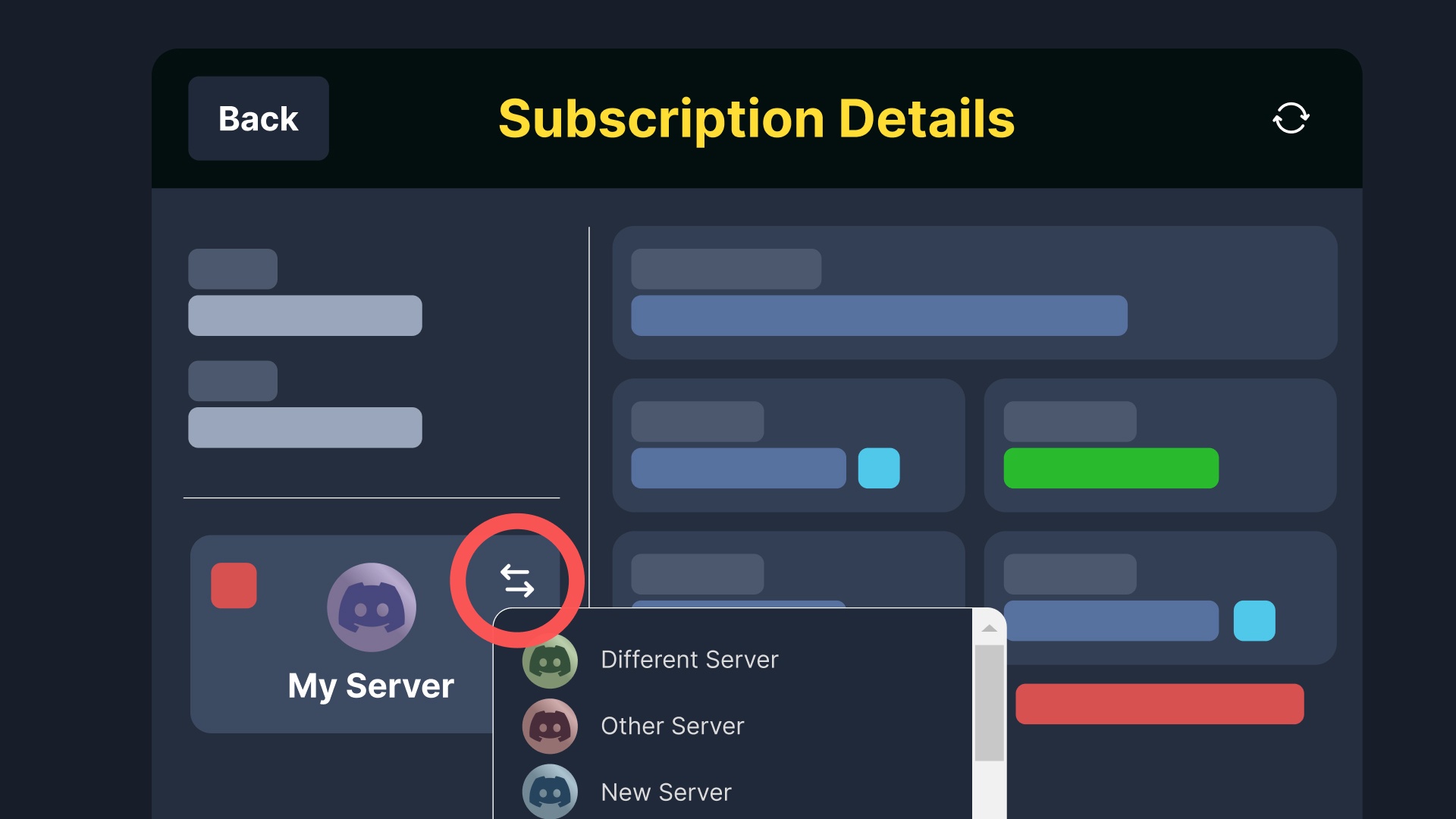
Dashboard > Premium > Manage Subscription > Transfer
true arrow
pseudo ravine
Since you purchased the subscription on our website, you can transfer it yoursel...
their doesnt seem to be a transfer button at all here...
pseudo ravine
humble sequoia
Please refer to the image in the embed, it shows where the transfer button is
 rapid hatch
My acc got banned from washiez and I lost my head admin, can you help?
humble sequoiaBOT
⚠️ You're in the wrong place
We provide support for Ticket Tool Discord bot and cannot help you with whatever issue you have.
- We don't know which Support Team you should contact to get this issue resolved, and unfortunately we won't be able to accurately tell you.
If you don't have any further questions regarding our bot Ticket Tool, please close this ticket
 drifting otter
guys does any1 know how to make it not say ticket #001 and make it the same name as the panel pls
humble sequoiaBOT
━━ User's inquiry has been moved to a ticket ━━
 warped sparrow
Failed to send: Access Denied (Ticket Tool doesn't have permission to view or send into this channel) how to fix


 maiden hare
 red talon
Hej! I already opened a ticket two days ago via "make-a-ticket" and now is it gone. I also marked it as favorite but I can't see it anymore. How do I know about the status/result of my ticket? regards, J
 silver zephyr
@humble sequoia i need help. I've been logging countless of tickets.
My issue doesn't get resolved.
 paper oasis
Hey I use funded horizon can I get any helo
I passed phase 1 and still they didn't gave my phase two account
 ebon tundra
i have a limit of 1 ticket set on my server, i manually deleted some tickets thinking it was no issue however the people who had tickets opened that i manually deleted now cannot open new ones.
How can i fix this?
austere forge
warped sparrow
ppls help
Dashboard > Panel configs > Dropdown, in the emoji field you have added a space after the emoji, you need to remove the space you have added
 austere forge
red talon
Hej! I already opened a ticket two days ago via "make-a-ticket" and now is it go...
austere forge
red talon
Hej! I already opened a ticket two days ago via "make-a-ticket" and now is it go...
We have closed it because you have not replied to us in the ticket itself after more than 24 hours. You will find the content of the closed ticket in the DM's of @humble sequoia which you can view at any time via the Direct link button.
austere forge
ebon tundra
i have a limit of 1 ticket set on my server, i manually deleted some tickets thi...
Even if you delete them manually, your server members can still create tickets, ask them to create a new ticket if the problem persists please > #🎫│make-a-ticket
 austere forge
The bot is online, it seems that you had a premium subscription but it has expired, you need to renew it or reinvite the bot white and re-send all your panels.
 soft plaza
So just kick the bot?
austere forge
Please read my message, I didn't say to kick him
soft plaza
I reinvited the bot do i refresh?
austere forge
You now need to switch to the bot white, with the /botswitcher command
soft plaza
austere forge
You now need to switch to the bot white, with the /botswitcher command
Thank you!
iron nightBOT
Gave +1 Rep to @austere forge (current: #4 - 1027)
austere forge
No problem, Thank you for choosing Ticket tool
soft plaza
austere forge
No problem, Thank you for choosing Ticket tool <a:catlove:1264643648130125885>
Best bot to ask for.
 unborn grail
trying to close tickets but it wont let me kt ells me i need to manage roles but i cant fimd where to do that on the website
pseudo ravine
Hey there! Please give Ticket Tool the Manage Roles permission on its own Ticket Tool role
unborn grail
All worked ty
pseudo ravine
You're welcome, glad I could help! Thanks for choosing Ticket Tool!
 somber ivy
Hey, I bought the HickmanDale0/C21356032585 account but when I go to log in, it says reset password
humble sequoiaBOT
⚠️ You're in the wrong place
We provide support for Ticket Tool Discord bot and cannot help you with whatever issue you have.
- We don't know which Support Team you should contact to get this issue resolved, and unfortunately we won't be able to accurately tell you.
If you don't have any further questions regarding our bot Ticket Tool, please close this ticket
 serene zenith
Hi, can someone help me with my ticket?
worldly helm
serene zenith
Hi, can someone help me with my ticket?
Hiii 👋
Please elaborate.
serene zenith
worldly helm
Hiii 👋
Please elaborate.
The day before yesterday I created a ticket on the TNT server and the ticket has not been confirmed so I can join.
worldly helm
That's not something we can help you with
We only provide support for the actual bot
serene zenith
worldly helm
That's not something we can help you with
I understand, but do you know why the ticket doesn't appear or do you just have to wait a long time?
worldly helm
I have no idea, sorry!
You have to reach out to the servers staff.
 pseudo ravine
Hey there! Please ensure Ticket Tool has the “View Channel” and “Send Messages” permissions in the channel
solid nymph
pseudo ravine
Hey there! Please ensure Ticket Tool has the “View Channel” and “Send Messages” ...
thank you … that worked
iron nightBOT
Gave +1 Rep to @pseudo ravine (current: #3 - 1319)
solid nymph
couldn’t be more thankful !
 shut raptor
the app isint working for me
pseudo ravine
solid nymph
thank you … that worked
You're welcome, glad I could help! Thanks for choosing Ticket Tool!
iron nightBOT
Gave +1 Rep to @solid nymph (current: #386 - 1)
pseudo ravine
shut raptor
the app isint working for me
Hey there! What seems to be the issue?
shut raptor
it says this application did not respond
pseudo ravine
Please ensure Ticket Tool has the View Channel and Send Messages permissions in the channel
shut raptor
it has those permisson turned on
pseudo ravine
Please run the /debug command in the channel where it's not responding
pseudo ravine
Ticket Tool is still missing the Send Messages permission in the channel
shut raptor
it still says the same thing
pseudo ravine
Please ensure that it has the permission inside the channel
 frank radish
Sou um colaborador do jogo, divulgo código pra mais gente entrar no jogo , mais quando fui tira o dinheiro apareceu um nome lá ( hold) passou um mês e até agr não apareceu nd , aí quando foi hj coloquei outro pix , e apareceu processando, aí quando era 7 pras 8 apareceu o nome ( hold) de novo
 steep warren
salut je suis déséspéré je ne comprend pas quand je veux me connecter j'ai " cannot connect to server, ça m'avais deja fais ça mais je ne me souviens plus de la manipulation à faire, HELp
frank radish
Je suis un contributeur de jeu, je partage le code pour que plus de gens puissent entrer dans le jeu, mais quand je suis allé retirer l'argent, un nom est apparu là (hold) un mois s'est écoulé et jusqu'à présent rien n'est apparu, puis quand c'était aujourd'hui j'ai mis un autre pix, et il est apparu en cours de traitement, puis quand il était 7 à 8 le nom (hold) est apparu à nouveau
humble sequoiaBOT
@steep warren @frank radish
⚠️ Vous n'êtes pas au bon endroit
Nous offrons un support pour le bot Ticket Tool et nous ne pouvons pas vous aider avec d'autres problèmes hors du bot.
- Assurez-vous de contacter l'équipe d'assistance appropriée, s'il vous plaît.
S'il n'y a pas d'autres éléments en lien avec Ticket Tool en quoi nous pouvons vous être utiles, veuillez fermer le ticket.
 rich osprey
Hello, I am having a problem with being able to disable HTML transcripts being sent in DM and in the the transcript channel.
I have turned on the "Disable attaching an html copy to the transcripts message." but they are still sending. I have even tried to turn that option off maybe thinking I had it backwards and they still send.
 restive condor
rich osprey
Hello, I am having a problem with being able to disable HTML transcripts being s...
restive condor
rich osprey
Hello, I am having a problem with being able to disable HTML transcripts being s...
Hi there, that's only an option if you have google drive transcripts enabled
You can't remove the HTML file, that's the actual transcript file
rich osprey
Thanks for the response. So there is no way to remove that HTML version that gets attached? Seems rather redundant and is unsightly. I don't recall ever getting that before in other servers.

 rose narwhal
rich osprey
Thanks for the response. So there is no way to remove that HTML version that get...
rose narwhal
rich osprey
Thanks for the response. So there is no way to remove that HTML version that get...
The HTML file is what generates the transcript link itself
otherwise it wont be formatted and just a big paragraph of text - if you look at a small portion of it, youll notice that its all jsut code version of the conversation
rich osprey
Thanks, let me rephrase it. Any way to not attach that HTML file to the transcript channel and DM?
rose narwhal
nah there isnt a way, the HTML file has to be attached via this method
austere forge
No way, because it's the raw HTML file that allows you to view the content of closed/deleted tickets
rose narwhal
Only other option is to just straight up turn off transcript I guess but then you have no logging of conversation
 proper rapids
Heyy i need help
humble sequoiaBOT
Hello, we would love to help you, but if you don't tell us what you need help with we can't help you :(
proper rapids
I dont know how to do a ticket in my server i setup it
stark runeBOT
1. Invite Ticket Tool to your server
First you will want to invite the bot to your server. Once the bot is in your server, you can manage your server in the dashboard.
2. Create a Panel
To create a panel we are going to need to head over to the panel configs on the dashboard.
Once at the dashboard we will need to click Create Panel.
Enter a panel name (Fill in any optional settings you want).
Click Create Panel and your ready to get started with configuring your panel.
An example of a creating a panel is shown below.
3. Send the Panel to a Channel
Once you've created a panel on the dashboard you will need to send it to a channel using send on the dashboard.
Select the channel you want your panel to be created in and click send.
For other questions checkout $help faq.
An example of a sending a panel is shown below.
Having a Problem Sending the Panel?
Do $debug in a channel with Ticket Tool and make sure it has all the necessary Discord permissions.
worldly helm
Here is a simple set-up guide for you :D
proper rapids
:3
rose narwhal
Am I correct in saying the escalate function basically just allows an admin to forward a ticket onto lets say head admin category or owners?
worldly helm
rose narwhal
Am I correct in saying the escalate function basically just allows an admin to f...
Hey 👋
Correct!
It switches between different panels
rose narwhal
yeh I thought it was fairly self explanatory
 south grotto
Cannot find server in dashboard
rose narwhal
Have you permissions to add the bot?
south grotto
yes
rich osprey
rose narwhal
nah there isnt a way, the HTML file has to be attached via this method
The HTML is just a file that is being attached. It is not needed to display the embed message. It seems rather redundant and is unsightly. It can still be generated, just NOT attached, at the very least attach it to the button.
south grotto
it's in my server
rose narwhal
Try press refresh servers if it was a recent change
south grotto
I did
worked on my test server, when I refreshed
Is it becasue my friend made the server?
rose narwhal
Check your role permissions, you might not have high enough to see the ticket dashboard
south grotto
alright 🙂
rose narwhal
rich osprey
The HTML is just a file that is being attached. It is not needed to display the ...
May look unsightly or not needed in some eyes but ultimately if that wasnt present - the transcript would not function as its running a script in which generates the automated transcript link
Unless discord releases different methods for it, I don't think there will ever be a new change for it
south grotto
rose narwhal
Check your role permissions, you might not have high enough to see the ticket da...
Im on manager to server, is that good enough?
rich osprey
My friend, I think there is a disconnect here. I am not saying it isn't needed. I am not wanting to ATTACH it to the DM. For my needs the embed is plenty that is sent. I found the option to not include it in DM's. I just don't want it attached in the channel now. There is no reason a button cant be created that is linked to that. The HTML file doesn't need to be attached for a button to be created.
rose narwhal
south grotto
Im on manager to server, is that good enough?
Manager role is just a role name haha - you need to have administrator permissions I believe
south grotto
How does one give those to me?
rose narwhal
Server Settings > Roles > Chooe the Role > Choose Administrator
rose narwhal
rich osprey
My friend, I think there is a disconnect here. I am not saying it isn't needed. ...
Ye I am going to imagine this comes down to what language the bot is coded in and the formatting - as there are a few ways to display it differently so it may look nicer to the eye
rich osprey
It has nothing to with displaying it. Just have an option to not attach it like with the DM
austere forge
There's no way of not displaying the raw html file except with the Google drive option, as my colleague Dan says
rich osprey
Seems very counter intuitive.
austere forge
If you want to extend your confusion, you can #🎫│make-a-ticket - we can give you an answer about that
 dire island
Opa alguém pode me ajuda??
humble sequoiaBOT
Equipa de Apoio Portuguesa
Se você está procurando ajuda, abra um ticket para entrar em contato com a equipe de suporte em português. Vá para #🎫│make-a-ticket e pressione o botão :flag_br:.
dire island
alguém pode me ajuda estou com dificuldades para engeta o xits
humble sequoiaBOT
⚠️ Please read the messages previously sent by our team ⚠️
dire island
ALGUÉM PODE ME AJUDA MN MDSSS
dire island
Qual é o servidor entt
 cloud gorge
i try to do /setup and it says "the application dont answe"
 river lintel
it won’t let me add ticket tool to my server
river lintel
cloud gorge
i try to do /setup and it says "the application dont answe"
SAME OMG
pseudo ravine
Hey there! Please ensure Ticket Tool has the View Channel and Send Messages permissions in the channel
rich osprey
austere forge
If you want to extend your confusion, you can <#571706435449257997> - we can giv...
There is no confusion my friend, I understand the concept fully. Since the HTML transcript is not self hosted by Ticket Tool it has to be generated and attached to the transcript channel or DM to create the button to open the file locally in the browser in order to retrieve it. In order to disable that option there needs to be a supplemental storage option so it can be retrieved later if that option is to be disabled. So I get that part. It just seems very counter intuitive that Google Drive is the only option to disable this over just not attaching it. In addition no B2 storage solution is offered. If I only want the embed and not the transcript I should be able to just not attach the HTML file. I know this solution maybe doesn't apply to the majority of people. But in my case my bot already captures the transcript and stores it on our S3 node so it can be retrieved via our SaaS ticketing tool.
pseudo ravine
Hey there! Unfortunately this currently isn't possible. You can make a suggestion in #1019685143046279208 but I can't guarantee anything will happen
rich osprey
Ok thanks, is there any way to edit the ticket log messages? I haven't found a way to do so if this ability exsists.
pseudo ravine
Unfortunately not
rich osprey
Ugh.... Oh man, oh well. It's a great bot overall. You can customize nearly every message so I was hoping I was just missing something.
pseudo ravine
Thanks for supporting Ticket Tool!
 wild linden
hey guys just a quick one, because im absolutely baffled, how do i set this bot up>?
rich osprey
wild linden
hey guys just a quick one, because im absolutely baffled, how do i set this bot ...
The best way to answer this and I am not trying to be sarcastic. Go to YouTube and watch some videos. There is a lot of very in depth good videos that can help you get started.
Once you familiarize yourself with all the panel options it is fairly easy to manage.
wild linden
rich osprey
The best way to answer this and I am not trying to be sarcastic. Go to YouTube a...
thanks any suggestions on which videos to use?
iron nightBOT
Gave +1 Rep to @rich osprey (current: #386 - 1)
 nova vale
When i try to get a ticket for a server im in, it says "channel limit" and "clear channels to continue making tickets"
rich osprey
Fleet has a good one. One word of advice. slow the video down. He goes rather fast, but it covers the majority of the bases to get you started.
rich osprey
nova vale
When i try to get a ticket for a server im in, it says "channel limit" and "clea...
They have most likely hit their channel limit on that category and do not have any fallback catagories created.
I could be wrong, but from memory I think Discord limits catagories to 500 channels.
nova vale
thankyou
 inner hamlet
alguem me ajuda a deixar o aplicativo em portugues brasil
 soft crest
how can i change the name of tickets ex: ticket-0007 i would like to name it IA ticket 007
pseudo ravine
Hey there! Please refer to the embed below!
humble sequoiaBOT
The ticket name is the default channel name of all tickets. To edit it, go to your Dashboard > Panel Configs > Ticket. There you can edit the channel name of opened and closed tickets. You can also use variables in there.
Note: This is a premium feature
river lintel
how do i make it so people cant see all the channels till they have made a ticket and been verified?
 coarse fractal
This makes no sense to me
 pseudo ravine
Hey there! Please give Ticket Tool the “Manage Roles” permission
river lintel
river lintel
how do i make it so people cant see all the channels till they have made a ticke...
hello..?
pseudo ravine
Hey there! Please refer to the embed below!
humble sequoiaBOT
Creating a verification system with Ticket Tool <:TicketToolWhite:1073948900056105060>
Using Discord's permission system you can create a setup that allows your team to manually verify new server members while keeping the rest of the server hidden!
Please configure the permissions of your server's channel as depicted below:
Category Permissions
- Go to your category permissions, or channel permissions in case they are not synced with the category.
- Set the View Channels permission to
 for the @everyone role.
 - Set the View Channels permission to
 for your
 @Memberor@Verifiedrole. - Repeat this process for all of your server's categories.
Ticket Panel Channel
- Set the View Channel permission to for the @everyone role.
- (Optional) If you'd like for verified members to not be able to see that ticket channel anymore, set the View Channel permission to for your
@Memberor@Verifiedrole.
-# Note: Your staff team will still need to grant a verification role. If you have premium, you can check our Ticket Closed Roles feature
$manualverification
 ivory trench
I want to add a feature like this to my panel and idk how to

 mighty thistle
Forms!
humble sequoiaBOT
A Discord Form lets the user answer individual questions in a pop-up Form, which then displays the answers in the ticket message. This can save time if you already know what you want to ask the user.
Setup Forms
Forms can be enabled under Panel Settings > Form Options > Edit Forms Options. In the new pop-up window, you can now enable and edit your own Form.
Form Options
You can add up to 5 questions in the Discord form. This is a Discord limitation. Each question can have a placeholder in the input field, a minimum and maximum input, multi-line, and also the option to have the answer required.
Options
Question Title ➞ Your Question goes here
Question Placeholder ➞ The placeholder text in the input field
Required ➞ If enabled, the user has to answer this question, to submit the form
Multi-Line Input ➞ Allows the user to input multiple lines
Minimum and Maximum Input ➞ Set a minimum and maximum input value for the user
Displaying the Answer
To display the answers from the user, you need to enable Auto display form results on the ticket message as an additional embed
If you don't want a second embed, go into your Panel Configs > Ticket Options > Edit Ticket Message. You use the variable {create.form.x} and replace x with the number of your question. For example, the response to Question 5 can be displayed with {create.form.5}.
 ionic wolf
How can i add a photo to the panel
 keen ginkgo
put ur analog on the icon and it'll display to add image
 twin umbra
heya, just wanted to say for some reason 2 buttons keep appearing instead of one
i did mess with settings a little bit and had dropdown style previously but I've looked through all settings and don't know what's the problem

 timber kernel
twin umbra
heya, just wanted to say for some reason 2 buttons keep appearing instead of one...
timber kernel
twin umbra
heya, just wanted to say for some reason 2 buttons keep appearing instead of one...
You have a panel attached under Panel Configs -> Panel
 twin umbra
worked, tysm!
 vast wraith
How do I make ticket tool auto delete tickets upon closing?
@timber kernel do you know?
oh sorry i wont ping do it again
 karmic grove
vast wraith
How do I make ticket tool auto delete tickets upon closing?
karmic grove
vast wraith
How do I make ticket tool auto delete tickets upon closing?
Remove Two-step tickets
vast wraith
karmic grove
Remove Two-step tickets
oh?
karmic grove
vast wraith
oh?
Yes. It is in General options. Did you find it?
karmic grove
 errant gust
How can i set the limit of tickets in a panel?
errant gust
How can i set the limit of tickets in a panel?
On the dashboard, in Limits. You can set a limit either per user or overall on the panel
vast wraith
karmic grove
Yes. It is in General options. Did you find it?
Yea its fixed thanks alot!
iron nightBOT
Gave +1 Rep to @karmic grove (current: #113 - 7)
 glad wagon
How to check all closed tickets? 👀
 tardy sage
$new and $ticket doesnt work but its set up & bot has admin perms anyone dealt with that before
pseudo ravine
Hey there! Please refer to the embed below!
humble sequoiaBOT
Command Style Tickets allow you to open tickets VIA the $new or $ticket commands. This feature also allows you to open tickets for people, by using the aforementioned commands with the user's ping or ID.
You can enable this feature by heading over to your server's Dashboard➞ Panel Configs ➞ Command Style Tickets.
This section of the panel settings also contains the following features
- Bypass channel list and watch all of them → when you enable this option, Ticket Tool will create a ticket whenever someone uses the
$newor the$ticketcommand in a channel it can access.
- Channel to monitor for command $new and $ticket → This is the opposite of the previous option, you can select in which channels Ticket Tool should look for the
$newor$ticketcommand instead of looking at the whole server.
- Delete command after creating ticket → If enabled, Ticket Tool will delete the command (whether it's
$newor$ticket) a few seconds after you run it.

 pine star
Hi how do I stop multiple users being in the same ticket?
frank radish
Je suis un contributeur de jeu, je partage le code pour que plus de gens puissent entrer dans le jeu, mais quand je suis allé retirer l'argent, un nom est apparu là (hold) un mois s'est écoulé et jusqu'à présent rien n'est apparu, puis quand c'était aujourd'hui j'ai mis un autre pix, et il est apparu en cours de traitement, puis quand il était 7 à 8 le nom (hold) est apparu à nouveau
 atomic bloom
Hi, how do I make ticket bot ping a role in a ticket?
vast wraith
karmic grove
On the dashboard, in Limits. You can set a limit either per user or overall on t...
hey how do i make it so only support team can close tickets
mighty thistle
pine star
Hi how do I stop multiple users being in the same ticket?
Elaborate? If you mean only allowing one member of the support team, you'll need Premium for claiming!
karmic grove
vast wraith
hey how do i make it so only support team can close tickets
You need to enable the close button only to certain roles
vast wraith
karmic grove
You need to enable the close button only to certain roles
wdym?
mighty thistle
In that case, there's a toggle that says "Support team only."
humble sequoiaBOT
1. Open your Panel Configs tab in your server's dashboard
2. Select the panel you want to ping your support team on
3. Open the Ticket options menu
4. Click on Edit Ticket Message
5. In the Message Content use one of the role mention syntax ({@Role Name}/{Role ID})
6. Save changes
Note: For this to work properly, Ticket Tool requires the Mention Everyone permission. Or the role must have the Allow anyone to @mention this role setting enabled
mighty thistle
atomic bloom
Hi, how do I make ticket bot ping a role in a ticket?
^^
vast wraith
mighty thistle
In that case, there's a toggle that says "Support team only."
where is that
pine star
mighty thistle
Elaborate? If you mean only allowing one member of the support team, you'll need...
No so a regular member will open up a support ticket in our discord wanting for help and it turns into a group ticket with multiple regular members in it
mighty thistle
Oh
Hm
Are the permissions set so that the everyone role can see the tickets?
Do they have a role that is considered the support team?
Things like that
mighty thistle
vast wraith
where is that
Panel Configs > Buttons
If you use command style, you'd need to check the command permissions.
vast wraith
mighty thistle
Panel Configs > Buttons
Yoo w i found it tysm
pine star
mighty thistle
Are the permissions set so that the everyone role can see the tickets?
example and no the permissions are set so no one but the one who opens the ticket can see it and no they don't have a role considered the support team

some don't even have a role at all
mighty thistle
I imagine it's Discord permissions then. If they have View Channel at the server level (this is a given), the channel still needs an override preventing the everyone role from viewing it.
pine star
 pine star
No the only one who has access is the member cuza4801 as you can see on the side because she is the one who originally opened the ticket
But for some reason two other people when they open a ticket are joining hers
mighty thistle
And those two have no roles at all?
pine star
No
atomic bloom
mighty thistle
^^
Thanks!
iron nightBOT
Gave +1 Rep to @mighty thistle (current: #54 - 34)
mighty thistle
pine star
No
So like, in the ticket, those two are in the member list? And they can view the channel, send messages, etc.?
pine star
I don't see them in the member list but they can view the channel and send messages
I can't even tag them so I'm not sure how
mighty thistle
So they don't have administrator access? Are there permissions in the category for them?
pine star
No they don't have administrator access only 3 people have it and I am one of them. And I don't see any permissions in the category for them
atomic bloom
mighty thistle
^^
Why does it have the ping but it doesn't actually ping me?
mighty thistle
pine star
No they don't have administrator access only 3 people have it and I am one of th...
Huh
I would #🎫│make-a-ticket to see what we can do!
atomic bloom
Ok thanks
mighty thistle
atomic bloom
Why does it have the ping but it doesn't actually ping me?
Do you have the support team role? Can it be mentioned be anyone, or can Ticket Tool mention everyone, here, and roles?
atomic bloom
When it pings "everyone" There is no ping.
mighty thistle
So you’d have to let Ticket Tool mention everyone, here, and roles. Or let the role be mentioned by anyone.
atomic bloom
Alright
atomic bloom
mighty thistle
So you’d have to let Ticket Tool mention everyone, here, and roles. Or let the r...
I've done it and it worked
Thanks very much!
thanks @mighty thistle
iron nightBOT
Gave +1 Rep to @mighty thistle (current: #54 - 35)
 chrome nebula
Why I'm not able to add gold bot
rose narwhal
if you went from white to gold then you just /botswitcher
chrome nebula
okay
humble sequoiaBOT
- Vision.'s issue has been solved in another channel.
 undone minnow
hi can anyone tell me how can i do thies
 mighty thistle
Dropdown!
humble sequoiaBOT
The Drop-down menu or Select Menu replaces the buttons on your panel message and uses a drop-down menu with all of your panels. To set this up, go to your Panel Configs and select your main Panel.
<:Numbericons1:1018864164032225340> Enable Select Style
First you enable Select Style. Then you add an item in the Dropdown Editor. Now you can start editing your dropdown!
<:Numbericons2:1018864168041971712> Dropdown Editor
Each line in the dropdown editor represents a line in the drop down menu on discord. You can add more "Items", by clicking on
First you select a panel. That's the panel this option will open a ticket for. DONT select the same panel twice. Each option should have a different Panel
After that, you can put a Display. This is the title of this option and will appear in the drop down menu. The *Description can be set right after that, which will be below the title in grey.
Additionally you can select an emoji, that will be shown in front of each option. You can either manually input the ID of an emoji or select it in the selector.
Common Issues ⚠️
- Panel doesn't send? Make sure you have a valid emoji selected
- Option doesn't show up? Check if two options have the same panel in the DropDown Editor
$dropdown
 ripe cloak
Libera meu acesso Ruan Victor Santos Gomes
undone minnow
mighty thistle
Dropdown!
thank u ❤️
iron nightBOT
Gave +1 Rep to @mighty thistle (current: #54 - 36)
 velvet field
Is there a way to be allowed to open multiple tickets at once? i have a ticket open on my server and need to open another but it says I can't atm as I already have one open
austere forge
velvet field
Is there a way to be allowed to open multiple tickets at once? i have a ticket o...
Dashboard > Panel configs > Limits - Open tickets each user
ivory trench
How do I remove the ticket tool branding I have premium
austere forge
What type of message do you want to remove them from?
ivory trench
I wanna change the profile picture of the bot
humble sequoiaBOT
Ticket Tool Custom Avatar
As of now, you are not able to change Ticket Tool's profile picture, nonetheless, our Development Team is working on the release of white labels, this is your own custom bot!
For the time being, you can change the bot's nickname by right-clicking the bot in the user list on your server and clicking Change Nickname

$avatar
austere forge
ivory trench
I wanna change the profile picture of the bot
Refer to the embed above please
austere forge
No problem!
ivory trench
thanks @austere forge
iron nightBOT
Gave +1 Rep to @austere forge (current: #4 - 1028)
ivory trench
There we go
 tall ferry
When ever I add ticket tool to my server it leaves by itself?
 calm trout
say if i was wanting to sponsor a giveaway here would i be able to have my server link (don’t gotta be a requirement to win)
tall ferry
Help please
humble sequoiaBOT
━━ ⚡𝚂𝚝𝚘𝚛𝚖𝚢_🔥's inquiry has been moved to a ticket ━━
austere forge
calm trout
say if i was wanting to sponsor a giveaway here would i be able to have my serve...
Please #🎫│make-a-ticket
calm trout
austere forge
Please <#571706435449257997>
okay
 hybrid crow

 austere sapphire
what might be the problem for this?


 echo yacht
Seems like Ticket Tool is leaking permissions, could you run /debug so we see what’s exactly happening?
 grand isle
Hello guys, please who can guide me through how to get a suport link of the ticket i created myself in my support?
also idk why mine isn’t ticked green like others
 smoky crescent
grand isle
Hello guys, please who can guide me through how to get a suport link of the tick...
smoky crescent
grand isle
Hello guys, please who can guide me through how to get a suport link of the tick...
What do you need?
 novel hazel
solicito reembolso no puzzle
 tawny island
How can I check the transcript of a ticket that was closed on me
 light pagoda
When someones trying to react to the ticket button but its saying "they dont have permission" which setting would I change?

 edgy sequoia
Do I click on 🔒close to send it or do I leave the ticket untouched after a typed what I typed?
 light shadow
How do i get a panel id for a multi panel system
humble sequoiaBOT
━━ User's inquiry has been moved to a ticket ━━
 delicate bramble
Hey how do I set it up for admins to look at tickets with out giving them administration in the admin role
worldly helm
light pagoda
__ «You don't have permissions to use this»__
Are your members seeing this message when they try to create a ticket?
You may have accidentally denied them permission to use the Create Ticket button.
Look in the following places in your server's dashboard
👉 Server Configs > Blacklist Roles
Any roles there will be unable to interact with the bot in any way, including creating tickets.👉 Panel Configs > Buttons > Create Ticket > Support team only
If this is enabled👉 Panel Configs > Buttons > Create Ticket > Disabled Roles
Any roles there will be unable to use the button.
worldly helm
edgy sequoia
Do I click on 🔒close to send it or do I leave the ticket untouched after a type...
Heya!
Could you elaborate please?
 marsh coral
@iron night
karmic grove
delicate bramble
Hey how do I set it up for admins to look at tickets with out giving them admini...
If "admin role" is for your Discord Server, you have to give them a role (ie Staff) that you will define in your ticket tool dashboard as Support Team. You can also set them as Additional role and give them different permissions on the tickets
 tepid island
how to fix?
 austere forge
Make sure that the bot has : VIEW CHANNEL SEND MESSAGE and READ MESSAGE HISTORY permission in the channel where you try the command
tepid island
where can i see that?
austere forge
hold down the channel name > Edit Channel > Permissions > Ticket Tool > VIEW CHANNEL SEND MESSAGE and READ MESSAGE HISTORY
 scenic nexus
does anyone know how to remove the close confirmation thingy?
austere forge
scenic nexus
does anyone know how to remove the close confirmation thingy?
Dashboard > Panel configs - Two step Close
scenic nexus
austere forge
Dashboard > Panel configs - Two step Close <:Switch_disabled:1041734620770750474...
cheers
 trail thorn
I tried to report a ticket and this happened. How do I fix it on mobile?
 worldly helm
trail thorn
I tried to report a ticket and this happened. How do I fix it on mobile?
worldly helm
trail thorn
I tried to report a ticket and this happened. How do I fix it on mobile?
Hey there!
Are you a staff member on that server?
worldly helm
Discord has a limit of 500 channels at once. That server has reached that limit. Please tell the server staff about that issue.
trail thorn
Ohh ok got it
jade topaz

worldly helm
jade topaz
<:TicketToolAlpha:1073948895652089866>
Heyy!
How can I help you?
austere sapphire
echo yacht
Seems like Ticket Tool is leaking permissions, could you run `/debug` so we see ...
still the same
 pseudo ravine
austere sapphire
still the same
pseudo ravine
austere sapphire
still the same
Hey there! Are you the user who ran the command?
pseudo ravine
Hey there! Please refer to the embed below!
humble sequoiaBOT
1. Open your Panel Configs tab in your server's dashboard
2. Select the panel you want to ping your support team on
3. Open the Ticket options menu
4. Click on Edit Ticket Message
5. In the Message Content use one of the role mention syntax ({@Role Name}/{Role ID})
6. Save changes
Note: For this to work properly, Ticket Tool requires the Mention Everyone permission. Or the role must have the Allow anyone to @mention this role setting enabled
pseudo ravine
You're welcome, glad I could help! Thanks for choosing Ticket Tool!
 toxic shoal
pseudo ravine
You're welcome, glad I could help! Thanks for choosing Ticket Tool!
toxic shoal
pseudo ravine
You're welcome, glad I could help! Thanks for choosing Ticket Tool!
its the only good ticket maker needle is ass
@pseudo ravine didnt work
 pseudo ravine
humble sequoia
pseudo ravine
humble sequoia
Please refer back to the guide
It shows you how to properly ping the roles
toxic shoal
ok
jade topaz
Fui banido por dark sem motivo quero ver as provas cadê o suporte
 daring bluff
when creating a custom command like you guy do for your responses how do you put it in a box, https://gyazo.com/cdfe3984b8d72db3c4a51637bce772b2.png like this
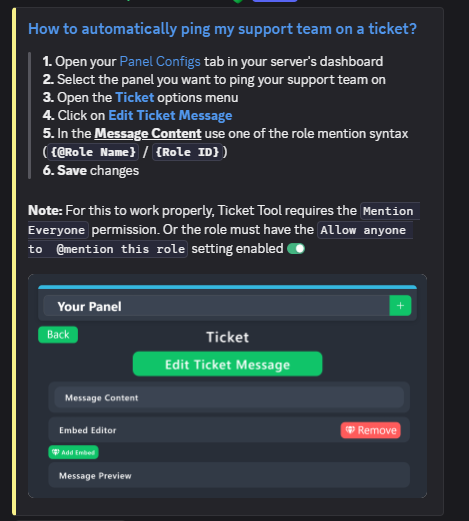 pseudo ravine
Hey there! Adding an embed requires a premium subscription
daring bluff
I have it >< i need like an honorary premium title. I manage one that isnt under my name
pseudo ravine
Then you can click on Add Embed when editing the custom command message
daring bluff
Gotcha, real fast also do you have that link youve def sent me 100x already but i keep losing of all the discord text commands such as hyper linking
ty for role also lol
pseudo ravine
Please refer to the embed below!
humble sequoiaBOT
Discord Markdown Text
Below cites basic Discord Text Markdown/Formatting. Replace the text below with your own!
See this Discord Help Article for other markdown questions and combining markdowns.
<:Numbericons1:1018864164032225340> Italics (Cntrl + I)
 *Copy me for italicized text!* -> Italicized text!
 _Copy me for italicized text!_ -> Italicized text!
<:Numbericons2:1018864168041971712> Bold (Cntrl + B)
**Copy me for bold text!** -> Bolded text!
<:Numbericons3:1018864171783303208> Underline (Cntrl + U)
You must add 2 underscores on both sides of your text to get the underline text
__Copy me for underlined text!__ -> Underlined Text!
<:Numbericons4:1018864175155519538> Strikethrough (Cntrl + S)
~~Copy me for strikethrough text!~~ -> Strikethrough text!
<:Numbericons5:1018864178632605786> Spoilers & Hidden Text
||Copy me for hidden text!|| -> ||Hidden text|| (Click to reveal)
<:Numbericons6:1018864182558466058> One Lined Codeblock
You can add 3 backticks instead to get multi lined codeblock.
`Copy me for codeblock text!` -> Codeblock Text!
<:Numbericons7:1018864186727604354> Hyperlinking and Hidden Links
[Copy me with your link](yourlinkforhidelinks.com) -> Ticket Tool!
<:Numbericons8:1018864190296961159> <:NewIcon1:1018858809541804124><:NewIcon2:1018858813266333706> <:beta1:1022173658610946182><:beta2:1022173656492810340> Headers!
Header markdowns may not work with ticket tool features.
# Largest header!
## Small header!
### Even smaller header!
 daring bluff
appreciate you as always
pseudo ravine
You're welcome, glad I could help! Thanks for supporting Ticket Tool!
humble sequoiaBOT
@tardy crag
⚠️ You're in the wrong place
We provide support for Ticket Tool Discord bot and cannot help you with whatever issue you have.
- We don't know which Support Team you should contact to get this issue resolved, and unfortunately we won't be able to accurately tell you.
If you don't have any further questions regarding our bot Ticket Tool, please close this ticket
 night grove
Im Tryna set it up but it just says the aplication did not respond
austere forge
Make sure that the bot has : VIEW CHANNEL SEND MESSAGE and READ MESSAGE HISTORY permission in the channel where you try the command
 tardy crag
i want help because i payed and i dont recevide nothing
austere forge
You're in the wrong place
austere forge
We don't know either, we only provide support for Ticket Tool bot nothing else.
 elder shale
what is the command to add a specific role to the perms of ticket managers? I forgot to add one while doing the setup
humble sequoiaBOT
1. Open your Panel Configs tab in your server's dashboard
2. Select the panel you want to grant access to
3. Open the General options menu
4. Select your Support Team Roles
5. Save changes
night grove
austere forge
Make sure that the bot has : `VIEW CHANNEL` `SEND MESSAGE` and `READ MESSAGE HIS...
It has the perms
austere forge
elder shale
what is the command to add a specific role to the perms of ticket managers? I fo...
Refer to the embed above please
austere forge
night grove
It has the perms
Please run the /debug command in the channel where you try the commands
elder shale
humble sequoia
Alright so only deskboard like I suspected, thanks
iron nightBOT
Gave +1 Rep to @humble sequoia (current: #19 - 380)
night grove
austere forge
Please run the /debug command in the channel where you try the commands
Already tried that
austere forge
night grove
Already tried that
All permissions marked with ❌ are missing in that channel

 south cave
this interaction failed showing
austere forge
south cave
this interaction failed showing
Where did you get this error message from?
south cave
austere forge
Can you provide your server ID please ?
south cave
austere forge
Can you provide your server ID please ?
1349729119876943982
 slow furnace
i need help its saying the bot isnt in the server but i invited it
austere forge
south cave
1349729119876943982
It seems that the bot white is no longer on your server. It has probably been kicked by mistake
austere forge
slow furnace
i need help its saying the bot isnt in the server but i invited it
Please check your audit log on your server settings, to see if a security bot is kicking Ticket tool
slow furnace
austere forge
Please check your audit log on your server settings, to see if a security bot is...
i ficed it
south cave
austere forge
It seems that the bot white is no longer on your server. It has probably been ki...
 slow furnace
fixed
austere forge
south cave
Could you try to run the /debug command please on your server where the interaction failed ?
slow furnace
austere forge
Please check your audit log on your server settings, to see if a security bot is...
i turned the antinuke off and its still doing it now
saying its not there
austere forge
Please re-check your audit log, the only reason is that a bot kicked Ticket tool
south cave
austere forge
Could you try to run the /debug command please on your server where the interact...
no options showing of command
can't use the command of ticket tool
austere forge
This means that the bot is not on your server, please re-invite
austere forge
slow furnace
nothing shows bleed added a role to it
Please #🎫│make-a-ticket
austere forge
If no command slash is displayed, this means that no
Please re-invite him to confirm
south cave
okay
south cave
austere forge
Please re-invite him to confirm
Oh fixed, Thanks Mate !
iron nightBOT
Gave +1 Rep to @austere forge (current: #4 - 1030)
austere forge
south cave
Oh fixed, Thanks Mate !
Glad to hear!
 wary furnace
Our service is paused for DIS#COMM#1214142396938592286. Please contact your Discord mod to fix bot configuration errors. Use the link below to find more information about this issue.
austere forge
We only provide support for the @pseudo glen, nothing else
 lyric jolt
Why does the ticket bot keep saying "the application did not respond"
 twilit sparrow
lyric jolt
Why does the ticket bot keep saying "the application did not respond"
twilit sparrow
lyric jolt
Why does the ticket bot keep saying "the application did not respond"
u have to give it like a high role
lyric jolt
Alr
 ionic isle
On the ticket tool website i cant manage a server im in, I have high ranking permissions such as:
Manage Channels
Manage Messages
Read Message History
Send Messages
Do i need the administrator permission is it it something else?
austere sapphire
pseudo ravine
Hey there! Are you the user who ran the command?
it was one of my friend
 ornate bone
Check #1371204197994729574
 languid rover
Would it be possible to get some help? T.T This is what happens when users without administrator privileges use Ticket Tool
 worldly helm
languid rover
Would it be possible to get some help? T.T This is what happens when users witho...
worldly helm
languid rover
Would it be possible to get some help? T.T This is what happens when users witho...
__ «You don't have permissions to use this»__
Are your members seeing this message when they try to create a ticket?
You may have accidentally denied them permission to use the Create Ticket button.
Look in the following places in your server's dashboard
👉 Server Configs > Blacklist Roles
Any roles there will be unable to interact with the bot in any way, including creating tickets.👉 Panel Configs > Buttons > Create Ticket > Support team only
If this is enabled👉 Panel Configs > Buttons > Create Ticket > Disabled Roles
Any roles there will be unable to use the button.
languid rover
worldly helm
> __ **«You don't have permissions to use this»**__
>
> Are your members seeing...
Then, can I keep it like this?
 worldly helm
You just have to disable Support Team only
languid rover
I'm really sorry. I've tried all three methods you told me, but it's too bad.
You can do it with the picture I just posted. T.T
OMG
I was a fool. I didn't disable the panels in DropDown!
languid rover
worldly helm
You just have to disable `Support Team only`
Thank you so much. 👍
iron nightBOT
Gave +1 Rep to @worldly helm (current: #7 - 834)
worldly helm
You're welcome
 lyric summit
When i try to put a panel on a channel it says that the app didn't respond, is it normal?
worldly helm
lyric summit
When i try to put a panel on a channel it says that the app didn't respond, is i...
Hey!
That's most likely because the bot is missing permissions, could you try to use the /debug command in that channel?
lyric summit
Ok
worldly helm
The bot is missing the Read Channel permission for that channel
jade topaz
Hello
I made a few edits on the site. What command should I use to make the bot resend the ticket opening message?
 chrome ledge
Why cant i edit the Message Content?
 humble sequoiaBOT
1. Open your Panel Configs tab in your server's dashboard
2. Select the panel you want to send
3. Click the blueSendbutton
4. Indicate to which channel it should be sent to
5. Send the panel
 covert swallow
jade topaz
I made a few edits on the site. What command should I use to make the bot resend...
covert swallow
jade topaz
I made a few edits on the site. What command should I use to make the bot resend...
You can use the update button, or just resend the panel with the send button
worldly helm
jade topaz
I made a few edits on the site. What command should I use to make the bot resend...
Please refer to this guide ^^
worldly helm
chrome ledge
Why cant i edit the Message Content?
Hey!
Thats a premium feature
chrome ledge
Alrighty
humble sequoiaBOT
Hello, we would love to help you, but if you don't tell us what you need help with we can't help you :(
jade topaz
worldly helm
Please refer to this guide ^^
Thank you
iron nightBOT
Gave +1 Rep to @worldly helm (current: #7 - 835)
 bold hare
my daughter got banned from tower of hell
humble sequoiaBOT
⚠️ You're in the wrong place
We provide support for Ticket Tool Discord bot and cannot help you with whatever issue you have.
- We don't know which Support Team you should contact to get this issue resolved, and unfortunately we won't be able to accurately tell you.
If you don't have any further questions regarding our bot Ticket Tool, please close this ticket
worldly helm
jade topaz
Thank you
bold hare
this is crazy put money somewhere where later can't get help anywhere
worldly helm
bold hare
this is crazy put money somewhere where later can't get help anywhere
Hey there 👋
I am sorry about hearing that. This is the support server for @pseudo glen, a discord bot. There is nothing we can do as we only provide support for the bot, nothing else.
I appreciate your understanding.
bold hare
this is the 4th server they send me to and they say they will help here, I will simply forbid my daughter to put money here
worldly helm
bold hare
this is the 4th server they send me to and they say they will help here, I will ...
As I said, we do not provide support for whatever issue you are currently having.
Sorry 
 dire magnet
can you rename tickets automatically after theyve been created?
karmic grove
dire magnet
can you rename tickets automatically after theyve been created?
It's a premium feature you will find in General, yes
restive condor
dire magnet
can you rename tickets automatically after theyve been created?
Hey there! Yes, but that's a premium feature unfortunately
 tepid shoal
Hi, I bought this cultivar product and I haven't received it yet.
dire magnet
restive condor
Hey there! Yes, but that's a premium feature unfortunately<:Premium:119240307415...
okay thank you so much! how much is premium?
iron nightBOT
Gave +1 Rep to @restive condor (current: #1 - 2365)
tepid shoal
I bought a new product, Cultivate a Mega from Nova Ilha, and I didn't receive the product.
humble sequoiaBOT
⚠️ You're in the wrong place
We provide support for Ticket Tool Discord bot and cannot help you with whatever issue you have.
- We don't know which Support Team you should contact to get this issue resolved, and unfortunately we won't be able to accurately tell you.
If you don't have any further questions regarding our bot Ticket Tool, please close this ticket
restive condor
dire magnet
okay thank you so much! how much is premium?
See below please
humble sequoiaBOT
 Faster Premium Bot
Automatic Transcripts
Full Customization
Direct Messages
Ticket Automation
Thread Style Ticketing
Premium Support
Scheduled Panel Availability
Integrations
Claiming
Advanced Ticket Statistics
You can purchase premium here:
Price
$7.99 - Monthly
$66 - Yearly
dire magnet
restive condor
See below please
thank you
iron nightBOT
Gave +1 Rep to @restive condor (current: #1 - 2366)
 tacit linden
how do u ise the creat form thing and make it pop up in tickets
pseudo ravine
austere sapphire
it was one of my friend
What’s their user ID?
humble sequoiaBOT
A Discord Form lets the user answer individual questions in a pop-up Form, which then displays the answers in the ticket message. This can save time if you already know what you want to ask the user.
Setup Forms
Forms can be enabled under Panel Settings > Form Options > Edit Forms Options. In the new pop-up window, you can now enable and edit your own Form.
Form Options
You can add up to 5 questions in the Discord form. This is a Discord limitation. Each question can have a placeholder in the input field, a minimum and maximum input, multi-line, and also the option to have the answer required.
Options
Question Title ➞ Your Question goes here
Question Placeholder ➞ The placeholder text in the input field
Required ➞ If enabled, the user has to answer this question, to submit the form
Multi-Line Input ➞ Allows the user to input multiple lines
Minimum and Maximum Input ➞ Set a minimum and maximum input value for the user
Displaying the Answer
To display the answers from the user, you need to enable Auto display form results on the ticket message as an additional embed
If you don't want a second embed, go into your Panel Configs > Ticket Options > Edit Ticket Message. You use the variable {create.form.x} and replace x with the number of your question. For example, the response to Question 5 can be displayed with {create.form.5}.
 uncut oriole
is there any api for opening tickets for ticket tool using my own bot
 amber marten
How do I let my discord server's members open tickets?
It always says they don't have the permission, I already searched the entire dashboard
 open dock
can any one help me with this?

 deep stirrup
austere forge
amber marten
It always says they don't have the permission, I already searched the entire das...
deep stirrup
austere forge
amber marten
It always says they don't have the permission, I already searched the entire das...
Is your issue still current?
austere forge
open dock
can any one help me with this?
All permissions marked with ❌ are missing in that channel
 amber marten
austere forge
Is your issue still current?
amber marten
austere forge
Is your issue still current?
I already found a solution, thanks
iron nightBOT
Gave +1 Rep to @austere forge (current: #4 - 1031)
austere forge
Glad you were able to solve the problem 👍
austere sapphire
pseudo ravine
What’s their user ID?
it got resolved,
the issue was with the permissions
thanks🤝
 nova bone
how can i make it so people dont see other tickets and that only support team and higher can close the ticket
austere forge
the first thing is already defined by default, only the user who create a ticket and your staff can see the staff nobody else
For second : Dashboard > Panel configs > Buttons - close Ticket - Enabled SUPPORT TEAM ONLY
nova bone
austere forge
the first thing is already defined by default, only the user who create a ticket...
how can i go to the dashboard?
humble sequoiaBOT

Ticket Tool - Ticketing without clutter - The #1 Discord support bot
nova bone
ty
 crimson solar
.
 still lion
Suporte Juan Xiter, Abra um ticket e tenha paciência para ser atendido!
humble sequoiaBOT
Você está no lugar errado
Fornecemos suporte para Ticket Tool Discord bot e não podemos ajudá-lo com qualquer problema que você tenha.
- Não sabemos qual equipe de suporte você deve entrar em contato para resolver esse problema e, infelizmente, não poderemos informar com precisão.
Se você não tiver mais dúvidas sobre nossa ferramenta de ticket de bot, feche este ticket
pseudo ravine
austere sapphire
it got resolved,
the issue was with the permissions
thanks🤝
You’re welcome, glad I could help! Thanks for choosing Ticket Tool!
iron nightBOT
Gave +1 Rep to @austere sapphire (current: #386 - 1)
 balmy current
I added the Bot to the Server but it doesn't show in Dashboard the server
pseudo ravine
Hey there! Please refer to the embed below!
humble sequoiaBOT
Don't see your server in the dashboard?
Try using the Sync Servers button on your top center of the Dashboard page
If this doesn't work
You should relog from the dashboard, you can do this by clicking here to log out immediately, and then log back in
Note:
You need one of these 3 things to access the dashboard.
1. Server Owner (Level: 6)
2. Server Administrator (Level: 4)
3. Dashboard Role (Level: 2)
:warning: You can check your level using the </permissionlevel:1029797400174399542> command on your Discord Server
If the bot's response is:
- @User is permission level: 0 (User)
You don't have any of the 3 levels required to access the server's dashboard
balmy current
Oh so Mods can't.
 austere mesa
Where is my settings? I just lost it once

I was working on it and all that staff just disappeared
austere forge
It works on my side, could you try disabled all your extensions, and/or try with another browser please
pseudo ravine
balmy current
Oh so Mods can't.
You'll need a specific permission level in order to access the servers dashboard
balmy current
pseudo ravine
You'll need a specific permission level in order to access the servers dashboard
I'm a Mod in the server but it says my Permission Level is 0 which is strange
pseudo ravine
Like the embed mentions, you need one of the permission levels listed
Please have the server owner add your role as a Dashboard Role
humble sequoiaBOT
Any role you put there will have full access to the ticket tool dashboard. The server owner and users with admin permissions already have access to the dashboard.
Be careful of which roles to put here
pseudo ravine
You're welcome, glad I could help! Thanks for choosing Ticket Tool!
austere mesa
austere forge
It works on my side, could you try disabled all your extensions, and/or try with...
i'll try
 oblique olive
Closed ticket's getting moved to another category then became a channel
What can i do for this?
 misty lotus
How fix?

 slender minnow
misty lotus
How fix?
slender minnow
misty lotus
How fix?
Make sure the bot has VIEW CHANNEL READ MESSAGE HISTORY and SEND MESSAGE permissions in that channel.
slender minnow
oblique olive
Closed ticket's getting moved to another category then became a channel
Can you check if storage mode is enabled in server config?
oblique olive
slender minnow
Can you check if storage mode is enabled in server config?
I just disabled it now i gotta check if it works
Hold up
misty lotus
slender minnow
Make sure the bot has `VIEW CHANNEL` `READ MESSAGE HISTORY` and `SEND MESSAGE` p...
okay
humble sequoiaBOT
Equipa de Apoio Portuguesa
Se você está procurando ajuda, abra um ticket para entrar em contato com a equipe de suporte em português. Vá para #🎫│make-a-ticket e pressione o botão :flag_br:.
austere forge
⬆️
oblique olive
slender minnow
Can you check if storage mode is enabled in server config?
Now it's solved, also people can't create or close, delete tickets so i gave perms by fixing panel config-buttons, is this how it works?
slender minnow
oblique olive
Now it's solved, also people can't create or close, delete tickets so i gave per...
I'm not sure what you mean by fixing panel config-buttons
 hidden dirge
Stfu
oblique olive
slender minnow
I'm not sure what you mean *by fixing panel config-buttons*
This
 slender minnow
hidden dirge
Stfu
slender minnow
hidden dirge
Stfu
Be nice and keep this channel restricted only to the bot support.
slender minnow
oblique olive
This
yes, well it will be hard to tell if its the right thing without actually taking a look haha
oblique olive
slender minnow
yes, well it will be hard to tell if its the right thing without actually taking...
My bad, so would ppl be able to create tickets by now?
austere mesa
austere forge
It works on my side, could you try disabled all your extensions, and/or try with...
thank you
iron nightBOT
Gave +1 Rep to @austere forge (current: #4 - 1032)
misty lotus
slender minnow
Make sure the bot has `VIEW CHANNEL` `READ MESSAGE HISTORY` and `SEND MESSAGE` p...
thanks
iron nightBOT
Gave +1 Rep to @slender minnow (current: #13 - 453)
austere forge
austere mesa
thank you
No problem! glad it's working for you again
slender minnow
oblique olive
My bad, so would ppl be able to create tickets by now?
They should if you have the configs done right.
Why don't you try asking someone to create one for you. Or, maybe use an alt account to test it.
oblique olive
slender minnow
Why don't you try asking someone to create one for you. Or, maybe use an alt acc...
Ty i just confirmed it works by another member's help
iron nightBOT
Gave +1 Rep to @slender minnow (current: #13 - 454)
slender minnow
Great!
 burnt sinew
How do I do auto transcript?
worldly helm
burnt sinew
How do I do auto transcript?
Hey there 👋
That's a premium only feature.
burnt sinew
worldly helm
Hey there 👋
That's a premium only feature.
Oh sad
 north remnant
Guys, hello everyone, please help me, I have bad English and I am writing from a translator, I was given a permanent ban and I don’t know how to appeal it, can someone help me?
 viscid lion
who can help me ban exploiter in tsb pls?
humble sequoiaBOT
⚠️ You're in the wrong place
We provide support for Ticket Tool Discord bot and cannot help you with whatever issue you have.
- We don't know which Support Team you should contact to get this issue resolved, and unfortunately we won't be able to accurately tell you.
If you don't have any further questions regarding our bot Ticket Tool, please close this ticket
 pseudo temple
Goodday
A friend of mine have been denied access due to authentication code seems like no tangible response so far from the help support
If you can’t authenticate yourself any other way, customer support for your account may be able to verify your credentials and restore access. I don't know what's there the tech support can't do
worldly helm
pseudo temple
Goodday
A friend of mine have been denied access due to authentication code se...
Hii.
Is this regarding Ticket Tool?
pseudo temple
This regarding my Arena account
It has been locked for days due to authentication code
I truly need help in opening it
worldly helm
We don't know it either unfortunately
pseudo temple
My goodness
 restive crypt
can you teach me please how to change the name on this buttons ?

 honest void
austere forge
restive crypt
can you teach me please how to change the name on this buttons ?
honest void
austere forge
restive crypt
can you teach me please how to change the name on this buttons ?
Dashboard > Panel configs > Dropdown
 trail pebble
Is there’s a command that shows how many tickets have each person claimed weekly?
austere forge
You can see this on the Statistics Tab on your Dashboard
trail pebble
austere forge
You can see this on the Statistics Tab on your Dashboard
What if I don’t have access to the dashboard, Can I see them through a command?
austere forge
Not possible sadly
open dock
how to do category tockets? can any 1 give tutorial?
 torn marten
i not have open tickets? why solution ?

 unique smelt
Oi
 manic pelican
como usar o xit ?
unique smelt
Como pega o xit ??
torn marten
/ticket list
manic pelican
aonde é o ticket list?
 wispy trail
manic pelican
wispy trail
manic pelican
Pprt
manic pelican
alguém tá conseguindo falar com o suporte?
 pseudo ravine
Hey there! Like the error mentions, the server is at the limit for the amount of channels it can have
 fringe crane
Hi guys - having difficulty with closed tickets moving to closed categories. I'm aware of the 50 channel discord limit, and have manually deleted the first 50 tickets + made two overflow categories for closed tickets but we are still getting flooded with closed tickets not moving away from our Active ones.
Any help would be amazing
 somber fractal
pseudo ravine
Hey there! Like the error mentions, the server is at the limit for the amount of...
somber fractal
pseudo ravine
Hey there! Like the error mentions, the server is at the limit for the amount of...
So it’s not just me it’s the server
pseudo ravine
It’s not something you can fix as a regular user
You’ll just need to be patient until the staff of the server delete some tickets
somber fractal
Ok think you so much !!!!!!!
pseudo ravine
You’re welcome, glad I could help!
pseudo ravine
fringe crane
Hi guys - having difficulty with closed tickets moving to closed categories. I'm...
Hey there! Please ensure Ticket Tool has the proper permissions in the categories
fringe crane
pseudo ravine
Hey there! Please ensure Ticket Tool has the proper permissions in the categorie...
Thank you for the quick reply. Seemed to have been the issue, but is it the Ticket Tool role or member that should be added?
iron nightBOT
Gave +1 Rep to @pseudo ravine (current: #3 - 1323)
pseudo ravine
Either one will work
fringe crane
Got it. Which setting in the panel configs would allow for auto deletion of tickets after a certain number of days? (This is my final question)
pseudo ravine
Does your server have a premium subscription?
 rain agate
hey why I can't click on edit edit closed dm etc

 odd shadow
How do I do a ticket drop down like this?

 dawn lake
rain agate
hey why I can't click on edit edit closed dm etc
dawn lake
rain agate
hey why I can't click on edit edit closed dm etc
You need premium
dawn lake
odd shadow
How do I do a ticket drop down like this?
Go to Dashboard>> drop-down style
 floral radish
hello is there anyway to disable the delete ticket option?
 half wing
Hello i would like to know if the bot is down or what cause it's broken in my server
 harsh musk
mine wont let me use panel, do yall know why?
dawn lake
harsh musk
mine wont let me use panel, do yall know why?
Any error message might have come .?
harsh musk
no it says something about permissions
dawn lake
harsh musk
no it says something about permissions
does the bot have enough permission ?
dawn lake
floral radish
hello is there anyway to disable the delete ticket option?
Yes
Go to dashboard>> buttons >> delete button > disable Show this button
floral radish
thanks
dawn lake
harsh musk
it should
Can you give me a screenshot of what was sent the bot?
half wing
Hello i would like to know if the bot is down or what cause it's broken in my server, the bot doesn't make a ticket when interact with it through button
 dreamy rune
Help pls
dawn lake
half wing
Hello i would like to know if the bot is down or what cause it's broken in my se...
does it have enough permission?
dreamy rune
I invited the bot to my server but I don’t know where it is
 calm sky
hello I invited the bot onto my server and when I try to send a panel to a certain channel the bot says it doesn't have permissions to view/send messages in the channel even though I gave it a role with administrator permissions. can somebody help me?
dawn lake
calm sky
hello I invited the bot onto my server and when I try to send a panel to a certa...
The bot is not getting permission to send messages in the channel, check its permission again
calm sky
dawn lake
The bot is not getting permission to send messages in the channel, check its pe...
how so? i gave it a role with administrator permissions and it can view and send messages in the channel I want it to
dawn lake
calm sky
how so? i gave it a role with administrator permissions and it can view and send...
Go to the audit and see whether he got that role or not
dawn lake
dreamy rune
I invited the bot to my server but I don’t know where it is
Explain...


 dawn lake
calm sky
dawn lake
calm sky
Do one thing, go to the channel where you want to put the ticket panel and type $panel <number> [ your panel number is 1. 2. 3 .. ]
dawn lake
calm sky
"invalid emoji"
Emoji belongs to your server, it is whatever you have placed on some button or somewhere else.
humble sequoiaBOT
This error indicates you have selected an invalid emoji, i.e. an emoji the bot isn't capable of using, in a button field
Which Emoji?
This depends upon which action the error is appearing, the most common cases are the Create Ticket button or one of your Dropdown emojis. You can visit your Button's List to find all available buttons and find the conflicting one by yourself.
Why doesn't the bot accept it as valid?
- You selected an emoji that doesn't exist anymore, i.e. that has been deleted
- You wrote text there, instead of an emoji (or in addition to an emoji)
- You entered a code for a custom emoji from a server that the bot is not a member of
- You entered a custom emoji code incorrectly
- You're on iPhone and entered an emoji using the phone's emoji pad (use the emoji selector in the website instead)
worldly helm
^^
 inland nebula
I’m currently using Ticket Tool Premium, and I’m trying to set up an automation that sends a webhook to my #queue channel whenever a ticket is opened or a form is submitted.
My goal is to have a formatted embed automatically posted to the queue channel with the client info, status, and ticket details, using the webhook + JSON method.
I’ve tried:
Using Post Submission Actions in the form panel (but I can't see that option in my panel or form editor — possibly user error?)
Looking at Automations, but I'm still not 100% sure if that’s where it should be configured or if I’m missing something in my setup.
Could anyone point me in the right direction for Webhook + automation setup tied to ticket creation or form submission?
Thanks in advance!
stark runeBOT
1. Invite Ticket Tool to your server
First you will want to invite the bot to your server. Once the bot is in your server, you can manage your server in the dashboard.
2. Create a Panel
To create a panel we are going to need to head over to the panel configs on the dashboard.
Once at the dashboard we will need to click Create Panel.
Enter a panel name (Fill in any optional settings you want).
Click Create Panel and your ready to get started with configuring your panel.
An example of a creating a panel is shown below.
3. Send the Panel to a Channel
Once you've created a panel on the dashboard you will need to send it to a channel using send on the dashboard.
Select the channel you want your panel to be created in and click send.
For other questions checkout $help faq.
An example of a sending a panel is shown below.
Having a Problem Sending the Panel?
Do $debug in a channel with Ticket Tool and make sure it has all the necessary Discord permissions.
 stray depot
Hello
odd shadow
dawn lake
Go to Dashboard>> drop-down style
Ooh okay
manic pelican
como faz para colocar o xit no ff ?
 rough hamlet
Queria recebe meu xit
 cloud sapphire
Who can help me?
rough hamlet
4f11290a-f4d3-11ed-a05b-0242ac120003
cloud sapphire
How can I get premium?
odd shadow
How do I turn on claiming?
humble sequoiaBOT
Claiming allows you to change the ticket name, category and permissions. To use it you have to enable it first on your Dashboard > Panel Configs > Claiming
Note: This is a premium feature
worldly helm
odd shadow
How do I turn on claiming?
^^
odd shadow
Okay
worldly helm
cloud sapphire
How can I get premium?
You can buy it directly of the website.
Ticket Tool - Ticketing without clutter - The #1 Discord support bot
 naive parcel
hi
humble sequoiaBOT
Hello, we would love to help you, but if you don't tell us what you need help with we can't help you :(
naive parcel
[+] Unlimited Ticket Tool Premium
1)Make 2 Server's
Invite ticket tool bot in both server's
2)Claim 7d Free Trial in 1st server
Go to server configs and scroll down at bottom to "Config Backup & Restore (Server Owner Only)"
Click on "Old version can be found here"
Click on "Generate New Key"
Copy that key!
Go to 2nd serever
Claim 7d Free Trial in 2nd server
Go to server configs and scroll down at bottom to "Config Backup & Restore (Server Owner Only)"
Click on "Old version can be found here"
Paste that key you copied from server.1 in "Restore from backup key"
NOTE- Must enable "Move/Restore Premium"
You Must have server ownership
Now click on "Restore Configs" !
Boom , Done!
Like this do in unlimited servers and get premium! 🙂
[+] Made By </ĐrΞaM・DRAGON#4081
[+] Thanks For Buying
does this work or what
what is that
i jus found out
worldly helm
Nope it does not.
naive parcel
yea i thought
naive parcel
worldly helm
Nope it does not.
does this server have guld
worldly helm
What do you mean?
worldly helm
I‘m afraid I don‘t understand what you mean. Please #🎫│make-a-ticket
naive parcel
worldly helm
I‘m afraid I don‘t understand what you mean. Please <#571706435449257997>
bruh u see that next to my name
how do u not know what a guild is
its so famous and people are crying to own
thanks @worldly helm
iron nightBOT
Gave +1 Rep to @worldly helm (current: #7 - 837)
odd thicket
It’s the thing I was asking about a few weeks ago, no this server doesn’t have one
odd shadow
$claim
naive parcel
thanks @worldly helm
odd shadow
...
worldly helm
naive parcel
bruh u see that next to my name
Oh! A guild tag, no it doesnt
 ashen comet
worldly helm
Oh! A guild tag, no it doesnt
ashen comet
worldly helm
Oh! A guild tag, no it doesnt
is there a command that can move a ticket to a different category?
worldly helm
ashen comet
is there a command that can move a ticket to a different category?
You can use $escalate.
Make sure to set it up at > Dashboard - Panel Configs - Escalate
ashen comet
worldly helm
You can use `$escalate`.
Make sure to set it up at > Dashboard - Panel Configs -...
thank you
iron nightBOT
Gave +1 Rep to @worldly helm (current: #7 - 838)
worldly helm
ashen comet
worldly helm
<:PabloTiphat:983791053842837624>
sorry but how do i exactly do it
ashen comet
worldly helm
<:PabloTiphat:983791053842837624>
i want to be able to move the ticket from request to processing and then to completed
 ashen comet
worldly helm
You can use `$escalate`.
Make sure to set it up at > Dashboard - Panel Configs -...
ashen comet
worldly helm
You can use `$escalate`.
Make sure to set it up at > Dashboard - Panel Configs -...
what exactly do i do in panel configs
worldly helm
ashen comet
what exactly do i do in panel configs
Head to the escelate button
ashen comet
worldly helm
Head to the escelate button
yep
worldly helm
Then set it up for your needs
(You can only select panels, not categories.)
Create a new panel with a diff category Setting
ashen comet
but how
ashen comet
worldly helm
(You can only select panels, not categories.)
Create a new panel with a diff cat...
oh
ashen comet
worldly helm
(You can only select panels, not categories.)
Create a new panel with a diff cat...
ok i created a new pannel
ashen comet
ya
ashen comet
worldly helm
on the 1st Panels
ahhh i see it now, thank you very much
iron nightBOT
Gave +1 Rep to @worldly helm (current: #7 - 839)
worldly helm
 dreamy sentinel
hi, so im trying to do a setup and it is saying "the application did not respond"
 worldly helm
dreamy sentinel
hi, so im trying to do a setup and it is saying "the application did not respond...
worldly helm
dreamy sentinel
hi, so im trying to do a setup and it is saying "the application did not respond...
Hey!
Same if you try doing the /debug command?
dreamy sentinel
worldly helm
Hey!
Same if you try doing the /debug command?
oh ok let me try
worldly helm
dreamy sentinel
oh ok let me try
The bot is missing the SEND MESSAGES permission for the channel
dreamy sentinel
wow.
 dreamy sentinel
worldly helm
The bot is missing the **SEND MESSAGES** permission for the channel
dreamy sentinel
worldly helm
The bot is missing the **SEND MESSAGES** permission for the channel
ohhhh
thank you it worked
Thanks @worldly helm
iron nightBOT
Gave +1 Rep to @worldly helm (current: #7 - 840)
 snow vale
Op
 karmic sorrel
snow vale
Op
karmic sorrel
snow vale
Op
can i help you?
snow vale
EU COMPREI E AINDA N CONSEGUI O XIT
snow vale
karmic sorrel
can i help you?
@karmic sorrel EU COMPREI E AINDA N CONSEGUI O XIT
humble sequoiaBOT
Equipa de Apoio Portuguesa
Se você está procurando ajuda, abra um ticket para entrar em contato com a equipe de suporte em português. Vá para #🎫│make-a-ticket e pressione o botão :flag_br:.
 strange zenith
How to make a panel with multiple buttons?
humble sequoiaBOT
For more convenient use of multipanels, you can now combine panels on the dashboard. This will allow you to directly send the multipanel from the dashboard or via the $panel ID command.
Where can I find this?
You can find this setting on the Dashboard -> Panel Configs -> Panel -> Attached Panels
Note: if you're attaching all the panels to a panel called English, don't include English in the attached panel's box (If you do this, it will create a duplicate)
This will put all buttons from all of your panels on one message. The message is the panel message from the panel you're combining these panels in.
worldly helm
strange zenith
How to make a panel with multiple buttons?
Hey there👋
Please refer to the guide above 
 vapid root
The website is down. Did they change it or is there a problem with it?
worldly helm
vapid root
The website is down. Did they change it or is there a problem with it?
Hiii!
Could you send a screenshot of that please?
It works fine for me
vapid root
 worldly helm
vapid root
worldly helm
vapid root
That's not our website, sorry.
We only provide support for @pseudo glen (https://tickettool.xyz/dashboard)
manic pelican
mano comprei o xit ontem e não veio ainda
humble sequoiaBOT
Você está no lugar errado
Fornecemos suporte para Ticket Tool Discord bot e não podemos ajudá-lo com qualquer problema que você tenha.
- Não sabemos qual equipe de suporte você deve entrar em contato para resolver esse problema e, infelizmente, não poderemos informar com precisão.
Se você não tiver mais dúvidas sobre nossa ferramenta de ticket de bot, feche este ticket
jade topaz
Hey just wanted to check - is there a global ticket counter option rather than a per panel based counter?
Not sure if it's a premium option or I'm just not seeing it
 timid monolith
Ayúdame necesito ayudar
 dreamy rune
Guys how do I put ticket tool in my server
stark runeBOT
1. Invite Ticket Tool to your server
First you will want to invite the bot to your server. Once the bot is in your server, you can manage your server in the dashboard.
2. Create a Panel
To create a panel we are going to need to head over to the panel configs on the dashboard.
Once at the dashboard we will need to click Create Panel.
Enter a panel name (Fill in any optional settings you want).
Click Create Panel and your ready to get started with configuring your panel.
An example of a creating a panel is shown below.
3. Send the Panel to a Channel
Once you've created a panel on the dashboard you will need to send it to a channel using send on the dashboard.
Select the channel you want your panel to be created in and click send.
For other questions checkout $help faq.
An example of a sending a panel is shown below.
Having a Problem Sending the Panel?
Do $debug in a channel with Ticket Tool and make sure it has all the necessary Discord permissions.
worldly helm
dreamy rune
Guys how do I put ticket tool in my server
^^
worldly helm
jade topaz
Hey just wanted to check - is there a global ticket counter option rather than a...
Hii!
Dashboard > Server Configs
jade topaz
worldly helm
Hii!
Dashboard > Server Configs
Hi - the only option available is a global ticket limit, this is not related to a global counter
 cerulean dawn
Hello ! I just joined the server beaucse it's been like 4 hours that I'm trying to do a custom command like for example "!command reason" and with the "reason" being added to the final message by the bot (if that makes sense lol sorry)
Thanks in advance !
worldly helm
jade topaz
Hi - the only option available is a global ticket limit, this is not related to ...
Oh, sorry I missread, there isn‘t a variable sorry.
worldly helm
cerulean dawn
Hello ! I just joined the server beaucse it's been like 4 hours that I'm trying ...
Hey! Dashboard > Custom Commands > Select your wanted one > Add Argument > Use that argument in the response
cerulean dawn
worldly helm
Hey! Dashboard > Custom Commands > Select your wanted one > Add Argument > Use t...
Thanks it worked like a charm !!
iron nightBOT
Gave +1 Rep to @worldly helm (current: #7 - 841)
worldly helm
You‘re welcome
 copper moat
Hello