#🆘│community-support
1 messages · Page 153 of 1
 signal sinew
 worldly helm
I got 2nd place, im pretty sure the event lasted like 4-5 hours
 slender minnow
If you're banned, you can appeal through https://tickettool.xyz/appeal
@worldly helm ^
worldly helm
slender minnow
If you're banned, you can appeal through <https://tickettool.xyz/appeal>
Ohh never heard of an appeal request, thanks!
 iron nightBOT
Gave +1 Rep to @slender minnow (current: #13 - 426)
 vague stump
I placed an order 1 week ago on the train line and it has been removed. Will the shipment arrive?
worldly helm
vague stump
I placed an order 1 week ago on the train line and it has been removed. Will the...
Hey. You're in the wrong server!
signal sinew
slender minnow
If you're banned, you can appeal through <https://tickettool.xyz/appeal>
Is that in discord or in chrome
 brittle scarab
Hello can you speak Arabic?
 humble sequoiaBOT

فريق الدعم الفني العربي
عميلنا العزيز ان كنت تبحث عن مساعدة يرجى فتح تكت خاص بفريق الدعم الفني العربي
اذهب الى#🎫│make-a-ticket
ثم قم بلضغط على الايموجي الاتي (🇯🇴)
 jade topaz
How can i make so no one else can see the tickets besides the person who opened and it and the allowed roles that are allowed to see it
worldly helm
jade topaz
How can i make so no one else can see the tickets besides the person who opened ...
Hey, is everyone able to view the tickets right now?
humble sequoiaBOT
How to edit `@everyone`'s permissions
Head over to your Dashboard ➞ Panel Configs ➞ Permission Options ➞ Everyone Role Opened/Closed and customize the base permissions for everyone in your tickets.
Note: This set of permissions may be affected by the overrides of Support Team, Additional Roles, and User permissions.
 worldly helm
jade topaz
Yes
worldly helm
jade topaz
Yes
Look above ;)
jade topaz
Thanks alot : D @worldly helm
 modest notch
hello, can someone tell me what im doing wrong, i do have name and id, also uploaded emoji to server

 worldly helm
modest notch
hello, can someone tell me what im doing wrong, i do have name and id, also uplo...
worldly helm
modest notch
hello, can someone tell me what im doing wrong, i do have name and id, also uplo...
Hey. That isnt the right ID
Please use the $id :EMOJI: command in your server
Then copy paste the whole outcome into the Dashboard.
modest notch
worldly helm
Hey. That isnt the right ID
Please use the `$id :EMOJI:` command in your server
i get this when i id emoji
 worldly helm
Okay, that error message is most likely due to lack of permission, please try using the /debug command then
modest notch
worldly helm
Okay, that error message is most likely due to lack of permission, please try us...
ty bot didnt have perm for channel
 iron nightBOT
Gave +1 Rep to @worldly helm (current: #17 - 356)
 fervent tree
@iron night I’ve just a bot lobbie on the website and I’m unsure of how to get my invite to the game?
worldly helm
fervent tree
<@204255221017214977> I’ve just a bot lobbie on the website and I’m unsure of ho...
Hey. You're in the wrong server!
fervent tree
worldly helm
Hey. You're in the wrong server!
I can’t get a ticket in the other server it keeps coming up an error i don’t know why
worldly helm
Could you please send the error message?
 worldly helm
Discord has a limit of 500 channels at once, please tell their staff to delete some tickets.
fervent tree
worldly helm
Discord has a limit of 500 channels at once, please tell their staff to delete s...
I’m unsure how to do that as I’ve recently joined the server and don’t really know what I’m doing to be honest
worldly helm
Is there a general chat?
Then you could ping a staff member and tell them about that issue.
fervent tree
worldly helm
Is there a general chat?
Not that I can see I can’t type in anything I don’t have access to anything but I’m verified
worldly helm
Try dming a staff member about that issue.
fervent tree
worldly helm
Try dming a staff member about that issue.
I have nobody is responding to me
worldly helm
Then you'll have to wait, there is nothing we can do
 loud hemlock
how do i make custom commands?
humble sequoiaBOT
Custom Commands
Custom Commands are used to send a predefined response to your channels. Commands will only respond if the command itself is used, it will not function if you put the tag into a sentence.
To create commands, go to: Dashboard > Custom Commands > New. After creating and naming one, you can edit the command trigger and behaviors. Tap on the edit message button to edit the response of the command.

 restive condor
loud hemlock
how do i make custom commands?
restive condor
loud hemlock
how do i make custom commands?
Hey there! See above please ^
loud hemlock
ok
 tall crow
Hello, the buttons in my tickets are no longer displayed. Could someone tell me how to solve this problem?
worldly helm
tall crow
Hello, the buttons in my tickets are no longer displayed. Could someone tell me ...
Hey. Dashboard --> Panel Configs --> Buttons --> Create Ticket --> Make sure you have the button enabled
tall crow
worldly helm
Hey. Dashboard --> Panel Configs --> Buttons --> Create Ticket --> Make sure you...
they are activated

 ocean crater
o bot ficou cm a posse do meu servidor
 humble sequoiaBOT
Equipa de Apoio Portuguesa
Se você está procurando ajuda, abra um ticket para entrar em contato com a equipe de suporte em português. Vá para #🎫│make-a-ticket e pressione o botão :flag_br:.
worldly helm
tall crow
they are activated
Ohh sorry i read that wrong, what buttons are missing inside the ticket?
tall crow
worldly helm
Ohh sorry i read that wrong, what buttons are missing inside the ticket?
Yes
worldly helm
What do you mean?

 vapid shore
.
worldly helm
tall crow
Dashboard --> Panel Configs --> Buttons --> (missing buttons) -->  Show this button
 weak vine
is it possible to make the automation work like this?
currently we have ticket created -> no response from user -> sending reminder/closing ticket
can i somehow add an automation that the timer from the response from user is restarted when support team answers?
 gilded verge
weak vine
is it possible to make the automation work like this?
currently we have ticket c...
gilded verge
weak vine
is it possible to make the automation work like this?
currently we have ticket c...
if you have premium, then you can

 pastel raven
Can I get help setting my sever up with it
 stark runeBOT
1. Invite Ticket Tool to your server
First you will want to invite the bot to your server. Once the bot is in your server, you can manage your server in the dashboard.

2. Create a Panel
To create a panel we are going to need to head over to the panel configs on the dashboard.
Once at the dashboard we will need to click Create Panel.
Enter a panel name (Fill in any optional settings you want).
Click Create Panel and your ready to get started with configuring your panel.
An example of a creating a panel is shown below.

3. Send the Panel to a Channel
Once you've created a panel on the dashboard you will need to send it to a channel using send on the dashboard.
Select the channel you want your panel to be created in and click send.
For other questions checkout $help faq.
An example of a sending a panel is shown below.
Having a Problem Sending the Panel?
Do $debug in a channel with Ticket Tool and make sure it has all the necessary Discord permissions.
 restive condor
pastel raven
Can I get help setting my sever up with it
restive condor
pastel raven
Can I get help setting my sever up with it
Hey there! Here's a setup guide ^
Let me know if you have any questions🙏
 paper sluice
idk if any can help but i can’t create a ticket in one of the servers that i am in and it says to delete more channels to create space but i don’t have any channels to delete? Could anyone help?
restive condor
paper sluice
idk if any can help but i can’t create a ticket in one of the servers that i am ...
Hey there! Discord has a limit of 500 channels per server.
It appears that server has reached such limit.
Please contact server staff for them to delete channels, and leave room for new tickets
 still needle
how to ping role
humble sequoiaBOT
1. Go into your Dashboard
2. Open your Panel Configs tab
3. Select the panel you want to ping your support on
4. Open the Ticket options menu
5. Click on Edit Ticket Message
6. In the Message Content use one of the role mention syntax (**{@Role Name}**/**{Role ID}**)
7. Save changes
Note: For this to work properly, Ticket Tool requires the Mention Everyone permission. Or the role must have the Allow anyone to @mention this role setting enabled 
 restive condor
still needle
how to ping role
restive condor
still needle
how to ping role
Hey there! See above please ^
still needle
thanks @restive condor
iron nightBOT
Gave +1 Rep to @restive condor (current: #1 - 1708)
restive condor
No problem! 
worldly helm
Hey. Quick question, how can i make a custom command, for example on this server m2t (text) i want the bot to say things for me using these custom commands. For example: $say this is a test
The text "this is a test“ get‘s send by ticket tool.
Quick question: How can i use arguments in custom commands?
 lime scroll
how do u set up tikxets in ur own server?
worldly helm
lime scroll
how do u set up tikxets in ur own server?
Hey! Look below!!
stark runeBOT
1. Invite Ticket Tool to your server
First you will want to invite the bot to your server. Once the bot is in your server, you can manage your server in the dashboard.
2. Create a Panel
To create a panel we are going to need to head over to the panel configs on the dashboard.
Once at the dashboard we will need to click Create Panel.
Enter a panel name (Fill in any optional settings you want).
Click Create Panel and your ready to get started with configuring your panel.
An example of a creating a panel is shown below.
3. Send the Panel to a Channel
Once you've created a panel on the dashboard you will need to send it to a channel using send on the dashboard.
Select the channel you want your panel to be created in and click send.
For other questions checkout $help faq.
An example of a sending a panel is shown below.
Having a Problem Sending the Panel?
Do $debug in a channel with Ticket Tool and make sure it has all the necessary Discord permissions.
lime scroll
worldly helm
Hey! Look below!!
what do u mean xx
restive condor
worldly helm
Hey. Quick question, how can i make a custom command, for example on this server...
Hey Lias!
You can create arguments and then use that as a variable into your custom command response. Which will output the corresponding text (depending on the number of arguments)
You can find a very detailed guide with pictures and examples here:
https://docs.tickettool.xyz/dashboard/custom-commands (scroll down to the bottom)
Let me know if you have any questions!
lime scroll
oh ok ty x
worldly helm
lime scroll
what do u mean xx
Take a look at the guide between our messages
worldly helm
restive condor
Hey Lias!
You can create arguments and then use that as a variable into your cu...
Okay, and if i do "$say Hey, how are you doing" that it‘s still 1 single argument?
 wild spire
yes
restive condor
If you only have 1 argument, yes. That would still be part of {argument.1}
worldly helm
restive condor
If you only have 1 argument, yes. That would still be part of {argument.1}
Great ty
iron nightBOT
Gave +1 Rep to @restive condor (current: #1 - 1709)
weak vine
gilded verge
**if** you have premium, then you can
i already have automation (see screenshot) but is it possible to add a new automation so when support team sends a message, the timer should restart for the automations?

User -> No Response -> Close Ticket
User -> No Response -> but Support Team Responses -> Restart Automation Timer
gilded verge
hm, not sure yet, soon i can check if that can work this way
but if someone already has the answer, please share ^^
weak vine
yes please 😄
worldly helm
weak vine
i already have automation (see screenshot) but is it possible to add a new autom...
Hey uhm, i don‘t really know much about Automations but why wont you just use 1 automation and then on the last line use restart timer?
gilded verge
sorry, i couldn't find solution for you 😦
weak vine
worldly helm
Hey uhm, i don‘t really know much about Automations but why wont you just use 1 ...
im not 100% sure if it will work like i intend but i can try that out
jade topaz
Hello, does anyone know why when deleting a closed ticket the transcription is not done automatically?
 strange dawn
hey i bought ticket bundles yesterday and i tried to do the code and it din't workout , can an admin help men by any chance?
 atomic ferry

 limber merlin
Hi, how are you? I'm from Brazil, and I wanted to ask a question about the ticket tool that is not opening the ticket

 pseudo jacinth
limber merlin
Hi, how are you? I'm from Brazil, and I wanted to ask a question about the ticke...
pseudo jacinth
limber merlin
Hi, how are you? I'm from Brazil, and I wanted to ask a question about the ticke...
you need to give it the correct permission, do /debug and it’ll tell you what it doesnt have in ❌

 fervent crown
strange dawn
hey i bought ticket bundles yesterday and i tried to do the code and it din't wo...
fervent crown
strange dawn
hey i bought ticket bundles yesterday and i tried to do the code and it din't wo...
@strange dawn Check on dashboard to view support and assistance
humble sequoiaBOT
@strange dawn

⚠️ You're in the wrong place
We provide support for Ticket Tool Discord bot and cannot help you with whatever issue you have.
- We don't know which Support Team you should contact to get this issue resolved, and unfortunately we won't be able to accurately tell you.
If you don't have any further questions regarding our bot Ticket Tool, please close this ticket
worldly helm
jade topaz
Hello, does anyone know why when deleting a closed ticket the transcription is n...
Hello. Dashboard—> Panel Configs—> Transcripts —> Auto save transcript when deleted
worldly helm
atomic ferry
Hey. Look below!
humble sequoiaBOT
This error indicates you have selected an invalid emoji, i.e. an emoji the bot isn't capable of using, in a button field
Which Emoji?
This depends upon which action the error is appearing, the most common cases are the Create Ticket button or one of your Dropdown emojis. You can visit your Button's List to find all available buttons and find the conflicting one by yourself.
Why doesn't the bot accept it as valid?
- You selected an emoji that doesn't exist anymore, i.e. that has been deleted
- You wrote text there, instead of an emoji (or in addition to an emoji)
- You entered a code for a custom emoji from a server that the bot is not a member of
- You entered a custom emoji code incorrectly
- You're on iPhone and entered an emoji using the phone's emoji pad (use the emoji selector in the website instead)
 atomic ferry
worldly helm
Hey. Look below!
atomic ferry
worldly helm
Hey. Look below!
Tysm
 sterile briar
No i meant ticket tool uses a name that i dont use when i create a ticket in one of the servers im in
worldly helm
Do you mean ticket names? (The name of the opened ticket)
 scenic hatch
How do I fix it where all server members can see tickets open and read them? I need it set where only staff and owner can see the tickets
 humble sequoiaBOT
What are the direct URLs?
A direct access URL is an easy to read URL that users can enter to get to a specific item, document, page, category, or perspective, in which our bot TicketTool can read and get it displayed in your 'Panel Message' or your 'Ticket Message'.
Where can I get them?
The recommended way is to use 'Imgur', you can signup within a few minutes and then upload the image you want, and copy the URL of the uploaded image and paste it into one of the four boxes. There are alternatives to this, such as other image or video storing websites or using 'Open Original' of an image and paste it in (please be aware that if your image is deleted, Discord will automatically delete the link to it in a few days). Please note this requires 'Premium'. Imgur
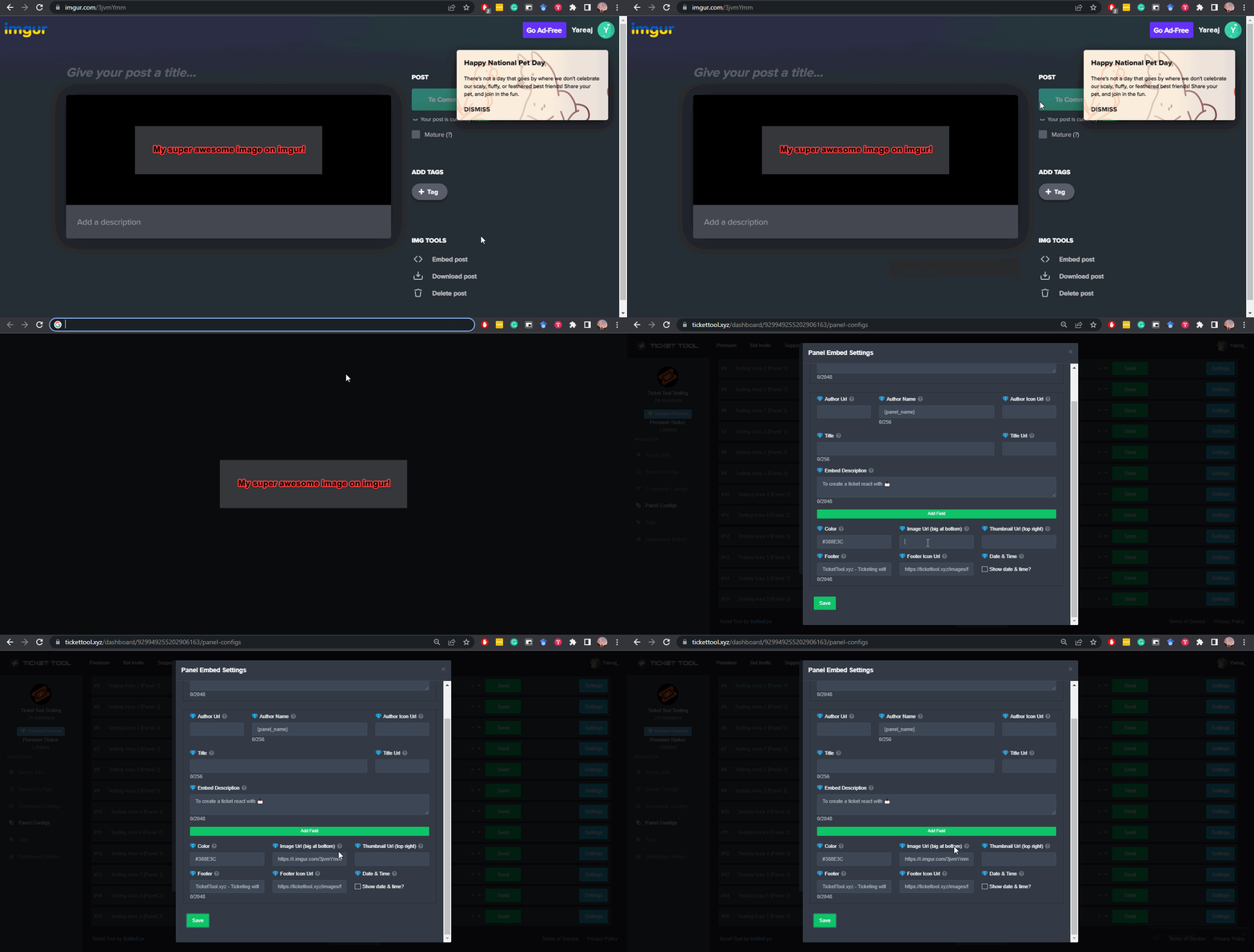
 idle flint
jade topaz
like what do i put here to get my own image
idle flint
jade topaz
like what do i put here to get my own image
See the info above 🙂
 finite frost
Hello I actived premium free trial, but idk how to use/access it since it still doesn't let me use premium features...
idle flint
finite frost
Hello I actived premium free trial, but idk how to use/access it since it still ...
You can hit the Sync button to ensure that the trial is recognised (on the dashboard)
 idle flint
All good 🙂
finite frost
thanks @idle flint
iron nightBOT
Gave +1 Rep to @idle flint (current: #20 - 326)
finite frost
also after the trial ends, do the premium features go away
idle flint
Correct, all the premium features will become unavailable again
finite frost
alr
 dawn bison
I'm create ticket pls give me legendary rank
humble sequoiaBOT
⚠️ You're in the wrong place
We provide support for Ticket Tool Discord bot and cannot help you with whatever issue you have.
- We don't know which Support Team you should contact to get this issue resolved, and unfortunately we won't be able to accurately tell you.
If you don't have any further questions regarding our bot Ticket Tool, please close this ticket
 vapid citrus
how do I allow the ticket message to @ a role
finite frost
{roleid}
humble sequoiaBOT
1. Go into your Dashboard
2. Open your Panel Configs tab
3. Select the panel you want to ping your support on
4. Open the Ticket options menu
5. Click on Edit Ticket Message
6. In the Message Content use one of the role mention syntax (**{@Role Name}**/**{Role ID}**)
7. Save changes
Note: For this to work properly, Ticket Tool requires the Mention Everyone permission. Or the role must have the Allow anyone to @mention this role setting enabled
vapid citrus
idle flint
Correct, all the premium features will become unavailable again
thanks for the help too
iron nightBOT
Gave +1 Rep to @idle flint (current: #20 - 327)
vapid citrus
finite frost
{roleid}
thank you
finite frost
np
vapid citrus
finite frost
np
is there a way we can change the name from "closed"?
finite frost
vapid citrus
is there a way we can change the name from "closed"?
need premium
worldly helm
vapid citrus
is there a way we can change the name from "closed"?
Hey. Do you mean the close button?
vapid citrus
yeah like this in the chat rooms
 vapid citrus
worldly helm
Hey. Do you mean the close button?
vapid citrus
worldly helm
Hey. Do you mean the close button?
its more like the chat name rooms
finite frost
i think he means the names of the ticket
worldly helm
vapid citrus
its more like the chat name rooms
You can use the /rename command, but for the bot to do it automaticly you need premium
 uncut swallow
Oie
finite frost
worldly helm
You can use the /rename command, but for the bot to do it automaticly you need p...
ahh that command helps
vapid citrus
worldly helm
You can use the /rename command, but for the bot to do it automaticly you need p...
I mean if its manually can just manually edit but yeah
 idle sinew
good morning please can you tell me how to do to receive new credentials for pipiaids
humble sequoiaBOT
@idle sinew
⚠️ You're in the wrong place
We provide support for Ticket Tool Discord bot and cannot help you with whatever issue you have.
- We don't know which Support Team you should contact to get this issue resolved, and unfortunately we won't be able to accurately tell you.
If you don't have any further questions regarding our bot Ticket Tool, please close this ticket
 dry axle
hey I've had a discord account get banned and I want to cancel the subscription attached to it
 austere forge
dry axle
hey I've had a discord account get banned and I want to cancel the subscription ...
austere forge
dry axle
hey I've had a discord account get banned and I want to cancel the subscription ...
Do you know how you subscribed to premium? Discord or on our website?
dry axle
website i think?
dry axle
austere forge
Do you know how you subscribed to premium? Discord or on our website?
it's been over 2 years
austere forge
dry axle
it's been over 2 years
Mmh, do you by any chance know the ID of your old account?
dry axle
.razi
austere forge
I'd need an ID, a series of numbers
dry axle
150134564839227392
austere forge
great, one moment!
austere forge
dry axle
150134564839227392
I'm going to move you to a ticket, so that I can deal with your case
worldly helm
jade topaz
how can i change the name of my ticket tool bot?
Hello. Please refer to the embed below
humble sequoiaBOT
Ticket Tool Custom Avatar
As of now, you are not able to change Ticket Tool's profile picture, nonetheless, our Development Team is working on the release of white labels, this is your own custom bot!
For the time being, you can change the bot's nickname by right-clicking the bot in the user list on your server and clicking Change Nickname

$avatar
jade topaz
worldly helm
Hello. Please refer to the embed below
Ty Lias!
iron nightBOT
Gave +1 Rep to @worldly helm (current: #17 - 357)
 plush rover
السلام عليكم
humble sequoiaBOT
فريق الدعم الفني العربي
عميلنا العزيز ان كنت تبحث عن مساعدة يرجى فتح تكت خاص بفريق الدعم الفني العربي
اذهب الى#🎫│make-a-ticket
ثم قم بلضغط على الايموجي الاتي (🇯🇴)
 coral egret
How do I open a ticket in another server
worldly helm
coral egret
How do I open a ticket in another server
Hey, if they have a ticket system, simply just click a button. In most cases the channels are called Tickets | make a ticket | etc. If they have a dropdown menu simply select an option to create one.
 hidden mantle
making a ticket doesnt work
worldly helm
hidden mantle
making a ticket doesnt work
Hey, are there any error messages?
hidden mantle
yes
worldly helm
Please show me
worldly helm
I cant come call rn, please state your issue here.
jade topaz
I edited a message on the embed and it's not saving
It's sticking to th original message
hidden mantle
how do you send screenshots
worldly helm
hidden mantle
i wanna make a screenshare
Windows + shift + s
worldly helm
jade topaz
I edited a message on the embed and it's not saving
Hey. Please resend the panel.
jade topaz
okay
hidden mantle
waht is shift
worldly helm
The button above Strg/crtl
jade topaz
worldly helm
Hey. Please resend the panel.
I did and the same message is still sticking
hidden mantle
where is ctrl
worldly helm
Bottom left key
worldly helm
jade topaz
I did and the same message is still sticking
What msg did you edit?
worldly helm
hidden mantle
there is strg
Thats the same one.
jade topaz
worldly helm
What msg did you edit?
The ticket message
worldly helm
What exactly in the ticket message?
hidden mantle
 worldly helm
Okay, scheint so als wenn der bot noch nicht alle permissions hat. Bitte versuche mal den /debug command zu machen.
 worldly helm
Der bot braucht die berichtigung in den kanal zu lesen.
hidden mantle
ich gebe in jetzt admin
worldly helm
Das geht auch ;)
hidden mantle
jetzt geht es danke
worldly helm
Kein problem
 pseudo ravine
Hey there. So you're trying to edit the Panel Message but the message isn't updating?
worldly helm
pseudo ravine
Hey there. So you're trying to edit the `Panel Message` but the message isn't up...
He‘s talking about the ticket message
worldly helm
jade topaz
The ticket message
.
pseudo ravine
Have you made sure you edited the correct panel on the dashboard?
humble sequoiaBOT
━━ George's inquiry has been moved to a ticket ━━
 rigid herald
J'ai gagner la carte Examen artistique comment la reclamer
humble sequoiaBOT
⚠️ Vous n'êtes pas au bon endroit
Nous offrons un support pour le bot Ticket Tool et nous ne pouvons pas vous aider avec d'autres problèmes hors du bot.
- Assurez-vous de contacter l'équipe d'assistance appropriée, s'il vous plaît.
S'il n'y a pas d'autres éléments en lien avec Ticket Tool en quoi nous pouvons vous être utiles, veuillez fermer le ticket.
rigid herald
J'ai essayer d'ouvrir un ticket dans concours mais ça ne fonctionne pas
humble sequoiaBOT
⚠️ Please read the messages previously sent by our team ⚠️
 scenic quail
hello, how do i change where it sets "click the reaction below to open a ticket" thing in dashboard
bc basically my emoji i have for react does not corrspond w the one in the message
worldly helm
scenic quail
hello, how do i change where it sets "click the reaction below to open a ticket"...
Hello. Please refer to the embed below
humble sequoiaBOT
The panel message is where people react to make a ticket. To customize it head over to your Dashboard --> Panel Configs -> Panel -> Edit Panel Message
 scenic quail
thx @worldly helm where would it be here
 iron nightBOT
Gave +1 Rep to @worldly helm (current: #17 - 358)
worldly helm
Scroll down a bit until you see "Panel" --> Edit Panel Message
scenic quail
thx so much'
how can i add buttons for specifc tickets like verification report a user etc @worldly helm
worldly helm
Please refer to the embed below!
humble sequoiaBOT
For more convenient use of multipanels, you can now combine panels on the dashboard. This will allow you to directly send the multipanel from the dashboard or via the $panel ID command.
Where can I find this?
You can find this setting on the Dashboard -> Panel Configs -> Panel -> Attached Panels
Note: if you're attaching all the panels to a panel called English, don't include English in the attached panel's box (If you do this, it will create a duplicate)
This will put all buttons from all of your panels on one message. The message is the panel message from the panel you're combining these panels in.
 jade topaz
Help please
worldly helm
jade topaz
Help please
hey. what do you need help with?
jade topaz
worldly helm
hey. what do you need help with?
Need help with trying to make a channel where they can click on it and it creates a ticket
But can't figure out what.to do or how
stark runeBOT
1. Invite Ticket Tool to your server
First you will want to invite the bot to your server. Once the bot is in your server, you can manage your server in the dashboard.
2. Create a Panel
To create a panel we are going to need to head over to the panel configs on the dashboard.
Once at the dashboard we will need to click Create Panel.
Enter a panel name (Fill in any optional settings you want).
Click Create Panel and your ready to get started with configuring your panel.
An example of a creating a panel is shown below.
3. Send the Panel to a Channel
Once you've created a panel on the dashboard you will need to send it to a channel using send on the dashboard.
Select the channel you want your panel to be created in and click send.
For other questions checkout $help faq.
An example of a sending a panel is shown below.
Having a Problem Sending the Panel?
Do $debug in a channel with Ticket Tool and make sure it has all the necessary Discord permissions.
worldly helm
jade topaz
Need help with trying to make a channel where they can click on it and it create...
Look above 
iron nightBOT
Gave +1 Rep to @worldly helm (current: #17 - 359)
jade topaz
And how do I do this
Nvm
@worldly helm can u help me figure out what to enable or how to make.it go to channel or etc
jade topaz
Ok sorry but how do I make it like have a link and so they can click create ticket so that way when they do we get notified or smth
worldly helm
What do you mean "link"
 sturdy wagon
Why doesn't the bot respond when I run the /setup command? Does it have all the necessary roles?
restive condor
sturdy wagon
Why doesn't the bot respond when I run the /setup command? Does it have all the ...
Hey there! Could you use the /debug command please
worldly helm
jade topaz
I already sent the guide above. If you finish it, it looks like that.
sturdy wagon
restive condor
Hey there! Could you use the ``/debug`` command please
Okay tanks
sturdy wagon
restive condor
Hey there! Could you use the ``/debug`` command please
Look pls
 restive condor
sturdy wagon
Look pls
restive condor
sturdy wagon
Look pls
Ticket Tool seems to be missing the VIEW CHANNEL permission for that channel
sturdy wagon
restive condor
Ticket Tool seems to be missing the ``VIEW CHANNEL`` permission for that channel
Yes its good im sorry 🥲
restive condor
No problem!
jade topaz
How do I make. Tool creater delete ticket instantly and DM ppl
its been closed by @ username then reason
restive condor
jade topaz
How do I make. Tool creater delete ticket instantly and DM ppl
Hey there! Automatic DM transcripts are a premium feature.
To have tickets automatically deleted once closed, disable TWO STEP TICKET from your Dashboard > Panel Configs > General
 visual swallow
Quiero vender mi cuenta me pueden ayudar por favor
 twilit sinew
It is not showing the server I am trying to setup
 jagged crystal
i need help
i just want to have the thing where people can open the ticket
like this
 jagged crystal
restive condor
Hey there! Automatic DM transcripts are a premium feature.
To have tickets auto...
jagged crystal
restive condor
Hey there! Automatic DM transcripts are a premium feature.
To have tickets auto...
can you help?
finite frost
jagged crystal
can you help?
They just have to click on the buttons?
jagged crystal
finite frost
They just have to click on the buttons?
yes, that is what i want
i dont know how to make t like thatt
finite frost
do you want a ticket to be open with the buttons or the reaction/emoji?
jagged crystal
finite frost
do you want a ticket to be open with the buttons or the reaction/emoji?
buttons
finite frost
does a ticket not be opened when they click on it?
jagged crystal
finite frost
does a ticket not be opened when they click on it?
it does
i want to have that, in my server
worldly helm
jagged crystal
i want to have that, in my server
Hello. do you want multiple buttons in 1 panel?
jagged crystal
finite frost
you want the ticket bot in your server
Yes
jagged crystal
worldly helm
Hello. do you want multiple buttons in 1 panel?
I just want the panel
finite frost
jagged crystal
Yes
you have to configure it

Ticket Tool - Ticketing without clutter - The #1 Discord support bot
stark runeBOT
1. Invite Ticket Tool to your server
First you will want to invite the bot to your server. Once the bot is in your server, you can manage your server in the dashboard.
2. Create a Panel
To create a panel we are going to need to head over to the panel configs on the dashboard.
Once at the dashboard we will need to click Create Panel.
Enter a panel name (Fill in any optional settings you want).
Click Create Panel and your ready to get started with configuring your panel.
An example of a creating a panel is shown below.
3. Send the Panel to a Channel
Once you've created a panel on the dashboard you will need to send it to a channel using send on the dashboard.
Select the channel you want your panel to be created in and click send.
For other questions checkout $help faq.
An example of a sending a panel is shown below.
Having a Problem Sending the Panel?
Do $debug in a channel with Ticket Tool and make sure it has all the necessary Discord permissions.
worldly helm
^^
worldly helm
twilit sinew
It is not showing the server I am trying to setup
Hello. Please refer to the embed below.
humble sequoiaBOT
Don't see your server in the dashboard?
Try using the Sync Servers button on your top center of the Dashboard page
If this doesn't work
You should relog from the dashboard, you can do this by clicking here to log out immediately, and then log back in
Note:
You need one of these 3 things to access the dashboard.
1. Server Owner (Level: 6)
2. Server Administrator (Level: 4)
3. Dashboard Role (Level: 2)
:warning: You can check your level using the </permissionlevel:1029797400174399542> command on your Discord Server
If the bot's response is:
- @User is permission level: 0 (User)
You don't have any of the 3 levels required to access the server's dashboard
 jagged crystal
humble sequoia
jagged crystal
humble sequoia
Thanks guys
iron nightBOT
Gave +1 Rep to @humble sequoia (current: #18 - 351)
 empty oasis
how do i make this bot use a certain channel to send transcripts???
 grim wave
stark rune
grim wave
stark rune
@merry sparrow
 random laurel
can i get help with setting up the ticket tool bot for a server?
ive gone through all the steps but when i use a command it says “The application did not respond.”
worldly helm
random laurel
ive gone through all the steps but when i use a command it says “The application...
Hello Connor. Please try using the /debug Command.
worldly helm
grim wave
<@615207454443044904>
Hello. Please don‘t ping for support. Look below
humble sequoiaBOT
1. Go into your Dashboard
2. Open your Panel Configs tab
3. Select the panel you want to grant access to
4. Open the Category options menu
5. Select the categories of your preference
6. Save changes

 oblique fox
@grim wave
grim wave
oblique fox
<@1014836665140916304>
Yes
oblique fox
grim wave
Yes
عندي مشكله انت عربي
grim wave
oblique fox
عندي مشكله انت عربي
لا عربی
humble sequoiaBOT
فريق الدعم الفني العربي
عميلنا العزيز ان كنت تبحث عن مساعدة يرجى فتح تكت خاص بفريق الدعم الفني العربي
اذهب الى#🎫│make-a-ticket
ثم قم بلضغط على الايموجي الاتي (🇯🇴)
 grim wave
oblique fox
معرف وش السوال الخير
grim wave
oblique fox
معرف وش السوال الخير
ال فارسی
worldly helm
humble sequoia
@oblique fox
oblique fox
grim wave
ال فارسی
وش
grim wave
oblique fox
وش
فارسی بلدی
oblique fox
grim wave
فارسی بلدی
مفهمتك
worldly helm
oblique fox
هل تريد إعداد هذا؟
grim wave
worldly helm
هل تريد إعداد هذا؟
ال ولش کن ال فهمیدم ال خدافظ

 grim wave
oblique fox
<@1014836665140916304>
grim wave
oblique fox
<@1014836665140916304>
ال اینان چیستند
worldly helm
oblique fox
<@1014836665140916304>
Discord has a limit of 500 channels at once, please delete some in order to keep creating tickets.
of tell their staff to delete some
oblique fox
worldly helm
Discord has a limit of 500 channels at once, please delete some in order to keep...
Kako si dobio moj broj?
@worldly helm
worldly helm
Please #🎫│make-a-ticket --> Arabic
jade topaz
Help pls
 outer shoal
Hey peeps! For transcripting from non-ticket channels, does the requirement to be a "premium member" to do this mean that the server needs to be a premium server or that each person who would use the command needs to be a premium user?
worldly helm
outer shoal
Hey peeps! For transcripting from non-ticket channels, does the requirement to b...
Hey. The server needs to have an active premium bot ;)
outer shoal
worldly helm
Hey. The server needs to have an active premium bot ;)
Okay so once it has a premium bot, all users with the right persmissions will be able to create transcripts from non-ticket channels, correct?
worldly helm
jade topaz
Help pls
Hey, what do you need help with?
worldly helm
outer shoal
Okay so once it has a premium bot, all users with the right persmissions will be...
Correct ;)
outer shoal
worldly helm
Correct ;)
Understood. Thank you!
iron nightBOT
Gave +1 Rep to @worldly helm (current: #17 - 360)
 tender pivot
hi i'm having problems when attaching panels
i've created two panels but only one can be attached
can i send a pic here?
worldly helm
Hey. Yeah, due to the first one already being the First one, which means you only have to attach the 2nd one ;)
worldly helm
tender pivot
can i send a pic here?
sure
jade topaz
Help please
tender pivot
i need to attach the second ticket into the first

 worldly helm
tender pivot
i need to attach the second ticket into the first
worldly helm
tender pivot
i need to attach the second ticket into the first
Yep, click on attached panels
tender pivot
worldly helm
Yep, click on attached panels
 worldly helm
yeah and now click on it
worldly helm
ohh, then please head to the 2nd panel and check if it already has a selection (dropdown, attached panel, command tickets, etc.)
tender pivot
 tender pivot
worldly helm
ohh, then please head to the 2nd panel and check if it already has a selection (...
tender pivot
worldly helm
ohh, then please head to the 2nd panel and check if it already has a selection (...
how do i check if it has a "selection"?
worldly helm
tender pivot
Great, it doesn‘t have a attached panel selection, now go back to dropdown
then cmd tickets, etc
 frigid tangle
how can i make a ticket 3 in 1
tender pivot
worldly helm
Great, it doesn‘t have a attached panel selection, now go back to dropdown
what is dropdown?
worldly helm
tender pivot
what is dropdown?
Dashboard—> Panel configs —> Dropdown menu
worldly helm
frigid tangle
how can i make a ticket 3 in 1
Hello. Please refer to the embed below.
humble sequoiaBOT
For more convenient use of multipanels, you can now combine panels on the dashboard. This will allow you to directly send the multipanel from the dashboard or via the $panel ID command.
Where can I find this?
You can find this setting on the Dashboard -> Panel Configs -> Panel -> Attached Panels
Note: if you're attaching all the panels to a panel called English, don't include English in the attached panel's box (If you do this, it will create a duplicate)
This will put all buttons from all of your panels on one message. The message is the panel message from the panel you're combining these panels in.
tender pivot
worldly helm
Dashboard—> Panel configs —> Dropdown menu
ok, and what i have to do now?
worldly helm
Check if it‘s enabled
worldly helm
tender pivot
i check "enable select style" in dropdown section?
is it enabled?
jade topaz
worldly helm
is it enabled?
Help me please . how do I set auto messages for tickets when created
tender pivot
worldly helm
is it enabled?
 worldly helm
jade topaz
Help me please . how do I set auto messages for tickets when created
worldly helm
jade topaz
Help me please . how do I set auto messages for tickets when created
Do you mean a DM?
worldly helm
tender pivot
you‘re on the wrong panel
jade topaz
worldly helm
Do you mean a DM?
Yeah
a auto message like don't ping the support team has been pinged when u made the ticket
worldly helm
jade topaz
a auto message like don't ping the support team has been pinged when u made the ...
A dm message is premium only, you can change the ticket message though, look below
tender pivot
worldly helm
you‘re on the wrong panel
sorry
humble sequoiaBOT
The Ticket Message is the first message sent by the bot on a new ticket. To customize it head over to your Dashboard ➞ Panel Configs ➞ Ticket ➞ Edit Ticket Message
tender pivot
worldly helm
you‘re on the wrong panel
its enabled to the second panel
worldly helm
disable it, save the settings, go back to the first panel again, attached panel—> select the 2nd panel
tender pivot
still not appearing
tender pivot
worldly helm
disable it, save the settings, go back to the first panel again, attached panel—...
should i disable in the main panel?
worldly helm
tender pivot
should i disable in the main panel?
Yep
 worldly helm
Please click the  button
worldly helm
No worries
 rustic crag
i wanted to make a panel but it says ''yo have no permissions
and i have administartor and all thingies roles in that server
 heady robin
Tes
worldly helm
rustic crag
i wanted to make a panel but it says ''yo have no permissions
Hey. Sorry for the late reply, please try using the /permissionlevel command in that server.
rustic crag
it says 0
worldly helm
That means you don't have access to the Dashboard or /setup command.
You either need the administrator permission or a Dashboard role
humble sequoiaBOT
Any role you put there will have full access to the ticket tool dashboard. The server owner and users with admin permissions already have access to the dashboard.
Be careful of which roles to put here

 worldly helm
 west isle
doesnt showing other panel
west isle
doesnt showing other panel
Hey. How many panels do you have in general?
west isle
worldly helm
Hey. How many panels do you have in general?
only two
worldly helm
Please click the button and then see again.
 hybrid stratus
/setup
worldly helm
hybrid stratus
/setup
Hey. Do you need help regarding ticket tool?
hybrid stratus
Yes
worldly helm
Okay, what exactly do you need help with?
hybrid stratus
What first step
worldly helm
To do what?
rustic crag
worldly helm
That means you don't have access to the Dashboard or /setup command.
You either...
i have administartor role
worldly helm
Okay, but it seems like the role doesnt have the administrator permission.
worldly helm
 pine anchor
Like to open it
pine anchor
Like to open it
Hey. Dashboard --> Panel configs --> Click the SEND button on the top of you screen and select a channel
pine anchor
Oh thank you
 warm barn
Don't work again
 worldly helm
Please Elaborate
warm barn
worldly helm
Please Elaborate
How to disable transcript button for ticket holder?
worldly helm
You can‘t, you can only disable it for roles/enable it for roles
 worldly helm
Yeah, now only the support team can save transcropts
 half mountain
loader is available in the game
but its functions do not work
aimbot
wallhack
all
I bought a 3-day package on another account
and this time no function works
humble sequoiaBOT
⚠️ You're in the wrong place
We provide support for Ticket Tool Discord bot and cannot help you with whatever issue you have.
- We don't know which Support Team you should contact to get this issue resolved, and unfortunately we won't be able to accurately tell you.
If you don't have any further questions regarding our bot Ticket Tool, please close this ticket
half mountain
half mountain
loader is available in the game
but its functions do not work
aimbot
wallhack
al...
Can anyone help? Please. pv
humble sequoiaBOT
⚠️ Please read the messages previously sent by our team ⚠️
warm barn
worldly helm
Yeah, now only the support team can save transcropts
Thanks
iron nightBOT
Gave +1 Rep to @worldly helm (current: #17 - 361)
iron nightBOT
Gave +1 Rep to @worldly helm (current: #17 - 362)
 minor cosmos
hey their just wondering is any @pseudo glen @humble sequoia having issues discord api having issues https://discordstatus.com/
Welcome to Discord's home for real-time and historical data on system performance.
worldly helm
minor cosmos
hey their just wondering is any <@557628352828014614> <@722196398635745312> havi...
Hey. The discord API is indeed having issues, the "interaction failed" error can occour while trying to use the bot, it doesn't have to though.
minor cosmos
worldly helm
Hey. The discord API is indeed having issues, the "interaction failed" error can...
okay 👍 I wasn't sure if the ticket tool bots would be in a partial outage then, thank you!
iron nightBOT
Gave +1 Rep to @worldly helm (current: #17 - 363)
restive condor
Please keep this channel to support only please
worldly helm
jade topaz
What bot makes roles auto give when join
Hey again. We only provide Support for Ticket tool!
jade topaz
worldly helm
Hey again. We only provide Support for **Ticket tool**!
Ah who do I ask or go to
.
worldly helm
You can google for such a bot.
 amber talon
Hi how do I contact admin thanks
restive condor
amber talon
Hi how do I contact admin thanks
Hey there! Is this regarding Ticket Tool?
restive condor
What exactly is the problem?
amber talon
I have up dated my meta mask and my Aethir not is not showing up could you please resend link or advise thanks
humble sequoiaBOT
⚠️ You're in the wrong place
We provide support for Ticket Tool Discord bot and cannot help you with whatever issue you have.
- We don't know which Support Team you should contact to get this issue resolved, and unfortunately we won't be able to accurately tell you.
If you don't have any further questions regarding our bot Ticket Tool, please close this ticket
 timber nebula
Kann mir wer helfen
humble sequoiaBOT

Deutsches Support-Team
Wenn du Hilfe vom Deutschen Support-Team erhalten möchtest gehe in #🎫│make-a-ticket und öffne durch einen Klick auf den :flag_de: Button ein Ticket.
worldly helm
timber nebula
Kann mir wer helfen
Moin, hast du schon ein Ticket geöffnet oder brauchst du noch support?
humble sequoiaBOT
━━ 𝐄𝐥𝐢𝐭𝐞 | 匚尺ㄚ乙乙's inquiry has been moved to a ticket ━━
 neat prism
Hiya - I bought Premium before adding this bot to my server and now it's stuck showing "You don't have access to this server." for both myself and the server owner.
Is there a way to fix this?
 eager jasper
how do i make the ticket ask questions before fully opening
neat prism
neat prism
Hiya - I bought Premium before adding this bot to my server and now it's stuck s...
nvm found a fix
 covert swallow
eager jasper
how do i make the ticket ask questions before fully opening
covert swallow
eager jasper
how do i make the ticket ask questions before fully opening
That can be done with forms
humble sequoiaBOT
A Discord Form lets the user answer individual questions in a pop-up Form, which then displays the answers in the ticket message. This can save time if you already know what you want to ask the user.
Setup Forms
Forms can be enabled under Panel Settings > Form Options > Edit Forms Options. In the new pop-up window, you can now enable and edit your own Form.
Form Options
You can add up to 5 questions in the Discord form. This is a Discord limitation. Each question can have a placeholder in the input field, a minimum and maximum input, multi-line, and also the option to have the answer required.
Options
Question Title ➞ Your Question goes here
Question Placeholder ➞ The placeholder text in the input field
Required ➞ If enabled, the user has to answer this question, to submit the form
Multi-Line Input ➞ Allows the user to input multiple lines
Minimum and Maximum Input ➞ Set a minimum and maximum input value for the user
Displaying the Answer
To display the answers from the user, you need to enable Auto display form results on the ticket message as an additional embed
If you don't want a second embed, go into your Panel Configs > Ticket Options > Edit Ticket Message. You use the variable {create.form.x} and replace x with the number of your question. For example, the response to Question 5 can be displayed with {create.form.5}.

 arctic rock
my thing keeps saying this when i put /setup
 worldly helm
arctic rock
my thing keeps saying this when i put /setup
worldly helm
arctic rock
my thing keeps saying this when i put /setup
Hello. Please try using the /debug Command in that channel
arctic rock
worldly helm
Hello. Please try using the /debug Command in that channel
ok

i does the same thing
worldly helm
The bot needs the permission to view the Channel. Then it‘ll work.
arctic rock
ok
 muted bough
Hello, Which variable is the display name?
 mystic forge
Is there any way to restore a deleted ticket?
worldly helm
mystic forge
Is there any way to restore a deleted ticket?
Hey. Only if you saved the transcript!
worldly helm
muted bough
Hello, Which variable is the display name?
Hello. You check out the docs (https://docs.tickettool.xyz/dashboard/panel-configs/variables) to see what the right variable is.

Description of the variables you can use across your ticket system
 royal token
Wie kann ich den Namen und das Bild des Bots ändern?
worldly helm
royal token
Wie kann ich den Namen und das Bild des Bots ändern?
Moin! Du kannst nur den Namen ändern, nicht das bild
humble sequoiaBOT
Ticket Tool mit benutzerdefiniertem Avatar
Aktuell ist es nicht möglich das Profilbild vom Ticket Tool Bot zu ändern. Es wird aber bereits an einer Bot Version gearbeitet, welche dieses ermöglichen wird (white labels bot / custom bot).
Bis dahin ist aber bereits möglich, den Namen (nichname) vom Bot zu ändern.
Dazu klickst du mit Rechtsklick auf den Bot in der User Liste und auf Nickname ändern (Change Nickname)
$deavatar
worldly helm
Guck dir einfach die beschreibung über mir an!
worldly helm
royal token
Vielen Dank das klingt doch schon mal gut 👍👌
Kein problem
royal token
Noch eine Frage, wenn ich den Username meines Supporters im claim anzeigen möchte.. kommt nur ne lange nimmer anstelle des usernamens, welcher das ticket beansprucht hat. Welche variable muss ich hierfür nutzen?
worldly helm
Scheint so, als wenn das die ID von dem Supporter ist ;)
Du kannst die {claim.user} variable benutzen.
worldly helm
Okay, versuche es mal mit {claim.user.name}.
royal token
Ah okay super 👍
worldly helm
Entschuldigung für die Unannehmlichkeiten.
royal token
Nein nein alles gut. Es funktioniert perfekt 👌
worldly helm
Super 
 strange cloud
why when someone fills the questions in the forms in ticket and when they sumbit the ticket i dont see the questiosn
worldly helm
strange cloud
why when someone fills the questions in the forms in ticket and when they sumbit...
Hey.
Dashboard --> Panel Configs --> Forms --> Auto Display form results on the Ticket message as an additional embed.
strange cloud
worldly helm
Hey.
Dashboard --> Panel Configs --> Forms --> <:Switch_enabled:104173462733062...
tysm
 quick nest
moin moin gibt es eine möglichkeit die mail adresse zu ändern ohne verzierung ? weil mein problem ist die mail addy die hieer angegeben ist , das mail fach existiert nicht mehr ?
worldly helm
quick nest
moin moin gibt es eine möglichkeit die mail adresse zu ändern ohne verzierung ? ...
Hey! Du bist in dem falschen Server. Wir helfen nur leuten die mit Ticket tool ein problem haben oder eine Frage darüber haben.
quick nest
ups ok danke für die info
worldly helm
Jup, kein problem!
royal token
Kann ich Prioritäten einstellen bei Tickets ?
worldly helm
royal token
Kann ich Prioritäten einstellen bei Tickets ?
Was genau meinst du?
royal token
worldly helm
Was genau meinst du?
Zum Beispiel priority low, Medium or hight
worldly helm
Wofür genau wenn ich fragen darf, ich verstehe es nicht ganz 😅
royal token
Kein Problem. Ich habe einen FiveM Server und für allgemeine Support Fragen währe eine priorisierung praktisch. Der User oder der Supporter kann die Priorität festlegen.

So in etwa
worldly helm
Du könnest multipanels anwenden, und die buttons "Low" "Medium" und "Hoch", dann setzt du die automatischen name von den tickets zu "Low - {ticket.user.name}" "Medium - {ticket.user.name}" und "Hoch - {ticket.user.name}"
humble sequoiaBOT
For more convenient use of multipanels, you can now combine panels on the dashboard. This will allow you to directly send the multipanel from the dashboard or via the $panel ID command.
Where can I find this?
You can find this setting on the Dashboard -> Panel Configs -> Panel -> Attached Panels
Note: if you're attaching all the panels to a panel called English, don't include English in the attached panel's box (If you do this, it will create a duplicate)
This will put all buttons from all of your panels on one message. The message is the panel message from the panel you're combining these panels in.
The ticket name is the default channel name of all tickets. To edit it, go to your Dashboard > Panel Configs > Ticket. There you can edit the channel name of opened and closed tickets. You can also use variables in there.

 Note: This is a premium feature
worldly helm
Note: This is a premium feature
worldly helm
Wenn du weitere fragen hast, frag einfach ; )
worldly helm
Du könnest einfach den /rename command benutzen um die "art" dann zu ändern.
worldly helm
Dürfte ich fragen wieso nicht? Vllt kann ich dir dann noch helfen 😅
royal token
Okay 👍 Moment ich schaue eben mal
So habe ich das nun gemacht

Nur kann ich dass auch so einstellen, dass wenn ich es ändere auch im. Titel angezeigt wird also die Farbe?
worldly helm
Also in dem ticket namen?
royal token
Geneau
worldly helm
Ja, natürlich.
Dashboard --> Panel Configs --> Ticket --> Ticket Opened channel name --> Dort kannst du einfach das hier einfügen.
 royal token
Nun sehe ich das dropdown nicht mit der Auswahl
 royal token
worldly helm
Ja, natürlich.
Dashboard --> Panel Configs --> Ticket --> Ticket Opened channe...
royal token
worldly helm
Ja, natürlich.
Dashboard --> Panel Configs --> Ticket --> Ticket Opened channe...
Hm ich weiß jetzt nicht so genau
worldly helm
royal token
Nun sehe ich das dropdown nicht mit der Auswahl
Achso, ne das geht nicht. DropDown, multipanels sind nur dafür da um die tickets zu öffen.
royal token
Bei dem einen Discord sieht das so aus . Und so wollte ich das auch gerne machen

 worldly helm
Könnest du das ganze bild schicken? also von dem zweiten.
eager jasper
covert swallow
That can be done with forms
Shanks
 worldly helm
 carmine drum
Hello. Please use the /debug
command.
carmine drum
worldly helm
Hello. Please use the /debug
command.
Ok
worldly helm
Also, Dashboard—> Panel Configs —> Category —> select a valid one

 carmine drum
worldly helm
Also, Dashboard—> Panel Configs —> Category —> select a valid one
carmine drum
worldly helm
Also, Dashboard—> Panel Configs —> Category —> select a valid one
This?
 royal token
worldly helm
Könnest du das ganze bild schicken? also von dem zweiten.
royal token
worldly helm
Könnest du das ganze bild schicken? also von dem zweiten.
Ja sende ich dir gleich zu
worldly helm
carmine drum
This?
Yep, and also you didn‘t give the bot all perms, maybe for that channel, but not the role itself.
worldly helm
royal token
Ja sende ich dir gleich zu
Danke 🙏
carmine drum
worldly helm
Yep, and also you didn‘t give the bot all perms, maybe for that channel, but not...
Ohh
muted bough
worldly helm
Hello. You check out the docs (https://docs.tickettool.xyz/dashboard/panel-confi...
Was soll mir was bringen? Es steht nicht mal als displayname dort in den docs
worldly helm
muted bough
Was soll mir was bringen? Es steht nicht mal als displayname dort in den docs
Für was genau willst du den den haben?
sturdy wagon
I can't create a ticket as a member of my forgotten account.

Where should I go to solve this problem?
worldly helm
sturdy wagon
I can't create a ticket as a member of my forgotten account.
Hello. Please tell their owner/staff about this issue.
sturdy wagon
Okay
sturdy wagon
worldly helm
Hello. Please tell their owner/staff about this issue.
Do the other panels work for you?
worldly helm
What do you mean?
 plush nacelle
I buy before almost 2h, anyone know when I get acces for this?
 austere forge
we don't know, we're not related to this server
 hoary forge
austere forge
we don't know, we're not related to this server
hoary forge
austere forge
we don't know, we're not related to this server
Hey
 rigid edge
Howdy, support team, I've been experiencing some ticket tool-form issue. Apparently, even though I executed everything, it still isn't appearing. I need to get this ticket tool setup soon.

 covert swallow
x should be replaced with the form number
To get the output of question one, use create.form.1
rigid edge
covert swallow
To get the output of question one, use `create.form.1`
And where do I place it?
covert swallow
Wherever you want the question's answer to be
 dusky hinge
Any idea when ticket tool is opening partner applications
humble sequoiaBOT

Partnership Program
Our partnership program is currently closed.
We appreciate you being interested in partnering with Ticket Tool! Unfortunately, the program for partnering is closed as of now. Nonetheless, make sure to keep an eye at #📣│server-news where we announce partner applications opening!
 TicketTool.xyz - Ticketing without clutter
rigid edge
covert swallow
Wherever you want the question's answer to be
TicketTool.xyz - Ticketing without clutter
rigid edge
covert swallow
Wherever you want the question's answer to be
Are you able to sow me an illustration?
covert swallow
 rigid edge
covert swallow
rigid edge
covert swallow
Where can I find that?
 covert swallow
The ticket message
rigid edge
covert swallow
The ticket message
Right, will do that. I'll show you once im finished if thats okay?
covert swallow
Okay
rigid edge
covert swallow
Okay
 covert swallow
You forgot an e in {create.form.1} and {create.form.2}
rigid edge
covert swallow
You forgot an e in {create.form.1} and {create.form.2}
My bad,
covert swallow
Otherwise it looks right
rigid edge
covert swallow
Otherwise it looks right
Fixed. I'll inform you as to whether it works or not.
rigid edge
covert swallow
Otherwise it looks right
Still doesnt work.
covert swallow
What is the output
rigid edge
covert swallow
What is the output
It insatnly creats the ticket, no forms showing.
covert swallow
Did you enable forms for the correct panel?
rigid edge
covert swallow
Did you enable forms for the correct panel?
Howd this impact the forms?
 covert swallow
rigid edge
covert swallow
rigid edge
That will make the result of the forms appear automatically without this
rigid edge
covert swallow
That will make the result of the forms appear automatically without this
Works now, thanks for your assitance!
iron nightBOT
Gave +1 Rep to @covert swallow (current: #19 - 350)
covert swallow
Of course!
rigid edge
covert swallow
Of course!
By the way, im a premium subscriber. My ticket tool premium bot has not been invited yet, not sue how.
humble sequoiaBOT
The first thing you will need to do is invite the premium bot, an invite can be found here
Once the bot is in your server we will head to the dashboard and manage your server. When you are managing your server, you want to head into "Server Configs" then click the drop down menu under "Select the bot you would like to use on this server" then click "Ticket Tool#6207" and then save.
 covert swallow
Note you will need to resend the panels
rigid edge
covert swallow
Note you will need to resend the panels
Hmm, I'll keep the normal ticket tool.
 magic mortar
Hi, may I know how to set it
 heavy knot
hello i wanted to ask that in my server when a user creates ticket, the user (ticket owner) can close the ticket. I dont want this to happen and want the staff members to be able to close ticket only. how do i do that
worldly helm
heavy knot
hello i wanted to ask that in my server when a user creates ticket, the user (ti...
Hey. Dashboard—> Panel Configs—> Buttons —> Support team only
heavy knot
worldly helm
Hey. Dashboard—> Panel Configs—> Buttons —> <:Switch_enabled:1041734627330625586...
oh thank you im checking right away :p
iron nightBOT
Gave +1 Rep to @worldly helm (current: #17 - 364)

 restive condor
rigid edge
What does ticket tool premium do?
restive condor
rigid edge
What does ticket tool premium do?
Hi there, you mean the premium bot specifically or premium in general?
restive condor
rigid edge
And how do I fix this?
Do you just to remove the large text?
rigid edge
restive condor
Hi there, you mean the premium bot specifically or premium in general?
Both.
rigid edge
restive condor
Do you just to remove the large text?
In most servers, it appears like this.
 restive condor
rigid edge
In most servers, it appears like this.
restive condor
rigid edge
In most servers, it appears like this.
That's the automatic embed to display form answers. You configured the form answers with the {create.form.x} variable.
If you're looking to disable that, please remove the variables from your ticket message and enable the 2nd switch from the Dashboard > Panel Configs > Forms ( Display form answers as an additional embed)
restive condor
rigid edge
Both.
Premium gives you access to all premium features. You can find a list of premium features below.
While their available on both bots, the premium bot has no rate limits, is faster and its usually back up quicker during outages
humble sequoiaBOT
 Faster Premium Bot
Automatic Transcripts
Full Customization
Direct Messages
Ticket Automation
Thread Style Ticketing
Premium Support
Scheduled Panel Availability
Integrations
Claiming
Advanced Ticket Statistics
You can purchase premium here:
Price
$6 - Monthly
$66 - Yearly (Open a billing ticket in #🎫│make-a-ticket to receive additional information on this matter)
rigid edge
restive condor
That's the automatic embed to display form answers. You configured the form answ...
Have already been enabled.

 restive condor
rigid edge
Have already been enabled.
restive condor
rigid edge
Have already been enabled.
You do not need the variable if you're going with the automatic embed.
Does the embed with the form answers not show on a brand new ticket?
rigid edge
restive condor
You do not need the variable if you're going with the automatic embed.
Does the...
I'd like to appear like this,
 restive condor
Yes, that's how it should be appearing. Is that embed now being shown in a brand-new ticket opened through that panel?
restive condor
magic mortar
Hi, may I know how to set it
Hi there, here's a setup guide.
Let me know if you have any questions🙏
stark runeBOT
1. Invite Ticket Tool to your server
First you will want to invite the bot to your server. Once the bot is in your server, you can manage your server in the dashboard.
2. Create a Panel
To create a panel we are going to need to head over to the panel configs on the dashboard.
Once at the dashboard we will need to click Create Panel.
Enter a panel name (Fill in any optional settings you want).
Click Create Panel and your ready to get started with configuring your panel.
An example of a creating a panel is shown below.
3. Send the Panel to a Channel
Once you've created a panel on the dashboard you will need to send it to a channel using send on the dashboard.
Select the channel you want your panel to be created in and click send.
For other questions checkout $help faq.
An example of a sending a panel is shown below.
Having a Problem Sending the Panel?
Do $debug in a channel with Ticket Tool and make sure it has all the necessary Discord permissions.
rigid edge
restive condor
Yes, that's how it should be appearing. Is that embed now being shown in a brand...
I my server, it is NOT apperaing like that.
This is how it appears.
 magic mortar
restive condor
Hi there, here's a setup guide.
Let me know if you have any questions🙏
magic mortar
restive condor
Hi there, here's a setup guide.
Let me know if you have any questions🙏
I did saw the guide got confused then came here
restive condor
rigid edge
This is how it appears.
Is that ticket opened through the same panel that has the automatic embed with the form answers enabled though?
restive condor
magic mortar
I did saw the guide got confused then came here
No worries. Is Ticket Tool currently on the server?
rigid edge
restive condor
Is that ticket opened through the same panel that has the automatic embed with t...
Yes.
magic mortar
restive condor
No worries. Is Ticket Tool currently on the server?
yes it is
restive condor
rigid edge
Yes.
Alrighty, could I get your server name or ID please
restive condor
magic mortar
yes it is
And were you able to access your server's Dashboard?
rigid edge
restive condor
Alrighty, could I get your server name or ID please
Cold Community
magic mortar
restive condor
And were you able to access your server's Dashboard?
yes
restive condor
rigid edge
Cold Community
Looks good. Can you #🎫│make-a-ticket and post an invite to your server there please, so we can test this
restive condor
magic mortar
yes
Perfect, is there something in particular you were trying to configure?
rigid edge
restive condor
Looks good. Can you <#571706435449257997> and post an invite to your server ther...
 rigid edge
restive condor
Looks good. Can you <#571706435449257997> and post an invite to your server ther...
rigid edge
restive condor
Looks good. Can you <#571706435449257997> and post an invite to your server ther...
 magic mortar
restive condor
Perfect, is there something in particular you were trying to configure?
magic mortar
restive condor
Perfect, is there something in particular you were trying to configure?
I wanna set a ticket where people can do partnership, claim roles and I forgot the other one
humble sequoiaBOT
━━ Blaze's inquiry has been moved to a ticket ━━
restive condor
magic mortar
I wanna set a ticket where people can do partnership, claim roles and I forgot t...
Alright, you will need to create one panel for each different button. For example, if you want 3 buttons, you will 3 panels.
Please use the green  to create panels.
Let me know once you have all your panels made 👌
 cunning spruce
how to make it so the bot pings a role when someone opens a ticket
humble sequoiaBOT
1. Go into your Dashboard
2. Open your Panel Configs tab
3. Select the panel you want to ping your support on
4. Open the Ticket options menu
5. Click on Edit Ticket Message
6. In the Message Content use one of the role mention syntax (**{@Role Name}**/**{Role ID}**)
7. Save changes
Note: For this to work properly, Ticket Tool requires the Mention Everyone permission. Or the role must have the Allow anyone to @mention this role setting enabled
restive condor
cunning spruce
how to make it so the bot pings a role when someone opens a ticket
Hey there! See above please ^
cunning spruce
thanks
 tender sinew
how to change the ticket name when someone creates it?
Like if someone opens a ticket about ban appeal i want the ticket to be named “ban appeal” instead of just “ticket-01” and for it to be under ban appeal category
worldly helm
tender sinew
how to change the ticket name when someone creates it?
Like if someone opens a ...
Hey. That is a premium only feature.
tender sinew
worldly helm
Hey. That is a premium only feature.
is there a lifetime premium?
or what are prices
worldly helm
No, there isn't a lifetime premium. Its $8 per month or (I think) $66 per year, for that #🎫│make-a-ticket .
tender sinew
worldly helm
No, there isn't a lifetime premium. Its $8 per month or *(I think)* $66 per year...
tysm
 pallid badger
How do i get interviewed for the main server ?
humble sequoiaBOT
⚠️ You're in the wrong place
We provide support for Ticket Tool Discord bot and cannot help you with whatever issue you have.
- We don't know which Support Team you should contact to get this issue resolved, and unfortunately we won't be able to accurately tell you.
If you don't have any further questions regarding our bot Ticket Tool, please close this ticket
 empty mortar
Hey
The specific roles that can view and respond to tickets has already been set ,but for some reason members outside this role are able to do the same
 restive condor
empty mortar
The specific roles that can view and respond to tickets has already been set ,bu...
restive condor
empty mortar
The specific roles that can view and respond to tickets has already been set ,bu...
Hey there!
Dashboard > Panel Configs > Permissions > Everyone Role Permissions - Edit Opened
Please make sure the VIEW CHANEL permission is set to 
empty mortar
restive condor
Hey there!
``Dashboard`` > ``Panel Configs`` > ``Permissions`` > ``Everyone Role...
Done
It didn't work
Im new to these things
Should i press update?
 chilly flame
ك
restive condor
empty mortar
Should i press update?
You will need to create a brand new ticket
restive condor
chilly flame
ك
$articket
humble sequoiaBOT
فريق الدعم الفني العربي
عميلنا العزيز ان كنت تبحث عن مساعدة يرجى فتح تكت خاص بفريق الدعم الفني العربي
اذهب الى#🎫│make-a-ticket
ثم قم بلضغط على الايموجي الاتي (🇯🇴)
empty mortar
restive condor
You will need to create a brand new ticket
Nvm it workeddd
Thank you!!!
iron nightBOT
Gave +1 Rep to @restive condor (current: #1 - 1712)
 grim atlas
hey, so i got almost a bit of a story.. i'll try to make it short tho.
i was in the QSERF community server, and i asked about the ticket tool they used, since they had customized it to an extent i didn't know how to do. so i asked if they could help me with customizing it for my own server, although i got redirected twice (this is the second redirect), and i hope to get active guidance to help customize the bot for my servers needs. i don't know if you will be able to help with that, but i hope that someone can. i am using the "Ticket Tool White"
i would appreciate any amount of help tbh, thank you all for your time
QSERF means Quantum Science Energy Research Facility
worldly helm
grim atlas
hey, so i got almost a bit of a story.. i'll try to make it short tho.
i was in ...
Hey! Sure i can help you. What exactly do you need help with?
grim atlas
well.. a lot tbh, although mainly understanding how the entire customization thing works
i got the links for variables and the link for the menu of.. i don't know what it's called
 worldly helm
The dropdown you are at right now, is called a "panel"
grim atlas
thanks :P
anyway, first off:
is there a way to increase this number beyond 500?
 worldly helm
Nope, due to discord having a limit of 500 channels at once.
grim atlas
what exactly does the transcript save? i saw it save a few things, but i couldn't see the contents of what messages it saved (after closing a ticket)
worldly helm
If you save the transcript, you can delete the ticket and you can still view the ticket afterwards. (Images are for premium users only upto 8MB  )
)
grim atlas
in what way do you mean view? i can't seem to find what was in it, just who was in there
 worldly helm
Yep, if you click on "Direct Link" It'll create a direct link and then you can view the ticket from your browser.
grim atlas
where do you see the "Direct Link" button?
worldly helm
There you can.
 grim atlas
thank you
another thing:
i saw the earlier mentioned server "QSERF" use an @ in the ticket creation message, but i don't know how to get that to happen
in the first message from the ticket bot (it is a bit edited due to me having messed around with settings a bit already)
 worldly helm
Are you talking about a role being pinged?
grim atlas
yes
humble sequoiaBOT
1. Go into your Dashboard
2. Open your Panel Configs tab
3. Select the panel you want to ping your support on
4. Open the Ticket options menu
5. Click on Edit Ticket Message
6. In the Message Content use one of the role mention syntax (**{@Role Name}**/**{Role ID}**)
7. Save changes
Note: For this to work properly, Ticket Tool requires the Mention Everyone permission. Or the role must have the Allow anyone to @mention this role setting enabled
worldly helm
worldly helm
Sure, no worries :)
grim atlas
i will probably be back again in about 8-12 hours, when i wake up again. it's quite late at my place.
in my opinion, you deserve a raise :P
worldly helm
grim atlas
i will probably be back again in about 8-12 hours, when i wake up again. it's qu...
Sure, if im online, i'll answer you asap. Thanks for the positive feedback :)

 sonic girder
how do i make ticket @ me when some1 maakes 1
fervent crown
 proper cipher
anyone know how i fix this when i click to activate the bot it says failed?
proper cipher
anyone know how i fix this when i click to activate the bot it says failed?
Get a ticket for support
jade topaz
Thanks @worldly helm for the last few times
iron nightBOT
Gave +1 Rep to @worldly helm (current: #17 - 365)
 crimson coral
sonic girder
how do i make ticket @ me when some1 maakes 1
crimson coral
sonic girder
how do i make ticket @ me when some1 maakes 1
{role Id}
 stray cairn
How can I get Ticket tool to create a personalized Ticket as soon as someone has a certain role?
 drifting siren
Hello, how can I make it so that when a user clicks the button to create a ticket, the ticket channel will go into a specific category instead of at the very top of the channels list? Any help will be appreciated, thanks!
random laurel
second this^
drifting siren
random laurel
second this^
I found the solution! You have to go to "Panel Configs" in the Ticket Tool Dashboard under the "Category" option, then select the category you want your tickets to go in. Also, make sure the Ticket Tool bot has permissions for this to work, such as "Manage Messages" and such. If you try to create a ticket but does not work, it will tell you what permission it needs granted to work. Hope this helps!
random laurel
drifting siren
I found the solution! You have to go to "Panel Configs" in the Ticket Tool Dashb...
where is the "manage messages" thing?
bc i got the auto message saying that the bot doesn't have some permission but i dont know what I need to change
drifting siren
random laurel
where is the "manage messages" thing?
You need to edit category you want your tickets in, and select the Ticket Tool bot and set its permissions. You will find the "Manage Messages" there
random laurel
drifting siren
You need to edit category you want your tickets in, and select the Ticket Tool b...
i have the category selected and saved to where I want them to go.
drifting siren
random laurel
i have the category selected and saved to where I want them to go.
Good. Proceed to "Edit Category"
random laurel
drifting siren
Good. Proceed to "Edit Category"
i found the manage messages part in discord and checked it. I just tried to open a ticket again to see if it would go to that category and it still doesn't go into the category. Where do I go to "Edit Category"?
drifting siren
random laurel
i found the manage messages part in discord and checked it. I just tried to open...
What is the error message you are receiving?
random laurel
drifting siren
What is the error message you are receiving?
this is the message I am receiving
 drifting siren
random laurel
this is the message I am receiving
drifting siren
random laurel
this is the message I am receiving
From what I understand, you need to grant the "View Channel" permission to the Ticket Tool bot
drifting siren
random laurel
i just did and its still doing the same thing
Could you please send another error message? It may be another permission it needs
random laurel
nvm i got it. another question tho if you dont mind helping out
drifting siren
random laurel
nvm i got it. another question tho if you dont mind helping out
I don't mind, but I just added the bot an hour ago and am using it for the first time, so I may not be the best person to ask 😅 Although if I can help, I will. Feel free to ask
random laurel
drifting siren
I don't mind, but I just added the bot an hour ago and am using it for the first...
how do I make it to where the person who opens the ticket is the only one allowed to chat in it along with mods/admins/etc. and not other members from the server? I have gone through like every setting in "Ticket Tool" and can not figure it out for the life of me
drifting siren
random laurel
how do I make it to where the person who opens the ticket is the only one allowe...
The roles you've set in your Dashboard as "Support Team Roles" and/or "Additional Roles" and the person that created the ticket should be the only people that can see it. I'm pretty sure that's how it works, although I'd wait and see if a proficient Ticket Tool user could please correct me on this
Also, when I, as an admin, create the ticket, what I notice is that on the Member's List on the right, I see the list of members that currently have access to that ticket, so that should hopefully be helpful
random laurel
drifting siren
Also, when I, as an admin, create the ticket, what I notice is that on the Membe...
yea. when i see the member list in discord when the ticket is opened, its showing everyone instead of just the people that I want to be able to see each ticket when it is opened
drifting siren
Hmm not sure, sorry. Hope someone else can help you with this
 nimble bluff
guys i made a channel how can i like let the bost post the past ticket transcripts
 hollow cedar
Hi,can i pay for premium with crypto? I didn't see this variant on website
slender minnow
hollow cedar
Hi,can i pay for premium with crypto? I didn't see this variant on website
Please #🎫│make-a-ticket so that we can assist you.
slender minnow
nimble bluff
guys i made a channel how can i like let the bost post the past ticket transcrip...
After specifying the channel from dashboard, click on the transcript button in ticket or use the transcript command.
rigid edge
grim atlas
thank you very much
Give it mention perms after.
royal token
Guten Morgen ☀️,
Ich habe eigentlich eine Kategorie mit allgemeine Tickets wo die Support Tickets auch angezeigt werden solle… das macht der bot aber nicht, obwohl ich es so eingestellt werde. Der alte Boss hat es ordentlich gemacht. Die neuen Tickets werden immer oben auf dem Server platziert und nicht in der Kategorie. Warum?

 grim atlas
rigid edge
Give it mention perms after.
grim atlas
rigid edge
Give it mention perms after.
I already gave it every perm, as I do with every bot I add (I only add the verified safe bots)
So that's already taken care of :)
rigid edge
How do I invite premium ticket tool?
 worldly hemlock
Hello so i was trying too get ticket tool on my server template but then, i went to the dashbroad or whatever then i cant see the server so idk.
 iron pilot
Hello, I have been needing help and I have an explanation to be un ban in fisch I was not hacking it was my friend he said he wasn't hacking and I never knew he was when he needed help I was banned for helping a hacker and donating him some fish and after that I ask him to take me to an island because it was too lagy and I was on holidays I needed my home point on that island I told him specifically not to ever hack in this very good game it ruins the fun and now I'm banned from having fun I was nearly crying I spent hours looking for this discord please help me my user is Jeffry2432 I will never Intrust my friend again I will even send proof that it was him scripting I just need a screenshot of his account view and I may see that he hacked
Help me please man I really would appreciate it
rigid edge
iron pilot
Hello, I have been needing help and I have an explanation to be un ban in fisch ...
This is not an appeals server for fisch.
iron pilot
I'm very sorry I can't find the place to go, may you please help me find the right place
rigid edge
iron pilot
I'm very sorry I can't find the place to go, may you please help me find the rig...
Not here, dont know
iron pilot
Sorry for annoying you, have a great day
rigid edge
iron pilot
Sorry for annoying you, have a great day
You didnt annoy me, have a great day!
worldly helm
royal token
Guten Morgen ☀️,
Ich habe eigentlich eine Kategorie mit allgemeine Tickets wo ...
Moin!!
Hat die Kategorie zufällig 45 tickets oder 50 Kanäle drin
worldly helm
rigid edge
How do I invite premium ticket tool?
Hey. Look below
humble sequoiaBOT
The first thing you will need to do is invite the premium bot, an invite can be found here
Once the bot is in your server we will head to the dashboard and manage your server. When you are managing your server, you want to head into "Server Configs" then click the drop down menu under "Select the bot you would like to use on this server" then click "Ticket Tool#6207" and then save.
rigid edge
worldly helm
Hey. Look below
I see, I went there THOUGH it is still not working.
worldly helm
worldly hemlock
Hello so i was trying too get ticket tool on my server template but then, i wen...
Hello 🙂
** «You don't see your Server on the Dashboard?»**
There are mulitple options to fix this issue.
1: Make sure you have access to the Dashboard. ( Do the /permissionlevel command in your server and send a screenshot in here)
2: Click the
3: Log out and log-in again
worldly helm
rigid edge
I see, I went there THOUGH it is still not working.
What exacly isn‘t working?
rigid edge
worldly helm
What exacly isn‘t working?
I cannot see the invite button.
 eternal raptor
what permission does one need to access the dashboard ?
worldly helm
eternal raptor
what permission does one need to access the dashboard ?
Hey. Either administrator or a Dashboard role.
humble sequoiaBOT
Any role you put there will have full access to the ticket tool dashboard. The server owner and users with admin permissions already have access to the dashboard.
Be careful of which roles to put here
eternal raptor
thanks
worldly helm
rigid edge
I cannot see the invite button.
On the embed i‘ve sent above, the first hyperlink (here). Click on it and select your server.
 livid herald
Hello,
Is there anyway that i could have a reason upon closing the ticket?
 worldly helm
livid herald
Hello,
Is there anyway that i could have a reason upon closing the ticket?
worldly helm
livid herald
Hello,
Is there anyway that i could have a reason upon closing the ticket?
Hey. You can use "/close REASON"
livid herald
worldly helm
Hey. You can use "/close REASON"
Is not coming out in the reason area
Same thing
worldly helm
livid herald
Is not coming out in the reason area
Yeah, you can‘t edit the logging messages.
royal token
worldly helm
Moin!!
Hat die Kategorie zufällig 45 tickets oder 50 Kanäle drin
Wie meinst du das?
livid herald
worldly helm
Yeah, you can‘t edit the logging messages.
I rememeber at a point i could in my old server
 dreamy ibex
Does anyone know anything and could help me with the ticket tool in pv?
worldly helm
livid herald
I rememeber at a point i could in my old server
Well, not anymore.
worldly helm
dreamy ibex
Does anyone know anything and could help me with the ticket tool in pv?
Hey, what's up??
worldly helm
royal token
Wie meinst du das?
Sind in der ticket kategorie 50 kanäle oder 45 tickets drinne?
worldly helm
dreamy ibex
Does anyone know anything and could help me with the ticket tool in pv?
Please don't dm me, lets keep all of the support in this channel.
dreamy ibex
I create a ticket and when I close it I don't see it anymore, but the server owner wants it so that not only the server owner can see the closed ticket, but also the person who created it.

in my server
worldly helm
Sure thing.
Dashboard --> Panel Configs --> Permissions --> Ticket owner --> Closed ticket --> View channel.
dreamy ibex
worldly helm
Sure thing.
Dashboard --> Panel Configs --> Permissions --> Ticket owner --> Clo...
I've had this happen before and it still doesn't work. When I tried it, I used something like this on the server and after that the administrator role, i.e. the highest role after the owner, cannot delete the ticket but sees a closed ticket.
 worldly helm
Does the administrator role has the administrator permission?
worldly helm
dreamy ibex
I've had this happen before and it still doesn't work. When I tried it, I used s...
Dashboard --> Command configs --> Close ticket --> allowed roles
Dashboard --> Panel configs --> Buttons --> Close ticket --> allowed roes
dreamy ibex

 dreamy ibex
worldly helm
Dashboard --> Command configs --> Close ticket --> allowed roles
Dashboard --> ...
dreamy ibex
worldly helm
Dashboard --> Command configs --> Close ticket --> allowed roles
Dashboard --> ...
I deleted the ticket, I go, I don't see it, but as the owner I see it in the closed category
worldly helm
did you save the settings?
dreamy ibex
yes
worldly helm
and did you open a new ticket to test?
dreamy ibex
yes
dreamy ibex
okey thanks @worldly helm
 uncut ice
hi how do i fix this, nothings working
 worldly helm
uncut ice
hi how do i fix this, nothings working
worldly helm
uncut ice
hi how do i fix this, nothings working
Hey, sorry about the message before, my Keyboard broke! Im typing via phone rn.
uncut ice
fun
worldly helm
Okay, the bot needs the "Send messages" permission for that channel
uncut ice
worldly helm
Okay, the bot needs the "Send messages" permission for that channel
nope still dont work
it has the same admin role as me
 worldly helm
Can you try using the /debug command again?
uncut ice
once again nothing
 worldly helm
The bot is still missing the Send messages permission for that channel.
iron nightBOT
Gave +1 Rep to @worldly helm (current: #17 - 367)
stray cairn
Guys, How can I get Ticket tool to create a personalized Ticket as soon as someone has a certain role?
worldly helm
stray cairn
Guys, How can I get Ticket tool to create a personalized Ticket as soon as someo...
Hey. Ticket tool itself does not provide such things.
but, you could use the command style and make another bot send a $new USERID message into a private channel as soon as a person gets the certain role.
dreamy ibex
Does anyone know how to block links not only to discord servers but also to websites?
worldly helm
dreamy ibex
Does anyone know how to block links not only to discord servers but also to webs...
Hey. That is not something ticket tool does
dreamy ibex
worldly helm
Hey. That is not something ticket tool does
yes, I know but I asked, maybe someone knows
worldly helm
Well we only provide support for ticket tool
royal token
worldly helm
Sind in der ticket kategorie 50 kanäle oder 45 tickets drinne?

wo kann ich das einsehen?
also mit den Kategorien?
worldly helm
In dem discord server, also in der kategorie.
In der kategorie "General" sind 6 kanäle und ein voice chat
 royal token
hier ist das Ticket tool drin

Die neuen Tickets sollen aber unter Allgemeine Tickets angezeigt werden
akruell werden diese ganuz oben in DC erstellt
worldly helm
royal token
Ich rede über die kategorie wo die tickets rein gehen. "--------ALLGEMEINE TICKETS ----------"
 worldly helm
royal token
worldly helm
royal token
Sind in dieser kategorie 45 tickets schon drin?
worldly helm
royal token
soll ich die Kategorie mal löschen oder eien neue erstellen?
Benutze mal bitte den /debug command.
worldly helm
Ist egal, einfach in einem Kanal
royal token
 worldly helm
Bitte #🎫│make-a-ticket --> Deutsch
worldly helm
Ich bin leider nicht ein part von dem Support Team hier, tut mir leid.
d.h. ich kann dein ticket nicht sehen.
grim atlas
grim atlas
i will probably be back again in about 8-12 hours, when i wake up again. it's qu...
so i'm wondering something.. do you guys also give advice? i don't really know what the most important parts to edit are, but i would like some advice for my ticket bot. (white)
dreamy ibex
I have a question: is it possible to send the Transcript by PM in the free version?
worldly helm
dreamy ibex
I have a question: is it possible to send the Transcript by PM in the free versi...
Hey. Yes you can use the /transcript command and select a user.
nimble bluff
slender minnow
After specifying the channel from dashboard, click on the transcript button in t...
no i mean the normal tickets that are already closed
slender minnow
Yes so if they are not deleted then click on the transcript button or use the command.
 worldly helm
No, use the /transcript command in your ticket.
nimble bluff
slender minnow
Yes so if they are not deleted then click on the transcript button or use the co...
no i mean like theres a ticket i did transcript but i deleted that transcript and made a new channel can i post the PAST ticket's logs htere
dreamy ibex
worldly helm
No, use the /transcript command in your ticket.
I want to make it so that a transcription of each ticket is automatically sent by PM
worldly helm
automatically is premium only.
dreamy ibex
I had trancipt turned off for now
dreamy ibex
worldly helm
automatically is premium only.
okey
slender minnow
nimble bluff
no i mean like theres a ticket i did transcript but i deleted that transcript an...
No
If a transcript of a deleted ticket is deleted, it cannot be recovered back.
 floral bane
I will tell you something, I liked your site very much, where can I get it done?
worldly helm
floral bane
I will tell you something, I liked your site very much, where can I get it done?
Hello. Is this regarding Ticket tool?
floral bane
No, the official internet browser of the ticket tool is related to it.
 wind viper
Hellooo
I have an ongoing issue where if I try to connect a panel to my main panel, the panel I am trying to connect it with doesn't appear in the options.
How do I fix that? appreciate any helpful answer
nvm, fixed
grim atlas
how is it that you get the "rank" next to a user when sending a message? i would like to try adding something along the lines of that to my own server
 worldly helm
grim atlas
how is it that you get the "rank" next to a user when sending a message? i would...
worldly helm
grim atlas
how is it that you get the "rank" next to a user when sending a message? i would...
Hey. This feature requires atleast level 2 in Server boosts
grim atlas
i got that
 safe oak
Hello I dont know why I cant see the server Im trying to put ticket tool in the dashboard
Any one know what to do?
worldly helm
safe oak
Hello I dont know why I cant see the server Im trying to put ticket tool in the ...
Hello 🙂
** «You don't see your Server on the Dashboard?»**
There are mulitple options to fix this issue.
1: Make sure you have access to the Dashboard. ( Do the /permissionlevel command in your server and send a screenshot in here)
2: Click the
3: Log out and log-in again
safe oak
TY
worldly helm
grim atlas
i got that
Head to your role settings, select a role —> role icon
safe oak
I can now
grim atlas
worldly helm
Head to your role settings, select a role —> role icon
thank you
iron nightBOT
Gave +1 Rep to @worldly helm (current: #17 - 368)
 bright ice
How do you get Spotify ?
worldly helm
bright ice
How do you get Spotify ?
Hello. We only provide support for ticket tool.
wind viper
What part of the ticket is this?

How do I edit the "To create a ticket react with 📩 " part?
worldly helm
wind viper
What part of the ticket is this?
Hey. Look below.
humble sequoiaBOT
The panel message is where people react to make a ticket. To customize it head over to your Dashboard --> Panel Configs -> Panel -> Edit Panel Message

 vestal peak
@worldly helm
 karmic crypt
Is editing literally anything other than the basic message unavailable without paying? The regular ticket bot lets me add images
Also why are things that are free on the ticket bot, not free with ticket tool??

 silent elm
Hello, when opening a ticket I disabled buttons and I dont remember how to reenable them
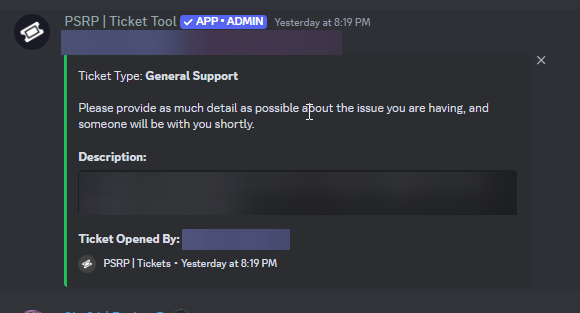
Its just the embed, and no buttons
karmic crypt
Why no "close with reason" button?
vestal peak
how to edit this description?
 humble sequoiaBOT
━━ User's inquiry has been moved to a ticket ━━
worldly helm
silent elm
https://i.imgur.com/5GuuRKI.png
Hey. Dashboard --> Panel Configs --> Buttons --> the buttons you want to show --> Show this button
jade topaz
how do i find my transcripts?
restive condor
jade topaz
how do i find my transcripts?
Hi there, what exactly do you mean?
jade topaz
restive condor
Hi there, what exactly do you mean?
i opened a ticket in a server and they closed it but is there not a transcript i can look back on?
restive condor
jade topaz
i opened a ticket in a server and they closed it but is there not a transcript i...
You will need to request one from server staff
 drifting turtle
vestal peak
how to edit this description?
drifting turtle
vestal peak
how to edit this description?
How do I make the bot like this in my Sever
stark runeBOT
1. Invite Ticket Tool to your server
First you will want to invite the bot to your server. Once the bot is in your server, you can manage your server in the dashboard.
2. Create a Panel
To create a panel we are going to need to head over to the panel configs on the dashboard.
Once at the dashboard we will need to click Create Panel.
Enter a panel name (Fill in any optional settings you want).
Click Create Panel and your ready to get started with configuring your panel.
An example of a creating a panel is shown below.
3. Send the Panel to a Channel
Once you've created a panel on the dashboard you will need to send it to a channel using send on the dashboard.
Select the channel you want your panel to be created in and click send.
For other questions checkout $help faq.
An example of a sending a panel is shown below.
Having a Problem Sending the Panel?
Do $debug in a channel with Ticket Tool and make sure it has all the necessary Discord permissions.
restive condor
drifting turtle
How do I make the bot like this in my Sever
Hi there, here's a setup guide ^
drifting turtle
Ty
 wooden bone
Yo
drifting turtle
restive condor
Hi there, here's a setup guide ^
Also when I set up the roles for the tickets I do access the tickets the members make right?
restive condor
drifting turtle
Also when I set up the roles for the tickets I do access the tickets the members...
Yes, support team role have access to tickets
 winged coral
Здравствуйте
 half apex
so the bot previously had premium, however, owners swapped so there is no longer accessable. I did the switch cmd ot wtv to make it the free version and now it says i do not have access to the server which i do
does the owner have to grant me some sort of perms?
restive condor
half apex
so the bot previously had premium, however, owners swapped so there is no longer...
Hi there, could I get your server name or ID please
jade topaz
So I actually have my server with ticket tool everything worked fine but now it just doesnt count invites when I see and I know someone invited someone it just doesn't show can anyone help me?
half apex
restive condor
Hi there, could I get your server name or ID please
Zyleak's MM2
887708783860678696
restive condor
jade topaz
So I actually have my server with ticket tool everything worked fine but now it ...
Hey there! Ticket Tool doesn't offer such invite counting feature. Wrong bot
restive condor
half apex
Zyleak's MM2
887708783860678696
Is the premium bot still in the server?
restive condor
Alright, go ahead and use the /botswitcher command again
And select the premium bot and back to the white bot please
half apex
doesn't show premium only white
restive condor
half apex
doesn't show premium only white
No worries, I'll move into a ticket and I'll switch it for you 😄
humble sequoiaBOT
━━ User's inquiry has been moved to a ticket ━━
 finite sky
Everyone can manage the dashboard for my server
restive condor
finite sky
Everyone can manage the dashboard for my server
Hey there! Make sure you haven't accidentally added roles to your Dashboard > Server Configs > Dashboard Roles
finite sky
Thanks
restive condor
No problem!
 swift plover
I just got my first ticket on my server and am wondering, If I hit close on it does it delete the channel or what does it do?
restive condor
swift plover
I just got my first ticket on my server and am wondering, If I hit close on it d...
Hey there! By default, it should just rename the ticket to closed, remove the user, and prompt the support team with the delete/transcript/re-open options
swift plover
restive condor
Hey there! By default, it should just rename the ticket to closed, remove the us...
Okay thank you very much ❤️
iron nightBOT
Gave +1 Rep to @restive condor (current: #1 - 1715)
restive condor
No problem!
 wicked copper
Hello please how do I renew my subscription?
restive condor
wicked copper
Hello please how do I renew my subscription?
Hi there, your subscription to what exactly?
humble sequoiaBOT
⚠️ You're in the wrong place
We provide support for Ticket Tool Discord bot and cannot help you with whatever issue you have.
- We don't know which Support Team you should contact to get this issue resolved, and unfortunately we won't be able to accurately tell you.
If you don't have any further questions regarding our bot Ticket Tool, please close this ticket
restive condor
You're in the wrong server unfortunately
wicked copper
Thanks for your reply
jade topaz
Is there an limit on how many tickets there are like ik max on once is 50 but like if a server is big could it go over a thousand tickets or more?
pseudo ravine
Hey there. Discord has a limit of 50 channels in a category. Along with a limit of 500 channels in a server
humble sequoiaBOT
Você está no lugar errado
Fornecemos suporte para Ticket Tool Discord bot e não podemos ajudá-lo com qualquer problema que você tenha.
- Não sabemos qual equipe de suporte você deve entrar em contato para resolver esse problema e, infelizmente, não poderemos informar com precisão.
Se você não tiver mais dúvidas sobre nossa ferramenta de ticket de bot, feche este ticket
 vivid junco
Quero falar cm adm
vivid junco
@humble sequoia @Ticketaonde aonde q e Tool#6207
Aonde q e então
Pra mim falar cm ele
@restive condor @restive condor
restive condor
Nao sei
jade topaz
hello, how do i write in my ticket once i opened one?
restive condor
@vivid junco Este é o servidor de soporte para o bot de Discord Ticket Tool
Nao podemos ajudar com outra coisa
vivid junco
Já fiz isso não vai
restive condor
O que nao vai?
restive condor
Qual é o problema exatamente?
restive condor
Nao brindamos suporte para nenhum jogo, só para o bot Ticket Tool
Voce está no lugar errado
vivid junco
Aonde q e isso mano
restive condor
O bot nao está relacionado a nenhum jogo
restive condor
humble sequoia
vivid junco
Aonde q eu resolvo
restive condor
restive condor
Nao sei
vivid junco
Nao vai isso ai
restive condor
Este nao é o servidor correto
 tribal whale
hello, how do i make it so when someone creates a ticket, instead of it creating "ticket-####"
i want it to create a custom channel name like support-####
restive condor
tribal whale
hello, how do i make it so when someone creates a ticket, instead of it creating...
Hey there! Custom ticket names are a premium feature
humble sequoiaBOT
The ticket name is the default channel name of all tickets. To edit it, go to your Dashboard > Panel Configs > Ticket. There you can edit the channel name of opened and closed tickets. You can also use variables in there.
Note: This is a premium feature
tribal whale
oh okay
 restive condor
 lofty mantle
Somebody can help me with this?
lofty mantle
Somebody can help me with this?
Hey there! Could you use the /debug command in the same channel where you're trying to post this
 restive condor
The Ticket Tool command please
lofty mantle
u said /debug
 lofty mantle
 wild spire
lofty mantle
wild spire
lofty mantle
oh kijk nederlands 
lofty mantle
Haha 😄
restive condor
jade topaz
Hi there, can you use the /debug command please
 lofty mantle
Maud zou je me kunnen helpen ;3
vivid junco
/debug
restive condor
jade topaz
Ticket Tool is missing the SEND MESSAGES permission for that channel
lofty mantle
Alright where can we add this/
wild spire
lofty mantle
Maud zou je me kunnen helpen ;3
ja zeker!
hetzelfde als hierboven wordt gezegd trouwens
 lofty mantle
Waar kunnen wij deze toevoegen
vivid junco
Como eu falo cm adm
wild spire
lofty mantle
Waar kunnen wij deze toevoegen
open de instellingen van het support kanaal en geef de bot toestemming om berichten te sturen in dat kanaal
vivid junco
Da cidade
jade topaz
restive condor
Ticket Tool is missing the ``SEND MESSAGES`` permission for that channel
fixed, thanks
iron nightBOT
Gave +1 Rep to @restive condor (current: #1 - 1716)
 wild spire
lofty mantle
wild spire
lofty mantle
dus rollen > ticket tool > advanced view
en daar kan je normaal berichten sturen groen klikken
als het niet lukt open dan even via #🎫│make-a-ticket
je kan gerust engels ofzo openen, als je het formulier nederlands invult blijft iedereen er van af en kan ik met je meekijken 🤣
tribal whale
where do i put my {create.form.x}
wild spire
tribal whale
where do i put my {create.form.x}
in the ticket message
tribal whale
wild spire
in the ticket message <:3v_smile:1187282191630204958>
also, how do i create multi panel?
like have a panel with 2 button
humble sequoiaBOT
For more convenient use of multipanels, you can now combine panels on the dashboard. This will allow you to directly send the multipanel from the dashboard or via the $panel ID command.
Where can I find this?
You can find this setting on the Dashboard -> Panel Configs -> Panel -> Attached Panels
Note: if you're attaching all the panels to a panel called English, don't include English in the attached panel's box (If you do this, it will create a duplicate)
This will put all buttons from all of your panels on one message. The message is the panel message from the panel you're combining these panels in.
tribal whale
ty
wild spire
no worries
 humble sequoiaBOT
━━ User's inquiry has been moved to a ticket ━━
 forest ferry
I staked the AIT token around 1 year, now I want to unstake my token but it shows i have no AIT token to unstake!
humble sequoiaBOT
⚠️ You're in the wrong place
We provide support for Ticket Tool Discord bot and cannot help you with whatever issue you have.
- We don't know which Support Team you should contact to get this issue resolved, and unfortunately we won't be able to accurately tell you.
If you don't have any further questions regarding our bot Ticket Tool, please close this ticket
 lyric tree
add
 last escarp
Ciao! Could any supporter help me with setting up the ticket tool bot within my server? Someone already set it up, but it seems as though it's not functioning properly when it comes to the logging of closed tickets
 sudden tiger
Hello guys , someone can tell me the reason that i got banned from AD
 humble sequoiaBOT
⚠️ You're in the wrong place
We provide support for Ticket Tool Discord bot and cannot help you with whatever issue you have.
- We don't know which Support Team you should contact to get this issue resolved, and unfortunately we won't be able to accurately tell you.
If you don't have any further questions regarding our bot Ticket Tool, please close this ticket
 fluid sun
Partner?
humble sequoiaBOT
Partnership Program
Our partnership program is currently closed.
We appreciate you being interested in partnering with Ticket Tool! Unfortunately, the program for partnering is closed as of now. Nonetheless, make sure to keep an eye at #📣│server-news where we announce partner applications opening!
TicketTool.xyz - Ticketing without clutter
 valid otter
Hi
Koi yaha khiladi adda se he
Agar aap log khiladi adda se he to mujhe aap se urgent help chahiye😫
hollow cedar
Hi, can i customization ticket tool name and avatar on my discord server?
worldly helm
hollow cedar
Hi, can i customization ticket tool name and avatar on my discord server?
Hey. Only the name, the developer is working on a way for (i think premium users) to change both. Look below for the guide!
humble sequoiaBOT
Ticket Tool Custom Avatar
As of now, you are not able to change Ticket Tool's profile picture, nonetheless, our Development Team is working on the release of white labels, this is your own custom bot!
For the time being, you can change the bot's nickname by right-clicking the bot in the user list on your server and clicking Change Nickname
$avatar
 young dove
I need help with this
 austere forge
There not much you can do about it
the only way is to contact the staff of this server in DM, to inform them of the situation
jade topaz
How do I save the contents of the ticket?
jade topaz
jade topaz
How do I save the contents of the ticket?
^ The content is saved when the ticket is closed.
transcript
slender minnow
Use the transcript button or use the transcript command.
 brave flame
idk if its because ticket tool premium expired but it says its not responding, using the premium bot
austere forge
brave flame
idk if its because ticket tool premium expired but it says its not responding, u...
can i get your server ID / name, not a invite pls
brave flame
austere forge
can i get your server ID / name, not a invite pls
1236009938237657159
austere forge
yep it is 👍
your premium subscription has expired. You can simply re-subscribe from the "Premium" tab of your server Dashboard or https://tickettool.xyz/premium
Otherwise you will need to switch back to the white bot and re-send all your panels
Ticket Tool - Ticketing without clutter - The #1 Discord support bot
 restive condor
vestal peak
restive condor
vestal peak
Hi there, go into the "Browse Channels" tab at the top, and follow the category where tickets are created under
 frosty shell

