#🆘│community-support
1 messages · Page 135 of 1
 storm slate
 halcyon grotto
Help
 crisp scroll
i know this but like a custom bot
halcyon grotto
How’d you guys open a help requests
 austere forge
We can't help you with your headphone problem here, we are Ticket tool bot discord support 🙂
halcyon grotto
austere forge
We can't help you with your headphone problem here, we are Ticket tool bot disco...
Can you help me?
 humble sequoiaBOT
@halcyon grotto, we would love to help you, but if you don't tell us what you need help with we can't help you :(
austere forge
crisp scroll
i know this but like a custom bot
this is not possible currently.
crisp scroll
ok
halcyon grotto
Okay! Hello, so I am trying to see I just started using ticket tool, and for some reason when I try to add many words and all of that the embed cannot handle all of these words it only handles just like 25 Words, and doesn’t let me continue what I was writing so I’m trying to see if that’s how it is or something.
austere forge
halcyon grotto
Okay! Hello, so I am trying to see I just started using ticket tool, and for som...
You can edit the panel / ticket message up to 250 characters for free ticket tool
halcyon grotto
austere forge
You can edit the panel / ticket message up to 250 characters for free ticket too...
From where?
halcyon grotto
austere forge
You can edit the panel / ticket message up to 250 characters for free ticket too...
And also, isn’t there a 7 day trial for Ticket tool premium?
austere forge
halcyon grotto
From where?
on your Dashboard.
 austere forge
use  button to sync your dashboard on your server
you can now write more characters.
halcyon grotto
austere forge
you can now write more characters.
I can?
austere forge
if you used the button to sync your dashboard yes
halcyon grotto
austere forge
if you used the button to sync your dashboard yes
1 second I need to test it
halcyon grotto
austere forge
if you used the button to sync your dashboard yes
Question, i first have change how many characters or do i just do sync in dashboard?
austere forge
the change happens by itself, just sync your dashboard.
halcyon grotto
Ok
halcyon grotto
austere forge
the change happens by itself, just sync your dashboard.
Question, do you guys have Roblox variables?
austere forge
halcyon grotto
Question, do you guys have Roblox variables?
go to Dashboard > Panel config > integration
this is where you would have variables with roblox
halcyon grotto
austere forge
go to Dashboard > Panel config > integration
this is where you would have vari...
It doesn’t really say configs?
halcyon grotto
austere forge
go to Dashboard > Panel config > integration
this is where you would have vari...
I mean integration

@austere forge See?
austere forge
don’t ping staff pls
click on back at the top and you'll see this option - integration.
halcyon grotto
austere forge
don’t ping staff pls
click on `back` at the top and you'll see this option - int...
Got it sorry for the pings.
austere forge
np 👍
halcyon grotto
austere forge
np 👍
Question, so I've been trying to log in premium this is the second time and it's not letting me do it.
 austere forge
halcyon grotto
Question, so I've been trying to log in premium this is the second time and it's...
austere forge
halcyon grotto
Question, so I've been trying to log in premium this is the second time and it's...
on your server discord run /botswitcher and select bot gold
you should be able to access the dashboard
 inner peak
كيف إذا احد فتح تكت يمنشن الاداره
halcyon grotto
austere forge
on your server discord run `/botswitcher` and select bot gold
Ok
halcyon grotto
austere forge
on your server discord run `/botswitcher` and select bot gold
Now uhm one last question, why does the Roblox Variable look like that why isn’t it the same?

Like why isn’t it the Roblox username? And the Roblox account age?

And here too! Why doesn’t it say the name of the person who opened this ticket..?

 surreal osprey
 jade topaz
And make more bubbles
jade topaz
And make more bubbles
wdym more bubbles?
 manic aurora
how can i lock the ticket?
 thin flare
can anyone help me please

 quiet wigeon
Tried to make a ticket, but it doesn’t work. Tried running debug mode to see what’s going on, but I get the next error on the next picture

 jade topaz
i’m making a discord bot and i want it to send the emoji can someone help

 crimson inlet
jade topaz
i’m making a discord bot and i want it to send the emoji can someone help
crimson inlet
jade topaz
i’m making a discord bot and i want it to send the emoji can someone help
first, wrong server for it pretty sure. second, u should add the emoji to the application in the developer portal first
 worldly helm
crimson inlet
how the hell do i create a ticket here
worldly helm
crimson inlet
how the hell do i create a ticket here
Hey there! #🎫│make-a-ticket
Hey guys! Make sure the bot has ALL of these permissions @quiet wigeon @thin flare
 quiet wigeon
worldly helm
Hey guys! Make sure the bot has ALL of these permissions <@343937457982537728> <...
quiet wigeon
worldly helm
Hey guys! Make sure the bot has ALL of these permissions <@343937457982537728> <...
It did. I had to turn them off and on again for them to work. Thank you
 iron nightBOT
Gave +1 Rep to @worldly helm (current: #29 - 128)
worldly helm
quiet wigeon
It did. I had to turn them off and on again for them to work. Thank you
You‘re welcome 
Feel free to reach out again, if you have any more questions 🙏
crimson inlet
worldly helm
You‘re welcome <:3v_smile:1187282191630204958>
Feel free to reach out again, if...
can u tell me how to open a ticket here lmao i need help
worldly helm
Sure thing, #🎫│make-a-ticket
 devout rapids
need pipi ad
humble sequoiaBOT

⚠️ You're in the wrong place
We provide support for Ticket Tool Discord bot and cannot help you with whatever issue you have.
- We don't know which Support Team you should contact to get this issue resolved, and unfortunately we won't be able to accurately tell you.
If you don't have any further questions regarding our bot Ticket Tool, please close this ticket

 bleak siren
Здравствуйте
 lament prairie
 ruby citrus
البوت ماعنده برمشن يشوف هذا الروم او يرسل فيه رسائل
ruby citrus
Oh support, where is the problem? I am bored
worldly helm
ruby citrus
Hey there! Make sure the bot has these permissions for the channel
 ruby citrus
lament prairie
البوت ماعنده برمشن يشوف هذا الروم او يرسل فيه رسائل
ruby citrus
lament prairie
البوت ماعنده برمشن يشوف هذا الروم او يرسل فيه رسائل
كيف
bleak siren
Здравствуйте
ruby citrus
lament prairie
البوت ماعنده برمشن يشوف هذا الروم او يرسل فيه رسائل
فهمني
lament prairie
ruby citrus
فهمني
روح لإعدادات الروم ثم permissions بعدين اضغط على علامة الزائد وضيف Ticket Tool وفعل له برمشن View Channel و Send Messages
 lament prairie
ruby citrus
وين
lament prairie
ruby citrus
وين
من الديسكورد يقلبي
ruby citrus
lament prairie
من الديسكورد يقلبي
مافهمت
lament prairie
ruby citrus
مافهمت
روح للديسكورد بعدين الروم الي بدك ترسل فيه البانل واتبع الخطوات الي قلتها لك فوق
ruby citrus
مش لاقي اشي اسمع اخوي انا سويت بانل ل للروم لقيت فيه خطأ ومسحت الرساله
وبعديها سويت بانل جديد وطلعلي هيك
@lament prairie
الو
@lament prairie
يخوي سريع لا تسحب بدي احط البوت
ياخووووي وينكك لا تسحب
lament prairie
ruby citrus
وبعديها سويت بانل جديد وطلعلي هيك
ياحبيبي اعطيتك الحل ، مايحتاج منشن
lament prairie
ruby citrus
يزم مش فاهم
ياقلبي شو الي مو فاهمه بالضبط؟
ruby citrus
يلي قلته كله
lament prairie
ruby citrus
يلي قلته كله
روح لإعدادات روم الدعم الفني بعدين خيار permissions ثم اضغط على علامة + بعدين ضيف بوت او رتبة Ticket Tool وفعل له صلاحية View Channel و Send Messages


 clear gate
Hi. Our TicketTool was working until about 1 hour ago. It started not keeping transcripts, we can't archive, and names are ticket versus what we set it to. All our settings are the same, we haven't touched tickettool in over a month, so don't know what's going on
Don't know if anyone has any ideas of what could be going on before I started going and making tickets
ruby citrus
clear gate
Hi. Our TicketTool was working until about 1 hour ago. It started not keeping tr...

What's the problem? I'm depressed
I hope for a quick response
 ionic path
Can you please be patient? Someone will help you as soon as we can, we’re humans.
ruby citrus
I cannot wait an hour and a half while I try to set up the bot, but it does not work. Your bot is very, very difficult
In settings only. Work 10/100
@lament prairie
ionic path
Stop pinging people.
lament prairie
ruby citrus
وين العلامه
Edit Channel
ruby citrus
lament prairie
Edit Channel
ها
ruby citrus
lament prairie
Edit Channel
لاه
lament prairie
ruby citrus
ها
 lament prairie
ruby citrus
بعدها
lament prairie
ruby citrus
بعدها
خيار permissions ثم اضغط على علامة + بعدين ضيف بوت او رتبة Ticket Tool وفعل له صلاحية View Channel و Send Messages
ruby citrus
lament prairie
خيار permissions ثم اضغط على علامة + بعدين ضيف بوت او رتبة Ticket Tool وفعل له ص...
يزم وين اشي اسمه خيار يلي بتقول عنه مش ملاقي
انا
 void ravine
Can anyone point me in the right direction for the installation instructions?
lament prairie
ruby citrus
يزم وين اشي اسمه خيار يلي بتقول عنه مش ملاقي

 lament prairie
ruby citrus
lament prairie
ruby citrus
ياحبيبي اضغط على edit channel واتبع الخطوات الي فوق كررتها 3 مرات
ruby citrus
خيار يلي قلتلي عنه مش لاقيه
lament prairie
$help
humble sequoiaBOT
lament prairie
$help
First you will want to invite the bot to your server. Once the bot is in your server, you can manage your server in the dashboard.

To create a panel we are going to need to head over to the Panel Configs Tab on the Dashboard.
Once at the dashboard we will need to click Create Panel.
Enter a panel name (Fill in any optional settings you want).
Click Create Panel and you are ready to get started with configuring your panel.
An example of a creating a panel is shown below.

Once the panel has been created, use the blue Send button and select the channel you want the panel to be sent to.
The Panel wasn't send
Use the </debug:1029783024264564765> command to diagnose possible permission issues with the bot.
 lament prairie
void ravine
Can anyone point me in the right direction for the installation instructions?
lament prairie
void ravine
Can anyone point me in the right direction for the installation instructions?
Hey there! check above ^
lament prairie
ruby citrus
خيار يلي قلتلي عنه مش لاقيه
ادخل على edit channel وصورلي

 lament prairie
ruby citrus
lament prairie
ruby citrus
انت الأونر شيب؟
ruby citrus
lament prairie
انت الأونر شيب؟
اه
lament prairie
ruby citrus
اه
جرب من المتصفح
lament prairie
ruby citrus
عني من موقع البوت
موقع الديسكورد مو البوت
ruby citrus
lament prairie
موقع الديسكورد مو البوت
وينه
lament prairie
ruby citrus
وينه
حاب اضبطه انا لك؟
ruby citrus
اقولك خلص باخذ بوت ثاني شو هل البوت المعقد
lament prairie
ruby citrus
يب
ارسلي السيرفر بالخاص واعطيني برمشن
lament prairie
ruby citrus
كيف يعني
بدخل وافهمك
 spare root
how do i enable image perms in tickets
worldly helm
spare root
how do i enable image perms in tickets
Hey there!
Dashboard—>Panel Configs—> Permissions—>Ticket Owner—> Edit open—> enable ur wanted settings
spare root
worldly helm
Hey there!
Dashboard—>Panel Configs—> Permissions—>Ticket Owner—> Edit open—> en...
thanks
iron nightBOT
Gave +1 Rep to @worldly helm (current: #29 - 129)
worldly helm
You‘re welcome
If u have any more questions lmk 🙏
 prime zinc
For the "Ticket Opened channel name" I want to add the name of what type of support ticket they opened like OST or HR ticket then the name.
 eager vapor
How can I @ roles when a user opens a ticket?
humble sequoiaBOT
1. Go into your Dashboard
2. Open your Panel Configs tab
3. Select the panel you want to ping your support on
4. Open the Ticket options menu
5. Click on Edit Ticket Message
6. In the Message Content use one of the role mention syntax (**{@Role Name}**/**{Role ID}**)
7. Save changes
Note: For this to work properly, Ticket Tool requires the Mention Everyone permission. Or the role must have the Allow anyone to @mention this role setting enabled 
 eager vapor
humble sequoia
eager vapor
humble sequoia
Thx
iron nightBOT
Gave +1 Rep to @humble sequoia (current: #17 - 333)
eager vapor
😐I meant windy times
worldly helm
Thanks @idle flint ^
iron nightBOT
Gave +1 Rep to @idle flint (current: #20 - 311)
eager vapor
worldly helm
Thanks <@679124209909104660> ^
😃
eager vapor
worldly helm
Thanks <@679124209909104660> ^
Also,how can I make it like this?
 worldly helm
eager vapor
Also,how can I make it like this?
worldly helm
eager vapor
Also,how can I make it like this?
Hey there! No need to ping reply to me. Look below
humble sequoiaBOT
A Discord Form lets the user answer individual questions in a pop-up Form, which then displays the answers in the ticket message. This can save time if you already know what you want to ask the user.
Setup Forms
Forms can be enabled under Panel Settings > Form Options > Edit Forms Options. In the new pop-up window, you can now enable and edit your own Form.
Form Options
You can add up to 5 questions in the Discord form. This is a Discord limitation. Each question can have a placeholder in the input field, a minimum and maximum input, multi-line, and also the option to have the answer required.
Options
Question Title ➞ Your Question goes here
Question Placeholder ➞ The placeholder text in the input field
Required ➞ If enabled, the user has to answer this question, to submit the form
Multi-Line Input ➞ Allows the user to input multiple lines
Minimum and Maximum Input ➞ Set a minimum and maximum input value for the user
Displaying the Answer
To display the answers from the user, you need to enable Auto display form results on the ticket message as an additional embed
If you don't want a second embed, go into your Panel Configs > Ticket Options > Edit Ticket Message. You use the variable {create.form.x} and replace x with the number of your question. For example, the response to Question 5 can be displayed with {create.form.5}.
 eager vapor
Thank you,sorry about that
jade topaz
how do i make it so only i can see it when a guy makes a ticket and not other moderators
 pseudo ravine
 dusty imp
How do i make it where i can put more in the ticket infor.
dusty imp
How do i make it where i can put more in the ticket infor.
Hey there. Are you referring to the message before or after the ticket was created?
humble sequoiaBOT
1. Go into your Dashboard
2. Open your Panel Configs tab
3. Select the panel you want to grant access to
4. Open the General options menu
5. Select your Support Team Roles
6. Save changes
 pseudo ravine
@jade topaz Read this ^ (Remove all roles listed there)
dusty imp
pseudo ravine
Hey there. Are you referring to the message before or after the ticket was creat...
No.
pseudo ravine
What are you referring to then?
 humble sequoiaBOT
The panel message is where people react to make a ticket. To customize it head over to your Dashboard --> Panel Configs -> Panel -> Edit Panel Message
 dusty imp
My text caps out after not to long
pseudo ravine
There's a limit of 250 characters with the free version
dusty imp
How much is the not free one.
humble sequoiaBOT
You can purchase Ticket Tool Premium here! Buying it on our website allows you to have full control over your subscription:
 Cancel your subscription at any time
Change your billing interval (yearly/monthly)
Change your payment method
Add or remove server slots to your subscription
 Transfer the subscription between servers
Note: This level of control is only available when purchasing the subscription from our website.
You can manage your current subscriptions here, any billing questions or concerns, feel free to create a Billing Ticket via #🎫│make-a-ticket
<:TTWarning:1034178155872784494> Important Notice <:TTWarning:1034178155872784494>
Starting 
 (October 7th, 2024) Ticket Tool Premium pricing will increase to comply with Discord's new Monetization Policy. You can learn more about the upcoming changes [here](#📣│bot-news message)
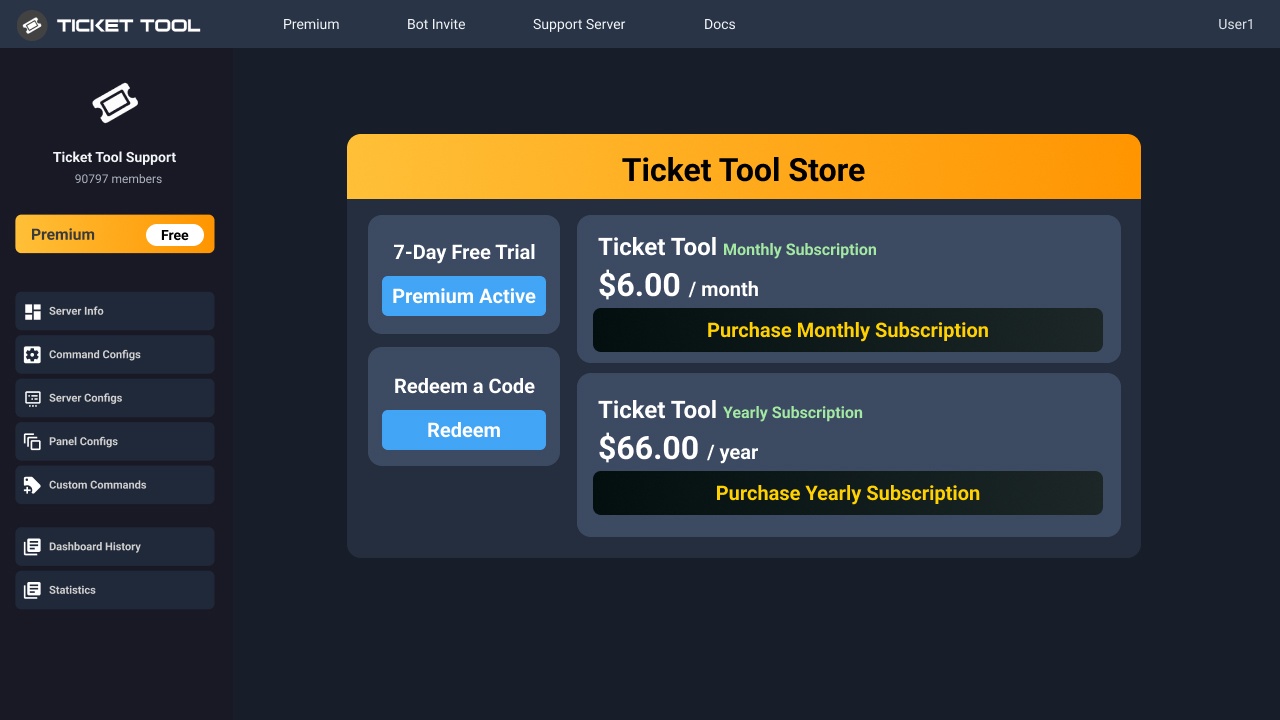 pseudo ravine
The prices are set as that, there's no discount
humble sequoiaBOT

Partnership Program
Our partnership program is currently closed.
We appreciate you being interested in partnering with Ticket Tool! Unfortunately, the program for partnering is closed as of now. Nonetheless, make sure to keep an eye at #📣│server-news where we announce partner applications opening!
 TicketTool.xyz - Ticketing without clutter
dusty imp
TicketTool.xyz - Ticketing without clutter
dusty imp
Bruh.
prime zinc
For the "Ticket Opened channel name" I want to add the name of what type of support ticket they opened like OST or HR ticket then the name.
 carmine whale
Can I add multiple staff pings to a ticket or just one?
 dim galleon
can i still put in a ticket if it says ive reached the 500 limit?
 lavish merlin
Hey sigmas how do I fix this
 dim galleon
lavish merlin
Hey sigmas how do I fix this
dim galleon
lavish merlin
Hey sigmas how do I fix this
i would also like to know how to fix this
lavish merlin
Let's wait for a response
humble sequoiaBOT
The ticket name is the default channel name of all tickets. To edit it, go to your Dashboard > Panel Configs > Ticket. There you can edit the channel name of opened and closed tickets. You can also use variables in there.

 Note: This is a premium feature
pseudo ravine
Note: This is a premium feature
pseudo ravine
@prime zinc Read this ^
pseudo ravine
carmine whale
Can I add multiple staff pings to a ticket or just one?
Hey there. Yes, you can add multiple
pseudo ravine
dim galleon
can i still put in a ticket if it says ive reached the 500 limit?
Hey there. Unfortunately not, Discord has set the limit to 500 channels
prime zinc
pseudo ravine
<@1145153868422979645> Read this ^
Your such a big W your the only one that has responded to me.
pseudo ravine
lavish merlin
Hey sigmas how do I fix this
Hey there. Are you a staff member of that server?
pseudo ravine
prime zinc
Your such a big W your the only one that has responded to me.
You're welcome, glad I could help!
lavish merlin
pseudo ravine
Hey there. Are you a staff member of that server?
Nope
dim galleon
pseudo ravine
Hey there. Unfortunately not, Discord has set the limit to 500 channels
so do i just wait until it resets, how do i put in a ticket then?
pseudo ravine
Are you a staff member of that server?
If not, you'll both need to find a different way to get in contact with the staff of those servers
lavish merlin
I've tried everyway to get rid of it, Deleting tickets
Should I try to dm a staff?
On the other server
lavish merlin
Alright thank you for the response
pseudo ravine
You're welcome, glad I could help!
lavish merlin
Life saver fr
pseudo ravine

 tight goblet
are you sure this is possible when it comes to making the bot open tickets automatically when using mee6 and ticket tool ?
pseudo ravine
Yes
tight goblet
pseudo ravine
Yes
do you know how the reason is supposed to look like ?
i have the commands but not sure where the resason is to make it open a ticket
pseudo ravine
Are you asking where to put the reason in the command? Or in the ticket message?
carmine whale
pseudo ravine
Hey there. Yes, you can add multiple
how?
humble sequoiaBOT
1. Go into your Dashboard
2. Open your Panel Configs tab
3. Select the panel you want to ping your support on
4. Open the Ticket options menu
5. Click on Edit Ticket Message
6. In the Message Content use one of the role mention syntax (**{@Role Name}**/**{Role ID}**)
7. Save changes
Note: For this to work properly, Ticket Tool requires the Mention Everyone permission. Or the role must have the Allow anyone to @mention this role setting enabled
carmine whale
I've done that but it didn't work
Thanks @pseudo ravine I had to do {@role}{@second role}
iron nightBOT
Gave +1 Rep to @pseudo ravine (current: #6 - 692)
pseudo ravine
You’re welcome, glad I could help!
halcyon grotto
question, why does the Roblox Variable look like that why isn’t it working?

Like why isn’t it the Roblox username? And the Roblox account age?
And here too! Why doesn’t it say the name of the person who opened this ticket..?
 humble sequoiaBOT
━━ Xavon's inquiry has been moved to a ticket ━━
 prime stream
How can I make the support team see the ticket after it is closed?
 restive condor
Hey there! Could you run the /debug command in the channel where you're trying to post this in please
restive condor
prime stream
How can I make the support team see the ticket after it is closed?
Hey there! Dashboard > Panel Configs > Permissions > Support Team Permissions - Edit Closed > 
VIEW CHANNEL
 dense flame
How do I get ticket helper or admin will be soon with you like this
 humble sequoiaBOT
1. Go into your Dashboard
2. Open your Panel Configs tab
3. Select the panel you want to ping your support on
4. Open the Ticket options menu
5. Click on Edit Ticket Message
6. In the Message Content use one of the role mention syntax (**{@Role Name}**/**{Role ID}**)
7. Save changes
Note: For this to work properly, Ticket Tool requires the Mention Everyone permission. Or the role must have the Allow anyone to @mention this role setting enabled
restive condor
dense flame
How do I get ticket helper or admin will be soon with you like this
Hey there! See above please ^
dense flame
Thanks!
dense flame
I am getting like this when I used /new in my server

How do I get forms like this in my channel
 restive condor
dense flame
I am getting like this when I used /new in my server
restive condor
dense flame
I am getting like this when I used /new in my server
What exactly are you trying to do here?
humble sequoiaBOT
A Discord Form lets the user answer individual questions in a pop-up Form, which then displays the answers in the ticket message. This can save time if you already know what you want to ask the user.
Setup Forms
Forms can be enabled under Panel Settings > Form Options > Edit Forms Options. In the new pop-up window, you can now enable and edit your own Form.
Form Options
You can add up to 5 questions in the Discord form. This is a Discord limitation. Each question can have a placeholder in the input field, a minimum and maximum input, multi-line, and also the option to have the answer required.
Options
Question Title ➞ Your Question goes here
Question Placeholder ➞ The placeholder text in the input field
Required ➞ If enabled, the user has to answer this question, to submit the form
Multi-Line Input ➞ Allows the user to input multiple lines
Minimum and Maximum Input ➞ Set a minimum and maximum input value for the user
Displaying the Answer
To display the answers from the user, you need to enable Auto display form results on the ticket message as an additional embed
If you don't want a second embed, go into your Panel Configs > Ticket Options > Edit Ticket Message. You use the variable {create.form.x} and replace x with the number of your question. For example, the response to Question 5 can be displayed with {create.form.5}.
restive condor
dense flame
How do I get forms like this in my channel
See above ^^
dense flame
restive condor
What exactly are you trying to do here?
Create a ticket like it usually shows like this
 restive condor
dense flame
Create a ticket like it usually shows like this
restive condor
dense flame
Create a ticket like it usually shows like this
It would be /setup
Or you can configure it on the Dashboard
dense flame
k
 thin blade
why is my second one not sending like the first one and it has the name of a panel as the title...
 pseudo ravine
Hey there. Could you send the server ID in here? Not an invite, just the server ID
thin blade
1231752252344238150
pseudo ravine
One moment
From what I can tell, I believe it's because your premium subscription expired, since you've started your 7-Day Free Trial you should be good to send it again
jade topaz
HALLO
manic aurora
how do we claim the ticket?
jade topaz
hello
humble sequoiaBOT
Claiming allows you to change the ticket name, category and permissions. To use it you have to enable it first on your Dashboard > Panel Configs > Claiming

 Note: This is a premium feature
austere forge
manic aurora
how do we claim the ticket?
Note: This is a premium feature
austere forge
manic aurora
how do we claim the ticket?
Hi there 🙂
see above ⬆️
austere forge
one is required for this feature to be available.
manic aurora
im trying to make a partnership ticket and im making a form but it wont let me
 tepid geyser
 wheat torrent
There is no command to delete all tickets in one time ?
wheat torrent
There is no command to delete all tickets in one time ?
I think not
wheat torrent
Oh
tepid geyser
wheat torrent
Oh
How much tickets you got ?
wheat torrent
More then 2k lol
tepid geyser
How much members
wheat torrent
I’m lazy to delete them all
wheat torrent
tepid geyser
How much members
44k
wheat torrent
lol I’m not looking for members here 😅
I’m asking if there a command to delete all tickets in one time
tepid geyser
wheat torrent
lol I’m not looking for members here 😅
BUT I WANNA JOIN 
pseudo ravine
wheat torrent
There is no command to delete all tickets in one time ?
Hey there. You can run the /purge command if you're the physical server owner
pseudo ravine
tepid geyser
BUT I WANNA JOIN <:IRface:567904915272237096>
If you don't need any support regarding Ticket Tool or not giving any support, please do not talk in this channel
wheat torrent
pseudo ravine
Hey there. You can run the `/purge` command if you're the physical server owner
This will only delete the tickets?
It will not delete any other rooms ?
pseudo ravine
Yes, it won't save the transcripts though
wheat torrent
Ok 👍🏻
wheat torrent
pseudo ravine
Hey there. You can run the `/purge` command if you're the physical server owner
There no permission for a specific role ?
Or need to be the ownership only ?
iron nightBOT
Gave +1 Rep to @pseudo ravine (current: #6 - 694)
pseudo ravine
You're welcome, glad I could help!
 sharp mortar
hi guys, please help me tell me where to set the parameters to make them, please video or screenshots
pseudo ravine
Hey there. Parameters for what exactly?
sharp mortar
Well, so that I can make parameters in which players can write, I’ll now send you a screenshot of how
 humble sequoiaBOT
A Discord Form lets the user answer individual questions in a pop-up Form, which then displays the answers in the ticket message. This can save time if you already know what you want to ask the user.
Setup Forms
Forms can be enabled under Panel Settings > Form Options > Edit Forms Options. In the new pop-up window, you can now enable and edit your own Form.
Form Options
You can add up to 5 questions in the Discord form. This is a Discord limitation. Each question can have a placeholder in the input field, a minimum and maximum input, multi-line, and also the option to have the answer required.
Options
Question Title ➞ Your Question goes here
Question Placeholder ➞ The placeholder text in the input field
Required ➞ If enabled, the user has to answer this question, to submit the form
Multi-Line Input ➞ Allows the user to input multiple lines
Minimum and Maximum Input ➞ Set a minimum and maximum input value for the user
Displaying the Answer
To display the answers from the user, you need to enable Auto display form results on the ticket message as an additional embed
If you don't want a second embed, go into your Panel Configs > Ticket Options > Edit Ticket Message. You use the variable {create.form.x} and replace x with the number of your question. For example, the response to Question 5 can be displayed with {create.form.5}.
sharp mortar

 shadow helm
When I load into the game it loads me underwater
humble sequoiaBOT
⚠️ You're in the wrong place
We provide support for Ticket Tool Discord bot and cannot help you with whatever issue you have.
- We don't know which Support Team you should contact to get this issue resolved, and unfortunately we won't be able to accurately tell you.
If you don't have any further questions regarding our bot Ticket Tool, please close this ticket
pseudo ravine
@shadow helm Read this ^
sharp mortar
pseudo ravine
<@1278574608152395832> Read this ^
Help
 pseudo ravine
I've already sent a guide on what you need to do
shadow helm
I was locked in my map then I loaded the game up and now it spawns me. I can hear water
And it's not loading me in
humble sequoiaBOT
⚠️ Please read the messages previously sent by our team ⚠️
 pseudo ravine
Yes, the guide explains how to set it up
You both are in the wrong server. If you don't need any support regarding the Ticket Tool Discord bot then please stop talking in this channel
shadow helm
@jade topaz everything was okay. I was loading my wood up in the back of the vehicle. I checked the map and it wouldn't let me load out the map so I went to my dashboard on my Xbox. Then I loaded back into the game + I can hear water but it doesn't load nothing up
humble sequoiaBOT
⚠️ You're in the wrong place
We provide support for Ticket Tool Discord bot and cannot help you with whatever issue you have.
- We don't know which Support Team you should contact to get this issue resolved, and unfortunately we won't be able to accurately tell you.
If you don't have any further questions regarding our bot Ticket Tool, please close this ticket
pseudo ravine
Please stop talking in this channel, this channel is strictly for support regarding the Ticket Tool Discord bot, not for a Minecraft world
 north sun
CAN SOMONE HELP ME SET THIS UP IN A DISCORD CALL ???
pseudo ravine
Hey there. How can I help? I can't join a call, but I can help in here
north sun
i want to get it to look like this
 humble sequoiaBOT
The Drop-down menu or Select Menu replaces the buttons on your panel message and uses a drop-down menu with all of your panels. To set this up, go to your Panel Configs and select your main Panel.
<:Numbericons1:1018864164032225340> Enable Select Style
First you enable Select Style. Then you add an item in the Dropdown Editor. Now you can start editing your dropdown!
<:Numbericons2:1018864168041971712> Dropdown Editor
Each line in the dropdown editor represents a line in the drop down menu on discord. You can add more "Items", by clicking on 

First you select a panel. That's the panel this option will open a ticket for.  DONT select the same panel twice. Each option should have a different Panel
After that, you can put a Display. This is the title of this option and will appear in the drop down menu. The *Description can be set right after that, which will be below the title in grey.
Additionally you can select an emoji, that will be shown in front of each option. You can either manually input the ID of an emoji or select it in the selector.
Common Issues ⚠️
- Panel doesn't send? Make sure you have a valid emoji selected
- Option doesn't show up? Check if two options have the same panel in the DropDown Editor

$dropdown
sharp mortar
humble sequoia
@sharp mortar
sharp mortar
pseudo ravine
<@1278574608152395832> Read this ^
 pseudo ravine
You still haven't enabled it
sharp mortar
how to turn it on
pseudo ravine
 sharp mortar
pseudo ravine
sharp mortar
pseudo ravine
Next, what should I do to be displayed in discord?
 pure ginkgo
A guy left the server from where he made a ticket i manage tickets there there are 300 tickets there that person have rejoined the server... Idk how to get his ticket number is there any solution?
pseudo ravine
There's no need for all the caps. Did you get an error on the dashboard when you tried to send the message?
 pseudo ravine
pure ginkgo
A guy left the server from where he made a ticket i manage tickets there there a...
pseudo ravine
pure ginkgo
A guy left the server from where he made a ticket i manage tickets there there a...
Hey there. You can try using the Discord search feature
There's no need for the caps
pure ginkgo
pseudo ravine
Hey there. You can try using the Discord search feature
He doesn't know his ticket number now how do i find his ticket... And discord search filter is not showing any of his message
pseudo ravine
What's the server ID? Not an invite, just the server ID
sharp mortar
pseudo ravine
What's the server ID? Not an invite, just the server ID
what should I do? I sent you a screenshot
pseudo ravine
pure ginkgo
He doesn't know his ticket number now how do i find his ticket... And discord se...
You can adding his ping as the search filter: mentions: @pure ginkgo
This would be your ping ^
One moment
sharp mortar
 pure ginkgo
pseudo ravine
You can adding his ping as the search filter: `mentions: <@765575373194788916>`
...
pure ginkgo
pseudo ravine
You can adding his ping as the search filter: `mentions: <@765575373194788916>`
...
Ok
pseudo ravine
sharp mortar
what should I do? I sent you a screenshot
I already showed you when you need to do
sharp mortar
pseudo ravine
I already showed you when you need to do
please again
 hoary escarp
i was wondering how can i make the bot ping specific roles when he is creating a ticket? the ticket itself is working fine but i dont find where i can change that and what to do
pseudo ravine
Which one of these are you trying to send?
 pseudo ravine
sharp mortar
please again
pseudo ravine
sharp mortar
please again
 sharp mortar
pseudo ravine
I already showed you when you need to do
sharp mortar
pseudo ravine
I already showed you when you need to do
please again
humble sequoiaBOT
1. Go into your Dashboard
2. Open your Panel Configs tab
3. Select the panel you want to ping your support on
4. Open the Ticket options menu
5. Click on Edit Ticket Message
6. In the Message Content use one of the role mention syntax (**{@Role Name}**/**{Role ID}**)
7. Save changes
Note: For this to work properly, Ticket Tool requires the Mention Everyone permission. Or the role must have the Allow anyone to @mention this role setting enabled
pseudo ravine
@hoary escarp Read this ^
pseudo ravine
sharp mortar
please again
Please be patient, I don't need all of the reply pings
This one?

I can't do that unfortunately, I can only view your dashboard
Your dashboard seems fine, but double check Ticket Tool has the View Channel and Send Messages permissions in the channel
sharp mortar
pseudo ravine
Your dashboard seems fine, but double check Ticket Tool has the `View Channel` a...
Ticket limit reached, You already have 1 tickets open of the 1 allowed for this panel
pseudo ravine
Is that the channel you were trying to send it to?
Then I don't see why it wouldn't send the panel
pseudo ravine
sharp mortar
Ticket limit reached, You already have 1 tickets open of the 1 allowed for this ...
I don't need a reply for every message, you can see I'm in the channel, I'll get to your message when I get to it
You'll need to close their ticket before they can open a new one
sharp mortar
where it is written all the parameters are indicated, how can I make my text appear there? I’ll send you a screenshot now

specify all parameters
pseudo ravine
I've shown you multiple times
sharp mortar
укажите все параметры
ukazhite vse parametry
hoary escarp
pseudo ravine
<@259317671324155906> Read this ^
thank you so much ♥
iron nightBOT
Gave +1 Rep to @pseudo ravine (current: #6 - 696)
pseudo ravine
hoary escarp
thank you so much ♥
You're welcome, glad I could help!
I believe there's a part in the setup where you can send the message
humble sequoiaBOT

Ticket Tool - Ticketing without clutter - The #1 Discord support bot
pseudo ravine
That's great!
humble sequoiaBOT
The Drop-down menu or Select Menu replaces the buttons on your panel message and uses a drop-down menu with all of your panels. To set this up, go to your Panel Configs and select your main Panel.
<:Numbericons1:1018864164032225340> Enable Select Style
First you enable Select Style. Then you add an item in the Dropdown Editor. Now you can start editing your dropdown!
<:Numbericons2:1018864168041971712> Dropdown Editor
Each line in the dropdown editor represents a line in the drop down menu on discord. You can add more "Items", by clicking on
First you select a panel. That's the panel this option will open a ticket for. DONT select the same panel twice. Each option should have a different Panel
After that, you can put a Display. This is the title of this option and will appear in the drop down menu. The *Description can be set right after that, which will be below the title in grey.
Additionally you can select an emoji, that will be shown in front of each option. You can either manually input the ID of an emoji or select it in the selector.
Common Issues ⚠️
- Panel doesn't send? Make sure you have a valid emoji selected
- Option doesn't show up? Check if two options have the same panel in the DropDown Editor
$dropdown
north sun
@pseudo ravine i cant make a 3 dropdown tickets
pseudo ravine
humble sequoia
Both of you should read this
north sun
i red it
read
Option doesn't show up? Check if two options have the same panel in the DropDown Editor
but it needs to go in the same channel
pseudo ravine
north sun
but it needs to go in the same channel
Each option is a panel, they all go to the same channel
Run the /id command to get the entire emoji, and then input it to where it says Emoji on the dashboard in the dropdown area
north sun
and what Exactly is a panel ?
pseudo ravine
north sun
and what Exactly is a panel ?
Each one of these

Yep
Is that the embed title?
The embed title text is already bigger, which is why I asked
Well, I can't show you what they've done unfortunately. But as far as I know you can't use markdown the make the title text bigger
It's possible, but you need premium to edit the embed title
jade topaz
Is it possible to make sure that when a ticket is created, a message is sent to the server creator indicating that the ticket has been created?
worldly helm
jade topaz
Is it possible to make sure that when a ticket is created, a message is sent to ...
Hey there! Yes, there is a setting called logging. You can use that
humble sequoiaBOT
With Ticket Tool, you can customize the behavior the bot takes when logging your tickets! For editing these options follow these steps:
Dashboard ➞ Panel Configs ➞ Logging Options
Logging Channel
Here you will define which channel @humble sequoia will save the Logs in (ticket created/deleted/closed, etc.)
Logs you can save:
➞ Ticket Created ➞ Logs when a ticket is created
➞ Ticket Closed ➞ Logs when a ticket is closed
➞ Ticket Opened ➞ Logs when a ticket is opened
➞ Ticket Renamed ➞ Logs when a ticket is renamed
➞ Ticket Deleted ➞ Logs when a ticket is deleted
➞ Transcript Saved ➞ Logs when a ticket is saved
Select with  (disable) or (enabled) which logs you would like
Below you can see an example of what the Logging Options will look like:
 worldly helm
It looks like this

 iron dock
4f112fae-f4d3-11ed-a05b-0242ac120003
jade topaz
worldly helm
It looks like this
is this what will be sent to the server creator?
pseudo ravine
Unfortunately not
worldly helm
jade topaz
is this what will be sent to the server creator?
It will be send into a Channel on the server
jade topaz
worldly helm
It will be send into a Channel on the server
can it be sent to the creator’s personal messages?
worldly helm
Sadly no. If you want to inform your staff a ticket is created, you can auto ping them in the ticket. If that is what ur looking for, let me know :)
jade topaz
oh, ok. Thanks for answers.
worldly helm
You‘re welcome
Feel free to reach out again if u have any more questions 🙏
 tribal hound
how to fix that
 worldly helm
tribal hound
how to fix that
worldly helm
tribal hound
how to fix that
Hey there! Please delete some ticket‘s in ur server.
Nope, sadly that isnt possible
tribal hound
in my server have only 1 ticket is mine

 humble sequoiaBOT
⚠️ You're in the wrong place
We provide support for Ticket Tool Discord bot and cannot help you with whatever issue you have.
- We don't know which Support Team you should contact to get this issue resolved, and unfortunately we won't be able to accurately tell you.
If you don't have any further questions regarding our bot Ticket Tool, please close this ticket
pseudo ravine
tribal hound
in my server have only 1 ticket is mine
That server has reached the limit of 500 channels, it's not talking about your server
 mental orbit
plss
 humble sequoiaBOT
⚠️ Please read the messages previously sent by our team ⚠️
worldly helm
Yes, you can
u need a panel for each dropdown option
Hey there! That isnt the real ticket tool bot.
humble sequoiaBOT
The Drop-down menu or Select Menu replaces the buttons on your panel message and uses a drop-down menu with all of your panels. To set this up, go to your Panel Configs and select your main Panel.
<:Numbericons1:1018864164032225340> Enable Select Style
First you enable Select Style. Then you add an item in the Dropdown Editor. Now you can start editing your dropdown!
<:Numbericons2:1018864168041971712> Dropdown Editor
Each line in the dropdown editor represents a line in the drop down menu on discord. You can add more "Items", by clicking on
First you select a panel. That's the panel this option will open a ticket for. DONT select the same panel twice. Each option should have a different Panel
After that, you can put a Display. This is the title of this option and will appear in the drop down menu. The *Description can be set right after that, which will be below the title in grey.
Additionally you can select an emoji, that will be shown in front of each option. You can either manually input the ID of an emoji or select it in the selector.
Common Issues ⚠️
- Panel doesn't send? Make sure you have a valid emoji selected
- Option doesn't show up? Check if two options have the same panel in the DropDown Editor
$dropdown
worldly helm
Read this! ^^^
Look at the #
Its #3817 for the bot that nuked you. The @pseudo glen has others.
and as you can see its offline, the real bot is online 24/7
Nws!
humble sequoiaBOT
**١- دعوة البوت إلى سيرفرك**
يجب عليك اولاً دعوة البوت إلى سيرفرك من خلال رابط دعوة البوت، بعد ذلك يُمكنك تعديل خصائص البوت عبر لوحة التحكم.
**٢- إنشاء لوحة**
لإنشاء لوحة يجب عليك التوجه إلى لوحة التحكم ، ثم قم بإختيار سيرفرك ، بعد ذلك توجه إلى قسم "Panel Config".
بمُجرد وصولك إلى القسم المذكور أعلاه، يجب عليك الضغط على زر "Create Panel" لإنشاء اللوحة ، ومن ثمها قُم بإدخال اسم اللوحة (يمكنك ملء اي اعدادات اختياريه تريدها).
بعد إدخال اسم اللوحة و ملء الإعدادات ، قُم بالضغط على "Create Panel" لإتمام عملية انشاء اللوحة الخاصة بك بنجاح!
سيتم إرفاق صورة توضيحية لعملية إنشاء اللوحة بالطريقة الصحيحة؛
**٣- إرسال اللوحة إلى روم**
بعد الإنتهاء من عملية إنشاء اللوحة بنجاح ، يجب عليك الآن إرسالها إلى روم بإستخدام زر "Send" على لوحة التحكم بقسم الـ "Panel Config".
بعد الضغط على الزر ، قم بإختيار الروم المفضل لإرسال اللوحة.
بعد إختيار الروم قُم بالضغط على زر "Send" لإتمام عملية إرسال اللوحة!
سيتم إرفاق صورة توضيحية لعملية إرسال اللوحة بالطريقة الصحيحة؛
**هل تواجهك مشكلة أثناء محاولة إرسال اللوحة؟**
قُم بإرسال الامر `/debug" في اي روم يستطيع البوت رؤيته ، ثم تأكد أن البوت لدية جميع الصلاحيات اللازمة لإرسال اللوحة.
pseudo ravine
(Just as a note) A bot being verified doesn’t mean anything, especially after a recent update to the verification process. Just because you see a bot is verified, doesn’t mean it’s not harmless
lament prairie
تفضل
pseudo ravine
You’re welcome, glad I could help!
tight goblet
pseudo ravine
Are you asking where to put the reason in the command? Or in the ticket message?
yeah what do i put in the reason
pseudo ravine
tight goblet
yeah what do i put in the reason
In the command? If so, it goes after the user ID
tight goblet
pseudo ravine
In the command? If so, it goes after the user ID
do you by any chance know what i should be looking at in mee6 commands
like what does it look like i dont see any commad with reason
jade topaz
Guys I have an issue, so basically I invited the bot to my server and then when I went on dashboard/manage servers, its not there. It has happened multiple times, and I couldn't fix it.
 scenic plinth
This is a fake Ticket Tool, even if the bot is verified. Discord has an odd verification policy, so there could be more than one bot, particularly with the Discord discriminators remaining with them.
You're welcome to report it with the evidence you have provided and the bot ID to us using a report ticket, as well as reporting the application to Discord Developer Compliance or Discord Trust and Safety.
Additionally, I recommend always double checking the bots profile or be cautious of any links you open when adding applications, and always be mindful of what permissions you give your moderators/administrators on your server, and to who.
Please avoid pinging staff for any reason.
pseudo ravine
tight goblet
do you by any chance know what i should be looking at in mee6 commands
No, I don’t use MEE6. I suggest you ask in their server
It depends on where it is on your screen
 sudden kelp
How can i see my requested tickets history
lament prairie
يقلبي قول الي تبغاه وانتظر ارد مو لازم منشن
pseudo ravine
sudden kelp
How can i see my requested tickets history
Hey there. You’ll need to ask the staff of each server for your transcript, unless it was sent in a DM from Ticket Tool
sudden kelp
pseudo ravine
Hey there. You’ll need to ask the staff of each server for your transcript, unle...
Ok thanks
iron nightBOT
Gave +1 Rep to @pseudo ravine (current: #6 - 697)
pseudo ravine
You’re welcome, glad I could help!
tight goblet
pseudo ravine
No, I don’t use MEE6. I suggest you ask in their server
Their support is bad they don’t answer my questions
You basically telling me to find reason but you don’t even know about the reason to put in the server
pseudo ravine
We don’t provide support for other bots
If you’re looking for where to add the reason in the ticket message, you can put it wherever
lament prairie
humble sequoia
.
ايش الي مو فاهمه بالضبط؟
لما تدخل على الداشبورد وتختار سيرفرك بيطلع لك الخيار فوق

روح لإعدادات الروم بعدين permissions وضيف بوت Ticket Tool او الرتبة ، بعدين فعل صلاحية Veiw Channel و Send Messages
ما اقدر للأسف
خذ وقتك
worldly helm
Please don‘t ping user‘s for support.
lament prairie
lament prairie
روح لإعدادات الروم بعدين permissions وضيف بوت Ticket Tool او الرتبة ، بعدين فعل ...
.
اخوي شوف الريبلاي حقي شارح لك جميع الخطوات
lament prairie
lament prairie
روح لإعدادات الروم بعدين permissions وضيف بوت Ticket Tool او الرتبة ، بعدين فعل ...
هذي
هذي الي يحتاجها البوت بس
worldly helm
Stop pinging for support please.
I am just telling you, we are all humans, not bots. If you need support you can also #🎫│make-a-ticket
But quit pinging for support please.
Last warning, or i will report you to higherups.
lament prairie
اعتذر عن التأخير فصل النت، روح لإعدادات السيرفر ثم الرتب واختار تكت تول وفعل له ادمنستريتور
pseudo ravine
Let’s keep things civil in here
lament prairie
المشكلة مو من البوت يقلبي سوي الي قلت لك عليه بالأخير وهيضبط إن شاء الله
البوت ما كان عنده صلاحيات بالروم الثاني بس بالأوامر عنده ، لهذا قدر يرسل
ممتاز اي شي ثاني اساعدك فيه؟
حياك الله نورتنا 
 static bobcat
guys how i mention an role in ticket message
يا جماعة كيف امنشن رول بالرسالة الي يدزها البوت
worldly helm
static bobcat
guys how i mention an role in ticket message
يا جماعة كيف امنشن رول بالرسالة ال...
Hey there! Look below!
humble sequoiaBOT
1. Go into your Dashboard
2. Open your Panel Configs tab
3. Select the panel you want to ping your support on
4. Open the Ticket options menu
5. Click on Edit Ticket Message
6. In the Message Content use one of the role mention syntax (**{@Role Name}**/**{Role ID}**)
7. Save changes
Note: For this to work properly, Ticket Tool requires the Mention Everyone permission. Or the role must have the Allow anyone to @mention this role setting enabled
static bobcat
worldly helm
Hey there! Look below!
Thanks bro, but how i can see the role id ?
iron nightBOT
Gave +1 Rep to @worldly helm (current: #29 - 130)
worldly helm
$id @role
static bobcat
worldly helm
`$id @role`
thanks man
jade topaz
Hello i have a question, how do i make after creating a ticket so it appears with a board of selections why is the ticket created and list it into different categories decides by the theme why they open them?
 dire sun

 plucky locust
How do I find the panel ID to make a multi-panel? I tried looking in the dashboard and commands list, but that got me no where.
Ping reply, please and thank you
pseudo ravine
plucky locust
How do I find the panel ID to make a multi-panel? I tried looking in the dashboa...
Hey there. The number in front of the panel name is the ID, as shown in this screenshot
 plucky locust
pseudo ravine
Hey there. The number in front of the panel name is the ID, as shown in this scr...
plucky locust
pseudo ravine
Hey there. The number in front of the panel name is the ID, as shown in this scr...
Oh, thank you!!
iron nightBOT
Gave +1 Rep to @pseudo ravine (current: #6 - 698)
pseudo ravine
You're welcome, glad I could help!
 mental vault
عايز اعرف ازاي اعمل منيو و رسالة تلقائية لما تكت يتفتح
 grizzled hawk
humble sequoiaBOT
grizzled hawk
humble sequoiaBOT
Claiming allows you to change the ticket name, category and permissions. To use it you have to enable it first on your Dashboard > Panel Configs > Claiming
Note: This is a premium feature
worldly helm
Okay, what‘s ur issue exacly?
 red terrace
Well updated the app. Now game keeps freezing.
 idle flint
App, what app?
red terrace
Hunting sniper
humble sequoiaBOT
⚠️ You're in the wrong place
We provide support for Ticket Tool Discord bot and cannot help you with whatever issue you have.
- We don't know which Support Team you should contact to get this issue resolved, and unfortunately we won't be able to accurately tell you.
If you don't have any further questions regarding our bot Ticket Tool, please close this ticket
idle flint
red terrace
Hunting sniper
You are on the wrong discord server for help with that, sorry.
idle flint
red terrace
How do I close ticket
you can ignore that part of the message, all good 🙂
red terrace
Ok ty
 wintry aspen
Hey I activated my trial premium but the features are still locked?
humble sequoiaBOT

Premium Check
I was unable to detect a premium server for @wintry aspen.
Found 4 servers in total and 0 with premium and permission
austere forge
wintry aspen
Hey I activated my trial premium but the features are still locked?
Hey there 🙂
can you use button on top on your dashboard
it should work
humble sequoiaBOT
1. Go into your Dashboard
2. Open your Panel Configs tab
3. Select the panel you want to ping your support on
4. Open the Ticket options menu
5. Click on Edit Ticket Message
6. In the Message Content use one of the role mention syntax (**{@Role Name}**/**{Role ID}**)
7. Save changes
Note: For this to work properly, Ticket Tool requires the Mention Everyone permission. Or the role must have the Allow anyone to @mention this role setting enabled
austere forge
 fickle citrus
how can i add a role ping whenever a ticket is created?
fickle citrus
how can i add a role ping whenever a ticket is created?
hi there 🙂
see above ⬆️
fickle citrus
k
humble sequoiaBOT
The Backup and Restore feature allows you to transfer your panels, tags, and all settings to a new server, even if the server the settings were created has been deleted! You will want to copy the whole key.
First, go to your server's Dashboard ➞ then Server Configs ➞ under Config Backup & Restore (Server Owner Only) click on Old version can be found here and generate a new backup key by pressing the green button. Now, a key should be generated in the box above. You may need to refresh the page to see this.
Once you have your backup key, navigate to the same page on the new server. Copy the key on the Restore from backup key field.
Now you can choose what you want to copy. Finally, press the green Restore Configs button.
IMPORTANT NOTE
- We suggest you keep this backup key somewhere safe, in case your server is deleted so you are able to recover your panel's settings.
- This feature is only usable by the server's owner
$backup
austere forge
 jade ice
can i clone only 1 ticket panel to other server ?
jade ice
can i clone only 1 ticket panel to other server ?
hi there, see above ⬆️
jade ice
austere forge
hi there, see above ⬆️
but i wanna clone only 1 panel
i had like 10-15 panels
austere forge
jade ice
but i wanna clone only 1 panel
unfortunately this is not possible in this case.
jade ice
 thanks
austere forge
You're welcome, glad I could help ! 
lament prairie
mental vault
عايز اعرف ازاي اعمل منيو و رسالة تلقائية لما تكت يتفتح
كيف قصدك منيو؟ وبالنسبة للرسالة :
Dashboard -> Panel Configs -> Messages -> Edit Ticket Message
 sage karma
Hello!
humble sequoiaBOT
Hello, we would love to help you, but if you don't tell us what you need help with we can't help you :(
sage karma
I’m trying to add a ticket tool to my server
And it keeps saying it doesn’t have permission
Can you help?
@humble sequoia
restive condor
sage karma
And it keeps saying it doesn’t have permission
Hey there! Could you screenshot please?
 restive condor
sage karma
restive condor
sage karma
Could you run the /debug command in the channel where you're trying to send your panel in please
sage karma

 next hare
how can i add a claim button here?
 restive condor
sage karma
restive condor
sage karma
Ticket Tool is missing the EMBED LINKS permission for that channel
restive condor
next hare
how can i add a claim button here?
Hey there! Claiming is a premium feature 
sage karma
But it has embed links
humble sequoiaBOT
Claiming allows you to change the ticket name, category and permissions. To use it you have to enable it first on your Dashboard > Panel Configs > Claiming
Note: This is a premium feature
next hare
oh ok thanks
restive condor
sage karma
But it has embed links
It may have it in its role, but it doesn't for that channel.
Hold down on the channel's name > Edit Channel > Permissions > Add Ticket Tool > EMBED LINKS
 restive condor
sage karma
https://discordapp.com/channels/509192800865353738/662692902245498910/1279762438...
restive condor
sage karma
https://discordapp.com/channels/509192800865353738/662692902245498910/1279762438...
Ticket Tool is also missing the permissions marked with ❌ for that channel
 restive condor
Perfect, try sending it on the Dashboard now please
sage karma
Sorry for the late reply, but okay!
Done!
Thank you so much! I was so confused
Thanks @restive condor
iron nightBOT
Gave +1 Rep to @restive condor (current: #2 - 1312)
restive condor
No problem, glad I could help!
 ancient rain
Hi, is there a way you can get ticket tool to ask a user for feedback on a scale of 1-5 for the support they was given?
austere forge
ancient rain
Hi, is there a way you can get ticket tool to ask a user for feedback on a scale...
Hi there 🙂
That's currently not possible unfortunately. The only way would be to redirect users to a reviews/feedback channel (similar to #📈│reviews) in one of your ticket messages. Perhaps, the close confirmation
 idle vale
 restive condor
idle vale
yes
restive condor
idle vale
yes
Unfortunately, our payment provider (paddle.net) does not accept transactions from Russia due to economic sanctions
A VPN should do the trick
idle vale
restive condor
Unfortunately, our payment provider (paddle.net) does not accept transactions fr...
Yes
Thank u
 heady robin
 humble sequoiaBOT
⚠️ You're in the wrong place
We provide support for Ticket Tool Discord bot and cannot help you with whatever issue you have.
- We don't know which Support Team you should contact to get this issue resolved, and unfortunately we won't be able to accurately tell you.
If you don't have any further questions regarding our bot Ticket Tool, please close this ticket
heady robin
 humble sequoiaBOT
⚠️ Please read the messages previously sent by our team ⚠️
jade topaz
Failed: Invalid Form Body components[0].components[0].options[4].emoji.id[BUTTON_COMPONENT_INVALID_EMOJI]: Invalid emoji
restive condor
jade topaz
Failed: `Invalid Form Body
components[0].components[0].options[4].emoji.id[BUTTO...
Hey there! Dashboard > Panel Configs > Dropdown Style
Please check the emoji for the 5th dropdown option. It seems to be invalid
 tight agate
One message removed from a suspended account.
humble sequoiaBOT
━━ User's inquiry has been moved to a ticket ━━
 candid mica
Hello, we installed the ticket tools plugin on our server, but we could not set the permissions. My friend in another role cannot see the opened tickets, can you help?
humble sequoiaBOT
1. Go into your Dashboard
2. Open your Panel Configs tab
3. Select the panel you want to grant access to
4. Open the General options menu
5. Select your Support Team Roles
6. Save changes
restive condor
candid mica
Hello, we installed the ticket tools plugin on our server, but we could not set ...
Hey there! See above please ^
candid mica
Thank you.
 stark runeBOT
1. Invite Ticket Tool to your server
First you will want to invite the bot to your server. Once the bot is in your server, you can manage your server in the dashboard.
2. Create a Panel
To create a panel we are going to need to head over to the panel configs on the dashboard.
Once at the dashboard we will need to click Create Panel.
Enter a panel name (Fill in any optional settings you want).
Click Create Panel and your ready to get started with configuring your panel.
An example of a creating a panel is shown below.
3. Send the Panel to a Channel
Once you've created a panel on the dashboard you will need to send it to a channel using send on the dashboard.
Select the channel you want your panel to be created in and click send.
For other questions checkout $help faq.
An example of a sending a panel is shown below.
Having a Problem Sending the Panel?
Do $debug in a channel with Ticket Tool and make sure it has all the necessary Discord permissions.
restive condor
jade topaz
How to create a panel using ticket tool
Hey there! See above please ^
 restive condor
jade topaz
??
restive condor
jade topaz
??
Hey there! What exactly are you trying to do there? Close the ticket?
jade topaz
restive condor
Hey there! What exactly are you trying to do there? Close the ticket?
ye close ticket
 restive condor
jade topaz
restive condor
jade topaz
Please check your Confirm Close & Cancel Close buttons
They must either have text and/or an emoji
jade topaz
aight
 heavy sundial
hei guys
can you explain to me how can i open a multipanel like this?
 humble sequoiaBOT
━━ User's inquiry has been moved to a ticket ━━
 livid cradle
-
hello How can I choose which role can only close the ticket ?
I don't want anyone to open a ticket can have Permission to close the ticket -
how can do if anyone want to open ticket to be the ticket name same his name
worldly helm
Hey there!
Dashboard—>Panel Configs—>Permissions—> You can change what permission u want.
2: Ticket-names. These are a premium only feature.
livid cradle
worldly helm
Hey there!
Dashboard—>Panel Configs—>Permissions—> You can change what permissi...
oh okay thx mate
iron nightBOT
Gave +1 Rep to @worldly helm (current: #29 - 131)
worldly helm
You‘re welcome
Feel free to reach out again if u have any more questions 🙏
livid cradle
worldly helm
Hey there!
Dashboard—>Panel Configs—>Permissions—> You can change what permissi...
mate i cant find here

i just want when member open ticket he cant to close only the role i put can close the ticket
austere forge
livid cradle
i just want when member open ticket he cant to close only the role i put can clo...
Hey there 🙂
Go to Dashboard > Panel configs > Boutons - Close ticket and enabled support team only 
worldly helm
omg yes, i am so sorry. I was in a bit of a rush. I am sorry! 🤦🏽
Thanks @austere forge 😭
iron nightBOT
Gave +1 Rep to @austere forge (current: #11 - 526)
 sweet trout
I just checked Facebook and somehow all my units are gone. I haven't revealed my account and password yet, so sad.
humble sequoiaBOT
⚠️ You're in the wrong place
We provide support for Ticket Tool Discord bot and cannot help you with whatever issue you have.
- We don't know which Support Team you should contact to get this issue resolved, and unfortunately we won't be able to accurately tell you.
If you don't have any further questions regarding our bot Ticket Tool, please close this ticket
 hearty void
i have problem can some one help me
humble sequoiaBOT
Hello, we would love to help you, but if you don't tell us what you need help with we can't help you :(
hearty void
humble sequoia
i can not send tikckt tool to my server
lament prairie
hearty void
i can not send tikckt tool to my server
تقصد ما تقدر تضيفه؟
 dawn parcel
when i use “/setup” it says that the application didn’t respond, what do i do?
lament prairie
dawn parcel
when i use “/setup” it says that the application didn’t respond, what do i do?
can you give me a photo for the problem?
 craggy yew
can I recover a deleted ticket?
worldly helm
craggy yew
can I recover a deleted ticket?
Hey there! Only if you saved the transcript
craggy yew
No other way? It was very important
 winged brook
Hellooo sorry to bother, I have a problem with ticket tool, it said that the bot doesn't work :/
 lament prairie
winged brook
Hellooo sorry to bother, I have a problem with ticket tool, it said that the bot...
lament prairie
winged brook
Hellooo sorry to bother, I have a problem with ticket tool, it said that the bot...
Hello, could you run /debug command in the same channel?
dawn parcel
lament prairie
can you give me a photo for the problem?
okay wait one sec
winged brook
lament prairie
Hello, could you run `/debug` command in the same channel?
it say the same thing
dawn parcel
 lament prairie
winged brook
it say the same thing
lament prairie
winged brook
it say the same thing
the bot is missing Send Messages permission fot that channel
winged brook
and, when I try to go to Dashboard, it said that I need to verify my account but I already did
lament prairie
lament prairie
the bot is missing `Send Messages` permission fot that channel
@dawn parcel ^
dawn parcel
lament prairie
<@1222985022873669692> ^
oh ok tyy
worldly helm
craggy yew
No other way? It was very important
Nope, sadly not.
lament prairie
winged brook
and, when I try to go to Dashboard, it said that I need to verify my account bu...
you must verify it with your email address, check your email
lament prairie
dawn parcel
oh ok tyy
You're welcome, glad to help
winged brook
lament prairie
you must verify it with your email address, check your email
already did and I got nothing :/ (really sorry to bother u)
lament prairie
winged brook
already did and I got nothing :/ (really sorry to bother u)
could you try to logout and re-login and verify again? not a problem i'm here to help
winged brook
lament prairie
could you try to logout and re-login and verify again? not a problem i'm here to...
Well, I think is not ticket tool the problem but discord because I can't just login with my discord account

translation : "You need to verify your account before doing this action"
lament prairie
winged brook
Well, I think is not ticket tool the problem but discord because I can't just lo...
yes, I think the problem from discord
hearty void
lament prairie
تقصد ما تقدر تضيفه؟
خلاص قدرت اضيفه طلعت مشكلة بسيطة لاني تكاسلت اقر وش مكتوب رغم اني استخدمه مرة كثير وعندي خبرة فيه بس طلعت غبي ههههههههههههههههههههههه
)امزح انا مو غبي(
lament prairie
hearty void
خلاص قدرت اضيفه طلعت مشكلة بسيطة لاني تكاسلت اقر وش مكتوب رغم اني استخدمه مرة كث...
عوافي ، لو احتجت اي شي ثاني كلمني وهساعد إن شاء الله
hearty void
lament prairie
عوافي ، لو احتجت اي شي ثاني كلمني وهساعد إن شاء الله
تمام
winged brook
lament prairie
yes, I think the problem from discord
okayy well thanks, I'll try something, thanks uuuu
iron nightBOT
Gave +1 Rep to @lament prairie (current: #72 - 18)
lament prairie
winged brook
okayy well thanks, I'll try something, thanks uuuu
You're welcome, glad to help
hearty void
lament prairie
You're welcome, glad to help <:3v_smile:1187282191630204958>
اقدر اكون دعم فني عربي هنا لان احس في نقص من ناحية العرب
lament prairie
hearty void
اقدر اكون دعم فني عربي هنا لان احس في نقص من ناحية العرب
التقديم حاليًا مغلق لما يفتح بيعلنون في #📣│server-news او تقدر تساعد هنا وممكن يكلموك عشان تنضم للدعم
 civic coral
lament prairie
التقديم حاليًا مغلق لما يفتح بيعلنون في <#509770538051305493> او تقدر تساعد هنا ...
civic coral
lament prairie
التقديم حاليًا مغلق لما يفتح بيعلنون في <#509770538051305493> او تقدر تساعد هنا ...
سلام عليكم
عندي استفسار لاهنت
lament prairie
civic coral
سلام عليكم
وعليكم السلام ، تفضل
civic coral
lament prairie
وعليكم السلام ، تفضل
كيف اقدر اسوي اكثر من تكت ب بنل واحد؟
humble sequoiaBOT
For more convenient use of multipanels, you can now combine panels on the dashboard. This will allow you to directly send the multipanel from the dashboard or via the $panel ID command.
Where can I find this?
You can find this setting on the Dashboard -> Panel Configs -> Panel -> Attached Panels
Note: if you're attaching all the panels to a panel called English, don't include English in the attached panel's box (If you do this, it will create a duplicate)
This will put all buttons from all of your panels on one message. The message is the panel message from the panel you're combining these panels in.
 lament prairie
civic coral
كيف اقدر اسوي اكثر من تكت ب بنل واحد؟
lament prairie
civic coral
كيف اقدر اسوي اكثر من تكت ب بنل واحد؟
تفضل شوف الشرح الي فوق ، لو في شي مو فاهمه كلمني
lament prairie
civic coral
ماضبط
ارجع ارسل البانل او سوي update
civic coral
lament prairie
ارجع ارسل البانل او سوي update
ما ينرسل البانل
lament prairie
civic coral
ما ينرسل البانل
كيف ما ينرسل؟ هل في شي يطلع لك؟
civic coral
lament prairie
كيف ما ينرسل؟ هل في شي يطلع لك؟
ثواني بصور لك
 restive condor
Please stop pinging for support.
lament prairie
civic coral
سويته وكذا وماصار شي <@967813001220599838>
سوي send او update للبانل
 restive condor
Hey there! Could you run the /debug command in that same channel please
iron nightBOT
Gave +1 Rep to @restive condor (current: #2 - 1315)
restive condor
Ticket Tool seems to be missing the SEND MESSAGES permission for that channel
iron nightBOT
Gave +1 Rep to @restive condor (current: #2 - 1316)
restive condor
No problem, glad to hear!
 wintry oracle
Здравствуйте, скажите пожалуйста здесь есть служба поддержки ?
 lament prairie
civic coral
ابي يكون كل زر واحد منه
lament prairie
civic coral
ابي يكون كل زر واحد منه
وضح؟
civic coral
lament prairie
وضح؟
مثلا ابي شراء طلب منه زر واحد وشراء متجر زر واحد ومزاد زر واحد بس هنا طلع لي زرين للمتجر
lament prairie
civic coral
مثلا ابي شراء طلب منه زر واحد وشراء متجر زر واحد ومزاد زر واحد بس هنا طلع لي زري...
لما ضفت الأزرار ضفتها في بانل واحد ولا بأكثر من بانل؟
civic coral
lament prairie
لما ضفت الأزرار ضفتها في بانل واحد ولا بأكثر من بانل؟
بانل واحد
lament prairie
civic coral
بانل واحد
Dashboard -> Panel Configs -> Panel -> صورلي
 lament prairie
civic coral
lament prairie
civic coral
مخليها هنا فقط صحيح؟
civic coral
lament prairie
مخليها هنا فقط صحيح؟
خلاص عرفت وش المشكله يعطيك العافية ماقصرت
lament prairie
الله يعافيك حياك
scenic plinth
wintry oracle
Здравствуйте, скажите пожалуйста здесь есть служба поддержки ?
Есть, но не многие говорят по-русски. Чем мы можем помочь?
 sterile grove
can someone help me setup the ticket bot please
humble sequoiaBOT
First you will want to invite the bot to your server. Once the bot is in your server, you can manage your server in the dashboard.
To create a panel we are going to need to head over to the Panel Configs Tab on the Dashboard.
Once at the dashboard we will need to click Create Panel.
Enter a panel name (Fill in any optional settings you want).
Click Create Panel and you are ready to get started with configuring your panel.
An example of a creating a panel is shown below.
Once the panel has been created, use the blue Send button and select the channel you want the panel to be sent to.
The Panel wasn't send
Use the </debug:1029783024264564765> command to diagnose possible permission issues with the bot.
 analog sparrow
I need help
jade topaz
I need help
 pallid elk
i need great help
jade topaz
How to add a image in my ticket panel?
worldly helm
jade topaz
How to add a image in my ticket panel?
Hello there! Sorry for the long wait.
Sadly that is a prenium only feature
jade topaz
worldly helm
Hello there! Sorry for the long wait.
Sadly that is a prenium only feature <:Pre...
Oh ok. If I bought the premium then I can able to change right?
worldly helm
Yep!
jade topaz
worldly helm
Yep!
Ok thank you
iron nightBOT
Gave +1 Rep to @worldly helm (current: #29 - 132)
heady robin
Can I login my account in both mobiles
 quaint pendant
wintry oracle
scenic plinth
Есть, но не многие говорят по-русски. Чем мы можем помочь?
quaint pendant
wintry oracle
scenic plinth
Есть, но не многие говорят по-русски. Чем мы можем помочь?
Добрый день , Кинза проект вам о чем нибудь говорит ?
humble sequoiaBOT
@wintry oracle
⚠️ You're in the wrong place
We provide support for Ticket Tool Discord bot and cannot help you with whatever issue you have.
- We don't know which Support Team you should contact to get this issue resolved, and unfortunately we won't be able to accurately tell you.
If you don't have any further questions regarding our bot Ticket Tool, please close this ticket
 tribal moth
#🎫│make-a-ticket Hello! Our community has integrated the Ticket Tool auto-reply bot. We have configured it in the dashboard to only reply in a specific channel and have disabled its permissions in other channels on Discord. However, it still responds in channels other than the designated one. Could you please advise on what might be causing this issue?


 raw patrol
how can i get a golden ticket tool
worldly helm
raw patrol
how can i get a golden ticket tool
Hallo!
Der goldene Bot ist der premium bot
worldly helm
tribal moth
Hey there!
The ticket tool bot may have some other roles, like a "bot" role with Administrator.
humble sequoiaBOT
دعوة واختيار البريميوم بوت
أول شيء عليك القيام به هو دعوة بوت البريميوم ، ويمكن العثور على الدعوة هنا
بمجرد أن يكون بوت البريميوم في سيرفرك ، سننتقل إلى لوحة التحكم وتختار سيرفرك. عندما تختار السيرفر الخاص بك ، فأنت تريد التوجه إلى "Server Configs" ثم النقر فوق القائمة المنسدلة ضمن "حدد الروبوت الذي ترغب في استخدامه على هذا السيرفر" ثم انقر فوق "Ticket Tool
#6207" ثم احفظ.
 lament prairie
 magic trench
الحمايه طلعت البريميوم بالغلط جيت دخله تاني مو راضي ابدا
magic trench
الحمايه طلعت البريميوم بالغلط جيت دخله تاني مو راضي ابدا
اضغط على "هنا" الي برسالة البوت الفوق وضيف البريميوم مرة ثانية
 torn spoke
Is there an option to automatically delete all closed tickets through a button or smth like that
The automation option sometimes just doesn’t work and we get more than 50 closed ones
worldly helm
torn spoke
The automation option sometimes just doesn’t work and we get more than 50 closed...
Hello again erwin!
Yes, you can use the /purge command :)
torn spoke
worldly helm
Hello again erwin!
Yes, you can use the `/purge` command :)
But this will delete all tickets?
Not only the closed

 iron nightBOT
Gave +1 Rep to @worldly helm (current: #29 - 133)
worldly helm
You're welcome‼️Feel free to reach out again if you have any more questions 🙏
torn spoke
worldly helm
You're welcome‼️Feel free to reach out again if you have any more questions 🙏
one last question is it possible that the server owner allows me to execute this command?
worldly helm
I am pretty sure you can do it, if you have the dashboard role, or administrator.
I‘m not 100% sure tho, sorry!
torn spoke
alright np ty
worldly helm
Np
torn spoke
torn spoke
one last question is it possible that the server owner allows me to execute this...
Does anyone else know?
 sharp wagon
I treid to open a ticket, but it wont work, and i did all the steps but it still wont work? idk if i should put it in this chat or not
 dawn shuttle
the bot wont work at all for me everytime i try to use any of the cmds it gives me a message "The application did not respond"
 devout hare
TT Issue? ⇒ yes
Question/Issue ⇒ how can i put a category system on my ticket bot
Server ID ⇒ 1275227830216687706
humble sequoiaBOT
━━ 𝗔𝗻𝗱𝗿𝗲𝗶 #𝐒𝐡𝐚𝐰𝐭𝐲's inquiry has been moved to a ticket ━━
austere forge
dawn shuttle
the bot wont work at all for me everytime i try to use any of the cmds it gives ...
Hi there 🙂
Make sure that the bot has: VIEW CHANNEL SEND MESSAGE and READ MESSAGE HISTORY perms in the channel
austere forge
sharp wagon
I treid to open a ticket, but it wont work, and i did all the steps but it still...
hi there, if it's another server and it's not related to ticket tool we won't be able to help you. 🙂
 peak wind
lament prairie
اضغط على "هنا" الي برسالة البوت الفوق وضيف البريميوم مرة ثانية
peak wind
lament prairie
اضغط على "هنا" الي برسالة البوت الفوق وضيف البريميوم مرة ثانية
السلام عليكم
lament prairie
peak wind
السلام عليكم
وعليكم السلام ، تفضل
peak wind
lament prairie
وعليكم السلام ، تفضل
هل البوت فيه لوق
lament prairie
peak wind
هل البوت فيه لوق
لوق ايش بالضبط؟
lament prairie
peak wind
لوق تكتات
نعم في
peak wind
برايم ولا عادي
lament prairie
peak wind
برايم ولا عادي
اثنينهم ينفع فيهم يقلبي
peak wind
وش الامر ي الشيخ
 last bridge
HIII
lament prairie
peak wind
وش الامر ي الشيخ
Dashboard -> Panel Configs -> Transcript -> Transcript Channel حط الروم الي بدك يصير اللوق
ملاحظة: لازم تسوي ترانسكربت للتكت بعد ما تقفلها عشان تروح للروم
lament prairie
last bridge
HIII
Hi, how can I assist you?
last bridge
BRO KONSA PRODUCT BUY KARU PLEASE THORA GUIDE KARDO
humble sequoiaBOT
⚠️ You're in the wrong place
We provide support for Ticket Tool Discord bot and cannot help you with whatever issue you have.
- We don't know which Support Team you should contact to get this issue resolved, and unfortunately we won't be able to accurately tell you.
If you don't have any further questions regarding our bot Ticket Tool, please close this ticket
last bridge
REPLY ME BROTHER
peak wind
lament prairie
Dashboard -> Panel Configs -> Transcript -> Transcript Channel حط الروم الي بدك ...
هاذي اسويها من موقع البوت
last bridge
TALK TO HINDI BRO
lament prairie
humble sequoia
@last bridge ^^
lament prairie
peak wind
هاذي اسويها من موقع البوت
صحيح ، الرابط تحت
humble sequoiaBOT
Ticket Tool - Ticketing without clutter - The #1 Discord support bot
last bridge
HELP ME
austere forge
last bridge
HELP ME
As explained - We can't help you
You are on the wrong server
This server is Support for the bot Discord Ticket tool not other things.
 agile whale
please help me, I have problems with premium verification on my wallet!?
last bridge
austere forge
As explained - We can't help you
You are on the wrong server
This server is Su...
OK RIGHT SERVER KA LINK DEDO PLEASE
austere forge
last bridge
OK RIGHT SERVER KA LINK DEDO PLEASE
we don't have it, and we don't know which server it is.
austere forge
agile whale
please help me, I have problems with premium verification on my wallet!?
Hi there 🙂
This is related to ticket tool ?
agile whale
austere forge
Hi there 🙂
This is related to ticket tool ?
WithcWallet is a wallet, I have a problem with it, I can’t carry out transactions with my balance! says no premium verification! can you help?
peak wind
lament prairie
صحيح ، الرابط تحت
ماني لاقيه
humble sequoiaBOT
@agile whale
⚠️ You're in the wrong place
We provide support for Ticket Tool Discord bot and cannot help you with whatever issue you have.
- We don't know which Support Team you should contact to get this issue resolved, and unfortunately we won't be able to accurately tell you.
If you don't have any further questions regarding our bot Ticket Tool, please close this ticket
lament prairie
peak wind
ماني لاقيه
ايش الي مو لاقيه بالضبط يقلبي؟
lament prairie
peak wind
حق الامر ذا
تقصد خيار transcript؟
peak wind
حق اللوق

 lament prairie
peak wind
lament prairie
peak wind
اول خيار هو الروم حق الترانسكربت ، الباقي لازم بريميوم
بدك كمان كيف تفعل الزر مثل الي بالصورة؟
 peak wind
يب
peak wind
lament prairie
اول خيار هو الروم حق الترانسكربت ، الباقي لازم بريميوم
بدك كمان كيف تفعل الزر مث...
انت قبل شوي تقول للأثنين
القولد هو بريميوم
lament prairie
peak wind
يب
Dashboard -> Panel Configs -> Buttons -> Transcript -> Show this button
lament prairie
peak wind
انت قبل شوي تقول للأثنين
روم الترانسكربت للأثنين لكن في خيارات زيادة لازم بريميوم

 untold flume
How do I change whos allowed to resoond to tickets?
humble sequoiaBOT
1. Go into your Dashboard
2. Open your Panel Configs tab
3. Select the panel you want to grant access to
4. Open the General options menu
5. Select your Support Team Roles
6. Save changes
austere forge
untold flume
How do I change whos allowed to resoond to tickets?
hi there 🙂
see above ⬆️
untold flume
humble sequoia
k
 wise knot
anyone up?
humble sequoiaBOT
━━ tachi's inquiry has been moved to a ticket ━━
 twilit python
humble sequoiaBOT
twilit python
humble sequoiaBOT
⚠️ You're in the wrong place
We provide support for Ticket Tool Discord bot and cannot help you with whatever issue you have.
- We don't know which Support Team you should contact to get this issue resolved, and unfortunately we won't be able to accurately tell you.
If you don't have any further questions regarding our bot Ticket Tool, please close this ticket
 gritty hatch
Is there a way to make the ticket message longer then default?
restive condor
gritty hatch
Is there a way to make the ticket message longer then default?
Hey there! Dashboard > Panel Configs > Messages > Edit Ticket Message
You can edit the embed's main field up to 250 characters. A premium subscription is required to go beyond this limit
humble sequoiaBOT
The Ticket Message is the first message sent by the bot on a new ticket. To customize it head over to your Dashboard ➞ Panel Configs ➞ Ticket ➞ Edit Ticket Message
wise knot
i have a custom command and it has a number line at the beginning then supposed to be bulletins on each instruction. But when i use the command this is what i get

 humble sequoiaBOT
━━ User's inquiry has been moved to a ticket ━━
 steady sparrow
Why ticket bot doesnt create a panel and just says '' app doesnt answer ''
restive condor
steady sparrow
Why ticket bot doesnt create a panel and just says '' app doesnt answer ''
Hey there! Is that when clicking the create ticket button?
steady sparrow
restive condor
Hey there! Is that when clicking the create ticket button?
that happens when I try /panel command
restive condor
steady sparrow
that happens when I try /panel command
Could you try using the /debug command please
restive condor
steady sparrow
it still doesnt answer
Ticket Tool is missing the SEND MESSAGES permission for that channel
restive condor
No problem!
restive condor
 brittle sage
I cant do any command in my discord server
brittle sage
I cant do any command in my discord server
Hey there! Any error message?
restive condor
brittle sage
It says an error ocurred
Could you try using the /debug command please
restive condor
brittle sage
It doesnt work
Ticket Tool is missing all the permissions marked with ❌ below for that channel

 eager snow
Hello,
old transcript links send me to a 404 page. is it possible to renew those transcripts?
restive condor
eager snow
Hello,
old transcript links send me to a 404 page. is it possible to renew thos...
Hey there! You can use the "Direct Link" button again to generate a new transcript link
If it's one of the oldest transcripts without a button, you will need to download the HTML file to view it
jade topaz
guys is the close ticket button supposed to show for non-staff members
 eager snow
restive condor
If it's one of the oldest transcripts without a button, you will need to downloa...
eager snow
restive condor
If it's one of the oldest transcripts without a button, you will need to downloa...
thank you that worked
iron nightBOT
Gave +1 Rep to @restive condor (current: #2 - 1319)
 mild pilot
There is arb support?
jade topaz
jade topaz
guys is the close ticket button supposed to show for non-staff members
my friend's confused so.. 🤷♀️
restive condor
jade topaz
guys is the close ticket button supposed to show for non-staff members
Hey there! Yes, it's not possible to hide buttons for some and not others - Discord Limitations.
You can restrict who can you use the button though, from your Dashboard > Panel Configs > Buttons > Close Ticket Button > Enable Support Team Only or set allowed/disabled roles
humble sequoiaBOT
━━ OMAR's inquiry has been moved to a ticket ━━
 halcyon panther
My premium question is gone. Is that why the ticket won't open?
 restive condor
halcyon panther
My premium question is gone. Is that why the ticket won't open?
restive condor
halcyon panther
My premium question is gone. Is that why the ticket won't open?
Hey there! You mean your premium subscription?
halcyon panther
restive condor
Hey there! You mean your premium subscription?
My subscription has expired
@restive condor you here
Okay
restive condor
If you sent that message with the premium bot then yes. That's why the ticket can't be opened
You will either need to re-subscribe to premium or re-send the message with the white bot
halcyon panther
restive condor
You will either need to re-subscribe to premium or re-send the message with the ...
Okay, but will the embed message be sent?
Dan you here?
restive condor
halcyon panther
Okay, but will the embed message be sent?
There's a character limitation of 250 with the free version so it may be cut short
jade topaz
restive condor
Hey there! Yes, it's not possible to hide buttons for some and not others - Disc...
thank you
iron nightBOT
Gave +1 Rep to @restive condor (current: #2 - 1321)
halcyon panther
restive condor
There's a character limitation of 250 with the free version so it may be cut sho...
Question: My friend has premium. Can he run the bot since he's the server owner?
I'm sorry, but the internet froze.
restive condor
halcyon panther
Question: My friend has premium. Can he run the bot since he's the server owner?
He would need to transfer his subscription to your server
Or re-subscribed if it's a Discord subscription
halcyon panther
restive condor
Or re-subscribed if it's a Discord subscription
No he is owner server I'm administration
restive condor
It doesn't really matter, he'd still need to transfer it
You can only use a subscription in one server at once
halcyon panther
restive condor
It doesn't really matter, he'd still need to transfer it
Okay thx @restive condor
iron nightBOT
Gave +1 Rep to @restive condor (current: #2 - 1322)
 dense river
i cant setup the bot in my server
 restive condor
dense river
i cant setup the bot in my server
restive condor
dense river
i cant setup the bot in my server
Hey there! Could you run the /debug command please
 restive condor
dense river
restive condor
dense river
Ticket Tool is missing the READ CHANNELS & SEND MESSAGES permissions in its role settings and also the SEND MESSAGES permission for the channel you just ran the command in


 worn path
Where do I go to order a boy ticket?
lament prairie
worn path
Where do I go to order a boy ticket?
what do you mean, can you be more clear?
worn path
lament prairie
what do you mean, can you be more clear?
For me, you can put the ticket bot on my server
I'm br if I'm saying something wrong that's why
lament prairie
$invite
humble sequoiaBOT
lament prairie
$invite
Ticket Tool Invite & Support
lament prairie
@worn path ^
lament prairie
worn path
What do I do to put it on my server?
click on the second link and invite the bot to your server
lament prairie
worn path
But will things be in English or Portuguese?
It's not currently possible to change the entire bot's language, but you can edit most of the messages and buttons into Portuguese
$help
humble sequoiaBOT
lament prairie
$help
First you will want to invite the bot to your server. Once the bot is in your server, you can manage your server in the dashboard.
To create a panel we are going to need to head over to the Panel Configs Tab on the Dashboard.
Once at the dashboard we will need to click Create Panel.
Enter a panel name (Fill in any optional settings you want).
Click Create Panel and you are ready to get started with configuring your panel.
An example of a creating a panel is shown below.
Once the panel has been created, use the blue Send button and select the channel you want the panel to be sent to.
The Panel wasn't send
Use the </debug:1029783024264564765> command to diagnose possible permission issues with the bot.
lament prairie
worn path
And just do that?
after add it, setup it just like the above message
humble sequoiaBOT
Equipa de Apoio Portuguesa
Se você está procurando ajuda, abra um ticket para entrar em contato com a equipe de suporte em português. Vá para #🎫│make-a-ticket e pressione o botão :flag_br:.
lament prairie
worn path
I'm not getting it
you can open a ticket on Portuguese language to understand more or wait a staff
worn path
It's OK
 trim prairie
yo how do I set up the drop down style
humble sequoiaBOT
The Drop-down menu or Select Menu replaces the buttons on your panel message and uses a drop-down menu with all of your panels. To set this up, go to your Panel Configs and select your main Panel.
<:Numbericons1:1018864164032225340> Enable Select Style
First you enable Select Style. Then you add an item in the Dropdown Editor. Now you can start editing your dropdown!
<:Numbericons2:1018864168041971712> Dropdown Editor
Each line in the dropdown editor represents a line in the drop down menu on discord. You can add more "Items", by clicking on
First you select a panel. That's the panel this option will open a ticket for. DONT select the same panel twice. Each option should have a different Panel
After that, you can put a Display. This is the title of this option and will appear in the drop down menu. The *Description can be set right after that, which will be below the title in grey.
Additionally you can select an emoji, that will be shown in front of each option. You can either manually input the ID of an emoji or select it in the selector.
Common Issues ⚠️
- Panel doesn't send? Make sure you have a valid emoji selected
- Option doesn't show up? Check if two options have the same panel in the DropDown Editor
$dropdown
restive condor
trim prairie
yo how do I set up the drop down style
Hey there! See above please ^
Let me know if you have any questions 🙏
trim prairie
humble sequoia
done that now how do i set it up in my server .
restive condor
You can now send your ticket panel as you would any normal panel

 last bridge
Hii
humble sequoiaBOT
Hello, we would love to help you, but if you don't tell us what you need help with we can't help you :(
restive condor
 crisp gust
Hello guys
crisp gust
Hello guys
Hey there! Here's a setup guide
stark runeBOT
1. Invite Ticket Tool to your server
First you will want to invite the bot to your server. Once the bot is in your server, you can manage your server in the dashboard.
2. Create a Panel
To create a panel we are going to need to head over to the panel configs on the dashboard.
Once at the dashboard we will need to click Create Panel.
Enter a panel name (Fill in any optional settings you want).
Click Create Panel and your ready to get started with configuring your panel.
An example of a creating a panel is shown below.
3. Send the Panel to a Channel
Once you've created a panel on the dashboard you will need to send it to a channel using send on the dashboard.
Select the channel you want your panel to be created in and click send.
For other questions checkout $help faq.
An example of a sending a panel is shown below.
Having a Problem Sending the Panel?
Do $debug in a channel with Ticket Tool and make sure it has all the necessary Discord permissions.
restive condor
Let me know if you have any questions 🙏
last bridge
Yes please talk to me dan bro
crisp gust
Thanks @restive condor appreciate you buddy
iron nightBOT
Gave +1 Rep to @restive condor (current: #2 - 1324)
restive condor
last bridge
Yes please talk to me dan bro
Hi, did you need help?
iron nightBOT
Gave +1 Rep to @restive condor (current: #2 - 1325)
last bridge
restive condor
Hi, did you need help?
Brother can I talk to you privately?
restive condor
Sorry, DMing staff is not allowed. If you require Ticket Tool assistance you can #🎫│make-a-ticket
last bridge
Ok my problem is I totally confused to buy matrix panel which panel I buy for headshot
last bridge
restive condor
Sorry, DMing staff is not allowed. If you require Ticket Tool assistance you can...
Ok my problem is I totally confused to buy matrix panel which panel I buy for headshot
restive condor
You're in the wrong server I'm afraid
humble sequoiaBOT
⚠️ You're in the wrong place
We provide support for Ticket Tool Discord bot and cannot help you with whatever issue you have.
- We don't know which Support Team you should contact to get this issue resolved, and unfortunately we won't be able to accurately tell you.
If you don't have any further questions regarding our bot Ticket Tool, please close this ticket
last bridge
restive condor
You're in the wrong server I'm afraid
Please guide me where I go
restive condor
We don't know unfortunately
last bridge
restive condor
We don't know unfortunately
What brother please help me why you not help me brother I am your client
restive condor
You are in the wrong server. This is Ticket Tool Support
Not wherever you buy matrix panels from
last bridge
So please guide me where I go for I explain my query
restive condor
I don't know where that would be unfortunately
You should try looking for the correct server
last bridge
Yes I looking correct server please tell me correct server name or link
restive condor
I don't know it
last bridge
I mean tell me correct discord matrix server
restive condor
Yes I understand but I don't know which server that is
last bridge
So who are you?
restive condor
The support team for the Discord bot @pseudo glen
last bridge
What ? This is not matrix server?
restive condor
No
trim prairie
you know how you can do the like option what you want to open a ticket for well I've done that but it doesn't tell me what they pressed it just creates a ticket anyone know how to make it tell me what tbey opened it for ?
trim prairie
trim prairie
you know how you can do the like option what you want to open a ticket for well ...
you know how you can do the like option what you want to open a ticket for well I've done that but it doesn't tell me what they pressed it just creates a ticket anyone know how to make it tell me what tbey opened it for ?
trim prairie
trim prairie
you know how you can do the like option what you want to open a ticket for well ...
@restive condor
dawn shuttle
austere forge
Hi there 🙂
Make sure that the bot has: `VIEW CHANNEL` `SEND MESSAGE` and `READ ...
the bot has administrator role and it still doesn’t work
 limpid ravine
how do I let a certain role vie tickets do i do that through the ticket bot integration site?
and the users able to access the interface would that only be the server owner?
or anyone on the server with administration perms
austere forge
trim prairie
you know how you can do the like option what you want to open a ticket for well ...
Hi there 🙂
In the ticket message, you can add the name of your panel to find out from which panel users have opened tickets ⬇️
humble sequoiaBOT
The Ticket Message is the first message sent by the bot on a new ticket. To customize it head over to your Dashboard ➞ Panel Configs ➞ Ticket ➞ Edit Ticket Message
austere forge
dawn shuttle
the bot has administrator role and it still doesn’t work
could you run /debug in the same channel where you run the command
humble sequoiaBOT
1. Go into your Dashboard
2. Open your Panel Configs tab
3. Select the panel you want to grant access to
4. Open the General options menu
5. Select your Support Team Roles
6. Save changes
austere forge
limpid ravine
how do I let a certain role vie tickets do i do that through the ticket bot inte...
Hi there, follow instructions above ⬆️
Only users with admin perms and the server owner have access to the dashboard.
You can however add roles that can access the dashboard ⬇️
humble sequoiaBOT
Any role you put there will have full access to the ticket tool dashboard. The server owner and users with admin permissions already have access to the dashboard.
Be careful of which roles to put here
 limpid ravine
austere forge
Hi there, follow instructions above ⬆️
limpid ravine
austere forge
Hi there, follow instructions above ⬆️
tysm!!

 flat flint
Hey how can I hide {create.form.x} in a ticket message (embed)

 flat flint
this is a function that works for me as well, but this form doesn’t work.
austere forge
flat flint
this is a function that works for me as well, but this form doesn’t work.
Hi there 🙂
it is not necessary to include this variable in the ticket message, as long as you have enabled auto display form under embed.
flat flint
austere forge
Hi there 🙂
it is not necessary to include this variable in the ticket message, ...
Many thanks for your response, it works 😍
iron nightBOT
Gave +1 Rep to @austere forge (current: #11 - 533)
austere forge
 timid plume
Whene my members want to open the ticket it will say no permission awarded
timid plume
Whene my members want to open the ticket it will say no permission awarded
__ «You don't have permissions to use this»__
Are your members seeing this message when they try to create a ticket?
You may have accidentally denied them permission to use the Create Ticket button.
Look in the following places in your server's dashboard:
👉 Server Configs -> Blacklist Roles
Any roles there will be unable to interact with the bot in any way, including creating tickets.👉 Panel Configs -> Buttons -> Create Ticket -> Support team only
If this is enabled👉 Panel Configs -> Buttons -> Create Ticket -> Disabled Roles
Any roles there will be unable to use the button.
 molten falcon
Boa boa
dawn shuttle
how do i setup an auto ticket claim, as in they press a button and a ticket opens?
flat flint
Is it possible in the Server Storage Options to reload tickets that are reopened with their content (messages) as well?
humble sequoiaBOT
First you will want to invite the bot to your server. Once the bot is in your server, you can manage your server in the dashboard.
To create a panel we are going to need to head over to the Panel Configs Tab on the Dashboard.
Once at the dashboard we will need to click Create Panel.
Enter a panel name (Fill in any optional settings you want).
Click Create Panel and you are ready to get started with configuring your panel.
An example of a creating a panel is shown below.
Once the panel has been created, use the blue Send button and select the channel you want the panel to be sent to.
The Panel wasn't send
Use the </debug:1029783024264564765> command to diagnose possible permission issues with the bot.
austere forge
dawn shuttle
how do i setup an auto ticket claim, as in they press a button and a ticket open...
Here is the basic setup guide for Ticket Tool for this ⬆️
austere forge
flat flint
Is it possible in the Server Storage Options to reload tickets that are reopened...
this is not possible.
iron nightBOT
Gave +1 Rep to @austere forge (current: #11 - 534)
 rich patrol
Hey- my mods can't see the tickets that open-
humble sequoiaBOT
1. Go into your Dashboard
2. Open your Panel Configs tab
3. Select the panel you want to grant access to
4. Open the General options menu
5. Select your Support Team Roles
6. Save changes
 gilded verge
humble sequoia
gilded verge
humble sequoia
Hey @rich patrol, check 
 arctic wing
How to add ticket button to UR server
rich patrol
gilded verge
Hey <@1134540613056987359>, check <:this:894279341108772914>
Thanks!!
iron nightBOT
Gave +1 Rep to @gilded verge (current: #10 - 536)
humble sequoiaBOT
First you will want to invite the bot to your server. Once the bot is in your server, you can manage your server in the dashboard.
To create a panel we are going to need to head over to the Panel Configs Tab on the Dashboard.
Once at the dashboard we will need to click Create Panel.
Enter a panel name (Fill in any optional settings you want).
Click Create Panel and you are ready to get started with configuring your panel.
An example of a creating a panel is shown below.
Once the panel has been created, use the blue Send button and select the channel you want the panel to be sent to.
The Panel wasn't send
Use the </debug:1029783024264564765> command to diagnose possible permission issues with the bot.
gilded verge
humble sequoia
@arctic wing,
that's what you meant?
arctic wing
Where I can see dashboard
humble sequoiaBOT
Ticket Tool - Ticketing without clutter - The #1 Discord support bot
jade topaz
I been having much issues lately, when I close a ticket and deleting it it ain’t deleting it, it gets re named “closed-____” and all messages gets deleted but the channel is still there.
 shut bolt
jade topaz
I been having much issues lately, when I close a ticket and deleting it it ain’t...
shut bolt
jade topaz
I been having much issues lately, when I close a ticket and deleting it it ain’t...
Sounds like you have Storage mode enabled, try checking your Dashboard > Server Configs > Storage Mode and check if it's enabled
jade topaz
shut bolt
Sounds like you have Storage mode enabled, try checking your Dashboard > Server ...
Ok, I will try that.
humble sequoiaBOT
تتيح نماذج الدسكورد للمستخدم الإجابة على الأسئلة الفردية في النموذج المنبثق، والذي يعرض بعد ذلك الإجابات في رسالة التذكرة. يمكن أن يوفر هذا الوقت إذا كنت تعرف بالضبط ماذا تريد أن تطلبه من المستخدم.
إعداد النماذج
يمكنك تفعيل النماذج ضمن Panel Configs > Form Option > Edit Forms Option. في النافذه التي ظهرت، يمكنك الآن تفعيل وتعديل النموذج الخاص بك.
خيارات النموذج
يمكنك إضافة 5 أسئلة كحد أقصى في النماذج، وهو حد من قبل الدسكورد. ولكل سؤال يمكن أن يملك وصف يظهر في خانة الإجابة، حد أقصى وحد أدنى لعدد الحروف، متعدد الأسطر، وأيضًا الخيار لجعل السؤال مطلوب.
الخيارات
Question Title ➞ سؤالك هنا
Question Placeholder ➞ الوصف الذي سيظهر على خانة الإجابة
Required ➞ في حالة التفعيل، سيتوجّب على المستخدم الإجابة على هذا السؤال لإرسال النموذج
Multi-Line Input ➞ للسماح للمستخدم بإدخال نص متعدد الأسطر
Minimum and Maximum Input ➞ تعيين حد أدنى وحد أقصى للنص المُدخل بواسطة المستخدم
عرض الجواب
لعرض الإجابات من المستخدم، تحتاج إلى تفعيل
Auto display form results on the ticket message as an additional embed
إذا كنت لا تريد Embed آخر في رسالة التذكرة، فإنتقل إلى Panel Configs > Ticket Options > Edit Ticket Message. هناك ستستخدم المتغيّر (variable) {create.form.x} وإستبدل x برقم سؤالك. على سبيل المثال، يمكن عرض إجابة سؤال 1 بإستخدام المتغير {create.form.1}. إذا لم تستخدم هذا المتغير، فستفقد إجابة المستخدم على النموذج.
lament prairie
@vagrant elbow شيك ذي ^
ولو في سؤال ثاني خبرني
 vagrant elbow
lament prairie
<@1256698989496242287> شيك ذي ^
ولو في سؤال ثاني خبرني
vagrant elbow
lament prairie
<@1256698989496242287> شيك ذي ^
ولو في سؤال ثاني خبرني
وش الامر اللي اعطيه عشان يفتح لي القائمة
lament prairie
vagrant elbow
وش الامر اللي اعطيه عشان يفتح لي القائمة
مافي امر لازم من الداشبورد
humble sequoiaBOT
Ticket Tool - Ticketing without clutter - The #1 Discord support bot
lament prairie
vagrant elbow
وين الداشبورد
تفضل فوق
jade topaz
shut bolt
Sounds like you have Storage mode enabled, try checking your Dashboard > Server ...
Thanks, got fixed
iron nightBOT
Gave +1 Rep to @shut bolt (current: #1 - 1418)
 gritty abyss
How do I cancel the subscription


 austere forge
gritty abyss
How do I cancel the subscription
austere forge
gritty abyss
How do I cancel the subscription
Hi there 🙂
You will need to contact discord to request a cancel /refund for your purchase with them.
https://support.discord.com/hc/en-us/requests/new?ticket_form_id=360000118612
That should be the link to get started
 gritty abyss
Ah yea I done that seperately, waiting for over a week for a response other than "I forwarded your request"
Thanks anyways 🙏
austere forge
gritty abyss
Thanks anyways 🙏
I can understand your expectations, but unfortunately we don't manage any of the discord subscriptions & we can't speed up the process.
I'm sure they'll take your ticket as soon as possible 🙏
 kind axle
What's the problem?
 austere forge
kind axle
What's the problem?
austere forge
kind axle
What's the problem?
Hi there 🙂
Make sure that the bot has: VIEW CHANNEL SEND MESSAGE and READ MESSAGE HISTORY perms in the channel
kind axle
austere forge
Hi there 🙂
Make sure that the bot has: `VIEW CHANNEL` `SEND MESSAGE` and `READ ...
In Arabic
austere forge
I don't speak Arabic, sorry.
 humble sequoiaBOT
First you will want to invite the bot to your server. Once the bot is in your server, you can manage your server in the dashboard.
To create a panel we are going to need to head over to the Panel Configs Tab on the Dashboard.
Once at the dashboard we will need to click Create Panel.
Enter a panel name (Fill in any optional settings you want).
Click Create Panel and you are ready to get started with configuring your panel.
An example of a creating a panel is shown below.
Once the panel has been created, use the blue Send button and select the channel you want the panel to be sent to.
The Panel wasn't send
Use the </debug:1029783024264564765> command to diagnose possible permission issues with the bot.
jade topaz
jade topaz
?
pseudo ravine
That's for you, it's the basic setup guide
jade topaz
wdym
pseudo ravine
It's how you send that message
pseudo ravine
humble sequoia
Read through this
jade topaz
it always says this
 pseudo ravine
Make sure Ticket Tool has the View Channel and Send Messages permission in that channel
pseudo ravine
You're welcome, glad I could help!
lament prairie
kind axle
In Arabic
تأكد ان البوت عنده صلاحية View Channel و Send Messages و Read Message History بالروم
 indigo bough
كيف أحط البوت في السيرفر حقي
lament prairie
indigo bough
كيف أحط البوت في السيرفر حقي
تقصد كيف تعمل له سيت اب ولا رابط الدعوة؟
indigo bough
lament prairie
تقصد كيف تعمل له سيت اب ولا رابط الدعوة؟
يب ست اب
humble sequoiaBOT
**١- دعوة البوت إلى سيرفرك**
يجب عليك اولاً دعوة البوت إلى سيرفرك من خلال رابط دعوة البوت، بعد ذلك يُمكنك تعديل خصائص البوت عبر لوحة التحكم.
**٢- إنشاء لوحة**
لإنشاء لوحة يجب عليك التوجه إلى لوحة التحكم ، ثم قم بإختيار سيرفرك ، بعد ذلك توجه إلى قسم "Panel Config".
بمُجرد وصولك إلى القسم المذكور أعلاه، يجب عليك الضغط على زر "Create Panel" لإنشاء اللوحة ، ومن ثمها قُم بإدخال اسم اللوحة (يمكنك ملء اي اعدادات اختياريه تريدها).
بعد إدخال اسم اللوحة و ملء الإعدادات ، قُم بالضغط على "Create Panel" لإتمام عملية انشاء اللوحة الخاصة بك بنجاح!
سيتم إرفاق صورة توضيحية لعملية إنشاء اللوحة بالطريقة الصحيحة؛
**٣- إرسال اللوحة إلى روم**
بعد الإنتهاء من عملية إنشاء اللوحة بنجاح ، يجب عليك الآن إرسالها إلى روم بإستخدام زر "Send" على لوحة التحكم بقسم الـ "Panel Config".
بعد الضغط على الزر ، قم بإختيار الروم المفضل لإرسال اللوحة.
بعد إختيار الروم قُم بالضغط على زر "Send" لإتمام عملية إرسال اللوحة!
سيتم إرفاق صورة توضيحية لعملية إرسال اللوحة بالطريقة الصحيحة؛
**هل تواجهك مشكلة أثناء محاولة إرسال اللوحة؟**
قُم بإرسال الامر `/debug" في اي روم يستطيع البوت رؤيته ، ثم تأكد أن البوت لدية جميع الصلاحيات اللازمة لإرسال اللوحة.
lament prairie
indigo bough
يب ست اب
تفضل شوف الشرح الي فوق ، ولو في شي مو فاهمه خبرني
indigo bough
lament prairie
تفضل شوف الشرح الي فوق ، ولو في شي مو فاهمه خبرني
طيب كيف اجيب البوت
lament prairie
$invite
humble sequoiaBOT
lament prairie
$invite
Ticket Tool Invite & Support
lament prairie
indigo bough
طيب كيف اجيب البوت
الرابط الثاني للدعوة ^
indigo bough
lament prairie
الرابط الثاني للدعوة ^
ما يضبط كل ما احاول ادخله يطلعلي كلام احمر
lament prairie
indigo bough
ما يضبط كل ما احاول ادخله يطلعلي كلام احمر
تقدر تصور لي؟