#🆘│community-support
1 messages · Page 125 of 1
 jade topaz
 balmy moon
acc nvm thats the wrong button, but i got the free trial and i cant use the claiming catagory/ turn it on
balmy moon
jade topaz
yo how to set up the bot in a server
invite it, go to dashboard create a pannel then link to a channel, catagory, if u need help ask the people here
jade topaz
thanks
 scenic forum
Where do i buy premium again? (Sorry since the discord migration thing i just cant find it xD)
 restive condor
scenic forum
Where do i buy premium again? (Sorry since the discord migration thing i just ca...
restive condor
scenic forum
Where do i buy premium again? (Sorry since the discord migration thing i just ca...
Hey there! You can buy it on your server dashboard in the premium tab or from https://tickettool.xyz/premium
 scenic forum
restive condor
Hey there! You can buy it on your server dashboard in the premium tab or from ht...
scenic forum
restive condor
Hey there! You can buy it on your server dashboard in the premium tab or from ht...
scenic forum
restive condor
Hey there! You can buy it on your server dashboard in the premium tab or from ht...
scenic forum
restive condor
Hey there! You can buy it on your server dashboard in the premium tab or from ht...
Sorry to bother again
Where do i see DISCORDS sub service?
I think i just billed over the website while discord kept getting the money and removed the buff
 humble sequoiaBOT
<:TicketToolOffline:1018980643092312155> Cancel your subscription
We're sorry to see you go!
To cancel your Ticket Tool Premium Subscription, just head over to your User Settings in Discord, then Subscriptions. Look for Premium Apps and click on Manage Subscriptions. There you can cancel your subscription at the end of your billing cycle.

User Settings > Subscriptions > Premium Apps > Manage Subscriptions > Cancel
restive condor
scenic forum
Sorry to bother again
Where do i see DISCORDS sub service?
I think i just billed...
There you go ^
scenic forum
Now thats interesting
The server said it had no premium
so i did it again OVER the website
but its STILL marked within discord subs
Discord connection not working properly?
restive condor
scenic forum
but its STILL marked within discord subs
Could I get your server name or ID?
 restive condor
scenic forum
restive condor
scenic forum
Please use the sync  button on your Dashboard and double check if it stills shows
scenic forum
Well i DID donate now over the website so it shows after that
restive condor
As it doesn't show on my side
scenic forum
But in theory 2 donations from my side for the server should be running atm
Discord since a while
Website since 10 minutes
Since our server DID lose full donation perks access as the bot was rendered entirely useless
restive condor
scenic forum
Discord since a while
Website since 10 minutes
The Discord seemed to have expired way before you subscribed on the website. You only have one
scenic forum
restive condor
The Discord seemed to have expired way before you subscribed on the website. You...
 jade topaz
can some1 help me set up the bot in my server?
restive condor
scenic forum
Interesting. I only see the Paddle one on my side
Please cancel the Discord one
 scenic forum
restive condor
Interesting. I only see the Paddle one on my side
scenic forum
restive condor
Interesting. I only see the Paddle one on my side
Yeah the bot itself didnt see it anymore either
restive condor
Must have been an issue with Discord then, apologies 🙏
restive condor
jade topaz
can some1 help me set up the bot in my server?
Hey there! Yes, see below
 stark runeBOT
1. Invite Ticket Tool to your server
First you will want to invite the bot to your server. Once the bot is in your server, you can manage your server in the dashboard.

2. Create a Panel
To create a panel we are going to need to head over to the panel configs on the dashboard.
Once at the dashboard we will need to click Create Panel.
Enter a panel name (Fill in any optional settings you want).
Click Create Panel and your ready to get started with configuring your panel.
An example of a creating a panel is shown below.

3. Send the Panel to a Channel
Once you've created a panel on the dashboard you will need to send it to a channel using send on the dashboard.
Select the channel you want your panel to be created in and click send.
For other questions checkout $help faq.
An example of a sending a panel is shown below.
Having a Problem Sending the Panel?
Do $debug in a channel with Ticket Tool and make sure it has all the necessary Discord permissions.
 restive condor
Let me know if you have any questions 🙏
scenic forum
restive condor
Must have been an issue with Discord then, apologies 🙏
A refund or +1 month free onto my subscription on the site somehow possible? 🤔
restive condor
scenic forum
A refund or +1 month free onto my subscription on the site somehow possible? 🤔
Possibly. I'll bring you into a ticket 🙏
humble sequoiaBOT
━━ User's inquiry has been moved to a ticket ━━
jade topaz
Can I use the bot in 2 channels?
restive condor
jade topaz
Can I use the bot in 2 channels?
Hey there! Yes 😄
jade topaz
Okay thanks !
humble sequoiaBOT
━━ User's inquiry has been moved to a ticket ━━
 crude urchin
Hi, is there a maximum amount of closed tickets I have? The closed tickets in my server are not automatically moving to the category it was assigned to.
restive condor
crude urchin
Hi, is there a maximum amount of closed tickets I have? The closed tickets in my...
Hey there! Discord has a limit of 50 channels per category. Ticket Tool limits it to 45.
If you have reached such limits, tickets won't moved to the closed category.
I recommend you setup overflow categories so once your main one is full, closed tickets can be moved there
humble sequoiaBOT
Discord only allows to stack up to 50 channels per category, meaning that if you have already 50 tickets in one category, the bot won't be able to place a ticket in that category, for such reason Ticket Tool counts with overflow categories, meaning that if your main category is filled, the bot will go ahead and place the ticket on the next one available, simply choose a second category in the category pickers:
 crude urchin
restive condor
Hey there! Discord has a limit of 50 channels per category. Ticket Tool limits i...
crude urchin
restive condor
Hey there! Discord has a limit of 50 channels per category. Ticket Tool limits i...
this makes sense, but how do servers typically handle 1000s of closed tickets?
do they usually start deleting it? or just keep opening new categories?
restive condor
crude urchin
this makes sense, but how do servers typically handle 1000s of closed tickets?
Yes, they generate a transcript and then delete it.
A transcript is a file which contains all the messages sent in the ticket so you can access it later, once deleted. Example:

You can enable transcripts from your Dashboard > Panel Configs > Transcripts
crude urchin
Thanks!
restive condor
No problem! 
 subtle spruce
how to do menu with ticket tool ?
restive condor
subtle spruce
how to do menu with ticket tool ?
Hey there! As in a dropdown menu?
subtle spruce
yes
restive condor
subtle spruce
yes
See below
humble sequoiaBOT
The Drop-down menu or Select Menu replaces the buttons on your panel message and uses a drop-down menu with all of your panels. To set this up, go to your Panel Configs and select your main Panel.
<:Numbericons1:1018864164032225340> Enable Select Style
First you enable Select Style. Then you add an item in the Dropdown Editor. Now you can start editing your dropdown!
<:Numbericons2:1018864168041971712> Dropdown Editor
Each line in the dropdown editor represents a line in the drop down menu on discord. You can add more "Items", by clicking on 

First you select a panel. That's the panel this option will open a ticket for.  DONT select the same panel twice. Each option should have a different Panel
After that, you can put a Display. This is the title of this option and will appear in the drop down menu. The *Description can be set right after that, which will be below the title in grey.
Additionally you can select an emoji, that will be shown in front of each option. You can either manually input the ID of an emoji or select it in the selector.
Common Issues ⚠️
- Panel doesn't send? Make sure you have a valid emoji selected
- Option doesn't show up? Check if two options have the same panel in the DropDown Editor

$dropdown
restive condor
Let me know if you have any questions 🙏
restive condor
No problem!
 grand bronze
the ticket message isnt showing up when someone opens a ticket
restive condor
grand bronze
the ticket message isnt showing up when someone opens a ticket
Hey there! What exactly does it show? Nothing?
grand bronze
nothing
restive condor
grand bronze
nothing
Could I get your server name or ID please
grand bronze
skinny dipping
restive condor
grand bronze
skinny dipping
Which panel is this for?
grand bronze
support, partners, and perks
restive condor
grand bronze
support, partners, and perks
Dashboard > Panel Configs > Buttons > Close Ticket Button
That emoji seems to be invalid, please make sure it's still in the server
restive condor
Glad to hear!
 hidden osprey
How do I get a ticket that was associated with a discord server and my discord user if I was banned from the server?
 worldly helm
you most likely dont, Ticket Tool itself doesnt save transcripts. You can reach out to a Staff Member from the server and ask if you can have the transcript, etc...
jade topaz
Hello, i need help, i invited this bot to my discord server and its not even appearing on dashboard
worldly helm
jade topaz
Hello, i need help, i invited this bot to my discord server and its not even app...
Hey there, hit the Button at your Dashboard
worldly helm
Glad to hear 
 iron nightBOT
Gave +1 Rep to @worldly helm (current: #42 - 67)
worldly helm
You're welcome
jade topaz
Oh and is there any way to make the bot not on category but on specified chanel?
Oh i got it
 keen rivet
I used /setup but the app doesn't respond
 austere forge
keen rivet
I used /setup but the app doesn't respond
austere forge
keen rivet
I used /setup but the app doesn't respond
Hey there 🙂
Make sure that the bot has: VIEW CHANNEL SEND MESSAGE and READ MESSAGE HISTORY perms in the channel
keen rivet
austere forge
Make sure that the bot has: `VIEW CHANNEL` `SEND MESSAGE` and `READ MESSAGE HIST...
thanks
iron nightBOT
Gave +1 Rep to @austere forge (current: #11 - 446)
 vapid merlin
how do I add support team roles to a specific dropdown?
humble sequoiaBOT
1. Go into your Dashboard
2. Open your Panel Configs tab
3. Select the panel you want to grant access to
4. Open the General options menu
5. Select your Support Team Roles
6. Save changes
 worldly helm
vapid merlin
how do I add support team roles to a specific dropdown?
worldly helm
vapid merlin
how do I add support team roles to a specific dropdown?
hey there 🙂
Follow the guide above for all of your panels.
vapid merlin
worldly helm
hey there 🙂
Follow the guide above for all of your panels.
the interaction failed
worldly helm
Do you have a screenshot to provide?
vapid merlin
 worldly helm
Yes, because i did the command. Just follow the guide.
1: go to ur dashboard
2: ...
3: ....
vapid merlin
Oh ok
I already have my support team roles but it's not showing once I open a ticket
@worldly helm ⬆️
worldly helm
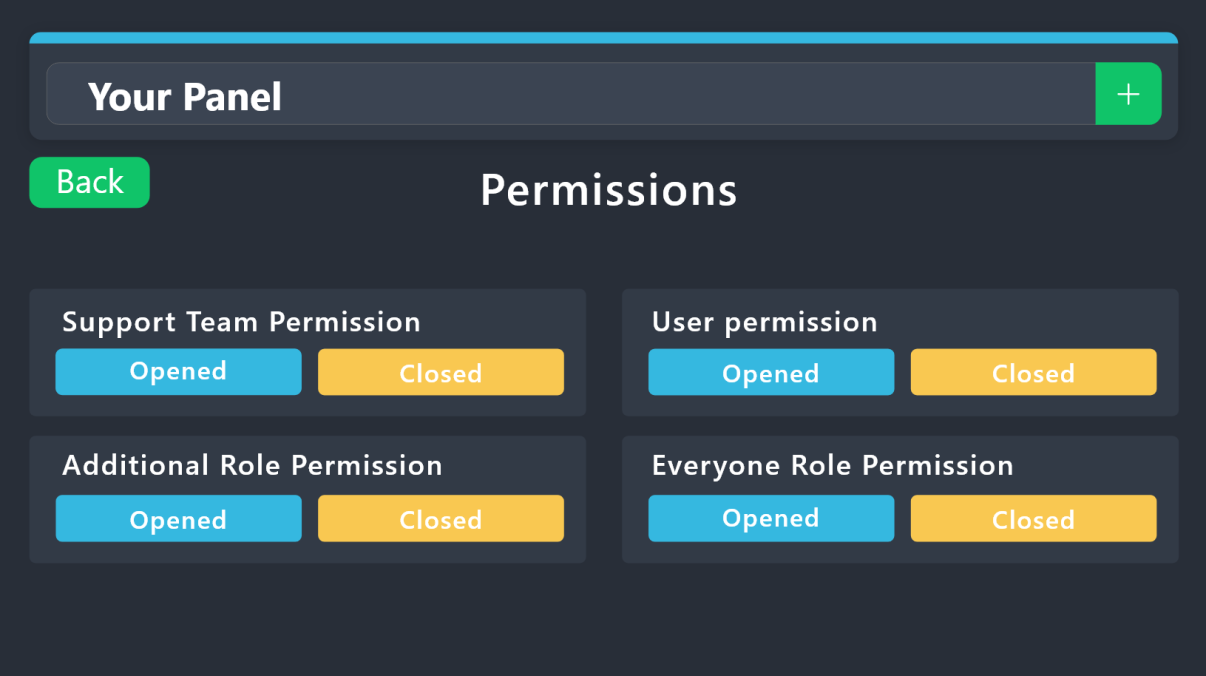
Hey again, make sure to set up the permissions correct for your Staff team to view the tickets. ( see below )
humble sequoiaBOT
1. Go into your Dashboard
2. Open your Panel Configs tab
3. Select the panel you want to grant access to
4. Open the Permissions options menu
5. Find what role you'd like to edit permissions for
6. Choose if you'd like to edit opened or closed permissions for that role
7. Edit the permissions by tickingor unticking
each permission
8. Save changes
 vapid merlin
worldly helm
Hey again, make sure to set up the permissions correct for your Staff team to vi...
vapid merlin
worldly helm
Hey again, make sure to set up the permissions correct for your Staff team to vi...
Hi. Where do I open a ticket? Cause everything looks fine
In this server
vapid merlin
👍
worldly helm
vapid merlin
Hi. Where do I open a ticket? Cause everything looks fine
1 Last things before you open a ticket.
Can you show me the permissions real quick?
 worldly helm
Did you change that or it is this way for a longer amount of time?
And how did you check it?
vapid merlin
worldly helm
Did you change that or it is this way for a longer amount of time?
what do you mean?
worldly helm
Sooo urm, when you checked the Permissions like 5 mins ago, was View ChannelAlready enabled?
 quiet bison
Does anybody know how to add the ticket tool? Like You press the thing and it makes a ticket bc idk how to😭
stark runeBOT
1. Invite Ticket Tool to your server
First you will want to invite the bot to your server. Once the bot is in your server, you can manage your server in the dashboard.
2. Create a Panel
To create a panel we are going to need to head over to the panel configs on the dashboard.
Once at the dashboard we will need to click Create Panel.
Enter a panel name (Fill in any optional settings you want).
Click Create Panel and your ready to get started with configuring your panel.
An example of a creating a panel is shown below.
3. Send the Panel to a Channel
Once you've created a panel on the dashboard you will need to send it to a channel using send on the dashboard.
Select the channel you want your panel to be created in and click send.
For other questions checkout $help faq.
An example of a sending a panel is shown below.
Having a Problem Sending the Panel?
Do $debug in a channel with Ticket Tool and make sure it has all the necessary Discord permissions.
restive condor
quiet bison
Does anybody know how to add the ticket tool? Like You press the thing and it ma...
Hey there! See above ^^
quiet bison
TYSMM
 arctic sentinel
Who can help me with my discord server with support
humble sequoiaBOT
Hello, we would love to help you, but if you don't tell us what you need help with we can't help you :(
jade topaz

 ornate grail
Where I can find backup key?
humble sequoiaBOT
The Backup and Restore feature allows you to transfer your panels, tags, and all settings to a new server, even if the server the settings were created has been deleted! You will want to copy the whole key.
First, go to your server's Dashboard ➞ then Server Configs ➞ under Config Backup & Restore (Server Owner Only) click on Old version can be found here and generate a new backup key by pressing the green button. Now, a key should be generated in the box above. You may need to refresh the page to see this.
Once you have your backup key, navigate to the same page on the new server. Copy the key on the Restore from backup key field.
Now you can choose what you want to copy. Finally, press the green Restore Configs button.
IMPORTANT NOTE
- We suggest you keep this backup key somewhere safe, in case your server is deleted so you are able to recover your panel's settings.
- This feature is only usable by the server's owner
$backup
ornate grail
Who have os only he can get key?
 pseudo ravine
Yep
jade topaz
How do I add ticket took to my server
humble sequoiaBOT
First you will want to invite the bot to your server. Once the bot is in your server, you can manage your server in the dashboard.
To create a panel we are going to need to head over to the Panel Configs Tab on the Dashboard.
Once at the dashboard we will need to click Create Panel.
Enter a panel name (Fill in any optional settings you want).
Click Create Panel and you are ready to get started with configuring your panel.
An example of a creating a panel is shown below.
Once the panel has been created, use the blue Send button and select the channel you want the panel to be sent to.
The Panel wasn't send
Use the </debug:1029783024264564765> command to diagnose possible permission issues with the bot.
worldly helm
jade topaz
How do I add ticket took to my server
Hey there :)
See above ^^
jade topaz
Thanks @worldly helm
 normal light
how do i stop other people reading other tickets once they are created?
humble sequoiaBOT
━━ User's inquiry has been moved to a ticket ━━
 latent burrow
why would it say this if i own the server?
 restive condor
latent burrow
why would it say this if i own the server?
restive condor
latent burrow
why would it say this if i own the server?
Hey there! Could I get your server name or ID please?
latent burrow
restive condor
Hey there! Could I get your server name or ID please?
Tuned RolePlay
restive condor
latent burrow
Tuned RolePlay
It seems like your premium subscription expired, causing a bot error.
You can re-purchase premium on our website via the new payment provider https://tickettool.xyz/premium-purchase or re-invite the standard @pseudo glen

Ticket Tool - Ticketing without clutter - The #1 Discord support bot
 tiny perch
Ok
latent burrow
restive condor
It seems like your premium subscription expired, causing a bot error.
You can r...
i re invited free one and still says it
restive condor
latent burrow
i re invited free one and still says it
Use /botswitcher and select the white bot please
 jagged hinge
hello I have configured ticket tool but I can't mention the staff team how to do it please
humble sequoiaBOT
1. Go into your Dashboard
2. Open your Panel Configs tab
3. Select the panel you want to ping your support on
4. Open the Ticket options menu
5. Click on Edit Ticket Message
6. In the Message Content use one of the role mention syntax (**{@Role Name}**/**{Role ID}**)
7. Save changes
Note: For this to work properly, Ticket Tool requires the Mention Everyone permission. Or the role must have the Allow anyone to @mention this role setting enabled 
 worldly helm
jagged hinge
hello I have configured ticket tool but I can't mention the staff team how to do...
worldly helm
jagged hinge
hello I have configured ticket tool but I can't mention the staff team how to do...
Hello there!!
See above ^^
jagged hinge
thanks
worldly helm
You‘re Welcome. :)
 magic mulch
Heey, so my ticket bot is not putting closed tickets under the right category, after I'm using the /close command, like it used to. What to do? 🙂
worldly helm
magic mulch
Heey, so my ticket bot is not putting closed tickets under the right category, a...
Hey there, are you sure you set up the Categorys correctly?
magic mulch
worldly helm
Hey there, are you sure you set up the Categorys correctly?
It's been working for last long time and now it just all of a sudden stop doing it and I haven't changed a single thing in the settings. So I'm a bit confused.
worldly helm
wierd, do you mind showing me your Dashboard? (The category Option)
magic mulch
@worldly helm
 worldly helm
Thanks, is there any error message popping off or do you maybe have to many tickets open? ( 50+ )
magic mulch
I mean, I got 50+ tickets that are closed in the "ticket archive", but didn't think that would cause it not to work?
worldly helm
I am pretty sure that is the problem. Discord has a limit of 50 Channels in 1 Category. Even tho its the other category, please try to close some tickets.
magic mulch
worldly helm
I am pretty sure that is the problem. Discord has a limit of 50 Channels in 1 Ca...
Ahh I see, I got to make a new "archive" for every 50 closed tickets then 😉
worldly helm
Hmm, i wouldnt recomend that. Either Save the transcripts or delete them.
Discord has a limit of 500 Channels aswell. and i dont think its worth having like 499 closed tickets in your Server 😉
 keen flower
hola
magic mulch
worldly helm
Hmm, i wouldnt recomend that. Either Save the transcripts or delete them.
Discor...
True, is there an auto delete through ticket tool?
 exotic burrow
I seted up my tickit but how do I add it to the channel so ppl can order?
worldly helm
magic mulch
True, is there an auto delete through ticket tool?
Yes, there is. Its called automation.... Its premium only 
worldly helm
exotic burrow
I seted up my tickit but how do I add it to the channel so ppl can order?
hey there! do you mean categorys?
exotic burrow
no channel
magic mulch
worldly helm
Yes, there is. Its called automation.... Its premium only <:Premium:119240307415...
Ahh okay, thanks
iron nightBOT
Gave +1 Rep to @worldly helm (current: #40 - 72)
 worldly helm
You want to send the panel, in a channel?
exotic burrow
Yeah
worldly helm
Okay, head to your Dashboard and click on the Blue botton Send --> Select your wanted channel and voila!
 kindred hollow
keen flower
hola
kindred hollow
keen flower
hola
Hola. Necesitas ayuda?
 humble sequoiaBOT
A Discord Form lets the user answer individual questions in a pop-up Form, which then displays the answers in the ticket message. This can save time if you already know what you want to ask the user.
Setup Forms
Forms can be enabled under Panel Settings > Form Options > Edit Forms Options. In the new pop-up window, you can now enable and edit your own Form.
Form Options
You can add up to 5 questions in the Discord form. This is a Discord limitation. Each question can have a placeholder in the input field, a minimum and maximum input, multi-line, and also the option to have the answer required.
Options
Question Title ➞ Your Question goes here
Question Placeholder ➞ The placeholder text in the input field
Required ➞ If enabled, the user has to answer this question, to submit the form
Multi-Line Input ➞ Allows the user to input multiple lines
Minimum and Maximum Input ➞ Set a minimum and maximum input value for the user
Displaying the Answer
To display the answers from the user, you need to enable Auto display form results on the ticket message as an additional embed
If you don't want a second embed, go into your Panel Configs > Ticket Options > Edit Ticket Message. You use the variable {create.form.x} and replace x with the number of your question. For example, the response to Question 5 can be displayed with {create.form.5}.
 worldly helm
 mystic gorge
how i can make it
mystic gorge
how i can make it
Hello there!
Look above ^^
mystic gorge
worldly helm
Hello there!
Look above ^^
thanks bro i love u
iron nightBOT
Gave +1 Rep to @worldly helm (current: #40 - 73)
worldly helm
You're welcome
If you have any questions feel free to ask!
 lament hawk
humble sequoia
lament hawk
humble sequoia
Thanks @worldly helm
iron nightBOT
Gave +1 Rep to @humble sequoia (current: #17 - 325)
 long oxide
worldly helm
You're welcome <:3v_smile:1187282191630204958>
If you have any questions feel f...
long oxide
worldly helm
You're welcome <:3v_smile:1187282191630204958>
If you have any questions feel f...
me
long oxide
long oxide
it keeps saying didnt respond
.
 ionic path
long oxide
it keeps saying didnt respond
ionic path
long oxide
it keeps saying didnt respond
Hi there, no the bot isn’t down. Can you please use /debug in the channel you are experiencing issues?
long oxide
ionic path
Hi there, no the bot isn’t down. Can you please use /debug in the channel you ar...
 ionic path
long oxide
ionic path
long oxide
That means the bot is missing either of these permissions in that channel or in the role settings.
Send Messages, View Channel or Read Message History
 trail prism
hello is there a way to see auto closed tickets???
worldly helm
If you saved your Transcript yes, if not no...
@pseudo otter Hey, ich verstehe nicht ganz was daran nicht falsch sein soll.
worldly helm
If a Ticket Was auto closed and you save the transcript, you can see it
trail prism
where can i see the transcript
worldly helm
Do you have a transcript channel?
 pseudo otter
worldly helm
<@601872399096479865> Hey, ich verstehe nicht ganz was daran nicht falsch sein s...
pseudo otter
worldly helm
<@601872399096479865> Hey, ich verstehe nicht ganz was daran nicht falsch sein s...
Ich muss den leeren Kanal manuell löschen. Bei mehreren Tickets am tag, hatte ich gehofft, dass es irgendwie automatisch geht.
trail prism
worldly helm
Do you have a transcript channel?
no i made a ticket on other people' server
worldly helm
Also möchst du wissen wie mann Tickets schließt oder löscht?
worldly helm
trail prism
no i made a ticket on other people' server
Is the Ticket already closed?
worldly helm
right, sorry!
You can reach out to their Staff and ask if you can see the transcript or if you should open another ticket.
pseudo otter
worldly helm
Also möchst du wissen wie mann Tickets schließt oder löscht?
Jemand schliesst das Ticket es wird verschoben zu Closed Tickets. Dort wird es gelöscht und automatisch transcripted. Danach ist es leer, weil es ja transcripted ist. Zurück bleiben nach 10 Tickets, 10 leere Discord Kanäle.
worldly helm
Du kannst denn command /purge benutzen um mehrere Tickets auf einmal zu schließen.
pseudo otter
Ja, zurück bleiben die leeren Kanäle im Discord
worldly helm
Was genau meinst du mit leeren Kanälen?
pseudo otter
So wie ich es schreibe. Das Ticket wurde ja in einem Kanal produziert. Das Ticket wird gelöscht. Der Inhalt ist weg. Zurück bleibt ein leerer Kanal im Discord.
worldly helm
Hast du villeicht einen Screenshot, denn ich verstehe nicht so ganz?
pseudo otter
Ein Screenshot von einem leeren Kanal???
worldly helm
Ja, beziehungsweise wovon du redest.
 worldly helm
In den Kanal Steht nichts?
pseudo otter
Schreibe doch die ganze Zeit, dass er nach dem löschen leer ist
 lunar vector
worldly helm
pseudo otter
Schreibe doch die ganze Zeit, dass er nach dem löschen leer ist
lunar vector
worldly helm
pseudo otter
Schreibe doch die ganze Zeit, dass er nach dem löschen leer ist
Ich habe doch nur gefragt, da ich von diesem problem noch nie gehört habe..... Bitte öffne ein Ticket.
humble sequoiaBOT

Deutsches Support-Team
Wenn du Hilfe vom Deutschen Support-Team erhalten möchtest gehe in #🎫│make-a-ticket und öffne durch einen Klick auf den :flag_de: Button ein Ticket.
━━ User's inquiry has been moved to a ticket ━━
 red yoke
It has the required permission but it still keeps saying this every time i try to send the panel to a channel

 humble sequoiaBOT
This error indicates you have selected an invalid emoji, i.e. an emoji the bot isn't capable of using, in a button field
Which Emoji?
This depends upon which action the error is appearing, the most common cases are the Create Ticket button or one of your Dropdown emojis. You can visit your Button's List to find all available buttons and find the conflicting one by yourself.
Why doesn't the bot accept it as valid?
- You selected an emoji that doesn't exist anymore, i.e. that has been deleted
- You wrote text there, instead of an emoji (or in addition to an emoji)
- You entered a code for a custom emoji from a server that the bot is not a member of
- You entered a custom emoji code incorrectly
- You're on iPhone and entered an emoji using the phone's emoji pad (use the emoji selector in the website instead)

 limber portal
red yoke
It has the required permission but it still keeps saying this every time i try t...
limber portal
red yoke
It has the required permission but it still keeps saying this every time i try t...
^^
 patent thunder
I want to add a footter/header image to my tickets
patent thunder
patent thunder
I want to add a footter/header image to my tickets
but I cant find my image link
limber portal
patent thunder
I want to add a footter/header image to my tickets
Hi, you can add an image link in the box provided
patent thunder
and when i do, it doenst work
humble sequoiaBOT
What are the direct URLs?
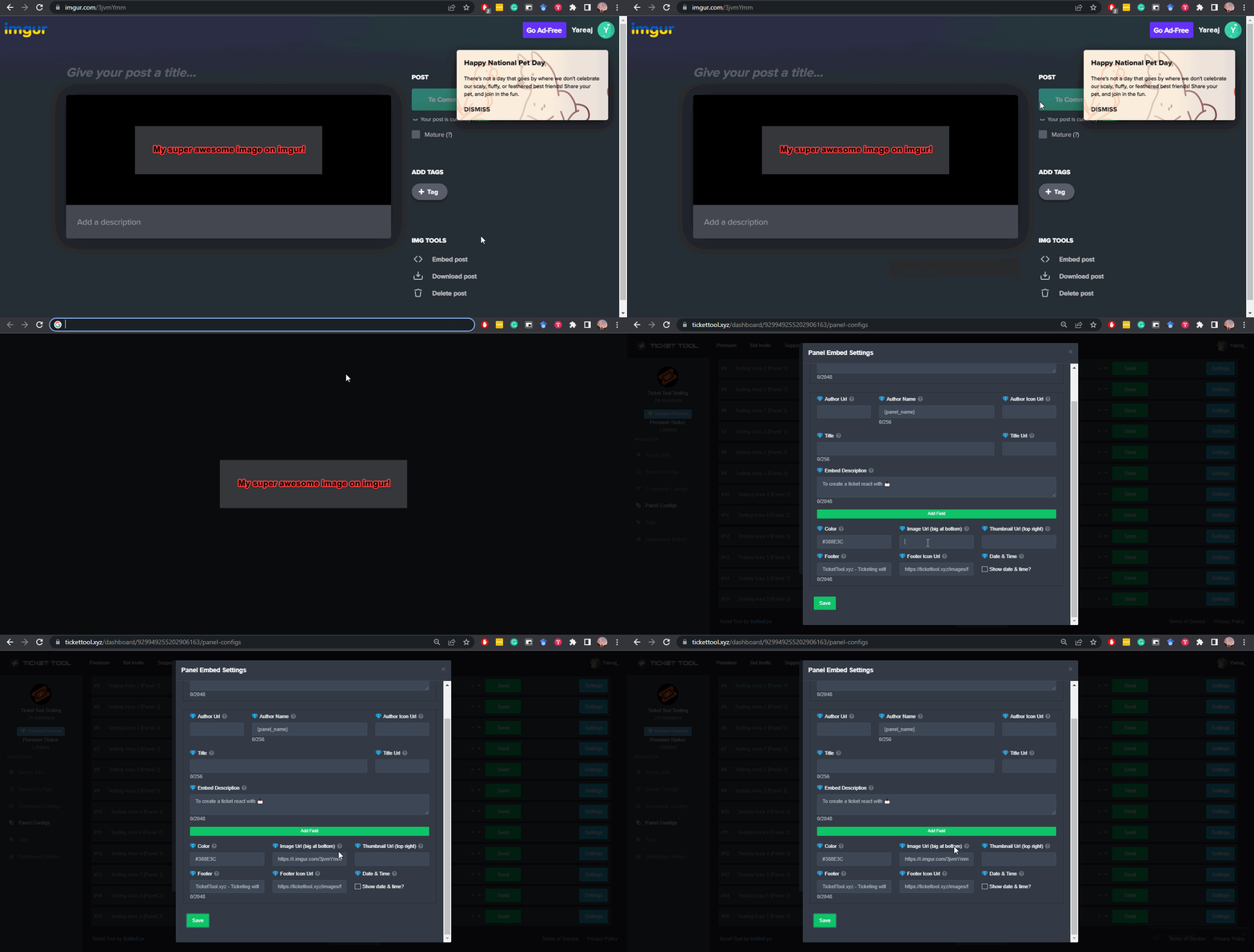
A direct access URL is an easy to read URL that users can enter to get to a specific item, document, page, category, or perspective, in which our bot TicketTool can read and get it displayed in your 'Panel Message' or your 'Ticket Message'.
Where can I get them?
The recommended way is to use 'Imgur', you can signup within a few minutes and then upload the image you want, and copy the URL of the uploaded image and paste it into one of the four boxes. There are alternatives to this, such as other image or video storing websites or using 'Open Original' of an image and paste it in (please be aware that if your image is deleted, Discord will automatically delete the link to it in a few days). Please note this requires 'Premium'. Imgur
 limber portal
See above
patent thunder
limber portal
See above
What if i want a custom image
I hired a designer and she made a logo for us
limber portal
humble sequoia
You can upload it to imgur^^
patent thunder
limber portal
You can upload it to imgur^^
I uploaded and got the link but it still dont work
 fierce yarrow
 humble sequoiaBOT

فريق الدعم الفني العربي
عميلنا العزيز ان كنت تبحث عن مساعدة يرجى فتح تكت خاص بفريق الدعم الفني العربي
اذهب الى#🎫│make-a-ticket
ثم قم بلضغط على الايموجي الاتي (🇯🇴)
restive condor
patent thunder
I uploaded and got the link but it still dont work
Hey there! Could you show me the link you're using please?
 restive condor
https://i.imgur.com/DER8G2L.png
 grizzled summit
I rarely use the free TT bot. So, does it do transcripts?
restive condor
Use that instead
patent thunder
OOoh ty
worldly helm
grizzled summit
I rarely use the free TT bot. So, does it do transcripts?
Yes 💀
grizzled summit
Its not sending them to the channel i specified in the dashboard.
patent thunder
it worked
grizzled summit
Its being a naughty free bot
restive condor
Glad to hear!
restive condor
grizzled summit
Its not sending them to the channel i specified in the dashboard.
Hey. Any error message? Or just doesn't send at all
grizzled summit
restive condor
Hey. Any error message? Or just doesn't send at all
no error. just not sending
restive condor
grizzled summit
no error. just not sending
Are you using the transcript button?
Automatic transcripts are premium only
iron nightBOT
Gave +1 Rep to @restive condor (current: #2 - 1031)
restive condor
Any time!
grizzled summit
thank you @worldly helm
worldly helm
Aww :(
red yoke
was working fine until i deleted the panel from the channel to send in an updated one and now every time i run the /setup command it says this
 worldly helm
red yoke
was working fine until i deleted the panel from the channel to send in an update...
worldly helm
red yoke
was working fine until i deleted the panel from the channel to send in an update...
Hey there, do you mind doing the /debug command?
 worldly helm
The Ticket Tool bot needs all of these 3 Permissions: Send Messages, View Channel or Read Message History
I would suggest you giving the bot admin.
red yoke
it has them like i said it was working fine a minute ago
until i deleted the panel from my channel
then as i was about to re send it, all commands stopped working
worldly helm
Wierd, please wait for Staff to assist you. I dont have access to your Dashboards, panels, etc.
Sorry! :/
restive condor
red yoke
Hey there! Ticket Tool is missing the SEND MESSAGES permission for that channel
 atomic solstice
I've seen crazier
red yoke
restive condor
Hey there! Ticket Tool is missing the ``SEND MESSAGES`` permission for that chan...
lmao i'm a idiot thanks for this, because i removed send messages from @ everyone in that channel i didnt realise it would do the same to ticket tool
iron nightBOT
Gave +1 Rep to @restive condor (current: #2 - 1032)
restive condor
No worries, glad to hear it works now
jade topaz
So the claim ticket thing is only for premium???
restive condor
jade topaz
So the claim ticket thing is only for premium???
Hey there! Yes, claiming is a premium feature
humble sequoiaBOT
Claiming allows you to change the ticket name, category and permissions. To use it you have to enable it first on your Dashboard > Panel Configs > Claiming

 Note: This is a premium feature
red yoke
Note: This is a premium feature
red yoke
is there a way to change the colour of the embed bar
 restive condor
That's also a premium feature
red yoke
restive condor
That's also a premium feature <:Premium:1192403074157912144>
Damn changing a hex colour on the side of the embed shouldn't be behind a paywall 🤦
I'm guessing ticket tool isn't open source?
restive condor
red yoke
I'm guessing ticket tool isn't open source?
It is not sadly
 odd flare
Also hab ein eigenen Server und möchte ein Ticket da da erstellen
worldly helm
Okay, was hast du für ein Problem/was hast du für fragen?
humble sequoiaBOT
First you will want to invite the bot to your server. Once the bot is in your server, you can manage your server in the dashboard.
To create a panel we are going to need to head over to the Panel Configs Tab on the Dashboard.
Once at the dashboard we will need to click Create Panel.
Enter a panel name (Fill in any optional settings you want).
Click Create Panel and you are ready to get started with configuring your panel.
An example of a creating a panel is shown below.
Once the panel has been created, use the blue Send button and select the channel you want the panel to be sent to.
The Panel wasn't send
Use the </debug:1029783024264564765> command to diagnose possible permission issues with the bot.
worldly helm
odd flare
.
Folge den anweisungen über dieser Nachicht. Wenn du fragen hast kannst du sie gerne stellen ;D
 ocean sequoia
Any know if its possible to set it up so a ticket can be opened automatically by a json embed?
humble sequoiaBOT
━━ User's inquiry has been moved to a ticket ━━
 tough thicket
Is there a max number of question for the form feature in ticket tool?
patent thunder
Hello! How do I change the color of this message to pink too. I can't find it anywhere!
 worldly helm
tough thicket
Is there a max number of question for the form feature in ticket tool?
worldly helm
tough thicket
Is there a max number of question for the form feature in ticket tool?
Hey there!
Yes, the maximum is 5.
 near halo
Is a there a way to switch an open tickets between panels like a switchpanel command
near halo
near halo
Is a there a way to switch an open tickets between panels like a `switchpanel` c...
Similar to other bots?
worldly helm
patent thunder
Hello! How do I change the color of this message to pink too. I can't find it an...
Hey there, uhm i dont have premium so i cannot test, but do you mind testing it for me Dashboard -->Messages-->Edit transcript Message. I think that is how you can change the color.
patent thunder
worldly helm
Hey there, uhm i dont have premium so i cannot test, but do you mind testing it ...
only shows this
 worldly helm
patent thunder
only shows this
worldly helm
patent thunder
only shows this
Can you click on Embed Editor?

 worldly helm
patent thunder
worldly helm
patent thunder
If you scroll down, what do you see?
patent thunder
nothing else
 pseudo ravine
You cant change those messages
worldly helm
ohh,okay thanks for telling me Stitch. Noted 🤓
exotic burrow
r how can I make a ticket so ppl can report stuff
worldly helm
exotic burrow
r how can I make a ticket so ppl can report stuff
It depens on how you want your panel to look like.
exotic burrow
wdym
worldly helm
There are different kinds of panels, like dropdown, multi panel or the Normal panel.
exotic burrow
Normal
worldly helm
So like this
 exotic burrow
Like this
 humble sequoiaBOT
**١- دعوة البوت إلى سيرفرك**
يجب عليك اولاً دعوة البوت إلى سيرفرك من خلال رابط دعوة البوت، بعد ذلك يُمكنك تعديل خصائص البوت عبر لوحة التحكم.
**٢- إنشاء لوحة**
لإنشاء لوحة يجب عليك التوجه إلى لوحة التحكم ، ثم قم بإختيار سيرفرك ، بعد ذلك توجه إلى قسم "Panel Config".
بمُجرد وصولك إلى القسم المذكور أعلاه، يجب عليك الضغط على زر "Create Panel" لإنشاء اللوحة ، ومن ثمها قُم بإدخال اسم اللوحة (يمكنك ملء اي اعدادات اختياريه تريدها).
بعد إدخال اسم اللوحة و ملء الإعدادات ، قُم بالضغط على "Create Panel" لإتمام عملية انشاء اللوحة الخاصة بك بنجاح!
سيتم إرفاق صورة توضيحية لعملية إنشاء اللوحة بالطريقة الصحيحة؛
**٣- إرسال اللوحة إلى روم**
بعد الإنتهاء من عملية إنشاء اللوحة بنجاح ، يجب عليك الآن إرسالها إلى روم بإستخدام زر "Send" على لوحة التحكم بقسم الـ "Panel Config".
بعد الضغط على الزر ، قم بإختيار الروم المفضل لإرسال اللوحة.
بعد إختيار الروم قُم بالضغط على زر "Send" لإتمام عملية إرسال اللوحة!
سيتم إرفاق صورة توضيحية لعملية إرسال اللوحة بالطريقة الصحيحة؛
**هل تواجهك مشكلة أثناء محاولة إرسال اللوحة؟**
قُم بإرسال الامر `/debug" في اي روم يستطيع البوت رؤيته ، ثم تأكد أن البوت لدية جميع الصلاحيات اللازمة لإرسال اللوحة.
worldly helm
exotic burrow
Like this
Follow the guide above ^^
exotic burrow
can u send it in English please
humble sequoiaBOT
First you will want to invite the bot to your server. Once the bot is in your server, you can manage your server in the dashboard.
To create a panel we are going to need to head over to the Panel Configs Tab on the Dashboard.
Once at the dashboard we will need to click Create Panel.
Enter a panel name (Fill in any optional settings you want).
Click Create Panel and you are ready to get started with configuring your panel.
An example of a creating a panel is shown below.
Once the panel has been created, use the blue Send button and select the channel you want the panel to be sent to.
The Panel wasn't send
Use the </debug:1029783024264564765> command to diagnose possible permission issues with the bot.
worldly helm
There you go :D
exotic burrow
Thanks,
patent thunder
pseudo ravine
You cant change those messages
Oh really?
worldly helm
if he says so, yes.
patent thunder
☹️
pseudo ravine
patent thunder
Oh really?
Yep
patent thunder
pseudo ravine
Yep
What about, if we added a form and want the embed to display in the ticket. Its always black color, can we change it to pink?
pseudo ravine
The automatic one? No
 pseudo ravine
Add a new embed, and add the variables
 pseudo ravine
patent thunder
<@865714582613524491> is this auto one?
pseudo ravine
patent thunder
<@865714582613524491> is this auto one?
The 2nd embed is, yes
 grizzled crag
how can i get the bot to ping a certain role when a ticket is created
humble sequoiaBOT
1. Go into your Dashboard
2. Open your Panel Configs tab
3. Select the panel you want to ping your support on
4. Open the Ticket options menu
5. Click on Edit Ticket Message
6. In the Message Content use one of the role mention syntax (**{@Role Name}**/**{Role ID}**)
7. Save changes
Note: For this to work properly, Ticket Tool requires the Mention Everyone permission. Or the role must have the Allow anyone to @mention this role setting enabled
iron nightBOT
Gave +1 Rep to @pseudo ravine (current: #7 - 591)
pseudo ravine
You're welcome, glad I could help!
grizzled crag
get that number 1 soon gang
patent thunder
pseudo ravine
The 2nd embed is, yes
How do we change it?
pseudo ravine
pseudo ravine
Add a new embed, and add the variables

Once that's done, you can disable the auto add answers option
patent thunder
pseudo ravine
Add a new embed, and add the variables
Oh
patent thunder
pseudo ravine
Add a new embed, and add the variables
how do we get the varieble im so confused
variable
pseudo ravine

 patent thunder
pseudo ravine
patent thunder
pseudo ravine
ohh okay
pseudo ravine
grizzled crag
there is no edit msg
That's the Panel Message you need the Ticket Message
 pseudo ravine
humble sequoia
pseudo ravine
humble sequoia
It's in the guide
 pseudo ravine
Yep
grizzled crag
so i just add <@& role id> and im set
pseudo ravine
Yep
 little sandal
after closing a ticket, the member who opened it can still access it and send messages.
how do i fix this?
patent thunder
Is it possible to change color of transcripts/
 pseudo ravine
Nope
jade topaz
How do I fix this?

It says I can't open a ticket because the channel limit is cappef
Capped*
worldly helm
little sandal
after closing a ticket, the member who opened it can still access it and send me...
Hey there!
You have to edit the Closed Permission for the Ticket owner, on your Dashboard.
little sandal
worldly helm
Hey there!
You have to edit the Closed Permission for the Ticket owner, on your ...
its already set.
 worldly helm
Is that the closed edit button or the opened edit button
little sandal
worldly helm
Is that the closed edit button or the opened edit button
Ticket Owner > Closed Button
worldly helm
Wierd, i'll let Staff to assist you, due to me not having access to your Dashboard, panels, etc.
 austere tapir
bro can u guys do something about this guy??

he just camps 24/7 waiting for someone to deposit to give to his main @worn pebble
little sandal
worldly helm
Wierd, i'll let Staff to assist you, due to me not having access to your Dashboa...
thanks
iron nightBOT
Gave +1 Rep to @worldly helm (current: #40 - 74)
pseudo ravine
They aren't breaking any rules
austere tapir
bro how am i meant to grind
when he's using alts and waiting 24/7
for someone to deposit
this kid has 20 alts


@pseudo ravine
do smth about my him
 limber portal
If you have a legitimate report to make, make a report ticket and the mods will investigate it to determine if action needs to be taken.
austere tapir
I want my hard earned money back
austere tapir
limber portal
If you have a legitimate report to make, make a report ticket and the mods will ...
Okay, where could i make that
limber portal
This channel is for support with the bot, use the dedicated report ticket in #🎫│make-a-ticket
exotic burrow
I made a panel but how do I send the ticket to a channel so ppl can report an issue
 severe parcel
what to do?
 severe parcel
exotic burrow
I made a panel but how do I send the ticket to a channel so ppl can report an is...
severe parcel
exotic burrow
I made a panel but how do I send the ticket to a channel so ppl can report an is...
Panel Configs -> Press "Send" and choose a chanel
 exotic burrow
Thanks!
severe parcel
severe parcel
what to do?
@restive condor @pseudo ravine
restive condor
severe parcel
what to do?
Hey there! Dashboard > Panel Configs > Thread Style - Make sure the channel you have selected is still valid
humble sequoiaBOT
Hello, we would love to help you, but if you don't tell us what you need help with we can't help you :(
near halo
near halo
Is a there a way to switch an open tickets between panels like a `switchpanel` c...
Pulling this down quick
jade topaz
@humble sequoia
ionic path
jade topaz
<@722196398635745312>
You’ve already been told you’re in the wrong place.
humble sequoiaBOT

⚠️ You're in the wrong place
We provide support for Ticket Tool Discord bot and cannot help you with whatever issue you have.
- We don't know which Support Team you should contact to get this issue resolved, and unfortunately we won't be able to accurately tell you.
If you don't have any further questions regarding our bot Ticket Tool, please close this ticket
ionic path
Take a good look at this please ^^
jade topaz
I don't know the right place, please help me
austere forge
jade topaz
I don't know the right place, please help me
- We don't know which Support Team you should contact to get this issue resolved, and unfortunately we won't be able to accurately tell you.
ionic path
We don’t know either.
restive condor
near halo
Is a there a way to switch an open tickets between panels like a `switchpanel` c...
Hey there! No, it's currently not possible unfortunately.
The only way would be to manually move the panel to a different category
near halo
restive condor
Hey there! No, it's currently not possible unfortunately.
The only way would be...
Thank you
iron nightBOT
Gave +1 Rep to @restive condor (current: #2 - 1035)
austere tapir
thanks belxl
near halo
I think I figured out how to put in a suggestion, hopefully it gets added
restive condor
Yep, we got it. Hopefully 🤞
ocean sequoia
Ok I managed to get GSA to make a ticket using text commands, but is there a way to have the ticket contents (like a block of text describing why the ticket was open) that way? Can I use an embed to fill out a Ticket?
Or can I add text somehow that gets added to the ticket?
near halo
restive condor
Yep, we got it. Hopefully 🤞
Thank you!
iron nightBOT
Gave +1 Rep to @restive condor (current: #2 - 1037)
restive condor
ocean sequoia
Or can I add text somehow that gets added to the ticket?
Yes, you can use the {create.reason} variable.
So if you have some sort of form with the other bot, you can have the answers displayed in your ticket message with that variable
stark runeBOT
1. Invite Ticket Tool to your server
First you will want to invite the bot to your server. Once the bot is in your server, you can manage your server in the dashboard.
2. Create a Panel
To create a panel we are going to need to head over to the panel configs on the dashboard.
Once at the dashboard we will need to click Create Panel.
Enter a panel name (Fill in any optional settings you want).
Click Create Panel and your ready to get started with configuring your panel.
An example of a creating a panel is shown below.
3. Send the Panel to a Channel
Once you've created a panel on the dashboard you will need to send it to a channel using send on the dashboard.
Select the channel you want your panel to be created in and click send.
For other questions checkout $help faq.
An example of a sending a panel is shown below.
Having a Problem Sending the Panel?
Do $debug in a channel with Ticket Tool and make sure it has all the necessary Discord permissions.
austere tapir
Where is the rules channel located?
austere forge
austere tapir
Where is the rules channel located?
Hey there 🙂
https://discord.com/channels/509192800865353738/509239005481664524 -> Rules
austere tapir
austere forge
Hey there 🙂
https://discord.com/channels/509192800865353738/509239005481664524...
ty
iron nightBOT
Gave +1 Rep to @austere forge (current: #11 - 447)
 sullen raptor
What's the command in the message to @people after they made the ticket?
humble sequoiaBOT
1. Go into your Dashboard
2. Open your Panel Configs tab
3. Select the panel you want to ping your support on
4. Open the Ticket options menu
5. Click on Edit Ticket Message
6. In the Message Content use one of the role mention syntax (**{@Role Name}**/**{Role ID}**)
7. Save changes
Note: For this to work properly, Ticket Tool requires the Mention Everyone permission. Or the role must have the Allow anyone to @mention this role setting enabled
restive condor
sullen raptor
What's the command in the message to @people after they made the ticket?
Hey there! See above please ^
sullen raptor
restive condor
Hey there! See above please ^
Thank you also how do u this?
 iron nightBOT
Gave +1 Rep to @restive condor (current: #2 - 1038)
humble sequoiaBOT
The Drop-down menu or Select Menu replaces the buttons on your panel message and uses a drop-down menu with all of your panels. To set this up, go to your Panel Configs and select your main Panel.
<:Numbericons1:1018864164032225340> Enable Select Style
First you enable Select Style. Then you add an item in the Dropdown Editor. Now you can start editing your dropdown!
<:Numbericons2:1018864168041971712> Dropdown Editor
Each line in the dropdown editor represents a line in the drop down menu on discord. You can add more "Items", by clicking on
First you select a panel. That's the panel this option will open a ticket for. DONT select the same panel twice. Each option should have a different Panel
After that, you can put a Display. This is the title of this option and will appear in the drop down menu. The *Description can be set right after that, which will be below the title in grey.
Additionally you can select an emoji, that will be shown in front of each option. You can either manually input the ID of an emoji or select it in the selector.
Common Issues ⚠️
- Panel doesn't send? Make sure you have a valid emoji selected
- Option doesn't show up? Check if two options have the same panel in the DropDown Editor
$dropdown
restive condor
sullen raptor
Thank you also how do u this?
There you go ^^
Let me know if you have any questions 🙏
sullen raptor
Thank u:)
 deft geode
is there a limit of creating panels?
Because i wanted to create several panels for ticket
 regal gust
حد هنا عربي يقولي ازاي استخدم البوت البضان ده ؟
humble sequoiaBOT
فريق الدعم الفني العربي
عميلنا العزيز ان كنت تبحث عن مساعدة يرجى فتح تكت خاص بفريق الدعم الفني العربي
اذهب الى#🎫│make-a-ticket
ثم قم بلضغط على الايموجي الاتي (🇯🇴)
restive condor
deft geode
is there a limit of creating panels?
Because i wanted to create several panels f...
Hey there! No, you can create as many panels as you wish
deft geode
ahh thanks 👍
 ionic solar
I don't know if this is the right channel, but Ticket Tool keeps doing this, is this an issue with discord or is the bot down?
 austere forge
ionic solar
I don't know if this is the right channel, but Ticket Tool keeps doing this, is ...
austere forge
ionic solar
I don't know if this is the right channel, but Ticket Tool keeps doing this, is ...
Hey there 🙂
Make sure that the bot has: VIEW CHANNEL SEND MESSAGE and READ MESSAGE HISTORY perms in the channel
ionic solar
austere forge
Hey there 🙂
Make sure that the bot has: `VIEW CHANNEL` `SEND MESSAGE` and `REA...
Alright I'll see!
ionic solar
austere forge
Hey there 🙂
Make sure that the bot has: `VIEW CHANNEL` `SEND MESSAGE` and `REA...
Thank you very much, the problem was solved!
 verbal iron
heyy i think i saw a server where when a ticket was opened it had some sort of message that pinged a specific role, there it was a general staff role. it mightve been another bot because i personally didnt find any commands where i could do it, but can you do that with ticket tool?
humble sequoiaBOT
1. Go into your Dashboard
2. Open your Panel Configs tab
3. Select the panel you want to ping your support on
4. Open the Ticket options menu
5. Click on Edit Ticket Message
6. In the Message Content use one of the role mention syntax (**{@Role Name}**/**{Role ID}**)
7. Save changes
Note: For this to work properly, Ticket Tool requires the Mention Everyone permission. Or the role must have the Allow anyone to @mention this role setting enabled
austere forge
verbal iron
heyy i think i saw a server where when a ticket was opened it had some sort of m...
Hey there 🙂
see above
verbal iron
austere forge
see above
alright thanks !
iron nightBOT
Gave +1 Rep to @austere forge (current: #11 - 448)
 unborn iris
Hey, I was trying to delete a panel and apperently it doesnt let me. Everytime i try and delete it, it just give me this message.
 austere forge
unborn iris
Hey, I was trying to delete a panel and apperently it doesnt let me. Everytime i...
austere forge
unborn iris
Hey, I was trying to delete a panel and apperently it doesnt let me. Everytime i...
Hey there 🙂
It's just a security measure to prevent you from accidentally deleting all your panels.
If you'd like to delete your last/only panel, please create another panel first before deleting the previous one
unborn iris
austere forge
Hey there 🙂
It's just a security measure to prevent you from accidentally delet...
Oh, alright. Thanks.
iron nightBOT
Gave +1 Rep to @austere forge (current: #11 - 449)
tough thicket
worldly helm
Hey there!
Yes, the maximum is 5.
thx, is there a way to increase it with premium?
iron nightBOT
Gave +1 Rep to @worldly helm (current: #40 - 75)
ocean sequoia
restive condor
Yes, you can use the ``{create.reason}`` variable.
So if you have some sort of...
Can this be used as a statement in a simple command text entry or does using it require a json webhook?
humble sequoiaBOT
⚠️ You're in the wrong place
We provide support for Ticket Tool Discord bot and cannot help you with whatever issue you have.
- We don't know which Support Team you should contact to get this issue resolved, and unfortunately we won't be able to accurately tell you.
If you don't have any further questions regarding our bot Ticket Tool, please close this ticket
worldly helm
tough thicket
thx, is there a way to increase it with premium?
No, there is not.
 hot zodiac
I can't trade a ticket since the morning
worldly helm
What do you mean "Trade"
restive condor
ocean sequoia
Can this be used as a statement in a simple command text entry or does using it ...
No, it should be a simply text command
hot zodiac
worldly helm
What do you mean "Trade"
*crear
worldly helm
Is there an error message or something?
hot zodiac
I can't create a ticket since morning
worldly helm
I got it,are there any error messages?
jade topaz
worldly helm
Is there an error message or something?
I'm from Brazil please help me
hot zodiac
worldly helm
I got it,are there any error messages?
It says add servers and none appear
 quasi cradle
Well guys I made my own transcripts command with my own bot. Well is it similar to the ticket tool's?
 worldly helm
jade topaz
I'm from Brazil please help me
worldly helm
jade topaz
I'm from Brazil please help me
This is NOT the server you are seeking.
worldly helm
hot zodiac
It says add servers and none appear
Do you have a screenshot to show?
restive condor
@jade topaz Voce está no servidor errado.
Infelizmente, nao podemos ajudá-lo. Desculpas 🙏
quasi cradle
quasi cradle
Well guys I made my own transcripts command with my own bot. Well is it similar ...
Well I never used ticket tool transcript so..
hot zodiac
I was supposed to be in a group called fnaf TD support and I'm in this
 austere forge
quasi cradle
Well guys I made my own transcripts command with my own bot. Well is it similar ...
austere forge
quasi cradle
Well guys I made my own transcripts command with my own bot. Well is it similar ...
Hey there 🙂
It's not quite the same, but it's good for a start!
good work sir
 jade topaz
Thaks
worldly helm
hot zodiac
I have been waiting for a ticket since the day they deleted some units
That bot you are showing, is not the normal Ticket Tool bot.
hot zodiac
then what is?
worldly helm
These are.
 hot zodiac
The first ticket they made sent me to that
pseudo ravine
It's a different bot
austere forge
You are on the wrong support server
pseudo ravine
Tickets and Ticket Tool are 2 separate bots
 slow rover
ticket tool is better ngl
humble sequoiaBOT

Equipo de Soporte Español
Querido usuario, si está buscando ayuda, por favor abra un ticket para contactar al Equipo de Soporte Español. Diríjase a #🎫│make-a-ticket y presione el botón :flag_es:.
slow rover
Tickets y ticket tool no son el mismo bot. este servidor es sólo para ticket tool, no para tickets
humble sequoiaBOT
━━ User's inquiry has been moved to a ticket ━━
quasi cradle
austere forge
Hey there 🙂
It's not quite the same, but it's good for a start!
good work sir
Well can you maybe.. Send me a picture about the website that ticket tool creates. Not asking for it, but it would be a huge favor.
tough thicket
worldly helm
No, there is not.
ty
iron nightBOT
Gave +1 Rep to @worldly helm (current: #39 - 76)
austere forge
quasi cradle
Well can you maybe.. Send me a picture about the website that ticket tool create...
Example of the transcript webpage of a ticket deleted as an HTML file (the beginning)
Unfortunately I won't be able to help you further as you don't need any help with Ticket tool 🙂
 quasi cradle
austere forge
Example of the transcript webpage of a ticket deleted as an HTML file (the begin...
quasi cradle
austere forge
Example of the transcript webpage of a ticket deleted as an HTML file (the begin...
Thanks so much. 🙂
iron nightBOT
Gave +1 Rep to @austere forge (current: #11 - 451)
 hazy nymph
heyy, does anyone know how i can change the color of the embed? the only part i can change is the main message thing, i claimed my one week premium but still nothing works, the add field button doesnt work, i cant press anything, does anyone know how to change it?
 austere forge
hazy nymph
heyy, does anyone know how i can change the color of the embed? the only part i ...
austere forge
hazy nymph
heyy, does anyone know how i can change the color of the embed? the only part i ...
Hey there 🙂
This is a premium feature to change color embed
hazy nymph
i claimed my one week premium but it still doesnt work, so im just a bit confused and i wanna change it before it my premium expires :)
austere forge
hazy nymph
i claimed my one week premium but it still doesnt work, so im just a bit confuse...
alr, can i get your server ID or name pls ?
hazy nymph
1231088935661207572
austere forge
You're welcome, glad I could help ! 
 rare lodge
i got a question
i have 3 ticket open options, and i was thinking about creating a 4th for a certain seperate role which is my vip members for fast support, but is their a way i can knock out 2 birds in 1 stone with just 1 embed?
worldly helm
rare lodge
i have 3 ticket open options, and i was thinking about creating a 4th for a cert...
Sure, there are 2 options to do that.
First one is Dropdown and the 2nd one is Multipanel
Hello!
I don't exacly understand what you mean, do you mind providing a screenshot?
So erm, i would love to help you... But i dont quite understand what the issue is your are facing.
 stuck stratus
Do you mean the ticket panel is showed on the appeals server but not your actual server
Do you want two panels
worldly helm
@stuck stratus lets not help one person together.
stuck stratus
worldly helm
<@527163091734102025> lets not help one person together.
Passive aggressive but ok
Just tryna be nice
worldly helm
Sorry, shouldnt sound that aggressive. Thanks for your help, but one Person is enough to help 🙂
hmm, i still dont understand what the issue you are facing.
I am a real human. Do you maybe have a screenshot to provide for me to understand your issue and helping you?
slow rover
i am a robot
worldly helm
If you want to we can go in the "Community Support" call.
Then what do you mean with live assistence?
I am trying to help you, but i dont understand what you need/want.
Okay, but i dont know your Situation, that is what i am trying to ask.....
That sounds good.
Doesnt matter.
1: Give the Ticket Tool role all of these permissions "Send Messages, View Channel or Read Message History"
2: Follow the guide i link send in this chat.
humble sequoiaBOT
First you will want to invite the bot to your server. Once the bot is in your server, you can manage your server in the dashboard.
To create a panel we are going to need to head over to the Panel Configs Tab on the Dashboard.
Once at the dashboard we will need to click Create Panel.
Enter a panel name (Fill in any optional settings you want).
Click Create Panel and you are ready to get started with configuring your panel.
An example of a creating a panel is shown below.
Once the panel has been created, use the blue Send button and select the channel you want the panel to be sent to.
The Panel wasn't send
Use the </debug:1029783024264564765> command to diagnose possible permission issues with the bot.
worldly helm
Follow the guide above ^^

 hybrid oxide
It says my members don't have permission to open tickets?
humble sequoiaBOT
The Drop-down menu or Select Menu replaces the buttons on your panel message and uses a drop-down menu with all of your panels. To set this up, go to your Panel Configs and select your main Panel.
<:Numbericons1:1018864164032225340> Enable Select Style
First you enable Select Style. Then you add an item in the Dropdown Editor. Now you can start editing your dropdown!
<:Numbericons2:1018864168041971712> Dropdown Editor
Each line in the dropdown editor represents a line in the drop down menu on discord. You can add more "Items", by clicking on
First you select a panel. That's the panel this option will open a ticket for. DONT select the same panel twice. Each option should have a different Panel
After that, you can put a Display. This is the title of this option and will appear in the drop down menu. The *Description can be set right after that, which will be below the title in grey.
Additionally you can select an emoji, that will be shown in front of each option. You can either manually input the ID of an emoji or select it in the selector.
Common Issues ⚠️
- Panel doesn't send? Make sure you have a valid emoji selected
- Option doesn't show up? Check if two options have the same panel in the DropDown Editor
$dropdown
worldly helm
sullen raptor
Can anyone walk me through this?
Heyy!!
Follow the guide above ^^^
worldly helm
hybrid oxide
It says my members don't have permission to open tickets?
Hey there!
Go to your Dashboard --> Buttons --> Create Ticket --> Allowed Roles ~ Select your wanted role
hybrid oxide
worldly helm
Hey there!
Go to your Dashboard --> `Buttons` --> `Create Ticket` --> **Allowed ...
Thank you.
iron nightBOT
Gave +1 Rep to @worldly helm (current: #39 - 77)
sullen raptor
worldly helm
Heyy!!
Follow the guide above ^^^
Thank u pookie
iron nightBOT
Gave +1 Rep to @worldly helm (current: #39 - 78)
 high bolt
how to switch embed editor 1 and embed editor two, like switch there places?
jade topaz
hello
anyone could tell me why when i try to claim a ticket it says “claiming is not enabled”
humble sequoiaBOT
Claiming allows you to change the ticket name, category and permissions. To use it you have to enable it first on your Dashboard > Panel Configs > Claiming
Note: This is a premium feature
pseudo ravine
high bolt
how to switch embed editor 1 and embed editor two, like switch there places?
Hey there. Unfortunately that's not possible
 shut bolt
pseudo ravine
Hey there. Unfortunately that's not possible
shut bolt
pseudo ravine
Hey there. Unfortunately that's not possible
Even though we do not support it currently via UI. If you'd like to give it a try you can use the JSON Raw editor and reorganize the embeds if your server has premium @high bolt
Tho I only suggest doing that if you have an understanding of what JSON is and if your embeds are too complex. If they are simple then probably changing them manually would do the trick
Hope that helps
jade topaz
how much does ticket tool premium cost
shut bolt
jade topaz
how much does ticket tool premium cost
If you purchase it from our website today, it will cost you $6 monthly or $66 annualy -> https://tickettool.xyz/premium . However if you buy it via Discord it will be $8 per month, our website later on this year will also be that price later this year to meet the Discord policies for monetization
Ticket Tool - Ticketing without clutter - The #1 Discord support bot
jade topaz
shut bolt
If you purchase it from our website today, it will cost you $6 monthly or $66 an...
thank you!!
iron nightBOT
Gave +1 Rep to @shut bolt (current: #1 - 1392)
shut bolt
jade topaz
thank you!!
No problem! Thanks for choosing Ticket Tool :D
iron nightBOT
Gave +1 Rep to @spark cliff (current: #328 - 1)
jade topaz
Anyone know the payment methods to buy premium?
 daring turtle
He knows what he knows
humble sequoiaBOT
PayPal - paypal@tickettool.xyz
BitCoin - 3HhKKAdb9eEvCe2tvzB8bAa8nebHY6qcPA
LiteCoin - MEQX3knLAuotrKnvk3HDNBK5gdRn6PZhHy

Prepay/Direct Payment
To prepay send the payment using your desired method - Available options listed bellow.
⚠️ $24 per 3 months. ⚠️
$72 per year.
-# (If using the direct payment option, you need to be paying for at-least 3+ months.)
Regular Prices when paying within Ticket Tool:
$6/per month
Once your payment is sent let us know so we can confirm and get you your key.
- Purchases done with this method are non-refundable.
<:paypal:924596360840372234> Paypal ("Goods and Services" or "Family and Friends")
-# paypal@tickettool.xyz
<:bitcoin:924638849135689749> BTC - Bitcoin
-# 3HhKKAdb9eEvCe2tvzB8bAa8nebHY6qcPA
<:Litecoin:972176945972383815> LTC - LiteCoin
-# MEQX3knLAuotrKnvk3HDNBK5gdRn6PZhHy
I sent the payment now what?
After you send the payment, please send a screenshot with proof of payment, our <@&615146349700186112> will verify your payment and will get you setup. For crypto payments, we are waiting for at least ONE verification.
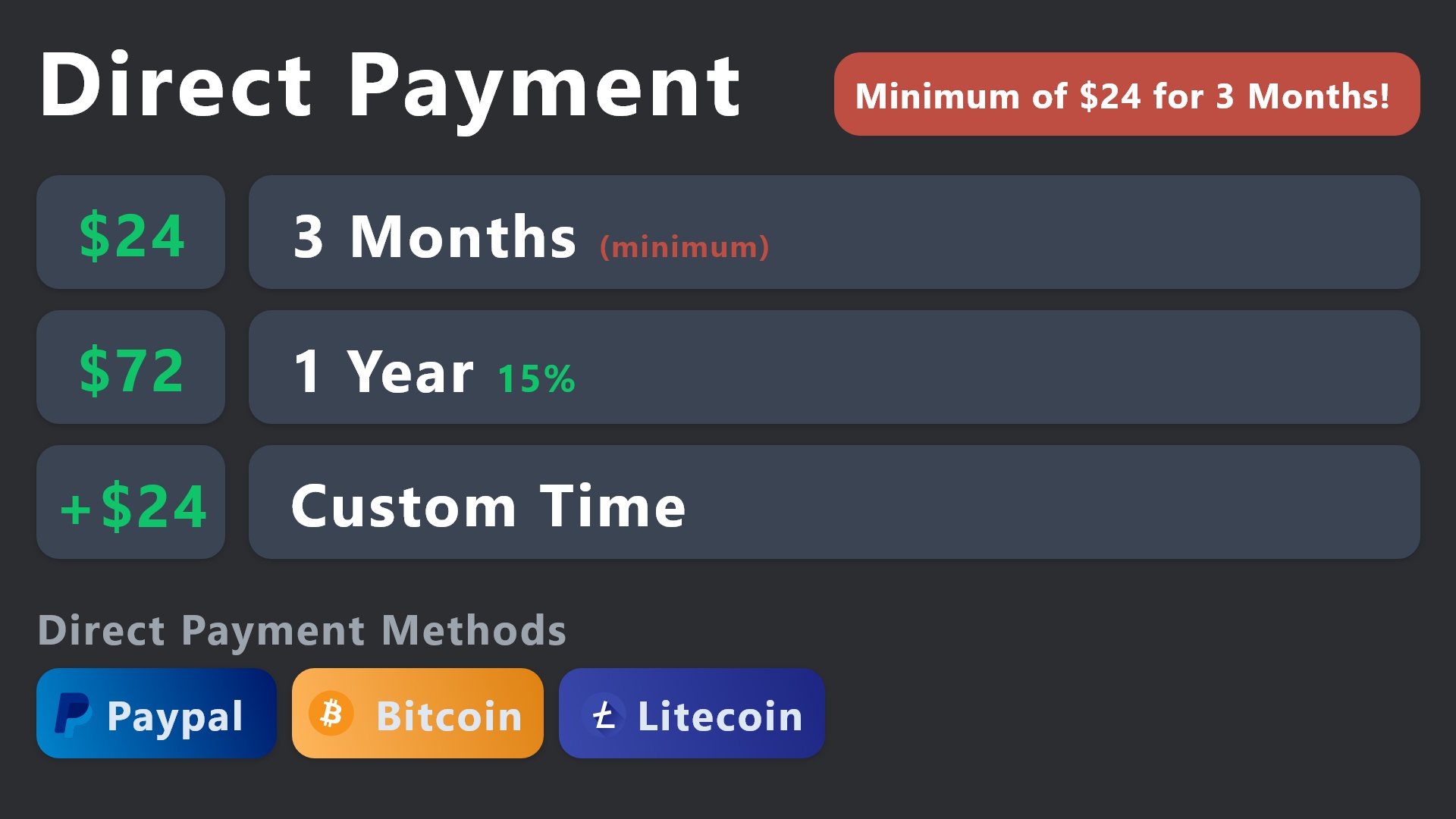
All prices in USD - 3 months min for direct payment
After a successful payment
Provide us with your server ID, where you want your premium key to be redeemed. This has to do be done by us
 gilded verge
humble sequoia
**PayPal** - `paypal@tickettool.xyz`
**BitCoin** - `3HhKKAdb9eEvCe2tvzB8bAa8nebH...
gilded verge
humble sequoia
**PayPal** - `paypal@tickettool.xyz`
**BitCoin** - `3HhKKAdb9eEvCe2tvzB8bAa8nebH...
@jade topaz, or directly on discord
shut bolt
gilded verge
<@456226577798135808>, <:this:894279341108772914> or directly on discord
Or
Our website
jade topaz
gilded verge
<@456226577798135808>, <:this:894279341108772914> or directly on discord
Thanks
iron nightBOT
Gave +1 Rep to @gilded verge (current: #9 - 530)
gilded verge
oh yes indeed
shut bolt
jade topaz
Thanks
We actually would rather if you purchase it on our website -> https://tickettool.xyz/premium as this allows you to have full control over your subscription while Discord subs are limited :D
Ticket Tool - Ticketing without clutter - The #1 Discord support bot
 buoyant karma
how do i create someone ticket for them
like the user i put is owner of the ticket
there was command for it but i forgot what it is
 idle flint
buoyant karma
how do i create someone ticket for them
idle flint
buoyant karma
how do i create someone ticket for them
you can use the $new <user ID> command (obviously including their user ID)
buoyant karma
idle flint
you can use the $new <user ID> command (obviously including their user ID)
okkk ty
iron nightBOT
Gave +1 Rep to @idle flint (current: #20 - 304)
 latent flower
Hi Guys, just duplicated a Panel, changd the name and added that to my otbher panel where I now have around 20 attached panels. But somehow it doesnt get added on the server when I create it, only the other panels. Any ideas¿
even when i remove panels, save, and send it again, nothing changes from before. No idea what to do, seem like I cant edit. Even duplicating the hosting panel and editing doesnt help
 lusty shale
How do I make bold text? inside of THE panel?
restive condor
lusty shale
How do I make bold text? inside of THE panel?
Hey there! Use two asterisks around the text
**hello** -> hello
lusty shale
restive condor
Hey there! Use two asterisks around the text
``**hello**`` -> **hello**
TY
iron nightBOT
Gave +1 Rep to @restive condor (current: #2 - 1039)
restive condor
latent flower
even when i remove panels, save, and send it again, nothing changes from before....
Hey there! Apologies for the wait
Are you still having this issue?
latent flower
yeah @restive condor
restive condor
latent flower
yeah <@795710289425334303>
Could I get your server name or ID please
verbal iron
what does disabled channels and allowed channels mean? also, does disabled roles mean who cant see the ticket when someone opens one?
 latent flower
restive condor
Could I get your server name or ID please
latent flower
restive condor
Could I get your server name or ID please
1062339623348609077
restive condor
verbal iron
what does disabled channels and allowed channels mean? also, does disabled roles...
Hi there. The channels where that command can be used/not used
 safe sapphire
hi yall how to set a cattegory for the tickets to be in when created
restive condor
safe sapphire
hi yall how to set a cattegory for the tickets to be in when created
Hey there! Dashboard > Panel Configs > Category
safe sapphire
l;emme check
humble sequoiaBOT
1. Go into your Dashboard
2. Open your Panel Configs tab
3. Select the panel you want to grant access to
4. Open the Category options menu
5. Select the categories of your preference
6. Save changes
restive condor
latent flower
1062339623348609077
Which panel is the one with the other panels attached?
latent flower
restive condor
Which panel is the one with the other panels attached?
"Brickken Team Support Board"
restive condor
latent flower
"Brickken Team Support Board"
That panel has 15 panels attached. So when you attempt to attach a 16th, does it let you save?
latent flower
restive condor
That panel has 15 panels attached. So when you attempt to attach a 16th, does it...
It does, but also it doesnt update when I say remove a few and send it again to the same channel we have it in.
restive condor
latent flower
It does, but also it doesnt update when I say remove a few and send it again to ...
Have you applied those changes already? i.e Is this ready to be sent?


 restive condor
safe sapphire
uhhh these r not the ones i sent i sent other ones
restive condor
safe sapphire
uhhh these r not the ones i sent i sent other ones
What exactly do you mean?
latent flower
restive condor
Have you applied those changes already? i.e Is this ready to be sent?
no, I can set it up now? Just need to add like 1 more
safe sapphire
restive condor
What exactly do you mean?
you see
restive condor
safe sapphire
That's a dropdown menu. Each dropdown option has its own panel.
One of your panels will have that list of panels shown in the Dropdown Style section on the Dashboard
restive condor
latent flower
no, I can set it up now? Just need to add like 1 more
Yep, go ahead and add it and try to resend it
verbal iron
restive condor
Hi there. The channels where that command can be used/not used
alright, i got that figured out! thanks!
iron nightBOT
Gave +1 Rep to @restive condor (current: #2 - 1040)
restive condor
No problem!
safe sapphire
Also how to make when u open a ticket it pings certain roles? And also how to set up text when it opens a tixket into its wbhook
humble sequoiaBOT
1. Go into your Dashboard
2. Open your Panel Configs tab
3. Select the panel you want to ping your support on
4. Open the Ticket options menu
5. Click on Edit Ticket Message
6. In the Message Content use one of the role mention syntax (**{@Role Name}**/**{Role ID}**)
7. Save changes
Note: For this to work properly, Ticket Tool requires the Mention Everyone permission. Or the role must have the Allow anyone to @mention this role setting enabled
restive condor
safe sapphire
Also how to make when u open a ticket it pings certain roles? And also how to se...
See above ^^
safe sapphire
restive condor
See above ^^
thanks, another question tho.. how to make it different for every dropdown selection? Sorry im kinda new
iron nightBOT
Gave +1 Rep to @restive condor (current: #2 - 1041)
restive condor
safe sapphire
thanks, another question tho.. how to make it different for every dropdown selec...
No worries. As I said, each dropdown option has its own panel. So simply go into the corresponding panel and apply the changes 😄
 safe sapphire
restive condor
No worries. As I said, each dropdown option has its own panel. So simply go into...
safe sapphire
restive condor
No worries. As I said, each dropdown option has its own panel. So simply go into...
Nono, ik, in the tixkets panel, theres these^
restive condor
safe sapphire
And i want each to have a different message
Yes, but you would have made something like this to create the dropdown
 safe sapphire
ik last time i had a server you could set it up on discord using a slash command lmfao
safe sapphire
restive condor
Yes, but you would have made something like this to create the dropdown
I do have that i think
restive condor
safe sapphire
I do have that i think
Perfect, then check which option corresponds to which panel
safe sapphire
restive condor
Perfect, then check which option corresponds to which panel
thanks!
iron nightBOT
Gave +1 Rep to @restive condor (current: #2 - 1042)
latent flower
restive condor
Yep, go ahead and add it and try to resend it
tried now and still doesnt work. Also for example duplicated a panel, and swapped them but it still attach the old ones
safe sapphire
restive condor
Perfect, then check which option corresponds to which panel
oh… Another question- how to make ppl claim the ticket? Like there’s a button right?
@humble sequoia
restive condor
latent flower
tried now and still doesnt work. Also for example duplicated a panel, and swappe...
Can you try sending it with the $panel command? Should be $panel 20
restive condor
safe sapphire
oh… Another question- how to make ppl claim the ticket? Like there’s a button ri...
Claiming is a premium feature
humble sequoiaBOT
Claiming allows you to change the ticket name, category and permissions. To use it you have to enable it first on your Dashboard > Panel Configs > Claiming
Note: This is a premium feature
safe sapphire
restive condor
Claiming is a premium feature <:Premium:1192403074157912144>
Oh okay
latent flower
restive condor
Can you try sending it with the ``$panel`` command? Should be $panel 20
same issue remains
restive condor
latent flower
same issue remains
Alright, I'll bring you into a ticket as I'll need a server invite
humble sequoiaBOT
━━ tejland's inquiry has been moved to a ticket ━━
 restive condor
safe sapphire
<@795710289425334303> wont let me edit these
restive condor
safe sapphire
<@795710289425334303> wont let me edit these
Full customisation of the embed messages require premium. You can edit the embed's main body though
safe sapphire
oh lmao sorry
restive condor
No problem
safe sapphire
restive condor
No problem <:PabloTiphat:983791053842837624>
Hey i set up the text but it doesn’t work lemme send a ss
 restive condor
safe sapphire
Hey i set up the text but it doesn’t work lemme send a ss
restive condor
safe sapphire
Hey i set up the text but it doesn’t work lemme send a ss
Can you screenshot what is sent on Discord?
 restive condor
safe sapphire
restive condor
safe sapphire
Make sure you applied this to the correct panel(s)
safe sapphire
Yes i did
restive condor
Could I get your server name or ID please?
safe sapphire
 safe sapphire
restive condor
Could I get your server name or ID please?
safe sapphire
restive condor
Could I get your server name or ID please?
anything you found?
restive condor
safe sapphire
1260738623763120130
Sorry for the wait. It looks like you only applied this to Panel 1 & Panel 2
The rest of your panels still have the default one
Just note again that each dropdown option has its own panel. You must edit individually per panel
safe sapphire
restive condor
Sorry for the wait. It looks like you only applied this to Panel 1 & Panel 2
yes ik but i only send the panel2
The others have been created by mistake
restive condor
safe sapphire
yes ik but i only send the panel2
None of your dropdown options are using panel 2

All resulting in the default embed
restive condor
safe sapphire
Um how do i do that….
Which dropdown option do you wish to edit?
safe sapphire
all
Like support should say:
Tell us the reason you opened this ticket please!
In the embed
etc.
safe sapphire
restive condor
None of your dropdown options are using panel 2
Also how do i enter that screen
safe sapphire
safe sapphire
Also how do i enter that screen
OHH i saw
restive condor
safe sapphire
Like support should say:
Tell us the reason you opened this ticket please!
I...
Each of the options in your dropdown menu is linked to a panel. See arrows
 safe sapphire
Can i link it all to 1 panel?
restive condor
Therefore depending on which you'd like to edit, you would go into that panel specifically
 safe sapphire
Ohh eait i understand
restive condor
safe sapphire
Can i link it all to 1 panel?
No, a dropdown menu is just a combination of panels. Each one must have its own panel
safe sapphire
$help
humble sequoiaBOT
safe sapphire
$help
First you will want to invite the bot to your server. Once the bot is in your server, you can manage your server in the dashboard.
To create a panel we are going to need to head over to the Panel Configs Tab on the Dashboard.
Once at the dashboard we will need to click Create Panel.
Enter a panel name (Fill in any optional settings you want).
Click Create Panel and you are ready to get started with configuring your panel.
An example of a creating a panel is shown below.
Once the panel has been created, use the blue Send button and select the channel you want the panel to be sent to.
The Panel wasn't send
Use the </debug:1029783024264564765> command to diagnose possible permission issues with the bot.
 crimson coral
who's the owner ?
 swift trout
is there a way to change how the tickets are named? So instead of ticket-001, it could be (nameofticket)-001
humble sequoiaBOT
The ticket name is the default channel name of all tickets. To edit it, go to your Dashboard > Panel Configs > Ticket. There you can edit the channel name of opened and closed tickets. You can also use variables in there.

 Note: This is a premium feature
austere forge
swift trout
is there a way to change how the tickets are named? So instead of ticket-001, it...
Note: This is a premium feature
austere forge
swift trout
is there a way to change how the tickets are named? So instead of ticket-001, it...
Hey there 🙂
see above
swift trout
does it require premium?
austere forge
yep
swift trout
ah ok
can I make a single embed, with 5 buttons attached, each button will open a differently named ticket and ping different people?
austere forge
swift trout
can I make a single embed, with 5 buttons attached, each button will open a diff...
sure, you can use multipanels option
see below
humble sequoiaBOT
For more convenient use of multipanels, you can now combine panels on the dashboard. This will allow you to directly send the multipanel from the dashboard or via the $panel ID command.
Where can I find this?
You can find this setting on the Dashboard -> Panel Configs -> Panel -> Attached Panels
Note: if you're attaching all the panels to a panel called English, don't include English in the attached panel's box (If you do this, it will create a duplicate)
This will put all buttons from all of your panels on one message. The message is the panel message from the panel you're combining these panels in.
 austere forge
for pinging staff every time a user opens a ticket see below
humble sequoiaBOT
1. Go into your Dashboard
2. Open your Panel Configs tab
3. Select the panel you want to ping your support on
4. Open the Ticket options menu
5. Click on Edit Ticket Message
6. In the Message Content use one of the role mention syntax (**{@Role Name}**/**{Role ID}**)
7. Save changes
Note: For this to work properly, Ticket Tool requires the Mention Everyone permission. Or the role must have the Allow anyone to @mention this role setting enabled
swift trout
i’m trying attach the panels to a main panel. i can only attach 2 out of the 3. the third panel isn’t showing up
austere forge
swift trout
i’m trying attach the panels to a main panel. i can only attach 2 out of the 3. ...
use the sync button on your Dashboard
swift trout
it’s still not appearing unfortunately
austere forge
swift trout
i’m trying attach the panels to a main panel. i can only attach 2 out of the 3. ...
If you try to attach the main panel, this is not possible as it is considered to be your main panel, so it cannot be selected
swift trout
is the main panel the one with the 1 next to it?
austere forge
swift trout
is the main panel the one with the 1 next to it?
correct
ocean sequoia
ocean sequoia
Can this be used as a statement in a simple command text entry or does using it ...
Ok sorry to be dense but when I make a command ticket “$ticket @lordonyx any text after the name” it doesn’t put any text in the actual ticket.. same with “$ticket @lordonyx {create.reason} any text here” same result, i get a ticket from that user with no additional text as to why
So how do we use the variables in a text command, i guess is my question.
restive condor
ocean sequoia
Ok sorry to be dense but when I make a command ticket “$ticket @lordonyx any tex...
Hey there! Make sure to use the {create.reason} variable in your ticket message so it outputs the reason provided in the command usage
humble sequoiaBOT
The Ticket Message is the first message sent by the bot on a new ticket. To customize it head over to your Dashboard ➞ Panel Configs ➞ Ticket ➞ Edit Ticket Message
 gentle kraken
Hey my server dont update on dashbord (i have perms and everything)
iron nightBOT
Gave +1 Rep to @restive condor (current: #2 - 1044)
restive condor
gentle kraken
Hey my server dont update on dashbord (i have perms and everything)
Hey there! See below please
humble sequoiaBOT
Don't see your server in the dashboard?
Try using the Sync Servers button on your top center of the Dashboard page
You will possibly need to relog. Look below to see the steps on how to relog.
If this doesn't work
You should relog from the dashboard, you can do this by clicking here to log out immediately, and then log back in
Note:
You need one of these 3 things to access the dashboard.
1. Server Owner (Level: 6)
2. Server Administrator (Level: 4)
3. Dashboard Role (Level: 2)
:warning: You can check your level using the </permissionlevel:1029797400174399542> command on your Discord Server
If the bot's response is:
- @User is permission level: 0 (User)
You don't have any of the 3 levels required to access the server's dashboard
 iron nightBOT
Gave +1 Rep to @restive condor (current: #2 - 1045)
ocean sequoia
Ok last question for a while I hope, how do I increase the limit of tickets one person can create for a particular ticket type?
restive condor
ocean sequoia
Ok last question for a while I hope, how do I increase the limit of tickets one ...
Dashboard > Panel Configs > Limits
ocean sequoia
restive condor
``Dashboard`` > ``Panel Configs`` > ``Limits``
Ok I lied.. the claim button doesn’t want to show up in my command created tickets, i only see a close buttton?
Configs look like it should be there?
restive condor
ocean sequoia
Ok I lied.. the claim button doesn’t want to show up in my command created ticke...
Have you enabled claiming for that specific panel?
humble sequoiaBOT
Claiming allows you to change the ticket name, category and permissions. To use it you have to enable it first on your Dashboard > Panel Configs > Claiming
Note: This is a premium feature
ocean sequoia
Lol, of course not
 coarse shale
How can a Admin can delete the ticket? there is a new admin at my servidor and the delete botton doesnt show to him
ocean sequoia
Thanks again @restive condor you are the best
iron nightBOT
Gave +1 Rep to @restive condor (current: #2 - 1046)
restive condor
No problem!
restive condor
coarse shale
How can a Admin can delete the ticket? there is a new admin at my servidor and t...
Hey there! Does it show for everyone else but that admin?
 restive condor
 pearl venture
bot is down
pearl venture
bot is down
Hi, can you use the /debug command please
pearl venture
restive condor
Hi, can you use the ``/debug`` command please
ok
restive condor
pearl venture
ok
Ticket Tool is missing the SEND MESSAGES permission for that channel

 iron nightBOT
Gave +1 Rep to @restive condor (current: #2 - 1047)
coarse shale
restive condor
Hey there! Does it show for everyone else but that admin?
it was fixed, new tickets now he can delete, just the old ones because he turn into admin today
thanks a lot!
tough thicket
I am trying to have ticket tool reference channels in the message when a ticket is opened. How would I do that? Would I use these?
 deft geode
How to reorder panels?
 weary viper
.
 odd night
Hi I'm a moderator on a server and suddenly I don't have access to the ticket anymore even with full access
restive condor
tough thicket
I am trying to have ticket tool reference channels in the message when a ticket ...
Hey there! That only mentions the specific channel the variable is in.
To mention channels, use the <#channelID> format. The easiest way to get this is using the id command on your server
$id #💬│general-chat
humble sequoiaBOT
restive condor
$id <#509238831547940885>
<#509238831547940885>
restive condor
deft geode
How to reorder panels?
Hey there! Re-order them how exactly?
restive condor
odd night
Hi I'm a moderator on a server and suddenly I don't have access to the ticket an...
Hey there! What exactly do you mean by full access?
odd night
restive condor
Hey there! What exactly do you mean by full access?
I have full access to the ticket to see and respond
restive condor
odd night
I have full access to the ticket to see and respond
You either got removed or the ticket was deleted
odd night
restive condor
You either got removed or the ticket was deleted
Yes I think I was removed but there are only 3 of us to have the permission and no one removed me and they have to add me manually now
deft geode
restive condor
Hey there! Re-order them how exactly?
i want to re-number the place of the panel
i want the panel place to be the First instead of the Second
restive condor
odd night
Yes I think I was removed but there are only 3 of us to have the permission and ...
They can use the $add command to add you.
The bot doesn't just remove certain users from tickets. Someone must have removed you. Please check the audit log
restive condor
deft geode
i want to re-number the place of the panel
i want the panel place to be the Firs...
Is this in a dropdown menu?
 mellow sage
Is there a limit to number of active or new ticket creation on premium version ?
odd night
restive condor
They can use the $add command to add you.
The bot doesn't just remove certain u...
Thx
iron nightBOT
Gave +1 Rep to @restive condor (current: #2 - 1049)
tough thicket
restive condor
Hey there! That only mentions the specific channel the variable is in.
To menti...
so in the message box i would do for instance [#💬│general-chat](/guild/509192800865353738/channel/509238831547940885/)
deft geode
restive condor
Is this in a dropdown menu?
No
restive condor
mellow sage
Is there a limit to number of active or new ticket creation on premium version ?
Hey there! There are not, other than Discord limits.
- A server can't have more than 500 channels at once
- A server can't create more than 2,000 channels per day
restive condor
deft geode
No
Just in the panel dropdown?
restive condor
tough thicket
so in the message box i would do for instance ```<#509238831547940885>```
In this example, yes
tough thicket
restive condor
In this example, yes
awesome thx
iron nightBOT
Gave +1 Rep to @restive condor (current: #2 - 1050)
mellow sage
restive condor
Hey there! There are not, other than Discord limits.
- A server can't have more ...
Noted. So this error is just for category allocation and users can continue creating tickets ?
 restive condor
mellow sage
Noted. So this error is just for category allocation and users can continue crea...
restive condor
mellow sage
Noted. So this error is just for category allocation and users can continue crea...
That's right. Discord has a limit of 50 channels per category, once you have reached such limits tickets will be created at the top of the channel list. Unless you setup overflow (additional) categories
humble sequoiaBOT
Discord only allows to stack up to 50 channels per category, meaning that if you have already 50 tickets in one category, the bot won't be able to place a ticket in that category, for such reason Ticket Tool counts with overflow categories, meaning that if your main category is filled, the bot will go ahead and place the ticket on the next one available, simply choose a second category in the category pickers:
mellow sage
restive condor
That's right. Discord has a limit of 50 channels per category, once you have rea...
Got it. Thanks alot mate!
iron nightBOT
Gave +1 Rep to @restive condor (current: #2 - 1051)
odd night
restive condor
They can use the $add command to add you.
The bot doesn't just remove certain u...
Yes but they have to give me back every time there is no solution to put me permanent
restive condor
No problem!
restive condor
odd night
Yes but they have to give me back every time there is no solution to put me perm...
So you are being removed from all tickets?
odd night
restive condor
So you are being removed from all tickets?
Yes all except what I answered
restive condor
odd night
Yes all except what I answered
So all tickets except the ones you have answered?
deft geode
restive condor
Just in the panel dropdown?
 restive condor
odd night
Yes
restive condor
odd night
Yes
Can you double check the id:customize channel, but in your server and make sure you're following your tickets category
restive condor
deft geode
No, it's not possible to re-order those. They are shown by date of creation
 snow yacht
What do I do from here?
 humble sequoiaBOT
The Drop-down menu or Select Menu replaces the buttons on your panel message and uses a drop-down menu with all of your panels. To set this up, go to your Panel Configs and select your main Panel.
<:Numbericons1:1018864164032225340> Enable Select Style
First you enable Select Style. Then you add an item in the Dropdown Editor. Now you can start editing your dropdown!
<:Numbericons2:1018864168041971712> Dropdown Editor
Each line in the dropdown editor represents a line in the drop down menu on discord. You can add more "Items", by clicking on
First you select a panel. That's the panel this option will open a ticket for. DONT select the same panel twice. Each option should have a different Panel
After that, you can put a Display. This is the title of this option and will appear in the drop down menu. The *Description can be set right after that, which will be below the title in grey.
Additionally you can select an emoji, that will be shown in front of each option. You can either manually input the ID of an emoji or select it in the selector.
Common Issues ⚠️
- Panel doesn't send? Make sure you have a valid emoji selected
- Option doesn't show up? Check if two options have the same panel in the DropDown Editor
$dropdown
restive condor
snow yacht
What do I do from here?
Hey there! See above ^^
snow yacht
Thx
snow yacht
humble sequoia
I’m still confused
restive condor
snow yacht
What do I do from here?
Use the ''Add Item'' button to add options to your dropdown menu
Each dropdown menu option must have its own individual panel
It should look something like this
 snow yacht
restive condor
Use the ''Add Item'' button to add options to your dropdown menu
snow yacht
restive condor
Use the ''Add Item'' button to add options to your dropdown menu
I’ve done that part
restive condor
Have you added all the dropdown menu options you'd like?
snow yacht
The hell it didn’t save
restive condor
Make sure to use the ''Save'' button after making changes
restive condor
Once that's done, you can simply go back to the main page and send your panel usign the ''SEND'' button
snow yacht
Okay
Okay this is dumb I saved the panels each time I made them now there all gone
I’m using a different bot
 gentle belfry
snow yacht
Okay this is dumb I saved the panels each time I made them now there all gone
gentle belfry
snow yacht
Okay this is dumb I saved the panels each time I made them now there all gone
how there are all gone.
Didnt Happend to me . . .
snow yacht
Idk they vanished I clicked save after each one because I can’t make another one till it’s saved
gentle belfry
snow yacht
Idk they vanished I clicked save after each one because I can’t make another one...
I Think Idk i am not responsible For that
@Staff
restive condor
You're most likely not saving correctly or refreshing the page, sending you back to first panel
 waxen dust
Hey, if you close a ticket and transcript it, then delete it. Is it possible to re-open that ticket?
worldly helm
waxen dust
Hey, if you close a ticket and transcript it, then delete it. Is it possible to ...
Hey there!
No, its not.
 old flame

Need help I bought premium and k can’t go in the setting
With owners account don’t work
waxen dust
worldly helm
Hey there!
No, its not.
Okey thank you, that’s all needed for an answer. I couldn’t find that option so I thought I needed to ask.
iron nightBOT
Gave +1 Rep to @worldly helm (current: #39 - 79)
old flame
restive condor
Hey there! Could I get your server name or ID please
I write it in ticket
old flame
restive condor
Hey there! Could I get your server name or ID please
Can u watch
restive condor
old flame
Can u watch
it seems like you have enabled the premium bot but have not invited it
humble sequoiaBOT
The first thing you will need to do is invite the premium bot, an invite can be found here
Once the bot is in your server we will head to the dashboard and manage your server. When you are managing your server, you want to head into "Server Configs" then click the drop down menu under "Select the bot you would like to use on this server" then click "Ticket Tool#6207" and then save.
 restive condor
Please invite it ^^
old flame
restive condor
it seems like you have enabled the premium bot but have not invited it
Ahhh
Okay Ty
restive condor
old flame
I can’t switch
Click on the hyperlinked text 'here' to get a bot invite
old flame
restive condor
Click on the hyperlinked text 'here' to get a bot invite
Where?
restive condor
humble sequoia
In the embed message ^
old flame
Ty
restive condor
No problem!
 rocky mortar
can someone assist me please?
humble sequoiaBOT
Hello, we would love to help you, but if you don't tell us what you need help with we can't help you :(
rocky mortar
fair enough
i have the ticket tol and everything in a little personal server I made and it's saying support is on the way, but im confused if I should give a explanation f my problem to the bot like making a thread so whoever talks to me can see what my problem is
i just want my account back man 😔
gilded verge
just to be clear... are you sure that your problem is related to Ticket Tool Discord Bot ?
gilded verge
rocky mortar
i just want my account back man 😔
we're not distributing any accounts/games or else so message confused me
gilded verge
wait a sec... but if that's the case then why you're here when you should submit a request to the Discord on dis.gd/support ???
gilded verge
problems related to discord should go only to the staff, not some discord servers 😕
rocky mortar
my apologies
gilded verge
accepted, but please remember to read where you joined ^-^
 severe sable
How do i make a custom command with ticket tool and make it send a custom message with the command
humble sequoiaBOT
━━ User's inquiry has been moved to a ticket ━━
worldly helm
What is the difference between those?
 restive condor
worldly helm
What is the difference between those?
restive condor
worldly helm
What is the difference between those?
Hey Lias!
Strict is for exact matches.
Basically simple custom commands, you must match the trigger exactly in order for it to work.
Example: bot would only trigger on bot
Wildcard would trigger when the trigger is anywhere in the message. & you must put asterisks around it.
Example: *ping* would trigger on ping but also camping, pinging, pings
Regex is a more advanced system (I don't have much knowledge on it 😅) which requires a bit of knowledge. It's pretty much sequence of characters that specifies a match pattern in text.
One regex expression could trigger many things, and many characters.
So a specific regex for ping could also capture, pp1ing p1ng pinng pngg
A regex we use would be: ^\$(avatar|whitelabel(s)?|custom(_bot)?)$
So it triggers on $avatar, $whitelabel, $whitelabels, $custom, $custombot,
If you wanna get started with Regex https://regex101.com/ would be the best
& If you want to read the documentation on these three you can do so at Ticket Tool Documentation - Custom Commands
It has more detail, pictures and is probably easier to understand than what I just wrote 😅
 torn spoke
My closed tickets are not moving down anymore

to a other category
mistake by me? But I didn't change anything
worldly helm
restive condor
Hey Lias!
Strict is for exact matches.
Basically simple custom commands, you m...
So uhm, i understood everything, but the website (https://regex101.com/)
Thanks @restive condor
iron nightBOT
Gave +1 Rep to @restive condor (current: #2 - 1053)
restive condor
worldly helm
So uhm, i understood everything, but the website (`https://regex101.com/`)
Thank...
Haha, it's quite tricky to understand at first. I don't know much about it either 😅
restive condor
torn spoke
My closed tickets are not moving down anymore
Hey there! How many channels are currently in the closed category?
torn spoke
restive condor
Hey there! How many channels are currently in the closed category?
50-100
restive condor
torn spoke
50-100
Discord has a limit of 50 channels per category. Ticket Tool limits it to 45.
If you have reached such limits, tickets won't moved to the closed category.
I recommend you setup overflow categories so once your main one is full, closed tickets can be moved there
humble sequoiaBOT
Discord only allows to stack up to 50 channels per category, meaning that if you have already 50 tickets in one category, the bot won't be able to place a ticket in that category, for such reason Ticket Tool counts with overflow categories, meaning that if your main category is filled, the bot will go ahead and place the ticket on the next one available, simply choose a second category in the category pickers:
iron nightBOT
Gave +1 Rep to @restive condor (current: #2 - 1054)
torn spoke
Automatic closing works 100%?
restive condor
Yes, automations are working
torn spoke
I did set it to 2 days
 torn spoke
something wrong?
 restive condor
torn spoke
something wrong?
restive condor
torn spoke
something wrong?
That just sends a custom command but doesn't actually close the ticket
 primal verge
im trying to create the ticket tool on my server but i want it to automaticaly open the ticket app when a user klicks on ticket support
stark runeBOT
1. Invite Ticket Tool to your server
First you will want to invite the bot to your server. Once the bot is in your server, you can manage your server in the dashboard.
2. Create a Panel
To create a panel we are going to need to head over to the panel configs on the dashboard.
Once at the dashboard we will need to click Create Panel.
Enter a panel name (Fill in any optional settings you want).
Click Create Panel and your ready to get started with configuring your panel.
An example of a creating a panel is shown below.
3. Send the Panel to a Channel
Once you've created a panel on the dashboard you will need to send it to a channel using send on the dashboard.
Select the channel you want your panel to be created in and click send.
For other questions checkout $help faq.
An example of a sending a panel is shown below.
Having a Problem Sending the Panel?
Do $debug in a channel with Ticket Tool and make sure it has all the necessary Discord permissions.
restive condor
primal verge
im trying to create the ticket tool on my server but i want it to automaticaly o...
Hey there! See above how to setup Ticket Tool ^^
Let me know if you have any questions 🙏
primal verge
ok i will look thank you
torn spoke
restive condor
That just sends a custom command but doesn't actually close the ticket
How do I change it? To automatically close after 2 days
restive condor
torn spoke
something wrong?
Instead of ''Send Custom Command'' set it to ''Close Ticket''
iron nightBOT
Gave +1 Rep to @restive condor (current: #2 - 1055)
torn spoke
ah and do I need to wait 2 days again so it gets deleted? Or do I need to manually delete which are already closed
restive condor
torn spoke
ah and do I need to wait 2 days again so it gets deleted? Or do I need to manual...
They won't be automatically deleted, just closed
If you want them to be automatically deleted once closed, disable TWO STEP TICKET in your Dashboard > Panel Configs > General
torn spoke
I need to disable two step ticket so it can get automatically deleted after 2 days?
restive condor
torn spoke
I need to disable two step ticket so it can get automatically deleted after 2 da...
That would make all tickets automatically delete once closed, but you could simply set the automation to ''Delete Ticket'' instead of ''Close Ticket''
torn spoke
alright Thanks @restive condor
iron nightBOT
Gave +1 Rep to @restive condor (current: #2 - 1056)
 twin sentinel
Are you unable to see the console / dashboard of a server without the administrator permission? I have Manage Server but am unable to see the dashboard.
Ping on response
worldly helm
Hello @twin sentinel
No, either you have the admin role OR you get Dashboard access by the Owner.
Guide:Dashboard-->Server Configs-->Dashboard Roles
twin sentinel
worldly helm
Hello <@713484585874227220>
No, either you have the admin role OR you get Dashb...
Thank you!
iron nightBOT
Gave +1 Rep to @worldly helm (current: #39 - 80)
worldly helm
You're welcome
 still wigeon
How can i change the pfp and name of the bot on my server?
humble sequoiaBOT
Ticket Tool Custom Avatar
As of now, you are not able to change Ticket Tool's profile picture, nonetheless, our Development Team is working on the release of white labels, this is your own custom bot!
For the time being, you can change the bot's nickname by right-clicking the bot in the user list on your server and clicking Change Nickname

$avatar
worldly helm
restive condor
Hey Lias!
Strict is for exact matches.
Basically simple custom commands, you m...
And uhm, what can i do with this?

And just to test. I set it up that if you ping the dyno role the message pops up like here.

The server i am using this for is my Ticket Tool Test server. I do not want to copy yall ideas.
But how to when you ping a person with a certaint role, the message pops up. E.x: If i ping Ticket Tool, and the Bot has the "Dyno" role, the message pops up aswell. again i just want to know so i have a better feeling. I don't want to copy ANY ideas.
pseudo ravine
Not possible with how Custom Commands work
worldly helm
How are yall doing it then?
pseudo ravine
@iron night
iron nightBOT
Gave +1 Rep to @pseudo ravine (current: #7 - 593)
 charred atlas
I want to create something like this but when I tried to its create it seperatly please help
 worldly helm
What exacly?
charred atlas
Here is the one I created but I'm trying to join everything together
 worldly helm
charred atlas
Here is the one I created but I'm trying to join everything together
worldly helm
charred atlas
Here is the one I created but I'm trying to join everything together
Enable select style

 vivid pelican
charred atlas
Here is the one I created but I'm trying to join everything together
vivid pelican
charred atlas
Here is the one I created but I'm trying to join everything together
press the dropdown style
 charred atlas
Yes I did this but still not working
 worldly helm
charred atlas
Yes I did this but still not working
worldly helm
charred atlas
Yes I did this but still not working
Above the panels?
charred atlas
What did you mean?
 vivid pelican
tbh i also need help
worldly helm
worldly helm
Update the channel
charred atlas
Will I have to disable it?
 worldly helm
Update the panel now.
vivid pelican
worldly helm
Update the panel now.
hey, sorry for interfering but can you help me on something or should i create a ticket
charred atlas
How will I update it please
humble sequoiaBOT
@vivid pelican, we would love to help you, but if you don't tell us what you need help with we can't help you :(
worldly helm
vivid pelican
hey, sorry for interfering but can you help me on something or should i create a...
Hey, sorry. I have go now so i cant help you…ask other staff
vivid pelican
worldly helm
Hey, sorry. I have go now so i cant help you…ask other staff
alright, no problem
worldly helm
charred atlas
How will I update it please
Being on your dashboard, click update

 west fractal
Does anyone kno how to make it so It pings a role when a ticket is opened
humble sequoiaBOT

Ticket Tool is the only ticketing bot you'll ever need! Explore its features and set the best ticket system for your server!
<:CommandIcon:1018980659064221746> Commands
Browse through Ticket Tool's commands list and find new utilities!
<:TextIcon:1018980662881030144> FAQ
Solutions for the most frequent questions our users have when implementing the bot on their server.
<:Setup:1034174646788030664> Setup
The steps to follow when setting the bot for the first time on any server
1. Go into your Dashboard
2. Open your Panel Configs tab
3. Select the panel you want to ping your support on
4. Open the Ticket options menu
5. Click on Edit Ticket Message
6. In the Message Content use one of the role mention syntax (**{@Role Name}**/**{Role ID}**)
7. Save changes
Note: For this to work properly, Ticket Tool requires the Mention Everyone permission. Or the role must have the Allow anyone to @mention this role setting enabled
worldly helm
…..
charred atlas
worldly helm
Being on your dashboard, click update
I do update it now but it saying this
 worldly helm
Click on update panel
charred atlas
It says message not found to update
worldly helm
worldly helm
Being on your dashboard, click update
Click on send
charred atlas
When I click on send, It created another one seperately
 worldly helm
Hey. I am really really sorry!
I really have to go now. Sooo sorry! Please wait for someone from staff to assist you.
Sorry again
charred atlas
No problem thanks btw
slow rover
hey, im willing to try and help, tho i didnt follow the conversation 😅, what seems to be the problem?
charred atlas
I can explain to you
slow rover
sure 🙂
charred atlas
I want to create something like this but when I tried to its create it seperatly please help

Here is the one I created but I'm trying to join everything together

The problem is that I dont know how to join it together
To make something like this
 vivid pelican
can i try helping, too? i recently figured this out today
charred atlas
I would be happy with that
vivid pelican
charred atlas
Will I have to disable it?
when you did this, did you press save
vivid pelican
charred atlas
I would be happy with that
wait oh i think i found out why it isnt working
worldly helm
charred atlas
I would be happy with that
Soo sorry for the wait again, but you have to select the panels for every dropdown option
vivid pelican
yeah, here
 charred atlas
Oh let me try that :)]
worldly helm
Yes, that has to be the issue. For every option you need a different panel, because of all the different custom things you can add.
 worldly helm
The Ticket Tool bot is missing permission.
I would suggest you give it admin.
charred atlas
Look at whats its telling me when i'm texting me
vivid pelican
does anyone know how to edit this?
 worldly helm
vivid pelican
does anyone know how to edit this?
worldly helm
vivid pelican
does anyone know how to edit this?
Hey, see below :)
charred atlas
worldly helm
The Ticket Tool bot is missing permission.
I would suggest you give it admin.
Oh let me try it out
humble sequoiaBOT
A Discord Form lets the user answer individual questions in a pop-up Form, which then displays the answers in the ticket message. This can save time if you already know what you want to ask the user.
Setup Forms
Forms can be enabled under Panel Settings > Form Options > Edit Forms Options. In the new pop-up window, you can now enable and edit your own Form.
Form Options
You can add up to 5 questions in the Discord form. This is a Discord limitation. Each question can have a placeholder in the input field, a minimum and maximum input, multi-line, and also the option to have the answer required.
Options
Question Title ➞ Your Question goes here
Question Placeholder ➞ The placeholder text in the input field
Required ➞ If enabled, the user has to answer this question, to submit the form
Multi-Line Input ➞ Allows the user to input multiple lines
Minimum and Maximum Input ➞ Set a minimum and maximum input value for the user
Displaying the Answer
To display the answers from the user, you need to enable Auto display form results on the ticket message as an additional embed
If you don't want a second embed, go into your Panel Configs > Ticket Options > Edit Ticket Message. You use the variable {create.form.x} and replace x with the number of your question. For example, the response to Question 5 can be displayed with {create.form.5}.
charred atlas
It's working now thank you so much
worldly helm
charred atlas
It's working now thank you so much
you're welcome. and sorry again for the wait!
vivid pelican
worldly helm
Hey, see below :)
I am confused about this, what does it do exactly? how does it look like
 worldly helm
Let me give you an example.
charred atlas
worldly helm
you're welcome. and sorry again for the wait!
No problem 🙂
@vivid pelicanthank you too 🙂
worldly helm
vivid pelican
I am confused about this, what does it do exactly? how does it look like
 vivid pelican
worldly helm
vivid pelican
worldly helm
can you show it when it's not enabled?
worldly helm
if not enabled. it just shows nothing, atleast when you dont have the `{create.form.x} in your Ticket Message
vivid pelican
worldly helm
if not enabled. it just shows nothing, atleast when you dont have the `{create.f...
are you talking about this?
 worldly helm
Yes i am.
vivid pelican
worldly helm
if not enabled. it just shows nothing, atleast when you dont have the `{create.f...
I have no idea how to edit/remove the {create.form.x} when you say this
worldly helm
on your Ticket Message
vivid pelican
that's weird, it always show another embed no matter if it's enabled or not
worldly helm
Can you show me a SS of your Ticket message please?
vivid pelican
 worldly helm
Yes, if you want your Form to be added to that you have to add {create.form.1}
vivid pelican
in the description?
 unreal mirage
i need help on ticket tool
worldly helm
vivid pelican
in the description?
in the msg itself, at "what is the reason for needing support?"
humble sequoiaBOT
Hello, we would love to help you, but if you don't tell us what you need help with we can't help you :(
slow rover
unreal mirage
i need help on ticket tool
^^^^
slow rover
 pale vortex
Hi is there any one can help me
pale vortex
Hi is there any one can help me
^^^^
pale vortex
How can I make like this to my server
If you can speak Arabic it's become better
 humble sequoiaBOT
For more convenient use of multipanels, you can now combine panels on the dashboard. This will allow you to directly send the multipanel from the dashboard or via the $panel ID command.
Where can I find this?
You can find this setting on the Dashboard -> Panel Configs -> Panel -> Attached Panels
Note: if you're attaching all the panels to a panel called English, don't include English in the attached panel's box (If you do this, it will create a duplicate)
This will put all buttons from all of your panels on one message. The message is the panel message from the panel you're combining these panels in.
worldly helm
pale vortex
How can I make like this to my server
If you can speak Arabic it's become bette...
Hey!
see above ^^^
vivid pelican
i have an issue, i disabled the form but it still shows this when i try to create a ticket
 worldly helm
لا أعرف اللغة العربية، إذا كنت تريد الدعم العربي يرجى فتح تذكرة على #🎫│make-a-ticket
worldly helm
vivid pelican
i have an issue, i disabled the form but it still shows this when i try to creat...
Wierd, are you sure you disabled it for the right panel?
vivid pelican
worldly helm
Wierd, are you sure you disabled it for the right panel?
ohhh i got it now, i forgot each panel has their own settings in a dropdown style
worldly helm
;)
vivid pelican
is there a way to preserve images in transcripts?
worldly helm
I dont think so,no.
vivid pelican
do you know how long they last?
worldly helm
Transcripts?
vivid pelican
images within a transcript
worldly helm
What images?
vivid pelican
for example, this is a transcript from months ago but the images disappeared
 worldly helm
What image used the be there
vivid pelican
i don't have the image anymore, but it was just a screenshot of a trade done in a game
worldly helm
wierd, do you mind clicking on the "[?]"
vivid pelican
yeah, i tried that and it just shows up as this
 worldly helm
I am note sure about that issue, never heard about it. Please wait for Staff to assist you with that issue of open a ticket at #🎫│make-a-ticket !
Sorry.
 summer gazelle
@worldly helm hi. how do i get to panel configs. i cant find it
worldly helm
summer gazelle
<@972202754212782080> hi. how do i get to panel configs. i cant find it
Hey! If you head to your dashboard, on the left side are some options, one of them are panel configs
 vivid pelican
worldly helm
Hey! If you head to your dashboard, on the left side are some options, one of th...
vivid pelican
worldly helm
Hey! If you head to your dashboard, on the left side are some options, one of th...
Is there a way that I can change the color?
 pseudo ravine
 bronze badger
$help
bronze badger
$help
Please use random bot commands in #🤖│bot-spam
 wanton cipher
@pseudo ravine
sry ma bad
im having problems mentioning moderator in the text message in the ticket
humble sequoiaBOT
1. Go into your Dashboard
2. Open your Panel Configs tab
3. Select the panel you want to ping your support on
4. Open the Ticket options menu
5. Click on Edit Ticket Message
6. In the Message Content use one of the role mention syntax (**{@Role Name}**/**{Role ID}**)
7. Save changes
Note: For this to work properly, Ticket Tool requires the Mention Everyone permission. Or the role must have the Allow anyone to @mention this role setting enabled
 shell quartz
With premium will transcripts save the private thread that is attached to each ticket?
pseudo ravine
Hey there. I don’t believe it will
west fractal
How do i make a ticket have a Embed
shell quartz
pseudo ravine
Hey there. I don’t believe it will
alright, thank you
iron nightBOT
Gave +1 Rep to @pseudo ravine (current: #7 - 594)