#🆘│community-support
1 messages · Page 114 of 1
 austere forge
 hidden onyx
yo how do i make it so when someone selects one of the dropdowns in the ticket embed, it renames the ticket to that dropdown that they selected
austere forge
hidden onyx
yo how do i make it so when someone selects one of the dropdowns in the ticket e...
Hey there : )
Unfortunately the option to rename ticket channels is a premium feature
hidden onyx
austere forge
Hey there : )
Unfortunately the option to rename ticket channels is a premium fe...
dang alr all goods
austere forge
have a nice day 
 mystic storm
Heya, I'm having an issue with TicketTool whereby it says "Missing Permissions" when I try and use the /add command, I ran /debug and get green checks for everything... I briefly enabled Administrator role to the TicketTool role and then the error went away. However based on what I've read this permission is not required for the bot to function nor would it be best practice to leave it in that state.
Are there any troubleshooting steps I could take to try and remediate the situation?
Thank you in advance 😀
^ I should mention /remove command works fine, it removes the user but they cannot be re-added.
 pseudo nova
You must have the necessary permissions to modify the server dashboard.
I want it to be like thisMention support

What am I worth now?
 restive condor
mystic storm
Heya, I'm having an issue with TicketTool whereby it says "Missing Permissions" ...
restive condor
mystic storm
Heya, I'm having an issue with TicketTool whereby it says "Missing Permissions" ...
Hey there! That's correct, admin is not required.
Could I get your server name or ID, so I can take a look?
mystic storm
restive condor
Hey there! That's correct, admin is not required.
Could I get your server name ...
1216434470656282635
restive condor
pseudo nova
You must have the necessary permissions to modify the server dashboard.
I want ...
Hey there! Do you have access to the Dashboard for the server you're trying to make these changes in?
restive condor
mystic storm
1216434470656282635
Is this happening with both panels? Or just one
mystic storm
restive condor
Is this happening with both panels? Or just one
both
restive condor
mystic storm
both
Alright, can you please enable ''SEND TEXT TO SPEECH (TTS) Messages'' for Ticket Tool's role
& It seems to be missing the ''Add Reactions'' permission
mystic storm
okay, i've added both permissions and still getting the same error unfortunately.
restive condor
mystic storm
okay, i've added both permissions and still getting the same error unfortunately...
Are you testing this in a brand new ticket?
Also please make sure Ticket Tool has the TTS Messages permission for the category (if you have any overrides)
mystic storm
restive condor
Are you testing this in a brand new ticket?
Also please make sure Ticket Tool h...
yep just added the permissions for TTS and reactions to the category as well and have tried with a brand new ticket, same error :(
restive condor
mystic storm
yep just added the permissions for TTS and reactions to the category as well and...
Interesting. I'll bring you into a ticket as I'll need a server invite 🙏
 humble sequoiaBOT
The Drop-down menu or Select Menu replaces the buttons on your panel message and uses a drop-down menu with all of your panels. To set this up, go to your Panel Configs and select your main Panel.
<:Numbericons1:1018864164032225340> Enable Select Style
First you enable Select Style. Then you add an item in the Dropdown Editor. Now you can start editing your dropdown!
<:Numbericons2:1018864168041971712> Dropdown Editor
Each line in the dropdown editor represents a line in the drop down menu on discord. You can add more "Items", by clicking on 

First you select a panel. That's the panel this option will open a ticket for.  DONT select the same panel twice. Each option should have a different Panel
After that, you can put a Display. This is the title of this option and will appear in the drop down menu. The *Description can be set right after that, which will be below the title in grey.
Additionally you can select an emoji, that will be shown in front of each option. You can either manually input the ID of an emoji or select it in the selector.
Common Issues ⚠️
- Panel doesn't send? Make sure you have a valid emoji selected
- Option doesn't show up? Check if two options have the same panel in the DropDown Editor

$dropdown
 iron nightBOT
Gave +1 Rep to @restive condor (current: #4 - 790)
 jade topaz
hey
quick question
is it somehow possible to use this in a embed message from ticket bot?

this big letter thingy
restive condor
jade topaz
quick question
Hey there! Yes, it's possible
humble sequoiaBOT
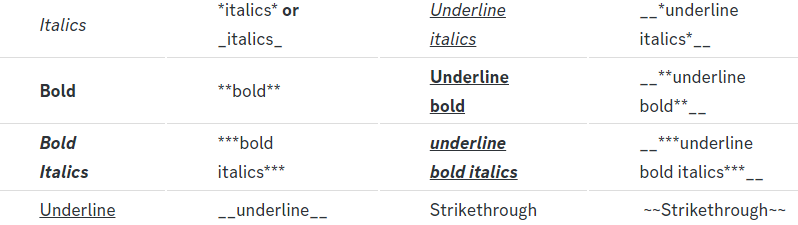
Discord Markdown Text
Below cites basic Discord Text Markdown/Formatting. Replace the text below with your own!
See this Discord Help Article for other markdown questions and combining markdowns.
<:Numbericons1:1018864164032225340> Italics (Cntrl + I)
 *Copy me for italicized text!* -> Italicized text!
 _Copy me for italicized text!_ -> Italicized text!
<:Numbericons2:1018864168041971712> Bold (Cntrl + B)
**Copy me for bold text!** -> Bolded text!
<:Numbericons3:1018864171783303208> Underline (Cntrl + U)
You must add 2 underscores on both sides of your text to get the underline text
__Copy me for underlined text!__ -> Underlined Text!
<:Numbericons4:1018864175155519538> Strikethrough (Cntrl + S)
~~Copy me for strikethrough text!~~ -> Strikethrough text!
<:Numbericons5:1018864178632605786> Spoilers & Hidden Text
||Copy me for hidden text!|| -> ||Hidden text|| (Click to reveal)
<:Numbericons6:1018864182558466058> One Lined Codeblock
You can add 3 backticks instead to get multi lined codeblock.
`Copy me for codeblock text!` -> Codeblock Text!
<:Numbericons7:1018864186727604354> Hyperlinking and Hidden Links
[Copy me with your link](yourlinkforhidelinks.com) -> Ticket Tool!
<:Numbericons8:1018864190296961159> <:NewIcon1:1018858809541804124><:NewIcon2:1018858813266333706> <:beta1:1022173658610946182><:beta2:1022173656492810340> Headers!
Header markdowns may not work with ticket tool features.
# Largest header!
## Small header!
### Even smaller header!
 jade topaz
restive condor
Hey there! Yes, it's possible
jade topaz
restive condor
Hey there! Yes, it's possible
Yeah but im trying this and its displays like: # test
Not the header thing being bigger
restive condor
It will only work in the ''embed description'' field and additional fields
It won't work in the Author Name or Title Text fields
jade topaz
restive condor
It will only work in the ''embed description'' field and additional fields

 restive condor
Ok, it seems not to be displayed on the Dashboard preview but it should post correctly on your Discord server
jade topaz
Ohhh okayy
jade topaz
@vampy_s2 @humble sequoia @humble sequoia @humble sequoia @humble sequoia @humble sequoia @humble sequoia @humble sequoia
restive condor
jade topaz
@vampy_s2 <@722196398635745312> <@722196398635745312> <@722196398635745312> <@72...
Please do not spam.
How can I help?
jade topaz
Wie kann ich ein Video machen von den Sachen bei maji gekauft habe machen
humble sequoiaBOT

⚠️ Du bist hier falsch
Wir bieten hier ausschließlich Support für den Ticket Tool Discord Bot an und können dir leider nicht mit irgendetwas anderem weiterhelfen.
- Bitte melde dich bei einem, für dein Problem geeigneten, Support Team.
Wenn du keine weiteren Fragen hast, die das Ticket Tool betreffen, schließe bitte dieses Ticket.
 soft cape
Where do I type {close.reason}?
I'm looking on the dashboard and can't see where the transcript message is.
Thank you
iron nightBOT
Gave +1 Rep to @limber portal (current: #10 - 467)
soft cape
It also says in my roles in this server, that I have premium?
But the premium options are greyed out for me.
Please could someone look into this for me?
Thank you
 austere forge
soft cape
It also says in my roles in this server, that I have premium?
But the premium op...
austere forge
soft cape
It also says in my roles in this server, that I have premium?
But the premium op...
Hey there : )
If you had a premium role, this indicates that you have a server to which you have subscribed
The server you currently have premium on is Lascivious - NSFW 18+ you probably took the 7 day trial and our bot detected it, so you had access to the premium role here.

Ticket Tool - Ticketing without clutter - The #1 Discord support bot
 visual aurora
I’ve been trying for 2 hours, I have no idea what this means or how to fix it can someone help 😞
 austere forge
visual aurora
I’ve been trying for 2 hours, I have no idea what this means or how to fix it ca...
austere forge
visual aurora
I’ve been trying for 2 hours, I have no idea what this means or how to fix it ca...
Hey there : )
This role cannot be added to a user, it is reserved for the Ticket tool bot.
visual aurora
austere forge
Hey there : )
This role cannot be added to a user, it is reserved for the Ticke...
Ooh, I was trying to add my staff into the bot so they could see and manage tickets but ig i've been doing it the wrong way lol
austere forge
visual aurora
Ooh, I was trying to add my staff into the bot so they could see and manage tick...
don't worries haha :D
humble sequoiaBOT
1. Go into your Dashboard
2. Open your Panel Configs tab
3. Select the panel you want to grant access to
4. Open the General options menu
5. Select your Support Team Roles
6. Save changes
 austere forge
visual aurora
Ooh, I was trying to add my staff into the bot so they could see and manage tick...
austere forge
visual aurora
Ooh, I was trying to add my staff into the bot so they could see and manage tick...
see above
visual aurora
austere forge
see above
Tysm! 🙂
jade topaz
hello
How can I view the records of deleted messages in my ticket box? I'm running a Discord channel, and I need to restore the ticket chat history.
austere forge
jade topaz
How can I view the records of deleted messages in my ticket box? I'm running a D...
Hey there : )
If you want to view the history of your tickets after they have been deleted, there is a Transcript option which allows you to do this.
humble sequoiaBOT
1. Go into your Dashboard
2. Open your Panel Configs tab
3. Select the panel you want to grant access to
4. Open the Transcript options menu
5. Using the Transcript Channel selector, pick the channel you want your transcripts to be sent to
6. Save changes
 jade topaz
austere forge
Hey there : )
If you want to view the history of your tickets after they have b...
jade topaz
austere forge
Hey there : )
If you want to view the history of your tickets after they have b...
Is dropdown menu free or paid?
austere forge
jade topaz
Is dropdown menu free or paid?
Hey there : )
free
jade topaz
austere forge
Hey there : )
free
ty
iron nightBOT
Gave +1 Rep to @austere forge (current: #21 - 282)
austere forge
You're welcome
 austere forge
 cunning fox
Hey there : )
could you use /debug in same channel pls
cunning fox
 austere forge
cunning fox
austere forge
cunning fox
make sure that the bot has: VIEW CHANNEL SEND MESSAGE and READ MESSAGE HISTORY perms in the channel
austere forge
cunning fox
Did I make a mistake on the site?
Go to settings channel > permissions > role > Ticket tool - and set perms here
cunning fox
it didn't work
 prime abyss
i got banned, how do i get unband
humble sequoiaBOT
⚠️ You're in the wrong place
We provide support for Ticket Tool Discord bot and cannot help you with whatever issue you have.
- We don't know which Support Team you should contact to get this issue resolved, and unfortunately we won't be able to accurately tell you.
If you don't have any further questions regarding our bot Ticket Tool, please close this ticket
soft cape
austere forge
Hey there : )
If you had a premium role, this indicates that you have a server...
Lascivious is not my server. It belongs to my friend. Maybe its because I have temp staff access there.
Thank you for explaining though:)
Thanks @austere forge
iron nightBOT
Gave +1 Rep to @austere forge (current: #20 - 283)
soft cape
soft cape
Where do I type {close.reason}?
I'm looking on the dashboard and can't see where...
Can someone help me with this please?
Thank you 🥰
 crimson canopy
Panel Config > Messages > Transcript Message
soft cape
crimson canopy
Panel Config > Messages > Transcript Message
Thank you
iron nightBOT
Gave +1 Rep to @crimson canopy (current: #319 - 1)
austere forge
cunning fox
it didn't work
make sure you have correctly set the perms I have mentioned to you
soft cape
I typed $close testing to see if this works
But the close message did not show in the ticket log. Plus you can see {close.reason} in the ticket too.
I think I put it in the wrong place?
 crimson canopy
You are editing the ticket message not the transcript or close message, were you aware of that
 drifting sand
Why is locked "edit opened message" "edit closed messages" and more?
 crimson canopy
drifting sand
Why is locked "edit opened message" "edit closed messages" and more?
crimson canopy
drifting sand
Why is locked "edit opened message" "edit closed messages" and more?
Because those are premium features.
soft cape
crimson canopy
You are editing the ticket message not the transcript or close message, were yo...
My bad! Thank you!
iron nightBOT
Gave +1 Rep to @crimson canopy (current: #196 - 2)
soft cape
Those must be premium features as I cannot select those options.
 tacit ivy
Hey guys, how do I set/add permission levels?
restive condor
tacit ivy
Hey guys, how do I set/add permission levels?
Hey there! For what specifically?
tacit ivy
restive condor
Hey there! For what specifically?
well it seems like when someone else claimed it ticket it's not possible to be deleted by a manager so kinda looking to bypass it without giving like the server-admin per
restive condor
tacit ivy
well it seems like when someone else claimed it ticket it's not possible to be d...
What does the bot reply with when a manager tries to delete a ticket?
 tacit ivy
restive condor
Do they have permission to use it when the ticket is not claimed?
tacit ivy
restive condor
Do they have permission to use it when the ticket is not claimed?
Yeah they do
restive condor
tacit ivy
Yeah they do
Alright, it seems like you have the ''Only the claimed user can use ticket options'' enabled
Everyone without administrator permissions or a Dashboard role is affected by this
Either disable the option, or you will need to give them one of the above
iron nightBOT
Gave +1 Rep to @restive condor (current: #4 - 791)
 obsidian cape
Hi , I have a question. How can one tweak categories permissions with the bot? I want to make a role that is able to see only closed tickets. I tested it out with the role being able to see via category permissions with the server settings but no dice
 paper tendon
ابحث عن الدعم باللغه العربية
austere forge
obsidian cape
Hi , I have a question. How can one tweak categories permissions with the bot? I...
Hey there : )
You can add the role you want as Additional Roles in the __Dashboard > Panel configs > General __.
Edit Permissions > Additional Roles Permissions > EDIT OPENED view channel 
and modify EDIT CLOSED > View channel 
humble sequoiaBOT

فريق الدعم الفني العربي
عميلنا العزيز ان كنت تبحث عن مساعدة يرجى فتح تكت خاص بفريق الدعم الفني العربي
اذهب الى#🎫│make-a-ticket
ثم قم بلضغط على الايموجي الاتي (🇯🇴)
paper tendon
What is that mean?
 restive condor
paper tendon
What is that mean?
restive condor
paper tendon
What is that mean?
Hey there! Discord has a limit of 500 channels per server.
It appears that server has reached such limit.
Please contact server staff for them to clear tickets, in order for new tickets be created
paper tendon
That means there 500 time to use only per day ?
restive condor
No, 500 channels to use at once
Server staff will have to delete either tickets or normal channels to free up space
paper tendon
restive condor
No, 500 channels to use at once
Oh okay thank you mate ❤
iron nightBOT
Gave +1 Rep to @restive condor (current: #4 - 792)
restive condor
No problem 
 deft geode
How to edit ticket Name?
restive condor
deft geode
How to edit ticket Name?
Hey there! Dashboard > Panel Configs > Ticket 
humble sequoiaBOT
The ticket name is the default channel name of all tickets. To edit it, go to your Dashboard > Panel Configs > Ticket. There you can edit the channel name of opened and closed tickets. You can also use variables in there.

 Note: This is a premium feature
deft geode
Note: This is a premium feature
deft geode
Thanks
jade topaz
restive condor
Hey there! ``Dashboard`` > ``Panel Configs`` > ``Ticket`` <:Premium:119240307415...
hey
can i switch my premium
restive condor
jade topaz
hey
Hey there! Of course, #🎫│make-a-ticket
deft geode
I'm having this error While deleting a panel
 restive condor
deft geode
I'm having this error While deleting a panel
restive condor
deft geode
I'm having this error While deleting a panel
Hey! It's just a security measure to prevent you from accidentally deleting all your panels.
If you'd like to delete your last/only panel, please create another panel first before deleting the previous one
deft geode
ohhh okay
 harsh ferry
Ticket Transcript won't load, just this single ticket. Ticket is just over a day old transcribed.
 restive condor
 desert gorge
HELLO
desert gorge
HELLO
Hey there! You mean log the action of closing the ticket and who closed it or a transcript message?
restive condor
harsh ferry
Ticket Transcript won't load, just this single ticket. Ticket is just over a day...
Hey there! As per Discord updates, CDN attachment links (transcript links) now expire after a few days.
Simply use the ''Direct Link'' button again to generate a new link
desert gorge
restive condor
Hey there! You mean log the action of closing the ticket and who closed it or a ...
I MEAN THE FIRST THING
restive condor
desert gorge
I MEAN THE FIRST THING
Easy with the caps 🙏
You can enable ticket logging under Dashboard > Panel Configs > Logging
humble sequoiaBOT
With Ticket Tool, you can customize the behavior the bot takes when logging your tickets! For editing these options follow these steps:
Dashboard ➞ Panel Configs ➞ Logging Options
Logging Channel
Here you will define which channel @humble sequoia will save the Logs in (ticket created/deleted/closed, etc.)
Logs you can save:
➞ Ticket Created ➞ Logs when a ticket is created
➞ Ticket Closed ➞ Logs when a ticket is closed
➞ Ticket Opened ➞ Logs when a ticket is opened
➞ Ticket Renamed ➞ Logs when a ticket is renamed
➞ Ticket Deleted ➞ Logs when a ticket is deleted
➞ Transcript Saved ➞ Logs when a ticket is saved
Select with  (disable) or
  (enabled) which logs you would like
Below you can see an example of what the Logging Options will look like:
 desert gorge
restive condor
Easy with the caps 🙏
You can enable ticket logging under ``Dashboard`` > ``Pan...
desert gorge
restive condor
Easy with the caps 🙏
You can enable ticket logging under ``Dashboard`` > ``Pan...
ITS NOT FREE?
restive condor
It is free
 dawn hedge
is there a way to view ticket transcripts?
restive condor
dawn hedge
is there a way to view ticket transcripts?
Hey there! Yes, simply open up the transcript by using the ''Direct Link'' button
 timid summit
Hi there, I'm wondering if I am able to edit this portion that says react with the mail emoji to a custom text?

 dark kraken
timid summit
Hi there, I'm wondering if I am able to edit this portion that says react with t...
dark kraken
timid summit
Hi there, I'm wondering if I am able to edit this portion that says react with t...
Hello There, Yes you can !
- Go to the Dashboard.
- Go to Panel Configs.
- Go to Panel ---> Edit Panel Message.
And change the text to the text you want.
timid summit
Thank you!
dark kraken
Welcome , I'm glad I could help you 
timid summit
One more question, is there a way to remove the right side grey button and just keep one button, the blue one?

 smoky scroll
how can i get my acc unbanned
timid summit
I was able to remove the blue button, but not sure about the other one. If I can't remove the grey one, am I able to customize it instead to make it look like the blue one, and then remove the blue one?
I can't seem to find which button that grey one is on the dashboard.
jade topaz
How to fix this ‘invalid form body’
 humble sequoiaBOT
This error indicates you have selected an invalid emoji, i.e. an emoji the bot isn't capable of using, in a button field
Which Emoji?
This depends upon which action the error is appearing, the most common cases are the Create Ticket button or one of your Dropdown emojis. You can visit your Button's List to find all available buttons and find the conflicting one by yourself.
Why doesn't the bot accept it as valid?
- You selected an emoji that doesn't exist anymore, i.e. that has been deleted
- You wrote text there, instead of an emoji (or in addition to an emoji)
- You entered a code for a custom emoji from a server that the bot is not a member of
- You entered a custom emoji code incorrectly
- You're on iPhone and entered an emoji using the phone's emoji pad (use the emoji selector in the website instead)

 pseudo ravine
smoky scroll
how can i get my acc unbanned
pseudo ravine
smoky scroll
how can i get my acc unbanned
You were just told you're in the wrong server
pseudo ravine
timid summit
I can't seem to find which button that grey one is on the dashboard.
Dashboard > Panel > Attached Panels > Any panels listed there will be that grey one
jade topaz
How can I put text above the message?
 restive condor
jade topaz
How can I put text above the message?
restive condor
jade topaz
How can I put text above the message?
Hey there! As in, outside the embed message?
jade topaz
restive condor
Hey there! As in, outside the embed message?
Yes
restive condor
jade topaz
Yes
That would require a premium subscription
But you can edit the message within the embed message for free (Up to 250 characters)
timid summit
Ah sorry I must be making a mistake. I deleted one of the embeds in my server and resent, but now when I go to panel I can't see the option to change the words "To create a ticket react with 📩" to something else. Did I surpass a limit in editing or am I doing something wrong. There is only the option to edit the button itself, and not the words there in the embed. I'm on the premium version.

 humble sequoiaBOT
The panel message is where people react to make a ticket. To customize it head over to your Dashboard --> Panel Configs -> Panel -> Edit Panel Message
 timid summit
I'm trying to get a third ticket creator and then 4th one in Discord, but for the third one I'm getting this error.
 restive condor
timid summit
I'm trying to get a third ticket creator and then 4th one in Discord, but for th...
restive condor
timid summit
I'm trying to get a third ticket creator and then 4th one in Discord, but for th...
Hey there! Could you run the /debug command in the channel you're trying to post the panel?
timid summit
ok
I resent and the error is still popping up. It says:
Failed: Invalid Form Body components[0].components[0].emoji.name[BUTTON_COMPONENT_INVALID_EMOJI]: Invalid emoji
restive condor
timid summit
I resent and the error is still popping up. It says:
Failed: `Invalid Form Bod...
Dashboard > Panel Configs > Buttons > Create Ticket Button You can't have two emojis there
timid summit
It worked, thanks!
 placid solar
timid summit
Hi there, I'm wondering if I am able to edit this portion that says react with t...
placid solar
timid summit
Hi there, I'm wondering if I am able to edit this portion that says react with t...
@humble sequoia
 placid solar
<@722196398635745312>
placid solar
placid solar
<@722196398635745312>

 silver pilot
I'm trying to set up a server with support ticket and I need a little help with it
humble sequoiaBOT
First you will want to invite the bot to your server. Once the bot is in your server, you can manage your server in the dashboard.

To create a panel we are going to need to head over to the Panel Configs Tab on the Dashboard.
Once at the dashboard we will need to click Create Panel.
Enter a panel name (Fill in any optional settings you want).
Click Create Panel and you are ready to get started with configuring your panel.
An example of a creating a panel is shown below.

Once the panel has been created, use the blue Send button and select the channel you want the panel to be sent to.
The Panel wasn't send
Use the </debug:ID> command to diagnose possible permission issues with the bot.

 tall anvil
Heya! How can I make it so that the ticket will automatically close after 5 minutes if no input from the ticket owner is sent within that five minutes?
 proper tartan
Panel configs -> Automation -> Select “Watcher” from the Trigger drop down menu and configure from there
 marble berry
tall anvil
Heya! How can I make it so that the ticket will automatically close after 5 minu...
marble berry
tall anvil
Heya! How can I make it so that the ticket will automatically close after 5 minu...
What the guy above me said, but I do wanna note that it's a premium feature
 delicate vault
yo how do i mention a role in a created ticket
humble sequoiaBOT
1. Go into your Dashboard
2. Open your Panel Configs tab
3. Select the panel you want to ping your support on
4. Open the Ticket options menu
5. Click on Edit Ticket Message
6. In the Message Content use one of the role mention syntax (**{@Role Name}**/**{Role ID}**)
7. Save changes
Note: For this to work properly, Ticket Tool requires the Mention Everyone permission. Or the role must have the Allow anyone to @mention this role setting enabled
 austere forge
delicate vault
yo how do i mention a role in a created ticket
austere forge
delicate vault
yo how do i mention a role in a created ticket
Hey there : )
see above
delicate vault
thanks a lot
desert gorge
how to mentoin a role in this place
 humble sequoiaBOT
1. Go into your Dashboard
2. Open your Panel Configs tab
3. Select the panel you want to ping your support on
4. Open the Ticket options menu
5. Click on Edit Ticket Message
6. In the Message Content use one of the role mention syntax (**{@Role Name}**/**{Role ID}**)
7. Save changes
Note: For this to work properly, Ticket Tool requires the Mention Everyone permission. Or the role must have the Allow anyone to @mention this role setting enabled
restive condor
desert gorge
how to mentoin a role in this place
Hey there! See above ^^
 oblique heron
how fix that?
 restive condor
oblique heron
how fix that?
restive condor
oblique heron
how fix that?
Hey there! Try these:
humble sequoiaBOT
Don't see your server in the dashboard?
Try using the Sync Servers button on your top center of the Dashboard page
You will possibly need to relog. Look below to see the steps on how to relog.
If this doesn't work
You should relog from the dashboard, you can do this by clicking here to log out immediately, and then log back in
Note:
You need one of these 3 things to access the dashboard.
1. Server Owner (Level: 6)
2. Server Administrator (Level: 4)
3. Dashboard Role (Level: 2)
:warning: You can check your level using the </permissionlevel:1029797400174399542> command on your Discord Server
If the bot's response is:
- @User is permission level: 0 (User)
You don't have any of the 3 levels required to access the server's dashboard
 desert gorge
restive condor
Hey there! See above ^^
desert gorge
restive condor
Hey there! See above ^^
THX BRO
iron nightBOT
Gave +1 Rep to @restive condor (current: #4 - 797)
jade topaz
Can I purchase premium with crypto ?
austere forge
jade topaz
Can I purchase premium with crypto ?
Hey there : )
sure pls #🎫│make-a-ticket
 violet grotto
Where can i open a Ticket?
humble sequoiaBOT
━━ User's inquiry has been moved to a ticket ━━
 vagrant brook
احتاج الى عربي
humble sequoiaBOT
فريق الدعم الفني العربي
عميلنا العزيز ان كنت تبحث عن مساعدة يرجى فتح تكت خاص بفريق الدعم الفني العربي
اذهب الى#🎫│make-a-ticket
ثم قم بلضغط على الايموجي الاتي (🇯🇴)
 crimson void
Guys help I change my discord account and I forget my account and my password and iam still in the group game and I can't login with the new account
humble sequoiaBOT
⚠️ You're in the wrong place
We provide support for Ticket Tool Discord bot and cannot help you with whatever issue you have.
- We don't know which Support Team you should contact to get this issue resolved, and unfortunately we won't be able to accurately tell you.
If you don't have any further questions regarding our bot Ticket Tool, please close this ticket
 void radish
Why every time I want to create a new panel it says that it don't have perm like there is a massage where u get support and I wanna make new one fore give away , it say it don't have perm , altho it is in the same channel
 elfin dome
everytime I try to use ticket tool commands it says "the application didnt respond." any reason for this?
restive condor
elfin dome
everytime I try to use ticket tool commands it says "the application didnt respo...
Hey there! Could you run the /debug command?
restive condor
void radish
Why every time I want to create a new panel it says that it don't have perm like...
Hey there! I'm guessing this is when attempting to publish a new panel, correct?
elfin dome
restive condor
Hey there! Could you run the ``/debug`` command?
ill try that
the application didnt respond to that either
restive condor
elfin dome
the application didnt respond to that either
Ticket Tool is missing the SEND MESSAGES permission for that channel
restive condor
elfin dome
it has the permission and it still wont work
Make sure you're checking the channel's permission, it already has it enabled in its role.
Right click on the channel's name (hold down, if on mobile) > Edit Channel > Permissions > Add/Find Ticket Tool > 
SEND MESSAGES
elfin dome
ohhh ok it worked thanks
 olive sphinx
Hi guys
So im on grass for about 4 months now
Unknown how I've didn't verified my email
Now when it comes to update I would love to enjoy it but sigh I'm not able to,
humble sequoiaBOT
⚠️ You're in the wrong place
We provide support for Ticket Tool Discord bot and cannot help you with whatever issue you have.
- We don't know which Support Team you should contact to get this issue resolved, and unfortunately we won't be able to accurately tell you.
If you don't have any further questions regarding our bot Ticket Tool, please close this ticket
jade topaz
Hi I'm trying to do a verification system using ticket bot in my server and nobody can open tickets? It just says "you do not have permission to use this"
restive condor
jade topaz
Hi I'm trying to do a verification system using ticket bot in my server and nobo...
Hey there! Could I get your server name or ID, so I can take a look?
jade topaz
Yep
The Ohana Family!
971211094855151677
Wait I might have figured it out
The owner blacklisted two roles
restive condor
Yep, seems like the Ohana Family one isn't meant to be there
jade topaz
Yee
 simple drift
my tickets being created outside of the categories even tho i have them set to it

but then it stops

even tho they're the same settings as the one they work in
 plucky escarp

 median halo
Hello. I have the custom ticket tool feature where it listens for a prompt from another bot in a text channel. I'm using it with my own custom bot. This feature used to work perfectly fine before, but after I sent the panel once again, it stopped working.
humble sequoiaBOT
Jordan's issue has been solved in another channel.
restive condor
simple drift
but then it stops
Hey there! Sorry for the late response
Are you still having this issue?
 left garden
Hello. I recently added a bot to the server, but when I try to write the command "/help", "/setup" gives an error called "The application is not responding." Because of this, I can't figure out how to add the bot to certain channels and continue configuring it. When you go through the bot's profile to the "Docs" tab, you go to a blank page. All screenshots will be below, please help me with the problem and setting up the bot. Thank you!

 austere forge
left garden
Hello. I recently added a bot to the server, but when I try to write the comman...
austere forge
left garden
Hello. I recently added a bot to the server, but when I try to write the comman...
Hey there : )
could you use /debug in same channel pls
left garden
austere forge
Hey there : )
could you use ``/debug`` in same channel pls
It gives exactly the same error)
 austere forge
left garden
It gives exactly the same error)
austere forge
left garden
It gives exactly the same error)
make sure that the bot has: VIEW CHANNEL SEND MESSAGE and READ MESSAGE HISTORY perms in the channel
left garden
austere forge
make sure that the bot has: `VIEW CHANNEL` `SEND MESSAGE` and `READ MESSAGE HIST...
Thanks, this helped! How can I thank you?
iron nightBOT
Gave +1 Rep to @austere forge (current: #20 - 285)
austere forge
left garden
Thanks, this helped! How can I thank you?
You're welcome, glad I could help !
If you would like to leave a review, you can do so in #📈│reviews
 slender cliff
Hi!
I currently run a server that utilizes ticket tool premium, but the person who paid for it before is no longer present in the server. How can I switch it over so I’m making the monthly payments so we don’t lose premium?
austere forge
slender cliff
Hi!
I currently run a server that utilizes ticket tool premium, but the person...
Hey there : )
With the command /premium you can check when premium ends, once the date has passed you can re-subscribe from the bot's profile via Discord or by direct payment here by opening a ticket.
slender cliff
austere forge
Hey there : )
With the command `/premium` you can check when premium ends, once...
Okay! Am I going to lose the embeds I have set up? Because that’s what I’m concerned about
austere forge
slender cliff
Okay! Am I going to lose the embeds I have set up? Because that’s what I’m conce...
If the server no longer has a premium subscription, Ticket tool reverts to its default value
slender cliff
Is there a way I can avoid that? I really don’t want to have to redo everything 😭 if I can redirect payments now I’d like to do I don’t have to worry
Also I tried utilizing the command but it’s not telling me when it expires, just that our sub is currently active
austere forge
slender cliff
Is there a way I can avoid that? I really don’t want to have to redo everything ...
It will revert to its default value, but if your server no longer has a premium subscription and you intend to take one up again the changes will still be saved, just it will be at its default value, so the premium features will no longer be available.
austere forge
slender cliff
Also I tried utilizing the command but it’s not telling me when it expires, just...
can you open a ticket with Billing Team they will be a little more on the date of your subscription I think.
#🎫│make-a-ticket > Billing
iron nightBOT
Gave +1 Rep to @austere forge (current: #19 - 287)
austere forge
You're welcome, glad I could help !
 frozen furnace
humble sequoiaBOT
frozen furnace
humble sequoiaBOT
Equipa de Apoio Portuguesa
Se você está procurando ajuda, abra um ticket para entrar em contato com a equipe de suporte em português. Vá para #🎫│make-a-ticket e pressione o botão :flag_br:.
 pseudo ravine
Hey there. Can you send the server ID here
 meager vault
yes
pseudo ravine
Not an invite, just the ID
meager vault
1229765646783352882
pseudo ravine
One moment
meager vault
alright
pseudo ravine
It needs to be only the emoji
 meager vault
could you elaborate?
i dont really understand is there a way to close the ticket by just saying /close ?
 pseudo ravine
Your transcript button, the Button Emoji has to be only the emoji inside that text bot
pseudo ravine
meager vault
so what command do i use to close it
It's the /close command, but you need to fix the errors first
meager vault
how do i do that
pseudo ravine
pseudo ravine
Yes, it just needs to be like this

pseudo ravine
Dashboard > Buttons > Transcript
 iron nightBOT
Gave +1 Rep to @pseudo ravine (current: #8 - 529)
pseudo ravine
You're welcome, glad I could help!
 jaunty bolt
 marsh remnant
How do I add the ticket open pannel to a server?
humble sequoiaBOT
First you will want to invite the bot to your server. Once the bot is in your server, you can manage your server in the dashboard.
To create a panel we are going to need to head over to the Panel Configs Tab on the Dashboard.
Once at the dashboard we will need to click Create Panel.
Enter a panel name (Fill in any optional settings you want).
Click Create Panel and you are ready to get started with configuring your panel.
An example of a creating a panel is shown below.
Once the panel has been created, use the blue Send button and select the channel you want the panel to be sent to.
The Panel wasn't send
Use the </debug:ID> command to diagnose possible permission issues with the bot.
austere forge
marsh remnant
How do I add the ticket open pannel to a server?
Hey there : )
see above
marsh remnant
How do I claim tickets without premium.
marsh remnant
marsh remnant
How do I claim tickets without premium.
@humble sequoia
austere forge
marsh remnant
How do I claim tickets without premium.
This is a premium feature, so not possible.
jade topaz
can anyone help me whit creating tickets in my server as i dont know how to make them look like this
 humble sequoiaBOT
A Discord Form lets the user answer individual questions in a pop-up Form, which then displays the answers in the ticket message. This can save time if you already know what you want to ask the user.
Setup Forms
Forms can be enabled under Panel Settings > Form Options > Edit Forms Options. In the new pop-up window, you can now enable and edit your own Form.
Form Options
You can add up to 5 questions in the Discord form. This is a Discord limitation. Each question can have a placeholder in the input field, a minimum and maximum input, multi-line, and also the option to have the answer required.
Options
Question Title ➞ Your Question goes here
Question Placeholder ➞ The placeholder text in the input field
Required ➞ If enabled, the user has to answer this question, to submit the form
Multi-Line Input ➞ Allows the user to input multiple lines
Minimum and Maximum Input ➞ Set a minimum and maximum input value for the user
Displaying the Answer
To display the answers from the user, you need to enable Auto display form results on the ticket message as an additional embed
If you don't want a second embed, go into your Panel Configs > Ticket Options > Edit Ticket Message. You use the variable {create.form.x} and replace x with the number of your question. For example, the response to Question 5 can be displayed with {create.form.5}.
 austere forge
jade topaz
can anyone help me whit creating tickets in my server as i dont know how to mak...
austere forge
jade topaz
can anyone help me whit creating tickets in my server as i dont know how to mak...
Hey there : )
see above
iron nightBOT
Gave +1 Rep to @austere forge (current: #19 - 289)
austere forge
You're welcome, glad I could help !
 neat sphinx
CAn anyone help me. How do i add pings to the welcome msg? I mean when you open the ticket the user thta opened the ticket gets pinged but i want to add that staff role also gets pinged
humble sequoiaBOT
Within all the messages the bot sends (both embeds and text) you can mention either channels, roles, or even users, these mentions will only send a notification to the user if they are used within a text field, e.g: a role mentioned in an embed won't ping at all the users who have that role.
For mentioning a role you can use one out of three options:
{@Role Name} ➞ Which is Case Sensitive.
{RoleID} ➞ Replace RoleId with the Id of the role you are trying to ping.
<@&RoleID> ➞ Discord's native syntax to ping roles.
<#ChannelID> ➞ Mention a channel by its ID.
<@UserID> ➞ Mention a user by its ID.
 slender minnow
@neat sphinx see above
neat sphinx
10/10 rating
jade topaz
can anyone help me and tell how do i add muly option for reason to open ticket to look somting like this
 humble sequoiaBOT
The Drop-down menu or Select Menu replaces the buttons on your panel message and uses a drop-down menu with all of your panels. To set this up, go to your Panel Configs and select your main Panel.
<:Numbericons1:1018864164032225340> Enable Select Style
First you enable Select Style. Then you add an item in the Dropdown Editor. Now you can start editing your dropdown!
<:Numbericons2:1018864168041971712> Dropdown Editor
Each line in the dropdown editor represents a line in the drop down menu on discord. You can add more "Items", by clicking on
First you select a panel. That's the panel this option will open a ticket for. DONT select the same panel twice. Each option should have a different Panel
After that, you can put a Display. This is the title of this option and will appear in the drop down menu. The *Description can be set right after that, which will be below the title in grey.
Additionally you can select an emoji, that will be shown in front of each option. You can either manually input the ID of an emoji or select it in the selector.
Common Issues ⚠️
- Panel doesn't send? Make sure you have a valid emoji selected
- Option doesn't show up? Check if two options have the same panel in the DropDown Editor
$dropdown
austere forge
jade topaz
can anyone help me and tell how do i add muly option for reason to open ticket t...
see above ^^
iron nightBOT
Gave +1 Rep to @austere forge (current: #19 - 290)
austere forge
You're welcome
 drowsy imp
is there anyone that can help rn i got this error, the bot has the highest perms

it sending this

@austere forge
drowsy imp
austere forge
can i get your server id
alr
drowsy imp
austere forge
can i get your server id
1209479716596097024
austere forge
drowsy imp
1209479716596097024
Which panel does this concern?
drowsy imp
austere forge
Which panel does this concern?
robux
 alpine fog
Can someone help me with making a ticket channel and setting up ticket tool on my server?
austere forge
drowsy imp
robux
For the button Create ticket there is no text zone in the box button text which makes an empty button
this needs to be corrected
Dashboard > Panel configs > Button - create ticket
 alpine fog
I've watched a tutorial but I'm not a good listener
drowsy imp
austere forge
For the button `Create ticket` there is no text zone in the box `button text` wh...
yeah i js turned that off
cus it was saying invalid emoji
alpine fog
Hey 3v how do I set up in mobile?
humble sequoiaBOT
First you will want to invite the bot to your server. Once the bot is in your server, you can manage your server in the dashboard.
To create a panel we are going to need to head over to the Panel Configs Tab on the Dashboard.
Once at the dashboard we will need to click Create Panel.
Enter a panel name (Fill in any optional settings you want).
Click Create Panel and you are ready to get started with configuring your panel.
An example of a creating a panel is shown below.
Once the panel has been created, use the blue Send button and select the channel you want the panel to be sent to.
The Panel wasn't send
Use the </debug:ID> command to diagnose possible permission issues with the bot.
austere forge
alpine fog
Hey 3v how do I set up in mobile?
hey there, see above
drowsy imp
austere forge
hey there, see above
i turned it on same error
alpine fog
Ok
austere forge
drowsy imp
i turned it on same error
you have not defined a text in the button text area. what makes an empty button

you need to add a text
austere forge
on your Dashboard nop :)
drowsy imp
austere forge
on your Dashboard nop :)
lmk
alpine fog
 austere forge
drowsy imp
lmk
austere forge
drowsy imp
lmk
are you still getting the permissions error message?
alpine fog
This always happen when I go to panel
humble sequoiaBOT
Don't see your server in the dashboard?
Try using the Sync Servers button on your top center of the Dashboard page
You will possibly need to relog. Look below to see the steps on how to relog.
If this doesn't work
You should relog from the dashboard, you can do this by clicking here to log out immediately, and then log back in
Note:
You need one of these 3 things to access the dashboard.
1. Server Owner (Level: 6)
2. Server Administrator (Level: 4)
3. Dashboard Role (Level: 2)
:warning: You can check your level using the </permissionlevel:1029797400174399542> command on your Discord Server
If the bot's response is:
- @User is permission level: 0 (User)
You don't have any of the 3 levels required to access the server's dashboard
austere forge
drowsy imp
<@225349654974431232>
it's not necessary to ping the staff all the time
I replied to you
drowsy imp
austere forge
it's not necessary to ping the staff all the time
sorry i thought u went offline
jade topaz
how do i fix this
 alpine fog
How do i increase my permission level?
drowsy imp
jade topaz
how do i fix this
i got same issue
austere forge
drowsy imp
yes
did you try resending the panel after the changes?
humble sequoiaBOT
This error indicates you have selected an invalid emoji, i.e. an emoji the bot isn't capable of using, in a button field
Which Emoji?
This depends upon which action the error is appearing, the most common cases are the Create Ticket button or one of your Dropdown emojis. You can visit your Button's List to find all available buttons and find the conflicting one by yourself.
Why doesn't the bot accept it as valid?
- You selected an emoji that doesn't exist anymore, i.e. that has been deleted
- You wrote text there, instead of an emoji (or in addition to an emoji)
- You entered a code for a custom emoji from a server that the bot is not a member of
- You entered a custom emoji code incorrectly
- You're on iPhone and entered an emoji using the phone's emoji pad (use the emoji selector in the website instead)
drowsy imp
austere forge
did you try resending the panel after the changes?
i did
austere forge
jade topaz
how do i fix this
see above
drowsy imp
austere forge
did you try resending the panel after the changes?
again
 austere forge
alpine fog
How do i increase my permission level?
austere forge
alpine fog
How do i increase my permission level?
you need to ask your owner to add you as a Dashboard role, or to give you admin permissions
humble sequoiaBOT
Any role you put there will have full access to the ticket tool dashboard. The server owner and users with admin permissions already have access to the dashboard.
Be careful of which roles to put here
 austere forge
drowsy imp
again
austere forge
drowsy imp
again
make sure that the bot has: VIEW CHANNEL SEND MESSAGE and READ MESSAGE HISTORY perms in the channel
alpine fog
austere forge
you need to ask your owner to add you as a Dashboard role, or to give you admin ...
Hau
drowsy imp
austere forge
make sure that the bot has: `VIEW CHANNEL` `SEND MESSAGE` and `READ MESSAGE HIST...
it has all perms "founder"
austere forge
drowsy imp
it has all perms "founder"
in the buy channel, does the bot send a message too?
drowsy imp
austere forge
in the `buy` channel, does the bot send a message too?
yes its sending msg like this as u can see
 humble sequoiaBOT
The Drop-down menu or Select Menu replaces the buttons on your panel message and uses a drop-down menu with all of your panels. To set this up, go to your Panel Configs and select your main Panel.
<:Numbericons1:1018864164032225340> Enable Select Style
First you enable Select Style. Then you add an item in the Dropdown Editor. Now you can start editing your dropdown!
<:Numbericons2:1018864168041971712> Dropdown Editor
Each line in the dropdown editor represents a line in the drop down menu on discord. You can add more "Items", by clicking on
First you select a panel. That's the panel this option will open a ticket for. DONT select the same panel twice. Each option should have a different Panel
After that, you can put a Display. This is the title of this option and will appear in the drop down menu. The *Description can be set right after that, which will be below the title in grey.
Additionally you can select an emoji, that will be shown in front of each option. You can either manually input the ID of an emoji or select it in the selector.
Common Issues ⚠️
- Panel doesn't send? Make sure you have a valid emoji selected
- Option doesn't show up? Check if two options have the same panel in the DropDown Editor
$dropdown
drowsy imp
jade topaz
<@1120532065625055282> how did u add make a selection
drop down
 icy ice
Have yall had issues with the custom emojis in closed dm embed?

 slender minnow
icy ice
Have yall had issues with the custom emojis in closed dm embed?
slender minnow
icy ice
Have yall had issues with the custom emojis in closed dm embed?
afaik emojis dont work in the field title
same with embed title
icy ice
slender minnow
afaik emojis dont work in the field title
Would explain why il test it out
slender minnow
icy ice
Would explain why il test it out
that's how discord works
icy ice
slender minnow
that's how discord works
Yeah my bad g I don't know everything about discord 💀
slender minnow
no worries, everyone's learning
austere forge
drowsy imp
yes its sending msg like this as u can see
Sorry for the delay
In your Dashboard > Panel configs > Dropdown - you have defined custom emoji
make sure these emoji are valid, as some emoji are missing a : at the beginning for this emoji to be valid
use the $ID command to get a valid ID of the emoji, and ensure the emoji is in the same server, other than that, you should have no issues.
for example :
$id 
humble sequoiaBOT
austere forge
$id <a:GhostWave:607656953875005471>
<a:GhostWave:607656953875005471>
icy ice
slender minnow
no worries, everyone's learning
1 more question, this time relating to the bot.
If there is no claimed user is it suppose to show the {claimed.user} or is it not a closed dm variable
 jade topaz
how do i change regural emojis to custom emojis
 restive condor
jade topaz
how do i change regural emojis to custom emojis
restive condor
jade topaz
how do i change regural emojis to custom emojis
Hey there! Dashboard > Panel Configs> Dropdown Style
In the emoji fields, use your custom emoji using the <:emojiname:emojiID> format. The easiest way to get this is using the id command
$id 
humble sequoiaBOT
restive condor
$id <:smil:936485535403356221>
<:smil:936485535403356221>
jade topaz
restive condor
Hey there! ``Dashboard`` > ``Panel Configs``> ``Dropdown Style``
In the emoji f...
thanks @restive condor
iron nightBOT
Gave +1 Rep to @restive condor (current: #4 - 803)
slender minnow
icy ice
1 more question, this time relating to the bot.
If there is no claimed user is i...
that's right, if there's no claimed user it will appear as the variable itself
try adding ?fb= followed by your fallback text (the text which is supposed to be replace that empty field value)
jade topaz
$id 
restive condor
On your server 😅
jade topaz
oh XD
 ashen briar
How can I increase my user level to allow me to manage the support tickets and stuff? I have server manager role on the server, but the bot says my user level is 0 so I cannot access the dashboard
jade topaz
hey me again i would like to know how to fix this .
when i open ticket on my server only report a scammer form opens
but when i try open question it just open ticket whit out any form
restive condor
ashen briar
How can I increase my user level to allow me to manage the support tickets and s...
Hey there! You will either need administrator permissions (Level 4) or a Dashboard role (Level 2) to access the Dashboard
humble sequoiaBOT
Any role you put there will have full access to the ticket tool dashboard. The server owner and users with admin permissions already have access to the dashboard.
Be careful of which roles to put here
alpine fog
restive condor
Hey there! You will either need administrator permissions (Level 4) or a Dashboa...
I was about to say that but ok
restive condor
jade topaz
hey me again i would like to know how to fix this .
when i open ticket on my ser...
Hey there! Did you make a form on each panel individually?
restive condor
alpine fog
I was about to say that but ok
That's good to know 😄 Thanks for helping out
iron nightBOT
Gave +1 Rep to @alpine fog (current: #320 - 1)
alpine fog
restive condor
That's good to know 😄 Thanks for helping out
Np anytime
I'm just a slow typer ngl
jade topaz
restive condor
Hey there! Did you make a form on each panel individually?
what do u mean by what
oh i see now ty for reminding me XD
thanks @restive condor
iron nightBOT
Gave +1 Rep to @restive condor (current: #4 - 804)
ashen briar
restive condor
Hey there! You will either need administrator permissions (Level 4) or a Dashboa...
Thanks Dan, when you say Admin and Dashboard level are these levels for the bot or within discord, because I have server manager access (needed to add the bot), but cannot configure anything, so I just need to know if I need to have the owner up my permissions again or if theres something else I need to do.
iron nightBOT
Gave +1 Rep to @restive condor (current: #4 - 805)
restive condor
ashen briar
Thanks Dan, when you say Admin and Dashboard level are these levels for the bot ...
Server owner (Level 6 on Ticket Tool)
Administrator permission (Level 4 on Ticket Tool) is a Discord permissions, this one:
Dashboard Role (Level 2 on Ticket Tool) are non-admin roles allowed to access the Dashboard (not linked to any Discord permission)
Normal User (Level 0)

Those are the only permissions that allow you to access the Dashboard
Manage server permission is enough to add bots but not manage it
ashen briar
restive condor
Server owner (Level 6 on Ticket Tool)
Administrator permission (Level 4 on Tick...
So its discord admin permissions I need, thank you. I'll get back to it
iron nightBOT
Gave +1 Rep to @restive condor (current: #4 - 806)
restive condor
Yep, or a Dashboard role
drowsy imp
austere forge
Sorry for the delay
In your Dashboard > Panel configs > Dropdown - you have de...
Lemme try
jade topaz
why when someone open ticket and fill up forms the form it self dont show up in ticket ?
restive condor
jade topaz
why when someone open ticket and fill up forms the form it self dont show up in ...
Hey there! Have you enabled the ''Add an automatic embed to show form answers to the Ticket Message'' option? Or used the form variables in your ticket message?
You will need to do one of those two
The easiest and more efficient option for non-premium servers is the automatic embed found in the Forms section
jade topaz
restive condor
Hey there! Have you enabled the ''Add an automatic embed to show form answers to...
how do i do it ?
oh i see sry XD
restive condor
No worries
jade topaz
thanks @restive condor
iron nightBOT
Gave +1 Rep to @restive condor (current: #4 - 807)
jade topaz
@restive condor how do i add server logo to ticket like this if its even possible on ticket tool
 restive condor
jade topaz
<@795710289425334303> how do i add server logo to ticket like this if its even...
restive condor
jade topaz
<@795710289425334303> how do i add server logo to ticket like this if its even...
You would need premium to add images to your embed messages
jade topaz
restive condor
You would need premium to add images to your embed messages
and to change color next to ticket to ?
 restive condor
You would need premium for that too
jade topaz
restive condor
You would need premium for that too <:Premium:1192403074157912144>
ok ill go buy it as staff here is very good and i am sure u will help me out whit everthing i would need ❤️
restive condor
That's great to hear, thanks for support Ticket Tool
jade topaz
there done what do i do now ? @restive condor
restive condor
jade topaz
there done what do i do now ? <@795710289425334303>
Go to your server Dashboard and use the ''SYNC'' button to update the premium status
Once it shows the Discord Linked subscription, go to the Dashboard > Panel Configs > Messages > Edit Panel Message
And you will be able to edit all fields, you can change the embed colour, make the message longer or add different images with their URL
jade topaz
restive condor
Go to your server Dashboard and use the ''SYNC'' button to update the premium st...
where i am blind XD
got it
thanks @restive condor
iron nightBOT
Gave +1 Rep to @restive condor (current: #4 - 808)
jade topaz
how do i fix this
 restive condor
jade topaz
how do i fix this
restive condor
jade topaz
how do i fix this
It looks like the image link you're using is either invalid or too long
Make sure you have pasted an image link and not a message link. If it still doesn't work, try uploading the image someplace like imgur
simple drift
restive condor
Hey there! Sorry for the late response
Are you still having this issue?
Yes
restive condor
simple drift
Yes
So once Crews 4 is full, tickets are created at the top instead of Crew 5?
Is that correct?
 restive condor
Looks great 😄
humble sequoiaBOT
 Faster Premium Bot
Automatic Transcripts
Full Customization
Direct Messages
Ticket Automation
Thread Style Ticketing
Premium Support
Scheduled Panel Availability
Integrations
Claiming
Advanced Ticket Statistics
You can purchase premium here:
Price
$6 - Monthly
$66 - Yearly (Open a billing ticket in #🎫│make-a-ticket to receive additional information on this matter)
restive condor
jade topaz
what else can i do whit premium ?
All of that ^^
humble sequoiaBOT
The first thing you will need to do is invite the premium bot, an invite can be found here
Once the bot is in your server we will head to the dashboard and manage your server. When you are managing your server, you want to head into "Server Configs" then click the drop down menu under "Select the bot you would like to use on this server" then click "Ticket Tool#6207" and then save.
 jade topaz
what do u mean by full customazation ? i can chanhe bot pfp and name ?
restive condor
jade topaz
what do u mean by full customazation ? i can chanhe bot pfp and name ?
That's not yet available, it refers to full customisation of messages & configs
Hey there! Yes, go ahead and #🎫│make-a-ticket
jade topaz
can the bot send a message for me like this
 restive condor
jade topaz
can the bot send a message for me like this
restive condor
jade topaz
can the bot send a message for me like this
Like a custom command?
jade topaz
restive condor
Like a custom command?
ye like if i say paypal and bot will send answer to it saying toothless paypal is and link or gamil
restive condor
jade topaz
ye like if i say paypal and bot will send answer to it saying toothless paypal i...
You can use the custom commands feature for that
Dashboard > Custom Commands (left sidebar)
drowsy imp
austere forge
Sorry for the delay
In your Dashboard > Panel configs > Dropdown - you have de...
still not working
 jade topaz
i can help u fix tht @drowsy imp
jade topaz
drowsy imp
do u mind vc or js chat
sure vc
austere forge
drowsy imp
Check the emoji cashapp if it is still on your server or valid with its id
drowsy imp
austere forge
Check the emoji `cashapp` if it is still on your server or valid with its id
thanks
iron nightBOT
Gave +1 Rep to @austere forge (current: #19 - 291)
drowsy imp
thanks @jade topaz
drowsy imp
jade topaz
sure vc
thanks
jade topaz
hehe
drowsy imp
austere forge
Check the emoji `cashapp` if it is still on your server or valid with its id
do i need to have premium to use $ prefix
austere forge
drowsy imp
do i need to have premium to use $ prefix
no :)
drowsy imp
austere forge
no :)
whats a dashboard role
austere forge
drowsy imp
whats a dashboard role
This is a role that will have access to the entire dashboard, make changes, etc.
humble sequoiaBOT
Any role you put there will have full access to the ticket tool dashboard. The server owner and users with admin permissions already have access to the dashboard.
Be careful of which roles to put here
jade topaz
@restive condor what to do if it sayid u dont got perms to open ticket event thoe he tryid everthing on discord
restive condor
jade topaz
<@795710289425334303> what to do if it sayid u dont got perms to open ticket ev...
«You don't have permissions to use this»
Are your members seeing this message when they try to close a ticket?
You may have accidentally denied them permission to use the Create Ticket button.
Look in the following places in your server's dashboard:
👉 Server Configs -> Blacklist Roles
Any roles there will be unable to interact with the bot in any way, including creating tickets.👉 Panel Configs -> Buttons -> Create Ticket -> Support team only
If this is enabled👉 Panel Configs -> Buttons -> Create Ticket -> Disabled Roles
Any roles there will be unable to use the button.
 warm dome
How can I change the text in the box?
 restive condor
warm dome
How can I change the text in the box?
restive condor
warm dome
How can I change the text in the box?
Hey there! Dashboard > Panel Configs > Messages > Edit Panel Message
Or did you mean the button?
warm dome
restive condor
Or did you mean the button?
No, I meant the text on the box, I'm trying it right away.
restive condor
Alrighty 👌
warm dome
restive condor
Alrighty 👌
Does the bot need to send the message again for the new text to be added?
restive condor
warm dome
Does the bot need to send the message again for the new text to be added?
Correct, or you can use the ''UPDATE'' button
 warm dome
restive condor
Correct, or you can use the ''UPDATE'' button
warm dome
restive condor
Correct, or you can use the ''UPDATE'' button
It worked, thank you very much 🥳
iron nightBOT
Gave +1 Rep to @restive condor (current: #4 - 809)
 wet mountain
humble sequoiaBOT
wet mountain
humble sequoiaBOT

Deutsches Support-Team
Wenn du Hilfe vom Deutschen Support-Team erhalten möchtest gehe in #🎫│make-a-ticket und öffne durch einen Klick auf den :flag_de: Button ein Ticket.
restive condor
@jade topaz ^^
humble sequoiaBOT

L'équipe du support Français
Cher client,
Si vous avez besoin d'aide, ouvriez un ticket pour le support Français s'il vous plaît.
Allez au #🎫│make-a-ticket et tapez sur le bouton contenant l'emoji 🇫🇷
restive condor
@wet mountain ^^
humble sequoiaBOT
━━ [TGN] Savantexplo's inquiry has been moved to a ticket ━━
 patent cypress
hello anyone able to help?
humble sequoiaBOT
Hello, we would love to help you, but if you don't tell us what you need help with we can't help you :(
patent cypress
How to add emojis to the ticket bot panel?

i want to do somethin like this is that possible?
austere forge
patent cypress
i want to do somethin like this is that possible?
Hey there : )
Sure, you need to use the $id (emoji) to get the id of the emoji to insert it into the ticket embed.
for example :
$id
humble sequoiaBOT
austere forge
$id <:3v_smile:1187282191630204958>
<:3v_smile:1187282191630204958>
patent cypress
$id 1254529510347374672
pseudo ravine
Unfortunately not, as you need the Administrator permission to give the Manage Permissions permission
austere forge
patent cypress
$id 1254529510347374672
do it directly with the emoji itself
on your server
patent cypress
I meant i want to post it in here
austere forge
patent cypress
I meant i want to post it in here
it's not an id this, sadly
 austere forge
it should look like this:
 patent cypress
how do i find the id of the emoji
austere forge
austere forge
Hey there : )
Sure, you need to use the `$id` (emoji) to get the id of the emoji...
^^
austere forge
You're welcome, glad I could help !
pseudo ravine
It’s possible, but it can only really happen if someone makes changes on the dashboard to give other permissions to the Support Team/Ticket Owner/Everyone role
And the only people who can access the dashboard are the physical server owner, users with the Administrator permission, and anyone with a Dashboard Role
It can’t really nuke, but if setup improperly, can assist someone in doing damage. But again, they’d need access to the dashboard first
We strongly recommend only giving Ticket Tool the permissions it needs, and no more. Are you 100% sure you need Ticket Tool to allow/deny the Manage Permissions permission?
 quartz edge
guys please help me. i filled up the form for reset password and hwid but i havent recieved any email for reset password and hwid
humble sequoiaBOT
⚠️ You're in the wrong place
We provide support for Ticket Tool Discord bot and cannot help you with whatever issue you have.
- We don't know which Support Team you should contact to get this issue resolved, and unfortunately we won't be able to accurately tell you.
If you don't have any further questions regarding our bot Ticket Tool, please close this ticket
quartz edge
hi daneil can u help me please
pseudo ravine
Your support team can use the /add command to add users/roles
pseudo ravine
quartz edge
hi daneil can u help me please
You have been told that we cannot help you unfortunately
Instead of giving the permission, you can have your staff use the /add command
 old prawn
ticket not showing with claim button
 humble sequoiaBOT
Claiming allows you to change the ticket name, category and permissions. To use it you have to enable it first on your Dashboard > Panel Configs > Claiming

 Note: This is a premium feature
pseudo ravine
Note: This is a premium feature
pseudo ravine
I don’t think so, it’s good to be cautious of what permissions you’re giving bots
quartz edge
eulen dont give a shit about customer
 scenic plinth
Well we're not Eulen, or involved with Eulen. You're in the wrong server.
old prawn
humble sequoia
oh wow howd i miss that lol
pseudo ravine
Even in general, it’s good to not always give every permission
 knotty rock
how do i partner with this server?
humble sequoiaBOT

Partnership Program
Our partnership program is currently closed.
We appreciate you being interested in partnering with Ticket Tool! Unfortunately, the program for partnering is closed as of now. Nonetheless, make sure to keep an eye at #📣│server-news where we announce partner applications opening!
 TicketTool.xyz - Ticketing without clutter
knotty rock
TicketTool.xyz - Ticketing without clutter
knotty rock
crazy
pseudo ravine
That’s not something under my control
old prawn
is there a way i can auto delete channel ticets after being closed for say 1 month
restive condor
old prawn
is there a way i can auto delete channel ticets after being closed for say 1 mon...
Hey there! You could use the automations feature for that but the longest it could wait would be 7 days
old prawn
restive condor
Hey there! You could use the automations feature for that but the longest it cou...
it only lets me go to 30 minutes

 restive condor
old prawn
it only lets me go to 30 minutes
restive condor
old prawn
it only lets me go to 30 minutes
If you go to the field beside (or probably below on mobile) you can set custom times in seconds up to 7 days.
7 days = 604800s
 restive condor
Correct
old prawn
Does anyone know of a good bot I could pair with tickets to help in the aid of managing freelance work. Such as certain roles can use an offer command which sends an embedded with the users name and their offer, then if the buyer accepts it opens a ticket tool ticket for them to talk.
Or if I can somehow setup ticket tool to be like this?
old prawn
old prawn
Does anyone know of a good bot I could pair with tickets to help in the aid of m...
i tried some bot called Offer It and Offer Buddy but both are dead i think, the websites are down, the docs are down, and the servers are empty lol.
 swift basalt
hi i need help
humble sequoiaBOT
━━ User's inquiry has been moved to a ticket ━━
restive condor
Hey there! Disable TWO STEP TICKET at your Dashboard > Panel Configs > General
humble sequoiaBOT
AstralSyntax🌈's issue has been solved in another channel.
restive condor
It skips the message with the support controls (re-open, transcript and delete), deleting automatically upon closure
 fallow phoenix
i sent a ss of the acceptance message i got from tiktok and the ticket tool hasnt verified it. about how long does it take?
restive condor
fallow phoenix
i sent a ss of the acceptance message i got from tiktok and the ticket tool hasn...
Hey there! It's the server's staff who has to be verify it. Not us
fallow phoenix
restive condor
Hey there! It's the server's staff who has to be verify it. Not us
ok, how long do u think it will take to get verified?
restive condor
I don't know
We only provide support for @pseudo glen
Not the servers that use the bot
fallow phoenix
how will i know when it has been verified. Will i recieve an email or a message in the ticket?
restive condor
I don't know, sadly. We're not associated with whoever has to verify it
fallow phoenix
ok thank u for your help
 feral raven
Is there a way to change how tickets are opened so it doesn't add an extra channel? Perhaps via creating a thread or pushing results to a spreadsheet or something?
fallow phoenix
hey i got verified and im in the other atomik discord im trying to get live studio access but its not working.
humble sequoiaBOT
⚠️ You're in the wrong place
We provide support for Ticket Tool Discord bot and cannot help you with whatever issue you have.
- We don't know which Support Team you should contact to get this issue resolved, and unfortunately we won't be able to accurately tell you.
If you don't have any further questions regarding our bot Ticket Tool, please close this ticket
restive condor
feral raven
Is there a way to change how tickets are opened so it doesn't add an extra chann...
Hey there! You could use Threads instead of channels, yes but it requires a premium subscription
Dashboard > Panel Configs > Thread Style
old prawn
fallow phoenix
hey i got verified and im in the other atomik discord im trying to get live stud...
you should probaby be asking that server.
fallow phoenix
old prawn
you should probaby be asking ***that*** server.
there is no support channel or i would have'
old prawn
right but this is just for the bot itself not for whatever that server has going on
fallow phoenix
old prawn
right but this is just for the bot itself not for whatever that server has going...
yes im refering to the bot
old prawn
fallow phoenix
yes im refering to the bot
it sounds like whatever server you are in has not setup that correctly to give you your role, as the support team has said multiple times they can not help with that, the owner of that server needs to fix that
 past dagger
i need help setting up different options to choose from in the ticket creation for members. IE: "please select the issue you are experiencing." then have options like "Rule Breaking, Server Concerns, Faction Form - (have it link to a form to fill out) is all of that possible?
restive condor
past dagger
i need help setting up different options to choose from in the ticket creation f...
Hey there! Yes, it's possible
Would these options be shown as multiple buttons (example: #🎫│make-a-ticket) or as a dropdown menu?
 tall nymph
hi! I'm trying to set up a panel for a basic support ticket. However, the bot isn't responding to my slash commands, what do
 restive condor
tall nymph
hi! I'm trying to set up a panel for a basic support ticket. However, the bot is...
restive condor
tall nymph
hi! I'm trying to set up a panel for a basic support ticket. However, the bot is...
Hey there! Could you run the /debug command please?
past dagger
restive condor
Hey there! Yes, it's possible
Would these options be shown as multiple buttons ...
yes
i am very new to this side of discord
tall nymph
restive condor
Hey there! Could you run the ``/debug`` command please?
sadge
 restive condor
past dagger
i am very new to this side of discord
restive condor
past dagger
i am very new to this side of discord
No worries, we're here to help.
Did you want multiple buttons or a dropdown menu though?
restive condor
tall nymph
sadge
Ticket Tool is missing the VIEW CHANNEL permission for that channel
past dagger
yes
restive condor
past dagger
yes
It's an either or question, you can't have both sadly
I'm guessing you'd like multiple buttons?
past dagger
restive condor
I'm guessing you'd like multiple buttons?
yes. multiple.
I have the dashboard open. But have no idea what to do after that.
iron nightBOT
Gave +1 Rep to @restive condor (current: #4 - 811)
restive condor
past dagger
I have the dashboard open. But have no idea what to do after that.
Perfect, you will need to create one different panel per button option using the green + button
 swift basalt
hi i need help rq with 2 small things
restive condor
restive condor
Perfect, you will need to create one different panel per button option using the...
Once you have all your panels configured, you can combine them using the instructions below
humble sequoiaBOT
For more convenient use of multipanels, you can now combine panels on the dashboard. This will allow you to directly send the multipanel from the dashboard or via the $panel ID command.
Where can I find this?
You can find this setting on the Dashboard -> Panel Configs -> Panel -> Attached Panels
Note: if you're attaching all the panels to a panel called English, don't include English in the attached panel's box (If you do this, it will create a duplicate)
This will put all buttons from all of your panels on one message. The message is the panel message from the panel you're combining these panels in.
 restive condor
Let me know once you have donr that 🙏
restive condor
swift basalt
hi i need help rq with 2 small things
Hey there! How can I help?
swift basalt
restive condor
Hey there! How can I help?
hi again , basically i need help with the claiming ticket thing so like when staff claim over ppl can still see but they cant talk or claim it n there username goes in ticket and 2nd thing is when the ticket hasnt been claimed in certain amount of time it gets deleted
shud i make a ticket ?
restive condor
swift basalt
hi again , basically i need help with the claiming ticket thing so like when sta...
For the first part, Dashboard > Panel Configs > Claiming
1. Make sure claiming is enabled
2. Enable "Only the user who claim can unclaim"
3. Use the {claim.user.name} variable in the Ticket Claimed Name to display the claimed user's name
4. Scroll down and enable "Change Other Support Team Permissions when claimed" - Edit Permissions and VIEW CHANNEL & 
SEND MESSAGES
past dagger
restive condor
Let me know once you have donr that 🙏
done
swift basalt
restive condor
For the first part, ``Dashboard`` > ``Panel Configs`` > ``Claiming``
``1.`` Mak...
wdym
 restive condor
One second
swift basalt
ai
restive condor
swift basalt
wdym
Alright, back on PC 😄
You can use the {claim.user.name} variable in the ''Enable Claim Name'' section to display the username of the user claiming
restive condor
past dagger
done
Perfect, now go to the Dashboard > Panel Configs > Buttons > Create Ticket Button
There you can edit the button's text, emoji, and colour. Make sure to change between panels to edit all your create ticket buttons
Otherwise they will all be called ''📩 Create Ticket'' (default)
swift basalt
restive condor
Alright, back on PC 😄
You can use the ``{claim.user.name}`` variable in the ''...
wdym
restive condor
swift basalt
wdym
Copy and paste {claim.user.name} onto that field
 gentle lance
hi! I was wondering if channels the tickets are made in are customizable? for instance, can I have the channels be under a certain category? or can I have them be threads in a certain channel?
restive condor
swift basalt
{claim.user.name}
How would you like the ticket name to look like?
username-12345?
restive condor
Yep, but how exactly? Before the number, after
swift basalt
e.g shazzz_1-report
restive condor
swift basalt
then the ticket name
Alrighty, set it so it looks like {ticket.owner.name}-report-{count}
swift basalt
do i add the `
restive condor
Nope, removed. My bad
restive condor
gentle lance
hi! I was wondering if channels the tickets are made in are customizable? for in...
Hey there! You can select a category from the Dashboard > Panel Configs > Category
Thread Style tickets require a premium subscription
restive condor
swift basalt
just that ?
Yep
swift basalt
but i dont wantall to be report like sum have shazzz_1-war
gentle lance
restive condor
Hey there! You can select a category from the ``Dashboard`` > ``Panel Configs`` ...
alright, thank you!
iron nightBOT
Gave +1 Rep to @restive condor (current: #4 - 812)
restive condor
swift basalt
but i dont wantall to be report like sum have shazzz_1-war
You will need to change in between panels (just like with the support roles) and edit all invidividually
restive condor
Now Scroll down and enable "Change Other Support Team Permissions when claimed"
Then, click on the ''Edit Permissions'' button and VIEW CHANNEL & SEND MESSAGES
swift basalt
 restive condor
Click on ''Edit Support Team Permissions''
 restive condor
Perfect, you're all done. Now you will need to repeat this process with all your panels
tall nymph
i'm having trouble creating a panel, it's not letting me edit any text and i'm not sure how to get the panel to actually show up in the channel
swift basalt
that it ?
tall nymph
wait im dumb i think i figured it out
restive condor
swift basalt
that it ?
For the claiming part yes. Once you've done that, we can move onto the automatic closures 😄
swift basalt
restive condor
For the claiming part yes. Once you've done that, we can move onto the automatic...
ai
can i open a ticket for this bit ?
as i may ask sum else after
restive condor
restive condor
Perfect, now go to the ``Dashboard`` > ``Panel Configs`` > ``Buttons`` > ``Creat...
@past dagger Once this is done, you should be good to send it. Let me know if you have any trouble with this 🙏
restive condor
swift basalt
can i open a ticket for this bit ?
Yes, of course
swift basalt
restive condor
Yes, of course
shud i ping u ?
restive condor
tall nymph
wait im dumb i think i figured it out
Hey there! All good?
tall nymph
ya lol
restive condor
swift basalt
shud i ping u ?
Nope, I will be automatically pinged
swift basalt
restive condor
Nope, I will be automatically pinged
ai ima make 1 rn
tall nymph
i just didn't realize ID referred to the single digit number and not a long dicsord ID
restive condor
tall nymph
i just didn't realize ID referred to the single digit number and not a long dics...
Ah, yes. The number attached to the panel name. Glad to hear you got it sorted
Hello
You can set it up from the Dashboard https://tickettool.xyz/dashboard
 stark runeBOT
1. Invite Ticket Tool to your server
First you will want to invite the bot to your server. Once the bot is in your server, you can manage your server in the dashboard.
2. Create a Panel
To create a panel we are going to need to head over to the panel configs on the dashboard.
Once at the dashboard we will need to click Create Panel.
Enter a panel name (Fill in any optional settings you want).
Click Create Panel and your ready to get started with configuring your panel.
An example of a creating a panel is shown below.
3. Send the Panel to a Channel
Once you've created a panel on the dashboard you will need to send it to a channel using send on the dashboard.
Select the channel you want your panel to be created in and click send.
For other questions checkout $help faq.
An example of a sending a panel is shown below.
Having a Problem Sending the Panel?
Do $debug in a channel with Ticket Tool and make sure it has all the necessary Discord permissions.
 plucky dew
past dagger
restive condor
<@810673032632860702> Once this is done, you should be good to send it. Let me k...
plucky dew
past dagger
restive condor
<@810673032632860702> Once this is done, you should be good to send it. Let me k...
it's not there. i guess im lost. lol
restive condor
past dagger
it's not there. i guess im lost. lol
No worries, what exactly isn't there?
past dagger
in my new tickets channel. they are not showing up as options
swift basalt
@restive condor mb to disturb i have a slight problem
when they claim it says the user who made ticket name how do i change so its the staff who claims
restive condor
past dagger
in my new tickets channel. they are not showing up as options
Use the "SYNC" button on your server Dashboard to refresh it.
They should show up after that
 grand bronze
please make full customization free i beg.
restive condor
swift basalt
when they claim it says the user who made ticket name how do i change so its the...
Did you put the {claim.user.name} variable in that panel?
swift basalt
restive condor
Did you put the {claim.user.name} variable in that panel?
yes n it syas the member who made the ticket
not the staff who claim
restive condor
swift basalt
yes n it syas the member who made the ticket
That shouldn't be the case, but try using the {author.name} variable instead
 restive condor
swift basalt
restive condor
swift basalt
Nope, it needs to be {claim.user.name}
Seems like I gave the correct one at the start but gave you the ticket one accidentally at some point. Apologies
restive condor
Yes
simple drift
restive condor
So once Crews 4 is full, tickets are created at the top instead of Crew 5?
yes
even tho i have crew 5 set as one
and i copied the category to have the same perms as the others
restive condor
simple drift
even tho i have crew 5 set as one
Can you create a brand new channel under the crew 5 category and run /debug there please?
simple drift
 restive condor
simple drift
restive condor
simple drift
Ticket Tool is missing the READ CHANNELS permission for that category
past dagger
i guess i need to open a ticket to have someone show me how to do this. i screwed it all up.
iron nightBOT
Gave +1 Rep to @restive condor (current: #4 - 814)
restive condor
past dagger
i guess i need to open a ticket to have someone show me how to do this. i screwe...
I'm sure it can be fixed, no problem 🙏
Please #🎫│make-a-ticket for one of my colleagues to take a look as I have to go.
Make sure to include your server name or ID
humble sequoiaBOT
━━ thetanker's inquiry has been moved to a ticket ━━
swift basalt
restive condor
I'm sure it can be fixed, no problem 🙏
Please <#571706435449257997> for one of...
hey bro is there any way u can reset the staticles ?
alpine fog
How do i set up a ticket
past dagger
Wow!!!! thanks @restive condor and @pseudo ravine for your awesome help! You guys rock!
iron nightBOT
Gave +1 Rep to @restive condor (current: #4 - 815)
Gave +1 Rep to @pseudo ravine (current: #8 - 530)
 warped cairn
can someone help me update my ticket?
 devout canyon
Hi there!
Is there a way to open a ticket from a message someone has sent?
We use that with out current ticket bot a lot, but are looking into other ticket bot options, and I haven't found anything about opening a ticket from someone's message in the docs 🙈
humble sequoiaBOT
━━ User's inquiry has been moved to a ticket ━━

 livid ingot
 austere forge
livid ingot
austere forge
livid ingot
Hey there : )
Make sure that the bot has: VIEW CHANNEL SEND MESSAGE and READ MESSAGE HISTORY perms in the channel
livid ingot
austere forge
Hey there : )
Make sure that the bot has: `VIEW CHANNEL` `SEND MESSAGE` and `R...
TY, cant believe i overlooked this SMH embarrassed
austere forge
You're welcome, glad I could help !
livid ingot
Give this man a raise
 glossy stag
says this application did not respond
restive condor
glossy stag
says this application did not respond
Hey there! Could you run the /debug command please?
glossy stag
restive condor
Hey there! Could you run the ``/debug`` command please?
it still says it didnt respond
restive condor
glossy stag
it still says it didnt respond
Ticket Tool is missing the SEND MESSAGES permission for that channel
glossy stag
restive condor
Ticket Tool is missing the ``SEND MESSAGES`` permission for that channel
how do i fix it?
restive condor
glossy stag
how do i fix it?
Right click on the channel's name > Edit Channel > Permissions > Find/Add Ticket Tool > SEND MESSAGES
glossy stag
restive condor
Right click on the channel's name > Edit Channel > Permissions > Find/Add Ticket...
how do i make it so people can open a ticket
stark runeBOT
1. Invite Ticket Tool to your server
First you will want to invite the bot to your server. Once the bot is in your server, you can manage your server in the dashboard.
2. Create a Panel
To create a panel we are going to need to head over to the panel configs on the dashboard.
Once at the dashboard we will need to click Create Panel.
Enter a panel name (Fill in any optional settings you want).
Click Create Panel and your ready to get started with configuring your panel.
An example of a creating a panel is shown below.
3. Send the Panel to a Channel
Once you've created a panel on the dashboard you will need to send it to a channel using send on the dashboard.
Select the channel you want your panel to be created in and click send.
For other questions checkout $help faq.
An example of a sending a panel is shown below.
Having a Problem Sending the Panel?
Do $debug in a channel with Ticket Tool and make sure it has all the necessary Discord permissions.
restive condor
glossy stag
how do i make it so people can open a ticket
There's a setup guide
glossy stag
restive condor
There's a setup guide
ok thank u
iron nightBOT
Gave +1 Rep to @restive condor (current: #4 - 816)
glossy stag
restive condor
There's a setup guide
thank u worked perfectly 10/10
iron nightBOT
Gave +1 Rep to @restive condor (current: #4 - 817)
restive condor
Glad to hear
devout canyon
When having multiple panels, and a person opens the wrong one (which adds the wrong supporter team, etc.) - is there a way to change an existing tickets' panel type, or would the ticket need to be closed and a new one to be opened? 🙈
 main crystal
How do I make a role that allows people to see the tickets
restive condor
devout canyon
When having multiple panels, and a person opens the wrong one (which adds the wr...
Hey there! It's not possible sadly.
You could /remove & /add the correct teams but the easiest option would probably be close and open the right one
restive condor
main crystal
How do I make a role that allows people to see the tickets
Hey there! Dashboard > Panel Configs > General > Support Team roles
 devout canyon
restive condor
Hey there! It's not possible sadly.
You could ``/remove`` & ``/add`` the correc...
devout canyon
restive condor
Hey there! It's not possible sadly.
You could ``/remove`` & ``/add`` the correc...
I see, thank you! What a bummer tho /nay
That would have been a really cool and practical function 🙈
restive condor
You can suggest it in #1019685143046279208
 supple sierra
wsp chat i need help on actually getting the ticket thing in my channel, bc i made it its js not in my channel
 low kindle
Buenas en donde estan los tickets??
 tame grotto
Does anyone know if there is a simple way to verify ticket tool is running properly on the server? We have two channels in which tickets can be created fine but one has stopped working. I have verified roles are all there and it does show in applications but no matter the command you run the output is always the attached which suggests an issue with the app.

 steel basalt
tame grotto
Does anyone know if there is a simple way to verify ticket tool is running prope...
steel basalt
tame grotto
Does anyone know if there is a simple way to verify ticket tool is running prope...
can you run /debug in any channel?
humble sequoiaBOT

Equipo de Soporte Español
Querido usuario, si está buscando ayuda, por favor abra un ticket para contactar al Equipo de Soporte Español. Diríjase a #🎫│make-a-ticket y presione el botón :flag_es:.
austere forge
low kindle
Buenas en donde estan los tickets??
@low kindle
low kindle
Muchas gracias
austere forge
supple sierra
wsp chat i need help on actually getting the ticket thing in my channel, bc i ma...
Hey there : )
Do you want to set Ticket tool on your server right ?
supple sierra
i have the bot in my server i just want the ticket thing in my channel
humble sequoiaBOT
First you will want to invite the bot to your server. Once the bot is in your server, you can manage your server in the dashboard.
To create a panel we are going to need to head over to the Panel Configs Tab on the Dashboard.
Once at the dashboard we will need to click Create Panel.
Enter a panel name (Fill in any optional settings you want).
Click Create Panel and you are ready to get started with configuring your panel.
An example of a creating a panel is shown below.
Once the panel has been created, use the blue Send button and select the channel you want the panel to be sent to.
The Panel wasn't send
Use the </debug:ID> command to diagnose possible permission issues with the bot.
austere forge
supple sierra
i have the bot in my server i just want the ticket thing in my channel
follow guide above
supple sierra
thank u
tame grotto
steel basalt
can you run /debug in any channel?
No. I get the same error. Strangely though the channel i try to run debug in does have a working ticket function
austere forge
tame grotto
No. I get the same error. Strangely though the channel i try to run debug in doe...
Hey there : )
Make sure that the bot has: VIEW CHANNEL SEND MESSAGE and READ MESSAGE HISTORY perms in the channel
alpine fog
@austere forge thank you for the help I finally got my ticket tool set up ❗
 iron nightBOT
Gave +1 Rep to @austere forge (current: #19 - 292)
austere forge
alpine fog
<@225349654974431232> thank you for the help I finally got my ticket tool set up...
You're welcome
tame grotto
austere forge
Make sure that the bot has: `VIEW CHANNEL` `SEND MESSAGE` and `READ MESSAGE HIST...
Brilliant thank you. I can now run commands again as those permissions had been removed. Is there a command to relaunch previously configured ticket panels? Or do I just create a new one?
iron nightBOT
Gave +1 Rep to @austere forge (current: #19 - 293)
austere forge
tame grotto
Brilliant thank you. I can now run commands again as those permissions had been ...
You can go to Dashboard > Panel configs > Select the panel you want to send and press the send button
 tame grotto
austere forge
You can go to Dashboard > Panel configs > Select the panel you want to send and ...
tame grotto
austere forge
You can go to Dashboard > Panel configs > Select the panel you want to send and ...
Thanks, the dashboard im seeing looks different so not seeing any panel configs. Will keep looking. Thank you so much for the guidance
iron nightBOT
Gave +1 Rep to @austere forge (current: #19 - 294)
austere forge
tame grotto
Thanks, the dashboard im seeing looks different so not seeing any panel configs....
you're welcome,
Can you show me a screenshot of what you see?
Unfortunately we are not the MEE6 bot
We are the support @pseudo glen : )
If you want to access the dashboard, see below
humble sequoiaBOT
Ticket Tool - Ticketing without clutter - The #1 Discord support bot
tame grotto
austere forge
Unfortunately we are not the MEE6 bot
We are the support <@557628352828014614> ...
Thanks. i have the dashboard now
iron nightBOT
Gave +1 Rep to @austere forge (current: #19 - 295)
austere forge
great !
 rigid saddle
Does anyone know how to fix attachments in ticket transcripts?
 restive condor
rigid saddle
Does anyone know how to fix attachments in ticket transcripts?
restive condor
rigid saddle
Does anyone know how to fix attachments in ticket transcripts?
Hey there! Unfortunately, images are only saved in transcripts for premium users.
Once a channel is deleted, so is everything in it, so Discord doesn't store any images.
We store images ourselves for premium users only up to 8MB
swift basalt
restive condor
Hey there! Unfortunately, images are only saved in transcripts for premium users...
hey dan i need help again with sum
restive condor
swift basalt
hey dan i need help again with sum
Hey, how can I help
swift basalt
ima make a ticket rq
restive condor
Alright
humble sequoiaBOT
━━ User's inquiry has been moved to a ticket ━━
 dreamy spire
Pls ticket
austere forge
dreamy spire
Pls ticket
Hey there #🎫│make-a-ticket
 flint zephyr
Hi all
How can I add other team members on discord to the tickettool dashboard?
Is there a way to invite
steel basalt
flint zephyr
How can I add other team members on discord to the tickettool dashboard?
You can either give them administrator privileges OR a role which you’ve configured to have dashboard access.
 finite nest
 humble sequoiaBOT
━━ User's inquiry has been moved to a ticket ━━
austere forge
Hey there : )
can i get your server id pls
alright,
Which panel should you send?
in the options for selecting panels in the dropdown, can you assure me that you haven't used the same panel ?
I'm going to move us in a ticket, to take a closer look at this
humble sequoiaBOT
━━ User's inquiry has been moved to a ticket ━━
 silk thicket
Hello, does Ticket Tool Bot have a Zendesk integration yet?
I was thinking Zapier may work but I'm looking for a direct integration if possible. Cheers!
steel basalt
silk thicket
Hello, does Ticket Tool Bot have a Zendesk integration yet?
I was thinking Zapi...
Ticket tool does not offer that, no.
I’ve never used Zendesk/Zapier but if it has a Discord Bot, Ticket Tool can “listen” to that bot and respond to certain commands (such as opening a ticket remotely, closing etc.)
silk thicket
I see. I’ll look into that, thanks!
steel basalt
No prob 👍
 winter kestrel
Hi
got a bit of an issue w my ticket tool
I go to setup, but it tells me its 'not responding'
restive condor
winter kestrel
I go to setup, but it tells me its 'not responding'
Hey there! Could you run the /debug command?
winter kestrel
restive condor
Hey there! Could you run the ``/debug`` command?
Once again 'The application did not respond'
restive condor
winter kestrel
Once again 'The application did not respond'
Ticket Tool is missing the SEND MESSAGES permission for that channel
restive condor
No problem
 thorn crane
restive condor
No problem <:PabloTiphat:983791053842837624>
thorn crane
restive condor
No problem <:PabloTiphat:983791053842837624>
Hello there!
thorn crane
restive condor
No problem <:PabloTiphat:983791053842837624>
So I got told to remove the second "General Support" Button from that message , but idk how they got that many onto the message in the first place. Could you help me?
 restive condor
thorn crane
So I got told to remove the second "General Support" Button from that message , ...
restive condor
thorn crane
So I got told to remove the second "General Support" Button from that message , ...
Hey there! Dashboard > Panel Configs > Panel > Multipanels
 thorn crane
restive condor
Hey there! ``Dashboard`` > ``Panel Configs`` > ``Panel`` > ``Multipanels``
thorn crane
restive condor
Hey there! ``Dashboard`` > ``Panel Configs`` > ``Panel`` > ``Multipanels``
Thanks, big help!
iron nightBOT
Gave +1 Rep to @restive condor (current: #4 - 820)
thorn crane
social credits rlly? 😭
restive condor
They are reputations 😅
 frosty vine
uh guys
how do i set it so my tickets that people create open in a specific category?
humble sequoiaBOT
1. Go into your Dashboard
2. Open your Panel Configs tab
3. Select the panel you want to grant access to
4. Open the Category options menu
5. Select the categories of your preference
6. Save changes
 austere forge
frosty vine
how do i set it so my tickets that people create open in a specific category?
austere forge
frosty vine
how do i set it so my tickets that people create open in a specific category?
hey there : )
see above
frosty vine
i already tried that but lets see if it works
frosty vine
austere forge
hey there : )
do i have to resend the ticket panel or no after that?
austere forge
frosty vine
do i have to resend the ticket panel or no after that?
nop
just make sure you save these changes
frosty vine
phew.. thanks @austere forge
iron nightBOT
Gave +1 Rep to @austere forge (current: #19 - 298)
frosty vine
you deserve it
austere forge
You're welcome, glad I could help !
 marsh crest
Is there a way to hide closed channels automatically?
I can't seem to find any clues to this in dashboards and docks
marsh crest
Have you read the setup guide?
austere forge
marsh crest
Is there a way to hide closed channels automatically?
Hey there : )
marsh crest
Hello<3
austere forge
what do you mean?
marsh crest
Like is there a way to hide the channel thats the ticket has been closed in
automatically
austere forge
marsh crest
Like is there a way to hide the channel thats the ticket has been closed in
For the ticket owner?
 manic flower
I have a problem
marsh crest
So i could later credit the suppor team
manic flower
I HAVE A PROBLEM
marsh crest
so like, you close the ticket, and it automatically hides the channel
austere forge
marsh crest
I dont want to delete them, id rather store them
Go to Dashboard > Panel configs > Permissions > Ticket Owner Permissions - edit opened > View channel
manic flower
bot says, it don’t have perms to see the chanel, but it has
austere forge
manic flower
bot says, it don’t have perms to see the chanel, but it has
could you use /debug in same channel pls
iron nightBOT
Gave +1 Rep to @austere forge (current: #19 - 299)
austere forge
manic flower
Thanks <@225349654974431232>
You're welcome, glad I could help !
 steel wing
I cant click on "Panel Name"
 austere forge
steel wing
I cant click on "Panel Name"
austere forge
steel wing
I cant click on "Panel Name"
Hey there : )
steel wing
hey,
austere forge
this is a premium feature
steel wing
austere forge
this is a premium feature
so if would create my ticket system there will always be standing "Panel Name"?
marsh crest
austere forge
Go to Dashboard > Panel configs > Permissions > Ticket Owner Permissions - edit ...
Will this be applied only after the ticket is closed?Because if user opens a ticket and cant see it then the ticket is of no use to begin with?
austere forge
steel wing
so if would create my ticket system there will always be standing "Panel Name"?
It will be in the name of your panel
So for example your panel is ticket support it will appear as Ticket support
steel wing
austere forge
It will be in the name of your panel
So for example your panel is `ticket suppo...
oh, ok thanks!
iron nightBOT
Gave +1 Rep to @austere forge (current: #19 - 300)
austere forge
marsh crest
Will this be applied only after the ticket is closed?Because if user opens a tic...
I'm sorry, you have to change edit closed
austere forge
steel wing
oh, ok thanks!
You're welcome, glad I could help !
marsh crest
austere forge
I'm sorry, you have to change `edit closed`
thank you!
iron nightBOT
Gave +1 Rep to @austere forge (current: #19 - 301)
 rich kindle
In my server the bot don't work
austere forge
rich kindle
In my server the bot don't work
Hey there : )
could you use /debug in same channel pls
rich kindle
Heyy
humble sequoiaBOT
Ticket Tool Custom Avatar
As of now, you are not able to change Ticket Tool's profile picture, nonetheless, our Development Team is working on the release of white labels, this is your own custom bot!
For the time being, you can change the bot's nickname by right-clicking the bot in the user list on your server and clicking Change Nickname

$avatar
 sterile gate
austere forge
hey there : )
sterile gate
austere forge
hey there : )
no i mean
austere forge
sterile gate
and not the pfp the name....
I'm sorry, I misread it
Unfortunately not, otherwise it's considered to be usurpation
sterile gate
austere forge
I'm sorry, I misread it
Unfortunately not, otherwise it's considered to be usur...
Whats usurpation..
austere forge
sterile gate
Whats usurpation..
Usurping*
sterile gate
austere forge
Usurping*
but i dont wanna copy everything i just want the name with tools
rich kindle
Heyy how do U add the create a ticket option on my server
I already debug what do I do now
stark runeBOT
1. Invite Ticket Tool to your server
First you will want to invite the bot to your server. Once the bot is in your server, you can manage your server in the dashboard.
2. Create a Panel
To create a panel we are going to need to head over to the panel configs on the dashboard.
Once at the dashboard we will need to click Create Panel.
Enter a panel name (Fill in any optional settings you want).
Click Create Panel and your ready to get started with configuring your panel.
An example of a creating a panel is shown below.
3. Send the Panel to a Channel
Once you've created a panel on the dashboard you will need to send it to a channel using send on the dashboard.
Select the channel you want your panel to be created in and click send.
For other questions checkout $help faq.
An example of a sending a panel is shown below.
Having a Problem Sending the Panel?
Do $debug in a channel with Ticket Tool and make sure it has all the necessary Discord permissions.
restive condor
rich kindle
I already debug what do I do now
Hey there! See above ^^
 dim portal
Hola
restive condor
dim portal
Hola
Hola, cómo puedo ayudar?
restive condor
 blazing sundial
help
blazing sundial
help
Hey there, how can I help?
dim portal
Hola amigo a mí me lanza un código de error y hago todo lo que me dice y me sigue dando error ya eliminé todos los tickets y no sé qué más puedo hacer
Compré una leopard física y estoy muy mal porque no sé qué hacer
restive condor
dim portal
Hola amigo a mí me lanza un código de error y hago todo lo que me dice y me sigu...
Podrías hacer captura del error 🙏
dim portal
Ok
Ahí te mando amigo

Mira y los únicos canales que tengo es el de blox y fruit y el de soporte
restive condor
dim portal
Discord tiene un límite de 500 canales por servidor.
Aunque no los puedas ver, siguen contando hacía el límite. Tendrás que contactar con el staff del servidor para que eliminen canales
dim portal
Y conoces algún staff porque necesito lo que compré y para ver si me puede ayudar
Me podrías ayudar por favor
restive condor
dim portal
Y conoces algún staff porque necesito lo que compré y para ver si me puede ayuda...
Lo siento pero no conozco a ningún staff de ese servidor, tendrás que contactar con ellos
dim portal
Y lo peor es que ya pasó el límite de tiempo del código
Y más o menos cómo se haría eso porque yo no utilizo casi mucho disco
Lo tengo para hablar con gente y a ver si me podrían ayudar
restive condor
Disculpa pero no estamos asociados con el staff de ese servidor o el juego
Solo damos soporte para el bot de Discord que utilizan
dim portal
Ah okay muchas gracias
restive condor
De nada
dim portal
Igual no me ayudó
 thorn halo
restive condor
De nada <:PabloTiphat:983791053842837624>
thorn halo
restive condor
De nada <:PabloTiphat:983791053842837624>
daniel
 blazing trout
Hello! In my server I have a ticket system to open a ticket and all staff have access to it. But when necessary, staff can decide to transfer the ticket to the operators. A manager therefore moves the ticket to another category and makes the ticket private to the operators. However, when the ticket is closed it goes into the classic closed ticket category and everyone can have access again. The goal being initially to make it private to operators, this is not great for confidentiality. So I would like to simplify the action of making the ticket private and when closing it moves to a private category. Can someone tell me if this is possible and if so how to do it. Otherwise what other option would I have? Thanks in advance to anyone who takes the time to help me.
humble sequoiaBOT
1. Go into your Dashboard
2. Open your Panel Configs tab
3. Select the panel you want to grant access to
4. Open the Category options menu
5. Select the categories of your preference
6. Save changes
blazing trout
humble sequoia
Hello @pseudo ravine, thanks for this embed, but can you explain me more please ?
pseudo ravine
You can set which category the closed tickets can go into
Unfortunately there’s no way to stop Ticket Tool from changing the permissions once the ticket gets closed
blazing trout
pseudo ravine
You can set which category the closed tickets can go into
Yes I know that. But when this is created, is for all staff, moderator, moderator+, etc. But if the staff decide that, he can switch the ticket for a operator ticket. How can I switch the ticket to the intial support team for the new teams ? Sorry if I’m not clear, the english isn’t my primary langague.
pseudo ravine
The only way to do would be to manually change permissions for all roles. However once the ticket is closed, Ticket Tool will revert those permissions and use the permissions listed in the Dashboard > Permissions > Edit closed
blazing trout
pseudo ravine
The only way to do would be to manually change permissions for all roles. Howeve...
Ok, it's a shame not to be able to increase the "security" level of the ticket simply via a command. Thank you for your help and have a good evening!
iron nightBOT
Gave +1 Rep to @pseudo ravine (current: #8 - 531)
pseudo ravine
It’s been suggested before multiple times to be able to transfer a ticket between panels
You’re welcome, glad I could help!
 paper jasper
I just cloned a ticket...config...setup...whatever the terminology is... How would I go about changing which channel that the "Ticket Message" "Panel Message" is posted in? Do I just hit the blue Send button and it'll prompt me which channel I want to send it to?
Resolved, my suspicion was correct - I'm prompted when pressing Send to which channel it'll be sent to
 prime bobcat
is 500 tickets the limit and it cant be changed at all? it won't let me apply the changes :_)
open tickets keep moving to other channels cause it's full
austere forge
prime bobcat
is 500 tickets the limit and it cant be changed at all? it won't let me apply th...
Hey there : )
Discord limit per server 500 channels
also a limit of 50 channels per category. Ticket Tool limits it to 45.
- These limits cannot be changed at all.
If you have reached such limits, tickets won't be created inside that category.
I recommend you setup overflow categories so once your main one is full, new tickets are created there until the main one is available again
humble sequoiaBOT
Discord only allows to stack up to 50 channels per category, meaning that if you have already 50 tickets in one category, the bot won't be able to place a ticket in that category, for such reason Ticket Tool counts with overflow categories, meaning that if your main category is filled, the bot will go ahead and place the ticket on the next one available, simply choose a second category in the category pickers:
prime bobcat
austere forge
Hey there : )
Discord limit per server 500 channels
also a limit of 50 channel...
thanks for the advice 🙂 also, where can I invite one of my mods to the ticket tool dashboard?
iron nightBOT
Gave +1 Rep to @austere forge (current: #19 - 302)
humble sequoiaBOT
Any role you put there will have full access to the ticket tool dashboard. The server owner and users with admin permissions already have access to the dashboard.
Be careful of which roles to put here
austere forge
prime bobcat
thanks for the advice 🙂 also, where can I invite one of my mods to the ticket t...
see above :D
prime bobcat
austere forge
see above :D
thanks again really 🙂
austere forge
You're welcome, glad I could help !
 clever wind
Is it possible to make the Ticket Tool bot remove a role from a ticket with a custom command?
I have tried everything I can think of and nothing I am trying is working
austere forge
clever wind
I have tried everything I can think of and nothing I am trying is working
Hey there : )
Unfortunately this is not possible, as Ticket tool does not respond to its own action commands.
The only way to remove a role is to do it manually
OR
however do it with an external bot and create a trigger command with this bot, when for example you send a message like : removerole and that the bot answers $remove IDROLE the action to remove the role will be good.
In any case, you need to add your bot's id so that Ticket Tool can listen to these actions.
Dashboard > Server configs > BOT

 austere forge
 solid ivy
Can I put a picture here?
solid ivy
Can I put a picture here?
Hey there : )
On the embed ticket ?
solid ivy
inside the embed
solid ivy
austere forge
Hey there : )
On the embed ticket ?
yes
austere forge
solid ivy
yes
Unfortunately this is a premium feature
solid ivy
ok thank
 lethal remnant
وش خلها

 humble sequoiaBOT
فريق الدعم الفني العربي
عميلنا العزيز ان كنت تبحث عن مساعدة يرجى فتح تكت خاص بفريق الدعم الفني العربي
اذهب الى#🎫│make-a-ticket
ثم قم بلضغط على الايموجي الاتي (🇯🇴)
austere forge
lethal remnant
وش خلها
^^
austere forge
manic flower
Hey there : )
Make sure that the bot has: VIEW CHANNEL SEND MESSAGE and READ MESSAGE HISTORY perms in the channel
austere forge
manic flower
It has
Can i get your server id?
austere forge
manic flower
I invite You
no dm pls, otherwise you violate the server rules : )
austere forge
Do not DM me, this is against the rules of this server.
what is the name of this server?
lethal remnant
austere forge
<:this:894279341108772914> ^^
When I received the ticket, this message appears
manic flower
@austere forge We ara spanish, i Youtube Don’t understand something tell to me
austere forge
lethal remnant
When I received the ticket, this message appears
it's a cooldown, you have to wait before creating a ticket
You can try now, it should work
austere forge
manic flower
<@225349654974431232> We ara spanish, i Youtube Don’t understand something tell ...
I'm going to move us into a ticket to take a closer look at this.
humble sequoiaBOT
━━ User's inquiry has been moved to a ticket ━━
lethal remnant
austere forge
it's a cooldown, you have to wait before creating a ticket
You can try now, it...
When a person submits a management ticket, I receive it partially, even though it is a long time apart
austere forge
lethal remnant
When a person submits a management ticket, I receive it partially, even though i...
As shown, you press the button too quickly
Just wait a few seconds
 cursive shadow
Hello. I"m trying to configure a dropdown ticket option with ticket tool and sapphire. When sapphire sends the $new command to the channel, even though the ticket tool is set to listen for $new in that channel, it still says its not configured to listen for $new
scenic plinth
Make sure you whitelist Sapphires ID via your server configuration tab, otherwise Ticket Tool will not listen to Sapphire.
Sapphires ID: 678344927997853742
cursive shadow
scenic plinth
Make sure you whitelist Sapphires ID via your server configuration tab, otherwis...
Yea, I solved it, I had to sync ticket tool
But i do have 2 more problems
- In the response ticket panel, how can I ping a role? I tried <@id> didn't work
- If i create a ticket with $new, is it still possible for me to use forms?
scenic plinth
cursive shadow
1. In the response ticket panel, how can I ping a role? I tried <@id> didn't wor...
It needs to be <@&ID> for roles, <@&ID> is for user IDs.
scenic plinth
cursive shadow
2. If i create a ticket with $new, is it still possible for me to use forms?
No, forms are not triggered.
cursive shadow
scenic plinth
No, forms are not triggered.
Alright. Thank you.
thanks @scenic plinth
iron nightBOT
Gave +1 Rep to @scenic plinth (current: #13 - 388)
 faint tapir
how add the bot to my chanel
stark runeBOT
1. Invite Ticket Tool to your server
First you will want to invite the bot to your server. Once the bot is in your server, you can manage your server in the dashboard.
2. Create a Panel
To create a panel we are going to need to head over to the panel configs on the dashboard.
Once at the dashboard we will need to click Create Panel.
Enter a panel name (Fill in any optional settings you want).
Click Create Panel and your ready to get started with configuring your panel.
An example of a creating a panel is shown below.
3. Send the Panel to a Channel
Once you've created a panel on the dashboard you will need to send it to a channel using send on the dashboard.
Select the channel you want your panel to be created in and click send.
For other questions checkout $help faq.
An example of a sending a panel is shown below.
Having a Problem Sending the Panel?
Do $debug in a channel with Ticket Tool and make sure it has all the necessary Discord permissions.
restive condor
faint tapir
how add the bot to my chanel
Hey there! See above ^^
faint tapir
restive condor
Hey there! See above ^^
Thx bro
iron nightBOT
Gave +1 Rep to @restive condor (current: #4 - 822)
deft geode
it's possible to setup ticket tool with sapphire?
restive condor
deft geode
it's possible to setup ticket tool with sapphire?
Hey there! Yes
You will for Sapphire to use either the $new or $ticket commands to begin a ticket - Make sure you have command style tickets enabled
Please make sure to add Sapphire's ID as a bot Ticket Tool will react to under your Dashboard > Server Configs > Bot
humble sequoiaBOT
Command Style Tickets allow you to open tickets VIA the $new or $ticket commands. This feature also allows you to open tickets for people, by using the aforementioned commands with the user's ping or ID.
You can enable this feature by heading over to your server's dashboard. Then head over to Panel Configs ➞ Settings ➞ Command Style Tickets. (GIF below shows you how to get to it as well).
This section of the panel settings also contains the following features
- Bypass channel list and watch all of them → when you enable this option, Ticket Tool will create a ticket whenever someone uses the $new or the $ticket command in a channel it has access to .
- Channel to monitor for command $new and $ticket → This is the opposite of the previous option, you can actually select in which channels Ticket Tool should look for the $new command instead of looking in the whole server.
- Delete command after creating ticket → If enabled, Ticket Tool will delete the command (whether it's
$newor$ticket) a few seconds after you run it.
 deft geode
Alright
 restive condor
 regal linden
Hey there! You seem to have an invalid emoji. Could I get your server name or ID so I can take a look?
regal linden
restive condor
Hey there! You seem to have an invalid emoji. Could I get your server name or ID...
Sure.... here is my server id : 1007713550480969810
regal linden
restive condor
Hey there! You seem to have an invalid emoji. Could I get your server name or ID...
But I alr did / id
restive condor
regal linden
But I alr did / id
Please make sure the emoji for the last dropdown option is correct
 iron nightBOT
Gave +1 Rep to @restive condor (current: #4 - 823)
restive condor
No problem
 dapper escarp
Hey, I wanted to create a new server and deleted it, how can I backup all Panels and stuff from my old server?
humble sequoiaBOT
The Backup and Restore feature allows you to transfer your panels, tags, and all settings to a new server, even if the server the settings were created has been deleted! You will want to copy the whole key.
First, go to your server's Dashboard ➞ then Server Configs ➞ under Config Backup & Restore (Server Owner Only) click on Old version can be found here and generate a new backup key by pressing the green button. Now, a key should be generated in the box above. You may need to refresh the page to see this.
Once you have your backup key, navigate to the same page on the new server. Copy the key on the Restore from backup key field.
Now you can choose what you want to copy. Finally, press the green Restore Configs button.
IMPORTANT NOTE
- We suggest you keep this backup key somewhere safe, in case your server is deleted so you are able to recover your panel's settings.
- This feature is only usable by the server's owner
$backup
restive condor
dapper escarp
Hey, I wanted to create a new server and deleted it, how can I backup all Panels...
Hey there! See above ^^