#🆘│community-support
1 messages · Page 91 of 1
 silver tide
 lunar solar
You do when you hit a certain limit
silver tide
lunar solar
You do when you hit a certain limit
And then you can request for more
 uncut tide
i tried making a ticket in a server but it said thatg theres a 500 channel limit but there isnt 500 channels and i keeps failing


nothing i do works
uncut tide
oh alr
 gilded verge
i don't remember what change was that but if you still have access to the file (example on the screenshot) then you can just download it and open

 random crescent
With premium does that enable us to change the bots icon, name, status etc...?
 austere forge
random crescent
With premium does that enable us to change the bots icon, name, status etc...?
austere forge
random crescent
With premium does that enable us to change the bots icon, name, status etc...?
hi there, not possible
only the name
gilded verge
we do not provide dm support, if you don't have this transcript file which you could download, there is no way to get it then
however... if you'd like to talk private then you can go to #🎫│make-a-ticket and open a ticket (just please remember to put every information that's related), there will be only Staff and you, nobody else ^-^
 humble sequoiaBOT
━━ darkmoon's inquiry has been moved to a ticket ━━
 jade topaz
السلام عليكم اريد شراء البرميم بكريدت عادي؟
Hello, I want to buy the premium with a regular credit?
humble sequoiaBOT

Premium can now be purchased directly through discord! Either in the app directory (server settings) or directly from the bots profile.
<:TTWarning:1034178155872784494> Important Information <:TTWarning:1034178155872784494>
ONLY purchase premium through ONE of the two Ticket Tool Bots. If you purchased premium on the primary bot (White logo) and plan to use the premium bot, don't kick the primary bot!
What's different?
 The Monthly price changed from
 $6.00 to $5.99

 Yearly subscriptions are not yet available
Don't kick the bot, otherwise, the subscription will be canceled automatically
You'll need to buy the subscription from a computer or on the Application Directory
You might need to run the /premium command on your server to sync the premium status with your dashboard
 A subscription can not be transferred between Servers

 worldly pulsar
hey guys new to this ticket tool, i created a panel and stuff but i dont see the ticket itself option
 abstract folio
worldly pulsar
hey guys new to this ticket tool, i created a panel and stuff but i dont see the...
abstract folio
worldly pulsar
hey guys new to this ticket tool, i created a panel and stuff but i dont see the...
can you explain exactly what you want

 abstract folio
to send the panel go the dashboard and send and choose the panel you created
 humble sequoiaBOT
━━ User's inquiry has been moved to a ticket ━━
 vale rose
i forget mail and pass can help me who with that pls
humble sequoiaBOT

⚠️ You're in the wrong place
We provide support for Ticket Tool Discord bot and cannot help you with whatever issue you have.
- We don't know which Support Team you should contact to get this issue resolved, and unfortunately we won't be able to accurately tell you.
If you don't have any further questions regarding our bot Ticket Tool, please close this ticket
 empty shell
ok very dumb question which is rather embarrassing, ticketool has administrator and is ranked above all else, but users cannot open a ticket when i have combed through it all and they don't have suffiecent perms
 ionic path
empty shell
ok very dumb question which is rather embarrassing, ticketool has administrator ...
ionic path
empty shell
ok very dumb question which is rather embarrassing, ticketool has administrator ...
__ «You don't have permissions to use this»__
Are your members seeing this message when they try to create a ticket?
You may have accidentally denied them permission to use the Create Ticket button.
Look in the following places in your server's dashboard:
👉 Server Configs -> Blacklist Roles
Any roles there will be unable to interact with the bot in any way, including creating tickets.👉 Panel Configs -> Buttons -> Create Ticket -> Support team only
If this is enabled, only your staff will be able to use the button.
👉 Panel Configs -> Buttons -> Create Ticket -> Disabled Roles
Any roles there will be unable to use the button.
empty shell
cheers
ionic path
No worries
ionic path
You can use the /setup command for an easy configuration, or you can go to the dashboard (https://www.tickettool.xyz/) where you can setup every setting. If you need help with any specific settings, feel free to ask here or open a ticket at #🎫│make-a-ticket

Ticket Tool - Ticketing without clutter - The #1 Discord support bot
 foggy lodge
ionic path
You can use the /setup command for an easy configuration, or you can go to the d...
foggy lodge
ionic path
You can use the /setup command for an easy configuration, or you can go to the d...
can you join vc
ionic path
I'm sorry but I can't
foggy lodge
I am at dashboard
foggy lodge
foggy lodge
I am at dashboard
what I have to do from here
 restive condor
From @ionic path
Alright, there is every setting you can change.
General → General setting and support roles
Category → Setting up categories for opened & closed tickets
Ticket → Settings for in-tickets (e.g. you can change the message that's sent immediately after someone opens a ticket)
Moderator → Changing messages for moderation control panels after a ticket is closed
Permissions → Changing the permissions for every member/role who can see the ticket.
Buttons → Changing what all the buttons say or adding an emoji next to them.
Messages → Changing all the available messages
Panel → Used for multipanels, having multiple panels (buttons for panels) at one message.
Command style → Enabling or disabling the commands for Ticket Tool.
DropDown Style → Switching normal ticket buttons to drop downs that you can select a panel from.
Thread Style→ Enabling or disabling automatic private thread opening after a ticket is made (useful for discussions with other team members) (Ser
@foggy lodge 
foggy lodge
restive condor
From <@924197251880976414>
>>> Alright, there is every setting you can change. ...
whats the meaning of transcript channel
@ionic path bot is not tagging he support roles
 hushed yew
can the ticket close automatically?
restive condor
foggy lodge
whats the meaning of transcript channel
A channel where all the ticket files will be sent to once the ticket has been deleted, so it can be accesed later
restive condor
foggy lodge
<@924197251880976414> bot is not tagging he support roles
Hi, see below
humble sequoiaBOT
1. Go into your Dashboard
2. Open your Panel Configs tab
3. Select the panel you want to ping your support on
4. Open the Ticket options menu
5. Click on Edit Ticket Message
6. In the Message Content use one of the role mention syntax (**{@Role Name}**/**{Role ID}**)
7. Save changes
Note: For this to work properly, Ticket Tool requires the Mention Everyone permission. Or the role must have the Allow anyone to @mention this role setting enabled
 restive condor
hushed yew
can the ticket close automatically?
restive condor
hushed yew
can the ticket close automatically?
Hi, close automatically after certain time of inactivity, you mean?
hushed yew
restive condor
Hi, close automatically after certain time of inactivity, you mean?
Yes exactly.
restive condor
hushed yew
Yes exactly.
That's possible via the Automatinons feature, which is a premium feature 
hushed yew
restive condor
That's possible via the Automatinons feature, which is a premium feature <:premi...
So if I don't have the premium it won't close?
restive condor
hushed yew
So if I don't have the premium it won't close?
Not automatically. You will have to manually close it
Via the close command or using the close button
 still sundial
Hiya, on the ticketool bot where you do the dropdown style, how do you pick on each drop down, what role can check the ticket and what cant.
restive condor
still sundial
Hiya, on the ticketool bot where you do the dropdown style, how do you pick on e...
Hi there, yes. You must make all changes individually on each panel
still sundial
restive condor
Hi there, yes. You must make all changes individually on each panel
Huh.
humble sequoiaBOT
━━ User's inquiry has been moved to a ticket ━━
ionic path
restive condor
Hi, see below
Ty  sorry I couldn't answer
 iron nightBOT
Gave +1 Rep to @restive condor (current: #17 - 302)

 jagged cipher
jagged cipher
jagged cipher
Example
humble sequoiaBOT
For more convenient use of multipanels, you can now combine panels on the dashboard. This will allow you to directly send the multipanel from the dashboard or via the $panel ID command.
Where can I find this?
You can find this setting on the Dashboard -> Panel Configs -> Panel -> Attached Panels
Note: if you're attaching all the panels to a panel called English, don't include English in the attached panel's box (If you do this, it will create a duplicate)
This will put all buttons from all of your panels on one message. The message is the panel message from the panel you're combining these panels in.
 ionic path
@jagged cipher here you go ↑
 ionic path
jagged cipher
ionic path
jagged cipher
Go to the panel Configs of your dashboard, where every setting is visible
In there, you should see a setting called "Panels"
 jagged cipher
ionic path
Go to the panel Configs of your dashboard, where every setting is visible
jagged cipher
ionic path
Go to the panel Configs of your dashboard, where every setting is visible
He does not remember what I wrote
 pseudo ravine
There’s no need to keep pinging him
jagged cipher
pseudo ravine
There’s no need to keep pinging him
I don't understand
pseudo ravine
You can make an arabic ticket in #🎫│make-a-ticket if you wish to speak arabic
That way you can also get support from a support member
jagged cipher
pseudo ravine
You can make an arabic ticket in <#571706435449257997> if you wish to speak arab...
nothing
someone
arabic
restive condor
Yes, we have Arabic Support Team members but you closed your ticket after 4 minutes
 ancient sand
Hello, how can I make the ticket go to another place at the bottom when it closes? automatic
 abstract folio
ancient sand
Hello, how can I make the ticket go to another place at the bottom when it close...
abstract folio
ancient sand
Hello, how can I make the ticket go to another place at the bottom when it close...
dashboard → Panel Config → Category → Category closed and choose the category . when the ticket is closed the ticket will go to the category
ancient sand
were dashboard@abstract folio?
 abstract folio
ancient sand
were dashboard<@650312838954614784>?
abstract folio
ancient sand
were dashboard<@650312838954614784>?
the website that you actually in
go to panel config
ancient sand
 abstract folio
category you will find category closed put the category you want and save
that's all
ancient sand
abstract folio
category you will find category closed put the category you want and save
💚 thnx bro
abstract folio
no problem , anytime
ancient sand
look bro my tikct up

I want when the tick closes, your tick goes to the bottom of the discord
 abstract folio
ancient sand
I want when the tick closes, your tick goes to the bottom of the discord
abstract folio
ancient sand
I want when the tick closes, your tick goes to the bottom of the discord
make a category and put it in the down and go to panel config category category closed and put the category and save
that's what i told you up
ancient sand
 abstract folio
ancient sand
abstract folio
ancient sand
that's right try make a ticket and close it the ticket will go to the category you put
ancient sand
abstract folio
that's right try make a ticket and close it the ticket will go to the category y...
OK
iron nightBOT
Gave +1 Rep to @restive condor (current: #17 - 304)
 tawdry musk
How to create a server ?
abstract folio
tawdry musk
How to create a server ?
what you mean , its ticket tool support server
 glad nest
yo i need help setting it up

 zenith folio
hello I'm trying to create a ticket and get help but I'm not successful, who can help me please?

the ticket is obviously open but afterwards I don't know where to go and no one contacts me
abstract folio
zenith folio
the ticket is obviously open but afterwards I don't know where to go and no one ...
its ticket tool help server for help you in setuping the bot in your server
but this problem from server staff they need to fix it
zenith folio
OK MERCI
abstract folio
no problem , anytime
zenith folio
and do you know how to set sprint by default because I activated it and despite everything I have to press a second button our run
 abstract folio
zenith folio
and do you know how to set sprint by default because I activated it and despite ...
abstract folio
zenith folio
and do you know how to set sprint by default because I activated it and despite ...
this is ticket tool bot support
humble sequoiaBOT
⚠️ You're in the wrong place
We provide support for Ticket Tool Discord bot and cannot help you with whatever issue you have.
- We don't know which Support Team you should contact to get this issue resolved, and unfortunately we won't be able to accurately tell you.
If you don't have any further questions regarding our bot Ticket Tool, please close this ticket
 buoyant karma
how do i take away member perms to close ticket and give staff perms to close ticket
glad nest
can somone help me ?
 vast jolt
how can i tag a role so when someone opens a ticket it tags them
humble sequoiaBOT
1. Go into your Dashboard
2. Open your Panel Configs tab
3. Select the panel you want to ping your support on
4. Open the Ticket options menu
5. Click on Edit Ticket Message
6. In the Message Content use one of the role mention syntax (**{@Role Name}**/**{Role ID}**)
7. Save changes
Note: For this to work properly, Ticket Tool requires the Mention Everyone permission. Or the role must have the Allow anyone to @mention this role setting enabled
abstract folio
vast jolt
how can i tag a role so when someone opens a ticket it tags them
see above ^
iron nightBOT
Gave +1 Rep to @abstract folio (current: #85 - 10)
abstract folio
glad nest
can somone help me ?
sure how can i help you
 dense linden
@iron night no lee}}
restive condor
buoyant karma
how do i take away member perms to close ticket and give staff perms to close ti...
Hi, Dashboard > Panel Configs > Buttons > Close Ticket Button >  Support Team only
and same for the CLOSE command under Command Configs
buoyant karma
restive condor
Hi, ``Dashboard`` > ``Panel Configs`` > ``Buttons`` > ``Close Ticket Button`` >...
doesnt that block member from creating ticket?
restive condor
buoyant karma
doesnt that block member from creating ticket?
Sorry close* ticket button
buoyant karma
Ok
let me try
Ok i will test it with my alt without the support role and with support role!

i can close ticket without support
restive condor
buoyant karma
Make sure you've made the changes for the correct panel
buoyant karma
i did
buoyant karma
what’s happening 😭
 past horizon
im trying to setup the bot on my server and im asking people multiple questions when they open a ticket, where do the answers go? i cant seem to find them anywhere
restive condor
buoyant karma
what’s happening 😭
Could I get your server ID please
restive condor
past horizon
im trying to setup the bot on my server and im asking people multiple questions ...
Hi, see the last section of the below embed
humble sequoiaBOT
A Discord Form lets the user answer individual questions in a pop-up Form, which then displays the answers in the ticket message. This can save time if you already know what you want to ask the user.
Setup Forms
Forms can be enabled under Panel Settings > Form Options > Edit Forms Options. In the new pop-up window, you can now enable and edit your own Form.
Form Options
You can add up to 5 questions in the Discord form. This is a Discord limitation. Each question can have a placeholder in the input field, a minimum and maximum input, multi-line, and also the option to have the answer required.
Options
Question Title ➞ Your Question goes here
Question Placeholder ➞ The placeholder text in the input field
Required ➞ If enabled, the user has to answer this question, to submit the form
Multi-Line Input ➞Allows the user to input multiple lines
Minimum and Maximum Input ➞ Set a minimum and maximum input value for the user
Displaying the Answer
To display the answers from the user, you need to enable Auto display form results on the ticket message as an additional embed
If you don't want a second embed, go into your Panel Configs > Ticket Options > Edit Ticket Message. You use the variable {create.form.x} and replace x with the number of your question. For example, the response to Question 5 can be displayed with {create.form.5}.
 buoyant karma
restive condor
Could I get your server ID please
buoyant karma
restive condor
Could I get your server ID please
yes
well its my friend server and im helping her
restive condor
buoyant karma
well its my friend server and im helping her
You can use the $id command to obtain it
restive condor
buoyant karma
1195466962080383087
Sorry for the wait. Which panel is this for?
Reply ping please
restive condor
buoyant karma
all
It should work with your current setup. I'll bring you into a ticket so you can provide an invite
iron nightBOT
Gave +1 Rep to @restive condor (current: #16 - 306)
restive condor
Any time
 hollow vector
Hello, i want to know how i can have modal window when someone trying to open a ticket with the following option
Username: short paragraph
Ticket reason: Long paragraph
cuz i can't find this anyone from the dashboard
humble sequoiaBOT
━━ Theon's inquiry has been moved to a ticket ━━
buoyant karma
oh and @restive condor the owner of the server also said thank you
iron nightBOT
Gave +1 Rep to @restive condor (current: #16 - 307)
restive condor
buoyant karma
oh and <@795710289425334303> the owner of the server also said thank you
You are all very welcome 😄
dense linden
ENSERI OSE PASAN vvoy desde la mañanaa y nada osea uan venda dura dando tiempo
 jade topaz
Well, I have a little problem with the bot.
When my members go to create the ticket they do not have permission to do so, I would really like to resolve it as quickly as possible.
(Sorry for possible errors in English, after all I only speak Portuguese)
humble sequoiaBOT
⚠️ Está en el lugar equivocado
Brindamos soporte para el bot de Discord Ticket Tool y no le podemos ayudar con el problema que presenta.
- No sabemos a que equipo de soporte debería contactar para solucionar este problema, y desafortunadamente no podremos ayudarle acertadamente.
Si no tiene alguna duda relacionada a nuestro bot, Ticket Tool, por favor cierre este ticket.
restive condor
dense linden
ENSERI OSE PASAN vvoy desde la mañanaa y nada osea uan venda dura dando tiemp...
restive condor
jade topaz
Well, I have a little problem with the bot.
When my members go to create the t...
Hi there, could I get your server name or ID?
restive condor
dense linden
no me sale {
No te sale el que
dense linden

ese es joven llevo sentado desde la tarde
creo que es una tienda no puede demorar mucho
lo uunico que pido es la devolucion del dinero ya que demoro mucho por un servicio de vender cuentas
restive condor
dense linden
lo uunico que pido es la devolucion del dinero ya que demoro mucho por un servi...
Desafortunadamente, nosotros no trabajamos para ese servidor.
Solo somos el servidor de soporte para el bot que usan. Tendrás que esperar a que los staffs del servidor te contesten
dense linden
SEÑOR ES UNA BURLA LA TIENDA
 sage night
If I buy premium, can I transfer it to another server? @restive condor
 amber silo
is there a way to open more then one ticket
restive condor
dense linden
SEÑOR ES UNA BURLA LA TIENDA
No hay nada que podamos hacer, ya que estás en el servidor equivocado
restive condor
sage night
If I buy premium, can I transfer it to another server? <@795710289425334303>
Hi there, if you subscribe monthly via Discord, no.
You would need to cancel it and resubscribe on the new server as Discord doesn't currently have a way of transferring subscriptions.
If you buy a premium key directly from us via PayPal or Crypto we can move it for you by opening a ticket
restive condor
amber silo
is there a way to open more then one ticket
Hey there, you can increase the limit from your Dashboard > Panel Configs > Limits
amber silo
restive condor
Hey there, you can increase the limit from your ``Dashboard`` > ``Panel Configs`...
thanks
iron nightBOT
Gave +1 Rep to @restive condor (current: #16 - 308)
sage night
restive condor
Hi there, if you subscribe monthly via Discord, no.
You would need to cancel it ...
Where do I buy keys?
humble sequoiaBOT
PayPal - paypal@tickettool.xyz
BitCoin - 3HhKKAdb9eEvCe2tvzB8bAa8nebHY6qcPA
LiteCoin - MEQX3knLAuotrKnvk3HDNBK5gdRn6PZhHy

Prepay/Direct Payment
To prepay send the payment using your desired method - Available options listed bellow.
⚠️ $18 per 3 months. ⚠️
$66 per year.
(If using the direct payment option, you need to be paying for at-least 3+ months.)
Regular Prices when paying within Discord:
$5.99/per month
Once your payment is sent let us know so we can confirm and get you your key.
- Purchases done with this method are non-refundable.
<:paypal:924596360840372234> Paypal ("Goods and Services" or "Family and Friends")
paypal@tickettool.xyz
<:bitcoin:924638849135689749> BTC - Bitcoin
3HhKKAdb9eEvCe2tvzB8bAa8nebHY6qcPA
<:Litecoin:972176945972383815> LTC - LiteCoin
MEQX3knLAuotrKnvk3HDNBK5gdRn6PZhHy
I sent the payment now what?
After you send the payment, please send a screenshot with proof of payment, our <@&615146349700186112> will verify your payment and will get you setup. For crypto payments, we are waiting for at least ONE verification.

All prices in USD - 3 months min for direct payment
After a successful payment
Provide us with your server ID, where you want your premium key to be redeemed. This has to do be done by us
restive condor
sage night
Where do I buy keys?
See the information above
restive condor
Whenever you need the keys, just make a billing ticket #🎫│make-a-ticket
sage night
restive condor
Whenever you need the keys, just make a billing ticket <#571706435449257997>
These prices are for 3 months?
sage night
humble sequoia
**PayPal** - `paypal@tickettool.xyz`
**BitCoin** - `3HhKKAdb9eEvCe2tvzB8bAa8nebH...
.
sage night
ok, ths
 ruby edge
 humble sequoiaBOT
━━ User's inquiry has been moved to a ticket ━━
jade topaz
How do i change this text?
 humble sequoiaBOT
━━ User's inquiry has been moved to a ticket ━━
 valid elbow
Hello, is there a way to save the tickets once they are closed or so? Then the administrators or higher-level roles review the tickets,
pseudo ravine
Hey there. You can transcript the ticket
You'll have to click on the Transcript button before deleting the ticket
valid elbow
pseudo ravine
You'll have to click on the `Transcript` button before deleting the ticket
You'll have to click on the Transcript button before deleting the ticket

 pseudo ravine
Click on the close button, and you may get the Moderator Message
If not, you'll have to enable Two Step Ticket
valid elbow
pseudo ravine
If not, you'll have to enable `Two Step Ticket`
Doesn't it appear since I have something disabled?
pseudo ravine
Could I get the server ID
valid elbow
pseudo ravine
Could I get the server ID
Yes, 1117941018705268807
pseudo ravine
Thank you
valid elbow
pseudo ravine
Thank you
But it tells me this
 pseudo ravine
You'll need to set a Transcript channel, click on the button
humble sequoiaBOT
Claiming allows you to change the ticket name, category and permissions. To use it you have to enable it first on your Dashboard > Panel Configs > Claiming

 Note: This is a premium feature
valid elbow
Note: This is a premium feature
valid elbow
Thanks, and is there an option to assign a ticket to a person or something?
pseudo ravine
humble sequoia
You're welcome, glad I could help. Read this
valid elbow
Can permissions be obtained so that a user cannot close a ticket?, sorry
pseudo ravine
Dashboard > Buttons > Close Ticket > Disabled Roles
valid elbow
pseudo ravine
Dashboard > Buttons > Close Ticket > Disabled Roles
Thank you very much, and I apologize for bothering you all this time, I was warned for mentioning, so I apologize, and thank you very much
iron nightBOT
Gave +1 Rep to @pseudo ravine (current: #12 - 364)
pseudo ravine
You're welcome, glad I could help!
 hollow shuttle
Hello I purchased premium however it still says I need to upgrade
silver tide
is this correct?
{create.form.1?fb={empty}}}
 distant zealot
whats the easiest way to setup this bot to be more advanced i have it set up but i want it to ask questions before opening a ticket in a certain category to filter out and wasting time basically like ask questions or send promops of trouble shooting whatever it may be for that category
 dense gorge
Hello, a server I'm an admin in recently subscribed to ticket tool premium but when I try to switch the bot on discord or the ticket tool dashboard it won't send panels and then I have to switch back to Ticket tool white.


And if its set to ticket tool premium it blocks me from the dashboard, thank you in advance 😁
 hazy lantern
hey , im trying to setup tickettool and i try to do /setup and it just says the appliciation did not respond?
 limber portal
hazy lantern
hey , im trying to setup tickettool and i try to do /setup and it just says the ...
limber portal
hazy lantern
hey , im trying to setup tickettool and i try to do /setup and it just says the ...
Hi, make sure ticket tool has the required permissions to view and send messages in your channel
hazy lantern
Ohhhhhhhh ahahah yeah that would be it
It still doesn’t work ?
Is still saying the application didn’t respond
 merry hinge
Hi, My server members can't see the support ticket channel
I check everything but in theory, everyone can see the channel
 idle fossil
How do I do that? I want to post the picture with the message. Can you help me?

 idle flint
idle fossil
How do I do that? I want to post the picture with the message. Can you help me?
idle flint
idle fossil
How do I do that? I want to post the picture with the message. Can you help me?
See above. Images will require Premium
idle fossil
idle flint
See above. Images will require Premium
Thank you
iron nightBOT
Gave +1 Rep to @idle flint (current: #23 - 209)
 bronze scroll
how can I update the card on file for payment for tickettool?
got a failed payment but have no idea where to update it, the email takes me to Discord Subscriptions, but the only option for TicketTool is to cancel the subscription
restive condor
 high swift
how do i make a poll
high swift
how do i make a poll
Hey @high swift
By poll you mean a form prior to opening a ticket?
humble sequoiaBOT
━━ rollsmorr's inquiry has been moved to a ticket ━━
restive condor
 opal oasis
I wnt to set mys ticket limit
opal oasis
I wnt to set mys ticket limit
Hi @opal oasis
To set a panel limit -> Dashboard > Panel Configs > Limit
To set a global limit (across all panels) see below
humble sequoiaBOT
Unlike the regular Ticket Limit, the global limit will limit the amount of tickets a user can create at the same time for ALL Panels. When a ticket is closed again, the limit resets for that user.
To customize it head over to your Dashboard ➞ Server Configs ➞ Global Ticket Limit
Note: This is not a limit for how many tickets a user can open at all times or how many tickets you can have open on the server in total. This is just a limit per user for open tickets.

 eager briar
Does Ticket Tool feature ticket auto-close due to inactivity?
pseudo ravine
Hey there. Yes, but it requires premium
 chilly zenith
Hey everyone, I'm having an issue I'm hoping to get some help with. I have Ticket Tool set-up and it works like a charm, but I'm currently trying to get it to save the transcript of a ticket to the designated transcript channel. I have it selected in the dashboard, but every time I hit the 'transcript' button I'm met with this message even though the channel is already set. Is there something I'm missing?
 pseudo ravine
Hey there. Make sure it's the same panel
chilly zenith
pseudo ravine
Hey there. Make sure it's the same panel
Thank you so much, this is what I was missing! I knew it had to be right in front of my face, haha! I appreciate you!!
iron nightBOT
Gave +1 Rep to @pseudo ravine (current: #12 - 365)
pseudo ravine
You're welcome, glad I could help!
eager briar
pseudo ravine
Hey there. Yes, but it requires premium
How can I become premium user?
humble sequoiaBOT
Premium can now be purchased directly through discord! Either in the app directory (server settings) or directly from the bots profile.
<:TTWarning:1034178155872784494> Important Information <:TTWarning:1034178155872784494>
ONLY purchase premium through ONE of the two Ticket Tool Bots. If you purchased premium on the primary bot (White logo) and plan to use the premium bot, don't kick the primary bot!
What's different?
The Monthly price changed from $6.00 to $5.99
Yearly subscriptions are not yet available
Don't kick the bot, otherwise, the subscription will be canceled automatically
You'll need to buy the subscription from a computer or on the Application Directory
You might need to run the /premium command on your server to sync the premium status with your dashboard
A subscription can not be transferred between Servers
 cyan lagoon
 delicate sky
When attempting to use /add [USER] to a ticket we're receiving a "Failed to add Missing Permissions." Even the server owner is recieving this error. What permissions are we missing? This just worked up until a couple of days ago when we added a new ticket category
pseudo ravine
Hey there. This means that Ticket Tool is missing a permission
delicate sky
pseudo ravine
Hey there. This means that Ticket Tool is missing a permission
Could I get some clarity on just which permission is missing?
 pseudo ravine
I’m gonna need the server ID
delicate sky
pseudo ravine
I’m gonna need the server ID
1132493444951064647
Also this link from the debug: https://discordapp.com/channels/509192800865353738/662692902245498910/1214291853034393670 🙂
delicate sky
pseudo ravine
Which panel?
Great question. I'd need to ask the owner, he has access to the bot. I'm just the one who reaches out when things break. Is there a panel called "support tickets" by chance?
pseudo ravine
Yes
delicate sky
pseudo ravine
Yes
Then it would be that one, but I actually just tested all of our ticket panels and it looks like all of them do not allow for /add or /remove user
pseudo ravine
Ticket Tool is trying to deny permissions it doesn’t have, which causes this issue
delicate sky
So, how would we fix that? Sorry I'm not quite following
delicate sky
pseudo ravine
Ticket Tool is trying to deny permissions it doesn’t have, which causes this iss...
I guess since even the server owner is hitting the error, it'd be something with a discord permission over something in the bot panel?
delicate sky
delicate sky
I guess since even the server owner is hitting the error, it'd be something with...
Well no that can't be right because I'm looking at Discord audit log and I don't see any updates to the bot's permissions. I genuinely do not understand why the bot suddenly wont allow the user of /add and /remove
pseudo ravine
Ticket Tool cannot deny the permissions that have the orange dot next to the name, because it does not have the permission

 karmic silo
can anyone help me with this issue
 humble sequoiaBOT
Don't see your server in the dashboard?
Try using the Sync Servers button on your top center of the Dashboard page
You will possibly need to relog. Look below to see the steps on how to relog.
If this doesn't work
You should relog from the dashboard, you can do this by clicking here to log out immediately, and then log back in
Note:
You need one of these 3 things to access the dashboard.
1. Server Owner (Level: 6)
2. Server Administrator (Level: 4)
3. Dashboard Role (Level: 2)
:warning: You can check your level using the </permissionlevel:1029797400174399542> command on your Discord Server
If the bot's response is:
- @User is permission level: 0 (User)
You don't have any of the 3 levels required to access the server's dashboard
 delicate sky
pseudo ravine
Ticket Tool cannot deny the permissions that have the orange dot next to the nam...
delicate sky
pseudo ravine
Ticket Tool cannot deny the permissions that have the orange dot next to the nam...
Right, that makes sense. But where I'm not following is why it matters what it can't deny in the context of using the /add [USER] command. None of the actual discord bot permissions have been changed at all
pseudo ravine
It uses the “Ticket Owner” permissions
delicate sky
But I thought the ticket owner is the person who created the ticket. Why do those permissions affect what a support staff member can do (aka /add a user to the ticket)
pseudo ravine
It’s just what permissions they inherit in the ticket, and what the developer chose
karmic silo
humble sequoia
any1 able to help me with my issue i relogged and sysnced it still didnt work
ionic path
karmic silo
any1 able to help me with my issue i relogged and sysnced it still didnt work
Please check the "note" part assigned to that embed.
karmic silo
ionic path
Please check the "note" part assigned to that embed.
it says i the application doesnt respond
 ionic path
Can you do /debug in the same channel?
karmic silo
 ionic path
The bot is missing the Send Messages or Read Channel permissions in either the server settings or channel settings.
ionic path
Alright, check in the dashboard now. If necessary, sync servers.
karmic silo
ye works now ty
ionic path
No problem!
karmic silo
thanks @ionic path
iron nightBOT
Gave +1 Rep to @ionic path (current: #46 - 35)

 heavy crag
karmic silo
whats that?
heavy crag
karmic silo
whats that?
Ticket Tool lacks the View Channels permission for that category.
karmic silo
heavy crag
Ticket Tool lacks the `View Channels` permission for that category.
how do i enable it😅
heavy crag
karmic silo
how do i enable it😅
Edit Channel > Channel Permissions > Add Role/User (ticket tool) > Enable View Channel
karmic silo
heavy crag
Edit Channel > Channel Permissions > Add Role/User (ticket tool) > Enable `View ...
it alr is enabled
heavy crag
What about read message history?
karmic silo
heavy crag
What about `read message history`?
yes still
karmic silo
heavy crag
What about `read message history`?
maybe send msg ?
All good fixed it
Thanks @heavy crag
iron nightBOT
Gave +1 Rep to @heavy crag (current: #69 - 18)
 calm fog
Hi, my Invictus tv isn't working at all on my Amazon firestick. It happened yesterday. All I've got is a dark grey screen. Sorry, but I'm hopeless onthis app. Can you please help me get it sorted. I've no idea how to "open a ticket" either.
humble sequoiaBOT
⚠️ You're in the wrong place
We provide support for Ticket Tool Discord bot and cannot help you with whatever issue you have.
- We don't know which Support Team you should contact to get this issue resolved, and unfortunately we won't be able to accurately tell you.
If you don't have any further questions regarding our bot Ticket Tool, please close this ticket
 honest meteor
a
 round musk
Guys how to add ppls to a ticket
restive condor
round musk
Guys how to add ppls to a ticket
Hi, you can use the /add command
round musk
Alr thanks
 spark stratus
How do I set up one of these? I cannot find the area to set it up in the dashboard.
 humble sequoiaBOT
A Discord Form lets the user answer individual questions in a pop-up Form, which then displays the answers in the ticket message. This can save time if you already know what you want to ask the user.
Setup Forms
Forms can be enabled under Panel Settings > Form Options > Edit Forms Options. In the new pop-up window, you can now enable and edit your own Form.
Form Options
You can add up to 5 questions in the Discord form. This is a Discord limitation. Each question can have a placeholder in the input field, a minimum and maximum input, multi-line, and also the option to have the answer required.
Options
Question Title ➞ Your Question goes here
Question Placeholder ➞ The placeholder text in the input field
Required ➞ If enabled, the user has to answer this question, to submit the form
Multi-Line Input ➞Allows the user to input multiple lines
Minimum and Maximum Input ➞ Set a minimum and maximum input value for the user
Displaying the Answer
To display the answers from the user, you need to enable Auto display form results on the ticket message as an additional embed
If you don't want a second embed, go into your Panel Configs > Ticket Options > Edit Ticket Message. You use the variable {create.form.x} and replace x with the number of your question. For example, the response to Question 5 can be displayed with {create.form.5}.
restive condor
spark stratus
How do I set up one of these? I cannot find the area to set it up in the dashboa...
Hi there, see above
spark stratus
restive condor
Hi there, see above <:this:894279341108772914>
Where is "Panel Settings" is that Panel Configs, I cannot find one called Panel Settings.
restive condor
spark stratus
Where is "**Panel Settings**" is that Panel Configs, I cannot find one called Pa...
That's right
cyan lagoon
humble sequoiaBOT
⚠️ You're in the wrong place
We provide support for Ticket Tool Discord bot and cannot help you with whatever issue you have.
- We don't know which Support Team you should contact to get this issue resolved, and unfortunately we won't be able to accurately tell you.
If you don't have any further questions regarding our bot Ticket Tool, please close this ticket
restive condor
@cyan lagoon
 scenic plinth
Last time I am asking you to stop reposting the same message over and over please. This is now the 4th time you have been told you are in the wrong Discord server and we cannot help you. Reposting the same message over and over again changes nothing.
cyan lagoon
i want to change platform
humble sequoiaBOT
⚠️ Please read the messages previously sent by our team ⚠️
 low moat
i purchased the bot directly from discord but idk how to set it up
restive condor
low moat
i purchased the bot directly from discord but idk how to set it up
Hi, see below
 stark runeBOT
1. Invite Ticket Tool to your server
First you will want to invite the bot to your server. Once the bot is in your server, you can manage your server in the dashboard.

2. Create a Panel
To create a panel we are going to need to head over to the panel configs on the dashboard.
Once at the dashboard we will need to click Create Panel.
Enter a panel name (Fill in any optional settings you want).
Click Create Panel and your ready to get started with configuring your panel.
An example of a creating a panel is shown below.

3. Send the Panel to a Channel
Once you've created a panel on the dashboard you will need to send it to a channel using send on the dashboard.
Select the channel you want your panel to be created in and click send.
For other questions checkout $help faq.
An example of a sending a panel is shown below.
Having a Problem Sending the Panel?
Do $debug in a channel with Ticket Tool and make sure it has all the necessary Discord permissions.
 low moat
and stuff
restive condor
What stuff
low moat
restive condor
What stuff
sorry the previous message didnt send
it shouldve sasid
how do i setup the custom logo
and stuff
 storm ledge
Hello, i have a question, in the panel general settings i added a rôle to view all tickets, but this rôle dosnt't see old tickets. it's possible to update autmatically all old tickets to add perms for the new rôle?
spark stratus
Where is it that I can set when tickets are closed, the transcript is automatically saved and the channel is deleted.
storm ledge
I wrote about no closed tickets
humble sequoiaBOT
Ticket Tool Custom Avatar
As of now, you are not able to change Ticket Tool's profile picture, nonetheless, our Development Team is working on the release of white labels, this is your own custom bot!
For the time being, you can change the bot's nickname by right-clicking the bot in the user list on your server and clicking Change Nickname

$avatar
restive condor
low moat
how do i setup the custom logo
See above.
Custom avatars are something our development team is working on but it's not yet available
 modest tendon
@how can i make alog from the ticket tool
modest tendon
modest tendon
@how can i make alog from the ticket tool
@restive condor
restive condor
storm ledge
Hello, i have a question, in the panel general settings i added a rôle to view a...
Hi there, unfortunately these changes won't be applied to existing tickets.
You would need to manually add them via the /add command
modest tendon
modest tendon
<@795710289425334303>
i’m sorry for mention
restive condor
spark stratus
Where is it that I can set when tickets are closed, the transcript is automatica...
Hi there, Dashboard > Panel Configs > Transcripts > Auto-Transcripts
To have tickets auto deleted upon closure, Dashboard > Panel Configs > General > Disable two step ticket 
restive condor
modest tendon
@how can i make alog from the ticket tool
Hi, by log you mean ticket transcripts? Or ticket actions as in, who closed each ticket...etc?
modest tendon
restive condor
Hi, by log you mean ticket transcripts? Or ticket actions as in, who closed each...
Ticket actions
No transcript
restive condor
modest tendon
Ticket actions
Dashboard > Panel Configs > Logging
humble sequoiaBOT
With Ticket Tool, you can customize the behavior the bot takes when logging your tickets! For editing these options follow these steps:
Dashboard ➞ Panel Configs ➞ Logging Options
Logging Channel
Here you will define which channel @humble sequoia will save the Logs in (ticket created/deleted/closed, etc.)
Logs you can save:
➞ Ticket Created ➞ Logs when a ticket is created
➞ Ticket Closed ➞ Logs when a ticket is closed
➞ Ticket Opened ➞ Logs when a ticket is opened
➞ Ticket Renamed ➞ Logs when a ticket is renamed
➞ Ticket Deleted ➞ Logs when a ticket is deleted
➞ Transcript Saved ➞ Logs when a ticket is saved
Select with  (disable) or (enabled) which logs you would like
Below you can see an example of what the Logging Options will look like:
 modest tendon
restive condor
``Dashboard`` > ``Panel Configs`` > ``Logging``
modest tendon
restive condor
``Dashboard`` > ``Panel Configs`` > ``Logging``
Whay the arabic support don’t speake in the tecket
وش تبي تسال انا بسالك
دقيقه هسالهم
What is problem? Dan
🫶
لا لكن هو اللي موجود حاليا
restive condor
Hi, hi
modest tendon
What is problem? Dan
restive condor
modest tendon
Whay the arabic support don’t speake in the tecket
They do, but their average response time may be a bit longer
modest tendon
restive condor
They do, but their average response time may be a bit longer
Okay
restive condor
Please check your buttons. You must either have text and/or an emoji
If you provide me with your server ID, I can check which button it is
modest tendon
@jade topaz الحين هيقولك المشكله كامله
modest tendon
restive condor
Please check your buttons. You must either have text and/or an emoji
If you pro...
@jade topaz يقولك عندك مشكله في الازار انك حاطط اسم او ايموجي غلط
اذا جبت له الايدي حق السيرفر ممكن يشوفلك وش الغلط فهمت؟
هات id السيرفر كدا
modest tendon
restive condor
Please check your buttons. You must either have text and/or an emoji
If you pro...
I told him in Arabic and now he will come with ID
Thi is id : 1210890393969889290
@jade topaz اتمني اني قدرت افيدك
عفوا هجلس معاك لين تنحل مشكلتك
restive condor
Which panel would this be for?
modest tendon
restive condor
Which panel would this be for?
بيقولك اي بنل اللي عملت معاك كدا @jade topaz
storm ledge
restive condor
Hi there, unfortunately these changes won't be applied to existing tickets.
You...
Thanks you 🙂
iron nightBOT
Gave +1 Rep to @restive condor (current: #15 - 311)
restive condor
No problem
modest tendon
هقوله
modest tendon
restive condor
Which panel would this be for?
He say : All panels
حبيبي والله
🫶
@jade topaz اذا جا وفي شي مافهمته منشني تمام؟
تسلم عيونك
restive condor
Sorry for the wait.
You either need to add text to the button or enable the emoji.
Dashboard > Panel Configs > Buttons > Cancel Close - Edit Button
(Panels 2 & 3 only)
cc: @modest tendon
 modest tendon
restive condor
Sorry for the wait.
You either need to add text to the button or enable the emo...
modest tendon
restive condor
Sorry for the wait.
You either need to add text to the button or enable the emo...
No problem
modest tendon
restive condor
Sorry for the wait.
You either need to add text to the button or enable the emo...
Okay
 nocturne crater
how do I get the button for to open tickets like make a ticket
modest tendon
@jade topaz يقولك لازم تحط كلام جمب الايموجي
@jade topaz

@jade topaz تمام؟
جربها ولو ما ظبطت معك
منشني
واياك يقلي
 wispy aspen
hi! can i create a ticket for someone that only they have access to? i want them to have a "venting void" if that makes sense :)
low moat
restive condor
See above.
Custom avatars are something our development team is working on but i...
oh
i asked someone, and this is what there bot looks like

idk tho
wispy aspen
ticket tool is saying it doesn't have certain permissions but everything is turned on...thoughts??
wispy aspen
i'm trying to make the ticket permissions only visible to the person doing the ticket. which permissions to do i need?
pseudo ravine
Hey there. Could I get the server ID
delicate sky
I'm still struggling with the /add [USER] permission. Can someone please tell me exactly what Discord permission is needed?
 pseudo ravine
Still trying to deny permissions Ticket Tool does not have
For each permission it does not have (orange dot) the tick has to be neutral 
delicate sky
Yes, you've told me that. But what permission does it not have that would be rejecting the /add user permission. The only permission I could think of is "Create Invite" but it does have that permission
 delicate sky
pseudo ravine
delicate sky
pseudo ravine
OK, we ticked it to the middle but we still cannot use the /add command
pseudo ravine
Is this for the “Support Tickets” panel? And for the “Ticket Owner” opened permissions?
delicate sky
pseudo ravine
Is this for the “Support Tickets” panel? And for the “Ticket Owner” opened permi...
Support Tickets yes, Support Team is the permissions we're trying to modify as support team members need to be able to /add a user to a ticket
pseudo ravine
You need to change the permissions for Ticket Owner
 shell tusk
How do I make a drop down list?
humble sequoiaBOT
The Drop-down menu or Select Menu replaces the buttons on your panel message and uses a drop-down menu with all of your panels. To set this up, go to your Panel Configs and select your main Panel.
<:Numbericons1:1018864164032225340> Enable Select Style
First you enable Select Style. Then you add an item in the Dropdown Editor. Now you can start editing your dropdown!
<:Numbericons2:1018864168041971712> Dropdown Editor
Each line in the dropdown editor represents a line in the drop down menu on discord. You can add more "Items", by clicking on 

First you select a panel. That's the panel this option will open a ticket for.  DONT select the same panel twice. Each option should have a different Panel
After that, you can put a Display. This is the title of this option and will appear in the drop down menu. The *Description can be set right after that, which will be below the title in grey.
Additionally you can select an emoji, that will be shown in front of each option. You can either manually input the ID of an emoji or select it in the selector.
Common Issues ⚠️
- Panel doesn't send? Make sure you have a valid emoji selected
- Option doesn't show up? Check if two options have the same panel in the DropDown Editor

$dropdown
restive condor
low moat
i asked someone, and this is what there bot looks like
Hi, see below
humble sequoiaBOT
For more convenient use of multipanels, you can now combine panels on the dashboard. This will allow you to directly send the multipanel from the dashboard or via the $panel ID command.
Where can I find this?
You can find this setting on the Dashboard -> Panel Configs -> Panel -> Attached Panels
Note: if you're attaching all the panels to a panel called English, don't include English in the attached panel's box (If you do this, it will create a duplicate)
This will put all buttons from all of your panels on one message. The message is the panel message from the panel you're combining these panels in.
 digital onyx
Can you do something like this?

oh you can
but how
#demo-threads how do i make something like that
 muted pebble
is there any way that i can restrict a certain role from opening a ticket of a certain type?
humble sequoiaBOT
Any role you assign as a blacklisted role won't be able to use commands or buttons.
Selecting a blacklisted role
Go to your Dashboard ➞ Server Configs. There you will find the option to select blacklisted roles.
Note: Don't forget to save.
 abstract folio
muted pebble
is there any way that i can restrict a certain role from opening a ticket of a c...
abstract folio
muted pebble
is there any way that i can restrict a certain role from opening a ticket of a c...
see above ^
muted pebble
blacklists the entire bot rather than a specific panel
we want to do granular blacklisting per category
abstract folio
you can remove the permission from the role to see the channel
muted pebble
okay
pseudo ravine
Or you can go to the Dashboard > Buttons > Create Ticket > Disabled Roles
 robust spire
Hi guys, i would love some help regarding a dropdown menu i would like to create for a ticket system on my discord
humble sequoiaBOT
The Drop-down menu or Select Menu replaces the buttons on your panel message and uses a drop-down menu with all of your panels. To set this up, go to your Panel Configs and select your main Panel.
<:Numbericons1:1018864164032225340> Enable Select Style
First you enable Select Style. Then you add an item in the Dropdown Editor. Now you can start editing your dropdown!
<:Numbericons2:1018864168041971712> Dropdown Editor
Each line in the dropdown editor represents a line in the drop down menu on discord. You can add more "Items", by clicking on
First you select a panel. That's the panel this option will open a ticket for. DONT select the same panel twice. Each option should have a different Panel
After that, you can put a Display. This is the title of this option and will appear in the drop down menu. The *Description can be set right after that, which will be below the title in grey.
Additionally you can select an emoji, that will be shown in front of each option. You can either manually input the ID of an emoji or select it in the selector.
Common Issues ⚠️
- Panel doesn't send? Make sure you have a valid emoji selected
- Option doesn't show up? Check if two options have the same panel in the DropDown Editor
$dropdown
pseudo ravine
You’re welcome, glad I could help!
robust spire
thanks @pseudo ravine 😉
iron nightBOT
Gave +1 Rep to @pseudo ravine (current: #12 - 366)
 austere forge
 cloud sage
<@225349654974431232><@1049438551248486442>
cloud sage
<@225349654974431232><@1049438551248486442>
Hi there, pls don't ping staff.
feature only for premium
 wintry cargo
.
cloud sage
austere forge
feature only for premium
ok
cloud sage
austere forge
Hi there, pls don't ping staff.
sorry .
ionic path
digital onyx
how do i make something like <#1031264402969735198> ?
Hello there! This requires the following:
TicketTool Premium subscription
Level 2 of Server Boost Level.
Dashboard → Thread Style
ionic path
No bot can use the Thread Style without Server Boost Level 2, since it requires private threads creation. So it will be the same either way.
 kind roost
how do i customize the ticket tool bot? like make the pfp and username server branding
 abstract gorge
Hi, I am new to the bot and I am trying to get rid of one button, photo incoming:
kind roost
oh im yellow
abstract gorge

I'd like the bottom button to go away, but I keep messing it up, wondering what I am doing wrong haha
valid elbow
Hello, can you change the color of the open ticket embed message?
austere forge
abstract gorge
Make sure you don't have a panel attached,
To do this, go to Dashboard > Panel configs > Panel and first option Attached Panels (Multi Panels)
austere forge
valid elbow
Hello, can you change the color of the open ticket embed message?
hi there, feature only for premium 🙂
austere forge
abstract gorge
Sorry, new to this - trying to figure it out, haha
don't worries ^^
valid elbow
austere forge
hi there, feature only for premium 🙂
I have it at premium, but where do I do it?
humble sequoiaBOT

Thank you
Thank you for purchasing Ticket Tool Premium @valid elbow. You have now been given the <@&535595160189403136> role!
Found 4 servers in total and 1 with premium and permission
abstract gorge
Lovely, I got it - thank you!
I have two other questions if you're not busy
How can I change the panel coloring? I also have pings set up upon a ticket being opened for my team, but we are not receiving them.
austere forge
valid elbow
I have it at premium, but where do I do it?
Alright, ty !
For that Dashboard > Panel configs > Panel/Ticket Edit ticket message
iron nightBOT
Gave +1 Rep to @valid elbow (current: #300 - 1)
austere forge
abstract gorge
How can I change the panel coloring? I also have pings set up upon a ticket bein...
first question refers to the last message I replied to user
abstract gorge
Ooh, thank you!
humble sequoiaBOT
1. Go into your Dashboard
2. Open your Panel Configs tab
3. Select the panel you want to ping your support on
4. Open the Ticket options menu
5. Click on Edit Ticket Message
6. In the Message Content use one of the role mention syntax (**{@Role Name}**/**{Role ID}**)
7. Save changes
Note: For this to work properly, Ticket Tool requires the Mention Everyone permission. Or the role must have the Allow anyone to @mention this role setting enabled
austere forge
abstract gorge
How can I change the panel coloring? I also have pings set up upon a ticket bein...
for 2 question ^^ ⬆️
valid elbow
austere forge
Alright, ty !
For that Dashboard > Panel configs > Panel/Ticket `Edit ticket me...
Thanks 😃
iron nightBOT
Gave +1 Rep to @austere forge (current: #56 - 26)
austere forge
valid elbow
Thanks 😃
You're welcome, glad I could help ! 
kind roost
kind roost
how do i customize the ticket tool bot? like make the pfp and username server br...
@austere forge
oh sorry
austere forge
don't worries
humble sequoiaBOT
Ticket Tool Custom Avatar
As of now, you are not able to change Ticket Tool's profile picture, nonetheless, our Development Team is working on the release of white labels, this is your own custom bot!
For the time being, you can change the bot's nickname by right-clicking the bot in the user list on your server and clicking Change Nickname
$avatar
austere forge
kind roost
<@225349654974431232>
here ^^⬆️
abstract gorge
I am trying to figure it out 😂
kind roost
ah ok
abstract gorge
 austere forge
abstract gorge
austere forge
abstract gorge
remove @ 🙂
valid elbow
Another thing, it won't let me resend the open ticket message, and the bot role on my server and the ticket tool role have permission to speak and see messages, why?
 iron nightBOT
Gave +1 Rep to @austere forge (current: #55 - 27)
austere forge
You're welcome, glad I could help !
austere forge
valid elbow
Another thing, it won't let me resend the open ticket message, and the bot role ...
pls use /debug command in same channel
abstract gorge
I am using the premium trial, can I still change the color of the tickets or is that only full premium?
austere forge
abstract gorge
I am using the premium trial, can I still change the color of the tickets or is ...
It's possible, but when your premium ends the functionality will no longer be available
abstract gorge
austere forge
It's possible, but when your premium ends the functionality will no longer be av...
Makes sense, thanks! I did read above, but I couldn't figure out where to find the color option in my dashboard?
iron nightBOT
Gave +1 Rep to @austere forge (current: #55 - 28)
valid elbow
Another thing, is there a way for the ticket to appear with the name of the user who created it, instead of numbers?
austere forge
abstract gorge
Makes sense, thanks! I did read above, but I couldn't figure out where to find t...
I will help you no worries
Do you want to change color on the panel or when opening the ticket?
abstract gorge
austere forge
I will help you no worries
Do you want to change color on the panel or when open...
Both 🥲
austere forge
For panel :
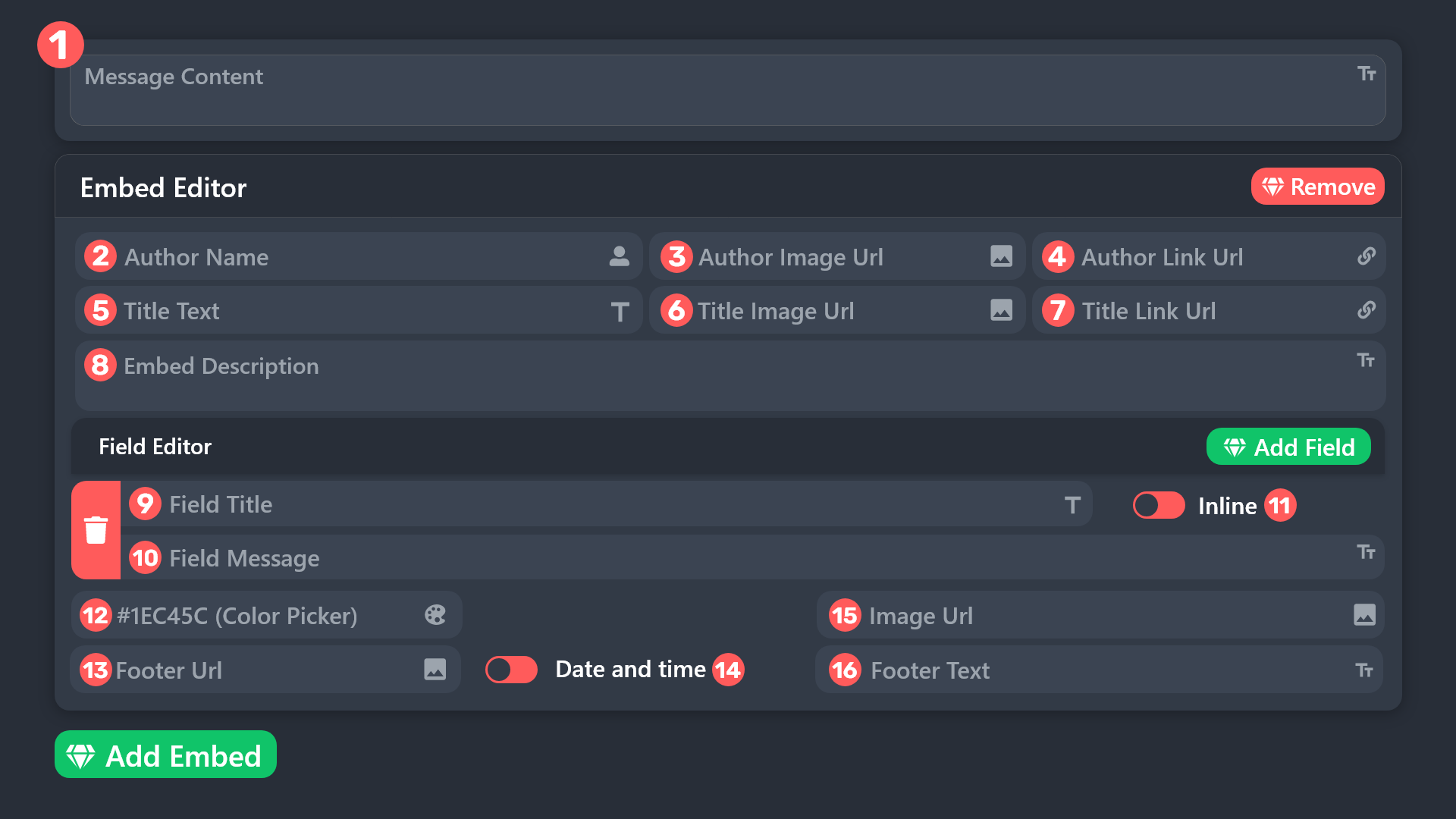
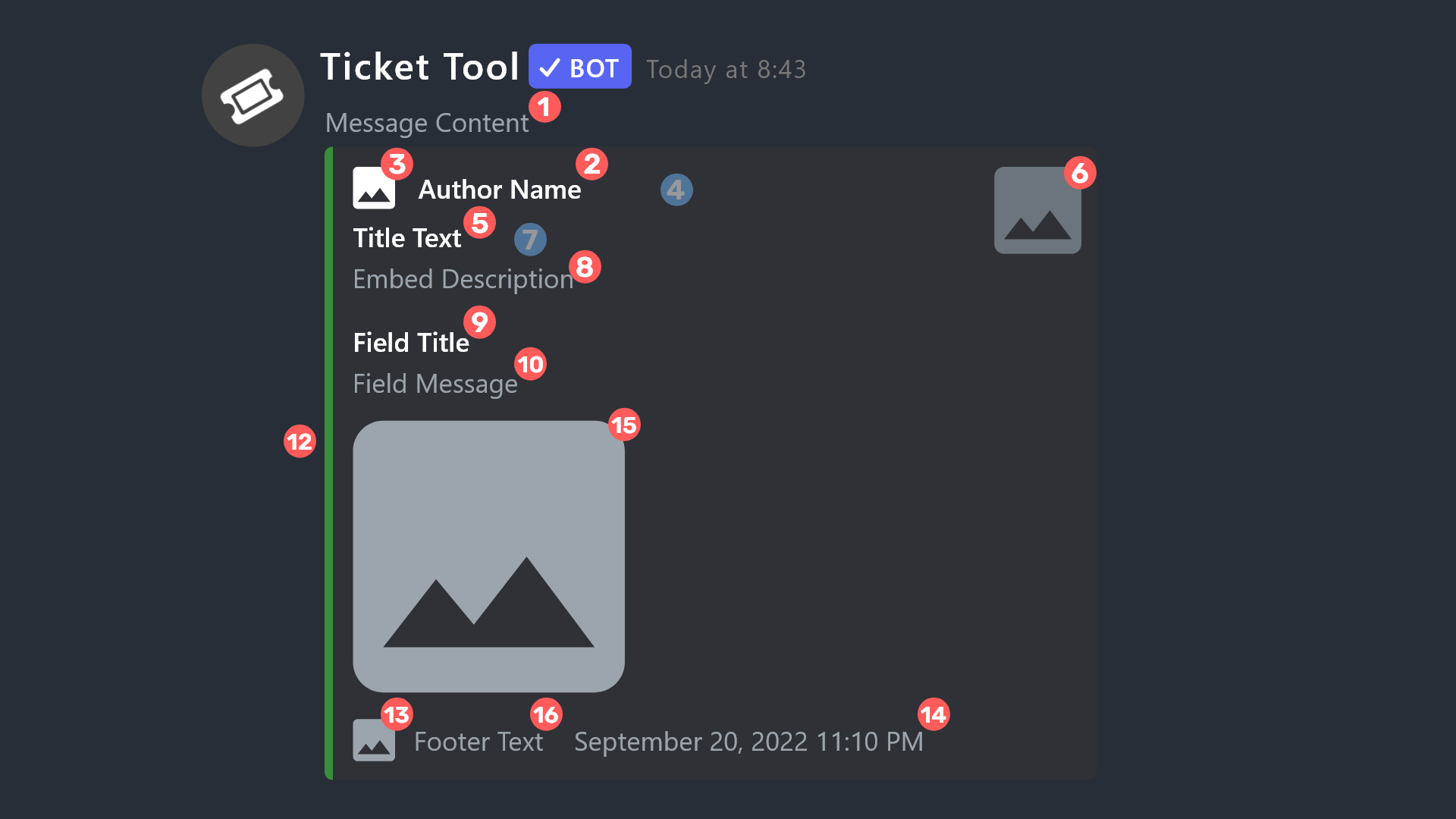
Dashboard > Panel Configs > Panel > Edit panel message - Embed editor and Field editor
For Ticket open :
Dashboard > Panel Configs > Ticket > Edit ticket message - Embed editor and Field editor
humble sequoiaBOT
The ticket name is the default channel name of all tickets. To edit it, go to your Dashboard > Panel Configs > Ticket. There you can edit the channel name of opened and closed tickets. You can also use variables in there.

 Note: This is a premium feature
austere forge
valid elbow
Another thing, is there a way for the ticket to appear with the name of the user...
Note: This is a premium feature
austere forge
valid elbow
Another thing, is there a way for the ticket to appear with the name of the user...
see above
valid elbow
Thanks
abstract gorge
Thanks so much @austere forge
iron nightBOT
Gave +1 Rep to @austere forge (current: #53 - 29)
humble sequoiaBOT
1. Go into your Dashboard
2. Open your Panel Configs tab
3. Select the panel you want to ping your support on
4. Open the Ticket options menu
5. Click on Edit Ticket Message
6. In the Message Content use one of the role mention syntax (**{@Role Name}**/**{Role ID}**)
7. Save changes
Note: For this to work properly, Ticket Tool requires the Mention Everyone permission. Or the role must have the Allow anyone to @mention this role setting enabled
austere forge
foggy lodge
how to tag staff role in the ticket
pls don't ping staff, see above
cloud sage
??
 austere forge
foggy lodge
<@225349654974431232> its not tagging though
austere forge
foggy lodge
<@225349654974431232> its not tagging though
Rules
4 | Actions against staff members
Pinging staff is prohibited. Do not do it anywhere, not inside of tickets, not anywhere.
Just ask, no need to ping a staff.
foggy lodge
how tell what to do its showing that its taged no ping come from it


support staff is not pinging though
austere forge
foggy lodge
support staff is not pinging though
use {@Role Name}
foggy lodge
ok
 vagrant gazelle
'Is there any vacancy for a translator?
abstract gorge
So I just had someone pull a ticket and they got a Moderator role 😂 How do I fix that?!
austere forge
abstract gorge
So I just had someone pull a ticket and they got a Moderator role 😂 How do I fi...
Dashboard > Panel configs > Ticket Ticket Opened Roles make sure no roles are assigned
iron nightBOT
Gave +1 Rep to @austere forge (current: #52 - 31)
austere forge
vagrant gazelle
'Is there any vacancy for a translator?
When we recruit staff, messages appear in this channel : #📣│server-news
cloud sage
.
valid elbow
I mean, how do I put them private?
 cedar niche
Hi, I don't understand why these tickets don't go to the "tickets close" channel, help me please

 humble sequoiaBOT
facu's issue has been solved in another channel.
abstract folio
cedar niche
Hi, I don't understand why these tickets don't go to the "tickets close" channel...
dashboard - panel config - category - category closed (and put the category you want)
cedar niche
abstract folio
dashboard - panel config - category - category closed (and put the category you ...


 violet jacinth
is there a way to make a certain command send with automations based on who claimed it? ik u can have one send when a ticket is claimed but im trying to have it send a specific command based on who claims it
restive condor
violet jacinth
is there a way to make a certain command send with automations based on who clai...
Hi there, you could try using the {claim.user} variable - What exactly are you trying to achieve?
restive condor
cedar niche
Hi there, may you create a brand new channel under the ''Tickets Closed'' category and running /debug there please
abstract gorge
austere forge
Dashboard > Panel configs > Ticket `Ticket Opened Roles` make sure no roles are ...
Thanks again! @austere forge
iron nightBOT
Gave +1 Rep to @austere forge (current: #47 - 33)
violet jacinth
restive condor
Hi there, you could try using the ``{claim.user}`` variable - What exactly are y...
so when it sees a certain person claim it it could send a different set of text for said person?
restive condor
violet jacinth
so when it sees a certain person claim it it could send a different set of text ...
By text to said person you mean a DM to the user who clamed?
violet jacinth
restive condor
By text to said person you mean a DM to the user who clamed?
so like in my server we have custom commands for support users that paste a chunk of text in the ticket based on who the support user is that is doing the ticket i wanted to know if it was possible to make it to where when its claimed it does this but is able to differentiate and send different "commands" or inputted bits of text in the ticket based on which member of support pressed claim
restive condor
violet jacinth
so like in my server we have custom commands for support users that paste a chun...
A custom claim message wouldn't work as it's different for each time.
So, what you could is make a different custom command messages for each staff member for them to run once claimed, either by having their own mention there already pre-set or by including the {claim.user} variable
violet jacinth
restive condor
A custom claim message wouldn't work as it's different for each time.
So, what ...
right thats the roadblock i was running into so if i used claim user would it be any different than just making them a command to run with a prefix?
restive condor
violet jacinth
right thats the roadblock i was running into so if i used claim user would it be...
If every one has their own custom one then it wouldn't make a difference, no
violet jacinth
restive condor
If every one has their own custom one then it wouldn't make a difference, no
got it thanks for the help
iron nightBOT
Gave +1 Rep to @restive condor (current: #15 - 312)
 spiral cave
Is there a way to transfer premium from one discord to another?
restive condor
spiral cave
Is there a way to transfer premium from one discord to another?
Hi there, how exactly did you subscribe to premium?
If you provide me with your server name or ID, I can check it for you
spiral cave
What do you mean how did I subscribe?
1137584076136661093
Server id
That's the one that currently holds premium
restive condor
spiral cave
What do you mean how did I subscribe?
I meant, did you subscribe via Discord/Key/Old Payment provider
It looks like you are subscribed via Discord
Unfortunately, Discord doesn't currently have a way to transfer subscriptions.
You will have to cancel it and re-subscribe on the new server
humble sequoiaBOT
<:TicketToolOffline:1018980643092312155> Cancel your subscription
We're sorry to see you go!
To cancel your Ticket Tool Premium Subscription, just head over to your User Settings in Discord, then Subscriptions. Look for Premium Apps and click on Manage Subscriptions. There you can cancel your subscription at the end of your billing cycle.

User Settings > Subscriptions > Premium Apps > Manage Subscriptions > Cancel
valid elbow
Hello, how can I configure what's written in the footer of the embed message for opening a ticket, and what's written at the top?
heavy crag
valid elbow
Hello, how can I configure what's written in the footer of the embed message for...
Hello, read the following two embeds
humble sequoiaBOT
The Ticket Message is the first message sent by the bot on a new ticket. To customize it head over to your Dashboard ➞ Panel Configs ➞ Ticket ➞ Edit Ticket Message
The panel message is where people react to make a ticket. To customize it head over to your Dashboard --> Panel Configs -> Panel -> Edit Panel Message
 heavy crag
Then simply select 'embed editor' and you'll have the option to edit the footer
valid elbow
heavy crag
Hello, read the following two embeds
Thank you very much
iron nightBOT
Gave +1 Rep to @heavy crag (current: #69 - 19)
valid elbow
heavy crag
Then simply select 'embed editor' and you'll have the option to edit the footer
Hello, but I was referring to this, where it says "Ticket in the image"
 heavy crag
humble sequoia
heavy crag
humble sequoia
It would be this one @valid elbow
valid elbow
heavy crag
It would be this one <@1050920724283531294>
Ah, excuse me very much, I use a translator and sometimes I don't understand much, forgive me, have a nice day and thank you
iron nightBOT
Gave +1 Rep to @heavy crag (current: #69 - 20)
abstract gorge
A random question - can the ticket names bename of creator instead of numbers, or no?
 round minnow
Good day.
I require assistance.
Would it be possible to ping support team members once a ticket if opened? For example, when a user opens a ticket the support team moderators shall be pinged in that ticket.
I'm within the editor currently, however, I am unaware how to ping the desired members from the editor.
ionic path
How to automatically ping my support team on a ticket?
1. Go into your Dashboard
2. Open your Panel Configs tab
3. Select the panel you want to ping your support on
4. Open the Ticket options menu
5. Click on Edit Ticket Message
6. In the Message Content use one of the role mention syntax (**{@Role Name}**/**{Role ID}**)
7. Save changes
Note: For this to work properly, Ticket Tool requires the Mention Everyone permission. Or the role must have the Allow anyone to @mention this role setting enabled
ionic path
round minnow
Good day.
I require assistance.
Would it be possible to ping support team memb...
Hey there! Please read the above
 restive condor
abstract gorge
A random question - can the ticket names bename of creator instead of numbers, o...
restive condor
abstract gorge
A random question - can the ticket names bename of creator instead of numbers, o...
Hi, you can use the {ticket.owner.name} variable
abstract gorge
Do I just insert this into the ticket template like where it would ping their name? 🙂
restive condor
abstract gorge
Do I just insert this into the ticket template like where it would ping their na...
My apologies. Nope, Dashboard > Panel Configs > Ticket > Ticket Opened Name
humble sequoiaBOT
The ticket name is the default channel name of all tickets. To edit it, go to your Dashboard > Panel Configs > Ticket. There you can edit the channel name of opened and closed tickets. You can also use variables in there.
Note: This is a premium feature
abstract gorge
restive condor
My apologies. Nope, ``Dashboard`` > ``Panel Configs`` > ``Ticket`` > ``Ticket Op...
Absolutely beautiful! Thank you @restive condor
iron nightBOT
Gave +1 Rep to @restive condor (current: #15 - 314)
round minnow
ionic path
How to automatically ping my support team on a ticket?
> **1.** Go into your Da...
Wonderful, thank you.
iron nightBOT
Gave +1 Rep to @ionic path (current: #46 - 36)
ionic path
No worries!
 hot musk
How to make a member can do more then 1 ticket
restive condor
hot musk
How to make a member can do more then 1 ticket
Hey there! Dashboard > Panel Configs > Limits
hot musk
Thx for help
wispy aspen
hi! i wanna make tickets for people to vent in, but i can't get the permissions right. can someone help a girl out??
round minnow
Are image permissions automatically allowed within tickets or would it require adjusting?
restive condor
round minnow
Are image permissions automatically allowed within tickets or would it require a...
Hey there! No, Dashboard > Panel Configs > Permissions > Ticket Owner Permissions - Edit Opened > 
ATTACH FILES
restive condor
wispy aspen
hi! i wanna make tickets for people to vent in, but i can't get the permissions ...
Hi, how can I help?
What exactly seems to be wrong with the permissions?
wispy aspen
restive condor
Hi, how can I help?
either everyone can see the ticket or they don't have access
restive condor
wispy aspen
either everyone can see the ticket or they don't have access
Dashboard > Panel Configs > Permissions > Everyone Role Permissions - Edit Opened > 
VIEW CHANNEL
After that, create a brand new ticket and see if it works as intended now

 shadow jewel
Hi guys, I have an issue and hopefully someone can help.
I sent some eth to my tangem wallet. Did it via the eth main chain, I can even see the transaction within the app but the balance is still 0. Any idea what is going on?
humble sequoiaBOT
⚠️ You're in the wrong place
We provide support for Ticket Tool Discord bot and cannot help you with whatever issue you have.
- We don't know which Support Team you should contact to get this issue resolved, and unfortunately we won't be able to accurately tell you.
If you don't have any further questions regarding our bot Ticket Tool, please close this ticket
restive condor
wispy aspen
i think this is the issue
That seems right.
Is the channel still visible to the entire server?
wispy aspen
restive condor
That seems right.
Is the channel still visible to the entire server?
it shouldn't be
 remote dove
I can see it
wispy aspen
remote dove
I can see it
my channel??
remote dove
Ss, no. I didn't read the whole thread
 stable tusk
Hello ,
Can I add user to ticket by Mention him only in ticket ?
wispy aspen
restive condor
That seems right.
Is the channel still visible to the entire server?
it won't let me remove myself
wispy aspen
can someone help me out please?
 azure berry
How to mention someone to a ticket they don't have access to view?
 fossil steppe
preciso permissao para entrar no jogo
 tight mason
shadow jewel
Hi guys, I have an issue and hopefully someone can help.
I sent some eth to my ...
tight mason
shadow jewel
Hi guys, I have an issue and hopefully someone can help.
I sent some eth to my ...
Wrong ticket server mate
 grave matrix
Hey can anyone help me?
Failed: Invalid Form Body components[0].components[0].emoji.name[BUTTON_COMPONENT_INVALID_EMOJI]: Invalid emoji
heavy crag
grave matrix
Failed: `Invalid Form Body
components[0].components[0].emoji.name[BUTTON_COMPONE...
It's an invalid emoji
humble sequoiaBOT
This error indicates you have selected an invalid emoji, i.e. an emoji the bot isn't capable of using, in a button field
Which Emoji?
This depends upon which action the error is appearing, the most common cases are the Create Ticket button or one of your Dropdown emojis. You can visit your Button's List to find all available buttons and find the conflicting one by yourself.
Why doesn't the bot accept it as valid?
- You selected an emoji that doesn't exist anymore, i.e. that has been deleted
- You wrote text there, instead of an emoji (or in addition to an emoji)
- You entered a code for a custom emoji from a server that the bot is not a member of
- You entered a custom emoji code incorrectly
- You're on iPhone and entered an emoji using the phone's emoji pad (use the emoji selector in the website instead)

 civic wagon
@grave matrix refer to the embed above ^
 buoyant hare
Hey, I wanted to create ticket in a server, but it said it's full and I can't create a ticker
Ticket*
 hasty hazel
buoyant hare
Hey, I wanted to create ticket in a server, but it said it's full and I can't cr...
hasty hazel
buoyant hare
Hey, I wanted to create ticket in a server, but it said it's full and I can't cr...
I created one earlier and had no issues. Try clicking on this: #🎫│make-a-ticket and see if it works. That's what i did within the general chat. (if you already did this, then render me useless LOL)
humble sequoiaBOT
━━ Satoru Gojo's inquiry has been moved to a ticket ━━
 daring matrix
Hey, my closed tickets are not going to archieved tickets section
How can I sort this out??
humble sequoiaBOT
━━ User's inquiry has been moved to a ticket ━━
 versed sphinx
How to configure ticket tools to automatically disappear the ticket after it is closed?
limber portal
versed sphinx
How to configure ticket tools to automatically disappear the ticket after it is ...
Hi, do you want tickets to automatically delete?
versed sphinx
yes
 ionic fiber
Hello, I have two questions
- In step 2 there is a task with a referral system, I invited a person using my link, he went through step 1 and I didn’t count him as a referral, the link is correct, I checked this before writing here, is it possible to somehow fix it so that the person is counted for me? ?
- When deploying a smart contract through the metamask wallet, I endlessly give me an error when Deploying, the transaction doesn’t even load, I just click the Deploy button and it immediately gives me an error

 hollow pawn
limber portal
Hi, do you want tickets to automatically delete?
hollow pawn
limber portal
Hi, do you want tickets to automatically delete?
I want to setup dropdown style ticket like this , how can I make 2 questions like this
 merry hinge
humble sequoia
━━ *User's inquiry has been moved to a ticket* ━━
merry hinge
humble sequoia
━━ *User's inquiry has been moved to a ticket* ━━
Hi, how can I do it?
In my server
ionic fiber
hello?
humble sequoiaBOT
⚠️ You're in the wrong place
We provide support for Ticket Tool Discord bot and cannot help you with whatever issue you have.
- We don't know which Support Team you should contact to get this issue resolved, and unfortunately we won't be able to accurately tell you.
If you don't have any further questions regarding our bot Ticket Tool, please close this ticket
limber portal
ionic fiber
Hello, I have two questions
1. In step 2 there is a task with a referral system,...
^^
humble sequoiaBOT
The Drop-down menu or Select Menu replaces the buttons on your panel message and uses a drop-down menu with all of your panels. To set this up, go to your Panel Configs and select your main Panel.
<:Numbericons1:1018864164032225340> Enable Select Style
First you enable Select Style. Then you add an item in the Dropdown Editor. Now you can start editing your dropdown!
<:Numbericons2:1018864168041971712> Dropdown Editor
Each line in the dropdown editor represents a line in the drop down menu on discord. You can add more "Items", by clicking on
First you select a panel. That's the panel this option will open a ticket for. DONT select the same panel twice. Each option should have a different Panel
After that, you can put a Display. This is the title of this option and will appear in the drop down menu. The *Description can be set right after that, which will be below the title in grey.
Additionally you can select an emoji, that will be shown in front of each option. You can either manually input the ID of an emoji or select it in the selector.
Common Issues ⚠️
- Panel doesn't send? Make sure you have a valid emoji selected
- Option doesn't show up? Check if two options have the same panel in the DropDown Editor
$dropdown
limber portal
hollow pawn
I want to setup dropdown style ticket like this , how can I make 2 questions lik...
^
humble sequoiaBOT
With Ticket Tool's automation, you'll be able to customize your ticket system workflow! Using the Automation Editor you can:
- Chose out of 6 different triggers
- Set a Message Watcher to wait for a message for a given time, or to wait for the absence of them
- Add delays on the execution of actions after the trigger or watcher finds a message!
Automation Command
Automations can be stopped, by running the /automation stop command inside the ticket you want it to stop in. Restart it with /automation start You'll also be able to view the current status of the automations with /automation.
__Important Notes__
- Automation is on ALPHA TESTING PHASE, things might work unexpectedly or not at all.
- Any automation will run for a maximum of 7 days or until the ticket is closed, afterward, it will stop checking
+ You can have 5 automations per panel

$auto
limber portal
versed sphinx
yes
^^
merry hinge
humble sequoia
━━ *User's inquiry has been moved to a ticket* ━━
How can I do it in my server?
grave matrix
civic wagon
<@1170530788215898232> refer to the embed above ^
Found the solution already but thank you
iron nightBOT
Gave +1 Rep to @civic wagon (current: #33 - 101)
hollow pawn
limber portal
^
Still I can't make a 2 questions category
just opening ticket directly
hollow pawn
limber portal
^^
I want to make 1 category and In 1 category I want to ask 2 questions like that product and budget
 vagrant bronze
Can I change the name and avatar of the bot with premium bot ?
humble sequoiaBOT
User's issue has been solved in another channel.
 meager blaze
can someone help me please i have a ticket tool bot but my staff team doesnt see the ticket unless they have full perm
humble sequoiaBOT
1. Go into your Dashboard
2. Open your Panel Configs tab
3. Select the panel you want to grant access to
4. Open the General options menu
5. Select your Support Team Roles
6. Save changes
 gilded verge
humble sequoia
gilded verge
humble sequoia
@meager blaze,
gilded verge
hmmm 🤔
Panel Configs->Permissions->Edit opened Support Team Permissions->set View Channel, Send Messages, Read Message History to ✅
also, please remember that the changes made do not affect tickets that are currently open
 dire rain
hi guys, the tickets doesnt go to my chosen category
gilded verge
dire rain
hi guys, the tickets doesnt go to my chosen category
Hi, please make sure that Ticket Tool has these permissions in your category
 dire rain
gilded verge
Hi, please make sure that Ticket Tool has these permissions in your category
dire rain
gilded verge
Hi, please make sure that Ticket Tool has these permissions in your category
omg ive been watching so many yt videos and they didnt say that, anyways ty, i also have another problem, people can see others making tickets in the ticket panel channel
humble sequoiaBOT
How to edit `@everyone`'s permissions
Head over to your Dashboard ➞ Panel Configs ➞ Permission Options ➞ Everyone Role Opened/Closed and customize the base permissions for everyone in your tickets.
Note: This set of permissions may be affected by the overrides of Support Team, Additional Roles, and User permissions.
 gilded verge
that should help ^-^
dire rain
mhm no it doesnt work
gilded verge
it works only for new tickets
*if doesn't, please make sure that you picked the correct panel, if still nothing, then check user's role permissions, something may be there
 loud elk
why is it when i click manage its not doing anything
on the website
it just does nothing and refreshes
humble sequoiaBOT
Don't see your server in the dashboard?
Try using the Sync Servers button on your top center of the Dashboard page
You will possibly need to relog. Look below to see the steps on how to relog.
If this doesn't work
You should relog from the dashboard, you can do this by clicking here to log out immediately, and then log back in
Note:
You need one of these 3 things to access the dashboard.
1. Server Owner (Level: 6)
2. Server Administrator (Level: 4)
3. Dashboard Role (Level: 2)
:warning: You can check your level using the </permissionlevel:1029797400174399542> command on your Discord Server
If the bot's response is:
- @User is permission level: 0 (User)
You don't have any of the 3 levels required to access the server's dashboard
loud elk
humble sequoia
i can see it
its just not doing anything when i press manasge
other servers work tho for some reason
dire rain
restart browser?
loud elk
tried
loud elk
 gilded verge
look at the Permision Level
gilded verge
humble sequoia
and here
dire rain
im sorry to bother u miroxik74 but im dumb with discord bots, if someone made a ticket they can see the ticket itself even tho the catorgory is private
gilded verge
loud elk
i gave it max perms tho
you need level 2 (dashboard role) or higher, not bot ^^
loud elk
im a server admin tho
gilded verge
dire rain
im sorry to bother u miroxik74 but im dumb with discord bots, if someone made a ...
please wait, i can't reply now
dire rain
nw, take ur time

 gilded verge
dire rain
im sorry to bother u miroxik74 but im dumb with discord bots, if someone made a ...
gilded verge
dire rain
im sorry to bother u miroxik74 but im dumb with discord bots, if someone made a ...
tickets are not synchronized with the category so it may be a problem with user's role permissions or in the dashboard (Panel Configs->Permissions)
gilded verge
in that case please open a ticket on #🎫│make-a-ticket and describe this problem there, Staff will be with you soon ^-^

 sonic gyro
How do I Infit La Boot Tactical Premium?
gilded verge
 native hazel
I am unable to access a DC server because of this error.
native hazel
I am unable to access a DC server because of this error.
before we proceed further, let's confirm one thing. this server where you can see the error, do you have access to manage the ticket tool dashboard?
gilded verge
sonic gyro
How do I Infit La Boot Tactical Premium?
moved to #premium-support
native hazel
gilded verge
before we proceed further, let's confirm one thing. this server where you can se...
No
gilded verge
only admins of this server where you got the error can change the ticket limit,
it seems like your ticket is still open but now you don't have access to it because probably you left the server and joined again, so there is no other way but to contact with admins of this server where you got the error,
in other words, we can't help you 😦
native hazel
Ok, thanks (:
restive condor
Hi there, could I get your server name or ID?
jade topaz
Why?
 valid elbow
Hola
necesito ayuda
no me deja seleccionar varios estilos despegables en un solo panel
porque?
 oblique grove
Heyo! Is there a straightforward way in the free version to have the bot @ a specific role when the ticket is opened? Thank you!

 steel basalt
oblique grove
Heyo! Is there a straightforward way in the free version to have the bot @ a spe...
steel basalt
oblique grove
Heyo! Is there a straightforward way in the free version to have the bot @ a spe...
Yep! Have a look below
humble sequoiaBOT
Within all the messages the bot sends (both embeds and text) you can mention either channels, roles, or even users, these mentions will only send a notification to the user if they are used within a text field, e.g: a role mentioned in an embed won't ping at all the users who have that role.
For mentioning a role you can use one out of three options:
{@Role Name} ➞ Which is Case Sensitive.
{RoleID} ➞ Replace RoleId with the Id of the role you are trying to ping.
<@&RoleID> ➞ Discord's native syntax to ping roles.
<#ChannelID> ➞ Mention a channel by its ID.
<@UserID> ➞ Mention a user by its ID.
steel basalt
 analog grove
does anyone know why a user would get this error
analog grove
does anyone know why a user would get this error
Typically a Discord Issue. Just may need to give it a moment to process and/or try again.
jade topaz
I have an error in the transcription of the tickets, especially in the images, who can help me?
idle flint
jade topaz
I have an error in the transcription of the tickets, especially in the images, w...
Is it images not “saving” in your transcripts? If so, this is a premium feature
jade topaz
is there any easy way to use command integrations with tickets so that people can use certain commands in their ticket?
I have premium.
hollow pawn
hollow pawn
I want to setup dropdown style ticket like this , how can I make 2 questions lik...
@steel basalt really sorry for the ping but can you slove my issue
 tawny tundra
how do i pay the tickettool premium manually?
heavy crag
hollow pawn
<@801839875305111563> really sorry for the ping but can you slove my issue
It was already solved
heavy crag
humble sequoia
_ _
hollow pawn
heavy crag
It was already solved
I don't think so
heavy crag
humble sequoia
@hollow pawn if you read a little, you would find it.
heavy crag
heavy crag
_ _
Literally linked it here too.
hollow pawn
heavy crag
<@1033578028246257685> if you read a little, you would find it.
I tried but isn't working
heavy crag
Follow the steps properly as that is literally the answer.
hollow pawn
heavy crag
Follow the steps properly as that is literally the answer.
okay then it will gonna work like - 2 questions na? Budget and product *
hollow pawn
I want to make same system like this. Can you tell me step by step


 humble sequoiaBOT
A Discord Form lets the user answer individual questions in a pop-up Form, which then displays the answers in the ticket message. This can save time if you already know what you want to ask the user.
Setup Forms
Forms can be enabled under Panel Settings > Form Options > Edit Forms Options. In the new pop-up window, you can now enable and edit your own Form.
Form Options
You can add up to 5 questions in the Discord form. This is a Discord limitation. Each question can have a placeholder in the input field, a minimum and maximum input, multi-line, and also the option to have the answer required.
Options
Question Title ➞ Your Question goes here
Question Placeholder ➞ The placeholder text in the input field
Required ➞ If enabled, the user has to answer this question, to submit the form
Multi-Line Input ➞Allows the user to input multiple lines
Minimum and Maximum Input ➞ Set a minimum and maximum input value for the user
Displaying the Answer
To display the answers from the user, you need to enable Auto display form results on the ticket message as an additional embed
If you don't want a second embed, go into your Panel Configs > Ticket Options > Edit Ticket Message. You use the variable {create.form.x} and replace x with the number of your question. For example, the response to Question 5 can be displayed with {create.form.5}.
civic wagon
@hollow pawn refer to the embed above ^
hollow pawn
civic wagon
<@1033578028246257685> refer to the embed above ^
okay thank you very much buddy
iron nightBOT
Gave +1 Rep to @civic wagon (current: #32 - 103)
merry hinge
Hello, @pseudo glen doesnt storage my server's tickets
jade topaz
Why?
 hollow pawn
civic wagon
<@1033578028246257685> refer to the embed above ^
hollow pawn
civic wagon
<@1033578028246257685> refer to the embed above ^
Sir where to write {create.form.1}?
 merry hinge
Hello, @pseudo glen doesnt storage my server's tickets
gilded verge
merry hinge
Hello, <@557628352828014614> doesnt storage my server's tickets
Hi, what do you mean by that? Do you have errors or...
gilded verge
jade topaz
Why?
you got this because the server admins where you had ticket, activated the option to send this message after ticket was closed/deleted
merry hinge
gilded verge
Hi, what do you mean by that? Do you have errors or...
I have open a ticket
gilded verge
okay then please keep it in your ticket ^^
civic wagon
hollow pawn
Sir where to write {create.form.1}?
You don't need to do all that. Simply enable the 2nd option on forms page
 hollow pawn
civic wagon
You don't need to do all that. Simply enable the 2nd option on forms page
hollow pawn
civic wagon
You don't need to do all that. Simply enable the 2nd option on forms page
Not working bro directly creating tickets without asking question s
civic wagon
hollow pawn
Not working bro directly creating tickets without asking question s
Check that you enabled the form and saved it, as well as you did it for the same panel you're testing this on
hollow pawn
civic wagon
Check that you enabled the form and saved it, as well as you did it for the same...
 civic wagon
Then crosscheck the panels
hollow pawn
civic wagon
Then crosscheck the panels
How
steel basalt
merry hinge
_anyone can help me in <#1215283590523392010> ? it's urgent for my server_
We will attend to your ticket when someone from the team is available.
jade topaz
jade topaz
is there any easy way to use command integrations with tickets so that people ca...
Still wondering. Also how to get premium role? I pay for premium.
For now I just disabled all the other channels that it could be used in and enabled the command integrations for all channels. Effectively making it so that the command is not available in any channel which has send messages enabled but it's still available to all channels which means that newly created ticket channels can have the commands used in them. This is a workaround it's not exactly what I wanted to accomplish but it works the same.
 earnest mauve
How do I make a ticket directly with the bots staff
restive condor
earnest mauve
How do I make a ticket directly with the bots staff
Hi, you can make a ticket here: #🎫│make-a-ticket
earnest mauve
Thank you
restive condor
jade topaz
For now I just disabled all the other channels that it could be used in and enab...
Hey there! Unfortunately that's currently the only way.
Deny all exisiting channels so new tickets are not denied
humble sequoiaBOT
Thank you
Thank you for purchasing Ticket Tool Premium @hallow berry. You have now been given the <@&535595160189403136> role!
Found 5 servers in total and 1 with premium and permission
restive condor
There's your premium role^^ 
 jolly rover
how to fix it
 humble sequoiaBOT
━━ Beta's inquiry has been moved to a ticket ━━
restive condor
jolly rover
how to fix it
Hi there, could you run /debug ?
 restive condor
jolly rover
.
restive condor
jolly rover
.
Ticket Tool is missing all these permissions for that channel
 jolly rover
restive condor
Ticket Tool is missing all these permissions for that channel
jolly rover
restive condor
Ticket Tool is missing all these permissions for that channel
you see i make a same
 restive condor
jolly rover
you see i make a same
restive condor
jolly rover
you see i make a same
Ticket Tool needs all those permissions set to
jolly rover
restive condor
Ticket Tool needs all those permissions set to <:check_green:836268328640184380>
thanks alot for support
iron nightBOT
Gave +1 Rep to @restive condor (current: #15 - 317)
valid elbow
Hello, where can I configure so my server users can create more than 1 ticket at a time?
valid elbow
Hello, doesn't the bot have an option to assign other personnel a ticket that corresponds to them?
jade topaz
restive condor
There's your premium role^^ <:kinspikalove:1166562062558838894>

i love this bot
 strange cairn

 humble sequoiaBOT
⚠️ You're in the wrong place
We provide support for Ticket Tool Discord bot and cannot help you with whatever issue you have.
- We don't know which Support Team you should contact to get this issue resolved, and unfortunately we won't be able to accurately tell you.
If you don't have any further questions regarding our bot Ticket Tool, please close this ticket
 scenic jungle
What happens if you only delete a ticket instead of closing and then deleting it
 candid spire
hey! is there a way to duplicate panels?¿
 odd ocean
Не могу войти в личный кабинет
Пишет почта электронная не зарегистрирована
И пароль не пришел на почту
 humble sequoiaBOT
⚠️ You're in the wrong place
We provide support for Ticket Tool Discord bot and cannot help you with whatever issue you have.
- We don't know which Support Team you should contact to get this issue resolved, and unfortunately we won't be able to accurately tell you.
If you don't have any further questions regarding our bot Ticket Tool, please close this ticket
restive condor
candid spire
hey! is there a way to duplicate panels?¿
Hi there, yes. Use the ''CLONE'' button at the top of the Dashboard
 restive condor
scenic jungle
What happens if you only delete a ticket instead of closing and then deleting it
restive condor
scenic jungle
What happens if you only delete a ticket instead of closing and then deleting it
Hi there, you won't be able to transcript it (unless you have auto-transcripts )
restive condor
valid elbow
Hello, where can I configure so my server users can create more than 1 ticket at...
Hi, Dashboard > Panel Configs > Limits
restive condor
valid elbow
Hello, doesn't the bot have an option to assign other personnel a ticket that co...
A que te refieres exactamente?
valid elbow
restive condor
A que te refieres exactamente?
I mean, let me select something, so I can assign the ticket to a staff, instead of him pressing the assign button.
Osea, que yo seleccione algo, asi pueda asignarle yo el ticket a un staff, en vez de que el presione en el boton asignar
 stone prism
How do I get into the game?
humble sequoiaBOT
⚠️ You're in the wrong place
We provide support for Ticket Tool Discord bot and cannot help you with whatever issue you have.
- We don't know which Support Team you should contact to get this issue resolved, and unfortunately we won't be able to accurately tell you.
If you don't have any further questions regarding our bot Ticket Tool, please close this ticket
restive condor
valid elbow
Osea, que yo seleccione algo, asi pueda asignarle yo el ticket a un staff, en ve...
Ah, ya veo. Puedes usar el comando $claim y mencionar/poner el ID del usuario
$claim User (ID) // /claim (User [ID])
valid elbow
restive condor
Ah, ya veo. Puedes usar el comando $claim y mencionar/poner el ID del usuario
Gracias
 dull wasp
hellp how can i open a ticket
my discord user keep stugglering to open a ticket
it does eventully work
jade topaz
i need help
humble sequoiaBOT
Hello, we would love to help you, but if you don't tell us what you need help with we can't help you :(
austere forge
dull wasp
hellp how can i open a ticket
dull wasp
austere forge
<#571706435449257997> 🙂
it was hidden u have the same issue as me the onboarding hides it
 remote raptor
Is there a way to change the $ prefix to another?
austere forge
remote raptor
Is there a way to change the $ prefix to another?
yes sir
Dashboard > Server configs > Command Prefix
remote raptor
thank you
 hybrid pollen
Preciso de ajuda urgente, tem algum suporte brasileiro?
scenic plinth
Em que podemos ajudá-lo?
 blissful tendon
How do I access transcripts from before the transcript system changed? I'm trying to open old transcripts and I keep getting "Invalid Request"
hybrid pollen
scenic plinth
Em que podemos ajudá-lo?
Oi meu anjo
Eu tinha o bot vinculado ao meu cartao
e do nada parou de pagar automatico
ai eu fui tentar pagar

Deu isso
Ai o bot parou de funcionar
Meus STAFF vieram me falar

Ai eu fui pagar e não aparecia a redhot

Não aparecia, ai eu coloquei o @pseudo glen
pq o @humble sequoia ja estava dentro do servidor
Ai apareceu a REDHOT ali em cima

Mas o bot não voltou ao normal

Continua assim no site
908485617057419285 (ID DO SERVIDOR)
 rain swallow
how do i have the bot ping a server role?
i thought it was <@"role id">
pls ping me when somone can help thanks ❤️
humble sequoiaBOT
1. Go into your Dashboard
2. Open your Panel Configs tab
3. Select the panel you want to ping your support on
4. Open the Ticket options menu
5. Click on Edit Ticket Message
6. In the Message Content use one of the role mention syntax (**{@Role Name}**/**{Role ID}**)
7. Save changes
Note: For this to work properly, Ticket Tool requires the Mention Everyone permission. Or the role must have the Allow anyone to @mention this role setting enabled
austere forge
rain swallow
how do i have the bot ping a server role?
^^
scenic plinth
hybrid pollen
908485617057419285 (ID DO SERVIDOR)
Eu fiz um ingresso para você, consulte-o.
rain swallow
ok so {@role name}
 echo hull
HI
 knotty socket
is anyone online to help with my purchase?
 wind jolt
Hi everyone
I'm experience community
Moderator I have 3years of work experience nd I believe I can handle your group control spam band fruad keep the members on going through while you are not online atm. I guarantee 12 hours a day
 strong anvil
rain swallow
i thought it was <@"role id">
strong anvil
rain swallow
i thought it was <@"role id">
no quotes
scenic plinth
wind jolt
I'm experience community
Moderator I have 3years of work experience nd I believe...
Unfortunately we are not looking for any new moderators. Sorry.
scenic plinth
knotty socket
is anyone online to help with my purchase?
If it is in relation to Ticket Tool, yes. If not, no, and we cannot tell you where to go to get help.
 lusty sedge
Do you guys have an invite link with no defult permissions?
Because i dont want to have the ticket tool bot role, i already have a bot perms role and i hate that i cant delete the ticket tool role
scenic plinth
No, because the Ticket Tool role is a integrated role.
lusty sedge
scenic plinth
No, because the Ticket Tool role is a integrated role.
ok so
im trina figure out how to explain this
so i have my own discord bot right
and i was playing with it
and figured out that if you ahve an invite link requesting no permissions then it will not create the role
and the way you used to be able to do that would be just unchecking all the perm boxes but discord made it so you cant anymore
 bronze citrus
Anyone know about this auto claiming tickets thing? There's people in a server that I'm in that keep auto claiming tickets somehow. I dont understand is this a feature of Premium or are they using some third party tool? They're annoying
 balmy dome
Hey, been using Ticket Tools for a long time, but I was wondering if I can lock a panel behind a specific role. (eg: User needs lvl 10 to open a ticket)
limber portal
bronze citrus
Anyone know about this auto claiming tickets thing? There's people in a server t...
Hi there, ticket tool doesn’t offer an auto claiming feature
bronze citrus
limber portal
Hi there, ticket tool doesn’t offer an auto claiming feature
So then how are these people auto claiming tickets? Is it a third party tool? I dont think such a thing exists right?
limber portal
balmy dome
Hey, been using Ticket Tools for a long time, but I was wondering if I can lock ...
Hi, you can set allowed / disabled roles in dashboard > panel configs > buttons > create ticket button
balmy dome
limber portal
Hi, you can set allowed / disabled roles in dashboard > panel configs > buttons ...
Thank you!
iron nightBOT
Gave +1 Rep to @limber portal (current: #10 - 372)
balmy dome
limber portal
Hi, you can set allowed / disabled roles in dashboard > panel configs > buttons ...
here correct?
 limber portal
Yep
hollow pawn
hollow pawn
Not working bro directly creating tickets without asking question s
@limber portal
limber portal
Don’t ping staff, it’s against the rules
bronze citrus
bronze citrus
So then how are these people auto claiming tickets? Is it a third party tool? I ...
Any idea Sacrifice?
hollow pawn
limber portal
Don’t ping staff, it’s against the rules
sorry can you solve my problem?
limber portal
bronze citrus
So then how are these people auto claiming tickets? Is it a third party tool? I ...
Can you define what you mean by auto claiming tickets? As soon as one opens, they claim it?
limber portal
It may be third party yes
bronze citrus
I haven't heard or seen any third party tool that can do that tho?
limber portal
hollow pawn
sorry can you solve my problem?
Apologies however I am slightly busy, I’d recommend you make a ticket
limber portal
bronze citrus
I haven't heard or seen any third party tool that can do that tho?
It is possible with tools that break discords tos.
bronze citrus
Do you have any possible ones in mind? I need some definitive proof that they're using something like that
Because they're impeding on my job
hollow pawn
limber portal
Apologies however I am slightly busy, I’d recommend you make a ticket
okay
restive condor
Hey there! Dashboard > Panel Configs > Category
 tall mirage
hey, how can I change the maximum tickets per panel per user
and also how can I edit the message which which is sent in the ticket when the ticket is created.
restive condor
tall mirage
hey, how can I change the maximum tickets per panel per user
Hi there, Dashboard > Panel Configs > Limits
restive condor
tall mirage
and also how can I edit the message which which is sent in the ticket when the t...
Dashboard > Panel Configs > Messages > Edit Ticket Message
 restive condor
tall mirage
how do I make the ping in the embed work
restive condor
tall mirage
how do I make the ping in the embed work
Place an & after the @ <@&roleID>
tall mirage
alr
 stoic field
?
 restive condor
stoic field
?
restive condor
stoic field
?
Hi, could I get your server name or ID?
stoic field
restive condor
Hi, could I get your server name or ID?
1215316585225388042
restive condor
stoic field
1215316585225388042
You have text in all the emoji button fields - Please only place an emoji in the button emoji field.
Text must go in the below, button text field
 stoic field
restive condor
You have text in all the emoji button fields - Please only place an emoji in the...
stoic field
restive condor
You have text in all the emoji button fields - Please only place an emoji in the...
ok
 fiery tangle
Do I NEED to be on pc to get this to work? X2 charged me for 1 month premium lmao

 crystal seal
is there a way to set the max ticket limit to 1 if i have two panels. so like, if the user opens a ticket with panel 1, they can’t open one with panel 2
humble sequoiaBOT
━━ osrsaccounts's inquiry has been moved to a ticket ━━
gilded verge
crystal seal
is there a way to set the max ticket limit to 1 if i have two panels. so like, i...
server configs->global ticket limit and set to 1
iron nightBOT
Gave +1 Rep to @gilded verge (current: #7 - 516)
 rugged obsidian
gilded verge
server configs->global ticket limit and set to 1
rugged obsidian
gilded verge
server configs->global ticket limit and set to 1
how do i make it bigger

like its to close to eachother
more spread out
gilded verge
rugged obsidian
how do i make it bigger
i can't help you and please do not use reply-ping to the message that wasn't for you
valid elbow
Hello, how can I join the other panels to the main one?
humble sequoiaBOT
For more convenient use of multipanels, you can now combine panels on the dashboard. This will allow you to directly send the multipanel from the dashboard or via the $panel ID command.
Where can I find this?
You can find this setting on the Dashboard -> Panel Configs -> Panel -> Attached Panels
Note: if you're attaching all the panels to a panel called English, don't include English in the attached panel's box (If you do this, it will create a duplicate)
This will put all buttons from all of your panels on one message. The message is the panel message from the panel you're combining these panels in.
 vernal temple
Hey, anybody having issues with the bot? Getting "Interaction has failed" when trying to delete a ticket via button.
humble sequoiaBOT
━━ User's inquiry has been moved to a ticket ━━
 rigid parrot
Hey @restive condor I'm the co-founder of domino.run, a workflow automation tool for web3 teams.
We'd like to integrate tickettool via it's webhooks into Domino, so your users connect ticketool with dozens of other apps like Slack, CRM tools and multichannel ticket support apps.
Who do I get in touch with about enabling the Webhooks feature for our account so we can start integrating?
restive condor
rigid parrot
Hey <@795710289425334303> I'm the co-founder of domino.run, a workflow automatio...
Hi there, please #🎫│make-a-ticket so we can help you further
rigid parrot
restive condor
Hi there, please <#571706435449257997> so we can help you further
Should I just copy paste this same message in the ticket as well?
restive condor
rigid parrot
Should I just copy paste this same message in the ticket as well?
Sure, that works 😄
 latent fog
does anyone know why matchmaking isnt working
humble sequoiaBOT
⚠️ You're in the wrong place
We provide support for Ticket Tool Discord bot and cannot help you with whatever issue you have.
- We don't know which Support Team you should contact to get this issue resolved, and unfortunately we won't be able to accurately tell you.
If you don't have any further questions regarding our bot Ticket Tool, please close this ticket
 elfin dawn
Hi! So a silly staff member in one of the servers I'm in forgot to transcript a ticket before deleting it; is there any backup/does it get stored anywhere even temporarily?
 restive basin
@zenith breach
restive condor
 dusky citrus
is there a yearly deal for the ticket tool?
dusky citrus
is there a yearly deal for the ticket tool?
Hey there! You can buy premium directly from us for longer period of times, yes
humble sequoiaBOT
PayPal - paypal@tickettool.xyz
BitCoin - 3HhKKAdb9eEvCe2tvzB8bAa8nebHY6qcPA
LiteCoin - MEQX3knLAuotrKnvk3HDNBK5gdRn6PZhHy
Prepay/Direct Payment
To prepay send the payment using your desired method - Available options listed bellow.
⚠️ $18 per 3 months. ⚠️
$66 per year.
(If using the direct payment option, you need to be paying for at-least 3+ months.)
Regular Prices when paying within Discord:
$5.99/per month
Once your payment is sent let us know so we can confirm and get you your key.
- Purchases done with this method are non-refundable.
<:paypal:924596360840372234> Paypal ("Goods and Services" or "Family and Friends")
paypal@tickettool.xyz
<:bitcoin:924638849135689749> BTC - Bitcoin
3HhKKAdb9eEvCe2tvzB8bAa8nebHY6qcPA
<:Litecoin:972176945972383815> LTC - LiteCoin
MEQX3knLAuotrKnvk3HDNBK5gdRn6PZhHy
I sent the payment now what?
After you send the payment, please send a screenshot with proof of payment, our <@&615146349700186112> will verify your payment and will get you setup. For crypto payments, we are waiting for at least ONE verification.
All prices in USD - 3 months min for direct payment
After a successful payment
Provide us with your server ID, where you want your premium key to be redeemed. This has to do be done by us
restive condor
If you're planning on purchasing right now, let me know so I can bring you into a ticket
restive condor
elfin dawn
Hi! So a silly staff member in one of the servers I'm in forgot to transcript a ...
Hi there! Unfortunately, we don't store any transcript for privacy reasons.
If a transcripts was not saved before deletion, it's gone.
(Auto-transcripts are available if you have a premium subscription)
restive condor
restive basin
<@934937796974608446>
Hi, please don't randomly ping users.
Is there anything we can help you with?
elfin dawn
restive condor
Hi there! Unfortunately, we don't store any transcript for privacy reasons.
If ...
No worries, thank you for clarifying!
iron nightBOT
Gave +1 Rep to @restive condor (current: #15 - 319)
restive condor
Hi there, what exactly are you referring to?
Yes, we do have premium subscriptions
humble sequoiaBOT
 Faster Premium Bot
Automatic Transcripts
Full Customization
Direct Messages
Ticket Automation
Thread Style Ticketing
Premium Support
Scheduled Panel Availability
Integrations
You can purchase premium here:
Price
$6 - Monthly
$66 - Yearly
 Premium
restive condor
humble sequoia
Premium
restive condor
humble sequoia
- Claiming
- Advanced Ticket Statistics
Allows you to customise all features that are locked/restricted with the free version.
All messages, with no limits, all ticket/panel options, allows you to request webhooks...etc
(You can't currently changed the bot's pfp, but it's something our developers are working on)
No, we don't have custom bots
You would get a premium bot, with better hosting though @humble sequoia
No, as per Discord limitations
But you can change the footer, image, embed side colour
All Discord embeds are gray
Claiming, allows you to claim a tickets for better tracking and handling of your staff
Advanced Ticket Statistics, shows you different Statistics.
How many tickets have been created after/during a specific period of time and a ranking of how many tickets each staff member has claimed
The text at the bottom of the embed
In this example, the blue image would be the footer icon and the "powered by ..." would be the footer text
Just to be clear before you purchase anything, the bot shown on the two previous screenshots isn't the same as Ticket Tool - @pseudo glen
dusky citrus
restive condor
Hey there! You can buy premium directly from us for longer period of times, yes
How much?
Is there a price difference?
restive condor
dusky citrus
Is there a price difference?
Yes, we offer an 8% for yearly purchases
It's $66 for the entire year, whilst it would be $72 (6×12) if you subscribed monthly
dusky citrus
restive condor
Yes, we offer an 8% for yearly purchases
It's $66 for the entire year, whilst i...
And how would i purchase that here
restive condor
We don't have lifetime subscriptions unfortunately.
You can subscribe monthly or buy in advance for a discounted price
restive condor
dusky citrus
And how would i purchase that here
Please #🎫│make-a-ticket
dusky citrus
restive condor
Please <#571706435449257997>
Last question do u guys also provide white labeling?
humble sequoiaBOT
━━ Skull's inquiry has been moved to a ticket ━━
restive condor
dusky citrus
Last question do u guys also provide white labeling?
Currently no, but it's something our development team is working on releasing
humble sequoiaBOT
Ticket Tool Custom Avatar
As of now, you are not able to change Ticket Tool's profile picture, nonetheless, our Development Team is working on the release of white labels, this is your own custom bot!
For the time being, you can change the bot's nickname by right-clicking the bot in the user list on your server and clicking Change Nickname
$avatar
dusky citrus
restive condor
Currently no, but it's something our development team is working on releasing
Do u have an eta on that
restive condor
Nope
humble sequoiaBOT

About ETA
We don't provide any kind of ETA for the release of updates to the bot due to the changing nature of the development process. Thanks for being patient and choosing Ticket Tool!
restive condor
Sadly, we don't offer that yet but we have a premium bot with better hosting for our premium users - @humble sequoia
dusky citrus
restive condor
Sadly, we don't offer that yet but we have a premium bot with better hosting for...
Kk thanks
iron nightBOT
Gave +1 Rep to @restive condor (current: #15 - 320)
 rapid kernel
I have a question: how do I do this?
 humble sequoiaBOT
A Discord Form lets the user answer individual questions in a pop-up Form, which then displays the answers in the ticket message. This can save time if you already know what you want to ask the user.
Setup Forms
Forms can be enabled under Panel Settings > Form Options > Edit Forms Options. In the new pop-up window, you can now enable and edit your own Form.
Form Options
You can add up to 5 questions in the Discord form. This is a Discord limitation. Each question can have a placeholder in the input field, a minimum and maximum input, multi-line, and also the option to have the answer required.
Options
Question Title ➞ Your Question goes here
Question Placeholder ➞ The placeholder text in the input field
Required ➞ If enabled, the user has to answer this question, to submit the form
Multi-Line Input ➞Allows the user to input multiple lines
Minimum and Maximum Input ➞ Set a minimum and maximum input value for the user
Displaying the Answer
To display the answers from the user, you need to enable Auto display form results on the ticket message as an additional embed
If you don't want a second embed, go into your Panel Configs > Ticket Options > Edit Ticket Message. You use the variable {create.form.x} and replace x with the number of your question. For example, the response to Question 5 can be displayed with {create.form.5}.
austere forge
rapid kernel
I have a question: how do I do this?
hi there, see above ^^
rapid kernel
Thank you very much
 mystic heron
how do i grant people perms to see the tickets without giving them admin
rapid kernel
austere forge
hi there, see above ^^
Sorry for the inconvenience, I just didn't understand the explanation
 humble sequoiaBOT
1. Go into your Dashboard
2. Open your Panel Configs tab
3. Select the panel you want to grant access to
4. Open the General options menu
5. Select your Support Team Roles
6. Save changes
austere forge
mystic heron
how do i grant people perms to see the tickets without giving them admin
hi there, see above ^^
austere forge
rapid kernel
Sorry for the inconvenience, I just didn't understand the explanation
Tell me what's wrong? 🙂
rapid kernel
rapid kernel
Sorry for the inconvenience, I just didn't understand the explanation
How do I go to the settings tab? @austere forge
humble sequoiaBOT
Ticket Tool - Ticketing without clutter - The #1 discord Ticketing bot
austere forge
rapid kernel
How do I go to the settings tab? <@225349654974431232>
see above
Dashboard > Panel configs > Forms
rapid kernel
austere forge
see above <:this:894279341108772914>
Dashboard > Panel configs > `Forms`
this ?
 austere forge
rapid kernel
this ?
austere forge
rapid kernel
this ?
yup, pls follow the embed message sent previously to help you
don't ping staff.
humble sequoiaBOT

فريق الدعم الفني العربي
عميلنا العزيز ان كنت تبحث عن مساعدة يرجى فتح تكت خاص بفريق الدعم الفني العربي
اذهب الى#🎫│make-a-ticket
ثم قم بلضغط على الايموجي الاتي (🇯🇴)
austere forge
rapid kernel
austere forge
<:this:894279341108772914>
I have a question: How, for example, do Role staff only look at a ticket?
 eternal vessel
helpme, no one can open ticket
 idle flint
eternal vessel
helpme, no one can open ticket
idle flint
eternal vessel
helpme, no one can open ticket
Check your Create Ticket button, see if you have restricted the permissions to either only allow or to stop certain roles from using the button
eternal vessel
idle flint
Check your Create Ticket button, see if you have restricted the permissions to e...
love u
 tawdry kayak
Can I setup on my phone? And if so how?
humble sequoiaBOT
First you will want to invite the bot to your server. Once the bot is in your server, you can manage your server in the dashboard.
To create a panel we are going to need to head over to the Panel Configs Tab on the Dashboard.
Once at the dashboard we will need to click Create Panel.
Enter a panel name (Fill in any optional settings you want).
Click Create Panel and you are ready to get started with configuring your panel.
An example of a creating a panel is shown below.
Once the panel has been created, use the blue Send button and select the channel you want the panel to be sent to.
The Panel wasn't send
Use the </debug:ID> command to diagnose possible permission issues with the bot.
idle flint
tawdry kayak
Can I setup on my phone? And if so how?
The basic setup guide is above. It can all be done via mobile
 prime bobcat
this will be the silliest question but i'm not a mod, just the owner of a server and am quite in a rush to set this up. How do i add the ticket button to a message?
my mods are asleep atm lol
civic wagon
prime bobcat
this will be the silliest question but i'm not a mod, just the owner of a server...
You cannot add a ticket button to a message sent by someone else. Refer to the embed below for steps to create an embed and send it in a channel
stark runeBOT
1. Invite Ticket Tool to your server
First you will want to invite the bot to your server. Once the bot is in your server, you can manage your server in the dashboard.
2. Create a Panel
To create a panel we are going to need to head over to the panel configs on the dashboard.
Once at the dashboard we will need to click Create Panel.
Enter a panel name (Fill in any optional settings you want).
Click Create Panel and your ready to get started with configuring your panel.
An example of a creating a panel is shown below.
3. Send the Panel to a Channel
Once you've created a panel on the dashboard you will need to send it to a channel using send on the dashboard.
Select the channel you want your panel to be created in and click send.
For other questions checkout $help faq.
An example of a sending a panel is shown below.
Having a Problem Sending the Panel?
Do $debug in a channel with Ticket Tool and make sure it has all the necessary Discord permissions.
prime bobcat
civic wagon
You cannot add a ticket button to a message sent by someone else. Refer to the e...
thanks! no it's my own message actually 🙂 i'll check the link
civic wagon
And dw, no question is silly
iron nightBOT
Gave +1 Rep to @civic wagon (current: #32 - 104)
civic wagon
prime bobcat
thanks! no it's my own message actually 🙂 i'll check the link
For clarification, you cannot add a ticket button to any message at all. The embed must be sent by the bot itself
prime bobcat
civic wagon
For clarification, you cannot add a ticket button to any message at all. The emb...
oh!! gotcha
jade topaz
hello, so i was planning on purchasing @humble sequoia but I was wondering if when i buy it do my ticket transcripts last forever with the bot instead of becoming unavailable after 2 weeks
ping me whenever anyone replies 🙂
restive condor
jade topaz
hello, so i was planning on purchasing <@722196398635745312> but I was wonderin...
Hey there! Transcript links update by using the ''Direct Link'' button for both Premium and Non-premium users
jade topaz
restive condor
Hey there! Transcript links update by using the ''Direct Link'' button for both ...
so what happens after 2 weeks because ive heard you lose access to the transcript once the 2 weeks is up
restive condor
jade topaz
so what happens after 2 weeks because ive heard you lose access to the transcrip...
Transcript links now expire after 14 days, but a new transcript link is generated by using the button again
iron nightBOT
Gave +1 Rep to @restive condor (current: #15 - 321)
hollow pawn
civic wagon
For clarification, you cannot add a ticket button to any message at all. The emb...
Sir
hollow pawn
civic wagon
For clarification, you cannot add a ticket button to any message at all. The emb...
sir I trued doing that but that's not working. Bot isn't asking questions its directly creating tickets
civic wagon
hollow pawn
sir I trued doing that but that's not working. Bot isn't asking questions its di...
Please create a ticket from #🎫│make-a-ticket so that the support team can have a look at your dashboard configuration
hollow pawn
okay sure
jade topaz
Hey i just wanna know that how can i set attach fille perms to everyone by default when they create like
Like the user is allowed to send media in the ticket whenever the ticket is created
restive condor
jade topaz
Hey i just wanna know that how can i set attach fille perms to everyone by defau...
Hey there! Dashboard > Panel Configs > Permissions > Ticket Owner Permissions - Edit Opened > ATTACH FILES
rapid kernel
I have a question: How, for example, can someone open a ticket for only people to see only the staff inside the ticket?
restive condor
rapid kernel
I have a question: How, for example, can someone open a ticket for only people t...
Hey there! You can enable Command Style Tickets Dashboard > Panel Configs > Commnand Style
humble sequoiaBOT
Command Style Tickets allow you to open tickets VIA the $new or $ticket commands. This feature also allows you to open tickets for people, by using the aforementioned commands with the user's ping or ID.
You can enable this feature by heading over to your server's dashboard. Then head over to Panel Configs ➞ Settings ➞ Command Style Tickets. (GIF below shows you how to get to it as well).
This section of the panel settings also contains the following features
- Bypass channel list and watch all of them → when you enable this option, Ticket Tool will create a ticket whenever someone uses the $new or the $ticket command in a channel it has access to .
- Channel to monitor for command $new and $ticket → This is the opposite of the previous option, you can actually select in which channels Ticket Tool should look for the $new command instead of looking in the whole server.
- Delete command after creating ticket → If enabled, Ticket Tool will delete the command (whether it's
$newor$ticket) a few seconds after you run it.
 restive condor
Please let me know if you have any questions 🙏
 echo zealot
restive condor
Please let me know if you have any questions 🙏
echo zealot
restive condor
Please let me know if you have any questions 🙏
i can't open a ticket
echo zealot
echo zealot
i can't open a ticket

 elfin sorrel
echo zealot
elfin sorrel
echo zealot
does the bot got admin perms?
echo zealot
i can't open a ticket

 elfin sorrel
echo zealot
i can't open a ticket
elfin sorrel
echo zealot
i can't open a ticket
does the bot got admin perms?
echo zealot
elfin sorrel
does the bot got admin perms?
ofc
restive condor
Hey there! That's the Claiming feature ( Premium)
humble sequoiaBOT
Claiming allows you to change the ticket name, category and permissions. To use it you have to enable it first on your Dashboard > Panel Configs > Claiming
Note: This is a premium feature
 vapid nymph
restive condor
Hey there! That's the Claiming feature (<:premium_red:662032717906444329> Premi...
vapid nymph
restive condor
Hey there! That's the Claiming feature (<:premium_red:662032717906444329> Premi...
Ok, and how much is Premium
restive condor
vapid nymph
Ok, and how much is Premium
$6 / Month or $66 / Year (8% Discount)
vapid nymph
restive condor
$6 / Month or $66 / Year (8% Discount)
ouu, lovely, thank you for the help!
iron nightBOT
Gave +1 Rep to @restive condor (current: #15 - 322)
 sand meteor
hello can i buy premium ticket tool with crypto
humble sequoiaBOT
PayPal - paypal@tickettool.xyz
BitCoin - 3HhKKAdb9eEvCe2tvzB8bAa8nebHY6qcPA
LiteCoin - MEQX3knLAuotrKnvk3HDNBK5gdRn6PZhHy
Prepay/Direct Payment
To prepay send the payment using your desired method - Available options listed bellow.
⚠️ $18 per 3 months. ⚠️
$66 per year.
(If using the direct payment option, you need to be paying for at-least 3+ months.)
Regular Prices when paying within Discord:
$5.99/per month
Once your payment is sent let us know so we can confirm and get you your key.
- Purchases done with this method are non-refundable.
<:paypal:924596360840372234> Paypal ("Goods and Services" or "Family and Friends")
paypal@tickettool.xyz
<:bitcoin:924638849135689749> BTC - Bitcoin
3HhKKAdb9eEvCe2tvzB8bAa8nebHY6qcPA
<:Litecoin:972176945972383815> LTC - LiteCoin
MEQX3knLAuotrKnvk3HDNBK5gdRn6PZhHy
I sent the payment now what?
After you send the payment, please send a screenshot with proof of payment, our <@&615146349700186112> will verify your payment and will get you setup. For crypto payments, we are waiting for at least ONE verification.
All prices in USD - 3 months min for direct payment
After a successful payment
Provide us with your server ID, where you want your premium key to be redeemed. This has to do be done by us
jade topaz
How do I have a subscription that I setup premium on transferred to a different discord server if I no longer have access to the server its currently on?
humble sequoiaBOT
━━ User's inquiry has been moved to a ticket ━━
 sharp grotto
how do i claim my robux code
humble sequoiaBOT
⚠️ You're in the wrong place
We provide support for Ticket Tool Discord bot and cannot help you with whatever issue you have.
- We don't know which Support Team you should contact to get this issue resolved, and unfortunately we won't be able to accurately tell you.
If you don't have any further questions regarding our bot Ticket Tool, please close this ticket