#🆘│community-support
1 messages · Page 69 of 1
 jade topaz
 iron nightBOT
Gave +1 Rep to @gilded verge
 vague marten
perfect, thanks!
iron nightBOT
Gave +1 Rep to @gilded verge
 hollow otter
Hello everyone. Hopefuly someone will be able to help me 😄
I need to check an old ticket, but we didn't had transcript feature enable. Is there any other way? Is quite important
Already checked docs but couldn't find anything
 wispy dust
Why?
jade topaz
someone ban this guy man 😭
bro thats not ticket tool
ur stupid and got scammed 🤷♂️
talk in #💬│general-chat too
bro sent a transcript 💀
if you got scammed then report it, ticket tool can probably blacklist them
 wild spire
timed him out until a mod becomes available 😅
jade topaz
Maud saves the day again 😊
hollow otter
jeez, thanks. I was getting annoyed lol
jade topaz
hello, i need help im currently trying to find out how i could make it so i can allow community member to add another community member in the ticket with a prefix command for middleman purposes please dm me if you'd like to help or respond to my message i may pay you $5 on Cashapp
 pseudo ravine
Hey there. Please note that giving support in DMs is prohibited here, as well as paying money isn’t really necessary.
You can go to the Dashboard > Command Configs > Add > Disable “Support Team Only” 
 shy sparrow
hello, when someone in my server creates a ticket, they join the ticket but they don't appear in the online menu/ where it tells you who has access to the ticket channel, any way to fix this?
pseudo ravine
Hey there. Do they have access to the ticket?
shy sparrow
yh, they can type in it and everything but they don't appear on the right side
pseudo ravine
Do you have over 1k members?
shy sparrow
yes
pseudo ravine
Is the user on invisible/offline?
shy sparrow
nope
pseudo ravine
They aren’t?
shy sparrow
they are not invisible/offline
pseudo ravine
Well, either way, if they are or aren’t, it’s still a Discord thing
shy sparrow
ah alright I understand, thanks
pseudo ravine
You’re welcome, glad I could help!
 acoustic halo
Can anyone Help me?
jade topaz
what do you need help with
jade topaz
you just add a role like any other time
acoustic halo
I have but it dont work
pseudo ravine
There’s no command in Ticket Tool to give roles
 vital dragon
💯
pseudo ravine
vital dragon
💯
Do you need any help with Ticket Tool?
vital dragon
Help me help me .. i want to buy cold war zombie super weapon
 humble sequoiaBOT

⚠️ You're in the wrong place
We provide support for Ticket Tool Discord bot and cannot help you with whatever issue you have.
- We don't know which Support Team you should contact to get this issue resolved, and unfortunately we won't be able to accurately tell you.
If you don't have any further questions regarding our bot Ticket Tool, please close this ticket
jade topaz
ticket tool is quite broken sometimes ticket tool gives everyone perms to see the ticket for some reason
 civic wagon
jade topaz
ticket tool is quite broken sometimes ticket tool gives everyone perms to see th...
civic wagon
jade topaz
ticket tool is quite broken sometimes ticket tool gives everyone perms to see th...
It's because the perms setup on dashboard is broken and not the bot. Visit the Dashboard > Permissions > Everyone Permissions > Ticket Opened and disable the View Channel Permission from every panel.
jade topaz
civic wagon
It's because the perms setup on dashboard is broken and not the bot. Visit the D...
both are closed thats not the issue

 civic wagon
Please create a ticket from #🎫│make-a-ticket so that the Support Team can assist you and have a look at your dashboard
humble sequoiaBOT
━━ User's inquiry has been moved to a ticket ━━

 gilded verge
 atomic shale
<@462819309446496257>
atomic shale
<@462819309446496257>
please make sure you read rule 4 on #📂│information
humble sequoiaBOT
When first invited to your server, Ticket Tool should have the permissions shown below in order to ensure an appropriate functioning:
When customizing permissions for the different ticket participants, you must make sure Ticket Tool has the permissions you want it to grant to others, you can learn more about this here.
Missing Permissions
This error is a direct outcome of the bot missing permissions as depicted above. When troubleshooting this error we suggest you go through these steps:
- Use the </debug:1029783024264564765> command to check if the bot is lacking core role or channel permissions.
- Compare the category/channel's overrides and contrast them with the bot's roles to identify any permission denial that is breaking the functioning
- If you can't still figure it out, let our <@&540295656720302081> know so they can guide you through
Additional Resources
- If you are a server administrator and would like to understand more how to set up your server's permissions, we suggest checking the Discord Support Knowledge Base
- If you are a bot developer and are interested in the internal permission hierarchy we suggest you this part of the Discord Developer Docs
Important Note
- Giving Administrator permissions is NOT required and we do NOT encourage you to do unless you are trying to troubleshoot your permissions setup.
 atomic shale
gilded verge
please make sure you read rule 4 on <#509239005481664524>
atomic shale
gilded verge
please make sure you read rule 4 on <#509239005481664524>
Sorry
Didn’t know about this rule
 tranquil palm
Hey i've got 2 servers now i'm got a trail for the 2nd server how do i invite the premium bot
jade topaz
Dashboard > Server Configs > Invite Premium Bot
(Make sure to use /bot switcher to switch from primary to premium) 🙂
tranquil palm
Thank you <
 tacit plaza
hello, so just setted up the bot, and for some reason it doesnt tag the role i need to tag.
tried with the ID as well, but doesnt work in any way
 jade topaz
tacit plaza
hello, so just setted up the bot, and for some reason it doesnt tag the role i n...
jade topaz
tacit plaza
hello, so just setted up the bot, and for some reason it doesnt tag the role i n...
dont use the @
its just {ROLE ID}
jade topaz
dont use the @
tacit plaza
yep, wasnt using the @ when i was doing it thru role id
jade topaz
{ROLE ID} is all you need
jade topaz
tacit plaza
yep, wasnt using the @ when i was doing it thru role id
hm well that should work
tacit plaza
let me record a video for you
ok, found out why, forgot to move the ticket tool role on top of all the roles, sorry!
jade topaz
me tooo
 ionic path
Hello! I have a question, is there any way I can set it so specific roles will only be able to open a selected ticket panel while using the DropDown style? For example, everyone will be able to open some panels, but one panel will require you to have the corresponding role. I couldn't find any settings specifically while using the DropDown style.
 rustic gale
ionic path
Hello! I have a question, is there any way I can set it so specific roles will o...
rustic gale
ionic path
Hello! I have a question, is there any way I can set it so specific roles will o...
Panel Configs -> Buttons -> Create Ticket
add everyone to the denied roles, and add the roles you wish to require to the allowed roles
Separate panels have separate settings, so you can set up denied and allowed roles for one panel without affecting the rest.
ionic path
Yeah, I've tried that, and it didn't work either.

Is it maybe because I have administrator permission? Because what I tried is remove the "Staff Member" role from myself and I could open the ticket anyway.
rustic gale
ionic path
Is it maybe because I have administrator permission? Because what I tried is rem...
Administrator overrides all denials, yes
ionic path
Oh alright, thank you!
 sage light
Waht ta fak bro im kan noo og fortnite playing
 grave vault
Oops. How do I put the bot in Portuguese?


 urban stag
السلام عليكم
jade topaz
grave vault
Oops. How do I put the bot in Portuguese?
you cant
grave vault
jade topaz
you cant
why?
rustic gale
Depends what you mean by the bot
if you mean the bot's messages and text components, you have to translate them manually
Some can't be translated without premium, and some can't be translated at all
If you mean the website, you can use some kind of translator plugin on your browser.
humble sequoiaBOT
━━ Costa's inquiry has been moved to a ticket ━━
 gritty hatch
Good afternoon! Quite new to the system. I've made the ticket feature in the channel and was wondering when someone creates the ticket it will @ a specific group role so they can see it.
jade topaz
Afternoon sir! Yes thats possible 🙂
Dashboard > Panel Configs > Messages > Edit Ticket Message
To ping the role you will need to do it in the Message Content box not the embed, as you cant ping roles in an embed.
Inside of the Message Content if you paste {ROLE ID}, and replace the ROLE ID with the id of the role you want to ping.
gritty hatch
Anyone able to assist me with a drop down issue?
gilded verge
gritty hatch
Anyone able to assist me with a drop down issue?
please make sure you describe the problem thoroughly
gritty hatch

Trying to create for options on the drop down and put them under "Court Documents/Forms" but its not giving me the opetion for the panel except the first one
gilded verge
unfortunately still i can't understand, so please wait for someone else or contact with Staff on #🎫│make-a-ticket
gritty hatch
Copy, thanks though
 inland perch
hola como se reinicia el contador de tickets?
 robust sandalBOT
inland perch
hola como se reinicia el contador de tickets?
robust sandalBOT
inland perch
hola como se reinicia el contador de tickets?
Hello how to reset the ticket counter?
 Spanish (es) → English (en)
jade topaz
Spanish (es) → English (en)
jade topaz
Hi! I need help with a custom command. I want to use a custom emoji, but it doesn't seem to work. It just displays :emoji:"and not the emoji itself.
That’s not for ticket tool
jade topaz
inland perch
hola como se reinicia el contador de tickets?
If you want to reset all tickets you can do /purge
jade topaz
jade topaz
Hi! I need help with a custom command. I want to use a custom emoji, but it does...
Do you have a screenshot by chance? You could be typing the parameters out incorrectly
jade topaz
jade topaz
Do you have a screenshot by chance? You could be typing the parameters out incor...
im typing it like this

Try this way <:name:id>
 jade topaz
К сожалению, вы не можете изменить язык бота. Если у вас русское сообщество, вам нужно будет вручную перевести вставки.
 ionic seal
Hello, where can I file an appeal to restore a lost character in deepwoken ?
 opal cradle
ionic seal
Hello, where can I file an appeal to restore a lost character in deepwoken ?
opal cradle
ionic seal
Hello, where can I file an appeal to restore a lost character in deepwoken ?
wrong server bud
ionic seal
I found this server through the deepwoken server, I thought they were discussing topics by type of appeal and there I could try to make a recovery of a lost character due to Roblox problems

I do not know who I will turn to, all the moderators of the server are silent or it is impossible for them to write anything
 scenic plinth
Yeah... just because our bot is in the server doesn't mean we have any clue as to how to help you. You are in the wrong server, and we cannot tell you where to go for help.
opal cradle
ionic seal
I do not know who I will turn to, all the moderators of the server are silent or...
thats your only option
 nova herald
pseudo ravine
nova herald
pseudo ravine
$articket
humble sequoiaBOT

فريق الدعم الفني العربي
عميلنا العزيز ان كنت تبحث عن مساعدة يرجى فتح تكت خاص بفريق الدعم الفني العربي
اذهب الى#🎫│make-a-ticket
ثم قم بلضغط على الايموجي الاتي (🇯🇴)
 nocturne narwhal
Hi, I got the error message "51699b5e-f50c-11ed-a05b-0242ac120003". I already checked the link: https://docs.tickettool.xyz/debugging/errors/51699b5e-f50c-11ed-a05b-0242ac120003. Now I can't seem to fix it. The problem is that if tickets are created they won't stay in the desired category. In my dashboard I have put the correct category so the problem must be something else. Can someone help me out? 🙂
If I try to send them to other channels that works, so why it doesnt work for the desired channels is weird to me.
Nevermind I got it.
 modest berry
@humble sequoia
 restive condor
modest berry
<@722196398635745312>
restive condor
modest berry
<@722196398635745312>
How can I help?
restive condor
modest berry
I want ticket
You'd like to open a support ticket? or setup tickettool?
restive condor
modest berry
This is the community support channel, would you like to open a ticket?
jade topaz
modest berry
I want ticket
look in #📌│automated-support
 little bear
anyway to allow a certain role see and answer tickets without giving them the administrator role?
humble sequoiaBOT
1. Go into your Dashboard
2. Open your Panel Configs tab
3. Select the panel you want to grant access to
4. Open the General options menu
5. Select your Support Team Roles
6. Save changes

 slender minnow
@little bear ^
Make sure to mark VIEW CHANNEL under support team permissions (from permissions option) as 
little bear
What does it mean by panel? I just want the admin role to have access to the tickets
 scenic umbra
how do i add many buttons on my pannel?
humble sequoiaBOT
For more convenient use of multipanels, you can now combine panels on the dashboard. This will allow you to directly send the multipanel from the dashboard or via the $panel ID command.
Where can I find this?
You can find this setting on the Dashboard -> Panel Configs -> Panel -> Attached Panels
Note: if you're attaching all the panels to a panel called English, don't include English in the attached panel's box (If you do this, it will create a duplicate)
This will put all buttons from all of your panels on one message. The message is the panel message from the panel you're combining these panels in.
 scenic umbra
does premium give me more characters i can use in the ticket message?
pseudo ravine
Yes
 young marlin
hey there, i have logging for tickets enabled to a ticket log channel which the tool is a member of , however when i close a ticket and it moves to the closed channel, after i hit del. it doesnt log it in the log channel..
should i be hitting smth else
 true cove
How can we do this with the bot(settings multiple cetagories in one message)
 humble sequoiaBOT
For more convenient use of multipanels, you can now combine panels on the dashboard. This will allow you to directly send the multipanel from the dashboard or via the $panel ID command.
Where can I find this?
You can find this setting on the Dashboard -> Panel Configs -> Panel -> Attached Panels
Note: if you're attaching all the panels to a panel called English, don't include English in the attached panel's box (If you do this, it will create a duplicate)
This will put all buttons from all of your panels on one message. The message is the panel message from the panel you're combining these panels in.
rustic gale
@true cove Here's how
true cove
Thanks
true cove
rustic gale
<@934880327246151750> Here's how
How to add questions to tickets?
 lone summit
is there a way to auto remove embeds in all tickets? e.g. when you post a youtube video, the thumbnail dosen't appear? it just shows the link thats it
 tacit birch
Hii I opened a new ticket category, but my mods can not add people in it. I thought I cloned the one that already worked. But it givest this error and I am unsure how to fix it. Thank you in advance!
Edit; I fixed it 😄

 rose spruce
$articket
humble sequoiaBOT
فريق الدعم الفني العربي
عميلنا العزيز ان كنت تبحث عن مساعدة يرجى فتح تكت خاص بفريق الدعم الفني العربي
اذهب الى#🎫│make-a-ticket
ثم قم بلضغط على الايموجي الاتي (🇯🇴)
rose spruce
^
 stiff anchor
I don't remember how I blacklisted basically people with no role from creating a ticket
 supple blaze
when i add ticket transcripts to the right channel it doesnt show
stiff anchor
my first ticket has it but I can't remember how to now in my new ticket
stiff anchor
supple blaze
when i add ticket transcripts to the right channel it doesnt show
does it have send message perm or did you save the change?
supple blaze
stiff anchor
does it have send message perm or did you save the change?
i have all permission on at bots
humble sequoiaBOT
━━ DC's inquiry has been moved to a ticket ━━
pseudo ravine
stiff anchor
I don't remember how I blacklisted basically people with no role from creating a...
Hey there. Did you make it so only your member role could create a ticket?
stiff anchor
pseudo ravine
Hey there. Did you make it so only your member role could create a ticket?
where do I do that
sorry as I said I forgot how I setup my first panel
pseudo ravine
You can go to the Dashboard > Buttons > Create Ticket > Allowed Roles > Add your member role
stiff anchor
alright thanks I found it!
pseudo ravine
You're welcome, glad I could help!
true cove
How to add questions to tickets
humble sequoiaBOT
A Discord Form lets the user answer individual questions in a pop-up Form, which then displays the answers in the ticket message. This can save time if you already know what you want to ask the user.
Setup Forms
Forms can be enabled under Panel Settings > Form Options > Edit Forms Options. In the new pop-up window, you can now enable and edit your own Form.
Form Options
You can add up to 5 questions in the Discord form. This is a Discord limitation. Each question can have a placeholder in the input field, a minimum and maximum input, multi-line, and also the option to have the answer required.
Options
Question Title ➞ Your Question goes here
Question Placeholder ➞ The placeholder text in the input field
Required ➞ If enabled, the user has to answer this question, to submit the form
Multi-Line Input ➞Allows the user to input multiple lines
Minimum and Maximum Input ➞ Set a minimum and maximum input value for the user
Displaying the Answer
To display the answers from the user, you need to enable Auto display form results on the ticket message as an additional embed
If you don't want a second embed, go into your Panel Configs > Ticket Options > Edit Ticket Message. You use the variable {create.form.x} and replace x with the number of your question. For example, the response to Question 5 can be displayed with {create.form.5}.
 true cove
@rustic gale
 lean lark
How do i need move that ticket that when i create that ticket he apppears here
 humble sequoiaBOT
1. Go into your Dashboard
2. Open your Panel Configs tab
3. Select the panel you want to grant access to
4. Open the Category options menu
5. Select the categories of your preference
6. Save changes

 abstract pendant
The Dashboard is Very Slow.
 willow crow
Hi everyone!
I just got a question for which I can't find an answer, although it is the first time that I get into this issue ..
Ticket Tool was configured on a recently created discord server and one of the members that created a ticket is not being able to upload a screenshot.
wild spire
willow crow
Ticket Tool was configured on a recently created discord server and one of the m...
dashboard > panel configs > permissions > ticket owner / opened.
Enable attach files
settings will only change for newly opened tickets, so you’ll have to manually change the channel settings for that one ticket
willow crow
wild spire
dashboard > panel configs > permissions > ticket owner / opened.
Enable **attach...
Shouldn't it work, if the permission is showing as "Has permission globally"?
wild spire
willow crow
Shouldn't it work, if the permission is showing as "Has permission globally"?
if you mean the green dot, that just means the bot has the permission on the role
willow crow
Or does one need to still turn green the checkmark on the right?
Alright, I see.
Thank you.
wild spire
no problem
 pseudo vigil
i have to vote in the 2 links to get 1 vote?
pseudo ravine
Hey there. No, each link gives 1 vote
pseudo vigil
pseudo ravine
Hey there. No, each link gives 1 vote
thanks
iron nightBOT
Gave +1 Rep to @pseudo ravine
pseudo ravine
You're welcome, glad I could help!
pseudo vigil
okay if i linked my account to another account its will auto send the vote to the account or i have to send it
pseudo ravine
It will automatically send it
 ivory hatch
السلام عليكم
jade topaz
Como configurar o ticket tool em meu servidor?
scenic plinth
Acesse o painel no link abaixo e selecione o servidor que deseja gerenciar.
humble sequoiaBOT

Ticket Tool - Ticketing without clutter - The #1 discord Ticketing bot
 dense trail
Anyone else frequently getting the cloud flare error when trying to save anything on the website the past 2 days?
wild spire
dense trail
Anyone else frequently getting the cloud flare error when trying to save anythin...
on the ticket tool dashboard?
If yes, got a screenshot of the error?
dense trail
wild spire
on the ticket tool dashboard?
Correct and no I don't have a screenshot, I'll grab one the next time it happens and post it here
wild spire
Yes. Please #🎫│make-a-ticket once u can grab a screenshot so we can get a look
dense trail
Will do!
 mental niche
hello, how do i not let the ticket owner to close his own ticket
like remove the permission from him to close his own ticket ( tickets can only be closed by staff team )
wild spire
mental niche
like remove the permission from him to close his own ticket ( tickets can only b...
panel configs > buttons > edit close > enable “support team only”
mental niche
wild spire
panel configs > buttons > edit close > enable “support team only”
thanks, how do i allow a specific role to see the closed tickets? ( doesnt have admin perms )
iron nightBOT
Gave +1 Rep to @wild spire
jade topaz
Hey Hey! I got a question about the backups. Do the backup keys restore everything, including custom commands, or just panels?
wild spire
mental niche
thanks, how do i allow a specific role to see the closed tickets? ( doesnt have ...
add them to your support team roles
wild spire
jade topaz
Hey Hey! I got a question about the backups. Do the backup keys restore everythi...
 jade topaz
wild spire
jade topaz
wild spire
lol i didnt see that, thanks ❤️
iron nightBOT
Gave +1 Rep to @wild spire
wild spire
no worries 
lone summit
is there a way to auto remove embeds in all tickets? e.g. when you post a youtube video, the thumbnail dosen't appear? it just shows the link thats it
wild spire
lone summit
is there a way to auto remove embeds in all tickets? e.g. when you post a youtub...
add the link in the embed of the ticket message?
or do u mean links shared by users?
lone summit
any link in a ticket, i want to remove the preview of it, how can I do that?
wild spire
disable this permission in your dashboard > panel configs > permissions.
Note: administrators will bypass it
 lone summit
wild spire
disable this permission in your dashboard > panel configs > permissions.
*Note: ...
lone summit
wild spire
disable this permission in your dashboard > panel configs > permissions.
*Note: ...
where?
 wild spire
support team is the roles you set to handle tickets, ticket owner is whoever opened the ticket.
Opened is an open ticket, closed is a ticket in closed state.
So if u never want it, everywhere
 nocturne cypress
if we auto delete channel and archive transcripts in a seperate channel is it possible to reopen the ticket if only the channel is lost?
 sinful reef
سلام عليكم
wild spire
nocturne cypress
if we auto delete channel and archive transcripts in a seperate channel is it po...
Once a ticket is deleted, it cannot be re-opened.
But you can review old transcripts
robust sandalBOT
sinful reef
سلام عليكم
Peace be upon you
Arabic (ar) → English (en)
nocturne cypress
copy thank you!
lone summit
wild spire
support team is the roles you set to handle tickets, ticket owner is whoever ope...
i've just disabled it on everything and its still appearing..
wild spire
Did u test it in a new ticket? And the user does not have administrator permissions/is a server owner?
nocturne cypress
If you add a new support role is there a way to force add them to all of the existing tickets?
 little sandal
when i create a ticket, its number is not synced with the others, i have 10 panels and have 10 of almost every type of panel in my server, over 10 ticket#1 channels, ticket#2 and so on.
wild spire
nocturne cypress
If you add a new support role is there a way to force add them to all of the exi...
use $add @ role
wild spire
little sandal
when i create a ticket, its number is not synced with the others, i have 10 pane...
it will count per panel, not sync across all of them
 summer edge
I participated in the Sky Nightmare tournament and I am the captain of the exist team. I would like to please let me know the day and time for the competition. Thank you very much for your help
humble sequoiaBOT
⚠️ You're in the wrong place
We provide support for Ticket Tool Discord bot and cannot help you with whatever issue you have.
- We don't know which Support Team you should contact to get this issue resolved, and unfortunately we won't be able to accurately tell you.
If you don't have any further questions regarding our bot Ticket Tool, please close this ticket
 loud timber
I have accidentally given the subscriber 7 days free, am I going to be charged something? please help
gilded verge
loud timber
I have accidentally given the subscriber 7 days free, am I going to be charged s...
you can't be charged for 7 days trial premium because it's free
gilded verge
nope ^^
iron nightBOT
Gave +1 Rep to @gilded verge
scenic plinth
Inability to purchase premium
We are currently looking at the cause of the error "invalid subscription item" when purchasing premium via our app directory. **Currently, we have no ETA on a fix. **
Your only options currently is to purchase a 3 month key directly from us, by making a billing ticket in #🎫│make-a-ticket, or simply waiting out until we find a fix for the issue.
This issue is likely caused by Discord, as there are a few other application directory pages with identical issues.
Sorry for the inconvenience caused!
This affects;
- Being able to purchase premium through the application directory or via the upgrade button of standard Ticket Tool.
- Canceling subscriptions through Ticket Tool.
 round viper
Hi I subscribed to ticket tool earlier this afternoon and when I go to my subscriptions it says that I have one active membership and when I click on that there is nothing there if that makes sense
Is that because I have a free trial going on?

It's showing up now weird
slender minnow
round viper
Is that because I have a free trial going on?
You can check your subscription status using /premium
In your server*
If your discord sub is active then it will be activated after the trial perood
 eager oxide
Hey folks! Is this a good place to ask a question? I have searched throughout the FAQs, found similar topic but not one that answers my question entirely.
gilded verge
eager oxide
Hey folks! Is this a good place to ask a question? I have searched throughout th...
Hi, if your question is related to Ticket Tool bot, then yes, you can ask here but if you prefer contact with Staff, then you can use #🎫│make-a-ticket
eager oxide
Hate to bother them unless needed.
So here is my question, if anyone is able to answer, I would greatly appreciate it!
I have the ticket bot working just fine on my server, I have 3 different panels where a ticket creation. (3 different channels/spots to make 3 different types of tickets)
However, when tickets are created they are all just labelled as
ticket-XXXX
ticket-XXXX
ticket-XXXX
so on and so forth.
(X represents the correlating ticket number)
I was wondering how I could divide them up, so the tickets created in channel A, appear separate from tickets created from channel B...
Hope that makes sense.
humble sequoiaBOT
1. Go into your Dashboard
2. Open your Panel Configs tab
3. Select the panel you want to grant access to
4. Open the Category options menu
5. Select the categories of your preference
6. Save changes
gilded verge
I hope  will help you ^^
eager oxide
Yeah I have tried that, and the different panels are set to different categories. However, it doesn't change their appearance on the discord
rustic gale
...?
gilded verge
hm 🤔
rustic gale
If you want to give each panel its own custom ticket name, you need premium
humble sequoiaBOT
The ticket name is the default channel name of all tickets. To edit it, go to your Dashboard > Panel Configs > Ticket. There you can edit the channel name of opened and closed tickets. You can also use variables in there.

 Note: This is a premium feature
eager oxide
Note: This is a premium feature
eager oxide
Its not so much about the name of the tickets, more so about where the tickets are organized. I don't mind the generic (ticket-XXXX)
but if I could have something like this:
Channel A
ticket-XXXX
ticket-XXXX
Channel B
ticket-XXXX
ticket-XXXX
ticket-XXXX
Channel C
ticket- XXXX
Currently all tickets are at the top of my discord, all jumbled into one mess
rustic gale
Uh
Did you set up a different category for each panel?
If so, have you tried creating new tickets to confirm that each ticket is geting created in the correct category?
eager oxide
Yeah, they are on their own categories
Yep, they all go to the top of the discord, not in their categorized spot
rustic gale
There's multiple possible issues
Could be a permission issue for example
i.e. the bot doesn't have permission to create tickets in the selected categories
Could also just be that you set it up incorrectly
eager oxide
Both very likely 😂
Actually, I think you nailed it.
I think its a permission issue.
rustic gale
If you press the Create Ticket button and you see an error message mentioning a permission error, that's probably it.
eager oxide
Yeah, I get this
 rustic gale
Well, there you have it
eager oxide
Back to the FAQ page while I figure out how to fix permissions 😂
Thanks @rustic gale for your time, greatly appreciated
 pliant wagon
Community support
 grave estuary
Can anyone help create a ticket?
 idle flint
grave estuary
Can anyone help create a ticket?
idle flint
grave estuary
Can anyone help create a ticket?
Create a ticket to get support within this discord? or to set up TicketTool on your own server?
 feral flare
help me create a ticket on my server
idle flint
feral flare
help me create a ticket on my server
This should help
 stark runeBOT
1. Invite Ticket Tool to your server
First you will want to invite the bot to your server. Once the bot is in your server, you can manage your server in the dashboard.

2. Create a Panel
To create a panel we are going to need to head over to the panel configs on the dashboard.
Once at the dashboard we will need to click Create Panel.
Enter a panel name (Fill in any optional settings you want).
Click Create Panel and your ready to get started with configuring your panel.
An example of a creating a panel is shown below.

3. Send the Panel to a Channel
Once you've created a panel on the dashboard you will need to send it to a channel using send on the dashboard.
Select the channel you want your panel to be created in and click send.
For other questions checkout $help faq.
An example of a sending a panel is shown below.
Having a Problem Sending the Panel?
Do $debug in a channel with Ticket Tool and make sure it has all the necessary Discord permissions.
 feral flare
idle flint
This should help
feral flare
idle flint
This should help
Thank you!
iron nightBOT
Gave +1 Rep to @idle flint
 delicate magnet
Looking for help with the theme dropdown style I can't get it to work whenever I submit it is sent normally even though I want it to be one below the other please help
humble sequoiaBOT
The Drop-down menu or Select Menu replaces the buttons on your panel message and uses a drop-down menu with all of your panels. To set this up, go to your Panel Configs and select your main Panel.
<:Numbericons1:1018864164032225340> Enable Select Style
First you enable Select Style. Then you add an item in the Dropdown Editor. Now you can start editing your dropdown!
<:Numbericons2:1018864168041971712> Dropdown Editor
Each line in the dropdown editor represents a line in the drop down menu on discord. You can add more "Items", by clicking on 

First you select a panel. That's the panel this option will open a ticket for.  DONT select the same panel twice. Each option should have a different Panel
After that, you can put a Display. This is the title of this option and will appear in the drop down menu. The *Description can be set right after that, which will be below the title in grey.
Additionally you can select an emoji, that will be shown in front of each option. You can either manually input the ID of an emoji or select it in the selector.
Common Issues ⚠️
- Panel doesn't send? Make sure you have a valid emoji selected
- Option doesn't show up? Check if two options have the same panel in the DropDown Editor

$dropdown
 unborn wharf
Is there a limit to how many panels I can create for one server?
 tame notch
How can I make partner
jade topaz
unborn wharf
Is there a limit to how many panels I can create for one server?
i dont think so lol but you shouldn't need a lot 🤣
jade topaz
tame notch
How can I make partner
im pretty sure partnerships are closed rn
tame notch
jade topaz
im pretty sure partnerships are closed rn
Why
gilded verge
jade topaz
i dont think so lol but you shouldn't need a lot 🤣
correct, there is no limit for panels
humble sequoiaBOT

Partnership Program
Our partnership program is currently closed.
We appreciate you being interested in partnering with Ticket Tool! Unfortunately, the program for partnering is closed as of now. Nonetheless, make sure to keep an eye at #📣│server-news where we announce partner applications opening!
 TicketTool.xyz - Ticketing without clutter
gilded verge
humble sequoia
TicketTool.xyz - Ticketing without clutter
gilded verge
humble sequoia
// if @tame notch meant partner with TT
lean lark
How do i need make that ticket apeared here where i show
 wild spire
lean lark
How do i need make that ticket apeared here where i show
wild spire
lean lark
How do i need make that ticket apeared here where i show
$help
humble sequoiaBOT
wild spire
$help
1. Go into your Dashboard
2. Open your Panel Configs tab
3. Select the panel you want to grant access to
4. Open the Category options menu
5. Select the categories of your preference
6. Save changes
lean lark
wild spire
$help
What?
wild spire
read the embed below
jade topaz
السلام عليكم
 peak trench
Hello:)
I would like to translate this bot into Japanese, is it possible?
If possible, I would like to provide support specialized in Japanese.
robust sandalBOT
そのようなことはどちらも私たちには存在しません。
English (en) → Japanese (ja)
peak trench
ok
civic wagon
@faint prairie please don't send any unnecessary text. If you need support with Ticket Tool, you may ask anything here
jade topaz
Hello, how i can make the user get transcript on dms?
jade topaz
jade topaz
Hello, how i can make the user get transcript on dms?
you need premium bot however
 jade topaz
you need premium bot however
jade topaz
jade topaz
you need premium bot however
Yes, i have.
jade topaz
jade topaz
Yes, i have.
just put on direct message transcript
jade topaz
jade topaz
just put on direct message transcript
this one?
 jade topaz
this one?
jade topaz
jade topaz
this one?
Yup
Thank you.
dont forget to change here if you want

thanks @jade topaz
iron nightBOT
Gave +1 Rep to @rough mesa
jade topaz
jade topaz
dont forget to change here if you want
Yup got it, ty again.
 gilded verge
 random vale
Why undefined sir?
random vale
Why undefined sir?
undefined for?
scenic plinth
Also instead of spamming, ask your question one time and wait for someone to respond. Based on the screenshot, you are in the wrong server. If you have an "undefined" issue related to Ticket Tool, feel free to let us know here and someone can help you. Otherwise, we cannot help you with "Airdrop Winners"
 faint prairie
Got it
 low parcel
Hello, my server has deleted many tickets and useless subareas, but it still prompts that the number of channels exceeds the limit of 500. How can I let the bot know that the number of my channels has been reduced?

There are actually no 500 channels
rustic gale
low parcel
Press the Clear Cache button there. That should help
 rustic gale
Hmm. That's unusual
Can you try giving the bot the Administrator permission and testing again?
Just to confirm it's not a permission issue
low parcel
I followed the above method but it still doesn't work
It's not a permissions issue
I also tried to create a new channel in the service area and it was able to be created normally, indicating that the remaining number of channels on the server is enough.
rustic gale
low parcel
I also tried to create a new channel in the service area and it was able to be c...
Try creating five new channels
Let me know when you have
low parcel
Thank you very much for your suggestion. When I tried to create the second channel, I found that it could not be created. That is, currently I can only create one more channel. I am the moderator of the server but not the owner. I will ask the server owner to check. Check to see if there are any deleted channels. If there are still problems, I will contact you. Thank you for your help.
 delicate torrent
How to use ticket?
humble sequoiaBOT
First you will want to invite the bot to your server. Once the bot is in your server, you can manage your server in the dashboard.
To create a panel we are going to need to head over to the Panel Configs Tab on the Dashboard.
Once at the dashboard we will need to click Create Panel.
Enter a panel name (Fill in any optional settings you want).
Click Create Panel and you are ready to get started with configuring your panel.
An example of a creating a panel is shown below.
Once the panel has been created, use the blue Send button and select the channel you want the panel to be sent to.
The Panel wasn't send
Use the </debug:ID> command to diagnose possible permission issues with the bot.
gilded verge
humble sequoia
@delicate torrent,
jade topaz
how to use cmds with $ sign like $rename Paid
 restive dust
what is a "Claim Ticket" and how to use it?
 ember shale
مافي دعم عربي؟
humble sequoiaBOT
فريق الدعم الفني العربي
عميلنا العزيز ان كنت تبحث عن مساعدة يرجى فتح تكت خاص بفريق الدعم الفني العربي
اذهب الى#🎫│make-a-ticket
ثم قم بلضغط على الايموجي الاتي (🇯🇴)
wild spire
restive dust
what is a "Claim Ticket" and how to use it?
Claim ticket is for staff to let users know their ticket is being handled by them.
It requires premium to use this feature
 left pond
What’s the main difference between tickettool and ticket bot?
Why should I use one over the other?
 plain field
left pond
What’s the main difference between tickettool and ticket bot?
plain field
left pond
What’s the main difference between tickettool and ticket bot?
you mean like tickets.xyz? There's no real difference! You can choose whichever bot you would like and we won't force you to use one of them. However this MIGHT NOT be the right place to ask since we are kinda competitors 💀 💀 💀
Prob the only thing you're gonna care about is tickets bot has no automation and free claiming vs tickettool having em both but premium (just remember to vote lol)
 verbal coral
humble sequoiaBOT
verbal coral
humble sequoiaBOT
━━ User's inquiry has been moved to a ticket ━━
 midnight bolt
is it possible to retrieve files uploaded in the ticket which transcripted already?
 fathom vine
Hello! Is it possible to export/copy a group of tickets and import them?
plain field
fathom vine
Hello! Is it possible to export/copy a group of tickets and import them?
I think they are still working on it.
fathom vine
Ah alright Thanks
plain field
midnight bolt
is it possible to retrieve files uploaded in the ticket which transcripted alrea...
This is a sample transcript page. You can click either of the underlined options (should read "Save Image As" and "Copy Image" in English).
 midnight bolt
plain field
This is a sample transcript page. You can click either of the underlined options...
midnight bolt
plain field
This is a sample transcript page. You can click either of the underlined options...
how bout an mp3 file?
rustic gale
midnight bolt
how bout an mp3 file?
No. Images only
jade topaz
This command requires Ticket Tool Premium Premium! Upgrade now to get access to these features!
Got this message
Then read that message 🙂
 sly root
I'm trying to auto delete a ticket when it is closed but I cannot find this setting anywhere! Can someone help me find it?

 bold shard
how to add people to a ticket
 sweet glade
bold shard
how to add people to a ticket
sweet glade
bold shard
how to add people to a ticket
 bold shard
sweet glade
bold shard
sweet glade
but what is the commant
humble sequoiaBOT
User's issue has been solved in another channel.
 blissful quest
so I have Ticket Tool added to my server but how do I make it where people can open a ticket
humble sequoiaBOT
First you will want to invite the bot to your server. Once the bot is in your server, you can manage your server in the dashboard.
To create a panel we are going to need to head over to the Panel Configs Tab on the Dashboard.
Once at the dashboard we will need to click Create Panel.
Enter a panel name (Fill in any optional settings you want).
Click Create Panel and you are ready to get started with configuring your panel.
An example of a creating a panel is shown below.
Once the panel has been created, use the blue Send button and select the channel you want the panel to be sent to.
The Panel wasn't send
Use the </debug:ID> command to diagnose possible permission issues with the bot.
jade topaz
Hi! Is it possible to retain the ticket channel name after claiming it?
humble sequoiaBOT
User's issue has been solved in another channel.
 rustic leaf
ممكن عربي؟
 low bear
is it possible to send the panel on top of a custom embed?
are you using premium ticket tool
rustic leaf
I put the picture in the tag, but it does not appear when I send the tag message
 low bear
because that's a premium feature
rustic leaf
low bear
because that's a premium feature
I don’t have premium
 low bear
that's why it doen't work then
rustic leaf
rustic leaf
I don’t have premium
But I was able to post a picture
low bear
certain aspects of it need premium, others don't
low bear
rustic leaf
I put the picture in the tag, but it does not appear when I send the tag message
like the field editor you show here, is a premium feature
rustic leaf
low bear
certain aspects of it need premium, others don't
I don’t interested
gilded verge
rustic leaf
But I was able to post a picture
//just note: you could do it before because in "that" time you had activated premium or you used trial for 7 days
jade topaz
I have a verification ticket for Moist 18. #14129 is still waiting to be verified
jade topaz
jade topaz
I have a verification ticket for Moist 18. #14129 is still waiting to be verifie...
wrong server
 mossy heath
وين دعم فني تبع عرب
 rose garnet
@mossy heath يسأل اذا كان يقدر يحط صوره مع لوحة تكت
mossy heath
Can I put a picture with the message on the ticket board? @jade topaz
jade topaz
What?
mossy heath
Can I put a picture with the ticket board?
jade topaz
I don’t understand what you mean. Do you have a screenshot?
rose garnet
I think he means image for panel
mossy heath
rose garnet
I think he means image for panel
yes
jade topaz
Dashboard > Panel Configs > Messages > Edit Panel Message
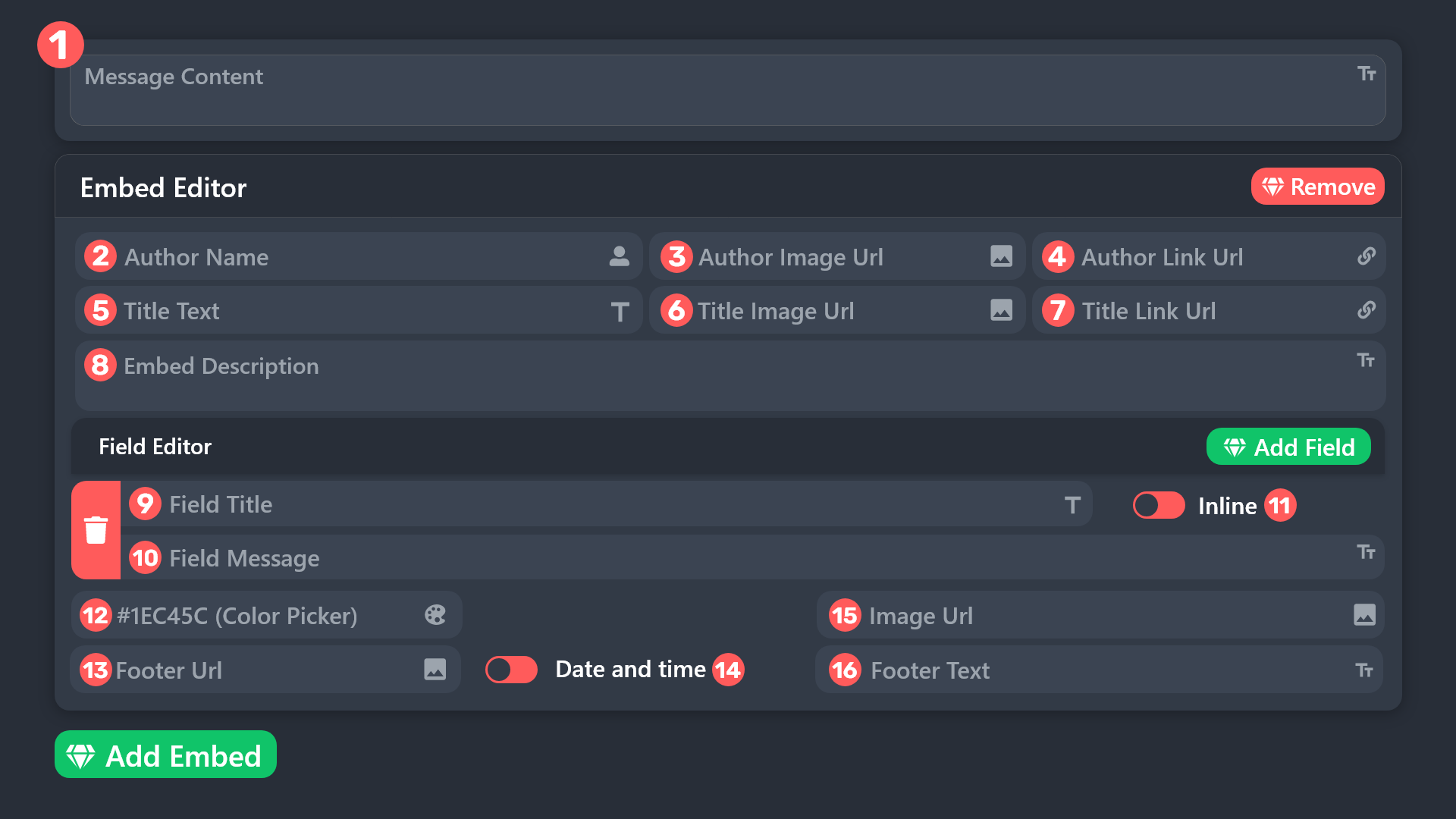
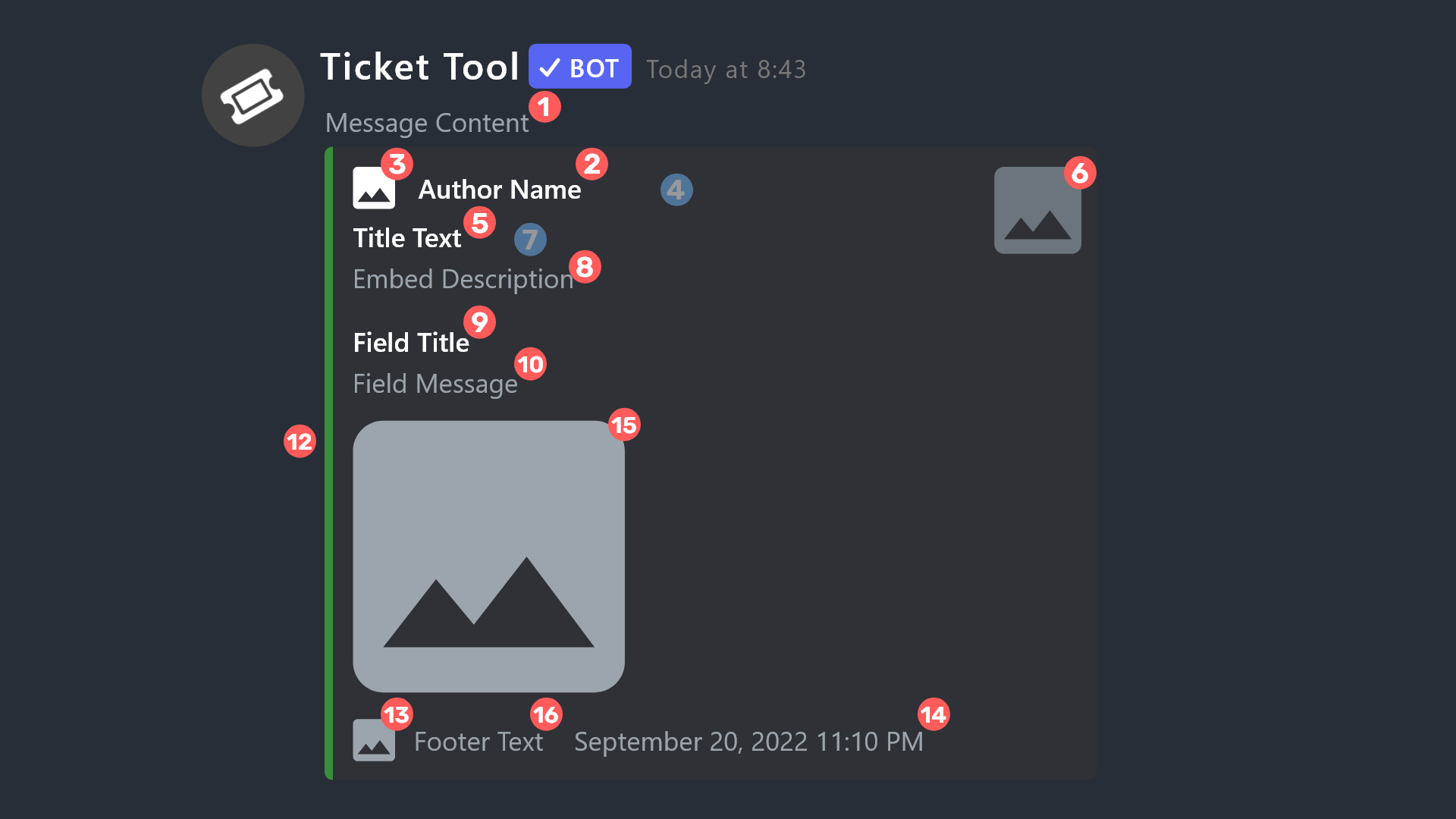 jade topaz
Yeah that ^
mossy heath
tax
 royal willow
Is there a way I can make the transcripts show up in a different channel than the one I made a ticket in?
idle flint
Under panel configs > transcript - select a transcript channel
royal willow
idle flint
Under panel configs > transcript - select a transcript channel
Thanks
iron nightBOT
Gave +1 Rep to @idle flint
 agile light
anyone know why renamed tickets dont show?
they are buggysome mods see the rename, some dont.
restartingdc clearing cache doesnt work
slender minnow
agile light
restartingdc clearing cache doesnt work
Hi, is it different for each of your mods?
or is the ticket itself is randomly being named?
 ember nest
How do I show my friends the tickets?
jade topaz
$add [user]
 bronze scroll
hi, I have a Collaboration ticket panel where users can open tickets, I want to be able to open multiple myself for users and add them. I get the "Ticket limit reached, You already have 1 tickets open of the 1 allowed for this panel" how can I bypass this as an Admin?
robust sandalBOT
May Allah's peace, mercy and blessings be upon you!
Arabic (ar) → English (en)
Is there Arab support?
Arabic (ar) → English (en)
slender minnow
$articket
humble sequoiaBOT
فريق الدعم الفني العربي
عميلنا العزيز ان كنت تبحث عن مساعدة يرجى فتح تكت خاص بفريق الدعم الفني العربي
اذهب الى#🎫│make-a-ticket
ثم قم بلضغط على الايموجي الاتي (🇯🇴)
slender minnow
@jade topaz
slender minnow
bronze scroll
hi, I have a Collaboration ticket panel where users can open tickets, I want to ...
Hey 👋
You can add the roles that you want to bypass the limit under Roles that bypass open limits. You have to do this for every panel you want them to bypass.

 autumn reef
slender minnow
Hey 👋
You can add the roles that you want to bypass the limit under **Roles th...
autumn reef
slender minnow
Hey 👋
You can add the roles that you want to bypass the limit under **Roles th...
How do I do it Claim In the bot?
humble sequoiaBOT
Claiming allows you to change the ticket name, category and permissions. To use it you have to enable it first on your Dashboard > Panel Configs > Claiming

 Note: This is a premium feature
slender minnow
autumn reef
How do I do it Claim In the bot?
Note: This is a premium feature
slender minnow
autumn reef
How do I do it Claim In the bot?
Please do not ping for support.
Refer to the rules in #📂│information
autumn reef
Ok
agile light
slender minnow
or is the ticket itself is randomly being named?
Ok were mods for a 40k game server
Each ticket mod when a ticket pops up renames the tickets for easier transcript searches.
" $rename (emoji) (ticket type)(ticket number) "
Randomly it doesn't show all renames. Some mods see it some don't. Nothing is same. Some mods Android, iPhone, pc.
Itll show the emoji and number but not ticket type
Example
1728, 1729, 1730 are same layout as the 2 above it
Suddenly started about 2 weeks ago
slender minnow
agile light
Ok were mods for a 40k game server
Each ticket mod when a ticket pops up renames...
is the ticket type like the default opened and closed name?
agile light
Yes default tickets
slender minnow
agile light
Yes default tickets
if you are using the rename command then it gets changed to whatever arguement was provided for the new ticket name
agile light
I kno
That's not the issue
The issue is
It doesn't always show complete ticket names after the renaming of it
It's random who sees ticket change and who doesnt
As shown in the image aboce
slender minnow
can I have a screenshot of one of them (if its something that you do not want to share in here, then please open a ticket)
agile light
I did above already
agile light
agile light
Itll show the emoji and number but not ticket type
Here
slender minnow
hold on, let me refresh my client
 dull nacelle
🫣
slender minnow
agile light
I did above already
nothing on my end

 severe night
Anyone use apex army, and know the best setting to not get banned? I create a new account, set everything up, and within 1 to 3 days I get banned every time.
 cursive phoenix
Not the place to ask that as this channel is for support with our bot @pseudo glen, sorry
 zealous silo
evening guys can i ask how can i get my ticket tool to send a message to the person who opened it.????
atomic shale
how can i stop an ex admin from accesing the back panel of ticket too because they still can after releiving them of their roles
zealous silo
atomic shale
how can i stop an ex admin from accesing the back panel of ticket too because th...
try serveer configs
rustic gale
zealous silo
evening guys can i ask how can i get my ticket tool to send a message to the per...
A direct message? Direct messages are a premium feature
You would need premium
If you have premium, it can be set up in Panel Configs -> Automation -> Send Direct Message when ticket created
rustic gale
atomic shale
how can i stop an ex admin from accesing the back panel of ticket too because th...
Server Configs -> Dashboard Roles
Make sure there aren't any roles there that shouldn't have dashboard access
atomic shale
rustic gale
Make sure there aren't any roles there that shouldn't have dashboard access
thanks
iron nightBOT
Gave +1 Rep to @rustic gale
 umbral pivot
Is there a way to set up my ticket tool, so that there are two different close options that will rename a ticket different things?
rustic gale
umbral pivot
Is there a way to set up my ticket tool, so that there are two different close o...
Sadly no
umbral pivot
rustic gale
Sadly no
ok thanks, would be cool though
iron nightBOT
Gave +1 Rep to @rustic gale
 dark gate
Hi guys, is it possible to make a panel which appears with a command?
like /payments and then a panel appears with buttons etc...
rustic gale
You can send a panel using the $panel command.
You can't use Ticket Tool's custom commands to send a panel, sadly
But you can use another bot's custom commands to send a $panel command and have Ticket Tool respond to that by sending a panel.
dark gate
rustic gale
You can't use Ticket Tool's custom commands to send a panel, sadly
thank you!
iron nightBOT
Gave +1 Rep to @rustic gale
robust sandalBOT
I'm a Russian
Ukrainian (uk) → English (en)
scenic plinth
Да, нет... этому нет оправдания.
 light junco
Is it possible to reach out more than 1 User at a time?
light junco
Opening a Ticket by the Staff team to communicate to a Member thru that ticket.
rustic gale
Only one user can open a given ticket.
After a ticket is open you can add more users to it with the /add command
But that's not the same thing as a single ticket having more than one owner
light junco
rustic gale
After a ticket is open you can add more users to it with the /add command
I think that's what i was asking for, opening a ticket that reaches out to multiple members at a time.
We currently use $ticket [USER ID] to do a "reach out" and i assume /add user ID would be the command to add more to current ticket?
rustic gale
Yes
No, you can't create a ticket that includes multiple members from the start
You have to create it for one then add the others
Whoever you send the $ticket command for is the ticket owner.
light junco
alright, thank you very much c:
atomic shale
hi how can i make ticket tool create tickets under only specific categories
jade topaz
Dashboard > Panel Configs > Category
 blazing token
Can anyone help on how I get my password?
jade topaz
password to what sir
blazing token
To my TV solutions app
jade topaz
what is this server called?
blazing token
It's the iptv
humble sequoiaBOT
⚠️ You're in the wrong place
We provide support for Ticket Tool Discord bot and cannot help you with whatever issue you have.
- We don't know which Support Team you should contact to get this issue resolved, and unfortunately we won't be able to accurately tell you.
If you don't have any further questions regarding our bot Ticket Tool, please close this ticket
jade topaz
read above 🙂
 flint bloom
Hey guys, i have a problem with moving closed tickets to selected category. I checked multiple times and everything should be set up correctly including bot permissions, but after closing ticket, it is renamed, but remains in the category for open tickets 😦
 lunar solar
flint bloom
Hey guys, i have a problem with moving closed tickets to selected category. I ch...
lunar solar
flint bloom
Hey guys, i have a problem with moving closed tickets to selected category. I ch...
How many tickets (channels) in the closed ticket category?
lunar solar
#🎫│make-a-ticket so I can have a better look
jade topaz
Hey, im currently getting the error:
Failed: `Invalid Form Body
components[0].components[0].label[BASE_TYPE_REQUIRED]: This field is required`
Any ideas ❤️
pseudo ravine
server ID please
jade topaz
1142902063655813181 😅
jade topaz
2 sir
jade topaz
pseudo ravine
like, what did you do to get it?
just typed $panel 2
and it returned with that error
pseudo ravine
there's your answer
 jade topaz
it needs a emoji?
pseudo ravine
Yes
jade topaz
pseudo ravine
Yes
didn't know it needed one, thanks ❤️
iron nightBOT
Gave +1 Rep to @pseudo ravine
pseudo ravine

 stray hawk
Hi this server I'm an admin in uses ticket tool. When tickets are closed, all users have permission to interact with the buttons (close, transcript, delete), how can I amend this to make sure it's restricted to only support roles?
gilded verge
stray hawk
Hi this server I'm an admin in uses ticket tool. When tickets are closed, all us...
Hi, go to Panel Configs -> Buttons -> choose which one -> Edit Button -> enable Support Team Only.
also little advice, Panel Configs -> Permissions -> Edit closed Ticket Owner Permissions -> View Channel, Send Messages, Read Message History set to ❌ ,
and once the ticket is closed, they will not have access to it ^^
stray hawk
gilded verge
Hi, go to `Panel Configs` -> `Buttons` -> choose which one -> `Edit Button` -> e...
Thank you! Another thing, some users report losing send message permissions in tickets, even after they've been added so I have to add them multiple times for them to be able to send messages. Do you know anything about this?
iron nightBOT
Gave +1 Rep to @gilded verge
gilded verge
🤔
Permissions -> Edit opened Everyone Role Permissions -> Send Messages set to ✅
i think this should help ^^
stray hawk
gilded verge
`Permissions` -> `Edit opened Everyone Role Permissions` -> `Send Messages` set ...
This won't make it so everyone that can see the ticket will be able to send messages will it? Because I have some use for some tickets where they are publicly viewable
gilded verge
If View Channel is set to ❌, then nope, they can't see
stray hawk
Thank you I will try this out!
gilded verge
i've this one and it work as it should ^^
 stray hawk
gilded verge
i've this one and it work as it should ^^
stray hawk
gilded verge
i've this one and it work as it should ^^
Thanks, I've set it to these perms and I'll keep an eye out on chat to make sure it solved the problem or not
iron nightBOT
Gave +1 Rep to @gilded verge
gilded verge
not sure if you'll find this useful, but... all perms i use:
stray hawk
gilded verge
not sure if you'll find this useful, but... all perms i use:
Thank you!! That helps a ton 🙂
iron nightBOT
Gave +1 Rep to @gilded verge
 silent arch
hey guys i bought a vip ticket but i don’t have access to the vids did i do sum wrong?
lunar solar
silent arch
hey guys i bought a vip ticket but i don’t have access to the vids did i do sum ...
Premium gets you 8mb of upload
and only applies to newly created transcripts from the time you bought premium
 half ice
How can I choose a What Category then Channel tickets that are created get posted into? Currently each new ticket creates a new category
idle flint
half ice
How can I choose a What Category then Channel tickets that are created get poste...
From the dashboard > Panel Configs > Category

 half ice
is it possible have have them go to a channel within a category?
idle flint
half ice
is it possible have have them go to a channel within a category?
Tickets are, in essence, a Channel of their own, therefore they require seperate chanenls for each ticket. (if this is what you mean?)
half ice
Oh okay, was hoping they wouldnt create a whole new channel every time and would be able to choose a channel for them to be posted in
 glacial heath
It’s not letting me select the channel to create a ticket, only category.
glacial heath
half ice
Oh okay, was hoping they wouldnt create a whole new channel every time and would...
This is the same problem I am having
 sleek mortar
I need help 😅 how can I make this ticket format?

 humble sequoiaBOT
The Drop-down menu or Select Menu replaces the buttons on your panel message and uses a drop-down menu with all of your panels. To set this up, go to your Panel Configs and select your main Panel.
<:Numbericons1:1018864164032225340> Enable Select Style
First you enable Select Style. Then you add an item in the Dropdown Editor. Now you can start editing your dropdown!
<:Numbericons2:1018864168041971712> Dropdown Editor
Each line in the dropdown editor represents a line in the drop down menu on discord. You can add more "Items", by clicking on
First you select a panel. That's the panel this option will open a ticket for. DONT select the same panel twice. Each option should have a different Panel
After that, you can put a Display. This is the title of this option and will appear in the drop down menu. The *Description can be set right after that, which will be below the title in grey.
Additionally you can select an emoji, that will be shown in front of each option. You can either manually input the ID of an emoji or select it in the selector.
Common Issues ⚠️
- Panel doesn't send? Make sure you have a valid emoji selected
- Option doesn't show up? Check if two options have the same panel in the DropDown Editor
$dropdown
 dull atlas
Does someone knows if i can see a ticket where i participate but is not on my own server?
idle flint
dull atlas
Does someone knows if i can see a ticket where i participate but is not on my ow...
If the server owner allows you - Easiest way is via a "Support Team Role" or "Additional Role"


The core settings of every panel
dull atlas
The server owners does not respond so i cant, i lost critical information in one ticket and i know there is transcription due i have my own ticketbot but i dont know if i can ask for it
idle flint
dull atlas
The server owners does not respond so i cant, i lost critical information in one...
We don't store transcripts anywhere, they are stored only on the bot users discord (or in DM's if enabled). The only way to retreive that would be via the server owner.
dull atlas
Fuck so D:, alright ty
idle flint
glacial heath
It’s not letting me select the channel to create a ticket, only category.
Can you expand on this?
- You can select a Channel for where your panel will sit (where users go to create a ticket)
- Tickets are individual discord channels once created, therefore you can only select a category for them to go to once opened.
glacial heath
I figured out that part, my apologies.
Next questions is how do I edit the “messages” change as it seems the message content is locked….
idle flint
As a non-premium member, you can edit section 1 and section 8 only
idle flint
glacial heath
But my page looks vastly different…
Do you have a screenshot so that I can visulise what you mean?
glacial heath
 idle flint
Click the > Embed Editor - 1
idle flint
All good mate
 mellow rock
كيف اخلي ميزه العلامه (قائمه)؟
 woeful trellis
يجدعان أنا ownership السيرفر مش عاوزني اعدل التكل ليي

 wary urchin
help???


not even the support website or help command helped me, im so confused, how do i even send the ticket??
pseudo ravine
Hey there. Could you send the server ID please
humble sequoiaBOT
This error indicates you have selected an invalid emoji, i.e. an emoji the bot isn't capable of using, in a button field
Which Emoji?
This depends upon which action the error is appearing, the most common cases are the Create Ticket button or one of your Dropdown emojis. You can visit your Button's List to find all available buttons and find the conflicting one by yourself.
Why doesn't the bot accept it as valid?
- You selected an emoji that doesn't exist anymore, i.e. that has been deleted
- You wrote text there, instead of an emoji (or in addition to an emoji)
- You entered a code for a custom emoji from a server that the bot is not a member of
- You entered a custom emoji code incorrectly
- You're on iPhone and entered an emoji using the phone's emoji pad (use the emoji selector in the website instead)
 wary urchin
wdym
rustic gale
@wary urchin Invalid emoji. Read above
wary urchin
i didnt even use an emoji thats the thing
rustic gale
wary urchin
i didnt even use an emoji thats the thing
If you wrote text into the Button Emoji field instead of an emoji, then that's the cause of the error
@wary urchin Were you able to make it work?
 ebon garden
خ
wary urchin
rustic gale
<@412903959074701312> Were you able to make it work?
omg ilysm
it worked!! thank you!! :D
 ocean star
 cold void
Hello, can i create tickets on diffrent categories based on the option user chose from the dropdown menu
ie, if they choose public help from dropdown menu the ticket will be created in public help category and if they choose private help the ticket will be created in private help category
and for first category public help role will have access to the tickets
for the second category only the private help role will get added to the tickets
cold void
cold void
Hello, can i create tickets on diffrent categories based on the option user chos...
or do i need diffrent panels for this
rustic gale
cold void
or do i need diffrent panels for this
If you have a dropdown menu with multiple options, you already have multiple panels
Just pick a different category for each panel.
cold void
rustic gale
If you have a dropdown menu with multiple options, you already have multiple pan...
Ooh,rn ours allows tickets to be made with a button, i was considering converting it
cold void
rustic gale
Just pick a different category for each panel.
I can then also choose diffrent roles right
For each panel, pretty sure i can
rustic gale
Each panel has its own completely separate settings, yes
iron nightBOT
Gave +1 Rep to @rustic gale
cold void
rustic gale
If you have a dropdown menu with multiple options, you already have multiple pan...
are dropdown menus a premium feature
ok figured it out
its not a premium feature
 dire night
hello im having some trouble with the manage servers,i invited ticket tool to my server already and he isnt showing on the manage servers, what can i do to appear?
idle flint
dire night
hello im having some trouble with the manage servers,i invited ticket tool to my...
If you are the server owner or have the administrator permission, try using the Sync Servers button on the Manage Servers screen.
dire night
yes i used it i have all permissions and it stills dont appear
idle flint
dire night
yes i used it i have all permissions and it stills dont appear
To confirm, are you the server owner ?
dire night
yes
idle flint
Hmm, I am not seeing a server owned by your account with the TicketTool bot in it: double check that you have the TicketTool bot in your server. If you are happy to provide the server ID too, or you can head to #🎫│make-a-ticket and we can take a look within a private support ticket
 shrewd forge
Is there a way to transfer premium (obtained through regulary voting) from a server to another one?
rustic gale
shrewd forge
Is there a way to transfer premium (obtained through regulary voting) from a ser...
Make a ticket and ask for the transfer and post the IDs of the original server and the new one
 mighty trench
Hello everyone! Hope y'all are good. I have a question and I can't seem to find the answer (or maybe I did but I didn't understand it), so I'll appreciate any help you can provide. c:
Is there anyway in which I can make the "close ticket" option available only to those with Admin roles?
rustic gale
Depends what you mean by “make available”
If you want to hide the entire button from users without the role, that's impossible
mighty trench
Sorry for the confusion. I don't want those without the Admin role to be able to close a ticket, I want them to be only able to open them.
rustic gale
mighty trench
Sorry for the confusion. I don't want those without the Admin role to be able to...
Panel Configs -> Buttons -> Close Ticket
Add everyone to the Disabled Roles
and add Admin to the Allowed Roles
mighty trench
Got it! Thanks a lot! 
humble sequoiaBOT

Premium can now be purchased directly through discord! Either in the app directory (server settings) or directly from the bots profile.
<:TTWarning:1034178155872784494> Important Information <:TTWarning:1034178155872784494>
ONLY purchase premium through ONE of the two Ticket Tool Bots. If you purchased premium on the primary bot (White logo) and plan to use the premium bot, don't kick the primary bot!
What's different?
 The Monthly price changed from
 $6.00 to $5.99

 Yearly subscriptions are not yet available
Don't kick the bot, otherwise, the subscription will be canceled automatically
You'll need to buy the subscription from a computer or on the Application Directory
You might need to run the /premium command on your server to sync the premium status with your dashboard
 A subscription can not be transferred between Servers
 cursive phoenix
@dry bay
cursive phoenix
you can look at @humble sequoia profile too
 dry bay
cursive phoenix
you can look at <@722196398635745312> profile too
dry bay
cursive phoenix
you can look at <@722196398635745312> profile too
cool may i know how much it cost monthly
cursive phoenix
The Monthly price changed from $6.00 to $5.99
dry bay
cursive phoenix
<:NewLine:1025005380822126693> The Monthly price changed from $6.00 to $5.99
that's cool
thanks @cursive phoenix
iron nightBOT
Gave +1 Rep to @cursive phoenix
cursive phoenix
no worries
humble sequoiaBOT
PayPal - paypal@tickettool.xyz
BitCoin - 3HhKKAdb9eEvCe2tvzB8bAa8nebHY6qcPA
LiteCoin - MEQX3knLAuotrKnvk3HDNBK5gdRn6PZhHy

Prepay/Direct Payment
To prepay send the payment using your desired method - Available options listed bellow.
⚠️ $18 per 3 months. ⚠️
$66 per year.
(If using the direct payment option, you need to be paying for at-least 3+ months.)
Regular Prices when paying within Discord:
$5.99/per month
Once your payment is sent let us know so we can confirm and get you your key.
- Purchases done with this method are non-refundable.
<:paypal:924596360840372234> Paypal ("Goods and Services" or "Family and Friends")
paypal@tickettool.xyz
<:bitcoin:924638849135689749> BTC - Bitcoin
3HhKKAdb9eEvCe2tvzB8bAa8nebHY6qcPA
<:Litecoin:972176945972383815> LTC - LiteCoin
MEQX3knLAuotrKnvk3HDNBK5gdRn6PZhHy
I sent the payment now what?
After you send the payment, please send a screenshot with proof of payment, our <@&615146349700186112> will verify your payment and will get you setup. For crypto payments, we are waiting for at least ONE verification.

All prices in USD - 3 months min for direct payment
cursive phoenix
@dry bayyou can also prepay for premium ...see above
incanse you want to pre pay instead of doing a monthly sub
dry bay
cursive phoenix
<@867973115467153469>you can also prepay for premium ...see above <:this:8942793...
appreciate it Jayy 🤝
mighty trench
thanks @rustic gale
iron nightBOT
Gave +1 Rep to @rustic gale
half ice

Hope this makes sense, I have this posted in a Channel for people to create there tickets "Pic Above", Once they do this they get a ticket made and posted in another category for the Mods to look at and assist Pics "below" but is thee a way for them to add some text ect when the ticket is being created? so then the mods go to the created ticket they know what it is in regards to?


 clear bobcat
How do i make it so that the ticket doesnt show like 0012 and only shows their usename like ticket-shogun9
sum1 help me
rustic gale
clear bobcat
How do i make it so that the ticket doesnt show like 0012 and only shows their u...
It's premium only
humble sequoiaBOT
The ticket name is the default channel name of all tickets. To edit it, go to your Dashboard > Panel Configs > Ticket. There you can edit the channel name of opened and closed tickets. You can also use variables in there.
Note: This is a premium feature
rustic gale
half ice
Hope this makes sense, I have this posted in a Channel for people to create ther...
That's called a creation form
humble sequoiaBOT
A Discord Form lets the user answer individual questions in a pop-up Form, which then displays the answers in the ticket message. This can save time if you already know what you want to ask the user.
Setup Forms
Forms can be enabled under Panel Settings > Form Options > Edit Forms Options. In the new pop-up window, you can now enable and edit your own Form.
Form Options
You can add up to 5 questions in the Discord form. This is a Discord limitation. Each question can have a placeholder in the input field, a minimum and maximum input, multi-line, and also the option to have the answer required.
Options
Question Title ➞ Your Question goes here
Question Placeholder ➞ The placeholder text in the input field
Required ➞ If enabled, the user has to answer this question, to submit the form
Multi-Line Input ➞Allows the user to input multiple lines
Minimum and Maximum Input ➞ Set a minimum and maximum input value for the user
Displaying the Answer
To display the answers from the user, you need to enable Auto display form results on the ticket message as an additional embed
If you don't want a second embed, go into your Panel Configs > Ticket Options > Edit Ticket Message. You use the variable {create.form.x} and replace x with the number of your question. For example, the response to Question 5 can be displayed with {create.form.5}.
 tulip mulch
hi
half ice
rustic gale
That's called a creation form
Thankyou
 half ice
Click the "Create Ticket"
idle flint
 echo carbon
here are the steps for setting up the TicketTool bot
stark runeBOT
1. Invite Ticket Tool to your server
First you will want to invite the bot to your server. Once the bot is in your server, you can manage your server in the dashboard.
2. Create a Panel
To create a panel we are going to need to head over to the panel configs on the dashboard.
Once at the dashboard we will need to click Create Panel.
Enter a panel name (Fill in any optional settings you want).
Click Create Panel and your ready to get started with configuring your panel.
An example of a creating a panel is shown below.
3. Send the Panel to a Channel
Once you've created a panel on the dashboard you will need to send it to a channel using send on the dashboard.
Select the channel you want your panel to be created in and click send.
For other questions checkout $help faq.
An example of a sending a panel is shown below.
Having a Problem Sending the Panel?
Do $debug in a channel with Ticket Tool and make sure it has all the necessary Discord permissions.
half ice
Say someone creates a ticket and a mod looks into it and rectifies the issue when we close out the ticket is there a way that the mod can put a reply/close out message that goes to the person who put the ticket in?
idle flint
half ice
Say someone creates a ticket and a mod looks into it and rectifies the issue whe...
Do you mean within the ticket or in a DM?
half ice
Either, I'm thinking once I have resolved any issues and closed out a ticket with and it gets deleted is there a way to have the person who put the ticket in get a message/reply so they know its been done
idle flint
Under Automations, you can send a DM to the member once the ticket has been closed, or under Transcript you can send the transcript to the members DM's once the ticket is closed/deleted. Both of these options require premium tho.
half ice
Thanks @idle flint
iron nightBOT
Gave +1 Rep to @idle flint
idle flint
 digital hamlet
Hello, how do we put 3 TNR tickets together?
digital hamlet
Hello, how do we put 3 TNR tickets together?
As in how do you have them all createable from the same panel? You can use the Multi Panel (attached panels) feature:
humble sequoiaBOT
For more convenient use of multipanels, you can now combine panels on the dashboard. This will allow you to directly send the multipanel from the dashboard or via the $panel ID command.
Where can I find this?
You can find this setting on the Dashboard -> Panel Configs -> Panel -> Attached Panels
Note: if you're attaching all the panels to a panel called English, don't include English in the attached panel's box (If you do this, it will create a duplicate)
This will put all buttons from all of your panels on one message. The message is the panel message from the panel you're combining these panels in.
 unkempt rain
can any one help me to renew my annual subscription please
idle flint
unkempt rain
can any one help me to renew my annual subscription please
Annual Subscription? Is this for the TicketTool bot?
humble sequoiaBOT
Premium can now be purchased directly through discord! Either in the app directory (server settings) or directly from the bots profile.
<:TTWarning:1034178155872784494> Important Information <:TTWarning:1034178155872784494>
ONLY purchase premium through ONE of the two Ticket Tool Bots. If you purchased premium on the primary bot (White logo) and plan to use the premium bot, don't kick the primary bot!
What's different?
The Monthly price changed from $6.00 to $5.99
Yearly subscriptions are not yet available
Don't kick the bot, otherwise, the subscription will be canceled automatically
You'll need to buy the subscription from a computer or on the Application Directory
You might need to run the /premium command on your server to sync the premium status with your dashboard
A subscription can not be transferred between Servers
unkempt rain
yes please
idle flint
unkempt rain
yes please
The info above should assist


 placid axle
How can I set the ticket bot up properly on mobile?
idle flint
placid axle
How can I set the ticket bot up properly on mobile?
The same way as you do on a desktop, just via the browser that you have on your phone (ie. Safari if on apple etc.)
All functions of the dashboard can be used on mobile, it may just be easier to set up using a desktop.
humble sequoiaBOT
Ticket Tool - Ticketing without clutter - The #1 discord Ticketing bot
placid axle
Is there a tutorial for mobile?
idle flint
This is the dashboard ^^
stark runeBOT
1. Invite Ticket Tool to your server
First you will want to invite the bot to your server. Once the bot is in your server, you can manage your server in the dashboard.
2. Create a Panel
To create a panel we are going to need to head over to the panel configs on the dashboard.
Once at the dashboard we will need to click Create Panel.
Enter a panel name (Fill in any optional settings you want).
Click Create Panel and your ready to get started with configuring your panel.
An example of a creating a panel is shown below.
3. Send the Panel to a Channel
Once you've created a panel on the dashboard you will need to send it to a channel using send on the dashboard.
Select the channel you want your panel to be created in and click send.
For other questions checkout $help faq.
An example of a sending a panel is shown below.
Having a Problem Sending the Panel?
Do $debug in a channel with Ticket Tool and make sure it has all the necessary Discord permissions.
idle flint
placid axle
Is there a tutorial for mobile?
Here is the tutorial for the bot - no difference between mobile and desktop
placid axle
idle flint
Here is the tutorial for the bot - no difference between mobile and desktop
Question, do I have to start a panel first?
idle flint
placid axle
Question, do I have to start a panel first?
The first step is to invite the bot to your server, then set up a Panel, then send it to your discord. That is the basic setup, any customization comes after this.
(just as it says in the messages above)
placid axle
Ticket Tool - Ticketing without clutter - The #1 discord Ticketing bot
placid axle
idle flint
The first step is to invite the bot to your server, then set up a Panel, then se...
What do I do from here?
 digital hamlet
idle flint
digital hamlet
idle flint
Ok tysm
placid axle
I want something like this
idle flint
placid axle
What do I do from here?
Click "Send" at the top of the screen (the blue button) and select the channel in your discord for the panel to sit (where users go to create a ticket)
placid axle


 idle flint
placid axle
What do I do from here?
idle flint
placid axle
What do I do from here?
https://docs.tickettool.xyz/general/setup
This will also help (Our docs are detailed and will assist you step by step)
Instructions on setting up Ticket Tool in your server.
idle flint
placid axle
This is using the Multi Panel (attached panel) function
humble sequoiaBOT
For more convenient use of multipanels, you can now combine panels on the dashboard. This will allow you to directly send the multipanel from the dashboard or via the $panel ID command.
Where can I find this?
You can find this setting on the Dashboard -> Panel Configs -> Panel -> Attached Panels
Note: if you're attaching all the panels to a panel called English, don't include English in the attached panel's box (If you do this, it will create a duplicate)
This will put all buttons from all of your panels on one message. The message is the panel message from the panel you're combining these panels in.
 severe parcel
trying to add ticket tool to my server, just wondering how i set the channel for opening a ticket? the channel i have available for it isnt included in a category, it's just standalone in the server (i have a seperate catrgory for closed tickets)
 idle flint
severe parcel
trying to add ticket tool to my server, just wondering how i set the channel for...
idle flint
severe parcel
trying to add ticket tool to my server, just wondering how i set the channel for...
The channel for where users will go to open a ticket is set when you send your panel (from the dashboard, the Send button at the top)
civic wagon
Hey @digital hamlet, you've been warned multiple times about not pinging the staff. Please read the server rules from #📂│information. Any more violations would lead to strict moderation actions.
digital hamlet
civic wagon
Hey <@1138454025805770863>, you've been warned multiple times about not pinging ...
Ok
Help pls
 idle flint
digital hamlet
<@679124209909104660> help pls
idle flint
digital hamlet
<@679124209909104660> help pls
If you follow the link provided in the error, it gives you some solutions to resolve the issue
 digital hamlet
idle flint
If you follow the link provided in the error, it gives you some solutions to res...
digital hamlet
idle flint
If you follow the link provided in the error, it gives you some solutions to res...
I don't know where this is
idle flint
Can you please run a $debug command in the server where you are trying to configure the bot
digital hamlet
idle flint
Can you please run a $debug command in the server where you are trying to config...
Ok
severe parcel
idle flint
The channel for where users will go to open a ticket is set when you send your p...
i have another issue... how do i set the transcript logging channel? i cant find the setting 😦
digital hamlet
idle flint
Can you please run a $debug command in the server where you are trying to config...

 idle flint
The channel you selected to create threads has been deleted.

Dashboard > Panel Configs > Thread Style
digital hamlet
idle flint
The channel you selected to create threads has been deleted.
Where is that
Idk
idle flint
 digital hamlet
Ok
digital hamlet
idle flint
I did it but it didn't work and the same thing happened again
idle flint
I would suggest disabling the Thread Style options unless you are desperatley wanting to use them. You seem to not have a sound understanding and would probably benefit from utilizing more basic options first.
digital hamlet
idle flint
I would suggest disabling the Thread Style options unless you are desperatley wa...
İm openet Ticket limit
idle flint
Panel Configs > Limits - You have it set to 1 open ticket per user.
digital hamlet
idle flint
Panel Configs > Limits - You have it set to 1 open ticket per user.
Where is that i dont know
idle flint
idle flint
See this screenshot, this page is known as "Panel Configs", Everything can be accessed from this screen. From there, click "Limits" (it can be seen at the bottom left of the screenshot).
digital hamlet
idle flint
See this screenshot, this page is known as "Panel Configs", Everything can be ac...
Foto pls
idle flint
digital hamlet
Foto pls
What do you need a photo of? Click Limits and the first option within limits is "Open Ticket Each User". You currently have this set to 1, meaning that each user can have 1 ticket open at a time. If you want users to be able to open 2 or more tickets at a time, increase the number.
digital hamlet
idle flint
What do you need a photo of? Click Limits and the first option within limits is ...
İm dont know where is that photo pls
idle flint
 digital hamlet
idle flint
digital hamlet
idle flint
Where is. That
idle flint
 digital hamlet
idle flint
digital hamlet
idle flint
 idle flint
digital hamlet
İm openet Ticket limit
idle flint
digital hamlet
İm openet Ticket limit
This will stop this error
digital hamlet
Why
idle flint
I would suggest reading the Ticket Tool Documentation to assist you with these simple questions, all are answered clearly within the documentation.
Limits for Ticket Panels!
digital hamlet
I dont know
idle flint
It also seems that you are not the server owner of the discord you are configuring, I will also suggest that you consult with the server owner as they may understand the bot better.
digital hamlet
idle flint
It also seems that you are not the server owner of the discord you are configuri...
it worked now thank you very much
iron nightBOT
Gave +1 Rep to @idle flint
 mint tree
Hey! How do I change the ticket limit per person?
idle flint
idle flint
See this screenshot

 mint tree
Thank you both :D
Have a great day!
mint tree
jade topaz
thanks
iron nightBOT
Gave +1 Rep to @rough mesa
idle flint
haha, all good, don't worry about it 🤣
mint tree
🤣
jade topaz
idle flint
haha, all good, don't worry about it 🤣
you know what they are used for, or how to see the total reps you have ?
idle flint
jade topaz
you know what they are used for, or how to see the total reps you have ?
Its mainly used for the support team bragging rights I am pretty sure
jade topaz
idle flint
Its mainly used for the support team bragging rights I am pretty sure
thanks ! too bad I would love to have it LOL
iron nightBOT
Gave +1 Rep to @idle flint
shrewd forge
Is it possible to have Ticket Tool ping specific / set people on Ticket creation?
idle flint
shrewd forge
Is it possible to have Ticket Tool ping specific / set people on Ticket creation...
It sure is, you can do this using a Mention, here is the info:
humble sequoiaBOT
Within all the messages the bot sends (both embeds and text) you can mention either channels, roles, or even users, these mentions will only send a notification to the user if they are used within a text field, e.g: a role mentioned in an embed won't ping at all the users who have that role.
For mentioning a role you can use one out of three options:
{@Role Name} ➞ Which is Case Sensitive.
{RoleID} ➞ Replace RoleId with the Id of the role you are trying to ping.
<@&RoleID> ➞ Discord's native syntax to ping roles.
<#ChannelID> ➞ Mention a channel by its ID.
<@UserID> ➞ Mention a user by its ID.
idle flint
Ensure you put the mention into the area labeled as 1 (Message Content), this will allow it to ping
shrewd forge
idle flint
Ensure you put the mention into the area labeled as 1 (Message Content), this wi...
Thanks.
 timid pond
Как настроить бота?
robust sandalBOT
timid pond
Как настроить бота?
How do I set up a bot?
Russian (ru) → English (en)
humble sequoiaBOT

You can check our documentation here;
You can also check #📂│information for the basic setup, or run the </setup:1025379472167403530> command within #🤖│bot-spam to find information on how to setup Ticket Tool.
Alternatively, you can use the /setup command with Ticket Tool in your own server to setup the basics of Ticket Tool!
Our documentation contains all the info you need about the bot to be able to setup and configure the bot however you like.
robust sandalBOT
У нас есть документы и видео, в противном случае, если это не поможет, не стесняйтесь открывать заявку
English (en) → Russian (ru)
slender minnow
robust sandal
@timid pond ^
jade topaz
if I wanted to limit the bot to certain roles (so people with a certain role can use the bot) how would I be able to do that?
idle flint
jade topaz
if I wanted to limit the bot to certain roles (so people with a certain role can...
Multiple ways, you can either “blacklist” specific roles (if you only want to deny certain roles from using it)
or
you can only allow certain roles to use the buttons (if you only want certain roles to use it)
humble sequoiaBOT
Any role you assign as a blacklisted role won't be able to use commands or reactions.
Selecting a blacklisted role
Go to your Dashboard ➞ Server Configs. There you will find the option to select blacklisted roles.
Note: Don't forget to save.

Button Options
 Enable Button
Hide or show the button
 Emoji
Emoji
Select an emoji to show on the button
You can either select one or use a valid Emoji ID
 Button Text
Edit the text that's shown on the button
 Button Color
Select one of four colors for the button. Grey, Green, Red, Blue.
 Support Team Only
Enable this to only let your support team click that button
 Allowed and disabled roles
Edit what roles can use or not use this button
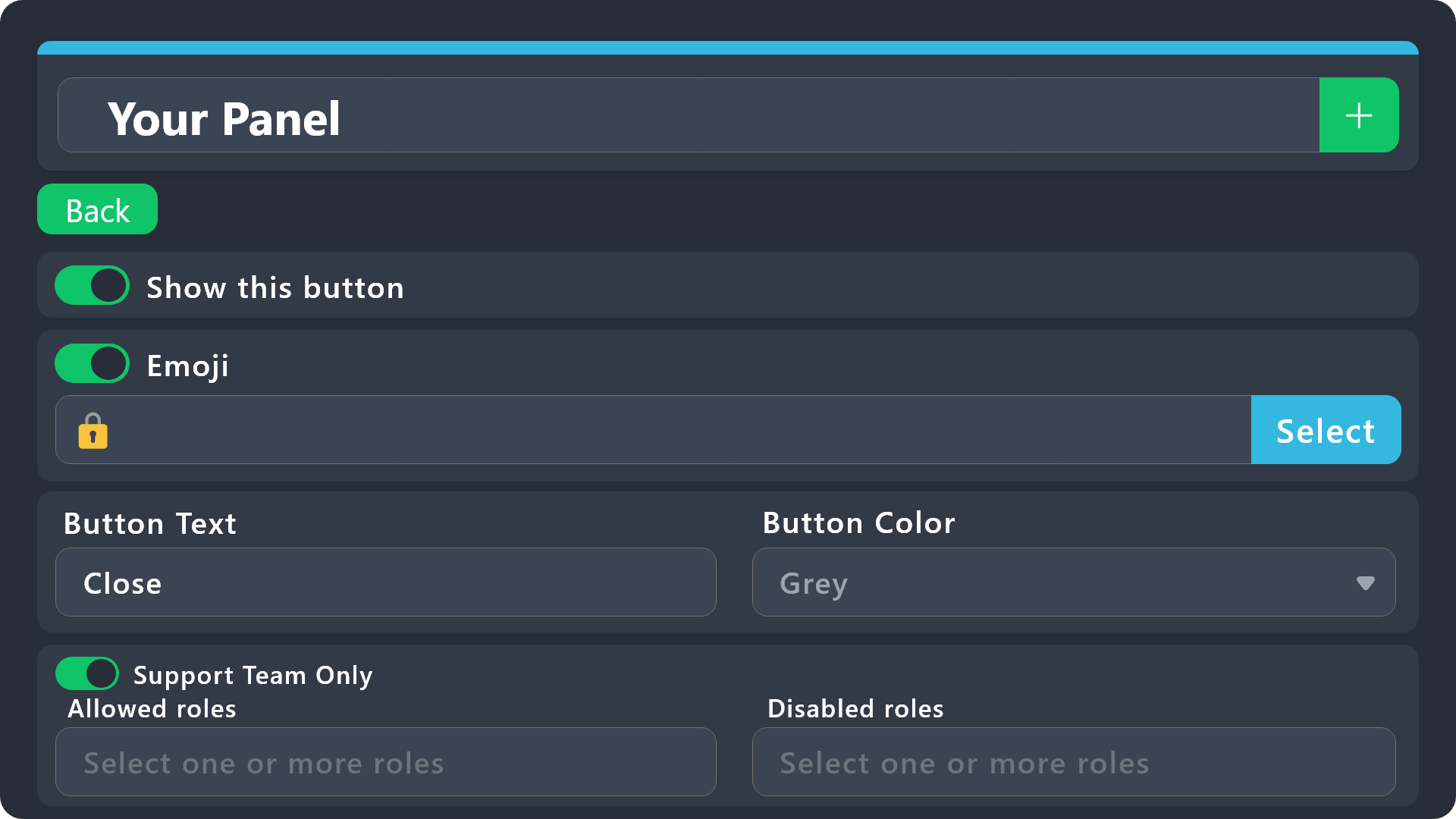
$buttonoptions
jade topaz
thank u sir
 silent haven
How to add ticket Tool premium in server
humble sequoiaBOT
The first thing you will need to do is invite the premium bot, an invite can be found here
Once the bot is in your server we will head to the dashboard and manage your server. When you are managing your server, you want to head into "Server Configs" then click the drop down menu under "Select the bot you would like to use on this server" then click "Ticket Tool#6207" and then save.
 placid axle
If I open a ticket, how can I make it where a staff member has to claim it?
humble sequoiaBOT
Claiming allows you to change the ticket name, category and permissions. To use it you have to enable it first on your Dashboard > Panel Configs > Claiming
Note: This is a premium feature
jade topaz
 lunar steppe
Can i have the vote site
lunar steppe
Can i have the vote site
you can get the 2 sites by running the slash command /vote
jade topaz
Someone posts an attachment but I'm unable to open it, not sure if this will occur everytime

 jade topaz
Someone posts an attachment but I'm unable to open it, not sure if this will occ...
jade topaz
jade topaz
Someone posts an attachment but I'm unable to open it, not sure if this will occ...
discord dosen't support it, you cant see image in transcript when the channel is deleted
hmm damn
gotta think of a workaround now
jade topaz
jade topaz
Also last question, is there a way I can delete multiple tickets?
you can delete them all by doing /purge
but no, you will just have to type $delete and paste it into the tickets you need deleting
 strong hinge
How long does it take to the ticket response to you?
 exotic monolith
can you create multiple buttons on one panel?
 wide junco
jade topaz
discord dosen't support it, you cant see image in transcript when the channel is...
wide junco
jade topaz
discord dosen't support it, you cant see image in transcript when the channel is...
thats false, at least it used to be, it used to store images as base64
jade topaz
wide junco
thats false, at least it used to be, it used to store images as base64
These are not my words, but those of the bot developers
humble sequoiaBOT
For more convenient use of multipanels, you can now combine panels on the dashboard. This will allow you to directly send the multipanel from the dashboard or via the $panel ID command.
Where can I find this?
You can find this setting on the Dashboard -> Panel Configs -> Panel -> Attached Panels
Note: if you're attaching all the panels to a panel called English, don't include English in the attached panel's box (If you do this, it will create a duplicate)
This will put all buttons from all of your panels on one message. The message is the panel message from the panel you're combining these panels in.
jade topaz
humble sequoia
@exotic monolith look this
rustic gale
@jade topaz @wide junco If your server has premium, the bot saves some image attachments together with the ticket
Without premium, it doesn't save any attachments
jade topaz
rustic gale
<@456226577798135808> <@501777482282958850> If your server has premium, the bot ...
I have premium, it never worked
only with the yellow bot ?
rustic gale
That's a good question, but i don't believe the gold bot is required
jade topaz
rustic gale
<@456226577798135808> <@501777482282958850> If your server has premium, the bot ...
thx for the answer good point to know
iron nightBOT
Gave +1 Rep to @rustic gale
jade topaz
anyone know why this dont work
I did not mark a reason so normally the second part should have been displayed but without the fallback


when i put a reason "teste" dont work same

oui
regarde dans #📌│automated-support clique sur FAQ et setup
c'est pas dur à setup sinon il y a également un tuto sur leur chaine officiel, tu peux aussi suivre les étapes depuis le dashboard tu les fais dans l'ordre ça fonctionnera
strong hinge
How long does it take to the ticket response to you?
jade topaz
strong hinge
How long does it take to the ticket response to you?
the bot ?
strong hinge
jade topaz
the bot ?
Yes
jade topaz
#📂│information et tu cliques sur setup guide
jade topaz
strong hinge
Yes
few seconds or less
strong hinge
Well, I text the bot at 1:52
jade topaz
strong hinge
Well, I text the bot at 1:52
text the bot ?
strong hinge
I made the bot is that why?
jade topaz
strong hinge
I made the bot is that why?
I don't understand the word "text" did you use a command, send the ticket or something?
I know that personally I had difficulty connecting to the dashboard with a few 502 errors, that could be the reason
strong hinge
I made a server and I’m testing out the ticket
jade topaz
idk sorry
strong hinge
 strong hinge
It doesn’t work
jade topaz
when you close the ticket ?
strong hinge
So close the ticket
 modern iron
anyway to get links clickable ?
 jade topaz
modern iron
anyway to get links clickable ?
jade topaz
modern iron
anyway to get links clickable ?
{create.form.1} use this variable on your ticket message
Replace 1 by the number of the question
modern iron
jade topaz
{create.form.1} use this variable on your ticket message
Replace 1 by the numbe...
thank you
iron nightBOT
Gave +1 Rep to @rough mesa
modern iron
sorry mate , new to this , how do i access variable ?
 jade topaz
modern iron
sorry mate , new to this , how do i access variable ?
jade topaz
modern iron
sorry mate , new to this , how do i access variable ?
you paste it here

 winged ivy
How to give close or delete permissions to specific roles


 proper rain
i’m trying to add someone to a ticket by $add user ID but it’s saying missing perms but not saying which perms it’s missing and how to fix it.
rustic gale
proper rain
i’m trying to add someone to a ticket by $add user ID but it’s saying missing pe...
You can tell by looking in the dashboard
Panel Configs -> Permissions -> Ticket Owner Permissions, Edit Opened
Any permissions that have an orange dot next to them have to be set to 
otherwise they will be treated as missing permissions
Also the Manage Permissions permission has to be set to unless the bot has the Administrator permission
proper rain
is the ticket owner the bot? i thought it was whoever opened the ticket
rustic gale
proper rain
is the ticket owner the bot? i thought it was whoever opened the ticket
You're correct, ticket owner means the user who created the ticket
Keep in mind that ticket owner permissions are used for any users added with the add command as well
What's happening is that Discord imposes restrictions on which permissions a bot may toggle
if the bot doesn't have a certain permission
then the bot can't toggle it for other users or roles
in this case, for the user you're trying to add to the ticket
 static girder
When are staff apps opening again?
civic wagon
static girder
When are staff apps opening again?
When we require more staff
static girder
civic wagon
When we require more staff
True I guess thanks.
iron nightBOT
Gave +1 Rep to @civic wagon
 crimson tide
Where is Dashoboard? I would appreciate it if you could let me know with pictures
humble sequoiaBOT
Ticket Tool - Ticketing without clutter - The #1 discord Ticketing bot
civic wagon
crimson tide
Where is Dashoboard? I would appreciate it if you could let me know with picture...
^
crimson tide
civic wagon
^
?
civic wagon
crimson tide
?
You can access your server dashboard from this link - https://tickettool.xyz/manage-servers
Ticket Tool - Ticketing without clutter - The #1 discord Ticketing bot
 misty monolith
seems when I Enable thread style ticket creation, it fails to add the moderation team to my tickets.
as a non-thread it seems to be adding them fine to tickets.
I checked for overriding perms but nothing was conflicting that I can tell
?
 modern birch
Hello I am wondering how can I put more than one ticket type I mean
More than one button
humble sequoiaBOT
For more convenient use of multipanels, you can now combine panels on the dashboard. This will allow you to directly send the multipanel from the dashboard or via the $panel ID command.
Where can I find this?
You can find this setting on the Dashboard -> Panel Configs -> Panel -> Attached Panels
Note: if you're attaching all the panels to a panel called English, don't include English in the attached panel's box (If you do this, it will create a duplicate)
This will put all buttons from all of your panels on one message. The message is the panel message from the panel you're combining these panels in.
civic wagon
modern birch
Hello I am wondering how can I put more than one ticket type I mean
More than o...
Refer to the embed above ^
humble sequoiaBOT
User's issue has been solved in another channel.
 thick siren
Some of my community members are facing the issue "Something went wrong. Try again", any fix for that?
jade topaz
thick siren
Some of my community members are facing the issue "Something went wrong. Try aga...
does TT have permission to see that specific channel?
you can check by running /debug
and i see you are premium user, did you activate the correct bot by using the /botswitcher?
pseudo ravine
(sorry for interrupting)
I'm assuming you mean when your members are trying to use a form? If so, it's not something Ticket Tool can help with, it's an error on Discord's side, just tell your members to try again
 dreamy mist
how can I add multiple button text's in multiple panels, right now if I change something only one panel text is changing others stay the same
 shrewd plover
how to change roblox account in ticket tool
 heady isle
hellow
rustic gale
dreamy mist
how can I add multiple button text's in multiple panels, right now if I change s...
Change it on every panel
You don't know how to use the panel selector on the website?
The dropdown menu at the top of the screen is the panel selector
Whichever panel is selected there is the one you're currently setting up.
dreamy mist
I got it right fam already, thank you for help
rustic gale
Select another one and that way you can set up another one.
 blazing flax
How do I make ticket tool @ my support staff role when the ticket opens?
This is what I’ve got so far
humble sequoiaBOT
1. Go into your Dashboard
2. Open your Panel Configs tab
3. Select the panel you want to ping your support on
4. Open the Ticket options menu
5. Click on Edit Ticket Message
6. In the Message Content use one of the role mention syntax (**{@Role Name}**/**{Role ID}**)
7. Save changes
Note: For this to work properly, Ticket Tool requires the Mention Everyone permission. Or the role must have the Allow anyone to @mention this role setting enabled 
 blazing flax
It don’t work
civic wagon
Please share a screenshot of dashboard
 civic wagon
Put {1153262959628406805}
blazing flax
No @? And ()?
civic wagon
Nope.
iron nightBOT
Gave +1 Rep to @civic wagon
blazing flax
Idk what a rep is but ur welcome for it
civic wagon
You're welcome
 uneven charm
Hello who speak french pls ?
humble sequoiaBOT

L'équipe du support Français
Cher client,
Si vous avez besoin d'aide, ouvriez un ticket pour le support Français s'il vous plaît.
Allez au #🎫│make-a-ticket et tapez sur le bouton contenant l'emoji 🇫🇷
shrewd plover
Guys how to change roblox user in ticket tool
pseudo ravine
Hey there. It's through Bloxlink, we don't control anything about it. We only offer the integration
uneven charm
jdog hello
pseudo ravine
If you already created a french ticket, please wait until a french support team member can assist you
uneven charm
ok
 olive quest
When someone open a Ticket, everyone can see the Ticket. Do you know how to fix it ?
jade topaz
olive quest
When someone open a Ticket, everyone can see the Ticket. Do you know how to fix ...

Edit opened

View Channel ❌

 chilly briar
does anyone know how to change the message that appears after you make a ticket? (the message that says 'Support will be with you shortly")
olive quest
its not working.. can you help me 🙂 ?
@chilly briaryes u go to "panel Configs" and click on "Edit Ticket Message"
 idle sonnet
uneven charm
Hello who speak french pls ?
idle sonnet
uneven charm
Hello who speak french pls ?
Je crois personne parle français mdr

 sage sapphire
Hi everyone, what happens if I pass the 1000 message limit for transcripts?
jade topaz
idle sonnet
Je crois personne parle français mdr
si moi
jade topaz
 regal hazel
https://media.discordapp.net/attachments/1034713478302277642/1153215370480582676...
regal hazel
https://media.discordapp.net/attachments/1034713478302277642/1153215370480582676...
it's your server ?
regal hazel
jade topaz
it's your server ?
No
 devout geyser
Why cant i add my player reports to it

 jade topaz
regal hazel
No
jade topaz
regal hazel
No
I think the server's premium subscription ended, it must have used premium features of the bot which must block the opening of the ticket.
IF ever official support can confirm my hypothesis
 idle sonnet
wild spire
https://tenor.com/view/pardon-me-excuse-me-what-gif-11438094948063432300
idle sonnet
wild spire
https://tenor.com/view/pardon-me-excuse-me-what-gif-11438094948063432300
J’ai rien dit sorry
wild spire
Pas grave 😂
j’ai repondu a lui mais je crois il est deja dormir 
 limpid musk
can someone helpme
 copper flax
Is there a way for Ticket Toll to send the transcript privately to the user?
jade topaz
huh
rustic gale
copper flax
Is there a way for Ticket Toll to send the transcript privately to the user?
Yes. Manually you can use the /transcript command and choose a user to send the DM transcript to.
Alternately, if you have premium you can make the bot send an automatic DM transcript to the user when the ticket is closed or deleted
 serene birch
Hey i've been playing around and couldnt really figure it out.
Is it possible to make ticket tool, user opens a ticket and its only visible to the user and support panel.
Then once someone from the support panel claims the ticket, another role gets added.
essentially what i am trying to do is make it so when someone claims its, a lot more people can see the ticket.
rustic gale
serene birch
Hey i've been playing around and couldnt really figure it out.
Is it possible to...
Sort of but not really
 cinder lagoon
Good evening, once a ticket has been claimed can I check its content?
I'm afraid I haven't had time to check if it was answered before it was claimed
olive quest
is it possible to change the ticket name before creation? Thank you ❤️
jade topaz
olive quest
is it possible to change the ticket name before creation? Thank you ❤️
Dashboard > Panel Configs > Ticket
Ticket open/closed channel name. This is a premium only feature though 👍
modern iron
jade topaz
you paste it here
played around with settings , got link to work as attached, IMO does not look great , would prefer embedded link in actual box. Is there a way to have the link appear below box ( I am guessing not)

Hi signed up for premium and all up todate on dashboard. I note I have not been assigned a premium member role in here, do i have to notify someone ?
 worldly lotus
hi
 hallow pelican
When entering the website and creating it, do I have to create it on the server or does it create it automatically?
worldly lotus
I don't know English. Can you speak Arabic because I'm upset and I don't understand because I have a problem?
hallow pelican
هل تفهمنى؟
 scarlet kelp
Is there a way to reset the ticket count, was doing a bunch of tests and my count is now at #005,
can i set it back to 0 so when people actually use it, it starts from #001 ??
 covert swallow
scarlet kelp
Is there a way to reset the ticket count, was doing a bunch of tests and my coun...
covert swallow
scarlet kelp
Is there a way to reset the ticket count, was doing a bunch of tests and my coun...
"Set Count" on the top of the screen
covert swallow
hallow pelican
When entering the website and creating it, do I have to create it on the server ...
Could you rephrase the question please?
 eternal minnow
 civic wagon
eternal minnow
civic wagon
eternal minnow
Can you please provide the server id
eternal minnow
civic wagon
Can you please provide the server id
1116493025338720397
scarlet kelp
covert swallow
"Set Count" on the top of the screen
Legend, thanks
iron nightBOT
Gave +1 Rep to @covert swallow
covert swallow
eternal minnow
1116493025338720397
Is it still offline?
jade topaz
Hey
how to let if someone open a ticket its show his name
And how to do like this, its need premium?
 eternal minnow
covert swallow
Is it still offline?
eternal minnow
covert swallow
Is it still offline?
Yes it works now
But how have you fixed it? 🤔
 old rapids
how to make ticket private
covert swallow
eternal minnow
But how have you fixed it? 🤔
We had to restart your shard
covert swallow
jade topaz
And how to do like this, its need premium?
See below
humble sequoiaBOT
The Drop-down menu or Select Menu replaces the buttons on your panel message and uses a drop-down menu with all of your panels. To set this up, go to your Panel Configs and select your main Panel.
<:Numbericons1:1018864164032225340> Enable Select Style
First you enable Select Style. Then you add an item in the Dropdown Editor. Now you can start editing your dropdown!
<:Numbericons2:1018864168041971712> Dropdown Editor
Each line in the dropdown editor represents a line in the drop down menu on discord. You can add more "Items", by clicking on
First you select a panel. That's the panel this option will open a ticket for. DONT select the same panel twice. Each option should have a different Panel
After that, you can put a Display. This is the title of this option and will appear in the drop down menu. The *Description can be set right after that, which will be below the title in grey.
Additionally you can select an emoji, that will be shown in front of each option. You can either manually input the ID of an emoji or select it in the selector.
Common Issues ⚠️
- Panel doesn't send? Make sure you have a valid emoji selected
- Option doesn't show up? Check if two options have the same panel in the DropDown Editor
$dropdown
covert swallow
jade topaz
Hey
how to let if someone open a ticket its show his name
Do you mean in the channel name?
eternal minnow
covert swallow
We had to restart your shard
Ah, ok. Thanks for doing so!
iron nightBOT
Gave +1 Rep to @covert swallow
jade topaz
covert swallow
Do you mean in the channel name?
Ya
covert swallow
old rapids
how to make ticket private
Dashboard > Panel Configs > Permissions > Everyone Opened > View channel > 
Dashboard > Panel Configs > Permissions > Everyone Closed > View channel >
covert swallow
jade topaz
Ya
Dashboard > Panel Configs > Ticket > Ticket Opened channel name
Note: this is a premium feature
jade topaz
humble sequoia
This is premium?
covert swallow
No
jade topaz
I didn’t understand it
rustic gale
old rapids
how to make ticket private
What do you mean private
old rapids
rustic gale
What do you mean private
no one see it but the owners and admins can
rustic gale
old rapids
no one see it but the owners and admins can
That's the way tickets work by default
If there's unwanted users in your tickets, you must have accidentally changed the settings to add them
 opal laurel
في عرب؟
 mental lichen
ü
jade topaz
opal laurel
في عرب؟
اي
 hard heart
humble sequoiaBOT
hard heart
humble sequoiaBOT
Hello, we would love to help you, but if you don't tell us what you need help with we can't help you :(
regal hazel
Is there a way to manually create a ticket through commands for expired premium server?

 humble sequoiaBOT
For more convenient use of multipanels, you can now combine panels on the dashboard. This will allow you to directly send the multipanel from the dashboard or via the $panel ID command.
Where can I find this?
You can find this setting on the Dashboard -> Panel Configs -> Panel -> Attached Panels
Note: if you're attaching all the panels to a panel called English, don't include English in the attached panel's box (If you do this, it will create a duplicate)
This will put all buttons from all of your panels on one message. The message is the panel message from the panel you're combining these panels in.
A Discord Form lets the user answer individual questions in a pop-up Form, which then displays the answers in the ticket message. This can save time if you already know what you want to ask the user.
Setup Forms
Forms can be enabled under Panel Settings > Form Options > Edit Forms Options. In the new pop-up window, you can now enable and edit your own Form.
Form Options
You can add up to 5 questions in the Discord form. This is a Discord limitation. Each question can have a placeholder in the input field, a minimum and maximum input, multi-line, and also the option to have the answer required.
Options
Question Title ➞ Your Question goes here
Question Placeholder ➞ The placeholder text in the input field
Required ➞ If enabled, the user has to answer this question, to submit the form
Multi-Line Input ➞Allows the user to input multiple lines
Minimum and Maximum Input ➞ Set a minimum and maximum input value for the user
Displaying the Answer
To display the answers from the user, you need to enable Auto display form results on the ticket message as an additional embed
If you don't want a second embed, go into your Panel Configs > Ticket Options > Edit Ticket Message. You use the variable {create.form.x} and replace x with the number of your question. For example, the response to Question 5 can be displayed with {create.form.5}.
pseudo ravine
Read both of these ^
jade topaz
Premium?
pseudo ravine
No, you don't need premium for them
iron nightBOT
Gave +1 Rep to @pseudo ravine
pseudo ravine
You're welcome, glad I could help!
 hollow granite
Hi, I would like you to help me, I ger this error when I want to start the game, I already followed the steps but it is not solved.
 humble sequoiaBOT
⚠️ You're in the wrong place
We provide support for Ticket Tool Discord bot and cannot help you with whatever issue you have.
- We don't know which Support Team you should contact to get this issue resolved, and unfortunately we won't be able to accurately tell you.
If you don't have any further questions regarding our bot Ticket Tool, please close this ticket
 cosmic pond
It keeps saying this when I try to add someone to a ticket and i don't what permission it's missing.
The perms it has:
view channels, manage channels, manage roles, send messages, embed links, attach files, external emoji, external stickers, mention everyone, manage messages, read message history, use app commands
 gilded verge
cosmic pond
It keeps saying this when I try to add someone to a ticket and i don't what perm...
gilded verge
cosmic pond
It keeps saying this when I try to add someone to a ticket and i don't what perm...
please run /debug on your channel and here send link from ticket tool
gilded verge
hm, that's unexpected 🤔
 humble pike
Hey can someone help me i created a server aand everything is set up but when a member opens a ticket the whole server can see it
gilded verge
gilded verge
hm, that's unexpected 🤔
please try with Text-To-Speech permission
humble pike
what should i do
humble sequoiaBOT
How to edit `@everyone`'s permissions
Head over to your Dashboard ➞ Panel Configs ➞ Permission Options ➞ Everyone Role Opened/Closed and customize the base permissions for everyone in your tickets.
Note: This set of permissions may be affected by the overrides of Support Team, Additional Roles, and User permissions.
 gilded verge
humble sequoia
gilded verge
humble sequoia
Hey @humble pike, please check
cosmic pond
gilded verge
please try with Text-To-Speech permission
i gave it Text-To-Speech permission and it still says missing perms
humble pike
gilded verge
Hey <@749484536651448370>, please check <:this:894279341108772914>

which one do i do first
gilded verge
humble pike
which one do i do first
both
humble pike
im so lost
so i put everything in red?
and only leave the ones i want for everyone
gilded verge
cosmic pond
i gave it Text-To-Speech permission and it still says missing perms
im sorry but now i can't assist more, please wait for someone else or #🎫│make-a-ticket and ask Staff there ^^
gilded verge
humble pike
so i put everything in red?
nono, just View Channel and Read Message History to ❌
humble pike
gilded verge
nono, just View Channel and Read Message History to ❌
THANK YOU SO MUCH
iron nightBOT
Gave +1 Rep to @gilded verge
humble pike
figured it out
humble sequoiaBOT
━━ Tiger's inquiry has been moved to a ticket ━━
limpid musk
so can someone get intouch with kurt please
 glass flower
SUPER new to all of this... is there a youtube channel I can look at to see how to give ppl different types of tickets they can open? i know it's probably WAY easier than it seems to me rn

 idle flint
glass flower
SUPER new to all of this... is there a youtube channel I can look at to see how ...
idle flint
glass flower
SUPER new to all of this... is there a youtube channel I can look at to see how ...
Our documentation is pretty handy (the Docs tab on the Dashboard).
To give users different options, you need to create different panels (on the Dashboard > Panel Configs you will see your panels in the drop down, use the green + to create a new one)

 worldly solstice
Is there a way to have the bot delete threads when a ticket is closed?
glass flower
worldly solstice
Is there a way to have the bot delete threads when a ticket is closed?
following
 crimson mica
Türk varmı
jade topaz
Can you transfer the tickets to another server without redoing it?
humble sequoiaBOT
The Backup and Restore feature allows you to transfer your panels, tags, and all settings to a new server, even if the server the settings were created has been deleted! You will want to copy the whole key.
First, go to your server's Dashboard ➞ then Server Configs ➞ under Config Backup & Restore (Server Owner Only) click on Old version can be found here and generate a new backup key by pressing the green button. Now, a key should be generated in the box above. You may need to refresh the page to see this.
Once you have your backup key, navigate to the same page on the new server. Copy the key on the Restore from backup key field.
Now you can choose what you want to copy. Finally, press the green Restore Configs button.
IMPORTANT NOTE
- We suggest you keep this backup key somewhere safe, in case your server is deleted so you are able to recover your panel's settings.
- This feature is only usable by the server's owner
 arctic igloo
I have premium account @shut bolt how can I ask for assistance ?
 shut bolt
arctic igloo
I have premium account <@518666147441278998> how can I ask for assistance ?
shut bolt
arctic igloo
I have premium account <@518666147441278998> how can I ask for assistance ?
First by not pinging us, make use of #premium-support or you can always #🎫│make-a-ticket or even a #premium-tickets
jade topaz
도와주세요

 timber kernel
jade topaz
도와주세요
timber kernel
jade topaz
도와주세요
Hello
you added to your close ticket button emoji some text, that is very likely the problem:
