#🆘│community-support
1 messages · Page 61 of 1
 jade topaz
 fallow ingot
Has anyone accidentally removed the rest of the message?
jade topaz
No, I checked the dashboard, everything was fine, no messages missing
fallow ingot
You need premium to exceed the 250 characters limit
The free trial probably expired, so your message will only be 250 characters long.
jade topaz
fallow ingot
The free trial probably expired, so your message will only be 250 characters lon...
Oh well, much obliged for your support
 acoustic tendon
Hi, we use the {ticket.id} ID for the ticket Names, but it looks like the renaming is delayed and then skipped for some tickets, is this a known issue?
 vocal knot
Hello, what permissions do I need to give members to open tickets using the buttons?
I have set up and sent the panel but users are unable to press a button to open a ticket, it states they do not have permission to do that.
fallow ingot
acoustic tendon
Hi, we use the {ticket.id} ID for the ticket Names, but it looks like the renami...
This shouldn't be happening, and if you open a support ticket, we can assist you in resolving it.
fallow ingot
vocal knot
I have set up and sent the panel but users are unable to press a button to open ...
You may have enabled the button to be used by support team only by accident. You can check that it’s  not enabled by going to Panel Configs > Panel > Message Panel > Edit Create ticket button

If this isn’t the case, feel free to ping me.
 oblique glen
Hey guys
My mods can't see the ticket. I already added them in Support Team roles

 pseudo ravine
Hey there. Did you create a new ticket after setting the moderator role as a Support Team Role?
 fervent belfry
how to make the ticket bot ping staff team to created tickets?
 humble sequoiaBOT
1. Go into your Dashboard
2. Open your Panel Configs tab
3. Select the panel you want to ping your support on
4. Open the Ticket options menu
5. Click on Edit Ticket Message
6. In the Message Content use one of the role mention syntax (**{@Role Name}**/**{Role ID}**)
7. Save changes
Note: For this to work properly, Ticket Tool requires the Mention Everyone permission. Or the role must have the Allow anyone to @mention this role setting enabled 
 oblique glen
pseudo ravine
Hey there. Did you create a new ticket after setting the moderator role as a Sup...
oblique glen
pseudo ravine
Hey there. Did you create a new ticket after setting the moderator role as a Sup...
there is already tickets opened by the time I added them
fervent belfry
how to make the ticket bot ping staff team to created tickets?
pseudo ravine
oblique glen
there is already tickets opened by the time I added them
After you saved the changes?
pseudo ravine
humble sequoia
@fervent belfry Read this ^
oblique glen
pseudo ravine
After you saved the changes?
yeah
 lofty pasture
hello
is there a way to get deeper ticket summaries, in example by status? the report in dashboard only show amount of daily created tickets
pseudo ravine
oblique glen
yeah
Do you have multiple panels?
fervent belfry
pseudo ravine
<@765936939102109707> Read this ^
sheesh, i just saw it. thank u
 iron nightBOT
Gave +1 Rep to @pseudo ravine
oblique glen
pseudo ravine
Do you have multiple panels?
They can see the tix.
 pseudo ravine
You're welcome, glad I could help. If you have any other questions/issues, don't hesitate to reach out again 
pseudo ravine
oblique glen
They can see the tix.
the #ticket-support channel?
pseudo ravine
lofty pasture
hello
is there a way to get deeper ticket summaries, in example by status? the ...
Hey there. I don't believe there are deeper summaries, sorry.
oblique glen
pseudo ravine
the #ticket-support channel?
they can see the channels
but not the tickets
pseudo ravine
It looks like you have multiple panels, yes?
 gilded cairn
🇫🇷 Est ce normal ?
🇬🇧 There is a problem ?
 pseudo ravine
Hey there. What happened when you received the error?
gilded cairn
pseudo ravine
Hey there. What happened when you received the error?
The panel with the buttons delete, reopen and transcript doesn’t appear
pseudo ravine
Could you please go to the Dashboard > Panel Configs > Buttons > Delete Ticket > Send a screenshot
oblique glen
pseudo ravine
It looks like you have multiple panels, yes?
What should I do? There is 5 panels.
 gilded cairn
pseudo ravine
Could you please go to the Dashboard > Panel Configs > Buttons > Delete Ticket >...
gilded cairn
pseudo ravine
Could you please go to the Dashboard > Panel Configs > Buttons > Delete Ticket >...
I don’t know why but now it works
fallow ingot
oblique glen
What should I do? There is 5 panels.
Is it possible for them to view a new ticket that you open right now?
oblique glen
fallow ingot
Is it possible for them to view a new ticket that you open right now?
I'll try to open
fallow ingot
Alright
 lunar parrot
Is this possible?
fallow ingot
lunar parrot
Is this possible?
Yes it is. Just use the transcript command $transcript <@user> and ticket tool will send the transcript.
You would have to do that for each individual
lunar parrot
I do not want the Moderator chat included in the $transcript <@user> action, but I want it available for the Moderator's version of the transcript. That doesn't seem doable right now.
So I want the user (customer) to have the public transcript, but the Moderator to have the private chat underneath the Support ticket included in the user (Moderator) transcript
fallow ingot
Sorry it will only transcript the full conversation.
Wait, you mean under this section?
 lunar parrot
Give me a moment, it looks like there have been changes to ticket tool that when I create a new ticket, I'm not getting the attached staff only chat to it. I'll look into options, re-enable it, screenshot and come back.
fallow ingot
Alright, no problem.
jade topaz
Question, when making the ticket, how can i add for people to do the format
like when they press on "create ticket button"
then a format pops up
humble sequoiaBOT
A Discord Form lets the user answer individual questions in a pop-up Form, which then displays the answers in the ticket message. This can save time if you already know what you want to ask the user.
Setup Forms
Forms can be enabled under Panel Settings > Form Options > Edit Forms Options. In the new pop-up window, you can now enable and edit your own Form.
Form Options
You can add up to 5 questions in the Discord form. This is a Discord limitation. Each question can have a placeholder in the input field, a minimum and maximum input, multi-line, and also the option to have the answer required.
Options
Question Title ➞ Your Question goes here
Question Placeholder ➞ The placeholder text in the input field
Required ➞ If enabled, the user has to answer this question, to submit the form
Multi-Line Input ➞Allows the user to input multiple lines
Minimum and Maximum Input ➞ Set a minimum and maximum input value for the user
Displaying the Answer
To display the answers from the user, you need to enable Auto display form results on the ticket message as an additional embed
In case you don't want a second embed, go into your Panel Configs > Ticket Options > Edit Ticket Message. In there you use the variable {create.form.x} and just replace x with the number of your question. For example, the response to Question 1 can be displayed with {create.form.1}. If you don't use this variable, the response from the user is lost.
 fallow ingot
Have a look at this ^^
@lunar parrot I didn't realise you were talking about threads.
lunar parrot
(Moving so inline support)
I answered my own question, apparently I can't include it T^T
 lunar parrot
fallow ingot
<@1020341089347051550> I didn't realise you were talking about threads.
lunar parrot
fallow ingot
<@1020341089347051550> I didn't realise you were talking about threads.
I thought it populated as an additional linked channel, I was wrong and that's on me. :/
fallow ingot
Maybe in the future but at this time it's not possible, sorry.
lunar parrot
thanks @fallow ingot
iron nightBOT
Gave +1 Rep to @fallow ingot
 urban beacon
Does someone knows how to enable the command "/claim"?
fallow ingot
Claiming is a premium feature.
 grim pumice
Hello , how ?
 fallow ingot
Are you looking to create custom emojis?
If you are, then emoji name where it says name and emoji ID where it says ID.
 broken tree
Hey hey! Anyone can help understand if this can be edited as a text to put or not?
 humble sequoiaBOT
The panel message is where people react to make a ticket. To customize it head over to your Dashboard --> Panel Configs -> Panel -> Edit Panel Message
 broken tree
humble sequoia
broken tree
humble sequoia
After?
fallow ingot
You click the dropdown and and edit the message.
 broken tree
fallow ingot
You click the dropdown and and edit the message.
broken tree
fallow ingot
You click the dropdown and and edit the message.
Thanks a lot!
iron nightBOT
Gave +1 Rep to @fallow ingot
 humble sequoiaBOT
fallow ingot
$id <:TicketTool:557318988783419453>
humble sequoiaBOT
fallow ingot
$id <:TicketTool:557318988783419453>
<:TicketTool:557318988783419453>

grim pumice
same trouble
grim pumice
1m
 grim pumice
 fallow ingot
nope
grim pumice
oh 1 minute
fallow ingot
Run $id youremoji in your server then copy and paste it into your message.
 grim pumice
grim pumice
grim pumice
this is the result
grim pumice
nope , another server
fallow ingot
If ticket tool isn't in the server which the emoji is from it might not work.
iron nightBOT
Gave +1 Rep to @fallow ingot
lunar parrot
Is there a tutorial on how to make something similar to the #📌│automated-support channel? I'm stuck in figuring out how to avoid allowing the panel to create a ticket, but instead either DM responses or open an additional panel.
(it's neat, kudos to who made it)
 late spear
I got a problem

And im the owner of the server
It worked before but its not working now 😦
fallow ingot
lunar parrot
Is there a tutorial on how to make something similar to the <#977951125674291271...
That’s actually @obtuse kraken
But no we don’t have any tutorials sadly
fallow ingot
late spear
I got a problem
Can you run $debug
 fallow ingot
late spear
fallow ingot
late spear
Ticket tool is missing Manage Roles and Manage Channels in that the tickets🎟️ channel
Enable those permissions for ticket tool to work
late spear
Umm how will i do that ?
fallow ingot
Go into the channel permissions
fallow ingot
late spear
Oh ok
Did you find it?
late spear
I did but still not working
fallow ingot
What’s the error

 fallow ingot
Strange
 chrome pike
I just bought Premium. But not sure what to do???
fallow ingot
Two minutes @late spear
fallow ingot
chrome pike
I just bought Premium. But not sure what to do???
Well.. what are you trying to do
chrome pike
fallow ingot
Well.. what are you trying to do
Add it to my server, set it up
And not sure where I get my premium code
late spear
fallow ingot
Two minutes <@799161168307814421>
Okaay
humble sequoiaBOT
The first thing you will need to do is invite the premium bot, an invite can be found here
Once the bot is in your server we will head to the dashboard and manage your server. When you are managing your server, you want to head into "Server Configs" then click the drop down menu under "Select the bot you would like to use on this server" then click "Ticket Tool#6207" and then save.

 stark runeBOT
1. Invite Ticket Tool to your server
First you will want to invite the bot to your server. Once the bot is in your server, you can manage your server in the dashboard.

2. Create a Panel
To create a panel we are going to need to head over to the panel configs on the dashboard.
Once at the dashboard we will need to click Create Panel.
Enter a panel name (Fill in any optional settings you want).
Click Create Panel and your ready to get started with configuring your panel.
An example of a creating a panel is shown below.

3. Send the Panel to a Channel
Once you've created a panel on the dashboard you will need to send it to a channel using send on the dashboard.
Select the channel you want your panel to be created in and click send.
For other questions checkout $help faq.
An example of a sending a panel is shown below.
Having a Problem Sending the Panel?
Do $debug in a channel with Ticket Tool and make sure it has all the necessary Discord permissions.
 fallow ingot
Have a look at these @chrome pike
chrome pike
fallow ingot
Have a look at these <@909954693147557978>
No Like idk what to do, where do I redeem premium?
Cause I just bought it
chrome pike
fallow ingot
If you purchased through Discord it’s automatic
But its not showing. Plus I dont have the premium bot in my server
late spear
Ping when answering pls aaron
chrome pike
fallow ingot
If you purchased through Discord it’s automatic
I am there, What do I do?
fallow ingot
What does it say under premium status?
humble sequoiaBOT
The first thing you will need to do is invite the premium bot, an invite can be found here
Once the bot is in your server we will head to the dashboard and manage your server. When you are managing your server, you want to head into "Server Configs" then click the drop down menu under "Select the bot you would like to use on this server" then click "Ticket Tool#6207" and then save.
fallow ingot
@late spear I’ve had a look all the permissions look good, the required ones anyway. This shouldn’t be required but it’s completely up to you, if you can try and give administrator and see if the issue still continues?
iron nightBOT
Gave +1 Rep to @fallow ingot
fallow ingot
late spear
it worked tysm
It’s possible that the category tickets 🎟️ is missing the ability to manage channels, fixing this would mean you could disable administrator.
 gilded verge
@lusty matrix, please don't ping, just wait for help (rule 4 on #📂│information)
Panel Configs->Permissions->Edit closed Ticket Owner Permissions->View Channel to ❌
 thorny tundra
if we have the premium bot, can we kick the normal bot?
 severe path
thorny tundra
if we have the premium bot, can we kick the normal bot?
severe path
thorny tundra
if we have the premium bot, can we kick the normal bot?
If you switched to the premium bot, yes
thorny tundra
severe path
If you switched to the premium bot, yes
okay, thanks best supporter
iron nightBOT
Gave +1 Rep to @severe path
 sour cipher
السلام عليكم
humble sequoiaBOT
For more convenient use of multipanels, you can now combine panels on the dashboard. This will allow you to directly send the multipanel from the dashboard or via the $panel ID command.
Where can I find this?
You can find this setting on the Dashboard -> Panel Configs -> Panel -> Attached Panels
Note: if you're attaching all the panels to a panel called English, don't include English in the attached panel's box (If you do this, it will create a duplicate)
This will put all buttons from all of your panels on one message. The message is the panel message from the panel you're combining these panels in.
 chrome pike
How do I do this?
 jade topaz
oh oook
humble sequoiaBOT
The Drop-down menu or Select Menu replaces the buttons on your panel message and uses a drop-down menu with all of your panels. To set this up, go to your Panel Configs and select your main Panel.
<:Numbericons1:1018864164032225340> Enable Select Style
First you enable Select Style. Then you add an item in the Dropdown Editor. Now you can start editing your dropdown!
<:Numbericons2:1018864168041971712> Dropdown Editor
Each line in the dropdown editor represents a line in the drop down menu on discord. You can add more "Items", by clicking on 

First you select a panel. That's the panel this option will open a ticket for.  DONT select the same panel twice. Each option should have a different Panel
After that, you can put a Display. This is the title of this option and will appear in the drop down menu. The *Description can be set right after that, which will be below the title in grey.
Additionally you can select an emoji, that will be shown in front of each option. You can either manually input the ID of an emoji or select it in the selector.
Common Issues ⚠️
- Panel doesn't send? Make sure you have a valid emoji selected
- Option doesn't show up? Check if two options have the same panel in the DropDown Editor

$dropdown
chrome pike
humble sequoia
Wait will that just do this?
 fallow ingot
No
chrome pike
nvm I get it
fallow ingot
humble sequoia
This is how you create a drop-style ticket
chrome pike
my stupid security bot just kicked ticket tool premium. Can I have the invite?
fallow ingot
chrome pike
my stupid security bot just kicked ticket tool premium. Can I have the invite?
jade topaz
how do you everyone ping on tickets
fallow ingot
@everyone
jade topaz
how do i make a transcripts channel
humble sequoiaBOT
1. Go into your Dashboard
2. Open your Panel Configs tab
3. Select the panel you want to grant access to
4. Open the Transcript options menu
5. Using the Transcript Channel selector, pick the channel you want your transcripts to be sent to
6. Save changes
 gilded verge
 should help you :3
jade topaz
gilded verge
<:this:894279341108772914> should help you :3
ty
iron nightBOT
Gave +1 Rep to @gilded verge
jade topaz
how do i remove are you sure youd like to close this ticket
and jst make it delete it once you press close
gilded verge
in Generalyou need to turn off Two step Close (for confirmation) and Two step Ticket (to delete ticket)
 jade topaz
gilded verge
in `General`you need to turn off `Two step Close` (for confirmation) and `Two st...
jade topaz
gilded verge
in `General`you need to turn off `Two step Close` (for confirmation) and `Two st...
ty
is there any way to change the ticket from numbers to users instead?
 rustic gale
jade topaz
is there any way to change the ticket from numbers to users instead?
rustic gale
jade topaz
is there any way to change the ticket from numbers to users instead?
Panel Configs -> Ticket -> Ticket (Opened/Closed) Name
Use the {ticket.user.name} variable
 potent copper
where do i get premium key
humble sequoiaBOT
PayPal - paypal@tickettool.xyz
BitCoin - 3HhKKAdb9eEvCe2tvzB8bAa8nebHY6qcPA
LiteCoin - MEQX3knLAuotrKnvk3HDNBK5gdRn6PZhHy

Prepay/Direct Payment
To prepay send the payment using your desired method - Available options listed bellow.
⚠️ $18 per 3 months. ⚠️
$66 per year.
(If using the direct payment option, you need to be paying for at-least 3+ months.)
Regular Prices when paying within Discord:
$5.99/per month
Once your payment is sent let us know so we can confirm and get you your key.
- Purchases done with this method are non-refundable.
<:paypal:924596360840372234> Paypal ("Goods and Services" or "Family and Friends")
paypal@tickettool.xyz
<:bitcoin:924638849135689749> BTC - Bitcoin
3HhKKAdb9eEvCe2tvzB8bAa8nebHY6qcPA
<:Litecoin:972176945972383815> LTC - LiteCoin
MEQX3knLAuotrKnvk3HDNBK5gdRn6PZhHy
I sent the payment now what?
After you send the payment, please send a screenshot with proof of payment, our <@&615146349700186112> will verify your payment and will get you setup. For crypto payments, we are waiting for at least ONE verification.

All prices in USD - 3 months min for direct payment
gilded verge
humble sequoia
**PayPal** - `paypal@tickettool.xyz`
**BitCoin** - `3HhKKAdb9eEvCe2tvzB8bAa8nebH...
@potent copper, you can get key for voting for a ticket tool or when you buy premium via
 onyx surge
hello
I need help.
Multiple tickets cannot be created.
I also checked the settings on the dashboard.
It says "You have reached your ticket limit. Of the 1 tickets allowed on this panel, 1 ticket is already open".
what should i do?
pseudo ravine
Hey there. Are you wanting to increase the limit?
 silver herald
I can't entry to my BOT
 late zodiac
I have the option for write in my server what they are creating a ticket for, but I am unable to see what they write anywhere.
jade topaz
Guys, I want a solution. I specified a specific role that can see the new open tickets, but this role did not appear to see the new tickets
 civic wagon
late zodiac
I have the option for write in my server what they are creating a ticket for, bu...
civic wagon
late zodiac
I have the option for write in my server what they are creating a ticket for, bu...
Go to Dashboard > Panel Configs > Forms > Auto Display Form Results 
 jade topaz
rustic gale
Panel Configs -> Ticket -> Ticket (Opened/Closed) Name
jade topaz
rustic gale
Panel Configs -> Ticket -> Ticket (Opened/Closed) Name
yeah but when someone claims it it changes back
 vivid burrow
How to turn on manage roles with ticket booth
jade topaz
jade topaz
Guys, I want a solution. I specified a specific role that can see the new open t...
Guys plz who can found a solution
 wild spire
jade topaz
yeah but when someone claims it it changes back
wild spire
jade topaz
yeah but when someone claims it it changes back
either disable it or put the variable you want.
 jade topaz
Guys, I want a solution. I specified a specific role that can see the new open t...
jade topaz
jade topaz
Guys, I want a solution. I specified a specific role that can see the new open t...
@civic wagon
wild spire
vivid burrow
How to turn on manage roles with ticket booth
wdym with “turn on manage roles”?
wild spire
jade topaz
<@462819309446496257>
do not ping staff.
Where did u specify the role in your dashboard ?
jade topaz
wild spire
do not ping staff.
Where did u specify the role in your dashboard ?
I selected the role that sees new ticks open but then won't adjust with me
I’m sorry for the ping staff 🙏🏻
wild spire
But where in your dashboard, did u set them as support team? additional role?
jade topaz
wild spire
But where in your dashboard, did u set them as support team? additional role?
I put them in support team
wild spire
jade topaz
I put them in support team
server name and role name?
jade topaz
wild spire
server name and role name?
Do you want my server? And role
If you want i wel send u the link
wild spire
jade topaz
Do you want my server? And role
the name of your server and the role you added that doesnt see it.
No link needed
jade topaz
wild spire
the name of your server and the role you added that doesnt see it.
No link neede...
My server name is ( URANUS HEAVEN)
And the role name is ( designer)

 jade topaz
wild spire
you have 2 servers with this name <a:SLOWtoohless:799431474516197406>
jade topaz
wild spire
you have 2 servers with this name <a:SLOWtoohless:799431474516197406>
This 868525050884685844
wild spire
You have 2 panels where you added them to both support team and additional roles.
Try removing them from additional roles and try again opening a new ticket.
jade topaz
wild spire
You have 2 panels where you added them to both support team and additional roles...
How do I remove it from extra roles both to be ?
wild spire
jade topaz
How do I remove it from extra roles both to be ?
Just press the X next to the role in additional roles
jade topaz
wild spire
either disable it or put the variable you want.
is this like ticket admins?

so they can see tickets aswell once claimed
jade topaz
wild spire
Just press the X next to the role in **additional roles**
okay i did it but when someone opend ticket it wel be seen all mempers to him ticket praivet
I want only the Role Designer to see the new tactics without showing it to all members
 daring juniper
@wild spire Bro
 ruby oriole
Hey I keep having this issue where it says the bot isnt active

Is it because I have to kick the free bot and add the gold one myself?
broken tree
Hey Support Team!
Another question:
I've put the support team roles here that will have access to the opened tickets, but still the new created tickets are not visible and the Moderator role is not added by default to the ticket view permissions.
What's broken here?
 jade topaz
broken tree
Hey Support Team!
Another question:
I've put the support team roles here that wi...
jade topaz
broken tree
Hey Support Team!
Another question:
I've put the support team roles here that wi...
Its my problem to when I add the admin role to see the new ticket , but its not working how can we found a solution
broken tree
jade topaz
Its my problem to when I add the admin role to see the new ticket , but its no...
Yes, same! Let's wait for the support team to give an answer here.
broken tree
This is kind of getting emergency for our server, anyone around to help?
pseudo ravine
Hey there. Do you have multiple panels?
broken tree
jade topaz
Its my problem to when I add the admin role to see the new ticket , but its no...
Hey @jade topaz I could fix it with this option now:
When you make all the changes and add the support team roles, tap on Send button again check the channel where the automessage goes, and remove the previous one leaving the new one
 jade topaz
broken tree
Hey <@456226577798135808> I could fix it with this option now:
When you make all...
jade topaz
broken tree
Hey <@456226577798135808> I could fix it with this option now:
When you make all...
Omg! Itss really working
Thank you and thank the god 🥺💗💗
iron nightBOT
Gave +1 Rep to @broken tree
 junior quarry
Hello, can anyone help me??
humble sequoiaBOT
Hello, we would love to help you, but if you don't tell us what you need help with we can't help you :(
junior quarry
In marin Stage 35, not only my rewards were not given, but my gold was also reduced by 1200 ka
humble sequoiaBOT

⚠️ You're in the wrong place
We provide support for Ticket Tool Discord bot and cannot help you with whatever issue you have.
- We don't know which Support Team you should contact to get this issue resolved, and unfortunately we won't be able to accurately tell you.
If you don't have any further questions regarding our bot Ticket Tool, please close this ticket
 dusty pier
humble sequoia
dusty pier
humble sequoia
How can I do this with my bot
 stray bobcat
That's a custom command.
humble sequoiaBOT
Custom Commands
Custom Commands are used to send a predefined response to your channels. Commands will only respond if the command itself is used, it will not function if you put the tag into a sentence.
To create commands, go to: Dashboard > Custom Commands > New. After creating and naming one, you can edit the command trigger and behaviors. Tap on the edit message button to edit the response of the command.
 dusty pier
How do you do it though what command
stray bobcat
You create the command via that interface 😛 It's basically a pre-made response. You need to type the text you want in the embed editor on the page 🙂
stray bobcat
Well, I don't know what example I can give you.. You literally have to type the text you want onto your keyboard 😛 I can show you one that I made for my server, where I do $support username, and it responds with a message, mentioning the user


in the specific case you referred to, we have programmed a message indicating the user that they are at the wrong place, utilizing the $tts tag.
 rancid pier
i have a problem the ticket bot doesn't delete the ticket after click the delete button or using the /delete command
humble sequoiaBOT
When first invited to your server, Ticket Tool should have the permissions shown below in order to ensure an appropriate functioning:
When customizing permissions for the different ticket participants, you must make sure Ticket Tool has the permissions you want it to grant to others, you can learn more about this here.
Missing Permissions
This error is a direct outcome of the bot missing permissions as depicted above. When troubleshooting this error we suggest you go through these steps:
- Use the </debug:1029783024264564765> command to check if the bot is lacking core role or channel permissions.
- Compare the category/channel's overrides and contrast them with the bot's roles to identify any permission denial that is breaking the functioning
- If you can't still figure it out, let our <@&540295656720302081> know so they can guide you through
Additional Resources
- If you are a server administrator and would like to understand more how to set up your server's permissions, we suggest checking the Discord Support Knowledge Base
- If you are a bot developer and are interested in the internal permission hierarchy we suggest you this part of the Discord Developer Docs
Important Note
- Giving Administrator permissions is NOT required and we do NOT encourage you to do unless you are trying to troubleshoot your permissions setup.
 rancid pier
humble sequoia
rancid pier
humble sequoia
with admin perms it didn't work
pseudo ravine
Hey there. Are you receiving some sort of error?
rancid pier
no
pseudo ravine
Could you please run the /debug command inside the ticket that isn't getting deleted?
rancid pier
did already
pseudo ravine
Alright
rancid pier
everything is green
pseudo ravine
Have you tried running ?delete?
rancid pier
only did the / command
pseudo ravine
Try running ?delete
rancid pier
nothing happens
pseudo ravine
When you used the /delete, did Ticket Tool respond with anything? Or did it say The application did not respond?
rancid pier
i get the message that the tickket will be deleted and then it disapiers but nothing happend
 pseudo ravine
Did all of the messages get removed?
rancid pier
yes
pseudo ravine
Could you go to the Dashboard > Server Configs > Server Storage Options > Is it enabled and is there a category listed?
rancid pier
pseudo ravine
Could you go to the Dashboard > Server Configs > Server Storage Options > Is it ...
yeah i had it enabled thank you very much for the help
iron nightBOT
Gave +1 Rep to @pseudo ravine
rancid pier
have a wonderfull day
pseudo ravine
You're welcome, glad I could help. If you have any other questions/issues, don't hesitate to reach out again Have a wonderful day too!
lunar parrot
I noticed that the announcement for the Custom Commands had a link to Arguments, but when I follow it, it path's to a Github and a document that either I don't have access to or isn't available. I also can't find anything on the Docs about Arguments either.
https://docs.tickettool.xyz/ticket-tool-changelog#february-2023 leads to
https://github.com/Ticket-Tool/TTDocs/blob/master/panel-configs/custom-commands.md
I wanted to let you guys know incase I'm being capitol D big brain Dumb.
 real umbra
There are open auditions to become moderators etc.?
jade topaz
is there a way to ban someone from opening a ticket?
humble sequoiaBOT
Any role you assign as a blacklisted role won't be able to use commands or reactions.
Selecting a blacklisted role
Go to your Dashboard ➞ Server Configs. There you will find the option to select blacklisted roles.
Note: Don't forget to save.
 fallow ingot
@jade topaz ^^
jade topaz
tyty
 unborn sequoia
Hello! Please tell me in which section on the site you can translate these lines.

 humble sequoiaBOT
User's issue has been solved in another channel.
 paper wadi
Does anyone know how to make tickets automatically close after a period of inactivity? like 24hrs?
fallow ingot
paper wadi
Does anyone know how to make tickets automatically close after a period of inact...
This is possible with automation which is a premium feature.
paper wadi
fff
pseudo ravine
paper wadi
fff
Do you need any support for Ticket Tool?
paper wadi
pseudo ravine
Do you need any support for Ticket Tool?
nah im gud thx
iron nightBOT
Gave +1 Rep to @pseudo ravine
pseudo ravine
Then I would recommend to not talk in this channel
jade topaz
There is a way to put a perm in all tickets?
pseudo ravine
Hey there. Are you referring to current tickets? Or newly created tickets?
jade topaz
pseudo ravine
Hey there. Are you referring to current tickets? Or newly created tickets?
Newly
I want to put a role That I can see and speak in them
pseudo ravine
You can set an Additional Role by going to the Dashboard > Panel Configs > General > Additional Roles
jade topaz
Thx
pseudo ravine
You're welcome, glad I could help. If you have any other questions/issues, don't hesitate to reach out again
jade topaz
Hi I have a question I’ve made a form for applicants to fill out using ticket bot. I was wondering if it was a way to see the reason they opened a ticket.
Like is it a way to see the form they filled out once they finished it?
humble sequoiaBOT
A Discord Form lets the user answer individual questions in a pop-up Form, which then displays the answers in the ticket message. This can save time if you already know what you want to ask the user.
Setup Forms
Forms can be enabled under Panel Settings > Form Options > Edit Forms Options. In the new pop-up window, you can now enable and edit your own Form.
Form Options
You can add up to 5 questions in the Discord form. This is a Discord limitation. Each question can have a placeholder in the input field, a minimum and maximum input, multi-line, and also the option to have the answer required.
Options
Question Title ➞ Your Question goes here
Question Placeholder ➞ The placeholder text in the input field
Required ➞ If enabled, the user has to answer this question, to submit the form
Multi-Line Input ➞Allows the user to input multiple lines
Minimum and Maximum Input ➞ Set a minimum and maximum input value for the user
Displaying the Answer
To display the answers from the user, you need to enable Auto display form results on the ticket message as an additional embed
In case you don't want a second embed, go into your Panel Configs > Ticket Options > Edit Ticket Message. In there you use the variable {create.form.x} and just replace x with the number of your question. For example, the response to Question 1 can be displayed with {create.form.1}. If you don't use this variable, the response from the user is lost.
 narrow storm
Someone can help me? I don’t know how manage who can like enter the ticket, because I just can do this by putting someone that is ADM, but doing this the people have total access because is adm, u know I thk
pseudo ravine
narrow storm
Someone can help me? I don’t know how manage who can like enter the ticket, beca...
Hey there. Could you elaborate a bit more on your question?
 strange comet
How do I get a ticket clam button?
 gaunt tinsel
strange comet
How do I get a ticket clam button?
gaunt tinsel
strange comet
How do I get a ticket clam button?
you have to buy premium
buy it yourself
 carmine ledge
I'm poor
pseudo ravine
strange comet
How do I get a ticket clam button?
Hey there. Claiming is a premium feature
Not the place for this
rustic gale
narrow storm
Someone can help me? I don’t know how manage who can like enter the ticket, beca...
Just make a few support team roles
humble sequoiaBOT
1. Go into your Dashboard
2. Open your Panel Configs tab
3. Select the panel you want to grant access to
4. Open the General options menu
5. Select your Support Team Roles
6. Save changes

 timber kernel
 lone kelp
anyone know how to close ticket with reason
lone kelp
anyone know how to close ticket with reason
$close <reason>
Example:
$close Everything done, user is happy.
lone kelp
Ohh
lone kelp
timber kernel
`$close <reason>`
Example:
`$close Everything done, user is happy.`
i dont see the reason
 timber kernel
You need to add {close.reason} to see it (in transcript message or closed message etc.).
jade topaz
i cant figure out how to create a ticket application for my discord server for stoneworks
 sturdy hawk
Support Ki chai
pseudo ravine
sturdy hawk
Support Ki chai
Hey there, do you need support for Ticket Tool?
sturdy hawk
@pseudo ravine @pseudo ravine
pseudo ravine
Please don’t ping, it’s not needed
 hallow owl
Help!! Someone has an issue making a ticket

 pseudo ravine
Hey there. Could you please translate the message?
rustic gale
hallow owl
Help!! Someone has an issue making a ticket
They're using an outdated version of the app and can't see the button.
Tell them to update the app

 austere forge
 cobalt radish
pls help me fix this
cobalt radish
pls help me fix this
@cobalt radish
You've reached the channel limit on Discord, you need to remove it to avoid problems.
cobalt radish
how pls help bro
 lunar solar
cobalt radish
pls help me fix this
lunar solar
cobalt radish
pls help me fix this
You have reached Discords channel limit of 500 channels, delete some channels
cobalt radish
pls help i don't know how
lunar solar
This is a Discord limit not a Ticket Tool limit and can't be increased
cobalt radish
pls share video i guess for help bro
cobalt radish
see i can't
 lunar solar
This is the browse channels tab for Discord additionally if you don't have perms to delete channels you need to ask someone who does
austere forge
cobalt radish
can i give u server invite then u fix?
simply contact an admin and explain the problem
cobalt radish
how to contact bro?
civic wagon
@cobalt radish your server has reached the discord limit of 500 channels. Ask your server admin to delete unnecessary channels.
cobalt radish
ok let me try u guyz wait
austere forge
bro, just send a message to the admin
cobalt radish
i cannot see
 craggy geyser
There is no point sending the invite here. Both as it got you muted, but also we can't do anything
cobalt radish
i was asking help admin bro
craggy geyser
None of us will have permissions to delete channels so joining does nothing
cobalt radish
ok bro calm down
craggy geyser
I'm calm. I'm explaining to you as you don't seem to understand so far
cobalt radish
sorry
thorny tundra
cobalt radish
<@231091710195662848>
??
lunar solar
thorny tundra
??
They intended to ping a support member please ignore
 ivory flare
Hey! When I try to send the ticket tool message in a channel it gives me a error how do I fix it?

 humble sequoiaBOT
When first invited to your server, Ticket Tool should have the permissions shown below in order to ensure an appropriate functioning:
When customizing permissions for the different ticket participants, you must make sure Ticket Tool has the permissions you want it to grant to others, you can learn more about this here.
Missing Permissions
This error is a direct outcome of the bot missing permissions as depicted above. When troubleshooting this error we suggest you go through these steps:
- Use the </debug:1029783024264564765> command to check if the bot is lacking core role or channel permissions.
- Compare the category/channel's overrides and contrast them with the bot's roles to identify any permission denial that is breaking the functioning
- If you can't still figure it out, let our <@&540295656720302081> know so they can guide you through
Additional Resources
- If you are a server administrator and would like to understand more how to set up your server's permissions, we suggest checking the Discord Support Knowledge Base
- If you are a bot developer and are interested in the internal permission hierarchy we suggest you this part of the Discord Developer Docs
Important Note
- Giving Administrator permissions is NOT required and we do NOT encourage you to do unless you are trying to troubleshoot your permissions setup.
Give it the above channel permissions
ivory flare
lunar solar
Give it the above **channel permissions**
Edit the role?
lunar solar
 on the channel
add the ticket tool role
give it the above perms
server (role) perms and channel perms are different
if on mobile hold down on the chanel and click edit
ivory flare
Okay Thank you so much!
lunar solar
No worries
ivory flare
lunar solar
No worries
How do I change it from threads to channel?
lunar solar
ivory flare
How do I change it from threads to channel?
Panel Configs --> Thread Style -->  Enable thread style ticket creation
ivory flare
lunar solar
Panel Configs --> Thread Style --> <:Switch_disabled:1041734620770750474> Enable...
I don't see threads style anywhere
lunar solar
Are you on the dashboard?
 lunar solar
 lunar solar
ivory flare
lunar solar
ivory flare
scroll down
ivory flare
Ooo okay Thanks
ivory flare
lunar solar
scroll down
Sorry for to much questions but how do I make it so it asks the reason before opening
I'm really sorry for bothering you to much.
lunar solar
Not a bother at all
Panel Configs --> Forms --> Enable Form --> Either:
Auto display form results on the ticket message as an additional embed.
or
Add the question variables to your ticket message, {create.form.x} (x being the number of the question.
--> Edit and add your questions
ivory flare
lunar solar
Panel Configs --> Forms --> <:Switch_enabled:1041734627330625586> Enable Form --...
Thanks A LOT!!!!
iron nightBOT
Gave +1 Rep to @lunar solar
lunar solar
No worries
ivory flare
lunar solar
No worries
Ugh I'm sorry 1 more question I enabled claim button but it doesn't show
lunar solar
ivory flare
Ugh I'm sorry 1 more question I enabled claim button but it doesn't show
Does your server have premium?
humble sequoiaBOT
The first thing you will need to do is invite the premium bot, an invite can be found here
Once the bot is in your server we will head to the dashboard and manage your server. When you are managing your server, you want to head into "Server Configs" then click the drop down menu under "Select the bot you would like to use on this server" then click "Ticket Tool#6207" and then save.
lunar solar
@jade topaz see above
iron nightBOT
Gave +1 Rep to @lunar solar
lunar solar
Did you upgrade via the white bot?
Then no if you kick the white bot your premium will stop working
ivory flare
lunar solar
Does your server have premium?
No
lunar solar
If you in the future want to kick it then:
Cancel your sub
Wait the 30 days for premium to run out
Re-upgrade on gold
Then kick white
lunar solar
ivory flare
No
Claiming is a premium feature
ivory flare
lunar solar
Claiming is a premium feature
Oo haha
jade topaz
heya! how can i fix this error? --> i use <@[my role id]> and it says 'undifined' and comes out as random numbers not pinging anyone.
lunar solar
jade topaz
heya! how can i fix this error? --> i use <@[my role id]> and it says 'undifined...
<@&roleID>
or with ticket tool for roles you can just do:
{roleID}
jade topaz
ty!
lunar solar

timber kernel
 small widget
Who can help me?
small widget
Who can help me?
Please don't ping staff and don't ask to ask just ask.
small widget
I donate to counter atack to 10 golden case I wait 24 hours and I got nothing in my account
Help pls
humble sequoiaBOT
⚠️ You're in the wrong place
We provide support for Ticket Tool Discord bot and cannot help you with whatever issue you have.
- We don't know which Support Team you should contact to get this issue resolved, and unfortunately we won't be able to accurately tell you.
If you don't have any further questions regarding our bot Ticket Tool, please close this ticket
 sullen pendant
Hi, when I’m trying to create a ticket for support in this server it just says “this interaction failed.” Anyone know how to fix it?
Never mind it works now
dusty pier
How do I use me code to get premium
humble sequoiaBOT
How to redeem premium (Key)
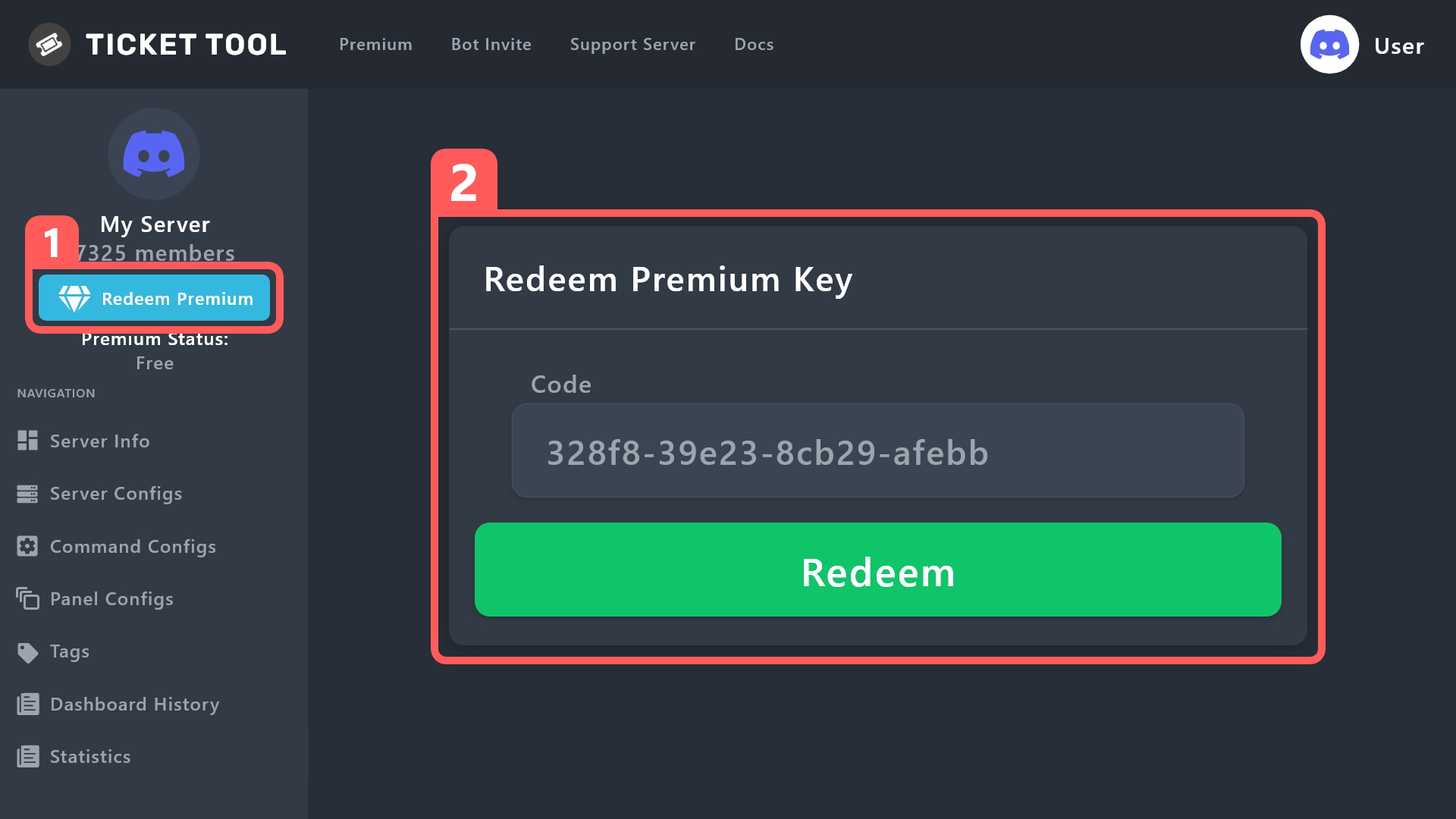
To redeem your premium key, go to the Dashboard, select your server, then click " Redeem Premium" under the server's icon and name.
 fallow ingot
^^
fallow ingot
You have it now.
iron nightBOT
Gave +1 Rep to @fallow ingot
jade topaz
Tanks @jade topaz
 empty yacht
Once a ticket is transcripted
do you have to download the file to view it
or is there a link located to where any able users are able to view it?
feel free to ping with a response as i may be preoccupied
fallow ingot
empty yacht
Once a ticket is transcripted
do you have to download the file to view it
or is ...
You don't have to download the transcript, ticket tool produces a link for you. All you have to do is set a transcript channel (shown below) or manually generate a transcript by running $transcript <channel or user ID> (of where you want the transcript to go)
humble sequoiaBOT
1. Go into your Dashboard
2. Open your Panel Configs tab
3. Select the panel you want to grant access to
4. Open the Transcript options menu
5. Using the Transcript Channel selector, pick the channel you want your transcripts to be sent to
6. Save changes
 nocturne otter
How i do dis?
 humble sequoiaBOT
A Discord Form lets the user answer individual questions in a pop-up Form, which then displays the answers in the ticket message. This can save time if you already know what you want to ask the user.
Setup Forms
Forms can be enabled under Panel Settings > Form Options > Edit Forms Options. In the new pop-up window, you can now enable and edit your own Form.
Form Options
You can add up to 5 questions in the Discord form. This is a Discord limitation. Each question can have a placeholder in the input field, a minimum and maximum input, multi-line, and also the option to have the answer required.
Options
Question Title ➞ Your Question goes here
Question Placeholder ➞ The placeholder text in the input field
Required ➞ If enabled, the user has to answer this question, to submit the form
Multi-Line Input ➞Allows the user to input multiple lines
Minimum and Maximum Input ➞ Set a minimum and maximum input value for the user
Displaying the Answer
To display the answers from the user, you need to enable Auto display form results on the ticket message as an additional embed
In case you don't want a second embed, go into your Panel Configs > Ticket Options > Edit Ticket Message. In there you use the variable {create.form.x} and just replace x with the number of your question. For example, the response to Question 1 can be displayed with {create.form.1}. If you don't use this variable, the response from the user is lost.
fallow ingot
^^
nocturne otter
humble sequoia
Where can I find that
fallow ingot
All the information to find the settings is there, but if you have any additional questions feel free to ask.
fallow ingot
nocturne otter
Where can I find that
It’s under panel settings in the panel configs


 fallow ingot
 nocturne otter
I need 2 how?


 humble sequoiaBOT
The panel message is where people react to make a ticket. To customize it head over to your Dashboard --> Panel Configs -> Panel -> Edit Panel Message
fallow ingot
You can only have maximum 250 characters for non-premium users.
nocturne otter
humble sequoia
I can’t add massage

 green citrus
my custom bot, does runs the message $delete but tickettool doesnt respond or delete the ticket wodering if i can get some help

@fallow ingot
mb
pseudo ravine
Hey there, you can go to the Dashboard > Server Configs > Bot > Add your bot's user ID
green citrus
Apricate it ALOT
fallow ingot
nocturne otter
I can’t add massage
I can't read your screenshot so I don't know what's going on. Do you speak Arabic?
pseudo ravine
green citrus
Apricate it ALOT
You're welcome, glad I could help. If you have any other questions/issues, don't hesitate to reach out again
nocturne otter
fallow ingot
I can't read your screenshot so I don't know what's going on. Do you speak Arabi...
يب!
عربي؟
@green citrus
fallow ingot
You can open an Arabic ticket in #🎫│make-a-ticket and one of our team members will help you.
nocturne otter
fallow ingot
You can open an Arabic ticket in <#571706435449257997> and one of our team membe...
fallow ingot
You will have to wait for a response, none of our Arabic speaking support are online right now.
 golden brook
Hello, is there any way to make that when a person opens a ticket, the bot posts a message that only they can see with a message that can be edited and with 2 buttons to decide if the person wants to continue creating the ticket or not?
civic wagon
golden brook
Hello, is there any way to make that when a person opens a ticket, the bot posts...
Not really. But something similar can be done with the use of Forms
humble sequoiaBOT
A Discord Form lets the user answer individual questions in a pop-up Form, which then displays the answers in the ticket message. This can save time if you already know what you want to ask the user.
Setup Forms
Forms can be enabled under Panel Settings > Form Options > Edit Forms Options. In the new pop-up window, you can now enable and edit your own Form.
Form Options
You can add up to 5 questions in the Discord form. This is a Discord limitation. Each question can have a placeholder in the input field, a minimum and maximum input, multi-line, and also the option to have the answer required.
Options
Question Title ➞ Your Question goes here
Question Placeholder ➞ The placeholder text in the input field
Required ➞ If enabled, the user has to answer this question, to submit the form
Multi-Line Input ➞Allows the user to input multiple lines
Minimum and Maximum Input ➞ Set a minimum and maximum input value for the user
Displaying the Answer
To display the answers from the user, you need to enable Auto display form results on the ticket message as an additional embed
In case you don't want a second embed, go into your Panel Configs > Ticket Options > Edit Ticket Message. In there you use the variable {create.form.x} and just replace x with the number of your question. For example, the response to Question 1 can be displayed with {create.form.1}. If you don't use this variable, the response from the user is lost.
golden brook
civic wagon
Not really. But something similar can be done with the use of Forms
Looks like it can works. Is there a way to add here (imagen) something what they can read? no need be a question. Just something what they need know before open the ticket and to help they decide if really need open the ticket or not
 civic wagon
golden brook
Looks like it can works. Is there a way to add here (imagen) something what they...
civic wagon
golden brook
Looks like it can works. Is there a way to add here (imagen) something what they...
You'll have to edit the question itself. You can put something like "Type YES if you'd like to create the ticket"
Just displaying the information isn't possible.
golden brook
I see, thanks for help.
 mossy valley
How do i add multiple dropdowns to one?
humble sequoiaBOT
The Drop-down menu or Select Menu replaces the buttons on your panel message and uses a drop-down menu with all of your panels. To set this up, go to your Panel Configs and select your main Panel.
<:Numbericons1:1018864164032225340> Enable Select Style
First you enable Select Style. Then you add an item in the Dropdown Editor. Now you can start editing your dropdown!
<:Numbericons2:1018864168041971712> Dropdown Editor
Each line in the dropdown editor represents a line in the drop down menu on discord. You can add more "Items", by clicking on
First you select a panel. That's the panel this option will open a ticket for. DONT select the same panel twice. Each option should have a different Panel
After that, you can put a Display. This is the title of this option and will appear in the drop down menu. The *Description can be set right after that, which will be below the title in grey.
Additionally you can select an emoji, that will be shown in front of each option. You can either manually input the ID of an emoji or select it in the selector.
Common Issues ⚠️
- Panel doesn't send? Make sure you have a valid emoji selected
- Option doesn't show up? Check if two options have the same panel in the DropDown Editor
$dropdown
 lime basalt
Interesting to know fine and good
 trim wind
guys can any one give me solution , when any one make support ticket the bot tell him u don't have permission to use this
rustic gale
trim wind
guys can any one give me solution , when any one make support ticket the bot tel...
«You don't have permissions to use this»
Are your members seeing this message when they try to create a ticket?You may have accidentally denied them permission to use the Create Ticket button.
Look in the following places in your server's dashboard:
👉 Server Configs -> Blacklist Roles
Any roles there will be unable to interact with the bot in any way, including creating tickets.👉 Panel Configs -> Buttons -> Create Ticket -> Support team only
If this is enabled👉 Panel Configs -> Buttons -> Create Ticket -> Disabled Roles
Any roles there will be unable to use the button.
trim wind
rustic gale
> **«You don't have permissions to use this»**
> Are your members seeing this me...
Number 2 when i made a support team only closed, the all members now can see the ticket
I want anyone can make a ticket and only who can see the supporters and those who made the ticket @rustic gale
 jagged obsidian
how can i see me history tickets?
I mean all the tickets i opened across different servers
civic wagon
trim wind
Number 2 when i made a support team only closed, the all members now can see the...
- Dashboard > Panel Configs > Permissions > Everyone Role Permissions > Edit Opened > View Channel
Similarly enable the view channel permission for Ticket Owner and Support Team (in case it's disabled)
civic wagon
jagged obsidian
how can i see me history tickets?
You cannot.
lone kelp
How to make ping when theres ticket
trim wind
civic wagon
* Dashboard > Panel Configs > Permissions > Everyone Role Permissions > Edit Ope...
thx
iron nightBOT
Gave +1 Rep to @civic wagon
lone kelp
How to make ping ticket
humble sequoiaBOT
Within all the messages the bot sends (both embeds and text) you can mention either channels, roles, or even users, these mentions will only send a notification to the user if they are used within a text field, e.g: a role mentioned in an embed won't ping at all the users who have that role.
For mentioning a role you can use one out of three options:
{@Role Name} ➞ Which is Case Sensitive.
{RoleID} ➞ Replace RoleId with the Id of the role you are trying to ping.
<@&RoleID> ➞ Discord's native syntax to ping roles.
<#ChannelID> ➞ Mention a channel by its ID.
<@UserID> ➞ Mention a user by its ID.
civic wagon
@lone kelp refer to the embed above ^
lone kelp
Okay thanks
lone kelp
civic wagon
<@893477938153029663> refer to the embed above ^
Do you know how to get role id
rustic gale
Use the /id command
lone kelp
Thanks
 fallen depot
how do i add a dropdown
 hasty garden
How do i make claim button on mobile?
humble sequoiaBOT
The Drop-down menu or Select Menu replaces the buttons on your panel message and uses a drop-down menu with all of your panels. To set this up, go to your Panel Configs and select your main Panel.
<:Numbericons1:1018864164032225340> Enable Select Style
First you enable Select Style. Then you add an item in the Dropdown Editor. Now you can start editing your dropdown!
<:Numbericons2:1018864168041971712> Dropdown Editor
Each line in the dropdown editor represents a line in the drop down menu on discord. You can add more "Items", by clicking on
First you select a panel. That's the panel this option will open a ticket for. DONT select the same panel twice. Each option should have a different Panel
After that, you can put a Display. This is the title of this option and will appear in the drop down menu. The *Description can be set right after that, which will be below the title in grey.
Additionally you can select an emoji, that will be shown in front of each option. You can either manually input the ID of an emoji or select it in the selector.
Common Issues ⚠️
- Panel doesn't send? Make sure you have a valid emoji selected
- Option doesn't show up? Check if two options have the same panel in the DropDown Editor
$dropdown
gilded verge
humble sequoia
@fallen depot,
humble sequoiaBOT
Our claiming feature allows your support team to assign tickets to a support member. With this feature you will be able to change the ticket's name, it's category and permissions! We highly encourage you to explore this feature by checking our Claiming Options Documentation
Note: This is a 💎 Premium exclusive feature.
 gilded verge
humble sequoia
gilded verge
humble sequoia
@hasty garden,
hasty garden
Ty
fallen depot
gilded verge
<@1049479371909505044>, <:this:894279341108772914>
thank you!
iron nightBOT
Gave +1 Rep to @gilded verge
hasty garden
It says this interaction failed
gilded verge
looks like permissions problem, could you please run /debug on your server?
everything looks good 🤔
could you please show screenshot of error?
hasty garden
 gilded verge
it's because i used this command so you can't click there, but you can use #🤖│bot-spam or use help command on your server ^^
 hasty garden
gilded verge
it's because i used this command so you can't click there, but you can use <#910...
hasty garden
gilded verge
it's because i used this command so you can't click there, but you can use <#910...
gilded verge
as in note, claiming is premium
hasty garden
Huh?
fallen depot
Is a placeholder text required because idk what that is..
 gilded verge
placeholder is that what you can see before you click to expand menu, my example:
 gilded verge
hasty garden
Huh?
gilded verge
hasty garden
Huh?
looks like there was misunderstanding, please ask again because im not sure what you meant 🤔
fallen depot
ty also, for this part of my second dropdown it doesnt give me a option for my panel, theres nothing when i expand it

thanks @gilded verge
iron nightBOT
Gave +1 Rep to @gilded verge
gilded verge
ah because you need to choose panel for this category
 hasty garden
Miroxik if i make u admin in my server can u do it for me?
gilded verge
hasty garden
Miroxik if i make u admin in my server can u do it for me?
Why do you ask for that? 🤨 Please read topic of this channel:
" ⚠️ We recommend that all support by server members are kept to this channel. Refrain from sending server invites or providing permissions to users not officially affiliated with Ticket Tool. We are not liable for any damages caused to your server due to these actions "
gilded verge
fallen depot
when i click it nothing pops up
how many panels do you have?
fallen depot
how many of these?
 gilded verge
exactly
like on my example in panel configs:

 iron nightBOT
Gave +1 Rep to @gilded verge
jade topaz
hello I bought the premium bot and I bought twice(?). I don't know why
can I get the refund for 1 of them?
gilded verge
humble sequoia
as here mentioned,
" DONT select the same panel twice. Each option should have a different Panel "
so yup, you need more panels@.xxc.^^
fallen depot
oh
also i added the dropdown but when i made a ticket to test i dont see it
 viral wasp
How do I make one ticket so I can chose like click and select it.
gilded verge
jade topaz
can I get the refund for 1 of them?
Hey, to get refund, you need to contact with Discord Staff on: https://dis.gd/billing
fallen depot
fallen depot
oh
also i added the dropdown but when i made a ticket to test i dont see it
@gilded verge
gilded verge
please avoid pinging anyone and wait for help ^^
fallen depot
Sorry
gilded verge
fallen depot
ty also, for this part of my second dropdown it doesnt give me a option for my p...
could you please show your dropdown? like one before
humble sequoiaBOT
The Drop-down menu or Select Menu replaces the buttons on your panel message and uses a drop-down menu with all of your panels. To set this up, go to your Panel Configs and select your main Panel.
<:Numbericons1:1018864164032225340> Enable Select Style
First you enable Select Style. Then you add an item in the Dropdown Editor. Now you can start editing your dropdown!
<:Numbericons2:1018864168041971712> Dropdown Editor
Each line in the dropdown editor represents a line in the drop down menu on discord. You can add more "Items", by clicking on
First you select a panel. That's the panel this option will open a ticket for. DONT select the same panel twice. Each option should have a different Panel
After that, you can put a Display. This is the title of this option and will appear in the drop down menu. The *Description can be set right after that, which will be below the title in grey.
Additionally you can select an emoji, that will be shown in front of each option. You can either manually input the ID of an emoji or select it in the selector.
Common Issues ⚠️
- Panel doesn't send? Make sure you have a valid emoji selected
- Option doesn't show up? Check if two options have the same panel in the DropDown Editor
$dropdown
gilded verge
humble sequoia
@viral wasp,
fallen depot
 gilded verge
what's your panel name? this where you have dropdown
 fallen depot
 gilded verge
//now im not sure why i asked for panel name 😐
anyway, so when you create ticket, you can't see this channel, right?
fallen depot
viral wasp
gilded verge
<@1005272991678074920>, <:this:894279341108772914>
how do I send it?
fallen depot
Should i resend the panel to my channel?
gilded verge
ooh, so you mean panel is not updated... yep, you need to update panel by yourself or send your panel to the channel again
fallen depot
ohhhh
gilded verge
just use Update button ^^
gilded verge
viral wasp
how do I send it?
looks like i can't understand your question, please try again
fallen depot
thanks @gilded verge ill update it and lyk if it works i bet it most likely will
iron nightBOT
Gave +1 Rep to @gilded verge
fallen depot
It works but is there a way to have it to where its the normal ticket button and it shows the drop down in the ticket instead of the channel

Or is that feature not a thing or not avalibe yet?
 polar sapphire
Imma need someone to give me the exact step by step to set up this bot in a server… i am about to cry
gilded verge
fallen depot
Or is that feature not a thing or not avalibe yet?
If I understand correctly, there is no way to have a button and a dropdown in the same message, and it's not the bot's fault, but Discord doesn't allow
um, now i think i misunderstood your question, so my next answer will be:
Dropdown you have for panels, not in message after ticket is created but since i didn't noticed this suggestion, you can go to #🤖│bot-spam and use s!suggest ^^
humble sequoiaBOT
First you will want to invite the bot to your server. Once the bot is in your server, you can manage your server in the dashboard.
To create a panel we are going to need to head over to the Panel Configs Tab on the Dashboard.
Once at the dashboard we will need to click Create Panel.
Enter a panel name (Fill in any optional settings you want).
Click Create Panel and you are ready to get started with configuring your panel.
An example of a creating a panel is shown below.
Once the panel has been created, use the blue Send button and select the channel you want the panel to be sent to.
The Panel wasn't send
Use the </debug:ID> command to diagnose possible permission issues with the bot.
gilded verge
humble sequoia
@polar sapphire,
iron nightBOT
Gave +1 Rep to @gilded verge
 deep mason
Anyone how to do giveaway tickey
And how it work
@iron night how to do giveaway tickey And how it work
iron nightBOT
Timeout/to
Timeout <User:Mention/ID> <Duration:Duration> <Reason:Text>
Timeout <User:Mention/ID> <Reason:Text> <Duration:Duration>
Timeout <User:Mention/ID> <Duration:Duration>
Timeout <User:Mention/ID> <Reason:Text>
Timeout <User:Mention/ID>
Timeout a member
Required permissions: TimeoutMembers/ModerateMembers or ManageServer
 green mirage
 humble sequoiaBOT
⚠️ You're in the wrong place
We provide support for Ticket Tool Discord bot and cannot help you with whatever issue you have.
- We don't know which Support Team you should contact to get this issue resolved, and unfortunately we won't be able to accurately tell you.
If you don't have any further questions regarding our bot Ticket Tool, please close this ticket
gilded verge
deep mason
Anyone how to do giveaway tickey
what is giveaway tickey? 🤔
 polar saffron
سلام عليكم
 robust sandalBOT
polar saffron
سلام عليكم
robust sandalBOT
polar saffron
سلام عليكم
Peace be upon you
 Arabic (ar) → English (en)
fallow ingot
Arabic (ar) → English (en)
fallow ingot
$articket
humble sequoiaBOT

فريق الدعم الفني العربي
عميلنا العزيز ان كنت تبحث عن مساعدة يرجى فتح تكت خاص بفريق الدعم الفني العربي
اذهب الى#🎫│make-a-ticket
ثم قم بلضغط على الايموجي الاتي (🇯🇴)
fallow ingot
@polar saffron ^^
polar saffron
هلا
 finite ember
yo, something that isnt actually related to ticket tool, but ik u guys are good at support, and wanting to ask, where I can make my own bot w custom commands n stuff? like where's the easier (not botghost or stuff w watermark)
fallow ingot
I'm not sure where you can create a Discord bot without any costs or watermarks. Searching on Google might help you in finding suitable options that meet your needs. However, as you mentioned, your question isn't related to ticket tool, so please use this channel solely for ticket tool matters.
lunar solar
Where did you buy premium?
Thats not possible
The only place you can make new purchases for ticket tool premium is via Discords app directory or in a ticket in Discord via one of our direct methods
Yeah so you used a direct method to purchase
and used a redeemable code
austere forge
@lunar solar I guess he bought from this site
 https://tickettool.xyz/premium

Ticket Tool - Ticketing without clutter - The #1 discord Ticketing bot
lunar solar
austere forge
<@892854649172946985> I guess he bought from this site
<:NewLineEnd:102500537732...
Yeah try pressing purchase lmao
austere forge
ohhh
lunar solar
lol
humble sequoiaBOT
The first thing you will need to do is invite the premium bot, an invite can be found here
Once the bot is in your server we will head to the dashboard and manage your server. When you are managing your server, you want to head into "Server Configs" then click the drop down menu under "Select the bot you would like to use on this server" then click "Ticket Tool#6207" and then save.
lunar solar
^
 last nova
How do u make it so people have pic perms in the tickets
austere forge
last nova
How do u make it so people have pic perms in the tickets
In the ticket panel permissions, check this box
 last nova
austere forge
In the ticket panel permissions, check this box
last nova
austere forge
In the ticket panel permissions, check this box
🥲 for some reason can’t find it
 last nova
OHH THANK U
fallow ingot
no worries
 narrow finch
 pseudo ravine
Hey there. Could you please run the /debug command send the link it provides if it gives you one?
 lunar solar
pseudo ravine
Hey there. Could you please run the `/debug` command send the link it provides i...
lunar solar
pseudo ravine
Hey there. Could you please run the `/debug` command send the link it provides i...
 pseudo ravine
narrow finch
The same
pseudo ravine
narrow finch
The same
Ticket Tool does not have the Send Messages permission inside the channel, that's why it can't respond
pseudo ravine
lunar solar
I saw it 
narrow finch
pseudo ravine
Ticket Tool does not have the `Send Messages` permission inside the channel, tha...
How can hé get it ?
austere forge
narrow finch
How can hé get it ?
Give administrator permissions directly to the bot ticket tool
 tawny tundra
how do i @ a role in my ticket?
pseudo ravine
Go to the Channel Settings > Permissions > Add permissions for Ticket Tool > Mark Send Messages as ✅
tawny tundra
how do i setup the setting
pseudo ravine
austere forge
Give administrator permissions directly to the bot ticket tool
Not recommended
tawny tundra
is it like <@rolename> or something like this?
humble sequoiaBOT
1. Go into your Dashboard
2. Open your Panel Configs tab
3. Select the panel you want to ping your support on
4. Open the Ticket options menu
5. Click on Edit Ticket Message
6. In the Message Content use one of the role mention syntax (**{@Role Name}**/**{Role ID}**)
7. Save changes
Note: For this to work properly, Ticket Tool requires the Mention Everyone permission. Or the role must have the Allow anyone to @mention this role setting enabled
tawny tundra
humble sequoia
ty
iron nightBOT
Gave +1 Rep to @humble sequoia
pseudo ravine
You're welcome, glad I could help. If you have any other questions/issues, don't hesitate to reach out again 
jade topaz
After hitting a certain limit of tickets in a category, my tickets starts to appear on the top of the Discord-server instead of the category. What can I do about that?
pseudo ravine
Hey there. You can add multiple categories for your tickets. Go to the Dashboard > Panel Configs > Category > Category Opened/Created > Add multiple categories
jade topaz
You're a lifesaver Jdog 🫶
 lilac pawn
@lament sandal eee hello
@rustic gale
@mystic hound
Hello, I'm Ateş, I'm Turkish, so I wrote this with a translation, please can you help me by translating it, I don't know how to set up a ticket tool on my server, please help me I don't know English
Sorry
Well, I see, good day. Can you direct someone to me?
Ok
Hello, can someone who speaks Turkish or a Turkish person help me?
Merhaba Türkçe bilen biri yada türk biri bana yardım edebilirmi
robust sandalBOT
Bu çevirmen botu aracılığıyla size yardımcı olabiliriz
English (en) → Turkish (tr)
lilac pawn
Nasıl
lilac pawn
robust sandal
Nasıl kullanacağım
robust sandalBOT
How to use it
Turkish (tr) → English (en)
Ne kullanılır?
English (en) → Turkish (tr)
lilac pawn
robust sandal
Bana yardımcı olurmusun
lilac pawn
robust sandal
Bana yardım edin tr en
Outsider pls help me how to use it translate
@robust sandal bana yardım edin
@rustic gale ?
austere forge
lilac pawn
Pls help
hey there, what you problem ? 🙂
lilac pawn
austere forge
hey there, what you problem ? 🙂
Ee pls dm
lilac pawn
austere forge
hey there, what you problem ? 🙂
I'm trying to set up an automatic ticket generator in ticket tool, but I can't, can you help me?
austere forge
lilac pawn
I'm trying to set up an automatic ticket generator in ticket tool, but I can't, ...
"automatic ticket generator" what do you mean exactly?
humble sequoiaBOT
First you will want to invite the bot to your server. Once the bot is in your server, you can manage your server in the dashboard.
To create a panel we are going to need to head over to the Panel Configs Tab on the Dashboard.
Once at the dashboard we will need to click Create Panel.
Enter a panel name (Fill in any optional settings you want).
Click Create Panel and you are ready to get started with configuring your panel.
An example of a creating a panel is shown below.
Once the panel has been created, use the blue Send button and select the channel you want the panel to be sent to.
The Panel wasn't send
Use the </debug:ID> command to diagnose possible permission issues with the bot.
lilac pawn
austere forge
"automatic ticket generator" what do you mean exactly?
You click the button and it creates a ticket channel
austere forge
lilac pawn
You click the button and it creates a ticket channel
alright, just follow the instructions above to set up the ticket panel!
lilac pawn
austere forge
alright, just follow the instructions above to set up the ticket panel!
Ok thanks
iron nightBOT
Gave +1 Rep to @austere forge
lilac pawn
austere forge
alright, just follow the instructions above to set up the ticket panel!
Ahh
 austere forge
lilac pawn
Ahh
austere forge
lilac pawn
Ahh
It is necessary for the bot to obtain permission to send messages to the targeted channel
 winged bramble
Hi, people in my server don’t seem to have permission to open a ticket
Or that’s what they are saying to me and idk how to fix this
pseudo ravine
Hey there. Could you go to the Dashboard > Panel Configs > Buttons > Create Ticket > Send a screenshot please
pseudo ravine
No worries
 blissful hatch
can anyone help me out
humble sequoiaBOT
Hello, we would love to help you, but if you don't tell us what you need help with we can't help you :(
mossy valley
i've got drop downs working on my server but i want the dropdown selection to open the panel chosen before the ticket is created
civic wagon
mossy valley
i've got drop downs working on my server but i want the dropdown selection to op...
Could you please elaborate on "open the panel chosen before ticket is created"
austere forge
blissful hatch
can anyone help me out
hey there, what you problem 🙂
mossy valley
Dropdown boxes work, so i select the option but it instantly opens a ticket, i want it to open the chosen options panel so that details can be shown prior to them choosing to open ticket
civic wagon
mossy valley
Dropdown boxes work, so i select the option but it instantly opens a ticket, i w...
If I'm getting it correctly, you wish to show the panel message that contains information regarding that specific panel, and then open the ticket?
mossy valley
yes
civic wagon
Unfortunately that isn't possible. You can either put all the information about the panels in the main panel message on which multipanels are linked, or in the Ticket Message
You could also make use of forms to show information. This isn't what its intended purpose is, but you could do that as an alternative
mossy valley
I want it to basically work how your automated support works
civic wagon
mossy valley
I want it to basically work how your automated support works
That is a completely different bot and only meant to display information. You cannot do something exactly like that using Ticket Tool
robust sandalBOT
 storm bone
eu so do brazil e tenho um poblema
storm bone
eu so do brazil e tenho um poblema
I so do Brazil and have a poblema
Portuguese (pt) → English (en)
mossy valley
you have a different bot running tickets on the ticketbot discord?
civic wagon
#📌│automated-support doesn't let you create tickets. It only shows information.
You can create support tickets from #🎫│make-a-ticket
civic wagon
- Display information of every panel on main panel embed (just like in #🎫│make-a-ticket)
- Display information in Ticket Message
- Use forms feature
I can only suggest these 3. However feel free to create a support ticket in case they have a better option
mossy valley
Can you elaborate on how i could use forms feature to complete what im trying to do?
civic wagon
Just to make sure, you're familiar with the forms feature, right?
Else I'll explain that bit too
mossy valley
Forms is pretty straight forward which is why i'm curious as to how i could accomplish it
civic wagon
Simply typing in all the information in place of a question. You won't be able to format it like on discord however. That's what I'm thinking of
Actually uh, I take it back. It seems like there's a character limit too in the question field
mossy valley
Yea was just about to say
civic wagon
Well, this is what I had thought of but welp.
 mossy valley
That would work if it allowed more information!
like what im looking for is basically a 2 step open
civic wagon
I'll suggest more character limit to the dev
mossy valley
similar to 2 step close
 civic wagon
I can only help this much. Apologies. Feel free to open a ticket from #🎫│make-a-ticket
mossy valley
Thanks for your help, I will
blissful hatch
austere forge
hey there, what you problem 🙂
my game keeps lagging and i’m in nae
timber kernel
blissful hatch
my game keeps lagging and i’m in nae
You are on the wrong server. This is the support server for the ticket tool bot.
blissful hatch
huh
 dry tiger
Help
austere forge
dry tiger
Help
hey there what you problem ?
dry tiger
I don't remember the commands to make a panel with ticket tool
austere forge
dry tiger
I don't remember the commands to make a panel with ticket tool
alright, use /setup to start configuring tickettool
austere forge
dry tiger
Thank you
no worries
 cursive scaffold
كيف اعرف كم مستواي في العبة
humble sequoiaBOT
⚠️ You're in the wrong place
We provide support for Ticket Tool Discord bot and cannot help you with whatever issue you have.
- We don't know which Support Team you should contact to get this issue resolved, and unfortunately we won't be able to accurately tell you.
If you don't have any further questions regarding our bot Ticket Tool, please close this ticket
pseudo ravine
@cursive scaffold اقرأ هذا ^
cursive scaffold
المطلوب سماح
pseudo ravine
هل هذا يتعلق بأداة التذاكر؟
cursive scaffold
اسمحلي
pseudo ravine
هل تحتاج إلى أي دعم لبوت أداة التذاكر؟
cursive scaffold
نعم
pseudo ravine
عندما قلت المستوى ، هل تقصد مستوى الإذن؟
pseudo ravine
ما زلت غير متأكد مما إذا كان هذا يتعلق بـ @pseudo glen
cursive scaffold
خصني بوت
pseudo ravine
فهل تحتاج إلى مساعدة بخصوص @pseudo glen؟
 wind hornet
cursive scaffold
تاوع سارفر نتاعي
wind hornet
cursive scaffold
تاوع سارفر نتاعي
أهلًا، كيف يمكنني مساعدتك في حالة سؤالك يخص البوت بشكل مباشر.
والبوت ما عنده يا بعدي لعبة، هو بوت تدير فيه خادمك بشكل أفضل عن طريق خاصية التكت.
 prisma narwhal
is it possible to also purchase ticket tool premium lifetime?
pseudo ravine
Hey there. There used to be an option for that, but I believe it's not available anymore
prisma narwhal
okay, thats a shame i would rather buy lifetime instead of a monthly subscription
 naive siren
أهلاً
اريد معرفة كيف اجعل البوت يرسل بعض الاسألة الى الشخص قبل فتح التذكرة
@wind hornet
@pseudo ravine
pseudo ravine
prisma narwhal
okay, thats a shame i would rather buy lifetime instead of a monthly subscriptio...
Sorry
pseudo ravine
naive siren
أهلاً
اريد معرفة كيف اجعل البوت يرسل بعض الاسألة الى الشخص قبل فتح التذكرة
من فضلك لا تذكر الناس للدعم
naive siren
اسف 👍🏻
humble sequoiaBOT
A Discord Form lets the user answer individual questions in a pop-up Form, which then displays the answers in the ticket message. This can save time if you already know what you want to ask the user.
Setup Forms
Forms can be enabled under Panel Settings > Form Options > Edit Forms Options. In the new pop-up window, you can now enable and edit your own Form.
Form Options
You can add up to 5 questions in the Discord form. This is a Discord limitation. Each question can have a placeholder in the input field, a minimum and maximum input, multi-line, and also the option to have the answer required.
Options
Question Title ➞ Your Question goes here
Question Placeholder ➞ The placeholder text in the input field
Required ➞ If enabled, the user has to answer this question, to submit the form
Multi-Line Input ➞Allows the user to input multiple lines
Minimum and Maximum Input ➞ Set a minimum and maximum input value for the user
Displaying the Answer
To display the answers from the user, you need to enable Auto display form results on the ticket message as an additional embed
In case you don't want a second embed, go into your Panel Configs > Ticket Options > Edit Ticket Message. In there you use the variable {create.form.x} and just replace x with the number of your question. For example, the response to Question 1 can be displayed with {create.form.1}. If you don't use this variable, the response from the user is lost.
naive siren
pseudo ravine
من فضلك لا تذكر الناس للدعم
هل يمكنك مساعدتي؟
pseudo ravine
humble sequoia
اقرأ هذا ^
naive siren
Oh thx
pseudo ravine
You're welcome, glad I could help. If you have any other questions/issues, don't hesitate to reach out again
prisma narwhal
pseudo ravine
Sorry
will that ever come back maybe ask someone if that is still possible?
becasue i would highly prefer that....
jade topaz
I need help
pseudo ravine
prisma narwhal
will that ever come back maybe ask someone if that is still possible?
I'm not someone who would know, sorry
jade topaz
How do I get auto roles
prisma narwhal
pseudo ravine
I'm not someone who would know, sorry
you know who can help with that?
pseudo ravine
You can make a support ticket in #🎫│make-a-ticket and ask
pseudo ravine
jade topaz
How do I get auto roles
Hey there. Are you asking how to get roles in this server?
jade topaz
pseudo ravine
Hey there. Are you asking how to get roles in this server?
No in my server
pseudo ravine
Ticket Tool does not give autoroles
pseudo ravine
This is not the server to ask
 scenic plinth
Doing a quick Google search will help you with your inquiry
 old cradle
Ticket tool Is not working in my Discord Server it’s says invalid body part
 clever pelican
what do i put in so that it shows the emoji i added to the server on the ticket embed?
like this?

 humble sequoiaBOT
A Discord Form lets the user answer individual questions in a pop-up Form, which then displays the answers in the ticket message. This can save time if you already know what you want to ask the user.
Setup Forms
Forms can be enabled under Panel Settings > Form Options > Edit Forms Options. In the new pop-up window, you can now enable and edit your own Form.
Form Options
You can add up to 5 questions in the Discord form. This is a Discord limitation. Each question can have a placeholder in the input field, a minimum and maximum input, multi-line, and also the option to have the answer required.
Options
Question Title ➞ Your Question goes here
Question Placeholder ➞ The placeholder text in the input field
Required ➞ If enabled, the user has to answer this question, to submit the form
Multi-Line Input ➞Allows the user to input multiple lines
Minimum and Maximum Input ➞ Set a minimum and maximum input value for the user
Displaying the Answer
To display the answers from the user, you need to enable Auto display form results on the ticket message as an additional embed
In case you don't want a second embed, go into your Panel Configs > Ticket Options > Edit Ticket Message. In there you use the variable {create.form.x} and just replace x with the number of your question. For example, the response to Question 1 can be displayed with {create.form.1}. If you don't use this variable, the response from the user is lost.
 dusky cobalt
i need premium version?
pseudo ravine
Read this ^
dusky cobalt
@pseudo ravine i doing this
how make this

bot answer and i see what i write in forms u know what i mean
pseudo ravine
There's no need to ping. But isn't that what you just did?
dusky cobalt
pseudo ravine
There's no need to ping. But isn't that what you just did?
when i use forms bot dont send my answer
pseudo ravine
humble sequoia
Did you read this?
dusky cobalt
he just send this
 humble sequoiaBOT
⚠️ Please read the messages previously sent by our team ⚠️
 tranquil schooner
How do I change this writing?

 elfin lion
hello i need some help, i am trying to make it so my senior admins can see all the tickets that my trial admins/ admins claim
rustic gale
elfin lion
hello i need some help, i am trying to make it so my senior admins can see all t...
Add the role to Additional Roles
(You will also have to close and reopen any existing tickets so that the permissions are refreshed)
austere forge
tranquil schooner
This message can be changed from the bot dashboard
humble sequoiaBOT
The panel message is where people react to make a ticket. To customize it head over to your Dashboard --> Panel Configs -> Panel -> Edit Panel Message
rustic gale
That's going to require premium
The pretty embed requires premium at least
The buttons are just from attached panels
humble sequoiaBOT
For more convenient use of multipanels, you can now combine panels on the dashboard. This will allow you to directly send the multipanel from the dashboard or via the $panel ID command.
Where can I find this?
You can find this setting on the Dashboard -> Panel Configs -> Panel -> Attached Panels
Note: if you're attaching all the panels to a panel called English, don't include English in the attached panel's box (If you do this, it will create a duplicate)
This will put all buttons from all of your panels on one message. The message is the panel message from the panel you're combining these panels in.
rustic gale
Panel Configs -> Panel -> Edit Panel Message -> Embed Editor
tawny tundra
do i lose my premium role after i unsubscribe the premium bot?
rustic gale
Yes
 mellow rock
السلام عليكم
كيف اخلي زر الاستلام ضاهر؟ حاولت اشوف طرق وماقدرت
وكيف اخذ رتبه شراكه/بارتنر دام معي مجتمع كبير
robust sandalBOT
mellow rock
السلام عليكم
Peace be upon you
Arabic (ar) → English (en)
robust sandalBOT
mellow rock
كيف اخلي زر الاستلام ضاهر؟ حاولت اشوف طرق وماقدرت
How do I remove the receipt button visible? I tried to see ways but I couldn't
Arabic (ar) → English (en)
robust sandalBOT
mellow rock
وكيف اخذ رتبه شراكه/بارتنر دام معي مجتمع كبير
And how he took the rank of partnership/ partner as long as I have a big society
Arabic (ar) → English (en)
 green helm
Hey how can I change the message in the panel?
jade topaz
how do i do that
 humble sequoiaBOT
━━ User's inquiry has been moved to a ticket ━━
 slender minnow
green helm
Hey how can I change the message in the panel?
slender minnow
green helm
Hey how can I change the message in the panel?
Dashboard > Panel Config > Panels option > Edit panel message > Dropdown near the embed editor
humble sequoiaBOT
The panel message is where people react to make a ticket. To customize it head over to your Dashboard --> Panel Configs -> Panel -> Edit Panel Message
 tawny halo
How can i reset ticket number marking to 0001?
green helm
slender minnow
Dashboard > Panel Config > Panels option > Edit panel message > Dropdown near th...
I didn’t find it
slender minnow
green helm
I didn’t find it
go to your panel config and look for an option called Panel
slender minnow
tawny halo
How can i reset ticket number marking to 0001?
There is an option below your panel name called Count, you can set the count from there
green helm
slender minnow
go to your panel config and look for an option called Panel
Yeah after
green helm
green helm
Yeah after
 slender minnow
click the option called Edit Panel Message
 slender minnow
click here
https://i.imgur.com/SYTRhgR.png
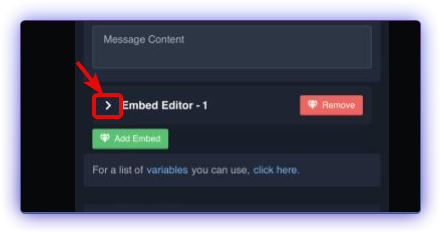 mellow rock
robust sandal
mellow rock
robust sandal
@jade topaz
 frail crow
Hey. We keep getting these pop ups eventhough we have admin permission and the right roles

 frail crow
Hey. We keep getting these pop ups eventhough we have admin permission and the r...
frail crow
frail crow
Hey. We keep getting these pop ups eventhough we have admin permission and the r...
Could anyone help us out
lunar solar
frail crow
Could anyone help us out
do /debug in #ticket-transcripts

 errant pike
SOS
tranquil schooner
How do I log?
lunar solar
frail crow
sorry 2 secs
 frail crow
lunar solar
frail crow
lunar solar
That worked thx
iron nightBOT
Gave +1 Rep to @lunar solar
frail crow
I still have this isue

Wheb i close the ticket
I do the option to get the transcript
Or to delete
jade topaz
I have the permission turned on though...
 lunar solar
jade topaz
I have the permission turned on though...
lunar solar
jade topaz
I have the permission turned on though...
run /debug
lunar solar
frail crow
I still have this isue
run /debug in that channel
jade topaz
lunar solar
run `/debug`
It's asking for embed links permissions to run /debug..
Giving it administrator permissions fixed it.
pseudo ravine
Giving administrator is not recommended
jade topaz
Why?
lunar solar
jade topaz
It's asking for embed links permissions to run /debug..
yeah thats fine I just want to see the debug report
lunar solar
jade topaz
It's asking for embed links permissions to run /debug..

The bot is missing those permissions to the channel #bot-commands
See edit channel and give it those perms
pseudo ravine
jade topaz
Why?
I’ll let Lupus answer, since he’s currently helping
lunar solar
pseudo ravine
I’ll let Lupus answer, since he’s currently helping
You can I'm busy anyway
pseudo ravine
Oh, alright
jade topaz
lunar solar
See edit channel <a:cog:1021158763572502750> and give it those perms
Oh I see now, thank you.
iron nightBOT
Gave +1 Rep to @lunar solar
pseudo ravine
jade topaz
Why?
It’s not required to give administrator, it can work just fine by giving role and channel permissions
frail crow
lunar solar
run `/debug` in that channel
I did
frail crow
frail crow
https://discordapp.com/channels/509192800865353738/662692902245498910/1132251079...
This is the link
rustic gale
It's failing to close the ticket because it's missing permissions
Specifically, it's missing the Administrator permission
Which it needs because you want to deny the Manage Permissions permission to your support team
So either make Manage Permissions neutral  or make the bot Administrator
 real owl
Heya i have a question. im trying to setup tickets with dropdown menu. How do i have multiple selections for different tickets
humble sequoiaBOT
The Drop-down menu or Select Menu replaces the buttons on your panel message and uses a drop-down menu with all of your panels. To set this up, go to your Panel Configs and select your main Panel.
<:Numbericons1:1018864164032225340> Enable Select Style
First you enable Select Style. Then you add an item in the Dropdown Editor. Now you can start editing your dropdown!
<:Numbericons2:1018864168041971712> Dropdown Editor
Each line in the dropdown editor represents a line in the drop down menu on discord. You can add more "Items", by clicking on
First you select a panel. That's the panel this option will open a ticket for. DONT select the same panel twice. Each option should have a different Panel
After that, you can put a Display. This is the title of this option and will appear in the drop down menu. The *Description can be set right after that, which will be below the title in grey.
Additionally you can select an emoji, that will be shown in front of each option. You can either manually input the ID of an emoji or select it in the selector.
Common Issues ⚠️
- Panel doesn't send? Make sure you have a valid emoji selected
- Option doesn't show up? Check if two options have the same panel in the DropDown Editor
$dropdown
real owl
oo
 swift raft
Why can't I edit the message? It wont let me type or edit anything..
 pseudo ravine
Hey there. The standard Ticket Tool bot has a character limit
tawny tundra
how do i set tickettool to dm the guy who open ticket when they close the ticket
like a ticket transcript , the bot will dm to that guy
nvm i found it
cursive scaffold
يخصني سارفر سامب ا
austere forge
tawny tundra
nvm i found it
good for you ?
 dapper island
i have a problem
austere forge
dapper island
i have a problem
hey there, what you problem
dapper island
when i enter its keep crashing
and i activated that setting
like i stay in the game 30 seconds and then its crashing
what do i do?
austere forge
dapper island
what do i do?
You are on the Ticket tool bot support server sir
dapper island
yeah but on the main server nobody is responding
austere forge
dapper island
yeah but on the main server nobody is responding
Unfortunately we won't be able to help you, as this has nothing to do with the bot Ticket tool
fallow ingot
No robux here, just tickets
winged bramble
Hi, my server members are saying they don’t have permission to open a ticket
pseudo ravine
Hey there. Could you please go to the Dashboard > Panel Configs > Buttons > Create Ticket > Send a screenshot please?
winged bramble
 pseudo ravine
Do you have multiple panels?
pseudo ravine
Do you know which panel they can't open tickets for?
winged bramble
all of them
pseudo ravine
Go to the Server Configs tab, do you have any Blacklisted Roles?
winged bramble
I have one merged panel that has 3 types on, and one completely seperate panel
that was it
amazing thanks a bunch
pseudo ravine
You're welcome, glad I could help. If you have any other questions/issues, don't hesitate to reach out again
 delicate canopy
.
wind hornet
 warm wadi
why i can not change the embid color hex ?
warm wadi
why i can not change the embid color hex ?
You must go go to https://tickettool.xyz/manage-servers, then go your server and click on "Manage" after that go to the "Panel Configs" section then "Moderator" and select "Moderator Message" click on the embed and in the "Field Editor" option insert the code for the color
wind hornet
 muted canopy
Can someone help pls im on mobile
muted canopy
Can someone help pls im on mobile
Could you please clarify your issue and what problem you are facing?
fallow ingot
warm wadi
why i can not change the embid color hex ?
It’s a premium feature
warm wadi
wind hornet
You must go go to https://tickettool.xyz/manage-servers, then go your server and...

I CAN NOT CHANGE
fallow ingot
fallow ingot
It’s a premium feature
.
muted canopy
 fallow ingot
muted canopy
fallow ingot
muted canopy
Check ticket tool has permissions in that channel, you can check by running $debug
fallow ingot
warm wadi
is it not premium ?
So you have premium then?
warm wadi
yes it has
fallow ingot
$pc 701709330403033159
humble sequoiaBOT
fallow ingot
$pc 701709330403033159

Premium Check
I was unable to detect a premium server for @warm wadi.
Found 6 servers in total and 0 with premium and permission
fallow ingot
Seems like you have no servers with premium, if you had premium you’d be able to edit the hex.
warm wadi
i just pay 5.99
 rich fulcrum
is it possible to make it so support roles can only claim 1 ticket at a time?
fallow ingot
warm wadi
i just pay 5.99
What’s the server ID of the server with premium?
warm wadi
 fallow ingot
Check you purchased it with the correct server
muted canopy
@fallow ingot ty for The help
iron nightBOT
Gave +1 Rep to @fallow ingot
warm wadi
970819080707792926
rich fulcrum
rich fulcrum
is it possible to make it so support roles can only claim 1 ticket at a time?
@fallow ingot do u know this?
 fallow ingot
rich fulcrum
<@768144576946110475> do u know this?
fallow ingot
rich fulcrum
<@768144576946110475> do u know this?
I’m getting to your question but there are people in this channel who have been waiting for support longer. Be patient.
fallow ingot
warm wadi
yes is the correct server
The server has an active subscription so try logging out and back in. Also, ticket tool is missing add reaction permissions. This is a required permission so enable it via ticket tool’s role.
fallow ingot
rich fulcrum
is it possible to make it so support roles can only claim 1 ticket at a time?
If you mean only one support member can claim 1 individual ticket out of all open tickets, no.
rich fulcrum
fallow ingot
If you mean only one support member can claim 1 individual ticket out of all ope...
i mean like, if a support member claims 1 ticket, they arent able to claim another until that claimed ticked is unclaimed/deleted
is there some way to do that?
rich fulcrum
fallow ingot
But it’s not a current feature
Ok thank you!
iron nightBOT
Gave +1 Rep to @fallow ingot
warm wadi
@fallow ingot can we change the bot picture ?
 fading karma
Hi, I bought a free trial of the ticket tool, when the time expires, the settings will go away.
paper wadi
does anyone know how to use the auto close tickets
if they have that feature i got premium recently
paper wadi
can anyone help?
 fiery birch
every time im trying to open a ticket in server its sayin error to me plz help me
pseudo ravine
paper wadi
does anyone know how to use the auto close tickets
Hey there. You can setup an Automation by going to the Dashboard > Panel Configs > Automation
pseudo ravine
fiery birch
every time im trying to open a ticket in server its sayin error to me plz help m...
Hey there. What error are you getting?
Hey there. Could you please run the /debug command and send the link it provides if you receive one?

 pseudo ravine
fading karma
Hi, I bought a free trial of the ticket tool, when the time expires, the setting...
pseudo ravine
fading karma
Hi, I bought a free trial of the ticket tool, when the time expires, the setting...
Hey there. Yes, all premium settings will be removed
pseudo ravine
warm wadi
<@768144576946110475> can we change the bot picture ?
Hey there. Please don’t mention anyone for support, especially a staff member. But you cannot change the bots profile picture
pseudo ravine
fiery birch
Your server has the maximum amount of channels. You will need to delete some channels before you can create more
fading karma
pseudo ravine
Hey there. Yes, all premium settings will be removed
this is bad thank you
iron nightBOT
Gave +1 Rep to @pseudo ravine
fiery birch
and if im just a member
 cerulean sequoia
can i set up a cooldown before someone is able to create a ticket again
fiery birch
what i need to do basiclly
pseudo ravine
fading karma
this is bad thank you
Only the developer can change it, that’s why
pseudo ravine
fiery birch
and if im just a member
Then you will need to tell a staff member of that server
pseudo ravine
cerulean sequoia
can i set up a cooldown before someone is able to create a ticket again
Hey there. I don’t believe that is a feature
pseudo ravine
It’s just not a feature. If you want to, you can make a suggestion
Run s!suggest (suggestion here) in #🤖│bot-spam
No worries
It seems like Ticket Tool does not have the “Attach Files” “Manage Roles” “Manage Roles” “Manage Messages” inside that channel
 olive parcel
yo i created a ticket bot but noone accept me can create a ticjet
idk what im supposed to do
pseudo ravine
So it’s working?
pseudo ravine
olive parcel
yo i created a ticket bot but noone accept me can create a ticjet
Hey there. Are they receiving any error?
pseudo ravine
Go to the Dashboard > Panel Configs > Buttons > Create Ticket > Send a screenshot please
pseudo ravine
olive parcel
but they should u mind joinin a call?=
Sorry, I can’t join a call
olive parcel
this?
 olive parcel
pseudo ravine
Sorry, I can’t join a call
olive parcel
pseudo ravine
Sorry, I can’t join a call
ok
pseudo ravine
olive parcel
this?
The Buttons area, not Panel, sorry
iron nightBOT
Gave +1 Rep to @pseudo ravine
pseudo ravine
You’re welcome, glad I could help. If you have any other questions/issues, don’t hesitate to reach out again
jade topaz
It was also the same with me!
fallow ingot
Your issue is being handled in a support ticket, if you answer that we can assist you further.
 tight goblet
hey guys im having an issue where i have 500 tickets opened and cant open more tickets in my community is there a way i can fix this was thinking of cloning the panel and creating a different open ticket channel on my server but any suggestions
pseudo ravine
Hey there. That's a Discord limit, you must delete a channel before Ticket Tool can create another ticket
tight goblet
pseudo ravine
Hey there. That's a Discord limit, you must delete a channel before Ticket Tool ...
not sure i understand
pseudo ravine
Discord limits servers to only having a maximum of 500 channels, you cannot go above that limit
tight goblet
pseudo ravine
Discord limits servers to only having a maximum of 500 channels, you cannot go a...
Damn but i have over 1000 members and need to have more ticket opened
pseudo ravine
You can use the Server Storage feature, instead of having Ticket Tool deleting and creating tickets, you can just re-use old ticket channels
Go to the Dashboard > Server Configs > Server Storage Options
tight goblet
pseudo ravine
You can use the `Server Storage` feature, instead of having Ticket Tool deleting...
how would this work i cant have members be in the same chat since their chat is confidential between agent and clietn
pseudo ravine
After the original ticket gets closed, all of the messages will be removed and the original ticket owner's permissions will also be removed
tight goblet
pseudo ravine
After the original ticket gets closed, all of the messages will be removed and t...
but the thing is we dont allow members to close their ticket since we run a 3pl service and they need to keep one ticket open for everything we have 500 active tickets rn cant just close them
pseudo ravine
Unfortunately this is the only way. You cannot have more than 500 channels
 agile trellis
I want to make a drop down style ticket which i havve already created and i assigned themk to diffrent panels but how do I make it so that each type of ticket has a different support team?
fallow ingot
You edit the panels separately
jade topaz
How do i buy ticket tool premium with paypal ut wont work on discord
humble sequoiaBOT
PayPal - paypal@tickettool.xyz
BitCoin - 3HhKKAdb9eEvCe2tvzB8bAa8nebHY6qcPA
LiteCoin - MEQX3knLAuotrKnvk3HDNBK5gdRn6PZhHy
Prepay/Direct Payment
To prepay send the payment using your desired method - Available options listed bellow.
⚠️ $18 per 3 months. ⚠️
$66 per year.
(If using the direct payment option, you need to be paying for at-least 3+ months.)
Regular Prices when paying within Discord:
$5.99/per month
Once your payment is sent let us know so we can confirm and get you your key.
- Purchases done with this method are non-refundable.
<:paypal:924596360840372234> Paypal ("Goods and Services" or "Family and Friends")
paypal@tickettool.xyz
<:bitcoin:924638849135689749> BTC - Bitcoin
3HhKKAdb9eEvCe2tvzB8bAa8nebHY6qcPA
<:Litecoin:972176945972383815> LTC - LiteCoin
MEQX3knLAuotrKnvk3HDNBK5gdRn6PZhHy
I sent the payment now what?
After you send the payment, please send a screenshot with proof of payment, our <@&615146349700186112> will verify your payment and will get you setup. For crypto payments, we are waiting for at least ONE verification.
All prices in USD - 3 months min for direct payment
 strong relic
why when sometimes i close a ticket it doesnt organize it with the ticket number? It just puts it at the top while its for example ticket 150
rustic gale
strong relic
why when sometimes i close a ticket it doesnt organize it with the ticket number...
Probably because the category's full
humble sequoiaBOT
Discord only allows to stack up to 50 channels per category, meaning that if you have already 50 tickets in one category, the bot won't be able to place a ticket in that category, for such reason Ticket Tool counts with overflow categories, meaning that if your main category is filled, the bot will go ahead and place the ticket on the next one available, simply choose a second category in the category pickers:
 strong relic
rustic gale
Probably because the category's full
strong relic
rustic gale
Probably because the category's full
its not, i got a second category
rustic gale
Maybe both are full?
Maybe the second one doesn't have permissions correctly set up?
 inland crater
Any particular way to use our own bot name/picture with ticket tool by chance?
rustic gale
Not possible
strong relic
rustic gale
Maybe both are full?
none of them are full, the first category isnt even full it can still put the tickets there but it just appears on the top of the category and doesnt organize the ticket number
 hardy dust
Hello but when I enter the transcript channel it says on ticket you didn't add transcript channel yet
Can someone help
rustic gale
hardy dust
Hello but when I enter the transcript channel it says on ticket you didn't add t...
Well that's probably because you haven't selected a transcript channel
Do you know what the dashboard is?
rustic gale
strong relic
none of them are full, the first category isnt even full it can still put the ti...
At the top of the category? Not at the bottom?
That's weird.
strong relic
rustic gale
At the top of the category? Not at the bottom?
👍